Table of Contents for
Packet Analysis with Wireshark
 Packet Analysis with Wireshark
Published by
Packt Publishing, 2015
Packet Analysis with Wireshark
Published by
Packt Publishing, 2015
- Cover
- Table of Contents
- Packet Analysis with Wireshark
- Packet Analysis with Wireshark
- Credits
- About the Author
- About the Reviewers
- www.PacktPub.com
- Preface
- What you need for this book
- Who this book is for
- Conventions
- Reader feedback
- Customer support
- 1. Packet Analyzers
- Introducing Wireshark
- Other packet analyzer tools
- Summary
- 2. Capturing Packets
- Troubleshooting
- Wireshark user interface
- Wireshark features
- Tcpdump and snoop
- References
- Summary
- 3. Analyzing the TCP Network
- TCP connection establishment and clearing
- TCP data communication
- TCP close sequence
- Lab exercise
- TCP troubleshooting
- TCP latency issues
- Wireshark TCP sequence analysis
- References
- Summary
- 4. Analyzing SSL/TLS
- The SSL/TLS handshake
- Key exchange
- Decrypting SSL/TLS
- Debugging issues
- Summary
- 5. Analyzing Application Layer Protocols
- BOOTP/DHCP
- DNS
- HTTP
- References
- Summary
- 6. WLAN Capturing
- Analyzing the Wi-Fi networks
- Wi-Fi sniffing products
- Summary
- 7. Security Analysis
- The DOS attack
- Scanning
- ARP duplicate IP detection
- DrDoS
- BitTorrent
- Wireshark protocol hierarchy
- Summary
- Index
HTTP is an application layer protocol used in WWW. HTTP enables communications between the HTTP client and HTTP server. Example traffic is shown in the following screenshot. An HTTP GET request is created by the client (browser or cURL), and the HTTP server has responded with the appropriate content type:
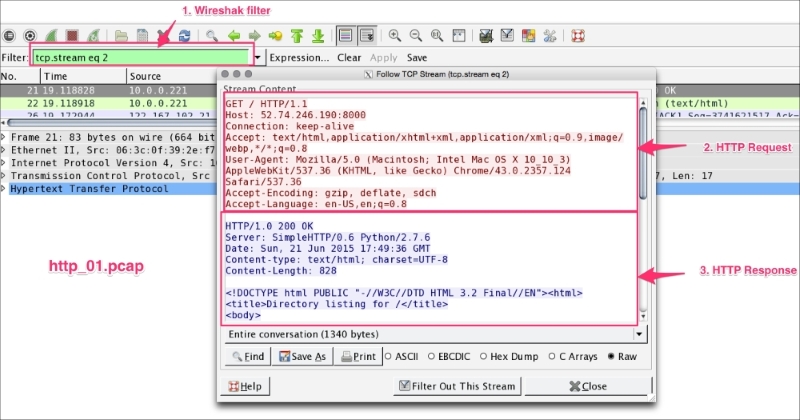
Use http to display HTTP packets only. Use TCP port 80 to filter for HTTP traffic only; port 80 is the default HTTP port.
The following example shows different use cases where Wireshark can help to analyze HTTP packets.
Open the file
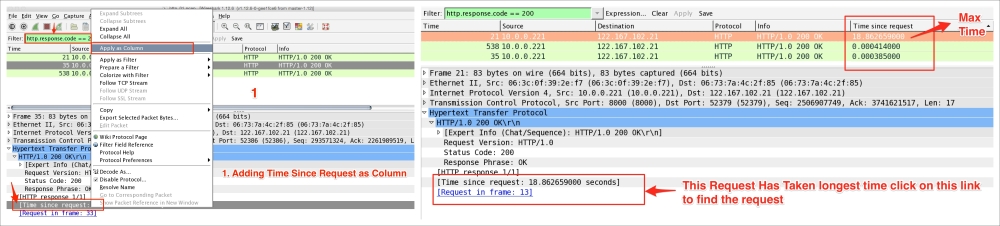
http_01.pcap in the Wireshark, and find the top HTTP response time for the request HTTP get:
- Click on Edit | Preferences | Protocols | TCP, uncheck Allow subdissector to reassemble TCP streams. This will help in knowing how many continuation packets there are to get the actual content and it will help in fine-tuning TCP parameters—for example, setting up the TCP window size to reduce the continuation packet.
- In the Filter bar, apply the
httpfilter and addhttp.timeas a column from thehttp.response.code == 200 HTTP OKpacket. - Click on the Time since request column and make it in descending order. Find the request frame and click on the link.
Use Wireshark's http.request.method to display packets for analysis. For example, the following table describes how to apply this filter:
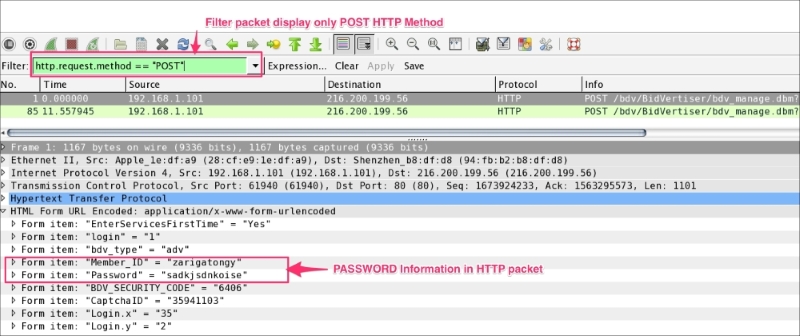
If the form contains sensitive information such as password, Wireshark can easily reveal it as HTTP is an unsecure means of transferring data over the network.
Open the HTTP_FORM_POST.pcap file and filter the traffic to display only the request method POST and locate the password form item, as shown in the following screenshot:
The first line of the HTTP response contains the status code. Use the Wireshark filter http.response.code, to display packets based on the status code. This will be helpful when debugging the HTTP client-server interaction:
|
Type |
Code |
Meaning |
HTTP Wireshark filter |
|---|---|---|---|
|
Informational – 1xx |
100 |
Continue |
|
|
101 |
Switching protocol |
| |
|
Successful – 2xx From: 200 To: 206 |
200 |
OK |
|
|
201 |
Created |
| |
|
Redirection – 3xx From: 300 To: 307 |
300 |
Multiple choices |
|
|
301 |
Moved permanently |
| |
|
Client Error – 4xx From: 400 To: 417 |
400 |
Bad Request |
|
|
401 |
Unauthorized |
| |
|
Server Error – 5xx From—500 To-- 505 |
500 |
Internal Server Error |
|
|
501 |
Not implemented |
|