Table of Contents for
Packet Analysis with Wireshark
 Packet Analysis with Wireshark
Published by
Packt Publishing, 2015
Packet Analysis with Wireshark
Published by
Packt Publishing, 2015
- Cover
- Table of Contents
- Packet Analysis with Wireshark
- Packet Analysis with Wireshark
- Credits
- About the Author
- About the Reviewers
- www.PacktPub.com
- Preface
- What you need for this book
- Who this book is for
- Conventions
- Reader feedback
- Customer support
- 1. Packet Analyzers
- Introducing Wireshark
- Other packet analyzer tools
- Summary
- 2. Capturing Packets
- Troubleshooting
- Wireshark user interface
- Wireshark features
- Tcpdump and snoop
- References
- Summary
- 3. Analyzing the TCP Network
- TCP connection establishment and clearing
- TCP data communication
- TCP close sequence
- Lab exercise
- TCP troubleshooting
- TCP latency issues
- Wireshark TCP sequence analysis
- References
- Summary
- 4. Analyzing SSL/TLS
- The SSL/TLS handshake
- Key exchange
- Decrypting SSL/TLS
- Debugging issues
- Summary
- 5. Analyzing Application Layer Protocols
- BOOTP/DHCP
- DNS
- HTTP
- References
- Summary
- 6. WLAN Capturing
- Analyzing the Wi-Fi networks
- Wi-Fi sniffing products
- Summary
- 7. Security Analysis
- The DOS attack
- Scanning
- ARP duplicate IP detection
- DrDoS
- BitTorrent
- Wireshark protocol hierarchy
- Summary
- Index
DNS stands for Domain Name System. DNS is used by all machines to translate hostnames into IP addresses. This mechanism is used to translate names to attributes such as addresses (IPv4/IPv6) based on the query type.
DNS has three major components:
- A name space
- Servers making that name space available
- Resolvers (clients) that query the servers about the name space
This topic will focus on the resolver perspective, where the client sends a query to the server and the server answers the query. There can be multiple answers to the same query.
Wireshark's dns filter is used to display only DNS traffic, and UDP port 53 is used to capture DNS traffic.
The default DNS port is 53, and it uses the UDP protocol. Some DNS systems use the TCP protocol also. TCP is used when the response data size exceeds 512 bytes, or for tasks such as zone transfers.
The following format is used by the DNS system:
|
Field |
Description |
Length |
Wireshark filter |
|---|---|---|---|
|
NAME |
The owner name |
variable |
|
|
TYPE |
Type of Resource Record (RR) in numeric form |
2 |
|
|
CLASS |
Class code |
2 |
|
|
TTL |
Time to live |
4 | |
|
RDLENGTH |
2 | ||
|
RDATA |
Additional RRspecific data |
Variable |
In this chapter, the dig and nslookup network commands are used to query the DNS server. Open the sample DNS-Packet.pcap file, set the display filter to dns.qry.type==28, and examine the query.
In this example, client (192.168.1.101) is asking the name server (8.8.4.4) to resolve ipv6.google.com by setting these parameters in the query section:
- The client sets the record type AAAA record
- The client sets the hostname (
ipv6.google.com) - Client set the class (that is,
IN (Internet)) - The name server (
8.8.4.4) responds to the client with multiple answers ipv6.google.comis the canonical name that equalsipv6.l.google.comipv6.l.google.comhas the AAAA address2404:6800:4007:805::200e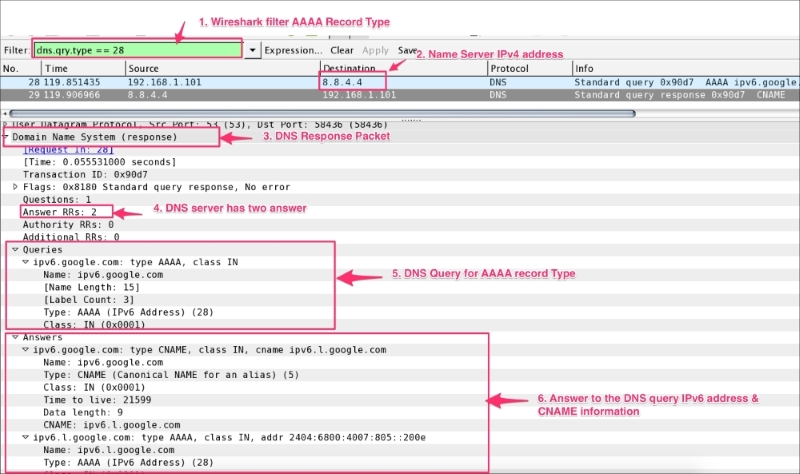
User can use the popular dig or nslookup network utility commands to query different DNS record types. Use a network capture in the background and observe the query and answer section for each command:
- Query a record type used to show the IPv4 address of the given hostname:
bash# nslookup google.com
bash# dig google.com
bash# dig A +noadditional +noquestion +nocomments +nocmd +nostats google.com. @8.8.4.4
- Query the
AXFRrecord type;AXFRis used to transfer zone files from the master to the secondary name server:bash# nslookup -type=axfr google.com 8.8.4.4 bash# dig AXFR +noadditional +noquestion +nocomments +nocmd +nostats +multiline google.com. @8.8.4.4
- Query the
CNAMErecord type.CNAMEis used to set up the alias:bash# nslookup -type=cname google.com 8.8.4.4 bash# dig CNAME +noadditional +noquestion +nocomments +nocmd +nostats google.com. @8.8.4.4
- Query the
MXrecord type;MXis the mail exchange record:bash# nslookup -type=mx google.com 8.8.4.4 bash# dig MX +noadditional +noquestion +nocomments +nocmd +nostats google.com. @8.8.4.4
- Query the
NSrecord type;NSis the name server record:bash# nslookup -type=ns google.com 8.8.4.4 bash# dig NS +noadditional +noquestion +nocomments +nocmd +nostats google.com. @8.8.4.4
- Query the
PTRrecord type;PTRis the pointer used for reverse DNS lookups:bash# nslookup -type=ptr google.com 8.8.4.4 bash# dig PTR +noadditional +noquestion +nocomments +nocmd +nostats google.com. @8.8.4.4
- Query the
SOArecord type.SOAis used to provide authoritative information such as nameserver and e-mail:bash# nslookup -type=soa google.com 8.8.4.4 bash# dig SOA +noadditional +noquestion +nocomments +nocmd +nostats +multiline google.com. @8.8.4.4
- Query the
TXTrecord type; this refers to the text record:bash# nslookup -type=txt google.com 8.8.4.4 bash# dig TXT +noadditional +noquestion +nocomments +nocmd +nostats google.com. @8.8.4.4
- Query
AAAA(also referred to as the quad-A record type); this will display the IPv6 address of the given hostname:bash# nslookup -type=aaaa google.com 8.8.4.4 bash# nslookup -type=aaaa ipv6.google.com 8.8.4.4 bash# dig AAAA +noadditional +noquestion +nocomments +nocmd +nostats ipv6.google.com. @8.8.4.4
- Query the
ANYrecord type; this returns all record types:bash# nslookup -type=any google.com 8.8.4.4 bash# dig ANY +noadditional +noquestion +nocomments +nocmd +nostats google.com. @8.8.4.4