Table of Contents for
Packet Analysis with Wireshark
 Packet Analysis with Wireshark
Published by
Packt Publishing, 2015
Packet Analysis with Wireshark
Published by
Packt Publishing, 2015
- Cover
- Table of Contents
- Packet Analysis with Wireshark
- Packet Analysis with Wireshark
- Credits
- About the Author
- About the Reviewers
- www.PacktPub.com
- Preface
- What you need for this book
- Who this book is for
- Conventions
- Reader feedback
- Customer support
- 1. Packet Analyzers
- Introducing Wireshark
- Other packet analyzer tools
- Summary
- 2. Capturing Packets
- Troubleshooting
- Wireshark user interface
- Wireshark features
- Tcpdump and snoop
- References
- Summary
- 3. Analyzing the TCP Network
- TCP connection establishment and clearing
- TCP data communication
- TCP close sequence
- Lab exercise
- TCP troubleshooting
- TCP latency issues
- Wireshark TCP sequence analysis
- References
- Summary
- 4. Analyzing SSL/TLS
- The SSL/TLS handshake
- Key exchange
- Decrypting SSL/TLS
- Debugging issues
- Summary
- 5. Analyzing Application Layer Protocols
- BOOTP/DHCP
- DNS
- HTTP
- References
- Summary
- 6. WLAN Capturing
- Analyzing the Wi-Fi networks
- Wi-Fi sniffing products
- Summary
- 7. Security Analysis
- The DOS attack
- Scanning
- ARP duplicate IP detection
- DrDoS
- BitTorrent
- Wireshark protocol hierarchy
- Summary
- Index
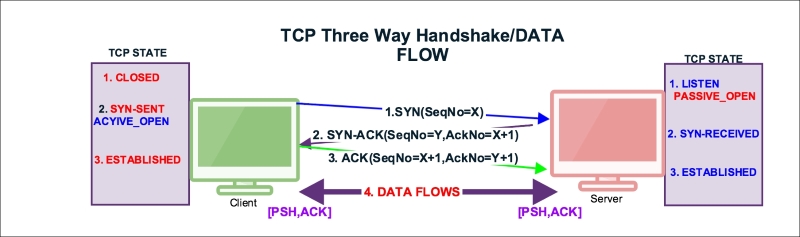
Once the three-way connection is established, the data is communicated by exchanging the segments and the PUSH flag is set to indicate that the data flows on a connection as a stream of octets, as shown in the following figure:
Select packet#4 from the normal-connection.pcap file as shown in the following screenshot; expand the TCP section in the Packet Details pane:
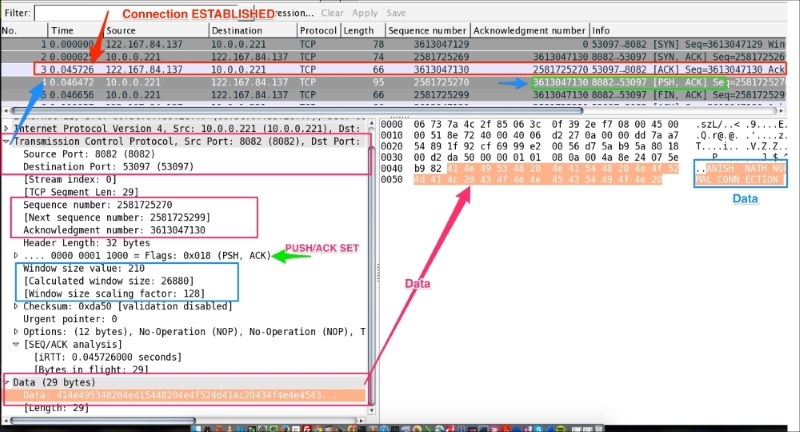
As you can see in the preceding screenshot:
- The server is sending data to the client as shown in the packet.
- The server sets
tcp.flags.push = 1. - The server sets
tcp.flags.ack =1. - The server data is (29 bytes) and the data value is:
414e495348204e415448204e4f524d414c20434f4e4e4543.... - The server sets
(tcp.flags.ack == 1) && (tcp.flags.push == 1); that is, the[PSH,ACK]flag indicates that the host is acknowledging receipt of some previous data and also transmitting some more data.
The useful Wireshark display filters are:
data: Displays the packet that contains the data information, for all IPs:
data && ip.addr==10.0.0.221: Displays a list of packets that have data and are exchanged with the given IP addresstcp.flags.push == 1: Displays allPUSHpacketstcp.flags.push == 1 && ip.addr==10.0.0.221: DisplaysPUSHpackets between hoststcp.flags == 0x0018: Display allPSH, ACKpacketstcp.flags == 0x0011: Displays allFIN, ACKpacketstcp.flags == 0x0010: Displays allACKpackets