Table of Contents for
Packet Analysis with Wireshark
 Packet Analysis with Wireshark
Published by
Packt Publishing, 2015
Packet Analysis with Wireshark
Published by
Packt Publishing, 2015
- Cover
- Table of Contents
- Packet Analysis with Wireshark
- Packet Analysis with Wireshark
- Credits
- About the Author
- About the Reviewers
- www.PacktPub.com
- Preface
- What you need for this book
- Who this book is for
- Conventions
- Reader feedback
- Customer support
- 1. Packet Analyzers
- Introducing Wireshark
- Other packet analyzer tools
- Summary
- 2. Capturing Packets
- Troubleshooting
- Wireshark user interface
- Wireshark features
- Tcpdump and snoop
- References
- Summary
- 3. Analyzing the TCP Network
- TCP connection establishment and clearing
- TCP data communication
- TCP close sequence
- Lab exercise
- TCP troubleshooting
- TCP latency issues
- Wireshark TCP sequence analysis
- References
- Summary
- 4. Analyzing SSL/TLS
- The SSL/TLS handshake
- Key exchange
- Decrypting SSL/TLS
- Debugging issues
- Summary
- 5. Analyzing Application Layer Protocols
- BOOTP/DHCP
- DNS
- HTTP
- References
- Summary
- 6. WLAN Capturing
- Analyzing the Wi-Fi networks
- Wi-Fi sniffing products
- Summary
- 7. Security Analysis
- The DOS attack
- Scanning
- ARP duplicate IP detection
- DrDoS
- BitTorrent
- Wireshark protocol hierarchy
- Summary
- Index
In this section we will learn about different network problems that occur and try to analyze and solve them with lab exercises. Let's start with the Reset (RST) packet.
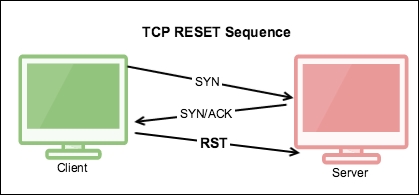
The TCP RST flag resets the connection. It indicates that the receiver should delete the connection. The receiver deletes the connection based on the sequence number and header information. If a connection doesn't exist on the receiver RST is set, and it can come at any time during the TCP connection lifecycle due to abnormal behavior. Let's take one example: a RST packet is sent after receiving SYN/ACK, as shown in the next image.
In this example we will see why RST has been set after SYN-ACK instead of ACK:
Open the RST-01.pcap file in the Wireshark:
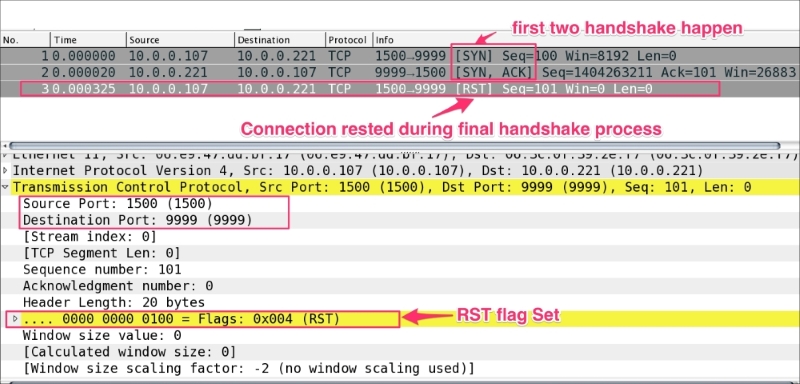
As you can see in the preceding figure:
- The TCP
RSTpacket should not be seen normally - The TCP
RSTis set after the first two handshakes are complete. A possible explanation could be one of the following:- The client connection never existed; a RAW packet was send over the TCP server
- The client aborted its connection
- The sequence number got changed/forged
This is the most common use case. Open the RST-02-ServerSocket-CLOSED.pcap file in Wireshark. In this example the server was not started, the client attempted to make a connection, and the connection refused an RST packet:
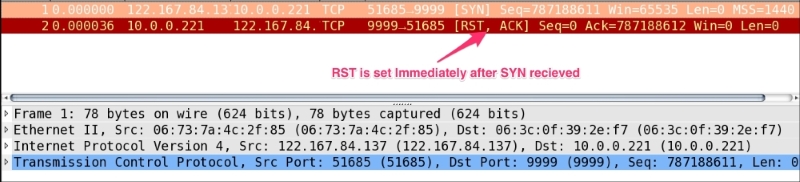
The steps to generate the RST flag in a generic scenario, when the server is not in the listening state, are as follows:
- Open Wireshark, start capturing the packets, and choose display filter
tcp.port==8082. - Compile the client program
Client0301.java:bash$ ~ javac Client0301.java - Run the client program:
bash$ ~ java Client0301 - View and analyze the
RSTpacket in Wireshark.
Often a connection is stuck in the CLOSE_WAIT state. This scenario typically occurs when the receiver is waiting for a connection termination request from the peer.
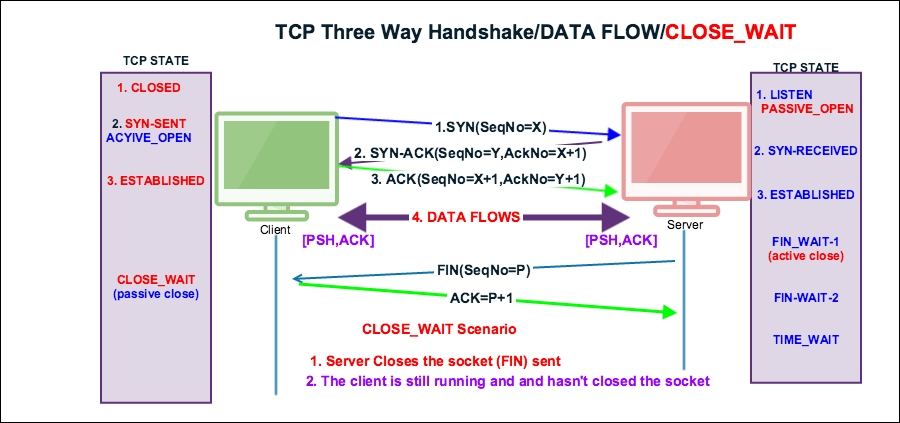
To demonstrate the
CLOSE_WAIT state, open the close_wait.pcap file in Wireshark:
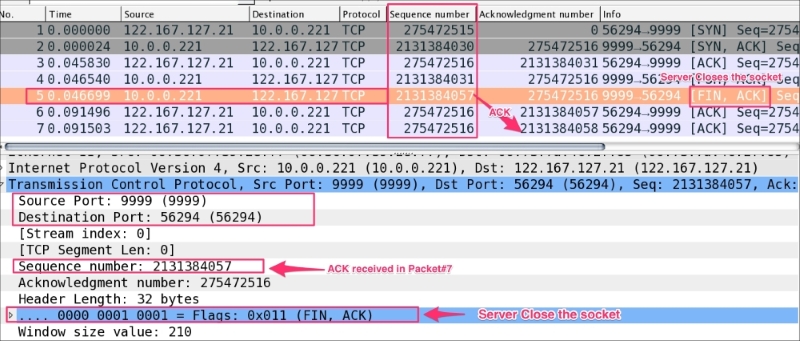
As you can see in the preceding screenshot:
- The server closed socket packet#5, set
tcp.flags.fin == 1, and settcp.seq == 2131384057. - The client responded with the
ACKpackettcp.ack == 2131384058in packet#7 and didn't close its socket, which remains in theCLOSE_WAITstate.
CLOSE_WAIT means there is something wrong with the application code, and in the high-traffic environment if CLOSE_WAIT keeps increasing, it can make your application process slow and can crash it.
The steps to reproduce CLOSE_WAIT are as follows:
- Open Wireshark, start capturing the packets, and choose display filter
tcp.port==9999. - Compile the Java programs
Server0302.javaandClient0302.javausing thejavaccommand:bash$ ~ javac Server0302.java Client0302.java - Run
Server0302using thejavacommand:bash$ ~ java TCPServer01 - Verify the server is listening on port
9999:bash $ netstat -an | grep 999 tcp46 0 0 *.9999 *.* LISTEN
- Run the client program:
bash$ ~ java Client0302 - Check the state of the TCP socket; it will be in the
CLOSE_WAITstate:bash $ netstat -an | grep CLOSE_WAIT tcp4 0 0 127.0.0.1.56960 127.0.0.1.9999 CLOSE_WAIT
- Analyze the packet in Wireshark.
- To remove
CLOSE_WAIT, a restart is required for the process. - Establishing the
FINpacket from both the client and server is required to solve theCLOSE_WAITproblem. Close the client socket and server socket when done with processing the record:socket.close(); à Initiates the FIN flow - Open the
Client0302.javafile and close the socket:Socket socket = new Socket(InetAddress.getByName("localhost"), 9999); … socket.close(); … Thread.sleep(Integer.MAX_VALUE);
- Compile and re-run the Java program.
CLOSE_WAITwill not be visible.
The main purpose of the
TIME_WAIT state is to close a connection gracefully, when one of ends sits in LAST_ACK or CLOSING retransmitting FIN and one or more of our ACK are lost.
RFC 1122: "When a connection is closed actively, it MUST linger in TIME-WAIT state for a time 2xMSL (Maximum Segment Lifetime). However, it MAY accept a new SYN from the remote TCP to reopen the connection directly from TIME-WAIT state, if..."
We ignore the conditions because we are in the TIME_WAIT state anyway.