Table of Contents for
Windows Malware Analysis Essentials
 Windows Malware Analysis Essentials
Published by
Packt Publishing, 2015
Windows Malware Analysis Essentials
Published by
Packt Publishing, 2015
- Cover
- Table of Contents
- Windows Malware Analysis Essentials
- Windows Malware Analysis Essentials
- Credits
- About the Author
- Acknowledgments
- About the Reviewer
- www.PacktPub.com
- Preface
- What you need for this book
- Who this book is for
- Conventions
- Reader feedback
- Customer support
- 1. Down the Rabbit Hole
- Signed numbers and complements
- Boolean logic and bit masks
- Breathing in the ephemeral realm
- Sharpening the scalpel
- Performing binary reconnaissance
- Exploring the universe of binaries on PE Explorer
- Getting to know IDA Pro
- Entropy
- Summary
- 2. Dancing with the Dead
- Registers
- The initiation ritual
- Preparing the alter
- Code constructs in x86 disassembly
- Summary
- 3. Performing a Séance Session
- Debriefing – seeing the forest for the trees
- Preparing for D-Day – lab setup
- Whippin' out your arsenal
- Summoning the demon!
- Post infection
- Exorcism and the aftermath – debrief finale!
- Summary
- 4. Traversing Across Parallel Dimensions
- Alice in kernel land – kernel debugging with IDA Pro, Virtual KD, and VMware
- Summary
- 5. Good versus Evil – Ogre Wars
- Encoding/decoding – XOR Deobfuscation
- Malicious Web Script Analysis
- Byte code decompilers
- Document analysis
- Redline – malware memory forensics
- Malware intelligence
- Summary
- Index
In this chapter, we will cover the following topics:
- Linux configuration for network traffic analysis
- Xor DeObfuscation
- Malicious web script analysis
- Bytecode decompilers
- Document analysis
- Redline-Malware memory forensics
- Malware intelligence
The battle never ends, and fighting malware is like trying to kill a multi-headed Hydra. The tools are dual-natured and both offense and defence keep progressing, and the methods keep getting innovated. Also, few features keep recurring:
- Regression: Repeating an old attack to the uninitiated or unprepared is like catching the enemy unawares, and hence is an effective technique.
- Redundancy: As in the case of using NOP sleds in shellcode is like buying insurance and ensures that the probability of success is increased manifold.
- Mutation: Polymorphism is the most effective and widespread technique as of now. If you can't see it, you can't find it. Even being diverse and distributed is a form of mutation, as the threat landscape is dynamic and the key actors are difficult to pinpoint. It is both everywhere and nowhere.
- Deception: If you look at this method, in essence, it is older than humankind: from the proverbial bite of an apple to the most recent spear phishing attacks via email and infected PDF files. The overall method is as classic and effective as can be. The primary effects that the malicious agents make use of are analogous to timeless Evil - remaining undetected, spreading decelerated or expedited destruction, creating confusion, and making use of weaknesses in the target system either as vulnerabilities or targeted exploits. Earlier, it was a sport or a hobby, but it has now transformed into organized crime. It is in your best interest to be aware of other miscellaneous techniques that can aid you in your fight against ill-intentioned software.
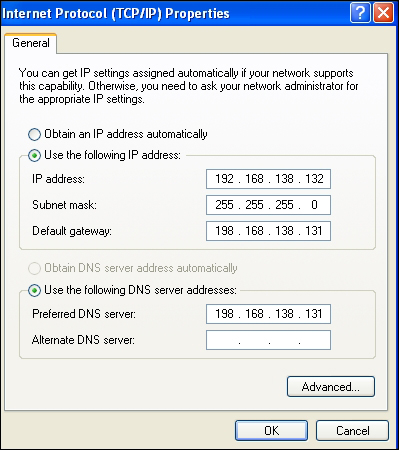
A Linux box running on VMWare can be used for network capture and as a DNS server or a simulated internet. To achieve this, we can use the host-only networking mode set on all the participating guests with a Windows XP SP2 guest and a *nix guest to a bare minimum. You set it to Vmnet1 (host only) default network and the VMware DHCP service assigns IP addresses to each of them. You ping the Linux guest from the Windows guest to confirm that you are connected. Then disable the Windows firewall and try to ping the Windows guest from Linux. Since you will be using the Windows XP guest as the analysis OS and Linux for network analysis mainly, you will have to set the default gateway parameter as well as the preferred DNS server manually in the Windows guest to the IP address of the Linux guest. The IP addresses can be different on your setup. Now, all the traffic will be routed to the Linux box where you can run Wireshark and study the packet captures.
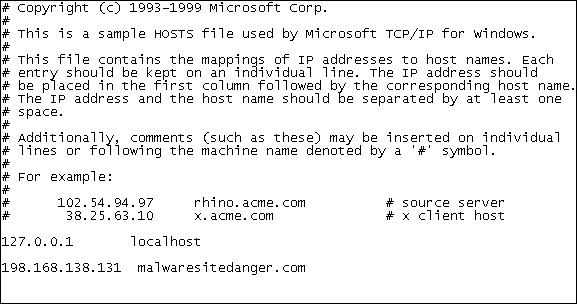
Many times, you will extract the host names used by the malware from the sample and you will want to simulate a real connection to further analyze the malware in a more authentic manner. In Windows, spoofing the DNS queries can be done in various ways, with the simplest one being the use of the hosts file in the Windows XP directory (Windows/system32/drivers/etc/hosts). You can edit the file and make a list of the host names that map to your specified IP address, which you will put as the IP address of the Linux guest. While saving the file, remember to check that the notepad did not add the .txt extension to the host file, which has no extension.
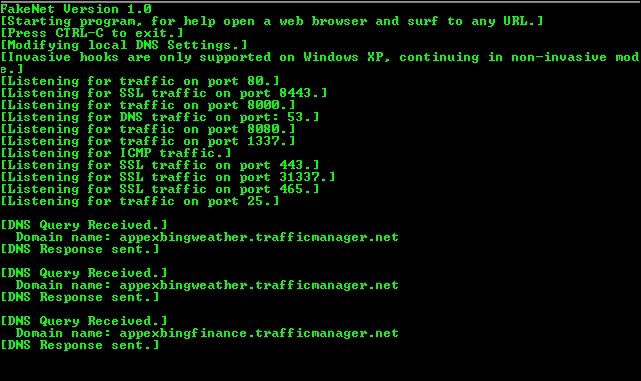
FakeNet, which we briefly mentioned in Chapter 3, Performing a Séance Session, is another excellent tool for simulating a DNS and HTTP (and SSL) server and capturing all responses and requests to a specific IP address. The HTTP server also simulates the files returned when requested; for instance, the .JPG files. The file returned is user configurable. Explore the FakeNet.cfg config file for a host of other options. FakeNet runs on Windows as a portable installation and negates the need to have a separate Linux guest for network analysis. However, for a more elaborate arrangement, you should know what your options are.
For simpler server simulation and data capture, you can use NetCat, setting the port to listen to as:
nc –l –p 80
InetSim is another Linux tool which can be used for malware analysis. It simulates a host of services such as IRC, HTTP, DNS, and so on to try to fully emulate the internet.