Table of Contents for
Defensive Security Handbook, 1st Edition
 Defensive Security Handbook, 1st Edition
Published by
O'Reilly Media, Inc., 2017
Defensive Security Handbook, 1st Edition
Published by
O'Reilly Media, Inc., 2017
- nav
- Cover
- Defensive Security Handbook
- Defensive Security Handbook
- Foreword
- Introduction
- 1. Creating a Security Program
- 2. Asset Management and Documentation
- 3. Policies
- 4. Standards and Procedures
- 5. User Education
- 6. Incident Response
- 7. Disaster Recovery
- 8. Industry Compliance Standards and Frameworks
- 9. Physical Security
- 10. Microsoft Windows Infrastructure
- 11. Unix Application Servers
- 12. Endpoints
- 13. Password Management and Multifactor Authentication
- 14. Network Infrastructure
- 15. Segmentation
- 16. Vulnerability Management
- 17. Development
- 18. Purple Teaming
- 19. IDS and IPS
- 20. Logging and Monitoring
- 21. The Extra Mile
- A. User Education Templates
- Index
- About the Authors
- Colophon
Chapter 15. Segmentation
Segmentation is the process of compartmentalizing a network into smaller zones. This can take many forms, including physical, logical, networking, endpoints, and more. In this chapter we will cover several verticals and walk through segmentation practices and designs to help aid in the overall environment design. Unfortunately, many environments have little design in place and can be extremely flat. A flat network contains little-to-no segmentation at any level.
Network Segmentation
Both network segmentation and design are comprised of physical and logical elements. Any physical aspects are going to either require the use of equipment already in the environment or additional capital for purchasing new devices (or both). Logical segmentation will require sufficient knowledge of your specific network, routing, and design. Both take many design elements into consideration.
Physical
Network segmentation should start, when possible, with physical devices such as firewalls and routers. Effectively, this turns the network into more manageable zones, which when designed properly can add a layer of protection against network intrusion, insider threats, and the propagation of malicious software or activities. Placing a firewall at any ingress/egress point of the network will offer the control and visibility into the flowing traffic. However, it isn’t acceptable to just place the firewall in line with no ruleset or protection in place and assume that it will enhance security.
Within this visibility, several advantages are obtained:
-
The ability to monitor the traffic easily with a packet capture software or continuous netflow appliance.
-
Greater troubleshooting capability for network-related issues.
-
Less broadcast traffic over the network.
As well as adding a physical device to ingress/egress points of the network, strategically placing additional devices among the environment can greatly increase the success of segmentation. Other areas that would benefit exist between the main production network and any of the following:
- Development or test network
-
There may be untested or nonstandard devices or code that will be connected to this network. Segmenting new devices from the production network should not only be a requirement stated in policy, but also managed with technical controls. A physical device between such a large amount of unknown variables creates a much needed barrier.
- Network containing sensitive data (especially PII)
-
Segmentation is required in a majority of regulatory standards for good reason.
- Demilitarized zone (DMZ)
-
The DMZ is the section of servers and devices between the production network and the internet or another larger untrusted network. This section of devices will likely be under greater risk of compromise as it is closest to the internet. An example of a device in this zone would be the public web server, but not the database backend that it connects to.
- Guest network access
-
If customers or guests are permitted to bring and connect their own equipment to an open or complimentary network, firewall placement segments corporate assets from the unknown assets of others. Networks such as this can be “air-gapped” as well, meaning that no equipment, intranet, or internet connection is shared.
Logical
Logical network segmentation can be successfully accomplished with Virtual LANs (VLANs), Access Control Lists (ACLs), Network Access Controls (NACs), and a variety of other technologies. When designing and implementing controls, you should adhere to the following designs:
- Least privilege
-
Yes, this is a recurring theme. Least privilege should be included in the design at every layer as a top priority, and it fits well with the idea of segmentation. If a third-party vendor needs access, ensure that her access is restricted to the devices that are required.
- Multi-layered
-
We’ve already covered the physical segmentation, but data can be segmented at the data, application, and other layers as well. A web proxy is a good example of application layer segmentation.
- Organization
-
The firewall, switch, proxy, and other devices, as well as the rules and configuration within those devices, should be well organized with common naming conventions. Having organized configurations also makes it easier to troubleshoot, set additional configurations, and remove them.
- Default deny/whitelisting
-
The design and end goal for any type of firewall (application, network, etc.) should be to deny everything, followed by the rest of the rules and configurations specifically allowing what is known to be legitimate activity and traffic. The more specific the rules are, the more likely that only acceptable communications are permitted. When implementing a firewall in post-production, it would be best to begin with a default allow while monitoring all traffic and specifically allowing certain traffic on a granular basis until the final “deny all” can be achieved at the end.
- Endpoint-to-endpoint communication
-
While it’s convenient for machines to talk directly to each other, the less they are capable of doing so the better. Using host-based firewalls gives the opportunity to lock down the specific destinations and ports that endpoints are permitted to communicate over.
- Egress traffic
-
All devices do not need access to the internet, specifically servers! Software can be installed from a local repository, and updates are applied from a local piece of software. Blocking internet access when it is not required will save a lot of headache.
- Adhere to regulatory standards
-
Specific regulatory standards such as PCI DSS and HIPAA briefly mention segmentation in several sections and should be kept in mind during the design. Regulatory compliance is covered more in depth in Chapter 8.
- Customize
-
Every network is different and the design of yours should take that into consideration. Identifying the location of varying levels of sensitive information should be a main agenda contributing to your design. Define different zones and customize based on where the sensitive information resides.
VLANs
A virtual area network (VLAN) allows geographically distributed, network-connected devices to appear to be on the same LAN using encrypted tunneling protocols.
The main security justification for using VLANs is the inherent security to the network by delivering the frames only within the destined VLANs when sending broadcasts. This makes it much harder to sniff the traffic across the switch, as it will require an attacker to target a specific port, as opposed to capturing them all. Furthermore, when utilizing VLANs it is possible to make the division according to a security policy or ACL and offer sensitive data only to users on a given VLAN without exposing the information to the entire network. Other positive attributes of VLAN implementation include the following:
- Flexibility
-
Networks are independent from the physical location of the devices.
- Performance
-
Specific traffic such VoIP in a VLAN and the transmission into this VLAN can be prioritized. There will also be a decrease in broadcast traffic.
- Cost
-
Supplementing the network by using a combination of VLANs and routers can decrease overall expenditures.
- Management
-
VLAN configuration changes only need to be made in one location as opposed to on each device.
Note
VLAN segmentation should not solely be relied on, as it has been proven that it is possible to traverse multiple VLANs by crafting specially crafted frames in a default Cisco configuration.
There are a few different methodologies that can be followed when customizing the approach to VLAN planning. One common method is to separate endpoints into risk categories. When assigning VLANs based on risk level, the data that traverses it will need to be categorized. The lower-risk category would include desktops, laptops, and printers; the medium-risk category would include print and file servers; and the high-risk category would include domain controllers and PII servers. Alternatively, VLAN design can be based on endpoint roles. All separate VLANs would be created for desktops, laptops, printers, database servers, file servers, APs, and so on. In a larger environment, this method tends to make more sense and create a less complicated network design.
Note
Remember, just because all of these VLANs are currently present and configured, doesn’t mean they need to show up at every site. VLAN pruning can be configured to only allow certain ones to cross physical devices.
ACLs
A network access control list (ACL) is a filter which can be applied to restrict traffic between subnets or IP addresses. ACLs are often applied by equipment other than firewalls, often network routers.
Expensive firewalls cannot always be installed between segments; for the most part it is just not necessary. All data entering and leaving a segment of a network should be controlled. ACLs are applied to the network to limit as much traffic as possible. Creating exact matches of source and destination host, network addresses, and port rather than using the generic keyword “any” in access lists will ensure that it is known exactly what traffic is traversing the device. Have an explicit deny statement at the end of the policy to ensure the logging of all dropped packets. Increased granularity increases security and also makes it easier to troubleshoot any malicious behavior.
NACs
“Network access control (NAC) is an approach to network management and security that enforces security policy, compliance and management of access control to a network.”1
NAC uses the 802.1X protocol, which is part of the IEEE 802.1 group of protocol specifications. One of the key benefits of 802.1X is that it provides authentication at the port level, so devices are not connected to the network until authenticated. This differs from more traditional approaches, such as domain logon, whereby a host is on the network with an IP address and is capable of making connections before the authentication process begins.
NACs are amazing when implemented correctly and have solid processes surrounding their use. They make us particularly happy as they combine asset management with network security. The captive portals that pop up after you’ve connected to the wireless signal at a hotel or airport are usually run by a NAC. They can separate unknown and known devices onto their own VLANs or networks depending on a variety of categories.
NACs are implemented for a variety of reasons. Here is a list of some common reasons and examples:
-
Guest captive portal: Mr. Oscaron walks into your lobby and needs to use your guest connection. After agreeing to your EULA, he is switched from the unroutable internal network to a guest access VLAN that only has access to the internet on port 80 or 443 and is using DNS filtering. This enables him to access needed resources without the ability to easily perform any malicious activity.
-
Initial equipment connection: Installing new equipment from a third-party vendor has its inherent risks. For example, Mr. Wolf from your third-party vendor Moon Ent is required to plug in a PC as a part of a new equipment purchase and installation. This device happens to be running a very old version of Java and has malware that the vendor isn’t aware of. The NAC enables you to give this new PC access to a sectioned-off portion of the network for full vulnerability and antivirus scanning prior to addition to a production network.
-
Boardrooms and conference rooms: While you do want to turn off all unused ports by default, doing so in a conference room can be difficult due to the variety of devices that may require connection. For example, all 20 Chris’s from the company are showing up for a meeting with a vendor for a presentation. The NAC offers the ability for the vendor to be on a separate network with access to a test environment, but only after a full antivirus scan and check against outdated vulnerable software. Most have automated detection and restriction of non-compliant devices, based on a configured policy set.
-
Bring your own device (BYOD) policies: Now that we are in an age where most people have one or more devices capable of wireless with them, BYOD is something that many organizations struggle to implement securely. A NAC can be used in conjunction with the data stored within an asset management tool to explicitly deny devices that are foreign to the network.
VPNs
A virtual private network (VPN) is a secure channel specifically created to send data over a public or less secure network utilizing a method of encryption. VPNs can be utilized to segment sensitive data from an untrusted network, usually the internet.
Note
This section will assume the reader has a general understanding of how VPNs work and focus more on baseline security practices surrounding them.
Many devices will allow an insecure VPN configuration. Following these guidelines will ensure a secure setup:
-
Use the strongest possible authentication method
-
Use the strongest possible encryption method
-
Limit VPN access to those with a valid business reason, and only when necessary
-
Provide access to selected files through intranets or extranets rather than VPNs
Two main types of VPN configuration are used in enterprise environments: IPsec and SSL/TLS. Each has its advantages and security implications to take into consideration.
Here are the advantages of an IPSec VPN:
-
It is an established and field-tested technology commonly in use.
-
IPSec VPN is a client-based VPN technology that can be configured to connect to only sites and devices that can prove their integrity. This gives administrators the knowledge that the devices connecting to the network can be trusted.
-
IPSec VPNs are the preferred choice of companies for establishing site-to-site VPN.
-
IPSec supports multiple methods of authentication and also demonstrates flexibility on choosing the appropriate authentication mechanism, thereby making it difficult for intruders to perform attacks like man-in-the-middle, etc.
Security considerations of an IPSec VPN:
-
They can be configured to give full access to all intranet resources to remote users. While users feel as if they are at the office, a misconfigured connection can also open the door to a large amount of risk. Steps should be taken to ensure that users only have access to what they need.
-
Depending on the remote network (if traveling to customers/clients/etc.), it may be impossible to use an IPSec VPN due to firewall restrictions at the site you are connected to.
-
SSL/TLS VPNs allow for host integrity checking (the process of assessing connecting devices against a preset security policy, such as the latest OS version or OS patch status, if the antivirus definitions are up-to-date, etc.) and remediation. This addresses the first security consideration in the following list; however, it has to be enabled to effectively assess endpoints.
-
They can provide granular network access controls for each user or group of users to limit remote user access to certain designated resources or applications in the corporate network.
-
They supports multiple methods of user authentication and also integration with centralized authentication mechanisms like Radius/LDAP, Active Directory, etc.
-
They allow the configuration of secure customized web portals for vendors or other restricted users to provide restricted access to certain applications only.
-
They have exhaustive auditing capabilities, which is crucial for regulatory compliance.
Security considerations of a SSL/TLS VPN:
-
SSL/TLS VPNs support browser-based access. This allows corporate resources to be accessed by users from any computer with internet access after proper authentication. This opens the potential for attack or transmittal of a virus or malware from a public device to the corporate network.
-
They open the possibility for data theft. As they are browser-based, information can be left in the browser’s cache, cookies, history, or saved password settings. There is also a higher possibility of keyloggers being present on noncorporate devices.
-
There have been known man-in-the-middle attacks to the SSL protocol.
-
Split-tunneling, or the ability to access both corporate and local networks simultaneously, creates another entry point for security vulnerabilities. If the proper security measures are not in place, the opportunity is available to compromise the computer from the internet and gain access to the internal network through the VPN tunnel. Many organizations do not allow split-tunneling for this reason.
Physical and Logical Network Example
In Figure 15-1, the majority of the designs previously discussed have been implemented. Although there is a very small chance that this could be a live working environment, the basics have been covered. Live environments should be inherently more complex, with hundreds or sometimes thousands of firewall rules.
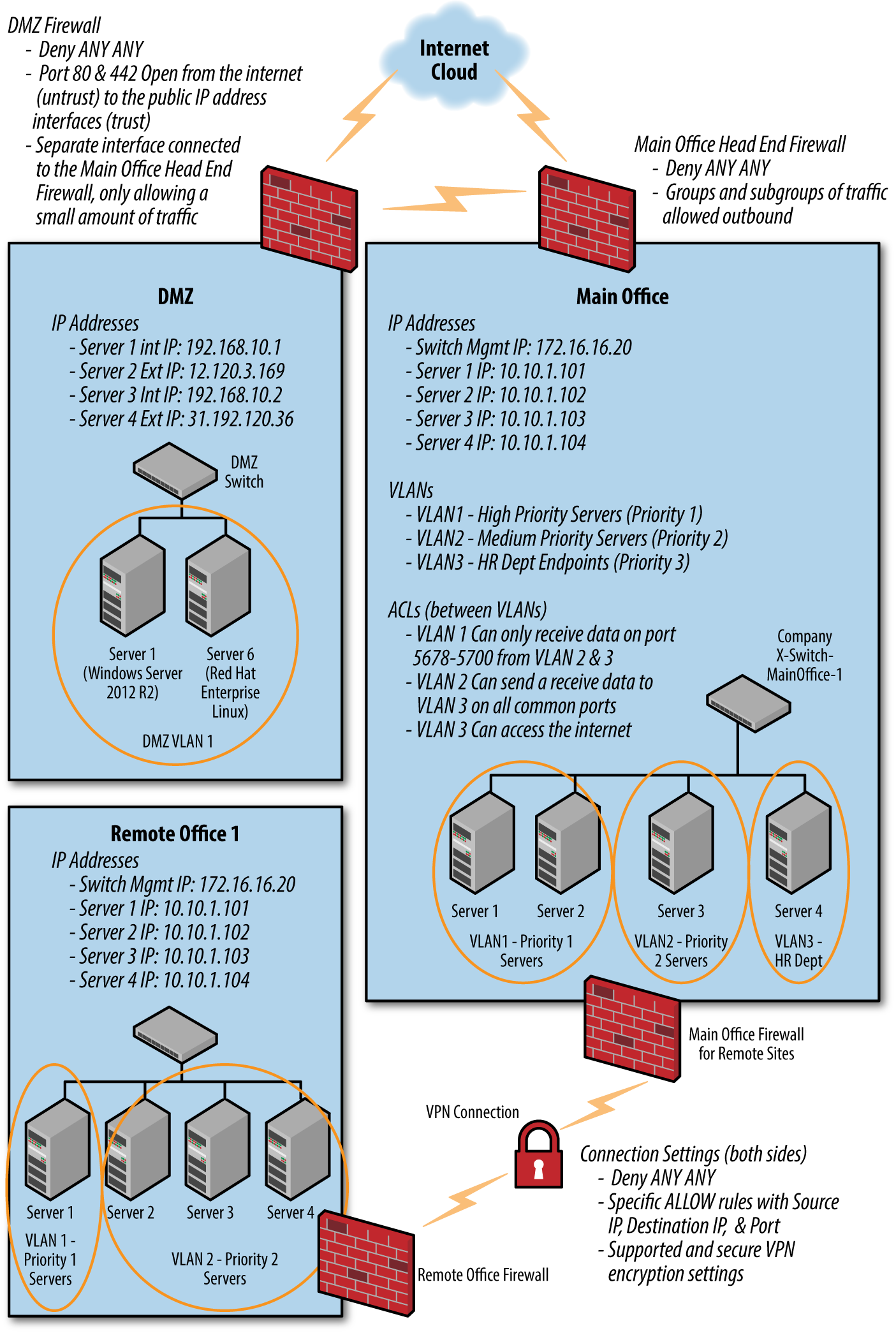
Figure 15-1. Physical and logical network example
Software-Defined Networking
While SDNs are neither a cheap nor easy solution for segmentation, we still feel that they deserve a short explanation. As technology advances and we start to drift away from needing a hardware solution for everything, the concept of “micro-segmentation,” where traffic between any two endpoints can be analyzed and filtered based on a set policy, is becoming a reality. SDNs can be looked at like the virtual machines of networking. In a software-defined network, a network administrator can shape traffic from a centralized control console without having to touch individual switches, and deliver services to wherever they are needed in the network, without regard to what specific devices a server or other device is connected to. The key technologies are functional separation, network virtualization, and automation through programmability. However, software-defined network technologies can carry their own security weaknesses.2
Application
Many applications, as perceived by the end user, have multiple application components that are linked together in order to provide a single experience to the end user. The easiest example of this is a simple web application—an application that is consumed by the user in the form of a browser-based interface delivered over HTTPS. In reality, such an application is not a singular chunk of code executing in isolation, rather in the most basic form there will be a web server such as Nginx or Apache to handle HTTPS requests and serve static content, which in turn uses a scripting language such as Python, Ruby, or PHP to process requests that generate dynamic content. The dynamic content may well be generated from some user data stored in a database such as MySQL or Postgresql. Of course, a larger application may be more complex than this with load balancers, reverse proxies, SSL accelerators, and so on. The point is that even a simple setup will have multiple components.
The temptation, particularly from a cost perspective, may be to run something like a LAMP (Linux, Apache, MySQL, and PHP) stack all on one host. Perceived complexity is low because everything is self-contained and can talk on localhost with no obstruction, and costs are low because only one host is needed. Putting aside discussions as to the performance, scalability, and ease of maintenance of this type of solution, security does not benefit from such a setup. Let’s examine another example.
Let’s say that we have an application that uses the LAMP stack, and that the application allows your customers to log in and update their postal address for the purposes of shipping products to them. If there is a flaw in one of the PHP scripts, which, for example, allows an attacker to gain control of the web server, then it is quite possible that the entire application would be compromised. They would, on the same disk, have the raw files that contain the database, the certificate files used to create the HTTPS connections, and all the PHP code and configuration.
If the application components were separated onto different hosts, a compromise of the web server would of course yield some value for an attacker. However, keep these in mind:
-
There would be no access to raw database files. To obtain data from the database, even from a fully compromised host, they would need to execute queries over the network as opposed to just copying the database files. Databases can be configured to only return a set maximum number of responses; similarly, they would be restricted only to records that the PHP credentials could access. Raw access to files could have provided access to other data stored there also.
-
SSL keys would not be accessible as they would most likely be stored on a load balancer, SSL acceleration device, or reverse proxy sitting between the web server and the internet.
These are some significant gains in the event of a compromise, even in a very simple application. Now consider some of the applications that you access, perhaps those that hold sensitive data such as financial information or medical records, and the regulatory requirements surrounding the storage and transmission of such data. You should see that segregating application components is a necessary aspect for application security.
Roles and Responsibilities
Segmenting roles and responsibilities should occur at many levels in many different ways in regard to users and devices. You are encouraged to design this segmentation with what works best for you and your environment. However, no individual should have excessive system access that enables him to execute actions across an entire environment without checks and balances.
Many regulations demand segregation of duties. Developers shouldn’t have direct access to the production systems touching corporate financial data, and users who can approve a transaction shouldn’t be given access to the accounts payable application. A sound approach to this problem is to continually refine role-based access controls. For example, the “sales executive” role can approve transactions but never access the accounts payable application; no one can access the developer environment except developers and their direct managers; and only application managers can touch production systems.
Whenever possible, development and productions systems should be fully segregated. At times a code review group or board can be of use to determine if development code is production ready. Depending on the footprint size of the organization, the same developers working on code in the development environment may also be the ones implementing it into production. In this case, ensure the proper technical controls are in place to separate the environments without hindering the ability of the end result. The developer shouldn’t have to rewrite every bit of code each time it is pushed to production, but it shouldn’t be an all-access pass either.
Ensure that environment backups, backup locations, and the ability to create backups are not overlooked. Obtaining a physical copy of backup media can prove to be an extremely valuable cache of information in the hands of someone malicious. Approved backup operators should be identified in writing with the appropriate procedures.
While the security or technology department may be the groups involved with creating structured access groups, they are not always the ones who should be making the decisions, at least not alone. This should be a group effort comprised of information stakeholders and management.
Not only should system access be of concern, but permission levels locally and domain-wide should also be taken into account. Much of this has been covered in Chapters 10 and 11 in regard to Windows and Linux user security. Some others include:
-
Generic administrative accounts should be disabled and an alerted on if they are used.
-
Database administrators are the hardest position to control. DBAs should only have DBA authority, not root or administrator access.
-
Administrators and DBAs should have two accounts for separate use: one with elevated rights and one with normal user rights. The normal account is used to perform everyday functions such as checking email, while the account with elevated rights is only used for administrator-type activity. Even going as far as having a separate endpoint for administrative activities would be a fantastic idea as the PCs can then be monitored closely as well as the user accounts.
It is also in your best interest to separate server roles. As mentioned before, having an SQL database on the same server as an application leads to a much likelier successful attack. Some smaller applications can share servers when the risk associated has been determined to be acceptable. There are some server roles that should always remain isolated such as AD Domain Controllers, Mail Servers, and PII Servers.
Conclusion
Segmentation can span almost every aspect of an information security program, from physical to logical and administrative to documentation. With each design decision, sit back and look at the details. Should or can the design be more segmented? What benefits or hurdles would the segmentation create for users or attackers? There is always going to be a balance between a certain level of security and usability.
1 Techopedia, “What is Network Access Control?”
2 Avi Chesla, “Software Defined Networking - A New Network Weakness?”, Security Week, accessed March 7, 2017.