Table of Contents for
Defensive Security Handbook, 1st Edition
 Defensive Security Handbook, 1st Edition
Published by
O'Reilly Media, Inc., 2017
Defensive Security Handbook, 1st Edition
Published by
O'Reilly Media, Inc., 2017
- nav
- Cover
- Defensive Security Handbook
- Defensive Security Handbook
- Foreword
- Introduction
- 1. Creating a Security Program
- 2. Asset Management and Documentation
- 3. Policies
- 4. Standards and Procedures
- 5. User Education
- 6. Incident Response
- 7. Disaster Recovery
- 8. Industry Compliance Standards and Frameworks
- 9. Physical Security
- 10. Microsoft Windows Infrastructure
- 11. Unix Application Servers
- 12. Endpoints
- 13. Password Management and Multifactor Authentication
- 14. Network Infrastructure
- 15. Segmentation
- 16. Vulnerability Management
- 17. Development
- 18. Purple Teaming
- 19. IDS and IPS
- 20. Logging and Monitoring
- 21. The Extra Mile
- A. User Education Templates
- Index
- About the Authors
- Colophon
Chapter 9. Physical Security
Physical security is often dealt with by the facilities department, especially in larger organizations; thus it is often beyond the remit of the information security team. The security team is responsible for identifying and analyzing possible threats and vulnerabilities and recommending appropriate countermeasures to increase the overall security of a department or the organization as a whole. Physical security is often a feature of regulatory compliance regimes and vendor assessment questionnaires, as well as materially impacting the security of the systems and data that you are tasked with protecting. For this reason, at least a high-level understanding of physical security approaches should be attempted. The physical security aspect should be included in any internal assessments, as well as being in scope for penetration tests.
Social engineering remains to this day a very effective way of accessing the inside of a network. It is within our nature to trust others at their word without verification. The goal of physical security is to prevent an attacker from attempting to mitigate these controls. As is the case with other aspects of information security, physical security should be applied as defense in depth. It is broken into two sections: physical and operational. Physical covers the controls like door locks and cameras, while operational covers employee access, visitor access, and training, just as some examples.
In this chapter you will learn how to manage both the physical and operational aspects of physical security within your environment.
Physical
First and foremost, physical security is composed of the physical properties of your environment.
Restrict Access
The most obvious aspect of physical security is restricting access to the premises or portions of the premises. Physical access controls such as door locks and badge systems prevent unauthorized personnel from gaining access to secure areas where they might be able to steal, interfere with, disable, or otherwise harm systems and data. It is recommended that highly sensitive areas be protected with more than one security control, essentially becoming two-factor authentication for physical assets. Controls that are common to choose from are PIN pads, locks, RFID badge readers, biometrics, and security guards.
In addition to physical controls in the building, some physical security precautions can also be taken at every user’s desk:
-
Ensure that screens are locked whenever users are not at their desk
-
Use computer cable locks where appropriate
-
Enforce a clear desk policy, utilizing locking document storage
Access to network jacks, telephony jacks, and other potentially sensitive connectors should be restricted where possible. In public or semi-public areas such as lobbies, jacks should not exposed so that the general public, or visitors, can easily access them. As mentioned in more depth in Chapter 14, where possible, jacks should not be left enabled unless equipment has been authorized for use via that specific jack. These precautions reduce the chance of a physical intruder being able to find a live jack without unplugging something and risking raising an alarm.
Printers and printer discard boxes and piles can be a treasure trove of interesting information. Sensitive documents should stored in a locked receptacle prior to shredding, or be shredded right away.
Video Surveillance
Video surveillance, or closed circuit television cameras, can be useful not only for physical security teams to notice and record incidents of tampering or theft of equipment, but additionally when correlated with other evidence such as user logons and badge swipes. This video evidence can sometimes be used to confirm attribution. For example, the use of a particular user account does not necessarily incriminate the account owner, as the credentials could have been stolen. Video footage of the owner standing at the console is much harder to dispute.
Cameras would typically be located at major ingress and egress points, such as a lobby area as well as, or particularly sensitive areas such as server rooms. Cameras located in positions such that they are able to capture the faces of people when they swipe a badge allow correlation of logs with badging systems to determine if stolen or borrowed badges are being used to hide the identity of a criminal. In order to ensure that cameras are not tampered with, they should be placed out of easy reach and preferably, within a tamperproof physical enclosure.
Surveillance or CCTV (closed-circuit television) cameras should be placed pointing at entrance doors to the building, areas of high importance or sensitivity (e.g., a prescription medicine cabinet or server room door), and wherever else a high risk has been identified. Figure 9-1 shows a good example of how not to place surveillance cameras.
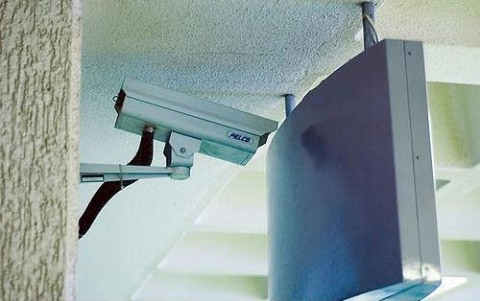
Figure 9-1. Inefficient surveillance equipment placement
Authentication Maintenance
Can you see what is wrong with Figure 9-2?
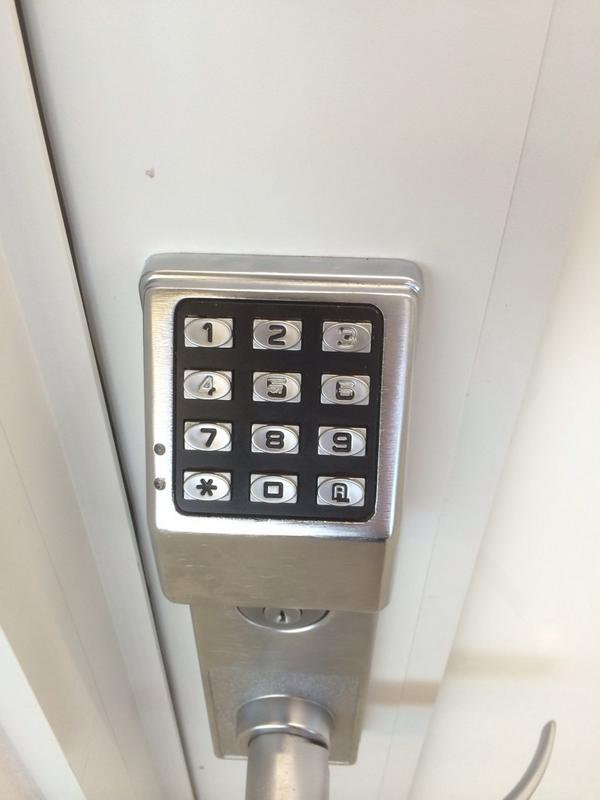
Figure 9-2. I’m just going to assume this key code is 3456 and leave it at that (Thanks to @revrance for the image. RIP.)
This reinforces the need to have audits and to not forget that even if something is functional, it may not be secure. Maintenance also includes changes in staff. In the event that a member of staff ceases to be a member of staff, he too should surrender his badge, along with any keys. Any doors or other assets that are fitted with a physical PIN pad should be changed in accordance with that staff member’s previous access.
Secure Media
Controls for physically securing media such as USB flash drives, removable hard-drives, and CDs are intended to prevent unauthorized persons from gaining access to sensitive data on any type of media. Sensitive information is susceptible to unauthorized viewing, copying, or scanning if it is unprotected while it is on removable or portable media, printed out, or left on a desk.
If stored in a nonsecured facility, backups that contain this data may easily be lost, stolen, or copied for malicious intent. Periodically reviewing the storage facility enables the organization to address identified security issues in a timely manner, minimizing the potential risk.
Procedures and processes help protect data on media distributed to internal and/or external users. Without such procedures, data can be lost or stolen, or used for fraudulent purposes.
It is important that media be identified such that its classification status can be easily discernible. Media not identified as confidential may not be adequately protected or may be lost or stolen.
Media may be lost or stolen if sent via a nontrackable method, such as regular mail. Use of secure couriers to deliver any media that contains sensitive data allows organizations to use their tracking systems to maintain inventory and location of shipments. Larger organizations may make use of internal courier services that would need their own security briefing related to their specific role in the company.
Without a firm process for ensuring that all media movements are approved before the media is removed from secure areas, it would not be tracked or appropriately protected, and its location would be unknown, leading to potential loss or theft.
Datacenters
It is important to design physical security into the interior of a datacenter. A variety of situations to plan for range from having co-located equipment to contractors needing physical access to the room, but not the equipment. Use rackable equipment so that locking server racks can be utilized. While they can technically still be moved unless bolted to the floor, the lock on the cabinet itself provides an additional layer of protection. Keys for the racks should remain in a central location to be checked out from and not left in the racks themselves or in the datacenter.
Remote offices are sometimes more difficult to secure as important assets may not have a dedicated datacenter, but instead share space with another department, or be tucked away in a closet somewhere. Normally this equipment is not extremely important, but it is still a potential vector of attack. Equipment like office routers, switches, and maybe a read-only domain controller are all common assets to protect. Many times it is just not feasible to have an entire rack for such a small amount of equipment, but having it in a locked equipment enclosure is a great step to take.
Operational
In addition to the physical properties, there are various operational aspects to physical security.
Identify Visitors and Contractors
Being able to differentiate visitors, staff, and contractors is important so that people can quickly determine an approximate level of trust that they can place on a person with whom they are not already familiar. This ability to quickly differentiate staff from visitors, for example, plays a key role in ensuring that sensitive data is not exposed.
Visitor Actions
All visitors should be signed in and out of the premises, and be escorted to and from the reception area, leaving a permanent record of when they were in the building and who they were visiting, in case this information is required at a later date. Not only should a sign-in/sign-out procedure be required, but any action involving technology, equipment, or potential information gathering should require an employee verification of intent.
Contractor Actions
As contractors by nature will have more access than a normal visitor would, they should be properly identified as well. Proper policy and guidelines should be set on who the contractor works through for identification and access. A proper photo ID should match verification from both the contractor’s department and the contracting company. As with permanent staff, appropriate vetting should take place. In the case of contractors, this typically means their agency attesting to background checks on all contractors on your behalf.
Badges
Visitors should be issued a badge that is easily distinguishable from a staff badge, typically displaying the word “visitor” and being a different color than a staff or contractor badge. Visitor badges should be restricted to only the duration of the visitor’s stay and surrendered when they sign out. There are also badges that will automatically void after a certain time limit, as seen in Figure 9-3.
Note
Badges are fairly simple to spoof with time and effort. Recon can be completed by someone malicious to attempt to re-create a legitimate badge.
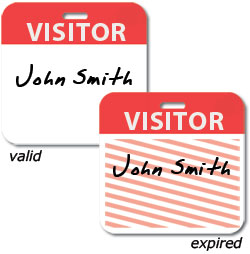
Figure 9-3. Over time some badges will void themselves out
Include Physical Security Training
Employees should not only be trained on the digital aspects of social engineering, but on the physical side as well because these methods can be even trickier to detect. Criminals will often pose as internal personnel, contractors, or as security engineers themselves in order to gain access to POS devices, server rooms, or any other endpoint.
Following are some scenarios and types of potential malicious activities to include in training:
- Tailgating
-
Employees should be taught that while holding doors open for others is a normal polite response, they should not do this for badge, key, or other restricted access doors. This is an extremely effective way for an unauthorized person to gain access. Often this is one of the more difficult behaviors to address as many companies have positive and people-friendly cultures. Adding signs to reinforce this idea (as seen in Figure 9-4) can be a helpful reminder.
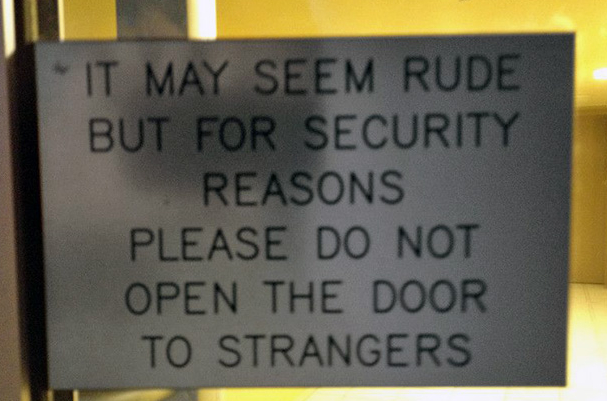
Figure 9-4. Tailgating reminder sign
- Badge cloning
-
RFID keys can easily be cloned with a tool that costs less than $20. As we’ve recommended elsewhere, highly sensitive areas should be protected with more than one method of authentication. Employees should not allow others to borrow, hold, or “test” their badges at anytime.
- Malicious media
-
While it is recommended that physical communication methods such as USB ports be restricted or disabled and controlled by an endpoint solution, it may not always be possible. In cases where USB ports are enabled and accessible by others, employees should be taught the dangers of this access. Not only can attackers stealthily insert a malicious USB, they may also drop them in public areas with labels such as “Payroll projections 2016” or “Executive Salary Q1,” or ask for a document to be printed out. USB drives can be programmed with software to collect information or create reverse shells back to a waiting malicious device, amongst other attacks.
- Restricted access
-
The time and effort to clone a badge isn’t needed. Someone can just ask an employee using a predetermined persona and dialogue called a pretext to gain access to restricted areas.
- Pretexts
-
Many criminals will try to fool personnel by dressing for the part (for example, carrying tool boxes and dressed in workwear), and could also be knowledgeable about locations of devices. It is important that personnel are trained to follow procedures at all times. Another trick criminals like to use is to send a “new” system with instructions for swapping it with a legitimate system and “returning” the legitimate system to a specified address. The criminals may even provide return postage as they are very keen to get their hands on these devices. Personnel should always verify with a manager or supplier that the device is legitimate, expected, and came from a trusted source before installing it or using it for business.
Conclusion
With the abundance of digital threats that we face day to day, sometimes the old-school physical methods of protection are pushed by the wayside. It is important to keep in mind that the information security team should be actively working with whichever department is in control of physical security to provide feedback on current threats and gaps.