Table of Contents for
Defensive Security Handbook, 1st Edition
 Defensive Security Handbook, 1st Edition
Published by
O'Reilly Media, Inc., 2017
Defensive Security Handbook, 1st Edition
Published by
O'Reilly Media, Inc., 2017
- nav
- Cover
- Defensive Security Handbook
- Defensive Security Handbook
- Foreword
- Introduction
- 1. Creating a Security Program
- 2. Asset Management and Documentation
- 3. Policies
- 4. Standards and Procedures
- 5. User Education
- 6. Incident Response
- 7. Disaster Recovery
- 8. Industry Compliance Standards and Frameworks
- 9. Physical Security
- 10. Microsoft Windows Infrastructure
- 11. Unix Application Servers
- 12. Endpoints
- 13. Password Management and Multifactor Authentication
- 14. Network Infrastructure
- 15. Segmentation
- 16. Vulnerability Management
- 17. Development
- 18. Purple Teaming
- 19. IDS and IPS
- 20. Logging and Monitoring
- 21. The Extra Mile
- A. User Education Templates
- Index
- About the Authors
- Colophon
Chapter 2. Asset Management and Documentation
As a whole, asset management is not an information security function. However, there are definitely components to it that assist in strengthening the overall security posture. It is one of the most difficult verticals to cover. Without proper asset management, an environment cannot be protected to its full potential. It is impossible to protect assets that are unknown. In larger networks, it is next to impossible to completely be aware of each and every device that is connected or every piece of software the users may have installed. However, with the correct security controls in place, it becomes much easier.
The majority of this chapter will cover how best to find assets, tie all of the information together, and document it for ease of use and troubleshooting. Above all else, the two most important things to remember about asset management are to ensure there is one source of truth, and that it is a process, not a project.
Additionally, each asset or group of assets must be assigned an owner and/or a custodian. An asset owner serves as a point of contact for the assigned asset, whereas a custodian has responsibility for the stored information. The assets are then categorized into different levels of importance based on the value of the information contained in them and the cost to the company if an asset is compromised.
Information Classification
The need for information classification has risen as the amount of data on digital storage has grown. Attackers use confidential data for their profit by selling it on the black market, to expose or cripple a specific organization, to commit fraud, or to aid in identity theft. While many industry compliance standards such as HIPAA and PCI DSS attempt to dictate the type of information that should be specifically guarded and segregated, that may not be the only data that is classified as confidential in an organization. There may also be contracts and other legal measures that must be consulted for classification and protection of certain data. Steps to correctly classify data can be described as follows:
-
Identify data sources to be protected. Completion of this step should produce a high-level description of data sources, where they reside, existing protection measures, data owners and custodians, and the type of resource. Obtaining this information can be difficult, but can be an added part of the documentation process as data owners and custodians are assigned and documented.
-
Identify information classes. Information class labels should convey the protection goals being addressed. Classification labels like Critical and Sensitive have different meanings to different people, so it is important that high-level class descriptions and associated protection measures are meaningful and well-defined to the individuals who will be classifying the information, as well as those who will be protecting it.
-
Map protections to set information classification levels. Security controls such as differing levels and methods of authentication, air-gapped networks, firewalls/ACLs, and encryption are some of the protections involved in this mapping.
-
Classify and protect information. All information that has been identified in step 1 should now be classified as dictated in step 2, and protected as in step 3.
-
Repeat as a necessary part of a yearly audit. Data footprints are ever expanding. As new software is installed or upgraded with add-ons data grows or changes in scope. A yearly audit of the current data footprint in the enterprise will be required to ensure data continues to be protected as documented.
Asset Management Implementation Steps
The asset management process can be separated out into four distinct steps: defining the lifecycle, information gathering, change tracking, and monitoring and reporting. Assets can be added to the environment at an alarming rate via scripted virtual machine roll outs or business acquisitions, refreshed to new hardware or software versions, or removed altogether. There are several enterprise-level tools that assist in identifying data on systems. A solution should be implemented that will track an asset from as early as possible until its eventual decommissioning.1
Defining the Lifecycle
There are many lifecycle stages in between delivery and decommissioning: an asset may be moved; the person it’s assigned to may no longer be employed; it may require repair or replacement; or it may go inactive while its assigned user is on leave of absence. Define lifecycle events and document them. Each department or person involved in each step should understand when and how assets are tracked at every point of their lifecycles. This assists with ensuring that any unplanned deviation from documented processes is caught. Following is a map of a very basic asset management lifecycle:
- Procure
-
This is the procurement step of the lifecycle where assets are initially added to be tracked. At this point, the initial device information, such as serial number, PO, asset owner, criticality, and model name and number, can be added to the tracking system.
- Deploy
-
When an asset is deployed by a sys admin, net admin, helpdesk member, or other employee, the location of the device can now be updated and any automated population can be tested. Remember: prior to deploying assets, they should be scanned for viruses and vulnerabilities or built with a custom secure image (if applicable) before being attached to the network.
- Manage
-
The management lifecycle step can contain many subsections depending on the level of documentation and tracking that is decided upon. Items can be moved to storage, upgraded, replaced, or returned, or may change users, locations, or departments.
- Decommission
-
Decommissioning assets is one of the most important steps of the lifecycle due to the inherent security risks regarding the disposal of potentially confidential data. When deciding on disposal options, different classifications of data can be tied to varying levels. There are many different ways to destroy data, and these have varying levels of security and cost. Options include:
-
-
A single pass wipe: drives can be reused and provide a residual value return.
-
Multiple wipes: increases the level of security; this still protects the residual value but adds cost.
-
Degaussing: removes the ability to resell the drive and has no visual indicator that it has worked, but is a cheaper alternative to shredding and is often more practical.
-
Full disk encryption: drives can be reused; this increases the level of security.
-
-
Physical disposal
-
Crushing/drilling/pinning: these are other low-cost options, all of which show physical evidence that they have been completed and deter ordinary criminals. These methods destroy the value of the unit and the data is still present on the platters despite them not being able to spin up.
-
Shredding: the most secure form of data destruction and typically used for the highest levels of secure data, but it is expensive and destroys the ability for resale.
-
Removed as asset from inventory
-
-
Information Gathering
Information gathering contains the most hurdles and has a huge amount of complexity from environment to environment. As stated previously, obtaining a good software package coupled with well thought-out processes will lead to gathering as much information as possible on network-connected assets. For initial collection, there are several methods to go about obtaining this information:
- Address Resolution Protocol (ARP) cache
-
Pulling the ARP cache from routers and switches will provide a list of IP and MAC addresses connected to the network.
- Dynamic Host Configuration Protocol (DHCP)
-
DHCP will contain all IP address reservations and possibly hostnames.
- Nmap
-
Running
nmapagainst the entire range of networks can provide an amazing amount of information as it is a very comprehensive scanning tool. A simple scan to get started is this:nmap -v -Pn -O 192.168.0.0/16 -oG output.txt
This command provides a verbose output (-v, or-vvfor even more verbosity), and assumes all hosts are online, skipping discovery (-Pn) with operating system detection (-O) on 192.168.0.0 through 192.168.255.255, and outputs the results in a grepable format (-oG) to output.txt. Other options can be found on the Nmap website. - PowerShell
-
PowerShell is a very versatile and powerful tool in Windows environments. Starting with Windows 2008R2, the Active Directory Module was introduced. Prior to this,
dsquery,adsi, andldapcommands were used to obtain information from AD.Get-ADUser -filter *can be used to return an entire list of users within an AD domain. There are many filters that can be added to return subsets of this list as well. To retrieve all domain computer accounts, runGet-ADComputer-Filter 'ObjectClass -eq "Computer"' | Select -Expand DNSHostName. - Simple Network Management Protocol (SNMP)
-
SNMP can provide a great amount of information on networked devices. By default, most SNMP version 2 read and write strings (the passwords used to query devices) are set to “public” and “private.” SNMP settings should be changed to custom strings, and if possible switched to SNMP version 3, which supports username and password authentication. Many software packages, such as NetDisco, which we will cover later in this chapter, use SNMP to gather data.
- Vulnerability management software
-
Data from a vulnerability scanner can be added into the asset management system. This assists in tracking risks and adding to the overall amount of useful information about assets.
- Windows Management Interface (WMI)
-
WMI can be used to pull almost all important information from a Microsoft Windows device. Specific information can be gathered on components such as the CPU, memory, and disk, as well as system information such as OS, processes, and services. The command
WMICcan be performed on a system locally, or the WMI API can be used with most programming languages—for example, remotely connecting with PowerShell uses theGet-WmiObjectcmdlet.
Change Tracking
Keeping track of changes in hardware, software, and performance is a necessary step to having an up-to-date inventory. Certain modifications can significantly change the security risk for a device.
For example, Steven runs a section of the company that has just spun up a new service line. He has been working with marketing and they give him the okay to buy a domain and spin up a Wordpress site. Before configuring the site for the public, he installs Wordpress on his own machine and begins to install add-ons. First off, Wordpress itself has had a history of vulnerabilities, but add-ons can be written by anyone and can introduce vulnerabilities from privilege escalation to XSS. An endpoint change-tracking client could trigger an alert on the addition of unapproved or unlicensed software.
Mark decides he’s had enough with this company and quits. Before leaving, he removes an expensive piece of software from his laptop to keep the license key for his own personal use. When his equipment is repurposed, his replacement will more than likely need to use that same software. The asset management software should have the list of software that was present, as well as any corresponding licensing keys.
Monitoring and Reporting
Monitoring and reporting on assets provides notifications of upcoming software licensing renewals and hardware warranty expirations. Trends can be discovered with the right amount of information, taking guesswork out of creating yearly budgets and equipment procurement plans. This information can also be used to assist in any equipment refresh processes.
A helpful security measure to implement is the monitoring and alerting of any unapproved devices. In a perfect world, an alert would fire when a device MAC shows up that isn’t located in the asset management tracking program; however, in most cases outside of a lab or small network that would be close to impossible.
Alerts may also be created for lack of certain software or system settings if, for example, an endpoint has no antivirus or management software installed, isn’t encrypted, or has unauthorized software. More than likely this will be done with some sort of endpoint monitoring software, but can also be accomplished in a more manual route with software such as Open Audit. Microsoft SCCM has the ability to report on installed software as well.
Asset Management Guidelines
In addition to the steps involved in implementing asset management, there is also a solid set of guidelines to keep in mind during the implementation process.
Automation
To accomplish these steps effectively, attempt to automate as many of them as possible. If any person along the chain of custody of an asset finds he is repeating a manual process, the question, “Can this be automated?” should be asked. The process should pull authoritative information from trustworthy locations on as many assets as possible. DNS can pull in hostnames and IP addresses; DHCP can tie MAC addresses to those IP addresses; and a vulnerability scanner may find entire networks that were previously unknown. Adding barcodes early on in the lifecycle can greatly assist with automation as well. Everything that can be automated leads to a more efficient process.
One Source of Truth
As there are many different ways to gather information about devices, such as DNS, DHCP, wireless connections, MAC address tables, software licenses, nmap scans, etc., it is important to select a software that will easily integrate with the technologies already present. Having conflicting information in several different locations like spreadsheets and SharePoint is not conducive to a complete picture regarding current assets. When choosing a software or method, it should be well communicated that it alone is the one source of truth regarding assets, and any deviation should be dealt with.
Organize a Company-Wide Team
Assets will enter the company from a variety of different areas. The purchasing department is the obvious first choice; third-party vendors may bring their own equipment; or there may be a BYOD (bring your own device) policy, which is a whole other can of worms. Types of departments that would benefit from being on an asset-management team include purchasing, receiving, helpdesk, communications, maintenance, and system administrators.
As with most other processes and procedures, it is close to impossible to plan for every possibility. Plan for the unplanned. If a member of the helpdesk team or another group that has access to the asset management software happens upon a device that has not been documented, there should be a process to deal with this. Not only should the asset then be added to the software, but the cause should also be investigated. Are there assets entering the organization in a different department or by different means that have yet to be added to the asset management process?
Executive Champions
The organizational team should also contain one or more members of the executive staff as a champion to assist in process and procedure changes that will cross through several departments. Larger organizations normally have difficulty with communicating changes and additions to procedures to the correct individuals, while smaller companies seem to resist change. Creating a well thought-out and communicated directive from someone other than security or IT staff will greatly increase the success. This executive member will also be able to see the effects of proper asset management in the form of cost savings and avoidances.
Software Licensing
When it comes to software license management, knowing what you are entitled to have deployed is often more important that what you actually have deployed. More often than not, organizations fail software audits for over-deployment because they can’t prove exactly what they have the right to have deployed. Ending up behind on software licensing can be a very expensive mistake. Not only will an updated list of currently installed software eliminate the risk of paying for software that isn’t being used, but it also ensures that there are no licensing overage fees or fines.
Define Assets
Define criteria for what constitutes a critical asset—many times they may be the device where critical data lies, as well. It may be a specific type of hardware or appliance such as a head end firewall or fiber switches or certain custom software packages. Discovery and inventory will produce a large asset list. Some assets will require more oversight or management than others.
Documentation
Proper and complete documentation is an integral part of asset management. Creating and maintaining it should be a continual process from day one. Documentation is used to set clear directions and goals, as well as offering a continual reference as needed.
Spend sufficient time creating documentation and provide detailed descriptions of all security projects, including charts and statistics. These documents can be a major advantage when showing management where the security budget went. Another benefit of documentation is the knowledge that will be gained by all parties while creating it. Potential security holes or weaknesses in the program may also become apparent during this process. Every mistake is a learning opportunity; document problems or mistakes so they are not repeated.
What should be documented? There are several levels of documentation depending on the size and scope of an environment. The following sections present a starting point as to what documentation will be beneficial.
Networking Equipment
Many automated scanning tools can provide a detailed overview of networking equipment. A free solution that we would like to suggest is Netdisco. Figure 2-1 shows how Netdisco displays an example router and what ports are configured.
Netdisco is an SNMP-based L2/L3 network management tool designed for moderate to large networks. Routers and switches are polled to log IP and MAC addresses and map them to switch ports. Automatic L2 network topology discovery, display, and inventory.2
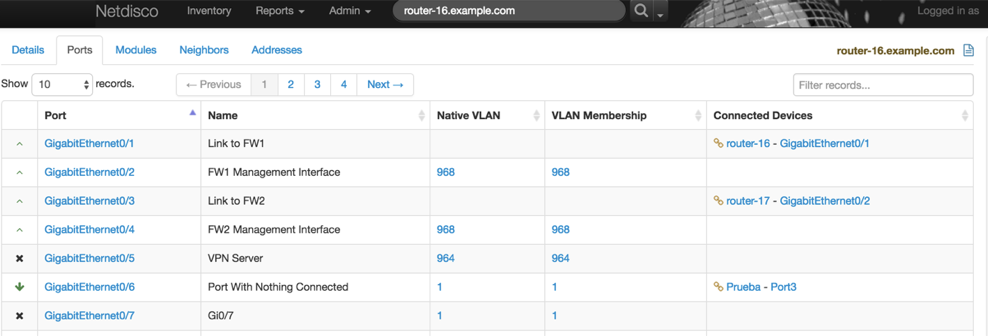
Figure 2-1. Netdisco web interface
Many automated scanning tools can provide a detailed overview of networking equipment, examples of which are outlined in the following lists:
-
Hostname
-
Licensing information
-
Location
-
Management IP
-
Software, hardware, and firmware versions
-
Warranty information
Other
Just as important as the documentation itself is the consistency and organization of the information. Naming in a consistent fashion assists in locating and understanding the roles of assets. For example:
-
ORG1-DC1-R2B-RTR3 = Organization 1, Datacenter 1, Row 2, Rack B, Router 3
-
SVC_ORG2-SQL10-SNOW = The service account for Organization 2, SQL Server 10, the Snow Application
-
ORG3-FL1-JC-AP3 = Organization 3, Floor 1, JC Hall, Wireless Access Point 3
Conclusion
Classify, organize, automate, define, gather, track, monitor, report, document, rinse, lather, repeat. The messy world of asset management can be a daunting task without a solid plan and the understanding that it’s not a one-time project. Having as much information in one place as possible about endpoint and infrastructure devices will not only assist in short-term troubleshooting, but also long-term design planning and purchasing decisions.
1 “Information Classification—Who, Why, and How”, SANS Institute InfoSec Reading Room.