Table of Contents for
Python for Data Analysis, 2nd Edition
 Python for Data Analysis, 2nd Edition
Published by
O'Reilly Media, Inc., 2017
Python for Data Analysis, 2nd Edition
Published by
O'Reilly Media, Inc., 2017
- nav
- Cover
- Python for Data Analysis
- Python for Data Analysis
- Preface
- Preliminaries
- Python Language Basics, IPython, and Jupyter Notebooks
- Built-in Data Structures, Functions, and Files
- NumPy Basics: Arrays and Vectorized Computation
- Getting Started with pandas
- Data Loading, Storage, and File Formats
- Data Cleaning and Preparation
- Data Wrangling: Join, Combine, and Reshape
- Plotting and Visualization
- Data Aggregation and Group Operations
- Time Series
- Advanced pandas
- Introduction to Modeling Libraries in Python
- Data Analysis Examples
- Advanced NumPy
- More on the IPython System
- Index
- About the Author
- Colophon
Chapter 10. Data Aggregation and Group Operations
Categorizing a dataset and applying a function to each group, whether an
aggregation or transformation, is often a critical component of a data
analysis workflow. After loading, merging, and preparing a dataset, you may
need to compute group statistics or possibly pivot tables for reporting or
visualization purposes. pandas provides a flexible groupby interface, enabling you to slice, dice,
and summarize datasets in a natural way.
One reason for the popularity of relational databases and SQL (which stands for “structured query language”) is the ease with which data can be joined, filtered, transformed, and aggregated. However, query languages like SQL are somewhat constrained in the kinds of group operations that can be performed. As you will see, with the expressiveness of Python and pandas, we can perform quite complex group operations by utilizing any function that accepts a pandas object or NumPy array. In this chapter, you will learn how to:
Split a pandas object into pieces using one or more keys (in the form of functions, arrays, or DataFrame column names)
Calculate group summary statistics, like count, mean, or standard deviation, or a user-defined function
Apply within-group transformations or other manipulations, like normalization, linear regression, rank, or subset selection
Compute pivot tables and cross-tabulations
Perform quantile analysis and other statistical group analyses
Note
Aggregation of time series data, a special use case of groupby, is referred to as
resampling in this book and will receive separate
treatment in Chapter 11.
10.1 GroupBy Mechanics
Hadley Wickham, an author of many popular packages for the R programming
language, coined the term split-apply-combine for
describing group operations. In the first stage of the
process, data contained in a pandas object, whether a Series, DataFrame,
or otherwise, is split into groups based on one or
more keys that you provide. The splitting is
performed on a particular axis of an object. For example, a DataFrame can
be grouped on its rows (axis=0) or its
columns (axis=1). Once this is done, a
function is applied to each group, producing a new
value. Finally, the results of all those function applications are
combined into a result object. The form of the
resulting object will usually depend on what’s being done to the data. See
Figure 10-1 for a mockup of a simple group
aggregation.
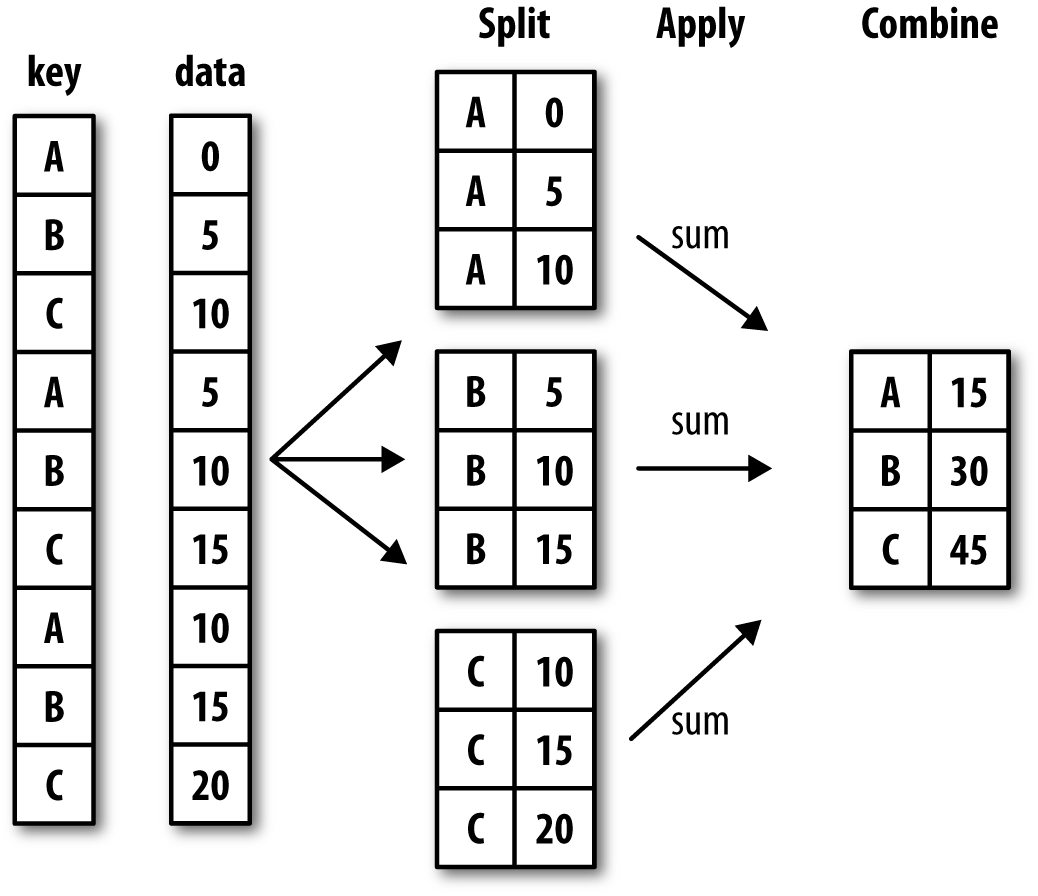
Figure 10-1. Illustration of a group aggregation
Each grouping key can take many forms, and the keys do not have to be all of the same type:
A list or array of values that is the same length as the axis being grouped
A value indicating a column name in a DataFrame
A dict or Series giving a correspondence between the values on the axis being grouped and the group names
A function to be invoked on the axis index or the individual labels in the index
Note that the latter three methods are shortcuts for producing an array of values to be used to split up the object. Don’t worry if this all seems abstract. Throughout this chapter, I will give many examples of all these methods. To get started, here is a small tabular dataset as a DataFrame:
In[10]:df=pd.DataFrame({'key1':['a','a','b','b','a'],....:'key2':['one','two','one','two','one'],....:'data1':np.random.randn(5),....:'data2':np.random.randn(5)})In[11]:dfOut[11]:data1data2key1key20-0.2047081.393406aone10.4789430.092908atwo2-0.5194390.281746bone3-0.5557300.769023btwo41.9657811.246435aone
Suppose you wanted to compute the mean of the data1 column using the labels from key1. There are a number of ways to do this. One
is to access data1 and call groupby with the column (a Series) at key1:
In[12]:grouped=df['data1'].groupby(df['key1'])In[13]:groupedOut[13]:<pandas.core.groupby.SeriesGroupByobjectat0x7f85008d0400>
This grouped variable is now a
GroupBy object. It has not actually computed anything
yet except for some intermediate data about the group key df['key1']. The idea is that this object has all
of the information needed to then apply some operation to each of the
groups. For example, to compute group means we can call the GroupBy’s mean
method:
In[14]:grouped.mean()Out[14]:key1a0.746672b-0.537585Name:data1,dtype:float64
Later, I’ll explain more about what happens when you call .mean(). The important thing here is that the
data (a Series) has been aggregated according to the group key, producing
a new Series that is now indexed by the unique values in the key1 column. The result index has the name
'key1' because the DataFrame column
df['key1'] did.
If instead we had passed multiple arrays as a list, we’d get something different:
In[15]:means=df['data1'].groupby([df['key1'],df['key2']]).mean()In[16]:meansOut[16]:key1key2aone0.880536two0.478943bone-0.519439two-0.555730Name:data1,dtype:float64
Here we grouped the data using two keys, and the resulting Series now has a hierarchical index consisting of the unique pairs of keys observed:
In[17]:means.unstack()Out[17]:key2onetwokey1a0.8805360.478943b-0.519439-0.555730
In this example, the group keys are all Series, though they could be any arrays of the right length:
In[18]:states=np.array(['Ohio','California','California','Ohio','Ohio'])In[19]:years=np.array([2005,2005,2006,2005,2006])In[20]:df['data1'].groupby([states,years]).mean()Out[20]:California20050.4789432006-0.519439Ohio2005-0.38021920061.965781Name:data1,dtype:float64
Frequently the grouping information is found in the same DataFrame as the data you want to work on. In that case, you can pass column names (whether those are strings, numbers, or other Python objects) as the group keys:
In[21]:df.groupby('key1').mean()Out[21]:data1data2key1a0.7466720.910916b-0.5375850.525384In[22]:df.groupby(['key1','key2']).mean()Out[22]:data1data2key1key2aone0.8805361.319920two0.4789430.092908bone-0.5194390.281746two-0.5557300.769023
You may have noticed in the first case df.groupby('key1').mean() that there is no
key2 column in the result. Because
df['key2'] is not numeric data, it is
said to be a nuisance column, which is therefore
excluded from the result. By default, all of the numeric columns are aggregated, though it is
possible to filter down to a subset, as you’ll see soon.
Regardless of the objective in using groupby, a generally useful GroupBy method is size,
which returns a Series containing group sizes:
In[23]:df.groupby(['key1','key2']).size()Out[23]:key1key2aone2two1bone1two1dtype:int64
Take note that any missing values in a group key will be excluded from the result.
Iterating Over Groups
The GroupBy object supports iteration, generating a sequence of 2-tuples containing the group name along with the chunk of data. Consider the following:
In[24]:forname,groupindf.groupby('key1'):....:(name)....:(group)....:adata1data2key1key20-0.2047081.393406aone10.4789430.092908atwo41.9657811.246435aonebdata1data2key1key22-0.5194390.281746bone3-0.5557300.769023btwo
In the case of multiple keys, the first element in the tuple will be a tuple of key values:
In[25]:for(k1,k2),groupindf.groupby(['key1','key2']):....:((k1,k2))....:(group)....:('a','one')data1data2key1key20-0.2047081.393406aone41.9657811.246435aone('a','two')data1data2key1key210.4789430.092908atwo('b','one')data1data2key1key22-0.5194390.281746bone('b','two')data1data2key1key23-0.555730.769023btwo
Of course, you can choose to do whatever you want with the pieces of data. A recipe you may find useful is computing a dict of the data pieces as a one-liner:
In[26]:pieces=dict(list(df.groupby('key1')))In[27]:pieces['b']Out[27]:data1data2key1key22-0.5194390.281746bone3-0.5557300.769023btwo
By default groupby groups on
axis=0, but you can group on any of
the other axes. For example, we could group the columns of our example
df here by dtype like so:
In[28]:df.dtypesOut[28]:data1float64data2float64key1objectkey2objectdtype:objectIn[29]:grouped=df.groupby(df.dtypes,axis=1)
We can print out the groups like so:
In[30]:fordtype,groupingrouped:....:(dtype)....:(group)....:float64data1data20-0.2047081.39340610.4789430.0929082-0.5194390.2817463-0.5557300.76902341.9657811.246435objectkey1key20aone1atwo2bone3btwo4aone
Selecting a Column or Subset of Columns
Indexing a GroupBy object created from a DataFrame with a column name or array of column names has the effect of column subsetting for aggregation. This means that:
df.groupby('key1')['data1']df.groupby('key1')[['data2']]
are syntactic sugar for:
df['data1'].groupby(df['key1'])df[['data2']].groupby(df['key1'])
Especially for large datasets, it may be desirable to aggregate
only a few columns. For example, in the preceding dataset, to compute
means for just the data2 column and
get the result as a DataFrame, we could write:
In[31]:df.groupby(['key1','key2'])[['data2']].mean()Out[31]:data2key1key2aone1.319920two0.092908bone0.281746two0.769023
The object returned by this indexing operation is a grouped DataFrame if a list or array is passed or a grouped Series if only a single column name is passed as a scalar:
In[32]:s_grouped=df.groupby(['key1','key2'])['data2']In[33]:s_groupedOut[33]:<pandas.core.groupby.SeriesGroupByobjectat0x7f85008983c8>In[34]:s_grouped.mean()Out[34]:key1key2aone1.319920two0.092908bone0.281746two0.769023Name:data2,dtype:float64
Grouping with Dicts and Series
Grouping information may exist in a form other than an array. Let’s consider another example DataFrame:
In[35]:people=pd.DataFrame(np.random.randn(5,5),....:columns=['a','b','c','d','e'],....:index=['Joe','Steve','Wes','Jim','Travis'])In[36]:people.iloc[2:3,[1,2]]=np.nan# Add a few NA valuesIn[37]:peopleOut[37]:abcdeJoe1.007189-1.2962210.2749920.2289131.352917Steve0.886429-2.001637-0.3718431.669025-0.438570Wes-0.539741NaNNaN-1.021228-0.577087Jim0.1241210.3026140.5237720.0009401.343810Travis-0.713544-0.831154-2.370232-1.860761-0.860757
Now, suppose I have a group correspondence for the columns and want to sum together the columns by group:
In[38]:mapping={'a':'red','b':'red','c':'blue',....:'d':'blue','e':'red','f':'orange'}
Now, you could construct an array from this dict to pass to
groupby, but instead we can just pass
the dict (I included the key 'f' to highlight that
unused grouping keys are OK):
In[39]:by_column=people.groupby(mapping,axis=1)In[40]:by_column.sum()Out[40]:blueredJoe0.5039051.063885Steve1.297183-1.553778Wes-1.021228-1.116829Jim0.5247121.770545Travis-4.230992-2.405455
The same functionality holds for Series, which can be viewed as a fixed-size mapping:
In[41]:map_series=pd.Series(mapping)In[42]:map_seriesOut[42]:aredbredcbluedblueeredforangedtype:objectIn[43]:people.groupby(map_series,axis=1).count()Out[43]:blueredJoe23Steve23Wes12Jim23Travis23
Grouping with Functions
Using Python functions is a more generic way of defining a group
mapping compared with a dict or Series. Any function passed as a group
key will be called once per index value, with the return values being
used as the group names. More concretely, consider the example DataFrame
from the previous section, which has people’s first names as index
values. Suppose you wanted to group by the length of the names; while
you could compute an array of string lengths, it’s simpler to just pass
the len
function:
In[44]:people.groupby(len).sum()Out[44]:abcde30.591569-0.9936080.798764-0.7913742.11963950.886429-2.001637-0.3718431.669025-0.4385706-0.713544-0.831154-2.370232-1.860761-0.860757
Mixing functions with arrays, dicts, or Series is not a problem as everything gets converted to arrays internally:
In[45]:key_list=['one','one','one','two','two']In[46]:people.groupby([len,key_list]).min()Out[46]:abcde3one-0.539741-1.2962210.274992-1.021228-0.577087two0.1241210.3026140.5237720.0009401.3438105one0.886429-2.001637-0.3718431.669025-0.4385706two-0.713544-0.831154-2.370232-1.860761-0.860757
Grouping by Index Levels
A final convenience for hierarchically indexed datasets is the ability to aggregate using one of the levels of an axis index. Let’s look at an example:
In[47]:columns=pd.MultiIndex.from_arrays([['US','US','US','JP','JP'],....:[1,3,5,1,3]],....:names=['cty','tenor'])In[48]:hier_df=pd.DataFrame(np.random.randn(4,5),columns=columns)In[49]:hier_dfOut[49]:ctyUSJPtenor1351300.560145-1.2659340.119827-1.0635120.3328831-2.359419-0.199543-1.541996-0.970736-1.30703020.2863500.377984-0.7538870.3312861.34974230.0698770.246674-0.0118621.0048121.327195
To group by level, pass the level number or name using the level
keyword:
In[50]:hier_df.groupby(level='cty',axis=1).count()Out[50]:ctyJPUS023123223323
10.2 Data Aggregation
Aggregations refer to any data transformation that produces scalar values from arrays.
The preceding examples have used several of them, including mean, count, min, and sum. You may wonder what is going on when you
invoke mean() on a GroupBy object. Many
common aggregations, such as those found in Table 10-1, have optimized implementations. However, you are not limited to
only this set of methods.
You can use aggregations of your own devising and additionally call
any method that is also defined on the grouped object. For example, you
might recall that quantile computes
sample quantiles of a Series or a DataFrame’s columns.
While quantile is not explicitly
implemented for GroupBy, it is a Series method and thus available for use.
Internally, GroupBy efficiently slices up the Series, calls piece.quantile(0.9) for each piece, and then
assembles those results together into the result object:
In[51]:dfOut[51]:data1data2key1key20-0.2047081.393406aone10.4789430.092908atwo2-0.5194390.281746bone3-0.5557300.769023btwo41.9657811.246435aoneIn[52]:grouped=df.groupby('key1')In[53]:grouped['data1'].quantile(0.9)Out[53]:key1a1.668413b-0.523068Name:data1,dtype:float64
To use your own aggregation functions, pass any function that
aggregates an array to the aggregate or
agg method:
In[54]:defpeak_to_peak(arr):....:returnarr.max()-arr.min()In[55]:grouped.agg(peak_to_peak)Out[55]:data1data2key1a2.1704881.300498b0.0362920.487276
You may notice that some methods like describe also work,
even though they are not aggregations, strictly speaking:
In[56]:grouped.describe()Out[56]:data1\countmeanstdmin25%50%75%key1a3.00.7466721.109736-0.2047080.1371180.4789431.222362b2.0-0.5375850.025662-0.555730-0.546657-0.537585-0.528512data2\maxcountmeanstdmin25%50%key1a1.9657813.00.9109160.7122170.0929080.6696711.246435b-0.5194392.00.5253840.3445560.2817460.4035650.52538475%maxkey1a1.3199201.393406b0.6472030.769023
I will explain in more detail what has happened here in Section 10.3, “Apply: General split-apply-combine,”.
Note
Custom aggregation functions are generally much slower than the optimized functions found in Table 10-1. This is because there is some extra overhead (function calls, data rearrangement) in constructing the intermediate group data chunks.
Column-Wise and Multiple Function Application
Let’s return to the tipping dataset from earlier examples. After loading it
with read_csv, we add a
tipping percentage column tip_pct:
In[57]:tips=pd.read_csv('examples/tips.csv')# Add tip percentage of total billIn[58]:tips['tip_pct']=tips['tip']/tips['total_bill']In[59]:tips[:6]Out[59]:total_billtipsmokerdaytimesizetip_pct016.991.01NoSunDinner20.059447110.341.66NoSunDinner30.160542221.013.50NoSunDinner30.166587323.683.31NoSunDinner20.139780424.593.61NoSunDinner40.146808525.294.71NoSunDinner40.186240
As you’ve already seen, aggregating a Series or all of the columns
of a DataFrame is a matter of using aggregate with the desired function or calling
a method like mean or std. However, you may want to aggregate using
a different function depending on the column, or multiple functions at
once. Fortunately, this is possible to do, which I’ll illustrate through
a number of examples. First, I’ll group the tips by day
and smoker:
In[60]:grouped=tips.groupby(['day','smoker'])
Note that for descriptive statistics like those in Table 10-1, you can pass the name of the function as a string:
In[61]:grouped_pct=grouped['tip_pct']In[62]:grouped_pct.agg('mean')Out[62]:daysmokerFriNo0.151650Yes0.174783SatNo0.158048Yes0.147906SunNo0.160113Yes0.187250ThurNo0.160298Yes0.163863Name:tip_pct,dtype:float64
If you pass a list of functions or function names instead, you get back a DataFrame with column names taken from the functions:
In[63]:grouped_pct.agg(['mean','std',peak_to_peak])Out[63]:meanstdpeak_to_peakdaysmokerFriNo0.1516500.0281230.067349Yes0.1747830.0512930.159925SatNo0.1580480.0397670.235193Yes0.1479060.0613750.290095SunNo0.1601130.0423470.193226Yes0.1872500.1541340.644685ThurNo0.1602980.0387740.193350Yes0.1638630.0393890.151240
Here we passed a list of aggregation functions to
agg to evaluate indepedently on the data
groups.
You don’t need to accept the names that GroupBy gives to the
columns; notably, lambda functions
have the name '<lambda>', which
makes them hard to identify (you can see for yourself by looking at a
function’s __name__ attribute). Thus, if you pass a list of (name,
function) tuples, the first element of each tuple will be used
as the DataFrame column names (you can think of a list of 2-tuples as an
ordered mapping):
In[64]:grouped_pct.agg([('foo','mean'),('bar',np.std)])Out[64]:foobardaysmokerFriNo0.1516500.028123Yes0.1747830.051293SatNo0.1580480.039767Yes0.1479060.061375SunNo0.1601130.042347Yes0.1872500.154134ThurNo0.1602980.038774Yes0.1638630.039389
With a DataFrame you have more options, as you can specify a list
of functions to apply to all of the columns or different functions per
column. To start, suppose we wanted to compute the same three statistics
for the tip_pct and total_bill columns:
In[65]:functions=['count','mean','max']In[66]:result=grouped['tip_pct','total_bill'].agg(functions)In[67]:resultOut[67]:tip_pcttotal_billcountmeanmaxcountmeanmaxdaysmokerFriNo40.1516500.187735418.42000022.75Yes150.1747830.2634801516.81333340.17SatNo450.1580480.2919904519.66177848.33Yes420.1479060.3257334221.27666750.81SunNo570.1601130.2526725720.50666748.17Yes190.1872500.7103451924.12000045.35ThurNo450.1602980.2663124517.11311141.19Yes170.1638630.2412551719.19058843.11
As you can see, the resulting DataFrame has hierarchical columns,
the same as you would get aggregating each column separately and
using concat to glue
the results together using the column names as the keys argument:
In[68]:result['tip_pct']Out[68]:countmeanmaxdaysmokerFriNo40.1516500.187735Yes150.1747830.263480SatNo450.1580480.291990Yes420.1479060.325733SunNo570.1601130.252672Yes190.1872500.710345ThurNo450.1602980.266312Yes170.1638630.241255
As before, a list of tuples with custom names can be passed:
In[69]:ftuples=[('Durchschnitt','mean'),('Abweichung',np.var)]In[70]:grouped['tip_pct','total_bill'].agg(ftuples)Out[70]:tip_pcttotal_billDurchschnittAbweichungDurchschnittAbweichungdaysmokerFriNo0.1516500.00079118.42000025.596333Yes0.1747830.00263116.81333382.562438SatNo0.1580480.00158119.66177879.908965Yes0.1479060.00376721.276667101.387535SunNo0.1601130.00179320.50666766.099980Yes0.1872500.02375724.120000109.046044ThurNo0.1602980.00150317.11311159.625081Yes0.1638630.00155119.19058869.808518
Now, suppose you wanted to apply potentially different functions
to one or more of the columns. To do this, pass a dict to agg that contains a mapping of column names to
any of the function specifications listed so far:
In[71]:grouped.agg({'tip':np.max,'size':'sum'})Out[71]:tipsizedaysmokerFriNo3.509Yes4.7331SatNo9.00115Yes10.00104SunNo6.00167Yes6.5049ThurNo6.70112Yes5.0040In[72]:grouped.agg({'tip_pct':['min','max','mean','std'],....:'size':'sum'})Out[72]:tip_pctsizeminmaxmeanstdsumdaysmokerFriNo0.1203850.1877350.1516500.0281239Yes0.1035550.2634800.1747830.05129331SatNo0.0567970.2919900.1580480.039767115Yes0.0356380.3257330.1479060.061375104SunNo0.0594470.2526720.1601130.042347167Yes0.0656600.7103450.1872500.15413449ThurNo0.0729610.2663120.1602980.038774112Yes0.0900140.2412550.1638630.03938940
A DataFrame will have hierarchical columns only if multiple functions are applied to at least one column.
Returning Aggregated Data Without Row Indexes
In all of the examples up until now, the aggregated data comes back with
an index, potentially hierarchical, composed from the unique group key
combinations. Since this isn’t always desirable, you can disable this
behavior in most cases by passing as_index=False to groupby:
In[73]:tips.groupby(['day','smoker'],as_index=False).mean()Out[73]:daysmokertotal_billtipsizetip_pct0FriNo18.4200002.8125002.2500000.1516501FriYes16.8133332.7140002.0666670.1747832SatNo19.6617783.1028892.5555560.1580483SatYes21.2766672.8754762.4761900.1479064SunNo20.5066673.1678952.9298250.1601135SunYes24.1200003.5168422.5789470.1872506ThurNo17.1131112.6737782.4888890.1602987ThurYes19.1905883.0300002.3529410.163863
Of course, it’s always possible to obtain the result in this
format by calling reset_index on
the result. Using the as_index=False method avoids
some unnecessary computations.
10.3 Apply: General split-apply-combine
The most general-purpose GroupBy method is apply,
which is the subject of the rest of this section. As
illustrated in Figure 10-2, apply splits the object being manipulated into
pieces, invokes the passed function on each piece, and then attempts to
concatenate the pieces together.
Figure 10-2. Illustration of a group aggregation
Returning to the tipping dataset from before, suppose you wanted to
select the top five tip_pct values by
group. First, write a function that selects the rows with the largest
values in a particular column:
In[74]:deftop(df,n=5,column='tip_pct'):....:returndf.sort_values(by=column)[-n:]In[75]:top(tips,n=6)Out[75]:total_billtipsmokerdaytimesizetip_pct10914.314.00YesSatDinner20.27952518323.176.50YesSunDinner40.28053523211.613.39NoSatDinner20.291990673.071.00YesSatDinner10.3257331789.604.00YesSunDinner20.4166671727.255.15YesSunDinner20.710345
Now, if we group by smoker, say,
and call apply with this function, we
get the following:
In[76]:tips.groupby('smoker').apply(top)Out[76]:total_billtipsmokerdaytimesizetip_pctsmokerNo8824.715.85NoThurLunch20.23674618520.695.00NoSunDinner50.2416635110.292.60NoSunDinner20.2526721497.512.00NoThurLunch20.26631223211.613.39NoSatDinner20.291990Yes10914.314.00YesSatDinner20.27952518323.176.50YesSunDinner40.280535673.071.00YesSatDinner10.3257331789.604.00YesSunDinner20.4166671727.255.15YesSunDinner20.710345
What has happened here? The top
function is called on each row group from the DataFrame, and then the
results are glued together using pandas.concat, labeling the pieces with the
group names. The result therefore has a hierarchical index whose inner
level contains index values from the original DataFrame.
If you pass a function to apply
that takes other arguments or keywords, you can pass these after the
function:
In[77]:tips.groupby(['smoker','day']).apply(top,n=1,column='total_bill')Out[77]:total_billtipsmokerdaytimesizetip_pctsmokerdayNoFri9422.753.25NoFriDinner20.142857Sat21248.339.00NoSatDinner40.186220Sun15648.175.00NoSunDinner60.103799Thur14241.195.00NoThurLunch50.121389YesFri9540.174.73YesFriDinner40.117750Sat17050.8110.00YesSatDinner30.196812Sun18245.353.50YesSunDinner30.077178Thur19743.115.00YesThurLunch40.115982
Note
Beyond these basic usage mechanics, getting the most out of
apply may require some creativity.
What occurs inside the function passed is up to you; it only needs to
return a pandas object or a scalar value. The rest of this chapter will
mainly consist of examples showing you how to solve various problems
using groupby.
You may recall that I earlier called describe on a GroupBy object:
In[78]:result=tips.groupby('smoker')['tip_pct'].describe()In[79]:resultOut[79]:countmeanstdmin25%50%75%\smokerNo151.00.1593280.0399100.0567970.1369060.1556250.185014Yes93.00.1631960.0851190.0356380.1067710.1538460.195059maxsmokerNo0.291990Yes0.710345In[80]:result.unstack('smoker')Out[80]:smokercountNo151.000000Yes93.000000meanNo0.159328Yes0.163196stdNo0.039910Yes0.085119minNo0.056797Yes0.03563825%No0.136906Yes0.10677150%No0.155625Yes0.15384675%No0.185014Yes0.195059maxNo0.291990Yes0.710345dtype:float64
Inside GroupBy, when you invoke a method like describe, it is actually just a shortcut
for:
f=lambdax:x.describe()grouped.apply(f)
Suppressing the Group Keys
In the preceding examples, you see that the resulting object has a hierarchical index
formed from the group keys along with the indexes of each piece of the
original object. You can disable this by passing group_keys=False to groupby:
In[81]:tips.groupby('smoker',group_keys=False).apply(top)Out[81]:total_billtipsmokerdaytimesizetip_pct8824.715.85NoThurLunch20.23674618520.695.00NoSunDinner50.2416635110.292.60NoSunDinner20.2526721497.512.00NoThurLunch20.26631223211.613.39NoSatDinner20.29199010914.314.00YesSatDinner20.27952518323.176.50YesSunDinner40.280535673.071.00YesSatDinner10.3257331789.604.00YesSunDinner20.4166671727.255.15YesSunDinner20.710345
Quantile and Bucket Analysis
As you may recall from Chapter 8, pandas has some tools,
in particular cut and qcut, for slicing data up into buckets with bins of your choosing or
by sample quantiles. Combining these functions with groupby makes it convenient to perform
bucket or quantile analysis on a dataset. Consider a simple random
dataset and an equal-length bucket categorization using cut:
In[82]:frame=pd.DataFrame({'data1':np.random.randn(1000),....:'data2':np.random.randn(1000)})In[83]:quartiles=pd.cut(frame.data1,4)In[84]:quartiles[:10]Out[84]:0(-1.23,0.489]1(-2.956,-1.23]2(-1.23,0.489]3(0.489,2.208]4(-1.23,0.489]5(0.489,2.208]6(-1.23,0.489]7(-1.23,0.489]8(0.489,2.208]9(0.489,2.208]Name:data1,dtype:categoryCategories(4,interval[float64]):[(-2.956,-1.23]<(-1.23,0.489]<(0.489,2.208]<(2.208,3.928]]
The Categorical object
returned by cut can be
passed directly to groupby. So we
could compute a set of statistics for the data2 column like so:
In[85]:defget_stats(group):....:return{'min':group.min(),'max':group.max(),....:'count':group.count(),'mean':group.mean()}In[86]:grouped=frame.data2.groupby(quartiles)In[87]:grouped.apply(get_stats).unstack()Out[87]:countmaxmeanmindata1(-2.956,-1.23]95.01.670835-0.039521-3.399312(-1.23,0.489]598.03.260383-0.002051-2.989741(0.489,2.208]297.02.9544390.081822-3.745356(2.208,3.928]10.01.7656400.024750-1.929776
These were equal-length buckets; to compute equal-size buckets
based on sample quantiles, use qcut.
I’ll pass labels=False to just get
quantile numbers:
# Return quantile numbersIn[88]:grouping=pd.qcut(frame.data1,10,labels=False)In[89]:grouped=frame.data2.groupby(grouping)In[90]:grouped.apply(get_stats).unstack()Out[90]:countmaxmeanmindata10100.01.670835-0.049902-3.3993121100.02.6284410.030989-1.9500982100.02.527939-0.067179-2.9251133100.03.2603830.065713-2.3155554100.02.074345-0.111653-2.0479395100.02.1848100.052130-2.9897416100.02.458842-0.021489-2.2235067100.02.954439-0.026459-3.0569908100.02.7355270.103406-3.7453569100.02.3770200.220122-2.064111
We will take a closer look at pandas’s
Categorical type in Chapter 12.
Example: Filling Missing Values with Group-Specific Values
When cleaning up missing data, in some cases you will replace data
observations using dropna, but in
others you may want to impute (fill in) the null (NA) values using a
fixed value or some value derived from the data. fillna is the right tool to use; for example, here I fill in NA values
with the mean:
In[91]:s=pd.Series(np.random.randn(6))In[92]:s[::2]=np.nanIn[93]:sOut[93]:0NaN1-0.1259212NaN3-0.8844754NaN50.227290dtype:float64In[94]:s.fillna(s.mean())Out[94]:0-0.2610351-0.1259212-0.2610353-0.8844754-0.26103550.227290dtype:float64
Suppose you need the fill value to vary by group. One way to do
this is to group the data and use apply with a function that calls fillna on each data chunk. Here is some sample
data on US states divided into eastern and western regions:
In[95]:states=['Ohio','New York','Vermont','Florida',....:'Oregon','Nevada','California','Idaho']In[96]:group_key=['East']*4+['West']*4In[97]:data=pd.Series(np.random.randn(8),index=states)In[98]:dataOut[98]:Ohio0.922264NewYork-2.153545Vermont-0.365757Florida-0.375842Oregon0.329939Nevada0.981994California1.105913Idaho-1.613716dtype:float64
Note that the syntax ['East'] * 4 produces a
list containing four copies of the elements in
['East']. Adding lists together concatenates
them.
Let’s set some values in the data to be missing:
In[99]:data[['Vermont','Nevada','Idaho']]=np.nanIn[100]:dataOut[100]:Ohio0.922264NewYork-2.153545VermontNaNFlorida-0.375842Oregon0.329939NevadaNaNCalifornia1.105913IdahoNaNdtype:float64In[101]:data.groupby(group_key).mean()Out[101]:East-0.535707West0.717926dtype:float64
We can fill the NA values using the group means like so:
In[102]:fill_mean=lambdag:g.fillna(g.mean())In[103]:data.groupby(group_key).apply(fill_mean)Out[103]:Ohio0.922264NewYork-2.153545Vermont-0.535707Florida-0.375842Oregon0.329939Nevada0.717926California1.105913Idaho0.717926dtype:float64
In another case, you might have predefined fill values in your
code that vary by group. Since the groups have a name attribute set internally, we can use
that:
In[104]:fill_values={'East':0.5,'West':-1}In[105]:fill_func=lambdag:g.fillna(fill_values[g.name])In[106]:data.groupby(group_key).apply(fill_func)Out[106]:Ohio0.922264NewYork-2.153545Vermont0.500000Florida-0.375842Oregon0.329939Nevada-1.000000California1.105913Idaho-1.000000dtype:float64
Example: Random Sampling and Permutation
Suppose you wanted to draw a random sample (with or without replacement) from a
large dataset for Monte Carlo simulation purposes or some other
application. There are a number of ways to perform the “draws”; here we
use the sample method for
Series.
To demonstrate, here’s a way to construct a deck of English-style playing cards:
# Hearts, Spades, Clubs, Diamondssuits=['H','S','C','D']card_val=(list(range(1,11))+[10]*3)*4base_names=['A']+list(range(2,11))+['J','K','Q']cards=[]forsuitin['H','S','C','D']:cards.extend(str(num)+suitfornuminbase_names)deck=pd.Series(card_val,index=cards)
So now we have a Series of length 52 whose index contains card
names and values are the ones used in Blackjack and other games (to keep
things simple, I just let the ace 'A' be 1):
In[108]:deck[:13]Out[108]:AH12H23H34H45H56H67H78H89H910H10JH10KH10QH10dtype:int64
Now, based on what I said before, drawing a hand of five cards from the deck could be written as:
In[109]:defdraw(deck,n=5):.....:returndeck.sample(n)In[110]:draw(deck)Out[110]:AD18C85H5KC102C2dtype:int64
Suppose you wanted two random cards from each suit. Because the
suit is the last character of each card name, we can group based on this
and use apply:
In[111]:get_suit=lambdacard:card[-1]# last letter is suitIn[112]:deck.groupby(get_suit).apply(draw,n=2)Out[112]:C2C23C3DKD108D8HKH103H3S2S24S4dtype:int64
Alternatively, we could write:
In[113]:deck.groupby(get_suit,group_keys=False).apply(draw,n=2)Out[113]:KC10JC10AD15D55H56H67S7KS10dtype:int64
Example: Group Weighted Average and Correlation
Under the split-apply-combine paradigm of groupby,
operations between columns in a DataFrame or two Series, such as a group
weighted average, are possible. As an example, take this dataset
containing group keys, values, and some weights:
In[114]:df=pd.DataFrame({'category':['a','a','a','a',.....:'b','b','b','b'],.....:'data':np.random.randn(8),.....:'weights':np.random.rand(8)})In[115]:dfOut[115]:categorydataweights0a1.5615870.9575151a1.2199840.3472672a-0.4822390.5813623a0.3156670.2170914b-0.0478520.8944065b-0.4541450.9185646b-0.5567740.2778257b0.2533210.955905
The group weighted average by category would then be:
In[116]:grouped=df.groupby('category')In[117]:get_wavg=lambdag:np.average(g['data'],weights=g['weights'])In[118]:grouped.apply(get_wavg)Out[118]:categorya0.811643b-0.122262dtype:float64
As another example, consider a financial dataset originally
obtained from Yahoo! Finance containing end-of-day prices for a few
stocks and the S&P 500 index (the SPX symbol):
In[119]:close_px=pd.read_csv('examples/stock_px_2.csv',parse_dates=True,.....:index_col=0)In[120]:close_px.info()<class'pandas.core.frame.DataFrame'>DatetimeIndex:2214entries,2003-01-02to2011-10-14Datacolumns(total4columns):AAPL2214non-nullfloat64MSFT2214non-nullfloat64XOM2214non-nullfloat64SPX2214non-nullfloat64dtypes:float64(4)memoryusage:86.5KBIn[121]:close_px[-4:]Out[121]:AAPLMSFTXOMSPX2011-10-11400.2927.0076.271195.542011-10-12402.1926.9677.161207.252011-10-13408.4327.1876.371203.662011-10-14422.0027.2778.111224.58
One task of interest might be to compute a DataFrame consisting of
the yearly correlations of daily returns (computed from percent changes)
with SPX. As one way to do this, we
first create a function that computes the pairwise correlation of each
column with the 'SPX' column:
In[122]:spx_corr=lambdax:x.corrwith(x['SPX'])
Next, we compute percent change on close_px
using pct_change:
In[123]:rets=close_px.pct_change().dropna()
Lastly, we group these percent changes by year, which can be
extracted from each row label with a one-line function that returns the
year attribute of each datetime
label:
In[124]:get_year=lambdax:x.yearIn[125]:by_year=rets.groupby(get_year)In[126]:by_year.apply(spx_corr)Out[126]:AAPLMSFTXOMSPX20030.5411240.7451740.6612651.020040.3742830.5885310.5577421.020050.4675400.5623740.6310101.020060.4282670.4061260.5185141.020070.5081180.6587700.7862641.020080.6814340.8046260.8283031.020090.7071030.6549020.7979211.020100.7101050.7301180.8390571.020110.6919310.8009960.8599751.0
You could also compute inter-column correlations. Here we compute the annual correlation between Apple and Microsoft:
In[127]:by_year.apply(lambdag:g['AAPL'].corr(g['MSFT']))Out[127]:20030.48086820040.25902420050.30009320060.16173520070.41773820080.61190120090.43273820100.57194620110.581987dtype:float64
Example: Group-Wise Linear Regression
In the same theme as the previous example, you can use groupby to perform more complex group-wise
statistical analysis, as long as the function returns a pandas object or
scalar value. For example, I can define the following regress function (using the statsmodels
econometrics library), which executes an ordinary least squares (OLS)
regression on each chunk of data:
importstatsmodels.apiassmdefregress(data,yvar,xvars):Y=data[yvar]X=data[xvars]X['intercept']=1.result=sm.OLS(Y,X).fit()returnresult.params
Now, to run a yearly linear regression of AAPL on SPX
returns, execute:
In[129]:by_year.apply(regress,'AAPL',['SPX'])Out[129]:SPXintercept20031.1954060.00071020041.3634630.00420120051.7664150.00324620061.6454960.00008020071.1987610.00343820080.968016-0.00111020090.8791030.00295420101.0526080.00126120110.8066050.001514
10.4 Pivot Tables and Cross-Tabulation
A pivot table is a data summarization tool
frequently found in spreadsheet programs and other data
analysis software. It aggregates a table of data by one or more keys,
arranging the data in a rectangle with some of the group keys along the
rows and some along the columns. Pivot tables in Python with pandas are
made possible through the groupby
facility described in this chapter combined with reshape operations
utilizing hierarchical indexing. DataFrame has a pivot_table method, and there is also a top-level pandas.pivot_table function. In addition to
providing a convenience interface to groupby, pivot_table can add partial totals, also known
as margins.
Returning to the tipping dataset, suppose you wanted to compute a
table of group means (the default pivot_table aggregation type) arranged by
day and smoker on the rows:
In[130]:tips.pivot_table(index=['day','smoker'])Out[130]:sizetiptip_pcttotal_billdaysmokerFriNo2.2500002.8125000.15165018.420000Yes2.0666672.7140000.17478316.813333SatNo2.5555563.1028890.15804819.661778Yes2.4761902.8754760.14790621.276667SunNo2.9298253.1678950.16011320.506667Yes2.5789473.5168420.18725024.120000ThurNo2.4888892.6737780.16029817.113111Yes2.3529413.0300000.16386319.190588
This could have been produced with groupby directly. Now, suppose we want to
aggregate only tip_pct and size, and additionally group by time. I’ll put smoker in the table columns and day in the rows:
In[131]:tips.pivot_table(['tip_pct','size'],index=['time','day'],.....:columns='smoker')Out[131]:sizetip_pctsmokerNoYesNoYestimedayDinnerFri2.0000002.2222220.1396220.165347Sat2.5555562.4761900.1580480.147906Sun2.9298252.5789470.1601130.187250Thur2.000000NaN0.159744NaNLunchFri3.0000001.8333330.1877350.188937Thur2.5000002.3529410.1603110.163863
We could augment this table to include partial totals by passing
margins=True. This has the effect of
adding All row and column labels, with
corresponding values being the group statistics for all the data within a
single tier:
In[132]:tips.pivot_table(['tip_pct','size'],index=['time','day'],.....:columns='smoker',margins=True)Out[132]:sizetip_pctsmokerNoYesAllNoYesAlltimedayDinnerFri2.0000002.2222222.1666670.1396220.1653470.158916Sat2.5555562.4761902.5172410.1580480.1479060.153152Sun2.9298252.5789472.8421050.1601130.1872500.166897Thur2.000000NaN2.0000000.159744NaN0.159744LunchFri3.0000001.8333332.0000000.1877350.1889370.188765Thur2.5000002.3529412.4590160.1603110.1638630.161301All2.6688742.4086022.5696720.1593280.1631960.160803
Here, the All values are means
without taking into account smoker versus non-smoker (the All columns) or any of the two levels of
grouping on the rows (the All
row).
To use a different aggregation function, pass it to aggfunc. For example, 'count' or len will give you a cross-tabulation (count or
frequency) of group sizes:
In[133]:tips.pivot_table('tip_pct',index=['time','smoker'],columns='day',.....:aggfunc=len,margins=True)Out[133]:dayFriSatSunThurAlltimesmokerDinnerNo3.045.057.01.0106.0Yes9.042.019.0NaN70.0LunchNo1.0NaNNaN44.045.0Yes6.0NaNNaN17.023.0All19.087.076.062.0244.0
If some combinations are empty (or otherwise NA), you may wish to
pass a fill_value:
In[134]:tips.pivot_table('tip_pct',index=['time','size','smoker'],.....:columns='day',aggfunc='mean',fill_value=0)Out[134]:dayFriSatSunThurtimesizesmokerDinner1No0.0000000.1379310.0000000.000000Yes0.0000000.3257330.0000000.0000002No0.1396220.1627050.1688590.159744Yes0.1712970.1486680.2078930.0000003No0.0000000.1546610.1526630.000000Yes0.0000000.1449950.1526600.0000004No0.0000000.1500960.1481430.000000Yes0.1177500.1245150.1933700.0000005No0.0000000.0000000.2069280.000000Yes0.0000000.1065720.0656600.000000...............Lunch1No0.0000000.0000000.0000000.181728Yes0.2237760.0000000.0000000.0000002No0.0000000.0000000.0000000.166005Yes0.1819690.0000000.0000000.1588433No0.1877350.0000000.0000000.084246Yes0.0000000.0000000.0000000.2049524No0.0000000.0000000.0000000.138919Yes0.0000000.0000000.0000000.1554105No0.0000000.0000000.0000000.1213896No0.0000000.0000000.0000000.173706[21rowsx4columns]
See Table 10-2 for a summary of pivot_table methods.
Cross-Tabulations: Crosstab
A cross-tabulation (or crosstab for short) is a special case of a pivot table that computes group frequencies. Here is an example:
In[138]:dataOut[138]:SampleNationalityHandedness01USARight-handed12JapanLeft-handed23USARight-handed34JapanRight-handed45JapanLeft-handed56JapanRight-handed67USARight-handed78USALeft-handed89JapanRight-handed910USARight-handed
As part of some survey analysis, we might want to summarize this
data by nationality and handedness. You could use pivot_table to do this, but the pandas.crosstab function can be more convenient:
In[139]:pd.crosstab(data.Nationality,data.Handedness,margins=True)Out[139]:HandednessLeft-handedRight-handedAllNationalityJapan235USA145All3710
The first two arguments to crosstab can each either be an array or Series
or a list of arrays. As in the tips data:
In[140]:pd.crosstab([tips.time,tips.day],tips.smoker,margins=True)Out[140]:smokerNoYesAlltimedayDinnerFri3912Sat454287Sun571976Thur101LunchFri167Thur441761All15193244
10.5 Conclusion
Mastering pandas’s data grouping tools can help both with data
cleaning as well as modeling or statistical analysis work. In Chapter 14 we will look at several more example
use cases for groupby on real data.
In the next chapter, we turn our attention to time series data.