Table of Contents for
JavaScript Web Applications
 JavaScript Web Applications
Published by
O'Reilly Media, Inc., 2011
JavaScript Web Applications
Published by
O'Reilly Media, Inc., 2011
- Cover
- JavaScript Web Applications
- JavaScript Web Applications
- Preface
- 1. MVC and Classes
- 2. Events and Observing
- 3. Models and Data
- 4. Controllers and State
- 5. Views and Templating
- 6. Dependency Management
- 7. Working with Files
- 8. The Real-Time Web
- 9. Testing and Debugging
- 10. Deploying
- 11. The Spine Library
- 12. The Backbone Library
- 13. EmberJS
- A. jQuery Primer
- B. CSS Extensions
- C. CSS3 Reference
- Index
- About the Author
- Colophon
- Copyright
Appendix B. CSS Extensions
In the words of its author, Alexis Sellier, Less is a “dynamic stylesheet language, which builds upon CSS’s syntax.” Less is a superset of CSS that extends it with variables, mixins, operations, and nested rules.
It’s great because it can really reduce the amount of CSS you need to write—especially when it comes to CSS3 vendor-specific rules. You can then compile your Less files down to pure CSS.
In other words, instead of writing this:
 .panel {
   background: #CCC;
   background: -webkit-gradient(linear, left top, left bottom, from(#FFF), to(#CCC));
   background: -moz-linear-gradient(top, #FFF, #CCC);
 }
You can write this:
  .panel {
    .vbg-gradient(#FFF, #CCC);
  }
Variables
If you’re reusing colors and rule attributes, using Less variables allows you to amalgamate them in one place, letting you make global changes without a find and replace!
Specifying a variable is easy:
@panel-color: #CCC;
Then, you can use it inside your style rules:
header {
  color: @panel-color;
}
Mixins
Less mixins behave a lot like C macros. Basically, you define a mixin, which can take optional arguments, like so:
.vbg-gradient(@fc: #FFF, @tc: #CCC) {
  background: @fc;
  background: -webkit-gradient(linear, left top, left bottom, from(@fc), to(@tc));
  background: -moz-linear-gradient(top, @fc, @tc);
  background: linear-gradient(top, @fc, @tc);
}
The example above takes two arguments, fc and tc,
with default values of #FFF and
#CCC, respectively. These are then
interpolated in the class contents. Think of it as defining a variable,
but for whole classes.
Since CSS3 hasn’t yet finished the standardization process, the browser
vendors generally specify their own prefixes, such as
-webkit and -moz. This is great, in
a way, because we can start using the features immediately; but often it’s
a really verbose syntax, as you need to define styles two or three times
for the different browsers.
As you’ve probably guessed, Less can really cut down on the amount of typing you need to do—you just need to turn vendor-specific styles into a mixin.
Here are some other mixins that might be useful:
/* Rounded borders */
.border-radius(@r: 3px) {
  -moz-border-radius: @r;
  -webkit-border-radius: @r;
  border-radius: @r;
}

/* Shadow */
.box-shadow (@h: 0px, @v: 0px, @b: 4px, @c: #333) {
  -moz-box-shadow: @h @v @b @c;
  -webkit-box-shadow: @h @v @b @c;
  box-shadow: @h @v @b @c;
}
Nested Rules
Instead of specifying long selector names to get elements, you can nest selectors. The full selector is generated behind the scenes, but nested rules make your stylesheets clearer and more readable:
button {
  .border-radius(3px);
  .box-shadow(0, 1px, 1px, #FFF);
  .vbg-gradient(#F9F9F9, #E3E3E3);

  :active {
    .vbg-gradient(#E3E3E3, #F9F9F9);
  }
}
One word of warning, though: I wouldn’t go beyond two levels of nesting because you can seriously abuse this feature if you’re not careful, and your stylesheets will look the worse for it.
Including Other Stylesheets
If you’re planning on splitting up your stylesheet, which I
highly recommend, you can use @import
to include other stylesheets within the current one. Less will actually
fetch that stylesheet and include it inline, which improves performance
because clients won’t have another HTTP request to make.
This use case is often used with mixins. Say you have a CSS3 mixin file; you can import it like so:
@import "utils";
Colors
This feature is so new to Less that it hasn’t yet been documented, but it’s so useful that it deserves mentioning. Less lets you manipulate colors with various functions:
background: saturate(#319, 10%);
background: desaturate(#319, 10%);
background: darken(#319, 10%);
background: lighten(#319, 10%)
A lot of designs are based on the same colors, but they use different shades. Indeed, combined with variables, you can make branded themes very quickly.
How Do I Use Less?
There are various methods for compiling Less code into CSS.
Via the Command Line
Install the Less gem, and then call the lessc
command:
gem install less
lessc style.less
Via Rack
If you’re using a Rack-based framework like Rails 3, there’s an even simpler solution: the rack-less gem. Just include the relevant gem in your Gemfile:
gem "rack-less"
And inject the middleware in application.rb:
require "rack/less"
config.middleware.use "Rack::Less"
Any Less stylesheets under /app/stylesheets will be compiled automatically. You can even cache and compress the result by configuring rack-less in your production.rb config file:
Rack::Less.configure do |config|
  config.cache     = true
  config.compress  = :yui
end
Via JavaScript
Development seems to have slowed on the Ruby libraries, but luckily there’s a more up-to-date option: Less.js is Less written in JavaScript. You can specify Less stylesheets in the page and include the less.js JavaScript file, which compiles them automatically:
<link rel="stylesheet/less" href="main.less" type="text/css">
<script src="less.js" type="text/javascript"></script>
Less.js is 40 times faster than the Ruby version of the library. However, you may want to precompile the Less stylesheets so clients don’t take the performance hit. If you have Node.js installed, you can compile it via the command line:
node bin/lessc style.less
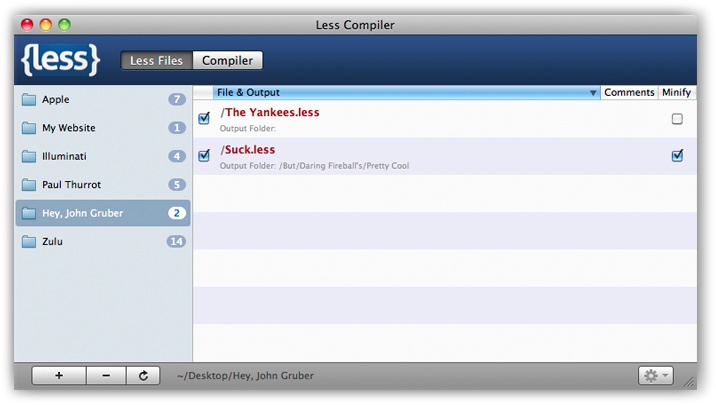
Less.app
This Mac OS X application makes it even easier to use Less. It uses Less.js behind the scenes, and you can specify certain folders to be “watched”—i.e., the Less stylesheets will be automatically compiled into CSS when you save them. See Figure B-1.