Table of Contents for
JavaScript: The Good Parts
 JavaScript: The Good Parts
Published by
O'Reilly Media, Inc., 2008
JavaScript: The Good Parts
Published by
O'Reilly Media, Inc., 2008
- Cover
- JavaScript: The Good Parts
- SPECIAL OFFER: Upgrade this ebook with O’Reilly
- A Note Regarding Supplemental Files
- Preface
- Using Code Examples
- Safari® Books Online
- How to Contact Us
- Acknowledgments
- 1. Good Parts
- Analyzing JavaScript
- A Simple Testing Ground
- 2. Grammar
- Names
- Numbers
- Strings
- Statements
- Expressions
- Literals
- Functions
- 3. Objects
- Retrieval
- Update
- Reference
- Prototype
- Reflection
- Enumeration
- Delete
- Global Abatement
- 4. Functions
- Function Literal
- Invocation
- Arguments
- Return
- Exceptions
- Augmenting Types
- Recursion
- Scope
- Closure
- Callbacks
- Module
- Cascade
- Curry
- Memoization
- 5. Inheritance
- Object Specifiers
- Prototypal
- Functional
- Parts
- 6. Arrays
- Length
- Delete
- Enumeration
- Confusion
- Methods
- Dimensions
- 7. Regular Expressions
- Construction
- Elements
- 8. Methods
- 9. Style
- 10. Beautiful Features
- A. Awful Parts
- Scope
- Semicolon Insertion
- Reserved Words
- Unicode
- typeof
- parseInt
- +
- Floating Point
- NaN
- Phony Arrays
- Falsy Values
- hasOwnProperty
- Object
- B. Bad Parts
- with Statement
- eval
- continue Statement
- switch Fall Through
- Block-less Statements
- ++ −−
- Bitwise Operators
- The function Statement Versus the function Expression
- Typed Wrappers
- new
- void
- C. JSLint
- Members
- Options
- Semicolon
- Line Breaking
- Comma
- Required Blocks
- Forbidden Blocks
- Expression Statements
- for in Statement
- switch Statement
- var Statement
- with Statement
- =
- == and !=
- Labels
- Unreachable Code
- Confusing Pluses and Minuses
- ++ and −−
- Bitwise Operators
- eval Is Evil
- void
- Regular Expressions
- Constructors and new
- Not Looked For
- HTML
- JSON
- Report
- D. Syntax Diagrams
- E. JSON
- Using JSON Securely
- A JSON Parser
- Index
- About the Author
- Colophon
- SPECIAL OFFER: Upgrade this ebook with O’Reilly
Let's look more closely at the elements that make up regular expressions.

A regexp choice contains one or more regexp
sequences. The sequences are separated by the | (vertical bar) character. The choice matches if
any of the sequences match. It attempts to match each of the sequences in order.
So:
"into".match(/in|int/)
matches the in in into. It wouldn't match int
because the match of in was
successful.

A regexp sequence contains one or more regexp factors. Each factor can optionally be followed by a quantifier that determines how many times the factor is allowed to appear. If there is no quantifier, then the factor will be matched one time.
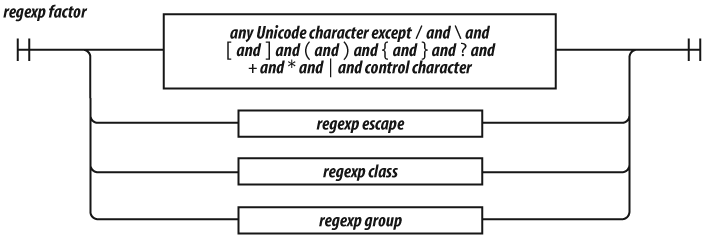
A regexp factor can be a character, a parenthesized group, a character class, or an escape sequence. All characters are treated literally except for the control characters and the special characters:
\ / [ ] ( ) { } ? + * | . ^ $which must be escaped with a \ prefix if
they are to be matched literally. When in doubt, any special character can be
given a \ prefix to make it literal. The
\ prefix does not
make letters or digits literal.
An unescaped . matches any character except
a line-ending character.
An unescaped ^ matches the beginning of the
text when the lastIndex property is zero. It
can also match line-ending characters when the m flag is specified.
An unescaped $ matches the end of the text.
It can also match line-ending characters when the m flag is specified.
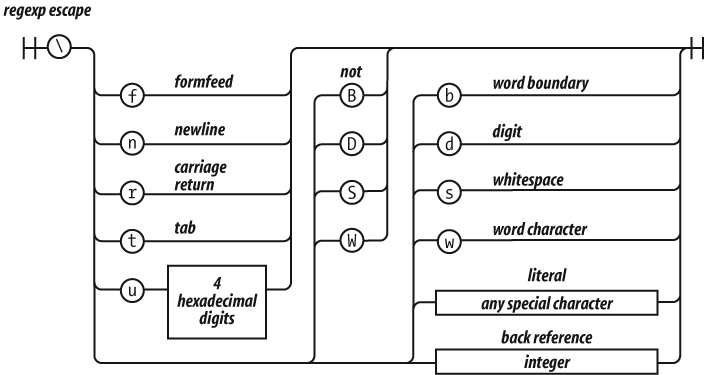
The backslash character indicates escapement in regexp factors as well as in strings, but in regexp factors, it works a little differently.
As in strings, \f is the formfeed
character, \n is the newline character,
\r is the carriage return character,
\t is the tab character, and \u allows for specifying a Unicode character as a
16-bit hex constant. In regexp factors, \b
is not the backspace character.
\d is the same as [0-9]. It matches a digit. \D
is the opposite: [^0-9].
\s is the same as [\f\n\r\t\u000B\u0020\u00A0\u2028\u2029]. This is a partial set
of Unicode whitespace characters. \S is the
opposite: [^\f\n\r\t\u000B\u0020\u00A0\u2028\u2029].
\w is the same as [0-9A-Z_a-z]. \W is the
opposite: [^0-9A-Z_a-z]. This is supposed to
represent the characters that appear in words. Unfortunately, the class it
defines is useless for working with virtually any real language. If you need to
match a class of letters, you must specify your own class.
A simple letter class is [A-Za-z\u00C0-\u1FFF\u2800-\uFFFD]. It includes all of Unicode's
letters, but it also includes thousands of characters that are not letters.
Unicode is large and complex. An exact letter class of the Basic Multilingual
Plane is possible, but would be huge and inefficient. JavaScript's regular
expressions provide extremely poor support for internationalization.
\b was intended to be a word-boundary
anchor that would make it easier to match text on word boundaries.
Unfortunately, it uses \w to find word
boundaries, so it is completely useless for multilingual applications. This is
not a good part.
\1 is a reference to the text that was
captured by group 1 so that it can be matched again. For example, you could
search text for duplicated words with:
var doubled_words = /([A-Za-z\u00C0-\u1FFF\u2800-\uFFFD]+)\s+\1/gi;
doubled_words looks for occurrences of
words (strings containing 1 or more letters) followed by whitespace followed by
the same word.
\2 is a reference to group 2, \3 is a reference to group 3, and so on.
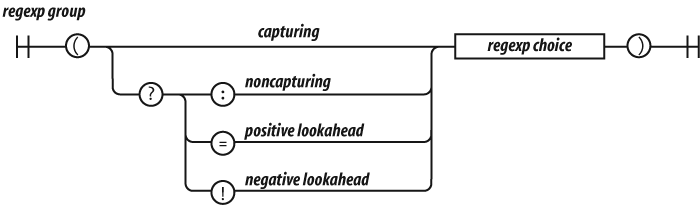
There are four kinds of groups:
- Capturing
A capturing group is a regexp choice wrapped in parentheses. The characters that match the group will be captured. Every capture group is given a number. The first capturing
(in the regular expression is group 1. The second capturing(in the regular expression is group 2.- Noncapturing
A noncapturing group has a
(?:prefix. A noncapturing group simply matches; it does not capture the matched text. This has the advantage of slight faster performance. Noncapturing groups do not interfere with the numbering of capturing groups.- Positive lookahead
A positive lookahead group has a
(?=prefix. It is like a noncapturing group except that after the group matches, the text is rewound to where the group started, effectively matching nothing. This is not a good part.- Negative lookahead
A negative lookahead group has a
(?!prefix. It is like a positive lookahead group, except that it matches only if it fails to match. This is not a good part.
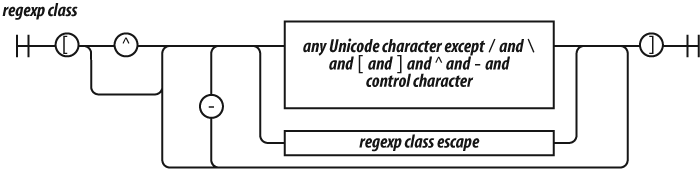
A regexp class is a convenient way of specifying one of a
set of characters. For example, if we wanted to match a vowel, we could write
(?:a|e|i|o|u), but it is more
conveniently written as the class [aeiou].
Classes provide two other conveniences. The first is that ranges of characters can be specified. So, the set of 32 ASCII special characters:
! " # $ % & ' ( ) * +, - . / :
; < = > ? @ [ \ ] ^ _ ` { | } ˜
could be written as:
(?:!|"|#|\$|%|&|'|\(|\)|\*|\+|,|-|\.|\/|:|;|<|=|>|@|\[|\\|]|\^|_|` |\{|\||\}|˜)but is slightly more nicely written as:
[!-\/:-@\[-`{-˜]which includes the characters from !
through / and : through @ and [ through ` and
{ through ˜. It is still pretty nasty looking.
The other convenience is the complementing of a class. If the first character
after the [ is ^, then the class excludes the specified characters.
So [^!-\/:-@\[-`{-˜] matches any character
that is not one of the ASCII special characters.
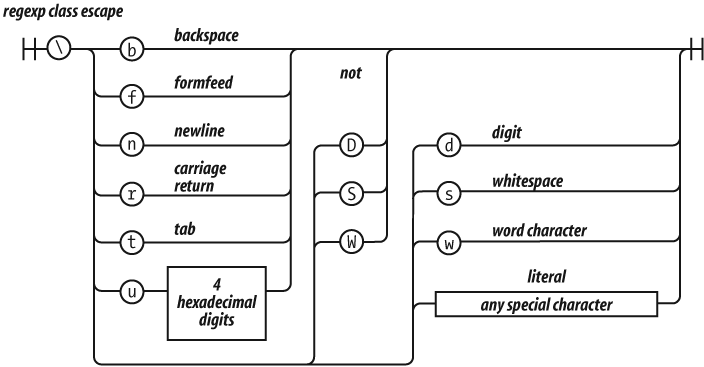
The rules of escapement within a character class are slightly different than
those for a regexp factor. [\b] is the
backspace character. Here are the special characters that should be escaped in a
character class:
- / [ \ ] ^
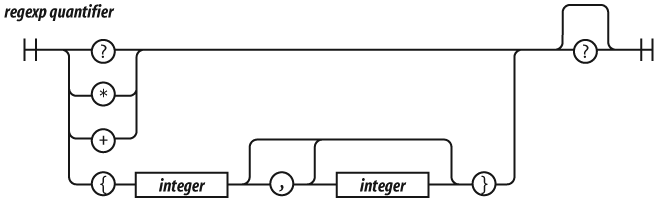
A regexp factor may have a regexp
quantifier suffix that determines how many times the factor
should match. A number wrapped in curly braces means that the factor should
match that many times. So, /www/ matches the
same as /w{3}/. {3,6} will match 3, 4, 5, or 6 times. {3,} will match 3 or more times.
? is the same as {0,1}. * is the same as
{0,}. + is the same as {1,}.
Matching tends to be greedy, matching as many repetitions as possible up to
the limit, if there is one. If the quantifier has an extra ? suffix, then matching tends to be lazy,
attempting to match as few repetitions as possible. It is usually best to stick
with the greedy matching.