Table of Contents for
JavaScript: The Good Parts
 JavaScript: The Good Parts
Published by
O'Reilly Media, Inc., 2008
JavaScript: The Good Parts
Published by
O'Reilly Media, Inc., 2008
- Cover
- JavaScript: The Good Parts
- SPECIAL OFFER: Upgrade this ebook with O’Reilly
- A Note Regarding Supplemental Files
- Preface
- Using Code Examples
- Safari® Books Online
- How to Contact Us
- Acknowledgments
- 1. Good Parts
- Analyzing JavaScript
- A Simple Testing Ground
- 2. Grammar
- Names
- Numbers
- Strings
- Statements
- Expressions
- Literals
- Functions
- 3. Objects
- Retrieval
- Update
- Reference
- Prototype
- Reflection
- Enumeration
- Delete
- Global Abatement
- 4. Functions
- Function Literal
- Invocation
- Arguments
- Return
- Exceptions
- Augmenting Types
- Recursion
- Scope
- Closure
- Callbacks
- Module
- Cascade
- Curry
- Memoization
- 5. Inheritance
- Object Specifiers
- Prototypal
- Functional
- Parts
- 6. Arrays
- Length
- Delete
- Enumeration
- Confusion
- Methods
- Dimensions
- 7. Regular Expressions
- Construction
- Elements
- 8. Methods
- 9. Style
- 10. Beautiful Features
- A. Awful Parts
- Scope
- Semicolon Insertion
- Reserved Words
- Unicode
- typeof
- parseInt
- +
- Floating Point
- NaN
- Phony Arrays
- Falsy Values
- hasOwnProperty
- Object
- B. Bad Parts
- with Statement
- eval
- continue Statement
- switch Fall Through
- Block-less Statements
- ++ −−
- Bitwise Operators
- The function Statement Versus the function Expression
- Typed Wrappers
- new
- void
- C. JSLint
- Members
- Options
- Semicolon
- Line Breaking
- Comma
- Required Blocks
- Forbidden Blocks
- Expression Statements
- for in Statement
- switch Statement
- var Statement
- with Statement
- =
- == and !=
- Labels
- Unreachable Code
- Confusing Pluses and Minuses
- ++ and −−
- Bitwise Operators
- eval Is Evil
- void
- Regular Expressions
- Constructors and new
- Not Looked For
- HTML
- JSON
- Report
- D. Syntax Diagrams
- E. JSON
- Using JSON Securely
- A JSON Parser
- Index
- About the Author
- Colophon
- SPECIAL OFFER: Upgrade this ebook with O’Reilly
Whereas the contrary bringeth bliss, And is a pattern of celestial peace. Whom should we match with Henry, being a king. . .
Many of JavaScript's features were borrowed from other languages. The syntax came from Java, functions came from Scheme, and prototypal inheritance came from Self. JavaScript's Regular Expression feature was borrowed from Perl.
A regular expression is the specification of the syntax of a
simple language. Regular expressions are used with methods to search, replace, and
extract information from strings. The methods that work with regular expressions are
regexp.exec, regexp.test, string.match, string.replace, string.search, and string.split. These
will all be described in Chapter 8. Regular expressions usually have a
significant performance advantage over equivalent string operations in
JavaScript.
Regular expressions came from the mathematical study of formal languages. Ken Thompson adapted Stephen Kleene's theoretical work on type-3 languages into a practical pattern matcher that could be embedded in tools such as text editors and programming languages.
The syntax of regular expressions in JavaScript conforms closely to the original formulations from Bell Labs, with some reinterpretation and extension adopted from Perl. The rules for writing regular expressions can be surprisingly complex because they interpret characters in some positions as operators, and in slightly different positions as literals. Worse than being hard to write, this makes regular expressions hard to read and dangerous to modify. It is necessary to have a fairly complete understanding of the full complexity of regular expressions to correctly read them. To mitigate this, I have simplified the rules a little. As presented here, regular expressions will be slightly less terse, but they will also be slightly easier to use correctly. And that is a good thing because regular expressions can be very difficult to maintain and debug.
Today's regular expressions are not strictly regular, but they can be very useful. Regular expressions tend to be extremely terse, even cryptic. They are easy to use in their simplest form, but they can quickly become bewildering. JavaScript's regular expressions are difficult to read in part because they do not allow comments or whitespace. All of the parts of a regular expression are pushed tightly together, making them almost indecipherable. This is a particular concern when they are used in security applications for scanning and validation. If you cannot read and understand a regular expression, how can you have confidence that it will work correctly for all inputs? Yet, despite their obvious drawbacks, regular expressions are widely used.
Here is an example. It is a regular expression that matches URLs. The pages of this book are not infinitely wide, so I broke it into two lines. In a JavaScript program, the regular expression must be on a single line. Whitespace is significant:
var parse_url = /^(?:([A-Za-z]+):)?(\/{0,3})([0-9.\-A-Za-z]+)
(?::(\d+))?(?:\/([^?#]*))?(?:\?([^#]*))?(?:#(.*))?$/;

var url = "http://www.ora.com:80/goodparts?q#fragment";
Let's call parse_url's exec method. If it successfully matches the string that we pass it,
it will return an array containing pieces extracted from the url:
var url = "http://www.ora.com:80/goodparts?q#fragment";

var result = parse_url.exec(url);

var names = ['url', 'scheme', 'slash', 'host', 'port',
    'path', 'query', 'hash'];

var blanks = '       ';
var i;

for (i = 0; i < names.length; i += 1) {
    document.writeln(names[i] + ':' +
        blanks.substring(names[i].length), result[i]);
}
This produces:
url:    http://www.ora.com:80/goodparts?q#fragment
scheme: http
slash:  //
host:   www.ora.com
port:   80
path:   goodparts
query:  q
hash:   fragment
In Chapter 2, we used railroad diagrams to describe the JavaScript
language. We can also use them to describe the languages defined by regular
expressions. That may make it easier to see what a regular expression does. This is
a railroad diagram for parse_url.
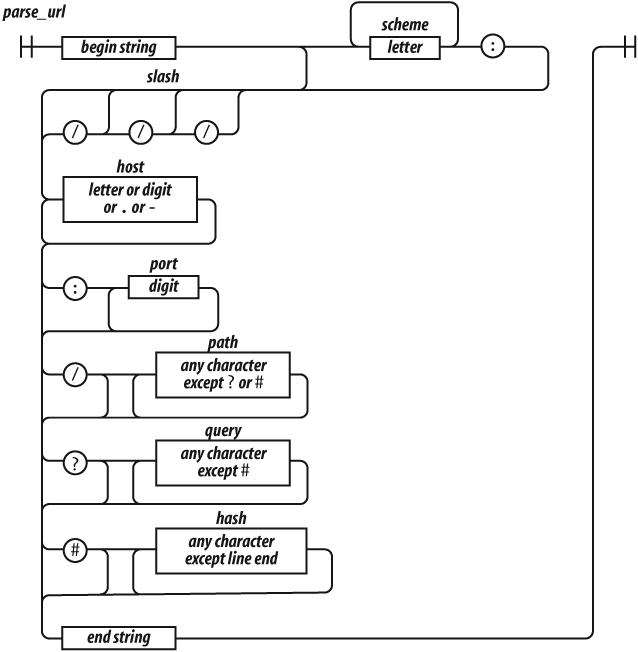
Regular expressions cannot be broken into smaller pieces the way that functions
can, so the track representing parse_url is a
long one.
Let's factor parse_url into its parts to see
how it works.
^
The ^ character indicates the beginning of the
string. It is an anchor that prevents exec from
skipping over a non-URL-like prefix.
(?:([A-Za-z]+):)?
This factor matches a scheme name, but only if it is followed by a : (colon). The (?:
. . . ) indicates a noncapturing group. The
suffix ? indicates that the group is
optional.
It means repeat zero or one time. The ( . . . ) indicates a
capturing group. A capturing group copies the text it matches and places it in the
result array. Each capturing group is given a
number. This first capturing group is 1, so a copy of the text matched by this
capturing group will appear in result[1]. The [ .
. . ] indicates a character class. This character class, A-Za-z, contains 26 uppercase letters and 26 lowercase letters. The
hyphens indicate ranges, from A to Z. The suffix + indicates that the character class will be matched one or more
times. The group is followed by the : character,
which will be matched literally.
(\/{0,3})The next factor is capturing group 2. \/
indicates that a / (slash) character should be
matched. It is escaped with \ (backslash) so that
it is not misinterpreted as the end of the regular expression literal. The suffix
{0,3} indicates that the / will be matched 0 or 1 or 2 or 3 times.
([0-9.\-A-Za-z]+)
The next factor is capturing group 3. It will match a host name, which is made up
of one or more digits, letters, or . or -. The - was
escaped as \- to prevent it from being confused
with a range hyphen.
(?::(\d+))?
The next factor optionally matches a port number, which is a sequence of one or
more digits preceded by a :. \d represents a digit character. The series of one or
more digits will be capturing group 4.
(?:\/([^?#]*))?
We have another optional group. This one begins with a /. The character class [^?#]
begins with a ^, which indicates that the class
includes all characters except ? and #. The * indicates that the character class is matched zero
or more times.
Note that I am being sloppy here. The class of all characters except ? and # includes line-ending characters, control characters, and lots of other characters that really shouldn't be matched here. Most of the time this will do what we want, but there is a risk that some bad text could slip through. Sloppy regular expressions are a popular source of security exploits. It is a lot easier to write sloppy regular expressions than rigorous regular expressions.
(?:\?([^#]*))?
Next, we have an optional group that begins with a ?. It contains capturing group 6, which contains zero or more
characters that are not #.
(?:#(.*))?
We have a final optional group that begins with #. The . will match any character
except a line-ending character.
$
The $ represents the end of the string. It
assures us that there was no extra material after the end of the URL.
Those are the factors of the regular expression parse_url.[1]
It is possible to make regular expressions that are more complex than parse_url, but I wouldn't recommend it. Regular
expressions are best when they are short and simple. Only then can we have
confidence that they are working correctly and that they could be successfully
modified if necessary.
There is a very high degree of compatibility between JavaScript language processors. The part of the language that is least portable is the implementation of regular expressions. Regular expressions that are very complicated or convoluted are more likely to have portability problems. Nested regular expressions can also suffer horrible performance problems in some implementations. Simplicity is the best strategy.
Let's look at another example: a regular expression that matches numbers. Numbers can have an integer part with an optional minus sign, an optional fractional part, and an optional exponent part.
var parse_number = /^-?\d+(?:\.\d*)?(?:e[+\-]?\d+)?$/i;

var test = function (num) {
    document.writeln(parse_number.test(num));
};

test('1');                // true
test('number');           // false
test('98.6');             // true
test('132.21.86.100');    // false
test('123.45E-67');       // true
test('123.45D-67');       // false
parse_number successfully identified the
strings that conformed to our specification and those that did not, but for those
that did not, it gives us no information on why or where they failed the number
test.
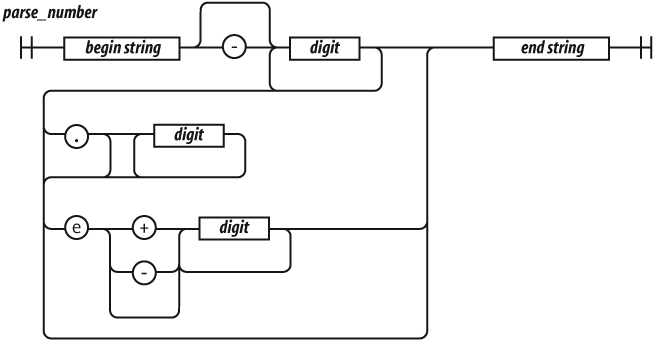
Let's break down parse_number.
/^ $/i
We again use ^ and $ to anchor the regular expression. This causes all of the characters
in the text to be matched against the regular expression. If we had omitted the
anchors, the regular expression would tell us if a string contains a number. With
the anchors, it tells us if the string contains only a number. If we included just
the ^, it would match strings starting with a
number. If we included just the $, it would match
strings ending with a number.
The i flag causes case to be ignored when
matching letters. The only letter in our pattern is e. We want that e to also match
E. We could have written the e factor as [Ee] or
(?:E|e), but we didn't have to because we
used the i flag:
-?
The ? suffix on the minus sign indicates that
the minus sign is optional:
\d+
\d means the same as [0-9]. It matches a digit. The +
suffix causes it to match one or more digits:
(?:\.\d*)?
The (?: . . . )? indicates an optional
noncapturing group. It is usually better to use noncapturing groups instead of the
less ugly capturing groups because capturing has a performance penalty. The group
will match a decimal point followed by zero or more digits:
(?:e[+\-]?\d+)?
This is another optional noncapturing group. It matches e (or E), an optional sign, and
one or more digits.
[1] When you press them all together again, it is visually quite confusing:
/^(?:([A-Za-z]+):)?(\/{0,3})([0-9.\-A-Za-z]+)(?::(\d+))?(?:\/([^?#]*))?(?:\?([^#]*))?(?:#(.*))?$/