Table of Contents for
JavaScript: The Good Parts
 JavaScript: The Good Parts
Published by
O'Reilly Media, Inc., 2008
JavaScript: The Good Parts
Published by
O'Reilly Media, Inc., 2008
- Cover
- JavaScript: The Good Parts
- SPECIAL OFFER: Upgrade this ebook with O’Reilly
- A Note Regarding Supplemental Files
- Preface
- Using Code Examples
- Safari® Books Online
- How to Contact Us
- Acknowledgments
- 1. Good Parts
- Analyzing JavaScript
- A Simple Testing Ground
- 2. Grammar
- Names
- Numbers
- Strings
- Statements
- Expressions
- Literals
- Functions
- 3. Objects
- Retrieval
- Update
- Reference
- Prototype
- Reflection
- Enumeration
- Delete
- Global Abatement
- 4. Functions
- Function Literal
- Invocation
- Arguments
- Return
- Exceptions
- Augmenting Types
- Recursion
- Scope
- Closure
- Callbacks
- Module
- Cascade
- Curry
- Memoization
- 5. Inheritance
- Object Specifiers
- Prototypal
- Functional
- Parts
- 6. Arrays
- Length
- Delete
- Enumeration
- Confusion
- Methods
- Dimensions
- 7. Regular Expressions
- Construction
- Elements
- 8. Methods
- 9. Style
- 10. Beautiful Features
- A. Awful Parts
- Scope
- Semicolon Insertion
- Reserved Words
- Unicode
- typeof
- parseInt
- +
- Floating Point
- NaN
- Phony Arrays
- Falsy Values
- hasOwnProperty
- Object
- B. Bad Parts
- with Statement
- eval
- continue Statement
- switch Fall Through
- Block-less Statements
- ++ −−
- Bitwise Operators
- The function Statement Versus the function Expression
- Typed Wrappers
- new
- void
- C. JSLint
- Members
- Options
- Semicolon
- Line Breaking
- Comma
- Required Blocks
- Forbidden Blocks
- Expression Statements
- for in Statement
- switch Statement
- var Statement
- with Statement
- =
- == and !=
- Labels
- Unreachable Code
- Confusing Pluses and Minuses
- ++ and −−
- Bitwise Operators
- eval Is Evil
- void
- Regular Expressions
- Constructors and new
- Not Looked For
- HTML
- JSON
- Report
- D. Syntax Diagrams
- E. JSON
- Using JSON Securely
- A JSON Parser
- Index
- About the Author
- Colophon
- SPECIAL OFFER: Upgrade this ebook with O’Reilly
A compilation unit contains a set of executable statements. In web browsers, each
<script> tag delivers a compilation
unit that is compiled and immediately executed. Lacking a linker, JavaScript throws
them all together in a common global namespace. There is more on global variables in
Appendix A.
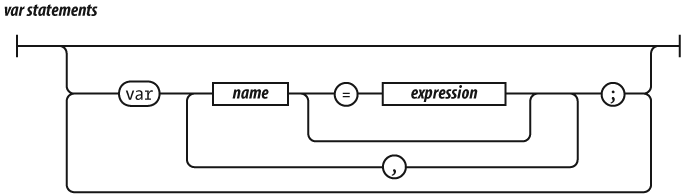
When used inside of a function, the var
statement defines the function's private variables.
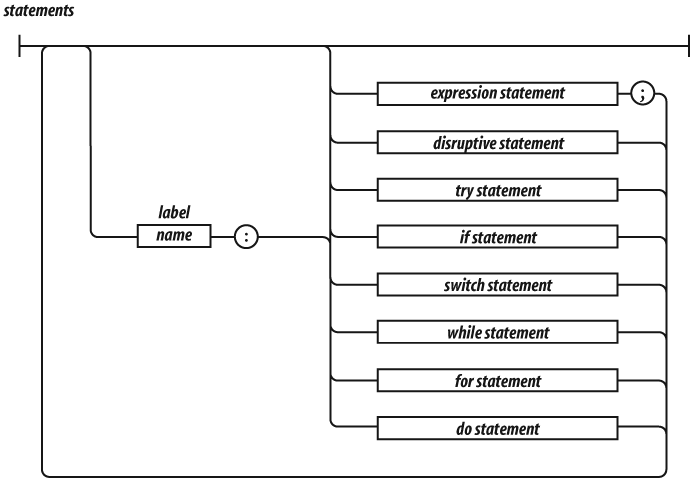
The switch, while, for, and do statements are allowed to have an optional
label prefix that interacts with the break statement.
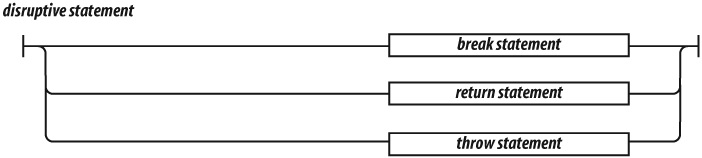
Statements tend to be executed in order from top to bottom. The sequence of
execution can be altered by the conditional statements (if and switch), by the looping
statements (while, for, and do), by the disruptive
statements (break, return, and throw), and by
function invocation.

A block is a set of statements wrapped in curly braces. Unlike many other languages, blocks in JavaScript do not create a new scope, so variables should be defined at the top of the function, not in blocks.

The if statement changes the flow of the
program based on the value of the expression. The then block is
executed if the expression is truthy;
otherwise, the optional else branch is
taken.
Here are the falsy values:
All other values are truthy, including true,
the string 'false', and all objects.
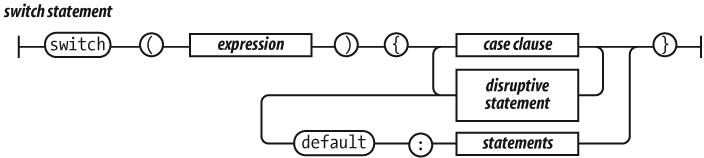
The switch statement performs a multiway
branch. It compares the expression for equality with all of the specified cases. The
expression can produce a number or a string. When an exact match is found, the
statements of the matching case clause are executed. If there is no match, the
optional default statements are executed.

A case clause contains one or more case
expressions. The case expressions need not be constants. The statement following a
clause should be a disruptive statement to prevent fall through into the next
case. The break statement can be used to exit from a switch.

The while statement performs a simple loop. If
the expression is falsy, then the loop will break. While the expression is truthy,
the block will be executed.
The for statement is a more complicated looping
statement. It comes in two forms.
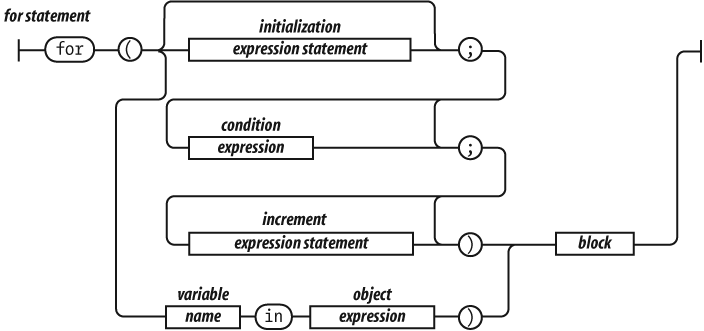
The conventional form is controlled by three optional clauses: the
initialization, the condition, and the
increment. First, the initialization is done, which
typically initializes the loop variable. Then, the condition is
evaluated. Typically, this tests the loop variable against a completion criterion.
If the condition is omitted, then a
condition of true is
assumed. If the condition is falsy, the loop breaks. Otherwise,
the block is executed, then the increment executes, and then
the loop repeats with the condition.
The other form (called for in) enumerates the
property names (or keys) of an object. On each iteration, another property name
string from the object is assigned to the
variable.
It is usually necessary to test object.hasOwnProperty(variable) to determine whether the property name is truly a
member of the object or was found instead on the prototype chain.
for (myvar in obj) {
    if (obj.hasOwnProperty(myvar)) {
        ...
    }
}
The do statement is like the while statement except that the expression is tested
after the block is executed instead of before. That means that the block will always
be executed at least once.

The try statement executes a block and catches
any exceptions that were thrown by the block. The catch clause defines a new variable that will
receive the exception object.

The throw statement raises an exception. If the
throw statement is in a try block, then control goes to the catch clause. Otherwise, the function invocation is
abandoned, and control goes to the catch clause
of the try in the calling function.
The expression is usually an object literal containing a name property and a message
property. The catcher of the exception can use that information to determine what to
do.

The return statement causes the early return
from a function. It can also specify the value to be returned. If a return
expression is not specified, then the return value will be undefined.
JavaScript does not allow a line end between the return and the expression.

The break statement causes the exit from a loop
statement or a switch statement. It can
optionally have a label that will cause an exit from the
labeled statement.
JavaScript does not allow a line end between the break and the label.
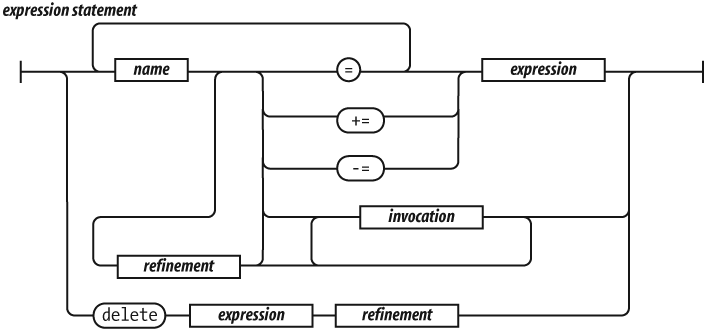
An expression statement can either assign
values to one or more variables or members, invoke a method, delete a property from
an object. The = operator is used for assignment.
Do not confuse it with the === equality operator.
The += operator can add or concatenate.