Table of Contents for
sendmail, 4th Edition
 sendmail, 4th Edition
Published by
O'Reilly Media, Inc., 2007
sendmail, 4th Edition
Published by
O'Reilly Media, Inc., 2007
- sendmail, 4th Edition
- Cover
- sendmail, 4th Edition
- Dedication
- Preface
- 1. Some Basics
- I. Administration
- 2. Download, Build, and Install
- 3. Tune sendmail with Compile-Time Macros
- 4. Maintain Security with sendmail
- 5. Authentication and Encryption
- 6. The sendmail Command Line
- 7. How to Handle Spam
- 8. Test Rule Sets with -bt
- 9. DNS and sendmail
- 10. Build and Use Companion Programs
- 11. Manage the Queue
- 12. Maintain Aliases
- 13. Mailing Lists and ~/.forward
- 14. Signals, Transactions, and Syslog
- 15. Debug sendmail with -d
- II. Configuration Reference
- 16. Configuration File Overview
- 17. Configure sendmail.cf with m4
- 18. The R (Rules) Configuration Command
- 19. The S (Rule Sets) Configuration Command
- 20. The M (Mail Delivery Agent) Configuration Command
- 21. The D (Define a Macro) Configuration Command
- 22. The C and F (Class Macro) Configuration Commands
- 23. The K (Database-Map) Configuration Command
- 24. The O (Options) Configuration Command
- 25. The H (Headers) Configuration Command
- 26. The X (Milters) Configuration Command
- III. Appendixes
- A. The mc Configuration Macros and Directives
- B. What’s New Since Edition 3
- C. The checkcompat( ) Function
- Bibliography
- Index
- About the Authors
- Colophon
- Copyright
Chapter 19. The S (Rule Sets) Configuration Command
Rule sets in the configuration file, like subroutines in a program, control the sequence of steps sendmail uses to rewrite addresses. Inside each rule set is a series of zero or more individual rules. Rules are used to select the appropriate delivery agent for any particular address, to detect and reject addressing errors, to transform addresses to meet particular needs, to validate addresses and headers for the purpose of rejecting spam, and to make policy decisions.
In this chapter, we will cover all aspects of rule sets, showing that rule sets are called in particular orders and explaining why this is so.
We will explain many of the rules that typically appear in rule sets. But be forewarned: the examples of rules in this chapter are only explanatory. Your sendmail.cf file is likely to have rules that are somewhat different. Copying or using these examples, without first understanding the underlying principles, can cause email to begin to fail.
The S Configuration Command
The S configuration command
declares the start of a rule set. It is perhaps the simplest
of all configuration commands and looks like this:
SidentThe S, like all
configuration commands, must begin the line. The
ident identifies the rule
set. There can be whitespace between the S and the
ident. If the
ident is missing,
sendmail prints the following
error message and skips that particular rule set
declaration:
configfile: line num: invalid ruleset name: ""
Prior to V8.7 sendmail, the
ident could only be
numeric. Beginning with V8.7 sendmail,
the ident can be numeric or
alphanumeric. We cover the old form first, then the
new.
Rule Set Numbers
Prior to V8.7 sendmail, rule sets could be identified only by numbers. When a rule set is declared with an integer, that integer is taken to be the numeric identity of the rule set:
S#Here, # is an
integer such as 23. If the # is greater than 100[260] (the maximum number of numbered rule
sets allowed), or is negative,
sendmail prints and logs the
following error:
configfile: line number: bad ruleset # ( maximum max)
and each rule following that bad rule set declaration will produce the following error:
configfile: line number: missing valid ruleset for "Rrule shown here"
Rule Set Names
Beginning with V8.7 sendmail, rule sets can be declared with numbers (as in the preceding section) or with more meaningful names. The form for a rule set name declaration looks like this:
SnameThe name can contain only ASCII alphanumeric characters and the underscore character. Any bad character causes that character and the characters following it to be silently ignored:
My_rule            ← good
My rule            ← bad, name is "My"
Case is recognized; that is, Myrule and MYRULE are different names. You can use
any name that begins with an uppercase letter. Names
that begin with a lowercase letter or an underscore
character are reserved for internal use by
sendmail.
There can be, at most, MAXRWSETS/2 named rule sets (MAX... on page 120). Each rule set that is declared beyond that amount causes sendmail to print the following error and ignore that rule set declaration:
name: too many named rulesets ( # max)When you declare a rule set name, sendmail associates a number with it. That number is selected by counting down from MAXRWSETS. That is, the first name is given the number MAXRWSETS-1, the second is given the number MAXRWSETS-2, and so on. Named rule sets can be used anywhere that numbered rule sets can be used.
Associate Number with Name
When associating a named rule set with a number of importance, you can create that association when the name is declared. The form of such a combined declaration looks like this:
Sname=numHere, the rule set named
name is declared.
Instead of allowing sendmail to
associate a number with it, you create the
association yourself by following the
name with an = character and then an
integer num. Arbitrary
whitespace can surround the = character. If the integer is missing
or nonnumeric, sendmail prints
the following error and skips that rule set
declaration:
configfile: line num: bad ruleset definition "bad" (number required after `=')
Different names should not share the same number:
Sfoo=1
Sfee=1
If they do, the second declaration will produce the following warning:
WARNING: Ruleset fee=1 has multiple definitions
The same name cannot be given a different number. Consider the following example:
SMyrule=1
SMyrule=2
This causes sendmail to print the following error and skip the second declaration:
configfile: line num: Myrule: ruleset changed value (old 1, new 2)
Named rule sets have numbers associated with them when
they first appear. If you use a named rule set in an
S= equate for a
delivery agent and then later attempt to assign it a
value, you will get an error such as in the
preceding example:
Mprog, P=sh, ...., S=Myrule, ...
...
SMyrule=2
The solution is either to move the rule set declaration (and its rules) so that they reside above the delivery agent declaration, or to declare a numeric association in the delivery agent declaration instead of in the rule set declaration:
Mprog, P=sh, ...., S=Myrule=2, ...
...
SMyrule
You could also place just the S line above the delivery agent
declaration and the rules, without the =2, below it:
SMyrule=2Mprog, P=sh, ...., S=Myrule, ... ... SMyrule
In general, we recommend that you assign numbers to named rule sets only if there is a genuine need.
Macros in Rule Set Names
Macros can be used in any or all of a part of a rule set declaration. They can be used to declare a name:
D{NAME}myname
S${NAME}
or to declare a number:
D{NUMBER}12
S${NUMBER}
or both a name and a number:
D{NAME}myname
D{NUMBER}12
S${NAME}=${NUMBER}
or even the whole thing:
D{SET}myset=12
S${SET}
You can use single- and multicharacter sendmail macros in any combination. Macros can be used in any rule set declaration, including subroutine calls inside rules:
R $* < $=w > $* $@ $>${NAME} $2But they cannot be used in the S= or the R= of delivery
agents:
Mprog, P=sh, ..., S=$X, R=$X, ...
                    ↑     ↑
                    neither of these will work
Macros can be used in the command line to modify a configuration file when sendmail is run. Consider the desire to call one rule set when running as a daemon and another when processing the queue. You might declare such rules like this:
R $*            $: $&A
R daemon        $@ $>Daemon_ruleset
R queue         $@ $>Queue_ruleset
R $*            $@ $>UndefinedA_ruleset
The two different runs might look like this:
#/usr/sbin/sendmail -MAdaemon -bd#/usr/sbin/sendmail -MAqueue -q30m
The first defines the $A
sendmail macro to have the
value daemon and
results in this subroutine call:
R daemon $@ $>Daemon_ruleset
The second defines the $A
sendmail macro to have the
value queue and
results in this different subroutine call:
R queue $@ $>Queue_ruleset
Note that any different or missing command-line
setting for $A
will result in the fallback subroutine call:
R $* $@ $>UndefinedA_ruleset
Also note that you can also define multicharacter macros from the command line. But to protect such multicharacter names from being interpreted by the shell, you should quote them:
#/usr/sbin/sendmail -M"{RunMode}"daemon -bd#/usr/sbin/sendmail -M"{RunMode}"queue -q30m
Also note that defining macros from the command line can result in sendmail giving up special privileges.
Rule Sets and Lists of Rules
All rules (R lines)
that follow a rule set declaration are added to and
become part of that rule set:
S0
R...          ← rules added to rule set 0
SMyset
R...          ← rules added to rule set Myset
S1
R...          ← rules added to rule set 1
Rule sets need not be declared in any particular order. Any order that clarifies the intention of the configuration file as a whole is acceptable. If a rule set appears more than once in a configuration file, V8 sendmail will print a warning:
WARNING: Ruleset name redefined                 ← prior to V8.8
WARNING: Ruleset name has multiple definitions  ← V8.8 and above
and append the new rules to the old:
S0
R...          ← rules added to rule set 0
S2
R...          ← rules added to rule set 2
S0            ← warning issued
R...          ← rules appended to earlier rule set 0
Note that the warning is given in all cases prior to
V8.8, but beginning with V8.8, it is issued only in
-bt
rule-testing mode (Overview on
page 299) or if the -d37.1 debugging switch (-d37.1 on page 563) is set.
Other configuration commands can be interspersed among rule definitions without affecting the rule set to which the rules are added:
S0
R...          ← rules added to rule set 0
DUuucphost.our.domain
R...          ← rules added to rule set 0
Prior to V8.10, any rules that appeared before the
first S command
were added to rule set 0 by default. With V8.10 and
above, sendmail rejects any
rules that are not preceded with a valid rule set
definition.
Odds and Ends
Arbitrary text that follows a rule set declaration is ignored unless it appears to be part of the declaration:
S11 100 more rule sets     ← rule set 11
S11100 more rule sets      ← rule set 11100 is illegal
SMyset 100 more rule sets  ← rule set Myset
Although the first and last of these examples work, we
recommend that you use the # commenting mechanism instead
(available with version 3 and higher configuration
files):
S11 #100 more rule sets     ← rule set 11
S11#100 more rule sets      ← rule set 11
SMyset #100 more rule sets  ← rule set Myset
A rule set declaration that has no rules associated with it acts like a do-nothing subroutine (one that returns its workspace unaltered):
Stest1           ← rule set test1 without rules does nothing
Stest2
R $*     $@ $1   ← rule set test2 also returns the workspace unaltered
Rule Sets and m4
When building a configuration file using the
m4 technique (The m4 Preprocessor on page 584)
sendmail reserves certain
rule set numbers and names for its own use. Using
the m4 technique, you can add
rules to those rule sets, but you cannot replace
those rule sets with your own. A few
m4 keywords are available to
make adding rules easier. They affect rule sets 0
through 3 (now called parse through canonify) directly, and other rule sets
indirectly (see Table 17-2 on page
595).
The configuration file created with the m4 technique uses quite a few rule sets beyond the base group. To avoid name collisions, we recommend that you begin all your own named rules with a leading capital letter.
The Sequence of Rule Sets
When sendmail rewrites addresses, it applies its rule sets in a specific sequence. The sequence differs for sender and recipient addresses, with a third branch used to select delivery agents. Figure 19-1 shows a map of the different paths taken by each kind of address. Those paths show how addresses flow through rule sets.
Both sender and recipient addresses are first input into the
canonify rule set
3. Then each takes a different path through the rule sets
based on its type. Recipient addresses take the dashed path,
whereas sender addresses take the solid path. But before
those paths can be taken, sendmail
needs to select a delivery agent (the dotted path) to get
rule set numbers for the R= and S= of each path.
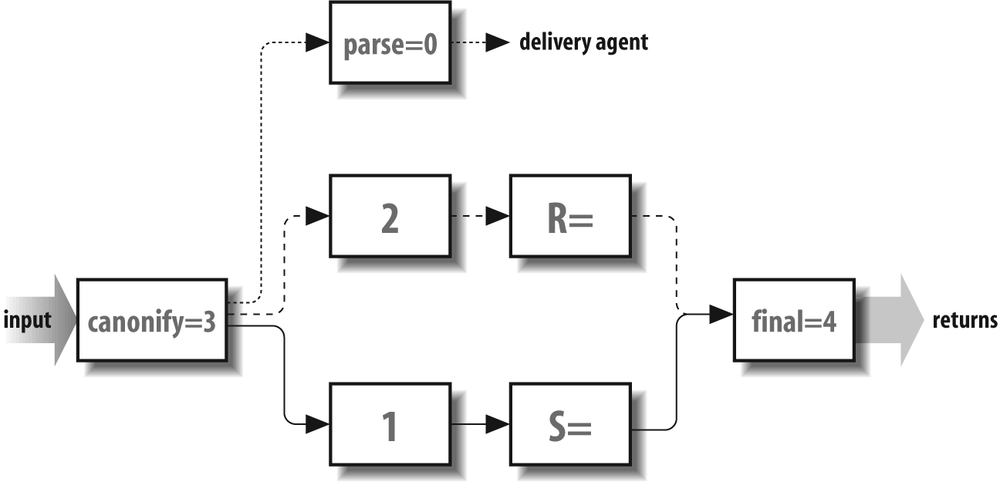
To select a delivery agent, sendmail
rewrites the recipient address with the canonify and parse rule sets (the
dotted path). The parse
rule set 0 selects a delivery agent that is appropriate for
the recipient. That delivery agent supplies rule set values
for the S= and R= in the corresponding
sender (solid) and recipient (dashed) paths.
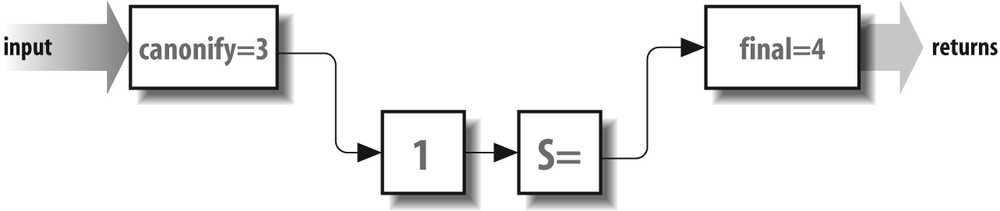
After a delivery agent has been selected, the sender address
is processed (see Figure 19-2).
As was mentioned earlier, it is first input into the
canonify rule set
3. Then it flows through rule set 1 (if that rule set is
declared), then the S=
rule set as determined by the delivery agent. Finally, it
flows through the final
rule set 4, which returns the rewritten address. This
rewritten sender address appears in the header and envelope
of the mail message. Note that all addresses are eventually
rewritten by the final
rule set 4. In general, the final rule set 4 undoes any special
rewriting that the canonify rule set 3 did.
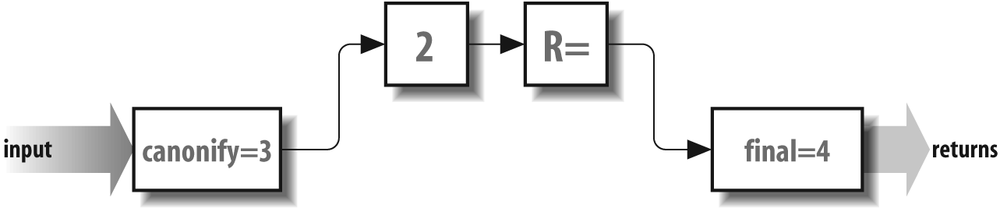
Finally, the recipient address also needs to be rewritten for
inclusion in the header and envelope of mail messages (see
Figure 19-3). Recall that the recipient address was already used once
to select the delivery agent. The recipient address is used
as input to the canonify
rule set 3, as are all addresses. The recipient address then
flows through rule set 2 (if it is declared), then through
the R= rule set selected
by the delivery agent, and finally through the final rule set 4.
The flow of rules through rule sets (as is shown in Figure 19-1) is appropriate for all versions of sendmail. Some versions, such as V8, enhance these rules with others, but all those enhancements begin with this basic set.
V8 Enhancements
V8 sendmail allows envelope
addresses to be rewritten separately from header
addresses. This separation takes place in the
delivery agent R=
and S= specific
rule sets, as illustrated in Figure 19-4.
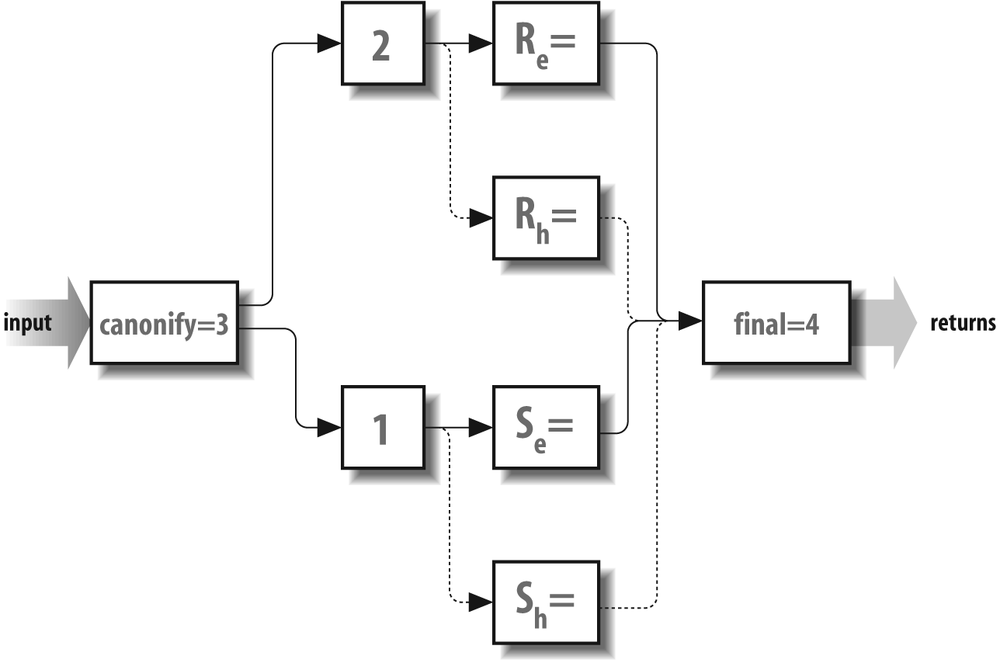
The method that is used to split rewriting looks like this:
R=eset/hset           ← beginning with V8
S=eset/hset           ← beginning with V8
The envelope-specific rule set is the one to the left
of the slash and is represented by a solid line. The
header-specific rule set is to the right of the
slash (R=eset/hset) and is represented by a
dashed line. See R= on page
751 for a complete description of this
process.
The canonify Rule Set 3
The canonify rule set 3 is
the first to process every address. Beginning with V8.10
sendmail, that rule set is
declared like this:
Scanonify=3
The name canonify gives a
clue to its role, that of putting all addresses into focused
or canonical form.
The canonify rule set 3
puts each address it gets into a form that simplifies the
tasks of other rule sets. The most common method is to have
the canonify rule set 3
focus an address (place angle
brackets around the host part). Then later rules don’t have
to search for the host part because it is already
highlighted. For example, consider trying to spot the
recipient host in this mess:
uuhost!user%host1%host2
Here, user is eventually
intended to receive the mail message on the host uuhost. But where should
sendmail send the message
first? As it happens, sendmail selects
uuhost (unless it
is uuhost). Focusing on
this address therefore results in the following:
user%host1%host2<@uuhost.uucp>
Note that uuhost was moved
to the end, the ! was
changed to an @, and
.uucp was
appended. The @ is there
so that all focused parts uniformly contain an @ just before the targeted
host. Later, when we take up post-processing, we’ll show how
final rule set 4
moves the uuhost back to
the beginning and restores the !.
In actual practice, the role of the canonify rule set 3 is much more complex
than this example. In addition to focusing, it must handle
list-syntax addresses (ColonOkInAddr on
page 986), missing and malformed addresses, the % hack (FEATURE(loose_relay_check)
on page 270), and more.
See LOCAL_RULE_3 (LOCAL_RULE_3 mc macro
on page 596) for a way to add rules to the canonify rule set
3.
A Special Case: From:<>
Among the rules in a typical canonify rule set 3 are those that
handle empty addresses. These represent the special
case of an empty or nonexistent address. Empty
addresses should be turned into the address of the
pseudouser that bounces mail,
MAILER-DAEMON:
R $@ $@ < @ > empty becomes special
Here, an empty address is rewritten to be a lone
@ surrounded by
angle braces. Other rule sets later turn this
special token into $n (which contains MAILER-DAEMON as its
value).
Basic Textual Canonicalization
Addresses can be legally expressed in a variety of formats:
address
address (full name)
<address>
full name <address>
list:members;
When sendmail preprocesses an address that is in the third and forth formats, it needs to find the address inside an arbitrarily deep nesting of angle braces. For example, where is the address in all this?[261]
Full Name <x12<@zy<alt=bob@r.com<bob@r.net>r.r.net>#5>+>
The rules in a typical canonify rule set 3 will quickly cut
through all this and focus on the actual
address:
R $*                     $: < $1 >                       housekeeping <>
R $+ < $* >                 < $2 >                       strip excess on left
R < $* > $+                 < $1 >                       strip excess on right
Here, the first rule puts angle braces around
everything so that the next two rules will still
work, even if the original address had no angle
braces. The second rule essentially looks for the
leftmost <
character and throws away everything to the left of
that. Because rules are recursive, it does that
until there is only one < left. The third rule completes the
process by looking for the rightmost > and
discarding everything after that.
You can witness this process by running
sendmail in -bt rule-testing mode,
using something such as the following. Note that
some of the lines that sendmail
outputs are wrapped to fit the page:
%/usr/sbin/sendmail -btADDRESS TEST MODE (ruleset 3 NOT automatically invoked) Enter <ruleset> <address> >-d21.12>canonify Full Name <x12<@zy<alt=bob@r.com<bob@r.netr.r.net>#5>+> > ... some other rules here -----trying rule: $* -----rule matches: $: < $1 > rewritten as: < Full Name < x12 < @ zy < alt=bob @ r . com < bob @ your . domain > relay . domain > #5 > + > > -----trying rule: $+ < $* > -----rule matches: < $2 > rewritten as: < x12 < @ zy < alt=bob @ r . com < bob @ your . domain > relay . domain > #5 > + > > -----trying rule: $+ < $* > -----rule matches: < $2 > rewritten as: < @ zy < alt=bob @ r . com < bob @ your . domain > relay . domain > #5 > + > > -----trying rule: $+ < $* > -----rule matches: < $2 > rewritten as: < alt=bob @ r . com < bob @ your . domain > relay . domain > #5 > + > > -----trying rule: $+ < $* > -----rule matches: < $2 > rewritten as: < bob @ your . domain > relay . domain > #5 > + > > -----trying rule: $+ < $* > ----- rule fails -----trying rule: < $* > $+ -----rule matches: < $1 > rewritten as: < bob @ your . domain >
Notice that we first put sendmail into debugging mode so that we
can watch the rules at work. Then we feed in the
canonify rule
set 3 followed by the address that was such a mess
earlier in this section. The three rules we showed
you do their job and isolate the real address from
all the other nonaddress pieces of
information.
Handling Routing Addresses
Beginning with V8.10, sendmail
removes route addresses by
default, unless the DontPruneRoutes option (DontPruneRoutes on page 1024) is set
to true.
Route addresses are addresses in the form:
@A,@B:user@C
Here, mail should be sent first to A, then from A to B, and finally from
B to C.[262]
Handling Specialty Addresses
A whole book is dedicated to the myriad forms of addressing that might face a site administrator: !%@:: A Directory of Electronic Mail Addressing & Networks, by Donnalyn Frey and Rick Adams (O’Reilly). We won’t duplicate that work here. Rather, we point out that most such addresses are handled nicely by existing configuration files. Consider the format of a DECnet address:
host::user
The best approach to handling such an address in the
canonify rule
set 3 is to convert it into the Internet
user@host.domain form:
R $+ :: $+ $@ $2 @ $1.decnet
Here, we reverse the host and user and put them into Internet form.
The .decnet can
later be used by the parse rule set 0 to select an
appropriate delivery agent.
This is a simple example of a special address problem from the many that can develop. In addition to DECnet, for example, your site might have to deal with Xerox Grapevine addresses, X.400 addresses, or UUCP addresses. The best way to handle such addresses is to copy what others have done.
Focusing for @ Syntax
The last few rules in our illustration of a typical
canonify rule
set 3 are used to process the Internet-style
user@domain
address:
# find focus for @ syntax addresses
R $+ @ $+                $: $1 <@ $2>        focus on domain
R $+ < $+ @ $+ >         $1 $2 <@ $3>        move gaze right
R $+ <@ $+ >             $@ $1 <@ $2>        already focused
For an address such as
something@something, the
first rule focuses on all the tokens following the
first @ as the
name of the host. Recall that the $: prefix to the
righthand side (RHS) prevents potentially infinite
recursion.
Assuming that the workspace started with:
user@host
these rules will rewrite that address to focus on the host part and become:
user<@host>
Any address that has not been handled by the canonify rule set 3 is
unchanged and probably not focused. Because the
parse rule set
0 expects all addresses to be focused so that it can
select appropriate delivery agents, such unfocused
addresses can bounce. Many configuration files allow
local addresses (just a username) to be
unfocused.
The final Rule Set 4
Just as all addresses are first rewritten by the canonify rule set 3, so
are all addresses rewritten last by the final rule set 4.
Beginning with V8.10 sendmail, that
rule set is declared like this:
Sfinal=4
As the name final implies,
the job is to undo any special processing done by the
canonify rule set
3, such as focusing. In this section, we’ll examine some
typical final rule set 4
rules.
Stripping Trailing Dots
Under some versions of sendmail, a successful conversion to a fully qualified domain name leaves an extra dot trailing the result. This rule strips that dot:
# strip trailing dot off possible canonical name
R $* <@ $+. > $*       $1 <@ $2 > $3
Note that this rule recursively removes as many trailing dots as it finds. Also note that the host part remains focused after rewriting.
Restoring Source Routes
Recall that the canonify rule set 3 converted the
commas of source route addresses into colons (Handling Routing Addresses on page
693). The final
rule set 4 now needs to restore those commas:
R $* : $+ :$+ <@ $+> $1 , $2 : $3 <@ $4> <route-addr> canonical
This rule recursively changes all but one (the rightmost) colon back into a comma.
As a special note, under V8
sendmail, envelope-sender
route addresses are always surrounded by angle
brackets when passed to the delivery agent. If this
behavior is inappropriate for your site, beginning
with V8.7 it is possible to prevent this heuristic
by specifying the F=d delivery agent flag (F=d on page 769).
Removing Focus
The final rule set
4 also removes angle brackets inserted by the
canonify rule
set 3 to focus on the host part of the address. This
is necessary because they are used only by the
internal logic of the configuration file. If they
were mistakenly left in place, mail would
fail:
# externalize local domain info
R $* <$+> $*         $1 $2 $3                   defocus
Correcting Tags
After defocusing, the final rule set 4 might need to convert
some addresses back to their original forms. For
example, consider UUCP addresses at a site that
still uses UUCP to transfer mail. They entered the
canonify rule
set 3 in the form
host!host!user. The canonify rule set 3
rewrote them in the more normal
user@host form, and added a
.uucp to the
end of the host. The following rule in the final rule set 4
converts such normalized UUCP addresses back to
their original form so that they can be sent using
UUCP software:
R $+ @ $-.uucp $2 ! $1 u@h.UUCP => h!u
The parse Rule Set 0
The job of the parse rule
set 0 is to select a delivery agent for each recipient.
Beginning with V8.10 sendmail, it is
declared like this:
Sparse=0
As the name parse implies,
the job of this rule set is to parse an address into
important information so that the final form of delivery can
be determined.
The parse rule set 0 is
called once for each recipient and must rewrite each into a
special form called a triple. A triple
is simply three pieces of information: the symbolic name of
the delivery agent, the host part of the address, and the
address to be passed to the delivery agent. Each part is
indicated in the RHS by a special prefix operator, as shown
in Table 19-1.
The triple is formed by rewriting with the RHS. It looks like this:
$#delivery_agent $@ host $: addressThe delivery agent selection must be the first of the three.
In addition to specifying the delivery agent, $# also causes the
parse rule set 0
to exit. The other two parts of the triple must appear in
the order shown ($@
first, then $:).
All three parts of the triple must be present in the RHS. The
only exception is the $@
host part when the delivery agent
has the F=l flag set. It
can be present for V8
sendmail but must be absent for
all other versions of sendmail.
Not all rules in the parse
rule set 0 are specifically used to select a delivery agent.
It might be necessary, for example, to canonicalize an
address with the $[ and
$] operators
(Canonicalize Hostname: $[ and $]
on page 668) before being able to decide whether the address
is local or remote.
If an address passes through the parse rule set 0 without selecting a
delivery agent, the following error message is produced, and
the mail message bounces:
554 5.3.5 buildaddr: no mailer in parsed address
Here, no mailer means that
a delivery agent was not selected by the parse rule set 0.[263] Therefore, it is important to design a parse rule set 0 that
selects a delivery agent for every legitimate
address.
If a triple is missing the address part (the $:), the following error
is produced:
554 5.3.5 buildaddr: no user
If the delivery agent that is selected is one for which there
is no corresponding M
configuration file declaration, the following error is
produced:
554 5.3.5 buildaddr: unknown mailer bad delivery agent name hereSee LOCAL_RULE_0 (LOCAL_RULE_0 mc macro
on page 596) for a way to add rules to the parse rule set 0.
Further Processing: $:address
The address part of the triple is intended for use in
the command line of the delivery agent and in the
RCPT command in an SMTP connection. For either use,
that address is rewritten by rule set 2 (if there is
one), the R=
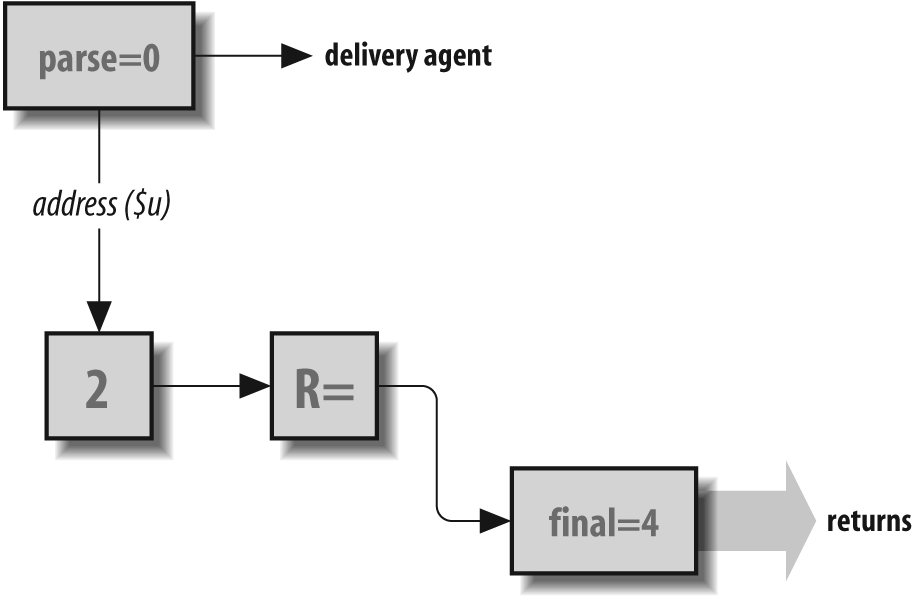
equate of the delivery agent, and the final rule set 4, as
illustrated in Figure 19-5. This means that the address part can be in
focused form because the focus is later removed by
the final rule
set 4. But the address part
must be a single username (no
host) for some local delivery agents.
The rewritten result is stored for use when a delivery
agent’s $u in
A= (A= on page 738) argument is
expanded. For example, for the local delivery agent,
the rewritten result is the username as it will be
given to /bin/mail for local
delivery.
The rewritten result is also given to a remote site
during the exchange of mail using the SMTP protocol.
The local machine tells the remote machine the name
of the recipient by saying RCPT To: followed by the rewritten
address portion of the triple.
Selecting S= and R=
When it selects a delivery agent, the parse rule set 0,
indirectly through that delivery agent, selects the
rules that will be used in rewriting sender and
recipient addresses. A sender address is rewritten
by the rule set specified by the S= equate (S= on page 753). The recipient
addresses are rewritten by the rule set specified by
the R= equate
(R= on page 751). If the
R= or S= specifies a zero or
if either is undeclared, that portion of rewriting
is skipped.
We won’t cover individual R= or S= rule sets here because they depend
on the individual needs of delivery agents. Instead,
we recommend that you examine how your configuration
file uses them. You’ll probably be surprised to find
that many R= and
S= equates
reference nonexistent rules (which means that
sendmail will do no
rewriting).
Delivering to Local Recipient
Typically, some early rules in the parse rule set 0 are
intended to detect addresses that should be
delivered locally. A rule that accomplishes that end
might look like this:
R $+ <@ $w> $#local $:$1 local address
Here, the $w
sendmail macro is the name of
the local host. Note that the RHS strips the focused
host part from the username.
At some sites, the local host can be known by any of
several names. A rule to handle such hosts would
begin with a class declaration that adds those names
to the class w
(such as in the first line here):
Cw font-server fax printer3
R $+ <@ $=w>        $#local $:$1                 local address
The class w is
special because it is the one to which
sendmail automatically
appends the alternative name of the local host. This
class declaration line adds names that
sendmail might not
automatically detect. Usually, such a declaration
would be near the top of the configuration file
rather than in the parse rule set 0, but technically it
can appear anywhere in the file. This rule looks to
see whether an address contains any of the names in
class w. If it
does, the $=w in
the lefthand side (LHS) matches, and the RHS selects
the local
delivery agent.
On central mail-server machines, the parse rule set 0 might
also have to match from a list of hosts for which
the central server is an MX recipient machine (FEATURE(use_cw_file) on page 643).
Forwarding to a Knowledgeable Host
After handling mail destined for the local host, the
parse rule set
0 generally looks for addresses that require a
knowledgeable host to forward messages on the local
host’s behalf. In the following rule, the $B
sendmail macro ($B on page 808) holds as its
value the name of a machine that knows how to
deliver BITNET mail (Relays on
page 602):
R $* <@ $+.BITNET> $* $#esmtp $@$B $:$1<@$2.BITNET>$3 user@host.BITNET
The tag .BITNET
would have been added by users when sending mail.
Note that BITNET
in the LHS is case-insensitive; a user can specify
Bitnet,
bitnet, or even
BiTNeT, and
this rule will still match. A similar scheme can be
used for other specialty addresses, such as UUCP and
DECnet.
Handling UUCP Locally
Hosts sometimes deliver mail to a few UUCP connections locally and forward to other UUCP connections through a knowledgeable host. The rules that handle this situation often make use of another class:
R $* <@ $=V . UUCP>     $#uucp $@ $2 $: $1                   user@localuucp
R $* <@ $+ . UUCP>      $#esmtp $@ $Y $: $1<@ $2 . UUCP>     kick upstairs
Here, the class $=V
contains a list of local UUCP connections. They are
matched by the first rule, which selects the
uucp delivery
agent. All other UUCP addresses are passed to the
knowledgeable host in $Y ($Y on
page 852). The user part ($:) that is given to the knowledgeable
host is the original address as it appeared to the
LHS.
Forwarding over the Network
Next, the parse
rule set 0 typically sees whether it can send the
mail message over the network. In the following
example, we assume that the local host is connected
to an IP network:
# deal with other remote names
R $* <@ $*> $*         $#esmtp $@ $2 $: $1 < @ $2> $3        user@host.domain
Remember that we have already screened out and handled
delivery to the local host, and therefore the
focused host (in the <@$* > of the LHS) is on the
network. The esmtp delivery agent is selected (to
deliver using the SMTP protocol), with connection to
be made to $2
(the $* part of
the <@$* >
in the LHS).
The focus is kept in the user portion of the RHS
triple. Remember that the user portion will be
rewritten by rule set 2 (if there is one), the
R= rule set (if
there is one), and the final rule set 4. Also remember that
the final rule
set 4 will defocus the address. We keep the focus
here because rule set 2 and all R= rules (if present)
expect the host part of addresses to be
focused.
Handling Leftover Local Addresses
Whatever is left after all preceding rules in the
parse rule set
0 have selected delivery agents is probably a local
address. Here, we check for a username without a
host part:
R $+ $#local $:$1 regular local names
Notice that the user part is not focused; it is unfocused because there is no host part on lone local usernames.
The localaddr Rule Set 5
For version 2 and higher configuration files, V8
sendmail allows local
recipients to undergo additional rewriting. Recall that each
recipient address is processed by the canonify rule set 3 and
parse rule set 0.
Beginning with V8.7 sendmail, any
delivery agent with the F=A flag set[264] (F=A on page 767)
will cause the address to undergo aliasing (via the
aliases file), which can result
in a new local address.
Under V8 sendmail, if an address makes it
through aliasing unchanged, it is given to the localaddr rule set 5,
which can select a new delivery agent. Note that it is given
to the localaddr rule set
5 after it is processed by the User Database (if used), but
before it is processed by the
~/.forward file.
Beginning with V8.7 sendmail, any
delivery agent that has the F=5 flag set (F=5 on page 764) will cause the localaddr rule set 5 to be called as
though the agent were a local one.
To illustrate, consider that a new delivery agent might be needed in the case of a mail firewall machine. A firewall machine is one that sits between the local network and the outside world and protects the local network from intrusion by outsiders. In such an arrangement, it might be desirable for all incoming mail to be delivered to the firewall so that no outsider needs to know the real names of machines on the local network.
Consider mail to the address
john@firewall. On the firewall
machine, the parse rule
set 0 selects the local
delivery agent. Because the address
john is local, it is looked up
in the aliases file. For this example,
we will assume that it is not found there.
Because the address john is not aliased,
it is then passed to the localaddr rule set 5, which selects
another delivery agent to forward the message into the local
network:
S5
R $+     $#esmtp $@ hub.internal.net $: $1 @ hub.internal.net
Here, the john matches the $+ in the LHS (as would
john+nospam and
john.smith), so the esmtp delivery agent is
selected. The mail message is forwarded to the local network
with john (the $1) as the username and hub.internal.net as the
name of the receiving machine on the internal
network.
For such a scheme to work, all local machines must send offsite mail addressed as though it were from the firewall, and local names must be changed to offsite forms when forwarded offsite. For example, the name john@local.host needs to be changed to john@firewall for all outgoing offsite mail.
Note that the localaddr
rule set 5 can also be used in situations that do not
involve firewalls. It can be used as a hook into forwarding
to other types of networks, with special mailing-list
software, or even as a way to handle retired accounts. Also
note that the localaddr
rule set 5 can select a new delivery
agent, but it does not have to.
For those times when the localaddr rule set 5 might not be
appropriate, V8 sendmail offers a
technique for bypassing it. In the parse rule set 0, if the first token
following the $: of a
rule that selects the local delivery agent is an @,
sendmail removes the @ and skips calling the
localaddr rule
set 5:
R $-         $#local $: @ $1
                        ↑
                        removed and the localaddr rule set skipped
Note that the localaddr
rule set 5 is the way V8.7 sendmail and
above institute the plussed users technique (Plussed Detail Addressing on page
476).
The Local_localaddr Hook
Beginning with V8.10 sendmail,
the localaddr
rule set 5 begins like this:
SLocal_localaddr
Slocaladdr=5
R$+                     $: $1 $| $>"Local_localaddr" $1
R$+ $| $#$*             $#$2
R$+ $| $*               $: $1
The presence of an empty Local_localaddr rule set gives you a
hook into the beginning of the localaddr rule set 5—in
other words, it gives you a place where you can
insert your own rules. You can insert rules using
the LOCAL_RULESETS mc
configuration command. For example:
LOCAL_RULESETS
SLocal_localaddr
R $* < $* . test > $*   $#discard $:discard
This rule checks for any address part ending in a
.test expression. If any is
found, the RHS selects the discard delivery agent (to discard the
message). The result of Local_localaddr is passed back to the
localaddr rule
set 5, which either returns a new delivery agent, if
one was selected, or passes the (possibly rewritten)
address to subsequent rules.
Note that the process we describe here cannot be used to insert rules into the beginning of the other numbered rule sets. You can use LOCAL_RULESETS to add rules to the end, but you cannot hook them into the beginning, as we have done here.
Rule Sets 1 and 2
Rule sets 1 and 2 handle sender and recipient addresses,
respectively. Rule set 1 is called before the S= delivery agent’s rule
set is called. Rule set 2 is called before the R= delivery agent’s rule
set is called. Neither is used (by default) in modern
configuration files.
Rule Set 1
Rule set 1 is intended to process all sender addresses. It is rarely used but can find application at sites where all outgoing mail should appear to come from a central mail server. Rules to handle this host hiding might look like this:
R $* <@ $=w> $* $@ $1 <@ $M> $3 user@localhost => user@ourdomain
In the LHS, the $=w
matches any name from a list of names by which the
local host is known. In the RHS, the $M contains the name of
the mail server. If the mail is not from the local
host, it is unchanged.
Other uses for rule set 1 might include the following:
Normalizing senders, for example, making mail from the users operator and dumper appear to come from root
Hiding user login names by mapping them (through an external database) to the form firstname.lastname
Needless to say, great care should be exercised in adding schemes such as these to your configuration file.
See LOCAL_RULE_1 (LOCAL_RULE_1 and LOCAL_RULE_2 mc macros on page 596) for a way to add rules to rule set 1.
Rule Set 2
All recipient addresses are rewritten by rule set 2
and the R= of
delivery agents. But in almost all configuration
files, rule set 2 is unused because no processing is
needed:
# Recipient processing: none needed
S2
But note that rule set 2 can be used to debug rules.[265] Consider the following rule in rule set 2 (that requires V8.9 and above sendmail to work):
R $# $+ $: $+ $:$2 Strip delivery agent and host when debugging
Recall that the parse rule set 0 returns a triple. When
testing an address, rule set 2 can be called
following the parse rule set 0 to simulate the
rewriting of the user portion of the parse rule set 0. Here
the LHS matches only a triple, so normal recipient
addresses are unaffected. The user part that is
returned by the RHS can then be used to test
individual R=
rules of delivery agents. (Another technique is to
use the /try
command in -bt
rule-testing mode; see Try a Delivery Agent with /try
on page 313.)
See LOCAL_RULE_2 (LOCAL_RULE_1 and LOCAL_RULE_2 mc macros on page 596) for a way to add rules to rule set 2.
Pitfalls
Rules that hide hosts in a domain should be applied only to sender addresses. Avoid the temptation to place such substitutions of hosts for domain names into the
canonifyrule set 3. Thecanonifyrule set 3 applies to all addresses and can wrongly change a nonlocal address.Not all configuration files focus with user<@domain>. IDA, for example, uses a more complex focus: <@domain,...,user>. Be sure you understand the style of focusing that is used in your configuration file before attempting to create new rules.[266]
Avoid confusing rule sets 1 and 2 when adding rules. Rule set 1 is for the sender; rule set 2 is for the recipient.
Typos in rule set declarations can be difficult to locate. For example,
S1O(in which the last character is the capital letter O) will silently evaluate to rule set 1 when you really meant rule set 10.
Policy Rule Set Reference
Beginning with V8.8, sendmail calls special rule sets internally to determine its behavior. Called the policy rule sets, they are used for such varied tasks as setting spam handling, setting policy, or validating the conditions when ETRN should be allowed, to list just a few. Table 19-2 shows the complete list of these policy rule sets. Note that we merely summarize them here, and that some are described in detail in other chapters. Those that we describe here are detailed in the following sections.
|
Rule set |
§ |
Hook |
Description |
|
|
Authinfo and the access database (V8.12 and later) on page 195 |
None |
Handle |
|
|
The check_compat Rule Set on page 259 |
See below |
Validate just before delivery. |
|
|
check_data on page 705 |
None needed |
Check just after DATA. |
|
|
The check_eoh Rule Set on page 1135 |
None needed |
Validate after headers are read. |
|
|
The check_eom Rule Set on page 258 |
None needed |
Review message’s size (V8.13 and later). |
|
|
check_etrn on page 706 |
None needed |
Allow or disallow ETRN. |
|
|
check_vrfy and check_expn on page 707 |
None needed |
Validate EXPN. |
|
|
Local_check_mail and check_mail on page 255 |
|
Validate the envelope-sender address. |
|
|
Local_check_rcpt and check_rcpt on page 257 |
|
Validate the envelope-recipient address. |
|
|
Local_check_relay and check_relay on page 252 |
|
Validate incoming network connections. |
|
|
check_vrfy and check_expn on page 707 |
None needed |
Validate VRFY. |
|
|
Rule Set Queue Group Selection on page 417 |
See below |
Select a queue group. |
|
|
srv_features on page 708 |
None needed |
Tune server setting based on connection information. |
|
|
The access database with tls_server and tls_client on page 214 |
|
With the access database, validate inbound
STARTTLS or |
|
|
The tls_rcpt rule set on page 215 |
|
Validate a server’s credentials based on the recipient address. |
|
|
The access database with tls_server and tls_client on page 214 |
|
Possibly with the access database, validate the inbound and outbound connections. |
|
|
SASL and Rule Sets on page 194 |
|
Validate that a client’s authentication
identifier ( |
|
|
Disable STARTTLS with the try_tls rule set on page 217 |
|
Disable STARTTLS for selected outbound connected-to hosts. |
|
|
Rules Check Header Contents on page 1130 |
n/a |
Reject, discard, or accept a message based on a header’s value. |
Note that some of these rule sets are omitted from your configuration file by default. For those, no hook is needed. You merely declare the rule set in your mc file and give it appropriate rules:
LOCAL_RULESETS
Scheck_vrfy
... your rules here
Those with a Local_ hook,
as shown in the table, are declared by default in your
configuration file. To use them yourself, you need only
declare them with the Local_ hook indicated:
LOCAL_RULESETS
SLocal_check_rcpt
... your rules here
Those with a LOCAL_ hook, as shown in the table, are declared directly with that hook. There in no need to precede the hook with LOCAL_RULESETS. For example:
LOCAL_TRY_TLS
... your rules here
The two exceptions are the check_compat and queuegroup rule sets. Each is
automatically declared when you use the corresponding
FEATURE(check_compat) or FEATURE(queuegroup), but
not declared if you don’t use that feature.
All of these rule sets are handled in the same manner. If the
rule set does not exist, the action is permitted. If the
rule set returns anything other than a #error or a #discard delivery agent,
the message, identity, or action is accepted for that rule
set (although it can still be rejected or discarded by
another rule set). Otherwise, the #error delivery agent causes the message,
identity, or action to be rejected (error
on page 720) and the #discard delivery agent causes the
message to be accepted, then discarded (discard on page 719).
check_data
Check just after DATA Policy rule set
The check_data rule
set can be used to validate recipients after all
recipients have been declared with SMTP RCPT To: commands. Other
uses for the check_data rule set include screening a
combination of sender and recipient, and evaluating
connection-based information.
The check_data rule
set is called from inside
sendmail just after the SMTP
DATA command is received, but before that command is
acknowledged:
RCPT To: <gw@wash.dc.gov>
250 2.1.5 <gw@wash.dc.gov>... Recipient ok
DATA
                                                       ← called here
354 Enter mail, end with "." on a line by itself       ← usually acknowledged here
The workspace passed to the check_data rule set is a count of the
number of envelope recipients—that is, the number of
accepted SMTP RCPT
To: commands. One use for this rule set
might be to reject messages that specify too many
envelope recipients. Consider the following
mc configuration
lines:
LOCAL_CONFIG
Kmath arith

LOCAL_RULESETS
Scheck_data
R $-            $: $(math l $@ 19 $@ $1 $)       # reject >=20 envelope recipients
R FALSE         $# error $@ 5.7.1 $: "550 Too many recipients"
Here, we add two new sections to our
mc configuration file. The
first, under LOCAL_CONFIG, defines a database map of
type arith (arith on page 898).
In the second section, following the LOCAL_RULESETS,
we declare the check_data rule set. That rule set is
followed by two rules. The first rule looks up the
workspace (the LHS $-) that contains a count of the
envelope recipients. The RHS of that rule looks up
that value using the math database map comparing the number
of recipients (the $1 in the RHS) to a literal 19. If 19
is less than that count, FALSE is returned,
indicating that there are too many recipients.
Otherwise, TRUE is returned.
The second rule detects a literal FALSE (too many
recipients) and uses the $#error delivery agent (error on page 720) to reject the
message.
Note that we used 19 merely as an example. Before you decide on such a limit for your situation, you should consider how many users you have, and how many variations on those users there are in your aliases database. If you decide to limit the number of recipients you will accept, be sure that limit is large enough for all normal and mailing-list mail.
check_etrn
Allow or disallow ETRN Policy rule set
The SMTP ETRN command (Process the queue via ESMTP ETRN on
page 433) causes V8.8 and above
sendmail to asynchronously
process its queue in a manner similar to the
-qR
command-line switch (Process by identifier/recipient/sender:
-q[ISR] on page 431). This command allows dial-on-demand
sites to make an SMTP connection and to force the
other side to process and send any mail that is
queued for them.
The form of this ESMTP command looks like this:
ETRN host
ETRN #queuegroup          ← V8.12 and above
If host or
queuegroup is missing,
this error message will be returned:
550 5.7.1 Parameter required
Otherwise, the queue will be processed just as though the following command-line argument were given:
-qR@host
-qGqueuegroup                  ← V8.12 and above
If the PrivacyOptions option’s noetrn is set, or if the
DaemonPortOptions option’s Modify=E (DaemonPortOptions=Modify=
on page 996) is set, the SMTP ETRN command will be
disallowed with the following message:
502 5.7.0 Sorry, we do not allow this operation
One use for the check_etrn rule set is to allow the
SMTP ETRN command for specific hosts but not
others.[267] When the ETRN command is given, it can
provide the domain for which to run the queue. That
domain specification is given to the check_etrn rule set in
its workspace. To illustrate, consider the following
lines in your mc configuration
file:
LOCAL_CONFIG
F{EtrnHosts} /etc/mail/etrn_hosts
LOCAL_RULESETS
Scheck_etrn
R $={EtrnHosts}       $# OK
R $*                  $# error $@ 5.7.0 $: "502 We don't ETRN for you."
There are two parts here. The first part, the
LOCAL_CONFIG part, uses the F configuration command (The F Class Command on page 857) to
load the $={EtrnHosts} class with a list of
hosts for which we will perform SMTP ETRN. That list
is read from the file
/etc/mail/etrn_hosts, which
lists the hosts, one per line.
The second part, the LOCAL_RULESETS part, sets up the
check_etrn rule
set. There are two rules in this rule set. The first
rule matches any hosts that are in the {EtrnHosts} class, and
accepts them with a $#
OK. The second rule disallows ETRN for
all other hosts.
For a scheme such as this to work, you should make certain that all possible names for the allowed hosts are included in the list. That is, for example, mx.wash.dc.gov might also require you to list wash.dc.gov.
check_vrfy and check_expn
Validate VRFY and EXPN Policy rule set
The SMTP VRFY command is used to verify an email address. The SMTP EXPN command is used to expand an email address. They are used like this:
VRFY gw@wash.dc.gov
250 2.1.5 George Washington <gw@wash.dc.gov>
VRFY nosuchuser@wash.dc.gov
550 5.1.1 nosuchuser@wash.dc.gov... User unknown
EXPN all@wash.dc.gov
250-2.1.5 George Washington <gw@wash.dc.gov>
250 2.1.5 Andrew Jackson <aj@wash.dc.gov>
If sendmail can deliver to the address specified, it will respond with a 250, a DSN 2.1.5, the full name of the recipient (if known), and the normalized address. If the address is bad, sendmail will reply with a 550, a DSN 5.1.1, and the reason for the rejection of the request. If the request is to EXPN, and if the address expands to another or more addresses, as with an alias or a mailing list, sendmail will print each expanded-to address, one per line.
If your site has set goaway or novrfy for the PrivacyOptions option (PrivacyOptions on page 1065),
sendmail will reject all SMTP
VRFY commands with the following message:
252 2.5.2 Cannot VRFY user; try RCPT to attempt delivery (or try finger)
If your site has set goaway or noexpn for the PrivacyOptions option (PrivacyOptions on page 1065),
sendmail will reject all SMTP
EXPN commands with the following message:
502 5.7.0 Sorry, we do not allow this operation
The check_vrfy rule
set can serve two useful functions. It can be used
to print a different rejection message, and it can
be used to allow verification of some but not all
addresses. The check_expn rule set can replace
check_vrfy in
the following two examples, when SMTP EXPN is of
concern.
Use check_vrfy to change rejection message
If you prefer to reject SMTP VRFY commands with a less helpful message than sendmail uses, you can set up something such as the following in your mc configuration file:
LOCAL_RULESETS
Scheck_vrfy
R $*           $# error $@ 2.5.2 $: "252 VRFY forbidden"
For this rule set to be called, you need to
omit goaway or
novrfy from
your PrivacyOptions option’s setting (PrivacyOptions on page 1065).
Thereafter, whenever an SMTP VRFY command is
received, sendmail will call
the check_vrfy
rule set. In this version of that rule set, we
simply match all addresses (the LHS $*). Every address is
rejected by the RHS using the $#error delivery agent
(error on page 720) with a
message such as this:
252 2.5.2 VRFY forbidden
Use check_vrfy to select addresses to verify
The goaway
and novrfy
PrivacyOptions option settings (PrivacyOptions on page 1065) reject
all SMTP VRFY commands. But at your site, you
might instead wish to allow selected addresses to
be verified, and others to be rejected. One way to
do that is by adding lines such as the following
to your mc configuration
file:
LOCAL_RULESETS
Scheck_vrfy
R $*                   $: $>canonify $1       focus on the host
R $* <@ $=w . > $*     $: $1                  isolate the user
R postmaster           $# error $@ 2.5.1 $: "251 <postmaster@$j>"
R abuse                $# error $@ 2.5.1 $: "251 <abuse@$j>"
R $*                   $# error $@ 2.5.2 $: "252 VRFY forbidden"
For this rule set to be called, you need to
omit goaway or
novrfy from
your PrivacyOptions option’s setting (PrivacyOptions on page 1065).
Thereafter, whenever an SMTP VRFY command is
received, sendmail will call
the check_vrfy
rule set.
The address given to the SMTP VRFY command is
provided to the check_vrfy rule set in its workspace.
The first rule passes that address to the canonify rule set 3
(The canonify Rule Set 3 on page
690), which focuses on the host part by
surrounding that part in angle braces. The second
rule finds the user portion of that address and
places just that user portion into the workspace.
This is done only for addresses recognized as
local.
The next two rules look for specific users
that you wish to verify. Here, you wish to let
others know that you will accept mail to postmaster and to
abuse. Attempts
to verify any other users will result in a
rejection of the request.
srv_features
Alter settings after inbound connect Policy rule set
Immediately after an inbound host connects to the listening sendmail daemon, and before the daemon issues its initial greeting message, sendmail performs the following steps:
It does a PTR lookup of the connecting host’s address to find the hostname.
It clears its buffers and counters, and sets all its defaults, to ready itself for the upcoming SMTP dialog.
It presets key macros to their current values, such
${load_avg}.It calls the
srv_featuresrule set to tune features so that they match the requirements of the connecting host.
The srv_features
rule set is declared like this:
LOCAL_SRV_FEATURES
... your rules here
The srv_features
rule set must return a $# followed by one or more of the
characters defined in Table 19-3. When more than one character is returned, each
must be separated from the next by a space. Each
character turns a feature on or off. If the
character is lowercase, it turns the feature on.
Uppercase turns the feature off. One character, the
t, is special
because it causes sendmail to
temporarily fail the connection.
|
On |
Off |
Description |
|
|
|
Offer the AUTH SMTP extension. |
|
|
|
Offer use of the SMTP VERB command (V8.13 and later). |
|
c |
C |
|
|
|
|
Offer the DSN SMTP extension (V8.13 and later). |
|
|
|
Offer the ETRN SMTP extension (V8.13 and later). |
|
|
|
Require the client to authenticate with AUTH (V8.13 and later). |
|
|
|
Offer the PIPELINING SMTP extension. |
|
r |
R |
Request a certificate (V8.13 and later). |
|
|
|
Offer the STARTTLS SMTP extension. |
|
|
|
Verify a client certificate. |
|
|
|
Offer use of the SMTP EXPN command (V8.13 and later). |
If anything other than the characters shown in the table is returned, that bad character is silently ignored.
The default setting for any of these characters
depends on the use of the character. For example, if
noetrn is
specified for the PrivacyOptions option (PrivacyOptions=noetrn on page
1066), the default is the character E; otherwise, the
default is the character e. Whereas if Modify=A is specified for the DaemonPortOptions option
(DaemonPortOptions=Modify=
on page 996), which sets the daemon’s listening
port, the default is A; otherwise, it is a. In general, B, D, E, and X take their defaults
from the various PrivacyOptions option settings, whereas
L and R take their defaults
from the various Modify= settings. But note that
P defaults to
p if
sendmail was compiled with
the PIPELINING build-time macro defined; otherwise,
it defaults to P,
which cannot be overridden.
The srv_feature
rule set is passed the connecting client’s hostname
in its workspace. Instead, you must base your policy
decisions on the various
sendmail macro values
available. For example, the following rule allows
EXPN if the connecting host is the local machine,
and denies it otherwise.
LOCAL_SRV_FEATURES
R $*               $: $&{client_addr}
R 127.0.0.1        $# e
R $*               $# E
A special character, the t, is used to force a temporary
failure:
LOCAL_SRV_FEATURES
R $*                    $: $&{client_addr}
R $- . $- . $- . $-     $: $1.$2.$3
R 123.45.67             $# temp
Here, the connecting host’s address is found in the
$&{client_addr} macro. The second
rule strips off the host part of a class-C address.
The last rule then checks to see whether that
network address is that of the new network, the one
that should have no valid hosts on it yet. If it is,
the connection is deferred by returning $#t. Note that when the
returned character is t, other letters can follow it, and
they will be ignored.
In addition to your rules, there are default rules present that can make your job easier. The default rules perform access database lookups for entries in that database that begin with the special prefix:
Srv_Features:
The connecting host’s name, as taken from the $&{client_name}
macro, is looked up first. The connecting host’s
address, as taken from the $&{client_addr} macro, is looked up
second. If neither of those is found, the bare
prefix is looked up. The earlier example, then, if
implemented in the access
database, would look like this:
Srv_Features:127.0.0.1      e
Srv_Features:               E
The character letters that are returned as values by the access database are the same as those returned by your own rules, as shown in the table. Multiple letters can be returned, where each must be separated from the others by a space:
Srv_Features:127.0.0.1 e b
The srv_feature
access database decisions can
be combined with access
database decisions made by other rule sets to create
more complex decisions. For example:
Try_TLS:broken-host.domain   NO
Srv_Features:your.domain     v
Srv_Features:                V
Here, we use the Try_TLS: prefix (Disable STARTTLS with the try_tls rule
set
on page 217) to prevent sending the STARTTLS SMTP
command to the host broken-host.domain. The second line
(the first Srv_Features: prefix) tells
sendmail (the v) to request a client
certificate during the TLS handshake only for hosts
in your.domain. The last line
tells sendmail to not request a
client certificate from any other hosts.
Note that you can use the access
database (The access Database on
page 277) only if you enabled that database with the
FEATURE(access_db) in your
mc configuration file.
[260] * This limit is defined as one-half of MAXRWSETS, which is defined as 200 in sendmail/conf.h.
[261] * We exaggerate for the purpose of this example. Technically, this is not a legal RFC2822 address, but it might be a legal RFC733 address.
[262] * Also see the
F=d delivery
agent flag (F=d on page
769) for a way to prevent route addresses from
being enclosed in angle braces.
[263] * We use the term “delivery agent,” whereas the code uses the term “mailer.” Both, in this context, mean the same thing. In other contexts, the term “mailer” can also mean a mail user agent (MUA).
[264] * Prior to V8.7
sendmail, only the local delivery agent had
this property.
[265] * This is a truly
bogus example. We are really stretching to find a
use for rule set 2. There is no reason to do this
debugging in rule set 2 because rule set 99 would
work just as well. According to Eric, “I can think
of no good reason to use S2 today.”
[266] † Eric says that
focusing might go away entirely in a future
release because it is no longer needed under
updated route-addr semantics, which discard the
route part (Handling Routing Addresses on page
693), thereby guaranteeing that everything after
the @ is the
host part.
[267] * See ${load_avg}
on page 832 for an example of how to use check_etrn to allow SMTP
ETRN only when the load average is low
enough.