Table of Contents for
sendmail, 4th Edition
 sendmail, 4th Edition
Published by
O'Reilly Media, Inc., 2007
sendmail, 4th Edition
Published by
O'Reilly Media, Inc., 2007
- sendmail, 4th Edition
- Cover
- sendmail, 4th Edition
- Dedication
- Preface
- 1. Some Basics
- I. Administration
- 2. Download, Build, and Install
- 3. Tune sendmail with Compile-Time Macros
- 4. Maintain Security with sendmail
- 5. Authentication and Encryption
- 6. The sendmail Command Line
- 7. How to Handle Spam
- 8. Test Rule Sets with -bt
- 9. DNS and sendmail
- 10. Build and Use Companion Programs
- 11. Manage the Queue
- 12. Maintain Aliases
- 13. Mailing Lists and ~/.forward
- 14. Signals, Transactions, and Syslog
- 15. Debug sendmail with -d
- II. Configuration Reference
- 16. Configuration File Overview
- 17. Configure sendmail.cf with m4
- 18. The R (Rules) Configuration Command
- 19. The S (Rule Sets) Configuration Command
- 20. The M (Mail Delivery Agent) Configuration Command
- 21. The D (Define a Macro) Configuration Command
- 22. The C and F (Class Macro) Configuration Commands
- 23. The K (Database-Map) Configuration Command
- 24. The O (Options) Configuration Command
- 25. The H (Headers) Configuration Command
- 26. The X (Milters) Configuration Command
- III. Appendixes
- A. The mc Configuration Macros and Directives
- B. What’s New Since Edition 3
- C. The checkcompat( ) Function
- Bibliography
- Index
- About the Authors
- Colophon
- Copyright
Chapter 18. The R (Rules) Configuration Command
Rules are like little if-then clauses,[245] existing inside rule sets, that test a pattern against an address and change the address if the two match. The process of converting one form of an address into another is called rewriting. Most rewriting requires a sequence of many rules because an individual rule is relatively limited in what it can do. This need for many rules, combined with the sendmail program’s need for succinct expressions, can make sequences of rules dauntingly cryptic.
In this chapter, we dissect the components of individual rules. In the next chapter. we will show how groups of rules can be combined to perform necessary tasks.
Why Rules?
Rules in a sendmail.cf file are used to rewrite (modify) mail addresses, to detect errors in addressing, and to select mail delivery agents. Addresses need to be rewritten because they can be specified in many ways, yet are required to be in particular forms by delivery agents. To illustrate, consider Figure 18-1, and the address:
friend@uuhost
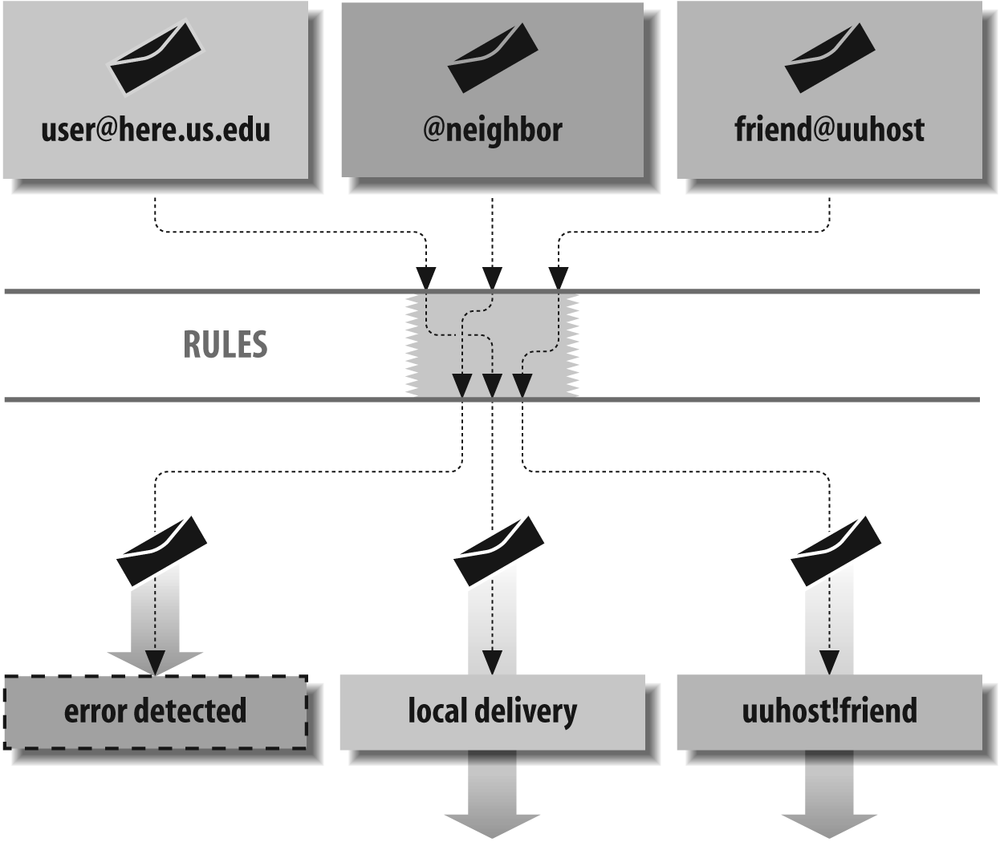
If the machine uuhost were
connected to yours over a dial-up line, mail might be sent
by UUCP, which requires addresses to be expressed in UUCP
form:
uuhost!friend
Rules can be used to change any address, such as friend@uuhost, into another address, such as uuhost!friend, for use by UUCP.
Rules can also detect and reject errors on the machine from which mail originated. This prevents errors from propagating over the network. Mail to an address without a username is one such error:
@neighbor
It is better to detect this kind of error as early as possible
instead of having the host neighbor reject it.
Rules can also select delivery agents. Delivery agents are the means used by sendmail to actually transmit or deliver mail messages. Rules examine the address of each envelope recipient and select the appropriate delivery agent. For example:
root@here.us.edu
Here, rules detect that here.us.edu is the name of the local
machine and then select the local delivery agent to perform final
delivery to the user root’s system
mailbox.
And lastly, rules can be used to make decisions about such things as rejecting spam, or deferring to a different queue.
The R Configuration Command
Rules are declared in the configuration file with the R configuration command.
Like all configuration commands, the R rule configuration
command must begin a line. The general form consists of an
R command
followed by three parts:
Rlhs    rhs   comment
    ↑       ↑
    tabs    tabs
The lhs stands for
lefthand side and is most
commonly expressed as LHS. The rhs stands for righthand
side and is expressed as RHS. The LHS and
RHS are mandatory. The third part (the comment) is optional. The
three parts must be separated from each other by one or more
tab characters (space characters will
not work).
Space characters between the R and the LHS are optional. If there is a
tab between the R and the
LHS, sendmail prints and logs the
following error:
configfile: line number: R line: null LHS
Space characters can be used inside any of the three parts: the LHS, RHS, or comment. They are often used in those parts to make rules clearer and easier to parse visually.
The tabs leading to the comment and the comment itself are
optional and can be omitted. If the RHS is absent,
sendmail prints the following
warning and ignores that R line:
invalid rewrite line "bad rule here" (tab expected)This error is printed when the RHS is absent, even if there are tabs following the LHS. (This warning is usually the result of tabs being converted to spaces when text is copied from one window to another in a windowing system using cut and paste.)
Macros in Rules
Each noncomment part of a rule is expanded as the configuration file is read.[246] Thus, any references to defined macros are replaced with the value that the macro has at that point in the configuration file. To illustrate, consider the following mini configuration file (which we will call test.cf):
V10
Stest
DAvalue1
R $A    $A.new
DAvalue2
R $A    $A.new
First, note that as of V8.10
sendmail, rules (the R lines) cannot exist
outside of rule sets (the S line). If you omit a rule set
declaration, the following error will be printed and
logged:
configfile: line number: missing valid ruleset for "bad rule here"
Second, note that beginning with V8.9,
sendmail will complain if the
configuration file lacks a correct version number
(the V line). Had
we omitted that line, sendmail
would have printed and logged the following
warning:
Warning: .cf file is out of date: sendmail 8.12.6 supports version 10, .cf file is
version 0
The first D line
assigns the value value1 to the $A
sendmail macro. The second
D line replaces
the value assigned to $A in the first line with the new value
value2. Thus,
$A will have
the value value1
when the first R
line is expanded and value2 when the second is expanded.
Prove this to yourself by running
sendmail in -bt rule-testing mode to
test that file:
% echo =Stest | /usr/sbin/sendmail -bt -Ctest.cf
> =S0
R value1                 value1 . new
R value2                 value2 . new
Here, we use the =S
command (Show Rules in a Rule Set with =S
on page 306) to show each rule after it has been
read and expanded.
Another property of macros is that an undefined macro
expands to an empty string. Consider this rewrite of
the previous test.cf file in
which we use a $B
macro that was never defined:
V10
Stest
DAvalue1
R $A    $A.$B
DAvalue2
R $A    $A.$B
Run sendmail again, in rule-testing mode, to see the result:
% echo =Stest | /usr/sbin/sendmail -bt -Ctest.cf
R value1                 value1 .
R value2                 value2 .
Beginning with V8.7, sendmail macros can be either single-character or multicharacter. Both forms are expanded when the configuration file is read:
D{OURDOMAIN}us.edu
R ${OURDOMAIN}    localhost.${OURDOMAIN}
Multicharacter macros can be used in the LHS and in the RHS. When the configuration file is read, the previous example is expanded to look like this:
R us . edu localhost . us . edu
It is critical to remember that macros are expanded when the configuration file is read. If you forget, you might discover that your configuration file is not doing what you expect.
Rules Are Treated Like Addresses
After each side (LHS and RHS) is expanded, each is then normalized just as though it were an address. A check is made for any tabs that might have been introduced during expansion. If any are found, everything from the first tab to the end of the string is discarded.
Then, if the version of the configuration file you are running is less than 9 (that is, if the version of sendmail you are running is less than V8.10), RFC2822-style comments are removed. An RFC2822 comment is anything between and including an unquoted pair of parentheses:
DAroot@my.site (Operator)
R $A  tabRHS
   ↓
R root@my.site (Operator)  tabRHS        ← expanded
   ↓
R root@my.site  tabRHS        ← comment stripped prior to version 8 configs only
Finally, prior to V8.13 (see the next section, As of V8.13, rules no longer need to balance on page 653, for V8.13 and later behavior), a check was made for balanced quotation marks, and for right angle brackets balanced by left.[247] If any righthand character appeared without a corresponding lefthand character, sendmail printed one of the following errors (where configfile is the name of the configuration file that was being read, number shows the line number in that file, and expression is the part of the rule that was unbalanced) and attempted to make corrections:
configfile : line number: expression  ...Unbalanced '"'
configfile : line number: expression ...Unbalanced ''
Note that prior to V8.13, an unbalanced quotation mark was corrected by appending a second quotation mark, and an unbalanced angle bracket was corrected by removing it. Consider the following test.cf confirmation file:
V8
Stest
R x      RHS"
R y      RHS>
If you ran pre-V8.13 sendmail in rule-testing mode on this file, the following errors and rules would be printed:
% echo =Stest | /usr/sbin/sendmail -bt -Ctest.cf
test.cf: line 3: RHS"... Unbalanced '"'
test.cf: line 4: RHS>... Unbalanced '>'
R x              RHS ""
R y              RHS
Also note that prior to V8.7 sendmail, only an unbalanced righthand character was checked.[248] For V8.12 through V8.13 sendmail, unbalanced lefthand characters were also detected, and sendmail attempted to balance them. Consider the following rewrite of our test.cf file:
V9
Stest
R x      "RHS
R y      <RHS
Here, pre-V8.13 sendmail detected and fixed the unbalanced characters and issued warnings:
% echo =Stest | /usr/sbin/sendmail -bt -Ctest.cf
test.cf: line 3: "RHS... Unbalanced '"'
test.cf: line 4: <RHS... Unbalanced '<'
R x            "RHS"
R y            < RHS >
If you saw one of these Unbalanced errors, correct the problem
at once. If you left the faulty rule in place,
sendmail would continue to
run but would likely produce erroneous mail delivery
and other odd problems.
Note that prior to configuration file version 9, configuration files had to have pairs of parentheses that also had to balance. That is, with version 8 and lower configuration files, the following rules:
V8
Stest
R x      (RHS
R y      RHS)
would produce the following errors:
% echo =Stest | /usr/sbin/sendmail -bt -Ctest.cf
test.cf: line 3: (RHS... Unbalanced '('
test.cf: line 3: R line: null RHS            ← RFC2822 comment removed
test.cf: line 4: RHS)... Unbalanced ')'
Line 3 (the second line of output in this example) shows that with configuration files prior to version 9, a parenthesized expression was interpreted as an RFC822 comment and removed.
As of V8.13, rules no longer need to balance
Prior to V8.13, special characters in rules were required to balance. If they didn’t, sendmail would issue a warning and try to make them balance:
SCheck_Subject
R ----> test <----         $#discard $: discard
When a rule such as the preceding one was read by sendmail (while parsing its configuration file), sendmail would issue the following warning:
/path/cffile: line num:  ----> test <----... Unbalanced '>'
/path/cffile: line num:  ----> test <----... Unbalanced '<'
Thereafter, sendmail would rewrite this rule internally to become:
R <----> test ---- $#discard $: discard
Clearly, such behavior made it difficult to write rules for parsing header values and for matching unusual sorts of addresses. Beginning with V8.13 sendmail, rules are no longer automatically balanced. Instead, unbalanced expressions in rules are accepted as is, no matter what.
The characters that were special but that no longer need to balance are shown in Table 18-1.
Note that if you have composed rules that anticipated and corrected this automatic balancing, you will need to rewrite those rules beginning with V8.13.
See also No balancing with $>+ on page 1133, which discusses this same change
as it applies to the $>+ header operator.
Backslashes in rules
Backslash characters are used in addresses to
protect certain special characters from
interpretation (Escape Character in the Header Field
on page 1124). For example, the address blue;jay would
ordinarily be interpreted as having three parts
(or tokens, which we’ll discuss soon). To prevent
sendmail from treating this
address as three parts and instead allow it to be
viewed as a single item, the special separating
nature of the ;
can be escaped by prefixing
it with a backslash:
blue\;jay
V8 sendmail handles backslashes differently than other versions have in the past. Instead of stripping a backslash and setting a high bit (as discussed later), it leaves backslashes in place:
blue\;jay becomes → blue\;jayThis causes the backslash to mask the special meaning of characters because sendmail always recognizes the backslash in that role.
V8 sendmail strips
backslashes only when a delivery agent has the
F=s flag (F=s on page 779) set, and then
only if they are not inside full quotation marks.
V8 sendmail also strips
backslashes when dequoting with the dequote dbtype (dequote on page 904).
Mail to \user is delivered to user on the local machine (bypassing further aliasing) with the backslash stripped. But for mail to \user@otherhost the backslash is preserved in both the envelope and the header.
Tokenizing Rules
The sendmail program views the text that makes up rules and addresses as being composed of individual tokens. Rules are tokenized—divided into individual parts—while the configuration file is being read and while they are being normalized. Addresses are tokenized at another time (as we’ll show later), but the process is the same for both.
The text our.domain, for example, is
composed of three tokens: our, a dot,
and domain. Tokens are separated by
special characters that are defined by the OperatorChars option
(OperatorChars on page 1062) or
the $o macro prior to
V8.7:
define(`confOPERATORS', `.:%@!^/[  ]+') ← m4 configuration
O OperatorChars=.:%@!^/[  ]+            ← V8.7 and later
Do.:%@!^=/[  ]                          ← prior to V8.7
When any of these separation characters are recognized in text, they are considered individual tokens. Any leftover text is then combined into the remaining tokens:
xxx@yyy;zzz becomes → xxx @ yyy;zzz@ is defined to be a token,
but ; is not. Therefore,
the text xxx@yyy;zzz is
divided into three tokens.
In addition to the characters in the OperatorChars option,
sendmail also defines 10
tokenizing characters internally:
( )<>,;"\r\n
This internal list, and the list defined by the OperatorChars option, are
combined into one master list that is used for all
tokenizing. The previous example, when divided by using this
master list, becomes five tokens instead of just
three:
xxx@yyy;zzz becomes → xxx @ yyy ; zzzIn rules, quotation marks can be used to override the meaning of tokenizing characters defined in the master list. For example:
"xxx@yyy";zzz becomes → "xxx@yyy" ; zzzHere, three tokens are produced because the @ appears inside quotation
marks. Note that the quotation marks are retained.
Because the configuration file is read sequentially from start
to finish, the OperatorChars option should be defined
before any rules are declared. But note, beginning with V8.7
sendmail, if you omit this
option you cause the separation characters to default
to:
. : % @ ! ^ / [ ]
Also note that beginning with V8.10, if you declare the
OperatorChars
option after any rule, the following error will be
produced:
Warning: OperatorChars is being redefined.
         It should only be set before ruleset definitions.
To prevent this error, declare the OperatorChars option in your
mc configuration file only with
the confOPERATORS
m4 macro (OperatorChars on page 1062):
define(`confOPERATORS', `.:%@!^/[ ]-')
Here, we have added a dash character (-) to the default list. Note that you
should not define your own operator characters unless you
first create and examine a configuration file with the
default settings. That way, you can be sure you always
augment the actual defaults you find, and avoid the risk
that you might miss new defaults in the future.
$-operators Are Tokens
As we progress into the details of rules, you will see
that certain characters become operators when
prefixed with a $
character. Operators cause
sendmail to perform actions,
such as looking for a match ($* is a wildcard
operator) or replacing tokens with others by
position ($1 is a
replacement operator).
For tokenizing purposes, operators always divide one token from another, just as the characters in the master list did. For example:
xxx$*zzz becomes → xxx $* zzzThe Space Character Is Special
The space character is special for two reasons. First, although the space character is not in the master list, it always separates one token from another:
xxx zzz becomes → xxx zzzSecond, although the space character separates tokens, it is not itself a token. That is, in this example the seven characters on the left (the fourth is the space in the middle) become two tokens of three letters each, not three tokens. Therefore, the space character can be used inside the LHS or RHS of rules for improved clarity but does not itself become a token or change the meaning of the rule.
Pasting Addresses Back Together
After an address has passed through all the rules (and has been modified by rewriting), the tokens that form it are pasted back together to form a single string. The pasting process is very straightforward in that it mirrors the tokenizing process:
xxx @ yyy becomes → xxx@yyyThe only exception to this straightforward pasting
process occurs when two adjoining tokens are both
simple text. Simple text is anything other than the
separation characters (defined by the OperatorChars option,
OperatorChars on page 1062, and
internally by sendmail) or the
operators (characters prefixed by a $ character). The
xxx and
yyy in the
preceding example are both simple text.
When two tokens of simple text are pasted together,
the character defined by the BlankSub option (BlankSub on page 980) is inserted
between them.[249] Usually, that option is defined as a
dot, so two tokens of simple text would have a dot
inserted between them when they are joined:
xxx yyy becomes → xxx.yyyNote that the improper use of a space character in the LHS or RHS of rules can lead to addresses that have a dot (or other character) inserted where one was not intended.
The Workspace
As was mentioned, rules exist to rewrite addresses. We won’t cover the reasons this rewriting needs to be done just yet, but we will concentrate on the general behavior of rewriting.
Before any rules are called to perform rewriting, a temporary buffer called the “workspace” is created. The address to be rewritten is then tokenized and placed into that workspace. The process of tokenizing addresses in the workspace is exactly the same as the tokenizing of rules that you saw before:
gw@wash.dc.gov becomes → gw @ wash . dc . govHere, the tokenizing characters defined by the OperatorChars option
(OperatorChars on page 1062) and
those defined internally by sendmail
caused the address to be broken into seven tokens. The
process of rewriting changes the tokens in the
workspace:
                       ← workspace is "gw" "@" "wash" "." "dc" "." "gov"
 R lhs rhs  R lhs rhs                ← rules rewrite the workspace
 R lhs rhs                        ← workspace is "gw" "." "LOCAL"
Here, the workspace began with seven tokens. The three hypothetical rules recognized that this was a local address (in token form) and rewrote it so that it became three tokens.
The Behavior of a Rule
Each individual rule (R
command) in the configuration file can be thought of as a
while-do statement. Recall that rules are composed of an LHS
(lefthand side) and an RHS (righthand side), separated from
each other by tabs. As long as (while) the LHS matches the
workspace, the workspace is rewritten (do) by the RHS (see
Figure 18-2).
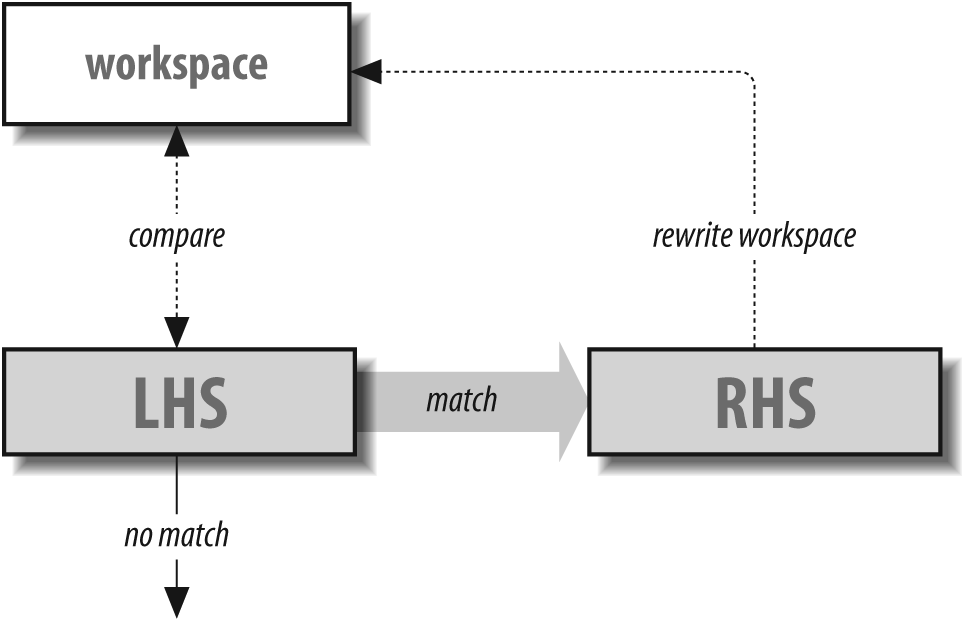
Consider a rule in which we want the name tom in the workspace
changed into the name fred. One possible rule to do this might
look like this:
R tom fred
If the workspace contains the name tom, the LHS of this rule matches
exactly. As a consequence, the RHS is given the opportunity
to rewrite the workspace. It does so by placing the name
fred into that
workspace. The new workspace is once again compared to the
tom in the LHS,
but now there is no match because the workspace contains
fred. When the
workspace and the LHS do not match, the rule is skipped, and
the current contents of the workspace
are carried down to the next rule. Thus, in our example, the
name fred in the
workspace is carried down.
Clearly, there is little reason to worry about endless loops
in a rule when using names such as tom and fred. But the LHS and RHS can contain
pattern-matching and replacement operators, and those
operators can lead to loops. To
illustrate, consider the following example of a
test.cf file:
V10
Stest
R fred     fred
Clearly, the LHS will always match fred both before and after each rewrite.
Here’s what happens when you run the -bt rule-testing mode on
this file:
%/usr/sbin/sendmail -bt -Ctest.cfADDRESS TEST MODE (ruleset 3 NOT automatically invoked) Enter <ruleset> <address> >test fredtest input: fred Infinite loop in ruleset test, rule 1 test returns: fred >
V8 sendmail discovers the loop and breaks it for you. Earlier versions of sendmail would hang forever.
Note that you can avoid the chance of accidental loops by using special prefix operators on the RHS, as described in Rewrite Once Prefix: $: on page 662 and Rewrite-and-Return Prefix: $@ on page 664.
The LHS
The LHS of any rule is compared to the current contents of the workspace to determine whether the two match. Table 18-2 displays a variety of special operators offered by sendmail that make comparisons easier and more versatile.
|
Operator |
§ |
Description or use |
| [a] | ||
|
|
$* on page 681 |
Match zero or more tokens. |
|
|
$+ on page 679 |
Match one or more tokens. |
|
|
$- on page 679 |
Match exactly one token. |
|
|
$@ on page 673 |
Match exactly zero tokens (V8 only). |
|
|
Matching Any in a Class: $= on page 863 |
Match any tokens in a class.[a] |
|
|
Matching Any Token Not in a Class: $~ on page 864 |
Match any single token not in a class. |
|
|
$# on page 680 |
Match a literal |
|
|
$| on page 682 |
Match a literal |
|
|
Use Value As Is with $& on page 793 |
Delay macro expansion until runtime. |
[a] a Class matches either a single token or multiple tokens, depending on the version of sendmail (Access Classes in Rules). | ||
The first three operators in Table 18-2
are wildcard operators, which can be used to match arbitrary
sequences of tokens in the workspace. Consider the following
rule, which employs the $- operator (match any single
token):
R $- fred.local
Here, a match is found only if the workspace contains a single
token (such as tom). If the workspace
contains multiple tokens (such as
tom@host), the LHS does not
match. A match causes the workspace to be rewritten by the
RHS to become fred.local.
The rewritten workspace is then compared again to the
$-, but this time
there is no match because the workspace contains three
tokens (fred, a dot [.],
and local). Because there
is no match, the current workspace
(fred.local) is
carried down to the next rule (if there is one).
The $@ operator (introduced
in V8 sendmail) matches an empty
workspace. Merely omitting the LHS won’t work:
RtabRHS                ← won't work
R $@tabRHS                ← will work
If you merely omit the LHS in a mistaken attempt to match an empty LHS, you will see the following error when sendmail starts up:
configfile: line number: R line: null LHS
Note that all comparisons of tokens in the LHS to tokens in
the workspace are done in a
case-insensitive manner. That is,
tom in the LHS
matches TOM, Tom, and even ToM in the
workspace.
Minimum Matching
When a pattern-matching operator can match multiple
tokens ($+ and
$+)
sendmail performs
minimum matching. For
example, consider a workspace of xxx.yyy.zzz and an LHS
of:
$+.$+
The first $+
matches only a single token (xxx) but the second
$+ matches
three (yyy, a
dot, and zzz).
This is because the first $+ matches the minimum number of tokens
that it can while still allowing the whole LHS to
match the workspace. Shortly, when we discuss the
RHS, we’ll show why this is important.
Backup and Retry
Multiple token-matching operators, such as $*, always try to match
the fewest number of tokens that they can. Such a
simple-minded approach could lead to problems in
matching (or not matching) classes in the LHS. For
example, consider the following five tokens in the
workspace:
A . B . C
given the following LHS rule:
R $+ . $=X $*
Because the $+
tries to match the minimum number of tokens, it
first matches only the A in the workspace. The $=X then tries to match
the B to the
class X. If this
match fails, sendmail backs up
and tries again.
The third time through, the $+ matches the A.B, and the $=X tries to match the C in the workspace. If
C is not in the
class X, the
entire LHS fails.
The ability of the sendmail program to back up and retry LHS matches eliminates much of the ambiguity from rule design. The multitoken matching operators try to match the minimum but match more if necessary for the whole LHS to match.
The RHS
The purpose of the RHS in a rule is to rewrite the workspace. To make this rewriting more versatile, sendmail offers several special RHS operators. The complete list is shown in Table 18-3.
|
RHS |
§ |
Description or use |
|
|
Copy by Position: $digit on page 661 |
Copy by position. |
|
|
Rewrite Once Prefix: $: on page 662 |
Rewrite once (when used as a prefix), or specify the user in a delivery agent “triple,” or specify the default value to return on a failed database-map lookup. |
|
|
Rewrite-and-Return Prefix: $@ on page 664 |
Rewrite and return (when used as a prefix), or specify the host in a delivery-agent “triple,” or specify an argument to pass in a database-map lookup or action. |
|
|
Rewrite Through a Rule Set: $>set on page 664 |
Rewrite through another rule set (such as a subroutine call that returns to the current position). |
|
|
Return a Selection: $# on page 667 |
Specify a delivery agent or choose an action, such as to reject or discard a recipient, sender, connection, or message. |
|
|
Canonicalize Hostname: $[ and $] on page 668 |
Canonicalize the hostname. |
|
|
Use $( and $) in Rules on page 892 |
Perform a lookup in an external database, file, or network service, or perform a change (such as dequoting), or store a value into a macro. |
|
|
Use Value As Is with $& on page 793 |
Delay conversion of a macro until runtime. |
Copy by Position: $digit
The $digit
operator in the RHS is used to copy tokens from the
LHS into the workspace. The
digit refers to
positions of LHS wildcard operators in the
LHS:
R $+ @ $* $2!$1
↑ ↑
$1 $2Here, the $1 in the
RHS indicates tokens matched by the first wildcard
operator in the LHS (in this case, the $+), and the $2 in the RHS indicates
tokens matched by the second wildcard operator in
the LHS (the $*).
In this example, if the workspace contains A@B.C, it will be
rewritten by the RHS as follows (note that the order
is defined by the RHS):
$* matches B.C so $2 copies it to workspace ! explicitly added to the workspace $+ matches A so $1 adds it to workspace
The $digit
copies all the tokens matched by its corresponding
wildcard operator. For the $+ wildcard operator, only a single
token (A) is
matched and copied with $1. The ! is copied as is. For the $* wildcard operator,
three tokens are matched (B.C), so $2 copies all three. Thus, this rule
rewrites A@B.C
into B.C!A.
Not all LHS operators need to be
referenced with a $digit in
the RHS. Consider the following:
R $* < $* > $* <$2>
Here, only the middle LHS operator (the second one) is
required to rewrite the workspace. So, only the
$2 is needed in
the RHS ($1 and
$3 are not
needed and are not present in the RHS).
Although macros appear to be operators in the LHS,
they are not. Recall that macros are expanded when
the configuration file is read (Macros in Rules on page 650). As a
consequence, although they appear as $letter in
the configuration file, they are converted to tokens
when that configuration file is read. For
example:
DAxxx R $A @ $* $1
Here, the macro A
is defined to have the value xxx. To the unwary, the
$1
appears to indicate the
$A. But when
the configuration file is read, the previous rule is
expanded into:
R xxx @ $* $1
Clearly, the $1
refers to the $*
(because $
digit references only
operators and $A
is a macro, not an operator). The
sendmail program is unable to
detect errors of this sort. If the $1 were instead $2 (in a mistaken
attempt to reference the $*), sendmail
prints the following error and skips that
rule:
ruleset replacement number out of boundsV8 sendmail catches these errors when the configuration file is read. Earlier versions caught this error only when the rule was actually used.
The digit of the $digit must
be in the range one through nine. A $0 is meaningless and
causes sendmail to print the
previous error message and to skip that rule. Extra
digits are considered tokens rather than extensions
of the $digit. That
is, $11 is the
RHS operator $1
and the token 1,
not a reference to the
11th LHS
operator.
Rewrite Once Prefix: $:
Ordinarily, the RHS rewrites the workspace as long as the workspace continues to match the LHS. This looping behavior can be useful. Consider the need to strip extra trailing dots off an address in the workspace:
R $* .. $1.
Here, the $*
matches any address that has two or more trailing
dots. The $1. in
the RHS then strips one of those two trailing dots
when rewriting the workspace. For example:
xxx . . . . . becomes → xxx . . . . xxx . . . . becomes → xxx . . . xxx . . becomes → xxx . . xxx . . becomes → xxx . xxx . ← match fails
Although this looping behavior of rules can be handy, for most rules it can be dangerous. Consider the following example:
R $* <$1>
The intention of this rule is to cause whatever is in
the workspace to become surrounded with angle
brackets. But after the workspace is rewritten, the
LHS again checks for a match; and because the
$* matches
anything, the match succeeds, the RHS rewrites the
workspace again, and again the LHS checks for a
match:
xxx becomes → < xxx > < xxx > becomes → < < xxx > > < < xxx > > becomes → < < < xxx > > > ↓ and so on, until ... ↓ sendmail prints: rewrite: expansion too long
In this case,sendmail catches the problem because the workspace has become too large. It prints the preceding error message and skips that and all further rules in the rule set. If you are running sendmail in test mode, this fatal error would also be printed:
= = Ruleset 0 (0) status 65
Unfortunately, not all such endless looping produces a visible error message. Consider the following example:
R $* $1
Here is an LHS that matches anything and an RHS that rewrites the workspace in such a way that the workspace never changes. For older versions, this causes sendmail to appear to hang (as it processes the same rule over and over and over). Newer versions of sendmail will catch such endless looping and will print and log the following error:
Infinite loop in ruleset ruleset_name, rule rule_number
In this instance, the original workspace is returned.
It is not always desirable (or even possible) to write
“loop-proof” rules. To prevent looping,
sendmail offers the $: RHS prefix. By
starting the RHS of a rule with the $: operator, you are
telling sendmail to rewrite the
workspace only once, at most:
R $* $: <$1>
Again the rule causes the contents of the workspace to
be surrounded by a pair of angle brackets. But here
the $: prefix
prevents the LHS from checking for another match
after the rewrite.
Note that the $:
prefix must begin the RHS to have any effect. If it
instead appears inside the RHS, its special meaning
is lost:
foo rewritten by $: $1 becomes → foo foo rewritten by $1 $: becomes → foo $:
Rewrite-and-Return Prefix: $@
The flow of rules is such that each and every rule in a series of rules (a rule set) is given a chance to match the workspace:
R xxx yyy R yyy zzz
The first rule matches xxx in the workspace and rewrites the
workspace to contain yyy. The first rule then tries to match
the workspace again but, of course, fails. The
second rule then tries to match the workspace.
Because the workspace contains yyy, a match is found,
and the RHS rewrites the workspace to be zzz.
There will often be times when one rule in a series
performs the appropriate rewrite and no subsequent
rules need to be called. In the earlier example,
suppose xxx
should only become yyy and that the second rule should not
be called. To solve problems such as this,
sendmail offers the $@ prefix for use in the
RHS.
The $@ prefix tells
sendmail that the current
rule is the last one that should be used in the
current rule set. If the LHS of the current rule
matches, any rules that follow (in the current rule
set) are ignored:
R xxx $@ yyy R yyy zzz
If the workspace contains anything other than xxx, the first rule does
not match, and the second rule is called. But if the
workspace contains xxx, the first rule matches and
rewrites the workspace. The $@ prefix for the RHS of that rule
prevents the second rule (and any subsequent rules
in that rule set) from being called.
Note that the $@
also prevents looping. The $@ tells sendmail
to skip further rules and to
rewrite only once. The difference between $@ and $: is that both rewrite
only once, but $@
doesn’t proceed to the next
rule, whereas $:
does.
The $@ operator
must be used as a prefix because it has special
meaning only when it begins the RHS of a rule. If it
appears anywhere else inside the RHS it loses its
special meaning:
foo rewritten by $@ $1 becomes → foo foo rewritten by $1 $@ becomes → foo $@
Rewrite Through a Rule Set: $>set
Rules are organized in sets that can be thought of as subroutines. Occasionally, a series of rules can be common to two or more rule sets. To make the configuration file more compact and somewhat clearer, such common series of rules can be made into separate subroutines.
The RHS $>set
operator tells sendmail to
perform additional rewriting using a secondary set
of rules. The set is the
rule set name or number of that secondary set. If
set is the name or
number of a nonexistent rule set, the effect is the
same as if the subroutine rules were never called
(the workspace is unchanged).
If the set is numeric and
is greater than the maximum number of allowable rule
sets, sendmail prints the
following error and skips that rule:
bad ruleset bad_number (maximum max)
If the set is a name and
the rule set name is undeclared,
sendmail prints the following
error and skips that rule:
Unknown ruleset bad_nameNeither of these errors is caught when the configuration file is read. They are caught only when mail is sent because a rule set name can be a macro:
$> $&{SET}The $& prefix
prevents the macro named {SET} from being expanded when the
configuration file is read. Therefore, the name or
number of the rule set cannot be known until mail is
sent.
The process of calling another set of rules proceeds in five stages:
- First
As usual, if the LHS matches the workspace, the RHS gets to rewrite the workspace.
- Second
The RHS ignores the
$>setpart and rewrites the rest as usual.- Third
The part of the rewritten workspace following the
$>setis then given to the set of rules specified by set. They either rewrite the workspace or do not.- Fourth
The portion of the original RHS from the
$>setto the end is replaced with the subroutine’s rewriting, as though it had performed the subroutine’s rewriting itself.- Fifth
The LHS gets a crack at the new workspace as usual unless it is prevented by a
$: or$@prefix in the RHS.
For example, consider the following two sets of rules:
# first set
S21
R $*.. $:$>22 $1. strip extra trailing dots
...etc.
# second set
S22
R $*.. $1. strip trailing dotsHere, the first set of rules contains, among other things, a single rule that removes extra dots from the end of an address. But because other rule sets might also need extra dots stripped, a subroutine (the second set of rules) is created to perform that task.
Note that the first rule strips one trailing dot from
the workspace and then calls rule set 22 (the
$>22),
which then strips any additional dots. The
workspace, as rewritten by rule set 22, becomes the
workspace yielded by the RHS in the first rule. The
$: prevents the
LHS of the first rule from looking for a match a
second time.
Prior to V8.8 sendmail, the
subroutine call must begin the RHS (immediately
follow any $@ or
$: prefix, if
any), and only a single subroutine can be called.
That is, the following causes rule set 22 to be
called but does not call 23:
$>22 xxx $>23 yyy
Instead of calling rule set 23, the $> operator and the
23 are copied
as is into the workspace, and that workspace is
passed to rule set 22:
xxx $> 23 yyy ← passed to rule set 22Beginning with V8.8[250] sendmail, subroutine calls can appear anywhere inside the RHS, and there can be multiple subroutine calls. Consider the same RHS as shown earlier:
$>22 xxx $>23 yyy
Beginning with V8.8 sendmail,
rule set 23 is called first and is given the
workspace yyy to
rewrite. The workspace, as rewritten by rule set 23,
is added to the end of the xxx, and the combined result is passed
to rule set 22.
Under V8.8 sendmail, subroutine rule set calls are performed from right to left. The result (rewritten workspace) of each call is appended to the RHS text to the left.
You should beware of one problem with all versions of
sendmail. When ordinary text
immediately follows the number of the rule set, that
text is likely to be ignored. This can be witnessed
by using the -d21.3 debugging switch.
Consider the following RHS:
$>3uucp.$1
Because sendmail parses the
3 and the
uucp as a
single token, the subroutine call succeeds, but the
uucp is lost.
The -d21.3 switch
illustrates this problem:
-----callsubr 3uucp (3) ← sees this -----callsubr 3 (3) ← but should have seen this
The 3uucp is
interpreted as the number 3, so it is accepted as a
valid number despite the fact that uucp was attached.
Because the uucp
is a part of the number, it is not available for
comparison to the workspace and so is lost. The
correct way to write the previous RHS is:
$>3 uucp.$1
Note that the space between the 3 and the uucp causes them to be
viewed as two separate tokens.
This problem can also arise with macros. Consider the following:
$>3$M
Here, the $M is
expanded when the configuration file is parsed. If
the expanded value lacks a leading space, that value
(or the first token in it) is lost.
Note that operators that follow a rule set number are correctly recognized:
$>3$[$1$]
Here, the 3 is
immediately followed by the $[ operator. Because operators are
token separators, the call to rule set 3 will be
correctly interpreted as:
-----callsubr 3 (3) ← goodBut as a general rule, and just to be safe, the number of a subroutine call should always be followed by a space.[251]
Return a Selection: $#
The $# operator in
the RHS is copied as is into the workspace and
functions as a flag advising
sendmail that an action has
been selected. The $# must be the first token copied into
the rewritten workspace for it to have this special
meaning. If it occupies any other position in the
workspace, it loses its special meaning:
$# local ← selects delivery agent in the parse rule set 0 $# OK ← accepts a message in the Local_check_mail rule set xxx $# local ← no special meaning
When it is used in the parse rule set 0 (The parse Rule Set 0 on page 696) and
localaddr rule
set 5 (The localaddr Rule Set 5 on
page 700) (and occupies the first position in the
rewritten workspace), the $# operator tells
sendmail that the second
token in the workspace is the name of a delivery
agent (here, local). When used in the check_ rule sets (Check Headers with Rule Sets on page
265 and The Local_check_ Rule Sets on page 252) subsequent tokens in the workspace
(here, OK) say
how a message should be handled.
Note that the $#
operator can be prefixed with a $@ or a $: without losing its
special meaning because those prefix operators are
not copied to the workspace:
$@ $# local rewritten as → $# localHowever, those prefix operators are not necessary
because the $#
acts just like a $@ prefix. It prevents the LHS from
attempting to match again after the RHS rewrite, and
it causes any following rules (in that rule set) to
be skipped. When used in non-prefix roles in the
parse rule set
0 and localaddr
rule set 5, $@
and $: also act
like flags, conveying host and address information
to sendmail (The parse Rule Set 0 on page
696).
Canonicalize Hostname: $[ and $]
Tokens that appear between a $[ and $] pair of operators in the RHS are
considered to be the name of a host. That hostname
is looked up by using DNS[252] and replaced with the full canonical
form of that name. If found, it is then copied to
the workspace, and the $[ and $] are discarded.
For example, consider a rule that looks for a hostname in angle brackets and (if found) rewrites it in canonical form:
R < $* > $@ < $[ $1 $] > canonicalize hostname
Such canonicalization is useful at sites where users
frequently send mail to machines using the short
version of a machine’s name. The $[ tells
sendmail to view all the
tokens that follow (up to the $]) as a single
hostname.
If the name cannot be canonicalized (perhaps because there is no such host), the name is copied as is into the workspace. For configuration files lower than 2, no indication is given that it could not be canonicalized (more about this soon).
Note that if the $[
is omitted and the $] is included, the $] loses its special
meaning and is copied as is into the
workspace.
The hostname between the $[ and $] can also be an IP address. By
surrounding the hostname with square brackets
([ and ]), you are telling
sendmail that it is really an
IP address:
wash.dc.gov ← a hostname [123.45.67.8] ← an IPv4 address [IPv6:2002:c0a8:51d2::23f4] ← an IPv6 address
When the IP address between the square brackets
corresponds to a known host, the address and the
square brackets are replaced with that host’s
canonical name. Note that when handling IPv6
addresses, the IPv6: prefix must be present. After the
successful lookup of a known host, the entire
expression between $[ and $] will be replaced with the new
information.
If the version of the configuration file is 2 or greater (as set
with the V
configuration command, The V Configuration Command on page
580), a successful canonicalization has a dot
appended to the result:
myhost becomes → myhost . domain . ← success nohost becomes → nohost ← failure
Note that a trailing dot is not legal in an address specification, so subsequent rules (such as rule set 4) must remove these added trailing dots.[253]
Also, the K
configuration command (The K Configuration Command on page
882) can be used to redefine (or eliminate) the dot
as the added character. For example:
Khost host -a.found
This causes sendmail to add the
text .found to a
successfully canonicalized hostname instead of the
dot.
One difference between V8
sendmail and other versions
is the way it looks up names from between the
$[ and $] operators. The rules
for V8 sendmail are as
follows:
- First
If the name contains at least one dot (.) anywhere within it, it is looked up as is; for example, host.com.
- Second
If that fails, it appends the default domain to the name (as defined in /etc/resolv.conf) and tries to look up the result; for example, host.com.foo.edu.
- Third
If that fails, each entry in the domain search path (as defined in /etc/resolv.conf) is appended to the original host; for example, host.com.edu.
- Fourth
If the original name did not have a dot in it, it is looked up as is; for example, host.
This approach allows names such as host.com to first match an actual site, such as sendmail.com (if that was intended), instead of wrongly matching a host in a local department of your school. This is particularly important if you have wildcard MX records for your site.
An example of canonicalization
The following three-line configuration file can be used to observe how sendmail canonicalizes hostnames:
V10 SCanon R $* $@ $[ $1 $]
If this file were called test.cf, sendmail could be run in rule-testing mode with a command such as the following:
% /usr/sbin/sendmail -Ctest.cf -btThereafter, hostname canonicalization can be
observed by specifying the Canon rule set and a
hostname. One such run of tests might appear as
follows:
ADDRESS TEST MODE (ruleset 3 NOT automatically invoked) Enter <ruleset> <address> >Canon washcanon input: wash canon returns: wash . dc. gov . >Canon nohostcanon input: nohost canon returns: nohost >
Note that the known host named wash is rewritten in
canonicalized form (with a dot appended because
the version of this mini configuration file, the
V10, is greater
than 2). The unknown host named nohost is unchanged and
has no dot appended.
Default in canonicalization: $:
IDA and V8 sendmail both
offer an alternative to leaving the hostname
unchanged when canonicalization fails with
$[ and $]. A default can be
used instead of the failed hostname by prefixing
that default with a $: operator:
$[ host $: default $]The $:
default must follow the
host (or
square-brace-enclosed address) and precede the
$]. To
illustrate its use, consider the following
rule:
R $* $: $[ $1 $: $1.notfound $]
If the hostname $1 can be canonicalized, the workspace
becomes that canonicalized name. If it cannot, the
workspace becomes the original hostname with a
.notfound
appended to it. If the
default part of the
$:default is
omitted, a failed canonicalization is rewritten as
zero tokens.
Because the $[ and $] operators are implemented using the
host dbtype
($[ and $]: A Special Case on page 895), you can modify the behavior of
that dbtype by adding a -T to it:
Khost host -T.tmp
Thereafter, whenever $[ and $] find a temporary lookup failure, the
suffix .tmp is
returned, and .notfound, in this example, is returned
only if the host truly does not exist.
Other Operators
Many other operators (depending on your version of sendmail) can also be used in rules. Because of their individual complexity, all of the following are detailed in other chapters. We outline them here, however, for completeness.
- Class macros
Class macros are described in Matching Any in a Class: $= on page 863 and Matching Any Token Not in a Class: $~ on page 864. Class macros can appear only in the LHS. They begin with the prefix
$=to match a token in the workspace to one of many items in a class. The alternative prefix$˜causes a single token in the workspace to match if it does not appear in the list of items that are in the class.- Conditionals
The conditional macro operator
$?is rarely used in rules (Macro Conditionals: $?, $|, and $. on page 794). When it is used in rules, the result is often not what was intended. Its else part, the$|conditional operator, is used by the various rule sets (The check_compat Rule Set on page 259) to separate two differing pieces of information in the workspace.- Database maps
The database-map operators,
$(and$), are used to look up tokens in various types of database files, plain files, and network services. They also provide access to internal services, such as dequoting or storing a value in the macro (see Chapter 23 on page 878).
Pitfalls
Any text following a rule set number in a
$>expression in the RHS sho uld be separated from the expression with a space. If the space is absent and the text is something other th an a separating character or an operator, the text is ignored. For example, in$>22xxx, thexxxis ignored.Because rules are processed like addresses when the configuration file is read, they can silently change from what was intended if they are parenthesized or if other nonaddress components are used.
Copying rules between screen windows can cause tabs to invisibly become spaces, leading to rule failure.
A lone
$*in the LHS is especially dangerous. It can lead to endless rule looping and cause all rules that follow it to be ignored (remember the$: and$@prefixes in the RHS).Failure to test new rules can bring a site to its knees. A flood of bounced mail messages can run up the load on a machine and possibly even require a reboot. Always test every new rule both with
-bt(testing) mode (Batch Rule-Set Testing on page 319) and selected-d(debugging) switches (Table 15-3 on page 536).Overloading of operator meanings can confuse the new user, or even the seasoned user when a new release of sendmail appears. Under older versions of sendmail, the
$: operator, for example, could either be a prefix used to suppress recursion or was a nonprefix used to specify the user in a delivery agent “triple.” In a later release, it also became the way to specify the default value to return on a failed database-map lookup.
Rule Operator Reference
In this section, we describe each rule operator. Note that we
exclude operators that are not germane to rules (such as
$?, Macro Conditionals: $?, $|, and $.
on page 794) and list only those that can be used in rules.
Because all rule operators are symbolic, we cannot list them
in alphabetical order, so instead we list them in the
alphabetical order of pronunciation. That is, for example,
$@ (pronounced
dollar-at) comes before $: (pronounced dollar-colon).
To avoid confusion based on different ways of pronouncing symbols, we list all the operators in Table 18-4 so that you can easily find them.
|
Operator |
§ |
RHS or LHS |
Description or use |
|
|
$& on page 673 |
LHS and RHS |
Delay macro expansion until runtime. |
|
|
$@ on page 673 |
LHS |
Match exactly zero tokens (V8 only). |
|
|
$@ on page 674 |
RHS |
Rewrite once and return. |
|
|
$@ on page 674 |
RHS |
Specify host in delivery agent “triple”. |
|
|
$@ on page 674 |
RHS |
Specify DSN status in error agent “triple”. |
|
|
$@ on page 675 |
RHS |
Specify a database-map argument. |
|
|
$: on page 675 |
RHS |
Rewrite once and continue. |
|
|
$: on page 676 |
RHS |
Specify address in delivery agent “triple”. |
|
|
$: on page 676 |
RHS |
Specify message in error or discard agent “triple”. |
|
|
$: on page 676 |
RHS |
Specify a default database-map value. |
|
|
$digit on page 677 |
RHS |
Copy by position. |
|
|
$= on page 677 |
LHS |
Match any token in a class. |
|
|
$> on page 677 |
RHS |
Rewrite through another rule set (subroutine call). |
|
|
$[ $] on page 678 |
RHS |
Canonicalize the hostname. |
|
|
$( $) on page 678 |
RHS |
Perform a database-map lookup or action. |
|
|
$- on page 679 |
LHS |
Match exactly one token. |
|
|
$+ on page 679 |
LHS |
Match one or more tokens. |
|
|
$# on page 680 |
LHS |
Match a literal |
|
|
$# on page 680 |
RHS |
Specify a delivery agent. |
|
|
$# on page 681 |
RHS |
Specify return for a policy-checking rule set. |
|
|
$* on page 681 |
Match zero or more tokens. | |
|
|
$~ on page 682 |
LHS |
Match any single token not in a specified class. |
|
|
$| on page 682 |
LHS and RHS |
Match or return a literal |
$&
Delay macro expansion until runtime LHS and RHS operator
Normally, sendmail macros are
expanded (replaced with their values) when the
configuration file is read. For those situations
when a sendmail macro should
not be expanded, but rather should be used in rules
as is, V8 sendmail offers the
$& prefix.
For example, consider the following RHS of a
rule:
R... $w.$&M
Normally, when sendmail
encounters this RHS in the configuration file, it
will recursively expand $w into its final text value (where
that text value is your hostname, such as
wash.dc.gov). But because the
M
sendmail macro is prefixed
(here, with $&), it is not expanded until the
rule is processed.
The $& operator
can be used in either the LHS or the RHS of a rule.
The $&
operator is described in full in Use Value As Is with $& on page
793.
$@
Match exactly zero tokens (V8 only) LHS operator
There will be times when you have to match an empty
workspace. The $@
operator, when used in the LHS, does exactly that.
To illustrate, consider the following rule:
R $@ $#error $@ nouser $: "553 User address required"
Here, the idea is to detect an empty address (the
LHS), and to reject the message with an error (the
RHS) if such an address is found. This LHS matches a
workspace (an address) that contains zero
information (zero tokens). Here, then, the $@ operator matches an
empty workspace.
The $@ operator was
introduced because it is illegal to literally put
nothing on the LHS. The following rule (here we show
tabs with tab) won’t
work:
Rtab$#error $@ nouser $: "553 User address required"If you try to match an empty workspace such as this, you will get the following error:
configfile: line number: R line: null LHS
Note that the $@
operator matches zero tokens only when used on the
LHS. When used on the RHS $@ has a totally different meaning.
Note, too, that the $@ operator on the LHS cannot be
referenced by a $
digit operator on the
RHS.
$@
Rewrite once and return RHS prefix
The $@ operator,
when used to prefix the RHS, tells
sendmail that the current
rule is the last one that should be used in the
current rule set. If the LHS of the current rule
matches, any rules that follow (in the current rule
set) are ignored.
This $@ prefix also
prevents the current rule from calling itself
recursively. To illustrate, consider the following
rule:
R $* . $* $@ $1
The idea here is to strip the domain part of a
hostname, and to return just the host part. That is,
if the workspace contains
wash.dc.gov, this rule will
return wash. The $@ prefix to the RHS
tells sendmail to return the
rewritten workspace without processing any
additional rules in the current rule set, and to
allow the LHS to match only once.
Note that the $@
prefix can prefix only the RHS. This operator is
described further in Rewrite-and-Return Prefix: $@
on page 664 of this chapter.
$@
Specify host in delivery agent “triple” RHS delivery agent operator
The parse rule set
0 selects a delivery agent that can handle the
address specified in the workspace. The form for
selecting a delivery agent looks like this:
LHS... $#delivery_agent $@ host $: addressThree pieces of information are necessary to select a
delivery agent. The $# specifies the name of the delivery
agent. The $@
specifies the host part of the address (for
gw@wash.dc.gov, the host part would
be wash.dc.gov), and the
$: specifies
the user part of the address (the
gw) for local delivery and
the whole address (the
gw@wash.dc.gov) for SMTP
delivery.
The use of $@ to
specify the host can follow only the $# prefix part of the
RHS. Note that $@
has a different use when the delivery agent is named
error (see
$@ on page
674).
The use of $@ to
specify the host part of a delivery agent triple is
described in detail in The parse Rule Set 0 on page 696. See
also The use of $h in A=TCP on
page 739 for how to use this $@ to specify the port
to which sendmail should
connect.
$@
Specify DSN status in error-agent “triple” RHS delivery agent operator
Beginning with V8.7, the RHS of a rule to select an
error delivery
agent can look like this:
R... $#error $@ dsn $: text of error message here
The text following the $: is the actual error message text
that will be included in bounced mail or sent back
to a connecting SMTP host. The numbers following the
$@ specify the
DSN error to be returned. For example:
R$* < @ spam.host > $* $#error $@ 5.7.1 $: 550 You are a spammer, go away
Here, the number following the $@ contains a dot, so it
is interpreted as a DSN status expression. The
.7. in the
number causes sendmail to set
its exit value to EX_DATAERR. The 5.7.1 itself is defined
in RFC1893 as meaning “Permanent failure, delivery
not authorized, message refused.” Note that if the
number following the $@ does not contain a dot,
sendmail sets its
exit(2) value to that
number.
The use of $@ to
specify the DNS return value for the error delivery agent is
described in detail in error on
page 720.
$@
Specify a database-map argument RHS database operator
When looking up information or performing actions with
the $( and
$) operators,
it is sometimes necessary to provide positional
substitution arguments. To illustrate, consider an
entry such as this in a hypothetical database source
file:
hostA %0!%1@%2
With such an entry in place, and having built the database, the following rule could be used to perform a lookup:
R$- @ $-.uucp $: $(uucp $2 $@ $1 $@ mailhost $: $1.$2.uucp $)
Here, if the workspace contains the address joe@hostA.uucp, the LHS matches, causing it to be rewritten as hostA!joe@mailhost.
See Specify Numbered Substitution with $@ on page 894 for a full description of how
$@ is used in
this way.
$:
Rewrite once and continue RHS prefix
Ordinarily, the RHS of a rule continues to rewrite the workspace for as long as the workspace continues to match the LHS. This looping behavior can be useful when intended, but can be a disaster if unintended. But consider what could happen, under older versions of sendmail, if you wrote a rule such as the following, which seeks to match a domain address with at least one first dot:
R $+ . $* $1.OK
An address such as wash.dc.gov
will match the LHS and will be rewritten by the RHS
into wash.OK. But because rules
continue to match until they fail, the new address,
wash.OK, will be matched by
the LHS again, and again will be rewritten to be
wash.OK. As you can see, this
rule sets up an infinite loop.[254] To prevent such infinite looping on this
rule, you should prefix the RHS with the $: operator:
R $+ . $* $: $1.OKThe $: prefix tells
sendmail to rewrite the
workspace only once. With the $: prefix added to our
example, the domain address
wash.dc.gov would be
rewritten to wash.OK exactly
once. Progress would then proceed to the next
following rule (if there is one).
The $: prefix is
described in full in Rewrite Once Prefix: $:
on page 662.
$:
Specify address in delivery agent “triple” RHS delivery agent operator
The parse rule set
(formerly rule set 0) selects a delivery agent that
can handle the address specified in the workspace.
The form for selecting a delivery agent looks like
this:
LHS... $#delivery_agent $@ host $: addressThree pieces of information are necessary to select a
delivery agent.[255] The $# specifies the name of the delivery
agent. The $@
specifies the host part of the address (for
gw@wash.dc.gov, the host part would
be wash.dc.gov), and the
$: specifies
the address part (the gw for
local delivery, or gw@wash.dc.gov for
SMTP delivery).
The use of $: to
specify the address can follow only the $# prefix part of the
RHS. Note that $:
has a different use when the delivery agent is named
error or
discard (see
$: on page
676).
The use of $: to
specify the address part of a delivery agent triple
is described in detail in The parse Rule Set 0 on page
696.
$:
Specify message in error or discard agent “triple” RHS delivery agent operator
Beginning with V8.7, the RHS of a rule used to select
an error or
discard
delivery agent can look like this:
R... $#error $@ dsn $: text of error message here R... $#discard $: discard
For the error
delivery agent, the text following the $: is the actual error
message text that will be included in bounced mail
or sent back to a connecting SMTP host. For the
discard
delivery agent, the text following the $: is generally the
literal word discard.[256]
Use of $: to
specify the error
delivery agent’s error message is described in
detail in error on page 720. Use
of $: to specify
the discard
delivery agent is described in discard on page 719.
$:
Specify a default database-map value RHS database operator
When looking up information with the $( and $) operators it is
sometimes desirable to provide a default return
value, should the lookup fail. Default values are
specified with the $: operator, which fits between the
$( and $) operators like
this:
LHS.... $( name key $: default $)Here, name is the symbolic
name you associated with a dbtype (The type on
page 882) using the K configuration command. The
key is the value being
looked up, and default is
the value to be placed in the workspace if the
lookup fails.
To illustrate, consider the following rule:
R $+ < @ $* . fax > $: $1 < @ $(faxdb $2 $: faxhost $) >
Here, any address that ends in .fax (such as
bob@here.fax) has the host part
($* or the
here) looked up in the
faxdb database (the $2 is the key). If that
host is not found with the lookup, the workspace is
changed to
user<@faxhost>
(or, for our example,
bob@faxhost).
See Specify a Default with $: on
page 893 for a complete description of the $: operator as it is
used with database maps.
$digit
The LHS wildcard operators ($*, $+, $-, and $@) and the LHS class-matching
operators ($= and
$˜) can have
their matched values copied to the RHS by the
$digit
positional operator. Consider, for example, the
following rule:
R $+ < @ $- . $* > $: $1
Here, there are three wildcard operators in the LHS.
The first (the $+) corresponds to the $1 on the RHS. The
object of this rule is to match a focused address
and rewrite it as the username. For example,
gw@wash.dc.gov will be rewritten to
be gw.
The $digit
operator can be used only on the RHS of rules. See
Copy by Position: $digit on
page 661 for a full description of this $digit
operator.
$=
Match any token in a class LHS operator
When trying to match tokens in the workspace to
members of a class, you can use the $= operator. For
example, consider the following rule:
R $+ < @ $={InternalHosts} > $: $1 < @ mailhub >Here, the workspace is expected to hold a focused
address (such as
gw<@wash.dc.gov>). The
$={InternalHosts} expression causes
sendmail to look up the host
part of the address (the
wash.dc.gov) in the class
{InternalHosts}. If that host is found in
that class, a match is made and the workspace is
rewritten by the RHS to become
gw<@mailhub>.
Class macros in general are described in Chapter 22 on page 854, and the $= operator in particular is described
in full in Matching Any in a Class: $=
on page 863.
Note that the $=
operator can be used only on the LHS of rules, and
that the $=
operator can be referenced by an RHS $digit
operator.
$>
Rewrite through another rule set RHS operator
It is often valuable to group rule sets by function and call them as subroutines from a rule. To illustrate, consider the following rule:
R $+ < @ $+ > $: $>setHere, the RHS $>set
operator tells sendmail to
perform additional rewriting using a secondary set
of rules called set. The
workspace is passed as is to that secondary rule
set, and the result of the rewriting by that
secondary rule set becomes the new workspace.
The $> operator
is described in full in Rewrite Through a Rule Set: $>set on page 664.
$[
                                                  $]
Canonicalize hostname RHS operators
The $[ $] operators
are used to convert a non-fully qualified hostname,
or a CNAME, into the official, fully qualified
hostname. They are also used to convert square
bracket-enclosed addresses into hostnames. They must
be used in a pair with the host or address to be
looked up between them. To illustrate, consider this
rule:
R $+ < @ $+ > $: $1 < @ $[ $2 $] >
This rule will match a focused address such as
gw<@wash> and cause the
host part (the second $+ on the LHS) to be passed to the RHS
(the $2). Because
the $2 is between
the pair of $[ $]
operators, it is looked up with DNS and converted to
a fully qualified hostname. Thus, the domain
dc.gov, for example, will
have the host wash fully
qualified to become
wash.dc.gov. These $[ $] operators can be
used only on the RHS, and are fully described in
$[ and $]: A Special Case on page 895.
$(
                                                  $)
Perform a database-map lookup/action RHS operators
The $( and $) operators perform a
wide range of actions. They can be used to look up
information in databases, files, or network
services, or to perform transformation (such as
dequoting), or to store values in macros. These
operators make many customizations possible. Their
simplest use might look like this:
R $-         $: $( faxusers $1 $)    ← look up in a database
R $-         $: $( dequote  $1 $)    ← perform a transformation
In the first line, the intention is for users listed
in the faxusers
database to have their mail delivered by fax instead
of by email. Any lone username in the workspace
(matched by the $-) is looked up (the $1 inside the $( and $) operators) in the
faxusers
database. If that username is found it that
database, the workspace is replaced by the value for
that name (perhaps something such as
user@faxhost). If the user is
not found in the database, the workspace is
unchanged.
The second line looks for any lone username in the
workspace, and dequotes (removes quotation marks
from) that name using the built-in dequote type (dequote on page 904).
Note that the $(
and $) operators
can be used only on the RHS of rules. They are fully
explained in Use $( and $) in Rules
on page 892.
$-
Match exactly one token LHS operator
The user part of an address is the part to the left of
the @ in an
address. It is usually a single token (such as
george or
taka).[257] The easiest way to match the user part
of an address is with the $- operator. For example, the following
rule looks for any username at our local domain, and
dequotes it.
R $- < @ $=w . > $: $(dequote $1 $) < @ $2 . >
Here, the intention is to take any quoted username
(such as “george” or “george+nospam”) and to change
the address using the dequote database-map type (dequote on page 904). The effect of
this rule on a quoted user workspace, then, might
look like this:
"george"@wash.dc.gov             becomes →    george@wash.dc.gov
"george+nospam"@wash.dc.gov      becomes →    george+nospam@wash.dc.gov
Because the quotation character is not a token,
"george+nospam"
is seen as a single token and is matched with the
$-
operator.
The -bt
rule-testing mode offers an easy way to determine a
character splits the user part of an address into
more than one token:
%echo '0 george+nospam' | /usr/sbin/sendmail -bt | head −3ADDRESS TEST MODE (ruleset 3 NOT automatically invoked) Enter <ruleset> <address> > parse input: george + nospam ← 3 tokens %echo '0 "george+nospam"' | /usr/sbin/sendmail -bt | head −3ADDRESS TEST MODE (ruleset 3 NOT automatically invoked) Enter <ruleset> <address> > parse input: "george+nospam" ← 1 token
Note that the $-
operator can be used only on the LHS of rules, and
that the $-
operator can be referenced by a $digit
operator on the RHS.
$+
Match one or more tokens LHS operator
The $+ operator is
very handy when you need to match at least one token
in the workspace. For example, recall that the host
part of an address containing zero tokens is bad,
but one containing one or more tokens is
good:
george@               ← zero tokens is bad
george@wash           ← one token is good
george@wash.dc.gov    ← many tokens is good
A rule that seeks to match the host part of an address might look like this:
R $- @ $+ $: $1 < @ $2 >
Here, the LHS matches any complete address—that is, an
address that contains a user part that is a single
token (such as george), an
@ character,
and a host part that is one or more tokens (such as
wash or
wash.dc.gov).[258] Any address that matches is rewritten by
the RHS to focus on the host part. Focusing an
address means to surround the host part in angle
braces. Thus, for example,
george@wash will become
george<@wash>.
Note that the $+
operator can be used only on the LHS of rules, and
can be referenced by a $digit
operator on the RHS.
$#
Match a literal $# LHS operator
Because the RHS can return a delivery agent
specification, it is sometimes desirable to check
for the $#
operator on the LHS of a rule. Consider, for
example, the following rule:
R $+ $| $# OK $@ $1
The LHS looks for anything (the $+) followed by a
$| operator,
and then $# OK.
This might match a workspace that was set up by a
database-map lookup or a call to another rule set.
The $# OK means
the address was OK as is, and so should be placed
back into the workspace. The RHS does just that by
returning (the $@
prefix) the original address (the $1 references the LHS
$+, which
contained the original address).
Note that the $#
operator has no special meaning in the LHS. It is
used only to detect a delivery agent-like
specification made by an earlier rule on the RHS.
The next two sections reveal how this is
done.
$#
Specify a delivery agent RHS delivery agent operator
The $# RHS operator
serves two functions. The first is to select a
delivery agent, and the second is to return the
status of a policy-checking rule set. We cover the
first in this section and the second in the
next.
When used as a prefix to the RHS or a rule set (except
when used in a policy-checking rule set), the
$# operator is
used to select a delivery agent. Consider, for
example, the following rule:
R$+ $#local $: $1
Here, the LHS looks for a workspace that contains a
username (without a host part). If such a workspace
is found, the RHS is then used to select a delivery
agent for that user. The selection of a delivery
agent is signaled by the $# prefix to the RHS. The symbolic name
of the delivery agent is set to local. The $: operator in the RHS
is described in $:
on page 676.
The $# in the RHS
must be used as a prefix or it loses its special
meaning. See Return a Selection: $#
on page 667 for a full description of this
operator.
$#
Specify return for a policy-checking rule set RHS check operator
The $# RHS operator
serves two functions. The first is to select a
delivery agent, and the second is to return the
status of a policy-checking rule set (such as
check_mail).
When used as a prefix to the RHS in one of the
policy-checking rule sets, the $# operator tells
sendmail that the message
should be either rejected, discarded, or accepted.
Consider the following three rules:
R $* $| REJECT             $# error $@ 5.7.1 $: "550 Access denied"
R $* $| DISCARD            $# discard $: discard
R $* $| OK                 $# OK
The first rule shows how the $# prefix is used in the RHS to specify
the error
delivery agent, which will cause the message to be
rejected.[259] The error delivery agent is fully described
in error on page 720.
The second rule shows how the $# prefix is used in the RHS to specify
the discard
delivery agent, which will cause the message to be
simply discarded. The discard delivery agent is fully
described in discard on page
719.
The last rule shows how the $# prefix is used in the RHS to specify
that the message is acceptable, and that it is OK to
deliver it.
Note that the $# in
the RHS must be used as a prefix or it loses its
special meaning. See Return a Selection: $#
on page 667 for a full description of this
operator.
$*
Match zero or more tokens LHS operator
The $* operator is
a wildcard operator. It is used to match zero or
more tokens in the workspace. One handy use for it
is to honor a pair of angle braces, regardless of
whether that pair has something between them. The
following LHS, for example, will match <>, or <wash>, or even
<some.big.long.domain>:
R < $* > ...
But because $* can
match an unexpected number of tokens, it is wise to
understand minimum matching before using it. See
Minimum Matching on page 660 for
a discussion of minimum matching and the backup and
retry process.
Note that the $*
operator can be used only on the LHS of rules, and
can be referenced by an RHS $digit
operator.
$~
Match any single token not in a specified class LHS operator
When trying to match tokens in the workspace to
members of a class, it is possible to invert the
logic of a match. The $˜ operator instructs
sendmail to consider any
single token that is not in the class to be a match.
For example, consider the following rule:
R $+ < @ $* . $˜{PseudoDomains} > $# relay $@ mailhub $: $1 <@ $2.$3>Here, the workspace is expected to hold a focused
address (such as
gw@<faxhost.fax>). The
$˜{PseudoDomains} expression causes
sendmail to look up the
top-level domain (suffix) part of the address (the
fax) in the class {PseudoDomains}. If that
suffix is absent from that class, a match is made
and the workspace is rewritten by the RHS to relay
the mail to the mailhub
machine.
If the suffix (fax)
is found in the {PseudoDomains} class, the LHS does not
match, and subsequent rules will handle the address,
perhaps to forward the message to a special
fax-handling host.
Class macros in general are described in Chapter 22 on page 854, and the $˜ operator in particular is described
in full in Matching Any Token Not in a Class: $~ on page 864. Note that the $˜ operator can be used
only on the LHS of rules, and can be referenced by
an RHS $digit
operator.
$|
Match or return a literal $| LHS and RHS operator
It is sometimes necessary to communicate information
between one rule and another. The preferred way of
doing this is to use the special $| operator, which can
be used in both the LHS and RHS of rules. To
illustrate, consider the following two rules:
R $-               $: $1 $| $(badusers $1 $)
R $- $| BAD        $# discard $: discard
Here, the first rule’s LHS checks to see whether there
is a single token in the workspace (as would be the
case if it contained a username). If that is the
case, the RHS returns the original workspace (with
the $1) and a
separator (the $|). Lastly, the RHS looks up the
username in a hypothetical badusers database, and if the user is
found, the result of the lookup (either a literal
GOOD or BAD, for example) is appended to the
workspace.
The second rule looks for a workspace that now
contains the original username (the $-) followed by a
literal separator (the $|) and the literal word BAD. If BAD is
found, that user’s email is discarded with the
discard
delivery agent.
One actual example of using $| can be found in Local_check_relay and check_relay on page 252. That section also describes a trick
for using $| in
rule-testing mode. Note that the $| operator can be used
in either the LHS or RHS of a rule.
[245] * Actually, they can be either if-then or while-do clauses, but we gloss over that complexity for the moment.
[246] * Actually, the comment part is expanded too, but with no effect other than a tiny expenditure of time.
[247] * The $> operator isn’t
counted in checking balance.
[248] † That is, for
example, there must not be a > before the < character, and they
must pair off.
[249] * In the old days
(RFC733), usernames to the left of the @ could contain spaces.
But Unix also uses spaces as command-line argument
separators, so the BlankSub option was introduced.
[250] * Using code derived from IDA sendmail.
[251] * Stylistically,
it is easier to read rules that have spaces
between all patterns that are expected to match
separate tokens. For example, use $+ @ $* $=m instead of
$+@$*$=m. This
style handles subroutine calls
automatically.
[252] * Or other means,
depending on the setting of the service switch
file, if you have one, or the state of the
ServiceSwitchFile option (ServiceSwitchFile on page
1088).
[253] * Under DNS, the trailing dot signifies the root (topmost) domain. Therefore, under DNS, a trailing dot is legal. For mail, however, RFC1123 specifically states that no address is to be propagated that contains a trailing dot.
[254] * Fortunately, modern sendmail detects and breaks such infinite loops for you now.
[255] * But note, the
local delivery
agent often requires only two, and the discard delivery agent
requires only one.
[256] † Actually, it can be anything because the text is ignored anyway.
[257] * At your site, you might have customized sendmail to allow dotted usernames (such as first.lastname), which are composed of three tokens. We ignore such usernames for this discussion.
[258] * Note that this simple example will not match more complex user parts, such as george+nospam or bob.smith. Examine the sendmail.cf file to see how more complex user parts can be handled.
[259] * For some policy
rule sets, such as check_vrfy, instead of rejecting the
whole message, the action (such as SMTP VRFY) is
denied.