Table of Contents for
Test-Driven Development with Python, 2nd Edition
 Test-Driven Development with Python, 2nd Edition
Published by
O'Reilly Media, Inc., 2017
Test-Driven Development with Python, 2nd Edition
Published by
O'Reilly Media, Inc., 2017
- Cover
- nav
- Praise for Test-Driven Development with Python
- Test-Driven Development with Python
- Test-Driven Development with Python
- Preface
- Prerequisites and Assumptions
- Companion Video
- Acknowledgments
- I. The Basics of TDD and Django
- 1. Getting Django Set Up Using a Functional Test
- 2. Extending Our Functional Test Using the unittest Module
- 3. Testing a Simple Home Page with Unit Tests
- 4. What Are We Doing with All These Tests? (And, Refactoring)
- 5. Saving User Input: Testing the Database
- 6. Improving Functional Tests: Ensuring Isolation and Removing Voodoo Sleeps
- 7. Working Incrementally
- II. Web Development Sine Qua Nons
- 8. Prettification: Layout and Styling, and What to Test About It
- 9. Testing Deployment Using a Staging Site
- 10. Getting to a Production-Ready Deployment
- 11. Automating Deployment with Fabric
- 12. Splitting Our Tests into Multiple Files, and a Generic Wait Helper
- 13. Validation at the Database Layer
- 14. A Simple Form
- 15. More Advanced Forms
- 16. Dipping Our Toes, Very Tentatively, into JavaScript
- 17. Deploying Our New Code
- III. More Advanced Topics in Testing
- 18. User Authentication, Spiking, and De-Spiking
- 19. Using Mocks to Test External Dependencies or Reduce Duplication
- 20. Test Fixtures and a Decorator for Explicit Waits
- 21. Server-Side Debugging
- 22. Finishing “My Lists”: Outside-In TDD
- 23. Test Isolation, and “Listening to Your Tests”
- 24. Continuous Integration (CI)
- 25. The Token Social Bit, the Page Pattern, and an Exercise for the Reader
- 26. Fast Tests, Slow Tests, and Hot Lava
- Obey the Testing Goat!
- A. PythonAnywhere
- B. Django Class-Based Views
- C. Provisioning with Ansible
- D. Testing Database Migrations
- E. Behaviour-Driven Development (BDD)
- F. Building a REST API: JSON, Ajax, and Mocking with JavaScript
- G. Django-Rest-Framework
- H. Cheat Sheet
- I. What to Do Next
- J. Source Code Examples
- Bibliography
- Index
- About the Author
- Colophon
Chapter 25. The Token Social Bit, the Page Pattern, and an Exercise for the Reader
Are jokes about how “everything has to be social now” slightly old hat? Everything has to be all A/B tested big data get-more-clicks lists of 10 Things This Inspiring Teacher Said That Will Make You Change Your Mind About Blah Blah now…anyway. Lists, be they inspirational or otherwise, are often better shared. Let’s allow our users to collaborate on their lists with other users.
Along the way we’ll improve our FTs by starting to implement something called the Page object pattern.
Then, rather than showing you explicitly what to do, I’m going to let you write your unit tests and application code by yourself. Don’t worry, you won’t be totally on your own! I’ll give an outline of the steps to take, as well as some hints and tips.
An FT with Multiple Users, and addCleanup
Let’s get started—we’ll need two users for this FT:
functional_tests/test_sharing.py (ch22l001)
fromseleniumimportwebdriverfrom.baseimportFunctionalTestdefquit_if_possible(browser):try:browser.quit()except:passclassSharingTest(FunctionalTest):deftest_can_share_a_list_with_another_user(self):# Edith is a logged-in userself.create_pre_authenticated_session('edith@example.com')edith_browser=self.browserself.addCleanup(lambda:quit_if_possible(edith_browser))# Her friend Oniciferous is also hanging out on the lists siteoni_browser=webdriver.Firefox()self.addCleanup(lambda:quit_if_possible(oni_browser))self.browser=oni_browserself.create_pre_authenticated_session('oniciferous@example.com')# Edith goes to the home page and starts a listself.browser=edith_browserself.browser.get(self.live_server_url)self.add_list_item('Get help')# She notices a "Share this list" optionshare_box=self.browser.find_element_by_css_selector('input[name="sharee"]')self.assertEqual(share_box.get_attribute('placeholder'),'your-friend@example.com')
The interesting feature to note about this section is the addCleanup
function, whose documentation you can find
online.
It can be used as an alternative to the tearDown function as a way of
cleaning up resources used during the test. It’s most useful when the resource
is only allocated halfway through a test, so you don’t have to spend time in
tearDown figuring out what does or doesn’t need cleaning up.
addCleanup is run after tearDown, which is why we need that
try/except formulation for quit_if_possible; whichever of edith_browser
and oni_browser is also assigned to self.browser at the point at which the
test ends will already have been quit by the tearDown function.
We’ll also need to move create_pre_authenticated_session from
test_my_lists.py into base.py.
OK, let’s see if that all works:
$ python manage.py test functional_tests.test_sharing
[...]
Traceback (most recent call last):
  File "...python-tdd-book/functional_tests/test_sharing.py", line 31, in
test_can_share_a_list_with_another_user
[...]
selenium.common.exceptions.NoSuchElementException: Message: Unable to locate
element: input[name="sharee"]
Great! It seems to have got through creating the two user sessions, and it gets onto an expected failure—there is no input for an email address of a person to share a list with on the page.
Let’s do a commit at this point, because we’ve got at least a placeholder
for our FT, we’ve got a useful modification of the
create_pre_authenticated_session function, and we’re about to embark on
a bit of an FT refactor:
$ git add functional_tests
$ git commit -m "New FT for sharing, move session creation stuff to base"
The Page Pattern
Before we go any further, I want to show an alternative method for reducing duplication in your FTs, called “Page objects”.
We’ve already built several helper methods for our FTs, including
add_list_item, which we’ve used here, but if we just keep adding more and
more, it’s going to get very crowded. I’ve worked on a base FT class that was
over 1,500 lines long, and that got pretty unwieldy.
Page objects are an alternative which encourage us to store all the information and helper methods about the different types of pages on our site in a single place. Let’s see how that might look for our site, starting with a class to represent any lists page:
functional_tests/list_page.py
fromselenium.webdriver.common.keysimportKeysfrom.baseimportwaitclassListPage(object):def__init__(self,test):self.test=testdefget_table_rows(self):returnself.test.browser.find_elements_by_css_selector('#id_list_table tr')@waitdefwait_for_row_in_list_table(self,item_text,item_number):expected_row_text=f'{item_number}: {item_text}'rows=self.get_table_rows()self.test.assertIn(expected_row_text,[row.textforrowinrows])defget_item_input_box(self):returnself.test.browser.find_element_by_id('id_text')defadd_list_item(self,item_text):new_item_no=len(self.get_table_rows())+1self.get_item_input_box().send_keys(item_text)self.get_item_input_box().send_keys(Keys.ENTER)self.wait_for_row_in_list_table(item_text,new_item_no)returnself

It’s initialised with an object that represents the current test. That gives us the ability to make assertions, access the browser instance via
self.test.browser, and use theself.test.wait_forfunction.
I’ve copied across some of the existing helper methods from base.py, but I’ve tweaked them slightly…

For example, they make use of this new method.

Returning
selfis just a convenience. It enables method chaining, which we’ll see in action immediately.
Let’s see how to use it in our test:
functional_tests/test_sharing.py (ch22l004)
from.list_pageimportListPage[...]# Edith goes to the home page and starts a listself.browser=edith_browserself.browser.get(self.live_server_url)list_page=ListPage(self).add_list_item('Get help')
Let’s continue rewriting our test, using the Page object whenever we want to access elements from the lists page:
functional_tests/test_sharing.py (ch22l008)
# She notices a "Share this list" optionshare_box=list_page.get_share_box()self.assertEqual(share_box.get_attribute('placeholder'),'your-friend@example.com')# She shares her list.# The page updates to say that it's shared with Oniciferous:list_page.share_list_with('oniciferous@example.com')
We add the following three functions to our ListPage:
functional_tests/list_page.py (ch22l009)
defget_share_box(self):returnself.test.browser.find_element_by_css_selector('input[name="sharee"]')defget_shared_with_list(self):returnself.test.browser.find_elements_by_css_selector('.list-sharee')defshare_list_with(self,):self.get_share_box().send_keys()self.get_share_box().send_keys(Keys.ENTER)self.test.wait_for(lambda:self.test.assertIn(,[item.textforiteminself.get_shared_with_list()]))
The idea behind the Page pattern is that it should capture all the information about a particular page in your site, so that if, later, you want to go and make changes to that page—even just simple tweaks to its HTML layout, for example—you have a single place to go to adjust your functional tests, rather than having to dig through dozens of FTs.
The next step would be to pursue the FT refactor through our other tests. I’m not going to show that here, but it’s something you could do, for practice, to get a feel for what the trade-offs between DRY and test readability are like…
Extend the FT to a Second User, and the “My Lists” Page
Let’s spec out just a little more detail of what we want our sharing user story to be. Edith has seen on her list page that the list is now “shared with” Oniciferous, and then we can have Oni log in and see the list on his “My Lists” page, maybe in a section called “lists shared with me”:
functional_tests/test_sharing.py (ch22l010)
from.my_lists_pageimportMyListsPage[...]list_page.share_list_with('oniciferous@example.com')# Oniciferous now goes to the lists page with his browserself.browser=oni_browserMyListsPage(self).go_to_my_lists_page()# He sees Edith's list in there!self.browser.find_element_by_link_text('Get help').click()
That means another function in our MyListsPage class:
functional_tests/my_lists_page.py (ch22l011)
classMyListsPage(object):def__init__(self,test):self.test=testdefgo_to_my_lists_page(self):self.test.browser.get(self.test.live_server_url)self.test.browser.find_element_by_link_text('My lists').click()self.test.wait_for(lambda:self.test.assertEqual(self.test.browser.find_element_by_tag_name('h1').text,'My Lists'))returnself
Once again, this is a function that would be good to carry across into
test_my_lists.py, along with maybe a MyListsPage object.
In the meantime, Oniciferous can also add things to the list:
functional_tests/test_sharing.py (ch22l012)
# On the list page, Oniciferous can see says that it's Edith's listself.wait_for(lambda:self.assertEqual(list_page.get_list_owner(),'edith@example.com'))# He adds an item to the listlist_page.add_list_item('Hi Edith!')# When Edith refreshes the page, she sees Oniciferous's additionself.browser=edith_browserself.browser.refresh()list_page.wait_for_row_in_list_table('Hi Edith!',2)
That’s another addition to our ListPage object:
functional_tests/list_page.py (ch22l013)
classListPage(object):[...]defget_list_owner(self):returnself.test.browser.find_element_by_id('id_list_owner').text
It’s long past time to run the FT and check if all of this works!
$ python manage.py test functional_tests.test_sharing

    share_box = list_page.get_share_box()
    [...]
selenium.common.exceptions.NoSuchElementException: Message: Unable to locate
element: input[name="sharee"]
That’s the expected failure; we don’t have an input for email addresses of people to share with. Let’s do a commit:
$ git add functional_tests
$ git commit -m "Create Page objects for list pages, use in sharing FT"
An Exercise for the Reader
I probably didn’t really understand what I was doing until after having completed the “Exercise for the reader” in Chapter 25.
Iain H. (reader)
There’s nothing that cements learning like taking the training wheels off, and getting something working on your own, so I hope you’ll give this a go.
Here’s an outline of the steps you could take:
-
We’ll need a new section in list.html, with, at first, a form with an input box for an email address. That should get the FT one step further.
-
Next, we’ll need a view for the form to submit to. Start by defining the URL in the template, maybe something like lists/<list_id>/share.
-
Then, our first unit test. It can be just enough to get a placeholder view in. We want the view to respond to POST requests, and it should respond with a redirect back to the list page, so the test could be called something like
ShareListTest.test_post_redirects_to_lists_page. -
We build out our placeholder view, as just a two-liner that finds a list and redirects to it.
-
We can then write a new unit test which creates a user and a list, does a POST with their email address, and checks that the user is added to
list_.shared_with.all()(a similar ORM usage to “My Lists”). Thatshared_withattribute won’t exist yet; we’re going outside-in. -
So before we can get this test to pass, we have to move down to the model layer. The next test, in test_models.py, can check that a list has a
shared_with.addmethod, which can be called with a user’s email address and then check the lists’shared_with.all()queryset, which will subsequently contain that user. -
You’ll then need a
ManyToManyField. You’ll probably see an error message about a clashingrelated_name, which you’ll find a solution to if you look around the Django docs. -
It will need a database migration.
-
That should get the model tests passing. Pop back up to fix the view test.
-
You may find the redirect view test fails, because it’s not sending a valid POST request. You can either choose to ignore invalid inputs, or adjust the test to send a valid POST.
-
Then back up to the template level; on the “My Lists” page we’ll want a
<ul>with aforloop of the lists shared with the user. On the lists page, we also want to show who the list is shared with, as well as mention of who the list owner is. Look back at the FT for the correct classes and IDs to use. You could have brief unit tests for each of these if you like, as well. -
You might find that spinning up the site with
runserverwill help you iron out any bugs, as well as fine-tune the layout and aesthetics. If you use a private browser session, you’ll be able to log multiple users in.
By the end, you might end up with something that looks like Figure 25-1.
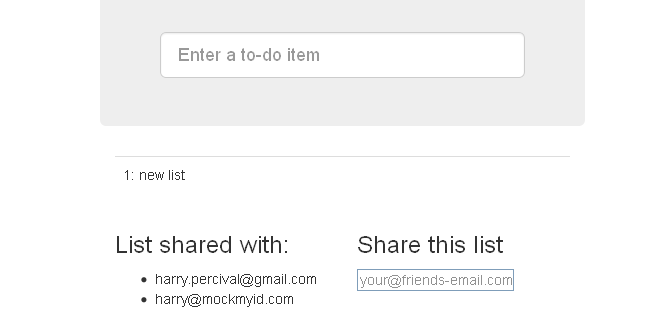
Figure 25-1. Sharing lists
In the next chapter, we’ll wrap up with a discussion of testing “best practices.”