Table of Contents for
Test-Driven Development with Python, 2nd Edition
 Test-Driven Development with Python, 2nd Edition
Published by
O'Reilly Media, Inc., 2017
Test-Driven Development with Python, 2nd Edition
Published by
O'Reilly Media, Inc., 2017
- Cover
- nav
- Praise for Test-Driven Development with Python
- Test-Driven Development with Python
- Test-Driven Development with Python
- Preface
- Prerequisites and Assumptions
- Companion Video
- Acknowledgments
- I. The Basics of TDD and Django
- 1. Getting Django Set Up Using a Functional Test
- 2. Extending Our Functional Test Using the unittest Module
- 3. Testing a Simple Home Page with Unit Tests
- 4. What Are We Doing with All These Tests? (And, Refactoring)
- 5. Saving User Input: Testing the Database
- 6. Improving Functional Tests: Ensuring Isolation and Removing Voodoo Sleeps
- 7. Working Incrementally
- II. Web Development Sine Qua Nons
- 8. Prettification: Layout and Styling, and What to Test About It
- 9. Testing Deployment Using a Staging Site
- 10. Getting to a Production-Ready Deployment
- 11. Automating Deployment with Fabric
- 12. Splitting Our Tests into Multiple Files, and a Generic Wait Helper
- 13. Validation at the Database Layer
- 14. A Simple Form
- 15. More Advanced Forms
- 16. Dipping Our Toes, Very Tentatively, into JavaScript
- 17. Deploying Our New Code
- III. More Advanced Topics in Testing
- 18. User Authentication, Spiking, and De-Spiking
- 19. Using Mocks to Test External Dependencies or Reduce Duplication
- 20. Test Fixtures and a Decorator for Explicit Waits
- 21. Server-Side Debugging
- 22. Finishing “My Lists”: Outside-In TDD
- 23. Test Isolation, and “Listening to Your Tests”
- 24. Continuous Integration (CI)
- 25. The Token Social Bit, the Page Pattern, and an Exercise for the Reader
- 26. Fast Tests, Slow Tests, and Hot Lava
- Obey the Testing Goat!
- A. PythonAnywhere
- B. Django Class-Based Views
- C. Provisioning with Ansible
- D. Testing Database Migrations
- E. Behaviour-Driven Development (BDD)
- F. Building a REST API: JSON, Ajax, and Mocking with JavaScript
- G. Django-Rest-Framework
- H. Cheat Sheet
- I. What to Do Next
- J. Source Code Examples
- Bibliography
- Index
- About the Author
- Colophon
Appendix D. Testing Database Migrations
Django-migrations and its predecessor South have been around for ages, so it’s not usually necessary to test database migrations. But it just so happens that we’re introducing a dangerous type of migration—that is, one that introduces a new integrity constraint on our data. When I first ran the migration script against staging, I saw an error.
On larger projects, where you have sensitive data, you may want the additional confidence that comes from testing your migrations in a safe environment before applying them to production data, so this toy example will hopefully be a useful rehearsal.
Another common reason to want to test migrations is for speed—migrations often involve downtime, and sometimes, when they’re applied to very large datasets, they can take time. It’s good to know in advance how long that might be.
An Attempted Deploy to Staging
Here’s what happened to me when I first tried to deploy our new validation constraints in Chapter 17:
$ cd deploy_tools
$ fab deploy:host=elspeth@superlists-staging.ottg.eu
[...]
Running migrations:
  Applying lists.0005_list_item_unique_together...Traceback (most recent call
last):
  File "/usr/local/lib/python3.6/dist-packages/django/db/backends/utils.py",
line 61, in execute
    return self.cursor.execute(sql, params)
  File
"/usr/local/lib/python3.6/dist-packages/django/db/backends/sqlite3/base.py",
line 475, in execute
    return Database.Cursor.execute(self, query, params)
sqlite3.IntegrityError: columns list_id, text are not unique
[...]
What happened was that some of the existing data in the database violated the integrity constraint, so the database was complaining when I tried to apply it.
In order to deal with this sort of problem, we’ll need to build a “data migration”. Let’s first set up a local environment to test against.
Running a Test Migration Locally
We’ll use a copy of the live database to test our migration against.
Warning
Be very, very, very careful when using real data for testing. For example, you may have real customer email addresses in there, and you don’t want to accidentally send them a bunch of test emails. Ask me how I know this.
Entering Problematic Data
Start a list with some duplicate items on your live site, as shown in Figure D-1.
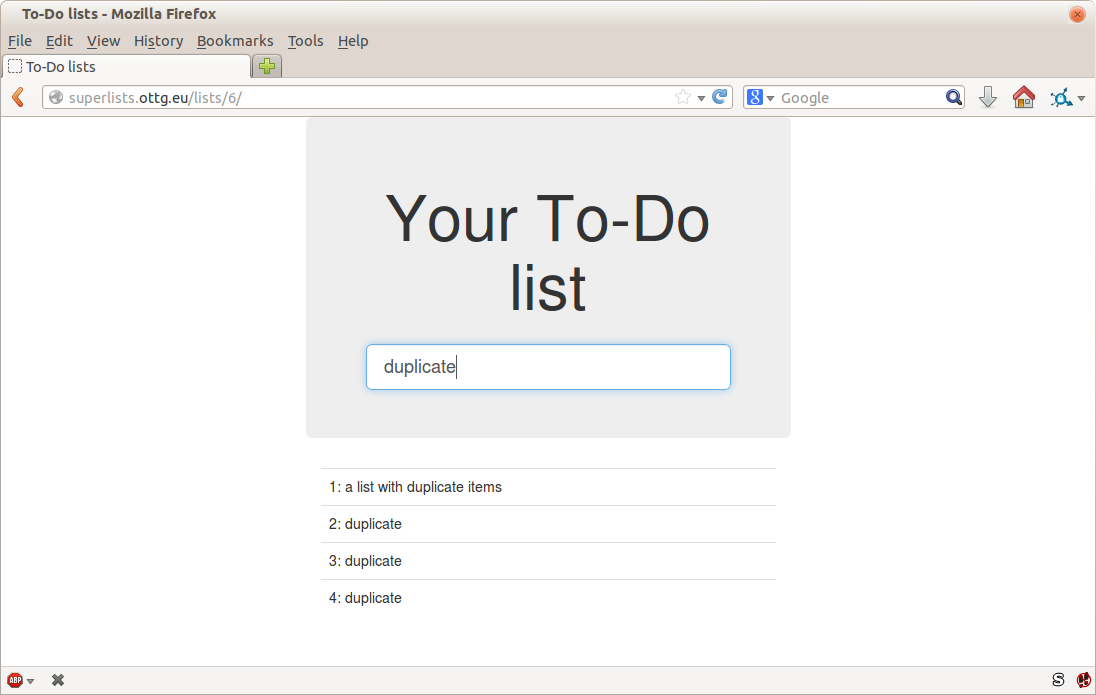
Figure D-1. A list with duplicate items
Copying Test Data from the Live Site
Copy the database down from live:
$ scp elspeth@superlists.ottg.eu:\
/home/elspeth/sites/superlists.ottg.eu/database/db.sqlite3 .
$ mv ../database/db.sqlite3 ../database/db.sqlite3.bak
$ mv db.sqlite3 ../database/db.sqlite3
Confirming the Error
We now have a local database that has not been migrated, and that contains
some problematic data. We should see an error if we try to run migrate:
$ python manage.py migrate --migrate
python manage.py migrate
Operations to perform:
[...]
Running migrations:
[...]
  Applying lists.0005_list_item_unique_together...Traceback (most recent call
last):
[...]
    return Database.Cursor.execute(self, query, params)
sqlite3.IntegrityError: columns list_id, text are not unique
Inserting a Data Migration
Data migrations are a special type of migration that modifies data in the database rather than changing the schema. We need to create one that will run before we apply the integrity constraint, to preventively remove any duplicates. Here’s how we can do that:
$ git rm lists/migrations/0005_list_item_unique_together.py
$ python manage.py makemigrations lists --empty
Migrations for 'lists':
  0005_auto_20140414_2325.py:
$ mv lists/migrations/0005_*.py lists/migrations/0005_remove_duplicates.py
Check out the Django docs on data migrations for more info, but here’s how we add some instructions to change existing data:
lists/migrations/0005_remove_duplicates.py
# encoding: utf8fromdjango.dbimportmodels,migrationsdeffind_dupes(apps,schema_editor):List=apps.get_model("lists","List")forlist_inList.objects.all():items=list_.item_set.all()texts=set()forix,iteminenumerate(items):ifitem.textintexts:item.text='{} ({})'.format(item.text,ix)item.save()texts.add(item.text)classMigration(migrations.Migration):dependencies=[('lists','0004_item_list'),]operations=[migrations.RunPython(find_dupes),]
Re-creating the Old Migration
We re-create the old migration using makemigrations, which will ensure it
is now the sixth migration and has an explicit dependency on 0005, the
data migration:
$ python manage.py makemigrations
Migrations for 'lists':
  0006_auto_20140415_0018.py:
    - Alter unique_together for item (1 constraints)
$ mv lists/migrations/0006_* lists/migrations/0006_unique_together.py
Testing the New Migrations Together
We’re now ready to run our test against the live data:
$ cd deploy_tools
$ fab deploy:host=elspeth@superlists-staging.ottg.eu
[...]
We’ll need to restart the live Gunicorn job too:
elspeth@server:$ sudo systemctl restart gunicorn-superlists.ottg.eu
And we can now run our FTs against staging:
$ STAGING_SERVER=superlists-staging.ottg.eu python manage.py test functional_tests
[...]
....
 ---------------------------------------------------------------------
Ran 4 tests in 17.308s

OK
Everything seems in order! Let’s do it against live:
$ fab deploy --host=superlists.ottg.eu
[superlists.ottg.eu] Executing task 'deploy'
[...]
And that’s a wrap. git add lists/migrations, git commit, and so on.
Conclusions
This exercise was primarily aimed at building a data migration and testing it against some real data. Inevitably, this is only a drop in the ocean of the possible testing you could do for a migration. You could imagine building automated tests to check that all your data was preserved, comparing the database contents before and after. You could write individual unit tests for the helper functions in a data migration. You could spend more time measuring the time taken for migrations, and experiment with ways to speed it up by, for example, breaking up migrations into more or fewer component steps.
Remember that this should be a relatively rare case. In my experience, I haven’t felt the need to test 99% of the migrations I’ve worked on. But, should you ever feel the need on your project, I hope you’ve found a few pointers here to get started with.