Table of Contents for
Test-Driven Development with Python, 2nd Edition
 Test-Driven Development with Python, 2nd Edition
Published by
O'Reilly Media, Inc., 2017
Test-Driven Development with Python, 2nd Edition
Published by
O'Reilly Media, Inc., 2017
- Cover
- nav
- Praise for Test-Driven Development with Python
- Test-Driven Development with Python
- Test-Driven Development with Python
- Preface
- Prerequisites and Assumptions
- Companion Video
- Acknowledgments
- I. The Basics of TDD and Django
- 1. Getting Django Set Up Using a Functional Test
- 2. Extending Our Functional Test Using the unittest Module
- 3. Testing a Simple Home Page with Unit Tests
- 4. What Are We Doing with All These Tests? (And, Refactoring)
- 5. Saving User Input: Testing the Database
- 6. Improving Functional Tests: Ensuring Isolation and Removing Voodoo Sleeps
- 7. Working Incrementally
- II. Web Development Sine Qua Nons
- 8. Prettification: Layout and Styling, and What to Test About It
- 9. Testing Deployment Using a Staging Site
- 10. Getting to a Production-Ready Deployment
- 11. Automating Deployment with Fabric
- 12. Splitting Our Tests into Multiple Files, and a Generic Wait Helper
- 13. Validation at the Database Layer
- 14. A Simple Form
- 15. More Advanced Forms
- 16. Dipping Our Toes, Very Tentatively, into JavaScript
- 17. Deploying Our New Code
- III. More Advanced Topics in Testing
- 18. User Authentication, Spiking, and De-Spiking
- 19. Using Mocks to Test External Dependencies or Reduce Duplication
- 20. Test Fixtures and a Decorator for Explicit Waits
- 21. Server-Side Debugging
- 22. Finishing “My Lists”: Outside-In TDD
- 23. Test Isolation, and “Listening to Your Tests”
- 24. Continuous Integration (CI)
- 25. The Token Social Bit, the Page Pattern, and an Exercise for the Reader
- 26. Fast Tests, Slow Tests, and Hot Lava
- Obey the Testing Goat!
- A. PythonAnywhere
- B. Django Class-Based Views
- C. Provisioning with Ansible
- D. Testing Database Migrations
- E. Behaviour-Driven Development (BDD)
- F. Building a REST API: JSON, Ajax, and Mocking with JavaScript
- G. Django-Rest-Framework
- H. Cheat Sheet
- I. What to Do Next
- J. Source Code Examples
- Bibliography
- Index
- About the Author
- Colophon
Chapter 11. Automating Deployment with Fabric
Automate, automate, automate.
Cay Horstman
Automating deployment is critical for our staging tests to mean anything. By making sure the deployment procedure is repeatable, we give ourselves assurances that everything will go well when we deploy to production. (These days people sometimes use the words “infrastructure as code” to describe automation of deployments, and provisioning.)
Fabric is a tool which lets you automate commands that you want to run on servers. “fabric3” is the Python 3 fork:
$ pip install fabric3
Tip
It’s safe to ignore any errors that say “failed building wheel” during the Fabric3 installation, as long as it says “Successfully installed…” at the end.
The usual setup is to have a file called fabfile.py, which will
contain one or more functions that can later be invoked from a command-line
tool called fab, like this:
fab function_name:host=SERVER_ADDRESS
That will call function_name, passing in a connection to the server at
SERVER_ADDRESS. There are lots of other options for specifying usernames and
passwords, which you can find out about using fab --help.
Breakdown of a Fabric Script for Our Deployment
The
best way to see how it works is with an example.
Here’s one
I made earlier, automating all the deployment steps we’ve been going through.
The main function is called deploy; that’s the one we’ll invoke from the
command line. It then calls out to several helper functions, which we’ll build
together one by one, explaining as we go.
deploy_tools/fabfile.py (ch09l001)
importrandomfromfabric.contrib.filesimportappend,existsfromfabric.apiimportcd,env,local,runREPO_URL='https://github.com/hjwp/book-example.git'defdeploy():site_folder=f'/home/{env.user}/sites/{env.host}'run(f'mkdir -p {site_folder}')withcd(site_folder):_get_latest_source()_update_virtualenv()_create_or_update_dotenv()_update_static_files()_update_database()

You’ll want to update the
REPO_URLvariable with the URL of your own Git repo on its code-sharing site.
env.userwill contain the username you’re using to log in to the server;env.hostwill be the address of the server we’ve specified at the command line (e.g., superlists.ottg.eu).1
runis the most common Fabric command. It says “run this shell command on the server”. Theruncommands in this chapter will replicate many of the commands we did manually in the last two.
mkdir -pis a useful flavour ofmkdir, which is better in two ways: it can create directories several levels deep, and it only creates them if necessary. So,mkdir -p /tmp/foo/barwill create the directory bar but also its parent directory foo if it needs to. It also won’t complain if bar already exists.
cdis a fabric context manager that says “run all the following statements inside this working directory”.2
Hopefully all of those helper functions have fairly self-descriptive names. Because any function in a fabfile can theoretically be invoked from the command line, I’ve used the convention of a leading underscore to indicate that they’re not meant to be part of the “public API” of the fabfile. Let’s take a look at each one, in chronological order.
Pulling Down Our Source Code with Git
Next we want to download the latest version of our source code to the server,
like we did with git pull in the previous chapters:
deploy_tools/fabfile.py (ch09l003)
def_get_latest_source():ifexists('.git'):run('git fetch')else:run(f'git clone {REPO_URL} .')current_commit=local("git log -n 1 --format=%H",capture=True)run(f'git reset --hard {current_commit}')
existschecks whether a directory or file already exists on the server. We look for the .git hidden folder to check whether the repo has already been cloned in our site folder.git fetchinside an existing repository pulls down all the latest commits from the web (it’s likegit pull, but without immediately updating the live source tree).Alternatively we use
git clonewith the repo URL to bring down a fresh source tree.Fabric’s
localcommand runs a command on your local machine—it’s just a wrapper aroundsubprocess.callreally, but it’s quite convenient. Here we capture the output from thatgit loginvocation to get the ID of the current commit that’s on your local PC. That means the server will end up with whatever code is currently checked out on your machine (as long as you’ve pushed it up to the server. Another common gotcha!).We
reset --hardto that commit, which will blow away any current changes in the server’s code directory.
The end result of this is that we either do a git clone if it’s a fresh
deploy, or we do a git fetch + git reset --hard if a previous version of
the code is already there; the equivalent of the git pull we used when we
did it manually, but with the reset --hard to force overwriting any local
changes.
Updating the Virtualenv
Next we create or update the virtualenv:
deploy_tools/fabfile.py (ch09l004)
def_update_virtualenv():ifnotexists('virtualenv/bin/pip'):run(f'python3.6 -m venv virtualenv')run('./virtualenv/bin/pip install -r requirements.txt')
We look inside the virtualenv folder for the
pipexecutable as a way of checking whether it already exists.Then we use
pip install -rlike we did earlier.
Creating a New .env File if Necessary
Our deploy script can also save us some of the manual work creating a .env script:
deploy_tools/fabfile.py (ch09l005)
def_create_or_update_dotenv():append('.env','DJANGO_DEBUG_FALSE=y')append('.env',f'SITENAME={env.host}')current_contents=run('cat .env')if'DJANGO_SECRET_KEY'notincurrent_contents:new_secret=''.join(random.SystemRandom().choices('abcdefghijklmnopqrstuvwxyz0123456789',k=50))append('.env',f'DJANGO_SECRET_KEY={new_secret}')
The
appendcommand conditionally adds a line to a file, if that line isn’t already there.For the secret key we first manually check whether there’s already an entry in the file…
And if not, we use our little one-liner from earlier to generate a new one (we can’t rely on the
append’s conditional logic here because our new key and any potential existing one won’t be the same).
Updating Static Files
Updating static files is a single command:
deploy_tools/fabfile.py (ch09l006)
def_update_static_files():run('./virtualenv/bin/python manage.py collectstatic --noinput')
We use the virtualenv version of Python whenever we need to run a Django manage.py command, to make sure we get the virtualenv version of Django, not the system one.
Migrating the Database If Necessary
Finally, we update the database with manage.py migrate:
deploy_tools/fabfile.py (ch09l007)
def_update_database():run('./virtualenv/bin/python manage.py migrate --noinput')
The
--noinputremoves any interactive yes/no confirmations that Fabric would find hard to deal with.
And we’re done! Lots of new things to take in, I imagine, but I hope you can see how this is all replicating the work we did manually earlier, with a bit of logic to make it work both for brand new deployments and for existing ones that just need updating. If you like words with Latin roots, you might describe it as idempotent, which means it has the same effect whether you run it once or multiple times.
Trying It Out
Before we try, we need to make sure our latest commits are up on GitHub, or we won’t be able to sync the server with our local commits.
$ git push
Now let’s try our Fabric script out on our existing staging site, and see it working to update a deployment that already exists:
$ cd deploy_tools
$ fab deploy:host=elspeth@superlists-staging.ottg.eu
[elspeth@superlists-staging.ottg.eu] Executing task 'deploy'
[elspeth@superlists-staging.ottg.eu] run: mkdir -p
/home/elspeth/sites/superlists-staging.ottg.eu
[elspeth@superlists-staging.ottg.eu] run: git fetch
[elspeth@superlists-staging.ottg.eu] out: remote: Counting objects: [...]
[elspeth@superlists-staging.ottg.eu] out: remote: Compressing objects: [...]
[localhost] local: git log -n 1 --format=%H
[elspeth@superlists-staging.ottg.eu] run: git reset --hard
[...]
[elspeth@superlists-staging.ottg.eu] out: HEAD is now at [...]
[elspeth@superlists-staging.ottg.eu] out:
[elspeth@superlists-staging.ottg.eu] run: ./virtualenv/bin/pip install -r
requirements.txt
[elspeth@superlists-staging.ottg.eu] out: Requirement already satisfied:
django==1.11 in ./virtualenv/lib/python3.6/site-packages (from -r
requirements.txt (line 1))
[elspeth@superlists-staging.ottg.eu] out: Requirement already satisfied:
gunicorn==19.7.1 in ./virtualenv/lib/python3.6/site-packages (from -r
requirements.txt (line 2))
[elspeth@superlists-staging.ottg.eu] out: Requirement already satisfied: pytz
in ./virtualenv/lib/python3.6/site-packages (from django==1.11->-r
requirements.txt (line 1))
[elspeth@superlists-staging.ottg.eu] out:
[elspeth@superlists-staging.ottg.eu] run: ./virtualenv/bin/python manage.py
collectstatic --noinput
[elspeth@superlists-staging.ottg.eu] out:
[elspeth@superlists-staging.ottg.eu] out: 0 static files copied to
'/home/elspeth/sites/superlists-staging.ottg.eu/static', 15 unmodified.
[elspeth@superlists-staging.ottg.eu] out:
[elspeth@superlists-staging.ottg.eu] run: ./virtualenv/bin/python manage.py
migrate --noinput
[elspeth@superlists-staging.ottg.eu] out: Operations to perform:
[elspeth@superlists-staging.ottg.eu] out:   Apply all migrations: auth,
contenttypes, lists, sessions
[elspeth@superlists-staging.ottg.eu] out: Running migrations:
[elspeth@superlists-staging.ottg.eu] out:   No migrations to apply.
[elspeth@superlists-staging.ottg.eu] out:
Awesome. I love making computers spew out pages and pages of output like that
(in fact I find it hard to stop myself from making little ’70s computer
<brrp, brrrp, brrrp> noises like Mother in Alien). If we look through
it we can see it is doing our bidding: the mkdir -p command goes through
happily, even though the directory already exist. Next git pull pulls down
the couple of commits we just made. Then pip install -r requirements.txt
completes happily, noting that the existing virtualenv already has all the
packages we need. collectstatic also notices that the static files are all
already there, and finally the migrate completes without needing to apply
anything.
Note
For this script to work, you need to have done a git push of your
current local commit, so that the server can pull it down and reset to
it. If you see an error saying Could not parse object, try doing a git
push.
Deploying to Live
So, let’s try using it for our live site!
$ fab deploy:host=elspeth@superlists.ottg.eu
[elspeth@superlists.ottg.eu] Executing task 'deploy'
[elspeth@superlists.ottg.eu] run: mkdir -p
/home/elspeth/sites/superlists.ottg.eu
[elspeth@superlists.ottg.eu] run: git clone
https://github.com/hjwp/book-example.git .
[elspeth@superlists.ottg.eu] out: Cloning into '.'...
[...]
[elspeth@superlists.ottg.eu] out: Receiving objects: 100% [...]
[...]
[elspeth@superlists.ottg.eu] out: Resolving deltas: 100% [...]
[elspeth@superlists.ottg.eu] out: Checking connectivity... done.
[elspeth@superlists.ottg.eu] out:
[localhost] local: git log -n 1 --format=%H
[elspeth@superlists.ottg.eu] run: git reset --hard [...]
[elspeth@superlists.ottg.eu] out: HEAD is now at [...]
[elspeth@superlists.ottg.eu] out:
[elspeth@superlists.ottg.eu] run: python3.6 -m venv virtualenv
[elspeth@superlists.ottg.eu] run: ./virtualenv/bin/pip install -r
requirements.txt
[elspeth@superlists.ottg.eu] out: Collecting django==1.11 [...]
[elspeth@superlists.ottg.eu] out:   Using cached [...]
[elspeth@superlists.ottg.eu] out: Collecting gunicorn==19.7.1 [...]
[elspeth@superlists.ottg.eu] out:   Using cached [...]
[elspeth@superlists.ottg.eu] out: Collecting pytz [...]
[elspeth@superlists.ottg.eu] out:   Using cached [...]
[elspeth@superlists.ottg.eu] out: Installing collected packages: pytz, django,
gunicorn
[elspeth@superlists.ottg.eu] out: Successfully installed django-1.11
gunicorn-19.7.1 pytz-2017.3

[elspeth@superlists.ottg.eu] run: echo 'DJANGO_DEBUG_FALSE=y' >> "$(echo .env)"
[elspeth@superlists.ottg.eu] run: echo 'SITENAME=superlists.ottg.eu' >> "$(echo
.env)"
[elspeth@superlists.ottg.eu] run: echo
'DJANGO_SECRET_KEY=[...]
[elspeth@superlists.ottg.eu] run: ./virtualenv/bin/python manage.py
collectstatic --noinput
[elspeth@superlists.ottg.eu] out: Copying
'/home/elspeth/sites/superlists.ottg.eu/lists/static/base.css'
[...]
[elspeth@superlists.ottg.eu] out: 15 static files copied to
'/home/elspeth/sites/superlists.ottg.eu/static'.
[elspeth@superlists.ottg.eu] out:

[elspeth@superlists.ottg.eu] run: ./virtualenv/bin/python manage.py migrate
[...]
[elspeth@superlists.ottg.eu] out: Operations to perform:
[elspeth@superlists.ottg.eu] out:   Apply all migrations: auth, contenttypes,
lists, sessions
[elspeth@superlists.ottg.eu] out: Running migrations:
[elspeth@superlists.ottg.eu] out:   Applying contenttypes.0001_initial... OK
[elspeth@superlists.ottg.eu] out:   Applying
contenttypes.0002_remove_content_type_name... OK
[elspeth@superlists.ottg.eu] out:   Applying auth.0001_initial... OK
[elspeth@superlists.ottg.eu] out:   Applying
auth.0002_alter_permission_name_max_length... OK
[...]
[elspeth@superlists.ottg.eu] out:   Applying lists.0004_item_list... OK
[elspeth@superlists.ottg.eu] out:   Applying sessions.0001_initial... OK
[elspeth@superlists.ottg.eu] out:


Done.
Disconnecting from elspeth@superlists.ottg.eu... done.
Brrp brrp brpp. You can see the script follows a slightly different path,
doing a git clone to bring down a brand new repo instead of a git pull.
It also needs to set up a new virtualenv from scratch, including a fresh
install of pip and Django. The collectstatic actually creates new files this
time, and the migrate seems to have worked too.
Provisioning: Nginx and Gunicorn Config Using sed
What else do we need to do to get our live site into production? We refer to our provisioning notes, which tell us to use the template files to create our Nginx virtual host and the Systemd service.
Now let’s use a little Unix command-line magic!
elspeth@server:$ cat ./deploy_tools/nginx.template.conf \
    | sed "s/DOMAIN/superlists.ottg.eu/g" \
    | sudo tee /etc/nginx/sites-available/superlists.ottg.eu
sed (“stream editor”) takes a stream of text and performs edits on it.
In this case we ask it to substitute the string DOMAIN for the address of our
site, with the s/replaceme/withthis/g
syntax.3
We pipe (|) that to another sed process to set our unique SECRET_KEY, and
then we pipe the output once more output to a root-user process (sudo), which
uses tee to write its input to a file, in this case the Nginx sites-available
virtualhost config file.
Note
For bonus points, why not build an even bigger Bash “one-liner” that
includes the python random.choices command to generate the secret key?
Answers on a postcard!
Next we activate that file with a symlink:
elspeth@server:$ sudo ln -s /etc/nginx/sites-available/superlists.ottg.eu \
    /etc/nginx/sites-enabled/superlists.ottg.eu
And we write the Systemd service, with another, slightly simpler sed:
elspeth@server: cat ./deploy_tools/gunicorn-systemd.template.service \
    | sed "s/DOMAIN/superlists.ottg.eu/g" \
    | sudo tee /etc/systemd/system/gunicorn-superlists.ottg.eu.service
Finally we start both services:
elspeth@server:$ sudo systemctl daemon-reload
elspeth@server:$ sudo systemctl reload nginx
elspeth@server:$ sudo systemctl enable gunicorn-superlists.ottg.eu
elspeth@server:$ sudo systemctl start gunicorn-superlists.ottg.eu
And we take a look at our site: Figure 11-1. It works—hooray!
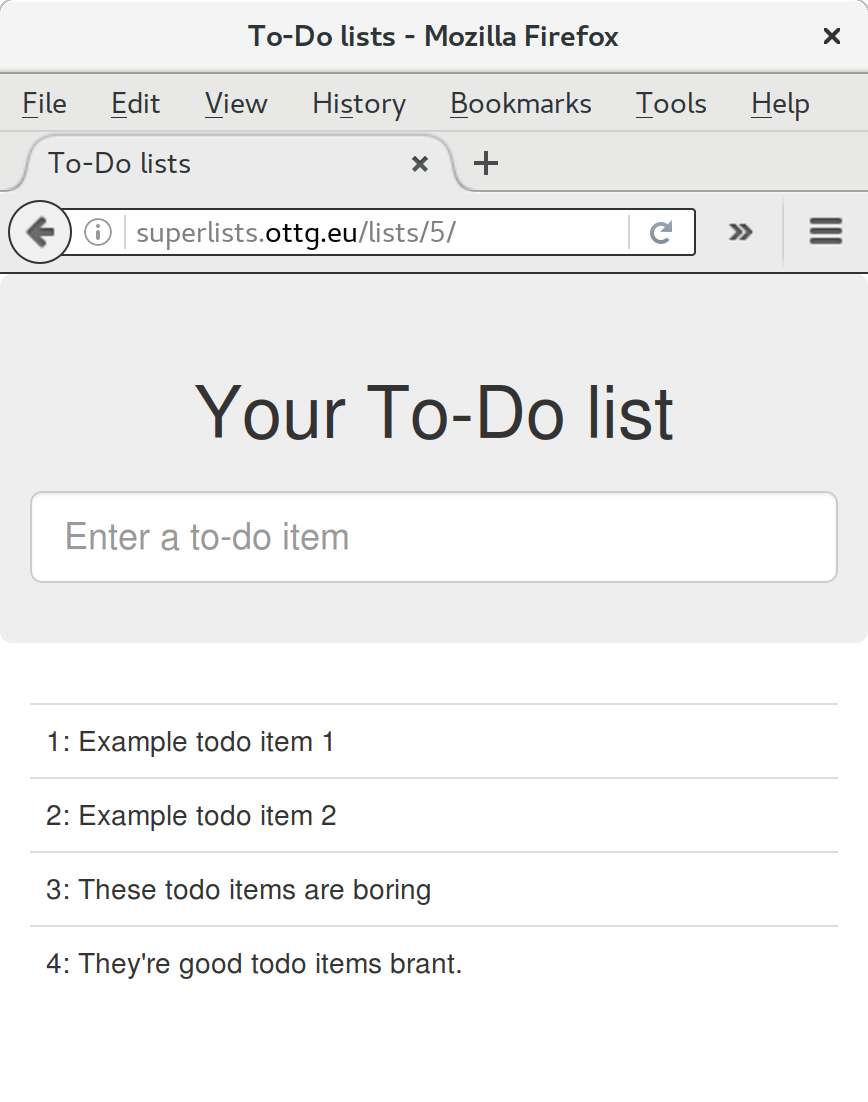
Figure 11-1. Brrp, brrp, brrp…it worked!
It’s done a good job. Good fabfile, have a biscuit. You have earned the privilege of being added to the repo:
$ git add deploy_tools/fabfile.py
$ git commit -m "Add a fabfile for automated deploys"
Git Tag the Release
One final bit of admin. In order to preserve a historical marker, we’ll use Git tags to mark the state of the codebase that reflects what’s currently live on the server:
$ git tag LIVE
$ export TAG=$(date +DEPLOYED-%F/%H%M)  # this generates a timestamp
$ echo $TAG # should show "DEPLOYED-" and then the timestamp
$ git tag $TAG
$ git push origin LIVE $TAG # pushes the tags up
Now it’s easy, at any time, to check what the difference is between our current codebase and what’s live on the servers. This will come in useful in a few chapters, when we look at database migrations. Have a look at the tag in the history:
$ git log --graph --oneline --decorate
[...]
Anyway, you now have a live website! Tell all your friends! Tell your mum, if no one else is interested! And, in the next chapter, it’s back to coding again.
Further Reading
There’s no such thing as the One True Way in deployment, and I’m no grizzled expert in any case. I’ve tried to set you off on a reasonably sane path, but there’s plenty of things you could do differently, and lots, lots more to learn besides. Here are some resources I used for inspiration:
-
Solid Python Deployments for Everybody by Hynek Schlawack
-
Git-based fabric deployments are awesome by Dan Bravender
-
The deployment chapter of Two Scoops of Django by Dan Greenfeld and Audrey Roy
-
The 12-factor App by the Heroku team
Automating Provisioning with Ansible
For some ideas on how you might go about automating the provisioning step, and an alternative to Fabric called Ansible, go check out Appendix C.
1 If you’re wondering why we’re building up paths manually with f-strings instead of the os.path.join command we saw earlier, it’s because path.join will use backslashes if you run the script from Windows, but we definitely want forward slashes on the server. That’s a common gotcha!
2 You may be wondering why we didn’t just use run to do the cd. It’s because Fabric doesn’t store any state from one command to the next—each run command runs in a separate shell session on the server.
3 You might have seen nerdy people using this strange s/change-this/to-this/ notation on the internet. Now you know why!