Table of Contents for
Test-Driven Development with Python, 2nd Edition
 Test-Driven Development with Python, 2nd Edition
Published by
O'Reilly Media, Inc., 2017
Test-Driven Development with Python, 2nd Edition
Published by
O'Reilly Media, Inc., 2017
- Cover
- nav
- Praise for Test-Driven Development with Python
- Test-Driven Development with Python
- Test-Driven Development with Python
- Preface
- Prerequisites and Assumptions
- Companion Video
- Acknowledgments
- I. The Basics of TDD and Django
- 1. Getting Django Set Up Using a Functional Test
- 2. Extending Our Functional Test Using the unittest Module
- 3. Testing a Simple Home Page with Unit Tests
- 4. What Are We Doing with All These Tests? (And, Refactoring)
- 5. Saving User Input: Testing the Database
- 6. Improving Functional Tests: Ensuring Isolation and Removing Voodoo Sleeps
- 7. Working Incrementally
- II. Web Development Sine Qua Nons
- 8. Prettification: Layout and Styling, and What to Test About It
- 9. Testing Deployment Using a Staging Site
- 10. Getting to a Production-Ready Deployment
- 11. Automating Deployment with Fabric
- 12. Splitting Our Tests into Multiple Files, and a Generic Wait Helper
- 13. Validation at the Database Layer
- 14. A Simple Form
- 15. More Advanced Forms
- 16. Dipping Our Toes, Very Tentatively, into JavaScript
- 17. Deploying Our New Code
- III. More Advanced Topics in Testing
- 18. User Authentication, Spiking, and De-Spiking
- 19. Using Mocks to Test External Dependencies or Reduce Duplication
- 20. Test Fixtures and a Decorator for Explicit Waits
- 21. Server-Side Debugging
- 22. Finishing “My Lists”: Outside-In TDD
- 23. Test Isolation, and “Listening to Your Tests”
- 24. Continuous Integration (CI)
- 25. The Token Social Bit, the Page Pattern, and an Exercise for the Reader
- 26. Fast Tests, Slow Tests, and Hot Lava
- Obey the Testing Goat!
- A. PythonAnywhere
- B. Django Class-Based Views
- C. Provisioning with Ansible
- D. Testing Database Migrations
- E. Behaviour-Driven Development (BDD)
- F. Building a REST API: JSON, Ajax, and Mocking with JavaScript
- G. Django-Rest-Framework
- H. Cheat Sheet
- I. What to Do Next
- J. Source Code Examples
- Bibliography
- Index
- About the Author
- Colophon
Appendix E. Behaviour-Driven Development (BDD)
Now I haven’t used BDD “in anger,” so I can’t claim any sort of expertise, but I really like what I have seen of it, and I thought that you deserved at least a whirlwind tour. In this appendix, we’ll take some of the tests we wrote in a “normal” FT, and convert them to using BDD tools.
What Is BDD?
BDD, strictly speaking, is a methodology rather than a toolset—it’s the approach of testing your application by testing the behaviour that we expect it to display to a user (the Wikipedia entry has quite a good overview). So, in some ways, the Selenium-based FTs that I’ve shown in the rest of the book could be called BDD.
But the term has become closely associated with a particular set of tools for doing BDD, most importantly the Gherkin syntax, which is a human-readable DSL for writing functional (or acceptance) tests. Gherkin originally came out of the Ruby world, where it’s associated with a test runner called Cucumber.
In the Python world, we have a couple of equivalent test running tools, Lettuce and Behave. Of these, only Behave was compatible with Python 3 at the time of writing, so that’s what we’ll use. We’ll also use a plugin called behave-django.
Basic Housekeeping
We make a directory for our BDD “features,” add a steps directory (we’ll find out what these are shortly!), and placeholder for our first feature:
$ mkdir -p features/steps
$ touch features/my_lists.feature
$ touch features/steps/my_lists.py
$ tree features
features
├── my_lists.feature
└── steps
    └── my_lists.py
We install behave-django, and add it to settings.py:
$ pip install behave-django
superlists/settings.py
--- a/superlists/settings.py+++ b/superlists/settings.py@@ -40,6 +40,7 @@ INSTALLED_APPS = ['lists', 'accounts', 'functional_tests',+ 'behave_django',]
And then run python manage.py behave as a sanity check:
$ python manage.py behave
Creating test database for alias 'default'...
0 features passed, 0 failed, 0 skipped
0 scenarios passed, 0 failed, 0 skipped
0 steps passed, 0 failed, 0 skipped, 0 undefined
Took 0m0.000s
Destroying test database for alias 'default'...
Writing an FT as a “Feature” Using Gherkin Syntax
Up until now, we’ve been writing our FTs using human-readable comments that describe the new feature in terms of a user story, interspersed with the Selenium code required to execute each step in the story.
BDD enforces a distinction between those two—we write our human-readable story using a human-readable (if occasionally somewhat awkward) syntax called “Gherkin”, and that is called the “Feature”. Later, we’ll map each line of Gherkin to a function that contains the Selenium code necessary to implement that “step.”
Here’s what a Feature for our new “My lists” page could look like:
features/my_lists.feature
Feature:My ListsAs a logged-in userI want to be able to see all my lists in one pageSo that I can find them all after I've written themScenario:Create two lists and see them on the My Lists pageGivenI am a logged-in userWhenI create a list with first item "Reticulate Splines"AndI add an item "Immanentize Eschaton"AndI create a list with first item "Buy milk"ThenI will see a link to "My lists"WhenI click the link to "My lists"ThenI will see a link to "Reticulate Splines"AndI will see a link to "Buy milk"WhenI click the link to "Reticulate Splines"ThenI will be on the "Reticulate Splines" list page
As-a /I want to/So that
At the top you’ll notice the As-a/I want to/So that clause. This is optional, and it has no executable counterpart—it’s just a slightly formalised way of capturing the “who and why?” aspects of a user story, gently encouraging the team to think about the justifications for each feature.
Given/When/Then
Given/When/Then is the real core of a BDD test. This trilobite formulation matches the setup/exercise/assert pattern we’ve seen in our unit tests, and it represents the setup and assumptions phase, an exercise/action phase, and a subsequent assertion/observation phase. There’s more info on the Cucumber wiki.
Coding the Step Functions
We now build the counterpart to our Gherkin-syntax feature, which are the “step” functions that will actually implement them in code.
Generating Placeholder Steps
When we run behave, it helpfully tells us about all the steps we need to
implement:
$ python manage.py behave
Feature: My Lists # features/my_lists.feature:1
  As a logged-in user
  I want to be able to see all my lists in one page
  So that I can find them all after I've written them
  Scenario: Create two lists and see them on the My Lists page  #
features/my_lists.feature:6
    Given I am a logged-in user                                 # None
    Given I am a logged-in user                                 # None
    When I create a list with first item "Reticulate Splines"   # None
    And I add an item "Immanentize Eschaton"                    # None
    And I create a list with first item "Buy milk"              # None
    Then I will see a link to "My lists"                        # None
    When I click the link to "My lists"                         # None
    Then I will see a link to "Reticulate Splines"              # None
    And I will see a link to "Buy milk"                         # None
    When I click the link to "Reticulate Splines"               # None
    Then I will be on the "Reticulate Splines" list page        # None


Failing scenarios:
  features/my_lists.feature:6  Create two lists and see them on the My Lists
page


0 features passed, 1 failed, 0 skipped
0 scenarios passed, 1 failed, 0 skipped
0 steps passed, 0 failed, 0 skipped, 10 undefined
Took 0m0.000s

You can implement step definitions for undefined steps with these snippets:

@given(u'I am a logged-in user')
def step_impl(context):
    raise NotImplementedError(u'STEP: Given I am a logged-in user')

@when(u'I create a list with first item "Reticulate Splines"')
def step_impl(context):
[...]
And you’ll notice all this output is nicely coloured, as shown in Figure E-1.
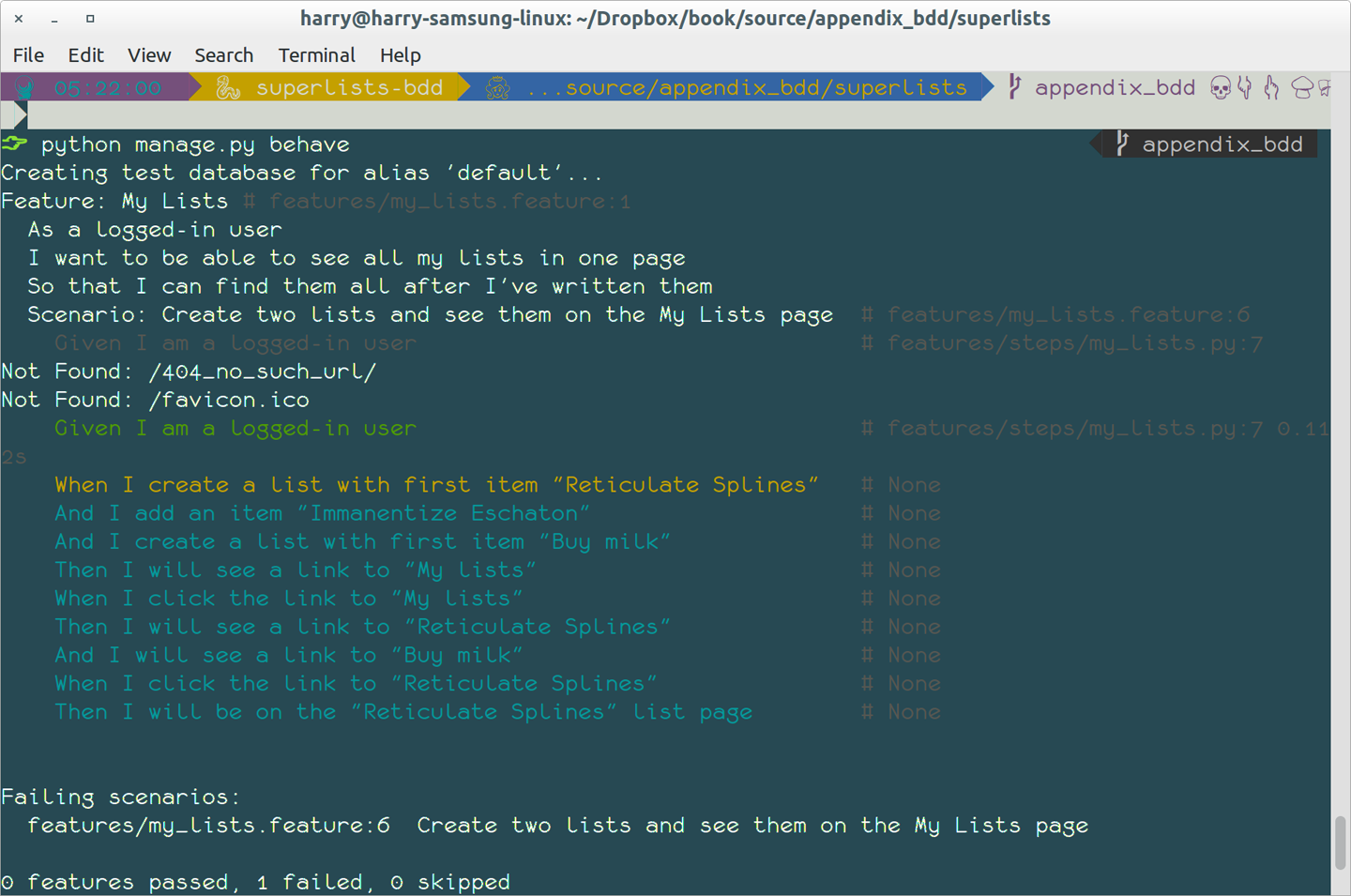
Figure E-1. Behave with coloured console ouptut
It’s encouraging us to copy and paste these snippets, and use them as starting points to build our steps.
First Step Definition
Here’s a first stab at making a step for our “Given I am a logged-in user”
step. I started by stealing the code for self.create_pre_authenticated_session
from functional_tests/test_my_lists.py, and adapting it slightly (removing
the server-side version, for example, although it would be easy to re-add
later).
features/steps/my_lists.py
frombehaveimportgiven,when,thenfromfunctional_tests.management.commands.create_sessionimport\create_pre_authenticated_sessionfromdjango.confimportsettings@given('I am a logged-in user')defgiven_i_am_logged_in(context):session_key=create_pre_authenticated_session(='edith@example.com')## to set a cookie we need to first visit the domain.## 404 pages load the quickest!context.browser.get(context.get_url("/404_no_such_url/"))context.browser.add_cookie(dict(name=settings.SESSION_COOKIE_NAME,value=session_key,path='/',))
The context variable needs a little explaining—it’s a sort of global
variable, in the sense that it’s passed to each step that’s executed, and it
can be used to store information that we need to share between steps. Here
we’ve assumed we’ll be storing a browser object on it, and the server_url.
We end up using it a lot like we used self when we were writing unittest
FTs.
setUp and tearDown Equivalents in environment.py
Steps can make changes to state in the context, but the place to do
preliminary set-up, the equivalent of setUp, is in a file called
environment.py:
features/environment.py
fromseleniumimportwebdriverdefbefore_all(context):context.browser=webdriver.Firefox()defafter_all(context):context.browser.quit()defbefore_feature(context,feature):pass
Another Run
As a sanity check, we can do another run, to see if the new step works and that we really can start a browser:
$ python manage.py behave
[...]
1 step passed, 0 failed, 0 skipped, 9 undefined
The usual reams of output, but we can see that it seems to have made it through the first step; let’s define the rest of them.
Capturing Parameters in Steps
We’ll see how Behave allows you to capture parameters from step descriptions. Our next step says:
features/my_lists.feature
WhenI create a list with first item "Reticulate Splines"
And the autogenerated step definition looked like this:
features/steps/my_lists.py
@given('I create a list with first item "Reticulate Splines"')defstep_impl(context):raiseNotImplementedError(u'STEP: When I create a list with first item "Reticulate Splines"')
We want to be able to create lists with arbitrary first items, so it would be nice to somehow capture whatever is between those quotes, and pass them in as an argument to a more generic function. That’s a common requirement in BDD, and Behave has a nice syntax for it, reminiscent of the new-style Python string formatting syntax:
features/steps/my_lists.py (ch35l006)
[...]@when('I create a list with first item "{first_item_text}"')defcreate_a_list(context,first_item_text):context.browser.get(context.get_url('/'))context.browser.find_element_by_id('id_text').send_keys(first_item_text)context.browser.find_element_by_id('id_text').send_keys(Keys.ENTER)wait_for_list_item(context,first_item_text)
Neat, huh?
Note
Capturing parameters for steps is one of the most powerful features of the BDD syntax.
As usual with Selenium tests, we will need an explicit wait. Let’s re-use
our @wait decorator from base.py:
features/steps/my_lists.py (ch35l007)
fromfunctional_tests.baseimportwait[...]@waitdefwait_for_list_item(context,item_text):context.test.assertIn(item_text,context.browser.find_element_by_css_selector('#id_list_table').text)
Similarly, we can add to an existing list, and see or click on links:
features/steps/my_lists.py (ch35l008)
fromselenium.webdriver.common.keysimportKeys[...]@when('I add an item "{item_text}"')defadd_an_item(context,item_text):context.browser.find_element_by_id('id_text').send_keys(item_text)context.browser.find_element_by_id('id_text').send_keys(Keys.ENTER)wait_for_list_item(context,item_text)@then('I will see a link to "{link_text}"')@waitdefsee_a_link(context,link_text):context.browser.find_element_by_link_text(link_text)@when('I click the link to "{link_text}"')defclick_link(context,link_text):context.browser.find_element_by_link_text(link_text).click()
Notice we can even use our @wait decorator on steps themselves.
And finally the slightly more complex step that says I am on the page for a particular list:
features/steps/my_lists.py (ch35l009)
@then('I will be on the "{first_item_text}" list page')@waitdefon_list_page(context,first_item_text):first_row=context.browser.find_element_by_css_selector('#id_list_table tr:first-child')expected_row_text='1: '+first_item_textcontext.test.assertEqual(first_row.text,expected_row_text)
Now we can run it and see our first expected failure:
$ python manage.py behave

Feature: My Lists # features/my_lists.feature:1
  As a logged-in user
  I want to be able to see all my lists in one page
  So that I can find them all after I've written them
  Scenario: Create two lists and see them on the My Lists page  #
features/my_lists.feature:6
    Given I am a logged-in user                                 #
features/steps/my_lists.py:19
    When I create a list with first item "Reticulate Splines"   #
features/steps/my_lists.py:31
    And I add an item "Immanentize Eschaton"                    #
features/steps/my_lists.py:39
    And I create a list with first item "Buy milk"              #
features/steps/my_lists.py:31
    Then I will see a link to "My lists"                        #
functional_tests/base.py:12
      Traceback (most recent call last):
[...]
        File "features/steps/my_lists.py", line 49, in see_a_link
          context.browser.find_element_by_link_text(link_text)
[...]
      selenium.common.exceptions.NoSuchElementException: Message: Unable to
locate element: My lists

[...]

Failing scenarios:
  features/my_lists.feature:6  Create two lists and see them on the My Lists
page

0 features passed, 1 failed, 0 skipped
0 scenarios passed, 1 failed, 0 skipped
4 steps passed, 1 failed, 5 skipped, 0 undefined
You can see how the output really gives you a sense of how far through the “story” of the test we got: we manage to create our two lists successfully, but the “My lists” link does not appear.
Comparing the Inline-Style FT
I’m not going to run through the implementation of the feature, but you can see how the test will drive development just as well as the inline-style FT would have.
Let’s have a look at it, for comparison:
functional_tests/test_my_lists.py
deftest_logged_in_users_lists_are_saved_as_my_lists(self):# Edith is a logged-in userself.create_pre_authenticated_session('edith@example.com')# She goes to the home page and starts a listself.browser.get(self.live_server_url)self.add_list_item('Reticulate splines')self.add_list_item('Immanentize eschaton')first_list_url=self.browser.current_url# She notices a "My lists" link, for the first time.self.browser.find_element_by_link_text('My lists').click()# She sees that her list is in there, named according to its# first list itemself.wait_for(lambda:self.browser.find_element_by_link_text('Reticulate splines'))self.browser.find_element_by_link_text('Reticulate splines').click()self.wait_for(lambda:self.assertEqual(self.browser.current_url,first_list_url))# She decides to start another list, just to seeself.browser.get(self.live_server_url)self.add_list_item('Click cows')second_list_url=self.browser.current_url# Under "my lists", her new list appearsself.browser.find_element_by_link_text('My lists').click()self.wait_for(lambda:self.browser.find_element_by_link_text('Click cows'))self.browser.find_element_by_link_text('Click cows').click()self.wait_for(lambda:self.assertEqual(self.browser.current_url,second_list_url))# She logs out. The "My lists" option disappearsself.browser.find_element_by_link_text('Log out').click()self.wait_for(lambda:self.assertEqual(self.browser.find_elements_by_link_text('My lists'),[]))
It’s not entirely an apples-to-apples comparison, but we can look at the number of lines of code in Table E-1.
| BDD | Standard FT |
|---|---|
Feature file: 20 (3 optional) |
test function body: 45 |
Steps file: 56 lines |
helper functions: 23 |
The comparison isn’t perfect, but you might say that the feature file and the body of a “standard FT” test function are equivalent in that they present the main “story” of a test, while the steps and helper functions represent the “hidden” implementation details. If you add them up, the total numbers are pretty similar, but notice that they’re spread out differently: the BDD tests have made the story more concise, and pushed more work out into the hidden implementation details.
BDD Encourages Structured Test Code
This
is the real appeal, for me: the BDD tool has forced us to structure our
test code. In the inline-style FT, we’re free to use as many lines as we want
to implement a step, as described by its comment line. It’s very hard to
resist the urge to just copy-and-paste code from elsewhere, or just from
earlier on in the test. You can see that, by this point in the book, I’ve
built just a couple of helper functions (like get_item_input_box).
In contrast, the BDD syntax has immediately forced me to have a separate function for each step, so I’ve already built some very reusable code to:
-
Start a new list
-
Add an item to an existing list
-
Click on a link with particular text
-
Assert that I’m looking at a particular list’s page
BDD really encourages you to write test code that seems to match well with the business domain, and to use a layer of abstraction between the story of your FT and its implementation in code.
The ultimate expression of this is that, theoretically, if you wanted to change programming languages, you could keep all your features in Gherkin syntax exactly as they are, and throw away the Python steps and replace them with steps implemented in another language.
The Page Pattern as an Alternative
In Chapter 25 of the book, I present an example of the “Page pattern”, which is an object-oriented approach to structuring your Selenium tests. Here’s a reminder of what it looks like:
functional_tests/test_sharing.py
from.my_lists_pageimportMyListsPage[...]classSharingTest(FunctionalTest):deftest_can_share_a_list_with_another_user(self):# [...]self.browser.get(self.live_server_url)list_page=ListPage(self).add_list_item('Get help')# She notices a "Share this list" optionshare_box=list_page.get_share_box()self.assertEqual(share_box.get_attribute('placeholder'),'your-friend@example.com')# She shares her list.# The page updates to say that it's shared with Oniciferous:list_page.share_list_with('oniciferous@example.com')
And the Page class looks like this:
functional_tests/lists_pages.py
classListPage(object):def__init__(self,test):self.test=testdefget_table_rows(self):returnself.test.browser.find_elements_by_css_selector('#id_list_table tr')@waitdefwait_for_row_in_list_table(self,item_text,item_number):row_text='{}: {}'.format(item_number,item_text)rows=self.get_table_rows()self.test.assertIn(row_text,[row.textforrowinrows])defget_item_input_box(self):returnself.test.browser.find_element_by_id('id_text')
So it’s definitely possible to implement a similar layer of abstraction, and a sort of DSL, in inline-style FTs, whether it’s by using the Page pattern or whatever structure you prefer—but now it’s a matter of self-discipline, rather than having a framework that pushes you towards it.
Note
In fact, you can actually use the Page pattern with BDD as well, as a resource for your steps to use when navigating the pages of your site.
BDD Might Be Less Expressive than Inline Comments
On the other hand, I can also see potential for the Gherkin syntax to feel somewhat restrictive. Compare how expressive and readable the inline-style comments are, with the slightly awkward BDD feature:
functional_tests/test_my_lists.py
# Edith is a logged-in user# She goes to the home page and starts a list# She notices a "My lists" link, for the first time.# She sees that her list is in there, named according to its# first list item# She decides to start another list, just to see# Under "my lists", her new list appears# She logs out. The "My lists" option disappears[...]
That’s much more readable and natural than our slightly forced Given/Then/When incantations, and, in a way, might encourage more user-centric thinking. (There is a syntax in Gherkin for including “comments” in a feature file, which would mitigate this somewhat, but I gather that it’s not widely used.)
Will Nonprogrammers Write Tests?
I haven’t touched on one of the original promises of BDD, which is that nonprogrammers—business or client representatives perhaps—might actually write the Gherkin syntax. I’m quite skeptical about whether this would actually work in the real world, but I don’t think that detracts from the other potential benefits of BDD.
Some Tentative Conclusions
I’ve only dipped my toes into the BDD world, so I’m hesitant to draw any firm conclusions. I find the “forced” structuring of FTs into steps very appealing though—in that it looks like it has the potential to encourage a lot of reuse in your FT code, and that it neatly separates concerns between describing the story and implementing it, and that it forces us to think about things in terms of the business domain, rather than in terms of “what we need to do with Selenium.”
But there’s no free lunch. The Gherkin syntax is restrictive, compared to the total freedom offered by inline FT comments.
I also would like to see how BDD scales once you have not just one or two features, and four or five steps, but several dozen features and hundreds of lines of steps code.
Overall, I would say it’s definitely worth investigating, and I will probably use BDD for my next personal project.
My thanks to Daniel Pope, Rachel Willmer, and Jared Contrascere for their feedback on this chapter.