Table of Contents for
Arch Linux Environment Setup How-to
 Arch Linux Environment Setup How-to
Published by
Packt Publishing, 2012
Arch Linux Environment Setup How-to
Published by
Packt Publishing, 2012
- Cover
- Table of Contents
- Arch Linux Environment Setup How-to
- Arch Linux Environment Setup How-to
- Credits
- About the Author
- About the Reviewers
- www.PacktPub.com
- Preface
- The Arch Way
- Bleeding edge
- What this book covers
- What you need for this book
- Who this book is for
- Conventions
- Reader feedback
- Customer support
- 1. Arch Linux Environment Setup How-to
- Installing Arch Linux using the Archboot ISO (Should know)
- Configuring your system (Should know)
- Installing and removing packages (Must know)
- Booting and managing services with systemd (Should know)
- Booting and managing services using initscripts (Should know)
- Configuring GUI using Xorg (Should know)
In this recipe we will see how package management in Arch Linux revolves around pacman. Pacman is just short for package manager, and not a joke that package management is a game. The complete guide to pacman can be found on the wiki at https://wiki.archlinux.org/index.php/Pacman. Arch Linux has three official repositories: [core], [extra], and [community]. Both [core] and [extra] are maintained by the Arch Linux Developers, while the [community] repository is maintained by the Trusted Users. There are also a lot of unofficial repositories maintained by the Arch Linux enthusiasts, which install specific types of software not found in the official repositories, thereby making your life much easier. The list of unofficial repositories can be found at https://wiki.archlinux.org/index.php/Unofficial_User_Repositories.
Arch Linux is using a complete open model, which means every piece of software provided in the official repositories can be rebuilt by the user. This is what we call the Arch Build System or ABS. Arch Linux also gives the users a very easy way to share buildscripts for other software not found in the repositories by means of the Arch User Repository or AUR. And finally, there is also a nice list of commonly used software on the wiki at https://wiki.archlinux.org/index.php/Common_Applications. This list might help you find the ultimate application to fit your needs.
The following list describes the main tasks that we will perform in this recipe:
- Configuring pacman: Firstly, the default configuration of pacman is done in
/etc/pacman.conf. Secondly, you also have/etc/pacman.d/mirrorlistinstalled on your system by default, which contains the selected mirror used during the installation. The mirrorlist contains all the official mirrors of Arch Linux. The default configuration that you get after the installation works perfectly fine. You can find all the information related to pacman on the wiki page at https://wiki.archlinux.org/index.php/Pacman. - Full system upgrade: This is probably the most used action of all, once you have your system installed with all the software that suits your needs. Often you will only be left doing a full system upgrade from time to time.
- Installing a package from the repositories: Installing packages with pacman is straightforward. We can pass multiple packages to the command to install more than one package, or we could even pass a groupname to install a whole group of packages.
- Searching packages in the repositories: This will enable us to search if our favorite piece of software is available in the repositories so we can install it hassle free.
- Installing a package from a disk: This practically behaves in the same way as installing from the repositories with one exception: here we pass a file to the command and not a package name.
- Removing a package: When we get tired of a package, or we have found some new piece of software that does the same job but suits our needs better, we could remove a certain package or even group.
- Cleaning package cache: Over time, we don't want our disk being filled up with old package files, so from time to time it is a very good practice to clean the package cache.
- Official and unofficial repositories: Arch Linux provides us with a lot of packages by default and these can be found in the official repositories. The official repositories contain packages supported by the Arch Linux Developers and Trusted Users.
- Using the Arch Build System: The Arch Build System (ABS) is similar to the ports system you find in FreeBSD. All the buildscripts to create the packages found in the official repositories are available through the ABS. This enables you as a user to rebuild every package according to your own wishes, with your own compiler flags, and so on. If you want to fully use the ABS, you will need to install base-devel and abs with pacman. If you only want to check how things got done, you will only need to install abs.
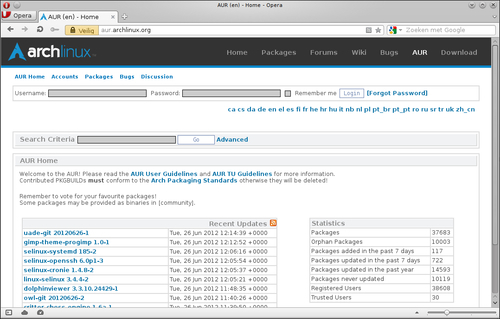
- Using the Arch User Repository: The Arch User Repository (AUR) contains packages not found in the official repositories and are pure user contributed content. So everyone registered on the AUR website https://aur.archlinux.org can upload new packages, so other users might benefit from that work. To use the AUR you must install base-devel. For more details about the AUR, I will refer to the wiki at https://wiki.archlinux.org/index.php/AUR.
- Using makepkg: Makepkg is the tool used for building packages for Arch Linux. I will not go too deep into the usage, but will bring you up to speed to get your packages built from the ABS or AUR. Makepkg assumes that base-devel is installed. Also see https://wiki.archlinux.org/index.php/Makepkg. Makepkg has to be called in a directory with at least one file named
PKGBUILD.
Let's list the steps required to configure pacman:
- Edit
/etc/pacman.confto modify options or add/remove some repositories. - Edit
/etc/pacman.d/mirrorlistto change or add a mirror with the official repositories in it. - Run
pacman -Syuas root for the full system upgrade. - To install a package from the repositories, in a terminal run
pacman -S somepackageas root. - As root, run
pacman -Ss somepackagefor searching packages in the repositories. - Run
pacman -U somepackage.pkg.tar.xzas root in a terminal for installing a package from disk. - As root, run
pacman -R somepackagefor removing a package. - For cleaning the package cache, run
pacman -Scas root and answer the questions.
Let's list the steps required to configure official and unofficial repositories:
- Open
/etc/pacman.conf. - Disable or enable an official repository, or add an unofficial repository.
Let's list the steps required to use the ABS:
- Install base-devel and abs:
pacman -Syu base-devel abs - Optionally edit
/etc/abs.conf. - Let abs synchronize the
absscripts. You must run abs as root.
Let's list the steps required to use the AUR:
- Install base-devel:
pacman -Syu base-devel - Search for your favorite application in the AUR.
- Download the tarball and start building it.
Let's list the steps required to use makepkg:
- Go to a folder with a buildscript in it (
PKGBUILD). - Run
makepkg. - This should get the package to build. If it is missing dependencies to build the package, you will need to install those first.
The options set in pacman.conf will determine the behavior of pacman. These vary from ignoring packages or groups, from updates to extra repositories. What we have defined in the mirrorlist will determine where our packages come from (from which server).
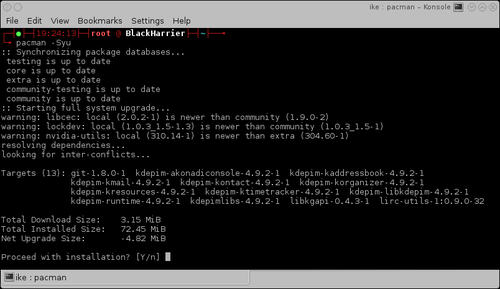
The full system upgrade command will synchronize your local package databases with the remote ones, and depending on the packages you have installed it will ask you if you want to continue with the installation of some upgraded packages.
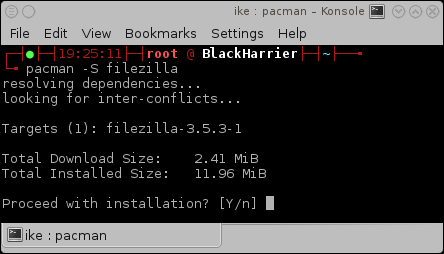
The pacman -S somepackage command will look for the package name or group you have passed, and if it exists, it will continue to try and install it.
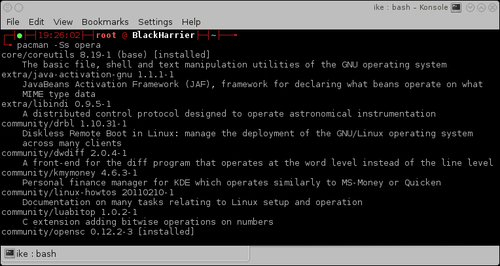
On executing the pacman -Ss somepackage command, pacman will search in the locally synced databases if the package we are looking for is available somewhere. If that is the case, we will see what version is available for us to install.
On executing the pacman -U somepackage.pkg.tar.xz command, pacman will check the dependencies of the package and try to install these alongside the package you want to install. When all goes well, it will install the package inside the tarball on the correct location.
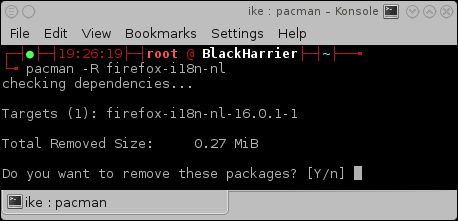
The package will be removed from the system on executing the pacman -R somepackage command. The only thing left of the package will be an entry in the cache.
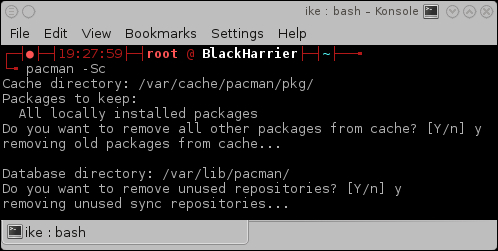
On executing the pacman -Sc command, pacman will look for old package files and ask you if you want those to be removed from the filesystem.
Pacman uses pacman.conf for the options and the repositories. All enabled repositories will be used for package installation now. Should we have some configuration mismatches, pacman will notify us.
Abs will use rsync to synchronize the buildscripts used in the official repositories to your local computer. This will facilitate you, for example, to build an officially supported package with other options enabled or disabled.
The AUR is actually just a website with a collection of user contributed buildscripts. If your favorite application is already available there, you can benefit from the work that someone else has already done. It is also very easy to contribute improvements via comments.
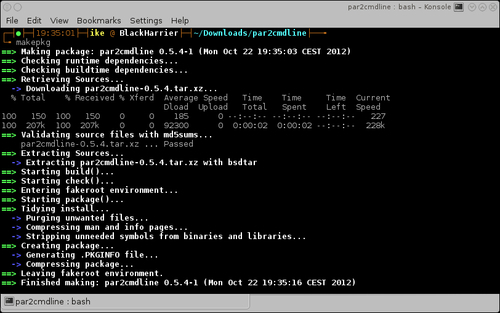
Makepkg will read the information described in the PKGBUILD file to get the package built correctly, and have it in the correct format for pacman to install it on your system.
The pacman.conf file has sections defined by [section]. These sections can have some options defined inside them. There is one special section called [options] where the global options can be configured for pacman. The other sections are the repositories defined by default or the user. In regards to the repositories, the order of the declaration is important. The repository nearest to the top of the file will take precedence, in descending order. This is of great importance for repositories that provide packages with the same name. The order is also important so as to understand why [testing] must be defined above [core]. Generally the pacman.conf file is very well documented by means of comments that explain the options provided, but here we'll try to explain them in depth.
The mirrorlist is a file with all official Arch Linux mirrors listed. Let's find a mirror closer to home so we can get the best download speeds. We can define more than one server here. Note that this will not give us the packages from the most up-to-date server, but when the first in the list is unreachable then the second can be used, so we are still able to update our system.
The pacman.conf options can be found at https://www.archlinux.org/pacman/pacman.conf.5.html. By default, everything should be working out of the box. The default should also be sufficient for new users.
The following is a sample of the [core] repository. We can see that signature checking is required for the packages, and we use the mirrorlist for the configured servers.
[core]
SigLevel = PackageRequired
Include = /etc/pacman.d/mirrorlist
The following sample will use the default SigLevel defined in the [options] section, and when used, it will first try to use FTP, and when this is not available it will fall back to HTTP:
[otherrepository]
Server = ftp://10.0.0.1/$repo/$arch
Server = http://10.0.0.1/$repo/$arch
In the following sample, we have a local repository where you can see all possible URLs that can be used to fill in the Server option:
[somelocalrepository]
Server = file:///home/packages/$repo/$arch
By default, the official repositories are listed in pacman.conf. Not all of them are enabled by default. There is also a nice list of unofficial repositories where you can find some very high quality software.
For complete information about the official repositories and in what cases you should enable or disable them, check out https://wiki.archlinux.org/index.php/The_Arch_Linux_Repositories.
Due to the fact that it is easy to set up your own repository, there are a lot of users who are building a set of specific packages and providing them as unofficial repositories for everyone. The complete list of unofficial repositories can be found on https://wiki.archlinux.org/index.php/Unofficial_User_Repositories.
By using the ABS, we as users get a great deal of flexibility over our system. For first time users of ABS, you would want to check the ABS wiki page at https://wiki.archlinux.org/index.php/ABS. For a simplified introduction, you can also refer to https://wiki.archlinux.org/index.php/ABS_FAQ.