Table of Contents for
Arch Linux Environment Setup How-to
 Arch Linux Environment Setup How-to
Published by
Packt Publishing, 2012
Arch Linux Environment Setup How-to
Published by
Packt Publishing, 2012
- Cover
- Table of Contents
- Arch Linux Environment Setup How-to
- Arch Linux Environment Setup How-to
- Credits
- About the Author
- About the Reviewers
- www.PacktPub.com
- Preface
- The Arch Way
- Bleeding edge
- What this book covers
- What you need for this book
- Who this book is for
- Conventions
- Reader feedback
- Customer support
- 1. Arch Linux Environment Setup How-to
- Installing Arch Linux using the Archboot ISO (Should know)
- Configuring your system (Should know)
- Installing and removing packages (Must know)
- Booting and managing services with systemd (Should know)
- Booting and managing services using initscripts (Should know)
- Configuring GUI using Xorg (Should know)
In this recipe we'll explain the configuration files used to identify your system. Usually, these files only need to be configured once and stay the same for the entire life of the system.
The following list describes the main tasks that we will perform in this recipe:
- Configuring hostname: A hostname is a name we give to a machine that will make it easy to recognize which machine we are talking about. So if we are in a network, we can easily separate the different machines by their hostnames.
- Configuring console: We'll also configure the virtual console, what keyboard layout to use, and maybe some special font and mapping for these.
- Configuring the localization: In this task we will set up our machine with the correct localization. This can be done very extensively in the
locale.conffile. In the most common cases, we only setLANGandLC_COLLATEin this file. If you want to narrow it down, you can get more information by typingman locale.conf. However,LC_COLLATEis the fallback when everything else fails. - Configuring time zone: Setting your time zone will make sure that your system clock is correct. This has to be used in combination with
/etc/localtime. Actually, they have to be changed together so for your own safety change the/etc/localtimesymlink, and then immediately add the new time zone to/etc/timezone. - Configuring module handling: Do you want to load extra modules that are not getting loaded by default? In the case of "fancy" hardware or some third-party software such as VMware or VirtualBox, we might need this. You can add a configuration file in
/etc/modules-load.d/with a list of modules. The modules have to be separated by newlines. When you want to add some comments in those files, you can do that by starting your line with#or;. The files placed in the directory only need one extra requirement; the name has to end with*.conf.
The following step configures the hostname:
- Edit the hostname with
vim /etc/hostnameto configure it.
Let's list the steps required to configure the console:
- Edit
/etc/vconsole.conf. - Add the keywords with their values. For example:
KEYMAP=us
FONT=lat9w-16
FONT_MAP=8859-1_to_uni
Let's list the steps required to configure the localization:
- To indicate what locales we want to support, edit
/etc/locale.gen. - When we have changed the
locale.genfile, runlocale-gen. - To indicate what locale we want to use by default, edit
/etc/locale.conf:LANG=en_US.UTF-8 LC_COLLATE=C
Let's list the steps required to configure the time zone:
- Create a symlink
/etc/localtimepointing to your time zone:ln -s /usr/share/zoneinfo/Europe/Brussels /etc/localtimevim /etc/timezone - Copy the time zone's name into
/etc/timezone.
Let's list the steps required to configure modules:
On boot, the system will read the content of the /etc/hostname file. This content will be used to identify the system to us as the user, and also to identify the machine in a network. The hostname is mostly for user convenience because it's much easier to remember than a big list of numbers.
The terminal will allow you to type on your localized keyboard. The output on your screen will correspond with the button pressed on your keyboard. Also, the terminal will show you the text output in the selected font. Lastly, it will do a translation of text encoding where needed. In the example shown in the steps to configure the console, the output will be translated from ISO-8859-1 to Unicode.
All applications supporting the localization will bring you their output in American English, if LANG=en_US. When the application does not have the selected language, it will fall back to the "C language". The C language is the default language in computer systems, so this will also be in English.
The time shown on your system will be the one from your time zone. When you are in a time zone where you have daylight saving changes, your PC will automatically adjust to it.
All files residing in /etc/modules-load.d/ ending with *.conf will be used to load extra modules. All *.conf files residing in /etc/modprobe.d/ will be used to determine if the modules must be blacklisted, or used with some special options.
Let's look at some tips and tricks for easier configuration of your desired keymap and console font and also, an easy way to find the available time zones.
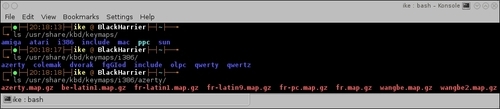
We can get a list of all the available keyboard layout mappings by listing the folder /usr/share/kbd/keymaps. From the following screenshot, we can see we have found the Belgian layout so we can add KEYMAP=be-latin1 to our configuration file:
We can find a list of all the available fonts for the console by listing /usr/share/kbd/consolefonts. When we find the desired font, we can add this to our configuration file. For example, CONSOLEFONT=Lat2-Terminus16.psfu.gz.
To get a list of possible transformations, we can take a list of /usr/share/kbd/consoletrans. Optionally, we can add this to our configuration file, but this is not always needed. For example, CONSOLEMAP=8859-1_to_uni.