
The piece, or Tetrimino, is the element that can be moved and rotated on the board. There are seven kinds of Tetriminos — each is represented by a letter and has a corresponding color:
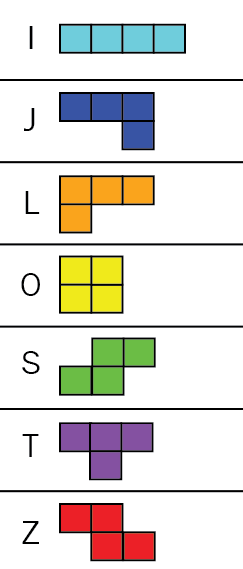
We need a way to define each piece in terms of shape, color, and current orientation. Each piece has four different orientations (at 90 degree increments), which results in 28 total variations for all pieces. The color doesn't change, so that only needs to be assigned once. With that in mind, let's first take a look at the header file (piece.h):
#ifndef TETRIS_PIECE_H
#define TETRIS_PIECE_H

#include <SDL2/SDL.h>
#include "constants.h"

class Piece {
 public:
  enum Kind { I = 0, J, L, O, S, T, Z };

  explicit Piece(Kind kind);

  void draw(SDL_Renderer *renderer);
  void move(int columnDelta, int rowDelta);
  void rotate();
  bool isBlock(int column, int row) const;
  int getColumn() const;
  int getRow() const;

 private:
  Kind kind_;
  int column_;
  int row_;
  int angle_;
};

#endif // TETRIS_PIECE_H
The game uses SDL2 to render the various graphical elements and handle keyboard input, which is why we're passing a SDL_Renderer into the draw() function. You'll see how SDL2 is used in the Game class, but for now just be aware of its inclusion. The header file defines the interface for the Piece class; let's review the implementation in piece.cpp. We'll walk through each section of code and describe the functionality.