In the previous chapter, you learned how to use the AVX instruction set to perform calculations using packed floating-point operands. In this chapter, you learn how to carry out computations using packed integer operands. Similar to the previous chapter, the first few source code examples in this chapter demonstrate basic arithmetic operations using packed integers. The remaining source code examples illustrate how to use the computational resources of AVX to perform common image processing operations, including histogram creation and thresholding.
AVX supports packed integer operations using 128-bit wide operands, and that is the focus of the source code examples in this chapter. Performing packed integer operations using 256-bit operands requires a processor that supports AVX2. You learn about AVX2 programming with packed integers in Chapter 10.
Packed Integer Addition and Subtraction
Example Ch07_01
Toward the top of the C++ code are the declarations for the assembly language functions that perform packed integer addition and subtraction. Each function takes two XmmVal arguments and saves its results to an XmmVal array. The structure XmmVal, which you learned about in Chapter 6 (see Listing 6-1), contains a publicly-accessible anonymous union with members that correspond to the packed data types that can be used with an XMM register. The XmmVal structure also defines several member functions that format the contents of an XmmVal for display.
The C++ function AvxPackedAddI16 contains test code that exercises the assembly language function AvxPackedAddI16_. This function performs packed signed 16-bit integer (word) addition using both wraparound and saturated arithmetic. Note that the XmmVal variables a, b, and c are all defined using the C++ specifier alignas(16), which aligns each XmmVal to a 16-byte boundary. Following the execution of the function AvxPackedaddI16_, the results are displayed using a series of stream writes to cout. The C++ function AvxPackedSubI16, which is similar to AvxPackedAddI16, uses the assembly language function AvxPackedSubI16_.
A parallel set of C++ functions, AvxPackedAddU16 and AvxPackedSubU16, contain code that exercise the assembly language functions AvxPackedAddU16_ and AvxPackedSubU16_. These functions perform packed unsigned 16-bit integer addition and subtraction, respectively. Note that the XmmVal variables in AvxPackedAddU16 and AvxPackedSubU16 do not use the alignas(16) specifier, which means that these values are not guaranteed to be aligned on a 16-byte boundary. The reason for doing this is to demonstrate the use of the AVX instruction vmovdqu (Move Unaligned Packed Integer Values), as you’ll soon see.
The assembly language function AvxPackedAddI6_ starts with a vmovdqa xmm0,xmmword ptr [rcx] instruction that loads argument value a into register XMM0. The ensuing vmovdqa xmm1,xmmword ptr [rdx] instruction copies b into register XMM1. The next two instructions, vpaddw xmm2,xmm0,xmm1 and vpaddsw xmm3,xmm0,xmm1, carry out packed signed 16-bit integer addition using wrapround and saturated arithmetic, respectively. The final two vmovdqa instructions save the calculated results to XmmVal array c. Assembly language function AvxPackedSubI16_ is similar to AvxPackedAddI16_ and uses the instructions vpsubw and vpsubsw to carry out packed signed 16-bit integer subtraction.
The assembly language function AvxPackedAddU16_ begins with a vmovdqu xmm0,xmmword ptr [rcx] instruction that loads a into register XMM0. A vmovdqu instruction is used here since XmmVal a was defined in the C++ code without the alignas(16) specifier. Note that function AvxPackedAddU16_ uses vmovdqu for demonstration purposes only; a properly aligned XmmVal and a vmovdqa instruction should have been used instead. It’s already been mentioned a number of times in this book but warrants repeating due to its importance: SIMD operands in memory should be properly aligned whenever possible in order to avoid potential performance penalties that can occur whenever the processor accesses an unaligned operand in memory.
AVX also supports packed integer addition and subtraction using 8-, 32-, and 64-bit integers. The vpaddb, vpaddsb, vpaddusb, vpsubb, vpsubsb, and vpsubusb instructions are the 8-bit (byte) versions of the packed 16-bit instructions that were demonstrated in this example. The vpadd[d|q] and vpsub[d|q] instructions can be employed to perform packed 32-bit (doubleword) or 64-bit (quadword) addition and subtraction using wraparound arithmetic. AVX does not support saturated addition and subtraction using packed doubleword or quadword integers.
Packed Integer Shifts
Example Ch07_02
The C++ code that’s shown in Listing 7-2 begins with the definition of an enum named ShiftOp, which is used to select a shift operation. Supported shift operations include logical left, logical right, and arithmetic right using packed word and doubleword values. Following enum ShiftOp is the declaration for the function AvxPackedIntegerShift_. This function carries out the requested shift operation using the supplied XmmVal argument and the specified count value. The C++ functions AvxPackedIntegerShiftU16 and AvxPackedIntegerShiftU32 initialize test cases for performing various shift operations using packed words and doublewords, respectively.
Assembly language function AvxPackedIntegerShift_ uses a jump table to execute the specified shift operation. This is similar to what you saw in source code examples Ch05_06 (Chapter 5) and Ch06_03 (Chapter 6). Upon entry to AvxPackedIntegerShift_, the argument value shift_op is tested for validity. Following validation of shift_op, a vmovdqa xmm0,xmmword ptr [rdx] instruction loads a into register XMM0. The subsequent vmovd xmm1,r9d instruction copies argument value count into the low-order doubleword of register XMM1. This is followed by a jmp [ShiftOpTable+r8*8] instruction that transfers program control to the appropriate code block.
The AVX instructions vpsllq, vpslrq, and vpsraq can be used to perform shift operations using packed quadwords. Somewhat surprisingly, AVX does not support shift operations using packed byte operands. AVX also includes the shift instructions vps[l|r]dq, which carry out logical left or logical right byte shifts of a 128-bit wide operand in an XMM register. You’ll see how these instructions work in the next section.
Packed Integer Multiplication
Example Ch07_03
The C++ function AvxPackedMulI16 contains code that initializes XmmVal variables a and b using signed 16-bit integers. This function then invokes the assembly language function AxvPackedMulI16_, which performs packed multiplication using signed 16-bit integers. The results are then streamed to cout. Note that the results displayed by function AvxPackedMulI16 are signed 32-bit integer products. The other two C++ functions in Listing 7-3, AvxPackedMulI32A and AvxPackedMul32B, initialize test cases for performing packed signed 32-bit integer multiplication. The former of these functions computes a packed signed 64-bit integer product, while the latter calculates a packed signed 32-bit integer product.
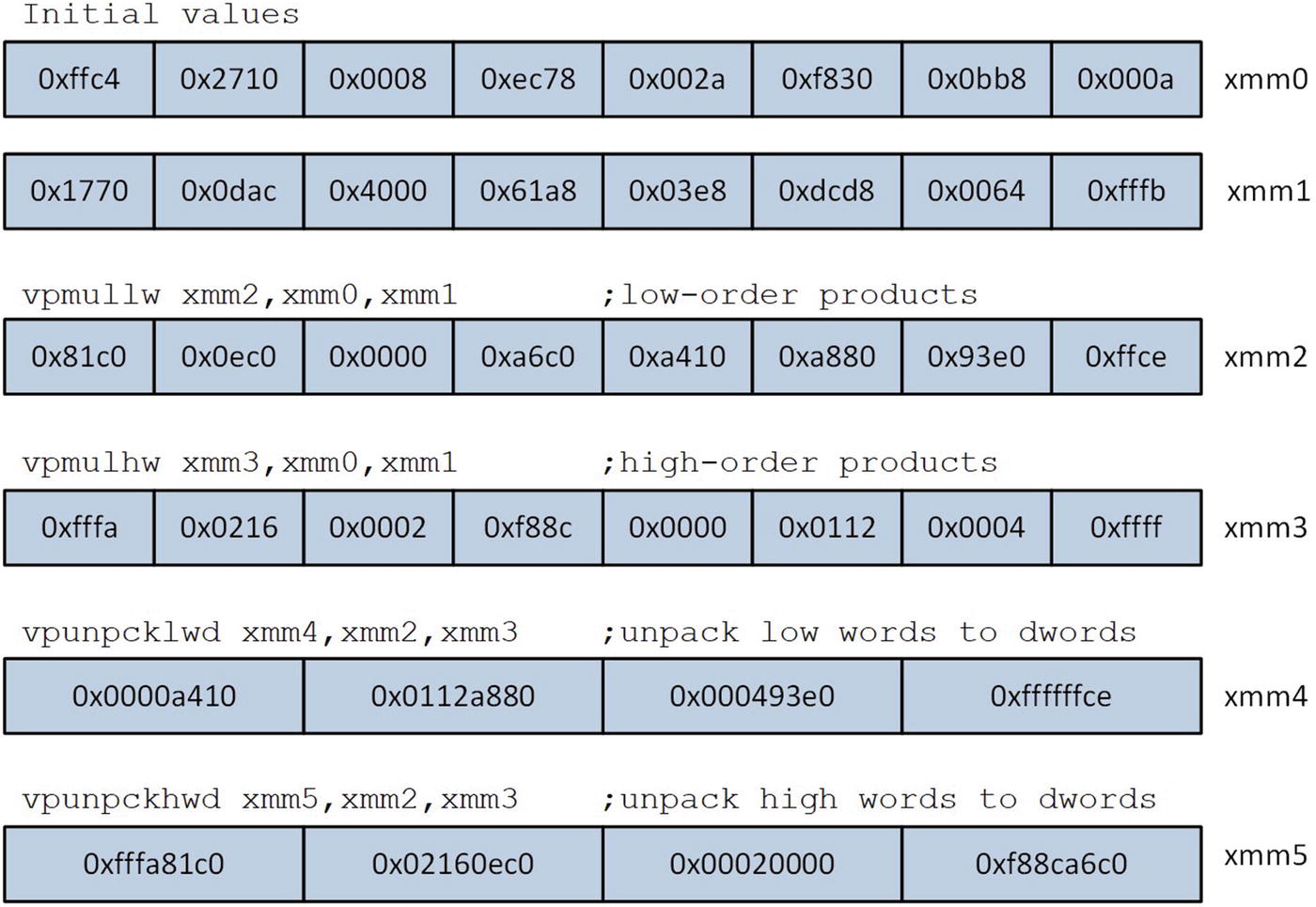
Instruction sequence used in AvxPackedMulI16_ to perform packed 16-bit signed integer multiplication
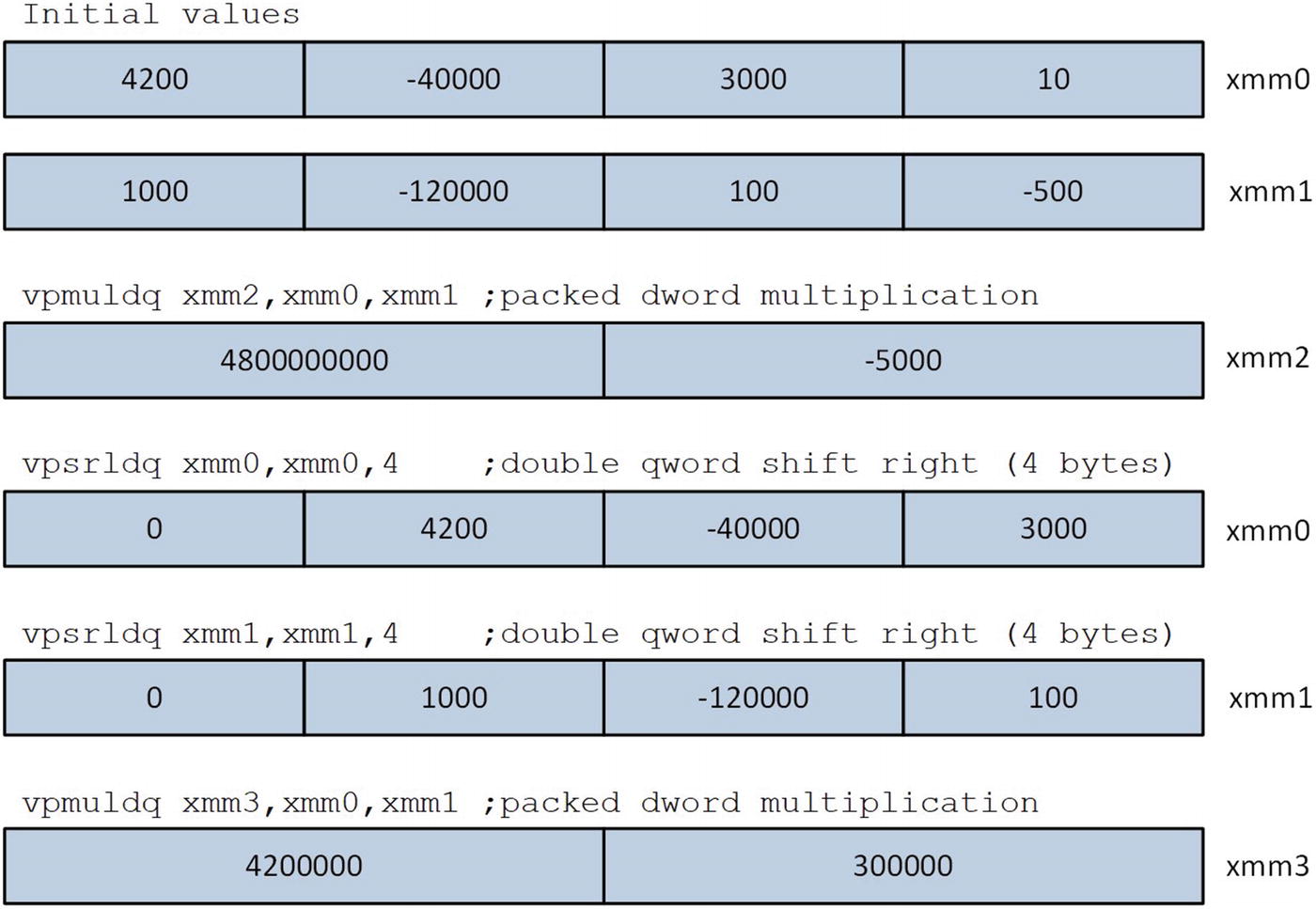
Execution of vpmuldq and vpsrldq instructions
Following the execution of the second vpmuldq instruction, registers XMM2 and XMM3 contain the four signed 64-bit products. These values are then saved to the specified destination buffer using a series of vpextrq (Extract Quadword) instructions. This instruction copies the quadword element that’s specified by the immediate (or second source) operand from the first source operand and saves it to the destination operand. For example, the instruction vpextrq qword ptr [rcx],xmm2,0 saves the low-order quadword of XMM2 to the memory location specified by RCX. The first source operand of a vpextrq instruction must be an XMM register; the destination operand can be a general-purpose register or a memory location. AVX also includes instructions that you can use to extract byte (vpextrb), word (vpextrw), or doubleword (vpextrd) elements.
Packed Integer Image Processing
The source code examples presented thus far were intended to familiarize you with AVX packed integer programming. Each example included a simple assembly language function that demonstrated the operation of several AVX instructions using instances of the structure XmmVal . For some real-world application programs, it may be appropriate to create a small set of functions similar to the ones you’ve seen thus far. However, in order to fully exploit the benefits of the AVX, you need to code functions that implement complete algorithms using common data structures.
The source code examples in this section present algorithms that process arrays of unsigned 8-bit integers using the AVX instruction set. In the first example, you learn how to determine the minimum and maximum value of an array. This sample program has a certain practicality to it since digital images often use arrays of unsigned 8-bit integers to represent images in memory, and many image-processing algorithms (e.g., contrast enhancement) often need to determine the minimum (darkest) and maximum (lightest) pixels in an image. The second sample program illustrates how to calculate the mean value of an array of unsigned 8-bit integers. This is another example of a realistic algorithm that is directly relevant to the province of image processing. The final three source code examples implement universal image processing algorithms, including pixel conversion, histogram creation, and thresholding.
Pixel Minimum-Maximum Values
Example Ch07_04
Listing 7-4 begins with the source code for the header file AlignedMem .h. This file defines a couple of simple C++ classes that facilitate dynamically allocated aligned arrays. The class AlignedMem is a basic wrapper class for the Visual C++ runtime functions _aligned_malloc and _aligned_free. This class also includes a template member function named AlignedMem::IsAligned that validates the alignment of an array in memory. The header file AlignedMem.h also defines a template class named AlignedArray . Class AlignedArray, which is used in this and subsequent source code examples, contains code that implements and manages dynamically allocated aligned arrays. Note that this class contains only minimal functionality to support the source code examples in this book, which is why many of the standard constructors and assignment operators are disabled.
The primary C++ code in example Ch07_04 begins with the definition of a function name Init. This function initializes an array of unsigned 8-bit integers with random values in order to simulate the pixel values of an image. Function Init uses the C++ standard template library (STL) classes uniform_int_distribution and default_random_engine to generate random values for the array. Appendix A contains a list of references that you can consult if you’re interested in learning more about these classes. Note that function Init sets some of the pixel values in the target array to know values for test purposes.
The function AvxCalcMinMaxU8Cpp implements a C++ version of the pixel value min-max algorithm. Parameters for this function include a pointer to the array, the number of array elements, and pointers for the minimum and maximum values. The algorithm itself consists of an unsophisticated for loop that sweeps though the array to find the minimum and maximum pixel values. Note that function AvxCalcMinMaxU8Cpp (and its counterpart assembly language function AvxCalcMinMaxU8_) requires the size of the array to be an even multiple of 64. The reason for this is that the assembly language function AvxCalcMinMaxU8_ (arbitrarily) processes 64 pixels during each loop iteration, as you’ll soon see. Also note that the source pixel array must be aligned to a 16-byte boundary. The C++ template function AlignedMem::IsAligned performs this check.
The C++ function AvxCalcMinMaxU8 contains code that initializes a test array and exercises the two pixel min-max functions. This function uses the aforementioned template class named AlignedArray to dynamically allocate an array of unsigned 8-bit integers that’s aligned to a 16-byte boundary. The constructor arguments for this class include the number of array elements and the alignment boundary. Following the AlignedArray<uint8_t> x_aa(n, 16) statement, AvxCalcMinMaxU8 obtains a raw C++ pointer to the array buffer using the member function AlignedArray::Data(). This pointer is passed as an argument to the two min-max functions.
The assembly language function AvxCalcMinMaxU8_ implements the same algorithm as its C++ counterpart with one significant difference. It processes array elements using 16-byte packets, which is the maximum number of unsigned 8-bit integers that can be stored in an XMM register. The function AvxCalcMinMaxU8_ begins by validating the size of argument n. It then checks array x for proper alignment. Following argument validation, AvxCalcMinMaxU8_ loads register pairs XMM3:XMM2 and XMM5:XMM4 with the initial packed minimum and maximum values, respectively. This enables the processing loop to track 32 min-max values simultaneously.
During each processing loop iteration, the function AvxCalcMinMaxU8_ loads 32 pixel values into register pair XMM1:XMM0 using the instructions vmovdqa xmm0,xmmword ptr [rcx] and vmovdqa xmm1,xmmword ptr [rcx+16]. The next two instructions, vpminub xmm2,xmm2,xmm0 and vpminub xmm3,xmm3,xmm1, update the current pixel minimums in register pair XMM3:XMM2. The ensuing vpmaxub instructions update the current pixel maximums in register pair XMM5:XMM4. Another sequence of vmovdqa, vpminub, and vpmaxub instructions handles the next group of 32 pixels. The processing of multiple data items during each loop iteration reduces the number of executed jump instructions and often results in faster code. This optimization technique is commonly called loop unrolling (or unwinding). You’ll learn more about loop unrolling and jump instruction optimization techniques in Chapter 15.
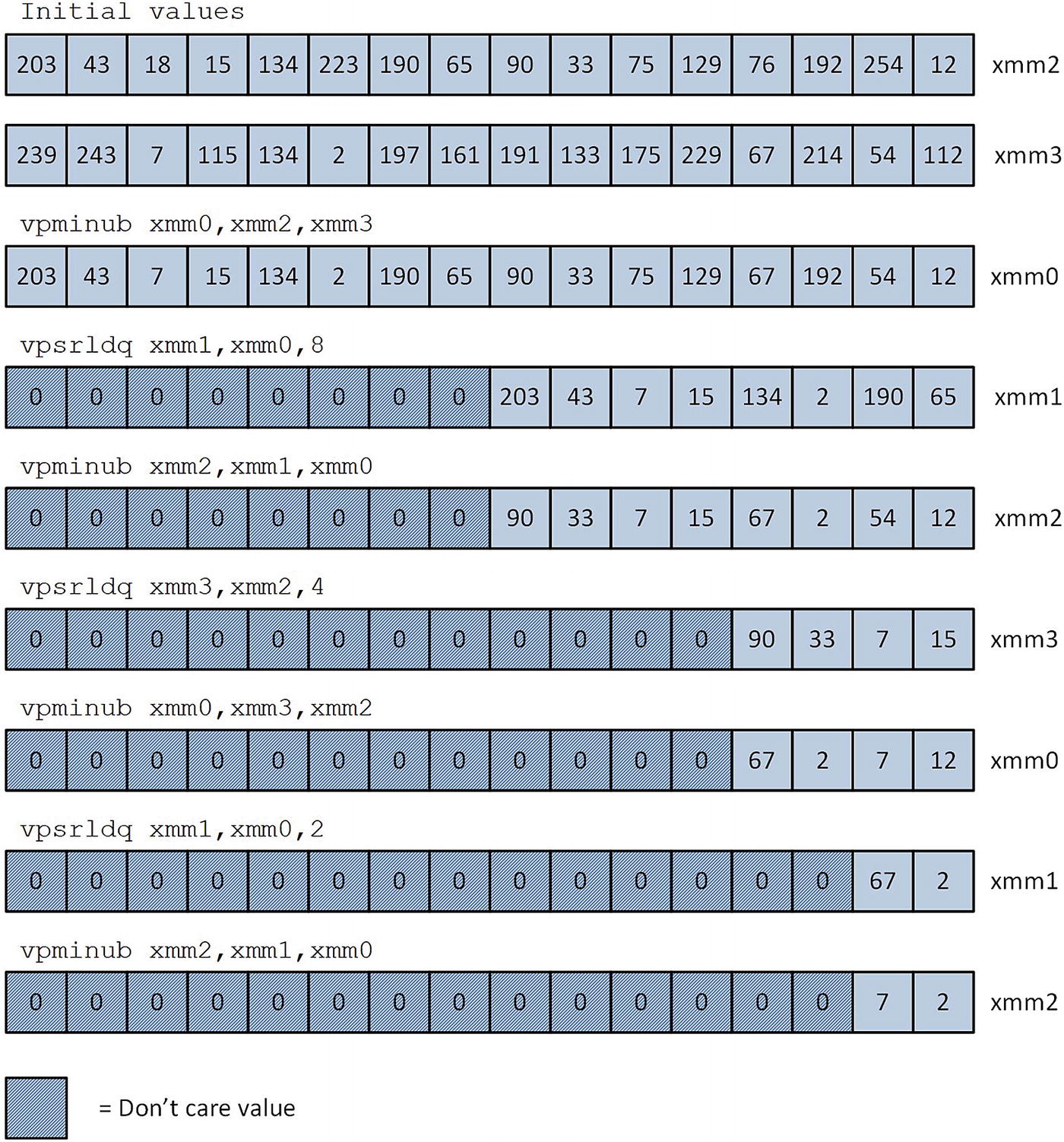
Reduction of pixel minimum values using the instructions vpminub and vpsrldq
Pixel Value Min-Max Mean Execution Times (Microseconds), Array Size = 16 MB
CPU | AvxCalcMinMaxU8Cpp | AvxCalcMinMaxU8_ |
|---|---|---|
i7-4790S | 17642 | 1007 |
i9-7900X | 13638 | 874 |
i7-8700K | 12622 | 721 |
Pixel Mean Intensity
Example Ch07_05
The organization of the C++ code in example Ch07_05 is somewhat similar to the previous example. The C++ function AvxCalcMeanU8Cpp uses a simple summing loop and scalar arithmetic to calculate the mean of an array of 8-bit unsigned integers. Like the previous example, the number of array elements must be an integral multiple of 64 and the source array must be aligned to a 16-byte boundary. Note that the function AvxCalcMeanU8Cpp also verifies that the number of array elements is not greater than c_NumElementsMax. This size restriction enables the assembly language function AvcCalcMeanU8_ to carry out its calculations using packed doublewords sans any safeguards for arithmetic overflows. The remaining C++ code that’s shown in Listing 7-5 performs test array initialization and streams results to cout.
The assembly language function AvxCalcMeanU8_ begins by performing the same validations of the array size as its C++ counterpart. The address of the array is also check for proper alignment. Following argument validation, AvxCalcMeanU8_ carries out its required initializations. The add rdx,rcx instruction computes the address of the first byte beyond the end of the array. The function AvxCalcMeanU8_ uses this address instead of a counter to terminate the processing loop. Register XMM8 is then initialized to all zeros. The processing loop uses this register to maintain intermediate packed doubleword sums.
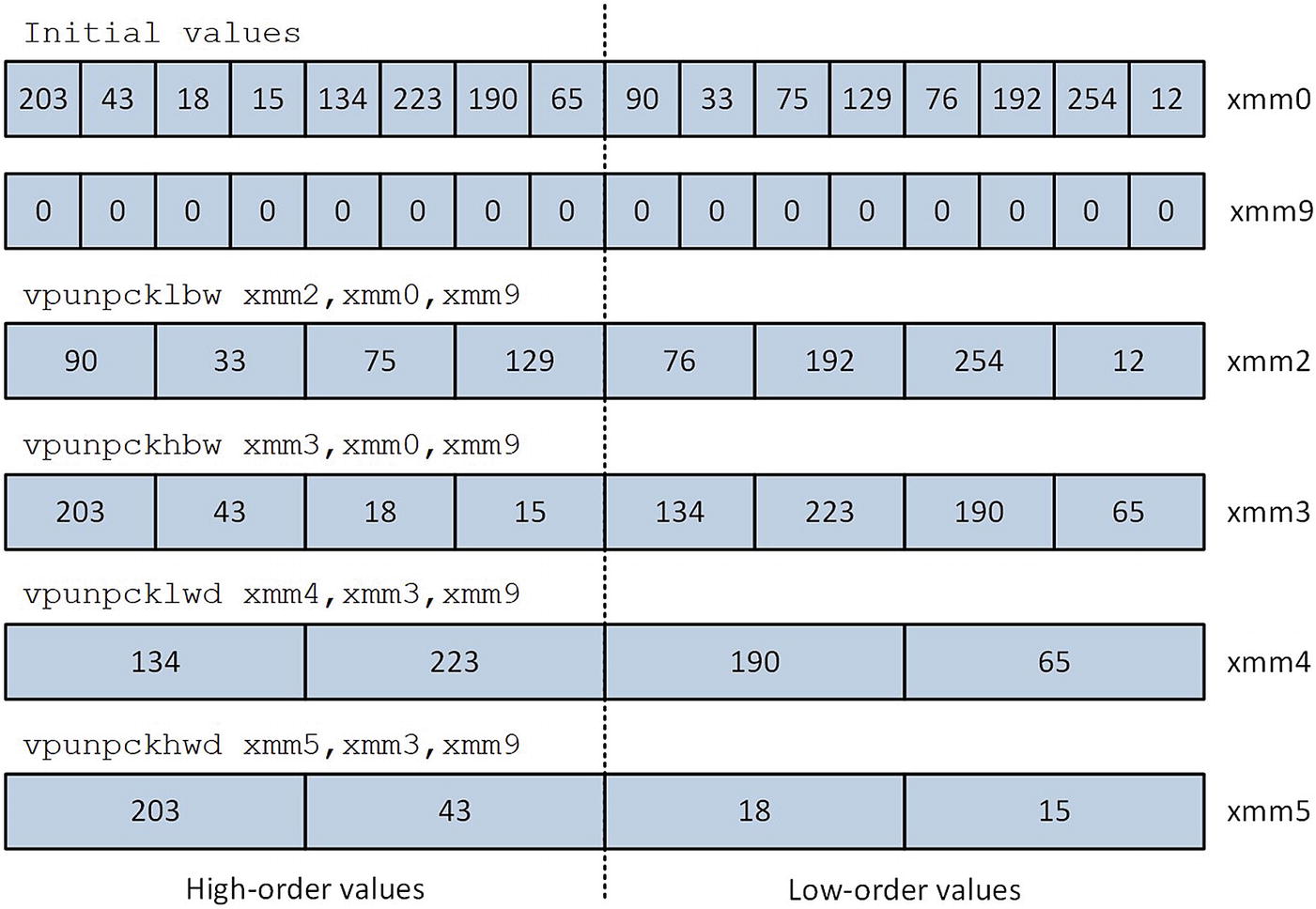
Execution of the vpunpck[h|l]bw, and vpunpck[h|l]wd instructions
Source Code Example Ch07_05 Mean Execution Times (Microseconds), Array Size = 16 MB
CPU | AvxCalcMeanU8Cpp | AvxCalcMeanU8_ |
|---|---|---|
i7-4790S | 7103 | 1063 |
i9-7900X | 6332 | 1048 |
i7-8700K | 5870 | 861 |
Pixel Conversions
Example Ch07_06
The C++ code in Listing 7-6 is straightforward. The function ConvertImgU8ToF32Cpp contains code that converts pixel values from uint8_t [0, 255] to single-precision floating-point [0.0, 1.0]. This function contains a simple for loop that calculates des[i] = src[i] / 255.0. The counterpart function ConvertImgF32ToU8Cpp performs the inverse operation. Note that this function clips any pixel values greater than 1.0 or less than 0.0 before performing the floating-point to uint8_t conversion. The functions ConvertImgU8ToF32 and ConvertImgF32ToU8 contain code that initialize test arrays and exercise the C++ and assembly language conversion routines. Note that the latter function initializes the first few entries of the source buffer to known values in order to demonstrate the aforementioned clipping operation.
The processing loop of the assembly language function ConvertImgU8ToF32_ converts 32 pixels from uint8_t (or byte) to single-precision floating-point during each iteration. The conversion technique begins with the size promotion of packed pixels from unsigned byte to unsigned doubleword integers using a series of vpunpck[h|l]bw and vpunpck[h|l]wd instructions. The doubleword values are then converted to single-precision floating-point values using the instruction vcvtdq2ps (Convert Packed Doubleword Integers to Packed Single-Precision Floating-Point Values). The resultant packed floating-point values are normalized to [0.0, 1.0] and saved to the destination buffer.
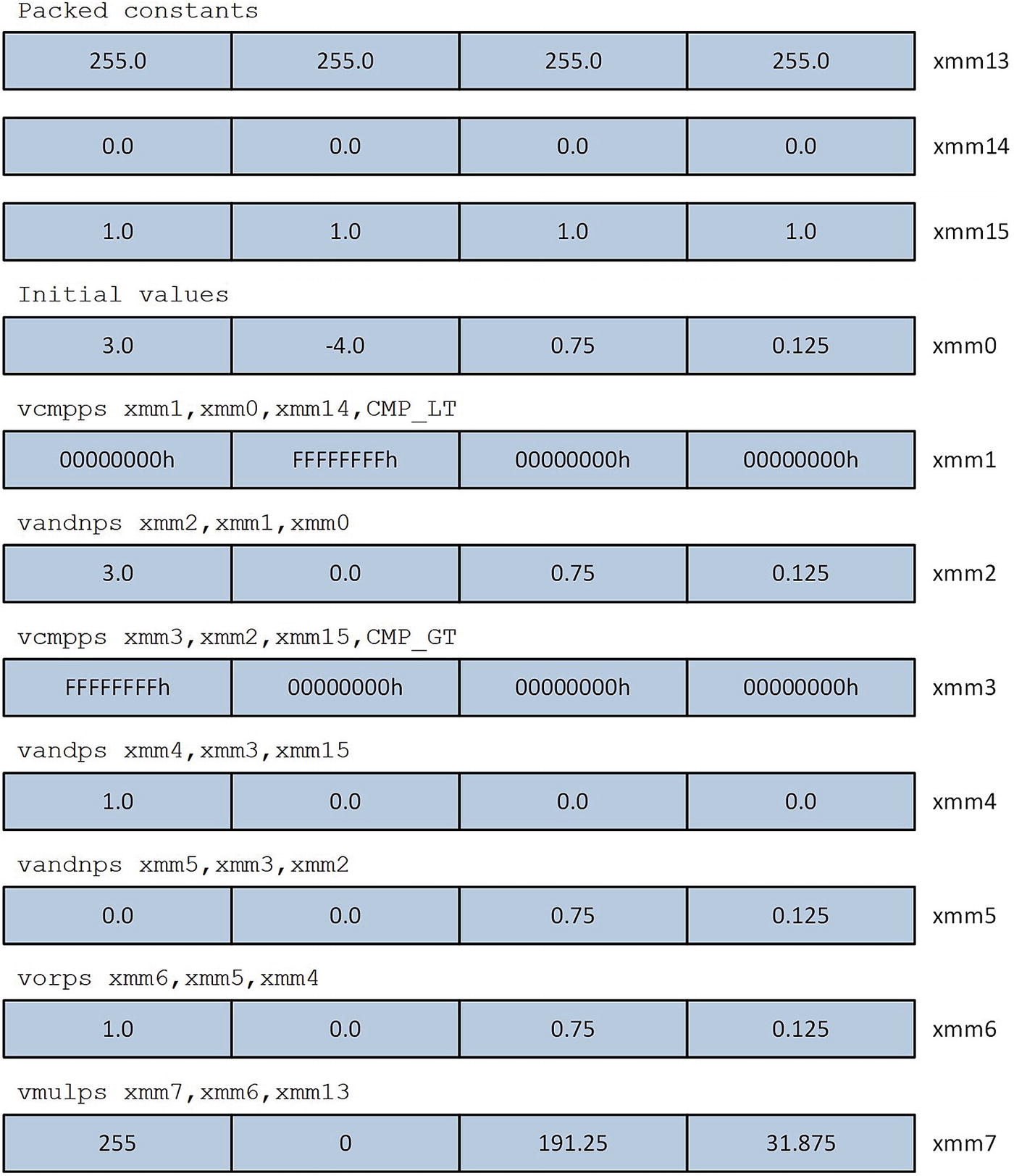
Illustration of floating-point clipping technique used in function ConvertImgF32ToU8_
Image Histograms
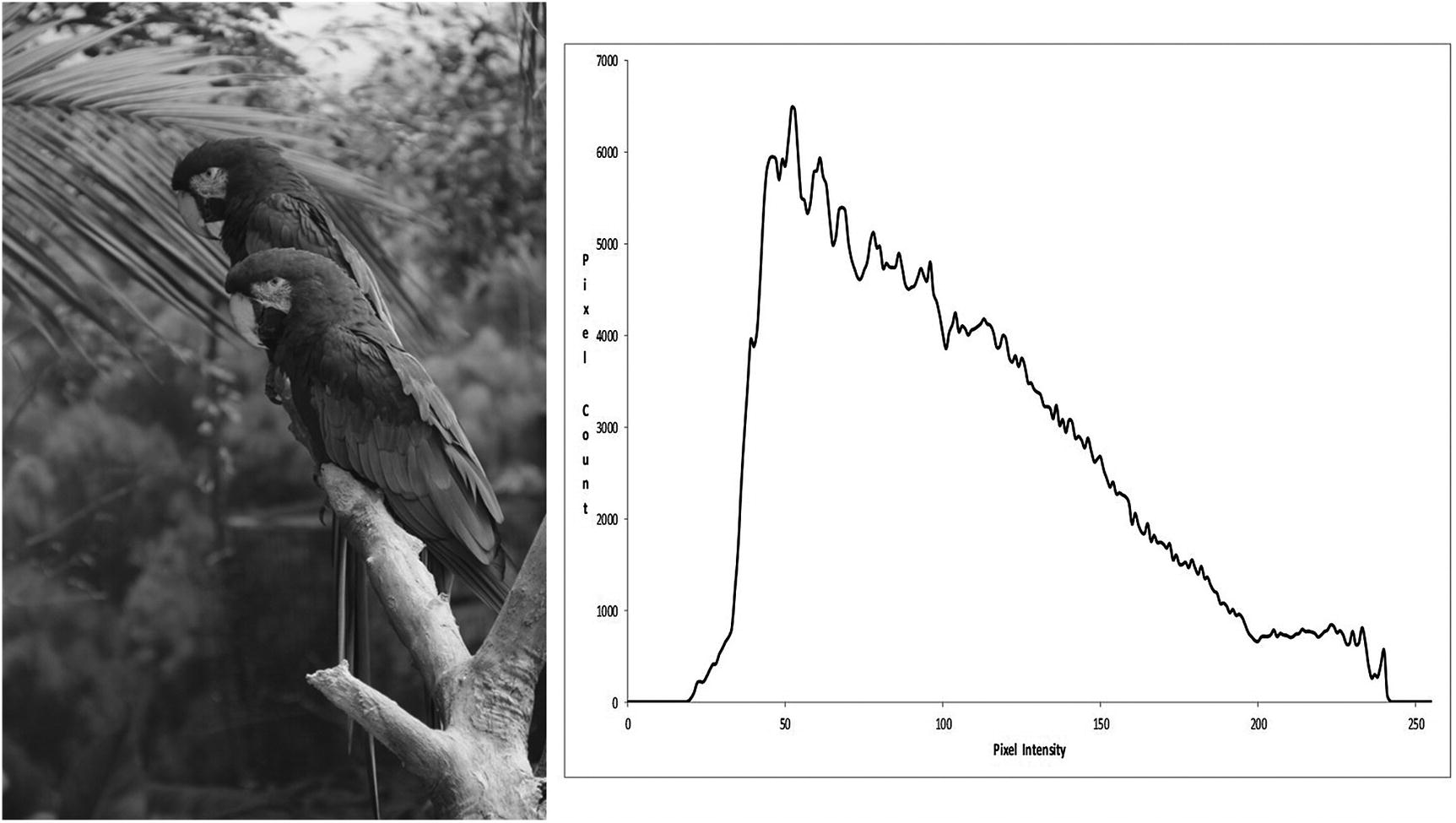
Sample grayscale image and its histogram
Example Ch07_07
Near the top of the C++ code is a function named AvxBuildImageHistogramCpp. This function constructs an image histogram using a rudimentary technique. Prior to the histogram’s actual construction, the number of image pixels is validated for size (greater than 0 and not greater than c_NumPixelMax) and divisibility by 32. The divisibility test is performed to ensure compatibility with the assembly language function AvxBuildImageHistogram_. Next, the addresses of histo and pixel_buff are verified for proper alignment. The call to memset initializes each histogram pixel count bin to zero. A simple for loop is then used to construct the histogram.
The function AvxBuildImageHistogram uses a C++ class named ImageMatrix to load the pixels of an image into memory. (The source code for ImageMatrix is not shown but included as part of the chapter download package.) The variables num_pixels and pixel_buff are then initialized using the member functions ImageMatrix::GetNumPixels and ImageMatrix::GetPixelBuffer. Two histogram buffers then are allocated using the C++ template class AlignedArray<uint32_t>. Following the construction of the histograms using the functions AvxBuildImageHistogramCpp and AvxBuildImageHistogram_, the pixel counts in the two histogram buffers are compared for equivalence and written to a comma-separated-value text file.
The assembly language function AvxBuildImageHistogram_ constructs an image histogram using the AVX instruction set. In order to improve performance, this function builds two intermediate histograms and merges them into a final histogram. AvxBuildImageHistogram_ begins by creating a stack frame using the _CreateFrame macro. Note that the stack frame created by _CreateFrame includes 1024 bytes (256 doublewords, one for each grayscale intensity level) of local storage space, which is used for one of the intermediate histogram buffers. Following the execution of the code generated by _CreateFrame, register RBP points to the intermediate histogram on the stack (see Figure 5-6). The caller-provided buffer histo is used as the second intermediate histogram buffer. Following the _EndProlog macro, the function AvxBuildImageHistogram_ validates num_pixels for size and divisibility by 32; it the checks the addresses of histo and pixel_buff for proper alignment. The count values in both intermediate histograms are then initialized to zero using the stosq instruction.
The main processing loop begins with two vmovdqa instructions that load 32 image pixels into registers XMM1:XMM0. Note that prior to the first vmovdqa instruction, the MASM directive align 16 is used to align this instruction on a 16-byte boundary. Aligning the target of a jump instruction on a 16-byte boundary is an optimization technique that often improves performance. Chapter 15 discusses this and other optimization techniques in greater detail. Next, a vpextrb rax,xmm0,0 instruction extracts pixel element 0 (i.e., XMM0[7:0]) from register XMM0 and copies it to the low-order bits of register RAX; the high-order bits of RAX are set to zero. The ensuing add dword ptr [rsi+rax*4],1 instruction updates the appropriate pixel count bin in the first intermediate histogram. The next two instructions, vpextrb rbx,xmm0,1 and add dword ptr [rdi+rbx*4],1, process pixel element 1 in the same manner using the second intermediate histogram. This pixel-processing technique is then repeated for the remaining pixels in the current block.
Histogram Build Mean Execution Times (Microseconds) Using TestImage1.bmp
CPU | AvxBuildImageHistogramCpp | AvxBuildImageHistogram_ |
|---|---|---|
i7-4790S | 277 | 230 |
i9-7900X | 255 | 199 |
i7-8700K | 241 | 191 |
Image Thresholding
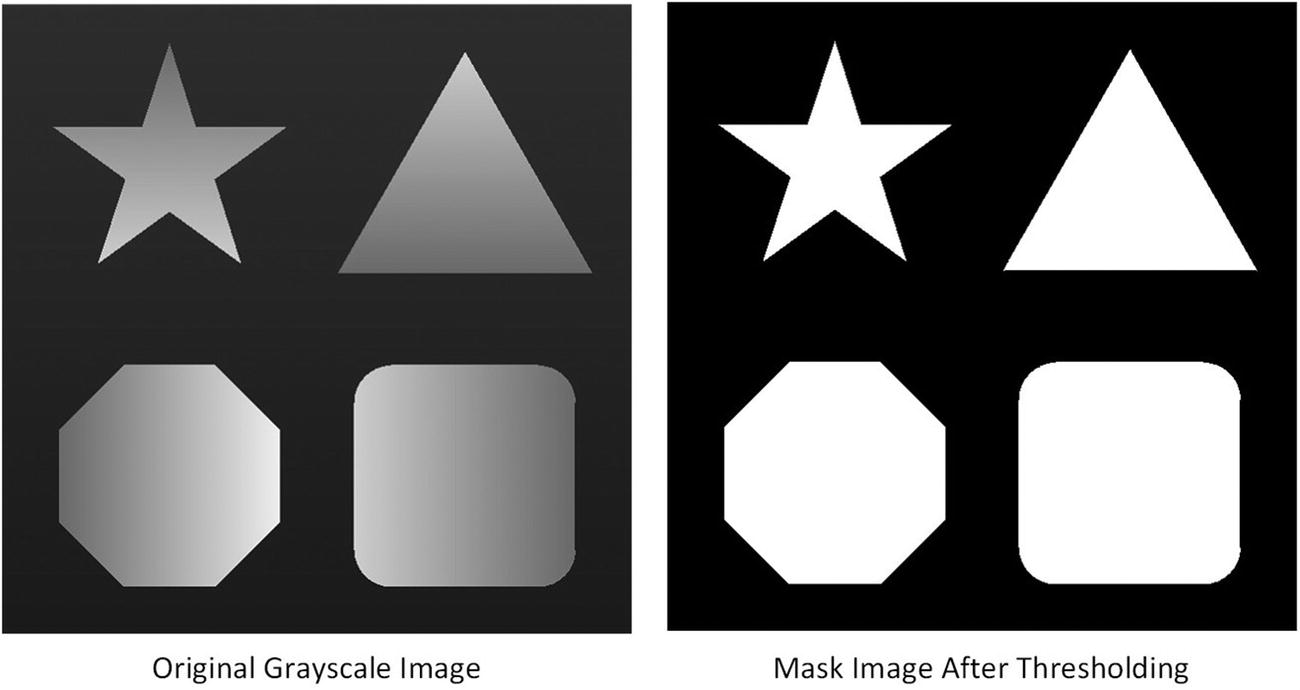
Sample grayscale and mask images
Example Ch07_08
The algorithm that’s used in example Ch07_08 consists of two phases. Phase 1 constructs the mask image that’s shown in Figure 7-7. Phase 2 computes the mean intensity of all pixels in the grayscale image whose corresponding mask image pixel is white (i.e., above the specified threshold). The file Ch07_08.h that’s shown in Listing 7-8 defines a structure named ITD that maintains data required by the algorithm. Note this structure contains two count values: m_NumPixels and m_NumMaskedPixels. The former value is the total number of image pixels, while the latter value represents the number of image pixels greater than m_Threshold.
The C++ code in Listing 7-8 contains separate thresholding and mean calculating functions. The function AvxThresholdImageCpp constructs the mask image by comparing each pixel in the grayscale image to the threshold value that’s specified by itd->m_Threshold. If a grayscale image pixel is greater than this value, its corresponding pixel in the mask image is set to 0xff; otherwise, the mask image pixel is set to 0x00. The function AvxCalcImageMeanCpp uses this mask image to calculate the mean intensity value of all grayscale image pixels greater than the threshold value. Note that the for loop in this function computes num_mask_pixels and sum_mask_pixels using simple Boolean expressions instead of logical compare operations. The former technique is often faster and easier to implement using SIMD arithmetic.
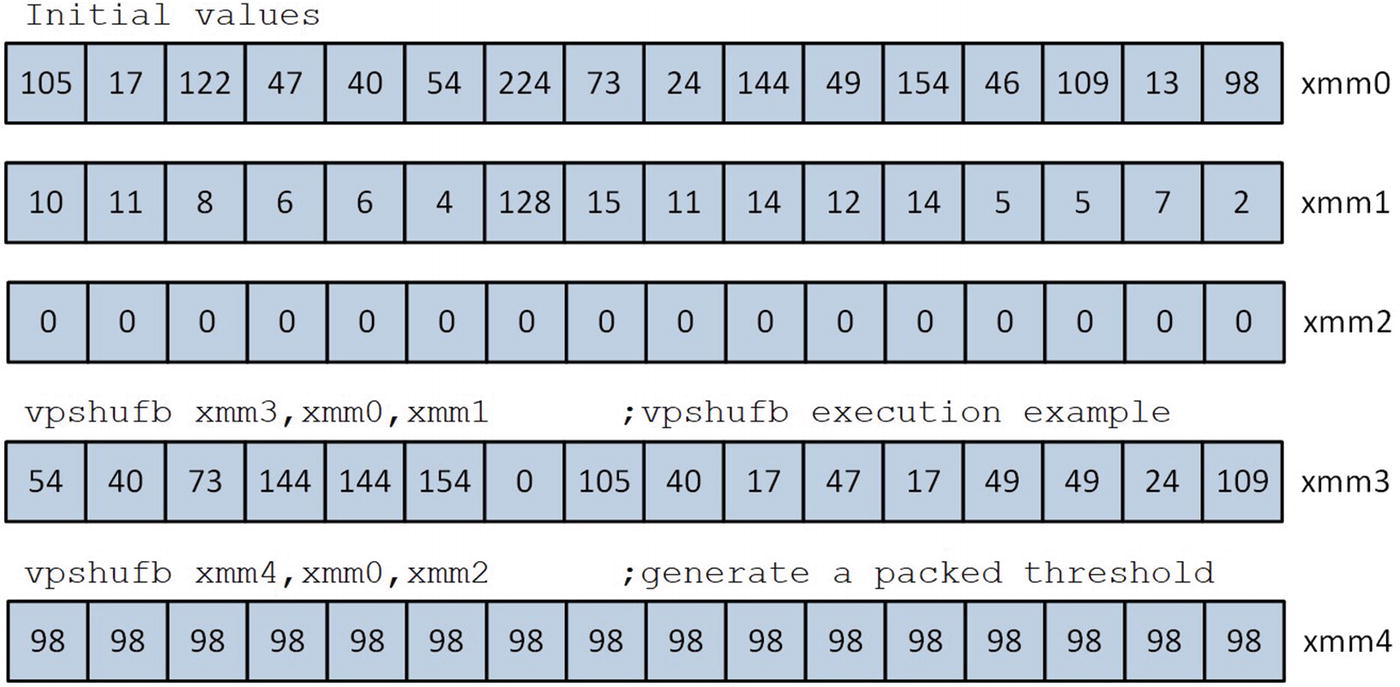
Execution examples of the instruction vpshufb
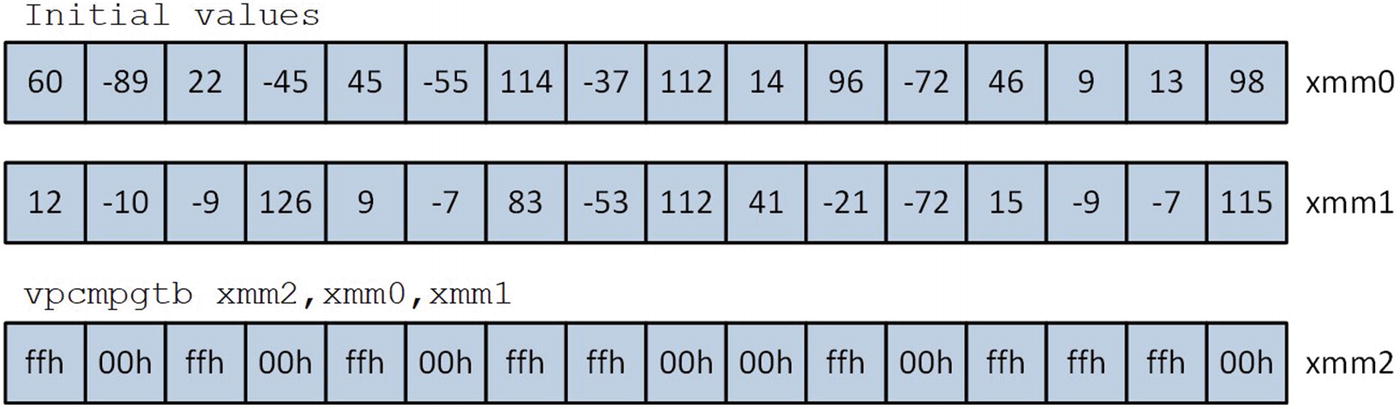
Execution of the instruction vpcmpgtb
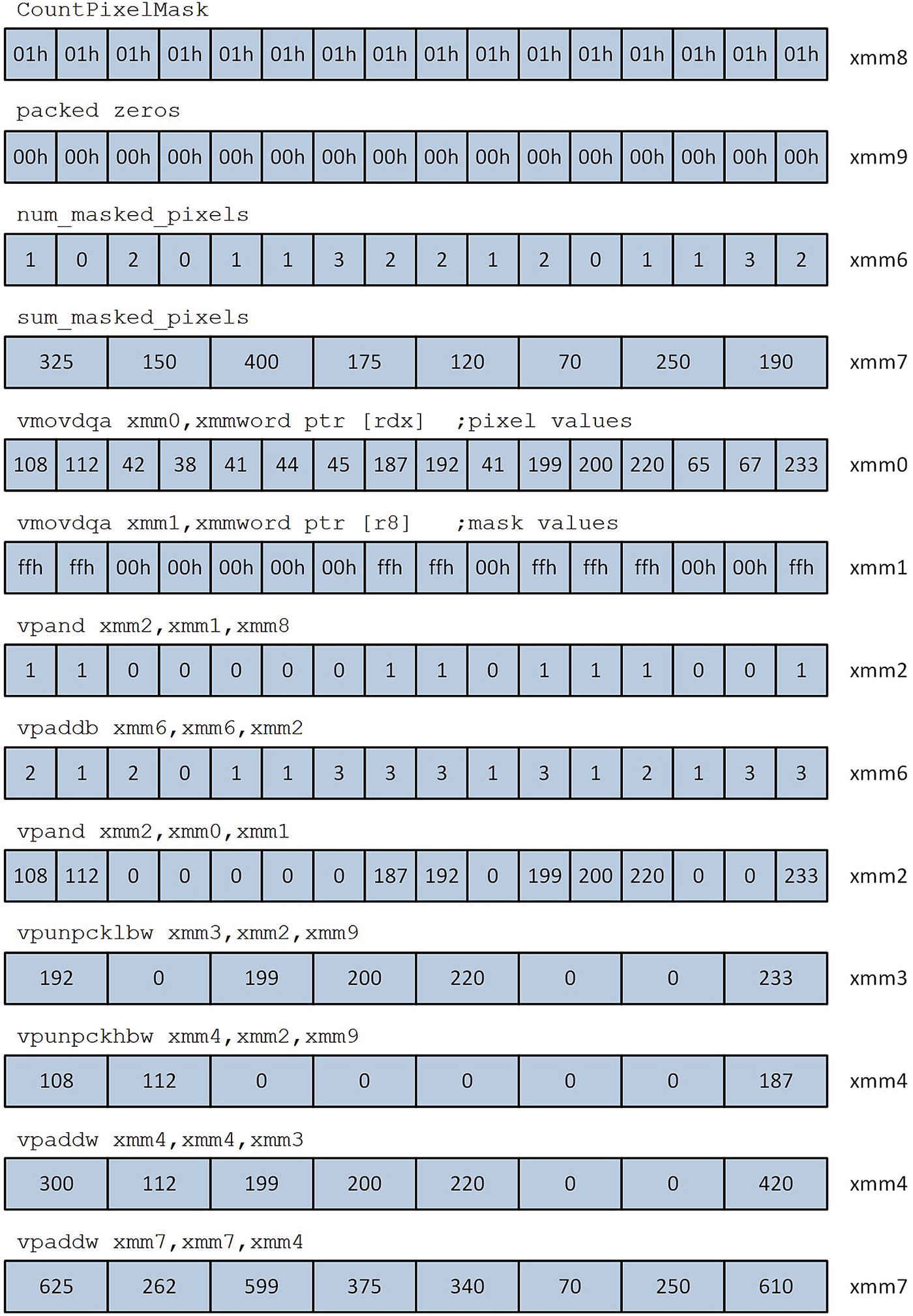
Masked pixel sum and pixel count calculations performed by macro _UpdateBlockSums
Mean Execution Times (Microseconds) to Perform Image Thresholding and Mean Calculation Using TestImage2.bmp
CPU | C++ | Assembly Language |
|---|---|---|
i7-4790S | 289 | 50 |
i9-7900X | 250 | 40 |
i7-8700K | 242 | 39 |
Summary
The vpadd[b|w|d|q] instructions perform packed addition. The vpadds[b|w] and vpaddus[b|w] instructions perform packed signed and unsigned saturated addition.
The vpsub[b|w|d|q] instructions perform packed subtraction. The vpsubs[b|w] and vpsubus[b|w] instructions perform packed signed and unsigned saturated subtraction.
The vpmul[h|l]w instructions carry out multiplication using packed word operands. The vpmuldq and vpmulld instructions carry out multiplication using packed doubleword operands.
The vpsll[w|d|q] and vpsrl[w|d|q] instructions execute logical left and right shifts using packed operands. The vpsra[w|d|q] instructions execute arithmetic right shifts using packed operands. The vps[l|r]dq instructions execute logical left and right shifts using 128-bit wide operands.
Assembly language functions can use the vpand, vpor, and vpxor instructions to perform bitwise AND, inclusive OR, and exclusive OR operations using packed integer operands.
The instructions vpextr[b|w|d|q] extract an element value from a packed operand. The vpinsr[b|w|d|q] instructions insert an element value into a packed operand.
The vpunpckl[bw|dw|dq] and vpunpckh[bw|dw|dq] instructions unpack and interleave the contents of their two source operands. These instructions are frequently used to size-promote packed integer operands. The vpackus[bw|dw] instructions size-reduce packed integer operands using unsigned saturated arithmetic.
The vpminu[b|w|d] and vpmaxu[b|w|d] instructions perform packed unsigned integer minimum-maximum compares.
The vpshufb instruction rearranges the bytes of a packed operand according to a control mask.
The vpcmpgt[b|w|d|q] instructions perform signed integer greater than compares using packed operands.
Aligning the target of a jump instruction to a 16-byte boundary often results in faster executing for loops.