© Daniel Kusswurm 2018
Daniel KusswurmModern X86 Assembly Language Programminghttps://doi.org/10.1007/978-1-4842-4063-2_5

5. AVX Programming – Scalar Floating-Point

Daniel Kusswurm1 
(1)
Geneva, IL, USA
 

In the previous chapter, you learned about the architecture and computing capabilities of AVX. In this chapter, you’ll learn how to use the AVX instruction set to perform scalar floating-point calculations. The first section includes a couple of sample programs that illustrate basic scalar floating-point arithmetic including addition, subtraction, multiplication, and division. The next section contains code that explains use of the scalar floating-point compare and conversion instructions. This is followed by two examples that demonstrate scalar floating-point operations using arrays and matrices. The final section of this chapter formally describes the Visual C++ calling convention.

All of the sample code in this chapter requires a processor and operating system that support AVX. You can use one of the freely-available tools listed in Appendix A to determine whether or not your computer fulfills this requirement. In Chapter 16, you learn how to programmatically detect the presence of AVX and other x86 processor feature extensions.

Note

Developing software that employs floating-point arithmetic always entails a few caveats. The purpose of the sample code presented in this and subsequent chapters is to illustrate the use of various x86 floating-point instructions. The sample code does not address important floating-point concerns such as rounding errors, numerical stability, or ill-conditioned functions. Software developers must always be cognizant of these issues during the design and implementation of any algorithm that employs floating-point arithmetic. If you’re interested in learning more about the potential pitfalls of floating-point arithmetic, you should consult the references listed in Appendix A.

Scalar Floating-Point Arithmetic

The scalar floating-point capabilities of AVX provides programmers with a modern alternative to the floating-point resources of SSE2 and the legacy x87 floating-point unit. The ability to exploit addressable registers means that performing elementary scalar floating-point operations such as addition, subtraction, multiplication, and division is similar to performing integer arithmetic using the general-purpose registers. In this section you learn how to code functions that perform basic floating-point arithmetic using the AVX instruction set. The source code examples demonstrate how to perform fundamental operations using both single-precision and double-precision values. You also learn about floating-point argument passing, return values, and MASM directives.

Single-Precision Floating-Point

Listing 5-1 (example Ch05_01) shows the C++ and assembly language source code for a simple program that performs Fahrenheit to Celsius temperature conversions using single-precision floating-point arithmetic. The C++ code begins with a declaration for the assembly language function ConvertFtoC_. Note that this function requires one argument of type float and returns a value of type float. A similar declaration is also used for the assembly language function ConvertCtoF_. The remaining C++ code exercises the two temperature conversion functions using several test values and displays the results.
//------------------------------------------------
//        Ch05_01.cpp
//------------------------------------------------
#include "stdafx.h"
#include <iostream>
#include <iomanip>
using namespace std;
extern "C" float ConvertFtoC_(float deg_f);
extern "C" float ConvertCtoF_(float deg_c);
int main()
{
  const int w = 10;
  float deg_fvals[] = {-459.67f, -40.0f, 0.0f, 32.0f, 72.0f, 98.6f, 212.0f};
  size_t nf = sizeof(deg_fvals) / sizeof(float);
  cout << setprecision(6);
  cout << "\n-------- ConvertFtoC Results --------\n";
  for (size_t i = 0; i < nf; i++)
  {
    float deg_c = ConvertFtoC_(deg_fvals[i]);
    cout << " i: " << i << " ";
    cout << "f: " << setw(w) << deg_fvals[i] << " ";
    cout << "c: " << setw(w) << deg_c << '\n';
  }
  cout << "\n-------- ConvertCtoF Results --------\n";
  float deg_cvals[] = {-273.15f, -40.0f, -17.777778f, 0.0f, 25.0f, 37.0f, 100.0f};
  size_t nc = sizeof(deg_cvals) / sizeof(float);
  for (size_t i = 0; i < nc; i++)
  {
    float deg_f = ConvertCtoF_(deg_cvals[i]);
    cout << " i: " << i << " ";
    cout << "c: " << setw(w) << deg_cvals[i] << " ";
    cout << "f: " << setw(w) << deg_f << '\n';
  }
  return 0;
}
;-------------------------------------------------
;        Ch05_01.asm
;-------------------------------------------------
    .const
r4_ScaleFtoC  real4 0.55555556        ; 5 / 9
r4_ScaleCtoF  real4 1.8            ; 9 / 5
r4_32p0    real4 32.0
; extern "C" float ConvertFtoC_(float deg_f)
;
; Returns: xmm0[31:0] = temperature in Celsius.
    .code
ConvertFtoC_ proc
    vmovss xmm1,[r4_32p0]        ;xmm1 = 32
    vsubss xmm2,xmm0,xmm1        ;xmm2 = f - 32
    vmovss xmm1,[r4_ScaleFtoC]     ;xmm1 = 5 / 9
    vmulss xmm0,xmm2,xmm1        ;xmm0 = (f - 32) * 5 / 9
    ret
ConvertFtoC_ endp
; extern "C" float CtoF_(float deg_c)
;
; Returns: xmm0[31:0] = temperature in Fahrenheit.
ConvertCtoF_ proc
    vmulss xmm0,xmm0,[r4_ScaleCtoF]   ;xmm0 = c * 9 / 5
    vaddss xmm0,xmm0,[r4_32p0]     ;xmm0 = c * 9 / 5 + 32
    ret
ConvertCtoF_ endp
    end
Listing 5-1.

Example Ch05_01

The assembly language code starts with a .const section that defines the constants needed to convert a temperature value from Fahrenheit to Celsius and vice versa. The text real4 is a MASM directive that allocates storage space for a single-precision floating-point value. Following the .const section is the code for function ConvertFtoC_. The first instruction of this function, vmovss xmm1,[r4_32p0], loads the single-precision floating-point value 32.0 from memory into register XMM1 (or more precisely into XMM1[31:0]). A memory operand is used here since, unlike the general-purpose registers, floating-point values cannot be used as immediate operands.

Per the Visual C++ calling convention, the first four floating-point argument values are passed to a function using registers XMM0, XMM1, XMM2, and XMM3. This means that upon entry to function ConvertFtoC_, register XMM0 contains the argument value deg_f. Following execution of the vmovss instruction, the vsubss xmm2,xmm0,xmm1 instruction calculates deg_f – 32.0 and saves the result to XMM2. Execution of the vsubss instruction does not modify the contents of the source operands XMM0 and XMM1. This instruction also copies bits XMM0[127:32] to XMM2[127:32]. The ensuing vmovss xmm1,[r4_ScaleFtoC] loads the constant value 0.55555556 (or 5 / 9) into register XMM1. This is followed by a vmulss xmm0,xmm2,xmm1 instruction that computes (deg_f - 32.0) * 0.55555556 and saves the multiplicative result (i.e., the converted temperature in Celsius) in XMM0. The Visual C++ calling convention designates register XMM0 for floating-point return values . Since the return value is already in XMM0, no additional vmovss instructions are necessary.

The assembly language function ConvertCtoF_ follows next. The code for this function differs slightly from ConvertFtoC_ in that the floating-point arithmetic instructions use memory operands to reference the required conversion constants. At entry to ConvertCtoF_, register XMM0 contains argument value deg_c. The instruction vmulss xmm0,xmm0,[r4_ScaleCtoF] calculates deg_c * 1.8. This is followed by an vaddss xmm0,xmm0,[r4_32p0] instruction that calculates deg_c * 1.8 + 32.0. At this point it would be scientifically remiss for me not to mention that neither ConvertFtoC_ nor ConvertCtoF_ perform any validity checks for argument values that are physically impossible (e.g., -1000 degrees Fahrenheit). Such checks require floating-point compare instructions and you’ll learn how to use these instructions later in this chapter. Here are the results for source code example Ch05_01.
-------- ConvertFtoC Results --------
 i: 0 f:  -459.67 c:  -273.15
 i: 1 f:    -40 c:    -40
 i: 2 f:     0 c:  -17.7778
 i: 3 f:     32 c:     0
 i: 4 f:     72 c:  22.2222
 i: 5 f:    98.6 c:     37
 i: 6 f:    212 c:    100
-------- ConvertCtoF Results --------
 i: 0 c:  -273.15 f:  -459.67
 i: 1 c:    -40 f:    -40
 i: 2 c:  -17.7778 f:     0
 i: 3 c:     0 f:     32
 i: 4 c:     25 f:     77
 i: 5 c:     37 f:    98.6
 i: 6 c:    100 f:    212

Double-Precision Floating-Point

The source code examples presented in this section illustrate simple floating-point arithmetic using double-precision values. Listing 5-2 shows the source code for example Ch05_02. In this example, the assembly language function CalcSphereAreaVolume_ calculates the surface area and volume of a sphere using the supplied radius value.
//------------------------------------------------
//        Ch05_02.cpp
//------------------------------------------------
#include "stdafx.h"
#include <iostream>
#include <iomanip>
using namespace std;
extern "C" void CalcSphereAreaVolume_(double r, double* sa, double* vol);
int _tmain(int argc, _TCHAR* argv[])
{
  double r[] = { 0.0, 1.0, 2.0, 3.0, 5.0, 10.0, 20.0, 32.0 };
  size_t num_r = sizeof(r) / sizeof(double);
  cout << setprecision(8);
  cout << "\n--------- Results for CalcSphereAreaVol -----------\n";
  for (size_t i = 0; i < num_r; i++)
  {
    double sa = -1, vol = -1;
    CalcSphereAreaVolume_(r[i], &sa, &vol);
    cout << "i: " << i << " ";
    cout << "r: " << setw(6) << r[i] << " ";
    cout << "sa: " << setw(11) << sa << " ";
    cout << "vol: " << setw(11) << vol << '\n';
  }
  return 0;
}
;-------------------------------------------------
;        Ch05_02.asm
;-------------------------------------------------
    .const
r8_PI  real8 3.14159265358979323846
r8_4p0 real8 4.0
r8_3p0 real8 3.0
; extern "C" void CalcSphereAreaVolume_(double r, double* sa, double* vol);
    .code
CalcSphereAreaVolume_ proc
; Calculate surface area = 4 * PI * r * r
    vmulsd xmm1,xmm0,xmm0        ;xmm1 = r * r
    vmulsd xmm2,xmm1,[r8_PI]      ;xmm2 = r * r * PI
    vmulsd xmm3,xmm2,[r8_4p0]      ;xmm3 = r * r * PI * 4
; Calculate volume = sa * r / 3
    vmulsd xmm4,xmm3,xmm0        ;xmm4 = r * r * r * PI * 4
    vdivsd xmm5,xmm4,[r8_3p0]      ;xmm5 = r * r * r * PI * 4 / 3
; Save results
    vmovsd real8 ptr [rdx],xmm3     ;save surface area
    vmovsd real8 ptr [r8],xmm5     ;save volume
    ret
CalcSphereAreaVolume_ endp
    end
Listing 5-2.

Example Ch05_02

The declaration of function CalcSphereAreaVolume_ includes an argument value of type double for the radius and two double* pointers to return the computed surface area and volume. The surface area and volume of a sphere can be calculated using the following formulas:
$$ sa=4{\pi}^2 $$
$$ v=4\pi {r}^3/3=(sa)\;r/3 $$

Similar to the previous example, the assembly language code begins with a .const section that defines several constants. The text real8 is a MASM directive that defines storage space for a double-precision floating-point value. At entry to CalcSphereAreaVolume_, XMM0 contains the sphere radius. The vmulsd xmm1,xmm0,xmm0 instruction squares the radius and saves the result to XMM1. Execution of this instruction also copies the upper 64 bits of XMM0 to the same positions in XMM1 (i.e., XMM0[127:64] is copied to XMM1[127:64]). The ensuing vmulsd xmm2,xmm1,[r8_PI] and vmulsd xmm3,xmm2,[r8_4p0] instructions calculate r * r * PI * 4, which yields the surface area of the sphere.

The next two instructions, vmulsd xmm4,xmm3,xmm0 and vdivsd xmm5,xmm4,[r8_3p0], calculate the sphere volume. The vmovsd real8 ptr [rdx],xmm3 and vmovsd real8 ptr [r8],xmm5 instructions save the calculated surface area and volume values to the specified buffers. Note that the pointer arguments sa and vol were passed to CalcSphereAreaVolume_ in registers RDX and R8. When a function uses a mixture of integer (or pointer) and floating-point arguments, the position of the argument in the function declaration determines which general-purpose or XMM registers get used. You’ll learn more about this aspect of the Visual C++ calling convention later in this chapter. Here is the output for example Ch05_02.
--------- Results for CalcSphereAreaVol -----------
i: 0 r:   0 sa:      0 vol:      0
i: 1 r:   1 sa:  12.566371 vol:  4.1887902
i: 2 r:   2 sa:  50.265482 vol:  33.510322
i: 3 r:   3 sa:  113.09734 vol:  113.09734
i: 4 r:   5 sa:  314.15927 vol:  523.59878
i: 5 r:   10 sa:  1256.6371 vol:  4188.7902
i: 6 r:   20 sa:  5026.5482 vol:  33510.322
i: 7 r:   32 sa:  12867.964 vol:  137258.28
Listing 5-3 (example Ch05_03) contains the code for the next source code example, which also illustrates how to carry out calculations using double-precision floating-point arithmetic. In this example, the assembly language function CalcDistance_ calculates the Euclidian distance between two points in 3D space using the following equation:
$$ dist=\sqrt{{\left({x}_2-{x}_1\right)}^2+{\left({y}_2-{y}_1\right)}^2+{\left({z}_2-{z}_1\right)}^2} $$
//------------------------------------------------
//        Ch05_03.cpp
//------------------------------------------------
#include "stdafx.h"
#include <iostream>
#include <iomanip>
#include <random>
#include <cmath>
using namespace std;
extern "C" double CalcDistance_(double x1, double y1, double z1, double x2, double y2, double z2);
void Init(double* x, double* y, double* z, size_t n, unsigned int seed)
{
  uniform_int_distribution<> ui_dist {1, 100};
  default_random_engine rng {seed};
  for (size_t i = 0; i < n; i++)
  {
    x[i] = ui_dist(rng);
    y[i] = ui_dist(rng);
    z[i] = ui_dist(rng);
  }
}
double CalcDistanceCpp(double x1, double y1, double z1, double x2, double y2, double z2)
{
  double tx = (x2 - x1) * (x2 - x1);
  double ty = (y2 - y1) * (y2 - y1);
  double tz = (z2 - z1) * (z2 - z1);
  double dist = sqrt(tx + ty + tz);
  return dist;
}
int main()
{
  const size_t n = 20;
  double x1[n], y1[n], z1[n];
  double x2[n], y2[n], z2[n];
  double dist1[n];
  double dist2[n];
  Init(x1, y1, z1, n, 29);
  Init(x2, y2, z2, n, 37);
  for (size_t i = 0; i < n; i++)
  {
    dist1[i] = CalcDistanceCpp(x1[i], y1[i], z1[i], x2[i], y2[i], z2[i]);
    dist2[i] = CalcDistance_(x1[i], y1[i], z1[i], x2[i], y2[i], z2[i]);
  }
  cout << fixed;
  for (size_t i = 0; i < n; i++)
  {
    cout << "i: " << setw(2) << i << " ";
    cout << setprecision(0);
    cout << "p1(";
    cout << setw(3) << x1[i] << ",";
    cout << setw(3) << y1[i] << ",";
    cout << setw(3) << z1[i] << ") | ";
    cout << "p2(";
    cout << setw(3) << x2[i] << ",";
    cout << setw(3) << y2[i] << ",";
    cout << setw(3) << z2[i] << ") | ";
    cout << setprecision(4);
    cout << "dist1: " << setw(8) << dist1[i] << " | ";
    cout << "dist2: " << setw(8) << dist2[i] << '\n';
  }
  return 0;
}
;-------------------------------------------------
;        Ch05_03.asm
;-------------------------------------------------
; extern "C" double CalcDistance_(double x1, double y1, double z1, double x2, double y2, double z2)
    .code
CalcDistance_ proc
; Load arguments from stack
    vmovsd xmm4,real8 ptr [rsp+40]   ;xmm4 = y2
    vmovsd xmm5,real8 ptr [rsp+48]   ;xmm5 = z2
; Calculate squares of coordinate distances
    vsubsd xmm0,xmm3,xmm0        ;xmm0 = x2 - x1
    vmulsd xmm0,xmm0,xmm0        ;xmm0 = (x2 - x1) * (x2 - x1)
    vsubsd xmm1,xmm4,xmm1        ;xmm1 = y2 - y1
    vmulsd xmm1,xmm1,xmm1        ;xmm1 = (y2 - y1) * (y2 - y1)
    vsubsd xmm2,xmm5,xmm2        ;xmm2 = z2 - z1
    vmulsd xmm2,xmm2,xmm2        ;xmm2 = (z2 - z1) * (z2 - z1)
; Calculate final distance
    vaddsd xmm3,xmm0,xmm1
    vaddsd xmm4,xmm2,xmm3        ;xmm4 = sum of squares
    vsqrtsd xmm0,xmm0,xmm4       ;xmm0 = final distance value
    ret
CalcDistance_ endp
    end
Listing 5-3.

Example Ch05_03

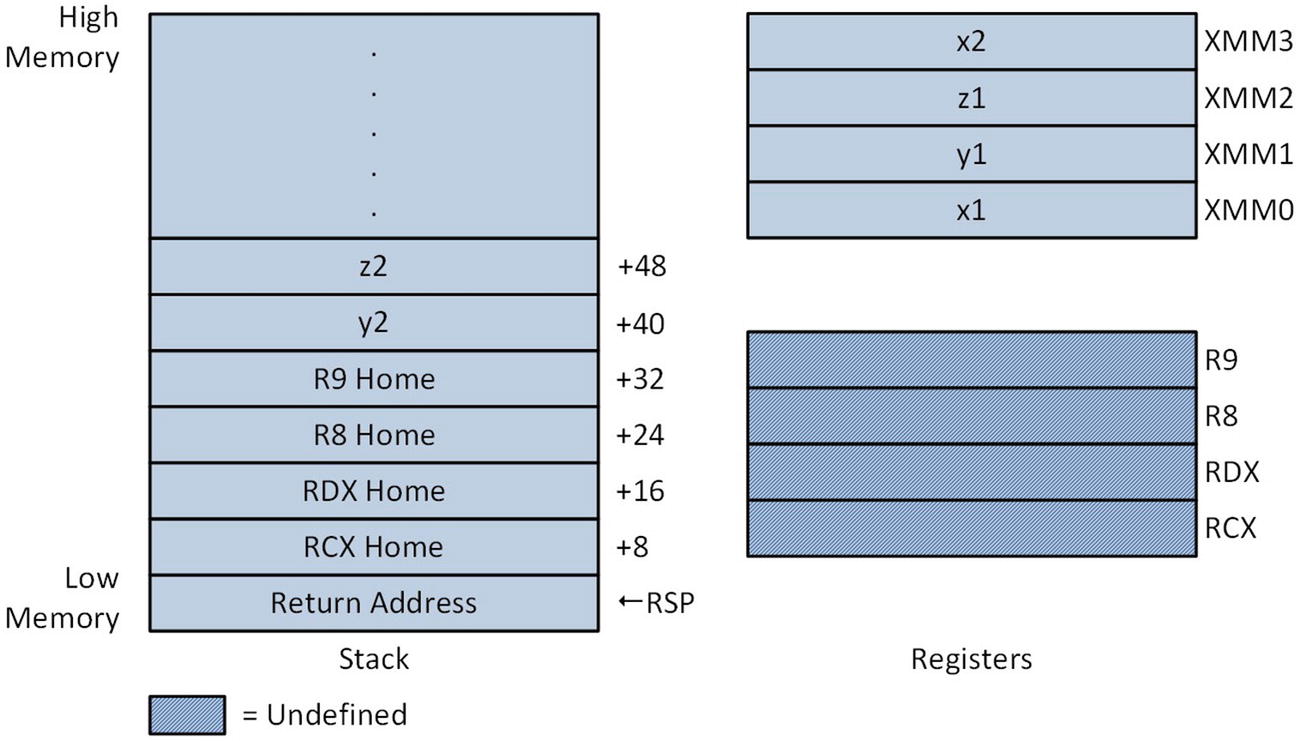
If you examine the declaration of function CalcDistance_, you will notice that it specifies six double precision argument values. The argument values x1, y1, z1, and x2 are passed in registers XMM0, XMM1, XMM2, and XMM3, respectively. The final two argument values, y2 and z2, are passed on the stack, as illustrated in Figure 5-1. Note that this figure shows only the low-order quadword of each XMM register; the high-order quadwords are not used to pass argument values and are undefined.
../images/326959_2_En_5_Chapter/326959_2_En_5_Fig1_HTML.jpg
Figure 5-1.

Stack layout and argument registers at entry to CalcDistance_

The function CalcDistance_ begins with a vmovsd xmm4,real8 ptr [rsp+40] instruction that loads argument value y2 from the stack into register XMM4. This is followed by a vmovsd xmm5,real8 ptr [rsp+48] instruction that loads argument value z2 into register XMM5. The next two instructions, vsubsd xmm0,xmm3,xmm0 and vmulsd xmm0,xmm0,xmm0, calculate (x2 – x1) * (x2 – x1). A similar sequence of instructions is then used to calculate (y2 – y1) * (y2 – y1) and (z2 – z1) * (z2 – z1) . This is followed by two vaddsd instructions that sum the three coordinate squares. A vsqrtsd xmm0,xmm0,xmm4 instruction computes the final distance. Note that the vsqrtsd instruction computes the square root of its second source operand. Similar to other scalar double-precision floating-point arithmetic instructions, vsqrtsd also copies bits 127:64 of the first source operand to the same bit positions of the destination operand. Here is the output for example Ch05_03:
i: 0 p1( 86, 84, 5) | p2( 32, 8, 77) | dist1: 117.7964 | dist2: 117.7964
i: 1 p1( 38, 63, 77) | p2( 28, 49, 86) | dist1: 19.4165 | dist2: 19.4165
i: 2 p1( 17, 18, 54) | p2( 79, 51, 80) | dist1: 74.8933 | dist2: 74.8933
i: 3 p1( 85, 50, 28) | p2( 40, 87, 90) | dist1: 85.0764 | dist2: 85.0764
i: 4 p1( 98, 47, 79) | p2( 28, 85, 38) | dist1: 89.5824 | dist2: 89.5824
i: 5 p1( 21, 78, 36) | p2( 92, 12, 47) | dist1: 97.5602 | dist2: 97.5602
i: 6 p1( 16, 50, 97) | p2( 61, 13, 40) | dist1: 81.5046 | dist2: 81.5046
i: 7 p1( 31, 96, 49) | p2( 31, 37, 45) | dist1: 59.1354 | dist2: 59.1354
i: 8 p1( 13, 87, 40) | p2( 95, 41, 87) | dist1: 105.1142 | dist2: 105.1142
i: 9 p1( 35, 48, 4) | p2( 26, 13, 43) | dist1: 53.1695 | dist2: 53.1695
i: 10 p1( 43, 56, 85) | p2( 88, 17, 45) | dist1: 71.7356 | dist2: 71.7356
i: 11 p1( 59, 88, 77) | p2( 26, 11, 72) | dist1: 83.9226 | dist2: 83.9226
i: 12 p1( 56, 48, 71) | p2( 3, 56, 81) | dist1: 54.5252 | dist2: 54.5252
i: 13 p1( 97, 19, 11) | p2( 36, 35, 58) | dist1: 78.6511 | dist2: 78.6511
i: 14 p1( 50, 79, 74) | p2( 60, 7, 32) | dist1: 83.9524 | dist2: 83.9524
i: 15 p1( 84, 16, 29) | p2( 91, 4, 91) | dist1: 63.5374 | dist2: 63.5374
i: 16 p1( 67, 77, 65) | p2( 86, 47, 59) | dist1: 36.0139 | dist2: 36.0139
i: 17 p1( 67, 1, 3) | p2( 34, 19, 64) | dist1: 71.6519 | dist2: 71.6519
i: 18 p1( 41, 79, 73) | p2( 17, 2, 68) | dist1: 80.8084 | dist2: 80.8084
i: 19 p1( 86, 40, 66) | p2( 76, 12, 61) | dist1: 30.1496 | dist2: 30.1496

Scalar Floating-Point Compares and Conversions

Any function that carries out basic floating-point arithmetic is also likely to perform floating-point compare operations and conversions between integer and floating-point values. The sample source code of this section illustrates how to perform scalar floating-point compares and data conversions. It begins with a couple of examples that demonstrate methods for comparing two floating-point values and making a logical decision based on the result. This is followed by an example that shows floating-point conversion operations using values of different types.

Floating-Point Compares

Listing 5-4 shows the source code for example Ch05_04, which demonstrates the use of the floating-point compare instructions vcomis[d|s]. Similar to the AVX scalar floating-point arithmetic instructions, the final letter of these mnemonics denotes the operand type (d = double-precision, s = single-precision). The vcomis[d|s] instructions compare two floating-point operands and set status flags in RFLAGS to signify a result of less than, equal, greater than, or unordered. An unordered floating-point compare is true when one or both of the instruction operands is a NaN or erroneously encoded. The assembly language functions CompareVCOMISD_ and CompareVCOMISS_ illustrate the use of the vcomisd and vcomiss instructions, respectively. In the discussions that follow, I’ll describe the workings of CompareVCOMISS_; any comments made about this function also apply to CompareVCOMISD_.
//------------------------------------------------
//        Ch05_04.cpp
//------------------------------------------------
#include "stdafx.h"
#include <string>
#include <iostream>
#include <iomanip>
#include <limits>
using namespace std;
extern "C" void CompareVCOMISS_(float a, float b, bool* results);
extern "C" void CompareVCOMISD_(double a, double b, bool* results);
const char* c_OpStrings[] = {"UO", "LT", "LE", "EQ", "NE", "GT", "GE"};
const size_t c_NumOpStrings = sizeof(c_OpStrings) / sizeof(char*);
const string g_Dashes(72, '-');
template <typename T> void PrintResults(T a, T b, const bool* cmp_results)
{
  cout << "a = " << a << ", ";
  cout << "b = " << b << '\n';
  for (size_t i = 0; i < c_NumOpStrings; i++)
  {
    cout << c_OpStrings[i] << '=';
    cout << boolalpha << left << setw(6) << cmp_results[i] << ' ';
  }
  cout << "\n\n";
}
void CompareVCOMISS()
{
  const size_t n = 6;
  float a[n] {120.0, 250.0, 300.0, -18.0, -81.0, 42.0};
  float b[n] {130.0, 240.0, 300.0, 32.0, -100.0, 0.0};
  // Set NAN test value
  b[n - 1] = numeric_limits<float>::quiet_NaN();
  cout << "\nResults for CompareVCOMISS\n";
  cout << g_Dashes << '\n';
  for (size_t i = 0; i < n; i++)
  {
    bool cmp_results[c_NumOpStrings];
    CompareVCOMISS_(a[i], b[i], cmp_results);
    PrintResults(a[i], b[i], cmp_results);
  }
}
void CompareVCOMISD(void)
{
  const size_t n = 6;
  double a[n] {120.0, 250.0, 300.0, -18.0, -81.0, 42.0};
  double b[n] {130.0, 240.0, 300.0, 32.0, -100.0, 0.0};
  // Set NAN test value
  b[n - 1] = numeric_limits<double>::quiet_NaN();
  cout << "\nResults for CompareVCOMISD\n";
  cout << g_Dashes << '\n';
  for (size_t i = 0; i < n; i++)
  {
    bool cmp_results[c_NumOpStrings];
    CompareVCOMISD_(a[i], b[i], cmp_results);
    PrintResults(a[i], b[i], cmp_results);
  }
}
int main()
{
  CompareVCOMISS();
  CompareVCOMISD();
  return 0;
}
;-------------------------------------------------
;        Ch05_04.asm
;-------------------------------------------------
; extern "C" void CompareVCOMISS_(float a, float b, bool* results);
    .code
CompareVCOMISS_ proc
; Set result flags based on compare status
    vcomiss xmm0,xmm1
    setp byte ptr [r8]         ;RFLAGS.PF = 1 if unordered
    jnp @F
    xor al,al
    mov byte ptr [r8+1],al       ;Use default result values
    mov byte ptr [r8+2],al
    mov byte ptr [r8+3],al
    mov byte ptr [r8+4],al
    mov byte ptr [r8+5],al
    mov byte ptr [r8+6],al
    jmp Done
@@:   setb byte ptr [r8+1]        ;set byte if a < b
    setbe byte ptr [r8+2]        ;set byte if a <= b
    sete byte ptr [r8+3]        ;set byte if a == b
    setne byte ptr [r8+4]        ;set byte if a != b
    seta byte ptr [r8+5]        ;set byte if a > b
    setae byte ptr [r8+6]        ;set byte if a >= b
Done:  ret
CompareVCOMISS_ endp
; extern "C" void CompareVCOMISD_(double a, double b, bool* results);
CompareVCOMISD_ proc
; Set result flags based on compare status
    vcomisd xmm0,xmm1
    setp byte ptr [r8]         ;RFLAGS.PF = 1 if unordered
    jnp @F
    xor al,al
    mov byte ptr [r8+1],al       ;Use default result values
    mov byte ptr [r8+2],al
    mov byte ptr [r8+3],al
    mov byte ptr [r8+4],al
    mov byte ptr [r8+5],al
    mov byte ptr [r8+6],al
    jmp Done
@@:   setb byte ptr [r8+1]        ;set byte if a < b
    setbe byte ptr [r8+2]        ;set byte if a <= b
    sete byte ptr [r8+3]        ;set byte if a == b
    setne byte ptr [r8+4]        ;set byte if a != b
    seta byte ptr [r8+5]        ;set byte if a > b
    setae byte ptr [r8+6]        ;set byte if a >= b
Done:  ret
CompareVCOMISD_ endp
    end
Listing 5-4.

Example Ch05_04

The function CompareVCOMISS_ accepts two argument values of type float and a pointer to an array of bools for the compare results. The first instruction of CompareVCOMISS_, vcomiss xmm0,xmm1, performs a single-precision floating-point compare of argument values a and b. Note that these values were passed to CompareVCOMISS_ in registers XMM0 and XMM1. Execution of vcomiss sets RFLAGS.ZF, RFLAGS.PF, and RFLAGS.ZF, as shown Table 5-1. The setting of these status flags facilitates the use of the conditional instructions cmovcc, jcc, and setcc, as shown in Table 5-2.
Table 5-1.

Status Flags Set by the vcomis[d|s] Instructions

Condition

RFLAGS.ZF

RFLAGS.PF

RFLAGS.CF

XMM0 > XMM1

0

0

0

XMM0 == XMM1

1

0

0

XMM0 < XMM1

0

0

1

Unordered

1

1

1

Table 5-2.

Condition Codes Following Execution of vcomis[d|s]

Relational Operator

Condition Code

RFLAGS Test Condition

XMM0 < XMM1

Below (b)

CF == 1

XMM0 <= XMM1

Below or equal (be)

CF == 1 || ZF == 1

XMM0 == XMM1

Equal (e or z)

ZF == 1

XMM0 != XMM1

Not Equal (ne or nz)

ZF == 0

XMM0 > XMM1

Above (a)

CF == 0 && ZF == 0

XMM0 >= XMM1

Above or Equal (ae)

CF == 0

Unordered

Parity (p)

PF == 1

It should be noted that the status flags shown in Table 5-1 are set only if floating-point exceptions are masked (the default state for Visual C++) and neither vcomis[d|s] operand is a QNaN, SNaN, or denormal. If floating-point invalid operation or denormal exceptions are unmasked (MXCSR.IM = 0 or MXCSR.DM = 0) and one of the compare operands is a QNaN, SNaN, or denormal, the processor will generate an exception without updating the status flags in RFLAGS. Chapter 4 contains additional information regarding use of the MXCSR register, QNaNs, SNaNs, and denormals.

Following execution of the vcomiss xmm0,xmm1 instruction, a series of setcc (Set Byte on Condition) instructions are used to highlight the relational operators shown in Table 5-2. The setp byte ptr [r8] instruction sets the destination operand byte to 1 if RFLAGS.PF is set (i.e., one of the operands is a QNaN or SNaN); otherwise, the destination operand byte is set to 0. If the compare was ordered, the remaining setcc instructions in CompareVCOMISS_ save all possible compare outcomes by setting each entry in array results to 0 or 1. As previously mentioned, functions can also use the jcc and cmovcc instructions following execution of a vcomis[d|s] instruction to perform program jumps or conditional data moves based on the outcome of a floating-point compare. Here is the output for source code example Ch05_04:
Results for CompareVCOMISS
------------------------------------------------------------------------
a = 120, b = 130
UO=false LT=true  LE=true  EQ=false NE=true  GT=false GE=false
a = 250, b = 240
UO=false LT=false LE=false EQ=false NE=true  GT=true  GE=true
a = 300, b = 300
UO=false LT=false LE=true  EQ=true  NE=false GT=false GE=true
a = -18, b = 32
UO=false LT=true  LE=true  EQ=false NE=true  GT=false GE=false
a = -81, b = -100
UO=false LT=false LE=false EQ=false NE=true  GT=true  GE=true
a = 42, b = nan
UO=true  LT=false LE=false EQ=false NE=false GT=false GE=false
Results for CompareVCOMISD
------------------------------------------------------------------------
a = 120, b = 130
UO=false LT=true  LE=true  EQ=false NE=true  GT=false GE=false
a = 250, b = 240
UO=false LT=false LE=false EQ=false NE=true  GT=true  GE=true
a = 300, b = 300
UO=false LT=false LE=true  EQ=true  NE=false GT=false GE=true
a = -18, b = 32
UO=false LT=true  LE=true  EQ=false NE=true  GT=false GE=false
a = -81, b = -100
UO=false LT=false LE=false EQ=false NE=true  GT=true  GE=true
a = 42, b = nan
UO=true  LT=false LE=false EQ=false NE=false GT=false GE=false
Listing 5-5 contains the source code for example Ch05_05. This example illustrates the use of the vcmpsd instruction, which compares two double-precision floating-point values using a compare predicate that’s specified as an immediate operand. The vcmpsd instruction does not use any of the status bits in RFLAGS to indicate compare results. Instead, it returns a quadword mask of all ones or all zeros to signify a true or false result. The AVX instruction set also includes vcmpss, which can be used to perform single-precision floating-point compares. This instruction is equivalent to the vcmpsd instruction except that it returns a doubleword mask.
//------------------------------------------------
//        Ch05_05.cpp
//------------------------------------------------
#include "stdafx.h"
#include <iostream>
#include <iomanip>
#include <limits>
#include <string>
using namespace std;
extern "C" void CompareVCMPSD_(double a, double b, bool* results);
const string g_Dashes(40, '-');
int main()
{
  const char* cmp_names[] =
  {
    "cmp_eq", "cmp_neq", "cmp_lt", "cmp_le",
    "cmp_gt", "cmp_ge", "cmp_ord", "cmp_unord"
  };
  const size_t num_cmp_names = sizeof(cmp_names) / sizeof(char*);
  const size_t n = 6;
  double a[n] = {120.0, 250.0, 300.0, -18.0, -81.0, 42.0};
  double b[n] = {130.0, 240.0, 300.0, 32.0, -100.0, 0.0};
  b[n - 1] = numeric_limits<double>::quiet_NaN();
  cout << "Results for CompareVCMPSD\n";
  cout << g_Dashes << '\n';
  for (size_t i = 0; i < n; i++)
  {
    bool cmp_results[num_cmp_names];
    CompareVCMPSD_(a[i], b[i], cmp_results);
    cout << "a = " << a[i] << "  ";
    cout << "b = " << b[i] << '\n';
    for (size_t j = 0; j < num_cmp_names; j++)
    {
      string s1 = cmp_names[j] + string(":");
      string s2 = ((j & 1) != 0) ? "\n" : " ";
      cout << left << setw(12) << s1;
      cout << boolalpha << setw(6) << cmp_results[j] << s2;
    }
    cout << "\n";
  }
  return 0;
}
;-------------------------------------------------
;        cmpequ.asmh
;-------------------------------------------------
; Basic compare predicates
CMP_EQ     equ 00h
CMP_LT     equ 01h
CMP_LE     equ 02h
CMP_UNORD    equ 03h
CMP_NEQ     equ 04h
CMP_NLT     equ 05h
CMP_NLE     equ 06h
CMP_ORD     equ 07h
; Extended compare predicates for AVX
CMP_EQU_UQ   equ 08h
CMP_NGE     equ 09h
CMP_NGT     equ 0Ah
CMP_FALSE    equ 0Bh
CMP_NEQ_OQ   equ 0Ch
CMP_GE     equ 0Dh
CMP_GT     equ 0Eh
CMP_TRUE    equ 0Fh
CMP_EQ_OS    equ 10h
CMP_LT_OQ    equ 11h
CMP_LE_OQ    equ 12h
CMP_UNORD_S   equ 13h
CMP_NEQ_US   equ 14h
CMP_NLT_UQ   equ 15h
CMP_NLE_UQ   equ 16h
CMP_ORD_S    equ 17h
CMP_EQ_US    equ 18h
CMP_NGE_UQ   equ 19h
CMP_NGT_UQ   equ 1Ah
CMP_FALSE_OS  equ 1Bh
CMP_NEQ_OS   equ 1Ch
CMP_GE_OQ    equ 1Dh
CMP_GT_OQ    equ 1Eh
CMP_TRUE_US   equ 1Fh
;-------------------------------------------------
;        Ch05_05.asm
;-------------------------------------------------
    include <cmpequ.asmh>
; extern "C" void CompareVCMPSD_(double a, double b, bool* results)
    .code
CompareVCMPSD_ proc
; Perform compare for equality
    vcmpsd xmm2,xmm0,xmm1,CMP_EQ    ;perform compare operation
    vmovq rax,xmm2           ;rax = compare result (all 1s or 0s)
    and al,1              ;mask out unneeded bits
    mov byte ptr [r8],al        ;save result as C++ bool
; Perform compare for inequality
    vcmpsd xmm2,xmm0,xmm1,CMP_NEQ
    vmovq rax,xmm2
    and al,1
    mov byte ptr [r8+1],al
; Perform compare for less than
    vcmpsd xmm2,xmm0,xmm1,CMP_LT
    vmovq rax,xmm2
    and al,1
    mov byte ptr [r8+2],al
; Perform compare for less than or equal
    vcmpsd xmm2,xmm0,xmm1,CMP_LE
    vmovq rax,xmm2
    and al,1
    mov byte ptr [r8+3],al
; Perform compare for greater than
    vcmpsd xmm2,xmm0,xmm1,CMP_GT
    vmovq rax,xmm2
    and al,1
    mov byte ptr [r8+4],al
; Perform compare for greater than or equal
    vcmpsd xmm2,xmm0,xmm1,CMP_GE
    vmovq rax,xmm2
    and al,1
    mov byte ptr [r8+5],al
; Perform compare for ordered
    vcmpsd xmm2,xmm0,xmm1,CMP_ORD
    vmovq rax,xmm2
    and al,1
    mov byte ptr [r8+6],al
; Perform compare for unordered
    vcmpsd xmm2,xmm0,xmm1,CMP_UNORD
    vmovq rax,xmm2
    and al,1
    mov byte ptr [r8+7],al
    ret
CompareVCMPSD_ endp
    end
Listing 5-5.

Example Ch05_05

Similar to the previous example, the C++ code for example Ch05_05 contains some test cases that exercise the assembly language function CompareVCMPSD_. Following the C++ code in Listing 5-5 is the assembly language header file cmpequ.asmh. This file contains a collection of equate directives, which are used to assign symbolic names to numeric values. The equate directives in cmpequ.asmh define symbolic names for the compare predicates that are used by a number of x86-AVX scalar and packed compare instructions including vcmpsd. You’ll shortly see how this works. There is no standard file extension for an x86 assembly language header file; I use .asmh but .inc is also frequently used.

Using an assembly language header file is similar to using a C++ header file. In the current example, the statement include <cmpequ.asmh> incorporates the contents of cmpequ.asmh into the file Ch05_05_.asm during assembly. The angled brackets surrounding the filename can be omitted if the filename doesn’t contain any backslashes or MASM special characters, but it’s usually simpler and more consistent to just always use them. Besides equate statements, assembly language header files are often used for macro definitions. You’ll learn about macros later in this chapter.

The first instruction of function CompareVCMPSD_, vcmpsd xmm2,xmm0,xmm1,CMP_EQ, compares the contents of registers XMM0 and XMM1 for equality. These registers contain argument values a and b. If a and b are equal, the low-order quadword of XMM2 is set to all ones; otherwise, the low-order quadword is set to all zeros. Note that the vcmpsd instruction requires four operands: an immediate operand that specifies the compare predicate, two source operands (the first source operand must be an XMM register while the second source operand can be an XMM register or an operand in memory), and a destination operand that must be an XMM register. The ensuing vmovq rax,xmm2 instruction copies the low-order quadword of XMM2 (which contains all zeros or all ones) to register RAX. This is followed by an and al,1 instruction that sets register AL to 1 if the compare predicate is true; otherwise AL is set to 0. The final instruction of the sequence, mov byte ptr [r8],al, saves the compare outcome to the array results. The function CompareVCMPSD_ then uses similar instruction sequences to demonstrate other frequently-used compare predicates. Here are the results for example Ch05_05:
Results for CompareVCMPSD
----------------------------------------
a = 120  b = 130
cmp_eq:   false  cmp_neq:  true
cmp_lt:   true  cmp_le:   true
cmp_gt:   false  cmp_ge:   false
cmp_ord:  true  cmp_unord: false
a = 250  b = 240
cmp_eq:   false  cmp_neq:  true
cmp_lt:   false  cmp_le:   false
cmp_gt:   true  cmp_ge:   true
cmp_ord:  true  cmp_unord: false
a = 300  b = 300
cmp_eq:   true  cmp_neq:  false
cmp_lt:   false  cmp_le:   true
cmp_gt:   false  cmp_ge:   true
cmp_ord:  true  cmp_unord: false
a = -18  b = 32
cmp_eq:   false  cmp_neq:  true
cmp_lt:   true  cmp_le:   true
cmp_gt:   false  cmp_ge:   false
cmp_ord:  true  cmp_unord: false
a = -81  b = -100
cmp_eq:   false  cmp_neq:  true
cmp_lt:   false  cmp_le:   false
cmp_gt:   true  cmp_ge:   true
cmp_ord:  true  cmp_unord: false
a = 42  b = nan
cmp_eq:   false  cmp_neq:  true
cmp_lt:   false  cmp_le:   false
cmp_gt:   false  cmp_ge:   false
cmp_ord:  false  cmp_unord: true

Many x86 assemblers including MASM support pseudo-op forms of the vcmpsd instruction and its single-precision counterpart vcmpss. Pseudo-ops are simulated instruction mnemonics with the compare predicate embedded within the mnemonic text. In function CompareVCMPSD_, for example, the pseudo-op vcmpeqsd xmm2,xmm0,xmm1 could have been used instead of the instruction vcmpsd xmm2,xmm0,xmm1,CMP_EQ. Personally, I find the standard reference manual mnemonics easier to read since the compare predicate is explicitly specified as an operand instead being buried within the pseudo-op, especially when using one of the more esoteric compare predicates.

In this section, you learned how to perform compare operations using the vcomi[d|s] and vcmps[d|s] instructions. You might be wondering at this point which compare instructions should be used. For basic scalar floating-point compare operations (e.g., equal, not equal, less than, less than or equal, greater than, and greater than or equal), the vcomis[d|s] instructions are slightly simpler to use since they directly set the status flags in RFLAGS. The vcmps[d|s] instructions must be used to take advantage of the extended compare predicates that AVX supports. Another reason for using the vcmps[d|s] instructions is the similarity between these instructions and the corresponding vcmpp[d|s] instructions for packed floating-point operands. You’ll learn how to use the packed floating-point compare instructions in Chapter 6.

Floating-Point Conversions

A common operation in many C++ programs is to cast a single-precision or double-precision floating-point value to an integer or vice versa. Other frequent operations include the promotion of a floating-point value from single-precision to double-precision and the narrowing of a double-precision value to single-precision. AVX includes a number of instructions that perform these types of conversions. Listing 5-6 shows the code for a sample program that demonstrates how to use some of the AVX conversion instructions. It also illustrates how to modify the rounding control field of the MXCSR register in order to change the AVX floating-point rounding mode .
//------------------------------------------------
//        Ch05_06.cpp
//------------------------------------------------
#include "stdafx.h"
#include <iostream>
#include <iomanip>
#include <cstdint>
#include <string>
#define _USE_MATH_DEFINES
#include <math.h>
using namespace std;
// Simple union for data exchange
union Uval
{
  int32_t m_I32;
  int32_t m_I64;
  float m_F32;
  double m_F64;
};
// The order of values below must match the jump table
// that's defined in the .asm file.
enum CvtOp : unsigned int
{
  I32_F32,    // int32_t to float
  F32_I32,    // float to int32_t
  I32_F64,    // int32_t to double
  F64_I32,    // double to int32_t
  I64_F32,    // int64_t to float
  F32_I64,    // float to int64_t
  I64_F64,    // int64_t to double
  F64_I64,    // double to int64_t
  F32_F64,    // float to double
  F64_F32,    // double to float
};
// Enumerated type for rounding mode
enum RoundingMode : unsigned int
{
  Nearest, Down, Up, Truncate
};
const string c_RoundingModeStrings[] = {"Nearest", "Down", "Up", "Truncate"};
const RoundingMode c_RoundingModeVals[] = {RoundingMode::Nearest, RoundingMode::Down, RoundingMode::Up, RoundingMode::Truncate};
const size_t c_NumRoundingModes = sizeof(c_RoundingModeVals) / sizeof (RoundingMode);
extern "C" RoundingMode GetMxcsrRoundingMode_(void);
extern "C" void SetMxcsrRoundingMode_(RoundingMode rm);
extern "C" bool ConvertScalar_(Uval* a, Uval* b, CvtOp cvt_op);
int main()
{
  Uval src1, src2, src3, src4, src5;
  src1.m_F32 = (float)M_PI;
  src2.m_F32 = (float)-M_E;
  src3.m_F64 = M_SQRT2;
  src4.m_F64 = M_SQRT1_2;
  src5.m_F64 = 1.0 + DBL_EPSILON;
  for (size_t i = 0; i < c_NumRoundingModes; i++)
  {
    Uval des1, des2, des3, des4, des5;
    RoundingMode rm_save = GetMxcsrRoundingMode_();
    RoundingMode rm_test = c_RoundingModeVals[i];
    SetMxcsrRoundingMode_(rm_test);
    ConvertScalar_(&des1, &src1, CvtOp::F32_I32);
    ConvertScalar_(&des2, &src2, CvtOp::F32_I64);
    ConvertScalar_(&des3, &src3, CvtOp::F64_I32);
    ConvertScalar_(&des4, &src4, CvtOp::F64_I64);
    ConvertScalar_(&des5, &src5, CvtOp::F64_F32);
    SetMxcsrRoundingMode_(rm_save);
    cout << fixed;
    cout << "\nRounding mode = " << c_RoundingModeStrings[rm_test] << '\n';
    cout << " F32_I32: " << setprecision(8);
    cout << src1.m_F32 << " --> " << des1.m_I32 << '\n';
    cout << " F32_I64: " << setprecision(8);
    cout << src2.m_F32 << " --> " << des2.m_I64 << '\n';
    cout << " F64_I32: " << setprecision(8);
    cout << src3.m_F64 << " --> " << des3.m_I32 << '\n';
    cout << " F64_I64: " << setprecision(8);
    cout << src4.m_F64 << " --> " << des4.m_I64 << '\n';
    cout << " F64_F32: ";
    cout << setprecision(16) << src5.m_F64 << " --> ";
    cout << setprecision(8) << des5.m_F32 << '\n';
  }
  return 0;
;-------------------------------------------------
;        Ch05_06.asm
;-------------------------------------------------
MxcsrRcMask equ 9fffh            ;bit pattern for MXCSR.RC
MxcsrRcShift equ 13             ;shift count for MXCSR.RC
; extern "C" RoundingMode GetMxcsrRoundingMode_(void);
;
; Description: The following function obtains the current
;        floating-point rounding mode from MXCSR.RC.
;
; Returns:   Current MXCSR.RC rounding mode.
    .code
GetMxcsrRoundingMode_ proc
    vstmxcsr dword ptr [rsp+8]     ;save mxcsr register
    mov eax,[rsp+8]
    shr eax,MxcsrRcShift        ;eax[1:0] = MXCSR.RC bits
    and eax,3              ;masked out unwanted bits
    ret
GetMxcsrRoundingMode_ endp
;extern "C" void SetMxcsrRoundingMode_(RoundingMode rm);
;
; Description: The following function updates the rounding mode
;        value in MXCSR.RC.
SetMxcsrRoundingMode_ proc
    and ecx,3              ;masked out unwanted bits
    shl ecx,MxcsrRcShift        ;ecx[14:13] = rm
    vstmxcsr dword ptr [rsp+8]     ;save current MXCSR
    mov eax,[rsp+8]
    and eax,MxcsrRcMask         ;masked out old MXCSR.RC bits
    or eax,ecx             ;insert new MXCSR.RC bits
    mov [rsp+8],eax
    vldmxcsr dword ptr [rsp+8]     ;load updated MXCSR
    ret
SetMxcsrRoundingMode_ endp
; extern "C" bool ConvertScalar_(Uval* des, const Uval* src, CvtOp cvt_op)
;
; Note:     This function requires linker option /LARGEADDRESSAWARE:NO
;        to be explicitly set.
ConvertScalar_ proc
; Make sure cvt_op is valid, then jump to target conversion code
    mov eax,r8d             ;eax = CvtOp
    cmp eax,CvtOpTableCount
    jae BadCvtOp            ;jump if cvt_op is invalid
    jmp [CvtOpTable+rax*8]       ;jump to specified conversion
; Conversions between int32_t and float/double
I32_F32:
    mov eax,[rdx]            ;load integer value
    vcvtsi2ss xmm0,xmm0,eax       ;convert to float
    vmovss real4 ptr [rcx],xmm0     ;save result
    mov eax,1
    ret
F32_I32:
    vmovss xmm0,real4 ptr [rdx]     ;load float value
    vcvtss2si eax,xmm0         ;convert to integer
    mov [rcx],eax            ;save result
    mov eax,1
    ret
I32_F64:
    mov eax,[rdx]            ;load integer value
    vcvtsi2sd xmm0,xmm0,eax       ;convert to double
    vmovsd real8 ptr [rcx],xmm0     ;save result
    mov eax,1
    ret
F64_I32:
    vmovsd xmm0,real8 ptr [rdx]     ;load double value
    vcvtsd2si eax,xmm0         ;convert to integer
    mov [rcx],eax            ;save result
    mov eax,1
    ret
; Conversions between int64_t and float/double
I64_F32:
    mov rax,[rdx]            ;load integer value
    vcvtsi2ss xmm0,xmm0,rax       ;convert to float
    vmovss real4 ptr [rcx],xmm0     ;save result
    mov eax,1
    ret
F32_I64:
    vmovss xmm0,real4 ptr [rdx]     ;load float value
    vcvtss2si rax,xmm0         ;convert to integer
    mov [rcx],rax            ;save result
    mov eax,1
    ret
I64_F64:
    mov rax,[rdx]            ;load integer value
    vcvtsi2sd xmm0,xmm0,rax       ;convert to double
    vmovsd real8 ptr [rcx],xmm0     ;save result
    mov eax,1
    ret
F64_I64:
    vmovsd xmm0,real8 ptr [rdx]     ;load double value
    vcvtsd2si rax,xmm0         ;convert to integer
    mov [rcx],rax            ;save result
    mov eax,1
    ret
; Conversions between float and double
F32_F64:
    vmovss xmm0,real4 ptr [rdx]     ;load float value
    vcvtss2sd xmm1,xmm1,xmm0      ;convert to double
    vmovsd real8 ptr [rcx],xmm1     ;save result
    mov eax,1
    ret
F64_F32:
    vmovsd xmm0,real8 ptr [rdx]     ;load double value
    vcvtsd2ss xmm1,xmm1,xmm0      ;convert to float
    vmovss real4 ptr [rcx],xmm1     ;save result
    mov eax,1
    ret
BadCvtOp:
    xor eax,eax             ;set error return code
    ret
; The order of values in following table must match the enum CvtOp
; that's defined in the .cpp file.
    align 8
CvtOpTable equ $
    qword I32_F32, F32_I32
    qword I32_F64, F64_I32
    qword I64_F32, F32_I64
    qword I64_F64, F64_I64
    qword F32_F64, F64_F32
CvtOpTableCount equ ($ - CvtOpTable) / size qword
ConvertScalar_ endp
    end
Listing 5-6.

Example Ch05_06

Near the top of the C++ code is a declaration for union Uval, which is used for data exchange purposes. This is followed by two enumerations: one to select a floating-point conversion type (CvtOp) and another to specify a floating-point rounding mode (RoundingMode). The C++ function main initializes a couple of Uval instances as test cases and invokes the assembly language function ConvertScalar_ to perform various conversions using different rounding modes. The result of each conversion operation is then displayed for verification and comparison purposes.

The AVX floating-point rounding mode is determined by the rounding control field (bits 14 and 13) of the MXCSR register, as discussed in Chapter 4. The default rounding mode for Visual C++ programs is round to nearest. According to the Visual C++ calling convention, the values in MXCSR[15:6] (i.e., MXCSR register bits 15 through 6) must be preserved across most function boundaries. The code in main fulfills this requirement by calling the function GetMxcsrRoundingMode_ to save the current rounding mode prior to performing any conversion operations using ConvertScalar_. The original rounding mode is ultimately restored using the function SetMxcsrRoundingMode_. Note that the original rounding mode is restored prior to the cout statements in main. Also note that I’ve simplified the rounding mode save and restore code somewhat by not preserving the rounding mode prior to each use ConvertScalar_ and restoring it immediately afterward.

Listing 5-6 also shows the rounding mode control functions. The function GetMxcsrRoundingMode_ uses a vstmxcsr dword ptr [rsp+8] instruction (Store MXCSR RegisterState) to save the contents of MXCSR to the RCX home area on the stack. Recall that a function can use its home area on the stack for any transient storage purpose. The sole operand of the vstmxcsr instruction must be a doubleword in memory; it cannot be a general-purpose register. The ensuing mov eax,[rsp+8] instruction copies the current MXCSR value into register EAX. This is followed a shift and bitwise AND operation that extracts the rounding control bits. The corresponding SetMxcsrRoundingMode_ function uses the vldmxcsr instruction (Load MXCSR Register) to set a rounding mode. The vldmxcsr instruction also requires its sole operand to be a doubleword in memory. Note that the function SetMxcsrRoundingMode_ also uses the vstmxcsr instruction and some masking operations to ensure that only the MXCSR’s rounding control bits are modified when setting a new rounding mode .

The function ConvertScalar_ performs floating-point conversions using the specified numerical arguments and conversion operator. Following validation of the argument cvt_op, a jmp [CvtOpTable+rax*8] instruction transfers control to the appropriate section in the code that performs the actual conversion. Note that this instruction exploits a jump table. Here, register RAX (which contains cvt_op) specifies an index into the table CvtOpTable. The table CvtOpTable is defined immediately after the ret instruction and contains offsets to the various conversion code blocks. You’ll learn more about jump tables in Chapter 6.

It is also important to note that the same instruction mnemonic is sometimes used when converting an integer to floating-point and vice versa. For example, the instruction vcvtsi2ss xmm0,xmm0,eax (located near the label I32_F32) converts a 32-bit signed integer to single-precision floating-point, and the instruction vcvtsi2ss xmm0,xmm0,rax (located near the label I64_F32) converts a 64-bit signed integer to single-precision floating-point.

Conversions between two different numerical data types are not always possible. For example, the vcvtss2si instruction cannot convert large floating-point values to signed 32-bit integers. If a particular conversion is impossible and invalid operation exceptions (MXCSR.IM) are masked (the default for Visual C++), the processor sets MXCSR.IE (Invalid Operation Error Flag) and the value 0x80000000 is copied to the destination operand. The output for example Ch05_06 is the following:
Rounding mode = Nearest
 F32_I32: 3.14159274 --> 3
 F32_I64: -2.71828175 --> -3
 F64_I32: 1.41421356 --> 1
 F64_I64: 0.70710678 --> 1
 F64_F32: 1.0000000000000002 --> 1.00000000
Rounding mode = Down
 F32_I32: 3.14159274 --> 3
 F32_I64: -2.71828175 --> -3
 F64_I32: 1.41421356 --> 1
 F64_I64: 0.70710678 --> 0
 F64_F32: 1.0000000000000002 --> 1.00000000
Rounding mode = Up
 F32_I32: 3.14159274 --> 4
 F32_I64: -2.71828175 --> -2
 F64_I32: 1.41421356 --> 2
 F64_I64: 0.70710678 --> 1
 F64_F32: 1.0000000000000002 --> 1.00000012
Rounding mode = Truncate
 F32_I32: 3.14159274 --> 3
 F32_I64: -2.71828175 --> -2
 F64_I32: 1.41421356 --> 1
 F64_I64: 0.70710678 --> 0
 F64_F32: 1.0000000000000002 --> 1.00000000

Scalar Floating-Point Arrays and Matrices

In Chapter 3 you learned how to access individual elements and carry out calculations using integer arrays and matrices. In this section, you learn how to perform similar operations using floating-point array and matrices. As you’ll soon see, the same assembly language coding techniques are often used for both integer and floating-point arrays and matrices.

Floating-Point Arrays

Listing 5-7 shows the code for example Ch05_07. This example illustrates how to calculate the sample mean and sample standard deviation of an array of double-precision floating-point values.
//------------------------------------------------
//        Ch05_07.cpp
//------------------------------------------------
#include "stdafx.h"
#include <iostream>
#include <iomanip>
#include <cmath>
using namespace std;
extern "C" bool CalcMeanStdev_(double* mean, double* stdev, const double* x, int n);
bool CalcMeanStdevCpp(double* mean, double* stdev, const double* x, int n)
{
  if (n < 2)
    return false;
  double sum = 0.0;
  for (int i = 0; i < n; i++)
    sum += x[i];
  *mean = sum / n;
  double sum2 = 0.0;
  for (int i = 0; i < n; i++)
  {
    double temp = x[i] - *mean;
    sum2 += temp * temp;
  }
  *stdev = sqrt(sum2 / (n - 1));
  return true;
}
int main()
{
  double x[] = { 10, 2, 33, 19, 41, 24, 75, 37, 18, 97, 14, 71, 88, 92, 7};
  const int n = sizeof(x) / sizeof(double);
  double mean1 = 0.0, stdev1 = 0.0;
  double mean2 = 0.0, stdev2 = 0.0;
  bool rc1 = CalcMeanStdevCpp(&mean1, &stdev1, x, n);
  bool rc2 = CalcMeanStdev_(&mean2, &stdev2, x, n);
  cout << fixed << setprecision(2);
  for (int i = 0; i < n; i++)
  {
    cout << "x[" << setw(2) << i << "] = ";
    cout << setw(6) << x[i] << '\n';
  }
  cout << setprecision(6);
  cout << '\n';
  cout << "rc1 = " << boolalpha << rc1;
  cout << " mean1 = " << mean1 << " stdev1 = " << stdev1 << '\n';
  cout << "rc2 = " << boolalpha << rc2;
  cout << " mean2 = " << mean2 << " stdev2 = " << stdev2 << '\n';
}
;-------------------------------------------------
;        Ch05_07.asm
;-------------------------------------------------
; extern "C" bool CalcMeanStdev(double* mean, double* stdev, const double* a, int n);
;
; Returns:   0 = invalid n, 1 = valid n
    .code
CalcMeanStdev_ proc
; Make sure 'n' is valid
    xor eax,eax             ;set error return code (also i = 0)
    cmp r9d,2
    jl InvalidArg            ;jump if n < 2
; Compute sample mean
    vxorpd xmm0,xmm0,xmm0        ;sum = 0.0
@@:   vaddsd xmm0,xmm0,real8 ptr [r8+rax*8]  ;sum += x[i]
    inc eax                 ;i += 1
    cmp eax,r9d
    jl @B                 ;jump if i < n
    vcvtsi2sd xmm1,xmm1,r9d       ;convert n to DPFP
    vdivsd xmm3,xmm0,xmm1        ;xmm3 = mean (sum / n)
    vmovsd real8 ptr [rcx],xmm3     ;save mean
; Compute sample stdev
    xor eax,eax             ;i = 0
    vxorpd xmm0,xmm0,xmm0        ;sum2 = 0.0
@@:   vmovsd xmm1,real8 ptr [r8+rax*8]  ;xmm1 = x[i]
    vsubsd xmm2,xmm1,xmm3        ;xmm2 = x[i] - mean
    vmulsd xmm2,xmm2,xmm2        ;xmm2 = (x[i] - mean) ** 2
    vaddsd xmm0,xmm0,xmm2        ;sum2 += (x[i] - mean) ** 2
    inc eax               ;i += 1
    cmp eax,r9d
    jl @B                ;jump if i < n
    dec r9d               ;r9d = n - 1
    vcvtsi2sd xmm1,xmm1,r9d       ;convert n - 1 to DPFP
    vdivsd xmm0,xmm0,xmm1        ;xmm0 = sum2 / (n - 1)
    vsqrtsd xmm0,xmm0,xmm0       ;xmm0 = stdev
    vmovsd real8 ptr [rdx],xmm0     ;save stdev
    mov eax,1              ;set success return code
InvalidArg:
    ret
CalcMeanStdev_ endp
    end
Listing 5-7.

Example Ch05_07

Here are the formulas that example Ch05_07 uses to calculate the sample mean and sample standard deviation:
$$ \overline{x}=\frac{1}{n}\sum \limits_i{x}_i $$
$$ s=\sqrt{\frac{1}{n-1}\sum \limits_i{\left({x}_i-\overline{x}\right)}^2} $$

The C++ code for example Ch05_07 is straightforward. It includes a function named CalcMeanStdevCpp that calculates the sample mean and sample standard deviation of an array of double-precision floating-point values. Note that this function and its assembly language equivalent return the calculated mean and standard deviation using pointers. The remaining C++ code initializes a test array and exercises both calculating functions.

Upon entry to the assembly language function CalcMeanStdev_, the number of array elements n is checked for validity. Note that the number of array elements must be greater than one in order to calculate a sample standard deviation. Following validation of n, the vxorpd,xmm0,xmm0,xmm0 instruction (Bitwise XOR of Packed Double-Precision Floating-Point Values) initializes sum to 0.0. This instruction performs a bitwise XOR operation using all 128 bits of both source operands. A vxorpd instruction is used here to initialize sum to 0.0 since AVX does not include an explicit XOR instruction for scalar floating-point operands.

The code block that calculates the sample mean requires only seven instructions. The first instruction of the summing loop, vaddsd xmm0,xmm0,real8 ptr [r8+rax*8], adds x[i] to sum. The inc eax instruction that follows updates i and the summing loop repeats until i reaches n. Following the summing loop, the instruction vcvtsi2sd xmm1,xmm1,r9d promotes a copy of n to double-precision floating-point, and the ensuing vdivsd xmm3,xmm0,xmm1 instruction calculates the final sample mean. The mean is then saved to the memory location pointed to by RCX.

Calculation of the sample standard deviation begins with two instructions, xor eax,eax and vxorpd xmm0,xmm0,xmm0, that initialize i to 0 and sum2 to 0.0. The ensuing vsubsd, vmulsd, and vaddsd instructions calculate sum2 += (x[i] - mean) ** 2 and the summing loop repeats until all array elements have been processed. Execution of the dec r9d instruction yields the value n – 1. This value is then promoted to double-precision floating-point by the vcvtsi2sd xmm1,xmm1,r9d instruction. The final two arithmetic instructions, vdivsd xmm0,xmm0, xmm1 and vsqrtsd xmm0,xmm0,xmm0, compute the sample standard deviation, and this value is saved to the memory location pointed to by RDX. Here’s the output for example Ch05_07:
x[ 0] = 10.00
x[ 1] =  2.00
x[ 2] = 33.00
x[ 3] = 19.00
x[ 4] = 41.00
x[ 5] = 24.00
x[ 6] = 75.00
x[ 7] = 37.00
x[ 8] = 18.00
x[ 9] = 97.00
x[10] = 14.00
x[11] = 71.00
x[12] = 88.00
x[13] = 92.00
x[14] =  7.00
rc1 = true mean1 = 41.866667 stdev1 = 33.530086
rc2 = true mean2 = 41.866667 stdev2 = 33.530086

Floating-Point Matrices

Chapter 3 presented an example program (see Ch03_03) that carried out calculations using the elements of an integer matrix. In this section, you’ll learn how to perform similar calculations using the elements of a single-precision floating-point matrix. Listing 5-8 shows the source code for example Ch05_08.
//------------------------------------------------
//        Ch05_08.cpp
//------------------------------------------------
#include "stdafx.h"
#include <iostream>
#include <iomanip>
using namespace std;
extern "C" void CalcMatrixSquaresF32_(float* y, const float* x, float offset, int nrows, int ncols);
void CalcMatrixSquaresF32Cpp(float* y, const float* x, float offset, int nrows, int ncols)
{
  for (int i = 0; i < nrows; i++)
  {
    for (int j = 0; j < ncols; j++)
    {
      int kx = j * ncols + i;
      int ky = i * ncols + j;
      y[ky] = x[kx] * x[kx] + offset;
    }
  }
}
int main()
{
  const int nrows = 6;
  const int ncols = 3;
  const float offset = 0.5;
  float y2[nrows][ncols];
  float y1[nrows][ncols];
  float x[nrows][ncols] { { 1, 2, 3 }, { 4, 5, 6 }, { 7, 8, 9 },
             { 10, 11, 12 }, {13, 14, 15}, {16, 17, 18} };
  CalcMatrixSquaresF32Cpp(&y1[0][0], &x[0][0], offset, nrows, ncols);
  CalcMatrixSquaresF32_(&y2[0][0], &x[0][0], offset, nrows, ncols);
  cout << fixed << setprecision(2);
  cout << "offset = " << setw(2) << offset << '\n';
  for (int i = 0; i < nrows; i++)
  {
    for (int j = 0; j < ncols; j++)
    {
      cout << "y1[" << setw(2) << i << "][" << setw(2) << j << "] = ";
      cout << setw(6) << y1[i][j] << "  " ;
      cout << "y2[" << setw(2) << i << "][" << setw(2) << j << "] = ";
      cout << setw(6) << y2[i][j] << "  ";
      cout << "x[" << setw(2) << j << "][" << setw(2) << i << "] = ";
      cout << setw(6) << x[j][i] << '\n';
      if (y1[i][j] != y2[i][j])
        cout << "Compare failed\n";
    }
  }
  return 0;
}
;-------------------------------------------------
;        Ch05_08.asm
;-------------------------------------------------
; void CalcMatrixSquaresF32_(float* y, const float* x, float offset, int nrows, int ncols);
;
; Calculates:   y[i][j] = x[j][i] * x[j][i] + offset
    .code
CalcMatrixSquaresF32_ proc frame
; Function prolog
    push rsi                ;save caller's rsi
    .pushreg rsi
    push rdi                ;save caller's rdi
    .pushreg rdi
    .endprolog
; Make sure nrows and ncols are valid
    movsxd r9,r9d              ;r9 = nrows
    test r9,r9
    jle InvalidCount            ;jump if nrows <= 0
    movsxd r10,dword ptr [rsp+56]      ;r10 = ncols
    test r10,r10
    jle InvalidCount            ;jump if ncols <= 0
; Initialize pointers to source and destination arrays
    mov rsi,rdx               ;rsi = x
    mov rdi,rcx               ;rdi = y
    xor rcx,rcx               ;rcx = i
; Perform the required calculations
Loop1: xor rdx,rdx               ;rdx = j
Loop2: mov rax,rdx               ;rax = j
    imul rax,r10              ;rax = j * ncols
    add rax,rcx               ;rax = j * ncols + i
    vmovss xmm0,real4 ptr [rsi+rax*4]    ;xmm0 = x[j][i]
    vmulss xmm1,xmm0,xmm0          ;xmm1 = x[j][i] * x[j][i]
    vaddss xmm3,xmm1,xmm2          ;xmm2 = x[j][i] * x[j][i] + offset
    mov rax,rcx               ;rax = i
    imul rax,r10              ;rax = i * ncols
    add rax,rdx               ;rax = i * ncols + j;
    vmovss real4 ptr [rdi+rax*4],xmm3    ;y[i][j] = x[j][i] * x[j][i] + offset
    inc rdx                 ;j += 1
    cmp rdx,r10
    jl Loop2                ;jump if j < ncols
    inc rcx                 ;i += 1
    cmp rcx,r9
    jl Loop1                ;jump if i < nrows
InvalidCount:
; Function epilog
    pop rdi                 ;restore caller's rdi
    pop rsi                 ;restore caller's rsi
    ret
CalcMatrixSquaresF32_ endp
    end
Listing 5-8.

Example Ch05_08

The C++ source code that’s shown in Listing 5-8 is similar to what you saw in Chapter 3. The techniques used to calculate the matrix element offsets are identical. The biggest modification made to the C++ code was changing the appropriate matrix type declarations from int to float. Another difference between this example and the one you saw in Chapter 3 is the addition of the argument offset to the declarations of CalcMatrixSquaresF32Cpp and CalcMatrixSquaresF32_. Both of these functions now calculate y[i][j] = x[j][i] * x[j][i] + offset.
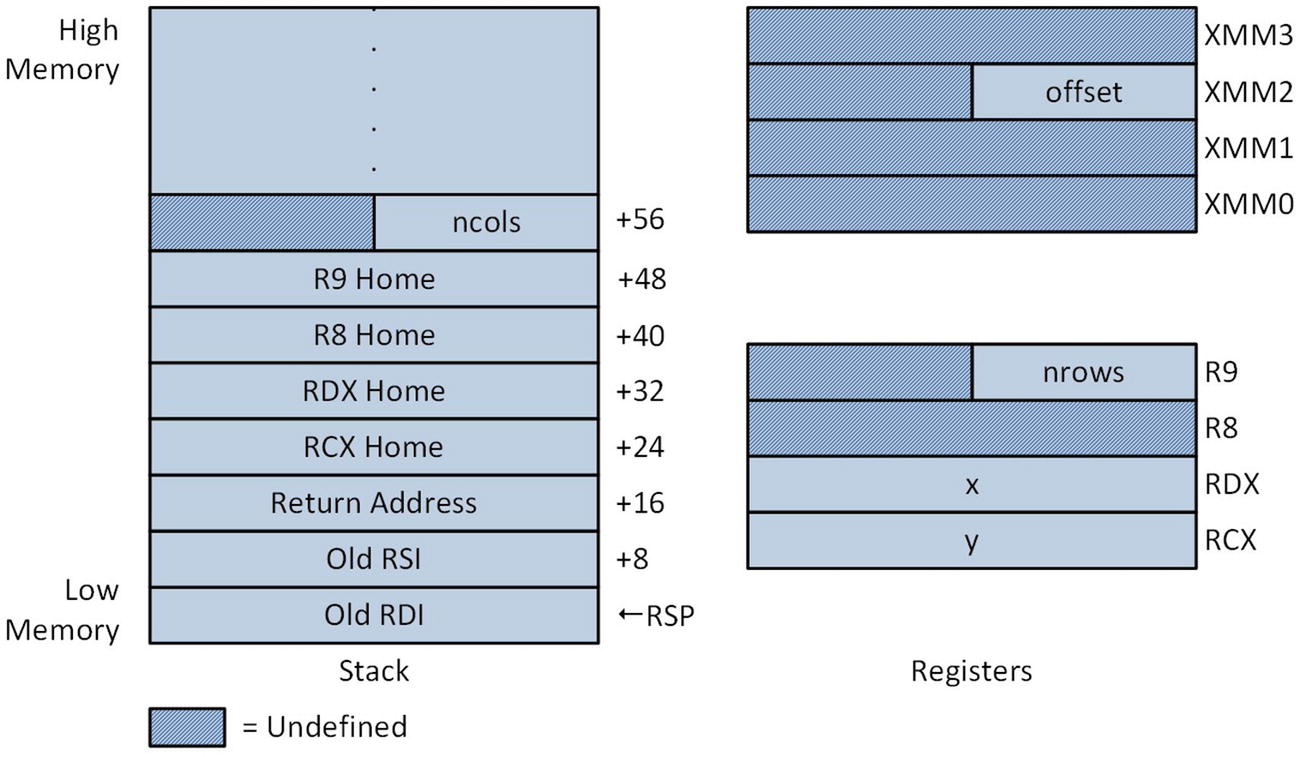
Figure 5-2 shows the stack layout and argument registers immediately following execution of the push rdi instruction in function CalcMatrixSquaresF32_. This figure illustrates argument passing to a function that uses a mixture of integer (or pointer) and floating-point arguments . Per the Visual C++ calling convention, the first four arguments are passed using either a general-purpose or XMM register depending on argument type and position. More specifically, the first argument value is passed using either register RCX or XMM0. The second, third, and fourth arguments are passed using RDX/XMM1, R8/XMM2, or R9/XMM3. Any remaining arguments are passed on the stack.
../images/326959_2_En_5_Chapter/326959_2_En_5_Fig2_HTML.jpg
Figure 5-2.

Stack layout and argument registers after execution of push rdi in CalcMatrixSquaresF32_

The assembly language code for function CalcMatrixSquaresF32_ is similar to what you studied in Chapter 3. Like the C++ code, the methods used to calculate matrix element offsets are the same. The original matrix element calculating code used integer arithmetic and these instructions have been replaced with analogous AVX scalar single-precision floating-point instructions. Following calculation of the correct matrix element offset, the instruction vmovss xmm0,real4 ptr [rsi+rax*4] loads register XMM0 with matrix element x[j][i]. The ensuing vmulss xmm1,xmm0,xmm0 and vaddss xmm3,xmm1,xmm2 instructions calculate the required result, and a vmovss real4 ptr [rdi+rax*4],xmm3 instruction saves the result to y[i][j]. Here is the output for example Ch05_08.
offset = 0.50
y1[ 0][ 0] =  1.50  y2[ 0][ 0] =  1.50  x[ 0][ 0] =  1.00
y1[ 0][ 1] = 16.50  y2[ 0][ 1] = 16.50  x[ 1][ 0] =  4.00
y1[ 0][ 2] = 49.50  y2[ 0][ 2] = 49.50  x[ 2][ 0] =  7.00
y1[ 1][ 0] =  4.50  y2[ 1][ 0] =  4.50  x[ 0][ 1] =  2.00
y1[ 1][ 1] = 25.50  y2[ 1][ 1] = 25.50  x[ 1][ 1] =  5.00
y1[ 1][ 2] = 64.50  y2[ 1][ 2] = 64.50  x[ 2][ 1] =  8.00
y1[ 2][ 0] =  9.50  y2[ 2][ 0] =  9.50  x[ 0][ 2] =  3.00
y1[ 2][ 1] = 36.50  y2[ 2][ 1] = 36.50  x[ 1][ 2] =  6.00
y1[ 2][ 2] = 81.50  y2[ 2][ 2] = 81.50  x[ 2][ 2] =  9.00
y1[ 3][ 0] = 16.50  y2[ 3][ 0] = 16.50  x[ 0][ 3] =  4.00
y1[ 3][ 1] = 49.50  y2[ 3][ 1] = 49.50  x[ 1][ 3] =  7.00
y1[ 3][ 2] = 100.50  y2[ 3][ 2] = 100.50  x[ 2][ 3] = 10.00
y1[ 4][ 0] = 25.50  y2[ 4][ 0] = 25.50  x[ 0][ 4] =  5.00
y1[ 4][ 1] = 64.50  y2[ 4][ 1] = 64.50  x[ 1][ 4] =  8.00
y1[ 4][ 2] = 121.50  y2[ 4][ 2] = 121.50  x[ 2][ 4] = 11.00
y1[ 5][ 0] = 36.50  y2[ 5][ 0] = 36.50  x[ 0][ 5] =  6.00
y1[ 5][ 1] = 81.50  y2[ 5][ 1] = 81.50  x[ 1][ 5] =  9.00
y1[ 5][ 2] = 144.50  y2[ 5][ 2] = 144.50  x[ 2][ 5] = 12.00

Based on the source code examples in this section , it should be readily apparent that when working with arrays or matrices, techniques independent of the actual data type can be employed to reference specific elements. For-loop constructs can also be coded using methods that are detached from the actual data type.

Calling Convention

The sample source code presented thus far in this book has informally discussed various aspects of the Visual C++ calling convention. In this section, the calling convention is formally explained. It reiterates some earlier elucidations and also introduces new requirements and features that haven’t been discussed. A basic understanding of the calling convention is necessary since it’s used extensively in the sample code of subsequent chapters. As a reminder, if you’re reading this book to learn x86-64 assembly language programming and plan on using it with a different operating system or high-level language, you should consult the appropriate documentation for information regarding the particulars of that calling convention.

The Visual C++ calling convention designates each x86-64 CPU general-purpose register as volatile or non-volatile. It also applies a volatile or non-volatile classification to each XMM register . An x86-64 assembly language function can modify the contents of any volatile register , but must preserve the contents of any non-volatile register it uses. Table 5-3 lists the volatile and non-volatile general-purpose and XMM registers.
Table 5-3.

Visual C++ 64-Bit Volatile and Non-Volatile Registers

Register Group

Volatile Registers

Non-Volatile Registers

General-purpose

RAX, RCX, RDX, R8, R9, R10, R11

RBX, RSI, RDI, RBP, RSP,

R12, R13, R14, R15

XMM

XMM0 – XMM5

XMM6 – XMM15

On systems that support AVX or AVX2, the high-order 128 bits of each YMM register are classified as volatile. Similarly, the high-order 384 bits of registers ZMM0–ZMM15 are classified as volatile on systems that support AVX-512. Registers ZMM16–ZMM31 and the corresponding YMM and XMM registers are also designated as volatile and need not be preserved. 64-bit Visual C++ programs normally don’t use the x87 FPU. Assembly language functions that use this resource are not required to preserve the contents of the x87 FPU register stack, which means that the entire register stack is classified as volatile.

The programming requirements imposed on an x86-64 assembly language function by the Visual C++ calling convention vary depending on whether the function is a leaf or non-leaf function . Leaf functions are functions that:
  • Do not call any other functions.

  • Do not modify the contents of the RSP register.

  • Do not allocate any local stack space.

  • Do not modify any of the non-volatile general-purpose or XMM registers .

  • Do not use exception handling.

64-bit assembly language leaf functions are easier to code, but they’re only suitable for relatively simple computational tasks. A non-leaf function can use the entire x86-64 register set, create a stack frame , allocate local stack space, or call other functions provided it complies with the calling convention’s precise requirements for prologs and epilogs. The sample code of this section exemplifies these requirements.

In the remainder of this section, you’ll examine four source code examples. The first three examples illustrate how to code non-leaf functions using explicit instructions and assembler directives. These programs also convey critical programming information regarding the organization of a non-leaf function stack frame. The fourth example demonstrates how to use several prolog and epilog macros . These macros help automate most of the programming labor that’s associated with non-leaf functions.

Basic Stack Frames

Listing 5-9 shows the source code for example Ch05_09. This program demonstrates how to initialize a stack frame pointer in an assembly language function. Stack frame pointers are used to reference argument values and local variables on the stack. Example Ch05_09 also illustrates some of the programming protocols that an assembly language function prolog and epilog must observe.
//------------------------------------------------
//        Ch05_09.cpp
//------------------------------------------------
#include "stdafx.h"
#include <iostream>
#include <cstdint>
using namespace std;
extern "C" int64_t Cc1_(int8_t a, int16_t b, int32_t c, int64_t d, int8_t e, int16_t f, int32_t g, int64_t h);
int main()
{
  int8_t a = 10, e = -20;
  int16_t b = -200, f = 400;
  int32_t c = 300, g = -600;
  int64_t d = 4000, h = -8000;
  int64_t sum = Cc1_(a, b, c, d, e, f, g, h);
  const char nl = '\n';
  cout << "Results for Cc1\n\n";
  cout << "a = " << (int)a << nl;
  cout << "b = " << b << nl;
  cout << "c = " << c << nl;
  cout << "d = " << d << nl;
  cout << "e = " << (int)e << nl;
  cout << "f = " << f << nl;
  cout << "g = " << g << nl;
  cout << "h = " << h << nl;
  cout << "sum = " << sum << nl;
  return 0;
}
;-------------------------------------------------
;        Ch05_09.asm
;-------------------------------------------------
; extern "C" Int64 Cc1_(int8_t a, int16_t b, int32_t c, int64_t d, int8_t e, int16_t f, int32_t g, int64_t h);
    .code
Cc1_  proc frame
; Function prolog
    push rbp              ;save caller's rbp register
    .pushreg rbp
    sub rsp,16             ;allocate local stack space
    .allocstack 16
    mov rbp,rsp             ;set frame pointer
    .setframe rbp,0
RBP_RA = 24                 ;offset from rbp to return addr
    .endprolog             ;mark end of prolog
; Save argument registers to home area (optional)
    mov [rbp+RBP_RA+8],rcx
    mov [rbp+RBP_RA+16],rdx
    mov [rbp+RBP_RA+24],r8
    mov [rbp+RBP_RA+32],r9
; Sum the argument values a, b, c, and d
    movsx rcx,cl            ;rcx = a
    movsx rdx,dx            ;rdx = b
    movsxd r8,r8d            ;r8 = c;
    add rcx,rdx             ;rcx = a + b
    add r8,r9              ;r8 = c + d
    add r8,rcx             ;r8 = a + b + c + d
    mov [rbp],r8            ;save a + b + c + d
; Sum the argument values e, f, g, and h
    movsx rcx,byte ptr [rbp+RBP_RA+40] ;rcx = e
    movsx rdx,word ptr [rbp+RBP_RA+48] ;rdx = f
    movsxd r8,dword ptr [rbp+RBP_RA+56] ;r8 = g
    add rcx,rdx             ;rcx = e + f
    add r8,qword ptr [rbp+RBP_RA+64]  ;r8 = g + h
    add r8,rcx             ;r8 = e + f + g + h
; Compute the final sum
    mov rax,[rbp]            ;rax = a + b + c + d
    add rax,r8             ;rax = final sum
; Function epilog
    add rsp,16             ;release local stack space
    pop rbp               ;restore caller's rbp register
    ret
Cc1_ endp
    end
Listing 5-9.

Example Ch05_09

The purpose of the C++ code in Listing 5-9 is to initialize a test case for the assembly language function Cc1_. This function calculates and returns the sum of its eight signed-integer argument values. The results are then displayed using a series stream writes to cout.

In the assembly language code, the Cc1_ proc fame statement marks the beginning of function Cc1_. The frame attribute notifies the assembler that the function Cc1_ uses a stack frame pointer. It also instructs the assembler to generate static table data that the Visual C++ runtime environment uses to process exceptions. The ensuing push rbp instruction saves the caller’s RBP register on the stack since function Cc1_ uses this register as its stack frame pointer. The .pushreg rbp statement that follows is an assembler directive that saves offset information about the push rbp instruction in the exception handling tables. Keep in mind that assembler directives are not executable instructions; they are directions to the assembler on how to perform specific actions during assembly of the source code.

A sub rsp,16 instruction allocates 16 bytes of stack space for local variables. The function Cc1_ only uses eight bytes of this space, but the Visual C++ calling convention requires non-leaf functions to maintain 16-byte alignment of the stack pointer outside of the prolog. You’ll learn more about stack pointer alignment requirements later in this section. The next statement, .allocstack 16, is an assembler directive that saves local stack size allocation information in the runtime exception handling tables.
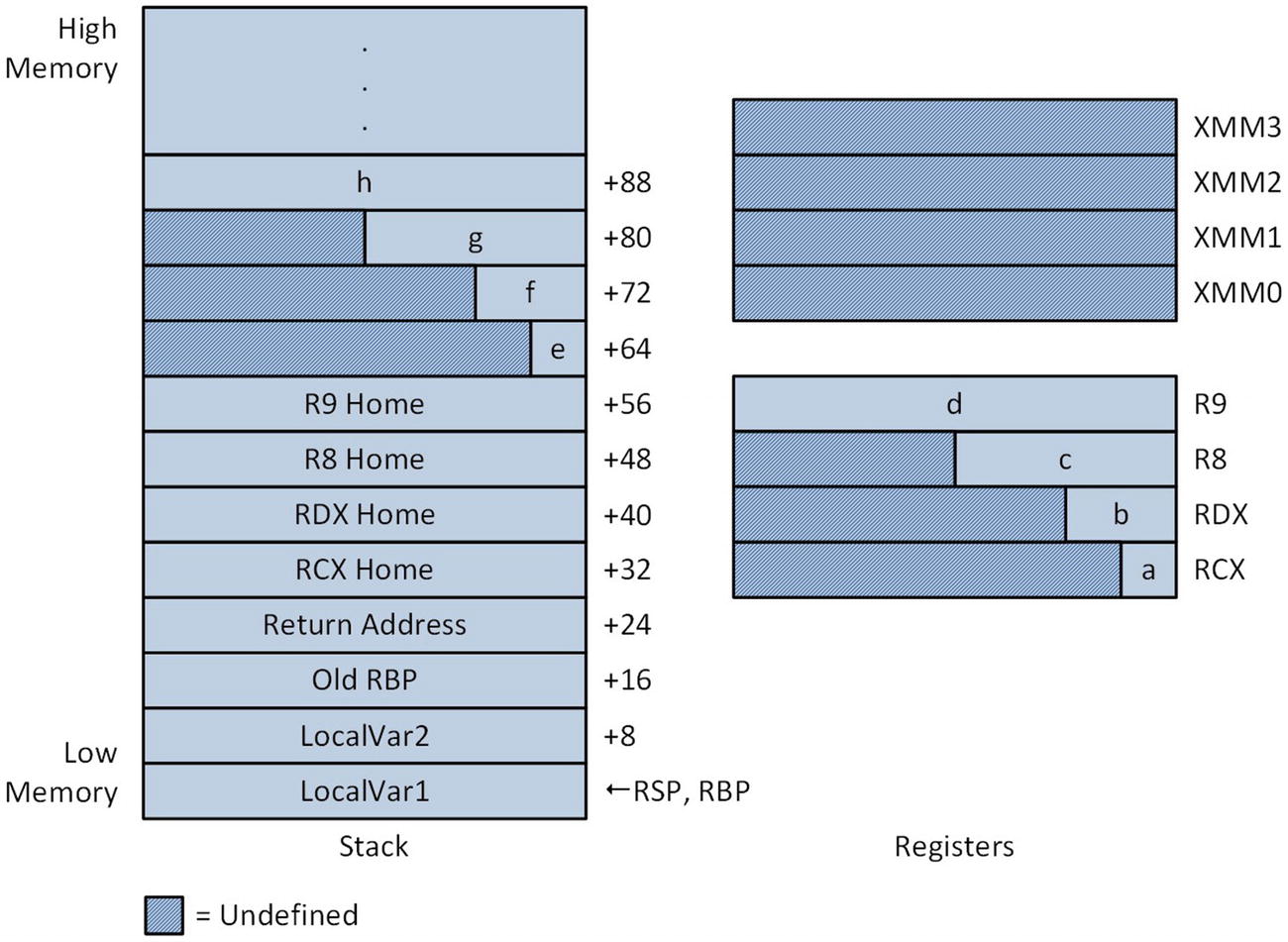
The mov rbp,rsp instruction initializes register RBP as the stack frame pointer, and the .setframe rbp,0 directive notifies the assembler of this action. The offset value 0 that’s included in the .setframe directive is the difference in bytes between RSP and RBP. In function Cc1_, registers RSP and RBP are the same so the offset value is zero. Later in this section, you learn more about the .setframe directive . It should be noted that assembly language functions can use any non-volatile register as a stack frame pointer. Using RBP provides consistency between x86-64 and legacy x86 assembly language code. The final assembler directive, .endprolog , signifies the end of the prolog for function Cc1_. Figure 5-3 shows the stack layout and argument registers following completion of the prolog.
../images/326959_2_En_5_Chapter/326959_2_En_5_Fig3_HTML.jpg
Figure 5-3.

Stack layout and argument registers of function Cc1_ following completion of prolog

The RBP_RA = 24 statement is a directive similar to an equate that assigns the value 24 to the symbol named RBP_RA. This represents the extra offset bytes (compared to a standard leaf function ) needed to correctly reference the home area of Cc1_, as shown in Figure 5-3. The next block of instructions saves registers RCX, RDX, R8, and R9 to their respective home areas on this stack. This step is optional and included in Cc1_ for illustrative purposes. Note that the offset of each mov instruction includes the symbolic constant RBP_RA. Another option allowed by the Visual C++ calling convention is to save an argument register to its corresponding home area prior to the push rbp instruction using RSP as a base register (e.g., mov [rsp+8],rcx, mov [rsp+16],rdx, and so on). Also keep in mind that a function can use its home area to store other temporary values. When used for alternative storage purposes, the home area should not be referenced by an assembly language instruction until after the .endprolog directive .

Following the home area save operation, the function Cc1_ sums argument values a, b, c, and d. It then saves this intermediate sum to LocalVar1 on the stack using a mov [rbp],r8 instruction. Note that the summation calculation sign-extends argument values a, b, and c using a movsx or movsxd instruction. A similar sequence of instructions is used to sum argument values e, f, g, and h, which are located on the stack and referenced using the stack frame pointer RBP and a constant offset. The symbolic constant RBP_RA is also used here to account for the extra stack space needed to reference argument values on the stack. The two intermediate sums are then added to produce the final result in register RAX.

A function epilog must release any local stack storage space that was allocated in the prolog, restore any non-volatile registers that were saved on the stack, and execute a function return. The add rsp,16 instruction releases the 16 bytes of stack space that Cc1_ allocated in its prolog. This is followed by a pop rbp instruction, which restores the caller’s RBP register. The obligatory ret instruction is next . Here is the output for example Ch05_09:
Results for Cc1
a = 10
b = -200
c = 300
d = 4000
e = -20
f = 400
g = -600
h = -8000
sum = -4110

Using Non-Volatile General-Purpose Registers

The next sample program is named Ch05_10 and demonstrates how to use the non-volatile general-purpose registers in a 64-bit assembly language function. It also provides additional programming details regarding stack frames and the use of local variables. Listing 5-10 shows the C++ and assembly language source code for sample program Ch05_10.
//------------------------------------------------
//        Ch05_10.cpp
//------------------------------------------------
#include "stdafx.h"
#include <iostream>
#include <iomanip>
#include <cstdint>
using namespace std;
extern "C" bool Cc2_(const int64_t* a, const int64_t* b, int32_t n, int64_t * sum_a, int64_t* sum_b, int64_t* prod_a, int64_t* prod_b);
int main()
{
  const int n = 6;
  int64_t a[n] = { 2, -2, -6, 7, 12, 5 };
  int64_t b[n] = { 3, 5, -7, 8, 4, 9 };
  int64_t sum_a, sum_b;
  int64_t prod_a, prod_b;
  bool rc = Cc2_(a, b, n, &sum_a, &sum_b, &prod_a, &prod_b);
  cout << "Results for Cc2\n\n";
  if (rc)
  {
    const int w = 6;
    const char nl = '\n';
    const char* ws = "  ";
    for (int i = 0; i < n; i++)
    {
      cout << "i: " << setw(w) << i << ws;
      cout << "a: " << setw(w) << a[i] << ws;
      cout << "b: " << setw(w) << b[i] << nl;
    }
    cout << nl;
    cout << "sum_a = " << setw(w) << sum_a << ws;
    cout << "sum_b = " << setw(w) << sum_b << nl;
    cout << "prod_a = " << setw(w) << prod_a << ws;
    cout << "prod_b = " << setw(w) << prod_b << nl;
  }
  else
    cout << "Invalid return code\n";
  return 0;
}
;-------------------------------------------------
;        Ch05_10.asm
;-------------------------------------------------
; extern "C" void Cc2_(const int64_t* a, const int64_t* b, int32_t n, int64_t* sum_a, int64_t* sum_b, int64_t* prod_a, int64_t* prod_b)
; Named expressions for constant values:
;
; NUM_PUSHREG  = number of prolog non-volatile register pushes
; STK_LOCAL1  = size in bytes of STK_LOCAL1 area (see figure in text)
; STK_LOCAL2  = size in bytes of STK_LOCAL2 area (see figure in text)
; STK_PAD    = extra bytes (0 or 8) needed to 16-byte align RSP
; STK_TOTAL   = total size in bytes of local stack
; RBP_RA    = number of bytes between RBP and ret addr on stack
NUM_PUSHREG   = 4
STK_LOCAL1   = 32
STK_LOCAL2   = 16
STK_PAD     = ((NUM_PUSHREG AND 1) XOR 1) * 8
STK_TOTAL    = STK_LOCAL1 + STK_LOCAL2 + STK_PAD
RBP_RA     = NUM_PUSHREG * 8 + STK_LOCAL1 + STK_PAD
    .const
TestVal db 0, 1, 2, 3, 4, 5, 6, 7, 8, 9, 10, 11, 12, 13, 14, 15
    .code
Cc2_  proc frame
; Save non-volatile GP registers on the stack
    push rbp
    .pushreg rbp
    push rbx
    .pushreg rbx
    push r12
    .pushreg r12
    push r13
    .pushreg r13
; Allocate local stack space and set frame pointer
    sub rsp,STK_TOTAL          ;allocate local stack space
    .allocstack STK_TOTAL
    lea rbp,[rsp+STK_LOCAL2]      ;set frame pointer
    .setframe rbp,STK_LOCAL2
    .endprolog             ;end of prolog
; Initialize local variables on the stack (demonstration only)
    vmovdqu xmm5, xmmword ptr [TestVal]
    vmovdqa xmmword ptr [rbp-16],xmm5  ;save xmm5 to LocalVar2A/2B
    mov qword ptr [rbp],0aah      ;save 0xaa to LocalVar1A
    mov qword ptr [rbp+8],0bbh     ;save 0xbb to LocalVar1B
    mov qword ptr [rbp+16],0cch     ;save 0xcc to LocalVar1C
    mov qword ptr [rbp+24],0ddh     ;save 0xdd to LocalVar1D
; Save argument values to home area (optional)
    mov qword ptr [rbp+RBP_RA+8],rcx
    mov qword ptr [rbp+RBP_RA+16],rdx
    mov qword ptr [rbp+RBP_RA+24],r8
    mov qword ptr [rbp+RBP_RA+32],r9
; Perform required initializations for processing loop
    test r8d,r8d            ;is n <= 0?
    jle Error              ;jump if n <= 0
    xor rbx,rbx             ;rbx = current element offset
    xor r10,r10             ;r10 = sum_a
    xor r11,r11             ;r11 = sum_b
    mov r12,1              ;r12 = prod_a
    mov r13,1              ;r13 = prod_b
; Compute the array sums and products
@@:   mov rax,[rcx+rbx]          ;rax = a[i]
    add r10,rax             ;update sum_a
    imul r12,rax            ;update prod_a
    mov rax,[rdx+rbx]          ;rax = b[i]
    add r11,rax             ;update sum_b
    imul r13,rax            ;update prod_b
    add rbx,8              ;set ebx to next element
    dec r8d               ;adjust count
    jnz @B               ;repeat until done
; Save the final results
    mov [r9],r10            ;save sum_a
    mov rax,[rbp+RBP_RA+40]       ;rax = ptr to sum_b
    mov [rax],r11            ;save sum_b
    mov rax,[rbp+RBP_RA+48]       ;rax = ptr to prod_a
    mov [rax],r12            ;save prod_a
    mov rax,[rbp+RBP_RA+56]       ;rax = ptr to prod_b
    mov [rax],r13            ;save prod_b
    mov eax,1              ;set return code to true
; Function epilog
Done:  lea rsp,[rbp+STK_LOCAL1+STK_PAD]  ;restore rsp
    pop r13               ;restore non-volatile GP registers
    pop r12
    pop rbx
    pop rbp
    ret
Error: xor eax,eax             ;set return code to false
    jmp Done
Cc2_  endp
    end
Listing 5-10.

Example Ch05_10

Similar to the previous example of this section, the purpose of the code C++ in Listing 5-10 is to prepare a simple test case in order to exercise the assembly language function Cc2_. In this example, the function Cc2_ calculates the sums and products of two 64-bit signed integer arrays. The results are then streamed to cout.

Toward the top of the assembly language code is a series of named constants that control how much stack space is allocated in the prolog of function Cc2_. Like the previous example, the function Cc2_ includes the frame attribute as part of its proc statement to indicate that it uses a stack frame pointer. A series of push instructions saves non-volatile registers RBP, RBX, R12, and R13 on the stack. Note that a .pushreg directive is used following each push instruction, which instructs the assembler to add information about each push instruction to the Visual C++ runtime exception handling tables .
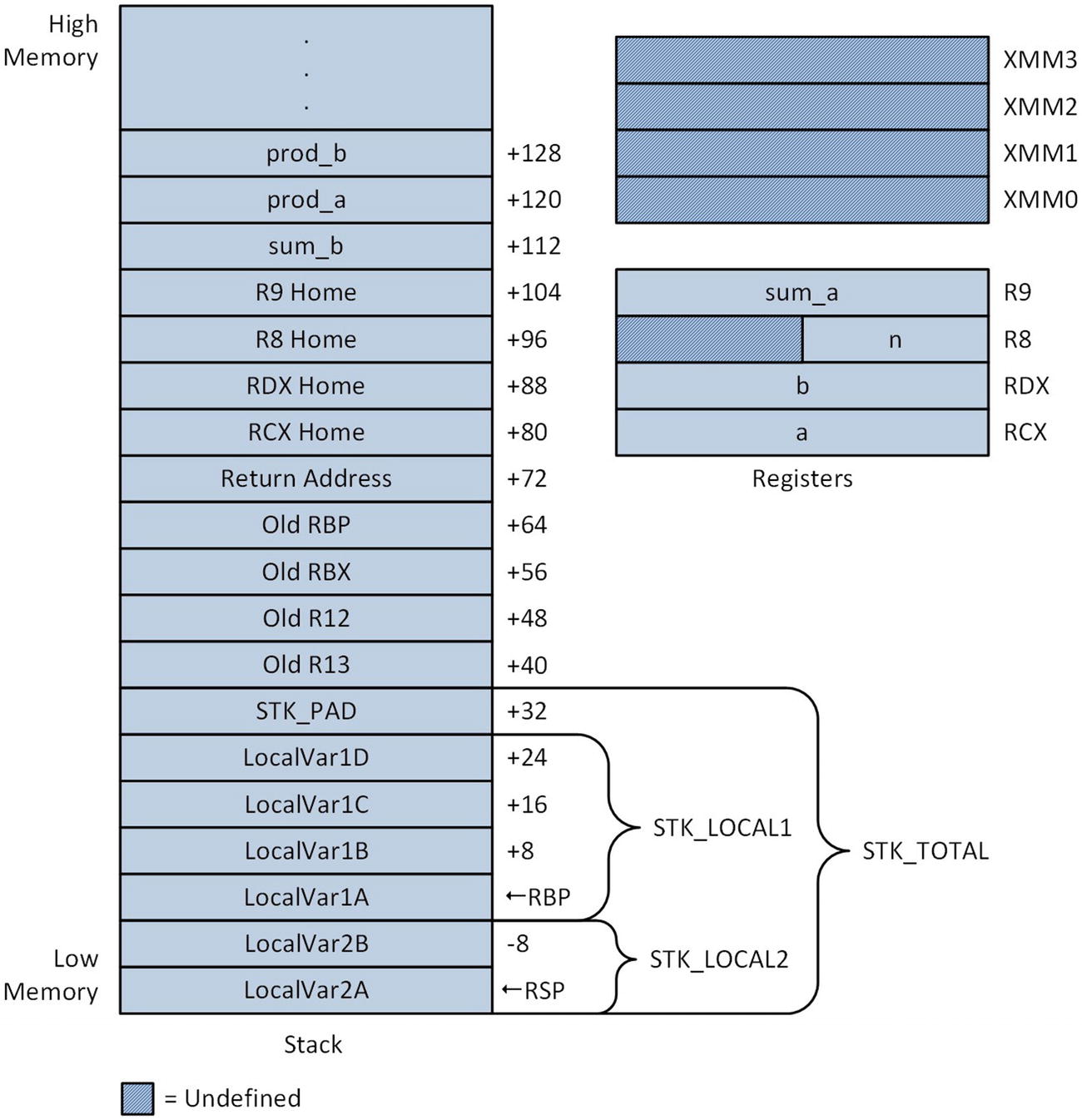
A sub rsp,STK_TOTAL instruction allocates space on the stack for local variables, and the required .allocstack STK_TOTAL directive follows next. Register RBP is then initialized as the function’s stack frame pointer using an lea rbp,[rsp+STK_LOCAL2] instruction, which sets RBP equal to rsp + STK_LOCAL2. Figure 5-4 illustrates the layout of the stack following execution of the lea instruction. Positioning RBP so that it “splits” the local stack area into two sections enables the assembler to generate machine code that's slightly more efficient since a larger portion of the local stack area can be referenced using signed 8-bit instead of signed 32-bit displacements. It also simplifies saving and restoring the non-volatile XMM registers , which is discussed later in this section. Following the lea instruction is a .setframe rbp,STK_LOCAL2 directive that enables the assembler to properly configure the runtime exception handling tables. Note that the size parameter of this directive must be an even multiple of 16 and less than or equal to 240. The .endprolog directive signifies the end of the prolog for function Cc2_.
../images/326959_2_En_5_Chapter/326959_2_En_5_Fig4_HTML.jpg
Figure 5-4.

Stack layout and argument registers following execution of the lea rbp,[rsp+STK_LOCAL2] instruction in function Cc2_

The next code block contains instructions that initialize the local variables on the stack . These instructions are for demonstration purposes only. Note that this block uses a vmovdqa [rbp-16],xmm5 instruction (Move Aligned Packed Integer Values), which requires its destination operand to be aligned on a 16-byte boundary. This instruction embodies the calling convention’s mandatory alignment of the RSP register to a 16-byte boundary. Following initialization of the local variables, the argument registers are saved to their home locations, also merely for demonstration purposes.

The logic of the main processing loop is straightforward. Following validation of argument value n, the function Cc2_ initializes the intermediate values sum_a (R10) and sum_b (R11) to 0, and prod_a (R12) and prod_b (R13) to 1. It then calculates the sum and product of the input arrays a and b. The final results are saved to the memory locations specified by the caller. Note that the pointers for sum_b, prod_a, and prod_b were passed to Cc2_ using the stack.

The epilog of function Cc2_ begins with a lea rsp,[rbp+STK_LOCAL1+STK_PAD] instruction that restores register RSP to the value it had just after the push r13 instruction in the prolog. When restoring RSP in an epilog, the Visual C++ calling convention specifies that either a lea rsp,[RFP+X] or add rsp,X instruction must be used, where RFP denotes the frame pointer register and X is a constant value. This limits the number of instruction patterns that the runtime exception handler must identify. The subsequent pop instructions restore the non-volatile general-purpose registers prior to execution of the ret instruction. According to the Visual C++ calling convention, function epilogs must be void of any processing logic including the setting of a return value since this simplifies the amount of processing that’s needed within the Visual C++ runtime exception handler. You’ll learn more about the requirements for function epilogs later in this chapter. The output for example Ch05_10 is the following :
Results for Cc2
i:   0  a:   2  b:   3
i:   1  a:   -2  b:   5
i:   2  a:   -6  b:   -7
i:   3  a:   7  b:   8
i:   4  a:   12  b:   4
i:   5  a:   5  b:   9
sum_a =   18  sum_b =   22
prod_a = 10080  prod_b = -30240

Using Non-Volatile XMM Registers

Earlier in this chapter, you learned how to use the volatile XMM registers to perform scalar floating-point arithmetic. The next source code example, Ch05_11, illustrates the prolog and epilog conventions that must be observed in order to use the non-volatile XMM registers. Listing 5-11 shows the C++ and assembly language source code for example Ch05_11.
//------------------------------------------------
//        Ch05_11.cpp
//------------------------------------------------
#include "stdafx.h"
#include <iostream>
#include <iomanip>
#define _USE_MATH_DEFINES
#include <math.h>
using namespace std;
extern "C" bool Cc3_(const double* r, const double* h, int n, double* sa_cone, double* vol_cone);
int main()
{
  const int n = 7;
  double r[n] = { 1, 1, 2, 2, 3, 3, 4.25 };
  double h[n] = { 1, 2, 3, 4, 5, 10, 12.5 };
  double sa_cone1[n], sa_cone2[n];
  double vol_cone1[n], vol_cone2[n];
  // Calculate surface area and volume of right-circular cones
  for (int i = 0; i < n; i++)
  {
    sa_cone1[i] = M_PI * r[i] * (r[i] + sqrt(r[i] * r[i] + h[i] * h[i]));
    vol_cone1[i] = M_PI * r[i] * r[i] * h[i] / 3.0;
  }
  Cc3_(r, h, n, sa_cone2, vol_cone2);
  cout << fixed;
  cout << "Results for Cc3\n\n";
  const int w = 14;
  const char nl = '\n';
  const char sp = ' ';
  for (int i = 0; i < n; i++)
  {
    cout << setprecision(2);
    cout << "r/h: " << setw(w) << r[i] << sp;
    cout << setw(w) << h[i] << nl;
    cout << setprecision(6);
    cout << "sa: " << setw(w) << sa_cone1[i] << sp;
    cout << setw(w) << sa_cone2[i] << nl;
    cout << "vol: " << setw(w) << vol_cone1[i] << sp;
    cout << setw(w) << vol_cone2[i] << nl;
    cout << nl;
  }
  return 0;
}
;-------------------------------------------------
;        Ch05_11.asm
;-------------------------------------------------
; extern "C" bool Cc3_(const double* r, const double* h, int n, double* sa_cone, double* vol_cone)
; Named expressions for constant values
;
; NUM_PUSHREG  = number of prolog non-volatile register pushes
; STK_LOCAL1  = size in bytes of STK_LOCAL1 area (see figure in text)
; STK_LOCAL2  = size in bytes of STK_LOCAL2 area (see figure in text)
; STK_PAD    = extra bytes (0 or 8) needed to 16-byte align RSP
; STK_TOTAL   = total size in bytes of local stack
; RBP_RA    = number of bytes between RBP and ret addr on stack
NUM_PUSHREG   = 7
STK_LOCAL1   = 16
STK_LOCAL2   = 64
STK_PAD     = ((NUM_PUSHREG AND 1) XOR 1) * 8
STK_TOTAL    = STK_LOCAL1 + STK_LOCAL2 + STK_PAD
RBP_RA     = NUM_PUSHREG * 8 + STK_LOCAL1 + STK_PAD
      .const
r8_3p0   real8 3.0
r8_pi    real8 3.14159265358979323846
    .code
Cc3_  proc frame
; Save non-volatile registers on the stack.
    push rbp
    .pushreg rbp
    push rbx
    .pushreg rbx
    push rsi
    .pushreg rsi
    push r12
    .pushreg r12
    push r13
    .pushreg r13
    push r14
    .pushreg r14
    push r15
    .pushreg r15
; Allocate local stack space and initialize frame pointer
    sub rsp,STK_TOTAL          ;allocate local stack space
    .allocstack STK_TOTAL
    lea rbp,[rsp+STK_LOCAL2]      ;rbp = stack frame pointer
    .setframe rbp,STK_LOCAL2
; Save non-volatile registers XMM12 - XMM15. Note that STK_LOCAL2 must
; be greater than or equal to the number of XMM register saves times 16.
    vmovdqa xmmword ptr [rbp-STK_LOCAL2+48],xmm12
    .savexmm128 xmm12,48
    vmovdqa xmmword ptr [rbp-STK_LOCAL2+32],xmm13
    .savexmm128 xmm13,32
    vmovdqa xmmword ptr [rbp-STK_LOCAL2+16],xmm14
    .savexmm128 xmm14,16
    vmovdqa xmmword ptr [rbp-STK_LOCAL2],xmm15
    .savexmm128 xmm15,0
    .endprolog
; Access local variables on the stack (demonstration only)
    mov qword ptr [rbp],-1       ;LocalVar1A = -1
    mov qword ptr [rbp+8],-2      ;LocalVar1B = -2
; Initialize the processing loop variables. Note that many of the
; register initializations below are performed merely to illustrate
; use of the non-volatile GP and XMM registers.
    mov esi,r8d             ;esi = n
    test esi,esi            ;is n > 0?
    jg @F                ;jump if n > 0
    xor eax,eax             ;set error return code
    jmp done
@@:   xor rbx,rbx             ;rbx = array element offset
    mov r12,rcx             ;r12 = ptr to r
    mov r13,rdx             ;r13 = ptr to h
    mov r14,r9             ;r14 = ptr to sa_cone
    mov r15,[rbp+RBP_RA+40]       ;r15 = ptr to vol_cone
    vmovsd xmm14,real8 ptr [r8_pi]   ;xmm14 = pi
    vmovsd xmm15,real8 ptr [r8_3p0]   ;xmm15 = 3.0
; Calculate cone surface areas and volumes
; sa = pi * r * (r + sqrt(r * r + h * h))
; vol = pi * r * r * h / 3
@@:   vmovsd xmm0,real8 ptr [r12+rbx]   ;xmm0 = r
    vmovsd xmm1,real8 ptr [r13+rbx]   ;xmm1 = h
    vmovsd xmm12,xmm12,xmm0       ;xmm12 = r
    vmovsd xmm13,xmm13,xmm1       ;xmm13 = h
    vmulsd xmm0,xmm0,xmm0     ;xmm0 = r * r
    vmulsd xmm1,xmm1,xmm1     ;xmm1 = h * h
    vaddsd xmm0,xmm0,xmm1     ;xmm0 = r * r + h * h
    vsqrtsd xmm0,xmm0,xmm0    ;xmm0 = sqrt(r * r + h * h)
    vaddsd xmm0,xmm0,xmm12    ;xmm0 = r + sqrt(r * r + h * h)
    vmulsd xmm0,xmm0,xmm12    ;xmm0 = r * (r + sqrt(r * r + h * h))
    vmulsd xmm0,xmm0,xmm14    ;xmm0 = pi * r * (r + sqrt(r * r + h * h))
    vmulsd xmm12,xmm12,xmm12    ;xmm12 = r * r
    vmulsd xmm13,xmm13,xmm14    ;xmm13 = h * pi
    vmulsd xmm13,xmm13,xmm12    ;xmm13 = pi * r * r * h
    vdivsd xmm13,xmm13,xmm15    ;xmm13 = pi * r * r * h / 3
    vmovsd real8 ptr [r14+rbx],xmm0   ;save surface area
    vmovsd real8 ptr [r15+rbx],xmm13   ;save volume
    add rbx,8              ;set rbx to next element
    dec esi               ;update counter
    jnz @B               ;repeat until done
    mov eax,1              ;set success return code
; Restore non-volatile XMM registers
Done:  vmovdqa xmm12,xmmword ptr [rbp-STK_LOCAL2+48]
    vmovdqa xmm13,xmmword ptr [rbp-STK_LOCAL2+32]
    vmovdqa xmm14,xmmword ptr [rbp-STK_LOCAL2+16]
    vmovdqa xmm15,xmmword ptr [rbp-STK_LOCAL2]
; Function epilog
    lea rsp,[rbp+STK_LOCAL1+STK_PAD]  ;restore rsp
    pop r15               ;restore NV GP registers
    pop r14
    pop r13
    pop r12
    pop rsi
    pop rbx
    pop rbp
    ret
Cc3_  endp
    end
Listing 5-11.

Example Ch05_11

The C++ code of example Ch05_11 contains code that calculates the surface area and volume of right-circular cones. It also exercises an assembly language function named Cc3_, which performs the same surface area and volume calculations. The following formulas are used to calculate a cone’s surface area and volume:
$$ sa=\pi r\left(r+\sqrt{r^2+{h}^2}\right) $$
$$ vol=\pi {r}^2h/3 $$
The function Cc3_ begins by saving the non-volatile general-purpose registers that it uses on the stack. It then allocates the specified amount of local stack space and initializes RBP as the stack frame pointer. The next code block saves non-volatile registers XMM12-XMM15 on the stack using a series of vmovdqa instructions. A .savexmm128 directive must be used after each vmovdqa instruction. Like the other prolog directives, the .savexmm128 directive instructs the assembler to store information regarding an XMM register save operation in its exception handling tables. The offset argument of a .savexmm128 directive represents the displacement of the saved XMM register on the stack relative to the RSP register. Note that the size of STK_LOCAL2 must be greater than or equal to the number of saved XMM registers multiplied by 16. Figure 5-5 illustrates the layout of the stack following execution of the vmovdqa xmmword ptr [rbp-STK_LOCAL2],xmm15 instruction.
../images/326959_2_En_5_Chapter/326959_2_En_5_Fig5_HTML.jpg
Figure 5-5.

Stack layout and argument registers following execution of the vmovdqa xmmword ptr [rbp-STK_LOCAL2],xmm15 instruction in function Cc3_

Following the prolog, local variables LocalVar1A and LocalVar1B are accessed for demonstration purposes only. Initialization of the registers used by the main processing loop occurs next. Note that many of these initializations are either suboptimal or superfluous; they are performed merely to elucidate use of the non-volatile and general-purpose and XMM registers. Calculation of the cone surface areas and volumes is then carried out using AVX double-precision floating-point arithmetic.

Subsequent to the completion of the processing loop, the non-volatile XMM registers are restored using a series of vmovdqa instructions. The function Cc3_ then releases its local stack space and restores the previously saved non-volatile general-purpose registers that it used. Here is the output for example Ch05_11.
Results for Cc3
r/h:      1.00      1.00
sa:    7.584476    7.584476
vol:    1.047198    1.047198
r/h:      1.00      2.00
sa:    10.166407   10.166407
vol:    2.094395    2.094395
r/h:      2.00      3.00
sa:    35.220717   35.220717
vol:   12.566371   12.566371
r/h:      2.00      4.00
sa:    40.665630   40.665630
vol:   16.755161   16.755161
r/h:      3.00      5.00
sa:    83.229761   83.229761
vol:   47.123890   47.123890
r/h:      3.00     10.00
sa:   126.671905   126.671905
vol:   94.247780   94.247780
r/h:      4.25     12.50
sa:   233.025028   233.025028
vol:   236.437572   236.437572

Macros for Prologs and Epilogs

The purpose of the previous three source code examples was to elucidate use of the Visual C++ calling convention for 64-bit non-leaf functions . The calling convention’s rigid requirements for function prologs and epilogs are somewhat lengthy and a potential source of programming errors. It is important to recognize that the stack layout of a non-leaf function is primarily determined by the number of non-volatile (both general-purpose and XMM) registers that must be preserved and the amount of local stack storage space that’s needed. A method is needed to automate most of the coding drudgery associated with the calling convention.

Listing 5-12 shows the C++ and assembly language source code for example Ch05_12. This source code example demonstrates how to use several macros that I’ve written to simplify the coding of a prolog and epilog in a non-leaf function. It also illustrates how to call a C++ library function.
//------------------------------------------------
//        Ch05_12.cpp
//------------------------------------------------
#include "stdafx.h"
#include <iostream>
#include <iomanip>
#include <cmath>
using namespace std;
extern "C" bool Cc4_(const double* ht, const double* wt, int n, double* bsa1, double* bsa2, double* bsa3);
int main()
{
  const int n = 6;
  const double ht[n] = { 150, 160, 170, 180, 190, 200 };
  const double wt[n] = { 50.0, 60.0, 70.0, 80.0, 90.0, 100.0 };
  double bsa1_a[n], bsa1_b[n];
  double bsa2_a[n], bsa2_b[n];
  double bsa3_a[n], bsa3_b[n];
  for (int i = 0; i < n; i++)
  {
    bsa1_a[i] = 0.007184 * pow(ht[i], 0.725) * pow(wt[i], 0.425);
    bsa2_a[i] = 0.0235 * pow(ht[i], 0.42246) * pow(wt[i], 0.51456);
    bsa3_a[i] = sqrt(ht[i] * wt[i] / 3600.0);
  }
  Cc4_(ht, wt, n, bsa1_b, bsa2_b, bsa3_b);
  cout << "Results for Cc4_\n\n";
  cout << fixed;
  const char sp = ' ';
  for (int i = 0; i < n; i++)
  {
    cout << setprecision(1);
    cout << "height: " << setw(6) << ht[i] << " cm\n";
    cout << "weight: " << setw(6) << wt[i] << " kg\n";
    cout << setprecision(6);
    cout << "BSA (C++):  ";
    cout << setw(10) << bsa1_a[i] << sp;
    cout << setw(10) << bsa2_a[i] << sp;
    cout << setw(10) << bsa3_a[i] << " (sq. m)\n";
    cout << "BSA (X86-64): ";
    cout << setw(10) << bsa1_b[i] << sp;
    cout << setw(10) << bsa2_b[i] << sp;
    cout << setw(10) << bsa3_b[i] << " (sq. m)\n\n";
  }
  return 0;
}
;-------------------------------------------------
;        Ch05_12.asm
;-------------------------------------------------
; extern "C" bool Cc4_(const double* ht, const double* wt, int n, double* bsa1, double* bsa2, double* bsa3);
    include <MacrosX86-64-AVX.asmh>
        .const
r8_0p007184   real8 0.007184
r8_0p725    real8 0.725
r8_0p425    real8 0.425
r8_0p0235    real8 0.0235
r8_0p42246   real8 0.42246
r8_0p51456   real8 0.51456
r8_3600p0    real8 3600.0
    .code
    extern pow:proc
Cc4_ proc frame
    _CreateFrame Cc4_,16,64,rbx,rsi,r12,r13,r14,r15
    _SaveXmmRegs xmm6,xmm7,xmm8,xmm9
    _EndProlog
; Save argument registers to home area (optional). Note that the home
; area can also be used to store other transient data values.
    mov qword ptr [rbp+Cc4_OffsetHomeRCX],rcx
    mov qword ptr [rbp+Cc4_OffsetHomeRDX],rdx
    mov qword ptr [rbp+Cc4_OffsetHomeR8],r8
    mov qword ptr [rbp+Cc4_OffsetHomeR9],r9
; Initialize processing loop pointers. Note that the pointers are
; maintained in non-volatile registers, which eliminates reloads
; after the calls to pow().
    test r8d,r8d              ;is n > 0?
    jg @F                  ;jump if n > 0
    xor eax,eax               ;set error return code
    jmp Done
@@:   mov [rbp],r8d              ;save n to local var
    mov r12,rcx               ;r12 = ptr to ht
    mov r13,rdx               ;r13 = ptr to wt
    mov r14,r9               ;r14 = ptr to bsa1
    mov r15,[rbp+Cc4_OffsetStackArgs]    ;r15 = ptr to bsa2
    mov rbx,[rbp+Cc4_OffsetStackArgs+8]   ;rbx = ptr to bsa3
    xor rsi,rsi               ;array element offset
; Allocate home space on stack for use by pow()
    sub rsp,32
; Calculate bsa1 = 0.007184 * pow(ht, 0.725) * pow(wt, 0.425);
@@:   vmovsd xmm0,real8 ptr [r12+rsi]       ;xmm0 = height
    vmovsd xmm8,xmm8,xmm0
    vmovsd xmm1,real8 ptr [r8_0p725]
    call pow                  ;xmm0 = pow(ht, 0.725)
    vmovsd xmm6,xmm6,xmm0
    vmovsd xmm0,real8 ptr [r13+rsi]       ;xmm0 = weight
    vmovsd xmm9,xmm9,xmm0
    vmovsd xmm1,real8 ptr [r8_0p425]
    call pow                  ;xmm0 = pow(wt, 0.425)
    vmulsd xmm6,xmm6,real8 ptr [r8_0p007184]
    vmulsd xmm6,xmm6,xmm0            ;xmm6 = bsa1
; Calculate bsa2 = 0.0235 * pow(ht, 0.42246) * pow(wt, 0.51456);
    vmovsd xmm0,xmm0,xmm8            ;xmm0 = height
    vmovsd xmm1,real8 ptr [r8_0p42246]
    call pow                  ;xmm0 = pow(ht, 0.42246)
    vmovsd xmm7,xmm7,xmm0
    vmovsd xmm0,xmm0,xmm9            ;xmm0 = weight
    vmovsd xmm1,real8 ptr [r8_0p51456]
    call pow                  ;xmm0 = pow(wt, 0.51456)
    vmulsd xmm7,xmm7,real8 ptr [r8_0p0235]
    vmulsd xmm7,xmm7,xmm0            ;xmm7 = bsa2
; Calculate bsa3 = sqrt(ht * wt / 60.0);
    vmulsd xmm8,xmm8,xmm9
    vdivsd xmm8,xmm8,real8 ptr [r8_3600p0]
    vsqrtsd xmm8,xmm8,xmm8         ;xmm8 = bsa3
; Save BSA results
    vmovsd real8 ptr [r14+rsi],xmm6     ;save bsa1 result
    vmovsd real8 ptr [r15+rsi],xmm7     ;save bsa2 result
    vmovsd real8 ptr [rbx+rsi],xmm8     ;save bsa3 result
    add rsi,8                ;update array offset
    dec dword ptr [rbp]           ;n = n - 1
    jnz @B
    mov eax,1                ;set success return code
Done:  _RestoreXmmRegs xmm6,xmm7,xmm8,xmm9
    _DeleteFrame rbx,rsi,r12,r13,r14,r15
    ret
Cc4_ endp
    end
Listing 5-12.

Example Ch05_12

The purpose of the code in main is to initialize several test cases and exercise the assembly language function Cc4_. This function computes estimates of human body surface area (BSA) using several well-known equations. These equations are defined in Table 5-4. In this table, each equation uses the symbol H for height in centimeters, W for weight in kilograms, and BSA for body surface area in square meters.
Table 5-4.

Body Surface Area Equations

Formula

Equation

DuBois and DuBois

BSA = 0.007184 × H 0.725 × W 0.425

Gehan and George

BSA = 0.0235 × H 0.42246 × W 0.51456

Mosteller

$$ BSA=\sqrt{H\times W/3600} $$

The assembly language code for example Ch05_12 begins with an include statement that incorporates the contents of the file MacrosX86-64-AVX.asmh. This file (source code not shown but included with the Chapter 5 download package) contains a number of macros that help automate much of the coding grunt work that’s associated with the Visual C++ calling convention. A macro is an assembler text substitution mechanism that enables a programmer to represent a sequence of assembly language instructions, data definitions, or other statements using a single text string. Assembly language macros are typically employed to generate sequences of instructions that will be used more than once. Macros are also frequently used to avoid the performance overhead of a function call. Source code example Ch05_12 demonstrates the use of the calling convention macros. You learn how to define your own macros later in this book.
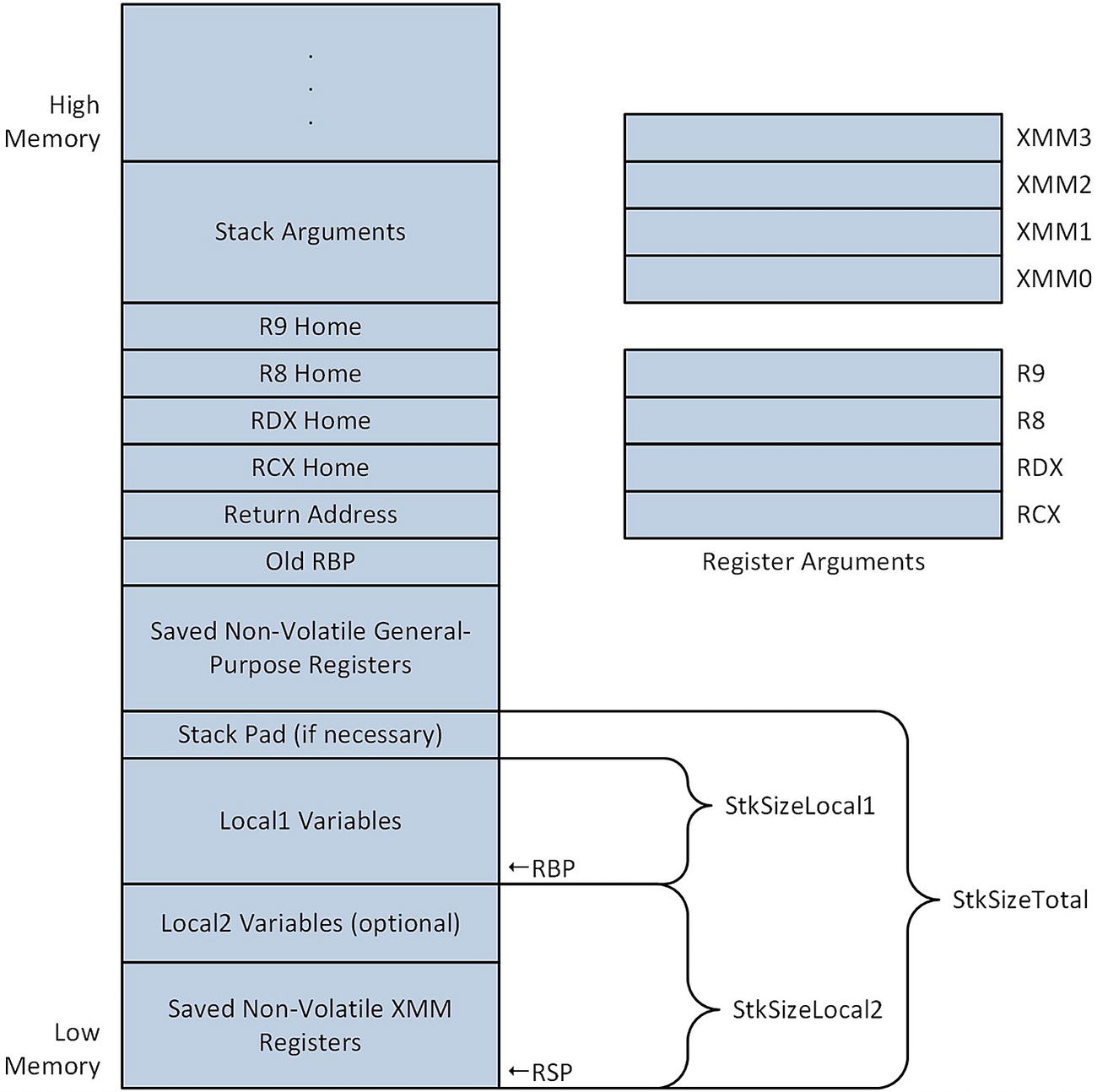
Figure 5-6 shows a generic stack layout diagram for a non-leaf function . Note the similarities between this figure and the more detailed stack layouts of Figures 5-4 and 5-5. The macros defined in MacrosX86-64-AVX.asmh assume that a function’s basic stack layout will conform to what’s shown in Figure 5-6. They enable a function to tailor its own detailed stack frame by specifying the amount of local stack space that’s needed and which non-volatile registers must be preserved. The macros also perform most of the required stack offset calculations, which reduces the risk of a programming error in the prolog or epilog .
../images/326959_2_En_5_Chapter/326959_2_En_5_Fig6_HTML.jpg
Figure 5-6.

Generic stack layout for a non-leaf function

Returning to the assembly code , immediately after the include statement is a .const section that contains definitions for the various floating-point constant values used in the BSA equations. The line extern pow:proc enables use of the external C++ library function pow. Following the Cc4_ proc frame statement , the macro _CreateFrame is used to generate the code that initializes the function’s stack frame . It also saves the specified non-volatile general-purpose registers on the stack. The macro requires several additional parameters, including a prefix string and the size in bytes of StkSizeLocal1 and StkSizeLocal2 (see Figure 5-6). The macro _CreateFrame uses the specified prefix string to create symbolic names that can be employed to reference items on the stack. It’s somewhat convenient to use a shortened version of the function name as the prefix string but any unique text string can be used. Both StkSizeLocal1 and StkSizeLocal2 must be evenly divisible by 16. StkSizeLocal2 must also be less than or equal to 240, and greater than or equal to the number of saved XMM registers multiplied by 16.

The next statement uses the _SaveXmmRegs macro to save the specified non-volatile XMM registers to the XMM save area on the stack. This is followed by the _EndProlog macro, which signifies the end of the function’s prolog. Subsequent to the completion of the prolog, register RBP is configured as the function’s stack frame pointer. It is also safe to use any of the saved non-volatile general-purpose or XMM registers subsequent to the _EndProlog macro.

The block of instructions that follows _EndProlog saves the argument registers to their home locations on the stack. Note that each mov instruction includes a symbolic name that equates to the offset of the register’s home area on the stack relative to the RBP register. The symbolic names and the corresponding offset values were automatically generated by the _CreateFrame macro. The home area can also be used to store temporary data instead of the argument registers, as mentioned earlier in this chapter.

Initialization of the processing loop variables occurs next. The value n in register R8D is checked for validity and saved on the stack as a local variable. Several non-volatile registers are then initialized as pointer registers. Non-volatile registers are used in order to avoid register reloads following each call to the C++ library function pow. Note that the pointer to array bsa2 is loaded from the stack using a mov r15,[rbp+Cc4_OffsetStackArgs] instruction. The symbolic constant Cc4_OffsetStackArgs also was automatically generated by the macro _CreateFrame and equates to the offset of the first stack argument relative to the RBP register. A mov rbx,[rbp+Cc4_OffsetStackArgs+8] instruction loads argument bsa3 into register RBX; the constant 8 is included as part of the source operand displacement since bsa3 is the second argument passed via the stack.

The Visual C++ calling convention requires the caller of a function to allocate that function’s home area on the stack. The sub rsp,32 instruction performs this operation. The ensuing block of code calculates the BSA values using the equations shown in Table 5-4. Note that registers XMM0 and XMM1 are loaded with the necessary argument values prior to each call to pow. Also note that some of the return values from pow are preserved in non-volatile XMM registers prior to their actual use.

Following completion of the BSA processing loop is the epilog for Cc4_. Before execution of the ret instruction, the function must restore all non-volatile XMM and general-purpose registers that it saved in the prolog. The stack frame must also be properly deleted. The _RestoreXmmRegs macro restores the non-volatile XMM registers. Note that this macro requires the order of the registers in its argument list to match the register list that was used with the _SaveXmmRegs macro. Stack frame cleanup and general-purpose register restores are handled by the _DeleteFrame macro. The order of the registers specified in this macro’s argument list must be identical to the prolog’s _CreateFrame macro. The _DeleteFrame macro also restores register RSP from RBP, which means that it’s not necessary to include an explicit add rsp,32 instruction to release the home area allocated on the stack for pow. Here’s the output for example Ch05_12.
Results for Cc4
height: 150.0 cm
weight:  50.0 kg
BSA (C++):   1.432500  1.460836  1.443376 (sq. m)
BSA (X86-64):  1.432500  1.460836  1.443376 (sq. m)
height: 160.0 cm
weight:  60.0 kg
BSA (C++):   1.622063  1.648868  1.632993 (sq. m)
BSA (X86-64):  1.622063  1.648868  1.632993 (sq. m)
height: 170.0 cm
weight:  70.0 kg
BSA (C++):   1.809708  1.831289  1.818119 (sq. m)
BSA (X86-64):  1.809708  1.831289  1.818119 (sq. m)
height: 180.0 cm
weight:  80.0 kg
BSA (C++):   1.996421  2.009483  2.000000 (sq. m)
BSA (X86-64):  1.996421  2.009483  2.000000 (sq. m)
height: 190.0 cm
weight:  90.0 kg
BSA (C++):   2.182809  2.184365  2.179449 (sq. m)
BSA (X86-64):  2.182809  2.184365  2.179449 (sq. m)
height: 200.0 cm
weight: 100.0 kg
BSA (C++):   2.369262  2.356574  2.357023 (sq. m)
BSA (X86-64):  2.369262  2.356574  2.357023 (sq. m)

Summary

Here are the key learning points for Chapter 5:
  • The vadds[d|s], vsubs[d|s], vmuls[d|s], vdivs[d|s], and vsqrts[d|s] instructions perform basic double-precision and single-precision floating-point arithmetic.

  • The vmovs[d|s] instructions copy a scalar floating-point value from one XMM register to another; they are also used to load/store scalar floating-point values from/to memory.

  • The vcoms[d|s] instructions compare two scalar floating-point values and set the status flags in RFLAGS to signify the result.

  • The vcmps[d|s] instructions compare two scalar floating-point values using a compare predicate. If the compare predicate is true, the destination operand is set to all ones; otherwise, it is set to all zeros.

  • The vcvts[d|s]2si instructions convert a scalar floating-point value to a signed integer value; the vcvtsi2s[d|s] instructions perform the opposite conversion.

  • The vcvtsd2ss instruction converts a scalar double-precision floating-point value to single-precision; the vcvtss2sd instruction performs the opposite conversion.

  • The vldmxcsr instruction loads a value into the MXCSR register; the vstmxcsr instruction saves the current contents of the MXCSR register.

  • Leaf functions can be used for simple processing tasks and do not require a prolog or epilog. A non-leaf function must use a prolog and epilog to save and restore non-volatile registers, initialize a stack frame pointer, allocate local storage space on the stack, or call other functions.