© Daniel Kusswurm 2018
Daniel KusswurmModern X86 Assembly Language Programminghttps://doi.org/10.1007/978-1-4842-4063-2_3

3. X86-64 Core Programming – Part 2

Daniel Kusswurm1 
(1)
Geneva, IL, USA
 

The previous chapter introduced the fundamentals of x86-64 assembly language programming. You learned how to use the x86-64 instruction set to perform integer addition, subtraction, multiplication, and division. You also examined source code that illustrated use of logical instructions, shift operations, memory addressing modes, and conditional jumps and moves. In addition to learning about frequently used instructions, your initiation to x86-64 assembly language programming has also covered important practical details including assembler directives and calling convention requirements.

In this chapter, your exploration of x86-64 assembly language programming fundamentals continues. You’ll learn how to use additional x86-64 instructions and assembler directives. You’ll also study source code that elucidates how to manipulate common programming constructs including arrays and data structures. This chapter concludes with several examples that demonstrate use of the x86’s string instructions.

Arrays

Arrays are an indispensable data construct in virtually all programming languages. In C++ there is an inherent connection between arrays and pointers since the name of an array is essentially a pointer to its first element. Moreover, whenever an array is used as a C++ function parameter, a pointer is passed instead of duplicating the array on the stack. Pointers are also employed for arrays that are dynamically allocated at runtime. This section examines x86-64 assembly language code that processes arrays. The first two sample programs demonstrate how to perform simple operations using one-dimensional arrays. This is followed by two examples that explain the techniques necessary to access the elements of a two-dimensional array.

One-Dimensional Arrays

In C++ one-dimensional arrays are stored in a contiguous block of memory that can be statically allocated at compile time or dynamically during program execution. The elements of a C++ array are accessed using zero-based indexing, which means that valid indices for an array of size N range from 0 to N-1. The sample code of this section includes examples that carry out basic operations with one-dimensional arrays using the x86-64 instruction set.

Accessing Elements

Listing 3-1 shows the source code for example Ch03_01. In this example, the function CalcArraySum_ sums the elements of an integer array. Near the top of the C++ code is the now familiar declaration for the assembly-language function CalcArraySum_. The summing calculation that’s performed by this function is duplicated in the C++ function CalcArraySumCpp for comparison purposes.
//------------------------------------------------
//        Ch03_01.cpp
//------------------------------------------------
#include "stdafx.h"
#include <iostream>
#include <iomanip>
using namespace std;
extern "C" int CalcArraySum_(const int* x, int n);
int CalcArraySumCpp(const int* x, int n)
{
  int sum = 0;
  for (int i = 0; i < n; i++)
    sum += *x++;
  return sum;
}
int main()
{
  int x[] {3, 17, -13, 25, -2, 9, -6, 12, 88, -19};
  int n = sizeof(x) / sizeof(int);
  cout << "Elements of array x" << '\n';
  for (int i = 0; i < n; i++)
    cout << "x[" << i << "] = " << x[i] << '\n';
  cout << '\n';
  int sum1 = CalcArraySumCpp(x, n);
  int sum2 = CalcArraySum_(x, n);
  cout << "sum1 = " << sum1 << '\n';
  cout << "sum2 = " << sum2 << '\n';
  return 0;
}
;-------------------------------------------------
;        Ch03_01.asm
;-------------------------------------------------
; extern "C" int CalcArraySum_(const int* x, int n)
;
; Returns:   Sum of elements in array x
    .code
CalcArraySum_ proc
; Initialize sum to zero
    xor eax,eax             ;sum = 0
; Make sure 'n' is greater than zero
    cmp edx,0
    jle InvalidCount          ;jump if n <= 0
; Sum the elements of the array
@@:   add eax,[rcx]            ;add next element to total (sum += *x)
    add rcx,4              ;set pointer to next element (x++)
    dec edx               ;adjust counter (n -= 1)
    jnz @B               ;repeat if not done
InvalidCount:
    ret
CalcArraySum_ endp
    end
Listing 3-1.

Example Ch03_01

The function CalcArraySum_ begins with an xor eax,eax instruction that initializes the running sum to zero. The cmp edx,0 and jle InvalidCount instructions prevent execution of the summing loop if n <= 0 is true. Sweeping through the array to sum the elements requires only four instructions. The add eax,[rcx] instruction adds the current array element to the running sum in register EAX. Four is then added to register RCX so that it points to the next element in the array. The constant four is used here since the size of each integer in array x is four bytes. A dec edx (Decrement by 1) instruction subtracts 1 from the counter and updates the state of RFLAGS.ZF. This enables the jnz instruction to terminate the loop after all n elements have been summed. The instruction sequence employed here to calculate the array element sum is the assembly language equivalent of the for loop that’s used in function CalcArraySumCpp. Here’s the output for Ch03_01:
Elements of array x
x[0] = 3
x[1] = 17
x[2] = -13
x[3] = 25
x[4] = -2
x[5] = 9
x[6] = -6
x[7] = 12
x[8] = 88
x[9] = -19
sum1 = 114
sum2 = 114

Using Elements in Calculations

When working with arrays, it is frequently necessary to define functions that perform element-by-element transformations. The next source code example, named Ch03_02, illustrates an array transformation operation using separate source and destination arrays. It also introduces function prologs and epilogs, and a few new instructions. Listing 3-2 shows the source code for example Ch03_02.
//------------------------------------------------
//        Ch03_02.cpp
//------------------------------------------------
#include "stdafx.h"
#include <iostream>
#include <iomanip>
#include <cassert>
using namespace std;
extern "C" long long CalcArrayValues_(long long* y, const int* x, int a, short b, int n);
long long CalcArrayValuesCpp(long long* y, const int* x, int a, short b, int n)
{
  long long sum = 0;
  for (int i = 0; i < n; i++)
  {
    y[i] = (long long)x[i] * a + b;
    sum += y[i];
  }
  return sum;
}
int main()
{
  const int a = -6;
  const short b = -13;
  const int x[] {26, 12, -53, 19, 14, 21, 31, -4, 12, -9, 41, 7};
  const int n = sizeof(x) / sizeof(int);
  long long y1[n];
  long long y2[n];
  long long sum_y1 = CalcArrayValuesCpp(y1, x, a, b, n);
  long long sum_y2 = CalcArrayValues_(y2, x, a, b, n);
  cout << "a = " << a << '\n';
  cout << "b = " << b << '\n';
  cout << "n = " << n << "\n\n";
  for (int i = 0; i < n; i++)
  {
    cout << "i: " << setw(2) << i << " ";
    cout << "x: " << setw(6) << x[i] << " ";
    cout << "y1: " << setw(6) << y1[i] << " ";
    cout << "y2: " << setw(6) << y2[i] << '\n';
  }
  cout << '\n';
  cout << "sum_y1 = " << sum_y1 << '\n';
  cout << "sum_y2 = " << sum_y2 << '\n';
  return 0;
}
;-------------------------------------------------
;        Ch03_02.asm
;-------------------------------------------------
; extern "C" long long CalcArrayValues_(long long* y, const int* x, int a, short b, int n);
;
; Calculation: y[i] = x[i] * a + b
;
; Returns:   Sum of the elements in array y.
    .code
CalcArrayValues_ proc frame
; Function prolog
    push rsi              ;save volatile register rsi
    .pushreg rsi
    push rdi              ;save volatile register rdi
    .pushreg rdi
    .endprolog
; Initialize sum to zero and make sure 'n' is valid
    xor rax,rax             ;sum = 0
    mov r11d,[rsp+56]          ;r11d = n
    cmp r11d,0
    jle InvalidCount          ;jump if n <= 0
; Initialize source and destination pointers
    mov rsi,rdx             ;rsi = ptr to array x
    mov rdi,rcx             ;rdi = ptr to array y
; Load expression constants and array index
    movsxd r8,r8d            ;r8 = a (sign extended)
    movsx r9,r9w            ;r9 = b (sign extended)
    xor edx,edx             ;edx = array index i
; Repeat until done
@@:   movsxd rcx,dword ptr [rsi+rdx*4]  ;rcx = x[i] (sign extended)
    imul rcx,r8             ;rcx = x[i] * a
    add rcx,r9             ;rcx = x[i] * a + b
    mov qword ptr [rdi+rdx*8],rcx    ;y[i] = rcx
    add rax,rcx             ;update running sum
    inc edx               ;edx = i + i
    cmp edx,r11d            ;is i >= n?
    jl @B                ;jump if i < n
InvalidCount:
; Function epilog
    pop rdi               ;restore caller's rdi
    pop rsi               ;restore caller's rsi
    ret
CalcArrayValues_ endp
    end
Listing 3-2.

Example Ch03_02

The x86-64 assembly language function CalcArrayValues_ computes y[i] = x[i] * a + b. If you examine the declaration for this function in the C++ code, you will notice that the source array x is declared as an int while the destination array y is declared as long long. The other function arguments a, b, and n are declared as int, short, and int respectively. The remainder of the C++ code includes the function CalcArrayValuesCpp that also computes the specified array transformation for comparison purposes. It also includes code to display the results.

You may have noticed that in all of the sample source code presented thus far, only a subset of the general-purpose registers have been used. The reason for this is that the Visual C++ calling convention designates each general-purpose register as either volatile or non-volatile. Functions are permitted to use and alter the contents of any volatile register but cannot use a non-volatile register unless it preserves the caller’s original value. The Visual C++ calling convention designates registers RAX, RCX, RDX, R8, R9, R10, and R11 as volatile and the remaining general-purpose registers as non-volatile.

The function CalcArrayValues_ uses non-volatile registers RSI and RDI, which means that their values must be preserved. A function typically saves the values of any non-volatile registers it uses on the stack in a section of code called the prolog. A function epilog contains code that restores the values of any saved non-volatile registers. Function prologs and epilogs are also used to perform other calling-convention initialization tasks and you’ll learn about these in Chapter 5.

In the assembly language code for Ch03_02, the statement CalcArrayValues_ proc frame denotes the start of function CalcArrayValues_. Note the frame attribute on the proc directive. This attribute indicates that CalcArrayValues_ uses a formal function prolog. It also enables additional directives that must be used whenever a general-purpose register is saved on the stack or whenever a function employs a stack frame pointer. Chapter 5 discusses the frame attribute and stack frame pointers in greater detail.

The first x86-64 assembly language instruction of CalcArrayValues_ is push rsi (Push Value onto Stack), which saves the current value in register RSI on the stack. Immediately following this is a .pushreg rsi directive. This directive instructs the assembler to save information about push rsi instruction in an assembler-maintained table that is used to unwind the stack during exception processing. Using exceptions with assembly language code is not discussed in this book but the calling convention requirements for saving registers on the stack must still be observed. Register RDI is then saved on the stack using a push rdi instruction. The required .pushreg rdi directive follows next and the subsequent .endprolog directive signifies the end of the prolog for CalcArrayValues_.
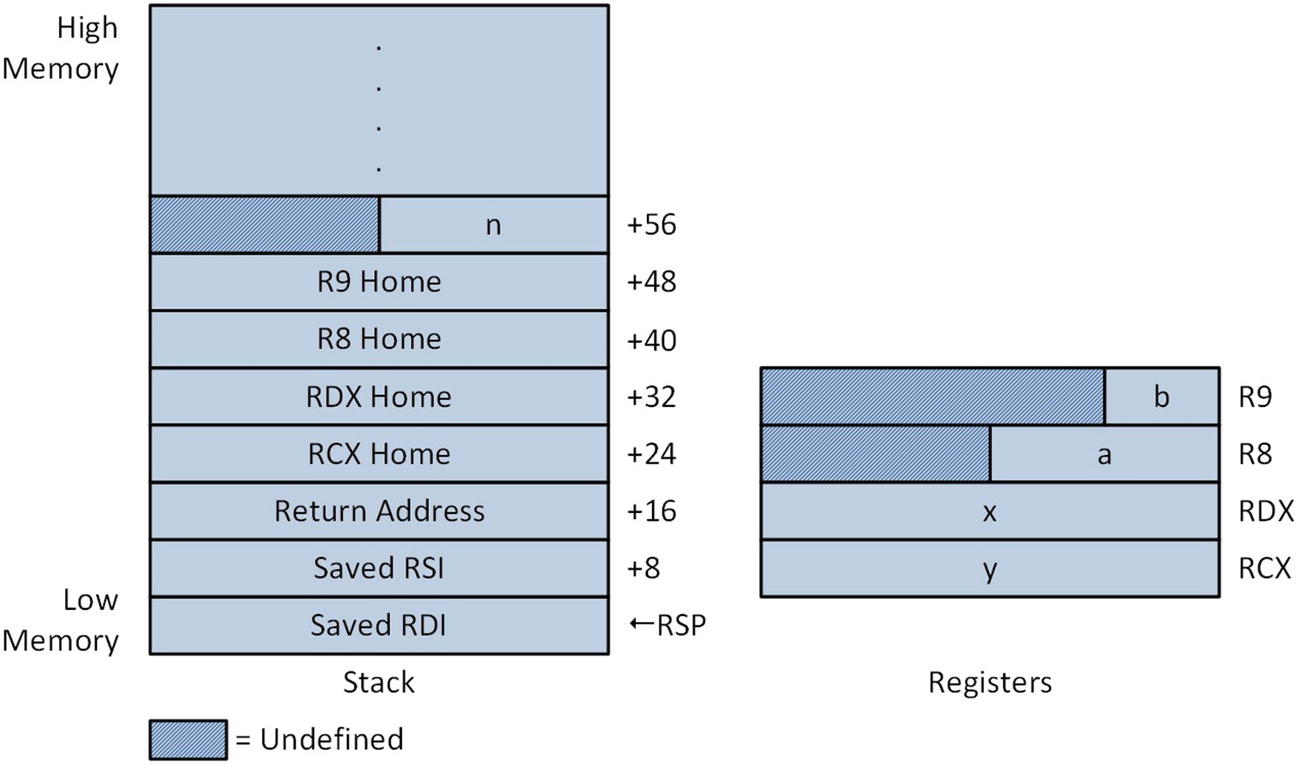
Figure 3-1 illustrates the contents of the stack after execution of the push rsi and push rdi instructions. Following the function prolog, argument n is tested for validity. A mov r11d,[rsp+56] loads the value of n into register R11D. It is important to note that the displacement used in this instruction to load n from the stack is different than in previous examples due to the push instructions that were used in the prolog. If the value of n is valid, registers RSI and RDI are initialized as pointers to the arrays x and y. The movsxd r8,r8d and movsx r9,r9w instructions load argument values a and b into registers R8 and R9 while the xor edx,edx instructions initializes array index i to zero.
../images/326959_2_En_3_Chapter/326959_2_En_3_Fig1_HTML.jpg
Figure 3-1.

Stack and register contents after prolog in CalcArrayValues_

The processing loop of CalcArrayValues_ uses a movsxd rcx,dword ptr [rsi+rdx*4] instruction to load a sign-extended copy of x[i] into register RCX. The ensuing imul rcx,r8 and add rcx,r9 instructions calculate x[i] * a + b and the mov qword ptr [rdi+rdx*8] instruction saves the final result to y[i]. Note that in the processing loop, the two move instructions use different scale factors. This is because array x and array y are declared as int and long long. The add rax,rcx instruction updates a running sum that will be used as the return value. The inc edx (Increment by 1) instruction adds 1 to the value that’s in register EDX. It also zeros bits 63:32 of register RDX. The reason for using an inc edx instruction instead of an inc rdx instruction is that the machine language encoding of the former requires less code space. More importantly, it is okay to use an inc edx instruction here since the maximum number of elements to be processed is specified by a 32-bit signed integer (n) that’s already been validated as being greater than zero. The following cmp edx,r11d instruction compares the contents of EDX (which is i) to n, and the processing loop repeats until i equals n.

After the main processing loop is the epilog for function CalcArrayValues_. Recall that in the prolog, the caller’s RSI and RDI registers were saved on the stack using two push instructions. In the epilog, the instructions pop rdi and pop rsi (Pop Value from Stack) are used to restore the caller’s RDI and RSI registers. The order in which a caller’s non-volatile register are popped from the stack in an epilog must be the reverse of how they were saved in the prolog. Following non-volatile register restoration is a ret instruction that transfers program control back to the calling function. Given the stack operations that occur in a function’s prolog and epilog, it should be readily apparent that failure to properly save or restore a non-volatile register is likely to cause a program crash (if the return address is incorrect) or a subtle software bug that may be difficult to pinpoint. Here are the results for example Ch03_02.
a = -6
b = -13
n = 12
i: 0 x:   26 y1:  -169 y2:  -169
i: 1 x:   12 y1:  -85 y2:  -85
i: 2 x:  -53 y1:  305 y2:  305
i: 3 x:   19 y1:  -127 y2:  -127
i: 4 x:   14 y1:  -97 y2:  -97
i: 5 x:   21 y1:  -139 y2:  -139
i: 6 x:   31 y1:  -199 y2:  -199
i: 7 x:   -4 y1:   11 y2:   11
i: 8 x:   12 y1:  -85 y2:  -85
i: 9 x:   -9 y1:   41 y2:   41
i: 10 x:   41 y1:  -259 y2:  -259
i: 11 x:   7 y1:  -55 y2:  -55
sum_y1 = -858
sum_y2 = -858

Two-Dimensional Arrays

C++ also utilizes a contiguous block of memory to implement a two-dimensional array or matrix. The elements of a C++ matrix in memory are organized using row-major ordering. Row-major ordering arranges the elements of a matrix first by row and then by column. For example, elements of the matrix int x[3][2] are stored in memory as follows: x[0][0], x[0][1], x[1][0], x[1][1], x[2][0], and x[2][1]. In order to access a specific element in the matrix, a function (or a compiler) must know the starting address of the matrix (i.e., the address of its first element), the row and column indices, the total number of columns, and the size in bytes of each element. Using this information, a function can use simple arithmetic to access a specific element in a matrix as exemplified by the sample code in this section.

Accessing Elements

Listing 3-3 shows the source code for example Ch03_03, which demonstrates how to use x86-64 assembly language to access the elements of a matrix. In this example, the functions CalcMatrixSquaresCpp and CalcMatrixSquares_ perform the following matrix calculation: y[i][j] = x[j][i] * x[j][i]. Note that in this expression, the indices i and j for matrix x are intentionally reversed in order to make the code for this example a little more interesting.
//------------------------------------------------
//        Ch03_03.cpp
//------------------------------------------------
#include "stdafx.h"
#include <iostream>
#include <iomanip>
using namespace std;
extern "C" void CalcMatrixSquares_(int* y, const int* x, int nrows, int ncols);
void CalcMatrixSquaresCpp(int* y, const int* x, int nrows, int ncols)
{
  for (int i = 0; i < nrows; i++)
  {
    for (int j = 0; j < ncols; j++)
    {
      int kx = j * ncols + i;
      int ky = i * ncols + j;
      y[ky] = x[kx] * x[kx];
    }
  }
}
int main()
{
  const int nrows = 6;
  const int ncols = 3;
  int y2[nrows][ncols];
  int y1[nrows][ncols];
  int x[nrows][ncols] { { 1, 2, 3 }, { 4, 5, 6 }, { 7, 8, 9 },
             { 10, 11, 12 }, {13, 14, 15}, {16, 17, 18} };
  CalcMatrixSquaresCpp(&y1[0][0], &x[0][0], nrows, ncols);
  CalcMatrixSquares_(&y2[0][0], &x[0][0], nrows, ncols);
  for (int i = 0; i < nrows; i++)
  {
    for (int j = 0; j < ncols; j++)
    {
      cout << "y1[" << setw(2) << i << "][" << setw(2) << j << "] = ";
      cout << setw(6) << y1[i][j] << ' ' ;
      cout << "y2[" << setw(2) << i << "][" << setw(2) << j << "] = ";
      cout << setw(6) << y2[i][j] << ' ';
      cout << "x[" << setw(2) << j << "][" << setw(2) << i << "] = ";
      cout << setw(6) << x[j][i] << '\n';
      if (y1[i][j] != y2[i][j])
        cout << "Compare failed\n";
    }
  }
  return 0;
}
;-------------------------------------------------
;        Ch03_03.asm
;-------------------------------------------------
; void CalcMatrixSquares_(int* y, const int* x, int nrows, int ncols);
;
; Calculates:   y[i][j] = x[j][i] * x[j][i]
    .code
CalcMatrixSquares_ proc frame
; Function prolog
    push rsi                ;save caller's rsi
    .pushreg rsi
    push rdi                ;save caller's rdi
    .pushreg rdi
    .endprolog
; Make sure nrows and ncols are valid
    cmp r8d,0
    jle InvalidCount            ;jump if nrows <= 0
    cmp r9d,0
    jle InvalidCount            ;jump if ncols <= 0
; Initialize pointers to source and destination arrays
    mov rsi,rdx               ;rsi = x
    mov rdi,rcx               ;rdi = y
    xor rcx,rcx               ;rcx = i
    movsxd r8,r8d              ;r8 = nrows sign extended
    movsxd r9,r9d              ;r9 = ncols sign extended
; Perform the required calculations
Loop1:
    xor rdx,rdx               ;rdx = j
Loop2:
    mov rax,rdx               ;rax = j
    imul rax,r9               ;rax = j * ncols
    add rax,rcx               ;rax = j * ncols + i
    mov r10d,dword ptr [rsi+rax*4]     ;r10d = x[j][i]
    imul r10d,r10d             ;r10d = x[j][i] * x[j][i]
    mov rax,rcx               ;rax = i
    imul rax,r9               ;rax = i * ncols
    add rax,rdx               ;rax = i * ncols + j;
    mov dword ptr [rdi+rax*4],r10d     ;y[i][j] = r10d
    inc rdx                 ;j += 1
    cmp rdx,r9
    jl Loop2                ;jump if j < ncols
    inc rcx                 ;i += 1
    cmp rcx,r8
    jl Loop1                ;jump if i < nrows
InvalidCount:
; Function epilog
    pop rdi                 ;restore caller's rdi
    pop rsi                 ;restore caller's rsi
    ret
CalcMatrixSquares_ endp
    end
Listing 3-3.

Example Ch03_03

The C++ function CalcMatrixSquaresCpp illustrates how to access the elements of a matrix. The first thing to note is that arguments x and y point to the memory blocks that contain their respective matrices. Inside the second for loop, the expression kx = j * ncols + i calculates the offset necessary to access element x[j][i]. Similarly, the expression ky = i * ncols + j calculates the offset for element y[i][j].

The assembly language function CalcMatrixSquares_ implements the same calculations as the C++ code to access elements in matrices x and y. This function begins with a prolog that saves non-volatile registers RSI and RDI using the same instructions and directives as the previous source code example. Next, argument values nrows and ncols are checked to ensure that they’re greater than zero. Prior to the start of the nested processing loops, registers RSI and RDI are initialized as pointers to x and y. Registers RCX and RDX are also primed as the loop index variables and perform the same functions as variables i and j in the C++ code. This is followed by two movsxd instructions that load sign-extended copies of nrows and ncols into registers R8 and R9.

The section of code that accesses element x[j][i] begins with a mov rax,rdx instruction that copies j into register RAX. This is followed by the instructions imul rax,r9 and add rax,rcx, which compute the value j * ncols + i. The ensuing mov r10d,dword ptr [rsi+rax*4] instruction loads register R10D with x[j][i] and the imul r10d,r10d instruction squares this value. A similar sequence of instructions is used to calculate the offset i * ncols + j that’s needed for y[i][j]. The mov dword ptr [rdi+rax*4],r10d instruction completes execution of the expression y[i][j] = x[j][i] * x[j][i]. Like the corresponding C++ code, the nested processing loops in CalcMatixSquares_ continue executing until the index counters j and i (registers RDX and RCX) reach their respective termination values. The final two pop instructions restore registers RDI and RSI from the stack prior to execution of the ret instruction. The output for example Ch03_03 is shown here.
y1[ 0][ 0] =   1 y2[ 0][ 0] =   1 x[ 0][ 0] =   1
y1[ 0][ 1] =   16 y2[ 0][ 1] =   16 x[ 1][ 0] =   4
y1[ 0][ 2] =   49 y2[ 0][ 2] =   49 x[ 2][ 0] =   7
y1[ 1][ 0] =   4 y2[ 1][ 0] =   4 x[ 0][ 1] =   2
y1[ 1][ 1] =   25 y2[ 1][ 1] =   25 x[ 1][ 1] =   5
y1[ 1][ 2] =   64 y2[ 1][ 2] =   64 x[ 2][ 1] =   8
y1[ 2][ 0] =   9 y2[ 2][ 0] =   9 x[ 0][ 2] =   3
y1[ 2][ 1] =   36 y2[ 2][ 1] =   36 x[ 1][ 2] =   6
y1[ 2][ 2] =   81 y2[ 2][ 2] =   81 x[ 2][ 2] =   9
y1[ 3][ 0] =   16 y2[ 3][ 0] =   16 x[ 0][ 3] =   4
y1[ 3][ 1] =   49 y2[ 3][ 1] =   49 x[ 1][ 3] =   7
y1[ 3][ 2] =  100 y2[ 3][ 2] =  100 x[ 2][ 3] =   10
y1[ 4][ 0] =   25 y2[ 4][ 0] =   25 x[ 0][ 4] =   5
y1[ 4][ 1] =   64 y2[ 4][ 1] =   64 x[ 1][ 4] =   8
y1[ 4][ 2] =  121 y2[ 4][ 2] =  121 x[ 2][ 4] =   11
y1[ 5][ 0] =   36 y2[ 5][ 0] =   36 x[ 0][ 5] =   6
y1[ 5][ 1] =   81 y2[ 5][ 1] =   81 x[ 1][ 5] =   9
y1[ 5][ 2] =  144 y2[ 5][ 2] =  144 x[ 2][ 5] =   12

Row-Column Calculations

Listing 3-4 shows the source code for example Ch03_04, which demonstrates how to sum the rows and columns of a matrix. The C++ code in Listing 3-4 includes a couple of ancillary functions named Init and PrintResult that perform matrix initialization and display results. The function CalcMatrixRowColSumsCpp illustrates the summing algorithm. This function sweeps through matrix x using a set of nested for loops. During each iteration, it adds the matrix element x[i][j] to the appropriate entries in the arrays row_sums and col_sums. Function CalcMatrixRowColSumsCpp also uses the same arithmetic that you saw in the previous example to determine the offset of each matrix element.
//------------------------------------------------
//        Ch03_04.cpp
//------------------------------------------------
#include "stdafx.h"
#include <iostream>
#include <iomanip>
#include <random>
using namespace std;
extern "C" int CalcMatrixRowColSums_(int* row_sums, int* col_sums, const int* x, int nrows, int ncols);
void Init(int* x, int nrows, int ncols)
{
  unsigned int seed = 13;
  uniform_int_distribution<> d {1, 200};
  default_random_engine rng {seed};
  for (int i = 0; i < nrows * ncols; i++)
    x[i] = d(rng);
}
void PrintResult(const char* msg, const int* row_sums, const int* col_sums, const int* x, int nrows, int ncols)
{
  const int w = 6;
  const char nl = '\n';
  cout << msg;
  cout << "-----------------------------------------\n";
  for (int i = 0; i < nrows; i++)
  {
    for (int j = 0; j < ncols; j++)
      cout << setw(w) << x[i* ncols + j];
    cout << " " << setw(w) << row_sums[i] << nl;
  }
  cout << nl;
  for (int i = 0; i < ncols; i++)
    cout << setw(w) << col_sums[i];
  cout << nl;
}
int CalcMatrixRowColSumsCpp(int* row_sums, int* col_sums, const int* x, int nrows, int ncols)
{
  int rc = 0;
  if (nrows > 0 && ncols > 0)
  {
    for (int j = 0; j < ncols; j++)
      col_sums[j] = 0;
    for (int i = 0; i < nrows; i++)
    {
      row_sums[i] = 0;
      int k = i * ncols;
      for (int j = 0; j < ncols; j++)
      {
        int temp = x[k + j];
        row_sums[i] += temp;
        col_sums[j] += temp;
      }
    }
    rc = 1;
  }
  return rc;
}
int main()
{
  const int nrows = 7;
  const int ncols = 5;
  int x[nrows][ncols];
  Init((int*)x, nrows, ncols);
  int row_sums1[nrows], col_sums1[ncols];
  int row_sums2[nrows], col_sums2[ncols];
  const char* msg1 = "\nResults using CalcMatrixRowColSumsCpp\n";
  const char* msg2 = "\nResults using CalcMatrixRowColSums_\n";
  int rc1 = CalcMatrixRowColSumsCpp(row_sums1, col_sums1, (int*)x, nrows, ncols);
  int rc2 = CalcMatrixRowColSums_(row_sums2, col_sums2, (int*)x, nrows, ncols);
  if (rc1 == 0)
    cout << "CalcMatrixRowSumsCpp failed\n";
  else
    PrintResult(msg1, row_sums1, col_sums1, (int*)x, nrows, ncols);
  if (rc2 == 0)
    cout << "CalcMatrixRowSums_ failed\n";
  else
    PrintResult(msg2, row_sums2, col_sums2, (int*)x, nrows, ncols);
  return 0;
}
;-------------------------------------------------
;        Ch03_04.asm
;-------------------------------------------------
; extern "C" int CalcMatrixRowColSums_(int* row_sums, int* col_sums, const int* x, int nrows, int ncols)
;
; Returns:   0 = nrows <= 0 or ncols <= 0, 1 = success
    .code
CalcMatrixRowColSums_ proc frame
; Function prolog
    push rbx              ;save caller's rbx
    .pushreg rbx
    push rsi              ;save caller's rsi
    .pushreg rsi
    push rdi              ;save caller's rdi
    .pushreg rdi
    .endprolog
; Make sure nrows and ncols are valid
    xor eax,eax             ;set error return code
    cmp r9d,0
    jle InvalidArg           ;jump if nrows <= 0
    mov r10d,[rsp+64]          ;r10d = ncols
    cmp r10d,0
    jle InvalidArg           ;jump if ncols <= 0
; Initialize elements of col_sums array to zero
    mov rbx,rcx             ;temp save of row_sums
    mov rdi,rdx             ;rdi = col_sums
    mov ecx,r10d            ;rcx = ncols
    xor eax,eax             ;eax = fill value
    rep stosd              ;fill array with zeros
; The code below uses the following registers:
;  rcx = row_sums     rdx = col_sums
;  r9d = nrows       r10d = ncols
;  eax = i         ebx = j
;  edi = i * ncols     esi = i * ncols + j
;  r8 = x         r11d = x[i][j]
; Initialize outer loop variables.
    mov rcx,rbx             ;rcx = row_sums
    xor eax,eax             ;i = 0
Lp1:  mov dword ptr [rcx+rax*4],0     ;row_sums[i] = 0
    xor ebx,ebx             ;j = 0
    mov edi,eax             ;edi = i
    imul edi,r10d            ;edi = i * ncols
; Inner loop
Lp2:  mov esi,edi             ;esi = i * ncols
    add esi,ebx             ;esi = i * ncols + j
    mov r11d,[r8+rsi*4]         ;r11d = x[i * ncols + j]
    add [rcx+rax*4],r11d        ;row_sums[i] += x[i * ncols + j]
    add [rdx+rbx*4],r11d        ;col_sums[j] += x[i * ncols + j]
; Is the inner loop finished?
    inc ebx               ;j += 1
    cmp ebx,r10d
    jl Lp2               ;jump if j < ncols
; Is the outer loop finished?
    inc eax               ;i += 1
    cmp eax,r9d
    jl Lp1               ;jump if i < nrows
    mov eax,1              ;set success return code
; Function epilog
InvalidArg:
    pop rdi               ;restore NV registers and return
    pop rsi
    pop rbx
    ret
CalcMatrixRowColSums_ endp
    end
Listing 3-4.

Example Ch03_04

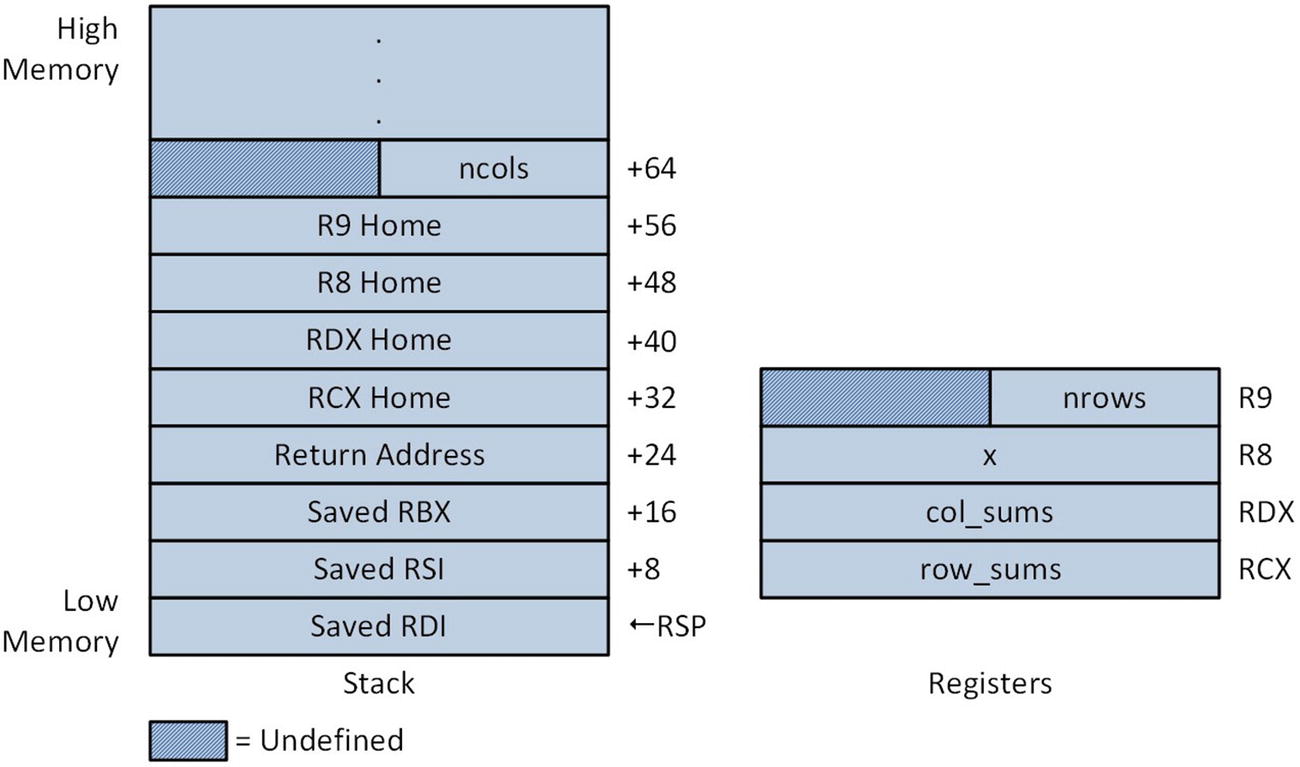
The assembly language function CalcMatrixRowColSums_ implements the same algorithm as the C++ code. Following the function prolog, the arguments nrows and ncols are tested for validity. Note that the argument ncols was passed on the stack, as illustrated in Figure 3-2. The elements of col_sums are then initialized to zero using a rep stosd (Repeat Store String Doubleword) instruction. This instruction stores the contents of EAX, which was initialized to zero, to the memory location specified by RDI; it then adds four to RDI so that it points to the next array element. The rep mnemonic is an instruction prefix that tells the processor to repeat execution of the stosd instruction. Specifically, this prefix instructs the CPU to decrement RCX by 1 following each store action and repeat execution of the stosd instruction until RCX equals zero. You’ll take a closer look at the x86-64 string processing instructions later in this chapter.
../images/326959_2_En_3_Chapter/326959_2_En_3_Fig2_HTML.jpg
Figure 3-2.

Stack and register contents after prolog in CalcMatrixRowColSums_
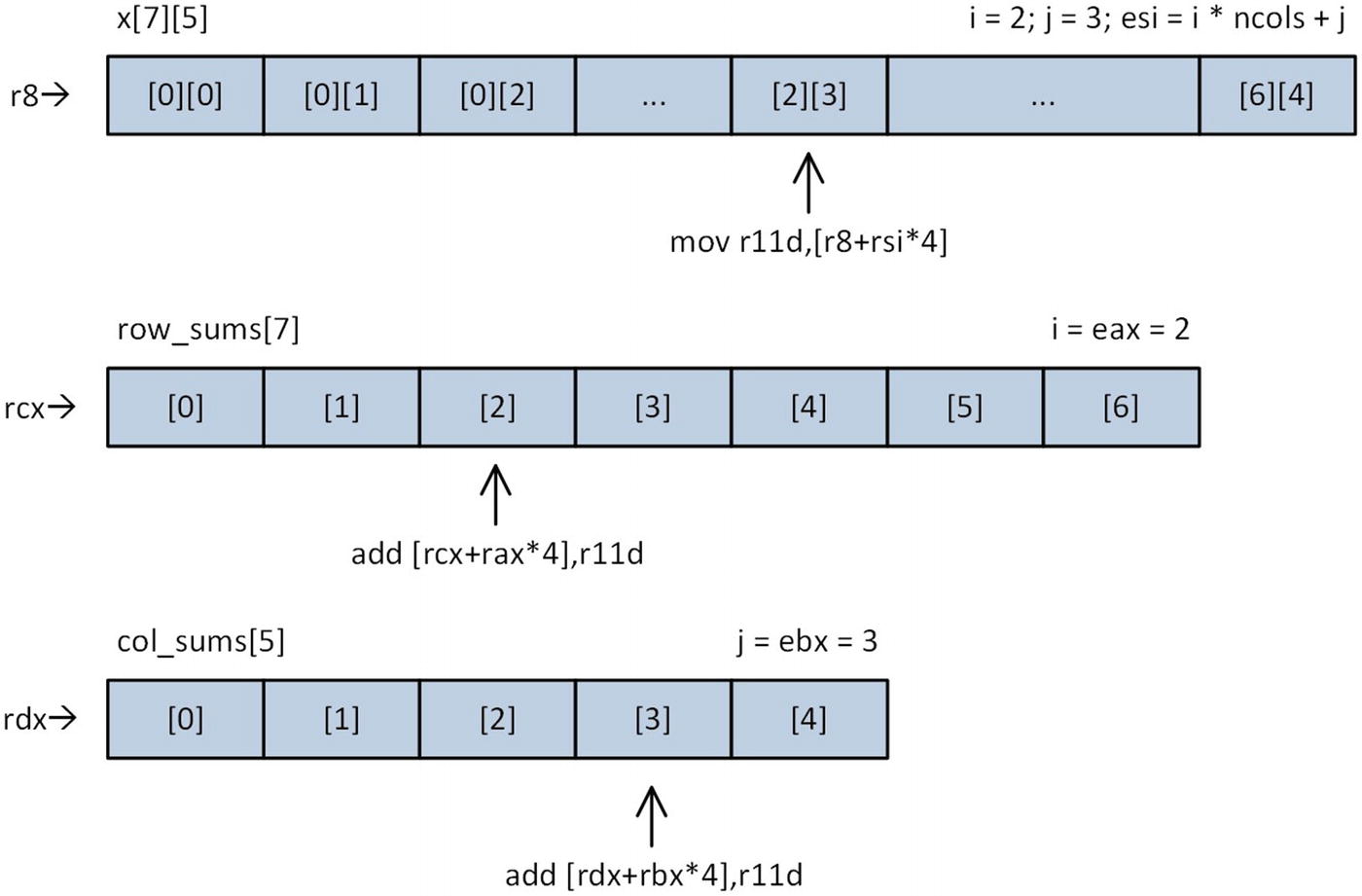
In function CalcMatrixRowColSums_, R8 holds the base address of the matrix x. Registers EAX and EBX contain the row and column indices i and j, respectively. Each outer loop starts by initializing row_sums[i] (RCX points to row_sums) to zero and calculating the intermediate value i * ncols (R10D contains ncols). Within the inner loop, the final offset of matrix element x[i][j] is calculated. A mov r11d,[r8+rsi*4] instruction loads x[i][j] into R11D. The instructions add [rcx+rax*4],r11d and add[rdx+rbx*4],r11d update the totals for row_sums[i] and col_sums[j]. Note that these two instructions use destination operands in memory instead of registers. Figure 3-3 illustrates the memory addressing that’s used to reference elements in x, row_sums, and col_sums.
../images/326959_2_En_3_Chapter/326959_2_En_3_Fig3_HTML.jpg
Figure 3-3.

Memory addressing used in function CalcMatrixRowColSums_

The nested processing loops in CalcMatrixRowColSums_ repeat until all of the elements in matrix x have been added to the correct elements in both row_sums and col_sums. Note that this function uses 32-bit registers for its counters and indices. Using 32-bit registers often requires less code space than 64-bit registers, as discussed earlier in this chapter. The code in CalcMatrixRowColSums_ also exploits BaseReg+IndexReg*ScaleFactor memory addressing, which simplifies the loading of elements from matrix x and the updating of elements in both row_sums and col_sums. Here are the results for example Ch03_04.
Results using CalcMatrixRowColSumsCpp
-----------------------------------------
  19  153  155  177  119   623
  27  37  130  165  99   458
  68  27  61   7  195   358
  127  143  110  86  43   509
  114  84  109  179  17   503
  140  126  28  52  55   401
  126  100  186  115  145   672
  621  670  779  781  673
Results using CalcMatrixRowColSums_
-----------------------------------------
  19  153  155  177  119   623
  27  37  130  165  99   458
  68  27  61   7  195   358
  127  143  110  86  43   509
  114  84  109  179  17   503
  140  126  28  52  55   401
  126  100  186  115  145   672
  621  670  779  781  673

Structures

A structure is a programming language construct that facilitates the definition of new data types using one or more existing data types. In this section, you’ll learn how to define and use a common structure in both a C++ and x86-64 assembly language function. You’ll also learn how to deal with potential semantic issues that can arise when working with a common structure that’s manipulated by software functions written using different programming languages.

In C++ a structure is equivalent to a class. When a data type is defined using the keyword struct instead of class, all members are public by default. A C++ struct that’s declared sans any member functions or operators is equivalent to a C-style structure such as typedef struct { ... } MyStruct;. C++ structure declarations are usually placed in a header (.h) file so they can be easily referenced by multiple C++ files. The same technique also can be employed to declare and reference structures that are used in assembly language code. Unfortunately, it is not possible to declare a single structure in a header file and include this file in both C++ and assembly-language source code files. If you want to use the “same” structure in both C++ and assembly language code, it must be declared twice and both declarations must be semantically equivalent.

Listing 3-5 shows the C++ and x86 assembly language source code for example Ch03_05. In the C++ code, a simple structure named TestStruct is declared. This structure uses sized integer types instead of the more common C++ types to highlight the exact size of each member. The other noteworthy detail regarding TestStruct is the inclusion of the structure member Pad8 . While not explicitly required, the presence of this member helps document the fact that the C++ compiler defaults to aligning structure members to their natural boundaries. The assembly language version of TestStruct looks similar to its C++ counterpart. The biggest difference between the two is that the assembler does not automatically align structure members to their natural boundaries. Here the definition of Pad8 is required; without the member Pad8 , the C++ and assembly language versions would be semantically different. The ? symbol that’s included with each data element declaration notifies the assembler to perform storage allocation only and is customarily used to remind the programmer that structure members are always uninitialized.
//------------------------------------------------
//        Ch03_05.cpp
//------------------------------------------------
#include "stdafx.h"
#include <iostream>
#include <iomanip>
#include <cstdint>
using namespace std;
struct TestStruct
{
  int8_t Val8;
  int8_t Pad8;
  int16_t Val16;
  int32_t Val32;
  int64_t Val64;
};
extern "C" int64_t CalcTestStructSum_(const TestStruct* ts);
int64_t CalcTestStructSumCpp(const TestStruct* ts)
{
  return ts->Val8 + ts->Val16 + ts->Val32 + ts->Val64;
}
int main()
{
  TestStruct ts;
  ts.Val8 = -100;
  ts.Val16 = 2000;
  ts.Val32 = -300000;
  ts.Val64 = 40000000000;
  int64_t sum1 = CalcTestStructSumCpp(&ts);
  int64_t sum2 = CalcTestStructSum_(&ts);
  cout << "ts1.Val8 = " << (int)ts.Val8 << '\n';
  cout << "ts1.Val16 = " << ts.Val16 << '\n';
  cout << "ts1.Val32 = " << ts.Val32 << '\n';
  cout << "ts1.Val16 = " << ts.Val64 << '\n';
  cout << '\n';
  cout << "sum1 = " << sum1 << '\n';
  cout << "sum2 = " << sum2 << '\n';
  return 0;
}
;-------------------------------------------------
;        Ch03_05.asm
;-------------------------------------------------
TestStruct struct
Val8  byte ?
Pad8  byte ?
Val16  word ?
Val32  dword ?
Val64  qword ?
TestStruct ends
; extern "C" int64_t CalcTestStructSum_(const TestStruct* ts);
;
; Returns:   Sum of structure's values as a 64-bit integer.
    .code
CalcTestStructSum_ proc
; Compute ts->Val8 + ts->Val16, note sign extension to 32-bits
    movsx eax,byte ptr [rcx+TestStruct.Val8]
    movsx edx,word ptr [rcx+TestStruct.Val16]
    add eax,edx
; Sign extend previous result to 64 bits
    movsxd rax,eax
; Add ts->Val32 to sum
    movsxd rdx,[rcx+TestStruct.Val32]
    add rax,rdx
; Add ts->Val64 to sum
    add rax,[rcx+TestStruct.Val64]
    ret
CalcTestStructSum_ endp
    end
Listing 3-5.

Example Ch03_05

The C++ function CalcTestStructSumCpp sums the members of the TestStruct instance that’s passed to it. The x86 assembly language function CalcTestStructSum_ performs the same operation. The movsx eax,byte ptr [rcx+TestStruct.Val8] and movsx edx,word ptr [rcx+TestStruct.Val16] instructions load sign-extended copies of structure members TestStruct.Val8 and TestStruct.Val16 into registers EAX and EDX, respectively. These instructions also illustrate the syntax that is required to reference a structure member in an assembly language instruction. From the perspective of the assembler, the movsx instructions are instances of BaseReg+Disp memory addressing since the assembler ultimately converts structure members TestStruct.Val8 and TestStruct.Val16 into constant displacement values.

Next, the function CalcTestStructSum_ uses an add eax,edx instruction to sum structure members TestStruct.Val8 and TestStruct.Val16. It then sign-extends this sum to 64 bits using a movsxd rax,eax instruction. The next instruction, movsxd rdx,[rcx+TestStruct.Val32], loads a sign-extended copy TestStruct.Val32 into RDX and adds this value to intermediate sum that’s in RAX. The instruction add rax,[rcx+TestStruct.Val64] adds the value structure member TestStruct.Val64 to the running sum in RAX, which generates the final result. The Visual C++ calling convention requires 64-bit return values to be placed in register RAX. Since the final result is already in the required register, no additional mov instructions are necessary. Here’s the output for example Ch03_05.
ts1.Val8 = -100
ts1.Val16 = 2000
ts1.Val32 = -300000
ts1.Val16 = 40000000000
sum1 = 39999701900
sum2 = 39999701900

Strings

The x86-64 instruction set includes several useful instructions that process and manipulate strings. In x86 parlance, a string is a contiguous sequence of bytes, words, doublewords, or quadwords. Programs can use the x86 string instructions to process conventional text strings such as “Hello, World.” They also can be employed to perform operations using the elements of an array or similarly-ordered data in memory. In this section, you’ll examine some sample code that demonstrates how to use the x86-64 string instructions with text strings and integer arrays.

Counting Characters

Listing 3-6 shows the C++ and assembly language code, for example Ch03_06. This example explains how to use the lodsb (Load String Byte) instruction to count the number of character occurrences in a text string.
//------------------------------------------------
//        Ch03_06.cpp
//------------------------------------------------
#include "stdafx.h"
#include <iostream>
using namespace std;
extern "C" unsigned long long CountChars_(const char* s, char c);
int main()
{
  const char nl = '\n';
  const char* s0 = "Test string: ";
  const char* s1 = " SearchChar: ";
  const char* s2 = " Count: ";
  char c;
  const char* s;
  s = "Four score and seven seconds ago, ...";
  cout << nl << s0 << s << nl;
  c = 's';
  cout << s1 << c << s2 << CountChars_(s, c) << nl;
  c = 'o';
  cout << s1 << c << s2 << CountChars_(s, c) << nl;
  c = 'z';
  cout << s1 << c << s2 << CountChars_(s, c) << nl;
  c = 'F';
  cout << s1 << c << s2 << CountChars_(s, c) << nl;
  c = '.';
  cout << s1 << c << s2 << CountChars_(s, c) << nl;
  s = "Red Green Blue Cyan Magenta Yellow";
  cout << nl << s0 << s << nl;
  c = 'e';
  cout << s1 << c << s2 << CountChars_(s, c) << nl;
  c = 'w';
  cout << s1 << c << s2 << CountChars_(s, c) << nl;
  c = 'l';
  cout << s1 << c << s2 << CountChars_(s, c) << nl;
  c = 'Q';
  cout << s1 << c << s2 << CountChars_(s, c) << nl;
  c = 'n';
  cout << s1 << c << s2 << CountChars_(s, c) << nl;
  return 0;
}
;-------------------------------------------------
;        Ch03_06.asm
;-------------------------------------------------
; extern "C" unsigned long long CountChars_(const char* s, char c);
;
; Description: This function counts the number of occurrences
;        of a character in a string.
;
; Returns:   Number of occurrences found.
    .code
CountChars_ proc frame
; Save non-volatile registers
    push rsi              ;save caller's rsi
    .pushreg rsi
    .endprolog
; Load parameters and initialize count registers
    mov rsi,rcx             ;rsi = s
    mov cl,dl              ;cl = c
    xor edx,edx             ;rdx = Number of occurrences
    xor r8d,r8d             ;r8 = 0 (required for add below)
; Repeat loop until the entire string has been scanned
@@:   lodsb                ;load next char into register al
    or al,al              ;test for end-of-string
    jz @F                ;jump if end-of-string found
    cmp al,cl              ;test current char
    sete r8b              ;r8b = 1 if match, 0 otherwise
    add rdx,r8             ;update occurrence count
    jmp @B
@@:   mov rax,rdx            ;rax = number of occurrences
; Restore non-volatile registers and return
    pop rsi
    ret
CountChars_ endp
    end
Listing 3-6.

Example Ch03_06

The assembly language function CountChars_ accepts two arguments: a text string pointer s and a search character c. Both arguments are of type char, which means that each text string character and the search character require one byte of storage. The function CountChars_ starts with a function prolog that saves the caller’s RSI on the stack. It then loads the text string pointer s into RSI and the search character c into register CL. An xor edx,edx instruction initializes register RDX to zero for use as a character occurrence counter. The processing loop uses the lodsb instruction to read each text string character. This instruction loads register AL with the contents of the memory pointed to by RSI; it then increments RSI by one so that it points to the next character.

Next, the function CountChars_ uses an or al,al instruction to test for the end-of-string character ('\0'). This instruction sets the zero flag (RFLAGS.ZF) if register AL is equal to zero. If the end-of-string character is not found, a cmp al,cl instruction compares the current text string character to the search character. The subsequent sete r8b (Set Byte if Equal) instructions loads register R8B with a value of one if a character match is found; otherwise R8B is set to zero. One important item that should be noted here is that the sete instruction does not modify the upper 56 bits of register R8. Whenever the destination operand of an instruction is an 8-bit or 16-bit register, the upper 56 or 48 bits of the corresponding 64-bit register are unaffected by the specified operation. Following the sete instruction is an add rdx,r8 instruction that updates the occurrence counter. This process is repeated until the end-of-string character is found. Following completion of the text string scan, the final occurrence count is moved into register RAX and returned to the caller. The output for example Ch03_06 is as follows:
Test string: Four score and seven seconds ago, ...
 SearchChar: s Count: 4
 SearchChar: o Count: 4
 SearchChar: z Count: 0
 SearchChar: F Count: 1
 SearchChar: . Count: 3
Test string: Red Green Blue Cyan Magenta Yellow
 SearchChar: e Count: 6
 SearchChar: w Count: 1
 SearchChar: l Count: 3
 SearchChar: Q Count: 0
 SearchChar: n Count: 3

A version of CountChars_ that processes strings of type wchar_t instead of char can be easily created by changing the lodsb instruction to a lodsw (Load String Word) instruction. 16-bit registers would also need to be used instead of 8-bit registers for the character matching instructions. The last character of an x86 string instruction mnemonic indicates the size of the operand that is processed.

String Concatenation

The concatenation of two text strings is a common operation that is performed by many programs. C++ programs can use the library functions strcat, strcat_s, wcscat, and wcscat_s to concatenate two strings. One limitation of these functions is that they can process only a single source string. Multiple calls are necessary to concatenate several strings together. The next example, named Ch03_07, demonstrates how to use the scas (Scan String) and movs (Move String) instructions to concatenate multiple strings. Listing 3-7 shows the C++ and x86-assembly language source code.
//------------------------------------------------
//        Ch03_07.cpp
//------------------------------------------------
#include "stdafx.h"
#include <iostream>
#include <string>
using namespace std;
extern "C" size_t ConcatStrings_(char* des, size_t des_size, const char* const* src, size_t src_n);
void PrintResult(const char* msg, const char* des, size_t des_len, const char* const* src, size_t src_n)
{
  string s_test;
  const char nl = '\n';
  cout << nl << "Test case: " << msg << nl;
  cout << " Original Strings" << nl;
  for (size_t i = 0; i < src_n; i++)
  {
    const char* s1 = (strlen(src[i]) == 0) ? "<empty string>" : src[i];
    cout << "  i:" << i << " " << s1 << nl;
    s_test += src[i];
  }
  const char* s2 = (strlen(des) == 0) ? "<empty string>" : des;
  cout << " Concatenated Result" << nl;
  cout << "  " << s2 << nl;
  if (s_test != des)
    cout << " Error - test string compare failed" << nl;
}
int main()
{
  // Destination buffer size OK
  const char* src1[] = { "One ", "Two ", "Three ", "Four" };
  size_t src1_n = sizeof(src1) / sizeof(char*);
  const size_t des1_size = 64;
  char des1[des1_size];
  size_t des1_len = ConcatStrings_(des1, des1_size, src1, src1_n);
  PrintResult("destination buffer size OK", des1, des1_len, src1, src1_n);
  // Destination buffer too small
  const char* src2[] = { "Red ", "Green ", "Blue ", "Yellow " };
  size_t src2_n = sizeof(src2) / sizeof(char*);
  const size_t des2_size = 16;
  char des2[des2_size];
  size_t des2_len = ConcatStrings_(des2, des2_size, src2, src2_n);
  PrintResult("destination buffer too small", des2, des2_len, src2, src2_n);
  // Empty source string
  const char* src3[] = { "Plane ", "Car ", "", "Truck ", "Boat ", "Train ", "Bicycle " };
  size_t src3_n = sizeof(src3) / sizeof(char*);
  const size_t des3_size = 128;
  char des3[des3_size];
  size_t des3_len = ConcatStrings_(des3, des3_size, src3, src3_n);
  PrintResult("empty source string", des3, des3_len, src3, src3_n);
  // All strings empty
  const char* src4[] = { "", "", "", "" };
  size_t src4_n = sizeof(src4) / sizeof(char*);
  const size_t des4_size = 42;
  char des4[des4_size];
  size_t des4_len = ConcatStrings_(des4, des4_size, src4, src4_n);
  PrintResult("all strings empty", des4, des4_len, src4, src4_n);
  // Minimum des_size
  const char* src5[] = { "1", "22", "333", "4444" };
  size_t src5_n = sizeof(src5) / sizeof(char*);
  const size_t des5_size = 11;
  char des5[des5_size];
  size_t des5_len = ConcatStrings_(des5, des5_size, src5, src5_n);
  PrintResult("minimum des_size", des5, des5_len, src5, src5_n);
  return 0;
}
;-------------------------------------------------
;        Ch03_07.asm
;-------------------------------------------------
; extern "C" size_t ConcatStrings_(char* des, size_t des_size, const char* const* src, size_t src_n);
;
; Returns:   -1   Invalid 'des_size'
;        n >= 0 Length of concatenated string
    .code
ConcatStrings_ proc frame
; Save non-volatile registers
    push rbx
    .pushreg rbx
    push rsi
    .pushreg rsi
    push rdi
    .pushreg rdi
    .endprolog
; Make sure des_size and src_n are valid
    mov rax,-1             ;set error code
    test rdx,rdx            ;test des_size
    jz InvalidArg            ;jump if des_size is 0
    test r9,r9             ;test src_n
    jz InvalidArg            ;jump if src_n is 0
; Registers used processing loop below
;  rbx = des        rdx = des_size
;  r8 = src        r9 = src_n
;  r10 = des_index     r11 = i
;  rcx = string length
;  rsi, rdi = pointers for scasb & movsb instructions
; Perform required initializations
    xor r10,r10             ;des_index = 0
    xor r11,r11             ;i = 0
    mov rbx,rcx             ;rbx = des
    mov byte ptr [rbx],0        ;*des = '\0'
; Repeat loop until concatenation is finished
Loop1: mov rax,r8             ;rax = 'src'
    mov rdi,[rax+r11*8]         ;rdi = src[i]
    mov rsi,rdi             ;rsi = src[i]
; Compute length of s[i]
    xor eax,eax
    mov rcx,-1
    repne scasb             ;find '\0'
    not rcx
    dec rcx               ;rcx = len(src[i])
; Compute des_index + src_len
    mov rax,r10             ;rax = des_index
    add rax,rcx             ;des_index + len(src[i])
    cmp rax,rdx             ;is des_index + src_len >= des_size?
    jge Done              ;jump if des is too small
; Update des_index
    mov rax,r10             ;des_index_old = des_index
    add r10,rcx             ;des_index += len(src[i])
; Copy src[i] to &des[des_index] (rsi already contains src[i])
    inc rcx               ;rcx = len(src[i]) + 1
    lea rdi,[rbx+rax]          ;rdi = &des[des_index_old]
    rep movsb              ;perform string move
; Update i and repeat if not done
    inc r11               ;i += 1
    cmp r11,r9
    jl Loop1              ;jump if i < src_n
; Return length of concatenated string
Done:  mov rax,r10            ;rax = des_index (final length)
; Restore non-volatile registers and return
InvalidArg:
    pop rdi
    pop rsi
    pop rbx
    ret
ConcatStrings_ endp
    end
Listing 3-7.

Example Ch03_07

Let’s begin by examining the C++ code in Listing 3-7. It starts with a declaration statement for the assembly language function ConcatStrings_, which includes four parameters: des is the destination buffer for the final string; des_size is the size of des in characters; and parameter src points to an array that contains pointers to src_n text strings. In 64-bit Visual C++ programs, the type size_t is equivalent to a 64-bit unsigned integer. The function ConcatStrings_ returns the length of des or -1 if the supplied value for des_size is less than or equal to zero.

The test cases presented in main illustrate use of ConcatStrings_. If, for example, src points to a text string array consisting of “Red” , “Green” , “Blue” , the final string in des is "RedGreenBlue" provided des is large enough to contain the result. If des_size is insufficient, ConcatStrings_ produces a partially concatenated string. For example, a des_size equal to 10 would yield "RedGreen" as the final string.

Following its prolog, the function ConcatStrings_ checks argument value des_size for validity using a test rdx,rdx instruction. This instruction performs a bitwise AND of its two operands and sets the parity (RFLAGS.PF), sign (RFLAGS.SF), and zero (RFLAGS.ZF) flags based on the result (the carry (RFLAGS.CF) and overflow (RFLAGS.OF) are set to zero). The result of the bitwise AND operation is not saved. The test instruction is often used as an alternative to the cmp instruction, especially when a function needs to ascertain if a value is less than, equal to, or greater than zero. Using a test instruction may also be more efficient in terms of code space. In this instance, the test rdx,rdx instruction requires fewer opcode bytes than a cmp rdx,0 instruction. Register initialization is carried out next prior to the start of the concatenation processing loop.

The subsequent block of instructions marks the top of the concatenation loop that begins by loading registers RSI and RDI with a pointer to string src[i]. The length of src[i] is determined next using a repne scasb instruction in conjunction with several support instructions. The repne (Repeat String Operation While not Equal) is an instruction prefix that repeats execution of a string instruction while the condition RCX != 0 && RFLAGS.ZF == 0 is true. The exact operation of the repne scasb (Scan String Byte) combination is as follows: If RCX is not zero, the scasb instruction compares the string character pointed to by RDI to the contents of register AL and sets the status flags according to the results. Register RDI is then automatically incremented by one so that it points to the next character and a count of one is subtracted from RCX. This string-processing operation is repeated as long as the aforementioned test conditions remain true; otherwise, the repeat string operation terminates.

Prior to use of the repne scasb instruction, register RCX was loaded with -1. Upon completion of repne scasb, register RCX contains -(L + 2), where L denotes the actual length of string src[i]. The value L is calculated using a not rcx (One’s Complement Negation) instruction followed by a dec rcx (Decrement by 1) instruction, which is equal to subtracting 2 from the two’s complement negation of -(L + 2). It should be noted that the instruction sequence used here to calculate the length of a text string is a well-known technique that dates back to the 8086 CPU.

Following the computation of len(src[i]), a check is made to verify that the string src[i] will fit into the destination buffer. If the sum des_index + len(src[i]) is greater than or equal to des_size, the function terminates. Otherwise, len(src[i]) is added to des_index and string src[i] is copied to the correct position in des using a rep movsb (Repeat Move String Byte) instruction.

The rep movsb instruction copies the string pointed to by RSI to the memory location pointed to by RDI using the length specified in RCX. An inc rcx instruction is executed before the string copy to ensure that the end-of-string terminator '\0' is also transferred to des. Register RDI is initialized to the correct offset in des using a lea rdi,[rbx+rax] (Load Effective Address) instruction, which computes the address of the specified source operand (i.e., lea calculates RDI = RBX + RAX). The concatenation loop can use a lea instruction since register RBX points to the start of des and RAX contains the value of des_index prior to its addition with len(src[i]). Subsequent to the string copy operation, the value of i is updated and if it’s less than src_n, the concatenation loop is repeated. Following completion of the concatenation operation, register RAX is loaded with des_index, which is the length of the final string in des. Here’s the output of example Ch03_07.
Test case: destination buffer size OK
 Original Strings
  i:0 One
  i:1 Two
  i:2 Three
  i:3 Four
 Concatenated Result
  One Two Three Four
Test case: destination buffer too small
 Original Strings
  i:0 Red
  i:1 Green
  i:2 Blue
  i:3 Yellow
 Concatenated Result
  Red Green Blue
 Error - test string compare failed
Test case: empty source string
 Original Strings
  i:0 Plane
  i:1 Car
  i:2 <empty string>
  i:3 Truck
  i:4 Boat
  i:5 Train
  i:6 Bicycle
 Concatenated Result
  Plane Car Truck Boat Train Bicycle
Test case: all strings empty
 Original Strings
  i:0 <empty string>
  i:1 <empty string>
  i:2 <empty string>
  i:3 <empty string>
 Concatenated Result
  <empty string>
Test case: minimum des_size
 Original Strings
  i:0 1
  i:1 22
  i:2 333
  i:3 4444
 Concatenated Result
  1223334444

Comparing Arrays

Besides text strings, the x86 string instructions also can be used to perform operations on other contiguously-ordered data elements. The next source code example demonstrates how to use the cmps (Compare String Operands) instruction to compare the elements of two arrays. Listing 3-8 contains the C++ and x86-64 assembly language source code for example Ch03_08.
//------------------------------------------------
//        Ch03_08.cpp
//------------------------------------------------
#include "stdafx.h"
#include <iostream>
#include <iomanip>
#include <random>
#include <memory>
using namespace std;
extern "C" long long CompareArrays_(const int* x, const int* y, long long n);
void Init(int* x, int* y, long long n, unsigned int seed)
{
  uniform_int_distribution<> d {1, 10000};
  default_random_engine rng {seed};
  for (long long i = 0; i < n; i++)
    x[i] = y[i] = d(rng);
}
void PrintResult(const char* msg, long long result1, long long result2)
{
  cout << msg << '\n';
  cout << " expected = " << result1;
  cout << " actual = " << result2 << "\n\n";
}
int main()
{
  // Allocate and initialize the test arrays
  const long long n = 10000;
  unique_ptr<int[]> x_array {new int[n]};
  unique_ptr<int[]> y_array {new int[n]};
  int* x = x_array.get();
  int* y = y_array.get();
  Init(x, y, n, 11);
  cout << "Results for CompareArrays_ - array_size = " << n << "\n\n";
  long long result;
  // Test using invalid array size
  result = CompareArrays_(x, y, -n);
  PrintResult("Test using invalid array size", -1, result);
  // Test using first element mismatch
  x[0] += 1;
  result = CompareArrays_(x, y, n);
  x[0] -= 1;
  PrintResult("Test using first element mismatch", 0, result);
  // Test using middle element mismatch
  y[n / 2] -= 2;
  result = CompareArrays_(x, y, n);
  y[n / 2] += 2;
  PrintResult("Test using middle element mismatch", n / 2, result);
  // Test using last element mismatch
  x[n - 1] *= 3;
  result = CompareArrays_(x, y, n);
  x[n - 1] /= 3;
  PrintResult("Test using last element mismatch", n - 1, result);
  // Test with identical elements in each array
  result = CompareArrays_(x, y, n);
  PrintResult("Test with identical elements in each array", n, result);
  return 0;
}
;-------------------------------------------------
;        Ch03_08.asm
;-------------------------------------------------
; extern "C" long long CompareArrays_(const int* x, const int* y, long long n)
;
; Returns    -1     Value of 'n' is invalid
;        0 <= i < n Index of first non-matching element
;        n      All elements match
    .code
CompareArrays_ proc frame
; Save non-volatile registers
    push rsi
    .pushreg rsi
    push rdi
    .pushreg rdi
    .endprolog
; Load arguments and validate 'n'
    mov rax,-1             ;rax = return code for invalid n
    test r8,r8
    jle @F               ;jump if n <= 0
; Compare the arrays for equality
    mov rsi,rcx             ;rsi = x
    mov rdi,rdx             ;rdi = y
    mov rcx,r8             ;rcx = n
    mov rax,r8             ;rax = n
    repe cmpsd
    je @F                ;arrays are equal
; Calculate index of first non-match
    sub rax,rcx             ;rax = index of mismatch + 1
    dec rax               ;rax = index of mismatch
; Restore non-volatile registers and return
@@:   pop rdi
    pop rsi
    ret
CompareArrays_ endp
    end
Listing 3-8.

Example Ch03_08

The assembly language function CompareArrays_ compares the elements of two integer arrays and returns the index of the first non-matching element. If the arrays are identical, the number of elements is returned. Otherwise, -1 is returned to indicate an error. Following the function prolog, a test r8,r8 instruction checks argument value n to see if it’s less than or equal to zero. As you learned in the previous section, this instruction performs a bitwise AND of the two operands and sets the status flags RFLAGS.PF, RFLAGS.SF, and RFLAGS.ZF based on the result (RFLAGS.CF and RFLAGS.OF are cleared). The result of the AND operation is discarded. If argument value n is invalid, the jle @F instruction skips over the compare code.

The actual compare code begins by loading register RSI with a pointer to x and RDI with pointer to y. The number of elements is then loaded into register RCX. The arrays are compared using a repe cmpsd (Compare String Doubleword) instruction. This instruction compares the two doublewords pointed to by RSI and RDI and sets the status flags according to the results. Registers RSI and RDI are incremented by four after each compare operation (the value 4 is used since that’s the size of a doubleword in bytes). The repe (Repeat While Equal) prefix instructs the processor to repeat the cmpsd instruction as long as the condition RCX != 0 && RFLAGS.ZF == 1 is true. Upon completion of the cmpsd instruction, a conditional jump is performed if the arrays are equal (RAX already contains the correct return value) or the index of the first non-matching elements is calculated. Here’s the output for example Ch03_08.
Results for CompareArrays_ - array_size = 10000
Test using invalid array size
 expected = -1 actual = -1
Test using first element mismatch
 expected = 0 actual = 0
Test using middle element mismatch
 expected = 5000 actual = 5000
Test using last element mismatch
 expected = 9999 actual = 9999
Test with identical elements in each array
 expected = 10000 actual = 10000

Array Reversal

The final source code example of this section demonstrates use of the lods (Load String) instruction to reverse the elements of an array. Unlike this section’s previous source code examples, the processing loop of example Ch03_09 traverses the source array starting from the last element and ending at the first element. Executing a reverse array traversal requires the direction flag (RFLAGS.DF) to be modified in a manner that is compatible with the Visual C++ runtime environment as elucidated in this example. Listing 3-9 shows the C++ and x86-64 assembly language source code for example Ch03_09.
//------------------------------------------------
//        Ch03_09.cpp
//------------------------------------------------
#include "stdafx.h"
#include <iostream>
#include <iomanip>
#include <random>
using namespace std;
extern "C" int ReverseArray_(int* y, const int* x, int n);
void Init(int* x, int n)
{
  unsigned int seed = 17;
  uniform_int_distribution<> d {1, 1000};
  default_random_engine rng {seed};
  for (int i = 0; i < n; i++)
    x[i] = d(rng);
}
int main()
{
  const int n = 25;
  int x[n], y[n];
  Init(x, n);
  int rc = ReverseArray_(y, x, n);
  if (rc != 0)
  {
    cout << "\nResults for ReverseArray\n";
    const int w = 5;
    bool compare_error = false;
    for (int i = 0; i < n && !compare_error; i++)
    {
      cout << " i: " << setw(w) << i;
      cout << " y: " << setw(w) << y[i];
      cout << " x: " << setw(w) << x[i] << '\n';
      if (x[i] != y[n - 1 - i])
        compare_error = true;
    }
    if (compare_error)
      cout << "ReverseArray compare error\n";
    else
      cout << "ReverseArray compare OK\n";
  }
  else
    cout << "ReverseArray_() failed\n";
  return 0;
}
;-------------------------------------------------
;        Ch03_09.asm
;-------------------------------------------------
; extern "C" int ReverseArray_(int* y, const int* x, int n);
;
; Returns    0 = invalid n, 1 = success
    .code
ReverseArray_ proc frame
; Save non-volatile registers
    push rsi
    .pushreg rsi
    push rdi
    .pushreg rdi
    .endprolog
; Make sure n is valid
    xor eax,eax             ;error return code
    test r8d,r8d            ;is n <= 0?
    jle InvalidArg           ;jump if n <= 0
; Initialize registers for reversal operation
    mov rsi,rdx             ;rsi = x
    mov rdi,rcx             ;rdi = y
    mov ecx,r8d             ;rcx = n
    lea rsi,[rsi+rcx*4-4]        ;rsi = &x[n - 1]
; Save caller's RFLAGS.DF, then set RFLAGS.DF to 1
    pushfq               ;save caller's RFLAGS.DF
    std                 ;RFLAGS.DF = 1
; Repeat loop until array reversal is complete
@@:   lodsd                ;eax = *x--
    mov [rdi],eax            ;*y = eax
    add rdi,4              ;y++
    dec rcx               ;n--
    jnz @B
; Restore caller's RFLAGS.DF and set return code
    popfq                ;restore caller's RFLAGS.DF
    mov eax,1              ;set success return code
; Restore non-volatile registers and return
InvalidArg:
    pop rdi
    pop rsi
    ret
ReverseArray_ endp
    end
Listing 3-9.

Example Ch03_09

The function ReverseArray_ copies the elements of a source array to a destination array in reverse order. This function requires three parameters: a pointer to a destination array named y, a pointer to a source array named x, and the number of elements n. Following validation of n, registers RSI and RDI are initialized with pointers to the arrays x and y. A mov ecx,r8d instruction loads the number of elements into register RCX. In order to reverse the elements of the source array, the address of the last array element x[n - 1] needs to be calculated. This is accomplished using a lea rsi,[rsi+rcx*4-4] instruction, which computes the effective address of the source memory operand (i.e., it performs the arithmetic operation specified between the brackets and saves the result to register RSI).

The Visual C++ runtime environment assumes that the direction flag (RFLAGS.DF) is always cleared. If an assembly language function sets RFLAGS.DF to perform auto-decrementing with a string instruction, the flag must be cleared before returning to the caller or using any library functions. The function ReverseArray_ partially fulfills this requirement by saving the current state of RFLAGS.DF on the stack using the pushfq (Push RFLAGS Register onto Stack) instruction. It then uses the std (Set Direction Flag) instruction to set RFLAGS.DF to 1. The duplication of array elements from x to y is straightforward. A lodsd (Load String Doubleword) instruction loads an element from x into EAX and subtracts four from register RSI. The next instruction, mov [rdi],eax, saves this value to the element in y that is pointed to by RDI. An add rdi,4 instruction points EDI to the next element in y. Register RCX is then decremented and the loop is repeated until the array reversal is complete.

Following the reverse array loop, a popfq (Pop Stack into RFLAGS Register) instruction restores the original state of RFLAGS.DF. One question that might be asked at this point is if the Visual C++ runtime environment assumes that RFLAGS.DF is always cleared, why doesn’t the function ReverseArray_ use a cld (Clear Direction Flag) instruction to restore RFLAGS.DF instead of a pushfq/popfq sequence? Yes, the Visual C++ runtime environment assumes that RFLAGS.DF is always cleared, but it cannot enforce this policy during program execution. If ReverseArray_ were to be included in a DLL, it could conceivably be called by a function written in a language that uses a different default state for the direction flag. Using pushfq and popfq ensures that the state of the caller’s direction is always properly restored. Here is the output example Ch03_09.
Results for ReverseArray
 i:   0 y:  583 x:  560
 i:   1 y:  904 x:  586
 i:   2 y:  924 x:  752
 i:   3 y:  635 x:  743
 i:   4 y:  347 x:  511
 i:   5 y:  313 x:  370
 i:   6 y:  738 x:  809
 i:   7 y:  810 x:  214
 i:   8 y:  935 x:  823
 i:   9 y:  354 x:  456
 i:  10 y:  592 x:  13
 i:  11 y:  613 x:  240
 i:  12 y:  413 x:  413
 i:  13 y:  240 x:  613
 i:  14 y:  13 x:  592
 i:  15 y:  456 x:  354
 i:  16 y:  823 x:  935
 i:  17 y:  214 x:  810
 i:  18 y:  809 x:  738
 i:  19 y:  370 x:  313
 i:  20 y:  511 x:  347
 i:  21 y:  743 x:  635
 i:  22 y:  752 x:  924
 i:  23 y:  586 x:  904
 i:  24 y:  560 x:  583
ReverseArray compare OK

Summary

Here are the key learning points for Chapter 3:
  • The address of an element in a one-dimensional array can be calculated using the base address (i.e., the address of the first element) of the array, the index of the element, and the size in bytes of each element. The address of an element in a two-dimensional array can be calculated using the base address of the array, the row and column indices, the number of columns, and the size in bytes of each element.

  • The Visual C++ calling convention designates each general-purpose register as volatile or non-volatile. A function must preserve the contents of any non-volatile general-purpose register it uses. A function should use the push instruction in its prolog to save the contents of a non-volatile register on the stack. A function should use the pop instruction in its epilog to restore the contents of any previously-saved non-volatile register.

  • X86-64 assembly language code can define and use structures similar to the way they are used in C++. An assembly language structure may require extra padding elements to ensure that it’s semantically equivalent to a C++ structure.

  • The upper 32 bits of a 64-bit general-purpose register are set to zero in instructions that specify the corresponding 32-bit register as a destination operand. The upper 56 or 48 bits of a 64-bit general-purpose register are not affected when the destination operand of an instruction is an 8-bit or 16-bit register.

  • The x86 string instructions cmps, lods, movs, scas, and stos can be used to compare, load, copy, scan, or initialize text strings. They also can be used to perform operations on arrays and other similarly-ordered data structures.

  • The prefixes rep, repe, repz, repne, and repnz can be used with a string instruction to repeat a string operation multiple times (RCX contains the count value) or until the specified zero flag (RFLAGS.ZF) condition occurs.

  • The state of the direction flag (RFLAGS.DF) must be preserved across function boundaries.

  • The test instruction is often used as an alternative to the cmp instruction, especially when testing a value to ascertain if it’s less than, equal to, or greater than zero.

  • The lea instruction can be used to simplify effective address calculations.