Table of Contents for
Regular Expressions Cookbook, 2nd Edition
 Regular Expressions Cookbook, 2nd Edition
Published by
O'Reilly Media, Inc., 2012
Regular Expressions Cookbook, 2nd Edition
Published by
O'Reilly Media, Inc., 2012
- Cover
- Regular Expressions Cookbook
- Preface
- Caught in the Snarls of Different Versions
- Intended Audience
- Technology Covered
- Organization of This Book
- Conventions Used in This Book
- Using Code Examples
- Safari® Books Online
- How to Contact Us
- Acknowledgments
- 1. Introduction to Regular Expressions
- Regular Expressions Defined
- Search and Replace with Regular Expressions
- Tools for Working with Regular Expressions
- 2. Basic Regular Expression Skills
- 2.1. Match Literal Text
- 2.2. Match Nonprintable Characters
- 2.3. Match One of Many Characters
- 2.4. Match Any Character
- 2.5. Match Something at the Start and/or the End of a Line
- 2.6. Match Whole Words
- 2.7. Unicode Code Points, Categories, Blocks, and Scripts
- 2.8. Match One of Several Alternatives
- 2.9. Group and Capture Parts of the Match
- 2.10. Match Previously Matched Text Again
- 2.11. Capture and Name Parts of the Match
- 2.12. Repeat Part of the Regex a Certain Number of Times
- 2.13. Choose Minimal or Maximal Repetition
- 2.14. Eliminate Needless Backtracking
- 2.15. Prevent Runaway Repetition
- 2.16. Test for a Match Without Adding It to the Overall Match
- 2.17. Match One of Two Alternatives Based on a Condition
- 2.18. Add Comments to a Regular Expression
- 2.19. Insert Literal Text into the Replacement Text
- 2.20. Insert the Regex Match into the Replacement Text
- 2.21. Insert Part of the Regex Match into the Replacement Text
- 2.22. Insert Match Context into the Replacement Text
- 3. Programming with Regular Expressions
- Programming Languages and Regex Flavors
- 3.1. Literal Regular Expressions in Source Code
- 3.2. Import the Regular Expression Library
- 3.3. Create Regular Expression Objects
- 3.4. Set Regular Expression Options
- 3.5. Test If a Match Can Be Found Within a Subject String
- 3.6. Test Whether a Regex Matches the Subject String Entirely
- 3.7. Retrieve the Matched Text
- 3.8. Determine the Position and Length of the Match
- 3.9. Retrieve Part of the Matched Text
- 3.10. Retrieve a List of All Matches
- 3.11. Iterate over All Matches
- 3.12. Validate Matches in Procedural Code
- 3.13. Find a Match Within Another Match
- 3.14. Replace All Matches
- 3.15. Replace Matches Reusing Parts of the Match
- 3.16. Replace Matches with Replacements Generated in Code
- 3.17. Replace All Matches Within the Matches of Another Regex
- 3.18. Replace All Matches Between the Matches of Another Regex
- 3.19. Split a String
- 3.20. Split a String, Keeping the Regex Matches
- 3.21. Search Line by Line
- Construct a Parser
- 4. Validation and Formatting
- 4.1. Validate Email Addresses
- 4.2. Validate and Format North American Phone Numbers
- 4.3. Validate International Phone Numbers
- 4.4. Validate Traditional Date Formats
- 4.5. Validate Traditional Date Formats, Excluding Invalid Dates
- 4.6. Validate Traditional Time Formats
- 4.7. Validate ISO 8601 Dates and Times
- 4.8. Limit Input to Alphanumeric Characters
- 4.9. Limit the Length of Text
- 4.10. Limit the Number of Lines in Text
- 4.11. Validate Affirmative Responses
- 4.12. Validate Social Security Numbers
- 4.13. Validate ISBNs
- 4.14. Validate ZIP Codes
- 4.15. Validate Canadian Postal Codes
- 4.16. Validate U.K. Postcodes
- 4.17. Find Addresses with Post Office Boxes
- 4.18. Reformat Names From “FirstName LastName” to “LastName, FirstName”
- 4.19. Validate Password Complexity
- 4.20. Validate Credit Card Numbers
- 4.21. European VAT Numbers
- 5. Words, Lines, and Special Characters
- 5.1. Find a Specific Word
- 5.2. Find Any of Multiple Words
- 5.3. Find Similar Words
- 5.4. Find All Except a Specific Word
- 5.5. Find Any Word Not Followed by a Specific Word
- 5.6. Find Any Word Not Preceded by a Specific Word
- 5.7. Find Words Near Each Other
- 5.8. Find Repeated Words
- 5.9. Remove Duplicate Lines
- 5.10. Match Complete Lines That Contain a Word
- 5.11. Match Complete Lines That Do Not Contain a Word
- 5.12. Trim Leading and Trailing Whitespace
- 5.13. Replace Repeated Whitespace with a Single Space
- 5.14. Escape Regular Expression Metacharacters
- 6. Numbers
- 6.1. Integer Numbers
- 6.2. Hexadecimal Numbers
- 6.3. Binary Numbers
- 6.4. Octal Numbers
- 6.5. Decimal Numbers
- 6.6. Strip Leading Zeros
- 6.7. Numbers Within a Certain Range
- 6.8. Hexadecimal Numbers Within a Certain Range
- 6.9. Integer Numbers with Separators
- 6.10. Floating-Point Numbers
- 6.11. Numbers with Thousand Separators
- 6.12. Add Thousand Separators to Numbers
- 6.13. Roman Numerals
- 7. Source Code and Log Files
- Keywords
- Identifiers
- Numeric Constants
- Operators
- Single-Line Comments
- Multiline Comments
- All Comments
- Strings
- Strings with Escapes
- Regex Literals
- Here Documents
- Common Log Format
- Combined Log Format
- Broken Links Reported in Web Logs
- 8. URLs, Paths, and Internet Addresses
- 8.1. Validating URLs
- 8.2. Finding URLs Within Full Text
- 8.3. Finding Quoted URLs in Full Text
- 8.4. Finding URLs with Parentheses in Full Text
- 8.5. Turn URLs into Links
- 8.6. Validating URNs
- 8.7. Validating Generic URLs
- 8.8. Extracting the Scheme from a URL
- 8.9. Extracting the User from a URL
- 8.10. Extracting the Host from a URL
- 8.11. Extracting the Port from a URL
- 8.12. Extracting the Path from a URL
- 8.13. Extracting the Query from a URL
- 8.14. Extracting the Fragment from a URL
- 8.15. Validating Domain Names
- 8.16. Matching IPv4 Addresses
- 8.17. Matching IPv6 Addresses
- 8.18. Validate Windows Paths
- 8.19. Split Windows Paths into Their Parts
- 8.20. Extract the Drive Letter from a Windows Path
- 8.21. Extract the Server and Share from a UNC Path
- 8.22. Extract the Folder from a Windows Path
- 8.23. Extract the Filename from a Windows Path
- 8.24. Extract the File Extension from a Windows Path
- 8.25. Strip Invalid Characters from Filenames
- 9. Markup and Data Formats
- Processing Markup and Data Formats with Regular Expressions
- 9.1. Find XML-Style Tags
- 9.2. Replace Tags with
- 9.3. Remove All XML-Style Tags Except and
- 9.4. Match XML Names
- 9.5. Convert Plain Text to HTML by Adding
and
Tags - 9.6. Decode XML Entities
- 9.7. Find a Specific Attribute in XML-Style Tags
- 9.8. Add a cellspacing Attribute to
Tags That Do Not Already Include It
- 9.9. Remove XML-Style Comments
- 9.10. Find Words Within XML-Style Comments
- 9.11. Change the Delimiter Used in CSV Files
- 9.12. Extract CSV Fields from a Specific Column
- 9.13. Match INI Section Headers
- 9.14. Match INI Section Blocks
- 9.15. Match INI Name-Value Pairs
- Index
- Index
- Index
- Index
- Index
- Index
- Index
- Index
- Index
- Index
- Index
- Index
- Index
- Index
- Index
- Index
- Index
- Index
- Index
- Index
- Index
- Index
- Index
- Index
- Index
- Index
- About the Authors
- Colophon
- Copyright
Match a string of the following ASCII control characters: bell, escape, form feed, line feed, carriage return, horizontal tab, vertical tab. These characters have the hexadecimal ASCII codes 07, 1B, 0C, 0A, 0D, 09, 0B.
This demonstrates the use of escape sequences and how to reference characters by their hexadecimal codes.
\a\e\f\n\r\t\v
Regex options: None Regex flavors: .NET, Java, PCRE, Python, Ruby \x07\x1B\f\n\r\t\v
Regex options: None Regex flavors: .NET, Java, JavaScript, Python, Ruby \a\e\f\n\r\t\x0B
Regex options: None Regex flavors: .NET, Java, PCRE, Perl, Python, Ruby Seven of the most commonly used ASCII control characters have dedicated escape sequences. These all consist of a backslash followed by a letter. This is the same syntax that is used by string literals in many programming languages. Table 2-1 shows the common nonprinting characters and how they are represented.
Table 2-1. Nonprinting characters
Representation
Meaning
Hexadecimal representation
Regex flavors
0x07
.NET, Java, PCRE, Perl, Python, Ruby
0x1B
.NET, Java, PCRE, Perl, Ruby
form feed
0x0C
.NET, Java, JavaScript, PCRE, Perl, Python, Ruby
0x0A
.NET, Java, JavaScript, PCRE, Perl, Python, Ruby
0x0D
.NET, Java, JavaScript, PCRE, Perl, Python, Ruby
0x09
.NET, Java, JavaScript, PCRE, Perl, Python, Ruby
vertical tab
0x0B
.NET, Java, JavaScript, Python, Ruby
In Perl 5.10 and later, and PCRE 7.2 and later, ‹
\v› does match the vertical tab. In these flavors ‹\v› matches all vertical whitespace. That includes the vertical tab, line breaks, and the Unicode line and paragraph separators. So for Perl and PCRE we have to use a different syntax for the vertical tab.JavaScript does not support ‹
\a\eThese control characters, as well as the alternative syntax shown in the following section, can be used equally inside and outside character classes in your regular expression.
Here’s another way to match the same seven ASCII control characters matched by the regexes earlier in this recipe:
\cG\x1B\cL\cJ\cM\cI\cK
Regex options: None Regex flavors: .NET, Java, JavaScript, PCRE, Perl, Ruby 1.9 Using ‹
\cA› through ‹\cZ›, you can match one of the 26 control characters that occupy positions 1 through 26 in the ASCII table. Thecmust be lowercase. The letter that follows thecis case insensitive in most flavors. We recommend that you always use an uppercase letter. Java requires this.This syntax can be handy if you’re used to entering control characters on console systems by pressing the Control key along with a letter. On a terminal, Ctrl-H sends a backspace. In a regex, ‹
\cH› matches a backspace.Python and the classic Ruby engine in Ruby 1.8 do not support this syntax. The Oniguruma engine in Ruby 1.9 does.
The escape control character, at position 27 in the ASCII table, is beyond the reach of the English alphabet, so we leave it as ‹
\x1B› in our regular expression.Following is yet another way to match our list of seven commonly used control characters:
\x07\x1B\x0C\x0A\x0D\x09\x0B
Regex options: None Regex flavors: .NET, Java, JavaScript, PCRE, Perl, Python, Ruby A lowercase
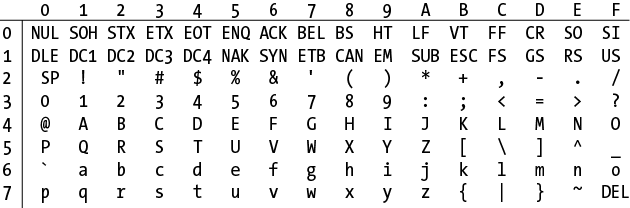
\xfollowed by two uppercase hexadecimal digits matches a single character in the ASCII set. Figure 2-1 shows which hexadecimal combinations from ‹\x00› through ‹\x7F› match each character in the entire ASCII character set. The table is arranged with the first hexadecimal digit going down the left side and the second digit going across the top.The characters that ‹
\x80› through ‹\xFF› match depends on how your regex engine interprets them, and which code page your subject text is encoded in. We recommend that you not use ‹\x80› through ‹\xFF›. Instead, use the Unicode code point token described in Recipe 2.7.Caution
If you’re using Ruby 1.8 or you compiled PCRE without UTF-8 support, you cannot use Unicode code points. Ruby 1.8 and PCRE without UTF-8 are 8-bit regex engines. They are completely ignorant about text encodings and multibyte characters. ‹
\xAA› in these engines simply matches the byte 0xAA, regardless of which character 0xAA happens to represent or whether 0xAA is part of a multibyte character.Recipe 2.7 explains how to make a regex match particular Unicode characters. If your regex engine supports Unicode, you can match nonprinting characters that way too.