Table of Contents for
Hacking Exposed Malware & Rootkits: Security Secrets and Solutions, Second Edition, 2nd Edition
 Hacking Exposed Malware & Rootkits: Security Secrets and Solutions, Second Edition, 2nd Edition
Published by
McGraw-Hill, 2016
Hacking Exposed Malware & Rootkits: Security Secrets and Solutions, Second Edition, 2nd Edition
Published by
McGraw-Hill, 2016
- Cover
- Hacking Exposed Malware & Rootkits: Security Secrets and Solutions, Second Edition Davis
- Title Page
- Copyright Page
- Dedication
- Hacking Exposed Malware & Rootkits: Security Secrets and Solutions, Second Edition Davis
- Hacking Exposed Malware & Rootkits: Security Secrets and Solutions, Second Edition Davis
- Contents
- Foreword
- Acknowledgments
- Introduction
- Part I Malware
- 1 Malware Propagation
- 2 Malware Functionality
- Part II Rootkits
- 3 User-Mode Rootkits
- 4 Kernel-Mode Rootkits
- 5 Virtual Rootkits
- 6 The Future of Rootkits
- Part III Prevention Technologies
- 7 Antivirus
- 8 Host Protection Systems
- 9 Host-Based Intrusion Prevention
- 10 Rootkit Detection
- 11 General Security Practices
- Appendix System Integrity Analysis: Building Your Own Rootkit Detector
- Index
CHAPTER 11
GENERAL SECURITY PRACTICES
Now that we’ve covered the various functionalities of malware and rootkits and associated protection technologies, we’ll discuss security practices. These practices encompass simple corporate policies such as user education, training awareness programs, patching and update policies, and/or simply implementing industry-approved security standards. In this section, you’ll learn more about some simple strategies that, when implemented, can increase your overall security posture and reduce your risk of malware infection.
End-User Education
An important part of any security program is end-user education. If your users don’t know what to be on the lookout for or what threats they may fall victim to, your foundation will not be sturdy. Ensuring network users are aware of what could happen enables them to look closer and understand what’s occurring when something may be amiss. End users are your first and last line of defense when it comes to security. No combination of tools, enterprise suites, and/or network devices can protect you from the mistakes of users.
There is a running joke in the industry. It goes something like this: “If you want to secure your systems, take the user out of the picture.” In reality, we all know this is something that cannot be done.
Internet scams are hard to thwart when placing the burden of thwarting them on a user who is unaware of the threat. Computer users suffer a myriad of security problems such as worms, phishing emails, malicious websites, and many types of malware; the fact that they can’t defend against everything makes complete sense. You always see quotes from security experts talking about users’ stupidity and advising companies to better educate them about appropriate security precautions, but computer security is too complicated, and the bad guys are too tricky and creative. Assuming average computer users can keep up with every potential threat and do their job at the same time is simply unrealistic. Yes, you can tell a person not to open email attachments from strangers and then what happens? The attackers start sending emails that look like they’re from the boss, a coworker, the user’s husband or wife, or best friend. In a modern office, you can’t work without clicking attachments.
Usability studies around the world have found that people are reluctant to give out their email address. This is even true with genuine e-commerce sites that would not send spam, making it harder to email customers useful information and confirmation messages. Continuing to let users feel scared and intimidated by every possible attack isn’t reasonable; they do, however, need simply to be aware of what could happen.
Know Your Malware
It is important to be familiar with malware behaviors and functionalities. This knowledge will help you understand why a system has been targeted and predict how malware will infect and move laterally in a targeted network. Your study of malware must not be confined only to the latest malware but also to the more popular historical malware. You’ll gain an overview of the development of malware technologies as well as the knowledge needed to predict in an educated way how malware might compromise new technologies. Also many systems, such as ATMs (automated teller machines), hardware controllers, and other industrial control systems, are seldom upgraded due to cost and complexity, so knowing how to protect systems that still use old operating systems is essential.
Security Awareness Training Programs
Training programs are essential to any organization in order to inform users of corporate policies, workstation settings, network drive data structures, and any network security and/or general computer usage information you want to educate your users about. Many organizations require formal security-awareness training for all workers when they join the organization and periodically thereafter, usually annually. Some of the common topics addressed in a security-awareness training program include
• Policies Cover the organization’s policies and procedures in your security-awareness training to remind users of important policies. This should include not only on-premise endpoints and systems, but also mobile devices, especially in organizations that allow BYOD, or Bring Your Own Device.
• Passwords Discuss the corporate password policy—and ensure that everyone has a clear understanding of the various components of the actual policy such as password-length requirements, password expiration, and password security (not keeping passwords on Post-its, for instance), and that every user acknowledges this policy as it comes down to being the single most important policy for any organization.
• Malware Include procedures to follow if a malware outbreak occurs and what users should be looking out for in order to prevent an infection.
• Email Strongly emphasize email so users understand this vector where many malware samples enter the network. Users should also be aware of your organization’s email usage and abuse policies.
• Internet usage Ensure users understand that, when working, access to the Internet is a privilege and not a right. Users need to understand the “Dos and Don’ts” when using the Internet and what to be aware of and what to avoid. This also includes social media usage. Companies must establish policies and guidelines on the use of social media. An employee can be your best ambassador—or your downfall as well.
• Asset security Instruct users on how to protect their portable electronic devices to help you better protect your corporate data. Also, develop users’ awareness of security features and devices you both can implement in order to keep corporate data safe.
• Social engineering Make sure users understand how to verify someone’s identity and what information they should and should not share about the organization. The human tendency to be helpful with information is the biggest downfall of any organization.
• Building access Explain the physical security setup for your organization.
• Regulatory concerns Educate users about which regulations apply to their position and/or the organization.
The security-awareness program needs to not only address these areas but also make employees feel like they are part of the solution rather than the problem. You can achieve this goal in many different ways, including contests, challenges, posters in common areas, and brown bag lunch & learn sessions. People learn better through repetition, so regular awareness training is always recommended. If possible, make security awareness a part of each employee’s daily routine to ensure success.
There are several publicly available sites that offer security-awareness programs. The following are some of the great resources for any organization:
• National Cyber Awareness System (https://www.us-cert.gov/government-users)
• Cisco Security Education (http://www.cisco.com/c/en/us/about/security-center/security-programs/security-education.html#~acc~panel-5)
• National Institute of Science and Technology Computer Security Resource Center (http://csrc.nist.gov/)
• ENISA Information Security Awareness Material (https://www.enisa.europa.eu/media/multimedia/material)
Starting and maintaining an awareness program boils down to time and resources. In case a company has neither the time nor the resources, there are third-party companies that perform awareness programs such as Knowbe4 (http://www.knowbe4.com).
 Malware Prevention for Home Users
The biggest target for opportunistic attackers is a home user. Take, for example, the proliferation of information-stealing attacks that target online banking credentials, social network passwords, and PII (personally identifiable information). Home users do not have the sophisticated solutions that enterprise users have, so it is important for home users to take precautions when it comes to malware infection. The following are among the best practices that a home user must adhere to:
• Beware of web pages that require software installations.
• Do not install new software from your browser unless you absolutely understand and trust both the web page and the software provider.
• Scan every item and any program downloaded through the Internet prior to installation with updated anti-malware software.
• Be aware of unexpected, strange-looking emails, regardless of sender.
• Never open attachments or click links contained in these email messages.
• Always enable the automatic updating feature for your operating system and apply new updates as soon as they are available.
• Always use up-to-date anti-malware with real-time protection enabled.
• Use browser plug-ins and extensions that limit the execution of website scripts.
• Do not type any usernames and passwords in every pop-up that appears on your system. Your bank will not ask for your username and password unless you are explicitly logging in to your online banking site.
Malware Prevention for Administrators
A network administrator’s job is never easy. Aside from making sure everything is running perfectly, it is also her responsibility to make sure the network is hardened and prepared for any attack campaigns. This mission is so important that having a dedicated security operation’s center (SOC) is critical. The following are among the best practices that a network administrator must take into account:
• Deploy perimeter defenses consisting of web and email gateway and firewall IPS.
• Do not allow unneeded protocols to enter the corporate network.
• Deploy vulnerability scanning software on the network and perform frequent audits.
• Restrict user privileges for all network users.
• Deploy corporate anti-malware scanning.
• Periodic threat modeling should be conducted even if there is no reported breach of the network.
• Establish a clear protocol and escalation procedure when a suspected infection or breach is detected.
• Limit mobile devices from connecting to enterprise networks.
• Train a team of security experts who are all always on standby in case of an infection or breach.
• Support end-user security-awareness campaigns.
Hacker Prevention Methods
Hackers are always looking for a way to get into others’ computers. From anywhere, attackers can enter systems without the victim’s knowledge. Unfortunately, no magic bullet can prevent hackers from getting in and there never will be one. No matter the amount of money or resources you invest in designing the perfect network, someone will find a way to own it. Even the biggest government agencies and private-sector companies can be victimized. The best thing you can do is carry out due diligence and practice defense-in-depth strategies that ensure your network assets are safe and protected to the best of your ability and the resources you have at your command.
Defense-in-Depth
Defense in depth is a construct of military strategy and is also known as elastic defense or deep defense. For the sake of this book, we’ll stick to the technology reference of defense-in-depth and leave the military jargon for another book. Defense-in-depth seeks to slow rather than to stop an attacker’s advance, buying time for the defenders. Defense-in-depth is more of a practical way to achieve security in today’s world of technology and includes the application of intelligent tools, techniques, and procedures that are available today. The defense-in-depth doctrine is a balance among protection capabilities, costs, operations, and performance. The following is an illustration of the defense-in-depth layers.
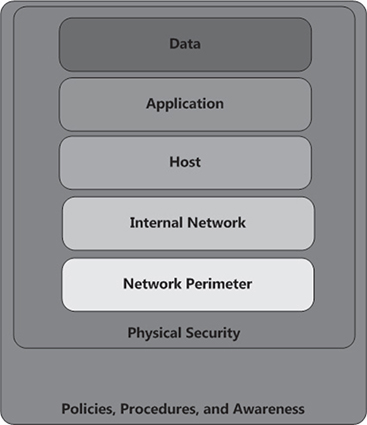
Using more than one of the following layers constitutes a defense-in-depth strategy:
• Physical security (e.g., deadbolt locks)
• Authentication and password security
• Endpoint security
• Asset management software
• Host-based firewalls (software)
• Network-based firewalls (hardware or software)
• Demilitarized zones (DMZ)
• Intrusion prevention systems (IPS)
• Packet filters
• Routers and switches
• Proxy servers
• Virtual private networks (VPN)
• Logging and auditing
• Biometrics
• Timed access control
• Software/hardware not available to the public
System Hardening
Most computers offer network security features that limit access to the system. Software such as anti-malware prevents malware from executing on the machine. Yet, even with these security measures in place, computers are often still vulnerable to outside access. System hardening, also called operating system hardening, helps minimize these security vulnerabilities and remove risks to the system. The purpose of system hardening is to remove as many security risks as possible. System hardening is typically done by removing all nonessential software programs and utilities from the computer and shutting down all unnecessary active services.
System hardening may include reformatting the hard disk and only installing the bare requirements that the computer needs to function. The CD drive is listed as the last boot device, which enables the computer to start from a CD or DVD if needed. File and print sharing are turned off if not absolutely necessary, and TCP/IP is often the only protocol installed. The guest account is disabled, the administrator account is renamed, and secure passwords are created for all user logins. Auditing is enabled to monitor unauthorized access attempts.
Automatic Updates
Every operating system and application has some form or another of automatic updating. This service is provided to ensure your system is patched to the optimum levels. Typically, this process is automated (as per its name) and generally runs in the background without the user needing to install the updates unless he or she has prompted the system to provide notifications of available updates. Some applications will inform the user of a newly available patch and present an Install Now or Install Later button. Automatic updates should always be enabled and always allowed to connect to the update server to keep your system up-to-date.

Because updates may cause some instability, organizations should perform initial tests before allowing automatic updating to cascade through the entire organization.
In the age of daily attacks, ensuring your enterprise is up to date at all times makes perfect sense. Fortunately, the two major OS vendors—Microsoft and Apple—as well as most Linux distributions, provide ways to download and, in the case of Microsoft, even install the most critical updates automatically. Microsoft has provided the Windows Update service for years, but its latest version, called Microsoft Update, is even better because it also downloads and installs updates for a number of non-OS applications, including Microsoft Office. Microsoft’s Automatic Update service is perhaps the company’s best security-patch tool for individuals. By setting up this service properly, you can configure your system to automatically download and even install any critical security patches.
Microsoft downloads have had a few issues over the past years, but in the end, the alternative, such as an attacker gaining remote access to your network, is arguably a worse fate than having to reinstall the occasional buggy patch. Mac OS made by Apple provides the Software Update service, which will launch whenever a patch is available. This service can’t automatically download patches, but it does at least warn you when an update is available.
Various Linux distributions handle software updating in different ways (but are highly customizable), so check with your OS vendor or community for information. The popular Ubuntu distribution comes with a new Software Updates applet that works a lot like Apple’s Software Update: when security fixes and other updates are available, a yellow balloon window appears in the upper-right corner of the screen, telling you what updates and fixes were just made available.
Virtualization
Since the turn of the century, information technology (IT) has grown in depth and breadth past the initial ideas of the first computer professionals. Now we face global threats to our environment, commonly referred to as global warming. One of the best solutions any organization can execute to ensure their eco-imprint is minimized is to use virtualization technologies. The term green government has been a buzzword for a long time now and defines a holistic movement to push the IT sector toward a cleaner and more environmentally friendly and efficient way of doing business. Virtualization is simply a software instance of a virtual machine (VM) image that runs within a management application called a virtual machine manager (VMM).
The importance of using a virtualized environment is that you can manage these systems far better than you can a nonvirtualized environment. For instance, a 4U rack-mounted server with a large number of resources (CPU, RAM, HDD) could house one small server farm that includes a domain controller, mail, antivirus, network security solutions, and even a database (and/or CRM system). Think about the long-term benefits of running all of these systems from one powerful machine rather than several machines that run up your air-conditioning and electric bills. Virtualization is easy to manage and less expensive and key in an age in which every penny counts and utility bills are skyrocketing so drastically we don’t know where it will stop.
In your local file browser, each of these individual servers is only an image, not a real server. Once started within a VMM application, however, these servers run, smell, and feel like real server farms. The benefits of this implementation are endless across an entire enterprise. With a virtualized environment, you can easily manage your servers, workstations, and various enterprise applications with one system. Disaster recovery, operations, maintenance, and security process time can be reduced. Virtualization comes in both commercial and open-source platforms, so depending on your budget and the skills of your IT staff, you may be able to plan and execute a seamless implementation of a VM solution.
We’ve had the opportunity to work with both commercial and open-source VM solutions for private industry and federal sectors. We’ve seen successful implementations of virtualized server farms, virtualized networks, and even virtualization to combat malware. Having had the opportunity to work with them all, we believe more efficient green-government virtualization solutions can play a vital role in the present and future.
Baked-In Security (from the Beginning)
baked-in. adj. Built in or into (a process, a system, a deal, a financial exchange, etc.)
We all know what the term baked-in means. So does anyone really practice baked-in security? The answer, thankfully, is yes.
Please remember the safest bet is to bake security in from the very beginning. However, layering in security can be done when it is needed, even if it wasn’t a part of the initial design. The fundamental rule is to always expand and strengthen your defense-in-depth layers.
Summary
You can do many things to ensure your network is as secure as it can be. However, attackers will always be out there, and some are one step ahead of you and your team. So always remain vigilant and respect your adversary; some may have already targeted you and succeeded, and you may not even know it. Do more research and gather more information on these topics. You’ll discover a lot of good information ripe for the taking. Following industry best practices is always a good place to start for any team; this practice will cover you when incidents occur. Finally, be aware of your network’s value to attackers and what avenues of approach they may use to infiltrate your network. Sun Tzu said it best: “Know thy self, know thy enemy. A thousand battles, a thousand victories.”