
From the flow that we have just analyzed, it can be seen that a great place to set up an Activity is the onCreate() call. Here, things such as setting up views, dependencies, parameter initialization/parsing--anything that will be used through the entire lifecycle of the Activity, usually go.
onStart() is a great place to initialize interactive operations. It can be a good place to start an Observable Subscription where the data is fetched. The logic is that onStop() will be called if a system Dialog is shown and, at this moment, there is no need to keep data updated because the user doesn't see it anyway. However, when the Dialog is closed, onStart() is called again and the data update resumes.
In our case, particularly, we might want to keep it in onCreate() because we still want to keep the UI updated with the newest stock data in the background so that we have fresh info at the moment we resume the Activity even if we are briefly distracted with some kind of a Dialog.
Finally, onResume() is called when the Activity gets focus. Before 7.0, it was almost always the case that after the onStart() is called the onResume() is called immediately, and after onPause() is called, the onStop() will follow. This didn't only happen in cases when the new Dialog or Activity didn't completely hide the previous Activity. In this case, the onPause() will be called in the parent activity but not onStop(), because it is partly visible; refer to the following figure:
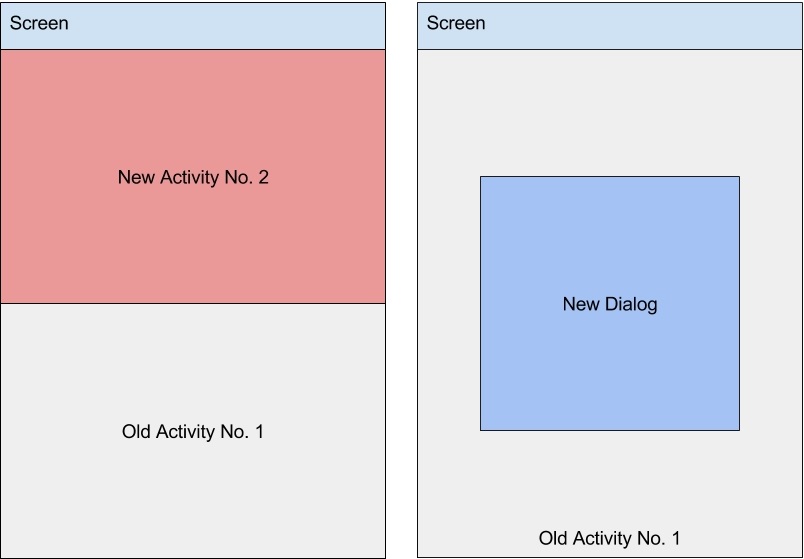
In Android 7.0, it is possible to have multiple Activities and Applications running side by side. In such cases, when an Activity loses focus, onPause() will be called but onStop() won't.
As we have seen, there are multiple places where an Activity can set itself up and start various kinds of operation. Care must be taken when setting up resources (and external ones such as the network) to not forget to tear them down. If something was started in onCreate(), it should be stopped in onDestroy(). If a background Thread was started in onStart(), it should be destroyed in onStop(). The same goes for onResume() and onPause(). In the following sections, we will see that if these rules aren't followed, it can create some serious problems.