Table of Contents for
Mastering C++ Multithreading

Version ebook / Retour

Cover image for bash Cookbook, 2nd Edition Mastering C++ Multithreading by Maya Posch Published by Packt Publishing, 2017
  1. Mastering C++ Multithreading
  2. Title Page
  3. Copyright
  4. Mastering C++ Multithreading
  5. Credits
  6. About the Author
  7. About the Reviewer
  8. www.PacktPub.com
  9. Why subscribe?
  10. Customer Feedback
  11. Table of Contents
  12. Preface
  13. What this book covers
  14. What you need for this book
  15. Who this book is for
  16. Conventions
  17. Reader feedback
  18. Downloading the example code
  19. Errata
  20. Piracy
  21. Questions
  22. Revisiting Multithreading
  23. Getting started
  24. The multithreaded application
  25. Makefile
  26. Other applications
  27. Summary
  28. Multithreading Implementation on the Processor and OS
  29. Defining processes and threads
  30. Tasks in x86 (32-bit and 64-bit)
  31. Process state in ARM
  32. The stack
  33. Defining multithreading
  34. Flynn's taxonomy
  35. Symmetric versus asymmetric multiprocessing
  36. Loosely and tightly coupled multiprocessing
  37. Combining multiprocessing with multithreading
  38. Multithreading types
  39. Temporal multithreading
  40. Simultaneous multithreading (SMT)
  41. Schedulers
  42. Tracing the demo application
  43. Mutual exclusion implementations
  44. Hardware
  45. Software
  46. Summary
  47. C++ Multithreading APIs
  48. API overview
  49. POSIX threads
  50. Windows support
  51. PThreads thread management
  52. Mutexes
  53. Condition variables
  54. Synchronization
  55. Semaphores
  56. Thread local storage (TLC)
  57. Windows threads
  58. Thread management
  59. Advanced management
  60. Synchronization
  61. Condition variables
  62. Thread local storage
  63. Boost
  64. Qt
  65. QThread
  66. Thread pools
  67. Synchronization
  68. QtConcurrent
  69. Thread local storage
  70. POCO
  71. Thread class
  72. Thread pool
  73. Thread local storage (TLS)
  74. Synchronization
  75. C++ threads
  76. Putting it together
  77. Summary
  78. Thread Synchronization and Communication
  79. Safety first
  80. The scheduler
  81. High-level view
  82. Implementation
  83. Request class
  84. Worker class
  85. Dispatcher
  86. Makefile
  87. Output
  88. Sharing data
  89. Using r/w-locks
  90. Using shared pointers
  91. Summary
  92. Native C++ Threads and Primitives
  93. The STL threading API
  94. Boost.Thread API
  95. The 2011 standard
  96. C++14
  97. C++17
  98. STL organization
  99. Thread class
  100. Basic use
  101. Passing parameters
  102. Return value
  103. Moving threads
  104. Thread ID
  105. Sleeping
  106. Yield
  107. Detach
  108. Swap
  109. Mutex
  110. Basic use
  111. Non-blocking locking
  112. Timed mutex
  113. Lock guard
  114. Unique lock
  115. Scoped lock
  116. Recursive mutex
  117. Recursive timed mutex
  118. Shared mutex
  119. Shared timed mutex
  120. Condition variable
  121. Condition_variable_any
  122. Notify all at thread exit
  123. Future
  124. Promise
  125. Shared future
  126. Packaged_task
  127. Async
  128. Launch policy
  129. Atomics
  130. Summary
  131. Debugging Multithreaded Code
  132. When to start debugging
  133. The humble debugger
  134. GDB
  135. Debugging multithreaded code
  136. Breakpoints
  137. Back traces
  138. Dynamic analysis tools
  139. Limitations
  140. Alternatives
  141. Memcheck
  142. Basic use
  143. Error types
  144. Illegal read / illegal write errors
  145. Use of uninitialized values
  146. Uninitialized or unaddressable system call values
  147. Illegal frees
  148. Mismatched deallocation
  149. Overlapping source and destination
  150. Fishy argument values
  151. Memory leak detection
  152. Helgrind
  153. Basic use
  154. Misuse of the pthreads API
  155. Lock order problems
  156. Data races
  157. DRD
  158. Basic use
  159. Features
  160. C++11 threads support
  161. Summary
  162. Best Practices
  163. Proper multithreading
  164. Wrongful expectations - deadlocks
  165. Being careless - data races
  166. Mutexes aren't magic
  167. Locks are fancy mutexes
  168. Threads versus the future
  169. Static order of initialization
  170. Summary
  171. Atomic Operations - Working with the Hardware
  172. Atomic operations
  173. Visual C++
  174. GCC
  175. Memory order
  176. Other compilers
  177. C++11 atomics
  178. Example
  179. Non-class functions
  180. Example
  181. Atomic flag
  182. Memory order
  183. Relaxed ordering
  184. Release-acquire ordering
  185. Release-consume ordering
  186. Sequentially-consistent ordering
  187. Volatile keyword
  188. Summary
  189. Multithreading with Distributed Computing
  190. Distributed computing, in a nutshell
  191. MPI
  192. Implementations
  193. Using MPI
  194. Compiling MPI applications
  195. The cluster hardware
  196. Installing Open MPI
  197. Linux and BSDs
  198. Windows
  199. Distributing jobs across nodes
  200. Setting up an MPI node
  201. Creating the MPI host file
  202. Running the job
  203. Using a cluster scheduler
  204. MPI communication
  205. MPI data types
  206. Custom types
  207. Basic communication
  208. Advanced communication
  209. Broadcasting
  210. Scattering and gathering
  211. MPI versus threads
  212. Potential issues
  213. Summary
  214. Multithreading with GPGPU
  215. The GPGPU processing model
  216. Implementations
  217. OpenCL
  218. Common OpenCL applications
  219. OpenCL versions
  220. OpenCL 1.0
  221. OpenCL 1.1
  222. OpenCL 1.2
  223. OpenCL 2.0
  224. OpenCL 2.1
  225. OpenCL 2.2
  226. Setting up a development environment
  227. Linux
  228. Windows
  229. OS X/MacOS
  230. A basic OpenCL application
  231. GPU memory management
  232. GPGPU and multithreading
  233. Latency
  234. Potential issues
  235. Debugging GPGPU applications
  236. Summary

Defining processes and threads

Essentially, to the operating system (OS), a process consists of one or more threads, each thread processing its own state and variables. One would regard this as a hierarchical configuration, with the OS as the foundation, providing support for the running of (user) processes. Each of these processes then consists of one or more threads. Communication between processes is handled by inter-process communication (IPC), which is provided by the operating system.

In a graphical view, this looks like the following:
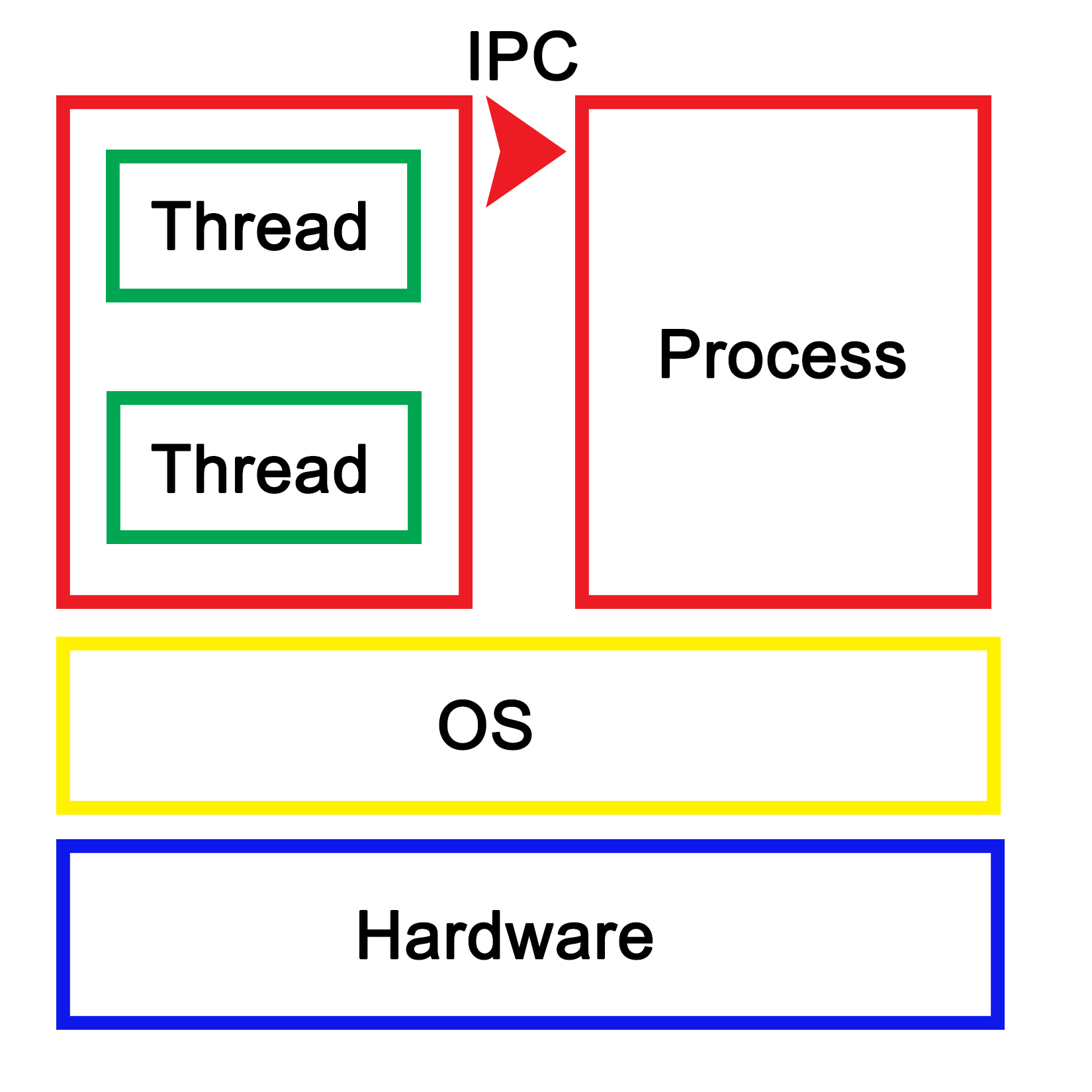
Each process within the OS has its own state, with each thread in a process having its own state as well as the relative to the other threads within that same process. While IPC allows processes to communicate with each other, threads can communicate with other threads within the process in a variety of ways, which we'll explore in more depth in upcoming chapters. This generally involves some kind of shared memory between threads.

An application is loaded from binary data in a specific executable format such as, for example, Executable and Linkable Format (ELF) which is generally used on Linux and many other operating systems. With ELF binaries, the following number of sections should always be present:

  • .bss
  • .data
  • .rodata
  • .text

The .bss section is, essentially, allocated with uninitialized memory including empty arrays which thus do not take up any space in the binary, as it makes no sense to store rows of pure zeroes in the executable. Similarly, there is the .data section with initialized data. This contains global tables, variables, and the like. Finally, the .rodata section is like .data, but it is, as the name suggests, read-only. It contains things such as hardcoded strings.

In the .text section, we find the actual application instructions (code) which will be executed by the processor. The whole of this will get loaded by the operating system, thus creating a process. The layout of such a process looks like the following diagram:
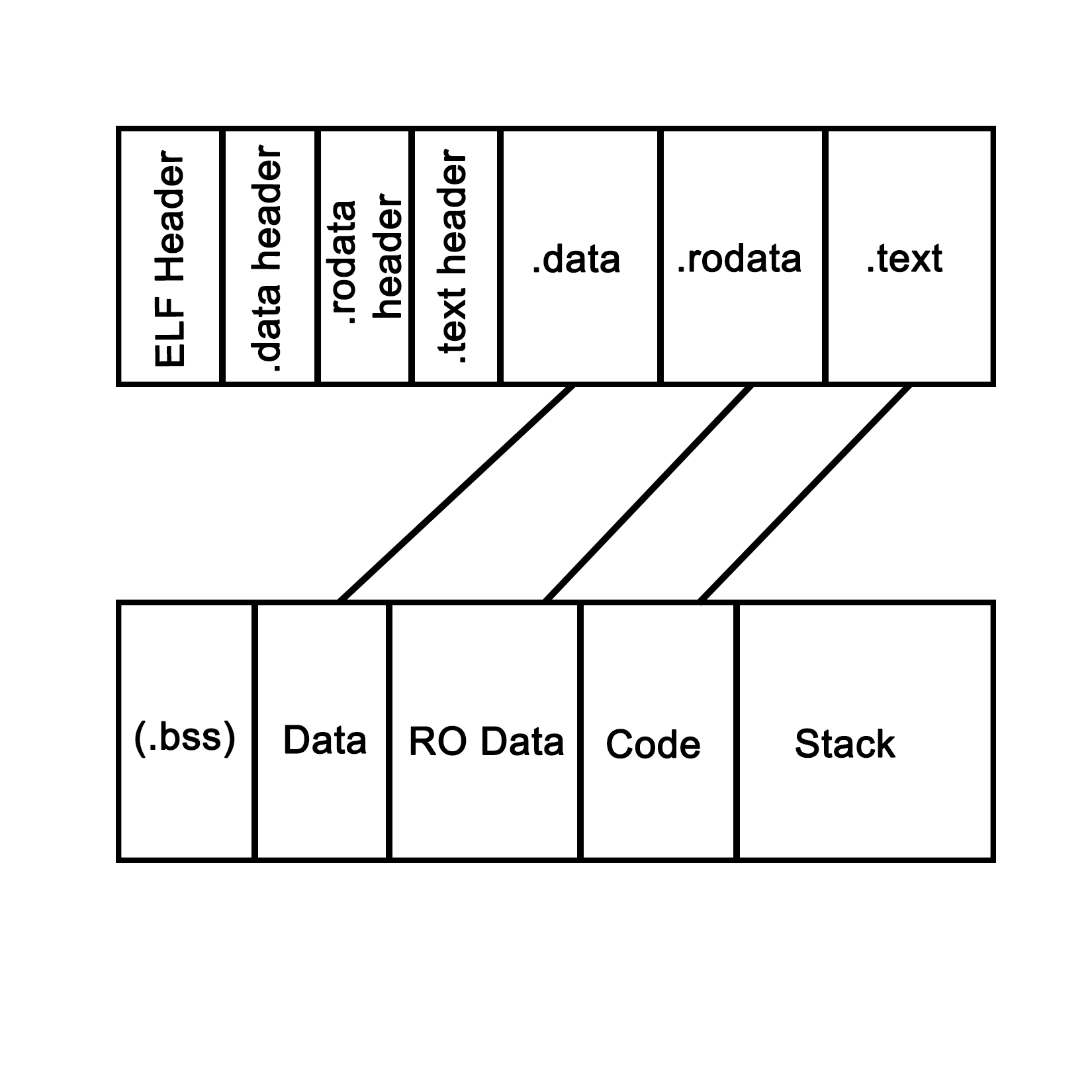
This is what a process looks like when launched from an ELF-format binary, though the final format in memory is roughly the same in basically any OS, including for a Windows process launched from a PE-format binary. Each of the sections in the binary are loaded into their respective sections, with the BSS section allocated to the specified size. The .text section is loaded along with the other sections, and its initial instruction is executed once this is done, which starts the process.

In system languages such as C++, one can see how variables and other program state information within such a process are stored both on the stack (variables exist within the scope) and heap (using the new operator). The stack is a section of memory (one allocated per thread), the size of which depends on the operating system and its configuration. One can generally also set the stack size programmatically when creating a new thread.

In an operating system, a process consists of a block of memory addresses, the size of which is constant and limited by the size of its memory pointers. For a 32-bit OS, this would limit this block to 4 GB. Within this virtual memory space, the OS allocates a basic stack and heap, both of which can grow until all memory addresses have been exhausted, and further attempts by the process to allocate more memory will be denied.

The stack is a concept both for the operating system and for the hardware. In essence, it's a collection (stack) of so-called stack frames, each of which is composed of variables, instructions, and other data relevant to the execution frame of a task.

In hardware terms, the stack is part of the task (x86) or process state (ARM), which is how the processor defines an execution instance (program or thread). This hardware-defined entity contains the entire state of a singular thread of execution. See the following sections for further details on this.