Table of Contents for
Java in a Nutshell, 7th Edition
 Java in a Nutshell, 7th Edition
Published by
O'Reilly Media, Inc., 2018
Java in a Nutshell, 7th Edition
Published by
O'Reilly Media, Inc., 2018
- nav
- Cover
- Java
- Java in a Nutshell, Seventh Edition
- Dedication
- Foreword
- Preface
- I. Introducing Java
- 1. Introduction to the Java Environment
- 2. Java Syntax from the Ground Up
- 3. Object-Oriented Programming in Java
- 4. The Java Type System
- 5. Introduction to Object-Oriented Design in Java
- 6. Java’s Approach to Memory and Concurrency
- II. Working with the Java Platform
- 7. Programming and Documentation Conventions
- 8. Working with Java Collections
- 9. Handling Common Data Formats
- 10. File Handling and I/O
- 11. Classloading, Reflection, and Method Handles
- 12. Java Platform Modules
- 13. Platform Tools
- A. Additional Tools
- Index
- About the Authors
- Colophon
Chapter 9. Handling Common Data Formats
Most of programming is handling data in various formats. In this chapter, we will introduce Java’s support for handling two big classes of data—text and numbers. The second half of the chapter will focus on handling date and time information. This is of particular interest, as Java 8 ships a completely new API for handling date and time. We cover this new interface in some depth, before finishing the chapter by briefly discussing Java’s original date and time API.
Many applications are still using the legacy APIs, so developers need to be aware of the old way of doing things, but the new APIs are so much better that we recommend converting as soon as possible. Before we get to those more complex formats, let’s get under way by talking about textual data and strings.
Text
We have already met Java’s strings on many occasions. They consist of
sequences of Unicode characters, and are represented as instances of
the String class. Strings are one of the most common types of data
that Java programs process (a claim you can investigate for yourself by
using the jmap tool that we’ll meet in Chapter 13).
In this section, we’ll meet the String class in some more depth, and
understand why it is in a rather unique position within the Java
language. Later in the section, we’ll introduce regular expressions, a
very common abstraction for searching text for patterns (and a classic
tool in the programmer’s arsenal).
Special Syntax for Strings
The String class is handled in a somewhat special way by the Java
language. This is because, despite not being a primitive type, strings
are so common that it makes sense for Java to have a number of special
syntax features designed to make handling strings easy. Let’s look at
some examples of special syntax features for strings that Java provides.
String literals
As we saw in Chapter 2, Java allows a sequence of characters to be placed in double quotes to create a literal string object. Like this:
Stringpet="Cat";
Without this special syntax, we would have to write acres of horrible code like this:
char[]pullingTeeth={'C','a','t'};Stringpet=newString(pullingTeeth);
This would get tedious extremely quickly, so it’s no surprise that Java, like all modern programming languages, provides a simple string literal syntax. The string literals are perfectly sound objects, so code like this is completely legal:
System.out.println("Dog".length());
toString()
This method is defined on Object, and is designed to allow easy
conversion of any object to a string. This makes it easy to print out
any object, by using the method System.out.println(). This method is
actually PrintStream::println because System.out is a static field
of type PrintStream. Let’s see how this method is defined:
publicvoidprintln(Objectx){Strings=String.valueOf(x);synchronized(this){(s);newLine();}}
This creates a new string by using the static method
String::valueOf():
publicstaticStringvalueOf(Objectobj){return(obj==null)?"null":obj.toString();}
Note
The static valueOf() method is used instead of toString() directly,
to avoid a NullPointerException in the case where obj is null.
This construction means that toString() is always available for any
object, and this turns out to come in very handy for another major
syntax feature that Java provides: string concatenation.
String concatenation
Java allows us to create new strings by “adding” the characters from one string onto the end of another. This is called string concatenation and uses the operator +.
In versions of Java up to and including Java 8, it works by first creating a “working area” in the form of a StringBuilder object that contains the same sequence of characters as the original string.
Note
Java 9 introduced a new mechanism that uses the invokedynamic instruction instead of StringBuilder directly. This is an advanced piece of functionality and out of scope for this discussion, but it doesn’t change the behavior visible to the Java developer.
The builder object is then updated and the characters from the
additional string are added onto the end. Finally, toString() is
called on the StringBuilder object (which now contains the characters
from both strings). This gives us a new string with all the characters
in it. All of this code is created automatically by javac whenever we
use the + operator to concatenate strings.
The concatenation process returns a completely new String object, as
we can see in this example:
Strings1="AB";Strings2="CD";Strings3=s1;System.out.println(s1==s3);// Same object?s3=s1+s2;System.out.println(s1==s3);// Still same?System.out.println(s1);System.out.println(s3);
The concatentation example directly shows that the + operator is not
altering (or mutating) s1 in place. This is an example of a more
general principle: Java’s strings are immutable. This means that once
the characters that make up the string have been chosen and the String
object has been created, the String cannot be changed. This is an
important language principle in Java, so let’s look at it in a little
more depth.
String Immutability
In order to “change” a string, as we saw when we discussed string
concatenation, we actually need to create an intermediate
StringBuilder object to act as a temporary scratch area, and then
call toString() on it, to bake it into a new instance of String.
Let’s see how this works in code:
Stringpet="Cat";StringBuildersb=newStringBuilder(pet);sb.append("amaran");Stringboat=sb.toString();System.out.println(boat);
Code like this behaves equivalently to the following, although in Java 9 and above the actual bytecode sequences will differ:
Stringpet="Cat";Stringboat=pet+"amaran";System.out.println(boat);
Of course, as well as being used under the hood by javac, the
StringBuilder class can also be used directly in application code, as
we’ve seen.
Warning
Along with StringBuilder, Java also has a StringBuffer class. This
comes from the oldest versions of Java, and should not be used for new
development—use StringBuilder instead, unless you really need to share
the construction of a new string between multiple threads.
String immutability is an extremely useful language feature. For
example, suppose the + changed a string instead of creating a new one;
then, whenever any thread concatenated two strings together, all other
threads would also see the change. This is unlikely to be a useful
behavior for most programs, and so immutability makes good sense.
Hash codes and effective immutability
We have already met the hashCode() method in
Chapter 5, where we described the contract that
the method must satisfy. Let’s take a look at the JDK source code and
see how the method String::hashCode() is defined:
publicinthashCode(){inth=hash;if(h==0&&value.length>0){charval[]=value;for(inti=0;i<value.length;i++){h=31*h+val[i];}hash=h;}returnh;}
The field hash holds the hash code of the string, and the field
value is a char[] that holds the characters that actually make up
the string. As we can see from the code, Java computes the hash by looping
over all the characters of the string. It therefore takes a number of
machine instructions proportional to the number of characters in the
string. For very large strings, this could take a bit of time. Rather
than pre-compute the hash value, Java only calculates it when it is
needed.
When the method runs, the hash is computed by stepping through the array
of characters. At the end of the array, we exit the for loop and write
the computed hash back into the field hash. Now, when this method is
called again, the value has already been computed, so we can just
use the cached value and subsequent calls to hashCode() return
immediately.
Note
The computation of a string’s hash code is an example of a benign data race. In a program with multiple threads, they could race to compute the hash code. However, they would all eventually arrive at exactly the same answer—hence the term benign.
All of the fields of the String class are final, except for hash. So
Java’s strings are not, strictly speaking, immutable. However, because
the hash field is just a cache of a value that is deterministically
computed from the other fields, which are all immutable, then provided
String has been coded correctly, it will behave as if it were
immutable. Classes that have this property are called effectively
immutable—they are quite rare in practice, and working programmers
can usually ignore the distinction between truly immutable and
effectively immutable data.
Regular Expressions
Java has support for regular expressions (often shortened to
regex or regexp). These are a representation of a search pattern
used to scan and match text. A regex is a sequence of characters that we
want to search for. They can be very simple—for example, abc means
that we’re looking for a, followed immediately by b, followed
immediately by c, anywhere within the text we’re searching through.
Note that a search pattern may match an input text in zero, one, or more
places.
The simplest regexes are just sequences of literal characters, like
abc. However, the language of regexes can express more complex and
subtle ideas than just literal sequences. For example, a regex can
represent patterns to match like:
-
A numeric digit
-
Any letter
-
Any number of letters, which must all be in the range a to j but can be upper- or lowercase
-
a followed by any four characters, followed by b
The syntax we use to write regular expressions is simple, but because we can build up complex patterns, it is often possible to write an expression that does not implement precisely what we wanted. When using regexes, it is very important to always test them fully. This should include both test cases that should pass and cases that should fail.
To express these more complex patterns, regexes use metacharacters.
These are special characters that indicate that special processing is
required. This can be thought of as similar to the use of the *
character in operating system shells. In those circumstances, it is
understood that the * is not to be interpreted literally but instead
means “anything.” If we wanted to list all the Java source files in the
current directory on Unix, we would issue the command:
ls*.java
The metacharacters of regexes are similar, but there are far more of them, and they are far more flexible than the set available in shells. They also have different meanings than they do in shell scripts, so don’t get confused.
Let’s meet a couple of examples. Suppose we want to have a spell-checking program that is relaxed about the difference in spelling between British and American English. This means that honor and honour should both be accepted as valid spelling choices. This is easy to do with regular expressions.
Java uses a class called Pattern (from the package
java.util.regex) to represent a regex. This class can’t be directly
instantiated, however. Instead, new instances are created by using a
static factory method, compile(). From a pattern, we then derive a
Matcher for a particular input string that we can use to explore the
input string. For example, let’s examine a bit of Shakespeare from the
play Julius Caesar:
Patternp=Pattern.compile("honou?r");StringcaesarUK="For Brutus is an honourable man";MatchermUK=p.matcher(caesarUK);StringcaesarUS="For Brutus is an honorable man";MatchermUS=p.matcher(caesarUS);System.out.println("Matches UK spelling? "+mUK.find());System.out.println("Matches US spelling? "+mUS.find());
Note
Be careful when using Matcher, as it has a method called matches().
However, this method indicates whether the pattern can cover the entire
input string. It will return false if the pattern only starts matching
in the middle of the string.
The last example introduces our first regex metacharacter ?, in the
pattern honou?r. This means “the preceding character is optional”—so
both honour and honor will match. Let’s look at another example.
Suppose we want to match both minimize and minimise (the latter
spelling is more common in British English). We can use square brackets
to indicate that any character from a set (but only one alternative)
[] can be used—like this:
Patternp=Pattern.compile("minimi[sz]e");
Table 9-1 provides an expanded list of metacharacters available for Java regexes.
| Metacharacter | Meaning | Notes |
|---|---|---|
|
Optional character—zero or one instance |
|
|
Zero or more of preceding character |
|
|
One or more of preceding character |
|
|
Between |
|
|
A digit |
|
|
A nondigit character |
|
|
A word character |
Digits, letters, and |
|
A nonword character |
|
|
A whitespace character |
|
|
A nonwhitespace character |
|
|
Newline character |
|
|
Tab character |
|
|
Any single character |
Does not include newline in Java |
|
Any character contained with the brackets |
Called a character class |
|
Any character not contained with the brackets |
Called a negated character class |
|
Build up a group of pattern elements |
Called a group (or capturing group) |
|
Define alternative possbilities |
Implements logical |
|
Start of string |
|
|
End of string |
There are a few more, but this is the basic list, and from this, we can construct more complex expressions for matching such as the examples given earlier in this section:
// Note that we have to use \\ because we need a literal \// and Java uses a single \ as an escape characterStringpStr="\\d";// A numeric digitStringtext="Apollo 13";Patternp=Pattern.compile(pStr);Matcherm=p.matcher(text);System.out.(pStr+" matches "+text+"? "+m.find());System.out.println(" ; match: "+m.group());pStr="[a..zA..Z]";//Any letterp=Pattern.compile(pStr);m=p.matcher(text);System.out.(pStr+" matches "+text+"? "+m.find());System.out.println(" ; match: "+m.group());// Any number of letters, which must all be in the range 'a' to 'j'// but can be upper- or lowercasepStr="([a..jA..J]*)";p=Pattern.compile(pStr);m=p.matcher(text);System.out.(pStr+" matches "+text+"? "+m.find());System.out.println(" ; match: "+m.group());text="abacab";// 'a' followed by any four characters, followed by 'b'pStr="a....b";p=Pattern.compile(pStr);m=p.matcher(text);System.out.(pStr+" matches "+text+"? "+m.find());System.out.println(" ; match: "+m.group());
Let’s conclude our quick tour of regular expressions by meeting a new
method that was added to Pattern as part of Java 8: asPredicate().
This method is present to allow us to easily bridge from regular
expressions to the Java Collections and their new support for lambda
expressions.
For example, suppose we have a regex and a collection of strings. It’s
very natural to ask the question: “Which strings match against the
regex?” We do this by using the filter idiom, and by converting the
regex to a Predicate using the helper method, like this:
StringpStr="\\d";// A numeric digitPatternp=Pattern.compile(pStr);String[]inputs={"Cat","Dog","Ice-9","99 Luftballoons"};List<String>ls=Arrays.asList(inputs);List<String>containDigits=ls.stream().filter(p.asPredicate()).collect(Collectors.toList());System.out.println(containDigits);
Java’s built-in support for text processing is more than adequate for the majority of text processing tasks that business applications normally require. More advanced tasks, such as the search and processing of very large data sets, or complex parsing (including formal grammars) are outside the scope of this book, but Java has a large ecosystem of helpful libraries and bindings to specialized technologies for text processing and analysis.
Numbers and Math
In this section, we will discuss Java’s support for numeric types in some more detail. In particular, we’ll discuss the two’s complement representation of integral types that Java uses. We’ll introduce floating-point representations, and touch on some of the problems they can cause. We’ll work through examples that use some of Java’s library functions for standard mathematical operations.
How Java Represents Integer Types
Java’s integer types are all signed, as we first mentioned in “Primitive Data Types”. This means that all integer types can represent both positive and negative numbers. As computers work with binary, this means that the only really logical way to represent this is to split the possible bit patterns up and use half of them to represent negative numbers.
Let’s work with Java’s byte type to investigate how Java represents
integers. This has 8 bits, so can represent 256 different numbers (i.e.,
128 negative and 128 non-negative numbers). It’s logical to use the
pattern 0b0000_0000 to represent zero (recall that Java has the syntax
0b<binary digits> to represent numbers as binary), and then it’s easy
to figure out the bit patterns for the positive numbers:
byteb=0b0000_0001;System.out.println(b);// 1b=0b0000_0010;System.out.println(b);// 2b=0b0000_0011;System.out.println(b);// 3// ...b=0b0111_1111;System.out.println(b);// 127
When we set the first bit of the byte, the sign should change (as we
have now used up all of the bit patterns that we’ve set aside for
non-negative numbers). So the pattern 0b1000_0000 should represent
some negative number—but which one?
Note
As a consequence of how we’ve defined things, in this representation we
have a very simple way to identify whether a bit pattern corresponds to
a negative number: if the high-end bit of a bit pattern is a 1, then
the number being represented is negative.
Consider the bit pattern consisting of all set bits: 0b1111_1111. If
we add 1 to this number, then the result will overflow the 8 bits of
storage that a byte has, resulting in 0b1_0000_0000. If we want to
constrain this to fit within the byte data type, then we should ignore
the overflow, so this becomes 0b0000_0000, otherwise known as zero. It is therefore
natural to adopt the representation that “all set bits is -1.” This
allows for natural arithmetic behavior, like this:
b=(byte)0b1111_1111;// -1System.out.println(b);b++;System.out.println(b);b=(byte)0b1111_1110;// -2System.out.println(b);b++;System.out.println(b);
Finally, let’s look at the number that 0b1000_0000 represents. It’s
the most negative number that the type can represent, so for byte:
b=(byte)0b1000_0000;System.out.println(b);// -128
This representation is called two’s complement, and is the most common representation for signed integers. To use it effectively, there are only two points that you need to remember:
-
A bit pattern of all 1’s is the representation for −1.
-
If the high bit is set, the number is negative.
Java’s other integer types (short, int, and long) behave in very
similar ways but with more bits in their representation. The char
data type is different because it represents a Unicode character, but in
some ways behaves as an unsigned 16-bit numeric type. It is not normally
regarded as an integer type by Java programmers.
Java and Floating-Point Numbers
Computers represent numbers using binary. We’ve seen how Java uses the
two’s complement representation for integers. But what about fractions
or decimals? Java, like almost all modern programming languages,
represents them using floating-point arithmetic. Let’s take a look
at how this works, first in base-10 (regular decimal) and then in
binary. Java defines the two most important mathematical constants, e
and π (pi), as constants in java.lang.Math like this:
publicstaticfinaldoubleE=2.7182818284590452354;publicstaticfinaldoublePI=3.14159265358979323846;
Of course, these constants are actually irrational numbers and cannot be precisely expressed as a fraction, or by any finite decimal number.1 This means that whenever we try to represent them in a computer, there is always rounding error. Let’s suppose we only want to deal with eight digits of π, and we want to represent the digits as a whole number. We can use a representation like this:
This starts to suggest the basis of how floating-point numbers work. We
use some of the bits to represent the significant digits (314159265,
in our example) of the number and some bits to represent the exponent
of the base (-8, in our example). The collection of significant digits
is called the significand and the exponent describes whether we need
to shift the significand up or down to get to the desired number.
Of course, in the examples we’ve met until now, we’ve been working in base-10. Computers use binary, so we need to use this as the base in our floating-point examples. This introduces some additional complications.
Note
The number 0.1 cannot be expressed as a finite sequence of binary
digits. This means that virtually all calculations that humans care
about will lose precision when performed in floating point, and rounding
error is essentially inevitable.
Let’s look at an example that shows the rounding problem:
doubled=0.3;System.out.println(d);// Special-cased to avoid ugly representationdoubled2=0.2;// Should be -0.1 but prints -0.09999999999999998System.out.println(d2-d);
The official standard that describes floating-point arithmetic is IEEE-754, and Java’s support for floating point is based on that standard. The standard uses 24 binary digits for standard precision and 53 binary digits for double precision.
As we mentioned briefly in Chapter 2, Java can be
more accurate than the standard requires, by using hardware features if
they are available. In extremely rare cases, usually where very strict
compatability with other (possibly older) platforms is required, we can switch off this
behavior by using strictfp to mandate perfect
compliance with the IEEE-754 standard. This is almost never necessary
and the vast majority of programmers will never need to use (or even
see) this keyword.
BigDecimal
Rounding error is a constant source of headaches for programmers who
work with floating-point numbers. In response, Java has a class
java.math.BigDecimal that provides arbitrary precision arithmetic, in
a decimal representation. This works around the problem of 0.1 not
having a finite representation in binary, but there are still some edge
conditions when converting to or from Java’s primitive types, as you can
see:
doubled=0.3;System.out.println(d);BigDecimalbd=newBigDecimal(d);System.out.println(bd);bd=newBigDecimal("0.3");System.out.println(bd);
However, even with all arithmetic performed in base-10, there are still
numbers, such as 1/3, that do not have a terminating decimal
representation. Let’s see what happens when we try to represent such
numbers using BigDecimal:
bd=newBigDecimal(BigInteger.ONE);bd.divide(newBigDecimal(3.0));System.out.println(bd);// Should be 1/3
As BigDecimal can’t represent 1/3 precisely, the call to divide()
blows up with ArithmeticException. When you are working with BigDecimal, it
is therefore necessary to be acutely aware of exactly which operations
could result in a nonterminating decimal result. To make matters worse,
ArithmeticException is an unchecked, runtime exception and so the Java
compiler does not even warn about possible exceptions of this type.
As as a final note on floating-point numbers, the paper “What Every Computer Scientist Should Know About Floating-Point Arithmetic” by David Goldberg should be considered essential further reading for all professional programmers. It is easily and freely obtainable on the internet.
Java’s Standard Library of Mathematical Functions
To conclude this look at Java’s support for numeric data and math,
let’s take a quick tour of the standard library of functions that Java
ships with. These are mostly static helper methods that are located on
the class java.lang.Math and include functions like:
abs()-
Returns the absolute value of a number. Has overloaded forms for various primitive types.
- Trigonometric functions
-
Basic functions for computing the sine, cosine, tangent, and so on. Java also includes hyperbolic versions and the inverse functions (such as arc sine).
max(),min()-
Overloaded functions to return the greater and smaller of two arguments (both of the same numeric type).
floor()-
Used to return the largest integer smaller than the argument (which is a double).
ceil()returns the smallest integer larger than the argument. pow(),exp(),log()-
Functions for raising one number to the power of another, and for computing exponentials and natural logarithms.
log10()provides logarithms to base-10, rather than the natural base.
Let’s look at some simple examples of how to use these functions:
System.out.println(Math.abs(2));System.out.println(Math.abs(-2));doublecosp3=Math.cos(0.3);doublesinp3=Math.sin(0.3);System.out.println((cosp3*cosp3+sinp3*sinp3));// Always 1.0System.out.println(Math.max(0.3,0.7));System.out.println(Math.max(0.3,-0.3));System.out.println(Math.max(-0.3,-0.7));System.out.println(Math.min(0.3,0.7));System.out.println(Math.min(0.3,-0.3));System.out.println(Math.min(-0.3,-0.7));System.out.println(Math.floor(1.3));System.out.println(Math.ceil(1.3));System.out.println(Math.floor(7.5));System.out.println(Math.ceil(7.5));System.out.println(Math.round(1.3));// Returns longSystem.out.println(Math.round(7.5));// Returns longSystem.out.println(Math.pow(2.0,10.0));System.out.println(Math.exp(1));System.out.println(Math.exp(2));System.out.println(Math.log(2.718281828459045));System.out.println(Math.log10(100_000));System.out.println(Math.log10(Integer.MAX_VALUE));System.out.println(Math.random());System.out.println("Let's toss a coin: ");if(Math.random()>0.5){System.out.println("It's heads");}else{System.out.println("It's tails");}
To conclude this section, let’s briefly discuss Java’s random()
function. When this is first called, it sets up a new instance of
java.util.Random. This is a pseudorandom number generator (PRNG)—a
deterministic piece of code that produces numbers that look random
but are actually produced by a mathematical formula.2 In Java’s
case, the formula used for the PRNG is pretty simple, for example:
// From java.util.RandompublicdoublenextDouble(){return(((long)(next(26))<<27)+next(27))*DOUBLE_UNIT;}
If the sequence of pseudorandom numbers always starts at the same place, then exactly the same stream of numbers will be produced. To get around this problem, the PRNG is seeded by a value that should contain as much true randomness as possible. For this source of randomness for the seed value, Java uses a CPU counter value that is normally used for high-precision timing.
Warning
While Java’s built-in pseudorandom numbers are fine for most general applications, some specialist applications (notably cryptography and some types of simulations) have much more stringent requirements. If you are working on an application of that sort, seek expert advice from programmers who are already working in the area.
Now that we’ve looked at text and numeric data, let’s move on to look at another of the most frequently encountered kinds of data: date and time information.
Java 8 Date and Time
Almost all business software applications have some notion of date
and time. When modeling real-world events or interactions, collecting a
point at which the event occurred is critical for future reporting or
comparison of domain objects. Java 8 brings a complete overhaul to the
way that developers work with date and time. This section introduces
those concepts for Java 8. In earlier versions, the only support is via
classes such as java.util.Date that do not model the concepts. Code
that uses the older APIs should move as soon as possible.
Introducing the Java 8 Date and Time API
Java 8 introduces the new package java.time, which contains the core
classes that most developers work with. It also contains four
subpackages:
java.time.chrono-
Alternative chronologies that developers using calendaring systems that do not follow the ISO standard will interact with. An example would be a Japanese calendaring system.
java.time.format-
Contains the
DateTimeFormatterused for converting date and time objects into aStringand also for parsing strings into the data and time objects. java.time.temporal-
Contains the interfaces required by the core date and time classes and also abstractions (such as queries and adjusters) for advanced operations with dates.
java.time.zone-
Classes used for the underlying time zone rules; most developers won’t require this package.
One of the most important concepts when representing time is the idea of
an instantaneous point on the timeline of some entity. While this
concept is well defined within, for example, Special Relativity,
representing it within a computer requires us to make some
assumptions. In Java 8, we represent a single point in time as an
Instant, which has these key assumptions:
-
We cannot represent more seconds than can fit into a
long. -
We cannot represent time more precisely than nanosecond precision.
This means that we are restricting ourselves to modeling time in a manner that is consistent with the capabilities of current computer systems. However, there is another fundamental concept that should also be introduced.
An Instant is about a single event in space-time. However, it is far
from uncommon for programmers to have to deal with intervals between two
events, and so Java 8 also introduces the java.time.Duration class.
This class ignores calendar effects that might arise (e.g., from
daylight saving time). With this basic conception of instants and
durations between events, let’s move on to unpack the possible ways of
thinking about an instant.
The parts of a timestamp
In Figure 9-1, we show the breakdown of the different parts of a timestamp in a number of possible ways.
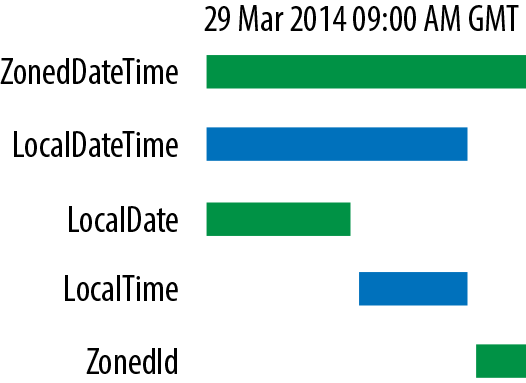
Figure 9-1. Breaking apart a timestamp
The key concept here is that there are a number of different
abstractions that might be appropriate at different times. For example,
there are applications where a LocalDate is key to business
processing, where the needed granularity is a business day.
Alternatively, some applications require subsecond, or even millisecond,
precision. Developers should be aware of their domain and use a suitable
representation within their application.
Example
The date and time API can be a lot to take in at first glance, so
let’s start by looking at an example, and discuss a diary class that
keeps track of birthdays. If you happen to be very forgetful about
birthdays, then a class like this (and especially methods like
getBirthdaysInNextMonth()) might be very helpful:
publicclassBirthdayDiary{privateMap<String,LocalDate>birthdays;publicBirthdayDiary(){birthdays=newHashMap<>();}publicLocalDateaddBirthday(Stringname,intday,intmonth,intyear){LocalDatebirthday=LocalDate.of(year,month,day);birthdays.put(name,birthday);returnbirthday;}publicLocalDategetBirthdayFor(Stringname){returnbirthdays.get(name);}publicintgetAgeInYear(Stringname,intyear){Periodperiod=Period.between(birthdays.get(name),birthdays.get(name).withYear(year));returnperiod.getYears();}publicSet<String>getFriendsOfAgeIn(intage,intyear){returnbirthdays.keySet().stream().filter(p->getAgeInYear(p,year)==age).collect(Collectors.toSet());}publicintgetDaysUntilBirthday(Stringname){Periodperiod=Period.between(LocalDate.now(),birthdays.get(name));returnperiod.getDays();}publicSet<String>getBirthdaysIn(Monthmonth){returnbirthdays.entrySet().stream().filter(p->p.getValue().getMonth()==month).map(p->p.getKey()).collect(Collectors.toSet());}publicSet<String>getBirthdaysInCurrentMonth(){returngetBirthdaysIn(LocalDate.now().getMonth());}publicintgetTotalAgeInYears(){returnbirthdays.keySet().stream().mapToInt(p->getAgeInYear(p,LocalDate.now().getYear())).sum();}}
This class shows how to use the low-level API to build up useful
functionality. It also uses innovations such as the Java Streams API,
and demonstrates how to use LocalDate as an immutable class and how
dates should be treated as values.
Queries
Under a wide variety of circumstances we may find ourselves wanting to answer a question about a particular temporal object. Some example questions we may want answers to are:
-
Is the date before March 1st?
-
Is the date in a leap year?
-
How many days is it from today until my next birthday?
This is achieved by the use of the TemporalQuery interface, which is
defined like this:
publicinterfaceTemporalQuery<R>{RqueryFrom(TemporalAccessortemporal);}
The parameter to queryFrom() should not be null, but if the result
indicates that a value was not found, null could be used as a return
value.
Note
The Predicate interface can be thought of as a query that can only
represent answers to yes-or-no questions. Temporal queries are more
general and can return a value of “How many?” or “Which?” instead of
just “yes” or “no.”
Let’s look at an example of a query in action, by considering a query that answers the following question: “Which quarter of the year is this date in?” Java 8 does not support the concept of a quarter directly. Instead, code like this is used:
LocalDatetoday=LocalDate.now();MonthcurrentMonth=today.getMonth();MonthfirstMonthofQuarter=currentMonth.firstMonthOfQuarter();
This still doesn’t give quarter as a separate abstraction and instead special case code is still needed. So let’s slightly extend the JDK support by defining this enum type:
publicenumQuarter{FIRST,SECOND,THIRD,FOURTH;}
Now, the query can be written as:
publicclassQuarterOfYearQueryimplementsTemporalQuery<Quarter>{@OverridepublicQuarterqueryFrom(TemporalAccessortemporal){LocalDatenow=LocalDate.from(temporal);if(now.isBefore(now.with(Month.APRIL).withDayOfMonth(1))){returnQuarter.FIRST;}elseif(now.isBefore(now.with(Month.JULY).withDayOfMonth(1))){returnQuarter.SECOND;}elseif(now.isBefore(now.with(Month.NOVEMBER).withDayOfMonth(1))){returnQuarter.THIRD;}else{returnQuarter.FOURTH;}}}
TemporalQuery objects can be used directly or indirectly. Let’s look
at an example of each:
QuarterOfYearQueryq=newQuarterOfYearQuery();// DirectQuarterquarter=q.queryFrom(LocalDate.now());System.out.println(quarter);// Indirectquarter=LocalDate.now().query(q);System.out.println(quarter);
Under most circumstances, it is better to use the indirect approach,
where the query object is passed as a parameter to query(). This is
because it is normally a lot clearer to read in code.
Adjusters
Adjusters modify date and time objects. Suppose, for example, that we want to return the first day of a quarter that contains a particular timestamp:
publicclassFirstDayOfQuarterimplementsTemporalAdjuster{@OverridepublicTemporaladjustInto(Temporaltemporal){finalintcurrentQuarter=YearMonth.from(temporal).get(IsoFields.QUARTER_OF_YEAR);switch(currentQuarter){case1:returnLocalDate.from(temporal).with(TemporalAdjusters.firstDayOfYear());case2:returnLocalDate.from(temporal).withMonth(Month.APRIL.getValue()).with(TemporalAdjusters.firstDayOfMonth());case3:returnLocalDate.from(temporal).withMonth(Month.JULY.getValue()).with(TemporalAdjusters.firstDayOfMonth());case4:returnLocalDate.from(temporal).withMonth(Month.OCTOBER.getValue()).with(TemporalAdjusters.firstDayOfMonth());default:returnnull;// Will never happen}}}
Let’s look at an example of how to use an adjuster:
LocalDatenow=LocalDate.now();Temporalfdoq=now.with(newFirstDayOfQuarter());System.out.println(fdoq);
The key here is the with() method, and the code should be read as
taking in one Temporal object and returning another object that has
been modified. This is completely usual for APIs that work with
immutable objects.
Legacy Date and Time
Unfortunately, many applications are not yet converted to use the
superior date and time libraries that ship with Java 8. So, for
completeness, we briefly mention the legacy date and time support (which
is based on java.util.Date).
Warning
The legacy date and time classes, especially java.util.Date, should not be used in modern Java environments.
Consider refactoring or rewriting any code that still uses the legacy classes.
In older versions of Java, java.time is not available. Instead,
programmers rely upon the legacy and rudimentary support provided by
java.util.Date. Historically, this was the only way to represent
timestamps, and although named Date this class actually consisted of
both a date and a time component—and this led to a lot of confusion for
many programmers.
There are many problems with the legacy support provided by Date, for
example:
-
The
Dateclass is incorrectly factored. It doesn’t actually refer to a date, and instead is more like a timestamp. It turns out that we need different representations for a date, versus a date and time, versus an instantaneous timestamp. -
Dateis mutable. We can obtain a reference to a date, and then change when it refers to. -
The
Dateclass doesn’t actually accept ISO-8601, the universal ISO date standard, as being as valid date. -
Datehas a very large number of deprecated methods.
The current JDK uses two constructors for Date—the void constructor
that is intended to be the “now constructor,” and a constructor that
takes a number of milliseconds since epoch.
Summary
In this chapter, we’ve met several different classes of data. Textual and numeric data are the most obvious examples, but as working programmers we will meet a large number of different sorts of data. Let’s move on to look at whole files of data, and new ways to work with I/O and networking. Fortunately, Java provides good support for dealing with many of these abstractions.