Table of Contents for
Java in a Nutshell, 7th Edition
 Java in a Nutshell, 7th Edition
Published by
O'Reilly Media, Inc., 2018
Java in a Nutshell, 7th Edition
Published by
O'Reilly Media, Inc., 2018
- nav
- Cover
- Java
- Java in a Nutshell, Seventh Edition
- Dedication
- Foreword
- Preface
- I. Introducing Java
- 1. Introduction to the Java Environment
- 2. Java Syntax from the Ground Up
- 3. Object-Oriented Programming in Java
- 4. The Java Type System
- 5. Introduction to Object-Oriented Design in Java
- 6. Java’s Approach to Memory and Concurrency
- II. Working with the Java Platform
- 7. Programming and Documentation Conventions
- 8. Working with Java Collections
- 9. Handling Common Data Formats
- 10. File Handling and I/O
- 11. Classloading, Reflection, and Method Handles
- 12. Java Platform Modules
- 13. Platform Tools
- A. Additional Tools
- Index
- About the Authors
- Colophon
Appendix A. Additional Tools
In this appendix, we will discuss two tools that used to ship as part of the JDK but are now either deprecated or only available as separate downloads. The tools are:
-
Nashorn
-
VisualVM
Nashorn is a fully compliant implementation of JavaScript and an accompanying shell and was first made available as part of Java 8, but is officially deprecated as of Java 11.
JVisualVM (often referred to as VisualVM) is a graphical tool, based on the Netbeans platform. It is used for monitoring JVMs and essentially acts as an equivalent, graphical aggregate of many of the tools featured in “Command-Line Tools”.
Introduction to Nashorn
In this section, we will assume some basic understanding of JavaScript. If you aren’t already familiar with basic JavaScript concepts, then Head First JavaScript by Michael Morrison (O’Reilly) is a good place to start.
If you recall the comparison between Java and JavaScript outlined in “Java Compared to JavaScript”, you know that the two languages are very different. It may, therefore, seem surprising that JavaScript should be able to run on top of the same virtual machine as Java.
Non-Java Languages on the JVM
In fact, there are a very large number of non-Java languages that run on the JVM—and some of them are a lot more unlike Java than JavaScript is. This is made possible by the fact that the Java language and JVM are only very loosely coupled, and only really interact via the definition of the class file format. This can be accomplished in two different ways:
-
The source language has an interpreter that has been implemented in Java. The interpreter runs on the JVM and executes programs written in the source language.
-
The source language ships with a compiler that produces class files from units of source language code. The resulting compiled class files are then directly executed on the JVM, usually with some additional language-specific runtime support.
With Java 8, Oracle has included Nashorn, a new JavaScript implementation that runs on the JVM. Nashorn is designed to replace the original JavaScript-on-the-JVM project—which was called Rhino (Nashorn is the German word for “rhino”).
Nashorn is a completely rewritten implementation and strives for easy interoperability with Java, high performance, and precise conformance to the JavaScript ECMA specifications. Nashorn was the first implementation of JavaScript to hit a perfect 100% on spec compliance and is already at least 20 times faster than Rhino on most workloads.
Nashorn takes the full-compilation approach—but with the added refinement that the compiler is inside the runtime, so that JavaScript source code is never compiled before program execution begins. This means that JavaScript that was not specifically written for Nashorn can still be easily deployed on the platform.
Note
Nashorn is unlike many other JVM languages (such as JRuby) in that it does not implement any form of interpreter. Nashorn always compiles JavaScript to JVM bytecode and executes the bytecode directly.
This is interesting from a technical perspective, but many developers are curious as to what role Nashorn is intended to play in the mature and well-established Java ecosystem. Let’s look at that role next.
Motivation
Nashorn serves several purposes within the Java and JVM ecosystem. First, it provides a viable environment for JavaScript developers to discover the power of the JVM. Second, it enables companies to continue to leverage their existing investment in Java technologies while additionally adopting JavaScript as a development language. Last, it provides a great engineering showcase for the advanced virtual machine technology present in the HotSpot Java Virtual Machine.
With the continued growth and adoption of JavaScript, broadening out from its traditional home in the browser to more general-purpose computing and the server side, Nashorn represents a great bridge between the existing rock-solid Java ecosystem and a promising wave of new technologies.
For now, let’s move on to discuss the mechanics of how Nashorn works, and how to get started with the platform. There are several different ways in which JavaScript code can be executed on Nashorn, and in the next section we’ll look at two of the most commonly used.
Executing JavaScript with Nashorn
In this section, we’ll be introducing the Nashorn environment, and discuss two different ways of executing JavaScript (both of which are present in the bin subdirectory of $JAVA_HOME):
jrunscript-
A simple script runner for executing JavaScript as .js files.
jjs-
A more full-featured shell—suitable for both running scripts and use as an interactive, read-eval-print-loop (REPL) environment for exploring Nashorn and its features.
Let’s start by looking at the basic runner, which is suitable for the majority of simple JavaScript applications.
Running from the Command Line
To run a JavaScript file called my_script.js with Nashorn, just use
the jrunscript command:
jrunscriptmy_script.js
jrunscript can also be used with different script engines than Nashorn
(see “Nashorn and javax.script” for more details on
script engines) and it provides a -l switch to specify them if needed:
jrunscript–lnashornmy_script.js
Note
With this switch, jrunscript can even run scripts in languages other
than JavaScript, provided a suitable script engine is available.
The basic runner is perfectly suitable for simple use cases, but it has
limitations and so for serious use we need a more capable execution
environment. This is provided by jjs, the Nashorn shell.
Using the Nashorn Shell
The Nashorn shell command is jjs. This can be used either
interactively, or non-interactively, as a drop-in replacement for
jrunscript.
The simplest JavaScript example is, of course, the classic “Hello World,” so let’s look at how we would achieve this in the interactive shell:
$jjsjjs>("Hello World!");HelloWorld!jjs>
Nashorn interoperability with Java can be easily handled from the shell. We’ll discuss this in full detail in “Calling Java from Nashorn”, but to give a first example, we can directly access Java classes and methods from JavaScript by using the fully qualified class name. As a concrete example, let’s access Java’s built-in regular expression support:
jjs>varpattern=java.util.regex.Pattern.compile("\\d+");jjs>varmyNums=pattern.split("a1b2c3d4e5f6");jjs>(myNums);[Ljava.lang.String;@10b48321jjs>(myNums[0]);a
Note
When we used the REPL to print out the JavaScript variable myNums, we
got the result [Ljava.lang.String;@10b48321—this is a tell-tale sign
that despite being represented in a JavaScript variable, myNums is
really a Java array of strings.
We’ll have a great deal more to say about interoperation between Nashorn
and Java later on, but first let’s discuss some of the additional
features of jjs. The general form of the jjs command is:
jjs[<options>]<files>[--<arguments>]
There are a number of options that can be passed to jjs—some of the
most common are:
-
-cpor-classpathindicates where additional Java classes can be found (to be used via theJava.typemechanism, as we’ll see later). -
-doeor-dump-on-errorwill produce a full error dump if Nashorn is forced to exit. -
-Jis used to pass options to the JVM. For example, if we want to increase the maximum memory available to the JVM:$jjs-J-Xmx4gjjs>java.lang.Runtime.getRuntime().maxMemory()3817799680 -
-strictcauses all script and functions to be run in JavaScript strict mode. This is a feature of JavaScript that was introduced with ECMAScript version 5, and is intended to reduce bugs and errors. Strict mode is recommended for all new development in JavaScript, and if you’re not familiar with it you should read up on it. -
-Dallows the developer to pass key/value pairs to Nashorn as system properties, in the usual way for the JVM. For example:$jjs–DmyKey=myValuejjs>java.lang.System.getProperty("myKey");myValue -
-vor-versionis the standard Nashorn version string. -
-fvor-fullversionprints the full Nashorn version string. -
-fxis used to execute a script as a JavaFx GUI application. This allows a JavaFX programmer to write a lot less boilerplate by making use of Nashorn.1
Nashorn and javax.script
Nashorn is not the first scripting language to ship with the Java platform.
The story starts with the inclusion of javax.script in Java 6, which provided a general interface for scripting language engines to interoperate with Java.
This general interface included concepts fundamental to scripting
languages, such as execution and compilation of scripting code (whether
a full script or just a single scripting statement in existing context).
In addition, a notion of binding between scripting
entities and Java was introduced, as well as script engine discovery.
Finally, javax.script provides optional support for invocation
(distinct from execution, as it allows intermediate code to be exported
from a scripting language’s runtime and used by the JVM runtime).
The example language provided was Rhino, but many other scripting languages were created to take advantage of the support provided. With Java 8, Rhino has been removed, and Nashorn is now the default scripting language supplied with the Java platform.
Introducing javax.script with Nashorn
Let’s look at a very simple example of how to use Nashorn to run JavaScript from Java:
importjavax.script.*;ScriptEngineManagerm=newScriptEngineManager();ScriptEnginee=m.getEngineByName("nashorn");try{e.eval("print('Hello World!');");}catch(finalScriptExceptionse){// ...}
The key concept here is ScriptEngine (obtained from a
ScriptEngineManager). This provides an empty scripting environment, to
which we can add code via the eval() method.
Tip
This is a very simple usage of eval()—however, we can easily imagine using it with the contents of a file loaded at runtime rather than a simple string as in this case.
The Nashorn engine provides a single global JavaScript object, so all
calls to eval() will execute on the same environment. This means that
we can make a series of eval() calls and build up JavaScript state in
the script engine. For example:
e.eval("i = 27;");e.put("j",15);e.eval("var z = i + j;");System.out.println(((Number)e.get("z")).intValue());// prints 42
Note that one of the problems with interacting with a scripting engine directly from Java is that we don’t normally have any information about what the types of values are.
Nashorn has a fairly close binding to much of the Java type system, however, so we need to be somewhat careful. When you are dealing with the JavaScript equivalents of primitive types, these will typically be converted to the appropriate (boxed) types when they are made visible to Java. For example, if we add the following line to our previous example:
System.out.println(e.get("z").getClass());
it’s easy to see that the value e.get("z") returns is of type
java.lang.Integer. If we change the code very slightly, like this:
e.eval("i = 27.1;");e.put("j",15);e.eval("var z = i + j;");System.out.println(e.get("z").getClass());
then this is sufficient to alter the type of the return value of
e.get("z") to type java.lang.Double, which marks out the distinction
between the two type systems. In other implementations of JavaScript,
these would both be treated as the numeric type (as JavaScript does not
define integer types). Nashorn, however, is more aware of the actual
type of the data.
Note
When dealing wih JavaScript, the Java programmer must be consciously aware of the difference between Java’s static typing and the dynamic nature of JavaScript types. Bugs can easily creep in otherwise.
In our examples, we have made use of the get() and put() methods on
the ScriptEngine. These allow us to directly get and set objects
within the global scope of the script being executed by a Nashorn
engine, without having to write or eval JavaScript code directly.
The javax.script API
Let’s round out this section with a brief description of some key
classes and interfaces in the javax.script API. This is a fairly small
API (six interfaces, five classes, and one exception) that has not
changed since its introduction in Java 6.
ScriptEngineManager-
The entry point into the scripting support. It maintains a list of available scripting implementations in this process. This is achieved via Java’s service provider mechanism, which is a very general way of managing extensions to the platform that may have wildly different implementations. By default, the only scripting extension available is Nashorn, although other scripting environments (such as Groovy or JRuby) can also be plugged in by the programmer.
ScriptEngine-
This class represents the script engine responsible for maintaining the environment in which our scripts will be interpreted.
Bindings-
This interface extends
Mapand provides a mapping between strings (the names of variables or other symbols) and scripting objects. Nashorn uses this to implement theScriptObjectMirrormechanism for interoperability.
In practice, most applications will deal with the relatively opaque
interface offered by methods on ScriptEngine such as eval(),
get(), and put(), but it’s useful to understand the basics of how
this interface plugs in to the overall scripting API.
Advanced Nashorn
Nashorn is a sophisticated programming environment that has been engineered to be a robust platform for deploying applications, and to have great interoperability with Java. Let’s look at some more advanced use cases for JavaScript-to-Java integration, and examine how this is achieved by looking inside Nashorn at some implementation details.
Calling Java from Nashorn
As each JavaScript object is compiled into an instance of a Java class, it’s perhaps not surprising that Nashorn has seamless integration with Java—despite the major difference in type systems and language features. However, there are still mechanisms that need to be in place to get the most out of this integration.
We’ve already seen that we can directly access Java classes and methods from Nashorn, for example:
$jjs-Dkey=valuejjs>(java.lang.System.getProperty("key"));value
Let’s take a closer look at the syntax and see how to achieve this support in Nashorn.
JavaClass and JavaPackage
From a Java perspective, the expression
java.lang.System.getProperty("key") reads as fully qualified access
to the static method getProperty() on java.lang.System. However, as
JavaScript syntax, this reads like a chain of property accesses,
starting from the symbol java—so let’s investigate how this symbol
behaves in the jjs shell:
jjs>(java);[JavaPackagejava]jjs>(java.lang.System);[JavaClassjava.lang.System]
So java is a special Nashorn object that gives access to the Java
system packages, which are given the JavaScript type JavaPackage,
and Java classes are represented by the JavaScript type JavaClass.
Any top-level package can be directly used as a package navigation
object, and subpackages can be assigned to a JavaScript object. This
allows syntax that gives concise access to Java classes:
jjs>varjuc=java.util.concurrent;jjs>varchm=newjuc.ConcurrentHashMap;
In addition to navigation by package objects, there is another object,
called Java, that has a number of useful methods on it. One of the
most important is the Java.type() method. This allows the user to
query the Java type system and get access to Java classes. For example:
jjs>varclz=Java.type("java.lang.System");jjs>(clz);[JavaClassjava.lang.System]
If the class is not present on the classpath (e.g., specified using the
-cp option to jjs), then a ClassNotFoundException is thrown (jjs
will wrap this in a Java RuntimeException):
jjs>varklz=Java.type("Java.lang.Zystem");java.lang.RuntimeException:java.lang.ClassNotFoundException:Java.lang.Zystem
The JavaScript JavaClass objects can be used like Java class objects
in most cases (they are a slightly different type—but just think of them
as the Nashorn-level mirror of a class object). For example, we can use
a JavaClass to create a new Java object directly from Nashorn:
jjs>varclz=Java.type("java.lang.Object");jjs>varobj=newclz;jjs>(obj);java.lang.Object@73d4cc9ejjs>(obj.hashCode());1943325854// Note that this syntax does not workjjs>varobj=clz.new;jjs>(obj);undefined
However, you should be slightly careful. The jjs environment
automatically prints out the results of expressions, which can lead to
some unexpected behavior:
jjs>varclz=Java.type("java.lang.System");jjs>clz.out.println("Baz!");Baz!null
The point here is that java.lang.System.out.println() has a return
type of void (i.e., it does not return a value). However, jjs
expects expressions to have a value and, in the absence of a variable
assignment, it will print it out. So the nonexistent return value of
println() is mapped to the JavaScript value null and printed out.
JavaScript functions and Java lambda expressions
The interoperability between JavaScript and Java goes to a very deep
level. We can even use JavaScript functions as anonymous implementations
of Java interfaces (or as lambda expressions). For example, let’s use a
JavaScript function as an instance of the Callable interface (which
represents a block of code to be called later). This has only a single
method, call(), which takes no parameters and returns void. In
Nashorn, we can use a JavaScript function as a lambda expression
instead:
jjs>varclz=Java.type("java.util.concurrent.Callable");jjs>(clz);[JavaClassjava.util.concurrent.Callable]jjs>varobj=newclz(function(){("Foo");});jjs>obj.call();Foo
The takeaway here is that, in Nashorn, there is
no distinction between a JavaScript function and a Java lambda
expression. Just as we saw in Java, the function is being automatically
converted to an object of the appropriate type. Let’s look at how we
might use a Java ExecutorService to execute some Nashorn JavaScript
on a Java thread pool:
jjs>varjuc=java.util.concurrent;jjs>varexc=juc.Executors.newSingleThreadExecutor();jjs>varclbl=newjuc.Callable(function(){\java.lang.Thread.sleep(10000);return1;});jjs>varfut=exc.submit(clbl);jjs>fut.isDone();falsejjs>fut.isDone();true
The reduction in boilerplate compared to the equivalent Java code (even with Java 8 lambdas) is quite staggering. However, there are some limitations caused by the manner in which lambdas have been implemented. For example:
jjs>varfut=exc.submit(function(){\java.lang.Thread.sleep(10000);return1;});java.lang.RuntimeException:java.lang.NoSuchMethodException:Can'tunambiguouslyselectbetweenfixedaritysignatures[(java.lang.Runnable),(java.util.concurrent.Callable)]ofthemethodjava.util.concurrent.Executors.FinalizableDelegatedExecutorService↵.submitforargumenttypes[jdk.nashorn.internal.objects.ScriptFunctionImpl]
The problem here is that the thread pool has an overloaded submit()
method. One version will accept a Callable and the other will accept a
Runnable. Unfortunately, the JavaScript function is eligible (as a
lambda expression) for conversion to both types. This is where the error
message about not being able to “unambiguously select” comes from. The
runtime could choose either, and can’t choose between them.
Nashorn’s JavaScript Language Extensions
As we’ve discussed, Nashorn is a completely conformant implementation of ECMAScript 5.1 (as JavaScript is known to the standards body). In addition, however, Nashorn also implements a number of JavaScript language syntax extensions, to make life easier for the developer. These extensions should be familiar to developers used to working with JavaScript, and quite a few of them duplicate extensions present in the Mozilla dialect of JavaScript. Let’s take a look at a few of the most common, and useful, extensions.
Single expression functions
Nashorn also supports another small syntax enhancement, designed to
make one-line functions that comprise a single expression easier to
read. If a function (named or anonymous) comprises just a single
expression, then the braces and return statements can be omitted. In the
example that follows, cube() and cube2() are completely equivalent
functions, but cube() is not normally legal JavaScript syntax:
functioncube(x)x*x*x;functioncube2(x){returnx*x*x;}(cube(3));(cube2(3));
Multiple catch clauses
JavaScript supports try, catch, and throw in a similar way to
Java.
However, standard JavaScript only allows a single catch clause
following a try block. There is no support for different catch clauses
handling different types of exception. Fortunately, there is already an
existing Mozilla syntax extension to offer this feature, and Nashorn
implements it as well, as shown in this example:
functionfnThatMightThrow(){if(Math.random()<0.5){thrownewTypeError();}else{thrownewError();}}try{fnThatMightThrow();}catch(eifeinstanceofTypeError){("Caught TypeError");}catch(e){("Caught some other error");}
Nashorn implements a few other nonstandard syntax extensions (and when
we met scripting mode for jjs, we saw some other useful syntax
innovations), but these are likely to be the most familiar and widely
used.
Under the Hood
As we have previously discussed, Nashorn works by compiling JavaScript programs directly to JVM bytecode, and then runs them just like any other class. It is this functionality that enables, for example, the straightforward representation of JavaScript functions as lambda expressions and their easy interoperability.
Let’s take a closer look at an earlier example, and see how we’re able to use a function as an anonymous implementation of a Java interface:
jjs>varclz=Java.type("java.util.concurrent.Callable");jjs>varobj=newclz(function(){("Foo");});jjs>(obj);jdk.nashorn.javaadapters.java.util.concurrent.Callable@290dbf45
This means that the actual type of the JavaScript object implementing
Callable is jdk.nashorn.javaadapters.java.util.concurrent.Callable.
This class is not shipped with Nashorn, of course. Instead, Nashorn
spins up dynamic bytecode to implement whatever interface is required
and just maintains the original name as part of the package structure
for readability.
Note
Remember that dynamic code generation is an essential part of Nashorn, and that all JavaScript code is compiled by Nashorn in Java bytecode and never interpreted.
One final note is that Nashorn’s insistence on 100% compliance with the spec does sometimes restrict the capabilities of the implementation. For example, consider printing out an object, like this:
jjs>varobj={foo:"bar",cat:2};jjs>(obj);[objectObject]
The ECMAScript specification requires the output to be
[object Object]—conformant implementations are not allowed to give
more useful detail (such as a complete list of the properties and values
contained in obj).
The Future of Nashorn and GraalVM
In the spring of 2018 Oracle announced the first release of GraalVM, a research project from Oracle Labs that may in time lead to the replacement of the current Java runtime (HotSpot). The research effort can be thought of as several separate but connected projects—it is a new JIT compiler for HotSpot, and also a new polyglot virtual machine. We will refer to the JIT compiler as Graal and the new VM as GraalVM.
The overall aim of the Graal effort is a rethinking of how compilation works for Java (and, in the case of GraalVM, for other languages as well). The basic observation that Graal starts from is very simple:
A compiler for Java transforms bytecode to machine code—in Java terms it is just a method that accepts a
byte[]and returns anotherbyte[]—so why wouldn’t we want to write the compiler in Java?
It turns out that there are some major advantages to writing a compiler in Java, rather than C++ (as the current compilers are):
-
No pointer handling bugs or crashes in the compiler
-
Able to use a Java toolchain for compiler development
-
Much lower barriers to entry for engineers to start working on the compiler
-
Much faster prototyping of new compiler features
-
The compiler could be made independent of HotSpot
Graal uses the new JVM Compiler Interface (JVMCI, delivered as JEP 243) to plug in to HotSpot, but it can also be used independently, and is a major part of GraalVM. The Graal technology is present and shipping as of Java 11, but it is still not considered fully production-ready for most use cases.
Longer term, Oracle is investing considerable resources in GraalVM, and toward a future that is truly polyglot. One initial step toward that future can be seen in GraalVM’s ability to fully embed non-Java languages in Java apps running inside GraalVM.
Note
Some of Graal’s capabilities can be thought of as a replacement for JSR 223 (Scripting for the Java Platform), but the Graal approach goes much further and deeper than comparable technologies in previous HotSpot capabilities.
The feature relies on GraalVM and the Graal SDK, which is provided as part of the GraalVM default classpath but should be included explicitly as a dependency in developer projects. In this simple example, we’re just calling a JavaScript function from Java:
importorg.graalvm.polyglot.Context;publicclassHelloPolyglot{publicstaticvoidmain(String[]args){System.out.println("Hello World: Java!");Contextcontext=Context.create();context.eval("js","print('Hello World: JavaScript!');");}}
A basic form of polyglot capability has existed since Java 6 and the introduction of the Scripting API.
It was significantly enhanced in Java 8 with the arrival of Nashorn, the invokedynamic-based implementation of JavaScript.
What sets the technology in GraalVM apart is that the ecosystem now explicitly includes an SDK and supporting tools for implementing multiple languages and having them running as co-equal and interoperable citizens on the underlying VM. Java becomes just one language (albeit an important one) among many that run on GraalVM.
The keys to this step forward are a component called Truffle and a simple, bare-bones VM, SubstrateVM, capable of executing JVM bytecode. Truffle provides a runtime and libraries for creating interpreters for non-Java languages. Once these interpreters are running, the Graal compiler will step in and compile the interpreters into fast machine code. Out of the box, GraalVM ships with JVM bytecode, JavaScript, and LLVM support—with additional languages expected to be added over time.
The GraalVM approach means that, for example, the JS runtime can call a foreign method on an object in a separate runtime, with seamless type conversion (at least for simple cases).
This ability to have fungibility across languages that have very different semantics and type systems has been discussed among JVM engineers for a very long time (at least 10 years), and with the arrival of GraalVM it has taken a very significant step toward the mainstream.
The significance of GraalVM for Nashorn is that Oracle has announced their intention to deprecate Nashorn and to eventually remove it from their distribution of Java. The intended replacement is the GraalVM version of JavaScript, but at the time of writing, there is no timescale for this, and Oracle has committed to not removing Nashorn until the replacement is fully ready.
VisualVM
VisualVM was introduced with Java 6, but has been removed from the main Java distribution package as of Java 9. This means that the only way to get a version for use on current Javas is to use the standalone version of VisualVM. However, even for Java 8 installations, the standalone is more up to date and a better choice for serious work. You can download the latest version from http://visualvm.java.net/.
After downloading VisualVM, ensure that the visualvm binary is added to your PATH (otherwise, on Java 8 you’ll get the JRE default binary).
Tip
jvisualvm is a replacement for the jconsole tool common in earlier
Java versions. The compatability plug-in available for visualvm
obsoletes jconsole; all installations using jconsole should migrate.
The first time you run VisualVM, it will calibrate your machine, so make sure that you aren’t running any other applications while calibration is being performed. After calibration, VisualVM will open to a screen like that shown in Figure A-1.
There are slightly different approaches for attaching VisualVM to a running process, depending on whether the process is local or remote.
Local processes are listed down the lefthand side of the screen. Double-click on one of the local processes and it will appear as a new tab on the righthand pane.
For a remote process, enter the hostname and a display name that will be used on the tab. The default port to connect to is 1099, but this can be changed.
In order to connect to a remote process, jstatd must be running on the
remote host (see the entry for jstatd in
“Command-Line Tools” for more details). If you are
connecting to an application server, you may find that the app server
vendor provides an equivalent capability to jstatd directly in the
server, and that jstatd is unnecessary.
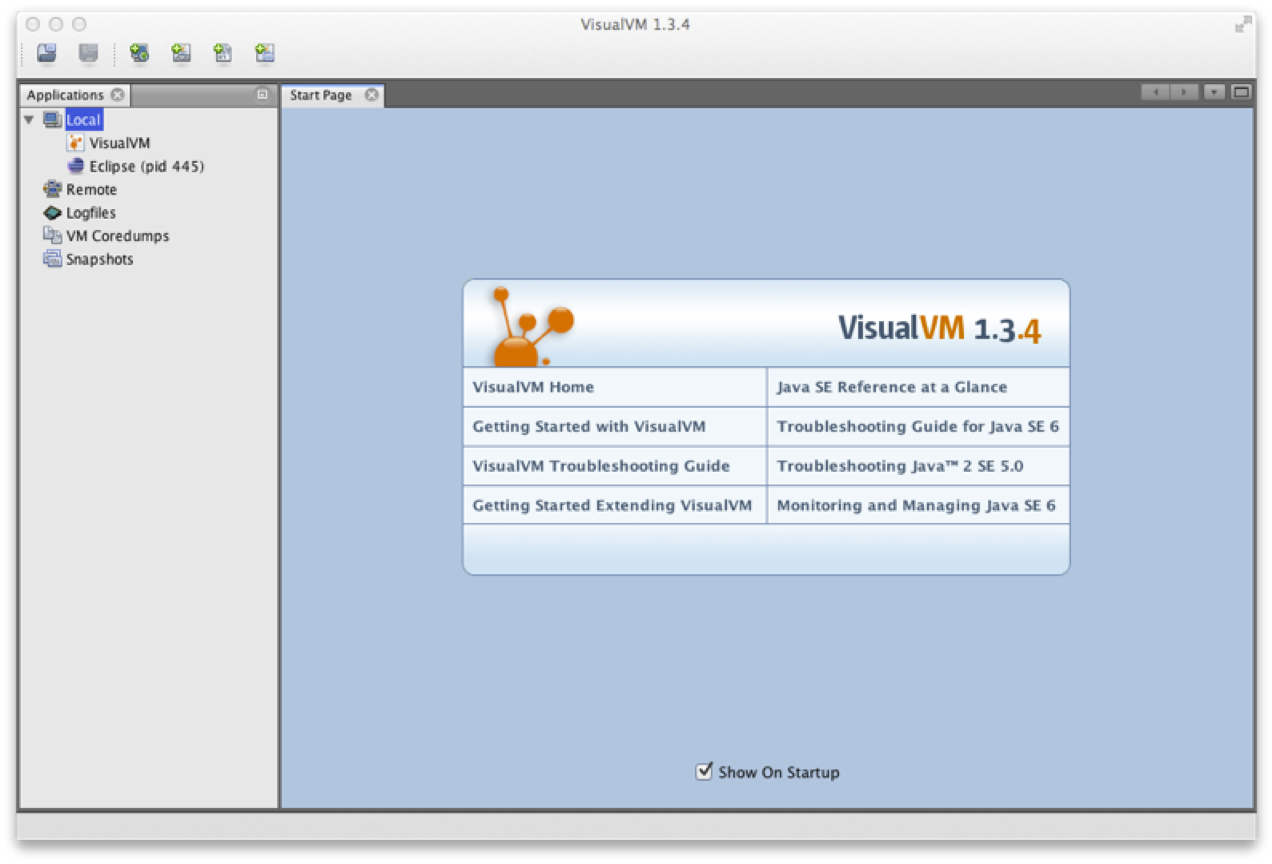
Figure A-1. VisualVM welcome screen
The Overview tab (see Figure A-2) provides a summary of information about your Java process. This includes the flags and system properties that were passed in, and the exact Java version being executed.
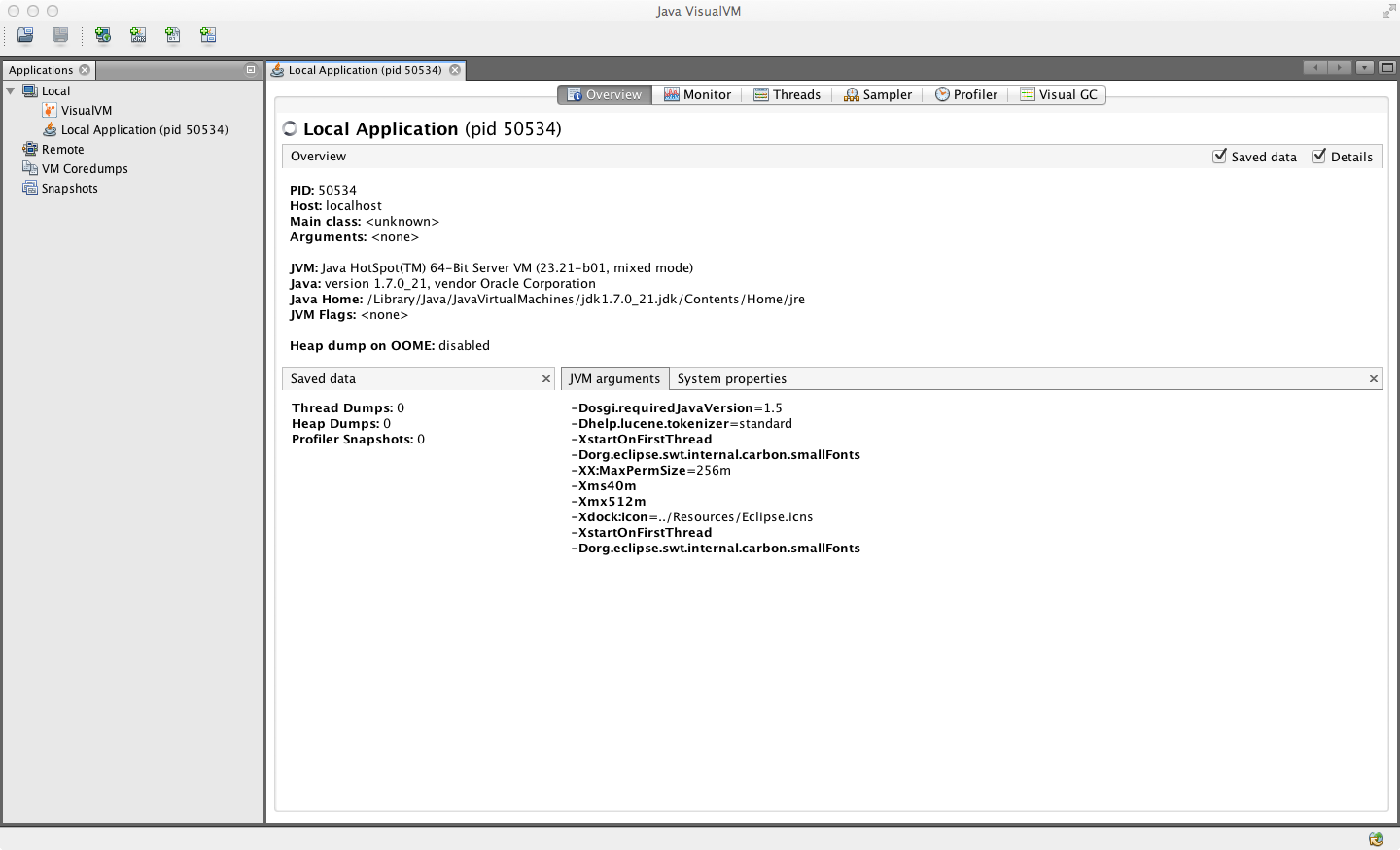
Figure A-2. Overview tab
In the Monitor tab, as shown in Figure A-3, graphs and data about the active parts of the JVM system are displayed. This is essentially high-level telemetry data for the JVM—including CPU usage and how much CPU is being used for GC.
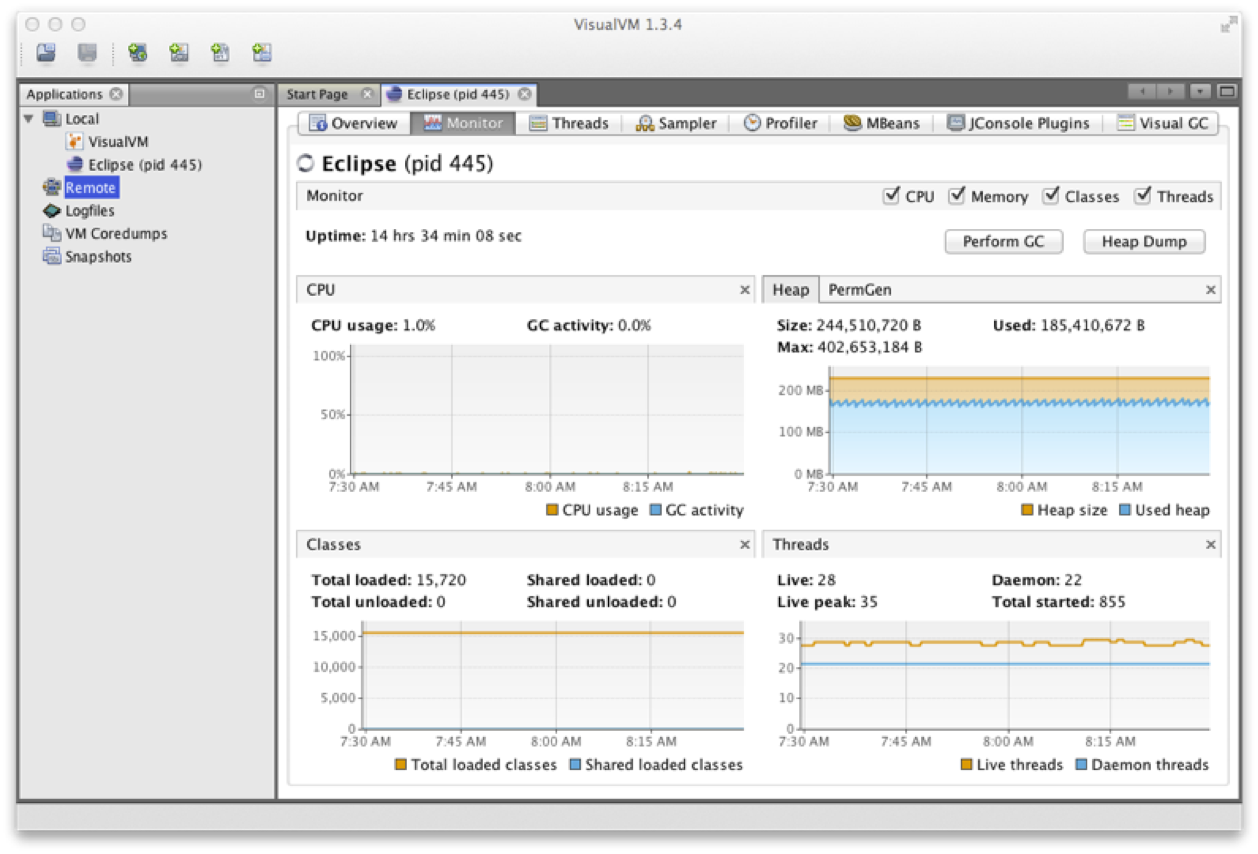
Figure A-3. Monitor tab
Other information displayed includes the number of classes loaded and unloaded, basic heap memory information, and an overview of the numbers of threads running.
From this tab, it is also possible to ask the JVM to produce a heap dump, or to perform a full GC—although in normal production operation, neither is recommended.
Figure A-4 shows the Threads tab, which displays data on actively running threads in the JVM. This is displayed as a continuous timeline, with the ability to inspect individual thread details and perform thread dumps for deeper analysis.
This presents a similar view to jstack, but with better abilities to
diagnose deadlocks and thread starvation. Here we can clearly see the difference
between synchronized locks (i.e., operating system monitors) and the
user-space lock objects of java.util.concurrent.
Threads that are contending on locks backed by operating system monitors (i.e., synchronized blocks) will be placed into the BLOCKED state. This shows up as red in VisualVM.
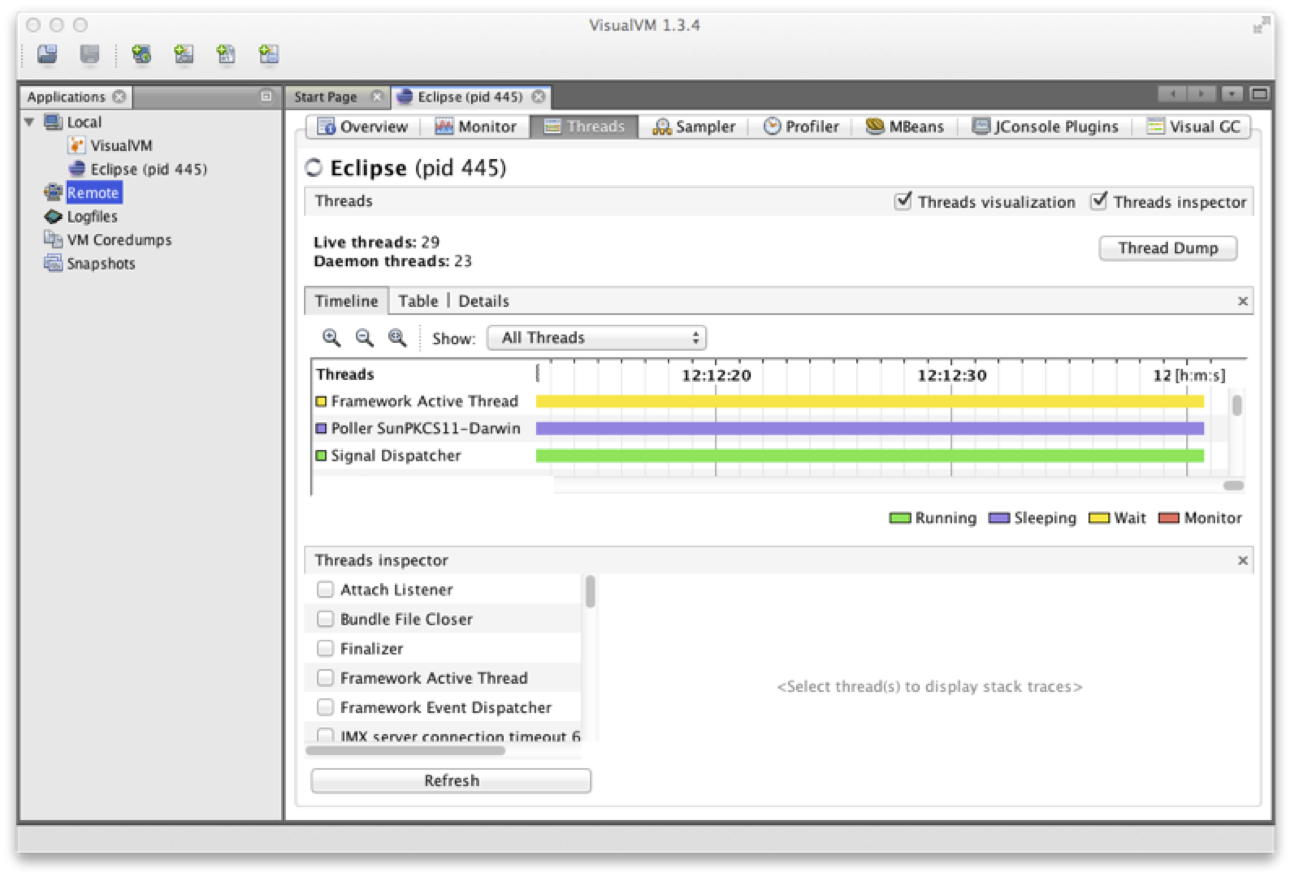
Figure A-4. Threads tab
Warning
Locked java.util.concurrent lock objects place their threads into
WAITING (yellow in VisualVM). This is because the implementation
provided by java.util.concurrent is purely user space and does not
involve the operating system.
The Sampler tab in memory sampling mode, as shown in Figure A-5, enables the developer to see what the most common objects are, in terms of bytes and instances (in a manner similar to jmap -histo).
The objects displayed on the Metaspace submode are typically core Java/JVM constructs.2 Normally, we need to look deeper into other parts of the system, such as classloading, to see the code responsible for creating these objects.
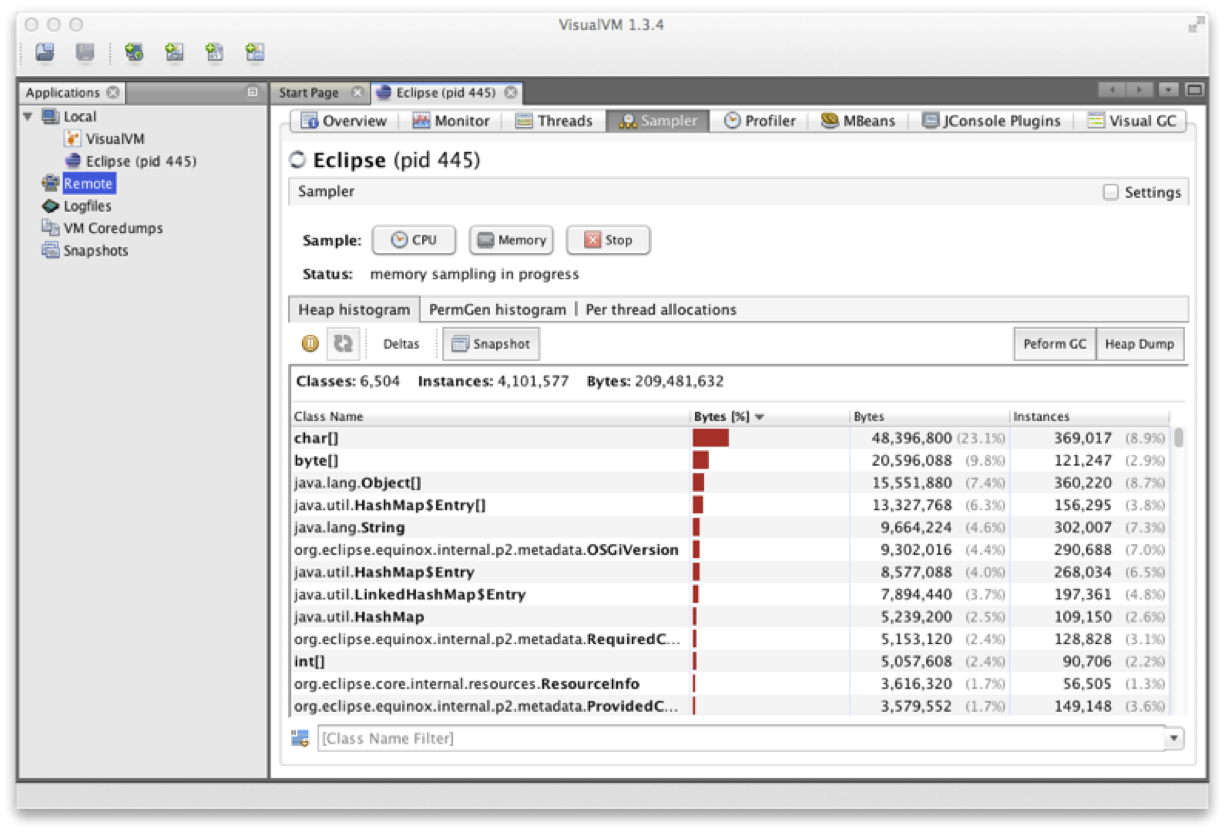
Figure A-5. Sampler tab
jvisualvm has a plug-in system, which you can use to extend the functionality of the framework by downloading and installing extra plug-ins. We recommend always installing the MBeans plug-in (shown in Figure A-6) and the VisualGC plug-in (discussed next, and shown in Figure A-7), and usually the JConsole compatibility plug-in, just in case.
The MBeans tab allows the operator to interact with Java management services (essentially MBeans). JMX is a great way to provide runtime control of your Java/JVM applications, but a full discussion is outside the scope of this book.
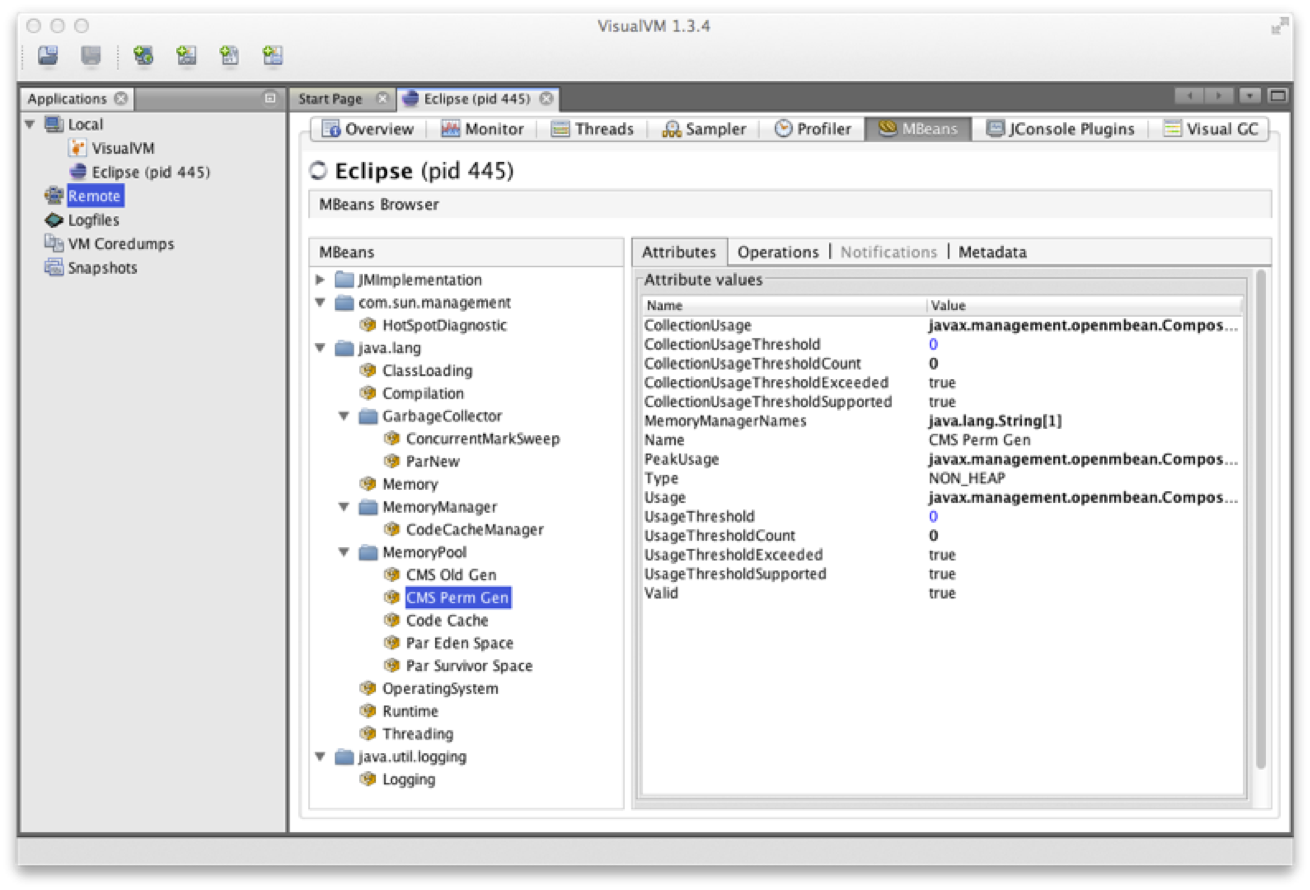
Figure A-6. MBeans plug-in
The VisualGC plug-in, shown in Figure A-7, is one of the simplest and best initial GC debugging tools available. As mentioned in Chapter 6, for serious analysis, GC logs are preferred to the JMX-based view that VisualGC provides.
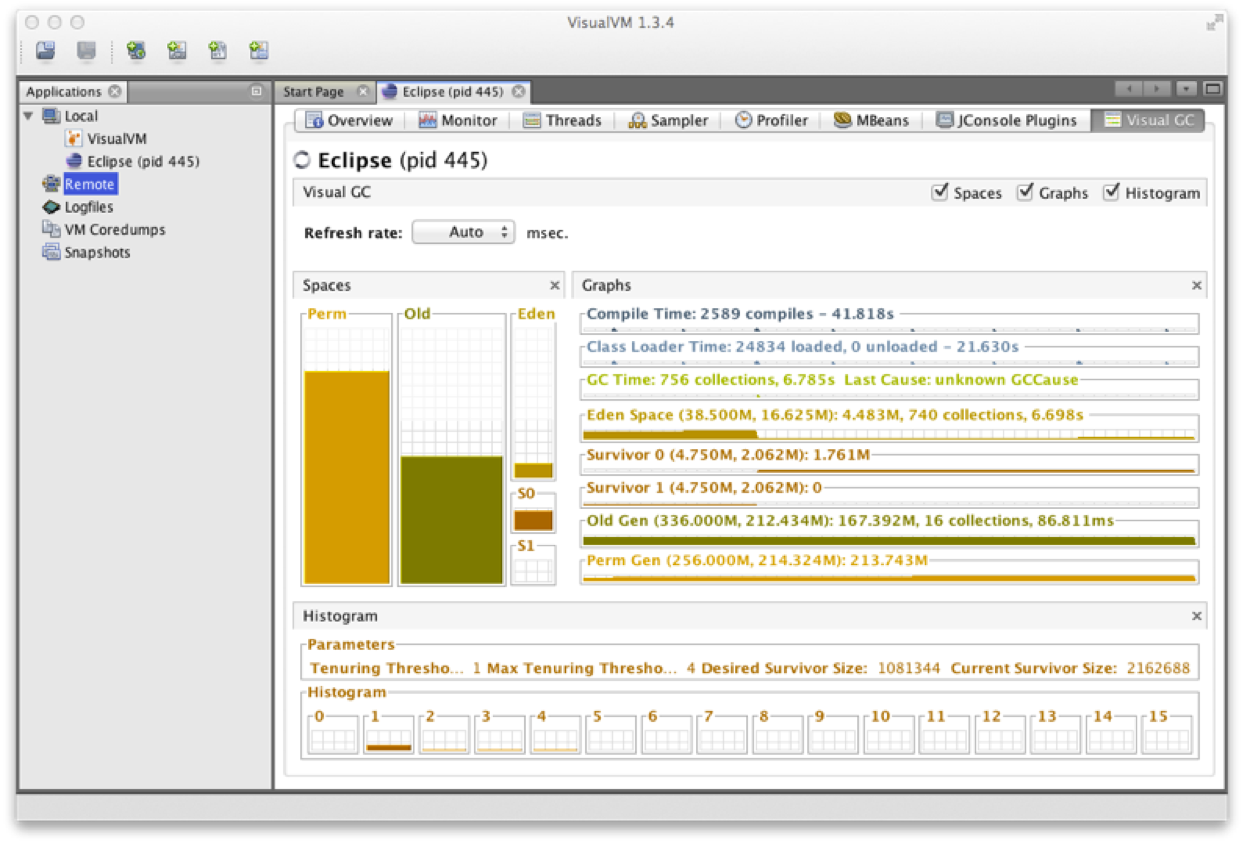
Figure A-7. VisualGC plug-in
Having said that, VisualGC can be a good way to start to understand the GC behavior of an application, and to inform deeper investigations. It provides a near real-time view of the memory pools inside HotSpot, and allows the developer to see how GC causes objects to flow from space to space over the course of GC cycles.