Table of Contents for
Programming Alexa Skills
 Programming Alexa Skills
Published by
O'Reilly Media, Inc., 2019
Programming Alexa Skills
Published by
O'Reilly Media, Inc., 2019
- The Tools You Need and Where to Find Them
- Contents
- Getting Familiar with the Alexa Skills Kit (ASK)
- Pick Your Hosting Platform Carefully
- My City Facts – Designing Your New Skill
- Building the MyCity Facts Skill as an AWS Lambda Function
- Building the MyCity Facts Skill as an ASP.NET Web API Service Hosted in Microsoft Azure
4
My City Facts – Designing Your New Skill
Welcome to Part II: Custom Skills! This is where it starts getting really fun, and we build something a lot more useful than the Hello World example from the previous chapters.
In this chapter we will design a new custom skill called MyCity Facts. This skill will allow your users to interact with Alexa to learn interesting and useful facts about an imaginary place called MyCity.
After designing the skill, we’ll walk through the process of building the skill, once as an AWS Lambda Function (Chapter 5) and once as a Service that you can run in your web or cloud hosting environment (Chapter 6).
In chapters 5 and 6, I’ll also cover publishing your skill for others to enable and use.
The Interaction Model
The first step in designing a new skill is defining the interaction model, so let’s do that now.
Amazon provides a handy worksheet for fleshing out your interaction model, as seen in Figure 4-1 below. You can download it at http://amzn.to/2gtTZLb. There’s also a simplified version, available at http://amzn.to/2yDSmoJ.
This worksheet allows you to plan out the voice interaction between your users and Alexa, as well as the intent definitions and any backend services or session information your skill might need.
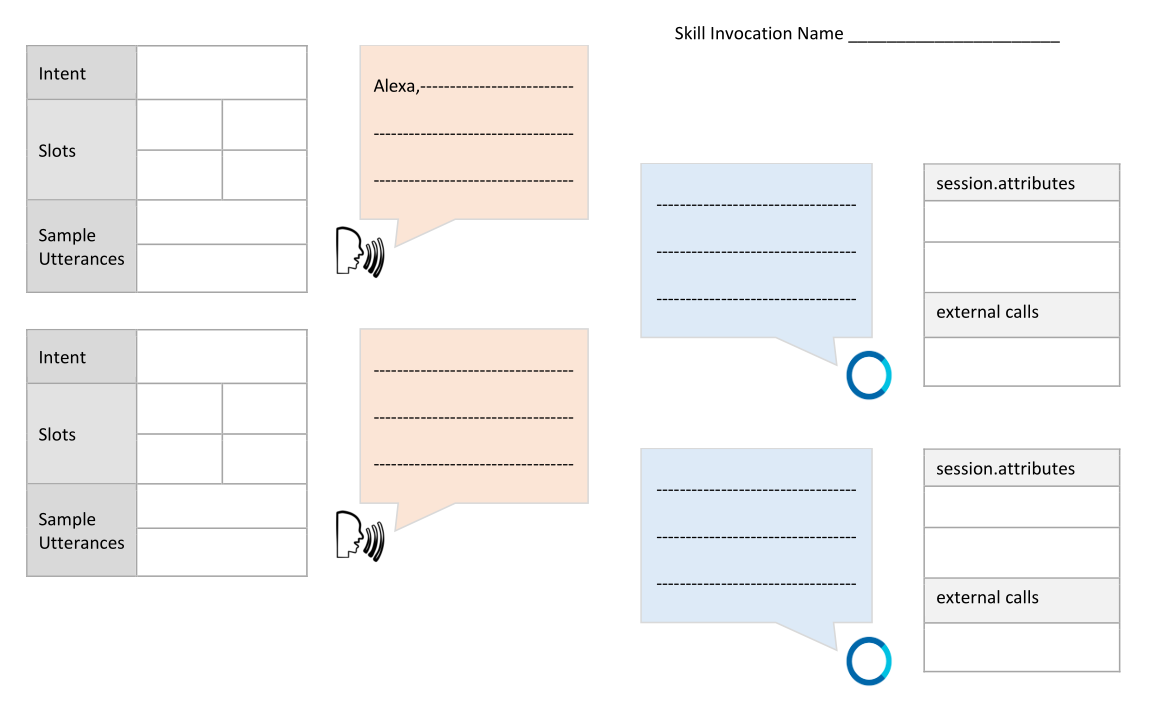
Figure 4-1: Alexa Dialog Design – Detailed
Define Your Intents
So what does a City Facts Skill do? It provides (hopefully) interesting facts about a city, in this case: MyCity! In order to do this, you’ll need to create an intent that returns some information (a “fact”) to the user.
GetMyCityFactIntent
To do this, we’ll define a GetMyCityFactIntent as part of our interaction model. The sole purpose of this intent is to return a single fact about MyCity. We won’t use any Slots for this one, because it only returns a single fact each time it is called.
Finally, we come up with some Sample Utterances.
| Intent | GetMyCityFactIntent | |||||
|---|---|---|---|---|---|---|
| Slots | ||||||
| Sample Utterances | Give me a fact. | Tell me a fact. | Give me a city fact. | |||
I’ve given you a few examples above, but you really want to have at least ten for each intent. It may sound like a lot, but try to think of all the different ways people say the same thing. You want your skill to be easily usable by as many people as possible.
Here’s a quick list off the top of my head:
Fact
Give me a fact.
Tell me a fact.
I’d like a fact.
City Fact
Give me a city fact.
Tell me a city fact.
I’d like a city fact.
Tell me about MyCity.
Tell me something.
Tell me something about MyCity.
Hit me with a fact.
Share a fact with me.
Share a city fact with me.
Surprise me.
You can (and should) always add more sample utterances after you get some feedback on your skill. A good test is getting your friends and family to test it out without being told specifically what to say. Write down their failed attempts. Some of them may surprise you.
Next, we’ll need some “interesting” facts about MyCity. The more facts you can include, the better. Here’s a relatively short list:
MyCity has a population of 123,456 people, 11 bears, 3 alligators, and 7,134 cats.
MyCity has several popular attractions, including 3 lakes, 2 mountains, and a 400 acre wildflower sanctuary. On a nice day, you can see the bears playing among the wildflowers, but don’t get too close.
MyCity was founded in 1873 by settlers who got lost on their way from Virginia to California and decided to stay put and make the best of it.
The mayor of MyCity is YourName Goes Here. This is the 14th consecutive term for Mayor Here.
MyCity holds a record in the Guinness Book of World Records for the “largest man-made neon star on top of a mountain.”
City Hall has had three locations since first being constructed in 1902. The first move was due to extensive damage from the great flood of 1937, and the second move was due to the needs of the administration outgrowing the previous facilities. This move occurred in 1992, and City Hall now resides at the intersection of Hill Street and Mountain View Blvd.
The summer carnival is MyCity’s most popular event and raises enough money to fund the volunteer fire department every year.
MyCity is home to 237 pizza restaurants, 9 fast food establishments, and 1 frozen banana stand, which is open from the beginning of July to the end of September.
One of the prettiest places on Earth, MyCity has four perfect seasons of exactly 3 months each. The leaves change every fall, and winter offers exactly 22.4 inches of snowfall every year. Average summer temp is 76.8, every year.
The Mascots are the official football team of MyCity. This is also the name of the local baseball team, basketball team, and soccer team.
That should be enough “facts” to get our skill up and running and provide a little variety in responses to the end-users.
If you’re planning to build a skill about your own city, you’ll want to replace these with actual information. I recommend checking Wikipedia or your city’s municipal website.
When your users invoke the GetMyCityFactIntent, by asking the skill to “Give me a fact”, Alexa will respond with a randomly selected fact from the list, like so:
| MyCity holds a record in the Guinness Book of World Records for the “largest man-made neon star on top of a mountain.” |
|---|
 |
The more interesting facts you have, the more use your skill will get, so load it up!
Some of the facts we’ve included may tax the limits of Alexa’s pronunciation skills, but that’s ok. We’ll address it during the implementation phase by using Speech Synthesis Markup Language (SSML) to control how Alexa handles the trickier parts.
You want the MyCity Facts skill to give your users some useful directions, so it’s a good idea to specifically define a Help Intent as part of our Interaction Model.
AMAZON.HelpIntent
As you may recall, the AMAZON.HelpIntent is automatically included, and we can extend it by providing additional sample utterances for invoking it, and use it to respond to the user with a custom help message.
| Intent | AMAZON.HelpIntent | |||||
|---|---|---|---|---|---|---|
| Slots | ||||||
| Sample Utterances | What do I do? | How does this work? | How do I use this skill? | |||
Just like the GetMyCityFact intent, you want to have a variety of sample utterances for your AMAZON.HelpIntent. Here’s a longer list of sample help utterances:
What do I do?
What?
What do I say?
How does this work?
How do I get a fact?
Help me get a city fact.
I don’t know what to do.
Directions
Huh?
I don’t understand.
What am I supposed to say?
Help
Is this thing on?
You get the idea. Again, test your skill on some friends and family members and consider updating the list with whatever they say as well.
When your users invoke the AMAZON.HelpIntent, by asking the skill for “Help” or saying “What do I do?” Alexa will respond with a help message, like so:
| You can say tell me a MyCity fact, Help, or Exit. What can I help you with? |
|---|
 |
Once the user invokes the Help intent, Alexa will wait for a response after speaking the help message. If the user doesn’t say anything after a few seconds, Alexa can prompt the user again:
| What can I help you with? |
|---|
 |
If the user still doesn’t respond, we can trigger the Stop intent, so let’s take a look at that next.
AMAZON.StopIntent
We don’t have to explicitly add any of the built-in intents, and they do a pretty good job of catching the more common, relevant phrases, but it’s always a good idea to keep them in mind when designing the interaction model for your intent, especially if you want to extend them beyond the defaults.
Let’s add a Stop intent to our interaction model.
| Intent | AMAZON.StopIntent | |||||
|---|---|---|---|---|---|---|
| Slots | ||||||
| Sample Utterances | Stop | Quit | Exit | |||
As before, you want to have a variety of sample utterances for your AMAZON.StopIntent. Here’s a longer list of sample utterances for the Stop intent:
Stop
Quit
Exit
Finish
I’m done
Shut Up
Goodbye
The sole purpose of the Stop intent is to end your skill immediately. We’ll provide Alexa with a short, simple message for your users when they invoke the Stop intent:
| Goodbye. |
|---|
 |
AMAZON.CancelIntent
Much like the built-in Help and Stop intents, Alexa also has a built-in Cancel intent, called (unsurprisingly) AMAZON.CancelIntent.
| Intent | AMAZON.CancelIntent | |||||
|---|---|---|---|---|---|---|
| Slots | ||||||
| Sample Utterances | Cancel | Abort | Nevermind | |||
The Cancel and Stop intents can (and should) both be used to end our MyCity Facts skill. Amazon provides both because their research indicates that users tend to use the words “cancel” and “stop” interchangeably.
You’re probably wondering “Why bother? Why not just offer one intent with multiple sample utterances?” and that’s a great question. Amazon provides both because there are scenarios where the two intents behave differently.
If you are creating a skill that allows users to perform a transaction of some sort, such as updating data, moving money around, making a purchase, calling an Uber, etc... the Cancel intent should be used to interrupt and cancel the transaction without exiting the skill entirely.
If your skill doesn’t need that specific functionality, Amazon’s guidance is for developers to support both anyway and just have the Cancel intent behave identically to the Stop intent.
Since that’s what we’re doing here, your skill will use the same return message as the Stop intent:
| Goodbye. |
|---|
 |
We’re done with the design phase, so it’s time to start building the skill. In chapters 5 and 6 I’ll cover two different ways to build the MyCity Facts skill we designed in this chapter.