Table of Contents for
Learning PHP
 Learning PHP
Published by
O'Reilly Media, Inc., 2016
Learning PHP
Published by
O'Reilly Media, Inc., 2016
- nav
- Cover
- Learning PHP
- Learning PHP
- Dedication
- Preface
- 1. Orientation and First Steps
- 2. Data: Working with Text and Numbers
- 3. Logic: Making Decisions and Repeating Yourself
- 4. Groups of Data: Working with Arrays
- 5. Groups of Logic: Functions and Files
- 6. Data and Logic Together: Working with Objects
- 7. Exchanging Information with Users: Making Web Forms
- 8. Remembering Information: Databases
- 9. Working with Files
- 10. Remembering Users: Cookies and Sessions
- 11. Talking to Other Websites and Services
- 12. Debugging
- 13. Testing: Ensuring Your Program Does the Right Thing
- 14. Software Engineering Practices You Should Be Aware Of
- 15. Handling Dates and Times
- 16. Package Management
- 17. Sending Email
- 18. Frameworks
- 19. Command-Line PHP
- 20. Internationalization and Localization
- A. Installing and Configuring the PHP Engine
- B. Answers to Exercises
- Index
- About the Author
- Colophon
Chapter 16. Package Management
Take the virtuous laziness introduced in Chapter 5 to a powerful new level by relying on entire packages of code that other people have written. This chapter shows you how to use the Composer package management system to find existing libraries and integrate them into your programs.
If you’ve tried to integrate third-party libraries without a package manager before, you’re probably familiar with all the steps that entails: downloading an archive file containing the library, unpacking it, putting the unpacked files in a special place, and then modifying your program so it can find the new files.
With Composer, all of that is reduced to a single command. Plus, when newer versions of the packages you use are released, Composer can upgrade them in a snap.
If you’ve used a package manager in another language (such as npm with JavaScript, gem with Ruby, or cpan with Perl) you’ll find the Composer experience familiar and pleasant.
Installing Composer
Download and run Composer’s installer by running this command at a shell prompt in your terminal:
curl -sS https://getcomposer.org/installer | php
On Windows, download and run the Composer installer and then run Composer-Setup.exe.
If you’ve installed Composer successfully, when you run it from the command line (by typing php composer.phar, or just composer on Windows, you should see a help screen listing the commands that Composer supports.
Adding a Package to Your Program
The require command adds a package to your program. At a minimum, require must be told the name of the package to add. Example 16-1 adds the Swift Mailer library to your program.
Example 16-1. Adding a package with require
php composer.phar require swiftmailer/swiftmailer
This command downloads the package, installs its files under a directory named vendor in your current project directory, and updates the composer.json file. The composer.json file tracks the packages you’ve installed as well as other Composer-managed settings about your project. Composer also maintains a composer.lock file, which tracks the specific versions of packages you’ve installed.
Once Composer has installed a package, all you have to do to make it available to your program is to reference the Composer autoload file with this simple line of PHP code: require "vendor/autoload.php;". The logic in this file contains a mapping from class names to filenames. When you reference a class in an installed package, it ensures that the files that define the class are loaded.
You only need to load the vendor/autoload.php file once, no matter how many packages you have installed. Programs that rely on Composer-installed packages generally make the require "vendor/autoload.php"; statement one of the first things in the program. Example 16-2 shows that statement in the context of using Swift Mailer to create a message (as discussed in Chapter 17).
Example 16-2. Using a Composer-installed library
// Tell PHP to load Composer's class-finding logicrequire'vendor/autoload.php';// The Swift_Message class is now automatically available$message=Swift_Message::newInstance();$message->setFrom('julia@example.com');$message->setTo(array('james@example.com'=>'James Beard'));$message->setSubject('Delicious New Recipe');$message->setBody(<<<_TEXT_Dear James,You should try this: puree 1 pound of chicken with two poundsof asparagus in the blender, then drop small balls of the mixtureinto a deep fryer. Yummy!Love,Julia_TEXT_);
If your program is being checked into a source control system (see Chapter 14), you need to take a few steps to make sure things play nicely with Composer. First, make sure that you include both composer.json and composer.lock in the files that are tracked by the source control system. These are necessary for somebody else who checks out the program from the source control system to be able to install the same packages and the same package versions as you have. Second, make sure that the vendor directory is not tracked by the source control system. All the code in vendor is managed by Composer. When you upgrade a package version, the only files you want to track changes in are the composer.json and composer.lock files—not all of the individual files under vendor that may have changed.
With composer.json and composer.lock but not vendor in source control, another person who checks out your code from the source control system just has to run the command php composer.phar install and they will have all of the right versions of the right packages in the right place.
Finding Packages
The real utility of a package management system such as Composer, of course, depends on the utility of the packages you can install. So how do you find great packages to install that solve the problems you have? The most popular Composer package repository (a site that indexes the packages for you to browse and download) is Packagist.
For example, perhaps you need to geocode some addresses—i.e., find the longitude and latitude that correspond to each particular address. Type geocode into the search box at the top of the Packagist website, click the arrow next to the search box to sort the results by number of downloads, and you instantly see a bunch of results, as shown in Figure 16-1.
Adding one of those packages to your project is now as easy as typing either php composer.phar require willdurand/geocoder or php composer.phar require league/geotools. Figure 16-2 shows what happens at the terminal prompt when willdurand/geocoder is installed.
In Figure 16-2, php composer.phar require willdurand/geocoder kicks things off at the top. Composer then figures out the most recent stable version to use (3.2) and what dependencies also need to be installed, and then downloads and installs those packages. One of the dependencies (http-adapter) suggests, but doesn’t require, that a number of other packages could be installed, so Composer prints out messages about those packages instead of installing them.
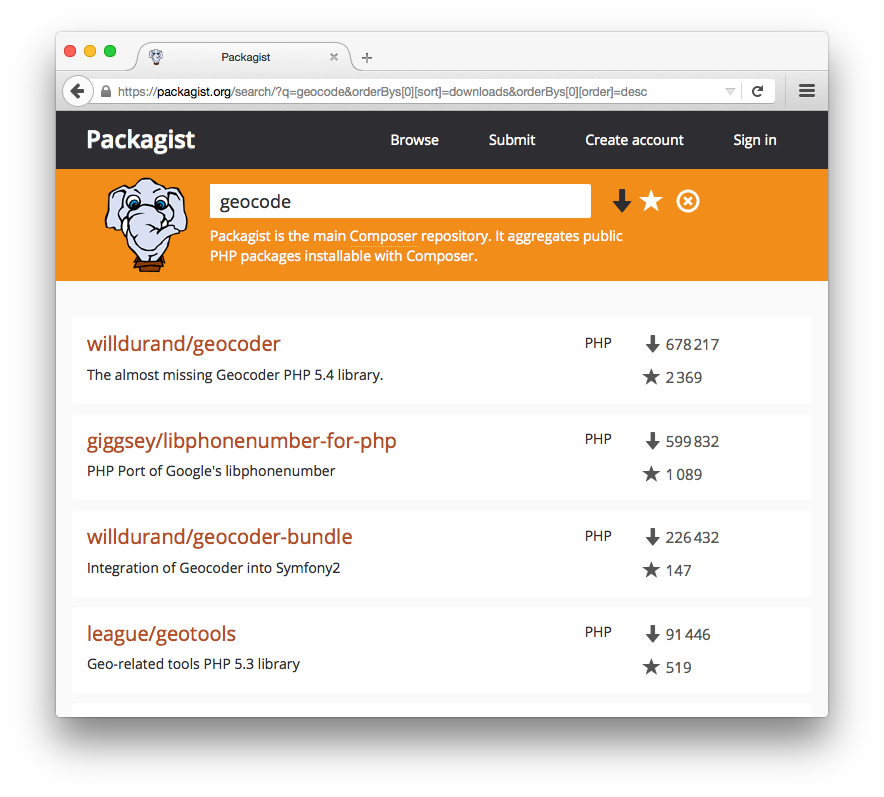
Figure 16-1. Finding packages on packagist.org
Getting More Information on Composer
The overview of Composer in this chapter is all about using code that other people have written in your project. If you are interested in making your code available as a library for other people to install via Composer, read the “Libraries” chapter of the documentation. Publishing a package on Packagist is free and easy.
There are other Composer repositories as well. For example, WordPress Packagist is a repository of WordPress themes and plugins set up so you can install the themes and plugins with Composer. Drupal packages are available via Composer from Packagist.
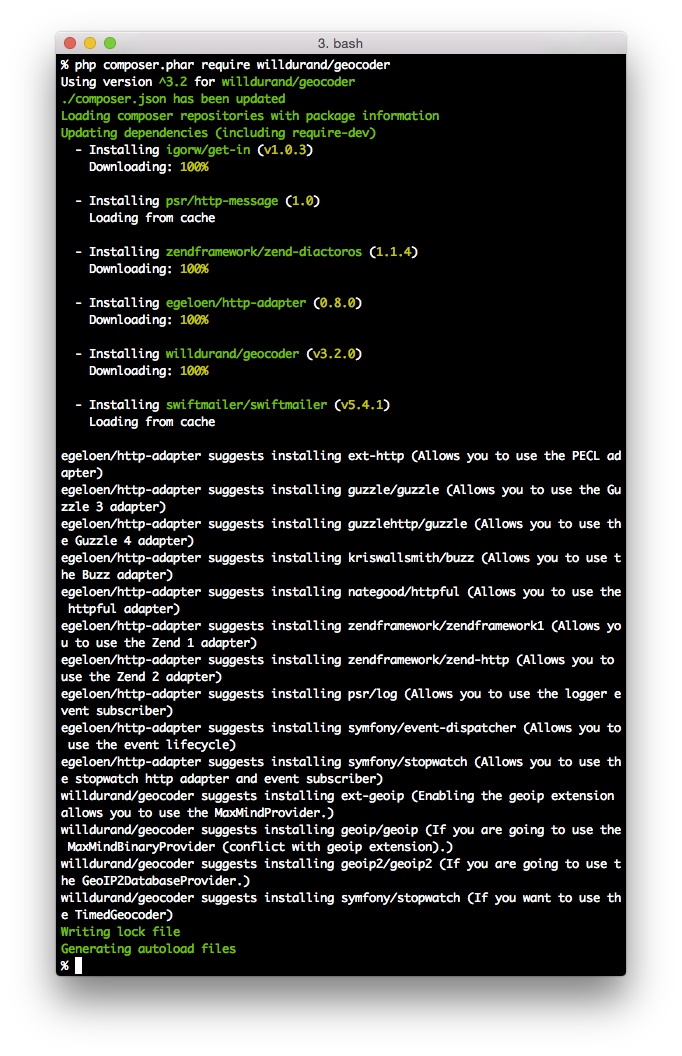
Figure 16-2. Installing the willdurand/geocoder package
Chapter Summary
This chapter covered:
- Installing the Composer package management tool
- Downloading and installing a package for use in your program
- Making sure your code has access to the package files by loading the Composer autoload.php file
- Integrating your Composer-using program with your source control system
- Finding packages to install
- Getting more information about using Composer