
Beijing • Cambridge • Farnham • Köln • Sebastopol • Tokyo
Supplemental files and examples for this book can be found at http://examples.oreilly.com/0636920025108/. Please use a standard desktop web browser to access these files, as they may not be accessible from all ereader devices.
All code files or examples referenced in the book will be available online. For physical books that ship with an accompanying disc, whenever possible, we’ve posted all CD/DVD content. Note that while we provide as much of the media content as we are able via free download, we are sometimes limited by licensing restrictions. Please direct any questions or concerns to booktech@oreilly.com.
Is it really punk rock
Like the party line?—Wilco, “Too Far Apart”
C has only a handful of keywords and is a bit rough around the edges, and it rocks. You can do anything with it. Like the C, G, and D chords on a guitar, you can learn the basic mechanics quickly, and then spend the rest of your life getting better. The people who don’t get it fear its power and think it too edgy to be safe. By all rankings, it is consistently the most popular language that doesn’t have a corporation or foundation spending money to promote it.[1]
Also, the language is about 40 years old, which makes it middle-aged. It was written by a few guys basically working against management—the perfect punk rock origins—but that was in the 1970s, and there’s been a lot of time for the language to go mainstream.
What did people do when punk rock went mainstream? In the decades since its advent in the 1970s, punk certainly has come in from the fringes: The Clash, The Offspring, Green Day, and The Strokes sold millions of albums worldwide (to name just a few), and I have heard lite instrumental versions of songs from the punk spinoff known as grunge at my local supermarket. The former lead singer of Sleater-Kinney now has a popular sketch comedy show that frequently lampoons punk rockers.[2] One reaction to the continuing evolution would be to take the hard line and say that the original stuff was punk and everything else is just easy punk pop for the masses. The traditionalists can still play their albums from the ’70s, and if the grooves are worn out, they can download a digitally mastered edition. They can buy Ramones hoodies for their toddlers.
Outsiders don’t get it. Some of them hear the word punk and picture something out of the 1970s—a historic artifact about some kids that were, at the time, really doing something different. The traditionalist punks who still love and play their 1973 Iggy Pop LPs are having their fun, but they bolster the impression that punk is ossified and no longer relevant.
Getting back to the world of C, we have both the traditionalists, waving the banner of ANSI ’89, and those who will rock out to whatever works and may not even realize that the code they are writing would not have compiled or run in the 1990s. Outsiders don’t get the difference. They see still-in-print books from the 1980s and still-online tutorials from the 1990s, they hear from the hardcore traditionalists who insist on still writing like that today, and they don’t even know that the language and the rest of its users continue to evolve. That’s a shame, because they’re missing out on some great stuff.
This is a book about breaking tradition and keeping C punk rock. I don’t care to compare the code in this book to the original C specification in Kernighan & Ritchie’s 1978 book. My telephone has 512 megabytes of memory, so why are our C textbooks still spending pages upon pages covering techniques to shave kilobytes off of our executables? I am writing this on a bottom-of-the-line red netbook that can accommodate 3,200,000,000 instructions per second; what do I care about whether an operation requires comparing 8 bits or 16? We should be writing code that we can write quickly and that is readable by our fellow humans. We’re still writing in C, so our readable but imperfectly optimized code will still run an order of magnitude faster than if we’d written comparable code in any number of alternative, bloated languages.
Q: How is this C book different from all others?
A: C textbooks are a somewhat uniform bunch (I’ve read a lot of them, including [Griffiths 2012], [Kernighan 1978], [Kernighan 1988], [Kochan 2004], [Oualline 1997], [Perry 1994], [Prata 2004], and [Ullman 2004]). Most were written before the C99 standard simplified many aspects of usage, and you can tell that some of those now in their Nth edition just pasted in a few notes about updates rather than seriously rethinking how to use the language. They all mention that there might be libraries that you could maybe use in writing your own code, but they predate the installation tools and ecosystem we have now that make using those libraries reliable and reasonably portable. Those textbooks are still valid and still have value, but modern C code just doesn’t look like the code in those textbooks.
This book picks up where they left off, reconsidering the language and the ecosystem in which it lives. The storyline here is about using libraries that provide linked lists and XML parsers, not writing new ones from scratch. It is about writing code that is readable and function interfaces that are user-friendly.
Q: Who is this book for? Do I need to be a coding guru?
A: You have experience coding in any language, maybe Java or a scripting language such as Perl. I don’t have to sell you on why your code shouldn’t be one long routine with no subfunctions.
You have some knowledge of C, but don’t worry if you don’t know it too well—as I’ll detail, there’s a lot you’re better off never learning. If you are a blank slate with respect to C syntax, it really is an aggressively simple language, and your search engine will point you to dozens of C tutorials online; if you have experience with another language, you should be able to get the basics in an hour or two.
I might as well point out to you that I have also written a textbook on statistical and scientific computing, Modeling with Data [Klemens 2008]. Along with lots of details of dealing with numeric data and using statistical models for describing data, it has a standalone tutorial on C, which I naturally think overcomes many of the failings of older C tutorials.
Q: I’m an application programmer, not a kernel hacker. Why should I use C instead of a quick-to-write scripting language like Python?
A: If you are an application programmer, this book is for you. I read people asserting that C is a systems language, which impresses me as so un-punk—who are they to tell us what we’re allowed to write?
Statements in the way of “Our language is almost as fast as C, but
is easier to write” are so common that they are almost cliché. Well, C is
definitely as fast as C, and the purpose of this book is to show you that
C is easier to write than the textbooks from decades past imply that it
is. You don’t have to call malloc and
get elbow-deep in memory management half as often as the systems
programmers of the 1990s did, we have facilities for easier string
handling, and even the core syntax has evolved to make for more legible
code.
I started writing C in earnest because I had to speed up a simulation in a scripting language, R. Like so many other scripting languages, R has a C interface and encourages the user to make use of it any time the host language is too slow. Eventually, I had so many functions jumping out from the R script to C code that I just dropped the host language entirely. Next thing you know, I’m writing a book on modern C technique.
Q: It’s nice that application programmers coming from scripting languages will like this book, but I am a kernel hacker. I taught myself C in fifth grade and sometimes have dreams that correctly compile. What new material can there be for me?
A: C has evolved in the last 20 years. As I’ll discuss later, the set of things we are guaranteed that all C compilers support has changed with time, thanks to two new C standards since the ANSI standard that defined the language for so long. Maybe have a look at Chapter 10 and see if anything there surprises you.
Also, the environment has advanced. Autotools has entirely changed how distribution of code happens, meaning that it is much easier to reliably call other libraries, meaning that our code should spend less time reinventing common structures and routines and more time calling the sort of libraries discussed throughout this book.
Q: I can’t help but notice that about a third of this book has almost no C code in it.
A: Yes, good C practice requires gathering good C tools. If you’re not using a debugger (standalone or part of your IDE), you’re making your life much more difficult. If you tell me that it’s impossible to track down memory leaks, then that means that you haven’t heard of Valgrind, a system designed to point out the exact line where memory leaks and errors occurred. Python and company have built-in package managers; C’s cross-platform package managers are standalone systems that are their own story.
If you use an attractive Integrated Development Environment (IDE) as a wrapper for all these various tools, you may still benefit from knowing how your IDE is dealing with environment variables and other minutiæ that have been hidden from you but still crop up and throw errors at you.
Q: Some of these tools you talk about are old. Aren’t there more modern alternatives to these shell-oriented tools?
A: If we make fun of people who reject new things just because they’re new, then we have no right to reject old things just because they’re old.
One can find reasonable sources putting the first six-string guitar around 1200, the first four-string violin circa 1550, and the piano with keyboard around 1700. The odds are good that most (if not all) of the music you listen to today will involve one of these instruments. Punk rock didn’t happen by rejecting the guitar, but by using it creatively, such as piping the guitar’s output through new filters.
Q: I have the Internet, and can look up commands and syntax details in a second or two, so, really, why should I read this book?
A: It’s true: you can get an
operator precedence table from a Linux or Mac command prompt with man operator, so why am I going to put one
here?
I’ve got the same Internet you’ve got, and I’ve spent a lot of time reading it. So I have a good idea of what isn’t being talked about, and that’s what I stick to here. When introducing a new tool, like gprof or GDB, I give you what you need to know to get your bearings and ask your search engine coherent questions, and what other textbooks missed (which is a lot).
Unless explicitly stated otherwise, everything in this book conforms to the ISO C99 and C11 standards. To make sense of what that means, and give you some historical background, let us go through the list of major C standards (passing on the minor revisions and corrections).
Dennis Ritchie, Ken Thompson, and a handful of other contributors came up with C while putting together the Unix operating system. Brian Kernighan and Dennis Ritchie eventually wrote down a description of the language in the first edition of their book, which set the first de facto standard [Kernighan 1978].
Bell Labs handed over the stewardship of the language to the American National Standards Institute (ANSI). In 1989, they published their standard, which made a few improvements over K & R. The second edition of K & R’s book included a full specification of the language, which meant that tens of thousands of programmers had a copy of the ANSI standard on their desks [Kernighan 1988]. The ANSI standard was adopted by the International Organization for Standardization (ISO) in 1990 with no serious changes, but ANSI `89 seems to be the more common term (and would make a great t-shirt slogan).
A decade passed. C went mainstream, in the sense that the base code for more or less every PC and every Internet server was written in C, which is as mainstream as a human endeavor could possibly become.
During this period, C++ split off and hit it big (although not quite as big). C++ was the best thing to ever happen to C. While every other language was bolting on extra syntax to follow the object-oriented trend and whatever other new tricks came to the authors’ minds, C stuck to the standard. The people who wanted stability and portability used C, the people who wanted more and more features so they could wallow in them like moist hundred dollar bills got C++, and everybody was happy.
The C standard underwent a major revision a decade later.
Additions were made for numeric and scientific computing, with a
standard type for complex numbers and some type-generic functions. A
few conveniences from C++ got lifted, including one-line comments
(which originally came from one of C’s predecessor languages, BCPL)
and being able to declare variables at the head of for loops. Using structures was made
easier thanks to a few additions to the rules for how they can be
declared and initialized, plus some notational conveniences. Things
were modernized to acknowledge that security matters and that not
everybody speaks English.
When you think about just how much of an impact C89 had, and how the entire globe was running on C code, it’s hard to imagine the ISO being able to put out anything that wouldn’t be widely criticized—even a refusal to make any changes would be reviled. And indeed, this standard was controversial. There are two common ways to express a complex variable (rectangular and polar coordinates)—so where does the ISO get off picking one? Why do we need a mechanism for variable-length macro inputs when all the good code got written without it? In other words, the purists accused the ISO of selling out to the pressure for more features.
As of this writing, most compilers support C99 plus or minus a
few caveats; the long double type
seems to cause a lot of trouble, for example. However, there is one
notable exception to this broad consensus: Microsoft currently
refuses to add C99 support to its Visual Studio C++ compiler. The
section Compiling C with Windows covers some of the many ways
to compile C code for Windows, so not using Visual Studio is at most
an inconvenience, and having a major establishment player tell us
that we can’t use ISO-standard C only bolsters the punk rock of it
all.
Self-conscious about the accusations of selling out, the ISO made few serious changes in the third edition of the standard. We got a means of writing type-generic functions, and things were modernized to further acknowledge that security matters and that not everybody speaks English.
I’m writing this in 2012, shortly after the C11 standard came out in December of 2011, and there’s already some support from compilers and libraries.
That’s the state of things as far as C itself goes, but the language coevolved with the Unix operating system, and you will see throughout the book that the interrelationship matters for day-to-day work. If something is easy on the Unix command line, then it is probably because it is easy in C; Unix tools are often written to facilitate writing C code.
C and Unix were designed at Bell Labs in the early 1970s. During most of the 20th century, Bell was being investigated for monopolistic practices, and one of its agreements with the US federal government included promises that Bell would not expand its reach into software. So Unix was given away for free for researchers to dissect and rebuild. The name Unix is a trademark, originally owned by Bell Labs and subsequently traded off like a baseball card among a number of companies.
Variants of Unix blossomed, as the code was looked over, reimplemented, and improved in different ways by diverse hackers. It just takes one little incompatibility to make a program or script unportable, so the need for some standardization quickly became apparent.
This standard, first established by the Institute of
Electrical and Electronics Engineers (IEEE) in 1988, provided a
common basis for Unix-like operating systems. It specifies how the
shell should work, what to expect from commands like ls and grep, and a number of C libraries that C
authors can expect to have available. For example, the pipes that
command-line users use to string together commands are specified
in detail here, which means C’s popen (pipe open) function is
POSIX-standard, not ISO C standard. The POSIX standard has been
revised many times; the version as of this writing is POSIX:2008,
and is what I am referring to when I say that something is
POSIX-standard. A POSIX-standard system must have a C compiler
available, via the command name c99.
This book will make use of the POSIX standard, though I’ll tell you when.
With the exception of many members of a family of OSes from Microsoft, just about every current operating system you could name is built on a POSIX-compliant base: Linux, Mac OS X, iOS, webOS, Solaris, BSD—even Windows servers offer a POSIX subsystem. And for the hold-out OSes, Compiling C with Windows will show you how to install a POSIX subsystem.
Finally, there are two more implementations of POSIX worth noting because of their prevalence and influence:
After Unix was made available from Bell Labs for the public
to dissect, the researchers at the University of California,
Berkeley, made major improvements, eventually rewriting the entire
Unix code base to produce the Berkeley Software Distribution. If
you are using a computer from Apple, Inc., you are using BSD with
an attractive graphical frontend. BSD goes beyond POSIX in several
respects, and we’ll see some functions that are not part of the
POSIX standard but are too useful to pass up (most notably the
lifesaver that is asprintf).
It stands for GNU’s Not Unix, and is the other big success story in independently reimplementing and improving on the Unix environment. The great majority of Linux distributions use GNU tools throughout. There are very good odds that you have the GNU Compiler Collection (gcc) on your POSIX box—even BSD uses it. Again, the gcc defines a de facto standard that extends C and POSIX in a few ways, and I will be explicit when making use of those extensions.
Legally, the BSD license is slightly more permissive than the GNU
license. Because some parties are deeply concerned with the political
and business implications of the licenses, one can typically find both
GNU and BSD versions of most tools. For example, both the gcc and the
BSD’s clang are top-notch C
compilers. The authors from both camps closely watch and learn from each
other’s work, so we can expect that the differences that currently exist
will tend to even out over time.
The following typographical conventions are used in this book:
Indicates new terms, filenames and file paths, URLs, and email addresses. Many new terms are defined in a glossary at the end of this book.
Constant widthUsed for program listings, as well as within paragraphs to refer to program elements such as variable or function names, databases, data types, environment variables, statements, and keywords.
Constant width italicShows text that should be replaced with user-supplied values or by values determined by context.
This icon signifies a tip, suggestion, or general note.
Your Turn: These are exercises, to help you learn by doing.
This icon indicates a warning or caution.
This book is here to help you get your job done. In general, you may use the code in this book in your programs and documentation. You do not need to contact us for permission unless you’re reproducing a significant portion of the code. For example, writing a program that uses several chunks of code from this book does not require permission. Selling or distributing a CD-ROM of examples from O’Reilly books does require permission. Answering a question by citing this book and quoting example code does not require permission. Incorporating a significant amount of example code from this book into your product’s documentation does require permission.
The code examples for this title can be found here: http://examples.oreilly.com/0636920025108/.
We appreciate, but do not require, attribution. An attribution usually includes the title, author, publisher, and ISBN. For example: “21st Century C by Ben Klemens (O’Reilly). Copyright 2013 Ben Klemens, 978-1-449-32714-9.”
If you feel your use of code examples falls outside fair use or the permission given above, feel free to contact us at permissions@oreilly.com.
Safari Books Online (www.safaribooksonline.com) is an on-demand digital library that delivers expert content in both book and video form from the world’s leading authors in technology and business.
Technology professionals, software developers, web designers, and business and creative professionals use Safari Books Online as their primary resource for research, problem solving, learning, and certification training.
Safari Books Online offers a range of product mixes and pricing programs for organizations, government agencies, and individuals. Subscribers have access to thousands of books, training videos, and prepublication manuscripts in one fully searchable database from publishers like O’Reilly Media, Prentice Hall Professional, Addison-Wesley Professional, Microsoft Press, Sams, Que, Peachpit Press, Focal Press, Cisco Press, John Wiley & Sons, Syngress, Morgan Kaufmann, IBM Redbooks, Packt, Adobe Press, FT Press, Apress, Manning, New Riders, McGraw-Hill, Jones & Bartlett, Course Technology, and dozens more. For more information about Safari Books Online, please visit us online.
Please address comments and questions concerning this book to the publisher:
| O’Reilly Media, Inc. |
| 1005 Gravenstein Highway North |
| Sebastopol, CA 95472 |
| 800-998-9938 (in the United States or Canada) |
| 707-829-0515 (international or local) |
| 707-829-0104 (fax) |
We have a web page for this book, where we list errata, examples, and any additional information. You can access this page at http://oreil.ly/21st_century_c.
To comment or ask technical questions about this book, send email to bookquestions@oreilly.com.
For more information about our books, courses, conferences, and news, see our website at http://www.oreilly.com.
Find us on Facebook: http://facebook.com/oreilly
Follow us on Twitter: http://twitter.com/oreillymedia
Watch us on YouTube: http://www.youtube.com/oreillymedia
| Nora Albert: general support, guinea pig. |
| Bruce Fields, Dave Kitabjian, Sarah Weissman: extensive and thorough review. |
| Patrick Hall: Unicode erudition. |
| Nathan Jepson and Shawn Wallace: editorial. |
Andreas Klein: pointing out the value of intptr_t. |
| Rolando Rodríguez: testing, inquisitive use, and exploration. |
| Rachel Steely: production. |
| Ulrik Sverdrup: pointing out that we can use repeated designated initializers to set default values. |
MSYS is correctly capitalized, and several other small tweaks made.
Simplified notes on getting gcc or
Clang to read from
stdin.
Added a note on wrapping macros to make them even safer.
Replaced every instance of memcpy with
memmove.
Added more on large integer types such as
intmax_t and
intptr_t.
Added a short segment on comparing negative
ints with unsigned
ints.
Rewrote section on the extern
keyword.
Corrected misattribution of __attribute__
to the ISO.
Bug fix in amortization.c.
[1] This preface owes an obvious and huge debt to “Punk Rock Languages: A Polemic,” by Chris Adamson, at http://pragprog.com/magazines/2011-03/punk-rock-languages.
[2] With lyrics like “Can’t get to heaven with a three-chord song,” maybe Sleater-Kinney was post-punk? Unfortunately, there is no ISO Punk standard we can look to for precise in-or-out definitions.
In the wilds outside the scripting languages’ walled gardens, there is an abundance of tools that solve the big annoyances about C, but you have to hunt for them. And I mean have to: many of these tools are absolutely necessary to write without pain. If you aren’t using a debugger (standalone or within an IDE), then you’re imposing arbitrary hardship on yourself.
There is also an abundance of existing libraries waiting to be used in your code, so you can work on the problem at hand instead of wasting time reimplementing linked lists, parsers, or other basics. It needs to be as easy as possible to compile your program using external libraries.
The following is an overview of Part I:
Chapter 1 covers setting up the basic environment, including getting a package manager and getting it to install all the requisite tools. This is all background for the interesting part, where we compile programs using libraries from elsewhere. The process is pretty standardized, involving a small set of environment variables and recipes.
Chapter 2 introduces tools for debugging, documenting, and testing, because what good is code until it’s debugged, documented, and tested?
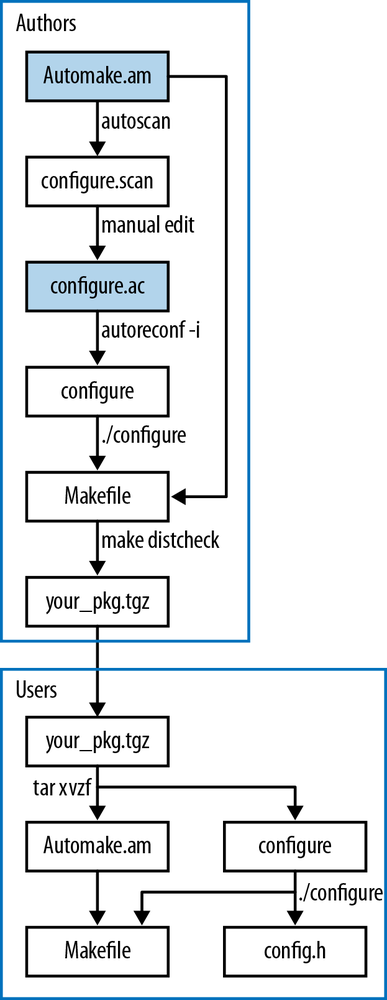
Chapter 3 addresses Autotools, a system for packaging your code for distribution. But the chapter takes the long way, and so also covers more about writing shell scripts and makefiles.
Nothing complicates life like other people. Therefore, Chapter 4 covers Git, a system for keeping track of the slightly different versions of a project on your and your collaborators’ hard drives, and making the process of merging all those versions as simple as possible.
Other languages are a key part of the modern C environment, because so many languages advertise a C interface. Chapter 5 will offer some general notes on writing the interface, and give an extended example with Python.
Look out honey ’cause I’m using technology.
—Iggy Pop, “Search and Destroy”
The C standard library is just not enough to get serious work done.
Instead, the C ecosystem has expanded outside of the standard, which means that knowing how to easily call functions from common but not-ISO-standard libraries is essential if you want to get past doing textbook exercises. Unfortunately, this is the point where most textbooks taper off and leave you to work it out for yourself, which is why you can find C detractors who will say self-dissonant things like C is 40 years old, so you have to write every procedure from scratch in it—they never worked out how to link to a library.
Here is the agenda for the chapter:
Setting up the requisite tools. This is much easier than it was in the dark days when you had to hunt for every component. You can set up a full build system with all the frills in maybe 10 or 15 minutes (plus all the download time to load so much good stuff).
How to compile a C program. Yes, you know how to do this, but we
need a setup that has hooks for the libraries and their locations; just
typing cc
myfile.c doesn’t cut it anymore.
Make is just about the simplest system to
facilitate compiling programs, so it provides a good model for
discussion. I’ll show you the smallest possible makefile that offers
enough room to grow.
Whatever system we use will be based on a small set of environment-like variables, so I’ll discuss what they do and how to set them. Once we have all that compilation machinery in place, adding new libraries will be an easy question of adjusting the variables we’ve already set up.
As a bonus, we can use everything up to this point to set up a still simpler system for compilation, which will let us cut and paste code onto the command prompt.
A special note to IDE users: you may not be a make user, but this section will nonetheless be relevant to you, because for every recipe that make executes when compiling code, your IDE has an analogous recipe. If you know what make is doing, you’ll have an easy time tweaking your IDE.
If you are not using a package manager, you are missing out.
I bring up package managers for several reasons: first, some of you may not have the basics installed. For you, I put this section first in the book, because you need to get these tools, and fast. A good package manager will have you set up quite rapidly with a full POSIX subsystem, compilers for every language you’ve ever heard of, a half-decent array of games, the usual office productivity tools, a few hundred C libraries, et cetera.
Second, as C authors, the package manager is a key means by which we can get libraries for folding into our work.
Third, if you are making the jump from being somebody who downloads packages to being somebody producing a package, this book will take you halfway, showing you how to prepare your package for easy autoinstallation, so that when the administrator of a package repository decides to include your code in the repository, he or she will have no problem building the final package.
If you are a Linux user, you set up your computer with a package manager and have already seen how easy the software obtention process can be. For Windows users, I’ll cover Cygwin in detail. Mac users have several options, such as Fink and Macports. All the Mac options depend on Apple’s Xcode package, typically available on the OS install CD (or directory of installable programs, depending on the vintage), or by registering as a developer with Apple.
What packages will you need? Here’s a quick rundown of the C development basics. Because every system has a different organization scheme, some of these may be bundled differently, installed by default in a base package, or oddly named. When in doubt about a package, install it, because we’re past the days when installing too many things could somehow cause system instability or slowdown. However, you probably don’t have the bandwidth (or maybe even the disk space) to install every package on offer, so some judgment will be required. If you find that you are missing something, you can always go back and get it later. Packages to definitely get:
A text editor. There are literally hundreds of text editors to choose from. Here are a few subjective recommendations:
Emacs and vim are the hardcore geek’s favorites. Emacs is very inclusive (the E is for extensible); vim is more minimalist and is very friendly to touch typists. If you expect to spend hundreds of hours staring at a text editor, it is worth taking the time to learn one of them.
Kate is friendly and attractive, and provides a good subset of the conveniences we expect as programmers, such as syntax highlighting.
As a last resort, try nano, which is aggressively simple, and is text-based, and therefore works even when your GUI doesn’t.
If you are a fan of IDEs, get one—or several. Again, there are many to choose from; here are a few recommendations:
In later chapters, I’ll get to these more heavy-duty tools:
Autotools: Autoconf, Automake, libtool
Git
Alternate shells, such as the Z shell.
And, of course, there are the C libraries that will save you the trouble of reinventing the wheel (or, to be more metaphorically accurate, reinventing the locomotive). You might want more, but here are the libraries that will be used over the course of this book:
libcURL
libGlib
libGSL
libSQLite3
libXML2
There is no consensus on library package naming schemes, and you
will have to work out how your package manager likes to dissect a single
library into subparts. There is typically one package for users and a
second for authors who will use the library in their own work, so be sure
to select both the base package and the -dev or -devel packages. Some systems separate
documentation into yet another package. Some require that you download
debugging symbols separately, in which case gdb should lead you through
the steps the first time you run it on something lacking debugging
symbols.
If you are using a POSIX system, then after you’ve installed the preceding items, you will have a complete development system and are ready to get coding. For Windows users, we’ll take a brief detour to understand how the setup interacts with the main Windows system.
On most systems, C is the central, VIP language that all the other tools work to facilitate; on a Windows box, C is strangely ignored.
So I need to take a little time out to discuss how to set up a Windows box for writing code in C. If you aren’t writing on a Windows box now, feel free to skip this segment and jump to Which Way to the Library?.
This section is not intended as a rant about Microsoft, and I am not going to speculate on Microsoft’s motives or business strategies. However, if you want to get work done in C on a Windows box, you need to know the state of affairs and what you can do to get going.
Because C and Unix coevolved, it’s hard to talk about one and not the other. I think it’s easier to start with POSIX. Also, those of you who are trying to compile code on a Windows box that you wrote elsewhere will find this to be the most natural route.
As far as I can tell, the world of things with filesystems divides into two (slightly overlapping) classes:
POSIX-compliant systems
The Windows family of operating systems
POSIX compliance doesn’t mean that a system has to look and feel
like a Unix box. For example, the typical Mac user has no idea that he
or she is using a standard BSD system with an attractive frontend, but
those in the know can go to the Accessories → Utilities folder, open the Terminal program,
and run ls, grep, and make to their hearts’ content.
Further, I doubt that many systems live up to 100% of the
standard’s requirements (like having a Fortran `77 compiler). For our
purposes, we need a shell that can behave like the barebones POSIX
shell, a handful of utilities (sed,
grep, make, …), a
C99 compiler, and additions to the standard C library such as fork and iconv. These can be added as a side note to
the main system. The package manager’s underlying scripts, Autotools,
and almost every other attempt at portable coding will rely on these
tools to some extent, so even if you don’t want to stare at a command
prompt all day, these tools will be handy to have for
installations.
On server-class OSes and the full-featured editions of Windows 7, Microsoft offers what used to be called INTERIX and is now called the Subsystem for Unix-based Application (SUA), which provides the usual POSIX system calls, the Korn shell, and gcc. The subsystem is typically not provided by default but can be installed as an add-on component. But the SUA is not available for other current editions of Windows and will not be available for Windows 8, so we can’t depend on Microsoft to provide a POSIX subsystem for its operating systems.
If you were to rebuild Cygwin from scratch, this would be your agenda:
Write a C library for Windows that provides all the POSIX functions. This will have to smooth over some Windows/POSIX incongruities, such as how Windows has distinct drives like C: while POSIX has one unified filesystem. In this case, alias C: as /cygdrive/c, D: as /cygdrive/d, and so on.
Now that you can compile POSIX-standard programs by linking to
your library, do so: generate Windows versions of ls, bash, grep, make, gcc, X,
rxvt, libglib, perl, python, and so on.
Once you have hundreds of programs and libraries built, set up a package manager that allows users to select the elements they want to install.
As a user of Cygwin, all you have to do is download the package manager from the setup link at Cygwin’s website and pick packages. You will certainly want the preceding list, plus a decent terminal (try mintty, or install the X subsystem and use the xterm), but you will see that virtually all of the luxuries familiar from a development system are there somewhere. Now you can get to compiling C code.
Microsoft provides a C++ compiler, in the form of Visual Studio, which has an ANSI C compatibility mode. This is the only means of compiling C code currently provided by Microsoft. Many representatives from the company have made it clear that C99 support (let alone C11 support) is not forthcoming. Visual Studio is the only major compiler that is still stuck on C89, so we’ll have to find alternative offerings elsewhere.
Of course, Cygwin provides gcc, and if you’ve followed along and installed Cygwin, then you’ve already got a full build environment.
If you are compiling under Cygwin, then your program will depend
on its library of POSIX functions, cygwin1.dll
(whether your code actually includes any POSIX calls or not). If you are
running your program on a box with Cygwin installed, then you obviously
have no problem. Users will be able to click on the executable and run
it as expected, because the system should be able to find the Cygwin
DLL. A program compiled under
Cygwin can run on boxes that don’t have Cygwin installed if you
distribute cygwin1.dll with your code. On my
machine, this is (path to
cygwin)/bin/cygwin1.dll. The
cygwin1.dll file has a GPL-like license (see The Legal Sidebar), in the sense that if you distribute the DLL
separately from Cygwin as a whole, then you are required to publish the
source code for your program.[3]
If this is a problem, then you’ll have to find a way to recompile
without depending on cygwin1.dll, which means
dropping any POSIX-specific functions (like fork or popen) from your code and using MinGW, as
discussed later. You can use cygcheck
to find out which DLLs your program depends on, and thus verify that
your executable does or does not link to
cygwin1.dll.
If your program doesn’t need the POSIX functions, then you can use MinGW (Minimalist GNU for Windows), which provides a standard C compiler and some basic associated tools. MSYS is a companion to MinGW that provides a shell and other useful utilities.
The lack of POSIX-style amenities is not the real problem with MinGW. MSYS provides a POSIX shell, or leave the command prompt behind entirely and try Code::blocks, an IDE that uses MinGW for compilation on Windows. Eclipse is a much more extensive IDE that can also be configured for MinGW, though that requires a bit more setup.
Or if you are more comfortable at a POSIX command prompt, then set up Cygwin anyway, get the packages providing the MinGW versions of gcc, and use those for compilation instead of the POSIX-linking default version of Cygwin gcc.
If you haven’t already met Autotools, you’ll meet it soon. The
signature of a package built using Autotools is its three-command
install: ./configure; make; make
install. MSYS provides sufficient machinery for such packages
to stand a good chance of working. Or if you have downloaded the
packages to build from Cygwin’s command prompt, then you can use the
following to set up the package to use Cygwin’s Mingw32 compiler for
producing POSIX-free code:
./configure--host=ming32
Then run make; make install as
usual.
Once you’ve compiled under MinGW, via either command-line compilation or Autotools, you’ve got a native Windows binary. Because MinGW knows nothing of cygwin1.dll, and your program makes no POSIX calls anyway, you’ve now got an executable program that is a bona fide Windows program, that nobody will know you compiled from a POSIX environment.
No, the real problem with MinGW is the paucity of precompiled libraries.[4] If you want to be free of cygwin1.dll, then you can’t use the version of libglib.dll that ships with Cygwin. You’ll need to recompile GLib from source to a native Windows DLL—but GLib depends on GNU’s gettext for internationalization, so you’ll have to build that library first. Modern code depends on modern libraries, so you may find yourself spending a lot of time setting up the sort of things that in other systems are a one-line call to the package manager. We’re back to the sort of thing that makes people talk about how C is 40 years old, so you need to write everything from scratch.
So, there are the caveats. Microsoft has walked away from the conversation, leaving others to implement a post-grunge C compiler and environment. Cygwin does this and provides a full package manager with enough libraries to do some or all of your work, but it is associated with a POSIX style of writing and Cygwin’s DLL. If that is a problem, you will need to do more work to build the environment and the libraries that you’ll need to write decent code.
OK, so you have a compiler, a POSIX toolchain, and a package manager that will easily install a few hundred libraries. Now we can move on to the problem of using those in compiling our programs.
We have to start with the compiler command line, which will quickly become a mess, but we’ll end with three (sometimes three and a half) relatively simple steps:
Set a variable listing the compiler flags.
Set a variable listing the libraries to link to. The half-step is that you sometimes have to set only one variable for linking while compiling, and sometimes have to set two for linking at compile time and runtime.
Set up a system that will use these variables to orchestrate the compilation.
To use a library, you have to tell the compiler that you will be
importing functions from the library twice: once for the compilation and
once for the linker. For a library in a standard location, the two
declarations happen via an #include in
the text of the program and a -l flag
on the compiler line.
Example 1-1 presents a quick sample program that does
some amusing math (for me, at least; if the statistical jargon is Greek to
you, that’s OK). The C99-standard error function,
erf(x), is closely related to the
integral from zero to x of the Normal distribution
with mean zero and standard deviation √2. Here, we use erf to verify an area popular among
statisticians (the 95% confidence interval for a standard
large-n hypothesis test). Let us name this file
erf.c.
#include <math.h>//erf, sqrt#include <stdio.h>//printfintmain(){printf("The integral of a Normal(0, 1) distribution ""between -1.96 and 1.96 is: %g\n",erf(1.96*sqrt(1/2.)));}
The #include lines should be
familiar to you. The compiler will paste math.h and
stdio.h into the code file here, and thus paste in
declarations for printf, erf, and sqrt. The declaration in
math.h doesn’t say anything about what erf does, only that it takes in a double and returns a double. That’s enough information for the
compiler to check the consistency of our usage and produce an object file
with a note telling the computer: once you get to this note, go find the
erf function, and replace this note
with erf’s return value.
It is the job of the linker to reconcile that note by actually
finding erf, which is in a library
somewhere on your hard drive.
The math functions found in math.h are split
off into their own library, and you will have to tell the linker about it
by adding an -lm flag. Here, the
-l is the flag indicating that a
library needs to be linked in, and the library in this case has a
single-letter name, m. You get printf for free, because there is an implicit
-lc asking the linker to link the
standard libc assumed at the end of the
linking command. Later, we’ll see GLib 2.0 linked in via -lglib-2.0, the GNU Scientific Library get
linked via -lgsl, and so on.
So if the file were named erf.c, then the full command line using the gcc compiler, including several additional flags to be discussed shortly, would look like this:
gcc erf.c -o erf -lm -g -Wall -O3 -std=gnu11So we’ve told the compiler to include math functions via an #include in the program, and told the linker to
link to the math library via the -lm on
the command line.
The -o flag gives the output
name; otherwise, we’d get the default executable name of a.out.
You’ll see that I use a few compiler flags every time, and I recommend you do, too.
-g adds symbols for
debugging. Without it, your debugger won’t be able to give you
variable or function names. They don’t slow down the program, and we
don’t care if the program is a kilobyte larger, so there’s little
reason to not use this. It works for gcc, Clang, and icc (Intel C
Compiler).
-std=gnu11 is gcc-specific,
and specifies that gcc should allow code conforming to the C11 and
POSIX standards. Otherwise, gcc will count certain now-valid bits of
syntax as invalid. As of this writing, some systems still predate
C11, in which case, use -std=gnu99. This is gcc only; everybody
else switched to C99 being the default a long time ago. The POSIX
standard specifies that c99 be
present on your system, so the compiler-agnostic version of the
above line would be:
c99 erf.c -o erf -lm -g -Wall -O3
In
the following makefiles, I achieve this effect by setting the
variable CC=c99.
-O3 indicates optimization
level three, which tries every trick known to build faster code. If,
when you run the debugger, you find that too many variables have
been optimized out for you to follow what’s going on, then change
this to -O0. This will be a
common tweak in the CFLAGS
variable, later. This works for gcc, Clang, and icc.
-Wall adds compiler
warnings. This works for gcc, Clang, and icc. For icc, you might
prefer -w1,
which displays the compiler’s warnings, but not its
remarks.
Use your compiler warnings, always. You may be fastidious and
know the C standard inside out, but you aren’t more fastidious or
knowledgeable than your compiler. Old C textbooks filled pages
admonishing you to watch out for the difference between = and ==,
or to check that all variables are initialized before use. As a more
modern textbook author, I have it easy, because I can summarize all
those admonishments into one single tip: use your compiler warnings,
always.
If your compiler advises a change, don’t second-guess it or put
off the fix. Do everything necessary to (1) understand why you got a
warning and (2) fix your code so that it compiles with zero warnings
and zero errors. Compiler messages are famously obtuse, so if you are
having trouble with step (1), paste the warning message into your
search engine to see how many thousands of others were confounded by
this warning before you. You may want to add -Werror to your compiler flags so your
compiler will treat warnings as errors.
I’ve got over 700,000 files on my hard drive, and one of them has
the declarations for sqrt and
erf, and another is the object file
holding the compiled functions. (You can try find / -type f | wc -l to get a rough file
count on any POSIX-standard system.) The compiler needs to know in which
directories to look to find the correct header and object file, and the
problem will only get more complex when we use libraries that are not
part of the C standard.
In a typical setup, there are at least three places where libraries may be installed:
The operating system vendor may define a standard directory or two where libraries are installed by the vendor.
There may be a directory for the local sysadmin to install packages that shouldn’t be overwritten on the next OS upgrade from the vendor. The sysadmin might have a specially hacked version of a library that should override the default version.
Users typically don’t have the rights to write to these locations, and so should be able to use libraries in their home directories.
The OS-standard location typically causes no problems, and the compiler should know to look in those places to find the standard C library, as well as anything installed alongside it. The POSIX standard refers to these directories as “the usual places.”
But for the other stuff, you have to tell the compiler where to look. This is going to get Byzantine: there is no standard way to find libraries in nonstandard locations, and it rates highly on the list of things that frustrate people about C. On the plus side, your compiler knows how to look in the usual locations, and library distributors tend to put things in the usual locations, so you might never need to specify a path manually. On another plus side, there are a few tools to help you with specifying paths. And on one last plus side, once you have located the nonstandard locations on your system, you can set them in a shell or makefile variable and never think about them again.
Let us say that you have a library named Libuseful installed on
your computer, and you know that its various files were put in the
/usr/local/ directory, which is the location
officially intended for your sysadmin’s local libraries. You already put
#include <useful.h> in your
code; now you have to put this on the command line:
gcc -I/usr/local/include use_useful.c -o use_useful -L/usr/local/lib -luseful
-I adds the given path to
the include search path, which the compiler searches for header
files you #included in your
code.
Order matters. If you have a file named specific.o that depends on the Libbroad library, and Libbroad depends on Libgeneral, then you will need:
gcc specific.o -lbroad -lgeneral
Any other ordering, such as gcc
-lbroad -lgeneral specific.o, will probably fail. You can
think of the linker looking at the first item, specific.o, and writing down a list of
unresolved function, structure, and variable names. Then it goes to
the next item, -lbroad, and
searches for the items on its still-missing list, all the while
potentially adding new unresolved items, then checking -lgeneral for those items still on the
missing list. If there are names still unlocated by the end of the
list (including that implicit -lc
at the end), then the linker halts and gives what is left of its
missing-items list to the user.
OK, back to the location problem: where is the library that you want to link to? If it was installed via the same package manager that you used to install the rest of your operating system, then it is most likely in the usual places, and you don’t have to worry about it.
You may have a sense of where your own local libraries tend to be, such as /usr/local or /sw or /opt. You no doubt have on hand a means of searching the hard drive, such as a search tool on your desktop or the POSIX:
find /usr -name 'libuseful*'to search /usr for files with names beginning
with libuseful. When you find Libuseful’s shared
object file is in
/some/path/lib, the
headers are almost certainly in
/some/path/include.
Everybody else finds hunting the hard drive for libraries to be
annoying, too, and pkg-config
addresses this by maintaining a repository of the flags and locations
that packages self-report as being necessary for compilation. Type
pkg-config on your command line; if
you get an error about specifying package names, then great, you have
pkg-config and can use it to do the
research for you. For example, on my PC, typing these two commands on
the command line:
pkg-config --libs gsl libxml-2.0
pkg-config --cflags gsl libxml-2.0
gives me these two lines of output:
-lgsl -lgslcblas -lm -lxml2
-I/usr/include/libxml2
These are exactly the flags I need to compile using GSL and
LibXML2. The -l flags reveal that GNU
Scientific Library depends on a Basic Linear Algebra Subprograms (BLAS)
library, and the GSL’s BLAS library depends on the standard math
library. It seems that all the libraries are in the usual places,
because there are no -L flags, but
the -I flag
indicates the special location for LibXML2’s header files.
Back to the command line, the shell provides a trick in that when you surround a command by backticks, the command is replaced with its output. That is, when I type:
gcc`pkg-config --cflags --libs gsl libxml-2.0`-o specific specific.c
the compiler sees:
gcc -I/usr/include/libxml2 -lgsl -lgslcblas -lm -lxml2 -o specific specific.c
So pkg-config does a lot of the
work for us, but it is not sufficiently standard that we can expect
everybody has it or that every library is registered with it. If you
don’t have pkg-config, then you’ll
have to do this sort of research yourself, by reading the manual for
your library or searching your disk as we saw previously.
There are often environment variables for paths, such as
CPATH or LIBRARY_PATH or C_INCLUDE_PATH. You would set them in your
.bashrc or other such user-specific
list of environment variables. They are hopelessly nonstandard—gcc on
Linux and gcc on the Mac use different variables, and any other
compiler may use others still. I find that it’s easier to set these
paths on a per-project basis in the makefile or its equivalent, using
-I and -L flags. If you prefer these path
variables, check the end of your compiler’s manpage for the list of
relevant variables for your situation.
Even with pkg-config, the need
for something that will assemble all this for us is increasingly
apparent. Each element is easy enough to understand, but it is a long,
mechanical list of tedious parts.
Static libraries are linked by the compiler by effectively copying the contents of the library into the final executable. So the program itself works as a more-or-less standalone system. Shared libraries are linked to your program at run-time, meaning that we have the same problem with finding the library that we had at compile time all over again at runtime. What is worse, users of your program may have this problem.
If the library is in one of the usual locations, life is good and the system will have no problem finding the library at runtime. If your library is in a nonstandard path, then you need to find a way to modify the runtime search path for libraries. Options:
If you packaged your program with Autotools, Libtool knows how to add the right flags, and you don’t have to worry about it.
The most likely reason for needing to modify this search path
is if you are keeping libraries in your home directory because you
don’t have (or don’t want to make use of) root access. If you are
installing all of your libraries into libpath,
then set the environment variable LD_LIBRARY_PATH. This is typically done in
your shell’s startup script (.bashrc, .zshrc, or whatever is appropriate),
via:
exportLD_LIBRARY_PATH=libpath:$LD_LIBRARY_PATH
There are those who warn against overuse of the LD_LIBRARY_PATH (what if somebody puts a
malicious impostor library in the path, thus replacing the real
library without your knowledge?), but if all your libraries are in
one place, it is not unreasonable to add one directory under your
ostensible control to the path.
When compiling the program with gcc, Clang, or icc based on a library in libpath, add:
LDADD=-Llibpath-Wl,-Rlibpath
to the subsequent makefile. The -L flag tells the compiler where to search
for libraries to resolve symbols; the -Wl flag passes its flags through from
gcc/Clang/icc to the linker, and the linker embeds the given
-R into the runtime search path
for libraries to link to. Unfortunately, pkg-config often doesn’t know about
runtime paths, so you may need to enter these things
manually.
The makefile provides a resolution to all this endless tweaking. It is basically an organized set of variables and shell scripts. The POSIX-standard make program reads the makefile for instructions and variables, and then assembles the long and tedious command lines for us. After this segment, there will be little reason to call the compiler directly.
In Makefiles vs. Shell Scripts, I’ll cover a few more details about the makefile; here, I’m going to show you the smallest practicable makefile that will compile a basic program that depends on a library. Here it is, all six lines of it:
P=program_name
OBJECTS=
CFLAGS = -g -Wall -O3
LDLIBS=
CC=c99

$(P): $(OBJECTS)
Usage:
Once ever: Save this (with the name
makefile) in the same directory as your
.c files. If you are using GNU Make, you have the
option of capitalizing the name to Makefile if
you feel that doing so will help it to stand out from the other files.
Set your program’s name on the first line (use
progname, not
progname.c).
Every time you need to recompile: Type make.
Your Turn: Here’s the world-famous hello.c program, in two lines:
#include <stdio.h>intmain(){printf("Hello, world.\n");}
Save that and the preceding makefile to a directory, and try the previous steps to get the program compiled and running.
We’ll get to the actual functioning of the makefile soon, but five out of six lines of this makefile are about setting variables (most of which are currently set to be blank), indicating that we should take a moment to consider environment variables in a little more detail.
Historically, there have been two main threads of shell grammar:
one based primarily on the Bourne shell, and another based primarily
on the C shell. The C shell has a slightly different syntax for
variables, e.g., set CFLAGS="-g -Wall -O3” to set
the value of CFLAGS. But the POSIX
standard is written around the Bourne-type variable-setting syntax, so
that is what I focus on through the rest of this book.
The shell and make use the
$ to indicate the value of a
variable, but the shell uses $var, whereas
make wants any variable names longer
than one character in parens: $(var). So, given the preceding makefile,
$(P): $(OBJECTS) will be equivalent to
program_name:There are several ways to get make to recognize a variable:
Set the variable from the shell before calling make, and export the
variable, meaning that when the shell spawns a child process, it has
the variable in its list of environment variables. To set CFLAGS from a POSIX-standard command
line:
exportCFLAGS='-g -Wall -O3'
At home, I omit the first line in this makefile, P=program_name,
and instead set it once per session via export
P=program_name, which means I
have to edit the makefile itself still less frequently.
You can put these export commands in your shell’s startup
script, like .bashrc or .zshrc. This guarantees that every time
you log in or start a new shell, the variable will be set and
exported. If you are confident that your CFLAGS will be the same every time, you
can set them here and never think about them again.
You can export a variable for a single command by putting the
assignment just before the command. The env command lists the environment
variables it knows about, so when you run the following:
PANTS=kakhi env | grep PANTS
you should see the appropriate variable and its value. This is why the shell won’t let you put spaces around the equals sign: the space is how it distinguishes between the assignment and the command.
Using this form sets and exports the given variables for one
line only. After you try this on the command line, try running
env | grep PANTS again to verify
that PANTS is no longer an
exported variable.
Feel free to specify as many variables as you’d like:
PANTS=kakhiPLANTS="ficus fern"env | grep'P.*NTS'
This trick is a part of the shell specification’s simple command description, meaning that the assignment needs to come before an actual command. This will matter when we get to noncommand shell constructs. Writing:
VAR=valif[-e afile];then./program_using_VAR ;fi
will fail with an obscure syntax error. The correct form is:
if[-e afile];thenVAR=val ./program_using_VAR ;fi
As in the earlier makefile, you can set the variable at the
head of the makefile, with the lines like CFLAGS=.... In the makefile, you can have
spaces around the equals sign without anything breaking.
make will let you set
variables on the command line, independent of the shell. Thus, these
two lines are close to equivalent:
makeCFLAGS="-g -Wall"Set a makefile variable.CFLAGS="-g -Wall"make Set an environment variable that only make and its children see.
All of these means are equivalent, as far as your makefile is
concerned, with the exception that child programs called by make will know new environment variables but
won’t know any makefile variables.
make also offers several
built-in variables. Here are the (POSIX-standard) ones that you will
need to read the following rules:
$@The full target filename. By target, I mean the file that needs to be built, such as a .o file being compiled from a .c file or a program made by linking .o files.
$*The target file with the suffix cut off. So if the target is
prog.o, $*
is prog, and $*.c would become
prog.c.
$<The name of the file that caused this target to get
triggered and made. If we are making prog.o,
it is probably because prog.c has recently
been modified, so $< is
prog.c.
Now, let us focus on the procedures the makefile will execute, and then get to how the variables influence that.
Setting the variables aside, segments of the makefile have the form:
target:dependenciesscript
If the target gets called, via the command make target, then
the dependencies are checked. If the target is a file, the dependencies
are all files, and the target is newer than the dependencies, then the
file is up-to-date and there’s nothing to do. Otherwise, the processing
of the target gets put on hold, the dependencies are run or generated,
probably via another target, and when the dependency scripts are all
finished, the target’s script gets executed.
For example, before this was a book, it was a series of tips
posted to a blog (at http://modelingwithdata.org).
Every blog post had an HTML and PDF version, all generated via LaTeX.
I’m omitting a lot of details for the sake of a simple example (like the
many options for latex2html), but
here’s the sort of makefile one could write for the process.
If you are copying any of these makefile snippets from a version on your screen or on paper to a file named makefile, don’t forget that the whitespace at the head of each line must be a tab, not spaces. Blame POSIX.
all: html doc publish
doc:
pdflatex $(f).tex
html:
latex -interaction batchmode $(f)
latex2html $(f).tex
publish:
scp $(f).pdf $(Blogserver)I set f on the command line via
a command like export f=tip-make.
When I then type make on the command
line, the first target, all, gets
checked. That is, the command make by
itself is equivalent to make
first_target. That depends on html, doc,
and publish, so
those targets get called in sequence. If I know it’s not yet ready to
copy out to the world, then I can call make
html doc and do only those steps.
In the simple makefile from earlier, we had only one target/dependency/script group. For example:
P=domathOBJECTS=addition.o subtraction.o$(P):$(OBJECTS)
This follows a sequence of dependencies and scripts similar to
what my blogging makefile did, but the scripts are implicit. Here,
P=domath is the program to be
compiled, and it depends on the object files
addition.o and subtraction.o.
Because addition.o is not listed as a target,
make uses an implicit rule, listed
below, to compile from the .c to the
.o file. Then it does the same for
subtraction.o and domath.o
(because GNU make implicitly assumes
that domath depends on
domath.o given the setup here). Once all the
objects are built, we have no script to build the $(P) target, so GNU make fills in its default script for linking
.o files into an executable.
POSIX-standard make has a
specific recipe for compiling a .o object file from
a .c source code file:
$(CC)$(CFLAGS)$(LDFLAGS)-o$@$*.c
The $(CC) variable represents
your C compiler; The POSIX standard specifies a default of CC=c99, but current editions of GNU make set CC=cc, which is typically a link to gcc. In the minimal makefile at the head of
this segment, $(CC) is explicitly set
to c99, $(CFLAGS) is set to the list of flags
earlier, and $(LDFLAGS) is unset and
therefore replaced with nothing. So if make determines that it needs to produce
your_program.o, then this is the command that
will be run, given that makefile:
c99 -g -Wall -O3 -oyour_program.oyour_program.c
When GNU make decides that you
have an executable program to build from object files, it uses this
recipe:
$(CC)$(LDFLAGS)first.osecond.o$(LDLIBS)
Recall that order matters in the linker, so we will need two linker variables. In the previous example, we needed:
cc specific.o -lbroad -lgeneral
as the relevant part of the linking command. Comparing the correct
compilation command to the recipe, we see that we need to set LDLIBS=-lbroad -lgeneral. If we had set
LDFLAGS=-lbroad -lgeneral, then the
recipe would produce cc -lbroad -lgeneral
specific.o, which is likely to fail. Notice that LDFLAGS also appears in the recipe for
compilation from .c to .o
files.
If you’d like to see the full list of default rules and
variables built in to your edition of make,
try:
make -p > default_rulesSo, that’s the game: find the right variables and set them in the makefile. You still have to do the research as to what the correct flags are, but at least you can write them down in the makefile and never think about them again.
Your Turn: Modify your makefile to compile erf.c.
If you use an IDE, or CMAKE, or any of the other alternatives to
POSIX-standard make, you’re going to
be playing the same find-the-variables game. I’m going to continue
discussing the preceding minimal makefile, and you should have no
problem finding the corresponding variables in your IDE.
The CFLAGS variable is an
ingrained custom, but the variable that you’ll need to set for the
linker changes from system to system. Even LDLIBS isn’t POSIX-standard, but is what
GNU make uses.
The CFLAGS and LDLIBS variables are where we’re going to
hook all the compiler flags locating and identifying libraries. If
you have pkg-config, put the backticked calls here. For example, the
makefile on my system, where I use Apophenia and GLib for just about
everything, looks like:
CFLAGS=`pkg-config --cflags apophenia glib-2.0`-g -Wall -std=gnu11 -O3LDLIBS=`pkg-config --libs apophenia glib-2.0`
Or, specify the -I,
-L, and -l flags manually, like:
CFLAGS=-I/home/b/root/include-g -Wall -O3LDLIBS=-L/home/b/root/lib-lweirdlib
After you add a library and its locations to the LIBS and CFLAGS lines and you know it works on your
system, there is little reason to ever remove it. Do you really care
that the final executable might be 10 kilobytes larger than if you
customized a new makefile for every program? That means you can
write one makefile summarizing where all the libraries are on your
system and copy it from project to project without any
rewriting.
If you have a second (or more) C file, add
second.othird.o, and so on to the OBJECTS line (no commas, just spaces
between names) in the makefile at the head of this section. make will use that to determine which
files to build and which recipes to run.
If you have a program that is one .c file, you may not need a makefile at all. In a directory with no makefile and erf.c from earlier, try using your shell to:
exportCFLAGS='-g -Wall -O3 -std=gnu11'exportLDLIBS='-lm'make erf
and watch make use its
knowledge of C compilation to do the rest.
So far, the story has been about compiling your own code using
make. Compiling code provided by others is often a
different story.
Let’s try a sample package. The GNU Scientific Library includes a host of numeric computation routines.
The GSL is packaged via Autotools, a set of tools that will prepare a library for use on any machine, by testing for every known quirk and implementing the appropriate workaround. Autotools is central to how code is distributed in the present day, and Packaging Your Code with Autotools will go into detail about how you can package your own programs and libraries with it. But for now, we can start off as users of the system and enjoy the ease of quickly installing useful libraries.
The GSL is often provided in precompiled form via package manager, but for the purposes of going through the steps of compilation, here’s how to get the GSL as source code and set it up, assuming you have root privileges on your computer.
wget ftp://ftp.gnu.org/gnu/gsl/gsl-1.15.tar.gztar xvzf gsl-*gz

cdgsl-1.15 ./configuremake sudo make install
Download the zipped archive. Ask your package manager to install
wget if you don’t have it, or type this URL into
your browser.
Unzip the archive: x=extract,
v=verbose, z=unzip via gzip, f=filename.
Determine the quirks of your machine. If the configure step gives you an error about a
missing element, then use your package manager to obtain it and run
configure again.

Install to the right location—if you have permissions.
If you are trying this at home, then you probably have root privileges, and this will work fine. If you are at work and using a shared server, the odds are low that you have superuser rights, so you won’t be able to provide the password needed to do the last step in the script as superuser. In that case, hold your breath until the next section.
Did it install? Example 1-3 provides a short program to try finding that 95% confidence interval using GSL functions; try it and see if you can get it linked and running:
#include <gsl/gsl_cdf.h>#include <stdio.h>intmain(){doublebottom_tail=gsl_cdf_gaussian_P(-1.96,1);printf("Area between [-1.96, 1.96]: %g\n",1-2*bottom_tail);}
To use the library you just installed, you’ll need to modify the makefile of your library-using program to specify the libraries and their locations.
Depending on whether you have pkg-config on hand,
you can do one of:
LDLIBS=`pkg-config --libs gsl`#orLDLIBS=-lgsl -lgslcblas -lm
If it didn’t install in a standard location and pkg-config is not available, you will need to
add paths to the heads of these definitions, such as CFLAGS=-I/usr/local/include and LDLIBS=-L/usr/local/lib
-Wl,-R/usr/local/lib.
You may have noticed the caveats in the last section about how you have to have root privileges to install to the usual locations on a POSIX system. But you may not have root access if you are using a shared computer at work, or if you have an especially controlling significant other.
Then you have to go underground and make your own private root directory.
The first step is to simply create the directory:
mkdir ~/rootI already have a ~/tech directory where I keep
all my technical logistics, manuals, and code snippets, so I made a
~/tech/root directory. The name doesn’t matter, but
I’ll use ~/root as the dummy directory
here.
Your shell replaces the tilde with the full path to your home
directory, saving you a lot of typing. The POSIX standard only requires
that the shell do this at the beginning of a word or just after a colon
(which you’d need for a path-type variable), but most shells expand
mid-word tildes as well. Other programs, like make, may or may not recognize the tilde as
your home directory.
The second step is to add the right part of your new root system to
all the relevant paths. For programs, that’s the PATH in your .bashrc (or
equivalent):
PATH=~/root/bin:$PATH
By putting the bin subdirectory of your new
directory before the original PATH, it
will be searched first, and your copy of any programs will be found first.
Thus, you can substitute in your preferred version of any programs that
are already in the standard shared directories of the system.
For libraries you will fold into your C programs, note the new paths to search in the preceding makefile:
LDLIBS=-L/home/your_home/root/lib(plus the other flags, like -lgsl -lm ...)CFLAGS=-I/home/your_home/root/include(plus -g -Wall -O3 ...)
Now that you have a local root, you can use it for other systems as
well, such as Java’s CLASSPATH.
The last step is to install programs in your new root. If you have
the source code and it uses Autotools, all you have to do is add --prefix=$HOME/root
in the right place:
./configure --prefix=; make; make install$HOME/root
You didn’t need sudo to do the
install step, because everything is now in territory you control.
Because the programs and libraries are in your home directory and have no more permissions than you do, your sysadmin can’t complain that they are an imposition on others. If your sysadmin complains anyway, then, as sad as it may be, it might be time to break up.
At this point, you have seen the pattern of compilation a few times:
Set a variable expressing compiler flags.
Set a variable expressing linker flags, including a -l flag for every library that you
use.
Use make or your IDE’s
recipes to convert the variables into full compile and link
commands.
The remainder of this chapter will do all this one last time, using an absolutely minimal setup: just the shell. If you are a kinetic learner who picked up scripting languages by cutting and pasting snippets of code into the interpreter, you’ll be able to do the same with pasting C code onto your command prompt.
The gcc and Clang have a convenient flag for including headers. For example:
gcc -include stdio.h
is equivalent to putting
#include <stdio.h>at the head of your C file; similarly for clang -include stdio.h.
By adding that to our compiler invocation, we can finally write hello.c as the one line of code it should be:
intmain(){printf("Hello, world.\n");}
which compiles fine via:
gcc -include stdio.h hello.c -o hi --std=gnu99 -Wall -g -O3or shell commands like:
exportCFLAGS='-g -Wall -include stdio.h'exportCC=c99 make hello
This tip about -include is
compiler-specific and involves moving information from the code to the
compilation instructions. If you think this is bad form, well, skip this
tip.
There was once a time when compilers took several seconds or
minutes to compile even relatively simple programs, so there was
human-noticeable benefit to reducing the work the compiler has to do. My
current copies of stdio.h and
stdlib.h are each about 1,000 lines long (try
wc -l /usr/include/stdlib.h) and
time.h another 400, meaning that this seven-line
program:
#include <time.h>#include <stdio.h>#include <stdlib.h>intmain(){srand(time(NULL));// Initialize RNG seed.printf("%i\n",rand());// Make one draw.}
is actually a ~2,400-line program.
Your compiler doesn’t think 2,400 lines is a big deal anymore, and this compiles in under a second. So why are we spending time picking out just the right headers for a given program?
You will see examples using Glib later, with an #include <glib.h> at the top. That
header includes 74 sub-headers, covering all the subsections of the Glib
library. This is good user interface design by the Glib team, because
those of us who don’t want to spend time picking just the right
subsections of the library can speed through the header paperwork in one
line, and those who want detailed control can pick and choose exactly
the headers they need. It would be nice if the C standard library had a
quick-and-easy header like this; it wasn’t the custom in the 1980s, but
it’s easy to make one.
Your Turn: Write yourself a single header, let us call it allheads.h, and throw in every header you’ve ever used, so it’ll look something like:
#include <math.h>#include <time.h>#include <stdio.h>#include <unistd.h>#include <stdlib.h>#include <gsl/gsl_rng.h>
I can’t tell you exactly what it’ll look like, because I don’t know exactly what you use day to day.
Now that you have this aggregate header, you can just throw one:
#include <allheads.h>on top of every file you write, and you’re done with thinking about headers. Sure, it will expand to perhaps 10,000 lines of extra code, much of it not relevant to the program at hand. But you won’t notice, and unused declarations don’t change the final executable.
Once you have a unified header, even a line like #include <allheads.h> is extraneous if
you are a gcc or Clang user, because you can instead add -include allheads.h to your CFLAGS and never think about which
out-of-project headers to include again.
Headers also serve the purpose of limiting scope, but this is generally more important for functions and structures you wrote than those in the libraries. The purpose of limiting scope is not to keep the namespace small so the computer won’t overheat; it is to reduce cognitive load for you, the programmer. I’m guessing you’re not even familiar with most of the functions to be found in the libraries you are using, and if you don’t know about them, they can’t possibly be taking up cognitive load. Other languages don’t even make the distinction and heap on the keywords, like the R project, which has 752 words internally defined at startup.
Here documents are a feature of POSIX-standard shells that you can use for C, Python, Perl, or whatever else, and they will make this book much more useful and fun. Also, if you want to have a multilingual script, here documents are an easy way to do it. Do some parsing in Perl, do the math in C, then have Gnuplot produce the pretty pictures, and have it all in one text file.
Here’s a Python example. Normally, you’d tell Python to run a script via:
python your_script.pyPython lets you give the filename - to use stdin as the input file:
echo"print 'hi.'"| python -
You could, in theory, put some lengthy scripts on the command line
via echo, but you’ll quickly see that
there are a lot of small, undesired parsings going on—you might need
\"hi\" instead of "hi", for example.
Thus, the here document, which does no parsing at all. Try this:
python - <<"XXXX" lines=2 print "\nThis script is %i lines long.\n" %(lines,) XXXX
Here documents are a standard shell feature, so they should work on any POSIX system.
The "XXXX" is any string
you’d like; "EOF" is also
popular, and "-----" looks good
as long as you get the dash count to match at top and bottom. When
the shell sees your chosen string alone on a line, it will stop
sending the script to the program’s stdin. That’s all the parsing
that happens.
There’s also a variant that begins with <<-. This variant removes all tabs
at the head of every line, so you can put a here document in an
indented section of a shell script without breaking the flow of
indentation. Of course, this would be disastrous for a Python here
document.
As another variant, there’s a difference between <<"XXXX" and <<XXXX. In the second version, the
shell parses certain elements, which means you can have the shell
insert the value of $shell_variables
for you. The shell relies heavily on the $ for its variables and other expansions;
the $ is one of the few
characters on a standard keyboard that has no special meaning
to C. It’s as if the people who wrote Unix designed it from the ground up to make
it easy to write shell scripts that produce C code….
OK, back to C: we can use here documents to compile C code pasted onto the command line via gcc or Clang, or have a few lines of C in a multilingual script.
We’re not going to use the makefile, so we need a single compilation command. To make life less painful, let us alias it. Paste this onto your command line, or add it to your .bashrc, .zshrc, or wherever applicable:
go_libs="-lm"go_flags="-g -Wall -includeallheads.h-O3"alias go_c="c99 -xc -$go_libs$go_flags"
where allheads.h is the aggregate
header you’d put together earlier. Using the -include flag means one less thing to
think about when writing the C code, and I’ve found that bash’s history
gets wonky when there are #s in the C code.
On the compilation line, you’ll recognize the -
to mean that instead of reading from a named file, use stdin. The
-xc identifies this as C code, because
gcc stands for GNU Compiler Collection, not GNU C
Compiler, and with no input filename ending in .c to
tip it off, we have to be clear that this is not Java, Fortran,
Objective C, Ada, or C++ (and
similarly for Clang, even though its name is meant to invoke C
language).
Whatever you did to customize the LDLIBS and
CFLAGS in your makefile, do here.
Now we’re sailing, and can compile C code on the command line:
go_c <<'---'int main(){printf("Hello from the command line.\n");}--- ./a.out
We can use a here document to paste short C programs onto the command line, and write little test programs without hassle. Not only do you not need a makefile, you don’t even need an input file.
Don’t expect this sort of thing to be your primary mode of working. But cutting and pasting code snippets onto the command line can be fun, and being able to have a single step in C within a longer shell script is pretty fabulous.
[3] Cygwin is a project run by Red Hat, Inc., who will also allow users to purchase the right to not distribute their source code as per the GPL.
[4] Although MSYS, MinGW, and a few other elements are provided as packages, this handful of packages pales in comparison to the hundreds of packages provided by the typical package manager. Notably, precompiled libraries are not a one-click or one-command install. However, by the time you read this, my complaint may have been addressed, and there might be many more MinGW packages available.
Crawling
Over your window
You think I’m confused,
I’m waiting ...
To complete my current ruse.—Wire, “I Am the Fly”
This chapter will cover tools for debugging, testing, and documenting your writing—the essentials to take your writing from a potentially useful set of scripts to something you and others can rely on.
Because C gives you the freedom to do idiotic things with memory, debugging means both the quotidian problem of checking logic (with gdb) and the more technical problem of checking for memory misallocations and leaks (with Valgrind). On the documentation side, this chapter covers one tool at the interface level (Doxygen) and another that helps you document and develop every step of the program (CWEB).
The chapter also gives a quick introduction to the test harness, which will allow you to quickly write lots of tests for your code, and concludes with some considerations about error reporting and handling input or user errors.
The first tip about the debugger is simple and brief:
Use a debugger, always.
Some of you will find this to be not much of a tip, because who possibly wouldn’t use a debugger? But many users come from languages that throw up a backtrace at the first sign of trouble, and didn’t get to the part where their C textbook introduces the debugger (it is often in the other topics segment, somewhere around Chapter 15). So now we’re all on the same page: the debugger exists.
I’ve found other people who worry that bugs typically come from
broad errors of understanding, while the debugger only gives information
at the low level of variable states and backtraces. Indeed, after you
pinpoint a bug using the debugger, it is worth taking the time to consider
what underlying problem and failure of understanding you have just
discovered, and whether it replicates itself elsewhere in your code. Some
death certificates include an aggressive inquiry into the cause of death:
Subject died as a result of ______, as a result of ______, as a result of ______, as a result of ______, as a result of ______. After the debugger has helped
you understand your code better, you can encapsulate your understanding in
more unit tests.
About that always: there is virtually no cost
to running a program under the debugger. Nor is the debugger just
something to pull out when something breaks. Linus Torvalds explains: “I
use gdb all the time … as a disassembler on steroids that you can
program.”[5] It’s great being able to pause anywhere, increase the
verbosity level with a quick print
verbose++, force out of a for (int i=0;
i<10; i++) loop via print
i=100 and continue, or test a
function by throwing a series of test inputs at it. The fans of
interactive languages are right that interacting with your code improves
the development process all the way along; they just never got to the
debugging chapter in the C textbook, and so never realized that all of
those interactive habits apply to C as well.
Whatever your intent, you will need to have human-readable debugging
information (i.e., names for variables and functions) compiled into the
program for any debugger to be at all useful. To include debugging
symbols, use the -g flag in the
compiler switches (i.e., your CFLAGS
variable). Reasons to not use the -g
flag are rare indeed—it doesn’t slow down your program, and adding a
kilobyte to your executable is irrelevant for most situations.
I’m only covering GDB, because on most POSIX systems, it’s the only game in town.[6] You might be working from an IDE or other visual frontend that runs your program under GDB every time you click run. I’m going to show you commands from GDB’s command line, and you should have no trouble translating the basics here into mouse clicks on your screen. Depending on the frontend, you might be able to use the macros defined in .gdbinit.
When working with GDB directly, you will probably need to have a text editor in another window or terminal displaying your code. The simple GDB/editor combination provides many of the conveniences of an IDE, and may be all you need.
You can experiment in GDB with any program that has at least one
function beyond main (so you have a
nontrivial stack), but if you don’t have anything immediately on hand, try
the New York Times headline downloader from the
section libxml and cURL. On the shell command line, given an
executable named nyt_feed, start GDB
via gdb nyt_feed. You will then be at
the GDB command line, where you can try any of a number of
things:
Pause your program at a certain point.
break
get_rss or break
nyt_feeds.c:105, or if you are already
in nyt_feeds.c, break 105.
This will stop the program just before line 105 is
executed.
List breakpoints with info
break.
Turn one off with, e.g., disable 3
(where 3 is the breakpoint number you
got from info break), and
reenable it later with enable
3. If you have a lot of breakpoints
set, disable by itself turns
them all off, and then you can enable the one or two that you need
at the moment.
Delete a breakpoint entirely with del 3.
Of course, you can’t stop until you start; run your program
with run, and if it needs
command-line arguments, put them here: run arg1
arg2.
Get the current value of any variables that exist in that function.
For one variable like url, use
print
url, or more simply, p url.
For all the function inputs: info
args; for all the local variables: info local.
Use display
url to print the value of
url every time GDB stops, so you can
watch it transform as you step line-by-line through a routine.
Displayed elements will be numbered; use undisplay 1
to turn off the display of item
1.
Jump to a parent function and check variable values there. Get
the list of frames on the stack via backtrace or bt, then use frame 2 or
f 2 to
jump to frame 2.
Step past the point where you paused, one line of code at a
time. Typically one of snuc, but
several options exist:
s: step one line, even if
that means entering another function.
n: next line, but do not
enter subfunctions, and possibly back up to the head of a
loop.
u: until the next line
forward from this (so let an already-visited loop run through
until forward progress).
c: continue until the
next breakpoint or the end of the program.
To return from the current function immediately, use
ret (perhaps with a return
value, like ret 0).
To make a more global move, j will jump to whatever line you please
(within reason).
If you need to get your bearings from the GDB command
prompt, you might need list (or
just l) to get a printout of
the 10 lines around the line you are currently on.
Just hitting Enter will repeat the last command, which makes
stepping easier, or after l
will list the next 10 lines after those you just saw.
This segment covers some useful elements of GDB that will help you look at your data with as little cognitive effort as possible. All of the commands to follow go on the GDB command line; IDE debuggers based on GDB often provide a means of hooking in to these facilities as well.
Here’s a sample program that does nothing, but that you can type
in for the sake of having a variable to interrogate. Because it is such
a do-nothing program, be sure to set the compiler’s optimization flag to
-O0, or else x will disappear entirely.
intmain(){intx[20]={};x[0]=3;}
Here’s tip zero: the @ shows
you a sequence of elements in an array. For example, if you break on
line 3 of this do-nothing program, you can display the first dozen
elements of the array with:
p *x@12
Note the star at the head of the expression; without it, we’d get a sequence of a dozen hexadecimal addresses.
The next tip will only be new to those of you who didn’t read the GDB manual [Stallman 2002], which is probably all of you. You can generate convenience variables, to save yourself some typing. For example, if you want to inspect an element deep within a hierarchy of structures, you can do something like:
set $vd = my_model->dataset->vector->data p *$vd@10
That first line generated the convenience variable to substitute
for the lengthy path. Following the lead of the shell, a dollar sign
indicates a variable. Unlike the shell, you need set and a dollar sign on the variable’s first
use. The second line demonstrates a simple use. We don’t save much
typing here, but if you suspect a variable of guilty behavior, giving it
a short name makes it easier to give it a thorough
interrogation.
These aren’t just names; they’re real variables that you can modify. After breaking at line three or four of the do-nothing program, try:
set $ptr=&x[3] p *$ptr = 8 p *($ptr++) #print the pointee, and step forward one
The second line actually changes the value in the given location.
On the third line, adding one to a pointer steps forward to the next
item in the list (as per All the Pointer Arithmetic You Need to Know). Thus,
after the third line, $ptr is now
pointing to x[4].
That last form is especially useful because hitting the Enter key
without any input repeats the last command. Because the pointer stepped
forward, you’ll get a new next value every time you hit Enter, until you
get the gist of the array. This is also useful should you find yourself
dealing with a linked list. Pretend we have a function that displays an
element of the linked list and sets $list equal to the given element, and we have
the head of the list at list_head.
Then:
p $list=list_head show_structure $list->next
and leaning on the Enter key will step through the list. Later, we’ll make that imaginary function to display a data structure a reality.
But first, here’s one more trick about these $
variables. Let me cut and paste a few lines of interaction with a
debugger in the other screen:
(gdb) p x+3 $17 = (int *) 0xbffff9a4
You probably don’t even look at it anymore, but notice how the
output to the print statement starts with $17. Indeed, every output is assigned a
variable name, which we can use like any other:
(gdb) p *$17 $18 = 8 (gdb) p *$17+3 $19 = 11
To be even more brief, a lone $
is a shorthand variable assigned to the last output. So if you get a hex
address when you thought you would get the value at that address, just
put p *$ on the next line to get the
value. With this, the above steps could have been:
(gdb) p x+3 $20 = (int *) 0xbffff9a4 (gdb) p *$ $21 = 8 (gdb) p $+3 $22 = 11
GDB lets you define simple macros, which are especially useful for displaying nontrivial data structures—which is most of the work one does in a debugger. Even a simple 2D array hurts your eyes when it’s displayed as a long line of numbers. In a perfect world, every major structure you deal with will have a debugger command associated to quickly view that structure in the manner(s) most useful to you.
The facility is rather primitive, but you probably already wrote a C-side function that prints any complex structures you might have to deal with, so the macro can simply call that function with a few keystrokes.
You can’t use any of your C preprocessor macros at the GDB prompt, because they were substituted out long before the debugger saw any of your code. So if you have a valuable macro in your code, you may have to reimplement it in GDB as well.
Here is a function you can try by putting a breakpoint about
halfway through the parse function in
libxml and cURL, at which point you’ll have a doc structure representing an XML tree. Put
these macros in your .gdbinit.
define pxml
p xmlElemDump(stdout, $arg0, xmlDocGetRootElement($arg0))
end
document pxml
Print the tree of an already opened XML document (i.e., an xmlDocPtr) to the
screen. This will probably be several pages long.
E.g., given: xmlDocPtr doc = xmlParseFile(infile);
use: pxml doc
endNotice how the documentation follows right after the function
itself; view it via help pxml or
help user-defined. The macro itself
just saves some typing, but because the primary activity in the debugger
is looking at data, those little things add up.
GLib has a linked list structure, so we should have a linked list
viewer. Example 2-1 implements it via two user-visible
macros (phead to view the head of the
list, then pnext to step forward) and
one macro the user should never have to call (plistdata, to remove redundancy between
phead and pnext).
definepheadset$ptr=$arg1plistdata$arg0enddocumentpheadthefirstelementofalist.E.g.,giventhedeclarationGlist*datalist;g_list_add(datalist,"Hello");viewthelistwithsomethinglikegdb>pheadchardatalistgdb>pnextchargdb>pnextcharThismacrodefines$ptrasthecurrentpointed-toliststruct,and$pdataasthedatainthatlistelement.enddefinepnextset$ptr=$ptr->nextplistdata$arg0enddocumentpnextYouneedtocallpheadfirst;thatwillset$ptr.Thismacrowillstepforwardinthelist,thenshowthevalueatthatnextelement.Givethetypeofthelistdataastheonlyargument.Thismacrodefines$ptrasthecurrentpointed-toliststruct,and$pdataasthedatainthatlistelement.enddefineplistdataif$ptrset$pdata=$ptr->dataelseset$pdata=0endif$pdatap($arg0*)$pdataelsep"NULL"endenddocumentplistdataThisisintendedtobeusedbypheadandpnext,q.v.Itsets$pdataandprintsitsvalue.end
Example 2-2 offers some simple code that uses the
GList to store char*s. You can break around line 8 or 9 and
call the previous macros.
#include <stdio.h>#include <glib.h>GList*list;intmain(){list=g_list_append(list,"a");list=g_list_append(list,"b");list=g_list_append(list,"c");for(;list!=NULL;list=list->next)printf("%s\n",(char*)list->data);}
You can define functions to run before or after every use of a given command. For example:
definehook-echo<----\nenddefinehookpost-echo---->\nend
will print cute brackets before and after anything you print.
The most exciting hook is hook-stop. The display command will print the value of any
expression every time the program stops, but if you want to make use
of a macro or other GDB command at every stop, redefine hook-stop:
definehook-stoppxmlsuspect_treeend
When you are done with your suspect, redefine hook-stop to be nothing:
definehook-stopend
Your Turn: GDB macros can
also include a while that looks
much like the ifs in Example 2-2 (start with a line like while $ptr and conclude with end). Use this to write a macro to print an
entire list at once.
Most of our time spent debugging is spent finding the first point in the program where something looks wrong. Good code and a good system will find that point for you. That is, a good system fails fast.
C gets mixed scores on this. In some languages, a typo like conut=15 would generate a new variable that has
nothing to do with the count you meant
to set; with C, it fails at the compilation step. On the other hand, C
will let you assign to the 10th element of a 9-element array and then
trundle along for a long time before you find out that there’s garbage in
what you thought was element 10.
Those memory mismanagement issues are a hassle, and so there are tools to confront them. Within these, Valgrind is a big winner. Get a copy via your package manager. Valgrind runs a virtual machine that keeps better tabs of memory than the real machine does, so it knows when you hit the 10th element in an array of 9 items.
Once you have a program compiled (with debugging symbols included
via gcc’s or Clang’s -g flag, of
course), run:
valgrind your_program
If you have an error, Valgrind will give you two backtraces that
look a lot like the backtraces your debugger gives you. The first is where
the misuse was first detected, and the second is Valgrind’s best guess as
to what line the misuse clashed with, such as where a double-freed block
was first freed, or where the closest malloced block
was allocated. The errors are often subtle, but having the exact line to
focus on goes a long way toward finding the bug. Valgrind is under active
development—programmers like nothing better than writing programming
tools—so I’m amused to watch how much more informative the reports have
gotten over time and only expect better in the future.
To give you an example of a Valgrind backtrace, I inserted an error
in the code of Example 9-1 by doubling line 14, free(cmd), thus causing the cmd pointer to be freed once on line 14 and
again on line 15. Here’s the backtrace I got:
Invalid free() / delete / delete[] / realloc() at 0x4A079AE: free (vg_replace_malloc.c:427) by 0x40084B: get_strings (sadstrings.c:15) by 0x40086B: main (sadstrings.c:19) Address 0x4c3b090 is 0 bytes inside a block of size 19 free'd at 0x4A079AE: free (vg_replace_malloc.c:427) by 0x40083F: get_strings (sadstrings.c:14) by 0x40086B: main (sadstrings.c:19)
The top frame in both backtraces is in the standard library code for
freeing pointers, but we can be confident that the standard library is
well debugged. Focusing on the part of the stack referring to code that I
wrote, the backtrace points me to lines 14 and 15 of
sadstrings.c, which are indeed the two calls to
free(cmd) in my modified code.
You can also start the debugger at the first error, by running:
valgrind --db-attach=yes your_programWith this sort of startup, you’ll get a line asking if you want to run the debugger on every detected error, and then you can check the value of the implicated variables as usual. At this point, we’re back to having a program that fails on the first line where a problem is detected.
Valgrind also does memory leaks:
valgrind --leak-check=full your_programThis is typically slower, so you might not want to run it every time. When it finishes, you’ll have a backtrace for where every leaked pointer was allocated.
A leak in a library function that could conceivably run a million times in the center of a user program’s loop, or in a program that should have 100% runtime for months, will eventually cause potentially major problems for users. But it is easy to find programs broadly deemed to be reliable (on my machine, doxygen, git, TeX, vi, others) that Valgrind reports as definitely losing kilobytes. For such cases, we can adapt a certain cliché about trees falling in the woods: if a bug does not cause incorrect results or user-perceivable slowdowns, is it really a bug?
Of course you’re writing tests for your code. You’re writing unit tests for the smaller components and integration tests to make sure that the components get along amicably. You may even be the sort of person who writes the unit tests first and then builds the program to pass the tests.
Now you’ve got the problem of keeping all those tests organized, which is where a test harness comes in. A test harness is a system that sets up a small environment for every test, runs the test, and reports whether the result is as expected. Like the debugger, I expect that some of you are wondering who it is that doesn’t use a test harness, and to others, it’s something you never really considered.
There are abundant choices. It’s easy to write a macro or two to call each test function and compare its return value to the expected result, and more than enough authors have let that simple basis turn into yet another implementation of a full test harness. From [Page 2008]: “Microsoft’s internal repository for shared tools includes more than 40 entries under test harness.” For consistency with the rest of the book, I’ll show you GLib’s test harness, and because they are all so similar, and because I’m not going to go into so much detail that I’m effectively reading the GLib manual to you, what I cover here should carry over to other test harnesses as well.
A test harness has a few features that beat the typical homemade test macro:
You need to test the failures. If a function is supposed to abort or exit with an error message, you need a facility to test that the program actually exited when you expected it to.
Each test is kept separate, so you don’t have to worry that test 3 affected the outcome to test 4. If you want to make sure the two procedures don’t interact badly, run them in sequence as an integration test after running them separately.
You probably need to build some data structures before you can run your tests. Setting up the scene for a test sometimes takes a good amount of work, so it would be nice to run several tests given the same setup.
Example 2-3 shows a few basic unit tests of the dictionary object from Implementing a Dictionary, implementing these three test harness features. It demonstrates how that last item largely dictates the flow of test harness use: a new struct type is defined at the beginning of the program, then there are functions for setting up and tearing down an instance of that struct type, and once we have all that in place it is easy to write several tests using the built environment.
The dictionary is a simple set of key-value pairs, so most of the
testing consists of retrieving a value for a given key and making sure
that it worked OK. Notice that a key of NULL is not acceptable, so we check that the
program will halt if such a key gets sent in.
#include <glib.h>
#include "dict.h"
typedef struct {
dictionary *dd;
} dfixture;
void dict_setup(dfixture *df, gconstpointer test_data){
df->dd = dictionary_new();
dictionary_add(df->dd, "key1", "val1");
dictionary_add(df->dd, "key2", NULL);
}
void dict_teardown(dfixture *df, gconstpointer test_data){
dictionary_free(df->dd);
}
void check_keys(dictionary const *d){
char *got_it = dictionary_find(d, "xx");
g_assert(got_it == dictionary_not_found);
got_it = dictionary_find(d, "key1");
g_assert_cmpstr(got_it, ==, "val1");
got_it = dictionary_find(d, "key2");
g_assert_cmpstr(got_it, ==, NULL);
}
void test_new(dfixture *df, gconstpointer ignored){
check_keys(df->dd);
}
void test_copy(dfixture *df, gconstpointer ignored){
dictionary *cp = dictionary_copy(df->dd);
check_keys(cp);
dictionary_free(cp);
}
void test_failure(){
if (g_test_trap_fork(0, G_TEST_TRAP_SILENCE_STDOUT | G_TEST_TRAP_SILENCE_STDERR)){
dictionary *dd = dictionary_new();
dictionary_add(dd, NULL, "blank");
}
g_test_trap_assert_failed();
g_test_trap_assert_stderr("NULL is not a valid key.\n");
}
int main(int argc, char **argv){
g_test_init(&argc, &argv, NULL);
g_test_add ("/set1/new test", dfixture, NULL,  dict_setup, test_new, dict_teardown);
g_test_add ("/set1/copy test", dfixture, NULL,
dict_setup, test_copy, dict_teardown);
g_test_add_func ("/set2/fail test", test_failure);
dict_setup, test_new, dict_teardown);
g_test_add ("/set1/copy test", dfixture, NULL,
dict_setup, test_copy, dict_teardown);
g_test_add_func ("/set2/fail test", test_failure);  return g_test_run();
}
return g_test_run();
} The elements used in a set of tests is called a fixture. GLib requires that each fixture be a struct, so we create a throwaway struct to be passed from the setup to the test to the teardown.
Here are the setup and teardown scripts that create the data structure to be used for a number of tests.
Now that the setup and teardown functions are defined, the tests themselves are just a sequence of simple operations on the structures in the fixture and assertions that the operations went according to plan. The GLib test harness provides some extra assertion macros, like the string comparison macro used here.
GLib tests for failure via the POSIX fork system call (which means that this
won’t run on Windows without a POSIX subsystem). The fork call generates a new program that runs
the contents of the if statement,
which should fail and call abort.
This program watches for the forked version and checks that it failed
and that the right message was written to
stderr.
Tests are organized into sets via path-like strings. The
NULL argument could be a pointer to
a data set to be used by the test, but not built/torn down by the
system. Notice how both the new and copy tests use the same setup and
teardown.
If you don’t have setup/teardown to do before/after the call, use this simpler form to run the test.
The only difference between a function library and a program is
that a program includes a main
function that indicates where execution should start.
Now and then I have a file that does one thing that’s not quite
big enough to merit being set up as a standalone shared library. It
still needs tests, and I can put them in the same file as everything
else, via a preprocessor condition. In the following snippet, if
Test_operations is defined (via the
various methods discussed later), then the snippet is a program that
runs the tests; if Test_operations is
not defined (the usual case), then the snippet is compiled without
main and so is a library to be used
by other programs.
int operation_one(){
...
}
int operation_two(){
...
}
#ifdef Test_operations
void optest(){
...
}
int main(int argc, char **argv){
g_test_init(&argc, &argv, NULL);
g_test_add_func ("/set/a test", test_failure);
}
#endifThere are a few ways to define the Test_operations variable. In with the usual
flags, probably in your makefile, add:
CFLAGS=-DTest_operations
The -D flag is the
POSIX-standard compiler flag that is equivalent to putting #define
Test_operations at the top of every
.c file.
When you see Automake in Chapter 3, you’ll see
that it provides a += operator, so
given the usual flags in AM_CFLAGS,
you could add the -D flag to the
checks via:
check_CFLAGS = $(AM_CFLAGS) check_CFLAGS += -DTest_operations
The conditional inclusion of main can also come in handy in the other
direction. For example, I often have an analysis to do based on some
quirky data set. Before writing the final analysis, I first have to
write a function to read in and clean the data, and then a few functions
producing summary statistics sanity-checking the data and my progress.
This will all be in modelone.c. Next week, I may
have an idea for a new descriptive model, which will naturally make
heavy use of the existing functions to clean data and display basic
statistics. By conditionally including main in modelone.c, I can
quickly turn the original program into a library. Here is a skeleton for
modelone.c:
void read_data(){
[database work here]
}
#ifndef MODELONE_LIB
int main(){
read_data();
...
}
#endifI use #ifndef rather than
#ifdef, because the norm is to use
modelone.c as a program, but this otherwise
functions the same way as the conditional inclusion of main for testing purposes did.
What’s your test coverage? Are there lines of code that you wrote that aren’t touched by your tests? gcc has the companion gcov, which will count how many times each line of code was touched by a program. The procedure:
Add -fprofile-arcs
-ftest-coverage to your CFLAGS for gcc. You might want to set the
-O0 flag, so that no lines of
code are optimized out.
When the program runs, each source file
yourcode.c will
produce one or two data files,
yourcode.gcda and
yourcode.gcno.
Running gcov
yourcode.gcda will
write to stdout the percentage of runnable lines
of code that your program hit (declarations, #include lines, and so on don’t count) and
will produce
yourcode.c.cov.
The first column of
yourcode.c.cov will
show how often each runnable line was hit by your tests, and will
mark the lines not hit with a big fat #####. Those are the parts for which you
should consider writing another test.
Example 2-4 shows a shell script that adds up
all the steps. I use a here document to generate the makefile, so I
could put all the steps in one script, and after compiling, running, and
gcov-ing the program, I grep for
the ##### markers. The -C3 flag to GNU grep
requests three lines of context around matches. It isn’t POSIX-standard,
but then, neither are pkg-config or the test coverage
flags.
cat > makefile << '------'
P=dict_test
objects= keyval.o dict.o
CFLAGS = `pkg-config --cflags glib-2.0` -g -Wall -std=gnu99 \
-O0 -fprofile-arcs -ftest-coverage
LDLIBS = `pkg-config --libs glib-2.0`
CC=gcc$(P):$(objects) ------
make ./dict_test for i in *gcda; do gcov $i; done; grep -C3 '#####' *.c.gcov
You need documentation. You know this, and you know that you need to keep it current when the code changes. Yet, somehow, documentation is often the first thing to fall by the wayside. It is so very easy to say it runs; I’ll document it later.
So you need to make writing the documentation as easy as physically possible. The immediate implication is that you have the documentation for the code in the same file as the code, as close as possible to the code being documented, and that implies that you’re going to need a means of extracting the documentation from the code file.
Having the documentation right by the code also means you’re more likely to read the documentation. It’s a good habit to reread the documentation for a function before modifying it, both so that you have a better idea of what’s going on, and so that you will be more likely to notice when your changes to the code will also require a change in the documentation.
I’ll present two means of weaving documentation into the code: Doxygen and CWEB. Your package manager should be happy to install either of them.
Doxygen is a simple system with simple goals. It works best for attaching a description to each function, struct, or other such block. This is the case of documenting an interface for users who will never care to look at the code itself. The description will be in a comment block right on top of the function, struct, or whatever, so it is easy to write the documentation comment first, then write the function to live up to the promises you just made.
The syntax for Doxygen is simple enough, and a few bullet points will have you well on your way to using it:
If a comment block starts with two stars, /** like so */, then Doxygen will parse
the comment. One-star comments, /* like so
*/, are ignored.
If you want Doxygen to parse a file, you will need a /** \file */ comment at the head of the
file; see the example. If you forget this, Doxygen won’t produce
output for the file and won’t give you much of a hint as to what
went wrong.
Put the comment right before the function, struct, et cetera.
Your function descriptions can (and should) include \param segments describing the input
parameters and a \return line
listing the expected return value. Again, see the example.
Use \ref for
cross-references to other documented elements (including functions
or pages).
You can use an @ anywhere I
used a backslash above: @file,
@mainpage, et cetera. This is in
emulation of JavaDoc, which seems to be emulating WEB. As a LaTeX
user, I am more used to the backslash.
To run Doxygen, you will need a configuration file, and there are a lot of options to configure. Doxygen has a clever trick for handling this; run:
doxygen -g
and it will write a configuration file for you. You can then open
it and edit as needed; it is of course very well documented. After that,
run doxygen by itself to generate the
outputs, including HTML, PDF, XML, or manual pages, as per your
specification.
If you have Graphviz installed (ask your package manager for it), then Doxygen can generate call graphs: box-and-arrow diagrams showing which functions call and are called by which other functions. If somebody hands you an elaborate program and expects you to get to know it quickly, this can be a nice way to get a quick feel for the flow.
I documented libxml and cURL using Doxygen; have a look and see how it reads to you as code, or run it through Doxygen and check out the HTML documentation it produces.
Every snippet throughout the book beginning with
/** is also in Doxygen format.
Your documentation should contain at least two parts: the technical documentation describing the function-by-function details, and a narrative explaining to users what the package is about and how to get their bearings.
Start the narrative in a comment block with the header \mainpage. If you are producing HTML output,
this will be the index.html of your website—the
first page readers should see. From there, add as many pages as you’d
like. Subsequent pages have a header of the form:
/** \page onewordtag The title of your page
*/Back on the main page (or any other, including function
documentation), add \ref
onewordtag to produce a link to the page
you wrote. You can tag and name the main page as well, if need
be.
The narrative pages can be anywhere in your code: you could put them close to the code itself, or the narrative might make sense as a separate file consisting entirely of Doxygen comment blocks, maybe named documentation.h.
TeX, a document formatting system, is often held up as a paragon of a complicated system done very right. It is about 35 years old as of this writing, and (in this author’s opinion) still produces the most attractive math of any typesetting system available. Many more recent systems don’t even try to compete, and use TeX as a back-end for typesetting. Its author, Donald Knuth, used to offer a bounty for bugs, but eventually dropped the bounty after it went unclaimed for many years.
Dr. Knuth explains the high quality of TeX by discussing how it was written: literate programming, in which every procedural chunk is preceded by a plain English explanation of that chunk’s purpose and functioning. The final product looks like a free-form description of code with some actual code interspersed here and there to formalize the description for the computer (in contrast to typical documented code, which is much more code than exposition). Knuth wrote TeX using WEB, a system that intersperses English expository text with PASCAL code. Here in the present day, the code will be in C, and now that TeX works to produce beautiful documentation, we might as well use it as the markup language for the expository side. Thus, CWEB.
As for the output, it’s easy to find textbooks that use CWEB to organize and even present the content (e.g., [Hanson 1996]). If somebody else is going to study your code (for some of you this might be a coworker or a review team), then CWEB might make a lot of sense.
I wrote An Agent-Based Model of Group Formation using CWEB; here’s a rundown of what you need to know to compile it and follow its CWEB-specific features:
Custom is to save CWEB files with a .w extension.
Run cweave
groups.w to produce a .tex
file; then run pdftex
groups.tex to produce a PDF.
Run ctangle
groups.w to produce a
.c file. GNU make knows about this in its
catalog of built-in rules, so make
groups will run ctangle
for you.
The tangle step removes comments, which means that CWEB and Doxygen are incompatible. Perhaps you could produce a header file with a header for each public function and struct for doxygenization, and use CWEB for your main code set.
Here is the CWEB manual reduced to seven bullet points:
Every special code for CWEB has an @ followed by a single character. Be
careful to write @<titles@>
and not @<incorrect
titles>@.
Every segment has a comment, then code. It’s OK to have a blank comment, but that comment-code rhythm has to be there or else all sorts of errors turn up.
Start a text section with an @
following by a space. Then expound, using TeX
formatting.
Start an unnamed chunk of code with @c.
Start a named block of code with a title followed by an equals
sign (because this is a definition): @<an operation@>=.
That block will get inserted verbatim wherever you use the title. That is, each chunk name is effectively a macro that expands to the chunk of code you specified, but without all the extra rules of C preprocessor macros.
Sections (like the sections in the example about group
membership, setting up, plotting with Gnuplot, and so on) start with
@* and have a title ending in a
period.
That should be enough for you to get started writing your own stuff in CWEB. Have a look at An Agent-Based Model of Group Formation and see how it reads to you.
A complete programming textbook must include at least one lecture to the reader about how important it is to handle errors sent by functions you have called.
OK, consider yourself lectured. Now let’s consider the side of how and when you will return errors from the functions you write. There are a lot of different types of errors in a lot of different contexts, so we have to break down the inquiry into several subcases:
What is the user going to do with the error message?
Is the receiver a human or another function?
How can the error be communicated to the user?
I will leave the third question for later (Return Multiple Items from a Function), but the first two questions already give us a lot of cases to consider.
Thoughtless error-handling, wherein authors pepper their code with error-checks because you can’t have too many, is not necessarily the right approach. You need to maintain lines of error-handling code like any other, and every user of your function has internalized endless lectures about how every possible error code needs to be handled, so if you throw error codes that have no reasonable resolution, the function user will be left feeling guilty and unsure. There is such a thing as too much information (TMI).
To approach the question of how an error will be used, consider the complementary question of how the user was involved in the error to begin with.
Sometimes the user can’t know if an input is valid before calling the function, the classic example being looking up a key in a key/value list and finding out that the key is not in the list. In this case, you could think of the function as a lookup function that throws errors if the key is missing from the list, or you could think of it as a dual-purpose function that either looks up keys or informs the caller whether the key is present or not.
Or to give an example from high-school algebra, the quadratic
formula requires calculating sqrt(b*b -
4*a*c), and if the term in parens is negative, the square
root is not a real number. It’s awkward to expect the function user
to calculate b*b -
4*a*c to establish feasibility, so it is reasonable to
think of the quadratic formula function as either returning the
roots of the quadratic equation or reporting whether the roots will
be real or not.
In these examples of nontrivial input-checking, bad inputs aren’t even an error, but are a routine and natural use of the function. If an error-handling function aborts or otherwise destructively halts on errors (as does the error-handler that follows), then it shouldn’t be called in situations like these.
Users passed in blatantly wrong input,
such as a NULL pointer or other
sort of malformed data. Your function has to check for these things,
to prevent it from segfaulting or otherwise failing, but it is hard
to imagine what the caller will do with the information. The
documentation for yourfn told users that
the pointer can’t be NULL, so
when they ignore it and call int*
indata=NULL; yourfn(indata), and you return an error like
Error: NULL pointer input, it’s
hard to imagine what the caller will do differently.
A function usually has several lines like if (input1==NULL) return -1; ... if (input20==NULL)
return -1; at the head, and I find in the contexts where I
work that reporting exactly which of the basic requirements
enumerated in the documentation the caller missed is TMI.
The error is entirely an error of internal processing, including “shouldn’t happen” errors, wherein an internal calculation somehow got an impossible answer—what Hair (The American Tribal Love Rock Musical) called a failure of the flesh, such as unresponsive hardware or a dropped network or database connection.
The flesh failures can typically be handled by the recipient (e.g., by wiggling the network cable). Or, if the user requests that a gigabyte of data be stored in memory and that gigabyte is not available, it makes sense to report an out-of-memory error. However, when allocation for a 20-character string fails, the machine is either overburdened and about to become unstable or it is on fire, and it’s typically hard for a calling system to use that information to recover gracefully. Depending on the context in which you are working, your computer is on fire-type errors might be counterproductive and TMI.
Errors of internal processing (i.e., errors unrelated to external conditions and not directly tied to a somehow-invalid input value) cannot be handled by the caller. In this case, detailing to the user what went wrong is probably TMI. The caller needs to know that the output is unreliable, but enumerating lots of different error conditions just leaves the caller (duty-bound to handle all errors) with more work.
As above, we often use a function to check on the validity of a set of inputs, and such usage is not an error per se, and the function is most useful if it returns a meaningful value for these cases rather than calling an error handler. The rest of this section considers the bona fide errors.
If the user of the program has access to a debugger and is in
a context where using one is feasible, then the fastest way to fail
is to call abort and cause the
program to stop. Then the user has the local variables and backtrace
right at the scene of the crime. The abort function has been C-standard since
forever (you’ll need to #include
<stdlib.h>).
If the user of the program is actually a Java program, or has
no idea what a debugger is, then abort is an abomination, and the correct
response is to return some sort of error code indicating a
failure.
Both of these cases are very plausible, so it is sensible to have an if/else branch that lets the user select the correct mode of operation for the context.
It’s been a long time since I’ve seen a nontrivial library that didn’t implement its own error-handling macro. It’s at just that level where the C standard doesn’t provide one, but it’s easy to implement with what C does offer, and so everybody writes a new one.
The standard assert macro
(hint: #include <assert.h>)
will check a claim you make and then stop if and only if your claim
turns out to be false. Every implementation will be a little bit
different, but the gist is:
#define assert(test) (test) ? 0 : abort();
By itself, assert is useful to
test whether intermediate steps in your function are doing what they
should be doing. I also like to use assert as documentation: it’s a test for the
computer to run, but when I see assert(matrix_a->size1 ==
matrix_b->size2), then I as a human reader am reminded that
the dimensions of the two matrices will match in this manner. However,
assert provides only the first kind
of response (aborting), so assertions have to be wrapped.
Example 2-5 presents a macro that satisfies both
conditions; I’ll discuss it further in Variadic Macros
(and, for those of you unfamiliar with the custom, will give the
rationale for the do-while wrapper in Cultivate Robust and Flourishing Macros). Note also that some users deal well with
stderr, and some have no means to work with
it.
#include <stdio.h>#include <stdlib.h>//abort/** Set this to \c 's' to stop the program on an error.Otherwise, functions return a value on failure.*/charerror_mode;/** To where should I write errors? If this is \c NULL, write to \c stderr. */FILE*error_log;#define Stopif(assertion, error_action, ...) do { \if (assertion){ \fprintf(error_log ? error_log : stderr, __VA_ARGS__); \fprintf(error_log ? error_log : stderr, "\n"); \if (error_mode=='s') abort(); \else {error_action;} \} } while(0)
Here are some imaginary sample uses:
Stopif(!inval, return -1, "inval must not be NULL");
Stopif(isnan(calced_val), goto nanval, "Calced_val was NaN. Cleaning
up, leaving.");
...
nanval:
free(scratch_space);
return NAN;The most common means of dealing with an error is to simply return
a value, so if you use the macro as is, expect to be typing return often. This can be a good thing,
however. Authors often complain that sophisticated try-catch setups are
effectively an updated version of the morass of gotos that we all consider to be harmful. For
example, Google’s internal coding style guide advises against using
try-catch constructs, using exactly the morass-of-gotos rationale. This advises that it is worth
reminding readers that the flow of the program will be redirected on
error (and to where), and that we should keep our error-handling
simple.
I’ll get to this question in greater detail in the chapter on
struct-handling (notably, Return Multiple Items from a Function), because if
your function is above a certain level of complexity, returning a struct
makes a lot of sense, and then adding an error-reporting variable to
that struct is an easy and sensible solution. For example, given a
function that returns a struct named out that includes a char* element named error:
Stopif(!inval, out.error="inval must not be NULL"; return out
, "inval must not be NULL");GLib has an error-handling system with its own type, the GError, that must be passed in (via pointer)
as an argument to any given function. It provides several additional
features above the macro listed in Example 2-5, including
error domains and easier passing of errors from subfunctions to parent
functions, at the cost of added complexity.
[6] By the way, a C++ compiler engages in what is known as mangling of the code. In GDB, it shows, and I’ve always found debugging C++ code from the GDB prompt to be painful. Because C code compiles without mangling, I find GDB to be much more usable for C, and having a GUI that unmangles the names is not necessary.
If you’ve read this far, then you have met the tools that solve the core problems for dealing with C code, like debugging and documenting it. If you’re eager to get going with C code itself, then feel free to skip ahead to Part II. This chapter and the next will cover some heavy-duty tools intended for collaboration and distribution to others: package-building tools and a revision-control system. Along the way, there will be many digressions about how you can use these tools to write better even when working solo.
In the present day, Autotools, a system for autogenerating the perfect makefile for a given system, is central to how code is distributed. You’ve already met it in Using Libraries from Source, where you used it to quickly install the GNU Scientific Library. Even if you’ve never dealt with it directly, it is probably how the people who maintain your package-management system produced just the right build for your computer.
But you’ll have trouble following what Autotools is doing unless you have a good idea of how a makefile works, so we need to cover those in a little more detail first. But to a first approximation, makefiles are organized sets of shell commands, so you’ll need to get to know the various facilities the shell offers for automating your work. The path is long, but at the end you will be able to:
Use the shell to automate work.
Use makefiles to organize all those tasks you have the shell doing.
Use Autotools to let users autogenerate makefiles on any system.
This chapter is heavy on shell code and command-prompt work, because the distribution of code relies heavily on POSIX-standard shell scripts. So even if you are an IDE user who avoids the command prompt, this stuff is worth knowing. Also, your IDE is probably a thin wrapper around the shell commands covered here, so when your IDE spits out a cryptic error, this chapter might help you decipher it.
A POSIX-standard shell will have the following:
Abundant macro facilities, in which your text is replaced with new text—i.e., an expansion syntax
A Turing-complete programming language
An interactive frontend—the command prompt—which might include lots of user-friendly tricks
A system for recording and reusing everything you typed: history
Lots of other things I won’t mention here, such as job control and many built-in utilities
There is a lot of shell scripting syntax, so this section covers only a few pieces of low-hanging syntactic fruit for these categories. There are many shells to be had (and later, a sidebar will suggest trying a different one from the one you’re using now), but unless otherwise noted, this section will stick to the POSIX standard.
I won’t spend much time on the interactive features, but I have to
mention one that isn’t even POSIX-standard: tab completion. In bash, if
you type part of a filename and hit the Tab key, the name will be
autocompleted if there’s only one option, and if not, hit Tab again to see
a list of options. If you want to know how many commands you can type on
the command line, hit Tab twice on a blank line and bash will give you the
whole list. Other shells go much further than bash: type make <tab> in the Z shell and it will read
your makefile for the possible targets. The Friendly Interactive shell
(fish) will check the manual pages for the summary lines, so when you type
man l<tab> it will give you a
one-line summary of every command beginning with L, which could save you
the trouble of actually pulling up any manpage at all.
There are two types of shell users: those who didn’t know about this tab-completion thing, and those who use it all the time on every single line. If you were one of those people in that first group, you’re going to love being in the second.
A shell largely behaves like a macro language, wherein certain blobs of text get replaced with other blobs of text. These are called expansions in the shell world, and there are many types: this section touches on variable substitution, command substitution, a smattering of history substitution, and will give examples touching on tilde expansion and arithmetic substitution for quick desk calculator math. I leave you to read your shell’s manual on alias expansion, brace expansion, parameter expansion, word splitting, pathname expansion, and glob expansion.
Variables are a simple expansion. If you set a variable like
onething="another thing"
on the command line, then when you later type:
echo$onething
then another thing will print
to screen.
Your shell will require that there be no spaces on either side of
the =, which will annoy you at some
point.
When one program starts a new program (in POSIX C, when the
fork() system call is used), a copy
of all environment variables is sent to the child program. Of course,
this is how your shell works: when you enter a command, the shell forks
a new process and sends all the environment variables to the
child.
Environment variables, however, are a subset of the shell variables. When you make an assignment like the previous one, you have set a variable for the shell to use; when you:
export onething="another thing"
then that variable is available for use in the shell, and its export attribute is set. Once the export attribute is set, you can still change the variable’s value.
For our next expansion, how about the backtick, `, which is not the more vertical-looking
single tick '.
The vertical tick (', not the
backtick) indicates that you don’t want expansions done. The
sequence:
onething="another thing"echo"$onething"echo'$onething'
will print:
another thing
$onethingThe backtick replaces the command you give with its output, doing so macro-style, where the command text is replaced in place with the output text.
Example 3-1 presents a script that counts lines
of C code by how many lines have a ;,
), or } on them. Given that lines of source code is
a lousy metric for most purposes anyway, this is as good a means as any,
and has the bonus of being one line of shell code.
# Count lines with a ;, ), or }, and let that count be named Lines.Lines=`grep'[;)}]'*.c|wc-l`# Now count how many lines there are in a directory listing; name it Files.Files=`ls*.c|wc-l`echofiles=$Filesandlines=$Lines# Arithmetic expansion is a double-paren.# In bash, the remainder is truncated; more on this later.echolines/file=$(($Lines/$Files))# Or, use those variables in a here script.# By setting scale=3, answers are printed to 3 decimal places.bc<<---scale=3$Lines/$Files---
You can run the shell script via . linecount.sh. The dot
is the POSIX-standard command to source a script. Your shell probably
also lets you do this via the nonstandard but much more comprehensible
source
linecount.sh.
Let’s get to some proper programming, with if
statements and for loops.
But first, some caveats and annoyances about shell scripting:
Scope is awkward—pretty much everything is global.
It’s effectively a macro language, so all those text interactions that they warned you about when you write a few lines of C preprocessor code (see Cultivate Robust and Flourishing Macros) are largely relevant for every line of your shell script.
There isn’t really a debugger that can execute the level-jumping basics from Using a Debugger, though modern shells will provide some facilities to trace errors or verbosely run scripts.
You’ll have to get used to the little tricks that will easily
catch you, like how you can’t have spaces around the = in onething=another, but you must have spaces
around the [ and ] in if [ -e ff
] (because they’re keywords that just happen to not have
any letters in them).
Some people don’t see these details as much of an issue, and ♥ the shell. Me, I write shell scripts to automate what I would type at the command line, and once things get complex enough that there are functions calling other functions, I take the time to switch to Perl, Python, awk, or whatever is appropriate.
My vote for greatest bang for the buck from having a programming language that you can type directly onto the command line goes to running the same command on several files. Let’s back up every .c file the old fashioned way, by copying it to a new file with a name ending in .bkup:
for file in *.c;
do
cp $file ${file}.bkup;
doneYou see where the semicolon is: at the end of the list of files
the loop will use, on the same line as the for statement. I’m pointing this out because
when cramming this onto one line, as in:
for file in *.c; do cp $file ${file}.bkup; doneI always forget that the order is ;
do and not do ;.
The for loop is useful for
dealing with a sequence of N runs of a program. By
way of a simple example, benford.sh searches C
code for numbers beginning with a certain digit (i.e., head of the line
or a nondigit followed by the digit we are looking for), and writes each
line that has the given number to a file, as shown in Example 3-2:
for i in 0 1 2 3 4 5 6 7 8 9; do grep -E '(^|[^0-9.])'$i *.c > lines_with_${i}; done
wc -l lines_with* //A rough histogram of your digit usage.
Testing against Benford’s law is left as an exercise for the reader.
The curly braces in ${i} are
there to distinguish what is the variable name and what is subsequent
text; you don’t need it here, but you would if you wanted a filename
like ${i}lines.
You probably have the seq
command installed on your machine—it’s BSD/GNU standard but not POSIX
standard. Then we can use backticks to generate a sequence:
for i in `seq 0 9`; do grep -E '(^|[^0-9.])'$i *.c > lines_with_${i}; doneRunning your program a thousand times is now trivial:
for i in `seq 1 1000`; do./run_program> ${i}.out; done #or append all output to a single file: for i in `seq 1 1000`; do echo output for run $i: >>run_outputs./run_program>>run_outputsdone
Now let’s say that your program relies on a data set that has to be read in from a text file to a database. You only want to do the read-in once, or in pseudocode: if (database exists) then (do nothing), else (generate database from text).
On the command line, you would use test, a versatile command typically built into
the shell. To try it, run a quick ls,
get a filename you know is there, and use test to check that the file exists like
this:
test -e a_file_i_know
echo $?By itself, test outputs
nothing, but because you’re a C programmer, you know that every program
has a main function that returns an
integer, and we will use only that return value here. Custom is to read
the return value as a problem number, so 0==no problem, and in this case
1==file does not exist (which is why, as will be discussed in Don’t Bother Explicitly Returning from main, the default is that main returns zero). The shell doesn’t print
the return value to the screen, but stores it in a variable, $?, which you can print via echo.
The echo command itself has a return value, and
$? will be set to that value after you run
echo $?. If you want to use the value of
$? for a specific command more than once, assign it
to a variable, such as
returnval=$?.
Now let us use it in an if
statement to act only if a file does not exist. As in C, ! means not.
iftest! -e a_test_file;thenecho testfile had not existed touch a_test_fileelseecho testfile existed rm a_test_filefi
Notice that, as with the for
loops from last time, the semicolon is in what I consider an awkward
position, and we have the super-cute rule that we end if blocks with fi. By the way, else if is not
valid syntax; use the elif keyword.
To make it easier for you to run this repeatedly, let’s cram it
onto one margin-busting line. The keywords [ and ] are
equivalent to test, so when you see
this form in other people’s scripts and want to know what’s going on,
the answer is in man test.
if [ ! -e a_test_file ]; then echo test file had not existed; ↩ touch a_test_file; else echo test file existed; rm a_test_file; fi
Because so many programs follow the custom that zero==OK and
nonzero==problem, we can use if statements without
test to express the clause
if the program ran OK, then…. For example, it’s
common enough to use tar to archive a
directory into a single .tgz file, then delete the
directory. It would be a disaster if the tar file somehow didn’t get
created but the directory contents were deleted anyway, so we should
have some sort of test that the tar
command completed successfully before deleting everything:
#generate some test files
mkdir a_test_dir
echo testing ... testing > a_test_dir/tt
if tar cz a_test_dir > archived.tgz; then
echo Compression went OK. Removing directory.
rm -r a_test_dir
else
echo Compression failed. Doing nothing.
fiIf you want to see this fail after running once, try chmod 000 archived.tgz to make the destination
archive unwritable, then rerun.
fc is a (POSIX-standard)
command for turning your noodling on the shell into a repeatable script.
Try:
fc -l # The l is for list and is important.You now have on the screen a numbered list of your last few
commands. Your shell might let you type history to get the same effect.
The -n flag suppresses the line
numbers, so you can write history items 100 through 200 to a file
via:
fc -l -n 100 200 > a_scriptthen remove all the lines that were experiments that didn’t work, and you’ve converted your futzing on the command line into a clean shell script.
If you omit the -l flag, then
fc becomes a more immediate and
volatile tool. It pulls up an editor (which means if you
redirect with >, you’re basically
hung), doesn’t display line numbers, and when you quit your editor,
whatever is in that file gets executed immediately. This is great for a
quick repetition of the last few lines, but can be disastrous if you’re
not careful. If you realize that you forgot the -l or are otherwise surprised to see yourself
in the editor, delete everything on the screen to prevent unintended
lines from getting executed.
But to end on a positive note, fc stands for fix
command, and that is its simplest usage. With no options, it
edits the prior line only, so it’s nice for when you need to make
elaborate corrections to a command.
You probably have a lot of little procedures associated with a project floating around (word count, spell check, run tests, write to revision control, push revision control out to a remote, make backup), all of which could be automated by a shell script. But rather than producing a new one- or two-line script for every little task you have for your project, you can put them all into a makefile.
Makefiles were first covered in Using Makefiles, but
now that we’ve covered the shell in more detail, we have more that we can
put into a makefile. Here’s one more example target from my daily life,
which uses the if/then shell syntax
and test. I use Git, but there are
three Subversion repositories I have to deal with, and I never remember
the procedures. As in Example 3-4, I now have a makefile to
remember for me.
push:
@if [ "x$(MSG)" = 'x' ] ; then \
echo "Usage: MSG='whatever.' make push"; fi
@test "x$(MSG)" != 'x'
git commit -a -m "$(MSG)"
git svn fetch
git svn rebase
git svn dcommit
pull:
git svn fetch
git svn rebase I need a message for each commit, so I do that via an
environment variable set on the command line, via: MSG="This is a commit."
make push. This line is an
if-then statement that prints a
reminder if I forget this.
Test to make sure that "x$(MSG)" expands to something besides just
"x", meaning that $(MSG) is not empty. This is a common shell
idiom to make up for an idiotic glitch about blank strings. If the
test fails, make does not continue.
The commands executed in a makefile are in some ways just what you would type on the command line, and in some ways drastically different:
Every line runs independently, in a separate shell. If you write this into your makefile:
clean:
cd junkdir
rm -f * # Do not put this in a makefile.then you will be a sad puppy. The two lines in the script are equivalent to C code like this:
system("cd junkdir");
system("rm -f *");Or, because system("cmd") is equivalent to sh -c
"cmd", our make script is
also equivalent to:
sh -c "cd junkdir" sh -c "rm -f *"
And for the shell geeks, (cmd) runs cmd in a
subshell, so the make snippet is also equivalent to
typing this at the shell prompt:
(cd junkdir) (rm -f *)
In all cases, the second subshell knows nothing of
what happened in the first subshell. make will first spawn a shell that changes
in to the directory you are emptying, then make is done with that subshell. Then it
starts a new subshell from the directory you started in and calls
rm -f *.
On the plus side, make will
delete the erroneous makefile for you. If you want to express the
thought in this form, do it like this:
cd junkdir && rm -f *
where
the && runs commands in
short-circuit sequence just like in C (i.e., if the first command
fails, don’t bother running the second). Or use a backslash to join
two lines into one:
cd junkdir&& \ rm -f *
Though for a case like this, I wouldn’t trust just a
backslash. In real life, you’re better off just using rm -f junkdir/* anyway.
make replaces instances of
$x (for
one-letter or one-symbol variable names) or $(xx) (for multiletter variable names)
with the appropriate values.
If you want the shell, not make, to do the substitution, then drop the parens and double
your $$s. For example, to use the
shell’s variable mangling to name backups from a makefile: for i in *.c; do cp $$i $${i%%.c}.bkup;
done.
Recall the trick from Using Makefiles where you can
set an environment variable just before a command, e.g., CFLAGS=-O3 gcc test.c. That can come in
handy now that each shell survives for a single line. Don’t forget
that the assignment has to come just before a command and not a shell
keyword like if or while.
An @ at the head of a line
means run the command but don’t echo anything to the screen as it
happens.
A - at the head of a line
means that if the command returns a nonzero value, keep going anyway.
Otherwise, the script halts on the first nonzero return.
For simpler projects and most of your day-to-day annoyances, a makefile using all those features from the shell will get you very far. You know the quirks of the computer you use every day, and the makefile will let you write them down in one place and stop thinking about them.
Will your makefile work for a colleague? If your program is a common
set of .c files and any necessary libraries are
installed, and the CFLAGS and LDLIBS in your makefile are right for your
recipient’s system, then perhaps it will all work fine, and at worst will
require an email or two clarifying things. If you are generating a shared
library, then forget about it—the procedure for generating a shared
library is very different for Mac, Linux, Windows, Solaris, or different
versions of each. When distributing to the public at large, everything
needs to be as automated as possible, because it’s hard to trade emails
about setting flags with dozens or hundreds of people, and most people
don’t want to put that much effort into making a stranger’s code work
anyway. For all these reasons, we need to add another layer for publicly
distributed packages.
The Autotools are what make it possible for you to download a library or program, and run:
./configure make sudo make install
(and nothing else) to set it up. Please recognize what a miracle of
modern science this is: the developer has no idea what sort of computer
you have, where you keep your programs and libraries
(/usr/bin? /sw?
/cygdrive/c/bin?), and who knows what other quirks
your machine demonstrates, and yet configure sorted everything out so that make could run seamlessly. And so, Autotools is
central to how code gets distributed in the modern day. If you want
anybody who is not on a first-name basis with you to use your code (or if
you want a Linux distro to include your program in their package manager),
then having Autotools generate the build for you will significantly raise your
odds.
It is easy to find packages that depend on some existing framework for installation, such as Scheme, Python ≥2.4 but <3.0, Red Hat Package Manager (RPM), and so on. The framework makes it easy for users to install the package—right after they install the framework. Especially for users without root privileges, such requirements can be a show stopper. The Autotools stand out in requiring only that the user have a computer with rudimentary POSIX compliance.
Using the Autotools can get complex, but the basics are simple. By the end of this, we will have written six lines of packaging text and run four commands, and will have a complete (albeit rudimentary) package ready for distribution.
The actual history of Autoconf, Automake, and Libtool is somewhat involved: these are distinct packages, and there is a reason to run any of them without the other. But here’s how I like to imagine it all happening.
Meno: I love make. It’s so nice that I can write down all the
little steps to building my project in one place.
Socrates: Yes, automation is great. Everything should be automated, all the time.
Meno: I have lots
of targets in my makefile, so users can type make to produce the program, make install to install, make check to run tests, and so on. It’s a lot
of work to write all those makefile targets, but so smooth when it’s all
assembled.
Socrates: OK, I shall write a system—it will be called Automake—that will automatically generate makefiles with all the usual targets from a very short pre-makefile.
Meno: That’s great. Producing shared libraries is especially annoying, because every system has a different procedure.
Socrates: It is annoying. Given the system information, I shall write a program for generating the scripts needed to produce shared libraries from source code, and then put those into Automade makefiles.
Meno: Wow, so all I have to do is
tell you my operating system, and whether my compiler is named cc or clang
or gcc or whatever, and you’ll drop in
the right code for the system I’m on?
Socrates: That’s error-prone. I will write a system called Autoconf that will be aware of every system out there and that will produce a report of everything Automake and your program needs to know about the system. Then Autoconf will run Automake, which will use the list of variables in my report to produce a makefile.
Meno: I am flabbergasted—you’ve automated the process of autogenerating makefiles. But it sounds like we’ve just changed the work I have to do from inspecting the various platforms to writing configuration files for Autoconf and makefile templates for Automake.
Socrates: You’re right. I shall write a tool, Autoscan, that will scan the Makefile.am you wrote for Automake, and autogenerate Autoconf’s configure.ac for you.
Meno: Now all you have to do is autogenerate Makefile.am.
Socrates: Yeah, whatever. RTFM and do it yourself.
Each step in the story adds a little more automation to the step that came before it: Automake uses a simple script to generate makefiles (which already go far in automating compilation over manual command-typing); Autoconf tests the environment and uses that information to run Automake; Autoscan checks your code for what you need to make Autoconf run. Libtool works in the background to assist Automake.
Example 3-5 presents a script that gets Autotools to take care of Hello, World. It is in the form of a shell script you can copy/paste onto your command line (as long as you make sure there are no spaces after the backslashes). Of course, it won’t run until you ask your package manager to install the Autotools: Autoconf, Automake, and Libtool.
if [ -e autodemo ]; then rm -r autodemo; fi mkdir -p autodemo
Create a directory and use a here document to write hello.c to it.
We need to hand-write Makefile.am, which
is two lines long. The hello_SOURCES line is optional, because
Automake can guess that hello
will be built from a source file named hello.c.
Edit configure.scan to give the specs of
your project (name, version, contact email), and add the line
AM_INIT_AUTOMAKE to initialize
Automake. (Yes, this is annoying, especially given that Autoscan
used Automake’s Makefile.am to gather info, so
it is well aware that we want to use Automake.) You could do this by
hand; I used sed to directly
stream the customized version to
configure.ac.
These four files are required by the GNU coding standards, and
so GNU Autotools won’t proceed without them. I cheat by creating
blank versions using the POSIX-standard touch command; yours should have actual
content.
Given configure.ac, run autoreconf to generate all the files to
ship out (notably, configure). The -i flag will produce extra boilerplate
files needed by the system.
How much do all these macros do? The hello.c
program itself is a leisurely three lines and
Makefile.am is two lines, for five lines of
user-written text. Your results may differ a little, but when I run
wc -l * in the post-script directory,
I find 11,000 lines of text, including a 4,700-line configure script.
It’s so bloated because it’s so portable: your recipients probably don’t have Autotools installed, and who knows what else they’re missing, so this script depends only on rudimentary POSIX-compliance.
I count 73 targets in the 600-line makefile.
The default target, when you just type make on the command line, produces the
executable.
sudo make install would
install this program if you so desire; run sudo make uninstall to
clear it out.
There is even the mind-blowing option to make Makefile (which actually comes in
handy if you make a tweak to Makefile.am and
want to quickly regenerate the makefile).
As the author of the package, you will be interested in
make distcheck, which generates a
tar file with everything a user would need to unpack and run the
usual ./configure; make; sudo make
install (without the aid of the Autotools system that you
have on your development box), and verifies that the distribution is
OK, such as running any tests you may have specified.
Figure 3-1 summarizes the story as a flow diagram.
You will only be writing two of these files (the shaded ones);
everything else is autogenerated by the given command. Let’s start from
the bottom portion: the user gets your package as a tarball, and untars
it via tar xvzf
your_pkg.tgz, which produces a directory with your
code, Makefile.am, configure,
and a host of other auxiliary files that aren’t worth discussing here.
The user types ./configure, and that
produces configure.h and the
Makefile. Now everything is in place for the user
to type make; sudo make
install.
As an author, your goal is to produce that tarball, with a
high-quality configure and
Makefile.am, so the user can run his or her part
without a hitch. Start by writing Makefile.am yourself. Run autoscan to get a preliminary
configure.scan, which you will manually edit to
configure.ac. (Not shown: the four files required
by the GNU coding standards: NEWS,
README, AUTHORS, and
ChangeLog.) Then run autoreconf -iv to generate the configure script (plus many other auxiliary
files). Given the configure script, you can now run it to produce the
makefile; given the makefile, you can run make
distcheck to generate the tarball to ship out.
Notice that there is some overlap: you will be using the same configure and Makefile as the user does, though your purpose is to produce a package and the user’s purpose is to install the package. That means you have the facilities to install and test the code without fully packaging it, and users have the facility to repackage the code if somehow so inclined.
A typical makefile is half about the structure of what parts of your project depend on what other parts, and half about the specific variables and procedures to execute. Your Makefile.am will focus on the structure of what needs to be compiled and what it depends on, and the specifics will be filled in by Autoconf and Automake’s built-in knowledge of compilation on different platforms.
Makefile.am will consist of two types of entry, which I will refer to as form variables and content variables.
A file that has to be handled by the makefile may have any of a number of intents, each of which Automake annotates by a short string.
Install to wherever programs go on the system, e.g., /usr/bin or /usr/local/bin.
If your project is named
project, install to a subdirectory of
the main program directory, e.g.,
/usr/local/bin/project/ (similarly for pkginclude or pkglib).
Use for testing the program, when the user types make check.
Don’t install; just keep the file around for use by another target.
Automake generates boilerplate make scripts, and it’s got different boilerplate for:
PROGRAMS HEADERS LIBRARIES static libraries LTLIBRARIES shared libraries generated via Libtool DIST items to be distributed with the package, such as data files that didn’t go elsewhere
An intent plus a boilerplate format equals a form variable. For example:
bin_PROGRAMS programs to build and install
check_PROGRAMS programs to build for testing
include_HEADERS headers to install in the system-wide include directory
lib_LTLIBRARIES dynamic and shared libraries, via Libtool
noinst_LIBRARIES static library (no Libtool), to keep on hand for later
noinst_DIST distribute with the package, but that's all
python_PYTHON Python code, to byte-compile and install wherever Python packages goNow that you have the form down, you can use these to specify how each file gets handled. In the Hello, World example earlier, there was only one file that had to be dealt with:
bin_PROGRAMS=hello
To give another example, noinst_DIST is where I put data that is
needed for the postcompilation tests but is not worth installing. Put
as many items on each line as you’d like. For example:
pkginclude_HEADERS=firstpart.h secondpart.hnoinst_DIST=sample1.csv sample2.csv\sample3.csv sample4.csv
Items under noinst_DIST just
get copied into the distribution package, and
HEADERS just get copied to the destination
directory and have their permissions set appropriately. So those are
basically settled.
For the compilation steps such as …_PROGRAMS and …_LDLIBRARIES, Automake needs to know more
details about how the compilation works. At the very least, it needs
to know what source files are being compiled. Thus, for every item on
the right side of an equals sign of a form variable about compilation,
we need a variable specifying the sources. For example, with these two
programs we need two SOURCES
lines:
bin_PROGRAMS= weather wxpredict weather_SOURCES= temp.c barometer.c wxpredict_SOURCES=rng.c tarotdeck.c
This may be all you need for a basic package.
Here we have another failure of the principle that things that
do different things should look different: the content variables
have the same lower_UPPER look as
the form variables shown earlier, but they are formed from entirely
different parts and serve entirely different purposes.
Recall from the discussion about plain old makefiles that there
are certain default rules built into make, which
use variables like CFLAGS to tweak
the details of what gets done. Automake’s form variables effectively
define more default rules, and they each have their own set of
associated variables.
For example, the rule for linking together object files to form an executable might look something like:
$(CC) $(LDFLAGS)temp.o barometer.o$(LDADD) -oweather
GNU Make uses LDLIBS for
the library variable at the second half of the link command, and GNU
Automake uses LDADD for the
second half of the link command.
It’s not all that hard to use your favorite Internet search engine to find the documentation that explains how a given form variable blows up into a set of targets in the final makefile, but I’ve found that the fastest way to find out what Automake does is to just run it and look at the output makefile in a text editor.
You can set all of these variables on a per-program or
per-library basis, such as weather_CFLAGS=-O1. Or, use AM_VARIABLE to
set a variable for all compilations or linkings. Here are my favorite
compiler flags, which you met in the section Using Makefiles:
AM_CFLAGS=-g -Wall -O3
I didn’t include -std=gnu99
to get gcc to use a less obsolete standard, because this is a
compiler-specific flag. If I put AC_PROG_CC_C99 in
configure.ac, then Autoconf will set the CC variable to gcc
-std=gnu99 for me. Autoscan isn’t (yet) smart enough to put
this into the configure.scan that it generates
for you, so you will probably have to put it into
configure.ac yourself. (As of this writing, there
isn’t yet an AC_PROG_CC_C11
macro.)
Specific rules override AM_-based rules, so if you want to keep the
general rules and add on an override for one flag, you would need a
form like:
AM_CFLAGS=-g -Wall -O3 hello_CFLAGS = $(AM_CFLAGS) -O0
I haven’t yet presented to you the dictionary library (which is covered all the way in Extending Structures and Dictionaries), but I have shown you the test harness for it, in Unit Testing. When Autotools pushes out the library, it makes sense to run the tests again. The agenda is now to build:
A library, based on dict.c and keyval.c. It has headers, dict.h and keyval.h, which will need to ship out with the library.
A testing program, which Automake needs to be aware is for testing, not for installation.
The program, dict_use, that makes use of
the library.
Example 3-6 expresses this agenda. The library
gets built first, so that it can be used to generate the program and
the test harness. The TESTS
variable specifies which programs or scripts get run when the user
types make check.
AM_CFLAGS=`pkg-config --cflags glib-2.0` -g -O3 -Wall
Here, I cheated, because other users might not have
pkg-config installed. If we can’t assume
pkg-config, the best we can do is check for
the library via Autoconf’s AC_CHECK_HEADER and AC_CHECK_LIB, and if something is not
found, ask the user to modify the CFLAGS or LDFLAGS environment variables to
specify the right -I or
-L flags. Because we haven’t
gotten to the discussion of configure.ac, I
just use pkg-config.
The first course of business is generating the shared
library (via Libtool, and thus the LT
in LTLIBRARIES).
When writing a content variable from a filename, change
anything that is not a letter, number, or @ sign into an
underscore, as with libdict.la ⇒ libdict_la.
Now that we’ve specified how to generate a shared library, we can use the shared library for assembling the program and tests.
The TESTS variable
specifies the tests that run when users type make check. Because these are often
shell scripts that need no compilation, it is a distinct
variable from check_PROGRAMS,
which specifies programs intended for checking that have to be
compiled. In our case, the two are identical, so we set one to
the other.
If you’ve done the research and found that Automake can’t handle some odd target, then you can write it into Makefile.am as you would to the usual makefile. Just write a target and its associated actions as in:
target:depsscript
anywhere in your Makefile.am, and Automake will copy it into the final makefile verbatim. For example, the Makefile.am in Python Host explicitly specifies how to compile a Python package, because Automake by itself doesn’t know how (it just knows how to byte-compile standalone .py files).
Variables outside of Automake’s formats also get added verbatim. This will especially be useful in conjunction with Autoconf, because if Makefile.am has variable assignments such as:
TEMP=@autotemp@HUMIDITY=@autohum@
and your configure.ac
has:
#configure is a plain shell script; these are plain shell variables autotemp=40 autohum=.8
AC_SUBST(autotemp) AC_SUBST(autohum)
then the final makefile will have text reading:
TEMP=40 HUMIDITY=.8
So you have an easy conduit from the shell script that Autoconf spits out to the final makefile.
The configure.ac shell script produces two outputs: a makefile (with the help of Automake), and a header file named config.h.
If you’ve opened one of the sample
configure.ac files produced so far, you might have
noticed that it looks nothing at all like a shell script. This is
because it makes heavy use of a set of macros (in the m4 macro language)
that are predefined by Autoconf. Rest assured that every one of them
will blow up into familiar-looking lines of shell script. That is,
configure.ac isn’t a recipe or specification to
generate the configure shell script,
it is configure,
just compressed by some very impressive macros.
The m4 language doesn’t have all that much syntax. Every macro is
function-like, with parens after the macro name listing the
comma-separated arguments (if any; else the parens are typically
dropped). Where most languages write 'literal
text', m4-via-Autoconf writes [literal text], and to prevent surprises where
m4 parses your inputs a little too aggressively, wrap all of your macro
inputs in those square brackets.
The first line that Autoscan generated is a good example:
AC_INIT([FULL-PACKAGE-NAME], [VERSION], [BUG-REPORT-ADDRESS])
We know that this is going to generate a few hundred lines of shell code, and somewhere in there, the given elements will be set. Change the values in square brackets to whatever is relevant. You can often omit elements, so something like:
AC_INIT([hello], [1.0])
is valid if you don’t want to hear from your users. At the
extreme, one might give zero arguments to a macro like AC_OUTPUT, in which case you don’t need to
bother with the parentheses.
The current custom in m4 documentation is to mark optional arguments with—I am not making this up—square brackets. So bear in mind that in m4 macros for Autoconf, square brackets mean literal not-for-expansion text, and in m4 macro documentation it means an optional argument.
What macros do we need for a functional Autoconf file? In order of appearance:
AC_INIT(…), already
shown.
LT_INIT sets up Libtool,
which you need if and only if you are installing a shared
library.
AC_CONFIG_FILES([, which tells Autoconf to
go through those files listed and replace variables like Makefile
subdir/Makefile])@cc@ with their appropriate value. If you
have several makefiles (typically in subdirectories), then list them
here.
So we have the specification for a functional build package for any POSIX system anywhere in four or five lines, three of which Autoscan probably wrote for you.
But the real art that takes configure.ac from
functional to intelligent is in predicting problems some users might
have and finding the Autoconf macro that detects the problem (and, where
possible, fixes it). You saw one example earlier: I recommended adding
AC_PROG_CC_C99 to
configure.ac to check for a C99 compiler. The POSIX
standard requires that one be present via the command name c99, but just because POSIX says so doesn’t
mean that every system will have one, so it is exactly the sort of thing
that a good configure script checks for.
Having libraries on hand is the star example of a prerequisite
that has to be checked. Getting back to Autoconf’s outputs for a moment,
config.h is a standard C header consisting of a
series of #define statements. For
example, if Autoconf verified the presence of the GSL, you would
find:
#define HAVE_LIBGSL 1
in config.h. You can then put #ifdefs into your C code to behave
appropriately under appropriate circumstances.
Autoconf’s check doesn’t just find the library based on some naming scheme and hope that it actually works. It writes a do-nothing program using any one function somewhere in the library, then tries linking the program with the library. If the link step succeeds, then the linker was able to find and use the library as expected. So Autoscan can’t autogenerate a check for the library, because it doesn’t know what functions are to be found in it. The macro to check for a library is a one-liner, to which you provide the library name and a function that can be used for the check. For example:
AC_CHECK_LIB([glib-2.0],[g_free]) AC_CHECK_LIB([gsl],[gsl_blas_dgemm])
Add one line to configure.ac for every
library you use that is not 100% guaranteed by the C standard, and those
one-liners will blossom into the appropriate shell script snippets in
configure.
You may recall how package managers always split libraries into the binary shared object package and the devel package with the headers. Users of your library might not remember (or even know) to install the header package, so check for it with, for example:
AC_CHECK_HEADER([gsl/gsl_matrix.h], , [AC_MSG_ERROR(
[Couldn’t find the GSL header files (I searched for \
<gsl/gsl_matrix.h> on the include path). If you are \
using a package manager, don’t forget to install the \
libgsl-devel package, as well as libgsl itself.])])Notice the two commas: the arguments to the macro are (header to check, action if found, action if not found), and we are leaving the second blank.
What else could go wrong in a compilation? It’s hard to become an
authority on all the glitches of all the world’s computers, given that
we each have only a couple of machines at our disposal. Autoscan will
give you some good suggestions, and you might find that running autoreconf also spits out some further
warnings about elements to add to configure.ac. It
gives good advice—follow its suggestions. But the best reference I have
seen—a veritable litany of close readings of the POSIX standard,
implementation failures, and practical advice—is the Autoconf manual
itself. Some of it catalogs the glitches that Autoconf takes care of and
are thus (thankfully) irrelevant nitpicking for the rest of us,[7] some of it is good advice for your code-writing, and some
of the descriptions of system quirks are followed by the name of an
Autoconf macro to include in your project’s
configure.ac should it be relevant to your
situation.
Because configure.ac is a compressed
version of the configure script the
user will run, you can throw in any arbitrary shell code you’d like.
Before you do, double-check that what you want to do isn’t yet handled
by any macros—is your situation really so unique that it never
happened to any Autotools users before?
If you don’t find it in the Autoconf package itself, you can check the GNU Autoconf macro archive for additional macros, which you can save to an m4 subdirectory in your project directory, where Autoconf will be able to find and use them. See also [Calcote 2010], an invaluable overview of the hairy details of Autotools.
A banner notifying users that they’ve made it through the
configure process might be nice, and there’s no need for a macro,
because all you need is echo.
Here’s a sample banner:
echo \ "-----------------------------------------------------------
Thank you for installing ${PACKAGE_NAME} version ${PACKAGE_VERSION}.Installation directory prefix: '${prefix}'.
Compilation command: '${CC} ${CFLAGS} ${CPPFLAGS}'Now type 'make; sudo make install' to generate the program and install it to your system.
------------------------------------------------------------"
The banner uses several variables defined by Autoconf. There’s
documentation about what shell variables the system defines for you to
use, but you can also find the defined variables by skimming configure itself.
There’s one more extended example of Autotools at work, linking to a Python library in Python Host.
[7] For example, “Solaris 10 dtksh and the UnixWare 7.1.1 Posix shell … mishandle braced variable expansion that crosses a 1024- or 4096-byte buffer boundary within a here-document.”
Look at the world through your Polaroid glasses
Things’ll look a whole lot better for the working classes.—Gang of Four, “I Found that Essence Rare”
This chapter is about revision control systems (RCSes), which maintain snapshots of the many different versions of a project as it develops, such as the stages in the development of a book, a tortured love letter, or a program. A revision control system gives us three major powers:
Our filesystem now has a time dimension, so we can see what a file looked like last week and how it changed from then to now. Even without the other powers, this alone makes me a more confident writer.
We can keep track of multiple versions of a project, such as my copy and my coauthor’s copy. Even within my own work, I may want one version of a project (a branch) with an experimental feature, which should be kept segregated from the stable version that needs to be able to run without surprises.
Further, the website http://github.com has about 45,000 projects that self-report as being primarily in C as of this writing, plus other smaller hosts for RCS repositories, such as the GNU’s Savannah. Even if you aren’t going to modify the code, cloning these repositories is a quick way to get the program or library onto your hard drive for your own use. When your own project is ready for public use (or before then), you can make the repository public as another means of distribution.
Now that you and I both have versions of the same project, and both have equal ability to hack our versions of the code base, revision control gives us the power to merge together our multiple threads as easily as possible.
This chapter will cover Git, which is a distributed revision control system, meaning that any given copy of the project works as a standalone repository of the project and its history. There are others, with Mercurial and Bazaar the other front-runners in the category. There is largely a one-to-one mapping among the features of these systems, and what major differences had existed have merged over the years, so you should be able to pick the others up immediately after reading this chapter.
The most rudimentary means of revision control is via diff and patch, which are POSIX-standard and therefore
most certainly on your system. You probably have two files on your drive
somewhere that are reasonably similar, and if not, grab any text file,
change a few lines, and save the modified version with a new name.
Try:
difff1.cf2.c
and you will get a listing, a little more machine-readable than
human-readable, that shows the lines that have changed between the two
files. Piping output to a text file via diff f1.c
f2.c >
diffs and then opening
diffs in your text editor may give you a
colorized version that is easier to follow. You will see some lines giving
the name of the file and location within the file, perhaps a few lines of
context that did not change between the two files, and lines beginning
with + and - showing the lines that got added and removed.
Run diff with the -u flag to get a few lines of context around the
additions/subtractions.
Given two directories holding two versions of your project,
v1 and v2, generate
a single diff file in the unified diff format for the entire directories
via the recursive (-r) option:
diff -urv1v2>diff-v1v2
The patch command reads diff
files and executes the changes listed there. If you and a friend both have
v1 of the project, you could send
diff-v1v2 to your friend, and she could
run:
patch < diff-v1v2to apply all of your changes to her copy of
v1.
Or, if you have no friends, you can run diff from
time to time on your own code and thus keep a record of the changes you
have made over time. If you find that you have inserted a bug in your
code, the diffs are the first place to look for hints about what you
touched that you shouldn’t have. If that isn’t enough, and you already
deleted v1, you could run the patch in reverse
from the v2 directory, patch -R <
diff-v1v2, reverting version 2 back to version
1. If you were at version 4, you could even conceivably run a
sequence of diffs to move further back in time:
cdv4patch -R <diff-v3v4patch -R <diff-v2v3patch -R <diff-v1v2
I say conceivably because maintaining a sequence of diffs like this is tedious and error-prone. Thus, the revision control system, which will make and track the diffs for you.
Git is a C program like any other, and is based on a small set of objects. The key object is the commit object, which is akin to a unified diff file. Given a previous commit object and some changes from that baseline, a new commit object encapsulates the information. It gets some support from the index, which is a list of the changes registered since the last commit object, the primary use of which will be in generating the next commit object.
The commit objects link together to form a tree much like any other
tree. Each commit object will have (at least) one parent commit object.
Stepping up and down the tree is akin to using patch and patch
-R to step among versions.
The repository itself is not formally a single object in the Git source code, but I think of it as an object, because the usual operations one would define, such as new, copy, and free, apply to the entire repository. Get a new repository in the directory you are working in via:
git init
OK, you now have a revision control system in place. You might not
see it, because Git stores all its files in a directory named
.git, where the dot means that all the usual
utilities like ls will take it to be
hidden. You can look for it via, e.g., ls
-a or via a show hidden files option in
your favorite file manager.
Alternatively, copy a repository via git
clone. This is how you would get a project from Savannah or
Github. To get the source code for Git using
git:
git clone git://github.com/gitster/git.git
If you want to test something on a repository in
~/myrepo and are worried that you might break
something, go to a temp directory (say mkdir
~/tmp; cd ~/tmp), clone your repository with git clone ~/myrepo,
and experiment away. Deleting the clone when done (rm -rf ~/tmp/myrepo)
has no effect on the original.
Given that all the data about a repository is in the .git subdirectory of your project directory, the analog to freeing a repository is simple:
rm -rf .git
Having the whole repository so self-contained means that you can make spare copies to shunt between home and work, copy everything to a temp directory for a quick experiment, and so on, without much hassle.
We’re almost ready to generate some commit objects, but because they
summarize diffs since the starting point or a prior commit, we’re going to
have to have on hand some diffs to commit. The index (Git source: struct index_state) is a list of changes that
are to be bundled into the next commit. It exists because we don’t
actually want every change in the project directory to be recorded. For
example, gnomes.c and gnomes.h
will beget gnomes.o and the executable
gnomes. Your RCS should track
gnomes.c and gnomes.h and let
the others get regenerated as needed. So the key operation with the index
is adding elements to its list of changes. Use:
git addgnomes.cgnomes.h
to add these files to the index. Other typical changes to the list of files tracked also need to be recorded in the index:
git addnewfilegit rmoldfilegit mvflie file
Changes you made to files that are already tracked by Git are not
automatically added to the index, which might be a surprise to users of
other RCSes (but see below). Add each individually via git add changedfile,
or use:
git add -u
to add to the index changes to all the files Git already tracks.
At some point you have enough changes listed in the index that they should be recorded as a commit object in the repository. Generate a new commit object via:
git commit -a -m "here is an initial commit."The -m flag attaches a message to
the revision, which you’ll read when you run git
log later on. If you omit the message, then Git will start the
text editor specified in the environment variable EDITOR so you can enter it (the default editor
is typically vi; export that variable in your shell’s startup script,
e.g., .bashrc or .zshrc, if you
want something different).
The -a flag tells Git that there
are good odds that I forgot to run git add
-u, so please run it just before committing. In practice, this
means that you never have to run git add
-u explicitly, as long as you always remember the -a flag in git commit
-a.
It is easy to find Git experts who are concerned with generating a
coherent, clean narrative from their commits. Instead of commit messages
like “added an index object, plus some bug fixes along the way,” an
expert Git author would create two commits, one with the message “added
an index object” and one with “bug fixes.” Our authors have such control
because nothing is added to the index by default, so they can add only
enough to express one precise change in the code, write the index to a
commit object, then add a new set of items to a clean index to generate
the next commit object. I found one blogger who took several pages to
describe his commit routine: “For the most complicated cases, I will
print out the diffs, read them over, and mark them up in six colors of
highlighter…” However, until you become a Git expert, this will be much
more control over the index than you really need or want. That is, not
using -a with git commit is an advanced use that many people
never bother with. In a perfect world, the -a would be the default, but it isn’t, so
don’t forget it.
Calling git commit -a writes a
new commit object to the repository based on all of the changes the index
was able to track, and clears the index. Having saved your work, you can
now continue to add more. Further—and this is the real, major benefit of
revision control so far—you can delete whatever you want, confident that
it could be recovered if you need it back. Don’t clutter up the code with
large blocks of commented-out obsolete routines—delete!
After you commit, you will almost certainly slap your forehead and
realize something you forgot. Instead of performing another commit, you
can run git commit --amend -a to redo
your last commit.
Having generated a commit object, your interactions with it will
mostly consist of looking at its contents. You’ll use git diff to see the diffs that are the core of
the commit object and git log to see
the metadata.
The key metadata is the name of the object, which is assigned via an
unpleasant but sensible naming convention: the SHA1 hash, a 40-digit
hexadecimal number that can be assigned to an object, in a manner that
lets us assume that no two objects will have the same hash, and that the
same object will have the same name in every copy of the repository. When
you commit your files, you’ll see the first few digits of the hash on the
screen, and you can run git log to see
the list of commit objects in the history of the current commit object,
listed by their hash and the human language message you wrote when you did
the commit (and see git help log for
the other available metadata). Fortunately, you need only as much of the
hash as will uniquely identify your commit. So if you look at the log and
decide that you want to check out revision number
fe9c49cddac5150dc974de1f7248a1c5e3b33e89, you can do so with:
git checkout fe9c4
This does the sort of time-travel via diffs that patch almost provided, rewinding to the state of
the project at commit fe9c4.
Because a given commit only has pointers to its parents, not its
children, when you check git log after
checking out an old commit, you will see the trace of objects that led up
to this commit, but not later commits. The rarely used git reflog will show you the full list of commit
objects the repository knows about, but the easier means of jumping back
to the most current version of the project is via a
tag, a human-friendly name that you won’t have to
look up in the log. Tags are maintained as separate objects in the
repository and hold a pointer to a commit object being tagged. The most
frequently used tag is master, which
refers to the last commit object on the master branch (which, because we
haven’t covered branching yet, is probably the only branch you have).
Thus, to return from back in time to the latest state, use:
git checkout master
Getting back to git diff, it
shows what changes you have made since the last committed revision. The
output is what would be written to the next commit object via git commit -a. As with the output from the plain
diff program, git diff > diffs
will write to a file that may be more legible in your colorized text
editor.
Without arguments, git diff shows
the diff between the index and what is in the project directory; if you haven’t
added anything to the index yet, this will be every change since the last commit.
With one commit object name, git diff
shows the sequence of changes between that commit and what is in the
project directory. With two names, it shows the sequence of changes from
one commit to the other:
git diff Show the diffs between the working directory and the index. git diff234e2aShow the diffs between the working directory and the given commit object. git diff234e2a 8b90acShow the changes from one commit object to another.
At this point, you know how to:
Save frequent incremental revisions of your project.
Get a log of your committed revisions.
Find out what you changed or added recently.
Check out earlier versions so that you can recover earlier work if needed.
Having a backup system organized enough that you can delete code with confidence and recover as needed will already make you a better writer.
Commit objects are the reference points from which most Git activity occurs. For example, Git prefers to apply patches relative to a commit, and you can jump to any commit, but if you jump away from a working directory that does not match a commit you have no way to jump back. When there are uncommitted changes in the current working directory, Git will warn you that you are not at a commit and typically refuse to perform the operation you asked it to do. One way to go back to a commit would be to write down all the work you had done since the last commit, revert your project to the last commit, execute the operation, then redo the saved work after you are finished jumping or patching.
Thus we employ the stash, a special commit
object mostly equivalent to what you would get from git commit -a, but with a few special
features, such as retaining all the untracked junk in your working
directory. Here is the typical procedure:
git stash # Code is now as it was at last checkin. git checkoutfe9c4# Look around here. git checkoutmaster# Or whatever commit you had started with # Code is now as it was at last checkin, so replay stashed diffs with: git stash pop
Another sometimes-appropriate alternative for checking out given
changes in your working directory is git reset
--hard, which takes the working directory back to the state it
was in when you last checked out. The command sounds severe because it
is: you are about to throw away all work you had done since the last
checkout.
There is one tree in a repository, which got generated when the
first author of a new repository ran git
init. You are probably familiar with tree data structures,
consisting of a set of nodes, where each node has links to some number of
children and a link to a parent (and in exotic trees like Git’s, possibly
several parents).
Indeed, all commit objects but the initial one have a parent, and
the object records the diffs between itself and the parent commit. The
terminal node in the sequence, the tip of the branch, is tagged with a
branch name. For our purposes, there is a one-to-one correspondence
between branch tips and the series of diffs that led to that branch. The
one-to-one correspondence means we can interchangeably refer to branches
and the commit object at the tip of the branch. Thus, if the tip of the
master branch is commit
234a3d, then git checkout
master and git checkout
234a3d are entirely equivalent (until a new commit gets
written, and that takes on the master
label). It also means that the list of commit objects on a branch can be
rederived at any time by starting at the commit at the named tip and
tracing back to the origin of the tree.
The typical custom is to keep the master branch fully functional at all times. When you want to add a new feature or try a new thread of inquiry, create a new branch for it. When the branch is fully functioning, you will be able to merge the new feature back into the master using the methods to follow.
There are two ways to create a new branch splitting off from the present state of your project:
git branchnewleaf# Create a new branch... git checkoutnewleaf# then check out the branch you just created. # Or execute both steps at once with the equivalent: git checkout -bnewleaf
Having created the new branch, switch between the tips of the two
branches via git checkout master and
git checkout
.newleaf
What branch are you on right now? Find out with:
git branch
which will list all branches and put a * by the one that is currently active.
What would happen if you were to build a time machine, go back to
before you were born, and kill your parents? If we learned anything from
science fiction, it’s that if we change history, the present doesn’t
change, but a new alternate history splinters off. So if you check out an
old version, make changes, and check in a new commit object with your
newly made changes, then you now have a new branch distinct from the
master branch. You will find via git
branch that when the past forks like this, you will be on
(no branch). Untagged branches tend to
create problems, so if ever you find that you are on (no branch), then run git branch -m
new_branch_name to name the branch to which
you’ve just splintered.
So far, we have generated new commit objects by starting with a
commit object as a starting point and applying a list of diffs from the
index. A branch is also a series of diffs, so given an arbitrary commit
object and a list of diffs from a branch, we should be able to create a
new commit object in which the branch’s diffs are applied to the
existing commit object. This is a merge. To merge
all the changes that occurred over the course of
newleaf back into master, switch to master and use git
merge:
git checkout master
git merge newleafFor example, you have used a branch off of master to develop a new feature, and it
finally passes all tests; then applying all of the diffs from the
development branch to master would
create a new commit object with the new feature soundly in place.
Let us say that, while working on the new feature, you never
checked out master and so made no
changes to it. Then applying the sequence of diffs from the other branch
would simply be a fast replay of all of the changes recorded in each
commit object in the branch, which Git calls a
fast-forward.
But if you made any changes to master, then this is no longer a simple
question of a fast application of all of the diffs. For example, say
that at the point where the branch split off,
gnomes.c had:
short int height_inches;
In master, you removed the
derogatory type:
int height_inches;
The purpose of newleaf was to convert
to metric:
short int height_cm;
At this point, Git is stymied. Knowing how to combine these lines requires knowing what you as a human intended. Git’s solution is to modify your text file to include both versions, something like:
<<<<<<< HEAD int height_inches; ======= short int height_cm; >>>>>>> 3c3c3c
The merge is put on hold, waiting for you to edit the file to express the change you would like to see. In this case, you would probably reduce the five-line chunk Git left in the text file to:
int height_cm;
Here is the procedure for committing merges in a non-fast-forward, meaning that there have been changes in both branches since they diverged:
Run git merge
other_branch.
In all likelihood, get told that there are conflicts you have to resolve.
Check the list of unmerged files using git status.
Pick a file to manually check on. Open it in a text editor and find the merge-me marks if it is a content conflict. If it’s a filename or file position conflict, move the file into place.
Run git add
your_now_fixed_file.
Repeat steps 3−5 until all unmerged files are checked in.
Run git commit to finalize
the merge.
Take comfort in all this manual work. Git is conservative in merging and won’t automatically do anything that could, under some storyline, cause you to lose work.
When you are done with the merge, all of the relevant diffs that occurred in the side branch are represented in the final commit object of the merged-to branch, so the custom is to delete the side branch:
git delete other_branchThe other_branch tag is deleted, but
the commit objects that led up to it are still in the repository for
your reference.
Say you have a main branch and split off a testing branch from it on Monday. Then on Tuesday through Thursday, you make extensive changes to both the main and testing branch. On Friday, when you try to merge the test branch back into the main, you have an overwhelming number of little conflicts to resolve.
Let’s start the week over. You split the testing branch off from
the main branch on Monday, meaning that the last commits on both
branches share a common ancestor of Monday’s commit on the main branch.
On Tuesday, you have a new commit on the main branch; let it be commit
abcd123. At the end of the day, you replay all the
diffs that occurred on the main branch onto the testing branch:
git branch testing # get on the testing branch git rebase abcd123 # or equivalently: git rebase main
With the rebase command, all of the changes
made on the main branch since the common ancestor are replayed on the
testing branch. You might need to manually merge things, but by only
having one day’s work to merge, we can hope that the task of merging is
more manageable.
Now that all changes up to abcd123 are present
in both branches, it is as if the branches had actually split off from
that commit, rather than Monday’s commit. This is where the name of the
procedure comes from: the testing branch has been rebased to split off
from a new point on the main branch.
You also perform rebases at the end of Wednesday, Thursday, and Friday, and each of them is reasonably painless, as the testing branch kept up with the changes on the main branch throughout the week.
Rebases are often cast as an advanced use of Git, because other systems that aren’t as capable with diff-application don’t have this technique. But in practice rebasing and merging are about on equal footing: both apply diffs from another branch to produce a commit, and the only question is whether you are tying together the ends of two branches (in which case, merge) or want both branches to continue their separate lives for a while longer (in which case, rebase). The typical usage is to rebase the diffs from the master into the side branch, and merge the diffs from the side branch into the master, so there is a symmetry between the two in practice. And as noted, letting diffs pile up on multiple branches can make the final merge a pain, so it is good form to rebase reasonably often.
Everything to this point has been occurring within one tree. If you cloned a repository from elsewhere, then at the moment of cloning, you and the origin both have identical trees with identical commit objects. However, you and your colleagues will continue working, so you will all be adding new and different commit objects.
Your repository has a list of remotes, which
are pointers to other repositories related to this one elsewhere in the
world. If you got your repository via git
clone, then the repository from which you cloned is named
origin as far as the new repository is
concerned. In the typical case, this is the only remote you will ever
use.
When you first clone and run git
branch, you’ll see one lonely branch, regardless of how many
branches the origin repository had. But run git
branch -a to see all the branches that Git knows about, and you
will see those in the remote as well as the local ones. If you cloned a
repository from Github, et al, you can use this to check whether other
authors had pushed other branches to the central repository.
Those copies of the branches in your local repository are as of the
first time you pulled. Next week, to update those remote branches with the
information from the origin repository, run git
fetch.
Now that you have up-to-date remote branches in your repository, you
could merge using the full name of the branch, for example, git merge remotes/origin/master.
As a shortcut to git fetch; git merge
remotes/origin/master, use:
git pull origin master
to fetch the remote changes and merge them into your current repository all at once.
The converse is push, which
you’ll use to update the repository with your last commit (not the state
of your index or working directory). If you are working on a branch named
bbranch and want to push to the remote with the same
name, use:
git push origin bbranch
There are good odds that when you push your changes, applying the diffs from your branch to the remote branch will not be a fast-forward (if it is, then your colleagues haven’t been doing any work). Resolving a non-fast-forward merge typically requires human intervention, and there is probably not a human at the remote. Thus, Git will allow only fast-forward pushes. How can you guarantee that your push is a fast forward?
Run git pull origin to get
the changes made since your last pull.
Merge as seen earlier, wherein you as a human resolve those changes a computer cannot.
Run git commit -a -m
"dealt with
merges".
Run git push origin master,
because now Git only has to apply a single diff, which can be done
automatically.
The structure of a Git repository is not especially complex: there
are commit objects representing the changes since the parent commit
object, organized into a tree, with an index gathering together the
changes to be made in the next commit. But with these elements, you can
organize multiple versions of your work, confidently delete things, create
experimental branches and merge them back to the main thread when they
pass all their tests, and merge your colleagues’ work with your own. From
there, git help and your favorite
Internet search engine will teach you many more tricks and ways to do these
things more smoothly.
The count of programming languages approaches infinity, and a huge chunk of them have a C interface. This short chapter offers some general notes about the process and demonstrates in detail the interface with one language, Python.
Every language has its own customs for packaging and distribution, which means that after you write the bridge code in C and the host language, you get to face the task of getting the packaging system to compile and link everything. This gives me a chance to present more advanced tricks for Autotools, such as conditionally processing a subdirectory and adding install hooks.
I can’t give you details about how to write the bridge code for every language that calls C code (herein the host language), but the same problems must be surmounted in every case:
On the C side, writing functions to be easy to call from other languages.
Writing the wrapper function that calls the C function in the host language.
Handling C-side data structures. Can they be passed back and forth?
Linking to the C library. That is, once everything is compiled, we have to make sure that at runtime, the system knows where to find the library.
The host language has no access to your source code, and there will be constraints in calling C code from the host.
Macros are read by the preprocessor, so that the final shared library has no trace of them. In Chapter 10, I discuss all sorts of ways for you to use macros to make using functions more pleasant from within C, so that you don’t even need to rely on a scripting language for a friendlier interface. But when you do need to link to the library from outside of C, you won’t have those macros on hand, and your wrapper function will have to replicate whatever the function-calling macro does.
Each call to the C side from the host will have a small cost to set up, so limiting the number of interface functions will be essential. Some C libraries have a set of functions for full control, and “easy” wrapper functions to do typical workflows with one call; if your library has dozens of functions, consider writing a few such easy interface functions. It’s better to have a host package that provides only the core functionality of the C-side library than to have a host package that is unmaintainable and eventually breaks.
Objects are great for this situation. The short version of
Chapter 11, which discusses this in detail, is that one
file defines a struct and several functions that interface with the
struct, including struct_new,
struct_copy,
struct_free,
struct_print, and so on. A well-designed object
will have a small number of interface functions, or will at least
have a minimal subset for use by the host language. As discussed in
the next section, having a central structure holding the data will
also make things easier.
For every C function you expect that users will call, you will also need a wrapper function on the host side. This function serves a number of purposes:
Customer service. Users of the host language who don’t know C don’t want to have to think about the C-calling system. They expect the help system to say something about your functions, and the help system is probably directly tied to functions and objects in the host language. If users are used to functions being elements of objects, and you didn’t set them up as such on the C side, then you can set up the object as per custom on the host side.
Translation in and out. The host language’s representation of
integers, strings, and floating-point numbers may be int, char*, and double, but in most cases, you’ll need
some sort of translation between host and C data types. In fact,
you’ll need the translation twice: once from host to C, then after
you call your C function, once from C to host. See the example for
Python that follows.
Users will expect to interact with a host-side function, so it’s hard to avoid having a host function for every C-side function, but suddenly you’ve doubled the number of functions you have to maintain. There will be redundancy, as defaults you specify for inputs on the C side will typically have to be respecified on the host side, and argument lists sent by the host will typically have to be checked every time you modify them on the C side. There’s no point fighting it: you’re going to have redundancy and will have to remember to check the host-side code every time you change the C side interfaces. So it goes.
Forget about a non-C language for now; let’s consider two C files, struct.c and user.c, where a data structure is generated as a local variable with internal linkage in the first and needs to be used by the second.
The easiest way to reference the data across files is a simple pointer: struct.c allocates the pointer, user.c receives it, and all is well. The definition of the structure might be public, in which case the user file can look at the data pointed to by the pointer and make changes as desired. Because the procedures in the user are modifying the pointed-to data, there’s no mismatch between what struct.c and user.c are seeing.
Conversely, if struct.c sent a copy of the data, then once the user made any modification, we’d have a mismatch between data held internally by the two files. If we expect the received data to be used and immediately thrown away, or treated as read-only, or that struct.c will never care to look at the data again, then there’s no problem handing ownership over to the user.
So for data structures that struct.c expects to operate on again, we should send a pointer; for throwaway results, we can send the data itself.
What if the structure of the data structure isn’t public? It seems
that the function in user.c would receive a
pointer, and then won’t be able to do anything with it. But it can do
one thing: it can send the pointer back to
struct.c. When you think about it, this is a
common form. You might have a linked list object, allocated via a list
allocation function (though GLib doesn’t have one), then use g_list_append to add elements, then use
g_list_foreach to apply an operation
to all list elements, and so on, simply passing the pointer to the list
from one function to the next.
When bridging between C and another language that doesn’t understand how to read a C struct, this is referred to as an opaque pointer or an external pointer. As in the case between two .c files, there’s no ambiguity about who owns the data, and with enough interface functions, we can still get a lot of work done. That solves the problem of data sharing for a good percentage of the host languages in the world, because there is an explicit mechanism for passing an opaque pointer.
If the host language doesn’t support opaque pointers, then return the pointer anyway. An address is an integer, and writing it down as such doesn’t produce any ambiguity (Example 5-1).
intptr.c)#include <stdio.h>
#include <stdint.h> //intptr_t
int main(){
char *astring = "I am somwhere in memory.";
intptr_t location = (intptr_t)astring;
printf("%s\n", (char*)location);
} The intptr_t type is
guaranteed to have a range large enough to store a pointer address
(C99 §7.18.1.4(1) & C11 §7.20.1.4(1)).
Of course, casting a pointer to an integer loses all type information, so we have to explicitly respecify the type of the pointer. This is error-prone, which is why this technique is only useful in the context of dealing with systems that don’t understand pointers.
What can go wrong? If the range of the integer type in your host
language is too small, then this will fail depending on where in memory
your data lives, in which case you might do better to write the pointer
to a string, then when you get the string back, parse it back via
atol (ASCII to long int). There’s
always a way.
Also, we are assuming that the pointer is not moved or freed
between when it first gets handed over to the host and when the host
asks for it again. For example, if there is a call to realloc on the C side, the new opaque pointer
will have to get handed to the host.
Dynamic linking works via the POSIX-standard dlopen function, which opens a shared library,
and the dlsym function, which takes
in a handle from dlopen and an object
name and returns a pointer to that object. Windows systems have a
similar setup, but the functions are named LoadLibrary and GetProcAddress; for simplicity of exposition,
I’ll stick to the POSIX names. Your host language will need you to tell
it which C functions and variables to call up via dlsym. That is, you can expect that there will
be a registration step where you list the objects that dlsym will get called on. Some systems
automatically handle both the dlopen
and dlsym steps for C code packaged
with the host’s packaging tools; some require that you specify
everything, though this is at worst a line of boilerplate per
symbol.
But there’s one more level to linking: what if your C code requires a library on the system and thus needs runtime linking (as per Runtime Linking)? The easy answer in the C world is to use Autotools to search the library path for the library you need and set the right compilation flags. If your host language’s build system supports Autotools, then you will have no problem linking to other libraries on the system. If you can rely on pkg-config, then that might also do what you need. If Autotools and pkg-config are both out, then I wish you the best of luck in working out how to robustly get the host’s installation system to correctly link your library. There seem to be a lot of authors of scripting languages who still think that linking one C library to another is an eccentric special case that needs to be handled manually every time.
The remainder of this chapter presents an example via Python, which goes through the preceding considerations for the ideal gas function that will be presented in Example 10-11; for now, take the function as given as we focus on packaging it. Python has extensive online documentation to show you how the details work, but Example 5-2 suffices to show you some of the abstract steps at work: registering the function, converting the host-format inputs to common C formats, and converting the common C outputs to the host format. Then we’ll get to linking.
The ideal gas library only provides one function, to calculate the pressure of an ideal gas given a temperature input, so the final package will be only slightly more interesting than one that prints “Hello, World” to the screen. Nonetheless, we’ll be able to start up Python and run:
frompvnrtimport*pressure_from_temp(100)
and Python will know where to find the pvnrt
package, and how to find the C function
(ideal_pressure) that gets called when you call the
pressure_from_temp Python command.
The story starts with Example 5-2, which provides C code using the Python API to wrap the C function and register it as part of the Python package to be set up subsequently.
#include <Python.h>
#include "../ideal.h"
static PyObject *ideal_py(PyObject *self, PyObject *args){
double intemp;
if (!PyArg_ParseTuple(args, "d", &intemp)) return NULL;
double out = ideal_pressure(.temp=intemp);
return Py_BuildValue("d", out);
}
static PyMethodDef method_list[] = {
{"pressure_from_temp", ideal_py, METH_VARARGS,
"Get the pressure from the temperature of one mole of gunk"},
{NULL, NULL, 0, NULL}
};
PyMODINIT_FUNC initpvnrt(void) {
Py_InitModule("pvnrt", method_list);
} Python sends a single object listing all of the function
arguments, akin to argv. This line
reads them into a list of C variables, as specified by the format
specifiers (akin to scanf). If we
were parsing a double, a string, and an integer, it would look like:
PyArg_ParseTuple(args, "dsi", &indbl,
&instr, &inint).
The output also takes in a list of types and C values, returning a single bundle for Python’s use.
The rest of this file is registration. We have to build a
{NULL, NULL, 0, NULL}-terminated list of the methods in the
function (including Python name, C function, calling convention,
one-line documentation), then write a function named initpkgname to
read in the list.
The example shows how Python handles the input- and output-translating lines without much fuss (on the C side, though some other systems do it on the host side). The file concludes with a registration section, which is also not all that bad.
Now for the problem of compilation, which can require some real problem solving.
As you saw in Packaging Your Code with Autotools, setting up Autotools to generate the library requires a two-line Makefile.am and a slight modification of the boilerplate in the configure.ac file produced by Autoscan. On top of that, Python has its own build system, Distutils, so we need to set that up, then modify the Autotools files to make Distutils run automatically.
I decided to put all the Python-related files into a subdirectory of the main project folder. If Autoconf detects the right Python development tools, then I’ll ask it to go into that subdirectory and get to work; if the development tools aren’t found, then it can ignore the subdirectory.
Example 5-3 shows a
configure.ac file that checks for Python and its
development headers, and compiles the py
subdirectory if and only if the right components are found. The first
several lines are as before, taken from what autoscan gave me, plus the usual additions
from before. The next lines check for Python, which I cut and pasted
from the Automake documentation. They will generate a PYTHON variable with the path to Python; for
configure.ac, two variables by the name of HAVE_PYTHON_TRUE and HAVE_PYTHON_FALSE; and for the makefile, a
variable named HAVE_PYTHON.
If Python or its headers are missing, then the PYTHON variable is set to :, which we can check for later. If the
requisite tools are present, then we use a simple shell if-then-fi block
to ask Autoconf to configure the py subdirectory as
well as the current directory.
AC_PREREQ([2.68]) AC_INIT([pvnrt], [1], [/dev/null]) AC_CONFIG_SRCDIR([ideal.c]) AC_CONFIG_HEADERS([config.h]) AM_INIT_AUTOMAKE AC_PROG_CC_C99 LT_INIT AM_PATH_PYTHON(,, [:])
These lines check for Python, setting a PYTHON variable to : if it is not found, then add a HAVE_PYTHON variable
appropriately.
If the PYTHON variable is
set, then Autoconf will continue into the py
subdirectory; else it will ignore this subdirectory.
There’s a Makefile.am in the py subdirectory that needs to be turned into a makefile; Autoconf needs to be told about that task as well.
You’ll see a lot of new little bits of Autotools syntax in this
chapter, such as the AM_PATH_PYTHON
snippet from earlier, and Automake’s all-local and install-exec-hook targets later. The nature
of Autotools is that it is a basic system (which I hope I communicated
in Chapter 3) with a hook for every conceivable
contingency or exception. There’s no point memorizing them, and for
the most part, they can’t be derived from basic principles. The nature
of working with Autotools, then, is that when odd contingencies come
up, we can expect to search the manuals or the Internet at large for
the right recipe.
We also have to tell Automake about the subdirectory, which is also just another if/then block, as in Example 5-4.
pyexec_LTLIBRARIES=libpvnrt.la
libpvnrt_la_SOURCES=ideal.c
SUBDIRS=.
if HAVE_PYTHON
SUBDIRS += py
endifThe first two lines specify that Libtool should set up a shared
library to be installed with Python executables, named libpvnrt, based on source code in ideal.c. After that, I specify the first
subdirectory to handle, which is .
(the current directory). The static library has to be built before the
Python wrapper for the library, and we guarantee that it is handled
first by putting . at the head of the
SUBDIRS list. Then, if HAVE_PYTHON checks out OK, we can use
Automake’s += operator to add the
py directory to the list.
At this point, we have a setup that handles the py directory if and only if the Python development tools are in place. Now, let us descend into the py directory itself and look at how to get Distutils and Autotools to talk to each other.
By now, you are probably very used to the procedure for compiling even complex programs and libraries:
Specify the files involved (e.g., via
your_program_SOURCES in
Makefile.am, or go straight to the objects list in the sample makefile used
throughout this book).
Specify the flags for the compiler (universally via a variable
named CFLAGS).
Specify the flags and additional libraries for the linker
(e.g., LDLIBS for GNU Make or
LDADD for GNU Autotools).
Those are the three steps, and although there are many ways to screw them up, the contract is clear enough. To this point in the book, I’ve shown you how to communicate the three parts via a simple makefile, via Autotools, and even via shell aliases. Now we have to communicate them to Distutils. Example 5-5 provides a setup.py file to control the production of a Python package.
from distutils.core import setup, Extension
py_modules= ['pvnrt']
Emodule = Extension('pvnrt',
libraries=['pvnrt'],
library_dirs=['..'],
sources = ['ideal.py.c'])
setup (name = 'pvnrt',
version = '1.0',
description = 'pressure * volume = n * R * Temperature',
ext_modules = [Emodule]) The sources and the linker flags. The libraries line indicates that there will
be a -lpvnrt sent to the
linker.
This line indicates that a -L.. will be added to the linker’s flags
to indicate that it should search for libraries there. This needs to
be manually written.
List the sources here, as you would in Automake.
Here we provide the metadata about the package for use by Python and Distutils.
The specification of the production process for Python’s Distutils is given in setup.py, as per Example 5-5, which has some typical boilerplate about a package: its name, its version, a one-line description, and so on. This is where we will communicate the three elements listed:
The C source files that represent the wrapper for the host
language (as opposed to the library handled by Autotools itself) are
listed in sources.
Python recognizes the CFLAGS environment variable. Makefile
variables are not exported to programs called by make, so the
Makefile.am for the py
directory, in Example 5-6, sets a shell variable
named CFLAGS to Autoconf’s
@CFLAGS@ just before calling
python setup.py build.
Python’s Distutils require that you segregate the libraries
from the library paths. Because they don’t change very often, you
can probably manually write the list of libraries, as in the example
(don’t forget to include the static library generated by the main
Autotools build). The directories, however, differ from machine to
machine, and are why we had Autotools generate LDADD for us. So it goes.
I chose to write a setup package where the user will call Autotools, and then Autotools calls Distutils. So the next step is to get Autotools to know that it has to call Distutils.
In fact, that is Automake’s only responsibility in the
py directory, so the
Makefile.am for that directory deals only with that
problem. As in Example 5-6, we need one step to compile
the package and one to install, each of which will be associated with
one makefile target. For setup, that target is all-local, which will be called when users run
make; for installation, the target is
install-exec-hook, which will be
called when users run make
install.
all-local:pvnrtpvnrt:CFLAGS='@CFLAGS@'pythonsetup.pybuildinstall-exec-hook:pythonsetup.pyinstall
At this point in the story, Automake has everything it needs in
the main directory to generate the library, Distutils has all the
information it needs in the py directory, and
Automake knows to run Distutils at the right time. From here, the user
can type the usual ./configure;make;sudo make
install sequence and build both the C library and its Python
wrapper.
This is the part where we reconsider everything about the C language.
There are two parts to the process: working out what bits of the language not to use, and then finding out about the new things. Some of the new things are syntactic features, such as being able to initialize a list of struct elements by name; some of the new things are functions that have been written for us and are now common, such as the functions that will allow us to write to strings without quite as much pain.
The chapters cover the material as follows:
Chapter 6 provides a guide for those perplexed (or perhaps made a bit uneasy) by pointers.
Chapter 7 is where we start building by tearing down. We’ll go over a survey of concepts covered by the typical textbooks that I believe should be downplayed or considered deprecated.
Chapter 8 addresses C concepts that are too useful to throw out, but that have a number of subtle awkwardnesses.
In Chapter 9, we pay special attention to strings
and work out how to handle them without memory allocation or
character-counting madness. malloc will
be lonely, because you’ll never call it.
Chapter 10 presents newer syntax, which will let us
write function calls in ISO-standard C with inputs such as lists of
arbitrary length (e.g., sum(1, 2.2, [...] 39,
40)) or named, optional elements (e.g., new_person(.name="Joe", .age=32, .sex='M')).
Like rock and roll, these syntactic features saved my life. If I hadn’t
known about them, I would have abandoned C a long time ago.
Your typical library works via a few central structures and a set of functions that use them—an object-oriented setup. We don’t have the voluminous, bloated object syntax of certain other languages, but Chapter 11 shows that you still have on hand everything you need to build high-level, object-based libraries and programs.
Having covered the idea of how one would structure a library, let’s use a few in Chapter 12 to do advanced math, talk to an Internet server via whatever protocol it speaks, run a database, and otherwise kick some ass.
He’s the one
Who likes all our pretty songs
And he likes to sing along
And he likes to shoot his gun
But he don’t know what it means.
—Nirvana, “In Bloom”
Like a song about music, or a movie about Hollywood, a pointer is data
describing other data. It’s certainly easy to get overwhelmed: all at once,
you have to deal with getting lost in references to references, aliases,
memory management, and malloc. But our
outrageous fortune breaks down into separate components. For example, we can
use pointers as aliases without bothering with malloc, which doesn’t have to appear nearly as
often as the textbooks from the ’90s told us it did. On the one hand, C’s
syntax can be confusing with its use of stars; on the other hand, C’s syntax
provides us with tools for dealing with especially complicated pointer
setups like pointers to functions.
C provides three basic models of memory management, which is two more than most languages and two more than you really want to care about. And for you, dear reader, I’ll even throw in two—yes, two—bonus memory models later on in Chapter 12.
You declare a variable on first use, and it is removed when it
goes out of scope. Without the static keyword, any variable inside a
function is automatic. Your typical programming language has only
automatic-type data.
Static variables exist in the same place throughout the life
of the program. Array sizes are fixed at startup, but values can
change (so it’s not entirely static). Data is initialized before
main starts, and thus any
initializations have to be done with constants that require no
calculations. Variables declared outside of functions (in file
scope) and inside functions with the static keyword are static. As a bonus, if
you forget to initialize a static variable, it is initialized to all
zeros (or NULL).
The manual type involves malloc and free, and is where most of your segfaults
happen. This memory model is why Jesus weeps when he has to code in
C. Also, this is the only type of memory where arrays can be resized
after declaration.
Here’s a little table of the differences in the three places you could put data. I discuss most of these points at length over the next few chapters.
| Static | Auto | Manual | |
Set to zero on startup | ◊ | ||
Scope-limited | ◊ | ◊ | |
Can set values on init | ◊ | ◊ | |
Can set nonconstant values on init | ◊ | ||
| ◊ | ◊ | |
Persists across function calls | ◊ | ◊ | |
Can be global | ◊ | ◊ | |
Set array size at runtime | ◊ | ◊ | |
Can be resized | ◊ | ||
Jesus weeps | ◊ |
Some of these things are features that you’re looking for in a
variable, such as resizing or convenient initialization. Some of these
things, such as whether you get to set values on initialization, are
technical consequences of the memory system. So if you want a different
feature, such as being able to resize at runtime, suddenly you have to
care about malloc and the pointer heap.
If we could bomb it all out and start over, we wouldn’t tie together three
sets of features with three sets of technical annoyances. But here we
are.
All of this is about where you put your data in memory. This is distinct from the variables themselves, which can make for another level of fun:
If you declared your struct,
char, int, double, or other variable either outside of
a function or inside a function with the static keyword, then it’s static; otherwise,
it’s automatic.
If you declared a pointer, the pointer itself has a memory type,
probably auto or static as per rule 1. But the pointer could be
pointing to any of the three types of data: static pointer to malloced data, automatic pointer to static
data—all the combinations are possible.
Rule 2 means that you can’t identify the memory model by the notation. On the one hand, it’s nice that we don’t have to deal with one notation for auto arrays and one notation for manual arrays; on the other hand, you still have to be aware of which you have going, so you don’t get tripped up resizing an automatic array or not freeing a manual array. This is why the statement “C pointers and arrays are identical” is about as reliable as the rule about “i before e except after c.”
Your Turn: Check back on some code you have and go through the typology: what data is static memory, auto, manual; what variables are auto pointers to manual memory, auto pointers to static values, et cetera. If you don’t have anything immediately on hand, try this exercise with Example 6-6.
This chapter is mostly about the interaction of automatic memory, manual memory, and pointers, which leaves static variables somewhat out of the narrative. But it’s worth pausing to consider the good work static variables can do for us.
Static variables can have local scope. That is, you can have variables that exist only in one function, but when the function exits, the variable retains its value. This is great for having an internal counter or a reusable scratch space. Because a static variable never moves, a pointer to a static variable will remain valid after a function exits.
Example 6-1 presents a traditional textbook example: the Fibonacci sequence. We declare the first two elements to be zero and one, and each element after those is the sum of the two prior elements.
#include <stdio.h>longlongintfibonacci(){staticlonglongintfirst=0;staticlonglongintsecond=1;longlongintout=first+second;first=second;second=out;returnout;}intmain(){for(inti=0;i<50;i++)printf("%lli\n",fibonacci());}
Check out how insignificant main
is. The fibonacci function is a little
machine that runs itself; main just has
to bump the function and it spits out another value. That is, the function
is a simple state machine, and static variables are
the key trick for implementing state machines via C.
How can we use these static state machines in a world where every
function has to be thread safe? The ISO C committee saw us coming, and C11
includes a _Thread_local memory type.
Just put that into your declarations:
static_Thread_localintcounter;
and you’ve got a distinct counter for each thread. I discuss this in greater detail in Easy Threading with Pthreads.
When I tell my computer set A to B, I could mean one of two
things:
Every time your code says set A to B, you need to know whether you are
making a copy or an alias. This is in no way C specific.
For C, you are always making a copy, but if you are copying the address of the data you care about, a copy of the pointer is a new alias for the data. That’s a fine implementation of aliasing.
Other languages have different customs: LISP family languages lean
heavily on aliasing and have set
commands to copy; Python generally copies scalars but aliases lists
(unless you use copy or deepcopy). Again, knowing which to expect will
clear up a whole lot of bugs all at once.
The GNU Scientific Library includes vector and matrix objects, which
both have a data element, which is
itself an array of doubles. Let us say
that we have some vector/matrix pairs, via a typedef, and an array of
these pairs:
typedefstruct{gsl_vector*vector;gsl_matrix*matrix;}datapair;
datapairyour_data[100];
Say we have been dealing with this structure for a while, and are frequently dealing with first element of the first matrix:
your_data[0].matrix->data[0]
If you are familiar with how the blocks fit together, this is easy to follow, but is it ever annoying to type. Let’s alias it:
double*elmt1=your_data[0].matrix->data;
Among the two types of assignment shown, the equals sign here is the
aliasing type: only a pointer gets copied, and if we change *elmt1, then the data point buried in your_data gets modified as well.
Aliasing is a malloc-free
experience, and demonstrates that we can get mileage out of pointers
without fretting about memory management.
To give another example where malloc sometimes needlessly turns up, if you
have a function that takes in a pointer as input:
voidincrement(int*i){(*i)++;}
users of the function who too closely associate pointers with
malloc might think that this means that
they have to allocate memory to pass in to the function:
int*i=malloc(sizeof(int));//so much effort, wasted*i=12;increment(i);...free(i);
Rather, the easiest use is to let automatic memory allocation do the work:
inti=12;increment(&i);
Your Turn: I gave you that
advice earlier that every time you have a line that says set
A to B, you need to know whether you are
asking for an alias or a copy. Grab some code you have on hand (in
whatever language) and go through line by line and ask yourself which is
which. Were there cases where you could sensibly replace a copying with
an alias?
As in Example 6-2, copying the contents of a structure is a one-line operation.
#include <assert.h>typedefstruct{inta,b;doublec,d;int*efg;}demo_s;intmain(){demo_sd1={.b=1,.c=2,.d=3,.efg=(int[]){4,5,6}};demo_sd2=d1;d1.b=14;d1.c=41;d1.efg[0]=7;assert(d2.a==0);assert(d2.b==1);assert(d2.c==2);assert(d2.d==3);assert(d2.efg[0]==7);}
As before, you should always know whether your assignment is a
copy of the data or a new alias, so which is it here? We changed
d1.b, and d1.c and d2
didn’t change, so this is a copy. But a copy of a pointer still points
to the original data, so when we change d1.efg[0], the change also affects the copy of
a pointer d2.efg. This advises that
if you need a deep copy where pointer contents are
copied, you will need a struct copying function, and if you don’t have
any pointers to trace through, then a copy function is overkill and an
equals sign will do.
For arrays, the equals sign will copy an alias, not the data itself. In Example 6-3, let’s try the same test of making a copy, changing the original, and checking the copy’s value.
Example 6-4 is a slow buildup to a train wreck. It is mostly two functions that automatically allocate two blocks: the first allocates a struct and the second allocates a short array. Being automatic memory, we know that at the end of each function, the respective blobs of memory will be freed.
A function that ends in return
x will return the value of x to the calling function (C99 & C11
§6.8.6.4(3)). Seems simple enough, but that value has to be copied out
to the calling function, whose frame is about to be destroyed. As
previously, for a struct, a number, or even a pointer, the calling
function will get a copy of the returned value; for an array, the
calling function will get a pointer to the array,
not a copy of the data in the array.
That last one is a nasty trap, because the pointer returned may be pointing to an automatically allocated array of data, which is destroyed on function exit. A pointer to a block of memory that has already been automatically freed is worse than useless.
#include <stdio.h>typedefstructpowers{doublebase,square,cube;}powers;powersget_power(doublein){powersout={.base=in,.square=in*in,.cube=in*in*in};returnout;}int*get_even(intcount){intout[count];for(inti=0;i<count;i++)out[i]=2*i;returnout;//bad.}intmain(){powersthrees=get_power(3);int*evens=get_even(3);printf("threes: %g\t%g\t%g\n",threes.base,threes.square,threes.cube);printf("evens: %i\t%i\t%i\n",evens[0],evens[1],evens[2]);}
The initialization is via designated initializers. If you’ve never met them, hold tight for a few chapters.
This is valid. On exit, a copy of the local, automatically
allocated out is made, then the
local copy is destroyed.
This is invalid. Here, arrays really are treated like
pointers, so on exit, a copy of the pointer to out gets made. But once the
autoallocated memory is destroyed, the pointer is now pointing to
bad data. If your compiler is on the ball, it will warn you of
this.
Back in the function that called get_even, evens is a valid pointer-to-int, but it
is pointing to already freed data. This may segfault, print
garbage, or get lucky and print the correct values (this
time).
If you need a copy of an array, you can still do it on one line, but we’re back to memory-twiddling syntax, as in Example 6-5.
#include <assert.h>#include <string.h>//memmoveintmain(){intabc[]={0,1,2};int*copy1,copy2[3];copy1=abc;memmove(copy2,abc,sizeof(int)*3);abc[0]=3;assert(copy1[0]==3);assert(copy2[0]==0);}
Now for the memory part, in which we deal with addresses in memory
directly. These will often be allocated manually via malloc.
The easiest way to avoid bugs related to malloc is not to use malloc. Historically (in the 1980s and 1990s),
we needed malloc for all sorts of
string manipulations; Chapter 9 gives full coverage of
strings without using malloc once. We
needed malloc to deal with arrays for
which length had to be set at runtime, which is pretty common; as per
Let Declarations Flow, that is also obsolete.
Here is my roughly comprehensive list of reasons left for using
malloc:
Resizing an already extant array requires realloc, which only makes sense on blocks
of memory initially allocated via malloc.
As explained earlier, you can’t return an array from a function.
Some objects should persist long after their initialization function. Though, in Base Your Code on Pointers to Objects, we’ll wrap the memory management for these into new/copy/free functions so that they don’t sully our procedures.
Automatic memory is allocated on the stack of function frames,
which may be restricted to a few megabytes (or less). Therefore,
large chunks of data (i.e., anything measured in megabytes) should
be allocated on the heap, not the stack. Again, you probably have a
function to store your data in an object of some sort, so this will
in practice be a call to an
object_new function rather than to malloc itself.
Now and then, you will find function forms that require that a
pointer be returned. For example, in Easy Threading with Pthreads,
the template requires that we write a function that returns a
void *. We dodge that bullet by
just returning NULL, but now and
then, we hit a form where we’re stuck. Note also that Return Multiple Items from a Function discusses returning structs from a
function, so we can send back relatively complex return values
without memory allocation, obviating another common use of
allocations within a function.
I wrote this list to show you that it’s not all that long—and item
5 is a rarity, and item 4 is often a special case of item 3, because
giant data sets tend to get put into object-like data structures.
Production code tends to have few uses of malloc, typically wrapped in new/copy/free functions so the
main code doesn’t have to deal further with memory management.
OK, so we’re clear that pointers and memory allocation are separate concepts, but dealing with pointers themselves can still be a problem, because, well, all those stars are just confusing.
The ostensible rationale for the pointer declaration syntax is that the use and the declaration look alike. What they mean by this is that when you declare:
int*i;
*i is an integer, so it’s only
natural that we’d declare that *i is
an integer via int *i.
So that’s all well and good, and if it helps you, then great. I’m not sure if I could invent a less ambiguous way of doing it.
Here’s a common design rule, espoused throughout The Design of Everyday Things, for example: things that have drastically different functions should not look similar [Norman 2002]. That book gives the example of airplane controls, where two identical-looking levers often do entirely different things. In a crisis situation, that’s an invitation for human error.
Here, C syntax crashes and burns, because *i in a declaration and *i outside of a declaration do very different
things. For example:
int*i=malloc(sizeof(int));//right*i=23;//rightint*i=23;//wrong
I’ve thrown the rule that declaration looks like usage out of my brain. Here’s the rule I use, which has served me well: when used for a declaration, a star indicates a pointer; when not used as a declaration, a star indicates the value of the pointer.
Here is a valid snippet:
inti=13;int*j=&i;int*k=j;*j=12;
Using the rule given, you can see that on the second line, the
initialization is correct, because *j
is a declaration, and so a pointer. On the third line, *k is also the declaration of a pointer, so it
makes sense to assign to it j, also a
pointer. On the last line, *j is not
in a declaration, so it indicates a plain integer, and so we can assign
12 to it (and i will change as a
result).
So there’s your first tip: bear in mind that when you see *i on a declaration line, it is a pointer to
something; when you see *i on a
nondeclaration line, it is the pointed-to value.
After some pointer arithmetic, I’ll come back with another tip for dealing with weird pointer declaration syntax.
An element of an array can be expressed as being at some offset
from the base of the array. You could declare a pointer double *p; then that’s your base, and you can
use the offsets from that base as an array: at the base itself, you will
find the contents of the first element, p[0]; go one step from the base and you have
the contents of the second, p[1]; et
cetera. So if you give me a pointer and the distance from one element to
the next, I’ve got an array.
You could just write the base plus offset directly and literally,
via a form like (p+1). As your
textbooks will tell you, p[1] is
exactly equivalent to *(p+1), which
explains why the first element in an array is p[0] == *(p+0). K & R spend about six
pages on this stuff [2nd ed. sections 5.4 and 5.5].
The theory implies a few rules for notating arrays and their elements in practice:
Declare arrays either via the explicit pointer form, double *p or the static/automatic form,
double p[100].
In either case, the nth array item is
p[n]. Don’t forget that the first
item is zero, not one; it can be referred to with the special form
p[0] == *p.
If you need the address of the nth
element (not its actual value), use the ampersand: &p[n]. Of course, the zeroth pointer
is just &p[0] == p.
Example 6-6 shows some of these rules in use.
#include <stdio.h>intmain(){intevens[5]={0,2,4,6,8};printf("The first even number is, of course, %i\n",*evens);int*positive_evens=&evens[1];printf("The first positive even number is %i\n",positive_evens[0]);}
I’ll throw in one nice trick, based on the pointer arithmetic rule
that p+1 is the address of the next
point in an array—&p[1]. With
this rule, you don’t need an index for for loops that step through an array. Example 6-7 uses a spare pointer that starts at the head
of a list, and then steps through the array with p++ until it hits the NULL marker at the end. The next pointer
declaration tip will make this much more legible.
p++
means “step to the next pointer” to streamline for loops
(pointer_arithmetic1.c)#include <stdio.h>intmain(){char*list[]={"first","second","third",NULL};for(char**p=list;*p!=NULL;p++){printf("%s\n",p[0]);}}
Your Turn: How would you
implement this if you didn’t know about p++?
Base-plus-offset thinking doesn’t give us much payoff in terms of
cute syntactic tricks, but it does explain a lot about how C works. In
fact, consider the struct.
Given:
typedefstruct{inta,b;doublec,d;}abcd_s;
abcd_slist[3];
As a mental model, you can think of list as our base, and list[0].b is just far enough past that to
refer to b. That is, given that the
location of list is the integer
(size_t)&list, b is located at (size_t)&list + sizeof(int); and so
list[2].d would be at the position
(size_t)&list + 6*sizeof(int) +
5*sizeof(double). Under this thinking, a struct is much like
an array, except the elements have names instead of numbers and are of
different types and sizes.
It’s not quite correct, because of alignment:
the system may decide that the data needs to be in chunks of a certain
size, so fields may have extra space at the end so that the next field
begins at the right point, and the struct may have padding at its end so
that a list of structs is appropriately aligned [C99 & C11
§6.7.2.1(15) and (17)]. The header stddef.h defines
the offsetof macro, which makes the
base-plus-offset thinking accurate again: list[2].d really is at (size_t)&list + 2*sizeof(abcd_s) + offsetof(abcd_s,
d).
By the way, there can’t be padding at the beginning of a struct,
so list[2].a is at (size_t)&list+ 2*sizeof(abcd_s).
Here is a silly function to recursively count the number of
elements in a list until we hit a zero-valued element. Let us say (and
this is a bad idea) that we’d like to be able to use this function for
any type of list where a zero value makes sense, so it will take in a
void pointer.
intf(void*in){if(*(int*)in==0)return1;elsereturn1+f(&(in[1]));//This won't work.}
The base-plus-offset rule explains why this won’t work. To refer
to a_list[1], the compiler needs to
know the exact length of a_list[0],
so it knows how far to offset from the base. But without a type
attached, it can’t calculate that size.
Any time you find yourself putting together a complex type, which frequently means a pointer-to-pointer-to-pointer sort of situation, ask yourself whether a typedef could clarify things.
For example, this popular definition:
typedefchar*string;
reduces the visual clutter around arrays of strings and clarifies their intent.
In the preceding pointer-arithmetic p++ example, did the declarations
communicate to you that char
*list[] is a list of strings, and that *p is a string?
Example 6-8 shows a rewrite of the
for loop of Example 6-7, replacing char
* with string.
#include <stdio.h>typedefchar*string;intmain(){stringlist[]={"first","second","third",NULL};for(string*p=list;*p!=NULL;p++){printf("%s\n",*p);}}
The declaration line for list
is now as easy as C gets and clearly indicates that it is a list of
strings, and the snippet string *p
should indicate to you that p is a
pointer-to-string, so *p is a
string.
In the end, you’ll still have to remember that a string is a
pointer-to-char; for example,
NULL is a valid value.
One could even take this further, such as declaring a 2D array
of strings using the typedef above plus typedef stringlist string*. Sometimes this
helps; sometimes it’s just more notation to memorize.
Typedefs save the day when dealing with pointers to functions. If you have a function with a header like:
doublea_fn(int,int);//a declaration
then just add a star (and parens to resolve precedence) to describe a pointer to this type of function:
double(*a_fn_type)(int,int);//a type: pointer-to-function
Then put typedef in front of
that to define a type:
typedefdouble(*a_fn_type)(int,int);//a typedef for a pointer to function
Now you can use it as a type like any other, such as to declare a function that takes another function as input:
doubleapply_a_fn(a_fn_typef,intfirst_in,intsecond_in){returnf(first_in,second_in);}
Being able to define specific pointer-to-function types takes writing functions that take other functions as inputs from being a daunting test of star placement to being kind of trivial.
In the end, the pointer thing is much simpler than the textbooks make it out to be, because it really is just a location or an alias—it’s not about the different types of memory management at all. Complex constructs like pointers-to-pointers-to-strings are always confusing, but that’s because our hunter-gatherer ancestors never encountered such things. With the typedef, C at least gives us a tool to deal with them.
I believe it is good
Let’s destroy it.—Porno for Pyros, “Porno for Pyros”
In the 1980s, the synthesizer became a common, viable tool for musicians. Now, it’s not hard to recognize music that made use of the then-new technology as being decidedly ’80s. A similar but somewhat more subtle thing happened with the drum machine in the late 1990s. Compare with dance music up to the swing era, which was all about horns that could carry in a music hall before we had all this electronic equipment amplifying the instruments.
There was a time when C was a cutting-edge language, intended to replace assembly code and compete with FORTRAN, COBOL, and other all-caps languages that have not withstood the test of time quite as well as C (which, when you think about it, also has an all-caps name). But looking at C code from the 1980s, you can tell it was written then.
This isn’t about stylistic details like where we put the curly braces. Yes, older code tends to be more sparse, like:
if (x > 0)
{
return 1;
}whereas scripting languages tend toward compressing these four lines into a one-line thought, like:
if (x > 0) return 1;
but I have no interest in telling you where to put your curly braces.
Rather, more fundamental features of C that made sense at the time have a real effect on the readability and maintainability of code. In many cases, the textbooks on the market haven’t been updated to mention some of the conveniences added to C in 1999, meaning that they do things the hard way.
As a warm-up, let’s shave a line off of every program you write.
Your program must have a main
function, and it has to be of return type int, so you must absolutely have the following
in your program:
int main(){ ... }You would think that you therefore have to have a return statement that indicates what integer
gets returned by main. However, the C
standard knows how infrequently this is used and lets you not bother: “…
reaching the } that terminates the main
function returns a value of 0” (C99 & C11 §5.1.2.2(3)). That is, if
you don’t write return 0; as the last
line of your program, then it will be assumed.
Recall that, after running your program, you can use echo $? to see its return value; you can use this to
verify that programs that reach the end of main
do indeed always return zero.
Earlier, I showed you this version of hello.c, and you
can now see how I got away with a main containing
only one #include plus one line of code:[8]
#include <stdio.h>
int main(){ printf("Hello, world.\n"); }Your Turn: Go through your
programs and delete the return 0 line from
main; see if it makes any difference.
Think back to the last time you read a play. At the beginning of the text, there was the Dramatis Personæ, listing the characters. A list of character names probably didn’t have much meaning to you before you started reading, so if you’re like me you skipped that page and went straight to the start of the play. When you are in the thick of the plot and you forget who Benvolio is, it’s nice to be able to flip back to the head of the play and get a one-line description (he is Romeo’s friend and Montague’s nephew), but that’s because you’re reading on paper. If the text were on a screen, you could search for Benvolio’s first appearance.
In short, the Dramatis Personæ is not very useful to readers. It would be better to introduce characters when they first appear.
I see code like this pretty often:
#include <stdio.h>
int main(){
char *head;
int i;
double ratio, denom; denom=7;
head = "There is a cycle to things divided by seven.";
printf("%s\n", head);
for (i=1; i<= 6; i++){
ratio = i/denom;
printf("%g\n", ratio);
}
}It has three or four lines of introductory material (I’ll let you decide how to count the whitespace), followed by the routine.
This is a throwback to ANSI C89, which required all declarations to be at the head of the block, due to technical limitations of early compilers. We still have to declare our variables, but we can minimize burden on the author and the reader by doing so at the first use:
#include <stdio.h>
int main(){
double denom = 7;
char *head = "There is a cycle to things divided by seven.";
printf("%s\n", head);
for (int i=1; i<= 6; i++){
double ratio = i/denom;
printf("%g\n", ratio);
}
}Here, the declarations happen as needed, so the onus of declaration reduces to sticking a type name before the first use. If you have color syntax highlighting, then the declarations are still easy to spot (and if you don’t have a text editor that supports color, you are seriously missing out—and there are dozens to hundreds to choose from!).
When reading unfamiliar code, my first instinct when I see a variable is to go back and see where it was declared. If the declaration is at the first use or the line immediately before the first use, I’m saved from a few seconds of skimming back. Also, by the rule that you should keep the scope of a variable as small as possible, we’re pushing the active variable count on earlier lines that much lower, which might start to matter for a longer function.
In this example, the declarations are at the beginning of their respective block, followed by nondeclaration lines. This is just how the example turned out, but you can freely intermix declarations and nondeclarations.
I left the declaration of denom
at the head of the function, but we could move that into the loop as well
(because it is only used inside the loop). We can trust that the compiler
will know enough not to waste time and energy deallocating and
reallocating the variable on every iteration of the loop [although this is
what it theoretically does—see C99 & C11 §6.8(3)]. As for the index,
it’s a disposable convenience for the loop, so it’s natural to reduce its
scope to exactly the scope of the loop.
Dovetailing with putting declarations wherever you want, you can allocate arrays to have a length determined at runtime, based on calculations before the declarations.
Again, this wasn’t always true: a quarter-century ago, you either
had to know the size of the array at compile time or use malloc.
For example, let’s say that you’d like to create a set of threads,
but the number of threads is set by the user on the command
line.[9] The old way of doing this would be to get the size of the
array from the user via atoi(argv[1])
(i.e., convert the first command-line argument to an integer), and then,
having established that number at runtime, allocate an array of the
right length.
pthread_t *threads; int thread_count; thread_count = atoi(argv[1]); threads = malloc(thread_count * sizeof(pthread_t)); ... free(threads);
We can write this with less fuss:
int thread_count = atoi(argv[1]); pthread_t threads[thread_count]; ...
There are fewer places for anything to go wrong, and it reads like
declaring an array, not initializing memory registers. We had to
free the manually allocated array,
but we can just drop the automatically allocated array on the floor and
it’ll get cleaned up when the program leaves the given scope.
In the 1970s and 1980s, malloc
returned a char* pointer and had to be
cast (unless you were allocating a string), with a form like:
//don't bother with this sort of redundancy:
double* list = (double*) malloc(list_length * sizeof(double));
You don’t have to do this anymore, because malloc now gives you a void pointer, which the compiler will
comfortably autocast to anything. The easiest way to do the cast is to
declare a new variable with the right type. For example, functions that
have to take in a void pointer will
typically begin with a form like:
int use_parameters(void *params_in){
param_struct *params = params_in; //Effectively casting pointer-to-NULL
... //to a pointer-to-param_struct.
}More generally, if it’s valid to assign an item of one type to an item of another type, then C will do it for you without your having to tell it to with an explicit cast. If it’s not valid for the given type, then you’ll have to write a function to do the conversion anyway.This isn’t true of C++, which depends more on types and therefore requires every cast to be explicit.
There remain two reasons to use C’s type-casting syntax to cast a variable from one type to another.
First, when dividing two numbers, an integer divided by an integer will always return an integer, so the following statements will both be true:
4/2 == 2; 3/2 == 1;
That second one is the source of lots of errors. It’s easy to fix:
if i is an integer, then i + 0.0 is a floating-point number that matches
the integer. Don’t forget parentheses as needed, but that solves your problem.
If you have a constant, 2 is an integer
and 2.0 or even just 2. is floating point. Thus, all of these
variants work:
int two=2; 3/(two+0.0) == 1.5; 3/(2+0.0) == 1.5; 3/2.0 == 1.5; 3/2. == 1.5;
You can also use the casting form:
3/(double)two == 1.5; 3/(double)2 == 1.5;
I’m partial to the add-zero form, for æsthetic reasons; you’re
welcome to prefer the cast-to-double form. But make a habit of one or the
other every time you reach for that /
key, because this is the source of many, many errors (and not just in C;
lots of other languages also like to insist that int / int ⇒ int—not that that makes it OK).
Second, array indices have to be integers. It’s the law [C99 and C11 §6.5.2.1(1)], and gcc will complain if you send a floating-point index. So, you may have to cast to an integer, even if you know that in your situation you will always have an integer-valued expression.
4/(double)2 == 2.0; //This is floating-point, not an int. mylist[4/(double)2]; //So, an error: floating-point index mylist[(int)(4/(double)2)]; //Works. Take care with the parens. int index=4/(double)2; //This form also works, and is more legible. mylist[index];
You can see that even for the few legitimate reasons to cast, you
have options to avoid the casting syntax: adding 0.0 and declaring an
integer variable for your array indices. Bear in mind the existence of the
casting form var_type2 = (type2)
var_type1, because it might come in handy some day, and in a few
chapters, we’ll get to compound literals that mimic this form. But
there are always less redundant and easier to read alternatives to explicit type casting.
Enums are a good idea that went bad.
The benefit is clear enough: integers are not at all mnemonic, and
so wherever you are about to put a short list of integers in your code,
you are better off naming them. Here’s the even worse means of how we
could do it without the enum
keyword:
#define NORTH 0#define SOUTH 1#define EAST 2#define WEST 3
With enum, we can shrink that
down to one line of source code, and our debugger is more likely to know
what EAST means. Here’s the improvement
over the sequence of #defines:
enum directions {NORTH, SOUTH, EAST, WEST};But we now have five new symbols in our namespaces: directions, NORTH, SOUTH,
EAST, and WEST.
For an enum to be useful, it typically has to be global (i.e.,
declared in a header file intended to be included in many places all over
a project). For example, you’ll often find enums typedefed in the public
header file for a library. To minimize the chance of name clashes, library
authors use names like G_CONVERT_ERROR_NOT_ABSOLUTE_PATH or the
relatively brief CblasConjTrans.
At that point, an innocuous and sensible idea has fallen apart. I don’t want to type these messes, and I use them so infrequently that I have to look them up every time (especially because many are infrequently used error values or input flags, so there’s typically a long gap between each use). Also, all caps reads like yelling.
My own habit is to use single characters, wherein I would mark
transposition with 't' and a path error
with 'p'. I think this is enough to be
mnemonic—in fact, I’m far more likely to remember how to spell 'p' than how to spell that all-caps mess—and it
requires no new entries in the namespace.
I think usability considerations trump efficiency issues at this level, but even so, bear in
mind that an enumeration is typically an integer, and char is C-speak for a single byte.
So when comparing enums, you will likely need to compare the states of 16
bits or more, whereas with a char, you
need compare only 8. So even if the speed argument were relevant, it would
advocate against enums.
We sometimes need to combine flags. When opening a file using the
open system call, you might need to
send O_RDWR|O_CREAT, which is the
bitwise combination of the two enums. You probably don’t use open directly all that often; you are probably
making more use of fopen,
which is more user friendly. Instead of using an enum, it uses a one- or
two-letter string, like "r" or "r+", to indicate whether something is readable,
writeable, both, et cetera.
In the context, you know "r"
stands for read, and if you don’t have the convention
memorized, you can confidently expect that you will after a few more uses
of fopen, whereas I still have to check
whether I need CblasTrans or CBLASTrans or CblasTranspose every time.
On the plus side of enums, you have a small, fixed set of symbols,
so if you mistype one, the compiler stops and forces you to fix your typo.
With strings, you won’t know you had a typo until runtime. Conversely,
strings are not a small, fixed set of symbols, so you can more easily
extend the set of enums. For example, I once ran into an error handler
that offers itself for use by other systems—as long as the errors the new
system generates match the handful of errors in the original system’s
enum. If the errors were short strings,
extension by others would be trivial.
There are reasons for using enums: sometimes you have an array that makes no sense as a struct but that nonetheless requires named elements, and when doing kernel-level work, giving names to bit patterns is essential. But in cases where enums are used to indicate a short list of options or a short list of error codes, a single character or a short string can serve the purpose without cluttering up the namespace or users’ memory.
In the olden days, assembly code didn’t have the modern luxuries of
while and for loops. Instead, there were only conditions,
labels, and jumps. Where we would write while
(a[i] < 100) i++;, our ancestors might have
written:
label 1
if a[i] >= 100
go to label 2
increment i
go to label 1
label 2If it took you a minute to follow what was going on in this block,
imagine reading this in a real-world situation, where the loop would be
interspersed, nested, or half-nested with other jumps. I can attest from
my own sad and painful experience that following the flow of such code is
basically impossible, which is why goto
is considered harmful in the present day [Dijkstra 1968].
You can see how welcome C’s while
keyword would have been to somebody stuck writing in assembly code all
day. However, there is a subset of C that is still built around labels and
jumps, including the syntax for labels, goto, switch,
case, default, break, and continue. I personally think of this as the
portion of C that is transitional from how authors of assembly code wrote
to the more modern style. This segment will present these forms as such,
and suggest when they are still useful. However, this entire subset of the
language is technically optional, in the sense that you can write
equivalent code using the rest of the language.
A line of C code can be labeled by providing a name with a colon
after it. You can then jump to that line via goto. Example 7-1 is a simple
function that presents the basic idea, with a line labeled outro. It finds the sum of all the elements in
two arrays, provided they are all not NaN (Not a Number; see Marking Exceptional Numeric Values with NaNs). If one of the elements is NaN, this is an error
and we need to exit the function. But however we choose to exit, we will
free both vectors as cleanup. We could place the cleanup code in the
listing three times (once if vector
has a NaN, once if vector2 has one,
and once on OK exit), but it’s cleaner to have one exit segment and jump
to it as needed.
/* Sum to the first NaN in the vector.Sets error to zero on a clean summation, 1 if a NaN is hit.*/doublesum_to_first_nan(double*vector,intvector_size,double*vector2,intvector2_size,int*error){doublesum=0;*error=1;for(inti=0;i<vector_size;i++){if(isnan(vector[i]))gotooutro;sum+=vector[i];}for(inti=0;i<vector2_size;i++){if(isnan(vector2[i]))gotooutro;sum+=vector2[i];}*error=0;outro:printf("The sum until the first NaN (if any) was %g\n",sum);free(vector);free(vector2);returnsum;}
The goto will only work within
one function. If you need to jump from one function to an entirely
different one, have a look at longjmp
in your C standard library documentation.
A single jump by itself tends to be relatively easy to follow, and
can clarify if used appropriately and in moderation. Even Linus
Torvalds, the lead author of the Linux kernel, recommends the goto for limited uses like cutting out of a
function when there’s an error or processing is otherwise finished early, as in the
example.
So, to revise the common wisdom on goto, it is generally harmful but is a common
present-day idiom for cleaning up in case of different kinds of errors,
and it is often cleaner than the alternatives.
Here is a snippet of code for the textbook norm for using the
POSIX-standard getopt function to parse
command-line arguments:
charc;while((c=getopt(...))){switch(c){case'v':verbose++;break;case'w':weighting_function();break;case'f':fun_function();break;}}
So when c == 'v', the verbosity
level is increased, when c == 'w',
the weighting function is called, et cetera.
Note well the abundance of break statements (which cut to the end of the
switch statement, not the while loop, which continues looping). The
switch function just jumps to the
appropriate label (recall that the colon indicates a label), and then
the program flow continues along, as it would given any other jump to a
label. Thus, if there were no break
after verbose++, then the program
would merrily continue on to execute weighting_function, and so on. This is called
fall-through. There are reasons for when
fall-through is actually desirable, but to me, it always seemed to be a
lemonade-out-of-lemons artifact of how switch-case
is a smoothed-over syntax for using labels, goto, and break.
[van der Linden 1994, pp 37-38] surveyed a large code base and found that
fall-through was appropriate for only 3% of cases.
If the risk of inserting a subtle bug by forgetting a break or default seems great to you, there is a simple solution: don’t
use switch.
The alternative to the switch
is a simple series of ifs and
elses:
charc;while((c=getopt(...))){if(c=='v')verbose++;elseif(c=='w')weighting_function();elseif(c=='f')fun_function();}
It’s redundant because of the repeated reference to c, but it’s shorter because we don’t need a
break every three lines. Because it
isn’t a thin wrapper around raw labels and jumps, it’s much harder to
get wrong.
The IEEE floating-point standard gives precise rules for how floating-point numbers are represented, including special forms for infinity, negative infinity, and Not-a-Number—NaN, which indicates a math error like 0/0 or log(-1). IEEE 754 (as the standard is called, because the sort of people who deal with these things are fine with their standards having a number as a name) is not part of the C or POSIX standards, but is supported almost everywhere. If you are working on a Cray or some special-purpose embedded devices, you’ll have to ignore the details of this section.
As in Example 10-1, NaN can be useful as a marker to indicate the end of a list, provided we are confident that the list itself will have all not-NaN values.
The other thing everybody needs to know about NaN is that
testing for equality always fails—even NaN==NaN will evaluate to false. Use
isnan(x) to test whether
x is NaN.
Those of you elbow deep in numeric data may be interested in other ways we can use NaNs as markers.
The IEEE standard has a lot of forms for NaN: the sign bit can be zero or one, then the exponent is all ones, and the rest is nonzero, so you have a bunch of bits like this: S11111111MMMMMMMMMMMMMMMMMMMMMMM, where S is the sign and M the unspecified mantissa.
A zero mantissa indicates ±infinity, depending on the sign bit, but we can otherwise specify those Ms to be anything we want. Once we have a way to control those free bits, we can add all kinds of distinct semaphores into a cell of a numeric array.
The program in Example 7-2 generates and
uses an NA (not available) marker, which is useful in contexts where
we need to distinguish between data that is missing and math errors.
The trick is primarily in set_na,
so focus your attention there first.
#include <stdio.h>
#include <math.h> //isnan
double ref;
double set_na(){
if (!ref) {
ref=0/0.;
char *cr = (char *)(&ref);
cr[2]='a';
}
return ref;
}
int is_na(double in){
if (!ref) return 0; //set_na was never called==>no NAs yet.
char *cc = (char *)(&in);
char *cr = (char *)(&ref);
for (int i=0; i< sizeof(double); i++)
if (cc[i] != cr[i]) return 0;
return 1;
}
int main(){
double x = set_na();
double y = x;
printf("Is x=set_na() NA? %i\n", is_na(x));
printf("Is x=set_na() NAN? %i\n", isnan(x));
printf("Is y=x NA? %i\n", is_na(y));
printf("Is 0/0 NA? %i\n", is_na(0/0.));
printf("Is 8 NA? %i\n", is_na(8));
} First produce a plain NaN by calculating 0/0. (where the dot is important,
because we need floating-point division, not integer
division—integers have no means of representing NaN, and 0/0 is a plain arithmetic error).
Then, we point a char at
the bit pattern, where char is
C’s way of saying byte.
Now that we can manipulate individual bytes of the
floating-point number, we set the third byte, comfortably in the
middle of the bit pattern that is this NaN, to match the character
a. Now we have a bit pattern
that is a NaN, but a very specific one, and one that the system
didn’t generate.
The is_na function checks
whether the bit pattern of the number we’re testing matches the
special bit pattern that set_na
made up. It does this by treating both inputs as character strings
and performing a character-by-character comparison.
I produced a single semaphore to store in a numeric data point,
using the character a as the key
element of the marker. Given that the alphabet continues on to
b, c, …, z,
and A, B, …, Z
are different bit patterns entirely, we can insert a few
dozen other distinct markers directly into our data set using a minor
modification of the preceding code.
In fact, some widely used systems (such as WebKit) go much further than just a semaphore and actually insert an entire pointer into the mantissa of their NaNs. This method, NaN boxing, is left as an exercise for the reader.
Floating-point math is challenging in surprising places. It’s easy
to write down a reasonable algorithm that introduces 0.01% error on every
step, which over 1,000 iterations turns the results into complete slop.
You can easily find volumes filled with advice about how to avoid such
surprises. Much of it is still valid today, but much of it is easy to
handle quickly: use double instead of
float, and for intermediate values in
calculations, it doesn’t hurt to use long
double.
For example, Writing Scientific Software advises users to avoid what they call the single-pass method of calculating variances ([Oliveira 2006] p. 24). They give an example that is ill-conditioned. As you may know, a floating-point number is so named because the decimal floats to the right position in an otherwise scale-independent number. For exposition, let’s pretend the computer works in decimal; then this sort of system can store 23,000,000 exactly as easily as it could store .23 or .00023—just let the decimal point float. But 23,000,000.00023 is a challenge, because there are only so many digits available for expressing the prefloat value, as shown in Example 7-3.
#include <stdio.h>intmain(){printf("%f\n",(float)333334126.98);printf("%f\n",(float)333334125.31);}
The output from Example 7-3 on my netbook, with a
32-bit float:
333334112.000000 333334112.000000
There went our precision. This is why computing books from times past worried so much about writing algorithms to minimize the sort of drift one could have with only seven reliable decimal digits.
That’s for a 32-bit float, which is the minimum standard anymore. I even had to explicitly cast to float, because the system will otherwise store these numbers with a 64-bit value.
64 bits is enough to reliably store 15 significant digits:
100,000,000,000,001 is not a problem. (Try it! Hint: printf(%.20g,
val) prints
val to 20 significant decimal
digits).
Example 7-4 presents the code to run Oliveira and
Stewart’s example, including a single-pass calculation of mean and
variance. Once again, this code is only useful as a demonstration, because
the GSL already implements means and variance calculators. It does the
example twice: once with the ill-conditioned version, which gave our
authors from 2006 terrible results, and once after subtracting 34,120 from
every number, which thus gives us something that even a plain float can handle with full precision. We can be
confident that the results using the not-ill-conditioned numbers are
accurate.
#include <math.h>
#include <stdio.h> //size_t
typedef struct meanvar {double mean, var;} meanvar;
meanvar mean_and_var(const double *data){
long double avg = 0,
avg2 = 0;
long double ratio;
size_t cnt= 0;
for(size_t i=0; !isnan(data[i]); i++){
ratio = cnt/(cnt+1.0);
cnt ++;
avg *= ratio;
avg2 *= ratio;
avg += data[i]/(cnt +0.0);
avg2 += pow(data[i], 2)/(cnt +0.0);
}
return (meanvar){.mean = avg,
.var = avg2 - pow(avg, 2)}; //E[x^2] - E^2[x]
}
int main(){
double d[] = { 34124.75, 34124.48,
34124.90, 34125.31,
34125.05, 34124.98, NAN};
meanvar mv = mean_and_var(d);
printf("mean: %.10g var: %.10g\n", mv.mean, mv.var*6/5.);
double d2[] = { 4.75, 4.48,
4.90, 5.31,
5.05, 4.98, NAN};
mv = mean_and_var(d2);
mv.var *= 6./5;
printf("mean: %.10g var: %.10g\n", mv.mean, mv.var);
} As a rule of thumb, using a higher level of precision for
intermediate variables can avoid incremental roundoff problems. That
is, if our output is double, then
avg, avg2, and
ratio should be long double.
Do the results from the example change if we just use
doubles? (Hint: no.)
The function returns a struct generated via designated initializers. If this form is unfamiliar to you, you’ll meet it soon.
The function above calculated the population variance; scale to produce the sample variance.
I used %g as the format specifier in the
printfs; that’s the general
form, which accepts both floats and doubles.
Here are the results:
mean: 34124.91167 var: 0.07901676614 mean: 4.911666667 var: 0.07901666667
The means are off by 34,120, because we set up the calculations that way, but are otherwise precisely identical (the .66666 would continue off the page if we let it), and the ill-conditioned variance is off by 0.000125%. The ill-conditioning had no appreciable effect.
That, dear reader, is technological progress. All we had to do was
throw twice as much space at the problem, and suddenly all sorts of
considerations are basically irrelevant. You can still construct
realistic cases where numeric drift can create problems, but
it’s much harder to do so. Even if there is a perceptible speed difference
between a program written with all doubles and one written with all floats, it’s worth extra microseconds to be able
to ignore so many caveats.
Should we use long ints
everywhere integers are used? The case isn’t quite as open and shut. A
double representation of π is more
precise than a float representation of
π, even though we’re in the ballpark of three; both int and long
int representations of numbers up to a few billion are precisely
identical. The only issue is overflow. There was once a time when the
limit was scandalously short, like around 32,000. It’s good to be living
in the present, where the range of integers on a typical system might go
up to about ±2.1 billion. But if you think there’s even a remote
possibility that you have a variable that might multiply its way up to the
billions (that’s just 200 × 200 × 100 × 500, for example), then you
certainly need to use a long int or
even a long long int, or else your
answer won’t just be imprecise—it’ll be entirely wrong, as C suddenly
wraps around from +2.1 billion to -2.1 billion. Have a look at your copy
of limits.h (typically in the usual locations like
/include or /usr/include/) for
details; on my netbook, for example, limits.h says
that int and long int are identical.
If you are doing some serious counting, then #include <stdint.h> and use the intmax_t type, which is guaranteed to have a range at
least up
to 263-1 = 9,223,372,036,854,775,807 (C99 §7.18.1
& C11 §7.20.1).
If you do switch, remember that you’ll need to modify all your
printfs to use %li as the format specifier for long int and
%ji for
intmax_t.
Here is a simple program that compares an int to a
size_t, which is an unsigned integer representing
a memory address (formally, it is what sizeof
returns):
#include <stdio.h>
int main(){
int neg = -2;
size_t zero = 0;
if (neg < zero) printf("Yes, -2 is less than 0.\n");
else printf("No, -2 is not less than 0.\n");
}You can run this and verify that it gets the wrong answer. This snippet demonstrates that in most comparisons between signed and an unsigned integers, C will force the signed type to unsigned (C99 & C11 §6.3.1.8(1)), which is the opposite of what we as humans expect. I will admit to having been caught by this a few times, and it is hard to spot the bug because the comparison looks so natural.
C gives you a multitude of ways to represent a number, from unsigned short int up to long
double. This section and the last advise against using them all. Micromanaging
the types, using float for efficiency and breaking
out double for special occasions, or using unsigned int because you are confident the variable will
never store a negative number, opens the way to bugs caused by subtle numeric imprecision and
C’s not-quite-intuitive arithmetic conversions.
[8]
Readers who were writing code in the 1980s might also be bemused by the header:
int main(). In what even K& R 2nd ed. called “old
style” declarations, having nothing inside the parens indicated no information about
parameters, not definite information that there are zero parameters. However, this is
wholly deprecated, and since C99, “An empty list in a function declarator that is
part of a definition of that function specifies that the function has no parameters.”
(C99 §6.7.5.3(14) & C11 §6.7.6.3(14))
[9] This example was inspired by http://www.marco.org/2008/05/31/parallelize-shell-utility-to-execute-command-batches (found via One Thing Well), though the code here differs from the original.
There’s no C Foundation paying me to advocate the language, and this book is not a sales pitch dressed up as a tutorial, so I can write freely about C’s problems. The bits here are too valuable to be in the don’t-bother category under which so many of the items in the previous chapter fall, but they also come with cautions about the historic cruft that made sense at the time and is now just a mess.
C’s macro facilities are simple but still pack in a lot of little exceptions.
The usage of the static keyword
is at this point painfully confusing, though in the end, it will give us
a nice alternative to elaborate macros. Its complement in certain
senses, the extern keyword, also
gives us enough rope with which to hang ourselves.
The const keyword fits this
chapter because it is too useful to not use, but it has oddities in its
specification in the standard and in its implementation in common
compilers.
Chapter 10 will present several options for making the user interface to your library friendlier and less error-inviting, and will rely heavily on macros to do it.
I read a lot of people who say that macros are themselves
invitations for errors and should be avoided, but those people don’t
advise that you shouldn’t use NULL,
isalpha, isfinite, assert, type-generic math like log, sin,
cos, pow, and so on, or any of the dozens of other
facilities defined by the GNU standard library via macros. Those are
well-written, robust macros that do what they should every time.
Macros perform text substitions (referred to as expansions under the presumption that the substituted text will be longer), and text substitutions require a different mindset from the usual functions, because the input text can interact with the text in the macro and other text in the source code. Macros are best used in cases where we want those interactions, and when we don’t we need to take care to prevent them.
Before getting to the rules for making macros robust, of which there
are three, let me distinguish between two types of macro. One type expands
to an expression, meaning that it makes sense to evaluate these macros,
print their values, or in the case of numeric results, use them in the
middle of an equation. The other type is a block of instructions, that
might appear after an if statement or
in a while loop. That said, here are
some rules:
Parens! It’s easy for expectations to be broken when a macro pastes text into place. Here’s an easy example:
#define double(x) 2*x Needs more parens.Now, the user tries double(1+1)*8, and the macro expands it to
2*1+1*8, equals 10, not 32. Parens
make it work:
#define double(x) (2*(x))
Now (2*(1+1))*8 is what it
should be. The general rule is to put all inputs in parens unless you
have a specific reason not to. If you have an expression-type macro,
put the macro expansion itself in parens.
Avoid double usage. This textbook example is a little risky:
#define max(a, b) ((a) > (b) ? (a) : (b))
If the user tries int x=1, y=2; int
m=max(x, y++), the expectation is that m will be 2 (the preincrement value of
y), and then y will bump up to 3. But the macro expands
to:
m = ((x) > (y++) ? (x) : (y++))
which will evaluate y++
twice, causing a double increment where the user expected only a
single, and m=3 where the user
expected m=2.
If you have a block-type macro, then you can declare a variable to take on the value of the input at the head of the block, and then use your copy of the input for the rest of the macro.
This rule is not adhered to as religiously as the parens
rule—the max macro often appears in
the wild—so bear in mind as a macro user that side effects inside
calls to unknown macros should be kept to a minimum.
Curly braces for blocks. Here’s a simple block macro:
#define doubleincrement(a, b) \ Needs curly braces.
(a)++; \
(b)++;We can make it do the wrong thing by putting it after an
if statement:
int x=1, y=0;
if (x>y)
doubleincrement(x, y);Adding some indentation to make the error obvious, this expands to:
int x=1, y=0;
if (x>y)
(x)++;
(y)++;Another potential pitfall: what if your macro declares a
variable total, but the user
defined a total already? Variables
declared in the block can conflict with variables declared outside the
block. Example 8-1 has the simple solution to both
problems: put curly braces around your macro.
Putting the whole macro in curly braces allows us to have an
intermediate variable named total
that lives only inside the scope of the curly braces around the macro,
and it therefore in no way interferes with the total declared in main.
#include <stdio.h>#define sum(max, out) { \int total=0; \for (int i=0; i<= max; i++) \total += i; \out = total; \}intmain(){intout;inttotal=5;sum(5,out);printf("out= %i original total=%i\n",out,total);}
But there is one small glitch remaining. This code:
#define doubleincrement(a, b) { \
(a)++; \
(b)++; \
}
if (a>b) doubleincrement(a, b);
else return 0;expands to this:
if (a>b) {
(a)++;
(b)++;
};
else return 0;The extra semicolon just before the else confuses the compiler. The common
solution to this is to wrap the macro still further in a run-once
do-while loop:
#define doubleincrement(a, b) do { \
(a)++; \
(b)++; \
} while(0);
if (a>b) doubleincrement(a, b);
else return 0;For gcc, Clang, and icc, use -E
to only run the preprocessor, printing the expanded version of
everything to stdout. Because that includes the expansion of #include <stdio.h> and other voluminous
boilerplate, I usually redirect the results to a file or to a pager,
with a form like gcc -E
mycode.c |less, and then search the results for the
macro expansion I’m trying to debug.
Using gcc -E curly.c, we see that
the preprocessor expands the sum macro
as shown next, and following the curly braces shows us that there’s no
chance that the total in the macro’s
scope will interfere with the total in
the main scope. So the code would print
total as 5:
int main(){
int out;
int total = 5;
{ int total=0; for (int i=0; i<= 5; i++) total += i; out = total; };
printf("out= %i total=%i\n", out, total);
}Limiting a macro’s scope with curly braces doesn’t protect us from
all name clashes. In the previous example, what would happen if we were
to write int out, i=5; sum(i,
out);?
That’s about it for macro caveats. The basic principle of keeping macros simple still makes sense, and you’ll find that macros in production code tend to be one-liners that prep the inputs in some way and then call a standard function to do the real work. The debugger and non-C systems that can’t parse macro definitions themselves don’t have access to your macro, so whatever you write should still have a way of being usable without the macros. Linkage with static and extern will have one suggestion for reducing the hassle when writing down simple functions.
The token reserved for the preprocessor is the octothorp, #, and the preprocessor makes three entirely
different uses of it.
You know that a preprocessor directive like #define begins with a # at the head of the line. Whitespace before
the # is ignored (K&R 2nd ed.
§A12, p. 228), so here’s your first tip: you can put throwaway macros in
the middle of a function, just before they get used, and indent them to
flow with the function. According to the old school, putting the macro
right where it gets used is against the “correct” organization of a
program (which puts all macros at the head of the file), but having it
right there makes it easy to refer to and makes the throwaway nature of
the macro evident. The preprocessor knows next to nothing of where
functions begin and end, so the scope of a macro is from its occurrence
in the file to the end of the file.
The next use of the # is in a
macro: it turns input code into a string. Example 8-2
shows a program demonstrating a point about the use of sizeof (see the sidebar), though the main
focus is on the use of the preprocessor macro.
#include <stdio.h>
#define Peval(cmd) printf(#cmd ": %g\n", cmd);
int main(){
double *plist = (double[]){1, 2, 3};
double list[] = {1, 2, 3};
Peval(sizeof(plist)/(sizeof(double)+0.0));
Peval(sizeof(list)/(sizeof(double)+0.0));
}When you try it, you’ll see that the input to the macro is printed
as plain text, and then its value is printed, because #cmd is equivalent to cmd as a string. So Peval(list[0]) would expand to:
printf("list[0]" ": %g\n", list[0]);Does that look malformed to you, with the two strings "list[0]" ": %g\n" next to each other? The
next preprocessor trick is if two literal strings are adjacent, the
preprocessor merges them into one: "list[0]:
%g\n". And this isn’t just in macros:
printf("You can use the preprocessor's string "
"concatenation to break long lines of text "
"in your program. I think this is easier than "
"using backslashes, but be careful with spacing.");Conversely, you might want to join together two things that are
not strings. Here, use two octothorps, which I herein dub the
hexadecathorp: ##. If the value of
name is LL, then when you see name ## _list, read it as LL_list, which is a valid and usable variable
name.
Gee, you comment, I sure wish every
array had an auxiliary variable that gave its length. OK,
Example 8-3 writes a macro that declares a local
variable ending in _len for each list
you tell it to care about. It’ll even make sure every list has a
terminating marker, so you don’t even need the length.
That is, this macro is total overkill, and I don’t recommend it for immediate use, but it does demonstrate how you can generate lots of little temp variables that follow a naming pattern that you choose.
#include <stdio.h>
#include <math.h> //NAN
#define Setup_list(name, ...) \
double *name ## _list = (double []){__VA_ARGS__, NAN}; \
int name ## _len = 0; \
for (name ## _len =0; \
!isnan(name ## _list[name ## _len]); \
) name ## _len ++;
int main(){
Setup_list(items, 1, 2, 4, 8);
double sum=0;
for (double *ptr= items_list; !isnan(*ptr); ptr++)
sum += *ptr;
printf("total for items list: %g\n", sum);
#define Length(in) in ## _len
sum=0;
Setup_list(next_set, -1, 2.2, 4.8, 0.1);
for (int i=0; i < Length(next_set); i++)
sum += next_set_list[i];
printf("total for next set list: %g\n", sum);
} The right-hand side of the equals sign uses a variadic macro to construct a compound literal. If this jargon is foreign to you, just focus on the macro work on the left-hand side and hold tight until Chapter 10.
Generates items_len and
items_list.
Here is a loop using the NaN marker.
Some systems let you query an array for its own length using a form like this.
Here is a loop using the next_set_len length variable.
As a stylistic aside, there has historically been a custom to indicate that a function is actually a macro by putting it in all caps, as a warning to be careful to watch for the surprises associated with text substitution. I think this looks like yelling, and prefer to mark macros by capitalizing the first letter. Others don’t bother with the capitalization thing at all.
In this section, we write code that will tell the compiler what kind of advice it should give to the linker. The compiler works one .c file at a time, (typically) producing one .o file at at a time, then the linker joins those .o files together to produce one library or executable.
What happens if there are two declarations in two separate files for
the variable x? It could be that the
author of one file just didn’t know that the author of the other file had
chosen x, so the two xes should be broken up and into two separate
spaces. Or perhaps the authors were well aware that they are referring to
the same variable, and the linker should take all references of x to be pointing to the same spot in
memory.
External linkage means that symbols that match
across files should be treated as the same thing by the linker. For
functions and variables declared outside of a function, this is the
default, but the extern keyword will be
useful to indicate external linkage (see later).[10]
Internal linkage indicates that a file’s
instance of a variable x or a function
f() is its own and matches only other
instances of x or f() in the same scope (which for things declared
outside of any functions would be file scope). Use the static keyword to indicate internal
linkage.
It’s funny that external linkage has the extern keyword, but instead of something
sensible like intern for internal
linkage, there’s static. In Automatic, Static, and Manual Memory, I discussed the three types of memory model:
static, automatic, and manual. Using the word static for both linkage and memory model is
joining together two concepts that may at one time have overlapped for
technical reasons, but are now distinct.
For file scope variables, static affects only the linkage:
The default linkage is external, so use the static keyword to change this to
internal linkage.
Any variable in file scope will be allocated using the
static memory model, regardless of whether you used static int x, extern int x, or just plain int x.
For block scope variables, static affects only the memory model:
The default linkage is internal, so the static keyword doesn’t affect linkage.
You could change the linkage by declaring the variable to be
extern, but later, I will
advise against this.
The default memory model is automatic, so the static keyword changes the memory model
to static.
For functions, static affects
only the linkage:
Functions are only defined in file scope (gcc offers nested
functions as an extension). As with file-scope variables, the
default linkage is external, but use the static keyword for internal
linkage.
There’s no confusion with memory models, because functions are always static, like file-scope variables.
The norm for declaring a function to be shared across
.c files is to put the header in a
.h file to be reincluded all over your project, and
put the function itself in one .c file (where it will
have the default external linkage). This is a good norm, and is worth
sticking to, but it is reasonably common for authors to want to put one-
or two-line utility functions (like max
and min) in a .h
file to be included everywhere. You can do this by preceding the
declaration of your function with the static keyword, for example:
//In common_fns.h:
static long double max(long double a, long double b){
(a > b) ? a : b;
}
When you #include "common_fns.h"
in each of a dozen files, the compiler will produce a new instance of the
max function in each of them. But
because you’ve given the function internal linkage, none of the files has
made public the function name max, so
all dozen separate instances of the function can live independently with
no conflicts. Such redeclaration might add a few bytes to your executable
and a few milliseconds to your compilation time, but that’s irrelevant in
typical environments.
The extern keyword is a simpler
issue than static, because it is only
about linkage, not memory models. The typical setup for a variable with
external linkage:
In a header to be included anywhere the variable will be used,
declare your variable with the extern keyword. E.g., extern int
x.
In exactly one .c file,
declare the variable as usual, with an optional initializer. E.g.,
int x=3. As with all static-memory
variables, if you leave off the initial value (just int
x), the variable is initialized to zero or NULL.
That’s all you have to do to use variables with external linkage.
You may be tempted to put the extern declaration not in a header, but just
as a loose declaration in your code. In file1.c,
you have declared int x, and you
realize that you need access to x in
file2.c, so you throw a quick extern int
x at the top of the file. This will work—today. Next month,
when you change file1.c to declare double x, the compiler’s type checking will
still find file2.c to be entirely internally
consistent. The linker blithely points the routine in
file2.c to the location where the double named x is stored, and the routine blithely misreads
the data there as an int. You can
avoid this disaster by leaving all extern declarations in a header to #include in both file1.c
and file2.c. If any types change anywhere, the
compiler will then be able to catch the inconsistency.
Under the hood, the system is doing a lot of work to make it easy
for you to declare one variable several times wile allocating memory for
it only once. Formally, a declaration marked as extern is a declaration (a statement of type
information so the compiler can do consistency checking), and not a
definition (instructions to allocate and initialize space in memory).
But a declaration without the extern
keyword is a tentative definition: if the compiler
gets to the end of the unit (defined below) and doesn’t see a
definition, then the tentative definitions get turned into a single
definition, with the usual initialization to zero or NULL. The standard defines
unit in that sentence as a single file, after
#includes are all pasted in (a
translation unit; see C99 & C11 §6.9.2(2)).
Compilers like gcc and Clang typically read
unit to mean the entire program, meaning that a
program with several non-extern
declarations and no definitions rolls all these tentative definitions up
into a single definition. Even with the --pedantic flag, gcc doesn’t care whether you
use the extern keyword or leave it
off entirely. In practice, that means that the extern keyword is largely optional: your
compiler will read a dozen declarations like int
x=3 as a single definition of a single variable with
external linkage. K&R [2nd ed, p 227] describe this behavior as
“usual in UNIX systems and recognized as a common extension by the
[ANSI] Standard”. [Harbison 1991] §4.8 documents
four distinct interpretations of the rules for externs.
This means that if you want two variables with the same name in
two files to be distinct, but you forget the static keyword, your compiler will probably
link those variables together as a single variable with external
linkage; subtle bugs can easily ensue. So be careful to use static for all file-scope variables intended
to have internal linkage.
The const keyword is
fundamentally useful, but the rules around const have several surprises and
inconsistencies. This segment will point them out so they won’t be
surprises anymore, which should make it easier for you to use const wherever good style advises that you
do.
Early in your life, you learned that copies of input data are passed to functions, but you can still have functions that change input data by sending in a copy of a pointer to the data. When you see that an input is plain, not-pointer data, then you know that the caller’s original version of the variable won’t change. When you see a pointer input, it’s unclear. Lists and strings are naturally pointers, so the pointer input could be data to be modified, or it could just be a string.
The const keyword is a literary device for you,
the author, to make your code more readable. It is a type
qualifier indicating that the data pointed to by the input
pointer will not change over the course of the function. It is useful
information to know when data shouldn’t change, so do use this keyword
where possible.
The first caveat: the compiler does not lock down the data being
pointed to against all modification. Data that is marked as
const under one name can be modified using a different
name. In Example 8-4, a and b point
to the same data, but because a is not
const in the header for set_elmt, it can change an element of the
b array. See Figure 8-1.
void set_elmt(int *a, int const *b){
a[0] = 3;
}
int main(){
int a[10] = {};
int const *b = a;
set_elmt(a, b);
} So const is a literary device,
not a lock on the data.
The trick to reading declarations is to read from right to left. Thus:
int const = a constant
integer
int const * = a (variable)
pointer to a constant integer
int * const = a constant
pointer to a (variable) integer
int * const * = a pointer
to a constant pointer to an integer
int const * * = a pointer
to a pointer to a constant integer
int const * const * = a
pointer to a constant pointer to a constant integer
You can see that the const
always refers to the text to its left, just as the * does.
You can switch a type name and const, and so write either int const or const
int (though you can’t do this switch with const and *). I prefer the int
const form because it provides consistency with the more
complex constructions and the right-to-left rule. There’s a custom to
use the const int form, perhaps
because it reads more easily in English or because that’s how it’s
always been done. Either works.
In practice, you will find that const sometimes creates tension that needs to
be resolved, when you have a pointer that is marked const, but want to send it as an input to a
function that does not have a const
marker in the right place. Maybe the function author thought that the
keyword was too much trouble, or believed the chatter about how shorter
code is always better code, or just forgot.
Before proceeding, you’ll have to ask yourself if there is any way
in which the pointer could change in the const-less function being called. There might
be an edge case where something gets changed, or some other odd reason.
This is stuff worth knowing anyway.
If you’ve established that the function does not break the promise
of const-ness that you made with your
pointer, then it is entirely appropriate to cheat and cast your const pointer to a
non-const for the sake of quieting the
compiler.
//No const in the header this time...
void set_elmt(int *a, int *b){
a[0] = 3;
}
int main(){
int a[10];
int const *b = a;
set_elmt(a, (int*)b); //...so add a type-cast to the call.
}The rule seems reasonable to me. You can override the compiler’s const-checking, as long as you are explicit about it and indicate that you know what you are doing.
If you are worried that the function you are calling won’t fulfill
your promise of const-ness, then you
can take one step further and make a full copy of the data, not just an
alias. Because you don’t want any changes in the variable anyway, you
can throw out the copy afterward.
Let us say that we have a struct—name it counter_s—and we have a function that takes in
one of these structs, of the form f(counter_s
const *in). Can the function modify the elements of the
structure?
Let’s try it: Example 8-5 generates a struct with
two pointers, and in ratio, that
struct becomes const, yet when we
send one of the pointers held by the structure to the const-less
subfunction, the compiler doesn’t complain.
#include <assert.h>
#include <stdlib.h> //assert
typedef struct {
int *counter1, *counter2;
} counter_s;
void check_counter(int *ctr){ assert(*ctr !=0); }
double ratio(counter_s const *in){
check_counter(in->counter2);
return *in->counter1/(*in->counter2+0.0);
}
int main(){
counter_s cc = {.counter1=malloc(sizeof(int)),
.counter2=malloc(sizeof(int))};
*cc.counter1 = *cc.counter2 = 1;
ratio(&cc);
}In the definition of your struct, you can specify that an element
be const, though this is typically
more trouble than it is worth. If you really need to protect only the
lowest level in your hierarchy of types, your best bet is to put a note
in the documentation.
Example 8-6 is a simple program to check
whether the user gave Iggy Pop’s name on the command line. Sample usage
from the shell (recalling that $? is
the return value of the just-run program):
iggy_pop_detector Iggy Pop; echo $? #prints 1 iggy_pop_detector Chaim Weitz; echo $? #prints 0
#include <stdbool.h>
#include <strings.h> //strcasecmp
bool check_name(char const **in){
return (!strcasecmp(in[0], "Iggy") && !strcasecmp(in[1], "Pop"))
||(!strcasecmp(in[0], "James") && !strcasecmp(in[1], "Osterberg"));
}
int main(int argc, char **argv){
if (argc < 2) return 0;
return check_name(&argv[1]);
}The check_name function takes
in a pointer to (string that is constant), because there is no need to
modify the input strings. But when you compile it, you’ll find that you
get a warning. Clang says: “passing char
** to parameter of type const char
** discards qualifiers in nested pointer types.” In a sequence
of pointers, all the compilers I could find will convert to
const what you could call the top-level pointer
(casting to char * const *), but
complain when asked to const-ify what that pointer is
pointing to (char const **, aka
const char **).
Again, you’ll need to make an explicit cast—replace check_name(&argv[1]) with:
check_name((char const**)&argv[1]);
Why doesn’t this entirely sensible cast happen automatically? We need some creative setup before a problem arises, and the story is inconsistent with the rules to this point. So the explanation is a slog; I will understand if you skip it.
The code in Example 8-7 creates the three links
in the diagram: the direct link from constptr
-> fixed, and the two steps in the indirect link from
constptr -> var and var -> fixed. In the code, you can see that
two of the assignments are made explicitly: constptr -> var and constptr -> -> fixed. But because
*constptr == var, that second link
implicitly creates the var ->
fixed link. When we assign *var=30, that assigns fixed = 30.
We would never allow int *var
to point directly at int const fixed.
We only managed it via a sleight-of-pointer where var winds up implicitly pointing to fixed without explicitly stating it.
Your Turn: Is it possible to
cause a failure of const like this
one, but where the disallowed type cast happens over the course of a
function call, as per the Iggy Pop detector?
As earlier, data that is marked as const under
one name can be modified using a different name. So, really, it’s little
surprise that we were able to modify the const data using an alternative name.[11]
I enumerate this list of problems with const so that you can surmount them. As
literature goes, it isn’t all that problematic, and the recommendation
that you add const to your function
declarations as often as appropriate still stands—don’t just grumble
about how the people who came before you didn’t provide the right
headers. After all, some day others will use your code, and you don’t
want them grumbling about how they can’t use the const keyword because your functions don’t
have the right headers.
[10] This is from C99 & C11 §6.2.3, which is actually about resolving symbols across different scopes, not just files, but trying crazy linkage tricks across different scopes within one file is generally not done.
[11] The code here is a rewrite of the example in C99 & C11
§6.5.16.1(6), where the line analogous to constptr=&var is marked as a constraint violation. Why do gcc and Clang
mark it as a warning, instead of halting? Because it’s technically
correct: C99 & C11 §6.3.2.3(2), regarding type qualifiers like
const, explains that, “For any
qualifier q, a pointer to a
non-q-qualified type may be converted to a
pointer to the q-qualified version of the
type…”
I believe that in the end the word will break cement.
—Pussy Riot, paraphrasing Aleksandr Solzhenitsyn in a statement on 8 August 2012.
A string of letters is an array of indeterminate length, and automatically allocated arrays (allocated on the stack) can’t be resized, and that in a nutshell is the problem with text in C. Fortunately, many others before us have already faced this problem and produced at least partial solutions. A handful of C-standard and POSIX-standard functions are sufficient to handle many of our string-building needs.
Also, C was designed in the 1970s, before the invention of non-English languages. Again, with the right functions (and the right understanding of how language is encoded), C’s original focus on English is not a real problem.
The asprintf function allocates
the amount of string space you will need, and then fills the string. That
means you never really have to worry about string-allocing
again.
asprintf is not part of the C
standard, but it’s available on systems with the GNU or BSD standard library, which covers a big
range of users. Further, the GNU libiberty library provides a version of
asprintf that you can cut and paste
into your own code base; see the next section.
The old way made people homicidal (or suicidal, depending on temperament), because they first had to get the length of the string they were about to fill, allocate space, and then actually write to the space. Don’t forget the extra slot for the null terminator!
Example 9-1 demonstrates the painful way of
setting up a string, for the purpose of using C’s system command to run an external utility. The
thematically appropriate utility, strings, searches a binary for printable plain
text. The get_strings function will
receive argv[0], the name of the
program itself, so the program searches itself for strings. This is
perhaps amusing, which is all we can ask of demo code.
#include <stdio.h>
#include <string.h> //strlen
#include <stdlib.h> //malloc, free, system
void get_strings(char const *in){
char *cmd;
int len = strlen("strings ") + strlen(in) + 1;
cmd = malloc(len);
snprintf(cmd, len, "strings %s", in);
if (system(cmd)) fprintf(stderr, "something went wrong running %s.\n", cmd);
free(cmd);
}
int main(int argc, char **argv){
get_strings(argv[0]);
}Example 9-2 uses asprintf, so malloc gets called for you, which means that you
also don’t need the step where you measure the length of the
string.
#define _GNU_SOURCE//cause stdio.h to include asprintf#include <stdio.h>#include <stdlib.h>//freevoidget_strings(charconst*in){char*cmd;asprintf(&cmd,"strings %s",in);if(system(cmd))fprintf(stderr,"something went wrong running %s.\n",cmd);free(cmd);}intmain(intargc,char**argv){get_strings(argv[0]);}
The actual call to asprintf looks
a lot like the call to sprintf, except
you need to send the location of the string, not the string itself,
because new space will be malloced and
the location written into the char **
you input.
If you have a string of predetermined length,
str, and write data of unknown length to it
using sprintf, then you might find
that data gets written to whatever is adjacent to
str—a classic security breach. Thus, sprintf is effectively deprecated in favor of
snprintf, which limits the amount of
data written.
Using asprintf effectively
prevents this problem, because as much memory as is needed will get
written. It’s not perfect: eventually, whatever mangled and improper
input string will hit a \0 somewhere,
but the amount of data could conceivably exceed the amount of free
memory, or the additional data written to str
might be sensitive information like a password.
If memory is exceeded, then asprintf will return -1, so in a situation involving user inputs,
the careful author would use something like the Stopif macro (which I introduce in Variadic Macros) with a form like:
Stopif(asprintf(&str, "%s", user_input)==-1, return -1, "asprintf failed.")
But if you got as far as sending an unchecked string to asprintf, you’ve already lost. Check that
strings from untrusted inputs are of a sane length beforehand. The
function might also fail on a string of reasonable length because the
computer is out of memory or is being eaten by gremlins.
Here is a program that sets up two strings and prints them to the screen:
#include <stdio.h>intmain(){char*s1="Thread";char*s2;asprintf(&s2,"Floss");printf("%s\n",s1);printf("%s\n",s2);}
Both forms will leave a single word in the given string. However, the C compiler treats them in a very different manner, which can trip up the unaware.
Did you try the earlier sample code that showed what strings are
embedded into the program binary? In the example here, Thread would be such an embedded string, and
s1 could thus point to a location in
the executable program itself. How efficient—you don’t need to spend
runtime having the system count characters or waste memory repeating
information already in the binary. I suppose in the 1970s, this
mattered.
Both the baked-in s1 and the
allocated-on-demand s2 behave
identically for reading purposes, but you can’t modify or free s1. Here are some lines you could add to the
example, and their effects:
s2[0]='f'; //Switch Floss to lowercase. s1[0]='t'; //Segfault.
free(s2); //Clean up. free(s1); //Segfault.
Your system may point directly to the string embedded in the
executable or it may copy the string to a read-only data segment; the
standard never dictates such implementation details, but it does dictate
that s1’s contents will be absolutely
read-only.
The difference between constant and variable strings is subtle and error-prone, and it makes hardcoded strings useful only in limited contexts. I can’t think of a scripting language where you would need to care about this distinction.
But here is one simple solution: strdup, which is POSIX-standard, and is short
for string duplicate. It works like this:
char *s3 = strdup("Thread");The string Thread is still
hardcoded into the program, but s3 is
a copy of that constant blob, and so can be freely modified as you wish.
With liberal use of strdup, you can
treat all strings equally, without worrying about which are constant and
which are pointers.
If you are unable to use the POSIX standard and are worried that
you don’t have a copy of strdup on
your machine, it’s easy enough to write a version for yourself. For
example, we can once again use asprintf:
#ifndef HAVE_STRDUPchar*strdup(charconst*in){if(!in)returnNULL;char*out;asprintf(&out,"%s",in);returnout;}#endif
And where does that HAVE_STRDUP
macro come from? If you are using Autotools, then putting this
line:
AC_CHECK_FUNCS([asprintf strdup])
into configure.ac would produce a segment in
the configure script that generates a
configure.h with HAVE_STRDUP and HAVE_ASPRINTF defined or not defined as
appropriate.
If HAVE_ASPRINTF is undefined,
you’ll have to provide it. It is provided by the GNU’s Libiberty library
(which means you will need a -liberty
flag for the linker). Libiberty ships with some systems with no native
asprintf, like MSYS for Windows. If
you don’t want to make users fetch another library, you can easily paste
Libiberty’s asprintf-relevant
sections into your own code base.
Here is an example of the basic form for appending another bit of
text to a string using asprintf,
which, as earlier, can be your workhorse for string handling:
asprintf(&q, "%s and another clause %s", q, addme);
I use this for generating database queries. I would put together a chain, such as this contrived example:
int col_number=3, person_number=27;
char *q =strdup("select ");
asprintf(&q, "%scol%i \n", q, col_number);
asprintf(&q, "%sfrom tab \n", q);
asprintf(&q, "%swhere person_id = %i", q, person_number);And in the end I have:
select col3 from tab where person_id = 27
This is a rather nice way of putting together a long and painful string, which becomes essential as the subclauses get convoluted.
But it’s a memory leak, because the blob at the original address
of q isn’t released when q is given a new location by asprintf. For one-off string generation, it’s
not even worth caring about—you can drop a few million query-length
strings on the floor before anything noticeable happens.
If you are in a situation where you might produce an unknown number of strings of unknown length, then you will need a form like that in Example 9-3.
#include <stdio.h>#include <stdlib.h>//free//Safer asprintf macro#define Sasprintf(write_to, ...) { \char *tmp_string_for_extend = (write_to); \asprintf(&(write_to), __VA_ARGS__); \free(tmp_string_for_extend); \}//sample usage:intmain(){inti=3;char*q=NULL;Sasprintf(q,"select * from tab");Sasprintf(q,"%s where col%i is not null",q,i);printf("%s\n",q);}
The Sasprintf macro, plus
occasional use of strdup, is enough
for roughly 100% of your string-handling needs. Except for one glitch
and the occasional free, you don’t
have to think about memory issues at all.
The glitch is that if you forget to initialize q to NULL
or via strdup, then the first use of
the Sasprintf macro will be freeing
whatever junk happened to be in the uninitialized location q—a segfault.
For example, the following fails—wrap that declaration in strdup to make it work:
char *q = "select * from"; //fails—needs strdup().
Sasprintf(q, "%s %s where col%i is not null", q, tablename, i);In extensive usage, this sort of string concatenation can
theoretically cause slowdowns, as the first part of the string gets
rewritten over and over. In this case, you can use C as a prototyping
language for C: if and only if the technique here proves to be too slow,
take the time to replace it with more traditional snprintfs.
Tokenizing is the simplest and most common parsing problem, in which we split a string into parts at delimiters. This definition covers all sorts of tasks:
Splitting words at whitespace delimiters such as one of " \t\n\r".
Given a path such as "/usr/include:/usr/local/include:.", cutting
it at the colons into the individual directories.
Splitting a string into lines using a simple newline delimiter,
"\n".
You might have a configuration file with lines of the form
value = key, in which case your
delimiter is "=".
Comma-delimited values in a datafile are of course cut at the comma.
Two levels of splitting will get you still further, such as reading
a full configuration file by first splitting at newlines, then splitting
each line at the =.
Tokenizing comes up often enough that there’s a standard C library
function to do it, strtok (string
tokenize), which is one of those neat little functions that does its job
quietly and well.
The basic working of strtok is to
step through the string you input until it hits the first delimiter, then
overwrite the delimiter with a '\0'.
Now the first part of the input string is a valid string representing the
first token, and strtok returns a
pointer to the head of that substring for your use. The function holds the
original string’s information internally, so when you call strtok again, it can search for the end of the
next token, nullify that end, and return the head of that token as a valid
string.
The head of each substring is a pointer to a spot within an
already-allocated string, so the tokenizing does a minimum of data writing
(just those \0s) and no copying. The
immediate implication is that the string you input is mangled, and because
substrings are pointers to the original string, you can’t free the input
string until you are done using the substrings (or, you can use strdup to copy out the substrings as they come
out).
The strtok function holds the
rest of the string you first input in a single static internal pointer,
meaning that it is limited to tokenizing one string (with one set of
delimiters) at a time, and it can’t be used while threading. Therefore,
consider strtok to be deprecated.
Instead, use strtok_r or strtok_s, which are threading-friendly versions
of strtok. The POSIX standard provides
strtok_r, and the C11 standard provides
strtok_s. The use of either is a little
awkward, because the first call is different from the subsequent
calls.
The first time you call the function, send in the string to be parsed as the first argument.
On subsequent calls, send in NULL as the first argument.
The last argument is the scratch string. You don’t have to initialize it on first use; on subsequent uses it will hold the string as parsed so far.
Here’s a line counter for you (actually, a counter of nonblank
lines; see warning later on). Tokenizing is often a one-liner in scripting
languages, but this is about as brief as it gets with strtok_r. Notice the
if ?
then :
else to send in the original string only on the
first use.
#include <string.h>//strtok_rintcount_lines(char*instring){intcounter=0;char*scratch,*txt,*delimiter="\n";while((txt=strtok_r(!counter?instring:NULL,delimiter,&scratch)))counter++;returncounter;}
The Unicode section will give a full example, as will the Cetology example of Count References.
The C11-standard strtok_s works
just like strtok_r, but has an extra
argument (the second) which gives the length of the input string, and is
updated to shrink to the length of the remaining string on each call. If
the input string is not \0-delimited,
this extra element would be useful. We could redo the earlier example
with:
#include <string.h> //strtok_s //first use size_t len = strlen(instring); txt = strtok_s(instring, &len, delimiter, &scratch); //subsequent use: txt = strtok_s(NULL, &len, delimiter, &scratch);
Two or more delimiters in a row are treated as a single delimiter,
meaning that blank tokens are simply ignored. For example, if your
delimiter is ":" and you are asking
strtok_r or strtok_s to break down /bin:/usr/bin::/opt/bin, then you will get the
three directories in sequence—the ::
is treated like a :. This is also why
the preceding line counter is actually a nonblank line counter, as the
double newline in a string like one \n\n three
\n four (indicating that line two is blank) would be treated
by strtok and its variants as a
single newline.
Ignoring double delimiters is often what you want (as in the path
example), but sometimes it isn’t, in which case you’ll need to think
about how to detect double delimiters. If the string to be split was
written by you, then be sure to generate the string with a marker for
intentionally blank tokens. Writing a function to precheck strings for
doubled delimiters is not too difficult (or try the BSD/GNU-standard
strsep). For inputs from users, you can add stern
warnings about not allowing delimiters to double up, and warn them of
what to expect, like how the line-counter here ignores blank
lines.
Example 9-5 presents a small library of string utilities that might be useful to you, including some of the macros from earlier in this book.
There are two key functions: string_from_file reads a complete file into a
string. This saves us all the hassle of trying to read and process smaller
chunks of a file. If you routinely deal with text files larger than a few
gigabytes, you won’t be able to rely on this, but for situations in which
text files never make it past a few megabytes, there’s no point screwing
around with dealing with incrementally reading a text file one chunk at a
time. I’ll use this function for several examples over the course of the
book.
The second key function is ok_array_new, which
tokenizes a string and writes the output to a struct, an
ok_array.
Example 9-4 is the header.
#include <string.h>
#define _GNU_SOURCE //asks stdio.h to include asprintf
#include <stdio.h>
//Safe asprintf macro
#define Sasprintf(write_to, ...) { \
char *tmp_string_for_extend = write_to; \
asprintf(&(write_to), __VA_ARGS__); \
free(tmp_string_for_extend); \
}
char *string_from_file(char const *filename);
typedef struct ok_array {
char **elements;
char *base_string;
int length;
} ok_array;
ok_array *ok_array_new(char *instring, char const *delimiters);
void ok_array_free(ok_array *ok_in);Example 9-5 does the work of having GLib read a
file into a string and using strtok_r to turn a single
string into an array of strings. You’ll see some examples of usage in
Example 9-6, Example 12-3, and Example 12-4.
#include <glib.h>
#include <string.h>
#include "string_utilities.h"
#include <stdio.h>
#include <assert.h>
#include <stdlib.h> //abort
char *string_from_file(char const *filename){
char *out;
GError *e = NULL;
GIOChannel *f = g_io_channel_new_file(filename, "r", &e);
if (!f) {
fprintf(stderr, "failed to open file '%s'.\n", filename);
return NULL;
}
if (g_io_channel_read_to_end(f, &out, NULL, &e) != G_IO_STATUS_NORMAL){
fprintf(stderr, "found file '%s' but couldn't read it.\n", filename);
return NULL;
}
return out;
}
ok_array *ok_array_new(char *instring, char const *delimiters){
ok_array *out= malloc(sizeof(ok_array));
*out = (ok_array){.base_string=instring};
char *scratch = NULL;
char *txt = strtok_r(instring, delimiters, &scratch);
if (!txt) return NULL;
while (txt) {
out->elements = realloc(out->elements, sizeof(char*)*++(out->length));
out->elements[out->length-1] = txt;
txt = strtok_r(NULL, delimiters, &scratch);
}
return out;
}
/* Frees the original string, because strtok_r mangled it, so it
isn't useful for any other purpose. */
void ok_array_free(ok_array *ok_in){
if (ok_in == NULL) return;
free(ok_in->base_string);
free(ok_in->elements);
free(ok_in);
}
#ifdef test_ok_array
int main (){
char *delimiters = " `~!@#$%^&*()_-+={[]}|\\;:\",<>./?\n";
ok_array *o = ok_array_new(strdup("Hello, reader. This is text."), delimiters);
assert(o->length==5);
assert(!strcmp(o->elements[1], "reader"));
assert(!strcmp(o->elements[4], "text"));
ok_array_free(o);
printf("OK.\n");
}
#endif Although it doesn’t work in all situations, I’ve grown
enamored of just reading an entire text file into memory at once,
which is a fine example of eliminating programmer annoyances by
throwing hardware at the problem. If we expect files to be too big
for memory, we could use mmap (qv) to the same
effect.
This is the wrapper to strtok_r. If you’ve
read to this point, you are familiar with the
while loop that is all-but-obligatory in its use,
and the function here records the results from it into an
ok_array struct.
If test_ok_array is not set, then
this is a library for use elsewhere. If it is set
(CFLAGS=-Dtest_ok_array),
then it is a program that tests that
ok_array_new works, by splitting the
sample string at non-alphanumeric characters.
Back when all the computing action was in the United States, ASCII
(American Standard Code for Information Interchange) defined a numeric
code for all of the usual letters and symbols printed on a standard US
QWERTY keyboard, which I will refer to as the naïve English character set.
A C char is 8 bits (binary digits) = 1
byte = 256 possible values. ASCII defined 128 characters, so it fit into a
single char with even a bit to spare.
That is, the eighth bit of every ASCII character will be zero, which will
turn out to be serendipitously useful later.
Unicode follows the same basic premise, assigning a single hexadecimal numeric value, typically between 0000 and FFFF, to every glyph used for human communication.[12] By custom, these code points are written in the form U+0000. The work is much more ambitious and challenging, because it requires cataloging all the usual Western letters, tens of thousands of Chinese and Japanese characters, all the requisite glyphs for Ugaritic, Deseret, and so on, throughout the world and throughout human history.
The next question is how it is to be encoded, and at this point, things start to fall apart. The primary question is how many bytes to set as the unit of analysis. UTF-32 (UTF stands for UCS Transformation Format; UCS stands for Universal Character Set) specifies 32 bits = 4 bytes as the basic unit, which means that every character can be encoded in a single unit, at the cost of a voluminous amount of empty padding, given that naïve English can be written with only 7 bits. UTF-16 uses 2 bytes as the basic unit, which handles most characters comfortably with a single unit but requires that some characters be written down using two. UTF-8 uses 1 byte as its unit, meaning still more code points written down via multiunit amalgams.
I like to think about the UTF encodings as a sort of trivial encryption. For every code point, there is a single byte sequence in UTF-8, a single byte sequence in UTF-16, and a single byte sequence in UTF-32, none of which are necessarily related. Barring an exception discussed below, there is no reason to expect that the code point and any of the encrypted values are numerically the same, or even related in an obvious way, but I know that a properly programmed decoder can easily and unambiguously translate among the UTF encodings and the correct Unicode code point.
What do the machines of the world choose? On the Web, there is a clear winner: as of this writing over 75% of websites use UTF-8.[13] Also, Mac and Linux boxes default to using UTF-8 for everything, so you have good odds that an unmarked text file on a Mac or Linux box is in UTF-8.
About 12% of the world’s websites still aren’t using Unicode at all, but are using a relatively archaic format, ISO/IEC 8859 (which has code pages, with names like Latin-1). And Windows, the free-thinking flipping-off-the-POSIX-man operating system, uses UTF-16.
Displaying Unicode is up to your host operating system, and it already has a lot of work to do. For example, when printing the naïve English set, each character gets one spot on the line of text, but the Hebrew בּ = b, for instance, can be written as a combination of ב (U+05D1) and ּ (U+05BC). Vowels are added to the consonant to further build the character: בָּ = ba (U+05D1 + U+05BC + U+05B8). And how many bytes it takes to express these three code points in UTF-8 (in this case, six) is another unrelated layer. Now, when we talk about string length, we could mean number of code points, width on the screen, or the number of bytes required to express the string.
So, as the author of a program that needs to communicate with humans who speak all kinds of languages, what are your responsibilities? You need to:
Work out what encoding the host system is using, so that you aren’t fooled into using the wrong encoding to read inputs and can send back outputs that the host can correctly decode.
Successfully store text somewhere, unmangled.
Recognize that one character is not a fixed number of bytes, so
any base-plus-offset code you write (given a Unicode string us, things like us++) may give you fragments of a code
point.
Have on hand utilities to do any sort of comprehension of text:
toupper and tolower work only for
naïve English, so we will need replacements.
Meeting these responsibilities will require picking the right internal encoding to prevent mangling, and having on hand a good library to help us when we need to decode.
The choice of internal coding is especially easy. UTF-8 was designed for you, the C programmer.
The UTF-8 unit is 8 bits: a char.[14] It is entirely valid to write a UTF-8 string to a
char * string, as with naïve
English text.
The first 128 Unicode code points exactly match ASCII. For
example, A is 41 (hexadecimal) in ASCII and is
Unicode code point U+0041. Therefore, if your Unicode text happens
to consist entirely of naïve English, then you can use the usual
ASCII-oriented utilities on them, or UTF-8 utilities. The trick is
that if the eighth bit of a char
is zero, then the char represents
an ASCII character; if it is one, then that char is one chunk of a multibyte
character. Thus, no part of a UTF-8 non-ASCII Unicode character will
ever match an ASCII character.
U+0000 is a valid code point, which we C authors like to write
as '\0'. Because \0 is the ASCII zero as well, this rule is
a special case of the last one. This is important because a UTF-8
string with one \0 at the end is
exactly what we need for a valid C char
* string. Recall how the unit for UTF-16 and UTF-32 is
several bytes long, and for naïve English, there will be padding for
most of the unit; that means that the first 8 bits have very good
odds of being entirely zero, which means that dumping UTF-16 or
UTF-32 text to a char * variable
is likely to give you a string littered with null bytes.
So we C coders have been well taken care of: UTF-8 encoded text
can be stored and copied with the char
* string type we have been using all along. Now that one
character may be several bytes long, be careful not to change the order
of any of the bytes and to never split a multibyte character. If you
aren’t doing these things, you’re as OK as you are if the string were
naïve English. Therefore, here is a partial list of standard library
functions that are UTF-8 safe:
strdup and strndup
strcat and strncat
strcpy and strncpy
The POSIX basename and
dirname
strcmp and strncmp, but only if you use them as
zero/nonzero functions to determine whether two strings are equal.
If you want to meaningfully sort, you will need a collation
function; see the next section
strstr
printf and family,
including sprintf, where
%s is still the marker to use
for a string
strtok_r, strtok_s and strsep, provided that you are splitting
at an ASCII character like one of "
\t\n\r:|;,"
strlen and strnlen, but recognize that you will get
the number of bytes, which is not the number of Unicode code
points or width on the screen. For these you’ll need a new library
function, as discussed in the next section.
These are pure byte-slinging functions, but most of what we want to do with text requires decoding it, which brings us to the libraries.
Our first order of business is to convert from whatever the rest of the world dumped on us to UTF-8 so that we can use the data internally. That is, you’ll need gatekeeper functions that encode incoming strings to UTF-8, and decode outgoing strings from UTF-8 to whatever the recipient wants on the other end, leaving you safe to do all internal work in one sensible encoding.
This is how Libxml (which we’ll meet in libxml and cURL) works: a well-formed XML document states its encoding at the header (and the library has a set of rules for guessing if the encoding declaration is missing), so Libxml knows what translation to do. Libxml parses the document into an internal format, and then you can query and edit that internal format. Barring errors, you are guaranteed that the internal format will be UTF-8, because Libxml doesn’t want to deal with alternate encodings either.
If you have to do your own translations at the door, then you have
the POSIX-standard iconv function.
This is going to be an unbelievably complicated function, given that
there are so many encodings to deal with. The GNU provides a portable
libiconv in case your computer doesn’t have the function on
hand.
The POSIX standard also specifies that there be a command-line
iconv program, a shell-friendly
wrapper to the C function.
GLib provides a few wrappers to iconv, and the ones you’re going to care about
are g_locale_to_utf8 and g_locale_from_utf8. And while you’re in the
GLib manual, you’ll see a long section on Unicode manipulation tools.
You’ll see that there are two types: those that act on UTF-8 and those
that act on UTF-32 (which GLib stores via a gunichar).
Recall that 8 bytes is not nearly enough to express all characters in one unit, so a single character is between one and six units long. Thus, UTF-8 counts as a multibyte encoding, and therefore, the problems you’ll have are getting the true length of the string (using a character-count or screen-width definition of length), getting the next full character, getting a substring, or getting a comparison for sorting purposes (a.k.a. collating).
UTF-32 has enough padding to express any character with the same number of blocks, and so it is called a wide character. You’ll often see reference to multibyte-to-wide conversions; this is the sort of thing they’re talking about.
Once you have a single character in UTF-32 (GLib’s gunichar), you’ll have no problem doing
character-content things with it, like getting its type (alpha, numeric,
…), converting it to upper/lower case, et cetera.
If you read the C standard, you no doubt noticed that it includes
a wide character type, and all sorts of functions to go with it. The
wchar_t is from C89, and therefore
predates the publication of the first Unicode standard. I’m not sure
what it’s useful for anymore. The width of a wchar_t isn’t fixed by the standard, so it
could mean 32-bit or 16-bit (or anything else). Compilers on Windows
machines like to set it at 16-bit, to accommodate Microsoft’s preference
for UTF-16, but UTF-16 is still a multibyte encoding, so we need yet
another type to guarantee a true fixed-width encoding. C11 fixes this by
providing a char16_t and char32_t, but we don’t have much code written
around those types yet.
Example 9-6 presents a program to take in a file
and break it into “words,” by which I mean use strtok_r to break it at spaces and newlines,
which are pretty universal. For each word, I use GLib to convert the
first character from multibyte UTF-8 to wide character UTF-32, and then
comment on whether that first character is a letter, a number, or a CJK-type wide symbol (where
CJK stands for Chinese/Japanese/Korean, which are often printed with
more space per character).
The string_from_file function
reads the whole input file to a string, then localstring_to_utf8 converts it from the
locale of your machine to UTF-8. The notable thing about my use of
strtok_r is that there is nothing
notable. If I’m splitting at spaces and newlines, then I can guarantee
you that I’m not splitting a multibyte character in half.
I output to HTML, because then I can specify UTF-8 and not worry about the encoding on the output side. If you have a UTF-16 host, open the output file in your browser.
Because this program uses GLib and
string_utilities, my makefile looks like:
CFLAGS==`pkg-config --cflags glib-2.0` -g -Wall -O3 LDADD=`pkg-config --libs glib-2.0` CC=c99 objects=string_utilities.o
unicode: $(objects)
For another example of Unicode character dealings, see Example 10-20, which enumerates every character in every UTF-8-valid file in a directory.
#include <glib.h>
#include <locale.h> //setlocale
#include "string_utilities.h"
#include "stopif.h"
//Frees instring for you—we can't use it for anything else.
char *localstring_to_utf8(char *instring){
GError *e=NULL;
setlocale(LC_ALL, ""); //get the OS's locale.
char *out = g_locale_to_utf8(instring, -1, NULL, NULL, &e);
free(instring); //done with the original
Stopif(!g_utf8_validate(out, -1, NULL), free(out); return NULL,
"Trouble: I couldn't convert your file to a valid UTF-8 string.");
return out;
}
int main(int argc, char **argv){
Stopif(argc==1, return 1, "Please give a filename as an argument. "
"I will print useful info about it to uout.html.");
char *ucs = localstring_to_utf8(string_from_file(argv[1]));
Stopif(!ucs, return 1, "Exiting.");
FILE *out = fopen("uout.html", "w");
Stopif(!out, return 1, "Couldn't open uout.html for writing.");
fprintf(out, "<head><meta http-equiv=\"Content-Type\" "
"content=\"text/html; charset=UTF-8\" />\n");
fprintf(out, "This document has %li characters.<br>", g_utf8_strlen(ucs, -1));
fprintf(out, "Its Unicode encoding required %zu bytes.<br>", strlen(ucs));
fprintf(out, "Here it is, with each space-delimited element on a line "
"(with commentary on the first character):<br>");
ok_array *spaced = ok_array_new(ucs, " \n");
for (int i=0; i< spaced->length; i++, (spaced->elements)++){
fprintf(out, "%s", *spaced->elements);
gunichar c = g_utf8_get_char(*spaced->elements);
if (g_unichar_isalpha(c)) fprintf(out, " (a letter)");
if (g_unichar_isdigit(c)) fprintf(out, " (a digit)");
if (g_unichar_iswide(c)) fprintf(out, " (wide, CJK)");
fprintf(out, "<br>");
}
fclose(out);
printf("Info printed to uout.html. Have a look at it in your browser.\n");
} This is the incoming gateway, which converts from whatever
it is that your box likes to use to UTF-8. There’s no outgoing
gateway because I write to an HTML file, and browsers know how to
deal with UTF-8. An outgoing gateway would look a lot like this
function, but use g_locale_from_utf8.
strlen is one of those
functions that assumes one character equals 1 byte, and so we need
a replacement for it.
Use the ok_array_new
function from earlier in the chapter to split at spaces and
newlines.
Here are some per-character operations, which will only work after you convert from the multibyte UTF-8 to a fixed-width (wide character) encoding.
[12] The range from 0000 to FFFF is the basic multilingual plane (BMP), and includes most but not all of the characters used in modern languages. Later code points (conceivably from 10000 to 10FFFF) are in the supplementary planes, including mathematical symbols (like the symbol for the real numbers, ℝ) and a unified set of CJK ideographs. If you are one of the ten million Chinese Miao, or one of the hundreds of thousands of Indian Sora Sompeng or Chakma speakers, your language is here. Yes, the great majority of text can be expressed with the BMP, but rest assured that if you assume that all text is in the Unicode range below FFFF, then you will be wrong on a regular basis.
[14] C89 may have left the size of char to be implementation dependent,
but there is no longer any ambiguity: C99 & C11
§5.2.4.2.1(1) define CHAR_BIT==8; see also §6.2.6.1(4),
which defines a byte as CHAR_BIT bits.
Twenty-nine different attributes and only seven that you like.
—The Strokes, “You Only Live Once”
This chapter is about functions that take structured inputs, and just how far they can take us.
We start by covering three bits of syntax introduced to C in the ISO C99 standard: compound literals, variable-length macros, and designated initializers. The chapter is to a great extent an exploration of all the things that combinations of these elements can do for us.
With just compound literals, we can more easily send lists to a
function. Then, a variable-length macro lets us hide the compound
literal syntax from the user, leaving us with a function that can take a
list of arbitrary length: f(1, 2) or
f(1, 2, 3, 4) would be equally
valid.
We could do similar tricks to implement the foreach keyword as seen in many other
languages, or vectorize a one-input function so that it operates on
several inputs.
Designated initializers make working with structs much easier, to
the point that I’ve almost entirely stopped using the old method.
Instead of illegible and error-prone junk like person_struct p = {"Joe", 22, 75, 20}, we can
write self-documenting declarations
such as person_struct p =
{.name="Joe", .age=22, .weight_kg=75, .education_years=20}.
Now that initializing a struct doesn’t hurt, returning a struct from a function is also painless and can go far to clarify our function interfaces.
Sending structs to functions also becomes a more viable option. By wrapping everything in another variable-length macro, we can now write functions that take a variable number of named arguments, and even assign default values to those the function user doesn’t specify.
The remainder of the chapter gives some examples of situations where input and output structs can be used to make life easier, including when dealing with function interfaces based on void pointers, and when saddled with legacy code with a horrendous interface that needs to be wrapped into something usable.
You can send a literal value into a function easily enough: given
the declaration double a_value, C has
no problem understanding f(a_value).
But if you want to send a list of elements—a compound literal value
like {20.38, a_value, 9.8}—then there’s
a syntactic caveat: you have to put a type-cast before the compound
literal, or else the parser will get confused. The list now looks like
(double[]) {20.38, a_value, 9.8}, and
the call looks like this:
f((double[]) {20.38, a_value, 9.8});Compound literals are automatically allocated, meaning that you need
neither malloc nor free to use them. At the end of the
scope in which the compound literal appears, it just disappears.
Example 10-1 begins with a rather typical function,
sum, that takes in an array of double, and sums its
elements up to the first NaN (Not-a-Number, see Marking Exceptional Numeric Values with NaNs). If the input array has no NaNs, the results will be
a disaster; we’ll impose some safety below. The example’s main has two ways to call it: the traditional via a
temp variable and the compound literal.
#include <math.h> //NAN
#include <stdio.h>
double sum(double in[]){
double out=0;
for (int i=0; !isnan(in[i]); i++) out += in[i];
return out;
}
int main(){
double list[] = {1.1, 2.2, 3.3, NAN};
printf("sum: %g\n", sum(list));
printf("sum: %g\n", sum((double[]){1.1, 2.2, 3.3, NAN}));
} This unremarkable function will add the elements of the input array, until it reaches the first NaN marker.
This is a typical use of a function that takes in an array, where we declare the list via a throwaway variable on one line, and then send it to the function on the next.
Here, we do away with the intermediate variable and use a compound literal to create an array and send it directly to the function.
There’s the simplest use of compound literals; the rest of this chapter will make use of them to all sorts of benefits. Meanwhile, does the code on your hard drive use any quick throwaway lists whose use could be streamlined by a compound literal?
This form is setting up an array, not a pointer to an array, so
you’ll be using the (double[]) type,
not (double*).
Let me delve into a hairsplitting distinction, which might give you a more solid idea of what compound literals are doing.
You are probably used to declaring arrays via a form like:
doublelist[]={1.1,2.2,3.3,NAN};
Here we have allocated a named array, list. If you called sizeof(list), you would get back whatever
4 * sizeof(double) is on your
machine. That is, list
is the array.
You could also perform the declaration via a compound literal,
which you can identify by the (double[]) type cast:
double*list=(double[]){1.1,2.2,3.3,NAN};
Here, the system first generated an anonymous list, put it into
the function’s memory frame, and then it declared a pointer, list, pointing to the anonymous list. So
list is an
alias, and sizeof(list) will equal sizeof(double*). Example 8-2
demonstrates this.
I broadly consider variable-length functions in C to be broken (more
in Flexible Function Inputs). But variable-length macro arguments are
easy. The keyword is __VA_ARGS__, and
it expands to whatever set of elements were given.
In Example 10-2, I revisit Example 2-5, a customized variant of printf that prints a message if an assertion
fails.
#include <stdio.h>#include <stdlib.h>//abort/** Set this to \c 's' to stop the program on an error.Otherwise, functions return a value on failure.*/charerror_mode;/** To where should I write errors? If this is \c NULL, write to \c stderr. */FILE*error_log;#define Stopif(assertion, error_action, ...) do { \if (assertion){ \fprintf(error_log ? error_log : stderr, __VA_ARGS__); \fprintf(error_log ? error_log : stderr, "\n"); \if (error_mode=='s') abort(); \else {error_action;} \} } while(0)
//sample usage:Stopif(x<0||x>1,return-1,"x has value %g, ""but it should be between zero and one.",x);
You can probably guess how the ellipsis (...) and __VA_ARGS__ work: whatever the user puts down in
place of the ellipsis gets plugged in at the __VA_ARGS__ mark.
As a demonstration of just how much variable-length macros can do
for us, Example 10-3 rewrites the syntax of for loops. Everything after the second
argument—regardless of how many commas are scattered about—will be read as
the ... argument and pasted in to the
__VA_ARGS__ marker.
for loop (varad.c)#include <stdio.h>#define forloop(i, loopmax, ...) for(int i=0; i< loopmax; i++) \{__VA_ARGS__}intmain(){intsum=0;forloop(i,10,sum+=i;printf("sum to %i: %i\n",i,sum);)}
I wouldn’t actually use Example 10-3 in real-world code, but chunks of code that are largely repetitive but for a minor difference across repetitions happen often enough, and it sometimes makes sense to use variable-length macros to eliminate the redundancy.
Compound literals and variadic macros are the cutest couple, because we can now use macros to build lists and structures. We’ll get to the structure building shortly; let’s start with lists.
A few pages ago, you saw the function that took in a list and summed
until the first NaN. When using this function, you don’t need to know the
length of the input array, but you do need to make sure that there’s a NaN
marker at the end; if there isn’t, you’re in for a segfault. We could
guarantee that there is a NaN marker at the end of the list by calling
sum using a variadic macro, as in Example 10-4.
#include <math.h> //NAN
#include <stdio.h>
double sum_array(double in[]){
double out=0;
for (int i=0; !isnan(in[i]); i++) out += in[i];
return out;
}
#define sum(...) sum_array((double[]){__VA_ARGS__, NAN})
int main(){
double two_and_two = sum(2, 2);
printf("2+2 = %g\n", two_and_two);
printf("(2+2)*3 = %g\n", sum(two_and_two, two_and_two, two_and_two));
printf("sum(asst) = %g\n", sum(3.1415, two_and_two, 3, 8, 98.4));
} The name is changed, but this is otherwise the sum-an-array function from before.
This line is where the action is: the variadic macro dumps its
inputs into a compound literal. So the macro takes in a loose list
of doubles but sends to the
function a single list, which is guaranteed to end in NAN.
Now, main can send to
sum loose lists of numbers of any
length, and it can let the macro worry about appending the terminal
NAN.
Now that’s a stylish function. It takes in as many inputs as you have, and you don’t have to pack them into an array beforehand, because the macro uses a compound literal to do it for you.
In fact, the macro version only works with loose numbers, not with
anything you’ve already set up as an array. If you already have an
array—and if you can guarantee the NAN
at the end—then call sum_array
directly.
Earlier, you saw that you can use a compound literal anywhere you would put an array or structure. For example, here is an array of strings declared via a compound literal:
char **strings = (char*[]){"Yarn", "twine"};Now let’s put that in a for loop.
The first element of the loop declares the array of strings, so we can use
the preceding line. Then, we step through until we get to the NULL marker at the end. For additional
comprehensibility, I’ll typedef a
string type:
#include <stdio.h>
typedef char* string;
int main(){
string str = "thread";
for (string *list = (string[]){"yarn", str, "rope", NULL};
*list; list++)
printf("%s\n", *list);
}It’s still noisy, so let’s hide all the syntactic noise in a macro.
Then main is as clean as can be:
#include <stdio.h> //I'll do it without the typedef this time.
#define Foreach_string(iterator, ...)\
for (char **iterator = (char*[]){__VA_ARGS__, NULL}; *iterator; iterator++)int main(){
char *str = "thread";
Foreach_string(i, "yarn", str, "rope"){
printf("%s\n", *i);
}
}The free function takes exactly
one argument, so we often have a long cleanup at the end of a function of
the form:
free(ptr1); free(ptr2); free(ptr3); free(ptr4);
How annoying! No self-respecting LISPer would ever allow such
redundancy to stand, but would write a vectorized free function that would allow:
free_all(ptr1,ptr2,ptr3,ptr4);
If you’ve read the chapter to this point, then the following
sentence will make complete sense to you: we can write a variadic macro
that generates an array (ended by a stopper) via compound literal, then
runs a for loop that applies the
function to each element of the array. Example 10-5 adds
it all up.
#include <stdio.h>
#include <stdlib.h> //malloc, free
#define Fn_apply(type, fn, ...) { \
void *stopper_for_apply = (int[]){0}; \
type **list_for_apply = (type*[]){__VA_ARGS__, stopper_for_apply}; \
for (int i=0; list_for_apply[i] != stopper_for_apply; i++) \
fn(list_for_apply[i]); \
}
#define Free_all(...) Fn_apply(void, free, __VA_ARGS__);
int main(){
double *x= malloc(10);
double *y= malloc(100);
double *z= malloc(1000);
Free_all(x, y, z);
} For added safety, the macro takes in a type name. I put it before the function name, because the type-then-name ordering is reminiscent of a function declaration.
We need a stopper that we can guarantee won’t match any in-use
pointers, including any NULL
pointers, so we use the compound literal form to allocate an array
holding a single integer and point to that. Notice how the stopping
condition of the for loop looks
at the pointers themselves, not what they are pointing to.
Now that the machinery is in place, we can wrap this vectorizing macro around anything that takes in a pointer. For the GSL, you could define:
#define Gsl_vector_free_all(...) \ Fn_apply(gsl_vector, gsl_vector_free, __VA_ARGS__); #define Gsl_matrix_free_all(...) \ Fn_apply(gsl_matrix, gsl_matrix_free, __VA_ARGS__);
We still get compile-time type-checking (unless we set the pointer
type to void), which ensures that the
macro inputs are a list of pointers of the same type. To take in a set of
heterogeneous elements, we need one more trick—designated initializers.
I’m going to define this term by example. Here is a short program
that prints a 3-by-3 grid to the screen, with a star in one spot. You get
to specify whether you want the star to be in the upper right, left
center, or wherever by setting up a direction_s structure.
The focus of Example 10-6 is in main, where we declare three of these structures
using designated initializers—i.e., we designate the name of each
structure element in the initializer.
#include <stdio.h>
typedef struct {
char *name;
int left, right, up, down;
} direction_s;
void this_row(direction_s d); //these functions are below
void draw_box(direction_s d);
int main(){
direction_s D = {.name="left", .left=1};
draw_box(D);
D = (direction_s) {"upper right", .up=1, .right=1};
draw_box(D);
draw_box((direction_s){});
}
void this_row(direction_s d){
printf( d.left ? "*..\n"
: d.right ? "..*\n"
: ".*.\n");
}
void draw_box(direction_s d){
printf("%s:\n", (d.name ? d.name : "a box"));
d.up ? this_row(d) : printf("...\n");
(!d.up && !d.down) ? this_row(d) : printf("...\n");
d.down ? this_row(d) : printf("...\n");
printf("\n");
} This is our first designated initializer. Because .right, .up, and .down are not specified, they are
initialized to zero.
It seems natural that the name goes first, so we can use it as the first initializer, with no label, without ambiguity.
This is the extreme case, where everything is initialized to zero.
Everything after this line is about printing the box to the screen, so there’s nothing novel after this point.
The old school method of filling structs was to memorize the order
of struct elements and initialize all of them without any labels, so the
upper right declaration without a label
would be:
direction_s upright = {NULL, 0, 1, 1, 0};This is illegible and makes people hate C. Outside of the rare situation where the order is truly natural and obvious, please consider the unlabeled form to be deprecated.
Did you notice that in the setup of the upper right struct, I had designated
elements out of order relative to the order in the structure
declaration? Life is too short to remember the order of arbitrarily
ordered sets—let the compiler sort ’em out.
The elements not declared are initialized to zero. No elements are left undefined.
You can mix designated and not-designated initializers. In Example 10-6, it seemed natural enough that the name comes first
(and that a string like "upper
right" isn’t an integer), so when the name isn’t explicitly
tagged as such, the declaration is still legible. The rule is that the
compiler picks up where it left off:
typedef struct{
int one;
double two, three, four;
} n_s;
n_s justone = {10, .three=8}; //10 with no label gets dropped in the first slot: .one=10
n_s threefour = {.two=8, 3, 4}; //By the pick up where you left off rule, 3 gets put in
//the next slot after .two: .three=3 and .four=4I had introduced compound literals in terms of arrays, but being
that structs are more or less arrays with named and oddly sized
elements, you can use them for structs, too, as I did in the
upper right and center structs
in the sample code. As before, you need to add a cast-like (typename) before the curly braces. The
first example in main is a direct
declaration, and so doesn’t need a compound initializer syntax, while
later assignments set up an anonymous struct via compound literal and
then copy that anonymous struct to D or send it to a subfunction.
Your Turn: Rewrite every struct declaration in all of your code to use designated initializers. I mean this. The old school way without markers for which initializer went where was terrible. Notice also that you can rewrite junk like
direction_s D; D.left = 1; D.right = 0; D.up = 1; D.down = 0;
with
direction_s D = {.left=1, .up=1};If you declare a variable inside a function, then C won’t zero it out automatically (which is perhaps odd for things called automatic variables). I’m guessing that the rationale here is a speed savings: when setting up the frame for a function, zeroing out bits is extra time spent, which could potentially add up if you call the function a million times and it’s 1985.
But here in the present, leaving a variable undefined is asking for trouble.
For simple numeric data, set it to zero on the line where you
declare the variable. For pointers, including strings, set it to NULL. That’s easy enough, as long as you remember (and a good compiler will warn you
if you risk using a variable before it is initialized).
For structs and arrays of constant size, I just showed you that if you use designated initializers but leave some elements blank, those blank elements get set to zero. You can therefore set the whole structure to zero by assigning a complete blank. Here’s a do-nothing program to demonstrate the idea:
typedef struct {
int la, de, da;
} ladeda_s;int main(){
ladeda_s emptystruct = {};
int ll[20] = {};
}Isn’t that easy and sweet?
Now for the sad part: let us say that you have a variable-length
array (i.e., one whose length is set by a runtime variable). The only way
to zero it out is via memset:
int main(){
int length=20;
int ll[length];
memset(ll, 0, 20*sizeof(int));
}This is bitter in exact proportion to the sweetness of initializing fixed-length arrays. So it goes.[15]
Your Turn: Write yourself a macro to declare a variable-length array and set all of its elements to zero. You’ll need inputs listing the type, name, and size.
For arrays that are sparse but not entirely empty, you can use designated initializers:
//Equivalent to{0, 0, 1.1, 0, 0, 2.2, 0}:double list1[7] = {[2]=1.1, [5]=2.2} //A form for filling in from the end of an array. By the pick up //where you left off rule, this will become{0.1, 0, 0, 0, 0, 1.1, 2.2}:int len=7; double list3[len] = {0.1, [len-2]=1.1, 2.2}
Designated initializers give new life to structs, and the rest of this chapter is largely a reconsideration of what structs can do for us now that they don’t hurt so much to use.
But first, you’ve got to declare the format of your structs. Here’s a sample of the format I use:
typedef struct newstruct_s {
int a, b;
double c, d;
} newstruct_s;This declares a new type (newstruct_s) that happens to be a structure of
the given form (struct newstruct_s).
You’ll here and there find authors who come up with two different names
for the struct tag and the typedef, such as typedef struct _nst { ... } newstruct_s;. This
is unnecessary: struct tags have a separate namespace from other
identifiers (K&R 2nd ed. §A8.3 (p. 213); C99 & C11 §6.2.3(1)), so
there is never ambiguity to the compiler. I find that repeating the name
doesn’t produce any ambiguity for us humans either, and saves the trouble
of inventing another naming convention.
The POSIX standard reserves names ending in _t for future types that might one day be
added to the standard. Formally, the C standard only reserves int..._t and unit..._t, but each new standard slips in all
sorts of new types ending in _t via
optional headers. A lot of people don’t spend a second worrying about
potential name clashes their code will face when C22 comes out in a
decade, and use the _t ending freely.
In this book, I end struct names with _s.
You can declare a structure of this type in two ways:
newstruct_sns1; struct newstruct_sns2;
There are only a few reasons for why you would need the struct newstruct_s name instead of just newstruct_s:
If you’ve got a struct that includes one of its own kind as an
element (such as how the next
pointer of a linked list structure is to another linked list
structure). For example:
typedef struct newstruct_s {
int a, b;
double c, d;
struct newstruct_s *next;
} newstruct_s;The standard for C11 anonymous structs goes out of its way to
require that you use the struct
newstruct_s form. This will come up in C, with fewer seams.
Some people just kinda like using the struct newstruct_s format, which brings us
to a note on style.
I was surprised to see that there are people in the world who
think that typedefs are obfuscatory. For example, from the Linux kernel
style file: “When you see a vps_t a;
in the source, what does it mean? In contrast, if it says struct virtual_container *a; you can actually
tell what a is.” The natural response
to this is that it is having a longer name—and even one ending in
container—that clarifies the code, not the word
struct hanging at the
beginning.
But this typedef aversion had to come from somewhere. Further research turned up several sources that advise using typedefs to define units. For example:
typedef double inches; typedef double meters;
inches length1; meters length2;
Now you have to look up what inches really is every time it is used
(unsigned int? double?), and it doesn’t even afford any error
protection. A hundred lines down, when you assign:
length1 = length2;
you have already forgotten about the clever type declaration, and the typical C compiler won’t flag this as an error. If you need to take care of units, attach them to the variable name, so the error will be evident:
double length1_inches, length2_meters; //100 lines later: length1_inches = length2_meters; //this line is self-evidently wrong.
It makes sense to use typedefs that are global and the internals of which should be known by the user as sparingly as you would any other global elements, because looking up their declaration is as much a distraction as looking up the declaration of a variable, so they can impose cognitive load at the same time that they impose structure.
That said, it’s hard to find a production library that doesn’t
rely heavily on typdeffed global structures, like the GSL’s gsl_vectors and gsl_matrixes; or GLib’s hashes, trees, and
plethora of other objects. Even the source code for Git, written by
Linus Torvalds to be the revision control system for the Linux kernel,
has a few carefully placed typedefed structures.
Also, the scope of a typedef is the same as the scope of any other declaration. That means that you can typedef things inside a single file and not worry about them cluttering up the namespace outside of that file, and you might even find reason to have typedefs inside of a single function. You might have noticed that most of the typedefs so far are local, meaning that the reader can look up the definition by scanning back a few lines, and when they are global (i.e., in a header to be included everywhere), they are somehow hidden in a wrapper, meaning that the reader never has to look up the definition at all. So we can write structs that do not impose cognitive load.
A mathematical function doesn’t have to map to one dimension. For example, a function that maps to a 2D point (x, y) is nothing at all spectacular.
Python (among other languages) lets you return multiple return values using lists, like this:
#Given the standard paper size name, return its width, heightdefwidth_length(papertype):if(papertype=="A4"):return[210,297]if(papertype=="Letter"):return[216,279]if(papertype=="Legal"):return[216,356][a,b]=width_length("A4");("width=%i, height=%i"%(a,b))
In C, you can always return a struct, and thus as many subelements as desired. This is why I was praising the joys of having throwaway structs earlier: generating a function-specific struct is not a big deal.
Let’s face it: C is still going to be more verbose than languages that have a special syntax for returning lists. But as demonstrated in Example 10-7, it is not impossible to clearly express that the function is returning a value in ℝ2.
#include <stdio.h>#include <strings.h>//strcasecmp#include <math.h>//NaNtypedefstruct{doublewidth,height;}size_s;size_swidth_height(char*papertype){return!strcasecmp(papertype,"A4")?(size_s){.width=210,.height=297}:!strcasecmp(papertype,"Letter")?(size_s){.width=216,.height=279}:!strcasecmp(papertype,"Legal")?(size_s){.width=216,.height=356}:(size_s){.width=NAN,.height=NAN};}intmain(){size_sa4size=width_height("a4");printf("width= %g, height=%g\n",a4size.width,a4size.height);}
The code sample uses the
condition?
iftrue :
else form, which is a single expression, and
so can appear after the return.
Notice how a sequence of these cascade neatly into a sequence of cases
(including that last catch-all else clause at the end). I like to format
this sort of thing into a nice little table; you can find people who
call this terrible style.
The alternative is to use pointers, which is common and not
considered bad form, but it certainly obfuscates what is input and what is
output, and makes the version with the extra typedef look stylistically great:
//Return height and width via pointer: void width_height(char *papertype, double *width, double *height); //or return width directly and height via pointer: double width_height(char *papertype, double *height);
[Goodliffe 2006] discusses the various means of returning an error code from a function and is somewhat pessimistic about the options.
In some cases, the value returned can have a specific semaphore value, like -1 for integers or NaN for floating-point numbers (but cases where the full range of the variable is valid are common enough).
You can set a global error flag, but in 2006, Goodliffe was
unable to recommend using the C11 _Thread_local keyword to allow multiple
threads to allow the flag to work properly when running in parallel.
Although a global-to-the-program error flag is typically unworkable,
a small suite of functions that work closely together could
conceivably be written with a _Thread_local file-scope variable.
The third option is to “return a compound data type (or tuple) containing both the return value and an error code. This is rather clumsy in the popular C-like languages and is seldom seen in them.”
To this point in the chapter, you have seen that there are many benefits to returning a struct, and modern C provides lots of facilities (typedefs, designated initalizers) that eliminate most of the clumsiness.
Any time you are writing a new struct, consider adding an
error or status element. Whenever your new struct is
returned from a function, you’ll then have a built-in means of
communicating whether it is valid for use.
Example 10-8 turns a physics 101 equation into an error-checked function to answer the question: given that an ideal object of a given mass has been in freefall to Earth for a given number of seconds, what is its energy?
I tricked it up with a lot of macros, because I find that authors tend to be more comfortable writing error-handling macros in C than for most other problems, perhaps because nobody wants error-checking to overwhelm the central flow of the story.
#include <stdio.h> #include <math.h> //NaN, pow #define make_err_s(intype, shortname) \
If you like the idea of returning a value/error tuple, then
you’ll want one for every type. So I thought I’d really trick this
up by writing a macro to make it easy to produce one tuple type for
every base type. See the usage a few lines down, to generate double_err_s, int_err_s, and string_err_s. If you think this is one
trick too many, then you don’t have to use it.
Why not let errors be a string instead of an integer? The error messages will typically be constant strings, so there is no messing about with memory management, and nobody needs to look up the translations for obscure enums. See Enums and Strings for discussion.
Another table of return values. This sort of thing is common
in the input-checking preliminaries to a function. Notice that the
out.error element points to one
of the literal strings listed. Because no strings get copied,
nothing has to be allocated or freed. To clarify this further, I
made error a pointer to char const.
Or, use the Stopif macro
from Error Checking: Stopif(out.error, return out,
out.error).
Macros to check for errors on return are a common C idiom.
Because the error is a string, the macro can print it to stderr (or perhaps an error log)
directly.
Usage is as expected. Authors often lament how easy it is for users to traipse past the error codes returned from their functions, and in that respect, putting the output value in a tuple is a good reminder that the output includes an error code that the user of the function should take into account.
A variadic function is one that takes a
variable number of inputs. The most famous example is printf,
where both printf("Hi.") and printf("%f %f %i\n", first,
second, third) are valid, even though the first example
has one input and the second has four.
Simply put, C’s variadic functions provide exactly enough power to
implement printf, and nothing more. You
must have an initial fixed argument, and it’s more or less expected that
that first argument provides a catalog to the types of the subsequent
elements, or at least a count. In the preceding example, the first
argument ("%f %f %i\n") indicates that
the next two items are expected to be floating-point variables, and the
last an integer.
There is no type safety: if you pass an int like 1 when you thought you were passing a
float like 1.0, results are undefined.
If the function expects to have three elements passed in but you sent only
two, you’re likely to get a segfault. Because of issues like this, CERT, a
software security group, considers variadic functions to be a security
risk (Severity: high. Likelihood: probable).[16]
Earlier, you met the first way to provide some safety to variable-length function inputs: by writing a wrapper macro that appends a stopper to the end of a list, we can guarantee that the base function will not receive a never-ending list. The compound literal will also check the input types and fail to compile if you send in an input of the wrong type.
This section covers two more ways to implement variadic functions with some type-checking safety. The last method will let you name your arguments, which can also help to reduce your error rate. I concur with CERT in considering free-form variadic functions too risky, and use only the forms here for variadic functions in my own code.
The first safe format in this segment free-rides on the compiler’s
checking for printf, extending the
already-familiar form. The second format in this segment uses a variadic
macro to prep the inputs to use the designated initializer syntax in
function headers.
First, let’s go the traditional route, and use C89’s variadic function facilities. I mention this because you might be in a situation where macros somehow can’t be used. Such situations are typically social, not technical—there are few if any cases where a variadic function can’t be replaced by a variadic macro using one of the techniques discussed in this chapter.
To make the C89 variadic function safe, we’ll need an addition
from gcc, but widely adopted by other compilers: the __attribute__, which allows
for compiler-specific tricks.[17] It goes on the declaration line of a
variable, struct, or function (so if your function isn’t declared before
use, you’ll need to do so).
gcc and Clang will let you set an attribute to declare a function
to be in the style of printf, meaning
that the compiler will type-check and warn you should you have an
int or a double* in a slot reserved for a double.
Say that we want a version of system that will allow printf-style inputs. In Example 10-9, the system_w_printf function takes in
printf-style inputs, writes them to a string, and
sends them to the standard system
command. The function uses vasprintf,
the va_list-friendly analog to
asprintf. Both of these are
BSD/GNU-standard. If you need to stick to C99, replace them with the
snprintf analog vsnprintf (and so, #include <stdarg.h>).
The main function is a simple
sample usage: it takes the first input from the command line and runs
ls on it.
#define _GNU_SOURCE //cause stdio.h to include vasprintf #include <stdio.h> //printf, vasprintf #include <stdarg.h> //va_start, va_end #include <stdlib.h> //system, free #include <assert.h> int system_w_printf(char const *fmt, ...) __attribute__ ((format (printf,1,2)));
Mark this as a printf-like function where input one is
the format specifier and the list of additional parameters starts
at input two.
I confess: I’m being lazy here. Use the raw assert macro only to check intermediate
values under the author’s control, not inputs sent in by the user.
See Error Checking for a macro appropriate for
input testing.
The one plus this has over the variadic macro is that it is
awkward getting a return value from a macro. However, the macro version
in Example 10-10 is shorter and easier, and if your
compiler type-checks the inputs to printf-family functions, then it’ll do so here
(without any gcc/Clang-specific attributes).
#define _GNU_SOURCE//cause stdio.h to include vasprintf#include <stdio.h>//printf, vasprintf#include <stdlib.h>//system#include <assert.h>#define System_w_printf(outval, ...) { \char *string_for_systemf; \asprintf(&string_for_systemf, __VA_ARGS__); \outval = system(string_for_systemf); \free(string_for_systemf); \}intmain(intargc,char**argv){assert(argc==2);intout;System_w_printf(out,"ls %s",argv[1]);returnout;}
I’ve already shown you how you can send a list of identical arguments to a function more cleanly via compound literal plus variable-length macro. If you don’t remember, go read Safely Terminated Lists right now.
A struct is in many ways just like an array, but holding not-identical types, so it seems like we could apply the same routine: write a wrapper macro to clean and pack all the elements into a struct, then send the completed struct to the function. Example 10-11 makes it happen.
It puts together a function that takes in a variable number of named arguments. There are three parts to defining the function: the throwaway struct, which the user will never use by name (but that still has to clutter up the global space if the function is going to be global); the macro that inserts its arguments into a struct, which then gets passed to the base function; and the base function.
#include <stdio.h>
typedef struct {
double pressure, moles, temp;
} ideal_struct;
/** Find the volume (in cubic meters) via the ideal gas law: V =nRT/P
Inputs:
pressure in atmospheres (default 1)
moles of material (default 1)
temperature in Kelvins (default freezing = 273.15)
*/
#define ideal_pressure(...) ideal_pressure_base((ideal_struct){.pressure=1, \
.moles=1, .temp=273.15, __VA_ARGS__})
double ideal_pressure_base(ideal_struct in){
return 8.314 * in.moles*in.temp/in.pressure;
}
int main(){
printf("volume given defaults: %g\n", ideal_pressure() );
printf("volume given boiling temp: %g\n", ideal_pressure(.temp=373.15) );
printf("volume given two moles: %g\n", ideal_pressure(.moles=2) );
printf("volume given two boiling moles: %g\n",
ideal_pressure(.moles=2, .temp=373.15) );
} First, we need to declare a struct holding the inputs to the function.
The input to the macro will be plugged into the definition of an anonymous struct, wherein the arguments the user puts in the parens will be used as designated initializers.
The function itself takes in an ideal_struct, rather than the usual free
list of inputs.
The user inputs a list of designated initializers, the ones
not listed get given a default value, and then ideal_pressure_base will have an input
structure with everything it needs.
Here’s how the function call (don’t tell the user, but it’s actually a macro) on the last line will expand:
ideal_pressure_base((ideal_struct){.pressure=1, .moles=1, .temp=273.15,
.moles=2, .temp=373.15})The rule is that if an item is initialized multiple times, then
the last initialization takes precedence. So .pressure is left at its default of one, while
the other two inputs are set to the user-specified value.
Clang flags the repeated initialization of moles and temp with a warning when using -Wall, because the compiler authors expect
that the double-initialization is more likely to be an error than a
deliberate choice of default values. Turn off this warning by adding
-Wno-initializer-overrides to your
compiler flags. gcc flags this as an error only if you ask for
-Wextra warnings; use -Wextra -Woverride-init if you make use of
this option.
Your Turn: In this case, the throwaway struct might not be so throwaway, because it might make sense to run the formula in multiple directions:
pressure = 8.314 moles * temp/volume
moles = pressure *volume /(8.314 temp)
temp = pressure *volume /(8.314 moles)
Rewrite the struct to also have a volume element, and use the same struct to write the functions for these additional equations.
Then, use these functions to produce a unifying function that
takes in a struct with three of pressure, moles, temp, and volume (the fourth can be NAN or you can add a what_to_solve element to the struct) and
applies the right function to solve for the fourth.
Now that arguments are optional, you can add a new argument six months from now without breaking every program that used your function in the meantime. You are free to start with a simple working function and build up additional features as needed. However, we should learn a lesson from the languages that had this power from day one: it is easy to get carried away and build functions with literally dozens of inputs, each handling only an odd case or two.
To this point, the examples have focused on demonstrating simple constructs without too much getting in the way, but short examples can’t cover the techniques involved in integrating everything together to form a useful and robust program that solves real-world problems. So the examples from here on in are going to get longer and include more realistic considerations.
Example 10-12 is a dull and unpleasant function. For an amortized loan, the monthly payments are fixed, but the percentage of the loan that is going toward interest is much larger at the outset (when more of the loan is still owed), and diminishes to zero toward the end of the loan. The math is tedious (especially when we add the option to make extra principal payments every month or to sell off the loan early), and you would be forgiven for skipping the guts of the function. Our concern here is with the interface, which takes in 10 inputs in basically arbitrary order. Using this function to do any sort of financial inquiry would be painful and error-prone.
That is, amortize looks a lot
like many of the legacy functions floating around the C world. It is
punk rock only in the sense that it has complete disdain for its
audience. So in the style of glossy magazines everywhere, this segment
will spruce up this function with a good wrapper. If this were legacy
code, we wouldn’t be able to change the function’s interface (other
programs might depend on it), so on top of the procedure that the ideal
gas example used to generate named, optional inputs, we will need to add
a prep function to bridge between the macro output and the fixed legacy
function inputs.
#include <math.h>//pow.#include <stdio.h>#include "amortize.h"doubleamortize(doubleamt,doublerate,doubleinflation,intmonths,intselloff_month,doubleextra_payoff,intverbose,double*interest_pv,double*duration,double*monthly_payment){doubletotal_interest=0;*interest_pv=0;doublemrate=rate/1200;//The monthly rate is fixed, but the proportion going to interest changes.*monthly_payment=amt*mrate/(1-pow(1+mrate,-months))+extra_payoff;if(verbose)printf("Your total monthly payment: %g\n\n",*monthly_payment);intend_month=(selloff_month&&selloff_month<months)?selloff_month:months;if(verbose)printf("yr/mon\tPrinc.\t\tInt.\t| PV Princ.\tPV Int.\tRatio\n");intm;for(m=0;m<end_month&&amt>0;m++){doubleinterest_payment=amt*mrate;doubleprincipal_payment=*monthly_payment-interest_payment;if(amt<=0)principal_payment=interest_payment=0;amt-=principal_payment;doubledeflator=pow(1+inflation/100,-m/12.);*interest_pv+=interest_payment*deflator;total_interest+=interest_payment;if(verbose)printf("%i/%i\t%7.2f\t\t%7.2f\t| %7.2f\t%7.2f\t%7.2f\n",m/12,m-12*(m/12)+1,principal_payment,interest_payment,principal_payment*deflator,interest_payment*deflator,principal_payment/(principal_payment+interest_payment)*100);}*duration=m/12.;returntotal_interest;}
Example 10-13 and Example 10-14 set up a user-friendly interface to the function. Most of the header file is Doxygen-style documentation, because with so many inputs, it would be insane not to document them all, and because we now have to tell the user what the defaults will be, should the user omit an input.
double amortize(double amt, double rate, double inflation, int months,
int selloff_month, double extra_payoff, int verbose,
double *interest_pv, double *duration, double *monthly_payment);
typedef struct {
double amount, years, rate, selloff_year, extra_payoff, inflation;
int months, selloff_month;
_Bool show_table;
double interest, interest_pv, monthly_payment, years_to_payoff;
char *error;
} amortization_s;
/** Calculate the inflation-adjusted amount of interest you would pay
over the life of an amortized loan, such as a mortgage.
\li \c amount The dollar value of the loan. No default--if unspecified,
print an error and return zeros.
\li \c months The number of months in the loan. Default: zero, but see years.
\li \c years If you do not specify months, you can specify the number of
years. E.g., 10.5=ten years, six months.
Default: 30 (a typical U.S. mortgage).
\li \c rate The interest rate of the loan, expressed in annual
percentage rate (APR). Default: 4.5 (i.e., 4.5%), which
is typical for the current (US 2012) housing market.
\li \c inflation The inflation rate as an annual percent, for calculating
the present value of money. Default: 0, meaning no
present-value adjustment. A rate of about 3 has been typical
for the last few decades in the US.
\li \c selloff_month At this month, the loan is paid off (e.g., you resell
the house). Default: zero (meaning no selloff).
\li \c selloff_year If selloff_month==0 and this is positive, the year of
selloff. Default: zero (meaning no selloff).
\li \c extra_payoff Additional monthly principal payment. Default: zero.
\li \c show_table If nonzero, display a table of payments. If zero, display
nothing (just return the total interest). Default: 1
All inputs but \c extra_payoff and \c inflation must be nonnegative.
\return an \c amortization_s structure, with all of the above values set as
per your input, plus:
\li \c interest Total cash paid in interest.
\li \c interest_pv Total interest paid, with present-value adjustment for inflation.
\li \c monthly_payment The fixed monthly payment (for a mortgage, taxes and
interest get added to this)
\li \c years_to_payoff Normally the duration or selloff date, but if you make early
payments, the loan is paid off sooner.
\li \c error If <tt>error != NULL</tt>, something went wrong and the results
are invalid.
*/
#define amortization(...) amortize_prep((amortization_s){.show_table=1, \
__VA_ARGS__})
amortization_s amortize_prep(amortization_s in); The structure used by the macro to transfer data to the prep
function. It has to be part of the same scope as the macro and
prep function themselves. Some elements are input elements that
are not in the amortize
function, but can make the user’s life easier; some elements are
output elements to be filled.
The documentation, in Doxygen format. It’s a good thing when the documentation takes up most of the interface file. Notice how each input has a default listed.
This macro stuffs the user’s
inputs—perhaps something like amortization(.amount=2e6,
.rate=3.0)—into a designated initializer for an amortization_s. We have to set
the default to show_table here,
because without it, there’s no way to distinguish between a user
who explicitly sets .show_table=0 and a user who omits
.show_table entirely. So if we
want a default that isn’t zero for a variable where the user could
sensibly send in zero, we have to use this form.
The three ingredients to the named-argument setup are still apparent: a typedef for a struct, a macro that takes in named elements and fills the struct, and a function that takes in a single struct as input. However, the function being called is a prep function, wedged in between the macro and the base function, the declaration of which is here in the header. Its guts are in Example 10-14.
#include "stopif.h"
#include <stdio.h>
#include "amortize.h"
amortization_s amortize_prep(amortization_s in){
Stopif(!in.amount || in.amount < 0 || in.rate < 0
|| in.months < 0 || in.years < 0 || in.selloff_month < 0
|| in.selloff_year < 0,
return (amortization_s){.error="Invalid input"},
"Invalid input. Returning zeros.");
int months = in.months;
if (!months){
if (in.years) months = in.years * 12;
else months = 12 * 30; //home loan
}
int selloff_month = in.selloff_month;
if (!selloff_month && in.selloff_year)
selloff_month = in.selloff_year * 12;
amortization_s out = in;
out.rate = in.rate ? in.rate : 4.5;
out.interest = amortize(in.amount, out.rate, in.inflation,
months, selloff_month, in.extra_payoff, in.show_table,
&(out.interest_pv), &(out.years_to_payoff), &(out.monthly_payment));
return out;
} This is the prep function that amortize should have had: it sets
nontrivial, intelligent defaults, and checks for an input errors.
Now it’s OK that amortize goes
straight to business, because all the introductory work happened
here.
See Error Checking for discussion of the
Stopif macro. As per the
discussion there, the check on this line is more to prevent
segfaults and check sanity than to allow automated testing of
error conditions.
Because it’s a simple constant, we could also have set the
rate in the amortization macro,
along with the default for show_table. You’ve got options.
The immediate purpose of the prep function is to take in a single
struct and call the amortize function
with the struct’s elements, because we can’t change the interface to
amortize directly. But now that we
have a function dedicated to preparing function inputs, we can really do
error-checking and default-setting right. For example, we can now give
users the option of specifying time periods in months or years, and can
use this prep function to throw errors if the inputs are out of bounds
or insensible.
Defaults are especially important for a function like this one, by the way, because most of us don’t know (and have little interest in finding out) what a reasonable inflation rate is. If a computer can offer the user subject-matter knowledge that he or she might not have, and can do so with an unobtrusive default that can be overridden with no effort, then rare will be the user who is ungrateful.
The amortize function returns
several different values. As per Return Multiple Items from a Function, putting
them all in a single struct is a nice alternative to how amortize returns one value and then puts the
rest into pointers sent as input. Also, to make the trick about
designated initializers via variadic macros work, we had to have another
structure intermediating; why not combine the two structures? The result
is an output structure that retains all of the input
specifications.
After all that interface work, we now have a well-documented,
easy-to-use, error-checked function, and the program in Example 10-15 can run lots of what-if scenarios with no hassle.
It uses amortize.c and
amort_interface.c from earlier, and the former file
uses pow from the math library, so
your makefile will look like:
P=amort_use objects=amort_interface.o amortize.o CFLAGS=-g -Wall -O3 #the usual LDLIBS=-lm CC=c99 $(P):$(objects)
#include <stdio.h>
#include "amortize.h"
int main(){
printf("A typical loan:\n");
amortization_s nopayments = amortization(.amount=200000, .inflation=3);
printf("You flushed real $%g down the toilet, or $%g in present value.\n",
nopayments.interest, nopayments.interest_pv);
amortization_s a_hundred = amortization(.amount=200000, .inflation=3,
.show_table=0, .extra_payoff=100);
printf("Paying an extra $100/month, you lose only $%g (PV), "
"and the loan is paid off in %g years.\n",
a_hundred.interest_pv, a_hundred.years_to_payoff);
printf("If you sell off in ten years, you pay $%g in interest (PV).\n",
amortization(.amount=200000, .inflation=3,
.show_table=0, .selloff_year=10).interest_pv);
} The amortization function
returns a struct, and in the first two uses, the struct was given
a name, and the named struct’s elements were used. But if you
don’t need the intermediate named variable, don’t bother. This
line pulls the one element of the struct that we need from the
function. If the function returned a piece of
malloced memory, you couldn’t do this, because
you’d need a name to send to the memory-freeing function, but
notice how this entire chapter is about passing structs, not
pointers-to-structs.
There are a lot of lines of code wrapping the original function, but the boilerplate struct and macros to set up named arguments are only a few of them. The rest is documentation and intelligent input-handling that is well worth adding. As a whole, we’ve taken a function with an almost unusable interface and made it as user-friendly as an amortization calculator can be.
This segment is about the implementation of generic procedures and generic structures. One example in this segment will apply some function to every file in a directory hierarchy, letting the user print the filenames to screen, search for a string, or whatever else comes to mind. Another example will use GLib’s hash structure to record a count of every character encountered in a file, which means associating a Unicode character key with an integer value. Of course, GLib provides a hash structure that can take any type of key and any type of value, so the Unicode character counter is an application of the general container.
All this versatility is thanks to the void pointer, which can point to anything. The hash function and directory processing routine are wholly indifferent to what is being pointed to and simply pass the values through as needed. Type safety becomes our responsibility, but structs will help us retain type safety and will make it easier to write and work with generic procedures.
A callback function is a function that is passed to another function for the other function’s use. Next, I’ll present a generic procedure to recurse through a directory and do something to every file found there; the callback is the function handed to the directory-traversal procedure for it to apply to each file.
The problem is depicted in Figure 10-1. With a
direct function call, the compiler knows the type of your data, it knows
the type the function requires, and if they don’t match the compiler
will tell you. But a generic procedure should not dictate the format for
the function or the data the function uses. Easy Threading with Pthreads
makes use of pthread_create, which
(omitting the irrelevant parts) might be declared with a form
like:
typedef void *(*void_ptr_to_void_ptr)(void *in); int pthread_create(..., void *ptr, void_ptr_to_void_ptr fn);
If we make a call like pthread_create(...,
indata,
myfunc), then the type information for
indata has been lost, as it was cast to a void
pointer. We can expect that somewhere in pthread_create, a call of the form
myfunc(indata) will occur. If
indata is a double*, and myfunc
takes a char*, then this is a
disaster the compiler can’t prevent.
Example 10-16 is the header file for an
implementation of the function that applies functions to every directory
and file within a given directory. It includes Doxygen documentation of
what the process_dir function is
expected to do. As it should be, the documentation is roughly as long as
the code will be.
struct filestruct;
typedef void (*level_fn)(struct filestruct path);
typedef struct filestruct{
char *name, *fullname;
level_fn directory_action, file_action;
int depth, error;
void *data;
} filestruct;
/** I get the contents of the given directory, run \c file_action on each
file, and for each directory run \c dir_action and recurse into the directory.
Note that this makes the traversal `depth first'.
Your functions will take in a \c filestruct, qv. Note that there is an \c error
element, which you can set to one to indicate an error.
Inputs are designated initializers, and may include:
\li \c .name The current file or directory name
\li \c .fullname The path of the current file or directory
\li \c .directory_action A function that takes in a \c filestruct.
I will call it with an appropriately-set \c filestruct
for every directory (just before the files in the directory
are processed).
\li \c .file_action Like the \c directory_action, but the function
I will call for every non-directory file.
\li \c .data A void pointer to be passed in to your functions.
\return 0=OK, otherwise the count of directories that failed + errors thrown
by your scripts.
Your functions may change the \c data element of the \c filestruct.
Sample usage:
\code
void dirp(filestruct in){ printf("Directory: <%s>\n", in.name); }
void filep(filestruct in){ printf("File: %s\n", in.name); }
//list files, but not directories, in current dir:
process_dir(.file_action=filep);
//show everything in my home directory:
process_dir(.name="/home/b", .file_action=filep, .directory_action=dirp);
\endcode
*/
#define process_dir(...) process_dir_r((filestruct){__VA_ARGS__})
int process_dir_r(filestruct level); Here they are again: the three parts of a function that takes in named arguments. But even that trick aside, this struct will be essential to retaining type-safety when passing void pointers.
The macro that stuffs designated initializers from the user into a compound literal struct.
The function that takes in the struct built by the process_dir macro. Users won’t call it
directly.
Comparing this with Figure 10-1, this header
already indicates a partial solution to the type-safety problem:
defining a definite type, the filestruct, and requiring the callback take in
a struct of that type. There’s still a void pointer buried at the end of
the struct. I could have left the void pointer outside of the struct, as
in:
typedef void (*level_fn)(struct filestruct path, void *indata);
But as long as we’re defining an ad hoc struct as a helper to the
process_dir function, we might as
well throw the void pointer in there. Further, now that we have a struct
associated with the process_dir
function, we can use it to implement the form where a macro turns
designated initializers into a function input, as per Optional and Named Arguments. Structs make everything easier.
Example 10-17 presents a use of process_dir—the portions before and after the
cloud of Figure 10-1. These callback functions are
simple, printing some spacing and the file/directory name. There
isn’t even any type-unsafety yet, because the input to the callback was
defined to be a certain type of struct.
Here’s a sample output, for a directory that has two files and a subdirectory named cfiles, holding another three files:
Treeforsample_dir:├cfiles└───┐▕c.c▕a.c▕b.c│a_file│another_file
#include <stdio.h>#include "process_dir.h"voidprint_dir(filestructin){for(inti=0;i<in.depth-1;i++)printf(" ");printf("├ %s\n",in.name);for(inti=0;i<in.depth-1;i++)printf(" ");printf("└───┐\n");}voidprint_file(filestructin){for(inti=0;i<in.depth;i++)printf(" ");printf("│ %s\n",in.name);}intmain(intargc,char**argv){char*start=(argc>1)?argv[1]:".";printf("Tree for %s:\n",start?start:"the current directory");process_dir(.name=start,.file_action=print_file,.directory_action=print_dir);}
As you can see, main hands the
print_dir and print_file functions to process_dir, and trusts that process_dir will call them at the right time
with the appropriate inputs.
The process_dir function itself
is in Example 10-18. Most of the work of the function is
absorbed in generating an up-to-date struct describing the file or
directory currently being handled. The given directory is opened, via
opendir. Then, each call to readdir will pull another entry from the
directory, which will describe one file, directory, link, or whatever
else in the given directory. The input filestruct is updated with the current entry’s
information. Depending on whether the directory entry describes a
directory or a file, the appropriate callback is called with the newly
prepared filestruct. If it’s a
directory, then the function is recursively called using the current
directory’s information.
file_action to every file found and directory_action to every directory found
(process_dir.c)#include "process_dir.h"
#include <dirent.h> //struct dirent
#include <stdlib.h> //free
int process_dir_r(filestruct level){
if (!level.fullname){
if (level.name) level.fullname=level.name;
else level.fullname=".";
}
int errct=0;
DIR *current=opendir(level.fullname);
if (!current) return 1;
struct dirent *entry;
while((entry=readdir(current))) {
if (entry->d_name[0]=='.') continue;
filestruct next_level = level;
next_level.name = entry->d_name;
asprintf(&next_level.fullname, "%s/%s", level.fullname, entry->d_name);
if (entry->d_type==DT_DIR){
next_level.depth ++;
if (level.directory_action) level.directory_action(next_level);
errct+= process_dir_r(next_level);
}
else if (entry->d_type==DT_REG && level.file_action){
level.file_action(next_level);
errct+= next_level.error;
}
free(next_level.fullname);
}
closedir(current);
return errct;
} The opendir, readdir, and closedir functions are
POSIX-standard.
For each entry in the directory, make a new copy of the
input filestruct, then update
it as appropriate.
Given the up-to-date filestruct, call the per-directory
function. Recurse into subdirectory.
Given the up-to-date filestruct, call the per-file
function.
The filestructs that get
made for each step are not pointers and are not malloced, so they require no
memory-management code. However, asprintf does implicitly allocate
fullname, so that has to be
freed to keep things clean.
The setup successfully implemented the appropriate encapsulation: the printing functions didn’t care about POSIX directory-handling, and process_dir.c knew nothing of what the input functions did. And the function-specific struct made the flow relatively seamless.
Linked lists, hashes, trees, and other such data structures are applicable in all sorts of situations, so it makes sense that they would be provided with hooks for void pointers, and then you as a user would check types on the way in and on the way out.
This segment will present a typical textbook example: a character-frequency hash. A hash is a container that holds key/value pairs, with the intent of allowing users to quickly look up values using a key.
Before getting to the part where we process files in a directory, we need to customize the generic GLib hash to the form that the program will use, with a Unicode key and a value holding a single integer. Once this component (which is already a good example of dealing with callbacks) is in place, it will be easy to implement the callbacks for the file traversal part of the program.
As you will see, the equal_chars and printone functions are intended as callbacks
for use by functions associated with the hash, so the hash will send to
these callbacks two void pointers. Thus, the first lines of these
functions declare variables of the correct type, effectively casting the
void pointer input to a type.
Example 10-19 presents the header, showing what is for public use out of Example 10-20.
#include <glib.h>voidhash_a_character(gunicharuc,GHashTable*hash);voidprintone(void*key_in,void*val_in,void*xx);GHashTable*new_unicode_counting_hash();
#include "string_utilities.h"
#include "process_dir.h"
#include "unictr.h"
#include <glib.h>
#include <stdlib.h> //calloc, malloc
typedef struct {
int count;
} count_s;
void hash_a_character(gunichar uc, GHashTable *hash){
count_s *ct = g_hash_table_lookup(hash, &uc);
if (!ct){
ct = calloc(1, sizeof(count_s));
gunichar *newchar = malloc(sizeof(gunichar));
*newchar = uc;
g_hash_table_insert(hash, newchar, ct);
}
ct->count++;
}
void printone(void *key_in, void *val_in, void *ignored){
gunichar const *key= key_in;
count_s const *val= val_in;
char utf8[7];
utf8[g_unichar_to_utf8(*key, utf8)]='\0';
printf("%s\t%i\n", utf8, val->count);
}
static gboolean equal_chars(void const * a_in, void const * b_in){
const gunichar *a= a_in;
const gunichar *b= b_in;
return (*a==*b);
}
GHashTable *new_unicode_counting_hash(){
return g_hash_table_new(g_str_hash, equal_chars);
} Yes, this is a struct holding a single integer. One day, it might save your life.
This is going to be a callback for g_hash_table_foreach, so it will take in
void pointers for the key, value, and an optional void pointer
that this function doesn’t use.
If a function takes in a void pointer, the first line needs to set up a variable with the correct type, thus casting the void pointer to something usable. Do not put this off to later lines—do it right at the top, where you can verify that you got the type cast correct.
Six chars is enough to
express any UTF-8 encoding of a Unicode character. Add another
byte for the terminating '\0',
and 7 bytes is enough to express any one-character string.
Because a hash’s keys and values can be any type, GLib asks
that you provide the comparison
function to determine whether two keys are equal. Later, new_unicode_counting_hash will send this
function to the hash creation function.
Did I mention that the first line of a function that takes in a void pointer needs to assign the void pointer to a variable of the correct type? Once you do this, you’re back to type safety.
Now that we have a set of functions in support of a hash for
Unicode characters, Example 10-21 uses them, along with
process_dir from before, to count all
the characters in the UTF-8-readable files in a directory.
It uses the same process_dir
function defined earlier, so the generic procedure and its use should now be familiar to you. The callback to
process a single file, hash_a_file, takes in a
filestruct, but buried within that
filestruct is a void
pointer. The functions here use that void pointer to point to a
GLib hash structure. Thus, the first line of hash_a_file casts the void pointer to the
structure it points to, thus returning us to type safety.
Each component can be debugged in isolation, just knowing what
will get input and when. But you can follow the hash from component to
component, and verify that it gets sent to process_dir via the .data element of the input filestruct, then hash_a_file casts .data to a GHashTable again, then it gets sent to
hash_a_character, which will modify
it or add to it as you saw earlier. Then, g_hash_table_foreach uses the printone callback to
print each element in the hash.
#define _GNU_SOURCE //get stdio.h to define asprintf
#include "string_utilities.h" //string_from_file
#include "process_dir.h"
#include "unictr.h"
#include <glib.h>
#include <stdlib.h> //free
void hash_a_file(filestruct path){
GHashTable *hash = path.data;
char *sf = string_from_file(path.fullname);
if (!sf) return;
char *sf_copy = sf;
if (g_utf8_validate(sf, -1, NULL)){
for (gunichar uc; (uc = g_utf8_get_char(sf))!='\0';
sf = g_utf8_next_char(sf))
hash_a_character(uc, hash);
}
free(sf_copy);
}
int main(int argc, char **argv){
GHashTable *hash;
hash = new_unicode_counting_hash();
char *start=NULL;
if (argc>1) asprintf(&start, "%s", argv[1]);
printf("Hashing %s\n", start ? start: "the current directory");
process_dir(.name=start, .file_action=hash_a_file, .data=hash);
g_hash_table_foreach(hash, printone, NULL);
} Recall that the filestruct includes a void pointer,
data. So the first line of the
function will of course declare a variable with the correct type
for the input void pointer.
UTF-8 characters are variable-length, so you need a special function to get the current character or step to the next character in a string.
I am a klutz who makes every possible error, yet I have rarely (if ever!) put the wrong type of struct in a list, tree, et cetera. Here are my own rules for ensuring type safety:
If I have a linked list based on void pointers named active_groups and another named persons, it is obvious to me as a human
being that a line like g_list_append(active_groups, next_person)
is matching the wrong type of struct to the wrong list, without the
compiler having to throw up a flag. So the first secret to my
success is that I use names that make it very clear when I’m doing
something dumb.
Put the two sides of Figure 10-1 as close together as possible in your code, so when you change one, you can easily change the other.
I may have mentioned this before, but the first line of a
function that takes in a void pointer should declare a variable with
the correct type, effectively casting to the correct type, as in
printone and equal_chars. Having it right at the front
raises the odds that you do the cast right, and once the cast is
done, the type-safety problem is resolved.
Associating a purpose-built structure with a given use of a generic procedure or structure makes a whole lot of sense.
Without a purpose-built struct, when you change the input type, you’ll have to remember to hunt down every cast from a void pointer to the old type and change it to a cast to the new type, and the compiler won’t help you with this. If you are sending a struct holding the data, all you have to do is change the struct definition.
Along similar lines, when you realize that you need to pass one more piece of information to the callback function—and the odds are good that you will—then all you have to do is add the element to the struct’s definition.
It might seem like passing a single number doesn’t merit a whole new structure, but this is actually the riskiest case. Say that we have a generic procedure that takes in a callback and a void pointer to be sent to the callback, and send it a callback function and pointer like so:
voidcallback(void*voidin){double*input=voidin;...}inti=23;generic_procedure(callback,&i);
Did you notice that this
innocuous code is a type disaster? Whatever the bit pattern of
an int representing 23 might be, rest assured
that when it is read as a double by callback, it won’t be anywhere near
23. Declaring a new struct seems like a lot of bureaucracy, but
it prevents an easy and natural error:
typedefstruct{intlevel;}one_lonely_integer;
I find that there is some cognitive ease in knowing that there
is a single type defined for all dealings in some segment of the
code. When I cast to a type clearly purpose-built for the current
situation, then I know I’m right; there are no lingering doubts that
I should double-check that char *
is the correct type instead of char
** or wchar_t * or
whatever else.
This chapter has covered the many ways that sending structs in and out of a function can be easy: with a good macro, the input struct can be filled with defaults and provide named function inputs; the output structure can be built on the fly using a compound literal; if the function has to copy the structure around (as in the recursion), then all you need is an equals sign; returning a blank structure is a trivial case of using designated initializers with nothing set. And associating a purpose-built struct with a function solves many of the problems with using generic procedures or containers, so applying a generic to a given situation is the perfect time to pull out all the struct-related tricks. Having a struct even gave you a place to put error codes, so you don’t have to shoehorn them into the arguments to the function. That’s a lot of payoff for the investment of writing up a quick type definition.
[15] You can blame ISO C standard §6.7.8(3) for this, because it insists that variable length arrays can’t be initialized. I say the compiler should be able to work it out.
[17] If you are worried that users will have a compiler that does not support __attribute__,
Autotools can allay your concerns. Get the
AX_C___ATTRIBUTE__ macro from the
Autoconf archive and paste it into a file named aclocal.m4
in your project directory, add the call AX_C___ATTRIBUTE__
to configure.ac, then have the C preprocessor define
__attribute__ to be blank should Autoconf find the
user’s compiler doesn’t support it, via
#include "config.h" #ifndef HAVE___ATTRIBUTE__ #define __attribute__(...) #endif
We favor the simple expression of the complex thought.
...
We are for flat forms
Because they destroy illusion and reveal truth.—Le Tigre, “Slideshow at Free University”
Here is the common format for the typical library, in C or in any other language:
An XML library, for example, would have a structure representing an XML document and perhaps views of the document, plus lots of functions for going between the data structure and the XML file on disk, querying the structure for elements, et cetera. A database library would have a structure representing the state of communications with the database, and perhaps structures representing tables, plus lots of functions for talking to the database and dissecting the data it sends.
This is an eminently sensible way to organize a program or a library. It is the means by which an author can represent concepts with nouns and verbs that are appropriate to the problem at hand.
The first fun exercise in object-oriented programming (OOP) is defining the term, and although I won’t waste time (and invite flame wars) by giving a precise definition, the preceding description of an object-oriented library should give you a feel for what we are going after: a few central data structures, each with a set of functions that act on those central data structures. Building a structure like this is language-independent, unless you have a serious and firm belief in the Sapir-Whorf hypothesis.
Because OOP has so much baggage associated, the first part of this chapter is mostly concerned with what portion of the OOP world is really necessary (or even desirable) for structuring our writing. The discussion will then turn to what an object looks like in C, such as how we can have one structure inherit from another, or when to put struct-related methods inside of the struct itself. The chapter will conclude with a few full-scale examples of some objects with nontrivial problems, like the need for reference counting. Even with the limited syntactic tools we have, the framework works gracefully and is maintainable.
C is great for its simplicity, but with such a simple grammar, how are we to resolve the multiple virtual constructors one can be saddled with when instantiating an instance of a subclass derived via polymorphic inheritance?
And the simple answer, of course, is that we don’t.
You will find OOP proponents who insist that it’s not OOP without a message-passing infrastructure, object-level scoping constructs, operator overloading, class inheritance rules, et cetera; and for each of these features, you will find an OOP proponent who insists that the feature is an irrelevance to true OOP.[18]
It is so much easier to just stop worrying about it. To develop central structures and build functions that make use of them, C syntax easily provides the 10% of the edifice that creates 90% of the structure.
The scope of a variable is the range of the code over which it exists and can be used. The rule of thumb for sane programming is to keep the scope of a variable as small as practicable, because doing so limits the number of variables you have to keep in mind at any given point, and means lower risk that a variable will be changed by code you didn’t bear in mind.
OK, here goes: all of the rules for variable scope in C.
A variable never has scope in the code before it is declared. That would be silly.
If a variable is declared somewhere inside a pair of curly
braces, then at the closing curly brace, the variable goes out of
scope. Semi-exception: for loops
and functions may have variables declared in a set of parens just
before their opening curly brace; variables declared within the
parens have scope as if they were declared inside the curly
braces.
If a variable isn’t inside any curly braces, then it has scope from its declaration to the end of the file.
You’re done.
There is no class scope, prototype scope, friend scope, namespace
scope, runtime environment rebinding, or special scoping keywords or
operators (beyond those curly braces, and arguably the linkage
specifiers static and extern). Does dynamic scoping confuse you?
Don’t worry about it. If you know where the curly braces are, you can
determine which variables can be used where.
Everything else is a simple corollary. For example, if
code.c has a line that will #include <header.h>, then the full text
of header.h is pasted into
code.c, and variables therein have scope
accordingly.
Functions are just another example of curly-brace scope. Here is a sample function to sum all the integers up to the input number:
int sum (int max){
int total=0;
for (int i=0; i<= max; i++){
total += i;
}
return total;
}Then max and total have scope inside the function, by the
curly-brace rule and the semi-exception about how variables in parens
just before the curly brace act as if they are inside the braces. The
same holds with the for loop, and how
i is born and dies with the curly
braces of the for loop. If you have a
one-line for loop, you don’t have to
write the curly braces, like for (int i=0; i <= max; i++)
total += i;, but the scope of i is still limited to the loop.
Summary paragraph: C is awesome for having such simple scoping
rules, which effectively consist of finding the end of the enclosing
curly braces or the end of the file. You can teach the whole scoping
system to a novice student in maybe 10 minutes. For the experienced
author, the rule is more general than just the curly braces for
functions and for loops, so you can
use them for occasional additional scoping restrictions in exceptional
situations, as in the macro tricks in Cultivate Robust and Flourishing Macros.
So we’re cathartically throwing out all the additional rules and keywords that support very fine-grained scope control.
Could we implement private struct elements without the extra keywords? In typical OOP usage, “private” data is not encrypted by the compiler or otherwise seriously hidden: if you have the address of the variable (e.g., if you have its offset in the struct), you can point to it, look at it in the debugger, and modify it. To give the data that level of opacity, we have the technology.
An object will typically be defined via two files: the .c file with the details and the .h file to be included in other writing that makes use of the object. It is not unreasonable to think of the .c file as the private segment and the .h file as the public. For example, say we are set on keeping some elements of an object private. The public header might be:
typedef struct a_box_s {
int public_size;
void *private;
} a_box_s;The void pointer is basically
useless to other authors, because they don’t know what type to cast it
to. The private segment, a_box.c, would hold the
requisite typedef:
typedef struct private_box_s {
long double how_much_i_hate_my_boss;
char **coworkers_i_have_a_crush_on;
double fudge_factor;
} private_box_s;
//Given the typedef, we have no problem casting the private pointer to
//its desired type and making use here in a_box.c.
a_box_s *box_new(){
a_box_s *out = malloc(sizeof(a_box_s));
private_box_s *outp = malloc(sizeof(private_box_s));
*out = (a_box_s){.public_size=0, .private=outp};
return out;
}
void box_edit(a_box_s *in){
private_box_s *pb = in->private;
//now work with private variables, e.g.:
pb->fudge_factor *= 2;
}So it’s not all that hard to implement a private segment of a C struct, but I rarely see it used in real-world libraries. Few C authors seem to think that there’s serious benefit to doing so.
Here’s a sample of the much more common means of putting a private element within a public struct:
typedef struct {
int pub_a, pub_b;
int private_a, private_b; //Private: please do not use these.
} public_s;That is, document when something should not be used, and trust your users to not cheat. If your colleagues won’t follow an instruction as simple as this, then chain the coffee maker to the wall, because you’ve got problems bigger than a compiler can solve.
Functions are especially easy to make private: don’t put their
declaration in a header. Optionally, put the static keyword in front of the definition so
that readers know that the function is private.
My impression is that most folks think of integer division—that
3/2==1—as an annoyance. If I type in
3/2, I expect 1.5, darn it, not 1.
Indeed, this is an annoying gotcha to C and other
integer-arithmetic languages, and more broadly, it shows us the dangers
of operator overloading. O.o. is when an operator,
such as /, does something different
depending on the types involved. For two integer types, the slash
effectively does a divide-and-truncate operation, and for anything else,
it performs the usual division.
Recall the rule from Pointers Without malloc that
things that behave differently should look different. That’s the failure
of 3/2: integer division and
floating-point division behave differently, but look identical.
Confusion and bugs ensue.
Human language is redundant, which is a good thing, partly because it allows error correction. When Nina Simone says “ne me quitte pas” (which would translate word-for-word as “don’t leave me no”), it’s OK if you space out at the beginning, because “… me quitte pas” has the pas to indicate negation, and it’s OK if you space out at the end, because “ne me quitte …” has the ne to indicate negation.
Grammatical gender typically doesn’t have much real-world meaning, and sometimes objects will change depending on word choice. My favorite example is in Spanish, where el pene and la polla both refer to the same object, but the first is masculine and the second feminine. The real value to the gender is that it provides redundancy, forcing parts of the sentence to match, and thus adding clarity.
Programming languages avoid redundancy. We express negation
exactly once, typically with only one character (!). But programming languages do have genders,
where they’re called types. Generally, your verbs and your nouns need to
agree in type (as in Arabic, Hebrew, and Russian, among other
languages). With this added redundancy, you’d need matrix_multiply(a, b) when you have two
matrices, and complex_multiply(a, b)
when you have two complex numbers.
Operator overloading is about eliminating redundancy, writing
a * b whether you have a pair of
matrices, complex numbers, natural numbers, or sets. Here’s a snippet
from an excellent essay on the cost of that reduced redundancy: “When
you see the code i = j * 5; in C you
know, at least, that j is being
multiplied by five and the results stored in i. But if you see that same snippet of code in
C++, you don’t know anything. Nothing.”[19]. The problem is that you don’t know what * means until you look up the type for
j, look through the inheritance tree
for j’s type to determine
which version of * you mean, and then you can start over with
identifying i and how that relates to
=, given the type of j.
So there’s the trade-off to operator overloading: you’ve saved
space on the page, and didn’t have to type much of anything, but have
lost all redundant hints and checks that b is actually a list and not the vector you
thought it was.
The C custom is to closely follow the sort of gender-agreement rules I’d just described, for example:
//add two vectors in the GNU Scientific Library gsl_vector *v1, *v2; gsl_vector_add(v1, v2);
//Open a GLib I/O channel for reading at a given filename.
GError *e;
GIOChannel *f = g_io_channel_new_file("indata.csv", "r", &e);It’s more typing, and when you have 10 lines acting on the same structure, things start to look repetitive. Later, we’ll have some means of slightly reducing this redundancy.
C provides limited overloading support via the C11 _Generic keyword. The keyword evaluates to a
value based on the type of its input, which lets you write macros that
consolidate some types together.
We need type-generic functions when we have a proliferation of types. Some systems provide a voluminous number of precise types, but every new type is another moving part that we have to support. For example, the GNU Scientific Library provides a complex number type, a complex vector type, and a vector type—and then there’s the C complex type. One could reasonably multiply any of those four types together, which theoretically means we need sixteen functions. Example 11-1 lists several of these functions; if you are not a complex vector aficionado, it would be entirely reasonable to recognize this example as a hairy mess and move on to the part where we clean it up.
#include "cplx.h" //gsl_cplx_from_c99; see below.
#include <gsl/gsl_blas.h> //gsl_blas_ddot
#include <gsl/gsl_complex_math.h> //gsl_complex_mul(_real)
gsl_vector_complex *cvec_dot_gslcplx(gsl_vector_complex *v, gsl_complex x){
gsl_vector_complex *out = gsl_vector_complex_alloc(v->size);
for (int i=0; i< v->size; i++)
gsl_vector_complex_set(out, i,
gsl_complex_mul(x, gsl_vector_complex_get(v, i)));
return out;
}
gsl_vector_complex *vec_dot_gslcplx(gsl_vector *v, gsl_complex x){
gsl_vector_complex *out = gsl_vector_complex_alloc(v->size);
for (int i=0; i< v->size; i++)
gsl_vector_complex_set(out, i,
gsl_complex_mul_real(x, gsl_vector_get(v, i)));
return out;
}
gsl_vector_complex *cvec_dot_c(gsl_vector_complex *v, complex double x){
return cvec_dot_gslcplx(v, gsl_cplx_from_c99(x));
}
gsl_vector_complex *vec_dot_c(gsl_vector *v, complex double x){
return vec_dot_gslcplx(v, gsl_cplx_from_c99(x));
}
complex double ddot (complex double x, complex double y){return x*y;}
void gsl_vector_complex_print(gsl_vector_complex *v){
for (int i=0; i< v->size; i++) {
gsl_complex x = gsl_vector_complex_get(v, i);
printf("%4g+%4gi%c", GSL_REAL(x), GSL_IMAG(x), i < v->size-1 ? '\t' : '\n');
}
}
The cleanup happens in the header, Example 11-2. It
uses _Generic to select one of the functions from
Example 11-1 based on the input types. The first
argument (the ‟controlling expression”) is not evaluated, but is
simply checked for its type, and the value of the
_Generic statement is selected based on that type.
We want to select a function based on two types, so the first macro
picks which of the second or third macros to use.
_Generic to provide a simple
front-end to the mess (cplx.h)#include <complex.h> //nice names for C’s complex types
#include <gsl/gsl_vector.h> //gsl_vector_complex
gsl_vector_complex *cvec_dot_gslcplx(gsl_vector_complex *v, gsl_complex x);
gsl_vector_complex *vec_dot_gslcplx(gsl_vector *v, gsl_complex x);
gsl_vector_complex *cvec_dot_c(gsl_vector_complex *v, complex double x);
gsl_vector_complex *vec_dot_c(gsl_vector *v, complex double x);
void gsl_vector_complex_print(gsl_vector_complex *v);
#define gsl_cplx_from_c99(x) (gsl_complex){.dat= {creal(x), cimag(x)}}
complex double ddot (complex double x, complex double y);
#define dot(x,y) _Generic((x), \
gsl_vector*: dot_given_vec(y), \
gsl_vector_complex*: dot_given_cplx_vec(y), \
default: ddot)((x),(y))
#define dot_given_vec(y) _Generic((y), \
gsl_complex: vec_dot_gslcplx, \
default: vec_dot_c)
#define dot_given_cplx_vec(y) _Generic((y), \
gsl_complex: cvec_dot_gslcplx, \
default: cvec_dot_c)
gsl_complex and C99 complex double are
both a two-element array consisting of real double followed by
imaginary double [see the GSL manual and C99 & C11
§6.2.5(13)]. All we have to do is build the appropriate struct—and
a compound literal is the perfect way to build a struct on the
fly.
The first use of x is not actually
evaluated, just checked for its type. That means that a call like
dot(x++, y) would increment
x only once.
In Example 11-3, life is (mostly) easy again: we
can use dot to find the product of a
gsl_vector times a gsl_complex,
a gsl_vector_complex times a C complex, and so on
for a great many combinations. Of course, you still need to know the
output type, because the return value of a scalar times a scalar is a
scalar, not a vector, so the use of the output depends on the input
types. The proliferation of types is a fundamental problem, but the
_Generic facility at least provides a
band-aid.
dot (almost)
regardless of input types
(simple_cplx.c)#include <stdio.h>
#include "cplx.h"
int main(){
int complex a = 1+2I;
complex double b = 2+I;
gsl_complex c = gsl_cplx_from_c99(a);
gsl_vector *v = gsl_vector_alloc(8);
for (int i=0; i< v->size; i++) gsl_vector_set(v, i, i/8.);
complex double adotb = dot(a, b);
printf("(1+2i) dot (2+i): %g + %gi\n", creal(adotb), cimag(adotb));
printf("v dot 2:\n");
double d = 2;
gsl_vector_complex_print(dot(v, d));
printf("v dot (1+2i):\n");
gsl_vector_complex *vc = dot(v, a);
gsl_vector_complex_print(vc);
printf("v dot (1+2i) again:\n");
gsl_vector_complex_print(dot(v, c));
}
Declarations with complex are a bit like
declarations with const: both complex
int and int complex are
valid.
Finally, the payoff: this function will use the
dot function four times, each with different
input types.
Here are the C-native means of getting the real and imaginary parts of a complex number.
Here’s my own rule of thumb for overloading, via _Generic or whatever other means:
if users have no idea what the input type is, will they
still get the right answer? Observe that the overloading of
absolute value for int, float, and double work just fine with this
rule. Following the example, it might also make sense to overload
functions using the
gsl_complex and
the native C complex double.
Moving on from the syntactic tricks, let us get to the core problem of structuring our data.
In 1936, in response to a formal mathematical question (The Entscheidungsproblem), Alonso Church developed a lambda calculus, a formal means of describing functions and variables. In 1937, in response to the same question, Alan Turing described a formal language in the form of a machine with a tape holding data and a head that can be shifted along the tape to read and write to the tape. Later, Church’s lambda calculus and Turing’s machine were shown to be equivalent—any calculation you could express in one, you could express in the other. It’s been the same divide ever since, and Church’s and Turing’s constructions continue to be the root of how we structure our data.
The lambda calculus relies heavily on named lists; in lambda-inspired pseudocode, we might express a person’s information as:
(person (
(name "Sinead")
(age 28)
(height 173)
))With Turing’s machine, we would have a block of the tape set aside for the structure. The first few blocks would be a name, the next few would hold the age, and so on. Almost a century later, Turing’s tape is still a not-bad description of computer memory: recall from All the Pointer Arithmetic You Need to Know that this base-plus-offset form is exactly how C treats structures. We would write
typedef struct {
char * name;
double age, height;
} person;person sinead = {.name="Sinead", .age=28, .height=173};and sinead would point to a block
of memory, and sinead.height would
point to the tape immediately after name and age
(and after any padding for alignment purposes).
Here are some differences between the list approach and the block-of-memory approach:
Telling the computer to go to a certain offset from a
certain address is still among the fastest operations a machine can
execute. Your C compiler even does the translation from labels to
offsets during compile time. Conversely, finding something in the list
requires a lookup: given the label "age", which element in the list corresponds
and where is its data in memory? Every system has techniques to make
this as fast a lookup as possible, but a lookup will always be more
work than a simple base-plus-offset.
Adding a new element to a list is a much easier process than adding to a struct, which is basically fixed at compile time.
A C compiler can tell you at compile time that hieght is a typo, because it can look in the
struct’s definition and see that there is no such element. Because a
list is extensible, we won’t know that there is no hieght element until the program runs and checks on the list.
Those last two items demonstrate a direct tension: we want extensibility, wherein we can add elements to a structure; we want registration, wherein things that are not in the structure are flagged as errors. That’s a balance that has to be struck, and everybody implements controlled extension of an existing list differently.
C++, Java, and their siblings, have a syntax for producing a new
type that is an instance of the type to be extended, but that inherits
the old type’s elements. You still get base-plus-offset speed, and
compile-time checking, but at the price of voluminous paperwork; where C
has struct and its absurdly simple
scoping rules from Scope, Java has implements, extends, final, instanceof, class, this, interface, private, public, protected.
Perl, Python, and many LISP-inspired languages are based on named lists, so that is a natural means of implementing a structure. Extend the list by just adding elements to it. Pros: fully extensible by just adding a new named item. Cons: as previously, we don’t get registration, and although you can improve the name search via various tricks, you’re a long way from the speed of a single base-plus-offset step. Many languages in this family have a class definition system, so that you can register a certain set of list items and thus check whether future uses conform to the definition, which, when done right, provides a nice compromise between checking and ease of extension.
Getting back to plain old C, its structs are the fastest way to access a structure’s elements, and we get compile-time checking at the price of runtime extensibility. If you want a flexible list that can grow as the runtime need arises, you will need a list structure, such as the GLib’s hashes, or the sample dictionary described later.
All the machinery you have in C for extending a structure is to wrap it in another structure. Say that we have a type defined via a form such as:
typedef struct {
...
} list_element_s;which is already packaged and cannot be changed, but we’d like to add a type marker. Then we’ll need a new structure:
typedef struct {
list_element_s elmt;
char typemarker;
} list_element_w_type_s;Pros: this is so stupid easy, and you still get the speed bonus.
Cons: Now, every time you want to refer to the name of the element,
you’ll need to write out the full path, your_typed_list->elmt->name, instead of
what you’d get via a C++/Java-like extension: your_typed_list->name. Add a few layers to
this and it starts to get annoying. You already saw in Pointers Without malloc how using aliases can help here.
C11 allows us to include anonymous elements of a structure,
which make structs within structs easier to use. Although this got
added to the standard in December of 2011, it was a Microsoft
extension for a long time before then, and gcc already allows it given the --ms-extensions flag on the command line.
The syntax: include another struct type somewhere in the
declaration of the new structure, as per the point struct in Example 11-4, without a name for the element. Example 11-4 uses a bare structure type name, struct point, whereas a named declaration
would be something like struct
point ptelement. All of the
elements of the referred-to structure are included in the new
structure as if they were declared in place.
Example 11-4 extends a 2D point into a 3D
point. So far, it is only notable because the threepoint struct extends the point seamlessly, to the point where users
of the threepoint won’t even know
that its definition is based on another struct.
#include <stdio.h>
#include <math.h>
typedef struct point {
double x, y;
} point;
typedef struct {
struct point;
double z;
} threepoint;
double threelength (threepoint p){
return sqrt(p.x*p.x + p.y*p.y + p.z*p.z);
}
int main(){
threepoint p = {.x=3, .y=0, .z=4};
printf("p is %g units from the origin\n", threelength(p));
} This is anonymous. The not-anonymous version would also have
a name like struct point
twopt.
The x and y elements of the point structure look and behave exactly
like the additional z element
of the threepoint.
Even the declaration gives no hint that x and y were inherited from an existing
structure.
It’s not in the standard to use a typedef in the nested
anonymous declaration. The standards committee explicitly rejected
this, thus going out of its way to produce one of the few points
in the C language where a typedef for a struct cannot substitute for
the struct definition.[20] Though, if you use the naming convention from Typedefs Save the Day, this just means that you need to put the word
struct in front of the name of
the structure type.
Now for the trick that really makes this useful. The original
object, the point, was probably
accompanied by several interface functions that are still potentially
useful, like a length function
measuring the distance between zero and the given point. How are we
going to use that function, now that we don’t have a name for that
subpart of the larger structure?
The solution is to use an anonymous union of a named point and an unnamed point. Being the union of two identical
structures, the two structures share absolutely everything, and the
only distinction is in the naming: use the named version when you need
to call functions that use the original struct as an input, and use
the anonymous version for seamless merging into the larger struct.
Example 11-5 rewrites Example 11-4
using this trick.
#include <stdio.h>
#include <math.h>
typedef struct point {
double x, y;
} point;
typedef struct {
union {
struct point;
point p2;
};
double z;
} threepoint;
double length (point p){
return sqrt(p.x*p.x + p.y*p.y);
}
double threelength (threepoint p){
return sqrt(p.x*p.x + p.y*p.y + p.z*p.z);
}
int main(){
threepoint p = {.x=3, .y=0, .z=4};
printf("p is %g units from the origin\n", threelength(p));
double xylength = length(p.p2);
printf("Its projection onto the XY plane is %g units from the origin\n", xylength);
} This is an anonymous structure.
This is a named structure. Being part of a union, it is identical to the anonymous structure, differing only in having a name.
The point structure is
still seamlessly included in the threepoint structure, but...
...the p2 element is a
named element like it always was, so we can use it to call the
interface functions written around the original struct.
After the declaration threepoint
p, we can refer to the X coordinate via
p.x (because of the anonymous
struct) or via p.p2.x (because of
the named struct). The last line of the example shows the length when
projecting onto the XY plane, and does so using
length(p.p2).
From here, the possibilities span ℝ3. You can extend any structure and still use all of the functions associated with the original.
Did you notice this is the first time I’ve used the union keyword in this book? Unions are
another one of those things where the explanation takes a
paragraph—it’s like a struct, but
all of the elements occupy the same space—and then the caveats about
how to not hang yourself take up several pages. Memory is cheap, and
for writing applications, we don’t have to care about memory
alignment, so sticking to structs will reduce the possibility of
errors, even when only one element is used at a time.
Inheriting from multiple structures with this method is risky.
Pick one structure to be the base of the extension using the union
trick, and let the others be extended via the plain vanilla
substructure. For example, The GNU Scientific Library has matrix and
vector types (where struct
_gsl_matrix is typedeffed as gsl_matrix). Let us say that we want to put
both into a single structure:
typedefstruct{//Alas, this will fail.struct_gsl_vector;struct_gsl_matrix;}data_set;data_setd;
This looks innocuous, until you find out that the _gsl_vector and the _gsl_matrix both have an element named
data. When we refer to d.data, are we referring to the data element of the matrix or the vector? We
have no syntax for selective inclusion or renaming struct elements, so
the best we can do is pick the matrix or vector as primary and the
other as secondary, callable only by its subelement name:
typedef struct{ //A vector with supporting matrix.
struct _gsl_vector; //anonymous and seamless.
struct _gsl_matrix matrix; //named
} data_set;
data_set d;Earlier, I mentioned differences between a C struct and a
LISP-like dictionary of named elements. But a dictionary is an easy
structure to generate, given what we have in struct-based C. Doing so is
a fine chance to try building some objects. Please note, however, that
fleshing this out and making it bulletproof has already been done by
other authors; see the GLib’s keyed data tables or GHashTable, for example. The point here is
simply that having compound structs plus simple arrays equals a short
hop to a dictionary object.
We’re going to start with a simple key/value pair. Its mechanism will be in keyval.c. The header in Example 11-6 lists the structure and its interface functions.
typedefstructkeyval{char*key;void*value;}keyval;keyval*keyval_new(char*key,void*value);keyval*keyval_copy(keyvalconst*in);voidkeyval_free(keyval*in);intkeyval_matches(keyvalconst*in,charconst*key);
Those of you with experience in traditional object-oriented
programming languages will find this to be very familiar. The first
instinct when establishing a new object is to write down new/copy/free
functions, and that is what the example does. After that, there are
typically a few structure-specific functions, such as the keyval_matches function to check whether the
key in a keyval pair matches the
input string.
Having new/copy/free functions mean that your memory management
worries are brief: in the new and copy functions, allocate the
memory with malloc; in the free
function, remove the structure with free, and having set up these functions, code
that uses the object will never use malloc or free on them, but will trust that keyval_new, keyval_copy, and keyval_free will do all the memory management
correctly.
#include <stdlib.h> //malloc
#include <strings.h> //strcasecmp
#include "keyval.h"
keyval *keyval_new(char *key, void *value){
keyval *out = malloc(sizeof(keyval));
*out = (keyval){.key = key, .value=value};
return out;
}
/** Copy a key/value pair. The new pair has pointers to
the values in the old pair, not copies of their data. */
keyval *keyval_copy(keyval const *in){
keyval *out = malloc(sizeof(keyval));
*out = *in;
return out;
}
void keyval_free(keyval *in){ free(in); }
int keyval_matches(keyval const *in, char const *key){
return !strcasecmp(in->key, key);
}Now that we have an object representing a single key/value pair, we can move on to establishing a dictionary as a list of these. Example 11-8 provides the header.
#include "keyval.h"
extern void *dictionary_not_found;
typedef struct dictionary{
keyval **pairs;
int length;
} dictionary;
dictionary *dictionary_new (void);
dictionary *dictionary_copy(dictionary *in);
void dictionary_free(dictionary *in);
void dictionary_add(dictionary *in, char *key, void *value);
void *dictionary_find(dictionary const *in, char const *key);As you can see, you get the same new/copy/free functions, plus a few other dictionary-specific functions, and a marker to be described later. Example 11-9 provides the private implementation.
#include <stdio.h>
#include <stdlib.h>
#include "dict.h"
void *dictionary_not_found;
dictionary *dictionary_new (void){
static int dnf;
if (!dictionary_not_found) dictionary_not_found = &dnf;
dictionary *out= malloc(sizeof(dictionary));
*out= (dictionary){ };
return out;
}
static void dictionary_add_keyval(dictionary *in, keyval *kv){
in->length++;
in->pairs = realloc(in->pairs, sizeof(keyval*)*in->length);
in->pairs[in->length-1] = kv;
}
void dictionary_add(dictionary *in, char *key, void *value){
if (!key){fprintf(stderr, "NULL is not a valid key.\n"); abort();}
dictionary_add_keyval(in, keyval_new(key, value));
}
void *dictionary_find(dictionary const *in, char const *key){
for (int i=0; i< in->length; i++)
if (keyval_matches(in->pairs[i], key))
return in->pairs[i]->value;
return dictionary_not_found;
}
dictionary *dictionary_copy(dictionary *in){
dictionary *out = dictionary_new();
for (int i=0; i< in->length; i++)
dictionary_add_keyval(out, keyval_copy(in->pairs[i]));
return out;
}
void dictionary_free(dictionary *in){
for (int i=0; i< in->length; i++)
keyval_free(in->pairs[i]);
free(in);
} It is reasonable to have a NULL value in the key/value table, so we
need a unique marker to indicate a missing value.
Recall that a function marked as static cannot be used outside the file, so
this is one more reminder that the function is private to the
implementation.
I cheated again: using abort like this is bad form. It would be
better to use a macro like the one in stopif.h
(Example 10-2). I did it this way
to demonstrate a feature of the test harness in Unit Testing.
Now that we have a dictionary, Example 11-10 can use it without thinking about memory management, which the new/copy/free/add functions take care of, and without making reference to key/value pairs, because that is one level too low for our purposes.
#include <stdio.h>#include "dict.h"intmain(){intzero=0;floatone=1.0;chartwo[]="two";dictionary*d=dictionary_new();dictionary_add(d,"an int",&zero);dictionary_add(d,"a float",&one);dictionary_add(d,"a string",&two);printf("The integer I recorded was: %i\n",*(int*)dictionary_find(d,"an int"));printf("The string was: %s\n",(char*)dictionary_find(d,"a string"));dictionary_free(d);}
So writing a struct and its new/copy/free and other associated functions was enough to give us the right level of encapsulation: the dictionary didn’t have to care about the internals of the key/value pair, and the application didn’t have to worry about dictionary internals.
The boilerplate code is not as bad as it is in some languages, but there is certainly some repetition to the new/copy/free functions. And as the examples continue, you’ll see this boilerplate several times more.
At some point, I even wrote myself macros to autogenerate these. For example, the copy functions differ only in dealing with internal pointers, so we could write a macro to automate all the boilerplate not about internal pointers:
#define def_object_copy(tname, ...) \
void * tname##_copy(tname *in) { \
tname *out = malloc(sizeof(tname)); \
*out = *in; \
__VA_ARGS__; \
return out; \
}
def_object_copy(keyval) //Expands to the previous declarations of keyval_copy.But the redundancy is nothing to worry about all that much. Despite our mathematical æsthetic of minimizing repetition and text on the page, sometimes having more code really does make the program more readable and robust.
Why did I base all of these things on pointers to data structures, instead of just passing around data structures directly? If you use a plain struct, the new/copy/free functions write themselves:
Use designated initializers on the first line where you need a struct. As an added plus, structures can be declared at compile time, so they are immediately available to users without an initial call to a setup function.
The equals sign does this.
Don’t bother; it’ll go out of scope soon enough.
So we’re making things more difficult for ourselves with pointers. Yet from what I’ve seen, there’s consensus on using pointers to objects as the base of our designs.
Pros to using pointers:
Copying a single pointer is cheaper than copying a full structure, so you save a microsecond on every function call with a struct as an input. Of course, this only adds up after a few billion function calls.
Data structure libraries (your trees and linked lists, for example) are all written around hooks for a pointer.
Now that you’re filling a tree or a list, having the system automatically free the struct at the end of the scope in which it was created might not be what you want.
Many of your functions that take in a struct will modify the struct’s contents, meaning that you’ve got to pass a pointer to the struct anyway. Having some functions that take in the struct itself and some that take in a pointer to struct is confusing (I have written an interface like this and I regret it), so you might as well just send a pointer every time.
If the contents of the struct include a pointer to data elsewhere, then the convenience bonus from using a plain struct evaporates anyway: if you want a deep copy (wherein the data pointed to is copied, not just the pointer) then you need a copy function, and you will probably want a free function to make sure the internal data is eliminated.
There’s no one-size-fits-all set of rules for using structs. As your project gets bigger, and a throwaway struct grows into a core of how your data is organized, the benefits to pointers wax and the benefits to nonpointers wane.
A struct can include functions among its member elements as easily as it can hold typical variables.
Given a struct object_s and a function
fn that is somehow related to it, we can go the
usual route of leaving the function outside of the structure but give it a
name that indicates a relationship,
object_fn(...), or we could let
fn be an element of an
object_s, so that when we declare
object_s xo, we would call the function via
xo.fn(...).
This is, for the most part, a stylistic choice, affecting how we
look up functions in the documentation and how the code looks on the page.
The documentation issue, by the way, is why I prefer the
object_fn naming scheme over the
fn_object scheme: with the first form, the
documentation’s index lists all of object_s’s
associated functions in one place.
The real advantage of the element-of-struct form is that you can
more easily change the function associated with every instance of the
object: given the declaration object_s xo, yo and a function element of the struct
named add, then xo.add and yo.add could be entirely different functions. On
the plus side, you can send xo and
yo to a routine with a header do_math(object_s
in), and it can call in.add somewhere in there without any regard to
what add actually does. On the minus
side, we run risk of once again breaking the rule that things that do
different things should look different: if the function xo.add has subtly different side effects from
yo.add, you have no warnings.
This is why I generally prefer the
object_fn form for functions related to
objects. If there are two or three similar but distinct types of operation
on the same object, I can give them different names (like dictionary_add and dictionary_add_keval in Example 11-9). I reserve the
xo.fn form for when I expect that almost every
instance of object_s will have a different
version of fn.
It’s hard to come by situations where every instance of an object
has different methods associated, which is the point where having methods
inside of an object really starts to make a difference. I’ve had the good
fortune of running across such a situation, when writing a library of
statistical models, named Apophenia (see The GNU Scientific Library). This segment will present a
model_s object along similar lines, and
demonstrate the details of hooking different procedures to every object.
I’ve written this section so that if you read all of the mathematics and
statistical jargon as blahblahblah, then you should
be able to follow along just fine.
Broadly, statistical models are all the same: they have some procedure, like the equation for a bell curve or a story about a line of best fit, and some parameters that fine-tune the procedure to the data. For example, we might specify that the data is from a bell-curve Normal distribution, whose tuning parameters are a mean (μ) and a standard deviation (σ). For the input data [1, 2, 3, 4, 5], the mean is three (because it’s symmetric around three), and if you do the math, you’ll find that the sample σ is about 1.58. The black box representing the estimation procedure would take in that data and spit out (μ, σ) = (3, 1.58). If I give the black box [100, 100.2, 100.8, 100.7, 100.4], then it will spit out a larger μ and smaller σ: (μ, σ) = (100.42, 0.33).
You might be familiar with long tail distributions, like how a handful of books sell millions of copies but thousands of books only sell a few dozen copies. This is hardly a bell curve where everything drifts around an average sales figure, and the calculations for estimating the parameter for a Zipf distribution (one of the more common formalizations of the long tail idea) have nothing to do with the math for a bell curve. The black box has a similar form, though: give it [1, 2, 3, 4, 5], and it spits out β=1.7; give it [100, 100.2, 100.8, 100.7, 100.4] and it spits out β=1.2.
So we’ve hit heterogeneity: the model struct should have elements
named parameters and data, and there should be an estimate function to go from data to parameters,
but it will be a different function for every model.
The implementation of this is not much of a stretch from the typical
structure implementation. Assume a typedef for data_s appropriate to describe a data set; then
we have enough to declare Normal and Zipf objects. Here is a mock-up of
the key parts of the process:
typedef model_s * (*data_to_estimated_model)(model_s *, data_s *);
As per Typedef as a teaching tool, a good typedef makes life with function pointers much more pleasant.
We can put a pointer to a function into a struct as easily as we include any other pointer. Now all that’s left to do is establish what function any given function pointer will point to.
I assume that model_copy is defined
elsewhere. The copy function is the same for every model, so there’s
no major benefit to putting it inside the structure.
Here, two model_s structures are initialized,
via designated initializers. The estimate pointers
in the two models each point to a different function.
An imaginary sample use of the two models to produce versions with parameters estimated.
By the last two lines, we are on our way to having a uniform
interface to entirely distinct functions. You could picture a function
that takes in data and a model_s, names
it m, and calls m.estimate(m, data).
Note the use of the static
keyword, which indicates that outside of this file, no code will be able
to call normal_est or zipf_est by those names. They will, however, be
able to use the names normal_mode.estimate and zipf_model.estimate to call them.
There are a few bells and whistles that we’d like to add. First,
zipf_model.estimate(zipf_model, data)
is a redundant form, with a repetition of zipf_model. It would be nice to be able to write
zipf_model.estimate(data) and let the
system just know that the first argument should be the object making the
call. The function might see a special variable named this or self,
or we could add a special-case rule that
object.fn(x) gets reshuffled to
fn(object, x).
Sorry, but it’s not going to happen in C.
C doesn’t define magic variables for you, and it is always honest
and transparent about what parameters get sent in to a function. Normally,
if we want to futz around with the parameters of a function, we do it with
the preprocessor, which will gladly rewrite f(anything) to f(anything else). However, all of the
transformations happen to what goes on inside of the parens. There’s no
way to get the preprocessor to transform the text s.prob(d) to s.prob(s,
d). If you don’t want to slavishly imitate C++-type syntax, you
can write macros like:
#define Estimate(in, ...) (in).estimate((in), __VA_ARGS__) #define Copy(in, ...) (in).copy((in), __VA_ARGS__) #define Free(in, ...) (in).free((in), __VA_ARGS__)
But now you’ve cluttered up the global namespace with the Estimate, Copy, and Free symbols. Maybe it’s worth it to you
(especially given that every function should have associated copy and free
functions).
You could keep the namespace organized and prevent name collisions by naming your macros appropriately:
#define Model_estimate(in, ...) (in).estimate((in), __VA_ARGS__) #define Model_copy(in, ...) (in).copy((in), __VA_ARGS__)
My preferred alternative is a dispatch function, a thin wrapper
function that solves this redundancy annoyance and provides one more
benefit over the simple macros shown: defaults. Let us say that we have no
estimation routine for a given model. Given a log likelihood function we
could use maximum likelihood techniques to estimate the parameters (that
is, blahblahblah). The default function would look
much like the specific estimation routines earlier. Here is a mock-up,
making use of a presumed log_likelihood
method added to the struct:
model_s default_estimation(model_s *in, data_s *d){
model_s *outmodel = _model_copy(in);
//math making use of additional in->log_likelihood element here
return outmodel;
}Now for the dispatch function:
model_s * model_estimate(model_s *p, data_s *d){
//Place error checking here.
if (p->estimate) return p->estimate(p, d);
else return default_estimation(p, d);
}Usage:
model_s normal_model = {.estimate = normal_est};
model_s ad_hoc_model = {.log_likelihood = ad_hoc_ll};model_s *norm_est = model_estimate(&normal_model, data); model_s *adhoc_est = model_estimate(&ad_hoc_model, data);
We have achieved a homogeneous form out of still more heterogeneous
parts—a model structure’s estimate function could be NULL and we can still call the same model_estimate function,
though the default will need to have a .log_likelihood element.
So dispatch functions gave us default routines, solved the annoyance
of not having a magic this or self variable, and did so in a manner that looks
similar to the usual interface functions like model_copy or model_free.
There are other ways to do it. Earlier, I used designated
initializers to set up the functions, so unspecified elements are NULL and a dispatch function makes sense. If we
required that users always use a model_new function, then we could set the
default functions there. Then eliminating the redundancy of
mymodel.estimate(mymodel,
data) can be done by a simple macro, as
previously.
Once again, you’ve got options. We already have more than enough syntactic tools to uniformly call diverse functions for diverse objects. That just leaves the hard part of writing those diverse functions so that calling them in a uniform manner always behaves as expected.
The remainder of this chapter presents a few more examples of building objects, and how we can modify the boilerplate new/copy/free functions to handle nontrivial situations. As already noted, the examples are going to be more involved, taking into account more real-world considerations and doing something interesting.
The first example presents a small library that has one structure to speak of, which is intended to read an entire file into a single string. Having all of Moby Dick in a single string in memory is not a big deal at all, but having a thousand copies of it floating around starts to be wasteful. So instead of copying the potentially very long data string, we’ll have views that just mark different start and end points.
Now that we have several views of the string, we need to free the string exactly once, when the string no longer has any views attached. Thanks to the object framework, it’s easy to make this happen.
The second example, an agent-based microsimulation of group formation, has a similar problem: the groups should exist as long as they have members, and need to be freed if and when the last member leaves.
The trick to having a lot of objects pointing to the same string is to add a reference count element to the structure. Modify the four boilerplate elements as follows:
The type definition includes a pointer-to-integer named
refs. It will be set up only once
(via the new function), and all
copies (made via the copy
function) will share the string and this reference counter.
The new function sets up
the refs pointer and sets
*refs = 1.
The copy function copies
the original struct into the output copy and increments the
reference count.
The free function
decrements the reference count and, if it has hit zero, frees the
shared string.
Example 11-11 provides the header for the string manipulation example, fstr.h, which introduces the key structure representing a segment of a string and an auxiliary structure representing a list of these string segments.
#include <stdio.h>
#include <stdlib.h>
#include <glib.h>
typedef struct {
char *data;
size_t start, end;
int* refs;
} fstr_s;
fstr_s *fstr_new(char const *filename);
fstr_s *fstr_copy(fstr_s const *in, size_t start, size_t len);
void fstr_show(fstr_s const *fstr);
void fstr_free(fstr_s *in);
typedef struct {
fstr_s **strings;
int count;
} fstr_list;
fstr_list fstr_split (fstr_s const *in, gchar const *start_pattern);
void fstr_list_free(fstr_list in); I hope these headers are starting to get boring for you. It’s just the same typdef/new/copy/free over and over again.
The fstr_list struct had
originally been intended to be a throwaway, not quite a full object,
but I found myself using it to organize much of the code. Such
accidental falling upon structure is a good thing, and we should
encourage it. Notice that the fstr_split function returns the list, not
a pointer to the list.
Example 11-12 shows the library,
fstr.c. It uses GLib to read in the text file and
for Perl-compatible regular expression parsing. The numbered callouts
focus on the steps at the head of this section, so you can follow them
to trace the use of the refs element
to implement reference counting.
#include "fstr.h"
#include "string_utilities.h"
fstr_s *fstr_new(char const *filename){
fstr_s *out = malloc(sizeof(fstr_s));
*out = (fstr_s){.start=0, .refs=malloc(sizeof(int))};
out->data = string_from_file(filename);
out->end = out->data ? strlen(out->data) : 0;
*out->refs = 1;
return out;
}
/** Make a new fstr_s that is a substring of the input fstr_s.
\param in The parent string.
\param start The offset in the original string where the substring starts.
\param len The length of the substring. If longer than the available text,
the substring will only go to the end of the parent string.
*/
fstr_s *fstr_copy(fstr_s const *in, size_t start, size_t len){
fstr_s *out = malloc(sizeof(fstr_s));
*out=*in;
out->start += start;
if (in->end > out->start + len)
out->end = out->start + len;
(*out->refs)++;
return out;
}
void fstr_free(fstr_s *in){
(*in->refs)--;
if (!*in->refs) {
free(in->data);
free(in->refs);
}
free(in);
}
/** Split an input string into a sequence of substrings
\param in The input string to split.
\param start_pattern The regex marking the beginning of a new substring.
\return A list of substrings.
*/
fstr_list fstr_split (fstr_s const *in, gchar const *start_pattern){
fstr_s **out=malloc(sizeof(fstr_s*));
int outlen = 1;
out[0] = fstr_copy(in, 0, in->end);
GRegex *start_regex = g_regex_new (start_pattern, 0, 0, NULL);
gint mstart=0, mend=0;
fstr_s *remaining = fstr_copy(in, 0, in->end);
do {
GMatchInfo *start_info;
g_regex_match(start_regex, &remaining->data[remaining->start],
0, &start_info);
g_match_info_fetch_pos(start_info, 0, &mstart, &mend);
g_match_info_free(start_info);
if (mend > 0 && mend < remaining->end - remaining->start){
out = realloc(out, ++outlen * sizeof(fstr_s*));
out[outlen-1] = fstr_copy(remaining, mend, remaining->end-mend);
out[outlen-2]->end = remaining->start + mstart;
remaining->start += mend;
} else break;
} while (1);
fstr_free(remaining);
g_regex_unref(start_regex);
return (fstr_list){.strings=out, .count=outlen};
}
void fstr_list_free(fstr_list in){
for (int i=0; i < in.count; i++) fstr_free(in.strings[i]);
free(in.strings);
}
void fstr_show(fstr_s const *fstr){
printf("%.*s", (int)fstr->end-fstr->start, &fstr->data[fstr->start]);
} For a new fstr_s, the
reference count is set to one. Otherwise, this function is a
boilerplate new object function.
The copy function copies the fstr_s sent in, and sets the start and
endpoints to the substring given (making sure that the endpoint
doesn’t go past the endpoint of the input fstr_s).
Here’s where the reference count gets incremented.
Here’s where the reference count gets used, to determine whether the base data should be freed or not.
Else, no match or out of bounds.
And finally, an application. To make this work, you’ll need a copy of Moby Dick, or the Whale, by Herman Melville. If you don’t have a copy on your drive, try Example 11-13 to download one from Project Gutenberg.
if[!-emoby];thencurl-A"Mozilla/4.0"http://www.gutenberg.org/cache/epub/2701/pg2701.txt \| sed -e '1,/START OF THIS PROJECT GUTENBERG/d' \| sed -e '/End of Project Gutenberg/,$d' \> mobyfi
Now that you have a copy of the book, Example 11-15 splits it into chapters and uses the same
splitting function to count the uses of the words
whale(s) and I in each
chapter. Notice that the fstr structs
can be used as opaque objects at this point, using only the new, copy,
free, show, and split functions.
The program requires GLib, fstr.c, and the string utilities from earlier in the book, so the basic makefile is now as in Example 11-14.
P=cetologyCFLAGS=`pkg-config--cflagsglib-2.0`-g-Wall-std=gnu99-O3LDLIBS=`pkg-config--libsglib-2.0`objects=fstr.ostring_utilities.o$(P):$(objects)
#include "fstr.h"intmain(){fstr_s*fstr=fstr_new("moby");fstr_listchapters=fstr_split(fstr,"\nCHAPTER");for(inti=0;i<chapters.count;i++){fstr_listfor_the_title=fstr_split(chapters.strings[i],"\\.");fstr_show(for_the_title.strings[1]);fstr_listme=fstr_split(chapters.strings[i],"\\WI\\W");fstr_listwhales=fstr_split(chapters.strings[i],"whale(s|)");fstr_listwords=fstr_split(chapters.strings[i],"\\W");printf("\nch %i, words: %i.\tIs: %i\twhales: %i\n",i,words.count-1,me.count-1,whales.count-1);fstr_list_free(for_the_title);fstr_list_free(me);fstr_list_free(whales);fstr_list_free(words);}fstr_list_free(chapters);fstr_free(fstr);}
To give you incentive to try the program, I won’t reprint the results in detail. But I will give some notes, which generally point to how hard it would be for Mr. Melville to publish or even blog the book here in the modern day:
Chapter lengths range by an order of magnitude.
Whales don’t get discussed all that much until around Chapter 30.
The narrator decidedly has a voice. Even in the famed cetology chapter, he uses the first person singular 60 times, personalizing what would otherwise be an encyclopedia chapter.
GLib’s regex parser is a little slower than I’d hoped it’d be.
This example is an agent-based model of group membership. Agents are on a two-dimensional preference space (because we’ll plot the groups) in the square between (-1, -1) and (1, 1). At each round, agents will join the group with the best utility to the agent. An agent’s utility from a group is -(distance to group’s mean position + M*number of members). The group’s mean position is the mean of the positions of the group’s members (excluding the agent querying the group), and M is a constant that scales how much the agents care about being in a large group relative to how much they care about the group’s mean position: if M is near zero, then size of group is basically irrelevant, and agents care only about proximity; as M goes to infinity, position becomes irrelevant, and only group size matters.
With some random odds, the agent will originate a new group. However, because agents are picking a new group every period, the agent may abandon that newly originated group in the next period.
The problem of reference counting is similar, and the process is roughly similar for this case:
The type definition includes an integer named counter.
The new function sets
counter = 1.
The copy function sets
counter++.
The free function queries if(--counter==0), and if yes, then
free all shared data; or else,
just leave everything as is, because we know there are still
references to the structure.
Again, as long as your changes to the structure are entirely via its interface functions, you don’t have to think about memory allocation when using the object at all.
The simulation takes almost 125 lines of code, and because I used CWEB to document it, the code files total almost double that length (where I gave some tips on reading and writing CWEB in Literate Code with CWEB). Given the literate coding style, this should be very readable; even if you’re in the habit of skipping big blocks of code, maybe give it a skim. If you have CWEB on hand, you can generate the PDF documentation and try reading it in that format.
The output from this program is intended to be piped to Gnuplot, a
plotting program that stands out for being easy to automate. Here is a
command-line script that uses a here document to pipe the given text to
Gnuplot, including a series of data points (with an e to mark the end of the series).
cat<<"------"|gnuplot--persistsetxlabel"Year"setylabel"U.S. Presidential elections"setyrange[0:5]setkeyoffplot'-'withboxes2000,12001,02002,02003,02004,12005,0e------
You can probably already picture producing commands to Gnuplot
programmatically, via a printf or two
for the plot settings, and a for loop
to output the data set. Further, sending a series of plots to Gnuplot
generates an animation sequence.
The simulation below produces an animation like this, so you can
run the simulation via ./groups |
gnuplot to display the animation on-screen. It’s hard to print
an animation, so you’ll have to run it yourself. You will see that, even
though such behavior was not programmed into the simulation, new groups
cause nearby groups to shift, producing an evenly-spaced, uniform
distribution of group positions. Political scientists have often
observed similar behavior in the space of political party positions:
when new parties enter, existing parties adjust their positions
accordingly.
Now for the header. What I call the join and exit functions might
more commonly be read as the copy and free functions. The group_s structure has a size element, which is the number of group
members—the reference count. You can see that I use Apophenia and GLib.
Notably, the groups are held in a linked list, private to the
groups.c file; maintaining that list will require
fully two lines of code, including a call to g_list_append and g_list_remove (Example 11-16).
group_s object.
(groups.h)#include <apop.h>#include <glib.h>typedefstruct{gsl_vector*position;intid,size;}group_s;group_s*group_new(gsl_vector*position);group_s*group_join(group_s*joinme,gsl_vector*position);voidgroup_exit(group_s*leaveme,gsl_vector*position);group_s*group_closest(gsl_vector*position,doublemb);voidprint_groups();
Now for the file defining the details of the group object (shown in Example 11-17).
group_s object.
(groups.w)@Hereintheintroductorymaterial,weincludetheheaderandspecifythegloballistofgroupsthattheprogrammakesuseof.We'llneednew/copy/freefunctionsforeachgroup.@c#include "groups.h"GList*group_list;@<newgroup@>@<copygroup@>@<freegroup@>@Thenewgroupmethodisboilerplate:we|malloc|somespace,fillthestructusingdesignatedinitializers,andappendthenewly-formedgrouptothelist.@<newgroup@>=group_s*group_new(gsl_vector*position){staticintid=0;group_s*out=malloc(sizeof(group_s));*out=(group_s){.position=apop_vector_copy(position),.id=id++,.size=1};group_list=g_list_append(group_list,out);returnout;}@Whenanagentjoinsagroup,thegroupis`copied'totheagent,butthereisn'tanymemorybeingcopied:thegroupissimplymodifiedtoaccommodatethenewperson.Wehavetoincrementthereferencecount,whichiseasyenough,andthenmodifythemeanposition.Ifthemeanpositionwithoutthe$n$thpersonis$P_{n-1}$,andthe$n$thpersonisatposition$p$,thenthenewmeanpositionwiththeperson,$P_n$istheweightedsum.$$P_n=\left((n-1)P_{n-1}/n\right)+p/n.$$Wecalculatethatforeachdimension.@<copygroup@>=group_s*group_join(group_s*joinme,gsl_vector*position){intn=++joinme->size;//increment the reference countfor(inti=0;i<joinme->position->size;i++){joinme->position->data[i]*=(n-1.)/n;joinme->position->data[i]+=position->data[i]/n;}returnjoinme;}@The`free'functionreallyonlyfreesthegroupwhenthereferencecountiszero.Whenitisn't,thenweneedtorunthedata-augmentingformulaforthemeaninreversetoremoveaperson.@<freegroup@>=voidgroup_exit(group_s*leaveme,gsl_vector*position){intn=leaveme->size--;//lower the reference countfor(inti=0;i<leaveme->position->size;i++){leaveme->position->data[i]-=position->data[i]/n;leaveme->position->data[i]*=n/(n-1.);}if(leaveme->size==0){//garbage collect?gsl_vector_free(leaveme->position);group_list=g_list_remove(group_list,leaveme);free(leaveme);}}@Iplayedaroundalotwithdifferentrulesforhowexactlypeopleevaluatethedistancetothegroups.Intheend,Iwoundupusingthe$L_3$norm.Thestandarddistanceisthe$L_2$norm,akaEuclidiandistance,meaningthatthedistancebetween$(x_1,y_1)$and$(x_2,y_2)$is$\sqrt{(x_1-x_2)^2+(y_1-y_2)^2}$.Thisis$L_3$,$\sqrt[3]{(x_1-x_2)^3+(y_1-y_2)^3}$.Thisandthecallto|apop_copy|abovearetheonlycallstotheApophenialibrary;youcouldwritearoundthemifyoudon'thavethatlibraryonhand.@<distance@>=apop_vector_distance(g->position,position,.metric='L',.norm=3)@By`closest',Imeanthegroupthatprovidesthegreatestbenefit,byhavingthesmallestdistanceminusweightedsize.Giventheutilityfunctionrepresentedbythe|dist|line,thisisjustasimple|for|looptofindthesmallestdistance.@cgroup_s*group_closest(gsl_vector*position,doublemass_benefit){group_s*fave=NULL;doublesmallest_dist=GSL_POSINF;for(GList*gl=group_list;gl!=NULL;gl=gl->next){group_s*g=gl->data;doubledist=@<distance@>-mass_benefit*g->size;if(dist<smallest_dist){smallest_dist=dist;fave=g;}}returnfave;}@Gnuplotisautomation-friendly.Herewegetananimatedsimulationwithfourlinesofplottingcode.Theheader|plot'-'|tellsthesystemtoplotthedatatofollow,thenwethe$(X,Y)$positions,onetoaline.Thefinal|e|indicatestheendofthedataset.ThemainprogramwillsetsomeinitialGnuplotsettings.@cvoidprint_groups(){printf("plot '-' with points pointtype 6\n");for(GList*gl=group_list;gl!=NULL;gl=gl->next)apop_vector_print(((group_s*)gl->data)->position);printf("e\n");}
Now that we have a group object and interface functions to add, join, and leave groups, the program file can focus on the simulation procedure: defining the array of persons followed by the main loop of rechecking memberships and printing out (Example 11-18).
group_s object
(groupabm.w)@*Initializations.@Thisisthepartoftheagent-basedmodelwiththehandlersforthe|people|structuresandtheprocedureitself.Atthispointallinterfacewiththegroupshappensviathenew/join/exit/functionsfrom|groups.cweb.c|.Thus,thereiszeromemorymanagementcodeinthisfile--thereferencecountingguaranteesusthatwhenthelastmemberexitsagroup,thegroupwillbefreed.@c#include "groups.h"intpop=2000,periods=200,dimension=2;@In|main|,we'llinitializeafewconstantsthatwecan'thaveasstaticvariablesbecausetheyrequiremath.@<setupmoreconstants@>=doublenew_group_odds=1./pop,mass_benefit=.7/pop;gsl_rng*r=apop_rng_alloc(1234);@*The|person_s|structure.@Thepeopleinthissimulationareprettyboring:theydonotdie,anddonotmove.Sothestructthatrepresentsthemissimple,withjust|position|andapointertothegroupofwhichtheagentiscurrentlyamember.@ctypedefstruct{gsl_vector*position;group_s*group;}person_s;@Thesetuproutineisalsoboring,andconsistsofallocatingauniformrandomvectorintwodimensions.@cperson_sperson_setup(gsl_rng*r){gsl_vector*posn=gsl_vector_alloc(dimension);for(inti=0;i<dimension;i++)gsl_vector_set(posn,i,2*gsl_rng_uniform(r)-1);return(person_s){.position=posn};}@*Groupmembership.@Attheoutsetofthisfunction,thepersonleavesitsgroup.Then,thedecisionisonlywhethertoformanewgrouporjoinanexistingone.@cvoidcheck_membership(person_s*p,gsl_rng*r,doublemass_benefit,doublenew_group_odds){group_exit(p->group,p->position);p->group=(gsl_rng_uniform(r)<new_group_odds)?@<formanewgroup@>:@<jointheclosestgroup@>;}@@<formanewgroup@>=group_new(p->position)@@<jointheclosestgroup@>=group_join(group_closest(p->position,mass_benefit),p->position)@*Settingup.@Theinitializationofthepopulation.UsingCWEB'smacros,itisatthispointself-documenting.@cvoidinit(person_s*people,intpop,gsl_rng*r){@<positioneverybody@>@<startwithtengroups@>@<everybodyjoinsagroup@>}@@<positioneverybody@>=for(inti=0;i<pop;i++)people[i]=person_setup(r);@Thefirsttenpeopleinourlistformnewgroups,butbecauseeverybody'spositionisrandom,thisisassigningthetengroupsatrandom.@<startwithtengroups@>=for(inti=0;i<10;i++)people[i].group=group_new(people[i].position);@@<everybodyjoinsagroup@>=for(inti=10;i<pop;i++)people[i].group=group_join(people[i%10].group,people[i].position);@*PlottingwithGnuplot.@ThisistheheaderforGnuplot.IarrivedatitbyplayingaroundonGnuplot'scommandline,thenwritingdownmyfinalpicksforsettingshere.@<theGnuplotheader@>=printf("unset key;set xrange [-1:1]\nset yrange [-1:1]\n");@Gnuplotanimationsimplyconsistsofsendingasequenceofplotstatements.@<plotoneanimationframe@>=print_groups();@*|main|.@The|main|routineconsistsofafewsetupsteps,andasimpleloop:calculateanewstate,thenplotit.@cintmain(){@<setupmoreconstants@>person_speople[pop];init(people,pop,r);@<theGnuplotheader@>for(intt=0;t<periods;t++){for(inti=0;i<pop;i++)check_membership(&people[i],r,mass_benefit,new_group_odds);@<plotoneanimationframe@>}}
[18]
“I once attended a Java user group meeting where James Gosling (Java’s inventor) was the featured speaker. During the memorable Q&A session, someone asked him: ‘If you could do Java over again, what would you change?’ ‘I’d leave out classes,’ he replied.”
—Allen Holub, Why extends is evil
[19] Originally at http://www.joelonsoftware.com/articles/Wrong.html; reprinted in [Spolsky 2008].
[20] The discussion is from David Keaton, “Clarifications to Anonymous Structures and Unions”, WG14/N1549, 22 December 2010, voted on and adopted by the Committee in March of 2011.
And if I really wanted to learn something I’d listen to more records.
And I do, we do, you do.—The Hives, “Untutored Youth”
This chapter will cover a few libraries that will make your life easier.
My impression is that C libraries have grown less pedantic over the
years. Ten years ago, the typical library provided the minimal set of tools
necessary for work, and expected you to build convenient and
programmer-friendly versions from those basics. The typical library would
require you to perform all memory allocation, because it’s not the place of
a library to grab memory without asking. Conversely, the libraries presented
in this chapter all provide an “easy” interface, like curl_easy_... functions for cURL, Sqlite’s single
function to execute all the gory steps of a database transaction, or the
three lines of code we need to set up a mutex via GLib. If they need
intermediate workspaces to get the work done, they just do it. They are fun
to use.
I’ll start with somewhat standard and very general libraries, and move on to a few of my favorite libraries for more specific purposes, including SQLite, the GNU Scientific Library, libxml2, and libcURL. I can’t guess what you are using C for, but these are friendly, reliable systems for doing broadly applicable tasks.
Given that the standard library left so much to be filled in, it is only natural that a library would eventually evolve to fill in the gaps. GLib implements enough basic computing needs that it will pass the first year of CompSci for you, is ported to just about everywhere (even POSIX-less editions of Windows), and is at this point stable enough to be relied on.
I’m not going to give you sample code for the GLib, because I’ve already given you several samples:
The lighting-quick intro to linked lists in Example 2-2.
A test harness, in Unit Testing.
Unicode tools, in Unicode.
Hashes, in Generic Structures.
Reading a text file into memory, in Count References.
Perl-compatible regular expression parsing, also in the section Count References.
And over the next few pages, I’ll mention GLib’s contributions for:
Wrapping mmap for both POSIX and Windows, in
Using mmap for Gigantic Data Sets.
Mutexes, in Easy Threading with Pthreads.
There’s more: if you are writing a mouse-and-window program, then you will need an event loop to catch and dispatch mouse and keyboard events; GLib provides this. There are file utilities that do the right thing on POSIX and non-POSIX (i.e., Windows) systems. There’s a simple parser for configuration files, and a lightweight lexical scanner for more complex processes. Et cetera.
The POSIX standard adds several useful functions to the standard C library. Given how prevalent POSIX is, they are worth getting to know.
I’ve mentioned the three types of memory (static, manual, and
automatic), and here’s a fourth: disk based. With this type, we take a
file on the hard drive and map it to a location in memory using mmap.
This is often how shared libraries work: the system finds
libwhatever.so, assigns
a memory address to the segment of the file representing a needed
function, and there you go: you’ve loaded a function into memory.
Or, we could share data across processes by having them both
mmap the same file.
Or, we could use this to save data structures to memory.
mmap a file to memory, use memmove to copy your in-memory data structure
to the mapped memory, and it’s stored for next time. Problems come up
when your data structure has a pointer to another data structure;
converting a series of pointed-to data structures to something savable
is the serialization problem, which I won’t cover
here.
And, of course, there’s dealing with data sets too large to fit in
memory. The size of an mmaped array is constrained by
the size of your disk, not memory.
Example 12-1 presents sample code. The load_mmap routine does most of the work. If
used as a malloc, then it needs to
create the file and stretch it to the right size; if you are opening an
already-existing file, it just has to be opened and
mmaped.
#include <stdio.h> #include <unistd.h> //lseek, write, close #include <stdlib.h> //exit #include <fcntl.h> //open #include <sys/mman.h> #include "stopif.h" #define Mapmalloc(number, type, filename, fd) \
I wrapped the functions that follow in macros so you don’t
have to type sizeof every time,
and won’t have to remember how to call load_mmap when allocating versus when
loading.
The macros hide that this function gets called two different
ways. If only reopening existing data, the file gets opened,
mmap gets called, the results
are checked, and that’s all. If called as an allocate function, we
need to stretch the file to the right length.
Releasing the mapping requires using munmap, which is akin to malloc’s friend free, and closing the file handle. The
data is left on the hard drive, so when you come back tomorrow you
can reopen it and continue where you left off. If you want to
remove the file entirely, use unlink("filename").
The payoff: you can’t tell map is on disk and not in the usual
memory.
Final details: the mmap
function is POSIX-standard, so it is available everywhere but Windows
boxes and some embedded devices. In Windows, you can do the identical
thing but with different function names and flags; see CreateFileMapping and MapViewOfFile. GLib wraps both mmap and the Windows functions in an
if POSIX … else if Windows … construct and names
the whole thing g_mapped_file_new.
If your computer is less than about five years old and is not a telephone, then it has several cores, which are independent pipelines for processing. How many cores do you have? To find out, run the following:
Linux: grep cores
/proc/cpuinfo.
Mac: sysctl
hw.logicalcpu.
Cygwin: env | grep
NUMBER_OF_PROCESSORS.
Threading is billed as a complex and arcane topic, but when I first implemented threads in a program, I was delighted by how easy it is to get a serial loop to become a set of parallel threads. It’s not the syntax; the hard part is in dealing with the details of how threads interact.
The simplest case, sometimes called a process that is embarrassingly parallel, is when you are applying the same task to every element of an array, and each is independent of the other. Any shared data is used read-only. As per the nickname for this kind of thing, this is the easy case, and I’ll show you the syntax for making it work next.
The first complication is when there is some resource that is writable and is shared across threads. Let us say that we have two threads doing some simple arithmetic:
int a=0;
//Thread 1:
a++;
a*=2;
printf("T1: %i\n", a);//Thread 2:
printf("T2: %i\n", a);
a++;It’s anybody’s guess what this might print. Maybe thread two will run first, so we’ll get:
T2: 0 T1: 4
It is not impossible for the commands in the threads to alternate, like so:
a++; //T1
printf("T2: %i\n", a); //T2, prints T2: 1
a*=2; //T1
a++; //T2
printf("T1: %i\n", a); //T1, prints T1: 3It gets worse, because a single line of C like a++ can consist of several machine
instructions, and we have no idea what a looks like halfway through an
increment.
A mutex locks a resource (here, a) while in use by one thread, and tells the
other threads that want to use the resource to hold on until the prior
thread is done and releases the lock.
When you have multiple mutexes that may interact, then you’re up to rocket science. It’s easy for threads to get into states where both are waiting for the other to release a mutex or some other odd case occurs that causes the threads to trample each other, and debugging this sort of thing is now a question of the luck of replicating the surprising order of execution when the debugger is running. But the simple stuff here will already be enough for you to safely speed up your code.
You have a for loop over
elements, such as an operation on every element of an array. As
earlier, no one iteration of the loop has any bearing on any other. If
the iterations were somehow run in random order, you wouldn’t care, as
long as every array element gets hit once and only once.
We’re going to turn that serial for loop into parallel threads. We are going
to convert the body of the loop (one iteration) into a function that
will be applied to each element of the array, using pthread_create, and then use pthread_join to wait for each thread to
return. At the end of that disperse/gather procedure, the program can
continue as if nothing special had happened.
For gcc, Clang, or Intel, add -pthread to the compiler line.
#include
<pthreads.h>.
Write a wrapper function, which will be called by every
thread. It has to have a signature of the form void * your_function (void *). That is,
it takes one void pointer in and spits one void pointer out. If
you started with a for loop,
paste the body of the loop into this wrapper, and do the
appropriate surgery so that you are acting on the function input
instead of element i of the array.
Disperse the threads: your for loop now applies pthread_create to each array element.
See the following example.
Gather the threads: Write a second for loop to call pthread_join to gather all of the
threads and check their return values.
Example 12-3 presents an example. I am sorry to
say that it is a word counter, which is such a typical example.
However, it’s at least a zippy one, which runs about 3x faster than
wc. (The definitions of a word also
differ, so it’ll be hard to seriously compare, though.) The focus is
on the implementation of the preceding gather/disperse
procedure.
I use the string utilities from Example 9-5, and that will need GLib. At this point, the makefile is as in Example 12-2.
gthread-2.0 part is necessary only if you are
using GLib’s mutexes (pthreads.make)P=pthreadsobjects=string_utilities.o# To use Glib mutexes, some systems will require bothglib-2.0andgthread-2.0.CFLAGS=`pkg-config--cflagsglib-2.0`-g-Wall-std=gnu99-O3-pthreadLDLIBS=`pkg-config--libsglib-2.0`-lpthread$(P):$(objects)
#include "stopif.h"
#include "string_utilities.h"
#include <pthread.h>
typedef struct{
int wc;
char *docname;
} wc_struct;
void *wc(void *voidin){
wc_struct *in = voidin;
char *doc = string_from_file(in->docname);
if (!doc) return NULL; // in->wc remains zero.
char *delimiters = " `~!@#$%^&*()_-+={[]}|\\;:\",<>./?\n";
ok_array *words = ok_array_new(doc, delimiters);
if (!words) return NULL;
in->wc = words->length;
ok_array_free(words);
return NULL;
}
int main(int argc, char **argv){
argc--;
argv++;
Stopif(!argc, return 0, "Please give some file names on the command line.");
pthread_t threads[argc];
wc_struct s[argc];
for (int i=0; i< argc; i++){
s[i] = (wc_struct){.docname=argv[i]};
pthread_create(&threads[i], NULL, wc, &s[i]);
}
for (int i=0; i< argc; i++) pthread_join(threads[i], NULL);
for (int i=0; i< argc; i++) printf("%s:\t%i\n",argv[i], s[i].wc);
}
As discussed in The Void Pointer and the Structures It Points To,
the throwaway typedef, wc_struct, adds immense safety. I still
have to be careful to write the inputs and outputs to the pthread
system correctly, but the internals of the struct get
type-checked, both in main and
here in the wrapper function. Next week, when I change wc to a long
int, the compiler will warn me if I don’t do the change
correctly.
string_from_file reads
the given document into a string, and is borrowed from the string
utilities in Example 9-5.
Also borrowed from the string utility library, this function divides a string at the given delimiters. We just want the count from it.
argv[0] is the name of
the program, so we step the argv pointer past it. The rest of the
arguments on the command line are files to be word-counted.
This is the thread creation step. We set up a list of thread
info pointers, and then we send to pthread_create one of those, the wrapper
function, and an item to send in to the wrapper function. Don’t
worry about the second argument, which controls some threading
attributes.
This second loop gathers outputs. The second argument to
pthread_join is an address
where we could write the output from the threaded function
(wc). I cheat and just write
the output to the input structure, which saves some mallocing; if you think the program
would be more readable if there were a separate output struct, I
would not bicker with you.
At the end of this loop, the threads have all been gathered, and the program is once again single-threaded.
Your Turn: Now that you have the form down (or at least, you have a template you can cut and paste), check your code for embarrassingly parallel loops, and thread ’em.
Earlier, I gave each row of an array one thread; how would you split something into a more sensible number, like two or three threads? Hint: you’ve got a struct, so you can send in extra info, like start/endpoints for each thread.
What about the case where
some resource may be modified by some of the threads? We can retain
consistency via the mutex, which provides mutual
exclusion. We will provide one mutex for each resource to be shared,
such as a read/write variable i. Any thread
may lock the mutex, so that when other threads try to claim the mutex,
they are locked out and have to wait. So, for example:
The write thread claims the mutex for
i and begins writing.
The read thread tries to claim the mutex, is locked out.
The write thread keeps writing.
The read thread pings the mutex—Can I come in now? It is rejected.
The write thread is done and releases the mutex.
The read thread pings the mutex, and is allowed to continue. It locks the mutex.
The write thread is back to write more data. It pings the mutex, but is locked out, and so has to wait.
Et cetera. The read thread is guaranteed that there won’t be shenanigans about transistors in memory changing state mid-read, and the write thread is similarly guaranteed that things will be clean.
So any time we have a resource, like stdout or a variable, at least one thread that wants to modify the resource, and one or more threads that will read or write the resource, we will attach a mutex to the resource. At the head of each thread’s code to use the resource, we lock the mutex; at the end of that block of code, we release the mutex.
What if one thread never gives up a mutex? Maybe it’s caught in an infinite loop. Then all the threads that want to use that mutex are stuck at the step where they are pinging the mutex over and over, so if one thread is stuck, they all are. In fact, stuck pinging a mutex that is never released sounds a lot like an infinite loop. If thread A has locked mutex 1 and is waiting for mutex 2, and thread B has locked mutex 2 and is waiting for mutex 1, you’ve got a deadlock.
If you are starting out with threading, I recommend that any given block of code lock one mutex at a time. You can often make this work by just associating a mutex with a larger block of code that you might have thought deserved multiple mutexes.
Let us rewrite the wc
function from earlier to increment a global counter along with the
counters for each thread. If you throw a lot of threads at the
program, you’ll be able to see if they all get equal time or run in
serial despite our best efforts. The natural way to maintain a global
count is by tallying everything at the end, but this is a simple and
somewhat contrived example, so we can focus on wiring up the
mutex.
If you comment the mutex lines, you’ll be able to watch the threads walking all over each other. To facilitate this, I wrote:
for(inti=0;i<out->wc;i++)global_wc++;
which is entirely equivalent to:
global_wc+=out->wc;
but takes up more processor time.
You may need to add gthread-2.0 to the makefile above to get
this running.
All of the mutex-oriented changes were inside the function itself. By allocating a mutex to be a static variable, all threads see it. Then, each thread by itself tries the lock before changing the global word count, and unlocks when finished with the shared variable.
Example 12-4 presents the code.
#include "string_utilities.h"
#include <pthread.h>
#include <glib.h> //mutexes
long int global_wc;
typedef struct{
int wc;
char *docname;
} wc_struct;
void *wc(void *voidin){
wc_struct *in = voidin;
char *doc = string_from_file(in->docname);
if (!doc) return NULL;
static GMutex count_lock;
char *delimiters = " `~!@#$%^&*()_-+={[]}|\\;:\",<>./?\n\t";
ok_array *words = ok_array_new(doc, delimiters);
if (!words) return NULL;
in->wc = words->length;
ok_array_free(words);
g_mutex_lock(&count_lock);
for (int i=0; i< in->wc; i++)
global_wc++; //a slow global_wc += in->wc;
g_mutex_unlock(&count_lock);
return NULL;
}
int main(int argc, char **argv){
argc--;
argv++; //step past the name of the program.
pthread_t threads[argc];
wc_struct s[argc];
for (int i=0; i< argc; i++){
s[i] = (wc_struct){.docname=argv[i]};
pthread_create(&threads[i], NULL, wc, &s[i]);
}
for (int i=0; i< argc; i++) pthread_join(threads[i], NULL);
for (int i=0; i< argc; i++) printf("%s:\t%i\n",argv[i], s[i].wc);
printf("The total: %li\n", global_wc);
} Because the declaration is static, it is shared across all instances of the function. Also, it is initialized to zero.
The next few lines use a variable shared across threads, so this is the appropriate place to set a checkpoint.
Here, we are done with the shared resource, so release the lock. These three marked lines (declare/init, lock, unlock) are all we need for the mutex.
Your Turn: Try this on a few dozen files. I used the complete works of Shakespeare, because I have Gutenberg’s Shakespeare broken up by play; I’m sure you’ve got some files on hand to try out. After you run it as is, comment out the lock/unlock lines, and rerun. Do you get the same counts?
All of the static variables
in a program, meaning those declared outside of a function plus those
inside a function with the static
keyword, are shared across all threads. Same with anything malloced (that is, each thread may call
malloc to produce a pocket of
memory for its own use, but any thread that has the address could
conceivably use the data there). Automatic variables are specific to
each thread.
As promised, here’s your fifth type of memory. C11 provides a
keyword, _Thread_local, that splits
off a static variable (either in the file scope or in a function via
the static keyword) so that each
thread has its own version, but the variable still behaves like a
static variable when determining scope and not erasing it at the end
of a function. The variable is initialized when the threads start and
is removed when the threads exit.
C11’s new keyword seems to be an emulation of the gcc-specific
__thread keyword. If this is useful
to you, within a function, you can use either of:
static __thread int i; //GCC-specific; works today.
// or
static _Thread_local int i; //C11, when your compiler implements it.[21]You can check for which to use via a block of preprocessor
conditions, like this one, which sets the string threadlocal to the right thing for the given
situation.
#undef threadlocal #ifdef _ISOC11_SOURCE #define threadlocal _Thread_local #elif defined(__APPLE__) #define threadlocal #elif defined(__GNUC__) && !defined(threadlocal) #define threadlocal __thread #else #define threadlocal #endif
/* The globalstate variable is thread-safe if you are using a C11-compliant compiler or the GCC (but not on Macs). Otherwise, good luck. */ static threadlocal int globalstate;
Outside of a function, the static keyword is optional, as
always.
If you ever read somebody asking a question that starts I’m trying to implement something from Numerical Recipes in C… [Press 1992], the correct response is almost certainly download the The GNU Scientific Library (GSL), because they already did it for you [Gough 2003].
Some means of numerically integrating a function are just better than others, and as hinted in Deprecate Float, some seemingly sensible numeric algorithms will give you answers that are too imprecise to be considered anywhere near correct. So especially in this range of computing, it pays to use existing libraries where possible.
At the least, the GSL provides a reliable random number generator (the C-standard RNG may be different on different machines, which makes it inappropriate for reproducible inquiry), and vector and matrix structures that are easy to subset and otherwise manipulate. The standard linear algebra routines, function minimizers, basic statistics (means and variances), and permutation structure may be of use to you even if you aren’t spending all day crunching numbers.
And if you know what an Eigenvector, Bessel function, or Fast Fourier Transform are, then here’s where you can get them.
I give an example of the GSL’s use in Example 12-5,
though you’ll notice that the string gsl_ only appears once or twice in the example.
The GSL is a fine example of an old-school library that provides the
minimal tools needed and then expects you to build the rest from there.
For example, the GSL manual will show you the page of boilerplate you will
need to use the provided optimization routines to productive effect. It
felt like something the library should do for us, and so I wrote a set of
wrapper functions for portions of the GSL, which became
Apophenia, a library aimed at modeling with data. For
example, the apop_data struct binds
together raw GSL matrices and GSL vectors with row/column names and an
array of text data, which brings the basic numeric-processing structs
closer to what real-world data looks like. The library’s calling
conventions look like the modernized forms in Chapter 10.
An optimizer has a setup much like the routines in The Void Pointer and the Structures It Points To, where
routines took in any function and used the provided function as a black
box. The optimizer tries an input to the given function and uses the
output value to improve its next guess for an input that will produce a
larger output; with a sufficiently intelligent search algorithm, the
sequence of guesses will converge to the function-maximizing input. The
procedure is relatively complex (over how many dimensions is the optimizer
searching? Is the optimization relative to some reference data set? Which
search procedure should the optimizer use?), so the apop_estimate function takes in an apop_model struct with hooks for the function
and the relevant additional information.
In typical use, the reference data set comes from a text file (read
via apop_text_to_data), and the model
struct is a standard model that ships with the library, such as ordinary least squares
regression. Example 12-5 sets up an optimization in
greater detail. It first presents a distance function that calculates the total
distance from the parameters in the input model struct and the list of
input data points, then declares a model struct holding that function and
advice on the input vector’s size (and a slot for the optimizer to put its
guesses for parameter values), then attaches optimization settings to that
model. The data set is prepared in main. When all that setup is done, the
optimization is a one-line call to apop_estimate, which spits out a model struct
with its parameters set to the point that minimizes total distance to the
input data points.
#include <apop.h>
double one_dist(gsl_vector *v1, void *v2){
return apop_vector_distance(v1, v2);
}
double distance(apop_data *data, apop_model *model){
gsl_vector *target = model->parameters->vector;
return -apop_map_sum(data, .fn_vp=one_dist, .param=target, .part='r');
}
apop_model min_distance={.name="Minimum distance to a set of input points.",
.p=distance, .vbase=-1};
int main(){
apop_data *locations = apop_data_fill(
apop_data_alloc(5, 2),
1.1, 2.2,
4.8, 7.4,
2.9, 8.6,
-1.3, 3.7,
2.9, 1.1);
Apop_model_add_group(&min_distance, apop_mle, .method= APOP_SIMPLEX_NM,
.tolerance=1e-5);
Apop_model_add_group(&min_distance, apop_parts_wanted);
apop_model *est = apop_estimate(locations, min_distance);  apop_model_show(est);
}
apop_model_show(est);
} Map the input function one_dist to every row (.part='r') of the input data set, thus
calculating the distance between that row and the target vector (sent as the void * input to the function), then sum the
distances to find total distance. It is a common trick to turn a
maximizer into a minimizer by negating the objective function; we seek
the minimum total distance, so the function returns the negation of
the sum.
The apop_model struct
includes over a dozen elements, but designated initializers save the
day yet again, and we need only declare the elements we use.
The .vbase is normally set to
the number of elements in the vector the optimizer is searching for.
As a special case that is common in modeling settings, setting
.vbase=-1 indicates that the
parameter count should equal the number of columns in the data
set.
The first argument to apop_data_fill is an already-allocated data
set; here, we allocate one just in time, then fill the grid just
allocated with five 2D points.
This line adds notes to the model about the maximum likelihood
estimation (MLE): use the Nelder-Mead simplex algorithm, and keep
trying until the algorithm’s error measure is less than 1e-5. Add
.verbose=1 for some information
about each iteration of the optimization search.
Being a stats library, Apophenia finds the covariance and other
statistical measures of the parameters. We don’t need that information
here, so a blank apop_parts_wanted
group tells the optimizer that none of the auxiliary information
should be calculated.
This line will prep the apop_model struct by allocating a parameters set and an info set (which will mostly be NaNs in this
case). It will then fill the parameters set with test points, evaluate
the distance to that test point using the min_distance.p function, and use the test
evaluations to refine later test points, until the convergence
criterion is met and the search declares that it has reached a
minimum.
Structured Query Language (SQL) is a roughly human-readable means of interacting with a database. Because the database is typically on disk, it can be as large as desired. An SQL database has two especial strengths for these large data sets: taking subsets of a data set and joining together data sets.
I won’t go into great detail about SQL, because there are voluminous
tutorials available. If I may cite myself, [Klemens 2008] has a chapter on SQL and using it from C, or
just type sql tutorial into your favorite
search engine. The basics are pretty simple. Here, I will focus on getting
you started with the SQLite library itself.
SQLite provides a database via a single C file plus a single header.
That file includes the parser for SQL queries, the various internal
structures and functions to talk to a file on disk, and a few dozen
interface functions for our use in interacting with the database. Download
the file, unzip it into your project directory, add sqlite3.o to the objects line of your makefile, and you’ve got a
complete SQL database engine on hand.
There are only a few functions that you will need to interact with, to open the database, close the database, send a query, and get rows of data from the database.
Here are some serviceable database-opening and -closing functions:
sqlite3 *db=NULL; //The global database handle. int db_open(char *filename){ if (filename) sqlite3_open(filename, &db); else sqlite3_open(":memory:", &db); if (!db) {printf("The database didn't open.\n"); return 1;} return 0; } //The database closing function is easy: sqlite3_close(db);
I prefer to have a single global database handle. If I need to open
multiple databases, then I use the SQL attach command to open another database. The SQL
to use a table in such an attached database might look like:
attach "diskdata.db" asdiskdb; create indexdiskdb.index1ondiskdb.tab1(col1); select * fromdiskdb.tab1wherecol1=27;
If the first database handle is in memory, and all on-disk databases
are attached, then you will need to be explicit about which new tables or
indices are being written to disk; anything you don’t specify will be
taken to be a temporary table in faster, throwaway memory. If you forget
and write a table to memory, you can always write it to disk later using a
form like create table
diskdb.saved_table as
select * from table_in_memory.
Here is a macro for sending SQL that doesn’t return a value to the
database engine. For example, the attach and create
index queries tell the database to take an action, but return
no data.
#define ERRCHECK {if (err!=NULL) {printf("%s\n",err); return 0;}}#define query(...){char *query; asprintf(&query, __VA_ARGS__); \char *err=NULL; \sqlite3_exec(db, query, NULL,NULL, &err); \ERRCHECK \free(query); free(err);}
The ERRCHECK macro is straight
out of the SQLite manual. I wrap the call to sqlite3_exec in a macro so that you can write
things like:
for(inti=0;i<col_ct;i++)query("create index idx%i on data(col%i)",i,i);
Building queries via printf-style string construction is the norm
for SQL-via-C, and you can expect that more of your queries will be
built on the fly than will be verbatim from the source code. This format
has one pitfall: SQL like clauses and
printf bicker over the % sign, so query("select * from data where col1 like
'p%%nts'") will fail, as printf thinks the %% was meant for it. Instead, query("%s", "select * from data where col1 like
'p%%nts'") works. Nonetheless, building queries on the fly is
so common that it’s worth the inconvenience of an extra %s for fixed queries.
Getting data back from SQLite requires a callback function, as per Functions with Generic Inputs. Here is an example that prints to the screen.
intthe_callback(void*ignore_this,intargc,char**argv,char**column){for(inti=0;i<argc;i++)printf("%s,\t",argv[i]);printf("\n");return0;}#define query_to_screen(...){ \char *query; asprintf(&query, __VA_ARGS__); \char *err=NULL; \sqlite3_exec(db, query, the_callback, NULL, &err); \ERRCHECK \free(query); free(err);}
The inputs to the callback look a lot like the inputs to main: you get an argv, which is a list of text elements of
length argc. The column names (also a
text list of length argc) are in
column. Printing to screen means that
I treat all of the strings as such, which is easy enough. So is a
function that fills an array, for example:
typedef{double*data;introws,cols;}array_w_size;intthe_callback(void*array_in,intargc,char**argv,char**column){array_w_size*array=array_in;*array=realloc(&array->data,sizeof(double)*(++(array->rows))*argc);array->cols=argc;for(inti=0;i<argc;i++)array->data[(array->rows-1)*argc+i]=atof(argv[i]);}#define query_to_array(a, ...){\char *query; asprintf(&query, __VA_ARGS__); \char *err=NULL; \sqlite3_exec(db, query, the_callback, a, &err); \ERRCHECK \free(query); free(err);}//sample usage:array_w_sizeuntrustworthy;query_to_array(&untrustworthy,"select * from people where age > %i",30);
The trouble comes in when we have mixed numeric and string data. Implementing something to handle a case of mixed numeric and text data took me about page or two in the previously mentioned Apophenia library.
Nonetheless, let us delight in how the given snippets of code,
along with the two SQLite files themselves and a tweak to the objects line of the makefile, are enough to
provide full SQL database functionality to your program.
The cURL library is a C library that handles a long list of Internet protocols, including HTTP, HTTPS, POP3, Telnet, SCP, and of course Gopher. If you need to talk to a server, you can probably use libcURL to do it. As you will see in the following example, the library provides an easy interface that requires only that you specify a few variables, and then run the connection.
While we’re on the Internet, where markup languages like XML and HTML are so common, it makes sense to introduce libxml2 at the same time.
Extensible Markup Language (XML) is used to describe the formatting
for plain text files, but it is really the definition of a tree structure.
The first half of Figure 12-1 is a typical barely readable
slurry of XML data; the second half displays the tree structure formed by
the text. Handling a well-tagged tree is a relatively easy affair: we
could start at the root node (via xmlDocGetRootElement) and do a recursive
traversal to check all elements, or we could get all elements with the tag
par, or we could get all elements with the tag
title that are children of the second chapter, and so
on. In the following sample code, //item/title indicates all title elements whose parent is an item, anywhere in the tree.
libxml2 therefore speaks the language of tagged trees, with its focal objects being representations of the document, nodes, and lists of nodes.
Example 12-6 presents a full example. I documented it via Doxygen (see Interweaving Documentation), which is why it looks so long, but the code explains itself. Again, if you’re in the habit of skipping long blocks of code, do try it out and see if it’s readable. If you have Doxygen on hand, you can try generating the documentation and viewing it in your browser.
/** \fileA program to read in the NYT's headline feed and produce a simpleHTML page from the headlines. */#include <stdio.h>#include <curl/curl.h>#include <libxml2/libxml/xpath.h>#include "stopif.h"/** \mainpageThe front page of the Grey Lady's web site is as gaudy as can be, includingseveral headlines and sections trying to get your attention, various formattingschemes, and even photographs--in <em>color</em>.This program reads in the NYT Headlines RSS feed, and writes a simple list inplain HTML. You can then click through to the headline that modestly piquesyour attention.For notes on compilation, see the \ref compilation page.*//** \page compilation Compiling the programSave the following code to \c makefile.Notice that cURL has a program, \c curl-config, that behaves like \c pkg-config,but is cURL-specific.\codeCFLAGS =-g -Wall -O3 `curl-config --cflags` -I/usr/include/libxml2LDLIBS=`curl-config --libs ` -lxml2 -lpthreadCC=c99nyt_feed:\endcodeHaving saved your makefile, use <tt>make nyt_feed</tt> to compile.Of course, you have to have the development packages for libcurl and libxml2installed for this to work.*///These have in-line Doxygen documentation. The < points to the prior text//being documented.char*rss_url="http://rss.nytimes.com/services/xml/rss/nyt/HomePage.xml";/**< The URL for an NYT RSS feed. */char*rssfile="nytimes_feeds.rss";/**< A local file to write the RSS to.*/char*outfile="now.html";/**< The output file to open in your browser.*//** Print a list of headlines in HTML format to the outfile, which is overwritten.\param urls The list of urls. This should have been tested for non-NULLness\param titles The list of titles, also pre-tested to be non-NULL. If the lengthof the \c urls list or the \c titles list is \c NULL, this will crash.*/voidprint_to_html(xmlXPathObjectPtrurls,xmlXPathObjectPtrtitles){FILE*f=fopen(outfile,"w");for(inti=0;i<titles->nodesetval->nodeNr;i++)fprintf(f,"<a href=\"%s\">%s</a><br>\n",xmlNodeGetContent(urls->nodesetval->nodeTab[i]),xmlNodeGetContent(titles->nodesetval->nodeTab[i]));fclose(f);}/** Parse an RSS feed on the hard drive. This will parse the XML, then findall nodes matching the XPath for the title elements and all nodes matchingthe XPath for the links. Then, it will write those to the outfile.\param infile The RSS file in.*/intparse(charconst*infile){constxmlChar*titlepath=(xmlChar*)"//item/title";constxmlChar*linkpath=(xmlChar*)"//item/link";xmlDocPtrdoc=xmlParseFile(infile);Stopif(!doc,return-1,"Error: unable to parse file\"%s\"\n",infile);xmlXPathContextPtrcontext=xmlXPathNewContext(doc);Stopif(!context,return-2,"Error: unable to create new XPath context\n");xmlXPathObjectPtrtitles=xmlXPathEvalExpression(titlepath,context);xmlXPathObjectPtrurls=xmlXPathEvalExpression(linkpath,context);Stopif(!titles||!urls,return-3,"either the Xpath '//item/title' ""or '//item/link' failed.");print_to_html(urls,titles);xmlXPathFreeObject(titles);xmlXPathFreeObject(urls);xmlXPathFreeContext(context);xmlFreeDoc(doc);return0;}/** Use cURL's easy interface to download the current RSS feed.\param url The URL of the NY Times RSS feed. Any of the ones listed at\url http://www.nytimes.com/services/xml/rss/nyt/ should work.\param outfile The headline file to write to your hard drive. First savethe RSS feed to this location, then overwrite it with the short list of links.\return 1==OK, 0==failure.*/intget_rss(charconst*url,charconst*outfile){FILE*feedfile=fopen(outfile,"w");if(!feedfile)return-1;CURL*curl=curl_easy_init();if(!curl)return-1;curl_easy_setopt(curl,CURLOPT_URL,url);curl_easy_setopt(curl,CURLOPT_WRITEDATA,feedfile);CURLcoderes=curl_easy_perform(curl);if(res)return-1;curl_easy_cleanup(curl);fclose(feedfile);return0;}intmain(void){Stopif(get_rss(rss_url,rssfile),return1,"failed to download %s to %s.\n",rss_url,rssfile);parse(rssfile);printf("Wrote headlines to %s. Have a look at it in your browser.\n",outfile);}
[21] The standard requires a <threads.h> header that defines thread_local, so you don’t need the annoying underscore-capital combination (much like <bool.h> defines bool=_Bool). But this header isn’t yet implemented in any standard libraries I could find.
Strike another match, go start anew—
—Bob Dylan, closing out his 1965 Newport Folk Festival set, “It’s All Over Now Baby Blue”
Wait!, you exclaim. You said that I can use libraries to make my work easier, but I’m an expert in my field, I’ve searched everywhere, and I still can’t find a library to suit my needs!
If that’s you, then it’s time for me to reveal my secret agenda in writing this book: as a C user, I want more people writing good libraries that I can use. If you’ve read this far, you know how to write modern code based on other libraries, how to write a suite of functions around a few simple objects, how to make the interface user-friendly, how to document it so others can use it, what tools are available so you can test it, how to use a Git repository so that others can contribute, and how to package it for use by the general public using Autotools. C is the foundation of modern computing, so when you solve your problem in C, then the solution is available for all sorts of platforms everywhere.
Punk rock is a do-it-yourself art form. It is the collective realization that music is made by people like us, and that you don’t need permission from a corporate review committee to write something new and distribute it to the world. In fact, we already have all the tools we need to make it happen.
A requirement that data elements begin at certain boundaries in
memory. For example, given an 8-bit alignment requirement, a struct
holding a 1-bit char followed by an
8-bit int might need 7 bits of
padding after the char so that the int starts on an 8-bit boundary.
American Standard Code for Information Interchange. A standard
mapping from the naïve English character set to the numbers 0–127. Tip:
on many systems, man ascii will print
the table of codes.
For an automatically allocated variable, its space in memory is allocated by the system at the point of the variable’s declaration, then removed at the end of the given scope.
A set of programs from the GNU that simplify automatic compilation on any system, including Autoconf, Automake, and Libtool.
Leading digits in a wide range of data sets tend to have a log-like distribution: 1 has about 30% frequency, 2 about 17.5%, …, 9 about 4.5%.
True/false. Named after George Boole, an English mathematician living in the early-to-mid 1800s.
A function (A) that is sent as an input to another function (B) so that function B can call function A over the course of its operation. For example, generalized sort functions typically take as input a function to compare two elements.
A box-and-arrow diagram showing which functions call and are called by which other functions.
Formally, the program that converts the (human-readable) text of a program into (human-illegible) machine instructions. Often used to refer to the preprocessor + compiler + linker.
A program for interactive execution of a compiled program, allowing users to pause the program, check and modify variable values, et cetera. Often useful for understanding bugs.
A copy of a structure containing pointers, that follows all pointers and makes copies of the pointed-to data.
The means by which human-language characters are converted into numeric codes for processing by the computer. See also ASCII, multibyte encoding, and wide-character encoding.
A variable present in the environment of a program, set by the parent program (typically the shell).
See opaque pointer.
A representation of a number akin to scientific notation, like
2.3×10^4, with an exponent part (in this
example, 4) and a mantissa (here, 2.3). After writing down the mantissa,
think of the exponent allowing the decimal point to float to its correct
position.
The space in the stack in which function information (such as inputs and automatic variables) is stored.
A variable is global when its scope is the entire program. C doesn’t really have global scope, but if a variable is in a header that can reasonably be expected to be included in every code file in a program, then it is reasonable to call it a global variable.
The space of memory from which manually allocated memory is taken. Compare with the stack.
Integrated Development Environment. Typically a program with a graphical interface based around a text editor, with facilities for compilation, debugging, and other programmer-friendly features.
A test that executes a sequence of steps that involve several segments of a code base (each of which should have its own unit test).
Basically, a program that has no main function, and is therefore a set of
functions, typedefs, and variables available for use by other
programs.
The program that joins together disparate portions of a program (such as separate object files and libraries) and thus reconciles references to external-to-one-object-file functions or variables.
Technically, an operating system kernel, but generally used to refer to a full suite of BSD/GNU/Internet Systems Consortium/Linux/Xorg/… utilities bundled as a unified package.
A (typically) short blob of text for which a (typically) longer blob is substituted.
Allocation of a variable on the heap at the programmer’s request,
using malloc or calloc, and freed at the user’s request via
free.
An encoding of text that uses a variable number of chars to represent a single human-language character. Contrast with
wide-character encoding.
Short for mutual exclusion, a structure that can be used to ensure that only one thread is using a resource at a time.
Not-a-Number. The IEEE 754 (floating-point) standard defines this as the outcome of mathematical impossibilities like 0/0 or log(-1). Often used as a flag for missing or bad data.
A data structure and the associated functions that act on the data structure. Ideally, the object encapsulates a concept, providing a limited set of entry points for other code to interact with the object.
A file containing machine-readable instructions. Typically the result of running a compiler on a source code file.
A pointer to data in a format that can’t be read by the function handling the pointer, but that can be passed on to other functions that can read the data. A function in a scripting language might call one C function that returns an opaque pointer to C-side data, and then a later function in the scripting language would use that pointer to act on the same C-side data.
The Portable Operating System Interface. An IEEE standard to which UNIX-like operating systems conform, describing a set of C functions, the shell, and some basic utilities.
Conceptually, a program that runs just before the compiler,
executing directives such as #include
and #define. In practice, typically a
part of the compiler.
A program that reports where your program is spending its time, so you know where to focus your efforts at speedup.
POSIX thread. A thread generated using the C threading interface defined in the POSIX standard.
Random Number Generator, where random basically means that one can reasonably expect that a sequence of random numbers is not systematically related to any other sequence.
The claim that the language we speak determines the thoughts we are capable of having. Its weakest form, that we often think in words, is obvious; its strongest form, that we are incapable of thoughts that our language lacks words or constructions for, is clearly false.
The portion of the code base over which a variable is declared and accessible. Good coding style depends on keeping the scope of variables small.
Touching an incorrect segment of memory. Causes the operating system to halt the program immediately, and so often used metonymically to refer to any program-halting error.
A program that allows users to interact with an operating system, either at a command line or via scripts.
Structured Query Language. A standardized means of interacting with databases.
The space in memory where function execution occurs. Notably, automatic variables are placed here. Each function gets a frame, and every time a subfunction is called, its frame is conceptually stacked on top of the calling function’s frame.
The method by which variables with file scope and variables inside
functions declared as static are
allocated. Allocation occurs
before the program starts, and the variable continues to exist until the
end of the program.
A system for running a sequence of unit tests and integration tests. Provides easy setup/teardown of auxiliary structures, and allows for checking of failures that may (correctly) halt the main program.
A sequence of instructions that a computer executes independently of any other thread.
A set of characters to be treated as a semantic unit, such as a
variable name, a keyword, or an operator like * or +. The
first step in parsing text is to break it down into tokens; strtok_r and strtok_n are designed for this.
Casting a variable of one type to a second type, thus forcing the
compiler to treat the variable as data of the second type. For example,
given struct {int a; char *b:}
astruct, then (int) astruct
is an integer (but for a safer alternative, see C, with fewer seams). Frequently not portable; always bad
form.
A descriptor of how the compiler may handle a variable. Is
unrelated to the type of the variable (int, float,
et cetera). C’s only type qualifiers are const, restrict, volatile, and _Atomic.
A single block of memory that can be interpreted as one of several types.
A block of code to test a small piece of a code base. Compare with integration test.
A function that takes in a variable number of inputs (e.g.,
printf).
An encoding of text where each human-language character is given a
fixed number of chars. For example,
UTF-32 guarantees that each Unicode character is expressed in exactly 4
bytes. Uses multiple bytes for each human-language character, but
contrast this definition with multibyte
encoding.
[Calcote 2010] Calcote, J. (2010). Autotools: A Practioner’s Guide to GNU Autoconf, Automake, and Libtool. No Starch Press.
[Dijkstra 1968] Dijkstra, E. (1968, March). Go to statement considered harmful. Communications of the ACM 11(3), 147–148.
[Goldberg 1991] Goldberg, D. (1991). What every computer scientist should know about floating-point arithmetic. ACM Computing Surveys 23(1), 5–48.
[Goodliffe 2006] Goodliffe, P. (2006). Code Craft: The Practice of Writing Excellent Code. No Starch Press.
[Gough 2003] Gough, B. (Ed.) (2003). GNU Scientific Library Reference Manual (2nd ed.). Network Theory, Ltd.
[Hanson 1996] Hanson, D. R. (1996). C Interfaces and Implementations: Techniques for Creating Reusable Software. Addison-Wesley Professional.
[Harbison 1991] Harbison, S. P. and G. L. Steele Jr. (1991). C: A Reference Manual (3rd ed.). Prentice Hall.
[Kernighan 1978] Kernighan, B. W. and D. M. Ritchie (1978). The C Programming Language (1st ed.). Prentice Hall.
[Kernighan 1988] Kernighan, B. W. and D. M. Ritchie (1988). The C Programming Language (2nd ed.). Prentice Hall.
[Klemens 2008] Klemens, B. (2008). Modeling with Data: Tools and Techniques for Statistical Computing. Princeton University Press.
[van der Linden 1994] van der Linden, P. (1994). Expert C Programming: Deep C Secrets. Prentice Hall.
[Meyers 2000] Meyers, S. (2000, February). How non-member functions improve encapsulation. C/C++ Users Journal.
[Meyers 2005] Meyers, S. (2005). Effective C++: 55 Specific Ways to Improve Your Programs and Designs (3rd ed.). Addison-Wesley Professional.
[Oliveira 2006] Oliveira, S. and D. E. Stewart (2006). Writing Scientific Software: A Guide to Good Style. Cambridge University Press.
[Page 2008] Page, A., K. Johnston, and B. Rollison (2008). How We Test Software at Microsoft. Microsoft Press.
[Press 1988] Press, W. H., B. P. Flannery, S. A. Teukolsky, and W. T. Vetterling (1988). Numerical Recipes in C: The Art of Scientific Computing. Cambridge University Press.
[Press 1992] Press, W. H., B. P. Flannery, S. A. Teukolsky, and W. T. Vetterling (1992). Numerical Recipes in C: The Art of Scientific Computing (2nd ed.). Cambridge University Press.
[Spolsky 2008] Spolsky, J. (2008). More Joel on Software: Further Thoughts on Diverse and Occasionally Related Matters That Will Prove of Interest to Software Developers, Designers, and to Those Who, Whether by Good Fortune or Ill Luck, Work with Them in Some Capacity. Apress.
A link in an index entry is displayed as the section title in which that entry appears. Because some sections have multiple index markers, it is not unusual for an entry to have several links to the same section. Clicking on any link will take you directly to the place in the text in which the marker appears.
Ben Klemens has been doing statistical analysis and computationally-intensive modeling of populations ever since getting his PhD in Social Sciences from Caltech. He is of the opinion that writing code should be fun, and has had a grand time writing analyses and models (mostly in C) for the Brookings Institution, the World Bank, National Institute of Mental Health, et al. As a Nonresident Fellow at Brookings and with the Free Software Foundation, he has done work on ensuring that creative authors retain the right to use the software they write. He currently works for the United States FederalGovernment.
The animal on the cover of 21st Century C is the common spotted cuscus (Spilocuscus maculatus), a marsupial that lives in the rainforests and mangroves of Australia, New Guinea, and nearby smaller islands. It has a round head, small hidden ears, thick fur, and a prehensile tail to aid in climbing. The curled tail is a distinctive characteristic; the upper part of the tail closest to the body is covered in fur, while the lower half is covered in rough scales on the inside surface to grip branches. Its eyes range in color from yellows and oranges to reds, and are slit much like a snake’s.
The common spotted cuscus is typically very shy, so it is rarely seen by humans. It is nocturnal, hunting and feeding at night and sleeping during the day on self-made platforms in tree branches. It is slow moving and somewhat sluggish—sometimes mistaken for sloths, other possums, or even monkeys.
Cuscuses are typically solitary creatures, feeding and nesting alone. Interactions with others, especially between competing males, can be aggressive and confrontational. Male cuscuses scent-mark their territory to warn off other males, emitting a penetrating musk odor both from their bodies and scent gland excretions. They distribute saliva on branches and twigs of trees to inform others of their territory and mediate social interactions. If they encounter another male in their area, they make barking, snarling, and hissing noises, and stand upright to defend their territory.
The common spotted cuscus has an unspecialized dentition, allowing it to eat a wide variety of plant products. It is also known to eat flowers, small animals, and occasionally eggs. Predators of the common spotted cuscus include pythons and some birds of prey.
The cover image is from Wood’s Animate Creation. The cover font is Adobe ITC Garamond. The text font is Linotype Birka; the heading font is Adobe Myriad Condensed; and the code font is LucasFont’s TheSansMonoCondensed.
| Revision History | |
| 2012-10-12 | First release |
| 2013-01-18 | Second release |
| 2013-06-14 | Third release |
Copyright © 2012 Ben Klemens
O’Reilly books may be purchased for educational, business, or sales promotional use. Online editions are also available for most titles (http://my.safaribooksonline.com). For more information, contact our corporate/institutional sales department: 800-998-9938 or corporate@oreilly.com.
Nutshell Handbook, the Nutshell Handbook logo, and the O’Reilly logo are registered trademarks of O’Reilly Media, Inc. 21st Century C, the image of a common spotted cuscus, and related trade dress are trademarks of O’Reilly Media, Inc.
Many of the designations used by manufacturers and sellers to distinguish their products are claimed as trademarks. Where those designations appear in this book, and O’Reilly Media, Inc., was aware of a trademark claim, the designations have been printed in caps or initial caps.
1005 Gravenstein Highway North
Sebastopol, CA 95472
Beijing • Cambridge • Farnham • Köln • Sebastopol • Tokyo
Supplemental files and examples for this book can be found at http://examples.oreilly.com/0636920025108/. Please use a standard desktop web browser to access these files, as they may not be accessible from all ereader devices.
All code files or examples referenced in the book will be available online. For physical books that ship with an accompanying disc, whenever possible, we’ve posted all CD/DVD content. Note that while we provide as much of the media content as we are able via free download, we are sometimes limited by licensing restrictions. Please direct any questions or concerns to booktech@oreilly.com.
Is it really punk rock
Like the party line?—Wilco, “Too Far Apart”
C has only a handful of keywords and is a bit rough around the edges, and it rocks. You can do anything with it. Like the C, G, and D chords on a guitar, you can learn the basic mechanics quickly, and then spend the rest of your life getting better. The people who don’t get it fear its power and think it too edgy to be safe. By all rankings, it is consistently the most popular language that doesn’t have a corporation or foundation spending money to promote it.[1]
Also, the language is about 40 years old, which makes it middle-aged. It was written by a few guys basically working against management—the perfect punk rock origins—but that was in the 1970s, and there’s been a lot of time for the language to go mainstream.
What did people do when punk rock went mainstream? In the decades since its advent in the 1970s, punk certainly has come in from the fringes: The Clash, The Offspring, Green Day, and The Strokes sold millions of albums worldwide (to name just a few), and I have heard lite instrumental versions of songs from the punk spinoff known as grunge at my local supermarket. The former lead singer of Sleater-Kinney now has a popular sketch comedy show that frequently lampoons punk rockers.[2] One reaction to the continuing evolution would be to take the hard line and say that the original stuff was punk and everything else is just easy punk pop for the masses. The traditionalists can still play their albums from the ’70s, and if the grooves are worn out, they can download a digitally mastered edition. They can buy Ramones hoodies for their toddlers.
Outsiders don’t get it. Some of them hear the word punk and picture something out of the 1970s—a historic artifact about some kids that were, at the time, really doing something different. The traditionalist punks who still love and play their 1973 Iggy Pop LPs are having their fun, but they bolster the impression that punk is ossified and no longer relevant.
Getting back to the world of C, we have both the traditionalists, waving the banner of ANSI ’89, and those who will rock out to whatever works and may not even realize that the code they are writing would not have compiled or run in the 1990s. Outsiders don’t get the difference. They see still-in-print books from the 1980s and still-online tutorials from the 1990s, they hear from the hardcore traditionalists who insist on still writing like that today, and they don’t even know that the language and the rest of its users continue to evolve. That’s a shame, because they’re missing out on some great stuff.
This is a book about breaking tradition and keeping C punk rock. I don’t care to compare the code in this book to the original C specification in Kernighan & Ritchie’s 1978 book. My telephone has 512 megabytes of memory, so why are our C textbooks still spending pages upon pages covering techniques to shave kilobytes off of our executables? I am writing this on a bottom-of-the-line red netbook that can accommodate 3,200,000,000 instructions per second; what do I care about whether an operation requires comparing 8 bits or 16? We should be writing code that we can write quickly and that is readable by our fellow humans. We’re still writing in C, so our readable but imperfectly optimized code will still run an order of magnitude faster than if we’d written comparable code in any number of alternative, bloated languages.
Q: How is this C book different from all others?
A: C textbooks are a somewhat uniform bunch (I’ve read a lot of them, including [Griffiths 2012], [Kernighan 1978], [Kernighan 1988], [Kochan 2004], [Oualline 1997], [Perry 1994], [Prata 2004], and [Ullman 2004]). Most were written before the C99 standard simplified many aspects of usage, and you can tell that some of those now in their Nth edition just pasted in a few notes about updates rather than seriously rethinking how to use the language. They all mention that there might be libraries that you could maybe use in writing your own code, but they predate the installation tools and ecosystem we have now that make using those libraries reliable and reasonably portable. Those textbooks are still valid and still have value, but modern C code just doesn’t look like the code in those textbooks.
This book picks up where they left off, reconsidering the language and the ecosystem in which it lives. The storyline here is about using libraries that provide linked lists and XML parsers, not writing new ones from scratch. It is about writing code that is readable and function interfaces that are user-friendly.
Q: Who is this book for? Do I need to be a coding guru?
A: You have experience coding in any language, maybe Java or a scripting language such as Perl. I don’t have to sell you on why your code shouldn’t be one long routine with no subfunctions.
You have some knowledge of C, but don’t worry if you don’t know it too well—as I’ll detail, there’s a lot you’re better off never learning. If you are a blank slate with respect to C syntax, it really is an aggressively simple language, and your search engine will point you to dozens of C tutorials online; if you have experience with another language, you should be able to get the basics in an hour or two.
I might as well point out to you that I have also written a textbook on statistical and scientific computing, Modeling with Data [Klemens 2008]. Along with lots of details of dealing with numeric data and using statistical models for describing data, it has a standalone tutorial on C, which I naturally think overcomes many of the failings of older C tutorials.
Q: I’m an application programmer, not a kernel hacker. Why should I use C instead of a quick-to-write scripting language like Python?
A: If you are an application programmer, this book is for you. I read people asserting that C is a systems language, which impresses me as so un-punk—who are they to tell us what we’re allowed to write?
Statements in the way of “Our language is almost as fast as C, but
is easier to write” are so common that they are almost cliché. Well, C is
definitely as fast as C, and the purpose of this book is to show you that
C is easier to write than the textbooks from decades past imply that it
is. You don’t have to call malloc and
get elbow-deep in memory management half as often as the systems
programmers of the 1990s did, we have facilities for easier string
handling, and even the core syntax has evolved to make for more legible
code.
I started writing C in earnest because I had to speed up a simulation in a scripting language, R. Like so many other scripting languages, R has a C interface and encourages the user to make use of it any time the host language is too slow. Eventually, I had so many functions jumping out from the R script to C code that I just dropped the host language entirely. Next thing you know, I’m writing a book on modern C technique.
Q: It’s nice that application programmers coming from scripting languages will like this book, but I am a kernel hacker. I taught myself C in fifth grade and sometimes have dreams that correctly compile. What new material can there be for me?
A: C has evolved in the last 20 years. As I’ll discuss later, the set of things we are guaranteed that all C compilers support has changed with time, thanks to two new C standards since the ANSI standard that defined the language for so long. Maybe have a look at Chapter 10 and see if anything there surprises you.
Also, the environment has advanced. Autotools has entirely changed how distribution of code happens, meaning that it is much easier to reliably call other libraries, meaning that our code should spend less time reinventing common structures and routines and more time calling the sort of libraries discussed throughout this book.
Q: I can’t help but notice that about a third of this book has almost no C code in it.
A: Yes, good C practice requires gathering good C tools. If you’re not using a debugger (standalone or part of your IDE), you’re making your life much more difficult. If you tell me that it’s impossible to track down memory leaks, then that means that you haven’t heard of Valgrind, a system designed to point out the exact line where memory leaks and errors occurred. Python and company have built-in package managers; C’s cross-platform package managers are standalone systems that are their own story.
If you use an attractive Integrated Development Environment (IDE) as a wrapper for all these various tools, you may still benefit from knowing how your IDE is dealing with environment variables and other minutiæ that have been hidden from you but still crop up and throw errors at you.
Q: Some of these tools you talk about are old. Aren’t there more modern alternatives to these shell-oriented tools?
A: If we make fun of people who reject new things just because they’re new, then we have no right to reject old things just because they’re old.
One can find reasonable sources putting the first six-string guitar around 1200, the first four-string violin circa 1550, and the piano with keyboard around 1700. The odds are good that most (if not all) of the music you listen to today will involve one of these instruments. Punk rock didn’t happen by rejecting the guitar, but by using it creatively, such as piping the guitar’s output through new filters.
Q: I have the Internet, and can look up commands and syntax details in a second or two, so, really, why should I read this book?
A: It’s true: you can get an
operator precedence table from a Linux or Mac command prompt with man operator, so why am I going to put one
here?
I’ve got the same Internet you’ve got, and I’ve spent a lot of time reading it. So I have a good idea of what isn’t being talked about, and that’s what I stick to here. When introducing a new tool, like gprof or GDB, I give you what you need to know to get your bearings and ask your search engine coherent questions, and what other textbooks missed (which is a lot).
Unless explicitly stated otherwise, everything in this book conforms to the ISO C99 and C11 standards. To make sense of what that means, and give you some historical background, let us go through the list of major C standards (passing on the minor revisions and corrections).
Dennis Ritchie, Ken Thompson, and a handful of other contributors came up with C while putting together the Unix operating system. Brian Kernighan and Dennis Ritchie eventually wrote down a description of the language in the first edition of their book, which set the first de facto standard [Kernighan 1978].
Bell Labs handed over the stewardship of the language to the American National Standards Institute (ANSI). In 1989, they published their standard, which made a few improvements over K & R. The second edition of K & R’s book included a full specification of the language, which meant that tens of thousands of programmers had a copy of the ANSI standard on their desks [Kernighan 1988]. The ANSI standard was adopted by the International Organization for Standardization (ISO) in 1990 with no serious changes, but ANSI `89 seems to be the more common term (and would make a great t-shirt slogan).
A decade passed. C went mainstream, in the sense that the base code for more or less every PC and every Internet server was written in C, which is as mainstream as a human endeavor could possibly become.
During this period, C++ split off and hit it big (although not quite as big). C++ was the best thing to ever happen to C. While every other language was bolting on extra syntax to follow the object-oriented trend and whatever other new tricks came to the authors’ minds, C stuck to the standard. The people who wanted stability and portability used C, the people who wanted more and more features so they could wallow in them like moist hundred dollar bills got C++, and everybody was happy.
The C standard underwent a major revision a decade later.
Additions were made for numeric and scientific computing, with a
standard type for complex numbers and some type-generic functions. A
few conveniences from C++ got lifted, including one-line comments
(which originally came from one of C’s predecessor languages, BCPL)
and being able to declare variables at the head of for loops. Using structures was made
easier thanks to a few additions to the rules for how they can be
declared and initialized, plus some notational conveniences. Things
were modernized to acknowledge that security matters and that not
everybody speaks English.
When you think about just how much of an impact C89 had, and how the entire globe was running on C code, it’s hard to imagine the ISO being able to put out anything that wouldn’t be widely criticized—even a refusal to make any changes would be reviled. And indeed, this standard was controversial. There are two common ways to express a complex variable (rectangular and polar coordinates)—so where does the ISO get off picking one? Why do we need a mechanism for variable-length macro inputs when all the good code got written without it? In other words, the purists accused the ISO of selling out to the pressure for more features.
As of this writing, most compilers support C99 plus or minus a
few caveats; the long double type
seems to cause a lot of trouble, for example. However, there is one
notable exception to this broad consensus: Microsoft currently
refuses to add C99 support to its Visual Studio C++ compiler. The
section Compiling C with Windows covers some of the many ways
to compile C code for Windows, so not using Visual Studio is at most
an inconvenience, and having a major establishment player tell us
that we can’t use ISO-standard C only bolsters the punk rock of it
all.
Self-conscious about the accusations of selling out, the ISO made few serious changes in the third edition of the standard. We got a means of writing type-generic functions, and things were modernized to further acknowledge that security matters and that not everybody speaks English.
I’m writing this in 2012, shortly after the C11 standard came out in December of 2011, and there’s already some support from compilers and libraries.
That’s the state of things as far as C itself goes, but the language coevolved with the Unix operating system, and you will see throughout the book that the interrelationship matters for day-to-day work. If something is easy on the Unix command line, then it is probably because it is easy in C; Unix tools are often written to facilitate writing C code.
C and Unix were designed at Bell Labs in the early 1970s. During most of the 20th century, Bell was being investigated for monopolistic practices, and one of its agreements with the US federal government included promises that Bell would not expand its reach into software. So Unix was given away for free for researchers to dissect and rebuild. The name Unix is a trademark, originally owned by Bell Labs and subsequently traded off like a baseball card among a number of companies.
Variants of Unix blossomed, as the code was looked over, reimplemented, and improved in different ways by diverse hackers. It just takes one little incompatibility to make a program or script unportable, so the need for some standardization quickly became apparent.
This standard, first established by the Institute of
Electrical and Electronics Engineers (IEEE) in 1988, provided a
common basis for Unix-like operating systems. It specifies how the
shell should work, what to expect from commands like ls and grep, and a number of C libraries that C
authors can expect to have available. For example, the pipes that
command-line users use to string together commands are specified
in detail here, which means C’s popen (pipe open) function is
POSIX-standard, not ISO C standard. The POSIX standard has been
revised many times; the version as of this writing is POSIX:2008,
and is what I am referring to when I say that something is
POSIX-standard. A POSIX-standard system must have a C compiler
available, via the command name c99.
This book will make use of the POSIX standard, though I’ll tell you when.
With the exception of many members of a family of OSes from Microsoft, just about every current operating system you could name is built on a POSIX-compliant base: Linux, Mac OS X, iOS, webOS, Solaris, BSD—even Windows servers offer a POSIX subsystem. And for the hold-out OSes, Compiling C with Windows will show you how to install a POSIX subsystem.
Finally, there are two more implementations of POSIX worth noting because of their prevalence and influence:
After Unix was made available from Bell Labs for the public
to dissect, the researchers at the University of California,
Berkeley, made major improvements, eventually rewriting the entire
Unix code base to produce the Berkeley Software Distribution. If
you are using a computer from Apple, Inc., you are using BSD with
an attractive graphical frontend. BSD goes beyond POSIX in several
respects, and we’ll see some functions that are not part of the
POSIX standard but are too useful to pass up (most notably the
lifesaver that is asprintf).
It stands for GNU’s Not Unix, and is the other big success story in independently reimplementing and improving on the Unix environment. The great majority of Linux distributions use GNU tools throughout. There are very good odds that you have the GNU Compiler Collection (gcc) on your POSIX box—even BSD uses it. Again, the gcc defines a de facto standard that extends C and POSIX in a few ways, and I will be explicit when making use of those extensions.
Legally, the BSD license is slightly more permissive than the GNU
license. Because some parties are deeply concerned with the political
and business implications of the licenses, one can typically find both
GNU and BSD versions of most tools. For example, both the gcc and the
BSD’s clang are top-notch C
compilers. The authors from both camps closely watch and learn from each
other’s work, so we can expect that the differences that currently exist
will tend to even out over time.
The following typographical conventions are used in this book:
Indicates new terms, filenames and file paths, URLs, and email addresses. Many new terms are defined in a glossary at the end of this book.
Constant widthUsed for program listings, as well as within paragraphs to refer to program elements such as variable or function names, databases, data types, environment variables, statements, and keywords.
Constant width italicShows text that should be replaced with user-supplied values or by values determined by context.
This icon signifies a tip, suggestion, or general note.
Your Turn: These are exercises, to help you learn by doing.
This icon indicates a warning or caution.
This book is here to help you get your job done. In general, you may use the code in this book in your programs and documentation. You do not need to contact us for permission unless you’re reproducing a significant portion of the code. For example, writing a program that uses several chunks of code from this book does not require permission. Selling or distributing a CD-ROM of examples from O’Reilly books does require permission. Answering a question by citing this book and quoting example code does not require permission. Incorporating a significant amount of example code from this book into your product’s documentation does require permission.
The code examples for this title can be found here: http://examples.oreilly.com/0636920025108/.
We appreciate, but do not require, attribution. An attribution usually includes the title, author, publisher, and ISBN. For example: “21st Century C by Ben Klemens (O’Reilly). Copyright 2013 Ben Klemens, 978-1-449-32714-9.”
If you feel your use of code examples falls outside fair use or the permission given above, feel free to contact us at permissions@oreilly.com.
Safari Books Online (www.safaribooksonline.com) is an on-demand digital library that delivers expert content in both book and video form from the world’s leading authors in technology and business.
Technology professionals, software developers, web designers, and business and creative professionals use Safari Books Online as their primary resource for research, problem solving, learning, and certification training.
Safari Books Online offers a range of product mixes and pricing programs for organizations, government agencies, and individuals. Subscribers have access to thousands of books, training videos, and prepublication manuscripts in one fully searchable database from publishers like O’Reilly Media, Prentice Hall Professional, Addison-Wesley Professional, Microsoft Press, Sams, Que, Peachpit Press, Focal Press, Cisco Press, John Wiley & Sons, Syngress, Morgan Kaufmann, IBM Redbooks, Packt, Adobe Press, FT Press, Apress, Manning, New Riders, McGraw-Hill, Jones & Bartlett, Course Technology, and dozens more. For more information about Safari Books Online, please visit us online.
Please address comments and questions concerning this book to the publisher:
| O’Reilly Media, Inc. |
| 1005 Gravenstein Highway North |
| Sebastopol, CA 95472 |
| 800-998-9938 (in the United States or Canada) |
| 707-829-0515 (international or local) |
| 707-829-0104 (fax) |
We have a web page for this book, where we list errata, examples, and any additional information. You can access this page at http://oreil.ly/21st_century_c.
To comment or ask technical questions about this book, send email to bookquestions@oreilly.com.
For more information about our books, courses, conferences, and news, see our website at http://www.oreilly.com.
Find us on Facebook: http://facebook.com/oreilly
Follow us on Twitter: http://twitter.com/oreillymedia
Watch us on YouTube: http://www.youtube.com/oreillymedia
| Nora Albert: general support, guinea pig. |
| Bruce Fields, Dave Kitabjian, Sarah Weissman: extensive and thorough review. |
| Patrick Hall: Unicode erudition. |
| Nathan Jepson and Shawn Wallace: editorial. |
Andreas Klein: pointing out the value of intptr_t. |
| Rolando Rodríguez: testing, inquisitive use, and exploration. |
| Rachel Steely: production. |
| Ulrik Sverdrup: pointing out that we can use repeated designated initializers to set default values. |
MSYS is correctly capitalized, and several other small tweaks made.
Simplified notes on getting gcc or
Clang to read from
stdin.
Added a note on wrapping macros to make them even safer.
Replaced every instance of memcpy with
memmove.
Added more on large integer types such as
intmax_t and
intptr_t.
Added a short segment on comparing negative
ints with unsigned
ints.
Rewrote section on the extern
keyword.
Corrected misattribution of __attribute__
to the ISO.
Bug fix in amortization.c.
[1] This preface owes an obvious and huge debt to “Punk Rock Languages: A Polemic,” by Chris Adamson, at http://pragprog.com/magazines/2011-03/punk-rock-languages.
[2] With lyrics like “Can’t get to heaven with a three-chord song,” maybe Sleater-Kinney was post-punk? Unfortunately, there is no ISO Punk standard we can look to for precise in-or-out definitions.
In the wilds outside the scripting languages’ walled gardens, there is an abundance of tools that solve the big annoyances about C, but you have to hunt for them. And I mean have to: many of these tools are absolutely necessary to write without pain. If you aren’t using a debugger (standalone or within an IDE), then you’re imposing arbitrary hardship on yourself.
There is also an abundance of existing libraries waiting to be used in your code, so you can work on the problem at hand instead of wasting time reimplementing linked lists, parsers, or other basics. It needs to be as easy as possible to compile your program using external libraries.
The following is an overview of Part I:
Chapter 1 covers setting up the basic environment, including getting a package manager and getting it to install all the requisite tools. This is all background for the interesting part, where we compile programs using libraries from elsewhere. The process is pretty standardized, involving a small set of environment variables and recipes.
Chapter 2 introduces tools for debugging, documenting, and testing, because what good is code until it’s debugged, documented, and tested?
Chapter 3 addresses Autotools, a system for packaging your code for distribution. But the chapter takes the long way, and so also covers more about writing shell scripts and makefiles.
Nothing complicates life like other people. Therefore, Chapter 4 covers Git, a system for keeping track of the slightly different versions of a project on your and your collaborators’ hard drives, and making the process of merging all those versions as simple as possible.
Other languages are a key part of the modern C environment, because so many languages advertise a C interface. Chapter 5 will offer some general notes on writing the interface, and give an extended example with Python.
Look out honey ’cause I’m using technology.
—Iggy Pop, “Search and Destroy”
The C standard library is just not enough to get serious work done.
Instead, the C ecosystem has expanded outside of the standard, which means that knowing how to easily call functions from common but not-ISO-standard libraries is essential if you want to get past doing textbook exercises. Unfortunately, this is the point where most textbooks taper off and leave you to work it out for yourself, which is why you can find C detractors who will say self-dissonant things like C is 40 years old, so you have to write every procedure from scratch in it—they never worked out how to link to a library.
Here is the agenda for the chapter:
Setting up the requisite tools. This is much easier than it was in the dark days when you had to hunt for every component. You can set up a full build system with all the frills in maybe 10 or 15 minutes (plus all the download time to load so much good stuff).
How to compile a C program. Yes, you know how to do this, but we
need a setup that has hooks for the libraries and their locations; just
typing cc
myfile.c doesn’t cut it anymore.
Make is just about the simplest system to
facilitate compiling programs, so it provides a good model for
discussion. I’ll show you the smallest possible makefile that offers
enough room to grow.
Whatever system we use will be based on a small set of environment-like variables, so I’ll discuss what they do and how to set them. Once we have all that compilation machinery in place, adding new libraries will be an easy question of adjusting the variables we’ve already set up.
As a bonus, we can use everything up to this point to set up a still simpler system for compilation, which will let us cut and paste code onto the command prompt.
A special note to IDE users: you may not be a make user, but this section will nonetheless be relevant to you, because for every recipe that make executes when compiling code, your IDE has an analogous recipe. If you know what make is doing, you’ll have an easy time tweaking your IDE.
If you are not using a package manager, you are missing out.
I bring up package managers for several reasons: first, some of you may not have the basics installed. For you, I put this section first in the book, because you need to get these tools, and fast. A good package manager will have you set up quite rapidly with a full POSIX subsystem, compilers for every language you’ve ever heard of, a half-decent array of games, the usual office productivity tools, a few hundred C libraries, et cetera.
Second, as C authors, the package manager is a key means by which we can get libraries for folding into our work.
Third, if you are making the jump from being somebody who downloads packages to being somebody producing a package, this book will take you halfway, showing you how to prepare your package for easy autoinstallation, so that when the administrator of a package repository decides to include your code in the repository, he or she will have no problem building the final package.
If you are a Linux user, you set up your computer with a package manager and have already seen how easy the software obtention process can be. For Windows users, I’ll cover Cygwin in detail. Mac users have several options, such as Fink and Macports. All the Mac options depend on Apple’s Xcode package, typically available on the OS install CD (or directory of installable programs, depending on the vintage), or by registering as a developer with Apple.
What packages will you need? Here’s a quick rundown of the C development basics. Because every system has a different organization scheme, some of these may be bundled differently, installed by default in a base package, or oddly named. When in doubt about a package, install it, because we’re past the days when installing too many things could somehow cause system instability or slowdown. However, you probably don’t have the bandwidth (or maybe even the disk space) to install every package on offer, so some judgment will be required. If you find that you are missing something, you can always go back and get it later. Packages to definitely get:
A text editor. There are literally hundreds of text editors to choose from. Here are a few subjective recommendations:
Emacs and vim are the hardcore geek’s favorites. Emacs is very inclusive (the E is for extensible); vim is more minimalist and is very friendly to touch typists. If you expect to spend hundreds of hours staring at a text editor, it is worth taking the time to learn one of them.
Kate is friendly and attractive, and provides a good subset of the conveniences we expect as programmers, such as syntax highlighting.
As a last resort, try nano, which is aggressively simple, and is text-based, and therefore works even when your GUI doesn’t.
If you are a fan of IDEs, get one—or several. Again, there are many to choose from; here are a few recommendations:
In later chapters, I’ll get to these more heavy-duty tools:
Autotools: Autoconf, Automake, libtool
Git
Alternate shells, such as the Z shell.
And, of course, there are the C libraries that will save you the trouble of reinventing the wheel (or, to be more metaphorically accurate, reinventing the locomotive). You might want more, but here are the libraries that will be used over the course of this book:
libcURL
libGlib
libGSL
libSQLite3
libXML2
There is no consensus on library package naming schemes, and you
will have to work out how your package manager likes to dissect a single
library into subparts. There is typically one package for users and a
second for authors who will use the library in their own work, so be sure
to select both the base package and the -dev or -devel packages. Some systems separate
documentation into yet another package. Some require that you download
debugging symbols separately, in which case gdb should lead you through
the steps the first time you run it on something lacking debugging
symbols.
If you are using a POSIX system, then after you’ve installed the preceding items, you will have a complete development system and are ready to get coding. For Windows users, we’ll take a brief detour to understand how the setup interacts with the main Windows system.
On most systems, C is the central, VIP language that all the other tools work to facilitate; on a Windows box, C is strangely ignored.
So I need to take a little time out to discuss how to set up a Windows box for writing code in C. If you aren’t writing on a Windows box now, feel free to skip this segment and jump to Which Way to the Library?.
This section is not intended as a rant about Microsoft, and I am not going to speculate on Microsoft’s motives or business strategies. However, if you want to get work done in C on a Windows box, you need to know the state of affairs and what you can do to get going.
Because C and Unix coevolved, it’s hard to talk about one and not the other. I think it’s easier to start with POSIX. Also, those of you who are trying to compile code on a Windows box that you wrote elsewhere will find this to be the most natural route.
As far as I can tell, the world of things with filesystems divides into two (slightly overlapping) classes:
POSIX-compliant systems
The Windows family of operating systems
POSIX compliance doesn’t mean that a system has to look and feel
like a Unix box. For example, the typical Mac user has no idea that he
or she is using a standard BSD system with an attractive frontend, but
those in the know can go to the Accessories → Utilities folder, open the Terminal program,
and run ls, grep, and make to their hearts’ content.
Further, I doubt that many systems live up to 100% of the
standard’s requirements (like having a Fortran `77 compiler). For our
purposes, we need a shell that can behave like the barebones POSIX
shell, a handful of utilities (sed,
grep, make, …), a
C99 compiler, and additions to the standard C library such as fork and iconv. These can be added as a side note to
the main system. The package manager’s underlying scripts, Autotools,
and almost every other attempt at portable coding will rely on these
tools to some extent, so even if you don’t want to stare at a command
prompt all day, these tools will be handy to have for
installations.
On server-class OSes and the full-featured editions of Windows 7, Microsoft offers what used to be called INTERIX and is now called the Subsystem for Unix-based Application (SUA), which provides the usual POSIX system calls, the Korn shell, and gcc. The subsystem is typically not provided by default but can be installed as an add-on component. But the SUA is not available for other current editions of Windows and will not be available for Windows 8, so we can’t depend on Microsoft to provide a POSIX subsystem for its operating systems.
If you were to rebuild Cygwin from scratch, this would be your agenda:
Write a C library for Windows that provides all the POSIX functions. This will have to smooth over some Windows/POSIX incongruities, such as how Windows has distinct drives like C: while POSIX has one unified filesystem. In this case, alias C: as /cygdrive/c, D: as /cygdrive/d, and so on.
Now that you can compile POSIX-standard programs by linking to
your library, do so: generate Windows versions of ls, bash, grep, make, gcc, X,
rxvt, libglib, perl, python, and so on.
Once you have hundreds of programs and libraries built, set up a package manager that allows users to select the elements they want to install.
As a user of Cygwin, all you have to do is download the package manager from the setup link at Cygwin’s website and pick packages. You will certainly want the preceding list, plus a decent terminal (try mintty, or install the X subsystem and use the xterm), but you will see that virtually all of the luxuries familiar from a development system are there somewhere. Now you can get to compiling C code.
Microsoft provides a C++ compiler, in the form of Visual Studio, which has an ANSI C compatibility mode. This is the only means of compiling C code currently provided by Microsoft. Many representatives from the company have made it clear that C99 support (let alone C11 support) is not forthcoming. Visual Studio is the only major compiler that is still stuck on C89, so we’ll have to find alternative offerings elsewhere.
Of course, Cygwin provides gcc, and if you’ve followed along and installed Cygwin, then you’ve already got a full build environment.
If you are compiling under Cygwin, then your program will depend
on its library of POSIX functions, cygwin1.dll
(whether your code actually includes any POSIX calls or not). If you are
running your program on a box with Cygwin installed, then you obviously
have no problem. Users will be able to click on the executable and run
it as expected, because the system should be able to find the Cygwin
DLL. A program compiled under
Cygwin can run on boxes that don’t have Cygwin installed if you
distribute cygwin1.dll with your code. On my
machine, this is (path to
cygwin)/bin/cygwin1.dll. The
cygwin1.dll file has a GPL-like license (see The Legal Sidebar), in the sense that if you distribute the DLL
separately from Cygwin as a whole, then you are required to publish the
source code for your program.[3]
If this is a problem, then you’ll have to find a way to recompile
without depending on cygwin1.dll, which means
dropping any POSIX-specific functions (like fork or popen) from your code and using MinGW, as
discussed later. You can use cygcheck
to find out which DLLs your program depends on, and thus verify that
your executable does or does not link to
cygwin1.dll.
If your program doesn’t need the POSIX functions, then you can use MinGW (Minimalist GNU for Windows), which provides a standard C compiler and some basic associated tools. MSYS is a companion to MinGW that provides a shell and other useful utilities.
The lack of POSIX-style amenities is not the real problem with MinGW. MSYS provides a POSIX shell, or leave the command prompt behind entirely and try Code::blocks, an IDE that uses MinGW for compilation on Windows. Eclipse is a much more extensive IDE that can also be configured for MinGW, though that requires a bit more setup.
Or if you are more comfortable at a POSIX command prompt, then set up Cygwin anyway, get the packages providing the MinGW versions of gcc, and use those for compilation instead of the POSIX-linking default version of Cygwin gcc.
If you haven’t already met Autotools, you’ll meet it soon. The
signature of a package built using Autotools is its three-command
install: ./configure; make; make
install. MSYS provides sufficient machinery for such packages
to stand a good chance of working. Or if you have downloaded the
packages to build from Cygwin’s command prompt, then you can use the
following to set up the package to use Cygwin’s Mingw32 compiler for
producing POSIX-free code:
./configure--host=ming32
Then run make; make install as
usual.
Once you’ve compiled under MinGW, via either command-line compilation or Autotools, you’ve got a native Windows binary. Because MinGW knows nothing of cygwin1.dll, and your program makes no POSIX calls anyway, you’ve now got an executable program that is a bona fide Windows program, that nobody will know you compiled from a POSIX environment.
No, the real problem with MinGW is the paucity of precompiled libraries.[4] If you want to be free of cygwin1.dll, then you can’t use the version of libglib.dll that ships with Cygwin. You’ll need to recompile GLib from source to a native Windows DLL—but GLib depends on GNU’s gettext for internationalization, so you’ll have to build that library first. Modern code depends on modern libraries, so you may find yourself spending a lot of time setting up the sort of things that in other systems are a one-line call to the package manager. We’re back to the sort of thing that makes people talk about how C is 40 years old, so you need to write everything from scratch.
So, there are the caveats. Microsoft has walked away from the conversation, leaving others to implement a post-grunge C compiler and environment. Cygwin does this and provides a full package manager with enough libraries to do some or all of your work, but it is associated with a POSIX style of writing and Cygwin’s DLL. If that is a problem, you will need to do more work to build the environment and the libraries that you’ll need to write decent code.
OK, so you have a compiler, a POSIX toolchain, and a package manager that will easily install a few hundred libraries. Now we can move on to the problem of using those in compiling our programs.
We have to start with the compiler command line, which will quickly become a mess, but we’ll end with three (sometimes three and a half) relatively simple steps:
Set a variable listing the compiler flags.
Set a variable listing the libraries to link to. The half-step is that you sometimes have to set only one variable for linking while compiling, and sometimes have to set two for linking at compile time and runtime.
Set up a system that will use these variables to orchestrate the compilation.
To use a library, you have to tell the compiler that you will be
importing functions from the library twice: once for the compilation and
once for the linker. For a library in a standard location, the two
declarations happen via an #include in
the text of the program and a -l flag
on the compiler line.
Example 1-1 presents a quick sample program that does
some amusing math (for me, at least; if the statistical jargon is Greek to
you, that’s OK). The C99-standard error function,
erf(x), is closely related to the
integral from zero to x of the Normal distribution
with mean zero and standard deviation √2. Here, we use erf to verify an area popular among
statisticians (the 95% confidence interval for a standard
large-n hypothesis test). Let us name this file
erf.c.
#include <math.h>//erf, sqrt#include <stdio.h>//printfintmain(){printf("The integral of a Normal(0, 1) distribution ""between -1.96 and 1.96 is: %g\n",erf(1.96*sqrt(1/2.)));}
The #include lines should be
familiar to you. The compiler will paste math.h and
stdio.h into the code file here, and thus paste in
declarations for printf, erf, and sqrt. The declaration in
math.h doesn’t say anything about what erf does, only that it takes in a double and returns a double. That’s enough information for the
compiler to check the consistency of our usage and produce an object file
with a note telling the computer: once you get to this note, go find the
erf function, and replace this note
with erf’s return value.
It is the job of the linker to reconcile that note by actually
finding erf, which is in a library
somewhere on your hard drive.
The math functions found in math.h are split
off into their own library, and you will have to tell the linker about it
by adding an -lm flag. Here, the
-l is the flag indicating that a
library needs to be linked in, and the library in this case has a
single-letter name, m. You get printf for free, because there is an implicit
-lc asking the linker to link the
standard libc assumed at the end of the
linking command. Later, we’ll see GLib 2.0 linked in via -lglib-2.0, the GNU Scientific Library get
linked via -lgsl, and so on.
So if the file were named erf.c, then the full command line using the gcc compiler, including several additional flags to be discussed shortly, would look like this:
gcc erf.c -o erf -lm -g -Wall -O3 -std=gnu11So we’ve told the compiler to include math functions via an #include in the program, and told the linker to
link to the math library via the -lm on
the command line.
The -o flag gives the output
name; otherwise, we’d get the default executable name of a.out.
You’ll see that I use a few compiler flags every time, and I recommend you do, too.
-g adds symbols for
debugging. Without it, your debugger won’t be able to give you
variable or function names. They don’t slow down the program, and we
don’t care if the program is a kilobyte larger, so there’s little
reason to not use this. It works for gcc, Clang, and icc (Intel C
Compiler).
-std=gnu11 is gcc-specific,
and specifies that gcc should allow code conforming to the C11 and
POSIX standards. Otherwise, gcc will count certain now-valid bits of
syntax as invalid. As of this writing, some systems still predate
C11, in which case, use -std=gnu99. This is gcc only; everybody
else switched to C99 being the default a long time ago. The POSIX
standard specifies that c99 be
present on your system, so the compiler-agnostic version of the
above line would be:
c99 erf.c -o erf -lm -g -Wall -O3
In
the following makefiles, I achieve this effect by setting the
variable CC=c99.
-O3 indicates optimization
level three, which tries every trick known to build faster code. If,
when you run the debugger, you find that too many variables have
been optimized out for you to follow what’s going on, then change
this to -O0. This will be a
common tweak in the CFLAGS
variable, later. This works for gcc, Clang, and icc.
-Wall adds compiler
warnings. This works for gcc, Clang, and icc. For icc, you might
prefer -w1,
which displays the compiler’s warnings, but not its
remarks.
Use your compiler warnings, always. You may be fastidious and
know the C standard inside out, but you aren’t more fastidious or
knowledgeable than your compiler. Old C textbooks filled pages
admonishing you to watch out for the difference between = and ==,
or to check that all variables are initialized before use. As a more
modern textbook author, I have it easy, because I can summarize all
those admonishments into one single tip: use your compiler warnings,
always.
If your compiler advises a change, don’t second-guess it or put
off the fix. Do everything necessary to (1) understand why you got a
warning and (2) fix your code so that it compiles with zero warnings
and zero errors. Compiler messages are famously obtuse, so if you are
having trouble with step (1), paste the warning message into your
search engine to see how many thousands of others were confounded by
this warning before you. You may want to add -Werror to your compiler flags so your
compiler will treat warnings as errors.
I’ve got over 700,000 files on my hard drive, and one of them has
the declarations for sqrt and
erf, and another is the object file
holding the compiled functions. (You can try find / -type f | wc -l to get a rough file
count on any POSIX-standard system.) The compiler needs to know in which
directories to look to find the correct header and object file, and the
problem will only get more complex when we use libraries that are not
part of the C standard.
In a typical setup, there are at least three places where libraries may be installed:
The operating system vendor may define a standard directory or two where libraries are installed by the vendor.
There may be a directory for the local sysadmin to install packages that shouldn’t be overwritten on the next OS upgrade from the vendor. The sysadmin might have a specially hacked version of a library that should override the default version.
Users typically don’t have the rights to write to these locations, and so should be able to use libraries in their home directories.
The OS-standard location typically causes no problems, and the compiler should know to look in those places to find the standard C library, as well as anything installed alongside it. The POSIX standard refers to these directories as “the usual places.”
But for the other stuff, you have to tell the compiler where to look. This is going to get Byzantine: there is no standard way to find libraries in nonstandard locations, and it rates highly on the list of things that frustrate people about C. On the plus side, your compiler knows how to look in the usual locations, and library distributors tend to put things in the usual locations, so you might never need to specify a path manually. On another plus side, there are a few tools to help you with specifying paths. And on one last plus side, once you have located the nonstandard locations on your system, you can set them in a shell or makefile variable and never think about them again.
Let us say that you have a library named Libuseful installed on
your computer, and you know that its various files were put in the
/usr/local/ directory, which is the location
officially intended for your sysadmin’s local libraries. You already put
#include <useful.h> in your
code; now you have to put this on the command line:
gcc -I/usr/local/include use_useful.c -o use_useful -L/usr/local/lib -luseful
-I adds the given path to
the include search path, which the compiler searches for header
files you #included in your
code.
Order matters. If you have a file named specific.o that depends on the Libbroad library, and Libbroad depends on Libgeneral, then you will need:
gcc specific.o -lbroad -lgeneral
Any other ordering, such as gcc
-lbroad -lgeneral specific.o, will probably fail. You can
think of the linker looking at the first item, specific.o, and writing down a list of
unresolved function, structure, and variable names. Then it goes to
the next item, -lbroad, and
searches for the items on its still-missing list, all the while
potentially adding new unresolved items, then checking -lgeneral for those items still on the
missing list. If there are names still unlocated by the end of the
list (including that implicit -lc
at the end), then the linker halts and gives what is left of its
missing-items list to the user.
OK, back to the location problem: where is the library that you want to link to? If it was installed via the same package manager that you used to install the rest of your operating system, then it is most likely in the usual places, and you don’t have to worry about it.
You may have a sense of where your own local libraries tend to be, such as /usr/local or /sw or /opt. You no doubt have on hand a means of searching the hard drive, such as a search tool on your desktop or the POSIX:
find /usr -name 'libuseful*'to search /usr for files with names beginning
with libuseful. When you find Libuseful’s shared
object file is in
/some/path/lib, the
headers are almost certainly in
/some/path/include.
Everybody else finds hunting the hard drive for libraries to be
annoying, too, and pkg-config
addresses this by maintaining a repository of the flags and locations
that packages self-report as being necessary for compilation. Type
pkg-config on your command line; if
you get an error about specifying package names, then great, you have
pkg-config and can use it to do the
research for you. For example, on my PC, typing these two commands on
the command line:
pkg-config --libs gsl libxml-2.0 pkg-config --cflags gsl libxml-2.0
gives me these two lines of output:
-lgsl -lgslcblas -lm -lxml2 -I/usr/include/libxml2
These are exactly the flags I need to compile using GSL and
LibXML2. The -l flags reveal that GNU
Scientific Library depends on a Basic Linear Algebra Subprograms (BLAS)
library, and the GSL’s BLAS library depends on the standard math
library. It seems that all the libraries are in the usual places,
because there are no -L flags, but
the -I flag
indicates the special location for LibXML2’s header files.
Back to the command line, the shell provides a trick in that when you surround a command by backticks, the command is replaced with its output. That is, when I type:
gcc`pkg-config --cflags --libs gsl libxml-2.0`-o specific specific.c
the compiler sees:
gcc -I/usr/include/libxml2 -lgsl -lgslcblas -lm -lxml2 -o specific specific.c
So pkg-config does a lot of the
work for us, but it is not sufficiently standard that we can expect
everybody has it or that every library is registered with it. If you
don’t have pkg-config, then you’ll
have to do this sort of research yourself, by reading the manual for
your library or searching your disk as we saw previously.
There are often environment variables for paths, such as
CPATH or LIBRARY_PATH or C_INCLUDE_PATH. You would set them in your
.bashrc or other such user-specific
list of environment variables. They are hopelessly nonstandard—gcc on
Linux and gcc on the Mac use different variables, and any other
compiler may use others still. I find that it’s easier to set these
paths on a per-project basis in the makefile or its equivalent, using
-I and -L flags. If you prefer these path
variables, check the end of your compiler’s manpage for the list of
relevant variables for your situation.
Even with pkg-config, the need
for something that will assemble all this for us is increasingly
apparent. Each element is easy enough to understand, but it is a long,
mechanical list of tedious parts.
Static libraries are linked by the compiler by effectively copying the contents of the library into the final executable. So the program itself works as a more-or-less standalone system. Shared libraries are linked to your program at run-time, meaning that we have the same problem with finding the library that we had at compile time all over again at runtime. What is worse, users of your program may have this problem.
If the library is in one of the usual locations, life is good and the system will have no problem finding the library at runtime. If your library is in a nonstandard path, then you need to find a way to modify the runtime search path for libraries. Options:
If you packaged your program with Autotools, Libtool knows how to add the right flags, and you don’t have to worry about it.
The most likely reason for needing to modify this search path
is if you are keeping libraries in your home directory because you
don’t have (or don’t want to make use of) root access. If you are
installing all of your libraries into libpath,
then set the environment variable LD_LIBRARY_PATH. This is typically done in
your shell’s startup script (.bashrc, .zshrc, or whatever is appropriate),
via:
exportLD_LIBRARY_PATH=libpath:$LD_LIBRARY_PATH
There are those who warn against overuse of the LD_LIBRARY_PATH (what if somebody puts a
malicious impostor library in the path, thus replacing the real
library without your knowledge?), but if all your libraries are in
one place, it is not unreasonable to add one directory under your
ostensible control to the path.
When compiling the program with gcc, Clang, or icc based on a library in libpath, add:
LDADD=-Llibpath-Wl,-Rlibpath
to the subsequent makefile. The -L flag tells the compiler where to search
for libraries to resolve symbols; the -Wl flag passes its flags through from
gcc/Clang/icc to the linker, and the linker embeds the given
-R into the runtime search path
for libraries to link to. Unfortunately, pkg-config often doesn’t know about
runtime paths, so you may need to enter these things
manually.
The makefile provides a resolution to all this endless tweaking. It is basically an organized set of variables and shell scripts. The POSIX-standard make program reads the makefile for instructions and variables, and then assembles the long and tedious command lines for us. After this segment, there will be little reason to call the compiler directly.
In Makefiles vs. Shell Scripts, I’ll cover a few more details about the makefile; here, I’m going to show you the smallest practicable makefile that will compile a basic program that depends on a library. Here it is, all six lines of it:
P=program_name
OBJECTS=
CFLAGS = -g -Wall -O3
LDLIBS=
CC=c99
$(P): $(OBJECTS)Usage:
Once ever: Save this (with the name
makefile) in the same directory as your
.c files. If you are using GNU Make, you have the
option of capitalizing the name to Makefile if
you feel that doing so will help it to stand out from the other files.
Set your program’s name on the first line (use
progname, not
progname.c).
Every time you need to recompile: Type make.
Your Turn: Here’s the world-famous hello.c program, in two lines:
#include <stdio.h>intmain(){printf("Hello, world.\n");}
Save that and the preceding makefile to a directory, and try the previous steps to get the program compiled and running.
We’ll get to the actual functioning of the makefile soon, but five out of six lines of this makefile are about setting variables (most of which are currently set to be blank), indicating that we should take a moment to consider environment variables in a little more detail.
Historically, there have been two main threads of shell grammar:
one based primarily on the Bourne shell, and another based primarily
on the C shell. The C shell has a slightly different syntax for
variables, e.g., set CFLAGS="-g -Wall -O3” to set
the value of CFLAGS. But the POSIX
standard is written around the Bourne-type variable-setting syntax, so
that is what I focus on through the rest of this book.
The shell and make use the
$ to indicate the value of a
variable, but the shell uses $var, whereas
make wants any variable names longer
than one character in parens: $(var). So, given the preceding makefile,
$(P): $(OBJECTS) will be equivalent to
program_name:There are several ways to get make to recognize a variable:
Set the variable from the shell before calling make, and export the
variable, meaning that when the shell spawns a child process, it has
the variable in its list of environment variables. To set CFLAGS from a POSIX-standard command
line:
exportCFLAGS='-g -Wall -O3'
At home, I omit the first line in this makefile, P=program_name,
and instead set it once per session via export
P=program_name, which means I
have to edit the makefile itself still less frequently.
You can put these export commands in your shell’s startup
script, like .bashrc or .zshrc. This guarantees that every time
you log in or start a new shell, the variable will be set and
exported. If you are confident that your CFLAGS will be the same every time, you
can set them here and never think about them again.
You can export a variable for a single command by putting the
assignment just before the command. The env command lists the environment
variables it knows about, so when you run the following:
PANTS=kakhi env | grep PANTS
you should see the appropriate variable and its value. This is why the shell won’t let you put spaces around the equals sign: the space is how it distinguishes between the assignment and the command.
Using this form sets and exports the given variables for one
line only. After you try this on the command line, try running
env | grep PANTS again to verify
that PANTS is no longer an
exported variable.
Feel free to specify as many variables as you’d like:
PANTS=kakhiPLANTS="ficus fern"env | grep'P.*NTS'
This trick is a part of the shell specification’s simple command description, meaning that the assignment needs to come before an actual command. This will matter when we get to noncommand shell constructs. Writing:
VAR=valif[-e afile];then./program_using_VAR ;fi
will fail with an obscure syntax error. The correct form is:
if[-e afile];thenVAR=val ./program_using_VAR ;fi
As in the earlier makefile, you can set the variable at the
head of the makefile, with the lines like CFLAGS=.... In the makefile, you can have
spaces around the equals sign without anything breaking.
make will let you set
variables on the command line, independent of the shell. Thus, these
two lines are close to equivalent:
makeCFLAGS="-g -Wall"Set a makefile variable.CFLAGS="-g -Wall"make Set an environment variable that only make and its children see.
All of these means are equivalent, as far as your makefile is
concerned, with the exception that child programs called by make will know new environment variables but
won’t know any makefile variables.
make also offers several
built-in variables. Here are the (POSIX-standard) ones that you will
need to read the following rules:
$@The full target filename. By target, I mean the file that needs to be built, such as a .o file being compiled from a .c file or a program made by linking .o files.
$*The target file with the suffix cut off. So if the target is
prog.o, $*
is prog, and $*.c would become
prog.c.
$<The name of the file that caused this target to get
triggered and made. If we are making prog.o,
it is probably because prog.c has recently
been modified, so $< is
prog.c.
Now, let us focus on the procedures the makefile will execute, and then get to how the variables influence that.
Setting the variables aside, segments of the makefile have the form:
target:dependenciesscript
If the target gets called, via the command make target, then
the dependencies are checked. If the target is a file, the dependencies
are all files, and the target is newer than the dependencies, then the
file is up-to-date and there’s nothing to do. Otherwise, the processing
of the target gets put on hold, the dependencies are run or generated,
probably via another target, and when the dependency scripts are all
finished, the target’s script gets executed.
For example, before this was a book, it was a series of tips
posted to a blog (at http://modelingwithdata.org).
Every blog post had an HTML and PDF version, all generated via LaTeX.
I’m omitting a lot of details for the sake of a simple example (like the
many options for latex2html), but
here’s the sort of makefile one could write for the process.
If you are copying any of these makefile snippets from a version on your screen or on paper to a file named makefile, don’t forget that the whitespace at the head of each line must be a tab, not spaces. Blame POSIX.
all: html doc publish

doc:
    pdflatex $(f).tex

html:
    latex -interaction batchmode $(f)
    latex2html $(f).tex

publish:
    scp $(f).pdf $(Blogserver)
I set f on the command line via
a command like export f=tip-make.
When I then type make on the command
line, the first target, all, gets
checked. That is, the command make by
itself is equivalent to make
first_target. That depends on html, doc,
and publish, so
those targets get called in sequence. If I know it’s not yet ready to
copy out to the world, then I can call make
html doc and do only those steps.
In the simple makefile from earlier, we had only one target/dependency/script group. For example:
P=domathOBJECTS=addition.o subtraction.o$(P):$(OBJECTS)
This follows a sequence of dependencies and scripts similar to
what my blogging makefile did, but the scripts are implicit. Here,
P=domath is the program to be
compiled, and it depends on the object files
addition.o and subtraction.o.
Because addition.o is not listed as a target,
make uses an implicit rule, listed
below, to compile from the .c to the
.o file. Then it does the same for
subtraction.o and domath.o
(because GNU make implicitly assumes
that domath depends on
domath.o given the setup here). Once all the
objects are built, we have no script to build the $(P) target, so GNU make fills in its default script for linking
.o files into an executable.
POSIX-standard make has a
specific recipe for compiling a .o object file from
a .c source code file:
$(CC)$(CFLAGS)$(LDFLAGS)-o$@$*.c
The $(CC) variable represents
your C compiler; The POSIX standard specifies a default of CC=c99, but current editions of GNU make set CC=cc, which is typically a link to gcc. In the minimal makefile at the head of
this segment, $(CC) is explicitly set
to c99, $(CFLAGS) is set to the list of flags
earlier, and $(LDFLAGS) is unset and
therefore replaced with nothing. So if make determines that it needs to produce
your_program.o, then this is the command that
will be run, given that makefile:
c99 -g -Wall -O3 -oyour_program.oyour_program.c
When GNU make decides that you
have an executable program to build from object files, it uses this
recipe:
$(CC)$(LDFLAGS)first.osecond.o$(LDLIBS)
Recall that order matters in the linker, so we will need two linker variables. In the previous example, we needed:
cc specific.o -lbroad -lgeneral
as the relevant part of the linking command. Comparing the correct
compilation command to the recipe, we see that we need to set LDLIBS=-lbroad -lgeneral. If we had set
LDFLAGS=-lbroad -lgeneral, then the
recipe would produce cc -lbroad -lgeneral
specific.o, which is likely to fail. Notice that LDFLAGS also appears in the recipe for
compilation from .c to .o
files.
If you’d like to see the full list of default rules and
variables built in to your edition of make,
try:
make -p > default_rulesSo, that’s the game: find the right variables and set them in the makefile. You still have to do the research as to what the correct flags are, but at least you can write them down in the makefile and never think about them again.
Your Turn: Modify your makefile to compile erf.c.
If you use an IDE, or CMAKE, or any of the other alternatives to
POSIX-standard make, you’re going to
be playing the same find-the-variables game. I’m going to continue
discussing the preceding minimal makefile, and you should have no
problem finding the corresponding variables in your IDE.
The CFLAGS variable is an
ingrained custom, but the variable that you’ll need to set for the
linker changes from system to system. Even LDLIBS isn’t POSIX-standard, but is what
GNU make uses.
The CFLAGS and LDLIBS variables are where we’re going to
hook all the compiler flags locating and identifying libraries. If
you have pkg-config, put the backticked calls here. For example, the
makefile on my system, where I use Apophenia and GLib for just about
everything, looks like:
CFLAGS=`pkg-config --cflags apophenia glib-2.0`-g -Wall -std=gnu11 -O3LDLIBS=`pkg-config --libs apophenia glib-2.0`
Or, specify the -I,
-L, and -l flags manually, like:
CFLAGS=-I/home/b/root/include-g -Wall -O3LDLIBS=-L/home/b/root/lib-lweirdlib
After you add a library and its locations to the LIBS and CFLAGS lines and you know it works on your
system, there is little reason to ever remove it. Do you really care
that the final executable might be 10 kilobytes larger than if you
customized a new makefile for every program? That means you can
write one makefile summarizing where all the libraries are on your
system and copy it from project to project without any
rewriting.
If you have a second (or more) C file, add
second.othird.o, and so on to the OBJECTS line (no commas, just spaces
between names) in the makefile at the head of this section. make will use that to determine which
files to build and which recipes to run.
If you have a program that is one .c file, you may not need a makefile at all. In a directory with no makefile and erf.c from earlier, try using your shell to:
exportCFLAGS='-g -Wall -O3 -std=gnu11'exportLDLIBS='-lm'make erf
and watch make use its
knowledge of C compilation to do the rest.
So far, the story has been about compiling your own code using
make. Compiling code provided by others is often a
different story.
Let’s try a sample package. The GNU Scientific Library includes a host of numeric computation routines.
The GSL is packaged via Autotools, a set of tools that will prepare a library for use on any machine, by testing for every known quirk and implementing the appropriate workaround. Autotools is central to how code is distributed in the present day, and Packaging Your Code with Autotools will go into detail about how you can package your own programs and libraries with it. But for now, we can start off as users of the system and enjoy the ease of quickly installing useful libraries.
The GSL is often provided in precompiled form via package manager, but for the purposes of going through the steps of compilation, here’s how to get the GSL as source code and set it up, assuming you have root privileges on your computer.
wget ftp://ftp.gnu.org/gnu/gsl/gsl-1.15.tar.gzcdgsl-1.15 ./configure
Download the zipped archive. Ask your package manager to install
wget if you don’t have it, or type this URL into
your browser.
Unzip the archive: x=extract,
v=verbose, z=unzip via gzip, f=filename.
Determine the quirks of your machine. If the configure step gives you an error about a
missing element, then use your package manager to obtain it and run
configure again.
Install to the right location—if you have permissions.
If you are trying this at home, then you probably have root privileges, and this will work fine. If you are at work and using a shared server, the odds are low that you have superuser rights, so you won’t be able to provide the password needed to do the last step in the script as superuser. In that case, hold your breath until the next section.
Did it install? Example 1-3 provides a short program to try finding that 95% confidence interval using GSL functions; try it and see if you can get it linked and running:
#include <gsl/gsl_cdf.h>#include <stdio.h>intmain(){doublebottom_tail=gsl_cdf_gaussian_P(-1.96,1);printf("Area between [-1.96, 1.96]: %g\n",1-2*bottom_tail);}
To use the library you just installed, you’ll need to modify the makefile of your library-using program to specify the libraries and their locations.
Depending on whether you have pkg-config on hand,
you can do one of:
LDLIBS=`pkg-config --libs gsl`#orLDLIBS=-lgsl -lgslcblas -lm
If it didn’t install in a standard location and pkg-config is not available, you will need to
add paths to the heads of these definitions, such as CFLAGS=-I/usr/local/include and LDLIBS=-L/usr/local/lib
-Wl,-R/usr/local/lib.
You may have noticed the caveats in the last section about how you have to have root privileges to install to the usual locations on a POSIX system. But you may not have root access if you are using a shared computer at work, or if you have an especially controlling significant other.
Then you have to go underground and make your own private root directory.
The first step is to simply create the directory:
mkdir ~/rootI already have a ~/tech directory where I keep
all my technical logistics, manuals, and code snippets, so I made a
~/tech/root directory. The name doesn’t matter, but
I’ll use ~/root as the dummy directory
here.
Your shell replaces the tilde with the full path to your home
directory, saving you a lot of typing. The POSIX standard only requires
that the shell do this at the beginning of a word or just after a colon
(which you’d need for a path-type variable), but most shells expand
mid-word tildes as well. Other programs, like make, may or may not recognize the tilde as
your home directory.
The second step is to add the right part of your new root system to
all the relevant paths. For programs, that’s the PATH in your .bashrc (or
equivalent):
PATH=~/root/bin:$PATH
By putting the bin subdirectory of your new
directory before the original PATH, it
will be searched first, and your copy of any programs will be found first.
Thus, you can substitute in your preferred version of any programs that
are already in the standard shared directories of the system.
For libraries you will fold into your C programs, note the new paths to search in the preceding makefile:
LDLIBS=-L/home/your_home/root/lib(plus the other flags, like -lgsl -lm ...)CFLAGS=-I/home/your_home/root/include(plus -g -Wall -O3 ...)
Now that you have a local root, you can use it for other systems as
well, such as Java’s CLASSPATH.
The last step is to install programs in your new root. If you have
the source code and it uses Autotools, all you have to do is add --prefix=$HOME/root
in the right place:
./configure --prefix=; make; make install$HOME/root
You didn’t need sudo to do the
install step, because everything is now in territory you control.
Because the programs and libraries are in your home directory and have no more permissions than you do, your sysadmin can’t complain that they are an imposition on others. If your sysadmin complains anyway, then, as sad as it may be, it might be time to break up.
At this point, you have seen the pattern of compilation a few times:
Set a variable expressing compiler flags.
Set a variable expressing linker flags, including a -l flag for every library that you
use.
Use make or your IDE’s
recipes to convert the variables into full compile and link
commands.
The remainder of this chapter will do all this one last time, using an absolutely minimal setup: just the shell. If you are a kinetic learner who picked up scripting languages by cutting and pasting snippets of code into the interpreter, you’ll be able to do the same with pasting C code onto your command prompt.
The gcc and Clang have a convenient flag for including headers. For example:
gcc -include stdio.h
is equivalent to putting
#include <stdio.h>at the head of your C file; similarly for clang -include stdio.h.
By adding that to our compiler invocation, we can finally write hello.c as the one line of code it should be:
intmain(){printf("Hello, world.\n");}
which compiles fine via:
gcc -include stdio.h hello.c -o hi --std=gnu99 -Wall -g -O3or shell commands like:
exportCFLAGS='-g -Wall -include stdio.h'exportCC=c99 make hello
This tip about -include is
compiler-specific and involves moving information from the code to the
compilation instructions. If you think this is bad form, well, skip this
tip.
There was once a time when compilers took several seconds or
minutes to compile even relatively simple programs, so there was
human-noticeable benefit to reducing the work the compiler has to do. My
current copies of stdio.h and
stdlib.h are each about 1,000 lines long (try
wc -l /usr/include/stdlib.h) and
time.h another 400, meaning that this seven-line
program:
#include <time.h>#include <stdio.h>#include <stdlib.h>intmain(){srand(time(NULL));// Initialize RNG seed.printf("%i\n",rand());// Make one draw.}
is actually a ~2,400-line program.
Your compiler doesn’t think 2,400 lines is a big deal anymore, and this compiles in under a second. So why are we spending time picking out just the right headers for a given program?
You will see examples using Glib later, with an #include <glib.h> at the top. That
header includes 74 sub-headers, covering all the subsections of the Glib
library. This is good user interface design by the Glib team, because
those of us who don’t want to spend time picking just the right
subsections of the library can speed through the header paperwork in one
line, and those who want detailed control can pick and choose exactly
the headers they need. It would be nice if the C standard library had a
quick-and-easy header like this; it wasn’t the custom in the 1980s, but
it’s easy to make one.
Your Turn: Write yourself a single header, let us call it allheads.h, and throw in every header you’ve ever used, so it’ll look something like:
#include <math.h>#include <time.h>#include <stdio.h>#include <unistd.h>#include <stdlib.h>#include <gsl/gsl_rng.h>
I can’t tell you exactly what it’ll look like, because I don’t know exactly what you use day to day.
Now that you have this aggregate header, you can just throw one:
#include <allheads.h>on top of every file you write, and you’re done with thinking about headers. Sure, it will expand to perhaps 10,000 lines of extra code, much of it not relevant to the program at hand. But you won’t notice, and unused declarations don’t change the final executable.
Once you have a unified header, even a line like #include <allheads.h> is extraneous if
you are a gcc or Clang user, because you can instead add -include allheads.h to your CFLAGS and never think about which
out-of-project headers to include again.
Headers also serve the purpose of limiting scope, but this is generally more important for functions and structures you wrote than those in the libraries. The purpose of limiting scope is not to keep the namespace small so the computer won’t overheat; it is to reduce cognitive load for you, the programmer. I’m guessing you’re not even familiar with most of the functions to be found in the libraries you are using, and if you don’t know about them, they can’t possibly be taking up cognitive load. Other languages don’t even make the distinction and heap on the keywords, like the R project, which has 752 words internally defined at startup.
Here documents are a feature of POSIX-standard shells that you can use for C, Python, Perl, or whatever else, and they will make this book much more useful and fun. Also, if you want to have a multilingual script, here documents are an easy way to do it. Do some parsing in Perl, do the math in C, then have Gnuplot produce the pretty pictures, and have it all in one text file.
Here’s a Python example. Normally, you’d tell Python to run a script via:
python your_script.pyPython lets you give the filename - to use stdin as the input file:
echo"print 'hi.'"| python -
You could, in theory, put some lengthy scripts on the command line
via echo, but you’ll quickly see that
there are a lot of small, undesired parsings going on—you might need
\"hi\" instead of "hi", for example.
Thus, the here document, which does no parsing at all. Try this:
python - <<"XXXX"
lines=2
print "\nThis script is %i lines long.\n" %(lines,)
XXXX
Here documents are a standard shell feature, so they should work on any POSIX system.
The "XXXX" is any string
you’d like; "EOF" is also
popular, and "-----" looks good
as long as you get the dash count to match at top and bottom. When
the shell sees your chosen string alone on a line, it will stop
sending the script to the program’s stdin. That’s all the parsing
that happens.
There’s also a variant that begins with <<-. This variant removes all tabs
at the head of every line, so you can put a here document in an
indented section of a shell script without breaking the flow of
indentation. Of course, this would be disastrous for a Python here
document.
As another variant, there’s a difference between <<"XXXX" and <<XXXX. In the second version, the
shell parses certain elements, which means you can have the shell
insert the value of $shell_variables
for you. The shell relies heavily on the $ for its variables and other expansions;
the $ is one of the few
characters on a standard keyboard that has no special meaning
to C. It’s as if the people who wrote Unix designed it from the ground up to make
it easy to write shell scripts that produce C code….
OK, back to C: we can use here documents to compile C code pasted onto the command line via gcc or Clang, or have a few lines of C in a multilingual script.
We’re not going to use the makefile, so we need a single compilation command. To make life less painful, let us alias it. Paste this onto your command line, or add it to your .bashrc, .zshrc, or wherever applicable:
go_libs="-lm"go_flags="-g -Wall -includeallheads.h-O3"alias go_c="c99 -xc -$go_libs$go_flags"
where allheads.h is the aggregate
header you’d put together earlier. Using the -include flag means one less thing to
think about when writing the C code, and I’ve found that bash’s history
gets wonky when there are #s in the C code.
On the compilation line, you’ll recognize the -
to mean that instead of reading from a named file, use stdin. The
-xc identifies this as C code, because
gcc stands for GNU Compiler Collection, not GNU C
Compiler, and with no input filename ending in .c to
tip it off, we have to be clear that this is not Java, Fortran,
Objective C, Ada, or C++ (and
similarly for Clang, even though its name is meant to invoke C
language).
Whatever you did to customize the LDLIBS and
CFLAGS in your makefile, do here.
Now we’re sailing, and can compile C code on the command line:
go_c <<'---'int main(){printf("Hello from the command line.\n");}--- ./a.out
We can use a here document to paste short C programs onto the command line, and write little test programs without hassle. Not only do you not need a makefile, you don’t even need an input file.
Don’t expect this sort of thing to be your primary mode of working. But cutting and pasting code snippets onto the command line can be fun, and being able to have a single step in C within a longer shell script is pretty fabulous.
[3] Cygwin is a project run by Red Hat, Inc., who will also allow users to purchase the right to not distribute their source code as per the GPL.
[4] Although MSYS, MinGW, and a few other elements are provided as packages, this handful of packages pales in comparison to the hundreds of packages provided by the typical package manager. Notably, precompiled libraries are not a one-click or one-command install. However, by the time you read this, my complaint may have been addressed, and there might be many more MinGW packages available.
Crawling
Over your window
You think I’m confused,
I’m waiting ...
To complete my current ruse.—Wire, “I Am the Fly”
This chapter will cover tools for debugging, testing, and documenting your writing—the essentials to take your writing from a potentially useful set of scripts to something you and others can rely on.
Because C gives you the freedom to do idiotic things with memory, debugging means both the quotidian problem of checking logic (with gdb) and the more technical problem of checking for memory misallocations and leaks (with Valgrind). On the documentation side, this chapter covers one tool at the interface level (Doxygen) and another that helps you document and develop every step of the program (CWEB).
The chapter also gives a quick introduction to the test harness, which will allow you to quickly write lots of tests for your code, and concludes with some considerations about error reporting and handling input or user errors.
The first tip about the debugger is simple and brief:
Use a debugger, always.
Some of you will find this to be not much of a tip, because who possibly wouldn’t use a debugger? But many users come from languages that throw up a backtrace at the first sign of trouble, and didn’t get to the part where their C textbook introduces the debugger (it is often in the other topics segment, somewhere around Chapter 15). So now we’re all on the same page: the debugger exists.
I’ve found other people who worry that bugs typically come from
broad errors of understanding, while the debugger only gives information
at the low level of variable states and backtraces. Indeed, after you
pinpoint a bug using the debugger, it is worth taking the time to consider
what underlying problem and failure of understanding you have just
discovered, and whether it replicates itself elsewhere in your code. Some
death certificates include an aggressive inquiry into the cause of death:
Subject died as a result of ______, as a result of ______, as a result of ______, as a result of ______, as a result of ______. After the debugger has helped
you understand your code better, you can encapsulate your understanding in
more unit tests.
About that always: there is virtually no cost
to running a program under the debugger. Nor is the debugger just
something to pull out when something breaks. Linus Torvalds explains: “I
use gdb all the time … as a disassembler on steroids that you can
program.”[5] It’s great being able to pause anywhere, increase the
verbosity level with a quick print
verbose++, force out of a for (int i=0;
i<10; i++) loop via print
i=100 and continue, or test a
function by throwing a series of test inputs at it. The fans of
interactive languages are right that interacting with your code improves
the development process all the way along; they just never got to the
debugging chapter in the C textbook, and so never realized that all of
those interactive habits apply to C as well.
Whatever your intent, you will need to have human-readable debugging
information (i.e., names for variables and functions) compiled into the
program for any debugger to be at all useful. To include debugging
symbols, use the -g flag in the
compiler switches (i.e., your CFLAGS
variable). Reasons to not use the -g
flag are rare indeed—it doesn’t slow down your program, and adding a
kilobyte to your executable is irrelevant for most situations.
I’m only covering GDB, because on most POSIX systems, it’s the only game in town.[6] You might be working from an IDE or other visual frontend that runs your program under GDB every time you click run. I’m going to show you commands from GDB’s command line, and you should have no trouble translating the basics here into mouse clicks on your screen. Depending on the frontend, you might be able to use the macros defined in .gdbinit.
When working with GDB directly, you will probably need to have a text editor in another window or terminal displaying your code. The simple GDB/editor combination provides many of the conveniences of an IDE, and may be all you need.
You can experiment in GDB with any program that has at least one
function beyond main (so you have a
nontrivial stack), but if you don’t have anything immediately on hand, try
the New York Times headline downloader from the
section libxml and cURL. On the shell command line, given an
executable named nyt_feed, start GDB
via gdb nyt_feed. You will then be at
the GDB command line, where you can try any of a number of
things:
Pause your program at a certain point.
break
get_rss or break
nyt_feeds.c:105, or if you are already
in nyt_feeds.c, break 105.
This will stop the program just before line 105 is
executed.
List breakpoints with info
break.
Turn one off with, e.g., disable 3
(where 3 is the breakpoint number you
got from info break), and
reenable it later with enable
3. If you have a lot of breakpoints
set, disable by itself turns
them all off, and then you can enable the one or two that you need
at the moment.
Delete a breakpoint entirely with del 3.
Of course, you can’t stop until you start; run your program
with run, and if it needs
command-line arguments, put them here: run arg1
arg2.
Get the current value of any variables that exist in that function.
For one variable like url, use
print
url, or more simply, p url.
For all the function inputs: info
args; for all the local variables: info local.
Use display
url to print the value of
url every time GDB stops, so you can
watch it transform as you step line-by-line through a routine.
Displayed elements will be numbered; use undisplay 1
to turn off the display of item
1.
Jump to a parent function and check variable values there. Get
the list of frames on the stack via backtrace or bt, then use frame 2 or
f 2 to
jump to frame 2.
Step past the point where you paused, one line of code at a
time. Typically one of snuc, but
several options exist:
s: step one line, even if
that means entering another function.
n: next line, but do not
enter subfunctions, and possibly back up to the head of a
loop.
u: until the next line
forward from this (so let an already-visited loop run through
until forward progress).
c: continue until the
next breakpoint or the end of the program.
To return from the current function immediately, use
ret (perhaps with a return
value, like ret 0).
To make a more global move, j will jump to whatever line you please
(within reason).
If you need to get your bearings from the GDB command
prompt, you might need list (or
just l) to get a printout of
the 10 lines around the line you are currently on.
Just hitting Enter will repeat the last command, which makes
stepping easier, or after l
will list the next 10 lines after those you just saw.
This segment covers some useful elements of GDB that will help you look at your data with as little cognitive effort as possible. All of the commands to follow go on the GDB command line; IDE debuggers based on GDB often provide a means of hooking in to these facilities as well.
Here’s a sample program that does nothing, but that you can type
in for the sake of having a variable to interrogate. Because it is such
a do-nothing program, be sure to set the compiler’s optimization flag to
-O0, or else x will disappear entirely.
intmain(){intx[20]={};x[0]=3;}
Here’s tip zero: the @ shows
you a sequence of elements in an array. For example, if you break on
line 3 of this do-nothing program, you can display the first dozen
elements of the array with:
p *x@12
Note the star at the head of the expression; without it, we’d get a sequence of a dozen hexadecimal addresses.
The next tip will only be new to those of you who didn’t read the GDB manual [Stallman 2002], which is probably all of you. You can generate convenience variables, to save yourself some typing. For example, if you want to inspect an element deep within a hierarchy of structures, you can do something like:
set $vd = my_model->dataset->vector->data
p *$vd@10
That first line generated the convenience variable to substitute
for the lengthy path. Following the lead of the shell, a dollar sign
indicates a variable. Unlike the shell, you need set and a dollar sign on the variable’s first
use. The second line demonstrates a simple use. We don’t save much
typing here, but if you suspect a variable of guilty behavior, giving it
a short name makes it easier to give it a thorough
interrogation.
These aren’t just names; they’re real variables that you can modify. After breaking at line three or four of the do-nothing program, try:
set $ptr=&x[3]
p *$ptr = 8
p *($ptr++)  #print the pointee, and step forward one
The second line actually changes the value in the given location.
On the third line, adding one to a pointer steps forward to the next
item in the list (as per All the Pointer Arithmetic You Need to Know). Thus,
after the third line, $ptr is now
pointing to x[4].
That last form is especially useful because hitting the Enter key
without any input repeats the last command. Because the pointer stepped
forward, you’ll get a new next value every time you hit Enter, until you
get the gist of the array. This is also useful should you find yourself
dealing with a linked list. Pretend we have a function that displays an
element of the linked list and sets $list equal to the given element, and we have
the head of the list at list_head.
Then:
p $list=list_head
show_structure $list->next
and leaning on the Enter key will step through the list. Later, we’ll make that imaginary function to display a data structure a reality.
But first, here’s one more trick about these $
variables. Let me cut and paste a few lines of interaction with a
debugger in the other screen:
(gdb) p x+3
$17 = (int *) 0xbffff9a4
You probably don’t even look at it anymore, but notice how the
output to the print statement starts with $17. Indeed, every output is assigned a
variable name, which we can use like any other:
(gdb) p *$17
$18 = 8
(gdb) p *$17+3
$19 = 11
To be even more brief, a lone $
is a shorthand variable assigned to the last output. So if you get a hex
address when you thought you would get the value at that address, just
put p *$ on the next line to get the
value. With this, the above steps could have been:
(gdb) p x+3
$20 = (int *) 0xbffff9a4
(gdb) p *$
$21 = 8
(gdb) p $+3
$22 = 11
GDB lets you define simple macros, which are especially useful for displaying nontrivial data structures—which is most of the work one does in a debugger. Even a simple 2D array hurts your eyes when it’s displayed as a long line of numbers. In a perfect world, every major structure you deal with will have a debugger command associated to quickly view that structure in the manner(s) most useful to you.
The facility is rather primitive, but you probably already wrote a C-side function that prints any complex structures you might have to deal with, so the macro can simply call that function with a few keystrokes.
You can’t use any of your C preprocessor macros at the GDB prompt, because they were substituted out long before the debugger saw any of your code. So if you have a valuable macro in your code, you may have to reimplement it in GDB as well.
Here is a function you can try by putting a breakpoint about
halfway through the parse function in
libxml and cURL, at which point you’ll have a doc structure representing an XML tree. Put
these macros in your .gdbinit.
define pxml
    p xmlElemDump(stdout, $arg0, xmlDocGetRootElement($arg0))
end
document pxml
Print the tree of an already opened XML document (i.e., an xmlDocPtr) to the
screen. This will probably be several pages long.
E.g., given: xmlDocPtr doc = xmlParseFile(infile);
use: pxml doc
end
Notice how the documentation follows right after the function
itself; view it via help pxml or
help user-defined. The macro itself
just saves some typing, but because the primary activity in the debugger
is looking at data, those little things add up.
GLib has a linked list structure, so we should have a linked list
viewer. Example 2-1 implements it via two user-visible
macros (phead to view the head of the
list, then pnext to step forward) and
one macro the user should never have to call (plistdata, to remove redundancy between
phead and pnext).
definepheadset$ptr=$arg1plistdata$arg0enddocumentpheadthefirstelementofalist.E.g.,giventhedeclarationGlist*datalist;g_list_add(datalist,"Hello");viewthelistwithsomethinglikegdb>pheadchardatalistgdb>pnextchargdb>pnextcharThismacrodefines$ptrasthecurrentpointed-toliststruct,and$pdataasthedatainthatlistelement.enddefinepnextset$ptr=$ptr->nextplistdata$arg0enddocumentpnextYouneedtocallpheadfirst;thatwillset$ptr.Thismacrowillstepforwardinthelist,thenshowthevalueatthatnextelement.Givethetypeofthelistdataastheonlyargument.Thismacrodefines$ptrasthecurrentpointed-toliststruct,and$pdataasthedatainthatlistelement.enddefineplistdataif$ptrset$pdata=$ptr->dataelseset$pdata=0endif$pdatap($arg0*)$pdataelsep"NULL"endenddocumentplistdataThisisintendedtobeusedbypheadandpnext,q.v.Itsets$pdataandprintsitsvalue.end
Example 2-2 offers some simple code that uses the
GList to store char*s. You can break around line 8 or 9 and
call the previous macros.
#include <stdio.h>#include <glib.h>GList*list;intmain(){list=g_list_append(list,"a");list=g_list_append(list,"b");list=g_list_append(list,"c");for(;list!=NULL;list=list->next)printf("%s\n",(char*)list->data);}
You can define functions to run before or after every use of a given command. For example:
definehook-echo<----\nenddefinehookpost-echo---->\nend
will print cute brackets before and after anything you print.
The most exciting hook is hook-stop. The display command will print the value of any
expression every time the program stops, but if you want to make use
of a macro or other GDB command at every stop, redefine hook-stop:
definehook-stoppxmlsuspect_treeend
When you are done with your suspect, redefine hook-stop to be nothing:
definehook-stopend
Your Turn: GDB macros can
also include a while that looks
much like the ifs in Example 2-2 (start with a line like while $ptr and conclude with end). Use this to write a macro to print an
entire list at once.
Most of our time spent debugging is spent finding the first point in the program where something looks wrong. Good code and a good system will find that point for you. That is, a good system fails fast.
C gets mixed scores on this. In some languages, a typo like conut=15 would generate a new variable that has
nothing to do with the count you meant
to set; with C, it fails at the compilation step. On the other hand, C
will let you assign to the 10th element of a 9-element array and then
trundle along for a long time before you find out that there’s garbage in
what you thought was element 10.
Those memory mismanagement issues are a hassle, and so there are tools to confront them. Within these, Valgrind is a big winner. Get a copy via your package manager. Valgrind runs a virtual machine that keeps better tabs of memory than the real machine does, so it knows when you hit the 10th element in an array of 9 items.
Once you have a program compiled (with debugging symbols included
via gcc’s or Clang’s -g flag, of
course), run:
valgrind your_program
If you have an error, Valgrind will give you two backtraces that
look a lot like the backtraces your debugger gives you. The first is where
the misuse was first detected, and the second is Valgrind’s best guess as
to what line the misuse clashed with, such as where a double-freed block
was first freed, or where the closest malloced block
was allocated. The errors are often subtle, but having the exact line to
focus on goes a long way toward finding the bug. Valgrind is under active
development—programmers like nothing better than writing programming
tools—so I’m amused to watch how much more informative the reports have
gotten over time and only expect better in the future.
To give you an example of a Valgrind backtrace, I inserted an error
in the code of Example 9-1 by doubling line 14, free(cmd), thus causing the cmd pointer to be freed once on line 14 and
again on line 15. Here’s the backtrace I got:
Invalid free() / delete / delete[] / realloc()
   at 0x4A079AE: free (vg_replace_malloc.c:427)
   by 0x40084B: get_strings (sadstrings.c:15)
   by 0x40086B: main (sadstrings.c:19)
 Address 0x4c3b090 is 0 bytes inside a block of size 19 free'd
   at 0x4A079AE: free (vg_replace_malloc.c:427)
   by 0x40083F: get_strings (sadstrings.c:14)
   by 0x40086B: main (sadstrings.c:19)
The top frame in both backtraces is in the standard library code for
freeing pointers, but we can be confident that the standard library is
well debugged. Focusing on the part of the stack referring to code that I
wrote, the backtrace points me to lines 14 and 15 of
sadstrings.c, which are indeed the two calls to
free(cmd) in my modified code.
You can also start the debugger at the first error, by running:
valgrind --db-attach=yes your_programWith this sort of startup, you’ll get a line asking if you want to run the debugger on every detected error, and then you can check the value of the implicated variables as usual. At this point, we’re back to having a program that fails on the first line where a problem is detected.
Valgrind also does memory leaks:
valgrind --leak-check=full your_programThis is typically slower, so you might not want to run it every time. When it finishes, you’ll have a backtrace for where every leaked pointer was allocated.
A leak in a library function that could conceivably run a million times in the center of a user program’s loop, or in a program that should have 100% runtime for months, will eventually cause potentially major problems for users. But it is easy to find programs broadly deemed to be reliable (on my machine, doxygen, git, TeX, vi, others) that Valgrind reports as definitely losing kilobytes. For such cases, we can adapt a certain cliché about trees falling in the woods: if a bug does not cause incorrect results or user-perceivable slowdowns, is it really a bug?
Of course you’re writing tests for your code. You’re writing unit tests for the smaller components and integration tests to make sure that the components get along amicably. You may even be the sort of person who writes the unit tests first and then builds the program to pass the tests.
Now you’ve got the problem of keeping all those tests organized, which is where a test harness comes in. A test harness is a system that sets up a small environment for every test, runs the test, and reports whether the result is as expected. Like the debugger, I expect that some of you are wondering who it is that doesn’t use a test harness, and to others, it’s something you never really considered.
There are abundant choices. It’s easy to write a macro or two to call each test function and compare its return value to the expected result, and more than enough authors have let that simple basis turn into yet another implementation of a full test harness. From [Page 2008]: “Microsoft’s internal repository for shared tools includes more than 40 entries under test harness.” For consistency with the rest of the book, I’ll show you GLib’s test harness, and because they are all so similar, and because I’m not going to go into so much detail that I’m effectively reading the GLib manual to you, what I cover here should carry over to other test harnesses as well.
A test harness has a few features that beat the typical homemade test macro:
You need to test the failures. If a function is supposed to abort or exit with an error message, you need a facility to test that the program actually exited when you expected it to.
Each test is kept separate, so you don’t have to worry that test 3 affected the outcome to test 4. If you want to make sure the two procedures don’t interact badly, run them in sequence as an integration test after running them separately.
You probably need to build some data structures before you can run your tests. Setting up the scene for a test sometimes takes a good amount of work, so it would be nice to run several tests given the same setup.
Example 2-3 shows a few basic unit tests of the dictionary object from Implementing a Dictionary, implementing these three test harness features. It demonstrates how that last item largely dictates the flow of test harness use: a new struct type is defined at the beginning of the program, then there are functions for setting up and tearing down an instance of that struct type, and once we have all that in place it is easy to write several tests using the built environment.
The dictionary is a simple set of key-value pairs, so most of the
testing consists of retrieving a value for a given key and making sure
that it worked OK. Notice that a key of NULL is not acceptable, so we check that the
program will halt if such a key gets sent in.
#include <glib.h>
#include "dict.h"

typedef struct {
    dictionary *dd;
} dfixture;

void dict_setup(dfixture *df, gconstpointer test_data){
    df->dd = dictionary_new();
    dictionary_add(df->dd, "key1", "val1");
    dictionary_add(df->dd, "key2", NULL);
}

void dict_teardown(dfixture *df, gconstpointer test_data){
    dictionary_free(df->dd);
}

void check_keys(dictionary const *d){
    char *got_it = dictionary_find(d, "xx");
    g_assert(got_it == dictionary_not_found);
    got_it = dictionary_find(d, "key1");
    g_assert_cmpstr(got_it, ==, "val1");
    got_it = dictionary_find(d, "key2");
    g_assert_cmpstr(got_it, ==, NULL);
}

void test_new(dfixture *df, gconstpointer ignored){
    check_keys(df->dd);
}

void test_copy(dfixture *df, gconstpointer ignored){
    dictionary *cp = dictionary_copy(df->dd);
    check_keys(cp);
    dictionary_free(cp);
}

void test_failure(){
    if (g_test_trap_fork(0, G_TEST_TRAP_SILENCE_STDOUT | G_TEST_TRAP_SILENCE_STDERR)){
        dictionary *dd = dictionary_new();
        dictionary_add(dd, NULL, "blank");
    }
    g_test_trap_assert_failed();
    g_test_trap_assert_stderr("NULL is not a valid key.\n");
}

int main(int argc, char **argv){
    g_test_init(&argc, &argv, NULL);
    g_test_add ("/set1/new test", dfixture, NULL,
                                  dict_setup, test_new, dict_teardown);
    g_test_add ("/set1/copy test", dfixture, NULL,
                                  dict_setup, test_copy, dict_teardown);
    g_test_add_func ("/set2/fail test", test_failure);
    return g_test_run();
}
The elements used in a set of tests is called a fixture. GLib requires that each fixture be a struct, so we create a throwaway struct to be passed from the setup to the test to the teardown.
Here are the setup and teardown scripts that create the data structure to be used for a number of tests.
Now that the setup and teardown functions are defined, the tests themselves are just a sequence of simple operations on the structures in the fixture and assertions that the operations went according to plan. The GLib test harness provides some extra assertion macros, like the string comparison macro used here.
GLib tests for failure via the POSIX fork system call (which means that this
won’t run on Windows without a POSIX subsystem). The fork call generates a new program that runs
the contents of the if statement,
which should fail and call abort.
This program watches for the forked version and checks that it failed
and that the right message was written to
stderr.
Tests are organized into sets via path-like strings. The
NULL argument could be a pointer to
a data set to be used by the test, but not built/torn down by the
system. Notice how both the new and copy tests use the same setup and
teardown.
If you don’t have setup/teardown to do before/after the call, use this simpler form to run the test.
The only difference between a function library and a program is
that a program includes a main
function that indicates where execution should start.
Now and then I have a file that does one thing that’s not quite
big enough to merit being set up as a standalone shared library. It
still needs tests, and I can put them in the same file as everything
else, via a preprocessor condition. In the following snippet, if
Test_operations is defined (via the
various methods discussed later), then the snippet is a program that
runs the tests; if Test_operations is
not defined (the usual case), then the snippet is compiled without
main and so is a library to be used
by other programs.
int operation_one(){
    ...
}

int operation_two(){
    ...
}

#ifdef Test_operations

    void optest(){
        ...
    }

    int main(int argc, char **argv){
        g_test_init(&argc, &argv, NULL);
        g_test_add_func ("/set/a test", test_failure);
    }

#endif
There are a few ways to define the Test_operations variable. In with the usual
flags, probably in your makefile, add:
CFLAGS=-DTest_operations
The -D flag is the
POSIX-standard compiler flag that is equivalent to putting #define
Test_operations at the top of every
.c file.
When you see Automake in Chapter 3, you’ll see
that it provides a += operator, so
given the usual flags in AM_CFLAGS,
you could add the -D flag to the
checks via:
check_CFLAGS  = $(AM_CFLAGS)
check_CFLAGS += -DTest_operations
The conditional inclusion of main can also come in handy in the other
direction. For example, I often have an analysis to do based on some
quirky data set. Before writing the final analysis, I first have to
write a function to read in and clean the data, and then a few functions
producing summary statistics sanity-checking the data and my progress.
This will all be in modelone.c. Next week, I may
have an idea for a new descriptive model, which will naturally make
heavy use of the existing functions to clean data and display basic
statistics. By conditionally including main in modelone.c, I can
quickly turn the original program into a library. Here is a skeleton for
modelone.c:
void read_data(){
    [database work here]
}

#ifndef MODELONE_LIB
int main(){
    read_data();
    ...
}
#endif
I use #ifndef rather than
#ifdef, because the norm is to use
modelone.c as a program, but this otherwise
functions the same way as the conditional inclusion of main for testing purposes did.
What’s your test coverage? Are there lines of code that you wrote that aren’t touched by your tests? gcc has the companion gcov, which will count how many times each line of code was touched by a program. The procedure:
Add -fprofile-arcs
-ftest-coverage to your CFLAGS for gcc. You might want to set the
-O0 flag, so that no lines of
code are optimized out.
When the program runs, each source file
yourcode.c will
produce one or two data files,
yourcode.gcda and
yourcode.gcno.
Running gcov
yourcode.gcda will
write to stdout the percentage of runnable lines
of code that your program hit (declarations, #include lines, and so on don’t count) and
will produce
yourcode.c.cov.
The first column of
yourcode.c.cov will
show how often each runnable line was hit by your tests, and will
mark the lines not hit with a big fat #####. Those are the parts for which you
should consider writing another test.
Example 2-4 shows a shell script that adds up
all the steps. I use a here document to generate the makefile, so I
could put all the steps in one script, and after compiling, running, and
gcov-ing the program, I grep for
the ##### markers. The -C3 flag to GNU grep
requests three lines of context around matches. It isn’t POSIX-standard,
but then, neither are pkg-config or the test coverage
flags.
cat > makefile << '------'
P=dict_test
objects= keyval.o dict.o
CFLAGS = `pkg-config --cflags glib-2.0` -g -Wall -std=gnu99 \
           -O0 -fprofile-arcs -ftest-coverage
LDLIBS = `pkg-config --libs glib-2.0`
CC=gcc
$(P):$(objects) ------
make
./dict_test
for i in *gcda; do gcov $i; done;
grep -C3 '#####' *.c.gcov
You need documentation. You know this, and you know that you need to keep it current when the code changes. Yet, somehow, documentation is often the first thing to fall by the wayside. It is so very easy to say it runs; I’ll document it later.
So you need to make writing the documentation as easy as physically possible. The immediate implication is that you have the documentation for the code in the same file as the code, as close as possible to the code being documented, and that implies that you’re going to need a means of extracting the documentation from the code file.
Having the documentation right by the code also means you’re more likely to read the documentation. It’s a good habit to reread the documentation for a function before modifying it, both so that you have a better idea of what’s going on, and so that you will be more likely to notice when your changes to the code will also require a change in the documentation.
I’ll present two means of weaving documentation into the code: Doxygen and CWEB. Your package manager should be happy to install either of them.
Doxygen is a simple system with simple goals. It works best for attaching a description to each function, struct, or other such block. This is the case of documenting an interface for users who will never care to look at the code itself. The description will be in a comment block right on top of the function, struct, or whatever, so it is easy to write the documentation comment first, then write the function to live up to the promises you just made.
The syntax for Doxygen is simple enough, and a few bullet points will have you well on your way to using it:
If a comment block starts with two stars, /** like so */, then Doxygen will parse
the comment. One-star comments, /* like so
*/, are ignored.
If you want Doxygen to parse a file, you will need a /** \file */ comment at the head of the
file; see the example. If you forget this, Doxygen won’t produce
output for the file and won’t give you much of a hint as to what
went wrong.
Put the comment right before the function, struct, et cetera.
Your function descriptions can (and should) include \param segments describing the input
parameters and a \return line
listing the expected return value. Again, see the example.
Use \ref for
cross-references to other documented elements (including functions
or pages).
You can use an @ anywhere I
used a backslash above: @file,
@mainpage, et cetera. This is in
emulation of JavaDoc, which seems to be emulating WEB. As a LaTeX
user, I am more used to the backslash.
To run Doxygen, you will need a configuration file, and there are a lot of options to configure. Doxygen has a clever trick for handling this; run:
doxygen -g
and it will write a configuration file for you. You can then open
it and edit as needed; it is of course very well documented. After that,
run doxygen by itself to generate the
outputs, including HTML, PDF, XML, or manual pages, as per your
specification.
If you have Graphviz installed (ask your package manager for it), then Doxygen can generate call graphs: box-and-arrow diagrams showing which functions call and are called by which other functions. If somebody hands you an elaborate program and expects you to get to know it quickly, this can be a nice way to get a quick feel for the flow.
I documented libxml and cURL using Doxygen; have a look and see how it reads to you as code, or run it through Doxygen and check out the HTML documentation it produces.
Every snippet throughout the book beginning with
/** is also in Doxygen format.
Your documentation should contain at least two parts: the technical documentation describing the function-by-function details, and a narrative explaining to users what the package is about and how to get their bearings.
Start the narrative in a comment block with the header \mainpage. If you are producing HTML output,
this will be the index.html of your website—the
first page readers should see. From there, add as many pages as you’d
like. Subsequent pages have a header of the form:
/** \page onewordtag The title of your page
*/
Back on the main page (or any other, including function
documentation), add \ref
onewordtag to produce a link to the page
you wrote. You can tag and name the main page as well, if need
be.
The narrative pages can be anywhere in your code: you could put them close to the code itself, or the narrative might make sense as a separate file consisting entirely of Doxygen comment blocks, maybe named documentation.h.
TeX, a document formatting system, is often held up as a paragon of a complicated system done very right. It is about 35 years old as of this writing, and (in this author’s opinion) still produces the most attractive math of any typesetting system available. Many more recent systems don’t even try to compete, and use TeX as a back-end for typesetting. Its author, Donald Knuth, used to offer a bounty for bugs, but eventually dropped the bounty after it went unclaimed for many years.
Dr. Knuth explains the high quality of TeX by discussing how it was written: literate programming, in which every procedural chunk is preceded by a plain English explanation of that chunk’s purpose and functioning. The final product looks like a free-form description of code with some actual code interspersed here and there to formalize the description for the computer (in contrast to typical documented code, which is much more code than exposition). Knuth wrote TeX using WEB, a system that intersperses English expository text with PASCAL code. Here in the present day, the code will be in C, and now that TeX works to produce beautiful documentation, we might as well use it as the markup language for the expository side. Thus, CWEB.
As for the output, it’s easy to find textbooks that use CWEB to organize and even present the content (e.g., [Hanson 1996]). If somebody else is going to study your code (for some of you this might be a coworker or a review team), then CWEB might make a lot of sense.
I wrote An Agent-Based Model of Group Formation using CWEB; here’s a rundown of what you need to know to compile it and follow its CWEB-specific features:
Custom is to save CWEB files with a .w extension.
Run cweave
groups.w to produce a .tex
file; then run pdftex
groups.tex to produce a PDF.
Run ctangle
groups.w to produce a
.c file. GNU make knows about this in its
catalog of built-in rules, so make
groups will run ctangle
for you.
The tangle step removes comments, which means that CWEB and Doxygen are incompatible. Perhaps you could produce a header file with a header for each public function and struct for doxygenization, and use CWEB for your main code set.
Here is the CWEB manual reduced to seven bullet points:
Every special code for CWEB has an @ followed by a single character. Be
careful to write @<titles@>
and not @<incorrect
titles>@.
Every segment has a comment, then code. It’s OK to have a blank comment, but that comment-code rhythm has to be there or else all sorts of errors turn up.
Start a text section with an @
following by a space. Then expound, using TeX
formatting.
Start an unnamed chunk of code with @c.
Start a named block of code with a title followed by an equals
sign (because this is a definition): @<an operation@>=.
That block will get inserted verbatim wherever you use the title. That is, each chunk name is effectively a macro that expands to the chunk of code you specified, but without all the extra rules of C preprocessor macros.
Sections (like the sections in the example about group
membership, setting up, plotting with Gnuplot, and so on) start with
@* and have a title ending in a
period.
That should be enough for you to get started writing your own stuff in CWEB. Have a look at An Agent-Based Model of Group Formation and see how it reads to you.
A complete programming textbook must include at least one lecture to the reader about how important it is to handle errors sent by functions you have called.
OK, consider yourself lectured. Now let’s consider the side of how and when you will return errors from the functions you write. There are a lot of different types of errors in a lot of different contexts, so we have to break down the inquiry into several subcases:
What is the user going to do with the error message?
Is the receiver a human or another function?
How can the error be communicated to the user?
I will leave the third question for later (Return Multiple Items from a Function), but the first two questions already give us a lot of cases to consider.
Thoughtless error-handling, wherein authors pepper their code with error-checks because you can’t have too many, is not necessarily the right approach. You need to maintain lines of error-handling code like any other, and every user of your function has internalized endless lectures about how every possible error code needs to be handled, so if you throw error codes that have no reasonable resolution, the function user will be left feeling guilty and unsure. There is such a thing as too much information (TMI).
To approach the question of how an error will be used, consider the complementary question of how the user was involved in the error to begin with.
Sometimes the user can’t know if an input is valid before calling the function, the classic example being looking up a key in a key/value list and finding out that the key is not in the list. In this case, you could think of the function as a lookup function that throws errors if the key is missing from the list, or you could think of it as a dual-purpose function that either looks up keys or informs the caller whether the key is present or not.
Or to give an example from high-school algebra, the quadratic
formula requires calculating sqrt(b*b -
4*a*c), and if the term in parens is negative, the square
root is not a real number. It’s awkward to expect the function user
to calculate b*b -
4*a*c to establish feasibility, so it is reasonable to
think of the quadratic formula function as either returning the
roots of the quadratic equation or reporting whether the roots will
be real or not.
In these examples of nontrivial input-checking, bad inputs aren’t even an error, but are a routine and natural use of the function. If an error-handling function aborts or otherwise destructively halts on errors (as does the error-handler that follows), then it shouldn’t be called in situations like these.
Users passed in blatantly wrong input,
such as a NULL pointer or other
sort of malformed data. Your function has to check for these things,
to prevent it from segfaulting or otherwise failing, but it is hard
to imagine what the caller will do with the information. The
documentation for yourfn told users that
the pointer can’t be NULL, so
when they ignore it and call int*
indata=NULL; yourfn(indata), and you return an error like
Error: NULL pointer input, it’s
hard to imagine what the caller will do differently.
A function usually has several lines like if (input1==NULL) return -1; ... if (input20==NULL)
return -1; at the head, and I find in the contexts where I
work that reporting exactly which of the basic requirements
enumerated in the documentation the caller missed is TMI.
The error is entirely an error of internal processing, including “shouldn’t happen” errors, wherein an internal calculation somehow got an impossible answer—what Hair (The American Tribal Love Rock Musical) called a failure of the flesh, such as unresponsive hardware or a dropped network or database connection.
The flesh failures can typically be handled by the recipient (e.g., by wiggling the network cable). Or, if the user requests that a gigabyte of data be stored in memory and that gigabyte is not available, it makes sense to report an out-of-memory error. However, when allocation for a 20-character string fails, the machine is either overburdened and about to become unstable or it is on fire, and it’s typically hard for a calling system to use that information to recover gracefully. Depending on the context in which you are working, your computer is on fire-type errors might be counterproductive and TMI.
Errors of internal processing (i.e., errors unrelated to external conditions and not directly tied to a somehow-invalid input value) cannot be handled by the caller. In this case, detailing to the user what went wrong is probably TMI. The caller needs to know that the output is unreliable, but enumerating lots of different error conditions just leaves the caller (duty-bound to handle all errors) with more work.
As above, we often use a function to check on the validity of a set of inputs, and such usage is not an error per se, and the function is most useful if it returns a meaningful value for these cases rather than calling an error handler. The rest of this section considers the bona fide errors.
If the user of the program has access to a debugger and is in
a context where using one is feasible, then the fastest way to fail
is to call abort and cause the
program to stop. Then the user has the local variables and backtrace
right at the scene of the crime. The abort function has been C-standard since
forever (you’ll need to #include
<stdlib.h>).
If the user of the program is actually a Java program, or has
no idea what a debugger is, then abort is an abomination, and the correct
response is to return some sort of error code indicating a
failure.
Both of these cases are very plausible, so it is sensible to have an if/else branch that lets the user select the correct mode of operation for the context.
It’s been a long time since I’ve seen a nontrivial library that didn’t implement its own error-handling macro. It’s at just that level where the C standard doesn’t provide one, but it’s easy to implement with what C does offer, and so everybody writes a new one.
The standard assert macro
(hint: #include <assert.h>)
will check a claim you make and then stop if and only if your claim
turns out to be false. Every implementation will be a little bit
different, but the gist is:
#define assert(test) (test) ? 0 : abort();
By itself, assert is useful to
test whether intermediate steps in your function are doing what they
should be doing. I also like to use assert as documentation: it’s a test for the
computer to run, but when I see assert(matrix_a->size1 ==
matrix_b->size2), then I as a human reader am reminded that
the dimensions of the two matrices will match in this manner. However,
assert provides only the first kind
of response (aborting), so assertions have to be wrapped.
Example 2-5 presents a macro that satisfies both
conditions; I’ll discuss it further in Variadic Macros
(and, for those of you unfamiliar with the custom, will give the
rationale for the do-while wrapper in Cultivate Robust and Flourishing Macros). Note also that some users deal well with
stderr, and some have no means to work with
it.
#include <stdio.h>#include <stdlib.h>//abort/** Set this to \c 's' to stop the program on an error.Otherwise, functions return a value on failure.*/charerror_mode;/** To where should I write errors? If this is \c NULL, write to \c stderr. */FILE*error_log;#define Stopif(assertion, error_action, ...) do { \if (assertion){ \fprintf(error_log ? error_log : stderr, __VA_ARGS__); \fprintf(error_log ? error_log : stderr, "\n"); \if (error_mode=='s') abort(); \else {error_action;} \} } while(0)
Here are some imaginary sample uses:
Stopif(!inval, return -1, "inval must not be NULL");
Stopif(isnan(calced_val), goto nanval, "Calced_val was NaN. Cleaning
up, leaving.");
...
nanval:
free(scratch_space);
return NAN;The most common means of dealing with an error is to simply return
a value, so if you use the macro as is, expect to be typing return often. This can be a good thing,
however. Authors often complain that sophisticated try-catch setups are
effectively an updated version of the morass of gotos that we all consider to be harmful. For
example, Google’s internal coding style guide advises against using
try-catch constructs, using exactly the morass-of-gotos rationale. This advises that it is worth
reminding readers that the flow of the program will be redirected on
error (and to where), and that we should keep our error-handling
simple.
I’ll get to this question in greater detail in the chapter on
struct-handling (notably, Return Multiple Items from a Function), because if
your function is above a certain level of complexity, returning a struct
makes a lot of sense, and then adding an error-reporting variable to
that struct is an easy and sensible solution. For example, given a
function that returns a struct named out that includes a char* element named error:
Stopif(!inval, out.error="inval must not be NULL"; return out
, "inval must not be NULL");GLib has an error-handling system with its own type, the GError, that must be passed in (via pointer)
as an argument to any given function. It provides several additional
features above the macro listed in Example 2-5, including
error domains and easier passing of errors from subfunctions to parent
functions, at the cost of added complexity.
[6] By the way, a C++ compiler engages in what is known as mangling of the code. In GDB, it shows, and I’ve always found debugging C++ code from the GDB prompt to be painful. Because C code compiles without mangling, I find GDB to be much more usable for C, and having a GUI that unmangles the names is not necessary.
If you’ve read this far, then you have met the tools that solve the core problems for dealing with C code, like debugging and documenting it. If you’re eager to get going with C code itself, then feel free to skip ahead to Part II. This chapter and the next will cover some heavy-duty tools intended for collaboration and distribution to others: package-building tools and a revision-control system. Along the way, there will be many digressions about how you can use these tools to write better even when working solo.
In the present day, Autotools, a system for autogenerating the perfect makefile for a given system, is central to how code is distributed. You’ve already met it in Using Libraries from Source, where you used it to quickly install the GNU Scientific Library. Even if you’ve never dealt with it directly, it is probably how the people who maintain your package-management system produced just the right build for your computer.
But you’ll have trouble following what Autotools is doing unless you have a good idea of how a makefile works, so we need to cover those in a little more detail first. But to a first approximation, makefiles are organized sets of shell commands, so you’ll need to get to know the various facilities the shell offers for automating your work. The path is long, but at the end you will be able to:
Use the shell to automate work.
Use makefiles to organize all those tasks you have the shell doing.
Use Autotools to let users autogenerate makefiles on any system.
This chapter is heavy on shell code and command-prompt work, because the distribution of code relies heavily on POSIX-standard shell scripts. So even if you are an IDE user who avoids the command prompt, this stuff is worth knowing. Also, your IDE is probably a thin wrapper around the shell commands covered here, so when your IDE spits out a cryptic error, this chapter might help you decipher it.
A POSIX-standard shell will have the following:
Abundant macro facilities, in which your text is replaced with new text—i.e., an expansion syntax
A Turing-complete programming language
An interactive frontend—the command prompt—which might include lots of user-friendly tricks
A system for recording and reusing everything you typed: history
Lots of other things I won’t mention here, such as job control and many built-in utilities
There is a lot of shell scripting syntax, so this section covers only a few pieces of low-hanging syntactic fruit for these categories. There are many shells to be had (and later, a sidebar will suggest trying a different one from the one you’re using now), but unless otherwise noted, this section will stick to the POSIX standard.
I won’t spend much time on the interactive features, but I have to
mention one that isn’t even POSIX-standard: tab completion. In bash, if
you type part of a filename and hit the Tab key, the name will be
autocompleted if there’s only one option, and if not, hit Tab again to see
a list of options. If you want to know how many commands you can type on
the command line, hit Tab twice on a blank line and bash will give you the
whole list. Other shells go much further than bash: type make <tab> in the Z shell and it will read
your makefile for the possible targets. The Friendly Interactive shell
(fish) will check the manual pages for the summary lines, so when you type
man l<tab> it will give you a
one-line summary of every command beginning with L, which could save you
the trouble of actually pulling up any manpage at all.
There are two types of shell users: those who didn’t know about this tab-completion thing, and those who use it all the time on every single line. If you were one of those people in that first group, you’re going to love being in the second.
A shell largely behaves like a macro language, wherein certain blobs of text get replaced with other blobs of text. These are called expansions in the shell world, and there are many types: this section touches on variable substitution, command substitution, a smattering of history substitution, and will give examples touching on tilde expansion and arithmetic substitution for quick desk calculator math. I leave you to read your shell’s manual on alias expansion, brace expansion, parameter expansion, word splitting, pathname expansion, and glob expansion.
Variables are a simple expansion. If you set a variable like
onething="another thing"
on the command line, then when you later type:
echo$onething
then another thing will print
to screen.
Your shell will require that there be no spaces on either side of
the =, which will annoy you at some
point.
When one program starts a new program (in POSIX C, when the
fork() system call is used), a copy
of all environment variables is sent to the child program. Of course,
this is how your shell works: when you enter a command, the shell forks
a new process and sends all the environment variables to the
child.
Environment variables, however, are a subset of the shell variables. When you make an assignment like the previous one, you have set a variable for the shell to use; when you:
export onething="another thing"
then that variable is available for use in the shell, and its export attribute is set. Once the export attribute is set, you can still change the variable’s value.
For our next expansion, how about the backtick, `, which is not the more vertical-looking
single tick '.
The vertical tick (', not the
backtick) indicates that you don’t want expansions done. The
sequence:
onething="another thing"echo"$onething"echo'$onething'
will print:
another thing
$onethingThe backtick replaces the command you give with its output, doing so macro-style, where the command text is replaced in place with the output text.
Example 3-1 presents a script that counts lines
of C code by how many lines have a ;,
), or } on them. Given that lines of source code is
a lousy metric for most purposes anyway, this is as good a means as any,
and has the bonus of being one line of shell code.
# Count lines with a ;, ), or }, and let that count be named Lines.Lines=`grep'[;)}]'*.c|wc-l`# Now count how many lines there are in a directory listing; name it Files.Files=`ls*.c|wc-l`echofiles=$Filesandlines=$Lines# Arithmetic expansion is a double-paren.# In bash, the remainder is truncated; more on this later.echolines/file=$(($Lines/$Files))# Or, use those variables in a here script.# By setting scale=3, answers are printed to 3 decimal places.bc<<---scale=3$Lines/$Files---
You can run the shell script via . linecount.sh. The dot
is the POSIX-standard command to source a script. Your shell probably
also lets you do this via the nonstandard but much more comprehensible
source
linecount.sh.
Let’s get to some proper programming, with if
statements and for loops.
But first, some caveats and annoyances about shell scripting:
Scope is awkward—pretty much everything is global.
It’s effectively a macro language, so all those text interactions that they warned you about when you write a few lines of C preprocessor code (see Cultivate Robust and Flourishing Macros) are largely relevant for every line of your shell script.
There isn’t really a debugger that can execute the level-jumping basics from Using a Debugger, though modern shells will provide some facilities to trace errors or verbosely run scripts.
You’ll have to get used to the little tricks that will easily
catch you, like how you can’t have spaces around the = in onething=another, but you must have spaces
around the [ and ] in if [ -e ff
] (because they’re keywords that just happen to not have
any letters in them).
Some people don’t see these details as much of an issue, and ♥ the shell. Me, I write shell scripts to automate what I would type at the command line, and once things get complex enough that there are functions calling other functions, I take the time to switch to Perl, Python, awk, or whatever is appropriate.
My vote for greatest bang for the buck from having a programming language that you can type directly onto the command line goes to running the same command on several files. Let’s back up every .c file the old fashioned way, by copying it to a new file with a name ending in .bkup:
for file in *.c;
do
cp $file ${file}.bkup;
doneYou see where the semicolon is: at the end of the list of files
the loop will use, on the same line as the for statement. I’m pointing this out because
when cramming this onto one line, as in:
for file in *.c; do cp $file ${file}.bkup; doneI always forget that the order is ;
do and not do ;.
The for loop is useful for
dealing with a sequence of N runs of a program. By
way of a simple example, benford.sh searches C
code for numbers beginning with a certain digit (i.e., head of the line
or a nondigit followed by the digit we are looking for), and writes each
line that has the given number to a file, as shown in Example 3-2:
for i in 0 1 2 3 4 5 6 7 8 9; do grep -E '(^|[^0-9.])'$i *.c > lines_with_${i}; done
wc -l lines_with* //A rough histogram of your digit usage.
Testing against Benford’s law is left as an exercise for the reader.
The curly braces in ${i} are
there to distinguish what is the variable name and what is subsequent
text; you don’t need it here, but you would if you wanted a filename
like ${i}lines.
You probably have the seq
command installed on your machine—it’s BSD/GNU standard but not POSIX
standard. Then we can use backticks to generate a sequence:
for i in `seq 0 9`; do grep -E '(^|[^0-9.])'$i *.c > lines_with_${i}; doneRunning your program a thousand times is now trivial:
for i in `seq 1 1000`; do./run_program> ${i}.out; done #or append all output to a single file: for i in `seq 1 1000`; do echo output for run $i: >>run_outputs./run_program>>run_outputsdone
Now let’s say that your program relies on a data set that has to be read in from a text file to a database. You only want to do the read-in once, or in pseudocode: if (database exists) then (do nothing), else (generate database from text).
On the command line, you would use test, a versatile command typically built into
the shell. To try it, run a quick ls,
get a filename you know is there, and use test to check that the file exists like
this:
test -e a_file_i_know
echo $?By itself, test outputs
nothing, but because you’re a C programmer, you know that every program
has a main function that returns an
integer, and we will use only that return value here. Custom is to read
the return value as a problem number, so 0==no problem, and in this case
1==file does not exist (which is why, as will be discussed in Don’t Bother Explicitly Returning from main, the default is that main returns zero). The shell doesn’t print
the return value to the screen, but stores it in a variable, $?, which you can print via echo.
The echo command itself has a return value, and
$? will be set to that value after you run
echo $?. If you want to use the value of
$? for a specific command more than once, assign it
to a variable, such as
returnval=$?.
Now let us use it in an if
statement to act only if a file does not exist. As in C, ! means not.
iftest! -e a_test_file;thenecho testfile had not existed touch a_test_fileelseecho testfile existed rm a_test_filefi
Notice that, as with the for
loops from last time, the semicolon is in what I consider an awkward
position, and we have the super-cute rule that we end if blocks with fi. By the way, else if is not
valid syntax; use the elif keyword.
To make it easier for you to run this repeatedly, let’s cram it
onto one margin-busting line. The keywords [ and ] are
equivalent to test, so when you see
this form in other people’s scripts and want to know what’s going on,
the answer is in man test.
if [ ! -e a_test_file ]; then echo test file had not existed; ↩ touch a_test_file; else echo test file existed; rm a_test_file; fi
Because so many programs follow the custom that zero==OK and
nonzero==problem, we can use if statements without
test to express the clause
if the program ran OK, then…. For example, it’s
common enough to use tar to archive a
directory into a single .tgz file, then delete the
directory. It would be a disaster if the tar file somehow didn’t get
created but the directory contents were deleted anyway, so we should
have some sort of test that the tar
command completed successfully before deleting everything:
#generate some test files
mkdir a_test_dir
echo testing ... testing > a_test_dir/tt
if tar cz a_test_dir > archived.tgz; then
echo Compression went OK. Removing directory.
rm -r a_test_dir
else
echo Compression failed. Doing nothing.
fiIf you want to see this fail after running once, try chmod 000 archived.tgz to make the destination
archive unwritable, then rerun.
fc is a (POSIX-standard)
command for turning your noodling on the shell into a repeatable script.
Try:
fc -l # The l is for list and is important.You now have on the screen a numbered list of your last few
commands. Your shell might let you type history to get the same effect.
The -n flag suppresses the line
numbers, so you can write history items 100 through 200 to a file
via:
fc -l -n 100 200 > a_scriptthen remove all the lines that were experiments that didn’t work, and you’ve converted your futzing on the command line into a clean shell script.
If you omit the -l flag, then
fc becomes a more immediate and
volatile tool. It pulls up an editor (which means if you
redirect with >, you’re basically
hung), doesn’t display line numbers, and when you quit your editor,
whatever is in that file gets executed immediately. This is great for a
quick repetition of the last few lines, but can be disastrous if you’re
not careful. If you realize that you forgot the -l or are otherwise surprised to see yourself
in the editor, delete everything on the screen to prevent unintended
lines from getting executed.
But to end on a positive note, fc stands for fix
command, and that is its simplest usage. With no options, it
edits the prior line only, so it’s nice for when you need to make
elaborate corrections to a command.
You probably have a lot of little procedures associated with a project floating around (word count, spell check, run tests, write to revision control, push revision control out to a remote, make backup), all of which could be automated by a shell script. But rather than producing a new one- or two-line script for every little task you have for your project, you can put them all into a makefile.
Makefiles were first covered in Using Makefiles, but
now that we’ve covered the shell in more detail, we have more that we can
put into a makefile. Here’s one more example target from my daily life,
which uses the if/then shell syntax
and test. I use Git, but there are
three Subversion repositories I have to deal with, and I never remember
the procedures. As in Example 3-4, I now have a makefile to
remember for me.
push:
@if [ "x$(MSG)" = 'x' ] ; then \
echo "Usage: MSG='whatever.' make push"; fi
@test "x$(MSG)" != 'x'
git commit -a -m "$(MSG)"
git svn fetch
git svn rebase
git svn dcommit
pull:
git svn fetch
git svn rebase I need a message for each commit, so I do that via an
environment variable set on the command line, via: MSG="This is a commit."
make push. This line is an
if-then statement that prints a
reminder if I forget this.
Test to make sure that "x$(MSG)" expands to something besides just
"x", meaning that $(MSG) is not empty. This is a common shell
idiom to make up for an idiotic glitch about blank strings. If the
test fails, make does not continue.
The commands executed in a makefile are in some ways just what you would type on the command line, and in some ways drastically different:
Every line runs independently, in a separate shell. If you write this into your makefile:
clean:
cd junkdir
rm -f * # Do not put this in a makefile.then you will be a sad puppy. The two lines in the script are equivalent to C code like this:
system("cd junkdir");
system("rm -f *");Or, because system("cmd") is equivalent to sh -c
"cmd", our make script is
also equivalent to:
sh -c "cd junkdir" sh -c "rm -f *"
And for the shell geeks, (cmd) runs cmd in a
subshell, so the make snippet is also equivalent to
typing this at the shell prompt:
(cd junkdir) (rm -f *)
In all cases, the second subshell knows nothing of
what happened in the first subshell. make will first spawn a shell that changes
in to the directory you are emptying, then make is done with that subshell. Then it
starts a new subshell from the directory you started in and calls
rm -f *.
On the plus side, make will
delete the erroneous makefile for you. If you want to express the
thought in this form, do it like this:
cd junkdir && rm -f *
where
the && runs commands in
short-circuit sequence just like in C (i.e., if the first command
fails, don’t bother running the second). Or use a backslash to join
two lines into one:
cd junkdir&& \ rm -f *
Though for a case like this, I wouldn’t trust just a
backslash. In real life, you’re better off just using rm -f junkdir/* anyway.
make replaces instances of
$x (for
one-letter or one-symbol variable names) or $(xx) (for multiletter variable names)
with the appropriate values.
If you want the shell, not make, to do the substitution, then drop the parens and double
your $$s. For example, to use the
shell’s variable mangling to name backups from a makefile: for i in *.c; do cp $$i $${i%%.c}.bkup;
done.
Recall the trick from Using Makefiles where you can
set an environment variable just before a command, e.g., CFLAGS=-O3 gcc test.c. That can come in
handy now that each shell survives for a single line. Don’t forget
that the assignment has to come just before a command and not a shell
keyword like if or while.
An @ at the head of a line
means run the command but don’t echo anything to the screen as it
happens.
A - at the head of a line
means that if the command returns a nonzero value, keep going anyway.
Otherwise, the script halts on the first nonzero return.
For simpler projects and most of your day-to-day annoyances, a makefile using all those features from the shell will get you very far. You know the quirks of the computer you use every day, and the makefile will let you write them down in one place and stop thinking about them.
Will your makefile work for a colleague? If your program is a common
set of .c files and any necessary libraries are
installed, and the CFLAGS and LDLIBS in your makefile are right for your
recipient’s system, then perhaps it will all work fine, and at worst will
require an email or two clarifying things. If you are generating a shared
library, then forget about it—the procedure for generating a shared
library is very different for Mac, Linux, Windows, Solaris, or different
versions of each. When distributing to the public at large, everything
needs to be as automated as possible, because it’s hard to trade emails
about setting flags with dozens or hundreds of people, and most people
don’t want to put that much effort into making a stranger’s code work
anyway. For all these reasons, we need to add another layer for publicly
distributed packages.
The Autotools are what make it possible for you to download a library or program, and run:
./configure make sudo make install
(and nothing else) to set it up. Please recognize what a miracle of
modern science this is: the developer has no idea what sort of computer
you have, where you keep your programs and libraries
(/usr/bin? /sw?
/cygdrive/c/bin?), and who knows what other quirks
your machine demonstrates, and yet configure sorted everything out so that make could run seamlessly. And so, Autotools is
central to how code gets distributed in the modern day. If you want
anybody who is not on a first-name basis with you to use your code (or if
you want a Linux distro to include your program in their package manager),
then having Autotools generate the build for you will significantly raise your
odds.
It is easy to find packages that depend on some existing framework for installation, such as Scheme, Python ≥2.4 but <3.0, Red Hat Package Manager (RPM), and so on. The framework makes it easy for users to install the package—right after they install the framework. Especially for users without root privileges, such requirements can be a show stopper. The Autotools stand out in requiring only that the user have a computer with rudimentary POSIX compliance.
Using the Autotools can get complex, but the basics are simple. By the end of this, we will have written six lines of packaging text and run four commands, and will have a complete (albeit rudimentary) package ready for distribution.
The actual history of Autoconf, Automake, and Libtool is somewhat involved: these are distinct packages, and there is a reason to run any of them without the other. But here’s how I like to imagine it all happening.
Meno: I love make. It’s so nice that I can write down all the
little steps to building my project in one place.
Socrates: Yes, automation is great. Everything should be automated, all the time.
Meno: I have lots
of targets in my makefile, so users can type make to produce the program, make install to install, make check to run tests, and so on. It’s a lot
of work to write all those makefile targets, but so smooth when it’s all
assembled.
Socrates: OK, I shall write a system—it will be called Automake—that will automatically generate makefiles with all the usual targets from a very short pre-makefile.
Meno: That’s great. Producing shared libraries is especially annoying, because every system has a different procedure.
Socrates: It is annoying. Given the system information, I shall write a program for generating the scripts needed to produce shared libraries from source code, and then put those into Automade makefiles.
Meno: Wow, so all I have to do is
tell you my operating system, and whether my compiler is named cc or clang
or gcc or whatever, and you’ll drop in
the right code for the system I’m on?
Socrates: That’s error-prone. I will write a system called Autoconf that will be aware of every system out there and that will produce a report of everything Automake and your program needs to know about the system. Then Autoconf will run Automake, which will use the list of variables in my report to produce a makefile.
Meno: I am flabbergasted—you’ve automated the process of autogenerating makefiles. But it sounds like we’ve just changed the work I have to do from inspecting the various platforms to writing configuration files for Autoconf and makefile templates for Automake.
Socrates: You’re right. I shall write a tool, Autoscan, that will scan the Makefile.am you wrote for Automake, and autogenerate Autoconf’s configure.ac for you.
Meno: Now all you have to do is autogenerate Makefile.am.
Socrates: Yeah, whatever. RTFM and do it yourself.
Each step in the story adds a little more automation to the step that came before it: Automake uses a simple script to generate makefiles (which already go far in automating compilation over manual command-typing); Autoconf tests the environment and uses that information to run Automake; Autoscan checks your code for what you need to make Autoconf run. Libtool works in the background to assist Automake.
Example 3-5 presents a script that gets Autotools to take care of Hello, World. It is in the form of a shell script you can copy/paste onto your command line (as long as you make sure there are no spaces after the backslashes). Of course, it won’t run until you ask your package manager to install the Autotools: Autoconf, Automake, and Libtool.
if [ -e autodemo ]; then rm -r autodemo; fi mkdir -p autodemo
Create a directory and use a here document to write hello.c to it.
We need to hand-write Makefile.am, which
is two lines long. The hello_SOURCES line is optional, because
Automake can guess that hello
will be built from a source file named hello.c.
Edit configure.scan to give the specs of
your project (name, version, contact email), and add the line
AM_INIT_AUTOMAKE to initialize
Automake. (Yes, this is annoying, especially given that Autoscan
used Automake’s Makefile.am to gather info, so
it is well aware that we want to use Automake.) You could do this by
hand; I used sed to directly
stream the customized version to
configure.ac.
These four files are required by the GNU coding standards, and
so GNU Autotools won’t proceed without them. I cheat by creating
blank versions using the POSIX-standard touch command; yours should have actual
content.
Given configure.ac, run autoreconf to generate all the files to
ship out (notably, configure). The -i flag will produce extra boilerplate
files needed by the system.
How much do all these macros do? The hello.c
program itself is a leisurely three lines and
Makefile.am is two lines, for five lines of
user-written text. Your results may differ a little, but when I run
wc -l * in the post-script directory,
I find 11,000 lines of text, including a 4,700-line configure script.
It’s so bloated because it’s so portable: your recipients probably don’t have Autotools installed, and who knows what else they’re missing, so this script depends only on rudimentary POSIX-compliance.
I count 73 targets in the 600-line makefile.
The default target, when you just type make on the command line, produces the
executable.
sudo make install would
install this program if you so desire; run sudo make uninstall to
clear it out.
There is even the mind-blowing option to make Makefile (which actually comes in
handy if you make a tweak to Makefile.am and
want to quickly regenerate the makefile).
As the author of the package, you will be interested in
make distcheck, which generates a
tar file with everything a user would need to unpack and run the
usual ./configure; make; sudo make
install (without the aid of the Autotools system that you
have on your development box), and verifies that the distribution is
OK, such as running any tests you may have specified.
Figure 3-1 summarizes the story as a flow diagram.
You will only be writing two of these files (the shaded ones);
everything else is autogenerated by the given command. Let’s start from
the bottom portion: the user gets your package as a tarball, and untars
it via tar xvzf
your_pkg.tgz, which produces a directory with your
code, Makefile.am, configure,
and a host of other auxiliary files that aren’t worth discussing here.
The user types ./configure, and that
produces configure.h and the
Makefile. Now everything is in place for the user
to type make; sudo make
install.
As an author, your goal is to produce that tarball, with a
high-quality configure and
Makefile.am, so the user can run his or her part
without a hitch. Start by writing Makefile.am yourself. Run autoscan to get a preliminary
configure.scan, which you will manually edit to
configure.ac. (Not shown: the four files required
by the GNU coding standards: NEWS,
README, AUTHORS, and
ChangeLog.) Then run autoreconf -iv to generate the configure script (plus many other auxiliary
files). Given the configure script, you can now run it to produce the
makefile; given the makefile, you can run make
distcheck to generate the tarball to ship out.
Notice that there is some overlap: you will be using the same configure and Makefile as the user does, though your purpose is to produce a package and the user’s purpose is to install the package. That means you have the facilities to install and test the code without fully packaging it, and users have the facility to repackage the code if somehow so inclined.
A typical makefile is half about the structure of what parts of your project depend on what other parts, and half about the specific variables and procedures to execute. Your Makefile.am will focus on the structure of what needs to be compiled and what it depends on, and the specifics will be filled in by Autoconf and Automake’s built-in knowledge of compilation on different platforms.
Makefile.am will consist of two types of entry, which I will refer to as form variables and content variables.
A file that has to be handled by the makefile may have any of a number of intents, each of which Automake annotates by a short string.
Install to wherever programs go on the system, e.g., /usr/bin or /usr/local/bin.
If your project is named
project, install to a subdirectory of
the main program directory, e.g.,
/usr/local/bin/project/ (similarly for pkginclude or pkglib).
Use for testing the program, when the user types make check.
Don’t install; just keep the file around for use by another target.
Automake generates boilerplate make scripts, and it’s got different boilerplate for:
PROGRAMS HEADERS LIBRARIES static libraries LTLIBRARIES shared libraries generated via Libtool DIST items to be distributed with the package, such as data files that didn’t go elsewhere
An intent plus a boilerplate format equals a form variable. For example:
bin_PROGRAMS programs to build and install
check_PROGRAMS programs to build for testing
include_HEADERS headers to install in the system-wide include directory
lib_LTLIBRARIES dynamic and shared libraries, via Libtool
noinst_LIBRARIES static library (no Libtool), to keep on hand for later
noinst_DIST distribute with the package, but that's all
python_PYTHON Python code, to byte-compile and install wherever Python packages goNow that you have the form down, you can use these to specify how each file gets handled. In the Hello, World example earlier, there was only one file that had to be dealt with:
bin_PROGRAMS=hello
To give another example, noinst_DIST is where I put data that is
needed for the postcompilation tests but is not worth installing. Put
as many items on each line as you’d like. For example:
pkginclude_HEADERS=firstpart.h secondpart.hnoinst_DIST=sample1.csv sample2.csv\sample3.csv sample4.csv
Items under noinst_DIST just
get copied into the distribution package, and
HEADERS just get copied to the destination
directory and have their permissions set appropriately. So those are
basically settled.
For the compilation steps such as …_PROGRAMS and …_LDLIBRARIES, Automake needs to know more
details about how the compilation works. At the very least, it needs
to know what source files are being compiled. Thus, for every item on
the right side of an equals sign of a form variable about compilation,
we need a variable specifying the sources. For example, with these two
programs we need two SOURCES
lines:
bin_PROGRAMS= weather wxpredict weather_SOURCES= temp.c barometer.c wxpredict_SOURCES=rng.c tarotdeck.c
This may be all you need for a basic package.
Here we have another failure of the principle that things that
do different things should look different: the content variables
have the same lower_UPPER look as
the form variables shown earlier, but they are formed from entirely
different parts and serve entirely different purposes.
Recall from the discussion about plain old makefiles that there
are certain default rules built into make, which
use variables like CFLAGS to tweak
the details of what gets done. Automake’s form variables effectively
define more default rules, and they each have their own set of
associated variables.
For example, the rule for linking together object files to form an executable might look something like:
$(CC) $(LDFLAGS)temp.o barometer.o$(LDADD) -oweather
GNU Make uses LDLIBS for
the library variable at the second half of the link command, and GNU
Automake uses LDADD for the
second half of the link command.
It’s not all that hard to use your favorite Internet search engine to find the documentation that explains how a given form variable blows up into a set of targets in the final makefile, but I’ve found that the fastest way to find out what Automake does is to just run it and look at the output makefile in a text editor.
You can set all of these variables on a per-program or
per-library basis, such as weather_CFLAGS=-O1. Or, use AM_VARIABLE to
set a variable for all compilations or linkings. Here are my favorite
compiler flags, which you met in the section Using Makefiles:
AM_CFLAGS=-g -Wall -O3
I didn’t include -std=gnu99
to get gcc to use a less obsolete standard, because this is a
compiler-specific flag. If I put AC_PROG_CC_C99 in
configure.ac, then Autoconf will set the CC variable to gcc
-std=gnu99 for me. Autoscan isn’t (yet) smart enough to put
this into the configure.scan that it generates
for you, so you will probably have to put it into
configure.ac yourself. (As of this writing, there
isn’t yet an AC_PROG_CC_C11
macro.)
Specific rules override AM_-based rules, so if you want to keep the
general rules and add on an override for one flag, you would need a
form like:
AM_CFLAGS=-g -Wall -O3 hello_CFLAGS = $(AM_CFLAGS) -O0
I haven’t yet presented to you the dictionary library (which is covered all the way in Extending Structures and Dictionaries), but I have shown you the test harness for it, in Unit Testing. When Autotools pushes out the library, it makes sense to run the tests again. The agenda is now to build:
A library, based on dict.c and keyval.c. It has headers, dict.h and keyval.h, which will need to ship out with the library.
A testing program, which Automake needs to be aware is for testing, not for installation.
The program, dict_use, that makes use of
the library.
Example 3-6 expresses this agenda. The library
gets built first, so that it can be used to generate the program and
the test harness. The TESTS
variable specifies which programs or scripts get run when the user
types make check.
AM_CFLAGS=`pkg-config --cflags glib-2.0` -g -O3 -Wall
Here, I cheated, because other users might not have
pkg-config installed. If we can’t assume
pkg-config, the best we can do is check for
the library via Autoconf’s AC_CHECK_HEADER and AC_CHECK_LIB, and if something is not
found, ask the user to modify the CFLAGS or LDFLAGS environment variables to
specify the right -I or
-L flags. Because we haven’t
gotten to the discussion of configure.ac, I
just use pkg-config.
The first course of business is generating the shared
library (via Libtool, and thus the LT
in LTLIBRARIES).
When writing a content variable from a filename, change
anything that is not a letter, number, or @ sign into an
underscore, as with libdict.la ⇒ libdict_la.
Now that we’ve specified how to generate a shared library, we can use the shared library for assembling the program and tests.
The TESTS variable
specifies the tests that run when users type make check. Because these are often
shell scripts that need no compilation, it is a distinct
variable from check_PROGRAMS,
which specifies programs intended for checking that have to be
compiled. In our case, the two are identical, so we set one to
the other.
If you’ve done the research and found that Automake can’t handle some odd target, then you can write it into Makefile.am as you would to the usual makefile. Just write a target and its associated actions as in:
target:depsscript
anywhere in your Makefile.am, and Automake will copy it into the final makefile verbatim. For example, the Makefile.am in Python Host explicitly specifies how to compile a Python package, because Automake by itself doesn’t know how (it just knows how to byte-compile standalone .py files).
Variables outside of Automake’s formats also get added verbatim. This will especially be useful in conjunction with Autoconf, because if Makefile.am has variable assignments such as:
TEMP=@autotemp@HUMIDITY=@autohum@
and your configure.ac
has:
#configure is a plain shell script; these are plain shell variables autotemp=40 autohum=.8
AC_SUBST(autotemp) AC_SUBST(autohum)
then the final makefile will have text reading:
TEMP=40 HUMIDITY=.8
So you have an easy conduit from the shell script that Autoconf spits out to the final makefile.
The configure.ac shell script produces two outputs: a makefile (with the help of Automake), and a header file named config.h.
If you’ve opened one of the sample
configure.ac files produced so far, you might have
noticed that it looks nothing at all like a shell script. This is
because it makes heavy use of a set of macros (in the m4 macro language)
that are predefined by Autoconf. Rest assured that every one of them
will blow up into familiar-looking lines of shell script. That is,
configure.ac isn’t a recipe or specification to
generate the configure shell script,
it is configure,
just compressed by some very impressive macros.
The m4 language doesn’t have all that much syntax. Every macro is
function-like, with parens after the macro name listing the
comma-separated arguments (if any; else the parens are typically
dropped). Where most languages write 'literal
text', m4-via-Autoconf writes [literal text], and to prevent surprises where
m4 parses your inputs a little too aggressively, wrap all of your macro
inputs in those square brackets.
The first line that Autoscan generated is a good example:
AC_INIT([FULL-PACKAGE-NAME], [VERSION], [BUG-REPORT-ADDRESS])
We know that this is going to generate a few hundred lines of shell code, and somewhere in there, the given elements will be set. Change the values in square brackets to whatever is relevant. You can often omit elements, so something like:
AC_INIT([hello], [1.0])
is valid if you don’t want to hear from your users. At the
extreme, one might give zero arguments to a macro like AC_OUTPUT, in which case you don’t need to
bother with the parentheses.
The current custom in m4 documentation is to mark optional arguments with—I am not making this up—square brackets. So bear in mind that in m4 macros for Autoconf, square brackets mean literal not-for-expansion text, and in m4 macro documentation it means an optional argument.
What macros do we need for a functional Autoconf file? In order of appearance:
AC_INIT(…), already
shown.
LT_INIT sets up Libtool,
which you need if and only if you are installing a shared
library.
AC_CONFIG_FILES([, which tells Autoconf to
go through those files listed and replace variables like Makefile
subdir/Makefile])@cc@ with their appropriate value. If you
have several makefiles (typically in subdirectories), then list them
here.
So we have the specification for a functional build package for any POSIX system anywhere in four or five lines, three of which Autoscan probably wrote for you.
But the real art that takes configure.ac from
functional to intelligent is in predicting problems some users might
have and finding the Autoconf macro that detects the problem (and, where
possible, fixes it). You saw one example earlier: I recommended adding
AC_PROG_CC_C99 to
configure.ac to check for a C99 compiler. The POSIX
standard requires that one be present via the command name c99, but just because POSIX says so doesn’t
mean that every system will have one, so it is exactly the sort of thing
that a good configure script checks for.
Having libraries on hand is the star example of a prerequisite
that has to be checked. Getting back to Autoconf’s outputs for a moment,
config.h is a standard C header consisting of a
series of #define statements. For
example, if Autoconf verified the presence of the GSL, you would
find:
#define HAVE_LIBGSL 1
in config.h. You can then put #ifdefs into your C code to behave
appropriately under appropriate circumstances.
Autoconf’s check doesn’t just find the library based on some naming scheme and hope that it actually works. It writes a do-nothing program using any one function somewhere in the library, then tries linking the program with the library. If the link step succeeds, then the linker was able to find and use the library as expected. So Autoscan can’t autogenerate a check for the library, because it doesn’t know what functions are to be found in it. The macro to check for a library is a one-liner, to which you provide the library name and a function that can be used for the check. For example:
AC_CHECK_LIB([glib-2.0],[g_free]) AC_CHECK_LIB([gsl],[gsl_blas_dgemm])
Add one line to configure.ac for every
library you use that is not 100% guaranteed by the C standard, and those
one-liners will blossom into the appropriate shell script snippets in
configure.
You may recall how package managers always split libraries into the binary shared object package and the devel package with the headers. Users of your library might not remember (or even know) to install the header package, so check for it with, for example:
AC_CHECK_HEADER([gsl/gsl_matrix.h], , [AC_MSG_ERROR(
[Couldn’t find the GSL header files (I searched for \
<gsl/gsl_matrix.h> on the include path). If you are \
using a package manager, don’t forget to install the \
libgsl-devel package, as well as libgsl itself.])])Notice the two commas: the arguments to the macro are (header to check, action if found, action if not found), and we are leaving the second blank.
What else could go wrong in a compilation? It’s hard to become an
authority on all the glitches of all the world’s computers, given that
we each have only a couple of machines at our disposal. Autoscan will
give you some good suggestions, and you might find that running autoreconf also spits out some further
warnings about elements to add to configure.ac. It
gives good advice—follow its suggestions. But the best reference I have
seen—a veritable litany of close readings of the POSIX standard,
implementation failures, and practical advice—is the Autoconf manual
itself. Some of it catalogs the glitches that Autoconf takes care of and
are thus (thankfully) irrelevant nitpicking for the rest of us,[7] some of it is good advice for your code-writing, and some
of the descriptions of system quirks are followed by the name of an
Autoconf macro to include in your project’s
configure.ac should it be relevant to your
situation.
Because configure.ac is a compressed
version of the configure script the
user will run, you can throw in any arbitrary shell code you’d like.
Before you do, double-check that what you want to do isn’t yet handled
by any macros—is your situation really so unique that it never
happened to any Autotools users before?
If you don’t find it in the Autoconf package itself, you can check the GNU Autoconf macro archive for additional macros, which you can save to an m4 subdirectory in your project directory, where Autoconf will be able to find and use them. See also [Calcote 2010], an invaluable overview of the hairy details of Autotools.
A banner notifying users that they’ve made it through the
configure process might be nice, and there’s no need for a macro,
because all you need is echo.
Here’s a sample banner:
echo \ "-----------------------------------------------------------
Thank you for installing ${PACKAGE_NAME} version ${PACKAGE_VERSION}.Installation directory prefix: '${prefix}'.
Compilation command: '${CC} ${CFLAGS} ${CPPFLAGS}'Now type 'make; sudo make install' to generate the program and install it to your system.
------------------------------------------------------------"
The banner uses several variables defined by Autoconf. There’s
documentation about what shell variables the system defines for you to
use, but you can also find the defined variables by skimming configure itself.
There’s one more extended example of Autotools at work, linking to a Python library in Python Host.
[7] For example, “Solaris 10 dtksh and the UnixWare 7.1.1 Posix shell … mishandle braced variable expansion that crosses a 1024- or 4096-byte buffer boundary within a here-document.”
Look at the world through your Polaroid glasses
Things’ll look a whole lot better for the working classes.—Gang of Four, “I Found that Essence Rare”
This chapter is about revision control systems (RCSes), which maintain snapshots of the many different versions of a project as it develops, such as the stages in the development of a book, a tortured love letter, or a program. A revision control system gives us three major powers:
Our filesystem now has a time dimension, so we can see what a file looked like last week and how it changed from then to now. Even without the other powers, this alone makes me a more confident writer.
We can keep track of multiple versions of a project, such as my copy and my coauthor’s copy. Even within my own work, I may want one version of a project (a branch) with an experimental feature, which should be kept segregated from the stable version that needs to be able to run without surprises.
Further, the website http://github.com has about 45,000 projects that self-report as being primarily in C as of this writing, plus other smaller hosts for RCS repositories, such as the GNU’s Savannah. Even if you aren’t going to modify the code, cloning these repositories is a quick way to get the program or library onto your hard drive for your own use. When your own project is ready for public use (or before then), you can make the repository public as another means of distribution.
Now that you and I both have versions of the same project, and both have equal ability to hack our versions of the code base, revision control gives us the power to merge together our multiple threads as easily as possible.
This chapter will cover Git, which is a distributed revision control system, meaning that any given copy of the project works as a standalone repository of the project and its history. There are others, with Mercurial and Bazaar the other front-runners in the category. There is largely a one-to-one mapping among the features of these systems, and what major differences had existed have merged over the years, so you should be able to pick the others up immediately after reading this chapter.
The most rudimentary means of revision control is via diff and patch, which are POSIX-standard and therefore
most certainly on your system. You probably have two files on your drive
somewhere that are reasonably similar, and if not, grab any text file,
change a few lines, and save the modified version with a new name.
Try:
difff1.cf2.c
and you will get a listing, a little more machine-readable than
human-readable, that shows the lines that have changed between the two
files. Piping output to a text file via diff f1.c
f2.c >
diffs and then opening
diffs in your text editor may give you a
colorized version that is easier to follow. You will see some lines giving
the name of the file and location within the file, perhaps a few lines of
context that did not change between the two files, and lines beginning
with + and - showing the lines that got added and removed.
Run diff with the -u flag to get a few lines of context around the
additions/subtractions.
Given two directories holding two versions of your project,
v1 and v2, generate
a single diff file in the unified diff format for the entire directories
via the recursive (-r) option:
diff -urv1v2>diff-v1v2
The patch command reads diff
files and executes the changes listed there. If you and a friend both have
v1 of the project, you could send
diff-v1v2 to your friend, and she could
run:
patch < diff-v1v2to apply all of your changes to her copy of
v1.
Or, if you have no friends, you can run diff from
time to time on your own code and thus keep a record of the changes you
have made over time. If you find that you have inserted a bug in your
code, the diffs are the first place to look for hints about what you
touched that you shouldn’t have. If that isn’t enough, and you already
deleted v1, you could run the patch in reverse
from the v2 directory, patch -R <
diff-v1v2, reverting version 2 back to version
1. If you were at version 4, you could even conceivably run a
sequence of diffs to move further back in time:
cdv4patch -R <diff-v3v4patch -R <diff-v2v3patch -R <diff-v1v2
I say conceivably because maintaining a sequence of diffs like this is tedious and error-prone. Thus, the revision control system, which will make and track the diffs for you.
Git is a C program like any other, and is based on a small set of objects. The key object is the commit object, which is akin to a unified diff file. Given a previous commit object and some changes from that baseline, a new commit object encapsulates the information. It gets some support from the index, which is a list of the changes registered since the last commit object, the primary use of which will be in generating the next commit object.
The commit objects link together to form a tree much like any other
tree. Each commit object will have (at least) one parent commit object.
Stepping up and down the tree is akin to using patch and patch
-R to step among versions.
The repository itself is not formally a single object in the Git source code, but I think of it as an object, because the usual operations one would define, such as new, copy, and free, apply to the entire repository. Get a new repository in the directory you are working in via:
git init
OK, you now have a revision control system in place. You might not
see it, because Git stores all its files in a directory named
.git, where the dot means that all the usual
utilities like ls will take it to be
hidden. You can look for it via, e.g., ls
-a or via a show hidden files option in
your favorite file manager.
Alternatively, copy a repository via git
clone. This is how you would get a project from Savannah or
Github. To get the source code for Git using
git:
git clone git://github.com/gitster/git.git
If you want to test something on a repository in
~/myrepo and are worried that you might break
something, go to a temp directory (say mkdir
~/tmp; cd ~/tmp), clone your repository with git clone ~/myrepo,
and experiment away. Deleting the clone when done (rm -rf ~/tmp/myrepo)
has no effect on the original.
Given that all the data about a repository is in the .git subdirectory of your project directory, the analog to freeing a repository is simple:
rm -rf .git
Having the whole repository so self-contained means that you can make spare copies to shunt between home and work, copy everything to a temp directory for a quick experiment, and so on, without much hassle.
We’re almost ready to generate some commit objects, but because they
summarize diffs since the starting point or a prior commit, we’re going to
have to have on hand some diffs to commit. The index (Git source: struct index_state) is a list of changes that
are to be bundled into the next commit. It exists because we don’t
actually want every change in the project directory to be recorded. For
example, gnomes.c and gnomes.h
will beget gnomes.o and the executable
gnomes. Your RCS should track
gnomes.c and gnomes.h and let
the others get regenerated as needed. So the key operation with the index
is adding elements to its list of changes. Use:
git addgnomes.cgnomes.h
to add these files to the index. Other typical changes to the list of files tracked also need to be recorded in the index:
git addnewfilegit rmoldfilegit mvflie file
Changes you made to files that are already tracked by Git are not
automatically added to the index, which might be a surprise to users of
other RCSes (but see below). Add each individually via git add changedfile,
or use:
git add -u
to add to the index changes to all the files Git already tracks.
At some point you have enough changes listed in the index that they should be recorded as a commit object in the repository. Generate a new commit object via:
git commit -a -m "here is an initial commit."The -m flag attaches a message to
the revision, which you’ll read when you run git
log later on. If you omit the message, then Git will start the
text editor specified in the environment variable EDITOR so you can enter it (the default editor
is typically vi; export that variable in your shell’s startup script,
e.g., .bashrc or .zshrc, if you
want something different).
The -a flag tells Git that there
are good odds that I forgot to run git add
-u, so please run it just before committing. In practice, this
means that you never have to run git add
-u explicitly, as long as you always remember the -a flag in git commit
-a.
It is easy to find Git experts who are concerned with generating a
coherent, clean narrative from their commits. Instead of commit messages
like “added an index object, plus some bug fixes along the way,” an
expert Git author would create two commits, one with the message “added
an index object” and one with “bug fixes.” Our authors have such control
because nothing is added to the index by default, so they can add only
enough to express one precise change in the code, write the index to a
commit object, then add a new set of items to a clean index to generate
the next commit object. I found one blogger who took several pages to
describe his commit routine: “For the most complicated cases, I will
print out the diffs, read them over, and mark them up in six colors of
highlighter…” However, until you become a Git expert, this will be much
more control over the index than you really need or want. That is, not
using -a with git commit is an advanced use that many people
never bother with. In a perfect world, the -a would be the default, but it isn’t, so
don’t forget it.
Calling git commit -a writes a
new commit object to the repository based on all of the changes the index
was able to track, and clears the index. Having saved your work, you can
now continue to add more. Further—and this is the real, major benefit of
revision control so far—you can delete whatever you want, confident that
it could be recovered if you need it back. Don’t clutter up the code with
large blocks of commented-out obsolete routines—delete!
After you commit, you will almost certainly slap your forehead and
realize something you forgot. Instead of performing another commit, you
can run git commit --amend -a to redo
your last commit.
Having generated a commit object, your interactions with it will
mostly consist of looking at its contents. You’ll use git diff to see the diffs that are the core of
the commit object and git log to see
the metadata.
The key metadata is the name of the object, which is assigned via an
unpleasant but sensible naming convention: the SHA1 hash, a 40-digit
hexadecimal number that can be assigned to an object, in a manner that
lets us assume that no two objects will have the same hash, and that the
same object will have the same name in every copy of the repository. When
you commit your files, you’ll see the first few digits of the hash on the
screen, and you can run git log to see
the list of commit objects in the history of the current commit object,
listed by their hash and the human language message you wrote when you did
the commit (and see git help log for
the other available metadata). Fortunately, you need only as much of the
hash as will uniquely identify your commit. So if you look at the log and
decide that you want to check out revision number
fe9c49cddac5150dc974de1f7248a1c5e3b33e89, you can do so with:
git checkout fe9c4
This does the sort of time-travel via diffs that patch almost provided, rewinding to the state of
the project at commit fe9c4.
Because a given commit only has pointers to its parents, not its
children, when you check git log after
checking out an old commit, you will see the trace of objects that led up
to this commit, but not later commits. The rarely used git reflog will show you the full list of commit
objects the repository knows about, but the easier means of jumping back
to the most current version of the project is via a
tag, a human-friendly name that you won’t have to
look up in the log. Tags are maintained as separate objects in the
repository and hold a pointer to a commit object being tagged. The most
frequently used tag is master, which
refers to the last commit object on the master branch (which, because we
haven’t covered branching yet, is probably the only branch you have).
Thus, to return from back in time to the latest state, use:
git checkout master
Getting back to git diff, it
shows what changes you have made since the last committed revision. The
output is what would be written to the next commit object via git commit -a. As with the output from the plain
diff program, git diff > diffs
will write to a file that may be more legible in your colorized text
editor.
Without arguments, git diff shows
the diff between the index and what is in the project directory; if you haven’t
added anything to the index yet, this will be every change since the last commit.
With one commit object name, git diff
shows the sequence of changes between that commit and what is in the
project directory. With two names, it shows the sequence of changes from
one commit to the other:
git diff Show the diffs between the working directory and the index. git diff234e2aShow the diffs between the working directory and the given commit object. git diff234e2a 8b90acShow the changes from one commit object to another.
At this point, you know how to:
Save frequent incremental revisions of your project.
Get a log of your committed revisions.
Find out what you changed or added recently.
Check out earlier versions so that you can recover earlier work if needed.
Having a backup system organized enough that you can delete code with confidence and recover as needed will already make you a better writer.
Commit objects are the reference points from which most Git activity occurs. For example, Git prefers to apply patches relative to a commit, and you can jump to any commit, but if you jump away from a working directory that does not match a commit you have no way to jump back. When there are uncommitted changes in the current working directory, Git will warn you that you are not at a commit and typically refuse to perform the operation you asked it to do. One way to go back to a commit would be to write down all the work you had done since the last commit, revert your project to the last commit, execute the operation, then redo the saved work after you are finished jumping or patching.
Thus we employ the stash, a special commit
object mostly equivalent to what you would get from git commit -a, but with a few special
features, such as retaining all the untracked junk in your working
directory. Here is the typical procedure:
git stash # Code is now as it was at last checkin. git checkoutfe9c4# Look around here. git checkoutmaster# Or whatever commit you had started with # Code is now as it was at last checkin, so replay stashed diffs with: git stash pop
Another sometimes-appropriate alternative for checking out given
changes in your working directory is git reset
--hard, which takes the working directory back to the state it
was in when you last checked out. The command sounds severe because it
is: you are about to throw away all work you had done since the last
checkout.
There is one tree in a repository, which got generated when the
first author of a new repository ran git
init. You are probably familiar with tree data structures,
consisting of a set of nodes, where each node has links to some number of
children and a link to a parent (and in exotic trees like Git’s, possibly
several parents).
Indeed, all commit objects but the initial one have a parent, and
the object records the diffs between itself and the parent commit. The
terminal node in the sequence, the tip of the branch, is tagged with a
branch name. For our purposes, there is a one-to-one correspondence
between branch tips and the series of diffs that led to that branch. The
one-to-one correspondence means we can interchangeably refer to branches
and the commit object at the tip of the branch. Thus, if the tip of the
master branch is commit
234a3d, then git checkout
master and git checkout
234a3d are entirely equivalent (until a new commit gets
written, and that takes on the master
label). It also means that the list of commit objects on a branch can be
rederived at any time by starting at the commit at the named tip and
tracing back to the origin of the tree.
The typical custom is to keep the master branch fully functional at all times. When you want to add a new feature or try a new thread of inquiry, create a new branch for it. When the branch is fully functioning, you will be able to merge the new feature back into the master using the methods to follow.
There are two ways to create a new branch splitting off from the present state of your project:
git branchnewleaf# Create a new branch... git checkoutnewleaf# then check out the branch you just created. # Or execute both steps at once with the equivalent: git checkout -bnewleaf
Having created the new branch, switch between the tips of the two
branches via git checkout master and
git checkout
.newleaf
What branch are you on right now? Find out with:
git branch
which will list all branches and put a * by the one that is currently active.
What would happen if you were to build a time machine, go back to
before you were born, and kill your parents? If we learned anything from
science fiction, it’s that if we change history, the present doesn’t
change, but a new alternate history splinters off. So if you check out an
old version, make changes, and check in a new commit object with your
newly made changes, then you now have a new branch distinct from the
master branch. You will find via git
branch that when the past forks like this, you will be on
(no branch). Untagged branches tend to
create problems, so if ever you find that you are on (no branch), then run git branch -m
new_branch_name to name the branch to which
you’ve just splintered.
So far, we have generated new commit objects by starting with a
commit object as a starting point and applying a list of diffs from the
index. A branch is also a series of diffs, so given an arbitrary commit
object and a list of diffs from a branch, we should be able to create a
new commit object in which the branch’s diffs are applied to the
existing commit object. This is a merge. To merge
all the changes that occurred over the course of
newleaf back into master, switch to master and use git
merge:
git checkout master
git merge newleafFor example, you have used a branch off of master to develop a new feature, and it
finally passes all tests; then applying all of the diffs from the
development branch to master would
create a new commit object with the new feature soundly in place.
Let us say that, while working on the new feature, you never
checked out master and so made no
changes to it. Then applying the sequence of diffs from the other branch
would simply be a fast replay of all of the changes recorded in each
commit object in the branch, which Git calls a
fast-forward.
But if you made any changes to master, then this is no longer a simple
question of a fast application of all of the diffs. For example, say
that at the point where the branch split off,
gnomes.c had:
short int height_inches;
In master, you removed the
derogatory type:
int height_inches;
The purpose of newleaf was to convert
to metric:
short int height_cm;
At this point, Git is stymied. Knowing how to combine these lines requires knowing what you as a human intended. Git’s solution is to modify your text file to include both versions, something like:
<<<<<<< HEAD int height_inches; ======= short int height_cm; >>>>>>> 3c3c3c
The merge is put on hold, waiting for you to edit the file to express the change you would like to see. In this case, you would probably reduce the five-line chunk Git left in the text file to:
int height_cm;
Here is the procedure for committing merges in a non-fast-forward, meaning that there have been changes in both branches since they diverged:
Run git merge
other_branch.
In all likelihood, get told that there are conflicts you have to resolve.
Check the list of unmerged files using git status.
Pick a file to manually check on. Open it in a text editor and find the merge-me marks if it is a content conflict. If it’s a filename or file position conflict, move the file into place.
Run git add
your_now_fixed_file.
Repeat steps 3−5 until all unmerged files are checked in.
Run git commit to finalize
the merge.
Take comfort in all this manual work. Git is conservative in merging and won’t automatically do anything that could, under some storyline, cause you to lose work.
When you are done with the merge, all of the relevant diffs that occurred in the side branch are represented in the final commit object of the merged-to branch, so the custom is to delete the side branch:
git delete other_branchThe other_branch tag is deleted, but
the commit objects that led up to it are still in the repository for
your reference.
Say you have a main branch and split off a testing branch from it on Monday. Then on Tuesday through Thursday, you make extensive changes to both the main and testing branch. On Friday, when you try to merge the test branch back into the main, you have an overwhelming number of little conflicts to resolve.
Let’s start the week over. You split the testing branch off from
the main branch on Monday, meaning that the last commits on both
branches share a common ancestor of Monday’s commit on the main branch.
On Tuesday, you have a new commit on the main branch; let it be commit
abcd123. At the end of the day, you replay all the
diffs that occurred on the main branch onto the testing branch:
git branch testing # get on the testing branch git rebase abcd123 # or equivalently: git rebase main
With the rebase command, all of the changes
made on the main branch since the common ancestor are replayed on the
testing branch. You might need to manually merge things, but by only
having one day’s work to merge, we can hope that the task of merging is
more manageable.
Now that all changes up to abcd123 are present
in both branches, it is as if the branches had actually split off from
that commit, rather than Monday’s commit. This is where the name of the
procedure comes from: the testing branch has been rebased to split off
from a new point on the main branch.
You also perform rebases at the end of Wednesday, Thursday, and Friday, and each of them is reasonably painless, as the testing branch kept up with the changes on the main branch throughout the week.
Rebases are often cast as an advanced use of Git, because other systems that aren’t as capable with diff-application don’t have this technique. But in practice rebasing and merging are about on equal footing: both apply diffs from another branch to produce a commit, and the only question is whether you are tying together the ends of two branches (in which case, merge) or want both branches to continue their separate lives for a while longer (in which case, rebase). The typical usage is to rebase the diffs from the master into the side branch, and merge the diffs from the side branch into the master, so there is a symmetry between the two in practice. And as noted, letting diffs pile up on multiple branches can make the final merge a pain, so it is good form to rebase reasonably often.
Everything to this point has been occurring within one tree. If you cloned a repository from elsewhere, then at the moment of cloning, you and the origin both have identical trees with identical commit objects. However, you and your colleagues will continue working, so you will all be adding new and different commit objects.
Your repository has a list of remotes, which
are pointers to other repositories related to this one elsewhere in the
world. If you got your repository via git
clone, then the repository from which you cloned is named
origin as far as the new repository is
concerned. In the typical case, this is the only remote you will ever
use.
When you first clone and run git
branch, you’ll see one lonely branch, regardless of how many
branches the origin repository had. But run git
branch -a to see all the branches that Git knows about, and you
will see those in the remote as well as the local ones. If you cloned a
repository from Github, et al, you can use this to check whether other
authors had pushed other branches to the central repository.
Those copies of the branches in your local repository are as of the
first time you pulled. Next week, to update those remote branches with the
information from the origin repository, run git
fetch.
Now that you have up-to-date remote branches in your repository, you
could merge using the full name of the branch, for example, git merge remotes/origin/master.
As a shortcut to git fetch; git merge
remotes/origin/master, use:
git pull origin master
to fetch the remote changes and merge them into your current repository all at once.
The converse is push, which
you’ll use to update the repository with your last commit (not the state
of your index or working directory). If you are working on a branch named
bbranch and want to push to the remote with the same
name, use:
git push origin bbranch
There are good odds that when you push your changes, applying the diffs from your branch to the remote branch will not be a fast-forward (if it is, then your colleagues haven’t been doing any work). Resolving a non-fast-forward merge typically requires human intervention, and there is probably not a human at the remote. Thus, Git will allow only fast-forward pushes. How can you guarantee that your push is a fast forward?
Run git pull origin to get
the changes made since your last pull.
Merge as seen earlier, wherein you as a human resolve those changes a computer cannot.
Run git commit -a -m
"dealt with
merges".
Run git push origin master,
because now Git only has to apply a single diff, which can be done
automatically.
The structure of a Git repository is not especially complex: there
are commit objects representing the changes since the parent commit
object, organized into a tree, with an index gathering together the
changes to be made in the next commit. But with these elements, you can
organize multiple versions of your work, confidently delete things, create
experimental branches and merge them back to the main thread when they
pass all their tests, and merge your colleagues’ work with your own. From
there, git help and your favorite
Internet search engine will teach you many more tricks and ways to do these
things more smoothly.
The count of programming languages approaches infinity, and a huge chunk of them have a C interface. This short chapter offers some general notes about the process and demonstrates in detail the interface with one language, Python.
Every language has its own customs for packaging and distribution, which means that after you write the bridge code in C and the host language, you get to face the task of getting the packaging system to compile and link everything. This gives me a chance to present more advanced tricks for Autotools, such as conditionally processing a subdirectory and adding install hooks.
I can’t give you details about how to write the bridge code for every language that calls C code (herein the host language), but the same problems must be surmounted in every case:
On the C side, writing functions to be easy to call from other languages.
Writing the wrapper function that calls the C function in the host language.
Handling C-side data structures. Can they be passed back and forth?
Linking to the C library. That is, once everything is compiled, we have to make sure that at runtime, the system knows where to find the library.
The host language has no access to your source code, and there will be constraints in calling C code from the host.
Macros are read by the preprocessor, so that the final shared library has no trace of them. In Chapter 10, I discuss all sorts of ways for you to use macros to make using functions more pleasant from within C, so that you don’t even need to rely on a scripting language for a friendlier interface. But when you do need to link to the library from outside of C, you won’t have those macros on hand, and your wrapper function will have to replicate whatever the function-calling macro does.
Each call to the C side from the host will have a small cost to set up, so limiting the number of interface functions will be essential. Some C libraries have a set of functions for full control, and “easy” wrapper functions to do typical workflows with one call; if your library has dozens of functions, consider writing a few such easy interface functions. It’s better to have a host package that provides only the core functionality of the C-side library than to have a host package that is unmaintainable and eventually breaks.
Objects are great for this situation. The short version of
Chapter 11, which discusses this in detail, is that one
file defines a struct and several functions that interface with the
struct, including struct_new,
struct_copy,
struct_free,
struct_print, and so on. A well-designed object
will have a small number of interface functions, or will at least
have a minimal subset for use by the host language. As discussed in
the next section, having a central structure holding the data will
also make things easier.
For every C function you expect that users will call, you will also need a wrapper function on the host side. This function serves a number of purposes:
Customer service. Users of the host language who don’t know C don’t want to have to think about the C-calling system. They expect the help system to say something about your functions, and the help system is probably directly tied to functions and objects in the host language. If users are used to functions being elements of objects, and you didn’t set them up as such on the C side, then you can set up the object as per custom on the host side.
Translation in and out. The host language’s representation of
integers, strings, and floating-point numbers may be int, char*, and double, but in most cases, you’ll need
some sort of translation between host and C data types. In fact,
you’ll need the translation twice: once from host to C, then after
you call your C function, once from C to host. See the example for
Python that follows.
Users will expect to interact with a host-side function, so it’s hard to avoid having a host function for every C-side function, but suddenly you’ve doubled the number of functions you have to maintain. There will be redundancy, as defaults you specify for inputs on the C side will typically have to be respecified on the host side, and argument lists sent by the host will typically have to be checked every time you modify them on the C side. There’s no point fighting it: you’re going to have redundancy and will have to remember to check the host-side code every time you change the C side interfaces. So it goes.
Forget about a non-C language for now; let’s consider two C files, struct.c and user.c, where a data structure is generated as a local variable with internal linkage in the first and needs to be used by the second.
The easiest way to reference the data across files is a simple pointer: struct.c allocates the pointer, user.c receives it, and all is well. The definition of the structure might be public, in which case the user file can look at the data pointed to by the pointer and make changes as desired. Because the procedures in the user are modifying the pointed-to data, there’s no mismatch between what struct.c and user.c are seeing.
Conversely, if struct.c sent a copy of the data, then once the user made any modification, we’d have a mismatch between data held internally by the two files. If we expect the received data to be used and immediately thrown away, or treated as read-only, or that struct.c will never care to look at the data again, then there’s no problem handing ownership over to the user.
So for data structures that struct.c expects to operate on again, we should send a pointer; for throwaway results, we can send the data itself.
What if the structure of the data structure isn’t public? It seems
that the function in user.c would receive a
pointer, and then won’t be able to do anything with it. But it can do
one thing: it can send the pointer back to
struct.c. When you think about it, this is a
common form. You might have a linked list object, allocated via a list
allocation function (though GLib doesn’t have one), then use g_list_append to add elements, then use
g_list_foreach to apply an operation
to all list elements, and so on, simply passing the pointer to the list
from one function to the next.
When bridging between C and another language that doesn’t understand how to read a C struct, this is referred to as an opaque pointer or an external pointer. As in the case between two .c files, there’s no ambiguity about who owns the data, and with enough interface functions, we can still get a lot of work done. That solves the problem of data sharing for a good percentage of the host languages in the world, because there is an explicit mechanism for passing an opaque pointer.
If the host language doesn’t support opaque pointers, then return the pointer anyway. An address is an integer, and writing it down as such doesn’t produce any ambiguity (Example 5-1).
intptr.c)#include <stdio.h>
#include <stdint.h> //intptr_t
int main(){
char *astring = "I am somwhere in memory.";
intptr_t location = (intptr_t)astring;
printf("%s\n", (char*)location);
} The intptr_t type is
guaranteed to have a range large enough to store a pointer address
(C99 §7.18.1.4(1) & C11 §7.20.1.4(1)).
Of course, casting a pointer to an integer loses all type information, so we have to explicitly respecify the type of the pointer. This is error-prone, which is why this technique is only useful in the context of dealing with systems that don’t understand pointers.
What can go wrong? If the range of the integer type in your host
language is too small, then this will fail depending on where in memory
your data lives, in which case you might do better to write the pointer
to a string, then when you get the string back, parse it back via
atol (ASCII to long int). There’s
always a way.
Also, we are assuming that the pointer is not moved or freed
between when it first gets handed over to the host and when the host
asks for it again. For example, if there is a call to realloc on the C side, the new opaque pointer
will have to get handed to the host.
Dynamic linking works via the POSIX-standard dlopen function, which opens a shared library,
and the dlsym function, which takes
in a handle from dlopen and an object
name and returns a pointer to that object. Windows systems have a
similar setup, but the functions are named LoadLibrary and GetProcAddress; for simplicity of exposition,
I’ll stick to the POSIX names. Your host language will need you to tell
it which C functions and variables to call up via dlsym. That is, you can expect that there will
be a registration step where you list the objects that dlsym will get called on. Some systems
automatically handle both the dlopen
and dlsym steps for C code packaged
with the host’s packaging tools; some require that you specify
everything, though this is at worst a line of boilerplate per
symbol.
But there’s one more level to linking: what if your C code requires a library on the system and thus needs runtime linking (as per Runtime Linking)? The easy answer in the C world is to use Autotools to search the library path for the library you need and set the right compilation flags. If your host language’s build system supports Autotools, then you will have no problem linking to other libraries on the system. If you can rely on pkg-config, then that might also do what you need. If Autotools and pkg-config are both out, then I wish you the best of luck in working out how to robustly get the host’s installation system to correctly link your library. There seem to be a lot of authors of scripting languages who still think that linking one C library to another is an eccentric special case that needs to be handled manually every time.
The remainder of this chapter presents an example via Python, which goes through the preceding considerations for the ideal gas function that will be presented in Example 10-11; for now, take the function as given as we focus on packaging it. Python has extensive online documentation to show you how the details work, but Example 5-2 suffices to show you some of the abstract steps at work: registering the function, converting the host-format inputs to common C formats, and converting the common C outputs to the host format. Then we’ll get to linking.
The ideal gas library only provides one function, to calculate the pressure of an ideal gas given a temperature input, so the final package will be only slightly more interesting than one that prints “Hello, World” to the screen. Nonetheless, we’ll be able to start up Python and run:
frompvnrtimport*pressure_from_temp(100)
and Python will know where to find the pvnrt
package, and how to find the C function
(ideal_pressure) that gets called when you call the
pressure_from_temp Python command.
The story starts with Example 5-2, which provides C code using the Python API to wrap the C function and register it as part of the Python package to be set up subsequently.
#include <Python.h>
#include "../ideal.h"
static PyObject *ideal_py(PyObject *self, PyObject *args){
double intemp;
if (!PyArg_ParseTuple(args, "d", &intemp)) return NULL;
double out = ideal_pressure(.temp=intemp);
return Py_BuildValue("d", out);
}
static PyMethodDef method_list[] = {
{"pressure_from_temp", ideal_py, METH_VARARGS,
"Get the pressure from the temperature of one mole of gunk"},
{NULL, NULL, 0, NULL}
};
PyMODINIT_FUNC initpvnrt(void) {
Py_InitModule("pvnrt", method_list);
} Python sends a single object listing all of the function
arguments, akin to argv. This line
reads them into a list of C variables, as specified by the format
specifiers (akin to scanf). If we
were parsing a double, a string, and an integer, it would look like:
PyArg_ParseTuple(args, "dsi", &indbl,
&instr, &inint).
The output also takes in a list of types and C values, returning a single bundle for Python’s use.
The rest of this file is registration. We have to build a
{NULL, NULL, 0, NULL}-terminated list of the methods in the
function (including Python name, C function, calling convention,
one-line documentation), then write a function named initpkgname to
read in the list.
The example shows how Python handles the input- and output-translating lines without much fuss (on the C side, though some other systems do it on the host side). The file concludes with a registration section, which is also not all that bad.
Now for the problem of compilation, which can require some real problem solving.
As you saw in Packaging Your Code with Autotools, setting up Autotools to generate the library requires a two-line Makefile.am and a slight modification of the boilerplate in the configure.ac file produced by Autoscan. On top of that, Python has its own build system, Distutils, so we need to set that up, then modify the Autotools files to make Distutils run automatically.
I decided to put all the Python-related files into a subdirectory of the main project folder. If Autoconf detects the right Python development tools, then I’ll ask it to go into that subdirectory and get to work; if the development tools aren’t found, then it can ignore the subdirectory.
Example 5-3 shows a
configure.ac file that checks for Python and its
development headers, and compiles the py
subdirectory if and only if the right components are found. The first
several lines are as before, taken from what autoscan gave me, plus the usual additions
from before. The next lines check for Python, which I cut and pasted
from the Automake documentation. They will generate a PYTHON variable with the path to Python; for
configure.ac, two variables by the name of HAVE_PYTHON_TRUE and HAVE_PYTHON_FALSE; and for the makefile, a
variable named HAVE_PYTHON.
If Python or its headers are missing, then the PYTHON variable is set to :, which we can check for later. If the
requisite tools are present, then we use a simple shell if-then-fi block
to ask Autoconf to configure the py subdirectory as
well as the current directory.
AC_PREREQ([2.68]) AC_INIT([pvnrt], [1], [/dev/null]) AC_CONFIG_SRCDIR([ideal.c]) AC_CONFIG_HEADERS([config.h]) AM_INIT_AUTOMAKE AC_PROG_CC_C99 LT_INIT AM_PATH_PYTHON(,, [:])
These lines check for Python, setting a PYTHON variable to : if it is not found, then add a HAVE_PYTHON variable
appropriately.
If the PYTHON variable is
set, then Autoconf will continue into the py
subdirectory; else it will ignore this subdirectory.
There’s a Makefile.am in the py subdirectory that needs to be turned into a makefile; Autoconf needs to be told about that task as well.
You’ll see a lot of new little bits of Autotools syntax in this
chapter, such as the AM_PATH_PYTHON
snippet from earlier, and Automake’s all-local and install-exec-hook targets later. The nature
of Autotools is that it is a basic system (which I hope I communicated
in Chapter 3) with a hook for every conceivable
contingency or exception. There’s no point memorizing them, and for
the most part, they can’t be derived from basic principles. The nature
of working with Autotools, then, is that when odd contingencies come
up, we can expect to search the manuals or the Internet at large for
the right recipe.
We also have to tell Automake about the subdirectory, which is also just another if/then block, as in Example 5-4.
pyexec_LTLIBRARIES=libpvnrt.la
libpvnrt_la_SOURCES=ideal.c
SUBDIRS=.
if HAVE_PYTHON
SUBDIRS += py
endifThe first two lines specify that Libtool should set up a shared
library to be installed with Python executables, named libpvnrt, based on source code in ideal.c. After that, I specify the first
subdirectory to handle, which is .
(the current directory). The static library has to be built before the
Python wrapper for the library, and we guarantee that it is handled
first by putting . at the head of the
SUBDIRS list. Then, if HAVE_PYTHON checks out OK, we can use
Automake’s += operator to add the
py directory to the list.
At this point, we have a setup that handles the py directory if and only if the Python development tools are in place. Now, let us descend into the py directory itself and look at how to get Distutils and Autotools to talk to each other.
By now, you are probably very used to the procedure for compiling even complex programs and libraries:
Specify the files involved (e.g., via
your_program_SOURCES in
Makefile.am, or go straight to the objects list in the sample makefile used
throughout this book).
Specify the flags for the compiler (universally via a variable
named CFLAGS).
Specify the flags and additional libraries for the linker
(e.g., LDLIBS for GNU Make or
LDADD for GNU Autotools).
Those are the three steps, and although there are many ways to screw them up, the contract is clear enough. To this point in the book, I’ve shown you how to communicate the three parts via a simple makefile, via Autotools, and even via shell aliases. Now we have to communicate them to Distutils. Example 5-5 provides a setup.py file to control the production of a Python package.
from distutils.core import setup, Extension
py_modules= ['pvnrt']
Emodule = Extension('pvnrt',
libraries=['pvnrt'],
library_dirs=['..'],
sources = ['ideal.py.c'])
setup (name = 'pvnrt',
version = '1.0',
description = 'pressure * volume = n * R * Temperature',
ext_modules = [Emodule]) The sources and the linker flags. The libraries line indicates that there will
be a -lpvnrt sent to the
linker.
This line indicates that a -L.. will be added to the linker’s flags
to indicate that it should search for libraries there. This needs to
be manually written.
List the sources here, as you would in Automake.
Here we provide the metadata about the package for use by Python and Distutils.
The specification of the production process for Python’s Distutils is given in setup.py, as per Example 5-5, which has some typical boilerplate about a package: its name, its version, a one-line description, and so on. This is where we will communicate the three elements listed:
The C source files that represent the wrapper for the host
language (as opposed to the library handled by Autotools itself) are
listed in sources.
Python recognizes the CFLAGS environment variable. Makefile
variables are not exported to programs called by make, so the
Makefile.am for the py
directory, in Example 5-6, sets a shell variable
named CFLAGS to Autoconf’s
@CFLAGS@ just before calling
python setup.py build.
Python’s Distutils require that you segregate the libraries
from the library paths. Because they don’t change very often, you
can probably manually write the list of libraries, as in the example
(don’t forget to include the static library generated by the main
Autotools build). The directories, however, differ from machine to
machine, and are why we had Autotools generate LDADD for us. So it goes.
I chose to write a setup package where the user will call Autotools, and then Autotools calls Distutils. So the next step is to get Autotools to know that it has to call Distutils.
In fact, that is Automake’s only responsibility in the
py directory, so the
Makefile.am for that directory deals only with that
problem. As in Example 5-6, we need one step to compile
the package and one to install, each of which will be associated with
one makefile target. For setup, that target is all-local, which will be called when users run
make; for installation, the target is
install-exec-hook, which will be
called when users run make
install.
all-local:pvnrtpvnrt:CFLAGS='@CFLAGS@'pythonsetup.pybuildinstall-exec-hook:pythonsetup.pyinstall
At this point in the story, Automake has everything it needs in
the main directory to generate the library, Distutils has all the
information it needs in the py directory, and
Automake knows to run Distutils at the right time. From here, the user
can type the usual ./configure;make;sudo make
install sequence and build both the C library and its Python
wrapper.
This is the part where we reconsider everything about the C language.
There are two parts to the process: working out what bits of the language not to use, and then finding out about the new things. Some of the new things are syntactic features, such as being able to initialize a list of struct elements by name; some of the new things are functions that have been written for us and are now common, such as the functions that will allow us to write to strings without quite as much pain.
The chapters cover the material as follows:
Chapter 6 provides a guide for those perplexed (or perhaps made a bit uneasy) by pointers.
Chapter 7 is where we start building by tearing down. We’ll go over a survey of concepts covered by the typical textbooks that I believe should be downplayed or considered deprecated.
Chapter 8 addresses C concepts that are too useful to throw out, but that have a number of subtle awkwardnesses.
In Chapter 9, we pay special attention to strings
and work out how to handle them without memory allocation or
character-counting madness. malloc will
be lonely, because you’ll never call it.
Chapter 10 presents newer syntax, which will let us
write function calls in ISO-standard C with inputs such as lists of
arbitrary length (e.g., sum(1, 2.2, [...] 39,
40)) or named, optional elements (e.g., new_person(.name="Joe", .age=32, .sex='M')).
Like rock and roll, these syntactic features saved my life. If I hadn’t
known about them, I would have abandoned C a long time ago.
Your typical library works via a few central structures and a set of functions that use them—an object-oriented setup. We don’t have the voluminous, bloated object syntax of certain other languages, but Chapter 11 shows that you still have on hand everything you need to build high-level, object-based libraries and programs.
Having covered the idea of how one would structure a library, let’s use a few in Chapter 12 to do advanced math, talk to an Internet server via whatever protocol it speaks, run a database, and otherwise kick some ass.
He’s the one
Who likes all our pretty songs
And he likes to sing along
And he likes to shoot his gun
But he don’t know what it means.
—Nirvana, “In Bloom”
Like a song about music, or a movie about Hollywood, a pointer is data
describing other data. It’s certainly easy to get overwhelmed: all at once,
you have to deal with getting lost in references to references, aliases,
memory management, and malloc. But our
outrageous fortune breaks down into separate components. For example, we can
use pointers as aliases without bothering with malloc, which doesn’t have to appear nearly as
often as the textbooks from the ’90s told us it did. On the one hand, C’s
syntax can be confusing with its use of stars; on the other hand, C’s syntax
provides us with tools for dealing with especially complicated pointer
setups like pointers to functions.
C provides three basic models of memory management, which is two more than most languages and two more than you really want to care about. And for you, dear reader, I’ll even throw in two—yes, two—bonus memory models later on in Chapter 12.
You declare a variable on first use, and it is removed when it
goes out of scope. Without the static keyword, any variable inside a
function is automatic. Your typical programming language has only
automatic-type data.
Static variables exist in the same place throughout the life
of the program. Array sizes are fixed at startup, but values can
change (so it’s not entirely static). Data is initialized before
main starts, and thus any
initializations have to be done with constants that require no
calculations. Variables declared outside of functions (in file
scope) and inside functions with the static keyword are static. As a bonus, if
you forget to initialize a static variable, it is initialized to all
zeros (or NULL).
The manual type involves malloc and free, and is where most of your segfaults
happen. This memory model is why Jesus weeps when he has to code in
C. Also, this is the only type of memory where arrays can be resized
after declaration.
Here’s a little table of the differences in the three places you could put data. I discuss most of these points at length over the next few chapters.
| Static | Auto | Manual | |
Set to zero on startup | ◊ | ||
Scope-limited | ◊ | ◊ | |
Can set values on init | ◊ | ◊ | |
Can set nonconstant values on init | ◊ | ||
| ◊ | ◊ | |
Persists across function calls | ◊ | ◊ | |
Can be global | ◊ | ◊ | |
Set array size at runtime | ◊ | ◊ | |
Can be resized | ◊ | ||
Jesus weeps | ◊ |
Some of these things are features that you’re looking for in a
variable, such as resizing or convenient initialization. Some of these
things, such as whether you get to set values on initialization, are
technical consequences of the memory system. So if you want a different
feature, such as being able to resize at runtime, suddenly you have to
care about malloc and the pointer heap.
If we could bomb it all out and start over, we wouldn’t tie together three
sets of features with three sets of technical annoyances. But here we
are.
All of this is about where you put your data in memory. This is distinct from the variables themselves, which can make for another level of fun:
If you declared your struct,
char, int, double, or other variable either outside of
a function or inside a function with the static keyword, then it’s static; otherwise,
it’s automatic.
If you declared a pointer, the pointer itself has a memory type,
probably auto or static as per rule 1. But the pointer could be
pointing to any of the three types of data: static pointer to malloced data, automatic pointer to static
data—all the combinations are possible.
Rule 2 means that you can’t identify the memory model by the notation. On the one hand, it’s nice that we don’t have to deal with one notation for auto arrays and one notation for manual arrays; on the other hand, you still have to be aware of which you have going, so you don’t get tripped up resizing an automatic array or not freeing a manual array. This is why the statement “C pointers and arrays are identical” is about as reliable as the rule about “i before e except after c.”
Your Turn: Check back on some code you have and go through the typology: what data is static memory, auto, manual; what variables are auto pointers to manual memory, auto pointers to static values, et cetera. If you don’t have anything immediately on hand, try this exercise with Example 6-6.
This chapter is mostly about the interaction of automatic memory, manual memory, and pointers, which leaves static variables somewhat out of the narrative. But it’s worth pausing to consider the good work static variables can do for us.
Static variables can have local scope. That is, you can have variables that exist only in one function, but when the function exits, the variable retains its value. This is great for having an internal counter or a reusable scratch space. Because a static variable never moves, a pointer to a static variable will remain valid after a function exits.
Example 6-1 presents a traditional textbook example: the Fibonacci sequence. We declare the first two elements to be zero and one, and each element after those is the sum of the two prior elements.
#include <stdio.h>longlongintfibonacci(){staticlonglongintfirst=0;staticlonglongintsecond=1;longlongintout=first+second;first=second;second=out;returnout;}intmain(){for(inti=0;i<50;i++)printf("%lli\n",fibonacci());}
Check out how insignificant main
is. The fibonacci function is a little
machine that runs itself; main just has
to bump the function and it spits out another value. That is, the function
is a simple state machine, and static variables are
the key trick for implementing state machines via C.
How can we use these static state machines in a world where every
function has to be thread safe? The ISO C committee saw us coming, and C11
includes a _Thread_local memory type.
Just put that into your declarations:
static_Thread_localintcounter;
and you’ve got a distinct counter for each thread. I discuss this in greater detail in Easy Threading with Pthreads.
When I tell my computer set A to B, I could mean one of two
things:
Every time your code says set A to B, you need to know whether you are
making a copy or an alias. This is in no way C specific.
For C, you are always making a copy, but if you are copying the address of the data you care about, a copy of the pointer is a new alias for the data. That’s a fine implementation of aliasing.
Other languages have different customs: LISP family languages lean
heavily on aliasing and have set
commands to copy; Python generally copies scalars but aliases lists
(unless you use copy or deepcopy). Again, knowing which to expect will
clear up a whole lot of bugs all at once.
The GNU Scientific Library includes vector and matrix objects, which
both have a data element, which is
itself an array of doubles. Let us say
that we have some vector/matrix pairs, via a typedef, and an array of
these pairs:
typedefstruct{gsl_vector*vector;gsl_matrix*matrix;}datapair;
datapairyour_data[100];
Say we have been dealing with this structure for a while, and are frequently dealing with first element of the first matrix:
your_data[0].matrix->data[0]
If you are familiar with how the blocks fit together, this is easy to follow, but is it ever annoying to type. Let’s alias it:
double*elmt1=your_data[0].matrix->data;
Among the two types of assignment shown, the equals sign here is the
aliasing type: only a pointer gets copied, and if we change *elmt1, then the data point buried in your_data gets modified as well.
Aliasing is a malloc-free
experience, and demonstrates that we can get mileage out of pointers
without fretting about memory management.
To give another example where malloc sometimes needlessly turns up, if you
have a function that takes in a pointer as input:
voidincrement(int*i){(*i)++;}
users of the function who too closely associate pointers with
malloc might think that this means that
they have to allocate memory to pass in to the function:
int*i=malloc(sizeof(int));//so much effort, wasted*i=12;increment(i);...free(i);
Rather, the easiest use is to let automatic memory allocation do the work:
inti=12;increment(&i);
Your Turn: I gave you that
advice earlier that every time you have a line that says set
A to B, you need to know whether you are
asking for an alias or a copy. Grab some code you have on hand (in
whatever language) and go through line by line and ask yourself which is
which. Were there cases where you could sensibly replace a copying with
an alias?
As in Example 6-2, copying the contents of a structure is a one-line operation.
#include <assert.h>typedefstruct{inta,b;doublec,d;int*efg;}demo_s;intmain(){demo_sd1={.b=1,.c=2,.d=3,.efg=(int[]){4,5,6}};demo_sd2=d1;d1.b=14;d1.c=41;d1.efg[0]=7;assert(d2.a==0);assert(d2.b==1);assert(d2.c==2);assert(d2.d==3);assert(d2.efg[0]==7);}
As before, you should always know whether your assignment is a
copy of the data or a new alias, so which is it here? We changed
d1.b, and d1.c and d2
didn’t change, so this is a copy. But a copy of a pointer still points
to the original data, so when we change d1.efg[0], the change also affects the copy of
a pointer d2.efg. This advises that
if you need a deep copy where pointer contents are
copied, you will need a struct copying function, and if you don’t have
any pointers to trace through, then a copy function is overkill and an
equals sign will do.
For arrays, the equals sign will copy an alias, not the data itself. In Example 6-3, let’s try the same test of making a copy, changing the original, and checking the copy’s value.
Example 6-4 is a slow buildup to a train wreck. It is mostly two functions that automatically allocate two blocks: the first allocates a struct and the second allocates a short array. Being automatic memory, we know that at the end of each function, the respective blobs of memory will be freed.
A function that ends in return
x will return the value of x to the calling function (C99 & C11
§6.8.6.4(3)). Seems simple enough, but that value has to be copied out
to the calling function, whose frame is about to be destroyed. As
previously, for a struct, a number, or even a pointer, the calling
function will get a copy of the returned value; for an array, the
calling function will get a pointer to the array,
not a copy of the data in the array.
That last one is a nasty trap, because the pointer returned may be pointing to an automatically allocated array of data, which is destroyed on function exit. A pointer to a block of memory that has already been automatically freed is worse than useless.
#include <stdio.h>typedefstructpowers{doublebase,square,cube;}powers;powersget_power(doublein){powersout={.base=in,.square=in*in,.cube=in*in*in};returnout;}int*get_even(intcount){intout[count];for(inti=0;i<count;i++)out[i]=2*i;returnout;//bad.}intmain(){powersthrees=get_power(3);int*evens=get_even(3);printf("threes: %g\t%g\t%g\n",threes.base,threes.square,threes.cube);printf("evens: %i\t%i\t%i\n",evens[0],evens[1],evens[2]);}
The initialization is via designated initializers. If you’ve never met them, hold tight for a few chapters.
This is valid. On exit, a copy of the local, automatically
allocated out is made, then the
local copy is destroyed.
This is invalid. Here, arrays really are treated like
pointers, so on exit, a copy of the pointer to out gets made. But once the
autoallocated memory is destroyed, the pointer is now pointing to
bad data. If your compiler is on the ball, it will warn you of
this.
Back in the function that called get_even, evens is a valid pointer-to-int, but it
is pointing to already freed data. This may segfault, print
garbage, or get lucky and print the correct values (this
time).
If you need a copy of an array, you can still do it on one line, but we’re back to memory-twiddling syntax, as in Example 6-5.
#include <assert.h>#include <string.h>//memmoveintmain(){intabc[]={0,1,2};int*copy1,copy2[3];copy1=abc;memmove(copy2,abc,sizeof(int)*3);abc[0]=3;assert(copy1[0]==3);assert(copy2[0]==0);}
Now for the memory part, in which we deal with addresses in memory
directly. These will often be allocated manually via malloc.
The easiest way to avoid bugs related to malloc is not to use malloc. Historically (in the 1980s and 1990s),
we needed malloc for all sorts of
string manipulations; Chapter 9 gives full coverage of
strings without using malloc once. We
needed malloc to deal with arrays for
which length had to be set at runtime, which is pretty common; as per
Let Declarations Flow, that is also obsolete.
Here is my roughly comprehensive list of reasons left for using
malloc:
Resizing an already extant array requires realloc, which only makes sense on blocks
of memory initially allocated via malloc.
As explained earlier, you can’t return an array from a function.
Some objects should persist long after their initialization function. Though, in Base Your Code on Pointers to Objects, we’ll wrap the memory management for these into new/copy/free functions so that they don’t sully our procedures.
Automatic memory is allocated on the stack of function frames,
which may be restricted to a few megabytes (or less). Therefore,
large chunks of data (i.e., anything measured in megabytes) should
be allocated on the heap, not the stack. Again, you probably have a
function to store your data in an object of some sort, so this will
in practice be a call to an
object_new function rather than to malloc itself.
Now and then, you will find function forms that require that a
pointer be returned. For example, in Easy Threading with Pthreads,
the template requires that we write a function that returns a
void *. We dodge that bullet by
just returning NULL, but now and
then, we hit a form where we’re stuck. Note also that Return Multiple Items from a Function discusses returning structs from a
function, so we can send back relatively complex return values
without memory allocation, obviating another common use of
allocations within a function.
I wrote this list to show you that it’s not all that long—and item
5 is a rarity, and item 4 is often a special case of item 3, because
giant data sets tend to get put into object-like data structures.
Production code tends to have few uses of malloc, typically wrapped in new/copy/free functions so the
main code doesn’t have to deal further with memory management.
OK, so we’re clear that pointers and memory allocation are separate concepts, but dealing with pointers themselves can still be a problem, because, well, all those stars are just confusing.
The ostensible rationale for the pointer declaration syntax is that the use and the declaration look alike. What they mean by this is that when you declare:
int*i;
*i is an integer, so it’s only
natural that we’d declare that *i is
an integer via int *i.
So that’s all well and good, and if it helps you, then great. I’m not sure if I could invent a less ambiguous way of doing it.
Here’s a common design rule, espoused throughout The Design of Everyday Things, for example: things that have drastically different functions should not look similar [Norman 2002]. That book gives the example of airplane controls, where two identical-looking levers often do entirely different things. In a crisis situation, that’s an invitation for human error.
Here, C syntax crashes and burns, because *i in a declaration and *i outside of a declaration do very different
things. For example:
int*i=malloc(sizeof(int));//right*i=23;//rightint*i=23;//wrong
I’ve thrown the rule that declaration looks like usage out of my brain. Here’s the rule I use, which has served me well: when used for a declaration, a star indicates a pointer; when not used as a declaration, a star indicates the value of the pointer.
Here is a valid snippet:
inti=13;int*j=&i;int*k=j;*j=12;
Using the rule given, you can see that on the second line, the
initialization is correct, because *j
is a declaration, and so a pointer. On the third line, *k is also the declaration of a pointer, so it
makes sense to assign to it j, also a
pointer. On the last line, *j is not
in a declaration, so it indicates a plain integer, and so we can assign
12 to it (and i will change as a
result).
So there’s your first tip: bear in mind that when you see *i on a declaration line, it is a pointer to
something; when you see *i on a
nondeclaration line, it is the pointed-to value.
After some pointer arithmetic, I’ll come back with another tip for dealing with weird pointer declaration syntax.
An element of an array can be expressed as being at some offset
from the base of the array. You could declare a pointer double *p; then that’s your base, and you can
use the offsets from that base as an array: at the base itself, you will
find the contents of the first element, p[0]; go one step from the base and you have
the contents of the second, p[1]; et
cetera. So if you give me a pointer and the distance from one element to
the next, I’ve got an array.
You could just write the base plus offset directly and literally,
via a form like (p+1). As your
textbooks will tell you, p[1] is
exactly equivalent to *(p+1), which
explains why the first element in an array is p[0] == *(p+0). K & R spend about six
pages on this stuff [2nd ed. sections 5.4 and 5.5].
The theory implies a few rules for notating arrays and their elements in practice:
Declare arrays either via the explicit pointer form, double *p or the static/automatic form,
double p[100].
In either case, the nth array item is
p[n]. Don’t forget that the first
item is zero, not one; it can be referred to with the special form
p[0] == *p.
If you need the address of the nth
element (not its actual value), use the ampersand: &p[n]. Of course, the zeroth pointer
is just &p[0] == p.
Example 6-6 shows some of these rules in use.
#include <stdio.h>intmain(){intevens[5]={0,2,4,6,8};printf("The first even number is, of course, %i\n",*evens);int*positive_evens=&evens[1];printf("The first positive even number is %i\n",positive_evens[0]);}
I’ll throw in one nice trick, based on the pointer arithmetic rule
that p+1 is the address of the next
point in an array—&p[1]. With
this rule, you don’t need an index for for loops that step through an array. Example 6-7 uses a spare pointer that starts at the head
of a list, and then steps through the array with p++ until it hits the NULL marker at the end. The next pointer
declaration tip will make this much more legible.
p++
means “step to the next pointer” to streamline for loops
(pointer_arithmetic1.c)#include <stdio.h>intmain(){char*list[]={"first","second","third",NULL};for(char**p=list;*p!=NULL;p++){printf("%s\n",p[0]);}}
Your Turn: How would you
implement this if you didn’t know about p++?
Base-plus-offset thinking doesn’t give us much payoff in terms of
cute syntactic tricks, but it does explain a lot about how C works. In
fact, consider the struct.
Given:
typedefstruct{inta,b;doublec,d;}abcd_s;
abcd_slist[3];
As a mental model, you can think of list as our base, and list[0].b is just far enough past that to
refer to b. That is, given that the
location of list is the integer
(size_t)&list, b is located at (size_t)&list + sizeof(int); and so
list[2].d would be at the position
(size_t)&list + 6*sizeof(int) +
5*sizeof(double). Under this thinking, a struct is much like
an array, except the elements have names instead of numbers and are of
different types and sizes.
It’s not quite correct, because of alignment:
the system may decide that the data needs to be in chunks of a certain
size, so fields may have extra space at the end so that the next field
begins at the right point, and the struct may have padding at its end so
that a list of structs is appropriately aligned [C99 & C11
§6.7.2.1(15) and (17)]. The header stddef.h defines
the offsetof macro, which makes the
base-plus-offset thinking accurate again: list[2].d really is at (size_t)&list + 2*sizeof(abcd_s) + offsetof(abcd_s,
d).
By the way, there can’t be padding at the beginning of a struct,
so list[2].a is at (size_t)&list+ 2*sizeof(abcd_s).
Here is a silly function to recursively count the number of
elements in a list until we hit a zero-valued element. Let us say (and
this is a bad idea) that we’d like to be able to use this function for
any type of list where a zero value makes sense, so it will take in a
void pointer.
intf(void*in){if(*(int*)in==0)return1;elsereturn1+f(&(in[1]));//This won't work.}
The base-plus-offset rule explains why this won’t work. To refer
to a_list[1], the compiler needs to
know the exact length of a_list[0],
so it knows how far to offset from the base. But without a type
attached, it can’t calculate that size.
Any time you find yourself putting together a complex type, which frequently means a pointer-to-pointer-to-pointer sort of situation, ask yourself whether a typedef could clarify things.
For example, this popular definition:
typedefchar*string;
reduces the visual clutter around arrays of strings and clarifies their intent.
In the preceding pointer-arithmetic p++ example, did the declarations
communicate to you that char
*list[] is a list of strings, and that *p is a string?
Example 6-8 shows a rewrite of the
for loop of Example 6-7, replacing char
* with string.
#include <stdio.h>typedefchar*string;intmain(){stringlist[]={"first","second","third",NULL};for(string*p=list;*p!=NULL;p++){printf("%s\n",*p);}}
The declaration line for list
is now as easy as C gets and clearly indicates that it is a list of
strings, and the snippet string *p
should indicate to you that p is a
pointer-to-string, so *p is a
string.
In the end, you’ll still have to remember that a string is a
pointer-to-char; for example,
NULL is a valid value.
One could even take this further, such as declaring a 2D array
of strings using the typedef above plus typedef stringlist string*. Sometimes this
helps; sometimes it’s just more notation to memorize.
Typedefs save the day when dealing with pointers to functions. If you have a function with a header like:
doublea_fn(int,int);//a declaration
then just add a star (and parens to resolve precedence) to describe a pointer to this type of function:
double(*a_fn_type)(int,int);//a type: pointer-to-function
Then put typedef in front of
that to define a type:
typedefdouble(*a_fn_type)(int,int);//a typedef for a pointer to function
Now you can use it as a type like any other, such as to declare a function that takes another function as input:
doubleapply_a_fn(a_fn_typef,intfirst_in,intsecond_in){returnf(first_in,second_in);}
Being able to define specific pointer-to-function types takes writing functions that take other functions as inputs from being a daunting test of star placement to being kind of trivial.
In the end, the pointer thing is much simpler than the textbooks make it out to be, because it really is just a location or an alias—it’s not about the different types of memory management at all. Complex constructs like pointers-to-pointers-to-strings are always confusing, but that’s because our hunter-gatherer ancestors never encountered such things. With the typedef, C at least gives us a tool to deal with them.
I believe it is good
Let’s destroy it.—Porno for Pyros, “Porno for Pyros”
In the 1980s, the synthesizer became a common, viable tool for musicians. Now, it’s not hard to recognize music that made use of the then-new technology as being decidedly ’80s. A similar but somewhat more subtle thing happened with the drum machine in the late 1990s. Compare with dance music up to the swing era, which was all about horns that could carry in a music hall before we had all this electronic equipment amplifying the instruments.
There was a time when C was a cutting-edge language, intended to replace assembly code and compete with FORTRAN, COBOL, and other all-caps languages that have not withstood the test of time quite as well as C (which, when you think about it, also has an all-caps name). But looking at C code from the 1980s, you can tell it was written then.
This isn’t about stylistic details like where we put the curly braces. Yes, older code tends to be more sparse, like:
if (x > 0)
{
return 1;
}whereas scripting languages tend toward compressing these four lines into a one-line thought, like:
if (x > 0) return 1;
but I have no interest in telling you where to put your curly braces.
Rather, more fundamental features of C that made sense at the time have a real effect on the readability and maintainability of code. In many cases, the textbooks on the market haven’t been updated to mention some of the conveniences added to C in 1999, meaning that they do things the hard way.
As a warm-up, let’s shave a line off of every program you write.
Your program must have a main
function, and it has to be of return type int, so you must absolutely have the following
in your program:
int main(){ ... }You would think that you therefore have to have a return statement that indicates what integer
gets returned by main. However, the C
standard knows how infrequently this is used and lets you not bother: “…
reaching the } that terminates the main
function returns a value of 0” (C99 & C11 §5.1.2.2(3)). That is, if
you don’t write return 0; as the last
line of your program, then it will be assumed.
Recall that, after running your program, you can use echo $? to see its return value; you can use this to
verify that programs that reach the end of main
do indeed always return zero.
Earlier, I showed you this version of hello.c, and you
can now see how I got away with a main containing
only one #include plus one line of code:[8]
#include <stdio.h>
int main(){ printf("Hello, world.\n"); }Your Turn: Go through your
programs and delete the return 0 line from
main; see if it makes any difference.
Think back to the last time you read a play. At the beginning of the text, there was the Dramatis Personæ, listing the characters. A list of character names probably didn’t have much meaning to you before you started reading, so if you’re like me you skipped that page and went straight to the start of the play. When you are in the thick of the plot and you forget who Benvolio is, it’s nice to be able to flip back to the head of the play and get a one-line description (he is Romeo’s friend and Montague’s nephew), but that’s because you’re reading on paper. If the text were on a screen, you could search for Benvolio’s first appearance.
In short, the Dramatis Personæ is not very useful to readers. It would be better to introduce characters when they first appear.
I see code like this pretty often:
#include <stdio.h>
int main(){
char *head;
int i;
double ratio, denom; denom=7;
head = "There is a cycle to things divided by seven.";
printf("%s\n", head);
for (i=1; i<= 6; i++){
ratio = i/denom;
printf("%g\n", ratio);
}
}It has three or four lines of introductory material (I’ll let you decide how to count the whitespace), followed by the routine.
This is a throwback to ANSI C89, which required all declarations to be at the head of the block, due to technical limitations of early compilers. We still have to declare our variables, but we can minimize burden on the author and the reader by doing so at the first use:
#include <stdio.h>
int main(){
double denom = 7;
char *head = "There is a cycle to things divided by seven.";
printf("%s\n", head);
for (int i=1; i<= 6; i++){
double ratio = i/denom;
printf("%g\n", ratio);
}
}Here, the declarations happen as needed, so the onus of declaration reduces to sticking a type name before the first use. If you have color syntax highlighting, then the declarations are still easy to spot (and if you don’t have a text editor that supports color, you are seriously missing out—and there are dozens to hundreds to choose from!).
When reading unfamiliar code, my first instinct when I see a variable is to go back and see where it was declared. If the declaration is at the first use or the line immediately before the first use, I’m saved from a few seconds of skimming back. Also, by the rule that you should keep the scope of a variable as small as possible, we’re pushing the active variable count on earlier lines that much lower, which might start to matter for a longer function.
In this example, the declarations are at the beginning of their respective block, followed by nondeclaration lines. This is just how the example turned out, but you can freely intermix declarations and nondeclarations.
I left the declaration of denom
at the head of the function, but we could move that into the loop as well
(because it is only used inside the loop). We can trust that the compiler
will know enough not to waste time and energy deallocating and
reallocating the variable on every iteration of the loop [although this is
what it theoretically does—see C99 & C11 §6.8(3)]. As for the index,
it’s a disposable convenience for the loop, so it’s natural to reduce its
scope to exactly the scope of the loop.
Dovetailing with putting declarations wherever you want, you can allocate arrays to have a length determined at runtime, based on calculations before the declarations.
Again, this wasn’t always true: a quarter-century ago, you either
had to know the size of the array at compile time or use malloc.
For example, let’s say that you’d like to create a set of threads,
but the number of threads is set by the user on the command
line.[9] The old way of doing this would be to get the size of the
array from the user via atoi(argv[1])
(i.e., convert the first command-line argument to an integer), and then,
having established that number at runtime, allocate an array of the
right length.
pthread_t *threads; int thread_count; thread_count = atoi(argv[1]); threads = malloc(thread_count * sizeof(pthread_t)); ... free(threads);
We can write this with less fuss:
int thread_count = atoi(argv[1]); pthread_t threads[thread_count]; ...
There are fewer places for anything to go wrong, and it reads like
declaring an array, not initializing memory registers. We had to
free the manually allocated array,
but we can just drop the automatically allocated array on the floor and
it’ll get cleaned up when the program leaves the given scope.
In the 1970s and 1980s, malloc
returned a char* pointer and had to be
cast (unless you were allocating a string), with a form like:
//don't bother with this sort of redundancy:
double* list = (double*) malloc(list_length * sizeof(double));
You don’t have to do this anymore, because malloc now gives you a void pointer, which the compiler will
comfortably autocast to anything. The easiest way to do the cast is to
declare a new variable with the right type. For example, functions that
have to take in a void pointer will
typically begin with a form like:
int use_parameters(void *params_in){
param_struct *params = params_in; //Effectively casting pointer-to-NULL
... //to a pointer-to-param_struct.
}More generally, if it’s valid to assign an item of one type to an item of another type, then C will do it for you without your having to tell it to with an explicit cast. If it’s not valid for the given type, then you’ll have to write a function to do the conversion anyway.This isn’t true of C++, which depends more on types and therefore requires every cast to be explicit.
There remain two reasons to use C’s type-casting syntax to cast a variable from one type to another.
First, when dividing two numbers, an integer divided by an integer will always return an integer, so the following statements will both be true:
4/2 == 2; 3/2 == 1;
That second one is the source of lots of errors. It’s easy to fix:
if i is an integer, then i + 0.0 is a floating-point number that matches
the integer. Don’t forget parentheses as needed, but that solves your problem.
If you have a constant, 2 is an integer
and 2.0 or even just 2. is floating point. Thus, all of these
variants work:
int two=2; 3/(two+0.0) == 1.5; 3/(2+0.0) == 1.5; 3/2.0 == 1.5; 3/2. == 1.5;
You can also use the casting form:
3/(double)two == 1.5; 3/(double)2 == 1.5;
I’m partial to the add-zero form, for æsthetic reasons; you’re
welcome to prefer the cast-to-double form. But make a habit of one or the
other every time you reach for that /
key, because this is the source of many, many errors (and not just in C;
lots of other languages also like to insist that int / int ⇒ int—not that that makes it OK).
Second, array indices have to be integers. It’s the law [C99 and C11 §6.5.2.1(1)], and gcc will complain if you send a floating-point index. So, you may have to cast to an integer, even if you know that in your situation you will always have an integer-valued expression.
4/(double)2 == 2.0; //This is floating-point, not an int. mylist[4/(double)2]; //So, an error: floating-point index mylist[(int)(4/(double)2)]; //Works. Take care with the parens. int index=4/(double)2; //This form also works, and is more legible. mylist[index];
You can see that even for the few legitimate reasons to cast, you
have options to avoid the casting syntax: adding 0.0 and declaring an
integer variable for your array indices. Bear in mind the existence of the
casting form var_type2 = (type2)
var_type1, because it might come in handy some day, and in a few
chapters, we’ll get to compound literals that mimic this form. But
there are always less redundant and easier to read alternatives to explicit type casting.
Enums are a good idea that went bad.
The benefit is clear enough: integers are not at all mnemonic, and
so wherever you are about to put a short list of integers in your code,
you are better off naming them. Here’s the even worse means of how we
could do it without the enum
keyword:
#define NORTH 0#define SOUTH 1#define EAST 2#define WEST 3
With enum, we can shrink that
down to one line of source code, and our debugger is more likely to know
what EAST means. Here’s the improvement
over the sequence of #defines:
enum directions {NORTH, SOUTH, EAST, WEST};But we now have five new symbols in our namespaces: directions, NORTH, SOUTH,
EAST, and WEST.
For an enum to be useful, it typically has to be global (i.e.,
declared in a header file intended to be included in many places all over
a project). For example, you’ll often find enums typedefed in the public
header file for a library. To minimize the chance of name clashes, library
authors use names like G_CONVERT_ERROR_NOT_ABSOLUTE_PATH or the
relatively brief CblasConjTrans.
At that point, an innocuous and sensible idea has fallen apart. I don’t want to type these messes, and I use them so infrequently that I have to look them up every time (especially because many are infrequently used error values or input flags, so there’s typically a long gap between each use). Also, all caps reads like yelling.
My own habit is to use single characters, wherein I would mark
transposition with 't' and a path error
with 'p'. I think this is enough to be
mnemonic—in fact, I’m far more likely to remember how to spell 'p' than how to spell that all-caps mess—and it
requires no new entries in the namespace.
I think usability considerations trump efficiency issues at this level, but even so, bear in
mind that an enumeration is typically an integer, and char is C-speak for a single byte.
So when comparing enums, you will likely need to compare the states of 16
bits or more, whereas with a char, you
need compare only 8. So even if the speed argument were relevant, it would
advocate against enums.
We sometimes need to combine flags. When opening a file using the
open system call, you might need to
send O_RDWR|O_CREAT, which is the
bitwise combination of the two enums. You probably don’t use open directly all that often; you are probably
making more use of fopen,
which is more user friendly. Instead of using an enum, it uses a one- or
two-letter string, like "r" or "r+", to indicate whether something is readable,
writeable, both, et cetera.
In the context, you know "r"
stands for read, and if you don’t have the convention
memorized, you can confidently expect that you will after a few more uses
of fopen, whereas I still have to check
whether I need CblasTrans or CBLASTrans or CblasTranspose every time.
On the plus side of enums, you have a small, fixed set of symbols,
so if you mistype one, the compiler stops and forces you to fix your typo.
With strings, you won’t know you had a typo until runtime. Conversely,
strings are not a small, fixed set of symbols, so you can more easily
extend the set of enums. For example, I once ran into an error handler
that offers itself for use by other systems—as long as the errors the new
system generates match the handful of errors in the original system’s
enum. If the errors were short strings,
extension by others would be trivial.
There are reasons for using enums: sometimes you have an array that makes no sense as a struct but that nonetheless requires named elements, and when doing kernel-level work, giving names to bit patterns is essential. But in cases where enums are used to indicate a short list of options or a short list of error codes, a single character or a short string can serve the purpose without cluttering up the namespace or users’ memory.
In the olden days, assembly code didn’t have the modern luxuries of
while and for loops. Instead, there were only conditions,
labels, and jumps. Where we would write while
(a[i] < 100) i++;, our ancestors might have
written:
label 1
if a[i] >= 100
go to label 2
increment i
go to label 1
label 2If it took you a minute to follow what was going on in this block,
imagine reading this in a real-world situation, where the loop would be
interspersed, nested, or half-nested with other jumps. I can attest from
my own sad and painful experience that following the flow of such code is
basically impossible, which is why goto
is considered harmful in the present day [Dijkstra 1968].
You can see how welcome C’s while
keyword would have been to somebody stuck writing in assembly code all
day. However, there is a subset of C that is still built around labels and
jumps, including the syntax for labels, goto, switch,
case, default, break, and continue. I personally think of this as the
portion of C that is transitional from how authors of assembly code wrote
to the more modern style. This segment will present these forms as such,
and suggest when they are still useful. However, this entire subset of the
language is technically optional, in the sense that you can write
equivalent code using the rest of the language.
A line of C code can be labeled by providing a name with a colon
after it. You can then jump to that line via goto. Example 7-1 is a simple
function that presents the basic idea, with a line labeled outro. It finds the sum of all the elements in
two arrays, provided they are all not NaN (Not a Number; see Marking Exceptional Numeric Values with NaNs). If one of the elements is NaN, this is an error
and we need to exit the function. But however we choose to exit, we will
free both vectors as cleanup. We could place the cleanup code in the
listing three times (once if vector
has a NaN, once if vector2 has one,
and once on OK exit), but it’s cleaner to have one exit segment and jump
to it as needed.
/* Sum to the first NaN in the vector.Sets error to zero on a clean summation, 1 if a NaN is hit.*/doublesum_to_first_nan(double*vector,intvector_size,double*vector2,intvector2_size,int*error){doublesum=0;*error=1;for(inti=0;i<vector_size;i++){if(isnan(vector[i]))gotooutro;sum+=vector[i];}for(inti=0;i<vector2_size;i++){if(isnan(vector2[i]))gotooutro;sum+=vector2[i];}*error=0;outro:printf("The sum until the first NaN (if any) was %g\n",sum);free(vector);free(vector2);returnsum;}
The goto will only work within
one function. If you need to jump from one function to an entirely
different one, have a look at longjmp
in your C standard library documentation.
A single jump by itself tends to be relatively easy to follow, and
can clarify if used appropriately and in moderation. Even Linus
Torvalds, the lead author of the Linux kernel, recommends the goto for limited uses like cutting out of a
function when there’s an error or processing is otherwise finished early, as in the
example.
So, to revise the common wisdom on goto, it is generally harmful but is a common
present-day idiom for cleaning up in case of different kinds of errors,
and it is often cleaner than the alternatives.
Here is a snippet of code for the textbook norm for using the
POSIX-standard getopt function to parse
command-line arguments:
charc;while((c=getopt(...))){switch(c){case'v':verbose++;break;case'w':weighting_function();break;case'f':fun_function();break;}}
So when c == 'v', the verbosity
level is increased, when c == 'w',
the weighting function is called, et cetera.
Note well the abundance of break statements (which cut to the end of the
switch statement, not the while loop, which continues looping). The
switch function just jumps to the
appropriate label (recall that the colon indicates a label), and then
the program flow continues along, as it would given any other jump to a
label. Thus, if there were no break
after verbose++, then the program
would merrily continue on to execute weighting_function, and so on. This is called
fall-through. There are reasons for when
fall-through is actually desirable, but to me, it always seemed to be a
lemonade-out-of-lemons artifact of how switch-case
is a smoothed-over syntax for using labels, goto, and break.
[van der Linden 1994, pp 37-38] surveyed a large code base and found that
fall-through was appropriate for only 3% of cases.
If the risk of inserting a subtle bug by forgetting a break or default seems great to you, there is a simple solution: don’t
use switch.
The alternative to the switch
is a simple series of ifs and
elses:
charc;while((c=getopt(...))){if(c=='v')verbose++;elseif(c=='w')weighting_function();elseif(c=='f')fun_function();}
It’s redundant because of the repeated reference to c, but it’s shorter because we don’t need a
break every three lines. Because it
isn’t a thin wrapper around raw labels and jumps, it’s much harder to
get wrong.
The IEEE floating-point standard gives precise rules for how floating-point numbers are represented, including special forms for infinity, negative infinity, and Not-a-Number—NaN, which indicates a math error like 0/0 or log(-1). IEEE 754 (as the standard is called, because the sort of people who deal with these things are fine with their standards having a number as a name) is not part of the C or POSIX standards, but is supported almost everywhere. If you are working on a Cray or some special-purpose embedded devices, you’ll have to ignore the details of this section.
As in Example 10-1, NaN can be useful as a marker to indicate the end of a list, provided we are confident that the list itself will have all not-NaN values.
The other thing everybody needs to know about NaN is that
testing for equality always fails—even NaN==NaN will evaluate to false. Use
isnan(x) to test whether
x is NaN.
Those of you elbow deep in numeric data may be interested in other ways we can use NaNs as markers.
The IEEE standard has a lot of forms for NaN: the sign bit can be zero or one, then the exponent is all ones, and the rest is nonzero, so you have a bunch of bits like this: S11111111MMMMMMMMMMMMMMMMMMMMMMM, where S is the sign and M the unspecified mantissa.
A zero mantissa indicates ±infinity, depending on the sign bit, but we can otherwise specify those Ms to be anything we want. Once we have a way to control those free bits, we can add all kinds of distinct semaphores into a cell of a numeric array.
The program in Example 7-2 generates and
uses an NA (not available) marker, which is useful in contexts where
we need to distinguish between data that is missing and math errors.
The trick is primarily in set_na,
so focus your attention there first.
#include <stdio.h>
#include <math.h> //isnan
double ref;
double set_na(){
if (!ref) {
ref=0/0.;
char *cr = (char *)(&ref);
cr[2]='a';
}
return ref;
}
int is_na(double in){
if (!ref) return 0; //set_na was never called==>no NAs yet.
char *cc = (char *)(&in);
char *cr = (char *)(&ref);
for (int i=0; i< sizeof(double); i++)
if (cc[i] != cr[i]) return 0;
return 1;
}
int main(){
double x = set_na();
double y = x;
printf("Is x=set_na() NA? %i\n", is_na(x));
printf("Is x=set_na() NAN? %i\n", isnan(x));
printf("Is y=x NA? %i\n", is_na(y));
printf("Is 0/0 NA? %i\n", is_na(0/0.));
printf("Is 8 NA? %i\n", is_na(8));
} First produce a plain NaN by calculating 0/0. (where the dot is important,
because we need floating-point division, not integer
division—integers have no means of representing NaN, and 0/0 is a plain arithmetic error).
Then, we point a char at
the bit pattern, where char is
C’s way of saying byte.
Now that we can manipulate individual bytes of the
floating-point number, we set the third byte, comfortably in the
middle of the bit pattern that is this NaN, to match the character
a. Now we have a bit pattern
that is a NaN, but a very specific one, and one that the system
didn’t generate.
The is_na function checks
whether the bit pattern of the number we’re testing matches the
special bit pattern that set_na
made up. It does this by treating both inputs as character strings
and performing a character-by-character comparison.
I produced a single semaphore to store in a numeric data point,
using the character a as the key
element of the marker. Given that the alphabet continues on to
b, c, …, z,
and A, B, …, Z
are different bit patterns entirely, we can insert a few
dozen other distinct markers directly into our data set using a minor
modification of the preceding code.
In fact, some widely used systems (such as WebKit) go much further than just a semaphore and actually insert an entire pointer into the mantissa of their NaNs. This method, NaN boxing, is left as an exercise for the reader.
Floating-point math is challenging in surprising places. It’s easy
to write down a reasonable algorithm that introduces 0.01% error on every
step, which over 1,000 iterations turns the results into complete slop.
You can easily find volumes filled with advice about how to avoid such
surprises. Much of it is still valid today, but much of it is easy to
handle quickly: use double instead of
float, and for intermediate values in
calculations, it doesn’t hurt to use long
double.
For example, Writing Scientific Software advises users to avoid what they call the single-pass method of calculating variances ([Oliveira 2006] p. 24). They give an example that is ill-conditioned. As you may know, a floating-point number is so named because the decimal floats to the right position in an otherwise scale-independent number. For exposition, let’s pretend the computer works in decimal; then this sort of system can store 23,000,000 exactly as easily as it could store .23 or .00023—just let the decimal point float. But 23,000,000.00023 is a challenge, because there are only so many digits available for expressing the prefloat value, as shown in Example 7-3.
#include <stdio.h>intmain(){printf("%f\n",(float)333334126.98);printf("%f\n",(float)333334125.31);}
The output from Example 7-3 on my netbook, with a
32-bit float:
333334112.000000 333334112.000000
There went our precision. This is why computing books from times past worried so much about writing algorithms to minimize the sort of drift one could have with only seven reliable decimal digits.
That’s for a 32-bit float, which is the minimum standard anymore. I even had to explicitly cast to float, because the system will otherwise store these numbers with a 64-bit value.
64 bits is enough to reliably store 15 significant digits:
100,000,000,000,001 is not a problem. (Try it! Hint: printf(%.20g,
val) prints
val to 20 significant decimal
digits).
Example 7-4 presents the code to run Oliveira and
Stewart’s example, including a single-pass calculation of mean and
variance. Once again, this code is only useful as a demonstration, because
the GSL already implements means and variance calculators. It does the
example twice: once with the ill-conditioned version, which gave our
authors from 2006 terrible results, and once after subtracting 34,120 from
every number, which thus gives us something that even a plain float can handle with full precision. We can be
confident that the results using the not-ill-conditioned numbers are
accurate.
#include <math.h>
#include <stdio.h> //size_t
typedef struct meanvar {double mean, var;} meanvar;
meanvar mean_and_var(const double *data){
long double avg = 0,
avg2 = 0;
long double ratio;
size_t cnt= 0;
for(size_t i=0; !isnan(data[i]); i++){
ratio = cnt/(cnt+1.0);
cnt ++;
avg *= ratio;
avg2 *= ratio;
avg += data[i]/(cnt +0.0);
avg2 += pow(data[i], 2)/(cnt +0.0);
}
return (meanvar){.mean = avg,
.var = avg2 - pow(avg, 2)}; //E[x^2] - E^2[x]
}
int main(){
double d[] = { 34124.75, 34124.48,
34124.90, 34125.31,
34125.05, 34124.98, NAN};
meanvar mv = mean_and_var(d);
printf("mean: %.10g var: %.10g\n", mv.mean, mv.var*6/5.);
double d2[] = { 4.75, 4.48,
4.90, 5.31,
5.05, 4.98, NAN};
mv = mean_and_var(d2);
mv.var *= 6./5;
printf("mean: %.10g var: %.10g\n", mv.mean, mv.var);
} As a rule of thumb, using a higher level of precision for
intermediate variables can avoid incremental roundoff problems. That
is, if our output is double, then
avg, avg2, and
ratio should be long double.
Do the results from the example change if we just use
doubles? (Hint: no.)
The function returns a struct generated via designated initializers. If this form is unfamiliar to you, you’ll meet it soon.
The function above calculated the population variance; scale to produce the sample variance.
I used %g as the format specifier in the
printfs; that’s the general
form, which accepts both floats and doubles.
Here are the results:
mean: 34124.91167 var: 0.07901676614 mean: 4.911666667 var: 0.07901666667
The means are off by 34,120, because we set up the calculations that way, but are otherwise precisely identical (the .66666 would continue off the page if we let it), and the ill-conditioned variance is off by 0.000125%. The ill-conditioning had no appreciable effect.
That, dear reader, is technological progress. All we had to do was
throw twice as much space at the problem, and suddenly all sorts of
considerations are basically irrelevant. You can still construct
realistic cases where numeric drift can create problems, but
it’s much harder to do so. Even if there is a perceptible speed difference
between a program written with all doubles and one written with all floats, it’s worth extra microseconds to be able
to ignore so many caveats.
Should we use long ints
everywhere integers are used? The case isn’t quite as open and shut. A
double representation of π is more
precise than a float representation of
π, even though we’re in the ballpark of three; both int and long
int representations of numbers up to a few billion are precisely
identical. The only issue is overflow. There was once a time when the
limit was scandalously short, like around 32,000. It’s good to be living
in the present, where the range of integers on a typical system might go
up to about ±2.1 billion. But if you think there’s even a remote
possibility that you have a variable that might multiply its way up to the
billions (that’s just 200 × 200 × 100 × 500, for example), then you
certainly need to use a long int or
even a long long int, or else your
answer won’t just be imprecise—it’ll be entirely wrong, as C suddenly
wraps around from +2.1 billion to -2.1 billion. Have a look at your copy
of limits.h (typically in the usual locations like
/include or /usr/include/) for
details; on my netbook, for example, limits.h says
that int and long int are identical.
If you are doing some serious counting, then #include <stdint.h> and use the intmax_t type, which is guaranteed to have a range at
least up
to 263-1 = 9,223,372,036,854,775,807 (C99 §7.18.1
& C11 §7.20.1).
If you do switch, remember that you’ll need to modify all your
printfs to use %li as the format specifier for long int and
%ji for
intmax_t.
Here is a simple program that compares an int to a
size_t, which is an unsigned integer representing
a memory address (formally, it is what sizeof
returns):
#include <stdio.h>
int main(){
int neg = -2;
size_t zero = 0;
if (neg < zero) printf("Yes, -2 is less than 0.\n");
else printf("No, -2 is not less than 0.\n");
}You can run this and verify that it gets the wrong answer. This snippet demonstrates that in most comparisons between signed and an unsigned integers, C will force the signed type to unsigned (C99 & C11 §6.3.1.8(1)), which is the opposite of what we as humans expect. I will admit to having been caught by this a few times, and it is hard to spot the bug because the comparison looks so natural.
C gives you a multitude of ways to represent a number, from unsigned short int up to long
double. This section and the last advise against using them all. Micromanaging
the types, using float for efficiency and breaking
out double for special occasions, or using unsigned int because you are confident the variable will
never store a negative number, opens the way to bugs caused by subtle numeric imprecision and
C’s not-quite-intuitive arithmetic conversions.
[8]
Readers who were writing code in the 1980s might also be bemused by the header:
int main(). In what even K& R 2nd ed. called “old
style” declarations, having nothing inside the parens indicated no information about
parameters, not definite information that there are zero parameters. However, this is
wholly deprecated, and since C99, “An empty list in a function declarator that is
part of a definition of that function specifies that the function has no parameters.”
(C99 §6.7.5.3(14) & C11 §6.7.6.3(14))
[9] This example was inspired by http://www.marco.org/2008/05/31/parallelize-shell-utility-to-execute-command-batches (found via One Thing Well), though the code here differs from the original.
There’s no C Foundation paying me to advocate the language, and this book is not a sales pitch dressed up as a tutorial, so I can write freely about C’s problems. The bits here are too valuable to be in the don’t-bother category under which so many of the items in the previous chapter fall, but they also come with cautions about the historic cruft that made sense at the time and is now just a mess.
C’s macro facilities are simple but still pack in a lot of little exceptions.
The usage of the static keyword
is at this point painfully confusing, though in the end, it will give us
a nice alternative to elaborate macros. Its complement in certain
senses, the extern keyword, also
gives us enough rope with which to hang ourselves.
The const keyword fits this
chapter because it is too useful to not use, but it has oddities in its
specification in the standard and in its implementation in common
compilers.
Chapter 10 will present several options for making the user interface to your library friendlier and less error-inviting, and will rely heavily on macros to do it.
I read a lot of people who say that macros are themselves
invitations for errors and should be avoided, but those people don’t
advise that you shouldn’t use NULL,
isalpha, isfinite, assert, type-generic math like log, sin,
cos, pow, and so on, or any of the dozens of other
facilities defined by the GNU standard library via macros. Those are
well-written, robust macros that do what they should every time.
Macros perform text substitions (referred to as expansions under the presumption that the substituted text will be longer), and text substitutions require a different mindset from the usual functions, because the input text can interact with the text in the macro and other text in the source code. Macros are best used in cases where we want those interactions, and when we don’t we need to take care to prevent them.
Before getting to the rules for making macros robust, of which there
are three, let me distinguish between two types of macro. One type expands
to an expression, meaning that it makes sense to evaluate these macros,
print their values, or in the case of numeric results, use them in the
middle of an equation. The other type is a block of instructions, that
might appear after an if statement or
in a while loop. That said, here are
some rules:
Parens! It’s easy for expectations to be broken when a macro pastes text into place. Here’s an easy example:
#define double(x) 2*x Needs more parens.Now, the user tries double(1+1)*8, and the macro expands it to
2*1+1*8, equals 10, not 32. Parens
make it work:
#define double(x) (2*(x))
Now (2*(1+1))*8 is what it
should be. The general rule is to put all inputs in parens unless you
have a specific reason not to. If you have an expression-type macro,
put the macro expansion itself in parens.
Avoid double usage. This textbook example is a little risky:
#define max(a, b) ((a) > (b) ? (a) : (b))
If the user tries int x=1, y=2; int
m=max(x, y++), the expectation is that m will be 2 (the preincrement value of
y), and then y will bump up to 3. But the macro expands
to:
m = ((x) > (y++) ? (x) : (y++))
which will evaluate y++
twice, causing a double increment where the user expected only a
single, and m=3 where the user
expected m=2.
If you have a block-type macro, then you can declare a variable to take on the value of the input at the head of the block, and then use your copy of the input for the rest of the macro.
This rule is not adhered to as religiously as the parens
rule—the max macro often appears in
the wild—so bear in mind as a macro user that side effects inside
calls to unknown macros should be kept to a minimum.
Curly braces for blocks. Here’s a simple block macro:
#define doubleincrement(a, b) \ Needs curly braces.
(a)++; \
(b)++;We can make it do the wrong thing by putting it after an
if statement:
int x=1, y=0;
if (x>y)
doubleincrement(x, y);Adding some indentation to make the error obvious, this expands to:
int x=1, y=0;
if (x>y)
(x)++;
(y)++;Another potential pitfall: what if your macro declares a
variable total, but the user
defined a total already? Variables
declared in the block can conflict with variables declared outside the
block. Example 8-1 has the simple solution to both
problems: put curly braces around your macro.
Putting the whole macro in curly braces allows us to have an
intermediate variable named total
that lives only inside the scope of the curly braces around the macro,
and it therefore in no way interferes with the total declared in main.
#include <stdio.h>#define sum(max, out) { \int total=0; \for (int i=0; i<= max; i++) \total += i; \out = total; \}intmain(){intout;inttotal=5;sum(5,out);printf("out= %i original total=%i\n",out,total);}
But there is one small glitch remaining. This code:
#define doubleincrement(a, b) { \
(a)++; \
(b)++; \
}
if (a>b) doubleincrement(a, b);
else return 0;expands to this:
if (a>b) {
(a)++;
(b)++;
};
else return 0;The extra semicolon just before the else confuses the compiler. The common
solution to this is to wrap the macro still further in a run-once
do-while loop:
#define doubleincrement(a, b) do { \
(a)++; \
(b)++; \
} while(0);
if (a>b) doubleincrement(a, b);
else return 0;For gcc, Clang, and icc, use -E
to only run the preprocessor, printing the expanded version of
everything to stdout. Because that includes the expansion of #include <stdio.h> and other voluminous
boilerplate, I usually redirect the results to a file or to a pager,
with a form like gcc -E
mycode.c |less, and then search the results for the
macro expansion I’m trying to debug.
Using gcc -E curly.c, we see that
the preprocessor expands the sum macro
as shown next, and following the curly braces shows us that there’s no
chance that the total in the macro’s
scope will interfere with the total in
the main scope. So the code would print
total as 5:
int main(){
int out;
int total = 5;
{ int total=0; for (int i=0; i<= 5; i++) total += i; out = total; };
printf("out= %i total=%i\n", out, total);
}Limiting a macro’s scope with curly braces doesn’t protect us from
all name clashes. In the previous example, what would happen if we were
to write int out, i=5; sum(i,
out);?
That’s about it for macro caveats. The basic principle of keeping macros simple still makes sense, and you’ll find that macros in production code tend to be one-liners that prep the inputs in some way and then call a standard function to do the real work. The debugger and non-C systems that can’t parse macro definitions themselves don’t have access to your macro, so whatever you write should still have a way of being usable without the macros. Linkage with static and extern will have one suggestion for reducing the hassle when writing down simple functions.
The token reserved for the preprocessor is the octothorp, #, and the preprocessor makes three entirely
different uses of it.
You know that a preprocessor directive like #define begins with a # at the head of the line. Whitespace before
the # is ignored (K&R 2nd ed.
§A12, p. 228), so here’s your first tip: you can put throwaway macros in
the middle of a function, just before they get used, and indent them to
flow with the function. According to the old school, putting the macro
right where it gets used is against the “correct” organization of a
program (which puts all macros at the head of the file), but having it
right there makes it easy to refer to and makes the throwaway nature of
the macro evident. The preprocessor knows next to nothing of where
functions begin and end, so the scope of a macro is from its occurrence
in the file to the end of the file.
The next use of the # is in a
macro: it turns input code into a string. Example 8-2
shows a program demonstrating a point about the use of sizeof (see the sidebar), though the main
focus is on the use of the preprocessor macro.
#include <stdio.h>
#define Peval(cmd) printf(#cmd ": %g\n", cmd);
int main(){
double *plist = (double[]){1, 2, 3};
double list[] = {1, 2, 3};
Peval(sizeof(plist)/(sizeof(double)+0.0));
Peval(sizeof(list)/(sizeof(double)+0.0));
}When you try it, you’ll see that the input to the macro is printed
as plain text, and then its value is printed, because #cmd is equivalent to cmd as a string. So Peval(list[0]) would expand to:
printf("list[0]" ": %g\n", list[0]);Does that look malformed to you, with the two strings "list[0]" ": %g\n" next to each other? The
next preprocessor trick is if two literal strings are adjacent, the
preprocessor merges them into one: "list[0]:
%g\n". And this isn’t just in macros:
printf("You can use the preprocessor's string "
"concatenation to break long lines of text "
"in your program. I think this is easier than "
"using backslashes, but be careful with spacing.");Conversely, you might want to join together two things that are
not strings. Here, use two octothorps, which I herein dub the
hexadecathorp: ##. If the value of
name is LL, then when you see name ## _list, read it as LL_list, which is a valid and usable variable
name.
Gee, you comment, I sure wish every
array had an auxiliary variable that gave its length. OK,
Example 8-3 writes a macro that declares a local
variable ending in _len for each list
you tell it to care about. It’ll even make sure every list has a
terminating marker, so you don’t even need the length.
That is, this macro is total overkill, and I don’t recommend it for immediate use, but it does demonstrate how you can generate lots of little temp variables that follow a naming pattern that you choose.
#include <stdio.h>
#include <math.h> //NAN
#define Setup_list(name, ...) \
double *name ## _list = (double []){__VA_ARGS__, NAN}; \
int name ## _len = 0; \
for (name ## _len =0; \
!isnan(name ## _list[name ## _len]); \
) name ## _len ++;
int main(){
Setup_list(items, 1, 2, 4, 8);
double sum=0;
for (double *ptr= items_list; !isnan(*ptr); ptr++)
sum += *ptr;
printf("total for items list: %g\n", sum);
#define Length(in) in ## _len
sum=0;
Setup_list(next_set, -1, 2.2, 4.8, 0.1);
for (int i=0; i < Length(next_set); i++)
sum += next_set_list[i];
printf("total for next set list: %g\n", sum);
} The right-hand side of the equals sign uses a variadic macro to construct a compound literal. If this jargon is foreign to you, just focus on the macro work on the left-hand side and hold tight until Chapter 10.
Generates items_len and
items_list.
Here is a loop using the NaN marker.
Some systems let you query an array for its own length using a form like this.
Here is a loop using the next_set_len length variable.
As a stylistic aside, there has historically been a custom to indicate that a function is actually a macro by putting it in all caps, as a warning to be careful to watch for the surprises associated with text substitution. I think this looks like yelling, and prefer to mark macros by capitalizing the first letter. Others don’t bother with the capitalization thing at all.
In this section, we write code that will tell the compiler what kind of advice it should give to the linker. The compiler works one .c file at a time, (typically) producing one .o file at at a time, then the linker joins those .o files together to produce one library or executable.
What happens if there are two declarations in two separate files for
the variable x? It could be that the
author of one file just didn’t know that the author of the other file had
chosen x, so the two xes should be broken up and into two separate
spaces. Or perhaps the authors were well aware that they are referring to
the same variable, and the linker should take all references of x to be pointing to the same spot in
memory.
External linkage means that symbols that match
across files should be treated as the same thing by the linker. For
functions and variables declared outside of a function, this is the
default, but the extern keyword will be
useful to indicate external linkage (see later).[10]
Internal linkage indicates that a file’s
instance of a variable x or a function
f() is its own and matches only other
instances of x or f() in the same scope (which for things declared
outside of any functions would be file scope). Use the static keyword to indicate internal
linkage.
It’s funny that external linkage has the extern keyword, but instead of something
sensible like intern for internal
linkage, there’s static. In Automatic, Static, and Manual Memory, I discussed the three types of memory model:
static, automatic, and manual. Using the word static for both linkage and memory model is
joining together two concepts that may at one time have overlapped for
technical reasons, but are now distinct.
For file scope variables, static affects only the linkage:
The default linkage is external, so use the static keyword to change this to
internal linkage.
Any variable in file scope will be allocated using the
static memory model, regardless of whether you used static int x, extern int x, or just plain int x.
For block scope variables, static affects only the memory model:
The default linkage is internal, so the static keyword doesn’t affect linkage.
You could change the linkage by declaring the variable to be
extern, but later, I will
advise against this.
The default memory model is automatic, so the static keyword changes the memory model
to static.
For functions, static affects
only the linkage:
Functions are only defined in file scope (gcc offers nested
functions as an extension). As with file-scope variables, the
default linkage is external, but use the static keyword for internal
linkage.
There’s no confusion with memory models, because functions are always static, like file-scope variables.
The norm for declaring a function to be shared across
.c files is to put the header in a
.h file to be reincluded all over your project, and
put the function itself in one .c file (where it will
have the default external linkage). This is a good norm, and is worth
sticking to, but it is reasonably common for authors to want to put one-
or two-line utility functions (like max
and min) in a .h
file to be included everywhere. You can do this by preceding the
declaration of your function with the static keyword, for example:
//In common_fns.h:
static long double max(long double a, long double b){
(a > b) ? a : b;
}
When you #include "common_fns.h"
in each of a dozen files, the compiler will produce a new instance of the
max function in each of them. But
because you’ve given the function internal linkage, none of the files has
made public the function name max, so
all dozen separate instances of the function can live independently with
no conflicts. Such redeclaration might add a few bytes to your executable
and a few milliseconds to your compilation time, but that’s irrelevant in
typical environments.
The extern keyword is a simpler
issue than static, because it is only
about linkage, not memory models. The typical setup for a variable with
external linkage:
In a header to be included anywhere the variable will be used,
declare your variable with the extern keyword. E.g., extern int
x.
In exactly one .c file,
declare the variable as usual, with an optional initializer. E.g.,
int x=3. As with all static-memory
variables, if you leave off the initial value (just int
x), the variable is initialized to zero or NULL.
That’s all you have to do to use variables with external linkage.
You may be tempted to put the extern declaration not in a header, but just
as a loose declaration in your code. In file1.c,
you have declared int x, and you
realize that you need access to x in
file2.c, so you throw a quick extern int
x at the top of the file. This will work—today. Next month,
when you change file1.c to declare double x, the compiler’s type checking will
still find file2.c to be entirely internally
consistent. The linker blithely points the routine in
file2.c to the location where the double named x is stored, and the routine blithely misreads
the data there as an int. You can
avoid this disaster by leaving all extern declarations in a header to #include in both file1.c
and file2.c. If any types change anywhere, the
compiler will then be able to catch the inconsistency.
Under the hood, the system is doing a lot of work to make it easy
for you to declare one variable several times wile allocating memory for
it only once. Formally, a declaration marked as extern is a declaration (a statement of type
information so the compiler can do consistency checking), and not a
definition (instructions to allocate and initialize space in memory).
But a declaration without the extern
keyword is a tentative definition: if the compiler
gets to the end of the unit (defined below) and doesn’t see a
definition, then the tentative definitions get turned into a single
definition, with the usual initialization to zero or NULL. The standard defines
unit in that sentence as a single file, after
#includes are all pasted in (a
translation unit; see C99 & C11 §6.9.2(2)).
Compilers like gcc and Clang typically read
unit to mean the entire program, meaning that a
program with several non-extern
declarations and no definitions rolls all these tentative definitions up
into a single definition. Even with the --pedantic flag, gcc doesn’t care whether you
use the extern keyword or leave it
off entirely. In practice, that means that the extern keyword is largely optional: your
compiler will read a dozen declarations like int
x=3 as a single definition of a single variable with
external linkage. K&R [2nd ed, p 227] describe this behavior as
“usual in UNIX systems and recognized as a common extension by the
[ANSI] Standard”. [Harbison 1991] §4.8 documents
four distinct interpretations of the rules for externs.
This means that if you want two variables with the same name in
two files to be distinct, but you forget the static keyword, your compiler will probably
link those variables together as a single variable with external
linkage; subtle bugs can easily ensue. So be careful to use static for all file-scope variables intended
to have internal linkage.
The const keyword is
fundamentally useful, but the rules around const have several surprises and
inconsistencies. This segment will point them out so they won’t be
surprises anymore, which should make it easier for you to use const wherever good style advises that you
do.
Early in your life, you learned that copies of input data are passed to functions, but you can still have functions that change input data by sending in a copy of a pointer to the data. When you see that an input is plain, not-pointer data, then you know that the caller’s original version of the variable won’t change. When you see a pointer input, it’s unclear. Lists and strings are naturally pointers, so the pointer input could be data to be modified, or it could just be a string.
The const keyword is a literary device for you,
the author, to make your code more readable. It is a type
qualifier indicating that the data pointed to by the input
pointer will not change over the course of the function. It is useful
information to know when data shouldn’t change, so do use this keyword
where possible.
The first caveat: the compiler does not lock down the data being
pointed to against all modification. Data that is marked as
const under one name can be modified using a different
name. In Example 8-4, a and b point
to the same data, but because a is not
const in the header for set_elmt, it can change an element of the
b array. See Figure 8-1.
void set_elmt(int *a, int const *b){
a[0] = 3;
}
int main(){
int a[10] = {};
int const *b = a;
set_elmt(a, b);
} So const is a literary device,
not a lock on the data.
The trick to reading declarations is to read from right to left. Thus:
int const = a constant
integer
int const * = a (variable)
pointer to a constant integer
int * const = a constant
pointer to a (variable) integer
int * const * = a pointer
to a constant pointer to an integer
int const * * = a pointer
to a pointer to a constant integer
int const * const * = a
pointer to a constant pointer to a constant integer
You can see that the const
always refers to the text to its left, just as the * does.
You can switch a type name and const, and so write either int const or const
int (though you can’t do this switch with const and *). I prefer the int
const form because it provides consistency with the more
complex constructions and the right-to-left rule. There’s a custom to
use the const int form, perhaps
because it reads more easily in English or because that’s how it’s
always been done. Either works.
In practice, you will find that const sometimes creates tension that needs to
be resolved, when you have a pointer that is marked const, but want to send it as an input to a
function that does not have a const
marker in the right place. Maybe the function author thought that the
keyword was too much trouble, or believed the chatter about how shorter
code is always better code, or just forgot.
Before proceeding, you’ll have to ask yourself if there is any way
in which the pointer could change in the const-less function being called. There might
be an edge case where something gets changed, or some other odd reason.
This is stuff worth knowing anyway.
If you’ve established that the function does not break the promise
of const-ness that you made with your
pointer, then it is entirely appropriate to cheat and cast your const pointer to a
non-const for the sake of quieting the
compiler.
//No const in the header this time...
void set_elmt(int *a, int *b){
a[0] = 3;
}
int main(){
int a[10];
int const *b = a;
set_elmt(a, (int*)b); //...so add a type-cast to the call.
}The rule seems reasonable to me. You can override the compiler’s const-checking, as long as you are explicit about it and indicate that you know what you are doing.
If you are worried that the function you are calling won’t fulfill
your promise of const-ness, then you
can take one step further and make a full copy of the data, not just an
alias. Because you don’t want any changes in the variable anyway, you
can throw out the copy afterward.
Let us say that we have a struct—name it counter_s—and we have a function that takes in
one of these structs, of the form f(counter_s
const *in). Can the function modify the elements of the
structure?
Let’s try it: Example 8-5 generates a struct with
two pointers, and in ratio, that
struct becomes const, yet when we
send one of the pointers held by the structure to the const-less
subfunction, the compiler doesn’t complain.
#include <assert.h>
#include <stdlib.h> //assert
typedef struct {
int *counter1, *counter2;
} counter_s;
void check_counter(int *ctr){ assert(*ctr !=0); }
double ratio(counter_s const *in){
check_counter(in->counter2);
return *in->counter1/(*in->counter2+0.0);
}
int main(){
counter_s cc = {.counter1=malloc(sizeof(int)),
.counter2=malloc(sizeof(int))};
*cc.counter1 = *cc.counter2 = 1;
ratio(&cc);
}In the definition of your struct, you can specify that an element
be const, though this is typically
more trouble than it is worth. If you really need to protect only the
lowest level in your hierarchy of types, your best bet is to put a note
in the documentation.
Example 8-6 is a simple program to check
whether the user gave Iggy Pop’s name on the command line. Sample usage
from the shell (recalling that $? is
the return value of the just-run program):
iggy_pop_detector Iggy Pop; echo $? #prints 1 iggy_pop_detector Chaim Weitz; echo $? #prints 0
#include <stdbool.h>
#include <strings.h> //strcasecmp
bool check_name(char const **in){
return (!strcasecmp(in[0], "Iggy") && !strcasecmp(in[1], "Pop"))
||(!strcasecmp(in[0], "James") && !strcasecmp(in[1], "Osterberg"));
}
int main(int argc, char **argv){
if (argc < 2) return 0;
return check_name(&argv[1]);
}The check_name function takes
in a pointer to (string that is constant), because there is no need to
modify the input strings. But when you compile it, you’ll find that you
get a warning. Clang says: “passing char
** to parameter of type const char
** discards qualifiers in nested pointer types.” In a sequence
of pointers, all the compilers I could find will convert to
const what you could call the top-level pointer
(casting to char * const *), but
complain when asked to const-ify what that pointer is
pointing to (char const **, aka
const char **).
Again, you’ll need to make an explicit cast—replace check_name(&argv[1]) with:
check_name((char const**)&argv[1]);
Why doesn’t this entirely sensible cast happen automatically? We need some creative setup before a problem arises, and the story is inconsistent with the rules to this point. So the explanation is a slog; I will understand if you skip it.
The code in Example 8-7 creates the three links
in the diagram: the direct link from constptr
-> fixed, and the two steps in the indirect link from
constptr -> var and var -> fixed. In the code, you can see that
two of the assignments are made explicitly: constptr -> var and constptr -> -> fixed. But because
*constptr == var, that second link
implicitly creates the var ->
fixed link. When we assign *var=30, that assigns fixed = 30.
We would never allow int *var
to point directly at int const fixed.
We only managed it via a sleight-of-pointer where var winds up implicitly pointing to fixed without explicitly stating it.
Your Turn: Is it possible to
cause a failure of const like this
one, but where the disallowed type cast happens over the course of a
function call, as per the Iggy Pop detector?
As earlier, data that is marked as const under
one name can be modified using a different name. So, really, it’s little
surprise that we were able to modify the const data using an alternative name.[11]
I enumerate this list of problems with const so that you can surmount them. As
literature goes, it isn’t all that problematic, and the recommendation
that you add const to your function
declarations as often as appropriate still stands—don’t just grumble
about how the people who came before you didn’t provide the right
headers. After all, some day others will use your code, and you don’t
want them grumbling about how they can’t use the const keyword because your functions don’t
have the right headers.
[10] This is from C99 & C11 §6.2.3, which is actually about resolving symbols across different scopes, not just files, but trying crazy linkage tricks across different scopes within one file is generally not done.
[11] The code here is a rewrite of the example in C99 & C11
§6.5.16.1(6), where the line analogous to constptr=&var is marked as a constraint violation. Why do gcc and Clang
mark it as a warning, instead of halting? Because it’s technically
correct: C99 & C11 §6.3.2.3(2), regarding type qualifiers like
const, explains that, “For any
qualifier q, a pointer to a
non-q-qualified type may be converted to a
pointer to the q-qualified version of the
type…”
I believe that in the end the word will break cement.
—Pussy Riot, paraphrasing Aleksandr Solzhenitsyn in a statement on 8 August 2012.
A string of letters is an array of indeterminate length, and automatically allocated arrays (allocated on the stack) can’t be resized, and that in a nutshell is the problem with text in C. Fortunately, many others before us have already faced this problem and produced at least partial solutions. A handful of C-standard and POSIX-standard functions are sufficient to handle many of our string-building needs.
Also, C was designed in the 1970s, before the invention of non-English languages. Again, with the right functions (and the right understanding of how language is encoded), C’s original focus on English is not a real problem.
The asprintf function allocates
the amount of string space you will need, and then fills the string. That
means you never really have to worry about string-allocing
again.
asprintf is not part of the C
standard, but it’s available on systems with the GNU or BSD standard library, which covers a big
range of users. Further, the GNU libiberty library provides a version of
asprintf that you can cut and paste
into your own code base; see the next section.
The old way made people homicidal (or suicidal, depending on temperament), because they first had to get the length of the string they were about to fill, allocate space, and then actually write to the space. Don’t forget the extra slot for the null terminator!
Example 9-1 demonstrates the painful way of
setting up a string, for the purpose of using C’s system command to run an external utility. The
thematically appropriate utility, strings, searches a binary for printable plain
text. The get_strings function will
receive argv[0], the name of the
program itself, so the program searches itself for strings. This is
perhaps amusing, which is all we can ask of demo code.
#include <stdio.h>
#include <string.h> //strlen
#include <stdlib.h> //malloc, free, system
void get_strings(char const *in){
char *cmd;
int len = strlen("strings ") + strlen(in) + 1;
cmd = malloc(len);
snprintf(cmd, len, "strings %s", in);
if (system(cmd)) fprintf(stderr, "something went wrong running %s.\n", cmd);
free(cmd);
}
int main(int argc, char **argv){
get_strings(argv[0]);
}Example 9-2 uses asprintf, so malloc gets called for you, which means that you
also don’t need the step where you measure the length of the
string.
#define _GNU_SOURCE//cause stdio.h to include asprintf#include <stdio.h>#include <stdlib.h>//freevoidget_strings(charconst*in){char*cmd;asprintf(&cmd,"strings %s",in);if(system(cmd))fprintf(stderr,"something went wrong running %s.\n",cmd);free(cmd);}intmain(intargc,char**argv){get_strings(argv[0]);}
The actual call to asprintf looks
a lot like the call to sprintf, except
you need to send the location of the string, not the string itself,
because new space will be malloced and
the location written into the char **
you input.
If you have a string of predetermined length,
str, and write data of unknown length to it
using sprintf, then you might find
that data gets written to whatever is adjacent to
str—a classic security breach. Thus, sprintf is effectively deprecated in favor of
snprintf, which limits the amount of
data written.
Using asprintf effectively
prevents this problem, because as much memory as is needed will get
written. It’s not perfect: eventually, whatever mangled and improper
input string will hit a \0 somewhere,
but the amount of data could conceivably exceed the amount of free
memory, or the additional data written to str
might be sensitive information like a password.
If memory is exceeded, then asprintf will return -1, so in a situation involving user inputs,
the careful author would use something like the Stopif macro (which I introduce in Variadic Macros) with a form like:
Stopif(asprintf(&str, "%s", user_input)==-1, return -1, "asprintf failed.")
But if you got as far as sending an unchecked string to asprintf, you’ve already lost. Check that
strings from untrusted inputs are of a sane length beforehand. The
function might also fail on a string of reasonable length because the
computer is out of memory or is being eaten by gremlins.
Here is a program that sets up two strings and prints them to the screen:
#include <stdio.h>intmain(){char*s1="Thread";char*s2;asprintf(&s2,"Floss");printf("%s\n",s1);printf("%s\n",s2);}
Both forms will leave a single word in the given string. However, the C compiler treats them in a very different manner, which can trip up the unaware.
Did you try the earlier sample code that showed what strings are
embedded into the program binary? In the example here, Thread would be such an embedded string, and
s1 could thus point to a location in
the executable program itself. How efficient—you don’t need to spend
runtime having the system count characters or waste memory repeating
information already in the binary. I suppose in the 1970s, this
mattered.
Both the baked-in s1 and the
allocated-on-demand s2 behave
identically for reading purposes, but you can’t modify or free s1. Here are some lines you could add to the
example, and their effects:
s2[0]='f'; //Switch Floss to lowercase. s1[0]='t'; //Segfault.
free(s2); //Clean up. free(s1); //Segfault.
Your system may point directly to the string embedded in the
executable or it may copy the string to a read-only data segment; the
standard never dictates such implementation details, but it does dictate
that s1’s contents will be absolutely
read-only.
The difference between constant and variable strings is subtle and error-prone, and it makes hardcoded strings useful only in limited contexts. I can’t think of a scripting language where you would need to care about this distinction.
But here is one simple solution: strdup, which is POSIX-standard, and is short
for string duplicate. It works like this:
char *s3 = strdup("Thread");The string Thread is still
hardcoded into the program, but s3 is
a copy of that constant blob, and so can be freely modified as you wish.
With liberal use of strdup, you can
treat all strings equally, without worrying about which are constant and
which are pointers.
If you are unable to use the POSIX standard and are worried that
you don’t have a copy of strdup on
your machine, it’s easy enough to write a version for yourself. For
example, we can once again use asprintf:
#ifndef HAVE_STRDUPchar*strdup(charconst*in){if(!in)returnNULL;char*out;asprintf(&out,"%s",in);returnout;}#endif
And where does that HAVE_STRDUP
macro come from? If you are using Autotools, then putting this
line:
AC_CHECK_FUNCS([asprintf strdup])
into configure.ac would produce a segment in
the configure script that generates a
configure.h with HAVE_STRDUP and HAVE_ASPRINTF defined or not defined as
appropriate.
If HAVE_ASPRINTF is undefined,
you’ll have to provide it. It is provided by the GNU’s Libiberty library
(which means you will need a -liberty
flag for the linker). Libiberty ships with some systems with no native
asprintf, like MSYS for Windows. If
you don’t want to make users fetch another library, you can easily paste
Libiberty’s asprintf-relevant
sections into your own code base.
Here is an example of the basic form for appending another bit of
text to a string using asprintf,
which, as earlier, can be your workhorse for string handling:
asprintf(&q, "%s and another clause %s", q, addme);
I use this for generating database queries. I would put together a chain, such as this contrived example:
int col_number=3, person_number=27;
char *q =strdup("select ");
asprintf(&q, "%scol%i \n", q, col_number);
asprintf(&q, "%sfrom tab \n", q);
asprintf(&q, "%swhere person_id = %i", q, person_number);And in the end I have:
select col3 from tab where person_id = 27
This is a rather nice way of putting together a long and painful string, which becomes essential as the subclauses get convoluted.
But it’s a memory leak, because the blob at the original address
of q isn’t released when q is given a new location by asprintf. For one-off string generation, it’s
not even worth caring about—you can drop a few million query-length
strings on the floor before anything noticeable happens.
If you are in a situation where you might produce an unknown number of strings of unknown length, then you will need a form like that in Example 9-3.
#include <stdio.h>#include <stdlib.h>//free//Safer asprintf macro#define Sasprintf(write_to, ...) { \char *tmp_string_for_extend = (write_to); \asprintf(&(write_to), __VA_ARGS__); \free(tmp_string_for_extend); \}//sample usage:intmain(){inti=3;char*q=NULL;Sasprintf(q,"select * from tab");Sasprintf(q,"%s where col%i is not null",q,i);printf("%s\n",q);}
The Sasprintf macro, plus
occasional use of strdup, is enough
for roughly 100% of your string-handling needs. Except for one glitch
and the occasional free, you don’t
have to think about memory issues at all.
The glitch is that if you forget to initialize q to NULL
or via strdup, then the first use of
the Sasprintf macro will be freeing
whatever junk happened to be in the uninitialized location q—a segfault.
For example, the following fails—wrap that declaration in strdup to make it work:
char *q = "select * from"; //fails—needs strdup().
Sasprintf(q, "%s %s where col%i is not null", q, tablename, i);In extensive usage, this sort of string concatenation can
theoretically cause slowdowns, as the first part of the string gets
rewritten over and over. In this case, you can use C as a prototyping
language for C: if and only if the technique here proves to be too slow,
take the time to replace it with more traditional snprintfs.
Tokenizing is the simplest and most common parsing problem, in which we split a string into parts at delimiters. This definition covers all sorts of tasks:
Splitting words at whitespace delimiters such as one of " \t\n\r".
Given a path such as "/usr/include:/usr/local/include:.", cutting
it at the colons into the individual directories.
Splitting a string into lines using a simple newline delimiter,
"\n".
You might have a configuration file with lines of the form
value = key, in which case your
delimiter is "=".
Comma-delimited values in a datafile are of course cut at the comma.
Two levels of splitting will get you still further, such as reading
a full configuration file by first splitting at newlines, then splitting
each line at the =.
Tokenizing comes up often enough that there’s a standard C library
function to do it, strtok (string
tokenize), which is one of those neat little functions that does its job
quietly and well.
The basic working of strtok is to
step through the string you input until it hits the first delimiter, then
overwrite the delimiter with a '\0'.
Now the first part of the input string is a valid string representing the
first token, and strtok returns a
pointer to the head of that substring for your use. The function holds the
original string’s information internally, so when you call strtok again, it can search for the end of the
next token, nullify that end, and return the head of that token as a valid
string.
The head of each substring is a pointer to a spot within an
already-allocated string, so the tokenizing does a minimum of data writing
(just those \0s) and no copying. The
immediate implication is that the string you input is mangled, and because
substrings are pointers to the original string, you can’t free the input
string until you are done using the substrings (or, you can use strdup to copy out the substrings as they come
out).
The strtok function holds the
rest of the string you first input in a single static internal pointer,
meaning that it is limited to tokenizing one string (with one set of
delimiters) at a time, and it can’t be used while threading. Therefore,
consider strtok to be deprecated.
Instead, use strtok_r or strtok_s, which are threading-friendly versions
of strtok. The POSIX standard provides
strtok_r, and the C11 standard provides
strtok_s. The use of either is a little
awkward, because the first call is different from the subsequent
calls.
The first time you call the function, send in the string to be parsed as the first argument.
On subsequent calls, send in NULL as the first argument.
The last argument is the scratch string. You don’t have to initialize it on first use; on subsequent uses it will hold the string as parsed so far.
Here’s a line counter for you (actually, a counter of nonblank
lines; see warning later on). Tokenizing is often a one-liner in scripting
languages, but this is about as brief as it gets with strtok_r. Notice the
if ?
then :
else to send in the original string only on the
first use.
#include <string.h>//strtok_rintcount_lines(char*instring){intcounter=0;char*scratch,*txt,*delimiter="\n";while((txt=strtok_r(!counter?instring:NULL,delimiter,&scratch)))counter++;returncounter;}
The Unicode section will give a full example, as will the Cetology example of Count References.
The C11-standard strtok_s works
just like strtok_r, but has an extra
argument (the second) which gives the length of the input string, and is
updated to shrink to the length of the remaining string on each call. If
the input string is not \0-delimited,
this extra element would be useful. We could redo the earlier example
with:
#include <string.h> //strtok_s //first use size_t len = strlen(instring); txt = strtok_s(instring, &len, delimiter, &scratch); //subsequent use: txt = strtok_s(NULL, &len, delimiter, &scratch);
Two or more delimiters in a row are treated as a single delimiter,
meaning that blank tokens are simply ignored. For example, if your
delimiter is ":" and you are asking
strtok_r or strtok_s to break down /bin:/usr/bin::/opt/bin, then you will get the
three directories in sequence—the ::
is treated like a :. This is also why
the preceding line counter is actually a nonblank line counter, as the
double newline in a string like one \n\n three
\n four (indicating that line two is blank) would be treated
by strtok and its variants as a
single newline.
Ignoring double delimiters is often what you want (as in the path
example), but sometimes it isn’t, in which case you’ll need to think
about how to detect double delimiters. If the string to be split was
written by you, then be sure to generate the string with a marker for
intentionally blank tokens. Writing a function to precheck strings for
doubled delimiters is not too difficult (or try the BSD/GNU-standard
strsep). For inputs from users, you can add stern
warnings about not allowing delimiters to double up, and warn them of
what to expect, like how the line-counter here ignores blank
lines.
Example 9-5 presents a small library of string utilities that might be useful to you, including some of the macros from earlier in this book.
There are two key functions: string_from_file reads a complete file into a
string. This saves us all the hassle of trying to read and process smaller
chunks of a file. If you routinely deal with text files larger than a few
gigabytes, you won’t be able to rely on this, but for situations in which
text files never make it past a few megabytes, there’s no point screwing
around with dealing with incrementally reading a text file one chunk at a
time. I’ll use this function for several examples over the course of the
book.
The second key function is ok_array_new, which
tokenizes a string and writes the output to a struct, an
ok_array.
Example 9-4 is the header.
#include <string.h>
#define _GNU_SOURCE //asks stdio.h to include asprintf
#include <stdio.h>
//Safe asprintf macro
#define Sasprintf(write_to, ...) { \
char *tmp_string_for_extend = write_to; \
asprintf(&(write_to), __VA_ARGS__); \
free(tmp_string_for_extend); \
}
char *string_from_file(char const *filename);
typedef struct ok_array {
char **elements;
char *base_string;
int length;
} ok_array;
ok_array *ok_array_new(char *instring, char const *delimiters);
void ok_array_free(ok_array *ok_in);Example 9-5 does the work of having GLib read a
file into a string and using strtok_r to turn a single
string into an array of strings. You’ll see some examples of usage in
Example 9-6, Example 12-3, and Example 12-4.
#include <glib.h>
#include <string.h>
#include "string_utilities.h"
#include <stdio.h>
#include <assert.h>
#include <stdlib.h> //abort
char *string_from_file(char const *filename){
char *out;
GError *e = NULL;
GIOChannel *f = g_io_channel_new_file(filename, "r", &e);
if (!f) {
fprintf(stderr, "failed to open file '%s'.\n", filename);
return NULL;
}
if (g_io_channel_read_to_end(f, &out, NULL, &e) != G_IO_STATUS_NORMAL){
fprintf(stderr, "found file '%s' but couldn't read it.\n", filename);
return NULL;
}
return out;
}
ok_array *ok_array_new(char *instring, char const *delimiters){
ok_array *out= malloc(sizeof(ok_array));
*out = (ok_array){.base_string=instring};
char *scratch = NULL;
char *txt = strtok_r(instring, delimiters, &scratch);
if (!txt) return NULL;
while (txt) {
out->elements = realloc(out->elements, sizeof(char*)*++(out->length));
out->elements[out->length-1] = txt;
txt = strtok_r(NULL, delimiters, &scratch);
}
return out;
}
/* Frees the original string, because strtok_r mangled it, so it
isn't useful for any other purpose. */
void ok_array_free(ok_array *ok_in){
if (ok_in == NULL) return;
free(ok_in->base_string);
free(ok_in->elements);
free(ok_in);
}
#ifdef test_ok_array
int main (){
char *delimiters = " `~!@#$%^&*()_-+={[]}|\\;:\",<>./?\n";
ok_array *o = ok_array_new(strdup("Hello, reader. This is text."), delimiters);
assert(o->length==5);
assert(!strcmp(o->elements[1], "reader"));
assert(!strcmp(o->elements[4], "text"));
ok_array_free(o);
printf("OK.\n");
}
#endif Although it doesn’t work in all situations, I’ve grown
enamored of just reading an entire text file into memory at once,
which is a fine example of eliminating programmer annoyances by
throwing hardware at the problem. If we expect files to be too big
for memory, we could use mmap (qv) to the same
effect.
This is the wrapper to strtok_r. If you’ve
read to this point, you are familiar with the
while loop that is all-but-obligatory in its use,
and the function here records the results from it into an
ok_array struct.
If test_ok_array is not set, then
this is a library for use elsewhere. If it is set
(CFLAGS=-Dtest_ok_array),
then it is a program that tests that
ok_array_new works, by splitting the
sample string at non-alphanumeric characters.
Back when all the computing action was in the United States, ASCII
(American Standard Code for Information Interchange) defined a numeric
code for all of the usual letters and symbols printed on a standard US
QWERTY keyboard, which I will refer to as the naïve English character set.
A C char is 8 bits (binary digits) = 1
byte = 256 possible values. ASCII defined 128 characters, so it fit into a
single char with even a bit to spare.
That is, the eighth bit of every ASCII character will be zero, which will
turn out to be serendipitously useful later.
Unicode follows the same basic premise, assigning a single hexadecimal numeric value, typically between 0000 and FFFF, to every glyph used for human communication.[12] By custom, these code points are written in the form U+0000. The work is much more ambitious and challenging, because it requires cataloging all the usual Western letters, tens of thousands of Chinese and Japanese characters, all the requisite glyphs for Ugaritic, Deseret, and so on, throughout the world and throughout human history.
The next question is how it is to be encoded, and at this point, things start to fall apart. The primary question is how many bytes to set as the unit of analysis. UTF-32 (UTF stands for UCS Transformation Format; UCS stands for Universal Character Set) specifies 32 bits = 4 bytes as the basic unit, which means that every character can be encoded in a single unit, at the cost of a voluminous amount of empty padding, given that naïve English can be written with only 7 bits. UTF-16 uses 2 bytes as the basic unit, which handles most characters comfortably with a single unit but requires that some characters be written down using two. UTF-8 uses 1 byte as its unit, meaning still more code points written down via multiunit amalgams.
I like to think about the UTF encodings as a sort of trivial encryption. For every code point, there is a single byte sequence in UTF-8, a single byte sequence in UTF-16, and a single byte sequence in UTF-32, none of which are necessarily related. Barring an exception discussed below, there is no reason to expect that the code point and any of the encrypted values are numerically the same, or even related in an obvious way, but I know that a properly programmed decoder can easily and unambiguously translate among the UTF encodings and the correct Unicode code point.
What do the machines of the world choose? On the Web, there is a clear winner: as of this writing over 75% of websites use UTF-8.[13] Also, Mac and Linux boxes default to using UTF-8 for everything, so you have good odds that an unmarked text file on a Mac or Linux box is in UTF-8.
About 12% of the world’s websites still aren’t using Unicode at all, but are using a relatively archaic format, ISO/IEC 8859 (which has code pages, with names like Latin-1). And Windows, the free-thinking flipping-off-the-POSIX-man operating system, uses UTF-16.
Displaying Unicode is up to your host operating system, and it already has a lot of work to do. For example, when printing the naïve English set, each character gets one spot on the line of text, but the Hebrew בּ = b, for instance, can be written as a combination of ב (U+05D1) and ּ (U+05BC). Vowels are added to the consonant to further build the character: בָּ = ba (U+05D1 + U+05BC + U+05B8). And how many bytes it takes to express these three code points in UTF-8 (in this case, six) is another unrelated layer. Now, when we talk about string length, we could mean number of code points, width on the screen, or the number of bytes required to express the string.
So, as the author of a program that needs to communicate with humans who speak all kinds of languages, what are your responsibilities? You need to:
Work out what encoding the host system is using, so that you aren’t fooled into using the wrong encoding to read inputs and can send back outputs that the host can correctly decode.
Successfully store text somewhere, unmangled.
Recognize that one character is not a fixed number of bytes, so
any base-plus-offset code you write (given a Unicode string us, things like us++) may give you fragments of a code
point.
Have on hand utilities to do any sort of comprehension of text:
toupper and tolower work only for
naïve English, so we will need replacements.
Meeting these responsibilities will require picking the right internal encoding to prevent mangling, and having on hand a good library to help us when we need to decode.
The choice of internal coding is especially easy. UTF-8 was designed for you, the C programmer.
The UTF-8 unit is 8 bits: a char.[14] It is entirely valid to write a UTF-8 string to a
char * string, as with naïve
English text.
The first 128 Unicode code points exactly match ASCII. For
example, A is 41 (hexadecimal) in ASCII and is
Unicode code point U+0041. Therefore, if your Unicode text happens
to consist entirely of naïve English, then you can use the usual
ASCII-oriented utilities on them, or UTF-8 utilities. The trick is
that if the eighth bit of a char
is zero, then the char represents
an ASCII character; if it is one, then that char is one chunk of a multibyte
character. Thus, no part of a UTF-8 non-ASCII Unicode character will
ever match an ASCII character.
U+0000 is a valid code point, which we C authors like to write
as '\0'. Because \0 is the ASCII zero as well, this rule is
a special case of the last one. This is important because a UTF-8
string with one \0 at the end is
exactly what we need for a valid C char
* string. Recall how the unit for UTF-16 and UTF-32 is
several bytes long, and for naïve English, there will be padding for
most of the unit; that means that the first 8 bits have very good
odds of being entirely zero, which means that dumping UTF-16 or
UTF-32 text to a char * variable
is likely to give you a string littered with null bytes.
So we C coders have been well taken care of: UTF-8 encoded text
can be stored and copied with the char
* string type we have been using all along. Now that one
character may be several bytes long, be careful not to change the order
of any of the bytes and to never split a multibyte character. If you
aren’t doing these things, you’re as OK as you are if the string were
naïve English. Therefore, here is a partial list of standard library
functions that are UTF-8 safe:
strdup and strndup
strcat and strncat
strcpy and strncpy
The POSIX basename and
dirname
strcmp and strncmp, but only if you use them as
zero/nonzero functions to determine whether two strings are equal.
If you want to meaningfully sort, you will need a collation
function; see the next section
strstr
printf and family,
including sprintf, where
%s is still the marker to use
for a string
strtok_r, strtok_s and strsep, provided that you are splitting
at an ASCII character like one of "
\t\n\r:|;,"
strlen and strnlen, but recognize that you will get
the number of bytes, which is not the number of Unicode code
points or width on the screen. For these you’ll need a new library
function, as discussed in the next section.
These are pure byte-slinging functions, but most of what we want to do with text requires decoding it, which brings us to the libraries.
Our first order of business is to convert from whatever the rest of the world dumped on us to UTF-8 so that we can use the data internally. That is, you’ll need gatekeeper functions that encode incoming strings to UTF-8, and decode outgoing strings from UTF-8 to whatever the recipient wants on the other end, leaving you safe to do all internal work in one sensible encoding.
This is how Libxml (which we’ll meet in libxml and cURL) works: a well-formed XML document states its encoding at the header (and the library has a set of rules for guessing if the encoding declaration is missing), so Libxml knows what translation to do. Libxml parses the document into an internal format, and then you can query and edit that internal format. Barring errors, you are guaranteed that the internal format will be UTF-8, because Libxml doesn’t want to deal with alternate encodings either.
If you have to do your own translations at the door, then you have
the POSIX-standard iconv function.
This is going to be an unbelievably complicated function, given that
there are so many encodings to deal with. The GNU provides a portable
libiconv in case your computer doesn’t have the function on
hand.
The POSIX standard also specifies that there be a command-line
iconv program, a shell-friendly
wrapper to the C function.
GLib provides a few wrappers to iconv, and the ones you’re going to care about
are g_locale_to_utf8 and g_locale_from_utf8. And while you’re in the
GLib manual, you’ll see a long section on Unicode manipulation tools.
You’ll see that there are two types: those that act on UTF-8 and those
that act on UTF-32 (which GLib stores via a gunichar).
Recall that 8 bytes is not nearly enough to express all characters in one unit, so a single character is between one and six units long. Thus, UTF-8 counts as a multibyte encoding, and therefore, the problems you’ll have are getting the true length of the string (using a character-count or screen-width definition of length), getting the next full character, getting a substring, or getting a comparison for sorting purposes (a.k.a. collating).
UTF-32 has enough padding to express any character with the same number of blocks, and so it is called a wide character. You’ll often see reference to multibyte-to-wide conversions; this is the sort of thing they’re talking about.
Once you have a single character in UTF-32 (GLib’s gunichar), you’ll have no problem doing
character-content things with it, like getting its type (alpha, numeric,
…), converting it to upper/lower case, et cetera.
If you read the C standard, you no doubt noticed that it includes
a wide character type, and all sorts of functions to go with it. The
wchar_t is from C89, and therefore
predates the publication of the first Unicode standard. I’m not sure
what it’s useful for anymore. The width of a wchar_t isn’t fixed by the standard, so it
could mean 32-bit or 16-bit (or anything else). Compilers on Windows
machines like to set it at 16-bit, to accommodate Microsoft’s preference
for UTF-16, but UTF-16 is still a multibyte encoding, so we need yet
another type to guarantee a true fixed-width encoding. C11 fixes this by
providing a char16_t and char32_t, but we don’t have much code written
around those types yet.
Example 9-6 presents a program to take in a file
and break it into “words,” by which I mean use strtok_r to break it at spaces and newlines,
which are pretty universal. For each word, I use GLib to convert the
first character from multibyte UTF-8 to wide character UTF-32, and then
comment on whether that first character is a letter, a number, or a CJK-type wide symbol (where
CJK stands for Chinese/Japanese/Korean, which are often printed with
more space per character).
The string_from_file function
reads the whole input file to a string, then localstring_to_utf8 converts it from the
locale of your machine to UTF-8. The notable thing about my use of
strtok_r is that there is nothing
notable. If I’m splitting at spaces and newlines, then I can guarantee
you that I’m not splitting a multibyte character in half.
I output to HTML, because then I can specify UTF-8 and not worry about the encoding on the output side. If you have a UTF-16 host, open the output file in your browser.
Because this program uses GLib and
string_utilities, my makefile looks like:
CFLAGS==`pkg-config --cflags glib-2.0` -g -Wall -O3 LDADD=`pkg-config --libs glib-2.0` CC=c99 objects=string_utilities.o
unicode: $(objects)
For another example of Unicode character dealings, see Example 10-20, which enumerates every character in every UTF-8-valid file in a directory.
#include <glib.h>
#include <locale.h> //setlocale
#include "string_utilities.h"
#include "stopif.h"
//Frees instring for you—we can't use it for anything else.
char *localstring_to_utf8(char *instring){
GError *e=NULL;
setlocale(LC_ALL, ""); //get the OS's locale.
char *out = g_locale_to_utf8(instring, -1, NULL, NULL, &e);
free(instring); //done with the original
Stopif(!g_utf8_validate(out, -1, NULL), free(out); return NULL,
"Trouble: I couldn't convert your file to a valid UTF-8 string.");
return out;
}
int main(int argc, char **argv){
Stopif(argc==1, return 1, "Please give a filename as an argument. "
"I will print useful info about it to uout.html.");
char *ucs = localstring_to_utf8(string_from_file(argv[1]));
Stopif(!ucs, return 1, "Exiting.");
FILE *out = fopen("uout.html", "w");
Stopif(!out, return 1, "Couldn't open uout.html for writing.");
fprintf(out, "<head><meta http-equiv=\"Content-Type\" "
"content=\"text/html; charset=UTF-8\" />\n");
fprintf(out, "This document has %li characters.<br>", g_utf8_strlen(ucs, -1));
fprintf(out, "Its Unicode encoding required %zu bytes.<br>", strlen(ucs));
fprintf(out, "Here it is, with each space-delimited element on a line "
"(with commentary on the first character):<br>");
ok_array *spaced = ok_array_new(ucs, " \n");
for (int i=0; i< spaced->length; i++, (spaced->elements)++){
fprintf(out, "%s", *spaced->elements);
gunichar c = g_utf8_get_char(*spaced->elements);
if (g_unichar_isalpha(c)) fprintf(out, " (a letter)");
if (g_unichar_isdigit(c)) fprintf(out, " (a digit)");
if (g_unichar_iswide(c)) fprintf(out, " (wide, CJK)");
fprintf(out, "<br>");
}
fclose(out);
printf("Info printed to uout.html. Have a look at it in your browser.\n");
} This is the incoming gateway, which converts from whatever
it is that your box likes to use to UTF-8. There’s no outgoing
gateway because I write to an HTML file, and browsers know how to
deal with UTF-8. An outgoing gateway would look a lot like this
function, but use g_locale_from_utf8.
strlen is one of those
functions that assumes one character equals 1 byte, and so we need
a replacement for it.
Use the ok_array_new
function from earlier in the chapter to split at spaces and
newlines.
Here are some per-character operations, which will only work after you convert from the multibyte UTF-8 to a fixed-width (wide character) encoding.
[12] The range from 0000 to FFFF is the basic multilingual plane (BMP), and includes most but not all of the characters used in modern languages. Later code points (conceivably from 10000 to 10FFFF) are in the supplementary planes, including mathematical symbols (like the symbol for the real numbers, ℝ) and a unified set of CJK ideographs. If you are one of the ten million Chinese Miao, or one of the hundreds of thousands of Indian Sora Sompeng or Chakma speakers, your language is here. Yes, the great majority of text can be expressed with the BMP, but rest assured that if you assume that all text is in the Unicode range below FFFF, then you will be wrong on a regular basis.
[14] C89 may have left the size of char to be implementation dependent,
but there is no longer any ambiguity: C99 & C11
§5.2.4.2.1(1) define CHAR_BIT==8; see also §6.2.6.1(4),
which defines a byte as CHAR_BIT bits.
Twenty-nine different attributes and only seven that you like.
—The Strokes, “You Only Live Once”
This chapter is about functions that take structured inputs, and just how far they can take us.
We start by covering three bits of syntax introduced to C in the ISO C99 standard: compound literals, variable-length macros, and designated initializers. The chapter is to a great extent an exploration of all the things that combinations of these elements can do for us.
With just compound literals, we can more easily send lists to a
function. Then, a variable-length macro lets us hide the compound
literal syntax from the user, leaving us with a function that can take a
list of arbitrary length: f(1, 2) or
f(1, 2, 3, 4) would be equally
valid.
We could do similar tricks to implement the foreach keyword as seen in many other
languages, or vectorize a one-input function so that it operates on
several inputs.
Designated initializers make working with structs much easier, to
the point that I’ve almost entirely stopped using the old method.
Instead of illegible and error-prone junk like person_struct p = {"Joe", 22, 75, 20}, we can
write self-documenting declarations
such as person_struct p =
{.name="Joe", .age=22, .weight_kg=75, .education_years=20}.
Now that initializing a struct doesn’t hurt, returning a struct from a function is also painless and can go far to clarify our function interfaces.
Sending structs to functions also becomes a more viable option. By wrapping everything in another variable-length macro, we can now write functions that take a variable number of named arguments, and even assign default values to those the function user doesn’t specify.
The remainder of the chapter gives some examples of situations where input and output structs can be used to make life easier, including when dealing with function interfaces based on void pointers, and when saddled with legacy code with a horrendous interface that needs to be wrapped into something usable.
You can send a literal value into a function easily enough: given
the declaration double a_value, C has
no problem understanding f(a_value).
But if you want to send a list of elements—a compound literal value
like {20.38, a_value, 9.8}—then there’s
a syntactic caveat: you have to put a type-cast before the compound
literal, or else the parser will get confused. The list now looks like
(double[]) {20.38, a_value, 9.8}, and
the call looks like this:
f((double[]) {20.38, a_value, 9.8});Compound literals are automatically allocated, meaning that you need
neither malloc nor free to use them. At the end of the
scope in which the compound literal appears, it just disappears.
Example 10-1 begins with a rather typical function,
sum, that takes in an array of double, and sums its
elements up to the first NaN (Not-a-Number, see Marking Exceptional Numeric Values with NaNs). If the input array has no NaNs, the results will be
a disaster; we’ll impose some safety below. The example’s main has two ways to call it: the traditional via a
temp variable and the compound literal.
#include <math.h> //NAN
#include <stdio.h>
double sum(double in[]){
double out=0;
for (int i=0; !isnan(in[i]); i++) out += in[i];
return out;
}
int main(){
double list[] = {1.1, 2.2, 3.3, NAN};
printf("sum: %g\n", sum(list));
printf("sum: %g\n", sum((double[]){1.1, 2.2, 3.3, NAN}));
} This unremarkable function will add the elements of the input array, until it reaches the first NaN marker.
This is a typical use of a function that takes in an array, where we declare the list via a throwaway variable on one line, and then send it to the function on the next.
Here, we do away with the intermediate variable and use a compound literal to create an array and send it directly to the function.
There’s the simplest use of compound literals; the rest of this chapter will make use of them to all sorts of benefits. Meanwhile, does the code on your hard drive use any quick throwaway lists whose use could be streamlined by a compound literal?
This form is setting up an array, not a pointer to an array, so
you’ll be using the (double[]) type,
not (double*).
Let me delve into a hairsplitting distinction, which might give you a more solid idea of what compound literals are doing.
You are probably used to declaring arrays via a form like:
doublelist[]={1.1,2.2,3.3,NAN};
Here we have allocated a named array, list. If you called sizeof(list), you would get back whatever
4 * sizeof(double) is on your
machine. That is, list
is the array.
You could also perform the declaration via a compound literal,
which you can identify by the (double[]) type cast:
double*list=(double[]){1.1,2.2,3.3,NAN};
Here, the system first generated an anonymous list, put it into
the function’s memory frame, and then it declared a pointer, list, pointing to the anonymous list. So
list is an
alias, and sizeof(list) will equal sizeof(double*). Example 8-2
demonstrates this.
I broadly consider variable-length functions in C to be broken (more
in Flexible Function Inputs). But variable-length macro arguments are
easy. The keyword is __VA_ARGS__, and
it expands to whatever set of elements were given.
In Example 10-2, I revisit Example 2-5, a customized variant of printf that prints a message if an assertion
fails.
#include <stdio.h>#include <stdlib.h>//abort/** Set this to \c 's' to stop the program on an error.Otherwise, functions return a value on failure.*/charerror_mode;/** To where should I write errors? If this is \c NULL, write to \c stderr. */FILE*error_log;#define Stopif(assertion, error_action, ...) do { \if (assertion){ \fprintf(error_log ? error_log : stderr, __VA_ARGS__); \fprintf(error_log ? error_log : stderr, "\n"); \if (error_mode=='s') abort(); \else {error_action;} \} } while(0)
//sample usage:Stopif(x<0||x>1,return-1,"x has value %g, ""but it should be between zero and one.",x);
You can probably guess how the ellipsis (...) and __VA_ARGS__ work: whatever the user puts down in
place of the ellipsis gets plugged in at the __VA_ARGS__ mark.
As a demonstration of just how much variable-length macros can do
for us, Example 10-3 rewrites the syntax of for loops. Everything after the second
argument—regardless of how many commas are scattered about—will be read as
the ... argument and pasted in to the
__VA_ARGS__ marker.
for loop (varad.c)#include <stdio.h>#define forloop(i, loopmax, ...) for(int i=0; i< loopmax; i++) \{__VA_ARGS__}intmain(){intsum=0;forloop(i,10,sum+=i;printf("sum to %i: %i\n",i,sum);)}
I wouldn’t actually use Example 10-3 in real-world code, but chunks of code that are largely repetitive but for a minor difference across repetitions happen often enough, and it sometimes makes sense to use variable-length macros to eliminate the redundancy.
Compound literals and variadic macros are the cutest couple, because we can now use macros to build lists and structures. We’ll get to the structure building shortly; let’s start with lists.
A few pages ago, you saw the function that took in a list and summed
until the first NaN. When using this function, you don’t need to know the
length of the input array, but you do need to make sure that there’s a NaN
marker at the end; if there isn’t, you’re in for a segfault. We could
guarantee that there is a NaN marker at the end of the list by calling
sum using a variadic macro, as in Example 10-4.
#include <math.h> //NAN
#include <stdio.h>
double sum_array(double in[]){
double out=0;
for (int i=0; !isnan(in[i]); i++) out += in[i];
return out;
}
#define sum(...) sum_array((double[]){__VA_ARGS__, NAN})
int main(){
double two_and_two = sum(2, 2);
printf("2+2 = %g\n", two_and_two);
printf("(2+2)*3 = %g\n", sum(two_and_two, two_and_two, two_and_two));
printf("sum(asst) = %g\n", sum(3.1415, two_and_two, 3, 8, 98.4));
} The name is changed, but this is otherwise the sum-an-array function from before.
This line is where the action is: the variadic macro dumps its
inputs into a compound literal. So the macro takes in a loose list
of doubles but sends to the
function a single list, which is guaranteed to end in NAN.
Now, main can send to
sum loose lists of numbers of any
length, and it can let the macro worry about appending the terminal
NAN.
Now that’s a stylish function. It takes in as many inputs as you have, and you don’t have to pack them into an array beforehand, because the macro uses a compound literal to do it for you.
In fact, the macro version only works with loose numbers, not with
anything you’ve already set up as an array. If you already have an
array—and if you can guarantee the NAN
at the end—then call sum_array
directly.
Earlier, you saw that you can use a compound literal anywhere you would put an array or structure. For example, here is an array of strings declared via a compound literal:
char **strings = (char*[]){"Yarn", "twine"};Now let’s put that in a for loop.
The first element of the loop declares the array of strings, so we can use
the preceding line. Then, we step through until we get to the NULL marker at the end. For additional
comprehensibility, I’ll typedef a
string type:
#include <stdio.h>
typedef char* string;
int main(){
string str = "thread";
for (string *list = (string[]){"yarn", str, "rope", NULL};
*list; list++)
printf("%s\n", *list);
}It’s still noisy, so let’s hide all the syntactic noise in a macro.
Then main is as clean as can be:
#include <stdio.h> //I'll do it without the typedef this time.
#define Foreach_string(iterator, ...)\
for (char **iterator = (char*[]){__VA_ARGS__, NULL}; *iterator; iterator++)int main(){
char *str = "thread";
Foreach_string(i, "yarn", str, "rope"){
printf("%s\n", *i);
}
}The free function takes exactly
one argument, so we often have a long cleanup at the end of a function of
the form:
free(ptr1); free(ptr2); free(ptr3); free(ptr4);
How annoying! No self-respecting LISPer would ever allow such
redundancy to stand, but would write a vectorized free function that would allow:
free_all(ptr1,ptr2,ptr3,ptr4);
If you’ve read the chapter to this point, then the following
sentence will make complete sense to you: we can write a variadic macro
that generates an array (ended by a stopper) via compound literal, then
runs a for loop that applies the
function to each element of the array. Example 10-5 adds
it all up.
#include <stdio.h>
#include <stdlib.h> //malloc, free
#define Fn_apply(type, fn, ...) { \
void *stopper_for_apply = (int[]){0}; \
type **list_for_apply = (type*[]){__VA_ARGS__, stopper_for_apply}; \
for (int i=0; list_for_apply[i] != stopper_for_apply; i++) \
fn(list_for_apply[i]); \
}
#define Free_all(...) Fn_apply(void, free, __VA_ARGS__);
int main(){
double *x= malloc(10);
double *y= malloc(100);
double *z= malloc(1000);
Free_all(x, y, z);
} For added safety, the macro takes in a type name. I put it before the function name, because the type-then-name ordering is reminiscent of a function declaration.
We need a stopper that we can guarantee won’t match any in-use
pointers, including any NULL
pointers, so we use the compound literal form to allocate an array
holding a single integer and point to that. Notice how the stopping
condition of the for loop looks
at the pointers themselves, not what they are pointing to.
Now that the machinery is in place, we can wrap this vectorizing macro around anything that takes in a pointer. For the GSL, you could define:
#define Gsl_vector_free_all(...) \ Fn_apply(gsl_vector, gsl_vector_free, __VA_ARGS__); #define Gsl_matrix_free_all(...) \ Fn_apply(gsl_matrix, gsl_matrix_free, __VA_ARGS__);
We still get compile-time type-checking (unless we set the pointer
type to void), which ensures that the
macro inputs are a list of pointers of the same type. To take in a set of
heterogeneous elements, we need one more trick—designated initializers.
I’m going to define this term by example. Here is a short program
that prints a 3-by-3 grid to the screen, with a star in one spot. You get
to specify whether you want the star to be in the upper right, left
center, or wherever by setting up a direction_s structure.
The focus of Example 10-6 is in main, where we declare three of these structures
using designated initializers—i.e., we designate the name of each
structure element in the initializer.
#include <stdio.h>
typedef struct {
char *name;
int left, right, up, down;
} direction_s;
void this_row(direction_s d); //these functions are below
void draw_box(direction_s d);
int main(){
direction_s D = {.name="left", .left=1};
draw_box(D);
D = (direction_s) {"upper right", .up=1, .right=1};
draw_box(D);
draw_box((direction_s){});
}
void this_row(direction_s d){
printf( d.left ? "*..\n"
: d.right ? "..*\n"
: ".*.\n");
}
void draw_box(direction_s d){
printf("%s:\n", (d.name ? d.name : "a box"));
d.up ? this_row(d) : printf("...\n");
(!d.up && !d.down) ? this_row(d) : printf("...\n");
d.down ? this_row(d) : printf("...\n");
printf("\n");
} This is our first designated initializer. Because .right, .up, and .down are not specified, they are
initialized to zero.
It seems natural that the name goes first, so we can use it as the first initializer, with no label, without ambiguity.
This is the extreme case, where everything is initialized to zero.
Everything after this line is about printing the box to the screen, so there’s nothing novel after this point.
The old school method of filling structs was to memorize the order
of struct elements and initialize all of them without any labels, so the
upper right declaration without a label
would be:
direction_s upright = {NULL, 0, 1, 1, 0};This is illegible and makes people hate C. Outside of the rare situation where the order is truly natural and obvious, please consider the unlabeled form to be deprecated.
Did you notice that in the setup of the upper right struct, I had designated
elements out of order relative to the order in the structure
declaration? Life is too short to remember the order of arbitrarily
ordered sets—let the compiler sort ’em out.
The elements not declared are initialized to zero. No elements are left undefined.
You can mix designated and not-designated initializers. In Example 10-6, it seemed natural enough that the name comes first
(and that a string like "upper
right" isn’t an integer), so when the name isn’t explicitly
tagged as such, the declaration is still legible. The rule is that the
compiler picks up where it left off:
typedef struct{
int one;
double two, three, four;
} n_s;
n_s justone = {10, .three=8}; //10 with no label gets dropped in the first slot: .one=10
n_s threefour = {.two=8, 3, 4}; //By the pick up where you left off rule, 3 gets put in
//the next slot after .two: .three=3 and .four=4I had introduced compound literals in terms of arrays, but being
that structs are more or less arrays with named and oddly sized
elements, you can use them for structs, too, as I did in the
upper right and center structs
in the sample code. As before, you need to add a cast-like (typename) before the curly braces. The
first example in main is a direct
declaration, and so doesn’t need a compound initializer syntax, while
later assignments set up an anonymous struct via compound literal and
then copy that anonymous struct to D or send it to a subfunction.
Your Turn: Rewrite every struct declaration in all of your code to use designated initializers. I mean this. The old school way without markers for which initializer went where was terrible. Notice also that you can rewrite junk like
direction_s D; D.left = 1; D.right = 0; D.up = 1; D.down = 0;
with
direction_s D = {.left=1, .up=1};If you declare a variable inside a function, then C won’t zero it out automatically (which is perhaps odd for things called automatic variables). I’m guessing that the rationale here is a speed savings: when setting up the frame for a function, zeroing out bits is extra time spent, which could potentially add up if you call the function a million times and it’s 1985.
But here in the present, leaving a variable undefined is asking for trouble.
For simple numeric data, set it to zero on the line where you
declare the variable. For pointers, including strings, set it to NULL. That’s easy enough, as long as you remember (and a good compiler will warn you
if you risk using a variable before it is initialized).
For structs and arrays of constant size, I just showed you that if you use designated initializers but leave some elements blank, those blank elements get set to zero. You can therefore set the whole structure to zero by assigning a complete blank. Here’s a do-nothing program to demonstrate the idea:
typedef struct {
int la, de, da;
} ladeda_s;int main(){
ladeda_s emptystruct = {};
int ll[20] = {};
}Isn’t that easy and sweet?
Now for the sad part: let us say that you have a variable-length
array (i.e., one whose length is set by a runtime variable). The only way
to zero it out is via memset:
int main(){
int length=20;
int ll[length];
memset(ll, 0, 20*sizeof(int));
}This is bitter in exact proportion to the sweetness of initializing fixed-length arrays. So it goes.[15]
Your Turn: Write yourself a macro to declare a variable-length array and set all of its elements to zero. You’ll need inputs listing the type, name, and size.
For arrays that are sparse but not entirely empty, you can use designated initializers:
//Equivalent to{0, 0, 1.1, 0, 0, 2.2, 0}:double list1[7] = {[2]=1.1, [5]=2.2} //A form for filling in from the end of an array. By the pick up //where you left off rule, this will become{0.1, 0, 0, 0, 0, 1.1, 2.2}:int len=7; double list3[len] = {0.1, [len-2]=1.1, 2.2}
Designated initializers give new life to structs, and the rest of this chapter is largely a reconsideration of what structs can do for us now that they don’t hurt so much to use.
But first, you’ve got to declare the format of your structs. Here’s a sample of the format I use:
typedef struct newstruct_s {
int a, b;
double c, d;
} newstruct_s;This declares a new type (newstruct_s) that happens to be a structure of
the given form (struct newstruct_s).
You’ll here and there find authors who come up with two different names
for the struct tag and the typedef, such as typedef struct _nst { ... } newstruct_s;. This
is unnecessary: struct tags have a separate namespace from other
identifiers (K&R 2nd ed. §A8.3 (p. 213); C99 & C11 §6.2.3(1)), so
there is never ambiguity to the compiler. I find that repeating the name
doesn’t produce any ambiguity for us humans either, and saves the trouble
of inventing another naming convention.
The POSIX standard reserves names ending in _t for future types that might one day be
added to the standard. Formally, the C standard only reserves int..._t and unit..._t, but each new standard slips in all
sorts of new types ending in _t via
optional headers. A lot of people don’t spend a second worrying about
potential name clashes their code will face when C22 comes out in a
decade, and use the _t ending freely.
In this book, I end struct names with _s.
You can declare a structure of this type in two ways:
newstruct_sns1; struct newstruct_sns2;
There are only a few reasons for why you would need the struct newstruct_s name instead of just newstruct_s:
If you’ve got a struct that includes one of its own kind as an
element (such as how the next
pointer of a linked list structure is to another linked list
structure). For example:
typedef struct newstruct_s {
int a, b;
double c, d;
struct newstruct_s *next;
} newstruct_s;The standard for C11 anonymous structs goes out of its way to
require that you use the struct
newstruct_s form. This will come up in C, with fewer seams.
Some people just kinda like using the struct newstruct_s format, which brings us
to a note on style.
I was surprised to see that there are people in the world who
think that typedefs are obfuscatory. For example, from the Linux kernel
style file: “When you see a vps_t a;
in the source, what does it mean? In contrast, if it says struct virtual_container *a; you can actually
tell what a is.” The natural response
to this is that it is having a longer name—and even one ending in
container—that clarifies the code, not the word
struct hanging at the
beginning.
But this typedef aversion had to come from somewhere. Further research turned up several sources that advise using typedefs to define units. For example:
typedef double inches; typedef double meters;
inches length1; meters length2;
Now you have to look up what inches really is every time it is used
(unsigned int? double?), and it doesn’t even afford any error
protection. A hundred lines down, when you assign:
length1 = length2;
you have already forgotten about the clever type declaration, and the typical C compiler won’t flag this as an error. If you need to take care of units, attach them to the variable name, so the error will be evident:
double length1_inches, length2_meters; //100 lines later: length1_inches = length2_meters; //this line is self-evidently wrong.
It makes sense to use typedefs that are global and the internals of which should be known by the user as sparingly as you would any other global elements, because looking up their declaration is as much a distraction as looking up the declaration of a variable, so they can impose cognitive load at the same time that they impose structure.
That said, it’s hard to find a production library that doesn’t
rely heavily on typdeffed global structures, like the GSL’s gsl_vectors and gsl_matrixes; or GLib’s hashes, trees, and
plethora of other objects. Even the source code for Git, written by
Linus Torvalds to be the revision control system for the Linux kernel,
has a few carefully placed typedefed structures.
Also, the scope of a typedef is the same as the scope of any other declaration. That means that you can typedef things inside a single file and not worry about them cluttering up the namespace outside of that file, and you might even find reason to have typedefs inside of a single function. You might have noticed that most of the typedefs so far are local, meaning that the reader can look up the definition by scanning back a few lines, and when they are global (i.e., in a header to be included everywhere), they are somehow hidden in a wrapper, meaning that the reader never has to look up the definition at all. So we can write structs that do not impose cognitive load.
A mathematical function doesn’t have to map to one dimension. For example, a function that maps to a 2D point (x, y) is nothing at all spectacular.
Python (among other languages) lets you return multiple return values using lists, like this:
#Given the standard paper size name, return its width, heightdefwidth_length(papertype):if(papertype=="A4"):return[210,297]if(papertype=="Letter"):return[216,279]if(papertype=="Legal"):return[216,356][a,b]=width_length("A4");("width=%i, height=%i"%(a,b))
In C, you can always return a struct, and thus as many subelements as desired. This is why I was praising the joys of having throwaway structs earlier: generating a function-specific struct is not a big deal.
Let’s face it: C is still going to be more verbose than languages that have a special syntax for returning lists. But as demonstrated in Example 10-7, it is not impossible to clearly express that the function is returning a value in ℝ2.
#include <stdio.h>#include <strings.h>//strcasecmp#include <math.h>//NaNtypedefstruct{doublewidth,height;}size_s;size_swidth_height(char*papertype){return!strcasecmp(papertype,"A4")?(size_s){.width=210,.height=297}:!strcasecmp(papertype,"Letter")?(size_s){.width=216,.height=279}:!strcasecmp(papertype,"Legal")?(size_s){.width=216,.height=356}:(size_s){.width=NAN,.height=NAN};}intmain(){size_sa4size=width_height("a4");printf("width= %g, height=%g\n",a4size.width,a4size.height);}
The code sample uses the
condition?
iftrue :
else form, which is a single expression, and
so can appear after the return.
Notice how a sequence of these cascade neatly into a sequence of cases
(including that last catch-all else clause at the end). I like to format
this sort of thing into a nice little table; you can find people who
call this terrible style.
The alternative is to use pointers, which is common and not
considered bad form, but it certainly obfuscates what is input and what is
output, and makes the version with the extra typedef look stylistically great:
//Return height and width via pointer: void width_height(char *papertype, double *width, double *height); //or return width directly and height via pointer: double width_height(char *papertype, double *height);
[Goodliffe 2006] discusses the various means of returning an error code from a function and is somewhat pessimistic about the options.
In some cases, the value returned can have a specific semaphore value, like -1 for integers or NaN for floating-point numbers (but cases where the full range of the variable is valid are common enough).
You can set a global error flag, but in 2006, Goodliffe was
unable to recommend using the C11 _Thread_local keyword to allow multiple
threads to allow the flag to work properly when running in parallel.
Although a global-to-the-program error flag is typically unworkable,
a small suite of functions that work closely together could
conceivably be written with a _Thread_local file-scope variable.
The third option is to “return a compound data type (or tuple) containing both the return value and an error code. This is rather clumsy in the popular C-like languages and is seldom seen in them.”
To this point in the chapter, you have seen that there are many benefits to returning a struct, and modern C provides lots of facilities (typedefs, designated initalizers) that eliminate most of the clumsiness.
Any time you are writing a new struct, consider adding an
error or status element. Whenever your new struct is
returned from a function, you’ll then have a built-in means of
communicating whether it is valid for use.
Example 10-8 turns a physics 101 equation into an error-checked function to answer the question: given that an ideal object of a given mass has been in freefall to Earth for a given number of seconds, what is its energy?
I tricked it up with a lot of macros, because I find that authors tend to be more comfortable writing error-handling macros in C than for most other problems, perhaps because nobody wants error-checking to overwhelm the central flow of the story.
#include <stdio.h> #include <math.h> //NaN, pow #define make_err_s(intype, shortname) \
If you like the idea of returning a value/error tuple, then
you’ll want one for every type. So I thought I’d really trick this
up by writing a macro to make it easy to produce one tuple type for
every base type. See the usage a few lines down, to generate double_err_s, int_err_s, and string_err_s. If you think this is one
trick too many, then you don’t have to use it.
Why not let errors be a string instead of an integer? The error messages will typically be constant strings, so there is no messing about with memory management, and nobody needs to look up the translations for obscure enums. See Enums and Strings for discussion.
Another table of return values. This sort of thing is common
in the input-checking preliminaries to a function. Notice that the
out.error element points to one
of the literal strings listed. Because no strings get copied,
nothing has to be allocated or freed. To clarify this further, I
made error a pointer to char const.
Or, use the Stopif macro
from Error Checking: Stopif(out.error, return out,
out.error).
Macros to check for errors on return are a common C idiom.
Because the error is a string, the macro can print it to stderr (or perhaps an error log)
directly.
Usage is as expected. Authors often lament how easy it is for users to traipse past the error codes returned from their functions, and in that respect, putting the output value in a tuple is a good reminder that the output includes an error code that the user of the function should take into account.
A variadic function is one that takes a
variable number of inputs. The most famous example is printf,
where both printf("Hi.") and printf("%f %f %i\n", first,
second, third) are valid, even though the first example
has one input and the second has four.
Simply put, C’s variadic functions provide exactly enough power to
implement printf, and nothing more. You
must have an initial fixed argument, and it’s more or less expected that
that first argument provides a catalog to the types of the subsequent
elements, or at least a count. In the preceding example, the first
argument ("%f %f %i\n") indicates that
the next two items are expected to be floating-point variables, and the
last an integer.
There is no type safety: if you pass an int like 1 when you thought you were passing a
float like 1.0, results are undefined.
If the function expects to have three elements passed in but you sent only
two, you’re likely to get a segfault. Because of issues like this, CERT, a
software security group, considers variadic functions to be a security
risk (Severity: high. Likelihood: probable).[16]
Earlier, you met the first way to provide some safety to variable-length function inputs: by writing a wrapper macro that appends a stopper to the end of a list, we can guarantee that the base function will not receive a never-ending list. The compound literal will also check the input types and fail to compile if you send in an input of the wrong type.
This section covers two more ways to implement variadic functions with some type-checking safety. The last method will let you name your arguments, which can also help to reduce your error rate. I concur with CERT in considering free-form variadic functions too risky, and use only the forms here for variadic functions in my own code.
The first safe format in this segment free-rides on the compiler’s
checking for printf, extending the
already-familiar form. The second format in this segment uses a variadic
macro to prep the inputs to use the designated initializer syntax in
function headers.
First, let’s go the traditional route, and use C89’s variadic function facilities. I mention this because you might be in a situation where macros somehow can’t be used. Such situations are typically social, not technical—there are few if any cases where a variadic function can’t be replaced by a variadic macro using one of the techniques discussed in this chapter.
To make the C89 variadic function safe, we’ll need an addition
from gcc, but widely adopted by other compilers: the __attribute__, which allows
for compiler-specific tricks.[17] It goes on the declaration line of a
variable, struct, or function (so if your function isn’t declared before
use, you’ll need to do so).
gcc and Clang will let you set an attribute to declare a function
to be in the style of printf, meaning
that the compiler will type-check and warn you should you have an
int or a double* in a slot reserved for a double.
Say that we want a version of system that will allow printf-style inputs. In Example 10-9, the system_w_printf function takes in
printf-style inputs, writes them to a string, and
sends them to the standard system
command. The function uses vasprintf,
the va_list-friendly analog to
asprintf. Both of these are
BSD/GNU-standard. If you need to stick to C99, replace them with the
snprintf analog vsnprintf (and so, #include <stdarg.h>).
The main function is a simple
sample usage: it takes the first input from the command line and runs
ls on it.
#define _GNU_SOURCE //cause stdio.h to include vasprintf #include <stdio.h> //printf, vasprintf #include <stdarg.h> //va_start, va_end #include <stdlib.h> //system, free #include <assert.h> int system_w_printf(char const *fmt, ...) __attribute__ ((format (printf,1,2)));
Mark this as a printf-like function where input one is
the format specifier and the list of additional parameters starts
at input two.
I confess: I’m being lazy here. Use the raw assert macro only to check intermediate
values under the author’s control, not inputs sent in by the user.
See Error Checking for a macro appropriate for
input testing.
The one plus this has over the variadic macro is that it is
awkward getting a return value from a macro. However, the macro version
in Example 10-10 is shorter and easier, and if your
compiler type-checks the inputs to printf-family functions, then it’ll do so here
(without any gcc/Clang-specific attributes).
#define _GNU_SOURCE//cause stdio.h to include vasprintf#include <stdio.h>//printf, vasprintf#include <stdlib.h>//system#include <assert.h>#define System_w_printf(outval, ...) { \char *string_for_systemf; \asprintf(&string_for_systemf, __VA_ARGS__); \outval = system(string_for_systemf); \free(string_for_systemf); \}intmain(intargc,char**argv){assert(argc==2);intout;System_w_printf(out,"ls %s",argv[1]);returnout;}
I’ve already shown you how you can send a list of identical arguments to a function more cleanly via compound literal plus variable-length macro. If you don’t remember, go read Safely Terminated Lists right now.
A struct is in many ways just like an array, but holding not-identical types, so it seems like we could apply the same routine: write a wrapper macro to clean and pack all the elements into a struct, then send the completed struct to the function. Example 10-11 makes it happen.
It puts together a function that takes in a variable number of named arguments. There are three parts to defining the function: the throwaway struct, which the user will never use by name (but that still has to clutter up the global space if the function is going to be global); the macro that inserts its arguments into a struct, which then gets passed to the base function; and the base function.
#include <stdio.h>
typedef struct {
double pressure, moles, temp;
} ideal_struct;
/** Find the volume (in cubic meters) via the ideal gas law: V =nRT/P
Inputs:
pressure in atmospheres (default 1)
moles of material (default 1)
temperature in Kelvins (default freezing = 273.15)
*/
#define ideal_pressure(...) ideal_pressure_base((ideal_struct){.pressure=1, \
.moles=1, .temp=273.15, __VA_ARGS__})
double ideal_pressure_base(ideal_struct in){
return 8.314 * in.moles*in.temp/in.pressure;
}
int main(){
printf("volume given defaults: %g\n", ideal_pressure() );
printf("volume given boiling temp: %g\n", ideal_pressure(.temp=373.15) );
printf("volume given two moles: %g\n", ideal_pressure(.moles=2) );
printf("volume given two boiling moles: %g\n",
ideal_pressure(.moles=2, .temp=373.15) );
} First, we need to declare a struct holding the inputs to the function.
The input to the macro will be plugged into the definition of an anonymous struct, wherein the arguments the user puts in the parens will be used as designated initializers.
The function itself takes in an ideal_struct, rather than the usual free
list of inputs.
The user inputs a list of designated initializers, the ones
not listed get given a default value, and then ideal_pressure_base will have an input
structure with everything it needs.
Here’s how the function call (don’t tell the user, but it’s actually a macro) on the last line will expand:
ideal_pressure_base((ideal_struct){.pressure=1, .moles=1, .temp=273.15,
.moles=2, .temp=373.15})The rule is that if an item is initialized multiple times, then
the last initialization takes precedence. So .pressure is left at its default of one, while
the other two inputs are set to the user-specified value.
Clang flags the repeated initialization of moles and temp with a warning when using -Wall, because the compiler authors expect
that the double-initialization is more likely to be an error than a
deliberate choice of default values. Turn off this warning by adding
-Wno-initializer-overrides to your
compiler flags. gcc flags this as an error only if you ask for
-Wextra warnings; use -Wextra -Woverride-init if you make use of
this option.
Your Turn: In this case, the throwaway struct might not be so throwaway, because it might make sense to run the formula in multiple directions:
pressure = 8.314 moles * temp/volume
moles = pressure *volume /(8.314 temp)
temp = pressure *volume /(8.314 moles)
Rewrite the struct to also have a volume element, and use the same struct to write the functions for these additional equations.
Then, use these functions to produce a unifying function that
takes in a struct with three of pressure, moles, temp, and volume (the fourth can be NAN or you can add a what_to_solve element to the struct) and
applies the right function to solve for the fourth.
Now that arguments are optional, you can add a new argument six months from now without breaking every program that used your function in the meantime. You are free to start with a simple working function and build up additional features as needed. However, we should learn a lesson from the languages that had this power from day one: it is easy to get carried away and build functions with literally dozens of inputs, each handling only an odd case or two.
To this point, the examples have focused on demonstrating simple constructs without too much getting in the way, but short examples can’t cover the techniques involved in integrating everything together to form a useful and robust program that solves real-world problems. So the examples from here on in are going to get longer and include more realistic considerations.
Example 10-12 is a dull and unpleasant function. For an amortized loan, the monthly payments are fixed, but the percentage of the loan that is going toward interest is much larger at the outset (when more of the loan is still owed), and diminishes to zero toward the end of the loan. The math is tedious (especially when we add the option to make extra principal payments every month or to sell off the loan early), and you would be forgiven for skipping the guts of the function. Our concern here is with the interface, which takes in 10 inputs in basically arbitrary order. Using this function to do any sort of financial inquiry would be painful and error-prone.
That is, amortize looks a lot
like many of the legacy functions floating around the C world. It is
punk rock only in the sense that it has complete disdain for its
audience. So in the style of glossy magazines everywhere, this segment
will spruce up this function with a good wrapper. If this were legacy
code, we wouldn’t be able to change the function’s interface (other
programs might depend on it), so on top of the procedure that the ideal
gas example used to generate named, optional inputs, we will need to add
a prep function to bridge between the macro output and the fixed legacy
function inputs.
#include <math.h>//pow.#include <stdio.h>#include "amortize.h"doubleamortize(doubleamt,doublerate,doubleinflation,intmonths,intselloff_month,doubleextra_payoff,intverbose,double*interest_pv,double*duration,double*monthly_payment){doubletotal_interest=0;*interest_pv=0;doublemrate=rate/1200;//The monthly rate is fixed, but the proportion going to interest changes.*monthly_payment=amt*mrate/(1-pow(1+mrate,-months))+extra_payoff;if(verbose)printf("Your total monthly payment: %g\n\n",*monthly_payment);intend_month=(selloff_month&&selloff_month<months)?selloff_month:months;if(verbose)printf("yr/mon\tPrinc.\t\tInt.\t| PV Princ.\tPV Int.\tRatio\n");intm;for(m=0;m<end_month&&amt>0;m++){doubleinterest_payment=amt*mrate;doubleprincipal_payment=*monthly_payment-interest_payment;if(amt<=0)principal_payment=interest_payment=0;amt-=principal_payment;doubledeflator=pow(1+inflation/100,-m/12.);*interest_pv+=interest_payment*deflator;total_interest+=interest_payment;if(verbose)printf("%i/%i\t%7.2f\t\t%7.2f\t| %7.2f\t%7.2f\t%7.2f\n",m/12,m-12*(m/12)+1,principal_payment,interest_payment,principal_payment*deflator,interest_payment*deflator,principal_payment/(principal_payment+interest_payment)*100);}*duration=m/12.;returntotal_interest;}
Example 10-13 and Example 10-14 set up a user-friendly interface to the function. Most of the header file is Doxygen-style documentation, because with so many inputs, it would be insane not to document them all, and because we now have to tell the user what the defaults will be, should the user omit an input.
double amortize(double amt, double rate, double inflation, int months,
int selloff_month, double extra_payoff, int verbose,
double *interest_pv, double *duration, double *monthly_payment);
typedef struct {
double amount, years, rate, selloff_year, extra_payoff, inflation;
int months, selloff_month;
_Bool show_table;
double interest, interest_pv, monthly_payment, years_to_payoff;
char *error;
} amortization_s;
/** Calculate the inflation-adjusted amount of interest you would pay
over the life of an amortized loan, such as a mortgage.
\li \c amount The dollar value of the loan. No default--if unspecified,
print an error and return zeros.
\li \c months The number of months in the loan. Default: zero, but see years.
\li \c years If you do not specify months, you can specify the number of
years. E.g., 10.5=ten years, six months.
Default: 30 (a typical U.S. mortgage).
\li \c rate The interest rate of the loan, expressed in annual
percentage rate (APR). Default: 4.5 (i.e., 4.5%), which
is typical for the current (US 2012) housing market.
\li \c inflation The inflation rate as an annual percent, for calculating
the present value of money. Default: 0, meaning no
present-value adjustment. A rate of about 3 has been typical
for the last few decades in the US.
\li \c selloff_month At this month, the loan is paid off (e.g., you resell
the house). Default: zero (meaning no selloff).
\li \c selloff_year If selloff_month==0 and this is positive, the year of
selloff. Default: zero (meaning no selloff).
\li \c extra_payoff Additional monthly principal payment. Default: zero.
\li \c show_table If nonzero, display a table of payments. If zero, display
nothing (just return the total interest). Default: 1
All inputs but \c extra_payoff and \c inflation must be nonnegative.
\return an \c amortization_s structure, with all of the above values set as
per your input, plus:
\li \c interest Total cash paid in interest.
\li \c interest_pv Total interest paid, with present-value adjustment for inflation.
\li \c monthly_payment The fixed monthly payment (for a mortgage, taxes and
interest get added to this)
\li \c years_to_payoff Normally the duration or selloff date, but if you make early
payments, the loan is paid off sooner.
\li \c error If <tt>error != NULL</tt>, something went wrong and the results
are invalid.
*/
#define amortization(...) amortize_prep((amortization_s){.show_table=1, \
__VA_ARGS__})
amortization_s amortize_prep(amortization_s in); The structure used by the macro to transfer data to the prep
function. It has to be part of the same scope as the macro and
prep function themselves. Some elements are input elements that
are not in the amortize
function, but can make the user’s life easier; some elements are
output elements to be filled.
The documentation, in Doxygen format. It’s a good thing when the documentation takes up most of the interface file. Notice how each input has a default listed.
This macro stuffs the user’s
inputs—perhaps something like amortization(.amount=2e6,
.rate=3.0)—into a designated initializer for an amortization_s. We have to set
the default to show_table here,
because without it, there’s no way to distinguish between a user
who explicitly sets .show_table=0 and a user who omits
.show_table entirely. So if we
want a default that isn’t zero for a variable where the user could
sensibly send in zero, we have to use this form.
The three ingredients to the named-argument setup are still apparent: a typedef for a struct, a macro that takes in named elements and fills the struct, and a function that takes in a single struct as input. However, the function being called is a prep function, wedged in between the macro and the base function, the declaration of which is here in the header. Its guts are in Example 10-14.
#include "stopif.h"
#include <stdio.h>
#include "amortize.h"
amortization_s amortize_prep(amortization_s in){
Stopif(!in.amount || in.amount < 0 || in.rate < 0
|| in.months < 0 || in.years < 0 || in.selloff_month < 0
|| in.selloff_year < 0,
return (amortization_s){.error="Invalid input"},
"Invalid input. Returning zeros.");
int months = in.months;
if (!months){
if (in.years) months = in.years * 12;
else months = 12 * 30; //home loan
}
int selloff_month = in.selloff_month;
if (!selloff_month && in.selloff_year)
selloff_month = in.selloff_year * 12;
amortization_s out = in;
out.rate = in.rate ? in.rate : 4.5;
out.interest = amortize(in.amount, out.rate, in.inflation,
months, selloff_month, in.extra_payoff, in.show_table,
&(out.interest_pv), &(out.years_to_payoff), &(out.monthly_payment));
return out;
} This is the prep function that amortize should have had: it sets
nontrivial, intelligent defaults, and checks for an input errors.
Now it’s OK that amortize goes
straight to business, because all the introductory work happened
here.
See Error Checking for discussion of the
Stopif macro. As per the
discussion there, the check on this line is more to prevent
segfaults and check sanity than to allow automated testing of
error conditions.
Because it’s a simple constant, we could also have set the
rate in the amortization macro,
along with the default for show_table. You’ve got options.
The immediate purpose of the prep function is to take in a single
struct and call the amortize function
with the struct’s elements, because we can’t change the interface to
amortize directly. But now that we
have a function dedicated to preparing function inputs, we can really do
error-checking and default-setting right. For example, we can now give
users the option of specifying time periods in months or years, and can
use this prep function to throw errors if the inputs are out of bounds
or insensible.
Defaults are especially important for a function like this one, by the way, because most of us don’t know (and have little interest in finding out) what a reasonable inflation rate is. If a computer can offer the user subject-matter knowledge that he or she might not have, and can do so with an unobtrusive default that can be overridden with no effort, then rare will be the user who is ungrateful.
The amortize function returns
several different values. As per Return Multiple Items from a Function, putting
them all in a single struct is a nice alternative to how amortize returns one value and then puts the
rest into pointers sent as input. Also, to make the trick about
designated initializers via variadic macros work, we had to have another
structure intermediating; why not combine the two structures? The result
is an output structure that retains all of the input
specifications.
After all that interface work, we now have a well-documented,
easy-to-use, error-checked function, and the program in Example 10-15 can run lots of what-if scenarios with no hassle.
It uses amortize.c and
amort_interface.c from earlier, and the former file
uses pow from the math library, so
your makefile will look like:
P=amort_use objects=amort_interface.o amortize.o CFLAGS=-g -Wall -O3 #the usual LDLIBS=-lm CC=c99 $(P):$(objects)
#include <stdio.h>
#include "amortize.h"
int main(){
printf("A typical loan:\n");
amortization_s nopayments = amortization(.amount=200000, .inflation=3);
printf("You flushed real $%g down the toilet, or $%g in present value.\n",
nopayments.interest, nopayments.interest_pv);
amortization_s a_hundred = amortization(.amount=200000, .inflation=3,
.show_table=0, .extra_payoff=100);
printf("Paying an extra $100/month, you lose only $%g (PV), "
"and the loan is paid off in %g years.\n",
a_hundred.interest_pv, a_hundred.years_to_payoff);
printf("If you sell off in ten years, you pay $%g in interest (PV).\n",
amortization(.amount=200000, .inflation=3,
.show_table=0, .selloff_year=10).interest_pv);
} The amortization function
returns a struct, and in the first two uses, the struct was given
a name, and the named struct’s elements were used. But if you
don’t need the intermediate named variable, don’t bother. This
line pulls the one element of the struct that we need from the
function. If the function returned a piece of
malloced memory, you couldn’t do this, because
you’d need a name to send to the memory-freeing function, but
notice how this entire chapter is about passing structs, not
pointers-to-structs.
There are a lot of lines of code wrapping the original function, but the boilerplate struct and macros to set up named arguments are only a few of them. The rest is documentation and intelligent input-handling that is well worth adding. As a whole, we’ve taken a function with an almost unusable interface and made it as user-friendly as an amortization calculator can be.
This segment is about the implementation of generic procedures and generic structures. One example in this segment will apply some function to every file in a directory hierarchy, letting the user print the filenames to screen, search for a string, or whatever else comes to mind. Another example will use GLib’s hash structure to record a count of every character encountered in a file, which means associating a Unicode character key with an integer value. Of course, GLib provides a hash structure that can take any type of key and any type of value, so the Unicode character counter is an application of the general container.
All this versatility is thanks to the void pointer, which can point to anything. The hash function and directory processing routine are wholly indifferent to what is being pointed to and simply pass the values through as needed. Type safety becomes our responsibility, but structs will help us retain type safety and will make it easier to write and work with generic procedures.
A callback function is a function that is passed to another function for the other function’s use. Next, I’ll present a generic procedure to recurse through a directory and do something to every file found there; the callback is the function handed to the directory-traversal procedure for it to apply to each file.
The problem is depicted in Figure 10-1. With a
direct function call, the compiler knows the type of your data, it knows
the type the function requires, and if they don’t match the compiler
will tell you. But a generic procedure should not dictate the format for
the function or the data the function uses. Easy Threading with Pthreads
makes use of pthread_create, which
(omitting the irrelevant parts) might be declared with a form
like:
typedef void *(*void_ptr_to_void_ptr)(void *in); int pthread_create(..., void *ptr, void_ptr_to_void_ptr fn);
If we make a call like pthread_create(...,
indata,
myfunc), then the type information for
indata has been lost, as it was cast to a void
pointer. We can expect that somewhere in pthread_create, a call of the form
myfunc(indata) will occur. If
indata is a double*, and myfunc
takes a char*, then this is a
disaster the compiler can’t prevent.
Example 10-16 is the header file for an
implementation of the function that applies functions to every directory
and file within a given directory. It includes Doxygen documentation of
what the process_dir function is
expected to do. As it should be, the documentation is roughly as long as
the code will be.
struct filestruct;
typedef void (*level_fn)(struct filestruct path);
typedef struct filestruct{
char *name, *fullname;
level_fn directory_action, file_action;
int depth, error;
void *data;
} filestruct;
/** I get the contents of the given directory, run \c file_action on each
file, and for each directory run \c dir_action and recurse into the directory.
Note that this makes the traversal `depth first'.
Your functions will take in a \c filestruct, qv. Note that there is an \c error
element, which you can set to one to indicate an error.
Inputs are designated initializers, and may include:
\li \c .name The current file or directory name
\li \c .fullname The path of the current file or directory
\li \c .directory_action A function that takes in a \c filestruct.
I will call it with an appropriately-set \c filestruct
for every directory (just before the files in the directory
are processed).
\li \c .file_action Like the \c directory_action, but the function
I will call for every non-directory file.
\li \c .data A void pointer to be passed in to your functions.
\return 0=OK, otherwise the count of directories that failed + errors thrown
by your scripts.
Your functions may change the \c data element of the \c filestruct.
Sample usage:
\code
void dirp(filestruct in){ printf("Directory: <%s>\n", in.name); }
void filep(filestruct in){ printf("File: %s\n", in.name); }
//list files, but not directories, in current dir:
process_dir(.file_action=filep);
//show everything in my home directory:
process_dir(.name="/home/b", .file_action=filep, .directory_action=dirp);
\endcode
*/
#define process_dir(...) process_dir_r((filestruct){__VA_ARGS__})
int process_dir_r(filestruct level); Here they are again: the three parts of a function that takes in named arguments. But even that trick aside, this struct will be essential to retaining type-safety when passing void pointers.
The macro that stuffs designated initializers from the user into a compound literal struct.
The function that takes in the struct built by the process_dir macro. Users won’t call it
directly.
Comparing this with Figure 10-1, this header
already indicates a partial solution to the type-safety problem:
defining a definite type, the filestruct, and requiring the callback take in
a struct of that type. There’s still a void pointer buried at the end of
the struct. I could have left the void pointer outside of the struct, as
in:
typedef void (*level_fn)(struct filestruct path, void *indata);
But as long as we’re defining an ad hoc struct as a helper to the
process_dir function, we might as
well throw the void pointer in there. Further, now that we have a struct
associated with the process_dir
function, we can use it to implement the form where a macro turns
designated initializers into a function input, as per Optional and Named Arguments. Structs make everything easier.
Example 10-17 presents a use of process_dir—the portions before and after the
cloud of Figure 10-1. These callback functions are
simple, printing some spacing and the file/directory name. There
isn’t even any type-unsafety yet, because the input to the callback was
defined to be a certain type of struct.
Here’s a sample output, for a directory that has two files and a subdirectory named cfiles, holding another three files:
Treeforsample_dir:├cfiles└───┐▕c.c▕a.c▕b.c│a_file│another_file
#include <stdio.h>#include "process_dir.h"voidprint_dir(filestructin){for(inti=0;i<in.depth-1;i++)printf(" ");printf("├ %s\n",in.name);for(inti=0;i<in.depth-1;i++)printf(" ");printf("└───┐\n");}voidprint_file(filestructin){for(inti=0;i<in.depth;i++)printf(" ");printf("│ %s\n",in.name);}intmain(intargc,char**argv){char*start=(argc>1)?argv[1]:".";printf("Tree for %s:\n",start?start:"the current directory");process_dir(.name=start,.file_action=print_file,.directory_action=print_dir);}
As you can see, main hands the
print_dir and print_file functions to process_dir, and trusts that process_dir will call them at the right time
with the appropriate inputs.
The process_dir function itself
is in Example 10-18. Most of the work of the function is
absorbed in generating an up-to-date struct describing the file or
directory currently being handled. The given directory is opened, via
opendir. Then, each call to readdir will pull another entry from the
directory, which will describe one file, directory, link, or whatever
else in the given directory. The input filestruct is updated with the current entry’s
information. Depending on whether the directory entry describes a
directory or a file, the appropriate callback is called with the newly
prepared filestruct. If it’s a
directory, then the function is recursively called using the current
directory’s information.
file_action to every file found and directory_action to every directory found
(process_dir.c)#include "process_dir.h"
#include <dirent.h> //struct dirent
#include <stdlib.h> //free
int process_dir_r(filestruct level){
if (!level.fullname){
if (level.name) level.fullname=level.name;
else level.fullname=".";
}
int errct=0;
DIR *current=opendir(level.fullname);
if (!current) return 1;
struct dirent *entry;
while((entry=readdir(current))) {
if (entry->d_name[0]=='.') continue;
filestruct next_level = level;
next_level.name = entry->d_name;
asprintf(&next_level.fullname, "%s/%s", level.fullname, entry->d_name);
if (entry->d_type==DT_DIR){
next_level.depth ++;
if (level.directory_action) level.directory_action(next_level);
errct+= process_dir_r(next_level);
}
else if (entry->d_type==DT_REG && level.file_action){
level.file_action(next_level);
errct+= next_level.error;
}
free(next_level.fullname);
}
closedir(current);
return errct;
} The opendir, readdir, and closedir functions are
POSIX-standard.
For each entry in the directory, make a new copy of the
input filestruct, then update
it as appropriate.
Given the up-to-date filestruct, call the per-directory
function. Recurse into subdirectory.
Given the up-to-date filestruct, call the per-file
function.
The filestructs that get
made for each step are not pointers and are not malloced, so they require no
memory-management code. However, asprintf does implicitly allocate
fullname, so that has to be
freed to keep things clean.
The setup successfully implemented the appropriate encapsulation: the printing functions didn’t care about POSIX directory-handling, and process_dir.c knew nothing of what the input functions did. And the function-specific struct made the flow relatively seamless.
Linked lists, hashes, trees, and other such data structures are applicable in all sorts of situations, so it makes sense that they would be provided with hooks for void pointers, and then you as a user would check types on the way in and on the way out.
This segment will present a typical textbook example: a character-frequency hash. A hash is a container that holds key/value pairs, with the intent of allowing users to quickly look up values using a key.
Before getting to the part where we process files in a directory, we need to customize the generic GLib hash to the form that the program will use, with a Unicode key and a value holding a single integer. Once this component (which is already a good example of dealing with callbacks) is in place, it will be easy to implement the callbacks for the file traversal part of the program.
As you will see, the equal_chars and printone functions are intended as callbacks
for use by functions associated with the hash, so the hash will send to
these callbacks two void pointers. Thus, the first lines of these
functions declare variables of the correct type, effectively casting the
void pointer input to a type.
Example 10-19 presents the header, showing what is for public use out of Example 10-20.
#include <glib.h>voidhash_a_character(gunicharuc,GHashTable*hash);voidprintone(void*key_in,void*val_in,void*xx);GHashTable*new_unicode_counting_hash();
#include "string_utilities.h"
#include "process_dir.h"
#include "unictr.h"
#include <glib.h>
#include <stdlib.h> //calloc, malloc
typedef struct {
int count;
} count_s;
void hash_a_character(gunichar uc, GHashTable *hash){
count_s *ct = g_hash_table_lookup(hash, &uc);
if (!ct){
ct = calloc(1, sizeof(count_s));
gunichar *newchar = malloc(sizeof(gunichar));
*newchar = uc;
g_hash_table_insert(hash, newchar, ct);
}
ct->count++;
}
void printone(void *key_in, void *val_in, void *ignored){
gunichar const *key= key_in;
count_s const *val= val_in;
char utf8[7];
utf8[g_unichar_to_utf8(*key, utf8)]='\0';
printf("%s\t%i\n", utf8, val->count);
}
static gboolean equal_chars(void const * a_in, void const * b_in){
const gunichar *a= a_in;
const gunichar *b= b_in;
return (*a==*b);
}
GHashTable *new_unicode_counting_hash(){
return g_hash_table_new(g_str_hash, equal_chars);
} Yes, this is a struct holding a single integer. One day, it might save your life.
This is going to be a callback for g_hash_table_foreach, so it will take in
void pointers for the key, value, and an optional void pointer
that this function doesn’t use.
If a function takes in a void pointer, the first line needs to set up a variable with the correct type, thus casting the void pointer to something usable. Do not put this off to later lines—do it right at the top, where you can verify that you got the type cast correct.
Six chars is enough to
express any UTF-8 encoding of a Unicode character. Add another
byte for the terminating '\0',
and 7 bytes is enough to express any one-character string.
Because a hash’s keys and values can be any type, GLib asks
that you provide the comparison
function to determine whether two keys are equal. Later, new_unicode_counting_hash will send this
function to the hash creation function.
Did I mention that the first line of a function that takes in a void pointer needs to assign the void pointer to a variable of the correct type? Once you do this, you’re back to type safety.
Now that we have a set of functions in support of a hash for
Unicode characters, Example 10-21 uses them, along with
process_dir from before, to count all
the characters in the UTF-8-readable files in a directory.
It uses the same process_dir
function defined earlier, so the generic procedure and its use should now be familiar to you. The callback to
process a single file, hash_a_file, takes in a
filestruct, but buried within that
filestruct is a void
pointer. The functions here use that void pointer to point to a
GLib hash structure. Thus, the first line of hash_a_file casts the void pointer to the
structure it points to, thus returning us to type safety.
Each component can be debugged in isolation, just knowing what
will get input and when. But you can follow the hash from component to
component, and verify that it gets sent to process_dir via the .data element of the input filestruct, then hash_a_file casts .data to a GHashTable again, then it gets sent to
hash_a_character, which will modify
it or add to it as you saw earlier. Then, g_hash_table_foreach uses the printone callback to
print each element in the hash.
#define _GNU_SOURCE //get stdio.h to define asprintf
#include "string_utilities.h" //string_from_file
#include "process_dir.h"
#include "unictr.h"
#include <glib.h>
#include <stdlib.h> //free
void hash_a_file(filestruct path){
GHashTable *hash = path.data;
char *sf = string_from_file(path.fullname);
if (!sf) return;
char *sf_copy = sf;
if (g_utf8_validate(sf, -1, NULL)){
for (gunichar uc; (uc = g_utf8_get_char(sf))!='\0';
sf = g_utf8_next_char(sf))
hash_a_character(uc, hash);
}
free(sf_copy);
}
int main(int argc, char **argv){
GHashTable *hash;
hash = new_unicode_counting_hash();
char *start=NULL;
if (argc>1) asprintf(&start, "%s", argv[1]);
printf("Hashing %s\n", start ? start: "the current directory");
process_dir(.name=start, .file_action=hash_a_file, .data=hash);
g_hash_table_foreach(hash, printone, NULL);
} Recall that the filestruct includes a void pointer,
data. So the first line of the
function will of course declare a variable with the correct type
for the input void pointer.
UTF-8 characters are variable-length, so you need a special function to get the current character or step to the next character in a string.
I am a klutz who makes every possible error, yet I have rarely (if ever!) put the wrong type of struct in a list, tree, et cetera. Here are my own rules for ensuring type safety:
If I have a linked list based on void pointers named active_groups and another named persons, it is obvious to me as a human
being that a line like g_list_append(active_groups, next_person)
is matching the wrong type of struct to the wrong list, without the
compiler having to throw up a flag. So the first secret to my
success is that I use names that make it very clear when I’m doing
something dumb.
Put the two sides of Figure 10-1 as close together as possible in your code, so when you change one, you can easily change the other.
I may have mentioned this before, but the first line of a
function that takes in a void pointer should declare a variable with
the correct type, effectively casting to the correct type, as in
printone and equal_chars. Having it right at the front
raises the odds that you do the cast right, and once the cast is
done, the type-safety problem is resolved.
Associating a purpose-built structure with a given use of a generic procedure or structure makes a whole lot of sense.
Without a purpose-built struct, when you change the input type, you’ll have to remember to hunt down every cast from a void pointer to the old type and change it to a cast to the new type, and the compiler won’t help you with this. If you are sending a struct holding the data, all you have to do is change the struct definition.
Along similar lines, when you realize that you need to pass one more piece of information to the callback function—and the odds are good that you will—then all you have to do is add the element to the struct’s definition.
It might seem like passing a single number doesn’t merit a whole new structure, but this is actually the riskiest case. Say that we have a generic procedure that takes in a callback and a void pointer to be sent to the callback, and send it a callback function and pointer like so:
voidcallback(void*voidin){double*input=voidin;...}inti=23;generic_procedure(callback,&i);
Did you notice that this
innocuous code is a type disaster? Whatever the bit pattern of
an int representing 23 might be, rest assured
that when it is read as a double by callback, it won’t be anywhere near
23. Declaring a new struct seems like a lot of bureaucracy, but
it prevents an easy and natural error:
typedefstruct{intlevel;}one_lonely_integer;
I find that there is some cognitive ease in knowing that there
is a single type defined for all dealings in some segment of the
code. When I cast to a type clearly purpose-built for the current
situation, then I know I’m right; there are no lingering doubts that
I should double-check that char *
is the correct type instead of char
** or wchar_t * or
whatever else.
This chapter has covered the many ways that sending structs in and out of a function can be easy: with a good macro, the input struct can be filled with defaults and provide named function inputs; the output structure can be built on the fly using a compound literal; if the function has to copy the structure around (as in the recursion), then all you need is an equals sign; returning a blank structure is a trivial case of using designated initializers with nothing set. And associating a purpose-built struct with a function solves many of the problems with using generic procedures or containers, so applying a generic to a given situation is the perfect time to pull out all the struct-related tricks. Having a struct even gave you a place to put error codes, so you don’t have to shoehorn them into the arguments to the function. That’s a lot of payoff for the investment of writing up a quick type definition.
[15] You can blame ISO C standard §6.7.8(3) for this, because it insists that variable length arrays can’t be initialized. I say the compiler should be able to work it out.
[17] If you are worried that users will have a compiler that does not support __attribute__,
Autotools can allay your concerns. Get the
AX_C___ATTRIBUTE__ macro from the
Autoconf archive and paste it into a file named aclocal.m4
in your project directory, add the call AX_C___ATTRIBUTE__
to configure.ac, then have the C preprocessor define
__attribute__ to be blank should Autoconf find the
user’s compiler doesn’t support it, via
#include "config.h" #ifndef HAVE___ATTRIBUTE__ #define __attribute__(...) #endif
We favor the simple expression of the complex thought.
...
We are for flat forms
Because they destroy illusion and reveal truth.—Le Tigre, “Slideshow at Free University”
Here is the common format for the typical library, in C or in any other language:
An XML library, for example, would have a structure representing an XML document and perhaps views of the document, plus lots of functions for going between the data structure and the XML file on disk, querying the structure for elements, et cetera. A database library would have a structure representing the state of communications with the database, and perhaps structures representing tables, plus lots of functions for talking to the database and dissecting the data it sends.
This is an eminently sensible way to organize a program or a library. It is the means by which an author can represent concepts with nouns and verbs that are appropriate to the problem at hand.
The first fun exercise in object-oriented programming (OOP) is defining the term, and although I won’t waste time (and invite flame wars) by giving a precise definition, the preceding description of an object-oriented library should give you a feel for what we are going after: a few central data structures, each with a set of functions that act on those central data structures. Building a structure like this is language-independent, unless you have a serious and firm belief in the Sapir-Whorf hypothesis.
Because OOP has so much baggage associated, the first part of this chapter is mostly concerned with what portion of the OOP world is really necessary (or even desirable) for structuring our writing. The discussion will then turn to what an object looks like in C, such as how we can have one structure inherit from another, or when to put struct-related methods inside of the struct itself. The chapter will conclude with a few full-scale examples of some objects with nontrivial problems, like the need for reference counting. Even with the limited syntactic tools we have, the framework works gracefully and is maintainable.
C is great for its simplicity, but with such a simple grammar, how are we to resolve the multiple virtual constructors one can be saddled with when instantiating an instance of a subclass derived via polymorphic inheritance?
And the simple answer, of course, is that we don’t.
You will find OOP proponents who insist that it’s not OOP without a message-passing infrastructure, object-level scoping constructs, operator overloading, class inheritance rules, et cetera; and for each of these features, you will find an OOP proponent who insists that the feature is an irrelevance to true OOP.[18]
It is so much easier to just stop worrying about it. To develop central structures and build functions that make use of them, C syntax easily provides the 10% of the edifice that creates 90% of the structure.
The scope of a variable is the range of the code over which it exists and can be used. The rule of thumb for sane programming is to keep the scope of a variable as small as practicable, because doing so limits the number of variables you have to keep in mind at any given point, and means lower risk that a variable will be changed by code you didn’t bear in mind.
OK, here goes: all of the rules for variable scope in C.
A variable never has scope in the code before it is declared. That would be silly.
If a variable is declared somewhere inside a pair of curly
braces, then at the closing curly brace, the variable goes out of
scope. Semi-exception: for loops
and functions may have variables declared in a set of parens just
before their opening curly brace; variables declared within the
parens have scope as if they were declared inside the curly
braces.
If a variable isn’t inside any curly braces, then it has scope from its declaration to the end of the file.
You’re done.
There is no class scope, prototype scope, friend scope, namespace
scope, runtime environment rebinding, or special scoping keywords or
operators (beyond those curly braces, and arguably the linkage
specifiers static and extern). Does dynamic scoping confuse you?
Don’t worry about it. If you know where the curly braces are, you can
determine which variables can be used where.
Everything else is a simple corollary. For example, if
code.c has a line that will #include <header.h>, then the full text
of header.h is pasted into
code.c, and variables therein have scope
accordingly.
Functions are just another example of curly-brace scope. Here is a sample function to sum all the integers up to the input number:
int sum (int max){
int total=0;
for (int i=0; i<= max; i++){
total += i;
}
return total;
}Then max and total have scope inside the function, by the
curly-brace rule and the semi-exception about how variables in parens
just before the curly brace act as if they are inside the braces. The
same holds with the for loop, and how
i is born and dies with the curly
braces of the for loop. If you have a
one-line for loop, you don’t have to
write the curly braces, like for (int i=0; i <= max; i++)
total += i;, but the scope of i is still limited to the loop.
Summary paragraph: C is awesome for having such simple scoping
rules, which effectively consist of finding the end of the enclosing
curly braces or the end of the file. You can teach the whole scoping
system to a novice student in maybe 10 minutes. For the experienced
author, the rule is more general than just the curly braces for
functions and for loops, so you can
use them for occasional additional scoping restrictions in exceptional
situations, as in the macro tricks in Cultivate Robust and Flourishing Macros.
So we’re cathartically throwing out all the additional rules and keywords that support very fine-grained scope control.
Could we implement private struct elements without the extra keywords? In typical OOP usage, “private” data is not encrypted by the compiler or otherwise seriously hidden: if you have the address of the variable (e.g., if you have its offset in the struct), you can point to it, look at it in the debugger, and modify it. To give the data that level of opacity, we have the technology.
An object will typically be defined via two files: the .c file with the details and the .h file to be included in other writing that makes use of the object. It is not unreasonable to think of the .c file as the private segment and the .h file as the public. For example, say we are set on keeping some elements of an object private. The public header might be:
typedef struct a_box_s {
int public_size;
void *private;
} a_box_s;The void pointer is basically
useless to other authors, because they don’t know what type to cast it
to. The private segment, a_box.c, would hold the
requisite typedef:
typedef struct private_box_s {
long double how_much_i_hate_my_boss;
char **coworkers_i_have_a_crush_on;
double fudge_factor;
} private_box_s;
//Given the typedef, we have no problem casting the private pointer to
//its desired type and making use here in a_box.c.
a_box_s *box_new(){
a_box_s *out = malloc(sizeof(a_box_s));
private_box_s *outp = malloc(sizeof(private_box_s));
*out = (a_box_s){.public_size=0, .private=outp};
return out;
}
void box_edit(a_box_s *in){
private_box_s *pb = in->private;
//now work with private variables, e.g.:
pb->fudge_factor *= 2;
}So it’s not all that hard to implement a private segment of a C struct, but I rarely see it used in real-world libraries. Few C authors seem to think that there’s serious benefit to doing so.
Here’s a sample of the much more common means of putting a private element within a public struct:
typedef struct {
int pub_a, pub_b;
int private_a, private_b; //Private: please do not use these.
} public_s;That is, document when something should not be used, and trust your users to not cheat. If your colleagues won’t follow an instruction as simple as this, then chain the coffee maker to the wall, because you’ve got problems bigger than a compiler can solve.
Functions are especially easy to make private: don’t put their
declaration in a header. Optionally, put the static keyword in front of the definition so
that readers know that the function is private.
My impression is that most folks think of integer division—that
3/2==1—as an annoyance. If I type in
3/2, I expect 1.5, darn it, not 1.
Indeed, this is an annoying gotcha to C and other
integer-arithmetic languages, and more broadly, it shows us the dangers
of operator overloading. O.o. is when an operator,
such as /, does something different
depending on the types involved. For two integer types, the slash
effectively does a divide-and-truncate operation, and for anything else,
it performs the usual division.
Recall the rule from Pointers Without malloc that
things that behave differently should look different. That’s the failure
of 3/2: integer division and
floating-point division behave differently, but look identical.
Confusion and bugs ensue.
Human language is redundant, which is a good thing, partly because it allows error correction. When Nina Simone says “ne me quitte pas” (which would translate word-for-word as “don’t leave me no”), it’s OK if you space out at the beginning, because “… me quitte pas” has the pas to indicate negation, and it’s OK if you space out at the end, because “ne me quitte …” has the ne to indicate negation.
Grammatical gender typically doesn’t have much real-world meaning, and sometimes objects will change depending on word choice. My favorite example is in Spanish, where el pene and la polla both refer to the same object, but the first is masculine and the second feminine. The real value to the gender is that it provides redundancy, forcing parts of the sentence to match, and thus adding clarity.
Programming languages avoid redundancy. We express negation
exactly once, typically with only one character (!). But programming languages do have genders,
where they’re called types. Generally, your verbs and your nouns need to
agree in type (as in Arabic, Hebrew, and Russian, among other
languages). With this added redundancy, you’d need matrix_multiply(a, b) when you have two
matrices, and complex_multiply(a, b)
when you have two complex numbers.
Operator overloading is about eliminating redundancy, writing
a * b whether you have a pair of
matrices, complex numbers, natural numbers, or sets. Here’s a snippet
from an excellent essay on the cost of that reduced redundancy: “When
you see the code i = j * 5; in C you
know, at least, that j is being
multiplied by five and the results stored in i. But if you see that same snippet of code in
C++, you don’t know anything. Nothing.”[19]. The problem is that you don’t know what * means until you look up the type for
j, look through the inheritance tree
for j’s type to determine
which version of * you mean, and then you can start over with
identifying i and how that relates to
=, given the type of j.
So there’s the trade-off to operator overloading: you’ve saved
space on the page, and didn’t have to type much of anything, but have
lost all redundant hints and checks that b is actually a list and not the vector you
thought it was.
The C custom is to closely follow the sort of gender-agreement rules I’d just described, for example:
//add two vectors in the GNU Scientific Library gsl_vector *v1, *v2; gsl_vector_add(v1, v2);
//Open a GLib I/O channel for reading at a given filename.
GError *e;
GIOChannel *f = g_io_channel_new_file("indata.csv", "r", &e);It’s more typing, and when you have 10 lines acting on the same structure, things start to look repetitive. Later, we’ll have some means of slightly reducing this redundancy.
C provides limited overloading support via the C11 _Generic keyword. The keyword evaluates to a
value based on the type of its input, which lets you write macros that
consolidate some types together.
We need type-generic functions when we have a proliferation of types. Some systems provide a voluminous number of precise types, but every new type is another moving part that we have to support. For example, the GNU Scientific Library provides a complex number type, a complex vector type, and a vector type—and then there’s the C complex type. One could reasonably multiply any of those four types together, which theoretically means we need sixteen functions. Example 11-1 lists several of these functions; if you are not a complex vector aficionado, it would be entirely reasonable to recognize this example as a hairy mess and move on to the part where we clean it up.
#include "cplx.h" //gsl_cplx_from_c99; see below.
#include <gsl/gsl_blas.h> //gsl_blas_ddot
#include <gsl/gsl_complex_math.h> //gsl_complex_mul(_real)
gsl_vector_complex *cvec_dot_gslcplx(gsl_vector_complex *v, gsl_complex x){
gsl_vector_complex *out = gsl_vector_complex_alloc(v->size);
for (int i=0; i< v->size; i++)
gsl_vector_complex_set(out, i,
gsl_complex_mul(x, gsl_vector_complex_get(v, i)));
return out;
}
gsl_vector_complex *vec_dot_gslcplx(gsl_vector *v, gsl_complex x){
gsl_vector_complex *out = gsl_vector_complex_alloc(v->size);
for (int i=0; i< v->size; i++)
gsl_vector_complex_set(out, i,
gsl_complex_mul_real(x, gsl_vector_get(v, i)));
return out;
}
gsl_vector_complex *cvec_dot_c(gsl_vector_complex *v, complex double x){
return cvec_dot_gslcplx(v, gsl_cplx_from_c99(x));
}
gsl_vector_complex *vec_dot_c(gsl_vector *v, complex double x){
return vec_dot_gslcplx(v, gsl_cplx_from_c99(x));
}
complex double ddot (complex double x, complex double y){return x*y;}
void gsl_vector_complex_print(gsl_vector_complex *v){
for (int i=0; i< v->size; i++) {
gsl_complex x = gsl_vector_complex_get(v, i);
printf("%4g+%4gi%c", GSL_REAL(x), GSL_IMAG(x), i < v->size-1 ? '\t' : '\n');
}
}
The cleanup happens in the header, Example 11-2. It
uses _Generic to select one of the functions from
Example 11-1 based on the input types. The first
argument (the ‟controlling expression”) is not evaluated, but is
simply checked for its type, and the value of the
_Generic statement is selected based on that type.
We want to select a function based on two types, so the first macro
picks which of the second or third macros to use.
_Generic to provide a simple
front-end to the mess (cplx.h)#include <complex.h> //nice names for C’s complex types
#include <gsl/gsl_vector.h> //gsl_vector_complex
gsl_vector_complex *cvec_dot_gslcplx(gsl_vector_complex *v, gsl_complex x);
gsl_vector_complex *vec_dot_gslcplx(gsl_vector *v, gsl_complex x);
gsl_vector_complex *cvec_dot_c(gsl_vector_complex *v, complex double x);
gsl_vector_complex *vec_dot_c(gsl_vector *v, complex double x);
void gsl_vector_complex_print(gsl_vector_complex *v);
#define gsl_cplx_from_c99(x) (gsl_complex){.dat= {creal(x), cimag(x)}}
complex double ddot (complex double x, complex double y);
#define dot(x,y) _Generic((x), \
gsl_vector*: dot_given_vec(y), \
gsl_vector_complex*: dot_given_cplx_vec(y), \
default: ddot)((x),(y))
#define dot_given_vec(y) _Generic((y), \
gsl_complex: vec_dot_gslcplx, \
default: vec_dot_c)
#define dot_given_cplx_vec(y) _Generic((y), \
gsl_complex: cvec_dot_gslcplx, \
default: cvec_dot_c)
gsl_complex and C99 complex double are
both a two-element array consisting of real double followed by
imaginary double [see the GSL manual and C99 & C11
§6.2.5(13)]. All we have to do is build the appropriate struct—and
a compound literal is the perfect way to build a struct on the
fly.
The first use of x is not actually
evaluated, just checked for its type. That means that a call like
dot(x++, y) would increment
x only once.
In Example 11-3, life is (mostly) easy again: we
can use dot to find the product of a
gsl_vector times a gsl_complex,
a gsl_vector_complex times a C complex, and so on
for a great many combinations. Of course, you still need to know the
output type, because the return value of a scalar times a scalar is a
scalar, not a vector, so the use of the output depends on the input
types. The proliferation of types is a fundamental problem, but the
_Generic facility at least provides a
band-aid.
dot (almost)
regardless of input types
(simple_cplx.c)#include <stdio.h>
#include "cplx.h"
int main(){
int complex a = 1+2I;
complex double b = 2+I;
gsl_complex c = gsl_cplx_from_c99(a);
gsl_vector *v = gsl_vector_alloc(8);
for (int i=0; i< v->size; i++) gsl_vector_set(v, i, i/8.);
complex double adotb = dot(a, b);
printf("(1+2i) dot (2+i): %g + %gi\n", creal(adotb), cimag(adotb));
printf("v dot 2:\n");
double d = 2;
gsl_vector_complex_print(dot(v, d));
printf("v dot (1+2i):\n");
gsl_vector_complex *vc = dot(v, a);
gsl_vector_complex_print(vc);
printf("v dot (1+2i) again:\n");
gsl_vector_complex_print(dot(v, c));
}
Declarations with complex are a bit like
declarations with const: both complex
int and int complex are
valid.
Finally, the payoff: this function will use the
dot function four times, each with different
input types.
Here are the C-native means of getting the real and imaginary parts of a complex number.
Here’s my own rule of thumb for overloading, via _Generic or whatever other means:
if users have no idea what the input type is, will they
still get the right answer? Observe that the overloading of
absolute value for int, float, and double work just fine with this
rule. Following the example, it might also make sense to overload
functions using the
gsl_complex and
the native C complex double.
Moving on from the syntactic tricks, let us get to the core problem of structuring our data.
In 1936, in response to a formal mathematical question (The Entscheidungsproblem), Alonso Church developed a lambda calculus, a formal means of describing functions and variables. In 1937, in response to the same question, Alan Turing described a formal language in the form of a machine with a tape holding data and a head that can be shifted along the tape to read and write to the tape. Later, Church’s lambda calculus and Turing’s machine were shown to be equivalent—any calculation you could express in one, you could express in the other. It’s been the same divide ever since, and Church’s and Turing’s constructions continue to be the root of how we structure our data.
The lambda calculus relies heavily on named lists; in lambda-inspired pseudocode, we might express a person’s information as:
(person (
(name "Sinead")
(age 28)
(height 173)
))With Turing’s machine, we would have a block of the tape set aside for the structure. The first few blocks would be a name, the next few would hold the age, and so on. Almost a century later, Turing’s tape is still a not-bad description of computer memory: recall from All the Pointer Arithmetic You Need to Know that this base-plus-offset form is exactly how C treats structures. We would write
typedef struct {
char * name;
double age, height;
} person;person sinead = {.name="Sinead", .age=28, .height=173};and sinead would point to a block
of memory, and sinead.height would
point to the tape immediately after name and age
(and after any padding for alignment purposes).
Here are some differences between the list approach and the block-of-memory approach:
Telling the computer to go to a certain offset from a
certain address is still among the fastest operations a machine can
execute. Your C compiler even does the translation from labels to
offsets during compile time. Conversely, finding something in the list
requires a lookup: given the label "age", which element in the list corresponds
and where is its data in memory? Every system has techniques to make
this as fast a lookup as possible, but a lookup will always be more
work than a simple base-plus-offset.
Adding a new element to a list is a much easier process than adding to a struct, which is basically fixed at compile time.
A C compiler can tell you at compile time that hieght is a typo, because it can look in the
struct’s definition and see that there is no such element. Because a
list is extensible, we won’t know that there is no hieght element until the program runs and checks on the list.
Those last two items demonstrate a direct tension: we want extensibility, wherein we can add elements to a structure; we want registration, wherein things that are not in the structure are flagged as errors. That’s a balance that has to be struck, and everybody implements controlled extension of an existing list differently.
C++, Java, and their siblings, have a syntax for producing a new
type that is an instance of the type to be extended, but that inherits
the old type’s elements. You still get base-plus-offset speed, and
compile-time checking, but at the price of voluminous paperwork; where C
has struct and its absurdly simple
scoping rules from Scope, Java has implements, extends, final, instanceof, class, this, interface, private, public, protected.
Perl, Python, and many LISP-inspired languages are based on named lists, so that is a natural means of implementing a structure. Extend the list by just adding elements to it. Pros: fully extensible by just adding a new named item. Cons: as previously, we don’t get registration, and although you can improve the name search via various tricks, you’re a long way from the speed of a single base-plus-offset step. Many languages in this family have a class definition system, so that you can register a certain set of list items and thus check whether future uses conform to the definition, which, when done right, provides a nice compromise between checking and ease of extension.
Getting back to plain old C, its structs are the fastest way to access a structure’s elements, and we get compile-time checking at the price of runtime extensibility. If you want a flexible list that can grow as the runtime need arises, you will need a list structure, such as the GLib’s hashes, or the sample dictionary described later.
All the machinery you have in C for extending a structure is to wrap it in another structure. Say that we have a type defined via a form such as:
typedef struct {
...
} list_element_s;which is already packaged and cannot be changed, but we’d like to add a type marker. Then we’ll need a new structure:
typedef struct {
list_element_s elmt;
char typemarker;
} list_element_w_type_s;Pros: this is so stupid easy, and you still get the speed bonus.
Cons: Now, every time you want to refer to the name of the element,
you’ll need to write out the full path, your_typed_list->elmt->name, instead of
what you’d get via a C++/Java-like extension: your_typed_list->name. Add a few layers to
this and it starts to get annoying. You already saw in Pointers Without malloc how using aliases can help here.
C11 allows us to include anonymous elements of a structure,
which make structs within structs easier to use. Although this got
added to the standard in December of 2011, it was a Microsoft
extension for a long time before then, and gcc already allows it given the --ms-extensions flag on the command line.
The syntax: include another struct type somewhere in the
declaration of the new structure, as per the point struct in Example 11-4, without a name for the element. Example 11-4 uses a bare structure type name, struct point, whereas a named declaration
would be something like struct
point ptelement. All of the
elements of the referred-to structure are included in the new
structure as if they were declared in place.
Example 11-4 extends a 2D point into a 3D
point. So far, it is only notable because the threepoint struct extends the point seamlessly, to the point where users
of the threepoint won’t even know
that its definition is based on another struct.
#include <stdio.h>
#include <math.h>
typedef struct point {
double x, y;
} point;
typedef struct {
struct point;
double z;
} threepoint;
double threelength (threepoint p){
return sqrt(p.x*p.x + p.y*p.y + p.z*p.z);
}
int main(){
threepoint p = {.x=3, .y=0, .z=4};
printf("p is %g units from the origin\n", threelength(p));
} This is anonymous. The not-anonymous version would also have
a name like struct point
twopt.
The x and y elements of the point structure look and behave exactly
like the additional z element
of the threepoint.
Even the declaration gives no hint that x and y were inherited from an existing
structure.
It’s not in the standard to use a typedef in the nested
anonymous declaration. The standards committee explicitly rejected
this, thus going out of its way to produce one of the few points
in the C language where a typedef for a struct cannot substitute for
the struct definition.[20] Though, if you use the naming convention from Typedefs Save the Day, this just means that you need to put the word
struct in front of the name of
the structure type.
Now for the trick that really makes this useful. The original
object, the point, was probably
accompanied by several interface functions that are still potentially
useful, like a length function
measuring the distance between zero and the given point. How are we
going to use that function, now that we don’t have a name for that
subpart of the larger structure?
The solution is to use an anonymous union of a named point and an unnamed point. Being the union of two identical
structures, the two structures share absolutely everything, and the
only distinction is in the naming: use the named version when you need
to call functions that use the original struct as an input, and use
the anonymous version for seamless merging into the larger struct.
Example 11-5 rewrites Example 11-4
using this trick.
#include <stdio.h>
#include <math.h>
typedef struct point {
double x, y;
} point;
typedef struct {
union {
struct point;
point p2;
};
double z;
} threepoint;
double length (point p){
return sqrt(p.x*p.x + p.y*p.y);
}
double threelength (threepoint p){
return sqrt(p.x*p.x + p.y*p.y + p.z*p.z);
}
int main(){
threepoint p = {.x=3, .y=0, .z=4};
printf("p is %g units from the origin\n", threelength(p));
double xylength = length(p.p2);
printf("Its projection onto the XY plane is %g units from the origin\n", xylength);
} This is an anonymous structure.
This is a named structure. Being part of a union, it is identical to the anonymous structure, differing only in having a name.
The point structure is
still seamlessly included in the threepoint structure, but...
...the p2 element is a
named element like it always was, so we can use it to call the
interface functions written around the original struct.
After the declaration threepoint
p, we can refer to the X coordinate via
p.x (because of the anonymous
struct) or via p.p2.x (because of
the named struct). The last line of the example shows the length when
projecting onto the XY plane, and does so using
length(p.p2).
From here, the possibilities span ℝ3. You can extend any structure and still use all of the functions associated with the original.
Did you notice this is the first time I’ve used the union keyword in this book? Unions are
another one of those things where the explanation takes a
paragraph—it’s like a struct, but
all of the elements occupy the same space—and then the caveats about
how to not hang yourself take up several pages. Memory is cheap, and
for writing applications, we don’t have to care about memory
alignment, so sticking to structs will reduce the possibility of
errors, even when only one element is used at a time.
Inheriting from multiple structures with this method is risky.
Pick one structure to be the base of the extension using the union
trick, and let the others be extended via the plain vanilla
substructure. For example, The GNU Scientific Library has matrix and
vector types (where struct
_gsl_matrix is typedeffed as gsl_matrix). Let us say that we want to put
both into a single structure:
typedefstruct{//Alas, this will fail.struct_gsl_vector;struct_gsl_matrix;}data_set;data_setd;
This looks innocuous, until you find out that the _gsl_vector and the _gsl_matrix both have an element named
data. When we refer to d.data, are we referring to the data element of the matrix or the vector? We
have no syntax for selective inclusion or renaming struct elements, so
the best we can do is pick the matrix or vector as primary and the
other as secondary, callable only by its subelement name:
typedef struct{ //A vector with supporting matrix.
struct _gsl_vector; //anonymous and seamless.
struct _gsl_matrix matrix; //named
} data_set;
data_set d;Earlier, I mentioned differences between a C struct and a
LISP-like dictionary of named elements. But a dictionary is an easy
structure to generate, given what we have in struct-based C. Doing so is
a fine chance to try building some objects. Please note, however, that
fleshing this out and making it bulletproof has already been done by
other authors; see the GLib’s keyed data tables or GHashTable, for example. The point here is
simply that having compound structs plus simple arrays equals a short
hop to a dictionary object.
We’re going to start with a simple key/value pair. Its mechanism will be in keyval.c. The header in Example 11-6 lists the structure and its interface functions.
typedefstructkeyval{char*key;void*value;}keyval;keyval*keyval_new(char*key,void*value);keyval*keyval_copy(keyvalconst*in);voidkeyval_free(keyval*in);intkeyval_matches(keyvalconst*in,charconst*key);
Those of you with experience in traditional object-oriented
programming languages will find this to be very familiar. The first
instinct when establishing a new object is to write down new/copy/free
functions, and that is what the example does. After that, there are
typically a few structure-specific functions, such as the keyval_matches function to check whether the
key in a keyval pair matches the
input string.
Having new/copy/free functions mean that your memory management
worries are brief: in the new and copy functions, allocate the
memory with malloc; in the free
function, remove the structure with free, and having set up these functions, code
that uses the object will never use malloc or free on them, but will trust that keyval_new, keyval_copy, and keyval_free will do all the memory management
correctly.
#include <stdlib.h> //malloc
#include <strings.h> //strcasecmp
#include "keyval.h"
keyval *keyval_new(char *key, void *value){
keyval *out = malloc(sizeof(keyval));
*out = (keyval){.key = key, .value=value};
return out;
}
/** Copy a key/value pair. The new pair has pointers to
the values in the old pair, not copies of their data. */
keyval *keyval_copy(keyval const *in){
keyval *out = malloc(sizeof(keyval));
*out = *in;
return out;
}
void keyval_free(keyval *in){ free(in); }
int keyval_matches(keyval const *in, char const *key){
return !strcasecmp(in->key, key);
}Now that we have an object representing a single key/value pair, we can move on to establishing a dictionary as a list of these. Example 11-8 provides the header.
#include "keyval.h"
extern void *dictionary_not_found;
typedef struct dictionary{
keyval **pairs;
int length;
} dictionary;
dictionary *dictionary_new (void);
dictionary *dictionary_copy(dictionary *in);
void dictionary_free(dictionary *in);
void dictionary_add(dictionary *in, char *key, void *value);
void *dictionary_find(dictionary const *in, char const *key);As you can see, you get the same new/copy/free functions, plus a few other dictionary-specific functions, and a marker to be described later. Example 11-9 provides the private implementation.
#include <stdio.h>
#include <stdlib.h>
#include "dict.h"
void *dictionary_not_found;
dictionary *dictionary_new (void){
static int dnf;
if (!dictionary_not_found) dictionary_not_found = &dnf;
dictionary *out= malloc(sizeof(dictionary));
*out= (dictionary){ };
return out;
}
static void dictionary_add_keyval(dictionary *in, keyval *kv){
in->length++;
in->pairs = realloc(in->pairs, sizeof(keyval*)*in->length);
in->pairs[in->length-1] = kv;
}
void dictionary_add(dictionary *in, char *key, void *value){
if (!key){fprintf(stderr, "NULL is not a valid key.\n"); abort();}
dictionary_add_keyval(in, keyval_new(key, value));
}
void *dictionary_find(dictionary const *in, char const *key){
for (int i=0; i< in->length; i++)
if (keyval_matches(in->pairs[i], key))
return in->pairs[i]->value;
return dictionary_not_found;
}
dictionary *dictionary_copy(dictionary *in){
dictionary *out = dictionary_new();
for (int i=0; i< in->length; i++)
dictionary_add_keyval(out, keyval_copy(in->pairs[i]));
return out;
}
void dictionary_free(dictionary *in){
for (int i=0; i< in->length; i++)
keyval_free(in->pairs[i]);
free(in);
} It is reasonable to have a NULL value in the key/value table, so we
need a unique marker to indicate a missing value.
Recall that a function marked as static cannot be used outside the file, so
this is one more reminder that the function is private to the
implementation.
I cheated again: using abort like this is bad form. It would be
better to use a macro like the one in stopif.h
(Example 10-2). I did it this way
to demonstrate a feature of the test harness in Unit Testing.
Now that we have a dictionary, Example 11-10 can use it without thinking about memory management, which the new/copy/free/add functions take care of, and without making reference to key/value pairs, because that is one level too low for our purposes.
#include <stdio.h>#include "dict.h"intmain(){intzero=0;floatone=1.0;chartwo[]="two";dictionary*d=dictionary_new();dictionary_add(d,"an int",&zero);dictionary_add(d,"a float",&one);dictionary_add(d,"a string",&two);printf("The integer I recorded was: %i\n",*(int*)dictionary_find(d,"an int"));printf("The string was: %s\n",(char*)dictionary_find(d,"a string"));dictionary_free(d);}
So writing a struct and its new/copy/free and other associated functions was enough to give us the right level of encapsulation: the dictionary didn’t have to care about the internals of the key/value pair, and the application didn’t have to worry about dictionary internals.
The boilerplate code is not as bad as it is in some languages, but there is certainly some repetition to the new/copy/free functions. And as the examples continue, you’ll see this boilerplate several times more.
At some point, I even wrote myself macros to autogenerate these. For example, the copy functions differ only in dealing with internal pointers, so we could write a macro to automate all the boilerplate not about internal pointers:
#define def_object_copy(tname, ...) \
void * tname##_copy(tname *in) { \
tname *out = malloc(sizeof(tname)); \
*out = *in; \
__VA_ARGS__; \
return out; \
}
def_object_copy(keyval) //Expands to the previous declarations of keyval_copy.But the redundancy is nothing to worry about all that much. Despite our mathematical æsthetic of minimizing repetition and text on the page, sometimes having more code really does make the program more readable and robust.
Why did I base all of these things on pointers to data structures, instead of just passing around data structures directly? If you use a plain struct, the new/copy/free functions write themselves:
Use designated initializers on the first line where you need a struct. As an added plus, structures can be declared at compile time, so they are immediately available to users without an initial call to a setup function.
The equals sign does this.
Don’t bother; it’ll go out of scope soon enough.
So we’re making things more difficult for ourselves with pointers. Yet from what I’ve seen, there’s consensus on using pointers to objects as the base of our designs.
Pros to using pointers:
Copying a single pointer is cheaper than copying a full structure, so you save a microsecond on every function call with a struct as an input. Of course, this only adds up after a few billion function calls.
Data structure libraries (your trees and linked lists, for example) are all written around hooks for a pointer.
Now that you’re filling a tree or a list, having the system automatically free the struct at the end of the scope in which it was created might not be what you want.
Many of your functions that take in a struct will modify the struct’s contents, meaning that you’ve got to pass a pointer to the struct anyway. Having some functions that take in the struct itself and some that take in a pointer to struct is confusing (I have written an interface like this and I regret it), so you might as well just send a pointer every time.
If the contents of the struct include a pointer to data elsewhere, then the convenience bonus from using a plain struct evaporates anyway: if you want a deep copy (wherein the data pointed to is copied, not just the pointer) then you need a copy function, and you will probably want a free function to make sure the internal data is eliminated.
There’s no one-size-fits-all set of rules for using structs. As your project gets bigger, and a throwaway struct grows into a core of how your data is organized, the benefits to pointers wax and the benefits to nonpointers wane.
A struct can include functions among its member elements as easily as it can hold typical variables.
Given a struct object_s and a function
fn that is somehow related to it, we can go the
usual route of leaving the function outside of the structure but give it a
name that indicates a relationship,
object_fn(...), or we could let
fn be an element of an
object_s, so that when we declare
object_s xo, we would call the function via
xo.fn(...).
This is, for the most part, a stylistic choice, affecting how we
look up functions in the documentation and how the code looks on the page.
The documentation issue, by the way, is why I prefer the
object_fn naming scheme over the
fn_object scheme: with the first form, the
documentation’s index lists all of object_s’s
associated functions in one place.
The real advantage of the element-of-struct form is that you can
more easily change the function associated with every instance of the
object: given the declaration object_s xo, yo and a function element of the struct
named add, then xo.add and yo.add could be entirely different functions. On
the plus side, you can send xo and
yo to a routine with a header do_math(object_s
in), and it can call in.add somewhere in there without any regard to
what add actually does. On the minus
side, we run risk of once again breaking the rule that things that do
different things should look different: if the function xo.add has subtly different side effects from
yo.add, you have no warnings.
This is why I generally prefer the
object_fn form for functions related to
objects. If there are two or three similar but distinct types of operation
on the same object, I can give them different names (like dictionary_add and dictionary_add_keval in Example 11-9). I reserve the
xo.fn form for when I expect that almost every
instance of object_s will have a different
version of fn.
It’s hard to come by situations where every instance of an object
has different methods associated, which is the point where having methods
inside of an object really starts to make a difference. I’ve had the good
fortune of running across such a situation, when writing a library of
statistical models, named Apophenia (see The GNU Scientific Library). This segment will present a
model_s object along similar lines, and
demonstrate the details of hooking different procedures to every object.
I’ve written this section so that if you read all of the mathematics and
statistical jargon as blahblahblah, then you should
be able to follow along just fine.
Broadly, statistical models are all the same: they have some procedure, like the equation for a bell curve or a story about a line of best fit, and some parameters that fine-tune the procedure to the data. For example, we might specify that the data is from a bell-curve Normal distribution, whose tuning parameters are a mean (μ) and a standard deviation (σ). For the input data [1, 2, 3, 4, 5], the mean is three (because it’s symmetric around three), and if you do the math, you’ll find that the sample σ is about 1.58. The black box representing the estimation procedure would take in that data and spit out (μ, σ) = (3, 1.58). If I give the black box [100, 100.2, 100.8, 100.7, 100.4], then it will spit out a larger μ and smaller σ: (μ, σ) = (100.42, 0.33).
You might be familiar with long tail distributions, like how a handful of books sell millions of copies but thousands of books only sell a few dozen copies. This is hardly a bell curve where everything drifts around an average sales figure, and the calculations for estimating the parameter for a Zipf distribution (one of the more common formalizations of the long tail idea) have nothing to do with the math for a bell curve. The black box has a similar form, though: give it [1, 2, 3, 4, 5], and it spits out β=1.7; give it [100, 100.2, 100.8, 100.7, 100.4] and it spits out β=1.2.
So we’ve hit heterogeneity: the model struct should have elements
named parameters and data, and there should be an estimate function to go from data to parameters,
but it will be a different function for every model.
The implementation of this is not much of a stretch from the typical
structure implementation. Assume a typedef for data_s appropriate to describe a data set; then
we have enough to declare Normal and Zipf objects. Here is a mock-up of
the key parts of the process:
typedef model_s * (*data_to_estimated_model)(model_s *, data_s *);
As per Typedef as a teaching tool, a good typedef makes life with function pointers much more pleasant.
We can put a pointer to a function into a struct as easily as we include any other pointer. Now all that’s left to do is establish what function any given function pointer will point to.
I assume that model_copy is defined
elsewhere. The copy function is the same for every model, so there’s
no major benefit to putting it inside the structure.
Here, two model_s structures are initialized,
via designated initializers. The estimate pointers
in the two models each point to a different function.
An imaginary sample use of the two models to produce versions with parameters estimated.
By the last two lines, we are on our way to having a uniform
interface to entirely distinct functions. You could picture a function
that takes in data and a model_s, names
it m, and calls m.estimate(m, data).
Note the use of the static
keyword, which indicates that outside of this file, no code will be able
to call normal_est or zipf_est by those names. They will, however, be
able to use the names normal_mode.estimate and zipf_model.estimate to call them.
There are a few bells and whistles that we’d like to add. First,
zipf_model.estimate(zipf_model, data)
is a redundant form, with a repetition of zipf_model. It would be nice to be able to write
zipf_model.estimate(data) and let the
system just know that the first argument should be the object making the
call. The function might see a special variable named this or self,
or we could add a special-case rule that
object.fn(x) gets reshuffled to
fn(object, x).
Sorry, but it’s not going to happen in C.
C doesn’t define magic variables for you, and it is always honest
and transparent about what parameters get sent in to a function. Normally,
if we want to futz around with the parameters of a function, we do it with
the preprocessor, which will gladly rewrite f(anything) to f(anything else). However, all of the
transformations happen to what goes on inside of the parens. There’s no
way to get the preprocessor to transform the text s.prob(d) to s.prob(s,
d). If you don’t want to slavishly imitate C++-type syntax, you
can write macros like:
#define Estimate(in, ...) (in).estimate((in), __VA_ARGS__) #define Copy(in, ...) (in).copy((in), __VA_ARGS__) #define Free(in, ...) (in).free((in), __VA_ARGS__)
But now you’ve cluttered up the global namespace with the Estimate, Copy, and Free symbols. Maybe it’s worth it to you
(especially given that every function should have associated copy and free
functions).
You could keep the namespace organized and prevent name collisions by naming your macros appropriately:
#define Model_estimate(in, ...) (in).estimate((in), __VA_ARGS__) #define Model_copy(in, ...) (in).copy((in), __VA_ARGS__)
My preferred alternative is a dispatch function, a thin wrapper
function that solves this redundancy annoyance and provides one more
benefit over the simple macros shown: defaults. Let us say that we have no
estimation routine for a given model. Given a log likelihood function we
could use maximum likelihood techniques to estimate the parameters (that
is, blahblahblah). The default function would look
much like the specific estimation routines earlier. Here is a mock-up,
making use of a presumed log_likelihood
method added to the struct:
model_s default_estimation(model_s *in, data_s *d){
model_s *outmodel = _model_copy(in);
//math making use of additional in->log_likelihood element here
return outmodel;
}Now for the dispatch function:
model_s * model_estimate(model_s *p, data_s *d){
//Place error checking here.
if (p->estimate) return p->estimate(p, d);
else return default_estimation(p, d);
}Usage:
model_s normal_model = {.estimate = normal_est};
model_s ad_hoc_model = {.log_likelihood = ad_hoc_ll};model_s *norm_est = model_estimate(&normal_model, data); model_s *adhoc_est = model_estimate(&ad_hoc_model, data);
We have achieved a homogeneous form out of still more heterogeneous
parts—a model structure’s estimate function could be NULL and we can still call the same model_estimate function,
though the default will need to have a .log_likelihood element.
So dispatch functions gave us default routines, solved the annoyance
of not having a magic this or self variable, and did so in a manner that looks
similar to the usual interface functions like model_copy or model_free.
There are other ways to do it. Earlier, I used designated
initializers to set up the functions, so unspecified elements are NULL and a dispatch function makes sense. If we
required that users always use a model_new function, then we could set the
default functions there. Then eliminating the redundancy of
mymodel.estimate(mymodel,
data) can be done by a simple macro, as
previously.
Once again, you’ve got options. We already have more than enough syntactic tools to uniformly call diverse functions for diverse objects. That just leaves the hard part of writing those diverse functions so that calling them in a uniform manner always behaves as expected.
The remainder of this chapter presents a few more examples of building objects, and how we can modify the boilerplate new/copy/free functions to handle nontrivial situations. As already noted, the examples are going to be more involved, taking into account more real-world considerations and doing something interesting.
The first example presents a small library that has one structure to speak of, which is intended to read an entire file into a single string. Having all of Moby Dick in a single string in memory is not a big deal at all, but having a thousand copies of it floating around starts to be wasteful. So instead of copying the potentially very long data string, we’ll have views that just mark different start and end points.
Now that we have several views of the string, we need to free the string exactly once, when the string no longer has any views attached. Thanks to the object framework, it’s easy to make this happen.
The second example, an agent-based microsimulation of group formation, has a similar problem: the groups should exist as long as they have members, and need to be freed if and when the last member leaves.
The trick to having a lot of objects pointing to the same string is to add a reference count element to the structure. Modify the four boilerplate elements as follows:
The type definition includes a pointer-to-integer named
refs. It will be set up only once
(via the new function), and all
copies (made via the copy
function) will share the string and this reference counter.
The new function sets up
the refs pointer and sets
*refs = 1.
The copy function copies
the original struct into the output copy and increments the
reference count.
The free function
decrements the reference count and, if it has hit zero, frees the
shared string.
Example 11-11 provides the header for the string manipulation example, fstr.h, which introduces the key structure representing a segment of a string and an auxiliary structure representing a list of these string segments.
#include <stdio.h>
#include <stdlib.h>
#include <glib.h>
typedef struct {
char *data;
size_t start, end;
int* refs;
} fstr_s;
fstr_s *fstr_new(char const *filename);
fstr_s *fstr_copy(fstr_s const *in, size_t start, size_t len);
void fstr_show(fstr_s const *fstr);
void fstr_free(fstr_s *in);
typedef struct {
fstr_s **strings;
int count;
} fstr_list;
fstr_list fstr_split (fstr_s const *in, gchar const *start_pattern);
void fstr_list_free(fstr_list in); I hope these headers are starting to get boring for you. It’s just the same typdef/new/copy/free over and over again.
The fstr_list struct had
originally been intended to be a throwaway, not quite a full object,
but I found myself using it to organize much of the code. Such
accidental falling upon structure is a good thing, and we should
encourage it. Notice that the fstr_split function returns the list, not
a pointer to the list.
Example 11-12 shows the library,
fstr.c. It uses GLib to read in the text file and
for Perl-compatible regular expression parsing. The numbered callouts
focus on the steps at the head of this section, so you can follow them
to trace the use of the refs element
to implement reference counting.
#include "fstr.h"
#include "string_utilities.h"
fstr_s *fstr_new(char const *filename){
fstr_s *out = malloc(sizeof(fstr_s));
*out = (fstr_s){.start=0, .refs=malloc(sizeof(int))};
out->data = string_from_file(filename);
out->end = out->data ? strlen(out->data) : 0;
*out->refs = 1;
return out;
}
/** Make a new fstr_s that is a substring of the input fstr_s.
\param in The parent string.
\param start The offset in the original string where the substring starts.
\param len The length of the substring. If longer than the available text,
the substring will only go to the end of the parent string.
*/
fstr_s *fstr_copy(fstr_s const *in, size_t start, size_t len){
fstr_s *out = malloc(sizeof(fstr_s));
*out=*in;
out->start += start;
if (in->end > out->start + len)
out->end = out->start + len;
(*out->refs)++;
return out;
}
void fstr_free(fstr_s *in){
(*in->refs)--;
if (!*in->refs) {
free(in->data);
free(in->refs);
}
free(in);
}
/** Split an input string into a sequence of substrings
\param in The input string to split.
\param start_pattern The regex marking the beginning of a new substring.
\return A list of substrings.
*/
fstr_list fstr_split (fstr_s const *in, gchar const *start_pattern){
fstr_s **out=malloc(sizeof(fstr_s*));
int outlen = 1;
out[0] = fstr_copy(in, 0, in->end);
GRegex *start_regex = g_regex_new (start_pattern, 0, 0, NULL);
gint mstart=0, mend=0;
fstr_s *remaining = fstr_copy(in, 0, in->end);
do {
GMatchInfo *start_info;
g_regex_match(start_regex, &remaining->data[remaining->start],
0, &start_info);
g_match_info_fetch_pos(start_info, 0, &mstart, &mend);
g_match_info_free(start_info);
if (mend > 0 && mend < remaining->end - remaining->start){
out = realloc(out, ++outlen * sizeof(fstr_s*));
out[outlen-1] = fstr_copy(remaining, mend, remaining->end-mend);
out[outlen-2]->end = remaining->start + mstart;
remaining->start += mend;
} else break;
} while (1);
fstr_free(remaining);
g_regex_unref(start_regex);
return (fstr_list){.strings=out, .count=outlen};
}
void fstr_list_free(fstr_list in){
for (int i=0; i < in.count; i++) fstr_free(in.strings[i]);
free(in.strings);
}
void fstr_show(fstr_s const *fstr){
printf("%.*s", (int)fstr->end-fstr->start, &fstr->data[fstr->start]);
} For a new fstr_s, the
reference count is set to one. Otherwise, this function is a
boilerplate new object function.
The copy function copies the fstr_s sent in, and sets the start and
endpoints to the substring given (making sure that the endpoint
doesn’t go past the endpoint of the input fstr_s).
Here’s where the reference count gets incremented.
Here’s where the reference count gets used, to determine whether the base data should be freed or not.
Else, no match or out of bounds.
And finally, an application. To make this work, you’ll need a copy of Moby Dick, or the Whale, by Herman Melville. If you don’t have a copy on your drive, try Example 11-13 to download one from Project Gutenberg.
if[!-emoby];thencurl-A"Mozilla/4.0"http://www.gutenberg.org/cache/epub/2701/pg2701.txt \| sed -e '1,/START OF THIS PROJECT GUTENBERG/d' \| sed -e '/End of Project Gutenberg/,$d' \> mobyfi
Now that you have a copy of the book, Example 11-15 splits it into chapters and uses the same
splitting function to count the uses of the words
whale(s) and I in each
chapter. Notice that the fstr structs
can be used as opaque objects at this point, using only the new, copy,
free, show, and split functions.
The program requires GLib, fstr.c, and the string utilities from earlier in the book, so the basic makefile is now as in Example 11-14.
P=cetologyCFLAGS=`pkg-config--cflagsglib-2.0`-g-Wall-std=gnu99-O3LDLIBS=`pkg-config--libsglib-2.0`objects=fstr.ostring_utilities.o$(P):$(objects)
#include "fstr.h"intmain(){fstr_s*fstr=fstr_new("moby");fstr_listchapters=fstr_split(fstr,"\nCHAPTER");for(inti=0;i<chapters.count;i++){fstr_listfor_the_title=fstr_split(chapters.strings[i],"\\.");fstr_show(for_the_title.strings[1]);fstr_listme=fstr_split(chapters.strings[i],"\\WI\\W");fstr_listwhales=fstr_split(chapters.strings[i],"whale(s|)");fstr_listwords=fstr_split(chapters.strings[i],"\\W");printf("\nch %i, words: %i.\tIs: %i\twhales: %i\n",i,words.count-1,me.count-1,whales.count-1);fstr_list_free(for_the_title);fstr_list_free(me);fstr_list_free(whales);fstr_list_free(words);}fstr_list_free(chapters);fstr_free(fstr);}
To give you incentive to try the program, I won’t reprint the results in detail. But I will give some notes, which generally point to how hard it would be for Mr. Melville to publish or even blog the book here in the modern day:
Chapter lengths range by an order of magnitude.
Whales don’t get discussed all that much until around Chapter 30.
The narrator decidedly has a voice. Even in the famed cetology chapter, he uses the first person singular 60 times, personalizing what would otherwise be an encyclopedia chapter.
GLib’s regex parser is a little slower than I’d hoped it’d be.
This example is an agent-based model of group membership. Agents are on a two-dimensional preference space (because we’ll plot the groups) in the square between (-1, -1) and (1, 1). At each round, agents will join the group with the best utility to the agent. An agent’s utility from a group is -(distance to group’s mean position + M*number of members). The group’s mean position is the mean of the positions of the group’s members (excluding the agent querying the group), and M is a constant that scales how much the agents care about being in a large group relative to how much they care about the group’s mean position: if M is near zero, then size of group is basically irrelevant, and agents care only about proximity; as M goes to infinity, position becomes irrelevant, and only group size matters.
With some random odds, the agent will originate a new group. However, because agents are picking a new group every period, the agent may abandon that newly originated group in the next period.
The problem of reference counting is similar, and the process is roughly similar for this case:
The type definition includes an integer named counter.
The new function sets
counter = 1.
The copy function sets
counter++.
The free function queries if(--counter==0), and if yes, then
free all shared data; or else,
just leave everything as is, because we know there are still
references to the structure.
Again, as long as your changes to the structure are entirely via its interface functions, you don’t have to think about memory allocation when using the object at all.
The simulation takes almost 125 lines of code, and because I used CWEB to document it, the code files total almost double that length (where I gave some tips on reading and writing CWEB in Literate Code with CWEB). Given the literate coding style, this should be very readable; even if you’re in the habit of skipping big blocks of code, maybe give it a skim. If you have CWEB on hand, you can generate the PDF documentation and try reading it in that format.
The output from this program is intended to be piped to Gnuplot, a
plotting program that stands out for being easy to automate. Here is a
command-line script that uses a here document to pipe the given text to
Gnuplot, including a series of data points (with an e to mark the end of the series).
cat<<"------"|gnuplot--persistsetxlabel"Year"setylabel"U.S. Presidential elections"setyrange[0:5]setkeyoffplot'-'withboxes2000,12001,02002,02003,02004,12005,0e------
You can probably already picture producing commands to Gnuplot
programmatically, via a printf or two
for the plot settings, and a for loop
to output the data set. Further, sending a series of plots to Gnuplot
generates an animation sequence.
The simulation below produces an animation like this, so you can
run the simulation via ./groups |
gnuplot to display the animation on-screen. It’s hard to print
an animation, so you’ll have to run it yourself. You will see that, even
though such behavior was not programmed into the simulation, new groups
cause nearby groups to shift, producing an evenly-spaced, uniform
distribution of group positions. Political scientists have often
observed similar behavior in the space of political party positions:
when new parties enter, existing parties adjust their positions
accordingly.
Now for the header. What I call the join and exit functions might
more commonly be read as the copy and free functions. The group_s structure has a size element, which is the number of group
members—the reference count. You can see that I use Apophenia and GLib.
Notably, the groups are held in a linked list, private to the
groups.c file; maintaining that list will require
fully two lines of code, including a call to g_list_append and g_list_remove (Example 11-16).
group_s object.
(groups.h)#include <apop.h>#include <glib.h>typedefstruct{gsl_vector*position;intid,size;}group_s;group_s*group_new(gsl_vector*position);group_s*group_join(group_s*joinme,gsl_vector*position);voidgroup_exit(group_s*leaveme,gsl_vector*position);group_s*group_closest(gsl_vector*position,doublemb);voidprint_groups();
Now for the file defining the details of the group object (shown in Example 11-17).
group_s object.
(groups.w)@Hereintheintroductorymaterial,weincludetheheaderandspecifythegloballistofgroupsthattheprogrammakesuseof.We'llneednew/copy/freefunctionsforeachgroup.@c#include "groups.h"GList*group_list;@<newgroup@>@<copygroup@>@<freegroup@>@Thenewgroupmethodisboilerplate:we|malloc|somespace,fillthestructusingdesignatedinitializers,andappendthenewly-formedgrouptothelist.@<newgroup@>=group_s*group_new(gsl_vector*position){staticintid=0;group_s*out=malloc(sizeof(group_s));*out=(group_s){.position=apop_vector_copy(position),.id=id++,.size=1};group_list=g_list_append(group_list,out);returnout;}@Whenanagentjoinsagroup,thegroupis`copied'totheagent,butthereisn'tanymemorybeingcopied:thegroupissimplymodifiedtoaccommodatethenewperson.Wehavetoincrementthereferencecount,whichiseasyenough,andthenmodifythemeanposition.Ifthemeanpositionwithoutthe$n$thpersonis$P_{n-1}$,andthe$n$thpersonisatposition$p$,thenthenewmeanpositionwiththeperson,$P_n$istheweightedsum.$$P_n=\left((n-1)P_{n-1}/n\right)+p/n.$$Wecalculatethatforeachdimension.@<copygroup@>=group_s*group_join(group_s*joinme,gsl_vector*position){intn=++joinme->size;//increment the reference countfor(inti=0;i<joinme->position->size;i++){joinme->position->data[i]*=(n-1.)/n;joinme->position->data[i]+=position->data[i]/n;}returnjoinme;}@The`free'functionreallyonlyfreesthegroupwhenthereferencecountiszero.Whenitisn't,thenweneedtorunthedata-augmentingformulaforthemeaninreversetoremoveaperson.@<freegroup@>=voidgroup_exit(group_s*leaveme,gsl_vector*position){intn=leaveme->size--;//lower the reference countfor(inti=0;i<leaveme->position->size;i++){leaveme->position->data[i]-=position->data[i]/n;leaveme->position->data[i]*=n/(n-1.);}if(leaveme->size==0){//garbage collect?gsl_vector_free(leaveme->position);group_list=g_list_remove(group_list,leaveme);free(leaveme);}}@Iplayedaroundalotwithdifferentrulesforhowexactlypeopleevaluatethedistancetothegroups.Intheend,Iwoundupusingthe$L_3$norm.Thestandarddistanceisthe$L_2$norm,akaEuclidiandistance,meaningthatthedistancebetween$(x_1,y_1)$and$(x_2,y_2)$is$\sqrt{(x_1-x_2)^2+(y_1-y_2)^2}$.Thisis$L_3$,$\sqrt[3]{(x_1-x_2)^3+(y_1-y_2)^3}$.Thisandthecallto|apop_copy|abovearetheonlycallstotheApophenialibrary;youcouldwritearoundthemifyoudon'thavethatlibraryonhand.@<distance@>=apop_vector_distance(g->position,position,.metric='L',.norm=3)@By`closest',Imeanthegroupthatprovidesthegreatestbenefit,byhavingthesmallestdistanceminusweightedsize.Giventheutilityfunctionrepresentedbythe|dist|line,thisisjustasimple|for|looptofindthesmallestdistance.@cgroup_s*group_closest(gsl_vector*position,doublemass_benefit){group_s*fave=NULL;doublesmallest_dist=GSL_POSINF;for(GList*gl=group_list;gl!=NULL;gl=gl->next){group_s*g=gl->data;doubledist=@<distance@>-mass_benefit*g->size;if(dist<smallest_dist){smallest_dist=dist;fave=g;}}returnfave;}@Gnuplotisautomation-friendly.Herewegetananimatedsimulationwithfourlinesofplottingcode.Theheader|plot'-'|tellsthesystemtoplotthedatatofollow,thenwethe$(X,Y)$positions,onetoaline.Thefinal|e|indicatestheendofthedataset.ThemainprogramwillsetsomeinitialGnuplotsettings.@cvoidprint_groups(){printf("plot '-' with points pointtype 6\n");for(GList*gl=group_list;gl!=NULL;gl=gl->next)apop_vector_print(((group_s*)gl->data)->position);printf("e\n");}
Now that we have a group object and interface functions to add, join, and leave groups, the program file can focus on the simulation procedure: defining the array of persons followed by the main loop of rechecking memberships and printing out (Example 11-18).
group_s object
(groupabm.w)@*Initializations.@Thisisthepartoftheagent-basedmodelwiththehandlersforthe|people|structuresandtheprocedureitself.Atthispointallinterfacewiththegroupshappensviathenew/join/exit/functionsfrom|groups.cweb.c|.Thus,thereiszeromemorymanagementcodeinthisfile--thereferencecountingguaranteesusthatwhenthelastmemberexitsagroup,thegroupwillbefreed.@c#include "groups.h"intpop=2000,periods=200,dimension=2;@In|main|,we'llinitializeafewconstantsthatwecan'thaveasstaticvariablesbecausetheyrequiremath.@<setupmoreconstants@>=doublenew_group_odds=1./pop,mass_benefit=.7/pop;gsl_rng*r=apop_rng_alloc(1234);@*The|person_s|structure.@Thepeopleinthissimulationareprettyboring:theydonotdie,anddonotmove.Sothestructthatrepresentsthemissimple,withjust|position|andapointertothegroupofwhichtheagentiscurrentlyamember.@ctypedefstruct{gsl_vector*position;group_s*group;}person_s;@Thesetuproutineisalsoboring,andconsistsofallocatingauniformrandomvectorintwodimensions.@cperson_sperson_setup(gsl_rng*r){gsl_vector*posn=gsl_vector_alloc(dimension);for(inti=0;i<dimension;i++)gsl_vector_set(posn,i,2*gsl_rng_uniform(r)-1);return(person_s){.position=posn};}@*Groupmembership.@Attheoutsetofthisfunction,thepersonleavesitsgroup.Then,thedecisionisonlywhethertoformanewgrouporjoinanexistingone.@cvoidcheck_membership(person_s*p,gsl_rng*r,doublemass_benefit,doublenew_group_odds){group_exit(p->group,p->position);p->group=(gsl_rng_uniform(r)<new_group_odds)?@<formanewgroup@>:@<jointheclosestgroup@>;}@@<formanewgroup@>=group_new(p->position)@@<jointheclosestgroup@>=group_join(group_closest(p->position,mass_benefit),p->position)@*Settingup.@Theinitializationofthepopulation.UsingCWEB'smacros,itisatthispointself-documenting.@cvoidinit(person_s*people,intpop,gsl_rng*r){@<positioneverybody@>@<startwithtengroups@>@<everybodyjoinsagroup@>}@@<positioneverybody@>=for(inti=0;i<pop;i++)people[i]=person_setup(r);@Thefirsttenpeopleinourlistformnewgroups,butbecauseeverybody'spositionisrandom,thisisassigningthetengroupsatrandom.@<startwithtengroups@>=for(inti=0;i<10;i++)people[i].group=group_new(people[i].position);@@<everybodyjoinsagroup@>=for(inti=10;i<pop;i++)people[i].group=group_join(people[i%10].group,people[i].position);@*PlottingwithGnuplot.@ThisistheheaderforGnuplot.IarrivedatitbyplayingaroundonGnuplot'scommandline,thenwritingdownmyfinalpicksforsettingshere.@<theGnuplotheader@>=printf("unset key;set xrange [-1:1]\nset yrange [-1:1]\n");@Gnuplotanimationsimplyconsistsofsendingasequenceofplotstatements.@<plotoneanimationframe@>=print_groups();@*|main|.@The|main|routineconsistsofafewsetupsteps,andasimpleloop:calculateanewstate,thenplotit.@cintmain(){@<setupmoreconstants@>person_speople[pop];init(people,pop,r);@<theGnuplotheader@>for(intt=0;t<periods;t++){for(inti=0;i<pop;i++)check_membership(&people[i],r,mass_benefit,new_group_odds);@<plotoneanimationframe@>}}
[18]
“I once attended a Java user group meeting where James Gosling (Java’s inventor) was the featured speaker. During the memorable Q&A session, someone asked him: ‘If you could do Java over again, what would you change?’ ‘I’d leave out classes,’ he replied.”
—Allen Holub, Why extends is evil
[19] Originally at http://www.joelonsoftware.com/articles/Wrong.html; reprinted in [Spolsky 2008].
[20] The discussion is from David Keaton, “Clarifications to Anonymous Structures and Unions”, WG14/N1549, 22 December 2010, voted on and adopted by the Committee in March of 2011.
And if I really wanted to learn something I’d listen to more records.
And I do, we do, you do.—The Hives, “Untutored Youth”
This chapter will cover a few libraries that will make your life easier.
My impression is that C libraries have grown less pedantic over the
years. Ten years ago, the typical library provided the minimal set of tools
necessary for work, and expected you to build convenient and
programmer-friendly versions from those basics. The typical library would
require you to perform all memory allocation, because it’s not the place of
a library to grab memory without asking. Conversely, the libraries presented
in this chapter all provide an “easy” interface, like curl_easy_... functions for cURL, Sqlite’s single
function to execute all the gory steps of a database transaction, or the
three lines of code we need to set up a mutex via GLib. If they need
intermediate workspaces to get the work done, they just do it. They are fun
to use.
I’ll start with somewhat standard and very general libraries, and move on to a few of my favorite libraries for more specific purposes, including SQLite, the GNU Scientific Library, libxml2, and libcURL. I can’t guess what you are using C for, but these are friendly, reliable systems for doing broadly applicable tasks.
Given that the standard library left so much to be filled in, it is only natural that a library would eventually evolve to fill in the gaps. GLib implements enough basic computing needs that it will pass the first year of CompSci for you, is ported to just about everywhere (even POSIX-less editions of Windows), and is at this point stable enough to be relied on.
I’m not going to give you sample code for the GLib, because I’ve already given you several samples:
The lighting-quick intro to linked lists in Example 2-2.
A test harness, in Unit Testing.
Unicode tools, in Unicode.
Hashes, in Generic Structures.
Reading a text file into memory, in Count References.
Perl-compatible regular expression parsing, also in the section Count References.
And over the next few pages, I’ll mention GLib’s contributions for:
Wrapping mmap for both POSIX and Windows, in
Using mmap for Gigantic Data Sets.
Mutexes, in Easy Threading with Pthreads.
There’s more: if you are writing a mouse-and-window program, then you will need an event loop to catch and dispatch mouse and keyboard events; GLib provides this. There are file utilities that do the right thing on POSIX and non-POSIX (i.e., Windows) systems. There’s a simple parser for configuration files, and a lightweight lexical scanner for more complex processes. Et cetera.
The POSIX standard adds several useful functions to the standard C library. Given how prevalent POSIX is, they are worth getting to know.
I’ve mentioned the three types of memory (static, manual, and
automatic), and here’s a fourth: disk based. With this type, we take a
file on the hard drive and map it to a location in memory using mmap.
This is often how shared libraries work: the system finds
libwhatever.so, assigns
a memory address to the segment of the file representing a needed
function, and there you go: you’ve loaded a function into memory.
Or, we could share data across processes by having them both
mmap the same file.
Or, we could use this to save data structures to memory.
mmap a file to memory, use memmove to copy your in-memory data structure
to the mapped memory, and it’s stored for next time. Problems come up
when your data structure has a pointer to another data structure;
converting a series of pointed-to data structures to something savable
is the serialization problem, which I won’t cover
here.
And, of course, there’s dealing with data sets too large to fit in
memory. The size of an mmaped array is constrained by
the size of your disk, not memory.
Example 12-1 presents sample code. The load_mmap routine does most of the work. If
used as a malloc, then it needs to
create the file and stretch it to the right size; if you are opening an
already-existing file, it just has to be opened and
mmaped.
#include <stdio.h> #include <unistd.h> //lseek, write, close #include <stdlib.h> //exit #include <fcntl.h> //open #include <sys/mman.h> #include "stopif.h" #define Mapmalloc(number, type, filename, fd) \
I wrapped the functions that follow in macros so you don’t
have to type sizeof every time,
and won’t have to remember how to call load_mmap when allocating versus when
loading.
The macros hide that this function gets called two different
ways. If only reopening existing data, the file gets opened,
mmap gets called, the results
are checked, and that’s all. If called as an allocate function, we
need to stretch the file to the right length.
Releasing the mapping requires using munmap, which is akin to malloc’s friend free, and closing the file handle. The
data is left on the hard drive, so when you come back tomorrow you
can reopen it and continue where you left off. If you want to
remove the file entirely, use unlink("filename").
The payoff: you can’t tell map is on disk and not in the usual
memory.
Final details: the mmap
function is POSIX-standard, so it is available everywhere but Windows
boxes and some embedded devices. In Windows, you can do the identical
thing but with different function names and flags; see CreateFileMapping and MapViewOfFile. GLib wraps both mmap and the Windows functions in an
if POSIX … else if Windows … construct and names
the whole thing g_mapped_file_new.
If your computer is less than about five years old and is not a telephone, then it has several cores, which are independent pipelines for processing. How many cores do you have? To find out, run the following:
Linux: grep cores
/proc/cpuinfo.
Mac: sysctl
hw.logicalcpu.
Cygwin: env | grep
NUMBER_OF_PROCESSORS.
Threading is billed as a complex and arcane topic, but when I first implemented threads in a program, I was delighted by how easy it is to get a serial loop to become a set of parallel threads. It’s not the syntax; the hard part is in dealing with the details of how threads interact.
The simplest case, sometimes called a process that is embarrassingly parallel, is when you are applying the same task to every element of an array, and each is independent of the other. Any shared data is used read-only. As per the nickname for this kind of thing, this is the easy case, and I’ll show you the syntax for making it work next.
The first complication is when there is some resource that is writable and is shared across threads. Let us say that we have two threads doing some simple arithmetic:
int a=0;
//Thread 1:
a++;
a*=2;
printf("T1: %i\n", a);//Thread 2:
printf("T2: %i\n", a);
a++;It’s anybody’s guess what this might print. Maybe thread two will run first, so we’ll get:
T2: 0 T1: 4
It is not impossible for the commands in the threads to alternate, like so:
a++; //T1
printf("T2: %i\n", a); //T2, prints T2: 1
a*=2; //T1
a++; //T2
printf("T1: %i\n", a); //T1, prints T1: 3It gets worse, because a single line of C like a++ can consist of several machine
instructions, and we have no idea what a looks like halfway through an
increment.
A mutex locks a resource (here, a) while in use by one thread, and tells the
other threads that want to use the resource to hold on until the prior
thread is done and releases the lock.
When you have multiple mutexes that may interact, then you’re up to rocket science. It’s easy for threads to get into states where both are waiting for the other to release a mutex or some other odd case occurs that causes the threads to trample each other, and debugging this sort of thing is now a question of the luck of replicating the surprising order of execution when the debugger is running. But the simple stuff here will already be enough for you to safely speed up your code.
You have a for loop over
elements, such as an operation on every element of an array. As
earlier, no one iteration of the loop has any bearing on any other. If
the iterations were somehow run in random order, you wouldn’t care, as
long as every array element gets hit once and only once.
We’re going to turn that serial for loop into parallel threads. We are going
to convert the body of the loop (one iteration) into a function that
will be applied to each element of the array, using pthread_create, and then use pthread_join to wait for each thread to
return. At the end of that disperse/gather procedure, the program can
continue as if nothing special had happened.
For gcc, Clang, or Intel, add -pthread to the compiler line.
#include
<pthreads.h>.
Write a wrapper function, which will be called by every
thread. It has to have a signature of the form void * your_function (void *). That is,
it takes one void pointer in and spits one void pointer out. If
you started with a for loop,
paste the body of the loop into this wrapper, and do the
appropriate surgery so that you are acting on the function input
instead of element i of the array.
Disperse the threads: your for loop now applies pthread_create to each array element.
See the following example.
Gather the threads: Write a second for loop to call pthread_join to gather all of the
threads and check their return values.
Example 12-3 presents an example. I am sorry to
say that it is a word counter, which is such a typical example.
However, it’s at least a zippy one, which runs about 3x faster than
wc. (The definitions of a word also
differ, so it’ll be hard to seriously compare, though.) The focus is
on the implementation of the preceding gather/disperse
procedure.
I use the string utilities from Example 9-5, and that will need GLib. At this point, the makefile is as in Example 12-2.
gthread-2.0 part is necessary only if you are
using GLib’s mutexes (pthreads.make)P=pthreadsobjects=string_utilities.o# To use Glib mutexes, some systems will require bothglib-2.0andgthread-2.0.CFLAGS=`pkg-config--cflagsglib-2.0`-g-Wall-std=gnu99-O3-pthreadLDLIBS=`pkg-config--libsglib-2.0`-lpthread$(P):$(objects)
#include "stopif.h"
#include "string_utilities.h"
#include <pthread.h>
typedef struct{
int wc;
char *docname;
} wc_struct;
void *wc(void *voidin){
wc_struct *in = voidin;
char *doc = string_from_file(in->docname);
if (!doc) return NULL; // in->wc remains zero.
char *delimiters = " `~!@#$%^&*()_-+={[]}|\\;:\",<>./?\n";
ok_array *words = ok_array_new(doc, delimiters);
if (!words) return NULL;
in->wc = words->length;
ok_array_free(words);
return NULL;
}
int main(int argc, char **argv){
argc--;
argv++;
Stopif(!argc, return 0, "Please give some file names on the command line.");
pthread_t threads[argc];
wc_struct s[argc];
for (int i=0; i< argc; i++){
s[i] = (wc_struct){.docname=argv[i]};
pthread_create(&threads[i], NULL, wc, &s[i]);
}
for (int i=0; i< argc; i++) pthread_join(threads[i], NULL);
for (int i=0; i< argc; i++) printf("%s:\t%i\n",argv[i], s[i].wc);
}
As discussed in The Void Pointer and the Structures It Points To,
the throwaway typedef, wc_struct, adds immense safety. I still
have to be careful to write the inputs and outputs to the pthread
system correctly, but the internals of the struct get
type-checked, both in main and
here in the wrapper function. Next week, when I change wc to a long
int, the compiler will warn me if I don’t do the change
correctly.
string_from_file reads
the given document into a string, and is borrowed from the string
utilities in Example 9-5.
Also borrowed from the string utility library, this function divides a string at the given delimiters. We just want the count from it.
argv[0] is the name of
the program, so we step the argv pointer past it. The rest of the
arguments on the command line are files to be word-counted.
This is the thread creation step. We set up a list of thread
info pointers, and then we send to pthread_create one of those, the wrapper
function, and an item to send in to the wrapper function. Don’t
worry about the second argument, which controls some threading
attributes.
This second loop gathers outputs. The second argument to
pthread_join is an address
where we could write the output from the threaded function
(wc). I cheat and just write
the output to the input structure, which saves some mallocing; if you think the program
would be more readable if there were a separate output struct, I
would not bicker with you.
At the end of this loop, the threads have all been gathered, and the program is once again single-threaded.
Your Turn: Now that you have the form down (or at least, you have a template you can cut and paste), check your code for embarrassingly parallel loops, and thread ’em.
Earlier, I gave each row of an array one thread; how would you split something into a more sensible number, like two or three threads? Hint: you’ve got a struct, so you can send in extra info, like start/endpoints for each thread.
What about the case where
some resource may be modified by some of the threads? We can retain
consistency via the mutex, which provides mutual
exclusion. We will provide one mutex for each resource to be shared,
such as a read/write variable i. Any thread
may lock the mutex, so that when other threads try to claim the mutex,
they are locked out and have to wait. So, for example:
The write thread claims the mutex for
i and begins writing.
The read thread tries to claim the mutex, is locked out.
The write thread keeps writing.
The read thread pings the mutex—Can I come in now? It is rejected.
The write thread is done and releases the mutex.
The read thread pings the mutex, and is allowed to continue. It locks the mutex.
The write thread is back to write more data. It pings the mutex, but is locked out, and so has to wait.
Et cetera. The read thread is guaranteed that there won’t be shenanigans about transistors in memory changing state mid-read, and the write thread is similarly guaranteed that things will be clean.
So any time we have a resource, like stdout or a variable, at least one thread that wants to modify the resource, and one or more threads that will read or write the resource, we will attach a mutex to the resource. At the head of each thread’s code to use the resource, we lock the mutex; at the end of that block of code, we release the mutex.
What if one thread never gives up a mutex? Maybe it’s caught in an infinite loop. Then all the threads that want to use that mutex are stuck at the step where they are pinging the mutex over and over, so if one thread is stuck, they all are. In fact, stuck pinging a mutex that is never released sounds a lot like an infinite loop. If thread A has locked mutex 1 and is waiting for mutex 2, and thread B has locked mutex 2 and is waiting for mutex 1, you’ve got a deadlock.
If you are starting out with threading, I recommend that any given block of code lock one mutex at a time. You can often make this work by just associating a mutex with a larger block of code that you might have thought deserved multiple mutexes.
Let us rewrite the wc
function from earlier to increment a global counter along with the
counters for each thread. If you throw a lot of threads at the
program, you’ll be able to see if they all get equal time or run in
serial despite our best efforts. The natural way to maintain a global
count is by tallying everything at the end, but this is a simple and
somewhat contrived example, so we can focus on wiring up the
mutex.
If you comment the mutex lines, you’ll be able to watch the threads walking all over each other. To facilitate this, I wrote:
for(inti=0;i<out->wc;i++)global_wc++;
which is entirely equivalent to:
global_wc+=out->wc;
but takes up more processor time.
You may need to add gthread-2.0 to the makefile above to get
this running.
All of the mutex-oriented changes were inside the function itself. By allocating a mutex to be a static variable, all threads see it. Then, each thread by itself tries the lock before changing the global word count, and unlocks when finished with the shared variable.
Example 12-4 presents the code.
#include "string_utilities.h"
#include <pthread.h>
#include <glib.h> //mutexes
long int global_wc;
typedef struct{
int wc;
char *docname;
} wc_struct;
void *wc(void *voidin){
wc_struct *in = voidin;
char *doc = string_from_file(in->docname);
if (!doc) return NULL;
static GMutex count_lock;
char *delimiters = " `~!@#$%^&*()_-+={[]}|\\;:\",<>./?\n\t";
ok_array *words = ok_array_new(doc, delimiters);
if (!words) return NULL;
in->wc = words->length;
ok_array_free(words);
g_mutex_lock(&count_lock);
for (int i=0; i< in->wc; i++)
global_wc++; //a slow global_wc += in->wc;
g_mutex_unlock(&count_lock);
return NULL;
}
int main(int argc, char **argv){
argc--;
argv++; //step past the name of the program.
pthread_t threads[argc];
wc_struct s[argc];
for (int i=0; i< argc; i++){
s[i] = (wc_struct){.docname=argv[i]};
pthread_create(&threads[i], NULL, wc, &s[i]);
}
for (int i=0; i< argc; i++) pthread_join(threads[i], NULL);
for (int i=0; i< argc; i++) printf("%s:\t%i\n",argv[i], s[i].wc);
printf("The total: %li\n", global_wc);
} Because the declaration is static, it is shared across all instances of the function. Also, it is initialized to zero.
The next few lines use a variable shared across threads, so this is the appropriate place to set a checkpoint.
Here, we are done with the shared resource, so release the lock. These three marked lines (declare/init, lock, unlock) are all we need for the mutex.
Your Turn: Try this on a few dozen files. I used the complete works of Shakespeare, because I have Gutenberg’s Shakespeare broken up by play; I’m sure you’ve got some files on hand to try out. After you run it as is, comment out the lock/unlock lines, and rerun. Do you get the same counts?
All of the static variables
in a program, meaning those declared outside of a function plus those
inside a function with the static
keyword, are shared across all threads. Same with anything malloced (that is, each thread may call
malloc to produce a pocket of
memory for its own use, but any thread that has the address could
conceivably use the data there). Automatic variables are specific to
each thread.
As promised, here’s your fifth type of memory. C11 provides a
keyword, _Thread_local, that splits
off a static variable (either in the file scope or in a function via
the static keyword) so that each
thread has its own version, but the variable still behaves like a
static variable when determining scope and not erasing it at the end
of a function. The variable is initialized when the threads start and
is removed when the threads exit.
C11’s new keyword seems to be an emulation of the gcc-specific
__thread keyword. If this is useful
to you, within a function, you can use either of:
static __thread int i; //GCC-specific; works today.
// or
static _Thread_local int i; //C11, when your compiler implements it.[21]You can check for which to use via a block of preprocessor
conditions, like this one, which sets the string threadlocal to the right thing for the given
situation.
#undef threadlocal #ifdef _ISOC11_SOURCE #define threadlocal _Thread_local #elif defined(__APPLE__) #define threadlocal #elif defined(__GNUC__) && !defined(threadlocal) #define threadlocal __thread #else #define threadlocal #endif
/* The globalstate variable is thread-safe if you are using a C11-compliant compiler or the GCC (but not on Macs). Otherwise, good luck. */ static threadlocal int globalstate;
Outside of a function, the static keyword is optional, as
always.
If you ever read somebody asking a question that starts I’m trying to implement something from Numerical Recipes in C… [Press 1992], the correct response is almost certainly download the The GNU Scientific Library (GSL), because they already did it for you [Gough 2003].
Some means of numerically integrating a function are just better than others, and as hinted in Deprecate Float, some seemingly sensible numeric algorithms will give you answers that are too imprecise to be considered anywhere near correct. So especially in this range of computing, it pays to use existing libraries where possible.
At the least, the GSL provides a reliable random number generator (the C-standard RNG may be different on different machines, which makes it inappropriate for reproducible inquiry), and vector and matrix structures that are easy to subset and otherwise manipulate. The standard linear algebra routines, function minimizers, basic statistics (means and variances), and permutation structure may be of use to you even if you aren’t spending all day crunching numbers.
And if you know what an Eigenvector, Bessel function, or Fast Fourier Transform are, then here’s where you can get them.
I give an example of the GSL’s use in Example 12-5,
though you’ll notice that the string gsl_ only appears once or twice in the example.
The GSL is a fine example of an old-school library that provides the
minimal tools needed and then expects you to build the rest from there.
For example, the GSL manual will show you the page of boilerplate you will
need to use the provided optimization routines to productive effect. It
felt like something the library should do for us, and so I wrote a set of
wrapper functions for portions of the GSL, which became
Apophenia, a library aimed at modeling with data. For
example, the apop_data struct binds
together raw GSL matrices and GSL vectors with row/column names and an
array of text data, which brings the basic numeric-processing structs
closer to what real-world data looks like. The library’s calling
conventions look like the modernized forms in Chapter 10.
An optimizer has a setup much like the routines in The Void Pointer and the Structures It Points To, where
routines took in any function and used the provided function as a black
box. The optimizer tries an input to the given function and uses the
output value to improve its next guess for an input that will produce a
larger output; with a sufficiently intelligent search algorithm, the
sequence of guesses will converge to the function-maximizing input. The
procedure is relatively complex (over how many dimensions is the optimizer
searching? Is the optimization relative to some reference data set? Which
search procedure should the optimizer use?), so the apop_estimate function takes in an apop_model struct with hooks for the function
and the relevant additional information.
In typical use, the reference data set comes from a text file (read
via apop_text_to_data), and the model
struct is a standard model that ships with the library, such as ordinary least squares
regression. Example 12-5 sets up an optimization in
greater detail. It first presents a distance function that calculates the total
distance from the parameters in the input model struct and the list of
input data points, then declares a model struct holding that function and
advice on the input vector’s size (and a slot for the optimizer to put its
guesses for parameter values), then attaches optimization settings to that
model. The data set is prepared in main. When all that setup is done, the
optimization is a one-line call to apop_estimate, which spits out a model struct
with its parameters set to the point that minimizes total distance to the
input data points.
#include <apop.h>
double one_dist(gsl_vector *v1, void *v2){
return apop_vector_distance(v1, v2);
}
double distance(apop_data *data, apop_model *model){
gsl_vector *target = model->parameters->vector;
return -apop_map_sum(data, .fn_vp=one_dist, .param=target, .part='r');
}
apop_model min_distance={.name="Minimum distance to a set of input points.",
.p=distance, .vbase=-1};
int main(){
apop_data *locations = apop_data_fill(
apop_data_alloc(5, 2),
1.1, 2.2,
4.8, 7.4,
2.9, 8.6,
-1.3, 3.7,
2.9, 1.1);
Apop_model_add_group(&min_distance, apop_mle, .method= APOP_SIMPLEX_NM,
.tolerance=1e-5);
Apop_model_add_group(&min_distance, apop_parts_wanted);
apop_model *est = apop_estimate(locations, min_distance);
apop_model_show(est);
} Map the input function one_dist to every row (.part='r') of the input data set, thus
calculating the distance between that row and the target vector (sent as the void * input to the function), then sum the
distances to find total distance. It is a common trick to turn a
maximizer into a minimizer by negating the objective function; we seek
the minimum total distance, so the function returns the negation of
the sum.
The apop_model struct
includes over a dozen elements, but designated initializers save the
day yet again, and we need only declare the elements we use.
The .vbase is normally set to
the number of elements in the vector the optimizer is searching for.
As a special case that is common in modeling settings, setting
.vbase=-1 indicates that the
parameter count should equal the number of columns in the data
set.
The first argument to apop_data_fill is an already-allocated data
set; here, we allocate one just in time, then fill the grid just
allocated with five 2D points.
This line adds notes to the model about the maximum likelihood
estimation (MLE): use the Nelder-Mead simplex algorithm, and keep
trying until the algorithm’s error measure is less than 1e-5. Add
.verbose=1 for some information
about each iteration of the optimization search.
Being a stats library, Apophenia finds the covariance and other
statistical measures of the parameters. We don’t need that information
here, so a blank apop_parts_wanted
group tells the optimizer that none of the auxiliary information
should be calculated.
This line will prep the apop_model struct by allocating a parameters set and an info set (which will mostly be NaNs in this
case). It will then fill the parameters set with test points, evaluate
the distance to that test point using the min_distance.p function, and use the test
evaluations to refine later test points, until the convergence
criterion is met and the search declares that it has reached a
minimum.
Structured Query Language (SQL) is a roughly human-readable means of interacting with a database. Because the database is typically on disk, it can be as large as desired. An SQL database has two especial strengths for these large data sets: taking subsets of a data set and joining together data sets.
I won’t go into great detail about SQL, because there are voluminous
tutorials available. If I may cite myself, [Klemens 2008] has a chapter on SQL and using it from C, or
just type sql tutorial into your favorite
search engine. The basics are pretty simple. Here, I will focus on getting
you started with the SQLite library itself.
SQLite provides a database via a single C file plus a single header.
That file includes the parser for SQL queries, the various internal
structures and functions to talk to a file on disk, and a few dozen
interface functions for our use in interacting with the database. Download
the file, unzip it into your project directory, add sqlite3.o to the objects line of your makefile, and you’ve got a
complete SQL database engine on hand.
There are only a few functions that you will need to interact with, to open the database, close the database, send a query, and get rows of data from the database.
Here are some serviceable database-opening and -closing functions:
sqlite3 *db=NULL; //The global database handle. int db_open(char *filename){ if (filename) sqlite3_open(filename, &db); else sqlite3_open(":memory:", &db); if (!db) {printf("The database didn't open.\n"); return 1;} return 0; } //The database closing function is easy: sqlite3_close(db);
I prefer to have a single global database handle. If I need to open
multiple databases, then I use the SQL attach command to open another database. The SQL
to use a table in such an attached database might look like:
attach "diskdata.db" asdiskdb; create indexdiskdb.index1ondiskdb.tab1(col1); select * fromdiskdb.tab1wherecol1=27;
If the first database handle is in memory, and all on-disk databases
are attached, then you will need to be explicit about which new tables or
indices are being written to disk; anything you don’t specify will be
taken to be a temporary table in faster, throwaway memory. If you forget
and write a table to memory, you can always write it to disk later using a
form like create table
diskdb.saved_table as
select * from table_in_memory.
Here is a macro for sending SQL that doesn’t return a value to the
database engine. For example, the attach and create
index queries tell the database to take an action, but return
no data.
#define ERRCHECK {if (err!=NULL) {printf("%s\n",err); return 0;}}#define query(...){char *query; asprintf(&query, __VA_ARGS__); \char *err=NULL; \sqlite3_exec(db, query, NULL,NULL, &err); \ERRCHECK \free(query); free(err);}
The ERRCHECK macro is straight
out of the SQLite manual. I wrap the call to sqlite3_exec in a macro so that you can write
things like:
for(inti=0;i<col_ct;i++)query("create index idx%i on data(col%i)",i,i);
Building queries via printf-style string construction is the norm
for SQL-via-C, and you can expect that more of your queries will be
built on the fly than will be verbatim from the source code. This format
has one pitfall: SQL like clauses and
printf bicker over the % sign, so query("select * from data where col1 like
'p%%nts'") will fail, as printf thinks the %% was meant for it. Instead, query("%s", "select * from data where col1 like
'p%%nts'") works. Nonetheless, building queries on the fly is
so common that it’s worth the inconvenience of an extra %s for fixed queries.
Getting data back from SQLite requires a callback function, as per Functions with Generic Inputs. Here is an example that prints to the screen.
intthe_callback(void*ignore_this,intargc,char**argv,char**column){for(inti=0;i<argc;i++)printf("%s,\t",argv[i]);printf("\n");return0;}#define query_to_screen(...){ \char *query; asprintf(&query, __VA_ARGS__); \char *err=NULL; \sqlite3_exec(db, query, the_callback, NULL, &err); \ERRCHECK \free(query); free(err);}
The inputs to the callback look a lot like the inputs to main: you get an argv, which is a list of text elements of
length argc. The column names (also a
text list of length argc) are in
column. Printing to screen means that
I treat all of the strings as such, which is easy enough. So is a
function that fills an array, for example:
typedef{double*data;introws,cols;}array_w_size;intthe_callback(void*array_in,intargc,char**argv,char**column){array_w_size*array=array_in;*array=realloc(&array->data,sizeof(double)*(++(array->rows))*argc);array->cols=argc;for(inti=0;i<argc;i++)array->data[(array->rows-1)*argc+i]=atof(argv[i]);}#define query_to_array(a, ...){\char *query; asprintf(&query, __VA_ARGS__); \char *err=NULL; \sqlite3_exec(db, query, the_callback, a, &err); \ERRCHECK \free(query); free(err);}//sample usage:array_w_sizeuntrustworthy;query_to_array(&untrustworthy,"select * from people where age > %i",30);
The trouble comes in when we have mixed numeric and string data. Implementing something to handle a case of mixed numeric and text data took me about page or two in the previously mentioned Apophenia library.
Nonetheless, let us delight in how the given snippets of code,
along with the two SQLite files themselves and a tweak to the objects line of the makefile, are enough to
provide full SQL database functionality to your program.
The cURL library is a C library that handles a long list of Internet protocols, including HTTP, HTTPS, POP3, Telnet, SCP, and of course Gopher. If you need to talk to a server, you can probably use libcURL to do it. As you will see in the following example, the library provides an easy interface that requires only that you specify a few variables, and then run the connection.
While we’re on the Internet, where markup languages like XML and HTML are so common, it makes sense to introduce libxml2 at the same time.
Extensible Markup Language (XML) is used to describe the formatting
for plain text files, but it is really the definition of a tree structure.
The first half of Figure 12-1 is a typical barely readable
slurry of XML data; the second half displays the tree structure formed by
the text. Handling a well-tagged tree is a relatively easy affair: we
could start at the root node (via xmlDocGetRootElement) and do a recursive
traversal to check all elements, or we could get all elements with the tag
par, or we could get all elements with the tag
title that are children of the second chapter, and so
on. In the following sample code, //item/title indicates all title elements whose parent is an item, anywhere in the tree.
libxml2 therefore speaks the language of tagged trees, with its focal objects being representations of the document, nodes, and lists of nodes.
Example 12-6 presents a full example. I documented it via Doxygen (see Interweaving Documentation), which is why it looks so long, but the code explains itself. Again, if you’re in the habit of skipping long blocks of code, do try it out and see if it’s readable. If you have Doxygen on hand, you can try generating the documentation and viewing it in your browser.
/** \fileA program to read in the NYT's headline feed and produce a simpleHTML page from the headlines. */#include <stdio.h>#include <curl/curl.h>#include <libxml2/libxml/xpath.h>#include "stopif.h"/** \mainpageThe front page of the Grey Lady's web site is as gaudy as can be, includingseveral headlines and sections trying to get your attention, various formattingschemes, and even photographs--in <em>color</em>.This program reads in the NYT Headlines RSS feed, and writes a simple list inplain HTML. You can then click through to the headline that modestly piquesyour attention.For notes on compilation, see the \ref compilation page.*//** \page compilation Compiling the programSave the following code to \c makefile.Notice that cURL has a program, \c curl-config, that behaves like \c pkg-config,but is cURL-specific.\codeCFLAGS =-g -Wall -O3 `curl-config --cflags` -I/usr/include/libxml2LDLIBS=`curl-config --libs ` -lxml2 -lpthreadCC=c99nyt_feed:\endcodeHaving saved your makefile, use <tt>make nyt_feed</tt> to compile.Of course, you have to have the development packages for libcurl and libxml2installed for this to work.*///These have in-line Doxygen documentation. The < points to the prior text//being documented.char*rss_url="http://rss.nytimes.com/services/xml/rss/nyt/HomePage.xml";/**< The URL for an NYT RSS feed. */char*rssfile="nytimes_feeds.rss";/**< A local file to write the RSS to.*/char*outfile="now.html";/**< The output file to open in your browser.*//** Print a list of headlines in HTML format to the outfile, which is overwritten.\param urls The list of urls. This should have been tested for non-NULLness\param titles The list of titles, also pre-tested to be non-NULL. If the lengthof the \c urls list or the \c titles list is \c NULL, this will crash.*/voidprint_to_html(xmlXPathObjectPtrurls,xmlXPathObjectPtrtitles){FILE*f=fopen(outfile,"w");for(inti=0;i<titles->nodesetval->nodeNr;i++)fprintf(f,"<a href=\"%s\">%s</a><br>\n",xmlNodeGetContent(urls->nodesetval->nodeTab[i]),xmlNodeGetContent(titles->nodesetval->nodeTab[i]));fclose(f);}/** Parse an RSS feed on the hard drive. This will parse the XML, then findall nodes matching the XPath for the title elements and all nodes matchingthe XPath for the links. Then, it will write those to the outfile.\param infile The RSS file in.*/intparse(charconst*infile){constxmlChar*titlepath=(xmlChar*)"//item/title";constxmlChar*linkpath=(xmlChar*)"//item/link";xmlDocPtrdoc=xmlParseFile(infile);Stopif(!doc,return-1,"Error: unable to parse file\"%s\"\n",infile);xmlXPathContextPtrcontext=xmlXPathNewContext(doc);Stopif(!context,return-2,"Error: unable to create new XPath context\n");xmlXPathObjectPtrtitles=xmlXPathEvalExpression(titlepath,context);xmlXPathObjectPtrurls=xmlXPathEvalExpression(linkpath,context);Stopif(!titles||!urls,return-3,"either the Xpath '//item/title' ""or '//item/link' failed.");print_to_html(urls,titles);xmlXPathFreeObject(titles);xmlXPathFreeObject(urls);xmlXPathFreeContext(context);xmlFreeDoc(doc);return0;}/** Use cURL's easy interface to download the current RSS feed.\param url The URL of the NY Times RSS feed. Any of the ones listed at\url http://www.nytimes.com/services/xml/rss/nyt/ should work.\param outfile The headline file to write to your hard drive. First savethe RSS feed to this location, then overwrite it with the short list of links.\return 1==OK, 0==failure.*/intget_rss(charconst*url,charconst*outfile){FILE*feedfile=fopen(outfile,"w");if(!feedfile)return-1;CURL*curl=curl_easy_init();if(!curl)return-1;curl_easy_setopt(curl,CURLOPT_URL,url);curl_easy_setopt(curl,CURLOPT_WRITEDATA,feedfile);CURLcoderes=curl_easy_perform(curl);if(res)return-1;curl_easy_cleanup(curl);fclose(feedfile);return0;}intmain(void){Stopif(get_rss(rss_url,rssfile),return1,"failed to download %s to %s.\n",rss_url,rssfile);parse(rssfile);printf("Wrote headlines to %s. Have a look at it in your browser.\n",outfile);}
[21] The standard requires a <threads.h> header that defines thread_local, so you don’t need the annoying underscore-capital combination (much like <bool.h> defines bool=_Bool). But this header isn’t yet implemented in any standard libraries I could find.
Strike another match, go start anew—
—Bob Dylan, closing out his 1965 Newport Folk Festival set, “It’s All Over Now Baby Blue”
Wait!, you exclaim. You said that I can use libraries to make my work easier, but I’m an expert in my field, I’ve searched everywhere, and I still can’t find a library to suit my needs!
If that’s you, then it’s time for me to reveal my secret agenda in writing this book: as a C user, I want more people writing good libraries that I can use. If you’ve read this far, you know how to write modern code based on other libraries, how to write a suite of functions around a few simple objects, how to make the interface user-friendly, how to document it so others can use it, what tools are available so you can test it, how to use a Git repository so that others can contribute, and how to package it for use by the general public using Autotools. C is the foundation of modern computing, so when you solve your problem in C, then the solution is available for all sorts of platforms everywhere.
Punk rock is a do-it-yourself art form. It is the collective realization that music is made by people like us, and that you don’t need permission from a corporate review committee to write something new and distribute it to the world. In fact, we already have all the tools we need to make it happen.
A requirement that data elements begin at certain boundaries in
memory. For example, given an 8-bit alignment requirement, a struct
holding a 1-bit char followed by an
8-bit int might need 7 bits of
padding after the char so that the int starts on an 8-bit boundary.
American Standard Code for Information Interchange. A standard
mapping from the naïve English character set to the numbers 0–127. Tip:
on many systems, man ascii will print
the table of codes.
For an automatically allocated variable, its space in memory is allocated by the system at the point of the variable’s declaration, then removed at the end of the given scope.
A set of programs from the GNU that simplify automatic compilation on any system, including Autoconf, Automake, and Libtool.
Leading digits in a wide range of data sets tend to have a log-like distribution: 1 has about 30% frequency, 2 about 17.5%, …, 9 about 4.5%.
True/false. Named after George Boole, an English mathematician living in the early-to-mid 1800s.
A function (A) that is sent as an input to another function (B) so that function B can call function A over the course of its operation. For example, generalized sort functions typically take as input a function to compare two elements.
A box-and-arrow diagram showing which functions call and are called by which other functions.
Formally, the program that converts the (human-readable) text of a program into (human-illegible) machine instructions. Often used to refer to the preprocessor + compiler + linker.
A program for interactive execution of a compiled program, allowing users to pause the program, check and modify variable values, et cetera. Often useful for understanding bugs.
A copy of a structure containing pointers, that follows all pointers and makes copies of the pointed-to data.
The means by which human-language characters are converted into numeric codes for processing by the computer. See also ASCII, multibyte encoding, and wide-character encoding.
A variable present in the environment of a program, set by the parent program (typically the shell).
See opaque pointer.
A representation of a number akin to scientific notation, like
2.3×10^4, with an exponent part (in this
example, 4) and a mantissa (here, 2.3). After writing down the mantissa,
think of the exponent allowing the decimal point to float to its correct
position.
The space in the stack in which function information (such as inputs and automatic variables) is stored.
A variable is global when its scope is the entire program. C doesn’t really have global scope, but if a variable is in a header that can reasonably be expected to be included in every code file in a program, then it is reasonable to call it a global variable.
The space of memory from which manually allocated memory is taken. Compare with the stack.
Integrated Development Environment. Typically a program with a graphical interface based around a text editor, with facilities for compilation, debugging, and other programmer-friendly features.
A test that executes a sequence of steps that involve several segments of a code base (each of which should have its own unit test).
Basically, a program that has no main function, and is therefore a set of
functions, typedefs, and variables available for use by other
programs.
The program that joins together disparate portions of a program (such as separate object files and libraries) and thus reconciles references to external-to-one-object-file functions or variables.
Technically, an operating system kernel, but generally used to refer to a full suite of BSD/GNU/Internet Systems Consortium/Linux/Xorg/… utilities bundled as a unified package.
A (typically) short blob of text for which a (typically) longer blob is substituted.
Allocation of a variable on the heap at the programmer’s request,
using malloc or calloc, and freed at the user’s request via
free.
An encoding of text that uses a variable number of chars to represent a single human-language character. Contrast with
wide-character encoding.
Short for mutual exclusion, a structure that can be used to ensure that only one thread is using a resource at a time.
Not-a-Number. The IEEE 754 (floating-point) standard defines this as the outcome of mathematical impossibilities like 0/0 or log(-1). Often used as a flag for missing or bad data.
A data structure and the associated functions that act on the data structure. Ideally, the object encapsulates a concept, providing a limited set of entry points for other code to interact with the object.
A file containing machine-readable instructions. Typically the result of running a compiler on a source code file.
A pointer to data in a format that can’t be read by the function handling the pointer, but that can be passed on to other functions that can read the data. A function in a scripting language might call one C function that returns an opaque pointer to C-side data, and then a later function in the scripting language would use that pointer to act on the same C-side data.
The Portable Operating System Interface. An IEEE standard to which UNIX-like operating systems conform, describing a set of C functions, the shell, and some basic utilities.
Conceptually, a program that runs just before the compiler,
executing directives such as #include
and #define. In practice, typically a
part of the compiler.
A program that reports where your program is spending its time, so you know where to focus your efforts at speedup.
POSIX thread. A thread generated using the C threading interface defined in the POSIX standard.
Random Number Generator, where random basically means that one can reasonably expect that a sequence of random numbers is not systematically related to any other sequence.
The claim that the language we speak determines the thoughts we are capable of having. Its weakest form, that we often think in words, is obvious; its strongest form, that we are incapable of thoughts that our language lacks words or constructions for, is clearly false.
The portion of the code base over which a variable is declared and accessible. Good coding style depends on keeping the scope of variables small.
Touching an incorrect segment of memory. Causes the operating system to halt the program immediately, and so often used metonymically to refer to any program-halting error.
A program that allows users to interact with an operating system, either at a command line or via scripts.
Structured Query Language. A standardized means of interacting with databases.
The space in memory where function execution occurs. Notably, automatic variables are placed here. Each function gets a frame, and every time a subfunction is called, its frame is conceptually stacked on top of the calling function’s frame.
The method by which variables with file scope and variables inside
functions declared as static are
allocated. Allocation occurs
before the program starts, and the variable continues to exist until the
end of the program.
A system for running a sequence of unit tests and integration tests. Provides easy setup/teardown of auxiliary structures, and allows for checking of failures that may (correctly) halt the main program.
A sequence of instructions that a computer executes independently of any other thread.
A set of characters to be treated as a semantic unit, such as a
variable name, a keyword, or an operator like * or +. The
first step in parsing text is to break it down into tokens; strtok_r and strtok_n are designed for this.
Casting a variable of one type to a second type, thus forcing the
compiler to treat the variable as data of the second type. For example,
given struct {int a; char *b:}
astruct, then (int) astruct
is an integer (but for a safer alternative, see C, with fewer seams). Frequently not portable; always bad
form.
A descriptor of how the compiler may handle a variable. Is
unrelated to the type of the variable (int, float,
et cetera). C’s only type qualifiers are const, restrict, volatile, and _Atomic.
A single block of memory that can be interpreted as one of several types.
A block of code to test a small piece of a code base. Compare with integration test.
A function that takes in a variable number of inputs (e.g.,
printf).
An encoding of text where each human-language character is given a
fixed number of chars. For example,
UTF-32 guarantees that each Unicode character is expressed in exactly 4
bytes. Uses multiple bytes for each human-language character, but
contrast this definition with multibyte
encoding.
[Calcote 2010] Calcote, J. (2010). Autotools: A Practioner’s Guide to GNU Autoconf, Automake, and Libtool. No Starch Press.
[Dijkstra 1968] Dijkstra, E. (1968, March). Go to statement considered harmful. Communications of the ACM 11(3), 147–148.
[Goldberg 1991] Goldberg, D. (1991). What every computer scientist should know about floating-point arithmetic. ACM Computing Surveys 23(1), 5–48.
[Goodliffe 2006] Goodliffe, P. (2006). Code Craft: The Practice of Writing Excellent Code. No Starch Press.
[Gough 2003] Gough, B. (Ed.) (2003). GNU Scientific Library Reference Manual (2nd ed.). Network Theory, Ltd.
[Hanson 1996] Hanson, D. R. (1996). C Interfaces and Implementations: Techniques for Creating Reusable Software. Addison-Wesley Professional.
[Harbison 1991] Harbison, S. P. and G. L. Steele Jr. (1991). C: A Reference Manual (3rd ed.). Prentice Hall.
[Kernighan 1978] Kernighan, B. W. and D. M. Ritchie (1978). The C Programming Language (1st ed.). Prentice Hall.
[Kernighan 1988] Kernighan, B. W. and D. M. Ritchie (1988). The C Programming Language (2nd ed.). Prentice Hall.
[Klemens 2008] Klemens, B. (2008). Modeling with Data: Tools and Techniques for Statistical Computing. Princeton University Press.
[van der Linden 1994] van der Linden, P. (1994). Expert C Programming: Deep C Secrets. Prentice Hall.
[Meyers 2000] Meyers, S. (2000, February). How non-member functions improve encapsulation. C/C++ Users Journal.
[Meyers 2005] Meyers, S. (2005). Effective C++: 55 Specific Ways to Improve Your Programs and Designs (3rd ed.). Addison-Wesley Professional.
[Oliveira 2006] Oliveira, S. and D. E. Stewart (2006). Writing Scientific Software: A Guide to Good Style. Cambridge University Press.
[Page 2008] Page, A., K. Johnston, and B. Rollison (2008). How We Test Software at Microsoft. Microsoft Press.
[Press 1988] Press, W. H., B. P. Flannery, S. A. Teukolsky, and W. T. Vetterling (1988). Numerical Recipes in C: The Art of Scientific Computing. Cambridge University Press.
[Press 1992] Press, W. H., B. P. Flannery, S. A. Teukolsky, and W. T. Vetterling (1992). Numerical Recipes in C: The Art of Scientific Computing (2nd ed.). Cambridge University Press.
[Spolsky 2008] Spolsky, J. (2008). More Joel on Software: Further Thoughts on Diverse and Occasionally Related Matters That Will Prove of Interest to Software Developers, Designers, and to Those Who, Whether by Good Fortune or Ill Luck, Work with Them in Some Capacity. Apress.
A link in an index entry is displayed as the section title in which that entry appears. Because some sections have multiple index markers, it is not unusual for an entry to have several links to the same section. Clicking on any link will take you directly to the place in the text in which the marker appears.
Ben Klemens has been doing statistical analysis and computationally-intensive modeling of populations ever since getting his PhD in Social Sciences from Caltech. He is of the opinion that writing code should be fun, and has had a grand time writing analyses and models (mostly in C) for the Brookings Institution, the World Bank, National Institute of Mental Health, et al. As a Nonresident Fellow at Brookings and with the Free Software Foundation, he has done work on ensuring that creative authors retain the right to use the software they write. He currently works for the United States FederalGovernment.
The animal on the cover of 21st Century C is the common spotted cuscus (Spilocuscus maculatus), a marsupial that lives in the rainforests and mangroves of Australia, New Guinea, and nearby smaller islands. It has a round head, small hidden ears, thick fur, and a prehensile tail to aid in climbing. The curled tail is a distinctive characteristic; the upper part of the tail closest to the body is covered in fur, while the lower half is covered in rough scales on the inside surface to grip branches. Its eyes range in color from yellows and oranges to reds, and are slit much like a snake’s.
The common spotted cuscus is typically very shy, so it is rarely seen by humans. It is nocturnal, hunting and feeding at night and sleeping during the day on self-made platforms in tree branches. It is slow moving and somewhat sluggish—sometimes mistaken for sloths, other possums, or even monkeys.
Cuscuses are typically solitary creatures, feeding and nesting alone. Interactions with others, especially between competing males, can be aggressive and confrontational. Male cuscuses scent-mark their territory to warn off other males, emitting a penetrating musk odor both from their bodies and scent gland excretions. They distribute saliva on branches and twigs of trees to inform others of their territory and mediate social interactions. If they encounter another male in their area, they make barking, snarling, and hissing noises, and stand upright to defend their territory.
The common spotted cuscus has an unspecialized dentition, allowing it to eat a wide variety of plant products. It is also known to eat flowers, small animals, and occasionally eggs. Predators of the common spotted cuscus include pythons and some birds of prey.
The cover image is from Wood’s Animate Creation. The cover font is Adobe ITC Garamond. The text font is Linotype Birka; the heading font is Adobe Myriad Condensed; and the code font is LucasFont’s TheSansMonoCondensed.
| Revision History | |
| 2012-10-12 | First release |
| 2013-01-18 | Second release |
| 2013-06-14 | Third release |
Copyright © 2012 Ben Klemens
O’Reilly books may be purchased for educational, business, or sales promotional use. Online editions are also available for most titles (http://my.safaribooksonline.com). For more information, contact our corporate/institutional sales department: 800-998-9938 or corporate@oreilly.com.
Nutshell Handbook, the Nutshell Handbook logo, and the O’Reilly logo are registered trademarks of O’Reilly Media, Inc. 21st Century C, the image of a common spotted cuscus, and related trade dress are trademarks of O’Reilly Media, Inc.
Many of the designations used by manufacturers and sellers to distinguish their products are claimed as trademarks. Where those designations appear in this book, and O’Reilly Media, Inc., was aware of a trademark claim, the designations have been printed in caps or initial caps.
1005 Gravenstein Highway North
Sebastopol, CA 95472