Table of Contents for
Learning React
 Learning React
Published by
O'Reilly Media, Inc., 2017
Learning React
Published by
O'Reilly Media, Inc., 2017
- Cover
- nav
- Learning React
- Learning React
- Preface
- 1. Welcome to React
- 2. Emerging JavaScript
- 3. Functional Programming with JavaScript
- 4. Pure React
- 5. React with JSX
- 6. Props, State, and the Component Tree
- 7. Enhancing Components
- 8. Redux
- 9. React Redux
- 10. Testing
- 11. React Router
- 12. React and the Server
- Index
- About the Authors
- Colophon
Chapter 2. Emerging JavaScript
Since its release in 1995, JavaScript has gone through many changes. At first, it made adding interactive elements to web pages much simpler. Then it got more robust with DHTML and AJAX. Now, with Node.js, JavaScript has become a language that is used to build full-stack applications. The committee that is and has been in charge of shepherding the changes to JavaScript is the European Computer Manufacturers Association (ECMA).
Changes to the language are community-driven. They originate from proposals that community members write. Anyone can submit a proposal to the ECMA committee. The responsibility of the ECMA committee is to manage and prioritize these proposals in order to decide what is included in each spec. Proposals are taken through clearly defined stages, from stage 0, which represents the newest proposals, up through stage 4, which represents the finished proposals.
The most recent major update to the specification was approved in June 20151 and is called by many names: ECMAScript 6, ES6, ES2015, and ES6Harmony. Based on current plans, new specs will be released on a yearly cycle. The 2016 release was relatively small, but it already looks like ES2017 will include quite a few useful features. We’ll be using many of these new features in the book and will opt to use emerging JavaScript whenever possible.
Many of these features are already supported by the newest browsers. We will also be covering how to convert your code from emerging JavaScript syntax to ES5 syntax that will work today in almost all browsers. The kangax compatibility table is a great place to stay informed about the latest JavaScript features and their varying degrees of support by browsers.
In this chapter, we will show you all of the emerging JavaScript that we’ll be using throughout the book. If you haven’t made the switch to the latest syntax yet, now would be a good time to get started. If you are already comfortable with ES.Next language features, skip to the next chapter.
Declaring Variables in ES6
Prior to ES6, the only way to declare a variable was with the var keyword. We now have a few different options that provide improved functionality.
const
A constant is a variable that cannot be changed. Like other languages had done before it, JavaScript introduced constants with ES6.
Before constants, all we had were variables, and variables could be overwritten:
varpizza=truepizza=falseconsole.log(pizza)// false
We cannot reset the value of a constant variable, and it will generate a console error (Figure 2-1) if we try to overwrite the value:
constpizza=truepizza=false

Figure 2-1. An attempt at overwriting a constant
let
JavaScript now has lexical variable scoping. In JavaScript, we create code blocks with curly braces ({}). With functions, these curly braces block off the scope of variables. On the other hand, think about if/else statements. If you’re coming from other languages, you might assume that these blocks would also block variable scope. This is not the case.
If a variable is created inside of an if/else block, that variable is not scoped to the block:
vartopic="JavaScript"if(topic){vartopic="React"console.log('block',topic)// block React}console.log('global',topic)// global React
The topic variable inside the if block resets the value of topic.
With the let keyword, we can scope a variable to any code block. Using let protects the value of the global variable:
vartopic="JavaScript"if(topic){lettopic="React"console.log('block',topic)// React}console.log('global',topic)// JavaScript
The value of topic is not reset outside of the block.
Another area where curly braces don’t block off a variable’s scope is in for loops:
vardiv,container=document.getElementById('container')for(vari=0;i<5;i++){div=document.createElement('div')div.onclick=function(){alert('This is box #'+i)}container.appendChild(div)}
In this loop, we create five divs to appear within a container. Each div is assigned an onclick handler that creates an alert box to display the index. Declaring i in the for loop creates a global variable named i, and then iterates it until its value reaches 5. When you click on any of these boxes, the alert says that i is equal to 5 for all divs, because the current value for the global i is 5 (Figure 2-2).
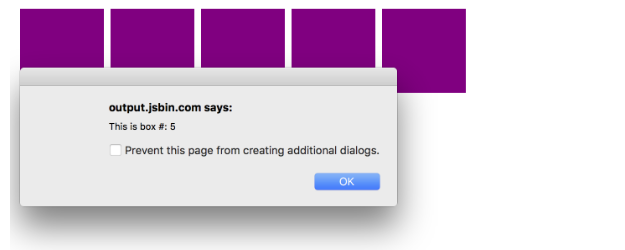
Figure 2-2. i is equal to 5 for each box
Declaring the loop counter i with let instead of var does block off the scope of i. Now clicking on any box will display the value for i that was scoped to the loop iteration (Figure 2-3):
vardiv,container=document.getElementById('container')for(leti=0;i<5;i++){div=document.createElement('div')div.onclick=function(){alert('This is box #: '+i)}container.appendChild(div)}
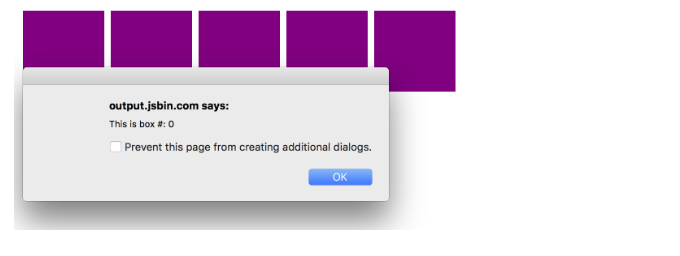
Figure 2-3. The scope of i is protected with let
Template Strings
Template strings provide us with an alternative to string concatenation. They also allow us to insert variables into a string.
Traditional string concatenation uses plus signs to compose a string using variable values and strings:
console.log(lastName+", "+firstName+" "+middleName)
With a template, we can create one string and insert the variable values by surrounding them with ${ }:
console.log(`${lastName},${firstName}${middleName}`)
Any JavaScript that returns a value can be added to a template string between the ${ } in a template string.
Template strings honor whitespace, making it easier to draft up email templates, code examples, or anything else that contains whitespace. Now you can have a string that spans multiple lines without breaking your code. Example 2-1 illustrates using tabs, line breaks, spaces, and variable names in an email template.
Example 2-1. Template strings honor whitespace
`Hello${firstName},Thanks for ordering${qty}tickets to${event}.Order Details${firstName}${middleName}${lastName}${qty}x $${price}= $${qty*price}to${event}You can pick your tickets up at will call 30 minutes beforethe show.Thanks,${ticketAgent}`
Previously, using an HTML string directly in our JavaScript code was not so easy to do because we’d need to run it together on one line. Now that the whitespace is recognized as text, you can insert formatted HTML that is easy to understand:
document.body.innerHTML = `<section><header><h1>The HTML5 Blog</h1></header><article><h2>${article.title}</h2>${article.body}</article><footer><p>copyright ${new Date().getYear()} | The HTML5 Blog</p></footer></section>`
Notice that we can include variables for the page title and article text as well.
Default Parameters
Languages including C++ and Python allow developers to declare default values for function arguments. Default parameters are included in the ES6 spec, so in the event that a value is not provided for the argument, the default value will be used.
For example, we can set up default strings:
functionlogActivity(name="Shane McConkey",activity="skiing"){console.log(`${name}loves${activity}`)}
If no arguments are provided to the logActivity function, it will run correctly using the default values. Default arguments can be any type, not just strings:
vardefaultPerson={name:{first:"Shane",last:"McConkey"},favActivity:"skiing"}functionlogActivity(p=defaultPerson){console.log(`${p.name.first}loves${p.favActivity}`)}
Arrow Functions
Arrow functions are a useful new feature of ES6. With arrow functions, you can create functions without using the function keyword. You also often do not have to use the return keyword. Example 2-2 shows the traditional function syntax.
Example 2-2. As a traditional function
varlordify=function(firstname){return`${firstname}of Canterbury`}console.log(lordify("Dale"))// Dale of Canterburyconsole.log(lordify("Daryle"))// Daryle of Canterbury
With an arrow function, we can simplify the syntax tremendously, as shown in Example 2-3.
Example 2-3. As an arrow function
varlordify=firstname=>`${firstname}of Canterbury`
Semicolons Throughout This Book
Semicolons are optional in JavaScript. Our philosophy is, why put in semicolons that aren’t required? This book takes a minimal approach that excludes unnecessary syntax.
With the arrow, we now have an entire function declaration on one line. The function keyword is removed. We also remove return because the arrow points to what should be returned. Another benefit is that if the function only takes one argument, we can remove the parentheses around the arguments.
More than one argument should be surrounded by parentheses:
// Oldvarlordify=function(firstName,land){return`${firstName}of${land}`}// Newvarlordify=(firstName,land)=>`${firstName}of${land}`console.log(lordify("Dale","Maryland"))// Dale of Marylandconsole.log(lordify("Daryle","Culpeper"))// Daryle of Culpeper
We can keep this as a one-line function because there is only one statement that needs to be returned.
More than one line needs to be surrounded with brackets:
// Oldvarlordify=function(firstName,land){if(!firstName){thrownewError('A firstName is required to lordify')}if(!land){thrownewError('A lord must have a land')}return`${firstName}of${land}`}// Newvarlordify=(firstName,land)=>{if(!firstName){thrownewError('A firstName is required to lordify')}if(!land){thrownewError('A lord must have a land')}return`${firstName}of${land}`}console.log(lordify("Kelly","Sonoma"))// Kelly of Sonomaconsole.log(lordify("Dave"))// ! JAVASCRIPT ERROR
These if/else statements are surrounded with brackets but still benefit from the shorter syntax of the arrow function.
Regular functions do not block this. For example, this becomes something else in the setTimeout callback, not the tahoe object:
vartahoe={resorts:["Kirkwood","Squaw","Alpine","Heavenly","Northstar"],:function(delay=1000){setTimeout(function(){console.log(this.resorts.join(", "))},delay)}}tahoe.()// Cannot read property 'join' of undefined
This error is thrown because it’s trying to use the .join method on what this is. In this case, it’s the window object. Alternatively, we can use the arrow function syntax to protect the scope of this:
vartahoe={resorts:["Kirkwood","Squaw","Alpine","Heavenly","Northstar"],:function(delay=1000){setTimeout(()=>{console.log(this.resorts.join(", "))},delay)}}tahoe.()// Kirkwood, Squaw, Alpine, Heavenly, Northstar
This works correctly and we can .join the resorts with a comma. Be careful, though, that you’re always keeping scope in mind. Arrow functions do not block off the scope of this:
vartahoe={resorts:["Kirkwood","Squaw","Alpine","Heavenly","Northstar"],:(delay=1000)=>{setTimeout(()=>{console.log(this.resorts.join(","))},delay)}}tahoe.()// Cannot read property resorts of undefined
Changing the print function to an arrow function means that this is actually the window.
To verify, let’s change the console message to evaluate whether this is the window:
vartahoe={resorts:["Kirkwood","Squaw","Alpine","Heavenly","Northstar"],:(delay=1000)=>{setTimeout(()=>{console.log(this===window)},delay)}}tahoe.()
It evaluates as true. To fix this, we can use a regular function:
vartahoe={resorts:["Kirkwood","Squaw","Alpine","Heavenly","Northstar"],:function(delay=1000){setTimeout(()=>{console.log(this===window)},delay)}}tahoe.()// false
Transpiling ES6
Not all web browsers support ES6, and even those that do don’t support everything. The only way to be sure that your ES6 code will work is to convert it to ES5 code before running it in the browser. This process is called transpiling. One of the most popular tools for transpiling is Babel.
In the past, the only way to use the latest JavaScript features was to wait weeks, months, or even years until browsers supported them. Now, transpiling has made it possible to use the latest features of JavaScript right away. The transpiling step makes JavaScript similar to other languages. Transpiling is not compiling: our code isn’t compiled to binary. Instead, it’s transpiled into syntax that can be interpreted by a wider range of browsers. Also, JavaScript now has source code, meaning that there will be some files that belong to your project that don’t run in the browser.
Example 2-4 shows some ES6 code. We have an arrow function, already covered, mixed with some default arguments for x and y.
Example 2-4. ES6 code before Babel transpiling
constadd=(x=5,y=10)=>console.log(x+y);
After we run the transpiler on this code, here is what the output will look like:
"use strict";varadd=functionadd(){varx=arguments.length<=0||arguments[0]===undefined?5:arguments[0];vary=arguments.length<=1||arguments[1]===undefined?10:arguments[1];returnconsole.log(x+y);};
The transpiler added a “use strict” declaration to run in strict mode. The variables x and y are defaulted using the arguments array, a technique you may be familiar with. The resulting JavaScript is more widely supported.
You can transpile JavaScript directly in the browser using the inline Babel transpiler. You just include the browser.js file, and any scripts with type="text/babel" will be converted (even though Babel 6 is the current version of Babel, only the CDN for Babel 5 will work):
<scriptsrc="https://cdnjs.cloudflare.com/ajax/libs/babel-core/5.8.23/browser.js"></script><scriptsrc="script.js"type="text/babel"></script>
Transpiling in the Browser
This approach means that the browser does the transpiling at runtime. This is not a good idea for production because it will slow your application down a lot. In Chapter 5, we’ll go over how to do this in production. For now, the CDN link will allow us to discover and use ES6 features.
You may be thinking to yourself: “Great! When ES6 is supported by all browsers, we won’t have to use Babel anymore!” However, by the time this happens, we will want to use features of the next version of the spec. Unless a tectonic shift occurs, we’ll likely be using Babel in the foreseeable future.
ES6 Objects and Arrays
ES6 gives us new ways for working with objects and arrays and for scoping the variables within these datasets. These features include destructuring, object literal enhancement, and the spread operator.
Destructuring Assignment
The destructuring assignment allows you to locally scope fields within an object and to declare which values will be used.
Consider this sandwich object. It has four keys, but we only want to use the values of two. We can scope bread and meat to be used locally:
varsandwich={bread:"dutch crunch",meat:"tuna",cheese:"swiss",toppings:["lettuce","tomato","mustard"]}var{bread,meat}=sandwichconsole.log(bread,meat)// dutch crunch tuna
The code pulls bread and meat out of the object and creates local variables for them. Also, the bread and meat variables can be changed:
var{bread,meat}=sandwichbread="garlic"meat="turkey"console.log(bread)// garlicconsole.log(meat)// turkeyconsole.log(sandwich.bread,sandwich.meat)// dutch crunch tuna
We can also destructure incoming function arguments. Consider this function that would log a person’s name as a lord:
varlordify=regularPerson=>{console.log(`${regularPerson.firstname}of Canterbury`)}varregularPerson={firstname:"Bill",lastname:"Wilson"}lordify(regularPerson)// Bill of Canterbury
Instead of using dot notation syntax to dig into objects, we can destructure the values that we need out of regularPerson:
varlordify=({firstname})=>{console.log(`${firstname}of Canterbury`)}lordify(regularPerson)// Bill of Canterbury
Destructuring is also more declarative, meaning that our code is more descriptive about what we are trying to accomplish. By destructuring firstname, we declare that we will only use the firstname variable. We’ll cover more on declarative programming in the next chapter.
Values can also be destructured from arrays. Imagine that we wanted to assign the first value of an array to a variable name:
var[firstResort]=["Kirkwood","Squaw","Alpine"]console.log(firstResort)// Kirkwood
We can also pass over unnecessary values with list matching using commas. List matching occurs when commas take the place of elements that should be skipped. With the same array, we can access the last value by replacing the first two values with commas:
var[,,thirdResort]=["Kirkwood","Squaw","Alpine"]console.log(thirdResort)// Alpine
Later in this section, we’ll take this example a step further by combining array destructuring and the spread operator.
Object Literal Enhancement
Object literal enhancement is the opposite of destructuring. It is the process of restructuring or putting back together. With object literal enhancement, we can grab variables from the global scope and turn them into an object:
varname="Tallac"varelevation=9738varfunHike={name,elevation}console.log(funHike)// {name: "Tallac", elevation: 9738}
name and elevation are now keys of the funHike object.
We can also create object methods with object literal enhancement or restructuring:
varname="Tallac"varelevation=9738var=function(){console.log(`Mt.${this.name}is${this.elevation}feet tall`)}varfunHike={name,elevation,}funHike.()// Mt. Tallac is 9738 feet tall
Notice we use this to access the object keys.
function keyword (Example 2-5).Example 2-5. Old versus new: Object syntax
// OLDvarskier={name:name,sound:sound,powderYell:function(){varyell=this.sound.toUpperCase()console.log(`${yell}${yell}${yell}!!!`)},speed:function(mph){this.speed=mphconsole.log('speed:',mph)}}// NEWconstskier={name,sound,powderYell(){letyell=this.sound.toUpperCase()console.log(`${yell}${yell}${yell}!!!`)},speed(mph){this.speed=mphconsole.log('speed:',mph)}}
Object literal enhancement allows us to pull global variables into objects and reduces typing by making the function keyword unnecessary.
The Spread Operator
The spread operator is three dots (...) that perform several different tasks. First, the spread operator allows us to combine the contents of arrays. For example, if we had two arrays, we could make a third array that combines the two arrays into one:
varpeaks=["Tallac","Ralston","Rose"]varcanyons=["Ward","Blackwood"]vartahoe=[...peaks,...canyons]console.log(tahoe.join(', '))// Tallac, Ralston, Rose, Ward, Blackwood
All of the items from peaks and canyons are pushed into a new array called tahoe.
Let’s take a look at how the spread operator can help us deal with a problem. Using the peaks array from the previous sample, let’s imagine that we wanted to grab the last item from the array rather than the first. We could use the Array.reverse method to reverse the array in combination with array destructuring:
varpeaks=["Tallac","Ralston","Rose"]var[last]=peaks.reverse()console.log(last)// Roseconsole.log(peaks.join(', '))// Rose, Ralston, Tallac
See what happened? The reverse function has actually altered or mutated the array. In a world with the spread operator, we don’t have to mutate the original array; we can create a copy of the array and then reverse it:
varpeaks=["Tallac","Ralston","Rose"]var[last]=[...peaks].reverse()console.log(last)// Roseconsole.log(peaks.join(', '))// Tallac, Ralston, Rose
Since we used the spread operator to copy the array, the peaks array is still intact and can be used later in its original form.
The spread operator can also be used to get some, or the rest, of the items in the array:
varlakes=["Donner","Marlette","Fallen Leaf","Cascade"]var[first,...rest]=lakesconsole.log(rest.join(", "))// "Marlette, Fallen Leaf, Cascade"
We can also use the spread operator to collect function arguments as an array. Here, we build a function that takes in n number of arguments using the spread operator, and then uses those arguments to print some console messages:
functiondirections(...args){var[start,...remaining]=argsvar[finish,...stops]=remaining.reverse()console.log(`drive through${args.length}towns`)console.log(`start in${start}`)console.log(`the destination is${finish}`)console.log(`stopping${stops.length}times in between`)}directions("Truckee","Tahoe City","Sunnyside","Homewood","Tahoma")
The directions function takes in the arguments using the spread operator. The first argument is assigned to the start variable. The last argument is assigned to a finish variable using Array.reverse. We then use the length of the arguments array to display how many towns we’re going through. The number of stops is the length of the arguments array minus the finish stop. This provides incredible flexibility because we could use the directions function to handle any number of stops.
The spread operator can also be used for objects.2 Using the spread operator with objects is similar to using it with arrays. In this example, we’ll use it the same way we combined two arrays into a third array, but instead of arrays, we’ll use objects:
varmorning={breakfast:"oatmeal",lunch:"peanut butter and jelly"}vardinner="mac and cheese"varbackpackingMeals={...morning,dinner}console.log(backpackingMeals)// { breakfast: "oatmeal",// lunch: "peanut butter and jelly",// dinner: "mac and cheese"}
Promises
Promises give us a way to make sense out of asynchronous behavior. When making an asynchronous request, one of two things can happen: everything goes as we hope or there’s an error. There may be several different types of successful or unsuccessful requests. For example, we could try several ways to obtain the data to reach success. We could also receive multiple types of errors. Promises give us a way to simplify back to a simple pass or fail.
Let’s create an asynchronous promise for loading data from the randomuser.me API. This API has information like email address, name, phone number, location, and so on for fake members and is great to use as dummy data.
The getFakeMembers function returns a new promise. The promise makes a request to the API. If the promise is successful, the data will load. If the promise is unsuccessful, an error will occur:
constgetFakeMembers=count=>newPromise((resolves,rejects)=>{constapi=`https://api.randomuser.me/?nat=US&results=${count}`constrequest=newXMLHttpRequest()request.open('GET',api)request.onload=()=>(request.status===200)?resolves(JSON.parse(request.response).results):reject(Error(request.statusText))request.onerror=(err)=>rejects(err)request.send()})
With that, the promise has been created, but it hasn’t been used yet. We can use the promise by calling the getFakeMembers function and passing in the number of members that should be loaded. The then function can be chained on to do something once the promise has been fulfilled. This is called composition. We’ll also use an additional callback that handles errors:
getFakeMembers(5).then(members=>console.log(members),err=>console.error(newError("cannot load members from randomuser.me")))
Promises make dealing with asynchronous requests easier, which is good, because we have to deal with a lot of asynchronous data in JavaScript. You’ll also see promises used heavily in Node.js, so a solid understanding of promises is essential for the modern JavaScript engineer.
Classes
Previously in JavaScript, there were no official classes. Types were defined by functions. We had to create a function and then define methods on the function object using the prototype:
functionVacation(destination,length){this.destination=destinationthis.length=length}Vacation.prototype.=function(){console.log(this.destination+" | "+this.length+" days")}varmaui=newVacation("Maui",7)maui.()// Maui | 7 days
If you were used to classical object orientation, this probably made you mad.
ES6 introduces class declaration, but JavaScript still works the same way. Functions are objects, and inheritance is handled through the prototype, but this syntax makes more sense if you come from classical object orientation:
classVacation{constructor(destination,length){this.destination=destinationthis.length=length}(){console.log(`${this.destination}will take${this.length}days.`)}}
Capitalization Conventions
The rule of thumb with capitalization is that all types should be capitalized. Due to that, we will capitalize all class names.
Once you’ve created the class, you can create a new instance of the class using the new keyword. Then you can call the custom method on the class:
consttrip=newVacation("Santiago, Chile",7)trip.()// Chile will take 7 days.
Now that a class object has been created, you can use it as many times as you’d like to create new vacation instances. Classes can also be extended. When a class is extended, the subclass inherits the properties and methods of the superclass. These properties and methods can be manipulated from here, but as a default, all will be inherited.
You can use Vacation as an abstract class to create different types of vacations. For instance, an Expedition can extend the Vacation class to include gear:
classExpeditionextendsVacation{constructor(destination,length,gear){super(destination,length)this.gear=gear}(){super.()console.log(`Bring your${this.gear.join(" and your ")}`)}}
That’s simple inheritance: the subclass inherits the properties of the superclass. By calling the print method of Vacation, we can append some new content onto what is printed in the print method of Expedition. Creating a new instance works the exact same way—create a variable and use the new keyword:
consttrip=newExpedition("Mt. Whitney",3,["sunglasses","prayer flags","camera"])trip.()// Mt. Whitney will take 3 days.// Bring your sunglasses and your prayer flags and your camera
Classes and Prototypal Inheritance
Using a class still means that you are using JavaScript’s prototypal inheritance. Log Vacation.prototype, and you’ll notice the constructor and print methods on the prototype.
We will use classes a bit in this book, but we’re focusing on the functional paradigm. Classes have other features, like getters, setters, and static methods, but this book favors functional techniques over object-oriented techniques. The reason we’re introducing these is because we’ll use them later when creating React components.
ES6 Modules
A JavaScript module is a piece of reusable code that can easily be incorporated into other JavaScript files. Until recently, the only way to work with modular JavaScript was to incorporate a library that could handle importing and exporting modules. Now, with ES6, JavaScript itself supports modules.3
JavaScript modules are stored in separate files, one file per module. There are two options when creating and exporting a module: you can export multiple JavaScript objects from a single module, or one JavaScript object per module.
In Example 2-6, text-helpers.js, two functions are exported.
Example 2-6. ./text-helpers.js
exportconst(message)=>log(message,newDate())exportconstlog(message,timestamp)=>console.log(`${timestamp.toString()}:${message}`)
export can be used to export any JavaScript type that will be consumed in another module. In this example the print function and log function are being exported. Any other variables declared in text-helpers.js will be local to that module.
Sometimes you may want to export only one variable from a module. In these cases you can use export default (Example 2-7).
Example 2-7. ./mt-freel.js
constfreel=newExpedition("Mt. Freel",2,["water","snack"])exportdefaultfreel
export default can be used in place of export when you wish to export only one type. Again, both export and export default can be used on any JavaScript type: primitives, objects, arrays, and functions.4
Modules can be consumed in other JavaScript files using the import statement. Modules with multiple exports can take advantage of object destructuring. Modules that use export default are imported into a single variable:
import{,log}from'./text-helpers'importfreelfrom'./mt-freel'('printing a message')log('logging a message')freel.()
You can scope module variables locally under different variable names:
import{asp,logasl}from'./text-helpers'p('printing a message')l('logging a message')
You can also import everything into a single variable using *:
import*asfnsfrom'./text-helpers
ES6 modules are not yet fully supported by all browsers. Babel does support ES6 modules, so we will be using them throughout this book.
CommonJS
CommonJS is the module pattern that is supported by all versions of Node.js.5 You can still use these modules with Babel and webpack. With CommonJS, JavaScript objects are exported using module.exports, as in Example 2-8.
Example 2-8. ./txt-helpers.js
const(message)=>log(message,newDate())constlog(message,timestamp)=>console.log(`${timestamp.toString()}:${message}`}module.exports={,log}
CommonJS does not support an import statement. Instead, modules are imported with the require function:
const{log,}=require('./txt-helpers')
JavaScript is indeed moving quickly and adapting to the increasing demands that engineers are placing on the language. Browsers are quickly implementing the features of ES6 and beyond, so it’s a good idea to use these features now without hesitation.6 Many of the features that are included in the ES6 spec are present because they support functional programming techniques. In functional JavaScript, we can think about our code as being a collection of functions that can be composed into applications. In the next chapter, we’ll explore functional techniques in more detail and will discuss why you might want to use them.
1 Abel Avram, “ECMAScript 2015 Has Been Approved”, InfoQ, June 17, 2015.
3 Mozilla Developer Network, JavaScript Code Modules
4 Mozilla Developer Network, “Using JavaScript Code Modules”.
5 Node.js Documentation, “Modules”.
6 For up-to-date compatibility information, see the ES6 compatibility table.