Deep learning has been the buzzword in the machine learning world in recent times. The main objective of the deep learning algorithm so far has been to use machine learning to achieve Artificial General Intelligence (AGI), that is, replicate human-level intelligence in machines to solve any problems for a given area. Deep learning has shown promising outcomes in computer vision, audio processing, and text mining. The advancements in this area has led to a breakthrough such as self-driving cars. In this chapter you’ll learn about deep leaning’s core concept, evolution (Perceptron to Convolution Neural Network), key applications, and implementation.
There has been a number of powerful and popular open source libraries built in the last few years predominantly focused on deep learning. See Table 6-1.
Table 6-1. Popular deep learning libraries (as of end of year 2016)
Library Name | Launch Year | License | # of Contributors | Official Website |
|---|---|---|---|---|
Theano | 2010 | BSD | 284 | |
Pylearn2 | 2011 | BSD-3-Clause | 117 | |
Tensorflow | 2015 | Apache-2.0 | 660 | |
Keras | 2015 | MIT | 349 | |
MXNet | 2015 | Apache-2.0 | 280 | |
Caffe | 2015 | BSD-2-Clause | 238 | |
Lasagne | 2015 | MIT | 58 |
Below is a short description about each of the libraries (from Table 6-1). Their official websites provide quality documentation and examples. I strongly recommend you to visit the respective site to learn more if required post completion of this chapter.
Theano : It is a Python library predominantly developed by academics at Universite de Montreal. Theano allows you to define, optimize, and evaluate mathematical expressions involving complex multidimensional arrays efficiently. It is designed to work with GPUs and perform efficient symbolic differentiation. It is fast and stable with an extensive unit test in place.
TensorFlow : As per the official documentation, it is a library for numerical computation using data flow graphs for scalable machine learning developed by Google researchers. It is currently being used by Google products for research and production. It was open sourced in 2015 and has gained wide popularity in the machine learning world.
Pylearn2 : A Machine Learning library based on Theano, which means users can write new models/algorithms using mathematical expressions and Theano will optimize, stabilize, and compile those expressions.
Keras : It is known as a high-level neural networks library, written in Python and capable of running on top of either TensorFlow or Theano. It’s an interface rather than an end-end machine learning framework. It’s written in Python, simple to get started, highly module, and easy yet deep enough to expand to build/support complex models.
MXNet : It was developed in collaboration with researchers from CMU, NYU, NUS, and MIT. It’s a lightweight, Portable, Flexible Distributed/mobile library supported across many languages such as Python, R, Julia, Scala, Go, JavaScript, etc.
Caffe : It is a deep learning framework by Berkeley Vision and Learning Center (BVLC) written in C++ and has python/matlab-buildings.
Lasagne : It is a lightweight library to build and train neural networks in Theano.
Throughout this chapter ‘Scikit-learn’ and ‘Keras’ library with back end as TensorFlow or Theano appropriately has been used, due to the fact that these are the best choices for a beginner to get hold of the concepts. Also these are most widely used by the machine learning practitioners.
Note
There are enough good materials on how to set up Keras with Tensorflow or Theano so the same will not be covered here. Also remember to install ‘graphviz’ and ‘pydot-ng’ packages to support a graphical view of the neural network. The Keras codes in this chapter was built on Linux platform; however they should work fine on other platforms without any modifications provided that supporting packages are correctly installed. Systems with GPU capabilities are ideal for deep learning libraries as images/text/audio data set’s numerical representations are large and compute intensive.
Artificial Neural Network (ANN )
Before jumping into details of deep learning , I think it is very important to briefly understand how human vision works. The human brain is a complex connected neural network where different regions of the brain are responsible for different jobs, and these regions are machines of the brain that receive signals and processes it to take necessary action. Figure 6-1 shows the visual pathway of the human brain.
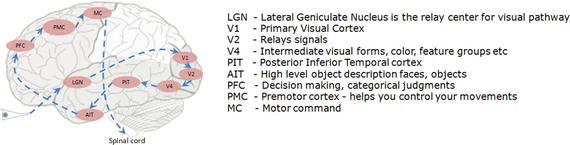
Figure 6-1. Visual pathway
Our brain is made up of a cluster of small connected units called neurons, which send electrical signals to one another. The long-term knowledge is represented by the strength of the connections between neurons. When we see objects, light travels through the retina and the visual information gets converted to electrical signals, and further on the electric signal passes through the hierarchy of connected neurons of different regions within the brain in a few milliseconds to decode signals/information.
What Goes Behind, When Computers Look at an Image?
In computers an image is represented as one large three-dimensional array of numbers. For example, consider Figure 6-2; it is the handwritten digit image of gray scale 28x28x1 (width x height x depth) size resulting in 784 data points. Each number in the array is an integer that ranges from 0 (black) to 255(white). In a typical classification problem the model has to turn this large matrix into a single label. For a color image additionally it will have three color channels: Red, Green, Blue (RGB) for each pixel, so the same image in color would be of size 28x28x3 = 2352 data points.
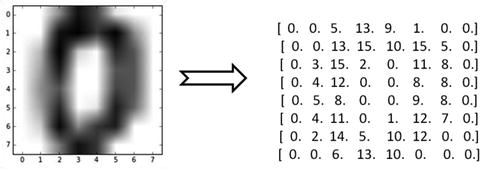
Figure 6-2. Handwritten digit(zero)image and correponding array
Why Not a Simple Classification Model for Images?
Image classification can be challenging for a computer as there are a variety of challenges associated with representation of the images. A simple classification model might not be able to address most of these issues without a lot of feature engineering effort. Let’s understand some of the key issues (refer to Table 6-2).
Table 6-2. Visual challenges in image data
Description | Example |
|---|---|
View point variation : Same object can have different orientation. |
 |
Scale and illumination variation: Variation in object’s size and the level of illumination on pixel level can vary. |
 |
Deformation/twist and intra-class variation: Non-rigid bodies can be deformed in great ways and there can be different types of objects with varying appearance within a class. |
 |
Blockage: Only small portion of object in interest can be visible. |
 |
Background clutter : Objects can blend into their environment, which will make it hard to identify. |
 |
Perceptron – Single Artificial Neuron
Inspired by the biological neurons, McCulloch and Pitts in 1943 introduced the concept of perceptron as an artificial neuron that is the basic building block of the artificial neural network. They are not only named after their biological counterparts but also modeled after the behavior of the neurons in our brain. See Figure 6-3.
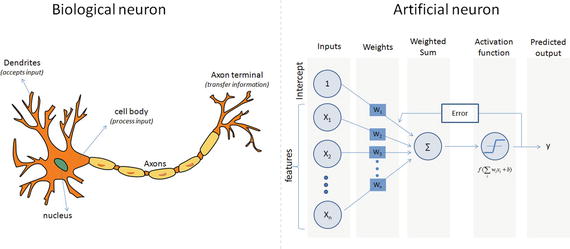
Figure 6-3. Biological vs. Artificial Neuron
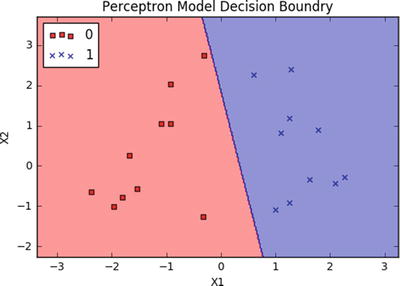
Biological neurons have dendrites to receive signals, a cell body to process them, and an axon/axon terminal to transfer signals out to other neurons. Similarly an artificial neuron has multiple input channels to accept training samples represented as a vector, and a processing stage where the weights(w) are adjusted such that the output error (actual vs. predicted) is minimized. Then the result is fed into an activation function to produce output, for example, a classification label. The activation function for a classification problem is a threshold cutoff (standard is .5) above which class is 1 else 0. Let’s see how this can be implemented using scikit-learn. See Listing 6-1.
Listing 6-1. Example code for sklearn perceptron
# import sklearn.linear_model.perceptronfrom sklearn.linear_model import perceptronimport matplotlib.pyplot as pltfrom matplotlib.colors import ListedColormap# Let's use sklearn make_classification function to create some test data.from sklearn.datasets import make_classificationX, y = make_classification(20, 2, 2, 0, weights=[.5, .5], random_state=2017)# Create the modelclf = perceptron.Perceptron(n_iter=100, verbose=0, random_state=2017, fit_intercept=True, eta0=0.002)clf.fit(X,y)print "Prediction: " + str(clf.predict(X))print "Actual: " + str(y)print "Accuracy: " + str(clf.score(X, y)*100) + "%"# Output the valuesprint "X1 Coefficient: " + str(clf.coef_[0,0])print "X2 Coefficient: " + str(clf.coef_[0,1])print "Intercept: " + str(clf.intercept_)# Plot the decision boundary using cusom function ‘plot_decision_regions’plot_decision_regions(X, y, classifier=clf)plt.title('Perceptron Model Decision Boundry')plt.xlabel('X1')plt.ylabel('X2')plt.legend(loc='upper left')plt.show()#----output----Prediction: [1 1 1 0 0 0 0 1 0 1 1 0 0 1 0 1 0 0 1 1]Actual: [1 1 1 0 0 0 0 1 0 1 1 0 0 1 0 1 0 0 1 1]Accuracy: 100.0%X1 Coefficient: 0.00575308754305X2 Coefficient: 0.00107517941422Intercept: [-0.002]
Note
A drawback of the single perceptron approach is that it can only learn linearly separable functions.
Multilayer Perceptrons (Feedforward Neural Network)
To address the drawback of single perceptrons, multilayer perceptrons were proposed; also commonly known as a feedforward neural network, it is a composition of multiple perceptrons connected in different ways and operating on distinctive activation functions to enable improved learning mechanisms. The training sample propagates forward through the network and the output error is back propagated and the error is minimized using the gradient descent method, which will calculate a loss function for all the weights in the network. See Figure 6-4.
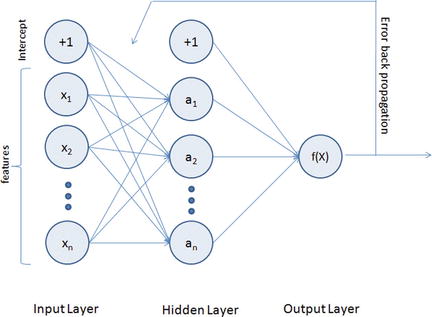
Figure 6-4. Multilayer perceptron representation
The activation function for a simple one-level hidden layer of a multilayer perceptron can be given by:
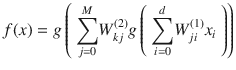 , where x
i
is the input and W
ji
(1) is the input layer weights and W
kj
(2) is the weight of hidden layer.
, where x
i
is the input and W
ji
(1) is the input layer weights and W
kj
(2) is the weight of hidden layer.
A multilayered neural network can have many hidden layers, where the network holds its internal abstract representation of the training sample. The upper layers will be building new abstractions on top of the previous layers. So having more hidden layers for a complex dataset will help the neural network to learn better.
As you can see from Figure 6-4, the MLP architecture has a minimum of three layers, that is, input, hidden, and output layers. The input layer’s neuron count will be equal to the total number of features and in some libraries an additional neuron for intercept/bias. These neurons are represented as nodes. The output layers will have a single neuron for regression models and binary classifier; otherwise it will be equal to the total number of class labels for multiclass classification models.
Note that using too few neurons for a complex dataset can result in an under-fitted model due to the fact that it might fail to learn the patterns in complex data. However, using too many neurons can result in an over-fitted model as it has capacity to capture patterns that might be noise or specific for the given training dataset. So to build an efficient multilayered neural network, the fundamental questions to be answered about hidden layers while implementation is 1) what is the ideal number of hidden layers?, and 2) what should be the number of neurons in hidden layers?
A widely accepted rule of thumb is that you can start with one hidden layer, as there is a theory that one hidden layer is sufficient for the majority of problems. Then, gradually increase the layers on a trial-and-error basis to see if there is any improvement in accuracy. The number of neurons in the hidden layer can ideally be the mean of the neurons in the input and output layers.
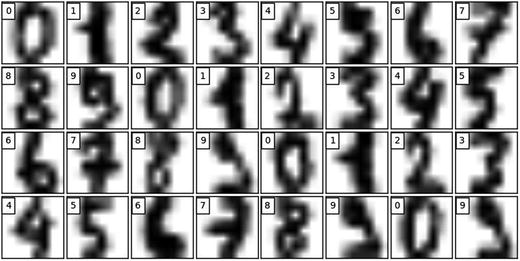
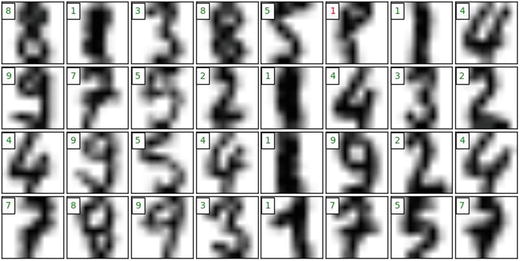
Let’s see an MLP algorithm in action from scikit-learn library on a classification problem. We’ll be using the digits dataset available as part of scikit-learn dataset, which is made up of 1797 samples (which is a subset of MNIST dataset) handwritten grayscale digit of 8x8 images.
Load MNIST Data
Listing 6-2. Example code for loading MNIST data for training MLP classifier
import pandas as pdimport numpy as npimport matplotlib.pyplot as pltfrom sklearn.neural_network import MLPClassifierfrom sklearn.model_selection import train_test_splitfrom sklearn.preprocessing import StandardScalerfrom sklearn.metrics import confusion_matrixfrom sklearn.datasets import load_digitsnp.random.seed(seed=2017)# load datadigits = load_digits()print('We have %d samples'%len(digits.target))## plot the first 32 samples to get a sense of the datafig = plt.figure(figsize = (8,8))fig.subplots_adjust(left=0, right=1, bottom=0, top=1, hspace=0.05, wspace=0.05)for i in range(32):ax = fig.add_subplot(8, 8, i+1, xticks=[], yticks=[])ax.imshow(digits.images[i], cmap=plt.cm.gray_r)ax.text(0, 1, str(digits.target[i]), bbox=dict(facecolor='white'))#----output----We have 1797 samples
Key Parameters for scikit-learn MLP
hidden_layer_sizes – You have to provide the number of hidden layers and neurons for each hidden layer. For example, hidden_layer_sizes – (5,3,3) means there are 3 hidden layers and the number of neurons for layer 1 is 5, layer 2 is 3, and for layer 3 is 3 respectively. The default value is (100,) that is, 1 hidden layer with 100 neurons.
Activation – This is the activation function for hidden layer, and there are four activation functions available for use, default is ‘relu’.
relu: The rectified linear unit function, returns f(x) = max(0, x).
logistic: The logistic sigmoid function, returns f(x) = 1 / (1 + exp(-x)).
identity: No-op activation, useful to implement linear bottleneck, returns f(x) = x.
tanh: The hyperbolic tan function, returns f(x) = tanh(x).
solver – This is for weight optimization’ there are three options available, the default being ‘adam’.
adam: Stochastic gradient-based optimizer proposed by Kingma/Diederik/Jimmy Ba, which works well for large dataset.
lbfgs: Belongs to family of quasi-Newton methods, works well for small datasets.
sgd: Stochastic gradient descent.
max_iter – This is the maximum number of iterations for solver to converge, default is 200.
learning_rate_init – This is the initial learning rate to control step size for updating the weights (only applicable for solvers sgd/adam), default is 0.001.
It is recommended to scale or normalize your data before modeling as MLP is sensitive to feature scaling. See Listing 6-3.
Listing 6-3. Example code for sklearn MLP classifier
# split data to training and testing dataX_train, X_test, y_train, y_test = train_test_split(digits.data, digits.target, test_size=0.2, random_state=2017)print 'Number of samples in training set: %d' %(len(y_train))print 'Number of samples in test set: %d' %(len(y_test))# Standardise data, and fit only to the training datascaler = StandardScaler()scaler.fit(X_train)# Apply the transformations to the dataX_train_scaled = scaler.transform(X_train)X_test_scaled = scaler.transform(X_test)# Initialize ANN classifiermlp = MLPClassifier(hidden_layer_sizes=(100), activation='logistic', max_iter = 100)# Train the classifier with the traning datamlp.fit(X_train_scaled,y_train)#----output----Number of samples in training set: 1437Number of samples in test set: 360MLPClassifier(activation='logistic', alpha=0.0001, batch_size='auto',beta_1=0.9, beta_2=0.999, early_stopping=False, epsilon=1e-08,hidden_layer_sizes=(30, 30, 30), learning_rate='constant',learning_rate_init=0.001, max_iter=100, momentum=0.9,nesterovs_momentum=True, power_t=0.5, random_state=None,shuffle=True, solver='adam', tol=0.0001, validation_fraction=0.1,verbose=False, warm_start=False)print("Training set score: %f" % mlp.score(X_train_scaled, y_train))print("Test set score: %f" % mlp.score(X_test_scaled, y_test))#----output----Training set score: 0.990953Test set score: 0.983333# predict results from the test dataX_test_predicted = mlp.predict(X_test_scaled)fig = plt.figure(figsize=(8, 8)) # figure size in inchesfig.subplots_adjust(left=0, right=1, bottom=0, top=1, hspace=0.05, wspace=0.05)# plot the digits: each image is 8x8 pixelsfor i in range(32):ax = fig.add_subplot(8, 8, i + 1, xticks=[], yticks=[])ax.imshow(X_test.reshape(-1, 8, 8)[i], cmap=plt.cm.gray_r)# label the image with the target valueif X_test_predicted[i] == y_test[i]:ax.text(0, 1, X_test_predicted[i], color='green', bbox=dict(facecolor='white'))else:ax.text(0, 1, X_test_predicted[i], color='red', bbox=dict(facecolor='white'))#----output----
Restricted Boltzman Machines (RBM)
The RBM algorithm was proposed by Geoffrey Hinton (2007), which learns probability distribution over its sample training data inputs. It has seen wide applications in different areas of supervised/unsupervised machine learning such as feature learning, dimensionality reduction, classification, collaborative filtering, and topic modeling.
Consider the example movie rating discussed in the recommender system section. Movies like Avengers, Avatar, and Interstellar have strong associations with a latest fantasy and science fiction factor. Based on the user rating RBM will discover latent factors that can explain the activation of movie choices. In short, RBM describes variability among correlated variables of input dataset in terms of a potentially lower number of unobserved variables.
The energy function is given by E(v, h) = - aTv – bTh – vTWh
The probability function of a visible input layer can be given by 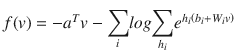
Let’s build a logistic regression model on a digits dataset with Bernoulli RBM and compare its accuracy with straight logistic regression (without Bernoulli RBM) model’s accuracy.
Let’s nudge the dataset set by moving the 8x8 images by 1 pixel on the left, right, down, and up to convolute the image. See Listing 6-4.
Listing 6-4. Function to nudge the dataset
# Function to nudge the datasetdef nudge_dataset(X, Y):"""This produces a dataset 5 times bigger than the original one,by moving the 8x8 images in X around by 1px to left, right, down, up"""direction_vectors = [[[0, 1, 0],[0, 0, 0],[0, 0, 0]],[[0, 0, 0],[1, 0, 0],[0, 0, 0]],[[0, 0, 0],[0, 0, 1],[0, 0, 0]],[[0, 0, 0],[0, 0, 0],[0, 1, 0]]]shift = lambda x, w: convolve(x.reshape((8, 8)), mode='constant',weights=w).ravel()X = np.concatenate([X] +[np.apply_along_axis(shift, 1, X, vector)for vector in direction_vectors])Y = np.concatenate([Y for _ in range(5)], axis=0)return X, Y
The Bernoulli RBM assumes that the columns of our feature vectors fall within the range 0 to 1. However, the MNIST dataset is represented as unsigned 8-bit integers, falling within the range of 0 to 255.
Define a function to scale the columns into the range (0, 1). The scale function takes two parameters: our data matrix X and an epsilon value used to prevent division by zero errors. See Listing 6-5.
Listing 6-5. Example code for using Bernoulli RBM with classifier
# Example adapted from scikit-learn documentationimport numpy as npimport matplotlib.pyplot as pltfrom sklearn import linear_model, datasets, metricsfrom sklearn.model_selection import train_test_splitfrom sklearn.neural_network import BernoulliRBMfrom sklearn.pipeline import Pipelinefrom scipy.ndimage import convolve# Load Datadigits = datasets.load_digits()X = np.asarray(digits.data, 'float32')y = digits.targetX, y = nudge_dataset(X, digits.target)# Scale the features such that the values are between 0-1 scaleX = (X - np.min(X, 0)) / (np.max(X, 0) + 0.0001)X_train, X_test, y_train, y_test = train_test_split(X, y, test_size=0.2, random_state=2017)print X.shapeprint y.shape#----output----(8985L, 64L)(8985L,)# Gridsearch for logistic regression# perform a grid search on the 'C' parameter of Logisticparams = {"C": [1.0, 10.0, 100.0]}Grid_Search = GridSearchCV(LogisticRegression(), params, n_jobs = -1, verbose = 1)Grid_Search.fit(X_train, y_train)# print diagnostic information to the user and grab theprint "Best Score: %0.3f" % (Grid_Search.best_score_)# best modelbestParams = Grid_Search.best_estimator_.get_params()print bestParams.items()#----output----Fitting 3 folds for each of 3 candidates, totalling 9 fitsBest Score: 0.774[('warm_start', False), ('C', 100.0), ('n_jobs', 1), ('verbose', 0), ('intercept_scaling', 1), ('fit_intercept', True), ('max_iter', 100), ('penalty', 'l2'), ('multi_class', 'ovr'), ('random_state', None), ('dual', False), ('tol', 0.0001), ('solver', 'liblinear'), ('class_weight', None)]# evaluate using Logistic Regression and only the raw pixellogistic = LogisticRegression(C = 100)logistic.fit(X_train, y_train)print "Train accuracy: ", metrics.accuracy_score(y_train, logistic.predict(X_train))print "Test accuracyL ", metrics.accuracy_score(y_test, logistic.predict(X_test))#----output----Train accuracy: 0.797440178075Test accuracyL 0.800779076238
Let’s perform a grid search for RBM + Logistic Regression model. A grid search is on the learning rate, number of iterations, and number of components on the RBM and C for Logistic Regression. See Listing 6-6.
Listing 6-6. Example code for grid search with RBM + logistic regression
# initialize the RBM + Logistic Regression pipelinerbm = BernoulliRBM()logistic = LogisticRegression()classifier = Pipeline([("rbm", rbm), ("logistic", logistic)])params = {"rbm__learning_rate": [0.1, 0.01, 0.001],"rbm__n_iter": [20, 40, 80],"rbm__n_components": [50, 100, 200],"logistic__C": [1.0, 10.0, 100.0]}# perform a grid search over the parameterGrid_Search = GridSearchCV(classifier, params, n_jobs = -1, verbose = 1)Grid_Search.fit(X_train, y_train)# print diagnostic information to the user and grab the# best modelprint "Best Score: %0.3f" % (Grid_Search.best_score_)print "RBM + Logistic Regression parameters"bestParams = Grid_Search.best_estimator_.get_params()# loop over the parameters and print each of them out# so they can be manually setfor p in sorted(params.keys()):print "\t %s: %f" % (p, bestParams[p])#----output----Fitting 3 folds for each of 81 candidates, totalling 243 fitsBest Score: 0.505RBM + Logistic Regression parameterslogistic__C: 100.000000rbm__learning_rate: 0.001000rbm__n_components: 200.000000rbm__n_iter: 20.000000# initialize the RBM + Logistic Regression classifier with# the cross-validated parametersrbm = BernoulliRBM(n_components = 200, n_iter = 20, learning_rate = 0.1, verbose = False)logistic = LogisticRegression(C = 100)# train the classifier and show an evaluation reportclassifier = Pipeline([("rbm", rbm), ("logistic", logistic)])classifier.fit(X_train, y_train)print metrics.accuracy_score(y_train, classifier.predict(X_train))print metrics.accuracy_score(y_test, classifier.predict(X_test))#----output----0.9368391764050.932109070673# plot RBM componentsplt.figure(figsize=(15, 15))for i, comp in enumerate(rbm.components_):plt.subplot(20, 20, i + 1)plt.imshow(comp.reshape((8, 8)), cmap=plt.cm.gray_r,interpolation='nearest')plt.xticks(())plt.yticks(())plt.suptitle('200 components extracted by RBM', fontsize=16)plt.show()#----output----
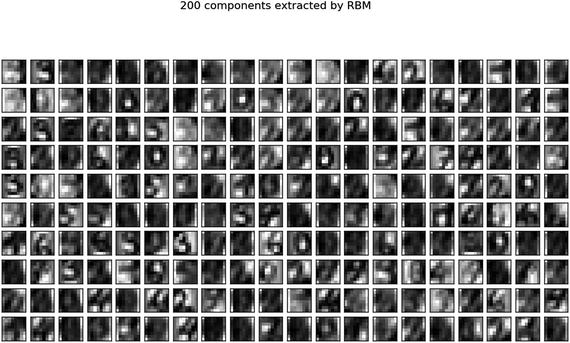
Notice that the logistic regression model with RBM lifts the model score by more than 10% compared to the model without RBM.
Note
To practice further and get better understanding, I recommend that you try the above example code on scikit-learns Olivetti faces dataset, which contains face images taken between April 1992 and April 1994 at AT&T Laboratories Cambridge. You can load the data using olivetti = datasets.fetch_olivetti_faces()
Stacked RBM is known as Deep Believe Network (DBN), which is an initialization technique. However, this technique was popular during 2006-2007, and is reasonably outdated. So there is no out-of-box implementation of DBN in Keras. However if you are interested in a simple DBN implementation, I recommend you to have a look at https://github.com/albertbup/deep-belief-network , which has an MIT license.
MLP Using Keras
In Keras, neural networks are defined as a sequence of layers, and the container for these layers is the sequential class. The sequential models are linear stack of layers, and each layer is an object that feeds into the next.
The first layer in the neural network will define the number of inputs to expect. The activation functions that transform a summed signal from each neuron in a layer, the same can be extracted and added to the sequential as a layer-like object called activation. The choice of action depends on the type of problem (like regression or binary classification or multiclass classification) that we are trying to address. See Listing 6-7.
Listing 6-7. Example code for Keras MLP
from matplotlib import pyplot as pltimport numpy as npnp.random.seed(2017)from keras.models import Sequentialfrom keras.datasets import mnistfrom keras.layers import Dense, Activation, Dropout, Inputfrom keras.models import Modelfrom keras.utils import np_utils# from keras.utils.visualize_util import plotfrom IPython.display import SVGfrom keras import backend as Kfrom keras.callbacks import EarlyStoppingfrom keras.utils.visualize_util import model_to_dot, plot# load data(X_train, y_train), (X_test, y_test) = mnist.load_data()X_train = X_train.reshape(X_train.shape[0], input_unit_size)X_test = X_test.reshape(X_test.shape[0], input_unit_size)X_train = X_train.astype('float32')X_test = X_test.astype('float32')# Scale the values by dividing 255 i.e., means foreground (black)X_train /= 255X_test /= 255# one-hot representation, required for multiclass problemsy_train = np_utils.to_categorical(y_train, nb_classes)y_test = np_utils.to_categorical(y_test, nb_classes)print('X_train shape:', X_train.shape)print(X_train.shape[0], 'train samples')print(X_test.shape[0], 'test samples')#----output----('X_train shape:', (60000, 784))(60000, 'train samples')(10000, 'test samples')nb_classes = 10 # class size# flatten 28*28 images to a 784 vector for each imageinput_unit_size = 28*28# create modelmodel = Sequential()model.add(Dense(input_unit_size, input_dim=input_unit_size, init='normal', activation='relu'))model.add(Dense(nb_classes, init='normal', activation='softmax'))
Compilation is a model that is a pre-compute step that transforms the sequence of layers that we defined into a highly efficient series of matrix transforms. It takes three arguments: an optimizer, a loss function, and a list of evaluation metrics.
Unlike scikit-learn implementation, Keras provides a rich number of optimizers such as SGD (Stochastic gradient descent), RMSprop, Adagrad (Adaptive subgradient), Adadelta (adaptive learning rate), Adam, Adamax, Nadam, and TFOptimizer. For brevity, I won’t explain these here but recommend that you refer to the official Keras site for further reference.
Some standard loss functions are ‘mse’ for regression, binary_crossentropy (logarithmic loss) for binary classification, and categorical_crossentropy (multiclass logarithmic loss) for multiclassification problems.
The standard evaluation metrics for different types of problems are supported and you can pass a list for them to evaluate. See Listing 6-8.
Listing 6-8. Compile model
# Compile modelmodel.compile(loss='categorical_crossentropy', optimizer='adam', metrics=['accuracy'])
The network is trained using a back propogation algorithm, and optimized according to the specified method, loss function. Each epoch can be partitioned into batches. See Listing 6-9.
Listing 6-9. Train model and evaluate
# model trainingmodel.fit(X_train, y_train, validation_data=(X_test, y_test), nb_epoch=5, batch_size=500, verbose=2)# Final evaluation of the modelscores = model.evaluate(X_test, y_test, verbose=0)print("Error: %.2f%%" % (100-scores[1]*100))#----output----Train on 60000 samples, validate on 10000 samplesEpoch 1/56s - loss: 0.3828 - acc: 0.8922 - val_loss: 0.1866 - val_acc: 0.9486Epoch 2/56s - loss: 0.1561 - acc: 0.9559 - val_loss: 0.1274 - val_acc: 0.9630Epoch 3/55s - loss: 0.1077 - acc: 0.9697 - val_loss: 0.0991 - val_acc: 0.9704Epoch 4/56s - loss: 0.0803 - acc: 0.9777 - val_loss: 0.0842 - val_acc: 0.9747Epoch 5/56s - loss: 0.0616 - acc: 0.9829 - val_loss: 0.0771 - val_acc: 0.9754Error: 2.46%
Autoencoders
As the name suggests, an autoencoder aims to learn encoding as a representation of training sample data automatically without human intervention. The autoencoder is widely used for dimensionality reduction and data de-nosing. See Figure 6-5.
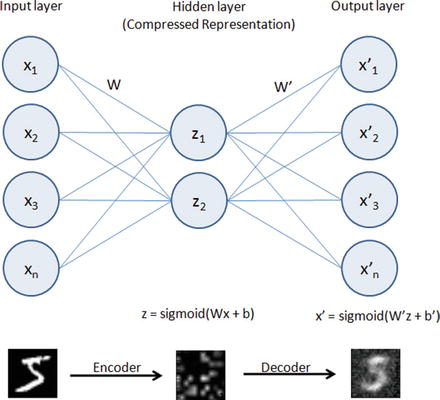
Figure 6-5. Autoencoder
Building an autoencoder will typically have three elements .
Encoding function to map input to a hidden representation through a nonlinear function, z = sigmoid (Wx + b).
A decoding function such as x’ = sigmoid(W’y + b’), which will map back into reconstruction x’ with same shape as x.
A loss function, which is a distance function to measure the information loss between the compressed representation of data and the decompressed representation. Reconstruction error can be measured using traditional squared error ||x-z||2.
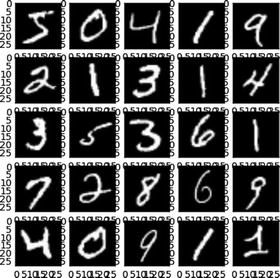
We’ll be using the well-known MNIST database of handwritten digits, which consists of approximately 70,000 total samples of handwritten grayscale digit images for numbers 0 to 9, each image of size is 28x28 and intensity level varies from 0 to 255 with accompanying label integer 0 to 9 for 60,000 of them and remaining ones without labels (test dataset).
Dimension Reduction Using Autoencoder
Listing 6-10. Example code for dimension reduction using autoencoder
import numpy as npnp.random.seed(2017)from keras.datasets import mnistfrom keras.models import Modelfrom keras.layers import Input, Densefrom keras.optimizers import Adadeltafrom keras.utils import np_utils# from keras.utils.visualize_util import plotfrom IPython.display import SVGfrom keras import backend as Kfrom keras.callbacks import EarlyStoppingfrom keras.utils.visualize_util import model_to_dotfrom matplotlib import pyplot as plt# Load mnist datainput_unit_size = 28*28(X_train, y_train), (X_test, y_test) = mnist.load_data()# function to plot digitsdef draw_digit(data, row, col, n):size = int(np.sqrt(data.shape[0]))plt.subplot(row, col, n)plt.imshow(data.reshape(size, size))plt.gray()# NormalizeX_train = X_train.reshape(X_train.shape[0], input_unit_size)X_train = X_train.astype('float32')X_train /= 255print('X_train shape:', X_train.shape)#----output----('X_train shape:', (60000, 784))# Autoencoderinputs = Input(shape=(input_unit_size,))x = Dense(144, activation='relu')(inputs)outputs = Dense(input_unit_size)(x)model = Model(input=inputs, output=outputs)model.compile(loss='mse', optimizer='adadelta')SVG(model_to_dot(model, show_shapes=True).create(prog='dot', format='svg'))#----output----
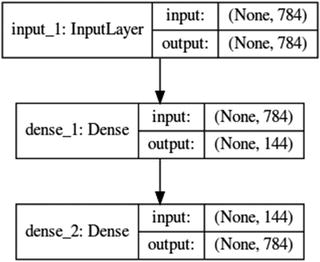
Note that the 784 dimension is reduced through encoding to 144 in the hidden layer and again in layer 3 constructed back to 784 using decoder.model.fit(X_train, X_train, nb_epoch=5, batch_size=258)#----output----Epoch 1/560000/60000 [==============================] - 8s - loss: 0.0733Epoch 2/560000/60000 [==============================] - 9s - loss: 0.0547Epoch 3/560000/60000 [==============================] - 11s - loss: 0.0451Epoch 4/560000/60000 [==============================] - 11s - loss: 0.0392Epoch 5/560000/60000 [==============================] - 11s - loss: 0.0354# plot the images from input layersshow_size = 5total = 0plt.figure(figsize=(5,5))for i in range(show_size):for j in range(show_size):draw_digit(X_train[total], show_size, show_size, total+1)total+=1plt.show()#----output----
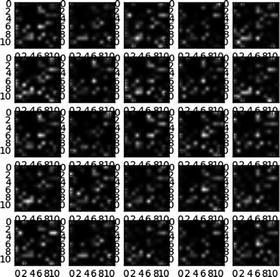
# plot the encoded (compressed) layer imageget_layer_output = K.function([model.layers[0].input],[model.layers[1].output])hidden_outputs = get_layer_output([X_train[0:show_size**2]])[0]total = 0plt.figure(figsize=(5,5))for i in range(show_size):for j in range(show_size):draw_digit(hidden_outputs[total], show_size, show_size, total+1)total+=1plt.show()#----output----
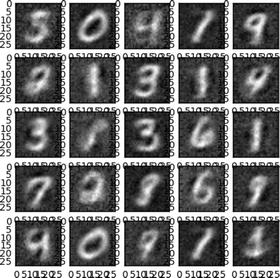
# Plot the decoded (de-compressed) layer imagesget_layer_output = K.function([model.layers[0].input],[model.layers[2].output])last_outputs = get_layer_output([X_train[0:show_size**2]])[0]total = 0plt.figure(figsize=(5,5))for i in range(show_size):for j in range(show_size):draw_digit(last_outputs[total], show_size, show_size, total+1)total+=1plt.show()#----output----
De-noise Image Using Autoencoder
Discovering robust features from the compressed hidden layer is an important aspect to enable the autoencoder to efficiently reconstruct the input from a de-noised version or original image. This is addressed by the de-noising autoencoder, which is a stochastic version of autoencoder.
Let’s introduce some noise to the digit dataset and try to build a model to de-noise the image. See Listing 6-11.
Listing 6-11. Example code for de-noising using autoencoder
# Introducing noise to the imagenoise_factor = 0.5X_train_noisy = X_train + noise_factor * np.random.normal(loc=0.0, scale=1.0, size=X_train.shape)X_train_noisy = np.clip(X_train_noisy, 0., 1.)# Function for visualizationdef draw(data, row, col, n):plt.subplot(row, col, n)plt.imshow(data, cmap=plt.cm.gray_r)plt.axis('off')show_size = 10plt.figure(figsize=(20,20))for i in range(show_size):draw(X_train_noisy[i].reshape(28,28), 1, show_size, i+1)plt.show()#----output----

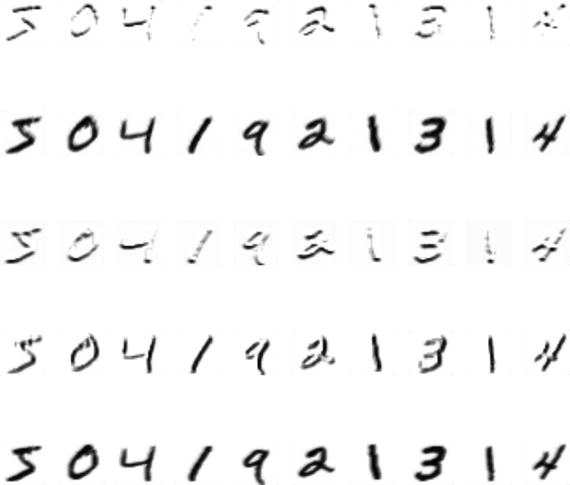
#Let’s fit a model on noisy training dataset.model.fit(X_train_noisy, X_train, nb_epoch=5, batch_size=258)# Prediction for denoised imageX_train_pred = model.predict(X_train_noisy)show_size = 10plt.figure(figsize=(20,20))for i in range(show_size):draw(X_train_pred[i].reshape(28,28), 1, show_size, i+1)plt.show()#----output----

Note that we can tune the model to improve the sharpness of de-noised image.
Convolution Neural Network (CNN)
In the world of image classification, CNN has become the go-to algorithm to build efficient models. CNN’s are similar to ordinary neural networks, except that it explicitly assumes that the inputs are images, which allows us to encode certain properties into the architecture. These then make the forward function efficient to implement and reduces the parameters in the network. The neurons are arranged in three dimensions: width, height, and depth.
CNN on CIFAR10 Dataset
Let’s consider CIFAR-10 (Canadian Institute for Advanced Research), which is a standard computer vision and deep learning image dataset. It consists of 60,000 color photos of 32 by 32 pixel squared with RGB for each pixel, divided into 10 classes, which include common objects such as airplanes, automobiles, birds, cats, deer, dog, frog, horse, ship, and truck. Essentially each image is of size 32x32x3 (width x height x RGB color channels).
CNN consists of four main types of layers: input layer, convolution layer, pooling layer, fully connected layer.
The input layer will hold the raw pixel, so an image of CIFAR-10 will have 32x32x3 dimensions of input layer. The convolution layer will compute a dot product between the weights of small local regions from the input layer, so if we decide to have 5 filters the resulted reduced dimension will be 32x32x5. The RELU layer will apply an element-wise activation function that will not affect the dimension. The Pool layer will down sample the spatial dimension along width and height, resulting in dimension 16x16x5. Finally, the fully connected layer will compute the class score, and the resulted dimension will be a single vector 1x1x10 (10 class scores). Each neural in this layer is connected to all numbers in the previous volume. See Figure 6-6.
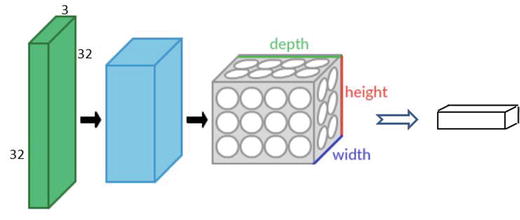
Figure 6-6. Convolution Neural Network
The next example illustration uses Keras with Theano aback end. To start Keras with Theano back end please run the following command while starting jupyter notebook, “KERAS_BACKEND=theano jupyter notebook.” See Listing 6-12 .
Listing 6-12. CNN using keras with theano backend on CIFAR10 dataset
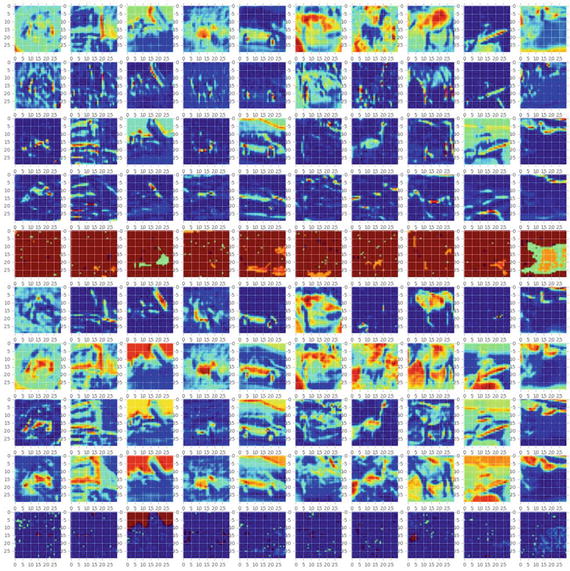
import kerasif K=='tensorflow':keras.backend.set_image_dim_ordering('tf')else:keras.backend.set_image_dim_ordering('th')from keras.models import Sequentialfrom keras.datasets import cifar10from keras.layers import Dense, Activation, Flattenfrom keras.optimizers import Adadeltafrom keras.utils import np_utilsfrom keras.layers.convolutional import Convolution2D, MaxPooling2Dfrom keras.utils.visualize_util import model_to_dot, plotfrom keras import backend as Kimport numpy as npfrom IPython.display import SVGfrom matplotlib import pyplot as pltimport matplotlib.image as mpimg%matplotlib inlinenp.random.seed(2017)batch_size = 256nb_classes = 10nb_epoch = 4nb_filter = 10img_rows, img_cols = 32, 32img_channels = 3# image dimension based on backend. 'th' = theano and 'tf' = tensorflowif K.image_dim_ordering() == 'th':input_shape = (3, img_rows, img_cols)else:input_shape = (img_rows, img_cols, 3)(X_train, y_train), (X_test, y_test) = cifar10.load_data()print('X_train shape:', X_train.shape)print(X_train.shape[0], 'train samples')print(X_test.shape[0], 'test samples')X_train = X_train.astype('float32')X_test = X_test.astype('float32')X_train /= 255X_test /= 255Y_train = np_utils.to_categorical(y_train, nb_classes)Y_test = np_utils.to_categorical(y_test, nb_classes)#----output----('X_train shape:', (50000, 3, 32, 32))(50000, 'train samples')(10000, 'test samples')# Model Configuration# define two groups of layers: feature (convolutions) and classification (dense)feature_layers = [Convolution2D(nb_filters, nb_conv, nb_conv, input_shape=input_shape),Activation('relu'),Convolution2D(nb_filters, nb_conv, nb_conv),Activation('relu'),MaxPooling2D(pool_size=(nb_pool, nb_pool)),Flatten(),]classification_layers = [Dense(512),Activation('relu'),Dense(nb_classes),Activation('softmax')]# create complete modelmodel = Sequential(feature_layers + classification_layers)model.compile(loss='categorical_crossentropy', optimizer="adadelta", metrics=['accuracy'])# print model layer summaryprint(model.summary())#----output----__________________________________________________________________________Layer (type) Output Shape Param # Connected to==========================================================================convolution2d_1 (Convolution2D) (None, 10, 30, 30) 280 convolution2d_input_1[0][0]__________________________________________________________________________activation_1 (Activation) (None, 10, 30, 30) 0 convolution2d_1[0][0]__________________________________________________________________________convolution2d_2 (Convolution2D) (None, 10, 28, 28) 910 activation_1[0][0]__________________________________________________________________________activation_2 (Activation) (None, 10, 28, 28) 0 convolution2d_2[0][0]__________________________________________________________________________maxpooling2d_1 (MaxPooling2D) (None, 10, 14, 14) 0 activation_2[0][0]__________________________________________________________________________flatten_1 (Flatten) (None, 1960) 0 maxpooling2d_1[0][0]__________________________________________________________________________dense_1 (Dense) (None, 512) 1004032 flatten_1[0][0]_________________________________________________________________________activation_3 (Activation) (None, 512) 0 dense_1[0][0]_______________________________________________________________________dense_2 (Dense) (None, 10) 5130 activation_3[0][0]__________________________________________________________________________activation_4 (Activation) (None, 10) 0 dense_2[0][0]=========================================================================Total params: 1010352# fit modelmodel.fit(X_train, Y_train, batch_size=batch_size, nb_epoch=nb_epoch, validation_data=(X_test, Y_test))#----output----Train on 50000 samples, validate on 10000 samplesEpoch 1/483s - loss: 1.9102 - acc: 0.3235 - val_loss: 1.5988 - val_acc: 0.4268Epoch 2/490s - loss: 1.5174 - acc: 0.4671 - val_loss: 1.4651 - val_acc: 0.4846Epoch 3/493s - loss: 1.3359 - acc: 0.5346 - val_loss: 1.4031 - val_acc: 0.5086Epoch 4/485s - loss: 1.2222 - acc: 0.5739 - val_loss: 1.3008 - val_acc: 0.5483Let’s visualize each layers. Note that we applied 10 filters.# function for Visualizationdef draw(data, row, col, n):plt.subplot(row, col, n)plt.imshow(data)### Input layer (original image)show_size = 10plt.figure(figsize=(20,20))for i in range(show_size):draw(X_train[i].reshape(3, 32, 32).transpose(1, 2, 0), 1, show_size, i+1)plt.show()#----output----

Notice below that in the hidden layers features are stored in 10 filters# first layerget_first_layer_output = K.function([model.layers[0].input], [model.layers[1].output])first_layer = get_first_layer_output([X_train[0:show_size]])[0]plt.figure(figsize=(20,20))for img_index, filters in enumerate(first_layer, start=1):for filter_index, mat in enumerate(filters):pos = (filter_index)*show_size+img_indexdraw(mat, nb_filters, show_size, pos)plt.show()#----output----
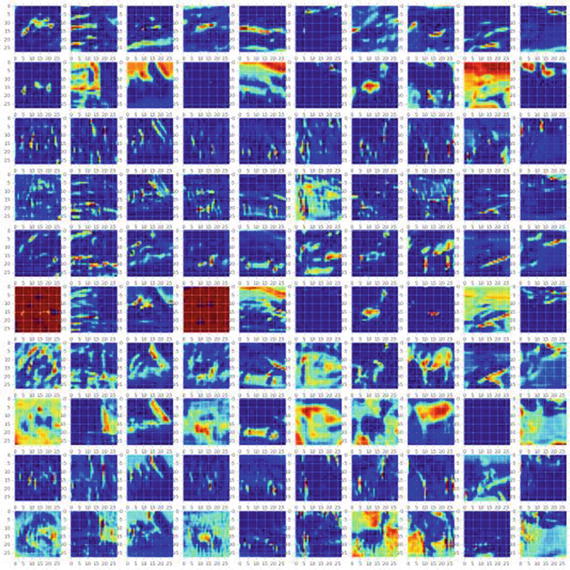
# second layerget_second_layer_output = K.function([model.layers[0].input],[model.layers[3].output])second_layers = get_second_layer_output([X_train[0:show_size]])[0]plt.figure(figsize=(20,20))for img_index, filters in enumerate(second_layers, start=1):for filter_index, mat in enumerate(filters):pos = (filter_index)*show_size+img_indexdraw(mat, nb_filters, show_size, pos)plt.show()#----output----
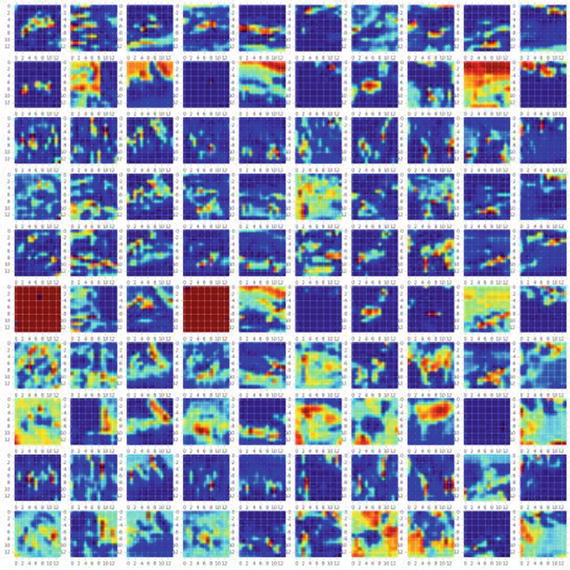
# third layerget_third_layer_output = K.function([model.layers[0].input],[model.layers[4].output])third_layers = get_third_layer_output([X_train[0:show_size]])[0]plt.figure(figsize=(20,20))for img_index, filters in enumerate(third_layers, start=1):for filter_index, mat in enumerate(filters):pos = (filter_index)*show_size+img_indexmat_size = mat.shape[1]draw(mat, nb_filters, show_size, pos)plt.show()#----output-----
CNN on MNIST Dataset
As an additional example, let’s look at how the CNN might look on a digits dataset. See Listing 6-13.
Listing 6-13. CNN using keras with theano back end on MNIST dataset
import keraskeras.backend.backend()keras.backend.image_dim_ordering()# using theano has backendK = keras.backend.backend()if K=='tensorflow':keras.backend.set_image_dim_ordering('tf')else:keras.backend.set_image_dim_ordering('th')from matplotlib import pyplot as plt%matplotlib inlineimport numpy as npnp.random.seed(2017)from keras import backend as Kfrom keras.models import Sequentialfrom keras.datasets import mnistfrom keras.layers import Dense, Dropout, Activation, Convolution2D, MaxPooling2D, Flattenfrom keras.utils import np_utilsfrom keras.utils.visualize_util import plotfrom keras.preprocessing import sequencefrom keras import backend as Kfrom keras.utils.visualize_util import plotfrom IPython.display import SVG, displayfrom keras.utils.visualize_util import model_to_dot, plotimg_rows, img_cols = 28, 28nb_classes = 10nb_filters = 5 # the number of filtersnb_pool = 2 # window size of poolingnb_conv = 3 # window or kernel size of filternb_epoch = 5# image dimension based on backend. ‘th’ = theano and ‘tf’ = tensorflowif K.image_dim_ordering() == 'th':input_shape = (1, img_rows, img_cols)else:input_shape = (img_rows, img_cols, 1)# data(X_train, y_train), (X_test, y_test) = mnist.load_data()X_train = X_train.reshape(X_train.shape[0], 1, img_rows, img_cols)X_test = X_test.reshape(X_test.shape[0], 1, img_rows, img_cols)X_train = X_train.astype('float32')X_test = X_test.astype('float32')X_train /= 255X_test /= 255print('X_train shape:', X_train.shape)print(X_train.shape[0], 'train samples')print(X_test.shape[0], 'test samples')# convert class vectors to binary class matricesY_train = np_utils.to_categorical(y_train, nb_classes)Y_test = np_utils.to_categorical(y_test, nb_classes)#----output----('X_train shape:', (60000, 1, 28, 28))(60000, 'train samples')(10000, 'test samples')# define two groups of layers: feature (convolutions) and classification (dense)feature_layers = [Convolution2D(nb_filters, nb_conv, nb_conv, input_shape=input_shape),Activation('relu'),Convolution2D(nb_filters, nb_conv, nb_conv),Activation('relu'),MaxPooling2D(pool_size=(nb_pool, nb_pool)),Dropout(0.25),Flatten(),]classification_layers = [Dense(128),Activation('relu'),Dropout(0.5),Dense(nb_classes),Activation('softmax')]# create complete modelmodel = Sequential(feature_layers + classification_layers)# define two groups of layers: feature (convolutions) and classification (dense)feature_layers = [Convolution2D(nb_filters, nb_conv, nb_conv, input_shape=input_shape),Activation('relu'),Convolution2D(nb_filters, nb_conv, nb_conv),Activation('relu'),MaxPooling2D(pool_size=(nb_pool, nb_pool)),Dropout(0.25),Flatten(),]classification_layers = [Dense(128),Activation('relu'),Dropout(0.5),Dense(nb_classes),Activation('softmax')]# create complete modelmodel = Sequential(feature_layers + classification_layers)print(model.summary())#----output----__________________________________________________________________________Layer (type) Output ShapeParam # Connected to==========================================================================convolution2d_1 (Convolution2D) (None, 5, 26, 26) 50convolution2d_input_1[0][0]__________________________________________________________________________activation_1 (Activation) (None, 5, 26, 26) 0 convolution2d_1[0][0]__________________________________________________________________________convolution2d_2 (Convolution2D) (None, 5, 24, 24) 230 activation_1[0][0]__________________________________________________________________________activation_2 (Activation) (None, 5, 24, 24) 0 convolution2d_2[0][0]__________________________________________________________________________maxpooling2d_1 (MaxPooling2D) (None, 5, 12, 12) 0 activation_2[0][0]__________________________________________________________________________dropout_1 (Dropout) (None, 5, 12, 12) 0 maxpooling2d_1[0][0]__________________________________________________________________________flatten_1 (Flatten) (None, 720) 0 dropout_1[0][0]__________________________________________________________________________dense_1 (Dense) (None, 128) 92288 flatten_1[0][0]__________________________________________________________________________activation_3 (Activation) (None, 128) 0 dense_1[0][0]__________________________________________________________________________dropout_2 (Dropout) (None, 128) 0 activation_3[0][0]__________________________________________________________________________dense_2 (Dense) (None, 10) 1290 dropout_2[0][0]__________________________________________________________________________activation_4 (Activation) (None, 10) 0 dense_2[0][0]==========================================================================Total params: 93858model.fit(X_train, Y_train, nb_epoch=nb_epoch, batch_size=256, verbose=2, validation_split=0.2)#----output----Train on 48000 samples, validate on 12000 samplesEpoch 1/524s - loss: 0.9369 - acc: 0.6947 - val_loss: 0.2509 - val_acc: 0.9260Epoch 2/527s - loss: 0.3576 - acc: 0.8901 - val_loss: 0.1592 - val_acc: 0.9548Epoch 3/527s - loss: 0.2714 - acc: 0.9173 - val_loss: 0.1254 - val_acc: 0.9629Epoch 4/525s - loss: 0.2271 - acc: 0.9319 - val_loss: 0.1084 - val_acc: 0.9690Epoch 5/525s - loss: 0.2070 - acc: 0.9376 - val_loss: 0.0967 - val_acc: 0.9722
Visualization of Layers
# visualizationdef draw(data, row, col, n):plt.subplot(row, col, n)plt.imshow(data, cmap=plt.cm.gray_r)plt.axis('off')# Sample input layer (original image)show_size = 10plt.figure(figsize=(20,20))for i in range(show_size):draw(X_train[i].reshape(28,28), 1, show_size, i+1)plt.show()#----output----

# First layer with 5 filtersget_first_layer_output = K.function([model.layers[0].input], [model.layers[1].output])first_layer = get_first_layer_output([X_train[0:show_size]])[0]plt.figure(figsize=(20,20))print 'first layer shape: ', first_layer.shapefor img_index, filters in enumerate(first_layer, start=1):for filter_index, mat in enumerate(filters):pos = (filter_index)*10+img_indexdraw(mat, nb_filters, show_size, pos)plt.tight_layout()plt.show()#----output----
Recurrent Neural Network (RNN)
The MLP (feedforward network) is not known to do well on sequential events models such as the probabilistic language model of predicting the next word based on the previous word at every given point. RNN architecture addresses this issue. It is similar to MLP except that they have a feedback loop, which means they feed previous time steps into the current step. This type of architecture generates sequences to simulate situation and create synthetic data, making them the ideal modeling choice to work on sequence data such as speech text mining, image captioning, time series prediction, robot control, language modeling, etc. See Figure 6-7.
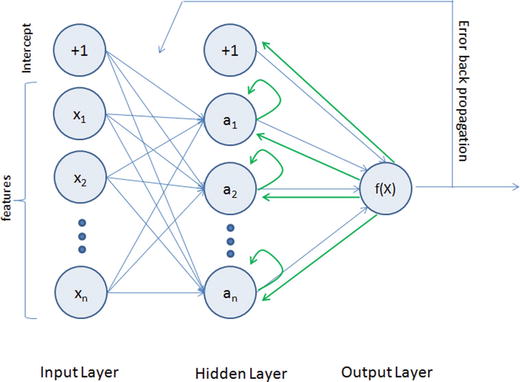
Figure 6-7. Recurrent Neural Network
The previous step’s hidden layer and final outputs are fed back into the network and will be used as input to the next steps’ hidden layer, which means the network will remember the past and it will repeatedly predict what will happen next. The drawback in the general RNN architecture is that it can be memory heavy, and hard to train for long-term temporal dependency (i.e., context of long text should be known at any given stage).
Long Short-Term Memory (LSTM)
LSTM is an implementation of improved RNN architecture to address the issues of general RNN, and it enables long-range dependencies. It is designed to have better memory through linear memory cells surrounded by a set of gate units used to control the flow of information, when information should enter the memory, when to forget, and when to output. It uses no activation function within its recurrent components, thus the gradient term does not vanish with back propagation. Figure 6-8 gives a comparison of simple multilayer perceptron vs. RNN vs. LSTM.
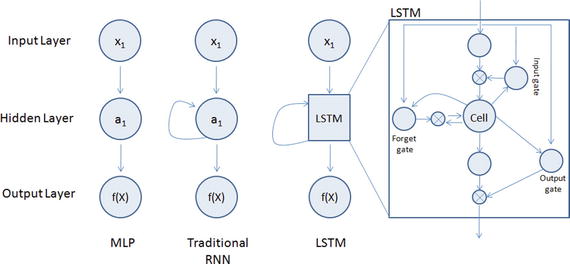
Figure 6-8. Simple MLP vs RNN vs LSTM
Please refer to Table 6-3 below to understand the key LSTM component formulas.
Table 6-3. LSTM Components
LSTM Component | Formula |
|---|---|
Input gate layer: This decides which values to store in the cell state. | it = sigmoid(wixt + uiht-1 + bi) |
Forget gate layer: As the name suggested this decides what information to throw away from the cell state. | ft = sigmoid(Wfxt + Ufht-1 + bf) |
Output gate layer: Create a vector of values that can be added to the cell state. | Ot = sigmoid(Woxt + uiht-1 + bo) |
Memory cell state vector. | ct = ft o ct-1+ ito * hyperbolic tangent(Wcxt + ucht-1 + bc) |
Let’s look at an example of IMDB dataset that has a labeled sentiment (positive/negative) for movie reviews. The reviews have been preprocessed, and encoded as sequence of word indexes. See Listing 6-14.
Listing 6-14. Example code for Keras LSTM
import numpy as npnp.random.seed(2017) # for reproducibilityfrom keras.preprocessing import sequencefrom keras.models import Sequentialfrom keras.layers import Dense, Activation, Embeddingfrom keras.layers import LSTMfrom keras.datasets import imdbmax_features = 20000maxlen = 80 # cut texts after this number of words (among top max_features most common words)batch_size = 32# Load data(X_train, y_train), (X_test, y_test) = imdb.load_data(nb_words=max_features)print(len(X_train), 'train sequences')print(len(X_test), 'test sequences')print('Pad sequences (samples x time)')X_train = sequence.pad_sequences(X_train, maxlen=maxlen)X_test = sequence.pad_sequences(X_test, maxlen=maxlen)print('X_train shape:', X_train.shape)print('X_test shape:', X_test.shape)#----output----(25000, 'train sequences')(25000, 'test sequences')Pad sequences (samples x time)('X_train shape:', (25000, 80))('X_test shape:', (25000, 80))#Model configurationmodel = Sequential()model.add(Embedding(max_features, 128, dropout=0.2))model.add(LSTM(128, dropout_W=0.2, dropout_U=0.2)) # try using a GRU instead, for funmodel.add(Dense(1))model.add(Activation('sigmoid'))# try using different optimizers and different optimizer configsmodel.compile(loss='binary_crossentropy', optimizer='adam', metrics=['accuracy'])#Trainmodel.fit(X_train, y_train, batch_size=batch_size, nb_epoch=5,#----output----validation_data=(X_test, y_test))Train on 25000 samples, validate on 25000 samplesEpoch 1/525000/25000 - 328s - loss: 0.5293 - acc: 0.7332 - val_loss: 0.4101 - val_acc: 0.8206Epoch 2/525000/25000 - 305s - loss: 0.3805 - acc: 0.8354 - val_loss: 0.3814 - val_acc: 0.8297Epoch 3/525000/25000 - 611s - loss: 0.3024 - acc: 0.8746 - val_loss: 0.4037 - val_acc: 0.8343Epoch 4/525000/25000 - 352s - loss: 0.2454 - acc: 0.9016 - val_loss: 0.4397 - val_acc: 0.8304Epoch 5/525000/25000 - 471s - loss: 0.2083 - acc: 0.9164 - val_loss: 0.4175 - val_acc: 0.834225000/25000 - 99sTest score: 0.417513472309Test accuracy: 0.83424# Evaluatetrain_score, train_acc = model.evaluate(X_train, y_train, batch_size=batch_size)test_score, test_acc = model.evaluate(X_test, y_test, batch_size=batch_size)print 'Train score:', train_scoreprint 'Train accuracy:', train_accprint 'Test score:', test_scoreprint 'Test accuracy:', test_acc#----output----25000/25000 [==============================] - 83s25000/25000 [==============================] - 83sTrain score: 0.0930857129323Train accuracy: 0.97228Test score: 0.417513472309Test accuracy: 0.83424
Transfer Learning
Based on our past experience, we humans can learn a new skill easily. We are more efficient in learning, particularly if the task in hand is similar to what we have done in the past, for example, learning a new programming language for a computer professional or driving a new type of vehicle for a seasoned driver is relatively easy based on our past experience.
Transfer learning is an area in machine learning that aims to utilize the knowledge gained while solving one problem to solve a different but related problem. See Figure 6-9.
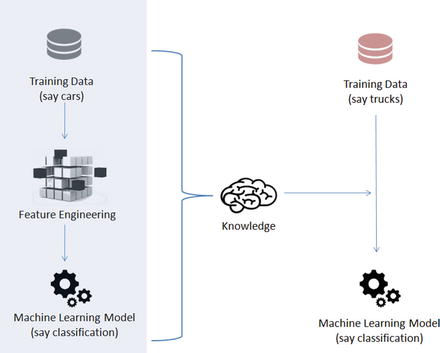
Figure 6-9. Transfer Learning
Nothing better than understanding through example, so let’s train a simple CNN model of two level layers, that is, a feature layer and a classification layer on the first 5 digits (0 to 4) of the MNIST dataset, then apply transfer learning to freeze the features layer and fine-tune dense layers for the classification of digits 5 to 9. See Listing 6-15.
Listing 6-15. Example code for transfer learning
import numpy as npnp.random.seed(2017) # for reproducibilityfrom keras.datasets import mnistfrom keras.models import Sequentialfrom keras.layers import Dense, Dropout, Activation, Flattenfrom keras.layers import Convolution2D, MaxPooling2Dfrom keras.utils import np_utilsfrom keras import backend as Kbatch_size = 128nb_classes = 5nb_epoch = 5# input image dimensionsimg_rows, img_cols = 28, 28# number of convolutional filters to usenb_filters = 32# size of pooling area for max poolingpool_size = 2# convolution kernel sizekernel_size = 3input_shape = (img_rows, img_cols, 1)# the data, shuffled and split between train and test sets(X_train, y_train), (X_test, y_test) = mnist.load_data()# create two datasets one with digits below 5 and one with 5 and aboveX_train_lt5 = X_train[y_train < 5]y_train_lt5 = y_train[y_train < 5]X_test_lt5 = X_test[y_test < 5]y_test_lt5 = y_test[y_test < 5]X_train_gte5 = X_train[y_train >= 5]y_train_gte5 = y_train[y_train >= 5] - 5 # make classes start at 0 forX_test_gte5 = X_test[y_test >= 5] # np_utils.to_categoricaly_test_gte5 = y_test[y_test >= 5] - 5# Train model for digits 0 to 4def train_model(model, train, test, nb_classes):X_train = train[0].reshape((train[0].shape[0],) + input_shape)X_test = test[0].reshape((test[0].shape[0],) + input_shape)X_train = X_train.astype('float32')X_test = X_test.astype('float32')X_train /= 255X_test /= 255print('X_train shape:', X_train.shape)print(X_train.shape[0], 'train samples')print(X_test.shape[0], 'test samples')# convert class vectors to binary class matricesY_train = np_utils.to_categorical(train[1], nb_classes)Y_test = np_utils.to_categorical(test[1], nb_classes)model.compile(loss='categorical_crossentropy',optimizer='adadelta',metrics=['accuracy'])model.fit(X_train, Y_train,batch_size=batch_size, nb_epoch=nb_epoch,verbose=1,validation_data=(X_test, Y_test))score = model.evaluate(X_test, Y_test, verbose=0)print('Test score:', score[0])print('Test accuracy:', score[1])# define two groups of layers: feature (convolutions) and classification (dense)feature_layers = [Convolution2D(nb_filters, kernel_size, kernel_size,border_mode='valid',input_shape=input_shape),Activation('relu'),Convolution2D(nb_filters, kernel_size, kernel_size),Activation('relu'),MaxPooling2D(pool_size=(pool_size, pool_size)),Dropout(0.25),Flatten(),]classification_layers = [Dense(128),Activation('relu'),Dropout(0.5),Dense(nb_classes),Activation('softmax')]# create complete modelmodel = Sequential(feature_layers + classification_layers)# train model for 5-digit classification [0..4]train_model(model, (X_train_lt5, y_train_lt5), (X_test_lt5, y_test_lt5), nb_classes)#----output----('X_train shape:', (30596, 28, 28, 1))(30596, 'train samples')(5139, 'test samples')Train on 30596 samples, validate on 5139 samplesEpoch 1/530596/30596 [==============================] - 57s - loss: 0.2125 - acc: 0.9332 - val_loss: 0.0504 - val_acc: 0.9837Epoch 2/530596/30596 [==============================] - 59s - loss: 0.0734 - acc: 0.9787 - val_loss: 0.0266 - val_acc: 0.9914Epoch 3/530596/30596 [==============================] - 63s - loss: 0.0510 - acc: 0.9854 - val_loss: 0.0189 - val_acc: 0.9940Epoch 4/530596/30596 [==============================] - 64s - loss: 0.0404 - acc: 0.9883 - val_loss: 0.0178 - val_acc: 0.9942Epoch 5/530596/30596 [==============================] - 67s - loss: 0.0340 - acc: 0.9901 - val_loss: 0.0226 - val_acc: 0.9928('Test score:', 0.022608739081115953)('Test accuracy:', 0.99280015567230984)Transfer existing trained model on 0 to 4 to build model for digits 5 to 9# freeze feature layers and rebuild modelfor layer in feature_layers:layer.trainable = False# transfer: train dense layers for new classification task [5..9]train_model(model, (X_train_gte5, y_train_gte5), (X_test_gte5, y_test_gte5), nb_classes)#----output----('X_train shape:', (29404, 28, 28, 1))(29404, 'train samples')(4861, 'test samples')Train on 29404 samples, validate on 4861 samplesEpoch 1/529404/29404 [==============================] - 26s - loss: 0.4097 - acc: 0.8762 - val_loss: 0.1096 - val_acc: 0.9677Epoch 2/529404/29404 [==============================] - 26s - loss: 0.1314 - acc: 0.9587 - val_loss: 0.0664 - val_acc: 0.9790Epoch 3/529404/29404 [==============================] - 26s - loss: 0.0975 - acc: 0.9694 - val_loss: 0.0499 - val_acc: 0.9856Epoch 4/529404/29404 [==============================] - 26s - loss: 0.0786 - acc: 0.9760 - val_loss: 0.0424 - val_acc: 0.9866Epoch 5/529404/29404 [==============================] - 26s - loss: 0.0690 - acc: 0.9794 - val_loss: 0.0386 - val_acc: 0.9866('Test score:', 0.038644227712815393)('Test accuracy:', 0.98662826567857609)
Notice that we got 99.8% test accuracy after five epochs for the first five digits classifier and 99.2% for the last five digits after transfer and fine-tuning.
Reinforcement Learning
Reinforcement learning is a goal-oriented learning method based on interaction with its environment. The objective is getting an agent to act in an environment in order to maximize its rewards. Here the agent is an intelligent program, and environment is the external condition. See Figure 6-10.
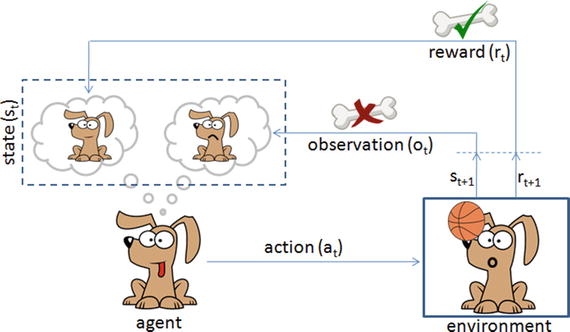
Figure 6-10. Reinforcement learning is like teaching your dog a trick
Let’s consider an example of a predefined system for teaching a new trick to a dog, where you do not have to tell the dog what to do. However, you can reward the dog, if it does it right or punish if it does wrong. With every step, it has to remember what made it get the reward or punishment; this is commonly known as a credit assignment problem. Similarly, we can train a computer agent such that its objective is to take action to move from state st to state st+1 and find behavior function to maximize the expected sum of discounted rewards and map the states to actions. According to the paper published by Deepmind Technologies in 2013, the Q-learning rule for updating status is given by: Q[s,a]new = Q[s,a]prev + α * (r + ƴ*max(s,a) – Q[s,a]prev), where
α is the learning rate,
r is reward for latest action,
ƴ is the discounted factor, and
max(s,a) is the estimate of new value from best action.
If the optimal value Q[s,a] of the sequence s’ at the next time step was known for all possible actions a’, then the optimal strategy is to select the action a’ maximizing the expected value of r + ƴ*max(s,a) – Q[s,a]prev.
Let’s consider an example where an agent is trying to come out of a maze. It can move one random square or area in any direction, and get a reward if exits. The most common way to formalize a reinforcement problem is to represent it as a Markov decision process. Assume the agent is in state b (maze area) and the target is to reach state f. So within one step agent can reach from b to f, let’s put a reward of 100 (otherwise 0) for links between nodes that allows agents to reach target state. See Figure 6-11 and Listing 6-16.
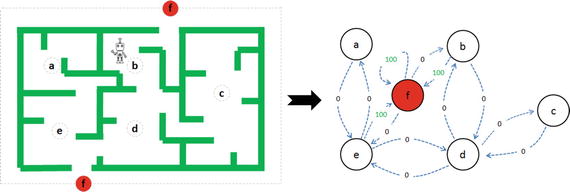
Figure 6-11. Left: Maze with 5 states, Right: Markov Decision process
Listing 6-16. Example code for q-learning
import numpy as npimport matplotlib.pyplot as pltfrom matplotlib.collections import LineCollection# defines the reward/link connection graphR = np.array([[-1, -1, -1, -1, 0, -1],[-1, -1, -1, 0, -1, 100],[-1, -1, -1, 0, -1, -1],[-1,0, 0, -1, 0, -1],[ 0, -1, -1, 0, -1, 100],[-1, 0, -1, -1, 0, 100]]).astype("float32")Q = np.zeros_like(R)
The -1’s in the table means there isn’t a link between nodes. For example, State ‘a’ cannot go to State ‘b’.
# learning parametergamma = 0.8# Initialize random_stateinitial_state = randint(0,4)# This function returns all available actions in the state given as an argumentdef available_actions(state):current_state_row = R[state,]av_act = np.where(current_state_row >= 0)[1]return av_act# This function chooses at random which action to be performed within the range# of all the available actions.def sample_next_action(available_actions_range):next_action = int(np.random.choice(available_act,1))return next_action# This function updates the Q matrix according to the path selected and the Q# learning algorithmdef update(current_state, action, gamma):max_index = np.where(Q[action,] == np.max(Q[action,]))[1]if max_index.shape[0] > 1:max_index = int(np.random.choice(max_index, size = 1))else:max_index = int(max_index)max_value = Q[action, max_index]# Q learning formulaQ[current_state, action] = R[current_state, action] + gamma * max_value# Get available actions in the current stateavailable_act = available_actions(initial_state)# Sample next action to be performedaction = sample_next_action(available_act)# Train over 100 iterations, re-iterate the process above).for i in range(100):current_state = np.random.randint(0, int(Q.shape[0]))available_act = available_actions(current_state)action = sample_next_action(available_act)update(current_state,action,gamma)# Normalize the "trained" Q matrixprint "Trained Q matrix: \n", Q/np.max(Q)*100# Testingcurrent_state = 2steps = [current_state]while current_state != 5:next_step_index = np.where(Q[current_state,] == np.max(Q[current_state,]))[1]if next_step_index.shape[0] > 1:next_step_index = int(np.random.choice(next_step_index, size = 1))else:next_step_index = int(next_step_index)steps.append(next_step_index)current_state = next_step_index# Print selected sequence of stepsprint "Best sequence path: ", steps#----output----Best sequence path: [2, 3, 1, 5]
Endnotes
In this chapter you have learned briefly about various topics of deep learning techniques using artificial neural networks, starting from single perceptron, multilayer perceptron, to more complex forms of deep neural networks such as CNN / RNN. You have learned about the various issues associated with image data and how researchers have tried to mimic the human brain for building models that can solve complex problems related to computer vision and text mining using the convolution neural network and recurrent neural network respectively. You also learned how autoencoders can be used to compress / de-compress data or remove noise from image data. You learned about the widely popular RBN, which can learn the probabilistic distribution in the input data enabling us to build better models. You learned about the transfer learn that helps us to use the knowledge from one model to another model of a similar nature. Finally, we briefly looked at a simple example of reinforcement learning using q-learning. Congratulations! With this you have reached the end of your six-step expedition of mastering machine learning.