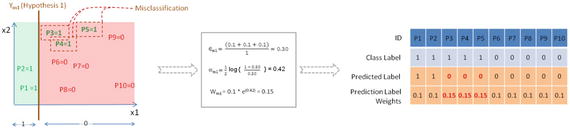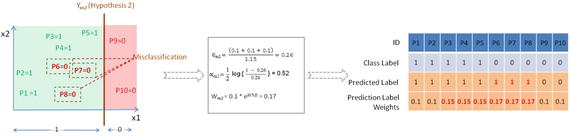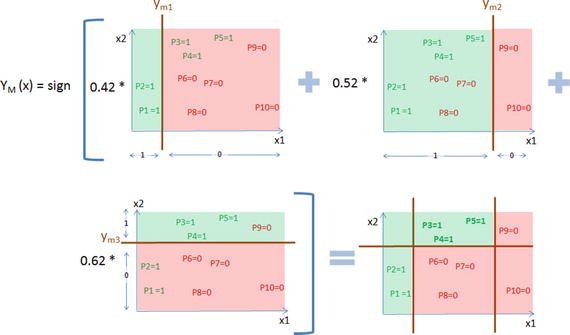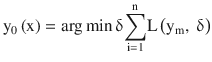



A978-1-4842-2866-1_CoverFigure.jpg

Manohar Swamynathan

Mastering Machine Learning with Python in Six Steps

A Practical Implementation Guide to Predictive Data Analytics Using Python

Manohar Swamynathan

Bangalore, Karnataka, India

Any source code or other supplementary material referenced by the author in this book is available to readers on GitHub via the book’s product page, located at www.apress.com/978-1-4842-2865-4 . For more detailed information, please visit http://www.apress.com/source-code .

ISBN 978-1-4842-2865-4

e-ISBN 978-1-4842-2866-1

DOI 10.1007/978-1-4842-2866-1

Library of Congress Control Number: 2017943522

© Manohar Swamynathan 2017

This work is subject to copyright. All rights are reserved by the Publisher, whether the whole or part of the material is concerned, specifically the rights of translation, reprinting, reuse of illustrations, recitation, broadcasting, reproduction on microfilms or in any other physical way, and transmission or information storage and retrieval, electronic adaptation, computer software, or by similar or dissimilar methodology now known or hereafter developed.

Trademarked names, logos, and images may appear in this book. Rather than use a trademark symbol with every occurrence of a trademarked name, logo, or image we use the names, logos, and images only in an editorial fashion and to the benefit of the trademark owner, with no intention of infringement of the trademark. The use in this publication of trade names, trademarks, service marks, and similar terms, even if they are not identified as such, is not to be taken as an expression of opinion as to whether or not they are subject to proprietary rights.

While the advice and information in this book are believed to be true and accurate at the date of publication, neither the authors nor the editors nor the publisher can accept any legal responsibility for any errors or omissions that may be made. The publisher makes no warranty, express or implied, with respect to the material contained herein.

Printed on acid-free paper

Distributed to the book trade worldwide by Springer Science+Business Media New York, 233 Spring Street, 6th Floor, New York, NY 10013. Phone 1-800-SPRINGER, fax (201) 348-4505, e-mail orders-ny@springer-sbm.com, or visit www.springeronline.com. Apress Media, LLC is a California LLC and the sole member (owner) is Springer Science + Business Media Finance Inc (SSBM Finance Inc). SSBM Finance Inc is a Delaware corporation.

Introduction

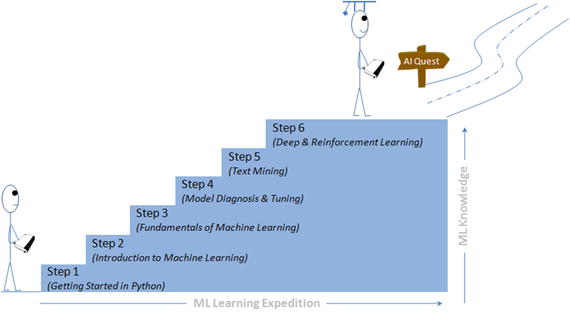
This book is your practical guide towards novice to master in machine learning with Python in six steps. The six steps path has been designed based on the “Six degrees of separation” theory that states that everyone and everything is a maximum of six steps away. Note that the theory deals with the quality of connections, rather than their existence. So a great effort has been taken to design eminent, yet simple six steps covering fundamentals to advanced topics gradually that will help a beginner walk his way from no or least knowledge of machine learning in Python to all the way to becoming a master practitioner. This book is also helpful for current Machine Learning practitioners to learn the advanced topics such as Hyperparameter tuning, various ensemble techniques, Natural Language Processing (NLP), deep learning, and the basics of reinforcement learning. See Figure 1 .

A434293_1_En_BookFrontmatter_Fig1_HTML.jpg
Figure 1. Mastering Python Machine Learning: In Six Steps

Each topic has two parts: the first part will cover the theoretical concepts and the second part will cover practical implementation with different Python packages. The traditional approach of math to machine learning, that is, learning all the mathematics then understanding how to implement it to solve problems needs a great deal of time/effort, which has proven to be not efficient for working professionals looking to switch careers. Hence the focus in this book has been more on simplification, such that the theory/math behind algorithms have been covered only to the extent required to get you started.

I recommend you work with the book instead of reading it. Real learning goes on only through active participation. Hence, all the code presented in the book is available in the form of iPython notebooks to enable you to try out these examples yourselves and extend them to your advantage or interest as required later.

Who This Book Is for

This book will serve as a great resource for learning machine learning concepts and implementation techniques for the following:

  • Python developers or data engineers looking to expand their knowledge or career into the machine learning area.

  • A current non-Python (R, SAS, SPSS, Matlab, or any other language) machine learning practitioners looking to expand their implementation skills in Python.

  • Novice machine learning practitioners looking to learn advanced topics such as hyperparameter tuning, various ensemble techniques, Natural Language Processing (NLP), deep learning, and basics of reinforcement learning.

What You Will Learn

Chapter 1 , Step 1 - Getting started in Python . This chapter will help you to set up the environment, and introduce you to the key concepts of Python programming language in relevance to machine learning. If you are already well versed with Python basics, I recommend you glance through the chapter quickly and move onto the next chapter.

Chapter 2 , Step 2 - Introduction to Machine Learning. Here you will learn about the history, evolution, and different frameworks in practice for building machine learning systems. I think this understanding is very important as it will give you a broader perspective and set the stage for your further expedition. You’ll understand the different types of machine learning (supervised / unsupervised / reinforcement learning). You will also learn the various concepts are involved in core data analysis packages (NumPy, Pandas, Matplotlib) with example codes.

Chapter 3 , Step 3 - Fundamentals of Machine Learning This chapter will expose you to various fundamental concepts involved in feature engineering, supervised learning (linear regression, nonlinear regression, logistic regression, time series forecasting and classification algorithms), unsupervised learning (clustering techniques, dimension reduction technique) with the help of scikit-learn and statsmodel packages.

Chapter 4 , Step 4 - Model Diagnosis and Tuning. in this chapter you’ll learn advanced topics around different model diagnosis, which covers the common problems that arise, and various tuning techniques to overcome these issues to build efficient models. The topics include choosing the correct probability cutoff, handling an imbalanced dataset, the variance, and the bias issues. You’ll also learn various tuning techniques such as ensemble models and hyperparameter tuning using grid / random search.

Chapter 5 , Step 5 - Text Mining and Recommender System. Statistics says 70% of the data available in the business world is in the form of text, so text mining has vast scope across various domains. You will learn the building blocks and basic concepts to advanced NLP techniques. You’ll also learn the recommender systems that are most commonly used to create personalization for customers.

Chapter 6 , Step 6 - Deep and Reinforcement Learning. There has been a great advancement in the area of Artificial Neural Network (ANN) through deep learning techniques and it has been the buzzword in recent times. You’ll learn various aspects of deep learning such as multilayer perceptrons, Convolution Neural Network (CNN) for image classification, RNN (Recurrent Neural Network) for text classification, and transfer learning. And you’ll also learn the q-learning example to understand the concept of reinforcement learning.

Chapter 7 , Conclusion. This chapter summarizes your six step learning and you’ll learn quick tips that you should remember while starting with real-world machine learning problems.

Acknowledgments

I’m grateful to my mom, dad, and loving brother; I thank my wife Usha and son Jivin for providing me the space for writing this book.

I would like to express my gratitude to my mentors, colleagues, and friends from current/previous organizations for their inputs, inspiration, and support. Thanks to Jojo for the encouragement to write this book and his technical review inputs. Big thanks to the Apress team for their constant support and help.

Finally, I would like to thank you the reader for showing an interest in this book and sincerely hope to help your pursuit to machine learning quest.

Note that the views expressed in this book are author’s personal.

Contents

  1. Chapter 1:​ Step 1 – Getting Started in Python
    1. The Best Things in Life Are Free
    2. The Rising Star
    3. Python 2.​7.​x or Python 3.​4.​x?​
      1. Windows Installation
      2. OSX Installation
      3. Linux Installation
      4. Python from Official Website
      5. Running Python
    4. Key Concepts
      1. Python Identifiers
      2. Keywords
      3. My First Python Program
      4. Code Blocks (Indentation &​ Suites)
      5. Basic Object Types
      6. When to Use List vs.​ Tuples vs.​ Set vs.​ Dictionary
      7. Comments in Python
      8. Multiline Statement
      9. Basic Operators
      10. Control Structure
      11. Lists
      12. Tuple
      13. Sets
      14. Dictionary
      15. User-Defined Functions
      16. Module
      17. File Input/​Output
      18. Exception Handling
    5. Endnotes
  2. Chapter 2:​ Step 2 – Introduction to Machine Learning
    1. History and Evolution
    2. Artificial Intelligence Evolution
    3. Different Forms
      1. Statistics
      2. Data Mining
      3. Data Analytics
      4. Data Science
      5. Statistics vs.​ Data Mining vs.​ Data Analytics vs.​ Data Science
    4. Machine Learning Categories
      1. Supervised Learning
      2. Unsupervised Learning
      3. Reinforcement Learning
    5. Frameworks for Building Machine Learning Systems
      1. Knowledge Discovery Databases (KDD)
      2. Cross-Industry Standard Process for Data Mining
      3. SEMMA (Sample, Explore, Modify, Model, Assess)
      4. KDD vs.​ CRISP-DM vs.​ SEMMA
    6. Machine Learning Python Packages
    7. Data Analysis Packages
      1. NumPy
      2. Pandas
      3. Matplotlib
    8. Machine Learning Core Libraries
    9. Endnotes
  3. Chapter 3:​ Step 3 – Fundamentals of Machine Learning
    1. Machine Learning Perspective of Data
    2. Scales of Measurement
      1. Nominal Scale of Measurement
      2. Ordinal Scale of Measurement
      3. Interval Scale of Measurement
      4. Ratio Scale of Measurement
    3. Feature Engineering
      1. Dealing with Missing Data
      2. Handling Categorical Data
      3. Normalizing Data
      4. Feature Construction or Generation
    4. Exploratory Data Analysis (EDA)
      1. Univariate Analysis
      2. Multivariate Analysis
    5. Supervised Learning– Regression
      1. Correlation and Causation
      2. Fitting a Slope
      3. How Good Is Your Model?​
      4. Polynomial Regression
      5. Multivariate Regression
      6. Multicollinearit​y and Variation Inflation Factor (VIF)
      7. Interpreting the OLS Regression Results
      8. Regression Diagnosis
      9. Regularization
      10. Nonlinear Regression
    6. Supervised Learning – Classification
      1. Logistic Regression
      2. Evaluating a Classification Model Performance
      3. ROC Curve
      4. Fitting Line
      5. Stochastic Gradient Descent
      6. Regularization
      7. Multiclass Logistic Regression
      8. Generalized Linear Models
      9. Supervised Learning – Process Flow
      10. Decision Trees
      11. Support Vector Machine (SVM)
      12. k Nearest Neighbors (kNN)
      13. Time-Series Forecasting
    7. Unsupervised Learning Process Flow
      1. Clustering
      2. K-means
      3. Finding Value of k
      4. Hierarchical Clustering
      5. Principal Component Analysis (PCA)
    8. Endnotes
  4. Chapter 4:​ Step 4 – Model Diagnosis and Tuning
    1. Optimal Probability Cutoff Point
      1. Which Error Is Costly?​
    2. Rare Event or Imbalanced Dataset
      1. Known Disadvantages
      2. Which Resampling Technique Is the Best?​
    3. Bias and Variance
      1. Bias
      2. Variance
    4. K-Fold Cross-Validation
    5. Stratified K-Fold Cross-Validation
    6. Ensemble Methods
    7. Bagging
      1. Feature Importance
      2. RandomForest
      3. Extremely Randomized Trees (ExtraTree)
      4. How Does the Decision Boundary Look?​
      5. Bagging – Essential Tuning Parameters
    8. Boosting
      1. Example Illustration for AdaBoost
      2. Gradient Boosting
      3. Boosting – Essential Tuning Parameters
      4. Xgboost (eXtreme Gradient Boosting)
    9. Ensemble Voting – Machine Learning’s Biggest Heroes United
      1. Hard Voting vs.​ Soft Voting
    10. Stacking
    11. Hyperparameter Tuning
      1. GridSearch
      2. RandomSearch
    12. Endnotes
  5. Chapter 5:​ Step 5 – Text Mining and Recommender Systems
    1. Text Mining Process Overview
    2. Data Assemble (Text)
      1. Social Media
      2. Step 1 – Get Access Key (One-Time Activity)
      3. Step 2 – Fetching Tweets
    3. Data Preprocessing (Text)
      1. Convert to Lower Case and Tokenize
      2. Removing Noise
      3. Part of Speech (PoS) Tagging
      4. Stemming
      5. Lemmatization
      6. N-grams
      7. Bag of Words (BoW)
      8. Term Frequency-Inverse Document Frequency (TF-IDF)
    4. Data Exploration (Text)
      1. Frequency Chart
      2. Word Cloud
      3. Lexical Dispersion Plot
      4. Co-occurrence Matrix
    5. Model Building
    6. Text Similarity
    7. Text Clustering
      1. Latent Semantic Analysis (LSA)
    8. Topic Modeling
      1. Latent Dirichlet Allocation (LDA)
      2. Non-negative Matrix Factorization
    9. Text Classification
    10. Sentiment Analysis
    11. Deep Natural Language Processing (DNLP)
    12. Recommender Systems
      1. Content-Based Filtering
      2. Collaborative Filtering (CF)
    13. Endnotes
  6. Chapter 6:​ Step 6 – Deep and Reinforcement Learning
    1. Artificial Neural Network (ANN)
    2. What Goes Behind, When Computers Look at an Image?​
    3. Why Not a Simple Classification Model for Images?​
    4. Perceptron – Single Artificial Neuron
    5. Multilayer Perceptrons (Feedforward Neural Network)
      1. Load MNIST Data
      2. Key Parameters for scikit-learn MLP
    6. Restricted Boltzman Machines (RBM)
    7. MLP Using Keras
    8. Autoencoders
      1. Dimension Reduction Using Autoencoder
      2. De-noise Image Using Autoencoder
    9. Convolution Neural Network (CNN)
      1. CNN on CIFAR10 Dataset
      2. CNN on MNIST Dataset
    10. Recurrent Neural Network (RNN)
      1. Long Short-Term Memory (LSTM)
    11. Transfer Learning
    12. Reinforcement Learning
    13. Endnotes
  7. Chapter 7:​ Conclusion
    1. Summary
    2. Tips
      1. Start with Questions/​Hypothesis Then Move to Data!
      2. Don’t Reinvent the Wheels from Scratch
      3. Start with Simple Models
      4. Focus on Feature Engineering
      5. Beware of Common ML Imposters
    3. Happy Machine Learning
  8. Index

About the Author and About the Technical Reviewer

About the Author

A434293_1_En_BookFrontmatter_Figb_HTML.jpg

Manohar Swamynathan is a data science practitioner and an avid programmer, with over 13 years of experience in various data science-related areas that include data warehousing, Business Intelligence (BI), analytical tool development, ad hoc analysis, predictive modeling, data science product development, consulting, formulating strategy, and executing analytics program.

He’s had a career covering life cycles of data across different domains such as U.S. mortgage banking, retail, insurance, and industrial IoT. He has a bachelor’s degree with specialization in physics, mathematics, and computers; and a master’s degree in project management. He’s currently living in Bengaluru, the Silicon Valley of India, working as Staff Data Scientist with General Electric Digital, contributing to the next big digital industrial revolution.

You can visit him at http://www.mswamynathan.com to learn more about his various other activities.

About the Technical Reviewer

A434293_1_En_BookFrontmatter_Figc_HTML.jpg

Jojo Moolayil is a Data Scientist and the author of the book: Smarter Decisions – The Intersection of Internet of Things and Decision Science . With over 4 years of industrial experience in Data Science, Decision Science and IoT, he has worked with industry leaders on high impact and critical projects across multiple verticals. He is currently associated with General Electric , the pioneer and leader in data science for Industrial IoT and lives in Bengaluru—the silicon valley of India.

He was born and raised in Pune, India and graduated from University of Pune with a major in Information Technology Engineering. He started his career with Mu Sigma Inc., the world's largest pure play analytics provider and worked with the leaders of many Fortune 50 clients. One of the early enthusiasts to venture into IoT analytics, he converged his learnings from decision science to bring the problem solving frameworks and his learnings from data and decision science to IoT Analtyics.

To cement his foundations in data science for industrial IoT and scale the impact of the problem solving experiments, he joined a fast growing IoT Analytics startup called Flutura based in Bangalore and headquartered in the valley. After a short stint with Flutura, Jojo moved on to work with the leaders of Industrial IoT - General Electric, in Bangalore, where he focused on solving decision science problems for Industrial IoT use cases. As a part of his role in GE, Jojo also focuses on developing data science and decision science products and platforms for Industrial IoT.

Apart from authoring books on Decision Science and IoT, Jojo has also been Technical Reviewer for various books on Machine Learning, Deep Learning and Business Analytics with Apress. He is an active Data Science tutor and maintains a blog at http://www.jojomoolayil.com/web/blog/ .

Profile

http://www.jojomoolayil.com/

https://www.linkedin.com/in/jojo62000

I would like to thank my family, friends and mentors.

—Jojo Moolayil

©  Manohar Swamynathan 2017

Manohar Swamynathan, Mastering Machine Learning with Python in Six Steps, 10.1007/978-1-4842-2866-1_1

1. Step 1 – Getting Started in Python

Manohar Swamynathan

(1)Bangalore, Karnataka, India

In this chapter you will get a high-level overview of the Python language and its core philosophy, how to set up the Python development environment, and the key concepts around Python programming to get you started with basics. This chapter is an additional step or the prerequisite step for non-Python users. If you are already comfortable with Python, I would recommend that you quickly run through the contents to ensure you are aware of all of the key concepts.

The Best Things in Life Are Free

As the saying goes, The best things in life are free!” Python is an open source, high-level, object-oriented, interpreted, and general-purpose dynamic programming language. It has a community-based development model. Its core design theory accentuates code readability, and its coding structure enables programmers to articulate computing concepts in fewer lines of code as compared to other high-level programming languages such as Java, C or C++.

The design philosophy of Python is well summarized by the document “The Zen of Python” (Python Enhancement Proposal, information entry number 20), which includes mottos such as the following:

  • Beautiful is better than ugly – be consistent.

  • Complex is better than complicated – use existing libraries.

  • Simple is better than complex – keep it simple and stupid (KISS).

  • Flat is better than nested – avoid nested ifs.

  • Explicit is better than implicit – be clear.

  • Sparse is better than dense – separate code into modules.

  • Readability counts – indenting for easy readability.

  • Special cases aren’t special enough to break the rules – everything is an object.

  • Errors should never pass silently – good exception handler.

  • Although practicality beats purity - if required, break the rules.

  • Unless explicitly silenced – error logging and traceability.

  • In ambiguity, refuse the temptation to guess – Python syntax is simpler; however, many times we might take a longer time to decipher it.

  • Although that way may not be obvious at first unless you’re Dutch – there is not only one of way of achieving something.

  • There should be preferably only one obvious way to do it – use existing libraries.

  • If the implementation is hard to explain, it’s a bad idea – if you can’t explain in simple terms then you don’t understand it well enough.

  • Now is better than never – there are quick/dirty ways to get the job done rather than trying too much to optimize.

  • Although never is often better than *right* now – although there is a quick/dirty way, don’t head in the path that will not allow a graceful way back.

  • Namespaces are one honking great idea, so let’s do more of those! – be specific.

  • If the implementation is easy to explain, it may be a good idea – simplicity.

The Rising Star

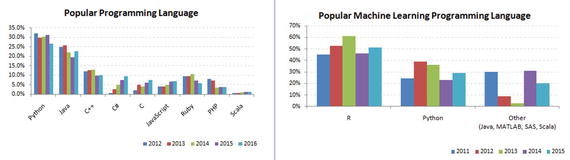
Python was officially born on February 20, 1991, with version number 0.9.0 and has taken a tremendous growth path to become the most popular language for the last 5 years in a row (2012 to 2016). Its application cuts across various areas such as website development, mobile apps development, scientific and numeric computing, desktop GUI, and complex software development. Even though Python is a more general-purpose programming and scripting language, it has been gaining popularity over the past 5 years among data scientists and Machine Learning engineers. See Figure 1-1.
A434293_1_En_1_Fig1_HTML.jpg
Figure 1-1. Popular Coding Language (Source: codeeval.com) and Popular Machine Learning Programming Language (Source:KDD poll)

There are well-designed development environments such as IPython Notebook and Spyder that allow for a quick introspection of the data and enable developing of machine learning models interactively.

Powerful modules such as NumPy and Pandas exist for the efficient use of numeric data. Scientific computing is made easy with SciPy package. A number of primary machine learning algorithms have been efficiently implemented in scikit-learn (also known as sklearn). HadooPy, PySpark provides seamless work experience with big data technology stacks. Cython and Numba modules allow executing Python code in par with the speed of C code. Modules such as nosetest emphasize high-quality, continuous integration tests, and automatic deployment.

Combining all of the above has made many machine learning engineers embrace Python as the choice of language to explore data, identify patterns, and build and deploy models to the production environment. Most importantly the business-friendly licenses for various key Python packages are encouraging the collaboration of businesses and the open source community for the benefit of both worlds. Overall the Python programming ecosystem allows for quick results and happy programmers. We have been seeing the trend of developers being part of the open source community to contribute to the bug fixes and new algorithms for the use by the global community, at the same time protecting the core IP of the respective company they work for.

Python 2.7.x or Python 3.4.x?

Python 3.4.x is the latest version and comes with nicer, consistent functionalities! However, there is very limited third-party module support for it, and this will be the trend for at least a couple of more years. However, all major frameworks still run on version 2.7.x and are likely to continue to do so for a significant amount of time. Therefore, it is advised to start with Python 2, for the fact that it is the most widely used version for building machine learning systems as of today.

For an in-depth analysis of the differences between Python 2 vs. 3, you can refer to Wiki.python.org ( https://wiki.python.org/moin/Python2orPython3v ), which says that there are benefits to each.

I recommend Anaconda (Python distribution), which is BSD licensed and gives you permission to use it commercially and for redistribution. It has around 270 packages including the most important ones for most scientific applications, data analysis, and machine learning such as NumPy, SciPy, Pandas, IPython, matplotlib, and scikit-learn. It also provides a superior environment tool conda that allows you to easily switch between environments, even between Python 2 and 3 (if required). It is also updated very quickly as soon as a new version of a package is released and you can just use conda update <packagename> to update it.

You can download the latest version of Anaconda from their official website at https://www.continuum.io/downloads and follow the installation instructions.

Windows Installation

  • Download the installer depending on your system configuration (32 or 64 bit).

  • Double-click the .exe file to install Anaconda and follow the installation wizard on your screen.

OSX Installation

For Mac OS, you can install either through a graphical installer or from a command line.

Graphical Installer

  • Download the graphical installer.

  • Double-click the downloaded .pkg file and follow the installation wizard instructions on your screen.

Or

Command-Line Installer

  • Download the command-line installer.

  • In your terminal window type one of the below and follow the instructions: bash <Anaconda2-x.x.x-MacOSX-x86_64.sh>.

Linux Installation

  • Download the installer depending on your system configuration (32 or 64 bit).

  • In your terminal window type one of the below and follow the instructions: bash Anaconda2-x.x.x-Linux-x86_xx.sh.

Python from Official Website

For some reason if you don’t want to go with the Anaconda build pack, alternatively you can go to Python’s official website https://www.python.org/downloads/ and browse to the appropriate OS section and download the installer. Note that OSX and most of the Linux come with preinstalled Python so there is no need of additional configuring.

Setting up PATH for Windows: When you run the installer make sure to check the “Add Python to PATH option.” This will allow us to invoke the Python interpreter from any directory.

If you miss ticking “Add Python to PATH option,” follow these instructions:

  • Right-click on “My computer.”

  • Click “Properties.”

  • Click “Advanced system settings” in the side panel.

  • Click “Environment Variables.”

  • Click the “New” below system variables.

  • For the name, enter pythonexe (or anything you want).

  • For the value, enter the path to your Python (example: C:\Python32\).

  • Now edit the Path variable (in the system part) and add %pythonexe%; to the end of what’s already there.

Running Python

From the command line , type “Python” to open the interactive interpreter.

A Python script can be executed at the command line using the syntax here:

python <scriptname.py>

All the code used in this book are available as IPython Notebook (now known as the Jupyter Notebook), it is an interactive computational environment, in which you can combine code execution, rich text, mathematics, plots and rich media. You can launch the Jupyter Notebook by clicking on the icon installed by Anaconda in the start menu (Windows) or by typing ‘jupyter notebook’ in a terminal (cmd on Windows). Then browse for the relevant IPython Notebook file that you would like to paly with.

Note that the codes can break with change is package version, hence for reproducibility, I have shared my package version numbers, please refer Module_Versions IPython Notebook.

Key Concepts

There are a couple of fundamental concepts in Python, and understanding these are essential for a beginner to get started. A brief look at these concepts is to follow.

Python Identifiers

As the name suggests, identifiers help us to differentiate one entity from another. Python entities such as class, functions, and variables are called identifiers.

  • It can be a combination of upper- or lowercase letters (a to z or A to Z).

  • It can be any digits (0 to 9) or an underscore (_).

  • The general rules to be followed for writing identifiers in Python.

  • It cannot start with a digit. For example, 1variable is not valid, whereas variable1 is valid.

  • Python reserved keywords (refer to Table 1-1) cannot be used as identifiers.

    Table 1-1. Python keywords

    FALSE

    Class

    Finally

    Is

    return

    None

    Continue

    For

    Lambda

    try

    TRUE

    Def

    From

    nonlocal

    while

    And

    Del

    Global

    Not

    with

    As

    Elif

    If

    Or

    yield

    Assert

    Else

    Import

    Pass


    Break

    Except

    In

    Raise

     
  • Except for underscore (_), special symbols like !, @, #, $, % etc cannot be part of the identifiers.

Keywords

Table 1-1 lists the set of reserved words used in Python to define the syntax and structure of the language. Keywords are case sensitive, and all the keywords are in lowercase except True, False, and None.

My First Python Program

Launch the Python interactive on the command prompt, and then type the following text and press Enter.

>>> print "Hello, Python World!"

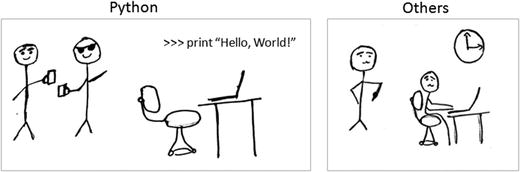
If you are running Python 2.7.x from the Anaconda build pack, then you can also use the print statement with parentheses as in print (“Hello, Python World!”), which would produce the following result: Hello, Python World! See Figure 1-2.
A434293_1_En_1_Fig2_HTML.jpg
Figure 1-2. Python vs. Others

Code Blocks (Indentation & Suites)

It is very important to understand how to write code blocks in Python. Let’s look at two key concepts around code blocks.

Indentation

One of the most unique features of Python is its use of indentation to mark blocks of code. Each line of code must be indented by the same amount to denote a block of code in Python. Unlike most other programming languages, indentation is not used to help make the code look pretty. Indentation is required to indicate which block of code a code or statement belongs to.

Suites

A collection of individual statements that makes a single code block are called suites in Python. A header line followed by a suite are required for compound or complex statements such as if, while, def, and class (we will understand each of these in details in the later sections). Header lines begin with a keyword, and terminate with a colon (:) and are followed by one or more lines that make up the suite. See Listings 1-1 and 1-2.

Listing 1-1. Example of correct indentation
# Correct indentation
print ("Programming is an important skill for Data Science")
print ("Statistics is a important skill for Data Science")
print ("Business domain knowledge is a important skill for Data Science")


# Correct indentation, note that if statement here is an example of suites
x = 1
if x == 1:
    print ('x has a value of 1')
else:
    print ('x does NOT have a value of 1')
Listing 1-2. Example of incorrect indentation
# incorrect indentation, program will generate a syntax error
# due to the space character inserted at the beginning of second line
print ("Programming is an important skill for Data Science")
 print ("Statistics is a important skill for Data Science")
print ("Business domain knowledge is a important skill for Data Science")
3
# incorrect indentation, program will generate a syntax error
# due to the wrong indentation in the else statement
x = 1
if x == 1:
    print ('x has a value of 1')
else:
 print ('x does NOT have a value of 1')

Basic Object Types

According to the Python data model reference, objects are Python’s notion for data. All data in a Python program is represented by objects or by relations between objects. In a sense, and in conformance to Von Neumann’s model of a “stored program computer,” code is also represented by objects.Every object has an identity, a type, and a value. See Table 1-2 and Listing 1-3.

Table 1-2. Python object types

Type

Examples

Comments

None

None

# singleton null object

Boolean

True, False


Integer

-1, 0, 1, sys.maxint


Long

1L, 9787L


Float

3.141592654


inf, float(‘inf’)

# infinity


-inf

# neg infinity


nan, float(‘nan’)

# not a number

Complex

2+8j

# note use of j

String

‘this is a string’, “also me”

# use single or double quote


r‘raw string’, b‘ASCII string’


u‘unicode string’


Tuple

empty = ()

# empty tuple


(1, True, ‘ML’)

# immutable list or unalterable list

List

empty = []

empty list


[1, True, ‘ML’]

# mutable list or alterable list

Set

empty = set()

# empty set


set(1, True, ‘ML’)

# mutable or alterable

dictionary

empty = {}

{‘1’:‘A’, ‘2’:‘AA’, True = 1, False = 0}

# mutable object or alterable object

File

f = open(‘filename’, ‘rb’)

 
Listing 1-3. Code For Basic Object Types
none = None # singleton null object
boolean = bool(True)
integer = 1
Long = 3.14


# float
Float = 3.14
Float_inf = float('inf')
Float_nan = float('nan')


# complex object type, note the usage of letter j
Complex = 2+8j


# string can be enclosed in single or double quote
string = 'this is a string'
me_also_string = "also me"


List = [1, True, 'ML'] # Values can be changed

Tuple = (1, True, 'ML') # Values can not be changed

Set = set([1,2,2,2,3,4,5,5]) # Duplicates will not be stored

# Use a dictionary when you have a set of unique keys that map to values
Dictionary = {'a':'A', 2:'AA', True:1, False:0}


# lets print the object type and the value
print type(none), none
print type(boolean), boolean
print type(integer), integer
print type(Long), Long
print type(Float), Float
print type(Float_inf), Float_inf
print type(Float_nan), Float_nan
print type(Complex), Complex
print type(string), string
print type(me_also_string), me_also_string
print type(Tuple), Tuple
print type(List), List
print type(Set), Set
print type(Dictionary), Dictionary


----- output ------

<type 'NoneType'> None
<type 'bool'> True
<type 'int'> 1
<type 'float'> 3.14
<type 'float'> 3.14
<type 'float'> inf
<type 'float'> nan
<type 'complex'> (2+8j)
<type 'str'> this is a string
<type 'str'> also me
<type 'tuple'> (1, True, 'ML')
<type 'list'> [1, True, 'ML']
<type 'set'> set([1, 2, 3, 4, 5])
<type 'dict'> {'a': 'A', True: 1, 2: 'AA', False: 0}

When to Use List vs. Tuples vs. Set vs. Dictionary

  • List: Use when you need an ordered sequence of homogenous collections, whose values can be changed later in the program.

  • Tuple: Use when you need an ordered sequence of heterogeneous collections whose values need not be changed later in the program.

  • Set: It is ideal for use when you don’t have to store duplicates and you are not concerned about the order or the items. You just want to know whether a particular value already exists or not.

  • Dictionary: It is ideal for use when you need to relate values with keys, in order to look them up efficiently using a key.

Comments in Python

Single line comment: Any characters followed by the # (hash) and up to the end of the line are considered a part of the comment and the Python interpreter ignores them.

Multiline comments : Any characters between the strings """ (referred as multiline string), that is, one at the beginning and end of your comments will be ignored by the Python interpreter. See Listing 1-4.

Listing 1-4. Example code for comments
# This is a single line comment in Python
print "Hello Python World" # This is also a single line comment in Python


""" This is an example of a multi line
comment that runs into multiple lines.
Everything that is in between is considered as comments
"""

Multiline Statement

Python’s oblique line continuation inside parentheses, brackets, and braces is the favorite way of casing longer lines. Using backslash to indicate line continuation makes readability better; however if needed you can add an extra pair of parentheses around the expression. It is important to correctly indent the continued line of your code. Note that the preferred place to break around the binary operator is after the operator, and not before it. See Listing 1-5.

Listing 1-5. Example code for multiline statements
# Example of implicit line continuation
x = ('1' + '2' +
    '3' + '4')


# Example of explicit line continuation
y = '1' + '2' + \
    '11' + '12'


weekdays = ['Monday', 'Tuesday', 'Wednesday',
'Thursday', 'Friday']


weekend = {'Saturday',
           'Sunday'}


print ('x has a value of', x)
print ('y has a value of', y)
print days
print weekend


------ output -------
('x has a value of', '1234')
('y has a value of', '1234')
['Monday', 'Tuesday', 'Wednesday', 'Thursday', 'Friday']
set(['Sunday', 'Saturday'])

Multiple Statements on a Single Line

Python also allows multiple statements on a single line through usage of the semicolon (;), given that the statement does not start a new code block. See Listing 1-6.

Listing 1-6. Code example for multistatements on a single line
import os; x = 'Hello'; print x

Basic Operators

In Python, operators are the special symbols that can manipulate the value of operands. For example, let’s consider the expression 1 + 2 = 3. Here, 1 and 2 are called operands, which are the value on which operators operate and the symbol + is called an operator.

Python language supports the following types of operators .

  • Arithmetic Operators

  • Comparison or Relational Operators

  • Assignment Operators

  • Bitwise Operators

  • Logical Operators

  • Membership Operators

  • Identity Operators

Let’s learn all operators through examples one by one.

Arithmetic Operators

Arithmetic operators are useful for performing mathematical operations on numbers such as addition, subtraction, multiplication, division, etc. See Table 1-3 and then Listing 1-7.

Table 1-3. Arithmetic operators

Operator

Description

Example

+

Addition

x + y = 30

-

Subtraction

x – y = -10

*

Multiplication

x * y = 200

/

Division

y / x = 2

%

Modulus

y % x = 0

** Exponent

Exponentiation

x**b =10 to the power 20

//

Floor Division – Integer division rounded toward minus infinity

9//2 = 4 and 9.0//2.0 = 4.0, -11//3 = -4, -11.0/

Listing 1-7. Example code for arithmetic operators
# Variable x holds 10 and variable y holds 5
x = 10
y = 5


# Addition
print "Addition, x(10) + y(5) = ", x + y


# Subtraction
print "Subtraction, x(10) - y(5) = ", x - y


# Multiplication
print "Multiplication, x(10) * y(5) = ", x * y


# Division
print "Division, x(10) / y(5) = ",x / y


# Modulus
print "Modulus, x(10) % y(5) = ", x % y


# Exponent
print "Exponent, x(10)**y(5) = ", x**y


# Integer division rounded towards minus infinity
print "Floor Division, x(10)//y(5) = ", x//y


-------- output --------

Addition, x(10) + y(5) =  15
Subtraction, x(10) - y(5) =  5
Multiplication, x(10) * y(5) =  50
Divions, x(10) / y(5) =  2
Modulus, x(10) % y(5) =  0
Exponent, x(10)**y(5) =  100000
Floor Division, x(10)//y(5) =  2

Comparison or Relational Operators

As the name suggests the comparison or relational operators are useful to compare values. It would return True or False as a result for a given condition. See Table 1-4 and Listing 1-8.

Table 1-4. Comparison or Relational operators

Operator

Description

Example

==

The condition becomes True, if the values of two operands are equal.

(x == y) is not true.

!=

The condition becomes True, if the values of two operands are not equal.


<>

The condition becomes True, if values of two operands are not equal.

(x<>y) is true. This is similar to != operator.

>

The condition becomes True, if the value of left operand is greater than the value of right operand.

(x>y) is not true.

<

The condition becomes True, if the value of left operand is less than the value of right operand.

(x<y) is true.

>=

The condition becomes True, if the value of left operand is greater than or equal to the value of right operand.

(x>= y) is not true.

<=

The condition becomes True, if the value of left operand is less than or equal to the value of right operand.

(x<= y) is true.

Listing 1-8. Example code for comparision/relational operators
# Variable x holds 10 and variable y holds 5
x = 10
y = 5


# Equal check operation
print "Equal check, x(10) == y(5) ", x == y


# Not Equal check operation
print "Not Equal check, x(10) != y(5) ", x != y


# Not Equal check operation
print "Not Equal check, x(10) <>y(5) ", x<>y


# Less than check operation
print "Less than check, x(10) <y(5) ", x<y


# Greater check operation
print "Greater than check, x(10) >y(5) ", x>y


# Less than or equal check operation
print "Less than or equal to check, x(10) <= y(5) ", x<= y


# Greater than or equal to check operation
print "Greater than or equal to check, x(10) >= y(5) ", x>= y


-------- output --------
Equal check, x(10) == y(5)  False
Not Equal check, x(10) != y(5)  True
Not Equal check, x(10) <>y(5)  True
Less than check, x(10) <y(5)  False
Greater than check, x(10) >y(5)  True
Less than or equal to check, x(10) <= y(5)  False
Greater than or equal to check, x(10) >= y(5)  True

Assignment Operators

In Python, assignment operators are used for assigning values to variables. For example, consider x = 5; it is a simple assignment operator that assigns the numeric value 5, which is on the right side of the operator onto the variable x on the left side of operator. There is a range of compound operators in Python like x += 5 that add to the variable and later assign the same. It is as good as x = x + 5. See Table 1-5 and Listing 1-9.

Table 1-5. Assignment operators

Operator

Description

Example

=

Assigns values from right side operands to left side operand.

z = x + y assigns value of x + y into z

+= Add AND

It adds right operand to the left operand and assigns the result to left operand.

z += x is equivalent to z = z + x

-= Subtract AND

It subtracts right operand from the left operand and assigns the result to left operand.

z -= x is equivalent to z = z - x

*= Multiply AND

It multiplies right operand with the left operand and assigns the result to left operand.

z *= x is equivalent to z = z * x

/= Divide AND

It divides left operand with the right operand and assigns the result to left operand.

z /= x is equivalent to z = z/ xz /= x is equivalent to z = z / x

%= Modulus AND

It takes modulus using two operands and assigns the result to left operand.

z %= x is equivalent to z = z % x

**= Exponent AND

Performs exponential (power) calculation on operators and assigns value to the left operand.

z **= x is equivalent to z = z ** x

//= Floor Division

It performs floor division on operators and assigns value to the left operand.

z //= x is equivalent to z = z// x

Listing 1-9. Example code for assignment operators
# Variable x holds 10 and variable y holds 5
x = 5
y = 10


x += y
print "Value of a post x+=y is ", x


x *= y
print "Value of a post x*=y is ", x


x /= y
print "Value of a post x/=y is ", x


x %= y
print "Value of a post x%=y is ", x


x **= y
print "Value of x post x**=y is ", x


x //= y
print "Value of a post x//=y is ", x


-------- output --------

Value of a post x+=y is  15
Value of a post x*=y is  150
Value of a post x/=y is  15
Value of a post x%=y is  5
Value of a post x**=y is  9765625
Value of a post x//=y  is  976562

Bitwise Operators

As you might be aware, everything in a computer is represented by bits, that is, a series of 0’s (zero) and 1’s (one). Bitwise operators enable us to directly operate or manipulate bits. Let’s understand the basic bitwise operations. One of the key usages of bitwise operators is for parsing hexadecimal colors.

Bitwise operators are known to be confusing for newbies to Python programming, so don’t be anxious if you don’t understand usability at first. The fact is that you aren’t really going to see bitwise operators in your everyday machine learning programming. However, it is good to be aware about these operators.

For example let’s assume that x = 10 (in binary 0000 1010) and y = 4 (in binary 0000 0100). See Table 1-6 and Listing 1-10.

Table 1-6. Bitwise operators

Operator

Description

Example

& Binary AND

This operator copies a bit to the result if it exists in both operands.

(x&y) (means 0000 0000)

| Binary OR

This operator copies a bit if it exists in either operand.

(x | y) = 14 (means 0000 1110)

^ Binary XOR

This operator copies the bit if it is set in one operand but not both.

(x ^ y) = 14 (means 0000 1110)

∼ Binary Ones Complement

This operator is unary and has the effect of ‘flipping’ bits.

(∼x ) = -11 (means 1111 0101)

<< Binary Left Shift

The left operands value is moved left by the number of bits specified by the right operand.

x<< 2= 42 (means 0010 1000)

>> Binary Right Shift

The left operands value is moved right by the number of bits specified by the right operand.

x>> 2 = 2 (means 0000 0010)

Listing 1-10. Example code for bitwise operators
# Basic six bitwise operations
# Let x = 10 (in binary0000 1010) and y = 4 (in binary0000 0100)
x = 10
y = 4


print x >> y  # Right Shift
print x << y  # Left Shift
print x & y   # Bitwise AND
print x | y   # Bitwise OR
print x ^ y # Bitwise XOR
print ∼x    # Bitwise NOT


-------- output --------

0
160
0
14
14
-11

Logical Operators

The AND, OR, NOT operators are called logical operators. These are useful to check two variables against given condition and the result will be True or False appropriately. See Table 1-7 and Listing 1-11.

Table 1-7. Logical operators

Operator

Description

Example

and Logical AND

If both the operands are true then condition becomes true.

(var1 and var2) is true.

or Logical OR

If any of the two operands are non-zero then condition becomes true.

(var1 or var2) is true.

not Logical NOT

Used to reverse the logical state of its operand.

Not (var1 and var2) is false.

Listing 1-11. Example code for logical operators
var1 = True
var2 = False
print('var1 and var2 is',var1and var2)
print('var1 or var2 is',var1 or var2)
print('not var1 is',not var1)


-------- output --------

('var1 and var2 is', False)
('var1 or var2 is', True)
('not var1 is', False)

Membership Operators

Membership operators are useful to test if a value is found in a sequence, that is, string, list, tuple, set, or dictionary. There are two membership operators in Python, ‘in’ and ‘not in’. Note that we can only test for presence of key (and not the value) in case of a dictionary. See Table 1-8 and Listing 1-12.

Table 1-8. Membership operators

Operator

Description

Example

In

Results to True if a value is in the specified sequence and False otherwise.

var1 in var2

not in

Results to True, if a value is not in the specified sequence and False otherwise.

var1 not in var2

Listing 1-12. Example code for membership operators
var1 = 'Hello world'          # string
var1 = {1:'a',2:'b'}# dictionary
print('H' in var1)
print('hello' not in var2)
print(1 in var2)
print('a' in var2)


-------- output --------
True
True
True
False

Identity Operators

Identity operators are useful to test if two variables are present on the same part of the memory. There are two identity operators in Python, ‘is’ and ‘is not’. Note that two variables having equal values do not imply they are identical. See Table 1-9 and Listing 1-13.

Table 1-9. Identity operators

Operator

Description

Example

Is

Results to True, if the variables on either side of the operator point to the same object and False otherwise.

var1 is var2

is not

Results to False, if the variables on either side of the operator point to the same object and True otherwise.

Var1 is not var2

Listing 1-13. Example code for identity operators
var1 = 5
var1 = 5
var2 = 'Hello'
var2 = 'Hello'
var3 = [1,2,3]
var3 = [1,2,3]
print(var1 is not var1)
print(var2 is var2)
print(var3 is var3)
-------- output --------
False
True
False

Control Structure

A control structure is the fundamental choice or decision-making process in programming. It is a chunk of code that analyzes values of variables and decides a direction to go based on a given condition. In Python there are mainly two types of control structures: (1) selection and (2) iteration.

Selection

Selection statements allow programmers to check a condition and based on the result will perform different actions. There are two versions of this useful construct: (1) if and (2) if…else. See Listings 1-14, 1-15, and 1-16.

Listing 1-14. Example code for a simple ‘if’ statement
var = -1
if var < 0:
    print var
    print("the value of var is negative")


# If there is only a signle cluse then it may go on the same line as the header statement
if ( var  == -1 ) : print "the value of var is negative"
Listing 1-15. Example code for ‘if else’ statement
var = 1

if var < 0:
    print "the value of var is negative"
    print var
else:
    print "the value of var is positive"
    print var
Listing 1-16. Example code for nested if else statements
Score = 95

if score >= 99:
    print('A')
elif score >=75:
    print('B')
elif score >= 60:
    print('C')
elif score >= 35:
    print('D')
else:
    print('F')

Iteration

A loop control statement enables us to execute a single or a set of programming statements multiple times until a given condition is satisfied. Python provides two essential looping statements: (1) for (2) while statement.

For loop: It allows us to execute code block for a specific number of times or against a specific condition until it is satisfied. See Listing 1-17.

Listing 1-17. Example codes for a ‘for loop’ statement
# First Example
print "First Example"
for item in [1,2,3,4,5]:
    print 'item :', item


# Second Example
print "Second Example"
letters = ['A', 'B', 'C']
for letter in letters:
    print ' First loop letter :', letter


# Third Example - Iterating by sequency index
print "Third Example"
for index in range(len(letters)):
    print 'First loop letter :', letters[index]


# Fourth Example - Using else statement
print "Fourth Example"
for item in [1,2,3,4,5]:
    print 'item :', item
else:
    print 'looping over item complete!'
----- output ------
First Example
item : 1
item : 2
item : 3
item : 4
item : 5
Second Example
First loop letter : A
First loop letter : B
First loop letter : C
Third Example
First loop letter : A
First loop letter : B
First loop letter : C
Fourth Example
item : 1
item : 2
item : 3
item : 4
item : 5
looping over item complete!

While loop: The while statement repeats a set of code until the condition is true. See Listing 1-18.

Listing 1-18. Example code for while loop statement
count = 0
while (count <3):
    print 'The count is:', count
    count = count + 1
Caution

If a condition never becomes FALSE, a loop becomes an infinite loop.

An else statement can be used with a while loop and the else will be executed when the condition becomes false. See Listing 1-19.

Listing 1-19. example code for a ‘while with a else’ statement
count = 0
while count <3:
    print count, " is  less than 5"
    count = count + 1
else:
    print count, " is not less than 5"

Lists

Python’s lists are the most flexible data type. It can be created by writing a list of comma-separated values between square brackets. Note that that the items in the list need not be of the same data type. See Table 1-10; and Listings 1-20, 1-21, 1-22, 1-23, and 1-24.

Table 1-10. Python list operations

Description

Python Expression

Example

Results

Creating a list of items

[item1, item2, …]

list = [‘a’,‘b’,‘c’,‘d’]

[‘a’,‘b’,‘c’,‘d’]

Accessing items in list

list[index]

list = [‘a’,‘b’,‘c’,‘d’]

list[2]

c

Length

len(list)

len([1, 2, 3])

3

Concatenation

list_1 + list_2

[1, 2, 3] + [4, 5, 6]

[1, 2, 3, 4, 5, 6]

Repetition

list * int

[‘Hello’] * 3

[‘Hello’, ‘Hello’, ‘Hello’]

Membership

item in list

3 in [1, 2, 3]

TRUE

Iteration

for x in list: print x

for x in [1, 2, 3]: print x,

1 2 3

Count from the right

list[-index]

list = [1,2,3]; list[-2]

2

Slicing fetches sections

list[index:]

list = [1,2,3]; list[1:]

[2,3]

Comparing lists

cmp(list_1, list_2)

print cmp([1,2,3,4], [5,6,7]); print cmp([1,2,3], [5,6,7,8])

1 -1

Return max item

max(list)

max([1,2,3,4,5])

5

Return min item

min(list)

max([1,2,3,4,5])

1

Append object to list

list.append(obj)

[1,2,3,4].append(5)

[1,2,3,4,5]

Count item occurrence

list.count(obj)

[1,1,2,3,4].count(1)

2

Append content of sequence to list

list.extend(seq)

[‘a’, 1].extend([‘b’, 2])

[‘a’, 1, ‘b’, 2]

Return the first index position of item

list.index(obj)

[‘a’, ‘b’,‘c’,1,2,3].index(‘c’)

2

Insert object to list at a desired index

list.insert(index, obj)

[‘a’, ‘b’,‘c’,1,2,3].insert(4, ‘d’)

[‘a’, ‘b’,‘c’,‘d’, 1,2,3]

Remove and return last object from list

list.pop(obj=list[-1])

[‘a’, ‘b’,‘c’,1,2,3].pop() [‘a’, ‘b’,‘c’,1,2,3].pop(2)

3 c

Remove object from list

list.remove(obj)

[‘a’, ‘b’,‘c’,1,2,3].remove(‘c’)

[‘a’, ‘b’, 1,2,3]

Reverse objects of list in place

list.reverse()

[‘a’, ‘b’,‘c’,1,2,3].reverse()

[3,2,1,‘c’,‘b’,‘a’]

Sort objects of list

list.sort()

[‘a’, ‘b’,‘c’,1,2,3].sort() [‘a’, ‘b’,‘c’,1,2,3].sort(reverse = True)

[1,2,3,‘a’, ‘b’,‘c’] [‘c’,‘b’,‘a’,3,2,1]

Listing 1-20. Example code for accessing lists
# Create lists
list_1 = ['Statistics', 'Programming', 2016, 2017, 2018];
list_2 = ['a', 'b', 1, 2, 3, 4, 5, 6, 7 ];


# Accessing values in lists
print "list_1[0]: ", list_1[0]
print "list2_[1:5]: ", list_2[1:5]


---- output ----

list_1[0]:  Statistics
list2_[1:5]:  ['b', 1, 2, 3]
Listing 1-21. Example code for adding new values to lists
print "list_1 values: ", list_1

# Adding new value to list
list_1.append(2019)
print "list_1 values post append: ", list_1
---- output ----
list_1 values:  ['c', 'b', 'a', 3, 2, 1]
list_1 values post append:  ['c', 'b', 'a', 3, 2, 1, 2019]
Listing 1-22. Example code for updating existing values of lists
print "Values of list_1: ", list_1

# Updating existing value of list
print "Index 2 value : ", list_1[2]
list_1[2] = 2015;
print "Index 2's new value : ", list_1[2]


---- output ----

Values of list_1:  ['c', 'b', 'a', 3, 2, 1, 2019]
Index 2 value :  a
Index 2's new value :  2015
Listing 1-23. Example code for deleting a list element
Print "list_1 values: ", list_1

# Deleting list element
del list_1[5];
print "After deleting value at index 2 : ", list_1


---- output ----

list_1 values:  ['c', 'b', 2015, 3, 2, 1, 2019]
After deleting value at index 2 :  ['c', 'b', 2015, 3, 2, 2019]
Listing 1-24. Example code for basic operations on lists
print "Length: ", len(list_1)
print "Concatenation: ", [1,2,3] + [4, 5, 6]
print "Repetition :", ['Hello'] * 4
print "Membership :", 3 in [1,2,3]
print "Iteration :"
for x in [1,2,3]: print x


# Negative sign will count from the right
print "slicing :", list_1[-2]
# If you dont specify the end explicitly, all elements from the specified start index will be printed
print "slicing range: ", list_1[1:]


# Comparing elements of lists
print "Compare two lists: ", cmp([1,2,3, 4], [1,2,3])
print "Max of list: ", max([1,2,3,4,5])
print "Min of list: ", min([1,2,3,4,5])
print "Count number of 1 in list: ", [1,1,2,3,4,5,].count(1)
list_1.extend(list_2)
print "Extended :", list_1
print "Index for Programming : ", list_1.index( 'Programming')
print list_1
print "pop last item in list: ", list_1.pop()
print "pop the item with index 2: ", list_1.pop(2)
list_1.remove('b')
print "removed b from list: ", list_1
list_1.reverse()
print "Reverse: ", list_1
list_1 = ['a', 'b','c',1,2,3]
list_1.sort()
print "Sort ascending: ", list_1
list_1.sort(reverse = True)
print "Sort descending: ", list_1


---- output ----

Length:  5
Concatenation:  [1, 2, 3, 4, 5, 6]
Repetition : ['Hello', 'Hello', 'Hello', 'Hello']
Membership : True
Iteration :
1
2
3
slicing : 2017
slicing range:  ['Programming', 2015, 2017, 2018]
Compare two lists:  1
Max of list:  5
Min of list:  1
Count number of 1 in list:  2
Extended : ['Statistics', 'Programming', 2015, 2017, 2018, 'a', 'b', 1, 2, 3, 4, 5, 6, 7]
Index for Programming :  1
['Statistics', 'Programming', 2015, 2017, 2018, 'a', 'b', 1, 2, 3, 4, 5, 6, 7]
pop last item in list:  7
pop the item with index 2:  2015
removed b from list:  ['Statistics', 'Programming', 2017, 2018, 'a', 1, 2, 3, 4, 5, 6]
Reverse:  [6, 5, 4, 3, 2, 1, 'a', 2018, 2017, 'Programming', 'Statistics']
Sort ascending:  [1, 2, 3, 'a', 'b', 'c']
Sort descending:  ['c', 'b', 'a', 3, 2, 1]

Tuple

A Python tuple is a sequences or series of immutable Python objects very much similar to the lists. However there exist some essential differences between lists and tuples, which are the following. See also Table 1-11; and Listings 1-25, 1-26, 1-27, and 1-28.

  1. Unlike list, the objects of tuples cannot be changed.

  2. Tuples are defined by using parentheses, but lists are defined by square brackets.

Table 1-11. Python Tuple operations

Description

Python Expression

Example

Results

Creating a tuple

(item1, item2, …) () # empty tuple (item1,) # Tuple with one item, note comma is required

tuple = (‘a’,‘b’,‘c’,‘d’,1,2,3) tuple = () tuple = (1,)

(‘a’,‘b’,‘c’,‘d’,1,2,3) () 1

Accessing items in tuple

tuple[index] tuple[start_index:end_index]

tuple = (‘a’,‘b’,‘c’,‘d’,1,2,3) tuple[2] tuple[0:2]

c a, b, c

Deleting a tuple

del tuple_name

del tuple


Length

len(tuple)

len((1, 2, 3))

3

Concatenation

tuple_1 + tuple_2

(1, 2, 3) + (4, 5, 6)

(1, 2, 3, 4, 5, 6)

Repetition

tuple * int

(‘Hello’,) * 4

(‘Hello’, ‘Hello’, ‘Hello’, ‘Hello’)

Membership

item in tuple

3 in (1, 2, 3)

TRUE

Iteration

for x in tuple: print x

for x in (1, 2, 3): print x

1 2 3

Count from the right

tuple[-index]

tuple = (1,2,3); list[-2]

2

Slicing fetches sections

tuple[index:]

tuple = (1,2,3); list[1:]

(2,3)

Comparing lists

cmp(tuple_1, tuple_2)

print cmp((1,2,3,4), (5,6,7)); print cmp((1,2,3), (5,6,7,8))

1 -1

Return max item

max(tuple)

max((1,2,3,4,5))

5

Return min item

min(tuple)

max((1,2,3,4,5))

1

Convert a list to tuple

tuple(seq)

tuple([1,2,3,4])

(1,2,3,4,5)

Listing 1-25. Example code for creating tuple
# Creating a tuple

Tuple = ()
print "Empty Tuple: ", Tuple


Tuple = (1,)
print "Tuple with single item: ", Tuple


Tuple = ('a','b','c','d',1,2,3)
print "Sample Tuple :", Tuple


---- output ----
Empty Tuple:  ()
Tuple with single item:  (1,)
Sample Tuple : ('a', 'b', 'c', 'd', 1, 2, 3)
Listing 1-26. Example code for accessing tuple
# Accessing items in tuple
Tuple = ('a', 'b', 'c', 'd', 1, 2, 3)


print "3rd item of Tuple:", Tuple[2]
print "First 3 items of Tuple", Tuple[0:2]


---- output ----
3rd item of Tuple: c
First 3 items of Tuple ('a', 'b')
Listing 1-27. Example code for deleting tuple
# Deleting tuple

print "Sample Tuple: ", Tuple
del Tuple
print Tuple # Will throw an error message as the tuple does not exist


---- output ----

Sample Tuple:  ('a', 'b', 'c', 'd', 1, 2, 3)
---------------------------------------------------------------------------
NameError                                 Traceback (most recent call last)
<ipython-input-35-6a0deb3cfbcf> in <module>()
      3 print "Sample Tuple: ", Tuple
      4 del Tuple
----> 5 print Tuple # Will throw an error message as the tuple does not exist


NameError: name 'Tuple' is not defined
Listing 1-28. Example code for basic operations on tupe (not exhaustive)
# Basic Tuple operations
Tuple = ('a','b','c','d',1,2,3)


print "Length of Tuple: ", len(Tuple)

Tuple_Concat = Tuple + (7,8,9)
print "Concatinated Tuple: ", Tuple_Concat


print "Repetition: ", (1, 'a',2, 'b') * 3
print "Membership check: ", 3 in (1,2,3)


# Iteration
for x in (1, 2, 3): print x


print "Negative sign will retrieve item from right: ", Tuple_Concat[-2]
print "Sliced Tuple [2:] ", Tuple_Concat[2:]


# Comparing two tuples
print "Comparing tuples (1,2,3) and (1,2,3,4): ", cmp((1,2,3), (1,2,3,4))
print "Comparing tuples (1,2,3,4) and (1,2,3): ", cmp((1,2,3,4), (1,2,3))


# Find max
print "Max of the Tuple (1,2,3,4,5,6,7,8,9,10): ", max((1,2,3,4,5,6,7,8,9,10))
print "Min of the Tuple (1,2,3,4,5,6,7,8,9,10): ", min((1,2,3,4,5,6,7,8,9,10))
print "List [1,2,3,4] converted to tuple: ", type(tuple([1,2,3,4]))


---- output ----

 Length of Tuple:  7
Concatinated Tuple:  ('a', 'b', 'c', 'd', 1, 2, 3, 7, 8, 9)
Repetition:  (1, 'a', 2, 'b', 1, 'a', 2, 'b', 1, 'a', 2, 'b')
Membership check:  True
1
2
3
Negative sign will retrieve item from right:  8
Sliced Tuple [2:]  ('c', 'd', 1, 2, 3, 7, 8, 9)
Comparing tuples (1,2,3) and (1,2,3,4):  -1
Comparing tuples (1,2,3,4) and (1,2,3):  1
Max of the Tuple (1,2,3,4,5,6,7,8,9,10):  10
Min of the Tuple (1,2,3,4,5,6,7,8,9,10):  1
List [1,2,3,4] converted to tuple:  <type 'tuple'>

Sets

As the name implies, sets are the implementations of mathematical sets. Three key characteristic of set are the following.

  1. The collection of items is unordered.

  2. No duplicate items will be stored, which means that each item is unique.

  3. Sets are mutable, which means the items of it can be changed.

An item can be added or removed from sets. Mathematical set operations such as union, intersection, etc., can be performed on Python sets. See Table 1-12 and Listing 1-29.

Table 1-12. Python set operations

Description

Python Expression

Example

Results

Creating a set.

set{item1, item2, …} set() # empty set

languages = set([‘Python’, ‘R’, ‘SAS’, ‘Julia’])

set([‘SAS’, ‘Python’, ‘R’, ‘Julia’])

Add an item/element to a set.

add()

languages.add(‘SPSS’)

set([‘SAS’, ‘SPSS’, ‘Python’, ‘R’, ‘Julia’])

Remove all items/elements from a set.

clear()

languages.clear()

set([])

Return a copy of a set.

copy()

lang = languages.copy() print lang

set([‘SAS’, ‘SPSS’, ‘Python’, ‘R’, ‘Julia’])

Remove an item/element from set if it is a member. (Do nothing if the element is not in set).

discard()

languages = set([‘C’, ‘Java’, ‘Python’, ‘Data Science’, ‘Julia’, ‘SPSS’, ‘AI’, ‘R’, ‘SAS’, ‘Machine Learning’]) languages.discard(‘AI’)

set([‘C’, ‘Java’, ‘Python’, ‘Data Science’, ‘Julia’, ‘SPSS’, ‘R’, ‘SAS’, ‘Machine Learning’])

Remove an item/element from a set. If the element is not a member, raise a KeyError.

remove()

languages = set([‘C’, ‘Java’, ‘Python’, ‘Data Science’, ‘Julia’, ‘SPSS’, ‘AI’, ‘R’, ‘SAS’, ‘Machine Learning’]) languages.remove(‘AI’)

set([‘C’, ‘Java’, ‘Python’, ‘Data Science’, ‘Julia’, ‘SPSS’, ‘R’, ‘SAS’, ‘Machine Learning’])

Remove and return an arbitrary set element. RaiseKeyError if the set is empty.

pop()

languages = set([‘C’, ‘Java’, ‘Python’, ‘Data Science’, ‘Julia’, ‘SPSS’, ‘AI’, ‘R’, ‘SAS’, ‘Machine Learning’]) print “Removed:”, (languages.pop()) print(languages)

Removed: C set([‘Java’, ‘Python’, ‘Data Science’, ‘Julia’, ‘SPSS’, ‘R’, ‘SAS’, ‘Machine Learning’])

Return the difference of two or more sets as a new set.

difference()

# initialize A and B A = {1, 2, 3, 4, 5} B = {4, 5, 6, 7, 8} A.difference(B)

{1, 2, 3}

Remove all item/elements of another set from this set.

difference_update()

# initialize A and B A = {1, 2, 3, 4, 5} B = {4, 5, 6, 7, 8} A.difference_update(B) print A

set([1, 2, 3])

Return the intersection of two sets as a new set.

intersection()

# initialize A and B A = {1, 2, 3, 4, 5} B = {4, 5, 6, 7, 8} A.intersection(B)

{4, 5}

Update the set with the intersection of itself and another.

intersection_update()

# initialize A and B A = {1, 2, 3, 4, 5} B = {4, 5, 6, 7, 8} A.intersection_update B print A

set([4, 5])

Return True if two sets have a null intersection.

isdisjoint()

# initialize A and B A = {1, 2, 3, 4, 5} B = {4, 5, 6, 7, 8} A.isdisjoint(B)

FALSE

Return True if another set contains this set.

issubset()

# initialize A and B A = {1, 2, 3, 4, 5} B = {4, 5, 6, 7, 8} print A.issubset(B)

FALSE

Return True if this set contains another set.

issuperset()

# initialize A and B A = {1, 2, 3, 4, 5} B = {4, 5, 6, 7, 8} print A.issuperset(B)

FALSE

Return the symmetric difference of two sets as a new set.

symmetric_difference()

# initialize A and B A = {1, 2, 3, 4, 5} B = {4, 5, 6, 7, 8} A. symmetric_difference(B)

{1, 2, 3, 6, 7, 8}

Update a set with the symmetric difference of itself and another.

symmetric_difference_update()

# initialize A and B A = {1, 2, 3, 4, 5} B = {4, 5, 6, 7, 8} A.symmetric_difference(B) print A A.symmetric_difference_update(B) print A

set([1, 2, 3, 6, 7, 8])

Return the union of sets in a new set.

union()

# initialize A and B A = {1, 2, 3, 4, 5} B = {4, 5, 6, 7, 8} A.union(B) print A

set([1, 2, 3, 4, 5])

Update a set with the union of itself and others.

update()

# initialize A and B A = {1, 2, 3, 4, 5} B = {4, 5, 6, 7, 8} A.update(B) print A

set([1, 2, 3, 4, 5, 6, 7, 8])

Return the length (the number of items) in the set.

len()

A = {1, 2, 3, 4, 5} len(A)

5

Return the largest item in the set.

max()

A = {1, 2, 3, 4, 5} max(A)

1

Return the smallest item in the set.

min()

A = {1, 2, 3, 4, 5} min(A)

5

Return a new sorted list from elements in the set. Does not sort the set.

sorted()

A = {1, 2, 3, 4, 5} sorted(A)

[4, 5, 6, 7, 8]

Return the sum of all items/elements in the set.

sum()

A = {1, 2, 3, 4, 5} sum(A)

15

Listing 1-29. Example code for creating sets
# Creating an empty set
languages = set()
print type(languages), languages


languages = {'Python', 'R', 'SAS', 'Julia'}
print type(languages), languages


# set of mixed datatypes
mixed_set = {"Python", (2.7, 3.4)}
print type(mixed_set), languages
---- output ----
<type 'set'> set([])
<type 'set'> set(['SAS', 'Python', 'R', 'Julia'])

Accessing Set Elements

See Listing 1-30.

Listing 1-30. Example code for accessing set elements
print list(languages)[0]
print list(languages)[0:3]
---- output ----
C
['C', 'Java', 'Python']

Changing a Set in Python

Although sets are mutable, indexing on them will have no meaning due to the fact that they are unordered. So sets do not support accessing or changing an item/element using indexing or slicing. The add() method can be used to add a single element and the update() method for adding multiple elements. Note that the update() method can take the argument in the format of tuples, lists, strings, or other sets. However, in all cases the duplicates are ignored. See Listing 1-31.

Listing 1-31. Example code for changing set elements
# initialize a set
languages = {'Python', 'R'}
print(languages)


# add an element
languages.add('SAS')
print(languages)

# add multiple elements
languages.update(['Julia','SPSS'])
print(languages)


# add list and set
languages.update(['Java','C'], {'Machine Learning','Data Science','AI'})
print(languages)
---- output ----
set(['Python', 'R'])
set(['Python', 'SAS', 'R'])
set(['Python', 'SAS', 'R', 'Julia', 'SPSS'])
set(['C', 'Java', 'Python', 'Data Science', 'Julia', 'SPSS', 'AI', 'R', 'SAS', 'Machine Learning'])

Removing Items from Set

The discard() or remove() method can be used to remove a particular item from a set. The fundamental difference between discard() and remove() is that the first do not take any action if the item does not exist in the set, whereas remove() will raise an error in such a scenario. See Listing 1-32.

Listing 1-32. Example code for removing items from set
# remove an element
languages.remove('AI')
print(languages)


# discard an element, although AI has already been removed discard will not throw an error
languages.discard('AI')
print(languages)


# Pop will remove a random item from set
print "Removed:", (languages.pop()), "from", languages


---- output ----
set(['C', 'Java', 'Python', 'Data Science', 'Julia', 'SPSS', 'R', 'SAS', 'Machine Learning'])


Removed: C from set(['Java', 'Python', 'Data Science', 'Julia', 'SPSS', 'R', 'SAS', 'Machine Learning'])

Set Operations

As discussed earlier, sets allow us to use mathematical set operations such as union, intersection, difference, and symmetric difference. We can achieve this with the help of operators or methods.

Set Union

A union of two sets A and B will result in a set of all items combined from both sets. There are two ways to perform union operation: 1) Using | operator 2) using union() method. See Listing 1-33.

Listing 1-33. Example code for set union operation
# initialize A and B
A = {1, 2, 3, 4, 5}
B = {4, 5, 6, 7, 8}


# use | operator
print "Union of A | B", A|B


# alternative we can use union()
A.union(B)
---- output ----
Union of A | B set([1, 2, 3, 4, 5, 6, 7, 8])
Set Intersection

An intersection of two sets A and B will result in a set of items that exists or is common in both sets. There are two ways to achieve intersection operation: 1) using & operator 2) using intersection() method. See Listing 1-34.

Listing 1-34. Example code for set intersesction operation
# use & operator
print "Intersection of A & B", A & B


# alternative we can use intersection()
print A.intersection(B)
---- output ----
Intersection of A & B set([4, 5])
Set Difference

The difference of two sets A and B (i.e., A - B) will result in a set of items that exists only in A and not in B. There are two ways to perform a difference operation: 1) using ‘–’ operator, and 2) using difference() method. See Listing 1-35.

Listing 1-35. Example code for set difference operation
# use - operator on A
print "Difference of A - B", A - B


# alternative we can use difference()
print A.difference(B)
---- output ----
Difference of A - B set([1, 2, 3])
Set Symmetric Difference

A symmetric difference of two sets A and B is a set of items from both sets that are not common. There are two ways to perform a symmetric difference: 1) using ^ operator, and 2) using symmetric_difference()method . See Listing 1-36.

Listing 1-36. Example code for set symmetric difference operation
# use ^ operator
print "Symmetric difference of A ^ B", A ^ B


# alternative we can use symmetric_difference()
A.symmetric_difference(B)
---- output ----
Symmetric difference of A ^ B set([1, 2, 3, 6, 7, 8])
Basic Operations

Let’s look at fundamental operations that can be performed on Python sets. See Listing 1-37.

Listing 1-37. Example code for basic operations on sets
# Return a shallow copy of a set
lang = languages.copy()
print languages
print lang


# initialize A and B
A = {1, 2, 3, 4, 5}
B = {4, 5, 6, 7, 8}


print A.isdisjoint(B) # True, when two sets have a null intersection
print A.issubset(B) # True, when another set contains this set
print A.issuperset(B) # True, when this set contains another set
sorted(B) # Return a new sorted list
print sum(A) # Retrun the sum of all items
print len(A) # Return the length
print min(A) # Return the largestitem
print max(A) # Return the smallest item
---- output ----
set(['C', 'Java', 'Python', 'Data Science', 'Julia', 'SPSS', 'AI', 'R', 'SAS', 'Machine Learning'])
False
False
False
15
5
1
5

Dictionary

The Python dictionary will have a key and value pair for each item that is part of it. The key and value should be enclosed in curly braces. Each key and value is separated using a colon (:), and further each item is separated by commas (,). Note that the keys are unique within a specific dictionary and must be immutable data types such as strings, numbers, or tuples, whereas values can take duplicate data of any type. See Table 1-13; and Listings 1-38, 1-39, 1-40, 1-41, and 1-42.

Table 1-13. Python Dictionary operations

Description

Python Expression

Example

Results

Creating a dictionary

dict = {‘key1’:‘value1’, ‘key2’:‘value2’…..}

dict = {‘Name’: ‘Jivin’, ‘Age’: 6, ‘Class’: ‘First’}

{‘Name’: ‘Jivin’, ‘Age’: 6, ‘Class’: ‘First’}

Accessing items in dictionary

dict [‘key’]

dict[‘Name’]

dict[‘Name’]: Jivin

Deleting a dictionary

del dict[‘key’]; dict.clear(); del dict;

del dict[‘Name’]; dict.clear(); del dict;

{‘Age’:6, ‘Class’:‘First’}; {};

Updating a dictionary

dict[‘key’] = new_value

dict[‘Age’] = 6.5

dict[‘Age’]: 6.5

Length

len(dict)

len({‘Name’: ‘Jivin’, ‘Age’: 6, ‘Class’: ‘First’})

3

Comparing elements of dicts

cmp(dict_1, dict_2)

dict1 = {‘Name’: ‘Jivin’, ‘Age’: 6}; dict2 = {‘Name’: ‘Pratham’, ‘Age’: 7}; dict3 = {‘Name’: ‘Pranuth’, ‘Age’: 7}; dict4 = {‘Name’: ‘Jivin’, ‘Age’: 6}; print “Return Value: ”, cmp (dict1, dict2) print “Return Value: ” , cmp (dict2, dict3) print “Return Value: ”, cmp (dict1, dict4)

Return Value : -1 Return Value : 1 Return Value : 0

String representation of dict

str(dict)

dict = {‘Name’: ‘Jivin’, ‘Age’: 6}; print “Equivalent String: ”, str (dict)

Equivalent String : {‘Age’: 6, ‘Name’: ‘Jivin’}

Return the shallow copy of dict

dict.copy()

dict = {‘Name’: ‘Jivin’, ‘Age’: 6}; dict1 = dict.copy() print dict1

{‘Age’: 6, ‘Name’: ‘Jivin’}

Create a new dictionary with keys from seq and values set to value

dict.fromkeys()

seq = (‘name’, ‘age’, ‘sex’) dict = dict.fromkeys(seq) print “New Dictionary: ”, str(dict) dict = dict.fromkeys(seq, 10) print “New Dictionary: ”, str(dict)

New Dictionary : {‘age’: None, ‘name’: None, ‘sex’: None} New Dictionary : {‘age’: 10, ‘name’: 10, ‘sex’: 10}

For key key, returns value or default if key not in dictionary

dict.get(key, default=None)

dict = {‘Name’: ‘Jivin’, ‘Age’: 6} print “Value for Age: ”, dict.get(‘Age’) print “Value for Education: ”, dict.get(‘Education’, “First Grade”)

Value : 6 Value : First Grade

Returns true if key in dictionary dict, false otherwise

dict.has_key(key)

dict = {‘Name’: ‘Jivin’, ‘Age’: 6} print “Age exists? ”, dict.has_key(‘Age’) print “Sex exists? ”, dict.has_key(‘Sex’)

Value : True Value : False

Returns a list of dict’s (key, value) tuple pairs

dict.items()

dict = {‘Name’: ‘Jivin’, ‘Age’: 6} print “dict items: ”, dict.items()

Value : [(‘Age’, 6), (‘Name’, ‘Jivin’)]

Returns list of dictionary dict’s keys

dict.keys()

dict = {‘Name’: ‘Jivin‘, ‘Age’: 6} print “dict keys: ”, dict.keys()

Value : [‘Age’, ‘Name’]

Similar to get(), but will set dict[key]=default if key is not already in dict

dict.setdefault(key, default=None)

dict = {‘Name’: ‘Jivin’, ‘Age’: 6} print “Value for Age: ”, dict.setdefault(‘Age’, None) print “Value for Sex: ”, dict.setdefault(‘Sex’, None)

Value : 6 Value : None

Adds dictionary dict2’s key-values pairs to dict

dict.update(dict2)

dict = {‘Name’: ‘Jivin’, ‘Age’: 6} dict2 = {‘Sex’: ‘male’ } dict.update(dict2) print “dict.update(dict2) = ”, dict

Value : {‘Age’: 6, ‘Name’: ‘Jivin’, ‘Sex’: ‘male’}

Returns list of dictionary dict’s values

dict.values()

dict = {‘Name’: ‘Jivin’, ‘Age’: 6} print “Value: ”, dict.values()

Value : [6, ‘Jivin’]

Listing 1-38. Example code for creating dictionary
# Creating dictionary

dict = {'Name': 'Jivin', 'Age': 6, 'Class': 'First'}
print "Sample dictionary: ", dict


---- output ----

Sample dictionary:  {'Age': 6, 'Name': 'Jivin', 'Class': 'First'}
Listing 1-39. Example code for accessing dictionary
# Accessing items in dictionary
print "Value of key Name, from sample dictionary:", dict['Name']


---- output ----
Value of key Name, from sample dictionary: Jivin
Listing 1-40. Example for deleting dictionary
# Deleting a dictionary
dict = {'Name': 'Jivin', 'Age': 6, 'Class': 'First'}
print "Sample dictionary: ", dict
del dict['Name'] # Delete specific item
print "Sample dictionary post deletion of item Name:", dict


dict = {'Name': 'Jivin', 'Age': 6, 'Class': 'First'}
dict.clear() # Clear all the contents of dictionary
print "dict post dict.clear():", dict


dict = {'Name': 'Jivin', 'Age': 6, 'Class': 'First'}
del dict # Delete the dictionary


---- output ----

Sample dictionary:  {'Age': 6, 'Name': 'Jivin', 'Class': 'First'}
Sample dictionary post deletion of item Name: {'Age': 6, 'Class': 'First'}
dict post dict.clear(): {}
Listing 1-41. Example code for updating dictionary
# Updating dictionary

dict = {'Name': 'Jivin', 'Age': 6, 'Class': 'First'}
print "Sample dictionary: ", dict
dict['Age'] = 6.5


print "Dictionary post age value update: ", dict
---- output ----
Sample dictionary:  {'Age': 6, 'Name': 'Jivin', 'Class': 'First'}
Dictionary post age value update:  {'Age': 6.5, 'Name': 'Jivin', 'Class': 'First'}
Listing 1-42. Example code for basic operations on dictionary
# Basic operations

dict = {'Name': 'Jivin', 'Age': 6, 'Class': 'First'}
print "Length of dict: ", len(dict)


dict1 = {'Name': 'Jivin', 'Age': 6};
dict2 = {'Name': 'Pratham', 'Age': 7};
dict3 = {'Name': 'Pranuth', 'Age': 7};
dict4 = {'Name': 'Jivin', 'Age': 6};
print "Return Value: dict1 vs dict2", cmp (dict1, dict2)
print "Return Value: dict2 vs dict3", cmp (dict2, dict3)
print "Return Value: dict1 vs dict4", cmp (dict1, dict4)


# String representation of dictionary
dict = {'Name': 'Jivin', 'Age': 6}
print "Equivalent String: ", str (dict)


# Copy the dict
dict1 = dict.copy()
print dict1


# Create new dictionary with keys from tuple and values to set value
seq = ('name', 'age', 'sex')


dict = dict.fromkeys(seq)
print "New Dictionary: ", str(dict)


dict = dict.fromkeys(seq, 10)
print "New Dictionary: ", str(dict)


# Retrieve value for a given key
dict = {'Name': 'Jivin', 'Age': 6};
print "Value for Age: ", dict.get('Age')
# Since the key Education does not exist, the second argument will be returned
print "Value for Education: ", dict.get('Education', "First Grade")


# Check if key in dictionary
print "Age exists? ", dict.has_key('Age')
print "Sex exists? ", dict.has_key('Sex')


# Return items of dictionary
print "dict items: ", dict.items()


# Return items of keys
print "dict keys: ", dict.keys()


# return values of dict
print "Value of dict: ",  dict.values()


# if key does not exists, then the arguments will be added to dict and returned
print "Value for Age : ", dict.setdefault('Age', None)
print "Value for Sex: ", dict.setdefault('Sex', None)


# Concatenate dicts
dict = {'Name': 'Jivin', 'Age': 6}
dict2 = {'Sex': 'male' }


dict.update(dict2)
print "dict.update(dict2) = ",  dict


---- output ----
Length of dict:  3
Return Value: dict1 vs dict2 -1
Return Value: dict2 vs dict3 1
Return Value: dict1 vs dict4 0
Equivalent String:  {'Age': 6, 'Name': 'Jivin'}
{'Age': 6, 'Name': 'Jivin'}
New Dictionary:  {'age': None, 'name': None, 'sex': None}
New Dictionary:  {'age': 10, 'name': 10, 'sex': 10}
Value for Age:  6
Value for Education:  First Grade
Age exists?  True
Sex exists?  False
dict items:  [('Age', 6), ('Name', 'Jivin')]
dict keys:  ['Age', 'Name']
Value for Age :  6
Value for Sex:  None
dict.update(dict2) =  {'Age': 6, 'Name': 'Jivin', 'Sex': 'male'}
Value of dict:  [6, 'Jivin', 'male']

User-Defined Functions

A user-defined function is a block of related code statements that are organized to achieve a single related action. The key objective of the user-defined functions concept is to encourage modularity and enable reusability of code.

Defining a Function

Functions need to be defined, and below is the set of rules to be followed to define a function in Python.

  • The keyword def denotes the beginning of a function block, which will be followed by the name of the function and open, close parentheses. After this a colon (:) to be put to indicate the end of the function header.

  • Functions can accept arguments or parameters. Any such input arguments or parameters should be placed within the parentheses in the header of the parameter.

  • The main code statements are to be put below the function header and should be indented, which indicates that the code is part of the same function.

  • Functions can return an expression to the caller. If return method is not used at the end of the function, it will act as a subprocedure. The key difference between the function and the subprocedure is that a function will always return expression whereas a subprocedure will not. See Listings 1-43 and I-44.

Syntax for creating functions without argument:

def functoin_name():
    1st block line
    2nd block line
    ...
Listing 1-43. Example code for creating functions without argument
# Simple function
def someFunction():
    print "Hello World"


# Call the function
someFunction()


----- output -----
Hello world

Syntax for Creating Functions with Argument

def functoin_name(parameters):
    1st block line
    2nd block line
    ...
    return [expression]
Listing 1-44. Example code for creating functions with arguments
# Simple function to add two numbers
def sum_two_numbers(x, y):
    return x + y


# after this line x will hold the value 3
print sum_two_numbers(1,2)
----- output -----
3

Scope of Variables

The availability of a variable or identifier within the program during and after the execution is determined by the scope of a variable. There are two fundamental variable scopes in Python.

  1. Global variables

  2. Local variables

Note that Python does support global variables without you having to explicitly express that they are global variables. See Listing 1-45.

Listing 1-45. Example code for defining variable scopes
# Global variable
x = 10


# Simple function to add two numbers
def sum_two_numbers(y):
    return x + y


# Call the function and print result
print sum_two_numbers(10)


----- output -----
20

Default Argument

You can define a default value for an argument of function, which means the function will assume or use the default value in case any value is not provided in the function call for that argument. See Listing 1-46.

Listing 1-46. Example code for function with default argument
# Simple function to add two number with b having default value of 10
def sum_two_numbers(x, y = 10):
    return x + y


# Call the function and print result
print sum_two_numbers(10)
20


print sum_two_numbers(10, 5)
15

Variable Length Arguments

There are situations when you do not know the exact number of arguments while defining the function and would want the ability to process all the arguments dynamically. Python’s answer for this situation is the variable length argument that enables us to process more arguments than you specified while defining the function. The *args and **kwargs is a common idiom to allow a dynamic number of arguments.

The *args Will Provide All Function Parameters in the Form of a tuple

See Listing 1-47.

Listing 1-47. Example code for passing argumens as *args
# Simple function to loop through arguments and print them
def sample_function(*args):
    for a in args:
        print a


# Call the function
Sample_function(1,2,3)
1
2
3

The **kwargs will give you the ability to handle named or keyword arguments keyword that you have not defined in advance. See Listing 1-48.

Listing 1-48. Example code for passing argumens as **kwargs
# Simple function to loop through arguments and print them
def sample_function(**kwargs):
    for a in kwargs:
        print a, kwargs[a]


# Call the function
sample_function(name='John', age=27)
age 27
name 'John'

Module

A module is a logically organized multiple independent but related set of codes or functions or classes. The key principle behind module creating is it’s easier to understand, use, and has efficient maintainability. You can import a module and the Python interpreter will search for the module in interest in the following sequences.

  1. Currently active directly, that is, the directory from which the Python your program is being called.

  2. If the module isn’t found in currently active directory, Python then searches each directory in the path variable PYTHONPATH. If this fails then it searches in the default package installation path.

Note that the module search path is stored in the system module called sys as the sys.path variable, and this contains the current directory, PYTHONPATH, and the installation dependent default.

When you import a module, it’s loaded only once, regardless of the number of times it is imported. You can also import specific elements (functions, classes, etc.) from your module into the current namespace. See Listing 1-49.

Listing 1-49. Example code for importing modules
# Import all functions from a module
import module_name
from modname import*


# Import specific function from module
from module_name import function_name

Python has an internal dictionary known as namespace that stores each variable or identifier name as the key and their corresponding value is the respective Python object. There are two types of namespace, local and global. The local namespace gets created during execution of a Python program to hold all the objects that are being created by the program. The local and global variable have the same name and the local variable shadows the global variable. Each class and function has its own local namespace. Python assumes that any variable assigned a value in a function is local. For global variables you need to explicitly specify them.

Another key built-in function is the dir(), and running this will return a sorted list of strings containing the names of all the modules, variables, and functions that are defined in a module. See Listing 1-50.

Listing 1-50. Example code dir() operation
Import os

content = dir(os)
print content


---- output ----

['F_OK', 'O_APPEND', 'O_BINARY', 'O_CREAT', 'O_EXCL', 'O_NOINHERIT', 'O_RANDOM', 'O_RDONLY', 'O_RDWR', 'O_SEQUENTIAL', 'O_SHORT_LIVED', 'O_TEMPORARY', 'O_TEXT', 'O_TRUNC', 'O_WRONLY', 'P_DETACH', 'P_NOWAIT', 'P_NOWAITO', 'P_OVERLAY', 'P_WAIT', 'R_OK', 'SEEK_CUR', 'SEEK_END', 'SEEK_SET', 'TMP_MAX', 'UserDict', 'W_OK', 'X_OK', '_Environ', '__all__', '__builtins__', '__doc__', '__file__', '__name__', '__package__', '_copy_reg', '_execvpe', '_exists', '_exit', '_get_exports_list', '_make_stat_result', '_make_statvfs_result', '_pickle_stat_result', '_pickle_statvfs_result', 'abort', 'access', 'altsep', 'chdir', 'chmod', 'close', 'closerange', 'curdir', 'defpath', 'devnull', 'dup', 'dup2', 'environ', 'errno', 'error', 'execl', 'execle', 'execlp', 'execlpe', 'execv', 'execve', 'execvp', 'execvpe', 'extsep', 'fdopen', 'fstat', 'fsync', 'getcwd', 'getcwdu', 'getenv', 'getpid', 'isatty', 'kill', 'linesep', 'listdir', 'lseek', 'lstat', 'makedirs', 'mkdir', 'name', 'open', 'pardir', 'path', 'pathsep', 'pipe', 'popen', 'popen2', 'popen3', 'popen4', 'putenv', 'read', 'remove', 'removedirs', 'rename', 'renames', 'rmdir', 'sep', 'spawnl', 'spawnle', 'spawnv', 'spawnve', 'startfile', 'stat', 'stat_float_times', 'stat_result', 'statvfs_result', 'strerror', 'sys', 'system', 'tempnam', 'times', 'tmpfile', 'tmpnam', 'umask', 'unlink', 'unsetenv', 'urandom', 'utime', 'waitpid', 'walk', 'write']

Looking at the above output, __name__ is a special string variable name that denotes the module’s name and __file__is the filename from which the module was loaded.

File Input/Output

Python provides easy functions to read and write information to a file. To perform read or write operation on files we need to open them first. Once the required operation is complete, it needs to be closed so that all the resources tied to that file are freed. See Table 1-14.

Table 1-14. File input / output operations

Description

Syntax

Example

Opening a file

obj=open(filename , access_mode , buffer)

f = open(‘vehicles.txt’, ‘w’)

Reading from a file

fileobject.read(value)

f = open(‘vehicles.txt’) f.readlines()

Closing a file

fileobject.close()

f.close()

Writing to a file

fileobject.write(string str)

vehicles = [‘scooter\n’, ‘bike\n’, ‘car\n’] f = open(‘vehicles.txt’, ‘w’) f.writelines(vehicles)f.close()

Below is the sequence of a file operation.

  • Open a file

  • Perform operations that are read or write

  • Close the file

Opening a File

While opening a file the access_mode will determine the file open mode that is read, write, append etc. Read (r) mode is the default file access mode and this is an optional parameter,

Please refer to Table 1-15 for a complete list of file opening modes. Also see Listing 1-51.

Table 1-15. File opening modes

Modes

Description

R

reading only

Rb

reading only in binary format

r+

file will be available for both read and write

rb+

file will be available for both read and write in binary format

W

writing only

Wb

writing only in binary format

w+

open for both writing and reading, if file existing overwrite else create

wb+

open for both writing and reading in binary format; if file existing, overwrite, else create

A

Opens file in append mode. Creates a file if does not exist

Ab

opens file in append mode. Creates a file if it does not exist

a+

opens file for both append and reading. Creates a file if does not exist

ab+

Opens file for both append and reading in binary format. Creates a file if it does not exist

Listing 1-51. Example code for file operations
# Below code will create a file named vehicles and add the items. \n is a newline character
vehicles = ['scooter\n', 'bike\n', 'car\n']
f = open('vehicles.txt', 'w')
f.writelines(vehicles)

# Reading from file
f = open('vechicles.txt')
print f.readlines()
f.close()


---- output ----

['scooter\n', 'bike\n', 'car\n']

Exception Handling

Any error that happens while a Python program is being executed that will interrupt the expected flow of the program is called as exception. Your program should be designed to handle both expected and unexpected errors.

Python has rich set of built-in exceptions that forces your program to output an error when something in it goes wrong.

Below in Table 1-16 is the list of Python Standard Exceptions as described in Python’s official documentation ( https://docs.python.org/2/library/exceptions.html ).

Table 1-16. Python built-in exception handling

Exception name

Description

Exception

Base class for all exceptions.

StopIteration

Raised when the next() method of an iterator does not point to any object.

SystemExit

Raised by the sys.exit() function.

StandardError

Base class for all built-in exceptions except StopIteration and SystemExit.

ArithmeticError

Base class for all errors that occur for numeric calculation.

OverflowError

Raised when a calculation exceeds maximum limit for a numeric type.

FloatingPointError

Raised when a floating point calculation fails.

ZeroDivisonError

Raised when division or modulo by zero takes place for all numeric types.

AssertionError

Raised in case of failure of the Assert statement.

AttributeError

Raised in case of failure of attribute reference or assignment.

EOFError

Raised when there is no input from either the raw_input() or input() function and the end of file is reached.

ImportError

Raised when an import statement fails.

KeyboardInterrupt

Raised when the user interrupts program execution, usually by pressing Ctrl+c.

LookupError

Base class for all lookup errors.

IndexError

Raised when an index is not found in a sequence.

KeyError

Raised when the specified key is not found in the dictionary.

NameError

Raised when an identifier is not found in the local or global namespace.

UnboundLocalError

Raised when trying to access a local variable in a function or method but no value has been assigned to it.

EnvironmentError

Base class for all exceptions that occur outside the Python environment.

IOError

Raised when an input/ output operation fails, such as the print statement or the open() function when trying to open a file that does not exist.

IOError

Raised for operating system-related errors.

SyntaxError

Raised when there is an error in Python syntax.

IndentationError

Raised when indentation is not specified properly.

SystemError

Raised when the interpreter finds an internal problem, but when this error is encountered the Python interpreter does not exit.

SystemExit

Raised when Python interpreter is quit by using the sys.exit() function. If not handled in the code, causes the interpreter to exit.

Raised when Python interpreter is quit by using the sys.exit() function. If not handled in the code, causes the interpreter to exit.

Raised when an operation or function is attempted that is invalid for the specified data type.

ValueError

Raised when the built-in function for a data type has the valid type of arguments, but the arguments have invalid values specified.

RuntimeError

Raised when a generated error does not fall into any category.

NotImplementedError

Raised when an abstract method that needs to be implemented in an inherited class is not actually implemented.

You can handle exceptions in your Python program using try, raise, except, and finally statements.

try and except: try clause can be used to place any critical operation that can raise an exception in your program and an exception clause should have the code that will handle a raised exception. See Listing 1-52.

Listing 1-52. Example code for exception handling
try:
x = 1
y = 1
    print "Result of x/y: ", x / y
except (ZeroDivisionError):
    print("Can not divide by zero")
except (TypeError):
    print("Wrong data type, division is allowed on numeric data type only")
except:
    print "Unexpected error occurred", '\n', "Error Type: ", sys.exc_info()[0], '\n', "Error Msg: ", sys.exc_info()[1]


---- output ----
Result of x/y:  1
Note

1) changing value of b to zero in the above code will print the statement “Can’t divide by zero.”

2) Replacing ‘a’ with ‘A’ in divide statement will print below output.

Unexpected error occurred

Error Type: <type ‘exceptions.NameError’>

Error Msg: name ‘A’ is not defined

Finally: This is an optional clause that is intended to define clean-up actions that must be executed under all circumstances. See Listing 1-53.

Listing 1-53. Example code for exception handling with file operations
# Below code will open a file and try to convert the content to integer
try:
    f = open('vechicles.txt')
    print f.readline()
    i = int(s.strip())
except IOError as e:
    print "I/O error({0}): {1}".format(e.errno, e.strerror)
except ValueError:
    print "Could not convert data to an integer."
except:
    print "Unexpected error occurred", '\n', "Error Type: ", sys.exc_info()[0], '\n', "Error Msg: ", sys.exc_info()[1]
finally:
    f.close()
    print "file has been closed"


---- output ----
scooter
Could not convert data to an integer.
file has been closed

Python executes a finally clause always before leaving the try statement irrespective of an exception occurrence. If an exception clause not designed to handle the exception is raised in the try clause, the same is re-raised after the finally clause has been executed. If usage of statements such as break, continue, or return forces the program to exit the try clause, still the finally is executed on the way out. See Figure 1-3.
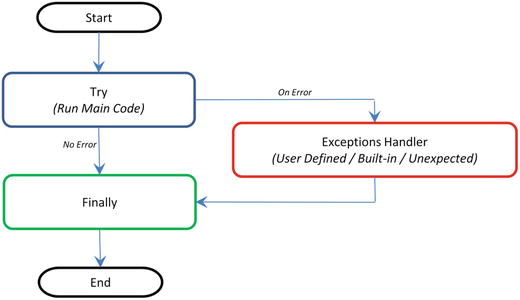
A434293_1_En_1_Fig3_HTML.jpg
Figure 1-3. Code Flow for Error Handler

Note that generally it’s a best practice to follow a single exit point principle by using finally. This means that either after successful execution of your main code or your error handler has finished handling an error, it should pass through the finally so that the code will be exited at the same point under all circumstances.

Endnotes

With this we have reached the end of this chapter. So far I have tried to cover the basics and the essential topics to get you started in Python, and there is an abundance of online / offline resources available to increase your knowledge depth about Python as a programming language. On the same note, I would like to leave you with some useful resources for your future reference. See Table 1-17.

Table 1-17. Additional resources

Resource

Description

Mode

http://docs.python-guide.org/en/latest/intro/learning/

This is the Python’s official tutorial, and it covers all the basics and offers a detailed tour of the language and standard libraries.

Online

http://awesome-python.com/

A curated list of awesome Python frameworks, libraries, software, and resources.

Online

The Hacker's Guide to Python

This book is aimed at developers who already know Python but want to learn from more experienced Python developers.

Book

©  Manohar Swamynathan 2017

Manohar Swamynathan, Mastering Machine Learning with Python in Six Steps, 10.1007/978-1-4842-2866-1_2

2. Step 2 – Introduction to Machine Learning

Manohar Swamynathan

(1)Bangalore, Karnataka, India

Machine learning is a subfield of computer science that evolved from the study of pattern recognition and computational learning theory in Artificial Intelligence (AI).

Let’s look at a few other versions of definitions that exist for machine learning:

All the above definitions are correct; in short, “Machine Learning is a collection of algorithms and techniques used to create computational systems that learn from data in order to make predictions and inferences.”

Machine learning application area is abounding. Let’s look at some of the most common day-to-day applications of Machine Learning that happens around us.

Recommendation System: YouTube brings videos for each of its users based on a recommendation system that believes that the individual user will be interested in. Similarly Amazon and other such e-retailers suggest products that the customer will be interested in and likely to purchase by looking at the purchase history for a customer and a large inventory of products.

Spam detection: Email service providers use a machine learning model that can automatically detect and move the unsolicited messages to the spam folder.

Prospect customer identification: Banks, insurance companies, and financial organizations have machine learning models that trigger alerts so that organizations intervene at the right time to start engaging with the right offers for the customer and persuade them to convert early. These models observe the pattern of behavior by a user during the initial period and map it to the past behaviors of all users to identify those that will buy the product and those that will not.

History and Evolution

Machine learning is a subset of Artificial Intelligence (AI), so let’s first understand what AI is and where machine learning fits within its wider umbrella. AI is a broad term that aims at using data to offer solutions to existing problems. It is the science and engineering of replicating, even surpassing human level intelligence in machines. That means observe or read, learn, sense, and experience.

The AI process loop is as follows in Figure 2-1:

A434293_1_En_2_Fig1_HTML.jpg
Figure 2-1. AI process loop
  • Observe – identify patterns using the data

  • Plan – find all possible solutions

  • Optimize – find optimal solution from the list of possible solutions

  • Action – execute the optimal solution

  • Learn and Adapt – is the result giving expected result, if no adapt

The AI process loop discussed above can be achieved using intelligent agents. A robotic intelligent agent can be defined as a component that can perceive its environment through different kinds of sensors (camera, infrared, etc.), and will take actions within the environment through efforts. Here robotic agents are designed to reflect humans. We have different sensory organs such as eyes, ears, noses, tongues, and skin to perceive our environment and organs such as hands, legs, and mouths are the effectors that enable us to take action within our environment based on the perception.

A detailed discussion on designing the agent has been discussed in the book Artificial Intelligence, A Modern Approach by Stuart J. Russell and Peter Norvig in 1995. Figure 2-2 shows a sample pictorial representation.

A434293_1_En_2_Fig2_HTML.jpg
Figure 2-2. Depict of robotic intelligent agent concept that interacts with its environment through sensors and effectors

To get a better understanding of the concept, let’s look at an intelligent agent designed for a particular environment or use case. Consider designing an automated taxi driver. See Table 2-1.

Table 2-1. Example intelligent agent components

Intelligent Agent’s Component Name

Description

Agent Type

Taxi driver

Goals

Safe trip, legal, comfortable trip, maximize profits, convenient, fast

Environment

Roads, traffic, signals, signage, pedestrians, customers

Percepts

Speedometer, microphone, GPS, cameras, sonar, sensors

Actions

Steer, accelerate, break, talk to passenger

The taxi driver robotic intelligent agent will need to know its location, the direction in which its traveling, the speed at which its traveling, what else is on the road! This information can be obtained from the percepts such as controllable cameras in appropriate places, the speedometer, odometer, and accelerometer. For understanding the mechanical state of the vehicle and engine, it needs electrical system sensors. In addition a satellite global positioning system (GPS) can help to provide its accurate position information with respect to an electronic map and infrared/sonar sensors to detect distances to other cars or obstacles around it. The actions available to the intelligent taxi driver agent are the control over the engine through the pedals for accelerating, braking, and steering for controlling the direction. There should also be a way to interact with or talk to the passengers to understand the destination or goal.

In 1950, Alan Turing a well-known computer scientist proposed a test known as Turing test in his famous paper “Computing Machinery and Intelligence.” The test was designed to provide a satisfactory operational definition of intelligence, which required that a human being should not be able to distinguish the machine from another human being by using the replies to questions put to both.

To be able to pass the Turing test , the computer should possess the following capabilities:

  • Natural language processing, to be able to communicate successfully in a chosen language

  • Knowledge representation, to store information provided before or during the interrogation that can help in finding information, making decisions, and planning. This is also known as ‘Expert System’

  • Automated reasoning (speech), to use the stored knowledge map information to answer questions and to draw new conclusions where required

  • Machine learning, to analyzing data to detect and extrapolate patters that will help adapt to new circumstances

  • Computer vision to perceive objects or the analyzing of images to find features of the images

  • Robotics devices that can manipulate and interact with its environment. That means to move the objects around based on the circumstance

  • Planning, scheduling, and optimization, which means figuring ways to make decision plans or achieve specified goals, as well as analyzing the performance of the plans and designs

The above-mentioned seven capability areas of AI have seen a great deal of research and growth over the years. Although many of the terms in these areas are used interchangeably, we can see from the description that their objectives are different. Particularly machine learning has seen a scope to cut across all the seven areas of AI. See Figure 2-3.

A434293_1_En_2_Fig3_HTML.jpg
Figure 2-3. Artificial Intelligence Areas

Artificial Intelligence Evolution

Let’s understand briefly the artificial intelligence past, present, and future.

A434293_1_En_2_Figa_HTML.jpg

Artificial Narrow Intelligence ( ANI ) : Machine intelligence that equals or exceeds human intelligence or efficiency at a specific task. An example is IBM’s Watson, which requires close participation of subject matter or domain experts to supply data/information and evaluate its performance.

A434293_1_En_2_Figb_HTML.jpg

Artificial General Intelligence ( AGI ) : A machine with the ability to apply intelligence to any problem for an area, rather than just one specific problem. Self-driving cars are a good example of this.

A434293_1_En_2_Figc_HTML.jpg

Artificial Super Intelligence ( ASI ) : An intellect that is much smarter than the best human brains in practically every field, general wisdom, social skills, and including scientific creativity. The key theme over here is “don’t model the world, model the mind”.

Different Forms

Is Machine Learning the only subject in which we use data to learn and use for prediction/inference?

To answer the above questions, let’s have a look at the definition (Wikipedia) of the few other key terms (not an exhaustive list) that are often heard relatively:

  • Statistics: It is the study of the collection, analysis, interpretation, presentation, and organization of data.

  • Data Mining: It is an interdisciplinary subfield of computer science. It is the computational process of discovering patterns in large data sets (from data warehouse) involving methods at the intersection of artificial intelligence, machine learning, statistics, and database systems.

  • Data Analytics: It is a process of inspecting, cleaning, transforming, and modeling data with the goal of discovering useful information, suggesting conclusions, and supporting decision making. This is also known as Business Analytics and is widely used in many industries to allow companies/organization to use the science of examining raw data with the purpose of drawing conclusions about that information and make better business decisions.

  • Data Science: Data science is an interdisciplinary field about processes and systems to extract knowledge or insights from data in various forms, either structured or unstructured, which is a continuation of some of the data analysis fields such as statistics, machine learning, data mining, and predictive analytics, similar to Knowledge Discovery in Databases (KDD).

Yes, from the above definitions it is clear and surprising to find out that Machine Learning isn’t the only subject in which we use data to learn from it and use further for prediction/inference. Almost identical themes, tools, and techniques are being talked about in each of these areas. This raises a genuine question about why there are so many different names with lots of overlap around learning from data? What is the difference between these?

The short answer is that all of these are practically the same. However, there exists a subtle difference or shade of meaning, expression, or sound between each of these. To get a better understanding we’ll have to go back to the history of each of these areas and closely examine the origin, core area of application, and evolution of these terms.

Statistics

German scholar Gottfried Achenwall introduced the word “Statistics” in the middle of the 18th century (1749). Usage of this word during this period meant that it was related to the administrative functioning of a state, supplying the numbers that reflect the periodic actuality regarding its various area of administration. The origin of the word statistics may be traced to the Latin word “Status” (“council of state”) or the Italian word “Statista” (“statesman” or “politician”); that is, the meaning of these words is “Political State” or a Government. Shakespeare used a word Statist in his drama Hamlet (1602). In the past, the statistics were used by rulers that designated the analysis of data about the state, signifying the “science of state.”

In the beginning of the 19th century, statistics attained the meaning of the collection and classification of data. The Scottish politician, Sir John Sinclair, introduced it to the English in 1791 in his book Statistical Account of Scotland. Therefore, the fundamental purpose of the birth of statistics was around data to be used by government and centralized administrative organizations to collect census data about the population for states and localities.

Frequentist

John Graunt was one of the first demographers and is our first vital statistician. He published his observation on the Bills of Mortality (in 1662), and this work is often quoted as the first instance of descriptive statistics. He presented vast amounts of data in a few tables that can be easily comprehended, and this technique is now widely known as descriptive statistics. In it we note that weekly mortality statistics first appeared in England in 1603 at the Parish-Clerks Hall. We can learn from it that in 1623, of some 50,000 burials in London, only 28 died of the plague. By 1632, this disease had practically disappeared for the time being, to reappear in 1636 and again in the terrible epidemic of 1665. This exemplifies that the fundamental nature of descriptive statistics is counting. From all the Parish registers, he counted the number of persons who died, and who died of the plague. The counted numbers every so often were relatively too large to follow, so he also simplified them by using proportion rather than the actual number. For example, the year 1625 had 51,758 deaths and of which 35,417 were of the plague. To simplify this he wrote, “We find the plague to bear unto the whole in proportion as 35 to 51. Or 7 to 10.” With these he is introducing the concept that the relative proportions are often of more interest than the raw numbers. We would generally express the above proportion as 70%. This type of conjecture that is based on a sample data’s proportion spread or frequency is known as “frequentist statistics.” . Statistical hypothesis testing is based on inference framework, where you assume that observed phenomena are caused by unknown but fixed processes.

Bayesian

In contract Bayesian statistics (named after Thomas Bayes), it describes that the probability of an event, based on conditions that might be related to the event. At the core of Bayesian statistics is Bayes’s theorem, which describes the outcome probabilities of related (dependent) events using the concept of conditional probability. For example, if a particular illness is related to age and life style, then applying a Bay’s theorem by considering a person’s age and life style more accurately increases the probability of that individual having the illness can be assessed.

Bayes theorem is stated mathematically as the following equation: $$ \mathrm{P}\left(\mathrm{A}\Big|\mathrm{B}\right) = \frac{\mathrm{P}\left(\mathrm{B}\Big|\mathrm{A}\right)\kern0.5em \mathrm{P}\left(\mathrm{A}\right)}{\mathrm{P}\left(\mathrm{B}\right)} $$

Where A and B are events and P (B) ≠ 0

  • P (A) and P (B) are the probabilities of observing A and B without regard to each other.

  • P (A | B), a conditional probability, is the probability of observing event A given that B is true.
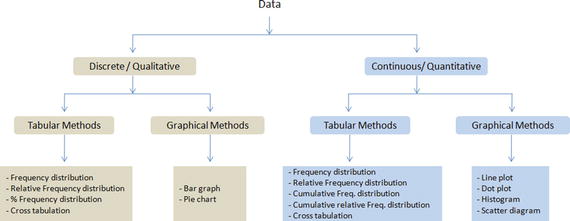
  • P (B | A) is the probability of observing event B given that A is true.
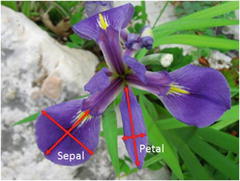
For example, a doctor knows that lack of sleep causes migraine 50% of the time. Prior probability of any patient having lack of sleep is 10000/50000 and prior probability of any patient having migraine is 300/1000. If a patient has a sleep disorder, let’s apply Bayes’s theorem to calculate the probability he/she is having a migraine.

P (Sleep disorder | Migraine) = P(Migraine | Sleep disorder) * P(Migraine) / P(Sleep disorder)


P (Sleep disorder | Migraine) = .5 * 10000/50000 / (300/1000) = 33%

In the above scenario, there is a 33% chance that a patient with a sleep disorder will also have a migraine problem.

Regression

Another major milestone for statisticians was the regression, which was published by Legendre in 1805 and by Guass in 1809. Legendre and Gauss both applied the method to the problem of determining, from astronomical observations, the orbits of bodies about the Sun, mostly comets, but also later the then newly discovered minor planets. Gauss published a further development of the theory of least squares in 1821. Regression analysis is an essential statistical process for estimating the relationships between factors. It includes many techniques for analyzing and modeling various factors, and the main focus here is about the relationship between a dependent factor and one or many independent factors also called predictors or variables or features. We’ll learn about this more in the fundamentals of machine learning with scikit-learn.

Over time the idea behind the word statistics has undergone an extraordinary transformation. The character of data or information provided has been extended to all spheres of human activity. Let’s understand the difference between two terms quite often used along with statistics, that is, 1) data and 2) method. Statistical data is the numerical statement of facts, whereas statistical methods deal with information of the principles and techniques used in collecting and analyzing such data. Today, statistics as a separate discipline from mathematics is closely associated with almost all branches of education and human endeavor that are mostly numerically representable. In modem times, it has innumerable and varied applications both qualitatively and quantitatively. Individuals and organizations use statistics to understand data and make informed decisions throughout the natural and social sciences, medicine, business, and other areas. Statistics has served as the backbone and given rise to many other disciplines, which you’ll understand as you read further.

Data Mining

The term “Knowledge Discovery in Databases” (KDD) is coined by Gregory Piatetsky-Shapiro in 1989 and also at the same time he cofounded the first workshop named KDD. The term “Data mining” was introduced in the 1990s in the database community, but data mining is the evolution of a field with a slightly long history.

Data mining techniques are the result of research on the business process and product development. This evolution began when business data was first stored on computers in the relational databases and continued with improvements in data access, and further produced new technologies that allow users to navigate through their data in real time. In the business community, data mining focuses on providing “Right Data” at the “Right Time” for the “Right Decisions.” This is achieved by enabling a tremendous amount of data collection and applying algorithms to them with the help of distributed multiprocessor computers to provide real-time insights from data.

We’ll learn more about the five stages proposed by KDD for data mining in the section on the framework for building machine learning systems.

Data Analytics

Analytics have been known to be used in business, since the time of management movements toward industrial efficiency that were initiated in late 19th century by Frederick Winslow Taylor, an American mechanical engineer. The manufacturing industry adopted measuring the pacing of the manufacturing and assembly line, as a result revolutionizing industrial efficiency. But analytics began to command more awareness in the late 1960s when computers had started playing a dominating role as organizations’ decision support systems. Traditionally business managers were making decisions based on past experiences or rules of thumb, or there were other qualitative aspects to decision making; however, this changed with development of data warehouses and enterprise resource planning (ERP) systems . The business managers and leaders considered data and relied on ad hoc analysis to affirm their experience/knowledge-based assumptions for daily and critical business decisions. This evolved as data-driven business intelligence or business analytics for the decision-making process was fast adopted by organizations and companies across the globe. Today, businesses of all sizes use analytics. Often the word “Business Analytics” is used interchangeably for “Data Analytics” in the corporate world.

In order for businesses to have a holistic view of the market and how a company competes efficiently within that market to increase the RoI (Return on Investment), requires a robust analytic environment around the kind of analytics that is possible. This can be broadly categorized into four types. See Figure 2-4.

  1. Descriptive Analytics

  2. Diagnostic Analytics

  3. Predictive Analytics

  4. Prescriptive Analytics

A434293_1_En_2_Fig4_HTML.jpg
Figure 2-4. Data Analytics Types

Descriptive Analytics

They are the analytics that describe the past to tell us “What has happened?” To elaborate, as the name suggests, any activity or method that helps us to describe or summarize raw data into something interpretable by humans can be termed ‘Descriptive Analytics’. These are useful because they allow us to learn from past behaviors, and understand how they might influence future outcomes.

The statistics such as arithmetic operation of count, min, max, sum, average, percentage, and percent change, etc., fall into this category. Common examples of descriptive analytics are a company’s business intelligence reports that cover different aspects of the organization to provide historical hindsights regarding the company’s production, operations, sales, revenue, financials, inventory, customers, and market share.

Diagnostic Analytics

It is the next step to the descriptive analytics that examines data or information to answer the question, “Why did it happen?,” and it is characterized by techniques such as drill-down, data discovery, data mining, correlations, and causation. It basically provides a very good understanding of a limited piece of the problem you want to solve. However, it is very laborious work as significant human intervention is required to perform the drill-down or data mining to go deeper into the data to understand why something happened or its root cause. It focuses on determining the factors and events that contributed to the outcome.

For example, assume a retail company’s hardlines (it’s a category usually encompassing furniture, appliance, tools, electronics, etc.) sales performance is not up to the mark in certain stores and the product line manager would like to understand the root cause. In this case the product manager may want to look backward to review past trends and patterns for the product line sales across different stores based on its placement (which floor, corner, aisle) within the store. It’s also to understand if there is any causal relationship with other products that are closely kept with it. Look at different external factors such as demographic, season, macroeconomic factors separately as well as in unison to define relative ranking of related variables based on concluded explanations. To accomplish this there is not a clearly defined set of ordered steps defined, and it depends on the experience level and thinking style of the person carrying out the analysis.

There is a significant involvement of the subject matter expert and the data/information may need to be presented visually for better understanding. There is a plethora of tools: for example, Excel, Tableau, Qlikview, Spotfire, and D3, etc., are available build tools that enable diagnostic analytics.

Predictive Analytics

It is the ability to make predictions or estimations of likelihoods about unknown future events based on the past or historic patterns. Predictive analytics will give us insight into “What might happen?”; it uses many techniques from data mining, statistics, modeling, machine learning, and artificial intelligence to analyze current data to make predictions about the future.

It is important to remember that the foundation of predictive analytics is based on probabilities, and the quality of prediction by statistical algorithms depends a lot on the quality of input data. Hence these algorithms cannot predict the future with 100% certainty. However, companies can use these statistics to forecast the probability of what might happen in the future and considering these results alongside business knowledge would result in profitable decisions.

Machine learning is heavily focused on predictive analytics, where we combine historical data from different sources such as organizational ERP (Enterprise Resource Planning), CRM (Customer Relation Management), POS (Point of Sales), Employees data, Market research data to identify patterns and apply statistical model/algorithms to capture the relationship between various data sets and further predict the likelihood of an event.

Some examples of predictive analytics are weather forecasting, email spam identification, fraud detection, probability of customer purchasing a product or renewal of insurance policy, predicting the chances of a person with a known illness, etc.

Prescriptive Analytics

It is the area of data or business analytics dedicated to finding the best course of action for a given situation. Prescriptive analytics is related to all other three forms of analytics that is, descriptive, diagnostic, and predictive analytics. The endeavor of prescriptive analytics is to measure the future decision’s effect to enable the decision makers to foresee the possible outcomes before the actual decisions are made. Prescriptive analytic systems are a combination of business rules, machine learning algorithms, tools that can be applied against historic and real-time data feed. The key objective here is not just to predict what will happen, but also why it will happen by predicting multiple futures based on different scenarios to allow companies to assess possible outcomes based on their actions.

Some examples of prescriptive analytics are by using simulation in design situations to help users identify system behaviors under different configurations, and ensuring that all key performance metrics are met such as wait times, queue length, etc. Another example is to use linear or nonlinear programming to identify the best outcome for a business, given constraints, and objective function.

Data Science

In 1960, Peter Naur used the term “data science” in his publication “Concise Survey of Computer Methods,” which is about contemporary data processing methods in a wide range of applications. In 1991, computer scientist Tim Berners-Lee announced the birth of what would become the World Wide Web as we know it today, in a post in the “Usenet group” where he set out the specifications for a worldwide, interconnected web of data, accessible to anyone from anywhere. Over time the Web/Internet has been growing 10-fold each year and became a global computer network providing a variety of information and communication facilities, consisting of interconnected networks using standardized communication protocols. Alongside the storage systems became too evolved and the digital storage became more cost effective than paper.

As of 2008, the world’s servers processed 9.57 zeta-bytes (9.57 trillion gigabytes) of information, which is equivalent to 12 gigabytes of information per person per day, according to the “How Much Information?​ 2010 report on Enterprise Server Information.”

The rise of the Internet drastically increases the volume of structured, semistructured, and unstructured data. This led to the birth of the term “Big Data” characterized by 3V’s, which stands for Volume, Variety, and Velocity. Special tools and systems are required to process high volumes of data, with a wide Variety (text, number, audio, video, etc.), generated at a high velocity. See Figure 2-5.

A434293_1_En_2_Fig5_HTML.jpg
Figure 2-5. 3 V’s of Big data (source: http://blog.sqlauthority.com )

Big data revolution influenced the birth of the term “data science.” Although the term “data science” came into existence from 1960 on, it became popular and this is attributed to Jeff Hammerbacher and DJ Patil, of Facebook and LinkedIn because they carefully chose it, attempting to describe their teams and work (as per Building Data Science Teams by DJ Patil published in 2008); they settled on “data scientist” and a buzzword was born. One picture explains well the essential skills set for data science that was presented by Drew Conway in 2010. See Figure 2-6.

A434293_1_En_2_Fig6_HTML.jpg
Figure 2-6. Drew Conway’s Data Science Venn diagram

Executing data science projects require three key skills:

  1. Programming or hacking skills,

  2. Math & Statistics,

  3. Business or subject matter expertise for a given area of scope.

Note that the Machine Learning is originated from Artificial Intelligence. It is not a branch of Data science, rather it is only using Machine Learning as a tool.

Statistics vs. Data Mining vs. Data Analytics vs. Data Science

We can learn from the history and evolution of subjects around learning from ‘Data’ is that even though they use the same methods, they evolved as different cultures, so they have different histories, nomenclature, notation, and philosophical perspectives. See Figure 2-7.

A434293_1_En_2_Fig7_HTML.jpg
Figure 2-7. Learn from ‘Data’ evolution

All form together to create the path to ultimate Artificial Intelligence. See Figure 2-8.

A434293_1_En_2_Fig8_HTML.jpg
Figure 2-8. All forms together, the path to ultimate Artificial Intelligence

Machine Learning Categories

At a high level, Machine learning tasks can be categorized into three groups based on the desired output and the kind of input required to produce it. See Figure 2-9.

A434293_1_En_2_Fig9_HTML.jpg
Figure 2-9. Types of Machine Learning

Supervised Learning

The machine learning algorithm is provided with a large enough example input dataset respective output or event/class, usually prepared in consultation with the subject matter expert of a respective domain. The goal of the algorithm is to learn patterns in the data and build a general set of rules to map input to the class or event.

Broadly, there are two types commonly used as supervised learning algorithms .

1) Regression

The output to be predicted is a continuous number in relevance with a given input dataset. Example use cases are predictions of retail sales, prediction of number of staff required for each shift, number of car parking spaces required for a retail store, credit score, for a customer, etc.

2) Classification

The output to be predicted is the actual or the probability of an event/class and the number of classes to be predicted can be two or more. The algorithm should learn the patterns in the relevant input of each class from historical data and be able to predict the unseen class or event in the future considering their input. An example use case is spam email filtering where the output expected is to classify an email into either a “spam” or “not spam.”

Building supervised learning machine learning models has three stages:

  1. Training: The algorithm will be provided with historical input data with the mapped output. The algorithm will learn the patterns within the input data for each output and represent that as a statistical equation, which is also commonly known as a model.

  2. Testing or validation: In this phase the performance of the trained model is evaluated, usually by applying it on a dataset (that was not used as part of the training) to predict the class or event.

  3. Prediction: Here we apply the trained model to a data set that was not part of either the training or testing. The prediction will be used to drive business decisions.

Unsupervised Learning

There are situations where the desired output class/event is unknown for historical data. The objective in such cases would be to study the patterns in the input dataset to get better understanding and identify similar patterns that can be grouped into specific classes or events. As these types of algorithms do not require any intervention from the subject matter experts beforehand, they are called unsupervised learning.

Let’s look at some examples of unsupervised learning .

Clustering

Assume that the classes are not known beforehand for a given dataset. The goal here is to divide the input dataset into logical groups of related items. Some examples are grouping similar news articles, grouping similar customers based on their profile, etc.

Dimension Reduction

Here the goal is to simplify a large input dataset by mapping them to a lower dimensional space. For example, carrying analysis on a large dimension dataset is very computational intensive, so to simplify you may want to find the key variables that hold a significant percentage (say 95%) of information and only use them for analysis.

Anomaly Detection

Anomaly detection is also commonly known as outlier detection is the identification of items, events or observations which do not conform to an expected pattern or behavior in comparison with other items in a given dataset. It has applicability in a variety of domains, such as machine or system health monitoring, event detection, fraud/intrusion detection etc. In the recent days, anomaly detection has seen a big area of interest in the word of Internet of Things (IoT) to enable detection of abnormal behavior in a given context. A data point is termed anomaly if it is distant from other data points in a given context, so calculating standard deviation or clustering are the most commonly used techniques for detection of anomaly alongside a whole lot of other techniques. I’ll not be covering the topic in this edition.

Reinforcement Learning

The basic objective of reinforcement learning algorithms is to map situations to actions that yield the maximum final reward. While mapping the action, the algorithm should not just consider the immediate reward but also next and all subsequent rewards. For example, a program to play a game or drive a car will have to constantly interact with a dynamic environment in which it is expected to perform a certain goal. We’ll learn the basics of Markov decision process/q-learning with an example in a later chapter.

Examples of reinforcement learning techniques are the following:

  • Markov decision process

  • Q-learning

  • Temporal Difference methods

  • Monte-Carlo methods

Frameworks for Building Machine Learning Systems

Over time data mining field has seen a massive expansion. There have been a lot of efforts taken by many experts to standardize methodologies and define best practice for the ever-growing, diversified, and iterative process of building machine learning systems. On top of the last decade the field of machine learning has become very important for different industries, businesses, and organizations because of its ability to extract insight from huge amounts of data that had previously no use or was underutilized to learn the trend/patterns and predict the possibilities that help to drive business decisions leading to profit. Ultimately the risk of wasting the wealthy and valuable information contained by the rich business data sources was raised, and this required the use of adequate techniques to get useful knowledge so that the field of machine learning had emerged in the early 1980s, it and has seen a great growth. With the emergence of this field, different process frameworks were introduced. These process frameworks guide and carry the machine learning tasks and its applications. Efforts were made to use data mining process frameworks that will guide the implementation of data mining on big or huge amount of data.

Mainly three data mining process frameworks have been most popular, and widely practiced by data mining experts/researchers to build machine learning systems. These models are the following:

  • Knowledge Discovery Databases (KDD) process model

  • CRoss Industrial Standard Process for Data Mining (CRISP – DM)

  • Sample, Explore, Modify, Model and Assess (SEMMA)

Knowledge Discovery Databases (KDD)

This refers to the overall process of discovering useful knowledge from data, which was presented by a book by Fayyad et al., 1996. It is an integration of multiple technologies for data management such as data warehousing, statistic machine learning, decision support, visualization, and parallel computing. As the name suggests, Knowledge Discovery Databases center around the overall process of knowledge discovery from data that covers the entire life cycle of data that includes how the data are stored, how it is accessed, how algorithms can be scaled to enormous datasets efficiently, how results can be interpreted and visualized.

There are five stages in KDD , presented in Figure 2-10.

A434293_1_En_2_Fig10_HTML.jpg
Figure 2-10. KDD Data Mining process flow

Selection

In this step, selection and integration of the target data from possibly many different and heterogeneous sources is performed. Then the correct subset of variables and data samples relevant to the analysis task is retrieved from the database.

Preprocessing

Real-world datasets are often incomplete that is, attribute values will be missing; noisy (errors and outliers); and inconsistent, which means there exists discrepancies between the collected data. The unclean data can confuse the mining procedures and lead to unreliable and invalid outputs. Also, performing complex analysis and mining on a huge amount of such soiled data may take a very long time. Preprocessing and cleaning should improve the quality of data and mining results by enhancing the actual mining process. The actions to be taken include the following:

  • Collecting required data or information to model

  • Outlier treatment or removal of noise

  • Using prior domain knowledge to remove the inconsistencies and duplicates from the data

  • Choice of strategies for handling missing data

Transformation

In this step, data is transformed or consolidated into forms appropriate for mining, that is, finding useful features to represent the data depending on the goal of the task. For example, in high-dimensional spaces or the large number of attributes, the distances between objects may become meaningless. So dimensionality reduction and transformation methods can be used to reduce the effective number of variables under consideration or find invariant representations for the data. There are various data transformation techniques :

  • Smoothing (binning, clustering, regression, etc.)

  • Aggregation

  • Generalization in which a primitive data object can be replaced by higher-level concepts

  • Normalization, which involves min-max-scaling or z-score

  • Feature construction from the existing attributes (PCA, MDS)

  • Data reduction techniques are applied to produce reduced representation of the data (smaller volume that closely maintains the integrity of the original data)

  • Compression, for example, wavelets, PCA, clustering etc.

Data Mining

In this step, machine learning algorithms are applied to extract data patterns. Exploration/summarization methods such as mean, median, mode, standard deviation, class/concept description, and graphical techniques of low-dimensional plots can be used to understand the data. Predictive models such as classification or regression can be used to predict the event or future value. Cluster analysis can be used to understand the existence of similar groups. Select the most appropriate methods to be used for the model and pattern search.

Interpretation / Evaluation

This step is focused on interpreting the mined patterns to make them understandable by the user, such as summarization and visualization. The mined pattern or models are interpreted. Patterns are a local structure that makes statements only about restricted regions of the space spanned by the variables. Whereas models are global structures that makes statements about any point in measurement space, that is, Y = mX+C (linear model).

Cross-Industry Standard Process for Data Mining

It is generally known by its acronym CRISP-DM . It was established by the European Strategic Program on Research in Information Technology initiative with an aim to create an unbiased methodology that is not domain dependent. It is an effort to consolidate data mining process best practices followed by experts to tackle data mining problems. It was conceived in 1996 and first published in 1999 and was reported as the leading methodology for data mining/predictive analytics projects in polls conducted in 2002, 2004, and 2007. There was a plan between 2006 and 2008 to update CRISP-DM but that update did not take place, and today the original CRISP-DM.org website is no longer active.

This framework is an idealized sequence of activities. It is an iterative process and many of the tasks backtrack to previous tasks and repeat certain actions to bring more clarity. There are six major phases as shown in Figure 2-11.

A434293_1_En_2_Fig11_HTML.jpg
Figure 2-11. Process diagram showing the relationship between the six phases of CRISP-DM

Phase 1: Business Understanding

As the name suggests the focus at this stage is to understand the overall project objectives and expectations from a business perspective. These objectives are converted to a data mining or machine learning problem definition and a plan of action around data requirements, business owners input, and how outcome performance evaluation metrics are designed.

Phase 2: Data Understanding

In this phase, initial data are collected that were identified as requirements in the previous phase. Activities are carried out to understanding data gaps or relevance of the data to the objective in hand, any data quality issues, and first insights into the data to bring out appropriate hypotheses. The outcome of this phase will be presented to the business iteratively to bring more clarity into the business understanding and project objective.

Phase 3: Data Preparation

This phase is all about cleaning the data so that it’s ready to be used for the model building phase. Cleaning data could involve filling the known data gaps from previous steps, missing value treatments, identifying the important features, applying transformations, and creating new relevant features where applicable. This is one of the most important phases as the model’s accuracy will depend significantly on the quality of data that is being fed into the algorithm to learn the patterns.

Phase 4: Modeling

There are multiple machine learning algorithms available to solve a given problem. So various appropriate machine learning algorithms are applied onto the clean dataset, and their parameters are tuned to the optimal possible values. Model performance for each of the applied models is recorded.

Phase 5: Evaluation

In this stage a benchmarking exercise will be carried out among all the different models that were identified to have been giving high accuracy. Model will be tested against data that was not used as part of the training to evaluate its performance consistency. The results will be verified against the business requirement identified in phase 1. The subject matter experts from the business will be involved to ensure that the model results are accurate and usable as per required by the project objective.

Phase 6: Deployment

The key focus in this phase is the usability of the model output. So the final model signed off by the subject matter expert will be implemented, and the consumers of the model output will be trained on how to interpret or use it to take the business decisions defined in the business understanding phase. The implementation could be as generating a prediction report and sharing it with the user. Also periodic model training and prediction times will be scheduled based on the business requirement.

SEMMA (Sample, Explore, Modify, Model, Assess)

SEMMA are the sequential steps to build machine learning models incorporated in ‘SAS Enterprise Miner’, a product by SAS Institute Inc., one of the largest producers of commercial statistical and business intelligence software. However the sequential steps guide the development of a machine learning system. Let’s look at the five sequential steps to understand it better.

Sample

This step is all about selecting the subset of the right volume dataset from a large dataset provided for building the model. This will help us to build the model efficiently. This was a famous practice when the computation power was expensive, however it is still in practice. The selected subset of data should be actual an representation of the entire dataset originally collected, which means it should contain sufficient information to retrieve. The data is also divided for training and validation at this stage.

Explore

In this phase activities are carried out to understand the data gaps and relationship with each other. Two key activities are univariate and multivariate analysis. In univariate analysis each variable looks individually to understand its distribution, whereas in multivariate analysis the relationship between each variable is explored. Data visualization is heavily used to help understand the data better.

Modify

In this phase variables are cleaned where required. New derived features are created by applying business logic to existing features based on the requirement. Variables are transformed if necessary. The outcome of this phase is a clean dataset that can be passed to the machine learning algorithm to build the model.

Model

In this phase, various modeling or data mining techniques are applied on the preprocessed data to benchmark their performance against desired outcomes.

Assess

This is the last phase. Here model performance is evaluated against the test data (not used in model training) to ensure reliability and business usefulness.

A434293_1_En_2_Fig12_HTML.jpg
Figure 2-12. Summary of data mining frameworks

KDD vs. CRISP-DM vs. SEMMA

KDD is the oldest of three frameworks. CRISP-DM and SEMMA seem to be the practical implementation of the KDD process. CRISP-DM is more complete as the iterative flow of the knowledge across and between phases has been clearly defined. Also it covers all areas of building a reliable machine learning systems from a business-world perspective. In SEMMA’s sample stage it’s important that you have a true understanding of all aspects of business to ensure the sampled data retains maximum information. However the drastic innovation in the recent past has led to reduced costs for data storage and computational power, which enables us to apply machine learning algorithms on the entire data efficiently, almost removing the need for sampling.

We can see that generally the core phases are covered by all three frameworks and there is not a huge difference between these frameworks. Overall these processes guide us about how data mining techniques can be applied into practical scenarios. In general most of the researchers and data mining experts follow the KDD and CRISP-DM process model because it is more complete and accurate. I personally recommend following CRISP-DM for usage in business environment as it provides coverage of end-to-end business activity and the life cycle of building a machine learning system.

Machine Learning Python Packages

There is a rich number of open source libraries available to facilitate practical machine learning. These are mainly known as scientific Python libraries and are generally put to use when performing elementary machine learning tasks. At a high level we can divide these libraries into data analysis and core machine learning libraries based on their usage/purpose.

Data analysis packages: These are the sets of packages that provide us the mathematic and scientific functionalities that are essential to perform data preprocessing and transformation.

Core Machine learning packages: These are the set of packages that provide us with all the necessary machine learning algorithms and functionalities that can be applied on a given dataset to extract the patterns.

Data Analysis Packages

There are four key packages that are most widely used for data analysis .

  • NumPy

  • SciPy

  • Matplotlib

  • Pandas

Pandas, NumPy, and Matplotlib play a major role and have the scope of usage in almost all data analysis tasks. So in this chapter we’ll focus on covering usage or concepts relevant to these three packages as much as possible. Whereas SciPy supplements NumPy library and has a variety of key high-level science and engineering modules, the usage of these functions, however, largely depend on the use case to use case. So we’ll touch on or highlight some of the useful functionalities in upcoming chapters where possible. See Figure 2-13.

A434293_1_En_2_Fig13_HTML.jpg
Figure 2-13. Data analysis packages
Note

For conciseness we’ll only be covering the key concepts within each of the libraries with a brief introduction and code implementation. You can always refer to the official user documents for these packages that have been well designed by the developer community to cover a lot more in depth.

NumPy

NumPy is the core library for scientific computing in Python. It provides a high-performance multidimensional array object, and tools for working with these arrays. It’s a successor of Numeric package. In 2005, Travis Oliphant created NumPy by incorporating features of the competing Numarray into Numeric, with extensive modifications. I think the concepts and the code examples to a great extent have been explained in the simplest form in his book Guide to NumPy. Here we’ll only be looking at some of the key NumPy concepts that are a must or good to know in relevance to machine learning.

Array

A NumPy array is a collection of similar data type values, and is indexed by a tuple of nonnegative numbers. The rank of the array is the number of dimensions, and the shape of an array is a tuple of numbers giving the size of the array along each dimension.

We can initialize NumPy arrays from nested Python lists, and access elements using square brackets. See Listing 2-1.

Listing 2-1. Example code for initializing NumPy array
import numpy as np

# Create a rank 1 array
a = np.array([0, 1, 2])
print type(a)


# this will print the dimension of the array
print a.shape
print a[0]
print a[1]
print a[2]


# Change an element of the array
a[0] = 5
print a
# ----output-----
# <type 'numpy.ndarray'>
# (3L,)
# 1
# 2
# 3
# [5 2 3]


# Create a rank 2 array
b = np.array([[0,1,2],[3,4,5]])
print b.shape
print b
print b[0, 0], b[0, 1], b[1, 0]
# ----output-----
# (2L, 3L)
# [[1 2 3]
#  [4 5 6]]
# 1 2 4

Creating NumPy Array

NumPy also provides many built-in functions to create arrays. The best way to learn this is through examples, so let’s jump into the code. See Listing 2-2.

Listing 2-2. Creating NumPy array
# Create a 3x3 array of all zeros
a = np.zeros((3,3))
print a
----- output -----
[[ 0.  0.  0.]
 [ 0.  0.  0.]
 [ 0.  0.  0.]]


# Create a 2x2 array of all ones
b = np.ones((2,2))
print b
---- output ----
[[ 1.  1.]
 [ 1.  1.]]


# Create a 3x3 constant array
c = np.full((3,3), 7)
print c
---- output ----
[[ 7.  7.  7.]
 [ 7.  7.  7.]
 [ 7.  7.  7.]]


# Create a 3x3 array filled with random values
d = np.random.random((3,3))
print d
---- output ----
[[ 0.85536712  0.14369497  0.46311367]
 [ 0.78952054  0.43537586  0.48996107]
 [ 0.1963929   0.12326955  0.00923631]]


# Create a 3x3 identity matrix
e = np.eye(3)
print e
---- output ----
[[ 1.  0.  0.]
 [ 0.  1.  0.]
 [ 0.  0.  1.]]


# convert list to array
f = np.array([2, 3, 1, 0])
print f
---- output ----
[2 3 1 0]


# arange() will create arrays with regularly incrementing values
g = np.arange(20)
print g
---- output ----
[ 0  1  2  3  4  5  6  7  8  9 10 11 12 13 14 15 16 17 18 19]


# note mix of tuple and lists
h = np.array([[0, 1,2.0],[0,0,0],(1+1j,3.,2.)])
print h
---- output ----
[[ 0.+0.j  1.+0.j  2.+0.j]
 [ 0.+0.j  0.+0.j  0.+0.j]
 [ 1.+1.j  3.+0.j  2.+0.j]]


# create an array of range with float data type
i = np.arange(1, 8, dtype=np.float)
print i
---- output ----
[ 1.  2.  3.  4.  5.  6.  7.]


# linspace() will create arrays with a specified number of items which are
# spaced equally between the specified beginning and end values
j = np.linspace(2., 4., 5)
print j
---- output ----
[ 2.   2.5  3.   3.5  4. ]


# indices() will create a set of arrays stacked as a one-higher
# dimensioned array, one per dimension with each representing variation
# in that dimension
k = np.indices((2,2))
print k
---- output ----
[[[0 0]
  [1 1]]


 [[0 1]
  [0 1]]]

Data Types

An array is a collection of items of the same data type and NumPy supports and provides built-in functions to construct arrays with optional arguments to explicitly specify required datatypes.

Listing 2-3. NumPy datatypes
# Let numpy choose the datatype
x = np.array([0, 1])
y = np.array([2.0, 3.0])


# Force a particular datatype
z = np.array([5, 6], dtype=np.int64)


print x.dtype, y.dtype, z.dtype
---- output ----
int32 float64 int64

Array Indexing

NumPy offers several ways to index into arrays. Standard Python x[obj] syntax can be used to index NumPy array, where x is the array and obj is the selection.

There are three kinds of indexing available:

  • Field access

  • Basic slicing

  • Advanced indexing

Field Access

If the ndarray object is a structured array, the fields of the array can be accessed by indexing the array with strings, dictionary like. Indexing x[‘field-name’] returns a new view to the array, which is of the same shape as x, except when the field is a subarray, but of data type x.dtype[‘field-name’] and contains only the part of the data in the specified field. See Listing 2-4.

Listing 2-4. Field access
x = np.zeros((3,3), dtype=[('a', np.int32), ('b', np.float64, (3,3))])
print "x['a'].shape: ",x['a'].shape
print "x['a'].dtype: ", x['a'].dtype
print "x['b'].shape: ", x['b'].shape
print "x['b'].dtype: ", x['b'].dtype
# ----output-----
# x['a'].shape:  (2L, 2L)
# x['a'].dtype:  int32
# x['b'].shape:  (2L, 2L, 3L, 3L)
# x['b'].dtype:  float64

Basic Slicing

NumPy arrays can be sliced, similar to lists. You must specify a slice for each dimension of the array as the arrays may be multidimensional.

The basic slice syntax is i: j: k, where i is the starting index, j is the stopping index, and k is the step and k is not equal to 0. This selects the m elements in the corresponding dimension, with index values i, i + k, …,i + (m - 1) k where m = q + (r not equal to 0) and q and r are the quotient and the remainder is obtained by dividing j - i by k: j - i = q k + r, so that i + (m - 1) k < j. See Listing 2-5.

Listing 2-5. Basic slicing
x = np.array([5, 6, 7, 8, 9])
x[1:7:2]
---- output ----
array([6, 8])


Negative k makes stepping go toward smaller indices. Negative i and j are interpreted as n + i and n + j where n is the number of elements in the corresponding dimension.

print x[-2:5]
print x[-1:1:-1]
# ---- output ----
[8 9]
[9 8 7]


If n is the number of items in the dimension being sliced. Then if i is not given then it defaults to 0 for k > 0 and n - 1 for k < 0. If j is not given it defaults to n for k > 0 and -1 for k < 0. If k is not given it defaults to 1. Note that :: is the same as : and means select all indices along this axis.
x[4:]
# ---- output ----
array([9])


If the number of objects in the selection tuple is less than N, then : is assumed for any subsequent dimensions.
Listing 2-6. Basic slicing
y = np.array([[[1],[2],[3]], [[4],[5],[6]]])
print "Shape of y: ", x.shape
y[1:3]
# ---- output ----
Shape of y:  (3L)
array([[[4], [5], [6]], [7]], dtype=object)


Ellipsis expand to the number of : objects needed to make a selection tuple of the same length as x.ndim. There may only be a single ellipsis present.

x[...,0]
---- output ----
array([[0], [1], [2], [3]], dtype=object)


# Create a rank 2 array with shape (3, 4)
a = np.array([[5,6,7,8], [1,2,3,4], [9,10,11,12]])
print "Array a:", a


# Use slicing to pull out the subarray consisting of the first 2 rows
# and columns 1 and 2; b is the following array of shape (2, 2):
# [[2 3]
#  [6 7]]
b = a[:2, 1:3]
print "Array b:", b
---- output ----
Array a:  [[ 5  6  7  8]
 [ 1  2  3  4]
 [ 9 10 11 12]]
Array b:  [[6 7]
 [2 3]]


A slice of an array is a view into the same data, so modifying itwill modify the original array.

print a[0, 1]
b[0, 0] = 77
print a[0, 1]
# ---- output ----
# 6
# 77


.

Middle row array can be accessed in two ways. 1) Slices along with integer indexing will result in an arry of lower rank. 2) Using only slices will result in same rank array.
Example code:


row_r1 = a[1,:]# Rank 1 view of the second row of a
row_r2 = a[1:2,:]# Rank 2 view of the second row of a
print row_r1, row_r1.shape  # Prints "[5 6 7 8] (4,)"
print row_r2, row_r2.shape  # Prints "[[5 6 7 8]] (1, 4)"
---- output ----
[1 2 3 4] (4L,)
[[1 2 3 4]] (1L, 4L)
[[1 2 3 4]] (1L, 4L)


# We can make the same distinction when accessing columns of an array:
col_r1 = a[:, 1]
col_r2 = a[:, 1:2]
print col_r1, col_r1.shape  # Prints "[ 2  6 10] (3,)"
print col_r2, col_r2.shape
---- output ----
[77  2 10] (3L,)
[[77]
 [ 2]
 [10]] (3L, 1L)

Advanced Indexing

Integer array indexing : Integer array indexing allows you to construct random arrays and other arrays. See Listing 2-7.

Listing 2-7. Advanced indexinga = np.array([[1,2], [3, 4]])
# An example of integer array indexing.
# The returned array will have shape (2,) and
print a[[0, 1], [0, 1]]
# The above example of integer array indexing is equivalent to this:
print np.array([a[0, 0], a[1, 1]])  --- output ----
[1 4]
[1 4]


# When using integer array indexing, you can reuse the same
# element from the source array:
print a[[0, 0], [1, 1]]


# Equivalent to the previous integer array indexing example
print np.array([a[0, 1], a[0, 1]])
---- output ----
[2 2]
[2 2]

Boolean array indexing: This is useful to pick a random element from an array, which is often used for filtering elements that satisfy a given condition. See Listing 2-8.

Listing 2-8. Boolean array indexing
a=np.array([[1,2], [3, 4], [5, 6]])

# Find the elements of a that are bigger than 2
print (a > 2)


# to get the actual value
print a[a > 2]
---- output ----
[[False False]
 [ True  True]
 [ True  True]]
[3 4 5 6]

Array Math

Basic mathematical functions are available as operators and also as functions in NumPy. It operates element-wise on an array. See Listing 2-9.

Listing 2-9. Array math
import numpy as np

x=np.array([[1,2],[3,4],[5,6]])
y=np.array([[7,8],[9,10],[11,12])


# Elementwise sum; both produce the array
printx+y
printnp.add(x, y)
# ---- output ----
[[ 8 10]
 [12 14]
 [16 18]]
[[ 8 10]
 [12 14]
 [16 18]]
# Elementwise difference; both produce the array
printx-y
printnp.subtract(x, y)
# ---- output ----
[[-4. -4.]
 [-4. -4.]]
[[-4. -4.]
 [-4. -4.]]


# Elementwise product; both produce the array
printx*y
printnp.multiply(x, y)
# ---- output ----
[[  5.  12.]
 [ 21.  32.]]
[[  5.  12.]
 [ 21.  32.]]


# Elementwise division; both produce the array
printx/y
printnp.divide(x, y)
# ---- output ----
[[ 0.2         0.33333333]
 [ 0.42857143  0.5       ]]
[[ 0.2         0.33333333]
 [ 0.42857143  0.5       ]]


# Elementwise square root; produces the array
printnp.sqrt(x)
# ---- output ----
[[ 1.  1.41421356]
[ 1.73205081  2.]]

We can use the “dot” function to calculate inner products of vectors or to multiply matrices or multiply a vector by a matrix. See Listing 2-10.

Listing 2-10. Array math (continued)
x=np.array([[1,2],[3,4]])
y=np.array([[5,6],[7,8]])


a=np.array([9,10])
b=np.array([11, 12])


# Inner product of vectors; both produce 219
Printa.dot(b)
Printnp.dot(a, b)
# ---- output ----
219
219


# Matrix / vector product; both produce the rank 1 array [29 67]
Printx.dot(a)
Printnp.dot(x, a)
# ---- output ----
[29 67]
[29 67]


# Matrix / matrix product; both produce the rank 2 array
printx.dot(y)
printnp.dot(x, y)
# ---- output ----
[[19 22]
 [43 50]]
[[19 22]
 [43 50]]

NumPy provides many useful functions for performing computations on arrays. One of the most useful is sum. See Listing 2-11.

Listing 2-11. Sum function
x=np.array([[1,2],[3,4]])

# Compute sum of all elements
print np.sum(x)
# Compute sum of each column
print np.sum(x, axis=0)
# Compute sum of each row
print np.sum(x, axis=1)
# ---- output ----
10
[4 6]
[3 7]

Transpose is one of the common operations often performed on matrix, which can be achieved using the T attribute of an array object. See Listing 2-12.

Listing 2-12. Transpose function
x=np.array([[1,2], [3,4]])
printx
printx.T
# ---- output ----
[[1 2]
 [3 4]]
[[1 3]
 [2 4]]


# Note that taking the transpose of a rank 1 array does nothing:
v=np.array([1,2,3])
printv
printv.T
# ---- output ----
[1 2 3]
[1 2 3]

Broadcasting

Broadcasting enables arithmetic operations to be performed between different shaped arrays. Let’s look at a simple example of adding a constant vector to each row of a matrix. See Listing 2-13.

Listing 2-13. Broadcasting
# create a matrix
a = np.array([[1,2,3], [4,5,6], [7,8,9]])
# create a vector
v = np.array([1, 0, 1])


# create an empty matrix with the same shape as a
b = np.empty_like(a)


# Add the vector v to each row of the matrix x with an explicit loop
for i in range(3):
b[i, :] = a[i, :] + v


print b
# ---- output ----
[[ 2  2  4]
 [ 5  5  7]
 [ 8  8 10]]

If you have to perform the above operation on a large matrix, the through loop in Python could be slow. Let’s look at an alternative approach. See Listing 2-14.

Listing 2-14. Broadcasting for large matrix
# Stack 3 copies of v on top of each other
vv = np.tile(v, (3, 1))
print vv
# ---- output ----
[[1 0 1]
 [1 0 1]
 [1 0 1]]


# Add a and vv elementwise
b = a + vv
print b
# ---- output ----
[[ 2  2  4]
 [ 5  5  7]
 [ 8  8 10]]

Now let’s see in Listing 2-15 how the above can be achieved using NumPy broadcasting.

Listing 2-15. Broadcasting using NumPy
a = np.array([[1,2,3], [4,5,6], [7,8,9]])
v = np.array([1, 0, 1])


# Add v to each row of a using broadcasting
b = a + v
print b


# ---- output ----
[[ 2  2  4]
 [ 5  5  7]
 [ 8  8 10]]

Now let’s look at some applications of broadcasting in Listing 2-16.

Listing 2-16. Applications of broadcasting
# Compute outer product of vectors
# v has shape (3,)
v = np.array([1,2,3])
# w has shape (2,)
w = np.array([4,5])
# To compute an outer product, we first reshape v to be a column
# vector of shape (3, 1); we can then broadcast it against w to yield
# an output of shape (3, 2), which is the outer product of v and w:


print np.reshape(v, (3, 1)) * w
# ---- output ----
[[ 4  5]
 [ 8 10]
 [12 15]]


# Add a vector to each row of a matrix
x = np.array([[1,2,3],[4,5,6]])
# x has shape (2, 3) and v has shape (3,) so they broadcast to (2, 3)
printx + v
# ---- output ----
[[2 4 6]
 [5 7 9]]


# Add a vector to each column of a matrix
# x has shape (2, 3) and w has shape (2,).
# If we transpose x then it has shape (3, 2) and can be broadcast
# against w to yield a result of shape (3, 2); transposing this result
# yields the final result of shape (2, 3) which is the matrix x with
# the vector w added to each column
print(x.T + w).T
# ---- output ----
[[ 5  6  7]
 [ 9 10 11]]


# Another solution is to reshape w to be a row vector of shape (2, 1);
# we can then broadcast it directly against x to produce the same
# output.
printx + np.reshape(w,(2,1))
# ---- output ----
[[ 5  6  7]
 [ 9 10 11]]


# Multiply a matrix by a constant:
# x has shape (2, 3). Numpy treats scalars as arrays of shape ();
# these can be broadcast together to shape (2, 3)
printx * 2
# ---- output ----
[[ 2  4  6]
 [ 8 10 12]]

Broadcasting typically makes your code more concise and faster, so you should strive to use it where possible.

Pandas

Python has always been great for data munging; however it was not great for analysis compared to databases using SQL or Excel or R data frames . Pandas are an open source Python package providing fast, flexible, and expressive data structures designed to make working with “relational” or “labeled” data both easy and intuitive. Pandas were developed by Wes McKinney in 2008 while at AQR Capital Management out of the need for a high performance, flexible tool to perform quantitative analysis on financial data. Before leaving AQR he was able to convince management to allow him to open source the library.

Pandas are well suited for tabular data with heterogeneously typed columns, as in an SQL table or Excel spreadsheet.

Data Structures

Pandas introduces two new data structures to Python – Series and DataFrame, both of which are built on top of NumPy (this means it’s fast).

Series

This is a one-dimensional object similar to column in a spreadsheet or SQL table. By default each item will be assigned an index label from 0 to N. See Listing 2-17.

Listing 2-17. Creating a pandas series
# creating a series by passing a list of values, and a custom index label. Note that the labeled index reference for each row and it can have duplicate values                                                
s = pd.Series([1,2,3,np.nan,5,6], index=['A','B','C','D','E','F'])
print s
# ---- output ----
# A    1.0
# B    2.0
# C    3.0
# D    NaN
# E    5.0
# F    6.0
# dtype: float64

DataFrame

It is a two-dimensional object similar to a spreadsheet or an SQL table. This is the most commonly used pandas object. See Listing 2-18.

Listing 2-18. Creating a pandas dataframe
data = {'Gender': ['F', 'M', 'M'],'Emp_ID': ['E01', 'E02', 'E03'],        'Age': [25, 27, 25]}

# We want the order the columns, so lets specify in columns parameter
df = pd.DataFrame(data, columns=['Emp_ID','Gender', 'Age'])
df
# ---- output ----
#      Emp_ID  Gender  Age
#0     E01     F       25
#1     E02     M       27
#2     E03     M       25

Reading and Writing Data

We’ll see three commonly used file formats: csv, text file, and Excel in Listing 2-19.

Listing 2-19. Reading / writing data from csv, text, Excel
# Reading
df=pd.read_csv('Data/mtcars.csv')             # from csv
df=pd.read_csv('Data/mtcars.txt', sep='\t')   # from text file
df=pd.read_excel('Data/mtcars.xlsx','Sheet2') # from Excel


# reading from multiple sheets of same Excel into different dataframes
xlsx = pd.ExcelFile('file_name.xls')
sheet1_df = pd.read_excel(xlsx, 'Sheet1')
sheet2_df = pd.read_excel(xlsx, 'Sheet2')


# writing
# index = False parameter will not write the index values, default is True
df.to_csv('Data/mtcars_new.csv', index=False)
df.to_csv('Data/mtcars_new.txt', sep='\t', index=False)
df.to_excel('Data/mtcars_new.xlsx',sheet_name='Sheet1', index = False)
Note

Write will by default overwrite any existing file with the same name.

Basic Statistics Summary

Pandas has some built-in functions to help us to get better understanding of data using basic statistical summary methods. See Listings 2-20, 2-21, and 2-22.

describe()- will returns the quick stats such as count, mean, std (standard deviation), min, first quartile, median, third quartile, max on each column of the dataframe
Listing 2-20. Basic statistics on dataframe
df = pd.read_csv('Data/iris.csv')
df.describe()
#---- output ----
#Sepal.Length         Sepal.Width     Petal.Length   Petal.Width
#count  150.000000    150.000000      150.000000     150.000000
#mean   5.843333      3.057333        3.758000       1.199333
#std    0.828066      0.435866        1.765298       0.762238
#min    4.300000      2.000000        1.000000       0.100000
#25%    5.100000      2.800000        1.600000       0.300000
#50%    5.800000      3.000000        4.350000       1.300000
#75%    6.400000      3.300000        5.100000       1.800000
#max    7.900000      4.400000        6.900000       2.500000


cov() - Covariance indicates how two variables are related. A positive covariance means the variables are positively related, while a negative covariance means the variables are inversely related. Drawback of covariance is that it does not tell you the degree of positive or negative relation
Listing 2-21. Creating covariance on dataframe
df = pd.read_csv('Data/iris.csv')
df.cov()
#---- output ----
#Sepal.Length  Sepal.Width    Petal.Length   Petal.Width
#Sepal.Length  0.685694       -0.042434      1.274315      0.516271
#Sepal.Width  -0.042434        0.189979      -0.329656    -0.121639
#Petal.Length  1.274315       -0.329656      3.116278      1.295609
#Petal.Width   0.516271       -0.121639      1.295609      0.581006


corr() - Correlation is another way to determine how two variables are related. In addition to telling you whether variables are positively or inversely related, correlation also tells you the degree to which the variables tend to move together. When you say that two items correlate, you are saying that the change in one item effects a change in another item. You will always talk about correlation as a range between -1 and 1. In the below example code, petal length is 87% positively related to sepal length that means a change in petal length results in a positive 87% change to sepal lenth and vice versa.
Listing 2-22. Creating correlation matrix on dataframe
df = pd.read_csv('Data/iris.csv')
df.corr()
#----output----
#              Sepal.Length    Sepal.Width    Petal.Length  Petal.Width
#Sepal.Length  1.000000        -0.117570      0.871754       0.817941
#Sepal.Width  -0.117570         1.000000     -0.428440      -0.366126
#Petal.Length  0.871754        -0.428440      1.000000       0.962865
#Petal.Width   0.817941        -0.366126      0.962865       1.000000

Viewing Data

The Pandas dataframe comes with built-in functions to view the contained data. See Table 2-2.

Table 2-2. Pandas view function

Describe

Syntax

Looking at the top n records default n value is 5 if not specified

df.head(n=2)

Looking at the bottom n records

df.tail()

Get column names

df.columns

Get column datatypes

df.dtypes

Get dataframe index

df.index

Get unique values

df[column_name].unique()

Get values

df.values

Sort DataFrame

df.sort_values(by =[‘Column1’, ‘Column2’], ascending=[True,True’])

select/view by column name

df[column_name]

select/view by row number

df[0:3]

selection by index

df.loc[0:3] # index 0 to 3 df.loc[0:3,[‘column1’, ‘column2’]] # index 0 to 3 for specific columns

selection by position

df.iloc[0:2] # using range, first 2 rows df.iloc[2,3,6] # specific position df.iloc[0:2,0:2] # first 2 rows and first 2 columns

selection without it being in the index

print df.ix[1,1] # value from fist row and first column print df.ix[:,2] # all rows of column at 2nd position

Faster alternative to iloc to get scalar values

print df.iat[1,1]

Transpose DataFrame

df.T

Filter DataFrame based on value condition for one column

df[df[‘column_name’] > 7.5]

Filter DataFrame based on a value condition on one column

df[df[‘column_name’].isin([‘condition_value1’, ‘condition_value2’])]

Filter based on multiple conditions on multiple columns using AND operator

df[(df[‘column1’]>7.5) & (df[‘column2’]>3)]

Filter based on multiple conditions on multiple columns using OR operator

df[(df[‘column1’]>7.5) | (df[‘column2’]>3)]

Basic Operations

Pandas comes with a rich set of built-in functions for basic operations. See Table 2-3.

Table 2-3. Pandas basic operations

Description

Syntax

Convert string to date series

pd.to_datetime(pd.Series([‘2017-04-01’,‘2017-04-02’,‘2017-04-03’]))

Rename a specific column name

df.rename(columns={‘old_columnname’:‘new_columnname’}, inplace=True)

Rename all column names of DataFrame

df.columns = [‘col1_new_name’,‘col2_new_name’….]

Flag duplicates

df.duplicated()

Drop duplicates

df = df.drop_duplicates()

Drop duplicates in specific column

df.drop_duplicates([‘column_name’])

Drop duplicates in specific column, but retain the first or last observation in duplicate set

df.drop_duplicates([‘column_name’], keep = ‘first’) # change to last for retaining last obs of duplicate

Creating new column from existing column

df[‘new_column_name’] = df[‘existing_column_name’] + 5

Creating new column from elements of two columns

df[‘new_column_name’] = df[‘existing_column1’] + ‘_’ + df[‘existing_column2’]

Adding a list or a new column to DataFrame

df[‘new_column_name’] = pd.Series(mylist)

Drop missing rows and columns having missing values

df.dropna()

Replaces all missing values with 0 (or you can use any int or str)

df.fillna(value=0)

Replace missing values with last valid observation (useful in time series data). For example, temperature does not change drastically compared to previous observation. So better approach is to fill NA is to forward or backward fill than mean. There are mainly two methods available

1) ‘pad’ / ‘ffill’ - forward fill

2) ‘bfill’ / ‘backfill’ - backward fill

Limit: If method is specified, this is the maximum number of consecutive NaN values to forward/backward fill

df.fillna(method=‘ffill’, inplace=True, limit = 1)

Check missing value condition and return Boolean value of true or false for each cell

pd.isnull(df)

Replace all missing values for a given column with its mean

mean=df[‘column_name’].mean(); df[‘column_name’].fillna(mean)

Return mean for each column

df.mean()

Return max for each column

df.max()

Return min for each column

df.min()

Return sum for each column

df.sum()

Return count for each column

df.count()

Return cumulative sum for each column

df.cumsum()

Applies a function along any axis of the DataFrame

df.apply(np.cumsum)

Iterate over each element of a series and perform desired action

df[‘column_name’].map(lambda x: 1+x) # this iterates over the column and adds value 1 to each element

Apply a function to each element of dataframe

func = lambda x: x + 1 # function to add a constant 1 to each element of dataframe df.applymap(func)

Merge/Join

Pandas provide various facilities for easily combining together Series, DataFrame, and Panel objects with various kinds of set logic for the indexes and relational algebra functionality in the case of join merge-type operations. See Figure 2-27.

Listing 2-23. Concat or append operation
data = {
        'emp_id': ['1', '2', '3', '4', '5'],
        'first_name': ['Jason', 'Andy', 'Allen', 'Alice', 'Amy'],
        'last_name': ['Larkin', 'Jacob', 'A', 'AA', 'Jackson']}
df_1 = pd.DataFrame(data, columns = ['emp_id', 'first_name', 'last_name'])


data = {
        'emp_id': ['4', '5', '6', '7'],
        'first_name': ['Brian', 'Shize', 'Kim', 'Jose'],
        'last_name': ['Alexander', 'Suma', 'Mike', 'G']}
df_2 = pd.DataFrame(data, columns = ['emp_id', 'first_name', 'last_name'])


# Usingconcat
df = pd.concat([df_1, df_2])
printdf


# or

# Using append
print df_1.append(df_2)


# Join the two dataframes along columns
pd.concat([df_1, df_2], axis=1)


# ---- output ----
# Table df_1
# emp_idfirst_namelast_name
#0      1      Jason    Larkin
#1      2       Andy     Jacob
#2      3      Allen         A
#3      4      Alice        AA
#4      5        Amy   Jackson


# Table df_2
#emp_idfirst_namelast_name
#0      4      Brian  Alexander
#1      5      Shize       Suma
#2      6        Kim       Mike
#3      7       Jose          G


# concated table
#  emp_idfirst_namelast_name
#0      1      Jason     Larkin
#1      2       Andy      Jacob
#2      3      Allen          A
#3      4      Alice         AA
#4      5        Amy    Jackson
#0      4      Brian  Alexander
#1      5      Shize       Suma
#2      6        Kim       Mike
#3      7       Jose          G


# concated along columns
#emp_idfirst_namelast_nameemp_idfirst_namelast_name
#0      1      Jason    Larkin      4      Brian  Alexander
#1      2       Andy     Jacob      5      Shize       Suma
#2      3      Allen         A      6        Kim       Mike
#3      4      Alice        AA      7       Jose          G
#4      5        Amy   Jackson    NaNNaNNaN

Merge two dataframes based on a common column as shown in Listing 2-24.

Listing 2-24. Merge two dataframes
# Merge two dataframes based on the emp_id value
# in this case only the emp_id's present in both table will be joined
pd.merge(df_1, df_2, on='emp_id')


# ---- output ----
#  emp_id first_name_x last_name_x first_name_y last_name_y
#0      4        Alice          AA        Brian   Alexander
#1      5          Amy     Jackson        Shize        Suma

Join

Pandas offer SQL style merges as well.

Left join produces a complete set of records from Table A, with the matching records where available in Table B. If there is no match, the right side will contain null.

Note Note that you can suffix to avoid duplicate; if not provided it will automatically add x to the Table A and y to Table B. See Listings 2-25 and 2-26.

Listing 2-25. Left join two dataframes
# Left join
print pd.merge(df_1, df_2, on='emp_id', how='left')


# Merge while adding a suffix to duplicate column names of both table
print pd.merge(df_1, df_2, on='emp_id', how='left', suffixes=('_left', '_right'))


# ---- output ----
# ---- without suffix ----
#  emp_id first_name_x last_name_x first_name_y last_name_y
#0      1        Jason      Larkin          NaN         NaN
#1      2         Andy       Jacob          NaN         NaN
#2      3        Allen           A          NaN         NaN
#3      4        Alice          AA        Brian   Alexander
#4      5          Amy     Jackson        Shize        Suma
# ---- with suffix ----
#  emp_id first_name_left last_name_left first_name_right last_name_right
#0      1           Jason         Larkin              NaN             NaN
#1      2            Andy          Jacob              NaN             NaN
#2      3           Allen              A              NaN             NaN
#3      4           Alice             AA            Brian       Alexander
#4      5             Amy        Jackson            Shize            Suma


Right join - Right join produces a complete set of records from Table B, with the matching records where available in Table A. If there is no match, the left side will contain null.
Listing 2-26. Right join two dataframes
# Left join
pd.merge(df_1, df_2, on='emp_id', how='right')'
# ---- output ----
#  emp_id first_name_x last_name_x first_name_y last_name_y
#0      4        Alice          AA        Brian   Alexander
#1      5          Amy     Jackson        Shize        Suma
#2      6          NaN         NaN          Kim        Mike
#3      7          NaN         NaN         Jose           G

Inner Join - Inner join produces only the set of records that match in both Table A and Table B. See Listing 2-27.

Listing 2-27. Inner join two dataframespd.merge(df_1, df_2, on=‘emp_id’, how=‘inner’)
# ---- output ----
#  emp_id first_name_x last_name_x first_name_y last_name_y
#0      4        Alice          AA        Brian   Alexander
#1      5          Amy     Jackson        Shize        Suma

Outer Join - Full outer join produces the set of all records in Table A and Table B, with matching records from both sides where available. If there is no match, the missing side will contain null as in Listing 2-28.

Listing 2-28. Outer join two dataframes
pd.merge(df_1, df_2, on='emp_id', how='outer')
# ---- output ----
#  emp_id first_name_x last_name_x first_name_y last_name_y
#0      1        Jason      Larkin          NaN         NaN
#1      2         Andy       Jacob          NaN         NaN
#2      3        Allen           A          NaN         NaN
#3      4        Alice          AA        Brian   Alexander
#4      5          Amy     Jackson        Shize        Suma
#5      6          NaN         NaN          Kim        Mike
#6      7          NaN         NaN         Jose           G

Grouping

Grouping involves one or more of the following steps:

  • Splitting the data into groups based on some criteria,

  • Applying a function to each group independently,

  • Combining the results into a data structure (see Listing 2-29).

Listing 2-29. Grouping operation
df = pd.DataFrame({'Name' : ['jack', 'jane', 'jack', 'jane', 'jack', 'jane', 'jack', 'jane'],
                   'State' : ['SFO', 'SFO', 'NYK', 'CA', 'NYK', 'NYK', 'SFO', 'CA'],
                   'Grade':['A','A','B','A','C','B','C','A'],
                   'Age' : np.random.uniform(24, 50, size=8),
                   'Salary' : np.random.uniform(3000, 5000, size=8),})


# Note that the columns are ordered automatically in their alphabetic order
df


# for custom order please use below code
# df = pd.DataFrame(data, columns = ['Name', 'State', 'Age','Salary'])


# Find max age and salary by Name / State
# with groupby, we can use all aggregate functions such as min, max, mean, count, cumsum
df.groupby(['Name','State']).max()


# ---- output ----

# ---- DataFrame ----
#         Age Grade  Name       Salary State
#0  45.364742     A  jack  3895.416684   SFO
#1  48.457585     A  jane  4215.666887   SFO
#2  47.742285     B  jack  4473.734783   NYK
#3  35.181925     A  jane  4866.492808    CA
#4  30.285309     C  jack  4874.123001   NYK
#5  35.649467     B  jane  3689.269083   NYK
#6  42.320776     C  jack  4317.227558   SFO
#7  46.809112     A  jane  3327.306419    CA


# ----- find max age and salary by Name / State -----
#                  Age Grade       Salary
#Name State
#jack NYK    47.742285     C  4874.123001
#     SFO    45.364742     C  4317.227558
#jane CA     46.809112     A  4866.492808
#     NYK    35.649467     B  3689.269083
#     SFO    48.457585     A  4215.666887

Pivot Tables

Pandas provides a function ‘pivot_table’ to create MS-Excel spreadsheet style pivot tables. It can take following arguments:

  • data: DataFrame object,

  • values: column to aggregate,

  • index: row labels,

  • columns: column labels,

  • aggfunc: aggregation function to be used on values, default is NumPy.mean (see Listing 2-30).

Listing 2-30. Pivot tables
# by state and name find mean age for each grade
pd.pivot_table(df, values='Age', index=['State', 'Name'], columns=['Grade'])
# ---- output ----
#Grade               A          B          C
#State Name
#CA    jane  40.995519        NaN        NaN
#NYK   jack        NaN  47.742285  30.285309
#      jane        NaN  35.649467        NaN
#SFO   jack  45.364742        NaN  42.320776
#      jane  48.457585        NaN        NaN

Matplotlib

Matplotlib is a numerical mathematics extension NumPy and a great package to view or present data in a pictorial or graphical format. It enables analysts and decision makers to see analytics presented visually, so they can grasp difficult concepts or identify new patterns.

There are two broad ways of using pyplo.

Using Global Functions

The most common and easy approach is by using global functions to build and display a global figure using matplotlib as a global state machine. Let’s look at some of the most commonly used charts. Then see Listing 2-31.

  • plt.bar – creates a bar chart

  • plt.scatter – makes a scatter plot

  • plt.boxplot – makes a box and whisker plot

  • plt.hist – makes a histogram

  • plt.plot – creates a line plot

Listing 2-31. Creating plot on variables
# simple bar and scatter plot
x = np.arange(5)          # assume there are 5 students
y = (20, 35, 30, 35, 27)  # their test scores
plt.bar(x,y)              # Bar plot
# need to close the figure using show() or close(), if not closed any follow up plot commands will use same figure.
plt.show()                # Try commenting this an run
plt.scatter(x,y)          # scatter plot
plt.show()


# ---- output ----
A434293_1_En_2_Figd_HTML.jpg

You can use the histogram, line graph, and boxplot directly on a dataframe. You can see that it’s very quick and does not take much coding effort. See Listing 2-32.

Listing 2-32. Creating plot on dataframe df = pd.read_csv(‘Data/iris.csv’)   # Read sample data
df.hist()# Histogram
df.plot()                           # Line Graph
df.boxplot()                        # Box plot
# --- histogram----------line graph ----------box plot-------
A434293_1_En_2_Fige_HTML.jpg
Customizing Labels

You can customize the labels to make them more meaningful. See Listing 2-33.

Listing 2-33. Customize labels
# generate sample data
x = np.linspace(0, 20, 1000)  #100 evenly-spaced values from 0 to 50
y = np.sin(x)


# customize axis labels
plt.plot(x, y, label = 'Sample Label')
plt.title('Sample Plot Title')                        # chart title
plt.xlabel('x axis label')                            # x axis title
plt.ylabel('y axis label')                            # y axis title
plt.grid(True)                                        # show gridlines
# add footnote
plt.figtext(0.995, 0.01, 'Footnote', ha='right', va='bottom')
# add legend, location pick the best automatically
plt.legend(loc='best', framealpha=0.5, prop={'size':'small'})
# tight_layout() can take keyword arguments of pad, w_pad and h_pad.
# these control the extra padding around the figure border and between subplots.
# The pads are specified in fraction of fontsize.
plt.tight_layout(pad=1)


# Saving chart to a file
plt.savefig('filename.png')


plt.close()  # Close the current window to allow new plot creation on separate window / axis, alternatively we can use show()
plt.show()


# ---- output ----
A434293_1_En_2_Figf_HTML.jpg

Object Oriented

You obtain an empty figure from a global factory, and then build the plot explicitly using the methods of the Figure and the classes it contains. The Figure is the top-level container for everything on a canvas. Axes is a container class for a specific plot. A figure may contain many Axes and/or Subplots. Subplots are laid out in a grid within the Figure. Axes can be placed anywhere on the Figure. We can use the subplots factory to get the Figure and all the desired Axes at once. See Listing 2-34.

Listing 2-34. Object-oriented customization
fig, ax = plt.subplots()
fig,(ax1,ax2,ax3) = plt.subplots(nrows=3, ncols=1, sharex=True, figsize=(8,4))


# Iterating the Axes within a Figure
for ax in fig.get_axes():
    pass # do something


# ---- output ----
A434293_1_En_2_Figg_HTML.jpg
Line Plots – Using ax.plot()

Single plot constructed with Figure and Axes in Llisting 2-35.

Listing 2-35. Single line plot using ax.plot()
# generate sample data
x = np.linspace(0, 20, 1000)
y = np.sin(x)


fig = plt.figure(figsize=(8,4))                        # get an empty figure and add an Axes
ax = fig.add_subplot(1,1,1)                            # row-col-num
ax.plot(x, y, 'b-', linewidth=2, label='Sample label') # line plot data on the Axes
# add title, labels and legend, etc.
ax.set_ylabel('y axis label', fontsize=16)             # y label
ax.set_xlabel('x axis lable', fontsize=16)             # x label
ax.legend(loc='best')                                  # legend
ax.grid(True)                                          # show grid
fig.suptitle('Sample Plot Title')                      # title
fig.tight_layout(pad=1)                                # tidy laytout
fig.savefig('filename.png', dpi=125)


# ---- output ----
A434293_1_En_2_Figh_HTML.jpg
Multiple Lines on Same Axis

See Listing 2-36.

Listing 2-36. Multiple line plot on same axis
# get the Figure and Axes all at once
fig, ax = plt.subplots(figsize=(8,4))


x1 = np.linspace(0, 100, 20)
x2 = np.linspace(0, 100, 20)
x3 = np.linspace(0, 100, 20)
y1 = np.sin(x1)
y2 = np.cos(x2)
y3 = np.tan(x3)


ax.plot(x1, y1, label='sin')
ax.plot(x2, y2, label='cos')
ax.plot(x3, y3, label='tan')


# add grid, legend, title and save
ax.grid(True)


ax.legend(loc='best', prop={'size':'large'})

fig.suptitle('A Simple Multi Axis Line Plot')
fig.savefig('filename.png', dpi=125)


# ---- output ----
A434293_1_En_2_Figi_HTML.jpg
Multiple Lines on Different Axis

See Listing 2-37.

Listing 2-37. Multiple lines on different axis
# Changing sharex to True will use the same x axis
fig, (ax1,ax2,ax3) = plt.subplots(nrows=3, ncols=1, sharex=False, sharey = False, figsize=(8,4))


# plot some lines
x1 = np.linspace(0, 100, 20)
x2 = np.linspace(0, 100, 20)
x3 = np.linspace(0, 100, 20)
y1 = np.sin(x1)
y2 = np.cos(x2)
y3 = np.tan(x3)


ax1.plot(x1, y1, label='sin')
ax2.plot(x2, y2, label='cos')
ax3.plot(x3, y3, label='tan')


# add grid, legend, title and save
ax1.grid(True)
ax2.grid(True)
ax3.grid(True)


ax1.legend(loc='best', prop={'size':'large'})
ax2.legend(loc='best', prop={'size':'large'})
ax3.legend(loc='best', prop={'size':'large'})


fig.suptitle('A Simple Multi Axis Line Plot')
fig.savefig('filename.png', dpi=125)
# ---- output ----
A434293_1_En_2_Figj_HTML.jpg
Control the Line Style and Marker Style

See Listing 2-38.

Listing 2-38. Line style and marker style controls
# get the Figure and Axes all at once
fig, ax = plt.subplots(figsize=(8,4))
# plot some lines
N = 3 # the number of lines we will plot
styles =  ['-', '--', '-.', ':']
markers = list('+ox')
x = np.linspace(0, 100, 20)
for i in range(N): # add line-by-line
    y = x + x/5*i + i
    s = styles[i % len(styles)]
    m = markers[i % len(markers)]
    ax.plot(x, y, alpha = 1, label='Line '+str(i+1)+' '+s+m,
                  marker=m, linewidth=2, linestyle=s)
# add grid, legend, title and save
ax.grid(True)
ax.legend(loc='best', prop={'size':'large'})
fig.suptitle('A Simple Line Plot')
fig.savefig('filename.png', dpi=125)


# ---- output ----
A434293_1_En_2_Figk_HTML.jpg
Line Style Reference

See Figure 2-14.

A434293_1_En_2_Fig14_HTML.jpg
Figure 2-14. Matplotlib line style reference
Marker Reference

See Figure 2-15.

A434293_1_En_2_Fig15_HTML.jpg
Figure 2-15. matplotlib marker reference
Colomaps Reference

See Figure 2-16.

A434293_1_En_2_Fig16_HTML.jpg
Figure 2-16. Matplotlib colormaps reference
Note

All color maps can be reversed by appending _r. For instance, gray_r is the reverse of gray.

Bar Plots – using ax.bar() and ax.barh()

See Listing 2-39.

Listing 2-39. Bar plots using ax.bar() and ax.barh()
# get the data
N = 4
labels = list('ABCD')
data = np.array(range(N)) + np.random.rand(N)


#plot the data
fig, ax = plt.subplots(figsize=(8, 3.5))
width = 0.5;
tickLocations = np.arange(N)
rectLocations = tickLocations-(width/2.0)


# for color either HEX value of the name of the color can be used
ax.bar(rectLocations, data, width,
       color='lightblue',
       edgecolor='#1f10ed', linewidth=4.0)
# tidy-up the plot
ax.set_xticks(ticks= tickLocations)
ax.set_xticklabels(labels)
ax.set_xlim(min(tickLocations)-0.6, max(tickLocations)+0.6)
ax.set_yticks(range(N)[1:])
ax.set_ylim((0,N))
ax.yaxis.grid(True)
ax.set_ylabel('y axis label', fontsize=8)             # y label
ax.set_xlabel('x axis lable', fontsize=8)             # x label
# title and save
fig.suptitle("Bar Plot")
fig.tight_layout(pad=2)
fig.savefig('filename.png', dpi=125)
# ---- output ----
A434293_1_En_2_Figl_HTML.jpg
Horizontal Bar Charts

Just as tick placement needs to be managed with vertical bars, so it is with horizontal bars, which are above the y-tick mark as shown in Listing 2-40.

Listing 2-40. Horizontal bar charts
# get the data
N = 4
labels = list('ABCD')
data = np.array(range(N)) + np.random.rand(N)


#plot the data
fig, ax = plt.subplots(figsize=(8, 3.5))
width = 0.5;
tickLocations = np.arange(N)
rectLocations = tickLocations-(width/2.0)


# for color either HEX value of the name of the color can be used
ax.barh(rectLocations, data, width, color='lightblue')
# tidy-up the plot
ax.set_yticks(ticks= tickLocations)
ax.set_yticklabels(labels)
ax.set_ylim(min(tickLocations)-0.6, max(tickLocations)+0.6)
ax.xaxis.grid(True)
ax.set_ylabel('y axis label', fontsize=8)             # y label
ax.set_xlabel('x axis lable', fontsize=8)             # x label
# title and save
fig.suptitle("Bar Plot")
fig.tight_layout(pad=2)
fig.savefig('filename.png', dpi=125)
# ---- output ----
A434293_1_En_2_Figm_HTML.jpg
Side-by-Side Bar Chart

See Listing 2-41.

Listing 2-41. Side-by-side bar chart
# generate sample data
pre = np.array([19, 6, 11, 9])
post = np.array([15, 11, 9, 8])
labels=['Survey '+x for x in list('ABCD')]
# the plot – left then right
fig, ax = plt.subplots(figsize=(8, 3.5))
width = 0.4 # bar width
xlocs = np.arange(len(pre))
ax.bar(xlocs-width, pre, width,
       color='green', label='True')
ax.bar(xlocs, post, width,
       color='#1f10ed', label='False')
# labels, grids and title, then save
ax.set_xticks(ticks=range(len(pre)))
ax.set_xticklabels(labels)
ax.yaxis.grid(True)
ax.legend(loc='best')
ax.set_ylabel('Count')
fig.suptitle('Sample Chart')
fig.tight_layout(pad=1)
fig.savefig('filename.png', dpi=125)
# ---- output ----
A434293_1_En_2_Fign_HTML.jpg
Stacked Bar Example Code

See Listing 2-42.

Listing 2-42. Stacked bar charts
# generate sample data
pre = np.array([19, 6, 11, 9])
post = np.array([15, 11, 9, 8])
labels=['Survey '+x for x in list('ABCD')]
# the plot – left then right
fig, ax = plt.subplots(figsize=(8, 3.5))
width = 0.4 # bar width
xlocs = np.arange(len(pre)+2)
adjlocs = xlocs[1:-1] - width/2.0
ax.bar(adjlocs, pre, width,
       color='grey', label='True')
ax.bar(adjlocs, post, width,
       color='cyan', label='False',
       bottom=pre)
# labels, grids and title, then save
ax.set_xticks(ticks=xlocs[1:-1])
ax.set_xticklabels(labels)
ax.yaxis.grid(True)
ax.legend(loc='best')
ax.set_ylabel('Count')
fig.suptitle('Sample Chart')
fig.tight_layout(pad=1)
fig.savefig('filename.png', dpi=125)
# ---- output ----
A434293_1_En_2_Figo_HTML.jpg
Pie Chart – Using ax.pie()

See Listing 2-43.

Listing 2-43. Pie chart
# generate sample data
data = np.array([15,8,4])
labels = ['Feature Engineering', 'Model Tuning', 'Model Building']
explode = (0, 0.1, 0) # explode feature engineering
colrs=['cyan', 'tan', 'wheat']
# plot
fig, ax = plt.subplots(figsize=(8, 3.5))
ax.pie(data, explode=explode,
       labels=labels, autopct='%1.1f%%',
       startangle=270, colors=colrs)
ax.axis('equal') # keep it a circle
# tidy-up and save
fig.suptitle("ML Pie")
fig.savefig('filename.png', dpi=125)
# ---- output ----
A434293_1_En_2_Figp_HTML.jpg
Example Code for Grid Creation

See Listing 2-44.

Listing 2-44. Grid creation
# Simple subplot grid layouts
fig = plt.figure(figsize=(8,4))
fig.text(x=0.01, y=0.01, s='Figure',color='#888888', ha='left', va='bottom', fontsize=20)


for i in range(4):
    # fig.add_subplot(nrows, ncols, num)
    ax = fig.add_subplot(2, 2, i+1)
    ax.text(x=0.01, y=0.01, s='Subplot 2 2 '+str(i+1),  color='red', ha='left', va='bottom', fontsize=20)
    ax.set_xticks([]); ax.set_yticks([])
ax.set_xticks([]); ax.set_yticks([])
fig.suptitle('Subplots')
fig.savefig('filename.png', dpi=125)
# ---- output ----
A434293_1_En_2_Figq_HTML.jpg
Plotting – Defaults

Matplotlib uses matplotlibrc configuration files to customize all kinds of properties, which we call rc settings or rcparameters. You can control the defaults of almost every property in matplotlib such as figure size and dpi, line width, color and style, axes, axis and grid properties, text and font properties, and so on. The location of the configuration file can be found using the code in Listing 2-45 so that you can edit it if required.

Listing 2-45. Plotting defaults
# get configuration file location
print (matplotlib.matplotlib_fname())


# get configuration current settings
print (matplotlib.rcParams)


# Change the default settings
plt.rc('figure', figsize=(8,4), dpi=125,facecolor='white', edgecolor='white')
plt.rc('axes', facecolor='#e5e5e5',  grid=True, linewidth=1.0, axisbelow=True)
plt.rc('grid', color='white', linestyle='-',    linewidth=2.0, alpha=1.0)
plt.rc('xtick', direction='out')
plt.rc('ytick', direction='out')
plt.rc('legend', loc='best')

Machine Learning Core Libraries

Python has a plethora of open source machine learning libraries. Table 2-4 gives a quick summary of the top 10 Python machine learning libraries ranked, based on their number of contributors, and also shows the change in percentage of growth in their contributors count between 2015 and 2016.

Table 2-4. Python machine learning libraries
 

Contributors


Project Name

2015

2016

Change (%)

License Type

Source

Scikit-learn

404

732

81%

BSD 3

www.github.com/scikit-learn/scikit-learn

Pylearn2

117

115

-2%

BSD 3

www.github.com/lisa-lab/pylearn2

NuPIC

60

75

25%

AGPL 3

www.github.com/numenta/nupic

Nilearn

28

46

64%

BSD

www.github.com/nilearn/nilearn

PyBrain

27

31

15%

BSD 3

www.github.com/pybrain/pybrain

Pattern

20

20

0%

BSD 3

www.github.com/clips/pattern

Fuel

12

29

142%

MIT

www.github.com/mila-udem/fuel

Bob

11

13

18%

BSD

www.github.com/idiap/bob

Skdata

10

11

10%

N/A

www.github.com/jaberg/skdata

MILK

9

9

0%

MIT

www.github.com/luispedro/milk

Table2-4 - Top 10 Python machine learning librariesNote: 2015 numbers are based on KDNuggets news publish

Scikit-learn is the most popular and widely used machine learning library. It is built on top of SciPy and features a rich number of supervised and unsupervised learning algorithms.

We’ll learn more about different algorithms of Scikit-learn in detail in the next chapter.

Note

StatsModels is another important library often used for running regression models; however, it does not have the implementation of other machine learning algorithms. It’s BSD-3 licensed with 110 contributors as of 2016.

Endnotes

With this we have reached the end of this chapter. We have learned what machine learning is, and where it fits in the wider artificial intelligence family. We have also learned about the different related forms/terms (such as statistics, data or business analytics, data science) that exist parallel to machine learning and why they exist. We have briefly explained the high-level categories of machine learning, and most commonly used frameworks to build efficient machine learning systems. Toward the end we learned that the machine learning libraries can be categorized into data analysis and core ML packages. We also looked at the key concepts and example implementation code for three important data analysis packages: NumPy, Pandas, and Matplotlib. I would like to leave you with some useful resources for your future reference to deepen your knowledge in the data analysis packages. See Table 2-5.

Table 2-5. Additional resources

Resource

Description

Mode

https://docs.scipy.org/doc/numpy/reference/

This is a quick start tutorial for NumPy and covers all the concepts in detail.

Online

http://pandas.pydata.org/pandas-docs/stable/tutorials.html

This is a guide to many pandas tutorials, geared mainly for new users.

Online

http://matplotlib.org/users/beginner.html

Beginners guide, Pyplot tutorial.

Online

Python for Data Analysis

This book is concerned with the nuts and bolts of manipulating, processing, cleaning, and crunching data in Python.

Book

©  Manohar Swamynathan 2017

Manohar Swamynathan, Mastering Machine Learning with Python in Six Steps, 10.1007/978-1-4842-2866-1_3

3. Step 3 – Fundamentals of Machine Learning

Manohar Swamynathan

(1)Bangalore, Karnataka, India

This chapter is focused on different algorithms of supervised and unsupervised machine learning using two key Python packages.

Scikit-learn: In 2007, David Cournapeau developed Scikit-learn as part of the Google summer of code project. INRIA got involved in 2010 and beta v0.1 was released for the public. Currently there are more than 700 plus active contributors and it has paid sponsorship from INRIA, Python Software Foundation, Google, and Tinyclues. Many of the functions of Scikit-learn are built upon SciPy (Scientific Python) library, and it provides great breadth of efficiently implemented essential supervised and unsupervised learning algorithms.

Note

Scikit-learn is also known as sklearn in short, so these two terms are used interchangeably throughout this book.

Statsmodels: This complements the SciPy package and is one of the best packages to run regression models as it provides an extensive list of statistics results for each estimator of the model.

Machine Learning Perspective of Data

Data is the fact and figures (can also be referred as raw data) that we have available with respect to the business context. Data are made up of these two aspects:

  1. Objects such as people, tree, animals, etc.

  2. Attributes that were recorded for objects such as age, size, weight, cost, etc.

When we measure the attributes of an object, we obtain a value that varies between objects. For example, if we consider individual plants in a garden as objects, and the attribute ‘height' will vary between them. Correspondingly different attributes vary between objects, so attributes are more collectively known as variables.

The things we measure, control, or manipulate for objects are the variables and it differs in “how well” they can be measured that is how much measurable information their measurement scale can provide. The amount of information that can be provided by a variable is determined by its type of measurement scale.

At a high level there are two types of variables based on the type of values that it can take.

  1. Continuous or quantitative: variables can take any positive or negative numerical value between a large range. Retail sales amount, insurance claims amounts are examples for continuous variables that can take any number within large ranges. These types of variables are also generally known as numerical variables.

  2. Discrete or qualitative: variables can take only particular values: retail store location area, state, city are examples for discrete variables as it can take only one particular value for a store (here store is our object). These types of variables are also known as categorical variables.

Scales of Measurement

In general, variables can be measured on four different scales. Mean, median, and mode are the way to understand the central tendency, that is, the middle point of data distribution. Standard deviation, variance, and range are the most commonly used dispersion measures used to understand the spread of the data.

Nominal Scale of Measurement

Data are measured at the nominal level when each case is classified into one of a number of discrete categories. This is also called categorical, that is, used only for classification. As mean is not meaningful, all that we can do is to count the number of occurrences of each type and compute the proportion (number of occurrences of each type / total occurrences). See Table 3-1.

Table 3-1. Nomial scale examples

Variable Name

Example Measurement Values

Color

Red, Green, Yellow, etc.

Gender

Female, Male

Football Players Jersey Number

1, 2, 3, 4, 5, etc.

Ordinal Scale of Measurement

Data are measured on an ordinal scale if the categories imply order. The difference between ranks is consistent in direction and authority, but not magnitude. See Table 3-2.

Table 3-2. Ordinal scale example

Variable Name

Example Measurement Values

Military rank

Second Lieutenant, First Lieutenant, Captain, Major, Lieutenant Colonel, Colonel, etc.

Clothing size

Small, Medium, Large, Extra Large. Etc.

Class rank in an exam

1,2,3,4,5, etc.

Interval Scale of Measurement

If the differences between values have meanings, the data are measured at the interval scale . See Table 3-3.

Table 3-3. Interval scale example

Variable Name

Example Measurement Values

Temperature

10, 20, 30, 40, etc.

IQ rating

85 - 114, 115 - 129, 130 - 144, 145 – 159, etc.

Ratio Scale of Measurement

Data measured on a ratio scale have differences that are meaningful, and relate to some true zero point. This is the most common scale of measurement. See Tables 3-4 and 3-5.

Table 3-4. Ratio scale example

Variable Name

Example Measurement Values

Weight

10, 20, 30, 40, 50, 60, etc.

Height

5, 6, 7, 8, 9, etc.

Age

1, 2, 3, 4, 5, 6, 7, etc.

Table 3-5. Comparison of the different scales of measurement
 

Scales of measurement


Nominal

Ordinal

Interval

Ratio

Properties

Identity

Identity Magnitude

Identity Magnitude Equal intervals

Identity Magnitude Equal intervals True zero

Mathematical

Operations

Count

Rank order

Addition Subtraction

Addition Subtraction Multiplication Division

Descriptive

Statistics

Mode Proportion

Mode Median Range statistics

Mode Median Range statistics Variance Standard deviation

Mode

Median

Range statistics

Variance

Standard deviation

Feature Engineering

The output or the prediction quality of any machine learning algorithm depends predominantly on the quality of input being passed. The process of creating appropriate data features by applying business context is called feature engineering , and it is one of the most important aspects of building efficient machine learning systems. Business context here means the expression of the business problem that we are trying to address, why we are trying to solve it, and what is the expected outcome. So let’s understand the fundamentals of feature engineering before proceeding to different types of machine learning algorithms.

The logical flow of raw data to machine learning algorithm is represented in Figure 3-1. Data from different sources “as-is” is the raw data and when we apply business logic to process the raw data, the outcome is information (processed data). Further insight is derived from information. The process of converting raw data into information into insight with a business context to address a particular business problem is an important aspect of feature engineering. The output of feature engineering is a clean and meaningful set of features that can be consumed by algorithms to identify patterns and build a machine learning model, which can further be applied on unseen data to predict the possible outcome. In order to have an efficient machine learning system, often feature optimization is carried out to reduce the feature dimension and retain only the important/meaningful features that will reduce the computation time and improve prediction performance. Note that machine learning model building is an iterative process. Let’s look at some of the common practices that are part of feature engineering.

A434293_1_En_3_Fig1_HTML.jpg
Figure 3-1. Logical flow of data in Machine Learning model building

Dealing with Missing Data

Missing data can mislead or create problems for analyzing the data. In order to avoid any such issues, you need to impute missing data. There are four most commonly used techniques for data imputation.

  • Delete: You could simply delete the rows containing missing values. This technique is more suitable and effective when the number of missing value rows count is insignificant (say < 5%) compare to the overall record count. You can achieve this using Panda's dropna() function.

  • Replace with summary: This is probably the most commonly used imputation technique. Summarization here is the mean, mode, or median for a respective column. For continuous or quantitative variables, either mean/average or mode or median value of the respective column can be used to replace the missing values. Whereas for categorical or qualitative variables, the mode (most frequent) summation technique works better. You can achieve this using Panda's fillna() function (please refer to Chapter 2 Pandas section).

  • Random replace: You can also replace the missing values with a randomly picked value from the respective column. This technique would be appropriate where the missing values row count is insignificant.

  • Using predictive model: This is an advanced technique. Here you can train a regression model for continuous variables and classification model for categorical variables with the available data and use the model to predict the missing values.

Handling Categorical Data

Most of the machine’s learning libraries are designed to work well with numerical variables. So categorical variables in their original form of text description can’t be directly used for model building. Let’s learn some of the common methods of handling categorical data based on their number of levels.

Create dummy variable: This is a Boolean variable that indicates the presence of a category with the value 1 and 0 for absence. You should create k-1 dummy variables, where k is the number of levels. Scikit-learn provides a useful function ‘One Hot Encoder’ to create a dummy variable for a given categorical variable. See Listing 3-1.

Listing 3-1. Creating dummy variables
import pandas as pd
from patsy import dmatrices


df = pd.DataFrame({'A': ['high', 'medium', 'low'],
                   'B': [10,20,30]},
                    index=[0, 1, 2])

print df
#----output----
        A   B
0    high  10
1  medium  20
2     low  30


# using get_dummies function of pandas package
df_with_dummies= pd.get_dummies(df, prefix='A', columns=['A'])
print df_with_dummies
#----output----
    B  A_high  A_low  A_medium
0  10     1.0    0.0       0.0
1  20     0.0    0.0       1.0
2  30     0.0    1.0       0.0

Convert to number: Another simple method is to represent the text description of each level with a number by using the ‘Label Encoder’ function of Scikit-learn. If the number of levels are high (example zip code, state, etc.), then you apply the business logic to combine levels to groups. For example zip code or state can be combined to regions; however, in this method there is a risk of losing critical information. Another method is to combine categories based on similar frequency (new category can be high, medium, low). See Listing 3-2.

Listing 3-2. Converting categorical variable to numerics
import pandas as pd

# using pandas package's factorize function
df['A_pd_factorized'] = pd.factorize(df['A'])[0]


# Alternatively you can use sklearn package's LabelEncoder function
from sklearn.preprocessing import LabelEncoder
le = LabelEncoder()


df['A_LabelEncoded'] = le.fit_transform(df.A)
print df
#----output----
        A   B  A_pd_factorized  A_LabelEncoded
0    high  10                0
0
1  medium  20                1             
2
2     low  30
2               1

Normalizing Data

A unit or scale of measurement for different variables varies, so an analysis with the raw measurement could be artificially skewed toward the variables with higher absolute values. Bringing all the different types of variable units in the same order of magnitude thus eliminates the potential outlier measurements that would misrepresent the finding and negatively affect the accuracy of the conclusion. Two broadly used methods for rescaling data are normalization and standardization.

Normalizing data can be achieved by Min-Max scaling; the formula is given below, which will scale all numeric values in the range 0 to 1. $$ {\mathrm{X}}_{\mathrm{normalized}}=\frac{\left(\mathrm{X}\ \hbox{--}\ {\mathrm{X}}_{\min}\right)}{\left({\mathrm{X}}_{\max }\ \hbox{--} \kern0.5em {\mathrm{X}}_{\min}\right)} $$

Note

Ensure you remove extreme outliers before applying the above technique as it can skew the normal values in your data to a small interval.

The standardization technique will transform the variables to have a zero mean and standard deviation of one. The formula for standardization is given below and the outcome is commonly known as z-scores. $$ \mathrm{Z}=\frac{\left(\mathrm{X} - \upmu \right)}{\upsigma} $$

Where μ is the mean and σ is the standard deviation.

Standardization has often been the preferred method for various analysis as it tells us where each data point lies within its distribution and a rough indication of outliers. See Listing 3-3.

Listing 3-3. Normalization and scaling
from sklearn import datasets
import numpy as np
from sklearn import preprocessing


iris = datasets.load_iris()
X = iris.data[:, [2, 3]]
y = iris.target


std_scale = preprocessing.StandardScaler().fit(X)
X_std = std_scale.transform(X)


minmax_scale = preprocessing.MinMaxScaler().fit(X)
X_minmax = minmax_scale.transform(X)


print('Mean before standardization: petal length={:.1f}, petal width={:.1f}'
      .format(X[:,0].mean(), X[:,1].mean()))
print('SD before standardization: petal length={:.1f}, petal width={:.1f}'
      .format(X[:,0].std(), X[:,1].std()))


print('Mean after standardization: petal length={:.1f}, petal width={:.1f}'
      .format(X_std[:,0].mean(), X_std[:,1].mean()))
print('SD after standardization: petal length={:.1f}, petal width={:.1f}'
      .format(X_std[:,0].std(), X_std[:,1].std()))


print('\nMin value before min-max scaling: patel length={:.1f}, patel width={:.1f}'
      .format(X[:,0].min(), X[:,1].min()))
print('Max value before min-max scaling: petal length={:.1f}, petal width={:.1f}'
      .format(X[:,0].max(), X[:,1].max()))


print('Min value after min-max scaling: patel length={:.1f}, patel width={:.1f}'
      .format(X_minmax[:,0].min(), X_minmax[:,1].min()))
print('Max value after min-max scaling: petal length={:.1f}, petal width={:.1f}'
      .format(X_minmax[:,0].max(), X_minmax[:,1].max()))


#----output----
Mean before standardization: petal length=3.8, petal width=1.2
SD before standardization: petal length=1.8, petal width=0.8
Mean after standardization: petal length=0.0, petal width=-0.0
SD after standardization: petal length=1.0, petal width=1.0


Min value before min-max scaling: patel length=1.0, patel width=0.1
Max value before min-max scaling: petal length=6.9, petal width=2.5
Min value after min-max scaling: patel length=0.0, patel width=0.0
Max value after min-max scaling: petal length=1.0, petal width=1.0

Feature Construction or Generation

Machine learning algorithms give best results only when we provide it the best possible features that structure the underlying form of the problem that you are trying to address. Often these features have to be manually created by spending a lot of time with actual raw data and trying to understand its relationship with all other data that you have collected to address a business problem.

It means thinking about aggregating, splitting, or combining features to create new features, or decomposing features. Often this part is talked about as an art form and is the key differentiator in competitive machine learning.

Feature construction is manual, slow, and requires subject-matter expert intervention heavily in order to create rich features that can be exposed to predictive modeling algorithms to produce best results.

Summarizing the data is a fundamental technique to help us understand the data quality and issues/gaps. Figure 3-2 maps the tabular and graphical data summarization methods for different data types. Note that this mapping is the obvious or commonly used methods, and not an exhaustive list.

A434293_1_En_3_Fig2_HTML.jpg
Figure 3-2. Commonly used data summarization methods

Exploratory Data Analysis (EDA)

EDA is all about understanding your data by employing summarizing and visualizing techniques. At a high level the EDA can be performed in two folds, that is, univariate analysis and multivariate analysis.

Let’s learn and consider an example dataset to learn practicality. Iris dataset is one of a well-known datasets used extensively in pattern recognition literature. It is hosted at UC Irvine Machine Learning Repository. The dataset contains petal length, petal width, sepal length, and sepal width measurement for three types of iris flowers, that is, setosa, versicolor, and virginica. See Figure 3-3.

A434293_1_En_3_Fig3_HTML.jpg
Figure 3-3. Iris verisicolor

Univariate Analysis

Individual variables are analyzed in isolation to have a better understanding about them. Pandas provide the describe function to create summary statistics in tabular format for all variables. These statistics are very useful for numerical types of variables to understand any quality issues such as missing values and the presence of outliers. See Listings 3-4 and 3-5.

Listing 3-4. Univariate analysis
from sklearn import datasets
import numpy as np
import pandas as pd
import matplotlib.pyplot as plt


iris = datasets.load_iris()

# Let's convert to dataframe
iris = pd.DataFrame(data= np.c_[iris['data'], iris['target']],
                     columns= iris['feature_names'] + ['species'])


# replace the values with class labels
iris.species = np.where(iris.species == 0.0, 'setosa', np.where(iris.species==1.0,'versicolor', 'virginica'))


# let's remove spaces from column name
iris.columns = iris.columns.str.replace(' ','')
iris.describe()
#----output----
    sepallength(cm)sepalwidth(cm)petallength(cm) petalwidth(cm)
Count  150.00 150.00
150.00    150.00        
Mean5.84       3.05    3.75    1.19
std     0.82   0.43    1.76    0.76
min     4.30   2.00    1.00    0.10
25%     5.10   2.80    1.60    0.30
50%     5.80   3.00    4.35    1.30
75%     6.40   3.30    5.10    1.80
max     7.90   4.40    6.90    2.50


The columns ‘species’ is categorical, so lets check the frequency distribution for each category.

print iris['species'].value_counts()
#----output----
setosa50
versicolor    50
virginica    50


Pandas supports plotting functions to quick visualization on attributes. We can see from the plot that 'species' has 3 category with 50 records each.
Listing 3-5. Pandas dataframe visualization
# Set the size of the plot
plt.figsize(15, 8)


iris.hist()                            # plot histogram
plt.suptitle("Histogram", fontsize=16) # use suptitle to add title to all sublots
plt.show()


iris.boxplot()     # plot boxplot
plt.title("Bar Plot", fontsize=16)
plt.show()
#----output----
A434293_1_En_3_Figa_HTML.jpg

Multivariate Analysis

In multivariate analysis you try to establish a sense of relationship of all variables with one other.

Let’s understand the mean of each feature by species type. See Listing 3-6.

Listing 3-6. Multivariate analysis
# print the mean for each column by species
iris.groupby(by = "species").mean()


# plot for mean of each feature for each label class
iris.groupby(by = "species").mean().plot(kind="bar")


plt.title('Class vs Measurements')
plt.ylabel('mean measurement(cm)')
plt.xticks(rotation=0)  # manage the xticks rotation
plt.grid(True)

# Use bbox_to_anchor option to place the legend outside plot area to be tidy
plt.legend(loc="upper left", bbox_to_anchor=(1,1))
#----output----
       sepallength(cm)sepalwidth(cm) petallength(cm) petalwidth(cm)
setosa         5.006   3.418   1.464   0.244
versicolor     5.936   2.770   4.260   1.326
virginica      6.588   2.974   5.552   2.026
A434293_1_En_3_Figb_HTML.jpg

Correlation Matrix

The correlation function uses Pearson correlation coefficient, which results in a number between -1 to 1. A strong negative relationship is indicated by a coefficient closer to -1 and a strong positive correlation is indicated by a coefficient toward 1. See Listing 3-7.

Listing 3-7. Correlation matrix
# create correlation matrix
corr = iris.corr()
print(corr)


import statsmodels.api as sm
sm.graphics.plot_corr(corr, xnames=list(corr.columns))
plt.show()
#----output----
                 sepallength(cm)  sepalwidth(cm)  petallength(cm)  sepallength(cm)       
1.000000     -0.109369       0.871754
sepalwidth(cm)         -0.109369        1.000000        -0.420516
petallength(cm)         0.871754       -0.420516         1.000000
petalwidth(cm)          0.817954       -0.356544         0.962757


                 petalwidth(cm)
sepallength(cm)        0.817954
sepalwidth(cm)        -0.356544
petallength(cm)        0.962757
petalwidth(cm)         1.000000
A434293_1_En_3_Figc_HTML.jpg

Pair Plot

You can understand the relationship attributes by looking at the distribution of the interactions of each pair of attributes. This uses a built-in function to create a matrix of scatter plots of all attributes against all attributes. See Listing 3-8.

Listing 3-8. Pair plot
from pandas.tools.plotting import scatter_matrix
scatter_matrix(iris, figsize=(10, 10))


# use suptitle to add title to all sublots
plt.suptitle("Pair Plot", fontsize=20)
#----output----
A434293_1_En_3_Figd_HTML.jpg

Findings from EDA

  • There are no missing values.

  • Sepal is longer than petal. Sepal length ranges between 4.3 to 7.9 with average length of 5.8, whereas petal length ranges between 1 to 6.9 with average length of 3.7.

  • Sepal is also wider than petal. Sepal width ranges between 2 to 4.4 with a average width of 3.05, whereas petal width ranges between 0.1 to 2.5 with average width of 1.19.

  • Average petal length of setosa is much smaller than versicolor and virginica; however the average sepal width of setosa is higher than versicolor and virginica.

  • Petal length and width are strongly correlated, that is, 96% of the time width increases with increase in length.

  • Petal length has negative correlation with sepal width, that is, 42% of the time increase in sepal width will decrease petal length.

  • Initial conclusion from data: Based on length and width of sepal/petal alone, you can conclude that versicolor/virginica might resemble in size; however setosa characteristics seem to be noticeably different from the other two.

Further looking at the characteristics of the three Iris flower characteristics visually in Figure 3-4, we can ascertain the hypothesis from our EDA.

A434293_1_En_3_Fig4_HTML.jpg
Figure 3-4. Iris flowers

Statistics and mathematics is the base for machine learning algorithms. Let’s begin by understanding some of the basic concepts and algorithms that are derived from the statistical world and gradually move onto advanced machine learning algorithms.

Supervised Learning – Regression

Can you guess what is common in the below set of business questions across different domains? See Table 3-6.

Table 3-6. Supervised learning use cases examples

Domain

Question

Retail

How much will be the daily, monthly, and yearly sales for a given store for the next three years?

Retail

How many car parking spaces should be allocated for a retail store?

Manufacturing

How much will be the product-wise manufacturing labor cost?

Manufacturing / Retail

How much will be my monthly electricity cost for the next three years?

Banking

What is the credit score of a customer?

Insurance

How many customers will claim the insurance this year?

Energy / Environmental

What will be the temperature for the next five days?

You might have guessed it right! The presence of the words ‘how much’ and ‘how many’ implies that the answer for these questions will be a quantitative or continuous number. The regression is one of the fundamental techniques that will help us to find answers to these types of questions by studying the relationship between the different variables that are relevant to the questions that we are trying to answer.

Let’s consider a use case where we have collected students’ average test grade scores and their respective average number of study hours for the test for group of similar IQ students. See Listing 3-9.

Listing 3-9. Students score vs. hours studied
import pandas as pd
import matplotlib.pyplot as plt
%matplotlib inline


# Load data
df = pd.read_csv('Data/Grade_Set_1.csv')
print df


# Simple scatter plot
df.plot(kind='scatter', x='Hours_Studied', y='Test_Grade', title='Grade vs Hours Studied')
# check the correlation between variables
Print df.corr()
# ---- output ----
   Hours_Studied  Test_Grade
0              2          57
1              3          66
2              4          73
3              5          76
4              6          79
5              7          81
6              8          90
7              9          96
8             10         100
Correlation Matrix:
               Hours_Studied    Test_Grade
Hours_Studied   1.000000      0.987797
Test_Grade      0.987797      1.000000
A434293_1_En_3_Fige_HTML.jpg

A simple scatter plot with hours studied on the x-axis and the test grades on the y-axis shows that the grade gradually increases with the increase in hours studied. This implies that there is a linear relationship between the two variables. Further performing the correlation analysis shows that there is 98% positive relationship between the two variables, which means there is 98% chance that any change in study hours will lead to a change in grade.

Correlation and Causation

Although correlation helps us determine the degree of relationship between two or more variables, it does not tell about the cause and effect relationship. A high degree of correlation does not always necessarily mean a relationship of cause and effect exists between variables. Note that correlation does not imply causation though the existence of causation always implies correlation. Let’s understand this better with examples.

  • More firemen’s presence during a fire instance signifies that the fire is big but the fire is not caused by firemen.

  • When one sleeps with shoes on, he is likely to get a headache. This may be due to alcohol intoxication.

The significant degree of correlation in the above examples may be due to below reasons

  • Small samples are prone to show a higher correlation due to pure chance.

  • Variables may be influencing each other so it becomes hard to designate one as the cause and the other as the effect.

  • Correlated variables may be influenced by one or more other related variables.

The domain knowledge or involvement of subject matter expert is very important to ascertain the correlation due to causation.

Fitting a Slope

Let’s try to fit a slope line through all the points such that the error or residual, that is, the distance of line from each point is the best possible minimal. See Figure 3-5.

A434293_1_En_3_Fig5_HTML.jpg
Figure 3-5. Linear regression model components

The error could be positive or negative based on its location from the slope, because of which if we take a simple sum of all the errors, it will be zero. So we should square the error to get rid of negativity and then sum the squared error. Hence, the slope is also referred to as least squares line.

  • The slope equation is given by Y = mX + c, where Y is the predicted value for a given x value.

  • m is the change in y, divided by change in x, that is, m is the slope of the line for the x variable and it indicates the steepness at which it increases with every unit increase in x variable value.

  • c is the intercept that indicates the location or point on the axis where it intersects, in the case of Figure 3-5 it is 52. Intercept is a constant that represents the variability in Y that is not explained by the X. It is the value of Y when X is zero.

Together the slope and intercept define the linear relationship between the two variables and can be used to predict or estimate an average rate of change. Now using this relation, for a new student we can determine the score based on his study hours. Say a student is planning to study an overall of 6 hours in preparation for the test. Simply drawing a connecting line from the x-axis and y-axis to the slope shows that there is a possibility of him scoring 80. We can use the slope equation to predict the score for any given number of hours of study. In this case the test grade is the dependent variable, denoted by ‘Y’ and hours studied is an independent variable or predictor, denoted by ‘X’. Let’s use the linear regression function from the scikit-learn library to find the values of m (x’s coefficient) and c (intercept). See Listing 3-10.

Listing 3-10. Linear regression
# importing linear regression function
import sklearn.linear_model as lm


# Create linear regression object
lr = lm.LinearRegression()


x= df.Hours_Studied[:, np.newaxis] # independent variable
y= df.Test_Grade.values            # dependent variable


# Train the model using the training sets
lr.fit(x, y)
print "Intercept: ", lr.intercept_
print "Coefficient: ", lr.coef_


# manual prediction for a given value of x
print "Manual prdiction :", 52.2928994083 + 4.74260355*6


# predict using the built-in function
print "Using predict function: ", lr.predict(6)


# plotting fitted line
plt.scatter(x, y,  color='black')
plt.plot(x, lr.predict(x), color='blue', linewidth=3)
plt.title('Grade vs Hours Studied')
plt.ylabel('Test_Grade')
plt.xlabel('Hours_Studied')
# ---- output ----
Intercept:  52.2928994083
Coefficient:  [ 4.74260355]
Manual prdiction : 80.7485207083
Using predict function:  [ 80.74852071]
A434293_1_En_3_Figf_HTML.jpg

Let’s put the appropriate values in the slope equation (m * X + c = Y), 4.74260355 * 6 + 52.2928994083 = 80.74 that means a student studying 6 hours has the probability of scoring 80.74 test grade.

Note that if X is zero, the value of Y will be 52.29 that mean even if the student does not study there is a possibility that he’ll score 52.29; this signifies that there are other variables that have a causation effect on score that we currently do not have access to.

How Good Is Your Model?

There are three metrics widely used for evaluating linear model performance.

  • R-squared

  • RMSE

  • MAE

R-Squared for Goodness of Fit

The R-squared metric is the most popular practice of evaluating how well your model fits the data. R-squared value designates the total proportion of variance in the dependent variable explained by the independent variable. It is a value between 0 and 1; the value toward 1 indicates a better model fit. See Table 3-7.

Table 3-7. Sample table for R-squared calculation
A434293_1_En_3_Figg_HTML.jpg

Where,

A434293_1_En_3_Figh_HTML.jpg
             Total Sum of Square Residual (∑ SSR)
R-squared =  ------------------------------------              
                  Sum of Square Total(∑ SST)


R-squared =  1510.01 / 1547.55 = 0.97

In this case R-squared can be interpreted as 97% of variablility in the dependent variable (test score) can be explained by the independent variable (hours studied).

Root Mean Squared Error (RMSE)

This is the square root of the mean of the squared errors. RMSE indicates how close the predicted values are to the actual values; hence a lower RMSE value signifies that the model performance is good. One of the key properties of RMSE is that the unit will be the same as the target variable.
$$ \sqrt{\frac{1}{n}{\displaystyle {\sum}_{i\kern0.5em =\kern0.5em 1}^n{\left({y}_i-{\widehat{y}}_i\right)}^2}} $$

Mean Absolute Error

This is the mean or average of absolute value of the errors, that is, the predicted - actual. See Listing 3-11.
$$ \frac{1}{n}{\displaystyle {\sum}_{i\kern0.5em =\kern0.5em 1}^n\left|{y}_i-{\widehat{y}}_i\right|} $$

Listing 3-11. Linear regression model accuracy matrices
# function to calculate r-squared, MAE, RMSE
from sklearn.metrics import r2_score , mean_absolute_error, mean_squared_error


# add predict value to the data frame
df['Test_Grade_Pred'] = lr.predict(x)

# Manually calculating R Squared
df['SST'] = np.square(df['Test_Grade'] - df['Test_Grade'].mean())
df['SSR'] = np.square(df['Test_Grade_Pred'] - df['Test_Grade'].mean())


print "Sum of SSR:", df['SSR'].sum()
print "Sum of SST:", df['SST'].sum()


print "R Squared using manual calculation: ", df['SSR'].sum() / df['SST'].sum()

# Using built-in function
print "R Squared using built-in function: ", r2_score(df.Test_Grade, y)
print "Mean Absolute Error: ", mean_absolute_error(df.Test_Grade, df.Test_Grade_Pred)
print "Root Mean Squared Error: ", np.sqrt(mean_squared_error(df.Test_Grade, df.Test_Grade_Pred))


# ---- output ----
Sum of SSR: 1510.01666667
Sum of SST: 1547.55555556
R Squared using manual calculation:  0.97574310741
R Squared using built-in function:  0.97574310741
Mean Absolute Error:  1.61851851852
Root Mean Squared Error:  2.04229959955

Polynomial Regression

It is a form of higher-order linear regression modeled between dependent and independent variables as an nth degree polynomial. Although it’s linear it can fit curves better. Essentially we’ll be introducing higher-order degree variables of the same independent variable in the equation. See Table 3-8 and Listing 3-12.

Table 3-8. Polynomial regression higher degrees

Degree

Regression Equation

Quadratic (2)

$$ \mathrm{Y}\kern0.5em =\kern0.5em {\mathrm{m}}_1\mathrm{X}\kern0.5em +\kern0.5em {\mathrm{m}}_2\mathrm{X}\hat{\mkern6mu} 2+\mathrm{c} $$

Cubic (3)

$$ \mathrm{Y}\kern0.5em =\kern0.5em {\mathrm{m}}_1\mathrm{X}\kern0.5em +\kern0.5em {\mathrm{m}}_2\mathrm{X}\hat{\mkern6mu} 2\kern0.5em +{\mathrm{m}}_3\mathrm{X}\hat{\mkern6mu} 3+\mathrm{c} $$

Nth

$$ \mathrm{Y}\kern0.5em =\kern0.5em {\mathrm{m}}_1\mathrm{X}\kern0.5em +\kern0.5em {\mathrm{m}}_2\mathrm{X}\hat{\mkern6mu} 2\kern0.5em +\kern0.5em {\mathrm{m}}_3\mathrm{X}\hat{\mkern6mu} 3\kern0.5em +\kern0.5em ....\kern0.5em +{\mathrm{m}}_{\mathrm{n}}\mathrm{X}\hat{\mkern6mu} \mathrm{n}\kern0.5em +\kern0.5em \mathrm{c} $$

Listing 3-12. Polynomial regression
x = np.linspace(-3,3,1000) # 1000 sample number between -3 to 3

# Plot subplots
fig, ((ax1, ax2, ax3), (ax4, ax5, ax6)) = plt.subplots(nrows=2, ncols=3)


ax1.plot(x, x)
ax1.set_title('linear')
ax2.plot(x, x**2)
ax2.set_title('degree 2')
ax3.plot(x, x**3)
ax3.set_title('degree 3')
ax4.plot(x, x**4)
ax4.set_title('degree 4')
ax5.plot(x, x**5)
ax5.set_title('degree 5')
ax6.plot(x, x**6)
ax6.set_title('degree 6')


plt.tight_layout()# tidy layout
# --- output ----
A434293_1_En_3_Figi_HTML.jpg

Let’s consider another set of students’ average test grade scores and their respective average number of hours studied for similar IQ students. See Listing 3-13.

Listing 3-13. Polynomial regression example
# Load data
df = pd.read_csv('Data/Grade_Set_2.csv')
print df


# Simple scatter plot
df.plot(kind='scatter', x='Hours_Studied', y='Test_Grade', title='Grade vs Hours Studied')


# check the correlation between variables
print("Correlation Matrix: ")
df.corr()


# Create linear regression object
lr = lm.LinearRegression()


x= df.Hours_Studied[:, np.newaxis]           # independent variable
y= df.Test_Grade                             # dependent variable


# Train the model using the training sets
lr.fit(x, y)


# plotting fitted line
plt.scatter(x, y,  color='black')
plt.plot(x, lr.predict(x), color='blue', linewidth=3)
plt.title('Grade vs Hours Studied')
plt.ylabel('Test_Grade')
plt.xlabel('Hours_Studied')


print "R Squared: ", r2_score(y, lr.predict(x))
# ---- output ----
    Hours_Studied  Test_Grade
0             0.5          20
1             1.0          21
2             2.0          22
3             3.0          23
4             4.0          25
5             5.0          37
6             6.0          48
7             7.0          56
8             8.0          67
9             9.0          76
10           10.0          90
11           11.0          89
12           12.0          90
Correlation Matrix:
            Hours_Studied      Test_Grade
Hours_Studied    1.000000       0.974868
Test_Grade       0.974868       1.000000


R Squared:  0.9503677767
A434293_1_En_3_Figj_HTML.jpg

The correlation analysis shows a 97% positive relationship between hours studied and the test grade, and 95% (r-squared) of variation in test grade can be explained by hours studied. Note that up to 4 hours of average study results in less than a 30 test grade and post 9 hours of study there is not a grade value to add to the grade. This is not a perfect linear relationship, although we can fit a linear line. Let’s try higher-order polynomial degrees. See Listing 3-14.

Listing 3-14. r-squared for different polynomial degrees
lr = lm.LinearRegression()

x= df.Hours_Studied        # independent variable
y= df.Test_Grade           # dependent variable


NumPy's vander function will return powers of the input vector
for deg in [1, 2, 3, 4, 5]:
    lr.fit(np.vander(x, deg + 1), y);
    y_lr = lr.predict(np.vander(x, deg + 1))
    plt.plot(x, y_lr, label='degree ' + str(deg));
    plt.legend(loc=2);
    print r2_score(y, y_lr)
plt.plot(x, y, 'ok')
# ---- output ----
R-squared for degree 1 =  0.9503677767
R-squared for degree 2 =  0.960872656868
R-squared for degree 3 =  0.993832312037
R-squared for degree 4 =  0.99550001841
R-squared for degree 5 =  0.99562049139
A434293_1_En_3_Figk_HTML.jpg

Note degree 1 here is the linear fit, and the higher-order polynomial regression is fitting the curve better and r-square jumps 4% higher at degree 3. Beyond the 3rd degree there is not a massive change in r-squared so we can say that the 3rd degree fits better.

Scikit-learn provides a function to generate a new feature matrix consisting of all polynomial combinations of the features with the degree less than or equal to the specified degree. See Listing 3-15.

Listing 3-15. scikit-learn polynomial features
from sklearn.preprocessing import PolynomialFeatures
from sklearn.pipeline import make_pipeline


x= df.Hours_Studied[:, np.newaxis] # independent variable
y= df.Test_Grade                   # dependent variable


degree = 4
model = make_pipeline(PolynomialFeatures(degree), lr)


model.fit(x, y)

plt.scatter(x, y,  color='black')
plt.plot(x, model.predict(x), color='green')
print "R Squared using built-in function: ", r2_score(y, model.predict(x))
# ---- output ----
R Squared using built-in function:  0.993832312037
A434293_1_En_3_Figl_HTML.jpg

Multivariate Regression

So far we have seen simple regression with one independent variable for a given dependent variable. In most of the real-life use cases there will be more than one independent variable, so the concept of having multiple independent variables is called multivariate regression. The equation takes the form below. $$ \mathrm{y}\kern0.5em =\kern0.5em {\mathrm{m}}_1{\mathrm{x}}_1+{\mathrm{m}}_2{\mathrm{x}}_2+{\mathrm{m}}_3{\mathrm{x}}_3+\dots +{\mathrm{m}}_{\mathrm{n}}{\mathrm{x}}_{\mathrm{n}} $$Here, each independent variable is represented by x’s, and m’s are the corresponding coefficients. We’ll be using the ‘statsmodels’ Python library to learn the basics of multivariate regression, as it provide more useful statistics results that are helpful from a learning perspective. Once you understand the fundamental concepts, you can either use ‘scikit-learn’ or ‘statsmodels’ package as both are efficient.

We'll be using the housing dataset (from RDatasets), which contains sales prices of houses in the city of Windsor. Below is the brief description about each variable. See Table 3-9.

Table 3-9. Housing dataset (from RDatasets)

Variable Name

Description

Data type

Price

Sale price of a house

Numeric

Lotsize

The lot size of a property in square feet

Numeric

Bedrooms

Number of bedrooms

Numeric

Bathrms

Number of full bathrooms

Numeric

Stories

Number of stories excluding basement

Categorical

Driveway

Does the house have a driveway?

Boolean/Categorical

Recroom

Does the house have a recreational room?

Boolean/Categorical

Fullbase

Does the house have a full finished basement?

Boolean/Categorical

Gashw

Does the house use gas for hot water heating?

Boolean/Categorical

Airco

Does the house have central air conditioning?

Boolean/Categorical

Garagepl

Number of garage places

Numeric

Prefarea

Is the house located in the preferred neighborhood of the city?

Boolean/Categorical

Let’s build a model to predict the house price (dependent variable), by considering the rest of the variables as independent variables.

The categorical variables need to be handled appropriately before running the first iteration of the model. Scikit-learn provides useful built-in preprocessing functions to handle categorical variables.

  • Label Binarizer: This will replace the binary variable text with numeric vales. We’ll be using this function for the binary categorical variables.

  • Label Encoder: This will replace category level with number representation.

  • One Hot Encoder: This will convert n levels to n-1 new variable, and the new variables will use 1 to indicate the presence of level and 0 for otherwise. Note that before calling OneHotEncoder, we should use LabelEncoder to convert levels to number. Alternatively we can achieve the same using get_dummies of the Pandas package. This is much more efficient to use as we can directly use it on the column with text description without having to convert to numbers first.

Multicollinearity and Variation Inflation Factor (VIF)

The dependent variable should have a strong relationship with independent variables. However, any independent variables should not have strong correlations among other independent variables. Multicollinearity is an incident where one or more of the independent variables are strongly correlated with each other. In such incidents, we should use only one among correlated independent variables.

VIF is an indicator of the existence of multicollinearity, and ‘statsmodel’ provides a function to calculate the VIF for each independent variable and a value of greater than 10 is the rule of thumb for possible existence of high multicollinearity. The standard guideline for VIF value is as follows, VIF = 1 means no correlation exists, VIF > 1, but < 5 means moderate correlation exists. See Listing 3-16.
$$ V I{F}_i=\frac{1}{1-{R}_i^2} $$

Where Ri2 is the coefficient of determination of variable Xi

Listing 3-16. Multicollinearity and VIF
# Load data
df = pd.read_csv('Data/Housing_Modified.csv')


# Convert binary fields to numeric boolean fields
lb = preprocessing.LabelBinarizer()


df.driveway = lb.fit_transform(df.driveway)
df.recroom = lb.fit_transform(df.recroom)
df.fullbase = lb.fit_transform(df.fullbase)
df.gashw = lb.fit_transform(df.gashw)
df.airco = lb.fit_transform(df.airco)
df.prefarea = lb.fit_transform(df.prefarea)


# Create dummy variables for stories
df_stories = pd.get_dummies(df['stories'], prefix='stories', drop_first=True)


# Join the dummy variables to the main dataframe
df = pd.concat([df, df_stories], axis=1)
del df['stories']


# lets plot correlation matrix using statmodels graphics packages's plot_corr

# create correlation matrix
corr = df.corr()
sm.graphics.plot_corr(corr, xnames=list(corr.columns))
plt.show()
# ---- output ----
A434293_1_En_3_Figm_HTML.jpg

We can notice from the plot that stories_one has a strong negative correlation with stories_two. Let’s perform the VIF analysis to eliminate strongly correlated independent variables. See Listings 3-17 and 3-18.

Listing 3-17. Remove multicollinearity
# create a Python list of feature names
independent_variables = ['lotsize', 'bedrooms', 'bathrms','driveway', 'recroom', 'fullbase','gashw','airco','garagepl', 'prefarea', 'stories_one','stories_two','stories_three']


# use the list to select a subset from original DataFrame
X = df[independent_variables]
y = df['price']


thresh = 10

for i in np.arange(0,len(independent_variables)):
    vif = [variance_inflation_factor(X[independent_variables].values, ix) for ix in range(X[independent_variables].shape[1])]
    maxloc = vif.index(max(vif))
    if max(vif) > thresh:
        print "vif :", vif
        print('dropping \'' + X[independent_variables].columns[maxloc] + '\' at index: ' + str(maxloc))
        del independent_variables[maxloc]
    else:
        break


print 'Final variables:', independent_variables
# ---- output ----
vif : [8.9580980878443359, 18.469878559519948, 8.9846723472908643, 7.0885785420918861, 1.4770152815033917, 2.013320236472385, 1.1034879198994192, 1.7567462065609021, 1.9826489313438442, 1.5332946465459893, 3.9657526747868612, 5.5117024083548918, 1.7700402770614867]
dropping 'bedrooms' at index: 1
Final variables: ['lotsize', 'bathrms', 'driveway', 'recroom', 'fullbase', 'gashw', 'airco', 'garagepl', 'prefarea', 'stories_one', 'stories_two', 'stories_three']


We can notice that VIF analysis has elemenated bedrooms has its greater than 10, however stories_one and stories_two has been retained.

Let’s run the first iteration of multivariate regression model with the set of independent variables that has passed the VIF analysis.

To test the model performance the common practice is to split the dataset into 80/20 (or 70/30) for train/test respectively and use the train data set to build the model, then apply the trained model on the test dataset evaluate the performance of the model.
Listing 3-18. Build the multivariate linear regression model
# create a Python list of feature names
independent_variables = ['lotsize', 'bathrms','driveway', 'recroom', 'fullbase','gashw','airco','garagepl', 'prefarea', 'stories_one','stories_two','stories_three']


# use the list to select a subset from original DataFrame
X = df[independent_variables]
y = df['price']


# Split your data set into 80/20 for train/test datasets
from sklearn.cross_validation import train_test_split
X_train, X_test, y_train, y_test = train_test_split(X, y, train_size=.80, random_state=1)


# create a fitted model & print the summary
lm = sm.OLS(y_train, X_train).fit()
print lm.summary()
# make predictions on the testing set
y_train_pred = lm.predict(X_train)
y_test_pred = lm.predict(X_test)
print "Train MAE: ", metrics.mean_absolute_error(y_train, y_train_pred)
print "Train RMSE: ", np.sqrt(metrics.mean_squared_error(y_train, y_train_pred))


print "Test MAE: ", metrics.mean_absolute_error(y_test, y_test_pred)
print "Test RMSE: ", np.sqrt(metrics.mean_squared_error(y_test, y_test_pred))
# ---- output ----
Train MAE:  11987.66016
Train RMSE:  15593.4749178
Test MAE:  12722.0796754
Test RMSE:  17509.25004
A434293_1_En_3_Fign_HTML.jpg

Interpreting the OLS Regression Results

Adjusted R-squared: Simple R-squared value will keep increase with addition of independent variable. To fix this issue adjusted R-squared is considered for multivariate regression to understand the explanatory power of the independent variables.
$$ Adjusted\kern0.5em {R}^2=1-\frac{\left(1-{R}^2\right)\left( N-1\right)}{N- p-1} $$

Here, N is total observations or sample size and p is the number of predictors. See Figure 3-6.

A434293_1_En_3_Fig6_HTML.jpg
Figure 3-6. R-squared vs. Adjusted R-squared
  • Figure 3-6 shows how R-squared follows Adjusted R-squared with increase of more variables

  • With inclusion of more variables R-squared always tend to increase

  • Adjusted R-squared will drop if the variable added does not explain the variable in the dependent variable

Coefficient: These are the individual coefficients for respective independent variables. It can be either a positive or negative number, which indicates that an increase in every unit of that independent variable will have a positive or negative impact on the dependent variable value.

Standard error: This is the average distance of the respective independent observed values from the regression line. The smaller values show that the model fitting is good.

Durbin-Watson: It’s one of the common statistics used to determine the existence of multicollinearity, which means two or more independent variables used in the multivariate regression model are highly correlated. The Durbin-Watson statistics are always between the number 0 and 4. A value around 2 is ideal (range of 1.5 to 2.5 is relatively normal), and it means that there is no autocorrelation between the variables used in the model.

Confidence interval: This is the coefficient to calculate 95% confidence interval for the independent variable’s slope.

t and p-value: p-value is one of the import statistics. In order to get a better understanding we’ll have to understand the concept of hypothesis testing and normal distribution.

Hypothesis testing is an assertion regarding the distribution of the observations and validating this assertion. The hypothesis testing steps are given below.

  • A hypothesis is made.

  • The validity of the hypothesis is tested.

  • If the hypothesis is found to be true, it is accepted.

  • If it is found to be untrue, it is rejected.

  • The hypothesis that is being tested for possible rejection is called null hypothesis.

  • Null hypothesis is denoted by H0.

  • The hypothesis that is accepted when null hypothesis is rejected is called alternate hypothesis Ha.

  • The alternative hypothesis is often the interesting one and often the one that someone sets out to prove.

  • For example, null hypothesis H0 is that the lot size has a real effect on house price; in this case the coefficient m is equal to zero in the regression equation (y = m * lot size + c).

  • Alternative hypothesis Ha is that the lot size does not have a real effect on house price and the effect you saw was due to chance. This means the coefficient m is not equal to zero in the regression equation.

  • In order to be able to say whether the regression estimate is close enough to the hypothesized value to be acceptable, we take the range of estimate implied by the estimated variance and look to see whether this range will contain the hypothesized value. To do this, we can transform the estimate into a standard normal distribution and we know that 95% of all values of a variable that has a mean of 0 and a variance of 1 will lie within 0 to 2 standard deviations. Given a regression estimate and its standard error, we can be 95% confident that the true (unknown) value of m will lie in this region. See Figure 3-7.

    A434293_1_En_3_Fig7_HTML.jpg
    Figure 3-7. Normal distribution (red is the rejection region)
  • The t-value is used to determine a p value (probability), and p-value ≤ 0.05 signifies strong evidence against the null hypothesis, so you reject the null hypothesis. A p-value > 0.05 signifies weak evidence against the null hypothesis, so you fail to reject the null hypothesis. So in our case the variables with ≤ 0.05 means the variables are significant for the model.

  • Process of testing a hypothesis indicates that there is a possibility of making an error. There are two types of errors for any given dataset, and these two types of errors are inversely related, which means the smaller the risk of one, the higher the risk of the other.

  • Type I error: The error of rejecting the null hypothesis H0 even though H0 was true.

  • Type II error: The error of accepting the null hypothesis H0 even though H0 was false.

  • Note that variable ‘stores_three’ and ‘recroom’ have a large p value indicating it’s insignificant. So let’s re-run the regression without this variable and look at the results .

    A434293_1_En_3_Figo_HTML.jpg
    Train MAE:  11993.3436816
    Train RMSE:  15634.9995429
    Test MAE:  12902.4799591
    Test RMSE:  17694.9341405
  • Note that dropping the variables has not impacted adjusted R-squared negatively.

Regression Diagnosis

  • There is a set of procedures and assumptions that need to be verified about our model results; without that the model could be misleading. Let’s look at some of the important regression diagnostics.

Outliers

  • Data points that are far away from the fitted regression line are called outliers, and these can impact the accuracy of the model. Plotting normalized residual vs. leverage will give us a good understanding of the outliers points. Residual is the difference between actual vs. predicted, and leverage is a measure of how far away the independent variable values of an observation are from those of the other observations.

    # lets plot the normalized residual vs leverage
    from statsmodels.graphics.regressionplots import plot_leverage_resid2
    fig, ax = plt.subplots(figsize=(8,6))
    fig = plot_leverage_resid2(lm, ax = ax)
    # ---- output ----
    A434293_1_En_3_Figp_HTML.jpg

From the chart we see that there are many observations that have high leverage and residual. Running a Bonferroni outlier test will give us p-values for each observation, and those observations with p value < 0.05 are the outliers affecting the accuracy. It is a good practice to consult or apply business domain knowledge to make a decision on removing the outlier points and re-running the model, as these points could be natural in the process although they are mathematically found as outliers. See Listing 3-19.

Listing 3-19. Find outliers
# Find outliers #
# Bonferroni outlier test
test = lm.outlier_test()


print 'Bad data points (bonf(p) < 0.05):'
print test[test.icol(2) < 0.05]
# ---- output ----
Bad data points (bonf(p) < 0.05):
     student_resid   unadj_p   bonf(p)
377       4.387449  0.000014  0.006315

Homoscedasticity and Normality

The error variance should be constant, which is known has homoscedasticity and the error should be normally distributed. See Listing 3-20.

Listing 3-20. Homoscedasticity test
# plot to check homoscedasticity
plt.plot(lm.resid,'o')
plt.title('Residual Plot')
plt.ylabel('Residual')
plt.xlabel('Observation Numbers')
plt.show()
plt.hist(lm.resid, normed=True)
# ---- output ----
A434293_1_En_3_Figq_HTML.jpg

Linearity – the relationships between the predictors and the outcome variables should be linear. If the relationship is not linear then appropriate transformation (such as log, square root, and higher-order polynomials etc) should be applied to the dependent/independent variable to fix the issue. See Listing 3-21.

Listing 3-21. Linearity check
# linearity plots
fig = plt.figure(figsize=(10,15))
fig = sm.graphics.plot_partregress_grid(lm, fig=fig)
# ---- output ----
A434293_1_En_3_Figr_HTML.jpg

Over-fitting and Under-fitting

Under-fitting occurs when the model does not fit the data well and is unable to capture the underlying trend in it. In this case we can notice a low accuracy in training and test dataset.

To the contrary, over-fitting occurs when the model fits the data too well, capturing all the noises. In this case we can notice a high accuracy in the training dataset, whereas the same model will result in a low accuracy on the test dataset. This means the model has fitted the line so well to the train dataset that it failed to generalize it to fit well on an unseen dataset. Figure 3-8 shows how the different fitting would look like on the earlier discussed example use case. The choice of right order polynomial degree is very important to avoid an over-fitting or under-fitting issue in regression. We’ll also discuss in detail about different ways of handling these problems in the next chapter. See Figure 3-8.

A434293_1_En_3_Fig8_HTML.jpg
Figure 3-8. Model fittings

Regularization

With an increase in number of variables, and increase in model complexity, the probability of over-fitting also increases. Regularization is a technique to avoid the over-fitting problem. Over-fitting occurs when the model fits the data too well, capturing all the noises. In this case we can notice a high accuracy in the training dataset, whereas the same model will result in a low accuracy on the test dataset. This means the model has fitted the line so well to the train dataset that it failed to generalize it to fit well on the unseen dataset.

Statsmodel and the scikit-learn provides Ridge and LASSO (Least Absolute Shrinkage and Selection Operator) regression to handle the over-fitting issue. With an increase in model complexity, the size of coefficients increase exponentially, so the ridge and LASSO regression apply penalty to the magnitude of the coefficient to handle the issue.

LASSO: This provides a sparse solution, also known as L1 regularization. It guides parameter value to be zero, that is, the coefficients of the variables that add minor value to the model will be zero, and it adds a penalty equivalent to absolute value of the magnitude of coefficients.

Ridge Regression: Also known as Tikhonov (L2) regularization, it guides parameters to be close to zero, but not zero. You can use this when you have many variables that add minor value to the model accuracy individually; however it improves overall the model accuracy and cannot be excluded from the model. Ridge regression will apply a penalty to reduce the magnitude of the coefficient of all variables that add minor value to the model accuracy, and which adds penalty equivalent to square of the magnitude of coefficients. Alpha is the regularization strength and must be a positive float. See Figure 3-9 and Listing 3-22.

A434293_1_En_3_Fig9_HTML.jpg
Figure 3-9. Regularizations
Listing 3-22. Regularization
from sklearn import linear_model

# Load data
df = pd.read_csv('Data/Grade_Set_2.csv')
df.columns = ['x','y']


for i in range(2,50):              # power of 1 is already there
    colname = 'x_%d'%i            # new var will be x_power
    df[colname] = df['x']**i


independent_variables = list(df.columns)
independent_variables.remove('y')


X= df[independent_variables]       # independent variable
y= df.y                            # dependent variable


# split data into train and test
X_train, X_test, y_train, y_test = train_test_split(X, y, train_size=.80, random_state=1)


# Ridge regression
lr = linear_model.Ridge(alpha=0.001)
lr.fit(X_train, y_train)
y_train_pred = lr.predict(X_train)
y_test_pred = lr.predict(X_test)


print("------ Ridge Regression ------")
print "Train MAE: ", metrics.mean_absolute_error(y_train, y_train_pred)
print "Train RMSE: ", np.sqrt(metrics.mean_squared_error(y_train, y_train_pred))


print "Test MAE: ", metrics.mean_absolute_error(y_test, y_test_pred)
print "Test RMSE: ", np.sqrt(metrics.mean_squared_error(y_test, y_test_pred))
print "Ridge Coef: ", lr.coef_


# LASSO regression
lr = linear_model.Lasso(alpha=0.001)
lr.fit(X_train, y_train)
y_train_pred = lr.predict(X_train)
y_test_pred = lr.predict(X_test)


print("----- LASSO Regression -----")
print "Train MAE: ", metrics.mean_absolute_error(y_train, y_train_pred)
print "Train RMSE: ", np.sqrt(metrics.mean_squared_error(y_train, y_train_pred))


print "Test MAE: ", metrics.mean_absolute_error(y_test, y_test_pred)
print "Test RMSE: ", np.sqrt(metrics.mean_squared_error(y_test, y_test_pred))
print "LASSO Coef: ", lr.coef_
#--- output ----
------ Ridge Regression ------
Train MAE:  13.1168856247
Train RMSE:  16.8257485401
Test MAE:  22.0861723747
Test RMSE:  22.1213599428
Ridge Coef:  [  9.99646940e-89 1.26287785e-87 1.39941783e-86 1.48384493e-85
   1.53867101e-84   1.57509733e-83   1.59948276e-82   1.61560028e-81
   1.62575609e-80   1.63139718e-79   1.63345182e-78   1.63252488e-77
   1.62901252e-76   1.62317116e-75   1.61516012e-74   1.60506865e-73
   1.59293349e-72   1.57875067e-71   1.56248359e-70   1.54406874e-69
   1.52341994e-68   1.50043156e-67   1.47498127e-66   1.44693238e-65
   1.41613625e-64   1.38243475e-63   1.34566311e-62   1.30565333e-61
   1.26223824e-60   1.21525668e-59   1.16455980e-58   1.11001906e-57
   1.05153619e-56   9.89055473e-56   9.22579214e-55   8.52186708e-54
   7.78057774e-53   7.00501714e-52   6.19992888e-51   5.37214345e-50
   4.53111186e-49   3.68955745e-48   2.86427041e-47   2.07707515e-46
   1.35600615e-45   7.36735837e-45   2.64306411e-44  -4.77164338e-45
   2.09761759e-46]
----- LASSO Regression -----
Train MAE:  0.842374298887
Train RMSE:  1.21912918556
Test MAE:  4.32364759404
Test RMSE:  4.8723243497
LASSO Coef:  [  1.29948409e+00 3.92103580e-01 1.75369422e-02 7.79647589e-04
   3.02339084e-05   3.35699852e-07  -1.13749601e-07  -1.79773817e-08
  -1.93826156e-09  -1.78643532e-10  -1.50240566e-11  -1.18610891e-12
  -8.91794276e-14  -6.43309631e-15  -4.46487394e-16  -2.97784537e-17
  -1.89686955e-18  -1.13767046e-19  -6.22157254e-21  -2.84658206e-22
  -7.32019963e-24 5.16015995e-25 1.18616856e-25 1.48398312e-26
   1.55203577e-27   1.48667153e-28   1.35117812e-29   1.18576052e-30
   1.01487234e-31   8.52473862e-33   7.05722034e-34   5.77507464e-35
   4.68162529e-36   3.76585569e-37   3.00961249e-38   2.39206785e-39
   1.89235649e-40   1.49102460e-41   1.17072537e-42   9.16453614e-44
   7.15512017e-45   5.57333358e-46   4.33236496e-47   3.36163309e-48
   2.60423554e-49   2.01461728e-50   1.55652093e-51   1.20123190e-52
   9.26105400e-54]

Nonlinear Regression

Linear models are mostly linear in nature, although they need not be straight fitting. In contrast the nonlinear model’s fitted line can take any shape; this scenario usually occurs when models are derived on the basis of physical or biological considerations. The nonlinear models have direct interpretation in terms of the process under study. Scipy library provides curve_fit function to fit models to scientific data based on a theory to determine the parameters of a physical system. Some of the example use cases are Michaelis–Menten’s enzyme kinetics, weibull distribution, power law distribution, etc. See Listing 3-23.

Listing 3-23. Nonlinear regression
import numpy as np
import matplotlib.pyplot as plt


%matplotlib inline

from scipy.optimize import curve_fit

x= np.array([-2,-1.64,-0.7,0,0.45,1.2,1.64,2.32,2.9])
y = np.array([1.0, 1.5, 2.4, 2, 1.49, 1.2, 1.3, 1.2, 0.5])


def func(x, p1,p2):
    return p1*np.sin(p2*x) + p2*np.cos(p1*x)


popt, pcov = curve_fit(func, x, y,p0=(1.0,0.2))

p1 = popt[0]
p2 = popt[1]
residuals = y - func(x,p1,p2)
fres = sum(residuals**2)


curvex=np.linspace(-2,3,100)
curvey=func(curvex,p1,p2)


plt.plot(x,y,'bo ')
plt.plot(curvex,curvey,'r')
plt.title('Non-linear fitting')
plt.xlabel('x')
plt.ylabel('y')
plt.legend(['data','fit'],loc='best')
plt.show()
# ---- output ----
A434293_1_En_3_Figs_HTML.jpg

Supervised Learning – Classification

Let’s look at another set of questions, and can you guess what is common in these set of business questions across different domains. See Table 3-10.

Table 3-10. Classification use case examples

Domain

Question

Telecom

Is a customer likely to leave the network? (churn prediction)

Retail

Is he a prospective customer?, that is, likelihood of purchase vs. non-purchase?

Insurance

To issue insurance, should a customer be sent for a medical checkup?

Insurance

Will the customer renew the insurance?

Banking

Will a customer default on the loan amount?

Banking

Should a customer be given a loan?

Manufacturing

Will the equipment fail?

Health Care

Is the patient infected with a disease?

Health Care

What type of disease does a patient have?

Entertainment

What is the genre of music?

The answers to these questions are a discrete class. The number of level or class can vary from a minimum of two (example: true or false, yes or no) to multiclass. In machine learning, classification deals with identifying the probability of a new object being a member of a class or set. The classifiers are the algorithms that map the input data (also called features) to categories.

Logistic Regression

Let’s consider a use case where we have to predict students’ test outcomes, that is, pass (1) or fail (0) based on hours studied. In this case the outcome to be predicted is discrete. Let’s build a linear regression and try to use a threshold, that is, anything over some value is pass, or else it’s fail. See Listing 3-24.

Listing 3-24. Logistic regression
# Load data
df = pd.read_csv('Data/Grade_Set_1_Classification.csv')
print df
x= df.Hours_Studied[:, np.newaxis] # independent variable
y= df.Result                       # dependent variable


# Create linear regression object
lr = lm.LinearRegression()


# Train the model using the training sets
lr.fit(x, y)


# plotting fitted line
plt.scatter(x, y,  color='black')
plt.plot(x, lr.predict(x), color='blue', linewidth=3)
plt.title('Hours Studied vs Result')
plt.ylabel('Result')
plt.xlabel('Hours_Studied')


# add predict value to the data frame
df['Result_Pred'] = lr.predict(x)


# Using built-in function
print "R Squared : ", r2_score(df.Result, df.Result_Pred)
print "Mean Absolute Error: ", mean_absolute_error(df.Result, df.Result_Pred)
print "Root Mean Squared Error: ", np.sqrt(mean_squared_error(df.Result, df.Result_Pred))
# ---- output ----
R Squared :  0.675
Mean Absolute Error:  0.22962962963
Root Mean Squared Error:  0.268741924943
A434293_1_En_3_Figt_HTML.jpg

The outcome that we are expecting is either 1 or 0, and the issue with linear regression is that it can give values large than 1 or less than 0. In the above plot we can see that linear regression is not able to draw boundaries to classify observations.

The solution to this is to introduce sigmoid or Logit function (which takes a S shape) to the regression equation. The fundamental idea here is that the hypothesis will use the linear approximation, then map it with a logistic function for binary prediction.

linear regression equation in this case is y = mx + c

Logistic regression can be explained better in odds ratio. The odds of an event occurring are defined as the probability of an event occurring divided by the probability of that event not occurring. See Figure 3-10 and Listing 3-25.

A434293_1_En_3_Fig10_HTML.jpg
Figure 3-10. Linear regression vs. logistic regression

odds ratio of pass vs fail = $$ probability\left( y=1\right)/1- probability\left( y=1\right) $$

A logit is the log base e(log) of the odds, so using the logit model:

  • log(p / p(1 - p)) = mx + c

Logistic regression equation probability(y=1) = 1 / $$ 1 + {e}^{-\left( mx+ c\right)} $$

Listing 3-25. Plot sigmoid function
# plot sigmoid function
x = np.linspace(-10, 10, 100)
y = 1.0 / (1.0 + np.exp(-x))


plt.plot(x, y, 'r-', label='logit')
plt.legend(loc='lower right')
# --- output ----
A434293_1_En_3_Figu_HTML.jpg

Let’s run logistic regression using the scikit-learn package. See Listing 3-26.

Listing 3-26. Logistic regression using scikit-learn
from sklearn.linear_model import LogisticRegression

# manually add intercept
df['intercept'] = 1
independent_variables = ['Hours_Studied', 'intercept']


x = df[independent_variables]       # independent variable
y = df['Result']                      # dependent variable


# instantiate a logistic regression model, and fit with X and y
model = LogisticRegression(\)
model = model.fit(x, y)


# check the accuracy on the training set
model.score(x, y)
print model.predict(x)
print model.predict_proba(x)[:,0]


# plotting fitted line
plt.scatter(df.Hours_Studied, y,  color='black')
plt.yticks([0.0, 0.5, 1.0])
plt.plot(df.Hours_Studied, model.predict_proba(x)[:,1], color='blue', linewidth=3)
plt.title('Hours Studied vs Result')
plt.ylabel('Result')
plt.xlabel('Hours_Studied')
# ---- output ----
A434293_1_En_3_Figv_HTML.jpg

Evaluating a Classification Model Performance

Confusion matrix is the table that is used for describing the performance of a classification model. Figure 3-11 shows the confusion matrix.

A434293_1_En_3_Fig11_HTML.jpg
Figure 3-11. Confusion matrix
  • True Negatives (TN): Actual FALSE, which was predicted as FALSE

  • False Positives (FP): Actual FALSE, which was predicted as TRUE (Type I error)

  • False Negatives (FN): Actual TRUE, which was predicted as FALSE (Type II error)

  • True Positives (TP): Actual TRUE, which was predicted as TRUE

Ideally a good model should have high TN and TP and less of Type I & II errors. Table 3-11 describes the key metrics derived out of the confusion matrix to understand the classification model performance. Also see Listing 3-27.

Table 3-11. Classification performance matrices

Metric

Description

Formula

Accuracy

what % of predictions were correct?

(TP+TN)/(TP+TN+FP+FN)

Misclassification Rate

what % of prediction is wrong?

(FP+FN)/(TP+TN+FP+FN)

True Positive Rate OR Sensitivity OR Recall (completeness)

what % of positive cases did model catch?

TP/(FN+TP)

False Positive Rate

what % of 'No' were predicted as 'Yes'?

FP/(FP+TN)

Specificity

what % of 'No' were predicted as 'No'?

TN/(TN+FP)

Precision (exactness)

what % of positive predictions were correct?

TP/(TP+FP)

F1 score

Weighted average of precision and recall

2*((precision * recall) / (precision + recall))

Listing 3-27. Confusion matrix
from sklearn import metrics

# generate evaluation metrics
print "Accuracy :", metrics.accuracy_score(y, model.predict(x))
print "AUC :", metrics.roc_auc_score(y, model.predict_proba(x)[:,1])


print "Confusion matrix :",metrics.confusion_matrix(y, model.predict(x))
print "classification report :", metrics.classification_report(y, model.predict(x))
# ----output----
Accuracy : 0.88
AUC : 1.0
Confusion matrix : [[2 1]
                    [0 6]]
classification report :
       precision    recall   f1-score   support
0           1.00      0.67       0.80         3
1           0.86      1.00       0.92         6
avg/total   0.90      0.89       0.88         9

ROC Curve

A ROC curve is one more important metric, and it’s a most commonly used way to visualize the performance of a binary classifier, and AUC is believed to be one of the best ways to summarize performance in a single number. AUC indicates that the probability of a randomly selected positive example will be scored higher by the classifier than a randomly selected negative example. If you have multiple models with nearly the same accuracy, you can pick the one that gives a higher AUC. See Listing 3-28.

Listing 3-28. Area Under the Curve
# Determine the false positive and true positive rates
fpr, tpr, _ = metrics.roc_curve(y, model.predict_proba(x)[:,1])


# Calculate the AUC
roc_auc = metrics.auc(fpr, tpr)
print 'ROC AUC: %0.2f' % roc_auc


# Plot of a ROC curve for a specific class
plt.figure()
plt.plot(fpr, tpr, label='ROC curve (area = %0.2f)' % roc_auc)
plt.plot([0, 1], [0, 1], 'k--')
plt.xlim([0.0, 1.0])
plt.ylim([0.0, 1.05])
plt.xlabel('False Positive Rate')
plt.ylabel('True Positive Rate')
plt.title('ROC Curve')
plt.legend(loc="lower right")
plt.show()
#---- output ----
A434293_1_En_3_Figw_HTML.jpg

In the above case, AUC is 100% as the model is able to predict all the positive instances as true positive.

Fitting Line

The inverse of regularization is one of the key aspects of fitting a logistic regression line. It defines the complexity of the fitted line. Let’s try to fit lines for different values for this parameter (C, default is 1) and see how the fitting line and the accuracy changes. See Listing 3-29.

Listing 3-29. Controling complexity for fitting a line
#instantiate a logistic regression model with default c value, and fit with X and y
model = LogisticRegression()
model = model.fit(x, y)


#check the accuracy on the training set
print "C = 1 (default), Accuracy :", metrics.accuracy_score(y, model.predict(x))


#instantiate a logistic regression model with c = 10, and fit with X and y
model1 = LogisticRegression(C=10)
model1 = model1.fit(x, y)


#check the accuracy on the training set
print "C = 10, Accuracy :", metrics.accuracy_score(y, model1.predict(x))


#instantiate a logistic regression model with c = 100, and fit with X and y
model2 = LogisticRegression(C=100)
model2 = model2.fit(x, y)


#check the accuracy on the training set
print "C = 100, Accuracy :", metrics.accuracy_score(y, model2.predict(x))


#instantiate a logistic regression model with c = 1000, and fit with X and y
model3 = LogisticRegression(C=1000)
model3 = model3.fit(x, y)


#check the accuracy on the training set
print "C = 1000, Accuracy :", metrics.accuracy_score(y, model3.predict(x))


#plotting fitted line
plt.scatter(df.Hours_Studied, y,  color='black', label='Result')
plt.yticks([0.0, 0.5, 1.0])
plt.plot(df.Hours_Studied, model.predict_proba(x)[:,1], color='gray', linewidth=2, label='C=1.0')
plt.plot(df.Hours_Studied, model1.predict_proba(x)[:,1], color='blue', linewidth=2,label='C=10')
plt.plot(df.Hours_Studied, model2.predict_proba(x)[:,1], color='green', linewidth=2,label='C=100')
plt.plot(df.Hours_Studied, model3.predict_proba(x)[:,1], color='red', linewidth=2,label='C=1000')
plt.legend(loc='lower right') # legend location
plt.title('Hours Studied vs Result')
plt.ylabel('Result')
plt.xlabel('Hours_Studied')
plt.show()
#----output----
C = 1 (default), Accuracy : 0.88
C = 10, Accuracy : 1.0
C = 100, Accuracy : 1.0
C = 1000, Accuracy : 1.0
A434293_1_En_3_Figx_HTML.jpg

Stochastic Gradient Descent

Fitting the right slope that minimizes the error (also known as cost function) for a large dataset can be tricky. However this can be achieved through a stochastic gradient descent (steepest descent) optimization algorithm. In case of regression problems, the cost function J to learn the weights can be defined as the sum of squared errors (SSE) between actual vs. predicted value.

J(w) = $$ \frac{1}{2}{\displaystyle {\sum}_{\mathrm{i}}\left({\mathrm{y}}^{\mathrm{i}} - {\widehat{\mathrm{y}}}^{\mathrm{i}}\right)} $$, Where yi the ith is actual value, and ŷi is the ith predicted value.

The stochastic gradient descent algorithm to update weight (w), for every weight j of every training sample i can be given as, repeat until convergence {$$ {\mathrm{W}}_{\mathrm{j}}\kern0.5em :={\mathrm{W}}_{\mathrm{j}} + \upalpha\ {\displaystyle \sum_{\mathrm{i}=1}^{\mathrm{m}}}\left({\mathrm{y}}^{\mathrm{i}} - {\widehat{\mathrm{y}}}^{\mathrm{i}}\right){\mathrm{x}}_{\mathrm{j}}^{\mathrm{i}} $$ }.

Alpha (α) is the learning rate, and choosing a smaller value for the same will ensure that the algorithm dos not miss global cost minimum. See Figure 3-12.

A434293_1_En_3_Fig12_HTML.jpg
Figure 3-12. Gradient descent

The default solver parameter for logistic regression in scikit-learn is 'liblinear', which works fine for smaller datasets. For a large dataset with a large number of independent variables, ‘sag’ (stochastic average gradient descent) is the recommended solver to fit the optimal slope faster.

Regularization

With an increase in the number of variables, the probability of over-fitting also increases. LASSO (L1) and Ridge (L2) can be applied for logistic regression as well to avoid over-fitting. Let’s look at an example to understand the over-/under-fitting issue in logistic regression. See Listing 3-30.

Listing 3-30. Under-fitting, right-fitting, and over-fitting
import pandas as pd
data = pd.read_csv('Data\LR_NonLinear.csv')


pos = data['class'] == 1
neg = data['class'] == 0
x1 = data['x1']
x2 = data['x2']


# function to draw scatter plot between two variables
def draw_plot():
    plt.figure(figsize=(6, 6))
    plt.scatter(np.extract(pos, x1),
                np.extract(pos, x2),
                c='b', marker='s', label='pos')
    plt.scatter(np.extract(neg, x1),
                np.extract(neg, x2),
                c='r', marker='o', label='neg')
    plt.xlabel('x1');
    plt.ylabel('x2');
    plt.axes().set_aspect('equal', 'datalim')
    plt.legend();


# create hihger order polynomial for independent variables
order_no = 6


# map the variable 1 & 2 to its higher order polynomial
def map_features(variable_1, variable_2, order=order_no):
    assert order >= 1
    def iter():
        for i in range(1, order + 1):
            for j in range(i + 1):
                yield np.power(variable_1, i - j) * np.power(variable_2, j)
    return np.vstack(iter())


out = map_features(data['x1'], data['x2'], order=order_no)
X = out.transpose()
y = data['class']


# split the data into train and test
X_train, X_test, y_train, y_test = train_test_split(X, y, test_size=0.3, random_state=0)


# function to draw classifier line
def draw_boundary(classifier):
    dim = np.linspace(-0.8, 1.1, 100)
    dx, dy = np.meshgrid(dim, dim)
    v = map_features(dx.flatten(), dy.flatten(), order=order_no)
    z = (np.dot(classifier.coef_, v) + classifier.intercept_).reshape(100, 100)
    plt.contour(dx, dy, z, levels=[0], colors=['r'])


# fit with c = 0.01
clf = LogisticRegression(C=0.01).fit(X_train, y_train)
print 'Train Accuracy for C=0.01: ', clf.score(X_train, y_train)
print 'Test Accuracy for C=0.01: ', clf.score(X_test, y_test)
draw_plot()
plt.title('Fitting with C=0.01')
draw_boundary(clf)
plt.legend();


# fit with c = 1
clf = LogisticRegression(C=1).fit(X_train, y_train)
print 'Train Accuracy for C=1: ', clf.score(X_train, y_train)
print 'Test Accuracy for C=1: ', clf.score(X_test, y_test)
draw_plot()
plt.title('Fitting with C=1')
draw_boundary(clf)
plt.legend();


# fit with c = 10000
clf = LogisticRegression(C=10000).fit(X_train, y_train)
print 'Train Accuracy for C=10000: ', clf.score(X_train, y_train)
print 'Test Accuracy for C=10000: ', clf.score(X_test, y_test)
draw_plot()
plt.title('Fitting with C=10000')
draw_boundary(clf)
plt.legend();
#----output----
Train Accuracy for C=0.01:  0.624242424242
Test Accuracy for C=0.01:  0.619718309859
Train Accuracy for C=1:  0.842424242424
Test Accuracy for C=1:  0.859154929577
Train Accuracy for C=10000:  0.860606060606
Test Accuracy for C=10000:  0.788732394366
A434293_1_En_3_Figy_HTML.jpg

Notice that with higher-order regularization, value over-fitting occurs, and the same can be determined by looking at the accuracy between train and test datasets, that is, the accuracy drops significantly in the test dataset.

Multiclass Logistic Regression

Logistic regression can also be used to predict the dependent or target variable with multiclass. Let’s learn multiclass prediction with iris dataset, one of the best-known databases to be found in the pattern recognition literature. The dataset contains 3 classes of 50 instances each, where each class refers to a type of iris plant. This comes as part of the scikit-learn datasets, where the third column represents the petal length, and the fourth column the petal width of the flower samples. The classes are already converted to integer labels where 0=Iris-Setosa, 1=Iris-Versicolor, 2=Iris-Virginica. See Listing 3-31.

Load Data

Listing 3-31. Load data
from sklearn import datasets
import numpy as np
import pandas as pd
iris = datasets.load_iris()
X = iris.data
y = iris.target
print('Class labels:', np.unique(y))
#----output----
('Class labels:', array([0, 1, 2]))

Normalize Data

The unit of measurement might differ so let’s normalize the data before building the model . See Listing 3-32.

Listing 3-32. Normalize data
from sklearn.preprocessing import StandardScaler
sc = StandardScaler()
sc.fit(X)
X = sc.transform(X)

Split Data

Split data into train and test. Whenever we are using random function it’s advised to use a seed to ensure the reproducibility of the results. See Listing 3-33.

Listing 3-33. Split data into train and test
# split data into train and test
from sklearn.cross_validation import train_test_split
X_train, X_test, y_train, y_test = train_test_split(X, y, test_size=0.3, random_state=0)

Training Logistic Regression Model and Evaluating

Listing 3-34. Logistic regression model training and evaluation
from sklearn.linear_model import LogisticRegression
# l1 regularization gives better results
lr = LogisticRegression(penalty='l1', C=10, random_state=0)
lr.fit(X_train, y_train)


from sklearn import metrics
# generate evaluation metrics
print "Train - Accuracy :", metrics.accuracy_score(y_train, lr.predict(X_train))
print "Train - Confusion matrix :",metrics.confusion_matrix(y_train, lr.predict(X_train))
print "Train - classification report :", metrics.classification_report(y_train, lr.predict(X_train))


print "Test - Accuracy :", metrics.accuracy_score(y_test, lr.predict(X_test))
print "Test - Confusion matrix :",metrics.confusion_matrix(y_test, lr.predict(X_test))
print "Test - classification report :", metrics.classification_report(y_test, lr.predict(X_test))
#----output----
Train - Accuracy : 0.990476190476
Train - Confusion matrix : [[34  0  0]
                           [ 0  31  1]
                           [ 0  0  39]]
Train - classification report :   precision  recall   f1-score   support
                            0          1.00    1.00       1.00        34
                            1          1.00    0.97       0.98        32
                            2          0.97    1.00       0.99        39
                  avg / total          0.99    0.99       0.99       105


Test - Accuracy : 0.933333333333
Test - Confusion matrix : [[16  0  0]
                          [ 0  15  3]
                          [ 0  0  11]]
Test - classification report :    precision    recall  f1-score support
                            0          1.00      1.00      1.00      16
                            1          1.00      0.83      0.91      18
                            2          0.79      1.00      0.88      11
                  avg / total          0.95      0.93      0.93      45

Generalized Linear Models

GLM was an effort by John Nelder and Robert Wedderburn to unify commonly used various statistical models such as linear, logistic, and poisson, etc. See Table 3-12 and Listing 3-35.

Table 3-12. Different GLM distribution family

Family

Description

Binomial

Target variable is binary response.

Poisson

Target variable is a count of occurrence.

Gaussian

Target variable is a continuous number.

Gamma

This distribution arises when the waiting times between Poisson distribution events are relevant, that is, the number of events occurred between two time periods.

InverseGaussian

The tails of the distribution decrease slower than normal distribution, that is, there is an inverse relationship between the time required to cover a unit distance and distance covered in unit time.

NegativeBinomial

Target variable denotes number of successes in a sequence before a random failure.

Listing 3-35. Generalized Linear Model
df = pd.read_csv('Data/Grade_Set_1.csv')

print('####### Linear Regression Model ########')
# Create linear regression object
lr = lm.LinearRegression()

x= df.Hours_Studied[:, np.newaxis] # independent variable
y= df.Test_Grade.values            # dependent variable


# Train the model using the training sets
lr.fit(x, y)


print "Intercept: ", lr.intercept_
print "Coefficient: ", lr.coef_


print('\n####### Generalized Linear Model ########')
import statsmodels.api as sm


# To be able to run GLM, we'll have to add the intercept constant to x variable
x = sm.add_constant(x, prepend=False)


# Instantiate a gaussian family model with the default link function.
model = sm.GLM(y, x, family = sm.families.Gaussian())
model = model.fit()
print model.summary()
#----output----


####### Linear Regression Model ########
Intercept:  49.6777777778
Coefficient:  [ 5.01666667]


####### Generalized Linear Model ########
                 Generalized Linear Model Regression Results
==========================================================================
Dep. Variable:               y   No. Observations:                  9
Model:                     GLM   Df Residuals:                      7
Model Family:         Gaussian   Df Model:                          1
Link Function:        identity   Scale:                  5.3626984127
Method:                  IRLS   Log-Likelihood:               -19.197
Date:         Sun, 25 Dec 2016   Deviance:                     37.539
Time:                 21:27:42   Pearson chi2:                   37.5
No. Iterati                  4
=========================================================================
         coef    std err    z    P>|z|    [95.0% Conf. Int.]
-------------------------------------------------------------------------
x1      5.0167   0.299   16.780      0.000         4.431   5.603
const   49.6778  1.953     25.439      0.000        45.850  53.505
=========================================================================

Note that the coefficients are the same for both linear regression and GLM. However GLM can be used for other distributions such as binomial, poisson, etc., by just changing the family parameter.

Supervised Learning – Process Flow

At this point you have seen how to build a regression and a logistic regression model, so let me summarize the process flow for supervised learning in Figure 3-13.

A434293_1_En_3_Fig13_HTML.jpg
Figure 3-13. Supervised learning process flow

First you need to train and validate a supervised model by applying machine learning techniques to historical data. Then apply this model onto the new dataset to predict the future value .

Decision Trees

In 1986, J. R. Quinlan published Induction of Decision Trees summarizing an approach to synthesizing decision trees using machine learning with an illustrative example dataset, where the objective is to make a decision on whether to play outside on a Saturday morning. As the name suggests, a decision tree is a tree-like structure where internal nodes represent a test on an attribute, each branch represents outcome of a test, and each leaf node represents class label, and the decision is made after computing all attributes. A path from root to leaf represents classification rules. Thus, a decision tree consists of three types of nodes. See Figure 3-14.

A434293_1_En_3_Fig14_HTML.jpg
Figure 3-14. J. R. Quinlan’s example for synthesizing decision tree
  • Root node

  • Branch node

  • Leaf node (class label)

Decision tree model output is easy to interpret and it provides the rules that drive a decision or event; in the above use case we can get the rules that lead to a don’t play scenario, that is 1) sunny and temperature >30°c 2)rainy and windy is true. Often businesses might be interested in these decision rules rather than the decision itself. For example, an insurance company might be interested in the rules or conditions in which an insurance applicant should be sent for a medical checkup rather than feeding the applicants data to a black box model to find the decision.

Use training data to build a tree generator model, which will determine which variable to split at a node and the value of the split. A decision to stop or split again assigns leaf nodes to a class. An advantage of a decision tree is that there is no need for the exclusive creation of dummy variables.

How the Tree Splits and Grows ?

  • The base algorithm is known as a greedy algorithm, in which the tree is constructed in a top-down recursive divide-and-conquer manner.

  • At start, all the training examples are at the root.

  • Input data is partitioned recursively based on selected attributes.

  • Test attributes at each node are selected on the basis of a heuristic or statistical impurity measure example, gini, or information gain (entropy).

  • Gini = 1 - $$ {\displaystyle \sum_{\mathrm{i}}}{\left({\mathrm{p}}_{\mathrm{i}}\right)}^2 $$, where pi is the probability of each label.

  • Entropy = -p log2(p) – q log2(q), where p and q represent the probability of success/failure respectively in a given node.

Conditions for Stopping Partition ing

  • All samples for a given node belong to the same class.

  • There are no remaining attributes for further partitioning – majority voting is employed for classifying the leaf.

  • There are no samples left.

Note

Default criterion is “gini” as it’s comparatively faster to compute than “entropy”; however both measures give almost identical decisions on split. See Listing 3-36.

Listing 3-36. Decision tree model
from sklearn import datasets
import numpy as np
import pandas as pd
from sklearn import tree


iris = datasets.load_iris()

# X = iris.data[:, [2, 3]]
X = iris.data
y = iris.target
from sklearn.preprocessing import StandardScaler


sc = StandardScaler()
sc.fit(X)
X = sc.transform(X)
# split data into train and test
from sklearn.cross_validation import train_test_split
X_train, X_test, y_train, y_test = train_test_split(X, y, test_size=0.3, random_state=0)


clf = tree.DecisionTreeClassifier(criterion = 'entropy', random_state=0)
clf.fit(X_train, y_train)


# generate evaluation metrics
print "Train - Accuracy :", metrics.accuracy_score(y_train, clf.predict(X_train))
print "Train - Confusion matrix :",metrics.confusion_matrix(y_train, clf.predict(X_train))
print "Train - classification report :", metrics.classification_report(y_train, clf.predict(X_train))

print "Test - Accuracy :", metrics.accuracy_score(y_test, clf.predict(X_test))
print "Test - Confusion matrix :",metrics.confusion_matrix(y_test, clf.predict(X_test))
print "Test - classification report :", metrics.classification_report(y_test, clf.predict(X_test))
tree.export_graphviz(clf, out_file='tree.dot')


from sklearn.externals.six import StringIO
import pydot
out_data = StringIO()
tree.export_graphviz(clf, out_file=out_data,
                    feature_names=iris.feature_names,
                    class_names=clf.classes_.astype(int).astype(str),
                    filled=True, rounded=True,
                    special_characters=True,
                    node_ids=1,)
graph = pydot.graph_from_dot_data(out_data.getvalue())
graph[0].write_pdf("iris.pdf")  # save to pdf
#----output----
A434293_1_En_3_Figz_HTML.jpg
Key Parameters for Stopping Tree Growth

One of the key issues with the decision tree is that the tree can grow very large, ending up creating one leaf per observation.

max_features: maximum features to be considered while deciding each split, default=“None” which means all features will be considered

min_samples_split: split will not be allowed for nodes that do not meet this number

min_samples_leaf: leaf node will not be allowed for nodes less than the minimum samples

max_depth: no further split will be allowed, default=“None”

Support Vector Machine (SVM )

Vladimir N. Vapnik and Alexey Ya. Chervonenkis in 1963 proposed SVM. The key objective of SVM is to draw a hyperplane that separates the two classes optimally such that the margin is maximum between the hyperplane and the observations. Figure 3-15 illustrates that there is the possibility of different hyperplanes. However the objective of SVM is to find the one which gives us a high margin.

A434293_1_En_3_Fig15_HTML.jpg
Figure 3-15. Support Vector Machine

To maximize the margin we need to minimize (1/2)||w||2 subject to yi(WTXi + b)-1 ≥ 0 for all i.

The final SVM equation can be written mathematically as
$$ \mathrm{L}={\displaystyle {\sum}_i di-\frac{1}{2}{\displaystyle {\sum}_{i j}{\alpha}_i{\alpha}_j{y}_i{y}_j\left(\overline{X}\mathrm{i}\overline{X}\mathrm{j}\right)}} $$

Note

SVM is comparatively less prone to outliers than logistic regression as it only cares about the points that are closest to the decision boundary or support vectors.

Key Parameters

C: This is the penalty parameter and helps in fitting the boundaries smoothly and appropriately, default=1

Kernel: A kernel is a similarity function for pattern analysis. It must be one of rbf/linear/poly/sigmoid/precomputed, default=’rbf’ (Radial Basis Function). Choosing an appropriate kernel will result in a better model fit. See Listings 3-37 and 3-38.

Listing 3-37. Support vector machine (SVM) model
from sklearn import datasets
import numpy as np
import pandas as pd
from sklearn import tree
from sklearn import metrics


iris = datasets.load_iris()

X = iris.data[:, [2, 3]]
y = iris.target


print('Class labels:', np.unique(y))
from sklearn.preprocessing import StandardScaler


sc = StandardScaler()
sc.fit(X)
X = sc.transform(X)
# split data into train and test
from sklearn.cross_validation import train_test_split
X_train, X_test, y_train, y_test = train_test_split(X, y, test_size=0.3, random_state=0)
from sklearn.svm import SVC


clf = SVC(kernel='linear', C=1.0, random_state=0)
clf.fit(X_train, y_train)


# generate evaluation metrics
print "Train - Accuracy :", metrics.accuracy_score(y_train, clf.predict(X_train))
print "Train - Confusion matrix :",metrics.confusion_matrix(y_train, clf.predict(X_train))
print "Train - classification report :", metrics.classification_report(y_train, clf.predict(X_train))


print "Test - Accuracy :", metrics.accuracy_score(y_test, clf.predict(X_test))
print "Test - Confusion matrix :",metrics.confusion_matrix(y_test, clf.predict(X_test))
print "Test - classification report :", metrics.classification_report(y_test, clf.predict(X_test))
#----output----
Train - Accuracy : 0.952380952381
Train - Confusion matrix : [[34  0  0]
                            [ 0 30  2]
                            [ 0  3 36]]
Train - classification report : precision    recall  f1-score support
                            0        1.00      1.00      1.00      34
                            1        0.91      0.94      0.92      32
                            2        0.95      0.92      0.94      39
                  avg / total        0.95      0.95      0.95     105


Test - Accuracy : 0.977777777778
Test - Confusion matrix : [[16  0  0]
                           [ 0 17  1]
                           [ 0  0 11]]
Test - classification report :   precision  recall  f1-score   support
                           0          1.00    1.00      1.00        16
                           1          1.00    0.94      0.97        18
                           2          0.92    1.00      0.96        11
                 avg / total          0.98    0.98      0.98        45


Plotting Decision Boundary:
Let's consider a two-class example to keep things simple
Listing 3-38. Ploting SVM decision boundaries
# Let's use sklearn make_classification function to create some test data.
from sklearn.datasets import make_classification
X, y = make_classification(100, 2, 2, 0, weights=[.5, .5], random_state=0)


# build a simple logistic regression model
clf = SVC(kernel='linear', random_state=0)
clf.fit(X, y)
# get the separating hyperplane
w = clf.coef_[0]
a = -w[0] / w[1]
xx = np.linspace(-5, 5)
yy = a * xx - (clf.intercept_[0]) / w[1]


# plot the parallels to the separating hyperplane that pass through the
# support vectors
b = clf.support_vectors_[0]
yy_down = a * xx + (b[1] - a * b[0])
b = clf.support_vectors_[-1]
yy_up = a * xx + (b[1] - a * b[0])


# Plot the decision boundary
plot_decision_regions(X, y, classifier=clf)


# plot the line, the points, and the nearest vectors to the plane
plt.scatter(clf.support_vectors_[:, 0], clf.support_vectors_[:, 1], s=80, facecolors='none')
plt.plot(xx, yy_down, 'k--')
plt.plot(xx, yy_up, 'k--')


plt.xlabel('X1')
plt.ylabel('X2')
plt.legend(loc='upper left')
plt.tight_layout()
plt.show()
#----output----
A434293_1_En_3_Figaa_HTML.jpg

k Nearest Neighbors (kNN)

K nearest neighbor classification was developed from the need to perform discriminant analysis when reliable parametric estimates of probability densities are unknown or difficult to determine. Fix and Hodges in 1951 introduced a non-parametric method for pattern classification that has since become known the k nearest neighbor rule.

As the name suggests the algorithm works based on a majority vote of its k nearest neighbors class. In Figure 3-16, k = 5 nearest neighbors for the unknown data point are identified based on the chosen distance measure, and the unknown point will be classified based on the majority class among identified nearest data points class. The key drawback of kNN is the complexity in searching the nearest neighbors for each sample. See Listing 3-39.

A434293_1_En_3_Fig16_HTML.jpg
Figure 3-16. k Nearest Neighbors with k = 5

Things to remember:

  • Choose an odd k value for a two-class problem

  • k must not be a multiple of the number of classes.

Listing 3-39. k Nearest Neighbors model
from sklearn.neighbors import KNeighborsClassifier

clf = KNeighborsClassifier(n_neighbors=5, p=2, metric='minkowski')
clf.fit(X_train, y_train)


# generate evaluation metrics
print "Train - Accuracy :", metrics.accuracy_score(y_train, clf.predict(X_train))
print "Train - Confusion matrix :",metrics.confusion_matrix(y_train, clf.predict(X_train))
print "Train - classification report :", metrics.classification_report(y_train, clf.predict(X_train))


print "Test - Accuracy :", metrics.accuracy_score(y_test, clf.predict(X_test))
print "Test - Confusion matrix :",metrics.confusion_matrix(y_test, clf.predict(X_test))
print "Test - classification report :", metrics.classification_report(y_test, clf.predict(X_test))
#----output----
Train - Accuracy : 0.971428571429
Train - Confusion matrix : [[34  0  0]
                           [ 0 31  1]
                           [ 0  2 37]]
Train - classification report :  precision    recall  f1-score  support
                            0         1.00      1.00      1.00       34
                            1         0.94      0.97      0.95       32
                            2         0.97      0.95      0.96       39
                  avg / total         0.97      0.97      0.97      105
Test - Accuracy : 0.977777777778
Test - Confusion matrix : [[16  0  0]
                           [ 0 17  1]
                           [ 0  0 11]]
Test - classification report :   precision  recall  f1-score   support
                           0          1.00    1.00      1.00        16
                           1          1.00    0.94      0.97        18
                           2          0.92    1.00      0.96        11
                 avg / total          0.98    0.98      0.98        45
Note

Decision Trees, SVM, and kNNbase algorithm concepts can essentially be applied to predict dependent variables that are continuous numbers in nature, and Scikit-learn provides DecisionTreeRegressor, SVR (support vector regressor), and kNeighborsRegressor for the same.

Time-Series Forecasting

In simple terms data points that are collected sequentially at a regular interval with association over a time period is termed time-series data. A time-series data having the mean and variance as a constant is called a stationary time series.

Time series tend to have a linear relationship between lagged variables and this is called an autocorrelation. Hence a time series historic data can be modeled to forecast the future data points without involvement of any other independent variables; these types of models are generally known as time-series forecasting. To name some key areas of applications of time series, these include sales forecasting, economic forecasting, stock market forecasting, etc.

Components of Time Series

A time series can be made up of three key components. See Figure 3-17.

  • Trend – A long-term increase or decrease are termed trends.

  • Seasonality An effect of seasonal factors for a fixed or known period. For example, retail stores sales will be high during weekends and festival seasons.

  • Cycle – These are the longer ups and downs that are not of fixed or known periods caused by external factors.

A434293_1_En_3_Fig17_HTML.jpg
Figure 3-17. Time series components

Autoregressive Integrated Moving Average (ARIMA)

ARIMA is one of the key and popular time-series models, so understanding the concept involved will set the base for you around time-series modeling.

Autoregressive Model (AM) : As the name indicates, it is a regression of the variable against itself , that is, the linear combination of past values of the variables are used to forecast the future value.

$$ {\mathrm{y}}_{\mathrm{t}}\kern0.5em =\kern0.5em \mathrm{c}\kern0.5em +\kern0.5em {\varPhi}_1{\mathrm{y}}_{\mathrm{t}-1}+{\varPhi}_2{\mathrm{y}}_{\mathrm{t}-2} + \dots + {\varPhi}_{\mathrm{n}}{\mathrm{y}}_{\mathrm{t}-\mathrm{n}} + {\mathrm{e}}_{\mathrm{t}} $$, where c is constant, et is the random error, $$ {\mathrm{y}}_{\mathrm{t}-1} $$ is first-order correlation, and $$ {\mathrm{y}}_{\mathrm{t}-2} $$ is second-order correlation between values two periods apart.

Moving average (MA) : Instead of past values, a past forecast’s errors are used to build a model.
$$ {\mathrm{y}}_{\mathrm{t}}=\kern0.5em \mathrm{c}\kern0.5em +\kern0.5em {\uptheta \mathrm{y}}_{\mathrm{t}-1}+{\uptheta}_2{\mathrm{y}}_{\mathrm{t}-2} + \dots + {\uptheta}_{\mathrm{n}}{\mathrm{y}}_{\mathrm{t}-\mathrm{n}} + {\mathrm{e}}_{\mathrm{t}} $$

Autoregressive (AR), moving average (MA) model with integration (opposite of differencing) is called the ARIMA model. $$ {\mathrm{y}}_{\mathrm{t}}=\kern0.5em \mathrm{c}\kern0.5em +\kern0.5em {\varPhi}_1{\mathrm{y}}_{\mathrm{t}-1}+\kern0.5em {\varPhi}_2{\mathrm{y}}_{\mathrm{t}-2}+\dots +\kern0.5em {\varPhi}_{\mathrm{n}}{\mathrm{y}}_{\mathrm{t}-\mathrm{n}}+{\uptheta \mathrm{y}}_{\mathrm{t}-1}+{\uptheta}_2{\mathrm{y}}_{\mathrm{t}-2} + \dots + {\uptheta}_{\mathrm{n}}{\mathrm{y}}_{\mathrm{t}-\mathrm{n}} + {\mathrm{e}}_{\mathrm{t}} $$

The predictors on the right side of the equation are the lagged values, errors, and it is also known as ARIMA (p, d, q) model. These are the key parameters of ARIMA and picking the right value for p, d, q will yield better model results.

p = order of the autoregressive part. That is the number of unknown terms that multiply your signal at past times (so many past times as your value p).

d = degree of first differencing involved. Number of times you have to difference your time series to have a stationary one.

q = order of the moving average part. That is the number of unknown terms that multiply your forecast errors at past times (so many past times as your value q). See Listing 3-40.

Running ARIMA Model
  • Plot the chart to ensure trend, cycle, or seasonality exists in the dataset.

  • Stationarize series: To stationarize series we need to remove trend (varying mean) and seasonality (variance) components from the series. Moving average and differencing technique can be used to stabilize trend, whereas log transform will stabilize the seasonality variance. Further, the Dickey Fuller test can be used to assess the stationarity of series, that is, null hypothesis for a Dickey Fuller test is that the data are stationary, so test result with p value > 0.05 means data is non-stationary.

  • Find optimal parameter: Once the series is stationarized you can look at the Autocorrelation function (ACF) and Partial autocorrelation function (PACF) graphical plot to pick the number of AR or MA terms needed to remove autocorrelation. ACF is a bar chart between correlation coefficients and lags; similarly PACF is the bar chart between partial correlation (correlation between variable and lag of itself not explained by correlation at all lower-order lags) coefficient and lags.

  • Build Model and Evaluate: Since time series is a continuous number Mean Absolute Error and Root Mean Squared Error can be used to evaluate the deviation between actual and predicted values in train dataset. Other useful matrices would be Akaike Information Criterion (AIC) and Bayesian Information Criterion (BIC); these are part of information theory to estimate the quality of individual models given a collection of models, and they favor a model with smaller residual errors.

    AIC = -2log(L) + 2(p+q+k+1) where L is the maximum likelihood function of fitted model and p, q, k are the number of parameters in the model

    BIC = AIC+(log(T)−2)(p+q+k+1)

Listing 3-40. Decompose time series
# Data Source: O.D. Anderson (1976), in file: data/anderson14, Description: Monthly sales of company X Jan ’65 – May ’71 C. Cahtfield
df = pd.read_csv('Data/TS.csv')
ts = pd.Series(list(df['Sales']), index=pd.to_datetime(df['Month'],format='%Y-%m'))


from statsmodels.tsa.seasonal import seasonal_decompose
decomposition = seasonal_decompose(ts_log)


trend = decomposition.trend
seasonal = decomposition.seasonal
residual = decomposition.resid


plt.subplot(411)
plt.plot(ts_log, label='Original')
plt.legend(loc='best')
plt.subplot(412)
plt.plot(trend, label='Trend')
plt.legend(loc='best')
plt.subplot(413)
plt.plot(seasonal,label='Seasonality')
plt.legend(loc='best')
plt.tight_layout()
A434293_1_En_3_Figab_HTML.jpg
Checking for Stationary
Listing 3-41. Check stationary
# log transform
ts_log = np.log(ts)
ts_log.dropna(inplace=True)


s_test = adfuller(ts_log, autolag='AIC')
print "Log transform stationary check p value: ", s_test[1]


#Take first difference:
ts_log_diff = ts_log - ts_log.shift()
ts_log_diff.dropna(inplace=True)
plt.title('Trend removed plot with first order difference')
plt.plot(ts_log_diff)
plt.ylabel('First order log diff')


s_test = adfuller(ts_log_diff, autolag='AIC')
print "First order difference stationary check p value: ", s_test[1]
#----output----
Log transform stationary check p value:  0.785310212485
First order difference stationary check p value:  0.0240253928399
A434293_1_En_3_Figac_HTML.jpg
Autocorrelation Test

We determined that the log of time series requires at least one order differencing to stationarize. Now let’s plot ACV and PACF charts for a first-order log series. See Figure 3-42.

Listing 3-42. Check autocorrelation
fig, (ax1, ax2) = plt.subplots(1, 2, figsize = (10,3))

# ACF chart
fig = sm.graphics.tsa.plot_acf(ts_log_diff.values.squeeze(), lags=20, ax=ax1)


# draw 95% confidence interval line
ax1.axhline(y=-1.96/np.sqrt(len(ts_log_diff)),linestyle='--',color='gray')
ax1.axhline(y=1.96/np.sqrt(len(ts_log_diff)),linestyle='--',color='gray')
ax1.set_xlabel('Lags')


# PACF chart
fig = sm.graphics.tsa.plot_pacf(ts_log_diff, lags=20, ax=ax2)


# draw 95% confidence interval line
ax2.axhline(y=-1.96/np.sqrt(len(ts_log_diff)),linestyle='--',color='gray')
ax2.axhline(y=1.96/np.sqrt(len(ts_log_diff)),linestyle='--',color='gray')
ax2.set_xlabel('Lags')
#----output----
A434293_1_En_3_Figad_HTML.jpg

PACF plot has a significant spike only at lag 1, meaning that all the higher-order autocorrelations are effectively explained by the lag-1 and lag-2 autocorrelation. Ideal lag values are p = 2 and q = 2, that is, the lag value where the ACF/PACF chart crosses the upper confidence interval for the first time.

Build Model and Evaluate

Let’s fit the ARIMA model on the dataset and evaluate the model performance as shown in Listing 3-43.

Listing 3-43. Build ARIMA model and evaluate
# build model
model = sm.tsa.ARIMA(ts_log, order=(2,0,2))
results_ARIMA = model.fit(disp=-1)


# Evaluate model
print "AIC: ", results_ARIMA.aic
print "BIC: ", results_ARIMA.bic


print "Mean Absolute Error: ", mean_absolute_error(ts_log.values, ts_predict.values)
print "Root Mean Squared Error: ", np.sqrt(mean_squared_error(ts_log.values, ts_predict.values))


# check autocorrelation
print "Durbin-Watson statistic :", sm.stats.durbin_watson(results_ARIMA.resid.values)
#----output-----
AIC:  7.85211053808
BIC:  21.9149430692
Mean Absolute Error:  0.167260085121
Root Mean Squared Error:  0.216145783845
Durbin-Watson statistic : 1.86457752659


Usual practice is to build several models with different p and q and select the one with smallest value of AIC, BIC, MAE and RMSE. Now lets' increase p to 3 and see if there is any difference in result.

model = sm.tsa.ARIMA(ts_log, order=(3,0,2))
results_ARIMA = model.fit(disp=-1)


# ts_predict = results_ARIMA.predict('1965-01-01', '1972-05-01', dynamic=True)
ts_predict = results_ARIMA.predict()
plt.title('ARIMA Prediction')
plt.plot(ts_log, label='Actual')
plt.plot(ts_predict, 'r--', label='Predicted')
plt.xlabel('Year-Month')
plt.ylabel('Sales')
plt.legend(loc='best')


print "AIC: ", results_ARIMA.aic
print "BIC: ", results_ARIMA.bic


print "Mean Absolute Error: ", mean_absolute_error(ts_log.values, ts_predict.values)
print "Root Mean Squared Error: ", np.sqrt(mean_squared_error(ts_log.values, ts_predict.values))


# check autocorrelation
print "Durbin-Watson statistic :", sm.stats.durbin_watson(results_ARIMA.resid.values)
#----output----
AIC:  -7.78613717769
BIC:  8.62050077528
Mean Absolute Error:  0.167260085121
Root Mean Squared Error:  0.216145783845
Durbin-Watson statistic : 2.51941762513
A434293_1_En_3_Figae_HTML.jpg

Let's try with first-order differencing, that is, d = 1. See Listing 3-44.

Listing 3-44. ARIMA with first-order differencing
model = sm.tsa.ARIMA(ts_log, order=(3,1,2))
results_ARIMA = model.fit(disp=-1)


ts_predict = results_ARIMA.predict()

# Correctcion for difference
predictions_ARIMA_diff = pd.Series(ts_predict, copy=True)
predictions_ARIMA_diff_cumsum = predictions_ARIMA_diff.cumsum()
predictions_ARIMA_log = pd.Series(ts_log.ix[0], index=ts_log.index)
predictions_ARIMA_log = predictions_ARIMA_log.add(predictions_ARIMA_diff_cumsum,fill_value=0)


#----output----
AIC:  -35.4189877386
BIC:  -19.1038543566
Mean Absolute Error:  0.138765317903
Root Mean Squared Error:  0.183102425139
Durbin-Watson statistic : 1.94116742899
A434293_1_En_3_Figaf_HTML.jpg

In the above chart we can see that the model is over predicting at some places and AIC and BIC values is higher than the previous model. Note: AIC/BIC can be positive or negative; however we should look at the absolute value of it for evaluation.

Predicting the Future Values

Below values (p=3, d=0, q=2) are giving the smaller number for evaluation matrices, so let’s use this as a final model to predict the future values for the year 1972. See Listing 3-45.

Listing 3-45. ARIMA predict function
# final model
model = sm.tsa.ARIMA(ts_log, order=(3,0,2))
results_ARIMA = model.fit(disp=-1)


# predict future values
ts_predict = results_ARIMA.predict('1971-06-01', '1972-05-01')
plt.title('ARIMA Future Value Prediction - order(3,1,2)')
plt.plot(ts_log, label='Actual')
plt.plot(ts_predict, 'r--', label='Predicted')
plt.xlabel('Year-Month')
plt.ylabel('Sales')
plt.legend(loc='best')
#----output----
A434293_1_En_3_Figag_HTML.jpg
Note

A minimum of 3 to 4 years’ worth of historic data is required to ensure the seasonal patterns are regular.

Unsupervised Learning Process Flow

Unsupervised learning process flow is given in Figure 3-18 below. Similar to supervised learning, we can train a model and use it to predict the unknown dataset; however the key difference is that there is no predefined category or labels available for target variables, and the goal often is to create a category or label based on patterns available in data.

A434293_1_En_3_Fig18_HTML.jpg
Figure 3-18. Unsupervised learning process flow

Clustering

Clustering is an unsupervised learning problem. Key objective is to identify distinct groups (called clusters) based on some notion of similarity within a given dataset. Clustering analysis origins can be traced to the area of Anthropology and Psychology in the 193’s. The most popularly used clustering techniques are k-means (divisive) and hierarchical (agglomerative).

K-means

The key objective of a k-means algorithm is to organize data into clusters such that there is high intra-cluster similarity and low inter-cluster similarity. An item will only belong to one cluster, not several, that is, it generates a specific number of disjoint, non-hierarchical clusters. K-means uses the strategy of divide and concur, and it is a classic example for an expectation maximization (EM) algorithm. EM algorithms are made up of two steps: the first step is known as expectation(E) and is used to find the expected point associated with a cluster; and the second step is known as maximization(M) and is used to improve the estimation of the cluster using knowledge from the first step. The two steps are processed repeatedly until convergence is reached.

Suppose we have ‘n’ data points that we need to cluster into k (c1, c2, c3) groups. See Figure 3-19.

A434293_1_En_3_Fig19_HTML.jpg
Figure 3-19. Expectation maximization algorithm work flow

Step 1: In the first step k centroids (in above case k=3) is randomly picked (only in the first iteration) and all the points that are nearest to each centroid point are assigned to that specific cluster. Centroid is the arithmetic mean or average position of all the points.

Step 2: Here the centroid point is recalculated using the average of the coordinates of all the points in that cluster. Then step one is repeated (assign nearest point) until the clusters converge.

Note

K-means is designed for Euclidean distance only. $$ Euclidean\kern0.5em Distace= d=\sqrt{{\displaystyle \sum_{i=1}^N{\left( Xi- Yi\right)}^2}} $$

Limitations of K-means

  • K-means clustering needs the number of clusters to be specified.

  • K-means has problems when clusters are of differing sized, densities, and non-globular shapes.

  • Presence of outlier can skew the results.

Let's load the iris data and assume for a moment that the species column is missing, that is, we have the measured values for sepal length/width and petal length/width but we do not know how many species exists.

Now let's use unsupervised learning, that is, clustering to find out how many species exists. The goal here is to group all similar items into a cluster. We can assume a k of 3 for now; we’ll learn later about an approach to find the value of k. See Listings 3-46 and 3-47.

Listing 3-46. k-means clustering
from sklearn import datasets
import numpy as np
import pandas as pd
from sklearn.cluster import KMeans
from sklearn.preprocessing import StandardScaler


iris = datasets.load_iris()

# Let's convert to dataframe
iris = pd.DataFrame(data= np.c_[iris['data'], iris['target']],
                     columns= iris['feature_names'] + ['species'])


# let's remove spaces from column name
iris.columns = iris.columns.str.replace(' ','')
iris.head()


X = iris.ix[:,:3]  # independent variables
y = iris.species   # dependent variable
sc = StandardScaler()
sc.fit(X)
X = sc.transform(X)


# K Means Cluster
model = KMeans(n_clusters=3, random_state=11)
model.fit(X)
print model.labels_
# ----output----
[1 1 1 1 1 1 1 1 1 1 1 1 1 1 1 1 1 1 1 1 1 1 1 1 1 1 1 1 1 1 1 1 1 1 1 1 1
 1 1 1 1 0 1 1 1 1 1 1 1 1 2 2 2 0 2 0 2 0 2 0 0 0 0 0 0 2 0 0 0 0 2 0 0 0
 2 2 2 2 0 0 0 0 0 0 0 2 2 0 0 0 0 2 0 0 0 0 0 0 0 0 2 0 2 2 2 2 0 2 2 2 2
 2 2 0 0 2 2 2 2 0 2 0 2 0 2 2 0 2 2 2 2 2 2 2 0 2 2 2 0 2 2 2 0 2 2 2 0 2
 2 0]

We see that the clustering algorithm has assigned a cluster label for each record. Let’s compare this with the actual species label to understand the accuracy of grouping similar records.
Lising 3-47. Accuracy of k-means clustering
# since its unsupervised the labels have been assigned
# not in line with the actual lables so let's convert all the 1s to 0s and 0s to 1s
# 2's look fine
iris['pred_species'] =  np.choose(model.labels_, [1, 0, 2]).astype(np.int64)


print "Accuracy :", metrics.accuracy_score(iris.species, iris.pred_species)
print "Classification report :", metrics.classification_report(iris.species, iris.pred_species)


# Set the size of the plot
plt.figure(figsize=(10,7))


# Create a colormap
colormap = np.array(['red', 'blue', 'green'])


# Plot Sepal
plt.subplot(2, 2, 1)
plt.scatter(iris['sepallength(cm)'], iris['sepalwidth(cm)'], c=colormap[iris.species], marker='o', s=50)
plt.xlabel('sepallength(cm)')
plt.ylabel('sepalwidth(cm)')
plt.title('Sepal (Actual)')

plt.subplot(2, 2, 2)
plt.scatter(iris['sepallength(cm)'], iris['sepalwidth(cm)'], c=colormap[iris.pred_species], marker='o', s=50)
plt.xlabel('sepallength(cm)')
plt.ylabel('sepalwidth(cm)')
plt.title('Sepal (Predicted)')


plt.subplot(2, 2, 3)
plt.scatter(iris['petallength(cm)'], iris['petalwidth(cm)'], c=colormap[iris.species],marker='o', s=50)
plt.xlabel('petallength(cm)')
plt.ylabel('petalwidth(cm)')
plt.title('Petal (Actual)')


plt.subplot(2, 2, 4)
plt.scatter(iris['petallength(cm)'], iris['petalwidth(cm)'], c=colormap[iris.pred_species],marker='o', s=50)
plt.xlabel('petallength(cm)')
plt.ylabel('petalwidth(cm)')
plt.title('Petal (Predicted)')
plt.tight_layout()
#----output----
Accuracy : 0.806666666667
Classification report :  precision    recall  f1-score  support
                  0.0         1.00      0.98      0.99       50
                  1.0         0.71      0.70      0.71       50
                  2.0         0.71      0.74      0.73       50
          avg / total         0.81      0.81      0.81      150
A434293_1_En_3_Figah_HTML.jpg

We can see from the above chart that k-means has done a decent job of clustering the similar labels with an accuracy of 80% compared to the actual labels .

Finding Value of k

Two methods are commonly used to determine the value of k.

  • Elbow method

  • Average silhouette method

Elbow Method

Perform k-means clustering on the dataset for a range of value k (for example 1 to 10) and calculate the sum of squared error (SSE) or percentage of variance explained for each k. Plot a line chart for cluster number vs. SSE and then look for an elbow shape on the line graph, which is the ideal number of clusters. With increase in k the SSE tends to decrease toward 0. The SSE is zero if k is equal to the total number of data points in the dataset as at this stage each data point becomes its own cluster, and no error exists between cluster and its center. So the goal with the elbow method is to choose a small value of k that has a low SSE, and the elbow usually represents this value. Percentage of variance explained tends to increase with increase in k and we’ll pick the point where the elbow shape appears. See Listing 3-48.

Listing 3-48. Elbow method
from scipy.spatial.distance import cdist, pdist
from sklearn.cluster import KMeans


K = range(1,10)
KM = [KMeans(n_clusters=k).fit(X) for k in K]
centroids = [k.cluster_centers_ for k in KM]


D_k = [cdist(X, cent, 'euclidean') for cent in centroids]
cIdx = [np.argmin(D,axis=1) for D in D_k]
dist = [np.min(D,axis=1) for D in D_k]
avgWithinSS = [sum(d)/X.shape[0] for d in dist]


# Total with-in sum of square
wcss = [sum(d**2) for d in dist]
tss = sum(pdist(X)**2)/X.shape[0]
bss = tss-wcss
varExplained = bss/tss*100


kIdx = 10-1
##### plot ###
kIdx = 2


# elbow curve
# Set the size of the plot
plt.figure(figsize=(10,4))


plt.subplot(1, 2, 1)
plt.plot(K, avgWithinSS, 'b*-')
plt.plot(K[kIdx], avgWithinSS[kIdx], marker='o', markersize=12,
    markeredgewidth=2, markeredgecolor='r', markerfacecolor='None')
plt.grid(True)
plt.xlabel('Number of clusters')
plt.ylabel('Average within-cluster sum of squares')
plt.title('Elbow for KMeans clustering')


plt.subplot(1, 2, 2)
plt.plot(K, varExplained, 'b*-')
plt.plot(K[kIdx], varExplained[kIdx], marker='o', markersize=12,
    markeredgewidth=2, markeredgecolor='r', markerfacecolor='None')
plt.grid(True)
plt.xlabel('Number of clusters')
plt.ylabel('Percentage of variance explained')
plt.title('Elbow for KMeans clustering')
plt.tight_layout()
#----output----
A434293_1_En_3_Figai_HTML.jpg

Average Silhouette Method

In 1986, Peter J. Rousseuw described the silhouette method, which aims to explain the consistancy within cluster data. The silhouette value will range between -1 and 1 and a high value indicates that items are well matched within clusters and weakly matched to neighboring clusters. See Listing 4-49.

s(i) = b(i) – a(i) /  max {a(i), b(i)}, where a(i) is average dissimilarity of ith item with other data points from same cluster, b(i) lowest average dissimilarity of i to other cluster to which i is not a member.
Listing 4-49. Silhouette method
from sklearn.metrics import silhouette_score
from matplotlib import cm


score = []
for n_clusters in range(2,10):
    kmeans = KMeans(n_clusters=n_clusters)
    kmeans.fit(X)


    labels = kmeans.labels_
    centroids = kmeans.cluster_centers_
    score.append(silhouette_score(X, labels, metric='euclidean'))


  # Set the size of the plot
plt.figure(figsize=(10,4))


plt.subplot(1, 2, 1)
plt.plot(score)
plt.grid(True)
plt.ylabel("Silouette Score")
plt.xlabel("k")
plt.title("Silouette for K-means")


# Initialize the clusterer with n_clusters value and a random generator
model = KMeans(n_clusters=3, init='k-means++', n_init=10, random_state=0)
model.fit_predict(X)
cluster_labels = np.unique(model.labels_)
n_clusters = cluster_labels.shape[0]


# Compute the silhouette scores for each sample
silhouette_vals = silhouette_samples(X, model.labels_)


plt.subplot(1, 2, 2)

y_lower, y_upper = 0,0
yticks = []
for i, c in enumerate(cluster_labels):
    c_silhouette_vals = silhouette_vals[cluster_labels ==c]
    c_silhouette_vals.sort()
    y_upper += len(c_silhouette_vals)
    color = cm.spectral(float(i) / n_clusters)
    plt.barh(range(y_lower, y_upper), c_silhouette_vals, facecolor=color, edgecolor=color, alpha=0.7)
    yticks.append((y_lower + y_upper) / 2)
    y_lower += len(c_silhouette_vals)
silhouette_avg = np.mean(silhouette_vals)


plt.yticks(yticks, cluster_labels+1)

# The vertical line for average silhouette score of all the values
plt.axvline(x=silhouette_avg, color="red", linestyle="--")


plt.ylabel('Cluster')
plt.xlabel('Silhouette coefficient')
plt.title("Silouette for K-means")
plt.show()
#---output----
A434293_1_En_3_Figaj_HTML.jpg

Hierarchical Clustering

Agglomerative clustering is a hierarchical cluster technique that builds nested clusters with a bottom-up approach where each data point starts in its own cluster and as we move up, the clusters are merged, based on a distance matrix.

Key Parameters

n_clusters: number of clusters to find, default is 2.

linkage: It has to be one of the following, that is, ward or complete or average, default=ward.

Let’s understand each linkage a bit more. The Ward’s method will merge clusters if the in-cluster variance or the sum of square error is a minimum. All pairwise distances of both clusters are used in ‘average’ method, and it is less affected by outliers. The ‘complete’ method considers the distance between the farthest elements of two clusters, so it is also known as maximum linkage . See Figure 3-20 and Listing 3-50.

A434293_1_En_3_Fig20_HTML.jpg
Figure 3-20. Agglomerative clustering linkage
Listing 3-50. Hierarchical clustering
from sklearn.cluster import AgglomerativeClustering

# Agglomerative Cluster
model = AgglomerativeClustering(n_clusters=3)
model.fit(X)


iris['pred_species'] =  model.labels_

print "Accuracy :", metrics.accuracy_score(iris.species, iris.pred_species)
print "Classification report :", metrics.classification_report(iris.species, iris.pred_species)
#----outout----
Accuracy : 0.773333333333
Classification report :  precision    recall  f1-score support
                  0.0         1.00      0.98      0.99      50
                  1.0         0.64      0.74      0.69      50
                  2.0         0.70      0.60      0.65      50
          avg / total         0.78      0.77      0.77     150


Heirarchical clusterings results arrangement can be better interpreted with dendogram visualization. Scipy provides necessary functions for dendogram visualization (currently scikit-learn lack these functions)

from scipy.cluster.hierarchy import cophenet, dendrogram, linkage
from scipy.spatial.distance import pdist


# generate the linkage matrix
Z = linkage(X, 'ward')
c, coph_dists = cophenet(Z, pdist(X))


# calculate full dendrogram
plt.figure(figsize=(25, 10))
plt.title('Agglomerative Hierarchical Clustering Dendrogram')
plt.xlabel('sample index')
plt.ylabel('distance')
dendrogram(
    Z,
    leaf_rotation=90.,  # rotates the x axis labels
    leaf_font_size=8.,  # font size for the x axis labels
)
plt.tight_layout()
#----output----
A434293_1_En_3_Figak_HTML.jpg

Since we know that k=3, we can cut the tree at a distance threshold of around 10 to get exactly 3 distinct clusters.

Principal Component Analysis (PCA)

Existence of a large number of features or dimensions makes analysis computationally intensive and hard for performing machine learning tasks for pattern identification. PCA is the most popular unsupervised linear transformation technique for dimensionality reduction. PCA finds the directions of maximum variance in high-dimensional data such that most of the information is retained and projects it onto a smaller dimensional subspace. See Figure 3-21.

A434293_1_En_3_Fig21_HTML.jpg
Figure 3-21. Principal Component Analysis

The PCA approach can be summarized as below. And see Listing 3-51.

  • Standardize data.

  • Use standardized data to generate covariance matrix or correlation matrix.

  • Perform eigen decomposition, that is, compute eigen vectors that are the principal component which will give the direction and compute eigen values which will give the magnitude.

  • Sort the eigen pairs and select eigen vectors with the largest eigen values that cumulatively capture information above a certain threshold (say 95%).

Listing 3-51. Principal component analysis
from sklearn.preprocessing import StandardScaler
from sklearn.decomposition import PCA


iris = load_iris()
X = iris.data


# standardize data
X_std = StandardScaler().fit_transform(X)


# create covariance matrix
cov_mat = np.cov(X_std.T)


print('Covariance matrix \n%s' %cov_mat)

eig_vals, eig_vecs = np.linalg.eig(cov_mat)
print('Eigenvectors \n%s' %eig_vecs)
print('\nEigenvalues \n%s' %eig_vals)


# sort eigenvalues in decreasing order
eig_pairs = [(np.abs(eig_vals[i]), eig_vecs[:,i]) for i in range(len(eig_vals))]


tot = sum(eig_vals)
var_exp = [(i / tot)*100 for i in sorted(eig_vals, reverse=True)]
print "Cummulative Variance Explained", cum_var_exp


plt.figure(figsize=(6, 4))

plt.bar(range(4), var_exp, alpha=0.5, align='center',
        label='Individual explained variance')
plt.step(range(4), cum_var_exp, where='mid',
         label='Cumulative explained variance')
plt.ylabel('Explained variance ratio')
plt.xlabel('Principal components')
plt.legend(loc='best')
plt.tight_layout()
plt.show()
#----output----
Covariance matrix
[[ 1.00671141 -0.11010327  0.87760486  0.82344326]
 [-0.11010327  1.00671141 -0.42333835 -0.358937  ]
 [ 0.87760486 -0.42333835  1.00671141  0.96921855]
 [ 0.82344326 -0.358937    0.96921855  1.00671141]]
Eigenvectors
[[ 0.52237162 -0.37231836 -0.72101681  0.26199559]
 [-0.26335492 -0.92555649  0.24203288 -0.12413481]
 [ 0.58125401 -0.02109478  0.14089226 -0.80115427]
 [ 0.56561105 -0.06541577  0.6338014 0.52354627]]


Eigenvalues
[ 2.93035378  0.92740362  0.14834223  0.02074601]


Cummulative Variance Explained:[72.77045  95.8009799.48480  100]
A434293_1_En_3_Figal_HTML.jpg

In the above plot we can see that the first three principal components are explaining 99% of the variance. Let’s perform PCA using scikit-learn and plot the first three eigen vectors. See Listing 3-52.

Listing 3-52. Visualize pca
# source: http://scikit-learn.org/stable/auto_examples/datasets/plot_iris_dataset.html#
import matplotlib.pyplot as plt
from mpl_toolkits.mplot3d import Axes3D
from sklearn import datasets
from sklearn.decomposition import PCA


# import some data to play with
iris = datasets.load_iris()
Y = iris.target


# To getter a better understanding of interaction of the dimensions
# plot the first three PCA dimensions
fig = plt.figure(1, figsize=(8, 6))
ax = Axes3D(fig, elev=-150, azim=110)
X_reduced = PCA(n_components=3).fit_transform(iris.data)
ax.scatter(X_reduced[:, 0], X_reduced[:, 1], X_reduced[:, 2], c=Y, cmap=plt.cm.Paired)
ax.set_title("First three PCA directions")
ax.set_xlabel("1st eigenvector")
ax.w_xaxis.set_ticklabels([])
ax.set_ylabel("2nd eigenvector")
ax.w_yaxis.set_ticklabels([])
ax.set_zlabel("3rd eigenvector")
ax.w_zaxis.set_ticklabels([])
plt.show()
#---output----
A434293_1_En_3_Figam_HTML.jpg

Endnotes

With this we have reached the end of step 3. We briefly learned different fundamental machine learning concepts and their implementation. Data quality is an important aspect to build efficient machine learning systems; in line with this we learned about different types of data, commonly practiced EDA techniques for understanding the data quality, and the fundamental preprocessing techniques to fix the data gaps. Supervised models such as linear and nonlinear regression techniques are useful to model patterns to predict continuous numerical data types. Whereas logistic regression, decision trees, SVM and kNN are useful to model classification problems (functions are available to use for regression as well).You also learned ARIMA, which is one of the key time-series forecasting models. Unsupervised techniques such as k-means and hierarchical clustering are useful to group similar items, whereas principal component analysis can be used to reduce a large dimension data to lower a dimension to enable efficient computation.

In the next step you’ll learn how to pick best parameters for a model, widely known as “Hyperparamerter tuning” to improve model accuracy. What are the common practices followed to pick the best model among multiple models for a given problem? You'll also learn to combine multiple models to get the best from individual models.

©  Manohar Swamynathan 2017

Manohar Swamynathan, Mastering Machine Learning with Python in Six Steps, 10.1007/978-1-4842-2866-1_4

4. Step 4 – Model Diagnosis and Tuning

Manohar Swamynathan

(1)Bangalore, Karnataka, India

In this chapter you’ll learn about the different pitfalls that one should be aware of and that you will encounter while building machine learning systems. You’ll also learn industry standard-efficient designs practiced to solve them.

Throughout this chapter, we’ll mostly be using a dataset from the UCI repository, “Pima Indian diabetes,” which has 768 records, 8 attributes, 2 classes, 268 (34.9%) positive results for diabetes test, and 500 (65.1%) negative results. All patients were females at least 21 years old of Pima Indian heritage.

Attributes of dataset:

  1. Number of times pregnant

  2. Plasma glucose concentration at 2 hours in an oral glucose tolerance test

  3. Diastolic blood pressure (mm Hg)

  4. Triceps skin fold thickness (mm)

  5. 2-Hour serum insulin (mu U/ml)

  6. Body mass index (weight in kg/(height in m)^2)

  7. Diabetes pedigree function

  8. Age (years)

Optimal Probability Cutoff Point

Predicted probability is a number between 0 and 1. Traditionally >.5 is the cutoff point used for converting predicted probability to 1 (positive), otherwise it is 0 (negative). This logic works well when your training dataset has equal examples of positive and negative cases; however this is not the case in real-world scenarios.

The solution is to find the optimal cutoff point, that is, the point where the true positive rate is high and the false positive rate is low. Anything above this threshold can be labeled as 1 or else it is 0. Let’s understand this better with an example.

Let’s load the data and check the class distribution. See Listing 4-1.

Listing 4-1. Load data and check the class distribution
import pandas as pd
import pylab as plt
import numpy as np


from sklearn.cross_validation import train_test_split
from sklearn.linear_model import LogisticRegression
from sklearn import metrics


# read the data in
df = pd.read_csv("Data/Diabetes.csv")


# target variable % distribution
print df['class'].value_counts(normalize=True)
#----output----
0    0.651042
1    0.348958

Let’s build a quick logistic regression model and check the accuracy. See Listing 4-2.

Listing 4-2. Build logistic regression model and evaluate performance
X = df.ix[:,:8]     # independent variables
y = df['class']     # dependent variables

# evaluate the model by splitting into train and test sets
X_train, X_test, y_train, y_test = train_test_split(X, y, test_size=0.3, random_state=0)


# instantiate a logistic regression model, and fit
model = LogisticRegression()
model = model.fit(X_train, y_train)


# predict class labels for the train set. The predict fuction converts probability values > .5 to 1 else 0
y_pred = model.predict(X_train)


# generate class probabilities
# Notice that 2 elements will be returned in probs array,
# 1st element is probability for negative class,
# 2nd element gives probability for positive class
probs = model.predict_proba(X_train)
y_pred_prob = probs[:, 1]


# generate evaluation metrics
print "Accuracy: ", metrics.accuracy_score(y_train, y_pred)
#----output----
Accuracy:  0.767225325885

The optimal cutoff would be where the true positive rate (tpr) is high and the false positive rate (fpr) is low, and tpr - (1-fpr) is zero or near to zero. Let’s plot an ROC (receiver operating characteristic) plot of tprvs, 1-fpr. See Listing 4-3.

Listing 4-3. Find optimal cutoff point
# extract false positive, true positive rate
fpr, tpr, thresholds = metrics.roc_curve(y_train, y_pred_prob)
roc_auc = metrics.auc(fpr, tpr)
print("Area under the ROC curve : %f" % roc_auc)

i = np.arange(len(tpr)) # index for df
roc = pd.DataFrame({'fpr' : pd.Series(fpr, index=i),'tpr' : pd.Series(tpr, index = i),'1-fpr' : pd.Series(1-fpr, index = i), 'tf' : pd.Series(tpr - (1-fpr), index = i),'thresholds' : pd.Series(thresholds, index = i)})
roc.ix[(roc.tf-0).abs().argsort()[:1]]


# Plot tpr vs 1-fpr
fig, ax = plt.subplots()
plt.plot(roc['tpr'], label='tpr')
plt.plot(roc['1-fpr'], color = 'red', label='1-fpr')
plt.legend(loc='best')
plt.xlabel('1-False Positive Rate')
plt.ylabel('True Positive Rate')
plt.title('Receiver operating characteristic')
plt.show()
#----output----
A434293_1_En_4_Figa_HTML.jpg

From the chart the point where tpr crosses 1-fpr is the optimal cutoff point. To simplify finding the optimal probability threshold and bringing in reusability, I have made a function to find the optimal probability cutoff point. See Listing 4-4.

Listing 4-4. Function for finding optimal probability cutoff
def Find_Optimal_Cutoff(target, predicted):
    """ Find the optimal probability cutoff point for a classification model related to event rate
    Parameters
    ----------
    target : Matrix with dependent or target data, where rows are observations


    predicted : Matrix with predicted data, where rows are observations

    Returns
    -------
    list type, with optimal cutoff value


    """
    fpr, tpr, threshold = metrics.roc_curve(target, predicted)
    i = np.arange(len(tpr))
    roc = pd.DataFrame({'tf' : pd.Series(tpr-(1-fpr), index=i), 'threshold' : pd.Series(threshold, index=i)})
    roc_t = roc.ix[(roc.tf-0).abs().argsort()[:1]]


    return list(roc_t['threshold'])

# Find optimal probability threshold
# Note: probs[:, 1] will have probability of being positive label
threshold = Find_Optimal_Cutoff(y_train, probs[:, 1])
print "Optimal Probability Threshold: ", threshold


# Applying the threshold to the prediction probability
y_pred_optimal = np.where(y_pred_prob >= threshold, 1, 0)


# Let's compare the accuracy of traditional/normal approach vs optimal cutoff
print "\nNormal - Accuracy: ", metrics.accuracy_score(y_train, y_pred)
print "Optimal Cutoff - Accuracy: ", metrics.accuracy_score(y_train, y_pred_optimal)
print "\nNormal - Confusion Matrix: \n", metrics.confusion_matrix(y_train, y_pred)
print "Optimal - Cutoff Confusion Matrix: \n", metrics.confusion_matrix(y_train, y_pred_optimal)
#----output----
Optimal Probability Threshold:  [0.36133240553264734]

Normal - Accuracy:  0.767225325885
Optimal Cutoff - Accuracy:  0.761638733706


Normal - Confusion Matrix:
[[303  40]
 [ 85 109]]
Optimal - Cutoff Confusion Matrix:
[[261  82]
 [ 46 148]]

Notice that there is no significant difference in overall accuracy between normal vs. optimal cutoff method; both are 76%. However there is a 36% increase in the true positive rate in the optimal cutoff method; that is, you are now able to capture 36% more positive cases as positive; also the false positive (Type I error) has doubled, that is, the probability of predicting an individual not having diabetes as positive has increases.

Which Error Is Costly?

Well, there is no one answer for this question! It depends on the domain, problem that you are trying to address, and the business requirement. In our Pima diabetic case, comparatively a type II error might be more damaging than a type I error, however it’s arguable. See Figure 4-1.

A434293_1_En_4_Fig1_HTML.jpg
Figure 4-1. Type I vs. Type II error

Rare Event or Imbalanced Dataset

Providing an equal sample of positive and negative instances to the classification algorithm will result in an optimal result. Datasets that are highly skewed toward one or more classes have proven to be a challenge.

Resampling is a common practice to address the imbalanced dataset issue. Although there are many techniques within resampling, here we’ll be learning the three most popular techniques.

  • Random under-sampling – Reduce majority class to match minority class count.

  • Random over-sampling – Increase minority class by randomly picking samples within minority class till counts of both class match.

  • Synthetic Minority Over-Sampling Technique (SMOTE) – Increase minority class by introducing synthetic examples through connecting all k (default = 5) minority class nearest neighbors using feature space similarity (Euclidean distance). See Figure 4-2.

    A434293_1_En_4_Fig2_HTML.jpg
    Figure 4-2. Imbalanced dataset handling techniques

Let’s create a sample imbalanced dataset using make_classification function of sklearn. See Listing 4-5.

Listing 4-5. Rare event or imbalanced data handling
# Load libraries
import matplotlib.pyplot as plt
from sklearn.datasets import make_classification


from imblearn.under_sampling import RandomUnderSampler
from imblearn.over_sampling import RandomOverSampler
from imblearn.over_sampling import SMOTE


# Generate the dataset with 2 features to keep it simple
X, y = make_classification(n_samples=5000, n_features=2, n_informative=2,
                           n_redundant=0, weights=[0.9, 0.1], random_state=2017)

print "Positive class: ", y.tolist().count(1)
print "Negative class: ", y.tolist().count(0)
#----output----
Positive class:  514
Negative class:  4486

Let’s apply the above described three sampling techniques to the dataset to balance the dataset and visualize for better understanding.

# Apply the random under-sampling
rus = RandomUnderSampler()
X_RUS, y_RUS = rus.fit_sample(X, y)


# Apply the random over-sampling
ros = RandomOverSampler()
X_ROS, y_ROS = ros.fit_sample(X, y)


# Apply regular SMOTE
sm = SMOTE(kind='regular')
X_SMOTE, y_SMOTE = sm.fit_sample(X, y)


# Original vs resampled subplots
plt.figure(figsize=(10, 6))
plt.subplot(2,2,1)
plt.scatter(X[y==0,0], X[y==0,1], marker='o', color='blue')
plt.scatter(X[y==1,0], X[y==1,1], marker='+', color='red')
plt.xlabel('x1')
plt.ylabel('x2')
plt.title('Original: 1=%s and 0=%s' %(y.tolist().count(1), y.tolist().count(0)))


plt.subplot(2,2,2)
plt.scatter(X_RUS[y_RUS==0,0], X_RUS[y_RUS==0,1], marker='o', color='blue')
plt.scatter(X_RUS[y_RUS==1,0], X_RUS[y_RUS==1,1], marker='+', color='red')
plt.xlabel('x1')
plt.ylabel('y2')
plt.title('Random Under-sampling: 1=%s and 0=%s' %(y_RUS.tolist().count(1), y_RUS.tolist().count(0)))


plt.subplot(2,2,3)
plt.scatter(X_ROS[y_ROS==0,0], X_ROS[y_ROS==0,1], marker='o', color='blue')
plt.scatter(X_ROS[y_ROS==1,0], X_ROS[y_ROS==1,1], marker='+', color='red')
plt.xlabel('x1')
plt.ylabel('x2')
plt.title('Random over-sampling: 1=%s and 0=%s' %(y_ROS.tolist().count(1), y_ROS.tolist().count(0)))


plt.subplot(2,2,4)
plt.scatter(X_SMOTE[y_SMOTE==0,0], X_SMOTE[y_SMOTE==0,1], marker='o', color='blue')
plt.scatter(X_SMOTE[y_SMOTE==1,0], X_SMOTE[y_SMOTE==1,1], marker='+', color='red')
plt.xlabel('x1')
plt.ylabel('y2')
plt.title('SMOTE: 1=%s and 0=%s' %(y_SMOTE.tolist().count(1), y_SMOTE.tolist().count(0)))


plt.tight_layout()
plt.show()
#----output----
A434293_1_En_4_Figb_HTML.jpg

Known Disadvantages

  • Random Under-Sampling raises the opportunity for loss of information or concepts as we are reducing the majority class.

  • Random Over-Sampling and SMOTE can lead to over-fitting issues due to multiple related instances.

Which Resampling Technique Is the Best?

Well, yet again there is no one answer to this question! Let’s try a quick classification model on the above three resampled data and compare the accuracy (we’ll use AUC metric as this is one of the best representations of model performance). See Listing 4-6.

Listing 4-6. Build models on various resampling methods and evaluate performance
from sklearn import tree
from sklearn import metrics
from sklearn.cross_validation import train_test_split


X_RUS_train, X_RUS_test, y_RUS_train, y_RUS_test = train_test_split(X_RUS, y_RUS, test_size=0.3, random_state=2017)
X_ROS_train, X_ROS_test, y_ROS_train, y_ROS_test = train_test_split(X_ROS, y_ROS, test_size=0.3, random_state=2017)
X_SMOTE_train, X_SMOTE_test, y_SMOTE_train, y_SMOTE_test = train_test_split(X_SMOTE, y_SMOTE, test_size=0.3, random_state=2017)


# build a decision tree classifier
clf = tree.DecisionTreeClassifier(random_state=2017)
clf_rus = clf.fit(X_RUS_train, y_RUS_train)
clf_ros = clf.fit(X_ROS_train, y_ROS_train)
clf_smote = clf.fit(X_SMOTE_train, y_SMOTE_train)


# evaluate model performance
print "\nRUS - Train AUC : ",metrics.roc_auc_score(y_RUS_train, clf.predict(X_RUS_train))
print "RUS - Test AUC : ",metrics.roc_auc_score(y_RUS_test, clf.predict(X_RUS_test))
print "ROS - Train AUC : ",metrics.roc_auc_score(y_ROS_train, clf.predict(X_ROS_train))
print "ROS - Test AUC : ",metrics.roc_auc_score(y_ROS_test, clf.predict(X_ROS_test))
print "\nSMOTE - Train AUC : ",metrics.roc_auc_score(y_SMOTE_train, clf.predict(X_SMOTE_train))
print "SMOTE - Test AUC : ",metrics.roc_auc_score(y_SMOTE_test, clf.predict(X_SMOTE_test))
#----output----
RUS - Train AUC :  0.988945248974
RUS - Test AUC :  0.983964646465
ROS - Train AUC :  0.985666951094
ROS - Test AUC :  0.986630288452
SMOTE - Train AUC :  1.0
SMOTE - Test AUC :  0.956132695918

Here random over-sampling is performing better on both train and test sets. As a best practice, in real-world use cases it is recommended to look at other metrics (such as precision, recall, confusion matrix) and apply business context or domain knowledge to assess the true performance of a model.

Bias and Variance

A fundamental problem with supervised learning is the bias variance trade-off. Ideally a model should have two key characteristics.

  1. Sensitive enough to accurately capture the key patterns in the training dataset.

  2. It should be generalized enough to work well on any unseen datasets.

Unfortunately, while trying to achieve the above-mentioned first point, there is an ample chance of over-fitting to noisy or unrepresentative training data points leading to a failure of generalizing the model. On the other hand, trying to generalize a model may result in failing to capture important regularities.

Bias

If model accuracy is low on a training dataset as well as test dataset the model is said to be under-fitting or that the model has high bias. This means the model is not fitting the training dataset points well in regression or the decision boundary is not separating the classes well in classification; and two key reasons for bias are 1) not including the right features, and 2) not picking the correct order of polynomial degrees for model fitting.

To solve an under-fitting issue or to reduced bias, try including more meaningful features and try to increase the model complexity by trying higher-order polynomial fittings.

Variance

If a model is giving high accuracy on a training dataset, however on a test dataset the accuracy drops drastically, then the model is said to be over-fitting or a model that has high variance. The key reason for over-fitting is using higher-order polynomial degree (may not be required), which will fit decision boundary tools well to all data points including the noise of train dataset, instead of the underlying relationship. This will lead to a high accuracy (actual vs. predicted) in the train dataset and when applied to the test dataset, the prediction error will be high.

To solve the over-fitting issue:

  • Try to reduce the number of features, that is, keep only the meaningful features or try regularization methods that will keep all the features, however reduce the magnitude of the feature parameter.

  • Dimension reduction can eliminate noisy features, in turn, reducing the model variance.

  • Brining more data points to make training dataset large will also reduce variance.

  • Choosing right model parameters can help to reduce the bias and variance, for example.

    • Using right regularization parameters can decrease variance in regression-based models.

    • For a decision tree reducing the depth of the decision tree will reduce the variance. See Figure 4-3.

      A434293_1_En_4_Fig3_HTML.jpg
      Figure 4-3. Bias Variance trade-off

K-Fold Cross-Validation

K-folds cross-validation splits the training dataset into k-folds without replacement, that is, any given data point will only be part of one of the subset, where k-1 folds are used for the model training and one fold is used for testing. The procedure is repeated k times so that we obtain k models and performance estimates.

We then calculate the average performance of the models based on the individual folds to obtain a performance estimate that is less sensitive to the subpartitioning of the training data compared to the holdout or single fold method. See Figure 4-4.

A434293_1_En_4_Fig4_HTML.jpg
Figure 4-4. K-fold cross-validation

Let’s use K-fold cross-validation of sklearn to build a classification model . See Listing 4-7.

Listing 4-7. K-fold cross-validation
from sklearn.cross_validation import cross_val_score

# read the data in
df = pd.read_csv("Data/Diabetes.csv")


X = df.ix[:,:8].values     # independent variables
y = df['class'].values     # dependent variables


# Normalize Data
sc = StandardScaler()
sc.fit(X)
X = sc.transform(X)


# evaluate the model by splitting into train and test sets
X_train, X_test, y_train, y_test = train_test_split(X, y, test_size=0.3, random_state=2017)


# build a decision tree classifier
clf = tree.DecisionTreeClassifier(random_state=2017)


# evaluate the model using 10-fold cross-validation
train_scores = cross_val_score(clf, X_train, y_train, scoring='accuracy', cv=5)
test_scores = cross_val_score(clf, X_test, y_test, scoring='accuracy', cv=5)
print "Train Fold AUC Scores: ", train_scores
print "Train CV AUC Score: ", train_scores.mean()

print "\nTest Fold AUC Scores: ", test_scores
print "Test CV AUC Score: ", test_scores.mean()
#---output----
Train Fold AUC Scores: [0.80  0.73  0.81  0.76  0.71]
Train CV AUC Score:  0.76


Test Fold AUC Scores:  [0.80 0.78 0.78 0.77 0.8]
Test CV AUC Score:  0.79

Stratified K-Fold Cross-Validation

An extended cross-validation is the Stratified K-fold cross-validation, where the class proportions are preserved in each fold, leading to better bias and variance estimates. See Listing 4-8.

Listing 4-8. Stratified k-fold cross-validation
# stratified kfold cross-validation
kfold = cross_validation.StratifiedKFold(y=y_train, n_folds=5, random_state=2017)


train_scores = []
test_scores = []
for k, (train, test) in enumerate(kfold):
    clf.fit(X_train[train], y_train[train])
    train_score = clf.score(X_train[train], y_train[train])
    train_scores.append(train_score)
    # score for test set
    test_score = clf.score(X_train[test], y_train[test])
    test_scores.append(test_score)


    print('Fold: %s, Class dist.: %s, Train Acc: %.3f, Test Acc: %.3f'
          % (k+1, np.bincount(y_train[train]), train_score, test_score))

print('\nTrain CV accuracy: %.3f' % (np.mean(train_scores)))
print('Test CV accuracy: %.3f' % (np.mean(test_scores)))
#----output----
Fold: 1, Class dist.: [277 152], Train Acc: 0.758, Test Acc: 0.806
Fold: 2, Class dist.: [277 152], Train Acc: 0.779, Test Acc: 0.731
Fold: 3, Class dist.: [278 152], Train Acc: 0.767, Test Acc: 0.813
Fold: 4, Class dist.: [278 152], Train Acc: 0.781, Test Acc: 0.766
Fold: 5, Class dist.: [278 152], Train Acc: 0.781, Test Acc: 0.710


Train CV accuracy: 0.773
Test CV accuracy: 0.765

Ensemble Methods

Ensemble methods enable combining multiple model scores into a single score to create a robust generalized model.

At a high level there are two types of ensemble methods.

  1. Combine multiple models of similar type

    • Bagging (Bootstrap aggregation)

    • Boosting

  2. Combine multiple models of various types

    • Vote Classification

    • Blending or Stacking

Bagging

Bootstrap aggregation (also known as bagging ) was proposed by Leo Breiman in 1994, which is a model aggregation technique to reduce model variance. The training data is split into multiple samples with replacements called bootstrap samples. Bootstrap sample size will be the same as the original sample size, with 3/4th of the original values and replacement result in repetition of values. See Figure 4-5.

A434293_1_En_4_Fig5_HTML.jpg
Figure 4-5. Bootstraping

Independent models on each of the bootstrap samples are built, and the average of the predictions for regression or majority vote for classification is used to create the final model.

Figure 4-6 shows the bagging process flow. Let N be the number of bootstrap samples created out of the original training set. For i = 1 to N, train a base machine learning model Ci.
$$ {\mathrm{C}}_{\mathrm{final}}=\mathrm{aggregate}\ \max\ \mathrm{of}\ \mathrm{y}\kern0.5em {\displaystyle \sum_{\mathrm{i}}}\mathrm{I}\left({\mathrm{C}}_{\mathrm{i}}=\mathrm{y}\right) $$

A434293_1_En_4_Fig6_HTML.jpg
Figure 4-6. Bagging

Let’s compare the performance of a stand-alone decision tree model and a bagging decision tree model of 100 trees. See Listing 4-9.

Listing 4-9. Stand-alone decision tree vs. bagging
# Bagged Decision Trees for Classification
from sklearn.ensemble import BaggingClassifier
from sklearn.tree import DecisionTreeClassifier


# read the data in
df = pd.read_csv("Data/Diabetes.csv")


X = df.ix[:,:8].values     # independent variables
y = df['class'].values     # dependent variables


#Normalize
X = StandardScaler().fit_transform(X)


# evaluate the model by splitting into train and test sets
X_train, X_test, y_train, y_test = train_test_split(X, y, test_size=0.2, random_state=2017)


kfold = cross_validation.StratifiedKFold(y=y_train, n_folds=5, random_state=2017)
num_trees = 100


# Decision Tree with 5 fold cross validation
clf_DT = DecisionTreeClassifier(random_state=2017).fit(X_train,y_train)
results = cross_validation.cross_val_score(clf_DT, X_train,y_train, cv=kfold)
print "Decision Tree (stand alone) - Train : ", results.mean()
print "Decision Tree (stand alone) - Test : ", metrics.accuracy_score(clf_DT.predict(X_test), y_test)


# Using Bagging Lets build 100 decision tree models and average/majority vote prediction
clf_DT_Bag = BaggingClassifier(base_estimator=clf_DT, n_estimators=num_trees, random_state=2017).fit(X_train,y_train)
results = cross_validation.cross_val_score(clf_DT_Bag, X_train, y_train, cv=kfold)
print "\nDecision Tree (Bagging) - Train : ", results.mean()
print "Decision Tree (Bagging) - Test : ", metrics.accuracy_score(clf_DT_Bag.predict(X_test), y_test)
#----output----
Decision Tree (stand alone) - Train :  0.701983077737
Decision Tree (stand alone) - Test :  0.753246753247


Decision Tree (Bagging) - Train :  0.747461660497
Decision Tree (Bagging) - Test :  0.818181818182

Feature Importance

The decision tree model has an attribute to show important features that are based on the gini or entropy information gain. See Listing 4-10.

Listing 4-10. Decision tree feature importance function
feature_importance = clf_DT.feature_importances_
# make importances relative to max importance
feature_importance = 100.0 * (feature_importance / feature_importance.max())
sorted_idx = np.argsort(feature_importance)
pos = np.arange(sorted_idx.shape[0]) + .5
plt.subplot(1, 2, 2)
plt.barh(pos, feature_importance[sorted_idx], align='center')
plt.yticks(pos, df.columns[sorted_idx])
plt.xlabel('Relative Importance')
plt.title('Variable Importance')
plt.show()
#----output----
A434293_1_En_4_Figc_HTML.jpg

RandomForest

A subset of observations and a subset of variables are randomly picked to build multiple independent tree-based models. The trees are more un-correlated as only a subset of variables are used during the split of the tree, rather than greedily choosing the best split point in the construction of the tree. See Listing 4-11.

Listing 4-11. RandomForest classifier
from sklearn.ensemble import RandomForestClassifier
num_trees = 100


clf_RF = RandomForestClassifier(n_estimators=num_trees).fit(X_train, y_train)
results = cross_validation.cross_val_score(clf_RF, X_train, y_train, cv=kfold)


print "\nRandom Forest (Bagging) - Train : ", results.mean()
print "Random Forest (Bagging) - Test : ", metrics.accuracy_score(clf_RF.predict(X_test), y_test)
#----output----
Random Forest - Train :  0.758857747224
Random Forest - Test :  0.798701298701

Extremely Randomized Trees (ExtraTree)

This algorithm is an effort to introduce more randomness to the bagging process. Tree splits are chosen completely at random from the range of values in the sample at each split, which allows us to reduce the variance of the model further – however, at the cost of a slight increase in bias. See Listing 4-12.

Listing 4-12. Extremely randomized trees (ExtraTree)
from sklearn.ensemble import ExtraTreesClassifier
num_trees = 100
clf_ET = ExtraTreesClassifier(n_estimators=num_trees).fit(X_train, y_train)
results = cross_validation.cross_val_score(clf_ET, X_train, y_train, cv=kfold)


print "\nExtraTree - Train : ", results.mean()
print "ExtraTree - Test : ", metrics.accuracy_score(clf_ET.predict(X_test), y_test)
#----output----
ExtraTree - Train :  0.747408778424
ExtraTree - Test :  0.811688311688

How Does the Decision Boundary Look?

Let’s perform PCA and consider only the first two principal components for easy plotting. The model building code would remain the same as above except that after normalization and before splitting the data to train and test, we will need to add the line below. See Listing 4-13.

Listing 4-13. Plot the decision boundaries
# PCA
X = PCA(n_components=2).fit_transform(X)


Once we have run the model succesfully we can use the below code to draw decision boundaries for stand alone vs different bagging models.

def plot_decision_regions(X, y, classifier):

    h = .02  # step size in the mesh
    # setup marker generator and color map
    markers = ('s', 'x', 'o', '^', 'v')
    colors = ('red', 'blue', 'lightgreen', 'gray', 'cyan')
    cmap = ListedColormap(colors[:len(np.unique(y))])


    # plot the decision surface
    x1_min, x1_max = X[:, 0].min() - 1, X[:, 0].max() + 1
    x2_min, x2_max = X[:, 1].min() - 1, X[:, 1].max() + 1
    xx1, xx2 = np.meshgrid(np.arange(x1_min, x1_max, h),
                           np.arange(x2_min, x2_max, h))
    Z = classifier.predict(np.array([xx1.ravel(), xx2.ravel()]).T)
    Z = Z.reshape(xx1.shape)
    plt.contourf(xx1, xx2, Z, alpha=0.4, cmap=cmap)
    plt.xlim(xx1.min(), xx1.max())
    plt.ylim(xx2.min(), xx2.max())


    for idx, cl in enumerate(np.unique(y)):
        plt.scatter(x=X[y == cl, 0], y=X[y == cl, 1],
                    alpha=0.8, c=cmap(idx),
                    marker=markers[idx], label=cl)


# Plot the decision boundary
plt.figure(figsize=(10,6))
plt.subplot(221)
plot_decision_regions(X, y, clf_DT)
plt.title('Decision Tree (Stand alone)')
plt.xlabel('PCA1')
plt.ylabel('PCA2')


plt.subplot(222)
plot_decision_regions(X, y, clf_DT_Bag)
plt.title('Decision Tree (Bagging - 100 trees)')
plt.xlabel('PCA1')
plt.ylabel('PCA2')
plt.legend(loc='best')


plt.subplot(223)
plot_decision_regions(X, y, clf_RF)
plt.title('RandomForest Tree (100 trees)')
plt.xlabel('PCA1')
plt.ylabel('PCA2')
plt.legend(loc='best')


plt.subplot(224)
plot_decision_regions(X, y, clf_ET)
plt.title('Extream Random Tree (100 trees)')
plt.xlabel('PCA1')
plt.ylabel('PCA2')
plt.legend(loc='best')
plt.tight_layout()


#----output----

Decision Tree (stand alone) - Train :  0.595875198308
Decision Tree (stand alone) - Test :  0.616883116883


Decision Tree (Bagging) - Train :  0.646298254892
Decision Tree (Bagging) - Test :  0.714285714286


Random Forest - Train :  0.665917503966
Random Forest  - Test :  0.707792207792


ExtraTree - Train :  0.635034373347
ExtraTree - Test :  0.707792207792
A434293_1_En_4_Figd_HTML.jpg

Bagging – Essential Tuning Parameters

n_estimators: This is the number of trees, the larger the better. Note that beyond a certain point the results will not improve significantly.

max_features: This is the random subset of features to be used for splitting node, the lower the better to reduce variance (but increases bias). Ideally, for a regression problem it should be equal to n_features (total number of features) and for classification square root of n_features.

n_jobs: Number of cores to be used for parallel construction of trees. If set to -1, all available cores in the system are used, or you can specify the number.

Boosting

Freud and Schapire in 1995 introduced the concept of boosting with the well-known AdaBoost algorithm (adaptive boosting). The core concept of boosting is that rather than an independent individual hypothesis, combining hypotheses in a sequential order increases the accuracy. Essentially, boosting algorithms convert the weak learners into strong learners. Boosting algorithms are well designed to address the bias problems.

At a high level the AdaBoosting process can be divided into three steps. See Figure 4-7.

A434293_1_En_4_Fig7_HTML.jpg
Figure 4-7. AdaBoosting
  • Assign uniform weights for all data points W0(x) = 1 / N, where N is the total number of training data points.

  • At each iteration fit a classifier ym(xn) to the training data and update weights to minimize the weighted error function.

    The weight is calculated as $$ {\mathrm{W}}_{\mathrm{n}}^{\left(\mathrm{m}+1\right)} = {\mathrm{W}}_{\mathrm{n}}^{\left(\mathrm{m}\right)} \exp\ \left\{{\propto}_{\mathrm{m}}{\mathrm{y}}_{\mathrm{m}}\ \left({\mathrm{x}}_{\mathrm{n}}\right)\ \ne\ {\mathrm{t}}_{\mathrm{n}}\right\} $$.

    The hypothesis weight or the loss function is given by $$ {\propto}_{\mathrm{m}}=\frac{1}{2} \log\ \left\{\ \frac{1 - {\in}_{\mathrm{m}}}{\in_{\mathrm{m}}}\ \right\} $$ , and the term rate is given by $$ {\in}_{\mathrm{m}}=\kern0.5em \frac{{\displaystyle {\sum}_{\mathrm{n}=1}^{\mathrm{N}}}{\mathrm{W}}_{\mathrm{n}}^{\left(\mathrm{m}\right)}\ \mathrm{I}\ \left({\mathrm{y}}_{\mathrm{m}}\left({\mathrm{x}}_{\mathrm{n}}\right)\ne\ {\mathrm{t}}_{\mathrm{n}}\right)}{{\displaystyle {\sum}_{\mathrm{n}=1}^{\mathrm{N}}}{\mathrm{W}}_{\mathrm{n}}^{\left(\mathrm{m}\right)}} $$, where $$ \left({\mathrm{y}}_{\mathrm{m}}\left({\mathrm{x}}_{\mathrm{n}}\right)\ne\ {\mathrm{t}}_{\mathrm{n}}\right)\ \mathrm{has}\ \mathrm{values}\ \frac{0}{1}\ \mathrm{i}.\mathrm{e}.,\ 0\ \mathrm{i}\mathrm{f}\ \left({\mathrm{x}}_{\mathrm{n}}\right)\ \mathrm{correctly}\ \mathrm{classified}\ \mathrm{else}\ 1 $$

  • The final model is given by $$ {\mathrm{Y}}_{\mathrm{m}}=\mathrm{sign}\left({\displaystyle \sum_{\mathrm{m}=1}^{\mathrm{M}}}{\propto}_{\mathrm{m}}{\mathrm{y}}_{\mathrm{m}}\left(\mathrm{x}\right)\right) $$

Example Illustration for AdaBoost

Let’s consider a training data with two class labels of 10 data points. Assume, initially all the data points will have equal weights given by, for example, 1/10 as shown in Figure 4-8 below.

A434293_1_En_4_Fig8_HTML.jpg
Figure 4-8. Sample dataset with 10 data points

Boosting Iteration 1

Notice in Figure 4-9 that three points of positive class are misclassified by the first simple classification model, so they will be assigned higher weights. The error term and loss function (learning rate) is calcuated as 0.30 and 0.42 respectively. The data points P3, P4, and P5 will get higher weight (0.15) due to misclassification, whereas other data points will retain the original weight (0.1).

A434293_1_En_4_Fig9_HTML.jpg
Figure 4-9. Ym1 the first classification or hypothesis

Boosting Iteration 2

Let’s fit another classification model as shown in Figure 4-10 below and notice that three data points of negative class are misclassified. The data points P6, P7, and P8 are misclassified. Hence these will be assigned higher weights of 0.17 as calculated, whereas the remaining data point’s weights will remain the same as they are correctly classified.

A434293_1_En_4_Fig10_HTML.jpg
Figure 4-10. Ym2 the second classification or hypothesis

Boosting Iteration 3

The third classification model has misclassified a toal of three data points, that is, two positive class P1, P2, and one negative class P9. So these misclassified data points will be assigned a new higher weight of 0.19 as calculated and the remaining data points will retain their earlier weights. See Figure 4-11.

A434293_1_En_4_Fig11_HTML.jpg
Figure 4-11. Ym3 the third classification or hypothesis

Final Model

Now as per the AdaBoost algorithm, let’s combine the weak classification models as shown in Figure 4-12 below. Notice that the final model combined model will have a minimum error term and maximum learning rate leading to a higher degree of accuracy.

A434293_1_En_4_Fig12_HTML.jpg
Figure 4-12. AdaBoost algorithm to combine weak classifiers

Let’s pick weak predictors from the Pima diabetic dataset and compare the performance of a stand-alone decision tree model vs. AdaBoost with 100 boosting rounds on the decision tree model. See Listing 4-14.

Listing 4-14. Stand-alone decision tree vs. adaboost
# Bagged Decision Trees for Classification
from sklearn.ensemble import AdaBoostClassifier
from sklearn.tree import DecisionTreeClassifier


# read the data in
df = pd.read_csv("Data/Diabetes.csv")


# Let's use some week features to build the tree
X = df[['age','serum_insulin']] # independent variables
y = df['class'].values     # dependent variables


#Normalize
X = StandardScaler().fit_transform(X)


# evaluate the model by splitting into train and test sets
X_train, X_test, y_train, y_test = train_test_split(X, y, test_size=0.2, random_state=2017)


kfold = cross_validation.StratifiedKFold(y=y_train, n_folds=5, random_state=2017)
num_trees = 100


# Dection Tree with 5 fold cross validation
# lets restrict max_depth to 1 to have more impure leaves
clf_DT = DecisionTreeClassifier(max_depth=1, random_state=2017).fit(X_train,y_train)
results = cross_validation.cross_val_score(clf_DT, X_train,y_train, cv=kfold)
print "Decision Tree (stand alone) - Train : ", results.mean()
print "Decision Tree (stand alone) - Test : ", metrics.accuracy_score(clf_DT.predict(X_test), y_test)


# Using Adaptive Boosting of 100 iteration
clf_DT_Boost = AdaBoostClassifier(base_estimator=clf_DT, n_estimators=num_trees, learning_rate=0.1, random_state=2017).fit(X_train,y_train)
results = cross_validation.cross_val_score(clf_DT_Boost, X_train, y_train, cv=kfold)
print "\nDecision Tree (AdaBoosting) - Train : ", results.mean()
print "Decision Tree (AdaBoosting) - Test : ", metrics.accuracy_score(clf_DT_Boost.predict(X_test), y_test)
#----output----
Decision Tree (stand alone) - Train :  0.635113696457
Decision Tree (stand alone) - Test :  0.649350649351


Decision Tree (AdaBoosting) - Train :  0.688709677419
Decision Tree (AdaBoosting) - Test :  0.707792207792


Notice that in this case AdaBoost algorithm has given an average rise of 9% in accuracy score between train / test dataset compared to the stanalone decision tree model.

Gradient Boosting

Due to the stage-wise addictivity, the loss function can be represented in a form suitable for optimization. This gave birth to a class of generalized boosting algorithms known as generalized boosting algorithm (GBM). Gradient boosting is an example implementation of GBM and it can work with different loss functions such as regression, classification, risk modeling, etc. As the name suggests it is a boosting algorithm that identifies shortcomings of a weak learner by gradients (AdaBoost uses high-weight data points), hence the name Gradient Boosting. See Listing 4-15.

  • Iteratively fit a classifier ym(xn) to the training data. The initial model will be with a constant value $$ {\mathrm{y}}_0\left(\mathrm{x}\right)= \arg \min \updelta {\displaystyle \sum_{\mathrm{i}=1}^{\mathrm{n}}}\mathrm{L}\left({\mathrm{y}}_{\mathrm{m}},\ \updelta \right) $$

  • Calculate the loss (i.e., the predicted value vs. actual value) for each model fit iteration gm(x)or compute the negative gradient, and use it to fit a new base learner function hm(x), and find the best gradient decent step-size $$ {\updelta}_{\mathrm{m}}= \arg \min \updelta {\displaystyle \sum_{\mathrm{i}=1}^{\mathrm{n}}}\mathrm{L}\left({\mathrm{y}}_{\mathrm{m}},\ {\mathrm{y}}_{\mathrm{m}-1}\left(\mathrm{x}\right) + \updelta\ {\mathrm{h}}_{\mathrm{m}}\left(\mathrm{x}\right)\ \right) $$

  • Update the function estimate $$ {\mathrm{y}}_{\mathrm{m}}\left(\mathrm{x}\right) = {\mathrm{y}}_{\mathrm{m}-1}\left(\mathrm{x}\right)+\updelta\ {\mathrm{h}}_{\mathrm{m}}\left(\mathrm{x}\right) $$ and output ym(x)

Listing 4-15. Gradient boosting classifier
from sklearn.ensemble import GradientBoostingClassifier

# Using Gradient Boosting of 100 iterations
clf_GBT = GradientBoostingClassifier(n_estimators=num_trees, learning_rate=0.1, random_state=2017).fit(X_train, y_train)
results = cross_validation.cross_val_score(clf_GBT, X_train, y_train, cv=kfold)


print "\nGradient Boosting - CV Train : %.2f" % results.mean()
print "Gradient Boosting - Train : %.2f" % metrics.accuracy_score(clf_GBT.predict(X_train), y_train)
print "Gradient Boosting - Test : %.2f" % metrics.accuracy_score(clf_GBT.predict(X_test), y_test)
#----output----
Gradient Boosting - CV Train : 0.70
Gradient Boosting - Train : 0.81
Gradient Boosting - Test : 0.66

Let’s look at the digit classification to illustrate how the model performance improves with each iteration.

from sklearn.ensemble import GradientBoostingClassifier

df= pd.read_csv('Data/digit.csv')

X = df.ix[:,1:17].values
y = df['lettr'].values


# evaluate the model by splitting into train and test sets
X_train, X_test, y_train, y_test = train_test_split(X, y, test_size=0.2, random_state=2017)


kfold = cross_validation.StratifiedKFold(y=y_train, n_folds=5, random_state=2017)
num_trees = 10


clf_GBT = GradientBoostingClassifier(n_estimators=num_trees, learning_rate=0.1, max_depth=3, random_state=2017).fit(X_train, y_train)
results = cross_validation.cross_val_score(clf_GBT, X_train, y_train, cv=kfold)


print "\nGradient Boosting - Train : ", metrics.accuracy_score(clf_GBT.predict(X_train), y_train)
print "Gradient Boosting - Test : ", metrics.accuracy_score(clf_GBT.predict(X_test), y_test)


# Let's predict for the letter 'T' and understand how the prediction accuracy changes in each boosting iteration
X_valid= (2,8,3,5,1,8,13,0,6,6,10,8,0,8,0,8)
print "Predicted letter: ", clf_GBT.predict(X_valid)


# Staged prediction will give the predicted probability for each boosting iteration
stage_preds = list(clf_GBT.staged_predict_proba(X_valid))
final_preds = clf_GBT.predict_proba(X_valid)


# Plot
x = range(1,27)
label = np.unique(df['lettr'])


plt.figure(figsize=(10,3))
plt.subplot(131)
plt.bar(x, stage_preds[0][0], align='center')
plt.xticks(x, label)
plt.xlabel('Label')
plt.ylabel('Prediction Probability')
plt.title('Round One')
plt.autoscale()


plt.subplot(132)
plt.bar(x, stage_preds[5][0],align='center')
plt.xticks(x, label)
plt.xlabel('Label')
plt.ylabel('Prediction Probability')
plt.title('Round Five')
plt.autoscale()


plt.subplot(133)
plt.bar(x, stage_preds[9][0],align='center')
plt.xticks(x, label)
plt.autoscale()
plt.xlabel('Label')
plt.ylabel('Prediction Probability')
plt.title('Round Ten')


plt.tight_layout()
plt.show()
#----output----
Gradient Boosting - Train :  0.7525625
Gradient Boosting - Test :  0.7305
Predicted letter: 'T'
A434293_1_En_4_Fige_HTML.jpg

Gradient boosting corrects the erroneous boosting iteration’s negative impact in subsequent iterations. Notice that in the first iteration the predicted probability for letter ‘T’ is 0.25 and it gradually increased to 0.76 by the 10th iteration, whereas the proability percentage for other letters have decreased over each round.

Boosting – Essential Tuning Parameters

Model complexity and over-fitting can be controlled by using correct values for two categories of parameters.

  1. Tree structure

    n_estimators: This is the number of weak learners to be built.

    max_depth: Maximum depth of the individual estimators. The best value depends on the interaction of the input variables.

    min_samples_leaf: This will be helpful to ensure sufficient number of samples result in leaf.

    subsample: The fraction of sample to be used for fitting individual models (default=1). Typically .8 (80%) is used to introduce random selection of samples, which, in turn, increases the robustness against over-fitting.

  2. Regularization parameter

    learning_rate: this controls the magnitude of change in estimators. Lower learning rate is better, which requires higher n_estimators (that is the trade-off).

Xgboost (eXtreme Gradient Boosting)

In March 2014, Tianqui Chen built xgboost in C++ as part of the Distributed (Deep) Machine Learning Community, and it has an interface for Python. It is an extended, more regularized version of a gradient boosting algorithm. This is one of the most well-performing large-scale, scalable machine learning algorithms that has been playing a major role in winning solutions of Kaggle (forum for predictive modeling and analytics competition) data science competition.

XGBoost objective function obj(ϴ) = $$ {\displaystyle \sum_{\mathrm{i}}^{\mathrm{n}}}\mathrm{l}\left({\mathrm{y}}_{\mathrm{i}} - {\hat{\mathrm{y}}}_{\mathrm{i}}\right) + {\displaystyle \sum_{\mathrm{k}=1}^{\mathrm{K}}}\Omega \left({\mathrm{f}}_{\mathrm{k}}\right) $$

Regularization term is given by

A434293_1_En_4_Figf_HTML.jpg

The gradient descent technique is used for optimizing the objective function, and more mathematics about the algorithms can be found at the following site: http://xgboost.readthedocs.io/en/latest/

Some of the key advantages of the xgboost algorithm are these:

  • It implements parallel processing.

  • It has a built-in standard to handle missing values, which means user can specify a particular value different than other observations (such as -1 or -999) and pass it as a parameter.

  • It will split the tree up to a maximum depth unlike Gradient Boosting where it stops splitting node on encounter of a negative loss in the split.

XGboost has bundle of parameters, and at a high level we can group them into three categories. Let’s look at the most important within these categories.

  1. General Parameters

    1. nthread – Number of parallel threads; if not given a value all cores will be used.

    2. Booster – This is the type of model to be run with gbtree (tree-based model) being the default. ‘gblinear’ to be used for linear models

  2. Boosting Parameters

    1. eta – This is the learning rate or step size shrinkage to prevent over-fitting; default is 0.3 and it can range between 0 to 1

    2. max_depth – Maximum depth of tree with default being 6.

    3. min_child_weight – Minimum sum of weights of all observations required in child. Start with 1/square root of event rate

    4. colsample_bytree – Fraction of columns to be randomly sampled for each tree with default value of 1.

    5. Subsample –Fraction of observations to be randomly sampled for each tree with default of value of 1. Lowering this value makes algorithm conservative to avoid over-fitting.

    6. lambda - L2 regularization term on weights with default value of 1.

    7. alpha - L1 regularization term on weight.

  3. Task Parameters

    1. objective – This defines the loss function to be minimized with default value ‘reg:linear’. For binary classification it should be ‘binary:logistic’ and for multiclass ‘multi:softprob’ to get the probability value and ‘multi:softmax’ to get predicted class. For multiclass num_class (number of unique classes) to be specified.

    2. eval_metric – Metric to be use for validating model performance.

sklearn has a wrapper for xgboost (XGBClassifier). Let’s continue with the diabetic’s dataset and build a model using the weak learner. See Listing 4-16.

Listing 4-16. xgboost classifer using sklearn wrapper
import xgboost as xgb
from xgboost.sklearn import XGBClassifier


# read the data in
df = pd.read_csv("Data/Diabetes.csv")


# Let's use some weak features as predictors
predictors = ['age','serum_insulin']
target = 'class'


# Most common preprocessing step include label encoding and missing value treatment
from sklearn import preprocessing
for f in df.columns:
    if df[f].dtype=='object':
        lbl = preprocessing.LabelEncoder()
        lbl.fit(list(df[f].values))
        df[f] = lbl.transform(list(df[f].values))


df.fillna((-999), inplace=True)  # missing value treatment

# Let's use some week features to build the tree
X = df[['age','serum_insulin']] # independent variables
y = df['class'].values     # dependent variables


#Normalize
X = StandardScaler().fit_transform(X)


# evaluate the model by splitting into train and test sets
X_train, X_test, y_train, y_test = train_test_split(X, y, test_size=0.2, random_state=2017)
num_rounds = 100


clf_XGB = XGBClassifier(n_estimators = num_rounds,
                        objective= 'binary:logistic',
                        seed=2017)


# use early_stopping_rounds to stop the cv when there is no score imporovement
clf_XGB.fit(X_train,y_train, early_stopping_rounds=20, eval_set=[(X_test, y_test)], verbose=False)


results = cross_validation.cross_val_score(clf_XGB, X_train,y_train, cv=kfold)
print "\nxgBoost - CV Train : %.2f" % results.mean()
print "xgBoost - Train : %.2f" % metrics.accuracy_score(clf_XGB.predict(X_train), y_train)
print "xgBoost - Test : %.2f" % metrics.accuracy_score(clf_XGB.predict(X_test), y_test)
#----output----

Now let’s also look at how to build a model using xgboost native interface. DMatrix the internal data structure of xgboost for input data. It is good practice to convert a large dataset to DMatrix object to save preprocessing time. See Listing 4-17.

Listing 4-17. xgboost using it’s native python package code
xgtrain = xgb.DMatrix(X_train, label=y_train, missing=-999)
xgtest = xgb.DMatrix(X_test, label=y_test, missing=-999)


# set xgboost params
param = {'max_depth': 3,  # the maximum depth of each tree
         'objective': 'binary:logistic'}


clf_xgb_cv = xgb.cv(param, xgtrain, num_rounds,
                    stratified=True,
                    nfold=5,
                    early_stopping_rounds=20,
                    seed=2017)


print ("Optimal number of trees/estimators is %i" % clf_xgb_cv.shape[0])

watchlist  = [(xgtest,'test'), (xgtrain,'train')]
clf_xgb = xgb.train(param, xgtrain,clf_xgb_cv.shape[0], watchlist)


# predict function will produce the probability
# so we'll use 0.5 cutoff to convert probability to class label
y_train_pred = (clf_xgb.predict(xgtrain, ntree_limit=clf_xgb.best_iteration) > 0.5).astype(int)
y_test_pred = (clf_xgb.predict(xgtest, ntree_limit=clf_xgb.best_iteration) > 0.5).astype(int)


print "XGB - Train : %.2f" % metrics.accuracy_score(y_train_pred, y_train)
print "XGB - Test : %.2f" % metrics.accuracy_score(y_test_pred, y_test)
#----output----
Optimal number of trees (estimators) is 7
[0]  test-error:0.344156    train-error:0.299674
[1]  test-error:0.324675    train-error:0.273616
[2]  test-error:0.272727    train-error:0.281759
[3]  test-error:0.266234    train-error:0.278502
[4]  test-error:0.266234    train-error:0.273616
[5]  test-error:0.311688    train-error:0.254072
[6]  test-error:0.318182    train-error:0.254072
XGB - Train : 0.75
XGB - Test : 0.69

Ensemble Voting – Machine Learning’s Biggest Heroes United

A434293_1_En_4_Fig13_HTML.jpg
Figure 4-13. Ensemble: ML's biggest heroes united

A voting classifier enables us to combine the predictions through majority voting from multiple machine learning algorithms of different types, unlike Bagging/Boosting where similar types of multiple classifiers are used for majority voting.

First you can create multiple stand-alone models from your training dataset. Then a voting classifier can be used to wrap your models and average the predictions of the sub-models when asked to make predictions for new data. The predictions of the sub-models can be weighted, but specifying the weights for classifiers manually or even heuristically is difficult. More advanced methods can learn how to best weigh the predictions from sub-models, but this is called stacking (stacked aggregation) and is currently not provided in scikit-learn.

Let’s build individual models on the Pima diabetes dataset and try the voting classifier to combine model results to compare the change in accuracy. See Listing 4-18.

Listing 4-18. Ensemble model
import pandas as pd
import numpy as np


# set seed for reproducability
np.random.seed(2017)


import statsmodels.api as sm
from sklearn import metrics
from sklearn.linear_model import LogisticRegression
from sklearn.ensemble import RandomForestClassifier
from sklearn.svm import SVC
from sklearn.neighbors import KNeighborsClassifier
from sklearn.tree import DecisionTreeClassifier
from sklearn.ensemble import AdaBoostClassifier
from sklearn.ensemble import BaggingClassifier
from sklearn.ensemble import GradientBoostingClassifier


# currently its available as part of mlxtend and not sklearn
from mlxtend.classifier import EnsembleVoteClassifier
from sklearn import cross_validation
from sklearn import metrics
from sklearn.cross_validation import train_test_split


# read the data in
df = pd.read_csv("Data/Diabetes.csv")


X = df.ix[:,:8]     # independent variables
y = df['class']     # dependent variables


# evaluate the model by splitting into train and test sets
X_train, X_test, y_train, y_test = train_test_split(X, y, test_size=0.3, random_state=2017)


LR = LogisticRegression(random_state=2017)
RF = RandomForestClassifier(n_estimators = 100, random_state=2017)
SVM = SVC(random_state=0, probability=True)
KNC = KNeighborsClassifier()
DTC = DecisionTreeClassifier()
ABC = AdaBoostClassifier(n_estimators = 100)
BC = BaggingClassifier(n_estimators = 100)
GBC = GradientBoostingClassifier(n_estimators = 100)


clfs = []
print('5-fold cross validation:\n')
for clf, label in zip([LR, RF, SVM, KNC, DTC, ABC, BC, GBC],
                      ['Logistic Regression',
                       'Random Forest',
                       'Support Vector Machine',
                       'KNeighbors',
                       'Decision Tree',
                       'Ada Boost',
                       'Bagging',
                       'Gradient Boosting']):
    scores = cross_validation.cross_val_score(clf, X_train, y_train, cv=5, scoring='accuracy')
    print("Train CV Accuracy: %0.2f (+/- %0.2f) [%s]" % (scores.mean(), scores.std(), label))
    md = clf.fit(X, y)
    clfs.append(md)
    print("Test Accuracy: %0.2f " % (metrics.accuracy_score(clf.predict(X_test), y_test)))
#----output----
5-fold cross validation:


Train CV Accuracy: 0.76 (+/- 0.03) [Logistic Regression]
Test Accuracy: 0.79
Train CV Accuracy: 0.74 (+/- 0.03) [Random Forest]
Test Accuracy: 1.00
Train CV Accuracy: 0.65 (+/- 0.00) [Support Vector Machine]
Test Accuracy: 1.00
Train CV Accuracy: 0.70 (+/- 0.05) [KNeighbors]
Test Accuracy: 0.84
Train CV Accuracy: 0.69 (+/- 0.02) [Decision Tree]
Test Accuracy: 1.00
Train CV Accuracy: 0.73 (+/- 0.04) [Ada Boost]
Test Accuracy: 0.83
Train CV Accuracy: 0.75 (+/- 0.04) [Bagging]
Test Accuracy: 1.00
Train CV Accuracy: 0.75 (+/- 0.03) [Gradient Boosting]
Test Accuracy: 0.92

From the above benchmarking we see that ‘Logistic Regression’, ‘Random Forest’, ‘Bagging’, and Ada/Gradient Boosting algorithms are giving better accuracy compared to other models. Let’s combine non-similar models such as Logistic regression (base model), Random Forest (bagging model), and gradient boosting (boosting model) to create a robust generalized model.

Hard Voting vs. Soft Voting

Majority voting is also known as hard voting. The argmax of the sum of predicted probabilities is known as soft voting. Parameter ‘weights’ can be used to assign specific weights to classifiers. The predicted class probabilities for each classifier are multiplied by the classifier weight and averaged. Then the final class label is derived from the highest average probability class label.

Assume we assign equal weight of 1 to all classifiers (see Table 4-1). Based on soft voting, the predicted class label is 1, as it has the highest average probability. See also Listing 4-19.

Table 4-1. Soft voting
A434293_1_En_4_Figg_HTML.jpg
Note

Some classifiers of scikit-learn do not support the predict_proba method.

Listing 4-19. Ensemble voting model
# Ensemble Voting
clfs = []
print('5-fold cross validation:\n')


ECH = EnsembleVoteClassifier(clfs=[LR, RF, GBC], voting='hard')
ECS = EnsembleVoteClassifier(clfs=[LR, RF, GBC], voting='soft', weights=[1,1,1])


for clf, label in zip([ECH, ECS],
                      ['Ensemble Hard Voting',
                       'Ensemble Soft Voting']):
    scores = cross_validation.cross_val_score(clf, X_train, y_train, cv=5, scoring='accuracy')
    print("Train CV Accuracy: %0.2f (+/- %0.2f) [%s]" % (scores.mean(), scores.std(), label))
    md = clf.fit(X, y)
    clfs.append(md)
    print("Test Accuracy: %0.2f " % (metrics.accuracy_score(clf.predict(X_test), y_test)))
#----output----
5-fold cross validation:


Train CV Accuracy: 0.75 (+/- 0.02) [Ensemble Hard Voting]
Test Accuracy: 0.93
Train CV Accuracy: 0.76 (+/- 0.02) [Ensemble Soft Voting]
Test Accuracy: 0.95

Stacking

Wolpert David H presented (in 1992) the concept of stacked generalization, most commonly known as ‘stacking’ in his publication with the journal Neural Networks. In stacking initially, you train multiple base models of different types on training/test datasets. It is ideal to mix models that work differently (kNN, bagging, boosting, etc.) so that it can learn some part of the problem. At level 1, use the predicted values from base models as features and train a model that is known as a meta-model, thus combining the learning of an individual model will result in improved accuracy. This is a simple level 1 stacking, and similarly you can stack multiple levels of different type of models. See Figure 4-14.

A434293_1_En_4_Fig14_HTML.jpg
Figure 4-14. Simple Level 2 stacking model

Let’s apply the stacking concept discussed above on the diabetes dataset and compare the accuracy of base vs. meta-model. See Listing 4-20.

Listing 4-20. Model stacking
# Classifiers
from sklearn.ensemble import RandomForestClassifier
from sklearn.ensemble import GradientBoostingClassifier
from sklearn.linear_model import LogisticRegression
from sklearn.neighbors import KNeighborsClassifier


np.random.seed(2017)  # seed to shuffle the train set

# read the data in
df = pd.read_csv("Data/Diabetes.csv")


X = df.ix[:,0:8] # independent variables
y = df['class'].values     # dependent variables


#Normalize
X = StandardScaler().fit_transform(X)


# evaluate the model by splitting into train and test sets
X_train, X_test, y_train, y_test = train_test_split(X, y, test_size=0.2, random_state=2017)


kfold = cross_validation.StratifiedKFold(y=y_train, n_folds=5, random_state=2017)
num_trees = 10
verbose = True # to print the progress


clfs = [KNeighborsClassifier(),
        RandomForestClassifier(n_estimators=num_trees, random_state=2017),
        GradientBoostingClassifier(n_estimators=num_trees, random_state=2017)]


#Creating train and test sets for blending
dataset_blend_train = np.zeros((X_train.shape[0], len(clfs)))
dataset_blend_test = np.zeros((X_test.shape[0], len(clfs)))


print('5-fold cross validation:\n')
for i, clf in enumerate(clfs):
    scores = cross_validation.cross_val_score(clf, X_train, y_train, cv=kfold, scoring='accuracy')
    print("##### Base Model %0.0f #####" % i)
    print("Train CV Accuracy: %0.2f (+/- %0.2f)" % (scores.mean(), scores.std()))
    clf.fit(X_train, y_train)
    print("Train Accuracy: %0.2f " % (metrics.accuracy_score(clf.predict(X_train), y_train)))
    dataset_blend_train[:,i] = clf.predict_proba(X_train)[:, 1]
    dataset_blend_test[:,i] = clf.predict_proba(X_test)[:, 1]
    print("Test Accuracy: %0.2f " % (metrics.accuracy_score(clf.predict(X_test), y_test)))


print "##### Meta Model #####"
clf = LogisticRegression()
scores = cross_validation.cross_val_score(clf, dataset_blend_train, y_train, cv=kfold, scoring='accuracy')
clf.fit(dataset_blend_train, y_train)
print("Train CV Accuracy: %0.2f (+/- %0.2f)" % (scores.mean(), scores.std()))
print("Train Accuracy: %0.2f " % (metrics.accuracy_score(clf.predict(dataset_blend_train), y_train)))
print("Test Accuracy: %0.2f " % (metrics.accuracy_score(clf.predict(dataset_blend_test), y_test)))
#----output----
5-fold cross validation:


##### Base Model 0 #####
Train CV Accuracy: 0.72 (+/- 0.03)
Train Accuracy: 0.82
Test Accuracy: 0.78
##### Base Model 1 #####
Train CV Accuracy: 0.70 (+/- 0.05)
Train Accuracy: 0.98
Test Accuracy: 0.81
##### Base Model 2 #####
Train CV Accuracy: 0.75 (+/- 0.02)
Train Accuracy: 0.79
Test Accuracy: 0.82
##### Meta Model #####
Train CV Accuracy: 0.98 (+/- 0.02)
Train Accuracy: 0.98
Test Accuracy: 0.81

Hyperparameter Tuning

One of the primary objectives and challenges in machine learning process is improving the performance score, based on data patterns and observed evidence. To achieve this objective, almost all machine learning algorithms have a specific set of parameters that needs to estimate from the dataset, which will maximize the performance score. Assume that these parameters are the knobs that you need to adjust to different values to find the optimal combination of parameters that give you the best model accuracy. The best way to choose good hyperparameter is through trial and error of all possible combinations of parameter values. Scikit-learn provides GridSearchCV and RandomSearchCV functions to facilitate automatic and reproducible approach for hyperparameter tuning. See Figure 4-15.

A434293_1_En_4_Fig15_HTML.jpg
Figure 4-15. Hyperparameter Tuning

GridSearch

For a given model, you can define a set of parameter values that you would like to try. Then using the GridSearchCV function of scikit-learn, models are built for all possible combinations of a preset list of values of hyperparameter provided by you, and the best combination is chosen based on the cross-validation score. There are two disadvantages associated with GridSearchCV.

  1. Computationally expensive: It is then obvious that with more parameter values the GridSearch will be computationally expensive. Consider an example where you have 5 parameters and assume that you would like to try 5 values for each parameters that will result in 5**5 = 3125 combinations; further multiply this with number of cross-validation folds being used, that is, if k-fold is 5 then 3125 * 5 = 15625 model fits.

  2. Not perfect optimal but nearly optimal parameters: Grid Search will look at fixed points that you provide for the numerical parameters, hence there is a great chance of missing the optimal point that lies between the fixed points. For example, assume that you would like to try the fixed points for ‘n_estimators’: [100, 250, 500, 750, 1000] for a decision tree model and there is a chance that the optimal point might lie between the two fixed points; however GridSearch is not designed to search between fixed points.

Let’s try GridSearchCV for a RandomForest classifier on the Pima diabetes dataset to find the optimal parameter values. See Listing 4-21.

Listing 4-21. Grid search for hyperparameter tuning
from sklearn.ensemble import RandomForestClassifier
from sklearn.grid_search import GridSearchCV
seed = 2017


# read the data in
df = pd.read_csv("Data/Diabetes.csv")


X = df.ix[:,:8].values     # independent variables
y = df['class'].values     # dependent variables


#Normalize
X = StandardScaler().fit_transform(X)


# evaluate the model by splitting into train and test sets
X_train, X_test, y_train, y_test = train_test_split(X, y, test_size=0.3, random_state=seed)


kfold = cross_validation.StratifiedKFold(y=y_train, n_folds=5, random_state=seed)
num_trees = 100


clf_rf = RandomForestClassifier(random_state=seed).fit(X_train, y_train)

rf_params = {
    'n_estimators': [100, 250, 500, 750, 1000],
    'criterion':  ['gini', 'entropy'],
    'max_features': [None, 'auto', 'sqrt', 'log2'],
    'max_depth': [1, 3, 5, 7, 9]
}


# setting verbose = 10 will print the progress for every 10 task completion
grid = GridSearchCV(clf_rf, rf_params, scoring='roc_auc', cv=kfold, verbose=10, n_jobs=-1)
grid.fit(X_train, y_train)


print 'Best Parameters: ', grid.best_params_

results = cross_validation.cross_val_score(grid.best_estimator_, X_train,y_train, cv=kfold)
print "Accuracy - Train CV: ", results.mean()
print "Accuracy - Train : ", metrics.accuracy_score(grid.best_estimator_.predict(X_train), y_train)
print "Accuracy - Test : ", metrics.accuracy_score(grid.best_estimator_.predict(X_test), y_test)
#----output----
Fitting 5 folds for each of 200 candidates, totalling 1000 fits
Best Parameters:  {'max_features': 'log2', 'n_estimators': 500, 'criterion': 'entropy', 'max_depth': 5}


Accuracy - Train CV:  0.744790584978
Accuracy - Train :  0.862197392924
Accuracy - Test :  0.796536796537

RandomSearch

As the name suggests the RandomSearch algorithm tries random combinations of a range of values of given parameters. The numerical parameters can be specified as a range (unlike fixed values in GridSearch). You can control the number of iterations of random searches that you would like to perform. It is known to find a very good combination in a lot less time compared to GridSearch; however you have to carefully choose the range for parameters and the number of random search iteration as it can miss the best parameter combination with lesser iterations or smaller ranges.

Let’s try the RandomSearchCV for same combination that we tried for GridSearch and compare the time / accuracy. See Listing 4-22.

Listing 4-22. Random search for hyperparameter tuning
from sklearn.model_selection import RandomizedSearchCV
from scipy.stats import randint as sp_randint


# specify parameters and distributions to sample from
param_dist = {'n_estimators':sp_randint(100,1000),
              'criterion': ['gini', 'entropy'],
              'max_features': [None, 'auto', 'sqrt', 'log2'],
              'max_depth': [None, 1, 3, 5, 7, 9]
             }


# run randomized search
n_iter_search = 20
random_search = RandomizedSearchCV(clf_rf, param_distributions=param_dist, cv=kfold,
                                   n_iter=n_iter_search, verbose=10, n_jobs=-1, random_state=seed)


random_search.fit(X_train, y_train)
# report(random_search.cv_results_)


print 'Best Parameters: ', random_search.best_params_

results = cross_validation.cross_val_score(random_search.best_estimator_, X_train,y_train, cv=kfold)
print "Accuracy - Train CV: ", results.mean()
print "Accuracy - Train : ", metrics.accuracy_score(random_search.best_estimator_.predict(X_train), y_train)
print "Accuracy - Test : ", metrics.accuracy_score(random_search.best_estimator_.predict(X_test), y_test)
#----output----
Fitting 5 folds for each of 20 candidates, totalling 100 fits


Best Parameters:  {'max_features': None, 'n_estimators': 694, 'criterion': 'entropy', 'max_depth': 3}

Accuracy - Train CV:  0.75424022153
Accuracy - Train :  0.780260707635
Accuracy - Test :  0.805194805195

Notice that in this case, with RandomSearchCV we were able to achieve comparable accuracy results with 100 fits to that of a GridSearchCV’s 1000 fit.

Figure 4-16 is a sample illustration of how grid search vs. random search results differ (it’s not the actual representation) between two parameters. Assume that the optimal area for max_depth lies between 3 and 5 (blue shade) and for n_estimators it lies between 500 and 700 (amber shade). The ideal optimal value for combined parameters would lie where the individual regions intersect. Both methods will be able to find a nearly optimal parameter and not necessarily the perfect optimal point.

A434293_1_En_4_Fig16_HTML.jpg
Figure 4-16. Grid Search vs. Random Search

Endnotes

In this step, we have learned various common issues that can hinder the model accuracy such as not choosing the optimal probability cutoff point for class creation, variance, and bias. We also briefly looked at different model tuning techniques practiced such as bagging, boosting, ensemble voting, and grid search/random search for hyperparameter tuning. To be concise we only looked at the most important aspect for each of the topics discussed above to get you started. However there are more options for each of the algorithms for tuning and each of these techniques have been evolving at a fast phase. So I encourage you to keep an eye on their respective officially hosted webpage and github repository. See Table 4-2.

We have reached the end of step 4, which means you’re half way through your machine learning journey. In the next chapter we’ll learn text mining techniques and fundamentals of the recommender system.

©  Manohar Swamynathan 2017

Manohar Swamynathan, Mastering Machine Learning with Python in Six Steps, 10.1007/978-1-4842-2866-1_5

5. Step 5 – Text Mining and Recommender Systems

Manohar Swamynathan

(1)Bangalore, Karnataka, India

One of the key areas of artificial intelligence is Natural Language Processing (NLP) or text mining as it is generally known that deals with teaching computers how to extract meaning from text. Over the last two decades, with the explosion of the Internet world and rise of social media, there is plenty of valuable data being generated in the form of text. The process of unearthing meaningful patterns from text data is called Text Mining. In this chapter you’ll learn the high-level text mining process overview, key concepts, and common techniques involved.

Apart from scikit-learn, there is a number of established NLP-focused libraries available for Python, and the number has been growing over time. Refer to Table 5-1 for the most popular libraries based on their number of contributors as of 2016.

Table 5-1. Python popular text mining libraries

Package

Name

# of contributors

(2016)

License

Description

NLTK

187

Apache

It’s the most popular and widely used toolkit predominantly built to support research and development of NLP.

Gensim

154

LGPL-2

Mainly built for large corpus topic modeling, document indexing, and similarity retrieval.,

spaCy

68

MIT

Built using Python + Cython for efficient production implementation of NLP concepts.

Pattern

20

BSD-3

It’s a web mining module for Python with capabilities included for scraping, NLP, machine learning and network analysis/visualization.

Polyglot

13

GPL-3

This is a multilingual text processing toolkit and supports massive multilingual applications.

Textblob

11

MIT

It’s a wrapper around NLTK and Pattern libraries for easy accessibility of their capabilities. Suitable for fast prototyping.

Note

Another well-known library is Stanford CoreNLP, a suite of the Java-based toolkit. There are number of Python wrappers available for the same; however, the number of contributors for these wrappers is on the lower side as of now .

Text Mining Process Overview

A434293_1_En_5_Fig1_HTML.jpg
Figure 5-1. Text Mining Process Overview

The overall text mining process can be broadly categorized into four phases .

  1. Text Data Assemble

  2. Text Data Preprocessing

  3. Data Exploration or Visualization

  4. Model Building

Data Assemble (Text)

It is observed that 70% of data available to any business is unstructured. The first step is collating unstructured data from different sources such as open-ended feedback, phone calls, email support, online chat and social media networks like Twitter, LinkedIn, and Facebook. Assembling these data and applying mining/machine learning techniques to analyze them provides valuable opportunities for organizations to build more power into customer experience.

There are several libraries available for extracting text content from different formats discussed above. By far the best library that provides a simple and single interface for multiple formats is ‘textract’ (open source MIT license). Note that as of now this library/package is available for Linux, Mac OS but not Windows. Table 5-2 shows a list of supported formats .

Table 5-2. textract supported formats

Format

Supported Via

Additional Info

.csv / .eml / .json / .odt / .txt /

Python built-ins


.doc

Antiword

http://www.winfield.demon.nl/

.docx

Python-docx

https://python-docx.readthedocs.io/en/latest/

.epub

Ebooklib

https://github.com/aerkalov/ebooklib

.gif / .jpg / .jpeg / .png / .tiff / .tif

tesseract-ocr

https://github.com/tesseract-ocr

.html / .htm

Beautifulsoup4

http://beautiful-soup-4.readthedocs.io/en/latest/

.mp3 / .ogg / .wav

SpeechRecongnition and sox

URL 1: https://pypi.python.org/pypi/SpeechRecognition/

URL 2: http://sox.sourceforge.net/

.msg

msg-extractor

https://github.com/mattgwwalker/msg-extractor

.pdf

pdftotext and pdfminer.six

URL 1: https://poppler.freedesktop.org/

URL 2: https://github.com/pdfminer/pdfminer.six

.pptx

Python-pptx

https://python-pptx.readthedocs.io/en/latest/

.ps

ps2text

http://pages.cs.wisc.edu/~ghost/doc/pstotext.htm

.rtf

Unrtf

http://www.gnu.org/software/unrtf/

.xlsx / .xls

Xlrd

https://pypi.python.org/pypi/xlrd

Let’s look at the code for the most widespread formats in the business world: pdf, jpg, and audio file . Note that extracting text from other formats is also relatively simple. See Listing 5-1.

Listing 5-1. Example code for extracting data from pdf, jpg, audio
# You can read/learn more about latest updates about textract on their official documents site at http://textract.readthedocs.io/en/latest/
import textract


# Extracting text from normal pdf
text = textract.process('Data/PDF/raw_text.pdf', language='eng')


# Extracting text from two columned pdf
text = textract.process('Data/PDF/two_column.pdf', language='eng')

# Extracting text from scanned text pdf
text = textract.process('Data/PDF/ocr_text.pdf', method='tesseract', language='eng')


# Extracting text from jpg
text = textract.process('Data/jpg/raw_text.jpg', method='tesseract', language='eng')


# Extracting text from audio file
text = textract.process('Data/wav/raw_text.wav', language='eng')

Social Media

Did you know that Twitter, the online news and social networking service provider, has 320 million users, with an average of 42 million active tweets every day! (Source: Global social media research summary 2016 by smartinsights).

Let’s understand how to explore the rich information of social media (I’ll consider Twitter as an example) to explore what is being spoken about a chosen topic. Most of these forums provide API for developers to access the posts. See Figure 5-2.

A434293_1_En_5_Fig2_HTML.jpg
Figure 5-2. Pulling Twitter posts for analysis

Step 1 – Get Access Key (One-Time Activity)

Follow the below steps to set up a new Twitter app to get consumer/access key, secret, and token (do not share the key token with unauthorized persons).

  • Go to https://apps.twitter.com/

  • Click on ‘Create New App’

  • Fill the required information and click on ‘Create your Twitter Application’

  • You’ll get the access details under ‘Keys and Access Tokens’ tab

Step 2 – Fetching Tweets

Once you have the authorization secret and access tokens, you can use the below code in Listing 5-2 to establish the connection.

Listing 5-2. Twitter authentication
#Import the necessary methods from tweepy library
import tweepy
from tweepy.streaming import StreamListener
from tweepy import OAuthHandler
from tweepy import Stream


#provide your access details below
access_token = "Your token goes here"
access_token_secret = "Your token secret goes here"
consumer_key = "Your consumer key goes here"
consumer_secret = "Your consumer secret goes here"


# establish a connection
auth = tweepy.auth.OAuthHandler(consumer_key, consumer_secret)
auth.set_access_token(access_token, access_token_secret)


api = tweepy.API(auth)

Let’s assume that you would like to understand what is being said about the iPhone 7 and its camera feature. So let’s pull the most recent 10 posts.

Note

You can pull historic user posts about a topic for a max of 10 to 15 days only, depending on the volume of the posts.

#fetch recent 10 tweets containing words iphone7, camera
fetched_tweets = api.search(q=['iPhone 7','iPhone7','camera'], result_type='recent', lang='en', count=10)
print “Number of tweets: ”,len(fetched_tweets)
#----output----
Number of tweets:  10


# Print the tweet text
for tweet in fetched_tweets:
    print 'Tweet ID: ', tweet.id
    print 'Tweet Text: ', tweet.text, '\n'
#----output----
Tweet ID:  825155021390049281
Tweet Text:  RT @volcanojulie: A Tau Emerald dragonfly. The iPhone 7 camera is exceptional!
#nature #insect #dragonfly #melbourne #australia #iphone7 #...


Tweet ID:  825086303318507520
Tweet Text:  Fuzzy photos? Protect your camera lens instantly with #iPhone7 Full Metallic Case. Buy now! https://t.co/d0dX40BHL6 https://t.co/AInlBoreht

You can capture useful features onto a dataframe for further analysis. See Listing 5-3.

Listing 5-3. Save features to dataframe
# function to save required basic tweets info to a dataframe
def populate_tweet_df(tweets):
    #Create an empty dataframe
    df = pd.DataFrame()


    df['id'] = list(map(lambda tweet: tweet.id, tweets))
    df['text'] = list(map(lambda tweet: tweet.text, tweets))
    df['retweeted'] = list(map(lambda tweet: tweet.retweeted, tweets))
    df['place'] = list(map(lambda tweet: tweet.user.location, tweets))
    df['screen_name'] = list(map(lambda tweet: tweet.user.screen_name, tweets))
    df['verified_user'] = list(map(lambda tweet: tweet.user.verified, tweets))
    df['followers_count'] = list(map(lambda tweet: tweet.user.followers_count, tweets))
    df['friends_count'] = list(map(lambda tweet: tweet.user.friends_count, tweets))


    # Highly popular user's tweet could possibly seen by large audience, so lets check the popularity of user
    df['friendship_coeff'] = list(map(lambda tweet: float(tweet.user.followers_count)/float(tweet.user.friends_count), tweets))
    return df


df = populate_tweet_df(fetched_tweets)
print df.head(10)
#---output----
                   id                                               text
0  825155021390049281  RT @volcanojulie: A Tau Emerald dragonfly. The...
1  825086303318507520  Fuzzy photos? Protect your camera lens instant...
2  825064476714098690  RT @volcanojulie: A Tau Emerald dragonfly. The...
3  825062644986023936  RT @volcanojulie: A Tau Emerald dragonfly. The...
4  824935025217040385  RT @volcanojulie: A Tau Emerald dragonfly. The...
5  824933631365779458  A Tau Emerald dragonfly. The iPhone 7 camera i...
6  824836880491483136  The camera on the IPhone 7 plus is fucking awe...
7  823805101999390720  'Romeo and Juliet' Ad Showcases Apple's iPhone...
8  823804251117850624  iPhone 7 Images Show Bigger Camera Lens - I ha...
9  823689306376196096  RT @computerworks5: Premium HD Selfie Stick &a...


  retweeted                          place      screen_name verified_user
0     False            Melbourne, Victoria        MonashEAE         False
1     False                California, USA        ShopNCURV         False
2     False    West Islip, Long Island, NY  FusionWestIslip         False
3     False  6676 Fresh Pond Rd Queens, NY  FusionRidgewood         False
4     False                                   Iphone7review         False
5     False   Melbourne; Monash University     volcanojulie         False
6     False                  Hollywood, FL       Hbk_Mannyp         False
7     False       Toronto.NYC.the Universe  AaronRFernandes         False
8     False                 Lagos, Nigeria    moyinoluwa_mm         False
9     False                                   Iphone7review         False


   followers_count  friends_count  friendship_coeff
0              322            388          0.829897
1              279            318          0.877358
2               13            193          0.067358
3               45            218          0.206422
4              199           1787          0.111360
5              398            551          0.722323
6               57             64          0.890625
7            18291              7       2613.000000
8              780            302          2.582781
9              199           1787          0.111360

Instead of a topic you can also choose a screen_name focused on a topic; let’s look at the posts by the screen name Iphone7review. See Listing 5-4.

Listing 5-4. Example code for extracting tweets based on screen name
# For help about api look here http://tweepy.readthedocs.org/en/v2.3.0/api.html
fetched_tweets =  api.user_timeline(id='Iphone7review', count=5)


# Print the tweet text
for tweet in fetched_tweets:
    print 'Tweet ID: ', tweet.id
    print 'Tweet Text: ', tweet.text, '\n'
#----output----
Tweet ID:  825169063676608512
Tweet Text:  RT @alicesttu: iPhone 7S to get Samsung OLED display next year #iPhone https://t.co/BylKbvXgAG #iphone


Tweet ID:  825169047138533376
Tweet Text:  Nothing beats the Iphone7! Who agrees? #Iphone7 https://t.co/e03tXeLOao

Glancing through the posts quickly can generally help you conclude that there are positive comments about the camera feature of iPhone 7.

Data Preprocessing (Text)

This step deals with cleansing the consolidated text to remove noise to ensure efficient syntactic, semantic text analysis for deriving meaningful insights from text. Some common cleaning steps are briefed below.

Convert to Lower Case and Tokenize

Here, all the data is converted into lowercase. This is carried out to prevent words like “LIKE” or “Like” being interpreted as different words. Python provides a function lower() to convert text to lowercase.

Tokenizing is the process of breaking a large set of texts into smaller meaningful chunks such as sentences, words, and phrases.

Sentence Tokenizing

The NLTK library provides a sent_tokenize for sentence-level tokenizing, which uses a pre-trained model PunktSentenceTokenize, to determine punctuation and characters marking the end of sentence for European languages. See Listing 5-5.

Listing 5-5. Example code for sentence tokenization
import nltk
from nltk.tokenize import sent_tokenize


text='Statistics skills, and programming skills are equally important for analytics. Statistics skills, and domain knowledge are important for analytics. I like reading books and travelling.'

sent_tokenize_list = sent_tokenize(text)
print(sent_tokenize_list)
#----output----
['Statistics skills, and programming skills are equally important for analytics.', 'Statistics skills, and domain knowledge are important for analytics.', 'I like reading books and travelling.']

There are a total of 17 European languages that NLTK supports for sentence tokenization. You can load the tokenized model for specific language saved as a pickle file as part of nltk.data. see Listing 5-6.

Listing 5-6. Sentence tokenization for European languages
import nltk.data
spanish_tokenizer = nltk.data.load('tokenizers/punkt/spanish.pickle')
spanish_tokenizer.tokenize('Hola. Esta es una frase espanola.')
#----output----
['Hola.', 'Esta es una frase espanola.']

Word Tokenizing

The word_tokenize function of NLTK is a wrapper function that calls tokenize by the TreebankWordTokenizer. See Listing 5-7.

Listing 5-7. Example code for word tokenizing
from nltk.tokenize import word_tokenize
print word_tokenize(text)


# Another equivalent call method using TreebankWordTokenizer
from nltk.tokenize import TreebankWordTokenizer
tokenizer = TreebankWordTokenizer()
print tokenizer.tokenize(text)
#----output----

[‘Statistics’, ‘skills’, ‘ , ’, ‘and’, ‘programming’, ‘skills’, ‘are’, ‘equally’, ‘important’, ‘for’, ‘analytics’, ‘ . ’, ‘Statistics’, ‘skills’, ‘ , ’, ‘and’, ‘domain’, ‘knowledge’, ‘are’, ‘important’, ‘for’, ‘analytics’, ‘ . ‘, ‘I’, ‘like’, ‘reading’, ‘books’, ‘and’, ‘travelling’, ‘ . ’]

Removing Noise

You should remove all information that is not comparative or relevant to text analytics. These can be seen as noise to the text analytics. Most common noises are numbers, punctuations, stop words, white space, etc

Numbers: Numbers are removed as they may not be relevant and not hold valuable information. See Listing 5-8.

Listing 5-8. Example code for removing noise from text
def remove_numbers(text):
    return re.sub(r'\d+', '', text)


text = 'This is a    sample  English  sentence, \n with whitespace and numbers 1234!'
print 'Removed numbers: ', remove_numbers(text)
#----output----
Removed numbers:  This is a     sample  English   sentence,
 with whitespace and numbers !

Punctuation: It is to be removed for better identifying each word and remove punctuation characters from the dataset. For example “like” and “like” or “coca-cola” and “cocacola” would be interpreted as different words if the punctuation was not removed. See Listing 5-9.

Listing 5-9. Example code for removing punctuation from text
import string

# Function to remove punctuations
def remove_punctuations(text):
    words = nltk.word_tokenize(text)
    punt_removed = [w for w in words if w.lower() not in string.punctuation]
    return " ".join(punt_removed)


print remove_punctuations('This is a sample English sentence, with punctuations!')
#----output----
This is a sample English sentence with punctuations

Stop words: Words like “the,” “and,” “or” are uninformative and add unneeded noise to the analysis. For this reason they are removed. See Listing 5-10.

Listing 5-10. Example code for removing stop words from text
from nltk.corpus import stopwords

# Function to remove stop words
def remove_stopwords(text, lang='english'):
    words = nltk.word_tokenize(text)
    lang_stopwords = stopwords.words(lang)
    stopwords_removed = [w for w in words if w.lower() not in lang_stopwords]
    return " ".join(stopwords_removed)


print remove_stopwords('This is a sample English sentence')
#----output----
sample English sentence
Note

Remove own stop words (if required) – Certain words could be very commonly used in a particular domain. Along with English stop words, we could instead, or in addition, remove our own stop words. The choice of our own stop word might depend on the domain of discourse and might not become apparent until we’ve done some analysis.

Whitespace: Often in text analytics, an extra whitespace (space, tab, Carriage Return, Line Feed) becomes identified as a word. This anomaly is avoided through a basic programming procedure in this step. See Listing 5-11.

Listing 5-11. Example code for removing whitespace from text
# Function to remove whitespace
def remove_whitespace(text):
    return " ".join(text.split())
text = 'This is a     sample  English   sentence, \n with whitespace and numbers 1234!'
print 'Removed whitespace: ', remove_whitespace(text)
#----output----
Removed whitespace:  This is a sample English sentence, with whitespace and numbers 1234!

Part of Speech (PoS) Tagging

PoS tagging is the process of assigning language-specific parts of speech such as nouns, verbs, adjectives, and adverbs, etc., for each word in the given text.

NLTK supports multiple PoS tagging models, and the default tagger is maxent_treebank_pos_tagger, which uses Penn (Pennsylvania University) Tree bank corpus. The same has 36 possible parts of speech tags, a sentence (S) is represented by the parser as a tree having three children: a noun phrase (NP), a verbal phrase (VP), and the full stop (.). The root of the tree will be S. See Table 5-3 and Listings 5-12 and 5-13.

Table 5-3. NLTK PoS taggers

PoS Tagger

Short Description

maxent_treebank_pos_tagger

It’s based on Maximum Entropy (ME) classification principles trained on Wall Street Journal subset of the Penn Tree bank corpus.

BrillTagger

Brill’s transformational rule-based tagger.

CRFTagger

Conditional Random Fields.

HiddenMarkovModelTagger

Hidden Markov Models (HMMs) largely used to assign the correct label sequence to sequential data or assess the probability of a given label and data sequence.

HunposTagge

A module for interfacing with the HunPos open source POS-tagger.

PerceptronTagger

Based on averaged perceptron technique proposed by Matthew Honnibal.

SennaTagger

Semantic/syntactic Extraction using a Neural Network Architecture.

SequentialBackoffTagger

Classes for tagging sentences sequentially, left to right.

StanfordPOSTagger

Researched and developed at Stanford University.

TnT

Implementation of ‘TnT - A Statistical Part of Speech Tagger’ by Thorsten Brants.

Listing 5-12. Example code for PoS, the sentence, and visualize sentence tree
from nltk import chunk

tagged_sent = nltk.pos_tag(nltk.word_tokenize('This is a sample English sentence'))
print tagged_sent


tree = chunk.ne_chunk(tagged_sent)
tree.draw() # this will draw the sentence tree
#----output----
[('This', 'DT'), ('is', 'VBZ'), ('a', 'DT'), ('sample', 'JJ'), ('English', 'JJ'), ('sentence', 'NN')]
A434293_1_En_5_Figa_HTML.jpg
Listing 5-13. Example code for using perceptron tagger and getting help on tags
# To use PerceptronTagger
from nltk.tag.perceptron import PerceptronTagger
PT = PerceptronTagger()
print PT.tag('This is a sample English sentence'.split())
#----output----
[('This', 'DT'), ('is', 'VBZ'), ('a', 'DT'), ('sample', 'JJ'), ('English', 'JJ'), ('sentence', 'NN')]


# To get help about tags
nltk.help.upenn_tagset('NNP')
#----output----
NNP: noun, proper, singular

Stemming

It is the process of transforming to the root word, that is, it uses an algorithm that removes common word endings from English words, such as “ly,” “es,” “ed,” and “s.” For example, assuming for an analysis you may want to consider “carefully,” “cared,” “cares,” “caringly” as “care” instead of separate words. There are three widely used stemming algorithms as listed in Figure 5-3. See Listing 5-14.

A434293_1_En_5_Fig3_HTML.jpg
Figure 5-3. Most popular NLTK stemmers
Listing 5-14. Example code for stemming
from nltk import PorterStemmer, LancasterStemmer, SnowballStemmer

# Function to apply stemming to a list of words
def words_stemmer(words, type="PorterStemmer", lang="english", encoding="utf8"):
    supported_stemmers = ["PorterStemmer","LancasterStemmer","SnowballStemmer"]
    if type is False or type not in supported_stemmers:
        return words
    else:
        stem_words = []
        if type == "PorterStemmer":
            stemmer = PorterStemmer()
            for word in words:
                stem_words.append(stemmer.stem(word).encode(encoding))
        if type == "LancasterStemmer":
            stemmer = LancasterStemmer()
            for word in words:
                stem_words.append(stemmer.stem(word).encode(encoding))
        if type == "SnowballStemmer":
            stemmer = SnowballStemmer(lang)
            for word in words:
                stem_words.append(stemmer.stem(word).encode(encoding))
        return " ".join(stem_words)


words =  'caring cares cared caringly carefully'

print "Original: ", words
print "Porter: ", words_stemmer(nltk.word_tokenize(words), "PorterStemmer")
print "Lancaster: ", words_stemmer(nltk.word_tokenize(words), "LancasterStemmer")
print "Snowball: ", words_stemmer(nltk.word_tokenize(words), "SnowballStemmer")
#----output----
Original:  caring cares cared caringly carefully
Porter:  care care care caringli care
Lancaster:  car car car car car
Snowball:  care care care care care

Lemmatization

It is the process of transforming to the dictionary base form. For this you can use WordNet, which is a large lexical database for English words that are linked together by their semantic relationships. It works as a thesaurus, that is, it groups words together based on their meanings. See Listing 5-15.

Listing 5-15. Example code for lemmatization
from nltk.stem import WordNetLemmatizer

wordnet_lemmatizer = WordNetLemmatizer()

# Function to apply lemmatization to a list of words
def words_lemmatizer(text, encoding="utf8"):
    words = nltk.word_tokenize(text)
    lemma_words = []
    wl = WordNetLemmatizer()
    for word in words:
        pos = find_pos(word)
        lemma_words.append(wl.lemmatize(word, pos).encode(encoding))
    return " ".join(lemma_words)


# Function to find part of speech tag for a word
def find_pos(word):
    # Part of Speech constants
    # ADJ, ADJ_SAT, ADV, NOUN, VERB = 'a', 's', 'r', 'n', 'v'
    # You can learn more about these at http://wordnet.princeton.edu/wordnet/man/wndb.5WN.html#sect3
    # You can learn more about all the penn tree tags at https://www.ling.upenn.edu/courses/Fall_2003/ling001/penn_treebank_pos.html
    pos = nltk.pos_tag(nltk.word_tokenize(word))[0][1]
    # Adjective tags - 'JJ', 'JJR', 'JJS'
    if pos.lower()[0] == 'j':
        return 'a'
    # Adverb tags - 'RB', 'RBR', 'RBS'
    elif pos.lower()[0] == 'r':
        return 'r'
    # Verb tags - 'VB', 'VBD', 'VBG', 'VBN', 'VBP', 'VBZ'
    elif pos.lower()[0] == 'v':
        return 'v'
    # Noun tags - 'NN', 'NNS', 'NNP', 'NNPS'
    else:
        return 'n'


print "Lemmatized: ", words_lemmatizer(words)
#----output----
Lemmatized:  care care care caringly carefully


In the above case,‘caringly’/’carefully’ are inflected form of care and they are an entry word listed in WordNet Dictoinary so they are retained in their actual form itself.

NLTK English WordNet includes approximately 155,287 words and 117000 synonym sets. For a given word, WordNet includes/provides definition, example, synonyms (group of nouns, adjectives, verbs that are similar), atonyms (opposite in meaning to another), etc. See Listing 5-16.

Listing 5-16. Example code for wordnet
from nltk.corpus import wordnet

syns = wordnet.synsets("good")
print "Definition: ", syns[0].definition()
print "Example: ", syns[0].examples()


synonyms = []
antonyms = []


# Print  synonums and antonyms (having opposite meaning words)
for syn in wordnet.synsets("good"):
    for l in syn.lemmas():
        synonyms.append(l.name())
        if l.antonyms():
            antonyms.append(l.antonyms()[0].name())


print "synonyms: \n", set(synonyms)
print "antonyms: \n", set(antonyms)
#----output----
Definition:  benefit
Example:  [u'for your own good', u"what's the good of worrying?"]
synonyms:
set([u'beneficial', u'right', u'secure', u'just', u'unspoilt', u'respectable', u'good', u'goodness', u'dear', u'salutary', u'ripe', u'expert', u'skillful', u'in_force', u'proficient', u'unspoiled', u'dependable', u'soundly', u'honorable', u'full', u'undecomposed', u'safe', u'adept', u'upright', u'trade_good', u'sound', u'in_effect', u'practiced', u'effective', u'commodity', u'estimable', u'well', u'honest', u'near', u'skilful', u'thoroughly', u'serious'])
antonyms:
set([u'bad', u'badness', u'ill', u'evil', u'evilness'])

N-grams

One of the important concepts in text mining is n-grams, which are fundamentally a set of co-occurring or continuous sequence of n items from a given sequence of large text. The item here could be words, letters, and syllables. Let’s consider a sample sentence and try to extract n-grams for different values of n. See Listing 5-17.

Listing 5-17. Example code for extracting n-grams from sentence
from nltk.util import ngrams
from collections import Counter


# Function to extract n-grams from text
def get_ngrams(text, n):
    n_grams = ngrams(nltk.word_tokenize(text), n)
    return [ ' '.join(grams) for grams in n_grams]


text = 'This is a sample English sentence'
print "1-gram: ", get_ngrams(text, 1)
print "2-gram: ", get_ngrams(text, 2)
print "3-gram: ", get_ngrams(text, 3)
print "4-gram: ", get_ngrams(text, 4)
#----output----
1-gram:['This', 'is', 'a', 'sample', 'English', 'sentence']
2-gram:['This is', 'is a', 'a sample', 'sample English', 'English sentence']
3-gram:['This is a', 'is a sample', 'a sample English', 'sample English sentence']
4-gram: ['This is a sample', 'is a sample English', 'a sample English sentence']
Note

1-gram is also called as unigram, 2-gram, and 3-gram as bigram and trigram, respectively.

The N-gram technique is relatively simple and simply increasing the value of n will give us more contexts. It is widely used in the probabilistic language model of predicting the next item in a sequence: for example, search engines use this technique to predict/recommend the possibility of next character/words in the sequence to users as they type. See Listing 5-18.

Listing 5-18. Example code for extracting 2-grams from sentence and store it in a dataframe
text = 'Statistics skills, and programming skills are equally important for analytics. Statistics skills, and domain knowledge are important for analytics'

# remove punctuations
text = remove_punctuations(text)


# Extracting bigrams
result = get_ngrams(text,2)


# Counting bigrams
result_count = Counter(result)


# Converting to the result to a data frame
import pandas as pd
df = pd.DataFrame.from_dict(result_count, orient='index')
df = df.rename(columns={'index':'words', 0:'frequency'}) # Renaming index and column name
print df
#----output----
                      frequency
are equally                   1
domain knowledge              1
skills are                    1
knowledge are                 1
programming skills            1
are important                 1
skills and                    2
for analytics                 2
and domain                    1
important for                 2
and programming               1
Statistics skills             2
equally important             1
analytics Statistics          1

Bag of Words (BoW)

The texts have to be represented as numbers to be able to apply any algorithms. Bag of words is the method where you count the occurrence of words in a document without giving importance to the grammar and the order of words. This can be achieved by creating Term Document Matrix (TDM) . It is simply a matrix with terms as the rows and document names as the columns and a count of the frequency of words as the cells of the matrix. Let’s learn about creating DTM through an example; consider three text documents with some text in it. Sklearn provides good functions under feature_extraction.text to convert a collection of text documents to a matrix of word counts. See Listing 5-19 and Figure 5-4.

A434293_1_En_5_Fig4_HTML.jpg
Figure 5-4. Document Term Matrix
Listing 5-19. Creating document term matrix from corpus of sample documents
import os
import pandas as pd
from sklearn.feature_extraction.text import CountVectorizer


# Function to create a dictionary with key as file names and values as text for all files in a given folder
def CorpusFromDir(dir_path):
    result = dict(docs = [open(os.path.join(dir_path,f)).read() for f in os.listdir(dir_path)],
               ColNames = map(lambda x: x, os.listdir(dir_path)))
    return result


docs = CorpusFromDir('Data/')

# Initialize
vectorizer = CountVectorizer()
doc_vec = vectorizer.fit_transform(docs.get('docs'))


#create dataFrame
df = pd.DataFrame(doc_vec.toarray().transpose(), index = vectorizer.get_feature_names())


# Change column headers to be file names
df.columns = docs.get('ColNames')
print df
#----output----
             Doc_1.txt  Doc_2.txt  Doc_3.txt
analytics            1          1          0
and                  1          1          1
are                  1          1          0
books                0          0          1
domain               0          1          0
equally              1          0          0
for                  1          1          0
important            1          1          0
knowledge            0          1          0
like                 0          0          1
programming          1          0          0
reading              0          0          1
skills               2          1          0
statistics           1          1          0
travelling           0          0          1
Note

Document Term Matrix (DTM) is the transpose of Term Document Matrix. In DTM the rows will be the document names and column headers will be the terms. Both are in the matrix format and useful for carrying out analysis; however TDM is commonly used due to the fact that the number of terms tends to be way larger than the document count. In this case having more rows is better than having a large number of columns.

Term Frequency-Inverse Document Frequency (TF-IDF)

In the area of information retrieval, TF-IDF is a good statistical measure to reflect the relevance of the term to the document in a collection of documents or corpus. Let’s break TF_IDF and apply an example to understand it better. See Listing 5-20.

Term frequency will tell you how frequently a given term appears. $$ \mathrm{T}\mathrm{F}\kern0.5em \left(\mathrm{term}\right)=\frac{Number\ of\ times\ term\ a ppears\ in\ a\ document}{Total\ number\ of\ term s\ in\ the\ document} $$

For example, consider a document containing 100 words wherein the word ‘ML’ appears 3 times, then TF (ML) = 3 / 100 =0.03

Document frequency will tell you how important a term is? $$ \mathrm{D}\mathrm{F}\kern0.5em \left(\mathrm{term}\right)=\frac{d\ \left( number\ of\ documents\ containing\ a\ given\ term\right)}{D\ \left( the\ size\ of\ the\ collection\ of\ documents\right)} $$

Assume we have 10 million documents and the word ML appears in one thousand of these, then DF (ML) = 1000/10,000,000 = 0.0001

To normalize let’s take a log (d/D), that is, log (0.0001) = -4

Quite often D > d and log (d/D) will give a negative value as seen in the above example. So to solve this problem let’s invert the ratio inside the log expression, which is known as Inverse document frequency (IDF). Essentially we are compressing the scale of values so that very large or very small quantities are smoothly compared. $$ \mathrm{I}\mathrm{D}\mathrm{F}\kern0.5em \left(\mathrm{term}\right)\kern0.5em =\kern0.5em \log \left(\frac{Total\ number\ of\ documents}{Number\ of\ documents\ with\ a\ given\ term\ in\ it}\right) $$

Continuing with the above example, IDF(ML) = log(10,000,000 / 1,000) = 4

TF-IDF is the weight product of quantities, that is, for the above example TF-IDF (ML) = 0.03 * 4 = 0.12

sklearn provides provides a function TfidfVectorizer to calculate TF-IDF for text, however by default it normalizes the term vector using L2 normalization and also IDF is smoothed by adding one to the document frequency to prevent zero divisions.
Listing 5-20. Create document term matrix with TF-IDF
from sklearn.feature_extraction.text import TfidfVectorizer

vectorizer = TfidfVectorizer()
doc_vec = vectorizer.fit_transform(docs.get('docs'))
#create dataFrame
df = pd.DataFrame(doc_vec.toarray().transpose(), index = vectorizer.get_feature_names())


# Change column headers to be file names
df.columns = docs.get('ColNames')
print df
#----output----
             Doc_1.txt  Doc_2.txt  Doc_3.txt
analytics     0.276703   0.315269   0.000000
and           0.214884   0.244835   0.283217
are           0.276703   0.315269   0.000000
books         0.000000   0.000000   0.479528
domain        0.000000   0.414541   0.000000
equally       0.363831   0.000000   0.000000
for           0.276703   0.315269   0.000000
important     0.276703   0.315269   0.000000
knowledge     0.000000   0.414541   0.000000
like          0.000000   0.000000   0.479528
programming   0.363831   0.000000   0.000000
reading       0.000000   0.000000   0.479528
skills        0.553405   0.315269   0.000000
statistics    0.276703   0.315269   0.000000
travelling    0.000000   0.000000   0.479528

Data Exploration (Text)

In this stage the corpus is explored to understand the common key words, content, relationship, and presence of level of noise. This can be achieved by creating basic statistics and embracing visualization techniques such as word frequency count, word co-occurrence, or correlation plot, etc., which will help us to discover hidden patterns if any.

Frequency Chart

This visualization presents a bar chart whose length corresponds to the frequency a particular word occurred. Let’s plot a frequency chart for Doc_1.txt file. See Listing 5-21.

Listing 5-21. Example code for frequency chart
words = df.index
freq = df.ix[:,0].sort(ascending=False, inplace=False)


pos = np.arange(len(words))
width=1.0
ax=plt.axes(frameon=True)
ax.set_xticks(pos)
ax.set_xticklabels(words, rotation='vertical', fontsize=9)
ax.set_title('Word Frequency Chart')
ax.set_xlabel('Words')
ax.set_ylabel('Frequency')
plt.bar(pos, freq, width, color='b')
plt.show()
#----output----
A434293_1_En_5_Figb_HTML.jpg

Word Cloud

This is a visual representation of text data, which is helpful to get a high-level understanding about the important keywords from data in terms of its occurrence. ‘WordCloud’ package can be used to generate words whose font size relates to its frequency. See Listing 5-22.

Listing 5-22. Example code for wordcloud
from wordcloud import WordCloud

# Read the whole text.
text = open('Data/Text_Files/Doc_1.txt').read()


# Generate a word cloud image
wordcloud = WordCloud().generate(text)


# Display the generated image:
# the matplotlib way:
import matplotlib.pyplot as plt
plt.imshow(wordcloud.recolor(random_state=2017))
plt.title('Most Frequent Words')
plt.axis("off")
plt.show()
#----output----
A434293_1_En_5_Figc_HTML.jpg

From the above chart we can see that ‘skills’ appear the most number of times comparatively.

Lexical Dispersion Plot

This plot is helpful to determine the location of a word in a sequence of text sentences. On the x-axis you’ll have word offset numbers and on the y-axis each row is a representation of the entire text and the marker indicates an instance of the word of interest. See Listing 5-23.

Listing 5-23. Example code for lexical dispersion plot
from nltk import word_tokenize

def dispersion_plot(text, words):
    words_token = word_tokenize(text)
    points = [(x,y) for x in range(len(words_token)) for y in range(len(words)) if words_token[x] == words[y]]


    if points:
        x,y=zip(*points)
    else:
        x=y=()


    plt.plot(x,y,"rx",scalex=.1)
    plt.yticks(range(len(words)),words,color="b")
    plt.ylim(-1,len(words))
    plt.title("Lexical Dispersion Plot")
    plt.xlabel("Word Offset")
    plt.show()


text = 'statistics skills, and programming skills are equally important for analytics. statistics skills, and domain knowledge are important for analytics'

dispersion_plot(text, ['statistics', 'skills', 'and', 'important'])
#----output----
A434293_1_En_5_Figd_HTML.jpg

Co-occurrence Matrix

Calculating the co-occurrence between words in a sequence of text will be helpful matrices to explain the relationship between words. A co-occurrence matrix tells us how many times every word has co-occurred with the current word. Further plotting this matrix into a heat map is a powerful visual tool to spot the relationships between words efficiently. See Listing 5-24.

Listing 5-24. Example code for co-occurrence matrix
import statsmodels.api as sm
import scipy.sparse as sp


# default unigram model
count_model = CountVectorizer(ngram_range=(1,1))
docs_unigram = count_model.fit_transform(docs.get('docs'))


# co-occurrence matrix in sparse csr format
docs_unigram_matrix = (docs_unigram.T * docs_unigram)


# fill same word cooccurence to 0
docs_unigram_matrix.setdiag(0)


# co-occurrence matrix in sparse csr format
docs_unigram_matrix = (docs_unigram.T * docs_unigram) docs_unigram_matrix_diags = sp.diags(1./docs_unigram_matrix.diagonal())


# normalized co-occurence matrix
docs_unigram_matrix_norm = docs_unigram_matrix_diags * docs_unigram_matrix


# Convert to a dataframe
df = pd.DataFrame(docs_unigram_matrix_norm.todense(), index = count_model.get_feature_names())
df.columns = count_model.get_feature_names()


# Plot
sm.graphics.plot_corr(df, title='Co-occurrence Matrix', xnames=list(df.index))
plt.show()
#----output----
A434293_1_En_5_Fige_HTML.jpg

Model Building

As you might be familiar with by now, model building is the process of understanding and establishing relationships between variables. So far you have learned how to extract text content from various sources, preprocess to remove noise, and perform exploratory analysis to get basic understanding/statistics about the text data in hand. Now you’ll learn to apply machine learning techniques on the processed data to build models.

Text Similarity

A measure that indicates how similar two objects are is described through a distance measure with dimensions represented by features of the objects (here text). A smaller distance indicates a high degree of similarity and vice versa. Note that similarity is highly subjective and dependent on domain or application. For text similarity, it is important to choose the right distance measure to get better results. There are various distance measures available and Euclidian metric is the most common, which is a straight line distance between two points. However a significant amount of research has been carried out in the field of text mining to learn that cosine distance better suits for text similarity.

Let’s look at a simple example to understand similarity better. Consider three documents containing certain simple text keywords and assume that the top two keywords are accident and New York. For the moment ignore other keywords and let’s calculate the similarity of document based on these two keywords frequency. See Table 5-4.

Table 5-4. Sample document term matrix

Document #

Count of ‘Accident’

Count of ‘New York’

1

2

8

2

3

7

3

7

3

Plotting the document word vector points on a two-dimensional chart is depicted on Figure 5-5. Notice that the cosine similarity equation is the representation of the angle between the two data points, whereas Euclidian distance is the square root of straight line differences between data points. The cosine similarity equation will result in a value between 0 and 1. The smaller cosine angle results in a bigger cosine value, indicating higher similarity. In this case Euclidean distance will result in a zero. Let’s put the values in the formula to find the similarity between documents 1 and 2.

A434293_1_En_5_Fig5_HTML.jpg
Figure 5-5.Euclidian vs. Cosine

Euclidian distance (doc1, doc2) = $$ \sqrt{\left(2-3\right)\hat{\mkern6mu} 2+\left(8-7\right)\hat{\mkern6mu} 2}=\sqrt{\left(1+1\right)}\kern0.5em =\kern0.5em 1.41\kern0.5em =\kern0.5em 0 $$

Cosine (doc1, doc2) = $$ \frac{62}{8.24\ *\ 7.61}\kern0.5em =\kern0.5em 0.98 $$, where

doc1 = (2,8)

doc2 = (3,7)

doc1 . doc2 = (2*3 + 8*7) = (56 + 6) = 62

||doc1|| = `$$ \sqrt{\left(2*2\right)+\left(8*8\right)}\kern0.5em =\kern0.5em 8.24 $$

||doc2|| = $$ \sqrt{\left(3*3\right)+\left(7*7\right)}\kern0.5em =\kern0.5em 7.61 $$

Similarly let’s find the similarity between documents 1 and 3. See Figure 5-5.

Euclidian distance (doc1, doc3) =$$ \sqrt{\left(2-7\right)\hat{\mkern6mu} 2+\left(8-3\right)\hat{\mkern6mu} 2}=\sqrt{\left(25+25\right)} = 7.07 = 0 $$

Cosine (doc1, doc3)= $$ \frac{38}{8.24\ *\ 7.61}\kern0.5em =\kern0.5em 0.60 $$

According to the cosine equation, documents 1 and 2 are 98% similar; this could mean that these two documents may be talking about ‘New York’. Whereas document 3 can be assumed to be focused more about ‘Accident’, however, there is a mention of ‘New York’ a couple of times resulting in a similarity of 60% between documents 1 and 3.

Let’s apply cosine similarity for the example given in Figure 5-5. See Listing 5-25.

Listing 5-25. Example code for calculating cosine similarity for documents
from sklearn.metrics.pairwise import cosine_similarity

print "Similarity b/w doc 1 & 2: ", cosine_similarity(df['Doc_1.txt'], df['Doc_2.txt'])
print "Similarity b/w doc 1 & 3: ", cosine_similarity(df['Doc_1.txt'], df['Doc_3.txt'])
print "Similarity b/w doc 2 & 3: ", cosine_similarity(df['Doc_2.txt'], df['Doc_3.txt'])
#----output----
Similarity b/w doc 1 & 2:  [[ 0.76980036]]
Similarity b/w doc 1 & 3:  [[ 0.12909944]]
Similarity b/w doc 2 & 3:  [[ 0.1490712]]

Text Clustering

As an example we’ll be using the 20 newsgroups dataset consisting of 18,000+ newsgroup posts on 20 topics. You can learn more about the dataset at http://qwone.com/~jason/20Newsgroups/ . Let’s load the data and check the topic names. See Listing 5-26.

Listing 5-26. Example code for text clustering
from sklearn.datasets import fetch_20newsgroups
from sklearn.feature_extraction.text import TfidfVectorizer
from sklearn.preprocessing import Normalizer
from sklearn import metrics
from sklearn.cluster import KMeans, MiniBatchKMeans
import numpy as np


# load data and print topic names
newsgroups_train = fetch_20newsgroups(subset='train')
print(list(newsgroups_train.target_names))
#----output----
['alt.atheism', 'comp.graphics', 'comp.os.ms-windows.misc', 'comp.sys.ibm.pc.hardware', 'comp.sys.mac.hardware', 'comp.windows.x', 'misc.forsale', 'rec.autos', 'rec.motorcycles', 'rec.sport.baseball', 'rec.sport.hockey', 'sci.crypt', 'sci.electronics', 'sci.med', 'sci.space', 'soc.religion.christian', 'talk.politics.guns', 'talk.politics.mideast', 'talk.politics.misc', 'talk.religion.misc']

To keep it simple, let’s filter only three topics. Assume that we do not know the topics, so let’s run a clustering algorithm and examine the keywords of each cluster.

categories = ['alt.atheism', 'comp.graphics', 'rec.motorcycles']

dataset = fetch_20newsgroups(subset='all', categories=categories, shuffle=True, random_state=2017)

print("%d documents" % len(dataset.data))
print("%d categories" % len(dataset.target_names))


labels = dataset.target

print("Extracting features from the dataset using a sparse vectorizer")
vectorizer = TfidfVectorizer(stop_words='english')
X = vectorizer.fit_transform(dataset.data)
print("n_samples: %d, n_features: %d" % X.shape)
#----output----
2768 documents
3 categories
Extracting features from the dataset using a sparse vectorizer
n_samples: 2768, n_features: 35311

Latent Semantic Analysis (LSA)

LSA is a mathematical method that tries to bring out latent relationships within a collection of documents. Rather than looking at each document isolated from the others, it looks at all the documents as a whole and the terms within them to identify relationships. Let’s perform LSA by running SVD on the data to reduce the dimensionality.

SVD of matrix A = U * ∑ * VT              

r = rank of matrix X
U = column orthonormal m * r matrix
∑ = diagonal r * r matrix with singular value sorted in descending order
V = column orthonormal r * n matrix


In our case we have 3 topics, 2768 documents and 35311 word vocabulary.

* Original matrix = 2768*35311 ∼ 108
* SVD = 3*2768 + 3 + 3*35311 ∼ 105.3

Resulted SVD is taking approximately 460 times less space than original matrix.

Note

“Latent Semantic Analysis (LSA)” and “Latent Semantic Indexing (LSI)” is the same thing, with the latter name being used sometimes when referring specifically to indexing a collection of documents for search (“Information Retrieval”). See Figure 5-6 and Listing 5-27.

A434293_1_En_5_Fig6_HTML.jpg
Figure 5-6. Singular Value Decomposition
Listing 5-27. Example code for LSA through SVD
from sklearn.decomposition import TruncatedSVD

# Lets reduce the dimensionality to 2000
svd = TruncatedSVD(2000)
lsa = make_pipeline(svd, Normalizer(copy=False))


X = lsa.fit_transform(X)

explained_variance = svd.explained_variance_ratio_.sum()
print("Explained variance of the SVD step: {}%".format(int(explained_variance * 100)))
#----output----
Explained variance of the SVD step: 95%

Let’s run k-means clustering on the SVD output as shown in Listing 5-28.

Listing 5-28. k-means clustering on SVD dataset
from __future__ import print_function

km = KMeans(n_clusters=3, init='k-means++', max_iter=100, n_init=1)

# Scikit learn provides MiniBatchKMeans to run k-means in batch mode suitable for a very large corpus
# km = MiniBatchKMeans(n_clusters=5, init='k-means++', n_init=1, init_size=1000, batch_size=1000)


print("Clustering sparse data with %s" % km)
km.fit(X)


print("Top terms per cluster:")
original_space_centroids = svd.inverse_transform(km.cluster_centers_)
order_centroids = original_space_centroids.argsort()[:, ::-1]


terms = vectorizer.get_feature_names()
for i in range(3):
    print("Cluster %d:" % i, end='')
    for ind in order_centroids[i, :10]:
        print(' %s' % terms[ind], end='')
    print()
#----output----
Top terms per cluster:
Cluster 0: edu graphics university god subject lines organization com posting uk
Cluster 1: com bike edu dod ca writes article sun like organization
Cluster 2: keith sgi livesey caltech com solntze wpd jon edu sandvik

Topic Modeling

Topic modeling algorithms enable you to discover hidden topical patterns or thematic structure in a large collection of documents. The most popular topic modeling techniques are Latent Dirichlet Allocation (LDA) and Non-negative Matrix Factorization (NMF).

Latent Dirichlet Allocation (LDA)

LDA was presented by David Blei, Andrew Ng, and Michael I.J in 2003 as a graphical model. See Figure 5-7.

A434293_1_En_5_Fig7_HTML.jpg
Figure 5-7. LDA graph model

LDA is given by $$ P\left(d,\ w\right) = P(d)*\ P\left({\uptheta}^{(d)}\Big|\alpha \right)*{\displaystyle \sum_z}P\left({\varPhi}^{(z)}\Big|\beta \right)*P\left(w\Big|z,{\varPhi}^{(z)}\ \right)*P\left(z\Big|{\uptheta}^{(d)}\right) $$

Where, F(z) = word distribution for topic,

a = Dirichlet parameter prior the per-document topic distribution,

b = Dirichlet parameter prior the per-document word distribution,

q(d) = topic distribution for a document

LDA’s objective is to maximize separation between means of projected topics and minimize variance within each projected topic. So LDA defines each topic as a bag of words by carrying out three steps described below.

Step 1: Initialize k clusters and assign each word in the document to one of the k topics.

Step 2: Re-assign word to new topic based on a) how is the proportion of words for a document to a topic, and b) how is the proportion of a topic widespread across all documents.

Step 3: Repeat step 2 until coherent topics result. See Figure 5-8 and Listing 5-29.

A434293_1_En_5_Fig8_HTML.jpg
Figure 5-8. Latent Dirichlet Allocation (LDA)
Listing 5-29. Example code for LDA
from sklearn.decomposition import LatentDirichletAllocation

# continuing with the 20 newsgroup dataset and 3 topics
total_topics = 3
lda = LatentDirichletAllocation(n_topics=total_topics,
                                max_iter=100,
                                learning_method='online',
                                learning_offset=50.,
                                random_state=2017)
lda.fit(X)


feature_names = np.array(vectorizer.get_feature_names())

for topic_idx, topic in enumerate(lda.components_):
    print("Topic #%d:" % topic_idx)
    print(" ".join([feature_names[i] for i in topic.argsort()[:-20 - 1:-1]]))
#----output----
Topic #0:
edu com writes subject lines organization article posting university nntp host don like god uk ca just bike know graphics
Topic #1:
anl elliptical maier michael_maier qmgate separations imagesetter 5298 unscene appreshed linotronic l300 iici amnesia glued veiw halftone 708 252 dot
Topic #2:
hl7204 eehp22 raoul vrrend386 qedbbs choung qed daruwala ims kkt briarcliff kiat philabs col op_rows op_cols keeve 9327 lakewood gans

Non-negative Matrix Factorization

NMF is a decomposition method for multivariate data, and is given by V = MH, where V is the product of matrices W and H. W is a matrix of word rank in the features, and H is the coefficient matrix with each row being a feature. The three matrices have no negative elements. See Listing 5-30.

Listing 5-30. Example code for Non-negative matrix factorization
from sklearn.decomposition import NMF

nmf = NMF(n_components=total_topics, random_state=2017, alpha=.1, l1_ratio=.5)
nmf.fit(X)


for topic_idx, topic in enumerate(nmf.components_):
    print("Topic #%d:" % topic_idx)
    print(" ".join([feature_names[i] for i in topic.argsort()[:-20 - 1:-1]]))
#----output----
Topic #0:
edu com god writes article don subject lines organization just university bike people posting like know uk ca think host
Topic #1:
sgi livesey keith solntze wpd jon caltech morality schneider cco moral com allan edu objective political cruel atheists gap writes
Topic #2:
sun east green ed egreen com cruncher microsystems ninjaite 8302 460 rtp 0111 nc 919 grateful drinking pixel biker showed

Text Classification

The ability of representing text features as numbers opens up the opportunity to run classification machine learning algorithms. Let’s use a subset of 20 newsgroups data to build a classification model and assess its accuracy. See Listing 5-31.

Listing 5-31. Example code text classification on 20 news groups dataset
categories = ['alt.atheism', 'comp.graphics', 'rec.motorcycles', 'sci.space', 'talk.politics.guns']

newsgroups_train = fetch_20newsgroups(subset='train', categories=categories, shuffle=True, random_state=2017, remove=('headers', 'footers', 'quotes'))
newsgroups_test = fetch_20newsgroups(subset='test', categories=categories,
shuffle=True, random_state=2017, remove=('headers', 'footers', 'quotes'))


y_train = newsgroups_train.target
y_test = newsgroups_test.target


vectorizer = TfidfVectorizer(sublinear_tf=True, smooth_idf = True, max_df=0.5,  ngram_range=(1, 2), stop_words='english')
X_train = vectorizer.fit_transform(newsgroups_train.data)
X_test = vectorizer.transform(newsgroups_test.data)


print("Train Dataset")
print("%d documents" % len(newsgroups_train.data))
print("%d categories" % len(newsgroups_train.target_names))
print("n_samples: %d, n_features: %d" % X_train.shape)


print("Test Dataset")
print("%d documents" % len(newsgroups_test.data))
print("%d categories" % len(newsgroups_test.target_names))
print("n_samples: %d, n_features: %d" % X_test.shape)
#----output----
Train Dataset
2801 documents
5 categories
n_samples: 2801, n_features: 241036
Test Dataset
1864 documents
5 categories
n_samples: 1864, n_features: 241036

Let’s build a simple naïve Bayes classification model and assess the accuracy. Essentially we can replace naïve Bayes with any other classification algorithm or use an ensemble model to build an efficient model. See Listing 5-32.

Listing 5-32. Example code text classification using Multinomial naïve Bayes
from sklearn.naive_bayes import MultinomialNB
from sklearn import metrics


clf = MultinomialNB()
clf = clf.fit(X_train, y_train)


y_train_pred = clf.predict(X_train)
y_test_pred = clf.predict(X_test)


print 'Train accuracy_score: ', metrics.accuracy_score(y_train, y_train_pred)
print 'Test accuracy_score: ',metrics.accuracy_score(newsgroups_test.target, y_test_pred)


print "Train Metrics: ", metrics.classification_report(y_train, y_train_pred)
print "Test Metrics: ", metrics.classification_report(newsgroups_test.target, y_test_pred)
#----output----
Train accuracy_score:  0.976079971439
Test accuracy_score:  0.832081545064
Train Metrics:    precision    recall   f1-score   support


            0          1.00      0.97       0.98       480
            1          1.00      0.97       0.98       584
            2          0.91      1.00       0.95       598
            3          0.99      0.97       0.98       593
            4          1.00      0.97       0.99       546


avg / total            0.98      0.98       0.98      2801

Test Metrics:     precision    recall   f1-score   support

            0          0.91      0.62       0.74       319
            1          0.90      0.90       0.90       389
            2          0.81      0.90       0.86       398
            3          0.80      0.84       0.82       394
            4          0.78      0.86       0.82       364


avg / total            0.84      0.83       0.83      1864

Sentiment Analysis

The procedure of discovering and classifying opinions expressed in a piece of text (like comments/feedback text) is called the sentiment analysis. The intended output of this analysis would be to determine whether the writer’s mindset toward a topic, product, service etc., is neutral, positive, or negative. See Listing 5-33.

Listing 5-33. Example code for sentiment analysis
from nltk.sentiment.vader import SentimentIntensityAnalyzer
from nltk.sentiment.util import *
data = pd.read_csv('Data/customer_review.csv')


SIA = SentimentIntensityAnalyzer()
data['polarity_score']=data.Review.apply(lambda x:SIA.polarity_scores(x)['compound'])
data['neutral_score']=data.Review.apply(lambda x:SIA.polarity_scores(x)['neu'])
data['negative_score']=data.Review.apply(lambda x:SIA.polarity_scores(x)['neg'])
data['positive_score']=data.Review.apply(lambda x:SIA.polarity_scores(x)['pos'])
data['sentiment']=''
data.loc[data.polarity_score>0,'sentiment']='POSITIVE'
data.loc[data.polarity_score==0,'sentiment']='NEUTRAL'
data.loc[data.polarity_score<0,'sentiment']='NEGATIVE'
data.head()


data.sentiment.value_counts().plot(kind='bar',title="sentiment analysis")
plt.show()
#----output----
   ID                                             Review  polarity_score
0   1  Excellent service my claim was dealt with very...          0.7346
1   2  Very sympathetically dealt within all aspects ...         -0.8155
2   3  Having received yet another ludicrous quote fr...          0.9785
3   4  Very prompt and fair handling of claim. A mino...          0.1440
4   5  Very good and excellent value for money simple...          0.8610


   neutral_score  negative_score  positive_score sentiment
0          0.618           0.000           0.382  POSITIVE
1          0.680           0.320           0.000  NEGATIVE
2          0.711           0.039           0.251  POSITIVE
3          0.651           0.135           0.214  POSITIVE
4          0.485           0.000           0.515  POSITIVE
A434293_1_En_5_Figf_HTML.jpg

Deep Natural Language Processing (DNLP )

First, let me clarify that DNLP is not to be mistaken for Deep Learning NLP. A technique such as topic modeling is generally known as shallow NLP where you try to extract knowledge from text through semantic or syntactic analysis approach, that is, try to form groups by retaining words that are similar and hold higher weight in a sentence/document. Shallow NLP is less noise than the n-grams; however the key drawback is that it does not specify the role of items in the sentence. In contrast, DNLP focuses on a semantic approach, that is, it detects relationships within the sentences, and further it can be represented or expressed as a complex construction of the form such as subject:predicate:object (known as triples or triplets) out of syntactically parsed sentences to retain the context. Sentences are made up of any combination of actor, action, object, and named entities (person, organizations, locations, dates, etc.). For example, consider the sentence "the flat tire was replaced by the driver." Here driver is the subject (actor), replaced is the predicate (action), and flat tire is the object (action). So the triples for would be driver:replaced:tire, which captures the context of the sentence. Note that triples are one of the forms widely used and you can form a similar complex structure based on the domain or problem at hand.

For demonstration I’ll use the sopex package , which uses Stanford Core NLP tree parser. See Listing 5-34.

Listing 5-34. Example code for Deep NLP
from chunker import PennTreebackChunker
from extractor import SOPExtractor


# Initialize chunker
chunker = PennTreebackChunker()
extractor = SOPExtractor(chunker)


# function to extract triples
def extract(sentence):
    sentence = sentence if sentence[-1] == '.' else sentence+'.'
    global extractor
    sop_triplet = extractor.extract(sentence)
    return sop_triplet


sentences = [
  'The quick brown fox jumps over the lazy dog.',
  'A rare black squirrel has become a regular visitor to a suburban garden',
  'The driver did not change the flat tire',
  "The driver crashed the bike white bumper"
]


#Loop over sentence and extract triples
for sentence in sentences:
    sop_triplet = extract(sentence)
    print sop_triplet.subject + ':' + sop_triplet.predicate + ':' + sop_triplet.object
#----output----
fox:jumps:dog
squirrel:become:visitor
driver:change:tire
driver:crashed:bumper

Word2Vec

Tomas Mikolov’s lead team at Google created Word2Vec (word to vector) model in 2013, which uses documents to train a neural network model to maximize the conditional probability of a context given the word.

It utilizes two models: CBOW and skip-gram.

  1. Continuous bag-of-words (CBOW) model predicts the current word from a window of surrounding context words or given a set of context words predict the missing word that is likely to appear in that context. CBOW is faster than skip-gram to train and gives better accuracy for frequently appearing words.

  2. Continuous skip-gram model predicts the surrounding window of context words using the current word or given a single word, predict the probability of other words that are likely to appear near it in that context. Skip-gram is known to show good results for both frequent and rare words. Let’s look at an example sentence and create skip-gram for a window of 2 (refer to Figure 5-9). The word highlighted in yellow is the input word.

    A434293_1_En_5_Fig9_HTML.jpg
    Figure 5-9. Skip-gram for window 2

You can download Google’s pre-trained model (from given link below) for word2vec, which includes a vocabulary of 3 million words/phrases taken from 100 billion words from a Google News dataset. See Listings 5-35 and 5-36.

URL: https://drive.google.com/file/d/0B7XkCwpI5KDYNlNUTTlSS21pQmM/edit

Listing 5-35. Example code for word2vec
import gensim

# Load Google's pre-trained Word2Vec model.
model = gensim.models.Word2Vec.load_word2vec_format('Data/GoogleNews-vectors-negative300.bin', binary=True)


model.most_similar(positive=['woman', 'king'], negative=['man'], topn=5)
#----output----
[(u'queen', 0.7118192911148071),
 (u'monarch', 0.6189674139022827),
 (u'princess', 0.5902431607246399),
 (u'crown_prince', 0.5499460697174072),
 (u'prince', 0.5377321243286133)]


model.most_similar(['girl', 'father'], ['boy'], topn=3)
#----output----
[(u'mother', 0.831214427947998),
 (u'daughter', 0.8000643253326416),
 (u'husband', 0.769158124923706)]


model.doesnt_match("breakfast cereal dinner lunch".split())
#----output----
'cereal'


You can train a word2vec model on your own data set. The key model parameters to be remembered are size, window, min_count and sg.

size: The dimensionality of the vectors, the bigger size values require more training data, but can lead to more accurate models
sg = 0 for CBOW model and 1 for skip-gram model
min_count: Ignore all words with total frequency lower than this.
window: The maximum distance between the current and predicted word within a sentence
Listing 5-36. Example code for training word2vec on your own dataset
sentences = [['cigarette','smoking','is','injurious', 'to', 'health'],['cigarette','smoking','causes','cancer'],['cigarette','are','not','to','be','sold','to','kids']]

# train word2vec on the two sentences
model = gensim.models.Word2Vec(sentences, min_count=1, sg=1, window = 3)


model.most_similar(positive=['cigarette', 'smoking'], negative=['kids'], topn=1)
#----output----
[('injurious', 0.16142114996910095)]

Recommender Systems

Personalization of the user experience has been a high priority and has become the new mantra in the consumer-focused industry. You might have observed e-commerce companies casting personalized ads for you suggesting what to buy, which news to read, which video to watch, where/what to eat, and who you might be interested in networking (friends/professionals) on social media sites. Recommender systems are the core information filtering system designed to predict the user preference and help to recommend correct items to create a user-specific personalization experience. There are two types of recommendation systems: 1) content-based filtering and 2) collaborative filtering. See Figure 5-10.

A434293_1_En_5_Fig10_HTML.jpg
Figure 5-10. Recommender systems

Content-Based Filtering

This type of system focuses on the similarity attributes of the items to give you recommendations. This is best understood with an example, so if a user has purchased items of a particular category then other similar items from the same category are recommended to the user (refer to Figure 5-10).

An item-based similarity recommendation algorithm can be represented as shown here: $$ {\widehat{x}}_{k, m}=\frac{{\displaystyle \sum_{i_b} si{m}_i\left({i}_m,{i}_b\right)\left({x}_{k, b}\right)}}{{\displaystyle \sum_{i_b}\left| si{m}_i\left({i}_m,{i}_b\right)\right|}} $$

Collaborative Filtering (CF)

CF focuses on the similarity attribute of the users, that is,it finds people with similar tastes based on a similarity measure from the large group of users. There are two types of CF implementation in practice: memory-based and model-based.

The memory-based recommendation is mainly based on the similarity algorithm; the algorithm looks at items liked by similar people to create a ranked list of recommendations. You can then sort the ranked list to recommend the top n items to the user.

The user-based similarity recommendation algorithm can be represented as: $$ p{r}_{x, k}={m}_x+\frac{{\displaystyle \sum_{u_y\in {N}_x}\left({r}_{y, k}-{m}_y\right)\mathrm{sim}\left({u}_x,{u}_y\right)}}{{\displaystyle \sum_{u_y\in {N}_x}\left|\mathrm{sim}\left({u}_x,{u}_y\right)\right|}} $$

Let’s consider an example dataset of movie ratings (Figure 5-11) and apply item- and user-based recommendations to get a better understanding. See Listing 5-37.

A434293_1_En_5_Fig11_HTML.jpg
Figure 5-11. Movie rating sample dataset
Listing 5-37. Example code for recommender system
import numpy as np
import pandas as pd


df = pd.read_csv('Data/movie_rating.csv')

n_users = df.userID.unique().shape[0]
n_items = df.itemID.unique().shape[0]
print '\nNumber of users = ' + str(n_users) + ' | Number of movies = ' + str(n_items)
#----output----
Number of users = 7 | Number of movies = 6


# Create user-item similarity matrices
df_matrix = np.zeros((n_users, n_items))
for line in df.itertuples():
    df_matrix[line[1]-1, line[2]-1] = line[3]


from sklearn.metrics.pairwise import pairwise_distances

user_similarity = pairwise_distances(df_matrix, metric='cosine')
item_similarity = pairwise_distances(df_matrix.T, metric='cosine')


# Top 3 similar users for user id 7
print "Similar users for user id 7: \n", pd.DataFrame(user_similarity).loc[6,pd.DataFrame(user_similarity).loc[6,:] > 0].sort_values(ascending=False)[0:3]
#----output----
Similar users for user id 7:
3    8.000000
0    6.062178
5    5.873670


# Top 3 similar items for item id 6
print "Similar items for item id 6: \n", pd.DataFrame(item_similarity).loc[5,pd.DataFrame(item_similarity).loc[5,:] > 0].sort_values(ascending=False)[0:3]
#----output----
0    6.557439
2    5.522681
3    4.974937

Let’s build the user-based predict and item-based prediction for forumla as a function. Apply this function to predict ratings and use root mean squared error (RMSE) to evaluate the model performance.

See Listing 5-38.

Listing 5-38. Example code for recommender system & accuracy evaluation
# Function for item based rating prediction
def item_based_prediction(rating_matrix, similarity_matrix):
    return rating_matrix.dot(similarity_matrix) / np.array([np.abs(similarity_matrix).sum(axis=1)])


# Function for user based rating prediction
def user_based_prediction(rating_matrix, similarity_matrix):
    mean_user_rating = rating_matrix.mean(axis=1)
    ratings_diff = (rating_matrix - mean_user_rating[:, np.newaxis])
    return mean_user_rating[:, np.newaxis] + similarity_matrix.dot(ratings_diff) / np.array([np.abs(similarity_matrix).sum(axis=1)]).T


item_based_prediction = item_based_prediction(df_matrix, item_similarity)
user_based_prediction = user_based_prediction(df_matrix, user_similarity)


# Calculate the RMSE
from sklearn.metrics import mean_squared_error
from math import sqrt
def rmse(prediction, actual):
    prediction = prediction[actual.nonzero()].flatten()
    actual = actual[actual.nonzero()].flatten()
    return sqrt(mean_squared_error(prediction, actual))


print 'User-based CF RMSE: ' + str(rmse(user_based_prediction, df_matrix))
print 'Item-based CF RMSE: ' + str(rmse(item_based_prediction, df_matrix))
#----output----
User-based CF RMSE: 1.0705767849
Item-based CF RMSE: 1.37392288971


y_user_based = pd.DataFrame(user_based_prediction)

# Predictions for movies that the user 6 hasn't rated yet
predictions = y_user_based.loc[6,pd.DataFrame(df_matrix).loc[6,:] == 0]
top = predictions.sort_values(ascending=False).head(n=1)
recommendations = pd.DataFrame(data=top)
recommendations.columns = ['Predicted Rating']
print recommendations
#----output----
   Predicted Rating
1          2.282415


y_item_based = pd.DataFrame(item_based_prediction)

# Predictions for movies that the user 6 hasn't rated yet
predictions = y_item_based.loc[6,pd.DataFrame(df_matrix).loc[6,:] == 0]
top = predictions.sort_values(ascending=False).head(n=1)
recommendations = pd.DataFrame(data=top)
recommendations.columns = ['Predicted Rating']
print recommendations
#----output----
   Predicted Rating
5          2.262497

Based on user based the recommended Intersellar is recommended (5th index). Based on item based the recommended movie is Avengers Assemble (index number 1).

Model-based CF is based on matrix factorization (MF) such as Singular Value Decomposition (SVD) and Non-nagative matrix factorization (NMF) etc. Let’s look how to implement using SVD.

See Listing 5-39.

Listing 5-39. Example code for recommender system using SVD
# calculate sparsity level
sparsity=round(1.0-len(df)/float(n_users*n_items),3)
print 'The sparsity level of is ' +  str(sparsity*100) + '%'


import scipy.sparse as sp
from scipy.sparse.linalg import svds


# Get SVD components from train matrix. Choose k.
u, s, vt = svds(df_matrix, k = 5)
s_diag_matrix=np.diag(s)
X_pred = np.dot(np.dot(u, s_diag_matrix), vt)
print 'User-based CF MSE: ' + str(rmse(X_pred, df_matrix))
#----output----
The sparsity level of is 0.0%
User-based CF MSE: 0.015742898995

Note that, in our case the data set is small, hence sparsity level is 0%. I recommend you to try this method on the MovieLens 100k dataset which you can download from https://grouplens.org/datasets/movielens/100k/

Endnotes

In this step you have learned the fundamentals of the text mining process and different tools/techniques to extract text from various file formats. You also learned the basic text preprocessing steps to remove noise from data and different visualization techniques to better understand the corpus at hand. Then you learned various models that can be built to understand the relationship between the data and gain insight from it.

We also learned two important recommender system methods such as content-based filtering and collaborative filtering.

©  Manohar Swamynathan 2017

Manohar Swamynathan, Mastering Machine Learning with Python in Six Steps, 10.1007/978-1-4842-2866-1_6

6. Step 6 – Deep and Reinforcement Learning

Manohar Swamynathan

(1)Bangalore, Karnataka, India

Deep learning has been the buzzword in the machine learning world in recent times. The main objective of the deep learning algorithm so far has been to use machine learning to achieve Artificial General Intelligence (AGI), that is, replicate human-level intelligence in machines to solve any problems for a given area. Deep learning has shown promising outcomes in computer vision, audio processing, and text mining. The advancements in this area has led to a breakthrough such as self-driving cars. In this chapter you’ll learn about deep leaning’s core concept, evolution (Perceptron to Convolution Neural Network), key applications, and implementation.

There has been a number of powerful and popular open source libraries built in the last few years predominantly focused on deep learning. See Table 6-1.

Table 6-1. Popular deep learning libraries (as of end of year 2016)

Library Name

Launch

Year

License

# of Contributors

Official Website

Theano

2010

BSD

284

http://deeplearning.net/software/theano/

Pylearn2

2011

BSD-3-Clause

117

http://deeplearning.net/software/pylearn2/

Tensorflow

2015

Apache-2.0

660

http://tensorflow.org

Keras

2015

MIT

349

https://keras.io/

MXNet

2015

Apache-2.0

280

http://mxnet.io/

Caffe

2015

BSD-2-Clause

238

http://caffe.berkeleyvision.org/

Lasagne

2015

MIT

58

http://lasagne.readthedocs.org/

Below is a short description about each of the libraries (from Table 6-1). Their official websites provide quality documentation and examples. I strongly recommend you to visit the respective site to learn more if required post completion of this chapter.

Theano : It is a Python library predominantly developed by academics at Universite de Montreal. Theano allows you to define, optimize, and evaluate mathematical expressions involving complex multidimensional arrays efficiently. It is designed to work with GPUs and perform efficient symbolic differentiation. It is fast and stable with an extensive unit test in place.

TensorFlow : As per the official documentation, it is a library for numerical computation using data flow graphs for scalable machine learning developed by Google researchers. It is currently being used by Google products for research and production. It was open sourced in 2015 and has gained wide popularity in the machine learning world.

Pylearn2 : A Machine Learning library based on Theano, which means users can write new models/algorithms using mathematical expressions and Theano will optimize, stabilize, and compile those expressions.

Keras : It is known as a high-level neural networks library, written in Python and capable of running on top of either TensorFlow or Theano. It’s an interface rather than an end-end machine learning framework. It’s written in Python, simple to get started, highly module, and easy yet deep enough to expand to build/support complex models.

MXNet : It was developed in collaboration with researchers from CMU, NYU, NUS, and MIT. It’s a lightweight, Portable, Flexible Distributed/mobile library supported across many languages such as Python, R, Julia, Scala, Go, JavaScript, etc.

Caffe : It is a deep learning framework by Berkeley Vision and Learning Center (BVLC) written in C++ and has python/matlab-buildings.

Lasagne : It is a lightweight library to build and train neural networks in Theano.

Throughout this chapter ‘Scikit-learn’ and ‘Keras’ library with back end as TensorFlow or Theano appropriately has been used, due to the fact that these are the best choices for a beginner to get hold of the concepts. Also these are most widely used by the machine learning practitioners.

Note

There are enough good materials on how to set up Keras with Tensorflow or Theano so the same will not be covered here. Also remember to install ‘graphviz’ and ‘pydot-ng’ packages to support a graphical view of the neural network. The Keras codes in this chapter was built on Linux platform; however they should work fine on other platforms without any modifications provided that supporting packages are correctly installed. Systems with GPU capabilities are ideal for deep learning libraries as images/text/audio data set’s numerical representations are large and compute intensive.

Artificial Neural Network (ANN )

Before jumping into details of deep learning , I think it is very important to briefly understand how human vision works. The human brain is a complex connected neural network where different regions of the brain are responsible for different jobs, and these regions are machines of the brain that receive signals and processes it to take necessary action. Figure 6-1 shows the visual pathway of the human brain.

A434293_1_En_6_Fig1_HTML.jpg
Figure 6-1. Visual pathway

Our brain is made up of a cluster of small connected units called neurons, which send electrical signals to one another. The long-term knowledge is represented by the strength of the connections between neurons. When we see objects, light travels through the retina and the visual information gets converted to electrical signals, and further on the electric signal passes through the hierarchy of connected neurons of different regions within the brain in a few milliseconds to decode signals/information.

What Goes Behind, When Computers Look at an Image?

In computers an image is represented as one large three-dimensional array of numbers. For example, consider Figure 6-2; it is the handwritten digit image of gray scale 28x28x1 (width x height x depth) size resulting in 784 data points. Each number in the array is an integer that ranges from 0 (black) to 255(white). In a typical classification problem the model has to turn this large matrix into a single label. For a color image additionally it will have three color channels: Red, Green, Blue (RGB) for each pixel, so the same image in color would be of size 28x28x3 = 2352 data points.

A434293_1_En_6_Fig2_HTML.jpg
Figure 6-2. Handwritten digit(zero)image and correponding array

Why Not a Simple Classification Model for Images?

Image classification can be challenging for a computer as there are a variety of challenges associated with representation of the images. A simple classification model might not be able to address most of these issues without a lot of feature engineering effort. Let’s understand some of the key issues (refer to Table 6-2).

Table 6-2. Visual challenges in image data

Description

Example

View point variation : Same object can have different orientation.

A434293_1_En_6_Figa_HTML.jpg

Scale and illumination variation: Variation in object’s size and the level of illumination on pixel level can vary.

A434293_1_En_6_Figb_HTML.jpg

Deformation/twist and intra-class variation: Non-rigid bodies can be deformed in great ways and there can be different types of objects with varying appearance within a class.

A434293_1_En_6_Figc_HTML.jpg

Blockage: Only small portion of object in interest can be visible.

A434293_1_En_6_Figd_HTML.jpg

Background clutter : Objects can blend into their environment, which will make it hard to identify.

A434293_1_En_6_Fige_HTML.jpg

Perceptron – Single Artificial Neuron

Inspired by the biological neurons, McCulloch and Pitts in 1943 introduced the concept of perceptron as an artificial neuron that is the basic building block of the artificial neural network. They are not only named after their biological counterparts but also modeled after the behavior of the neurons in our brain. See Figure 6-3.

A434293_1_En_6_Fig3_HTML.jpg
Figure 6-3. Biological vs. Artificial Neuron

Biological neurons have dendrites to receive signals, a cell body to process them, and an axon/axon terminal to transfer signals out to other neurons. Similarly an artificial neuron has multiple input channels to accept training samples represented as a vector, and a processing stage where the weights(w) are adjusted such that the output error (actual vs. predicted) is minimized. Then the result is fed into an activation function to produce output, for example, a classification label. The activation function for a classification problem is a threshold cutoff (standard is .5) above which class is 1 else 0. Let’s see how this can be implemented using scikit-learn. See Listing 6-1.

Listing 6-1. Example code for sklearn perceptron
# import sklearn.linear_model.perceptron
from sklearn.linear_model import perceptron
import matplotlib.pyplot as plt
from matplotlib.colors import ListedColormap


# Let's use sklearn make_classification function to create some test data.
from sklearn.datasets import make_classification
X, y = make_classification(20, 2, 2, 0, weights=[.5, .5], random_state=2017)


# Create the model
clf = perceptron.Perceptron(n_iter=100, verbose=0, random_state=2017, fit_intercept=True, eta0=0.002)
clf.fit(X,y)


print "Prediction: " + str(clf.predict(X))
print "Actual:     " + str(y)
print "Accuracy:   " + str(clf.score(X, y)*100) + "%"


# Output the values
print "X1 Coefficient: " + str(clf.coef_[0,0])
print "X2 Coefficient: " + str(clf.coef_[0,1])
print "Intercept:      " + str(clf.intercept_)


# Plot the decision boundary using cusom function ‘plot_decision_regions’
plot_decision_regions(X, y, classifier=clf)
plt.title('Perceptron Model Decision Boundry')
plt.xlabel('X1')
plt.ylabel('X2')
plt.legend(loc='upper left')
plt.show()
#----output----
Prediction: [1 1 1 0 0 0 0 1 0 1 1 0 0 1 0 1 0 0 1 1]
Actual:     [1 1 1 0 0 0 0 1 0 1 1 0 0 1 0 1 0 0 1 1]
Accuracy:   100.0%
X1 Coefficient: 0.00575308754305
X2 Coefficient: 0.00107517941422
Intercept:      [-0.002]
A434293_1_En_6_Figf_HTML.jpg
Note

A drawback of the single perceptron approach is that it can only learn linearly separable functions.

Multilayer Perceptrons (Feedforward Neural Network)

To address the drawback of single perceptrons, multilayer perceptrons were proposed; also commonly known as a feedforward neural network, it is a composition of multiple perceptrons connected in different ways and operating on distinctive activation functions to enable improved learning mechanisms. The training sample propagates forward through the network and the output error is back propagated and the error is minimized using the gradient descent method, which will calculate a loss function for all the weights in the network. See Figure 6-4.

A434293_1_En_6_Fig4_HTML.jpg
Figure 6-4. Multilayer perceptron representation

The activation function for a simple one-level hidden layer of a multilayer perceptron can be given by:

$$ f(x) = g\left(\ {\displaystyle \sum_{j=0}^M}{W}_{kj}^{(2)} g\left(\ {\displaystyle \sum_{i=0}^d}{W}_{j i}^{(1)}{x}_i\ \right)\right) $$, where x i is the input and W ji (1) is the input layer weights and W kj (2) is the weight of hidden layer.

A multilayered neural network can have many hidden layers, where the network holds its internal abstract representation of the training sample. The upper layers will be building new abstractions on top of the previous layers. So having more hidden layers for a complex dataset will help the neural network to learn better.

As you can see from Figure 6-4, the MLP architecture has a minimum of three layers, that is, input, hidden, and output layers. The input layer’s neuron count will be equal to the total number of features and in some libraries an additional neuron for intercept/bias. These neurons are represented as nodes. The output layers will have a single neuron for regression models and binary classifier; otherwise it will be equal to the total number of class labels for multiclass classification models.

Note that using too few neurons for a complex dataset can result in an under-fitted model due to the fact that it might fail to learn the patterns in complex data. However, using too many neurons can result in an over-fitted model as it has capacity to capture patterns that might be noise or specific for the given training dataset. So to build an efficient multilayered neural network, the fundamental questions to be answered about hidden layers while implementation is 1) what is the ideal number of hidden layers?, and 2) what should be the number of neurons in hidden layers?

A widely accepted rule of thumb is that you can start with one hidden layer, as there is a theory that one hidden layer is sufficient for the majority of problems. Then, gradually increase the layers on a trial-and-error basis to see if there is any improvement in accuracy. The number of neurons in the hidden layer can ideally be the mean of the neurons in the input and output layers.

Let’s see an MLP algorithm in action from scikit-learn library on a classification problem. We’ll be using the digits dataset available as part of scikit-learn dataset, which is made up of 1797 samples (which is a subset of MNIST dataset) handwritten grayscale digit of 8x8 images.

Load MNIST Data

Listing 6-2. Example code for loading MNIST data for training MLP classifier
import pandas as pd
import numpy as np
import matplotlib.pyplot as plt


from sklearn.neural_network import MLPClassifier
from sklearn.model_selection import train_test_split
from sklearn.preprocessing import StandardScaler
from sklearn.metrics import confusion_matrix


from sklearn.datasets import load_digits
np.random.seed(seed=2017)


# load data
digits = load_digits()
print('We have %d samples'%len(digits.target))


## plot the first 32 samples to get a sense of the data
fig = plt.figure(figsize = (8,8))
fig.subplots_adjust(left=0, right=1, bottom=0, top=1, hspace=0.05, wspace=0.05)
for i in range(32):
    ax = fig.add_subplot(8, 8, i+1, xticks=[], yticks=[])
    ax.imshow(digits.images[i], cmap=plt.cm.gray_r)
ax.text(0, 1, str(digits.target[i]), bbox=dict(facecolor='white'))
#----output----
We have 1797 samples
A434293_1_En_6_Figg_HTML.jpg

Key Parameters for scikit-learn MLP

hidden_layer_sizes – You have to provide the number of hidden layers and neurons for each hidden layer. For example, hidden_layer_sizes – (5,3,3) means there are 3 hidden layers and the number of neurons for layer 1 is 5, layer 2 is 3, and for layer 3 is 3 respectively. The default value is (100,) that is, 1 hidden layer with 100 neurons.

Activation – This is the activation function for hidden layer, and there are four activation functions available for use, default is ‘relu’.

  • relu: The rectified linear unit function, returns f(x) = max(0, x).

  • logistic: The logistic sigmoid function, returns f(x) = 1 / (1 + exp(-x)).

  • identity: No-op activation, useful to implement linear bottleneck, returns f(x) = x.

  • tanh: The hyperbolic tan function, returns f(x) = tanh(x).

solver – This is for weight optimization’ there are three options available, the default being ‘adam’.

  • adam: Stochastic gradient-based optimizer proposed by Kingma/Diederik/Jimmy Ba, which works well for large dataset.

  • lbfgs: Belongs to family of quasi-Newton methods, works well for small datasets.

  • sgd: Stochastic gradient descent.

max_iter – This is the maximum number of iterations for solver to converge, default is 200.

learning_rate_init – This is the initial learning rate to control step size for updating the weights (only applicable for solvers sgd/adam), default is 0.001.

It is recommended to scale or normalize your data before modeling as MLP is sensitive to feature scaling. See Listing 6-3.

Listing 6-3. Example code for sklearn MLP classifier
# split data to training and testing data
X_train, X_test, y_train, y_test = train_test_split(digits.data, digits.target, test_size=0.2, random_state=2017)
print 'Number of samples in training set: %d' %(len(y_train))
print 'Number of samples in test set: %d' %(len(y_test))


# Standardise data, and fit only to the training data
scaler = StandardScaler()
scaler.fit(X_train)


# Apply the transformations to the data
X_train_scaled = scaler.transform(X_train)
X_test_scaled = scaler.transform(X_test)


# Initialize ANN classifier
mlp = MLPClassifier(hidden_layer_sizes=(100), activation='logistic', max_iter = 100)


# Train the classifier with the traning data
mlp.fit(X_train_scaled,y_train)
#----output----
Number of samples in training set: 1437
Number of samples in test set: 360


MLPClassifier(activation='logistic', alpha=0.0001, batch_size='auto',
       beta_1=0.9, beta_2=0.999, early_stopping=False, epsilon=1e-08,
       hidden_layer_sizes=(30, 30, 30), learning_rate='constant',
       learning_rate_init=0.001, max_iter=100, momentum=0.9,
       nesterovs_momentum=True, power_t=0.5, random_state=None,
       shuffle=True, solver='adam', tol=0.0001, validation_fraction=0.1,
       verbose=False, warm_start=False)


print("Training set score: %f" % mlp.score(X_train_scaled, y_train))
print("Test set score: %f" % mlp.score(X_test_scaled, y_test))
#----output----
Training set score: 0.990953
Test set score: 0.983333


# predict results from the test data
X_test_predicted = mlp.predict(X_test_scaled)


fig = plt.figure(figsize=(8, 8))  # figure size in inches
fig.subplots_adjust(left=0, right=1, bottom=0, top=1, hspace=0.05, wspace=0.05)


# plot the digits: each image is 8x8 pixels
for i in range(32):
    ax = fig.add_subplot(8, 8, i + 1, xticks=[], yticks=[])
    ax.imshow(X_test.reshape(-1, 8, 8)[i], cmap=plt.cm.gray_r)


    # label the image with the target value
    if X_test_predicted[i] == y_test[i]:
        ax.text(0, 1, X_test_predicted[i], color='green', bbox=dict(facecolor='white'))
    else:
        ax.text(0, 1, X_test_predicted[i], color='red', bbox=dict(facecolor='white'))
#----output----
A434293_1_En_6_Figh_HTML.jpg

Restricted Boltzman Machines (RBM)

The RBM algorithm was proposed by Geoffrey Hinton (2007), which learns probability distribution over its sample training data inputs. It has seen wide applications in different areas of supervised/unsupervised machine learning such as feature learning, dimensionality reduction, classification, collaborative filtering, and topic modeling.

Consider the example movie rating discussed in the recommender system section. Movies like Avengers, Avatar, and Interstellar have strong associations with a latest fantasy and science fiction factor. Based on the user rating RBM will discover latent factors that can explain the activation of movie choices. In short, RBM describes variability among correlated variables of input dataset in terms of a potentially lower number of unobserved variables.

The energy function is given by E(v, h) = - aTv – bTh – vTWh

The probability function of a visible input layer can be given by $$ f(v) = -{a}^T v - {\displaystyle \sum_i} log{\displaystyle \sum_{h_i}}{e}^{h_i\left({b}_i + {W}_i v\right)} $$

Let’s build a logistic regression model on a digits dataset with Bernoulli RBM and compare its accuracy with straight logistic regression (without Bernoulli RBM) model’s accuracy.

Let’s nudge the dataset set by moving the 8x8 images by 1 pixel on the left, right, down, and up to convolute the image. See Listing 6-4.

Listing 6-4. Function to nudge the dataset
# Function to nudge the dataset
def nudge_dataset(X, Y):
    """
    This produces a dataset 5 times bigger than the original one,
    by moving the 8x8 images in X around by 1px to left, right, down, up
    """
    direction_vectors = [
        [[0, 1, 0],
         [0, 0, 0],
         [0, 0, 0]],


        [[0, 0, 0],
         [1, 0, 0],
         [0, 0, 0]],


        [[0, 0, 0],
         [0, 0, 1],
         [0, 0, 0]],


        [[0, 0, 0],
         [0, 0, 0],
         [0, 1, 0]]]


    shift = lambda x, w: convolve(x.reshape((8, 8)), mode='constant',
                                 weights=w).ravel()
    X = np.concatenate([X] +
                       [np.apply_along_axis(shift, 1, X, vector)
        for vector in direction_vectors])
    Y = np.concatenate([Y for _ in range(5)], axis=0)
    return X, Y

The Bernoulli RBM assumes that the columns of our feature vectors fall within the range 0 to 1. However, the MNIST dataset is represented as unsigned 8-bit integers, falling within the range of 0 to 255.

Define a function to scale the columns into the range (0, 1). The scale function takes two parameters: our data matrix X and an epsilon value used to prevent division by zero errors. See Listing 6-5.

Listing 6-5. Example code for using Bernoulli RBM with classifier
# Example adapted from scikit-learn documentation
import numpy as np
import matplotlib.pyplot as plt
from sklearn import linear_model, datasets, metrics
from sklearn.model_selection import train_test_split
from sklearn.neural_network import BernoulliRBM
from sklearn.pipeline import Pipeline
from scipy.ndimage import convolve


# Load Data
digits = datasets.load_digits()
X = np.asarray(digits.data, 'float32')
y = digits.target


X, y = nudge_dataset(X, digits.target)

# Scale the features such that the values are between 0-1 scale
X = (X - np.min(X, 0)) / (np.max(X, 0) + 0.0001)


X_train, X_test, y_train, y_test = train_test_split(X, y, test_size=0.2, random_state=2017)
print X.shape
print y.shape
#----output----
(8985L, 64L)
(8985L,)


# Gridsearch for logistic regression
# perform a grid search on the 'C' parameter of Logistic
params = {"C": [1.0, 10.0, 100.0]}


Grid_Search = GridSearchCV(LogisticRegression(), params, n_jobs = -1, verbose = 1)
Grid_Search.fit(X_train, y_train)


# print diagnostic information to the user and grab the
print "Best Score: %0.3f" % (Grid_Search.best_score_)


# best model
bestParams = Grid_Search.best_estimator_.get_params()


print bestParams.items()
#----output----
Fitting 3 folds for each of 3 candidates, totalling 9 fits
Best Score: 0.774
[('warm_start', False), ('C', 100.0), ('n_jobs', 1), ('verbose', 0), ('intercept_scaling', 1), ('fit_intercept', True), ('max_iter', 100), ('penalty', 'l2'), ('multi_class', 'ovr'), ('random_state', None), ('dual', False), ('tol', 0.0001), ('solver', 'liblinear'), ('class_weight', None)]
# evaluate using Logistic Regression and only the raw pixel
logistic = LogisticRegression(C = 100)
logistic.fit(X_train, y_train)


print "Train accuracy: ", metrics.accuracy_score(y_train, logistic.predict(X_train))
print "Test accuracyL ", metrics.accuracy_score(y_test, logistic.predict(X_test))
#----output----
Train accuracy:  0.797440178075
Test accuracyL  0.800779076238

Let’s perform a grid search for RBM + Logistic Regression model. A grid search is on the learning rate, number of iterations, and number of components on the RBM and C for Logistic Regression. See Listing 6-6.

Listing 6-6. Example code for grid search with RBM + logistic regression
# initialize the RBM + Logistic Regression pipeline
rbm = BernoulliRBM()
logistic = LogisticRegression()
classifier = Pipeline([("rbm", rbm), ("logistic", logistic)])


params = {
    "rbm__learning_rate": [0.1, 0.01, 0.001],
    "rbm__n_iter": [20, 40, 80],
    "rbm__n_components": [50, 100, 200],
    "logistic__C": [1.0, 10.0, 100.0]}


# perform a grid search over the parameter
Grid_Search = GridSearchCV(classifier, params, n_jobs = -1, verbose = 1)
Grid_Search.fit(X_train, y_train)


# print diagnostic information to the user and grab the
# best model
print "Best Score: %0.3f" % (Grid_Search.best_score_)


print "RBM + Logistic Regression parameters"
bestParams = Grid_Search.best_estimator_.get_params()


# loop over the parameters and print each of them out
# so they can be manually set
for p in sorted(params.keys()):
    print "\t %s: %f" % (p, bestParams[p])
#----output----
Fitting 3 folds for each of 81 candidates, totalling 243 fits
Best Score: 0.505
RBM + Logistic Regression parameters
         logistic__C: 100.000000
         rbm__learning_rate: 0.001000
         rbm__n_components: 200.000000
         rbm__n_iter: 20.000000


# initialize the RBM + Logistic Regression classifier with
# the cross-validated parameters
rbm = BernoulliRBM(n_components = 200, n_iter = 20, learning_rate = 0.1, verbose = False)
logistic = LogisticRegression(C = 100)


# train the classifier and show an evaluation report
classifier = Pipeline([("rbm", rbm), ("logistic", logistic)])
classifier.fit(X_train, y_train)


print metrics.accuracy_score(y_train, classifier.predict(X_train))
print metrics.accuracy_score(y_test, classifier.predict(X_test))
#----output----
0.936839176405
0.932109070673


# plot RBM components
plt.figure(figsize=(15, 15))
for i, comp in enumerate(rbm.components_):
    plt.subplot(20, 20, i + 1)
    plt.imshow(comp.reshape((8, 8)), cmap=plt.cm.gray_r,
       interpolation='nearest')
    plt.xticks(())
    plt.yticks(())
plt.suptitle('200 components extracted by RBM', fontsize=16)
plt.show()
#----output----
A434293_1_En_6_Figi_HTML.jpg

Notice that the logistic regression model with RBM lifts the model score by more than 10% compared to the model without RBM.

Note

To practice further and get better understanding, I recommend that you try the above example code on scikit-learns Olivetti faces dataset, which contains face images taken between April 1992 and April 1994 at AT&T Laboratories Cambridge. You can load the data using olivetti = datasets.fetch_olivetti_faces()

Stacked RBM is known as Deep Believe Network (DBN), which is an initialization technique. However, this technique was popular during 2006-2007, and is reasonably outdated. So there is no out-of-box implementation of DBN in Keras. However if you are interested in a simple DBN implementation, I recommend you to have a look at https://github.com/albertbup/deep-belief-network , which has an MIT license.

MLP Using Keras

In Keras, neural networks are defined as a sequence of layers, and the container for these layers is the sequential class. The sequential models are linear stack of layers, and each layer is an object that feeds into the next.

The first layer in the neural network will define the number of inputs to expect. The activation functions that transform a summed signal from each neuron in a layer, the same can be extracted and added to the sequential as a layer-like object called activation. The choice of action depends on the type of problem (like regression or binary classification or multiclass classification) that we are trying to address. See Listing 6-7.

Listing 6-7. Example code for Keras MLP
from matplotlib import pyplot as plt
import numpy as np
np.random.seed(2017)


from keras.models import Sequential
from keras.datasets import mnist
from keras.layers import Dense, Activation, Dropout, Input
from keras.models import Model
from keras.utils import np_utils


# from keras.utils.visualize_util import plot
from IPython.display import SVG
from keras import backend as K
from keras.callbacks import EarlyStopping
from keras.utils.visualize_util import model_to_dot, plot


# load data
(X_train, y_train), (X_test, y_test) = mnist.load_data()


X_train = X_train.reshape(X_train.shape[0], input_unit_size)
X_test  = X_test.reshape(X_test.shape[0], input_unit_size)
X_train = X_train.astype('float32')
X_test  = X_test.astype('float32')


# Scale the values by dividing 255 i.e., means foreground (black)
X_train /= 255
X_test  /= 255


# one-hot representation, required for multiclass problems
y_train = np_utils.to_categorical(y_train, nb_classes)
y_test = np_utils.to_categorical(y_test, nb_classes)


print('X_train shape:', X_train.shape)
print(X_train.shape[0], 'train samples')
print(X_test.shape[0], 'test samples')
#----output----
('X_train shape:', (60000, 784))
(60000, 'train samples')
(10000, 'test samples')


nb_classes = 10 # class size
# flatten 28*28 images to a 784 vector for each image
input_unit_size = 28*28


# create model
model = Sequential()
model.add(Dense(input_unit_size, input_dim=input_unit_size, init='normal', activation='relu'))
model.add(Dense(nb_classes, init='normal', activation='softmax'))

Compilation is a model that is a pre-compute step that transforms the sequence of layers that we defined into a highly efficient series of matrix transforms. It takes three arguments: an optimizer, a loss function, and a list of evaluation metrics.

Unlike scikit-learn implementation, Keras provides a rich number of optimizers such as SGD (Stochastic gradient descent), RMSprop, Adagrad (Adaptive subgradient), Adadelta (adaptive learning rate), Adam, Adamax, Nadam, and TFOptimizer. For brevity, I won’t explain these here but recommend that you refer to the official Keras site for further reference.

Some standard loss functions are ‘mse’ for regression, binary_crossentropy (logarithmic loss) for binary classification, and categorical_crossentropy (multiclass logarithmic loss) for multiclassification problems.

The standard evaluation metrics for different types of problems are supported and you can pass a list for them to evaluate. See Listing 6-8.

Listing 6-8. Compile model
# Compile model
model.compile(loss='categorical_crossentropy', optimizer='adam', metrics=['accuracy'])

The network is trained using a back propogation algorithm, and optimized according to the specified method, loss function. Each epoch can be partitioned into batches. See Listing 6-9.

Listing 6-9. Train model and evaluate
# model training
model.fit(X_train, y_train, validation_data=(X_test, y_test), nb_epoch=5, batch_size=500, verbose=2)


# Final evaluation of the model
scores = model.evaluate(X_test, y_test, verbose=0)
print("Error: %.2f%%" % (100-scores[1]*100))
#----output----
Train on 60000 samples, validate on 10000 samples
Epoch 1/5
6s - loss: 0.3828 - acc: 0.8922 - val_loss: 0.1866 - val_acc: 0.9486
Epoch 2/5
6s - loss: 0.1561 - acc: 0.9559 - val_loss: 0.1274 - val_acc: 0.9630
Epoch 3/5
5s - loss: 0.1077 - acc: 0.9697 - val_loss: 0.0991 - val_acc: 0.9704
Epoch 4/5
6s - loss: 0.0803 - acc: 0.9777 - val_loss: 0.0842 - val_acc: 0.9747
Epoch 5/5
6s - loss: 0.0616 - acc: 0.9829 - val_loss: 0.0771 - val_acc: 0.9754
Error: 2.46%

Autoencoders

As the name suggests, an autoencoder aims to learn encoding as a representation of training sample data automatically without human intervention. The autoencoder is widely used for dimensionality reduction and data de-nosing. See Figure 6-5.

A434293_1_En_6_Fig5_HTML.jpg
Figure 6-5. Autoencoder

Building an autoencoder will typically have three elements .

  1. Encoding function to map input to a hidden representation through a nonlinear function, z = sigmoid (Wx + b).

  2. A decoding function such as x’ = sigmoid(W’y + b’), which will map back into reconstruction x’ with same shape as x.

  3. A loss function, which is a distance function to measure the information loss between the compressed representation of data and the decompressed representation. Reconstruction error can be measured using traditional squared error ||x-z||2.

We’ll be using the well-known MNIST database of handwritten digits, which consists of approximately 70,000 total samples of handwritten grayscale digit images for numbers 0 to 9, each image of size is 28x28 and intensity level varies from 0 to 255 with accompanying label integer 0 to 9 for 60,000 of them and remaining ones without labels (test dataset).

Dimension Reduction Using Autoencoder

Listing 6-10. Example code for dimension reduction using autoencoder
import numpy as np
np.random.seed(2017)


from keras.datasets import mnist
from keras.models import Model
from keras.layers import Input, Dense
from keras.optimizers import Adadelta
from keras.utils import np_utils


# from keras.utils.visualize_util import plot
from IPython.display import SVG
from keras import backend as K
from keras.callbacks import EarlyStopping
from keras.utils.visualize_util import model_to_dot
from matplotlib import pyplot as plt


# Load mnist data
input_unit_size = 28*28
(X_train, y_train), (X_test, y_test) = mnist.load_data()


# function to plot digits
def draw_digit(data, row, col, n):
    size = int(np.sqrt(data.shape[0]))
    plt.subplot(row, col, n)
    plt.imshow(data.reshape(size, size))
    plt.gray()


# Normalize
X_train = X_train.reshape(X_train.shape[0], input_unit_size)
X_train = X_train.astype('float32')
X_train /= 255
print('X_train shape:', X_train.shape)
#----output----
('X_train shape:', (60000, 784))


# Autoencoder
inputs = Input(shape=(input_unit_size,))
x = Dense(144, activation='relu')(inputs)
outputs = Dense(input_unit_size)(x)
model = Model(input=inputs, output=outputs)
model.compile(loss='mse', optimizer='adadelta')


SVG(model_to_dot(model, show_shapes=True).create(prog='dot', format='svg'))
#----output----
A434293_1_En_6_Figj_HTML.jpg
Note that the 784 dimension is reduced through encoding to 144 in the hidden layer and again in layer 3 constructed back to 784 using decoder.
model.fit(X_train, X_train, nb_epoch=5, batch_size=258)
#----output----
Epoch 1/5
60000/60000 [==============================] - 8s - loss: 0.0733
Epoch 2/5
60000/60000 [==============================] - 9s - loss: 0.0547
Epoch 3/5
60000/60000 [==============================] - 11s - loss: 0.0451
Epoch 4/5
60000/60000 [==============================] - 11s - loss: 0.0392
Epoch 5/5
60000/60000 [==============================] - 11s - loss: 0.0354


# plot the images from input layers
show_size = 5
total = 0
plt.figure(figsize=(5,5))
for i in range(show_size):
    for j in range(show_size):
        draw_digit(X_train[total], show_size, show_size, total+1)
        total+=1
plt.show()
#----output----
A434293_1_En_6_Figk_HTML.jpg
# plot the encoded (compressed) layer image
get_layer_output = K.function([model.layers[0].input],
                                 [model.layers[1].output])


hidden_outputs = get_layer_output([X_train[0:show_size**2]])[0]

total = 0
plt.figure(figsize=(5,5))
for i in range(show_size):
    for j in range(show_size):
        draw_digit(hidden_outputs[total], show_size, show_size, total+1)
        total+=1
plt.show()
#----output----
A434293_1_En_6_Figl_HTML.jpg
# Plot the decoded (de-compressed) layer images
get_layer_output = K.function([model.layers[0].input],
                                  [model.layers[2].output])


last_outputs = get_layer_output([X_train[0:show_size**2]])[0]

total = 0
plt.figure(figsize=(5,5))
for i in range(show_size):
    for j in range(show_size):
      draw_digit(last_outputs[total], show_size, show_size, total+1)
        total+=1
plt.show()
#----output----
A434293_1_En_6_Figm_HTML.jpg

De-noise Image Using Autoencoder

Discovering robust features from the compressed hidden layer is an important aspect to enable the autoencoder to efficiently reconstruct the input from a de-noised version or original image. This is addressed by the de-noising autoencoder, which is a stochastic version of autoencoder.

Let’s introduce some noise to the digit dataset and try to build a model to de-noise the image. See Listing 6-11.

Listing 6-11. Example code for de-noising using autoencoder
# Introducing noise to the image
noise_factor = 0.5
X_train_noisy = X_train + noise_factor * np.random.normal(loc=0.0, scale=1.0, size=X_train.shape)
X_train_noisy = np.clip(X_train_noisy, 0., 1.)


# Function for visualization
def draw(data, row, col, n):
    plt.subplot(row, col, n)
    plt.imshow(data, cmap=plt.cm.gray_r)
    plt.axis('off')


show_size = 10
plt.figure(figsize=(20,20))


for i in range(show_size):
    draw(X_train_noisy[i].reshape(28,28), 1, show_size, i+1)
plt.show()
#----output----
A434293_1_En_6_Fign_HTML.jpg
#Let’s fit a model on noisy training dataset.
model.fit(X_train_noisy, X_train, nb_epoch=5, batch_size=258)


# Prediction for denoised image
X_train_pred = model.predict(X_train_noisy)


show_size = 10
plt.figure(figsize=(20,20))


for i in range(show_size):
    draw(X_train_pred[i].reshape(28,28), 1, show_size, i+1)
plt.show()
#----output----
A434293_1_En_6_Figo_HTML.jpg

Note that we can tune the model to improve the sharpness of de-noised image.

Convolution Neural Network (CNN)

In the world of image classification, CNN has become the go-to algorithm to build efficient models. CNN’s are similar to ordinary neural networks, except that it explicitly assumes that the inputs are images, which allows us to encode certain properties into the architecture. These then make the forward function efficient to implement and reduces the parameters in the network. The neurons are arranged in three dimensions: width, height, and depth.

CNN on CIFAR10 Dataset

Let’s consider CIFAR-10 (Canadian Institute for Advanced Research), which is a standard computer vision and deep learning image dataset. It consists of 60,000 color photos of 32 by 32 pixel squared with RGB for each pixel, divided into 10 classes, which include common objects such as airplanes, automobiles, birds, cats, deer, dog, frog, horse, ship, and truck. Essentially each image is of size 32x32x3 (width x height x RGB color channels).

CNN consists of four main types of layers: input layer, convolution layer, pooling layer, fully connected layer.

The input layer will hold the raw pixel, so an image of CIFAR-10 will have 32x32x3 dimensions of input layer. The convolution layer will compute a dot product between the weights of small local regions from the input layer, so if we decide to have 5 filters the resulted reduced dimension will be 32x32x5. The RELU layer will apply an element-wise activation function that will not affect the dimension. The Pool layer will down sample the spatial dimension along width and height, resulting in dimension 16x16x5. Finally, the fully connected layer will compute the class score, and the resulted dimension will be a single vector 1x1x10 (10 class scores). Each neural in this layer is connected to all numbers in the previous volume. See Figure 6-6.

A434293_1_En_6_Fig6_HTML.jpg
Figure 6-6. Convolution Neural Network

The next example illustration uses Keras with Theano aback end. To start Keras with Theano back end please run the following command while starting jupyter notebook, “KERAS_BACKEND=theano jupyter notebook.” See Listing 6-12 .

Listing 6-12. CNN using keras with theano backend on CIFAR10 dataset
import keras
if K=='tensorflow':
    keras.backend.set_image_dim_ordering('tf')
else:
    keras.backend.set_image_dim_ordering('th')


from keras.models import Sequential
from keras.datasets import cifar10
from keras.layers import Dense, Activation, Flatten
from keras.optimizers import Adadelta
from keras.utils import np_utils
from keras.layers.convolutional import Convolution2D, MaxPooling2D
from keras.utils.visualize_util import model_to_dot, plot
from keras import backend as K
import numpy as np
from IPython.display import SVG


from matplotlib import pyplot as plt
import matplotlib.image as mpimg
%matplotlib inline


np.random.seed(2017)

batch_size = 256
nb_classes = 10
nb_epoch = 4
nb_filter = 10


img_rows, img_cols = 32, 32
img_channels = 3


# image dimension based on backend. 'th' = theano and 'tf' = tensorflow
if K.image_dim_ordering() == 'th':
    input_shape = (3, img_rows, img_cols)
else:
    input_shape = (img_rows, img_cols, 3)


(X_train, y_train), (X_test, y_test) = cifar10.load_data()
print('X_train shape:', X_train.shape)
print(X_train.shape[0], 'train samples')
print(X_test.shape[0], 'test samples')
X_train = X_train.astype('float32')
X_test = X_test.astype('float32')
X_train /= 255
X_test /= 255


Y_train = np_utils.to_categorical(y_train, nb_classes)
Y_test = np_utils.to_categorical(y_test, nb_classes)
#----output----
('X_train shape:', (50000, 3, 32, 32))
(50000, 'train samples')
(10000, 'test samples')


# Model Configuration
# define two groups of layers: feature (convolutions) and classification (dense)
feature_layers = [
    Convolution2D(nb_filters, nb_conv, nb_conv, input_shape=input_shape),
    Activation('relu'),
    Convolution2D(nb_filters, nb_conv, nb_conv),
    Activation('relu'),
    MaxPooling2D(pool_size=(nb_pool, nb_pool)),
    Flatten(),
]
classification_layers = [
    Dense(512),
    Activation('relu'),
    Dense(nb_classes),
    Activation('softmax')
]


# create complete model
model = Sequential(feature_layers + classification_layers)


model.compile(loss='categorical_crossentropy', optimizer="adadelta", metrics=['accuracy'])

# print model layer summary
print(model.summary())
#----output----
__________________________________________________________________________
Layer (type)                  Output Shape          Param #     Connected to
==========================================================================
convolution2d_1 (Convolution2D)  (None, 10, 30, 30) 280         convolution2d_input_1[0][0]
__________________________________________________________________________
activation_1 (Activation)        (None, 10, 30, 30) 0  convolution2d_1[0][0]
__________________________________________________________________________
convolution2d_2 (Convolution2D)  (None, 10, 28, 28) 910   activation_1[0][0]
__________________________________________________________________________
activation_2 (Activation)        (None, 10, 28, 28) 0  convolution2d_2[0][0]
__________________________________________________________________________
maxpooling2d_1 (MaxPooling2D)    (None, 10, 14, 14) 0     activation_2[0][0]
__________________________________________________________________________
flatten_1 (Flatten)              (None, 1960) 0         maxpooling2d_1[0][0]
__________________________________________________________________________
dense_1 (Dense)                  (None, 512) 1004032         flatten_1[0][0]
_________________________________________________________________________
activation_3 (Activation)        (None, 512) 0                 dense_1[0][0]
_______________________________________________________________________
dense_2 (Dense)                  (None, 10) 5130          activation_3[0][0]
__________________________________________________________________________
activation_4 (Activation)        (None, 10) 0                  dense_2[0][0]
=========================================================================
Total params: 1010352


# fit model
model.fit(X_train, Y_train, batch_size=batch_size, nb_epoch=nb_epoch, validation_data=(X_test, Y_test))
#----output----
Train on 50000 samples, validate on 10000 samples
Epoch 1/4
83s - loss: 1.9102 - acc: 0.3235 - val_loss: 1.5988 - val_acc: 0.4268
Epoch 2/4
90s - loss: 1.5174 - acc: 0.4671 - val_loss: 1.4651 - val_acc: 0.4846
Epoch 3/4
93s - loss: 1.3359 - acc: 0.5346 - val_loss: 1.4031 - val_acc: 0.5086
Epoch 4/4
85s - loss: 1.2222 - acc: 0.5739 - val_loss: 1.3008 - val_acc: 0.5483


Let’s visualize each layers. Note that we applied 10 filters.

# function for Visualization
def draw(data, row, col, n):
    plt.subplot(row, col, n)
    plt.imshow(data)


### Input layer (original image)
show_size = 10
plt.figure(figsize=(20,20))
for i in range(show_size):
    draw(X_train[i].reshape(3, 32, 32).transpose(1, 2, 0), 1, show_size, i+1)
plt.show()
#----output----
A434293_1_En_6_Figp_HTML.jpg
Notice below that in the hidden layers features are stored in 10 filters

# first layer
get_first_layer_output = K.function([model.layers[0].input], [model.layers[1].output])
first_layer = get_first_layer_output([X_train[0:show_size]])[0]


plt.figure(figsize=(20,20))

for img_index, filters in enumerate(first_layer, start=1):
    for filter_index, mat in enumerate(filters):
        pos = (filter_index)*show_size+img_index
        draw(mat, nb_filters, show_size, pos)
plt.show()
#----output----
A434293_1_En_6_Figq_HTML.jpg
# second layer
get_second_layer_output = K.function([model.layers[0].input],
                          [model.layers[3].output])
second_layers = get_second_layer_output([X_train[0:show_size]])[0]


plt.figure(figsize=(20,20))

for img_index, filters in enumerate(second_layers, start=1):
    for filter_index, mat in enumerate(filters):
        pos = (filter_index)*show_size+img_index
        draw(mat, nb_filters, show_size, pos)
plt.show()
#----output----
A434293_1_En_6_Figr_HTML.jpg
# third layer
get_third_layer_output = K.function([model.layers[0].input],
                  [model.layers[4].output])
third_layers = get_third_layer_output([X_train[0:show_size]])[0]


plt.figure(figsize=(20,20))

for img_index, filters in enumerate(third_layers, start=1):
    for filter_index, mat in enumerate(filters):
        pos = (filter_index)*show_size+img_index
        mat_size = mat.shape[1]
        draw(mat, nb_filters, show_size, pos)
plt.show()
#----output-----
A434293_1_En_6_Figs_HTML.jpg

CNN on MNIST Dataset

As an additional example, let’s look at how the CNN might look on a digits dataset. See Listing 6-13.

Listing 6-13. CNN using keras with theano back end on MNIST dataset
import keras
keras.backend.backend()
keras.backend.image_dim_ordering()


# using theano has backend
K = keras.backend.backend()
if K=='tensorflow':
    keras.backend.set_image_dim_ordering('tf')
else:
    keras.backend.set_image_dim_ordering('th')


from matplotlib import pyplot as plt
%matplotlib inline


import numpy as np
np.random.seed(2017)


from keras import backend as K
from keras.models import Sequential
from keras.datasets import mnist
from keras.layers import Dense, Dropout, Activation, Convolution2D, MaxPooling2D, Flatten
from keras.utils import np_utils
from keras.utils.visualize_util import plot
from keras.preprocessing import sequence


from keras import backend as K
from keras.utils.visualize_util import plot
from IPython.display import SVG, display
from keras.utils.visualize_util import model_to_dot, plot


img_rows, img_cols = 28, 28
nb_classes = 10


nb_filters = 5 # the number of filters
nb_pool = 2 # window size of pooling
nb_conv = 3 # window or kernel size of filter
nb_epoch = 5


# image dimension based on backend. ‘th’ = theano and ‘tf’ = tensorflow
if K.image_dim_ordering() == 'th':
    input_shape = (1, img_rows, img_cols)
else:
    input_shape = (img_rows, img_cols, 1)


# data
(X_train, y_train), (X_test, y_test) = mnist.load_data()


X_train = X_train.reshape(X_train.shape[0], 1, img_rows, img_cols)
X_test = X_test.reshape(X_test.shape[0], 1, img_rows, img_cols)
X_train = X_train.astype('float32')
X_test = X_test.astype('float32')
X_train /= 255
X_test /= 255
print('X_train shape:', X_train.shape)
print(X_train.shape[0], 'train samples')
print(X_test.shape[0], 'test samples')


# convert class vectors to binary class matrices
Y_train = np_utils.to_categorical(y_train, nb_classes)
Y_test = np_utils.to_categorical(y_test, nb_classes)
#----output----
('X_train shape:', (60000, 1, 28, 28))
(60000, 'train samples')
(10000, 'test samples')


# define two groups of layers: feature (convolutions) and classification (dense)
feature_layers = [
    Convolution2D(nb_filters, nb_conv, nb_conv, input_shape=input_shape),
    Activation('relu'),
    Convolution2D(nb_filters, nb_conv, nb_conv),
    Activation('relu'),
    MaxPooling2D(pool_size=(nb_pool, nb_pool)),
    Dropout(0.25),
    Flatten(),
]
classification_layers = [
    Dense(128),
    Activation('relu'),
    Dropout(0.5),
    Dense(nb_classes),
    Activation('softmax')
]


# create complete model
model = Sequential(feature_layers + classification_layers)


# define two groups of layers: feature (convolutions) and classification (dense)
feature_layers = [
    Convolution2D(nb_filters, nb_conv, nb_conv, input_shape=input_shape),
    Activation('relu'),
    Convolution2D(nb_filters, nb_conv, nb_conv),
    Activation('relu'),
    MaxPooling2D(pool_size=(nb_pool, nb_pool)),
    Dropout(0.25),
    Flatten(),
]
classification_layers = [
    Dense(128),
    Activation('relu'),
    Dropout(0.5),
    Dense(nb_classes),
    Activation('softmax')
]


# create complete model
model = Sequential(feature_layers + classification_layers)


print(model.summary())
#----output----
__________________________________________________________________________
Layer (type)                     Output ShapeParam #     Connected to
==========================================================================
convolution2d_1 (Convolution2D)  (None, 5, 26, 26) 50  
convolution2d_input_1[0][0]
__________________________________________________________________________
activation_1 (Activation)        (None, 5, 26, 26) 0   convolution2d_1[0][0]
__________________________________________________________________________
convolution2d_2 (Convolution2D)  (None, 5, 24, 24) 230 activation_1[0][0]
__________________________________________________________________________
activation_2 (Activation)        (None, 5, 24, 24) 0   convolution2d_2[0][0]
__________________________________________________________________________
maxpooling2d_1 (MaxPooling2D)    (None, 5, 12, 12) 0   activation_2[0][0]
__________________________________________________________________________
dropout_1 (Dropout)              (None, 5, 12, 12) 0   maxpooling2d_1[0][0]
__________________________________________________________________________
flatten_1 (Flatten)              (None, 720) 0         dropout_1[0][0]
__________________________________________________________________________
dense_1 (Dense)                  (None, 128) 92288     flatten_1[0][0]
__________________________________________________________________________
activation_3 (Activation)        (None, 128) 0         dense_1[0][0]
__________________________________________________________________________
dropout_2 (Dropout)              (None, 128) 0         activation_3[0][0]
__________________________________________________________________________
dense_2 (Dense)                  (None, 10) 1290       dropout_2[0][0]
__________________________________________________________________________
activation_4 (Activation)        (None, 10) 0          dense_2[0][0]
==========================================================================
Total params: 93858


model.fit(X_train, Y_train, nb_epoch=nb_epoch, batch_size=256, verbose=2,  validation_split=0.2)
#----output----
Train on 48000 samples, validate on 12000 samples
Epoch 1/5
24s - loss: 0.9369 - acc: 0.6947 - val_loss: 0.2509 - val_acc: 0.9260
Epoch 2/5
27s - loss: 0.3576 - acc: 0.8901 - val_loss: 0.1592 - val_acc: 0.9548
Epoch 3/5
27s - loss: 0.2714 - acc: 0.9173 - val_loss: 0.1254 - val_acc: 0.9629
Epoch 4/5
25s - loss: 0.2271 - acc: 0.9319 - val_loss: 0.1084 - val_acc: 0.9690
Epoch 5/5
25s - loss: 0.2070 - acc: 0.9376 - val_loss: 0.0967 - val_acc: 0.9722

Visualization of Layers

# visualization
def draw(data, row, col, n):
    plt.subplot(row, col, n)
    plt.imshow(data, cmap=plt.cm.gray_r)
    plt.axis('off')


# Sample input layer (original image)
show_size = 10
plt.figure(figsize=(20,20))


for i in range(show_size):
    draw(X_train[i].reshape(28,28), 1, show_size, i+1)
plt.show()
#----output----
A434293_1_En_6_Figt_HTML.jpg
# First layer with 5 filters
get_first_layer_output = K.function([model.layers[0].input], [model.layers[1].output])
first_layer = get_first_layer_output([X_train[0:show_size]])[0]


plt.figure(figsize=(20,20))
print 'first layer shape: ', first_layer.shape


for img_index, filters in enumerate(first_layer, start=1):
    for filter_index, mat in enumerate(filters):
        pos = (filter_index)*10+img_index
        draw(mat, nb_filters, show_size, pos)
plt.tight_layout()
plt.show()
#----output----
A434293_1_En_6_Figu_HTML.jpg

Recurrent Neural Network (RNN)

The MLP (feedforward network) is not known to do well on sequential events models such as the probabilistic language model of predicting the next word based on the previous word at every given point. RNN architecture addresses this issue. It is similar to MLP except that they have a feedback loop, which means they feed previous time steps into the current step. This type of architecture generates sequences to simulate situation and create synthetic data, making them the ideal modeling choice to work on sequence data such as speech text mining, image captioning, time series prediction, robot control, language modeling, etc. See Figure 6-7.

A434293_1_En_6_Fig7_HTML.jpg
Figure 6-7. Recurrent Neural Network

The previous step’s hidden layer and final outputs are fed back into the network and will be used as input to the next steps’ hidden layer, which means the network will remember the past and it will repeatedly predict what will happen next. The drawback in the general RNN architecture is that it can be memory heavy, and hard to train for long-term temporal dependency (i.e., context of long text should be known at any given stage).

Long Short-Term Memory (LSTM)

LSTM is an implementation of improved RNN architecture to address the issues of general RNN, and it enables long-range dependencies. It is designed to have better memory through linear memory cells surrounded by a set of gate units used to control the flow of information, when information should enter the memory, when to forget, and when to output. It uses no activation function within its recurrent components, thus the gradient term does not vanish with back propagation. Figure 6-8 gives a comparison of simple multilayer perceptron vs. RNN vs. LSTM.

A434293_1_En_6_Fig8_HTML.jpg
Figure 6-8. Simple MLP vs RNN vs LSTM

Please refer to Table 6-3 below to understand the key LSTM component formulas.

Table 6-3. LSTM Components

LSTM Component

Formula

Input gate layer: This decides which values to store in the cell state.

it = sigmoid(wixt + uiht-1 + bi)

Forget gate layer: As the name suggested this decides what information to throw away from the cell state.

ft = sigmoid(Wfxt + Ufht-1 + bf)

Output gate layer: Create a vector of values that can be added to the cell state.

Ot = sigmoid(Woxt + uiht-1 + bo)

Memory cell state vector.

ct = ft o ct-1+ ito * hyperbolic tangent(Wcxt + ucht-1 + bc)

Let’s look at an example of IMDB dataset that has a labeled sentiment (positive/negative) for movie reviews. The reviews have been preprocessed, and encoded as sequence of word indexes. See Listing 6-14.

Listing 6-14. Example code for Keras LSTM
import numpy as np
np.random.seed(2017)  # for reproducibility


from keras.preprocessing import sequence
from keras.models import Sequential
from keras.layers import Dense, Activation, Embedding
from keras.layers import LSTM
from keras.datasets import imdb


max_features = 20000
maxlen = 80  # cut texts after this number of words (among top max_features most common words)
batch_size = 32


# Load data
(X_train, y_train), (X_test, y_test) = imdb.load_data(nb_words=max_features)
print(len(X_train), 'train sequences')
print(len(X_test), 'test sequences')


print('Pad sequences (samples x time)')
X_train = sequence.pad_sequences(X_train, maxlen=maxlen)
X_test = sequence.pad_sequences(X_test, maxlen=maxlen)
print('X_train shape:', X_train.shape)
print('X_test shape:', X_test.shape)
#----output----
(25000, 'train sequences')
(25000, 'test sequences')
Pad sequences (samples x time)
('X_train shape:', (25000, 80))
('X_test shape:', (25000, 80))


#Model configuration
model = Sequential()
model.add(Embedding(max_features, 128, dropout=0.2))
model.add(LSTM(128, dropout_W=0.2, dropout_U=0.2))  # try using a GRU instead, for fun
model.add(Dense(1))
model.add(Activation('sigmoid'))


# try using different optimizers and different optimizer configs
model.compile(loss='binary_crossentropy', optimizer='adam', metrics=['accuracy'])


#Train
model.fit(X_train, y_train, batch_size=batch_size, nb_epoch=5,
#----output----
validation_data=(X_test, y_test))
Train on 25000 samples, validate on 25000 samples
Epoch 1/5
25000/25000 - 328s - loss: 0.5293 - acc: 0.7332 - val_loss: 0.4101 - val_acc: 0.8206
Epoch 2/5
25000/25000 - 305s - loss: 0.3805 - acc: 0.8354 - val_loss: 0.3814 - val_acc: 0.8297
Epoch 3/5
25000/25000 - 611s - loss: 0.3024 - acc: 0.8746 - val_loss: 0.4037 - val_acc: 0.8343
Epoch 4/5
25000/25000 - 352s - loss: 0.2454 - acc: 0.9016 - val_loss: 0.4397 - val_acc: 0.8304
Epoch 5/5
25000/25000 - 471s - loss: 0.2083 - acc: 0.9164 - val_loss: 0.4175 - val_acc: 0.8342
25000/25000 - 99s
Test score: 0.417513472309
Test accuracy: 0.83424


# Evaluate
train_score, train_acc = model.evaluate(X_train, y_train, batch_size=batch_size)
test_score, test_acc = model.evaluate(X_test, y_test, batch_size=batch_size)


print 'Train score:', train_score
print 'Train accuracy:', train_acc


print 'Test score:', test_score
print 'Test accuracy:', test_acc
#----output----
25000/25000 [==============================] - 83s
Train score: 0.0930857129323
Train accuracy: 0.97228
Test score: 0.417513472309
Test accuracy: 0.83424

Transfer Learning

Based on our past experience, we humans can learn a new skill easily. We are more efficient in learning, particularly if the task in hand is similar to what we have done in the past, for example, learning a new programming language for a computer professional or driving a new type of vehicle for a seasoned driver is relatively easy based on our past experience.

Transfer learning is an area in machine learning that aims to utilize the knowledge gained while solving one problem to solve a different but related problem. See Figure 6-9.

A434293_1_En_6_Fig9_HTML.jpg
Figure 6-9. Transfer Learning

Nothing better than understanding through example, so let’s train a simple CNN model of two level layers, that is, a feature layer and a classification layer on the first 5 digits (0 to 4) of the MNIST dataset, then apply transfer learning to freeze the features layer and fine-tune dense layers for the classification of digits 5 to 9. See Listing 6-15.

Listing 6-15. Example code for transfer learning
import numpy as np
np.random.seed(2017)  # for reproducibility


from keras.datasets import mnist
from keras.models import Sequential
from keras.layers import Dense, Dropout, Activation, Flatten
from keras.layers import Convolution2D, MaxPooling2D
from keras.utils import np_utils
from keras import backend as K


batch_size = 128
nb_classes = 5
nb_epoch = 5


# input image dimensions
img_rows, img_cols = 28, 28


# number of convolutional filters to use
nb_filters = 32


# size of pooling area for max pooling
pool_size = 2


# convolution kernel size
kernel_size = 3


input_shape = (img_rows, img_cols, 1)
# the data, shuffled and split between train and test sets
(X_train, y_train), (X_test, y_test) = mnist.load_data()


# create two datasets one with digits below 5 and one with 5 and above
X_train_lt5 = X_train[y_train < 5]
y_train_lt5 = y_train[y_train < 5]
X_test_lt5 = X_test[y_test < 5]
y_test_lt5 = y_test[y_test < 5]


X_train_gte5 = X_train[y_train >= 5]
y_train_gte5 = y_train[y_train >= 5] - 5  # make classes start at 0 for
X_test_gte5 = X_test[y_test >= 5]         # np_utils.to_categorical
y_test_gte5 = y_test[y_test >= 5] - 5


# Train model for digits 0 to 4
def train_model(model, train, test, nb_classes):
    X_train = train[0].reshape((train[0].shape[0],) + input_shape)
    X_test = test[0].reshape((test[0].shape[0],) + input_shape)
    X_train = X_train.astype('float32')
    X_test = X_test.astype('float32')
    X_train /= 255
    X_test /= 255
    print('X_train shape:', X_train.shape)
    print(X_train.shape[0], 'train samples')
    print(X_test.shape[0], 'test samples')


    # convert class vectors to binary class matrices
    Y_train = np_utils.to_categorical(train[1], nb_classes)
    Y_test = np_utils.to_categorical(test[1], nb_classes)


    model.compile(loss='categorical_crossentropy',
                  optimizer='adadelta',
                  metrics=['accuracy'])


    model.fit(X_train, Y_train,
              batch_size=batch_size, nb_epoch=nb_epoch,
              verbose=1,
              validation_data=(X_test, Y_test))
    score = model.evaluate(X_test, Y_test, verbose=0)
    print('Test score:', score[0])
    print('Test accuracy:', score[1])


# define two groups of layers: feature (convolutions) and classification (dense)
feature_layers = [
    Convolution2D(nb_filters, kernel_size, kernel_size,
                  border_mode='valid',
                  input_shape=input_shape),
    Activation('relu'),
    Convolution2D(nb_filters, kernel_size, kernel_size),
    Activation('relu'),
    MaxPooling2D(pool_size=(pool_size, pool_size)),
    Dropout(0.25),
    Flatten(),
]
classification_layers = [
    Dense(128),
    Activation('relu'),
    Dropout(0.5),
    Dense(nb_classes),
    Activation('softmax')
]


# create complete model
model = Sequential(feature_layers + classification_layers)


# train model for 5-digit classification [0..4]
train_model(model, (X_train_lt5, y_train_lt5), (X_test_lt5, y_test_lt5), nb_classes)
#----output----
('X_train shape:', (30596, 28, 28, 1))
(30596, 'train samples')
(5139, 'test samples')
Train on 30596 samples, validate on 5139 samples
Epoch 1/5
30596/30596 [==============================] - 57s - loss: 0.2125 - acc: 0.9332 - val_loss: 0.0504 - val_acc: 0.9837
Epoch 2/5
30596/30596 [==============================] - 59s - loss: 0.0734 - acc: 0.9787 - val_loss: 0.0266 - val_acc: 0.9914
Epoch 3/5
30596/30596 [==============================] - 63s - loss: 0.0510 - acc: 0.9854 - val_loss: 0.0189 - val_acc: 0.9940
Epoch 4/5
30596/30596 [==============================] - 64s - loss: 0.0404 - acc: 0.9883 - val_loss: 0.0178 - val_acc: 0.9942
Epoch 5/5
30596/30596 [==============================] - 67s - loss: 0.0340 - acc: 0.9901 - val_loss: 0.0226 - val_acc: 0.9928
('Test score:', 0.022608739081115953)
('Test accuracy:', 0.99280015567230984)


Transfer existing trained model on 0 to 4 to build model for digits 5 to 9

# freeze feature layers and rebuild model
for layer in feature_layers:
    layer.trainable = False


# transfer: train dense layers for new classification task [5..9]
train_model(model, (X_train_gte5, y_train_gte5), (X_test_gte5, y_test_gte5), nb_classes)
#----output----
('X_train shape:', (29404, 28, 28, 1))
(29404, 'train samples')
(4861, 'test samples')
Train on 29404 samples, validate on 4861 samples
Epoch 1/5
29404/29404 [==============================] - 26s - loss: 0.4097 - acc: 0.8762 - val_loss: 0.1096 - val_acc: 0.9677
Epoch 2/5
29404/29404 [==============================] - 26s - loss: 0.1314 - acc: 0.9587 - val_loss: 0.0664 - val_acc: 0.9790
Epoch 3/5
29404/29404 [==============================] - 26s - loss: 0.0975 - acc: 0.9694 - val_loss: 0.0499 - val_acc: 0.9856
Epoch 4/5
29404/29404 [==============================] - 26s - loss: 0.0786 - acc: 0.9760 - val_loss: 0.0424 - val_acc: 0.9866
Epoch 5/5
29404/29404 [==============================] - 26s - loss: 0.0690 - acc: 0.9794 - val_loss: 0.0386 - val_acc: 0.9866
('Test score:', 0.038644227712815393)
('Test accuracy:', 0.98662826567857609)

Notice that we got 99.8% test accuracy after five epochs for the first five digits classifier and 99.2% for the last five digits after transfer and fine-tuning.

Reinforcement Learning

Reinforcement learning is a goal-oriented learning method based on interaction with its environment. The objective is getting an agent to act in an environment in order to maximize its rewards. Here the agent is an intelligent program, and environment is the external condition. See Figure 6-10.

A434293_1_En_6_Fig10_HTML.jpg
Figure 6-10. Reinforcement learning is like teaching your dog a trick

Let’s consider an example of a predefined system for teaching a new trick to a dog, where you do not have to tell the dog what to do. However, you can reward the dog, if it does it right or punish if it does wrong. With every step, it has to remember what made it get the reward or punishment; this is commonly known as a credit assignment problem. Similarly, we can train a computer agent such that its objective is to take action to move from state st to state st+1 and find behavior function to maximize the expected sum of discounted rewards and map the states to actions. According to the paper published by Deepmind Technologies in 2013, the Q-learning rule for updating status is given by: Q[s,a]new = Q[s,a]prev + α * (r + ƴ*max(s,a) – Q[s,a]prev), where

α is the learning rate,

r is reward for latest action,

ƴ is the discounted factor, and

max(s,a) is the estimate of new value from best action.

If the optimal value Q[s,a] of the sequence s’ at the next time step was known for all possible actions a’, then the optimal strategy is to select the action a’ maximizing the expected value of r + ƴ*max(s,a) – Q[s,a]prev.

Let’s consider an example where an agent is trying to come out of a maze. It can move one random square or area in any direction, and get a reward if exits. The most common way to formalize a reinforcement problem is to represent it as a Markov decision process. Assume the agent is in state b (maze area) and the target is to reach state f. So within one step agent can reach from b to f, let’s put a reward of 100 (otherwise 0) for links between nodes that allows agents to reach target state. See Figure 6-11 and Listing 6-16.

A434293_1_En_6_Fig11_HTML.jpg
Figure 6-11. Left: Maze with 5 states, Right: Markov Decision process
Listing 6-16. Example code for q-learning
import numpy as np
import matplotlib.pyplot as plt
from matplotlib.collections import LineCollection


# defines the reward/link connection graph
R = np.array([[-1, -1, -1, -1,  0,  -1],
              [-1, -1, -1,  0, -1, 100],
              [-1, -1, -1,  0, -1,  -1],
              [-1,0,  0, -1,  0,  -1],
              [ 0, -1, -1,  0, -1, 100],
              [-1,  0, -1, -1,  0, 100]]).astype("float32")
Q = np.zeros_like(R)

The -1’s in the table means there isn’t a link between nodes. For example, State ‘a’ cannot go to State ‘b’.

# learning parameter
gamma = 0.8


# Initialize random_state
initial_state = randint(0,4)


# This function returns all available actions in the state given as an argument
def available_actions(state):
    current_state_row = R[state,]
    av_act = np.where(current_state_row >= 0)[1]
    return av_act


# This function chooses at random which action to be performed within the range
# of all the available actions.
def sample_next_action(available_actions_range):
    next_action = int(np.random.choice(available_act,1))
    return next_action


# This function updates the Q matrix according to the path selected and the Q
# learning algorithm
def update(current_state, action, gamma):


    max_index = np.where(Q[action,] == np.max(Q[action,]))[1]

    if max_index.shape[0] > 1:
        max_index = int(np.random.choice(max_index, size = 1))
    else:
        max_index = int(max_index)
    max_value = Q[action, max_index]


    # Q learning formula
    Q[current_state, action] = R[current_state, action] + gamma * max_value


# Get available actions in the current state
available_act = available_actions(initial_state)


# Sample next action to be performed
action = sample_next_action(available_act)


# Train over 100 iterations, re-iterate the process above).
for i in range(100):
    current_state = np.random.randint(0, int(Q.shape[0]))
    available_act = available_actions(current_state)
    action = sample_next_action(available_act)
    update(current_state,action,gamma)


# Normalize the "trained" Q matrix
print "Trained Q matrix: \n", Q/np.max(Q)*100


# Testing
current_state = 2
steps = [current_state]


while current_state != 5:
    next_step_index = np.where(Q[current_state,] == np.max(Q[current_state,]))[1]
    if next_step_index.shape[0] > 1:
        next_step_index = int(np.random.choice(next_step_index, size = 1))
    else:
        next_step_index = int(next_step_index)
    steps.append(next_step_index)
    current_state = next_step_index


# Print selected sequence of steps
print "Best sequence path: ", steps
#----output----
Best sequence path:  [2, 3, 1, 5]

Endnotes

In this chapter you have learned briefly about various topics of deep learning techniques using artificial neural networks, starting from single perceptron, multilayer perceptron, to more complex forms of deep neural networks such as CNN / RNN. You have learned about the various issues associated with image data and how researchers have tried to mimic the human brain for building models that can solve complex problems related to computer vision and text mining using the convolution neural network and recurrent neural network respectively. You also learned how autoencoders can be used to compress / de-compress data or remove noise from image data. You learned about the widely popular RBN, which can learn the probabilistic distribution in the input data enabling us to build better models. You learned about the transfer learn that helps us to use the knowledge from one model to another model of a similar nature. Finally, we briefly looked at a simple example of reinforcement learning using q-learning. Congratulations! With this you have reached the end of your six-step expedition of mastering machine learning.

©  Manohar Swamynathan 2017

Manohar Swamynathan, Mastering Machine Learning with Python in Six Steps, 10.1007/978-1-4842-2866-1_7

7. Conclusion

Manohar Swamynathan

(1)Bangalore, Karnataka, India

Summary

I hope you have enjoyed the six-step simplified machine learning expedition. You started your learning journey with step 1, getting started in Python, where you learned the core philosophy and key concepts of the Python programming language. In step 2, you learned about machine learning history, high-level categories (supervised/unsupervised/reinforcement learning), and three important frameworks for building ML systems (SEMMA, CRISP-DM, KDD Data Mining process), primary data analysis packages (NumPy, Pandas, Matplotlib) and their key concepts, comparison of different core machine learning libraries. In step 3, fundamentals of machine learning, you learned different data types, key data quality issues and how to handle them, exploratory analysis, core methods of supervised / unsupervised learning and their implementation with an example. In step 4, model diagnosis and tuning, you learned the various techniques for model diagnosis, bagging for over-fitting, boosting for under-fitting, and ensemble techniques, hyperparameter tuning (grid / random search) for building efficient models. In step 5, text mining and recommender systems, you learned about the text mining process overview, data assemble, data preprocessing, data exploration or visualization, and various models that can be built. You also learned how to build collaborative/content-based recommender systems to personalize the user experience. In step 6, deep and reinforcement learning, you learned about Artificial Neural Network through Perceptron, Convolution Neural Network (CNN) for image analytics, and Recurrent Neural Network (RNN) for text analytics, and a simple toy example for learning the reinforcement learning concept. These are the advanced topics that have seen great development in the last few years.

Overall, you have learned a broad range of commonly used machine learning topics, and each of them come with a number of parameters to control and tune the model performance. To keep it simple throughout the book, I have either used the default parameters or you were introduced only to the key parameters (in some places). The default options for parameters have been carefully chosen by the creators of the packages to give decent results to get you started. So, to start with, you can go with the default parameters. However I recommend that you explore the other parameters and play with them using manual / grid / random searches to ensure a robust model. Table 7-1, below, is a summary of various possible problem types, example use cases, and the potential machine learning algorithms that you can use. Note that this is a sample list only, not an exhaustive list.

Table 7-1. Problem types vs. potential ML algorithms

Problem Type

Example Use Case(s)

Potential ML Algorithms

Predicting a continuous number

What will be store daily/weekly sales?

Linear Regression or Polynomial regression

Predicting a count type continuous number

How many staffs are required for a shift? How many number of car parking spaces are required for a new store?

Generalized Linear Model with Poisson distribution

Predict probability of event (True/False)

What is the probability of a transaction being fraud?

Binary Classification models (Logistic regression, Decision tree models, Boosting models, KNN, etc.)

Predict probability of event out of many possible events (Multi class)

What is the probability of a transaction being high risk/medium risk/low risk?

Multiclass Classification models (Logistic regression, Decision tree models, Boosting models, KNN, etc.)

Group the contents based on similarity

Group similar customers?

Group similar categories?

K-means clustering, Hierarchical clustering

Dimension reduction

What are the important dimensions that hold maximum percentage of information

Principal Component Analysis (PCA), Singular Value Decomposition (SVD)

Topic Modeling

Group documents based on topics or thematic structure?

Latent Dirichlet Allocation, Non-negative matrix factorization

Opinion Mining

Predict the sentiment associated with text?

Natural Language Tool Kit(NLTK)

Recommend systems

What products/items to be marketed to a user?

Content-based filtering, Collaborative filtering

Text Classification

Predict probability of document being part of a known class?

Recurrent Neural Network (RNN), Binary or Multiclass classification models

Image Classification

Predict probability of image being part of a known class?

Convolution Neural Network (CNN), Binary or Multiclass classification models

Tips

Building an efficient model can be a challenging task for a starter. Now that you have learned which algorithm to use, I would like to give my 2 cents list of things to remember while you get started on the model building activity.

Start with Questions/Hypothesis Then Move to Data!

A434293_1_En_7_Fig1_HTML.jpg
Figure 7-1. Questions/Hypothesis to Data

Don’t jump into understanding the data before formulating the objective to be achieved using data. It is a good practice to start with a good list of questions, and work closely with domain experts to understand core issues and frame the problem statement. This will help you in choosing the right machine learning algorithm (supervised vs. unsupervised) then move onto understanding different data sources.

Don’t Reinvent the Wheels from Scratch

A434293_1_En_7_Fig2_HTML.jpg
Figure 7-2. Don’t reinvent the wheel

Machine learning open source community is very active, there are plenty of efficient tools available, and lot more are being developed/released often, so do not try to reinvent the wheel in terms of solutions/algorithms/tools unless required. Try to understand what solutions exist in the market before venturing into building something from scratch.

Start with Simple Models

A434293_1_En_7_Fig3_HTML.jpg
Figure 7-3. Start with simple model

Always start with simple models (such as regressions), as these can be explained easily in layman terms to any non-techie people. This will help you and the subject matter experts to understand the variable relationships and gain confidence in the model. Further it will significantly help you to create the right features. Move to complex models only if you see a noteworthy increase in the model performance.

Focus on Feature Engineering

A434293_1_En_7_Fig4_HTML.jpg
Figure 7-4. Feature engineering is an art

Relevant features lead to efficient models, not more features! Note that including a large number of features might lead to an over-fitting problem. Including relevant features in the model is the key to building an efficient model. Remember that the feature engineering part is talked about as an art form and is the key differentiator in competitive machine learning. The right ingredients mixed to the right quantity are the secret for tasty food, similarly passing the relevant/right features to the machine learning algorithm is the secret to efficient model.

Beware of Common ML Imposters

Carefully handle some of the common machine learning imposters such as data quality issues (such as missing data, outliers, categorical data, scaling), imbalanced dataset for classification, over-fitting, and under-fitting. Use the appropriate techniques discussed in Chapter 3 for handling data quality issues and techniques discussed in Chapter 4, model diagnosis and tuning, such as ensemble techniques, and hyperparameter tuning to improve the model performance. To get started on real life use cases, I encourage you to try using the dataset or the problem statements provided by various online forums such as UCI Machine Learning Repository, Kaggle etc. As it goes “if you want to go fast go alone, if you want to go far go together”, so remember that using a single machine learning algorithm you can solve a given problem quickly, however using ensemble or stacking techniques will give you the edge in achieving the greatest results possible.

Happy Machine Learning

I hope this expedition of machine learning in simplified six steps has been worthwhile, and I hope this helps you to start a new journey of applying them on real-world problems. I wish you all the very best and success for your further quests.

Index

A

  1. AdaBoosting process

    1. dataset

    2. iteration 1

    3. iteration 2

    4. iteration 3

    5. vs. stand-alone decision tree model

    6. steps

    7. weak classification models

  2. Agglomerative clustering

SeeHierarchical cluster technique
  1. Analytics

    1. categorization

    2. descriptive analytics

    3. diagnostics

    4. predictions/estimations

    5. prescriptive

    6. types

  2. Artificial general intelligence (AGI)

  3. Artificial intelligence (AI)

    1. analytics

    2. data mining

    3. data science

    4. evolution

      1. AGI

      2. ANI

      3. ASI

      4. data analytics

      5. data mining

      6. data science

      7. definition

      8. statistics

    5. statistics

      1. Bayesian

      2. frequentist

      3. regression

    6. statistics vs. data mining vs. data analytics vs. data science

  4. Artificial narrow intelligence (ANI)

  5. Artificial neural network (ANN)

    1. activation function

    2. autoencoders

    3. biological neurons

    4. CNN

    5. CNN and MNIST dataset

    6. correponding array

    7. deep learning

    8. handwritten digit(zero)image

    9. hidden_layer_sizes

    10. image classification

    11. learning_rate_init

    12. load MNIST data

    13. LSTM

    14. max_iter

    15. MLP and Keras

    16. MLP (feedforward network)

    17. multilayer perceptron representation

    18. multilayer perceptrons (feedforward neural network)

    19. perceptron

    20. RBM algorithm

    21. reinforcement learning

    22. scikit-learn MLP

    23. solver

    24. transfer learning

    25. visual challenges

    26. visualization

    27. visual pathway

  6. Artificial super intelligence (ASI)

  7. Autocorrelation function (ACF)

  8. Autoencoders

    1. de-noise image

    2. dimension reduction

    3. elements

  9. Autoregressive integrated moving average (ARIMA)

    1. AM and MA

    2. autocorrelation

    3. build model and evaluate

    4. check stationary

    5. decompose time series

    6. model

    7. predict function

    8. predictors

  10. Autoregressive model (AM)

  11. Average silhouette method

B

  1. Bagging

  2. Bag of words (BoW)

  3. Bayesian statistics

  4. Biological vs. artificial neuron

  5. Bootstrapaggregation

SeeBagging

C

  1. Clustering

    1. hierarchicalcluster

SeeHierarchical cluster technique
  1. K-means

    1. accuracy

    2. average silhouette method

    3. elbow method

    4. expectation maximization

    5. limitations

    6. methods

  2. text

    1. k-means

    2. LSA

    3. singular value decomposition

    4. source code

    5. SVD

  1. Collaborative filtering (CF)

  2. Command-line installer

  3. Convolution neural network (CNN)

  4. Cross-industry standard process for data mining (CRISP-DM)

    1. business

    2. data gaps/relevance

    3. deployment

    4. evaluation

    5. framework and phases

    6. modeling

    7. preparation

    8. process diagram

D

  1. Data assemble (text)

    1. dataframe

    2. get access key

    3. pdf, jpg, and audio file

    4. social media

    5. textract formats

    6. twitter authentication

  2. DataFrame

  3. Data mining

    1. KDD

    2. techniques

  4. Data preprocessing (text)

    1. bag of words

    2. lemmatization

    3. lower() function

    4. n-grams

    5. PoS tagging

    6. removing noise

    7. sentence tokenization

    8. stemming

    9. TF-IDF

    10. word tokenization

  5. Data science

  6. Deep learning

    1. ANN

SeeArtificial neural network (ANN)
  1. Caffe

  2. Keras

  3. Lasagne

  4. libraries

  5. MXNet

  6. Pylearn2

  7. TensorFlow

  8. Theano

  1. Deep natural language processing (DNLP)

    1. sopex package

    2. Word2Vec

  2. Descriptive analytics

  3. Diagnostic analytics

  4. dir() operation code

  5. Document term matrix (DTM)

E

  1. Elbow method

  2. Ensemble methods

    1. bagging

    2. decision boundaries

    3. ExtraTree

    4. feature importance function

    5. RandomForest

    6. types of

  3. Enterprise resource planning (ERP) systems

  4. Exception handling

    1. code flow

    2. file operations

    3. Python built-in

    4. source code

    5. try clause

  5. Exploration (text)

    1. co-occurrence matrix

    2. frequency chart

    3. lexical dispersion plot

    4. word cloud

  6. Exploratory data analysis (EDA)

    1. Iris dataset

    2. multivariate analysis

      1. code creation

      2. correlation matrix

      3. findings values

      4. pair plot

    3. pandas dataframe visualization

    4. univariate analysis

  7. Extremely randomized trees (ExtraTree)

F

  1. Feature engineering

    1. construction/generation

    2. handling categorical data

      1. dummy variable creation

      2. number conversion

    3. logical flow

    4. missing data

    5. normalization and scaling

    6. raw data

    7. summarization methods

G

  1. Generalized linear models (GLM)

  2. Global positioning system (GPS)

  3. Gradient boosting

  4. GridSearch

H

  1. Hard voting vs. soft voting

  2. Hierarchical cluster technique

    1. key parameters

    2. maximum linkage

    3. source code

  3. Hyperparameter tuning

    1. approach

    2. GridSearch

    3. RandomSearch

I

  1. Identity operators

  2. Input/output file

    1. opening mode

    2. operations

    3. sequence

J

  1. Join statement

    1. inner

    2. left

    3. outer

    4. right

K

  1. K-folds cross-validation

    1. classification model

    2. holdout/single fold method

    3. stratification

  2. k nearest neighbors (kNN)

  3. Knowledge discovery databases (KDD)

    1. data mining

    2. data mining process flow

    3. interpretation/evaluation

    4. preprocessing and cleaning

    5. selection

    6. stages

    7. transformation techniques

L

  1. Latent Dirichlet Allocation (LDA)

  2. Latent semantic analysis (LSA)

  3. Lemmatization

  4. Linear regression vs. logistic regression

  5. Logistic regression

    1. GLM distribution

    2. load data

    3. model training and evaluation

    4. multi-classes

    5. normalize data

    6. split data

  6. Long short-term memory (LSTM)

M

  1. Machine learning

    1. AI

SeeArtificial intelligence (AI)
  1. AI evolution

    1. areas

  2. categorization

  3. CRISP-DM

SeeCross-industry standard process for data mining (CRISP-DM)
  1. data

    1. attributes

    2. comparison

    3. continuous or quantitative

    4. discrete/qualitative

    5. fact and figures

    6. interval scale

    7. measurement scales

    8. nominal level

    9. ordinal scale

    10. ratio scale

  2. definitions

  3. EDA

SeeExploratory data analysis (EDA)
  1. feature engineering

SeeFeature engineering
  1. frameworks

  2. history

  3. KDD

SeeKnowledge discovery databases (KDD)
  1. libraries

  2. ML imposters

  3. overview

  4. pattern recognition

  5. process loop

  6. prospect customer identification

  7. Python

SeePython packages
  1. questions/hypothesis

  2. recommendation system

  3. regression

SeeSupervised learning
  1. reinforcement

  2. resources

  3. robotic intelligent"

  4. scikit-learn

  5. SEMMA

SeeSample, explore, modify, model, assess (SEMMA)
  1. simple models

  2. spam detection

  3. statsmodels

  4. supervised learning

    1. classification

    2. regression

  5. Turing test

  6. unsupervised learning

    1. clustering

    2. dimension reduction

  7. wheels from scratch

  1. Matplotlib

  2. Mean absolute error

  3. Model building, text similarity

  4. Model diagnosis and tuning

    1. attributes

    2. bias and variance

    3. boosting

      1. AdaBoosting process

      2. ensemble voting

      3. essential tuning parameters

      4. gradient boosting

      5. illustration

      6. sklearn wrapper

      7. stacking

      8. xgboost

    4. ensemble methods

      1. bagging

      2. decision boundaries

      3. ExtraTree

      4. feature importance function

      5. RandomForest

      6. types of

    5. hyperparameter

SeeHyperparameter tuning
  1. k-fold cross-validation

  2. probability cutoff point

    1. class distribution

    2. error message

    3. functions

    4. logistic regression model

    5. optimal cutoff point

  3. rare event/imbalanced dataset

    1. disadvantages

    2. handling techniques

    3. make_classification function

    4. re-sampling

  4. variance

  1. Moving average (MA)

  2. Multivariate linear regression model

  3. Multivariate regression

    1. housing dataset (RDatasets)

    2. multicollinearity and VIF

    3. regression diagnostics

      1. homoscedasticity test

      2. linearity check

      3. model fittings

      4. outliers

      5. over-fitting

      6. under-fitting

N

  1. Natural language processing (NLP)

SeeText mining
  1. N-grams

  2. Nonlinear regression

  3. Non-negative matrix factorization (NMF)

  4. NumPy

    1. arrays

    2. broadcasting

    3. built-in functions

    4. indexing

      1. boolean

      2. field access

      3. integer

      4. slice syntax

      5. types

    5. mathematical functions

      1. array math

      2. sum function

      3. transpose function

    6. types

O

  1. Object-oriented

    1. bar plots–ax.bar() and ax.barh()

    2. colomaps reference

    3. customization

    4. grid creation

    5. horizontal bar charts

    6. line plots–ax.plot()

    7. line style and marker style

    8. marker reference

    9. matplotlib line style reference

    10. multiple lines-different axis

    11. multiple lines-same axis

    12. pie chart–ax.pie()

    13. plotting defaults

    14. side-by-side bar chart

    15. stacked bar charts

P, Q

  1. Pandas

    1. DataFrame

    2. data structures

    3. grouping operation

    4. join

    5. merge/join

    6. operations

    7. pivot tables

    8. reading and writing data

    9. SQL/excel/R data frames

    10. statistics

    11. view function

  2. Partial autocorrelation function (PACF)

  3. Part of speech (PoS) tagging

  4. Polynomial regression

  5. Predictive analytics

  6. Prescriptive analytics

  7. Principal component analysis (PCA)

  8. Problem types vs. potential ML algorithms

  9. Python

    1. code blocks

      1. correct indentation

      2. incorrect indentation

      3. indentation

      4. suites

    2. control structure

      1. iteration

      2. loop control statement

      3. selection statements

    3. definition

    4. dictionary

    5. exception handling

    6. file input/output

    7. identifier

    8. interactive

    9. keywords

    10. lists

    11. module

    12. mottos

    13. multiline statements

    14. NumPy and Pandas

    15. object types

      1. comments

      2. list vs. tuple vs. set vs. dictionary

      3. multiline comments

      4. single line

    16. operators

      1. arithmetic operators

      2. assignment operators

      3. bitwise operators

      4. comparison/relational operators

      5. identity operators

      6. logical operators

      7. membership operators

      8. types

    17. vs. others

    18. popular coding language

    19. sets

    20. tuple

      1. accessing tuple

      2. deleting items

      3. operations

    21. user-defined functions

    22. 2.7/3.4.x

      1. Anaconda

      2. graphical installer

      3. Linux installation

      4. official website

      5. OSX installation

      6. run command line

      7. version

      8. Windows installation

  10. Python packages

    1. customizing labels

    2. data analysis

      1. global functions

      2. key packages

      3. Matplotlib

      4. NumPy

      5. Pandas

    3. libraries

    4. object oriented

R

  1. RandomForest

  2. RandomSearch

  3. Recommender systems

    1. collaborative filtering (CF)

    2. content-based filtering

    3. types

  4. Recurrent neural network (RNN)

  5. Regression analysis

  6. Regularization

  7. Reinforcement learning

  8. Restricted Boltzman Machines (RBM)

  9. Robotic intelligent agent

    1. components

    2. definition

    3. sensors and effectors

    4. Turing test

  10. Root mean squared error (RMSE)

S

  1. Sample, explore, modify, model, assess (SEMMA)

    1. assess

    2. CRISP-DM and KDD

    3. explore

    4. frameworks

    5. modeling/data mining

    6. modify

    7. sample

  2. Sentiment analysis

  3. Sets

    1. accessing set elements

    2. changing elements

    3. code creation

    4. difference

    5. discard()/remove() method

    6. intersection

    7. key characteristics

    8. operations

    9. symmetric_difference()method

    10. union

  4. Stacking

  5. Stochastic gradient descent algorithm

  6. Supervised learning

    1. cases

    2. classification

    3. confusion matrix

    4. correlation and causation

    5. decision trees

      1. key parameters

      2. model

      3. nodes

      4. splits and grows

      5. stopping partition

    6. fitting line

    7. k nearest neighbors (kNN)

    8. linear regression model

      1. mean absolute error

      2. metrics

      3. RMSE

      4. R-squared metrics

    9. logistic regression

    10. model performance classification

    11. multiclass logistic regression

    12. multivariate regression

      1. coefficient

      2. Durbin-Watson statistics

      3. housing dataset (RDatasets)

      4. hypothesis testing steps

      5. multicollinearity and VIF

      6. normal distribution

      7. OLS regression results

      8. regression diagnostics

      9. results

      10. R-squared value

      11. standard error

      12. t and p-value

    13. nonlinear regression

    14. plot sigmoid function

    15. polynomial regression

    16. process flow

    17. regularization

    18. ROC curve

    19. scatter plot

    20. slope line fitting

    21. stochastic gradient descent

    22. students score vs. hours

    23. SVM

SeeSupport vector machine (SVM)
  1. time-series forecasting

    1. ARIMA

    2. components

    3. stationary time series

  2. under-fitting, right-fitting, and over-fitting

  1. Supervised learning algorithms

    1. classification

    2. regression

  2. Support vector machine (SVM)

    1. decision boundaries

    2. equation

    3. key objective

    4. key parameters

  3. symmetric_difference()method

T

  1. Term document matrix (TDM)

  2. Term frequency-inverse document frequency (TF-IDF)

  3. Text mining

    1. data assemble

    2. datapreprocessing

SeeData preprocessing (text)
  1. DNLP

SeeDeep natural language processing (DNLP)
  1. exploration

    1. co-occurrence matrix

    2. frequency chart

    3. lexical dispersion plot

    4. word cloud

  2. libraries

  3. model building

    1. classification

    2. clustering

    3. document term matrix

    4. Euclidian vs. cosine

    5. sentiment analysis

    6. text similarity

    7. topic modeling

  4. phases

  5. process overview

  1. Time-series forecasting

    1. ARIMA

    2. components

    3. stationary time series

  2. Transfer learning

  3. Tuple, operations

  4. Turing test

U, V

  1. Unsupervised learning

    1. clustering

SeeClustering
  1. PCA

  2. process flow

  1. User-defined functions

    1. default argument

    2. definition

    3. functions with arguments

    4. functions without argument

    5. **kwargs

    6. length arguments

    7. passing argumens (*args)

    8. variable/identifier

W

  1. Word2Vec

X, Y, Z

  1. Xgboost (eXtreme gradient boosting)

A978-1-4842-2866-1_CoverFigure.jpg

Manohar Swamynathan

Mastering Machine Learning with Python in Six Steps

A Practical Implementation Guide to Predictive Data Analytics Using Python

Manohar Swamynathan

Bangalore, Karnataka, India

Any source code or other supplementary material referenced by the author in this book is available to readers on GitHub via the book’s product page, located at www.apress.com/978-1-4842-2865-4 . For more detailed information, please visit http://www.apress.com/source-code .

ISBN 978-1-4842-2865-4

e-ISBN 978-1-4842-2866-1

DOI 10.1007/978-1-4842-2866-1

Library of Congress Control Number: 2017943522

© Manohar Swamynathan 2017

This work is subject to copyright. All rights are reserved by the Publisher, whether the whole or part of the material is concerned, specifically the rights of translation, reprinting, reuse of illustrations, recitation, broadcasting, reproduction on microfilms or in any other physical way, and transmission or information storage and retrieval, electronic adaptation, computer software, or by similar or dissimilar methodology now known or hereafter developed.

Trademarked names, logos, and images may appear in this book. Rather than use a trademark symbol with every occurrence of a trademarked name, logo, or image we use the names, logos, and images only in an editorial fashion and to the benefit of the trademark owner, with no intention of infringement of the trademark. The use in this publication of trade names, trademarks, service marks, and similar terms, even if they are not identified as such, is not to be taken as an expression of opinion as to whether or not they are subject to proprietary rights.

While the advice and information in this book are believed to be true and accurate at the date of publication, neither the authors nor the editors nor the publisher can accept any legal responsibility for any errors or omissions that may be made. The publisher makes no warranty, express or implied, with respect to the material contained herein.

Printed on acid-free paper

Distributed to the book trade worldwide by Springer Science+Business Media New York, 233 Spring Street, 6th Floor, New York, NY 10013. Phone 1-800-SPRINGER, fax (201) 348-4505, e-mail orders-ny@springer-sbm.com, or visit www.springeronline.com. Apress Media, LLC is a California LLC and the sole member (owner) is Springer Science + Business Media Finance Inc (SSBM Finance Inc). SSBM Finance Inc is a Delaware corporation.

Introduction

This book is your practical guide towards novice to master in machine learning with Python in six steps. The six steps path has been designed based on the “Six degrees of separation” theory that states that everyone and everything is a maximum of six steps away. Note that the theory deals with the quality of connections, rather than their existence. So a great effort has been taken to design eminent, yet simple six steps covering fundamentals to advanced topics gradually that will help a beginner walk his way from no or least knowledge of machine learning in Python to all the way to becoming a master practitioner. This book is also helpful for current Machine Learning practitioners to learn the advanced topics such as Hyperparameter tuning, various ensemble techniques, Natural Language Processing (NLP), deep learning, and the basics of reinforcement learning. See Figure 1 .

A434293_1_En_BookFrontmatter_Fig1_HTML.jpg
Figure 1. Mastering Python Machine Learning: In Six Steps

Each topic has two parts: the first part will cover the theoretical concepts and the second part will cover practical implementation with different Python packages. The traditional approach of math to machine learning, that is, learning all the mathematics then understanding how to implement it to solve problems needs a great deal of time/effort, which has proven to be not efficient for working professionals looking to switch careers. Hence the focus in this book has been more on simplification, such that the theory/math behind algorithms have been covered only to the extent required to get you started.

I recommend you work with the book instead of reading it. Real learning goes on only through active participation. Hence, all the code presented in the book is available in the form of iPython notebooks to enable you to try out these examples yourselves and extend them to your advantage or interest as required later.

Who This Book Is for

This book will serve as a great resource for learning machine learning concepts and implementation techniques for the following:

  • Python developers or data engineers looking to expand their knowledge or career into the machine learning area.

  • A current non-Python (R, SAS, SPSS, Matlab, or any other language) machine learning practitioners looking to expand their implementation skills in Python.

  • Novice machine learning practitioners looking to learn advanced topics such as hyperparameter tuning, various ensemble techniques, Natural Language Processing (NLP), deep learning, and basics of reinforcement learning.

What You Will Learn

Chapter 1 , Step 1 - Getting started in Python . This chapter will help you to set up the environment, and introduce you to the key concepts of Python programming language in relevance to machine learning. If you are already well versed with Python basics, I recommend you glance through the chapter quickly and move onto the next chapter.

Chapter 2 , Step 2 - Introduction to Machine Learning. Here you will learn about the history, evolution, and different frameworks in practice for building machine learning systems. I think this understanding is very important as it will give you a broader perspective and set the stage for your further expedition. You’ll understand the different types of machine learning (supervised / unsupervised / reinforcement learning). You will also learn the various concepts are involved in core data analysis packages (NumPy, Pandas, Matplotlib) with example codes.

Chapter 3 , Step 3 - Fundamentals of Machine Learning This chapter will expose you to various fundamental concepts involved in feature engineering, supervised learning (linear regression, nonlinear regression, logistic regression, time series forecasting and classification algorithms), unsupervised learning (clustering techniques, dimension reduction technique) with the help of scikit-learn and statsmodel packages.

Chapter 4 , Step 4 - Model Diagnosis and Tuning. in this chapter you’ll learn advanced topics around different model diagnosis, which covers the common problems that arise, and various tuning techniques to overcome these issues to build efficient models. The topics include choosing the correct probability cutoff, handling an imbalanced dataset, the variance, and the bias issues. You’ll also learn various tuning techniques such as ensemble models and hyperparameter tuning using grid / random search.

Chapter 5 , Step 5 - Text Mining and Recommender System. Statistics says 70% of the data available in the business world is in the form of text, so text mining has vast scope across various domains. You will learn the building blocks and basic concepts to advanced NLP techniques. You’ll also learn the recommender systems that are most commonly used to create personalization for customers.

Chapter 6 , Step 6 - Deep and Reinforcement Learning. There has been a great advancement in the area of Artificial Neural Network (ANN) through deep learning techniques and it has been the buzzword in recent times. You’ll learn various aspects of deep learning such as multilayer perceptrons, Convolution Neural Network (CNN) for image classification, RNN (Recurrent Neural Network) for text classification, and transfer learning. And you’ll also learn the q-learning example to understand the concept of reinforcement learning.

Chapter 7 , Conclusion. This chapter summarizes your six step learning and you’ll learn quick tips that you should remember while starting with real-world machine learning problems.

Acknowledgments

I’m grateful to my mom, dad, and loving brother; I thank my wife Usha and son Jivin for providing me the space for writing this book.

I would like to express my gratitude to my mentors, colleagues, and friends from current/previous organizations for their inputs, inspiration, and support. Thanks to Jojo for the encouragement to write this book and his technical review inputs. Big thanks to the Apress team for their constant support and help.

Finally, I would like to thank you the reader for showing an interest in this book and sincerely hope to help your pursuit to machine learning quest.

Note that the views expressed in this book are author’s personal.

Contents

  1. Chapter 1:​ Step 1 – Getting Started in Python
    1. The Best Things in Life Are Free
    2. The Rising Star
    3. Python 2.​7.​x or Python 3.​4.​x?​
      1. Windows Installation
      2. OSX Installation
      3. Linux Installation
      4. Python from Official Website
      5. Running Python
    4. Key Concepts
      1. Python Identifiers
      2. Keywords
      3. My First Python Program
      4. Code Blocks (Indentation &​ Suites)
      5. Basic Object Types
      6. When to Use List vs.​ Tuples vs.​ Set vs.​ Dictionary
      7. Comments in Python
      8. Multiline Statement
      9. Basic Operators
      10. Control Structure
      11. Lists
      12. Tuple
      13. Sets
      14. Dictionary
      15. User-Defined Functions
      16. Module
      17. File Input/​Output
      18. Exception Handling
    5. Endnotes
  2. Chapter 2:​ Step 2 – Introduction to Machine Learning
    1. History and Evolution
    2. Artificial Intelligence Evolution
    3. Different Forms
      1. Statistics
      2. Data Mining
      3. Data Analytics
      4. Data Science
      5. Statistics vs.​ Data Mining vs.​ Data Analytics vs.​ Data Science
    4. Machine Learning Categories
      1. Supervised Learning
      2. Unsupervised Learning
      3. Reinforcement Learning
    5. Frameworks for Building Machine Learning Systems
      1. Knowledge Discovery Databases (KDD)
      2. Cross-Industry Standard Process for Data Mining
      3. SEMMA (Sample, Explore, Modify, Model, Assess)
      4. KDD vs.​ CRISP-DM vs.​ SEMMA
    6. Machine Learning Python Packages
    7. Data Analysis Packages
      1. NumPy
      2. Pandas
      3. Matplotlib
    8. Machine Learning Core Libraries
    9. Endnotes
  3. Chapter 3:​ Step 3 – Fundamentals of Machine Learning
    1. Machine Learning Perspective of Data
    2. Scales of Measurement
      1. Nominal Scale of Measurement
      2. Ordinal Scale of Measurement
      3. Interval Scale of Measurement
      4. Ratio Scale of Measurement
    3. Feature Engineering
      1. Dealing with Missing Data
      2. Handling Categorical Data
      3. Normalizing Data
      4. Feature Construction or Generation
    4. Exploratory Data Analysis (EDA)
      1. Univariate Analysis
      2. Multivariate Analysis
    5. Supervised Learning– Regression
      1. Correlation and Causation
      2. Fitting a Slope
      3. How Good Is Your Model?​
      4. Polynomial Regression
      5. Multivariate Regression
      6. Multicollinearit​y and Variation Inflation Factor (VIF)
      7. Interpreting the OLS Regression Results
      8. Regression Diagnosis
      9. Regularization
      10. Nonlinear Regression
    6. Supervised Learning – Classification
      1. Logistic Regression
      2. Evaluating a Classification Model Performance
      3. ROC Curve
      4. Fitting Line
      5. Stochastic Gradient Descent
      6. Regularization
      7. Multiclass Logistic Regression
      8. Generalized Linear Models
      9. Supervised Learning – Process Flow
      10. Decision Trees
      11. Support Vector Machine (SVM)
      12. k Nearest Neighbors (kNN)
      13. Time-Series Forecasting
    7. Unsupervised Learning Process Flow
      1. Clustering
      2. K-means
      3. Finding Value of k
      4. Hierarchical Clustering
      5. Principal Component Analysis (PCA)
    8. Endnotes
  4. Chapter 4:​ Step 4 – Model Diagnosis and Tuning
    1. Optimal Probability Cutoff Point
      1. Which Error Is Costly?​
    2. Rare Event or Imbalanced Dataset
      1. Known Disadvantages
      2. Which Resampling Technique Is the Best?​
    3. Bias and Variance
      1. Bias
      2. Variance
    4. K-Fold Cross-Validation
    5. Stratified K-Fold Cross-Validation
    6. Ensemble Methods
    7. Bagging
      1. Feature Importance
      2. RandomForest
      3. Extremely Randomized Trees (ExtraTree)
      4. How Does the Decision Boundary Look?​
      5. Bagging – Essential Tuning Parameters
    8. Boosting
      1. Example Illustration for AdaBoost
      2. Gradient Boosting
      3. Boosting – Essential Tuning Parameters
      4. Xgboost (eXtreme Gradient Boosting)
    9. Ensemble Voting – Machine Learning’s Biggest Heroes United
      1. Hard Voting vs.​ Soft Voting
    10. Stacking
    11. Hyperparameter Tuning
      1. GridSearch
      2. RandomSearch
    12. Endnotes
  5. Chapter 5:​ Step 5 – Text Mining and Recommender Systems
    1. Text Mining Process Overview
    2. Data Assemble (Text)
      1. Social Media
      2. Step 1 – Get Access Key (One-Time Activity)
      3. Step 2 – Fetching Tweets
    3. Data Preprocessing (Text)
      1. Convert to Lower Case and Tokenize
      2. Removing Noise
      3. Part of Speech (PoS) Tagging
      4. Stemming
      5. Lemmatization
      6. N-grams
      7. Bag of Words (BoW)
      8. Term Frequency-Inverse Document Frequency (TF-IDF)
    4. Data Exploration (Text)
      1. Frequency Chart
      2. Word Cloud
      3. Lexical Dispersion Plot
      4. Co-occurrence Matrix
    5. Model Building
    6. Text Similarity
    7. Text Clustering
      1. Latent Semantic Analysis (LSA)
    8. Topic Modeling
      1. Latent Dirichlet Allocation (LDA)
      2. Non-negative Matrix Factorization
    9. Text Classification
    10. Sentiment Analysis
    11. Deep Natural Language Processing (DNLP)
    12. Recommender Systems
      1. Content-Based Filtering
      2. Collaborative Filtering (CF)
    13. Endnotes
  6. Chapter 6:​ Step 6 – Deep and Reinforcement Learning
    1. Artificial Neural Network (ANN)
    2. What Goes Behind, When Computers Look at an Image?​
    3. Why Not a Simple Classification Model for Images?​
    4. Perceptron – Single Artificial Neuron
    5. Multilayer Perceptrons (Feedforward Neural Network)
      1. Load MNIST Data
      2. Key Parameters for scikit-learn MLP
    6. Restricted Boltzman Machines (RBM)
    7. MLP Using Keras
    8. Autoencoders
      1. Dimension Reduction Using Autoencoder
      2. De-noise Image Using Autoencoder
    9. Convolution Neural Network (CNN)
      1. CNN on CIFAR10 Dataset
      2. CNN on MNIST Dataset
    10. Recurrent Neural Network (RNN)
      1. Long Short-Term Memory (LSTM)
    11. Transfer Learning
    12. Reinforcement Learning
    13. Endnotes
  7. Chapter 7:​ Conclusion
    1. Summary
    2. Tips
      1. Start with Questions/​Hypothesis Then Move to Data!
      2. Don’t Reinvent the Wheels from Scratch
      3. Start with Simple Models
      4. Focus on Feature Engineering
      5. Beware of Common ML Imposters
    3. Happy Machine Learning
  8. Index

About the Author and About the Technical Reviewer

About the Author

A434293_1_En_BookFrontmatter_Figb_HTML.jpg

Manohar Swamynathan is a data science practitioner and an avid programmer, with over 13 years of experience in various data science-related areas that include data warehousing, Business Intelligence (BI), analytical tool development, ad hoc analysis, predictive modeling, data science product development, consulting, formulating strategy, and executing analytics program.

He’s had a career covering life cycles of data across different domains such as U.S. mortgage banking, retail, insurance, and industrial IoT. He has a bachelor’s degree with specialization in physics, mathematics, and computers; and a master’s degree in project management. He’s currently living in Bengaluru, the Silicon Valley of India, working as Staff Data Scientist with General Electric Digital, contributing to the next big digital industrial revolution.

You can visit him at http://www.mswamynathan.com to learn more about his various other activities.

About the Technical Reviewer

A434293_1_En_BookFrontmatter_Figc_HTML.jpg

Jojo Moolayil is a Data Scientist and the author of the book: Smarter Decisions – The Intersection of Internet of Things and Decision Science . With over 4 years of industrial experience in Data Science, Decision Science and IoT, he has worked with industry leaders on high impact and critical projects across multiple verticals. He is currently associated with General Electric , the pioneer and leader in data science for Industrial IoT and lives in Bengaluru—the silicon valley of India.

He was born and raised in Pune, India and graduated from University of Pune with a major in Information Technology Engineering. He started his career with Mu Sigma Inc., the world's largest pure play analytics provider and worked with the leaders of many Fortune 50 clients. One of the early enthusiasts to venture into IoT analytics, he converged his learnings from decision science to bring the problem solving frameworks and his learnings from data and decision science to IoT Analtyics.

To cement his foundations in data science for industrial IoT and scale the impact of the problem solving experiments, he joined a fast growing IoT Analytics startup called Flutura based in Bangalore and headquartered in the valley. After a short stint with Flutura, Jojo moved on to work with the leaders of Industrial IoT - General Electric, in Bangalore, where he focused on solving decision science problems for Industrial IoT use cases. As a part of his role in GE, Jojo also focuses on developing data science and decision science products and platforms for Industrial IoT.

Apart from authoring books on Decision Science and IoT, Jojo has also been Technical Reviewer for various books on Machine Learning, Deep Learning and Business Analytics with Apress. He is an active Data Science tutor and maintains a blog at http://www.jojomoolayil.com/web/blog/ .

Profile

http://www.jojomoolayil.com/

https://www.linkedin.com/in/jojo62000

I would like to thank my family, friends and mentors.

—Jojo Moolayil

©  Manohar Swamynathan 2017

Manohar Swamynathan, Mastering Machine Learning with Python in Six Steps, 10.1007/978-1-4842-2866-1_1

1. Step 1 – Getting Started in Python

Manohar Swamynathan

(1)Bangalore, Karnataka, India

In this chapter you will get a high-level overview of the Python language and its core philosophy, how to set up the Python development environment, and the key concepts around Python programming to get you started with basics. This chapter is an additional step or the prerequisite step for non-Python users. If you are already comfortable with Python, I would recommend that you quickly run through the contents to ensure you are aware of all of the key concepts.

The Best Things in Life Are Free

As the saying goes, The best things in life are free!” Python is an open source, high-level, object-oriented, interpreted, and general-purpose dynamic programming language. It has a community-based development model. Its core design theory accentuates code readability, and its coding structure enables programmers to articulate computing concepts in fewer lines of code as compared to other high-level programming languages such as Java, C or C++.

The design philosophy of Python is well summarized by the document “The Zen of Python” (Python Enhancement Proposal, information entry number 20), which includes mottos such as the following:

  • Beautiful is better than ugly – be consistent.

  • Complex is better than complicated – use existing libraries.

  • Simple is better than complex – keep it simple and stupid (KISS).

  • Flat is better than nested – avoid nested ifs.

  • Explicit is better than implicit – be clear.

  • Sparse is better than dense – separate code into modules.

  • Readability counts – indenting for easy readability.

  • Special cases aren’t special enough to break the rules – everything is an object.

  • Errors should never pass silently – good exception handler.

  • Although practicality beats purity - if required, break the rules.

  • Unless explicitly silenced – error logging and traceability.

  • In ambiguity, refuse the temptation to guess – Python syntax is simpler; however, many times we might take a longer time to decipher it.

  • Although that way may not be obvious at first unless you’re Dutch – there is not only one of way of achieving something.

  • There should be preferably only one obvious way to do it – use existing libraries.

  • If the implementation is hard to explain, it’s a bad idea – if you can’t explain in simple terms then you don’t understand it well enough.

  • Now is better than never – there are quick/dirty ways to get the job done rather than trying too much to optimize.

  • Although never is often better than *right* now – although there is a quick/dirty way, don’t head in the path that will not allow a graceful way back.

  • Namespaces are one honking great idea, so let’s do more of those! – be specific.

  • If the implementation is easy to explain, it may be a good idea – simplicity.

The Rising Star

Python was officially born on February 20, 1991, with version number 0.9.0 and has taken a tremendous growth path to become the most popular language for the last 5 years in a row (2012 to 2016). Its application cuts across various areas such as website development, mobile apps development, scientific and numeric computing, desktop GUI, and complex software development. Even though Python is a more general-purpose programming and scripting language, it has been gaining popularity over the past 5 years among data scientists and Machine Learning engineers. See Figure 1-1.

A434293_1_En_1_Fig1_HTML.jpg
Figure 1-1. Popular Coding Language (Source: codeeval.com) and Popular Machine Learning Programming Language (Source:KDD poll)

There are well-designed development environments such as IPython Notebook and Spyder that allow for a quick introspection of the data and enable developing of machine learning models interactively.

Powerful modules such as NumPy and Pandas exist for the efficient use of numeric data. Scientific computing is made easy with SciPy package. A number of primary machine learning algorithms have been efficiently implemented in scikit-learn (also known as sklearn). HadooPy, PySpark provides seamless work experience with big data technology stacks. Cython and Numba modules allow executing Python code in par with the speed of C code. Modules such as nosetest emphasize high-quality, continuous integration tests, and automatic deployment.

Combining all of the above has made many machine learning engineers embrace Python as the choice of language to explore data, identify patterns, and build and deploy models to the production environment. Most importantly the business-friendly licenses for various key Python packages are encouraging the collaboration of businesses and the open source community for the benefit of both worlds. Overall the Python programming ecosystem allows for quick results and happy programmers. We have been seeing the trend of developers being part of the open source community to contribute to the bug fixes and new algorithms for the use by the global community, at the same time protecting the core IP of the respective company they work for.

Python 2.7.x or Python 3.4.x?

Python 3.4.x is the latest version and comes with nicer, consistent functionalities! However, there is very limited third-party module support for it, and this will be the trend for at least a couple of more years. However, all major frameworks still run on version 2.7.x and are likely to continue to do so for a significant amount of time. Therefore, it is advised to start with Python 2, for the fact that it is the most widely used version for building machine learning systems as of today.

For an in-depth analysis of the differences between Python 2 vs. 3, you can refer to Wiki.python.org ( https://wiki.python.org/moin/Python2orPython3v ), which says that there are benefits to each.

I recommend Anaconda (Python distribution), which is BSD licensed and gives you permission to use it commercially and for redistribution. It has around 270 packages including the most important ones for most scientific applications, data analysis, and machine learning such as NumPy, SciPy, Pandas, IPython, matplotlib, and scikit-learn. It also provides a superior environment tool conda that allows you to easily switch between environments, even between Python 2 and 3 (if required). It is also updated very quickly as soon as a new version of a package is released and you can just use conda update <packagename> to update it.

You can download the latest version of Anaconda from their official website at https://www.continuum.io/downloads and follow the installation instructions.

Windows Installation

  • Download the installer depending on your system configuration (32 or 64 bit).

  • Double-click the .exe file to install Anaconda and follow the installation wizard on your screen.

OSX Installation

For Mac OS, you can install either through a graphical installer or from a command line.

Graphical Installer

  • Download the graphical installer.

  • Double-click the downloaded .pkg file and follow the installation wizard instructions on your screen.

Or

Command-Line Installer

  • Download the command-line installer.

  • In your terminal window type one of the below and follow the instructions: bash <Anaconda2-x.x.x-MacOSX-x86_64.sh>.

Linux Installation

  • Download the installer depending on your system configuration (32 or 64 bit).

  • In your terminal window type one of the below and follow the instructions: bash Anaconda2-x.x.x-Linux-x86_xx.sh.

Python from Official Website

For some reason if you don’t want to go with the Anaconda build pack, alternatively you can go to Python’s official website https://www.python.org/downloads/ and browse to the appropriate OS section and download the installer. Note that OSX and most of the Linux come with preinstalled Python so there is no need of additional configuring.

Setting up PATH for Windows: When you run the installer make sure to check the “Add Python to PATH option.” This will allow us to invoke the Python interpreter from any directory.

If you miss ticking “Add Python to PATH option,” follow these instructions:

  • Right-click on “My computer.”

  • Click “Properties.”

  • Click “Advanced system settings” in the side panel.

  • Click “Environment Variables.”

  • Click the “New” below system variables.

  • For the name, enter pythonexe (or anything you want).

  • For the value, enter the path to your Python (example: C:\Python32\).

  • Now edit the Path variable (in the system part) and add %pythonexe%; to the end of what’s already there.

Running Python

From the command line , type “Python” to open the interactive interpreter.

A Python script can be executed at the command line using the syntax here:

python <scriptname.py>

All the code used in this book are available as IPython Notebook (now known as the Jupyter Notebook), it is an interactive computational environment, in which you can combine code execution, rich text, mathematics, plots and rich media. You can launch the Jupyter Notebook by clicking on the icon installed by Anaconda in the start menu (Windows) or by typing ‘jupyter notebook’ in a terminal (cmd on Windows). Then browse for the relevant IPython Notebook file that you would like to paly with.

Note that the codes can break with change is package version, hence for reproducibility, I have shared my package version numbers, please refer Module_Versions IPython Notebook.

Key Concepts

There are a couple of fundamental concepts in Python, and understanding these are essential for a beginner to get started. A brief look at these concepts is to follow.

Python Identifiers

As the name suggests, identifiers help us to differentiate one entity from another. Python entities such as class, functions, and variables are called identifiers.

  • It can be a combination of upper- or lowercase letters (a to z or A to Z).

  • It can be any digits (0 to 9) or an underscore (_).

  • The general rules to be followed for writing identifiers in Python.

  • It cannot start with a digit. For example, 1variable is not valid, whereas variable1 is valid.

  • Python reserved keywords (refer to Table 1-1) cannot be used as identifiers.

    Table 1-1. Python keywords

    FALSE

    Class

    Finally

    Is

    return

    None

    Continue

    For

    Lambda

    try

    TRUE

    Def

    From

    nonlocal

    while

    And

    Del

    Global

    Not

    with

    As

    Elif

    If

    Or

    yield

    Assert

    Else

    Import

    Pass


    Break

    Except

    In

    Raise

     
  • Except for underscore (_), special symbols like !, @, #, $, % etc cannot be part of the identifiers.

Keywords

Table 1-1 lists the set of reserved words used in Python to define the syntax and structure of the language. Keywords are case sensitive, and all the keywords are in lowercase except True, False, and None.

My First Python Program

Launch the Python interactive on the command prompt, and then type the following text and press Enter.

>>> print "Hello, Python World!"

If you are running Python 2.7.x from the Anaconda build pack, then you can also use the print statement with parentheses as in print (“Hello, Python World!”), which would produce the following result: Hello, Python World! See Figure 1-2.

A434293_1_En_1_Fig2_HTML.jpg
Figure 1-2. Python vs. Others

Code Blocks (Indentation & Suites)

It is very important to understand how to write code blocks in Python. Let’s look at two key concepts around code blocks.

Indentation

One of the most unique features of Python is its use of indentation to mark blocks of code. Each line of code must be indented by the same amount to denote a block of code in Python. Unlike most other programming languages, indentation is not used to help make the code look pretty. Indentation is required to indicate which block of code a code or statement belongs to.

Suites

A collection of individual statements that makes a single code block are called suites in Python. A header line followed by a suite are required for compound or complex statements such as if, while, def, and class (we will understand each of these in details in the later sections). Header lines begin with a keyword, and terminate with a colon (:) and are followed by one or more lines that make up the suite. See Listings 1-1 and 1-2.

Listing 1-1. Example of correct indentation
# Correct indentation
print ("Programming is an important skill for Data Science")
print ("Statistics is a important skill for Data Science")
print ("Business domain knowledge is a important skill for Data Science")


# Correct indentation, note that if statement here is an example of suites
x = 1
if x == 1:
    print ('x has a value of 1')
else:
    print ('x does NOT have a value of 1')
Listing 1-2. Example of incorrect indentation
# incorrect indentation, program will generate a syntax error
# due to the space character inserted at the beginning of second line
print ("Programming is an important skill for Data Science")
 print ("Statistics is a important skill for Data Science")
print ("Business domain knowledge is a important skill for Data Science")
3
# incorrect indentation, program will generate a syntax error
# due to the wrong indentation in the else statement
x = 1
if x == 1:
    print ('x has a value of 1')
else:
 print ('x does NOT have a value of 1')

Basic Object Types

According to the Python data model reference, objects are Python’s notion for data. All data in a Python program is represented by objects or by relations between objects. In a sense, and in conformance to Von Neumann’s model of a “stored program computer,” code is also represented by objects.Every object has an identity, a type, and a value. See Table 1-2 and Listing 1-3.

Table 1-2. Python object types

Type

Examples

Comments

None

None

# singleton null object

Boolean

True, False


Integer

-1, 0, 1, sys.maxint


Long

1L, 9787L


Float

3.141592654


inf, float(‘inf’)

# infinity


-inf

# neg infinity


nan, float(‘nan’)

# not a number

Complex

2+8j

# note use of j

String

‘this is a string’, “also me”

# use single or double quote


r‘raw string’, b‘ASCII string’


u‘unicode string’


Tuple

empty = ()

# empty tuple


(1, True, ‘ML’)

# immutable list or unalterable list

List

empty = []

empty list


[1, True, ‘ML’]

# mutable list or alterable list

Set

empty = set()

# empty set


set(1, True, ‘ML’)

# mutable or alterable

dictionary

empty = {}

{‘1’:‘A’, ‘2’:‘AA’, True = 1, False = 0}

# mutable object or alterable object

File

f = open(‘filename’, ‘rb’)

 
Listing 1-3. Code For Basic Object Types
none = None # singleton null object
boolean = bool(True)
integer = 1
Long = 3.14


# float
Float = 3.14
Float_inf = float('inf')
Float_nan = float('nan')


# complex object type, note the usage of letter j
Complex = 2+8j


# string can be enclosed in single or double quote
string = 'this is a string'
me_also_string = "also me"


List = [1, True, 'ML'] # Values can be changed

Tuple = (1, True, 'ML') # Values can not be changed

Set = set([1,2,2,2,3,4,5,5]) # Duplicates will not be stored

# Use a dictionary when you have a set of unique keys that map to values
Dictionary = {'a':'A', 2:'AA', True:1, False:0}


# lets print the object type and the value
print type(none), none
print type(boolean), boolean
print type(integer), integer
print type(Long), Long
print type(Float), Float
print type(Float_inf), Float_inf
print type(Float_nan), Float_nan
print type(Complex), Complex
print type(string), string
print type(me_also_string), me_also_string
print type(Tuple), Tuple
print type(List), List
print type(Set), Set
print type(Dictionary), Dictionary


----- output ------

<type 'NoneType'> None
<type 'bool'> True
<type 'int'> 1
<type 'float'> 3.14
<type 'float'> 3.14
<type 'float'> inf
<type 'float'> nan
<type 'complex'> (2+8j)
<type 'str'> this is a string
<type 'str'> also me
<type 'tuple'> (1, True, 'ML')
<type 'list'> [1, True, 'ML']
<type 'set'> set([1, 2, 3, 4, 5])
<type 'dict'> {'a': 'A', True: 1, 2: 'AA', False: 0}

When to Use List vs. Tuples vs. Set vs. Dictionary

  • List: Use when you need an ordered sequence of homogenous collections, whose values can be changed later in the program.

  • Tuple: Use when you need an ordered sequence of heterogeneous collections whose values need not be changed later in the program.

  • Set: It is ideal for use when you don’t have to store duplicates and you are not concerned about the order or the items. You just want to know whether a particular value already exists or not.

  • Dictionary: It is ideal for use when you need to relate values with keys, in order to look them up efficiently using a key.

Comments in Python

Single line comment: Any characters followed by the # (hash) and up to the end of the line are considered a part of the comment and the Python interpreter ignores them.

Multiline comments : Any characters between the strings """ (referred as multiline string), that is, one at the beginning and end of your comments will be ignored by the Python interpreter. See Listing 1-4.

Listing 1-4. Example code for comments
# This is a single line comment in Python
print "Hello Python World" # This is also a single line comment in Python


""" This is an example of a multi line
comment that runs into multiple lines.
Everything that is in between is considered as comments
"""

Multiline Statement

Python’s oblique line continuation inside parentheses, brackets, and braces is the favorite way of casing longer lines. Using backslash to indicate line continuation makes readability better; however if needed you can add an extra pair of parentheses around the expression. It is important to correctly indent the continued line of your code. Note that the preferred place to break around the binary operator is after the operator, and not before it. See Listing 1-5.

Listing 1-5. Example code for multiline statements
# Example of implicit line continuation
x = ('1' + '2' +
    '3' + '4')


# Example of explicit line continuation
y = '1' + '2' + \
    '11' + '12'


weekdays = ['Monday', 'Tuesday', 'Wednesday',
'Thursday', 'Friday']


weekend = {'Saturday',
           'Sunday'}


print ('x has a value of', x)
print ('y has a value of', y)
print days
print weekend


------ output -------
('x has a value of', '1234')
('y has a value of', '1234')
['Monday', 'Tuesday', 'Wednesday', 'Thursday', 'Friday']
set(['Sunday', 'Saturday'])

Multiple Statements on a Single Line

Python also allows multiple statements on a single line through usage of the semicolon (;), given that the statement does not start a new code block. See Listing 1-6.

Listing 1-6. Code example for multistatements on a single line
import os; x = 'Hello'; print x

Basic Operators

In Python, operators are the special symbols that can manipulate the value of operands. For example, let’s consider the expression 1 + 2 = 3. Here, 1 and 2 are called operands, which are the value on which operators operate and the symbol + is called an operator.

Python language supports the following types of operators .

  • Arithmetic Operators

  • Comparison or Relational Operators

  • Assignment Operators

  • Bitwise Operators

  • Logical Operators

  • Membership Operators

  • Identity Operators

Let’s learn all operators through examples one by one.

Arithmetic Operators

Arithmetic operators are useful for performing mathematical operations on numbers such as addition, subtraction, multiplication, division, etc. See Table 1-3 and then Listing 1-7.

Table 1-3. Arithmetic operators

Operator

Description

Example

+

Addition

x + y = 30

-

Subtraction

x – y = -10

*

Multiplication

x * y = 200

/

Division

y / x = 2

%

Modulus

y % x = 0

** Exponent

Exponentiation

x**b =10 to the power 20

//

Floor Division – Integer division rounded toward minus infinity

9//2 = 4 and 9.0//2.0 = 4.0, -11//3 = -4, -11.0/

Listing 1-7. Example code for arithmetic operators
# Variable x holds 10 and variable y holds 5
x = 10
y = 5


# Addition
print "Addition, x(10) + y(5) = ", x + y


# Subtraction
print "Subtraction, x(10) - y(5) = ", x - y


# Multiplication
print "Multiplication, x(10) * y(5) = ", x * y


# Division
print "Division, x(10) / y(5) = ",x / y


# Modulus
print "Modulus, x(10) % y(5) = ", x % y


# Exponent
print "Exponent, x(10)**y(5) = ", x**y


# Integer division rounded towards minus infinity
print "Floor Division, x(10)//y(5) = ", x//y


-------- output --------

Addition, x(10) + y(5) =  15
Subtraction, x(10) - y(5) =  5
Multiplication, x(10) * y(5) =  50
Divions, x(10) / y(5) =  2
Modulus, x(10) % y(5) =  0
Exponent, x(10)**y(5) =  100000
Floor Division, x(10)//y(5) =  2

Comparison or Relational Operators

As the name suggests the comparison or relational operators are useful to compare values. It would return True or False as a result for a given condition. See Table 1-4 and Listing 1-8.

Table 1-4. Comparison or Relational operators

Operator

Description

Example

==

The condition becomes True, if the values of two operands are equal.

(x == y) is not true.

!=

The condition becomes True, if the values of two operands are not equal.


<>

The condition becomes True, if values of two operands are not equal.

(x<>y) is true. This is similar to != operator.

>

The condition becomes True, if the value of left operand is greater than the value of right operand.

(x>y) is not true.

<

The condition becomes True, if the value of left operand is less than the value of right operand.

(x<y) is true.

>=

The condition becomes True, if the value of left operand is greater than or equal to the value of right operand.

(x>= y) is not true.

<=

The condition becomes True, if the value of left operand is less than or equal to the value of right operand.

(x<= y) is true.

Listing 1-8. Example code for comparision/relational operators
# Variable x holds 10 and variable y holds 5
x = 10
y = 5


# Equal check operation
print "Equal check, x(10) == y(5) ", x == y


# Not Equal check operation
print "Not Equal check, x(10) != y(5) ", x != y


# Not Equal check operation
print "Not Equal check, x(10) <>y(5) ", x<>y


# Less than check operation
print "Less than check, x(10) <y(5) ", x<y


# Greater check operation
print "Greater than check, x(10) >y(5) ", x>y


# Less than or equal check operation
print "Less than or equal to check, x(10) <= y(5) ", x<= y


# Greater than or equal to check operation
print "Greater than or equal to check, x(10) >= y(5) ", x>= y


-------- output --------
Equal check, x(10) == y(5)  False
Not Equal check, x(10) != y(5)  True
Not Equal check, x(10) <>y(5)  True
Less than check, x(10) <y(5)  False
Greater than check, x(10) >y(5)  True
Less than or equal to check, x(10) <= y(5)  False
Greater than or equal to check, x(10) >= y(5)  True

Assignment Operators

In Python, assignment operators are used for assigning values to variables. For example, consider x = 5; it is a simple assignment operator that assigns the numeric value 5, which is on the right side of the operator onto the variable x on the left side of operator. There is a range of compound operators in Python like x += 5 that add to the variable and later assign the same. It is as good as x = x + 5. See Table 1-5 and Listing 1-9.

Table 1-5. Assignment operators

Operator

Description

Example

=

Assigns values from right side operands to left side operand.

z = x + y assigns value of x + y into z

+= Add AND

It adds right operand to the left operand and assigns the result to left operand.

z += x is equivalent to z = z + x

-= Subtract AND

It subtracts right operand from the left operand and assigns the result to left operand.

z -= x is equivalent to z = z - x

*= Multiply AND

It multiplies right operand with the left operand and assigns the result to left operand.

z *= x is equivalent to z = z * x

/= Divide AND

It divides left operand with the right operand and assigns the result to left operand.

z /= x is equivalent to z = z/ xz /= x is equivalent to z = z / x

%= Modulus AND

It takes modulus using two operands and assigns the result to left operand.

z %= x is equivalent to z = z % x

**= Exponent AND

Performs exponential (power) calculation on operators and assigns value to the left operand.

z **= x is equivalent to z = z ** x

//= Floor Division

It performs floor division on operators and assigns value to the left operand.

z //= x is equivalent to z = z// x

Listing 1-9. Example code for assignment operators
# Variable x holds 10 and variable y holds 5
x = 5
y = 10


x += y
print "Value of a post x+=y is ", x


x *= y
print "Value of a post x*=y is ", x


x /= y
print "Value of a post x/=y is ", x


x %= y
print "Value of a post x%=y is ", x


x **= y
print "Value of x post x**=y is ", x


x //= y
print "Value of a post x//=y is ", x


-------- output --------

Value of a post x+=y is  15
Value of a post x*=y is  150
Value of a post x/=y is  15
Value of a post x%=y is  5
Value of a post x**=y is  9765625
Value of a post x//=y  is  976562

Bitwise Operators

As you might be aware, everything in a computer is represented by bits, that is, a series of 0’s (zero) and 1’s (one). Bitwise operators enable us to directly operate or manipulate bits. Let’s understand the basic bitwise operations. One of the key usages of bitwise operators is for parsing hexadecimal colors.

Bitwise operators are known to be confusing for newbies to Python programming, so don’t be anxious if you don’t understand usability at first. The fact is that you aren’t really going to see bitwise operators in your everyday machine learning programming. However, it is good to be aware about these operators.

For example let’s assume that x = 10 (in binary 0000 1010) and y = 4 (in binary 0000 0100). See Table 1-6 and Listing 1-10.

Table 1-6. Bitwise operators

Operator

Description

Example

& Binary AND

This operator copies a bit to the result if it exists in both operands.

(x&y) (means 0000 0000)

| Binary OR

This operator copies a bit if it exists in either operand.

(x | y) = 14 (means 0000 1110)

^ Binary XOR

This operator copies the bit if it is set in one operand but not both.

(x ^ y) = 14 (means 0000 1110)

∼ Binary Ones Complement

This operator is unary and has the effect of ‘flipping’ bits.

(∼x ) = -11 (means 1111 0101)

<< Binary Left Shift

The left operands value is moved left by the number of bits specified by the right operand.

x<< 2= 42 (means 0010 1000)

>> Binary Right Shift

The left operands value is moved right by the number of bits specified by the right operand.

x>> 2 = 2 (means 0000 0010)

Listing 1-10. Example code for bitwise operators
# Basic six bitwise operations
# Let x = 10 (in binary0000 1010) and y = 4 (in binary0000 0100)
x = 10
y = 4


print x >> y  # Right Shift
print x << y  # Left Shift
print x & y   # Bitwise AND
print x | y   # Bitwise OR
print x ^ y # Bitwise XOR
print ∼x    # Bitwise NOT


-------- output --------

0
160
0
14
14
-11

Logical Operators

The AND, OR, NOT operators are called logical operators. These are useful to check two variables against given condition and the result will be True or False appropriately. See Table 1-7 and Listing 1-11.

Table 1-7. Logical operators

Operator

Description

Example

and Logical AND

If both the operands are true then condition becomes true.

(var1 and var2) is true.

or Logical OR

If any of the two operands are non-zero then condition becomes true.

(var1 or var2) is true.

not Logical NOT

Used to reverse the logical state of its operand.

Not (var1 and var2) is false.

Listing 1-11. Example code for logical operators
var1 = True
var2 = False
print('var1 and var2 is',var1and var2)
print('var1 or var2 is',var1 or var2)
print('not var1 is',not var1)


-------- output --------

('var1 and var2 is', False)
('var1 or var2 is', True)
('not var1 is', False)

Membership Operators

Membership operators are useful to test if a value is found in a sequence, that is, string, list, tuple, set, or dictionary. There are two membership operators in Python, ‘in’ and ‘not in’. Note that we can only test for presence of key (and not the value) in case of a dictionary. See Table 1-8 and Listing 1-12.

Table 1-8. Membership operators

Operator

Description

Example

In

Results to True if a value is in the specified sequence and False otherwise.

var1 in var2

not in

Results to True, if a value is not in the specified sequence and False otherwise.

var1 not in var2

Listing 1-12. Example code for membership operators
var1 = 'Hello world'          # string
var1 = {1:'a',2:'b'}# dictionary
print('H' in var1)
print('hello' not in var2)
print(1 in var2)
print('a' in var2)


-------- output --------
True
True
True
False

Identity Operators

Identity operators are useful to test if two variables are present on the same part of the memory. There are two identity operators in Python, ‘is’ and ‘is not’. Note that two variables having equal values do not imply they are identical. See Table 1-9 and Listing 1-13.

Table 1-9. Identity operators

Operator

Description

Example

Is

Results to True, if the variables on either side of the operator point to the same object and False otherwise.

var1 is var2

is not

Results to False, if the variables on either side of the operator point to the same object and True otherwise.

Var1 is not var2

Listing 1-13. Example code for identity operators
var1 = 5
var1 = 5
var2 = 'Hello'
var2 = 'Hello'
var3 = [1,2,3]
var3 = [1,2,3]
print(var1 is not var1)
print(var2 is var2)
print(var3 is var3)
-------- output --------
False
True
False

Control Structure

A control structure is the fundamental choice or decision-making process in programming. It is a chunk of code that analyzes values of variables and decides a direction to go based on a given condition. In Python there are mainly two types of control structures: (1) selection and (2) iteration.

Selection

Selection statements allow programmers to check a condition and based on the result will perform different actions. There are two versions of this useful construct: (1) if and (2) if…else. See Listings 1-14, 1-15, and 1-16.

Listing 1-14. Example code for a simple ‘if’ statement
var = -1
if var < 0:
    print var
    print("the value of var is negative")


# If there is only a signle cluse then it may go on the same line as the header statement
if ( var  == -1 ) : print "the value of var is negative"
Listing 1-15. Example code for ‘if else’ statement
var = 1

if var < 0:
    print "the value of var is negative"
    print var
else:
    print "the value of var is positive"
    print var
Listing 1-16. Example code for nested if else statements
Score = 95

if score >= 99:
    print('A')
elif score >=75:
    print('B')
elif score >= 60:
    print('C')
elif score >= 35:
    print('D')
else:
    print('F')

Iteration

A loop control statement enables us to execute a single or a set of programming statements multiple times until a given condition is satisfied. Python provides two essential looping statements: (1) for (2) while statement.

For loop: It allows us to execute code block for a specific number of times or against a specific condition until it is satisfied. See Listing 1-17.

Listing 1-17. Example codes for a ‘for loop’ statement
# First Example
print "First Example"
for item in [1,2,3,4,5]:
    print 'item :', item


# Second Example
print "Second Example"
letters = ['A', 'B', 'C']
for letter in letters:
    print ' First loop letter :', letter


# Third Example - Iterating by sequency index
print "Third Example"
for index in range(len(letters)):
    print 'First loop letter :', letters[index]


# Fourth Example - Using else statement
print "Fourth Example"
for item in [1,2,3,4,5]:
    print 'item :', item
else:
    print 'looping over item complete!'
----- output ------
First Example
item : 1
item : 2
item : 3
item : 4
item : 5
Second Example
First loop letter : A
First loop letter : B
First loop letter : C
Third Example
First loop letter : A
First loop letter : B
First loop letter : C
Fourth Example
item : 1
item : 2
item : 3
item : 4
item : 5
looping over item complete!

While loop: The while statement repeats a set of code until the condition is true. See Listing 1-18.

Listing 1-18. Example code for while loop statement
count = 0
while (count <3):
    print 'The count is:', count
    count = count + 1
Caution

If a condition never becomes FALSE, a loop becomes an infinite loop.

An else statement can be used with a while loop and the else will be executed when the condition becomes false. See Listing 1-19.

Listing 1-19. example code for a ‘while with a else’ statement
count = 0
while count <3:
    print count, " is  less than 5"
    count = count + 1
else:
    print count, " is not less than 5"

Lists

Python’s lists are the most flexible data type. It can be created by writing a list of comma-separated values between square brackets. Note that that the items in the list need not be of the same data type. See Table 1-10; and Listings 1-20, 1-21, 1-22, 1-23, and 1-24.

Table 1-10. Python list operations

Description

Python Expression

Example

Results

Creating a list of items

[item1, item2, …]

list = [‘a’,‘b’,‘c’,‘d’]

[‘a’,‘b’,‘c’,‘d’]

Accessing items in list

list[index]

list = [‘a’,‘b’,‘c’,‘d’]

list[2]

c

Length

len(list)

len([1, 2, 3])

3

Concatenation

list_1 + list_2

[1, 2, 3] + [4, 5, 6]

[1, 2, 3, 4, 5, 6]

Repetition

list * int

[‘Hello’] * 3

[‘Hello’, ‘Hello’, ‘Hello’]

Membership

item in list

3 in [1, 2, 3]

TRUE

Iteration

for x in list: print x

for x in [1, 2, 3]: print x,

1 2 3

Count from the right

list[-index]

list = [1,2,3]; list[-2]

2

Slicing fetches sections

list[index:]

list = [1,2,3]; list[1:]

[2,3]

Comparing lists

cmp(list_1, list_2)

print cmp([1,2,3,4], [5,6,7]); print cmp([1,2,3], [5,6,7,8])

1 -1

Return max item

max(list)

max([1,2,3,4,5])

5

Return min item

min(list)

max([1,2,3,4,5])

1

Append object to list

list.append(obj)

[1,2,3,4].append(5)

[1,2,3,4,5]

Count item occurrence

list.count(obj)

[1,1,2,3,4].count(1)

2

Append content of sequence to list

list.extend(seq)

[‘a’, 1].extend([‘b’, 2])

[‘a’, 1, ‘b’, 2]

Return the first index position of item

list.index(obj)

[‘a’, ‘b’,‘c’,1,2,3].index(‘c’)

2

Insert object to list at a desired index

list.insert(index, obj)

[‘a’, ‘b’,‘c’,1,2,3].insert(4, ‘d’)

[‘a’, ‘b’,‘c’,‘d’, 1,2,3]

Remove and return last object from list

list.pop(obj=list[-1])

[‘a’, ‘b’,‘c’,1,2,3].pop() [‘a’, ‘b’,‘c’,1,2,3].pop(2)

3 c

Remove object from list

list.remove(obj)

[‘a’, ‘b’,‘c’,1,2,3].remove(‘c’)

[‘a’, ‘b’, 1,2,3]

Reverse objects of list in place

list.reverse()

[‘a’, ‘b’,‘c’,1,2,3].reverse()

[3,2,1,‘c’,‘b’,‘a’]

Sort objects of list

list.sort()

[‘a’, ‘b’,‘c’,1,2,3].sort() [‘a’, ‘b’,‘c’,1,2,3].sort(reverse = True)

[1,2,3,‘a’, ‘b’,‘c’] [‘c’,‘b’,‘a’,3,2,1]

Listing 1-20. Example code for accessing lists
# Create lists
list_1 = ['Statistics', 'Programming', 2016, 2017, 2018];
list_2 = ['a', 'b', 1, 2, 3, 4, 5, 6, 7 ];


# Accessing values in lists
print "list_1[0]: ", list_1[0]
print "list2_[1:5]: ", list_2[1:5]


---- output ----

list_1[0]:  Statistics
list2_[1:5]:  ['b', 1, 2, 3]
Listing 1-21. Example code for adding new values to lists
print "list_1 values: ", list_1

# Adding new value to list
list_1.append(2019)
print "list_1 values post append: ", list_1
---- output ----
list_1 values:  ['c', 'b', 'a', 3, 2, 1]
list_1 values post append:  ['c', 'b', 'a', 3, 2, 1, 2019]
Listing 1-22. Example code for updating existing values of lists
print "Values of list_1: ", list_1

# Updating existing value of list
print "Index 2 value : ", list_1[2]
list_1[2] = 2015;
print "Index 2's new value : ", list_1[2]


---- output ----

Values of list_1:  ['c', 'b', 'a', 3, 2, 1, 2019]
Index 2 value :  a
Index 2's new value :  2015
Listing 1-23. Example code for deleting a list element
Print "list_1 values: ", list_1

# Deleting list element
del list_1[5];
print "After deleting value at index 2 : ", list_1


---- output ----

list_1 values:  ['c', 'b', 2015, 3, 2, 1, 2019]
After deleting value at index 2 :  ['c', 'b', 2015, 3, 2, 2019]
Listing 1-24. Example code for basic operations on lists
print "Length: ", len(list_1)
print "Concatenation: ", [1,2,3] + [4, 5, 6]
print "Repetition :", ['Hello'] * 4
print "Membership :", 3 in [1,2,3]
print "Iteration :"
for x in [1,2,3]: print x


# Negative sign will count from the right
print "slicing :", list_1[-2]
# If you dont specify the end explicitly, all elements from the specified start index will be printed
print "slicing range: ", list_1[1:]


# Comparing elements of lists
print "Compare two lists: ", cmp([1,2,3, 4], [1,2,3])
print "Max of list: ", max([1,2,3,4,5])
print "Min of list: ", min([1,2,3,4,5])
print "Count number of 1 in list: ", [1,1,2,3,4,5,].count(1)
list_1.extend(list_2)
print "Extended :", list_1
print "Index for Programming : ", list_1.index( 'Programming')
print list_1
print "pop last item in list: ", list_1.pop()
print "pop the item with index 2: ", list_1.pop(2)
list_1.remove('b')
print "removed b from list: ", list_1
list_1.reverse()
print "Reverse: ", list_1
list_1 = ['a', 'b','c',1,2,3]
list_1.sort()
print "Sort ascending: ", list_1
list_1.sort(reverse = True)
print "Sort descending: ", list_1


---- output ----

Length:  5
Concatenation:  [1, 2, 3, 4, 5, 6]
Repetition : ['Hello', 'Hello', 'Hello', 'Hello']
Membership : True
Iteration :
1
2
3
slicing : 2017
slicing range:  ['Programming', 2015, 2017, 2018]
Compare two lists:  1
Max of list:  5
Min of list:  1
Count number of 1 in list:  2
Extended : ['Statistics', 'Programming', 2015, 2017, 2018, 'a', 'b', 1, 2, 3, 4, 5, 6, 7]
Index for Programming :  1
['Statistics', 'Programming', 2015, 2017, 2018, 'a', 'b', 1, 2, 3, 4, 5, 6, 7]
pop last item in list:  7
pop the item with index 2:  2015
removed b from list:  ['Statistics', 'Programming', 2017, 2018, 'a', 1, 2, 3, 4, 5, 6]
Reverse:  [6, 5, 4, 3, 2, 1, 'a', 2018, 2017, 'Programming', 'Statistics']
Sort ascending:  [1, 2, 3, 'a', 'b', 'c']
Sort descending:  ['c', 'b', 'a', 3, 2, 1]

Tuple

A Python tuple is a sequences or series of immutable Python objects very much similar to the lists. However there exist some essential differences between lists and tuples, which are the following. See also Table 1-11; and Listings 1-25, 1-26, 1-27, and 1-28.

  1. Unlike list, the objects of tuples cannot be changed.

  2. Tuples are defined by using parentheses, but lists are defined by square brackets.

Table 1-11. Python Tuple operations

Description

Python Expression

Example

Results

Creating a tuple

(item1, item2, …) () # empty tuple (item1,) # Tuple with one item, note comma is required

tuple = (‘a’,‘b’,‘c’,‘d’,1,2,3) tuple = () tuple = (1,)

(‘a’,‘b’,‘c’,‘d’,1,2,3) () 1

Accessing items in tuple

tuple[index] tuple[start_index:end_index]

tuple = (‘a’,‘b’,‘c’,‘d’,1,2,3) tuple[2] tuple[0:2]

c a, b, c

Deleting a tuple

del tuple_name

del tuple


Length

len(tuple)

len((1, 2, 3))

3

Concatenation

tuple_1 + tuple_2

(1, 2, 3) + (4, 5, 6)

(1, 2, 3, 4, 5, 6)

Repetition

tuple * int

(‘Hello’,) * 4

(‘Hello’, ‘Hello’, ‘Hello’, ‘Hello’)

Membership

item in tuple

3 in (1, 2, 3)

TRUE

Iteration

for x in tuple: print x

for x in (1, 2, 3): print x

1 2 3

Count from the right

tuple[-index]

tuple = (1,2,3); list[-2]

2

Slicing fetches sections

tuple[index:]

tuple = (1,2,3); list[1:]

(2,3)

Comparing lists

cmp(tuple_1, tuple_2)

print cmp((1,2,3,4), (5,6,7)); print cmp((1,2,3), (5,6,7,8))

1 -1

Return max item

max(tuple)

max((1,2,3,4,5))

5

Return min item

min(tuple)

max((1,2,3,4,5))

1

Convert a list to tuple

tuple(seq)

tuple([1,2,3,4])

(1,2,3,4,5)

Listing 1-25. Example code for creating tuple
# Creating a tuple

Tuple = ()
print "Empty Tuple: ", Tuple


Tuple = (1,)
print "Tuple with single item: ", Tuple


Tuple = ('a','b','c','d',1,2,3)
print "Sample Tuple :", Tuple


---- output ----
Empty Tuple:  ()
Tuple with single item:  (1,)
Sample Tuple : ('a', 'b', 'c', 'd', 1, 2, 3)
Listing 1-26. Example code for accessing tuple
# Accessing items in tuple
Tuple = ('a', 'b', 'c', 'd', 1, 2, 3)


print "3rd item of Tuple:", Tuple[2]
print "First 3 items of Tuple", Tuple[0:2]


---- output ----
3rd item of Tuple: c
First 3 items of Tuple ('a', 'b')
Listing 1-27. Example code for deleting tuple
# Deleting tuple

print "Sample Tuple: ", Tuple
del Tuple
print Tuple # Will throw an error message as the tuple does not exist


---- output ----

Sample Tuple:  ('a', 'b', 'c', 'd', 1, 2, 3)
---------------------------------------------------------------------------
NameError                                 Traceback (most recent call last)
<ipython-input-35-6a0deb3cfbcf> in <module>()
      3 print "Sample Tuple: ", Tuple
      4 del Tuple
----> 5 print Tuple # Will throw an error message as the tuple does not exist


NameError: name 'Tuple' is not defined
Listing 1-28. Example code for basic operations on tupe (not exhaustive)
# Basic Tuple operations
Tuple = ('a','b','c','d',1,2,3)


print "Length of Tuple: ", len(Tuple)

Tuple_Concat = Tuple + (7,8,9)
print "Concatinated Tuple: ", Tuple_Concat


print "Repetition: ", (1, 'a',2, 'b') * 3
print "Membership check: ", 3 in (1,2,3)


# Iteration
for x in (1, 2, 3): print x


print "Negative sign will retrieve item from right: ", Tuple_Concat[-2]
print "Sliced Tuple [2:] ", Tuple_Concat[2:]


# Comparing two tuples
print "Comparing tuples (1,2,3) and (1,2,3,4): ", cmp((1,2,3), (1,2,3,4))
print "Comparing tuples (1,2,3,4) and (1,2,3): ", cmp((1,2,3,4), (1,2,3))


# Find max
print "Max of the Tuple (1,2,3,4,5,6,7,8,9,10): ", max((1,2,3,4,5,6,7,8,9,10))
print "Min of the Tuple (1,2,3,4,5,6,7,8,9,10): ", min((1,2,3,4,5,6,7,8,9,10))
print "List [1,2,3,4] converted to tuple: ", type(tuple([1,2,3,4]))


---- output ----

 Length of Tuple:  7
Concatinated Tuple:  ('a', 'b', 'c', 'd', 1, 2, 3, 7, 8, 9)
Repetition:  (1, 'a', 2, 'b', 1, 'a', 2, 'b', 1, 'a', 2, 'b')
Membership check:  True
1
2
3
Negative sign will retrieve item from right:  8
Sliced Tuple [2:]  ('c', 'd', 1, 2, 3, 7, 8, 9)
Comparing tuples (1,2,3) and (1,2,3,4):  -1
Comparing tuples (1,2,3,4) and (1,2,3):  1
Max of the Tuple (1,2,3,4,5,6,7,8,9,10):  10
Min of the Tuple (1,2,3,4,5,6,7,8,9,10):  1
List [1,2,3,4] converted to tuple:  <type 'tuple'>

Sets

As the name implies, sets are the implementations of mathematical sets. Three key characteristic of set are the following.

  1. The collection of items is unordered.

  2. No duplicate items will be stored, which means that each item is unique.

  3. Sets are mutable, which means the items of it can be changed.

An item can be added or removed from sets. Mathematical set operations such as union, intersection, etc., can be performed on Python sets. See Table 1-12 and Listing 1-29.

Table 1-12. Python set operations

Description

Python Expression

Example

Results

Creating a set.

set{item1, item2, …} set() # empty set

languages = set([‘Python’, ‘R’, ‘SAS’, ‘Julia’])

set([‘SAS’, ‘Python’, ‘R’, ‘Julia’])

Add an item/element to a set.

add()

languages.add(‘SPSS’)

set([‘SAS’, ‘SPSS’, ‘Python’, ‘R’, ‘Julia’])

Remove all items/elements from a set.

clear()

languages.clear()

set([])

Return a copy of a set.

copy()

lang = languages.copy() print lang

set([‘SAS’, ‘SPSS’, ‘Python’, ‘R’, ‘Julia’])

Remove an item/element from set if it is a member. (Do nothing if the element is not in set).

discard()

languages = set([‘C’, ‘Java’, ‘Python’, ‘Data Science’, ‘Julia’, ‘SPSS’, ‘AI’, ‘R’, ‘SAS’, ‘Machine Learning’]) languages.discard(‘AI’)

set([‘C’, ‘Java’, ‘Python’, ‘Data Science’, ‘Julia’, ‘SPSS’, ‘R’, ‘SAS’, ‘Machine Learning’])

Remove an item/element from a set. If the element is not a member, raise a KeyError.

remove()

languages = set([‘C’, ‘Java’, ‘Python’, ‘Data Science’, ‘Julia’, ‘SPSS’, ‘AI’, ‘R’, ‘SAS’, ‘Machine Learning’]) languages.remove(‘AI’)

set([‘C’, ‘Java’, ‘Python’, ‘Data Science’, ‘Julia’, ‘SPSS’, ‘R’, ‘SAS’, ‘Machine Learning’])

Remove and return an arbitrary set element. RaiseKeyError if the set is empty.

pop()

languages = set([‘C’, ‘Java’, ‘Python’, ‘Data Science’, ‘Julia’, ‘SPSS’, ‘AI’, ‘R’, ‘SAS’, ‘Machine Learning’]) print “Removed:”, (languages.pop()) print(languages)

Removed: C set([‘Java’, ‘Python’, ‘Data Science’, ‘Julia’, ‘SPSS’, ‘R’, ‘SAS’, ‘Machine Learning’])

Return the difference of two or more sets as a new set.

difference()

# initialize A and B A = {1, 2, 3, 4, 5} B = {4, 5, 6, 7, 8} A.difference(B)

{1, 2, 3}

Remove all item/elements of another set from this set.

difference_update()

# initialize A and B A = {1, 2, 3, 4, 5} B = {4, 5, 6, 7, 8} A.difference_update(B) print A

set([1, 2, 3])

Return the intersection of two sets as a new set.

intersection()

# initialize A and B A = {1, 2, 3, 4, 5} B = {4, 5, 6, 7, 8} A.intersection(B)

{4, 5}

Update the set with the intersection of itself and another.

intersection_update()

# initialize A and B A = {1, 2, 3, 4, 5} B = {4, 5, 6, 7, 8} A.intersection_update B print A

set([4, 5])

Return True if two sets have a null intersection.

isdisjoint()

# initialize A and B A = {1, 2, 3, 4, 5} B = {4, 5, 6, 7, 8} A.isdisjoint(B)

FALSE

Return True if another set contains this set.

issubset()

# initialize A and B A = {1, 2, 3, 4, 5} B = {4, 5, 6, 7, 8} print A.issubset(B)

FALSE

Return True if this set contains another set.

issuperset()

# initialize A and B A = {1, 2, 3, 4, 5} B = {4, 5, 6, 7, 8} print A.issuperset(B)

FALSE

Return the symmetric difference of two sets as a new set.

symmetric_difference()

# initialize A and B A = {1, 2, 3, 4, 5} B = {4, 5, 6, 7, 8} A. symmetric_difference(B)

{1, 2, 3, 6, 7, 8}

Update a set with the symmetric difference of itself and another.

symmetric_difference_update()

# initialize A and B A = {1, 2, 3, 4, 5} B = {4, 5, 6, 7, 8} A.symmetric_difference(B) print A A.symmetric_difference_update(B) print A

set([1, 2, 3, 6, 7, 8])

Return the union of sets in a new set.

union()

# initialize A and B A = {1, 2, 3, 4, 5} B = {4, 5, 6, 7, 8} A.union(B) print A

set([1, 2, 3, 4, 5])

Update a set with the union of itself and others.

update()

# initialize A and B A = {1, 2, 3, 4, 5} B = {4, 5, 6, 7, 8} A.update(B) print A

set([1, 2, 3, 4, 5, 6, 7, 8])

Return the length (the number of items) in the set.

len()

A = {1, 2, 3, 4, 5} len(A)

5

Return the largest item in the set.

max()

A = {1, 2, 3, 4, 5} max(A)

1

Return the smallest item in the set.

min()

A = {1, 2, 3, 4, 5} min(A)

5

Return a new sorted list from elements in the set. Does not sort the set.

sorted()

A = {1, 2, 3, 4, 5} sorted(A)

[4, 5, 6, 7, 8]

Return the sum of all items/elements in the set.

sum()

A = {1, 2, 3, 4, 5} sum(A)

15

Listing 1-29. Example code for creating sets
# Creating an empty set
languages = set()
print type(languages), languages


languages = {'Python', 'R', 'SAS', 'Julia'}
print type(languages), languages


# set of mixed datatypes
mixed_set = {"Python", (2.7, 3.4)}
print type(mixed_set), languages
---- output ----
<type 'set'> set([])
<type 'set'> set(['SAS', 'Python', 'R', 'Julia'])

Accessing Set Elements

See Listing 1-30.

Listing 1-30. Example code for accessing set elements
print list(languages)[0]
print list(languages)[0:3]
---- output ----
C
['C', 'Java', 'Python']

Changing a Set in Python

Although sets are mutable, indexing on them will have no meaning due to the fact that they are unordered. So sets do not support accessing or changing an item/element using indexing or slicing. The add() method can be used to add a single element and the update() method for adding multiple elements. Note that the update() method can take the argument in the format of tuples, lists, strings, or other sets. However, in all cases the duplicates are ignored. See Listing 1-31.

Listing 1-31. Example code for changing set elements
# initialize a set
languages = {'Python', 'R'}
print(languages)


# add an element
languages.add('SAS')
print(languages)

# add multiple elements
languages.update(['Julia','SPSS'])
print(languages)


# add list and set
languages.update(['Java','C'], {'Machine Learning','Data Science','AI'})
print(languages)
---- output ----
set(['Python', 'R'])
set(['Python', 'SAS', 'R'])
set(['Python', 'SAS', 'R', 'Julia', 'SPSS'])
set(['C', 'Java', 'Python', 'Data Science', 'Julia', 'SPSS', 'AI', 'R', 'SAS', 'Machine Learning'])

Removing Items from Set

The discard() or remove() method can be used to remove a particular item from a set. The fundamental difference between discard() and remove() is that the first do not take any action if the item does not exist in the set, whereas remove() will raise an error in such a scenario. See Listing 1-32.

Listing 1-32. Example code for removing items from set
# remove an element
languages.remove('AI')
print(languages)


# discard an element, although AI has already been removed discard will not throw an error
languages.discard('AI')
print(languages)


# Pop will remove a random item from set
print "Removed:", (languages.pop()), "from", languages


---- output ----
set(['C', 'Java', 'Python', 'Data Science', 'Julia', 'SPSS', 'R', 'SAS', 'Machine Learning'])


Removed: C from set(['Java', 'Python', 'Data Science', 'Julia', 'SPSS', 'R', 'SAS', 'Machine Learning'])

Set Operations

As discussed earlier, sets allow us to use mathematical set operations such as union, intersection, difference, and symmetric difference. We can achieve this with the help of operators or methods.

Set Union

A union of two sets A and B will result in a set of all items combined from both sets. There are two ways to perform union operation: 1) Using | operator 2) using union() method. See Listing 1-33.

Listing 1-33. Example code for set union operation
# initialize A and B
A = {1, 2, 3, 4, 5}
B = {4, 5, 6, 7, 8}


# use | operator
print "Union of A | B", A|B


# alternative we can use union()
A.union(B)
---- output ----
Union of A | B set([1, 2, 3, 4, 5, 6, 7, 8])
Set Intersection

An intersection of two sets A and B will result in a set of items that exists or is common in both sets. There are two ways to achieve intersection operation: 1) using & operator 2) using intersection() method. See Listing 1-34.

Listing 1-34. Example code for set intersesction operation
# use & operator
print "Intersection of A & B", A & B


# alternative we can use intersection()
print A.intersection(B)
---- output ----
Intersection of A & B set([4, 5])
Set Difference

The difference of two sets A and B (i.e., A - B) will result in a set of items that exists only in A and not in B. There are two ways to perform a difference operation: 1) using ‘–’ operator, and 2) using difference() method. See Listing 1-35.

Listing 1-35. Example code for set difference operation
# use - operator on A
print "Difference of A - B", A - B


# alternative we can use difference()
print A.difference(B)
---- output ----
Difference of A - B set([1, 2, 3])
Set Symmetric Difference

A symmetric difference of two sets A and B is a set of items from both sets that are not common. There are two ways to perform a symmetric difference: 1) using ^ operator, and 2) using symmetric_difference()method . See Listing 1-36.

Listing 1-36. Example code for set symmetric difference operation
# use ^ operator
print "Symmetric difference of A ^ B", A ^ B


# alternative we can use symmetric_difference()
A.symmetric_difference(B)
---- output ----
Symmetric difference of A ^ B set([1, 2, 3, 6, 7, 8])
Basic Operations

Let’s look at fundamental operations that can be performed on Python sets. See Listing 1-37.

Listing 1-37. Example code for basic operations on sets
# Return a shallow copy of a set
lang = languages.copy()
print languages
print lang


# initialize A and B
A = {1, 2, 3, 4, 5}
B = {4, 5, 6, 7, 8}


print A.isdisjoint(B) # True, when two sets have a null intersection
print A.issubset(B) # True, when another set contains this set
print A.issuperset(B) # True, when this set contains another set
sorted(B) # Return a new sorted list
print sum(A) # Retrun the sum of all items
print len(A) # Return the length
print min(A) # Return the largestitem
print max(A) # Return the smallest item
---- output ----
set(['C', 'Java', 'Python', 'Data Science', 'Julia', 'SPSS', 'AI', 'R', 'SAS', 'Machine Learning'])
False
False
False
15
5
1
5

Dictionary

The Python dictionary will have a key and value pair for each item that is part of it. The key and value should be enclosed in curly braces. Each key and value is separated using a colon (:), and further each item is separated by commas (,). Note that the keys are unique within a specific dictionary and must be immutable data types such as strings, numbers, or tuples, whereas values can take duplicate data of any type. See Table 1-13; and Listings 1-38, 1-39, 1-40, 1-41, and 1-42.

Table 1-13. Python Dictionary operations

Description

Python Expression

Example

Results

Creating a dictionary

dict = {‘key1’:‘value1’, ‘key2’:‘value2’…..}

dict = {‘Name’: ‘Jivin’, ‘Age’: 6, ‘Class’: ‘First’}

{‘Name’: ‘Jivin’, ‘Age’: 6, ‘Class’: ‘First’}

Accessing items in dictionary

dict [‘key’]

dict[‘Name’]

dict[‘Name’]: Jivin

Deleting a dictionary

del dict[‘key’]; dict.clear(); del dict;

del dict[‘Name’]; dict.clear(); del dict;

{‘Age’:6, ‘Class’:‘First’}; {};

Updating a dictionary

dict[‘key’] = new_value

dict[‘Age’] = 6.5

dict[‘Age’]: 6.5

Length

len(dict)

len({‘Name’: ‘Jivin’, ‘Age’: 6, ‘Class’: ‘First’})

3

Comparing elements of dicts

cmp(dict_1, dict_2)

dict1 = {‘Name’: ‘Jivin’, ‘Age’: 6}; dict2 = {‘Name’: ‘Pratham’, ‘Age’: 7}; dict3 = {‘Name’: ‘Pranuth’, ‘Age’: 7}; dict4 = {‘Name’: ‘Jivin’, ‘Age’: 6}; print “Return Value: ”, cmp (dict1, dict2) print “Return Value: ” , cmp (dict2, dict3) print “Return Value: ”, cmp (dict1, dict4)

Return Value : -1 Return Value : 1 Return Value : 0

String representation of dict

str(dict)

dict = {‘Name’: ‘Jivin’, ‘Age’: 6}; print “Equivalent String: ”, str (dict)

Equivalent String : {‘Age’: 6, ‘Name’: ‘Jivin’}

Return the shallow copy of dict

dict.copy()

dict = {‘Name’: ‘Jivin’, ‘Age’: 6}; dict1 = dict.copy() print dict1

{‘Age’: 6, ‘Name’: ‘Jivin’}

Create a new dictionary with keys from seq and values set to value

dict.fromkeys()

seq = (‘name’, ‘age’, ‘sex’) dict = dict.fromkeys(seq) print “New Dictionary: ”, str(dict) dict = dict.fromkeys(seq, 10) print “New Dictionary: ”, str(dict)

New Dictionary : {‘age’: None, ‘name’: None, ‘sex’: None} New Dictionary : {‘age’: 10, ‘name’: 10, ‘sex’: 10}

For key key, returns value or default if key not in dictionary

dict.get(key, default=None)

dict = {‘Name’: ‘Jivin’, ‘Age’: 6} print “Value for Age: ”, dict.get(‘Age’) print “Value for Education: ”, dict.get(‘Education’, “First Grade”)

Value : 6 Value : First Grade

Returns true if key in dictionary dict, false otherwise

dict.has_key(key)

dict = {‘Name’: ‘Jivin’, ‘Age’: 6} print “Age exists? ”, dict.has_key(‘Age’) print “Sex exists? ”, dict.has_key(‘Sex’)

Value : True Value : False

Returns a list of dict’s (key, value) tuple pairs

dict.items()

dict = {‘Name’: ‘Jivin’, ‘Age’: 6} print “dict items: ”, dict.items()

Value : [(‘Age’, 6), (‘Name’, ‘Jivin’)]

Returns list of dictionary dict’s keys

dict.keys()

dict = {‘Name’: ‘Jivin‘, ‘Age’: 6} print “dict keys: ”, dict.keys()

Value : [‘Age’, ‘Name’]

Similar to get(), but will set dict[key]=default if key is not already in dict

dict.setdefault(key, default=None)

dict = {‘Name’: ‘Jivin’, ‘Age’: 6} print “Value for Age: ”, dict.setdefault(‘Age’, None) print “Value for Sex: ”, dict.setdefault(‘Sex’, None)

Value : 6 Value : None

Adds dictionary dict2’s key-values pairs to dict

dict.update(dict2)

dict = {‘Name’: ‘Jivin’, ‘Age’: 6} dict2 = {‘Sex’: ‘male’ } dict.update(dict2) print “dict.update(dict2) = ”, dict

Value : {‘Age’: 6, ‘Name’: ‘Jivin’, ‘Sex’: ‘male’}

Returns list of dictionary dict’s values

dict.values()

dict = {‘Name’: ‘Jivin’, ‘Age’: 6} print “Value: ”, dict.values()

Value : [6, ‘Jivin’]

Listing 1-38. Example code for creating dictionary
# Creating dictionary

dict = {'Name': 'Jivin', 'Age': 6, 'Class': 'First'}
print "Sample dictionary: ", dict


---- output ----

Sample dictionary:  {'Age': 6, 'Name': 'Jivin', 'Class': 'First'}
Listing 1-39. Example code for accessing dictionary
# Accessing items in dictionary
print "Value of key Name, from sample dictionary:", dict['Name']


---- output ----
Value of key Name, from sample dictionary: Jivin
Listing 1-40. Example for deleting dictionary
# Deleting a dictionary
dict = {'Name': 'Jivin', 'Age': 6, 'Class': 'First'}
print "Sample dictionary: ", dict
del dict['Name'] # Delete specific item
print "Sample dictionary post deletion of item Name:", dict


dict = {'Name': 'Jivin', 'Age': 6, 'Class': 'First'}
dict.clear() # Clear all the contents of dictionary
print "dict post dict.clear():", dict


dict = {'Name': 'Jivin', 'Age': 6, 'Class': 'First'}
del dict # Delete the dictionary


---- output ----

Sample dictionary:  {'Age': 6, 'Name': 'Jivin', 'Class': 'First'}
Sample dictionary post deletion of item Name: {'Age': 6, 'Class': 'First'}
dict post dict.clear(): {}
Listing 1-41. Example code for updating dictionary
# Updating dictionary

dict = {'Name': 'Jivin', 'Age': 6, 'Class': 'First'}
print "Sample dictionary: ", dict
dict['Age'] = 6.5


print "Dictionary post age value update: ", dict
---- output ----
Sample dictionary:  {'Age': 6, 'Name': 'Jivin', 'Class': 'First'}
Dictionary post age value update:  {'Age': 6.5, 'Name': 'Jivin', 'Class': 'First'}
Listing 1-42. Example code for basic operations on dictionary
# Basic operations

dict = {'Name': 'Jivin', 'Age': 6, 'Class': 'First'}
print "Length of dict: ", len(dict)


dict1 = {'Name': 'Jivin', 'Age': 6};
dict2 = {'Name': 'Pratham', 'Age': 7};
dict3 = {'Name': 'Pranuth', 'Age': 7};
dict4 = {'Name': 'Jivin', 'Age': 6};
print "Return Value: dict1 vs dict2", cmp (dict1, dict2)
print "Return Value: dict2 vs dict3", cmp (dict2, dict3)
print "Return Value: dict1 vs dict4", cmp (dict1, dict4)


# String representation of dictionary
dict = {'Name': 'Jivin', 'Age': 6}
print "Equivalent String: ", str (dict)


# Copy the dict
dict1 = dict.copy()
print dict1


# Create new dictionary with keys from tuple and values to set value
seq = ('name', 'age', 'sex')


dict = dict.fromkeys(seq)
print "New Dictionary: ", str(dict)


dict = dict.fromkeys(seq, 10)
print "New Dictionary: ", str(dict)


# Retrieve value for a given key
dict = {'Name': 'Jivin', 'Age': 6};
print "Value for Age: ", dict.get('Age')
# Since the key Education does not exist, the second argument will be returned
print "Value for Education: ", dict.get('Education', "First Grade")


# Check if key in dictionary
print "Age exists? ", dict.has_key('Age')
print "Sex exists? ", dict.has_key('Sex')


# Return items of dictionary
print "dict items: ", dict.items()


# Return items of keys
print "dict keys: ", dict.keys()


# return values of dict
print "Value of dict: ",  dict.values()


# if key does not exists, then the arguments will be added to dict and returned
print "Value for Age : ", dict.setdefault('Age', None)
print "Value for Sex: ", dict.setdefault('Sex', None)


# Concatenate dicts
dict = {'Name': 'Jivin', 'Age': 6}
dict2 = {'Sex': 'male' }


dict.update(dict2)
print "dict.update(dict2) = ",  dict


---- output ----
Length of dict:  3
Return Value: dict1 vs dict2 -1
Return Value: dict2 vs dict3 1
Return Value: dict1 vs dict4 0
Equivalent String:  {'Age': 6, 'Name': 'Jivin'}
{'Age': 6, 'Name': 'Jivin'}
New Dictionary:  {'age': None, 'name': None, 'sex': None}
New Dictionary:  {'age': 10, 'name': 10, 'sex': 10}
Value for Age:  6
Value for Education:  First Grade
Age exists?  True
Sex exists?  False
dict items:  [('Age', 6), ('Name', 'Jivin')]
dict keys:  ['Age', 'Name']
Value for Age :  6
Value for Sex:  None
dict.update(dict2) =  {'Age': 6, 'Name': 'Jivin', 'Sex': 'male'}
Value of dict:  [6, 'Jivin', 'male']

User-Defined Functions

A user-defined function is a block of related code statements that are organized to achieve a single related action. The key objective of the user-defined functions concept is to encourage modularity and enable reusability of code.

Defining a Function

Functions need to be defined, and below is the set of rules to be followed to define a function in Python.

  • The keyword def denotes the beginning of a function block, which will be followed by the name of the function and open, close parentheses. After this a colon (:) to be put to indicate the end of the function header.

  • Functions can accept arguments or parameters. Any such input arguments or parameters should be placed within the parentheses in the header of the parameter.

  • The main code statements are to be put below the function header and should be indented, which indicates that the code is part of the same function.

  • Functions can return an expression to the caller. If return method is not used at the end of the function, it will act as a subprocedure. The key difference between the function and the subprocedure is that a function will always return expression whereas a subprocedure will not. See Listings 1-43 and I-44.

Syntax for creating functions without argument:

def functoin_name():
    1st block line
    2nd block line
    ...
Listing 1-43. Example code for creating functions without argument
# Simple function
def someFunction():
    print "Hello World"


# Call the function
someFunction()


----- output -----
Hello world

Syntax for Creating Functions with Argument

def functoin_name(parameters):
    1st block line
    2nd block line
    ...
    return [expression]
Listing 1-44. Example code for creating functions with arguments
# Simple function to add two numbers
def sum_two_numbers(x, y):
    return x + y


# after this line x will hold the value 3
print sum_two_numbers(1,2)
----- output -----
3

Scope of Variables

The availability of a variable or identifier within the program during and after the execution is determined by the scope of a variable. There are two fundamental variable scopes in Python.

  1. Global variables

  2. Local variables

Note that Python does support global variables without you having to explicitly express that they are global variables. See Listing 1-45.

Listing 1-45. Example code for defining variable scopes
# Global variable
x = 10


# Simple function to add two numbers
def sum_two_numbers(y):
    return x + y


# Call the function and print result
print sum_two_numbers(10)


----- output -----
20

Default Argument

You can define a default value for an argument of function, which means the function will assume or use the default value in case any value is not provided in the function call for that argument. See Listing 1-46.

Listing 1-46. Example code for function with default argument
# Simple function to add two number with b having default value of 10
def sum_two_numbers(x, y = 10):
    return x + y


# Call the function and print result
print sum_two_numbers(10)
20


print sum_two_numbers(10, 5)
15

Variable Length Arguments

There are situations when you do not know the exact number of arguments while defining the function and would want the ability to process all the arguments dynamically. Python’s answer for this situation is the variable length argument that enables us to process more arguments than you specified while defining the function. The *args and **kwargs is a common idiom to allow a dynamic number of arguments.

The *args Will Provide All Function Parameters in the Form of a tuple

See Listing 1-47.

Listing 1-47. Example code for passing argumens as *args
# Simple function to loop through arguments and print them
def sample_function(*args):
    for a in args:
        print a


# Call the function
Sample_function(1,2,3)
1
2
3

The **kwargs will give you the ability to handle named or keyword arguments keyword that you have not defined in advance. See Listing 1-48.

Listing 1-48. Example code for passing argumens as **kwargs
# Simple function to loop through arguments and print them
def sample_function(**kwargs):
    for a in kwargs:
        print a, kwargs[a]


# Call the function
sample_function(name='John', age=27)
age 27
name 'John'

Module

A module is a logically organized multiple independent but related set of codes or functions or classes. The key principle behind module creating is it’s easier to understand, use, and has efficient maintainability. You can import a module and the Python interpreter will search for the module in interest in the following sequences.

  1. Currently active directly, that is, the directory from which the Python your program is being called.

  2. If the module isn’t found in currently active directory, Python then searches each directory in the path variable PYTHONPATH. If this fails then it searches in the default package installation path.

Note that the module search path is stored in the system module called sys as the sys.path variable, and this contains the current directory, PYTHONPATH, and the installation dependent default.

When you import a module, it’s loaded only once, regardless of the number of times it is imported. You can also import specific elements (functions, classes, etc.) from your module into the current namespace. See Listing 1-49.

Listing 1-49. Example code for importing modules
# Import all functions from a module
import module_name
from modname import*


# Import specific function from module
from module_name import function_name

Python has an internal dictionary known as namespace that stores each variable or identifier name as the key and their corresponding value is the respective Python object. There are two types of namespace, local and global. The local namespace gets created during execution of a Python program to hold all the objects that are being created by the program. The local and global variable have the same name and the local variable shadows the global variable. Each class and function has its own local namespace. Python assumes that any variable assigned a value in a function is local. For global variables you need to explicitly specify them.

Another key built-in function is the dir(), and running this will return a sorted list of strings containing the names of all the modules, variables, and functions that are defined in a module. See Listing 1-50.

Listing 1-50. Example code dir() operation
Import os

content = dir(os)
print content


---- output ----

['F_OK', 'O_APPEND', 'O_BINARY', 'O_CREAT', 'O_EXCL', 'O_NOINHERIT', 'O_RANDOM', 'O_RDONLY', 'O_RDWR', 'O_SEQUENTIAL', 'O_SHORT_LIVED', 'O_TEMPORARY', 'O_TEXT', 'O_TRUNC', 'O_WRONLY', 'P_DETACH', 'P_NOWAIT', 'P_NOWAITO', 'P_OVERLAY', 'P_WAIT', 'R_OK', 'SEEK_CUR', 'SEEK_END', 'SEEK_SET', 'TMP_MAX', 'UserDict', 'W_OK', 'X_OK', '_Environ', '__all__', '__builtins__', '__doc__', '__file__', '__name__', '__package__', '_copy_reg', '_execvpe', '_exists', '_exit', '_get_exports_list', '_make_stat_result', '_make_statvfs_result', '_pickle_stat_result', '_pickle_statvfs_result', 'abort', 'access', 'altsep', 'chdir', 'chmod', 'close', 'closerange', 'curdir', 'defpath', 'devnull', 'dup', 'dup2', 'environ', 'errno', 'error', 'execl', 'execle', 'execlp', 'execlpe', 'execv', 'execve', 'execvp', 'execvpe', 'extsep', 'fdopen', 'fstat', 'fsync', 'getcwd', 'getcwdu', 'getenv', 'getpid', 'isatty', 'kill', 'linesep', 'listdir', 'lseek', 'lstat', 'makedirs', 'mkdir', 'name', 'open', 'pardir', 'path', 'pathsep', 'pipe', 'popen', 'popen2', 'popen3', 'popen4', 'putenv', 'read', 'remove', 'removedirs', 'rename', 'renames', 'rmdir', 'sep', 'spawnl', 'spawnle', 'spawnv', 'spawnve', 'startfile', 'stat', 'stat_float_times', 'stat_result', 'statvfs_result', 'strerror', 'sys', 'system', 'tempnam', 'times', 'tmpfile', 'tmpnam', 'umask', 'unlink', 'unsetenv', 'urandom', 'utime', 'waitpid', 'walk', 'write']

Looking at the above output, __name__ is a special string variable name that denotes the module’s name and __file__is the filename from which the module was loaded.

File Input/Output

Python provides easy functions to read and write information to a file. To perform read or write operation on files we need to open them first. Once the required operation is complete, it needs to be closed so that all the resources tied to that file are freed. See Table 1-14.

Table 1-14. File input / output operations

Description

Syntax

Example

Opening a file

obj=open(filename , access_mode , buffer)

f = open(‘vehicles.txt’, ‘w’)

Reading from a file

fileobject.read(value)

f = open(‘vehicles.txt’) f.readlines()

Closing a file

fileobject.close()

f.close()

Writing to a file

fileobject.write(string str)

vehicles = [‘scooter\n’, ‘bike\n’, ‘car\n’] f = open(‘vehicles.txt’, ‘w’) f.writelines(vehicles)f.close()

Below is the sequence of a file operation.

  • Open a file

  • Perform operations that are read or write

  • Close the file

Opening a File

While opening a file the access_mode will determine the file open mode that is read, write, append etc. Read (r) mode is the default file access mode and this is an optional parameter,

Please refer to Table 1-15 for a complete list of file opening modes. Also see Listing 1-51.

Table 1-15. File opening modes

Modes

Description

R

reading only

Rb

reading only in binary format

r+

file will be available for both read and write

rb+

file will be available for both read and write in binary format

W

writing only

Wb

writing only in binary format

w+

open for both writing and reading, if file existing overwrite else create

wb+

open for both writing and reading in binary format; if file existing, overwrite, else create

A

Opens file in append mode. Creates a file if does not exist

Ab

opens file in append mode. Creates a file if it does not exist

a+

opens file for both append and reading. Creates a file if does not exist

ab+

Opens file for both append and reading in binary format. Creates a file if it does not exist

Listing 1-51. Example code for file operations
# Below code will create a file named vehicles and add the items. \n is a newline character
vehicles = ['scooter\n', 'bike\n', 'car\n']
f = open('vehicles.txt', 'w')
f.writelines(vehicles)

# Reading from file
f = open('vechicles.txt')
print f.readlines()
f.close()


---- output ----

['scooter\n', 'bike\n', 'car\n']

Exception Handling

Any error that happens while a Python program is being executed that will interrupt the expected flow of the program is called as exception. Your program should be designed to handle both expected and unexpected errors.

Python has rich set of built-in exceptions that forces your program to output an error when something in it goes wrong.

Below in Table 1-16 is the list of Python Standard Exceptions as described in Python’s official documentation ( https://docs.python.org/2/library/exceptions.html ).

Table 1-16. Python built-in exception handling

Exception name

Description

Exception

Base class for all exceptions.

StopIteration

Raised when the next() method of an iterator does not point to any object.

SystemExit

Raised by the sys.exit() function.

StandardError

Base class for all built-in exceptions except StopIteration and SystemExit.

ArithmeticError

Base class for all errors that occur for numeric calculation.

OverflowError

Raised when a calculation exceeds maximum limit for a numeric type.

FloatingPointError

Raised when a floating point calculation fails.

ZeroDivisonError

Raised when division or modulo by zero takes place for all numeric types.

AssertionError

Raised in case of failure of the Assert statement.

AttributeError

Raised in case of failure of attribute reference or assignment.

EOFError

Raised when there is no input from either the raw_input() or input() function and the end of file is reached.

ImportError

Raised when an import statement fails.

KeyboardInterrupt

Raised when the user interrupts program execution, usually by pressing Ctrl+c.

LookupError

Base class for all lookup errors.

IndexError

Raised when an index is not found in a sequence.

KeyError

Raised when the specified key is not found in the dictionary.

NameError

Raised when an identifier is not found in the local or global namespace.

UnboundLocalError

Raised when trying to access a local variable in a function or method but no value has been assigned to it.

EnvironmentError

Base class for all exceptions that occur outside the Python environment.

IOError

Raised when an input/ output operation fails, such as the print statement or the open() function when trying to open a file that does not exist.

IOError

Raised for operating system-related errors.

SyntaxError

Raised when there is an error in Python syntax.

IndentationError

Raised when indentation is not specified properly.

SystemError

Raised when the interpreter finds an internal problem, but when this error is encountered the Python interpreter does not exit.

SystemExit

Raised when Python interpreter is quit by using the sys.exit() function. If not handled in the code, causes the interpreter to exit.

Raised when Python interpreter is quit by using the sys.exit() function. If not handled in the code, causes the interpreter to exit.

Raised when an operation or function is attempted that is invalid for the specified data type.

ValueError

Raised when the built-in function for a data type has the valid type of arguments, but the arguments have invalid values specified.

RuntimeError

Raised when a generated error does not fall into any category.

NotImplementedError

Raised when an abstract method that needs to be implemented in an inherited class is not actually implemented.

You can handle exceptions in your Python program using try, raise, except, and finally statements.

try and except: try clause can be used to place any critical operation that can raise an exception in your program and an exception clause should have the code that will handle a raised exception. See Listing 1-52.

Listing 1-52. Example code for exception handling
try:
x = 1
y = 1
    print "Result of x/y: ", x / y
except (ZeroDivisionError):
    print("Can not divide by zero")
except (TypeError):
    print("Wrong data type, division is allowed on numeric data type only")
except:
    print "Unexpected error occurred", '\n', "Error Type: ", sys.exc_info()[0], '\n', "Error Msg: ", sys.exc_info()[1]


---- output ----
Result of x/y:  1
Note

1) changing value of b to zero in the above code will print the statement “Can’t divide by zero.”

2) Replacing ‘a’ with ‘A’ in divide statement will print below output.

Unexpected error occurred

Error Type: <type ‘exceptions.NameError’>

Error Msg: name ‘A’ is not defined

Finally: This is an optional clause that is intended to define clean-up actions that must be executed under all circumstances. See Listing 1-53.

Listing 1-53. Example code for exception handling with file operations
# Below code will open a file and try to convert the content to integer
try:
    f = open('vechicles.txt')
    print f.readline()
    i = int(s.strip())
except IOError as e:
    print "I/O error({0}): {1}".format(e.errno, e.strerror)
except ValueError:
    print "Could not convert data to an integer."
except:
    print "Unexpected error occurred", '\n', "Error Type: ", sys.exc_info()[0], '\n', "Error Msg: ", sys.exc_info()[1]
finally:
    f.close()
    print "file has been closed"


---- output ----
scooter
Could not convert data to an integer.
file has been closed

Python executes a finally clause always before leaving the try statement irrespective of an exception occurrence. If an exception clause not designed to handle the exception is raised in the try clause, the same is re-raised after the finally clause has been executed. If usage of statements such as break, continue, or return forces the program to exit the try clause, still the finally is executed on the way out. See Figure 1-3.

A434293_1_En_1_Fig3_HTML.jpg
Figure 1-3. Code Flow for Error Handler

Note that generally it’s a best practice to follow a single exit point principle by using finally. This means that either after successful execution of your main code or your error handler has finished handling an error, it should pass through the finally so that the code will be exited at the same point under all circumstances.

Endnotes

With this we have reached the end of this chapter. So far I have tried to cover the basics and the essential topics to get you started in Python, and there is an abundance of online / offline resources available to increase your knowledge depth about Python as a programming language. On the same note, I would like to leave you with some useful resources for your future reference. See Table 1-17.

Table 1-17. Additional resources

Resource

Description

Mode

http://docs.python-guide.org/en/latest/intro/learning/

This is the Python’s official tutorial, and it covers all the basics and offers a detailed tour of the language and standard libraries.

Online

http://awesome-python.com/

A curated list of awesome Python frameworks, libraries, software, and resources.

Online

The Hacker's Guide to Python

This book is aimed at developers who already know Python but want to learn from more experienced Python developers.

Book

©  Manohar Swamynathan 2017

Manohar Swamynathan, Mastering Machine Learning with Python in Six Steps, 10.1007/978-1-4842-2866-1_2

2. Step 2 – Introduction to Machine Learning

Manohar Swamynathan

(1)Bangalore, Karnataka, India

Machine learning is a subfield of computer science that evolved from the study of pattern recognition and computational learning theory in Artificial Intelligence (AI).

Let’s look at a few other versions of definitions that exist for machine learning:

All the above definitions are correct; in short, “Machine Learning is a collection of algorithms and techniques used to create computational systems that learn from data in order to make predictions and inferences.”

Machine learning application area is abounding. Let’s look at some of the most common day-to-day applications of Machine Learning that happens around us.

Recommendation System: YouTube brings videos for each of its users based on a recommendation system that believes that the individual user will be interested in. Similarly Amazon and other such e-retailers suggest products that the customer will be interested in and likely to purchase by looking at the purchase history for a customer and a large inventory of products.

Spam detection: Email service providers use a machine learning model that can automatically detect and move the unsolicited messages to the spam folder.

Prospect customer identification: Banks, insurance companies, and financial organizations have machine learning models that trigger alerts so that organizations intervene at the right time to start engaging with the right offers for the customer and persuade them to convert early. These models observe the pattern of behavior by a user during the initial period and map it to the past behaviors of all users to identify those that will buy the product and those that will not.

History and Evolution

Machine learning is a subset of Artificial Intelligence (AI), so let’s first understand what AI is and where machine learning fits within its wider umbrella. AI is a broad term that aims at using data to offer solutions to existing problems. It is the science and engineering of replicating, even surpassing human level intelligence in machines. That means observe or read, learn, sense, and experience.

The AI process loop is as follows in Figure 2-1:

A434293_1_En_2_Fig1_HTML.jpg
Figure 2-1. AI process loop
  • Observe – identify patterns using the data

  • Plan – find all possible solutions

  • Optimize – find optimal solution from the list of possible solutions

  • Action – execute the optimal solution

  • Learn and Adapt – is the result giving expected result, if no adapt

The AI process loop discussed above can be achieved using intelligent agents. A robotic intelligent agent can be defined as a component that can perceive its environment through different kinds of sensors (camera, infrared, etc.), and will take actions within the environment through efforts. Here robotic agents are designed to reflect humans. We have different sensory organs such as eyes, ears, noses, tongues, and skin to perceive our environment and organs such as hands, legs, and mouths are the effectors that enable us to take action within our environment based on the perception.

A detailed discussion on designing the agent has been discussed in the book Artificial Intelligence, A Modern Approach by Stuart J. Russell and Peter Norvig in 1995. Figure 2-2 shows a sample pictorial representation.

A434293_1_En_2_Fig2_HTML.jpg
Figure 2-2. Depict of robotic intelligent agent concept that interacts with its environment through sensors and effectors

To get a better understanding of the concept, let’s look at an intelligent agent designed for a particular environment or use case. Consider designing an automated taxi driver. See Table 2-1.

Table 2-1. Example intelligent agent components

Intelligent Agent’s Component Name

Description

Agent Type

Taxi driver

Goals

Safe trip, legal, comfortable trip, maximize profits, convenient, fast

Environment

Roads, traffic, signals, signage, pedestrians, customers

Percepts

Speedometer, microphone, GPS, cameras, sonar, sensors

Actions

Steer, accelerate, break, talk to passenger

The taxi driver robotic intelligent agent will need to know its location, the direction in which its traveling, the speed at which its traveling, what else is on the road! This information can be obtained from the percepts such as controllable cameras in appropriate places, the speedometer, odometer, and accelerometer. For understanding the mechanical state of the vehicle and engine, it needs electrical system sensors. In addition a satellite global positioning system (GPS) can help to provide its accurate position information with respect to an electronic map and infrared/sonar sensors to detect distances to other cars or obstacles around it. The actions available to the intelligent taxi driver agent are the control over the engine through the pedals for accelerating, braking, and steering for controlling the direction. There should also be a way to interact with or talk to the passengers to understand the destination or goal.

In 1950, Alan Turing a well-known computer scientist proposed a test known as Turing test in his famous paper “Computing Machinery and Intelligence.” The test was designed to provide a satisfactory operational definition of intelligence, which required that a human being should not be able to distinguish the machine from another human being by using the replies to questions put to both.

To be able to pass the Turing test , the computer should possess the following capabilities:

  • Natural language processing, to be able to communicate successfully in a chosen language

  • Knowledge representation, to store information provided before or during the interrogation that can help in finding information, making decisions, and planning. This is also known as ‘Expert System’

  • Automated reasoning (speech), to use the stored knowledge map information to answer questions and to draw new conclusions where required

  • Machine learning, to analyzing data to detect and extrapolate patters that will help adapt to new circumstances

  • Computer vision to perceive objects or the analyzing of images to find features of the images

  • Robotics devices that can manipulate and interact with its environment. That means to move the objects around based on the circumstance

  • Planning, scheduling, and optimization, which means figuring ways to make decision plans or achieve specified goals, as well as analyzing the performance of the plans and designs

The above-mentioned seven capability areas of AI have seen a great deal of research and growth over the years. Although many of the terms in these areas are used interchangeably, we can see from the description that their objectives are different. Particularly machine learning has seen a scope to cut across all the seven areas of AI. See Figure 2-3.

A434293_1_En_2_Fig3_HTML.jpg
Figure 2-3. Artificial Intelligence Areas

Artificial Intelligence Evolution

Let’s understand briefly the artificial intelligence past, present, and future.

A434293_1_En_2_Figa_HTML.jpg

Artificial Narrow Intelligence ( ANI ) : Machine intelligence that equals or exceeds human intelligence or efficiency at a specific task. An example is IBM’s Watson, which requires close participation of subject matter or domain experts to supply data/information and evaluate its performance.

A434293_1_En_2_Figb_HTML.jpg

Artificial General Intelligence ( AGI ) : A machine with the ability to apply intelligence to any problem for an area, rather than just one specific problem. Self-driving cars are a good example of this.

A434293_1_En_2_Figc_HTML.jpg

Artificial Super Intelligence ( ASI ) : An intellect that is much smarter than the best human brains in practically every field, general wisdom, social skills, and including scientific creativity. The key theme over here is “don’t model the world, model the mind”.

Different Forms

Is Machine Learning the only subject in which we use data to learn and use for prediction/inference?

To answer the above questions, let’s have a look at the definition (Wikipedia) of the few other key terms (not an exhaustive list) that are often heard relatively:

  • Statistics: It is the study of the collection, analysis, interpretation, presentation, and organization of data.

  • Data Mining: It is an interdisciplinary subfield of computer science. It is the computational process of discovering patterns in large data sets (from data warehouse) involving methods at the intersection of artificial intelligence, machine learning, statistics, and database systems.

  • Data Analytics: It is a process of inspecting, cleaning, transforming, and modeling data with the goal of discovering useful information, suggesting conclusions, and supporting decision making. This is also known as Business Analytics and is widely used in many industries to allow companies/organization to use the science of examining raw data with the purpose of drawing conclusions about that information and make better business decisions.

  • Data Science: Data science is an interdisciplinary field about processes and systems to extract knowledge or insights from data in various forms, either structured or unstructured, which is a continuation of some of the data analysis fields such as statistics, machine learning, data mining, and predictive analytics, similar to Knowledge Discovery in Databases (KDD).

Yes, from the above definitions it is clear and surprising to find out that Machine Learning isn’t the only subject in which we use data to learn from it and use further for prediction/inference. Almost identical themes, tools, and techniques are being talked about in each of these areas. This raises a genuine question about why there are so many different names with lots of overlap around learning from data? What is the difference between these?

The short answer is that all of these are practically the same. However, there exists a subtle difference or shade of meaning, expression, or sound between each of these. To get a better understanding we’ll have to go back to the history of each of these areas and closely examine the origin, core area of application, and evolution of these terms.

Statistics

German scholar Gottfried Achenwall introduced the word “Statistics” in the middle of the 18th century (1749). Usage of this word during this period meant that it was related to the administrative functioning of a state, supplying the numbers that reflect the periodic actuality regarding its various area of administration. The origin of the word statistics may be traced to the Latin word “Status” (“council of state”) or the Italian word “Statista” (“statesman” or “politician”); that is, the meaning of these words is “Political State” or a Government. Shakespeare used a word Statist in his drama Hamlet (1602). In the past, the statistics were used by rulers that designated the analysis of data about the state, signifying the “science of state.”

In the beginning of the 19th century, statistics attained the meaning of the collection and classification of data. The Scottish politician, Sir John Sinclair, introduced it to the English in 1791 in his book Statistical Account of Scotland. Therefore, the fundamental purpose of the birth of statistics was around data to be used by government and centralized administrative organizations to collect census data about the population for states and localities.

Frequentist

John Graunt was one of the first demographers and is our first vital statistician. He published his observation on the Bills of Mortality (in 1662), and this work is often quoted as the first instance of descriptive statistics. He presented vast amounts of data in a few tables that can be easily comprehended, and this technique is now widely known as descriptive statistics. In it we note that weekly mortality statistics first appeared in England in 1603 at the Parish-Clerks Hall. We can learn from it that in 1623, of some 50,000 burials in London, only 28 died of the plague. By 1632, this disease had practically disappeared for the time being, to reappear in 1636 and again in the terrible epidemic of 1665. This exemplifies that the fundamental nature of descriptive statistics is counting. From all the Parish registers, he counted the number of persons who died, and who died of the plague. The counted numbers every so often were relatively too large to follow, so he also simplified them by using proportion rather than the actual number. For example, the year 1625 had 51,758 deaths and of which 35,417 were of the plague. To simplify this he wrote, “We find the plague to bear unto the whole in proportion as 35 to 51. Or 7 to 10.” With these he is introducing the concept that the relative proportions are often of more interest than the raw numbers. We would generally express the above proportion as 70%. This type of conjecture that is based on a sample data’s proportion spread or frequency is known as “frequentist statistics.” . Statistical hypothesis testing is based on inference framework, where you assume that observed phenomena are caused by unknown but fixed processes.

Bayesian

In contract Bayesian statistics (named after Thomas Bayes), it describes that the probability of an event, based on conditions that might be related to the event. At the core of Bayesian statistics is Bayes’s theorem, which describes the outcome probabilities of related (dependent) events using the concept of conditional probability. For example, if a particular illness is related to age and life style, then applying a Bay’s theorem by considering a person’s age and life style more accurately increases the probability of that individual having the illness can be assessed.

Bayes theorem is stated mathematically as the following equation: $$ \mathrm{P}\left(\mathrm{A}\Big|\mathrm{B}\right) = \frac{\mathrm{P}\left(\mathrm{B}\Big|\mathrm{A}\right)\kern0.5em \mathrm{P}\left(\mathrm{A}\right)}{\mathrm{P}\left(\mathrm{B}\right)} $$

Where A and B are events and P (B) ≠ 0

  • P (A) and P (B) are the probabilities of observing A and B without regard to each other.

  • P (A | B), a conditional probability, is the probability of observing event A given that B is true.

  • P (B | A) is the probability of observing event B given that A is true.

For example, a doctor knows that lack of sleep causes migraine 50% of the time. Prior probability of any patient having lack of sleep is 10000/50000 and prior probability of any patient having migraine is 300/1000. If a patient has a sleep disorder, let’s apply Bayes’s theorem to calculate the probability he/she is having a migraine.

P (Sleep disorder | Migraine) = P(Migraine | Sleep disorder) * P(Migraine) / P(Sleep disorder)

P (Sleep disorder | Migraine) = .5 * 10000/50000 / (300/1000) = 33%

In the above scenario, there is a 33% chance that a patient with a sleep disorder will also have a migraine problem.

Regression

Another major milestone for statisticians was the regression, which was published by Legendre in 1805 and by Guass in 1809. Legendre and Gauss both applied the method to the problem of determining, from astronomical observations, the orbits of bodies about the Sun, mostly comets, but also later the then newly discovered minor planets. Gauss published a further development of the theory of least squares in 1821. Regression analysis is an essential statistical process for estimating the relationships between factors. It includes many techniques for analyzing and modeling various factors, and the main focus here is about the relationship between a dependent factor and one or many independent factors also called predictors or variables or features. We’ll learn about this more in the fundamentals of machine learning with scikit-learn.

Over time the idea behind the word statistics has undergone an extraordinary transformation. The character of data or information provided has been extended to all spheres of human activity. Let’s understand the difference between two terms quite often used along with statistics, that is, 1) data and 2) method. Statistical data is the numerical statement of facts, whereas statistical methods deal with information of the principles and techniques used in collecting and analyzing such data. Today, statistics as a separate discipline from mathematics is closely associated with almost all branches of education and human endeavor that are mostly numerically representable. In modem times, it has innumerable and varied applications both qualitatively and quantitatively. Individuals and organizations use statistics to understand data and make informed decisions throughout the natural and social sciences, medicine, business, and other areas. Statistics has served as the backbone and given rise to many other disciplines, which you’ll understand as you read further.

Data Mining

The term “Knowledge Discovery in Databases” (KDD) is coined by Gregory Piatetsky-Shapiro in 1989 and also at the same time he cofounded the first workshop named KDD. The term “Data mining” was introduced in the 1990s in the database community, but data mining is the evolution of a field with a slightly long history.

Data mining techniques are the result of research on the business process and product development. This evolution began when business data was first stored on computers in the relational databases and continued with improvements in data access, and further produced new technologies that allow users to navigate through their data in real time. In the business community, data mining focuses on providing “Right Data” at the “Right Time” for the “Right Decisions.” This is achieved by enabling a tremendous amount of data collection and applying algorithms to them with the help of distributed multiprocessor computers to provide real-time insights from data.

We’ll learn more about the five stages proposed by KDD for data mining in the section on the framework for building machine learning systems.

Data Analytics

Analytics have been known to be used in business, since the time of management movements toward industrial efficiency that were initiated in late 19th century by Frederick Winslow Taylor, an American mechanical engineer. The manufacturing industry adopted measuring the pacing of the manufacturing and assembly line, as a result revolutionizing industrial efficiency. But analytics began to command more awareness in the late 1960s when computers had started playing a dominating role as organizations’ decision support systems. Traditionally business managers were making decisions based on past experiences or rules of thumb, or there were other qualitative aspects to decision making; however, this changed with development of data warehouses and enterprise resource planning (ERP) systems . The business managers and leaders considered data and relied on ad hoc analysis to affirm their experience/knowledge-based assumptions for daily and critical business decisions. This evolved as data-driven business intelligence or business analytics for the decision-making process was fast adopted by organizations and companies across the globe. Today, businesses of all sizes use analytics. Often the word “Business Analytics” is used interchangeably for “Data Analytics” in the corporate world.

In order for businesses to have a holistic view of the market and how a company competes efficiently within that market to increase the RoI (Return on Investment), requires a robust analytic environment around the kind of analytics that is possible. This can be broadly categorized into four types. See Figure 2-4.

  1. Descriptive Analytics

  2. Diagnostic Analytics

  3. Predictive Analytics

  4. Prescriptive Analytics

A434293_1_En_2_Fig4_HTML.jpg
Figure 2-4. Data Analytics Types

Descriptive Analytics

They are the analytics that describe the past to tell us “What has happened?” To elaborate, as the name suggests, any activity or method that helps us to describe or summarize raw data into something interpretable by humans can be termed ‘Descriptive Analytics’. These are useful because they allow us to learn from past behaviors, and understand how they might influence future outcomes.

The statistics such as arithmetic operation of count, min, max, sum, average, percentage, and percent change, etc., fall into this category. Common examples of descriptive analytics are a company’s business intelligence reports that cover different aspects of the organization to provide historical hindsights regarding the company’s production, operations, sales, revenue, financials, inventory, customers, and market share.

Diagnostic Analytics

It is the next step to the descriptive analytics that examines data or information to answer the question, “Why did it happen?,” and it is characterized by techniques such as drill-down, data discovery, data mining, correlations, and causation. It basically provides a very good understanding of a limited piece of the problem you want to solve. However, it is very laborious work as significant human intervention is required to perform the drill-down or data mining to go deeper into the data to understand why something happened or its root cause. It focuses on determining the factors and events that contributed to the outcome.

For example, assume a retail company’s hardlines (it’s a category usually encompassing furniture, appliance, tools, electronics, etc.) sales performance is not up to the mark in certain stores and the product line manager would like to understand the root cause. In this case the product manager may want to look backward to review past trends and patterns for the product line sales across different stores based on its placement (which floor, corner, aisle) within the store. It’s also to understand if there is any causal relationship with other products that are closely kept with it. Look at different external factors such as demographic, season, macroeconomic factors separately as well as in unison to define relative ranking of related variables based on concluded explanations. To accomplish this there is not a clearly defined set of ordered steps defined, and it depends on the experience level and thinking style of the person carrying out the analysis.

There is a significant involvement of the subject matter expert and the data/information may need to be presented visually for better understanding. There is a plethora of tools: for example, Excel, Tableau, Qlikview, Spotfire, and D3, etc., are available build tools that enable diagnostic analytics.

Predictive Analytics

It is the ability to make predictions or estimations of likelihoods about unknown future events based on the past or historic patterns. Predictive analytics will give us insight into “What might happen?”; it uses many techniques from data mining, statistics, modeling, machine learning, and artificial intelligence to analyze current data to make predictions about the future.

It is important to remember that the foundation of predictive analytics is based on probabilities, and the quality of prediction by statistical algorithms depends a lot on the quality of input data. Hence these algorithms cannot predict the future with 100% certainty. However, companies can use these statistics to forecast the probability of what might happen in the future and considering these results alongside business knowledge would result in profitable decisions.

Machine learning is heavily focused on predictive analytics, where we combine historical data from different sources such as organizational ERP (Enterprise Resource Planning), CRM (Customer Relation Management), POS (Point of Sales), Employees data, Market research data to identify patterns and apply statistical model/algorithms to capture the relationship between various data sets and further predict the likelihood of an event.

Some examples of predictive analytics are weather forecasting, email spam identification, fraud detection, probability of customer purchasing a product or renewal of insurance policy, predicting the chances of a person with a known illness, etc.

Prescriptive Analytics

It is the area of data or business analytics dedicated to finding the best course of action for a given situation. Prescriptive analytics is related to all other three forms of analytics that is, descriptive, diagnostic, and predictive analytics. The endeavor of prescriptive analytics is to measure the future decision’s effect to enable the decision makers to foresee the possible outcomes before the actual decisions are made. Prescriptive analytic systems are a combination of business rules, machine learning algorithms, tools that can be applied against historic and real-time data feed. The key objective here is not just to predict what will happen, but also why it will happen by predicting multiple futures based on different scenarios to allow companies to assess possible outcomes based on their actions.

Some examples of prescriptive analytics are by using simulation in design situations to help users identify system behaviors under different configurations, and ensuring that all key performance metrics are met such as wait times, queue length, etc. Another example is to use linear or nonlinear programming to identify the best outcome for a business, given constraints, and objective function.

Data Science

In 1960, Peter Naur used the term “data science” in his publication “Concise Survey of Computer Methods,” which is about contemporary data processing methods in a wide range of applications. In 1991, computer scientist Tim Berners-Lee announced the birth of what would become the World Wide Web as we know it today, in a post in the “Usenet group” where he set out the specifications for a worldwide, interconnected web of data, accessible to anyone from anywhere. Over time the Web/Internet has been growing 10-fold each year and became a global computer network providing a variety of information and communication facilities, consisting of interconnected networks using standardized communication protocols. Alongside the storage systems became too evolved and the digital storage became more cost effective than paper.

As of 2008, the world’s servers processed 9.57 zeta-bytes (9.57 trillion gigabytes) of information, which is equivalent to 12 gigabytes of information per person per day, according to the “How Much Information?​ 2010 report on Enterprise Server Information.”

The rise of the Internet drastically increases the volume of structured, semistructured, and unstructured data. This led to the birth of the term “Big Data” characterized by 3V’s, which stands for Volume, Variety, and Velocity. Special tools and systems are required to process high volumes of data, with a wide Variety (text, number, audio, video, etc.), generated at a high velocity. See Figure 2-5.

A434293_1_En_2_Fig5_HTML.jpg
Figure 2-5. 3 V’s of Big data (source: http://blog.sqlauthority.com )

Big data revolution influenced the birth of the term “data science.” Although the term “data science” came into existence from 1960 on, it became popular and this is attributed to Jeff Hammerbacher and DJ Patil, of Facebook and LinkedIn because they carefully chose it, attempting to describe their teams and work (as per Building Data Science Teams by DJ Patil published in 2008); they settled on “data scientist” and a buzzword was born. One picture explains well the essential skills set for data science that was presented by Drew Conway in 2010. See Figure 2-6.

A434293_1_En_2_Fig6_HTML.jpg
Figure 2-6. Drew Conway’s Data Science Venn diagram

Executing data science projects require three key skills:

  1. Programming or hacking skills,

  2. Math & Statistics,

  3. Business or subject matter expertise for a given area of scope.

Note that the Machine Learning is originated from Artificial Intelligence. It is not a branch of Data science, rather it is only using Machine Learning as a tool.

Statistics vs. Data Mining vs. Data Analytics vs. Data Science

We can learn from the history and evolution of subjects around learning from ‘Data’ is that even though they use the same methods, they evolved as different cultures, so they have different histories, nomenclature, notation, and philosophical perspectives. See Figure 2-7.

A434293_1_En_2_Fig7_HTML.jpg
Figure 2-7. Learn from ‘Data’ evolution

All form together to create the path to ultimate Artificial Intelligence. See Figure 2-8.

A434293_1_En_2_Fig8_HTML.jpg
Figure 2-8. All forms together, the path to ultimate Artificial Intelligence

Machine Learning Categories

At a high level, Machine learning tasks can be categorized into three groups based on the desired output and the kind of input required to produce it. See Figure 2-9.

A434293_1_En_2_Fig9_HTML.jpg
Figure 2-9. Types of Machine Learning

Supervised Learning

The machine learning algorithm is provided with a large enough example input dataset respective output or event/class, usually prepared in consultation with the subject matter expert of a respective domain. The goal of the algorithm is to learn patterns in the data and build a general set of rules to map input to the class or event.

Broadly, there are two types commonly used as supervised learning algorithms .

1) Regression

The output to be predicted is a continuous number in relevance with a given input dataset. Example use cases are predictions of retail sales, prediction of number of staff required for each shift, number of car parking spaces required for a retail store, credit score, for a customer, etc.

2) Classification

The output to be predicted is the actual or the probability of an event/class and the number of classes to be predicted can be two or more. The algorithm should learn the patterns in the relevant input of each class from historical data and be able to predict the unseen class or event in the future considering their input. An example use case is spam email filtering where the output expected is to classify an email into either a “spam” or “not spam.”

Building supervised learning machine learning models has three stages:

  1. Training: The algorithm will be provided with historical input data with the mapped output. The algorithm will learn the patterns within the input data for each output and represent that as a statistical equation, which is also commonly known as a model.

  2. Testing or validation: In this phase the performance of the trained model is evaluated, usually by applying it on a dataset (that was not used as part of the training) to predict the class or event.

  3. Prediction: Here we apply the trained model to a data set that was not part of either the training or testing. The prediction will be used to drive business decisions.

Unsupervised Learning

There are situations where the desired output class/event is unknown for historical data. The objective in such cases would be to study the patterns in the input dataset to get better understanding and identify similar patterns that can be grouped into specific classes or events. As these types of algorithms do not require any intervention from the subject matter experts beforehand, they are called unsupervised learning.

Let’s look at some examples of unsupervised learning .

Clustering

Assume that the classes are not known beforehand for a given dataset. The goal here is to divide the input dataset into logical groups of related items. Some examples are grouping similar news articles, grouping similar customers based on their profile, etc.

Dimension Reduction

Here the goal is to simplify a large input dataset by mapping them to a lower dimensional space. For example, carrying analysis on a large dimension dataset is very computational intensive, so to simplify you may want to find the key variables that hold a significant percentage (say 95%) of information and only use them for analysis.

Anomaly Detection

Anomaly detection is also commonly known as outlier detection is the identification of items, events or observations which do not conform to an expected pattern or behavior in comparison with other items in a given dataset. It has applicability in a variety of domains, such as machine or system health monitoring, event detection, fraud/intrusion detection etc. In the recent days, anomaly detection has seen a big area of interest in the word of Internet of Things (IoT) to enable detection of abnormal behavior in a given context. A data point is termed anomaly if it is distant from other data points in a given context, so calculating standard deviation or clustering are the most commonly used techniques for detection of anomaly alongside a whole lot of other techniques. I’ll not be covering the topic in this edition.

Reinforcement Learning

The basic objective of reinforcement learning algorithms is to map situations to actions that yield the maximum final reward. While mapping the action, the algorithm should not just consider the immediate reward but also next and all subsequent rewards. For example, a program to play a game or drive a car will have to constantly interact with a dynamic environment in which it is expected to perform a certain goal. We’ll learn the basics of Markov decision process/q-learning with an example in a later chapter.

Examples of reinforcement learning techniques are the following:

  • Markov decision process

  • Q-learning

  • Temporal Difference methods

  • Monte-Carlo methods

Frameworks for Building Machine Learning Systems

Over time data mining field has seen a massive expansion. There have been a lot of efforts taken by many experts to standardize methodologies and define best practice for the ever-growing, diversified, and iterative process of building machine learning systems. On top of the last decade the field of machine learning has become very important for different industries, businesses, and organizations because of its ability to extract insight from huge amounts of data that had previously no use or was underutilized to learn the trend/patterns and predict the possibilities that help to drive business decisions leading to profit. Ultimately the risk of wasting the wealthy and valuable information contained by the rich business data sources was raised, and this required the use of adequate techniques to get useful knowledge so that the field of machine learning had emerged in the early 1980s, it and has seen a great growth. With the emergence of this field, different process frameworks were introduced. These process frameworks guide and carry the machine learning tasks and its applications. Efforts were made to use data mining process frameworks that will guide the implementation of data mining on big or huge amount of data.

Mainly three data mining process frameworks have been most popular, and widely practiced by data mining experts/researchers to build machine learning systems. These models are the following:

  • Knowledge Discovery Databases (KDD) process model

  • CRoss Industrial Standard Process for Data Mining (CRISP – DM)

  • Sample, Explore, Modify, Model and Assess (SEMMA)

Knowledge Discovery Databases (KDD)

This refers to the overall process of discovering useful knowledge from data, which was presented by a book by Fayyad et al., 1996. It is an integration of multiple technologies for data management such as data warehousing, statistic machine learning, decision support, visualization, and parallel computing. As the name suggests, Knowledge Discovery Databases center around the overall process of knowledge discovery from data that covers the entire life cycle of data that includes how the data are stored, how it is accessed, how algorithms can be scaled to enormous datasets efficiently, how results can be interpreted and visualized.

There are five stages in KDD , presented in Figure 2-10.

A434293_1_En_2_Fig10_HTML.jpg
Figure 2-10. KDD Data Mining process flow

Selection

In this step, selection and integration of the target data from possibly many different and heterogeneous sources is performed. Then the correct subset of variables and data samples relevant to the analysis task is retrieved from the database.

Preprocessing

Real-world datasets are often incomplete that is, attribute values will be missing; noisy (errors and outliers); and inconsistent, which means there exists discrepancies between the collected data. The unclean data can confuse the mining procedures and lead to unreliable and invalid outputs. Also, performing complex analysis and mining on a huge amount of such soiled data may take a very long time. Preprocessing and cleaning should improve the quality of data and mining results by enhancing the actual mining process. The actions to be taken include the following:

  • Collecting required data or information to model

  • Outlier treatment or removal of noise

  • Using prior domain knowledge to remove the inconsistencies and duplicates from the data

  • Choice of strategies for handling missing data

Transformation

In this step, data is transformed or consolidated into forms appropriate for mining, that is, finding useful features to represent the data depending on the goal of the task. For example, in high-dimensional spaces or the large number of attributes, the distances between objects may become meaningless. So dimensionality reduction and transformation methods can be used to reduce the effective number of variables under consideration or find invariant representations for the data. There are various data transformation techniques :

  • Smoothing (binning, clustering, regression, etc.)

  • Aggregation

  • Generalization in which a primitive data object can be replaced by higher-level concepts

  • Normalization, which involves min-max-scaling or z-score

  • Feature construction from the existing attributes (PCA, MDS)

  • Data reduction techniques are applied to produce reduced representation of the data (smaller volume that closely maintains the integrity of the original data)

  • Compression, for example, wavelets, PCA, clustering etc.

Data Mining

In this step, machine learning algorithms are applied to extract data patterns. Exploration/summarization methods such as mean, median, mode, standard deviation, class/concept description, and graphical techniques of low-dimensional plots can be used to understand the data. Predictive models such as classification or regression can be used to predict the event or future value. Cluster analysis can be used to understand the existence of similar groups. Select the most appropriate methods to be used for the model and pattern search.

Interpretation / Evaluation

This step is focused on interpreting the mined patterns to make them understandable by the user, such as summarization and visualization. The mined pattern or models are interpreted. Patterns are a local structure that makes statements only about restricted regions of the space spanned by the variables. Whereas models are global structures that makes statements about any point in measurement space, that is, Y = mX+C (linear model).

Cross-Industry Standard Process for Data Mining

It is generally known by its acronym CRISP-DM . It was established by the European Strategic Program on Research in Information Technology initiative with an aim to create an unbiased methodology that is not domain dependent. It is an effort to consolidate data mining process best practices followed by experts to tackle data mining problems. It was conceived in 1996 and first published in 1999 and was reported as the leading methodology for data mining/predictive analytics projects in polls conducted in 2002, 2004, and 2007. There was a plan between 2006 and 2008 to update CRISP-DM but that update did not take place, and today the original CRISP-DM.org website is no longer active.

This framework is an idealized sequence of activities. It is an iterative process and many of the tasks backtrack to previous tasks and repeat certain actions to bring more clarity. There are six major phases as shown in Figure 2-11.

A434293_1_En_2_Fig11_HTML.jpg
Figure 2-11. Process diagram showing the relationship between the six phases of CRISP-DM

Phase 1: Business Understanding

As the name suggests the focus at this stage is to understand the overall project objectives and expectations from a business perspective. These objectives are converted to a data mining or machine learning problem definition and a plan of action around data requirements, business owners input, and how outcome performance evaluation metrics are designed.

Phase 2: Data Understanding

In this phase, initial data are collected that were identified as requirements in the previous phase. Activities are carried out to understanding data gaps or relevance of the data to the objective in hand, any data quality issues, and first insights into the data to bring out appropriate hypotheses. The outcome of this phase will be presented to the business iteratively to bring more clarity into the business understanding and project objective.

Phase 3: Data Preparation

This phase is all about cleaning the data so that it’s ready to be used for the model building phase. Cleaning data could involve filling the known data gaps from previous steps, missing value treatments, identifying the important features, applying transformations, and creating new relevant features where applicable. This is one of the most important phases as the model’s accuracy will depend significantly on the quality of data that is being fed into the algorithm to learn the patterns.

Phase 4: Modeling

There are multiple machine learning algorithms available to solve a given problem. So various appropriate machine learning algorithms are applied onto the clean dataset, and their parameters are tuned to the optimal possible values. Model performance for each of the applied models is recorded.

Phase 5: Evaluation

In this stage a benchmarking exercise will be carried out among all the different models that were identified to have been giving high accuracy. Model will be tested against data that was not used as part of the training to evaluate its performance consistency. The results will be verified against the business requirement identified in phase 1. The subject matter experts from the business will be involved to ensure that the model results are accurate and usable as per required by the project objective.

Phase 6: Deployment

The key focus in this phase is the usability of the model output. So the final model signed off by the subject matter expert will be implemented, and the consumers of the model output will be trained on how to interpret or use it to take the business decisions defined in the business understanding phase. The implementation could be as generating a prediction report and sharing it with the user. Also periodic model training and prediction times will be scheduled based on the business requirement.

SEMMA (Sample, Explore, Modify, Model, Assess)

SEMMA are the sequential steps to build machine learning models incorporated in ‘SAS Enterprise Miner’, a product by SAS Institute Inc., one of the largest producers of commercial statistical and business intelligence software. However the sequential steps guide the development of a machine learning system. Let’s look at the five sequential steps to understand it better.

Sample

This step is all about selecting the subset of the right volume dataset from a large dataset provided for building the model. This will help us to build the model efficiently. This was a famous practice when the computation power was expensive, however it is still in practice. The selected subset of data should be actual an representation of the entire dataset originally collected, which means it should contain sufficient information to retrieve. The data is also divided for training and validation at this stage.

Explore

In this phase activities are carried out to understand the data gaps and relationship with each other. Two key activities are univariate and multivariate analysis. In univariate analysis each variable looks individually to understand its distribution, whereas in multivariate analysis the relationship between each variable is explored. Data visualization is heavily used to help understand the data better.

Modify

In this phase variables are cleaned where required. New derived features are created by applying business logic to existing features based on the requirement. Variables are transformed if necessary. The outcome of this phase is a clean dataset that can be passed to the machine learning algorithm to build the model.

Model

In this phase, various modeling or data mining techniques are applied on the preprocessed data to benchmark their performance against desired outcomes.

Assess

This is the last phase. Here model performance is evaluated against the test data (not used in model training) to ensure reliability and business usefulness.

A434293_1_En_2_Fig12_HTML.jpg
Figure 2-12. Summary of data mining frameworks

KDD vs. CRISP-DM vs. SEMMA

KDD is the oldest of three frameworks. CRISP-DM and SEMMA seem to be the practical implementation of the KDD process. CRISP-DM is more complete as the iterative flow of the knowledge across and between phases has been clearly defined. Also it covers all areas of building a reliable machine learning systems from a business-world perspective. In SEMMA’s sample stage it’s important that you have a true understanding of all aspects of business to ensure the sampled data retains maximum information. However the drastic innovation in the recent past has led to reduced costs for data storage and computational power, which enables us to apply machine learning algorithms on the entire data efficiently, almost removing the need for sampling.

We can see that generally the core phases are covered by all three frameworks and there is not a huge difference between these frameworks. Overall these processes guide us about how data mining techniques can be applied into practical scenarios. In general most of the researchers and data mining experts follow the KDD and CRISP-DM process model because it is more complete and accurate. I personally recommend following CRISP-DM for usage in business environment as it provides coverage of end-to-end business activity and the life cycle of building a machine learning system.

Machine Learning Python Packages

There is a rich number of open source libraries available to facilitate practical machine learning. These are mainly known as scientific Python libraries and are generally put to use when performing elementary machine learning tasks. At a high level we can divide these libraries into data analysis and core machine learning libraries based on their usage/purpose.

Data analysis packages: These are the sets of packages that provide us the mathematic and scientific functionalities that are essential to perform data preprocessing and transformation.

Core Machine learning packages: These are the set of packages that provide us with all the necessary machine learning algorithms and functionalities that can be applied on a given dataset to extract the patterns.

Data Analysis Packages

There are four key packages that are most widely used for data analysis .

  • NumPy

  • SciPy

  • Matplotlib

  • Pandas

Pandas, NumPy, and Matplotlib play a major role and have the scope of usage in almost all data analysis tasks. So in this chapter we’ll focus on covering usage or concepts relevant to these three packages as much as possible. Whereas SciPy supplements NumPy library and has a variety of key high-level science and engineering modules, the usage of these functions, however, largely depend on the use case to use case. So we’ll touch on or highlight some of the useful functionalities in upcoming chapters where possible. See Figure 2-13.

A434293_1_En_2_Fig13_HTML.jpg
Figure 2-13. Data analysis packages
Note

For conciseness we’ll only be covering the key concepts within each of the libraries with a brief introduction and code implementation. You can always refer to the official user documents for these packages that have been well designed by the developer community to cover a lot more in depth.

NumPy

NumPy is the core library for scientific computing in Python. It provides a high-performance multidimensional array object, and tools for working with these arrays. It’s a successor of Numeric package. In 2005, Travis Oliphant created NumPy by incorporating features of the competing Numarray into Numeric, with extensive modifications. I think the concepts and the code examples to a great extent have been explained in the simplest form in his book Guide to NumPy. Here we’ll only be looking at some of the key NumPy concepts that are a must or good to know in relevance to machine learning.

Array

A NumPy array is a collection of similar data type values, and is indexed by a tuple of nonnegative numbers. The rank of the array is the number of dimensions, and the shape of an array is a tuple of numbers giving the size of the array along each dimension.

We can initialize NumPy arrays from nested Python lists, and access elements using square brackets. See Listing 2-1.

Listing 2-1. Example code for initializing NumPy array
import numpy as np

# Create a rank 1 array
a = np.array([0, 1, 2])
print type(a)


# this will print the dimension of the array
print a.shape
print a[0]
print a[1]
print a[2]


# Change an element of the array
a[0] = 5
print a
# ----output-----
# <type 'numpy.ndarray'>
# (3L,)
# 1
# 2
# 3
# [5 2 3]


# Create a rank 2 array
b = np.array([[0,1,2],[3,4,5]])
print b.shape
print b
print b[0, 0], b[0, 1], b[1, 0]
# ----output-----
# (2L, 3L)
# [[1 2 3]
#  [4 5 6]]
# 1 2 4

Creating NumPy Array

NumPy also provides many built-in functions to create arrays. The best way to learn this is through examples, so let’s jump into the code. See Listing 2-2.

Listing 2-2. Creating NumPy array
# Create a 3x3 array of all zeros
a = np.zeros((3,3))
print a
----- output -----
[[ 0.  0.  0.]
 [ 0.  0.  0.]
 [ 0.  0.  0.]]


# Create a 2x2 array of all ones
b = np.ones((2,2))
print b
---- output ----
[[ 1.  1.]
 [ 1.  1.]]


# Create a 3x3 constant array
c = np.full((3,3), 7)
print c
---- output ----
[[ 7.  7.  7.]
 [ 7.  7.  7.]
 [ 7.  7.  7.]]


# Create a 3x3 array filled with random values
d = np.random.random((3,3))
print d
---- output ----
[[ 0.85536712  0.14369497  0.46311367]
 [ 0.78952054  0.43537586  0.48996107]
 [ 0.1963929   0.12326955  0.00923631]]


# Create a 3x3 identity matrix
e = np.eye(3)
print e
---- output ----
[[ 1.  0.  0.]
 [ 0.  1.  0.]
 [ 0.  0.  1.]]


# convert list to array
f = np.array([2, 3, 1, 0])
print f
---- output ----
[2 3 1 0]


# arange() will create arrays with regularly incrementing values
g = np.arange(20)
print g
---- output ----
[ 0  1  2  3  4  5  6  7  8  9 10 11 12 13 14 15 16 17 18 19]


# note mix of tuple and lists
h = np.array([[0, 1,2.0],[0,0,0],(1+1j,3.,2.)])
print h
---- output ----
[[ 0.+0.j  1.+0.j  2.+0.j]
 [ 0.+0.j  0.+0.j  0.+0.j]
 [ 1.+1.j  3.+0.j  2.+0.j]]


# create an array of range with float data type
i = np.arange(1, 8, dtype=np.float)
print i
---- output ----
[ 1.  2.  3.  4.  5.  6.  7.]


# linspace() will create arrays with a specified number of items which are
# spaced equally between the specified beginning and end values
j = np.linspace(2., 4., 5)
print j
---- output ----
[ 2.   2.5  3.   3.5  4. ]


# indices() will create a set of arrays stacked as a one-higher
# dimensioned array, one per dimension with each representing variation
# in that dimension
k = np.indices((2,2))
print k
---- output ----
[[[0 0]
  [1 1]]


 [[0 1]
  [0 1]]]

Data Types

An array is a collection of items of the same data type and NumPy supports and provides built-in functions to construct arrays with optional arguments to explicitly specify required datatypes.

Listing 2-3. NumPy datatypes
# Let numpy choose the datatype
x = np.array([0, 1])
y = np.array([2.0, 3.0])


# Force a particular datatype
z = np.array([5, 6], dtype=np.int64)


print x.dtype, y.dtype, z.dtype
---- output ----
int32 float64 int64

Array Indexing

NumPy offers several ways to index into arrays. Standard Python x[obj] syntax can be used to index NumPy array, where x is the array and obj is the selection.

There are three kinds of indexing available:

  • Field access

  • Basic slicing

  • Advanced indexing

Field Access

If the ndarray object is a structured array, the fields of the array can be accessed by indexing the array with strings, dictionary like. Indexing x[‘field-name’] returns a new view to the array, which is of the same shape as x, except when the field is a subarray, but of data type x.dtype[‘field-name’] and contains only the part of the data in the specified field. See Listing 2-4.

Listing 2-4. Field access
x = np.zeros((3,3), dtype=[('a', np.int32), ('b', np.float64, (3,3))])
print "x['a'].shape: ",x['a'].shape
print "x['a'].dtype: ", x['a'].dtype
print "x['b'].shape: ", x['b'].shape
print "x['b'].dtype: ", x['b'].dtype
# ----output-----
# x['a'].shape:  (2L, 2L)
# x['a'].dtype:  int32
# x['b'].shape:  (2L, 2L, 3L, 3L)
# x['b'].dtype:  float64

Basic Slicing

NumPy arrays can be sliced, similar to lists. You must specify a slice for each dimension of the array as the arrays may be multidimensional.

The basic slice syntax is i: j: k, where i is the starting index, j is the stopping index, and k is the step and k is not equal to 0. This selects the m elements in the corresponding dimension, with index values i, i + k, …,i + (m - 1) k where m = q + (r not equal to 0) and q and r are the quotient and the remainder is obtained by dividing j - i by k: j - i = q k + r, so that i + (m - 1) k < j. See Listing 2-5.

Listing 2-5. Basic slicing
x = np.array([5, 6, 7, 8, 9])
x[1:7:2]
---- output ----
array([6, 8])


Negative k makes stepping go toward smaller indices. Negative i and j are interpreted as n + i and n + j where n is the number of elements in the corresponding dimension.

print x[-2:5]
print x[-1:1:-1]
# ---- output ----
[8 9]
[9 8 7]


If n is the number of items in the dimension being sliced. Then if i is not given then it defaults to 0 for k > 0 and n - 1 for k < 0. If j is not given it defaults to n for k > 0 and -1 for k < 0. If k is not given it defaults to 1. Note that :: is the same as : and means select all indices along this axis.
x[4:]
# ---- output ----
array([9])


If the number of objects in the selection tuple is less than N, then : is assumed for any subsequent dimensions.
Listing 2-6. Basic slicing
y = np.array([[[1],[2],[3]], [[4],[5],[6]]])
print "Shape of y: ", x.shape
y[1:3]
# ---- output ----
Shape of y:  (3L)
array([[[4], [5], [6]], [7]], dtype=object)


Ellipsis expand to the number of : objects needed to make a selection tuple of the same length as x.ndim. There may only be a single ellipsis present.

x[...,0]
---- output ----
array([[0], [1], [2], [3]], dtype=object)


# Create a rank 2 array with shape (3, 4)
a = np.array([[5,6,7,8], [1,2,3,4], [9,10,11,12]])
print "Array a:", a


# Use slicing to pull out the subarray consisting of the first 2 rows
# and columns 1 and 2; b is the following array of shape (2, 2):
# [[2 3]
#  [6 7]]
b = a[:2, 1:3]
print "Array b:", b
---- output ----
Array a:  [[ 5  6  7  8]
 [ 1  2  3  4]
 [ 9 10 11 12]]
Array b:  [[6 7]
 [2 3]]


A slice of an array is a view into the same data, so modifying itwill modify the original array.

print a[0, 1]
b[0, 0] = 77
print a[0, 1]
# ---- output ----
# 6
# 77


.

Middle row array can be accessed in two ways. 1) Slices along with integer indexing will result in an arry of lower rank. 2) Using only slices will result in same rank array.
Example code:


row_r1 = a[1,:]# Rank 1 view of the second row of a
row_r2 = a[1:2,:]# Rank 2 view of the second row of a
print row_r1, row_r1.shape  # Prints "[5 6 7 8] (4,)"
print row_r2, row_r2.shape  # Prints "[[5 6 7 8]] (1, 4)"
---- output ----
[1 2 3 4] (4L,)
[[1 2 3 4]] (1L, 4L)
[[1 2 3 4]] (1L, 4L)


# We can make the same distinction when accessing columns of an array:
col_r1 = a[:, 1]
col_r2 = a[:, 1:2]
print col_r1, col_r1.shape  # Prints "[ 2  6 10] (3,)"
print col_r2, col_r2.shape
---- output ----
[77  2 10] (3L,)
[[77]
 [ 2]
 [10]] (3L, 1L)

Advanced Indexing

Integer array indexing : Integer array indexing allows you to construct random arrays and other arrays. See Listing 2-7.

Listing 2-7. Advanced indexinga = np.array([[1,2], [3, 4]])
# An example of integer array indexing.
# The returned array will have shape (2,) and
print a[[0, 1], [0, 1]]
# The above example of integer array indexing is equivalent to this:
print np.array([a[0, 0], a[1, 1]])  --- output ----
[1 4]
[1 4]


# When using integer array indexing, you can reuse the same
# element from the source array:
print a[[0, 0], [1, 1]]


# Equivalent to the previous integer array indexing example
print np.array([a[0, 1], a[0, 1]])
---- output ----
[2 2]
[2 2]

Boolean array indexing: This is useful to pick a random element from an array, which is often used for filtering elements that satisfy a given condition. See Listing 2-8.

Listing 2-8. Boolean array indexing
a=np.array([[1,2], [3, 4], [5, 6]])

# Find the elements of a that are bigger than 2
print (a > 2)


# to get the actual value
print a[a > 2]
---- output ----
[[False False]
 [ True  True]
 [ True  True]]
[3 4 5 6]

Array Math

Basic mathematical functions are available as operators and also as functions in NumPy. It operates element-wise on an array. See Listing 2-9.

Listing 2-9. Array math
import numpy as np

x=np.array([[1,2],[3,4],[5,6]])
y=np.array([[7,8],[9,10],[11,12])


# Elementwise sum; both produce the array
printx+y
printnp.add(x, y)
# ---- output ----
[[ 8 10]
 [12 14]
 [16 18]]
[[ 8 10]
 [12 14]
 [16 18]]
# Elementwise difference; both produce the array
printx-y
printnp.subtract(x, y)
# ---- output ----
[[-4. -4.]
 [-4. -4.]]
[[-4. -4.]
 [-4. -4.]]


# Elementwise product; both produce the array
printx*y
printnp.multiply(x, y)
# ---- output ----
[[  5.  12.]
 [ 21.  32.]]
[[  5.  12.]
 [ 21.  32.]]


# Elementwise division; both produce the array
printx/y
printnp.divide(x, y)
# ---- output ----
[[ 0.2         0.33333333]
 [ 0.42857143  0.5       ]]
[[ 0.2         0.33333333]
 [ 0.42857143  0.5       ]]


# Elementwise square root; produces the array
printnp.sqrt(x)
# ---- output ----
[[ 1.  1.41421356]
[ 1.73205081  2.]]

We can use the “dot” function to calculate inner products of vectors or to multiply matrices or multiply a vector by a matrix. See Listing 2-10.

Listing 2-10. Array math (continued)
x=np.array([[1,2],[3,4]])
y=np.array([[5,6],[7,8]])


a=np.array([9,10])
b=np.array([11, 12])


# Inner product of vectors; both produce 219
Printa.dot(b)
Printnp.dot(a, b)
# ---- output ----
219
219


# Matrix / vector product; both produce the rank 1 array [29 67]
Printx.dot(a)
Printnp.dot(x, a)
# ---- output ----
[29 67]
[29 67]


# Matrix / matrix product; both produce the rank 2 array
printx.dot(y)
printnp.dot(x, y)
# ---- output ----
[[19 22]
 [43 50]]
[[19 22]
 [43 50]]

NumPy provides many useful functions for performing computations on arrays. One of the most useful is sum. See Listing 2-11.

Listing 2-11. Sum function
x=np.array([[1,2],[3,4]])

# Compute sum of all elements
print np.sum(x)
# Compute sum of each column
print np.sum(x, axis=0)
# Compute sum of each row
print np.sum(x, axis=1)
# ---- output ----
10
[4 6]
[3 7]

Transpose is one of the common operations often performed on matrix, which can be achieved using the T attribute of an array object. See Listing 2-12.

Listing 2-12. Transpose function
x=np.array([[1,2], [3,4]])
printx
printx.T
# ---- output ----
[[1 2]
 [3 4]]
[[1 3]
 [2 4]]


# Note that taking the transpose of a rank 1 array does nothing:
v=np.array([1,2,3])
printv
printv.T
# ---- output ----
[1 2 3]
[1 2 3]

Broadcasting

Broadcasting enables arithmetic operations to be performed between different shaped arrays. Let’s look at a simple example of adding a constant vector to each row of a matrix. See Listing 2-13.

Listing 2-13. Broadcasting
# create a matrix
a = np.array([[1,2,3], [4,5,6], [7,8,9]])
# create a vector
v = np.array([1, 0, 1])


# create an empty matrix with the same shape as a
b = np.empty_like(a)


# Add the vector v to each row of the matrix x with an explicit loop
for i in range(3):
b[i, :] = a[i, :] + v


print b
# ---- output ----
[[ 2  2  4]
 [ 5  5  7]
 [ 8  8 10]]

If you have to perform the above operation on a large matrix, the through loop in Python could be slow. Let’s look at an alternative approach. See Listing 2-14.

Listing 2-14. Broadcasting for large matrix
# Stack 3 copies of v on top of each other
vv = np.tile(v, (3, 1))
print vv
# ---- output ----
[[1 0 1]
 [1 0 1]
 [1 0 1]]


# Add a and vv elementwise
b = a + vv
print b
# ---- output ----
[[ 2  2  4]
 [ 5  5  7]
 [ 8  8 10]]

Now let’s see in Listing 2-15 how the above can be achieved using NumPy broadcasting.

Listing 2-15. Broadcasting using NumPy
a = np.array([[1,2,3], [4,5,6], [7,8,9]])
v = np.array([1, 0, 1])


# Add v to each row of a using broadcasting
b = a + v
print b


# ---- output ----
[[ 2  2  4]
 [ 5  5  7]
 [ 8  8 10]]

Now let’s look at some applications of broadcasting in Listing 2-16.

Listing 2-16. Applications of broadcasting
# Compute outer product of vectors
# v has shape (3,)
v = np.array([1,2,3])
# w has shape (2,)
w = np.array([4,5])
# To compute an outer product, we first reshape v to be a column
# vector of shape (3, 1); we can then broadcast it against w to yield
# an output of shape (3, 2), which is the outer product of v and w:


print np.reshape(v, (3, 1)) * w
# ---- output ----
[[ 4  5]
 [ 8 10]
 [12 15]]


# Add a vector to each row of a matrix
x = np.array([[1,2,3],[4,5,6]])
# x has shape (2, 3) and v has shape (3,) so they broadcast to (2, 3)
printx + v
# ---- output ----
[[2 4 6]
 [5 7 9]]


# Add a vector to each column of a matrix
# x has shape (2, 3) and w has shape (2,).
# If we transpose x then it has shape (3, 2) and can be broadcast
# against w to yield a result of shape (3, 2); transposing this result
# yields the final result of shape (2, 3) which is the matrix x with
# the vector w added to each column
print(x.T + w).T
# ---- output ----
[[ 5  6  7]
 [ 9 10 11]]


# Another solution is to reshape w to be a row vector of shape (2, 1);
# we can then broadcast it directly against x to produce the same
# output.
printx + np.reshape(w,(2,1))
# ---- output ----
[[ 5  6  7]
 [ 9 10 11]]


# Multiply a matrix by a constant:
# x has shape (2, 3). Numpy treats scalars as arrays of shape ();
# these can be broadcast together to shape (2, 3)
printx * 2
# ---- output ----
[[ 2  4  6]
 [ 8 10 12]]

Broadcasting typically makes your code more concise and faster, so you should strive to use it where possible.

Pandas

Python has always been great for data munging; however it was not great for analysis compared to databases using SQL or Excel or R data frames . Pandas are an open source Python package providing fast, flexible, and expressive data structures designed to make working with “relational” or “labeled” data both easy and intuitive. Pandas were developed by Wes McKinney in 2008 while at AQR Capital Management out of the need for a high performance, flexible tool to perform quantitative analysis on financial data. Before leaving AQR he was able to convince management to allow him to open source the library.

Pandas are well suited for tabular data with heterogeneously typed columns, as in an SQL table or Excel spreadsheet.

Data Structures

Pandas introduces two new data structures to Python – Series and DataFrame, both of which are built on top of NumPy (this means it’s fast).

Series

This is a one-dimensional object similar to column in a spreadsheet or SQL table. By default each item will be assigned an index label from 0 to N. See Listing 2-17.

Listing 2-17. Creating a pandas series
# creating a series by passing a list of values, and a custom index label. Note that the labeled index reference for each row and it can have duplicate values                                                
s = pd.Series([1,2,3,np.nan,5,6], index=['A','B','C','D','E','F'])
print s
# ---- output ----
# A    1.0
# B    2.0
# C    3.0
# D    NaN
# E    5.0
# F    6.0
# dtype: float64

DataFrame

It is a two-dimensional object similar to a spreadsheet or an SQL table. This is the most commonly used pandas object. See Listing 2-18.

Listing 2-18. Creating a pandas dataframe
data = {'Gender': ['F', 'M', 'M'],'Emp_ID': ['E01', 'E02', 'E03'],        'Age': [25, 27, 25]}

# We want the order the columns, so lets specify in columns parameter
df = pd.DataFrame(data, columns=['Emp_ID','Gender', 'Age'])
df
# ---- output ----
#      Emp_ID  Gender  Age
#0     E01     F       25
#1     E02     M       27
#2     E03     M       25

Reading and Writing Data

We’ll see three commonly used file formats: csv, text file, and Excel in Listing 2-19.

Listing 2-19. Reading / writing data from csv, text, Excel
# Reading
df=pd.read_csv('Data/mtcars.csv')             # from csv
df=pd.read_csv('Data/mtcars.txt', sep='\t')   # from text file
df=pd.read_excel('Data/mtcars.xlsx','Sheet2') # from Excel


# reading from multiple sheets of same Excel into different dataframes
xlsx = pd.ExcelFile('file_name.xls')
sheet1_df = pd.read_excel(xlsx, 'Sheet1')
sheet2_df = pd.read_excel(xlsx, 'Sheet2')


# writing
# index = False parameter will not write the index values, default is True
df.to_csv('Data/mtcars_new.csv', index=False)
df.to_csv('Data/mtcars_new.txt', sep='\t', index=False)
df.to_excel('Data/mtcars_new.xlsx',sheet_name='Sheet1', index = False)
Note

Write will by default overwrite any existing file with the same name.

Basic Statistics Summary

Pandas has some built-in functions to help us to get better understanding of data using basic statistical summary methods. See Listings 2-20, 2-21, and 2-22.

describe()- will returns the quick stats such as count, mean, std (standard deviation), min, first quartile, median, third quartile, max on each column of the dataframe
Listing 2-20. Basic statistics on dataframe
df = pd.read_csv('Data/iris.csv')
df.describe()
#---- output ----
#Sepal.Length         Sepal.Width     Petal.Length   Petal.Width
#count  150.000000    150.000000      150.000000     150.000000
#mean   5.843333      3.057333        3.758000       1.199333
#std    0.828066      0.435866        1.765298       0.762238
#min    4.300000      2.000000        1.000000       0.100000
#25%    5.100000      2.800000        1.600000       0.300000
#50%    5.800000      3.000000        4.350000       1.300000
#75%    6.400000      3.300000        5.100000       1.800000
#max    7.900000      4.400000        6.900000       2.500000


cov() - Covariance indicates how two variables are related. A positive covariance means the variables are positively related, while a negative covariance means the variables are inversely related. Drawback of covariance is that it does not tell you the degree of positive or negative relation
Listing 2-21. Creating covariance on dataframe
df = pd.read_csv('Data/iris.csv')
df.cov()
#---- output ----
#Sepal.Length  Sepal.Width    Petal.Length   Petal.Width
#Sepal.Length  0.685694       -0.042434      1.274315      0.516271
#Sepal.Width  -0.042434        0.189979      -0.329656    -0.121639
#Petal.Length  1.274315       -0.329656      3.116278      1.295609
#Petal.Width   0.516271       -0.121639      1.295609      0.581006


corr() - Correlation is another way to determine how two variables are related. In addition to telling you whether variables are positively or inversely related, correlation also tells you the degree to which the variables tend to move together. When you say that two items correlate, you are saying that the change in one item effects a change in another item. You will always talk about correlation as a range between -1 and 1. In the below example code, petal length is 87% positively related to sepal length that means a change in petal length results in a positive 87% change to sepal lenth and vice versa.
Listing 2-22. Creating correlation matrix on dataframe
df = pd.read_csv('Data/iris.csv')
df.corr()
#----output----
#              Sepal.Length    Sepal.Width    Petal.Length  Petal.Width
#Sepal.Length  1.000000        -0.117570      0.871754       0.817941
#Sepal.Width  -0.117570         1.000000     -0.428440      -0.366126
#Petal.Length  0.871754        -0.428440      1.000000       0.962865
#Petal.Width   0.817941        -0.366126      0.962865       1.000000

Viewing Data

The Pandas dataframe comes with built-in functions to view the contained data. See Table 2-2.

Table 2-2. Pandas view function

Describe

Syntax

Looking at the top n records default n value is 5 if not specified

df.head(n=2)

Looking at the bottom n records

df.tail()

Get column names

df.columns

Get column datatypes

df.dtypes

Get dataframe index

df.index

Get unique values

df[column_name].unique()

Get values

df.values

Sort DataFrame

df.sort_values(by =[‘Column1’, ‘Column2’], ascending=[True,True’])

select/view by column name

df[column_name]

select/view by row number

df[0:3]

selection by index

df.loc[0:3] # index 0 to 3 df.loc[0:3,[‘column1’, ‘column2’]] # index 0 to 3 for specific columns

selection by position

df.iloc[0:2] # using range, first 2 rows df.iloc[2,3,6] # specific position df.iloc[0:2,0:2] # first 2 rows and first 2 columns

selection without it being in the index

print df.ix[1,1] # value from fist row and first column print df.ix[:,2] # all rows of column at 2nd position

Faster alternative to iloc to get scalar values

print df.iat[1,1]

Transpose DataFrame

df.T

Filter DataFrame based on value condition for one column

df[df[‘column_name’] > 7.5]

Filter DataFrame based on a value condition on one column

df[df[‘column_name’].isin([‘condition_value1’, ‘condition_value2’])]

Filter based on multiple conditions on multiple columns using AND operator

df[(df[‘column1’]>7.5) & (df[‘column2’]>3)]

Filter based on multiple conditions on multiple columns using OR operator

df[(df[‘column1’]>7.5) | (df[‘column2’]>3)]

Basic Operations

Pandas comes with a rich set of built-in functions for basic operations. See Table 2-3.

Table 2-3. Pandas basic operations

Description

Syntax

Convert string to date series

pd.to_datetime(pd.Series([‘2017-04-01’,‘2017-04-02’,‘2017-04-03’]))

Rename a specific column name

df.rename(columns={‘old_columnname’:‘new_columnname’}, inplace=True)

Rename all column names of DataFrame

df.columns = [‘col1_new_name’,‘col2_new_name’….]

Flag duplicates

df.duplicated()

Drop duplicates

df = df.drop_duplicates()

Drop duplicates in specific column

df.drop_duplicates([‘column_name’])

Drop duplicates in specific column, but retain the first or last observation in duplicate set

df.drop_duplicates([‘column_name’], keep = ‘first’) # change to last for retaining last obs of duplicate

Creating new column from existing column

df[‘new_column_name’] = df[‘existing_column_name’] + 5

Creating new column from elements of two columns

df[‘new_column_name’] = df[‘existing_column1’] + ‘_’ + df[‘existing_column2’]

Adding a list or a new column to DataFrame

df[‘new_column_name’] = pd.Series(mylist)

Drop missing rows and columns having missing values

df.dropna()

Replaces all missing values with 0 (or you can use any int or str)

df.fillna(value=0)

Replace missing values with last valid observation (useful in time series data). For example, temperature does not change drastically compared to previous observation. So better approach is to fill NA is to forward or backward fill than mean. There are mainly two methods available

1) ‘pad’ / ‘ffill’ - forward fill

2) ‘bfill’ / ‘backfill’ - backward fill

Limit: If method is specified, this is the maximum number of consecutive NaN values to forward/backward fill

df.fillna(method=‘ffill’, inplace=True, limit = 1)

Check missing value condition and return Boolean value of true or false for each cell

pd.isnull(df)

Replace all missing values for a given column with its mean

mean=df[‘column_name’].mean(); df[‘column_name’].fillna(mean)

Return mean for each column

df.mean()

Return max for each column

df.max()

Return min for each column

df.min()

Return sum for each column

df.sum()

Return count for each column

df.count()

Return cumulative sum for each column

df.cumsum()

Applies a function along any axis of the DataFrame

df.apply(np.cumsum)

Iterate over each element of a series and perform desired action

df[‘column_name’].map(lambda x: 1+x) # this iterates over the column and adds value 1 to each element

Apply a function to each element of dataframe

func = lambda x: x + 1 # function to add a constant 1 to each element of dataframe df.applymap(func)

Merge/Join

Pandas provide various facilities for easily combining together Series, DataFrame, and Panel objects with various kinds of set logic for the indexes and relational algebra functionality in the case of join merge-type operations. See Figure 2-27.

Listing 2-23. Concat or append operation
data = {
        'emp_id': ['1', '2', '3', '4', '5'],
        'first_name': ['Jason', 'Andy', 'Allen', 'Alice', 'Amy'],
        'last_name': ['Larkin', 'Jacob', 'A', 'AA', 'Jackson']}
df_1 = pd.DataFrame(data, columns = ['emp_id', 'first_name', 'last_name'])


data = {
        'emp_id': ['4', '5', '6', '7'],
        'first_name': ['Brian', 'Shize', 'Kim', 'Jose'],
        'last_name': ['Alexander', 'Suma', 'Mike', 'G']}
df_2 = pd.DataFrame(data, columns = ['emp_id', 'first_name', 'last_name'])


# Usingconcat
df = pd.concat([df_1, df_2])
printdf


# or

# Using append
print df_1.append(df_2)


# Join the two dataframes along columns
pd.concat([df_1, df_2], axis=1)


# ---- output ----
# Table df_1
# emp_idfirst_namelast_name
#0      1      Jason    Larkin
#1      2       Andy     Jacob
#2      3      Allen         A
#3      4      Alice        AA
#4      5        Amy   Jackson


# Table df_2
#emp_idfirst_namelast_name
#0      4      Brian  Alexander
#1      5      Shize       Suma
#2      6        Kim       Mike
#3      7       Jose          G


# concated table
#  emp_idfirst_namelast_name
#0      1      Jason     Larkin
#1      2       Andy      Jacob
#2      3      Allen          A
#3      4      Alice         AA
#4      5        Amy    Jackson
#0      4      Brian  Alexander
#1      5      Shize       Suma
#2      6        Kim       Mike
#3      7       Jose          G


# concated along columns
#emp_idfirst_namelast_nameemp_idfirst_namelast_name
#0      1      Jason    Larkin      4      Brian  Alexander
#1      2       Andy     Jacob      5      Shize       Suma
#2      3      Allen         A      6        Kim       Mike
#3      4      Alice        AA      7       Jose          G
#4      5        Amy   Jackson    NaNNaNNaN

Merge two dataframes based on a common column as shown in Listing 2-24.

Listing 2-24. Merge two dataframes
# Merge two dataframes based on the emp_id value
# in this case only the emp_id's present in both table will be joined
pd.merge(df_1, df_2, on='emp_id')


# ---- output ----
#  emp_id first_name_x last_name_x first_name_y last_name_y
#0      4        Alice          AA        Brian   Alexander
#1      5          Amy     Jackson        Shize        Suma

Join

Pandas offer SQL style merges as well.

Left join produces a complete set of records from Table A, with the matching records where available in Table B. If there is no match, the right side will contain null.

Note Note that you can suffix to avoid duplicate; if not provided it will automatically add x to the Table A and y to Table B. See Listings 2-25 and 2-26.

Listing 2-25. Left join two dataframes
# Left join
print pd.merge(df_1, df_2, on='emp_id', how='left')


# Merge while adding a suffix to duplicate column names of both table
print pd.merge(df_1, df_2, on='emp_id', how='left', suffixes=('_left', '_right'))


# ---- output ----
# ---- without suffix ----
#  emp_id first_name_x last_name_x first_name_y last_name_y
#0      1        Jason      Larkin          NaN         NaN
#1      2         Andy       Jacob          NaN         NaN
#2      3        Allen           A          NaN         NaN
#3      4        Alice          AA        Brian   Alexander
#4      5          Amy     Jackson        Shize        Suma
# ---- with suffix ----
#  emp_id first_name_left last_name_left first_name_right last_name_right
#0      1           Jason         Larkin              NaN             NaN
#1      2            Andy          Jacob              NaN             NaN
#2      3           Allen              A              NaN             NaN
#3      4           Alice             AA            Brian       Alexander
#4      5             Amy        Jackson            Shize            Suma


Right join - Right join produces a complete set of records from Table B, with the matching records where available in Table A. If there is no match, the left side will contain null.
Listing 2-26. Right join two dataframes
# Left join
pd.merge(df_1, df_2, on='emp_id', how='right')'
# ---- output ----
#  emp_id first_name_x last_name_x first_name_y last_name_y
#0      4        Alice          AA        Brian   Alexander
#1      5          Amy     Jackson        Shize        Suma
#2      6          NaN         NaN          Kim        Mike
#3      7          NaN         NaN         Jose           G

Inner Join - Inner join produces only the set of records that match in both Table A and Table B. See Listing 2-27.

Listing 2-27. Inner join two dataframespd.merge(df_1, df_2, on=‘emp_id’, how=‘inner’)
# ---- output ----
#  emp_id first_name_x last_name_x first_name_y last_name_y
#0      4        Alice          AA        Brian   Alexander
#1      5          Amy     Jackson        Shize        Suma

Outer Join - Full outer join produces the set of all records in Table A and Table B, with matching records from both sides where available. If there is no match, the missing side will contain null as in Listing 2-28.

Listing 2-28. Outer join two dataframes
pd.merge(df_1, df_2, on='emp_id', how='outer')
# ---- output ----
#  emp_id first_name_x last_name_x first_name_y last_name_y
#0      1        Jason      Larkin          NaN         NaN
#1      2         Andy       Jacob          NaN         NaN
#2      3        Allen           A          NaN         NaN
#3      4        Alice          AA        Brian   Alexander
#4      5          Amy     Jackson        Shize        Suma
#5      6          NaN         NaN          Kim        Mike
#6      7          NaN         NaN         Jose           G

Grouping

Grouping involves one or more of the following steps:

  • Splitting the data into groups based on some criteria,

  • Applying a function to each group independently,

  • Combining the results into a data structure (see Listing 2-29).

Listing 2-29. Grouping operation
df = pd.DataFrame({'Name' : ['jack', 'jane', 'jack', 'jane', 'jack', 'jane', 'jack', 'jane'],
                   'State' : ['SFO', 'SFO', 'NYK', 'CA', 'NYK', 'NYK', 'SFO', 'CA'],
                   'Grade':['A','A','B','A','C','B','C','A'],
                   'Age' : np.random.uniform(24, 50, size=8),
                   'Salary' : np.random.uniform(3000, 5000, size=8),})


# Note that the columns are ordered automatically in their alphabetic order
df


# for custom order please use below code
# df = pd.DataFrame(data, columns = ['Name', 'State', 'Age','Salary'])


# Find max age and salary by Name / State
# with groupby, we can use all aggregate functions such as min, max, mean, count, cumsum
df.groupby(['Name','State']).max()


# ---- output ----

# ---- DataFrame ----
#         Age Grade  Name       Salary State
#0  45.364742     A  jack  3895.416684   SFO
#1  48.457585     A  jane  4215.666887   SFO
#2  47.742285     B  jack  4473.734783   NYK
#3  35.181925     A  jane  4866.492808    CA
#4  30.285309     C  jack  4874.123001   NYK
#5  35.649467     B  jane  3689.269083   NYK
#6  42.320776     C  jack  4317.227558   SFO
#7  46.809112     A  jane  3327.306419    CA


# ----- find max age and salary by Name / State -----
#                  Age Grade       Salary
#Name State
#jack NYK    47.742285     C  4874.123001
#     SFO    45.364742     C  4317.227558
#jane CA     46.809112     A  4866.492808
#     NYK    35.649467     B  3689.269083
#     SFO    48.457585     A  4215.666887

Pivot Tables

Pandas provides a function ‘pivot_table’ to create MS-Excel spreadsheet style pivot tables. It can take following arguments:

  • data: DataFrame object,

  • values: column to aggregate,

  • index: row labels,

  • columns: column labels,

  • aggfunc: aggregation function to be used on values, default is NumPy.mean (see Listing 2-30).

Listing 2-30. Pivot tables
# by state and name find mean age for each grade
pd.pivot_table(df, values='Age', index=['State', 'Name'], columns=['Grade'])
# ---- output ----
#Grade               A          B          C
#State Name
#CA    jane  40.995519        NaN        NaN
#NYK   jack        NaN  47.742285  30.285309
#      jane        NaN  35.649467        NaN
#SFO   jack  45.364742        NaN  42.320776
#      jane  48.457585        NaN        NaN

Matplotlib

Matplotlib is a numerical mathematics extension NumPy and a great package to view or present data in a pictorial or graphical format. It enables analysts and decision makers to see analytics presented visually, so they can grasp difficult concepts or identify new patterns.

There are two broad ways of using pyplo.

Using Global Functions

The most common and easy approach is by using global functions to build and display a global figure using matplotlib as a global state machine. Let’s look at some of the most commonly used charts. Then see Listing 2-31.

  • plt.bar – creates a bar chart

  • plt.scatter – makes a scatter plot

  • plt.boxplot – makes a box and whisker plot

  • plt.hist – makes a histogram

  • plt.plot – creates a line plot

Listing 2-31. Creating plot on variables
# simple bar and scatter plot
x = np.arange(5)          # assume there are 5 students
y = (20, 35, 30, 35, 27)  # their test scores
plt.bar(x,y)              # Bar plot
# need to close the figure using show() or close(), if not closed any follow up plot commands will use same figure.
plt.show()                # Try commenting this an run
plt.scatter(x,y)          # scatter plot
plt.show()


# ---- output ----
A434293_1_En_2_Figd_HTML.jpg

You can use the histogram, line graph, and boxplot directly on a dataframe. You can see that it’s very quick and does not take much coding effort. See Listing 2-32.

Listing 2-32. Creating plot on dataframe df = pd.read_csv(‘Data/iris.csv’)   # Read sample data
df.hist()# Histogram
df.plot()                           # Line Graph
df.boxplot()                        # Box plot
# --- histogram----------line graph ----------box plot-------
A434293_1_En_2_Fige_HTML.jpg
Customizing Labels

You can customize the labels to make them more meaningful. See Listing 2-33.

Listing 2-33. Customize labels
# generate sample data
x = np.linspace(0, 20, 1000)  #100 evenly-spaced values from 0 to 50
y = np.sin(x)


# customize axis labels
plt.plot(x, y, label = 'Sample Label')
plt.title('Sample Plot Title')                        # chart title
plt.xlabel('x axis label')                            # x axis title
plt.ylabel('y axis label')                            # y axis title
plt.grid(True)                                        # show gridlines
# add footnote
plt.figtext(0.995, 0.01, 'Footnote', ha='right', va='bottom')
# add legend, location pick the best automatically
plt.legend(loc='best', framealpha=0.5, prop={'size':'small'})
# tight_layout() can take keyword arguments of pad, w_pad and h_pad.
# these control the extra padding around the figure border and between subplots.
# The pads are specified in fraction of fontsize.
plt.tight_layout(pad=1)


# Saving chart to a file
plt.savefig('filename.png')


plt.close()  # Close the current window to allow new plot creation on separate window / axis, alternatively we can use show()
plt.show()


# ---- output ----
A434293_1_En_2_Figf_HTML.jpg

Object Oriented

You obtain an empty figure from a global factory, and then build the plot explicitly using the methods of the Figure and the classes it contains. The Figure is the top-level container for everything on a canvas. Axes is a container class for a specific plot. A figure may contain many Axes and/or Subplots. Subplots are laid out in a grid within the Figure. Axes can be placed anywhere on the Figure. We can use the subplots factory to get the Figure and all the desired Axes at once. See Listing 2-34.

Listing 2-34. Object-oriented customization
fig, ax = plt.subplots()
fig,(ax1,ax2,ax3) = plt.subplots(nrows=3, ncols=1, sharex=True, figsize=(8,4))


# Iterating the Axes within a Figure
for ax in fig.get_axes():
    pass # do something


# ---- output ----
A434293_1_En_2_Figg_HTML.jpg
Line Plots – Using ax.plot()

Single plot constructed with Figure and Axes in Llisting 2-35.

Listing 2-35. Single line plot using ax.plot()
# generate sample data
x = np.linspace(0, 20, 1000)
y = np.sin(x)


fig = plt.figure(figsize=(8,4))                        # get an empty figure and add an Axes
ax = fig.add_subplot(1,1,1)                            # row-col-num
ax.plot(x, y, 'b-', linewidth=2, label='Sample label') # line plot data on the Axes
# add title, labels and legend, etc.
ax.set_ylabel('y axis label', fontsize=16)             # y label
ax.set_xlabel('x axis lable', fontsize=16)             # x label
ax.legend(loc='best')                                  # legend
ax.grid(True)                                          # show grid
fig.suptitle('Sample Plot Title')                      # title
fig.tight_layout(pad=1)                                # tidy laytout
fig.savefig('filename.png', dpi=125)


# ---- output ----
A434293_1_En_2_Figh_HTML.jpg
Multiple Lines on Same Axis

See Listing 2-36.

Listing 2-36. Multiple line plot on same axis
# get the Figure and Axes all at once
fig, ax = plt.subplots(figsize=(8,4))


x1 = np.linspace(0, 100, 20)
x2 = np.linspace(0, 100, 20)
x3 = np.linspace(0, 100, 20)
y1 = np.sin(x1)
y2 = np.cos(x2)
y3 = np.tan(x3)


ax.plot(x1, y1, label='sin')
ax.plot(x2, y2, label='cos')
ax.plot(x3, y3, label='tan')


# add grid, legend, title and save
ax.grid(True)


ax.legend(loc='best', prop={'size':'large'})

fig.suptitle('A Simple Multi Axis Line Plot')
fig.savefig('filename.png', dpi=125)


# ---- output ----
A434293_1_En_2_Figi_HTML.jpg
Multiple Lines on Different Axis

See Listing 2-37.

Listing 2-37. Multiple lines on different axis
# Changing sharex to True will use the same x axis
fig, (ax1,ax2,ax3) = plt.subplots(nrows=3, ncols=1, sharex=False, sharey = False, figsize=(8,4))


# plot some lines
x1 = np.linspace(0, 100, 20)
x2 = np.linspace(0, 100, 20)
x3 = np.linspace(0, 100, 20)
y1 = np.sin(x1)
y2 = np.cos(x2)
y3 = np.tan(x3)


ax1.plot(x1, y1, label='sin')
ax2.plot(x2, y2, label='cos')
ax3.plot(x3, y3, label='tan')


# add grid, legend, title and save
ax1.grid(True)
ax2.grid(True)
ax3.grid(True)


ax1.legend(loc='best', prop={'size':'large'})
ax2.legend(loc='best', prop={'size':'large'})
ax3.legend(loc='best', prop={'size':'large'})


fig.suptitle('A Simple Multi Axis Line Plot')
fig.savefig('filename.png', dpi=125)
# ---- output ----
A434293_1_En_2_Figj_HTML.jpg
Control the Line Style and Marker Style

See Listing 2-38.

Listing 2-38. Line style and marker style controls
# get the Figure and Axes all at once
fig, ax = plt.subplots(figsize=(8,4))
# plot some lines
N = 3 # the number of lines we will plot
styles =  ['-', '--', '-.', ':']
markers = list('+ox')
x = np.linspace(0, 100, 20)
for i in range(N): # add line-by-line
    y = x + x/5*i + i
    s = styles[i % len(styles)]
    m = markers[i % len(markers)]
    ax.plot(x, y, alpha = 1, label='Line '+str(i+1)+' '+s+m,
                  marker=m, linewidth=2, linestyle=s)
# add grid, legend, title and save
ax.grid(True)
ax.legend(loc='best', prop={'size':'large'})
fig.suptitle('A Simple Line Plot')
fig.savefig('filename.png', dpi=125)


# ---- output ----
A434293_1_En_2_Figk_HTML.jpg
Line Style Reference

See Figure 2-14.

A434293_1_En_2_Fig14_HTML.jpg
Figure 2-14. Matplotlib line style reference
Marker Reference

See Figure 2-15.

A434293_1_En_2_Fig15_HTML.jpg
Figure 2-15. matplotlib marker reference
Colomaps Reference

See Figure 2-16.

A434293_1_En_2_Fig16_HTML.jpg
Figure 2-16. Matplotlib colormaps reference
Note

All color maps can be reversed by appending _r. For instance, gray_r is the reverse of gray.

Bar Plots – using ax.bar() and ax.barh()

See Listing 2-39.

Listing 2-39. Bar plots using ax.bar() and ax.barh()
# get the data
N = 4
labels = list('ABCD')
data = np.array(range(N)) + np.random.rand(N)


#plot the data
fig, ax = plt.subplots(figsize=(8, 3.5))
width = 0.5;
tickLocations = np.arange(N)
rectLocations = tickLocations-(width/2.0)


# for color either HEX value of the name of the color can be used
ax.bar(rectLocations, data, width,
       color='lightblue',
       edgecolor='#1f10ed', linewidth=4.0)
# tidy-up the plot
ax.set_xticks(ticks= tickLocations)
ax.set_xticklabels(labels)
ax.set_xlim(min(tickLocations)-0.6, max(tickLocations)+0.6)
ax.set_yticks(range(N)[1:])
ax.set_ylim((0,N))
ax.yaxis.grid(True)
ax.set_ylabel('y axis label', fontsize=8)             # y label
ax.set_xlabel('x axis lable', fontsize=8)             # x label
# title and save
fig.suptitle("Bar Plot")
fig.tight_layout(pad=2)
fig.savefig('filename.png', dpi=125)
# ---- output ----
A434293_1_En_2_Figl_HTML.jpg
Horizontal Bar Charts

Just as tick placement needs to be managed with vertical bars, so it is with horizontal bars, which are above the y-tick mark as shown in Listing 2-40.

Listing 2-40. Horizontal bar charts
# get the data
N = 4
labels = list('ABCD')
data = np.array(range(N)) + np.random.rand(N)


#plot the data
fig, ax = plt.subplots(figsize=(8, 3.5))
width = 0.5;
tickLocations = np.arange(N)
rectLocations = tickLocations-(width/2.0)


# for color either HEX value of the name of the color can be used
ax.barh(rectLocations, data, width, color='lightblue')
# tidy-up the plot
ax.set_yticks(ticks= tickLocations)
ax.set_yticklabels(labels)
ax.set_ylim(min(tickLocations)-0.6, max(tickLocations)+0.6)
ax.xaxis.grid(True)
ax.set_ylabel('y axis label', fontsize=8)             # y label
ax.set_xlabel('x axis lable', fontsize=8)             # x label
# title and save
fig.suptitle("Bar Plot")
fig.tight_layout(pad=2)
fig.savefig('filename.png', dpi=125)
# ---- output ----
A434293_1_En_2_Figm_HTML.jpg
Side-by-Side Bar Chart

See Listing 2-41.

Listing 2-41. Side-by-side bar chart
# generate sample data
pre = np.array([19, 6, 11, 9])
post = np.array([15, 11, 9, 8])
labels=['Survey '+x for x in list('ABCD')]
# the plot – left then right
fig, ax = plt.subplots(figsize=(8, 3.5))
width = 0.4 # bar width
xlocs = np.arange(len(pre))
ax.bar(xlocs-width, pre, width,
       color='green', label='True')
ax.bar(xlocs, post, width,
       color='#1f10ed', label='False')
# labels, grids and title, then save
ax.set_xticks(ticks=range(len(pre)))
ax.set_xticklabels(labels)
ax.yaxis.grid(True)
ax.legend(loc='best')
ax.set_ylabel('Count')
fig.suptitle('Sample Chart')
fig.tight_layout(pad=1)
fig.savefig('filename.png', dpi=125)
# ---- output ----
A434293_1_En_2_Fign_HTML.jpg
Stacked Bar Example Code

See Listing 2-42.

Listing 2-42. Stacked bar charts
# generate sample data
pre = np.array([19, 6, 11, 9])
post = np.array([15, 11, 9, 8])
labels=['Survey '+x for x in list('ABCD')]
# the plot – left then right
fig, ax = plt.subplots(figsize=(8, 3.5))
width = 0.4 # bar width
xlocs = np.arange(len(pre)+2)
adjlocs = xlocs[1:-1] - width/2.0
ax.bar(adjlocs, pre, width,
       color='grey', label='True')
ax.bar(adjlocs, post, width,
       color='cyan', label='False',
       bottom=pre)
# labels, grids and title, then save
ax.set_xticks(ticks=xlocs[1:-1])
ax.set_xticklabels(labels)
ax.yaxis.grid(True)
ax.legend(loc='best')
ax.set_ylabel('Count')
fig.suptitle('Sample Chart')
fig.tight_layout(pad=1)
fig.savefig('filename.png', dpi=125)
# ---- output ----
A434293_1_En_2_Figo_HTML.jpg
Pie Chart – Using ax.pie()

See Listing 2-43.

Listing 2-43. Pie chart
# generate sample data
data = np.array([15,8,4])
labels = ['Feature Engineering', 'Model Tuning', 'Model Building']
explode = (0, 0.1, 0) # explode feature engineering
colrs=['cyan', 'tan', 'wheat']
# plot
fig, ax = plt.subplots(figsize=(8, 3.5))
ax.pie(data, explode=explode,
       labels=labels, autopct='%1.1f%%',
       startangle=270, colors=colrs)
ax.axis('equal') # keep it a circle
# tidy-up and save
fig.suptitle("ML Pie")
fig.savefig('filename.png', dpi=125)
# ---- output ----
A434293_1_En_2_Figp_HTML.jpg
Example Code for Grid Creation

See Listing 2-44.

Listing 2-44. Grid creation
# Simple subplot grid layouts
fig = plt.figure(figsize=(8,4))
fig.text(x=0.01, y=0.01, s='Figure',color='#888888', ha='left', va='bottom', fontsize=20)


for i in range(4):
    # fig.add_subplot(nrows, ncols, num)
    ax = fig.add_subplot(2, 2, i+1)
    ax.text(x=0.01, y=0.01, s='Subplot 2 2 '+str(i+1),  color='red', ha='left', va='bottom', fontsize=20)
    ax.set_xticks([]); ax.set_yticks([])
ax.set_xticks([]); ax.set_yticks([])
fig.suptitle('Subplots')
fig.savefig('filename.png', dpi=125)
# ---- output ----
A434293_1_En_2_Figq_HTML.jpg
Plotting – Defaults

Matplotlib uses matplotlibrc configuration files to customize all kinds of properties, which we call rc settings or rcparameters. You can control the defaults of almost every property in matplotlib such as figure size and dpi, line width, color and style, axes, axis and grid properties, text and font properties, and so on. The location of the configuration file can be found using the code in Listing 2-45 so that you can edit it if required.

Listing 2-45. Plotting defaults
# get configuration file location
print (matplotlib.matplotlib_fname())


# get configuration current settings
print (matplotlib.rcParams)


# Change the default settings
plt.rc('figure', figsize=(8,4), dpi=125,facecolor='white', edgecolor='white')
plt.rc('axes', facecolor='#e5e5e5',  grid=True, linewidth=1.0, axisbelow=True)
plt.rc('grid', color='white', linestyle='-',    linewidth=2.0, alpha=1.0)
plt.rc('xtick', direction='out')
plt.rc('ytick', direction='out')
plt.rc('legend', loc='best')

Machine Learning Core Libraries

Python has a plethora of open source machine learning libraries. Table 2-4 gives a quick summary of the top 10 Python machine learning libraries ranked, based on their number of contributors, and also shows the change in percentage of growth in their contributors count between 2015 and 2016.

Table 2-4. Python machine learning libraries
 

Contributors


Project Name

2015

2016

Change (%)

License Type

Source

Scikit-learn

404

732

81%

BSD 3

www.github.com/scikit-learn/scikit-learn

Pylearn2

117

115

-2%

BSD 3

www.github.com/lisa-lab/pylearn2

NuPIC

60

75

25%

AGPL 3

www.github.com/numenta/nupic

Nilearn

28

46

64%

BSD

www.github.com/nilearn/nilearn

PyBrain

27

31

15%

BSD 3

www.github.com/pybrain/pybrain

Pattern

20

20

0%

BSD 3

www.github.com/clips/pattern

Fuel

12

29

142%

MIT

www.github.com/mila-udem/fuel

Bob

11

13

18%

BSD

www.github.com/idiap/bob

Skdata

10

11

10%

N/A

www.github.com/jaberg/skdata

MILK

9

9

0%

MIT

www.github.com/luispedro/milk

Table2-4 - Top 10 Python machine learning librariesNote: 2015 numbers are based on KDNuggets news publish

Scikit-learn is the most popular and widely used machine learning library. It is built on top of SciPy and features a rich number of supervised and unsupervised learning algorithms.

We’ll learn more about different algorithms of Scikit-learn in detail in the next chapter.

Note

StatsModels is another important library often used for running regression models; however, it does not have the implementation of other machine learning algorithms. It’s BSD-3 licensed with 110 contributors as of 2016.

Endnotes

With this we have reached the end of this chapter. We have learned what machine learning is, and where it fits in the wider artificial intelligence family. We have also learned about the different related forms/terms (such as statistics, data or business analytics, data science) that exist parallel to machine learning and why they exist. We have briefly explained the high-level categories of machine learning, and most commonly used frameworks to build efficient machine learning systems. Toward the end we learned that the machine learning libraries can be categorized into data analysis and core ML packages. We also looked at the key concepts and example implementation code for three important data analysis packages: NumPy, Pandas, and Matplotlib. I would like to leave you with some useful resources for your future reference to deepen your knowledge in the data analysis packages. See Table 2-5.

Table 2-5. Additional resources

Resource

Description

Mode

https://docs.scipy.org/doc/numpy/reference/

This is a quick start tutorial for NumPy and covers all the concepts in detail.

Online

http://pandas.pydata.org/pandas-docs/stable/tutorials.html

This is a guide to many pandas tutorials, geared mainly for new users.

Online

http://matplotlib.org/users/beginner.html

Beginners guide, Pyplot tutorial.

Online

Python for Data Analysis

This book is concerned with the nuts and bolts of manipulating, processing, cleaning, and crunching data in Python.

Book

©  Manohar Swamynathan 2017

Manohar Swamynathan, Mastering Machine Learning with Python in Six Steps, 10.1007/978-1-4842-2866-1_3

3. Step 3 – Fundamentals of Machine Learning

Manohar Swamynathan

(1)Bangalore, Karnataka, India

This chapter is focused on different algorithms of supervised and unsupervised machine learning using two key Python packages.

Scikit-learn: In 2007, David Cournapeau developed Scikit-learn as part of the Google summer of code project. INRIA got involved in 2010 and beta v0.1 was released for the public. Currently there are more than 700 plus active contributors and it has paid sponsorship from INRIA, Python Software Foundation, Google, and Tinyclues. Many of the functions of Scikit-learn are built upon SciPy (Scientific Python) library, and it provides great breadth of efficiently implemented essential supervised and unsupervised learning algorithms.

Note

Scikit-learn is also known as sklearn in short, so these two terms are used interchangeably throughout this book.

Statsmodels: This complements the SciPy package and is one of the best packages to run regression models as it provides an extensive list of statistics results for each estimator of the model.

Machine Learning Perspective of Data

Data is the fact and figures (can also be referred as raw data) that we have available with respect to the business context. Data are made up of these two aspects:

  1. Objects such as people, tree, animals, etc.

  2. Attributes that were recorded for objects such as age, size, weight, cost, etc.

When we measure the attributes of an object, we obtain a value that varies between objects. For example, if we consider individual plants in a garden as objects, and the attribute ‘height' will vary between them. Correspondingly different attributes vary between objects, so attributes are more collectively known as variables.

The things we measure, control, or manipulate for objects are the variables and it differs in “how well” they can be measured that is how much measurable information their measurement scale can provide. The amount of information that can be provided by a variable is determined by its type of measurement scale.

At a high level there are two types of variables based on the type of values that it can take.

  1. Continuous or quantitative: variables can take any positive or negative numerical value between a large range. Retail sales amount, insurance claims amounts are examples for continuous variables that can take any number within large ranges. These types of variables are also generally known as numerical variables.

  2. Discrete or qualitative: variables can take only particular values: retail store location area, state, city are examples for discrete variables as it can take only one particular value for a store (here store is our object). These types of variables are also known as categorical variables.

Scales of Measurement

In general, variables can be measured on four different scales. Mean, median, and mode are the way to understand the central tendency, that is, the middle point of data distribution. Standard deviation, variance, and range are the most commonly used dispersion measures used to understand the spread of the data.

Nominal Scale of Measurement

Data are measured at the nominal level when each case is classified into one of a number of discrete categories. This is also called categorical, that is, used only for classification. As mean is not meaningful, all that we can do is to count the number of occurrences of each type and compute the proportion (number of occurrences of each type / total occurrences). See Table 3-1.

Table 3-1. Nomial scale examples

Variable Name

Example Measurement Values

Color

Red, Green, Yellow, etc.

Gender

Female, Male

Football Players Jersey Number

1, 2, 3, 4, 5, etc.

Ordinal Scale of Measurement

Data are measured on an ordinal scale if the categories imply order. The difference between ranks is consistent in direction and authority, but not magnitude. See Table 3-2.

Table 3-2. Ordinal scale example

Variable Name

Example Measurement Values

Military rank

Second Lieutenant, First Lieutenant, Captain, Major, Lieutenant Colonel, Colonel, etc.

Clothing size

Small, Medium, Large, Extra Large. Etc.

Class rank in an exam

1,2,3,4,5, etc.

Interval Scale of Measurement

If the differences between values have meanings, the data are measured at the interval scale . See Table 3-3.

Table 3-3. Interval scale example

Variable Name

Example Measurement Values

Temperature

10, 20, 30, 40, etc.

IQ rating

85 - 114, 115 - 129, 130 - 144, 145 – 159, etc.

Ratio Scale of Measurement

Data measured on a ratio scale have differences that are meaningful, and relate to some true zero point. This is the most common scale of measurement. See Tables 3-4 and 3-5.

Table 3-4. Ratio scale example

Variable Name

Example Measurement Values

Weight

10, 20, 30, 40, 50, 60, etc.

Height

5, 6, 7, 8, 9, etc.

Age

1, 2, 3, 4, 5, 6, 7, etc.

Table 3-5. Comparison of the different scales of measurement
 

Scales of measurement


Nominal

Ordinal

Interval

Ratio

Properties

Identity

Identity Magnitude

Identity Magnitude Equal intervals

Identity Magnitude Equal intervals True zero

Mathematical

Operations

Count

Rank order

Addition Subtraction

Addition Subtraction Multiplication Division

Descriptive

Statistics

Mode Proportion

Mode Median Range statistics

Mode Median Range statistics Variance Standard deviation

Mode

Median

Range statistics

Variance

Standard deviation

Feature Engineering

The output or the prediction quality of any machine learning algorithm depends predominantly on the quality of input being passed. The process of creating appropriate data features by applying business context is called feature engineering , and it is one of the most important aspects of building efficient machine learning systems. Business context here means the expression of the business problem that we are trying to address, why we are trying to solve it, and what is the expected outcome. So let’s understand the fundamentals of feature engineering before proceeding to different types of machine learning algorithms.

The logical flow of raw data to machine learning algorithm is represented in Figure 3-1. Data from different sources “as-is” is the raw data and when we apply business logic to process the raw data, the outcome is information (processed data). Further insight is derived from information. The process of converting raw data into information into insight with a business context to address a particular business problem is an important aspect of feature engineering. The output of feature engineering is a clean and meaningful set of features that can be consumed by algorithms to identify patterns and build a machine learning model, which can further be applied on unseen data to predict the possible outcome. In order to have an efficient machine learning system, often feature optimization is carried out to reduce the feature dimension and retain only the important/meaningful features that will reduce the computation time and improve prediction performance. Note that machine learning model building is an iterative process. Let’s look at some of the common practices that are part of feature engineering.

A434293_1_En_3_Fig1_HTML.jpg
Figure 3-1. Logical flow of data in Machine Learning model building

Dealing with Missing Data

Missing data can mislead or create problems for analyzing the data. In order to avoid any such issues, you need to impute missing data. There are four most commonly used techniques for data imputation.

  • Delete: You could simply delete the rows containing missing values. This technique is more suitable and effective when the number of missing value rows count is insignificant (say < 5%) compare to the overall record count. You can achieve this using Panda's dropna() function.

  • Replace with summary: This is probably the most commonly used imputation technique. Summarization here is the mean, mode, or median for a respective column. For continuous or quantitative variables, either mean/average or mode or median value of the respective column can be used to replace the missing values. Whereas for categorical or qualitative variables, the mode (most frequent) summation technique works better. You can achieve this using Panda's fillna() function (please refer to Chapter 2 Pandas section).

  • Random replace: You can also replace the missing values with a randomly picked value from the respective column. This technique would be appropriate where the missing values row count is insignificant.

  • Using predictive model: This is an advanced technique. Here you can train a regression model for continuous variables and classification model for categorical variables with the available data and use the model to predict the missing values.

Handling Categorical Data

Most of the machine’s learning libraries are designed to work well with numerical variables. So categorical variables in their original form of text description can’t be directly used for model building. Let’s learn some of the common methods of handling categorical data based on their number of levels.

Create dummy variable: This is a Boolean variable that indicates the presence of a category with the value 1 and 0 for absence. You should create k-1 dummy variables, where k is the number of levels. Scikit-learn provides a useful function ‘One Hot Encoder’ to create a dummy variable for a given categorical variable. See Listing 3-1.

Listing 3-1. Creating dummy variables
import pandas as pd
from patsy import dmatrices


df = pd.DataFrame({'A': ['high', 'medium', 'low'],
                   'B': [10,20,30]},
                    index=[0, 1, 2])

print df
#----output----
        A   B
0    high  10
1  medium  20
2     low  30


# using get_dummies function of pandas package
df_with_dummies= pd.get_dummies(df, prefix='A', columns=['A'])
print df_with_dummies
#----output----
    B  A_high  A_low  A_medium
0  10     1.0    0.0       0.0
1  20     0.0    0.0       1.0
2  30     0.0    1.0       0.0

Convert to number: Another simple method is to represent the text description of each level with a number by using the ‘Label Encoder’ function of Scikit-learn. If the number of levels are high (example zip code, state, etc.), then you apply the business logic to combine levels to groups. For example zip code or state can be combined to regions; however, in this method there is a risk of losing critical information. Another method is to combine categories based on similar frequency (new category can be high, medium, low). See Listing 3-2.

Listing 3-2. Converting categorical variable to numerics
import pandas as pd

# using pandas package's factorize function
df['A_pd_factorized'] = pd.factorize(df['A'])[0]


# Alternatively you can use sklearn package's LabelEncoder function
from sklearn.preprocessing import LabelEncoder
le = LabelEncoder()


df['A_LabelEncoded'] = le.fit_transform(df.A)
print df
#----output----
        A   B  A_pd_factorized  A_LabelEncoded
0    high  10                0
0
1  medium  20                1             
2
2     low  30
2               1

Normalizing Data

A unit or scale of measurement for different variables varies, so an analysis with the raw measurement could be artificially skewed toward the variables with higher absolute values. Bringing all the different types of variable units in the same order of magnitude thus eliminates the potential outlier measurements that would misrepresent the finding and negatively affect the accuracy of the conclusion. Two broadly used methods for rescaling data are normalization and standardization.

Normalizing data can be achieved by Min-Max scaling; the formula is given below, which will scale all numeric values in the range 0 to 1. $$ {\mathrm{X}}_{\mathrm{normalized}}=\frac{\left(\mathrm{X}\ \hbox{--}\ {\mathrm{X}}_{\min}\right)}{\left({\mathrm{X}}_{\max }\ \hbox{--} \kern0.5em {\mathrm{X}}_{\min}\right)} $$

Note

Ensure you remove extreme outliers before applying the above technique as it can skew the normal values in your data to a small interval.

The standardization technique will transform the variables to have a zero mean and standard deviation of one. The formula for standardization is given below and the outcome is commonly known as z-scores. $$ \mathrm{Z}=\frac{\left(\mathrm{X} - \upmu \right)}{\upsigma} $$

Where μ is the mean and σ is the standard deviation.

Standardization has often been the preferred method for various analysis as it tells us where each data point lies within its distribution and a rough indication of outliers. See Listing 3-3.

Listing 3-3. Normalization and scaling
from sklearn import datasets
import numpy as np
from sklearn import preprocessing


iris = datasets.load_iris()
X = iris.data[:, [2, 3]]
y = iris.target


std_scale = preprocessing.StandardScaler().fit(X)
X_std = std_scale.transform(X)


minmax_scale = preprocessing.MinMaxScaler().fit(X)
X_minmax = minmax_scale.transform(X)


print('Mean before standardization: petal length={:.1f}, petal width={:.1f}'
      .format(X[:,0].mean(), X[:,1].mean()))
print('SD before standardization: petal length={:.1f}, petal width={:.1f}'
      .format(X[:,0].std(), X[:,1].std()))


print('Mean after standardization: petal length={:.1f}, petal width={:.1f}'
      .format(X_std[:,0].mean(), X_std[:,1].mean()))
print('SD after standardization: petal length={:.1f}, petal width={:.1f}'
      .format(X_std[:,0].std(), X_std[:,1].std()))


print('\nMin value before min-max scaling: patel length={:.1f}, patel width={:.1f}'
      .format(X[:,0].min(), X[:,1].min()))
print('Max value before min-max scaling: petal length={:.1f}, petal width={:.1f}'
      .format(X[:,0].max(), X[:,1].max()))


print('Min value after min-max scaling: patel length={:.1f}, patel width={:.1f}'
      .format(X_minmax[:,0].min(), X_minmax[:,1].min()))
print('Max value after min-max scaling: petal length={:.1f}, petal width={:.1f}'
      .format(X_minmax[:,0].max(), X_minmax[:,1].max()))


#----output----
Mean before standardization: petal length=3.8, petal width=1.2
SD before standardization: petal length=1.8, petal width=0.8
Mean after standardization: petal length=0.0, petal width=-0.0
SD after standardization: petal length=1.0, petal width=1.0


Min value before min-max scaling: patel length=1.0, patel width=0.1
Max value before min-max scaling: petal length=6.9, petal width=2.5
Min value after min-max scaling: patel length=0.0, patel width=0.0
Max value after min-max scaling: petal length=1.0, petal width=1.0

Feature Construction or Generation

Machine learning algorithms give best results only when we provide it the best possible features that structure the underlying form of the problem that you are trying to address. Often these features have to be manually created by spending a lot of time with actual raw data and trying to understand its relationship with all other data that you have collected to address a business problem.

It means thinking about aggregating, splitting, or combining features to create new features, or decomposing features. Often this part is talked about as an art form and is the key differentiator in competitive machine learning.

Feature construction is manual, slow, and requires subject-matter expert intervention heavily in order to create rich features that can be exposed to predictive modeling algorithms to produce best results.

Summarizing the data is a fundamental technique to help us understand the data quality and issues/gaps. Figure 3-2 maps the tabular and graphical data summarization methods for different data types. Note that this mapping is the obvious or commonly used methods, and not an exhaustive list.

A434293_1_En_3_Fig2_HTML.jpg
Figure 3-2. Commonly used data summarization methods

Exploratory Data Analysis (EDA)

EDA is all about understanding your data by employing summarizing and visualizing techniques. At a high level the EDA can be performed in two folds, that is, univariate analysis and multivariate analysis.

Let’s learn and consider an example dataset to learn practicality. Iris dataset is one of a well-known datasets used extensively in pattern recognition literature. It is hosted at UC Irvine Machine Learning Repository. The dataset contains petal length, petal width, sepal length, and sepal width measurement for three types of iris flowers, that is, setosa, versicolor, and virginica. See Figure 3-3.

A434293_1_En_3_Fig3_HTML.jpg
Figure 3-3. Iris verisicolor

Univariate Analysis

Individual variables are analyzed in isolation to have a better understanding about them. Pandas provide the describe function to create summary statistics in tabular format for all variables. These statistics are very useful for numerical types of variables to understand any quality issues such as missing values and the presence of outliers. See Listings 3-4 and 3-5.

Listing 3-4. Univariate analysis
from sklearn import datasets
import numpy as np
import pandas as pd
import matplotlib.pyplot as plt


iris = datasets.load_iris()

# Let's convert to dataframe
iris = pd.DataFrame(data= np.c_[iris['data'], iris['target']],
                     columns= iris['feature_names'] + ['species'])


# replace the values with class labels
iris.species = np.where(iris.species == 0.0, 'setosa', np.where(iris.species==1.0,'versicolor', 'virginica'))


# let's remove spaces from column name
iris.columns = iris.columns.str.replace(' ','')
iris.describe()
#----output----
    sepallength(cm)sepalwidth(cm)petallength(cm) petalwidth(cm)
Count  150.00 150.00
150.00    150.00        
Mean5.84       3.05    3.75    1.19
std     0.82   0.43    1.76    0.76
min     4.30   2.00    1.00    0.10
25%     5.10   2.80    1.60    0.30
50%     5.80   3.00    4.35    1.30
75%     6.40   3.30    5.10    1.80
max     7.90   4.40    6.90    2.50


The columns ‘species’ is categorical, so lets check the frequency distribution for each category.

print iris['species'].value_counts()
#----output----
setosa50
versicolor    50
virginica    50


Pandas supports plotting functions to quick visualization on attributes. We can see from the plot that 'species' has 3 category with 50 records each.
Listing 3-5. Pandas dataframe visualization
# Set the size of the plot
plt.figsize(15, 8)


iris.hist()                            # plot histogram
plt.suptitle("Histogram", fontsize=16) # use suptitle to add title to all sublots
plt.show()


iris.boxplot()     # plot boxplot
plt.title("Bar Plot", fontsize=16)
plt.show()
#----output----
A434293_1_En_3_Figa_HTML.jpg

Multivariate Analysis

In multivariate analysis you try to establish a sense of relationship of all variables with one other.

Let’s understand the mean of each feature by species type. See Listing 3-6.

Listing 3-6. Multivariate analysis
# print the mean for each column by species
iris.groupby(by = "species").mean()


# plot for mean of each feature for each label class
iris.groupby(by = "species").mean().plot(kind="bar")


plt.title('Class vs Measurements')
plt.ylabel('mean measurement(cm)')
plt.xticks(rotation=0)  # manage the xticks rotation
plt.grid(True)

# Use bbox_to_anchor option to place the legend outside plot area to be tidy
plt.legend(loc="upper left", bbox_to_anchor=(1,1))
#----output----
       sepallength(cm)sepalwidth(cm) petallength(cm) petalwidth(cm)
setosa         5.006   3.418   1.464   0.244
versicolor     5.936   2.770   4.260   1.326
virginica      6.588   2.974   5.552   2.026
A434293_1_En_3_Figb_HTML.jpg

Correlation Matrix

The correlation function uses Pearson correlation coefficient, which results in a number between -1 to 1. A strong negative relationship is indicated by a coefficient closer to -1 and a strong positive correlation is indicated by a coefficient toward 1. See Listing 3-7.

Listing 3-7. Correlation matrix
# create correlation matrix
corr = iris.corr()
print(corr)


import statsmodels.api as sm
sm.graphics.plot_corr(corr, xnames=list(corr.columns))
plt.show()
#----output----
                 sepallength(cm)  sepalwidth(cm)  petallength(cm)  sepallength(cm)       
1.000000     -0.109369       0.871754
sepalwidth(cm)         -0.109369        1.000000        -0.420516
petallength(cm)         0.871754       -0.420516         1.000000
petalwidth(cm)          0.817954       -0.356544         0.962757


                 petalwidth(cm)
sepallength(cm)        0.817954
sepalwidth(cm)        -0.356544
petallength(cm)        0.962757
petalwidth(cm)         1.000000
A434293_1_En_3_Figc_HTML.jpg

Pair Plot

You can understand the relationship attributes by looking at the distribution of the interactions of each pair of attributes. This uses a built-in function to create a matrix of scatter plots of all attributes against all attributes. See Listing 3-8.

Listing 3-8. Pair plot
from pandas.tools.plotting import scatter_matrix
scatter_matrix(iris, figsize=(10, 10))


# use suptitle to add title to all sublots
plt.suptitle("Pair Plot", fontsize=20)
#----output----
A434293_1_En_3_Figd_HTML.jpg

Findings from EDA

  • There are no missing values.

  • Sepal is longer than petal. Sepal length ranges between 4.3 to 7.9 with average length of 5.8, whereas petal length ranges between 1 to 6.9 with average length of 3.7.

  • Sepal is also wider than petal. Sepal width ranges between 2 to 4.4 with a average width of 3.05, whereas petal width ranges between 0.1 to 2.5 with average width of 1.19.

  • Average petal length of setosa is much smaller than versicolor and virginica; however the average sepal width of setosa is higher than versicolor and virginica.

  • Petal length and width are strongly correlated, that is, 96% of the time width increases with increase in length.

  • Petal length has negative correlation with sepal width, that is, 42% of the time increase in sepal width will decrease petal length.

  • Initial conclusion from data: Based on length and width of sepal/petal alone, you can conclude that versicolor/virginica might resemble in size; however setosa characteristics seem to be noticeably different from the other two.

Further looking at the characteristics of the three Iris flower characteristics visually in Figure 3-4, we can ascertain the hypothesis from our EDA.

A434293_1_En_3_Fig4_HTML.jpg
Figure 3-4. Iris flowers

Statistics and mathematics is the base for machine learning algorithms. Let’s begin by understanding some of the basic concepts and algorithms that are derived from the statistical world and gradually move onto advanced machine learning algorithms.

Supervised Learning – Regression

Can you guess what is common in the below set of business questions across different domains? See Table 3-6.

Table 3-6. Supervised learning use cases examples

Domain

Question

Retail

How much will be the daily, monthly, and yearly sales for a given store for the next three years?

Retail

How many car parking spaces should be allocated for a retail store?

Manufacturing

How much will be the product-wise manufacturing labor cost?

Manufacturing / Retail

How much will be my monthly electricity cost for the next three years?

Banking

What is the credit score of a customer?

Insurance

How many customers will claim the insurance this year?

Energy / Environmental

What will be the temperature for the next five days?

You might have guessed it right! The presence of the words ‘how much’ and ‘how many’ implies that the answer for these questions will be a quantitative or continuous number. The regression is one of the fundamental techniques that will help us to find answers to these types of questions by studying the relationship between the different variables that are relevant to the questions that we are trying to answer.

Let’s consider a use case where we have collected students’ average test grade scores and their respective average number of study hours for the test for group of similar IQ students. See Listing 3-9.

Listing 3-9. Students score vs. hours studied
import pandas as pd
import matplotlib.pyplot as plt
%matplotlib inline


# Load data
df = pd.read_csv('Data/Grade_Set_1.csv')
print df


# Simple scatter plot
df.plot(kind='scatter', x='Hours_Studied', y='Test_Grade', title='Grade vs Hours Studied')
# check the correlation between variables
Print df.corr()
# ---- output ----
   Hours_Studied  Test_Grade
0              2          57
1              3          66
2              4          73
3              5          76
4              6          79
5              7          81
6              8          90
7              9          96
8             10         100
Correlation Matrix:
               Hours_Studied    Test_Grade
Hours_Studied   1.000000      0.987797
Test_Grade      0.987797      1.000000
A434293_1_En_3_Fige_HTML.jpg

A simple scatter plot with hours studied on the x-axis and the test grades on the y-axis shows that the grade gradually increases with the increase in hours studied. This implies that there is a linear relationship between the two variables. Further performing the correlation analysis shows that there is 98% positive relationship between the two variables, which means there is 98% chance that any change in study hours will lead to a change in grade.

Correlation and Causation

Although correlation helps us determine the degree of relationship between two or more variables, it does not tell about the cause and effect relationship. A high degree of correlation does not always necessarily mean a relationship of cause and effect exists between variables. Note that correlation does not imply causation though the existence of causation always implies correlation. Let’s understand this better with examples.

  • More firemen’s presence during a fire instance signifies that the fire is big but the fire is not caused by firemen.

  • When one sleeps with shoes on, he is likely to get a headache. This may be due to alcohol intoxication.

The significant degree of correlation in the above examples may be due to below reasons

  • Small samples are prone to show a higher correlation due to pure chance.

  • Variables may be influencing each other so it becomes hard to designate one as the cause and the other as the effect.

  • Correlated variables may be influenced by one or more other related variables.

The domain knowledge or involvement of subject matter expert is very important to ascertain the correlation due to causation.

Fitting a Slope

Let’s try to fit a slope line through all the points such that the error or residual, that is, the distance of line from each point is the best possible minimal. See Figure 3-5.

A434293_1_En_3_Fig5_HTML.jpg
Figure 3-5. Linear regression model components

The error could be positive or negative based on its location from the slope, because of which if we take a simple sum of all the errors, it will be zero. So we should square the error to get rid of negativity and then sum the squared error. Hence, the slope is also referred to as least squares line.

  • The slope equation is given by Y = mX + c, where Y is the predicted value for a given x value.

  • m is the change in y, divided by change in x, that is, m is the slope of the line for the x variable and it indicates the steepness at which it increases with every unit increase in x variable value.

  • c is the intercept that indicates the location or point on the axis where it intersects, in the case of Figure 3-5 it is 52. Intercept is a constant that represents the variability in Y that is not explained by the X. It is the value of Y when X is zero.

Together the slope and intercept define the linear relationship between the two variables and can be used to predict or estimate an average rate of change. Now using this relation, for a new student we can determine the score based on his study hours. Say a student is planning to study an overall of 6 hours in preparation for the test. Simply drawing a connecting line from the x-axis and y-axis to the slope shows that there is a possibility of him scoring 80. We can use the slope equation to predict the score for any given number of hours of study. In this case the test grade is the dependent variable, denoted by ‘Y’ and hours studied is an independent variable or predictor, denoted by ‘X’. Let’s use the linear regression function from the scikit-learn library to find the values of m (x’s coefficient) and c (intercept). See Listing 3-10.

Listing 3-10. Linear regression
# importing linear regression function
import sklearn.linear_model as lm


# Create linear regression object
lr = lm.LinearRegression()


x= df.Hours_Studied[:, np.newaxis] # independent variable
y= df.Test_Grade.values            # dependent variable


# Train the model using the training sets
lr.fit(x, y)
print "Intercept: ", lr.intercept_
print "Coefficient: ", lr.coef_


# manual prediction for a given value of x
print "Manual prdiction :", 52.2928994083 + 4.74260355*6


# predict using the built-in function
print "Using predict function: ", lr.predict(6)


# plotting fitted line
plt.scatter(x, y,  color='black')
plt.plot(x, lr.predict(x), color='blue', linewidth=3)
plt.title('Grade vs Hours Studied')
plt.ylabel('Test_Grade')
plt.xlabel('Hours_Studied')
# ---- output ----
Intercept:  52.2928994083
Coefficient:  [ 4.74260355]
Manual prdiction : 80.7485207083
Using predict function:  [ 80.74852071]
A434293_1_En_3_Figf_HTML.jpg

Let’s put the appropriate values in the slope equation (m * X + c = Y), 4.74260355 * 6 + 52.2928994083 = 80.74 that means a student studying 6 hours has the probability of scoring 80.74 test grade.

Note that if X is zero, the value of Y will be 52.29 that mean even if the student does not study there is a possibility that he’ll score 52.29; this signifies that there are other variables that have a causation effect on score that we currently do not have access to.

How Good Is Your Model?

There are three metrics widely used for evaluating linear model performance.

  • R-squared

  • RMSE

  • MAE

R-Squared for Goodness of Fit

The R-squared metric is the most popular practice of evaluating how well your model fits the data. R-squared value designates the total proportion of variance in the dependent variable explained by the independent variable. It is a value between 0 and 1; the value toward 1 indicates a better model fit. See Table 3-7.

Table 3-7. Sample table for R-squared calculation
A434293_1_En_3_Figg_HTML.jpg

Where,

A434293_1_En_3_Figh_HTML.jpg
             Total Sum of Square Residual (∑ SSR)
R-squared =  ------------------------------------              
                  Sum of Square Total(∑ SST)


R-squared =  1510.01 / 1547.55 = 0.97

In this case R-squared can be interpreted as 97% of variablility in the dependent variable (test score) can be explained by the independent variable (hours studied).

Root Mean Squared Error (RMSE)

This is the square root of the mean of the squared errors. RMSE indicates how close the predicted values are to the actual values; hence a lower RMSE value signifies that the model performance is good. One of the key properties of RMSE is that the unit will be the same as the target variable.
$$ \sqrt{\frac{1}{n}{\displaystyle {\sum}_{i\kern0.5em =\kern0.5em 1}^n{\left({y}_i-{\widehat{y}}_i\right)}^2}} $$

Mean Absolute Error

This is the mean or average of absolute value of the errors, that is, the predicted - actual. See Listing 3-11.
$$ \frac{1}{n}{\displaystyle {\sum}_{i\kern0.5em =\kern0.5em 1}^n\left|{y}_i-{\widehat{y}}_i\right|} $$

Listing 3-11. Linear regression model accuracy matrices
# function to calculate r-squared, MAE, RMSE
from sklearn.metrics import r2_score , mean_absolute_error, mean_squared_error


# add predict value to the data frame
df['Test_Grade_Pred'] = lr.predict(x)

# Manually calculating R Squared
df['SST'] = np.square(df['Test_Grade'] - df['Test_Grade'].mean())
df['SSR'] = np.square(df['Test_Grade_Pred'] - df['Test_Grade'].mean())


print "Sum of SSR:", df['SSR'].sum()
print "Sum of SST:", df['SST'].sum()


print "R Squared using manual calculation: ", df['SSR'].sum() / df['SST'].sum()

# Using built-in function
print "R Squared using built-in function: ", r2_score(df.Test_Grade, y)
print "Mean Absolute Error: ", mean_absolute_error(df.Test_Grade, df.Test_Grade_Pred)
print "Root Mean Squared Error: ", np.sqrt(mean_squared_error(df.Test_Grade, df.Test_Grade_Pred))


# ---- output ----
Sum of SSR: 1510.01666667
Sum of SST: 1547.55555556
R Squared using manual calculation:  0.97574310741
R Squared using built-in function:  0.97574310741
Mean Absolute Error:  1.61851851852
Root Mean Squared Error:  2.04229959955

Polynomial Regression

It is a form of higher-order linear regression modeled between dependent and independent variables as an nth degree polynomial. Although it’s linear it can fit curves better. Essentially we’ll be introducing higher-order degree variables of the same independent variable in the equation. See Table 3-8 and Listing 3-12.

Table 3-8. Polynomial regression higher degrees

Degree

Regression Equation

Quadratic (2)

$$ \mathrm{Y}\kern0.5em =\kern0.5em {\mathrm{m}}_1\mathrm{X}\kern0.5em +\kern0.5em {\mathrm{m}}_2\mathrm{X}\hat{\mkern6mu} 2+\mathrm{c} $$

Cubic (3)

$$ \mathrm{Y}\kern0.5em =\kern0.5em {\mathrm{m}}_1\mathrm{X}\kern0.5em +\kern0.5em {\mathrm{m}}_2\mathrm{X}\hat{\mkern6mu} 2\kern0.5em +{\mathrm{m}}_3\mathrm{X}\hat{\mkern6mu} 3+\mathrm{c} $$

Nth

$$ \mathrm{Y}\kern0.5em =\kern0.5em {\mathrm{m}}_1\mathrm{X}\kern0.5em +\kern0.5em {\mathrm{m}}_2\mathrm{X}\hat{\mkern6mu} 2\kern0.5em +\kern0.5em {\mathrm{m}}_3\mathrm{X}\hat{\mkern6mu} 3\kern0.5em +\kern0.5em ....\kern0.5em +{\mathrm{m}}_{\mathrm{n}}\mathrm{X}\hat{\mkern6mu} \mathrm{n}\kern0.5em +\kern0.5em \mathrm{c} $$

Listing 3-12. Polynomial regression
x = np.linspace(-3,3,1000) # 1000 sample number between -3 to 3

# Plot subplots
fig, ((ax1, ax2, ax3), (ax4, ax5, ax6)) = plt.subplots(nrows=2, ncols=3)


ax1.plot(x, x)
ax1.set_title('linear')
ax2.plot(x, x**2)
ax2.set_title('degree 2')
ax3.plot(x, x**3)
ax3.set_title('degree 3')
ax4.plot(x, x**4)
ax4.set_title('degree 4')
ax5.plot(x, x**5)
ax5.set_title('degree 5')
ax6.plot(x, x**6)
ax6.set_title('degree 6')


plt.tight_layout()# tidy layout
# --- output ----
A434293_1_En_3_Figi_HTML.jpg

Let’s consider another set of students’ average test grade scores and their respective average number of hours studied for similar IQ students. See Listing 3-13.

Listing 3-13. Polynomial regression example
# Load data
df = pd.read_csv('Data/Grade_Set_2.csv')
print df


# Simple scatter plot
df.plot(kind='scatter', x='Hours_Studied', y='Test_Grade', title='Grade vs Hours Studied')


# check the correlation between variables
print("Correlation Matrix: ")
df.corr()


# Create linear regression object
lr = lm.LinearRegression()


x= df.Hours_Studied[:, np.newaxis]           # independent variable
y= df.Test_Grade                             # dependent variable


# Train the model using the training sets
lr.fit(x, y)


# plotting fitted line
plt.scatter(x, y,  color='black')
plt.plot(x, lr.predict(x), color='blue', linewidth=3)
plt.title('Grade vs Hours Studied')
plt.ylabel('Test_Grade')
plt.xlabel('Hours_Studied')


print "R Squared: ", r2_score(y, lr.predict(x))
# ---- output ----
    Hours_Studied  Test_Grade
0             0.5          20
1             1.0          21
2             2.0          22
3             3.0          23
4             4.0          25
5             5.0          37
6             6.0          48
7             7.0          56
8             8.0          67
9             9.0          76
10           10.0          90
11           11.0          89
12           12.0          90
Correlation Matrix:
            Hours_Studied      Test_Grade
Hours_Studied    1.000000       0.974868
Test_Grade       0.974868       1.000000


R Squared:  0.9503677767
A434293_1_En_3_Figj_HTML.jpg

The correlation analysis shows a 97% positive relationship between hours studied and the test grade, and 95% (r-squared) of variation in test grade can be explained by hours studied. Note that up to 4 hours of average study results in less than a 30 test grade and post 9 hours of study there is not a grade value to add to the grade. This is not a perfect linear relationship, although we can fit a linear line. Let’s try higher-order polynomial degrees. See Listing 3-14.

Listing 3-14. r-squared for different polynomial degrees
lr = lm.LinearRegression()

x= df.Hours_Studied        # independent variable
y= df.Test_Grade           # dependent variable


NumPy's vander function will return powers of the input vector
for deg in [1, 2, 3, 4, 5]:
    lr.fit(np.vander(x, deg + 1), y);
    y_lr = lr.predict(np.vander(x, deg + 1))
    plt.plot(x, y_lr, label='degree ' + str(deg));
    plt.legend(loc=2);
    print r2_score(y, y_lr)
plt.plot(x, y, 'ok')
# ---- output ----
R-squared for degree 1 =  0.9503677767
R-squared for degree 2 =  0.960872656868
R-squared for degree 3 =  0.993832312037
R-squared for degree 4 =  0.99550001841
R-squared for degree 5 =  0.99562049139
A434293_1_En_3_Figk_HTML.jpg

Note degree 1 here is the linear fit, and the higher-order polynomial regression is fitting the curve better and r-square jumps 4% higher at degree 3. Beyond the 3rd degree there is not a massive change in r-squared so we can say that the 3rd degree fits better.

Scikit-learn provides a function to generate a new feature matrix consisting of all polynomial combinations of the features with the degree less than or equal to the specified degree. See Listing 3-15.

Listing 3-15. scikit-learn polynomial features
from sklearn.preprocessing import PolynomialFeatures
from sklearn.pipeline import make_pipeline


x= df.Hours_Studied[:, np.newaxis] # independent variable
y= df.Test_Grade                   # dependent variable


degree = 4
model = make_pipeline(PolynomialFeatures(degree), lr)


model.fit(x, y)

plt.scatter(x, y,  color='black')
plt.plot(x, model.predict(x), color='green')
print "R Squared using built-in function: ", r2_score(y, model.predict(x))
# ---- output ----
R Squared using built-in function:  0.993832312037
A434293_1_En_3_Figl_HTML.jpg

Multivariate Regression

So far we have seen simple regression with one independent variable for a given dependent variable. In most of the real-life use cases there will be more than one independent variable, so the concept of having multiple independent variables is called multivariate regression. The equation takes the form below. $$ \mathrm{y}\kern0.5em =\kern0.5em {\mathrm{m}}_1{\mathrm{x}}_1+{\mathrm{m}}_2{\mathrm{x}}_2+{\mathrm{m}}_3{\mathrm{x}}_3+\dots +{\mathrm{m}}_{\mathrm{n}}{\mathrm{x}}_{\mathrm{n}} $$Here, each independent variable is represented by x’s, and m’s are the corresponding coefficients. We’ll be using the ‘statsmodels’ Python library to learn the basics of multivariate regression, as it provide more useful statistics results that are helpful from a learning perspective. Once you understand the fundamental concepts, you can either use ‘scikit-learn’ or ‘statsmodels’ package as both are efficient.

We'll be using the housing dataset (from RDatasets), which contains sales prices of houses in the city of Windsor. Below is the brief description about each variable. See Table 3-9.

Table 3-9. Housing dataset (from RDatasets)

Variable Name

Description

Data type

Price

Sale price of a house

Numeric

Lotsize

The lot size of a property in square feet

Numeric

Bedrooms

Number of bedrooms

Numeric

Bathrms

Number of full bathrooms

Numeric

Stories

Number of stories excluding basement

Categorical

Driveway

Does the house have a driveway?

Boolean/Categorical

Recroom

Does the house have a recreational room?

Boolean/Categorical

Fullbase

Does the house have a full finished basement?

Boolean/Categorical

Gashw

Does the house use gas for hot water heating?

Boolean/Categorical

Airco

Does the house have central air conditioning?

Boolean/Categorical

Garagepl

Number of garage places

Numeric

Prefarea

Is the house located in the preferred neighborhood of the city?

Boolean/Categorical

Let’s build a model to predict the house price (dependent variable), by considering the rest of the variables as independent variables.

The categorical variables need to be handled appropriately before running the first iteration of the model. Scikit-learn provides useful built-in preprocessing functions to handle categorical variables.

  • Label Binarizer: This will replace the binary variable text with numeric vales. We’ll be using this function for the binary categorical variables.

  • Label Encoder: This will replace category level with number representation.

  • One Hot Encoder: This will convert n levels to n-1 new variable, and the new variables will use 1 to indicate the presence of level and 0 for otherwise. Note that before calling OneHotEncoder, we should use LabelEncoder to convert levels to number. Alternatively we can achieve the same using get_dummies of the Pandas package. This is much more efficient to use as we can directly use it on the column with text description without having to convert to numbers first.

Multicollinearity and Variation Inflation Factor (VIF)

The dependent variable should have a strong relationship with independent variables. However, any independent variables should not have strong correlations among other independent variables. Multicollinearity is an incident where one or more of the independent variables are strongly correlated with each other. In such incidents, we should use only one among correlated independent variables.

VIF is an indicator of the existence of multicollinearity, and ‘statsmodel’ provides a function to calculate the VIF for each independent variable and a value of greater than 10 is the rule of thumb for possible existence of high multicollinearity. The standard guideline for VIF value is as follows, VIF = 1 means no correlation exists, VIF > 1, but < 5 means moderate correlation exists. See Listing 3-16.
$$ V I{F}_i=\frac{1}{1-{R}_i^2} $$

Where Ri2 is the coefficient of determination of variable Xi

Listing 3-16. Multicollinearity and VIF
# Load data
df = pd.read_csv('Data/Housing_Modified.csv')


# Convert binary fields to numeric boolean fields
lb = preprocessing.LabelBinarizer()


df.driveway = lb.fit_transform(df.driveway)
df.recroom = lb.fit_transform(df.recroom)
df.fullbase = lb.fit_transform(df.fullbase)
df.gashw = lb.fit_transform(df.gashw)
df.airco = lb.fit_transform(df.airco)
df.prefarea = lb.fit_transform(df.prefarea)


# Create dummy variables for stories
df_stories = pd.get_dummies(df['stories'], prefix='stories', drop_first=True)


# Join the dummy variables to the main dataframe
df = pd.concat([df, df_stories], axis=1)
del df['stories']


# lets plot correlation matrix using statmodels graphics packages's plot_corr

# create correlation matrix
corr = df.corr()
sm.graphics.plot_corr(corr, xnames=list(corr.columns))
plt.show()
# ---- output ----
A434293_1_En_3_Figm_HTML.jpg

We can notice from the plot that stories_one has a strong negative correlation with stories_two. Let’s perform the VIF analysis to eliminate strongly correlated independent variables. See Listings 3-17 and 3-18.

Listing 3-17. Remove multicollinearity
# create a Python list of feature names
independent_variables = ['lotsize', 'bedrooms', 'bathrms','driveway', 'recroom', 'fullbase','gashw','airco','garagepl', 'prefarea', 'stories_one','stories_two','stories_three']


# use the list to select a subset from original DataFrame
X = df[independent_variables]
y = df['price']


thresh = 10

for i in np.arange(0,len(independent_variables)):
    vif = [variance_inflation_factor(X[independent_variables].values, ix) for ix in range(X[independent_variables].shape[1])]
    maxloc = vif.index(max(vif))
    if max(vif) > thresh:
        print "vif :", vif
        print('dropping \'' + X[independent_variables].columns[maxloc] + '\' at index: ' + str(maxloc))
        del independent_variables[maxloc]
    else:
        break


print 'Final variables:', independent_variables
# ---- output ----
vif : [8.9580980878443359, 18.469878559519948, 8.9846723472908643, 7.0885785420918861, 1.4770152815033917, 2.013320236472385, 1.1034879198994192, 1.7567462065609021, 1.9826489313438442, 1.5332946465459893, 3.9657526747868612, 5.5117024083548918, 1.7700402770614867]
dropping 'bedrooms' at index: 1
Final variables: ['lotsize', 'bathrms', 'driveway', 'recroom', 'fullbase', 'gashw', 'airco', 'garagepl', 'prefarea', 'stories_one', 'stories_two', 'stories_three']


We can notice that VIF analysis has elemenated bedrooms has its greater than 10, however stories_one and stories_two has been retained.

Let’s run the first iteration of multivariate regression model with the set of independent variables that has passed the VIF analysis.

To test the model performance the common practice is to split the dataset into 80/20 (or 70/30) for train/test respectively and use the train data set to build the model, then apply the trained model on the test dataset evaluate the performance of the model.
Listing 3-18. Build the multivariate linear regression model
# create a Python list of feature names
independent_variables = ['lotsize', 'bathrms','driveway', 'recroom', 'fullbase','gashw','airco','garagepl', 'prefarea', 'stories_one','stories_two','stories_three']


# use the list to select a subset from original DataFrame
X = df[independent_variables]
y = df['price']


# Split your data set into 80/20 for train/test datasets
from sklearn.cross_validation import train_test_split
X_train, X_test, y_train, y_test = train_test_split(X, y, train_size=.80, random_state=1)


# create a fitted model & print the summary
lm = sm.OLS(y_train, X_train).fit()
print lm.summary()
# make predictions on the testing set
y_train_pred = lm.predict(X_train)
y_test_pred = lm.predict(X_test)
print "Train MAE: ", metrics.mean_absolute_error(y_train, y_train_pred)
print "Train RMSE: ", np.sqrt(metrics.mean_squared_error(y_train, y_train_pred))


print "Test MAE: ", metrics.mean_absolute_error(y_test, y_test_pred)
print "Test RMSE: ", np.sqrt(metrics.mean_squared_error(y_test, y_test_pred))
# ---- output ----
Train MAE:  11987.66016
Train RMSE:  15593.4749178
Test MAE:  12722.0796754
Test RMSE:  17509.25004
A434293_1_En_3_Fign_HTML.jpg

Interpreting the OLS Regression Results

Adjusted R-squared: Simple R-squared value will keep increase with addition of independent variable. To fix this issue adjusted R-squared is considered for multivariate regression to understand the explanatory power of the independent variables.
$$ Adjusted\kern0.5em {R}^2=1-\frac{\left(1-{R}^2\right)\left( N-1\right)}{N- p-1} $$

Here, N is total observations or sample size and p is the number of predictors. See Figure 3-6.

A434293_1_En_3_Fig6_HTML.jpg
Figure 3-6. R-squared vs. Adjusted R-squared
  • Figure 3-6 shows how R-squared follows Adjusted R-squared with increase of more variables

  • With inclusion of more variables R-squared always tend to increase

  • Adjusted R-squared will drop if the variable added does not explain the variable in the dependent variable

Coefficient: These are the individual coefficients for respective independent variables. It can be either a positive or negative number, which indicates that an increase in every unit of that independent variable will have a positive or negative impact on the dependent variable value.

Standard error: This is the average distance of the respective independent observed values from the regression line. The smaller values show that the model fitting is good.

Durbin-Watson: It’s one of the common statistics used to determine the existence of multicollinearity, which means two or more independent variables used in the multivariate regression model are highly correlated. The Durbin-Watson statistics are always between the number 0 and 4. A value around 2 is ideal (range of 1.5 to 2.5 is relatively normal), and it means that there is no autocorrelation between the variables used in the model.

Confidence interval: This is the coefficient to calculate 95% confidence interval for the independent variable’s slope.

t and p-value: p-value is one of the import statistics. In order to get a better understanding we’ll have to understand the concept of hypothesis testing and normal distribution.

Hypothesis testing is an assertion regarding the distribution of the observations and validating this assertion. The hypothesis testing steps are given below.

  • A hypothesis is made.

  • The validity of the hypothesis is tested.

  • If the hypothesis is found to be true, it is accepted.

  • If it is found to be untrue, it is rejected.

  • The hypothesis that is being tested for possible rejection is called null hypothesis.

  • Null hypothesis is denoted by H0.

  • The hypothesis that is accepted when null hypothesis is rejected is called alternate hypothesis Ha.

  • The alternative hypothesis is often the interesting one and often the one that someone sets out to prove.

  • For example, null hypothesis H0 is that the lot size has a real effect on house price; in this case the coefficient m is equal to zero in the regression equation (y = m * lot size + c).

  • Alternative hypothesis Ha is that the lot size does not have a real effect on house price and the effect you saw was due to chance. This means the coefficient m is not equal to zero in the regression equation.

  • In order to be able to say whether the regression estimate is close enough to the hypothesized value to be acceptable, we take the range of estimate implied by the estimated variance and look to see whether this range will contain the hypothesized value. To do this, we can transform the estimate into a standard normal distribution and we know that 95% of all values of a variable that has a mean of 0 and a variance of 1 will lie within 0 to 2 standard deviations. Given a regression estimate and its standard error, we can be 95% confident that the true (unknown) value of m will lie in this region. See Figure 3-7.

    A434293_1_En_3_Fig7_HTML.jpg
    Figure 3-7. Normal distribution (red is the rejection region)
  • The t-value is used to determine a p value (probability), and p-value ≤ 0.05 signifies strong evidence against the null hypothesis, so you reject the null hypothesis. A p-value > 0.05 signifies weak evidence against the null hypothesis, so you fail to reject the null hypothesis. So in our case the variables with ≤ 0.05 means the variables are significant for the model.

  • Process of testing a hypothesis indicates that there is a possibility of making an error. There are two types of errors for any given dataset, and these two types of errors are inversely related, which means the smaller the risk of one, the higher the risk of the other.

  • Type I error: The error of rejecting the null hypothesis H0 even though H0 was true.

  • Type II error: The error of accepting the null hypothesis H0 even though H0 was false.

  • Note that variable ‘stores_three’ and ‘recroom’ have a large p value indicating it’s insignificant. So let’s re-run the regression without this variable and look at the results .

    A434293_1_En_3_Figo_HTML.jpg
    Train MAE:  11993.3436816
    Train RMSE:  15634.9995429
    Test MAE:  12902.4799591
    Test RMSE:  17694.9341405
  • Note that dropping the variables has not impacted adjusted R-squared negatively.

Regression Diagnosis

  • There is a set of procedures and assumptions that need to be verified about our model results; without that the model could be misleading. Let’s look at some of the important regression diagnostics.

Outliers

  • Data points that are far away from the fitted regression line are called outliers, and these can impact the accuracy of the model. Plotting normalized residual vs. leverage will give us a good understanding of the outliers points. Residual is the difference between actual vs. predicted, and leverage is a measure of how far away the independent variable values of an observation are from those of the other observations.

    # lets plot the normalized residual vs leverage
    from statsmodels.graphics.regressionplots import plot_leverage_resid2
    fig, ax = plt.subplots(figsize=(8,6))
    fig = plot_leverage_resid2(lm, ax = ax)
    # ---- output ----
    A434293_1_En_3_Figp_HTML.jpg

From the chart we see that there are many observations that have high leverage and residual. Running a Bonferroni outlier test will give us p-values for each observation, and those observations with p value < 0.05 are the outliers affecting the accuracy. It is a good practice to consult or apply business domain knowledge to make a decision on removing the outlier points and re-running the model, as these points could be natural in the process although they are mathematically found as outliers. See Listing 3-19.

Listing 3-19. Find outliers
# Find outliers #
# Bonferroni outlier test
test = lm.outlier_test()


print 'Bad data points (bonf(p) < 0.05):'
print test[test.icol(2) < 0.05]
# ---- output ----
Bad data points (bonf(p) < 0.05):
     student_resid   unadj_p   bonf(p)
377       4.387449  0.000014  0.006315

Homoscedasticity and Normality

The error variance should be constant, which is known has homoscedasticity and the error should be normally distributed. See Listing 3-20.

Listing 3-20. Homoscedasticity test
# plot to check homoscedasticity
plt.plot(lm.resid,'o')
plt.title('Residual Plot')
plt.ylabel('Residual')
plt.xlabel('Observation Numbers')
plt.show()
plt.hist(lm.resid, normed=True)
# ---- output ----
A434293_1_En_3_Figq_HTML.jpg

Linearity – the relationships between the predictors and the outcome variables should be linear. If the relationship is not linear then appropriate transformation (such as log, square root, and higher-order polynomials etc) should be applied to the dependent/independent variable to fix the issue. See Listing 3-21.

Listing 3-21. Linearity check
# linearity plots
fig = plt.figure(figsize=(10,15))
fig = sm.graphics.plot_partregress_grid(lm, fig=fig)
# ---- output ----
A434293_1_En_3_Figr_HTML.jpg

Over-fitting and Under-fitting

Under-fitting occurs when the model does not fit the data well and is unable to capture the underlying trend in it. In this case we can notice a low accuracy in training and test dataset.

To the contrary, over-fitting occurs when the model fits the data too well, capturing all the noises. In this case we can notice a high accuracy in the training dataset, whereas the same model will result in a low accuracy on the test dataset. This means the model has fitted the line so well to the train dataset that it failed to generalize it to fit well on an unseen dataset. Figure 3-8 shows how the different fitting would look like on the earlier discussed example use case. The choice of right order polynomial degree is very important to avoid an over-fitting or under-fitting issue in regression. We’ll also discuss in detail about different ways of handling these problems in the next chapter. See Figure 3-8.

A434293_1_En_3_Fig8_HTML.jpg
Figure 3-8. Model fittings

Regularization

With an increase in number of variables, and increase in model complexity, the probability of over-fitting also increases. Regularization is a technique to avoid the over-fitting problem. Over-fitting occurs when the model fits the data too well, capturing all the noises. In this case we can notice a high accuracy in the training dataset, whereas the same model will result in a low accuracy on the test dataset. This means the model has fitted the line so well to the train dataset that it failed to generalize it to fit well on the unseen dataset.

Statsmodel and the scikit-learn provides Ridge and LASSO (Least Absolute Shrinkage and Selection Operator) regression to handle the over-fitting issue. With an increase in model complexity, the size of coefficients increase exponentially, so the ridge and LASSO regression apply penalty to the magnitude of the coefficient to handle the issue.

LASSO: This provides a sparse solution, also known as L1 regularization. It guides parameter value to be zero, that is, the coefficients of the variables that add minor value to the model will be zero, and it adds a penalty equivalent to absolute value of the magnitude of coefficients.

Ridge Regression: Also known as Tikhonov (L2) regularization, it guides parameters to be close to zero, but not zero. You can use this when you have many variables that add minor value to the model accuracy individually; however it improves overall the model accuracy and cannot be excluded from the model. Ridge regression will apply a penalty to reduce the magnitude of the coefficient of all variables that add minor value to the model accuracy, and which adds penalty equivalent to square of the magnitude of coefficients. Alpha is the regularization strength and must be a positive float. See Figure 3-9 and Listing 3-22.

A434293_1_En_3_Fig9_HTML.jpg
Figure 3-9. Regularizations
Listing 3-22. Regularization
from sklearn import linear_model

# Load data
df = pd.read_csv('Data/Grade_Set_2.csv')
df.columns = ['x','y']


for i in range(2,50):              # power of 1 is already there
    colname = 'x_%d'%i            # new var will be x_power
    df[colname] = df['x']**i


independent_variables = list(df.columns)
independent_variables.remove('y')


X= df[independent_variables]       # independent variable
y= df.y                            # dependent variable


# split data into train and test
X_train, X_test, y_train, y_test = train_test_split(X, y, train_size=.80, random_state=1)


# Ridge regression
lr = linear_model.Ridge(alpha=0.001)
lr.fit(X_train, y_train)
y_train_pred = lr.predict(X_train)
y_test_pred = lr.predict(X_test)


print("------ Ridge Regression ------")
print "Train MAE: ", metrics.mean_absolute_error(y_train, y_train_pred)
print "Train RMSE: ", np.sqrt(metrics.mean_squared_error(y_train, y_train_pred))


print "Test MAE: ", metrics.mean_absolute_error(y_test, y_test_pred)
print "Test RMSE: ", np.sqrt(metrics.mean_squared_error(y_test, y_test_pred))
print "Ridge Coef: ", lr.coef_


# LASSO regression
lr = linear_model.Lasso(alpha=0.001)
lr.fit(X_train, y_train)
y_train_pred = lr.predict(X_train)
y_test_pred = lr.predict(X_test)


print("----- LASSO Regression -----")
print "Train MAE: ", metrics.mean_absolute_error(y_train, y_train_pred)
print "Train RMSE: ", np.sqrt(metrics.mean_squared_error(y_train, y_train_pred))


print "Test MAE: ", metrics.mean_absolute_error(y_test, y_test_pred)
print "Test RMSE: ", np.sqrt(metrics.mean_squared_error(y_test, y_test_pred))
print "LASSO Coef: ", lr.coef_
#--- output ----
------ Ridge Regression ------
Train MAE:  13.1168856247
Train RMSE:  16.8257485401
Test MAE:  22.0861723747
Test RMSE:  22.1213599428
Ridge Coef:  [  9.99646940e-89 1.26287785e-87 1.39941783e-86 1.48384493e-85
   1.53867101e-84   1.57509733e-83   1.59948276e-82   1.61560028e-81
   1.62575609e-80   1.63139718e-79   1.63345182e-78   1.63252488e-77
   1.62901252e-76   1.62317116e-75   1.61516012e-74   1.60506865e-73
   1.59293349e-72   1.57875067e-71   1.56248359e-70   1.54406874e-69
   1.52341994e-68   1.50043156e-67   1.47498127e-66   1.44693238e-65
   1.41613625e-64   1.38243475e-63   1.34566311e-62   1.30565333e-61
   1.26223824e-60   1.21525668e-59   1.16455980e-58   1.11001906e-57
   1.05153619e-56   9.89055473e-56   9.22579214e-55   8.52186708e-54
   7.78057774e-53   7.00501714e-52   6.19992888e-51   5.37214345e-50
   4.53111186e-49   3.68955745e-48   2.86427041e-47   2.07707515e-46
   1.35600615e-45   7.36735837e-45   2.64306411e-44  -4.77164338e-45
   2.09761759e-46]
----- LASSO Regression -----
Train MAE:  0.842374298887
Train RMSE:  1.21912918556
Test MAE:  4.32364759404
Test RMSE:  4.8723243497
LASSO Coef:  [  1.29948409e+00 3.92103580e-01 1.75369422e-02 7.79647589e-04
   3.02339084e-05   3.35699852e-07  -1.13749601e-07  -1.79773817e-08
  -1.93826156e-09  -1.78643532e-10  -1.50240566e-11  -1.18610891e-12
  -8.91794276e-14  -6.43309631e-15  -4.46487394e-16  -2.97784537e-17
  -1.89686955e-18  -1.13767046e-19  -6.22157254e-21  -2.84658206e-22
  -7.32019963e-24 5.16015995e-25 1.18616856e-25 1.48398312e-26
   1.55203577e-27   1.48667153e-28   1.35117812e-29   1.18576052e-30
   1.01487234e-31   8.52473862e-33   7.05722034e-34   5.77507464e-35
   4.68162529e-36   3.76585569e-37   3.00961249e-38   2.39206785e-39
   1.89235649e-40   1.49102460e-41   1.17072537e-42   9.16453614e-44
   7.15512017e-45   5.57333358e-46   4.33236496e-47   3.36163309e-48
   2.60423554e-49   2.01461728e-50   1.55652093e-51   1.20123190e-52
   9.26105400e-54]

Nonlinear Regression

Linear models are mostly linear in nature, although they need not be straight fitting. In contrast the nonlinear model’s fitted line can take any shape; this scenario usually occurs when models are derived on the basis of physical or biological considerations. The nonlinear models have direct interpretation in terms of the process under study. Scipy library provides curve_fit function to fit models to scientific data based on a theory to determine the parameters of a physical system. Some of the example use cases are Michaelis–Menten’s enzyme kinetics, weibull distribution, power law distribution, etc. See Listing 3-23.

Listing 3-23. Nonlinear regression
import numpy as np
import matplotlib.pyplot as plt


%matplotlib inline

from scipy.optimize import curve_fit

x= np.array([-2,-1.64,-0.7,0,0.45,1.2,1.64,2.32,2.9])
y = np.array([1.0, 1.5, 2.4, 2, 1.49, 1.2, 1.3, 1.2, 0.5])


def func(x, p1,p2):
    return p1*np.sin(p2*x) + p2*np.cos(p1*x)


popt, pcov = curve_fit(func, x, y,p0=(1.0,0.2))

p1 = popt[0]
p2 = popt[1]
residuals = y - func(x,p1,p2)
fres = sum(residuals**2)


curvex=np.linspace(-2,3,100)
curvey=func(curvex,p1,p2)


plt.plot(x,y,'bo ')
plt.plot(curvex,curvey,'r')
plt.title('Non-linear fitting')
plt.xlabel('x')
plt.ylabel('y')
plt.legend(['data','fit'],loc='best')
plt.show()
# ---- output ----
A434293_1_En_3_Figs_HTML.jpg

Supervised Learning – Classification

Let’s look at another set of questions, and can you guess what is common in these set of business questions across different domains. See Table 3-10.

Table 3-10. Classification use case examples

Domain

Question

Telecom

Is a customer likely to leave the network? (churn prediction)

Retail

Is he a prospective customer?, that is, likelihood of purchase vs. non-purchase?

Insurance

To issue insurance, should a customer be sent for a medical checkup?

Insurance

Will the customer renew the insurance?

Banking

Will a customer default on the loan amount?

Banking

Should a customer be given a loan?

Manufacturing

Will the equipment fail?

Health Care

Is the patient infected with a disease?

Health Care

What type of disease does a patient have?

Entertainment

What is the genre of music?

The answers to these questions are a discrete class. The number of level or class can vary from a minimum of two (example: true or false, yes or no) to multiclass. In machine learning, classification deals with identifying the probability of a new object being a member of a class or set. The classifiers are the algorithms that map the input data (also called features) to categories.

Logistic Regression

Let’s consider a use case where we have to predict students’ test outcomes, that is, pass (1) or fail (0) based on hours studied. In this case the outcome to be predicted is discrete. Let’s build a linear regression and try to use a threshold, that is, anything over some value is pass, or else it’s fail. See Listing 3-24.

Listing 3-24. Logistic regression
# Load data
df = pd.read_csv('Data/Grade_Set_1_Classification.csv')
print df
x= df.Hours_Studied[:, np.newaxis] # independent variable
y= df.Result                       # dependent variable


# Create linear regression object
lr = lm.LinearRegression()


# Train the model using the training sets
lr.fit(x, y)


# plotting fitted line
plt.scatter(x, y,  color='black')
plt.plot(x, lr.predict(x), color='blue', linewidth=3)
plt.title('Hours Studied vs Result')
plt.ylabel('Result')
plt.xlabel('Hours_Studied')


# add predict value to the data frame
df['Result_Pred'] = lr.predict(x)


# Using built-in function
print "R Squared : ", r2_score(df.Result, df.Result_Pred)
print "Mean Absolute Error: ", mean_absolute_error(df.Result, df.Result_Pred)
print "Root Mean Squared Error: ", np.sqrt(mean_squared_error(df.Result, df.Result_Pred))
# ---- output ----
R Squared :  0.675
Mean Absolute Error:  0.22962962963
Root Mean Squared Error:  0.268741924943
A434293_1_En_3_Figt_HTML.jpg

The outcome that we are expecting is either 1 or 0, and the issue with linear regression is that it can give values large than 1 or less than 0. In the above plot we can see that linear regression is not able to draw boundaries to classify observations.

The solution to this is to introduce sigmoid or Logit function (which takes a S shape) to the regression equation. The fundamental idea here is that the hypothesis will use the linear approximation, then map it with a logistic function for binary prediction.

linear regression equation in this case is y = mx + c

Logistic regression can be explained better in odds ratio. The odds of an event occurring are defined as the probability of an event occurring divided by the probability of that event not occurring. See Figure 3-10 and Listing 3-25.

A434293_1_En_3_Fig10_HTML.jpg
Figure 3-10. Linear regression vs. logistic regression

odds ratio of pass vs fail = $$ probability\left( y=1\right)/1- probability\left( y=1\right) $$

A logit is the log base e(log) of the odds, so using the logit model:

  • log(p / p(1 - p)) = mx + c

Logistic regression equation probability(y=1) = 1 / $$ 1 + {e}^{-\left( mx+ c\right)} $$

Listing 3-25. Plot sigmoid function
# plot sigmoid function
x = np.linspace(-10, 10, 100)
y = 1.0 / (1.0 + np.exp(-x))


plt.plot(x, y, 'r-', label='logit')
plt.legend(loc='lower right')
# --- output ----
A434293_1_En_3_Figu_HTML.jpg

Let’s run logistic regression using the scikit-learn package. See Listing 3-26.

Listing 3-26. Logistic regression using scikit-learn
from sklearn.linear_model import LogisticRegression

# manually add intercept
df['intercept'] = 1
independent_variables = ['Hours_Studied', 'intercept']


x = df[independent_variables]       # independent variable
y = df['Result']                      # dependent variable


# instantiate a logistic regression model, and fit with X and y
model = LogisticRegression(\)
model = model.fit(x, y)


# check the accuracy on the training set
model.score(x, y)
print model.predict(x)
print model.predict_proba(x)[:,0]


# plotting fitted line
plt.scatter(df.Hours_Studied, y,  color='black')
plt.yticks([0.0, 0.5, 1.0])
plt.plot(df.Hours_Studied, model.predict_proba(x)[:,1], color='blue', linewidth=3)
plt.title('Hours Studied vs Result')
plt.ylabel('Result')
plt.xlabel('Hours_Studied')
# ---- output ----
A434293_1_En_3_Figv_HTML.jpg

Evaluating a Classification Model Performance

Confusion matrix is the table that is used for describing the performance of a classification model. Figure 3-11 shows the confusion matrix.

A434293_1_En_3_Fig11_HTML.jpg
Figure 3-11. Confusion matrix
  • True Negatives (TN): Actual FALSE, which was predicted as FALSE

  • False Positives (FP): Actual FALSE, which was predicted as TRUE (Type I error)

  • False Negatives (FN): Actual TRUE, which was predicted as FALSE (Type II error)

  • True Positives (TP): Actual TRUE, which was predicted as TRUE

Ideally a good model should have high TN and TP and less of Type I & II errors. Table 3-11 describes the key metrics derived out of the confusion matrix to understand the classification model performance. Also see Listing 3-27.

Table 3-11. Classification performance matrices

Metric

Description

Formula

Accuracy

what % of predictions were correct?

(TP+TN)/(TP+TN+FP+FN)

Misclassification Rate

what % of prediction is wrong?

(FP+FN)/(TP+TN+FP+FN)

True Positive Rate OR Sensitivity OR Recall (completeness)

what % of positive cases did model catch?

TP/(FN+TP)

False Positive Rate

what % of 'No' were predicted as 'Yes'?

FP/(FP+TN)

Specificity

what % of 'No' were predicted as 'No'?

TN/(TN+FP)

Precision (exactness)

what % of positive predictions were correct?

TP/(TP+FP)

F1 score

Weighted average of precision and recall

2*((precision * recall) / (precision + recall))

Listing 3-27. Confusion matrix
from sklearn import metrics

# generate evaluation metrics
print "Accuracy :", metrics.accuracy_score(y, model.predict(x))
print "AUC :", metrics.roc_auc_score(y, model.predict_proba(x)[:,1])


print "Confusion matrix :",metrics.confusion_matrix(y, model.predict(x))
print "classification report :", metrics.classification_report(y, model.predict(x))
# ----output----
Accuracy : 0.88
AUC : 1.0
Confusion matrix : [[2 1]
                    [0 6]]
classification report :
       precision    recall   f1-score   support
0           1.00      0.67       0.80         3
1           0.86      1.00       0.92         6
avg/total   0.90      0.89       0.88         9

ROC Curve

A ROC curve is one more important metric, and it’s a most commonly used way to visualize the performance of a binary classifier, and AUC is believed to be one of the best ways to summarize performance in a single number. AUC indicates that the probability of a randomly selected positive example will be scored higher by the classifier than a randomly selected negative example. If you have multiple models with nearly the same accuracy, you can pick the one that gives a higher AUC. See Listing 3-28.

Listing 3-28. Area Under the Curve
# Determine the false positive and true positive rates
fpr, tpr, _ = metrics.roc_curve(y, model.predict_proba(x)[:,1])


# Calculate the AUC
roc_auc = metrics.auc(fpr, tpr)
print 'ROC AUC: %0.2f' % roc_auc


# Plot of a ROC curve for a specific class
plt.figure()
plt.plot(fpr, tpr, label='ROC curve (area = %0.2f)' % roc_auc)
plt.plot([0, 1], [0, 1], 'k--')
plt.xlim([0.0, 1.0])
plt.ylim([0.0, 1.05])
plt.xlabel('False Positive Rate')
plt.ylabel('True Positive Rate')
plt.title('ROC Curve')
plt.legend(loc="lower right")
plt.show()
#---- output ----
A434293_1_En_3_Figw_HTML.jpg

In the above case, AUC is 100% as the model is able to predict all the positive instances as true positive.

Fitting Line

The inverse of regularization is one of the key aspects of fitting a logistic regression line. It defines the complexity of the fitted line. Let’s try to fit lines for different values for this parameter (C, default is 1) and see how the fitting line and the accuracy changes. See Listing 3-29.

Listing 3-29. Controling complexity for fitting a line
#instantiate a logistic regression model with default c value, and fit with X and y
model = LogisticRegression()
model = model.fit(x, y)


#check the accuracy on the training set
print "C = 1 (default), Accuracy :", metrics.accuracy_score(y, model.predict(x))


#instantiate a logistic regression model with c = 10, and fit with X and y
model1 = LogisticRegression(C=10)
model1 = model1.fit(x, y)


#check the accuracy on the training set
print "C = 10, Accuracy :", metrics.accuracy_score(y, model1.predict(x))


#instantiate a logistic regression model with c = 100, and fit with X and y
model2 = LogisticRegression(C=100)
model2 = model2.fit(x, y)


#check the accuracy on the training set
print "C = 100, Accuracy :", metrics.accuracy_score(y, model2.predict(x))


#instantiate a logistic regression model with c = 1000, and fit with X and y
model3 = LogisticRegression(C=1000)
model3 = model3.fit(x, y)


#check the accuracy on the training set
print "C = 1000, Accuracy :", metrics.accuracy_score(y, model3.predict(x))


#plotting fitted line
plt.scatter(df.Hours_Studied, y,  color='black', label='Result')
plt.yticks([0.0, 0.5, 1.0])
plt.plot(df.Hours_Studied, model.predict_proba(x)[:,1], color='gray', linewidth=2, label='C=1.0')
plt.plot(df.Hours_Studied, model1.predict_proba(x)[:,1], color='blue', linewidth=2,label='C=10')
plt.plot(df.Hours_Studied, model2.predict_proba(x)[:,1], color='green', linewidth=2,label='C=100')
plt.plot(df.Hours_Studied, model3.predict_proba(x)[:,1], color='red', linewidth=2,label='C=1000')
plt.legend(loc='lower right') # legend location
plt.title('Hours Studied vs Result')
plt.ylabel('Result')
plt.xlabel('Hours_Studied')
plt.show()
#----output----
C = 1 (default), Accuracy : 0.88
C = 10, Accuracy : 1.0
C = 100, Accuracy : 1.0
C = 1000, Accuracy : 1.0
A434293_1_En_3_Figx_HTML.jpg

Stochastic Gradient Descent

Fitting the right slope that minimizes the error (also known as cost function) for a large dataset can be tricky. However this can be achieved through a stochastic gradient descent (steepest descent) optimization algorithm. In case of regression problems, the cost function J to learn the weights can be defined as the sum of squared errors (SSE) between actual vs. predicted value.

J(w) = $$ \frac{1}{2}{\displaystyle {\sum}_{\mathrm{i}}\left({\mathrm{y}}^{\mathrm{i}} - {\widehat{\mathrm{y}}}^{\mathrm{i}}\right)} $$, Where yi the ith is actual value, and ŷi is the ith predicted value.

The stochastic gradient descent algorithm to update weight (w), for every weight j of every training sample i can be given as, repeat until convergence {$$ {\mathrm{W}}_{\mathrm{j}}\kern0.5em :={\mathrm{W}}_{\mathrm{j}} + \upalpha\ {\displaystyle \sum_{\mathrm{i}=1}^{\mathrm{m}}}\left({\mathrm{y}}^{\mathrm{i}} - {\widehat{\mathrm{y}}}^{\mathrm{i}}\right){\mathrm{x}}_{\mathrm{j}}^{\mathrm{i}} $$ }.

Alpha (α) is the learning rate, and choosing a smaller value for the same will ensure that the algorithm dos not miss global cost minimum. See Figure 3-12.

A434293_1_En_3_Fig12_HTML.jpg
Figure 3-12. Gradient descent

The default solver parameter for logistic regression in scikit-learn is 'liblinear', which works fine for smaller datasets. For a large dataset with a large number of independent variables, ‘sag’ (stochastic average gradient descent) is the recommended solver to fit the optimal slope faster.

Regularization

With an increase in the number of variables, the probability of over-fitting also increases. LASSO (L1) and Ridge (L2) can be applied for logistic regression as well to avoid over-fitting. Let’s look at an example to understand the over-/under-fitting issue in logistic regression. See Listing 3-30.

Listing 3-30. Under-fitting, right-fitting, and over-fitting
import pandas as pd
data = pd.read_csv('Data\LR_NonLinear.csv')


pos = data['class'] == 1
neg = data['class'] == 0
x1 = data['x1']
x2 = data['x2']


# function to draw scatter plot between two variables
def draw_plot():
    plt.figure(figsize=(6, 6))
    plt.scatter(np.extract(pos, x1),
                np.extract(pos, x2),
                c='b', marker='s', label='pos')
    plt.scatter(np.extract(neg, x1),
                np.extract(neg, x2),
                c='r', marker='o', label='neg')
    plt.xlabel('x1');
    plt.ylabel('x2');
    plt.axes().set_aspect('equal', 'datalim')
    plt.legend();


# create hihger order polynomial for independent variables
order_no = 6


# map the variable 1 & 2 to its higher order polynomial
def map_features(variable_1, variable_2, order=order_no):
    assert order >= 1
    def iter():
        for i in range(1, order + 1):
            for j in range(i + 1):
                yield np.power(variable_1, i - j) * np.power(variable_2, j)
    return np.vstack(iter())


out = map_features(data['x1'], data['x2'], order=order_no)
X = out.transpose()
y = data['class']


# split the data into train and test
X_train, X_test, y_train, y_test = train_test_split(X, y, test_size=0.3, random_state=0)


# function to draw classifier line
def draw_boundary(classifier):
    dim = np.linspace(-0.8, 1.1, 100)
    dx, dy = np.meshgrid(dim, dim)
    v = map_features(dx.flatten(), dy.flatten(), order=order_no)
    z = (np.dot(classifier.coef_, v) + classifier.intercept_).reshape(100, 100)
    plt.contour(dx, dy, z, levels=[0], colors=['r'])


# fit with c = 0.01
clf = LogisticRegression(C=0.01).fit(X_train, y_train)
print 'Train Accuracy for C=0.01: ', clf.score(X_train, y_train)
print 'Test Accuracy for C=0.01: ', clf.score(X_test, y_test)
draw_plot()
plt.title('Fitting with C=0.01')
draw_boundary(clf)
plt.legend();


# fit with c = 1
clf = LogisticRegression(C=1).fit(X_train, y_train)
print 'Train Accuracy for C=1: ', clf.score(X_train, y_train)
print 'Test Accuracy for C=1: ', clf.score(X_test, y_test)
draw_plot()
plt.title('Fitting with C=1')
draw_boundary(clf)
plt.legend();


# fit with c = 10000
clf = LogisticRegression(C=10000).fit(X_train, y_train)
print 'Train Accuracy for C=10000: ', clf.score(X_train, y_train)
print 'Test Accuracy for C=10000: ', clf.score(X_test, y_test)
draw_plot()
plt.title('Fitting with C=10000')
draw_boundary(clf)
plt.legend();
#----output----
Train Accuracy for C=0.01:  0.624242424242
Test Accuracy for C=0.01:  0.619718309859
Train Accuracy for C=1:  0.842424242424
Test Accuracy for C=1:  0.859154929577
Train Accuracy for C=10000:  0.860606060606
Test Accuracy for C=10000:  0.788732394366
A434293_1_En_3_Figy_HTML.jpg

Notice that with higher-order regularization, value over-fitting occurs, and the same can be determined by looking at the accuracy between train and test datasets, that is, the accuracy drops significantly in the test dataset.

Multiclass Logistic Regression

Logistic regression can also be used to predict the dependent or target variable with multiclass. Let’s learn multiclass prediction with iris dataset, one of the best-known databases to be found in the pattern recognition literature. The dataset contains 3 classes of 50 instances each, where each class refers to a type of iris plant. This comes as part of the scikit-learn datasets, where the third column represents the petal length, and the fourth column the petal width of the flower samples. The classes are already converted to integer labels where 0=Iris-Setosa, 1=Iris-Versicolor, 2=Iris-Virginica. See Listing 3-31.

Load Data

Listing 3-31. Load data
from sklearn import datasets
import numpy as np
import pandas as pd
iris = datasets.load_iris()
X = iris.data
y = iris.target
print('Class labels:', np.unique(y))
#----output----
('Class labels:', array([0, 1, 2]))

Normalize Data

The unit of measurement might differ so let’s normalize the data before building the model . See Listing 3-32.

Listing 3-32. Normalize data
from sklearn.preprocessing import StandardScaler
sc = StandardScaler()
sc.fit(X)
X = sc.transform(X)

Split Data

Split data into train and test. Whenever we are using random function it’s advised to use a seed to ensure the reproducibility of the results. See Listing 3-33.

Listing 3-33. Split data into train and test
# split data into train and test
from sklearn.cross_validation import train_test_split
X_train, X_test, y_train, y_test = train_test_split(X, y, test_size=0.3, random_state=0)

Training Logistic Regression Model and Evaluating

Listing 3-34. Logistic regression model training and evaluation
from sklearn.linear_model import LogisticRegression
# l1 regularization gives better results
lr = LogisticRegression(penalty='l1', C=10, random_state=0)
lr.fit(X_train, y_train)


from sklearn import metrics
# generate evaluation metrics
print "Train - Accuracy :", metrics.accuracy_score(y_train, lr.predict(X_train))
print "Train - Confusion matrix :",metrics.confusion_matrix(y_train, lr.predict(X_train))
print "Train - classification report :", metrics.classification_report(y_train, lr.predict(X_train))


print "Test - Accuracy :", metrics.accuracy_score(y_test, lr.predict(X_test))
print "Test - Confusion matrix :",metrics.confusion_matrix(y_test, lr.predict(X_test))
print "Test - classification report :", metrics.classification_report(y_test, lr.predict(X_test))
#----output----
Train - Accuracy : 0.990476190476
Train - Confusion matrix : [[34  0  0]
                           [ 0  31  1]
                           [ 0  0  39]]
Train - classification report :   precision  recall   f1-score   support
                            0          1.00    1.00       1.00        34
                            1          1.00    0.97       0.98        32
                            2          0.97    1.00       0.99        39
                  avg / total          0.99    0.99       0.99       105


Test - Accuracy : 0.933333333333
Test - Confusion matrix : [[16  0  0]
                          [ 0  15  3]
                          [ 0  0  11]]
Test - classification report :    precision    recall  f1-score support
                            0          1.00      1.00      1.00      16
                            1          1.00      0.83      0.91      18
                            2          0.79      1.00      0.88      11
                  avg / total          0.95      0.93      0.93      45

Generalized Linear Models

GLM was an effort by John Nelder and Robert Wedderburn to unify commonly used various statistical models such as linear, logistic, and poisson, etc. See Table 3-12 and Listing 3-35.

Table 3-12. Different GLM distribution family

Family

Description

Binomial

Target variable is binary response.

Poisson

Target variable is a count of occurrence.

Gaussian

Target variable is a continuous number.

Gamma

This distribution arises when the waiting times between Poisson distribution events are relevant, that is, the number of events occurred between two time periods.

InverseGaussian

The tails of the distribution decrease slower than normal distribution, that is, there is an inverse relationship between the time required to cover a unit distance and distance covered in unit time.

NegativeBinomial

Target variable denotes number of successes in a sequence before a random failure.

Listing 3-35. Generalized Linear Model
df = pd.read_csv('Data/Grade_Set_1.csv')

print('####### Linear Regression Model ########')
# Create linear regression object
lr = lm.LinearRegression()

x= df.Hours_Studied[:, np.newaxis] # independent variable
y= df.Test_Grade.values            # dependent variable


# Train the model using the training sets
lr.fit(x, y)


print "Intercept: ", lr.intercept_
print "Coefficient: ", lr.coef_


print('\n####### Generalized Linear Model ########')
import statsmodels.api as sm


# To be able to run GLM, we'll have to add the intercept constant to x variable
x = sm.add_constant(x, prepend=False)


# Instantiate a gaussian family model with the default link function.
model = sm.GLM(y, x, family = sm.families.Gaussian())
model = model.fit()
print model.summary()
#----output----


####### Linear Regression Model ########
Intercept:  49.6777777778
Coefficient:  [ 5.01666667]


####### Generalized Linear Model ########
                 Generalized Linear Model Regression Results
==========================================================================
Dep. Variable:               y   No. Observations:                  9
Model:                     GLM   Df Residuals:                      7
Model Family:         Gaussian   Df Model:                          1
Link Function:        identity   Scale:                  5.3626984127
Method:                  IRLS   Log-Likelihood:               -19.197
Date:         Sun, 25 Dec 2016   Deviance:                     37.539
Time:                 21:27:42   Pearson chi2:                   37.5
No. Iterati                  4
=========================================================================
         coef    std err    z    P>|z|    [95.0% Conf. Int.]
-------------------------------------------------------------------------
x1      5.0167   0.299   16.780      0.000         4.431   5.603
const   49.6778  1.953     25.439      0.000        45.850  53.505
=========================================================================

Note that the coefficients are the same for both linear regression and GLM. However GLM can be used for other distributions such as binomial, poisson, etc., by just changing the family parameter.

Supervised Learning – Process Flow

At this point you have seen how to build a regression and a logistic regression model, so let me summarize the process flow for supervised learning in Figure 3-13.

A434293_1_En_3_Fig13_HTML.jpg
Figure 3-13. Supervised learning process flow

First you need to train and validate a supervised model by applying machine learning techniques to historical data. Then apply this model onto the new dataset to predict the future value .

Decision Trees

In 1986, J. R. Quinlan published Induction of Decision Trees summarizing an approach to synthesizing decision trees using machine learning with an illustrative example dataset, where the objective is to make a decision on whether to play outside on a Saturday morning. As the name suggests, a decision tree is a tree-like structure where internal nodes represent a test on an attribute, each branch represents outcome of a test, and each leaf node represents class label, and the decision is made after computing all attributes. A path from root to leaf represents classification rules. Thus, a decision tree consists of three types of nodes. See Figure 3-14.

A434293_1_En_3_Fig14_HTML.jpg
Figure 3-14. J. R. Quinlan’s example for synthesizing decision tree
  • Root node

  • Branch node

  • Leaf node (class label)

Decision tree model output is easy to interpret and it provides the rules that drive a decision or event; in the above use case we can get the rules that lead to a don’t play scenario, that is 1) sunny and temperature >30°c 2)rainy and windy is true. Often businesses might be interested in these decision rules rather than the decision itself. For example, an insurance company might be interested in the rules or conditions in which an insurance applicant should be sent for a medical checkup rather than feeding the applicants data to a black box model to find the decision.

Use training data to build a tree generator model, which will determine which variable to split at a node and the value of the split. A decision to stop or split again assigns leaf nodes to a class. An advantage of a decision tree is that there is no need for the exclusive creation of dummy variables.

How the Tree Splits and Grows ?

  • The base algorithm is known as a greedy algorithm, in which the tree is constructed in a top-down recursive divide-and-conquer manner.

  • At start, all the training examples are at the root.

  • Input data is partitioned recursively based on selected attributes.

  • Test attributes at each node are selected on the basis of a heuristic or statistical impurity measure example, gini, or information gain (entropy).

  • Gini = 1 - $$ {\displaystyle \sum_{\mathrm{i}}}{\left({\mathrm{p}}_{\mathrm{i}}\right)}^2 $$, where pi is the probability of each label.

  • Entropy = -p log2(p) – q log2(q), where p and q represent the probability of success/failure respectively in a given node.

Conditions for Stopping Partition ing

  • All samples for a given node belong to the same class.

  • There are no remaining attributes for further partitioning – majority voting is employed for classifying the leaf.

  • There are no samples left.

Note

Default criterion is “gini” as it’s comparatively faster to compute than “entropy”; however both measures give almost identical decisions on split. See Listing 3-36.

Listing 3-36. Decision tree model
from sklearn import datasets
import numpy as np
import pandas as pd
from sklearn import tree


iris = datasets.load_iris()

# X = iris.data[:, [2, 3]]
X = iris.data
y = iris.target
from sklearn.preprocessing import StandardScaler


sc = StandardScaler()
sc.fit(X)
X = sc.transform(X)
# split data into train and test
from sklearn.cross_validation import train_test_split
X_train, X_test, y_train, y_test = train_test_split(X, y, test_size=0.3, random_state=0)


clf = tree.DecisionTreeClassifier(criterion = 'entropy', random_state=0)
clf.fit(X_train, y_train)


# generate evaluation metrics
print "Train - Accuracy :", metrics.accuracy_score(y_train, clf.predict(X_train))
print "Train - Confusion matrix :",metrics.confusion_matrix(y_train, clf.predict(X_train))
print "Train - classification report :", metrics.classification_report(y_train, clf.predict(X_train))

print "Test - Accuracy :", metrics.accuracy_score(y_test, clf.predict(X_test))
print "Test - Confusion matrix :",metrics.confusion_matrix(y_test, clf.predict(X_test))
print "Test - classification report :", metrics.classification_report(y_test, clf.predict(X_test))
tree.export_graphviz(clf, out_file='tree.dot')


from sklearn.externals.six import StringIO
import pydot
out_data = StringIO()
tree.export_graphviz(clf, out_file=out_data,
                    feature_names=iris.feature_names,
                    class_names=clf.classes_.astype(int).astype(str),
                    filled=True, rounded=True,
                    special_characters=True,
                    node_ids=1,)
graph = pydot.graph_from_dot_data(out_data.getvalue())
graph[0].write_pdf("iris.pdf")  # save to pdf
#----output----
A434293_1_En_3_Figz_HTML.jpg
Key Parameters for Stopping Tree Growth

One of the key issues with the decision tree is that the tree can grow very large, ending up creating one leaf per observation.

max_features: maximum features to be considered while deciding each split, default=“None” which means all features will be considered

min_samples_split: split will not be allowed for nodes that do not meet this number

min_samples_leaf: leaf node will not be allowed for nodes less than the minimum samples

max_depth: no further split will be allowed, default=“None”

Support Vector Machine (SVM )

Vladimir N. Vapnik and Alexey Ya. Chervonenkis in 1963 proposed SVM. The key objective of SVM is to draw a hyperplane that separates the two classes optimally such that the margin is maximum between the hyperplane and the observations. Figure 3-15 illustrates that there is the possibility of different hyperplanes. However the objective of SVM is to find the one which gives us a high margin.

A434293_1_En_3_Fig15_HTML.jpg
Figure 3-15. Support Vector Machine

To maximize the margin we need to minimize (1/2)||w||2 subject to yi(WTXi + b)-1 ≥ 0 for all i.

The final SVM equation can be written mathematically as
$$ \mathrm{L}={\displaystyle {\sum}_i di-\frac{1}{2}{\displaystyle {\sum}_{i j}{\alpha}_i{\alpha}_j{y}_i{y}_j\left(\overline{X}\mathrm{i}\overline{X}\mathrm{j}\right)}} $$

Note

SVM is comparatively less prone to outliers than logistic regression as it only cares about the points that are closest to the decision boundary or support vectors.

Key Parameters

C: This is the penalty parameter and helps in fitting the boundaries smoothly and appropriately, default=1

Kernel: A kernel is a similarity function for pattern analysis. It must be one of rbf/linear/poly/sigmoid/precomputed, default=’rbf’ (Radial Basis Function). Choosing an appropriate kernel will result in a better model fit. See Listings 3-37 and 3-38.

Listing 3-37. Support vector machine (SVM) model
from sklearn import datasets
import numpy as np
import pandas as pd
from sklearn import tree
from sklearn import metrics


iris = datasets.load_iris()

X = iris.data[:, [2, 3]]
y = iris.target


print('Class labels:', np.unique(y))
from sklearn.preprocessing import StandardScaler


sc = StandardScaler()
sc.fit(X)
X = sc.transform(X)
# split data into train and test
from sklearn.cross_validation import train_test_split
X_train, X_test, y_train, y_test = train_test_split(X, y, test_size=0.3, random_state=0)
from sklearn.svm import SVC


clf = SVC(kernel='linear', C=1.0, random_state=0)
clf.fit(X_train, y_train)


# generate evaluation metrics
print "Train - Accuracy :", metrics.accuracy_score(y_train, clf.predict(X_train))
print "Train - Confusion matrix :",metrics.confusion_matrix(y_train, clf.predict(X_train))
print "Train - classification report :", metrics.classification_report(y_train, clf.predict(X_train))


print "Test - Accuracy :", metrics.accuracy_score(y_test, clf.predict(X_test))
print "Test - Confusion matrix :",metrics.confusion_matrix(y_test, clf.predict(X_test))
print "Test - classification report :", metrics.classification_report(y_test, clf.predict(X_test))
#----output----
Train - Accuracy : 0.952380952381
Train - Confusion matrix : [[34  0  0]
                            [ 0 30  2]
                            [ 0  3 36]]
Train - classification report : precision    recall  f1-score support
                            0        1.00      1.00      1.00      34
                            1        0.91      0.94      0.92      32
                            2        0.95      0.92      0.94      39
                  avg / total        0.95      0.95      0.95     105


Test - Accuracy : 0.977777777778
Test - Confusion matrix : [[16  0  0]
                           [ 0 17  1]
                           [ 0  0 11]]
Test - classification report :   precision  recall  f1-score   support
                           0          1.00    1.00      1.00        16
                           1          1.00    0.94      0.97        18
                           2          0.92    1.00      0.96        11
                 avg / total          0.98    0.98      0.98        45


Plotting Decision Boundary:
Let's consider a two-class example to keep things simple
Listing 3-38. Ploting SVM decision boundaries
# Let's use sklearn make_classification function to create some test data.
from sklearn.datasets import make_classification
X, y = make_classification(100, 2, 2, 0, weights=[.5, .5], random_state=0)


# build a simple logistic regression model
clf = SVC(kernel='linear', random_state=0)
clf.fit(X, y)
# get the separating hyperplane
w = clf.coef_[0]
a = -w[0] / w[1]
xx = np.linspace(-5, 5)
yy = a * xx - (clf.intercept_[0]) / w[1]


# plot the parallels to the separating hyperplane that pass through the
# support vectors
b = clf.support_vectors_[0]
yy_down = a * xx + (b[1] - a * b[0])
b = clf.support_vectors_[-1]
yy_up = a * xx + (b[1] - a * b[0])


# Plot the decision boundary
plot_decision_regions(X, y, classifier=clf)


# plot the line, the points, and the nearest vectors to the plane
plt.scatter(clf.support_vectors_[:, 0], clf.support_vectors_[:, 1], s=80, facecolors='none')
plt.plot(xx, yy_down, 'k--')
plt.plot(xx, yy_up, 'k--')


plt.xlabel('X1')
plt.ylabel('X2')
plt.legend(loc='upper left')
plt.tight_layout()
plt.show()
#----output----
A434293_1_En_3_Figaa_HTML.jpg

k Nearest Neighbors (kNN)

K nearest neighbor classification was developed from the need to perform discriminant analysis when reliable parametric estimates of probability densities are unknown or difficult to determine. Fix and Hodges in 1951 introduced a non-parametric method for pattern classification that has since become known the k nearest neighbor rule.

As the name suggests the algorithm works based on a majority vote of its k nearest neighbors class. In Figure 3-16, k = 5 nearest neighbors for the unknown data point are identified based on the chosen distance measure, and the unknown point will be classified based on the majority class among identified nearest data points class. The key drawback of kNN is the complexity in searching the nearest neighbors for each sample. See Listing 3-39.

A434293_1_En_3_Fig16_HTML.jpg
Figure 3-16. k Nearest Neighbors with k = 5

Things to remember:

  • Choose an odd k value for a two-class problem

  • k must not be a multiple of the number of classes.

Listing 3-39. k Nearest Neighbors model
from sklearn.neighbors import KNeighborsClassifier

clf = KNeighborsClassifier(n_neighbors=5, p=2, metric='minkowski')
clf.fit(X_train, y_train)


# generate evaluation metrics
print "Train - Accuracy :", metrics.accuracy_score(y_train, clf.predict(X_train))
print "Train - Confusion matrix :",metrics.confusion_matrix(y_train, clf.predict(X_train))
print "Train - classification report :", metrics.classification_report(y_train, clf.predict(X_train))


print "Test - Accuracy :", metrics.accuracy_score(y_test, clf.predict(X_test))
print "Test - Confusion matrix :",metrics.confusion_matrix(y_test, clf.predict(X_test))
print "Test - classification report :", metrics.classification_report(y_test, clf.predict(X_test))
#----output----
Train - Accuracy : 0.971428571429
Train - Confusion matrix : [[34  0  0]
                           [ 0 31  1]
                           [ 0  2 37]]
Train - classification report :  precision    recall  f1-score  support
                            0         1.00      1.00      1.00       34
                            1         0.94      0.97      0.95       32
                            2         0.97      0.95      0.96       39
                  avg / total         0.97      0.97      0.97      105
Test - Accuracy : 0.977777777778
Test - Confusion matrix : [[16  0  0]
                           [ 0 17  1]
                           [ 0  0 11]]
Test - classification report :   precision  recall  f1-score   support
                           0          1.00    1.00      1.00        16
                           1          1.00    0.94      0.97        18
                           2          0.92    1.00      0.96        11
                 avg / total          0.98    0.98      0.98        45
Note

Decision Trees, SVM, and kNNbase algorithm concepts can essentially be applied to predict dependent variables that are continuous numbers in nature, and Scikit-learn provides DecisionTreeRegressor, SVR (support vector regressor), and kNeighborsRegressor for the same.

Time-Series Forecasting

In simple terms data points that are collected sequentially at a regular interval with association over a time period is termed time-series data. A time-series data having the mean and variance as a constant is called a stationary time series.

Time series tend to have a linear relationship between lagged variables and this is called an autocorrelation. Hence a time series historic data can be modeled to forecast the future data points without involvement of any other independent variables; these types of models are generally known as time-series forecasting. To name some key areas of applications of time series, these include sales forecasting, economic forecasting, stock market forecasting, etc.

Components of Time Series

A time series can be made up of three key components. See Figure 3-17.

  • Trend – A long-term increase or decrease are termed trends.

  • Seasonality An effect of seasonal factors for a fixed or known period. For example, retail stores sales will be high during weekends and festival seasons.

  • Cycle – These are the longer ups and downs that are not of fixed or known periods caused by external factors.

A434293_1_En_3_Fig17_HTML.jpg
Figure 3-17. Time series components

Autoregressive Integrated Moving Average (ARIMA)

ARIMA is one of the key and popular time-series models, so understanding the concept involved will set the base for you around time-series modeling.

Autoregressive Model (AM) : As the name indicates, it is a regression of the variable against itself , that is, the linear combination of past values of the variables are used to forecast the future value.

$$ {\mathrm{y}}_{\mathrm{t}}\kern0.5em =\kern0.5em \mathrm{c}\kern0.5em +\kern0.5em {\varPhi}_1{\mathrm{y}}_{\mathrm{t}-1}+{\varPhi}_2{\mathrm{y}}_{\mathrm{t}-2} + \dots + {\varPhi}_{\mathrm{n}}{\mathrm{y}}_{\mathrm{t}-\mathrm{n}} + {\mathrm{e}}_{\mathrm{t}} $$, where c is constant, et is the random error, $$ {\mathrm{y}}_{\mathrm{t}-1} $$ is first-order correlation, and $$ {\mathrm{y}}_{\mathrm{t}-2} $$ is second-order correlation between values two periods apart.

Moving average (MA) : Instead of past values, a past forecast’s errors are used to build a model.
$$ {\mathrm{y}}_{\mathrm{t}}=\kern0.5em \mathrm{c}\kern0.5em +\kern0.5em {\uptheta \mathrm{y}}_{\mathrm{t}-1}+{\uptheta}_2{\mathrm{y}}_{\mathrm{t}-2} + \dots + {\uptheta}_{\mathrm{n}}{\mathrm{y}}_{\mathrm{t}-\mathrm{n}} + {\mathrm{e}}_{\mathrm{t}} $$

Autoregressive (AR), moving average (MA) model with integration (opposite of differencing) is called the ARIMA model. $$ {\mathrm{y}}_{\mathrm{t}}=\kern0.5em \mathrm{c}\kern0.5em +\kern0.5em {\varPhi}_1{\mathrm{y}}_{\mathrm{t}-1}+\kern0.5em {\varPhi}_2{\mathrm{y}}_{\mathrm{t}-2}+\dots +\kern0.5em {\varPhi}_{\mathrm{n}}{\mathrm{y}}_{\mathrm{t}-\mathrm{n}}+{\uptheta \mathrm{y}}_{\mathrm{t}-1}+{\uptheta}_2{\mathrm{y}}_{\mathrm{t}-2} + \dots + {\uptheta}_{\mathrm{n}}{\mathrm{y}}_{\mathrm{t}-\mathrm{n}} + {\mathrm{e}}_{\mathrm{t}} $$

The predictors on the right side of the equation are the lagged values, errors, and it is also known as ARIMA (p, d, q) model. These are the key parameters of ARIMA and picking the right value for p, d, q will yield better model results.

p = order of the autoregressive part. That is the number of unknown terms that multiply your signal at past times (so many past times as your value p).

d = degree of first differencing involved. Number of times you have to difference your time series to have a stationary one.

q = order of the moving average part. That is the number of unknown terms that multiply your forecast errors at past times (so many past times as your value q). See Listing 3-40.

Running ARIMA Model
  • Plot the chart to ensure trend, cycle, or seasonality exists in the dataset.

  • Stationarize series: To stationarize series we need to remove trend (varying mean) and seasonality (variance) components from the series. Moving average and differencing technique can be used to stabilize trend, whereas log transform will stabilize the seasonality variance. Further, the Dickey Fuller test can be used to assess the stationarity of series, that is, null hypothesis for a Dickey Fuller test is that the data are stationary, so test result with p value > 0.05 means data is non-stationary.

  • Find optimal parameter: Once the series is stationarized you can look at the Autocorrelation function (ACF) and Partial autocorrelation function (PACF) graphical plot to pick the number of AR or MA terms needed to remove autocorrelation. ACF is a bar chart between correlation coefficients and lags; similarly PACF is the bar chart between partial correlation (correlation between variable and lag of itself not explained by correlation at all lower-order lags) coefficient and lags.

  • Build Model and Evaluate: Since time series is a continuous number Mean Absolute Error and Root Mean Squared Error can be used to evaluate the deviation between actual and predicted values in train dataset. Other useful matrices would be Akaike Information Criterion (AIC) and Bayesian Information Criterion (BIC); these are part of information theory to estimate the quality of individual models given a collection of models, and they favor a model with smaller residual errors.

    AIC = -2log(L) + 2(p+q+k+1) where L is the maximum likelihood function of fitted model and p, q, k are the number of parameters in the model

    BIC = AIC+(log(T)−2)(p+q+k+1)

Listing 3-40. Decompose time series
# Data Source: O.D. Anderson (1976), in file: data/anderson14, Description: Monthly sales of company X Jan ’65 – May ’71 C. Cahtfield
df = pd.read_csv('Data/TS.csv')
ts = pd.Series(list(df['Sales']), index=pd.to_datetime(df['Month'],format='%Y-%m'))


from statsmodels.tsa.seasonal import seasonal_decompose
decomposition = seasonal_decompose(ts_log)


trend = decomposition.trend
seasonal = decomposition.seasonal
residual = decomposition.resid


plt.subplot(411)
plt.plot(ts_log, label='Original')
plt.legend(loc='best')
plt.subplot(412)
plt.plot(trend, label='Trend')
plt.legend(loc='best')
plt.subplot(413)
plt.plot(seasonal,label='Seasonality')
plt.legend(loc='best')
plt.tight_layout()
A434293_1_En_3_Figab_HTML.jpg
Checking for Stationary
Listing 3-41. Check stationary
# log transform
ts_log = np.log(ts)
ts_log.dropna(inplace=True)


s_test = adfuller(ts_log, autolag='AIC')
print "Log transform stationary check p value: ", s_test[1]


#Take first difference:
ts_log_diff = ts_log - ts_log.shift()
ts_log_diff.dropna(inplace=True)
plt.title('Trend removed plot with first order difference')
plt.plot(ts_log_diff)
plt.ylabel('First order log diff')


s_test = adfuller(ts_log_diff, autolag='AIC')
print "First order difference stationary check p value: ", s_test[1]
#----output----
Log transform stationary check p value:  0.785310212485
First order difference stationary check p value:  0.0240253928399
A434293_1_En_3_Figac_HTML.jpg
Autocorrelation Test

We determined that the log of time series requires at least one order differencing to stationarize. Now let’s plot ACV and PACF charts for a first-order log series. See Figure 3-42.

Listing 3-42. Check autocorrelation
fig, (ax1, ax2) = plt.subplots(1, 2, figsize = (10,3))

# ACF chart
fig = sm.graphics.tsa.plot_acf(ts_log_diff.values.squeeze(), lags=20, ax=ax1)


# draw 95% confidence interval line
ax1.axhline(y=-1.96/np.sqrt(len(ts_log_diff)),linestyle='--',color='gray')
ax1.axhline(y=1.96/np.sqrt(len(ts_log_diff)),linestyle='--',color='gray')
ax1.set_xlabel('Lags')


# PACF chart
fig = sm.graphics.tsa.plot_pacf(ts_log_diff, lags=20, ax=ax2)


# draw 95% confidence interval line
ax2.axhline(y=-1.96/np.sqrt(len(ts_log_diff)),linestyle='--',color='gray')
ax2.axhline(y=1.96/np.sqrt(len(ts_log_diff)),linestyle='--',color='gray')
ax2.set_xlabel('Lags')
#----output----
A434293_1_En_3_Figad_HTML.jpg

PACF plot has a significant spike only at lag 1, meaning that all the higher-order autocorrelations are effectively explained by the lag-1 and lag-2 autocorrelation. Ideal lag values are p = 2 and q = 2, that is, the lag value where the ACF/PACF chart crosses the upper confidence interval for the first time.

Build Model and Evaluate

Let’s fit the ARIMA model on the dataset and evaluate the model performance as shown in Listing 3-43.

Listing 3-43. Build ARIMA model and evaluate
# build model
model = sm.tsa.ARIMA(ts_log, order=(2,0,2))
results_ARIMA = model.fit(disp=-1)


# Evaluate model
print "AIC: ", results_ARIMA.aic
print "BIC: ", results_ARIMA.bic


print "Mean Absolute Error: ", mean_absolute_error(ts_log.values, ts_predict.values)
print "Root Mean Squared Error: ", np.sqrt(mean_squared_error(ts_log.values, ts_predict.values))


# check autocorrelation
print "Durbin-Watson statistic :", sm.stats.durbin_watson(results_ARIMA.resid.values)
#----output-----
AIC:  7.85211053808
BIC:  21.9149430692
Mean Absolute Error:  0.167260085121
Root Mean Squared Error:  0.216145783845
Durbin-Watson statistic : 1.86457752659


Usual practice is to build several models with different p and q and select the one with smallest value of AIC, BIC, MAE and RMSE. Now lets' increase p to 3 and see if there is any difference in result.

model = sm.tsa.ARIMA(ts_log, order=(3,0,2))
results_ARIMA = model.fit(disp=-1)


# ts_predict = results_ARIMA.predict('1965-01-01', '1972-05-01', dynamic=True)
ts_predict = results_ARIMA.predict()
plt.title('ARIMA Prediction')
plt.plot(ts_log, label='Actual')
plt.plot(ts_predict, 'r--', label='Predicted')
plt.xlabel('Year-Month')
plt.ylabel('Sales')
plt.legend(loc='best')


print "AIC: ", results_ARIMA.aic
print "BIC: ", results_ARIMA.bic


print "Mean Absolute Error: ", mean_absolute_error(ts_log.values, ts_predict.values)
print "Root Mean Squared Error: ", np.sqrt(mean_squared_error(ts_log.values, ts_predict.values))


# check autocorrelation
print "Durbin-Watson statistic :", sm.stats.durbin_watson(results_ARIMA.resid.values)
#----output----
AIC:  -7.78613717769
BIC:  8.62050077528
Mean Absolute Error:  0.167260085121
Root Mean Squared Error:  0.216145783845
Durbin-Watson statistic : 2.51941762513
A434293_1_En_3_Figae_HTML.jpg

Let's try with first-order differencing, that is, d = 1. See Listing 3-44.

Listing 3-44. ARIMA with first-order differencing
model = sm.tsa.ARIMA(ts_log, order=(3,1,2))
results_ARIMA = model.fit(disp=-1)


ts_predict = results_ARIMA.predict()

# Correctcion for difference
predictions_ARIMA_diff = pd.Series(ts_predict, copy=True)
predictions_ARIMA_diff_cumsum = predictions_ARIMA_diff.cumsum()
predictions_ARIMA_log = pd.Series(ts_log.ix[0], index=ts_log.index)
predictions_ARIMA_log = predictions_ARIMA_log.add(predictions_ARIMA_diff_cumsum,fill_value=0)


#----output----
AIC:  -35.4189877386
BIC:  -19.1038543566
Mean Absolute Error:  0.138765317903
Root Mean Squared Error:  0.183102425139
Durbin-Watson statistic : 1.94116742899
A434293_1_En_3_Figaf_HTML.jpg

In the above chart we can see that the model is over predicting at some places and AIC and BIC values is higher than the previous model. Note: AIC/BIC can be positive or negative; however we should look at the absolute value of it for evaluation.

Predicting the Future Values

Below values (p=3, d=0, q=2) are giving the smaller number for evaluation matrices, so let’s use this as a final model to predict the future values for the year 1972. See Listing 3-45.

Listing 3-45. ARIMA predict function
# final model
model = sm.tsa.ARIMA(ts_log, order=(3,0,2))
results_ARIMA = model.fit(disp=-1)


# predict future values
ts_predict = results_ARIMA.predict('1971-06-01', '1972-05-01')
plt.title('ARIMA Future Value Prediction - order(3,1,2)')
plt.plot(ts_log, label='Actual')
plt.plot(ts_predict, 'r--', label='Predicted')
plt.xlabel('Year-Month')
plt.ylabel('Sales')
plt.legend(loc='best')
#----output----
A434293_1_En_3_Figag_HTML.jpg
Note

A minimum of 3 to 4 years’ worth of historic data is required to ensure the seasonal patterns are regular.

Unsupervised Learning Process Flow

Unsupervised learning process flow is given in Figure 3-18 below. Similar to supervised learning, we can train a model and use it to predict the unknown dataset; however the key difference is that there is no predefined category or labels available for target variables, and the goal often is to create a category or label based on patterns available in data.

A434293_1_En_3_Fig18_HTML.jpg
Figure 3-18. Unsupervised learning process flow

Clustering

Clustering is an unsupervised learning problem. Key objective is to identify distinct groups (called clusters) based on some notion of similarity within a given dataset. Clustering analysis origins can be traced to the area of Anthropology and Psychology in the 193’s. The most popularly used clustering techniques are k-means (divisive) and hierarchical (agglomerative).

K-means

The key objective of a k-means algorithm is to organize data into clusters such that there is high intra-cluster similarity and low inter-cluster similarity. An item will only belong to one cluster, not several, that is, it generates a specific number of disjoint, non-hierarchical clusters. K-means uses the strategy of divide and concur, and it is a classic example for an expectation maximization (EM) algorithm. EM algorithms are made up of two steps: the first step is known as expectation(E) and is used to find the expected point associated with a cluster; and the second step is known as maximization(M) and is used to improve the estimation of the cluster using knowledge from the first step. The two steps are processed repeatedly until convergence is reached.

Suppose we have ‘n’ data points that we need to cluster into k (c1, c2, c3) groups. See Figure 3-19.

A434293_1_En_3_Fig19_HTML.jpg
Figure 3-19. Expectation maximization algorithm work flow

Step 1: In the first step k centroids (in above case k=3) is randomly picked (only in the first iteration) and all the points that are nearest to each centroid point are assigned to that specific cluster. Centroid is the arithmetic mean or average position of all the points.

Step 2: Here the centroid point is recalculated using the average of the coordinates of all the points in that cluster. Then step one is repeated (assign nearest point) until the clusters converge.

Note

K-means is designed for Euclidean distance only. $$ Euclidean\kern0.5em Distace= d=\sqrt{{\displaystyle \sum_{i=1}^N{\left( Xi- Yi\right)}^2}} $$

Limitations of K-means

  • K-means clustering needs the number of clusters to be specified.

  • K-means has problems when clusters are of differing sized, densities, and non-globular shapes.

  • Presence of outlier can skew the results.

Let's load the iris data and assume for a moment that the species column is missing, that is, we have the measured values for sepal length/width and petal length/width but we do not know how many species exists.

Now let's use unsupervised learning, that is, clustering to find out how many species exists. The goal here is to group all similar items into a cluster. We can assume a k of 3 for now; we’ll learn later about an approach to find the value of k. See Listings 3-46 and 3-47.

Listing 3-46. k-means clustering
from sklearn import datasets
import numpy as np
import pandas as pd
from sklearn.cluster import KMeans
from sklearn.preprocessing import StandardScaler


iris = datasets.load_iris()

# Let's convert to dataframe
iris = pd.DataFrame(data= np.c_[iris['data'], iris['target']],
                     columns= iris['feature_names'] + ['species'])


# let's remove spaces from column name
iris.columns = iris.columns.str.replace(' ','')
iris.head()


X = iris.ix[:,:3]  # independent variables
y = iris.species   # dependent variable
sc = StandardScaler()
sc.fit(X)
X = sc.transform(X)


# K Means Cluster
model = KMeans(n_clusters=3, random_state=11)
model.fit(X)
print model.labels_
# ----output----
[1 1 1 1 1 1 1 1 1 1 1 1 1 1 1 1 1 1 1 1 1 1 1 1 1 1 1 1 1 1 1 1 1 1 1 1 1
 1 1 1 1 0 1 1 1 1 1 1 1 1 2 2 2 0 2 0 2 0 2 0 0 0 0 0 0 2 0 0 0 0 2 0 0 0
 2 2 2 2 0 0 0 0 0 0 0 2 2 0 0 0 0 2 0 0 0 0 0 0 0 0 2 0 2 2 2 2 0 2 2 2 2
 2 2 0 0 2 2 2 2 0 2 0 2 0 2 2 0 2 2 2 2 2 2 2 0 2 2 2 0 2 2 2 0 2 2 2 0 2
 2 0]

We see that the clustering algorithm has assigned a cluster label for each record. Let’s compare this with the actual species label to understand the accuracy of grouping similar records.
Lising 3-47. Accuracy of k-means clustering
# since its unsupervised the labels have been assigned
# not in line with the actual lables so let's convert all the 1s to 0s and 0s to 1s
# 2's look fine
iris['pred_species'] =  np.choose(model.labels_, [1, 0, 2]).astype(np.int64)


print "Accuracy :", metrics.accuracy_score(iris.species, iris.pred_species)
print "Classification report :", metrics.classification_report(iris.species, iris.pred_species)


# Set the size of the plot
plt.figure(figsize=(10,7))


# Create a colormap
colormap = np.array(['red', 'blue', 'green'])


# Plot Sepal
plt.subplot(2, 2, 1)
plt.scatter(iris['sepallength(cm)'], iris['sepalwidth(cm)'], c=colormap[iris.species], marker='o', s=50)
plt.xlabel('sepallength(cm)')
plt.ylabel('sepalwidth(cm)')
plt.title('Sepal (Actual)')

plt.subplot(2, 2, 2)
plt.scatter(iris['sepallength(cm)'], iris['sepalwidth(cm)'], c=colormap[iris.pred_species], marker='o', s=50)
plt.xlabel('sepallength(cm)')
plt.ylabel('sepalwidth(cm)')
plt.title('Sepal (Predicted)')


plt.subplot(2, 2, 3)
plt.scatter(iris['petallength(cm)'], iris['petalwidth(cm)'], c=colormap[iris.species],marker='o', s=50)
plt.xlabel('petallength(cm)')
plt.ylabel('petalwidth(cm)')
plt.title('Petal (Actual)')


plt.subplot(2, 2, 4)
plt.scatter(iris['petallength(cm)'], iris['petalwidth(cm)'], c=colormap[iris.pred_species],marker='o', s=50)
plt.xlabel('petallength(cm)')
plt.ylabel('petalwidth(cm)')
plt.title('Petal (Predicted)')
plt.tight_layout()
#----output----
Accuracy : 0.806666666667
Classification report :  precision    recall  f1-score  support
                  0.0         1.00      0.98      0.99       50
                  1.0         0.71      0.70      0.71       50
                  2.0         0.71      0.74      0.73       50
          avg / total         0.81      0.81      0.81      150
A434293_1_En_3_Figah_HTML.jpg

We can see from the above chart that k-means has done a decent job of clustering the similar labels with an accuracy of 80% compared to the actual labels .

Finding Value of k

Two methods are commonly used to determine the value of k.

  • Elbow method

  • Average silhouette method

Elbow Method

Perform k-means clustering on the dataset for a range of value k (for example 1 to 10) and calculate the sum of squared error (SSE) or percentage of variance explained for each k. Plot a line chart for cluster number vs. SSE and then look for an elbow shape on the line graph, which is the ideal number of clusters. With increase in k the SSE tends to decrease toward 0. The SSE is zero if k is equal to the total number of data points in the dataset as at this stage each data point becomes its own cluster, and no error exists between cluster and its center. So the goal with the elbow method is to choose a small value of k that has a low SSE, and the elbow usually represents this value. Percentage of variance explained tends to increase with increase in k and we’ll pick the point where the elbow shape appears. See Listing 3-48.

Listing 3-48. Elbow method
from scipy.spatial.distance import cdist, pdist
from sklearn.cluster import KMeans


K = range(1,10)
KM = [KMeans(n_clusters=k).fit(X) for k in K]
centroids = [k.cluster_centers_ for k in KM]


D_k = [cdist(X, cent, 'euclidean') for cent in centroids]
cIdx = [np.argmin(D,axis=1) for D in D_k]
dist = [np.min(D,axis=1) for D in D_k]
avgWithinSS = [sum(d)/X.shape[0] for d in dist]


# Total with-in sum of square
wcss = [sum(d**2) for d in dist]
tss = sum(pdist(X)**2)/X.shape[0]
bss = tss-wcss
varExplained = bss/tss*100


kIdx = 10-1
##### plot ###
kIdx = 2


# elbow curve
# Set the size of the plot
plt.figure(figsize=(10,4))


plt.subplot(1, 2, 1)
plt.plot(K, avgWithinSS, 'b*-')
plt.plot(K[kIdx], avgWithinSS[kIdx], marker='o', markersize=12,
    markeredgewidth=2, markeredgecolor='r', markerfacecolor='None')
plt.grid(True)
plt.xlabel('Number of clusters')
plt.ylabel('Average within-cluster sum of squares')
plt.title('Elbow for KMeans clustering')


plt.subplot(1, 2, 2)
plt.plot(K, varExplained, 'b*-')
plt.plot(K[kIdx], varExplained[kIdx], marker='o', markersize=12,
    markeredgewidth=2, markeredgecolor='r', markerfacecolor='None')
plt.grid(True)
plt.xlabel('Number of clusters')
plt.ylabel('Percentage of variance explained')
plt.title('Elbow for KMeans clustering')
plt.tight_layout()
#----output----
A434293_1_En_3_Figai_HTML.jpg

Average Silhouette Method

In 1986, Peter J. Rousseuw described the silhouette method, which aims to explain the consistancy within cluster data. The silhouette value will range between -1 and 1 and a high value indicates that items are well matched within clusters and weakly matched to neighboring clusters. See Listing 4-49.

s(i) = b(i) – a(i) /  max {a(i), b(i)}, where a(i) is average dissimilarity of ith item with other data points from same cluster, b(i) lowest average dissimilarity of i to other cluster to which i is not a member.
Listing 4-49. Silhouette method
from sklearn.metrics import silhouette_score
from matplotlib import cm


score = []
for n_clusters in range(2,10):
    kmeans = KMeans(n_clusters=n_clusters)
    kmeans.fit(X)


    labels = kmeans.labels_
    centroids = kmeans.cluster_centers_
    score.append(silhouette_score(X, labels, metric='euclidean'))


  # Set the size of the plot
plt.figure(figsize=(10,4))


plt.subplot(1, 2, 1)
plt.plot(score)
plt.grid(True)
plt.ylabel("Silouette Score")
plt.xlabel("k")
plt.title("Silouette for K-means")


# Initialize the clusterer with n_clusters value and a random generator
model = KMeans(n_clusters=3, init='k-means++', n_init=10, random_state=0)
model.fit_predict(X)
cluster_labels = np.unique(model.labels_)
n_clusters = cluster_labels.shape[0]


# Compute the silhouette scores for each sample
silhouette_vals = silhouette_samples(X, model.labels_)


plt.subplot(1, 2, 2)

y_lower, y_upper = 0,0
yticks = []
for i, c in enumerate(cluster_labels):
    c_silhouette_vals = silhouette_vals[cluster_labels ==c]
    c_silhouette_vals.sort()
    y_upper += len(c_silhouette_vals)
    color = cm.spectral(float(i) / n_clusters)
    plt.barh(range(y_lower, y_upper), c_silhouette_vals, facecolor=color, edgecolor=color, alpha=0.7)
    yticks.append((y_lower + y_upper) / 2)
    y_lower += len(c_silhouette_vals)
silhouette_avg = np.mean(silhouette_vals)


plt.yticks(yticks, cluster_labels+1)

# The vertical line for average silhouette score of all the values
plt.axvline(x=silhouette_avg, color="red", linestyle="--")


plt.ylabel('Cluster')
plt.xlabel('Silhouette coefficient')
plt.title("Silouette for K-means")
plt.show()
#---output----
A434293_1_En_3_Figaj_HTML.jpg

Hierarchical Clustering

Agglomerative clustering is a hierarchical cluster technique that builds nested clusters with a bottom-up approach where each data point starts in its own cluster and as we move up, the clusters are merged, based on a distance matrix.

Key Parameters

n_clusters: number of clusters to find, default is 2.

linkage: It has to be one of the following, that is, ward or complete or average, default=ward.

Let’s understand each linkage a bit more. The Ward’s method will merge clusters if the in-cluster variance or the sum of square error is a minimum. All pairwise distances of both clusters are used in ‘average’ method, and it is less affected by outliers. The ‘complete’ method considers the distance between the farthest elements of two clusters, so it is also known as maximum linkage . See Figure 3-20 and Listing 3-50.

A434293_1_En_3_Fig20_HTML.jpg
Figure 3-20. Agglomerative clustering linkage
Listing 3-50. Hierarchical clustering
from sklearn.cluster import AgglomerativeClustering

# Agglomerative Cluster
model = AgglomerativeClustering(n_clusters=3)
model.fit(X)


iris['pred_species'] =  model.labels_

print "Accuracy :", metrics.accuracy_score(iris.species, iris.pred_species)
print "Classification report :", metrics.classification_report(iris.species, iris.pred_species)
#----outout----
Accuracy : 0.773333333333
Classification report :  precision    recall  f1-score support
                  0.0         1.00      0.98      0.99      50
                  1.0         0.64      0.74      0.69      50
                  2.0         0.70      0.60      0.65      50
          avg / total         0.78      0.77      0.77     150


Heirarchical clusterings results arrangement can be better interpreted with dendogram visualization. Scipy provides necessary functions for dendogram visualization (currently scikit-learn lack these functions)

from scipy.cluster.hierarchy import cophenet, dendrogram, linkage
from scipy.spatial.distance import pdist


# generate the linkage matrix
Z = linkage(X, 'ward')
c, coph_dists = cophenet(Z, pdist(X))


# calculate full dendrogram
plt.figure(figsize=(25, 10))
plt.title('Agglomerative Hierarchical Clustering Dendrogram')
plt.xlabel('sample index')
plt.ylabel('distance')
dendrogram(
    Z,
    leaf_rotation=90.,  # rotates the x axis labels
    leaf_font_size=8.,  # font size for the x axis labels
)
plt.tight_layout()
#----output----
A434293_1_En_3_Figak_HTML.jpg

Since we know that k=3, we can cut the tree at a distance threshold of around 10 to get exactly 3 distinct clusters.

Principal Component Analysis (PCA)

Existence of a large number of features or dimensions makes analysis computationally intensive and hard for performing machine learning tasks for pattern identification. PCA is the most popular unsupervised linear transformation technique for dimensionality reduction. PCA finds the directions of maximum variance in high-dimensional data such that most of the information is retained and projects it onto a smaller dimensional subspace. See Figure 3-21.

A434293_1_En_3_Fig21_HTML.jpg
Figure 3-21. Principal Component Analysis

The PCA approach can be summarized as below. And see Listing 3-51.

  • Standardize data.

  • Use standardized data to generate covariance matrix or correlation matrix.

  • Perform eigen decomposition, that is, compute eigen vectors that are the principal component which will give the direction and compute eigen values which will give the magnitude.

  • Sort the eigen pairs and select eigen vectors with the largest eigen values that cumulatively capture information above a certain threshold (say 95%).

Listing 3-51. Principal component analysis
from sklearn.preprocessing import StandardScaler
from sklearn.decomposition import PCA


iris = load_iris()
X = iris.data


# standardize data
X_std = StandardScaler().fit_transform(X)


# create covariance matrix
cov_mat = np.cov(X_std.T)


print('Covariance matrix \n%s' %cov_mat)

eig_vals, eig_vecs = np.linalg.eig(cov_mat)
print('Eigenvectors \n%s' %eig_vecs)
print('\nEigenvalues \n%s' %eig_vals)


# sort eigenvalues in decreasing order
eig_pairs = [(np.abs(eig_vals[i]), eig_vecs[:,i]) for i in range(len(eig_vals))]


tot = sum(eig_vals)
var_exp = [(i / tot)*100 for i in sorted(eig_vals, reverse=True)]
print "Cummulative Variance Explained", cum_var_exp


plt.figure(figsize=(6, 4))

plt.bar(range(4), var_exp, alpha=0.5, align='center',
        label='Individual explained variance')
plt.step(range(4), cum_var_exp, where='mid',
         label='Cumulative explained variance')
plt.ylabel('Explained variance ratio')
plt.xlabel('Principal components')
plt.legend(loc='best')
plt.tight_layout()
plt.show()
#----output----
Covariance matrix
[[ 1.00671141 -0.11010327  0.87760486  0.82344326]
 [-0.11010327  1.00671141 -0.42333835 -0.358937  ]
 [ 0.87760486 -0.42333835  1.00671141  0.96921855]
 [ 0.82344326 -0.358937    0.96921855  1.00671141]]
Eigenvectors
[[ 0.52237162 -0.37231836 -0.72101681  0.26199559]
 [-0.26335492 -0.92555649  0.24203288 -0.12413481]
 [ 0.58125401 -0.02109478  0.14089226 -0.80115427]
 [ 0.56561105 -0.06541577  0.6338014 0.52354627]]


Eigenvalues
[ 2.93035378  0.92740362  0.14834223  0.02074601]


Cummulative Variance Explained:[72.77045  95.8009799.48480  100]
A434293_1_En_3_Figal_HTML.jpg

In the above plot we can see that the first three principal components are explaining 99% of the variance. Let’s perform PCA using scikit-learn and plot the first three eigen vectors. See Listing 3-52.

Listing 3-52. Visualize pca
# source: http://scikit-learn.org/stable/auto_examples/datasets/plot_iris_dataset.html#
import matplotlib.pyplot as plt
from mpl_toolkits.mplot3d import Axes3D
from sklearn import datasets
from sklearn.decomposition import PCA


# import some data to play with
iris = datasets.load_iris()
Y = iris.target


# To getter a better understanding of interaction of the dimensions
# plot the first three PCA dimensions
fig = plt.figure(1, figsize=(8, 6))
ax = Axes3D(fig, elev=-150, azim=110)
X_reduced = PCA(n_components=3).fit_transform(iris.data)
ax.scatter(X_reduced[:, 0], X_reduced[:, 1], X_reduced[:, 2], c=Y, cmap=plt.cm.Paired)
ax.set_title("First three PCA directions")
ax.set_xlabel("1st eigenvector")
ax.w_xaxis.set_ticklabels([])
ax.set_ylabel("2nd eigenvector")
ax.w_yaxis.set_ticklabels([])
ax.set_zlabel("3rd eigenvector")
ax.w_zaxis.set_ticklabels([])
plt.show()
#---output----
A434293_1_En_3_Figam_HTML.jpg

Endnotes

With this we have reached the end of step 3. We briefly learned different fundamental machine learning concepts and their implementation. Data quality is an important aspect to build efficient machine learning systems; in line with this we learned about different types of data, commonly practiced EDA techniques for understanding the data quality, and the fundamental preprocessing techniques to fix the data gaps. Supervised models such as linear and nonlinear regression techniques are useful to model patterns to predict continuous numerical data types. Whereas logistic regression, decision trees, SVM and kNN are useful to model classification problems (functions are available to use for regression as well).You also learned ARIMA, which is one of the key time-series forecasting models. Unsupervised techniques such as k-means and hierarchical clustering are useful to group similar items, whereas principal component analysis can be used to reduce a large dimension data to lower a dimension to enable efficient computation.

In the next step you’ll learn how to pick best parameters for a model, widely known as “Hyperparamerter tuning” to improve model accuracy. What are the common practices followed to pick the best model among multiple models for a given problem? You'll also learn to combine multiple models to get the best from individual models.

©  Manohar Swamynathan 2017

Manohar Swamynathan, Mastering Machine Learning with Python in Six Steps, 10.1007/978-1-4842-2866-1_4

4. Step 4 – Model Diagnosis and Tuning

Manohar Swamynathan

(1)Bangalore, Karnataka, India

In this chapter you’ll learn about the different pitfalls that one should be aware of and that you will encounter while building machine learning systems. You’ll also learn industry standard-efficient designs practiced to solve them.

Throughout this chapter, we’ll mostly be using a dataset from the UCI repository, “Pima Indian diabetes,” which has 768 records, 8 attributes, 2 classes, 268 (34.9%) positive results for diabetes test, and 500 (65.1%) negative results. All patients were females at least 21 years old of Pima Indian heritage.

Attributes of dataset:

  1. Number of times pregnant

  2. Plasma glucose concentration at 2 hours in an oral glucose tolerance test

  3. Diastolic blood pressure (mm Hg)

  4. Triceps skin fold thickness (mm)

  5. 2-Hour serum insulin (mu U/ml)

  6. Body mass index (weight in kg/(height in m)^2)

  7. Diabetes pedigree function

  8. Age (years)

Optimal Probability Cutoff Point

Predicted probability is a number between 0 and 1. Traditionally >.5 is the cutoff point used for converting predicted probability to 1 (positive), otherwise it is 0 (negative). This logic works well when your training dataset has equal examples of positive and negative cases; however this is not the case in real-world scenarios.

The solution is to find the optimal cutoff point, that is, the point where the true positive rate is high and the false positive rate is low. Anything above this threshold can be labeled as 1 or else it is 0. Let’s understand this better with an example.

Let’s load the data and check the class distribution. See Listing 4-1.

Listing 4-1. Load data and check the class distribution
import pandas as pd
import pylab as plt
import numpy as np


from sklearn.cross_validation import train_test_split
from sklearn.linear_model import LogisticRegression
from sklearn import metrics


# read the data in
df = pd.read_csv("Data/Diabetes.csv")


# target variable % distribution
print df['class'].value_counts(normalize=True)
#----output----
0    0.651042
1    0.348958

Let’s build a quick logistic regression model and check the accuracy. See Listing 4-2.

Listing 4-2. Build logistic regression model and evaluate performance
X = df.ix[:,:8]     # independent variables
y = df['class']     # dependent variables

# evaluate the model by splitting into train and test sets
X_train, X_test, y_train, y_test = train_test_split(X, y, test_size=0.3, random_state=0)


# instantiate a logistic regression model, and fit
model = LogisticRegression()
model = model.fit(X_train, y_train)


# predict class labels for the train set. The predict fuction converts probability values > .5 to 1 else 0
y_pred = model.predict(X_train)


# generate class probabilities
# Notice that 2 elements will be returned in probs array,
# 1st element is probability for negative class,
# 2nd element gives probability for positive class
probs = model.predict_proba(X_train)
y_pred_prob = probs[:, 1]


# generate evaluation metrics
print "Accuracy: ", metrics.accuracy_score(y_train, y_pred)
#----output----
Accuracy:  0.767225325885

The optimal cutoff would be where the true positive rate (tpr) is high and the false positive rate (fpr) is low, and tpr - (1-fpr) is zero or near to zero. Let’s plot an ROC (receiver operating characteristic) plot of tprvs, 1-fpr. See Listing 4-3.

Listing 4-3. Find optimal cutoff point
# extract false positive, true positive rate
fpr, tpr, thresholds = metrics.roc_curve(y_train, y_pred_prob)
roc_auc = metrics.auc(fpr, tpr)
print("Area under the ROC curve : %f" % roc_auc)

i = np.arange(len(tpr)) # index for df
roc = pd.DataFrame({'fpr' : pd.Series(fpr, index=i),'tpr' : pd.Series(tpr, index = i),'1-fpr' : pd.Series(1-fpr, index = i), 'tf' : pd.Series(tpr - (1-fpr), index = i),'thresholds' : pd.Series(thresholds, index = i)})
roc.ix[(roc.tf-0).abs().argsort()[:1]]


# Plot tpr vs 1-fpr
fig, ax = plt.subplots()
plt.plot(roc['tpr'], label='tpr')
plt.plot(roc['1-fpr'], color = 'red', label='1-fpr')
plt.legend(loc='best')
plt.xlabel('1-False Positive Rate')
plt.ylabel('True Positive Rate')
plt.title('Receiver operating characteristic')
plt.show()
#----output----
A434293_1_En_4_Figa_HTML.jpg

From the chart the point where tpr crosses 1-fpr is the optimal cutoff point. To simplify finding the optimal probability threshold and bringing in reusability, I have made a function to find the optimal probability cutoff point. See Listing 4-4.

Listing 4-4. Function for finding optimal probability cutoff
def Find_Optimal_Cutoff(target, predicted):
    """ Find the optimal probability cutoff point for a classification model related to event rate
    Parameters
    ----------
    target : Matrix with dependent or target data, where rows are observations


    predicted : Matrix with predicted data, where rows are observations

    Returns
    -------
    list type, with optimal cutoff value


    """
    fpr, tpr, threshold = metrics.roc_curve(target, predicted)
    i = np.arange(len(tpr))
    roc = pd.DataFrame({'tf' : pd.Series(tpr-(1-fpr), index=i), 'threshold' : pd.Series(threshold, index=i)})
    roc_t = roc.ix[(roc.tf-0).abs().argsort()[:1]]


    return list(roc_t['threshold'])

# Find optimal probability threshold
# Note: probs[:, 1] will have probability of being positive label
threshold = Find_Optimal_Cutoff(y_train, probs[:, 1])
print "Optimal Probability Threshold: ", threshold


# Applying the threshold to the prediction probability
y_pred_optimal = np.where(y_pred_prob >= threshold, 1, 0)


# Let's compare the accuracy of traditional/normal approach vs optimal cutoff
print "\nNormal - Accuracy: ", metrics.accuracy_score(y_train, y_pred)
print "Optimal Cutoff - Accuracy: ", metrics.accuracy_score(y_train, y_pred_optimal)
print "\nNormal - Confusion Matrix: \n", metrics.confusion_matrix(y_train, y_pred)
print "Optimal - Cutoff Confusion Matrix: \n", metrics.confusion_matrix(y_train, y_pred_optimal)
#----output----
Optimal Probability Threshold:  [0.36133240553264734]

Normal - Accuracy:  0.767225325885
Optimal Cutoff - Accuracy:  0.761638733706


Normal - Confusion Matrix:
[[303  40]
 [ 85 109]]
Optimal - Cutoff Confusion Matrix:
[[261  82]
 [ 46 148]]

Notice that there is no significant difference in overall accuracy between normal vs. optimal cutoff method; both are 76%. However there is a 36% increase in the true positive rate in the optimal cutoff method; that is, you are now able to capture 36% more positive cases as positive; also the false positive (Type I error) has doubled, that is, the probability of predicting an individual not having diabetes as positive has increases.

Which Error Is Costly?

Well, there is no one answer for this question! It depends on the domain, problem that you are trying to address, and the business requirement. In our Pima diabetic case, comparatively a type II error might be more damaging than a type I error, however it’s arguable. See Figure 4-1.

A434293_1_En_4_Fig1_HTML.jpg
Figure 4-1. Type I vs. Type II error

Rare Event or Imbalanced Dataset

Providing an equal sample of positive and negative instances to the classification algorithm will result in an optimal result. Datasets that are highly skewed toward one or more classes have proven to be a challenge.

Resampling is a common practice to address the imbalanced dataset issue. Although there are many techniques within resampling, here we’ll be learning the three most popular techniques.

  • Random under-sampling – Reduce majority class to match minority class count.

  • Random over-sampling – Increase minority class by randomly picking samples within minority class till counts of both class match.

  • Synthetic Minority Over-Sampling Technique (SMOTE) – Increase minority class by introducing synthetic examples through connecting all k (default = 5) minority class nearest neighbors using feature space similarity (Euclidean distance). See Figure 4-2.

    A434293_1_En_4_Fig2_HTML.jpg
    Figure 4-2. Imbalanced dataset handling techniques

Let’s create a sample imbalanced dataset using make_classification function of sklearn. See Listing 4-5.

Listing 4-5. Rare event or imbalanced data handling
# Load libraries
import matplotlib.pyplot as plt
from sklearn.datasets import make_classification


from imblearn.under_sampling import RandomUnderSampler
from imblearn.over_sampling import RandomOverSampler
from imblearn.over_sampling import SMOTE


# Generate the dataset with 2 features to keep it simple
X, y = make_classification(n_samples=5000, n_features=2, n_informative=2,
                           n_redundant=0, weights=[0.9, 0.1], random_state=2017)

print "Positive class: ", y.tolist().count(1)
print "Negative class: ", y.tolist().count(0)
#----output----
Positive class:  514
Negative class:  4486

Let’s apply the above described three sampling techniques to the dataset to balance the dataset and visualize for better understanding.

# Apply the random under-sampling
rus = RandomUnderSampler()
X_RUS, y_RUS = rus.fit_sample(X, y)


# Apply the random over-sampling
ros = RandomOverSampler()
X_ROS, y_ROS = ros.fit_sample(X, y)


# Apply regular SMOTE
sm = SMOTE(kind='regular')
X_SMOTE, y_SMOTE = sm.fit_sample(X, y)


# Original vs resampled subplots
plt.figure(figsize=(10, 6))
plt.subplot(2,2,1)
plt.scatter(X[y==0,0], X[y==0,1], marker='o', color='blue')
plt.scatter(X[y==1,0], X[y==1,1], marker='+', color='red')
plt.xlabel('x1')
plt.ylabel('x2')
plt.title('Original: 1=%s and 0=%s' %(y.tolist().count(1), y.tolist().count(0)))


plt.subplot(2,2,2)
plt.scatter(X_RUS[y_RUS==0,0], X_RUS[y_RUS==0,1], marker='o', color='blue')
plt.scatter(X_RUS[y_RUS==1,0], X_RUS[y_RUS==1,1], marker='+', color='red')
plt.xlabel('x1')
plt.ylabel('y2')
plt.title('Random Under-sampling: 1=%s and 0=%s' %(y_RUS.tolist().count(1), y_RUS.tolist().count(0)))


plt.subplot(2,2,3)
plt.scatter(X_ROS[y_ROS==0,0], X_ROS[y_ROS==0,1], marker='o', color='blue')
plt.scatter(X_ROS[y_ROS==1,0], X_ROS[y_ROS==1,1], marker='+', color='red')
plt.xlabel('x1')
plt.ylabel('x2')
plt.title('Random over-sampling: 1=%s and 0=%s' %(y_ROS.tolist().count(1), y_ROS.tolist().count(0)))


plt.subplot(2,2,4)
plt.scatter(X_SMOTE[y_SMOTE==0,0], X_SMOTE[y_SMOTE==0,1], marker='o', color='blue')
plt.scatter(X_SMOTE[y_SMOTE==1,0], X_SMOTE[y_SMOTE==1,1], marker='+', color='red')
plt.xlabel('x1')
plt.ylabel('y2')
plt.title('SMOTE: 1=%s and 0=%s' %(y_SMOTE.tolist().count(1), y_SMOTE.tolist().count(0)))


plt.tight_layout()
plt.show()
#----output----
A434293_1_En_4_Figb_HTML.jpg

Known Disadvantages

  • Random Under-Sampling raises the opportunity for loss of information or concepts as we are reducing the majority class.

  • Random Over-Sampling and SMOTE can lead to over-fitting issues due to multiple related instances.

Which Resampling Technique Is the Best?

Well, yet again there is no one answer to this question! Let’s try a quick classification model on the above three resampled data and compare the accuracy (we’ll use AUC metric as this is one of the best representations of model performance). See Listing 4-6.

Listing 4-6. Build models on various resampling methods and evaluate performance
from sklearn import tree
from sklearn import metrics
from sklearn.cross_validation import train_test_split


X_RUS_train, X_RUS_test, y_RUS_train, y_RUS_test = train_test_split(X_RUS, y_RUS, test_size=0.3, random_state=2017)
X_ROS_train, X_ROS_test, y_ROS_train, y_ROS_test = train_test_split(X_ROS, y_ROS, test_size=0.3, random_state=2017)
X_SMOTE_train, X_SMOTE_test, y_SMOTE_train, y_SMOTE_test = train_test_split(X_SMOTE, y_SMOTE, test_size=0.3, random_state=2017)


# build a decision tree classifier
clf = tree.DecisionTreeClassifier(random_state=2017)
clf_rus = clf.fit(X_RUS_train, y_RUS_train)
clf_ros = clf.fit(X_ROS_train, y_ROS_train)
clf_smote = clf.fit(X_SMOTE_train, y_SMOTE_train)


# evaluate model performance
print "\nRUS - Train AUC : ",metrics.roc_auc_score(y_RUS_train, clf.predict(X_RUS_train))
print "RUS - Test AUC : ",metrics.roc_auc_score(y_RUS_test, clf.predict(X_RUS_test))
print "ROS - Train AUC : ",metrics.roc_auc_score(y_ROS_train, clf.predict(X_ROS_train))
print "ROS - Test AUC : ",metrics.roc_auc_score(y_ROS_test, clf.predict(X_ROS_test))
print "\nSMOTE - Train AUC : ",metrics.roc_auc_score(y_SMOTE_train, clf.predict(X_SMOTE_train))
print "SMOTE - Test AUC : ",metrics.roc_auc_score(y_SMOTE_test, clf.predict(X_SMOTE_test))
#----output----
RUS - Train AUC :  0.988945248974
RUS - Test AUC :  0.983964646465
ROS - Train AUC :  0.985666951094
ROS - Test AUC :  0.986630288452
SMOTE - Train AUC :  1.0
SMOTE - Test AUC :  0.956132695918

Here random over-sampling is performing better on both train and test sets. As a best practice, in real-world use cases it is recommended to look at other metrics (such as precision, recall, confusion matrix) and apply business context or domain knowledge to assess the true performance of a model.

Bias and Variance

A fundamental problem with supervised learning is the bias variance trade-off. Ideally a model should have two key characteristics.

  1. Sensitive enough to accurately capture the key patterns in the training dataset.

  2. It should be generalized enough to work well on any unseen datasets.

Unfortunately, while trying to achieve the above-mentioned first point, there is an ample chance of over-fitting to noisy or unrepresentative training data points leading to a failure of generalizing the model. On the other hand, trying to generalize a model may result in failing to capture important regularities.

Bias

If model accuracy is low on a training dataset as well as test dataset the model is said to be under-fitting or that the model has high bias. This means the model is not fitting the training dataset points well in regression or the decision boundary is not separating the classes well in classification; and two key reasons for bias are 1) not including the right features, and 2) not picking the correct order of polynomial degrees for model fitting.

To solve an under-fitting issue or to reduced bias, try including more meaningful features and try to increase the model complexity by trying higher-order polynomial fittings.

Variance

If a model is giving high accuracy on a training dataset, however on a test dataset the accuracy drops drastically, then the model is said to be over-fitting or a model that has high variance. The key reason for over-fitting is using higher-order polynomial degree (may not be required), which will fit decision boundary tools well to all data points including the noise of train dataset, instead of the underlying relationship. This will lead to a high accuracy (actual vs. predicted) in the train dataset and when applied to the test dataset, the prediction error will be high.

To solve the over-fitting issue:

  • Try to reduce the number of features, that is, keep only the meaningful features or try regularization methods that will keep all the features, however reduce the magnitude of the feature parameter.

  • Dimension reduction can eliminate noisy features, in turn, reducing the model variance.

  • Brining more data points to make training dataset large will also reduce variance.

  • Choosing right model parameters can help to reduce the bias and variance, for example.

    • Using right regularization parameters can decrease variance in regression-based models.

    • For a decision tree reducing the depth of the decision tree will reduce the variance. See Figure 4-3.

      A434293_1_En_4_Fig3_HTML.jpg
      Figure 4-3. Bias Variance trade-off

K-Fold Cross-Validation

K-folds cross-validation splits the training dataset into k-folds without replacement, that is, any given data point will only be part of one of the subset, where k-1 folds are used for the model training and one fold is used for testing. The procedure is repeated k times so that we obtain k models and performance estimates.

We then calculate the average performance of the models based on the individual folds to obtain a performance estimate that is less sensitive to the subpartitioning of the training data compared to the holdout or single fold method. See Figure 4-4.

A434293_1_En_4_Fig4_HTML.jpg
Figure 4-4. K-fold cross-validation

Let’s use K-fold cross-validation of sklearn to build a classification model . See Listing 4-7.

Listing 4-7. K-fold cross-validation
from sklearn.cross_validation import cross_val_score

# read the data in
df = pd.read_csv("Data/Diabetes.csv")


X = df.ix[:,:8].values     # independent variables
y = df['class'].values     # dependent variables


# Normalize Data
sc = StandardScaler()
sc.fit(X)
X = sc.transform(X)


# evaluate the model by splitting into train and test sets
X_train, X_test, y_train, y_test = train_test_split(X, y, test_size=0.3, random_state=2017)


# build a decision tree classifier
clf = tree.DecisionTreeClassifier(random_state=2017)


# evaluate the model using 10-fold cross-validation
train_scores = cross_val_score(clf, X_train, y_train, scoring='accuracy', cv=5)
test_scores = cross_val_score(clf, X_test, y_test, scoring='accuracy', cv=5)
print "Train Fold AUC Scores: ", train_scores
print "Train CV AUC Score: ", train_scores.mean()

print "\nTest Fold AUC Scores: ", test_scores
print "Test CV AUC Score: ", test_scores.mean()
#---output----
Train Fold AUC Scores: [0.80  0.73  0.81  0.76  0.71]
Train CV AUC Score:  0.76


Test Fold AUC Scores:  [0.80 0.78 0.78 0.77 0.8]
Test CV AUC Score:  0.79

Stratified K-Fold Cross-Validation

An extended cross-validation is the Stratified K-fold cross-validation, where the class proportions are preserved in each fold, leading to better bias and variance estimates. See Listing 4-8.

Listing 4-8. Stratified k-fold cross-validation
# stratified kfold cross-validation
kfold = cross_validation.StratifiedKFold(y=y_train, n_folds=5, random_state=2017)


train_scores = []
test_scores = []
for k, (train, test) in enumerate(kfold):
    clf.fit(X_train[train], y_train[train])
    train_score = clf.score(X_train[train], y_train[train])
    train_scores.append(train_score)
    # score for test set
    test_score = clf.score(X_train[test], y_train[test])
    test_scores.append(test_score)


    print('Fold: %s, Class dist.: %s, Train Acc: %.3f, Test Acc: %.3f'
          % (k+1, np.bincount(y_train[train]), train_score, test_score))

print('\nTrain CV accuracy: %.3f' % (np.mean(train_scores)))
print('Test CV accuracy: %.3f' % (np.mean(test_scores)))
#----output----
Fold: 1, Class dist.: [277 152], Train Acc: 0.758, Test Acc: 0.806
Fold: 2, Class dist.: [277 152], Train Acc: 0.779, Test Acc: 0.731
Fold: 3, Class dist.: [278 152], Train Acc: 0.767, Test Acc: 0.813
Fold: 4, Class dist.: [278 152], Train Acc: 0.781, Test Acc: 0.766
Fold: 5, Class dist.: [278 152], Train Acc: 0.781, Test Acc: 0.710


Train CV accuracy: 0.773
Test CV accuracy: 0.765

Ensemble Methods

Ensemble methods enable combining multiple model scores into a single score to create a robust generalized model.

At a high level there are two types of ensemble methods.

  1. Combine multiple models of similar type

    • Bagging (Bootstrap aggregation)

    • Boosting

  2. Combine multiple models of various types

    • Vote Classification

    • Blending or Stacking

Bagging

Bootstrap aggregation (also known as bagging ) was proposed by Leo Breiman in 1994, which is a model aggregation technique to reduce model variance. The training data is split into multiple samples with replacements called bootstrap samples. Bootstrap sample size will be the same as the original sample size, with 3/4th of the original values and replacement result in repetition of values. See Figure 4-5.

A434293_1_En_4_Fig5_HTML.jpg
Figure 4-5. Bootstraping

Independent models on each of the bootstrap samples are built, and the average of the predictions for regression or majority vote for classification is used to create the final model.

Figure 4-6 shows the bagging process flow. Let N be the number of bootstrap samples created out of the original training set. For i = 1 to N, train a base machine learning model Ci.
$$ {\mathrm{C}}_{\mathrm{final}}=\mathrm{aggregate}\ \max\ \mathrm{of}\ \mathrm{y}\kern0.5em {\displaystyle \sum_{\mathrm{i}}}\mathrm{I}\left({\mathrm{C}}_{\mathrm{i}}=\mathrm{y}\right) $$

A434293_1_En_4_Fig6_HTML.jpg
Figure 4-6. Bagging

Let’s compare the performance of a stand-alone decision tree model and a bagging decision tree model of 100 trees. See Listing 4-9.

Listing 4-9. Stand-alone decision tree vs. bagging
# Bagged Decision Trees for Classification
from sklearn.ensemble import BaggingClassifier
from sklearn.tree import DecisionTreeClassifier


# read the data in
df = pd.read_csv("Data/Diabetes.csv")


X = df.ix[:,:8].values     # independent variables
y = df['class'].values     # dependent variables


#Normalize
X = StandardScaler().fit_transform(X)


# evaluate the model by splitting into train and test sets
X_train, X_test, y_train, y_test = train_test_split(X, y, test_size=0.2, random_state=2017)


kfold = cross_validation.StratifiedKFold(y=y_train, n_folds=5, random_state=2017)
num_trees = 100


# Decision Tree with 5 fold cross validation
clf_DT = DecisionTreeClassifier(random_state=2017).fit(X_train,y_train)
results = cross_validation.cross_val_score(clf_DT, X_train,y_train, cv=kfold)
print "Decision Tree (stand alone) - Train : ", results.mean()
print "Decision Tree (stand alone) - Test : ", metrics.accuracy_score(clf_DT.predict(X_test), y_test)


# Using Bagging Lets build 100 decision tree models and average/majority vote prediction
clf_DT_Bag = BaggingClassifier(base_estimator=clf_DT, n_estimators=num_trees, random_state=2017).fit(X_train,y_train)
results = cross_validation.cross_val_score(clf_DT_Bag, X_train, y_train, cv=kfold)
print "\nDecision Tree (Bagging) - Train : ", results.mean()
print "Decision Tree (Bagging) - Test : ", metrics.accuracy_score(clf_DT_Bag.predict(X_test), y_test)
#----output----
Decision Tree (stand alone) - Train :  0.701983077737
Decision Tree (stand alone) - Test :  0.753246753247


Decision Tree (Bagging) - Train :  0.747461660497
Decision Tree (Bagging) - Test :  0.818181818182

Feature Importance

The decision tree model has an attribute to show important features that are based on the gini or entropy information gain. See Listing 4-10.

Listing 4-10. Decision tree feature importance function
feature_importance = clf_DT.feature_importances_
# make importances relative to max importance
feature_importance = 100.0 * (feature_importance / feature_importance.max())
sorted_idx = np.argsort(feature_importance)
pos = np.arange(sorted_idx.shape[0]) + .5
plt.subplot(1, 2, 2)
plt.barh(pos, feature_importance[sorted_idx], align='center')
plt.yticks(pos, df.columns[sorted_idx])
plt.xlabel('Relative Importance')
plt.title('Variable Importance')
plt.show()
#----output----
A434293_1_En_4_Figc_HTML.jpg

RandomForest

A subset of observations and a subset of variables are randomly picked to build multiple independent tree-based models. The trees are more un-correlated as only a subset of variables are used during the split of the tree, rather than greedily choosing the best split point in the construction of the tree. See Listing 4-11.

Listing 4-11. RandomForest classifier
from sklearn.ensemble import RandomForestClassifier
num_trees = 100


clf_RF = RandomForestClassifier(n_estimators=num_trees).fit(X_train, y_train)
results = cross_validation.cross_val_score(clf_RF, X_train, y_train, cv=kfold)


print "\nRandom Forest (Bagging) - Train : ", results.mean()
print "Random Forest (Bagging) - Test : ", metrics.accuracy_score(clf_RF.predict(X_test), y_test)
#----output----
Random Forest - Train :  0.758857747224
Random Forest - Test :  0.798701298701

Extremely Randomized Trees (ExtraTree)

This algorithm is an effort to introduce more randomness to the bagging process. Tree splits are chosen completely at random from the range of values in the sample at each split, which allows us to reduce the variance of the model further – however, at the cost of a slight increase in bias. See Listing 4-12.

Listing 4-12. Extremely randomized trees (ExtraTree)
from sklearn.ensemble import ExtraTreesClassifier
num_trees = 100
clf_ET = ExtraTreesClassifier(n_estimators=num_trees).fit(X_train, y_train)
results = cross_validation.cross_val_score(clf_ET, X_train, y_train, cv=kfold)


print "\nExtraTree - Train : ", results.mean()
print "ExtraTree - Test : ", metrics.accuracy_score(clf_ET.predict(X_test), y_test)
#----output----
ExtraTree - Train :  0.747408778424
ExtraTree - Test :  0.811688311688

How Does the Decision Boundary Look?

Let’s perform PCA and consider only the first two principal components for easy plotting. The model building code would remain the same as above except that after normalization and before splitting the data to train and test, we will need to add the line below. See Listing 4-13.

Listing 4-13. Plot the decision boundaries
# PCA
X = PCA(n_components=2).fit_transform(X)


Once we have run the model succesfully we can use the below code to draw decision boundaries for stand alone vs different bagging models.

def plot_decision_regions(X, y, classifier):

    h = .02  # step size in the mesh
    # setup marker generator and color map
    markers = ('s', 'x', 'o', '^', 'v')
    colors = ('red', 'blue', 'lightgreen', 'gray', 'cyan')
    cmap = ListedColormap(colors[:len(np.unique(y))])


    # plot the decision surface
    x1_min, x1_max = X[:, 0].min() - 1, X[:, 0].max() + 1
    x2_min, x2_max = X[:, 1].min() - 1, X[:, 1].max() + 1
    xx1, xx2 = np.meshgrid(np.arange(x1_min, x1_max, h),
                           np.arange(x2_min, x2_max, h))
    Z = classifier.predict(np.array([xx1.ravel(), xx2.ravel()]).T)
    Z = Z.reshape(xx1.shape)
    plt.contourf(xx1, xx2, Z, alpha=0.4, cmap=cmap)
    plt.xlim(xx1.min(), xx1.max())
    plt.ylim(xx2.min(), xx2.max())


    for idx, cl in enumerate(np.unique(y)):
        plt.scatter(x=X[y == cl, 0], y=X[y == cl, 1],
                    alpha=0.8, c=cmap(idx),
                    marker=markers[idx], label=cl)


# Plot the decision boundary
plt.figure(figsize=(10,6))
plt.subplot(221)
plot_decision_regions(X, y, clf_DT)
plt.title('Decision Tree (Stand alone)')
plt.xlabel('PCA1')
plt.ylabel('PCA2')


plt.subplot(222)
plot_decision_regions(X, y, clf_DT_Bag)
plt.title('Decision Tree (Bagging - 100 trees)')
plt.xlabel('PCA1')
plt.ylabel('PCA2')
plt.legend(loc='best')


plt.subplot(223)
plot_decision_regions(X, y, clf_RF)
plt.title('RandomForest Tree (100 trees)')
plt.xlabel('PCA1')
plt.ylabel('PCA2')
plt.legend(loc='best')


plt.subplot(224)
plot_decision_regions(X, y, clf_ET)
plt.title('Extream Random Tree (100 trees)')
plt.xlabel('PCA1')
plt.ylabel('PCA2')
plt.legend(loc='best')
plt.tight_layout()


#----output----

Decision Tree (stand alone) - Train :  0.595875198308
Decision Tree (stand alone) - Test :  0.616883116883


Decision Tree (Bagging) - Train :  0.646298254892
Decision Tree (Bagging) - Test :  0.714285714286


Random Forest - Train :  0.665917503966
Random Forest  - Test :  0.707792207792


ExtraTree - Train :  0.635034373347
ExtraTree - Test :  0.707792207792
A434293_1_En_4_Figd_HTML.jpg

Bagging – Essential Tuning Parameters

n_estimators: This is the number of trees, the larger the better. Note that beyond a certain point the results will not improve significantly.

max_features: This is the random subset of features to be used for splitting node, the lower the better to reduce variance (but increases bias). Ideally, for a regression problem it should be equal to n_features (total number of features) and for classification square root of n_features.

n_jobs: Number of cores to be used for parallel construction of trees. If set to -1, all available cores in the system are used, or you can specify the number.

Boosting

Freud and Schapire in 1995 introduced the concept of boosting with the well-known AdaBoost algorithm (adaptive boosting). The core concept of boosting is that rather than an independent individual hypothesis, combining hypotheses in a sequential order increases the accuracy. Essentially, boosting algorithms convert the weak learners into strong learners. Boosting algorithms are well designed to address the bias problems.

At a high level the AdaBoosting process can be divided into three steps. See Figure 4-7.

A434293_1_En_4_Fig7_HTML.jpg
Figure 4-7. AdaBoosting
  • Assign uniform weights for all data points W0(x) = 1 / N, where N is the total number of training data points.

  • At each iteration fit a classifier ym(xn) to the training data and update weights to minimize the weighted error function.

    The weight is calculated as $$ {\mathrm{W}}_{\mathrm{n}}^{\left(\mathrm{m}+1\right)} = {\mathrm{W}}_{\mathrm{n}}^{\left(\mathrm{m}\right)} \exp\ \left\{{\propto}_{\mathrm{m}}{\mathrm{y}}_{\mathrm{m}}\ \left({\mathrm{x}}_{\mathrm{n}}\right)\ \ne\ {\mathrm{t}}_{\mathrm{n}}\right\} $$.

    The hypothesis weight or the loss function is given by $$ {\propto}_{\mathrm{m}}=\frac{1}{2} \log\ \left\{\ \frac{1 - {\in}_{\mathrm{m}}}{\in_{\mathrm{m}}}\ \right\} $$ , and the term rate is given by $$ {\in}_{\mathrm{m}}=\kern0.5em \frac{{\displaystyle {\sum}_{\mathrm{n}=1}^{\mathrm{N}}}{\mathrm{W}}_{\mathrm{n}}^{\left(\mathrm{m}\right)}\ \mathrm{I}\ \left({\mathrm{y}}_{\mathrm{m}}\left({\mathrm{x}}_{\mathrm{n}}\right)\ne\ {\mathrm{t}}_{\mathrm{n}}\right)}{{\displaystyle {\sum}_{\mathrm{n}=1}^{\mathrm{N}}}{\mathrm{W}}_{\mathrm{n}}^{\left(\mathrm{m}\right)}} $$, where $$ \left({\mathrm{y}}_{\mathrm{m}}\left({\mathrm{x}}_{\mathrm{n}}\right)\ne\ {\mathrm{t}}_{\mathrm{n}}\right)\ \mathrm{has}\ \mathrm{values}\ \frac{0}{1}\ \mathrm{i}.\mathrm{e}.,\ 0\ \mathrm{i}\mathrm{f}\ \left({\mathrm{x}}_{\mathrm{n}}\right)\ \mathrm{correctly}\ \mathrm{classified}\ \mathrm{else}\ 1 $$

  • The final model is given by $$ {\mathrm{Y}}_{\mathrm{m}}=\mathrm{sign}\left({\displaystyle \sum_{\mathrm{m}=1}^{\mathrm{M}}}{\propto}_{\mathrm{m}}{\mathrm{y}}_{\mathrm{m}}\left(\mathrm{x}\right)\right) $$

Example Illustration for AdaBoost

Let’s consider a training data with two class labels of 10 data points. Assume, initially all the data points will have equal weights given by, for example, 1/10 as shown in Figure 4-8 below.

A434293_1_En_4_Fig8_HTML.jpg
Figure 4-8. Sample dataset with 10 data points

Boosting Iteration 1

Notice in Figure 4-9 that three points of positive class are misclassified by the first simple classification model, so they will be assigned higher weights. The error term and loss function (learning rate) is calcuated as 0.30 and 0.42 respectively. The data points P3, P4, and P5 will get higher weight (0.15) due to misclassification, whereas other data points will retain the original weight (0.1).

A434293_1_En_4_Fig9_HTML.jpg
Figure 4-9. Ym1 the first classification or hypothesis

Boosting Iteration 2

Let’s fit another classification model as shown in Figure 4-10 below and notice that three data points of negative class are misclassified. The data points P6, P7, and P8 are misclassified. Hence these will be assigned higher weights of 0.17 as calculated, whereas the remaining data point’s weights will remain the same as they are correctly classified.

A434293_1_En_4_Fig10_HTML.jpg
Figure 4-10. Ym2 the second classification or hypothesis

Boosting Iteration 3

The third classification model has misclassified a toal of three data points, that is, two positive class P1, P2, and one negative class P9. So these misclassified data points will be assigned a new higher weight of 0.19 as calculated and the remaining data points will retain their earlier weights. See Figure 4-11.

A434293_1_En_4_Fig11_HTML.jpg
Figure 4-11. Ym3 the third classification or hypothesis

Final Model

Now as per the AdaBoost algorithm, let’s combine the weak classification models as shown in Figure 4-12 below. Notice that the final model combined model will have a minimum error term and maximum learning rate leading to a higher degree of accuracy.

A434293_1_En_4_Fig12_HTML.jpg
Figure 4-12. AdaBoost algorithm to combine weak classifiers

Let’s pick weak predictors from the Pima diabetic dataset and compare the performance of a stand-alone decision tree model vs. AdaBoost with 100 boosting rounds on the decision tree model. See Listing 4-14.

Listing 4-14. Stand-alone decision tree vs. adaboost
# Bagged Decision Trees for Classification
from sklearn.ensemble import AdaBoostClassifier
from sklearn.tree import DecisionTreeClassifier


# read the data in
df = pd.read_csv("Data/Diabetes.csv")


# Let's use some week features to build the tree
X = df[['age','serum_insulin']] # independent variables
y = df['class'].values     # dependent variables


#Normalize
X = StandardScaler().fit_transform(X)


# evaluate the model by splitting into train and test sets
X_train, X_test, y_train, y_test = train_test_split(X, y, test_size=0.2, random_state=2017)


kfold = cross_validation.StratifiedKFold(y=y_train, n_folds=5, random_state=2017)
num_trees = 100


# Dection Tree with 5 fold cross validation
# lets restrict max_depth to 1 to have more impure leaves
clf_DT = DecisionTreeClassifier(max_depth=1, random_state=2017).fit(X_train,y_train)
results = cross_validation.cross_val_score(clf_DT, X_train,y_train, cv=kfold)
print "Decision Tree (stand alone) - Train : ", results.mean()
print "Decision Tree (stand alone) - Test : ", metrics.accuracy_score(clf_DT.predict(X_test), y_test)


# Using Adaptive Boosting of 100 iteration
clf_DT_Boost = AdaBoostClassifier(base_estimator=clf_DT, n_estimators=num_trees, learning_rate=0.1, random_state=2017).fit(X_train,y_train)
results = cross_validation.cross_val_score(clf_DT_Boost, X_train, y_train, cv=kfold)
print "\nDecision Tree (AdaBoosting) - Train : ", results.mean()
print "Decision Tree (AdaBoosting) - Test : ", metrics.accuracy_score(clf_DT_Boost.predict(X_test), y_test)
#----output----
Decision Tree (stand alone) - Train :  0.635113696457
Decision Tree (stand alone) - Test :  0.649350649351


Decision Tree (AdaBoosting) - Train :  0.688709677419
Decision Tree (AdaBoosting) - Test :  0.707792207792


Notice that in this case AdaBoost algorithm has given an average rise of 9% in accuracy score between train / test dataset compared to the stanalone decision tree model.

Gradient Boosting

Due to the stage-wise addictivity, the loss function can be represented in a form suitable for optimization. This gave birth to a class of generalized boosting algorithms known as generalized boosting algorithm (GBM). Gradient boosting is an example implementation of GBM and it can work with different loss functions such as regression, classification, risk modeling, etc. As the name suggests it is a boosting algorithm that identifies shortcomings of a weak learner by gradients (AdaBoost uses high-weight data points), hence the name Gradient Boosting. See Listing 4-15.

  • Iteratively fit a classifier ym(xn) to the training data. The initial model will be with a constant value $$ {\mathrm{y}}_0\left(\mathrm{x}\right)= \arg \min \updelta {\displaystyle \sum_{\mathrm{i}=1}^{\mathrm{n}}}\mathrm{L}\left({\mathrm{y}}_{\mathrm{m}},\ \updelta \right) $$

  • Calculate the loss (i.e., the predicted value vs. actual value) for each model fit iteration gm(x)or compute the negative gradient, and use it to fit a new base learner function hm(x), and find the best gradient decent step-size $$ {\updelta}_{\mathrm{m}}= \arg \min \updelta {\displaystyle \sum_{\mathrm{i}=1}^{\mathrm{n}}}\mathrm{L}\left({\mathrm{y}}_{\mathrm{m}},\ {\mathrm{y}}_{\mathrm{m}-1}\left(\mathrm{x}\right) + \updelta\ {\mathrm{h}}_{\mathrm{m}}\left(\mathrm{x}\right)\ \right) $$

  • Update the function estimate $$ {\mathrm{y}}_{\mathrm{m}}\left(\mathrm{x}\right) = {\mathrm{y}}_{\mathrm{m}-1}\left(\mathrm{x}\right)+\updelta\ {\mathrm{h}}_{\mathrm{m}}\left(\mathrm{x}\right) $$ and output ym(x)

Listing 4-15. Gradient boosting classifier
from sklearn.ensemble import GradientBoostingClassifier

# Using Gradient Boosting of 100 iterations
clf_GBT = GradientBoostingClassifier(n_estimators=num_trees, learning_rate=0.1, random_state=2017).fit(X_train, y_train)
results = cross_validation.cross_val_score(clf_GBT, X_train, y_train, cv=kfold)


print "\nGradient Boosting - CV Train : %.2f" % results.mean()
print "Gradient Boosting - Train : %.2f" % metrics.accuracy_score(clf_GBT.predict(X_train), y_train)
print "Gradient Boosting - Test : %.2f" % metrics.accuracy_score(clf_GBT.predict(X_test), y_test)
#----output----
Gradient Boosting - CV Train : 0.70
Gradient Boosting - Train : 0.81
Gradient Boosting - Test : 0.66

Let’s look at the digit classification to illustrate how the model performance improves with each iteration.

from sklearn.ensemble import GradientBoostingClassifier

df= pd.read_csv('Data/digit.csv')

X = df.ix[:,1:17].values
y = df['lettr'].values


# evaluate the model by splitting into train and test sets
X_train, X_test, y_train, y_test = train_test_split(X, y, test_size=0.2, random_state=2017)


kfold = cross_validation.StratifiedKFold(y=y_train, n_folds=5, random_state=2017)
num_trees = 10


clf_GBT = GradientBoostingClassifier(n_estimators=num_trees, learning_rate=0.1, max_depth=3, random_state=2017).fit(X_train, y_train)
results = cross_validation.cross_val_score(clf_GBT, X_train, y_train, cv=kfold)


print "\nGradient Boosting - Train : ", metrics.accuracy_score(clf_GBT.predict(X_train), y_train)
print "Gradient Boosting - Test : ", metrics.accuracy_score(clf_GBT.predict(X_test), y_test)


# Let's predict for the letter 'T' and understand how the prediction accuracy changes in each boosting iteration
X_valid= (2,8,3,5,1,8,13,0,6,6,10,8,0,8,0,8)
print "Predicted letter: ", clf_GBT.predict(X_valid)


# Staged prediction will give the predicted probability for each boosting iteration
stage_preds = list(clf_GBT.staged_predict_proba(X_valid))
final_preds = clf_GBT.predict_proba(X_valid)


# Plot
x = range(1,27)
label = np.unique(df['lettr'])


plt.figure(figsize=(10,3))
plt.subplot(131)
plt.bar(x, stage_preds[0][0], align='center')
plt.xticks(x, label)
plt.xlabel('Label')
plt.ylabel('Prediction Probability')
plt.title('Round One')
plt.autoscale()


plt.subplot(132)
plt.bar(x, stage_preds[5][0],align='center')
plt.xticks(x, label)
plt.xlabel('Label')
plt.ylabel('Prediction Probability')
plt.title('Round Five')
plt.autoscale()


plt.subplot(133)
plt.bar(x, stage_preds[9][0],align='center')
plt.xticks(x, label)
plt.autoscale()
plt.xlabel('Label')
plt.ylabel('Prediction Probability')
plt.title('Round Ten')


plt.tight_layout()
plt.show()
#----output----
Gradient Boosting - Train :  0.7525625
Gradient Boosting - Test :  0.7305
Predicted letter: 'T'
A434293_1_En_4_Fige_HTML.jpg

Gradient boosting corrects the erroneous boosting iteration’s negative impact in subsequent iterations. Notice that in the first iteration the predicted probability for letter ‘T’ is 0.25 and it gradually increased to 0.76 by the 10th iteration, whereas the proability percentage for other letters have decreased over each round.

Boosting – Essential Tuning Parameters

Model complexity and over-fitting can be controlled by using correct values for two categories of parameters.

  1. Tree structure

    n_estimators: This is the number of weak learners to be built.

    max_depth: Maximum depth of the individual estimators. The best value depends on the interaction of the input variables.

    min_samples_leaf: This will be helpful to ensure sufficient number of samples result in leaf.

    subsample: The fraction of sample to be used for fitting individual models (default=1). Typically .8 (80%) is used to introduce random selection of samples, which, in turn, increases the robustness against over-fitting.

  2. Regularization parameter

    learning_rate: this controls the magnitude of change in estimators. Lower learning rate is better, which requires higher n_estimators (that is the trade-off).

Xgboost (eXtreme Gradient Boosting)

In March 2014, Tianqui Chen built xgboost in C++ as part of the Distributed (Deep) Machine Learning Community, and it has an interface for Python. It is an extended, more regularized version of a gradient boosting algorithm. This is one of the most well-performing large-scale, scalable machine learning algorithms that has been playing a major role in winning solutions of Kaggle (forum for predictive modeling and analytics competition) data science competition.

XGBoost objective function obj(ϴ) = $$ {\displaystyle \sum_{\mathrm{i}}^{\mathrm{n}}}\mathrm{l}\left({\mathrm{y}}_{\mathrm{i}} - {\hat{\mathrm{y}}}_{\mathrm{i}}\right) + {\displaystyle \sum_{\mathrm{k}=1}^{\mathrm{K}}}\Omega \left({\mathrm{f}}_{\mathrm{k}}\right) $$

Regularization term is given by

A434293_1_En_4_Figf_HTML.jpg

The gradient descent technique is used for optimizing the objective function, and more mathematics about the algorithms can be found at the following site: http://xgboost.readthedocs.io/en/latest/

Some of the key advantages of the xgboost algorithm are these:

  • It implements parallel processing.

  • It has a built-in standard to handle missing values, which means user can specify a particular value different than other observations (such as -1 or -999) and pass it as a parameter.

  • It will split the tree up to a maximum depth unlike Gradient Boosting where it stops splitting node on encounter of a negative loss in the split.

XGboost has bundle of parameters, and at a high level we can group them into three categories. Let’s look at the most important within these categories.

  1. General Parameters

    1. nthread – Number of parallel threads; if not given a value all cores will be used.

    2. Booster – This is the type of model to be run with gbtree (tree-based model) being the default. ‘gblinear’ to be used for linear models

  2. Boosting Parameters

    1. eta – This is the learning rate or step size shrinkage to prevent over-fitting; default is 0.3 and it can range between 0 to 1

    2. max_depth – Maximum depth of tree with default being 6.

    3. min_child_weight – Minimum sum of weights of all observations required in child. Start with 1/square root of event rate

    4. colsample_bytree – Fraction of columns to be randomly sampled for each tree with default value of 1.

    5. Subsample –Fraction of observations to be randomly sampled for each tree with default of value of 1. Lowering this value makes algorithm conservative to avoid over-fitting.

    6. lambda - L2 regularization term on weights with default value of 1.

    7. alpha - L1 regularization term on weight.

  3. Task Parameters

    1. objective – This defines the loss function to be minimized with default value ‘reg:linear’. For binary classification it should be ‘binary:logistic’ and for multiclass ‘multi:softprob’ to get the probability value and ‘multi:softmax’ to get predicted class. For multiclass num_class (number of unique classes) to be specified.

    2. eval_metric – Metric to be use for validating model performance.

sklearn has a wrapper for xgboost (XGBClassifier). Let’s continue with the diabetic’s dataset and build a model using the weak learner. See Listing 4-16.

Listing 4-16. xgboost classifer using sklearn wrapper
import xgboost as xgb
from xgboost.sklearn import XGBClassifier


# read the data in
df = pd.read_csv("Data/Diabetes.csv")


# Let's use some weak features as predictors
predictors = ['age','serum_insulin']
target = 'class'


# Most common preprocessing step include label encoding and missing value treatment
from sklearn import preprocessing
for f in df.columns:
    if df[f].dtype=='object':
        lbl = preprocessing.LabelEncoder()
        lbl.fit(list(df[f].values))
        df[f] = lbl.transform(list(df[f].values))


df.fillna((-999), inplace=True)  # missing value treatment

# Let's use some week features to build the tree
X = df[['age','serum_insulin']] # independent variables
y = df['class'].values     # dependent variables


#Normalize
X = StandardScaler().fit_transform(X)


# evaluate the model by splitting into train and test sets
X_train, X_test, y_train, y_test = train_test_split(X, y, test_size=0.2, random_state=2017)
num_rounds = 100


clf_XGB = XGBClassifier(n_estimators = num_rounds,
                        objective= 'binary:logistic',
                        seed=2017)


# use early_stopping_rounds to stop the cv when there is no score imporovement
clf_XGB.fit(X_train,y_train, early_stopping_rounds=20, eval_set=[(X_test, y_test)], verbose=False)


results = cross_validation.cross_val_score(clf_XGB, X_train,y_train, cv=kfold)
print "\nxgBoost - CV Train : %.2f" % results.mean()
print "xgBoost - Train : %.2f" % metrics.accuracy_score(clf_XGB.predict(X_train), y_train)
print "xgBoost - Test : %.2f" % metrics.accuracy_score(clf_XGB.predict(X_test), y_test)
#----output----

Now let’s also look at how to build a model using xgboost native interface. DMatrix the internal data structure of xgboost for input data. It is good practice to convert a large dataset to DMatrix object to save preprocessing time. See Listing 4-17.

Listing 4-17. xgboost using it’s native python package code
xgtrain = xgb.DMatrix(X_train, label=y_train, missing=-999)
xgtest = xgb.DMatrix(X_test, label=y_test, missing=-999)


# set xgboost params
param = {'max_depth': 3,  # the maximum depth of each tree
         'objective': 'binary:logistic'}


clf_xgb_cv = xgb.cv(param, xgtrain, num_rounds,
                    stratified=True,
                    nfold=5,
                    early_stopping_rounds=20,
                    seed=2017)


print ("Optimal number of trees/estimators is %i" % clf_xgb_cv.shape[0])

watchlist  = [(xgtest,'test'), (xgtrain,'train')]
clf_xgb = xgb.train(param, xgtrain,clf_xgb_cv.shape[0], watchlist)


# predict function will produce the probability
# so we'll use 0.5 cutoff to convert probability to class label
y_train_pred = (clf_xgb.predict(xgtrain, ntree_limit=clf_xgb.best_iteration) > 0.5).astype(int)
y_test_pred = (clf_xgb.predict(xgtest, ntree_limit=clf_xgb.best_iteration) > 0.5).astype(int)


print "XGB - Train : %.2f" % metrics.accuracy_score(y_train_pred, y_train)
print "XGB - Test : %.2f" % metrics.accuracy_score(y_test_pred, y_test)
#----output----
Optimal number of trees (estimators) is 7
[0]  test-error:0.344156    train-error:0.299674
[1]  test-error:0.324675    train-error:0.273616
[2]  test-error:0.272727    train-error:0.281759
[3]  test-error:0.266234    train-error:0.278502
[4]  test-error:0.266234    train-error:0.273616
[5]  test-error:0.311688    train-error:0.254072
[6]  test-error:0.318182    train-error:0.254072
XGB - Train : 0.75
XGB - Test : 0.69

Ensemble Voting – Machine Learning’s Biggest Heroes United

A434293_1_En_4_Fig13_HTML.jpg
Figure 4-13. Ensemble: ML's biggest heroes united

A voting classifier enables us to combine the predictions through majority voting from multiple machine learning algorithms of different types, unlike Bagging/Boosting where similar types of multiple classifiers are used for majority voting.

First you can create multiple stand-alone models from your training dataset. Then a voting classifier can be used to wrap your models and average the predictions of the sub-models when asked to make predictions for new data. The predictions of the sub-models can be weighted, but specifying the weights for classifiers manually or even heuristically is difficult. More advanced methods can learn how to best weigh the predictions from sub-models, but this is called stacking (stacked aggregation) and is currently not provided in scikit-learn.

Let’s build individual models on the Pima diabetes dataset and try the voting classifier to combine model results to compare the change in accuracy. See Listing 4-18.

Listing 4-18. Ensemble model
import pandas as pd
import numpy as np


# set seed for reproducability
np.random.seed(2017)


import statsmodels.api as sm
from sklearn import metrics
from sklearn.linear_model import LogisticRegression
from sklearn.ensemble import RandomForestClassifier
from sklearn.svm import SVC
from sklearn.neighbors import KNeighborsClassifier
from sklearn.tree import DecisionTreeClassifier
from sklearn.ensemble import AdaBoostClassifier
from sklearn.ensemble import BaggingClassifier
from sklearn.ensemble import GradientBoostingClassifier


# currently its available as part of mlxtend and not sklearn
from mlxtend.classifier import EnsembleVoteClassifier
from sklearn import cross_validation
from sklearn import metrics
from sklearn.cross_validation import train_test_split


# read the data in
df = pd.read_csv("Data/Diabetes.csv")


X = df.ix[:,:8]     # independent variables
y = df['class']     # dependent variables


# evaluate the model by splitting into train and test sets
X_train, X_test, y_train, y_test = train_test_split(X, y, test_size=0.3, random_state=2017)


LR = LogisticRegression(random_state=2017)
RF = RandomForestClassifier(n_estimators = 100, random_state=2017)
SVM = SVC(random_state=0, probability=True)
KNC = KNeighborsClassifier()
DTC = DecisionTreeClassifier()
ABC = AdaBoostClassifier(n_estimators = 100)
BC = BaggingClassifier(n_estimators = 100)
GBC = GradientBoostingClassifier(n_estimators = 100)


clfs = []
print('5-fold cross validation:\n')
for clf, label in zip([LR, RF, SVM, KNC, DTC, ABC, BC, GBC],
                      ['Logistic Regression',
                       'Random Forest',
                       'Support Vector Machine',
                       'KNeighbors',
                       'Decision Tree',
                       'Ada Boost',
                       'Bagging',
                       'Gradient Boosting']):
    scores = cross_validation.cross_val_score(clf, X_train, y_train, cv=5, scoring='accuracy')
    print("Train CV Accuracy: %0.2f (+/- %0.2f) [%s]" % (scores.mean(), scores.std(), label))
    md = clf.fit(X, y)
    clfs.append(md)
    print("Test Accuracy: %0.2f " % (metrics.accuracy_score(clf.predict(X_test), y_test)))
#----output----
5-fold cross validation:


Train CV Accuracy: 0.76 (+/- 0.03) [Logistic Regression]
Test Accuracy: 0.79
Train CV Accuracy: 0.74 (+/- 0.03) [Random Forest]
Test Accuracy: 1.00
Train CV Accuracy: 0.65 (+/- 0.00) [Support Vector Machine]
Test Accuracy: 1.00
Train CV Accuracy: 0.70 (+/- 0.05) [KNeighbors]
Test Accuracy: 0.84
Train CV Accuracy: 0.69 (+/- 0.02) [Decision Tree]
Test Accuracy: 1.00
Train CV Accuracy: 0.73 (+/- 0.04) [Ada Boost]
Test Accuracy: 0.83
Train CV Accuracy: 0.75 (+/- 0.04) [Bagging]
Test Accuracy: 1.00
Train CV Accuracy: 0.75 (+/- 0.03) [Gradient Boosting]
Test Accuracy: 0.92

From the above benchmarking we see that ‘Logistic Regression’, ‘Random Forest’, ‘Bagging’, and Ada/Gradient Boosting algorithms are giving better accuracy compared to other models. Let’s combine non-similar models such as Logistic regression (base model), Random Forest (bagging model), and gradient boosting (boosting model) to create a robust generalized model.

Hard Voting vs. Soft Voting

Majority voting is also known as hard voting. The argmax of the sum of predicted probabilities is known as soft voting. Parameter ‘weights’ can be used to assign specific weights to classifiers. The predicted class probabilities for each classifier are multiplied by the classifier weight and averaged. Then the final class label is derived from the highest average probability class label.

Assume we assign equal weight of 1 to all classifiers (see Table 4-1). Based on soft voting, the predicted class label is 1, as it has the highest average probability. See also Listing 4-19.

Table 4-1. Soft voting
A434293_1_En_4_Figg_HTML.jpg
Note

Some classifiers of scikit-learn do not support the predict_proba method.

Listing 4-19. Ensemble voting model
# Ensemble Voting
clfs = []
print('5-fold cross validation:\n')


ECH = EnsembleVoteClassifier(clfs=[LR, RF, GBC], voting='hard')
ECS = EnsembleVoteClassifier(clfs=[LR, RF, GBC], voting='soft', weights=[1,1,1])


for clf, label in zip([ECH, ECS],
                      ['Ensemble Hard Voting',
                       'Ensemble Soft Voting']):
    scores = cross_validation.cross_val_score(clf, X_train, y_train, cv=5, scoring='accuracy')
    print("Train CV Accuracy: %0.2f (+/- %0.2f) [%s]" % (scores.mean(), scores.std(), label))
    md = clf.fit(X, y)
    clfs.append(md)
    print("Test Accuracy: %0.2f " % (metrics.accuracy_score(clf.predict(X_test), y_test)))
#----output----
5-fold cross validation:


Train CV Accuracy: 0.75 (+/- 0.02) [Ensemble Hard Voting]
Test Accuracy: 0.93
Train CV Accuracy: 0.76 (+/- 0.02) [Ensemble Soft Voting]
Test Accuracy: 0.95

Stacking

Wolpert David H presented (in 1992) the concept of stacked generalization, most commonly known as ‘stacking’ in his publication with the journal Neural Networks. In stacking initially, you train multiple base models of different types on training/test datasets. It is ideal to mix models that work differently (kNN, bagging, boosting, etc.) so that it can learn some part of the problem. At level 1, use the predicted values from base models as features and train a model that is known as a meta-model, thus combining the learning of an individual model will result in improved accuracy. This is a simple level 1 stacking, and similarly you can stack multiple levels of different type of models. See Figure 4-14.

A434293_1_En_4_Fig14_HTML.jpg
Figure 4-14. Simple Level 2 stacking model

Let’s apply the stacking concept discussed above on the diabetes dataset and compare the accuracy of base vs. meta-model. See Listing 4-20.

Listing 4-20. Model stacking
# Classifiers
from sklearn.ensemble import RandomForestClassifier
from sklearn.ensemble import GradientBoostingClassifier
from sklearn.linear_model import LogisticRegression
from sklearn.neighbors import KNeighborsClassifier


np.random.seed(2017)  # seed to shuffle the train set

# read the data in
df = pd.read_csv("Data/Diabetes.csv")


X = df.ix[:,0:8] # independent variables
y = df['class'].values     # dependent variables


#Normalize
X = StandardScaler().fit_transform(X)


# evaluate the model by splitting into train and test sets
X_train, X_test, y_train, y_test = train_test_split(X, y, test_size=0.2, random_state=2017)


kfold = cross_validation.StratifiedKFold(y=y_train, n_folds=5, random_state=2017)
num_trees = 10
verbose = True # to print the progress


clfs = [KNeighborsClassifier(),
        RandomForestClassifier(n_estimators=num_trees, random_state=2017),
        GradientBoostingClassifier(n_estimators=num_trees, random_state=2017)]


#Creating train and test sets for blending
dataset_blend_train = np.zeros((X_train.shape[0], len(clfs)))
dataset_blend_test = np.zeros((X_test.shape[0], len(clfs)))


print('5-fold cross validation:\n')
for i, clf in enumerate(clfs):
    scores = cross_validation.cross_val_score(clf, X_train, y_train, cv=kfold, scoring='accuracy')
    print("##### Base Model %0.0f #####" % i)
    print("Train CV Accuracy: %0.2f (+/- %0.2f)" % (scores.mean(), scores.std()))
    clf.fit(X_train, y_train)
    print("Train Accuracy: %0.2f " % (metrics.accuracy_score(clf.predict(X_train), y_train)))
    dataset_blend_train[:,i] = clf.predict_proba(X_train)[:, 1]
    dataset_blend_test[:,i] = clf.predict_proba(X_test)[:, 1]
    print("Test Accuracy: %0.2f " % (metrics.accuracy_score(clf.predict(X_test), y_test)))


print "##### Meta Model #####"
clf = LogisticRegression()
scores = cross_validation.cross_val_score(clf, dataset_blend_train, y_train, cv=kfold, scoring='accuracy')
clf.fit(dataset_blend_train, y_train)
print("Train CV Accuracy: %0.2f (+/- %0.2f)" % (scores.mean(), scores.std()))
print("Train Accuracy: %0.2f " % (metrics.accuracy_score(clf.predict(dataset_blend_train), y_train)))
print("Test Accuracy: %0.2f " % (metrics.accuracy_score(clf.predict(dataset_blend_test), y_test)))
#----output----
5-fold cross validation:


##### Base Model 0 #####
Train CV Accuracy: 0.72 (+/- 0.03)
Train Accuracy: 0.82
Test Accuracy: 0.78
##### Base Model 1 #####
Train CV Accuracy: 0.70 (+/- 0.05)
Train Accuracy: 0.98
Test Accuracy: 0.81
##### Base Model 2 #####
Train CV Accuracy: 0.75 (+/- 0.02)
Train Accuracy: 0.79
Test Accuracy: 0.82
##### Meta Model #####
Train CV Accuracy: 0.98 (+/- 0.02)
Train Accuracy: 0.98
Test Accuracy: 0.81

Hyperparameter Tuning

One of the primary objectives and challenges in machine learning process is improving the performance score, based on data patterns and observed evidence. To achieve this objective, almost all machine learning algorithms have a specific set of parameters that needs to estimate from the dataset, which will maximize the performance score. Assume that these parameters are the knobs that you need to adjust to different values to find the optimal combination of parameters that give you the best model accuracy. The best way to choose good hyperparameter is through trial and error of all possible combinations of parameter values. Scikit-learn provides GridSearchCV and RandomSearchCV functions to facilitate automatic and reproducible approach for hyperparameter tuning. See Figure 4-15.

A434293_1_En_4_Fig15_HTML.jpg
Figure 4-15. Hyperparameter Tuning

GridSearch

For a given model, you can define a set of parameter values that you would like to try. Then using the GridSearchCV function of scikit-learn, models are built for all possible combinations of a preset list of values of hyperparameter provided by you, and the best combination is chosen based on the cross-validation score. There are two disadvantages associated with GridSearchCV.

  1. Computationally expensive: It is then obvious that with more parameter values the GridSearch will be computationally expensive. Consider an example where you have 5 parameters and assume that you would like to try 5 values for each parameters that will result in 5**5 = 3125 combinations; further multiply this with number of cross-validation folds being used, that is, if k-fold is 5 then 3125 * 5 = 15625 model fits.

  2. Not perfect optimal but nearly optimal parameters: Grid Search will look at fixed points that you provide for the numerical parameters, hence there is a great chance of missing the optimal point that lies between the fixed points. For example, assume that you would like to try the fixed points for ‘n_estimators’: [100, 250, 500, 750, 1000] for a decision tree model and there is a chance that the optimal point might lie between the two fixed points; however GridSearch is not designed to search between fixed points.

Let’s try GridSearchCV for a RandomForest classifier on the Pima diabetes dataset to find the optimal parameter values. See Listing 4-21.

Listing 4-21. Grid search for hyperparameter tuning
from sklearn.ensemble import RandomForestClassifier
from sklearn.grid_search import GridSearchCV
seed = 2017


# read the data in
df = pd.read_csv("Data/Diabetes.csv")


X = df.ix[:,:8].values     # independent variables
y = df['class'].values     # dependent variables


#Normalize
X = StandardScaler().fit_transform(X)


# evaluate the model by splitting into train and test sets
X_train, X_test, y_train, y_test = train_test_split(X, y, test_size=0.3, random_state=seed)


kfold = cross_validation.StratifiedKFold(y=y_train, n_folds=5, random_state=seed)
num_trees = 100


clf_rf = RandomForestClassifier(random_state=seed).fit(X_train, y_train)

rf_params = {
    'n_estimators': [100, 250, 500, 750, 1000],
    'criterion':  ['gini', 'entropy'],
    'max_features': [None, 'auto', 'sqrt', 'log2'],
    'max_depth': [1, 3, 5, 7, 9]
}


# setting verbose = 10 will print the progress for every 10 task completion
grid = GridSearchCV(clf_rf, rf_params, scoring='roc_auc', cv=kfold, verbose=10, n_jobs=-1)
grid.fit(X_train, y_train)


print 'Best Parameters: ', grid.best_params_

results = cross_validation.cross_val_score(grid.best_estimator_, X_train,y_train, cv=kfold)
print "Accuracy - Train CV: ", results.mean()
print "Accuracy - Train : ", metrics.accuracy_score(grid.best_estimator_.predict(X_train), y_train)
print "Accuracy - Test : ", metrics.accuracy_score(grid.best_estimator_.predict(X_test), y_test)
#----output----
Fitting 5 folds for each of 200 candidates, totalling 1000 fits
Best Parameters:  {'max_features': 'log2', 'n_estimators': 500, 'criterion': 'entropy', 'max_depth': 5}


Accuracy - Train CV:  0.744790584978
Accuracy - Train :  0.862197392924
Accuracy - Test :  0.796536796537

RandomSearch

As the name suggests the RandomSearch algorithm tries random combinations of a range of values of given parameters. The numerical parameters can be specified as a range (unlike fixed values in GridSearch). You can control the number of iterations of random searches that you would like to perform. It is known to find a very good combination in a lot less time compared to GridSearch; however you have to carefully choose the range for parameters and the number of random search iteration as it can miss the best parameter combination with lesser iterations or smaller ranges.

Let’s try the RandomSearchCV for same combination that we tried for GridSearch and compare the time / accuracy. See Listing 4-22.

Listing 4-22. Random search for hyperparameter tuning
from sklearn.model_selection import RandomizedSearchCV
from scipy.stats import randint as sp_randint


# specify parameters and distributions to sample from
param_dist = {'n_estimators':sp_randint(100,1000),
              'criterion': ['gini', 'entropy'],
              'max_features': [None, 'auto', 'sqrt', 'log2'],
              'max_depth': [None, 1, 3, 5, 7, 9]
             }


# run randomized search
n_iter_search = 20
random_search = RandomizedSearchCV(clf_rf, param_distributions=param_dist, cv=kfold,
                                   n_iter=n_iter_search, verbose=10, n_jobs=-1, random_state=seed)


random_search.fit(X_train, y_train)
# report(random_search.cv_results_)


print 'Best Parameters: ', random_search.best_params_

results = cross_validation.cross_val_score(random_search.best_estimator_, X_train,y_train, cv=kfold)
print "Accuracy - Train CV: ", results.mean()
print "Accuracy - Train : ", metrics.accuracy_score(random_search.best_estimator_.predict(X_train), y_train)
print "Accuracy - Test : ", metrics.accuracy_score(random_search.best_estimator_.predict(X_test), y_test)
#----output----
Fitting 5 folds for each of 20 candidates, totalling 100 fits


Best Parameters:  {'max_features': None, 'n_estimators': 694, 'criterion': 'entropy', 'max_depth': 3}

Accuracy - Train CV:  0.75424022153
Accuracy - Train :  0.780260707635
Accuracy - Test :  0.805194805195

Notice that in this case, with RandomSearchCV we were able to achieve comparable accuracy results with 100 fits to that of a GridSearchCV’s 1000 fit.

Figure 4-16 is a sample illustration of how grid search vs. random search results differ (it’s not the actual representation) between two parameters. Assume that the optimal area for max_depth lies between 3 and 5 (blue shade) and for n_estimators it lies between 500 and 700 (amber shade). The ideal optimal value for combined parameters would lie where the individual regions intersect. Both methods will be able to find a nearly optimal parameter and not necessarily the perfect optimal point.

A434293_1_En_4_Fig16_HTML.jpg
Figure 4-16. Grid Search vs. Random Search

Endnotes

In this step, we have learned various common issues that can hinder the model accuracy such as not choosing the optimal probability cutoff point for class creation, variance, and bias. We also briefly looked at different model tuning techniques practiced such as bagging, boosting, ensemble voting, and grid search/random search for hyperparameter tuning. To be concise we only looked at the most important aspect for each of the topics discussed above to get you started. However there are more options for each of the algorithms for tuning and each of these techniques have been evolving at a fast phase. So I encourage you to keep an eye on their respective officially hosted webpage and github repository. See Table 4-2.

We have reached the end of step 4, which means you’re half way through your machine learning journey. In the next chapter we’ll learn text mining techniques and fundamentals of the recommender system.

©  Manohar Swamynathan 2017

Manohar Swamynathan, Mastering Machine Learning with Python in Six Steps, 10.1007/978-1-4842-2866-1_5

5. Step 5 – Text Mining and Recommender Systems

Manohar Swamynathan

(1)Bangalore, Karnataka, India

One of the key areas of artificial intelligence is Natural Language Processing (NLP) or text mining as it is generally known that deals with teaching computers how to extract meaning from text. Over the last two decades, with the explosion of the Internet world and rise of social media, there is plenty of valuable data being generated in the form of text. The process of unearthing meaningful patterns from text data is called Text Mining. In this chapter you’ll learn the high-level text mining process overview, key concepts, and common techniques involved.

Apart from scikit-learn, there is a number of established NLP-focused libraries available for Python, and the number has been growing over time. Refer to Table 5-1 for the most popular libraries based on their number of contributors as of 2016.

Table 5-1. Python popular text mining libraries

Package

Name

# of contributors

(2016)

License

Description

NLTK

187

Apache

It’s the most popular and widely used toolkit predominantly built to support research and development of NLP.

Gensim

154

LGPL-2

Mainly built for large corpus topic modeling, document indexing, and similarity retrieval.,

spaCy

68

MIT

Built using Python + Cython for efficient production implementation of NLP concepts.

Pattern

20

BSD-3

It’s a web mining module for Python with capabilities included for scraping, NLP, machine learning and network analysis/visualization.

Polyglot

13

GPL-3

This is a multilingual text processing toolkit and supports massive multilingual applications.

Textblob

11

MIT

It’s a wrapper around NLTK and Pattern libraries for easy accessibility of their capabilities. Suitable for fast prototyping.

Note

Another well-known library is Stanford CoreNLP, a suite of the Java-based toolkit. There are number of Python wrappers available for the same; however, the number of contributors for these wrappers is on the lower side as of now .

Text Mining Process Overview

A434293_1_En_5_Fig1_HTML.jpg
Figure 5-1. Text Mining Process Overview

The overall text mining process can be broadly categorized into four phases .

  1. Text Data Assemble

  2. Text Data Preprocessing

  3. Data Exploration or Visualization

  4. Model Building

Data Assemble (Text)

It is observed that 70% of data available to any business is unstructured. The first step is collating unstructured data from different sources such as open-ended feedback, phone calls, email support, online chat and social media networks like Twitter, LinkedIn, and Facebook. Assembling these data and applying mining/machine learning techniques to analyze them provides valuable opportunities for organizations to build more power into customer experience.

There are several libraries available for extracting text content from different formats discussed above. By far the best library that provides a simple and single interface for multiple formats is ‘textract’ (open source MIT license). Note that as of now this library/package is available for Linux, Mac OS but not Windows. Table 5-2 shows a list of supported formats .

Table 5-2. textract supported formats

Format

Supported Via

Additional Info

.csv / .eml / .json / .odt / .txt /

Python built-ins


.doc

Antiword

http://www.winfield.demon.nl/

.docx

Python-docx

https://python-docx.readthedocs.io/en/latest/

.epub

Ebooklib

https://github.com/aerkalov/ebooklib

.gif / .jpg / .jpeg / .png / .tiff / .tif

tesseract-ocr

https://github.com/tesseract-ocr

.html / .htm

Beautifulsoup4

http://beautiful-soup-4.readthedocs.io/en/latest/

.mp3 / .ogg / .wav

SpeechRecongnition and sox

URL 1: https://pypi.python.org/pypi/SpeechRecognition/

URL 2: http://sox.sourceforge.net/

.msg

msg-extractor

https://github.com/mattgwwalker/msg-extractor

.pdf

pdftotext and pdfminer.six

URL 1: https://poppler.freedesktop.org/

URL 2: https://github.com/pdfminer/pdfminer.six

.pptx

Python-pptx

https://python-pptx.readthedocs.io/en/latest/

.ps

ps2text

http://pages.cs.wisc.edu/~ghost/doc/pstotext.htm

.rtf

Unrtf

http://www.gnu.org/software/unrtf/

.xlsx / .xls

Xlrd

https://pypi.python.org/pypi/xlrd

Let’s look at the code for the most widespread formats in the business world: pdf, jpg, and audio file . Note that extracting text from other formats is also relatively simple. See Listing 5-1.

Listing 5-1. Example code for extracting data from pdf, jpg, audio
# You can read/learn more about latest updates about textract on their official documents site at http://textract.readthedocs.io/en/latest/
import textract


# Extracting text from normal pdf
text = textract.process('Data/PDF/raw_text.pdf', language='eng')


# Extracting text from two columned pdf
text = textract.process('Data/PDF/two_column.pdf', language='eng')

# Extracting text from scanned text pdf
text = textract.process('Data/PDF/ocr_text.pdf', method='tesseract', language='eng')


# Extracting text from jpg
text = textract.process('Data/jpg/raw_text.jpg', method='tesseract', language='eng')


# Extracting text from audio file
text = textract.process('Data/wav/raw_text.wav', language='eng')

Social Media

Did you know that Twitter, the online news and social networking service provider, has 320 million users, with an average of 42 million active tweets every day! (Source: Global social media research summary 2016 by smartinsights).

Let’s understand how to explore the rich information of social media (I’ll consider Twitter as an example) to explore what is being spoken about a chosen topic. Most of these forums provide API for developers to access the posts. See Figure 5-2.

A434293_1_En_5_Fig2_HTML.jpg
Figure 5-2. Pulling Twitter posts for analysis

Step 1 – Get Access Key (One-Time Activity)

Follow the below steps to set up a new Twitter app to get consumer/access key, secret, and token (do not share the key token with unauthorized persons).

  • Go to https://apps.twitter.com/

  • Click on ‘Create New App’

  • Fill the required information and click on ‘Create your Twitter Application’

  • You’ll get the access details under ‘Keys and Access Tokens’ tab

Step 2 – Fetching Tweets

Once you have the authorization secret and access tokens, you can use the below code in Listing 5-2 to establish the connection.

Listing 5-2. Twitter authentication
#Import the necessary methods from tweepy library
import tweepy
from tweepy.streaming import StreamListener
from tweepy import OAuthHandler
from tweepy import Stream


#provide your access details below
access_token = "Your token goes here"
access_token_secret = "Your token secret goes here"
consumer_key = "Your consumer key goes here"
consumer_secret = "Your consumer secret goes here"


# establish a connection
auth = tweepy.auth.OAuthHandler(consumer_key, consumer_secret)
auth.set_access_token(access_token, access_token_secret)


api = tweepy.API(auth)

Let’s assume that you would like to understand what is being said about the iPhone 7 and its camera feature. So let’s pull the most recent 10 posts.

Note

You can pull historic user posts about a topic for a max of 10 to 15 days only, depending on the volume of the posts.

#fetch recent 10 tweets containing words iphone7, camera
fetched_tweets = api.search(q=['iPhone 7','iPhone7','camera'], result_type='recent', lang='en', count=10)
print “Number of tweets: ”,len(fetched_tweets)
#----output----
Number of tweets:  10


# Print the tweet text
for tweet in fetched_tweets:
    print 'Tweet ID: ', tweet.id
    print 'Tweet Text: ', tweet.text, '\n'
#----output----
Tweet ID:  825155021390049281
Tweet Text:  RT @volcanojulie: A Tau Emerald dragonfly. The iPhone 7 camera is exceptional!
#nature #insect #dragonfly #melbourne #australia #iphone7 #...


Tweet ID:  825086303318507520
Tweet Text:  Fuzzy photos? Protect your camera lens instantly with #iPhone7 Full Metallic Case. Buy now! https://t.co/d0dX40BHL6 https://t.co/AInlBoreht

You can capture useful features onto a dataframe for further analysis. See Listing 5-3.

Listing 5-3. Save features to dataframe
# function to save required basic tweets info to a dataframe
def populate_tweet_df(tweets):
    #Create an empty dataframe
    df = pd.DataFrame()


    df['id'] = list(map(lambda tweet: tweet.id, tweets))
    df['text'] = list(map(lambda tweet: tweet.text, tweets))
    df['retweeted'] = list(map(lambda tweet: tweet.retweeted, tweets))
    df['place'] = list(map(lambda tweet: tweet.user.location, tweets))
    df['screen_name'] = list(map(lambda tweet: tweet.user.screen_name, tweets))
    df['verified_user'] = list(map(lambda tweet: tweet.user.verified, tweets))
    df['followers_count'] = list(map(lambda tweet: tweet.user.followers_count, tweets))
    df['friends_count'] = list(map(lambda tweet: tweet.user.friends_count, tweets))


    # Highly popular user's tweet could possibly seen by large audience, so lets check the popularity of user
    df['friendship_coeff'] = list(map(lambda tweet: float(tweet.user.followers_count)/float(tweet.user.friends_count), tweets))
    return df


df = populate_tweet_df(fetched_tweets)
print df.head(10)
#---output----
                   id                                               text
0  825155021390049281  RT @volcanojulie: A Tau Emerald dragonfly. The...
1  825086303318507520  Fuzzy photos? Protect your camera lens instant...
2  825064476714098690  RT @volcanojulie: A Tau Emerald dragonfly. The...
3  825062644986023936  RT @volcanojulie: A Tau Emerald dragonfly. The...
4  824935025217040385  RT @volcanojulie: A Tau Emerald dragonfly. The...
5  824933631365779458  A Tau Emerald dragonfly. The iPhone 7 camera i...
6  824836880491483136  The camera on the IPhone 7 plus is fucking awe...
7  823805101999390720  'Romeo and Juliet' Ad Showcases Apple's iPhone...
8  823804251117850624  iPhone 7 Images Show Bigger Camera Lens - I ha...
9  823689306376196096  RT @computerworks5: Premium HD Selfie Stick &a...


  retweeted                          place      screen_name verified_user
0     False            Melbourne, Victoria        MonashEAE         False
1     False                California, USA        ShopNCURV         False
2     False    West Islip, Long Island, NY  FusionWestIslip         False
3     False  6676 Fresh Pond Rd Queens, NY  FusionRidgewood         False
4     False                                   Iphone7review         False
5     False   Melbourne; Monash University     volcanojulie         False
6     False                  Hollywood, FL       Hbk_Mannyp         False
7     False       Toronto.NYC.the Universe  AaronRFernandes         False
8     False                 Lagos, Nigeria    moyinoluwa_mm         False
9     False                                   Iphone7review         False


   followers_count  friends_count  friendship_coeff
0              322            388          0.829897
1              279            318          0.877358
2               13            193          0.067358
3               45            218          0.206422
4              199           1787          0.111360
5              398            551          0.722323
6               57             64          0.890625
7            18291              7       2613.000000
8              780            302          2.582781
9              199           1787          0.111360

Instead of a topic you can also choose a screen_name focused on a topic; let’s look at the posts by the screen name Iphone7review. See Listing 5-4.

Listing 5-4. Example code for extracting tweets based on screen name
# For help about api look here http://tweepy.readthedocs.org/en/v2.3.0/api.html
fetched_tweets =  api.user_timeline(id='Iphone7review', count=5)


# Print the tweet text
for tweet in fetched_tweets:
    print 'Tweet ID: ', tweet.id
    print 'Tweet Text: ', tweet.text, '\n'
#----output----
Tweet ID:  825169063676608512
Tweet Text:  RT @alicesttu: iPhone 7S to get Samsung OLED display next year #iPhone https://t.co/BylKbvXgAG #iphone


Tweet ID:  825169047138533376
Tweet Text:  Nothing beats the Iphone7! Who agrees? #Iphone7 https://t.co/e03tXeLOao

Glancing through the posts quickly can generally help you conclude that there are positive comments about the camera feature of iPhone 7.

Data Preprocessing (Text)

This step deals with cleansing the consolidated text to remove noise to ensure efficient syntactic, semantic text analysis for deriving meaningful insights from text. Some common cleaning steps are briefed below.

Convert to Lower Case and Tokenize

Here, all the data is converted into lowercase. This is carried out to prevent words like “LIKE” or “Like” being interpreted as different words. Python provides a function lower() to convert text to lowercase.

Tokenizing is the process of breaking a large set of texts into smaller meaningful chunks such as sentences, words, and phrases.

Sentence Tokenizing

The NLTK library provides a sent_tokenize for sentence-level tokenizing, which uses a pre-trained model PunktSentenceTokenize, to determine punctuation and characters marking the end of sentence for European languages. See Listing 5-5.

Listing 5-5. Example code for sentence tokenization
import nltk
from nltk.tokenize import sent_tokenize


text='Statistics skills, and programming skills are equally important for analytics. Statistics skills, and domain knowledge are important for analytics. I like reading books and travelling.'

sent_tokenize_list = sent_tokenize(text)
print(sent_tokenize_list)
#----output----
['Statistics skills, and programming skills are equally important for analytics.', 'Statistics skills, and domain knowledge are important for analytics.', 'I like reading books and travelling.']

There are a total of 17 European languages that NLTK supports for sentence tokenization. You can load the tokenized model for specific language saved as a pickle file as part of nltk.data. see Listing 5-6.

Listing 5-6. Sentence tokenization for European languages
import nltk.data
spanish_tokenizer = nltk.data.load('tokenizers/punkt/spanish.pickle')
spanish_tokenizer.tokenize('Hola. Esta es una frase espanola.')
#----output----
['Hola.', 'Esta es una frase espanola.']

Word Tokenizing

The word_tokenize function of NLTK is a wrapper function that calls tokenize by the TreebankWordTokenizer. See Listing 5-7.

Listing 5-7. Example code for word tokenizing
from nltk.tokenize import word_tokenize
print word_tokenize(text)


# Another equivalent call method using TreebankWordTokenizer
from nltk.tokenize import TreebankWordTokenizer
tokenizer = TreebankWordTokenizer()
print tokenizer.tokenize(text)
#----output----

[‘Statistics’, ‘skills’, ‘ , ’, ‘and’, ‘programming’, ‘skills’, ‘are’, ‘equally’, ‘important’, ‘for’, ‘analytics’, ‘ . ’, ‘Statistics’, ‘skills’, ‘ , ’, ‘and’, ‘domain’, ‘knowledge’, ‘are’, ‘important’, ‘for’, ‘analytics’, ‘ . ‘, ‘I’, ‘like’, ‘reading’, ‘books’, ‘and’, ‘travelling’, ‘ . ’]

Removing Noise

You should remove all information that is not comparative or relevant to text analytics. These can be seen as noise to the text analytics. Most common noises are numbers, punctuations, stop words, white space, etc

Numbers: Numbers are removed as they may not be relevant and not hold valuable information. See Listing 5-8.

Listing 5-8. Example code for removing noise from text
def remove_numbers(text):
    return re.sub(r'\d+', '', text)


text = 'This is a    sample  English  sentence, \n with whitespace and numbers 1234!'
print 'Removed numbers: ', remove_numbers(text)
#----output----
Removed numbers:  This is a     sample  English   sentence,
 with whitespace and numbers !

Punctuation: It is to be removed for better identifying each word and remove punctuation characters from the dataset. For example “like” and “like” or “coca-cola” and “cocacola” would be interpreted as different words if the punctuation was not removed. See Listing 5-9.

Listing 5-9. Example code for removing punctuation from text
import string

# Function to remove punctuations
def remove_punctuations(text):
    words = nltk.word_tokenize(text)
    punt_removed = [w for w in words if w.lower() not in string.punctuation]
    return " ".join(punt_removed)


print remove_punctuations('This is a sample English sentence, with punctuations!')
#----output----
This is a sample English sentence with punctuations

Stop words: Words like “the,” “and,” “or” are uninformative and add unneeded noise to the analysis. For this reason they are removed. See Listing 5-10.

Listing 5-10. Example code for removing stop words from text
from nltk.corpus import stopwords

# Function to remove stop words
def remove_stopwords(text, lang='english'):
    words = nltk.word_tokenize(text)
    lang_stopwords = stopwords.words(lang)
    stopwords_removed = [w for w in words if w.lower() not in lang_stopwords]
    return " ".join(stopwords_removed)


print remove_stopwords('This is a sample English sentence')
#----output----
sample English sentence
Note

Remove own stop words (if required) – Certain words could be very commonly used in a particular domain. Along with English stop words, we could instead, or in addition, remove our own stop words. The choice of our own stop word might depend on the domain of discourse and might not become apparent until we’ve done some analysis.

Whitespace: Often in text analytics, an extra whitespace (space, tab, Carriage Return, Line Feed) becomes identified as a word. This anomaly is avoided through a basic programming procedure in this step. See Listing 5-11.

Listing 5-11. Example code for removing whitespace from text
# Function to remove whitespace
def remove_whitespace(text):
    return " ".join(text.split())
text = 'This is a     sample  English   sentence, \n with whitespace and numbers 1234!'
print 'Removed whitespace: ', remove_whitespace(text)
#----output----
Removed whitespace:  This is a sample English sentence, with whitespace and numbers 1234!

Part of Speech (PoS) Tagging

PoS tagging is the process of assigning language-specific parts of speech such as nouns, verbs, adjectives, and adverbs, etc., for each word in the given text.

NLTK supports multiple PoS tagging models, and the default tagger is maxent_treebank_pos_tagger, which uses Penn (Pennsylvania University) Tree bank corpus. The same has 36 possible parts of speech tags, a sentence (S) is represented by the parser as a tree having three children: a noun phrase (NP), a verbal phrase (VP), and the full stop (.). The root of the tree will be S. See Table 5-3 and Listings 5-12 and 5-13.

Table 5-3. NLTK PoS taggers

PoS Tagger

Short Description

maxent_treebank_pos_tagger

It’s based on Maximum Entropy (ME) classification principles trained on Wall Street Journal subset of the Penn Tree bank corpus.

BrillTagger

Brill’s transformational rule-based tagger.

CRFTagger

Conditional Random Fields.

HiddenMarkovModelTagger

Hidden Markov Models (HMMs) largely used to assign the correct label sequence to sequential data or assess the probability of a given label and data sequence.

HunposTagge

A module for interfacing with the HunPos open source POS-tagger.

PerceptronTagger

Based on averaged perceptron technique proposed by Matthew Honnibal.

SennaTagger

Semantic/syntactic Extraction using a Neural Network Architecture.

SequentialBackoffTagger

Classes for tagging sentences sequentially, left to right.

StanfordPOSTagger

Researched and developed at Stanford University.

TnT

Implementation of ‘TnT - A Statistical Part of Speech Tagger’ by Thorsten Brants.

Listing 5-12. Example code for PoS, the sentence, and visualize sentence tree
from nltk import chunk

tagged_sent = nltk.pos_tag(nltk.word_tokenize('This is a sample English sentence'))
print tagged_sent


tree = chunk.ne_chunk(tagged_sent)
tree.draw() # this will draw the sentence tree
#----output----
[('This', 'DT'), ('is', 'VBZ'), ('a', 'DT'), ('sample', 'JJ'), ('English', 'JJ'), ('sentence', 'NN')]
A434293_1_En_5_Figa_HTML.jpg
Listing 5-13. Example code for using perceptron tagger and getting help on tags
# To use PerceptronTagger
from nltk.tag.perceptron import PerceptronTagger
PT = PerceptronTagger()
print PT.tag('This is a sample English sentence'.split())
#----output----
[('This', 'DT'), ('is', 'VBZ'), ('a', 'DT'), ('sample', 'JJ'), ('English', 'JJ'), ('sentence', 'NN')]


# To get help about tags
nltk.help.upenn_tagset('NNP')
#----output----
NNP: noun, proper, singular

Stemming

It is the process of transforming to the root word, that is, it uses an algorithm that removes common word endings from English words, such as “ly,” “es,” “ed,” and “s.” For example, assuming for an analysis you may want to consider “carefully,” “cared,” “cares,” “caringly” as “care” instead of separate words. There are three widely used stemming algorithms as listed in Figure 5-3. See Listing 5-14.

A434293_1_En_5_Fig3_HTML.jpg
Figure 5-3. Most popular NLTK stemmers
Listing 5-14. Example code for stemming
from nltk import PorterStemmer, LancasterStemmer, SnowballStemmer

# Function to apply stemming to a list of words
def words_stemmer(words, type="PorterStemmer", lang="english", encoding="utf8"):
    supported_stemmers = ["PorterStemmer","LancasterStemmer","SnowballStemmer"]
    if type is False or type not in supported_stemmers:
        return words
    else:
        stem_words = []
        if type == "PorterStemmer":
            stemmer = PorterStemmer()
            for word in words:
                stem_words.append(stemmer.stem(word).encode(encoding))
        if type == "LancasterStemmer":
            stemmer = LancasterStemmer()
            for word in words:
                stem_words.append(stemmer.stem(word).encode(encoding))
        if type == "SnowballStemmer":
            stemmer = SnowballStemmer(lang)
            for word in words:
                stem_words.append(stemmer.stem(word).encode(encoding))
        return " ".join(stem_words)


words =  'caring cares cared caringly carefully'

print "Original: ", words
print "Porter: ", words_stemmer(nltk.word_tokenize(words), "PorterStemmer")
print "Lancaster: ", words_stemmer(nltk.word_tokenize(words), "LancasterStemmer")
print "Snowball: ", words_stemmer(nltk.word_tokenize(words), "SnowballStemmer")
#----output----
Original:  caring cares cared caringly carefully
Porter:  care care care caringli care
Lancaster:  car car car car car
Snowball:  care care care care care

Lemmatization

It is the process of transforming to the dictionary base form. For this you can use WordNet, which is a large lexical database for English words that are linked together by their semantic relationships. It works as a thesaurus, that is, it groups words together based on their meanings. See Listing 5-15.

Listing 5-15. Example code for lemmatization
from nltk.stem import WordNetLemmatizer

wordnet_lemmatizer = WordNetLemmatizer()

# Function to apply lemmatization to a list of words
def words_lemmatizer(text, encoding="utf8"):
    words = nltk.word_tokenize(text)
    lemma_words = []
    wl = WordNetLemmatizer()
    for word in words:
        pos = find_pos(word)
        lemma_words.append(wl.lemmatize(word, pos).encode(encoding))
    return " ".join(lemma_words)


# Function to find part of speech tag for a word
def find_pos(word):
    # Part of Speech constants
    # ADJ, ADJ_SAT, ADV, NOUN, VERB = 'a', 's', 'r', 'n', 'v'
    # You can learn more about these at http://wordnet.princeton.edu/wordnet/man/wndb.5WN.html#sect3
    # You can learn more about all the penn tree tags at https://www.ling.upenn.edu/courses/Fall_2003/ling001/penn_treebank_pos.html
    pos = nltk.pos_tag(nltk.word_tokenize(word))[0][1]
    # Adjective tags - 'JJ', 'JJR', 'JJS'
    if pos.lower()[0] == 'j':
        return 'a'
    # Adverb tags - 'RB', 'RBR', 'RBS'
    elif pos.lower()[0] == 'r':
        return 'r'
    # Verb tags - 'VB', 'VBD', 'VBG', 'VBN', 'VBP', 'VBZ'
    elif pos.lower()[0] == 'v':
        return 'v'
    # Noun tags - 'NN', 'NNS', 'NNP', 'NNPS'
    else:
        return 'n'


print "Lemmatized: ", words_lemmatizer(words)
#----output----
Lemmatized:  care care care caringly carefully


In the above case,‘caringly’/’carefully’ are inflected form of care and they are an entry word listed in WordNet Dictoinary so they are retained in their actual form itself.

NLTK English WordNet includes approximately 155,287 words and 117000 synonym sets. For a given word, WordNet includes/provides definition, example, synonyms (group of nouns, adjectives, verbs that are similar), atonyms (opposite in meaning to another), etc. See Listing 5-16.

Listing 5-16. Example code for wordnet
from nltk.corpus import wordnet

syns = wordnet.synsets("good")
print "Definition: ", syns[0].definition()
print "Example: ", syns[0].examples()


synonyms = []
antonyms = []


# Print  synonums and antonyms (having opposite meaning words)
for syn in wordnet.synsets("good"):
    for l in syn.lemmas():
        synonyms.append(l.name())
        if l.antonyms():
            antonyms.append(l.antonyms()[0].name())


print "synonyms: \n", set(synonyms)
print "antonyms: \n", set(antonyms)
#----output----
Definition:  benefit
Example:  [u'for your own good', u"what's the good of worrying?"]
synonyms:
set([u'beneficial', u'right', u'secure', u'just', u'unspoilt', u'respectable', u'good', u'goodness', u'dear', u'salutary', u'ripe', u'expert', u'skillful', u'in_force', u'proficient', u'unspoiled', u'dependable', u'soundly', u'honorable', u'full', u'undecomposed', u'safe', u'adept', u'upright', u'trade_good', u'sound', u'in_effect', u'practiced', u'effective', u'commodity', u'estimable', u'well', u'honest', u'near', u'skilful', u'thoroughly', u'serious'])
antonyms:
set([u'bad', u'badness', u'ill', u'evil', u'evilness'])

N-grams

One of the important concepts in text mining is n-grams, which are fundamentally a set of co-occurring or continuous sequence of n items from a given sequence of large text. The item here could be words, letters, and syllables. Let’s consider a sample sentence and try to extract n-grams for different values of n. See Listing 5-17.

Listing 5-17. Example code for extracting n-grams from sentence
from nltk.util import ngrams
from collections import Counter


# Function to extract n-grams from text
def get_ngrams(text, n):
    n_grams = ngrams(nltk.word_tokenize(text), n)
    return [ ' '.join(grams) for grams in n_grams]


text = 'This is a sample English sentence'
print "1-gram: ", get_ngrams(text, 1)
print "2-gram: ", get_ngrams(text, 2)
print "3-gram: ", get_ngrams(text, 3)
print "4-gram: ", get_ngrams(text, 4)
#----output----
1-gram:['This', 'is', 'a', 'sample', 'English', 'sentence']
2-gram:['This is', 'is a', 'a sample', 'sample English', 'English sentence']
3-gram:['This is a', 'is a sample', 'a sample English', 'sample English sentence']
4-gram: ['This is a sample', 'is a sample English', 'a sample English sentence']
Note

1-gram is also called as unigram, 2-gram, and 3-gram as bigram and trigram, respectively.

The N-gram technique is relatively simple and simply increasing the value of n will give us more contexts. It is widely used in the probabilistic language model of predicting the next item in a sequence: for example, search engines use this technique to predict/recommend the possibility of next character/words in the sequence to users as they type. See Listing 5-18.

Listing 5-18. Example code for extracting 2-grams from sentence and store it in a dataframe
text = 'Statistics skills, and programming skills are equally important for analytics. Statistics skills, and domain knowledge are important for analytics'

# remove punctuations
text = remove_punctuations(text)


# Extracting bigrams
result = get_ngrams(text,2)


# Counting bigrams
result_count = Counter(result)


# Converting to the result to a data frame
import pandas as pd
df = pd.DataFrame.from_dict(result_count, orient='index')
df = df.rename(columns={'index':'words', 0:'frequency'}) # Renaming index and column name
print df
#----output----
                      frequency
are equally                   1
domain knowledge              1
skills are                    1
knowledge are                 1
programming skills            1
are important                 1
skills and                    2
for analytics                 2
and domain                    1
important for                 2
and programming               1
Statistics skills             2
equally important             1
analytics Statistics          1

Bag of Words (BoW)

The texts have to be represented as numbers to be able to apply any algorithms. Bag of words is the method where you count the occurrence of words in a document without giving importance to the grammar and the order of words. This can be achieved by creating Term Document Matrix (TDM) . It is simply a matrix with terms as the rows and document names as the columns and a count of the frequency of words as the cells of the matrix. Let’s learn about creating DTM through an example; consider three text documents with some text in it. Sklearn provides good functions under feature_extraction.text to convert a collection of text documents to a matrix of word counts. See Listing 5-19 and Figure 5-4.

A434293_1_En_5_Fig4_HTML.jpg
Figure 5-4. Document Term Matrix
Listing 5-19. Creating document term matrix from corpus of sample documents
import os
import pandas as pd
from sklearn.feature_extraction.text import CountVectorizer


# Function to create a dictionary with key as file names and values as text for all files in a given folder
def CorpusFromDir(dir_path):
    result = dict(docs = [open(os.path.join(dir_path,f)).read() for f in os.listdir(dir_path)],
               ColNames = map(lambda x: x, os.listdir(dir_path)))
    return result


docs = CorpusFromDir('Data/')

# Initialize
vectorizer = CountVectorizer()
doc_vec = vectorizer.fit_transform(docs.get('docs'))


#create dataFrame
df = pd.DataFrame(doc_vec.toarray().transpose(), index = vectorizer.get_feature_names())


# Change column headers to be file names
df.columns = docs.get('ColNames')
print df
#----output----
             Doc_1.txt  Doc_2.txt  Doc_3.txt
analytics            1          1          0
and                  1          1          1
are                  1          1          0
books                0          0          1
domain               0          1          0
equally              1          0          0
for                  1          1          0
important            1          1          0
knowledge            0          1          0
like                 0          0          1
programming          1          0          0
reading              0          0          1
skills               2          1          0
statistics           1          1          0
travelling           0          0          1
Note

Document Term Matrix (DTM) is the transpose of Term Document Matrix. In DTM the rows will be the document names and column headers will be the terms. Both are in the matrix format and useful for carrying out analysis; however TDM is commonly used due to the fact that the number of terms tends to be way larger than the document count. In this case having more rows is better than having a large number of columns.

Term Frequency-Inverse Document Frequency (TF-IDF)

In the area of information retrieval, TF-IDF is a good statistical measure to reflect the relevance of the term to the document in a collection of documents or corpus. Let’s break TF_IDF and apply an example to understand it better. See Listing 5-20.

Term frequency will tell you how frequently a given term appears. $$ \mathrm{T}\mathrm{F}\kern0.5em \left(\mathrm{term}\right)=\frac{Number\ of\ times\ term\ a ppears\ in\ a\ document}{Total\ number\ of\ term s\ in\ the\ document} $$

For example, consider a document containing 100 words wherein the word ‘ML’ appears 3 times, then TF (ML) = 3 / 100 =0.03

Document frequency will tell you how important a term is? $$ \mathrm{D}\mathrm{F}\kern0.5em \left(\mathrm{term}\right)=\frac{d\ \left( number\ of\ documents\ containing\ a\ given\ term\right)}{D\ \left( the\ size\ of\ the\ collection\ of\ documents\right)} $$

Assume we have 10 million documents and the word ML appears in one thousand of these, then DF (ML) = 1000/10,000,000 = 0.0001

To normalize let’s take a log (d/D), that is, log (0.0001) = -4

Quite often D > d and log (d/D) will give a negative value as seen in the above example. So to solve this problem let’s invert the ratio inside the log expression, which is known as Inverse document frequency (IDF). Essentially we are compressing the scale of values so that very large or very small quantities are smoothly compared. $$ \mathrm{I}\mathrm{D}\mathrm{F}\kern0.5em \left(\mathrm{term}\right)\kern0.5em =\kern0.5em \log \left(\frac{Total\ number\ of\ documents}{Number\ of\ documents\ with\ a\ given\ term\ in\ it}\right) $$

Continuing with the above example, IDF(ML) = log(10,000,000 / 1,000) = 4

TF-IDF is the weight product of quantities, that is, for the above example TF-IDF (ML) = 0.03 * 4 = 0.12

sklearn provides provides a function TfidfVectorizer to calculate TF-IDF for text, however by default it normalizes the term vector using L2 normalization and also IDF is smoothed by adding one to the document frequency to prevent zero divisions.
Listing 5-20. Create document term matrix with TF-IDF
from sklearn.feature_extraction.text import TfidfVectorizer

vectorizer = TfidfVectorizer()
doc_vec = vectorizer.fit_transform(docs.get('docs'))
#create dataFrame
df = pd.DataFrame(doc_vec.toarray().transpose(), index = vectorizer.get_feature_names())


# Change column headers to be file names
df.columns = docs.get('ColNames')
print df
#----output----
             Doc_1.txt  Doc_2.txt  Doc_3.txt
analytics     0.276703   0.315269   0.000000
and           0.214884   0.244835   0.283217
are           0.276703   0.315269   0.000000
books         0.000000   0.000000   0.479528
domain        0.000000   0.414541   0.000000
equally       0.363831   0.000000   0.000000
for           0.276703   0.315269   0.000000
important     0.276703   0.315269   0.000000
knowledge     0.000000   0.414541   0.000000
like          0.000000   0.000000   0.479528
programming   0.363831   0.000000   0.000000
reading       0.000000   0.000000   0.479528
skills        0.553405   0.315269   0.000000
statistics    0.276703   0.315269   0.000000
travelling    0.000000   0.000000   0.479528

Data Exploration (Text)

In this stage the corpus is explored to understand the common key words, content, relationship, and presence of level of noise. This can be achieved by creating basic statistics and embracing visualization techniques such as word frequency count, word co-occurrence, or correlation plot, etc., which will help us to discover hidden patterns if any.

Frequency Chart

This visualization presents a bar chart whose length corresponds to the frequency a particular word occurred. Let’s plot a frequency chart for Doc_1.txt file. See Listing 5-21.

Listing 5-21. Example code for frequency chart
words = df.index
freq = df.ix[:,0].sort(ascending=False, inplace=False)


pos = np.arange(len(words))
width=1.0
ax=plt.axes(frameon=True)
ax.set_xticks(pos)
ax.set_xticklabels(words, rotation='vertical', fontsize=9)
ax.set_title('Word Frequency Chart')
ax.set_xlabel('Words')
ax.set_ylabel('Frequency')
plt.bar(pos, freq, width, color='b')
plt.show()
#----output----
A434293_1_En_5_Figb_HTML.jpg

Word Cloud

This is a visual representation of text data, which is helpful to get a high-level understanding about the important keywords from data in terms of its occurrence. ‘WordCloud’ package can be used to generate words whose font size relates to its frequency. See Listing 5-22.

Listing 5-22. Example code for wordcloud
from wordcloud import WordCloud

# Read the whole text.
text = open('Data/Text_Files/Doc_1.txt').read()


# Generate a word cloud image
wordcloud = WordCloud().generate(text)


# Display the generated image:
# the matplotlib way:
import matplotlib.pyplot as plt
plt.imshow(wordcloud.recolor(random_state=2017))
plt.title('Most Frequent Words')
plt.axis("off")
plt.show()
#----output----
A434293_1_En_5_Figc_HTML.jpg

From the above chart we can see that ‘skills’ appear the most number of times comparatively.

Lexical Dispersion Plot

This plot is helpful to determine the location of a word in a sequence of text sentences. On the x-axis you’ll have word offset numbers and on the y-axis each row is a representation of the entire text and the marker indicates an instance of the word of interest. See Listing 5-23.

Listing 5-23. Example code for lexical dispersion plot
from nltk import word_tokenize

def dispersion_plot(text, words):
    words_token = word_tokenize(text)
    points = [(x,y) for x in range(len(words_token)) for y in range(len(words)) if words_token[x] == words[y]]


    if points:
        x,y=zip(*points)
    else:
        x=y=()


    plt.plot(x,y,"rx",scalex=.1)
    plt.yticks(range(len(words)),words,color="b")
    plt.ylim(-1,len(words))
    plt.title("Lexical Dispersion Plot")
    plt.xlabel("Word Offset")
    plt.show()


text = 'statistics skills, and programming skills are equally important for analytics. statistics skills, and domain knowledge are important for analytics'

dispersion_plot(text, ['statistics', 'skills', 'and', 'important'])
#----output----
A434293_1_En_5_Figd_HTML.jpg

Co-occurrence Matrix

Calculating the co-occurrence between words in a sequence of text will be helpful matrices to explain the relationship between words. A co-occurrence matrix tells us how many times every word has co-occurred with the current word. Further plotting this matrix into a heat map is a powerful visual tool to spot the relationships between words efficiently. See Listing 5-24.

Listing 5-24. Example code for co-occurrence matrix
import statsmodels.api as sm
import scipy.sparse as sp


# default unigram model
count_model = CountVectorizer(ngram_range=(1,1))
docs_unigram = count_model.fit_transform(docs.get('docs'))


# co-occurrence matrix in sparse csr format
docs_unigram_matrix = (docs_unigram.T * docs_unigram)


# fill same word cooccurence to 0
docs_unigram_matrix.setdiag(0)


# co-occurrence matrix in sparse csr format
docs_unigram_matrix = (docs_unigram.T * docs_unigram) docs_unigram_matrix_diags = sp.diags(1./docs_unigram_matrix.diagonal())


# normalized co-occurence matrix
docs_unigram_matrix_norm = docs_unigram_matrix_diags * docs_unigram_matrix


# Convert to a dataframe
df = pd.DataFrame(docs_unigram_matrix_norm.todense(), index = count_model.get_feature_names())
df.columns = count_model.get_feature_names()


# Plot
sm.graphics.plot_corr(df, title='Co-occurrence Matrix', xnames=list(df.index))
plt.show()
#----output----
A434293_1_En_5_Fige_HTML.jpg

Model Building

As you might be familiar with by now, model building is the process of understanding and establishing relationships between variables. So far you have learned how to extract text content from various sources, preprocess to remove noise, and perform exploratory analysis to get basic understanding/statistics about the text data in hand. Now you’ll learn to apply machine learning techniques on the processed data to build models.

Text Similarity

A measure that indicates how similar two objects are is described through a distance measure with dimensions represented by features of the objects (here text). A smaller distance indicates a high degree of similarity and vice versa. Note that similarity is highly subjective and dependent on domain or application. For text similarity, it is important to choose the right distance measure to get better results. There are various distance measures available and Euclidian metric is the most common, which is a straight line distance between two points. However a significant amount of research has been carried out in the field of text mining to learn that cosine distance better suits for text similarity.

Let’s look at a simple example to understand similarity better. Consider three documents containing certain simple text keywords and assume that the top two keywords are accident and New York. For the moment ignore other keywords and let’s calculate the similarity of document based on these two keywords frequency. See Table 5-4.

Table 5-4. Sample document term matrix

Document #

Count of ‘Accident’

Count of ‘New York’

1

2

8

2

3

7

3

7

3

Plotting the document word vector points on a two-dimensional chart is depicted on Figure 5-5. Notice that the cosine similarity equation is the representation of the angle between the two data points, whereas Euclidian distance is the square root of straight line differences between data points. The cosine similarity equation will result in a value between 0 and 1. The smaller cosine angle results in a bigger cosine value, indicating higher similarity. In this case Euclidean distance will result in a zero. Let’s put the values in the formula to find the similarity between documents 1 and 2.

A434293_1_En_5_Fig5_HTML.jpg
Figure 5-5.Euclidian vs. Cosine

Euclidian distance (doc1, doc2) = $$ \sqrt{\left(2-3\right)\hat{\mkern6mu} 2+\left(8-7\right)\hat{\mkern6mu} 2}=\sqrt{\left(1+1\right)}\kern0.5em =\kern0.5em 1.41\kern0.5em =\kern0.5em 0 $$

Cosine (doc1, doc2) = $$ \frac{62}{8.24\ *\ 7.61}\kern0.5em =\kern0.5em 0.98 $$, where

doc1 = (2,8)

doc2 = (3,7)

doc1 . doc2 = (2*3 + 8*7) = (56 + 6) = 62

||doc1|| = `$$ \sqrt{\left(2*2\right)+\left(8*8\right)}\kern0.5em =\kern0.5em 8.24 $$

||doc2|| = $$ \sqrt{\left(3*3\right)+\left(7*7\right)}\kern0.5em =\kern0.5em 7.61 $$

Similarly let’s find the similarity between documents 1 and 3. See Figure 5-5.

Euclidian distance (doc1, doc3) =$$ \sqrt{\left(2-7\right)\hat{\mkern6mu} 2+\left(8-3\right)\hat{\mkern6mu} 2}=\sqrt{\left(25+25\right)} = 7.07 = 0 $$

Cosine (doc1, doc3)= $$ \frac{38}{8.24\ *\ 7.61}\kern0.5em =\kern0.5em 0.60 $$

According to the cosine equation, documents 1 and 2 are 98% similar; this could mean that these two documents may be talking about ‘New York’. Whereas document 3 can be assumed to be focused more about ‘Accident’, however, there is a mention of ‘New York’ a couple of times resulting in a similarity of 60% between documents 1 and 3.

Let’s apply cosine similarity for the example given in Figure 5-5. See Listing 5-25.

Listing 5-25. Example code for calculating cosine similarity for documents
from sklearn.metrics.pairwise import cosine_similarity

print "Similarity b/w doc 1 & 2: ", cosine_similarity(df['Doc_1.txt'], df['Doc_2.txt'])
print "Similarity b/w doc 1 & 3: ", cosine_similarity(df['Doc_1.txt'], df['Doc_3.txt'])
print "Similarity b/w doc 2 & 3: ", cosine_similarity(df['Doc_2.txt'], df['Doc_3.txt'])
#----output----
Similarity b/w doc 1 & 2:  [[ 0.76980036]]
Similarity b/w doc 1 & 3:  [[ 0.12909944]]
Similarity b/w doc 2 & 3:  [[ 0.1490712]]

Text Clustering

As an example we’ll be using the 20 newsgroups dataset consisting of 18,000+ newsgroup posts on 20 topics. You can learn more about the dataset at http://qwone.com/~jason/20Newsgroups/ . Let’s load the data and check the topic names. See Listing 5-26.

Listing 5-26. Example code for text clustering
from sklearn.datasets import fetch_20newsgroups
from sklearn.feature_extraction.text import TfidfVectorizer
from sklearn.preprocessing import Normalizer
from sklearn import metrics
from sklearn.cluster import KMeans, MiniBatchKMeans
import numpy as np


# load data and print topic names
newsgroups_train = fetch_20newsgroups(subset='train')
print(list(newsgroups_train.target_names))
#----output----
['alt.atheism', 'comp.graphics', 'comp.os.ms-windows.misc', 'comp.sys.ibm.pc.hardware', 'comp.sys.mac.hardware', 'comp.windows.x', 'misc.forsale', 'rec.autos', 'rec.motorcycles', 'rec.sport.baseball', 'rec.sport.hockey', 'sci.crypt', 'sci.electronics', 'sci.med', 'sci.space', 'soc.religion.christian', 'talk.politics.guns', 'talk.politics.mideast', 'talk.politics.misc', 'talk.religion.misc']

To keep it simple, let’s filter only three topics. Assume that we do not know the topics, so let’s run a clustering algorithm and examine the keywords of each cluster.

categories = ['alt.atheism', 'comp.graphics', 'rec.motorcycles']

dataset = fetch_20newsgroups(subset='all', categories=categories, shuffle=True, random_state=2017)

print("%d documents" % len(dataset.data))
print("%d categories" % len(dataset.target_names))


labels = dataset.target

print("Extracting features from the dataset using a sparse vectorizer")
vectorizer = TfidfVectorizer(stop_words='english')
X = vectorizer.fit_transform(dataset.data)
print("n_samples: %d, n_features: %d" % X.shape)
#----output----
2768 documents
3 categories
Extracting features from the dataset using a sparse vectorizer
n_samples: 2768, n_features: 35311

Latent Semantic Analysis (LSA)

LSA is a mathematical method that tries to bring out latent relationships within a collection of documents. Rather than looking at each document isolated from the others, it looks at all the documents as a whole and the terms within them to identify relationships. Let’s perform LSA by running SVD on the data to reduce the dimensionality.

SVD of matrix A = U * ∑ * VT              

r = rank of matrix X
U = column orthonormal m * r matrix
∑ = diagonal r * r matrix with singular value sorted in descending order
V = column orthonormal r * n matrix


In our case we have 3 topics, 2768 documents and 35311 word vocabulary.

* Original matrix = 2768*35311 ∼ 108
* SVD = 3*2768 + 3 + 3*35311 ∼ 105.3

Resulted SVD is taking approximately 460 times less space than original matrix.

Note

“Latent Semantic Analysis (LSA)” and “Latent Semantic Indexing (LSI)” is the same thing, with the latter name being used sometimes when referring specifically to indexing a collection of documents for search (“Information Retrieval”). See Figure 5-6 and Listing 5-27.

A434293_1_En_5_Fig6_HTML.jpg
Figure 5-6. Singular Value Decomposition
Listing 5-27. Example code for LSA through SVD
from sklearn.decomposition import TruncatedSVD

# Lets reduce the dimensionality to 2000
svd = TruncatedSVD(2000)
lsa = make_pipeline(svd, Normalizer(copy=False))


X = lsa.fit_transform(X)

explained_variance = svd.explained_variance_ratio_.sum()
print("Explained variance of the SVD step: {}%".format(int(explained_variance * 100)))
#----output----
Explained variance of the SVD step: 95%

Let’s run k-means clustering on the SVD output as shown in Listing 5-28.

Listing 5-28. k-means clustering on SVD dataset
from __future__ import print_function

km = KMeans(n_clusters=3, init='k-means++', max_iter=100, n_init=1)

# Scikit learn provides MiniBatchKMeans to run k-means in batch mode suitable for a very large corpus
# km = MiniBatchKMeans(n_clusters=5, init='k-means++', n_init=1, init_size=1000, batch_size=1000)


print("Clustering sparse data with %s" % km)
km.fit(X)


print("Top terms per cluster:")
original_space_centroids = svd.inverse_transform(km.cluster_centers_)
order_centroids = original_space_centroids.argsort()[:, ::-1]


terms = vectorizer.get_feature_names()
for i in range(3):
    print("Cluster %d:" % i, end='')
    for ind in order_centroids[i, :10]:
        print(' %s' % terms[ind], end='')
    print()
#----output----
Top terms per cluster:
Cluster 0: edu graphics university god subject lines organization com posting uk
Cluster 1: com bike edu dod ca writes article sun like organization
Cluster 2: keith sgi livesey caltech com solntze wpd jon edu sandvik

Topic Modeling

Topic modeling algorithms enable you to discover hidden topical patterns or thematic structure in a large collection of documents. The most popular topic modeling techniques are Latent Dirichlet Allocation (LDA) and Non-negative Matrix Factorization (NMF).

Latent Dirichlet Allocation (LDA)

LDA was presented by David Blei, Andrew Ng, and Michael I.J in 2003 as a graphical model. See Figure 5-7.

A434293_1_En_5_Fig7_HTML.jpg
Figure 5-7. LDA graph model

LDA is given by $$ P\left(d,\ w\right) = P(d)*\ P\left({\uptheta}^{(d)}\Big|\alpha \right)*{\displaystyle \sum_z}P\left({\varPhi}^{(z)}\Big|\beta \right)*P\left(w\Big|z,{\varPhi}^{(z)}\ \right)*P\left(z\Big|{\uptheta}^{(d)}\right) $$

Where, F(z) = word distribution for topic,

a = Dirichlet parameter prior the per-document topic distribution,

b = Dirichlet parameter prior the per-document word distribution,

q(d) = topic distribution for a document

LDA’s objective is to maximize separation between means of projected topics and minimize variance within each projected topic. So LDA defines each topic as a bag of words by carrying out three steps described below.

Step 1: Initialize k clusters and assign each word in the document to one of the k topics.

Step 2: Re-assign word to new topic based on a) how is the proportion of words for a document to a topic, and b) how is the proportion of a topic widespread across all documents.

Step 3: Repeat step 2 until coherent topics result. See Figure 5-8 and Listing 5-29.

A434293_1_En_5_Fig8_HTML.jpg
Figure 5-8. Latent Dirichlet Allocation (LDA)
Listing 5-29. Example code for LDA
from sklearn.decomposition import LatentDirichletAllocation

# continuing with the 20 newsgroup dataset and 3 topics
total_topics = 3
lda = LatentDirichletAllocation(n_topics=total_topics,
                                max_iter=100,
                                learning_method='online',
                                learning_offset=50.,
                                random_state=2017)
lda.fit(X)


feature_names = np.array(vectorizer.get_feature_names())

for topic_idx, topic in enumerate(lda.components_):
    print("Topic #%d:" % topic_idx)
    print(" ".join([feature_names[i] for i in topic.argsort()[:-20 - 1:-1]]))
#----output----
Topic #0:
edu com writes subject lines organization article posting university nntp host don like god uk ca just bike know graphics
Topic #1:
anl elliptical maier michael_maier qmgate separations imagesetter 5298 unscene appreshed linotronic l300 iici amnesia glued veiw halftone 708 252 dot
Topic #2:
hl7204 eehp22 raoul vrrend386 qedbbs choung qed daruwala ims kkt briarcliff kiat philabs col op_rows op_cols keeve 9327 lakewood gans

Non-negative Matrix Factorization

NMF is a decomposition method for multivariate data, and is given by V = MH, where V is the product of matrices W and H. W is a matrix of word rank in the features, and H is the coefficient matrix with each row being a feature. The three matrices have no negative elements. See Listing 5-30.

Listing 5-30. Example code for Non-negative matrix factorization
from sklearn.decomposition import NMF

nmf = NMF(n_components=total_topics, random_state=2017, alpha=.1, l1_ratio=.5)
nmf.fit(X)


for topic_idx, topic in enumerate(nmf.components_):
    print("Topic #%d:" % topic_idx)
    print(" ".join([feature_names[i] for i in topic.argsort()[:-20 - 1:-1]]))
#----output----
Topic #0:
edu com god writes article don subject lines organization just university bike people posting like know uk ca think host
Topic #1:
sgi livesey keith solntze wpd jon caltech morality schneider cco moral com allan edu objective political cruel atheists gap writes
Topic #2:
sun east green ed egreen com cruncher microsystems ninjaite 8302 460 rtp 0111 nc 919 grateful drinking pixel biker showed

Text Classification

The ability of representing text features as numbers opens up the opportunity to run classification machine learning algorithms. Let’s use a subset of 20 newsgroups data to build a classification model and assess its accuracy. See Listing 5-31.

Listing 5-31. Example code text classification on 20 news groups dataset
categories = ['alt.atheism', 'comp.graphics', 'rec.motorcycles', 'sci.space', 'talk.politics.guns']

newsgroups_train = fetch_20newsgroups(subset='train', categories=categories, shuffle=True, random_state=2017, remove=('headers', 'footers', 'quotes'))
newsgroups_test = fetch_20newsgroups(subset='test', categories=categories,
shuffle=True, random_state=2017, remove=('headers', 'footers', 'quotes'))


y_train = newsgroups_train.target
y_test = newsgroups_test.target


vectorizer = TfidfVectorizer(sublinear_tf=True, smooth_idf = True, max_df=0.5,  ngram_range=(1, 2), stop_words='english')
X_train = vectorizer.fit_transform(newsgroups_train.data)
X_test = vectorizer.transform(newsgroups_test.data)


print("Train Dataset")
print("%d documents" % len(newsgroups_train.data))
print("%d categories" % len(newsgroups_train.target_names))
print("n_samples: %d, n_features: %d" % X_train.shape)


print("Test Dataset")
print("%d documents" % len(newsgroups_test.data))
print("%d categories" % len(newsgroups_test.target_names))
print("n_samples: %d, n_features: %d" % X_test.shape)
#----output----
Train Dataset
2801 documents
5 categories
n_samples: 2801, n_features: 241036
Test Dataset
1864 documents
5 categories
n_samples: 1864, n_features: 241036

Let’s build a simple naïve Bayes classification model and assess the accuracy. Essentially we can replace naïve Bayes with any other classification algorithm or use an ensemble model to build an efficient model. See Listing 5-32.

Listing 5-32. Example code text classification using Multinomial naïve Bayes
from sklearn.naive_bayes import MultinomialNB
from sklearn import metrics


clf = MultinomialNB()
clf = clf.fit(X_train, y_train)


y_train_pred = clf.predict(X_train)
y_test_pred = clf.predict(X_test)


print 'Train accuracy_score: ', metrics.accuracy_score(y_train, y_train_pred)
print 'Test accuracy_score: ',metrics.accuracy_score(newsgroups_test.target, y_test_pred)


print "Train Metrics: ", metrics.classification_report(y_train, y_train_pred)
print "Test Metrics: ", metrics.classification_report(newsgroups_test.target, y_test_pred)
#----output----
Train accuracy_score:  0.976079971439
Test accuracy_score:  0.832081545064
Train Metrics:    precision    recall   f1-score   support


            0          1.00      0.97       0.98       480
            1          1.00      0.97       0.98       584
            2          0.91      1.00       0.95       598
            3          0.99      0.97       0.98       593
            4          1.00      0.97       0.99       546


avg / total            0.98      0.98       0.98      2801

Test Metrics:     precision    recall   f1-score   support

            0          0.91      0.62       0.74       319
            1          0.90      0.90       0.90       389
            2          0.81      0.90       0.86       398
            3          0.80      0.84       0.82       394
            4          0.78      0.86       0.82       364


avg / total            0.84      0.83       0.83      1864

Sentiment Analysis

The procedure of discovering and classifying opinions expressed in a piece of text (like comments/feedback text) is called the sentiment analysis. The intended output of this analysis would be to determine whether the writer’s mindset toward a topic, product, service etc., is neutral, positive, or negative. See Listing 5-33.

Listing 5-33. Example code for sentiment analysis
from nltk.sentiment.vader import SentimentIntensityAnalyzer
from nltk.sentiment.util import *
data = pd.read_csv('Data/customer_review.csv')


SIA = SentimentIntensityAnalyzer()
data['polarity_score']=data.Review.apply(lambda x:SIA.polarity_scores(x)['compound'])
data['neutral_score']=data.Review.apply(lambda x:SIA.polarity_scores(x)['neu'])
data['negative_score']=data.Review.apply(lambda x:SIA.polarity_scores(x)['neg'])
data['positive_score']=data.Review.apply(lambda x:SIA.polarity_scores(x)['pos'])
data['sentiment']=''
data.loc[data.polarity_score>0,'sentiment']='POSITIVE'
data.loc[data.polarity_score==0,'sentiment']='NEUTRAL'
data.loc[data.polarity_score<0,'sentiment']='NEGATIVE'
data.head()


data.sentiment.value_counts().plot(kind='bar',title="sentiment analysis")
plt.show()
#----output----
   ID                                             Review  polarity_score
0   1  Excellent service my claim was dealt with very...          0.7346
1   2  Very sympathetically dealt within all aspects ...         -0.8155
2   3  Having received yet another ludicrous quote fr...          0.9785
3   4  Very prompt and fair handling of claim. A mino...          0.1440
4   5  Very good and excellent value for money simple...          0.8610


   neutral_score  negative_score  positive_score sentiment
0          0.618           0.000           0.382  POSITIVE
1          0.680           0.320           0.000  NEGATIVE
2          0.711           0.039           0.251  POSITIVE
3          0.651           0.135           0.214  POSITIVE
4          0.485           0.000           0.515  POSITIVE
A434293_1_En_5_Figf_HTML.jpg

Deep Natural Language Processing (DNLP )

First, let me clarify that DNLP is not to be mistaken for Deep Learning NLP. A technique such as topic modeling is generally known as shallow NLP where you try to extract knowledge from text through semantic or syntactic analysis approach, that is, try to form groups by retaining words that are similar and hold higher weight in a sentence/document. Shallow NLP is less noise than the n-grams; however the key drawback is that it does not specify the role of items in the sentence. In contrast, DNLP focuses on a semantic approach, that is, it detects relationships within the sentences, and further it can be represented or expressed as a complex construction of the form such as subject:predicate:object (known as triples or triplets) out of syntactically parsed sentences to retain the context. Sentences are made up of any combination of actor, action, object, and named entities (person, organizations, locations, dates, etc.). For example, consider the sentence "the flat tire was replaced by the driver." Here driver is the subject (actor), replaced is the predicate (action), and flat tire is the object (action). So the triples for would be driver:replaced:tire, which captures the context of the sentence. Note that triples are one of the forms widely used and you can form a similar complex structure based on the domain or problem at hand.

For demonstration I’ll use the sopex package , which uses Stanford Core NLP tree parser. See Listing 5-34.

Listing 5-34. Example code for Deep NLP
from chunker import PennTreebackChunker
from extractor import SOPExtractor


# Initialize chunker
chunker = PennTreebackChunker()
extractor = SOPExtractor(chunker)


# function to extract triples
def extract(sentence):
    sentence = sentence if sentence[-1] == '.' else sentence+'.'
    global extractor
    sop_triplet = extractor.extract(sentence)
    return sop_triplet


sentences = [
  'The quick brown fox jumps over the lazy dog.',
  'A rare black squirrel has become a regular visitor to a suburban garden',
  'The driver did not change the flat tire',
  "The driver crashed the bike white bumper"
]


#Loop over sentence and extract triples
for sentence in sentences:
    sop_triplet = extract(sentence)
    print sop_triplet.subject + ':' + sop_triplet.predicate + ':' + sop_triplet.object
#----output----
fox:jumps:dog
squirrel:become:visitor
driver:change:tire
driver:crashed:bumper

Word2Vec

Tomas Mikolov’s lead team at Google created Word2Vec (word to vector) model in 2013, which uses documents to train a neural network model to maximize the conditional probability of a context given the word.

It utilizes two models: CBOW and skip-gram.

  1. Continuous bag-of-words (CBOW) model predicts the current word from a window of surrounding context words or given a set of context words predict the missing word that is likely to appear in that context. CBOW is faster than skip-gram to train and gives better accuracy for frequently appearing words.

  2. Continuous skip-gram model predicts the surrounding window of context words using the current word or given a single word, predict the probability of other words that are likely to appear near it in that context. Skip-gram is known to show good results for both frequent and rare words. Let’s look at an example sentence and create skip-gram for a window of 2 (refer to Figure 5-9). The word highlighted in yellow is the input word.

    A434293_1_En_5_Fig9_HTML.jpg
    Figure 5-9. Skip-gram for window 2

You can download Google’s pre-trained model (from given link below) for word2vec, which includes a vocabulary of 3 million words/phrases taken from 100 billion words from a Google News dataset. See Listings 5-35 and 5-36.

URL: https://drive.google.com/file/d/0B7XkCwpI5KDYNlNUTTlSS21pQmM/edit

Listing 5-35. Example code for word2vec
import gensim

# Load Google's pre-trained Word2Vec model.
model = gensim.models.Word2Vec.load_word2vec_format('Data/GoogleNews-vectors-negative300.bin', binary=True)


model.most_similar(positive=['woman', 'king'], negative=['man'], topn=5)
#----output----
[(u'queen', 0.7118192911148071),
 (u'monarch', 0.6189674139022827),
 (u'princess', 0.5902431607246399),
 (u'crown_prince', 0.5499460697174072),
 (u'prince', 0.5377321243286133)]


model.most_similar(['girl', 'father'], ['boy'], topn=3)
#----output----
[(u'mother', 0.831214427947998),
 (u'daughter', 0.8000643253326416),
 (u'husband', 0.769158124923706)]


model.doesnt_match("breakfast cereal dinner lunch".split())
#----output----
'cereal'


You can train a word2vec model on your own data set. The key model parameters to be remembered are size, window, min_count and sg.

size: The dimensionality of the vectors, the bigger size values require more training data, but can lead to more accurate models
sg = 0 for CBOW model and 1 for skip-gram model
min_count: Ignore all words with total frequency lower than this.
window: The maximum distance between the current and predicted word within a sentence
Listing 5-36. Example code for training word2vec on your own dataset
sentences = [['cigarette','smoking','is','injurious', 'to', 'health'],['cigarette','smoking','causes','cancer'],['cigarette','are','not','to','be','sold','to','kids']]

# train word2vec on the two sentences
model = gensim.models.Word2Vec(sentences, min_count=1, sg=1, window = 3)


model.most_similar(positive=['cigarette', 'smoking'], negative=['kids'], topn=1)
#----output----
[('injurious', 0.16142114996910095)]

Recommender Systems

Personalization of the user experience has been a high priority and has become the new mantra in the consumer-focused industry. You might have observed e-commerce companies casting personalized ads for you suggesting what to buy, which news to read, which video to watch, where/what to eat, and who you might be interested in networking (friends/professionals) on social media sites. Recommender systems are the core information filtering system designed to predict the user preference and help to recommend correct items to create a user-specific personalization experience. There are two types of recommendation systems: 1) content-based filtering and 2) collaborative filtering. See Figure 5-10.

A434293_1_En_5_Fig10_HTML.jpg
Figure 5-10. Recommender systems

Content-Based Filtering

This type of system focuses on the similarity attributes of the items to give you recommendations. This is best understood with an example, so if a user has purchased items of a particular category then other similar items from the same category are recommended to the user (refer to Figure 5-10).

An item-based similarity recommendation algorithm can be represented as shown here: $$ {\widehat{x}}_{k, m}=\frac{{\displaystyle \sum_{i_b} si{m}_i\left({i}_m,{i}_b\right)\left({x}_{k, b}\right)}}{{\displaystyle \sum_{i_b}\left| si{m}_i\left({i}_m,{i}_b\right)\right|}} $$

Collaborative Filtering (CF)

CF focuses on the similarity attribute of the users, that is,it finds people with similar tastes based on a similarity measure from the large group of users. There are two types of CF implementation in practice: memory-based and model-based.

The memory-based recommendation is mainly based on the similarity algorithm; the algorithm looks at items liked by similar people to create a ranked list of recommendations. You can then sort the ranked list to recommend the top n items to the user.

The user-based similarity recommendation algorithm can be represented as: $$ p{r}_{x, k}={m}_x+\frac{{\displaystyle \sum_{u_y\in {N}_x}\left({r}_{y, k}-{m}_y\right)\mathrm{sim}\left({u}_x,{u}_y\right)}}{{\displaystyle \sum_{u_y\in {N}_x}\left|\mathrm{sim}\left({u}_x,{u}_y\right)\right|}} $$

Let’s consider an example dataset of movie ratings (Figure 5-11) and apply item- and user-based recommendations to get a better understanding. See Listing 5-37.

A434293_1_En_5_Fig11_HTML.jpg
Figure 5-11. Movie rating sample dataset
Listing 5-37. Example code for recommender system
import numpy as np
import pandas as pd


df = pd.read_csv('Data/movie_rating.csv')

n_users = df.userID.unique().shape[0]
n_items = df.itemID.unique().shape[0]
print '\nNumber of users = ' + str(n_users) + ' | Number of movies = ' + str(n_items)
#----output----
Number of users = 7 | Number of movies = 6


# Create user-item similarity matrices
df_matrix = np.zeros((n_users, n_items))
for line in df.itertuples():
    df_matrix[line[1]-1, line[2]-1] = line[3]


from sklearn.metrics.pairwise import pairwise_distances

user_similarity = pairwise_distances(df_matrix, metric='cosine')
item_similarity = pairwise_distances(df_matrix.T, metric='cosine')


# Top 3 similar users for user id 7
print "Similar users for user id 7: \n", pd.DataFrame(user_similarity).loc[6,pd.DataFrame(user_similarity).loc[6,:] > 0].sort_values(ascending=False)[0:3]
#----output----
Similar users for user id 7:
3    8.000000
0    6.062178
5    5.873670


# Top 3 similar items for item id 6
print "Similar items for item id 6: \n", pd.DataFrame(item_similarity).loc[5,pd.DataFrame(item_similarity).loc[5,:] > 0].sort_values(ascending=False)[0:3]
#----output----
0    6.557439
2    5.522681
3    4.974937

Let’s build the user-based predict and item-based prediction for forumla as a function. Apply this function to predict ratings and use root mean squared error (RMSE) to evaluate the model performance.

See Listing 5-38.

Listing 5-38. Example code for recommender system & accuracy evaluation
# Function for item based rating prediction
def item_based_prediction(rating_matrix, similarity_matrix):
    return rating_matrix.dot(similarity_matrix) / np.array([np.abs(similarity_matrix).sum(axis=1)])


# Function for user based rating prediction
def user_based_prediction(rating_matrix, similarity_matrix):
    mean_user_rating = rating_matrix.mean(axis=1)
    ratings_diff = (rating_matrix - mean_user_rating[:, np.newaxis])
    return mean_user_rating[:, np.newaxis] + similarity_matrix.dot(ratings_diff) / np.array([np.abs(similarity_matrix).sum(axis=1)]).T


item_based_prediction = item_based_prediction(df_matrix, item_similarity)
user_based_prediction = user_based_prediction(df_matrix, user_similarity)


# Calculate the RMSE
from sklearn.metrics import mean_squared_error
from math import sqrt
def rmse(prediction, actual):
    prediction = prediction[actual.nonzero()].flatten()
    actual = actual[actual.nonzero()].flatten()
    return sqrt(mean_squared_error(prediction, actual))


print 'User-based CF RMSE: ' + str(rmse(user_based_prediction, df_matrix))
print 'Item-based CF RMSE: ' + str(rmse(item_based_prediction, df_matrix))
#----output----
User-based CF RMSE: 1.0705767849
Item-based CF RMSE: 1.37392288971


y_user_based = pd.DataFrame(user_based_prediction)

# Predictions for movies that the user 6 hasn't rated yet
predictions = y_user_based.loc[6,pd.DataFrame(df_matrix).loc[6,:] == 0]
top = predictions.sort_values(ascending=False).head(n=1)
recommendations = pd.DataFrame(data=top)
recommendations.columns = ['Predicted Rating']
print recommendations
#----output----
   Predicted Rating
1          2.282415


y_item_based = pd.DataFrame(item_based_prediction)

# Predictions for movies that the user 6 hasn't rated yet
predictions = y_item_based.loc[6,pd.DataFrame(df_matrix).loc[6,:] == 0]
top = predictions.sort_values(ascending=False).head(n=1)
recommendations = pd.DataFrame(data=top)
recommendations.columns = ['Predicted Rating']
print recommendations
#----output----
   Predicted Rating
5          2.262497

Based on user based the recommended Intersellar is recommended (5th index). Based on item based the recommended movie is Avengers Assemble (index number 1).

Model-based CF is based on matrix factorization (MF) such as Singular Value Decomposition (SVD) and Non-nagative matrix factorization (NMF) etc. Let’s look how to implement using SVD.

See Listing 5-39.

Listing 5-39. Example code for recommender system using SVD
# calculate sparsity level
sparsity=round(1.0-len(df)/float(n_users*n_items),3)
print 'The sparsity level of is ' +  str(sparsity*100) + '%'


import scipy.sparse as sp
from scipy.sparse.linalg import svds


# Get SVD components from train matrix. Choose k.
u, s, vt = svds(df_matrix, k = 5)
s_diag_matrix=np.diag(s)
X_pred = np.dot(np.dot(u, s_diag_matrix), vt)
print 'User-based CF MSE: ' + str(rmse(X_pred, df_matrix))
#----output----
The sparsity level of is 0.0%
User-based CF MSE: 0.015742898995

Note that, in our case the data set is small, hence sparsity level is 0%. I recommend you to try this method on the MovieLens 100k dataset which you can download from https://grouplens.org/datasets/movielens/100k/

Endnotes

In this step you have learned the fundamentals of the text mining process and different tools/techniques to extract text from various file formats. You also learned the basic text preprocessing steps to remove noise from data and different visualization techniques to better understand the corpus at hand. Then you learned various models that can be built to understand the relationship between the data and gain insight from it.

We also learned two important recommender system methods such as content-based filtering and collaborative filtering.

©  Manohar Swamynathan 2017

Manohar Swamynathan, Mastering Machine Learning with Python in Six Steps, 10.1007/978-1-4842-2866-1_6

6. Step 6 – Deep and Reinforcement Learning

Manohar Swamynathan

(1)Bangalore, Karnataka, India

Deep learning has been the buzzword in the machine learning world in recent times. The main objective of the deep learning algorithm so far has been to use machine learning to achieve Artificial General Intelligence (AGI), that is, replicate human-level intelligence in machines to solve any problems for a given area. Deep learning has shown promising outcomes in computer vision, audio processing, and text mining. The advancements in this area has led to a breakthrough such as self-driving cars. In this chapter you’ll learn about deep leaning’s core concept, evolution (Perceptron to Convolution Neural Network), key applications, and implementation.

There has been a number of powerful and popular open source libraries built in the last few years predominantly focused on deep learning. See Table 6-1.

Table 6-1. Popular deep learning libraries (as of end of year 2016)

Library Name

Launch

Year

License

# of Contributors

Official Website

Theano

2010

BSD

284

http://deeplearning.net/software/theano/

Pylearn2

2011

BSD-3-Clause

117

http://deeplearning.net/software/pylearn2/

Tensorflow

2015

Apache-2.0

660

http://tensorflow.org

Keras

2015

MIT

349

https://keras.io/

MXNet

2015

Apache-2.0

280

http://mxnet.io/

Caffe

2015

BSD-2-Clause

238

http://caffe.berkeleyvision.org/

Lasagne

2015

MIT

58

http://lasagne.readthedocs.org/

Below is a short description about each of the libraries (from Table 6-1). Their official websites provide quality documentation and examples. I strongly recommend you to visit the respective site to learn more if required post completion of this chapter.

Theano : It is a Python library predominantly developed by academics at Universite de Montreal. Theano allows you to define, optimize, and evaluate mathematical expressions involving complex multidimensional arrays efficiently. It is designed to work with GPUs and perform efficient symbolic differentiation. It is fast and stable with an extensive unit test in place.

TensorFlow : As per the official documentation, it is a library for numerical computation using data flow graphs for scalable machine learning developed by Google researchers. It is currently being used by Google products for research and production. It was open sourced in 2015 and has gained wide popularity in the machine learning world.

Pylearn2 : A Machine Learning library based on Theano, which means users can write new models/algorithms using mathematical expressions and Theano will optimize, stabilize, and compile those expressions.

Keras : It is known as a high-level neural networks library, written in Python and capable of running on top of either TensorFlow or Theano. It’s an interface rather than an end-end machine learning framework. It’s written in Python, simple to get started, highly module, and easy yet deep enough to expand to build/support complex models.

MXNet : It was developed in collaboration with researchers from CMU, NYU, NUS, and MIT. It’s a lightweight, Portable, Flexible Distributed/mobile library supported across many languages such as Python, R, Julia, Scala, Go, JavaScript, etc.

Caffe : It is a deep learning framework by Berkeley Vision and Learning Center (BVLC) written in C++ and has python/matlab-buildings.

Lasagne : It is a lightweight library to build and train neural networks in Theano.

Throughout this chapter ‘Scikit-learn’ and ‘Keras’ library with back end as TensorFlow or Theano appropriately has been used, due to the fact that these are the best choices for a beginner to get hold of the concepts. Also these are most widely used by the machine learning practitioners.

Note

There are enough good materials on how to set up Keras with Tensorflow or Theano so the same will not be covered here. Also remember to install ‘graphviz’ and ‘pydot-ng’ packages to support a graphical view of the neural network. The Keras codes in this chapter was built on Linux platform; however they should work fine on other platforms without any modifications provided that supporting packages are correctly installed. Systems with GPU capabilities are ideal for deep learning libraries as images/text/audio data set’s numerical representations are large and compute intensive.

Artificial Neural Network (ANN )

Before jumping into details of deep learning , I think it is very important to briefly understand how human vision works. The human brain is a complex connected neural network where different regions of the brain are responsible for different jobs, and these regions are machines of the brain that receive signals and processes it to take necessary action. Figure 6-1 shows the visual pathway of the human brain.

A434293_1_En_6_Fig1_HTML.jpg
Figure 6-1. Visual pathway

Our brain is made up of a cluster of small connected units called neurons, which send electrical signals to one another. The long-term knowledge is represented by the strength of the connections between neurons. When we see objects, light travels through the retina and the visual information gets converted to electrical signals, and further on the electric signal passes through the hierarchy of connected neurons of different regions within the brain in a few milliseconds to decode signals/information.

What Goes Behind, When Computers Look at an Image?

In computers an image is represented as one large three-dimensional array of numbers. For example, consider Figure 6-2; it is the handwritten digit image of gray scale 28x28x1 (width x height x depth) size resulting in 784 data points. Each number in the array is an integer that ranges from 0 (black) to 255(white). In a typical classification problem the model has to turn this large matrix into a single label. For a color image additionally it will have three color channels: Red, Green, Blue (RGB) for each pixel, so the same image in color would be of size 28x28x3 = 2352 data points.

A434293_1_En_6_Fig2_HTML.jpg
Figure 6-2. Handwritten digit(zero)image and correponding array

Why Not a Simple Classification Model for Images?

Image classification can be challenging for a computer as there are a variety of challenges associated with representation of the images. A simple classification model might not be able to address most of these issues without a lot of feature engineering effort. Let’s understand some of the key issues (refer to Table 6-2).

Table 6-2. Visual challenges in image data

Description

Example

View point variation : Same object can have different orientation.

A434293_1_En_6_Figa_HTML.jpg

Scale and illumination variation: Variation in object’s size and the level of illumination on pixel level can vary.

A434293_1_En_6_Figb_HTML.jpg

Deformation/twist and intra-class variation: Non-rigid bodies can be deformed in great ways and there can be different types of objects with varying appearance within a class.

A434293_1_En_6_Figc_HTML.jpg

Blockage: Only small portion of object in interest can be visible.

A434293_1_En_6_Figd_HTML.jpg

Background clutter : Objects can blend into their environment, which will make it hard to identify.

A434293_1_En_6_Fige_HTML.jpg

Perceptron – Single Artificial Neuron

Inspired by the biological neurons, McCulloch and Pitts in 1943 introduced the concept of perceptron as an artificial neuron that is the basic building block of the artificial neural network. They are not only named after their biological counterparts but also modeled after the behavior of the neurons in our brain. See Figure 6-3.

A434293_1_En_6_Fig3_HTML.jpg
Figure 6-3. Biological vs. Artificial Neuron

Biological neurons have dendrites to receive signals, a cell body to process them, and an axon/axon terminal to transfer signals out to other neurons. Similarly an artificial neuron has multiple input channels to accept training samples represented as a vector, and a processing stage where the weights(w) are adjusted such that the output error (actual vs. predicted) is minimized. Then the result is fed into an activation function to produce output, for example, a classification label. The activation function for a classification problem is a threshold cutoff (standard is .5) above which class is 1 else 0. Let’s see how this can be implemented using scikit-learn. See Listing 6-1.

Listing 6-1. Example code for sklearn perceptron
# import sklearn.linear_model.perceptron
from sklearn.linear_model import perceptron
import matplotlib.pyplot as plt
from matplotlib.colors import ListedColormap


# Let's use sklearn make_classification function to create some test data.
from sklearn.datasets import make_classification
X, y = make_classification(20, 2, 2, 0, weights=[.5, .5], random_state=2017)


# Create the model
clf = perceptron.Perceptron(n_iter=100, verbose=0, random_state=2017, fit_intercept=True, eta0=0.002)
clf.fit(X,y)


print "Prediction: " + str(clf.predict(X))
print "Actual:     " + str(y)
print "Accuracy:   " + str(clf.score(X, y)*100) + "%"


# Output the values
print "X1 Coefficient: " + str(clf.coef_[0,0])
print "X2 Coefficient: " + str(clf.coef_[0,1])
print "Intercept:      " + str(clf.intercept_)


# Plot the decision boundary using cusom function ‘plot_decision_regions’
plot_decision_regions(X, y, classifier=clf)
plt.title('Perceptron Model Decision Boundry')
plt.xlabel('X1')
plt.ylabel('X2')
plt.legend(loc='upper left')
plt.show()
#----output----
Prediction: [1 1 1 0 0 0 0 1 0 1 1 0 0 1 0 1 0 0 1 1]
Actual:     [1 1 1 0 0 0 0 1 0 1 1 0 0 1 0 1 0 0 1 1]
Accuracy:   100.0%
X1 Coefficient: 0.00575308754305
X2 Coefficient: 0.00107517941422
Intercept:      [-0.002]
A434293_1_En_6_Figf_HTML.jpg
Note

A drawback of the single perceptron approach is that it can only learn linearly separable functions.

Multilayer Perceptrons (Feedforward Neural Network)

To address the drawback of single perceptrons, multilayer perceptrons were proposed; also commonly known as a feedforward neural network, it is a composition of multiple perceptrons connected in different ways and operating on distinctive activation functions to enable improved learning mechanisms. The training sample propagates forward through the network and the output error is back propagated and the error is minimized using the gradient descent method, which will calculate a loss function for all the weights in the network. See Figure 6-4.

A434293_1_En_6_Fig4_HTML.jpg
Figure 6-4. Multilayer perceptron representation

The activation function for a simple one-level hidden layer of a multilayer perceptron can be given by:

$$ f(x) = g\left(\ {\displaystyle \sum_{j=0}^M}{W}_{kj}^{(2)} g\left(\ {\displaystyle \sum_{i=0}^d}{W}_{j i}^{(1)}{x}_i\ \right)\right) $$, where x i is the input and W ji (1) is the input layer weights and W kj (2) is the weight of hidden layer.

A multilayered neural network can have many hidden layers, where the network holds its internal abstract representation of the training sample. The upper layers will be building new abstractions on top of the previous layers. So having more hidden layers for a complex dataset will help the neural network to learn better.

As you can see from Figure 6-4, the MLP architecture has a minimum of three layers, that is, input, hidden, and output layers. The input layer’s neuron count will be equal to the total number of features and in some libraries an additional neuron for intercept/bias. These neurons are represented as nodes. The output layers will have a single neuron for regression models and binary classifier; otherwise it will be equal to the total number of class labels for multiclass classification models.

Note that using too few neurons for a complex dataset can result in an under-fitted model due to the fact that it might fail to learn the patterns in complex data. However, using too many neurons can result in an over-fitted model as it has capacity to capture patterns that might be noise or specific for the given training dataset. So to build an efficient multilayered neural network, the fundamental questions to be answered about hidden layers while implementation is 1) what is the ideal number of hidden layers?, and 2) what should be the number of neurons in hidden layers?

A widely accepted rule of thumb is that you can start with one hidden layer, as there is a theory that one hidden layer is sufficient for the majority of problems. Then, gradually increase the layers on a trial-and-error basis to see if there is any improvement in accuracy. The number of neurons in the hidden layer can ideally be the mean of the neurons in the input and output layers.

Let’s see an MLP algorithm in action from scikit-learn library on a classification problem. We’ll be using the digits dataset available as part of scikit-learn dataset, which is made up of 1797 samples (which is a subset of MNIST dataset) handwritten grayscale digit of 8x8 images.

Load MNIST Data

Listing 6-2. Example code for loading MNIST data for training MLP classifier
import pandas as pd
import numpy as np
import matplotlib.pyplot as plt


from sklearn.neural_network import MLPClassifier
from sklearn.model_selection import train_test_split
from sklearn.preprocessing import StandardScaler
from sklearn.metrics import confusion_matrix


from sklearn.datasets import load_digits
np.random.seed(seed=2017)


# load data
digits = load_digits()
print('We have %d samples'%len(digits.target))


## plot the first 32 samples to get a sense of the data
fig = plt.figure(figsize = (8,8))
fig.subplots_adjust(left=0, right=1, bottom=0, top=1, hspace=0.05, wspace=0.05)
for i in range(32):
    ax = fig.add_subplot(8, 8, i+1, xticks=[], yticks=[])
    ax.imshow(digits.images[i], cmap=plt.cm.gray_r)
ax.text(0, 1, str(digits.target[i]), bbox=dict(facecolor='white'))
#----output----
We have 1797 samples
A434293_1_En_6_Figg_HTML.jpg

Key Parameters for scikit-learn MLP

hidden_layer_sizes – You have to provide the number of hidden layers and neurons for each hidden layer. For example, hidden_layer_sizes – (5,3,3) means there are 3 hidden layers and the number of neurons for layer 1 is 5, layer 2 is 3, and for layer 3 is 3 respectively. The default value is (100,) that is, 1 hidden layer with 100 neurons.

Activation – This is the activation function for hidden layer, and there are four activation functions available for use, default is ‘relu’.

  • relu: The rectified linear unit function, returns f(x) = max(0, x).

  • logistic: The logistic sigmoid function, returns f(x) = 1 / (1 + exp(-x)).

  • identity: No-op activation, useful to implement linear bottleneck, returns f(x) = x.

  • tanh: The hyperbolic tan function, returns f(x) = tanh(x).

solver – This is for weight optimization’ there are three options available, the default being ‘adam’.

  • adam: Stochastic gradient-based optimizer proposed by Kingma/Diederik/Jimmy Ba, which works well for large dataset.

  • lbfgs: Belongs to family of quasi-Newton methods, works well for small datasets.

  • sgd: Stochastic gradient descent.

max_iter – This is the maximum number of iterations for solver to converge, default is 200.

learning_rate_init – This is the initial learning rate to control step size for updating the weights (only applicable for solvers sgd/adam), default is 0.001.

It is recommended to scale or normalize your data before modeling as MLP is sensitive to feature scaling. See Listing 6-3.

Listing 6-3. Example code for sklearn MLP classifier
# split data to training and testing data
X_train, X_test, y_train, y_test = train_test_split(digits.data, digits.target, test_size=0.2, random_state=2017)
print 'Number of samples in training set: %d' %(len(y_train))
print 'Number of samples in test set: %d' %(len(y_test))


# Standardise data, and fit only to the training data
scaler = StandardScaler()
scaler.fit(X_train)


# Apply the transformations to the data
X_train_scaled = scaler.transform(X_train)
X_test_scaled = scaler.transform(X_test)


# Initialize ANN classifier
mlp = MLPClassifier(hidden_layer_sizes=(100), activation='logistic', max_iter = 100)


# Train the classifier with the traning data
mlp.fit(X_train_scaled,y_train)
#----output----
Number of samples in training set: 1437
Number of samples in test set: 360


MLPClassifier(activation='logistic', alpha=0.0001, batch_size='auto',
       beta_1=0.9, beta_2=0.999, early_stopping=False, epsilon=1e-08,
       hidden_layer_sizes=(30, 30, 30), learning_rate='constant',
       learning_rate_init=0.001, max_iter=100, momentum=0.9,
       nesterovs_momentum=True, power_t=0.5, random_state=None,
       shuffle=True, solver='adam', tol=0.0001, validation_fraction=0.1,
       verbose=False, warm_start=False)


print("Training set score: %f" % mlp.score(X_train_scaled, y_train))
print("Test set score: %f" % mlp.score(X_test_scaled, y_test))
#----output----
Training set score: 0.990953
Test set score: 0.983333


# predict results from the test data
X_test_predicted = mlp.predict(X_test_scaled)


fig = plt.figure(figsize=(8, 8))  # figure size in inches
fig.subplots_adjust(left=0, right=1, bottom=0, top=1, hspace=0.05, wspace=0.05)


# plot the digits: each image is 8x8 pixels
for i in range(32):
    ax = fig.add_subplot(8, 8, i + 1, xticks=[], yticks=[])
    ax.imshow(X_test.reshape(-1, 8, 8)[i], cmap=plt.cm.gray_r)


    # label the image with the target value
    if X_test_predicted[i] == y_test[i]:
        ax.text(0, 1, X_test_predicted[i], color='green', bbox=dict(facecolor='white'))
    else:
        ax.text(0, 1, X_test_predicted[i], color='red', bbox=dict(facecolor='white'))
#----output----
A434293_1_En_6_Figh_HTML.jpg

Restricted Boltzman Machines (RBM)

The RBM algorithm was proposed by Geoffrey Hinton (2007), which learns probability distribution over its sample training data inputs. It has seen wide applications in different areas of supervised/unsupervised machine learning such as feature learning, dimensionality reduction, classification, collaborative filtering, and topic modeling.

Consider the example movie rating discussed in the recommender system section. Movies like Avengers, Avatar, and Interstellar have strong associations with a latest fantasy and science fiction factor. Based on the user rating RBM will discover latent factors that can explain the activation of movie choices. In short, RBM describes variability among correlated variables of input dataset in terms of a potentially lower number of unobserved variables.

The energy function is given by E(v, h) = - aTv – bTh – vTWh

The probability function of a visible input layer can be given by $$ f(v) = -{a}^T v - {\displaystyle \sum_i} log{\displaystyle \sum_{h_i}}{e}^{h_i\left({b}_i + {W}_i v\right)} $$

Let’s build a logistic regression model on a digits dataset with Bernoulli RBM and compare its accuracy with straight logistic regression (without Bernoulli RBM) model’s accuracy.

Let’s nudge the dataset set by moving the 8x8 images by 1 pixel on the left, right, down, and up to convolute the image. See Listing 6-4.

Listing 6-4. Function to nudge the dataset
# Function to nudge the dataset
def nudge_dataset(X, Y):
    """
    This produces a dataset 5 times bigger than the original one,
    by moving the 8x8 images in X around by 1px to left, right, down, up
    """
    direction_vectors = [
        [[0, 1, 0],
         [0, 0, 0],
         [0, 0, 0]],


        [[0, 0, 0],
         [1, 0, 0],
         [0, 0, 0]],


        [[0, 0, 0],
         [0, 0, 1],
         [0, 0, 0]],


        [[0, 0, 0],
         [0, 0, 0],
         [0, 1, 0]]]


    shift = lambda x, w: convolve(x.reshape((8, 8)), mode='constant',
                                 weights=w).ravel()
    X = np.concatenate([X] +
                       [np.apply_along_axis(shift, 1, X, vector)
        for vector in direction_vectors])
    Y = np.concatenate([Y for _ in range(5)], axis=0)
    return X, Y

The Bernoulli RBM assumes that the columns of our feature vectors fall within the range 0 to 1. However, the MNIST dataset is represented as unsigned 8-bit integers, falling within the range of 0 to 255.

Define a function to scale the columns into the range (0, 1). The scale function takes two parameters: our data matrix X and an epsilon value used to prevent division by zero errors. See Listing 6-5.

Listing 6-5. Example code for using Bernoulli RBM with classifier
# Example adapted from scikit-learn documentation
import numpy as np
import matplotlib.pyplot as plt
from sklearn import linear_model, datasets, metrics
from sklearn.model_selection import train_test_split
from sklearn.neural_network import BernoulliRBM
from sklearn.pipeline import Pipeline
from scipy.ndimage import convolve


# Load Data
digits = datasets.load_digits()
X = np.asarray(digits.data, 'float32')
y = digits.target


X, y = nudge_dataset(X, digits.target)

# Scale the features such that the values are between 0-1 scale
X = (X - np.min(X, 0)) / (np.max(X, 0) + 0.0001)


X_train, X_test, y_train, y_test = train_test_split(X, y, test_size=0.2, random_state=2017)
print X.shape
print y.shape
#----output----
(8985L, 64L)
(8985L,)


# Gridsearch for logistic regression
# perform a grid search on the 'C' parameter of Logistic
params = {"C": [1.0, 10.0, 100.0]}


Grid_Search = GridSearchCV(LogisticRegression(), params, n_jobs = -1, verbose = 1)
Grid_Search.fit(X_train, y_train)


# print diagnostic information to the user and grab the
print "Best Score: %0.3f" % (Grid_Search.best_score_)


# best model
bestParams = Grid_Search.best_estimator_.get_params()


print bestParams.items()
#----output----
Fitting 3 folds for each of 3 candidates, totalling 9 fits
Best Score: 0.774
[('warm_start', False), ('C', 100.0), ('n_jobs', 1), ('verbose', 0), ('intercept_scaling', 1), ('fit_intercept', True), ('max_iter', 100), ('penalty', 'l2'), ('multi_class', 'ovr'), ('random_state', None), ('dual', False), ('tol', 0.0001), ('solver', 'liblinear'), ('class_weight', None)]
# evaluate using Logistic Regression and only the raw pixel
logistic = LogisticRegression(C = 100)
logistic.fit(X_train, y_train)


print "Train accuracy: ", metrics.accuracy_score(y_train, logistic.predict(X_train))
print "Test accuracyL ", metrics.accuracy_score(y_test, logistic.predict(X_test))
#----output----
Train accuracy:  0.797440178075
Test accuracyL  0.800779076238

Let’s perform a grid search for RBM + Logistic Regression model. A grid search is on the learning rate, number of iterations, and number of components on the RBM and C for Logistic Regression. See Listing 6-6.

Listing 6-6. Example code for grid search with RBM + logistic regression
# initialize the RBM + Logistic Regression pipeline
rbm = BernoulliRBM()
logistic = LogisticRegression()
classifier = Pipeline([("rbm", rbm), ("logistic", logistic)])


params = {
    "rbm__learning_rate": [0.1, 0.01, 0.001],
    "rbm__n_iter": [20, 40, 80],
    "rbm__n_components": [50, 100, 200],
    "logistic__C": [1.0, 10.0, 100.0]}


# perform a grid search over the parameter
Grid_Search = GridSearchCV(classifier, params, n_jobs = -1, verbose = 1)
Grid_Search.fit(X_train, y_train)


# print diagnostic information to the user and grab the
# best model
print "Best Score: %0.3f" % (Grid_Search.best_score_)


print "RBM + Logistic Regression parameters"
bestParams = Grid_Search.best_estimator_.get_params()


# loop over the parameters and print each of them out
# so they can be manually set
for p in sorted(params.keys()):
    print "\t %s: %f" % (p, bestParams[p])
#----output----
Fitting 3 folds for each of 81 candidates, totalling 243 fits
Best Score: 0.505
RBM + Logistic Regression parameters
         logistic__C: 100.000000
         rbm__learning_rate: 0.001000
         rbm__n_components: 200.000000
         rbm__n_iter: 20.000000


# initialize the RBM + Logistic Regression classifier with
# the cross-validated parameters
rbm = BernoulliRBM(n_components = 200, n_iter = 20, learning_rate = 0.1, verbose = False)
logistic = LogisticRegression(C = 100)


# train the classifier and show an evaluation report
classifier = Pipeline([("rbm", rbm), ("logistic", logistic)])
classifier.fit(X_train, y_train)


print metrics.accuracy_score(y_train, classifier.predict(X_train))
print metrics.accuracy_score(y_test, classifier.predict(X_test))
#----output----
0.936839176405
0.932109070673


# plot RBM components
plt.figure(figsize=(15, 15))
for i, comp in enumerate(rbm.components_):
    plt.subplot(20, 20, i + 1)
    plt.imshow(comp.reshape((8, 8)), cmap=plt.cm.gray_r,
       interpolation='nearest')
    plt.xticks(())
    plt.yticks(())
plt.suptitle('200 components extracted by RBM', fontsize=16)
plt.show()
#----output----
A434293_1_En_6_Figi_HTML.jpg

Notice that the logistic regression model with RBM lifts the model score by more than 10% compared to the model without RBM.

Note

To practice further and get better understanding, I recommend that you try the above example code on scikit-learns Olivetti faces dataset, which contains face images taken between April 1992 and April 1994 at AT&T Laboratories Cambridge. You can load the data using olivetti = datasets.fetch_olivetti_faces()

Stacked RBM is known as Deep Believe Network (DBN), which is an initialization technique. However, this technique was popular during 2006-2007, and is reasonably outdated. So there is no out-of-box implementation of DBN in Keras. However if you are interested in a simple DBN implementation, I recommend you to have a look at https://github.com/albertbup/deep-belief-network , which has an MIT license.

MLP Using Keras

In Keras, neural networks are defined as a sequence of layers, and the container for these layers is the sequential class. The sequential models are linear stack of layers, and each layer is an object that feeds into the next.

The first layer in the neural network will define the number of inputs to expect. The activation functions that transform a summed signal from each neuron in a layer, the same can be extracted and added to the sequential as a layer-like object called activation. The choice of action depends on the type of problem (like regression or binary classification or multiclass classification) that we are trying to address. See Listing 6-7.

Listing 6-7. Example code for Keras MLP
from matplotlib import pyplot as plt
import numpy as np
np.random.seed(2017)


from keras.models import Sequential
from keras.datasets import mnist
from keras.layers import Dense, Activation, Dropout, Input
from keras.models import Model
from keras.utils import np_utils


# from keras.utils.visualize_util import plot
from IPython.display import SVG
from keras import backend as K
from keras.callbacks import EarlyStopping
from keras.utils.visualize_util import model_to_dot, plot


# load data
(X_train, y_train), (X_test, y_test) = mnist.load_data()


X_train = X_train.reshape(X_train.shape[0], input_unit_size)
X_test  = X_test.reshape(X_test.shape[0], input_unit_size)
X_train = X_train.astype('float32')
X_test  = X_test.astype('float32')


# Scale the values by dividing 255 i.e., means foreground (black)
X_train /= 255
X_test  /= 255


# one-hot representation, required for multiclass problems
y_train = np_utils.to_categorical(y_train, nb_classes)
y_test = np_utils.to_categorical(y_test, nb_classes)


print('X_train shape:', X_train.shape)
print(X_train.shape[0], 'train samples')
print(X_test.shape[0], 'test samples')
#----output----
('X_train shape:', (60000, 784))
(60000, 'train samples')
(10000, 'test samples')


nb_classes = 10 # class size
# flatten 28*28 images to a 784 vector for each image
input_unit_size = 28*28


# create model
model = Sequential()
model.add(Dense(input_unit_size, input_dim=input_unit_size, init='normal', activation='relu'))
model.add(Dense(nb_classes, init='normal', activation='softmax'))

Compilation is a model that is a pre-compute step that transforms the sequence of layers that we defined into a highly efficient series of matrix transforms. It takes three arguments: an optimizer, a loss function, and a list of evaluation metrics.

Unlike scikit-learn implementation, Keras provides a rich number of optimizers such as SGD (Stochastic gradient descent), RMSprop, Adagrad (Adaptive subgradient), Adadelta (adaptive learning rate), Adam, Adamax, Nadam, and TFOptimizer. For brevity, I won’t explain these here but recommend that you refer to the official Keras site for further reference.

Some standard loss functions are ‘mse’ for regression, binary_crossentropy (logarithmic loss) for binary classification, and categorical_crossentropy (multiclass logarithmic loss) for multiclassification problems.

The standard evaluation metrics for different types of problems are supported and you can pass a list for them to evaluate. See Listing 6-8.

Listing 6-8. Compile model
# Compile model
model.compile(loss='categorical_crossentropy', optimizer='adam', metrics=['accuracy'])

The network is trained using a back propogation algorithm, and optimized according to the specified method, loss function. Each epoch can be partitioned into batches. See Listing 6-9.

Listing 6-9. Train model and evaluate
# model training
model.fit(X_train, y_train, validation_data=(X_test, y_test), nb_epoch=5, batch_size=500, verbose=2)


# Final evaluation of the model
scores = model.evaluate(X_test, y_test, verbose=0)
print("Error: %.2f%%" % (100-scores[1]*100))
#----output----
Train on 60000 samples, validate on 10000 samples
Epoch 1/5
6s - loss: 0.3828 - acc: 0.8922 - val_loss: 0.1866 - val_acc: 0.9486
Epoch 2/5
6s - loss: 0.1561 - acc: 0.9559 - val_loss: 0.1274 - val_acc: 0.9630
Epoch 3/5
5s - loss: 0.1077 - acc: 0.9697 - val_loss: 0.0991 - val_acc: 0.9704
Epoch 4/5
6s - loss: 0.0803 - acc: 0.9777 - val_loss: 0.0842 - val_acc: 0.9747
Epoch 5/5
6s - loss: 0.0616 - acc: 0.9829 - val_loss: 0.0771 - val_acc: 0.9754
Error: 2.46%

Autoencoders

As the name suggests, an autoencoder aims to learn encoding as a representation of training sample data automatically without human intervention. The autoencoder is widely used for dimensionality reduction and data de-nosing. See Figure 6-5.

A434293_1_En_6_Fig5_HTML.jpg
Figure 6-5. Autoencoder

Building an autoencoder will typically have three elements .

  1. Encoding function to map input to a hidden representation through a nonlinear function, z = sigmoid (Wx + b).

  2. A decoding function such as x’ = sigmoid(W’y + b’), which will map back into reconstruction x’ with same shape as x.

  3. A loss function, which is a distance function to measure the information loss between the compressed representation of data and the decompressed representation. Reconstruction error can be measured using traditional squared error ||x-z||2.

We’ll be using the well-known MNIST database of handwritten digits, which consists of approximately 70,000 total samples of handwritten grayscale digit images for numbers 0 to 9, each image of size is 28x28 and intensity level varies from 0 to 255 with accompanying label integer 0 to 9 for 60,000 of them and remaining ones without labels (test dataset).

Dimension Reduction Using Autoencoder

Listing 6-10. Example code for dimension reduction using autoencoder
import numpy as np
np.random.seed(2017)


from keras.datasets import mnist
from keras.models import Model
from keras.layers import Input, Dense
from keras.optimizers import Adadelta
from keras.utils import np_utils


# from keras.utils.visualize_util import plot
from IPython.display import SVG
from keras import backend as K
from keras.callbacks import EarlyStopping
from keras.utils.visualize_util import model_to_dot
from matplotlib import pyplot as plt


# Load mnist data
input_unit_size = 28*28
(X_train, y_train), (X_test, y_test) = mnist.load_data()


# function to plot digits
def draw_digit(data, row, col, n):
    size = int(np.sqrt(data.shape[0]))
    plt.subplot(row, col, n)
    plt.imshow(data.reshape(size, size))
    plt.gray()


# Normalize
X_train = X_train.reshape(X_train.shape[0], input_unit_size)
X_train = X_train.astype('float32')
X_train /= 255
print('X_train shape:', X_train.shape)
#----output----
('X_train shape:', (60000, 784))


# Autoencoder
inputs = Input(shape=(input_unit_size,))
x = Dense(144, activation='relu')(inputs)
outputs = Dense(input_unit_size)(x)
model = Model(input=inputs, output=outputs)
model.compile(loss='mse', optimizer='adadelta')


SVG(model_to_dot(model, show_shapes=True).create(prog='dot', format='svg'))
#----output----
A434293_1_En_6_Figj_HTML.jpg
Note that the 784 dimension is reduced through encoding to 144 in the hidden layer and again in layer 3 constructed back to 784 using decoder.
model.fit(X_train, X_train, nb_epoch=5, batch_size=258)
#----output----
Epoch 1/5
60000/60000 [==============================] - 8s - loss: 0.0733
Epoch 2/5
60000/60000 [==============================] - 9s - loss: 0.0547
Epoch 3/5
60000/60000 [==============================] - 11s - loss: 0.0451
Epoch 4/5
60000/60000 [==============================] - 11s - loss: 0.0392
Epoch 5/5
60000/60000 [==============================] - 11s - loss: 0.0354


# plot the images from input layers
show_size = 5
total = 0
plt.figure(figsize=(5,5))
for i in range(show_size):
    for j in range(show_size):
        draw_digit(X_train[total], show_size, show_size, total+1)
        total+=1
plt.show()
#----output----
A434293_1_En_6_Figk_HTML.jpg
# plot the encoded (compressed) layer image
get_layer_output = K.function([model.layers[0].input],
                                 [model.layers[1].output])


hidden_outputs = get_layer_output([X_train[0:show_size**2]])[0]

total = 0
plt.figure(figsize=(5,5))
for i in range(show_size):
    for j in range(show_size):
        draw_digit(hidden_outputs[total], show_size, show_size, total+1)
        total+=1
plt.show()
#----output----
A434293_1_En_6_Figl_HTML.jpg
# Plot the decoded (de-compressed) layer images
get_layer_output = K.function([model.layers[0].input],
                                  [model.layers[2].output])


last_outputs = get_layer_output([X_train[0:show_size**2]])[0]

total = 0
plt.figure(figsize=(5,5))
for i in range(show_size):
    for j in range(show_size):
      draw_digit(last_outputs[total], show_size, show_size, total+1)
        total+=1
plt.show()
#----output----
A434293_1_En_6_Figm_HTML.jpg

De-noise Image Using Autoencoder

Discovering robust features from the compressed hidden layer is an important aspect to enable the autoencoder to efficiently reconstruct the input from a de-noised version or original image. This is addressed by the de-noising autoencoder, which is a stochastic version of autoencoder.

Let’s introduce some noise to the digit dataset and try to build a model to de-noise the image. See Listing 6-11.

Listing 6-11. Example code for de-noising using autoencoder
# Introducing noise to the image
noise_factor = 0.5
X_train_noisy = X_train + noise_factor * np.random.normal(loc=0.0, scale=1.0, size=X_train.shape)
X_train_noisy = np.clip(X_train_noisy, 0., 1.)


# Function for visualization
def draw(data, row, col, n):
    plt.subplot(row, col, n)
    plt.imshow(data, cmap=plt.cm.gray_r)
    plt.axis('off')


show_size = 10
plt.figure(figsize=(20,20))


for i in range(show_size):
    draw(X_train_noisy[i].reshape(28,28), 1, show_size, i+1)
plt.show()
#----output----
A434293_1_En_6_Fign_HTML.jpg
#Let’s fit a model on noisy training dataset.
model.fit(X_train_noisy, X_train, nb_epoch=5, batch_size=258)


# Prediction for denoised image
X_train_pred = model.predict(X_train_noisy)


show_size = 10
plt.figure(figsize=(20,20))


for i in range(show_size):
    draw(X_train_pred[i].reshape(28,28), 1, show_size, i+1)
plt.show()
#----output----
A434293_1_En_6_Figo_HTML.jpg

Note that we can tune the model to improve the sharpness of de-noised image.

Convolution Neural Network (CNN)

In the world of image classification, CNN has become the go-to algorithm to build efficient models. CNN’s are similar to ordinary neural networks, except that it explicitly assumes that the inputs are images, which allows us to encode certain properties into the architecture. These then make the forward function efficient to implement and reduces the parameters in the network. The neurons are arranged in three dimensions: width, height, and depth.

CNN on CIFAR10 Dataset

Let’s consider CIFAR-10 (Canadian Institute for Advanced Research), which is a standard computer vision and deep learning image dataset. It consists of 60,000 color photos of 32 by 32 pixel squared with RGB for each pixel, divided into 10 classes, which include common objects such as airplanes, automobiles, birds, cats, deer, dog, frog, horse, ship, and truck. Essentially each image is of size 32x32x3 (width x height x RGB color channels).

CNN consists of four main types of layers: input layer, convolution layer, pooling layer, fully connected layer.

The input layer will hold the raw pixel, so an image of CIFAR-10 will have 32x32x3 dimensions of input layer. The convolution layer will compute a dot product between the weights of small local regions from the input layer, so if we decide to have 5 filters the resulted reduced dimension will be 32x32x5. The RELU layer will apply an element-wise activation function that will not affect the dimension. The Pool layer will down sample the spatial dimension along width and height, resulting in dimension 16x16x5. Finally, the fully connected layer will compute the class score, and the resulted dimension will be a single vector 1x1x10 (10 class scores). Each neural in this layer is connected to all numbers in the previous volume. See Figure 6-6.

A434293_1_En_6_Fig6_HTML.jpg
Figure 6-6. Convolution Neural Network

The next example illustration uses Keras with Theano aback end. To start Keras with Theano back end please run the following command while starting jupyter notebook, “KERAS_BACKEND=theano jupyter notebook.” See Listing 6-12 .

Listing 6-12. CNN using keras with theano backend on CIFAR10 dataset
import keras
if K=='tensorflow':
    keras.backend.set_image_dim_ordering('tf')
else:
    keras.backend.set_image_dim_ordering('th')


from keras.models import Sequential
from keras.datasets import cifar10
from keras.layers import Dense, Activation, Flatten
from keras.optimizers import Adadelta
from keras.utils import np_utils
from keras.layers.convolutional import Convolution2D, MaxPooling2D
from keras.utils.visualize_util import model_to_dot, plot
from keras import backend as K
import numpy as np
from IPython.display import SVG


from matplotlib import pyplot as plt
import matplotlib.image as mpimg
%matplotlib inline


np.random.seed(2017)

batch_size = 256
nb_classes = 10
nb_epoch = 4
nb_filter = 10


img_rows, img_cols = 32, 32
img_channels = 3


# image dimension based on backend. 'th' = theano and 'tf' = tensorflow
if K.image_dim_ordering() == 'th':
    input_shape = (3, img_rows, img_cols)
else:
    input_shape = (img_rows, img_cols, 3)


(X_train, y_train), (X_test, y_test) = cifar10.load_data()
print('X_train shape:', X_train.shape)
print(X_train.shape[0], 'train samples')
print(X_test.shape[0], 'test samples')
X_train = X_train.astype('float32')
X_test = X_test.astype('float32')
X_train /= 255
X_test /= 255


Y_train = np_utils.to_categorical(y_train, nb_classes)
Y_test = np_utils.to_categorical(y_test, nb_classes)
#----output----
('X_train shape:', (50000, 3, 32, 32))
(50000, 'train samples')
(10000, 'test samples')


# Model Configuration
# define two groups of layers: feature (convolutions) and classification (dense)
feature_layers = [
    Convolution2D(nb_filters, nb_conv, nb_conv, input_shape=input_shape),
    Activation('relu'),
    Convolution2D(nb_filters, nb_conv, nb_conv),
    Activation('relu'),
    MaxPooling2D(pool_size=(nb_pool, nb_pool)),
    Flatten(),
]
classification_layers = [
    Dense(512),
    Activation('relu'),
    Dense(nb_classes),
    Activation('softmax')
]


# create complete model
model = Sequential(feature_layers + classification_layers)


model.compile(loss='categorical_crossentropy', optimizer="adadelta", metrics=['accuracy'])

# print model layer summary
print(model.summary())
#----output----
__________________________________________________________________________
Layer (type)                  Output Shape          Param #     Connected to
==========================================================================
convolution2d_1 (Convolution2D)  (None, 10, 30, 30) 280         convolution2d_input_1[0][0]
__________________________________________________________________________
activation_1 (Activation)        (None, 10, 30, 30) 0  convolution2d_1[0][0]
__________________________________________________________________________
convolution2d_2 (Convolution2D)  (None, 10, 28, 28) 910   activation_1[0][0]
__________________________________________________________________________
activation_2 (Activation)        (None, 10, 28, 28) 0  convolution2d_2[0][0]
__________________________________________________________________________
maxpooling2d_1 (MaxPooling2D)    (None, 10, 14, 14) 0     activation_2[0][0]
__________________________________________________________________________
flatten_1 (Flatten)              (None, 1960) 0         maxpooling2d_1[0][0]
__________________________________________________________________________
dense_1 (Dense)                  (None, 512) 1004032         flatten_1[0][0]
_________________________________________________________________________
activation_3 (Activation)        (None, 512) 0                 dense_1[0][0]
_______________________________________________________________________
dense_2 (Dense)                  (None, 10) 5130          activation_3[0][0]
__________________________________________________________________________
activation_4 (Activation)        (None, 10) 0                  dense_2[0][0]
=========================================================================
Total params: 1010352


# fit model
model.fit(X_train, Y_train, batch_size=batch_size, nb_epoch=nb_epoch, validation_data=(X_test, Y_test))
#----output----
Train on 50000 samples, validate on 10000 samples
Epoch 1/4
83s - loss: 1.9102 - acc: 0.3235 - val_loss: 1.5988 - val_acc: 0.4268
Epoch 2/4
90s - loss: 1.5174 - acc: 0.4671 - val_loss: 1.4651 - val_acc: 0.4846
Epoch 3/4
93s - loss: 1.3359 - acc: 0.5346 - val_loss: 1.4031 - val_acc: 0.5086
Epoch 4/4
85s - loss: 1.2222 - acc: 0.5739 - val_loss: 1.3008 - val_acc: 0.5483


Let’s visualize each layers. Note that we applied 10 filters.

# function for Visualization
def draw(data, row, col, n):
    plt.subplot(row, col, n)
    plt.imshow(data)


### Input layer (original image)
show_size = 10
plt.figure(figsize=(20,20))
for i in range(show_size):
    draw(X_train[i].reshape(3, 32, 32).transpose(1, 2, 0), 1, show_size, i+1)
plt.show()
#----output----
A434293_1_En_6_Figp_HTML.jpg
Notice below that in the hidden layers features are stored in 10 filters

# first layer
get_first_layer_output = K.function([model.layers[0].input], [model.layers[1].output])
first_layer = get_first_layer_output([X_train[0:show_size]])[0]


plt.figure(figsize=(20,20))

for img_index, filters in enumerate(first_layer, start=1):
    for filter_index, mat in enumerate(filters):
        pos = (filter_index)*show_size+img_index
        draw(mat, nb_filters, show_size, pos)
plt.show()
#----output----
A434293_1_En_6_Figq_HTML.jpg
# second layer
get_second_layer_output = K.function([model.layers[0].input],
                          [model.layers[3].output])
second_layers = get_second_layer_output([X_train[0:show_size]])[0]


plt.figure(figsize=(20,20))

for img_index, filters in enumerate(second_layers, start=1):
    for filter_index, mat in enumerate(filters):
        pos = (filter_index)*show_size+img_index
        draw(mat, nb_filters, show_size, pos)
plt.show()
#----output----
A434293_1_En_6_Figr_HTML.jpg
# third layer
get_third_layer_output = K.function([model.layers[0].input],
                  [model.layers[4].output])
third_layers = get_third_layer_output([X_train[0:show_size]])[0]


plt.figure(figsize=(20,20))

for img_index, filters in enumerate(third_layers, start=1):
    for filter_index, mat in enumerate(filters):
        pos = (filter_index)*show_size+img_index
        mat_size = mat.shape[1]
        draw(mat, nb_filters, show_size, pos)
plt.show()
#----output-----
A434293_1_En_6_Figs_HTML.jpg

CNN on MNIST Dataset

As an additional example, let’s look at how the CNN might look on a digits dataset. See Listing 6-13.

Listing 6-13. CNN using keras with theano back end on MNIST dataset
import keras
keras.backend.backend()
keras.backend.image_dim_ordering()


# using theano has backend
K = keras.backend.backend()
if K=='tensorflow':
    keras.backend.set_image_dim_ordering('tf')
else:
    keras.backend.set_image_dim_ordering('th')


from matplotlib import pyplot as plt
%matplotlib inline


import numpy as np
np.random.seed(2017)


from keras import backend as K
from keras.models import Sequential
from keras.datasets import mnist
from keras.layers import Dense, Dropout, Activation, Convolution2D, MaxPooling2D, Flatten
from keras.utils import np_utils
from keras.utils.visualize_util import plot
from keras.preprocessing import sequence


from keras import backend as K
from keras.utils.visualize_util import plot
from IPython.display import SVG, display
from keras.utils.visualize_util import model_to_dot, plot


img_rows, img_cols = 28, 28
nb_classes = 10


nb_filters = 5 # the number of filters
nb_pool = 2 # window size of pooling
nb_conv = 3 # window or kernel size of filter
nb_epoch = 5


# image dimension based on backend. ‘th’ = theano and ‘tf’ = tensorflow
if K.image_dim_ordering() == 'th':
    input_shape = (1, img_rows, img_cols)
else:
    input_shape = (img_rows, img_cols, 1)


# data
(X_train, y_train), (X_test, y_test) = mnist.load_data()


X_train = X_train.reshape(X_train.shape[0], 1, img_rows, img_cols)
X_test = X_test.reshape(X_test.shape[0], 1, img_rows, img_cols)
X_train = X_train.astype('float32')
X_test = X_test.astype('float32')
X_train /= 255
X_test /= 255
print('X_train shape:', X_train.shape)
print(X_train.shape[0], 'train samples')
print(X_test.shape[0], 'test samples')


# convert class vectors to binary class matrices
Y_train = np_utils.to_categorical(y_train, nb_classes)
Y_test = np_utils.to_categorical(y_test, nb_classes)
#----output----
('X_train shape:', (60000, 1, 28, 28))
(60000, 'train samples')
(10000, 'test samples')


# define two groups of layers: feature (convolutions) and classification (dense)
feature_layers = [
    Convolution2D(nb_filters, nb_conv, nb_conv, input_shape=input_shape),
    Activation('relu'),
    Convolution2D(nb_filters, nb_conv, nb_conv),
    Activation('relu'),
    MaxPooling2D(pool_size=(nb_pool, nb_pool)),
    Dropout(0.25),
    Flatten(),
]
classification_layers = [
    Dense(128),
    Activation('relu'),
    Dropout(0.5),
    Dense(nb_classes),
    Activation('softmax')
]


# create complete model
model = Sequential(feature_layers + classification_layers)


# define two groups of layers: feature (convolutions) and classification (dense)
feature_layers = [
    Convolution2D(nb_filters, nb_conv, nb_conv, input_shape=input_shape),
    Activation('relu'),
    Convolution2D(nb_filters, nb_conv, nb_conv),
    Activation('relu'),
    MaxPooling2D(pool_size=(nb_pool, nb_pool)),
    Dropout(0.25),
    Flatten(),
]
classification_layers = [
    Dense(128),
    Activation('relu'),
    Dropout(0.5),
    Dense(nb_classes),
    Activation('softmax')
]


# create complete model
model = Sequential(feature_layers + classification_layers)


print(model.summary())
#----output----
__________________________________________________________________________
Layer (type)                     Output ShapeParam #     Connected to
==========================================================================
convolution2d_1 (Convolution2D)  (None, 5, 26, 26) 50  
convolution2d_input_1[0][0]
__________________________________________________________________________
activation_1 (Activation)        (None, 5, 26, 26) 0   convolution2d_1[0][0]
__________________________________________________________________________
convolution2d_2 (Convolution2D)  (None, 5, 24, 24) 230 activation_1[0][0]
__________________________________________________________________________
activation_2 (Activation)        (None, 5, 24, 24) 0   convolution2d_2[0][0]
__________________________________________________________________________
maxpooling2d_1 (MaxPooling2D)    (None, 5, 12, 12) 0   activation_2[0][0]
__________________________________________________________________________
dropout_1 (Dropout)              (None, 5, 12, 12) 0   maxpooling2d_1[0][0]
__________________________________________________________________________
flatten_1 (Flatten)              (None, 720) 0         dropout_1[0][0]
__________________________________________________________________________
dense_1 (Dense)                  (None, 128) 92288     flatten_1[0][0]
__________________________________________________________________________
activation_3 (Activation)        (None, 128) 0         dense_1[0][0]
__________________________________________________________________________
dropout_2 (Dropout)              (None, 128) 0         activation_3[0][0]
__________________________________________________________________________
dense_2 (Dense)                  (None, 10) 1290       dropout_2[0][0]
__________________________________________________________________________
activation_4 (Activation)        (None, 10) 0          dense_2[0][0]
==========================================================================
Total params: 93858


model.fit(X_train, Y_train, nb_epoch=nb_epoch, batch_size=256, verbose=2,  validation_split=0.2)
#----output----
Train on 48000 samples, validate on 12000 samples
Epoch 1/5
24s - loss: 0.9369 - acc: 0.6947 - val_loss: 0.2509 - val_acc: 0.9260
Epoch 2/5
27s - loss: 0.3576 - acc: 0.8901 - val_loss: 0.1592 - val_acc: 0.9548
Epoch 3/5
27s - loss: 0.2714 - acc: 0.9173 - val_loss: 0.1254 - val_acc: 0.9629
Epoch 4/5
25s - loss: 0.2271 - acc: 0.9319 - val_loss: 0.1084 - val_acc: 0.9690
Epoch 5/5
25s - loss: 0.2070 - acc: 0.9376 - val_loss: 0.0967 - val_acc: 0.9722

Visualization of Layers

# visualization
def draw(data, row, col, n):
    plt.subplot(row, col, n)
    plt.imshow(data, cmap=plt.cm.gray_r)
    plt.axis('off')


# Sample input layer (original image)
show_size = 10
plt.figure(figsize=(20,20))


for i in range(show_size):
    draw(X_train[i].reshape(28,28), 1, show_size, i+1)
plt.show()
#----output----
A434293_1_En_6_Figt_HTML.jpg
# First layer with 5 filters
get_first_layer_output = K.function([model.layers[0].input], [model.layers[1].output])
first_layer = get_first_layer_output([X_train[0:show_size]])[0]


plt.figure(figsize=(20,20))
print 'first layer shape: ', first_layer.shape


for img_index, filters in enumerate(first_layer, start=1):
    for filter_index, mat in enumerate(filters):
        pos = (filter_index)*10+img_index
        draw(mat, nb_filters, show_size, pos)
plt.tight_layout()
plt.show()
#----output----
A434293_1_En_6_Figu_HTML.jpg

Recurrent Neural Network (RNN)

The MLP (feedforward network) is not known to do well on sequential events models such as the probabilistic language model of predicting the next word based on the previous word at every given point. RNN architecture addresses this issue. It is similar to MLP except that they have a feedback loop, which means they feed previous time steps into the current step. This type of architecture generates sequences to simulate situation and create synthetic data, making them the ideal modeling choice to work on sequence data such as speech text mining, image captioning, time series prediction, robot control, language modeling, etc. See Figure 6-7.

A434293_1_En_6_Fig7_HTML.jpg
Figure 6-7. Recurrent Neural Network

The previous step’s hidden layer and final outputs are fed back into the network and will be used as input to the next steps’ hidden layer, which means the network will remember the past and it will repeatedly predict what will happen next. The drawback in the general RNN architecture is that it can be memory heavy, and hard to train for long-term temporal dependency (i.e., context of long text should be known at any given stage).

Long Short-Term Memory (LSTM)

LSTM is an implementation of improved RNN architecture to address the issues of general RNN, and it enables long-range dependencies. It is designed to have better memory through linear memory cells surrounded by a set of gate units used to control the flow of information, when information should enter the memory, when to forget, and when to output. It uses no activation function within its recurrent components, thus the gradient term does not vanish with back propagation. Figure 6-8 gives a comparison of simple multilayer perceptron vs. RNN vs. LSTM.

A434293_1_En_6_Fig8_HTML.jpg
Figure 6-8. Simple MLP vs RNN vs LSTM

Please refer to Table 6-3 below to understand the key LSTM component formulas.

Table 6-3. LSTM Components

LSTM Component

Formula

Input gate layer: This decides which values to store in the cell state.

it = sigmoid(wixt + uiht-1 + bi)

Forget gate layer: As the name suggested this decides what information to throw away from the cell state.

ft = sigmoid(Wfxt + Ufht-1 + bf)

Output gate layer: Create a vector of values that can be added to the cell state.

Ot = sigmoid(Woxt + uiht-1 + bo)

Memory cell state vector.

ct = ft o ct-1+ ito * hyperbolic tangent(Wcxt + ucht-1 + bc)

Let’s look at an example of IMDB dataset that has a labeled sentiment (positive/negative) for movie reviews. The reviews have been preprocessed, and encoded as sequence of word indexes. See Listing 6-14.

Listing 6-14. Example code for Keras LSTM
import numpy as np
np.random.seed(2017)  # for reproducibility


from keras.preprocessing import sequence
from keras.models import Sequential
from keras.layers import Dense, Activation, Embedding
from keras.layers import LSTM
from keras.datasets import imdb


max_features = 20000
maxlen = 80  # cut texts after this number of words (among top max_features most common words)
batch_size = 32


# Load data
(X_train, y_train), (X_test, y_test) = imdb.load_data(nb_words=max_features)
print(len(X_train), 'train sequences')
print(len(X_test), 'test sequences')


print('Pad sequences (samples x time)')
X_train = sequence.pad_sequences(X_train, maxlen=maxlen)
X_test = sequence.pad_sequences(X_test, maxlen=maxlen)
print('X_train shape:', X_train.shape)
print('X_test shape:', X_test.shape)
#----output----
(25000, 'train sequences')
(25000, 'test sequences')
Pad sequences (samples x time)
('X_train shape:', (25000, 80))
('X_test shape:', (25000, 80))


#Model configuration
model = Sequential()
model.add(Embedding(max_features, 128, dropout=0.2))
model.add(LSTM(128, dropout_W=0.2, dropout_U=0.2))  # try using a GRU instead, for fun
model.add(Dense(1))
model.add(Activation('sigmoid'))


# try using different optimizers and different optimizer configs
model.compile(loss='binary_crossentropy', optimizer='adam', metrics=['accuracy'])


#Train
model.fit(X_train, y_train, batch_size=batch_size, nb_epoch=5,
#----output----
validation_data=(X_test, y_test))
Train on 25000 samples, validate on 25000 samples
Epoch 1/5
25000/25000 - 328s - loss: 0.5293 - acc: 0.7332 - val_loss: 0.4101 - val_acc: 0.8206
Epoch 2/5
25000/25000 - 305s - loss: 0.3805 - acc: 0.8354 - val_loss: 0.3814 - val_acc: 0.8297
Epoch 3/5
25000/25000 - 611s - loss: 0.3024 - acc: 0.8746 - val_loss: 0.4037 - val_acc: 0.8343
Epoch 4/5
25000/25000 - 352s - loss: 0.2454 - acc: 0.9016 - val_loss: 0.4397 - val_acc: 0.8304
Epoch 5/5
25000/25000 - 471s - loss: 0.2083 - acc: 0.9164 - val_loss: 0.4175 - val_acc: 0.8342
25000/25000 - 99s
Test score: 0.417513472309
Test accuracy: 0.83424


# Evaluate
train_score, train_acc = model.evaluate(X_train, y_train, batch_size=batch_size)
test_score, test_acc = model.evaluate(X_test, y_test, batch_size=batch_size)


print 'Train score:', train_score
print 'Train accuracy:', train_acc


print 'Test score:', test_score
print 'Test accuracy:', test_acc
#----output----
25000/25000 [==============================] - 83s
Train score: 0.0930857129323
Train accuracy: 0.97228
Test score: 0.417513472309
Test accuracy: 0.83424

Transfer Learning

Based on our past experience, we humans can learn a new skill easily. We are more efficient in learning, particularly if the task in hand is similar to what we have done in the past, for example, learning a new programming language for a computer professional or driving a new type of vehicle for a seasoned driver is relatively easy based on our past experience.

Transfer learning is an area in machine learning that aims to utilize the knowledge gained while solving one problem to solve a different but related problem. See Figure 6-9.

A434293_1_En_6_Fig9_HTML.jpg
Figure 6-9. Transfer Learning

Nothing better than understanding through example, so let’s train a simple CNN model of two level layers, that is, a feature layer and a classification layer on the first 5 digits (0 to 4) of the MNIST dataset, then apply transfer learning to freeze the features layer and fine-tune dense layers for the classification of digits 5 to 9. See Listing 6-15.

Listing 6-15. Example code for transfer learning
import numpy as np
np.random.seed(2017)  # for reproducibility


from keras.datasets import mnist
from keras.models import Sequential
from keras.layers import Dense, Dropout, Activation, Flatten
from keras.layers import Convolution2D, MaxPooling2D
from keras.utils import np_utils
from keras import backend as K


batch_size = 128
nb_classes = 5
nb_epoch = 5


# input image dimensions
img_rows, img_cols = 28, 28


# number of convolutional filters to use
nb_filters = 32


# size of pooling area for max pooling
pool_size = 2


# convolution kernel size
kernel_size = 3


input_shape = (img_rows, img_cols, 1)
# the data, shuffled and split between train and test sets
(X_train, y_train), (X_test, y_test) = mnist.load_data()


# create two datasets one with digits below 5 and one with 5 and above
X_train_lt5 = X_train[y_train < 5]
y_train_lt5 = y_train[y_train < 5]
X_test_lt5 = X_test[y_test < 5]
y_test_lt5 = y_test[y_test < 5]


X_train_gte5 = X_train[y_train >= 5]
y_train_gte5 = y_train[y_train >= 5] - 5  # make classes start at 0 for
X_test_gte5 = X_test[y_test >= 5]         # np_utils.to_categorical
y_test_gte5 = y_test[y_test >= 5] - 5


# Train model for digits 0 to 4
def train_model(model, train, test, nb_classes):
    X_train = train[0].reshape((train[0].shape[0],) + input_shape)
    X_test = test[0].reshape((test[0].shape[0],) + input_shape)
    X_train = X_train.astype('float32')
    X_test = X_test.astype('float32')
    X_train /= 255
    X_test /= 255
    print('X_train shape:', X_train.shape)
    print(X_train.shape[0], 'train samples')
    print(X_test.shape[0], 'test samples')


    # convert class vectors to binary class matrices
    Y_train = np_utils.to_categorical(train[1], nb_classes)
    Y_test = np_utils.to_categorical(test[1], nb_classes)


    model.compile(loss='categorical_crossentropy',
                  optimizer='adadelta',
                  metrics=['accuracy'])


    model.fit(X_train, Y_train,
              batch_size=batch_size, nb_epoch=nb_epoch,
              verbose=1,
              validation_data=(X_test, Y_test))
    score = model.evaluate(X_test, Y_test, verbose=0)
    print('Test score:', score[0])
    print('Test accuracy:', score[1])


# define two groups of layers: feature (convolutions) and classification (dense)
feature_layers = [
    Convolution2D(nb_filters, kernel_size, kernel_size,
                  border_mode='valid',
                  input_shape=input_shape),
    Activation('relu'),
    Convolution2D(nb_filters, kernel_size, kernel_size),
    Activation('relu'),
    MaxPooling2D(pool_size=(pool_size, pool_size)),
    Dropout(0.25),
    Flatten(),
]
classification_layers = [
    Dense(128),
    Activation('relu'),
    Dropout(0.5),
    Dense(nb_classes),
    Activation('softmax')
]


# create complete model
model = Sequential(feature_layers + classification_layers)


# train model for 5-digit classification [0..4]
train_model(model, (X_train_lt5, y_train_lt5), (X_test_lt5, y_test_lt5), nb_classes)
#----output----
('X_train shape:', (30596, 28, 28, 1))
(30596, 'train samples')
(5139, 'test samples')
Train on 30596 samples, validate on 5139 samples
Epoch 1/5
30596/30596 [==============================] - 57s - loss: 0.2125 - acc: 0.9332 - val_loss: 0.0504 - val_acc: 0.9837
Epoch 2/5
30596/30596 [==============================] - 59s - loss: 0.0734 - acc: 0.9787 - val_loss: 0.0266 - val_acc: 0.9914
Epoch 3/5
30596/30596 [==============================] - 63s - loss: 0.0510 - acc: 0.9854 - val_loss: 0.0189 - val_acc: 0.9940
Epoch 4/5
30596/30596 [==============================] - 64s - loss: 0.0404 - acc: 0.9883 - val_loss: 0.0178 - val_acc: 0.9942
Epoch 5/5
30596/30596 [==============================] - 67s - loss: 0.0340 - acc: 0.9901 - val_loss: 0.0226 - val_acc: 0.9928
('Test score:', 0.022608739081115953)
('Test accuracy:', 0.99280015567230984)


Transfer existing trained model on 0 to 4 to build model for digits 5 to 9

# freeze feature layers and rebuild model
for layer in feature_layers:
    layer.trainable = False


# transfer: train dense layers for new classification task [5..9]
train_model(model, (X_train_gte5, y_train_gte5), (X_test_gte5, y_test_gte5), nb_classes)
#----output----
('X_train shape:', (29404, 28, 28, 1))
(29404, 'train samples')
(4861, 'test samples')
Train on 29404 samples, validate on 4861 samples
Epoch 1/5
29404/29404 [==============================] - 26s - loss: 0.4097 - acc: 0.8762 - val_loss: 0.1096 - val_acc: 0.9677
Epoch 2/5
29404/29404 [==============================] - 26s - loss: 0.1314 - acc: 0.9587 - val_loss: 0.0664 - val_acc: 0.9790
Epoch 3/5
29404/29404 [==============================] - 26s - loss: 0.0975 - acc: 0.9694 - val_loss: 0.0499 - val_acc: 0.9856
Epoch 4/5
29404/29404 [==============================] - 26s - loss: 0.0786 - acc: 0.9760 - val_loss: 0.0424 - val_acc: 0.9866
Epoch 5/5
29404/29404 [==============================] - 26s - loss: 0.0690 - acc: 0.9794 - val_loss: 0.0386 - val_acc: 0.9866
('Test score:', 0.038644227712815393)
('Test accuracy:', 0.98662826567857609)

Notice that we got 99.8% test accuracy after five epochs for the first five digits classifier and 99.2% for the last five digits after transfer and fine-tuning.

Reinforcement Learning

Reinforcement learning is a goal-oriented learning method based on interaction with its environment. The objective is getting an agent to act in an environment in order to maximize its rewards. Here the agent is an intelligent program, and environment is the external condition. See Figure 6-10.

A434293_1_En_6_Fig10_HTML.jpg
Figure 6-10. Reinforcement learning is like teaching your dog a trick

Let’s consider an example of a predefined system for teaching a new trick to a dog, where you do not have to tell the dog what to do. However, you can reward the dog, if it does it right or punish if it does wrong. With every step, it has to remember what made it get the reward or punishment; this is commonly known as a credit assignment problem. Similarly, we can train a computer agent such that its objective is to take action to move from state st to state st+1 and find behavior function to maximize the expected sum of discounted rewards and map the states to actions. According to the paper published by Deepmind Technologies in 2013, the Q-learning rule for updating status is given by: Q[s,a]new = Q[s,a]prev + α * (r + ƴ*max(s,a) – Q[s,a]prev), where

α is the learning rate,

r is reward for latest action,

ƴ is the discounted factor, and

max(s,a) is the estimate of new value from best action.

If the optimal value Q[s,a] of the sequence s’ at the next time step was known for all possible actions a’, then the optimal strategy is to select the action a’ maximizing the expected value of r + ƴ*max(s,a) – Q[s,a]prev.

Let’s consider an example where an agent is trying to come out of a maze. It can move one random square or area in any direction, and get a reward if exits. The most common way to formalize a reinforcement problem is to represent it as a Markov decision process. Assume the agent is in state b (maze area) and the target is to reach state f. So within one step agent can reach from b to f, let’s put a reward of 100 (otherwise 0) for links between nodes that allows agents to reach target state. See Figure 6-11 and Listing 6-16.

A434293_1_En_6_Fig11_HTML.jpg
Figure 6-11. Left: Maze with 5 states, Right: Markov Decision process
Listing 6-16. Example code for q-learning
import numpy as np
import matplotlib.pyplot as plt
from matplotlib.collections import LineCollection


# defines the reward/link connection graph
R = np.array([[-1, -1, -1, -1,  0,  -1],
              [-1, -1, -1,  0, -1, 100],
              [-1, -1, -1,  0, -1,  -1],
              [-1,0,  0, -1,  0,  -1],
              [ 0, -1, -1,  0, -1, 100],
              [-1,  0, -1, -1,  0, 100]]).astype("float32")
Q = np.zeros_like(R)

The -1’s in the table means there isn’t a link between nodes. For example, State ‘a’ cannot go to State ‘b’.

# learning parameter
gamma = 0.8


# Initialize random_state
initial_state = randint(0,4)


# This function returns all available actions in the state given as an argument
def available_actions(state):
    current_state_row = R[state,]
    av_act = np.where(current_state_row >= 0)[1]
    return av_act


# This function chooses at random which action to be performed within the range
# of all the available actions.
def sample_next_action(available_actions_range):
    next_action = int(np.random.choice(available_act,1))
    return next_action


# This function updates the Q matrix according to the path selected and the Q
# learning algorithm
def update(current_state, action, gamma):


    max_index = np.where(Q[action,] == np.max(Q[action,]))[1]

    if max_index.shape[0] > 1:
        max_index = int(np.random.choice(max_index, size = 1))
    else:
        max_index = int(max_index)
    max_value = Q[action, max_index]


    # Q learning formula
    Q[current_state, action] = R[current_state, action] + gamma * max_value


# Get available actions in the current state
available_act = available_actions(initial_state)


# Sample next action to be performed
action = sample_next_action(available_act)


# Train over 100 iterations, re-iterate the process above).
for i in range(100):
    current_state = np.random.randint(0, int(Q.shape[0]))
    available_act = available_actions(current_state)
    action = sample_next_action(available_act)
    update(current_state,action,gamma)


# Normalize the "trained" Q matrix
print "Trained Q matrix: \n", Q/np.max(Q)*100


# Testing
current_state = 2
steps = [current_state]


while current_state != 5:
    next_step_index = np.where(Q[current_state,] == np.max(Q[current_state,]))[1]
    if next_step_index.shape[0] > 1:
        next_step_index = int(np.random.choice(next_step_index, size = 1))
    else:
        next_step_index = int(next_step_index)
    steps.append(next_step_index)
    current_state = next_step_index


# Print selected sequence of steps
print "Best sequence path: ", steps
#----output----
Best sequence path:  [2, 3, 1, 5]

Endnotes

In this chapter you have learned briefly about various topics of deep learning techniques using artificial neural networks, starting from single perceptron, multilayer perceptron, to more complex forms of deep neural networks such as CNN / RNN. You have learned about the various issues associated with image data and how researchers have tried to mimic the human brain for building models that can solve complex problems related to computer vision and text mining using the convolution neural network and recurrent neural network respectively. You also learned how autoencoders can be used to compress / de-compress data or remove noise from image data. You learned about the widely popular RBN, which can learn the probabilistic distribution in the input data enabling us to build better models. You learned about the transfer learn that helps us to use the knowledge from one model to another model of a similar nature. Finally, we briefly looked at a simple example of reinforcement learning using q-learning. Congratulations! With this you have reached the end of your six-step expedition of mastering machine learning.

©  Manohar Swamynathan 2017

Manohar Swamynathan, Mastering Machine Learning with Python in Six Steps, 10.1007/978-1-4842-2866-1_7

7. Conclusion

Manohar Swamynathan

(1)Bangalore, Karnataka, India

Summary

I hope you have enjoyed the six-step simplified machine learning expedition. You started your learning journey with step 1, getting started in Python, where you learned the core philosophy and key concepts of the Python programming language. In step 2, you learned about machine learning history, high-level categories (supervised/unsupervised/reinforcement learning), and three important frameworks for building ML systems (SEMMA, CRISP-DM, KDD Data Mining process), primary data analysis packages (NumPy, Pandas, Matplotlib) and their key concepts, comparison of different core machine learning libraries. In step 3, fundamentals of machine learning, you learned different data types, key data quality issues and how to handle them, exploratory analysis, core methods of supervised / unsupervised learning and their implementation with an example. In step 4, model diagnosis and tuning, you learned the various techniques for model diagnosis, bagging for over-fitting, boosting for under-fitting, and ensemble techniques, hyperparameter tuning (grid / random search) for building efficient models. In step 5, text mining and recommender systems, you learned about the text mining process overview, data assemble, data preprocessing, data exploration or visualization, and various models that can be built. You also learned how to build collaborative/content-based recommender systems to personalize the user experience. In step 6, deep and reinforcement learning, you learned about Artificial Neural Network through Perceptron, Convolution Neural Network (CNN) for image analytics, and Recurrent Neural Network (RNN) for text analytics, and a simple toy example for learning the reinforcement learning concept. These are the advanced topics that have seen great development in the last few years.

Overall, you have learned a broad range of commonly used machine learning topics, and each of them come with a number of parameters to control and tune the model performance. To keep it simple throughout the book, I have either used the default parameters or you were introduced only to the key parameters (in some places). The default options for parameters have been carefully chosen by the creators of the packages to give decent results to get you started. So, to start with, you can go with the default parameters. However I recommend that you explore the other parameters and play with them using manual / grid / random searches to ensure a robust model. Table 7-1, below, is a summary of various possible problem types, example use cases, and the potential machine learning algorithms that you can use. Note that this is a sample list only, not an exhaustive list.

Table 7-1. Problem types vs. potential ML algorithms

Problem Type

Example Use Case(s)

Potential ML Algorithms

Predicting a continuous number

What will be store daily/weekly sales?

Linear Regression or Polynomial regression

Predicting a count type continuous number

How many staffs are required for a shift? How many number of car parking spaces are required for a new store?

Generalized Linear Model with Poisson distribution

Predict probability of event (True/False)

What is the probability of a transaction being fraud?

Binary Classification models (Logistic regression, Decision tree models, Boosting models, KNN, etc.)

Predict probability of event out of many possible events (Multi class)

What is the probability of a transaction being high risk/medium risk/low risk?

Multiclass Classification models (Logistic regression, Decision tree models, Boosting models, KNN, etc.)

Group the contents based on similarity

Group similar customers?

Group similar categories?

K-means clustering, Hierarchical clustering

Dimension reduction

What are the important dimensions that hold maximum percentage of information

Principal Component Analysis (PCA), Singular Value Decomposition (SVD)

Topic Modeling

Group documents based on topics or thematic structure?

Latent Dirichlet Allocation, Non-negative matrix factorization

Opinion Mining

Predict the sentiment associated with text?

Natural Language Tool Kit(NLTK)

Recommend systems

What products/items to be marketed to a user?

Content-based filtering, Collaborative filtering

Text Classification

Predict probability of document being part of a known class?

Recurrent Neural Network (RNN), Binary or Multiclass classification models

Image Classification

Predict probability of image being part of a known class?

Convolution Neural Network (CNN), Binary or Multiclass classification models

Tips

Building an efficient model can be a challenging task for a starter. Now that you have learned which algorithm to use, I would like to give my 2 cents list of things to remember while you get started on the model building activity.

Start with Questions/Hypothesis Then Move to Data!

A434293_1_En_7_Fig1_HTML.jpg
Figure 7-1. Questions/Hypothesis to Data

Don’t jump into understanding the data before formulating the objective to be achieved using data. It is a good practice to start with a good list of questions, and work closely with domain experts to understand core issues and frame the problem statement. This will help you in choosing the right machine learning algorithm (supervised vs. unsupervised) then move onto understanding different data sources.

Don’t Reinvent the Wheels from Scratch

A434293_1_En_7_Fig2_HTML.jpg
Figure 7-2. Don’t reinvent the wheel

Machine learning open source community is very active, there are plenty of efficient tools available, and lot more are being developed/released often, so do not try to reinvent the wheel in terms of solutions/algorithms/tools unless required. Try to understand what solutions exist in the market before venturing into building something from scratch.

Start with Simple Models

A434293_1_En_7_Fig3_HTML.jpg
Figure 7-3. Start with simple model

Always start with simple models (such as regressions), as these can be explained easily in layman terms to any non-techie people. This will help you and the subject matter experts to understand the variable relationships and gain confidence in the model. Further it will significantly help you to create the right features. Move to complex models only if you see a noteworthy increase in the model performance.

Focus on Feature Engineering

A434293_1_En_7_Fig4_HTML.jpg
Figure 7-4. Feature engineering is an art

Relevant features lead to efficient models, not more features! Note that including a large number of features might lead to an over-fitting problem. Including relevant features in the model is the key to building an efficient model. Remember that the feature engineering part is talked about as an art form and is the key differentiator in competitive machine learning. The right ingredients mixed to the right quantity are the secret for tasty food, similarly passing the relevant/right features to the machine learning algorithm is the secret to efficient model.

Beware of Common ML Imposters

Carefully handle some of the common machine learning imposters such as data quality issues (such as missing data, outliers, categorical data, scaling), imbalanced dataset for classification, over-fitting, and under-fitting. Use the appropriate techniques discussed in Chapter 3 for handling data quality issues and techniques discussed in Chapter 4, model diagnosis and tuning, such as ensemble techniques, and hyperparameter tuning to improve the model performance. To get started on real life use cases, I encourage you to try using the dataset or the problem statements provided by various online forums such as UCI Machine Learning Repository, Kaggle etc. As it goes “if you want to go fast go alone, if you want to go far go together”, so remember that using a single machine learning algorithm you can solve a given problem quickly, however using ensemble or stacking techniques will give you the edge in achieving the greatest results possible.

Happy Machine Learning

I hope this expedition of machine learning in simplified six steps has been worthwhile, and I hope this helps you to start a new journey of applying them on real-world problems. I wish you all the very best and success for your further quests.

Index

A

  1. AdaBoosting process

    1. dataset

    2. iteration 1

    3. iteration 2

    4. iteration 3

    5. vs. stand-alone decision tree model

    6. steps

    7. weak classification models

  2. Agglomerative clustering

SeeHierarchical cluster technique
  1. Analytics

    1. categorization

    2. descriptive analytics

    3. diagnostics

    4. predictions/estimations

    5. prescriptive

    6. types

  2. Artificial general intelligence (AGI)

  3. Artificial intelligence (AI)

    1. analytics

    2. data mining

    3. data science

    4. evolution

      1. AGI

      2. ANI

      3. ASI

      4. data analytics

      5. data mining

      6. data science

      7. definition

      8. statistics

    5. statistics

      1. Bayesian

      2. frequentist

      3. regression

    6. statistics vs. data mining vs. data analytics vs. data science

  4. Artificial narrow intelligence (ANI)

  5. Artificial neural network (ANN)

    1. activation function

    2. autoencoders

    3. biological neurons

    4. CNN

    5. CNN and MNIST dataset

    6. correponding array

    7. deep learning

    8. handwritten digit(zero)image

    9. hidden_layer_sizes

    10. image classification

    11. learning_rate_init

    12. load MNIST data

    13. LSTM

    14. max_iter

    15. MLP and Keras

    16. MLP (feedforward network)

    17. multilayer perceptron representation

    18. multilayer perceptrons (feedforward neural network)

    19. perceptron

    20. RBM algorithm

    21. reinforcement learning

    22. scikit-learn MLP

    23. solver

    24. transfer learning

    25. visual challenges

    26. visualization

    27. visual pathway

  6. Artificial super intelligence (ASI)

  7. Autocorrelation function (ACF)

  8. Autoencoders

    1. de-noise image

    2. dimension reduction

    3. elements

  9. Autoregressive integrated moving average (ARIMA)

    1. AM and MA

    2. autocorrelation

    3. build model and evaluate

    4. check stationary

    5. decompose time series

    6. model

    7. predict function

    8. predictors

  10. Autoregressive model (AM)

  11. Average silhouette method

B

  1. Bagging

  2. Bag of words (BoW)

  3. Bayesian statistics

  4. Biological vs. artificial neuron

  5. Bootstrapaggregation

SeeBagging

C

  1. Clustering

    1. hierarchicalcluster

SeeHierarchical cluster technique
  1. K-means

    1. accuracy

    2. average silhouette method

    3. elbow method

    4. expectation maximization

    5. limitations

    6. methods

  2. text

    1. k-means

    2. LSA

    3. singular value decomposition

    4. source code

    5. SVD

  1. Collaborative filtering (CF)

  2. Command-line installer

  3. Convolution neural network (CNN)

  4. Cross-industry standard process for data mining (CRISP-DM)

    1. business

    2. data gaps/relevance

    3. deployment

    4. evaluation

    5. framework and phases

    6. modeling

    7. preparation

    8. process diagram

D

  1. Data assemble (text)

    1. dataframe

    2. get access key

    3. pdf, jpg, and audio file

    4. social media

    5. textract formats

    6. twitter authentication

  2. DataFrame

  3. Data mining

    1. KDD

    2. techniques

  4. Data preprocessing (text)

    1. bag of words

    2. lemmatization

    3. lower() function

    4. n-grams

    5. PoS tagging

    6. removing noise

    7. sentence tokenization

    8. stemming

    9. TF-IDF

    10. word tokenization

  5. Data science

  6. Deep learning

    1. ANN

SeeArtificial neural network (ANN)
  1. Caffe

  2. Keras

  3. Lasagne

  4. libraries

  5. MXNet

  6. Pylearn2

  7. TensorFlow

  8. Theano

  1. Deep natural language processing (DNLP)

    1. sopex package

    2. Word2Vec

  2. Descriptive analytics

  3. Diagnostic analytics

  4. dir() operation code

  5. Document term matrix (DTM)

E

  1. Elbow method

  2. Ensemble methods

    1. bagging

    2. decision boundaries

    3. ExtraTree

    4. feature importance function

    5. RandomForest

    6. types of

  3. Enterprise resource planning (ERP) systems

  4. Exception handling

    1. code flow

    2. file operations

    3. Python built-in

    4. source code

    5. try clause

  5. Exploration (text)

    1. co-occurrence matrix

    2. frequency chart

    3. lexical dispersion plot

    4. word cloud

  6. Exploratory data analysis (EDA)

    1. Iris dataset

    2. multivariate analysis

      1. code creation

      2. correlation matrix

      3. findings values

      4. pair plot

    3. pandas dataframe visualization

    4. univariate analysis

  7. Extremely randomized trees (ExtraTree)

F

  1. Feature engineering

    1. construction/generation

    2. handling categorical data

      1. dummy variable creation

      2. number conversion

    3. logical flow

    4. missing data

    5. normalization and scaling

    6. raw data

    7. summarization methods

G

  1. Generalized linear models (GLM)

  2. Global positioning system (GPS)

  3. Gradient boosting

  4. GridSearch

H

  1. Hard voting vs. soft voting

  2. Hierarchical cluster technique

    1. key parameters

    2. maximum linkage

    3. source code

  3. Hyperparameter tuning

    1. approach

    2. GridSearch

    3. RandomSearch

I

  1. Identity operators

  2. Input/output file

    1. opening mode

    2. operations

    3. sequence

J

  1. Join statement

    1. inner

    2. left

    3. outer

    4. right

K

  1. K-folds cross-validation

    1. classification model

    2. holdout/single fold method

    3. stratification

  2. k nearest neighbors (kNN)

  3. Knowledge discovery databases (KDD)

    1. data mining

    2. data mining process flow

    3. interpretation/evaluation

    4. preprocessing and cleaning

    5. selection

    6. stages

    7. transformation techniques

L

  1. Latent Dirichlet Allocation (LDA)

  2. Latent semantic analysis (LSA)

  3. Lemmatization

  4. Linear regression vs. logistic regression

  5. Logistic regression

    1. GLM distribution

    2. load data

    3. model training and evaluation

    4. multi-classes

    5. normalize data

    6. split data

  6. Long short-term memory (LSTM)

M

  1. Machine learning

    1. AI

SeeArtificial intelligence (AI)
  1. AI evolution

    1. areas

  2. categorization

  3. CRISP-DM

SeeCross-industry standard process for data mining (CRISP-DM)
  1. data

    1. attributes

    2. comparison

    3. continuous or quantitative

    4. discrete/qualitative

    5. fact and figures

    6. interval scale

    7. measurement scales

    8. nominal level

    9. ordinal scale

    10. ratio scale

  2. definitions

  3. EDA

SeeExploratory data analysis (EDA)
  1. feature engineering

SeeFeature engineering
  1. frameworks

  2. history

  3. KDD

SeeKnowledge discovery databases (KDD)
  1. libraries

  2. ML imposters

  3. overview

  4. pattern recognition

  5. process loop

  6. prospect customer identification

  7. Python

SeePython packages
  1. questions/hypothesis

  2. recommendation system

  3. regression

SeeSupervised learning
  1. reinforcement

  2. resources

  3. robotic intelligent"

  4. scikit-learn

  5. SEMMA

SeeSample, explore, modify, model, assess (SEMMA)
  1. simple models

  2. spam detection

  3. statsmodels

  4. supervised learning

    1. classification

    2. regression

  5. Turing test

  6. unsupervised learning

    1. clustering

    2. dimension reduction

  7. wheels from scratch

  1. Matplotlib

  2. Mean absolute error

  3. Model building, text similarity

  4. Model diagnosis and tuning

    1. attributes

    2. bias and variance

    3. boosting

      1. AdaBoosting process

      2. ensemble voting

      3. essential tuning parameters

      4. gradient boosting

      5. illustration

      6. sklearn wrapper

      7. stacking

      8. xgboost

    4. ensemble methods

      1. bagging

      2. decision boundaries

      3. ExtraTree

      4. feature importance function

      5. RandomForest

      6. types of

    5. hyperparameter

SeeHyperparameter tuning
  1. k-fold cross-validation

  2. probability cutoff point

    1. class distribution

    2. error message

    3. functions

    4. logistic regression model

    5. optimal cutoff point

  3. rare event/imbalanced dataset

    1. disadvantages

    2. handling techniques

    3. make_classification function

    4. re-sampling

  4. variance

  1. Moving average (MA)

  2. Multivariate linear regression model

  3. Multivariate regression

    1. housing dataset (RDatasets)

    2. multicollinearity and VIF

    3. regression diagnostics

      1. homoscedasticity test

      2. linearity check

      3. model fittings

      4. outliers

      5. over-fitting

      6. under-fitting

N

  1. Natural language processing (NLP)

SeeText mining
  1. N-grams

  2. Nonlinear regression

  3. Non-negative matrix factorization (NMF)

  4. NumPy

    1. arrays

    2. broadcasting

    3. built-in functions

    4. indexing

      1. boolean

      2. field access

      3. integer

      4. slice syntax

      5. types

    5. mathematical functions

      1. array math

      2. sum function

      3. transpose function

    6. types

O

  1. Object-oriented

    1. bar plots–ax.bar() and ax.barh()

    2. colomaps reference

    3. customization

    4. grid creation

    5. horizontal bar charts

    6. line plots–ax.plot()

    7. line style and marker style

    8. marker reference

    9. matplotlib line style reference

    10. multiple lines-different axis

    11. multiple lines-same axis

    12. pie chart–ax.pie()

    13. plotting defaults

    14. side-by-side bar chart

    15. stacked bar charts

P, Q

  1. Pandas

    1. DataFrame

    2. data structures

    3. grouping operation

    4. join

    5. merge/join

    6. operations

    7. pivot tables

    8. reading and writing data

    9. SQL/excel/R data frames

    10. statistics

    11. view function

  2. Partial autocorrelation function (PACF)

  3. Part of speech (PoS) tagging

  4. Polynomial regression

  5. Predictive analytics

  6. Prescriptive analytics

  7. Principal component analysis (PCA)

  8. Problem types vs. potential ML algorithms

  9. Python

    1. code blocks

      1. correct indentation

      2. incorrect indentation

      3. indentation

      4. suites

    2. control structure

      1. iteration

      2. loop control statement

      3. selection statements

    3. definition

    4. dictionary

    5. exception handling

    6. file input/output

    7. identifier

    8. interactive

    9. keywords

    10. lists

    11. module

    12. mottos

    13. multiline statements

    14. NumPy and Pandas

    15. object types

      1. comments

      2. list vs. tuple vs. set vs. dictionary

      3. multiline comments

      4. single line

    16. operators

      1. arithmetic operators

      2. assignment operators

      3. bitwise operators

      4. comparison/relational operators

      5. identity operators

      6. logical operators

      7. membership operators

      8. types

    17. vs. others

    18. popular coding language

    19. sets

    20. tuple

      1. accessing tuple

      2. deleting items

      3. operations

    21. user-defined functions

    22. 2.7/3.4.x

      1. Anaconda

      2. graphical installer

      3. Linux installation

      4. official website

      5. OSX installation

      6. run command line

      7. version

      8. Windows installation

  10. Python packages

    1. customizing labels

    2. data analysis

      1. global functions

      2. key packages

      3. Matplotlib

      4. NumPy

      5. Pandas

    3. libraries

    4. object oriented

R

  1. RandomForest

  2. RandomSearch

  3. Recommender systems

    1. collaborative filtering (CF)

    2. content-based filtering

    3. types

  4. Recurrent neural network (RNN)

  5. Regression analysis

  6. Regularization

  7. Reinforcement learning

  8. Restricted Boltzman Machines (RBM)

  9. Robotic intelligent agent

    1. components

    2. definition

    3. sensors and effectors

    4. Turing test

  10. Root mean squared error (RMSE)

S

  1. Sample, explore, modify, model, assess (SEMMA)

    1. assess

    2. CRISP-DM and KDD

    3. explore

    4. frameworks

    5. modeling/data mining

    6. modify

    7. sample

  2. Sentiment analysis

  3. Sets

    1. accessing set elements

    2. changing elements

    3. code creation

    4. difference

    5. discard()/remove() method

    6. intersection

    7. key characteristics

    8. operations

    9. symmetric_difference()method

    10. union

  4. Stacking

  5. Stochastic gradient descent algorithm

  6. Supervised learning

    1. cases

    2. classification

    3. confusion matrix

    4. correlation and causation

    5. decision trees

      1. key parameters

      2. model

      3. nodes

      4. splits and grows

      5. stopping partition

    6. fitting line

    7. k nearest neighbors (kNN)

    8. linear regression model

      1. mean absolute error

      2. metrics

      3. RMSE

      4. R-squared metrics

    9. logistic regression

    10. model performance classification

    11. multiclass logistic regression

    12. multivariate regression

      1. coefficient

      2. Durbin-Watson statistics

      3. housing dataset (RDatasets)

      4. hypothesis testing steps

      5. multicollinearity and VIF

      6. normal distribution

      7. OLS regression results

      8. regression diagnostics

      9. results

      10. R-squared value

      11. standard error

      12. t and p-value

    13. nonlinear regression

    14. plot sigmoid function

    15. polynomial regression

    16. process flow

    17. regularization

    18. ROC curve

    19. scatter plot

    20. slope line fitting

    21. stochastic gradient descent

    22. students score vs. hours

    23. SVM

SeeSupport vector machine (SVM)
  1. time-series forecasting

    1. ARIMA

    2. components

    3. stationary time series

  2. under-fitting, right-fitting, and over-fitting

  1. Supervised learning algorithms

    1. classification

    2. regression

  2. Support vector machine (SVM)

    1. decision boundaries

    2. equation

    3. key objective

    4. key parameters

  3. symmetric_difference()method

T

  1. Term document matrix (TDM)

  2. Term frequency-inverse document frequency (TF-IDF)

  3. Text mining

    1. data assemble

    2. datapreprocessing

SeeData preprocessing (text)
  1. DNLP

SeeDeep natural language processing (DNLP)
  1. exploration

    1. co-occurrence matrix

    2. frequency chart

    3. lexical dispersion plot

    4. word cloud

  2. libraries

  3. model building

    1. classification

    2. clustering

    3. document term matrix

    4. Euclidian vs. cosine

    5. sentiment analysis

    6. text similarity

    7. topic modeling

  4. phases

  5. process overview

  1. Time-series forecasting

    1. ARIMA

    2. components

    3. stationary time series

  2. Transfer learning

  3. Tuple, operations

  4. Turing test

U, V

  1. Unsupervised learning

    1. clustering

SeeClustering
  1. PCA

  2. process flow

  1. User-defined functions

    1. default argument

    2. definition

    3. functions with arguments

    4. functions without argument

    5. **kwargs

    6. length arguments

    7. passing argumens (*args)

    8. variable/identifier

W

  1. Word2Vec

X, Y, Z

  1. Xgboost (eXtreme gradient boosting)