Table of Contents for
The CSS Detective Guide: Tricks for solving tough CSS mysteries
 The CSS Detective Guide: Tricks for solving tough CSS mysteries
Published by
New Riders, 2010
The CSS Detective Guide: Tricks for solving tough CSS mysteries
Published by
New Riders, 2010
- Cover Page
- Title Page
- Copyright Page
- Dedication
- Acknowledgments
- Contents
- Part 1. The Detective’s Apprentice
- 1. Investigating the Scene of the Crime
- 2. The Tools of the Trade
- 3. Giving the Third Degree
- 4. The Usual Suspects
- Part 2. The Game’s Afoot!
- 5. The Case of the Devilish Details
- 6. The Case of the Mistaken Identity
- 7. The Case of the Single White Space
- 8. The Case of the Float with a Mind of Its Own
- 9. The Case of the Browser Who Hated Me
- 10. The Case of the LOL Layout
- Appendix
- Index
10. The Case of the LOL Layout
IN THIS CASE, WE’LL SEE HOW YOU CAN USE hasLayout when you need it and effectively prevent your pages from lapsing into IE bug silliness, as well as provide solutions for all browsers that will make everyone smile.
The Crime Scene
Despite a successful career as VP for a small innovative industrial design company, Andrea Christine has decided to combine two of her passions into a single website. While looking for a covered litter box for her cats that was stylish enough to have out in the open in her apartment, she became frustrated by the dearth of classy, well-designed cat accessories available. She realized that not only did few options exist, but no sites congregated them all for other consumers. Additionally, while she loved the content on the popular LOLcats sites, she cringed a little at their cartoonish look and feel.
She feels that the time is right for Oh-Hai.com, a site that combines more intelligent LOLcats with reviews of well-designed cat products for owners hungry for chic quality décor.
Getting the business off the ground is going well. However, while embarking on the development of the site, she finds that the problems she is experiencing with getting her site to look the same in all browsers, and with certain IE hasLayout bugs, are no laughing matter.
Initial snapshots
Andrea was shooting for classy, but with fun elements sprinkled in for the design. The close rendering of her prototyped design in Firefox, Safari, Google Chrome made her smile (Figure 10.1).
Figure 10.1. The Oh-Hai.com original design
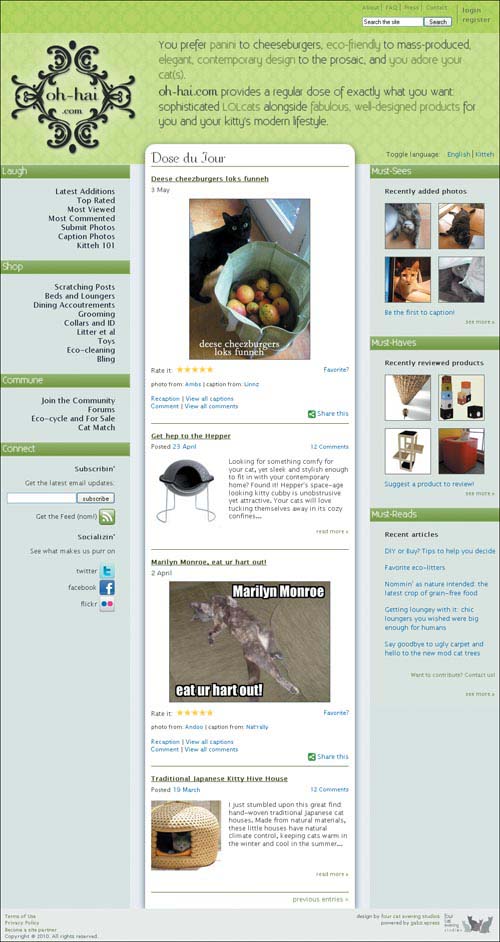
It’s true that IE8 was missing the cool text effects, rounded corners, and drop shadows, but it still maintained the correct layout, so Andrea gathered up her courage to look at IE7 and IE6.
As to be expected, the site in IE6 (Figure 10.2) and IE7 (Figure 10.3, on the next page) failed to crack even the smallest grin.
Figure 10.2. Oh-Hai.com in IE6
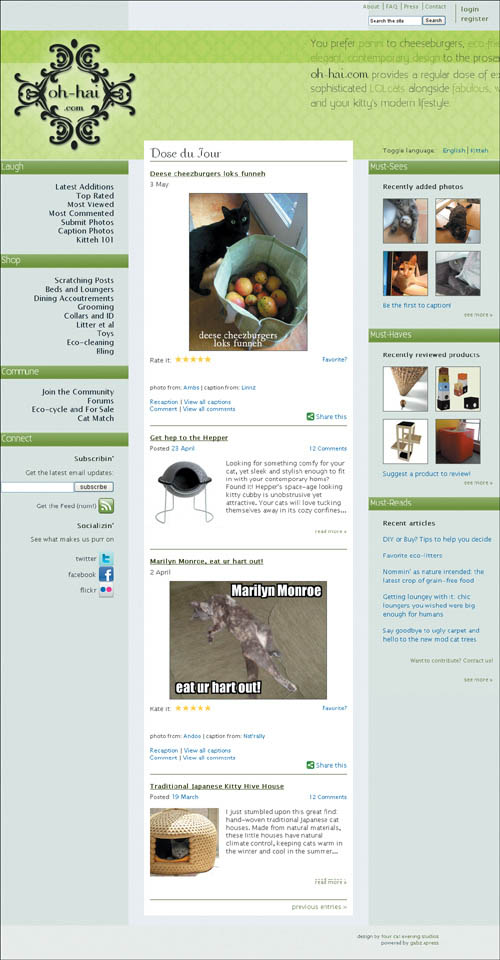
Figure 10.3. Even in IE7, there wasn’t much to laugh about.
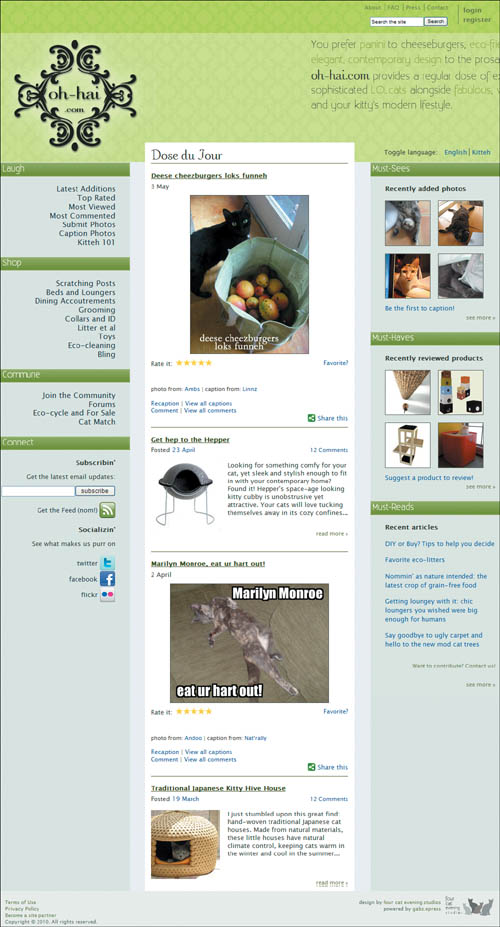
In both browsers, the intro text was out of place, and Andrea was getting strange results in the footer, where the links caused the background to change considerably (Figure 10.4).
Figure 10.4. Unstable footer links

Follow the Evidence
Andrea is building this website as a labor of love. While she has worked for years in the design industry professionally, she is relatively new to web development. She is aware of some of the more common and easily avoided bugs in the older IEs, such as the double margin float bug, so she was surprised that her page would have so much difference in rendering, especially given that she made an effort to code proactively against potential problems.
She also is up to date on the “newer” properties of CSS3 and made an effort to not only incorporate some jazzy display properties, but build in progressive enhancement. Andrea understands that many of these properties are not fully supported by all the modern browsers, knows that the page will not render the same across all browsers, and realizes that she will have to get clever to serve up the same look-and-feel for all of them. She doesn’t know exactly where to start with that process, but is eager to learn.
Identifying suspects
We’ll start with her rendering problems. Because they are almost solely in IE6 and 7 and are involved with some of the larger elements on the screen, I have a hunch that hasLayout may be the source of her chagrin. The disappearing and reappearing of the footer link text are a dead giveaway, as are some of the spacing problems.
As for the getting the same look-and-feel cross-browser, we’ll tackle that once we have some of the other fixes in place.
Mug shots
Despite the light-hearted nature of the site, Andrea has employed a XHTML 1.0 strict doctype. Here is her code:
<!DOCTYPE html PUBLIC "-//W3C//DTD XHTML 1.0 Strict//EN" "http://www.w3.org/TR/xhtml1/DTD/xhtml1-strict.dtd">
<html xmlns="http://www.w3.org/1999/xhtml" xml:lang="en" lang="en">
<head>
<meta http-equiv="Content-Type" content="text/html; charset=utf-8" />
<title>Oh-Hai.com: Fur teh Sofiskatd Kitteh (an Hoomanz 2)</title>
<link rel="shortcut icon" type="image/x-icon" href="ohhai.ico" />
<style type="text/css">
/* --- font face fonts -- */
@font-face {
font-family: "Existence Light";
src: url(Existence-Light.eot);
src: url(Existence-Light.otf)
format("truetype");
}
@font-face {
font-family: "COM4t Nuvu Regular";
src: url(COM4NRG_.eot);
src: url(COM4NRG_.TTF) format("truetype");
}
/* --- minor css reset --- */
html, body, div, p, h1, h2, h3, h4, h5, h6,
a, img, ul, li, form {
margin: 0;
padding: 0;
border: 0;
font-size: 100%;
}
body {
font: 13px/18px "Lucida Sans Unicode",
"Lucida Grande", Arial, sans-serif;
}
ul {
list-style: none outside;}
/* --- font sizes for elements --- */
.login, .navlinks {font-size: 115%;}
h3 {font-size: 99%;}
.postinfo, .useraction , input {font-size:
95%;}
.commentstars, .bottom {font-size: 90%;}
#mininav, .readmore, .credits {font-size:
85%;}
#footer {font-size: 80%;}
/* --- general styles --- */
body {
background-color: #eff4fb;
color: #3B3F33;
width: 100%;
}
div, h1, h2, img, a {
behavior: url(iepngfix.htc);}
h2 {
color: #fcfdf6;}
a {
color: #275B9F;
text-decoration: none;}
.readmore a, .preventries a {
color: #69824d;}
a:hover {
text-decoration: underline;}
.photonav img, .centeredimg img {
border: 1px solid #575d57;}
.readmore {
clear: both;
text-align: right;
margin-bottom: 20px;
}
#mostcontent .readmore {
margin-right: 10px;
}
.rightalign {
text-align: right;}
.last {
border: 0;}
/* --- main section styles ---- */
#mainwrap {
background: url(bg_faux_column_left.gif)
repeat-y 26% 0;
margin: 0 auto;
width: 100%;
overflow: hidden;
}
#secondwrap {
background: url(bg_faux_column_right.gif)
repeat-y 74% 0;
width: 100%;
}
#head {
background: url(bg_ohhai_top.gif) 0 0
repeat-x;
overflow: hidden;
}
#mininav {
color: #69824d;
float: right;
margin-top: 5px;
width: 280px;
}
.login {
border-left: 1px solid #69824d;
float: right;
font-weight: bold;
line-height: 1.5em;
list-style-type: none;
margin-top: 5px;
padding-left: 5px;
width: 80px;
}
#mininav ul.login li {
border: 0;
display: block;
}
#mininav a {
color: #69824d;}
#mininav ul.infonav {
width: 190px;}
#mininav li, #footer li {
border-right: 1px solid #69824d;
padding: 0 5px;
display: inline;
}
#mininav li.last, #footer li.last {
border: 0;}
#search {
width: 190px;
margin-top: 10px;
}
#siteintro {
margin: 64px auto 1px;
height: 263px;
width: 994px;
overflow: hidden;
}
h1 {
float: left;
margin: 0 0 0 -5px;
width: 312px;
}
h1 a {
background-image: url(logo_ohhai_glow.png);
display: block;
text-indent: -9999px;
height: 263px;
}
h1 a:hover {
background-image: url (logo_ohhai_ceilingcat.png);}
/* -- english/kitteh toggle styles -- */
#ekwelcome {
position: relative;
top: 235px;
left: 46%;
width: 682px;
}
#ekwelcome a {
text-decoration: none;}
.languages {
display: inline;
padding-left: 5px;}
li.first{
border-right: 1px solid #3B3F33;}
.introenglish, .introkitteh {
color: #3B3F33;
font: 1.58em/1.45em "Existence Light", "Century Gothic", sans-serif;
text-shadow: .01em .01em 1px #666;
float: left;
height: 200px;
margin-top: 10px;
width: 97%;
position: absolute;
top: -233px;
left: -143px;
text-decoration: none;
cursor: default;
}
.accent {
color: #5B8F00;}
.nobreak {
white-space: nowrap;}
.ohhai {
font: 1.6em "COM4t Nuvu Regular", serif;
}
.introkitteh {
font: 1.5em/1.45em "Existence Light", "Century Gothic", sans-serif;
visibility: hidden;
}
a.english:hover .introenglish {
visibility: visible;
}
a.kitteh:hover .introkitteh {
background: url(bg_head.gif) 11% 9% repeat-x;
visibility: visible;
}
#maincontent {}
#maincontent h2 {
background-color: #fcfdf6;
clear: both;
font: 1.35em/1.6em "Existence Light", "Century Gothic", sans-serif;
height: 30px;
text-indent: 5px;
text-shadow: .01em .01em 1px #fff;
}
#primarynav {
display: inline;
float: left;
overflow: hidden;
width: 26%;
}
#primarynav h2 {
margin: 0 -1px 15px 0;
height: 30px;
}
.navheaderleft {
background: url(bg_headers.png) 100% 0 no-repeat;}
.navheaderright {
background: url(bg_headers.png) 0 100% no-repeat;}
#primarynav ul {
float: right;
text-align: right;
margin: 0 30px 20px 0;
width: 221px;
}
#primarynav a {
color: #27323F;}
#primarynav a:hover {
font-weight: bold;
text-decoration: none;
}
.navlinks {
display: inline;} /* avoids double margin float bug */
#connect {
margin-right: 30px;}
#subscribe {
margin: 10px 0;}
#connect h3 {
margin: 15px 0 10px 0;}
ul#connectlinks {
margin: 15px 0 0 0;}
#connectlinks li {
line-height: 2.4em;}
#connectlinks a img, #feed a img, .rightalign img {
vertical-align: middle;}
#contentcolumn {
background-color: #fff;
display: inline; /* avoids double margin float bug */
float: left;
margin: -40px 3% 0 3%;
overflow: hidden;
width: 42%;
-moz-border-radius: 20px 20px 0 0;
-webkit-border-top-left-radius: 20px;
-webkit-border-top-right-radius: 20px;
-moz-box-shadow: 0 5px 20px rgba(0,0,0,0.6);
-webkit-box-shadow: 0 5px 20px rgba(0,0,0,0.6);
box-shadow: 0 5px 20px rgba(0,0,0,0.6);
}
#content {
background-color: #fff;
margin: 1px auto;
width: 94%;
}
#contentcolumn h3 {
font: 2.5em "COM4t Nuvu Regular", serif;
padding-top: 10px;
}
#content h4 {
margin: 15px 0 5px 0;}
#content h4 a {
color: #3B4F18;
text-decoration: underline;
}
#content p {
line-height: 1.2em;}
.lolcatentry, .productentry, .preventries {
border-top: 1px solid #3b5b13;
padding-bottom: 10px;
overflow: hidden;
}
.postinfo {
margin-bottom: 15px;
line-height: 1em;
overflow: hidden;
}
.postdate {
float: left;}
.commentstars {
float: right;}
.credits {
clear: both;
margin-bottom: 15px;
padding-top: 15px;}
.centeredimg, #search p {
text-align: center;}
.centeredimg {
clear: both;
text-align: center;
margin: 10px 0;
}
.productentry img {
float: left;
margin-right: 15px;
}
.useraction {
line-height: .7em;}
p.preventries {
padding-top: 5px;
text-align: right;}
/* --- star rating code --- */
.star ul {
float: left;
height: 14px;
width: 75px;
}
.star li {
display: block;
float: left;
height: 14px;
margin-right: -25px;
width: 75px;
}
.star li.curr {
background-image: url('ystar.gif');}
#mostcontent {
background-color: #e1e9e5;
display: inline;
float: right;
overflow: hidden;
width: 26%;
}
#mostcontent h2 {
clear: both;
margin-left: -1px;
}
#mostcontent h3 {
margin: 15px 0 0 30px;}
#mostcontent p {
margin-left: 30px;
clear: both;}
#mostcontent ul {
margin: 0 auto 10px 30px;
float: left;
width: 222px;
}
ul.photonav li {
display: inline;
float: left;
margin: 15px 15px 0 0;
}
ul.photonav li img {
display: block;}
ul.articles li {
margin: 15px 0;}
#footer {
background: #ecf1ee url(logo_fourcatevening_rect.gif) 99% 5px no-repeat;
clear: both;
color: #616F6A;
line-height: 1.3em;
margin-top: -55px;
padding: 8px 120px 5px 0;
position: relative;
text-align: right;
}
#footer a {
color: #69824d;}
#footer ul {
margin-top: -5px;}
.importantlinks {
float: left;
width: 26%;
text-align: left;
padding-left: 10px;
}
.clearer {
clear: both;
}
</style>
</head>
<body>
<div id="mainwrap">
<div id="secondwrap">
<div id="head">
<div id="mininav">
<ul class="login">
<li><a href="#">login</a></li>
<li><a href="#">register</a></li>
</ul>
<ul class="infonav">
<li><a href="#">About</a></li>
<li><a href="#">FAQ</a></li>
<li><a href="#">Press</a></li>
<li class="last"><a href="#">Contact</a></li>
</ul>
<form id="search" action="post">
<p><input type="text" size="20" value="Search the site" class="textinput" /><input type="submit" value="Search" class="submit"/></p>
</form>
</div><!-- end mininav -->
<div id="siteintro">
<h1><a href="#">Oh-Hai.com</a></h1>
<div id="ekwelcome">
<div class="languages">Toggle language:
<ul class="languages">
<li class="languages first">
<a href="#" class="english ">English
<span class="introenglish">
You prefer <span class="accent">panini</span> to cheeseburgers, <span class="accent">eco-friendly</span> to mass-produced, <span class="accent">elegant, contemporary design</span> to the prosaic, and <span class="accent">you adore your <span class="nobreak">cat(s)</span></span>.<br />
<span class="ohhai">oh-hai.com</span> provides a regular dose of exactly what you want: sophisticated <span class="accent">LOLcats</span> alongside <span class="accent">fabulous, well-designed products</span> for you and your kitty's modern lifestyle.
</span>
</a>
</li>
<li class="languages">
<a href="#" class="kitteh">Kitteh
<span class="introkitteh">
U liek nommin on <span class="accent">fancee sammiches</span> nstead of cheezburgers (kitteh dont undrstnd dat, srsly), u also liek <span class="accent">thanz frum natur</span> not maed in factries (kitteh agree), <span class="accent">purty thanz in teh hauze</span> (all teh same 2 kitteh), an <span class="accent">u luv kittehz</span> (of
cuors)!<br />
wif <span class="ohhai">oh-hai.com</span> site hoomanz can haz funnys an purties evrydy: <span class="accent">sofiskatd LOLcats</span> (wahtz dat?) an <span class="accent">niec made thanz</span> fur stylesh kittehz an hoomanz 2. kthxbai!
</span>
</a>
</li>
</ul>
</div>
</div><!-- end ekwelcome -->
</div><!-- end siteintro -->
</div><!-- end head -->
<div id="maincontent">
<div id="primarynav">
<h2 class="navheaderleft">Laugh</h2>
<ul class="navlinks">
<li><a href="#">Latest Additions</a></li>
<li><a href="#">Top Rated</a></li>
<li><a href="#">Most Viewed</a></li>
<li><a href="#">Most Commented</a></li>
<li><a href="#">Submit Photos</a></li>
<li><a href="#">Caption Photos</a></li>
<li><a href="#">Kitteh 101</a></li>
</ul>
<!-- end laugh section -->
<h2 class="navheaderleft">Shop</h2>
<ul class="navlinks">
<li><a href="#">Scratching Posts</a></li>
<li><a href="#">Beds and Loungers</a></li>
<li><a href="#">Dining Accoutrements</a></li>
<li><a href="#">Grooming</a></li>
<li><a href="#">Collars and ID</a></li>
<li><a href="#">Litter et al</a></li>
<li><a href="#">Toys</a></li>
<li><a href="#">Eco-cleaning</a></li>
<li><a href="#">Bling</a></li>
</ul>
<!-- end shop section -->
<h2 class="navheaderleft">Commune</h2>
<ul class="navlinks">
<li><a href="#">Join the Community</a></li>
<li><a href="#">Forums</a></li>
<li><a href="#">Eco-cycle and For Sale</a></li>
<li><a href="#">Cat Match</a></li>
</ul>
<!-- end commune section -->
<h2 class="navheaderleft">Connect</h2>
<div id="connect" class="rightalign">
<h3>Subscribin'</h3>
<p>Get the latest email updates:</p>
<form id="subscribe" action="post">
<p><input type="text" size="23" class="textinput" /> <input type="submit" value="subscribe" class="subscribe"/></p>
</form>
<p id="feed"><a href="#">Get the Feed (nom!) <img src="rss_green.png" alt="RSS" /></a></p>
<h3>Socializin'</h3>
<p>See what makes us purr on</p>
<ul id="connectlinks">
<li><a href="#">twitter <img src="twitter_32.png" alt="" /></a></li>
<li><a href="#">facebook <img src="facebook_32.png" alt="" /></a></li>
<li><a href="#">flickr <img src="flickr_32.png" alt="" /></a></li>
</ul>
</div><!-- end connect section -->
</div><!-- end primarynav -->
<div id="contentcolumn">
<div id="content">
<h3>Dose du Jour</h3>
<div class="lolcatentry">
<h4><a href="#">Deese cheezburgers loks funneh</a></h4>
<p>3 May</p>
<p class="centeredimg"><img src="lol_mangocheezburgers.jpg" alt="Deese cheezburgers loks funneh" /></p>
<div>
<ul class="star" title="Rate this photo!">
<li>Rate it:</li>
<li id="starcur" class="curr"></li>
</ul>
<p class="commentstars"><a href="#">Favorite?</a></p>
</div>
<p class="credits">photo from: <a href="#">Ambs</a> | caption from: <a href="#">Linnz</a></p>
<div class="useraction">
<p><a href="#">Recaption</a> | <a href="#">View all captions</a></p>
<p><a href="#">Comment</a> | <a href="#">View all comments</a></p>
</div>
<p class="rightalign">
<a href="#"><img src="sharethis.png" alt="" /> Share this</a>
</p>
</div>
<div class="productentry">
<h4><a href="#">Get hep to the Hepper</a></h4>
<p class="postinfo"><span class="postdate">Posted <a href="#">23 April</a></span><span class="commentstars"><a href="#">12 Comments</a></span></p>
<p class="clearer"><a href="#"><img src="prod_hepper.jpg" alt="Hepper cat house" /></a> Looking for something comfy for your cat, yet sleek and stylish enough to fit in with your contemporary home? Found it! Hepper's space-age looking kitty cubby is unobstrusive yet attractive. Your cats will love tucking themselves away in its cozy confines...</p>
<p class="readmore"><a href="#">read more »</a></p>
</div>
<div class="lolcatentry">
<h4><a href="#">Marilyn Monroe, eat ur hart out!</a></h4> <p>2 April</p>
<p class="centeredimg"><img src="lol_marilyn.jpg" alt="Marilyn Monroe, eat ur hart out!" /></p>
<div>
<ul class="star" title="Rate this photo!">
<li>Rate it:</li>
<li id="starCur" class="curr"></li>
</ul>
<p class="commentstars"><a
href="#">Favorite?</a></p>
</div>
<p class="credits">photo from: <a href="#">Andoo</a> | caption from: <a href="#">Nat'rally</a></p>
<div class="useraction">
<p><a href="#">Recaption</a> | <a href="#">View all captions</a></p>
<p><a href="#">Comment</a> | <a href="#">View all comments</a></p>
</div>
<p class="rightalign">
<a href="#"><img src="sharethis.png" alt="" /> Share this</a>
</p>
</div>
<div class="productentry">
<h4><a href="#">Traditional Japanese Kitty Hive House</a></h4>
<p class="postinfo"><span class="postdate">Posted <a href="#">19 March</a></span><span class="commentstars"><a href="#">12 Comments</a></span></p>
<p class="clearer"><a href="#"><img src="prod_japanese.jpg" alt="Traditional Japanese Kitty Hive House" /></a> I just stumbled upon this great find: hand-woven traditional Japanese cat houses. Made from natural materials, these little houses have natural climate control, keeping cats warm in the winter and cool in the summer...</p>
<p class="readmore"><a href="#">read more »</a></p>
</div>
<p class="preventries"><a href="#">previous entries »</a></p>
</div><!-- end content -->
</div><!-- end contentcolumn -->
<div id="mostcontent">
<h2 class="navheaderright">Must-Sees</h2>
<h3>Recently added photos</h3>
<ul class="photonav">
<li><a href="#"><img src="th_whee.jpg" alt="sleeping kitty-Aashika" /></a></li>
<li><a href="#"><img src="th_gheri.jpg" alt="lounging kitty-Gheri" /></a></li>
<li><a href="#"><img src="th_daisy.jpg" alt="alert kitty-Day-Z" /></a></li>
<li><a href="#"><img src="th_sheets.jpg" alt="hiding kitty-Zealand" /></a></li>
</ul>
<p><a href="#">Be the first to caption!</a></p>
<p class="readmore"><a href="#">see more »</a></p>
<!-- end mustsee section -->
<h2 class="navheaderright">Must-Haves</h2>
<h3>Recently reviewed products</h3>
<ul class="photonav">
<li><a href="#"><img src="th_tree.jpg" alt="eco cat climbing tree" /></a></li>
<li><a href="#"><img src="th_cubes.jpg" alt="stylish cat cubes" /></a></li>
<li><a href="#"><img src="th_climber.jpg" alt="bamboo cat climber" /></a></li>
<li><a href="#"><img src="th_modkat.jpg" alt="modkat litter box" /></a></li>
</ul>
<p><a href="#">Suggest a product to review!</a></p>
<p class="readmore"><a href="#">see more »</a></p>
<!-- end musthave section -->
<h2 class="navheaderright">Must-Reads</h2>
<h3>Recent articles</h3>
<ul class="articles">
<li><a href="#">DIY or Buy? Tips to help you decide</a></li>
<li><a href="#">Favorite eco-litters</a></li>
<li><a href="#">Nommin' as nature intended: the latest crop of grain-free food</a></li>
<li><a href="#">Getting loungey with it: chic loungers you wished were big enough for humans</a></li>
<li><a href="#">Say goodbye to ugly carpet and hello to the new mod cat trees</a></li>
</ul>
<p class="readmore"><a href="#">Want to contribute? Contact us!</a></p>
<p class="readmore"><a href="#">see more »</a></p>
<!-- end musthave section -->
</div><!-- end mostcontent -->
</div><!-- end maincontent -->
<div id="footer">
<p class="importantlinks">
<a href="#">Terms of Use</a><br />
<a href="#">Privacy Policy</a><br />
<a href="#">Become a site partner</a><br />
Copyright © 2010. All rights reserved.<br />
</p>
<p>design by <a href="#">four cat evening studios</a><br />
powered by <a href="#">gabz.epress</a></p>
<div class="clearer"></div> <!--deleting this is is part of the fix too -->
</div><!-- end footer -->
</div><!-- end secondwrap -->
</div><!-- end mainwrap -->
</body>
</html>
The Evidence Never Lies
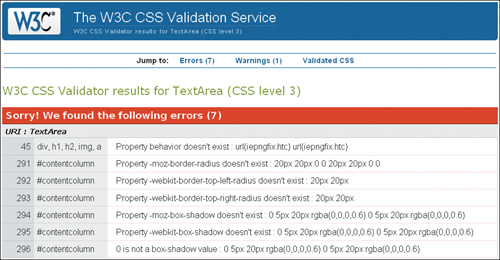
We’ll start by making certain there are no problems in the markup and CSS code. Validation of the HTML yields no errors. However, the CSS validator produces several errors (Figure 10.5).
Figure 10.5. CSS3 validation: the newer properties don’t validate (yet)
Sorry! We found the following errors (7)
URI : TextArea
45 div, h1, h2, img, a Property behavior doesn't exist : url(iepngfix.htc)
291 #contentcolumn Property -moz-border-radius doesn't exist : 20px 20px 0 0
292 #contentcolumn Property -webkit-border-top-left-radius doesn't exist : 20px
293 #contentcolumn Property -webkit-border-top-right-radius doesn't exist : 20px
294 #contentcolumn Property -moz-box-shadow doesn't exist : 0 5px 20px rgba(0,0,0,0.6)
295 #contentcolumn Property -webkit-box-shadow doesn't exist : 0
5px 20px rgba(0,0,0,0.6)
296 #contentcolumn 0 is not a box-shadow value : 0 5px 20px rgba(0,0,0,0.6)
This is one situation where having code that doesn’t validate is entirely legitimate. Parts of Andrea’s design relies upon transparent .png image files (PNG-24), which aren’t supported by IE6 without the help of workaround scripts or proprietary filters. Andrea used a popular script that helps the images render correctly but the script requires the use of IE proprietary properties which are not part of the CSS specs and therefore are not valid in any browser but IE.
Additionally, to be able to employ the cool CSS3 effects that she wanted, she had to use Mozilla- and Webkit- (Safari and Google Chrome) specific properties, as well as a property that is still in draft form, but is slated to be approved in the not-so-distant future. To future-proof the styles, she included the anticipated CSS3 specification syntax.
These validation errors, therefore, are to be expected and can be ignored.
Confirming suspicions and naming the culprit
Now that I have had a look at the code, I am eager to see the hasLayout status of the page elements that are out of place. hasLayout may have a funny name, but instead of bringing amusement, the problems that stem from an element either having or not having layout can bring a front-end developer close to tears. If you remember, hasLayout is a quality in both IE6 and IE7 that elements have either intrinsically based on what element they are, or when certain properties are applied to them. Layout can be removed by later properties once it is applied if necessary, but if it is intrinsic to the element it can’t ever be removed.
While the problems in IE6 are not as important because of its low usage by the demographic of her audience, IE7 is still widely used, and therefore Andrea is taking the issues in that browser particularly seriously.
Let’s see what is going on with Andrea’s misplaced and strangely behaving page sections, shall we?
At the very top of the page in IE6, there is a mysterious gap (Figure 10.6).
Figure 10.6. In IE6, ceiling gap says “Oh, hi—I’m at the top of your page, messing up your layout.”

Now, while IE6 is not of major importance to Andrea, this is a big enough issue to warrant fixing. The CSS for the head of the page is this:
#head {
background: url(bg_ohhai_top.gif) top left repeat-x;
overflow: hidden;
}
Do you notice anything about this code? Since there are only two lines, I think the telling thing about this code is what is missing, and that is this: a property that will give the #head element layout.
I think the most effective way to activate hasLayout would be to make the height explicit. If you’ll harken back to your earlier training, height is on the list of properties that give layout. So let’s add this:
#head {
background: url(bg_ohhai_top.gif) top left repeat-x;
height: 328px;
overflow: hidden;
}
To Andrea’s delight, the explicit height works as hoped, and keeps the top navigation from pushing the #head div down (Figure 10.7).
Figure 10.7. Ceiling gap has left the building, but the intro text is pushed right off the page—in both English and Kitteh

Now, on to the rest of the page.
The most troubling problem for both the early IEs is the misplaced introductory text. What seems to be happening is that the text in the other browsers is acting like it has a property of float: left, but the IEs are not on board with that. Any time an element acts out of character compared to other browsers in IE7 and IE6, you can pretty much bet your kitty toys that it is due to hasLayout. Indeed, I recall (from the very detailed treatise on hasLayout at http://www.satzansatz.de/cssd/onhavinglayout.html) that if an element with layout is next to a floated element, then essentially the element is displaced, as if the element with layout were a float itself. Well, that sounds like a viable explanation, especially when I test the theory by adding float: left; to the code on the next page, which moves the element in all of the other browsers to the same place it is in the IEs:
#ekwelcome {
float: left;
position: relative;
top: 235px;
left: 46%;
width: 682px;
}
This helps me formulate a plan: instead of getting IE to conform, I decide to make the other browsers play along instead. I add this extra bit of code to change the value from -143px to -450px here:
.introenglish, .introkitteh {
color: #3B3F33;
font: 1.58em/1.45em "Existence Light","Century Gothic", sans-serif;
text-shadow: .01em .01em 1px #666;
float: left;
height: 200px;
margin: 10px 0 0 0;
width: 97%;
position: absolute;
top: -233px;
left: -450px;
text-decoration: none;
cursor: default;
}
And voila! Now all of the browsers have the introductory text in the correct place (Figure 10.8)!
Figure 10.8. Now the welcome message is fully accessible

Andrea shows me another puzzler: when changing the width of the page in the IEs, the right column flickers from float drop and then mysteriously goes back into place. Weird!
As you know, float drop is usually caused by a float being too wide to fit into the given space on the page, and therefore the float drops below the adjacent element to the next available space. The double margin float bug is usually the culprit behind float drop, and is easily fixed by adding display: inline to the declaration. However, display: inline is already there! I imagine that you, like myself, were expecting that to be the answer, but it isn’t.
Furthermore, there are two properties that give the element layout: float and width. I have to conclude that the issues with this element may actually be due to having layout rather than lacking it, but we do need both the float and width properties and values, so getting rid of them is not the solution.
I suggest to Andrea that we slightly alter the size of the middle column for the IEs, and deliver this new value through conditional statements. The other browsers will ignore the conditional statements and render the CSS that they can see.
We try a small adjustment, nothing major, and change the width of the center column from 42% to 41.9%:
#contentcolumn {
width: 41.9%;}
With this change, the columns seem much better behaved, and no longer drop at the slightest provocation.
Finally, we get to the footer of the page, where all sorts of interesting things are happening (Figure 10.9).
Figure 10.9. Variations on a buggy theme
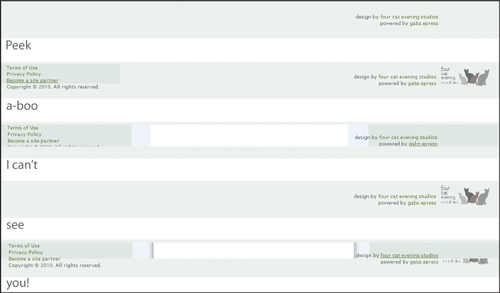
Can you guess what is causing the mysterious comings and goings of the elements in the footer? That’s right, it is none other than the infamous peekaboo bug in all of its splendor and glory. Unlike the famed LOL ceiling cat peeking down at you, there is little cute about this bug.
The peekaboo bug is caused by an element not having layout, so the fix is straightforward. I suggest giving the footer a height, which it lacked:
#footer {
background: #ecf1ee url(logo_fourcatevening_rect.gif) 99% 5px no-repeat;
clear: both;
color: #616F6A;
height: 55px;
line-height: 1.3em;
padding: 8px 120px 5px 0;
position: relative;
text-align: right;
}
With the addition that small line of code, the footer is stable and the page looks as it should in both IEs (Figure 10.10).
Figure 10.10. Bugless in the footer

With everything fixed and showing up correctly in all browsers, it seemed like an opportune moment to let Andrea know that she could have avoided this bug completely by coding this section of the page differently.
Here is her original code:
<div id="footer">
<p class="importantlinks">
<a href="#">Terms of Use</a><br />
<a href="#">Privacy Policy</a><br />
<a href="#">Become a site partner</a><br />
Copyright © 2010. All rights reserved.<br />
</p>
<p>design by <a href="#">four cat evening studios</a><br />
powered by <a href="#">gabz.epress</a></p>
<div class="clearer"></div>
</div><!-- end footer -->
In terms of good page semantics, she could do a bit better by making the .importantlinks paragraph an unordered list:
<div id="footer">
<ul class="importantlinks">
<li><a href="#">Terms of Use</a></li>
<li><a href="#">Privacy Policy</a></li>
<li><a href="#">Become a site partner</a></li>
</ul>
<p>Copyright © 2010. All rights reserved.</p>
<p>design by <a href="#">four cat evening studios</a><br />
powered by <a href="#">gabz.epress</a></p>
<!-- delete <div class="clearer"></div> -->
</div><!-- end footer -->
This code makes a lot more sense from a page semantics standpoint, and she still would be able to control the placement on the page and styling easily. Also, ironically, having the links as list items in a <ul>, prevents the peekaboo bug entirely.
Andrea thanked me for my suggestion and assured me that she would think about making that change before launching the site.
We’re making great progress, and Andrea is truly pleased that we have squashed all of the major bugs. Now we have to make sure the rounded corners and drop-shadow of the center column looks the same in as many browsers as possible.
Currently, Firefox, Safari, and Google Chrome render the CSS3 text drop shadows, rounded corners and drop-shadow on the center column, and @font-face correctly. Opera renders the text effects just fine, but falls short on the center column rounded corners and drop shadows. Andrea doesn’t expect that much of her audience will use Opera, so is fine with letting that one go for now.
However, IE7 and IE8 are a different story. She feels it is important that these users see the site the way she intended it. Since we are serving the IEs some specific code already, we decide to make separate CSS files for them and use conditional comments to give each version their own tailor-made CSS.
We create two background images for the center column in order to employ a technique that uses one image for the left, and a repeating image for the right. Once we get those two in place, we need to make some small adjustments to the margins and widths of the center column and some of its children to make it show up correctly:
#contentcolumn {
background: url(bg_content_left.png) top left no-repeat;
display: inline;
margin: -40px 3% 0 3%;
padding: 0;
width: 41.9%;
}
#content {
background: url(bg_content_right.png) top right no-repeat;
margin: 1px auto 0 26px;
padding: 0 0 50px 0;
}
.lolcatentry, .productentry, .preventries {
width: 94%;}
As for IE6, while we know the browser is gasping its final breaths, some of Andrea’s audience could still be using it. Chic cat decor is not just for the technologically savvy. While the scripts that handle PNG-24 support for IE can be a great workaround for single images, they are not infallible, and there is still a problem with rendering PNGs as repeating background images. Therefore, instead of using the same PNG background images with a drop shadow that we were able to use in IE7 and IE8, we will simply use plain old .gifs without a drop shadow, which won’t have a problem with repeating.
Here is the code we will serve to IE6:
div, h1, h2, img, a {
behavior: url(iepngfix.htc);}
#contentcolumn {
background-image: url(bg_content_left_nds.gif);
margin: -40px 3% 0 3%;
width: 41.9%;}
#content {
background: transparent url(bg_content_right_nds.gif) top right no-
repeat;
margin: 0 -5px 0 17px;
padding: 0 0 0 8px;
}
The last requirement is to add the conditional comments in the regular page. I advise her to put the code after the page CSS, so that it won’t be overridden by the styles meant for modern browsers:
<!--[if lte IE6]>
<link rel="stylesheet" type="text/css" href="ohhai_ie6.css" />
<![endif]-->
<!--[if gte IE6]>
<link rel="stylesheet" type="text/css" href="ohhai_ie78.css" />
<![endif]-->
With these final changes in place and the site looking really good in all of the browsers, Andrea finally lets out a huge smile and laugh, and even shows me the mini Easter egg she put in the site just for kicks (Figure 10.11).
Figure 10.11. A little surprise in the logo
Case Closed!
With the final changes completed, Andrea is thrilled. Now she has the beginnings of a web presence and the site may give her the opportunity to implement, produce and market some of her own well-designed product ideas.
We saw how hasLayout issues can cause pretty dramatic problems with the rendering of elements on the page, but also how some of the fixes are as simple as making height explicit. There are several in-depth articles about hasLayout on the web, so it is a good idea to familiarize yourself with its ins and outs. Although IE6 is on its way out, it’s not quite dead yet, and is still being used enough to warrant being cordial to it. But even when IE6 is completely defunct, its more refined sibling IE7 still harbors vestigial bugs that will render parts of a page incorrectly.
It is seductive to think that you can code proactively against IE bugs—but you may end up getting them anyway. Just as Andrea consciously coded against the double margin float bug and employed properties that gave layout in most of the major section containers on the page, she was not immune to other bugs that she did not foresee.
If you want to start incorporating the increasingly popular CSS3 properties, know in advance that getting your pages to render similarly cross-browser may be a challenge. While it is admirable to want your pages to look exactly the same in all, that aspiration needs to be balanced with a willingness to be flexible and potentially have alternatives for less-compliant browsers. Also, by knowing the limitations beforehand, you may be able to proactively design for such possibilities.
Finally, it is important to note that some issues will require unconventional solutions or those in which you may have to rework the structure of your markup to be able to achieve your page layout. Employing good, semantic markup will sometimes be the key to never coming up against old browser bugs! By coding proactively against IE6 and IE7 bugs and by keeping web standards in mind, you will most likely avoid many IE bug headaches.
Fantastic work! And congratulations are in order. You have faithfully stuck to your training and have assisted me in solving several cases with tough CSS mysteries. I am proud to say that you have passed your trial with flying colors, and thus fully earned your new title of CSS Detective! Now you can fearlessly go forth and more easily find the culprits behind your own CSS conundrums, and maybe even those of other people.
Good luck to you, and remember—let’s be careful out there.