Table of Contents for
The CSS Detective Guide: Tricks for solving tough CSS mysteries
 The CSS Detective Guide: Tricks for solving tough CSS mysteries
Published by
New Riders, 2010
The CSS Detective Guide: Tricks for solving tough CSS mysteries
Published by
New Riders, 2010
- Cover Page
- Title Page
- Copyright Page
- Dedication
- Acknowledgments
- Contents
- Part 1. The Detective’s Apprentice
- 1. Investigating the Scene of the Crime
- 2. The Tools of the Trade
- 3. Giving the Third Degree
- 4. The Usual Suspects
- Part 2. The Game’s Afoot!
- 5. The Case of the Devilish Details
- 6. The Case of the Mistaken Identity
- 7. The Case of the Single White Space
- 8. The Case of the Float with a Mind of Its Own
- 9. The Case of the Browser Who Hated Me
- 10. The Case of the LOL Layout
- Appendix
- Index
8. The Case of the Float with a Mind of Its Own
IN THIS CASE, WE’LL SEE HOW TO TAME A HEADSTRONG float by gently yet firmly persuading it to get back in line.
The Crime Scene
Celebrated author Raymond Jay has finally capitulated. Because of pressure from his growing readership, his agents, and even his family, he is getting a website built to launch his web presence. Like some of his baby-boomer brethren, he uses technology only when necessary and thus is a late adopter. For example, he uses Microsoft Internet Explorer 6 as his browser, because he doesn’t trust upgrading and downloading applications from the web. Needless to say, Raymond is tentative about the web as a tool for self-promotion.
Luckily for him, his daughter, Diona—a bit of a renaissance woman with a background in fine arts, design, and architecture—has recently taken up web development and is creating the site for him. But because she is new to the web development game, she doesn’t have experience with solving old-school IE bugs. Imagine her horror when she sees her design is completely broken in both IE6 and IE7!
Initial snapshots
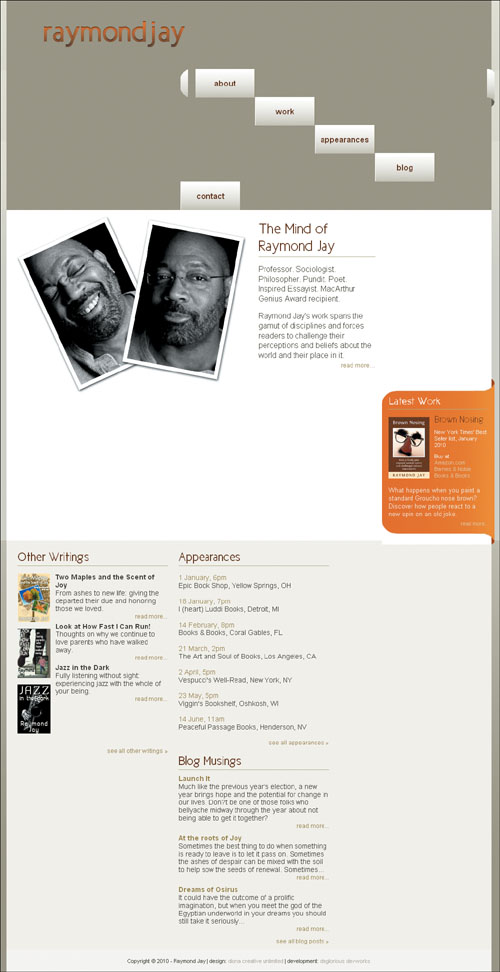
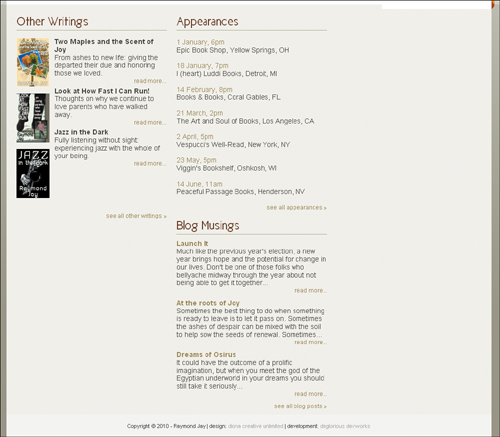
Diona’s design focuses on providing the user with the information she believes is most important to Raymond Jay’s audience. It looks great in the modern browsers Mozilla Firefox, IE8, and Opera (Figure 8.1). But you can imagine Diona’s frustration when she saw her page in IE7 (Figure 8.2). And to add insult to injury, it looks even worse in her dad’s favorite browser, IE6 (Figure 8.3).
Figure 8.1. The design looks the way it’s supposed to in Mozilla Firefox, Microsoft Internet Explorer 8, and Opera.

Figure 8.2. Raymond Jay’s site in IE7
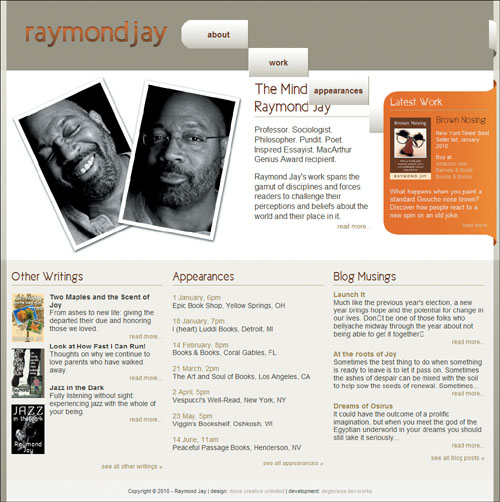
Figure 8.3. Raymond Jay’s site in IE6 (ouch!)
Follow the Evidence
Diona builds sites using CSS only for layout and relies heavily on floats. However, IE is encouraging her floats to do exactly what they please, with little regard for the style instructions.
Identifying suspects
Diona respects the importance of validating the HTML and CSS, but I suspect that because the problems are showing up specifically in IE6 and IE7 she has unwittingly stumbled into a nest of nasty IE float bugs.
Mug shots
Let’s take a look at the page code and see if we can identify why these floats won’t listen to reason.
<!DOCTYPE html PUBLIC "-//W3C//DTD XHTML 1.0 Strict//EN" "http://www.w3.org/TR/xhtml1/DTD/xhtml1-strict.dtd">
<html xmlns="http://www.w3.org/1999/xhtml" xml:lang="en" lang="en">
<head>
<meta http-equiv="Content-Type"
content="text/html; charset=utf-8" />
<title>The Mind of Raymond Jay</title>
<link rel="shortcut icon" type="image/x-icon" href="raymondjay.ico" />
<style type="text/css">
/* -- reset styles -- */
html, body, div, p, span, h1, h2, h3, h4, h5, h6, a, img, ul, li, form, input, hr {
margin: 0;
padding: 0;
font-size: 100%;
background: transparent;
}
body {
line-height: 1.125em;}
ul {
list-style: none;}
/* -- font faces -- */
@font-face {
font-family: 'NewCicleGordita';
src: url('New_Cicle_Gordita.eot');
src: local('New Cicle Gordita'),
local('NewCicle-Gordita'), url('New_Cicle_Gordita.ttf') format('truetype');
}
/* -- general page styles -- */
body, html {
background-color: #9f9a86;
color: #424031;
font: .9em Arial, sans-serif;
}
h1, h2, h3 {
color: #652a01;
font-family: 'NewCicleGordita','Trebuchet MS', sans-serif;
}
h3 {
border-bottom: 1px solid #b6b18a;
padding-bottom: 4px;
}
a {
color: #9a884b;
text-decoration: none;
}
a:hover {text-decoration: underline;}
a img {border: none;}
.readmore a {
float: right;
font-size: .85em;
}
/* -- clearfix styles -- */
.clearfix {
display: block;
}
.clearfix:after {
content: ".";
display: block;
clear: both;
visibility: hidden;
line-height: 0;
height: 0;
}
* html .clearfix {
height: 1%;}
/* -- page layout styles -- */
#primary, #secondary, #footer {
clear: both;}
h1, p.authorphoto, #whois, #secondarycontent div {
float: left;}
#primary {
background: #d6d4ca url(bg_mainbody.gif) 0 0
repeat-x;
}
#headwrap {
background-image:url(bg_header.gif); }
#header {
background-color:#9f9a86;
margin:0 auto;
width: 986px;
height: 142px;
}
h1 {
background: transparent url(logo_raymondjay.gif) no-repeat 0 0;
height: 60px;
margin: 40px 0 0 37px;
width: 306px;
text-indent: -9999px;
}
h1 a {
display: block;
height: 100%;
width: 100%;
}
#navcontain {
width: 638px;
float: right;
position: relative;
right: -6px;
}
#mainnav {
background: transparent url(bg_navcurve.gif) 0 0 no-repeat ;
color: #652a01;
font-size: 1.2em;
float: left;
height: 60px;
line-height: 57px;
list-style-type: none;
margin: 40px 0 0;
padding: 0;
text-align: center;
width: 623px;
}
.end {
background: transparent url(bg_navcurveend.gif) 0 0 no-repeat;
float: right;
height:76px;
width: 15px;
position: relative;
top: 40px;
margin: 0;}
#mainnav li a {
background: transparent url(bg_navitems.gif) 0 0 repeat-x ;
border-right: 1px solid #8f8766;
border-left: 1px solid #fff;
color: #652a01;
display: block;
float: left;
font-weight: bold;
height: 58px;
line-height: 58px;
padding: 0 1px;
width: 118px;
}
#mainnav li.first a {
border-left: 0;
margin-left: 15px;
}
#mainnav li.last a {border-right: 0;}
#mainnav li a:hover {
font-weight: normal;
text-decoration: none;
}
#primarycontent {
margin: 0 auto;
background-color:#fff;
padding: 10px 0;
width: 986px;
}
#primarycontent h2 {
margin: 0 0 15px 0;
padding-bottom: 4px;
border-bottom: 1px solid #b6b18a;
}
.authorphoto {
margin: 0 0 0 10px;
width: 471px;
}
#whois {
font-size: 1.2em;
line-height: 1.3em;
margin:0 0 0 11px;
padding: 10px 10px;
width: 238px;
}
#whois h2 {
font-size: 2em;
line-height: 1.125em;
}
#whois p, #latestwork p {
margin: 0 0 15px 0px;
padding: 0;
}
#latestwork {
background: url(bg_body_latestwork.gif) repeat-y scroll center bottom;
color: #f3f1eb;
margin: 0;
width: 229px;
float: right;
position: relative;
top: 1.125em;
right: -6px;
}
#latestwork h2 {
background:transparent url(bg_top_latestwork2.gif) no-repeat scroll 0 0;
border: 0;
color: #fdf6f1;
font-size: 1.7em;
margin: 0;
padding: 33px 0 0 15px;
position: relative;
top: -5px;
}
#lwbody {
border-top: 1px solid #b6b18a;
width: 200px;
margin: auto;}
#lwbody p {
margin: 10px 0 0 0;
padding: 0;}
#lwbody p.description {
clear: both;
}
#latestwork h3 {
border-bottom: 0;
font-size: 1.5em;
padding: 0 0 0 10px;
}
#latestwork img {
float: left;
margin: 5px 10px 10px 0;}
#latestwork ul {
list-style-type: none;
margin: 0;
padding: 0;
}
#latestwork a {
color: #e2c9a1;}
#promo {
font-size: .85em;
line-height: 1.2em;
margin: 0 0 15px 0;
}
p.latestend {
background: url(bg_bottom_latestwork2.gif) 0 0 no-repeat;
height: 50px;
position: relative;
bottom: -5px;
}
#latestwork p.readmore {
padding-right: 10px;
margin: 0;
}
#secondary {
background: transparent url(bg_bottom.gif) 0 0 repeat-x;
font-size: 1.1em;
}
#secondarycontent, #footer {
margin: 0 auto;
width: 986px;
}
#secondarycontent {
background-color: #f5f4ef;
padding: 20px 0 10px 0;}
#secondarycontent div {
width: 31%;
margin: 0 1%;
padding: 0;
}
#secondarycontent div div {
width: 100%;
margin: 0 0 10px 0;
padding: 0;
}
#secondarycontent h3 {
font-size: 1.75em;
margin-bottom: 10px;
}
dl, dt, dd {float: left;}
dl {margin: 0 0 15px 0;}
dt {
clear: left;
margin: 5px 0;
width: 67px;
}
dd {
margin: 5px 0 0 10px;
width: 228px;
}
#appearances li {
margin: 1.125em 0;}
#footer {
background-color: #F8F7F6;
font-size: .75em;
height: 40px;
line-height: 40px;
text-align: center;
padding: 3px 0;
}
#footer a {color: #B4AE9E;}
</style>
</head>
<body>
<div id="primary">
<div id="headwrap">
<div class="wrap">
<div id="header">
<h1><a href="#">Raymond Jay</a></h1>
<div id="navcontain">
<ul id="mainnav">
<li class="about first"><a href="#">about</a></li>
<li class="work"><a href="#">work</a></li>
<li class="appearances"><a href="#">appearances</a></li>
<li class="blog"><a href="#">blog</a></li>
<li class="contact last"><a href="#">contact</a></li>
</ul>
<div class="end"></div>
</div>
</div><!-- end header -->
</div>
</div><!-- end headwrap -->
<div id="primarycontent" class="clearfix">
<p class="authorphoto"><img src="authorphoto.jpg" alt=" " /></p>
<div id="whois">
<h2>The Mind of Raymond Jay</h2>
<p>Professor. Sociologist. Philosopher. Pundit. Poet. Inspired Essayist. MacArthur Genius Award recipient.</p>
<p>Raymond Jay's work spans the gamut of disciplines and forces readers to challenge their perceptions and beliefs about the world and their place in it.<br />
<span class="readmore"><a href="#">read more...</a></span></p>
</div><!-- end whois -->
<div id="latestwork">
<h2>Latest Work</h2>
<div id="lwbody">
<p><a href="book_brownnosing_lg.jpg"><img src="book_brownnosing_cover.jpg" alt="" /></a></p>
<h3>Brown Nosing</h3>
<div id="promo">
<p>New York Times' Best Seller list, January 2010</p>
<p>Buy at</p>
<ul>
<li><a href="#">Amazon.com</a></li>
<li><a href="#">Barnes & Noble</a></li>
<li><a href="#">Books & Books</a></li>
</ul>
</div>
<p class="description">What happens when you paint a standard Groucho nose brown? Discover how people react to a new spin on an old joke.</p>
</div>
<p class="latestend readmore"><a href="#">read more...</a></p>
</div><!-- end latestwork -->
</div><!-- end primarycontent -->
</div><!-- end primary -->
<div id="secondary">
<div id="secondarycontent"
class="clearfix">
<div id="otherwritings">
<h3>Other Writings</h3>
<dl class="projects">
<dt><a href="book_twomaplesjoy_lg.jpg"><img src="book_twomaplesjoy.jpg" alt="" /></a></dt>
<dd>
<h4>Two Maples and the Scent of Joy</h4>
<p>From ashes to new life: giving the departed their due and honoring those we loved.</p>
<p class="readmore"><a href="#">read more...</a></p>
</dd>
<dt><a href="book_lookathowfast_lg.jpg"><img src="book_lookathowfast.jpg" alt="" /></a></dt>
<dd>
<h4>Look at How Fast I Can Run!</h4>
<p>Thoughts on why we continue to love parents who have walked away.</p>
<p class="readmore"><a href="#">read more...</a></p>
</dd>
<dt><a href="book_jazzinthedark_lg.jpg"><img src="book_jazzinthedark.jpg" alt="" /></a></dt>
<dd>
<h4>Jazz in the Dark</h4>
<p>Fully listening without sight: experiencing jazz with the whole of your being.</p>
<p class="readmore"><a href="#">read more...</a></p>
</dd>
</dl>
<p class="readmore"><a href="#">see all other writings »</a></p>
</div><!-- end otherwritings -->
<div id="appearances">
<h3>Appearances</h3>
<ul>
<li>
<p><a href="#">1 January, 6pm</a></p>
<p>Epic Book Shop, Yellow Springs, OH</p>
</li>
<li>
<p><a href="#">18 January, 7pm</a></p>
<p>I (heart) Luddi Books, Detroit, MI</p>
</li>
<li>
<p><a href="#">14 February, 8pm</a></p>
<p>Books & Books, Coral Gables, FL</p>
</li>
<li>
<p><span class="readingdate"><a href="#">21 March, 2pm</a></span><br />
The Art and Soul of Books, Los Angeles, CA</p>
</li>
<li>
<p><span class="readingdate"><a href="#">2 April, 5pm</a></span><br />
Vespucci's Well-Read, New York, NY</p>
</li>
<li>
<p><span class="readingdate"><a href="#">23 May, 5pm</a></span><br />
Viggin's Bookshelf, Oshkosh, WI</p>
</li>
<li>
<p><span class="readingdate"><a href="#">14 June, 11am</a></span><br />
Peaceful Passage Books, Henderson, NV</p>
</li>
</ul>
<p class="readmore"><a href="#">see all appearances »</a></p>
</div><!-- end appearance -->
<div id="blogmusings">
<h3>Blog Musings</h3>
<div class="blogpost">
<h4><a href="#">Launch It</a></h4>
<p>Much like the previous year's election, a new year brings hope and the potential for change in our lives. Don't be one of those folks who bellyache midway through the year about not being able to get it together...</p>
<p class="readmore"><a href="#">read more...</a></p>
</div>
<div class="blogpost">
<h4><a href="#">At the roots of Joy</a></h4>
<p>Sometimes the best thing to do when something is ready to leave is to let it pass on. Sometimes the ashes of despair can be mixed with the soil to help sow the seeds of renewal. Sometimes...</p>
<p class="readmore"><a href="#">read more...</a></p>
</div>
<div class="blogpost">
<h4><a href="#">Dreams of Osirus</a></h4>
<p>It could have the outcome of a prolific imagination, but when you meet the god of the Egyptian underworld in your dreams you should still take it seriously...</p>
<p class="readmore"><a href="#">read more...</a></p>
</div>
<p class="readmore clearfix"><a href="#">see all blog posts»</a></p>
</div><!-- end blogmusings -->
</div><!-- end secondarycontent -->
<div id="footer">
<p>Copyright © 2010 - Raymond Jay | design: <a href="#">diona creative unlimited</a> | development: <a href="#">deglorious devworks</a></p>
</div><!-- end footer -->
</div><!-- end secondary -->
</body>
</html>
The Evidence Never Lies
I’d be remiss if I didn’t do due diligence and double-check the validation results, so I go ahead and validate to rule out any coding mistakes. Both the HTML and CSS validation results are error free, as I expected. But then again, most IE bugs are the outcome of perfectly valid code that has been erroneously rendered by IE’s “interesting” code interpretation engine.
Confirming suspicions and naming the culprit
It was just Diona’s luck to hit three of the most common IE float bugs all in the same document. Who’da thunk it? But in comparing the pages rendered by the two older IE versions versus the modern browser, I notice our old usual suspect buddies from Chapter 4 :
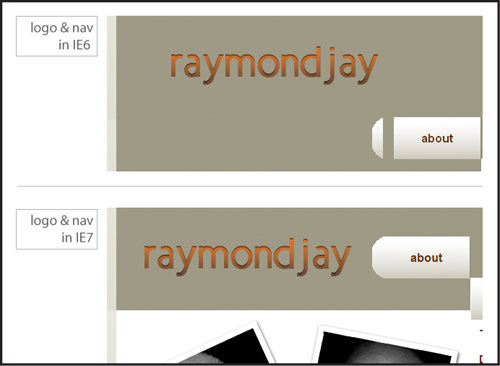
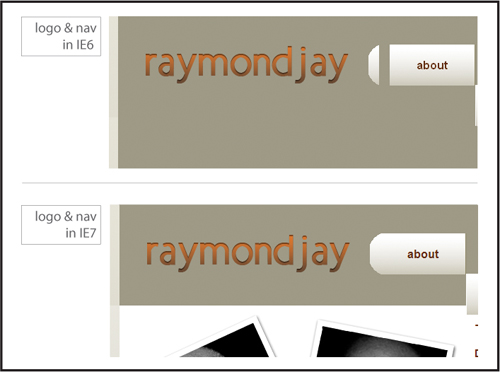
- The double margin float bug (Figure 8.4).
Figure 8.4. Raymond Jay’s logo is in the right place in IE7 (bottom) but not in IE6, where the double margin float bug crops up. The nav elements are also affected. That’s a double bummer.
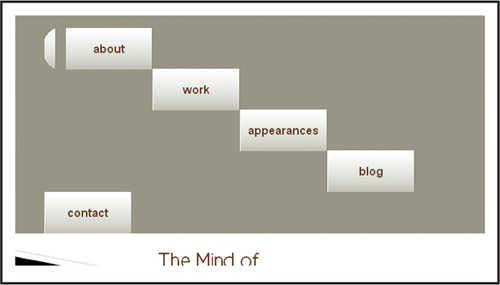
- The float stepdown bug (Figure 8.5).
Figure 8.5. The float stepdown bug in IE6 and IE7: quite the opposite of the stairway to heaven
- The float drop bug (Figure 8.6).
Figure 8.6. The float drop bug in IE6

Fortune is smiling upon us: the fixes for all these bugs are quick and easy.
So, let’s get these floats in line, shall we?
First, the double margin float bug. Do you remember from your earlier training what keeps you from seeing double? That’s right: apply display: inline to the style declaration of the errant floating element, and it will cure what ails you.
So let’s add it to the logo and fix that one first:
h1 {
background: transparent url(logo_raymondjay.gif) no-repeat 0 0;
display: inline;
height: 60px;
margin: 40px 0 0 37px;
width: 306px;
text-indent: -9999px;
}
Once we do that, you can see how the logo shows up comparably in both browsers (Figure 8.7)
Figure 8.7. Raymond Jay’s logo in IE6: success!
However, there are still issues in the navigation, so let’s tackle those next.
Float stepdown is so dramatic and over-the-top that I almost have to do admire its pizzazz. However, just because something is entertaining doesn’t mean it gets to stick around—especially when it causes major layout problems.
Do you have an idea for the fix? Think back to the previous example and you’ve got it: it’s display: inline to the rescue again! Add the property to the style declaration of the containing <li> in this way:
#mainnav {
background: transparent url(bg_navcurve.gif) 0 0 no-repeat ;
color: #652a01;
font-size: 1.2em;
float: left;
height: 60px;
line-height: 57px;
list-style-type: none;
margin: 40px 0 0;
padding: 0;
text-align: center;
width: 623px;
}
.end {
background: transparent url(bg_navcurveend.gif) 0 0 no-repeat;
float: right;
height:76px;
width: 15px;
position: relative;
top: 40px;
margin: 0;}
#mainnav li {
display: inline;}
#mainnav li a {
background: transparent url(bg_navitems.gif) 0 0 repeat-x ;
border-right: 1px solid #8f8766;
border-left: 1px solid #fff;
color: #652a01;
display: block;
float: left;
font-weight: bold;
height: 58px;
line-height: 58px;
padding: 0 1px;
width: 118px;
}
#mainnav li.first a {
border-left: 0;
margin-left: 15px;
}
Now your former stepdown list items can get a new leg up on correct rendering (Figure 8.8).
Figure 8.8. The navigation in IE7 as the W3C intended it—sans float stepdown

There is still a little problem in IE6, which is another instance of the double margin float bug (Figure 8.9).
Figure 8.9. The navigation in IE6: float stepdown due to the double margin float bug

No problem, we just add our favorite fix again, display: inline;, which works like a charm:
#mainnav li.first a {
border-left: 0;
display: inline;
margin-left: 15px;
}
Is that the last of the double margin float bug? Somehow, my sense is “no.” The float drop in the two content areas looks suspiciously like it may be a product of the double or nothing effects of the bug, especially because it is not happening in IE7.
Close examination reveals that my hunch is correct, as the author photo is farther away from the container’s side in IE6 than in IE7 (Figure 8.10 and 8.11).
Figure 8.10. The position of the author photo is not quite the same.
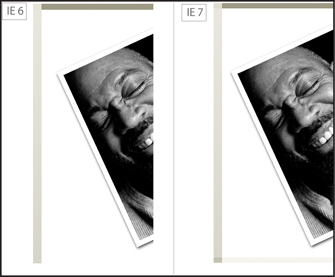
Figure 8.11. Aha! The double margin float bug strikes again!
I know you know the drill by now. So here’s the fix:
.authorphoto {
display: inline;
margin: 0 0 0 10px;
width: 471px;
}
...
#secondarycontent div {
width: 31%;
margin: 0 1%;
padding: 0;
display: inline;
}
And last but not least, we have some definition lists in need of a firm talking to (Figure 8.12).
Figure 8.12. The definitions are definitely out of line
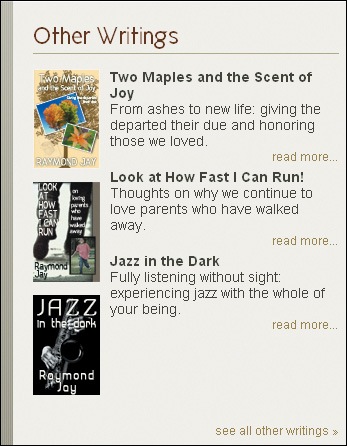
The <dd>s are not staying inline with the <dt>s as expected. You might be thinking, “we could use clearfix—it works great to establish clearing.” True enough, but in this instance, the Swiss Army knife method of clearfix is woefully ineffective: throwing more elements in the mix won’t work, but specifying the limits in the form of a height will. Yes, much like a cheeky teenager, what these floats want is structure and rules in order to feel comfortable and do what is expected of them.
dd {
height: 123px;
margin: 5px 0 0 10px;
width: 228px;
}
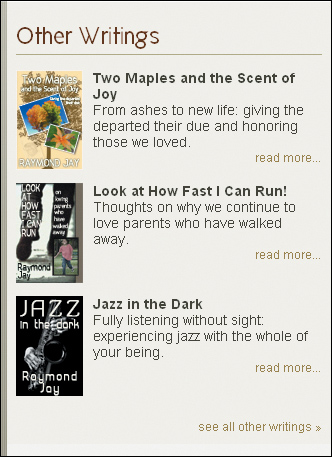
The result? The floated <dd>s now line up and express themselves in appropriate ways (Figure 8.13). All it took was a little extra definition.
Figure 8.13. The definitions can now do their thing—in all browsers.
A final precautionary note: the instance of float stepdown, could have been avoided completely by making a slight adjustment in the code. Do you remember what the combination of factors is for float stepdown from Chapter 4? Here’s a reminder: when a series of floated elements are contained in a series of block level elements that are not floated, the floated elements may end up in a stepdown effect in IE6 and IE7 and lower. The other additional piece of information is that padding on the element in question further triggers the bug.
Let’s take another look at the code:
#mainnav {
background: transparent url(bg_navcurve.gif) 0 0 no-repeat ;
color: #652a01;
font-size: 1.2em;
float: left;
height: 60px;
line-height: 57px;
list-style-type: none;
margin: 40px 0 0;
padding: 0;
text-align: center;
width: 623px;
}
.end {
background: transparent url(bg_navcurveend.gif) 0 0 no-repeat;
float: right;
height:76px;
width: 15px;
position: relative;
top: 40px;
margin: 0;}
#mainnav li {
display: inline;}
#mainnav li a {
background: transparent url(bg_navitems.gif) 0 0 repeat-x ;
border-right: 1px solid #8f8766;
border-left: 1px solid #fff;
color: #652a01;
display: block;
float: left;
font-weight: bold;
height: 58px;
line-height: 58px;
padding: 0 1px;
width: 118px;
}
#mainnav li.first a {
border-left: 0;
margin-left: 15px;
display: inline;
}
I suggest we do a bit of transferring many of the properties that were originally assigned to #mainnav li a to #mainnav li instead:
#mainnav li {
background: transparent url(bg_navitems.gif) 0 0 repeat-x ;
border-right: 1px solid #8f8766;
border-left: 1px solid #fff;
display: inline;
float: left;
font-weight: bold;
height: 58px;
line-height: 58px;
padding: 0;
width: 120px;
}
#mainnav li.first {
border-left: 0;
display: inline;
margin-left: 15px;
}
#mainnav li.last {
border-right: 0;}
#mainnav li a {
color: #652a01;} /* the color should stay here */
#mainnav li a:hover {
font-weight: normal;
text-decoration: none;
}
Note

The padding isn’t necessary so we can remove it and with the padding removed, the width value is 120px.
Interestingly, it’s roughly the same amount of code (maybe a little more), but it’s well worth never having to worry about seeing float stepdown again.
Case Closed!
Diona proudly presented the website to her father, who, despite his initial diffidence, is starting to warm up to the idea of putting himself on the web in order to share his ideas and writing with a wider audience. He’s even considering writing for major political and news blogs.
Not every client will want design integrity in IE6, but most will probably still need the site to work in IE7. In any event, it is important to recognize those shifty-eyed, sassy IE6 bugs, and code proactively against them.
Floats are wily beasts by nature (you would be too if you were always outside the flow of the page), so you need to keep in mind how sensitive they are to width, margin, padding, and border. Small changes in the size values of the element can mean the difference between a rock-solid layout and one that is broken.
Having display:inline up your sleeve for emergency bug fixing—especially in older versions of IE—usually puts you in good stead. Old standards like explicitly declaring the margin and padding for everything is helpful, and explicitly stating heights has proven useful as well. Using the overflow: hidden property works great to contain floats, but it doesn’t fix every problem that you may encounter.
Ready for more IE 6/7 bug hijinks? Let’s see if we can solve the next case.