Table of Contents for
Bug Bounty Hunting Essentials

Version ebook / Retour

Cover image for bash Cookbook, 2nd Edition Bug Bounty Hunting Essentials by Shahmeer Amir Published by Packt Publishing, 2018
  1. Bug Bounty Hunting Essentials
  2. Title Page
  3. Copyright and Credits
  4. Bug Bounty Hunting Essentials
  5. About Packt
  6. Why subscribe?
  7. Packt.com
  8. Contributors
  9. About the authors
  10. About the reviewers
  11. Packt is searching for authors like you
  12. Table of Contents
  13. Preface
  14. Who this book is for
  15. What this book covers
  16. Conventions used
  17. Get in touch
  18. Reviews
  19. Disclaimer
  20. Basics of Bug Bounty Hunting
  21. Bug bounty hunting platforms
  22. HackerOne
  23. Bugcrowd
  24. Cobalt
  25. Synack
  26. Types of bug bounty program
  27. Public programs
  28. Private programs
  29. Bug bounty hunter statistics
  30. Number of vulnerabilities
  31. Number of halls of fame
  32. Reputation points
  33. Signal
  34. Impact
  35. Accuracy
  36. Bug bounty hunting methodology
  37. How to become a bug bounty hunter
  38. Reading books
  39. Practicing what you learned
  40. Reading proof of concepts
  41. Learning from reports
  42. Starting bug bounty hunting
  43. Learning and networking with others
  44. Rules of bug bounty hunting
  45. Targeting the right program
  46. Approaching the target with clarity
  47. Keeping your expectations low
  48. Learning about vulnerabilities
  49. Keeping yourself up-to-date
  50. Automating your vulnerabilities
  51. Gaining experience with bug bounty hunting
  52. Chaining vulnerabilities
  53. Summary
  54. How to Write a Bug Bounty Report
  55. Prerequisites of writing a bug bounty report
  56. Referring to the policy of the program
  57. Mission statement
  58. Participating services
  59. Excluded domains
  60. Reward and qualifications
  61. Eligibility for participation
  62. Conduct guidelines
  63. Nonqualifying vulnerabilities
  64. Commitment to researchers
  65. Salient features of a bug bounty report
  66. Clarity
  67. Depth
  68. Estimation
  69. Respect
  70. Format of a bug bounty report
  71. Writing title of a report
  72. Writing the description of a report
  73. Writing the proof of concept of a report
  74. Writing exploitability of a report
  75. Writing impact of a report
  76. Writing remediation
  77. Responding to the queries of the team
  78. Summary
  79. SQL Injection Vulnerabilities
  80. SQL injection
  81. Types of SQL injection vulnerability
  82. In-band SQLi (classic SQLi)
  83. Inferential SQLi (blind SQLi)
  84. Out-of-band SQLi
  85. Goals of an SQL injection attack for bug bounty hunters
  86. Uber SQL injection
  87. Key learning from this report
  88. Grab taxi SQL Injection
  89. Key learning from this report
  90. Zomato SQL injection
  91. Key learning from this report
  92. LocalTapiola SQL injection
  93. Key learning from this report
  94. Summary
  95. Cross-Site Request Forgery
  96. Protecting the cookies
  97. Why does the CSRF exist?
  98. GET CSRF
  99. POST CSRF
  100. CSRF-unsafe protections
  101. Secret cookies
  102. Request restrictions
  103. Complex flow
  104. URL rewriting
  105. Using HTTPS instead of HTTP
  106. CSRF – more safe protection
  107. Detecting and exploiting CSRF
  108. Avoiding problems with authentication
  109. XSS – CSRF's best friend
  110. Cross-domain policies
  111. HTML injection
  112. JavaScript hijacking
  113. CSRF in the wild
  114. Shopify for exporting installed users
  115. Shopify Twitter disconnect
  116. Badoo full account takeover
  117. Summary
  118. Application Logic Vulnerabilities
  119. Origins
  120. What is the main problem?
  121. Following the flow
  122. Spidering
  123. Points of interest
  124. Analysis
  125. User input
  126. Out-band channels
  127. Naming conventions
  128. Keywords related to technologies
  129. Analyzing the traffic
  130. Application logic vulnerabilities in the wild
  131. Bypassing the Shopify admin authentication
  132. Starbucks race conditions
  133. Binary.com vulnerability – stealing a user's money
  134. HackerOne signal manipulation
  135. Shopify S buckets open
  136. HackerOne S buckets open
  137. Bypassing the GitLab 2F authentication
  138. Yahoo PHP info disclosure
  139. Summary
  140. Cross-Site Scripting Attacks
  141. Types of cross-site scripting
  142. Reflected cross-site scripting
  143. Stored cross-site scripting
  144. DOM-based XSS
  145. Other types of XSS attacks
  146. Blind XSS
  147. Flash-based XSS
  148. Self XSS
  149. How do we detect XSS bugs?
  150. Detecting XSS bugs in real life
  151. Follow the flow
  152. Avoiding input validation controls
  153. Other common strings
  154. Bypassing filters using encoding
  155. Bypassing filters using tag modifiers
  156. Bypassing filters using dynamic constructed strings
  157. Workflow of an XSS attack
  158. HackeroneXSS
  159. Executing malicious JS
  160. Embedding unauthorized images in the report
  161. Redirecting users to a different website
  162. Key learning from this report
  163. Slack XSS
  164. Embedding malicious links to infect other users on Slack
  165. Key learning from this report
  166. TrelloXSS
  167. Key learning from this report
  168. Shopify XSS
  169. Key learning from this report
  170. Twitter XSS
  171. Key learning from this report
  172. Real bug bounty examples
  173. Shopify wholesale
  174. Shopify Giftcard Cart
  175. Shopify currency formatting
  176. Yahoo Mail stored XSS
  177. Google image search
  178. Summary
  179. SQL Injection
  180. Origin
  181. Types of SQL injection
  182. In-band SQL injection
  183. Inferential
  184. Out-of-band SQL injection
  185. Fundamental exploitation
  186. Detecting and exploiting SQL injection as if tomorrow does not exist
  187. Union
  188. Interacting with the DBMS
  189. Bypassing security controls
  190. Blind exploitation
  191. Out-band exploitations
  192. Example
  193. Automation
  194. SQL injection in Drupal
  195. Summary
  196. Open Redirect Vulnerabilities
  197. Redirecting to another URL
  198. Constructing URLs
  199. Executing code
  200. URL shorteners
  201. Why do open redirects work?
  202. Detecting and exploiting open redirections
  203. Exploitation
  204. Impact
  205. Black and white lists
  206. Open redirects in the wild
  207. Shopify theme install open redirect
  208. Shopify login open redirect
  209. HackerOne interstitial redirect
  210. XSS and open redirect on Twitter
  211. Facebook
  212. Summary
  213. Sub-Domain Takeovers
  214. The sub-domain takeover
  215. CNAME takeovers
  216. NS takeover
  217. MX takeovers
  218. Internet-wide scans
  219. Detecting possibly affected domains
  220. Exploitation
  221. Mitigation
  222. Sub-domain takeovers in the wild
  223. Ubiquiti sub-domain takeovers
  224. Scan.me pointing to Zendesk
  225. Starbucks' sub-domain takeover
  226. Vine's sub-domain takeover
  227. Uber's sub-domain takeover
  228. Summary
  229. XML External Entity Vulnerability
  230. How XML works
  231. How is an XXE produced?
  232. Detecting and exploiting an XXE
  233. Templates
  234. XXEs in the wild
  235. Read access to Google
  236. A Facebook XXE with Word
  237. The Wikiloc XXE
  238. Summary
  239. Template Injection
  240. What's the problem?
  241. Examples
  242. Twig and FreeMaker
  243. Smarty
  244. Marko
  245. Detection
  246. Exploitation
  247. Mitigation
  248. SSTI in the wild
  249. Uber Jinja2 TTSI
  250. Uber Angular template injection
  251. Yahoo SSTI vulnerability
  252. Rails dynamic render
  253. Summary
  254. Top Bug Bounty Hunting Tools
  255. HTTP proxies, requests, responses, and traffic analyzers
  256. Burp Suite
  257. Wireshark
  258. Firebug
  259. ZAP – Zed Attack Proxy
  260. Fiddler
  261. Automated vulnerability discovery and exploitation
  262. Websecurify (SECAPPS)
  263. Acunetix
  264. Nikto
  265. sqlmap
  266. Recognize
  267. Knockpy
  268. HostileSubBruteforcer
  269. Nmap
  270. Shodan
  271. What CMS
  272. Recon-ng
  273. Extensions
  274. FoxyProxy
  275. User-Agent Switcher
  276. HackBar
  277. Cookies Manager+
  278. Summary
  279. Top Learning Resources
  280. Training
  281. Platzi
  282. Udemy
  283. GIAC
  284. Offensive Security
  285. Books and resources
  286. Web Application Hacker's Handbook
  287. OWASP Testing Guide
  288. Hacking 101
  289. The Hacker Play Book
  290. Exploiting Software
  291. CTFs and wargames
  292. Hack The Box
  293. Damn Vulnerable Web Application
  294. Badstore
  295. Metasploitable
  296. YouTube channels
  297. Web Hacking Pro Tips
  298. BugCrowd
  299. HackerOne
  300. Social networks and blogs
  301. Exploitware Labs
  302. Philippe Hare Wood
  303. PortSwigger's blog
  304. Meetings and networking
  305. LiveOverflow
  306. OWASP meetings
  307. DEFCON meetings
  308. 2600 meetings
  309. Conferences
  310. DEFCON
  311. BlackHat
  312. BugCON
  313. Ekoparty
  314. Code Blue
  315. CCC
  316. H2HC
  317. 8.8
  318. Podcasts
  319. PaulDotCom
  320. Summary
  321. Other Books You May Enjoy
  322. Leave a review - let other readers know what you think

Detecting and exploiting SQL injection as if tomorrow does not exist

In order to look for SQL injection vulnerabilities, we can use the following as an initial testing string:

    '1 or 1==1--

The main purpose is generating a Boolean value, TRUE, which could be evaluated in a SQL statement, but there are other similar strings that could work, for example:

    '1 or 1=1
    'a' = 'a
    '1=1

The preceding three strings have the same effect and can be used when one of them does not work.

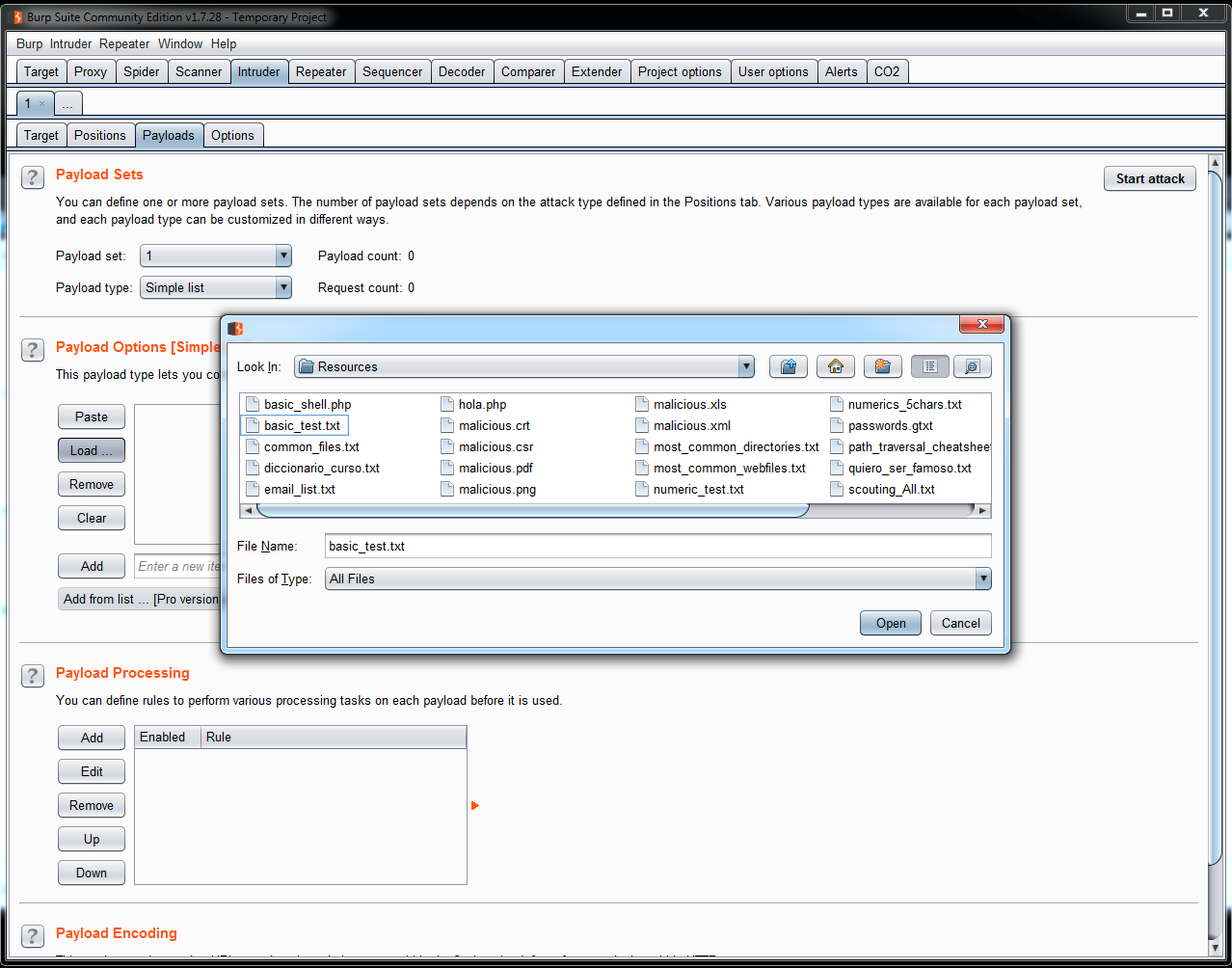
For the basic identification of SQL injection vulnerabilities, it is highly recommended to use the Intruder tool included in Burp Suite. You can load all these testing strings in a file and launch to a bug quantity of fields:

  1. To add these testing strings, create a TXT file and add all of them. Then, open Burp Suite, go to Intruder | Payloads | Payload Options | Load, and select the file that you have created. Now, you can use all the strings to test all the fields in an application:
  1. Now, let's see another example used in applications. The SELECT statement is used to get information from a database, but there are other statements. Another very commonly used statement is INSERT, which is used to add information to a database. So, imagine that the application used to manage the students in a university has a query for adding new information, as follows:
INSERT INTO students (student_name, average, group, subject) VALUES ('Diana', '9', '1CV01', 'Math'); 
  1. This statement means—insert the values Diana, 9, 1CV01, and Math in this order in the values student_name, average, group, and subject. So, if we want to execute this statement from an application, we are going to use parameters or variables to pass the values to the application's backend, for example:
"INSERT INTO students (student_name, average, group, subject) VALUES (\'".$name."\', \'".$number."\', \'".$group.", \'".$subject."\');" 
  1. Let's see the use of \ to escape the single quotes. Most programming languages solve the use of special characters in this way. What happened if we entered special characters in the following statement?
"INSERT INTO students (student_name, average, group, subject) VALUES (\'".Diana')- 

At this moment, the application will crash because a rule for INSERT statements is that the number of values that you want to insert needs to be the same number that is weighted by the application. However, as you can see, the same problem is detected in the SELECT statement. If queries are not validated in the way inputs are provided, then it is possible to modify the information to cut the complete statement and have control over the information to be inserted.

You should not always enter new registers in a database; sometimes you just need to update information in a register that currently exists. To do that, SQL uses the UPDATE statement. As an example, look at the next line:

UPDATE students SET password='miscalificacionesnadielasve' WHERE student_name = 'Diana' and password = 'yareprobetodo'

In this statement, the scholar system is changing the password for the student Diana, and at the same time it is validating whether she is a student present in the database, because the password needs to be stored in the same database to perform the change. As in the other statements, let's insert special characters into this:

"UPDATE students SET password=\'".$new_passsowrd."\' WHERE student_name = \'".student_name."\' and password = \'".$past_password."

The preceding line is the SQL statement as the application sees it, with the parameters that need to be filled with information. Now, insert the testing string:

"UPDATE students SET password=\'".$new_passsowrd."\' WHERE student_name = \'".Diana' 1 or 1==1--"

This line is so interesting; as I said before, the SQL statement was thought to validate the current password, before changing it to a new one. Now, what happened when the string Diana' 1 or 1==1-- is inserted? Well, all this part is evaluated as a TRUE value. So, at this moment it is not important whether the user has the current password or not; the update will be done without the validation of the current password.

Also, it is possible to add and erase information; to do that, SQL uses the DELETE statement. Let's check the statement in the following example:

DELETE FROM students WHERE student_name = 'Diana'

Translated as the statement used by the application, it looks as follows:

"DELETE FROM students WHERE student_name = \'".$name."\'"

So, as in the other statements, let's check what happened:

DELETE FROM students WHERE student_name = 'or 1==1--

Due to the statement being evaluated as TRUE, all the registers are deleted.