Table of Contents for
Security and Frontend Performance
 Security and Frontend Performance
Published by
O'Reilly Media, Inc., 2017
Security and Frontend Performance
Published by
O'Reilly Media, Inc., 2017
- nav
- Cover
- Free ebooks and reports
- Security and Frontend Performance
- Security and Frontend Performance
- 1. Understanding the Problem
- 2. HTTP Strict-Transport-Security
- 3. iFrame and Content‑Security‑Policy
- 4. Web Linking
- 5. Obfuscation
- 6. Service Workers: An Introduction
- 7. Service Workers: Analytics Monitoring
- 8. Service Workers: Control Third Party Content
- 9. Service Workers: Other Applications
- 10. Summary
- About the Authors
Chapter 8. Service Workers: Control Third Party Content
Now let’s broaden the scope from third party analytics tools to all third party content. More specifically, let’s discuss how to control the delivery of third party content.
Client Reputation Strategies
When we talk about “control” with reference to unknown third party content, what often comes to mind are backend solutions such as client reputation strategies, web application firewalls (WAFs), or other content delivery network/origin infrastructure changes. But with the increased usage of third party content, we need to ensure that we offer protection not only with these backend strategies, but also to our end users starting at the browser. We want to make sure requests for third party content are safe and performing according to best practices. So how do we do that? Let’s leverage service workers to control the delivery of third party content based on specific criteria so that we avoid accessing content that causes site degradation or potentially injection of malicious content not intended for the end user.
Move to Service Worker Reputation Strategies
Note the simple service worker diagram in Figure 8-1. The service worker’s fetch event intercepts incoming network requests for any JavaScript resource and then performs some type of check based on a predefined list of safe third party domains, or using a predefined list of known bad third party domains. Essentially, the fetch event uses some type of list that acts as a whitelist or blacklist.
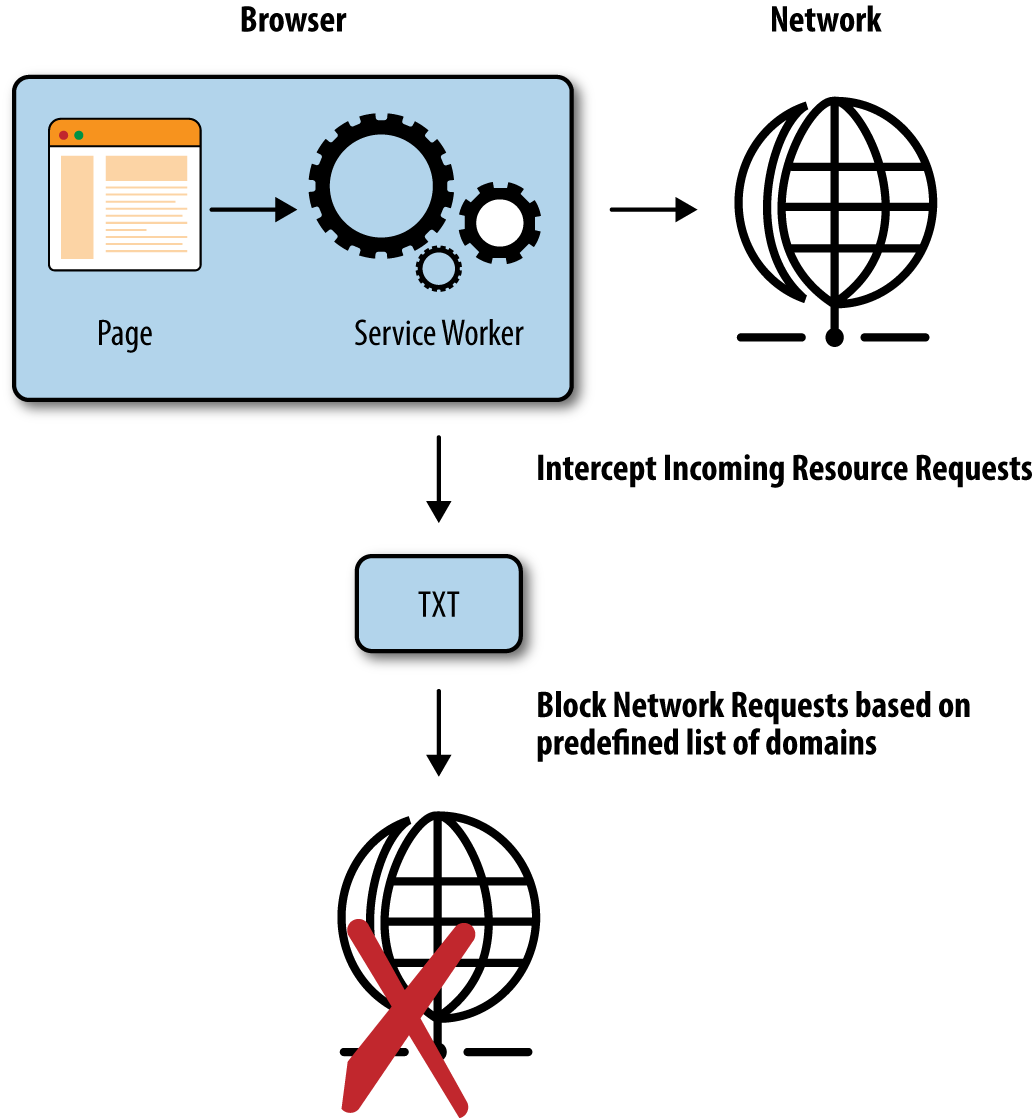
Figure 8-1. Service worker diagram
Let’s take this solution and build on it to make it an adaptive reputation solution. In addition to the whitelist/blacklist, let’s come up with logic that can use the forward and block mechanisms of the service worker. Specifically, let’s use a counter and a threshold timeout value to keep track of how many times content from a third party domain exceeds a certain fetch time. Based on that, we can configure the service worker to block a third party request if a resource from a specific domain has exceeded the threshold X amount of times.
A Closer Look
First, we need to handle the installation and activation of the service worker so that we make the initial list of third parties accessible upon worker interception of any incoming resource requests (Example 8-1).
Example 8-1. Activate service worker
self.addEventListener('activate',function(event){if(self.clients&&clients.claim){clients.claim();}varpolicyRequest=newRequest('thirdparty_urls.txt');fetch(policyRequest).then(function(response){returnresponse.text().then(function(text){result=text.toString();});});});
During the activate event, we can set up a connection to some list of third party domains. The text based file could live at the origin, at a content delivery network, at a remote database, or at other places that are accessible to the service worker.
Now, as shown in the pseudocode in Example 8-2, when a resource triggers a fetch event, limited to JavaScript only in this example, we can configure the service worker to block or allow the resource request based on two conditions: the whitelist/blacklist of third party domains and the counter/threshold adaptive strategy.
Example 8-2. Fetch event handler pseudocode
self.addEventListener('fetch',function(event){// only control delivery of JavaScript contentif(isJavaScript){// determine whether or not the third party// domain is acceptable via a whitelistisWhitelisted=match(resource,thirdpartyfile)if(isWhitelisted){getCounter(event,rspFcn);varrspFcn=function(event){if(flag>0){// if we have exceeded the counter// block the request OR serve from an offline cache}}}else{// send the request forward// if the resource has exceeded a fetch timeif(thresholdTimeoutExceeded){updateCounter(event.request.url);}// else do nothing// add resource to offline cachecache.add(event.request.url);}}else{event.respondWith(fetch(event.request));}});
Analysis
Note the following method in particular:
getCounter(event,rspFcn);
This method fetches the current state of the counter for a third party domain. Remember that, for each fetch event, we can gather a fetch time for each resource. But the counter needs to be maintained globally, across several fetch events, which means we need to be able to beacon this data out to some type of data store so that we can fetch and retrieve it at a later time. The implementation details behind this method have not been included but there are several strategies. For the purposes of the example, we were able to leverage Akamai’s content delivery network capabilities to maintain count values for various third party domains.
Upon retrieving the counter value, we have a decision to make as seen in the implementation:
updateCounter(event.request.url);
-
If we have exceeded the number of times the third party content hit the threshold timeout for fetch time, as indicated by the counter value, then we can either block the request from going forward OR we can serve alternate content from an offline cache. (An offline cache needs to be set up during the installation event of a service worker.)
-
If we have NOT exceeded the counter, then we send the request forward and record whether or not it has exceeded the fetch time on this run, in this case, if it has exceeded 500 milliseconds. If the resource hit our predefined threshold value, then we can update the counter using the
updateCountermethod.
Again, the implementation details for this method have not been included, but you will need to be able to beacon out to a data store to increment this counter. If the resource did not hit the threshold value, then there is no need to update the counter. In both cases, we can store the third party content in the offline cache so that if the next time a fetch event gets triggered for the same resource, we have the option to serve that content from the cache.
Sample code
Example 8-3, shows a more complete example for the pseudocode in Example 8-2.
Example 8-3. Fetch event handler
self.addEventListener('fetch',function(event){// Only fetch JavaScript files for nowvarurlString=event.request.url;if(isJavaScript(urlString)&&isWhitelisted(urlString)){getCounter(event,rspFcn);varrspFcn=function(event){if(flag>0){// If counter exceeded, retrieve from cache or serve 408caches.open('sabrina_cache').then(function(cache){varcachedResponse=cache.match(event.request.url).then(function(response){if(response){console.log("Found response in cache");returnresponse;}else{console.log("Did not find response in cache");return(newResponse('',{status:408,statusText:'Request timed out.'}));}}).catch(function(){return(newResponse('',{status:408,statusText:'Request timed out due to error.'}));});event.respondWith(cachedResponse);});}else{Promise.race([timeout(500),fetch(event.request.url,{mode:'no-cors'})]).then(function(value){if(value=="timeout"){console.log("Timeout threshold hit, update counter");updateCounter(event.request.url);// use promises here}elseconsole.log("Timeout threshold not reached,retrieve request, w/o updating counter");// If counter not exceeded (normal request)// then add to cachecaches.open('sabrina_cache').then(function(cache){console.log("Adding to cache");cache.add(event.request.url);}).catch(function(error){console.error("Error"+error);throwerror;});});}};}else{event.respondWith(fetch(event.request));}});
Last Thoughts
There are numerous ways to implement the getCounter and updateCounter methods so long as there exists the capability to beacon out to some sort of data store. Also, Example 8-3 can be expanded to count the number of times a resource request has exceeded other metrics that are available for measurement (not just the fetch time).
In Example 8-3, we took extra precautions to ensure that third parties do not degrade performance, and do not result in a single point of failure. By leveraging service workers, we make use of their asynchronous nature, so there is a decreased likelihood of any impact to the user experience or the DOM.
Note
Just like JavaScript, service workers can be disabled and are only supported on certain browsers. It is important to maintain fallback strategies for your code to avoid issues with site functionality.
The main idea behind this implementation is to avoid any unnecessary performance degradation or potential script injection by only allowing reputable third party content that meets the criteria that we set in place. We are essentially moving security and performance to the browser, rather than relying solely on backend client reputation, WAFs, and other content delivery network/origin infrastructure solutions.