Table of Contents for
Security and Frontend Performance
 Security and Frontend Performance
Published by
O'Reilly Media, Inc., 2017
Security and Frontend Performance
Published by
O'Reilly Media, Inc., 2017
- nav
- Cover
- Free ebooks and reports
- Security and Frontend Performance
- Security and Frontend Performance
- 1. Understanding the Problem
- 2. HTTP Strict-Transport-Security
- 3. iFrame and Content‑Security‑Policy
- 4. Web Linking
- 5. Obfuscation
- 6. Service Workers: An Introduction
- 7. Service Workers: Analytics Monitoring
- 8. Service Workers: Control Third Party Content
- 9. Service Workers: Other Applications
- 10. Summary
- About the Authors
Chapter 3. iFrame and Content‑Security‑Policy
As mentioned in Chapter 1 of this book, the latest trends include the rise in third party popularity, which exposes end users to several risks associated with this type of content. These risks mainly concern single point of failure and the potential for delivering compromised content to end users. Because third party content is not under developer control, we must utilize alternate methods to address both performance and security concerns. We can implement <iframe> and Content-Security-Policy techniques to improve the frontend browsing experience while enforcing security at the browser, specifically when embedding third party content.
Third Party Risks
Third party content is essentially untrustworthy content for obvious performance and security concerns. Let’s take a look at a sample third party resource that is often used in Google Ad implementations. Generally, the resource in Example 3-1 would be included in the base page of a wesbsite.
Example 3-1. Google resource
<scriptasynctype="text/javascript"src="https://www.googletagservices.com/tag/js/gpt.js"></script>
Not only does the browser load the initial resource, but the browser continues to load subsequent embedded third party resources in Figure 3-1, which can lead us to the mentioned vulnerabilities.
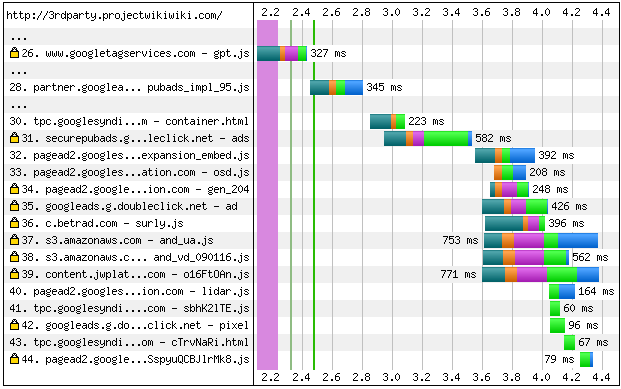
Figure 3-1. Third party waterfall
At any point, these additional resources in Figure 3-1 can fail, slow the page load, or become compromised and deliver malicious content to end users. Major headlines indicate how often both ad content and vendor content are compromised and this trend will only continue to grow as web traffic continues to grow. With the evolving nature of third party content, we as developers cannot prevent these situations from happening, but we can better adapt our sites to handle these situations when they occur.
The Basics: <script>
The <script> tag is the most common technique to load a script resource via HTML, for both first party content and third party content. From a performance point of view, this tag allows for the potential of single point of failure. With the latest version of HTML (HTML5), we are introduced to the script paramaters async and defer, which can help avoid single point of failure by delaying download and execution of low-prioty content such as Google Ad content. However, these parameters cannot always be used because of the lack of browser support or the fact that we can not delay the execution of the scripts for business reasons. From a security point of view, this tag provides third party providers with access to sites by executing scripts without restrictions. Overall, using the script tag for third party content is not the most optimal solution when it comes to trying to bridge the gap between frontend optimizations and security reenforcement at the browser level.
Improving Frontend Performance
Let’s review techniques that could help address performance concerns, especially around the issue of single point of failure.
<script> Versus <iframe>
The <iframe> tag has been around for quite some time and developers are well aware of the pitfalls associated with using this tag. More specifically, iframes can block the onload event, block resource downloads, and they are one of the most DOM-expensive elements. But even with these pitfalls, there are ways to avoid some of these negative effects using newer methods or technologies such as HTTP/2 and dynamic iframes, which will be addressed below. From Alexa’s Top 100 domains, 65% of sites use the <iframe> tag today so we find that developers continue to use this tag despite the downfalls. The reason for continued usage is due to the benefits associated with this tag—mainly when used with third party content.
While not commonly referred to as a frontend optimization technique, <iframe> provides performance benefits and, at the same time, enhances security at the browser as described briefly below. We will dive into techniques to achieve the following points as the chapter progresses:
-
Avoid delaying first party resource downloads by using a separate connection for third party content.
-
Avoid single point of failure as a result of failed third party content.
-
Protect end users by blocking malicious or known content from being delivered.
The <iframe> tag allows developers to safeguard first party content and the end user’s browsing experience while loading and executing third party content in an optimal way.
While using dynamic iframes in Example 3-2, we can eliminate single point of failure issues as well as restrict access to a site using additional security enhancements discussed in the next section.
Example 3-2. Dynamic <iframe>
<scripttype="text/javascript">varmyIframe=document.createElement("IFRAME");myIframe.src="about:blank";myIframe.addEventListener('load',function(e){varmyElement=document.createElement("SCRIPT");myElement.type="text/javascript";myElement.src="//3rdparty.com/object.js";myIframe.contentDocument.body.appendChild(myElement);},false);document.body.appendChild(myIframe);</script>
The JavaScript above dynamically creates an iframe that loads a third party resource, while avoiding some of the previously mentioned pitfalls of the <iframe> tag. Additionally, we gain the benefit of loading this third party resource on a separate connection to avoid slowing down first party resource downloads in the case of delayed content.
<script> and Content-Security-Policy
Content-Security-Policy (CSP) is a security enhancement which is available for use both as an HTTP header as well as a HTML <meta> tag. This particular policy is used to safeguard sites from third party providers by whitelisting known or safe domains, which can help in the situation where compromised or unknown content is executing scripts on a site. The results can potentially impact the end user’s browsing experience from both a performance and security point of view. From Alexa’s Top 100 domains, 2% of sites are using the Content-Security-Policy header today, which is relatively low due to the maintenance required for using this policy. Content-Security-Policy usage will continue to grow in popularity due to its benefits, especially with third party or unknown content that has the potential of being compromised.
Using Content-Security-Policy with the <script> tag, we can restrict access and eliminate single point of failure from compromised content delivered through unknown third party vendors. The code samples in Examples 3-3 and 3-4 demonstrate the pairing of both techniques.
Example 3-3. <script>
<scriptasynctype="text/javascript"src="http://3rdparty.com/object.js"></script>
Example 3-4. Content-Security-Policy header and tag
Content-Security-Policy:
      default-src 'self';
      img-src 'self' https://*.google.com;
      script-src 'self' http://3rdparty.com;
      style-src 'self' https://fonts.googleapis.com;
      font-src 'self' https://themes.googleusercontent.com;
      frame-src 'self' http://3rdparty.com
<metahttp-equiv="Content-Security-Policy"content="default-src 'self';img-src 'self' https://*.google.com;script-src 'self' http://3rdparty.com;style-src 'self' https://fonts.googleapis.com;font-src 'self' https://themes.googleusercontent.com;frame-src 'self' http://3rdparty.com;">
As mentioned, Content-Security-Policy can be used in the HTML <meta> tag option or as an HTTP header option. The combination of <script> and Content-Security-Policy further enforces security at the browser while preventing compromised content from delaying page loads.
<script> Versus <iframe> Versus CSP
Let’s compare each of the above methods with the basic <script> tag under the conditions of single point of failure as shown in Figures 3-2 and 3-2. In doing so, we observe that the basic <script> tag with a delayed third party resource can in fact delay the rest of the page from loading in the browser. In the sample Figure 3-2 filmstrip, the browser attempts to load the third party resource using <script> until the per-browser specified timeout kicks in.

Figure 3-2. WebPageTest visually complete comparison
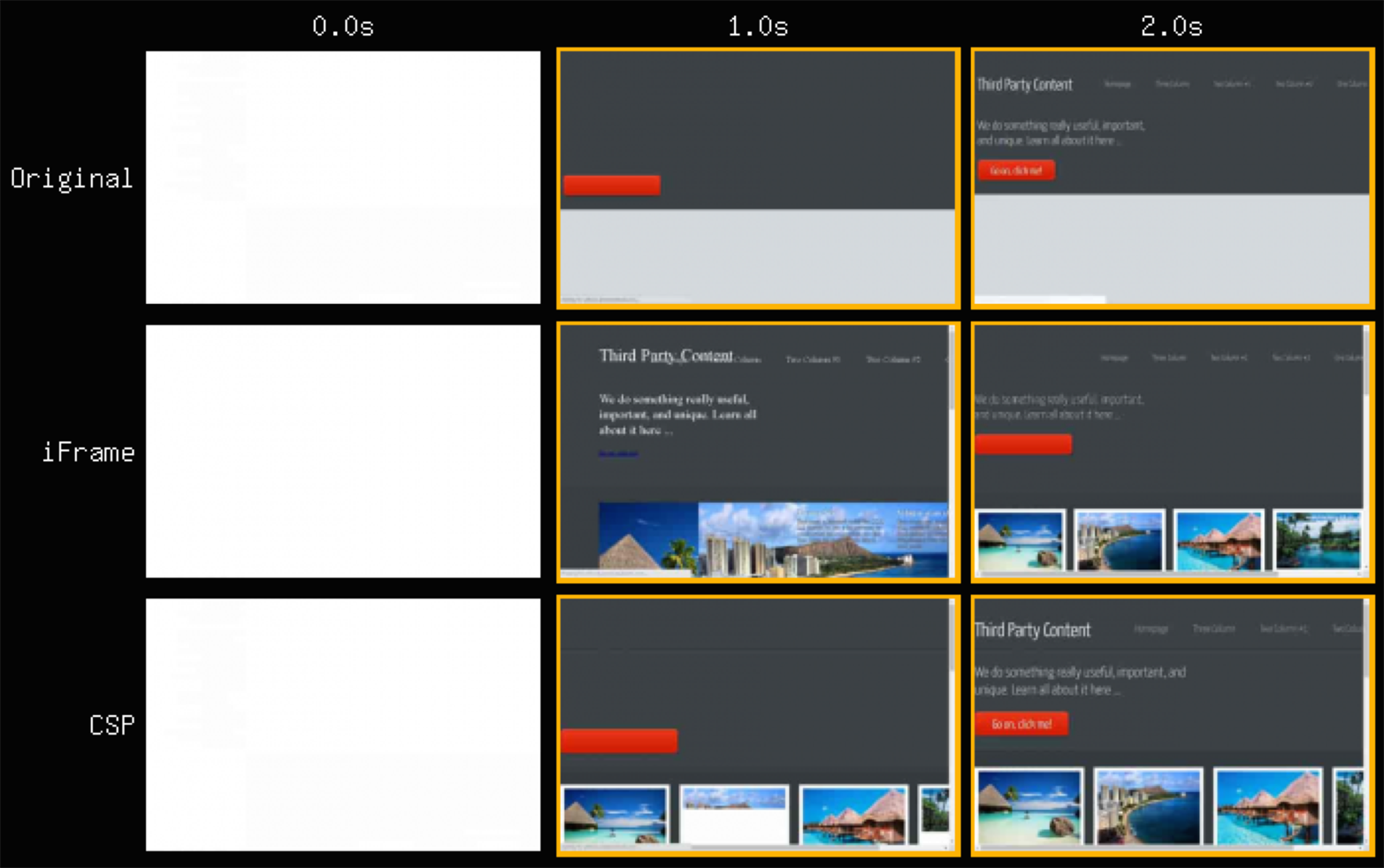
Figure 3-3. WebPageTest visually complete comparison zoom
Taking a closer look at Figure 3-3, the alternate methods result in faster page loads so that the end user can continue site usage without waiting for the delayed resource. When using the <script> tag in conjunction with Content-Security-Policy, compromised third party content will no longer result in single point of failure due to the security policies in place—a script from an unknown source does not belong to the whitelisted set of domains and is now blocked. When replacing the <script> tag with the <iframe> tag, we observe that the browser attempts to load the delayed third party resource while continuing to load the rest of the page for the end user.
Reenforcing Security at the Browser
Let’s look into how the previously mentioned techniques, <iframe> and Content-Security-Policy, can not only help eliminate certain performance issues but reenforce end user security at the browser level.
Sandboxing
By definition, the sandboxing concept involves separating individual running processes for security reasons. Within the web development world, this technique allows developers to execute third party content with additional security measures in place, separate from first party content. With that, we can restrict third party domains from gaining access to the site and end users.
As mentioned, developers are well aware of the <iframe> tag; however, HTML5 introduced a new sandbox parameter shown in Example 3-5 that provides an additional layer of security at the browser while maintaining the performance benefits associated with the <iframe> tag. In a similar way, Content-Security-Policy provides us with the same method of sandboxing third party content through use of the header or <meta> tag equivalent as shown in Example 3-6.
Using the sandbox attribute alone, we can prevent scripts and/or plugins from running, which can be useful in the situation of loading third party images for example.
Example 3-5. <iframe>
<iframesrc="http://3rdparty.com/object.html"sandbox></iframe>
Example 3-6. Content-Security-Policy header and tag
Content-Security-Policy:
      default-src 'self';
      img-src 'self' https://*.google.com;
      style-src 'self' https://fonts.googleapis.com;
      font-src 'self' https://themes.googleusercontent.com;
      frame-src 'self' http://3rdparty.com;
      sandbox
<metahttp-equiv="Content-Security-Policy"content="default-src 'self';img-src 'self' https://*.google.com;style-src 'self' https://fonts.googleapis.com;font-src 'self' https://themes.googleusercontent.com;frame-src 'self' http://3rdparty.com;sandbox">
We are also given flexibility in how third parties can execute content on first party websites by using a whitelist method, which allows developers to protect the end users by specifying exactly what third parties can display or control when loading content. The sandbox attribute has the following options:
-
allow-forms -
allow-modals -
allow-orientation-lock -
allow-pointer-lock -
allow-popups -
allow-popups-to-escape-sandbox -
allow-same-origin -
allow-scripts -
allow-top-navigation
Third party content often comes in the form of JavaScript objects, which require certain allowances to be able to execute functionality as desired. Given that situation, we can allow-scripts but continue to prohibit popups or plugins from running as shown in Examples 3-7 and 3-8.
Example 3-7. <iframe>
<iframesrc="http://3rdparty.com/object.html"sandbox="allow-scripts"></iframe>
Example 3-8. Content-Security-Policy header and tag
Content-Security-Policy:
      default-src 'self';
      img-src 'self' https://*.google.com;
      script-src 'self' http://3rdparty.com
      style-src 'self' https://fonts.googleapis.com;
      font-src 'self' https://themes.googleusercontent.com;
      frame-src 'self' http://3rdparty.com;
      sandbox allow-scripts
<metahttp-equiv="Content-Security-Policy"content="default-src 'self';img-src 'self' https://*.google.com;script-src 'self' http://3rdparty.com;style-src 'self' https://fonts.googleapis.com;font-src 'self' https://themes.googleusercontent.com;frame-src 'self' http://3rdparty.com;sandbox allow-scripts">
Sandboxing allows developers to restrict certain functionalities per third party resource embedded in a page. With <iframe>, we are able to avoid a scenario where single point of failure delays other resource downloads and, with the new sandbox directive, we are able to provide an additional layer of security at the browser.
Inline Code
When working with certain third parties such as analytics vendors, developers are often given segments of code to insert inline into the base pages of websites as shown in Example 3-9.
Example 3-9. Analytics code sample
<scripttype="text/javascript">(function(){vars=document.createElement("script"),el=document.getElementsByTagName("script")[0];s.async=true;s.src=(document.location.protocol=="https://3rdparty.com/analytics.js”;el.push.parentNode.insertBefore(s,el);})();</script>
In doing so, not only are we introducing the risk of single point of failure by allowing these resources to be downloaded without precaution, but we are also providing full site access to these third parties without security measures in place. Third party content can never be guaranteed so developers must ready sites to adapt to these situations when they occur.
HTML5 introduced another parameter for the <iframe> tag, which is known as the srcdoc attribute. The srcdoc attribute allows developers to load inline code within the <iframe> tag. In doing so, the srcdoc and sandbox attributes can both be used as in Example 3-10 to prevent single point of failure and provide an additional layer of security for the end user.
Example 3-10. srcdoc and sandbox
<iframesrcdoc='<script type="text/javascript">(function () {var s = document.createElement("script"),el = document.getElementsByTagName("script")[0];s.async = true;s.src = (document.location.protocol =="https://3rdparty.com/analytics.js”;el.push.parentNode.insertBefore(s, el );})();</script>'sandbox="allow-scripts"></iframe>
Embedding inline code via the <iframe> tag ensures that third party content, such as analytics code shown above, will not affect the remaining resource downloads. Again, using this method, we have that ability to avoid single point of failure protect end users at the browser in case of compromised content.
Referrer Policies
End users today demand both an optimal and secure experience; security for the end user includes providing a certain level of privacy so developers must come up with ways to fulfill these expectations. The concept of referrer policies is a relatively new concept; however, it’s a simple one that enforces a security measure to protect end user information. In looking at an example of navigating to a site requiring login information, end users generally enter their information and the site redirects the user to his/her account with a URL that includes information about that end user (Example 3-11).
Example 3-11. Login redirect URL
URL: http://profile.example.com?uname=myusername&time=1472756075
Generally, many sites, such as social media sites, include third party content, which is subsequently loaded with the current URL being used as a Referrer header for these third parties as shown in Example 3-12. In doing so, we are essentially leaking information about the end user and his/her session to these third parties so privacy is no longer guaranteed.
Example 3-12. Third party resource
URL: http://3rdparty.com/abc.js
Referrer: http://profile.example.com?uname=myusername&time=1472756075
Referrer policies provide developers with the ability to provide a level of privacy that end users expect. Both the <iframe> tag and Content-Security-Policy techniques include new (and experimental) parameters that help achieve these goals.
The <iframe> tag includes a new attribute called referrerpolicy, which allows developers to control how first party URLs are ingested by third party providers. Similarly, the Content-Security-Policy technique includes a referrer policy attribute called referrer, which essentially provides the same level of privacy options as provided by the iframe referrerpolicy option. Both of these techniques can be used with several different options depending on the use case.
no-referrer-
Browser will not send first party URL in Referrer.
no-referrer-when-downgrade-
Browser will not send first party URL in Referrer if protocol is downgraded from HTTPS to HTTP.
origin-
Browser will send first party origin domain in Referrer.
origin-when-cross-origin-
Browser will send first party origin domain in Referrer under cross origin conditions.
unsafe-url-
Browser will send full first party URL in Referrer.
Using the referrer policy technique with the <iframe> as shown in Example 3-13 provides developers with a way to avoid potential single point of failure situations while adding the benefit of privacy for the end user. Additionally, the referrer policy technique with Content-Security-Policy can be applied in both the HTTP header form as well as the <meta> tag equivalent as shown in Example 3-14. Content-Security-Policy also provides the same level of privacy, while protecting end users from compromised or unknown content.
Example 3-13. <iframe>
<iframesrc="http://3rdparty.com/object.html"referrerpolicy="no-referrer"></iframe>
Example 3-14. Content-Security-Policy header and tag
Content-Security-Policy:
      default-src 'self';
      img-src 'self' https://*.google.com;
      script-src 'self' http://3rdparty.com
      style-src 'self' https://fonts.googleapis.com;
      font-src 'self' https://themes.googleusercontent.com;
      frame-src 'self' http://3rdparty.com;
      referrer origin
<metahttp-equiv="Content-Security-Policy"content="default-src 'self';img-src 'self' https://*.google.com;script-src 'self' http://3rdparty.com;style-src 'self' https://fonts.googleapis.com;font-src 'self' https://themes.googleusercontent.com;frame-src 'self' http://3rdparty.com;referrer origin">
These techniques enforce a different flavor of security by focusing on the browser and protecting the end user, while still delivering third party content in an optimal way.
Warning
Because this technique is still in the experimental phase, caution should be used before implementing the referrer policy techniques through <iframe> and Content-Security-Policy due to variable browser support.
Last Thoughts
Overall, both the <iframe> tag and Content-Security-Policy techniques prove to be useful in situations that result in performance issues and/or security issues. More specifically, the newly introduced directives including sandbox, srcdoc, referrerpolicy, and referrer allow developers to improve the frontend user experience in a secure manner.
As mentioned in the beginning of this chapter, Content-Security-Policy is often overlooked due to the required maintenance and the added bytes to requests when downloaded in a browser. Again, with HTTP/2, we are given header compression and maintained header state, which allows more room for utilizing security techniques such as Strict-Transport-Security and Content-Security-Policy. We have other ways in which we can utilize Content-Security-Policy along with other frontend optimization techniques to achieve similar security and performance benefits, which will be explored in the next chapter.