Simple Solutions to Difficult Problems
in Java 8 and 9
Copyright © 2017 Ken Kousen. All rights reserved.
Printed in the United States of America.
Published by O’Reilly Media, Inc., 1005 Gravenstein Highway North, Sebastopol, CA 95472.
O’Reilly books may be purchased for educational, business, or sales promotional use. Online editions are also available for most titles (http://oreilly.com/safari). For more information, contact our corporate/institutional sales department: 800-998-9938 or corporate@oreilly.com.
See http://oreilly.com/catalog/errata.csp?isbn=9781491973172 for release details.
The O’Reilly logo is a registered trademark of O’Reilly Media, Inc. Modern Java Recipes, the cover image, and related trade dress are trademarks of O’Reilly Media, Inc.
While the publisher and the authors have used good faith efforts to ensure that the information and instructions contained in this work are accurate, the publisher and the authors disclaim all responsibility for errors or omissions, including without limitation responsibility for damages resulting from the use of or reliance on this work. Use of the information and instructions contained in this work is at your own risk. If any code samples or other technology this work contains or describes is subject to open source licenses or the intellectual property rights of others, it is your responsibility to ensure that your use thereof complies with such licenses and/or rights.
978-1-491-97317-2
[LSI]
Hey Xander, this one’s yours. Surprise!
There’s no doubt that the new features in Java 8, particularly lambda expressions and the Streams API, are a huge step forward for the Java language. I’ve been using Java 8 and telling developers about the new features at conferences, in workshops, and via blog posts for a several years now. What’s clear to me is that although lambdas and streams bring a more functional style of programming to Java (and also allow us to seamlessly make use of parallel processing power), it’s not these attributes that make them so appealing to developers once they start using them—it’s how much easier it is to solve certain types of problems using these idioms, and how much more productive they make us.
My passion as a developer, presenter, and writer is not just to make other developers aware of the evolution of the Java language, but to show how this evolution helps make our lives as developers easier—how we have options for simpler solutions to problems, or even solve different types of problems. What I love about Ken’s work is that he focuses on exactly this—helping you learn something new without having to wade through details you already know or don’t need, focusing on the parts of a technology that are valuable to real world developers.
I first came across Ken’s work when he presented “Making Java Groovy” at JavaOne. At the time, the team I was working on was struggling with writing readable and useful tests, and one of the solutions we were contemplating was Groovy. As a long-time Java programmer, I was reluctant to learn a whole new language just to write tests, especially when I thought I knew how to write tests. But seeing Ken talk about Groovy for Java programmers taught me a lot of what I needed to know without repeating things I already understood. It made me realise that with the right learning material I didn’t need to wade through all the details of a language just to learn the bits I cared about. I bought his book immediately.
This new book on Modern Java Recipes follows a similar theme—as experienced developers, we don’t need to learn everything about all the new features in Java 8 and 9 as if we’re new to the language, nor do we have the time to do that. What we need is a guide that quickly makes the relevant features available to us, that gives us real examples that apply to our jobs. This book is that guide. By presenting recipes based on the sorts of problems we encounter daily, and showing how to solve those using new features in Java 8 and 9, we become familiar with the updates to the language in a way that’s much more natural for us. We can evolve our skills.
Even those who’ve been using Java 8 and 9 can learn something. The section on Reduction Operators really helped me understand this functional-style programming without having to reprogram my brain. The Java 9 features that are covered are exactly the ones that are useful to us as developers, and they are not (yet) well known. This is an excellent way to get up to speed on the newest version of Java in a quick and effective fashion. There’s something in this book for every Java developer who wants to level up their knowledge.
Sometimes it’s hard to believe that a language with literally 20 years of backward compatibility could change so drastically. Prior to the release of Java SE 8 in March of 2014,1 for all of its success as the definitive server-side programming language, Java had acquired the reputation of being “the COBOL of the 21st century.” It was stable, pervasive, and solidly focused on performance. Changes came slowly when they came at all, and companies felt little urgency to upgrade when new versions became available.
That all changed when Java SE 8 was released. Java SE 8 included “Project Lambda,” the major innovation that introduced functional programming concepts into what was arguably the world’s leading object-oriented language. Lambda expressions, method references, and streams fundamentally changed the idioms of the language, and developers have been trying to catch up ever since.
The attitude of this book is not to judge whether the changes are good or bad or could have been done differently. The goal here is to say, “this is what we have, and this is how you use it to get your job done.” That’s why this book is designed as a recipes book. It’s all about what you need to do, and how the new features in Java help you do it.
That said, there are a lot of advantages to the new programming model, once you get used to them. Functional code tends to be simpler and easier to both write and understand. The functional approach favors immutability, which makes writing concurrent code cleaner and more likely to be successful. Back when Java was created, you could still rely on Moore’s law to double your processor speed roughly every 18 months. These days performance improvements come from the fact that even most phones have multiple processors.
Since Java has always been sensitive to backward compatibility, many companies and developers have moved to Java SE 8 without adopting the new idioms. The platform is more powerful even so, and is worth using, not to mention the fact that Oracle formally declared Java 7 end-of-life in April 2015.
It has taken a couple of years, but most Java developers are now working with the Java 8 JDK, and it’s time to dig in and understand what that means and what consequences it has for your future development. This book is designed to make that process easier.
The recipes in this book assume that the typical reader already is comfortable with Java versions prior to Java SE 8. You don’t need to be an expert, and some older concepts are reviewed, but the book is not intended to be a beginner’s guide to Java or object-oriented programming. If you have used Java on a project before and you are familiar with the standard library, you’ll be fine.
This book covers almost all of Java SE 8, and includes one chapter focused on the new changes coming in Java 9. If you need to understand how the new functional idioms added to the language will change the way you write code, this book is a use-case-driven way of accomplishing that goal.
Java is pervasive on the server side, with a rich support system of open source libraries and tools. The Spring Framework and Hibernate are two of the most popular open source frameworks, and both either require Java 8 as a minimum or will very soon. If you plan to operate in this ecosystem, this book is for you.
This book is organized into recipes, but it’s difficult to discuss recipes containing lambda expressions, method references, and streams individually without referring to the others. In fact, the first six chapters discuss related concepts, though you don’t have to read them in any particular order.
The chapters are organized as follows:
Chapter 1, The Basics, covers the basics of lambda expressions and method references, and follows with the new features of interfaces: default methods and static methods. It also defines the term “functional interface” and explains how it is key to understanding lambda expressions.
Chapter 2, The java.util.function Package, presents the new java.util.function package, which was added to the language in Java 8. The interfaces in that package fall into four special categories (consumers, suppliers, predicates, and functions) that are used throughout the rest of the standard library.
Chapter 3, Streams, adds in the concept of streams, and how they represent an abstraction that allows you to transform and filter data rather than process it iteratively. The concepts of “map,” “filter,” and “reduce” relate to streams, as shown in the recipes in this chapter. They ultimately lead to the ideas of parallelism and concurrency covered in Chapter 9.
Chapter 4, Comparators and Collectors, involves the sorting of streaming data, and converting it back into collections. Partitioning and grouping is also part of this chapter, which turns what are normally considered database operations into easy library calls.
Chapter 5, Issues with Streams, Lambdas, and Method References, is a miscellaneous chapter; the idea being that now that you know how to use lambdas, method references, and streams, you can look at ways they can be combined to solve interesting problems. The concepts of laziness, deferred execution, and closure composition are also covered, as is the annoying topic of exception handling.
Chapter 6, The Optional Type, discusses one of the more controversial additions to the language—the Optional type. Recipes in this chapter describe how the new type is intended to be used and how you can both create instances and extract values from them. This chapter also revisits the functional idea of map and flat-map operations on Optionals, and how they differ from the same operations on streams.
Chapter 7, File I/O, switches to the practical topic of input/output streams (as opposed to functional streams), and the additions made to the standard library to incorporate the new functional concepts when dealing with files and directories.
Chapter 8, The java.time Package, shows the basics of the new Date-Time API, and how (at long last) they replace the legacy Date and Calendar classes. The new API is based on the Joda-Time library, which is backed by many developer-years of experience and use and has been rewritten to form the java.time package. Frankly, if this had been the only addition to Java 8, it would have been worth the upgrade.
Chapter 9, Parallelism and Concurrency, addresses one of the implicit promises of the stream model: that you can change a sequential stream to a parallel one with a single method call, and thereby take advantage of all the processors available on your machine. Concurrency is a big topic, but this chapter presents the additions to the Java library that make it easy to experiment with and assess when the costs and benefits are worth the effort.
Chapter 10, Java 9 Additions, covers many of the changes coming in Java 9, which is currently scheduled to be released September 21, 2017. The details of Jigsaw can fill an entire book by themselves, but the basics are clear and are described in this chapter. Other recipes cover private methods in interfaces, the new methods added to streams, collectors, and Optional, and how to create a stream of dates.2
Appendix A, Generics and Java 8, is about the generics capabilities in Java. While generics as a technology was added back in 1.5, most developers only learned the minimum they needed to know to make them work. One glance at the Javadocs for Java 8 and 9 shows that those days are over. The goal of the appendix is to show you how to read and interpret the API so you understand the much more complex method signatures involved.
The chapters, and indeed the recipes themselves, do not have to be read in any particular order. They do complement each other and each recipe ends with references to others, but you can start reading anywhere. The chapter groupings are provided as a way to put similar recipes together, but it is expected that you will jump from one to another to solve whatever problem you may have at the moment.
The following typographical conventions are used in this book:
Indicates new terms, URLs, email addresses, filenames, and file extensions.
Constant widthUsed for program listings, as well as within paragraphs to refer to program elements such as variable or function names, databases, data types, environment variables, statements, and keywords.
Constant width boldShows commands or other text that should be typed literally by the user.
Constant width italicShows text that should be replaced with user-supplied values or by values determined by context.
This element signifies a tip or suggestion.
This element signifies a general note.
This element indicates a warning or caution.
The source code for the book is located in three GitHub repositories: one for the Java 8 recipes (everything but Chapter 10) at https://github.com/kousen/java_8_recipes, one for the Java 9 recipes at https://github.com/kousen/java_9_recipes, and a special one for the larger CompletableFuture example in Recipe 9.7 at https://github.com/kousen/cfboxscores. All are configured as Gradle projects with tests and a build file.
This book is here to help you get your job done. In general, if example code is offered with this book, you may use it in your programs and documentation. You do not need to contact us for permission unless you’re reproducing a significant portion of the code. For example, writing a program that uses several chunks of code from this book does not require permission. Selling or distributing a CD-ROM of examples from O’Reilly books does require permission. Answering a question by citing this book and quoting example code does not require permission. Incorporating a significant amount of example code from this book into your product’s documentation does require permission.
We appreciate, but do not require, attribution. An attribution usually includes the title, author, publisher, and ISBN. For example: “Modern Java Recipes by Ken Kousen (O’Reilly). Copyright 2017 Ken Kousen, 978-0-491-97317-2.”
If you feel your use of code examples falls outside fair use or the permission given above, feel free to contact us at permissions@oreilly.com.
Safari (formerly Safari Books Online) is a membership-based training and reference platform for enterprise, government, educators, and individuals.
Members have access to thousands of books, training videos, Learning Paths, interactive tutorials, and curated playlists from over 250 publishers, including O’Reilly Media, Harvard Business Review, Prentice Hall Professional, Addison-Wesley Professional, Microsoft Press, Sams, Que, Peachpit Press, Adobe, Focal Press, Cisco Press, John Wiley & Sons, Syngress, Morgan Kaufmann, IBM Redbooks, Packt, Adobe Press, FT Press, Apress, Manning, New Riders, McGraw-Hill, Jones & Bartlett, and Course Technology, among others.
For more information, please visit http://oreilly.com/safari.
Please address comments and questions concerning this book to the publisher:
To comment or ask technical questions about this book, send email to bookquestions@oreilly.com.
For more information about our books, courses, conferences, and news, see our website at http://www.oreilly.com.
Find us on Facebook: http://facebook.com/oreilly
Follow us on Twitter: http://twitter.com/oreillymedia
Watch us on YouTube: http://www.youtube.com/oreillymedia
This book is the unexpected result of a conversation I had with Jay Zimmerman back in late July 2015. I was (and still am) a member of the No Fluff, Just Stuff conference tour, and that year several Java 8 talks were being given by Venkat Subramaniam. Jay told me that Venkat had decided to scale back his activity in the coming year and Jay was wondering whether I would be willing to do similar talks in the new season starting in early 2016. I had been coding in Java since the mid-’90s (I started with Java 1.0.6) and had been planning to learn the new APIs anyway, so I agreed.
I have now been giving presentations on the new functional features of Java for a couple of years. By the Fall of 2016 I had completed my last book,3 and since the idea was to write another recipes book for the same publisher I foolishly thought the project would be easy.
Noted science fiction author Neil Gaiman famously once said that after finishing American Gods he thought he knew how to write a novel. His friend corrected him, saying he now knew how to write this novel. I now understand what he meant. The original proposal for this book anticipated about 25 to 30 recipes spanning about 150 pages. The final result you hold in your hand has more than 70 recipes filling nearly 300 pages, but the larger scope and greater detail has produced a much more valuable book than I intended.
Of course, that’s because I had lots of help. The aforementioned Venkat Subramaniam has been extremely helpful, both through his talks, his other books, and private discussions. He also was kind enough to be a technical reviewer on this book, so any remaining errors are all his fault. (No, they’re mine, but please don’t tell him I admitted that.)
I also am very grateful to have had the frequent assistance of Tim Yates, who is one of the best coders I’ve ever met. I knew him from his work in the Groovy community, but his versatility goes well beyond that, as his Stack Overflow rating will show. Rod Hilton, who I met while giving Java 8 presentations on the NFJS tour, was also kind enough to offer a review. Both of their recommendations have been invaluable.
I have been fortunate enough to work with the excellent editors and staff at O’Reilly Media over the course of two books, over a dozen video courses, and many online training classes delivered on their Safari online platform. Brian Foster has been a constant source of support, not to mention his almost magical ability to cut through bureaucracy. I met him while writing my previous book, and though he wasn’t the editor of this one, his help and friendship have been very valuable to me throughout the process.
My editor, Jeff Bleiel, was very understanding as the book doubled in length, and provided the structure and organization needed to keep making progress. I’m very glad we got to work together and hope we will continue to do so in the future.
I need to acknowledge many of my fellow speakers on the NFJS tour, including Nate Schutta, Michael Carducci, Matt Stine, Brian Sletten, Mark Richards, Pratik Patel, Neal Ford, Craig Walls, Raju Gandhi, Kirk Knoernschild, Dan “the Man” Hinojosa, and Janelle Klein for their constant perspective and encouragement. Both writing books and teaching training classes (my actual day job) are solitary pursuits. It’s great having a community of friends and colleagues that I can rely on for perspective, advice, and various forms of entertainment.
Finally, I need to express all my love to my wife Ginger and my son Xander. Without the support and kindness of my family I would not be the person I am today, a fact that grows more obvious to me with each passing year. I can never express what you both mean to me.
1 Yes, it’s actually been over three years since the first release of Java SE 8. I can’t believe it either.
2 Yes, I too wish that the Java 9 chapter had been Chapter 9, but it didn’t seem right to reorder the chapters just for that accidental symmetry. This footnote will have to suffice.
3 Gradle Recipes for Android, also from O’Reilly Media, all about the Gradle build tool as it is applied to Android projects.
The biggest change in Java 8 is the addition of concepts from functional programming to the language. Specifically, the language added lambda expressions, method references, and streams.
If you haven’t used the new functional features yet, you’ll probably be surprised by how different your code will look from previous Java versions. The changes in Java 8 represent the biggest changes to the language ever. In many ways, it feels like you’re learning a completely new language.
The question then becomes: Why do this? Why make such drastic changes to a language that’s already twenty years old and plans to maintain backward compatibility? Why make such dramatic revisions to a language that has been, by all accounts, extremely successful? Why switch to a functional paradigm after all these years of being one of the most successful object-oriented languages ever?
The answer is that the software development world has changed, so languages that want to be successful in the future need to adapt as well. Back in the mid-’90s, when Java was shiny and new, Moore’s law1 was still fully in force. All you had to do was wait a couple of years and your computer would double in speed.
Today’s hardware no longer relies on increasing chip density for speed. Instead, even most phones have multiple cores, which means software needs to be written expecting to be run in a multiprocessor environment. Functional programming, with its emphasis on “pure” functions (that return the same result given the same inputs, with no side effects) and immutability simplifies programming in parallel environments. If you don’t have any shared, mutable state, and your program can be decomposed into collections of simple functions, it is easier to understand and predict its behavior.
This, however, is not a book about Haskell, or Erlang, or Frege, or any of the other functional programming languages. This book is about Java, and the changes made to the language to add functional concepts to what is still fundamentally an object-oriented language.
Java now supports lambda expressions, which are essentially methods treated as though they were first-class objects. The language also has method references, which allow you to use an existing method wherever a lambda expression is expected. In order to take advantage of lambda expressions and method references, the language also added a stream model, which produces elements and passes them through a pipeline of transformations and filters without modifying the original source.
The recipes in this chapter describe the basic syntax for lambda expressions, method references, and functional interfaces, as well the new support for static and default methods in interfaces. Streams are discussed in detail in Chapter 3.
Use one of the varieties of lambda expression syntax and assign the result to a reference of functional interface type.
A functional interface is an interface with a single abstract method (SAM). A class implements any interface by providing implementations for all the methods in it. This can be done with a top-level class, an inner class, or even an anonymous inner class.
For example, consider the Runnable interface, which has been in Java since version 1.0. It contains a single abstract method called run, which takes no arguments and returns void. The Thread class constructor takes a Runnable as an argument, so an anonymous inner class implementation is shown in Example 1-1.
publicclassRunnableDemo{publicstaticvoidmain(String[]args){newThread(newRunnable(){@Overridepublicvoidrun(){System.out.println("inside runnable using an anonymous inner class");}}).start();}}

Anonymous inner class
The anonymous inner class syntax consists of the word new followed by the Runnable interface name and parentheses, implying that you’re defining a class without an explicit name that implements that interface. The code in the braces ({}) then overrides the run method, which simply prints a string to the console.
The code in Example 1-2 shows the same example using a lambda expression.
newThread(()->System.out.println("inside Thread constructor using lambda")).start();
The syntax uses an arrow to separate the arguments (since there are zero arguments here, only a pair of empty parentheses is used) from the body. In this case, the body consists of a single line, so no braces are required. This is known as an expression lambda. Whatever value the expression evaluates to is returned automatically. In this case, since println returns void, the return from the expression is also void, which matches the return type of the run method.
A lambda expression must match the argument types and return type in the signature of the single abstract method in the interface. This is called being compatible with the method signature. The lambda expression is thus the implementation of the interface method, and can also be assigned to a reference of that interface type.
As a demonstration, Example 1-3 shows the lambda assigned to a variable.
Runnabler=()->System.out.println("lambda expression implementing the run method");newThread(r).start();
There is no class in the Java library called Lambda. Lambda expressions can only be assigned to functional interface references.
Assigning a lambda to the functional interface is the same as saying the lambda is the implementation of the single abstract method inside it. You can think of the lambda as the body of an anonymous inner class that implements the interface. That is why the lambda must be compatible with the abstract method; its argument types and return type must match the signature of that method. Notably, however, the name of the method being implemented is not important. It does not appear anywhere as part of the lambda expression syntax.
This example was especially simple because the run method takes no arguments and returns void. Consider instead the functional interface java.io.FilenameFilter, which again has been part of the Java standard library since version 1.0. Instances of FilenameFilter are used as arguments to the File.list method to restrict the returned files to only those that satisfy the method.
From the Javadocs, the FilenameFilter class contains the single abstract method accept, with the following signature:
booleanaccept(Filedir,Stringname)
The File argument is the directory in which the file is found, and the String name is the name of the file.
The code in Example 1-4 implements FilenameFilter using an anonymous inner class to return only Java source files.
Filedirectory=newFile("./src/main/java");String[]names=directory.list(newFilenameFilter(){@Overridepublicbooleanaccept(Filedir,Stringname){returnname.endsWith(".java");}});System.out.println(Arrays.asList(names));
Anonymous inner class
In this case, the accept method returns true if the filename ends with .java and false otherwise.
The lambda expression version is shown in Example 1-5.
Filedirectory=newFile("./src/main/java");String[]names=directory.list((dir,name)->name.endsWith(".java"));System.out.println(Arrays.asList(names));}
Lambda expression
The resulting code is much simpler. This time the arguments are contained within parentheses, but do not have types declared. At compile time, the compiler knows that the list method takes an argument of type FilenameFilter, and therefore knows the signature of its single abstract method (accept). It therefore knows that the arguments to accept are a File and a String, so that the compatible lambda expression arguments must match those types. The return type on accept is a boolean, so the expression to the right of the arrow must also return a boolean.
If you wish to specify the data types in the code, you are free to do so, as in Example 1-6.
Filedirectory=newFile("./src/main/java");String[]names=directory.list((Filedir,Stringname)->name.endsWith(".java"));
Explicit data types
Finally, if the implementation of the lambda requires more than one line, you need to use braces and an explicit return statement, as shown in Example 1-7.
Filedirectory=newFile("./src/main/java");String[]names=directory.list((Filedir,Stringname)->{returnname.endsWith(".java");});System.out.println(Arrays.asList(names));
Block syntax
This is known as a block lambda. In this case the body still consists of a single line, but the braces now allow for multiple statements. The return keyword is now required.
Lambda expressions never exist alone. There is always a context for the expression, which indicates the functional interface to which the expression is assigned. A lambda can be an argument to a method, a return type from a method, or assigned to a reference. In each case, the type of the assignment must be a functional interface.
(double colon) notation in method references”)))
If a lambda expression is essentially treating a method as though it was a object, then a method reference treats an existing method as though it was a lambda.
For example, the forEach method in Iterable takes a Consumer as an argument. Example 1-8 shows that the Consumer can be implemented as either a lambda expression or as a method reference.
Stream.of(3,1,4,1,5,9).forEach(x->System.out.println(x));Stream.of(3,1,4,1,5,9).forEach(System.out::println);Consumer<Integer>printer=System.out::println;Stream.of(3,1,4,1,5,9).forEach(printer);
Using a lambda expression

Using a method reference

Assigning the method reference to a functional interface
The double-colon notation provides the reference to the println method on the System.out instance, which is a reference of type PrintStream. No parentheses are placed at the end of the method reference. In the example shown, each element of the stream is printed to standard output.2
If you write a lambda expression that consists of one line that invokes a method, consider using the equivalent method reference instead.
The method reference provides a couple of (minor) advantages over the lambda syntax. First, it tends to be shorter, and second, it often includes the name of the class containing the method. Both make the code easier to read.
Method references can be used with static methods as well, as shown in Example 1-9.
Stream.generate(Math::random).limit(10).forEach(System.out::println);
Static method
Instance method
The generate method on Stream takes a Supplier as an argument, which is a functional interface whose single abstract method takes no arguments and produces a single result. The random method in the Math class is compatible with that signature, because it also takes no arguments and produces a single, uniformly distributed, pseudorandom double between 0 and 1. The method reference Math::random refers to that method as the implementation of the Supplier interface.
Since Stream.generate produces an infinite stream, the limit method is used to ensure only 10 values are produced, which are then printed to standard output using the System.out::println method reference as an implementation of Consumer.
There are three forms of the method reference syntax, and one is a bit misleading:
object::instanceMethodRefer to an instance method using a reference to the supplied object, as in System.out::println
Class::staticMethodRefer to static method, as in Math::max
Class::instanceMethodInvoke the instance method on a reference to an object supplied by the context, as in String::length
That last example is the confusing one, because as Java developers we’re accustomed to seeing only static methods invoked via a class name. Remember that lambda expressions and method references never exist in a vacuum—there’s always a context. In the case of an object reference, the context will supply the argument(s) to the method. In the printing case, the equivalent lambda expression is (as shown in context in Example 1-8):
// equivalent to System.out::printlnx->System.out.println(x)
The context provides the value of x, which is used as the method argument.
The situation is similar for the static max method:
// equivalent to Math::max(x,y)->Math.max(x,y)
Now the context needs to supply two arguments, and the lambda returns the greater one.
The “instance method through the class name” syntax is interpreted differently. The equivalent lambda is:
// equivalent to String::lengthx->x.length()
This time, when the context provides x, it is used as the target of the method, rather than as an argument.
If you refer to a method that takes multiple arguments via the class name, the first element supplied by the context becomes the target and the remaining elements are arguments to the method.
Example 1-10 shows the sample code.
List<String>strings=Arrays.asList("this","is","a","list","of","strings");List<String>sorted=strings.stream().sorted((s1,s2)->s1.compareTo(s2)).collect(Collectors.toList());List<String>sorted=strings.stream().sorted(String::compareTo).collect(Collectors.toList());
Method reference and equivalent lambda
The sorted method on Stream takes a Comparator<T> as an argument, whose single abstract method is int compare(String other). The sorted method supplies each pair of strings to the comparator and sorts them based on the sign of the returned integer. In this case, the context is a pair of strings. The method reference syntax, using the class name String, invokes the compareTo method on the first element (s1 in the lambda expression) and uses the second element s2 as the argument to the method.
In stream processing, you frequently access an instance method using the class name in a method reference if you are processing a series of inputs. The code in Example 1-11 shows the invocation of the length method on each individual String in the stream.
Stream.of("this","is","a","stream","of","strings").map(String::length).forEach(System.out::println);
Instance method via class name
Instance method via object reference
This example transforms each string into an integer by invoking the length method, then prints each result.
A method reference is essentially an abbreviated syntax for a lambda. Lambda expressions are more general, in that each method reference has an equivalent lambda expression but not vice versa. The equivalent lambdas for the method references from Example 1-11 are shown in Example 1-12.
Stream.of("this","is","a","stream","of","strings").map(s->s.length()).forEach(x->System.out.println(x));
As with any lambda expression, the context matters. You can also use this or super as the left side of a method reference if there is any ambiguity.
You can also invoke constructors using the method reference syntax. Constructor references are shown in Recipe 1.3. The package of functional interfaces, including the Supplier interface discussed in this recipe, is covered in Chapter 2.
When people talk about the new syntax added to Java 8, they mention lambda expressions, method references, and streams. For example, say you had a list of people and you wanted to convert it to a list of names. One way to do so would be the snippet shown in Example 1-13.
List<String>names=people.stream().map(person->person.getName()).collect(Collectors.toList());// or, alternatively,List<String>names=people.stream().map(Person::getName).collect(Collectors.toList());
Lambda expression
Method reference
What if you want to go the other way? What if you have a list of strings and you want to create a list of Person references from it? In that case you can use a method reference, but this time using the keyword new. That syntax is called a constructor reference.
To show how it is used, start with a Person class, which is just about the simplest Plain Old Java Object (POJO) imaginable. All it does is wrap a simple string attribute called name in Example 1-14.
publicclassPerson{privateStringname;publicPerson(){}publicPerson(Stringname){this.name=name;}// getters and setters ...// equals, hashCode, and toString methods ...}
Given a collection of strings, you can map each one into a Person using either a lambda expression or the constructor reference in Example 1-15.
List<String>names=Arrays.asList("Grace Hopper","Barbara Liskov","Ada Lovelace","Karen Spärck Jones");List<Person>people=names.stream().map(name->newPerson(name)).collect(Collectors.toList());// or, alternatively,List<Person>people=names.stream().map(Person::new).collect(Collectors.toList());
Using a lambda expression to invoke the constructor
Using a constructor reference instantiating Person
The syntax Person::new refers to the constructor in the Person class. As with all lambda expressions, the context determines which constructor is executed. Because the context supplies a string, the one-arg String constructor is used.
A copy constructor takes a Person argument and returns a new Person with the same attributes, as shown in Example 1-16.
publicPerson(Personp){this.name=p.name;}
This is useful if you want to isolate streaming code from the original instances. For example, if you already have a list of people, convert the list into a stream, and then back into a list, the references are the same (see Example 1-17).
Personbefore=newPerson("Grace Hopper");List<Person>people=Stream.of(before).collect(Collectors.toList());Personafter=people.get(0);assertTrue(before==after);before.setName("Grace Murray Hopper");assertEquals("Grace Murray Hopper",after.getName());
Same object
Change name using before reference
Name has changed in the after reference
Using a copy constructor, you can break that connection, as in Example 1-18.
people=Stream.of(before).map(Person::new).collect(Collectors.toList());after=people.get(0);assertFalse(before==after);assertEquals(before,after);before.setName("Rear Admiral Dr. Grace Murray Hopper");assertFalse(before.equals(after));
Use copy constructor
Different objects
But equivalent
This time, when invoking the map method, the context is a stream of Person instances. Therefore the Person::new syntax invokes the constructor that takes a Person and returns a new, but equivalent, instance, and has broken the connection between the before reference and the after reference.3
Consider now a varargs constructor added to the Person POJO, shown in Example 1-19.
publicPerson(String...names){this.name=Arrays.stream(names).collect(Collectors.joining(" "));}
This constructor takes zero or more string arguments and concatenates them together with a single space as the delimiter.
How can that constructor get invoked? Any client that passes zero or more string arguments separated by commas will call it. One way to do that is to take advantage of the split method on String that takes a delimiter and returns a String array:
String[]split(Stringdelimiter)
Therefore, the code in Example 1-20 splits each string in the list into individual words and invokes the varargs constructor.
names.stream().map(name->name.split(" ")).map(Person::new).collect(Collectors.toList());
Create a stream of strings
Map to a stream of string arrays
Map to a stream of Person

Collect to a list of Person
This time, the context for the map method that contains the Person::new constructor reference is a stream of string arrays, so the varargs constructor is called. If you add a simple print statement to that constructor:
System.out.println("Varargs ctor, names="+Arrays.asList(names));
then the result is:
Varargs ctor, names=[Grace, Hopper]
Varargs ctor, names=[Barbara, Liskov]
Varargs ctor, names=[Ada, Lovelace]
Varargs ctor, names=[Karen, Spärck, Jones]
Constructor references can also be used with arrays. If you want an array of Person instances, Person[], instead of a list, you can use the toArray method on Stream, whose signature is:
<A>A[]toArray(IntFunction<A[]>generator)
This method uses A to represent the generic type of the array returned containing the elements of the stream, which is created using the provided generator function. The cool part is that a constructor reference can be used for that, too, as in Example 1-21.
Person[]people=names.stream().map(Person::new).toArray(Person[]::new);
Constructor reference for Person
Constructor reference for an array of Person
The toArray method argument creates an array of Person references of the proper size and populates it with the instantiated Person instances.
Constructor references are just method references by another name, using the word new to invoke a constructor. Which constructor is determined by the context, as usual. This technique gives a lot of flexibility when processing streams.
Method references are discussed in Recipe 1.2.
A functional interface in Java 8 is an interface with a single, abstract method. As such, it can be the target for a lambda expression or method reference.
The use of the term abstract here is significant. Prior to Java 8, all methods in interfaces were considered abstract by default—you didn’t even need to add the keyword.
For example, here is the definition of an interface called PalindromeChecker, shown in Example 1-22.
@FunctionalInterfacepublicinterfacePalindromeChecker{booleanisPalidrome(Strings);}
All methods in an interface are public,4 so you can leave out the access modifier, just as you can leave out the abstract keyword.
Since this interface has only a single, abstract method, it is a functional interface. Java 8 provides an annotation called @FunctionalInterface in the java.lang package that can be applied to the interface, as shown in the example.
This annotation is not required, but is a good idea, for two reasons. First, it triggers a compile-time check that the interface does, in fact, satisfy the requirement. If the interface has either zero abstract methods or more than one, you will get a compiler error.
The other benefit to adding the @FunctionalInterface annotation is that it generates a statement in the Javadocs as follows:
Functional Interface:
This is a functional interface and can therefore be used as the assignment
target for a lambda expression or method reference.
Functional interfaces can have default and static methods as well. Both default and static methods have implementations, so they don’t count against the single abstract method requirement. Example 1-23 shows the sample code.
@FunctionalInterfacepublicinterfaceMyInterface{intmyMethod();// int myOtherMethod();defaultStringsayHello(){return"Hello, World!";}staticvoidmyStaticMethod(){System.out.println("I'm a static method in an interface");}}
Single abstract method
If added, this would no longer be a functional interface
Note that if the commented method myOtherMethod was included, the interface would no longer satisfy the functional interface requirement. The annotation would generate an error of the form “multiple non-overriding abstract methods found.”
Interfaces can extend other interfaces, even more than one. The annotation checks the current interface. So if one interface extends an existing functional interface and adds another abstract method, it is not itself a functional interface. See Example 1-24.
publicinterfaceMyChildInterfaceextendsMyInterface{intanotherMethod();}
Additional abstract method
The MyChildInterface is not a functional interface, because it has two abstract methods: myMethod, which it inherits from MyInterface; and anotherMethod, which it declares. Without the @FunctionalInterface annotation, this compiles, because it’s a standard interface. It cannot, however, be the target of a lambda expression.
One edge case should also be noted. The Comparator interface is used for sorting, which is discussed in other recipes. If you look at the Javadocs for that interface and select the Abstract Methods tab, you see the methods shown in Figure 1-1.
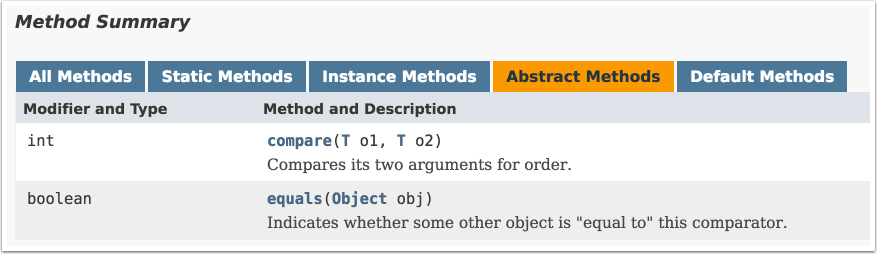
Wait, what? How can this be a functional interface if there are two abstract methods, especially if one of them is actually implemented in java.lang.Object?
What is special here is that the equals method shown is from Object, and therefore already has a default implementation. The detailed documentation says that for performance reasons you can supply your own equals method that satisfies the same contract, but that “it is always safe not (emphasis in original) to override” this method.
The rules for functional interfaces say that methods from Object don’t count against the single abstract method limit, so Comparator is still a functional interface.
Default methods in interfaces are discussed in Recipe 1.5, and static methods in interfaces are discussed in Recipe 1.6.
Use the keyword default on the interface method, and add the implementation in the normal way.
The traditional reason Java never supported multiple inheritance is the so-called diamond problem. Say you have an inheritance hierarchy as shown in the (vaguely UML-like) Figure 1-2.
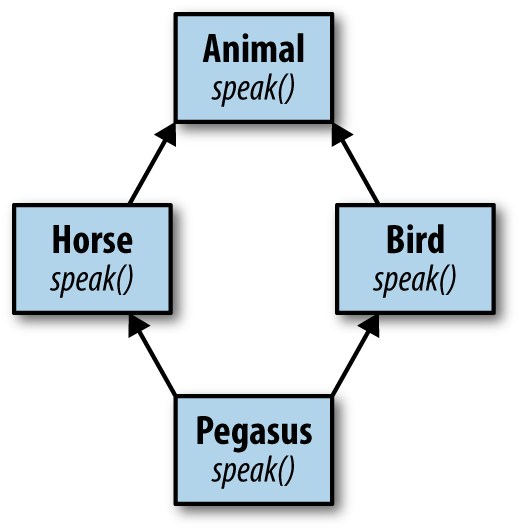
Class Animal has two child classes, Bird and Horse, each of which overrides the speak method from Animal, in Horse to say “whinny” and in Bird to say “chirp.” What, then, does Pegasus (which multiply inherits from both Horse and Bird)5 say? What if you have a reference of type Animal assigned to an instance of Pegasus? What then should the speak method return?
Animalanimal=newPegaus();animal.speak();// whinny, chirp, or other?
Different languages take different approaches to this problem. In C++, for example, multiple inheritance is allowed, but if a class inherits conflicting implementations, it won’t compile.6 In Eiffel,7 the compiler allows you to choose which implementation you want.
Java’s approach was to prohibit multiple inheritance, and interfaces were introduced as a workaround for when a class has an “is a kind of” relationship with more than one type. Since interfaces had only abstract methods, there were no implementations to conflict. Multiple inheritance is allowed with interfaces, but again that works because only the method signatures are inherited.
The problem is, if you can never implement a method in an interface, you wind up with some awkward designs. Among the methods in the java.util.Collection interface, for example, are:
booleanisEmpty()intsize()
The isEmpty method returns true if there are no elements in the collection, and false otherwise. The size method returns the number of elements in the collections. Regardless of the underlying implementation, you can immediately implement the isEmpty method in terms of size, as in Example 1-25.
publicbooleanisEmpty(){returnsize()==0;}
Since Collection is an interface, you can’t do this in the interface itself. Instead, the standard library includes an abstract class called java.util.AbstractCollection, which includes, among other code, exactly the implementation of isEmpty shown here. If you are creating your own collection implementation and you don’t already have a superclass, you can extend AbstractCollection and you get the isEmpty method for free. If you already have a superclass, you have to implement the Collection interface instead and remember to provide your own implementation of isEmpty as well as size.
All of this is quite familiar to experienced Java developers, but as of Java 8 the situation changes. Now you can add implementations to interface methods. All you have to do is add the keyword default to a method and provide an implementation. The code in Example 1-26 shows an interface with both abstract and default methods.
publicinterfaceEmployee{StringgetFirst();StringgetLast();voidconvertCaffeineToCodeForMoney();defaultStringgetName(){returnString.format("%s %s",getFirst(),getLast());}}
Default method with an implementation
The getName method has the keyword default, and its implementation is in terms of the other, abstract, methods in the interface, getFirst and getLast.
Many of the existing interfaces in Java have been enhanced with default methods in order to maintain backward compatibility. Normally when you add a new method to an interface, you break all the existing implementations. By adding a new method as a default, all the existing implementations inherit the new method and still work. This allowed the library maintainers to add new default methods throughout the JDK without breaking existing implementations.
For example, java.util.Collection now contains the following default methods:
defaultbooleanremoveIf(Predicate<?superE>filter)defaultStream<E>stream()defaultStream<E>parallelStream()defaultSpliterator<E>spliterator()
The removeIf method removes all of the elements from the collection that satisfy the Predicate8 argument, returning true if any elements were removed. The stream and parallelStream methods are factory methods for creating streams. The spliterator method returns an object from a class that implements the Spliterator interface, which is an object for traversing and partitioning elements from a source.
Default methods are used the same way any other methods are used, as Example 1-27 shows.
List<Integer>nums=newArrayList<>();nums.add(-3);nums.add(1);nums.add(4);nums.add(-1);nums.add(5);nums.add(9);booleanremoved=nums.removeIf(n->n<=0);System.out.println("Elements were "+(removed?"":"NOT")+" removed");nums.forEach(System.out::println);
Use the default method removeIf from Collection
Use the default method forEach from Iterator
What happens when a class implements two interfaces with the same default method? That is the subject of Recipe 5.5, but the short answer is that if the class implements the method itself everything is fine. See Recipe 5.5 for details.
Recipe 5.5 shows the rules that apply when a class implements multiple interfaces with default methods.
Make the method static and provide the implementation in the usual way.
Static members of Java classes are class-level, meaning they are associated with the class as a whole rather than with a particular instance. That makes their use in interfaces problematic from a design point of view. Some questions include:
What does a class-level member mean when the interface is implemented by many different classes?
Does a class need to implement an interface in order to use a static method?
Static methods in classes are accessed by the class name. If a class implements an interface, does a static method get called from the class name or the interface name?
The designers of Java could have decided these questions in several different ways. Prior to Java 8, the decision was not to allow static members in interfaces at all.
Unfortunately, however, that led to the creation of utility classes: classes that contain only static methods. A typical example is java.util.Collections, which contains methods for sorting and searching, wrapping collections in synchronized or unmodifiable types, and more. In the NIO package, java.nio.file.Paths is another example. It contains only static methods that parse Path instances from strings or URIs.
Now, in Java 8, you can add static methods to interfaces whenever you like. The requirements are:
Add the static keyword to the method.
Provide an implementation (which cannot be overridden). In this way they are like default methods, and are included in the default tab in the Javadocs.
Access the method using the interface name. Classes do not need to implement an interface to use its static methods.
One example of a convenient static method in an interface is the comparing method in java.util.Comparator, along with its primitive variants, comparingInt, comparingLong, and comparingDouble. The Comparator interface also has static methods naturalOrder and reverseOrder. Example 1-28 shows how they are used.
List<String>bonds=Arrays.asList("Connery","Lazenby","Moore","Dalton","Brosnan","Craig");List<String>sorted=bonds.stream().sorted(Comparator.naturalOrder()).collect(Collectors.toList());// [Brosnan, Connery, Craig, Dalton, Lazenby, Moore]sorted=bonds.stream().sorted(Comparator.reverseOrder()).collect(Collectors.toList());// [Moore, Lazenby, Dalton, Craig, Connery, Brosnan]sorted=bonds.stream().sorted(Comparator.comparing(String::toLowerCase)).collect(Collectors.toList());// [Brosnan, Connery, Craig, Dalton, Lazenby, Moore]sorted=bonds.stream().sorted(Comparator.comparingInt(String::length)).collect(Collectors.toList());// [Moore, Craig, Dalton, Connery, Lazenby, Brosnan]sorted=bonds.stream().sorted(Comparator.comparingInt(String::length).thenComparing(Comparator.naturalOrder())).collect(Collectors.toList());// [Craig, Moore, Dalton, Brosnan, Connery, Lazenby]
Natural order (lexicographical)
Reverse lexicographical
Sort by lowercase name
Sort by name length

Sort by length, then equal lengths lexicographically
The example shows how to use several static methods in Comparator to sort the list of actors who have played James Bond over the years.9 Comparators are discussed further in Recipe 4.1.
Static methods in interfaces remove the need to create separate utility classes, though that option is still available if a design calls for it.
The key points to remember are:
Static methods must have an implementation
You cannot override a static method
Call static methods from the interface name
You do not need to implement an interface to use its static methods
Static methods from interfaces are used throughout this book, but Recipe 4.1 covers the static methods from Comparator used here.
1 Coined by Gordon Moore, one of the co-founders of Fairchild Semiconductor and Intel, based on the observation that the number of transistors that could be packed into an integrated circuit doubled roughly every 18 months. See Wikipedia’s Moore’s law entry for details.
2 It is difficult to discuss lambdas or method references without discussing streams, which have their own chapter later. Suffice it to say that a stream produces a series of elements sequentially, does not store them anywhere, and does not modify the original source.
3 I mean no disrespect by treating Admiral Hopper as an object. I have no doubt she could still kick my butt, and she passed away in 1992.
4 At least until Java 9, when private methods are also allowed in interfaces. See Recipe 10.2 for details.
5 “A magnificent horse, with the brain of a bird.” (Disney’s Hercules movie, which is fun if you pretend you know nothing about Greek mythology and never heard of Hercules.)
6 This can be solved by using virtual inheritance, but still.
7 There’s an obscure reference for you, but Eiffel was one of the foundational languages of object-oriented programming. See Bertrand Meyer’s Object-Oriented Software Construction, Second Edition (Prentice Hall, 1997).
8 Predicate is one of the new functional interfaces in the java.util.function package, described in detail in Recipe 2.3.
9 The temptation to add Idris Elba to the list is almost overwhelming, but no such luck as yet.
The previous chapter discussed the basic syntax of lambda expressions and method references. One basic principle is that for either, there is always a context. Lambda expressions and method references are always assigned to functional interfaces, which provide information about the single abstract method being implemented.
While many interfaces in the Java standard library contain only a single, abstract method and are thus functional interfaces, there is a new package that is specifically designed to contain only functional interfaces that are reused in the rest of the library. That package is called java.util.function.
The interfaces in java.util.function fall into four categories: (1) consumers, (2) suppliers, (3) predicates, and (4) functions. Consumers take a generic argument and return nothing. Suppliers take no arguments and return a value. Predicates take an argument and return a boolean. Functions take a single argument and return a value.
For each of the basic interfaces, there are several related ones. For example, Consumer has variations customized for primitive types (IntConsumer, LongConsumer, and DoubleConsumer) and a variation (BiConsumer) that takes two arguments and returns void.
Although by definition the interfaces in this chapter only contain a single abstract method, most also include additional methods that are either static or default. Becoming familiar with these methods will make your job as a developer easier.
The java.util.function.Consumer interface has as its single, abstract method, void accept(T t). See Example 2-1.
voidaccept(Tt)defaultConsumer<T>andThen(Consumer<?superT>after)
Single abstract method
Default method for composition
The accept method takes a generic argument and returns void. One of the most frequently used examples of a method that takes a Consumer as an argument is the default forEach method in java.util.Iterable, shown in Example 2-2.
defaultvoidforEach(Consumer<?superT>action)
Passes each element of an iterable collection to the consumer argument
All linear collections implement this interface by performing the given action for each element of the collection, as in Example 2-3.
List<String>strings=Arrays.asList("this","is","a","list","of","strings");strings.forEach(newConsumer<String>(){@Overridepublicvoidaccept(Strings){System.out.println(s);}});strings.forEach(s->System.out.println(s));strings.forEach(System.out::println);
Anonymous inner class implementation
Expression lambda
Method reference
The lambda expression conforms to the signature of the accept method, because it takes a single argument and returns nothing. The println method in PrintStream, accessed here via System.out, is compatible with Consumer. Therefore, either can be used as the target for an argument of type Consumer.
The java.util.function package also contains primitive variations of Consumer<T>, as well as a two-argument version. See Table 2-1 for details.
| Interface | Single abstract method |
|---|---|
|
|
|
|
|
|
|
|
Consumers are expected to operate via side effects, as shown in Recipe 2.3.
The BiConsumer interface has an accept method that takes two generic arguments, which are assumed to be of different types. The package contains three variations on BiConsumer where the second argument is a primitive. One is ObjIntConsumer, whose accept method takes two arguments, a generic and and an int. ObjLongConsumer and ObjDoubleConsumer are defined similarly.
Other uses of the Consumer interface in the standard library include:
Optional.ifPresent(Consumer<? super T> consumer)If a value is present, invoke the specified consumer. Otherwise do nothing.
Stream.forEach(Consumer<? super T> action)Performs an action for each element of the stream.1 The Stream.forEachOrdered method is similar, accessing elements in encounter order.
Stream.peek(Consumer<? super T> action)Returns a stream with the same elements as the existing stream, first performing the given action. This is a very useful technique for debugging (see Recipe 3.5 for an example).
The andThen method in Consumer is used for composition. Function composition is discussed further in Recipe 5.8. The peek method in Stream is examined in Recipe 3.5.
The java.util.function.Supplier interface is particularly simple. It does not have any static or default methods. It contains only a single, abstract method, T get().
Implementing Supplier means providing a method that takes no arguments and returns the generic type. As stated in the Javadocs, there is no requirement that a new or distinct result be returned each time the Supplier is invoked.
One simple example of a Supplier is the Math.random method, which takes no arguments and returns a double. That can be assigned to a Supplier reference and invoked at any time, as in Example 2-4.
Loggerlogger=Logger.getLogger("...");DoubleSupplierrandomSupplier=newDoubleSupplier(){@OverridepublicdoublegetAsDouble(){returnMath.random();}};randomSupplier=()->Math.random();randomSupplier=Math::random;logger.info(randomSupplier);
Anonymous inner class implementation
Expression lambda
Method reference
The single abstract method in DoubleSupplier is getAsDouble, which returns a double. The other associated Supplier interfaces in the java.util.function package are shown in Table 2-2.
| Interface | Single abstract method |
|---|---|
|
|
|
|
|
|
|
|
One of the primary use cases for Suppliers is to support the concept of deferred execution. The info method in java.util.logging.Logger takes a Supplier, whose get method is only called if the log level means the message will be seen (shown in detail in Recipe 5.7). This process of deferred execution can be used in your own code, to ensure that a value is retrieved from a Supplier only when appropriate.
Another example from the standard library is the orElseGet method in Optional, which also takes a Supplier. The Optional class is discussed in Chapter 6, but the short explanation is that an Optional is a nonnull object that either wraps a value or is empty. It is typically returned by methods that may reasonably expect to have no result, like finding a value in an empty collection.
To see how that might work, consider searching for a name in a collection, as shown in Example 2-5.
List<String>names=Arrays.asList("Mal","Wash","Kaylee","Inara","Zoë","Jayne","Simon","River","Shepherd Book");Optional<String>first=names.stream().filter(name->name.startsWith("C")).findFirst();System.out.println(first);System.out.println(first.orElse("None"));System.out.println(first.orElse(String.format("No result found in %s",names.stream().collect(Collectors.joining(", ")))));System.out.println(first.orElseGet(()->String.format("No result found in %s",names.stream().collect(Collectors.joining(", ")))));
Prints Optional.empty
Prints the string "None"
Forms the comma-separated collection, even when name is found
Forms the comma-separated collection only if the Optional is empty
The findFirst method on Stream returns the first encountered element in an ordered stream.2 Since it’s possible to apply a filter so there are no elements remaining in the stream, the method returns an Optional. That Optional either contains the desired element, or is empty. In this case, none of the names in the list pass the filter, so the result is an empty Optional.
The orElse method on Optional returns either the contained element, or a specified default. That’s fine if the default is a simple string, but can be wasteful if processing is necessary to return a value.
In this case, the returned value shows the complete list of names in comma-separated form. The orElse method creates the complete string, whether the Optional contains a value or not.
The orElseGet method, however, takes a Supplier as an argument. The advantage is that the get method on the Supplier will only be invoked when the Optional is empty, so the complete name string is not formed unless it is necessary.
Other examples from the standard library that use Suppliers include:
The orElseThrow method in Optional, which takes a Supplier<X extends Exception>. The Supplier is only executed if an exception occurs.
Objects.requireNonNull(T obj, Supplier<String> messageSupplier) only customizes its response if the first argument is null.
CompletableFuture.supplyAsync(Supplier<U> supplier) returns a CompletableFuture that is asynchronously completed by a task running with the value obtained by calling the given Supplier.
The Logger class has overloads for all its logging methods that takes a Supplier<String> rather than just a string (used as an example in Recipe 5.7).
Using the overloaded logging methods that take a Supplier is discussed in Recipe 5.7. Finding the first element in a collection is discussed in Recipe 3.9. Completable futures are part of several recipes in Chapter 9, and Optional is the topic of recipes in Chapter 6.
Implement the boolean test(T t) method in the Predicate interface using a lambda expression or a method reference.
Predicates are used primarily to filter streams. Given a stream of items, the filter method in java.util.stream.Stream takes a Predicate and returns a new stream that includes only the items that satisfy the given predicate.
The single abstract method in Predicate is boolean test(T t), which takes a single generic argument and returns true or false. The complete set of methods in Predicate, including state and defaults, is given in Example 2-6.
defaultPredicate<T>and(Predicate<?superT>other)static<T>Predicate<T>isEqual(ObjecttargetRef)defaultPredicate<T>negate()defaultPredicate<T>or(Predicate<?superT>other)booleantest(Tt)
Single abstract method
Say you have a collection of names and you want to find all the instances that have a particular length. Example 2-7 shows an example of how to use stream processing to do so.
publicStringgetNamesOfLength(intlength,String...names){returnArrays.stream(names).filter(s->s.length()==length).collect(Collectors.joining(", "));}
Predicate for strings of given length only
Alternatively, perhaps you want only the names that start with a particular string, as in Example 2-8.
publicStringgetNamesStartingWith(Strings,String...names){returnArrays.stream(names).filter(str->str.startsWith(s)).collect(Collectors.joining(", "));}
Predicate to return strings starting with a given string
These can be made more general by allowing the condition to be specified by the client. Example 2-9 shows a method to do that.
publicclassImplementPredicate{publicStringgetNamesSatisfyingCondition(Predicate<String>condition,String...names){returnArrays.stream(names).filter(condition).collect(Collectors.joining(", "));}}// ... other methods ...}
Filter by supplied predicate
This is quite flexible, but it may be a bit much to expect the clients to write every predicate themselves. One option is to add constants to the class representing the most common cases, as in Example 2-10.
publicclassImplementPredicate{publicstaticfinalPredicate<String>LENGTH_FIVE=s->s.length()==5;publicstaticfinalPredicate<String>STARTS_WITH_S=s->s.startsWith("S");// ... rest as before ...}
The other advantage to supplying a predicate as an argument is that you can also use the default methods and, or, and negate to create a composite predicate from a series of individual elements.
The test case in Example 2-11 demonstrates all of these techniques.
importstaticfunctionpackage.ImplementPredicate.*;importstaticorg.junit.Assert.assertEquals;// ... other imports ...publicclassImplementPredicateTest{privateImplementPredicatedemo=newImplementPredicate();privateString[]names;@BeforepublicvoidsetUp(){names=Stream.of("Mal","Wash","Kaylee","Inara","Zoë","Jayne","Simon","River","Shepherd Book").sorted().toArray(String[]::new);}@TestpublicvoidgetNamesOfLength5()throwsException{assertEquals("Inara, Jayne, River, Simon",demo.getNamesOfLength(5,names));}@TestpublicvoidgetNamesStartingWithS()throwsException{assertEquals("Shepherd Book, Simon",demo.getNamesStartingWith("S",names));}@TestpublicvoidgetNamesSatisfyingCondition()throwsException{assertEquals("Inara, Jayne, River, Simon",demo.getNamesSatisfyingCondition(s->s.length()==5,names));assertEquals("Shepherd Book, Simon",demo.getNamesSatisfyingCondition(s->s.startsWith("S"),names));assertEquals("Inara, Jayne, River, Simon",demo.getNamesSatisfyingCondition(LENGTH_FIVE,names));assertEquals("Shepherd Book, Simon",demo.getNamesSatisfyingCondition(STARTS_WITH_S,names));}@TestpublicvoidcomposedPredicate()throwsException{assertEquals("Simon",demo.getNamesSatisfyingCondition(LENGTH_FIVE.and(STARTS_WITH_S),names));assertEquals("Inara, Jayne, River, Shepherd Book, Simon",demo.getNamesSatisfyingCondition(LENGTH_FIVE.or(STARTS_WITH_S),names));assertEquals("Kaylee, Mal, Shepherd Book, Wash, Zoë",demo.getNamesSatisfyingCondition(LENGTH_FIVE.negate(),names));}}
Static import to make using constants simpler
Composition
Negation
Other methods in the standard library that use predicates include:
Optional.filter(Predicate<? super T> predicate)If a value is present, and the value matches the given predicate, returns an Optional describing the value, otherwise returns an empty Optional.
Collection.removeIf(Predicate<? super E> filter)Removes all elements of this collection that satisfy the predicate.
Stream.allMatch(Predicate<? super T> predicate)Returns true if all elements of the stream satisfy the given predicate. The methods anyMatch and noneMatch work similarly.
Collectors.partitioningBy(Predicate<? super T> predicate)Returns a Collector that splits a stream into two categories: those that satisfy the predicate and those that do not.
Predicates are useful whenever a stream should only return certain elements. This recipe hopefully gives you an idea where and when that might be useful.
Closure composition is also discussed in Recipe 5.8. The allMatch, anyMatch, and noneMatch methods are discussed in Recipe 3.10. Partitioning and group by operations are discussed in Recipe 4.5.
Provide a lambda expression that implements the R apply(T t) method.
The functional interface java.util.function.Function contains the single abstract method apply, which is invoked to transform a generic input parameter of type T into a generic output value of type R. The methods in Function are shown in Example 2-12.
default<V>Function<T,V>andThen(Function<?superR,?extendsV>after)Rapply(Tt)default<V>Function<V,R>compose(Function<?superV,?extendsT>before)static<T>Function<T,T>identity()
The most common usage of Function is as an argument to the Stream.map method. For example, one way to transform a String into an integer would be to invoke the length method on each instance, as in Example 2-13.
List<String>names=Arrays.asList("Mal","Wash","Kaylee","Inara","Zoë","Jayne","Simon","River","Shepherd Book");List<Integer>nameLengths=names.stream().map(newFunction<String,Integer>(){@OverridepublicIntegerapply(Strings){returns.length();}}).collect(Collectors.toList());nameLengths=names.stream().map(s->s.length()).collect(Collectors.toList());nameLengths=names.stream().map(String::length).collect(Collectors.toList());System.out.printf("nameLengths = %s%n",nameLengths);// nameLengths == [3, 4, 6, 5, 3, 5, 5, 5, 13]
Anonymous inner class
Lambda expression
Method reference
The complete list of primitive variations for both the input and the output generic types are shown in Table 2-3.
| Interface | Single abstract method |
|---|---|
|
|
|
|
|
|
|
|
|
|
|
|
|
|
|
|
|
|
|
|
|
|
|
|
|
|
The argument to the map method in Example 2-13 could have been a ToIntFunction, because the return type on the method is an int primitive. The Stream.mapToInt method takes a ToIntFunction as an argument, and mapToDouble and mapToLong are analogous. The return types on mapToInt, mapToDouble, and mapToLong are IntStream, DoubleStream, and LongStream, respectively.
What if the argument and return type are the same? The java.util.function package defines UnaryOperator for that. As you might expect, there are also interfaces called IntUnaryOperator, DoubleUnaryOperator, and LongUnaryOperator, where the input and output arguments are int, double, and long, respectively. An example of a UnaryOperator would be the reverse method in StringBuilder, because both the input type and the output type are strings.
The BiFunction interface is defined for two generic input types and one generic output type, all of which are assumed to be different. If all three are the same, the package includes the BinaryOperator interface. An example of a binary operator would be Math.max, because both inputs and the output are either int, double, float, or long. Of course, the interface also defines interfaces called IntBinaryOperator, DoubleBinaryOperator, and LongBinaryOperator for those situations.3
To complete the set, the package also has primitive variations of BiFunction, which are summarized in Table 2-4.
| Interface | Single abstract method |
|---|---|
|
|
|
|
|
|
While the various Stream.map methods are the primary usages of Function, they do appear in other contexts. Among them are:
Map.computeIfAbsent(K key, Function<? super K,? extends V> mappingFunction)If the specified key does not have a value, use the provided Function to compute one and add it to a Map.
Comparator.comparing(Function<? super T,? extends U> keyExtractor)Discussed in Recipe 4.1, this method generates a Comparator that sorts a collection by the key generated from the given Function.
Comparator.thenComparing(Function<? super T,? extends U> keyExtractor)An instance method, also used in sorting, that adds an additional sorting mechanism if the collection has equal values by the first sort.
Functions are also used extensively in the Collectors utility class for grouping and downstream collectors.
The andThen and compose methods are discussed in Recipe 5.8. The identity method is simply the lambda expression e -> e. One usage is shown in Recipe 4.3.
See Recipe 5.8 for examples of the andThen and compose methods in the Function interface. See Recipe 4.3 for an example of Function.identity. See Recipe 4.6 for examples of using functions as downstream collectors. The computeIfAbsent method is discussed in Recipe 5.4. Binary operators are also covered in Recipe 3.3.
1 This is such a common operation that forEach was also added directly to Iterable. The Stream variation is useful when the source elements do not come from a collection, or if you want to make the stream parallel.
2 Streams may have an encounter order or they may not, just as lists are assumed to be ordered by index and sets are not. This can be different from the order in which elements are processed. See Recipe 3.9 for more information.
3 See Recipe 3.3 for more on BinaryOperator uses in the standard library.
Java 8 introduces a new streaming metaphor to support functional programming. A stream is a sequence of elements that does not save the elements or modify the original source. Functional programming in Java often involves generating a stream from some source of data, passing the elements through a series of intermediate operations (called a pipeline), and completing the process with a terminal expression.
Streams can only be used once. After a stream has passed through zero or more intermediate operations and reached a terminal operation, it is finished. To process the values again, you need to make a new stream.
Streams are also lazy. A stream will only process as much data as is necessary to reach the terminal condition. Recipe 3.13 shows this in action.
The recipes in this chapter demonstrate various typical stream operations.
Use the static factory methods in the Stream interface, or the stream methods on Iterable or Arrays.
The new java.util.stream.Stream interface in Java 8 provides several static methods for creating streams. Specifically, you can use the static methods Stream.of, Stream.iterate, and Stream.generate.
The Stream.of method takes a variable argument list of elements:
static<T>Stream<T>of(T...values)
The implementation of the of method in the standard library actually delegates to the stream method in the Arrays class, shown in Example 3-1.
@SafeVarargspublicstatic<T>Stream<T>of(T...values){returnArrays.stream(values);}
The @SafeVarargs annotation is part of Java generics. It comes up when you have an array as an argument, because it is possible to assign a typed array to an Object array and then violate type safety with an added element. The @SafeVarargs annotation tells the compiler that the developer promises not to do that. See Appendix A for additional details.
As a trivial example, see Example 3-2.
Since streams do not process any data until a terminal expression is reached, each of the examples in this recipe will add a terminal method like collect or forEach at the end.
Stringnames=Stream.of("Gomez","Morticia","Wednesday","Pugsley").collect(Collectors.joining(","));System.out.println(names);// prints Gomez,Morticia,Wednesday,Pugsley
The API also includes an overloaded of method that takes a single element T t. This method returns a singleton sequential stream containing a single element.
Speaking of the Arrays.stream method, Example 3-3 shows an example.
String[]munsters={"Herman","Lily","Eddie","Marilyn","Grandpa"};names=Arrays.stream(munsters).collect(Collectors.joining(","));System.out.println(names);// prints Herman,Lily,Eddie,Marilyn,Grandpa
Since you have to create an array ahead of time, this approach is less convenient, but works well for variable argument lists. The API includes overloads of Arrays.stream for arrays of int, long, and double, as well as the generic type used here.
Another static factory method in the Stream interface is iterate. The signature of the iterate method is:
static<T>Stream<T>iterate(Tseed,UnaryOperator<T>f)
According to the Javadocs, this method “returns an infinite (emphasis added) sequential ordered Stream produced by iterative application of a function f to an initial element seed.” Recall that a UnaryOperator is a function whose single input and output types are the same (discussed in Recipe 2.4). This is useful when you have a way to produce the next value of the stream from the current value, as in Example 3-4.
List<BigDecimal>nums=Stream.iterate(BigDecimal.ONE,n->n.add(BigDecimal.ONE)).limit(10).collect(Collectors.toList());System.out.println(nums);// prints [1, 2, 3, 4, 5, 6, 7, 8, 9, 10]Stream.iterate(LocalDate.now(),ld->ld.plusDays(1L)).limit(10).forEach(System.out::println)// prints 10 days starting from today
The first example counts from one using BigDecimal instances. The second uses the new LocalDate class in java.time and adds one day to it repeatedly. Since the resulting streams are both unbounded, the intermediate operation limit is needed.
The other factory method in the Stream class is generate, whose signature is:
static<T>Stream<T>generate(Supplier<T>s)
This method produces a sequential, unordered stream by repeatedly invoking the Supplier. A simple example of a Supplier in the standard library (a method that takes no arguments but produces a return value) is the Math.random method, which is used in Example 3-5.
longcount=Stream.generate(Math::random).limit(10).forEach(System.out::println)
If you already have a collection, you can take advantage of the default method stream that has been added to the Collection interface, as in Example 3-6.1
List<String>bradyBunch=Arrays.asList("Greg","Marcia","Peter","Jan","Bobby","Cindy");names=bradyBunch.stream().collect(Collectors.joining(","));System.out.println(names);// prints Greg,Marcia,Peter,Jan,Bobby,Cindy
There are three child interfaces of Stream specifically for working with primitives: IntStream, LongStream, and DoubleStream. IntStream and LongStream each have two additional factory methods for creating streams, range and rangeClosed. The methods from IntStream and LongStream are:
staticIntStreamrange(intstartInclusive,intendExclusive)staticIntStreamrangeClosed(intstartInclusive,intendInclusive)staticLongStreamrange(longstartInclusive,longendExclusive)staticLongStreamrangeClosed(longstartInclusive,longendInclusive)
The arguments show the difference between the two: rangeClosed includes the end value, and range doesn’t. Each returns a sequential, ordered stream that starts at the first argument and increments by one after that. An example of each is shown in Example 3-7.
List<Integer>ints=IntStream.range(10,15).boxed().collect(Collectors.toList());System.out.println(ints);// prints [10, 11, 12, 13, 14]List<Long>longs=LongStream.rangeClosed(10,15).boxed().collect(Collectors.toList());System.out.println(longs);// prints [10, 11, 12, 13, 14, 15]
Necessary for Collectors to convert primitives to List<T>
The only quirk in that example is the use of the boxed method to convert the int values to Integer instances, which is discussed further in Recipe 3.2.
To summarize, here are the methods to create streams:
Stream.of(T... values) and Stream.of(T t)
Arrays.stream(T[] array), with overloads for int[], double[], and long[]
Stream.iterate(T seed, UnaryOperator<T> f)
Stream.generate(Supplier<T> s)
Collection.stream()
Using range and rangeClosed:
IntStream.range(int startInclusive, int endExclusive)
IntStream.rangeClosed(int startInclusive, int endInclusive)
LongStream.range(long startInclusive, long endExclusive)
LongStream.rangeClosed(long startInclusive, long endInclusive)
Streams are used throughout this book. The process of converting streams of primitives to wrapper instances is discussed in Recipe 3.2.
Use the boxed method on Stream to wrap the elements. Alternatively, map the values using the appropriate wrapper class, or use the three-argument form of the collect method.
When dealing with streams of objects, you can convert from a stream to a collection using one of the static methods in the Collectors class. For example, given a stream of strings, you can create a List<String> using the code in Example 3-8.
List<String>strings=Stream.of("this","is","a","list","of","strings").collect(Collectors.toList());
The same process doesn’t work on streams of primitives, however. The code in Example 3-9 does not compile.
IntStream.of(3,1,4,1,5,9).collect(Collectors.toList());// does not compile
You have three alternatives available as workarounds. First, use the boxed method on Stream to convert the IntStream to a Stream<Integer>, as shown in Example 3-10.
List<Integer>ints=IntStream.of(3,1,4,1,5,9).boxed().collect(Collectors.toList());
Converts int to Integer
One alternative is to use the mapToObj method to convert each element from a primitive to an instance of the wrapper class, as in Example 3-11.
List<Integer>ints=IntStream.of(3,1,4,1,5,9).mapToObj(Integer::valueOf).collect(Collectors.toList())
Just as mapToInt, mapToLong, and mapToDouble parse streams of objects into the associated primitives, the mapToObj method from IntStream, LongStream, and DoubleStream converts primitives to instances of the associated wrapper classes. The argument to mapToObj in this example uses the static valueOf method from the Integer class.
In JDK 9, the Integer(int val) constructor is deprecated for performance reasons. The recommendation is to use Integer.valueOf(int) instead.
Another alternative is to use the three-argument version of collect, whose signature is:
<R>Rcollect(Supplier<R>supplier,ObjIntConsumer<R>accumulator,BiConsumer<R,R>combiner)
Example 3-12 shows how to use this method.
List<Integer>ints=IntStream.of(3,1,4,1,5,9).collect(ArrayList<Integer>::new,ArrayList::add,ArrayList::addAll);
In this version of collect, the Supplier is the constructor for ArrayList<Integer>, the accumulator is the add method, which represents how to add a single element to a list, and the combiner (which is only used during parallel operations) is addAll, which combines two lists into one. Using the three-argument version of collect is not very common, but understanding how it works is a useful skill.
Any of these approaches work, so the choice is just a matter of style.
Incidentally, if you want to convert to an array rather than a list, then the toArray method works just as well if not better. See Example 3-13.
int[]intArray=IntStream.of(3,1,4,1,5,9).toArray();
The fact that any of these approaches is necessary is yet another consequence of the original decision in Java to treat primitives differently from objects, complicated by the introduction of generics. Still, using boxed or mapToObj is easy enough once you know to look for them.
Collectors are discussed in Chapter 4. Constructor references are covered in Recipe 1.3.
Use the reduce method to accumulate calculations on each element.
The functional paradigm in Java often uses a process known as map-filter-reduce. The map operation transforms a stream of one type (like a String) into another (like an int, by invoking the length method). Then a filter is applied to produce a new stream with only the desired elements in it (e.g., strings with length below a certain threshold). Finally, you may wish to provide a terminal operation that generates a single value from the stream (like a sum or average of the lengths).
The primitive streams IntStream, LongStream, and DoubleStream have several reduction operations built into the API.
For example, Table 3-1 shows the reduction operations from the IntStream class.
| Method | Return type |
|---|---|
|
|
|
|
|
|
|
|
|
|
|
|
|
|
|
|
Reduction operations like sum, count, max, min, and average do what you would expect. The only interesting part is that some of them return Optionals, because if there are no elements in the stream (perhaps after a filtering operation) the result is undefined or null.
For example, consider reduction operations involving the lengths of a collection of strings, as in Example 3-14.
String[]strings="this is an array of strings".split(" ");longcount=Arrays.stream(strings).map(String::length).count();System.out.println("There are "+count+" strings");inttotalLength=Arrays.stream(strings).mapToInt(String::length).sum();System.out.println("The total length is "+totalLength);OptionalDoubleave=Arrays.stream(strings).mapToInt(String::length).average();System.out.println("The average length is "+ave);OptionalIntmax=Arrays.stream(strings).mapToInt(String::length).max();OptionalIntmin=Arrays.stream(strings).mapToInt(String::length).min();System.out.println("The max and min lengths are "+max+" and "+min);
count is a Stream method, so no need to map to IntStream
sum and average are on the primitive streams only
max and min without Comparator only on primitive streams
The program prints:
There are 6 strings
The total length is 22
The average length is OptionalDouble[3.6666666666666665]
The max and min lengths are OptionalInt[7] and OptionalInt[2]
Note how the average, max, and min methods return Optionals, because in principle you could have applied a filter that removed all the elements from the stream.
The count method is actually quite interesting, and is discussed in Recipe 3.7.
The Stream interface has max(Comparator) and min(Comparator), where the comparators are used to determine the max or min element. In IntStream, there are overloaded versions of both methods that do not need an argument, because the comparison is done using the natural order of integers.
The summaryStatistics method is discussed in Recipe 3.8.
The last two operations in the table, collect and reduce, bear further discussion. The collect method is used throughout this book to convert a stream into a collection, usually in combination with one of the static helper methods in the Collectors class, like toList or toSet. That version of collect does not exist on the primitive streams. The three-argument version shown here takes a collection to populate, a way to add a single element to that collection, and a way to add multiple elements to the collection. An example is shown in Recipe 3.2.
The behavior of the reduce method, however, is not necessarily intuitive until you’ve seen it in action.
There are two overloaded versions of the reduce method in IntStream:
OptionalInt reduce(IntBinaryOperator op)
int         reduce(int identity, IntBinaryOperator op)
The first takes an IntBinaryOperator and returns an OptionalInt. The second asks you to supply an int called identity along with an IntBinaryOperator.
Recall that a java.util.function.BiFunction takes two arguments and returns a single value, all three of which can be of different types. If both input types and the return type are all the same, the function is a BinaryOperator (think, for example, Math.max). An IntBinaryOperator is a BinaryOperator where the both inputs and the output type are all ints.
Pretend, for the moment, that you didn’t think to use sum. One way to sum a series of integers would be to use the reduce method shown in Example 3-15.
intsum=IntStream.rangeClosed(1,10).reduce((x,y)->x+y).orElse(0);
The value of sum is 55
Normally stream pipelines are written vertically, an approach based on a fluent API where the result of one method becomes the target of the next. In this case, the reduce method returns something other than a stream, so orElse is written on the same line rather than below because it’s not part of the pipeline. That’s just a convenience—use any formatting approach that works for you.
The IntBinaryOperator here is supplied by a lambda expression that takes two ints and returns their sum. Since it is conceivable that the stream could be empty if we had added a filter, the result is an OptionalInt. Chaining the orElse method to it indicates that if there are no elements in the stream, the return value should be zero.
In the lambda expression, you can think of the first argument of the binary operator as an accumulator, and the second argument as the value of each element in the stream. This is made clear if you print each one as it goes by, as shown in Example 3-16.
intsum=IntStream.rangeClosed(1,10).reduce((x,y)->{System.out.printf("x=%d, y=%d%n",x,y);returnx+y;}).orElse(0);
The output is shown in Example 3-17.
x=1, y=2
x=3, y=3
x=6, y=4
x=10, y=5
x=15, y=6
x=21, y=7
x=28, y=8
x=36, y=9
x=45, y=10

sum=55
As the output shows, the initial values of x and y are the first two values of the range. The value returned by the binary operator becomes the value of x (i.e., the accumulator) on the next iteration, while y takes on each value in the stream.
This is fine, but what if you wanted to process each number before summing them? Say, for example, you wanted to double all the numbers before summing them.2 A naïve approach would be simply to try the code shown in Example 3-18.
intdoubleSum=IntStream.rangeClosed(1,10).reduce((x,y)->x+2*y).orElse(0);
The value of doubleSum is 109 (oops! off by one!)
Since the sum of the integers from 1 to 10 is 55, the resulting sum should be 110, but this calculation produces 109. The reason is that in the lambda expression in the reduce method, the initial values of x and y are 1 and 2 (the first two values of the stream), so that first value of the stream doesn’t get doubled.
That’s why there’s an overloaded version of reduce that takes an initial value for the accumulator. The resulting code is shown in Example 3-19.
intdoubleSum=IntStream.rangeClosed(1,10).reduce(0,(x,y)->x+2*y);
The value of doubleSum is 110, as it should be
By providing the initial value of zero for the accumulator x, the value of y is assigned to each of the elements in the stream, doubling them all. The values of x and y during each iteration are shown in Example 3-20.
Acc=0, n=1
Acc=2, n=2
Acc=6, n=3
Acc=12, n=4
Acc=20, n=5
Acc=30, n=6
Acc=42, n=7
Acc=56, n=8
Acc=72, n=9
Acc=90, n=10

sum=110
Note also that when you use the version of reduce with an initial value for the accumulator, the return type is int rather than OptionalInt.
The standard library provides many reduction methods, but if none of them directly apply to your problem, the two forms of the reduce method shown here can be very helpful.
A few methods have been added to the standard library that make reduction operations particularly simple. For example, Integer, Long, and Double all have a sum method that does exactly what you would expect. The implementation of the sum method in Integer is:
publicstaticintsum(inta,intb){returna+b;}
Why bother creating a method just to add two integers, as done here? The sum method is a BinaryOperator (more specifically, an IntBinaryOperator) and can therefore be used easily in a reduce operation, as in Example 3-21.
intsum=Stream.of(1,2,3,4,5,6,7,8,9,10).reduce(0,Integer::sum);System.out.println(sum);
This time you don’t even need an IntStream, but the result is the same. Likewise the Integer class now has a max and a min method, both of which are also binary operators and can be used the same way, as in Example 3-22.
Integermax=Stream.of(3,1,4,1,5,9).reduce(Integer.MIN_VALUE,Integer::max);System.out.println("The max value is "+max);
The identity for max is the minimum integer
Another interesting example is the concat method in String, which doesn’t actually look like a BinaryOperator because the method only takes a single argument:
Stringconcat(Stringstr)
You can use this in a reduce operation anyway, as shown in Example 3-23.
Strings=Stream.of("this","is","a","list").reduce("",String::concat);System.out.println(s);
Prints thisisalist
The reason this works is that when you use a method reference via the class name (as in String::concat), the first parameter becomes the target of the concat method and the second parameter is the argument to concat. Since the result returns a String, the target, parameter, and return type are all of the same type and once again you can treat this as a binary operator for the reduce method.
This technique can greatly reduce3 the size of your code, so keep that in mind when you’re browsing the API.
The third form of the reduce method is:
<U>Ureduce(Uidentity,BiFunction<U,?superT,U>accumulator,BinaryOperator<U>combiner)
This is a bit more complicated, and there are normally easier ways to accomplish the same goal, but an example of how to use it might be useful.
Consider a Book class with simply an integer ID and a string title, as in Example 3-27.
publicclassBook{privateIntegerid;privateStringtitle;// ... constructors, getters and setters, toString, equals, hashCode ...}
Say you have a list of books and you want to add them to a Map, where the keys are the IDs and the values are the books themselves.
The example shown here can be solved much more easily using the Collectors.toMap method, which is demonstrated in Recipe 4.3. It is used here because its simplicity will hopefully make it easier to focus on the more complex version of reduce.
One way to accomplish that is shown in Example 3-28.
HashMap<Integer,Book>bookMap=books.stream().reduce(newHashMap<Integer,Book>(),(map,book)->{map.put(book.getId(),book);returnmap;},(map1,map2)->{map1.putAll(map2);returnmap1;});bookMap.forEach((k,v)->System.out.println(k+": "+v));
Identity value for putAll
Accumulate a single book into Map using put
Combine multiple Maps using putAll
It’s easiest to examine the arguments to the reduce method in reverse order.
The last argument is a combiner, which is required to be a BinaryOperator. In this case, the provided lambda expression takes two maps and copies all the keys from the second map into the first one and returns it. The lambda expression would be simpler if the putAll method returned the map, but no such luck. The combiner is only relevant if the reduce operation is done in parallel, because then you need to combine maps produced from each portion of the range.
The second argument is a function that adds a single book to a Map. This too would be simpler if the put method on Map returned the Map after the new entry was added.
The first argument to the reduce method is the identity value for the combiner function. In this case, the identity value is an empty Map, because that combined with any other Map returns the other Map.
The output from this program is:
1: Book{id=1, title='Modern Java Recipes'}
2: Book{id=2, title='Making Java Groovy'}
3: Book{id=3, title='Gradle Recipes for Android'}
Reduction operations are fundamental to the functional programming idiom. In many common cases, the Stream interfaces provide a built-in method for you, like sum or collect(Collectors.joining(','). If you need to write your own, however, this recipe shows how to use the reduce operation directly.
The best news is that once you understand how to use reduce in Java 8, you know how to use the same operation in other languages, even if it goes by different names (like inject in Groovy or fold in Scala). They all work the same way.
A much simpler way to turn a list of POJOs into a Map is shown in Recipe 4.3. Summary statistics are discussed in Recipe 3.8. Collectors are discussed in Chapter 4.
Use the reduce method to check each pair of elements.
The reduce method on Stream takes a BinaryOperator as an argument:
Optional<T>reduce(BinaryOperator<T>accumulator)
A BinaryOperator is a Function where both input types and the output type are all the same. As shown in Recipe 3.3, the first element in the BinaryOperator is normally an accumulator, while the second element takes each value of the stream, as in Example 3-29.
BigDecimaltotal=Stream.iterate(BigDecimal.ONE,n->n.add(BigDecimal.ONE)).limit(10).reduce(BigDecimal.ZERO,(acc,val)->acc.add(val));System.out.println("The total is "+total);
Using the add method in BigDecimal as a BinaryOperator
As usual, whatever is returned by the lambda expression becomes the value of the acc variable on the next iteration. In this way, the calculation accumulates the values of the first 10 BigDecimal instances.
This is the most typical way of using the reduce method, but just because acc here is used as an accumulator doesn’t mean it has to be thought of as such. Consider sorting strings instead, using the approach discussed in Recipe 4.1. The code snippet shown in Example 3-30 sorts strings by length.
List<String>strings=Arrays.asList("this","is","a","list","of","strings");List<String>sorted=strings.stream().sorted(Comparator.comparingInt(String::length)).collect(toList());
Result is ["a", "is", "of", "this", "list", "strings"]
The question is, how do you test this? Each adjacent pair of strings has to be compared by length to make sure the first is equal to or shorter than the second. The reduce method here works well, however, as Example 3-31 shows (part of a JUnit test case).
strings.stream().reduce((prev,curr)->{assertTrue(prev.length()<=curr.length());returncurr;});
Check each pair is sorted properly
curr becomes the next value of prev
For each consecutive pair, the previous and current parameters are assigned to variables prev and curr. The assertion tests that the previous length is less than or equal to the current length. The important part is that the argument to reduce returns the value of the current string, curr, which becomes the value of prev on the next iteration.
The only thing required to make this work is for the stream to be sequential and ordered, as here.
The reduce method is discussed in Recipe 3.3. Sorting is discussed in Recipe 4.1.
Stream processing consists of a series of zero or more intermediate operations followed by a terminal operation. Each intermediate operation returns a new stream. The terminal operation returns something other than a stream.
Newcomers to Java 8 sometimes find the sequence of intermediate operations on a stream pipeline confusing, because they have trouble visualizing the stream values as they are processed.
Consider a simple method that accepts a start and end range for a stream of integers, doubles each number, and then sums up only the resulting values divisible by 3, as shown in Example 3-32.
publicintsumDoublesDivisibleBy3(intstart,intend){returnIntStream.rangeClosed(start,end).map(n->n*2).filter(n->n%3==0).sum();}
A simple test could prove that this is working properly:
@TestpublicvoidsumDoublesDivisibleBy3()throwsException{assertEquals(1554,demo.sumDoublesDivisibleBy3(100,120));}
That’s helpful, but doesn’t deliver a lot of insight. If the code wasn’t working, it would be very difficult to figure out where the problem lay.
Imagine that you added a map operation to the pipeline that took each value, printed it, and then returned the value again, as in Example 3-33.
publicintsumDoublesDivisibleBy3(intstart,intend){returnIntStream.rangeClosed(start,end).map(n->{System.out.println(n);returnn;}).map(n->n*2).filter(n->n%3==0).sum();}
Identity map that prints each element before returning it
The result prints the numbers from start to end, inclusive, with one number per line. While you might not want this in production code, it gives you a look inside the stream processing without interfering with it.
This behavior is exactly how the peek method in Stream works. The declaration of the peek method is:
Stream<T>peek(Consumer<?superT>action)
According to the Javadocs, the peek method “returns a stream consisting of the elements of this stream, additionally performing the provided action on each element as they are consumed from the resulting stream.” Recall that a Consumer takes a single input but returns nothing, so any provided Consumer will not corrupt each value as it streams by.
Since peek is an intermediate operation, the peek method can be added multiple times if you wish, as in Example 3-34.
publicintsumDoublesDivisibleBy3(intstart,intend){returnIntStream.rangeClosed(start,end).peek(n->System.out.printf("original: %d%n",n)).map(n->n*2).peek(n->System.out.printf("doubled : %d%n",n)).filter(n->n%3==0).peek(n->System.out.printf("filtered: %d%n",n)).sum();}
Print value before doubling
Print value after doubling but before filtering
Print value after filtering but before summing
The result will show each element in its original form, then after it has been doubled, and finally only if it passes the filter. The output is:
original: 100
doubled : 200
original: 101
doubled : 202
original: 102
doubled : 204
filtered: 204
...
original: 119
doubled : 238
original: 120
doubled : 240
filtered: 240
Unfortunately, there’s no easy way to make the peek code optional, so this is a convenient step to use for debugging but should be removed in production code.
Use the default methods chars and codePoints from the java.lang.CharSequence interface to convert a String into an IntStream. To convert back to a String, use the overload of the collect method on IntStream that takes a Supplier, a BiConsumer representing an accumulator, and a BiConsumer representing a combiner.
Strings are collections of characters, so in principle it should be as easy to convert a string into a stream as it is any other collection or array. Unfortunately, String is not part of the Collections framework, and therefore does not implement Iterable, so there is no stream factory method to convert one into a Stream. The other option would be the static stream methods in the java.util.Arrays class, but while there are versions of Arrays.stream for int[], long[], double[], and even T[], there isn’t one for char[]. It’s almost as if the designers of the API didn’t want you to process a String using stream techniques.
Still, there is an approach that works. The String class implements the CharSequence interface, and that interface contains two new methods that produce an IntStream. Both methods are default methods in the interface, so they have an implementation available. The signatures are in Example 3-35.
defaultIntStreamchars()defaultIntStreamcodePoints()
The difference between the two methods has to do with how Java handles UTF-16-encoded characters as opposed to the full Unicode set of code points. If you’re interested, the differences are explained in the Javadocs for java.lang.Character. For the methods shown here, the difference is only in the type of integers returned. The former returns a IntStream consisting of char values from this sequence, while the latter returns an IntStream of Unicode code points.
The opposite question is how to convert a stream of characters back into a String. The Stream.collect method is used to perform a mutable reduction on the elements of a stream to produce a collection. The version of collect that takes a Collector is most commonly used, because the Collectors utility class provides many static methods (like toList, toSet, toMap, joining, and many others discussed in this book) that produce the desired Collector.
Conspicuous by its absence, however, is a Collector that will take a stream of characters and assemble it into a String. Fortunately, that code isn’t difficult to write, using the other overload of collect, which takes a Supplier and two BiConsumer arguments, one as an accumulator and one as a combiner.
This all sounds a lot more complicated than it is in practice. Consider writing a method to check if a string is a palindrome. Palindromes are not case sensitive, and they remove all punctuation before checking whether the resulting string is the same forward as backward. In Java 7 or earlier, Example 3-36 shows one way to write a method that tests strings.
publicbooleanisPalindrome(Strings){StringBuildersb=newStringBuilder();for(charc:s.toCharArray()){if(Character.isLetterOrDigit(c)){sb.append(c);}}Stringforward=sb.toString().toLowerCase();Stringbackward=sb.reverse().toString().toLowerCase();returnforward.equals(backward);}
As is typical in code written in a nonfunctional style, the method declares a separate object with mutable state (the StringBuilder instance), then iterates over a collection (the char[] returned by the toCharArray method in String), using an if condition to decide whether to append a value to the buffer. The StringBuilder class also has a reverse method to make checking for palindromes easier, while the String class does not. This combination of mutable state, iteration, and decision statements cries out for an alternative stream-based approach.
That stream-based alternative is shown in Example 3-37.
publicbooleanisPalindrome(Strings){Stringforward=s.toLowerCase().codePoints().filter(Character::isLetterOrDigit).collect(StringBuilder::new,StringBuilder::appendCodePoint,StringBuilder::append).toString();Stringbackward=newStringBuilder(forward).reverse().toString();returnforward.equals(backward);}
Returns an IntStream
The codePoints method returns an IntStream, which can then be filtered using the same condition as in Example 3-37. The interesting part is in the collect method, whose signature is:
<R>Rcollect(Supplier<R>supplier,BiConsumer<R,?superT>accumulator,BiConsumer<R,R>combiner)
The arguments are:
A Supplier, which produces the resulting reduced object, in this case a StringBuilder.
A BiConsumer used to accumulate each element of the stream into the resulting data structure; this example uses the appendCodePoint method.
A BiConsumer representing a combiner, which is a “non-interfering, stateless function” for combining two values that must be compatible with the accumulator; in this case, the append method. Note that the combiner is only used if the operation is done in parallel.
That sounds like a lot, but the advantage in this case is that the code doesn’t have to make a distinction between characters and integers, which is often an issue when working with elements of strings.
Example 3-38 shows a simple test of the method.
privatePalindromeEvaluatordemo=newPalindromeEvaluator();@TestpublicvoidisPalindrome()throwsException{assertTrue(Stream.of("Madam, in Eden, I'm Adam","Go hang a salami; I'm a lasagna hog","Flee to me, remote elf!","A Santa pets rats as Pat taps a star step at NASA").allMatch(demo::isPalindrome));assertFalse(demo.isPalindrome("This is NOT a palindrome"));}
Viewing strings as arrays of characters doesn’t quite fit the functional idioms in Java 8, but the mechanisms in this recipe hopefully show how they can be made to work.
Collectors are discussed further in Chapter 4, with the case of implementing your own collector the subject of Recipe 4.9. The allMatch method is discussed in Recipe 3.10.
Use either the Stream.count or Collectors.counting methods.
This recipe is almost too easy, but does serve to demonstrate a technique that will be revisited later in Recipe 4.6.
The Stream interface has a default method called count that returns a long, which is demonstrated in Example 3-39.
longcount=Stream.of(3,1,4,1,5,9,2,6,5).count();System.out.printf("There are %d elements in the stream%n",count);
Prints There are 9 elements in the stream
One interesting feature of the count method is that the Javadocs show how it is implemented. The docs say, “this is a special case of a reduction and is equivalent to”:
returnmapToLong(e->1L).sum();
First every element in the stream is mapped to 1 as a long. Then the mapToLong method produces a LongStream, which has a sum method. In other words, map all the elements to ones and add them up. Nice and simple.
An alternative is to notice that the Collectors class has a similar method, called counting, shown in Example 3-40.
count=Stream.of(3,1,4,1,5,9,2,6,5).collect(Collectors.counting());System.out.printf("There are %d elements in the stream%n",count);
The result is the same. The question is, why do this? Why not use the count method on Stream instead?
You can, of course, and arguably should. Where this becomes useful, however, is as a downstream collector, discussed more extensively in Recipe 4.6. As a spoiler, consider Example 3-41.
Map<Boolean,Long>numberLengthMap=strings.stream().collect(Collectors.partitioningBy(s->s.length()%2==0,Collectors.counting()));numberLengthMap.forEach((k,v)->System.out.printf("%5s: %d%n",k,v));//// false: 4// true: 8
Predicate
Downstream collector
The first argument to partitioningBy is a Predicate, used to separate the strings into two categories: those that satisfy the predicate, and those that do not. If that was the only argument to partitioningBy, the result would be a Map<Boolean, List<String>>, where the keys would be the values true and false, and the values would be lists of even- and odd-length strings.
The two-argument overload of partitioningBy used here takes a Predicate followed by a Collector, called a downstream collector, which postprocesses each list of strings returned. This is the use case for the Collectors.counting method. The output now is a Map<Boolean, Long> where the values are the number of even- and odd-length strings in the stream.
Several other methods in Stream have analogs in Collectors methods, which are discussed in that section. In each case, if you are working directly with a stream, use the Stream methods. The Collectors methods are intended for downstream post-processing of a partitioningBy or groupingBy operation.
Downstream collectors are discussed in Recipe 4.6. Collectors in general are discussed in several recipes included in Chapter 4. Counting is a built-in reduction operation, as discussed in Recipe 3.3.
The primitive streams IntStream, DoubleStream, and LongStream add methods to the Stream interface that work for primitive types. One of those methods is summaryStatistics, shown in Example 3-42.
DoubleSummaryStatisticsstats=DoubleStream.generate(Math::random).limit(1_000_000).summaryStatistics();System.out.println(stats);System.out.println("count: "+stats.getCount());System.out.println("min : "+stats.getMin());System.out.println("max : "+stats.getMax());System.out.println("sum : "+stats.getSum());System.out.println("ave : "+stats.getAverage());
Print using the toString method
Java 7 added the capability to use underscores in numerical literals, as in 1_000_000.
A typical run yields:
DoubleSummaryStatistics{count=1000000, sum=499608.317465, min=0.000001,
    average=0.499608, max=0.999999}
count: 1000000
min  : 1.3938598313334438E-6
max  : 0.9999988915490642
sum  : 499608.31746475823
ave  : 0.49960831746475826
The toString implementation of DoubleSummaryStatistics shows all the values, but the class also has getter methods for the individual quantities: getCount, getSum, getMax, getMin, and getAverage. With one million doubles, it’s not surprising that the minimum is close to zero, the maximum is close to 1, the sum is approximately 500,000, and the average is nearly 0.5.
There are two other interesting methods in the DoubleSummaryStatistics class:
voidaccept(doublevalue)voidcombine(DoubleSummaryStatisticsother)
The accept method records another value into the summary information. The combine method combines two DoubleSummaryStatistics objects into one. They are used when adding data to an instance of the class before computing the results.
As an example, the website Spotrac keeps track of payroll statistics for various sports teams. In the source code for this book you will find a file holding the team salary payroll for all 30 teams in Major League Baseball for the 2017 season, taken from this site.4
The source code in Example 3-43 defines a class called Team that contains an id, a team name, and a total salary.
publicclassTeam{privatestaticfinalNumberFormatnf=NumberFormat.getCurrencyInstance();privateintid;privateStringname;privatedoublesalary;// ... constructors, getters and setters ...@OverridepublicStringtoString(){return"Team{"+"id="+id+", name='"+name+'\''+", salary="+nf.format(salary)+'}';}}
After parsing the team salary file, the results are:
Team{id=1, name='Los Angeles Dodgers', salary=$245,269,535.00}
Team{id=2, name='Boston Red Sox', salary=$202,135,939.00}
Team{id=3, name='New York Yankees', salary=$202,095,552.00}
...
Team{id=28, name='San Diego Padres', salary=$73,754,027.00}
Team{id=29, name='Tampa Bay Rays', salary=$73,102,766.00}
Team{id=30, name='Milwaukee Brewers', salary=$62,094,433.00}
There are now two ways to compute the summary statistics on the collection of teams. The first is to use the three-argument collect method as in Example 3-44.
DoubleSummaryStatisticsteamStats=teams.stream().mapToDouble(Team::getSalary).collect(DoubleSummaryStatistics::new,DoubleSummaryStatistics::accept,DoubleSummaryStatistics::combine);
This version of the collect method is discussed in Recipe 4.9. Here it relies on a constructor reference to supply an instance of DoubleSummaryStatistics, the accept method to add another value to an existing DoubleSummaryStatistics object, and the combine method to combine two separate DoubleSummaryStatistics objects into one.
The results are (formatted for easy reading):
30 teams
  sum = $4,232,271,100.00
  min =    $62,094,433.00
  max =   $245,269,535.00
  ave =   $141,075,703.33
The recipe on downstream collectors (Recipe 4.6) shows an alternative way to compute the same data. In this case, the summary is computed as in Example 3-45.
teamStats=teams.stream().collect(Collectors.summarizingDouble(Team::getSalary));
The argument to the Collectors.summarizingDouble method is the salary for each team. Either way, the result is the same.
The summary statistics classes are essentially a “poor developer’s” approach to statistics. They’re limited to only the properties shown (count, max, min, sum, and average), but if those are all you need, it’s nice to know the library provides them automatically.5
Summary statistics is a special form of a reduction operation. Others appear in Recipe 3.3. Downstream collectors are covered in Recipe 4.6. The multi-argument collect method is discussed in Recipe 4.9.
Use the findFirst or findAny method after applying a filter.
The findFirst and findAny methods in java.util.stream.Stream return an Optional describing the first element of a stream. Neither takes an argument, implying that any mapping or filtering operations have already been done.
For example, given a list of integers, to find the first even number, apply an even-number filter and then use findFirst, as in Example 3-46.
Optional<Integer>firstEven=Stream.of(3,1,4,1,5,9,2,6,5).filter(n->n%2==0).findFirst();System.out.println(firstEven);
Prints Optional[4]
If the stream is empty, the return value is an empty Optional (see Example 3-47).
Optional<Integer> firstEvenGT10 = Stream.of(3, 1, 4, 1, 5, 9, 2, 6, 5)
    .filter(n -> n > 10)
    .filter(n -> n % 2 == 0)
    .findFirst();

System.out.println(firstEvenGT10);
Prints Optional.empty
Since the code returns the first element after applying the filter, you might think that it involves a lot of wasted work. Why apply a modulus operation to all the elements and then pick just the first one? Stream elements are actually processed one by one, so this isn’t a problem. This is discussed in Recipe 3.13.
If the stream has no encounter order, then any element may be returned. In the current example, the stream does have an encounter order, so the “first” even number (in the original example) is always 4, whether we do the search using a sequential or a parallel stream. See Example 3-48.
firstEven=Stream.of(3,1,4,1,5,9,2,6,5).parallel().filter(n->n%2==0).findFirst();System.out.println(firstEven);
Always prints Optional[4]
That feels bizarre at first. Why would you get the same value back even though several numbers are being processed at the same time? The answer lies in the notion of encounter order.
The API defines encounter order as the order in which the source of data makes its elements available. A List and an array both have an encounter order, but a Set does not.
There is also a method called unordered in BaseStream (which Stream extends) that (optionally!) returns an unordered stream as an intermediate operation, though it may not.
The findAny method returns an Optional describing some element of the stream, or an empty Optional if the stream is empty. In this case, the behavior of the operation is explicitly nondeterministic, meaning it is free to select any element of the stream. This allows optimization in parallel operations.
To demonstrate this, consider returning any element from an unordered, parallel stream of integers. Example 3-49 introduces an artificial delay by mapping each element to itself after a random delay of up to 100 milliseconds.
publicIntegerdelay(Integern){try{Thread.sleep((long)(Math.random()*100));}catch(InterruptedExceptionignored){}returnn;}// ...Optional<Integer>any=Stream.of(3,1,4,1,5,9,2,6,5).unordered().parallel().map(this::delay).findAny();System.out.println("Any: "+any);
The only exception in Java that it is OK to catch and ignore7
We don’t care about order
Use the common fork-join pool in parallel
Introduce a random delay
Return the first element, regardless of encounter order
The output now could be any of the given numbers, depending on which thread gets there first.
Both findFirst and findAny are short-circuiting, terminal operations. A short-circuiting operation may produce a finite stream when presented with an infinite one. A terminal operation is short-circuiting if it may terminate in finite time even when presented with infinite input.
Note that the examples used in this recipe demonstrate that sometimes parallelization can hurt rather than help performance. Streams are lazy, meaning they will only process as many elements as are necessary to satisfy the pipeline. In this case, since the requirement is simply to return the first element, firing up a fork-join pool is overkill. See Example 3-50.
Optional<Integer>any=Stream.of(3,1,4,1,5,9,2,6,5).unordered().map(this::delay).findAny();System.out.println("Sequential Any: "+any);any=Stream.of(3,1,4,1,5,9,2,6,5).unordered().parallel().map(this::delay).findAny();System.out.println("Parallel Any: "+any);
Sequential stream (by default)
Parallel stream
Typical output looks like the following (on an eight-core machine, which therefore uses a fork-join pool with eight threads by default).8
For sequential processing:
main // sequential, so only one thread
Sequential Any: Optional[3]
For parallel processing:
ForkJoinPool.commonPool-worker-1
ForkJoinPool.commonPool-worker-5
ForkJoinPool.commonPool-worker-3
ForkJoinPool.commonPool-worker-6
ForkJoinPool.commonPool-worker-7
main
ForkJoinPool.commonPool-worker-2
ForkJoinPool.commonPool-worker-4
Parallel Any: Optional[1]
The sequential stream only needs to access one element, which it then returns, short-circuiting the process. The parallel stream fires up eight different threads, finds one element, and shuts them all down. The parallel stream therefore accesses many values it doesn’t need.
Again, the key concept is that of encounter order with streams. If the stream has an encounter order, then findFirst will always return the same value. The findAny method is allowed to return any element, making it more appropriate for parallel operations.
Lazy streams are discussed in Recipe 3.13. Parallel streams are in Chapter 9.
The signatures of the anyMatch, allMatch, and noneMatch methods on Stream are:
booleananyMatch(Predicate<?superT>predicate)booleanallMatch(Predicate<?superT>predicate)booleannoneMatch(Predicate<?superT>predicate)
Each does exactly what it sounds like. As an example, consider a prime number calculator. A number is prime if none of the integers from 2 up to the value minus 1 evenly divide into it.
A trivial way to check if a number is prime is to compute the modulus of the number from every number from 2 up to its square root, rounded up, as in Example 3-51.
publicbooleanisPrime(intnum){intlimit=(int)(Math.sqrt(num)+1);returnnum==2||num>1&&IntStream.range(2,limit).noneMatch(divisor->num%divisor==0);}
Upper limit for check
Using noneMatch
The noneMatch method makes the calculation particularly simple.
Two ways to test the calculation are shown in Example 3-52.
privatePrimescalculator=newPrimes();@TestpublicvoidtestIsPrimeUsingAllMatch()throwsException{assertTrue(IntStream.of(2,3,5,7,11,13,17,19).allMatch(calculator::isPrime));}@TestpublicvoidtestIsPrimeWithComposites()throwsException{assertFalse(Stream.of(4,6,8,9,10,12,14,15,16,18,20).anyMatch(calculator::isPrime));}
Use allMatch for simplicity
Test with composites
The first test invokes the allMatch method, whose argument is a Predicate, on a stream of known primes and returns true only if all the values are prime.
The second test uses anyMatch with a collection of composite (nonprime) numbers, and asserts that none of them satisfy the predicate.
The anyMatch, allMatch, and noneMatch methods are convenient ways to check a stream of values against a particular condition.
You need to be aware of one problematic edge condition. The anyMatch, allMatch, and noneMatch methods don’t necessarily behave intuitively on empty streams, as the tests in Example 3-53 show.
@TestpublicvoidemptyStreamsDanger()throwsException{assertTrue(Stream.empty().allMatch(e->false));assertTrue(Stream.empty().noneMatch(e->true));assertFalse(Stream.empty().anyMatch(e->true));}
For both allMatch and noneMatch, the Javadocs say, “if the stream is empty then true is returned and the predicate is not evaluated,” so in both of these cases the predicate can be anything. For anyMatch, the method returns false on an empty stream. That can lead to very difficult-to-diagnose errors, so be careful.
Predicates are discussed in Recipe 2.3.
Use map if each element is transformed into a single value. Use flatMap if each element will be transformed to multiple values and the resulting stream needs to be “flattened.”
Both the map and the flatMap methods on Stream take a Function as an argument. The signature for map is:
<R>Stream<R>map(Function<?superT,?extendsR>mapper)
A Function takes a single input and transforms it into a single output. In the case of map, a single input of type T is transformed into a single output of type R.
Consider a Customer class, where a customer has a name and a collection of Order. To keep things simple, the Order class just has an integer ID. Both classes are shown in Example 3-54.
publicclassCustomer{privateStringname;privateList<Order>orders=newArrayList<>();publicCustomer(Stringname){this.name=name;}publicStringgetName(){returnname;}publicList<Order>getOrders(){returnorders;}publicCustomeraddOrder(Orderorder){orders.add(order);returnthis;}}publicclassOrder{privateintid;publicOrder(intid){this.id=id;}publicintgetId(){returnid;}}
Now create a few customers and add some orders, as in Example 3-55.
Customersheridan=newCustomer("Sheridan");Customerivanova=newCustomer("Ivanova");Customergaribaldi=newCustomer("Garibaldi");sheridan.addOrder(newOrder(1)).addOrder(newOrder(2)).addOrder(newOrder(3));ivanova.addOrder(newOrder(4)).addOrder(newOrder(5));List<Customer>customers=Arrays.asList(sheridan,ivanova,garibaldi);
A map operation is done when there is a one-to-one relationship between the input parameter and the output type. In this case, you can map the customers to names and print them, as in Example 3-56.
customers.stream().map(Customer::getName).forEach(System.out::println);
Stream<Customer>
Stream<String>
Sheridan, Ivanova, Garibaldi
If instead of mapping customers to name, you map them to orders, you get a collection of collections, as in Example 3-57.
customers.stream().map(Customer::getOrders).forEach(System.out::println);customers.stream().map(customer->customer.getOrders().stream()).forEach(System.out::println);
Stream<List<Order>>
[Order{id=1}, Order{id=2}, Order{id=3}], [Order{id=4}, Order{id=5}], []
Stream<Stream<Order>>
The mapping operation results in a Stream<List<Order>>, where the last list is empty. If you invoke the stream method on the lists of orders, you get a Stream<Stream<Order>>, where the last inner stream is an empty stream.
This is where the flatMap method comes in. The flatMap method has the following signature:
<R>Stream<R>flatMap(Function<?superT,?extendsStream<?extendsR>>mapper)
For each generic argument T, the function produces a Stream<R> rather than just an R. The flatMap method then “flattens” the resulting stream by removing each element from the individual streams and adding them to the output.
The Function argument to flatMap takes a generic input argument, but produces a Stream of output types.
The code in Example 3-58 demonstrates flatMap.
customers.stream().flatMap(customer->customer.getOrders().stream()).forEach(System.out::println);
Stream<Customer>
Stream<Order>
Order{id=1}, Order{id=2}, Order{id=3}, Order{id=4}, Order{id=5}
The result of the flatMap operation is to produce a Stream<Order>, which has been flattened so you don’t need to worry about the nested streams any more.
The two key concepts for flatMap are:
The Function argument to flatMap produces a Stream of output values.
The resulting stream of streams is flattened into a single stream of results.
If you keep those ideas in mind, you should find the flatMap method quite helpful.
As a final note, the Optional class also has a map method and a flatMap method. See Recipes 6.4 and 6.5 for details.
The flatMap method is also demonstrated in Recipe 6.5. flatMap in Optional is discussed in Recipe 6.4.
Say you acquire data from several locations, and you want to process every element in all of them using streams. One mechanism you can use is the concat method in Stream, whose signature is:
static<T>Stream<T>concat(Stream<?extendsT>a,Stream<?extendsT>b)
This method creates a lazily concatenated stream that accesses all the elements of the first stream, followed by all the elements of the second stream. As the Javadocs say, the resulting stream is ordered if the input streams are ordered, and the resulting stream is parallel if either of the input streams are parallel. Closing the returned stream also closes the underlying input streams.
Both input streams must hold elements of the same type.
As a simple example of concatenating streams, see Example 3-59.
@Testpublicvoidconcat()throwsException{Stream<String>first=Stream.of("a","b","c").parallel();Stream<String>second=Stream.of("X","Y","Z");List<String>strings=Stream.concat(first,second).collect(Collectors.toList());List<String>stringList=Arrays.asList("a","b","c","X","Y","Z");assertEquals(stringList,strings);}
First elements followed by second elements
If you want to add a third stream to the mix, you can nest the concatenations, Example 3-60.
@TestpublicvoidconcatThree()throwsException{Stream<String>first=Stream.of("a","b","c").parallel();Stream<String>second=Stream.of("X","Y","Z");Stream<String>third=Stream.of("alpha","beta","gamma");List<String>strings=Stream.concat(Stream.concat(first,second),third).collect(Collectors.toList());List<String>stringList=Arrays.asList("a","b","c","X","Y","Z","alpha","beta","gamma");assertEquals(stringList,strings);}
This nesting approach works, but the Javadocs contain a note about this:
Use caution when constructing streams from repeated concatenation. Accessing an element of a deeply concatenated stream can result in deep call chains, or even
StackOverflowException
The idea is that the concat method essentially builds a binary tree of streams, which can grow unwieldy if too many are used.
An alternative approach is to use the reduce method to perform multiple concatenations, as in Example 3-61.
@Testpublicvoidreduce()throwsException{Stream<String>first=Stream.of("a","b","c").parallel();Stream<String>second=Stream.of("X","Y","Z");Stream<String>third=Stream.of("alpha","beta","gamma");Stream<String>fourth=Stream.empty();List<String>strings=Stream.of(first,second,third,fourth).reduce(Stream.empty(),Stream::concat).collect(Collectors.toList());List<String>stringList=Arrays.asList("a","b","c","X","Y","Z","alpha","beta","gamma");assertEquals(stringList,strings);}
Using reduce with an empty stream and a binary operator
This works because the concat method when used as a method reference is a binary operator. Note this is simpler code, but doesn’t fix the potential stack overflow problem.
Instead, when combining streams, the flatMap method is a natural solution, as in Example 3-62.
@TestpublicvoidflatMap()throwsException{Stream<String>first=Stream.of("a","b","c").parallel();Stream<String>second=Stream.of("X","Y","Z");Stream<String>third=Stream.of("alpha","beta","gamma");Stream<String>fourth=Stream.empty();List<String>strings=Stream.of(first,second,third,fourth).flatMap(Function.identity()).collect(Collectors.toList());List<String>stringList=Arrays.asList("a","b","c","X","Y","Z","alpha","beta","gamma");assertEquals(stringList,strings);}
This approach works, but also has its quirks. Using concat creates a parallel stream if any of the input streams are parallel, but flatMap does not (Example 3-63).
@TestpublicvoidconcatParallel()throwsException{Stream<String>first=Stream.of("a","b","c").parallel();Stream<String>second=Stream.of("X","Y","Z");Stream<String>third=Stream.of("alpha","beta","gamma");Stream<String>total=Stream.concat(Stream.concat(first,second),third);assertTrue(total.isParallel());}@TestpublicvoidflatMapNotParallel()throwsException{Stream<String>first=Stream.of("a","b","c").parallel();Stream<String>second=Stream.of("X","Y","Z");Stream<String>third=Stream.of("alpha","beta","gamma");Stream<String>fourth=Stream.empty();Stream<String>total=Stream.of(first,second,third,fourth).flatMap(Function.identity());assertFalse(total.isParallel());}
Still, you can always make the stream parallel if you want by calling the parallel method, as long as you have not yet processed the data (Example 3-64).
@TestpublicvoidflatMapParallel()throwsException{Stream<String>first=Stream.of("a","b","c").parallel();Stream<String>second=Stream.of("X","Y","Z");Stream<String>third=Stream.of("alpha","beta","gamma");Stream<String>fourth=Stream.empty();Stream<String>total=Stream.of(first,second,third,fourth).flatMap(Function.identity());assertFalse(total.isParallel());total=total.parallel();assertTrue(total.isParallel());}
Since flatMap is an intermediate operation, the stream can still be modified using the parallel method, as shown.
In short, the concat method is effective for two streams, and can be used as part of a general reduction operation, but flatMap is a natural alternative.
See the excellent blog post online at http://bit.ly/efficient-multistream-concatentation for details, performance considerations, and more.
The flatMap method on Stream is discussed in Recipe 3.11.
When you first encounter stream processing, it’s tempting to think that much more effort is being expended than necessary. For example, consider taking a range of numbers between 100 and 200, doubling each of them, and then finding the first value that is evenly divisible by three, as in Example 3-65.9
OptionalIntfirstEvenDoubleDivBy3=IntStream.range(100,200).map(n->n*2).filter(n->n%3==0).findFirst();System.out.println(firstEvenDoubleDivBy3);
Prints Optional[204]
If you didn’t know better, you might think a lot of wasted effort was expended:
The range of numbers from 100 to 199 is created (100 operations)
Each number is doubled (100 operations)
Each number is checked for divisibility (100 operations)
The first element of the resulting stream is returned (1 operation)
Since the first value that satisfies the stream requirements is 204, why process all the other numbers?
Fortunately, stream processing doesn’t work that way. Streams are lazy, in that no work is done until the terminal condition is reached, and then each element is processed through the pipeline individually. To demonstrate this, Example 3-66 shows the same code, but refactored to show each element as it passes through the pipeline.
publicintmultByTwo(intn){System.out.printf("Inside multByTwo with arg %d%n",n);returnn*2;}publicbooleandivByThree(intn){System.out.printf("Inside divByThree with arg %d%n",n);returnn%3==0;}// ...firstEvenDoubleDivBy3=IntStream.range(100,200).map(this::multByTwo).filter(this::divByThree).findFirst();
Method reference for multiply by two, with print
Method reference for modulus 3, with print
The output this time is:
Inside multByTwo with arg 100
Inside divByThree with arg 200
Inside multByTwo with arg 101
Inside divByThree with arg 202
Inside multByTwo with arg 102
Inside divByThree with arg 204
First even divisible by 3 is Optional[204]
The value 100 goes through the map to produce 200, but does not pass the filter, so the stream moves to the value 101. That is mapped to 202, which also doesn’t pass the filter. Then the next value, 102, is mapped to 204, but that is divisible by 3, so it passes. The stream processing terminates after processing only three values, using six operations.
This is one of the great advantages of stream processing over working with collections directly. With a collection, all of the operations would have to be performed before moving to the next step. With streams, the intermediate operations form a pipeline, but nothing happens until the terminal operation is reached. Then the stream processes only as many values as are necessary.
This isn’t always relevant—if any of the operations are stateful, like sorting or adding them all together, then all the values are going to have to be processed anyway. But when you have stateless operations followed by a short-circuiting, terminal operation, the advantage is clear.
The differences between findFirst and findAny are discussed in Recipe 3.9.
1 Hopefully it doesn’t destroy my credibility entirely to admit that I was able to recall the names of all six Brady Bunch kids without looking them up. Believe me, I’m as horrified as you are.
2 There are many ways to solve this problem, including just doubling the value returned by the sum method. The approach taken here illustrates how to use the two-argument form of reduce.
3 Sorry about the pun.
4 Source: http://www.spotrac.com/mlb/payroll/, where you can specify a year or other information.
5 Of course, another lesson of this recipe is that if you can find a way to play Major League Baseball, you probably ought to consider it, even if only for a short time. Java will still be here when you’re done.
6 Thanks to Stuart Marks for this explanation.
7 To be serious for a moment, it’s not a good idea to catch and ignore any exception. It’s just fairly common to do so with InterruptedException. That doesn’t make it a great idea, though.
8 This demo assumes that the delay method has been modified to print the name of the current thread along with the value it is processing.
9 Thanks to the inimitable Venkat Subramaniam for the basis of this example.
Java 8 enhances the Comparator interface with several static and default methods that make sorting operations much simpler. It’s now possible to sort a collection of POJOs by one property, then equal first properties by a second, then by a third, and so on, just with a series of library calls.
Java 8 also adds a new utility class called java.util.stream.Collectors, which provides static methods to convert from streams back into various types of collections. The collectors can also be applied “downstream,” meaning that they can postprocess a grouping or partitioning operation.
The recipes in this chapter illustrate all these concepts.
The sorted method on Stream produces a new, sorted stream using the natural ordering for the class. The natural ordering is specified by implementing the java.util.Comparable interface.
For example, consider sorting a collection of strings, as shown in Example 4-1.
privateList<String>sampleStrings=Arrays.asList("this","is","a","list","of","strings");publicList<String>defaultSort(){Collections.sort(sampleStrings);returnsampleStrings;}publicList<String>defaultSortUsingStreams(){returnsampleStrings.stream().sorted().collect(Collectors.toList());}
Default sort from Java 7 and below
Default sort from Java 8 and above
Java has had a utility class called Collections ever since the collections framework was added back in version 1.2. The static sort method on Collections takes a List as an argument, but returns void. The sort is destructive, modifying the supplied collection. This approach does not follow the functional principles supported by Java 8, which emphasize immutability.
Java 8 uses the sorted method on streams to do the same sorting, but produces a new stream rather than modifying the original collection. In this example, after sorting the collection, the returned list is sorted according to the natural ordering of the class. For strings, the natural ordering is lexicographical, which reduces to alphabetical when all the strings are lowercase, as in this example.
If you want to sort the strings in a different way, then there is an overloaded sorted method that takes a Comparator as an argument.
Example 4-2 shows a length sort for strings in two different ways.
publicList<String>lengthSortUsingSorted(){returnsampleStrings.stream().sorted((s1,s2)->s1.length()-s2.length()).collect(toList());}publicList<String>lengthSortUsingComparator(){returnsampleStrings.stream().sorted(Comparator.comparingInt(String::length)).collect(toList());}
Using a lambda for the Comparator to sort by length
Using a Comparator using the comparingInt method
The argument to the sorted method is a java.util.Comparator, which is a functional interface. In lengthSortUsingSorted, a lambda expression is provided to implement the compare method in Comparator. In Java 7 and earlier, the implementation would normally be provided by an anonymous inner class, but here a lambda expression is all that is required.
Java 8 added sort(Comparator) as a default instance method on List, equivalent to the static void sort(List, Comparator) method on Collections. Both are destructive sorts that return void, so the sorted(Comparator) approach on streams discussed here (which returns a new, sorted stream) is still preferred.
The second method, lengthSortUsingComparator, takes advantage of one of the static methods added to the Comparator interface. The comparingInt method takes an argument of type ToIntFunction that transforms the string into an int, called a keyExtractor in the docs, and generates a Comparator that sorts the collection using that key.
The added default methods in Comparator are extremely useful. While you can write a Comparator that sorts by length pretty easily, when you want to sort by more than one field that can get complicated. Consider sorting the strings by length, then equal-length strings alphabetically. Using the default and static methods in Comparator, that becomes almost trivial, as shown in Example 4-3.
publicList<String>lengthSortThenAlphaSort(){returnsampleStrings.stream().sorted(comparing(String::length).thenComparing(naturalOrder())).collect(toList());}
Sort by length, then equal-length strings alphabetically
Comparator provides a default method called thenComparing. Just like comparing, it also takes a Function as an argument, again known as a keyExtractor. Chaining this to the comparing method returns a Comparator that compares by the first quantity, then equal first by the second, and so on.
Static imports often make the code easier to read. Once you get used to the static methods in both Comparator and Collectors, this becomes an easy way to simplify the code. In this case, the comparing and naturalOrder methods have been statically imported.
This approach works on any class, even if it does not implement Comparable. Consider the Golfer class shown in Example 4-4.
publicclassGolfer{privateStringfirst;privateStringlast;privateintscore;// ... other methods ...}
To create a leader board at a tournament, it makes sense to sort by score, then by last name, and then by first name. Example 4-5 shows how to do that.
privateList<Golfer>golfers=Arrays.asList(newGolfer("Jack","Nicklaus",68),newGolfer("Tiger","Woods",70),newGolfer("Tom","Watson",70),newGolfer("Ty","Webb",68),newGolfer("Bubba","Watson",70));publicList<Golfer>sortByScoreThenLastThenFirst(){returngolfers.stream().sorted(comparingInt(Golfer::getScore).thenComparing(Golfer::getLast).thenComparing(Golfer::getFirst)).collect(toList());}
The output from calling sortByScoreThenLastThenFirst is shown in Example 4-6.
Golfer{first='Jack', last='Nicklaus', score=68}
Golfer{first='Ty', last='Webb', score=68}
Golfer{first='Bubba', last='Watson', score=70}
Golfer{first='Tom', last='Watson', score=70}
Golfer{first='Tiger', last='Woods', score=70}
The golfers are sorted by score, so Nicklaus and Webb come before Woods and both Watsons.1 Then equal scores are sorted by last name, putting Nicklaus before Webb and Watson before Woods. Finally, equal scores and last names are sorted by first name, putting Bubba Watson before Tom Watson.
The default and static methods in Comparator, along with the new sorted method on Stream, makes generating complex sorts easy.
Use the toList, toSet, or toCollection methods in the Collectors utility class.
Idiomatic Java 8 often involves passing elements of a stream through a pipeline of intermediate operations, finishing with a terminal operation. One terminal operation is the collect method, which is used to convert a Stream into a collection.
The collect method in Stream has two overloaded versions, as shown in Example 4-7.
<R,A>Rcollect(Collector<?superT,A,R>collector)<R>Rcollect(Supplier<R>supplier,BiConsumer<R,?superT>accumulator,BiConsumer<R,R>combiner)
This recipe deals with the first version, which takes a Collector as an argument. Collectors perform a “mutable reduction operation” that accumulates elements into a result container. Here the result will be a collection.
Collector is an interface, so it can’t be instantiated. The interface contains a static of method for producing them, but there is often a better, or at least easier, way.
Here, the static methods in the Collectors class will be used to produce Collector instances, which are used as the argument to Stream.collect to populate a collection.
A simple example that creates a List is shown in Example 4-8.2
List<String>superHeroes=Stream.of("Mr. Furious","The Blue Raja","The Shoveler","The Bowler","Invisible Boy","The Spleen","The Sphinx").collect(Collectors.toList());
This method creates and populates an ArrayList with the given stream elements. Creating a Set is just as easy, as in Example 4-9.
Set<String>villains=Stream.of("Casanova Frankenstein","The Disco Boys","The Not-So-Goodie Mob","The Suits","The Suzies","The Furriers","The Furriers").collect(Collectors.toSet());}
Duplicate name, removed when converting to a Set
This method creates an instance of HashSet and populates it, leaving out any duplicates.
Both of these examples used the default data structures—ArrayList for List, and HashSet for Set. If you wish to specify a particular data structure, you should use the Collectors.toCollection method, which takes a Supplier as an argument. Example 4-10 shows the sample code.
List<String>actors=Stream.of("Hank Azaria","Janeane Garofalo","William H. Macy","Paul Reubens","Ben Stiller","Kel Mitchell","Wes Studi").collect(Collectors.toCollection(LinkedList::new));}
The argument to the toCollection method is a collection Supplier, so the constructor reference to LinkedList is provided here. The collect method instantiates a LinkedList and then populates it with the given names.
The Collectors class also contains a method to create an array of objects. There are two overloads of the toArray method:
Object[]toArray();<A>A[]toArray(IntFunction<A[]>generator);
The former returns an array containing the elements of this stream, but without specifying the type. The latter takes a function that produces a new array of desired type with length equal to the size of the stream, and is easiest to use with an array constructor reference as shown in Example 4-11.
String[]wannabes=Stream.of("The Waffler","Reverse Psychologist","PMS Avenger").toArray(String[]::new);}
Array constructor reference as a Supplier
The returned array is of the specified type, whose length matches the number of elements in the stream.
To transform into a Map, the Collectors.toMap method requires two Function instances—one for the keys and one for the values.
Consider an Actor POJO, which wraps a name and a role. If you have a Set of Actor instances from a given movie, the code in Example 4-12 creates a Map from them.
Set<Actor>actors=mysteryMen.getActors();Map<String,String>actorMap=actors.stream().collect(Collectors.toMap(Actor::getName,Actor::getRole));actorMap.forEach((key,value)->System.out.printf("%s played %s%n",key,value));
Functions to produce keys and values
The output is
Janeane Garofalo played The Bowler
Greg Kinnear played Captain Amazing
William H. Macy played The Shoveler
Paul Reubens played The Spleen
Wes Studi played The Sphinx
Kel Mitchell played Invisible Boy
Geoffrey Rush played Casanova Frankenstein
Ben Stiller played Mr. Furious
Hank Azaria played The Blue Raja
Similar code works for ConcurrentMap using the toConcurrentMap method.
Suppliers are discussed in Recipe 2.2. Constructor references are in Recipe 1.3. The toMap method is also demonstrated in Recipe 4.3.
This is a short, very focused use case, but when it comes up in practice the solution here can be quite convenient.
Say you had a List of Book instances, where Book is a simple POJO that has an ID, a name, and a price. An abbreviated form of the Book class is shown in Example 4-13.
publicclassBook{privateintid;privateStringname;privatedoubleprice;// ... other methods ...}
Now assume you have a collection of Book instances, as shown in Example 4-14.
List<Book>books=Arrays.asList(newBook(1,"Modern Java Recipes",49.99),newBook(2,"Java 8 in Action",49.99),newBook(3,"Java SE8 for the Really Impatient",39.99),newBook(4,"Functional Programming in Java",27.64),newBook(5,"Making Java Groovy",45.99)newBook(6,"Gradle Recipes for Android",23.76));
In many situations, instead of a List you might want a Map, where the keys are the book IDs and the values are the books themselves. This is really easy to accomplish using the toMap method in Collectors, as shown two different ways in Example 4-15.
Map<Integer,Book>bookMap=books.stream().collect(Collectors.toMap(Book::getId,b->b));bookMap=books.stream().collect(Collectors.toMap(Book::getId,Function.identity()));
Identity lambda: given an element, return it
Static identity method in Function does the same thing
The toMap method in Collectors takes two Function instances as arguments, the first of which generates a key and the second of which generates the value from the provided object. In this case, the key is mapped by the getId method in Book, and the value is the book itself.
The first toMap in Example 4-15 uses the getId method to map to the key and an explicit lambda expression that simply returns its parameter. The second example uses the static identity method in Function to do the same thing.
Functions are covered in Recipe 2.4, which also discusses unary and binary operators.
The Map interface has always contained a public, static, inner interface called Map.Entry, which represents a key-value pair. The Map.entrySet method returns a Set of Map.Entry elements. Prior to Java 8, the primary methods used in this interface were getKey and getValue, which do what you’d expect.
In Java 8, the static methods in Table 4-1 have been added.
| Method | Description |
|---|---|
|
Returns a comparator that compares |
|
Returns a comparator that compares |
|
Returns a comparator that compares |
|
Returns a comparator that compares |
To demonstrate how to use them, Example 4-18 generates a Map of word lengths to number of words in a dictionary. Every Unix system contains a file in the usr/share/dict/words directory holding the contents of Webster’s 2nd edition dictionary, with one word per line. The Files.lines method can be used to read a file and produce a stream of strings containing those lines. In this case, the stream will contain each word from the dictionary.
System.out.println("\nNumber of words of each length:");try(Stream<String>lines=Files.lines(dictionary)){lines.filter(s->s.length()>20).collect(Collectors.groupingBy(String::length,Collectors.counting())).forEach((len,num)->System.out.printf("%d: %d%n",len,num));}catch(IOExceptione){e.printStackTrace();}
This example is discussed in Recipe 7.1, but to summarize:
The file is read inside a try-with-resources block. Stream implements AutoCloseable, so when the try block exits, Java calls the close method on Stream, which then calls the close method on File.
The filter restricts further processing to only words of at least 20 characters in length.
The groupingBy method of Collectors takes a Function as the first argument, representing the classifier. Here, the classifier is the length of each string. If you only provide one argument, the result is a Map where the keys are the values of the classifier and the values are lists of elements that match the classifier. In the case we’re currently examining, groupingBy(String::length) would have produced a Map<Integer,List<String>> where the keys are the word lengths and the values are lists of words of that length.
In this case, the two-argument version of groupingBy lets you supply another Collector, called a downstream collector, that postprocesses the lists of words. In this case, the return type is Map<Integer,Long>, where the keys are the word lengths and the values are the number of words of that length in the dictionary.
The result is:
Number of words of each length:
21: 82
22: 41
23: 17
24: 5
In other words, there are 82 words of length 21, 41 words of length 22, 17 words of length 23, and 5 words of length 24.3
The results show that the map is printed in ascending order of word length. In order to see it in descending order, use Map.Entry.comparingByKey as in Example 4-19.
System.out.println("\nNumber of words of each length (desc order):");try(Stream<String>lines=Files.lines(dictionary)){Map<Integer,Long>map=lines.filter(s->s.length()>20).collect(Collectors.groupingBy(String::length,Collectors.counting()));map.entrySet().stream().sorted(Map.Entry.comparingByKey(Comparator.reverseOrder())).forEach(e->System.out.printf("Length %d: %2d words%n",e.getKey(),e.getValue()));}catch(IOExceptione){e.printStackTrace();}
After computing the Map<Integer,Long>, this operation extracts the entrySet and produces a stream. The sorted method on Stream is used to produce a sorted stream using the provided comparator.
In this case, Map.Entry.comparingByKey generates a comparator that sorts by the keys, and using the overload that takes a comparator allows the code to specify that we want it in reverse order.
The sorted method on Stream produces a new, sorted stream that does not modify the source. The original Map is unaffected.
The result is:
Number of words of each length (desc order):
Length 24:  5 words
Length 23: 17 words
Length 22: 41 words
Length 21: 82 words
The other sorting methods listed in Table 4-1 are used similarly.
An additional example of sorting a Map by keys or values is shown in Appendix A. Downstream collectors are discussed in Recipe 4.6. File operations on the dictionary is part of Recipe 7.1.
Say you have a collection of strings. If you want to split them into those with even lengths and those with odd lengths, you can use Collectors.partitioningBy, as in Example 4-20.
List<String>strings=Arrays.asList("this","is","a","long","list","of","strings","to","use","as","a","demo");Map<Boolean,List<String>>lengthMap=strings.stream().collect(Collectors.partitioningBy(s->s.length()%2==0));lengthMap.forEach((key,value)->System.out.printf("%5s: %s%n",key,value));//// false: [a, strings, use, a]// true: [this, is, long, list, of, to, as, demo]
Partitioning by even or odd length
The signature of the two partitioningBy methods are:
static<T>Collector<T,?,Map<Boolean,List<T>>>partitioningBy(Predicate<?superT>predicate)static<T,D,A>Collector<T,?,Map<Boolean,D>>partitioningBy(Predicate<?superT>predicate,Collector<?superT,A,D>downstream)
The return types look rather nasty due to the generics, but you rarely have to deal with them in practice. Instead, the result of either operation becomes the argument to the collect method, which uses the generated collector to create the output map defined by the third generic argument.
The first partitioningBy method takes a single Predicate as an argument. It divides the elements into those that satisfy the Predicate and those that do not. You will always get a Map as a result that has exactly two entries: a list of values that satisfy the Predicate, and a list of values that do not.
The overloaded version of the method takes a second argument of type Collector, called a downstream collector. This allows you to postprocess the lists returned by the partition, and is discussed in Recipe 4.6.
The groupingBy method performs an operation like a “group by” statement in SQL. It returns a Map where the keys are the groups and the values are lists of elements in each group.
If you are getting your data from a database, by all means do any grouping operations there. The new API methods are convenience methods for data in memory.
The signature for the groupingBy method is:
static<T,K>Collector<T,?,Map<K,List<T>>>groupingBy(Function<?superT,?extendsK>classifier)
The Function argument takes each element of the stream and extracts a property to group by. This time, rather than simply partition the strings into two categories, consider separating them by length, as in Example 4-21.
List<String>strings=Arrays.asList("this","is","a","long","list","of","strings","to","use","as","a","demo");Map<Integer,List<String>>lengthMap=strings.stream().collect(Collectors.groupingBy(String::length));lengthMap.forEach((k,v)->System.out.printf("%d: %s%n",k,v));//// 1: [a, a]// 2: [is, of, to, as]// 3: [use]// 4: [this, long, list, demo]// 7: [strings]
Grouping strings by length
The keys in the resulting map are the lengths of the strings (1, 2, 3, 4, and 7) and the values are lists of strings of each length.
An extension of the recipe we just looked at, Recipe 4.6 shows how to postprocess the lists returned by a groupingBy or partitioningBy operation.
In Recipe 4.5, we looked at how to separate elements into multiple categories. The partitioningBy and groupingBy methods return a Map where the keys were the categories (booleans true and false for partitioningBy, objects for groupingBy) and the values were lists of elements that satisfied each category. Recall the example partitioning strings by even and odd lengths, shown in Example 4-20 but repeated in Example 4-22 for convenience.
List<String>strings=Arrays.asList("this","is","a","long","list","of","strings","to","use","as","a","demo");Map<Boolean,List<String>>lengthMap=strings.stream().collect(Collectors.partitioningBy(s->s.length()%2==0));lengthMap.forEach((key,value)->System.out.printf("%5s: %s%n",key,value));//// false: [a, strings, use, a]// true: [this, is, long, list, of, to, as, demo]
Rather than the actual lists, you may be interested in how many elements fall into each category. In other words, instead of producing a Map whose values are List<String>, you might want just the number of elements in each of the lists. The partitioningBy method has an overloaded version whose second argument is of type Collector:
static<T,D,A>Collector<T,?,Map<Boolean,D>>partitioningBy(Predicate<?superT>predicate,Collector<?superT,A,D>downstream)
This is where the static Collectors.counting method becomes useful. Example 4-23 shows how it works.
Map<Boolean,Long>numberLengthMap=strings.stream().collect(Collectors.partitioningBy(s->s.length()%2==0,Collectors.counting()));numberLengthMap.forEach((k,v)->System.out.printf("%5s: %d%n",k,v));//// false: 4// true: 8
Downstream collector
This is called a downstream collector, because it is postprocessing the resulting lists downstream (i.e., after the partitioning operation is completed).
The groupingBy method also has an overload that takes a downstream collector:
/*** @param <T> the type of the input elements* @param <K> the type of the keys* @param <A> the intermediate accumulation type of the downstream collector* @param <D> the result type of the downstream reduction* @param classifier a classifier function mapping input elements to keys* @param downstream a {@code Collector} implementing the downstream reduction* @return a {@code Collector} implementing the cascaded group-by operation*/static<T,K,A,D>Collector<T,?,Map<K,D>>groupingBy(Function<?superT,?extendsK>classifier,Collector<?superT,A,D>downstream)
A portion of the Javadoc comment from the source code is included in the signature, which shows that T is the type of the element in the collection, K is the key type for the resulting map, A is an accumulator, and D is the type of the downstream collector. The ? represents “unknown.” See Appendix A for more details on generics in Java 8.
Several methods in Stream have analogs in the Collectors class. Table 4-2 shows how they align.
| Stream | Collectors |
|---|---|
|
|
|
|
|
|
|
|
|
|
|
|
|
|
|
|
|
|
|
|
Again, the purpose of a downstream collector is to postprocess the collection of objects produced by an upstream operation, like partitioning or grouping.
Recipe 7.1 shows an example of a downstream collector when determining the longest words in a dictionary. Recipe 4.5 discusses the partitionBy and groupingBy methods in more detail. The whole issue of generics is covered in Appendix A.
You have several choices: the maxBy and minBy methods on BinaryOperator, the max and min methods on Stream, or the maxBy and minBy utility methods on Collectors.
A BinaryOperator is one of the functional interfaces in the java.util.function package. It extends BiFunction and applies when both arguments to the function and the return value are all from the same class.
The BinaryOperator interface adds two static methods:
static<T>BinaryOperator<T>maxBy(Comparator<?superT>comparator)static<T>BinaryOperator<T>minBy(Comparator<?superT>comparator)
Each of these returns a BinaryOperator that uses the supplied Comparator.
To demonstrate the various ways to get the maximum value from a stream, consider a POJO called Employee that holds three attributes: name, salary, and department, as in Example 4-24.
publicclassEmployee{privateStringname;privateIntegersalary;privateStringdepartment;// ... other methods ...}List<Employee>employees=Arrays.asList(newEmployee("Cersei",250_000,"Lannister"),newEmployee("Jamie",150_000,"Lannister"),newEmployee("Tyrion",1_000,"Lannister"),newEmployee("Tywin",1_000_000,"Lannister"),newEmployee("Jon Snow",75_000,"Stark"),newEmployee("Robb",120_000,"Stark"),newEmployee("Eddard",125_000,"Stark"),newEmployee("Sansa",0,"Stark"),newEmployee("Arya",1_000,"Stark"));EmployeedefaultEmployee=newEmployee("A man (or woman) has no name",0,"Black and White");
Collection of employees
Default for when the stream is empty
Given a collection of employees, you can use the reduce method on Stream, which takes a BinaryOperator as an argument. The snippet in Example 4-25 shows how to get the employee with the largest salary.
Optional<Employee>optionalEmp=employees.stream().reduce(BinaryOperator.maxBy(Comparator.comparingInt(Employee::getSalary)));System.out.println("Emp with max salary: "+optionalEmp.orElse(defaultEmployee));
The reduce method requires a BinaryOperator. The static maxBy method produces that BinaryOperator based on the supplied Comparator, which in this case compares employees by salary.
This works, but there’s actually a convenience method called max that can be applied directly to the stream:
Optional<T>max(Comparator<?superT>comparator)
Using that method directly is shown in Example 4-26.
optionalEmp=employees.stream().max(Comparator.comparingInt(Employee::getSalary));
The result is the same.
Note that there is also a method called max on the primitive streams (IntStream, LongStream, and DoubleStream) that takes no arguments. Example 4-27 shows that method in action.
OptionalIntmaxSalary=employees.stream().mapToInt(Employee::getSalary).max();System.out.println("The max salary is "+maxSalary);
In this case, the mapToInt method is used to convert the stream of employees into a stream of integers by invoking the getSalary method, and the returned stream is an IntStream. The max method then returns an OptionalInt.
There is also a static method called maxBy in the Collectors utility class. You can use it directly here, as in Example 4-28.
optionalEmp=employees.stream().collect(Collectors.maxBy(Comparator.comparingInt(Employee::getSalary)));
This is awkward, however, and can be replaced by the max method on Stream, as shown in the preceding example. The maxBy method on Collectors is helpful when used as a downstream collector (i.e., when postprocessing a grouping or partitioning operation). The code in Example 4-29 uses groupingBy on Stream to create a Map of departments to lists of employees, but then determines the employee with the greatest salary in each department.
Map<String,Optional<Employee>>map=employees.stream().collect(Collectors.groupingBy(Employee::getDepartment,Collectors.maxBy(Comparator.comparingInt(Employee::getSalary))));map.forEach((house,emp)->System.out.println(house+": "+emp.orElse(defaultEmployee)));
The minBy method in each of these classes works the same way.
Functions are discussed in Recipe 2.4. Downstream collectors are in Recipe 4.6.
With its focus on parallelization and clarity, functional programming favors using immutable objects wherever possible. The Collections framework, added in Java 1.2, has always had methods to create immutable collections from existing ones, though in a somewhat awkward fashion.
The Collections utility class has methods unmodifiableList, unmodifiableSet, and unmodifiableMap (along with a few other methods with the same unmodifiable prefix), as shown in Example 4-30.
static<T>List<T>unmodifiableList(List<?extendsT>list)static<T>Set<T>unmodifiableSet(Set<?extendsT>s)static<K,V>Map<K,V>unmodifiableMap(Map<?extendsK,?extendsV>m)
In each case, the argument to the method is an existing list, set, or map, and the resulting list, set, or map has the same elements as the argument, but with an important difference: all the methods that could modify the collection, like add or remove, now throw an UnsupportedOperationException.
Prior to Java 8, if you received the individual values as an argument, using a variable argument list, you produced an unmodifiable list or set as shown in Example 4-31.
@SafeVarargspublicfinal<T>List<T>createImmutableListJava7(T...elements){returnCollections.unmodifiableList(Arrays.asList(elements));}@SafeVarargspublicfinal<T>Set<T>createImmutableSetJava7(T...elements){returnCollections.unmodifiableSet(newHashSet<>(Arrays.asList(elements)));}
You promise not to corrupt the input array type. See Appendix A for details.
The idea in each case is to start by taking the incoming values and converting them into a List. You can wrap the resulting list using unmodifiableList, or, in the case of a Set, use the list as the argument to a set constructor before using unmodifiableSet.
In Java 8, with the new Stream API, you can instead take advantage of the static Collectors.collectingAndThen method, as in Example 4-32.
importstaticjava.util.stream.Collectors.collectingAndThen;importstaticjava.util.stream.Collectors.toList;importstaticjava.util.stream.Collectors.toSet;// ... define a class with the following methods ...@SafeVarargspublicfinal<T>List<T>createImmutableList(T...elements){returnArrays.stream(elements).collect(collectingAndThen(toList(),Collections::unmodifiableList));}@SafeVarargspublicfinal<T>Set<T>createImmutableSet(T...elements){returnArrays.stream(elements).collect(collectingAndThen(toSet(),Collections::unmodifiableSet));}
“Finisher” wraps the generated collections
The Collectors.collectingAndThen method takes two arguments: a downstream Collector and a Function called a finisher. The idea is to stream the input elements and then collect them into a List or Set, and then the unmodifiable function wraps the resulting collection.
Converting a series of input elements into an unmodifiable Map isn’t as clear, partly because it’s not obvious which of the input elements would be assumed to be keys and which would be values. The code shown in Example 4-334 creates an immutable Map in a very awkward way, using an instance initializer.
Map<String,Integer>map=Collections.unmodifiableMap(newHashMap<String,Integer>(){{put("have",1);put("the",2);put("high",3);put("ground",4);}});
Readers who are familiar with Java 9, however, already know that this entire recipe can be replaced with a very simple set of factory methods: List.of, Set.of, and Map.of.
Recipe 10.3 shows the new factory methods in Java 9 that automatically create immutable collections.
Provide lambda expressions or method references for the Supplier, accumulator, combiner, and finisher functions used by the Collector.of factory methods, along with any desired characteristics.
The utility class java.util.stream.Collectors has several convenient static methods whose return type is Collector. Examples are toList, toSet, toMap, and even toCollection, each of which is illustrated elsewhere in this book. Instances of classes that implement Collector are sent as arguments to the collect method on Stream. For instance, in Example 4-34, the method accepts string arguments and returns a List containing only those whose length is even.
publicList<String>evenLengthStrings(String...strings){returnStream.of(strings).filter(s->s.length()%2==0).collect(Collectors.toList());}
Collect even-length strings into a List
If you need to write your own collectors, however, the procedure is a bit more complicated. Collectors use five functions that work together to accumulate entries into a mutable container and optionally transform the result. The five functions are called supplier, accumulator, combiner, finisher, and characteristics.
Taking the characteristics function first, it represents an immutable Set of elements of an enum type Collector.Characteristics. The three possible values are CONCURRENT, IDENTITY_FINISH, and UNORDERED. CONCURRENT means that the result container can support the accumulator function being called concurrently on the result container from multiple threads. UNORDERED says that the collection operation does not need to preserve the encounter order of the elements. IDENTITY_FINISH means that the finishing function returns its argument without any changes.
Note that you don’t have to provide any characteristics if the defaults are what you want.
The purpose of each of the required methods is:
supplier()Create the accumulator container using a Supplier<A>
accumulator()Add a single new data element to the accumulator container using a BiConsumer<A,T>
combiner()Merge two accumulator containers using a BinaryOperator<A>
finisher()Transform the accumulator container into the result container using a Function<A,R>
characteristics()A Set<Collector.Characteristics> chosen from the enum values
As usual, an understanding of the functional interfaces defined in the java.util.function package makes everything clearer. A Supplier is used to create the container where temporary results are accumulated. A BiConsumer adds a single element to the accumulator. A BinaryOperator means that both input types and the output type are the same, so here the idea is to combine two accumulators into one. A Function finally transforms the accumulator into the desired result container.
Each of these methods is invoked during the collection process, which is triggered by (for example) the collect method on Stream. Conceptually, the collection process is equivalent to the (generic) code shown in Example 4-35, taken from the Javadocs.
Rcontainer=collector.supplier.get();for(Tt:data){collector.accumulator().accept(container,t);}returncollector.finisher().apply(container);
Create the accumulator container
Add each element to the accumulator container
Convert the accumulator container to the result container using the finisher
Conspicuous by its absence is any mention of the combiner function. If your stream is sequential, you don’t need it—the algorithm proceeds as described. If, however, you are operating on a parallel stream, then the work is divided into multiple regions, each of which produces its own accumulator container. The combiner is then used during the join process to merge the accumulator containers together into a single one before applying the finisher function.
A code sample, similar to that shown in Example 4-34, is given in Example 4-36.
publicSortedSet<String>oddLengthStringSet(String...strings){Collector<String,?,SortedSet<String>>intoSet=Collector.of(TreeSet<String>::new,SortedSet::add,(left,right)->{left.addAll(right);returnleft;},Collections::unmodifiableSortedSet);returnStream.of(strings).filter(s->s.length()%2!=0).collect(intoSet);}
Supplier to create a new TreeSet
BiConsumer to add each string to the TreeSet
BinaryOperator to combine two SortedSet instances into one
finisher function to create an unmodifiable set
The result will be a sorted, unmodifiable set of strings, ordered lexicographically.
This example used one of the two overloaded versions of the static of method for producing collectors, whose signatures are:
static<T,A,R>Collector<T,A,R>of(Supplier<A>supplier,BiConsumer<A,T>accumulator,BinaryOperator<A>combiner,Function<A,R>finisher,Collector.Characteristics...characteristics)static<T,R>Collector<T,R,R>of(Supplier<R>supplier,BiConsumer<R,T>accumulator,BinaryOperator<R>combiner,Collector.Characteristics...characteristics)
Given the convenience methods in the Collectors class that produce collectors for you, you rarely need to make one of your own this way. Still, it’s a useful skill to have, and once again illustrates how the functional interfaces in the java.util.function package come together to create interesting objects.
The finisher function is an example of a downstream collector, discussed further in Recipe 4.6. The Supplier, Function, and BinaryOperator functional interfaces are discussed in various recipes in Chapter 2. The static utility methods in Collectors are discussed in Recipe 4.2.
1 Ty Webb, of course, is from the movie Caddyshack. Judge Smails: “Ty, what did you shoot today?” Ty Webb: “Oh, Judge, I don’t keep score.” Smails: “Then how do you measure yourself with other golfers?” Webb: “By height.” Adding a sort by height is left to the reader as an easy exercise.
2 The names in this recipe come from Mystery Men, one of the great overlooked movies of the ’90s. (Mr. Furious: “Lance Hunt is Captain Amazing.” The Shoveler: “Lance Hunt wears glasses. Captain Amazing doesn’t wear glasses.” Mr. Furious: “He takes them off when he transforms.” The Shoveler: “That doesn’t make any sense! He wouldn’t be able to see!”)
3 For the record, those five longest words are formaldehydesulphoxylate, pathologicopsychological, scientificophilosophical, tetraiodophenolphthalein, and thyroparathyroidectomize. Good luck with that, spell checker.
4 From Carl Martensen’s blog post “Java 9’s Immutable Collections Are Easier To Create But Use With Caution”.
Now that you know the basics of lambdas and method references and how they are used in streams, there are several topics that arise from the combination. For example, now that interfaces can have default methods, what happens when a class implements multiple interfaces that have the same default method signature but different implementations? As another example, what happens when you are writing code in a lambda expression and try to access or modify a variable defined outside it? Also, what about exceptions? How are they handled in lambda expressions, where you have no method signature on which to add a throws clause?
This chapter deals with all these issues and more.
You wish to use static utility methods for null checking, comparisons, and more.
One of the lesser-known classes added in Java 7 is the java.util.Objects class, which contains static methods for a variety of tasks. These methods include:
static boolean deepEquals(Object a, Object b)Checks for “deep” equality, which is particularly useful when comparing arrays.
static boolean equals(Object a, Object b)Uses the equals method from the first argument, but is null safe.
static int hash(Object... values)Generates a hash code for a sequence of input values.
static String toString(Object o)Returns the result of calling toString on the argument if not null, and returns null otherwise.
static String toString(Object o, String nullDefault)Returns the result of calling toString on the first argument, and returns the second argument if the first argument is null.
There are also a few overloads of a method useful for validation of arguments:
static <T> T requireNotNull(T obj)Returns T if not null and throws a NullPointerException (NPE) otherwise.
static <T> T requireNotNull(T obj, String message)Same as previous method, but the NPE resulting from a null argument has the specified message.
static <T> T requireNotNull(T obj, Supplier<String> messageSupplier)Same as previous method, but invokes the given Supplier to generate a message for the NPE if the first argument is null.
That last method takes a Supplier<String> as an argument, which finally gives a reason for including this class in a book focused on Java 8 and above. An arguably better reason, however, is given by the isNull and nonNull methods. Each of those returns a boolean:
static boolean isNull(Object obj)Returns true if the provided reference is null and false otherwise.
static boolean nonNull(Object obj)Returns true if the provided reference is not null and false otherwise.
The beauty of these methods is that they can be used as Predicate instances in a filter.
For example, say you have a class that returns a collection. Example 5-1 has a method to return the complete collection, whatever it may be, and a method to return the collection without any nulls.
List<String>strings=Arrays.asList("this",null,"is","a",null,"list","of","strings",null);List<String>nonNullStrings=strings.stream().filter(Objects::nonNull).collect(Collectors.toList());
Filter out null elements
You can use the Objects.deepEquals method to test this, as in Example 5-2.
@TestpublicvoidtestNonNulls()throwsException{List<String>strings=Arrays.asList("this","is","a","list","of","strings");assertTrue(Objects.deepEquals(strings,nonNullStrings);}
This process can be generalized so that it doesn’t just apply to strings. The code in Example 5-3 filters nulls out of any list.
public<T>List<T>getNonNullElements(List<T>list){returnlist.stream().filter(Objects::nonNull).collect(Collectors.toList());}
Now a method that produces a List with multiple elements being null can be filtered with ease.
Local variables accessed inside lambda expressions must be final or “effectively final.” Attributes can be both accessed and modified.
Back in the late ’90s, when Java was still shiny and new, occasionally developers would write client-side Java applications using the Swing user interface library. Like all GUI libraries, Swing components are event-driven: components generate events and listeners react to them.
Since it was considered a good practice to write separate listeners for each component, listeners were often implemented as anonymous inner classes. This kept them modular, but using inner classes had an added benefit: code in inner classes can access and modify the private attributes of the outer class. For example, a JButton instance generates an ActionEvent, and a ActionListener interface contains a single method called actionPerformed that is invoked once an implementation is registered as a listener. See Example 5-4 for a sample.
publicclassMyGUIextendsJFrame{privateJTextFieldname=newJTextField("Please enter your name");privateJTextFieldresponse=newJTextField("Greeting");privateJButtonbutton=newJButton("Say Hi");publicMyGUI(){// ... unrelated GUI setup code ...Stringgreeting="Hello, %s!";button.addActionListener(newActionListener(){@OverridepublicvoidactionPerformed(ActionEvente){response.setText(String.format(greeting,name.getText());// greeting = "Anything else";}});}}
Local variable
Access local variable and attributes
Modify local variable (will not compile)
The greeting string is a local variable defined inside the constructor. The name and response variables are attributes of the class. The ActionListener interface is implemented as an anonymous inner class, whose one method is actionPerformed. Inside the inner class, code can:
Access attributes like name and response
Modify attributes (though that’s not shown here)
Access the local variable greeting
Cannot modify the local variable
In fact, prior to Java 8, the compiler would have required the greeting variable to be declared final. In Java 8, the variable doesn’t have to be declared final, but it must be effectively final. In other words, any code that tries to change the value of a local variable will not compile.
Of course, in Java 8, the anonymous inner class would be replaced by a lambda expression, as in Example 5-5.
Stringgreeting="Hello, %s!";button.addActionListener(e->response.setText(String.format(greeting,name.getText())));
The same rules apply. The greeting variable doesn’t have to be declared to be final, but it must be effectively final or the code will not compile.
If Swing isn’t to your liking, here’s another way to approach this problem. Say you want to sum values in a given List, as in Example 5-6.
List<Integer>nums=Arrays.asList(3,1,4,1,5,9);inttotal=0;for(intn:nums){total+=n;}total=0;nums.forEach(n->total+=n);total=nums.stream().mapToInt(Integer::valueOf).sum()
Local variable total
Traditional for-each loop
Modify local variable in a lambda: WILL NOT COMPILE
Convert stream to IntStream and call sum
The code declares a local variable called total. Summing the values using a traditional for-each loop works just fine.
The forEach method defined on Iterable takes a Consumer as an argument, but if the consumer tries to modify the total variable, the code will not compile.
Of course, the right way to solve the problem is to convert the stream into an IntStream, which then has a sum method—no local variables involved at all.
Technically, a function along with the accessible variables defined in its environment is called a closure. By that definition, Java is in somewhat of a gray area—local variables are accessible but cannot be modified. You could argue that Java 8 lambdas are actually closures, in that they are closed over values rather than variables.1
Use the static ints, longs, and doubles methods in java.util.Random.
If all you need is a single random double, the static Math.random method is convenient. It returns a double value between 0.0 and 1.0.2 The process is equivalent to instantiating the java.util.Random class and invoking the nextDouble method.
The Random class provides a constructor that lets you specify a seed. If you specify the same seed, you get the same resulting sequence of random numbers, which can be useful in testing.
If you want a sequential stream of random numbers, however, Java 8 added several methods to the Random class that return them. The methods are ints, longs, and doubles, whose signatures are (without the various overloads):
IntStreamints()LongStreamlongs()DoubleStreamdoubles()
The overloaded versions of each allow you to specify the size of the resulting stream and the min and max values for the generated numbers. For example:
DoubleStreamdoubles(longstreamSize,doublerandomNumberOrigin,doublerandomNumberBound)
The returned stream produces the given streamSize number of pseudorandom double values, each of which is greater than or equal to the randomNumberOrigin and strictly less than the randomNumberBound.
Variants that don’t specify streamSize return an “effectively unlimited” stream of values.
If you don’t specify the min or max, they default to zero and one for doubles, the complete range of Integer for ints, and (effectively) the complete range of Long for longs. In each case, the result is like repeatedly invoking nextDouble, nextInt, or nextLong, respectively.
Example 5-7 shows the sample code.
Randomr=newRandom();r.ints(5).sorted().forEach(System.out::println);r.doubles(5,0,0.5).sorted().forEach(System.out::println);List<Long>longs=r.longs(5).boxed().collect(Collectors.toList());System.out.println(longs);List<Integer>listOfInts=r.ints(5,10,20).collect(LinkedList::new,LinkedList::add,LinkedList::addAll);System.out.println(listOfInts);
Five random integers
Five random doubles between 0 (inclusive) and 0.5 (exclusive)
Boxing long to Long so they can be collected
Alternative form of collect instead of calling boxed
The latter two examples deal with the minor annoyance that occurs when you want to create a collection of primitives. You can’t invoke collect(Collectors.toList()) on a collection of primitives, as discussed in Recipe 3.2. As suggested in that recipe, you can either use the boxed method to convert the long values to instances of Long, or you can use the three-argument version of collect and specify the Supplier, accumulator, and combiner yourself, as shown.
It’s worth noting that SecureRandom is a subclass of Random. It provides a cryptographically strong random number generator. All the same methods (ints, longs, doubles, and their overloads) also work on SecureRandom, just with a different generator.
The boxed method in Stream is discussed in Recipe 3.2.
Use one of the many new default methods in the java.util.Map interface, like computeIfAbsent, computeIfPresent, replace, merge, and so on.
The Map interface has been in Java since the rest of the collections framework was added way back in version 1.2. Java 8 introduced default methods in interfaces, and several new methods have been added to Map as a result.
Table 5-1 shows the new methods.
| Method | Purpose |
|---|---|
|
Compute a new value based on the existing key and value |
|
Return the value for the given key if it exists, or use the supplied function to compute and store it if not |
|
Compute a new value to replace an existing value |
|
Iterate over a |
|
If the key exists in the |
|
If the key is not in the |
|
If the key isn’t in the |
|
Remove the entry for this key only if it matches the given value |
|
Replace the existing key with the new value |
|
Replace each entry in the |
That’s a lot of new methods for an interface we’ve been using for over a decade. Some of them are really convenient, however.
The complete signature for the computIfAbsent method is:
VcomputeIfAbsent(Kkey,Function<?superK,?extendsV>mappingFunction)
This method is particularly useful when creating a cache of the results of method calls. For example, consider the classic recursive calculation of Fibonacci numbers. The value of any Fibonacci number greater than 1 is equal to the sum of the previous two Fibonacci numbers,3 as in Example 5-8.
longfib(longi){if(i==0)return0;if(i==1)return1;returnfib(i-1)+fib(i-2);}
Highly inefficient
The problem is that fib(5) = fib(4) + fib(3) = fib(3) + fib(2) + fib(2) + fib(1) = ... and there are many, many repeated calculations. The way to fix this is to use a cache, a technique known as memoization in functional programming. The result, modified to store BigInteger instances, is shown in Example 5-9.
privateMap<Long,BigInteger>cache=newHashMap<>();publicBigIntegerfib(longi){if(i==0)returnBigInteger.ZERO;if(i==1)returnBigInteger.ONE;returncache.computeIfAbsent(i,n->fib(n-2).add(fib(n-1)));}
Cache returns value if it exists, or computes and stores it if not
The calculation uses a cache where the keys are the supplied numbers and the values are the corresponding Fibonacci numbers. The computeIfAbsent method looks in the cache for a given number. If it exists, it returns the value. Otherwise it uses the supplied Function to compute the new value, store it in the cache, and return it. That’s quite an improvement for a single method.
The complete signature of the computeIfPresent method is:
VcomputeIfPresent(Kkey,BiFunction<?superK,?superV,?extendsV>remappingFunction)
The computeIfPresent method only updates a value if its associated key is already in the map. Consider the case where you are parsing text and making a count of how many times each word appears. Such a calculation, known as a concordance, is not uncommon. If, however, you only care about certain specific keywords, you can use computeIfPresent to update those. See Example 5-10.
publicMap<String,Integer>countWords(Stringpassage,String...strings){Map<String,Integer>wordCounts=newHashMap<>();Arrays.stream(strings).forEach(s->wordCounts.put(s,0));Arrays.stream(passage.split(" ")).forEach(word->wordCounts.computeIfPresent(word,(key,val)->val+1));returnwordCounts;}
Put the words we care about in the map with a count of zero
Read the passage, updating the counts only for the words we care about
By putting the words you care about into the map initially with a count of zero, the computeIfPresent method will only update those values.
If you run this with a passage of text and a comma-separated list of words, as in Example 5-11, you get the results you’re looking for.
Stringpassage="NSA agent walks into a bar. Bartender says, "+"'Hey, I have a new joke for you.' NSA agent says, 'heard it'.";Map<String,Integer>counts=demo.countWords(passage,"NSA","agent","joke");counts.forEach((word,count)->System.out.println(word+"="+count));// Output is NSA=2, agent=2, joke=1
Only the desired words are keys in the map, so only those have their counts updated. As usual, printing the values takes advantage of the default forEach method in Map, which takes a BiConsumer, whose arguments are the keys and the values.
The replace method works like the put method, but only if the key already exists. If not, the replace method does nothing, while put adds a null key, which may not be what you want.
There are two overloads of the replace method:
Vreplace(Kkey,Vvalue)booleanreplace(Kkey,VoldValue,VnewValue)
The first one replaces the value of the key if it exists in the map at all. The second only does the replacement if the current value is the one specified.
The getOrDefault method solves the occasionally annoying fact that calling get on a Map with a key that doesn’t exist returns null. That’s helpful, but the method only returns the default, it doesn’t also add it to the map.
The signature of getOrDefault is:
VgetOrDefault(Objectkey,VdefaultValue)
The getOrDefault method returns the default if the key does not exist in the map, but it does not add the key to the map.
The merge method is very helpful. Its complete signature is:
Vmerge(Kkey,Vvalue,BiFunction<?superV,?superV,?extendsV>remappingFunction)
Say you want the complete word count map for a given passage of text, rather than just the counts for specific words. Normally you would have two conditions: if the word is already in the map, update the count; otherwise put it in the map with a count of one. With merge the process simplifies, as in Example 5-12.
publicMap<String,Integer>fullWordCounts(Stringpassage){Map<String,Integer>wordCounts=newHashMap<>();StringtestString=passage.toLowerCase().replaceAll("\\W"," ");Arrays.stream(testString.split("\\s+")).forEach(word->wordCounts.merge(word,1,Integer::sum));returnwordCounts;}
Remove case sensitivity and punctuation
Add or update the count for a given word
The merge method takes the key and default value, which is inserted if the key doesn’t already exist in the map. Otherwise merge uses the BinaryOperator (here the sum method in Integer) to compute the new value based on the old value.
Hopefully this recipe makes it clear that the new default methods on Map provide several convenient techniques for your coding.
Implement the method in your class. Your implementation can still use the provided defaults from the interfaces through the super keyword.
Java 8 supports both static and default methods in interfaces. Default methods provide an implementation, which is then inherited by the class. This allows interfaces to add new methods without breaking existing class implementations.
Since classes can implement multiple interfaces, a class may inherit default methods that have the same signature but are implemented differently, or it may already contain its own version of a default method.
There are three possibilities when this occurs:
In any conflict between a method in a class and a default method in an interface, the class always wins.
If the conflict comes between two interfaces where one is a descendant of the other, then the descendant wins, the same way they do in classes.
If there is no inheritance relationship between the two defaults, the class will not compile.
In the last case, simply implement the method in the class and everything will work again. This reduces the third case to the first one.
As an example, consider the Company interface shown in Example 5-13 and the Employee interface shown in Example 5-14.
publicinterfaceCompany{defaultStringgetName(){return"Initech";}// other methods}
The default keyword indicates that the getName method is a default method, which provides an implementation that returns the company name.
publicinterfaceEmployee{StringgetFirst();StringgetLast();voidconvertCaffeineToCodeForMoney();defaultStringgetName(){returnString.format("%s %s",getFirst(),getLast());}}
The Employee interface also contains a default method called getName with the same signature as the one in Company, but with a different implementation. The CompanyEmployee class shown in Example 5-15 implements both interfaces, causing a conflict.
publicclassCompanyEmployeeimplementsCompany,Employee{privateStringfirst;privateStringlast;@OverridepublicvoidconvertCaffeineToCodeForMoney(){System.out.println("Coding...");}@OverridepublicStringgetFirst(){returnfirst;}@OverridepublicStringgetLast(){returnlast;}}
Since CompanyEmployee inherits unrelated defaults for getName, the class won’t compile. To fix this, you need to add your own version of getName to the class, which will then override both the defaults.
You can still use the provided defaults, however, using the super keyword, as shown in Example 5-16.
publicclassCompanyEmployeeimplementsCompany,Employee{@OverridepublicStringgetName(){returnString.format("%s working for %s",Employee.super.getName(),Company.super.getName());}// ... rest as before ...}
Implement getName
Access default implementations using super
In this version, the getName method in the class builds a String from the default versions provided by both Company and Employee.
The best news of all is that this is as complicated as default methods ever get. You now know everything there is to know about them.
Actually, there’s one edge case to consider. If the Company interface contained getName but was not marked default (and didn’t have an implementation, making it abstract), would that still cause a conflict because Employee also had the same method? The answer is yes, interestingly enough, and you still need to provide an implementation in the CompanyEmployee class.
Of course, if the same method appears in both interfaces and neither is a default, then this is the pre-Java 8 situation. There’s no conflict, but the class must provide an implementation.
Default methods in interfaces are discussed in Recipe 1.5.
Rather than using a loop to iterate over a linear collection (i.e., a class that implements Collection or one of its descendants), you can use the new forEach method that has been added to Iterable as a default method.
From the Javadocs, its signature is:
defaultvoidforEach(Consumer<?superT>action)
The argument to forEach is of type Consumer, one of the functional interfaces added to the java.util.function package. A Consumer represents an operation that takes a single generic parameter and returns no result. As the docs say, “unlike most other functional interfaces, Consumer is expected to operate via side effects.”
A pure function operates without side effects, so applying the function with the same parameters always gives the same result. In functional programming, this is known as referential transparency, where a function can be replaced by its corresponding value.
Since java.util.Collection is a subinterface of Iterable, the forEach method is available on all linear collections, from ArrayList to LinkedHashSet. Iterating over each is therefore simple, as Example 5-17 shows.
List<Integer>integers=Arrays.asList(3,1,4,1,5,9);integers.forEach(newConsumer<Integer>(){@Overridepublicvoidaccept(Integerinteger){System.out.println(integer);}});integers.forEach((Integern)->{System.out.println(n);});integers.forEach(n->System.out.println(n));integers.forEach(System.out::println);}
Anonymous inner class implementation
Full verbose form of a block lambda
Expression lambda
Method reference
The anonymous inner class version is shown simply as a reminder of the signature of the accept method in the Consumer interface. As the inner class shows, the accept method takes a single argument and returns void. The lambda versions shown are compatible with this. Since each of the lambda versions consists of a single call to the println method on System.out, that method can be used as a method reference, as shown in the last version.
The Map interface also has a forEach method, added as a default. In this case, the signature takes a BiConsumer:
defaultvoidforEach(BiConsumer<?superK,?superV>action)
BiConsumer is another of the new interfaces in the java.util.function package. It represents a function that takes two generic arguments and returns void. When implemented in the forEach method in Map, the arguments become the keys and values from the Map.Entry instances in the entrySet.
That means iterating over a Map is now as easy as iterating over a List, Set, or any other linear collection. Example 5-18 shows the sample code.
Map<Long,String>map=newHashMap<>();map.put(86L,"Don Adams (Maxwell Smart)");map.put(99L,"Barbara Feldon");map.put(13L,"David Ketchum");map.forEach((num,agent)->System.out.printf("Agent %d, played by %s%n",num,agent));
The output from the iteration is shown in Example 5-19.4
Agent 99, played by Barbara Feldon Agent 86, played by Don Adams (Maxwell Smart) Agent 13, played by David Ketchum
Prior to Java 8, to iterate over a Map you needed to first use the keySet or entrySet methods to acquire the Set of keys or Map.Entry instances and then iterate over that. With the new default forEach method, iteration is much simpler.
The functional interfaces Consumer and BiConsumer are discussed in Recipe 2.1.
Use the new logging overloads in the Logger class that take a Supplier.
The logging methods in java.util.logging.Logger, like info, warning, or severe, now have two overloaded versions: one that takes a single String as an argument, and one that takes a Supplier<String>.
For instance, Example 5-20 shows the signatures of the various logging methods.5
voidconfig(Stringmsg)voidconfig(Supplier<String>msgSupplier)voidfine(Stringmsg)voidfine(Supplier<String>msgSupplier)voidfiner(Stringmsg)voidfiner(Supplier<String>msgSupplier)voidfinest(Stringmsg)voidfinest(Supplier<String>msgSupplier)voidinfo(Stringmsg)voidinfo(Supplier<String>msgSupplier)voidwarning(Stringmsg)voidwarning(Supplier<String>msgSupplier)voidsevere(Stringmsg)voidsevere(Supplier<String>msgSupplier)
For each method, the version that takes a String was part of the original API that appeared in Java 1.4. The Supplier version is new to Java 8. If you look at the implementation of the Supplier version in the standard library, you see the code shown in Example 5-21.
publicvoidinfo(Supplier<String>msgSupplier){log(Level.INFO,msgSupplier);}publicvoidlog(Levellevel,Supplier<String>msgSupplier){if(!isLoggable(level)){return;}LogRecordlr=newLogRecord(level,msgSupplier.get());doLog(lr);}
Return if the message will not be shown
Retrieve the message from the Supplier by calling get
Rather than construct a message that will never be shown, the implementation checks to see if the message will be “loggable.” If the message was provided as a simple string, it would be evaluated whether it was logged or not. The version that uses a Supplier allows the developer to put empty parentheses and an arrow in front of the message, converting it into a Supplier, which will only be invoked if the log level is appropriate. Example 5-22 shows how to use both overloads of info.
privateLoggerlogger=Logger.getLogger(this.getClass().getName());privateList<String>data=newArrayList<>();// ... populate list with data ...logger.info("The data is "+data.toString());logger.info(()->"The data is "+data.toString());
Argument always constructed
Argument only constructed if log level shows info messages
In this example, the message invokes the toString method on every object in the list. In the first case, the resulting string will be formed whether the program shows info messages or not. Converting the log argument to a Supplier by simply adding () -> in front of it means that the get method on the Supplier will only be invoked if the message will be used.
The technique of replacing an argument with a Supplier of the same type is known as deferred execution, and can be used in any context where object creation might be expensive.
Deferred execution is one of the primary use cases for Supplier. Suppliers are discussed in Recipe 2.2.
You want to apply a series of small, independent functions consecutively.
One of the benefits of functional programming is that you can create a set of small, reusable functions that you can combine to solve larger problems. To support this, the functional interfaces in the java.util.function package include methods to make composition easy.
For example, the Function interface has two default methods with the signatures shown in Example 5-23.
default<V>Function<V,R>compose(Function<?superV,?extendsT>before)default<V>Function<T,V>andThen(Function<?superR,?extendsV>after)
The dummy arguments’ names in the Javadocs indicate what each method does. The compose method applies its argument before the original function, while the andThen method applies its argument after the original function.
To demonstrate this, consider the trivial example shown in Example 5-24.
Function<Integer,Integer>add2=x->x+2;Function<Integer,Integer>mult3=x->x*3;Function<Integer,Integer>mult3add2=add2.compose(mult3);Function<Integer,Integer>add2mult3=add2.andThen(mult3);System.out.println("mult3add2(1): "+mult3add2.apply(1));System.out.println("add2mult3(1): "+add2mult3.apply(1));
First mult3, then add2
First add2, then mult3
The add2 function adds 2 to its argument. The mult3 function multiplies its argument by 3. Since mult3add2 is made using compose, first the mult3 function is applied and then the add2 function, whereas for add2mult3 using the andThen function does the opposite.
The results of applying each composite function gives:
mult3add2(1): 5 // because (1 * 3) + 2 == 5 add2mult3(1): 9 // because (1 + 2) * 3 == 9
The result of the composition is a function, so this process creates new operations that can be used later. Say, for example, you receive data as part of an HTTP request, which means it is transmitted in string form. You already have a method to operate on the data, but only if it’s already a number. If this happens frequently, you can compose a function that parses the string data before applying the numerical operation. For instance, see Example 5-25.
Function<Integer,Integer>add2=x->x+2;Function<String,Integer>parseThenAdd2=add2.compose(Integer::parseInt);System.out.println(parseThenAdd2.apply("1"));// prints 3
The new function, parseThenAdd2, invokes the static Integer.parseInt method before adding 2 to the result. Going the other way, you can define a function that invokes a toString method after a numerical operation, as in Example 5-26.
Function<Integer,Integer>add2=x->x+2;Function<Integer,String>plus2toString=add2.andThen(Object::toString);System.out.println(plus2toString.apply(1));// prints "3"
This operation returns a function that takes an Integer argument and returns a String.
The Consumer interface also has a method used for closure composition, as shown in Example 5-27.
defaultConsumer<T>andThen(Consumer<?superT>after)
The Javadocs for Consumer explain that the andThen method returns a composed Consumer that performs the original operation followed by the Consumer argument. If either operation throws an exception, it is thrown to the caller of the composed operation.
See the sample code in Example 5-28.
Loggerlog=Logger.getLogger(...);Consumer<String>printer=System.out::println;Consumer<String>logger=log::info;Consumer<String>printThenLog=printer.andThen(logger);Stream.of("this","is","a","stream","of","strings").forEach(printThenLog);
The example code creates two consumers—one for printing to the console, and one for logging. The composed consumer does both printing and logging for each element of the stream.
The Predicate interface has three methods that can be used to compose predicates, as shown in Example 5-29.
defaultPredicate<T>and(Predicate<?superT>other)defaultPredicate<T>negate()defaultPredicate<T>or(Predicate<?superT>other)
As you might expect the and, or, and negate methods are used to compose predicates using logical and, logical or, and logical not operations. Each returns a composed predicate.
To give a moderately interesting example, consider properties of integers. A perfect square is a number whose square root is also an integer. A triangle number counts the objects that can form an equilateral triangle.6
The code in Example 5-30 shows methods for computing perfect squares and triangle numbers, and how you can use the and method to find numbers that are both.
publicstaticbooleanisPerfect(intx){returnMath.sqrt(x)%1==0;}publicstaticbooleanisTriangular(intx){doubleval=(Math.sqrt(8*x+1)-1)/2;returnval%1==0;}// ...IntPredicatetriangular=CompositionDemo::isTriangular;IntPredicateperfect=CompositionDemo::isPerfect;IntPredicateboth=triangular.and(perfect);IntStream.rangeClosed(1,10_000).filter(both).forEach(System.out::println);
Examples: 1, 4, 9, 16, 25, 36, 49, 64, 81, …
Examples: 1, 3, 6, 10, 15, 21, 28, 36, 45, …
Both (between 1 and 10,000): 1, 36, 1225
The composition approach can be used to build up complex operations from a small library of simple functions.7
Functions are discussed in Recipe 2.4, consumers in Recipe 2.1, and predicates in Recipe 2.3.
Create a separate method that does the operation, handle the exception there, and invoke the extracted method in your lambda expression.
A lambda expression is effectively the implementation of the single abstract method in a functional interface. As with anonymous inner classes, lambda expressions can only throw exceptions declared in the abstract method signature.
If the required exception is unchecked, the situation is relatively easy. The ancestor of all unchecked exceptions is java.lang.RuntimeException.8 Like any Java code, a lambda expression can throw a runtime exception without declaring it or wrapping the code in a try/catch block. The exception is then propagated to the caller.
Consider, for instance, a method that divides all elements of a collection by a constant value, as shown in Example 5-31.
publicList<Integer>div(List<Integer>values,Integerfactor){returnvalues.stream().map(n->n/factor).collect(Collectors.toList());}
Can throw an ArithmeticException
Integer division will throw an ArithmeticException (an unchecked exception) if the denominator is zero.9 This will be propagated to the caller, as shown in Example 5-32.
List<Integer>values=Arrays.asList(30,10,40,10,50,90);List<Integer>scaled=demo.div(values,10);System.out.println(scaled);// prints: [3, 1, 4, 1, 5, 9]scaled=demo.div(values,0);System.out.println(scaled);// throws ArithmeticException: / by zero
The client code invokes the div method, and if the divisor is zero, the lambda expression throws an ArithmeticException. The client can add a try/catch block inside the map method in order to handle the exception, but that leads to some seriously ugly code (see Example 5-33).
publicList<Integer>div(List<Integer>values,Integerfactor){returnvalues.stream().map(n->{try{returnn/factor;}catch(ArithmeticExceptione){e.printStackTrace();}}).collect(Collectors.toList());}
This same process works even for checked exceptions, as long as the checked exception is declared in the functional interface.
It’s generally a good idea to keep stream processing code as simple as possible, with the goal of writing one line per intermediate operation. In this case, you can simplify the code by extracting the function inside map into a method, and the stream processing could be done by calling it, as in Example 5-34.
privateIntegerdivide(Integervalue,Integerfactor){try{returnvalue/factor;}catch(ArithmeticExceptione){e.printStackTrace();}}publicList<Integer>divUsingMethod(List<Integer>values,Integerfactor){returnvalues.stream().map(n->divide(n,factor)).collect(Collectors.toList());}
Handle the exception here
Stream code is simplified
As an aside, if the extracted method had not needed the factor value, the argument to map could have been simplified to a method reference.
The technique of extracting the lambda to a separate method has benefits as well. You can write tests for the extracted method (using reflection if the method is private), set break points in it, or any other mechanism normally associated with methods.
Lambda expressions with checked exceptions are discussed in Recipe 5.10. Using a generic wrapper method for exceptions is in Recipe 5.11.
Add a try/catch block to the lambda expression, or delegate to an extracted method to handle it.
A lambda expression is effectively the implementation of the single abstract method in a functional interface. A lambda expression can therefore only throw checked exceptions declared in the signature of the abstract method.
Say you are planning to invoke a service using a URL and you need to form a query string from a collection of string parameters. The parameters need to be encoded in a way that allows them to be used in a URL. Java provides a class for this purpose called, naturally enough, java.net.URLEncoder, which has a static encode method that takes a String and encodes it according to a specified encoding scheme.
In this case, what you would like to write is code like Example 5-35.
publicList<String>encodeValues(String...values){returnArrays.stream(values).map(s->URLEncoder.encode(s,"UTF-8"))).collect(Collectors.toList());}
Throws UnsupportedEncodingException, which must be handled
The method takes a variable argument list of strings and tries to run each of them through the UREncoder.encode method under the recommended UTF-8 encoding. Unfortunately, the code does not compile because that method throws a (checked) UnsupportedEncodingException.
You might be tempted to simply declare that the encodeValues method throws that exception, but that doesn’t work (see Example 5-36).
publicList<String>encodeValues(String...values)throwsUnsupportedEncodingException{returnArrays.stream(values).map(s->URLEncoder.encode(s,"UTF-8"))).collect(Collectors.toList());}
Throwing the exception from the surrounding method also DOES NOT COMPILE
The problem is that throwing an exception from a lambda is like building an entirely separate class with a method and throwing the exception from there. It helps to think of the lambda as the implementation of an anonymous inner class, because then it becomes clear that throwing the exception in the inner object still needs to be handled or declared there, not in the surrounding object. Code like that is shown in Example 5-37, which shows both the anonymous inner class version and the lambda expression version.
publicList<String>encodeValuesAnonInnerClass(String...values){returnArrays.stream(values).map(newFunction<String,String>(){@OverridepublicStringapply(Strings){try{returnURLEncoder.encode(s,"UTF-8");}catch(UnsupportedEncodingExceptione){e.printStackTrace();return"";}}}).collect(Collectors.toList());}publicList<String>encodeValues(String...values){returnArrays.stream(values).map(s->{try{returnURLEncoder.encode(s,"UTF-8");}catch(UnsupportedEncodingExceptione){e.printStackTrace();return"";}}).collect(Collectors.toList());}
Anonymous inner class
Contains code that will throw a checked exception
Lambda expression version
Since the apply method (the single abstract method from Function) does not declare any checked exceptions, you must add a try/catch block inside any lambda expression that is implementing it. If you use a lambda expression as shown, you don’t even see the apply method signature at all, even if you wanted to modify it (which isn’t allowed anyway).
Example 5-38 shows a version that uses an extracted method for the encoding.
privateStringencodeString(Strings){try{returnURLEncoder.encode(s,"UTF-8");}catch(UnsupportedEncodingExceptione){thrownewRuntimeException(e);}}publicList<String>encodeValuesUsingMethod(String...values){returnArrays.stream(values).map(this::encodeString).collect(Collectors.toList());}
Extracted method for exception handling
Method reference to the extracted method
This works, and is simple to implement. It also gives you a method that you can test and/or debug separately. The only downside is that you need to extract a method for each operation that may throw an exception. As mentioned in the previous recipe, however, it often allows for easier testing of the component parts of the stream processing.
Using an extracted method to handle exceptions in lambdas is covered in Recipe 5.9. Using a generic wrapper for exceptions is discussed in Recipe 5.11.
Create special exception classes and add a generic method to accept them and return lambdas without exceptions.
Both Recipes 5.9 and 5.10 show how to delegate to a separate method to handle exceptions thrown from lambda expressions. Unfortunately, you need to define a private method for each operation that may throw an exception. This can be made more versatile using a generic wrapper.
For this approach, define a separate functional interface with a method that declares it throws Exception, and use a wrapper method to connect it to your code.
For example, the map method on Stream requires a Function, but the apply method in Function does not declare any checked exceptions. If you want to use a lambda expression in map that may throw a checked exception, start by creating a separate functional interface that declares that it throws Exception, as in Example 5-39.
@FunctionalInterfacepublicinterfaceFunctionWithException<T,R,EextendsException>{Rapply(Tt)throwsE;}
Now you can add a wrapper method that takes a FunctionWithException and returns a Function by wrapping the apply method in a try/catch block, as shown in Example 5-40.
privatestatic<T,R,EextendsException>Function<T,R>wrapper(FunctionWithException<T,R,E>fe){returnarg->{try{returnfe.apply(arg);}catch(Exceptione){thrownewRuntimeException(e);}};}
The wrapper method accepts code that throws any Exception and builds in the necessary try/catch block, while delegating to the apply method. In this case the wrapper method was made static, but that isn’t required. The result is that you can invoke the wrapper with any Function that throws an exception, as in Example 5-41.
publicList<String>encodeValuesWithWrapper(String...values){returnArrays.stream(values).map(wrapper(s->URLEncoder.encode(s,"UTF-8"))).collect(Collectors.toList());}
Using the wrapper method
Now you can write code in your map operation that throws any exception, and the wrapper method will rethrow it as unchecked. The downside to this approach is that a separate generic wrapper, like ConsumerWithException, SupplierWithException, and so on, is needed for each functional interface you plan to use.
It’s complications like this that make it clear why some Java frameworks (like Spring and Hibernate), and even entire languages (like Groovy and Kotlin), catch all checked exceptions and rethrow them as unchecked.
Lambda expressions with checked exceptions are discussed in Recipe 5.10. Extracting to a method is covered in Recipe 5.9.
1 Why, then, aren’t Java 8 lambdas actually called closures? According to Bruce Eckel, the term “closure” is so heavily overloaded it leads to arguments. “When someone says real closures, it too often means, what closure meant in the first language I encountered with something called closures.” For more information, see his blog post “Are Java 8 Lamdas Closures?”.
2 The Javadocs say the returned values are chosen “pseudorandomly with (approximately) uniform distribution” from that range, which shows the sort of hedging you have to do when discussing random number generators.
3 In the wildly unlikely event that you haven’t already heard this joke: “Rumor has it that this year’s Fibonacci conference is going to be as good as the last two combined.”
4 These examples are taken from the now ancient TV series Get Smart, which ran from 1965 to 1970. Maxwell Smart is essentially a bumbling combination of James Bond and Inspector Clouseau, created by producers Mel Brooks and Buck Henry.
5 You may be wondering why the designers of the Java logging framework didn’t use the same log levels (trace, debug, info, warn, error, and fatal) that every other logging API uses. That’s an excellent question. If you ever find out, please let me know, too.
6 See https://en.wikipedia.org/wiki/Triangular_number for details. Triangle numbers are the number of handshakes needed if each person in a room shakes hands with every other person exactly once.
7 The Unix operating system is based on this idea, with similar advantages.
8 Isn’t that just about the worst-named class in the entire Java API? All exceptions are thrown at runtime; otherwise they’re compiler errors. Shouldn’t that class have been called UncheckedException all along? To emphasize how silly the situation can get, Java 8 also adds a new class called java.io.UncheckedIOException just to avoid some of the issues discussed in this recipe.
9 Interestingly enough, if the values and the divisor are changed to Double instead of Integer, you don’t get an exception at all, even if the divisor is 0.0. Instead you get a result where all the elements are “Infinity.” This, believe it or not, is the correct behavior according to the IEEE 754 specification for handling floating-point values in a binary computer (and caused me massive headaches back when I used to program in—ugh—Fortran; the nightmares have gone away, but it took a while).
Sigh, why does everything related to Optional have to take 300 messages?
Brian Goetz, lambda-libs-spec-experts mailing list (October 23, 2013)
The Java 8 API introduced a new class called java.util.Optional<T>. While many developers assume that the goal of Optional is to remove NullPointerExceptions from your code, that’s not its real purpose. Instead, Optional is designed to communicate to the user when a returned value may legitimately be null. This situation can arise whenever a stream of values is filtered by some condition that happens to leave no elements remaining.
In the Stream API, the following methods return an Optional if no elements remain in the stream: reduce, min, max, findFirst, findAny.
An instance of Optional can be in one of two states: a reference to an instance of type T, or empty. The former case is called present, and the latter is known as empty (as opposed to null).
While Optional is a reference type, it should never be assigned a value of null. Doing so is a serious error.
This chapter looks at the idiomatic ways to use Optional. While the proper use of Optional is likely to be a lively source of discussions in your company,1 the good news is that there are standard recommendations for its proper use. Following these principles should help keep your intentions clear and maintainable.
Use Optional.of, Optional.ofNullable, or Optional.empty.
Like many other new classes in the Java 8 API, instances of Optional are immutable. The API refers to Optional as a value-based class, meaning instances:
Are final and immutable (though they may contain references to mutable objects)2
Have no public constructors, and thus must be instantiated by factory methods
Have implementations of equals, hashCode, and toString that are based only on their state
The static factory methods to create an Optional are empty, of, and ofNullable, whose signatures are:
static<T>Optional<T>empty()static<T>Optional<T>of(Tvalue)static<T>Optional<T>ofNullable(Tvalue)
The empty method returns, naturally enough, an empty Optional. The of method returns an Optional that wraps the specified value or throws an exception if the argument is null. The expected way to use it is as shown in Example 6-2.
publicstatic<T>Optional<T>createOptionalTheHardWay(Tvalue){returnvalue==null?Optional.empty():Optional.of(value);}
The description of the method in Example 6-2 is called “The Hard Way” not because it’s particularly difficult, but because an easier way is to use the ofNullable method, as in Example 6-3.
publicstatic<T>Optional<T>createOptionalTheEasyWay(Tvalue){returnOptional.ofNullable(value);}
In fact, the implementation of ofNullable in the reference implementation of Java 8 is the line shown in createOptionalTheHardWay: check if the contained value is null, and if it is return an empty Optional, otherwise use Optional.of to wrap it.
Incidentally, the classes OptionalInt, OptionalLong, and OptionalDouble wrap primitives that can never be null, so they only have an of method:
staticOptionalIntof(intvalue)staticOptionalLongof(longvalue)staticOptionalDoubleof(doublevalue)
Instead of get, the getter methods on those classes are getAsInt, getAsLong, and getAsDouble.
Other recipes in this chapter, like Recipes 6.4 and 6.5, also create Optional values, but from provided collections. Recipe 6.3 uses the methods in this recipe to wrap provided values.
Use the get method, but only if you’re sure a value exists inside the Optional. Otherwise use one of the variations of orElse. You can also use ifPresent if you only want to execute a Consumer when a value is present.
If you invoke a method that returns an Optional, you can retrieve the value contained inside by invoking the get method. If the Optional is empty, however, then the get method throws a NoSuchElementException.
Consider a method that returns the first even-length string from a stream of them, as shown in Example 6-4.
Optional<String>firstEven=Stream.of("five","even","length","string","values").filter(s->s.length()%2==0).findFirst();
The findFirst method returns an Optional<String>, because it’s possible that none of the strings in the stream will pass the filter. You could print the returned value by calling get on the Optional:
System.out.println(firstEven.get()) // Don't do this, even if it works
The problem is that while this will work here, you should never call get on an Optional unless you’re sure it contains a value or you risk throwing the exception, as in Example 6-5.
Optional<String>firstOdd=Stream.of("five","even","length","string","values").filter(s->s.length()%2!=0).findFirst();System.out.println(firstOdd.get());// throws NoSuchElementException
How do you get around this? You have several options. The first is to check that the Optional contains a value before retrieving it, as in Example 6-6.
Optional<String>firstEven=Stream.of("five","even","length","string","values").filter(s->s.length()%2==0).findFirst();System.out.println(first.isPresent()?first.get():"No even length strings");
Same as before
Only call get if isPresent returns true
While this works, you’ve only traded null checking for isPresent checking, which doesn’t feel like much of an improvement.
Fortunately, there’s a good alternative, which is to use the very convenient orElse method, as shown in Example 6-7.
Optional<String>firstOdd=Stream.of("five","even","length","string","values").filter(s->s.length()%2!=0).findFirst();System.out.println(firstOdd.orElse("No odd length strings"));
The orElse method returns the contained value if one is present, or a supplied default otherwise. It’s therefore a convenient method to use if you have a fallback value in mind.
There are a few variations of orElse:
orElse(T other) returns the value if present, otherwise it returns the default value, other
orElseGet(Supplier<? extends T> other) returns the value if present, otherwise it invokes the Supplier and returns the result
orElseThrow(Supplier<? extends X> exceptionSupplier) returns the value if present, otherwise throws the exception created by the Supplier
The difference between orElse and orElseGet is that the former returns a string that is always created, whether the value exists in the Optional or not, while the latter uses a Supplier, which is only executed if the Optional is empty.
In this case, the value is a simple string, so the difference is pretty minimal. If, however, the argument to orElse is a complex object, orElseGet with a Supplier ensures the object is only created when needed, as in Example 6-8.
Optional<ComplexObject>val=values.stream.findFirst()val.orElse(newComplexObject());val.orElseGet(()->newComplexObject())
Always creates the new object
Only creates object if necessary
Using a Supplier as a method argument is an example of deferred or lazy execution. It allows you to avoid invoking the get method on the Supplier until necessary.3
The implementation of orElseGet in the library is shown in Example 6-9.
publicTorElseGet(Supplier<?extendsT>other){returnvalue!=null?value:other.get();}
value is a final attribute of type T in Optional
The orElseThrow method also takes a Supplier. From the API, the method signature is:
<X extends Throwable> T orElseThrow(Supplier<? extends X> exceptionSupplier)
Therefore, in Example 6-10, the constructor reference used as the Supplier argument isn’t executed when the Optional contains a value.
Optional<String>first=Stream.of("five","even","length","string","values").filter(s->s.length()%2==0).findFirst();System.out.println(first.orElseThrow(NoSuchElementException::new));
Finally, the ifPresent method allows you to provide a Consumer that is only executed when the Optional contains a value, as in Example 6-11.
Optional<String>first=Stream.of("five","even","length","string","values").filter(s->s.length()%2==0).findFirst();first.ifPresent(val->System.out.println("Found an even-length string"));first=Stream.of("five","even","length","string","values").filter(s->s.length()%2!=0).findFirst();first.ifPresent(val->System.out.println("Found an odd-length string"));
In this case, only the message “Found an even-length string” will be printed.
Suppliers are discussed in Recipe 2.2. Constructor references are in Recipe 1.3. The findAny and findFirst methods in Stream that return an Optional are covered in Recipe 3.9.
The Optional data type communicates to a user that the result of an operation may legitimately be null, without throwing a NullPointerException. The Optional class, however, was deliberately designed not to be serializable, so you don’t want to use it to wrap fields in a class.
Consequently, the preferred mechanism for adding Optionals in getters and setters is to wrap nullable attributes in them when returned from getter methods, but not to do the same in setters, as in Example 6-12.
publicclassDepartment{privateManagerboss;publicOptional<Manager>getBoss(){returnOptional.ofNullable(boss);}publicvoidsetBoss(Managerboss){this.boss=boss;}}
In Department, the Manager attribute boss is considered nullable.4 You might be tempted to make the attribute of type Optional<Manager>, but because Optional is not serializable, neither would be Department.
The approach here is not to require the user to wrap a value in an Optional in order to call a setter method, which is what would be necessary if the setBoss method took an Optional<Manager> as an argument. The purpose of an Optional is to indicate a value that may legitimately be null, and the client already knows whether or not the value is null, and the internal implementation here doesn’t care.
Finally, returning an Optional<Manager> in the getter method accomplishes the goal of telling the caller that the department may or may not have a boss at the moment and that’s OK.
The downside to this approach is that for years the “JavaBeans” convention defined getters and setters in parallel, based on the attribute. In fact, the definition of a property in Java (as opposed to simply an attribute) is that you have getters and setters that follow the standard pattern. The approach in this recipe violates that pattern. The getter and the setter are no longer symmetrical.
It’s (partly) for this reason that some developers say that Optional should not appear in your getters and setters at all. Instead, they treat it as an internal implementation detail that shouldn’t be exposed to the client.
The approach used here is popular among open source developers who use Object-Relational Mapping (ORM) tools like Hibernate, however. The overriding consideration there is communicating to the client that you’ve got a nullable database column backing this particular field, without forcing the client to wrap a reference in the setter as well.
That seems a reasonable compromise, but, as they say, your mileage may vary.
Recipe 6.5 uses this DAO example to convert a collection of IDs into a collection of employees. Recipe 6.1 discusses wrapping values in an Optional.
The map and flatMap methods in Stream are discussed in Recipe 3.11. The concept of flatMap is a general one, however, and can also be applied to Optional.
The signature of the flatMap method in Optional is:
<U>Optional<U>flatMap(Function<?superT,Optional<U>>mapper)
This is similar to map from Stream, in that the Function argument is applied to each element and produces a single result, in this case of type Optional<U>. More specifically, if the argument T exists, flatMap applies the function to it and returns an Optional wrapping the contained value. If the argument is not present, the method returns an empty Optional.
As discussed in Recipe 6.3, a Data Access Object (DAO) is often written with getter methods that return Optionals (if the property can be null), but the setter methods do not wrap their arguments in Optionals. Consider a Manager class that has a nonnull string called name, and a Department class that has a nullable Manager called boss, as shown in
Example 6-13.
publicclassManager{privateStringname;publicManager(Stringname){this.name=name;}publicStringgetName(){returnname;}}publicclassDepartment{privateManagerboss;publicOptional<Manager>getBoss(){returnOptional.ofNullable(boss);}publicvoidsetBoss(Managerboss){this.boss=boss;}}
Assumed not null, so no need for Optionals
Might be null, so wrap getter return in an Optional, but not setter
If the client calls the getBoss method on Department, the result is wrapped in an Optional. See Example 6-14.
ManagermrSlate=newManager("Mr. Slate");Departmentd=newDepartment();d.setBoss(mrSlate);System.out.println("Boss: "+d.getBoss());Departmentd1=newDepartment();System.out.println("Boss: "+d1.getBoss());
Department with a nonnull manager
Prints Boss: Optional[Manager{name='Mr. Slate'}]
Department without a manager
Prints Boss: Optional.empty
So far, so good. If the Department has a Manager, the getter method returns it wrapped in an Optional. If not, the method returns an empty Optional.
The problem is, if you want the name of the Manager, you can’t call getName on an Optional. You either have to get the contained value out of the Optional, or use the map method (Example 6-15).
System.out.println("Name: "+d.getBoss().orElse(newManager("Unknown")).getName());System.out.println("Name: "+d1.getBoss().orElse(newManager("Unknown")).getName());System.out.println("Name: "+d.getBoss().map(Manager::getName));System.out.println("Name: "+d1.getBoss().map(Manager::getName));
Extract boss from Optional before calling getName
Use Optional.map to apply getName to contained Manager
The map method (discussed further in Recipe 6.5) applies the given function only if the Optional it’s called on is not empty, so that’s the simpler approach here.
Life gets more complicated if the Optionals might be chained. Say a Company might have a Department (only one, just to keep the code simple), as in Example 6-16.
publicclassCompany{privateDepartmentdepartment;publicOptional<Department>getDepartment(){returnOptional.ofNullable(department);}publicvoidsetDepartment(Departmentdepartment){this.department=department;}}
If you call getDepartment on a Company, the result is wrapped in an Optional. If you then want the manager, the solution would appear to be to use the map method as in Example 6-15. But that leads to a problem, because the result is an Optional wrapped inside an Optional (Example 6-17).
Companyco=newCompany();co.setDepartment(d);System.out.println("Company Dept: "+co.getDepartment());System.out.println("Company Dept Manager: "+co.getDepartment().map(Department::getBoss));
Prints Company Dept: Optional[Department{boss=Manager{name='Mr. Slate'}}]
Prints Company Dept Manager: Optional[Optional[Manager{name='Mr. Slate'}]]
This is where flatMap on Optional comes in. Using flatMap flattens the structure, so that you only get a single Optional. See Example 6-18, which assumes the company was created as in the previous example.
System.out.println(co.getDepartment().flatMap(Department::getBoss).map(Manager::getName));
Optional<Department>
Optional<Manager>
Optional<String>
Now wrap the company in an Optional as well, as in Example 6-19.
Optional<Company>company=Optional.of(co);System.out.println(company.flatMap(Company::getDepartment).flatMap(Department::getBoss).map(Manager::getName));
Optional<Company>
Optional<Department>
Optional<Manager>
Optional<String>
Whew! As the example shows, you can even wrap the company in an Optional, then just use Optional.flatMap repeatedly to get to whatever property you want, finishing with an Optional.map operation.
Wrapping a value inside an Optional is discussed in Recipe 6.1. The flatMap method in Stream is discussed in Recipe 3.11. Using Optional in a DAO layer is in Recipe 6.3. The map method in Optional is in Recipe 6.5.
Use the map method in Optional.
Say you have a list of employee ID values and you want to retrieve a collection of the corresponding employee instances. If the findEmployeeById method has the signature
publicOptional<Employee>findEmployeeById(intid)
then searching for all the employees will return a collection of Optional instances, some of which may be empty. You can then filter out the empty Optionals, as shown in Example 6-20.
publicList<Employee>findEmployeesByIds(List<Integer>ids){returnids.stream().map(this::findEmployeeById).filter(Optional::isPresent)).map(Optional::get).collect(Collectors.toList());}
Stream<Optional<Employee>>
Remove empty Optionals
Retrieve values you know exist
The result of the first map operation is a stream of Optionals, each of which either contains an employee or is empty. To extract the contained value, the natural idea is to invoke the get method, but you’re never supposed to call get unless you’re sure a value is present. Instead use the filter method with Optional::isPresent as a predicate to remove all the empty Optionals. Then you can map the Optionals to their contained values by mapping them using Optional::get.
This example used the map method on Stream. For a different approach, there is also a map method on Optional, whose signature is:
<U>Optional<U>map(Function<?superT,?extendsU>mapper)
The map method in Optional takes a Function as an argument. If the Optional is not empty, the map method extracts the contained value, applies the function to it, and returns an Optional containing the result. Otherwise it returns an empty Optional.
The finder operation in Example 6-20 can be rewritten using this method to the version in Example 6-21.
publicList<Employee>findEmployeesByIds(List<Integer>ids){returnids.stream().map(this::findEmployeeById).flatMap(optional->optional.map(Stream::of).orElseGet(Stream::empty)).collect(Collectors.toList());}
Stream<Optional<Employee>>
Turns nonempty Optional<Employee> into Optional<Stream<Employee>>
Extracts the Stream<Employee> from the Optional
The idea is that if the optional containing an employee is not empty, invoke the Stream::of method on the contained value, which turns it into a one-element stream of that value, which is then wrapped in an Optional. Otherwise return an empty optional.
Say an employee was found by ID. The findEmployeeById method returns an Optional<Employee> for that value. The optional.map(Stream::of) method then returns an Optional containing a one-element stream holding that employee, so we have Optional<Stream<Employee>>. Then the orElseGet method extracts the contained value, yielding Stream<Employee>.
If the findEmployeeById method returned an empty Optional, then optional.map(Stream::of) returns an empty Optional as well, and the orElseGet(Stream::empty) method returns an empty stream.
The result is that you get a combination of Stream<Employee> elements and empty streams, and that’s exactly what the flatMap method in Stream was designed to handle. It reduces everything down to a Stream<Employee> for only the nonempty streams, so the collect method can return them as a List of employees.
The process is illustrated in Figure 6-1.
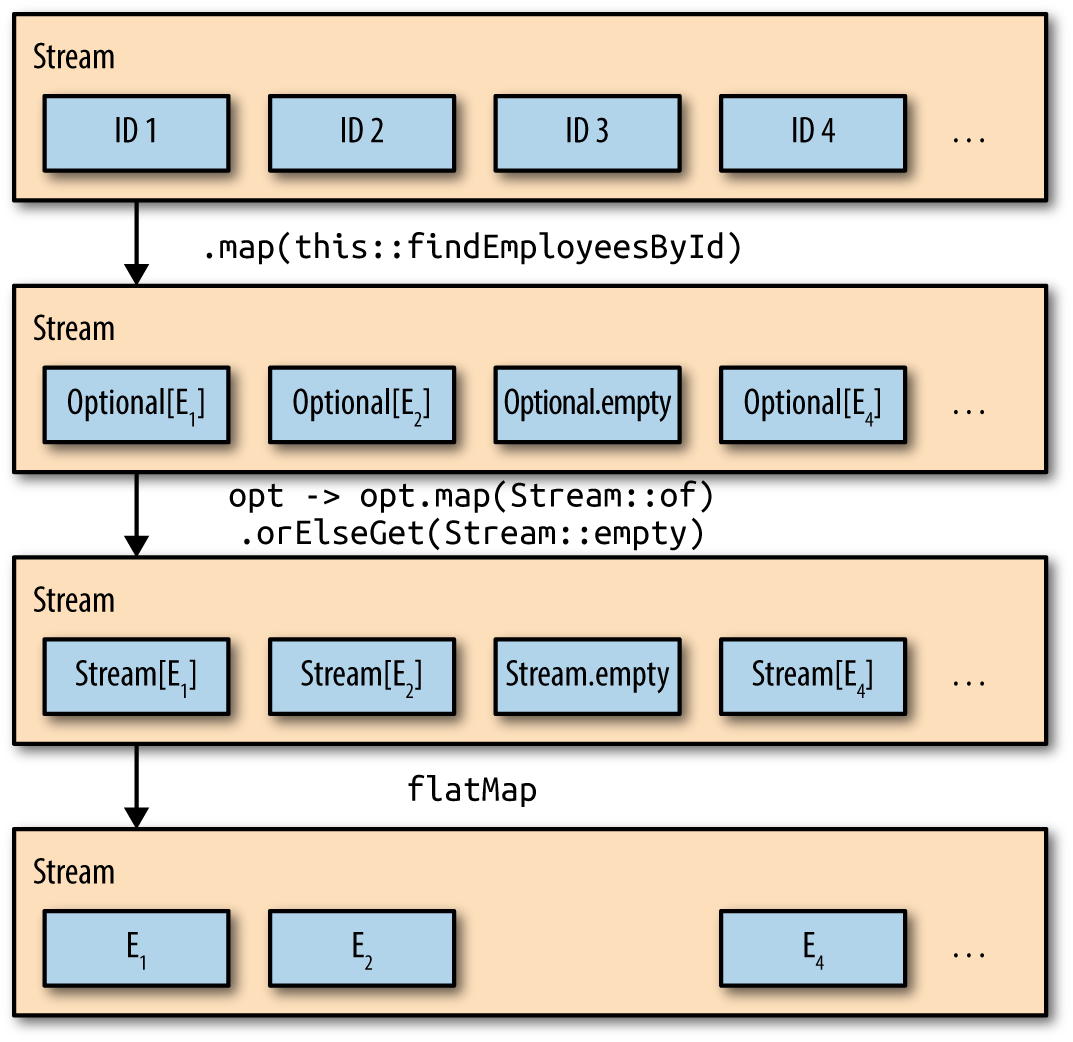
The Optional.map method is a convenience5 method for (hopefully) simplifying stream processing code. The filter/map approach discussed earlier is certainly more intuitive, especially for developers unaccustomed to flatMap operations, but the result is the same.
Of course, you can use any function you wish inside the Optional.map method. The Javadocs illustrate converting names into file input streams. A different example is shown in Recipe 6.4.
Incidentally, Java 9 adds a stream method to Optional. If the Optional is not empty, it returns a one-element stream wrapping the contained value. Otherwise it returns an empty stream. See Recipe 10.6 for details.
Recipe 6.3 illustrates how to use Optional in a DAO (data access object) layer. Recipe 3.11 discusses the flatMap method on streams, while Recipe 6.4 discusses the flatMap method on Optionals. Recipe 10.6 talks about the new methods added to Optional in Java 9.
1 I’m being diplomatic here.
2 See the sidebar about immutability.
3 See Chapter 6 of Venkat Subramaniam’s book Functional Programming in Java (Pragmatic Programmers, 2014) for a detailed explanation.
4 Perhaps this is just wishful thinking, but an appealing idea, nonetheless.
5 At least, that’s the idea.
The nonblocking (or “new”) input/output package, referred to as NIO, was added in J2SE 1.4.1 The NIO.2 extension, added in Java 7, brought in new classes for manipulating files and directories. The additions included the java.nio.file package, which is the subject of this chapter. Several of the new classes in that package, like java.nio.files.File, have been enhanced in Java 8 with methods that use streams.
Unfortunately, here is where the stream metaphor from functional programming conflicts with the same term from input/output, leading to potential confusion. For example, the java.nio.file.DirectoryStream interface has nothing to do with functional streams. It is implemented by classes that iterate over a directory tree using the traditional for-each construct.2
This chapter focuses on capabilities in I/O that support functional streams. In Java 8, several methods were added to the java.nio.file.Files class to support functional streams. Those methods are shown in Table 7-1. Note that all the methods in the Files class are static.
| Method | Return type |
|---|---|
|
|
|
|
|
|
|
|
The recipes in this chapter deal with each of these methods.
All FreeBSD-based Unix systems (including macOS) include a version of Webster’s Second International Dictionary in the /usr/share/dict/ folder. The file web2 includes approximately 230,000 words. Each word appears on its own line.
Say you wanted to find the 10 longest words in that dictionary. You can use the Files.lines method to retrieve the words as a stream of strings, and then do normal stream processing like map and filter. An example is shown in Example 7-1.
try(Stream<String>lines=Files.lines(Paths.get("/usr/share/dict/web2")){lines.filter(s->s.length()>20).sorted(Comparator.comparingInt(String::length).reversed()).limit(10).forEach(w->System.out.printf("%s (%d)%n",w,w.length()));}catch(IOExceptione){e.printStackTrace();}
The predicate in the filter passes only words longer than 20 characters. The sorted method then sorts the words by length in descending order. The limit method terminates after the first 10 words, which are then printed. By opening the stream in a try-with-resources block, the system will automatically close it, and the dictionary file, when the try block completes.
The results from executing the code in Example 7-1 is shown in Example 7-2.
formaldehydesulphoxylate (24) pathologicopsychological (24) scientificophilosophical (24) tetraiodophenolphthalein (24) thyroparathyroidectomize (24) anthropomorphologically (23) blepharosphincterectomy (23) epididymodeferentectomy (23) formaldehydesulphoxylic (23) gastroenteroanastomosis (23)
There are five words in the dictionary that are 24 characters in length. The results show them in alphabetical order, only because the original file was in alphabetical order. If you add a thenComparing clause to the Comparator argument to sorted, you can choose how you want the equal-length words to be sorted.
Following the list of 24-character words are five 23-character words, many of which are from the medical field.3
By applying Collectors.counting as a downstream collector, you can determine how many words of each length exist in the dictionary, as shown in Example 7-3.
try(Stream<String>lines=Files.lines(Paths.get("/usr/share/dict/web2"))){lines.filter(s->s.length()>20).collect(Collectors.groupingBy(String::length,Collectors.counting())).forEach((len,num)->System.out.println(len+": "+num));}
This snippet used the groupingBy collector to create a Map where the keys are the word lengths and values are the number of words of each length. The result is:
21: 82 22: 41 23: 17 24: 5
The output has the information, but isn’t terribly informative. It’s also sorted in ascending order, which may not be what you want.
As an alternative, the Map.Entry interface now has static methods comparingByKey and comparingByValue, each of which also takes an optional Comparator, as discussed in Recipe 4.4. In this case, sorting by the reverseOrder comparator gives the reverse of the natural order. See Example 7-4.
try(Stream<String>lines=Files.lines(Paths.get("/usr/share/dict/web2"))){Map<Integer,Long>map=lines.filter(s->s.length()>20).collect(Collectors.groupingBy(String::length,Collectors.counting()));map.entrySet().stream().sorted(Map.Entry.comparingByKey(Comparator.reverseOrder())).forEach(e->System.out.printf("Length %d: %d words%n",e.getKey(),e.getValue()));}
The result now is:
Length 24: 5 words Length 23: 17 words Length 22: 41 words Length 21: 82 words
If your source of data is not a File, the BufferedReader class also has a lines method, though in this case it is an instance method. The equivalent version of Example 7-4 using BufferedReader is shown in Example 7-5.
try(Stream<String>lines=newBufferedReader(newFileReader("/usr/share/dict/words")).lines()){// ... same as previous example ...}
Again, since Stream implements AutoCloseable, when the try-with-resources block closes the stream, it will then close the underlying BufferedReader.
Sorting maps is discussed in Recipe 4.4.
Use the static Files.list method.
The static list method in the java.nio.file.Files class takes a Path as an argument and returns a Stream that wraps a DirectoryStream.4 The DirectoryStream interface extends AutoCloseable, so using the list method is best done using a try-with-resources construct, as in Example 7-6.
try(Stream<Path>list=Files.list(Paths.get("src/main/java"))){list.forEach(System.out::println);}catch(IOExceptione){e.printStackTrace();}
Assuming this is executed in the root of a project that has the standard Maven or Gradle structure, this will print the names of all files and folders in the src/main/java directory. Using the try-with-resources block means that when the try block completes, the system will invoke close on the stream, which will then invoke close on the underlying DirectoryStream. The listing is not recursive.
When run on the source code for this book, the result includes both directories and individual files:
src/main/java/collectors src/main/java/concurrency src/main/java/datetime ... src/main/java/Summarizing.java src/main/java/tasks src/main/java/UseFilenameFilter.java
The signature for the list method shows that the return type is a Stream<Path> and its argument a directory:
publicstaticStream<Path>list(Pathdir)throwsIOException
Executing the method on a non-directory resource results in a NotDirectoryException.
The Javadocs make a point of saying that the resulting stream is weakly consistent, meaning “it is thread safe but does not freeze the directory while iterating, so it may (or may not) reflect updates to the directory that occur after returning from this method.”
To navigate a filesystem using a depth-first search, see Recipe 7.3.
Use the static Files.walk method.
The signature of the static Files.walk method in the java.nio.file package is:
publicstaticStream<Path>walk(Pathstart,FileVisitOption...options)throwsIOException
The arguments are the starting Path and a variable argument list of FileVisitOption values. The return type is a lazily populated Stream of Path instances obtained by walking the filesystem from the starting path, performing a depth-first traversal.
The returned Stream encapsulates a DirectoryStream, so again it is recommended that you invoke the method using a try-with-resources block, as in Example 7-7.
try(Stream<Path>paths=Files.walk(Paths.get("src/main/java"))){paths.forEach(System.out::println);}catch(IOExceptione){e.printStackTrace();}
The walk method takes zero or more FileVisitOption values as the second and subsequent arguments. This example didn’t use any. FileVisitOption is an enum, added in Java 1.7, whose only defined value is FileVisitOption.FOLLOW_LINKS. Following links means that, at least in principle, the tree can involve a cycle, so the stream keeps track of files visited. If a cycle is detected, a FileSystemLoopException is thrown.
The results of this example on the book source code is similar to:
src/main/java src/main/java/collectors src/main/java/collectors/Actor.java src/main/java/collectors/AddCollectionToMap.java src/main/java/collectors/Book.java src/main/java/collectors/CollectorsDemo.java src/main/java/collectors/ImmutableCollections.java src/main/java/collectors/Movie.java src/main/java/collectors/MysteryMen.java src/main/java/concurrency src/main/java/concurrency/CommonPoolSize.java src/main/java/concurrency/CompletableFutureDemos.java src/main/java/concurrency/FutureDemo.java src/main/java/concurrency/ParallelDemo.java src/main/java/concurrency/SequentialToParallel.java src/main/java/concurrency/Timer.java src/main/java/datetime ...
The paths are traversed lazily. The resulting stream is guaranteed to have at least one element—the starting argument. As each path is encountered, the system determines if it is a directory, at which point it is traversed before moving on to the next sibling. The result is a depth-first traversal. Each directory is closed after all of its entries have been visited.
There is also an overload of this method available:
publicstaticStream<Path>walk(Pathstart,intmaxDepth,FileVisitOption...options)throwsIOException
The maxDepth argument is the maximum number of levels of directories to visit. Zero means only use the starting level. The version of this method without a maxDepth parameter uses a value of Integer.MAX_VALUE, meaning all levels should be visited.
Listing files in a single directory is shown in Recipe 7.2. Searching for files is done using Recipe 7.4.
The signature of the Files.find method is:
publicstaticStream<Path>find(Pathstart,intmaxDepth,BiPredicate<Path,BasicFileAttributes>matcher,FileVisitOption...options)throwsIOException
This is similar to the walk method, but with an added BiPredicate to determine whether or not a particular Path should be returned. The find method starts at a given path and performs a depth-first search, up to the maxDepth number of levels, evaluating each path against the BiPredicate, following links if specified as the value of the FileVisitOption enum.
The BiPredicate matcher needs to return a boolean based on each path element, along with its associated BasicFileAttributes object. For instance, Example 7-8 returns the paths for nondirectory files in the fileio package in the book’s source code.
try(Stream<Path>paths=Files.find(Paths.get("src/main/java"),Integer.MAX_VALUE,(path,attributes)->!attributes.isDirectory()&&path.toString().contains("fileio"))){paths.forEach(System.out::println);}catch(IOExceptione){e.printStackTrace();}
The result is:
src/main/java/fileio/FileList.java src/main/java/fileio/ProcessDictionary.java src/main/java/fileio/SearchForFiles.java src/main/java/fileio/WalkTheTree.java
For each file encountered while walking the tree, the method evaluates it against the given BiPredicate. This is just like calling the walk method with a filter, but the Javadocs claim this approach may be more efficient by avoiding redundant retrieval of the BasicFileAttributes objects.
As usual, the resulting Stream encapsulates a DirectoryStream, so closing the stream closes the underlying source. Using the method in a try-with-resources block, as shown, is therefore the preferred approach.
Walking the filesystem is discussed in Recipe 7.3.
1 Most Java developers are astonished to learn that NIO was added that early.
2 Even more confusing, the interface DirectoryStream.Filter is actually a functional interface, though again it has nothing to do with functional streams. It’s used to approve only selected entries in a directory tree.
3 Fortunately, the word blepharosphincterectomy doesn’t mean what it sounds like. It has to do with relieving pressure of the eyelid on the cornea, which is bad enough, but it could have been worse.
4 That’s an I/O stream, not a functional one.
Friends don’t let friends use java.util.Date.
Tim Yates
From the beginning of the language, the standard edition library has included two classes for handling dates and times: java.util.Date and java.util.Calendar. The former is a classic example of how not to design a class. If you check the public API, practically all the methods are deprecated, and have been since Java 1.1 (roughly 1997). The deprecations recommend using Calendar instead, which isn’t much fun either.
Both predate1 the addition of enums into the language, so they use integer constants for fields like months. Both are mutable, and therefore not thread safe. To handle some issues, the library later added the java.sql.Date class as a subclass of the version in java.util, but that didn’t really address the fundamental problems.
Finally, in Java SE 8, a completely new package has been added that addressed everything. The java.time package is based on the Joda-Time library, which has been used as a free, open source alternative for years. In fact, the designers of Joda-Time helped design and build the new package, and recommend that future development take advantage of it.
The new package was developed under JSR-310: Date and Time API, and supports the ISO 8601 standard. It correctly adjusts for leap years and daylight savings rules in individual regions.
This chapter contains recipes that illustrate the usefulness of the java.time package. Hopefully they will address basic questions you may have, and point you to further information wherever needed.
As a reference, the Java Tutorial online has an excellent section on the Date-Time library. See https://docs.oracle.com/javase/tutorial/datetime/TOC.html for details.
Work with the factory methods in classes like Instant, Duration, Period, LocalDate, LocalTime, LocalDateTime, ZonedDateTime, and others.
The classes in Date-Time all produce immutable instances, so they are thread safe. They also do not have public constructors, so each is instantiated using factory methods.
Two static factory methods are of particular note: now and of. The now method is used to create an instance based on the current date or time. Example 8-1 shows the sample code.
System.out.println("Instant.now(): "+Instant.now());System.out.println("LocalDate.now(): "+LocalDate.now());System.out.println("LocalTime.now(): "+LocalTime.now());System.out.println("LocalDateTime.now(): "+LocalDateTime.now());System.out.println("ZonedDateTime.now(): "+ZonedDateTime.now());
A sample set of results are shown in Example 8-2.
Instant.now(): 2017-06-20T17:27:08.184Z LocalDate.now(): 2017-06-20 LocalTime.now(): 13:27:08.318 LocalDateTime.now(): 2017-06-20T13:27:08.319 ZonedDateTime.now(): 2017-06-20T13:27:08.319-04:00[America/New_York]
All output values are using the ISO 8601 standard formatting. For dates, the basic format is yyyy-MM-dd. For times, the format is hh:mm:ss.sss. The format for LocalDateTime combines the two, using a capital T as a separator. Date/times with a time zone append a numerical offset (here, -04:00) using UTC as a base, as well as a so-called region name (here, America/New_York). The output of the toString method in Instant shows the time to nanosecond precision, in Zulu time.
The now method also appears in the classes Year, YearMonth, and ZoneId.
The static of factory method is used to produce new values. For LocalDate, the arguments are the year, month (either the enum or an int), and the day of month.
The month field in all the of methods is overloaded to accept a Month enum, like Month.JANUARY, or an integer that starts at 1. Since integer constants in Calendar start at 0 (that is, Calendar.JANUARY is 0), watch out for off-by-one errors. Use the Month enum wherever possible.
For LocalTime, there are several overloads, depending on how many values of the set of hour, minute, second, and nanosecond are available. The of method on LocalDateTime combines the others. Some examples are shown in Example 8-3.
System.out.println("First landing on the Moon:");LocalDatemoonLandingDate=LocalDate.of(1969,Month.JULY,20);LocalTimemoonLandingTime=LocalTime.of(20,18);System.out.println("Date: "+moonLandingDate);System.out.println("Time: "+moonLandingTime);System.out.println("Neil Armstrong steps onto the surface: ");LocalTimewalkTime=LocalTime.of(20,2,56,150_000_000);LocalDateTimewalk=LocalDateTime.of(moonLandingDate,walkTime);System.out.println(walk);
The output of the demo in Example 8-3 is:
First landing on the Moon: Date: 1969-07-20 Time: 20:18 Neil Armstrong steps onto the surface: 1969-07-20T20:02:56.150
The last argument to the LocalTime.of method is nanoseconds, so this example used a feature from Java 7 where you can insert an underscore inside a numerical value for readability.
The Instant class models a single, instantaneous point along the time line.
The ZonedDateTime class combines dates and times with time zone information from the ZoneId class. Time zones are expressed relative to UTC.
There are two types of zone IDs:
Fixed offsets, relative to UTC/Greenwich, like -05:00
Geographical regions, like America/Chicago
Technically there’s a third type of ID, which is an offset that is assumed to be from Zulu time. It includes a Z along with the numerical value.
The rules for offset changes come from the ZoneRules class, where the rules are loaded from a ZoneRulesProvider. The ZoneRules class has methods such as isDaylightSavings(Instant).
You can get the current value of the ZoneId from the static systemDefault method. The complete list of available region IDs comes from the static getAvailableZoneIds method:
Set<String>regionNames=ZoneId.getAvailableZoneIds();System.out.println("There are "+regionNames.size()+" region names");
For jdk1.8.0_131, there are 600 region names.2
The Date-Time API uses standard prefixes for method names. If you are familiar with the prefixes in Table 8-1, you can usually guess what a method does.3
| Method | Type | Use |
|---|---|---|
|
Static factory |
Creates an instance |
|
Static factory |
Converts input parameters to target class |
|
Static factory |
Parses an input string |
|
Instance |
Produces formatted output |
|
Instance |
Returns part of an object |
|
Instance |
Queries the state of the object |
|
Instance |
Creates a new object by changing one element of an existing one |
|
Instance |
Creates a new object by adding or subtracting from an existing one |
|
Instance |
Converts an object to another type |
|
Instance |
Combines this object with another |
The of method was shown earlier. The parse and format methods are discussed in Recipe 8.5. The with method is covered in Recipe 8.2, and is the immutable equivalent of a set method. Using plus and minus and their variations are part of Recipe 8.2 as well.
An example of using the at method is to add a time zone to a local date and time, as in Example 8-4.
LocalDateTimedateTime=LocalDateTime.of(2017,Month.JULY,4,13,20,10);ZonedDateTimenyc=dateTime.atZone(ZoneId.of("America/New_York"));System.out.println(nyc);ZonedDateTimelondon=nyc.withZoneSameInstant(ZoneId.of("Europe/London"));System.out.println(london);
This prints:
2017-07-04T13:20:10-04:00[America/New_York] 2017-07-04T18:20:10+01:00[Europe/London]
As the result shows, the withZoneSameInstant method allows you to take one ZonedDateTime and find out what it would be in another time zone.
There are two enums in the package: Month and DayOfWeek. Month has constants for each month in the standard calendar (JANUARY through DECEMBER). Month also has many convenient methods, as shown in Example 8-5.
System.out.println("Days in Feb in a leap year: "+Month.FEBRUARY.length(true));System.out.println("Day of year for first day of Aug (leap year): "+Month.AUGUST.firstDayOfYear(true));System.out.println("Month.of(1): "+Month.of(1));System.out.println("Adding two months: "+Month.JANUARY.plus(2));System.out.println("Subtracting a month: "+Month.MARCH.minus(1));
Argument is boolean leapYear
The output of Example 8-5 is:
Days in Feb in a leap year: 29 Day of year for first day of Aug (leap year): 214 Month.of(1): JANUARY Adding two months: MARCH Subtracting a month: FEBRUARY
The last two examples, which use the plus and minus methods, create new instances.
Because the java.time classes are immutable, any instance method that seems to modify one, like plus, minus, or with, produces a new instance.
The DayOfWeek enum has constants representing the seven weekdays, from MONDAY through SUNDAY. Again the int value for each follows the ISO standard, so that MONDAY is 1 and SUNDAY is 7.
Parsing and formatting methods are discussed in Recipe 8.5. Converting existing dates and times to new ones is covered in Recipe 8.2. The Duration and Period classes are discussed in Recipe 8.8.
One of the features of the new Date-Time API is that all of the instances are immutable. Once you’ve created a LocalDate, LocalTime, LocalDateTime, or ZonedDateTime, it can no longer be changed. This has the great advantage of making them thread safe, but what if you want to make a new instance based on the existing one?
The LocalDate class has several methods for adding and subtracting values from dates. Specifically, there are:
LocalDate plusDays(long daysToAdd)
LocalDate plusWeeks(long weeksToAdd)
LocalDate plusMonths(long monthsToAdd)
LocalDate plusYears(long yearsToAdd)
Each method returns a new LocalDate, which is a copy of the current date with the specified value added to it.
The LocalTime class has similar methods:
LocalTime plusNanos(long nanosToAdd)
LocalTime plusSeconds(long secondsToAdd)
LocalTime plusMinutes(long minutesToAdd)
LocalTime plusHours(long hoursToAdd)
Again, each returns a new instance, which is a copy of the original with the added amount. LocalDateTime has all the methods for both LocalDate and LocalTime. For instance, the various plus methods for LocalDate and LocalTime are shown in Example 8-6.
@TestpublicvoidlocalDatePlus()throwsException{DateTimeFormatterformatter=DateTimeFormatter.ofPattern("yyyy-MM-dd");LocalDatestart=LocalDate.of(2017,Month.FEBRUARY,2);LocalDateend=start.plusDays(3);assertEquals("2017-02-05",end.format(formatter));end=start.plusWeeks(5);assertEquals("2017-03-09",end.format(formatter));end=start.plusMonths(7);assertEquals("2017-09-02",end.format(formatter));end=start.plusYears(2);assertEquals("2019-02-02",end.format(formatter));}@TestpublicvoidlocalTimePlus()throwsException{DateTimeFormatterformatter=DateTimeFormatter.ISO_LOCAL_TIME;LocalTimestart=LocalTime.of(11,30,0,0);LocalTimeend=start.plusNanos(1_000_000);assertEquals("11:30:00.001",end.format(formatter));end=start.plusSeconds(20);assertEquals("11:30:20",end.format(formatter));end=start.plusMinutes(45);assertEquals("12:15:00",end.format(formatter));end=start.plusHours(5);assertEquals("16:30:00",end.format(formatter));}
The classes also have two additional plus and minus methods. Here are the signatures for those methods in LocalDateTime:
LocalDateTimeplus(longamountToAdd,TemporalUnitunit)LocalDateTimeplus(TemporalAmountamountToAdd)LocalDateTimeminus(longamountToSubtract,TemporalUnitunit)LocalDateTimeminus(TemporalAmountamountToSubtract)
The corresponding methods in LocalDate and LocalTime are the same, with the corresponding return types. Interestingly enough, the minus versions just call the plus versions with the amounts negated.
For the methods that take a TemporalAmount, the argument is usually a Period or a Duration, but may be any type implementing the TemporalAmount interface. That interface has methods called addTo and subtractFrom:
TemporaladdTo(Temporaltemporal)TemporalsubtractFrom(Temporaltemporal)
If you follow the call stack, invoking minus delegates to plus with a negated argument, which delegates to TemporalAmount.addTo(Temporal), which calls back to plus(long, TemporalUnit), which actually does the work.4
Some examples with the plus and minus methods are shown in Example 8-7.
@Testpublicvoidplus_minus()throwsException{Periodperiod=Period.of(2,3,4);// 2 years, 3 months, 4 daysLocalDateTimestart=LocalDateTime.of(2017,Month.FEBRUARY,2,11,30);LocalDateTimeend=start.plus(period);assertEquals("2019-05-06T11:30:00",end.format(DateTimeFormatter.ISO_LOCAL_DATE_TIME));end=start.plus(3,ChronoUnit.HALF_DAYS);assertEquals("2017-02-03T23:30:00",end.format(DateTimeFormatter.ISO_LOCAL_DATE_TIME));end=start.minus(period);assertEquals("2014-10-29T11:30:00",end.format(DateTimeFormatter.ISO_LOCAL_DATE_TIME));end=start.minus(2,ChronoUnit.CENTURIES);assertEquals("1817-02-02T11:30:00",end.format(DateTimeFormatter.ISO_LOCAL_DATE_TIME));end=start.plus(3,ChronoUnit.MILLENNIA);assertEquals("5017-02-02T11:30:00",end.format(DateTimeFormatter.ISO_LOCAL_DATE_TIME));}
When the API calls for TemporalUnit, remember that the provided implementation class is ChronoUnit, which has many convenient constants.
Finally, there are a series of with methods on each class that can be used to change one field at a time.
The signatures range from withNano to withYear, with a few interesting ones thrown in. Here is the set from LocalDateTime:
LocalDateTimewithNano(intnanoOfSecond)LocalDateTimewithSecond(intsecond)LocalDateTimewithMinute(intminute)LocalDateTimewithHour(inthour)LocalDateTimewithDayOfMonth(intdayOfMonth)LocalDateTimewithDayOfYear(intdayOfYear)LocalDateTimewithMonth(intmonth)LocalDateTimewithYear(intyear)
The code in Example 8-8 puts these methods through their paces.
@Testpublicvoidwith()throwsException{LocalDateTimestart=LocalDateTime.of(2017,Month.FEBRUARY,2,11,30);LocalDateTimeend=start.withMinute(45);assertEquals("2017-02-02T11:45:00",end.format(DateTimeFormatter.ISO_LOCAL_DATE_TIME));end=start.withHour(16);assertEquals("2017-02-02T16:30:00",end.format(DateTimeFormatter.ISO_LOCAL_DATE_TIME));end=start.withDayOfMonth(28);assertEquals("2017-02-28T11:30:00",end.format(DateTimeFormatter.ISO_LOCAL_DATE_TIME));end=start.withDayOfYear(300);assertEquals("2017-10-27T11:30:00",end.format(DateTimeFormatter.ISO_LOCAL_DATE_TIME));end=start.withYear(2020);assertEquals("2020-02-02T11:30:00",end.format(DateTimeFormatter.ISO_LOCAL_DATE_TIME));}@Test(expected=DateTimeException.class)publicvoidwithInvalidDate()throwsException{LocalDateTimestart=LocalDateTime.of(2017,Month.FEBRUARY,2,11,30);start.withDayOfMonth(29);}
Since 2017 is not a leap year, you can’t set the date to February 29. The result is a DateTimeException, as the last test shows.
There are also with methods that take a TemporalAdjuster or a TemporalField:
LocalDateTimewith(TemporalAdjusteradjuster)LocalDateTimewith(TemporalFieldfield,longnewValue)
The version with TemporalField lets the field resolve the date to make it valid. For instance, Example 8-9 takes the last day of January and tries to change the month to February. According to the Javadocs, the system chooses the previous valid date, which in this case is the last day of February.
@TestpublicvoidtemporalField()throwsException{LocalDateTimestart=LocalDateTime.of(2017,Month.JANUARY,31,11,30);LocalDateTimeend=start.with(ChronoField.MONTH_OF_YEAR,2);assertEquals("2017-02-28T11:30:00",end.format(DateTimeFormatter.ISO_LOCAL_DATE_TIME));}
As you might imagine, there are some fairly complicated rules involved, but they’re well documented in the Javadocs.
The with method taking a TemporalAdjuster is discussed in Recipe 8.3.
See Recipe 8.3 for information about TemporalAdjuster and TemporalQuery.
Create a TemporalAdjuster or formulate a TemporalQuery.
The TemporalAdjuster and TemporalQuery classes provide interesting ways to work with the Date-Time classes. They provide useful built-in methods and ways to implement your own. This recipe will illustrate both possibilities.
The TemporalAdjuster interface provides methods that take a Temporal value and return an adjusted one. The TemporalAdjusters class contains a set of adjusters as static methods you might find convenient.
You use a TemporalAdjuster via the with method on a temporal object, as in this version from LocalDateTime:
LocalDateTimewith(TemporalAdjusteradjuster)
The TemporalAdjuster class has an adjustInto method that also works, but the one listed here is preferred.
Looking first at the TemporalAdjusters class methods, there are many convenience methods:
staticTemporalAdjusterfirstDayOfNextMonth()staticTemporalAdjusterfirstDayOfNextYear()staticTemporalAdjusterfirstDayOfYear()staticTemporalAdjusterfirstInMonth(DayOfWeekdayOfWeek)staticTemporalAdjusterlastDayOfMonth()staticTemporalAdjusterlastDayOfYear()staticTemporalAdjusterlastInMonth(DayOfWeekdayOfWeek)staticTemporalAdjusternext(DayOfWeekdayOfWeek)staticTemporalAdjusternextOrSame(DayOfWeekdayOfWeek)staticTemporalAdjusterprevious(DayOfWeekdayOfWeek)staticTemporalAdjusterpreviousOrSame(DayOfWeekdayOfWeek)
The test case in Example 8-10 shows a couple of those methods in action.
@Testpublicvoidadjusters()throwsException{LocalDateTimestart=LocalDateTime.of(2017,Month.FEBRUARY,2,11,30);LocalDateTimeend=start.with(TemporalAdjusters.firstDayOfNextMonth());assertEquals("2017-03-01T11:30",end.toString());end=start.with(TemporalAdjusters.next(DayOfWeek.THURSDAY));assertEquals("2017-02-09T11:30",end.toString());end=start.with(TemporalAdjusters.previousOrSame(DayOfWeek.THURSDAY));assertEquals("2017-02-02T11:30",end.toString());}
The fun comes when you write your own adjuster. TemporalAdjuster is a functional interface, whose single abstract method is:
TemporaladjustInto(Temporaltemporal)
For example, the Java Tutorial for the Date-Time package has an example of a PaydayAdjuster, which assumes that an employee is being paid twice a month. The rules are that payment occurs on the 15th of the month and again on the last day of the month, but if either occurs on a weekend, the previous Friday is used.
The code from the online example is reproduced in Example 8-11 for reference. Note that in this case, the method has been added to a class that implements TemporalAdjuster.
importjava.time.DayOfWeek;importjava.time.LocalDate;importjava.time.temporal.Temporal;importjava.time.temporal.TemporalAdjuster;importjava.time.temporal.TemporalAdjusters;publicclassPaydayAdjusterimplementsTemporalAdjuster{publicTemporaladjustInto(Temporalinput){LocalDatedate=LocalDate.from(input);intday;if(date.getDayOfMonth()<15){day=15;}else{day=date.with(TemporalAdjusters.lastDayOfMonth()).getDayOfMonth();}date=date.withDayOfMonth(day);if(date.getDayOfWeek()==DayOfWeek.SATURDAY||date.getDayOfWeek()==DayOfWeek.SUNDAY){date=date.with(TemporalAdjusters.previous(DayOfWeek.FRIDAY));}returninput.with(date);}}
Useful way to convert any Temporal to a LocalDate
In July 2017, the 15th occured on a Saturday and the 31st was on a Monday. The test in Example 8-12 shows that it works correctly for July 2017.
@TestpublicvoidpayDay()throwsException{TemporalAdjusteradjuster=newPaydayAdjuster();IntStream.rangeClosed(1,14).mapToObj(day->LocalDate.of(2017,Month.JULY,day)).forEach(date->assertEquals(14,date.with(adjuster).getDayOfMonth()));IntStream.rangeClosed(15,31).mapToObj(day->LocalDate.of(2017,Month.JULY,day)).forEach(date->assertEquals(31,date.with(adjuster).getDayOfMonth()));}
This works, but there are a couple of minor irritations. First of all, as of Java 8, you can’t create a stream of dates without going through another mechanism, like counting days as shown. That changes in Java 9, which includes a method that return a stream of dates. See Recipe 10.7 for details.
The other issue with the preceding code is that a class was created to implement the interface. Because TemporalAdjuster is a functional interface, you can provide a lambda expression or a method reference as an implementation instead.
You can now make a utility class called Adjusters that has static methods for whatever you want to do, as in Example 8-13.
publicclassAdjusters{publicstaticTemporaladjustInto(Temporalinput){LocalDatedate=LocalDate.from(input);// ... implementation as before ...returninput.with(date);}}
Does not implement TemporalAdjuster
Static method, so no instantiation required
Now the comparable test is shown in Example 8-14.
@TestpublicvoidpayDayWithMethodRef()throwsException{IntStream.rangeClosed(1,14).mapToObj(day->LocalDate.of(2017,Month.JULY,day)).forEach(date->assertEquals(14,date.with(Adjusters::adjustInto).getDayOfMonth()));IntStream.rangeClosed(15,31).mapToObj(day->LocalDate.of(2017,Month.JULY,day)).forEach(date->assertEquals(31,date.with(Adjusters::adjustInto).getDayOfMonth()));}
Method reference to adjustInto
You may find this approach more versatile if you have multiple temporal adjusters in mind.
The TemporalQuery interface is used as the argument to the query method on temporal objects. For example, on LocalDate, the signature of the query method is:
<R>Rquery(TemporalQuery<R>query)
This method invokes TemporalQuery.queryFrom(TemporalAccessor) with this as an argument and returns whatever the query is designed to do. All the methods on TemporalAccessor are available for performing the calculation.
The API includes a class called TemporalQueries, which includes constants defining many common queries:
staticTemporalQuery<Chronology>chronology()staticTemporalQuery<LocalDate>localDate()staticTemporalQuery<LocalTime>localTime()staticTemporalQuery<ZoneOffset>offset()staticTemporalQuery<TemporalUnit>precision()staticTemporalQuery<ZoneId>zone()staticTemporalQuery<ZoneId>zoneId()
A simple test to show how some work is given in Example 8-15.
@Testpublicvoidqueries()throwsException{assertEquals(ChronoUnit.DAYS,LocalDate.now().query(TemporalQueries.precision()));assertEquals(ChronoUnit.NANOS,LocalTime.now().query(TemporalQueries.precision()));assertEquals(ZoneId.systemDefault(),ZonedDateTime.now().query(TemporalQueries.zone()));assertEquals(ZoneId.systemDefault(),ZonedDateTime.now().query(TemporalQueries.zoneId()));}
Like with TemporalAdjuster, however, the interesting part comes when you write your own. The TemporalQuery interface has only a single abstract method:
RqueryFrom(TemporalAccessortemporal)
Say we have a method that, given a TemporalAccessor, computes the number of days between the argument and International Talk Like A Pirate Day, September 19.5 Such a method is shown in Example 8-16.
privatelongdaysUntilPirateDay(TemporalAccessortemporal){intday=temporal.get(ChronoField.DAY_OF_MONTH);intmonth=temporal.get(ChronoField.MONTH_OF_YEAR);intyear=temporal.get(ChronoField.YEAR);LocalDatedate=LocalDate.of(year,month,day);LocalDatetlapd=LocalDate.of(year,Month.SEPTEMBER,19);if(date.isAfter(tlapd)){tlapd=tlapd.plusYears(1);}returnChronoUnit.DAYS.between(date,tlapd);}
Since that method has a signature that is compatible with the single abstract method in the TemporalQuery interface, you can use a method reference to invoke it, as in Example 8-17.
@TestpublicvoidpirateDay()throwsException{IntStream.range(10,19).mapToObj(n->LocalDate.of(2017,Month.SEPTEMBER,n)).forEach(date->assertTrue(date.query(this::daysUntilPirateDay)<=9));IntStream.rangeClosed(20,30).mapToObj(n->LocalDate.of(2017,Month.SEPTEMBER,n)).forEach(date->{Longdays=date.query(this::daysUntilPirateDay);assertTrue(days>=354&&days<365);});}
You can use this approach to define your own custom queries.
When looking at the new classes in java.time, you may be surprised to find that there aren’t a lot of built-in mechanisms for converting from the standard date and time classes in java.util to the new preferred classes.
One approach to convert a java.util.Date to a java.time.LocalDate is to invoke the toInstant method to create an Instant. Then you can apply the default ZoneId and extract a LocalDate from the resulting ZonedDateTime, as in Example 8-18.
publicLocalDateconvertFromUtilDateUsingInstant(Datedate){returndate.toInstant().atZone(ZoneId.systemDefault()).toLocalDate();}
Since java.util.Date includes date and time information but no time zone,6 it represents an Instant in the new API. Applying the atZone method on the system default time zone reapplies the time zone. Then you can extract the LocalDate from the resulting ZonedDateTime.
Another approach to changing from util dates to Date-Time dates is to notice that there are convenient conversion methods in java.sql.Date (see Example 8-19) and java.sql.Timestamp (see Example 8-20).
LocalDatetoLocalDate()staticDatevalueOf(LocalDatedate)
LocalDateTimetoLocalDateTime()staticTimestampvalueOf(LocalDateTimedateTime)
Creating a class to do the conversion is easy enough, as in Example 8-21.
packagedatetime;importjava.sql.Timestamp;importjava.time.LocalDate;importjava.time.LocalDateTime;importjava.util.Date;publicclassConvertDate{publicLocalDateconvertFromSqlDatetoLD(java.sql.DatesqlDate){returnsqlDate.toLocalDate();}publicjava.sql.DateconvertToSqlDateFromLD(LocalDatelocalDate){returnjava.sql.Date.valueOf(localDate);}publicLocalDateTimeconvertFromTimestampToLDT(Timestamptimestamp){returntimestamp.toLocalDateTime();}publicTimestampconvertToTimestampFromLDT(LocalDateTimelocalDateTime){returnTimestamp.valueOf(localDateTime);}}
Since the methods you need are based on java.sql.Date, the question then becomes, how do you convert from java.util.Date (which most developers use) and java.sql.Date? One way is to use the constructor from SQL date that takes a long representing the milliseconds elapsed in the current epoch.
The java.util.Date class has a method called getTime that returns the long value, and the java.sql.Date class has a constructor that takes this long as an argument.9
This means another way to convert from a java.util.Date instance to a java.time.LocalDate is to go through the java.sql.Date class, as in Example 8-22.
publicLocalDateconvertUtilDateToLocalDate(java.util.Datedate){returnnewjava.sql.Date(date.getTime()).toLocalDate()}
Way back in Java 1.1, virtually the entire java.util.Date class was deprecated in favor of java.util.Calendar. Converting between calendar instances and the new java.time package can be done with the toInstant method, adjusting for the time zone (Example 8-23).
publicZonedDateTimeconvertFromCalendar(Calendarcal){returnZonedDateTime.ofInstant(cal.toInstant(),cal.getTimeZone().toZoneId());}
This method uses the ZonedDateTime class. The LocalDateTime class also has an ofInstant method, but for some reason it also takes a ZoneId second argument. This is strange because a LocalDateTime doesn’t contain time zone information. It seems more intuitive, therefore, to use the method from ZonedDateTime instead.
You can also use the various getter methods on Calendar explicitly and go directly to LocalDateTime (Example 8-24), if you want to bypass the time zone information entirely.
publicLocalDateTimeconvertFromCalendarUsingGetters(Calendarcal){returnLocalDateTime.of(cal.get(Calendar.YEAR),cal.get(Calendar.MONTH),cal.get(Calendar.DAY_OF_MONTH),cal.get(Calendar.HOUR),cal.get(Calendar.MINUTE),cal.get(Calendar.SECOND));}
Another mechanism is to generate a formatted string from the calendar, which can then be parsed into the new class (Example 8-25).
publicLocalDateTimeconvertFromUtilDateToLDUsingString(Datedate){DateFormatdf=newSimpleDateFormat("yyyy-MM-dd'T'HH:mm:ss");returnLocalDateTime.parse(df.format(date),DateTimeFormatter.ISO_LOCAL_DATE_TIME);}
That’s not really an advantage, but it’s nice to know you can do it. Finally, although Calendar doesn’t have a direct conversion method, it turns out GregorianCalendar does (Example 8-26).
publicZonedDateTimeconvertFromGregorianCalendar(Calendarcal){return((GregorianCalendar)cal).toZonedDateTime();}
That works, but it does assume you’re using a Gregorian calendar. Since that’s the only Calendar implementation in the standard library, it’s probably true, but not necessarily so.
Finally, Java 9 added the ofInstant method to LocalDate, making the conversion simpler, as in Example 8-27.
publicLocalDateconvertFromUtilDateJava9(Datedate){returnLocalDate.ofInstant(date.toInstant(),ZoneId.systemDefault());}
The DateTimeFormatter class has a wide variety of options, from constants like ISO_LOCAL_DATE to pattern letters like uuuu-MMM-dd to localized styles for any given Locale.
Fortunately, the process of parsing and formatting is almost trivially easy. All the main date-time classes have a format and a parse method. Example 8-28 shows the signatures for LocalDate:
staticLocalDateparse(CharSequencetext)staticLocalDateparse(CharSequencetext,DateTimeFormatterformatter)Stringformat(DateTimeFormatterformatter)
Uses ISO_LOCAL_DATE
Parsing and formatting are shown in Example 8-29.
LocalDateTimenow=LocalDateTime.now();Stringtext=now.format(DateTimeFormatter.ISO_DATE_TIME);LocalDateTimedateTime=LocalDateTime.parse(text);
Format from LocalDateTime to string
Parse from string to LocalDateTime
With that in mind, the real fun comes from playing with various date-time formats, locales, and so on. The code in Example 8-30 shows some examples.
LocalDatedate=LocalDate.of(2017,Month.MARCH,13);System.out.println("Full : "+date.format(DateTimeFormatter.ofLocalizedDate(FormatStyle.FULL)));System.out.println("Long : "+date.format(DateTimeFormatter.ofLocalizedDate(FormatStyle.LONG)));System.out.println("Medium : "+date.format(DateTimeFormatter.ofLocalizedDate(FormatStyle.MEDIUM)));System.out.println("Short : "+date.format(DateTimeFormatter.ofLocalizedDate(FormatStyle.SHORT)));System.out.println("France : "+date.format(DateTimeFormatter.ofLocalizedDate(FormatStyle.FULL).withLocale(Locale.FRANCE)));System.out.println("India : "+date.format(DateTimeFormatter.ofLocalizedDate(FormatStyle.FULL).withLocale(newLocale("hin","IN"))));System.out.println("Brazil : "+date.format(DateTimeFormatter.ofLocalizedDate(FormatStyle.FULL).withLocale(newLocale("pt","BR"))));System.out.println("Japan : "+date.format(DateTimeFormatter.ofLocalizedDate(FormatStyle.FULL).withLocale(Locale.JAPAN)));Localeloc=newLocale.Builder().setLanguage("sr").setScript("Latn").setRegion("RS").build();System.out.println("Serbian: "+date.format(DateTimeFormatter.ofLocalizedDate(FormatStyle.FULL).withLocale(loc)));
The output looks something like:10
Full : Monday, March 13, 2017 Long : March 13, 2017 Medium : Mar 13, 2017 Short : 3/13/17 France : lundi 13 mars 2017 India : Monday, March 13, 2017 Brazil : Segunda-feira, 13 de Março de 2017 Japan : 2017年3月13日 Serbian: ponedeljak, 13. mart 2017.
The parse and format methods throw a DateTimeParseException and DateTimeException, respectively, so you might want to consider catching them in your own code.
If you have your own format in mind, use the ofPattern method to create it. All the legal values are described in detail in the Javadocs. As an example of what’s possible, see Example 8-31.
ZonedDateTimemoonLanding=ZonedDateTime.of(LocalDate.of(1969,Month.JULY,20),LocalTime.of(20,18),ZoneId.of("UTC"));System.out.println(moonLanding.format(DateTimeFormatter.ISO_ZONED_DATE_TIME));DateTimeFormatterformatter=DateTimeFormatter.ofPattern("uuuu/MMMM/dd hh:mm:ss a zzz GG");System.out.println(moonLanding.format(formatter));formatter=DateTimeFormatter.ofPattern("uuuu/MMMM/dd hh:mm:ss a VV xxxxx");System.out.println(moonLanding.format(formatter));
These produce:
1969-07-20T20:18:00Z[UTC] 1969/July/20 08:18:00 PM UTC AD 1969/July/20 08:18:00 PM UTC +00:00
Again, to see what’s possible and what all the different formatting letters mean, see the Javadocs for DateTimeFormatter. The process is always as simple as shown.
To show an example of a localized date-time formatter, consider the daylight savings time issue. In the United States, daylight savings moves the clocks forward at 2 A.M. on March 11, 2018, in the Eastern time zone. What happens when you ask for a zoned date time at 2:30 A.M. on that day? See Example 8-32.
ZonedDateTimezdt=ZonedDateTime.of(2018,3,11,2,30,0,0,ZoneId.of("America/New_York"));System.out.println(zdt.format(DateTimeFormatter.ofLocalizedDateTime(FormatStyle.FULL)));
This uses an overload of the of method that takes the year, month, dayOfMonth, hours, minutes, seconds, nanoOfSecond, and ZoneId. Note that all the fields (other than the ZoneId) are of type int, which means you can’t use the Month enum.
The output of this code is:
Sunday, March 11, 2018 3:30:00 AM EDT
So the method correctly changed the time from 2:30 A.M. (which doesn’t exist) to 3:30 A.M.
Get the time zone offset for each time zone and determine its remainder when dividing the total seconds by 3,600.
Most time zones are offset from UTC by an integral number of hours. For example, what we normally called Eastern Time is UTC-05:00 and metropolitan France (CET) is UTC+01:00. There are time zones, however, that are offset by the half-hour, like Indian Standard Time (IST), which is UTC+05:30, or even 45 minutes, like the Chatham Islands in New Zealand, which is UTC+12:45. This recipe demonstrates how you can use the java.time package to find all the time zones that are off by nonintegral amounts.
Example 8-33 demonstrates how to find the ZoneOffset for each regional zone ID, and compare its total seconds to the number of seconds in an hour.
publicclassFunnyOffsets{publicstaticvoidmain(String[]args){Instantinstant=Instant.now();ZonedDateTimecurrent=instant.atZone(ZoneId.systemDefault());System.out.printf("Current time is %s%n%n",current);System.out.printf("%10s %20s %13s%n","Offset","ZoneId","Time");ZoneId.getAvailableZoneIds().stream().map(ZoneId::of).filter(zoneId->{ZoneOffsetoffset=instant.atZone(zoneId).getOffset();returnoffset.getTotalSeconds()%(60*60)!=0;}).sorted(comparingInt(zoneId->instant.atZone(zoneId).getOffset().getTotalSeconds())).forEach(zoneId->{ZonedDateTimezdt=current.withZoneSameInstant(zoneId);System.out.printf("%10s %25s %10s%n",zdt.getOffset(),zoneId,zdt.format(DateTimeFormatter.ofLocalizedTime(FormatStyle.SHORT)));});}}
Map the string region IDs to zone IDs
Calculate the offset
Only use zone IDs whose offsets are not divisible by 3,600
The static ZoneId.getAvailableZoneIds method returns a Set<String> representing all the region IDs in the world. Using the ZoneId.of method, the resulting stream of strings is transformed into a stream of ZoneId instances.
The lambda expression in the filter first applies the atZone method to an Instant in order to create a ZonedDateTime, which then has a getOffset method. Finally, the ZoneOffset class provides a getTotalSeconds method. The Javadocs for that method describe it as “the primary way to access the offset amount. It returns the total of the hours, minutes and seconds fields as a single offset that can be added to a time.” The Predicate in the filter then returns true only for those total seconds amounts that aren’t evenly divisible by 3,600 (60 sec/min * 60 min/hour).
Before printing, the resulting ZoneId instances are sorted. The sorted method takes a Comparator. Here, the static Comparator.comparingInt method is used, which generates a Comparator that will sort by a given integer key. In this case, the same calculation is used to determine the total seconds in the offsets. The result is that the ZoneId instances are sorted by the offset amounts.
Then, to print the results, the current ZonedDateTime in the default time zone is evaluated for each ZoneId using the withZoneSameInstant method. The printed string then shows the offset, the regional zone ID, and a formatted, localized version of the local time in that zone.
The result is shown in Example 8-34.
Current time is 2016-08-08T23:12:44.264-04:00[America/New_York]
Offset ZoneId Time
-09:30 Pacific/Marquesas 5:42 PM
-04:30 America/Caracas 10:42 PM
-02:30 America/St_Johns 12:42 AM
-02:30 Canada/Newfoundland 12:42 AM
+04:30 Iran 7:42 AM
+04:30 Asia/Tehran 7:42 AM
+04:30 Asia/Kabul 7:42 AM
+05:30 Asia/Kolkata 8:42 AM
+05:30 Asia/Colombo 8:42 AM
+05:30 Asia/Calcutta 8:42 AM
+05:45 Asia/Kathmandu 8:57 AM
+05:45 Asia/Katmandu 8:57 AM
+06:30 Asia/Rangoon 9:42 AM
+06:30 Indian/Cocos 9:42 AM
+08:45 Australia/Eucla 11:57 AM
+09:30 Australia/North 12:42 PM
+09:30 Australia/Yancowinna 12:42 PM
+09:30 Australia/Adelaide 12:42 PM
+09:30 Australia/Broken_Hill 12:42 PM
+09:30 Australia/South 12:42 PM
+09:30 Australia/Darwin 12:42 PM
+10:30 Australia/Lord_Howe 1:42 PM
+10:30 Australia/LHI 1:42 PM
+11:30 Pacific/Norfolk 2:42 PM
+12:45 NZ-CHAT 3:57 PM
+12:45 Pacific/Chatham 3:57 PMThis example shows how several of the classes in java.time can be combined to solve an interesting problem.
Filter all the available zone IDs by the given offset.
While time zone names like “Eastern Daylight Time” or “Indian Standard Time” are well-known, they are unofficial and their abbreviations like EDT and IST are sometimes not even unique. The ISO 8601 specification defines time zone IDs two ways:
By region name, like “America/Chicago”
By offset from UTC in hours and minutes, like “+05:30”
Say you want to know what the region name is for a given offset from UTC. Many regions share the same UTC offset at any given time, but you can calculate a List of region names that have a given offset easily.
The ZoneOffset class specifies a time zone offset from Greenwich/UTC time. If you already have a value for the offset, you can filter the complete list of region names using it, as in Example 8-35.
publicstaticList<String>getRegionNamesForOffset(ZoneOffsetoffset){LocalDateTimenow=LocalDateTime.now();returnZoneId.getAvailableZoneIds().stream().map(ZoneId::of).filter(zoneId->now.atZone(zoneId).getOffset().equals(offset)).map(ZoneId::toString).sorted().collect(Collectors.toList());}
The ZoneId.getAvailableZoneIds method returns a List of strings. Each one can be mapped to a ZoneId using the static ZoneId.of method. Then, after determining the corresponding ZonedDateTime for that ZoneId using the atZone method in LocalDateTime, you can get the ZoneOffset for each and filter the set by only those that match it. The result is then mapped to strings, which are sorted and collected into a List.
How do you get a ZoneOffset? One way is to use a given ZoneId, as shown in Example 8-36.
publicstaticList<String>getRegionNamesForZoneId(ZoneIdzoneId){LocalDateTimenow=LocalDateTime.now();ZonedDateTimezdt=now.atZone(zoneId);ZoneOffsetoffset=zdt.getOffset();returngetRegionNamesForOffset(offset);}
This works for any given ZoneId.
For example, if you want to determine the list of region names that correspond to your current location, use the code in Example 8-37.
@TestpublicvoidgetRegionNamesForSystemDefault()throwsException{ZonedDateTimenow=ZonedDateTime.now();ZoneIdzoneId=now.getZone();List<String>names=getRegionNamesForZoneId(zoneId);assertTrue(names.contains(zoneId.getId()));}
If you don’t know a region name but you do know the hours and minutes it is offset from GMT, the ZoneOffset class has a convenient method called ofHoursMinutes for that as well. The overload in Example 8-38 shows how to do that.
publicstaticList<String>getRegionNamesForOffset(inthours,intminutes){ZoneOffsetoffset=ZoneOffset.ofHoursMinutes(hours,minutes);returngetRegionNamesForOffset(offset);}
The tests in Example 8-39 demonstrate how the given code works.
@TestpublicvoidgetRegionNamesForGMT()throwsException{List<String>names=getRegionNamesForOffset(0,0);assertTrue(names.contains("GMT"));assertTrue(names.contains("Etc/GMT"));assertTrue(names.contains("Etc/UTC"));assertTrue(names.contains("UTC"));assertTrue(names.contains("Etc/Zulu"));}@TestpublicvoidgetRegionNamesForNepal()throwsException{List<String>names=getRegionNamesForOffset(5,45);assertTrue(names.contains("Asia/Kathmandu"));assertTrue(names.contains("Asia/Katmandu"));}@TestpublicvoidgetRegionNamesForChicago()throwsException{ZoneIdchicago=ZoneId.of("America/Chicago");List<String>names=RegionIdsByOffset.getRegionNamesForZoneId(chicago);assertTrue(names.contains("America/Chicago"));assertTrue(names.contains("US/Central"));assertTrue(names.contains("Canada/Central"));assertTrue(names.contains("Etc/GMT+5")||names.contains("Etc/GMT+6"));}
A complete list of region names can be found in Wikipedia at https://en.wikipedia.org/wiki/List_of_tz_database_time_zones.
If you want times readable by people, use the between or until methods on the temporal classes or between method on Period to generate a Period object. Otherwise use the Duration class for seconds and nanoseconds on the timeline.
The Date-Time API includes the interface java.time.temporal.TemporalUnit, which is implemented by the enum ChronoUnit in the same package. The between method on that interface takes two TemporalUnit instances and returns a long:
longbetween(Temporaltemporal1Inclusive,Temporaltemporal2Exclusive)
The start and end times must be of compatible types. The implementation converts the second argument to be an instance of the first type before calculating the amount. The result is negative if the second argument occurs before the first argument.
The return value is the number of “units” between the arguments. This becomes convenient when using the constants in the ChronoUnit enum.
For example, say you want to know how many days you need to wait until a particular date. Since you’re interested in days, use the ChronoUnit.DAYS constant from the enum, as in Example 8-40.
LocalDateelectionDay=LocalDate.of(2020,Month.NOVEMBER,3);LocalDatetoday=LocalDate.now();System.out.printf("%d day(s) to go...%n",ChronoUnit.DAYS.between(today,electionDay));
Since the between method is invoked on the DAYS enum value, this will return the number of days. Other constants in ChronoUnit include HOURS, WEEKS, MONTHS, YEARS, DECADES, CENTURIES, and more.11
If you’re interested in a breakdown into years, months, and days, use the Period class. The until method in many of the basic classes has an overload that returns a Period:
// In java.time.LocalDatePerioduntil(ChronoLocalDateendDateExclusive)
This example can be rewritten as in Example 8-41.
LocalDateelectionDay=LocalDate.of(2020,Month.NOVEMBER,3);LocalDatetoday=LocalDate.now();Perioduntil=today.until(electionDay);years=until.getYears();months=until.getMonths();days=until.getDays();System.out.printf("%d year(s), %d month(s), and %d day(s)%n",years,months,days);
Equivalent to Period.between(today, electionDay)
As the comment states, the Period class also has a static method called between that works the same way. The recommendation is to use whichever style makes the code more readable.
The Period class is used when you need to deal with human-readable times, like days, months, and years.
The Duration class represents an amount of time in terms of seconds and nanoseconds, which makes it suitable for working with Instant. The result can be converted to many other types. The class stores a long representing seconds and an int representing nanoseconds, and can be negative if the end point comes before the starting point.
A primitive timing mechanism using Duration is shown in Example 8-42.
publicstaticdoublegetTiming(Instantstart,Instantend){returnDuration.between(start,end).toMillis()/1000.0;}Instantstart=Instant.now();// ... call method to be timed ...Instantend=Instant.now();System.out.println(getTiming(start,end)+" seconds");
This is a “poor developer’s” approach to timing a method, but it is easy.
The Duration class has conversion methods: toDays, toHours, toMillis, toMinutes, and toNanos, which is why the getTiming method in Example 8-42 used toMillis and divided by 1,000.
1 No pun intended.
2 Maybe it’s just me, but that seems like a lot.
3 Based on a similar table in the Java Tutorial, https://docs.oracle.com/javase/tutorial/datetime/overview/naming.html.
4 Holy Layers of Indirection, Batman!
5 For example, “Ahoy, matey, I’d like t’ add ye t’ me professional network on LinkedIn.”
6 When you print a java.util.Date, it uses Java’s default time zone to format the string.
7 See https://en.wikipedia.org/wiki/Year_2038_problem for details.
8 While I expect to be safely retired by that point, I can imagine being on a respirator somewhere when the failover occurs.
9 In fact, this is the only nondeprecated constructor in the java.sql.Date class, though you can also use the setTime method to adjust the value of an existing java.sql.Date.
10 There’s no truth to the rumor that I deliberately chose unusual languages and output formats just to challenge O’Reilly Media’s ability to print the results correctly, at least as far as you know.
11 Including, believe it or not, FOREVER. If you ever need that value, please send me a message. I’d love to know what the use case was.
This chapter confronts the issues of parallelization and concurrency in Java 8. Some of the concepts extend back to language additions from much earlier versions of the language (especially the java.util.concurrent package added in Java 5), but Java 8 specifically added several capabilities to the language to help you operate at a higher level of abstraction.
One hazard of parallelization and concurrency is that when you try to talk about them, someone will care a lot—very vocally—about the distinction between the two words. Let’s get that out of the way right now:
Concurrency is when multiple tasks can run in overlapping time periods
Parallelism is when multiple tasks run at literally the same time
You design for concurrency—the ability to decompose your problem into independent operations that can run simultaneously, even if they aren’t doing so at the moment. A concurrent application is composed of independently executing processes. You can then implement the concurrent tasks in parallel, which may or may not improve performance, assuming you have multiple processing units.1
Why wouldn’t parallelization help performance? There are many reasons, but parallelization in Java by default splits work into multiple sections, assigning each to the common fork-join pool, executing them, and joining the results together. All of that work introduces overhead. A lot of expected performance improvements will be decided by how well your problem maps to that algorithm. One of the recipes in this chapter gives some guidelines on how to make the decision on whether or not to parallelize.
Java 8 makes it easy to try out parallelism. There is a classic presentation by Rich Hickey (the creator of the Clojure programming language) called “Simple Made Easy.”2 One of the basic concepts in his talk is that the words simple and easy imply different concepts. In short, something that is simple is conceptually clear, while something that is easy might be elementary to do but might hide massive complexity under the hood. For example, some sorting algorithms are simple and some are not, but calling the sorted method on a Stream is always easy.3
Parallel and concurrent processing is a complex topic, and difficult to get right. From the beginning, Java included low-level mechanisms to support multithreaded access, with methods like wait, notify, and notifyAll in Object, as well as the synchronized keyword. Getting concurrency right with such primitives is extremely difficult, so later the language added the java.util.concurrent package, which allowed developers to work with concurrency at a higher level of abstraction using classes like ExecutorService, ReentrantLock, and BlockingQueue. Still, managing concurrency is hard, especially in the presence of the dreaded “shared mutable state” monster.
With Java 8, asking for parallel streams is easy because it involves a single method call. That’s unquestionably easy. The problem is, improving performance is hardly simple. All the problems from before are still there; they’re just hidden under the surface.
The recipes in this section are not a complete discussion of concurrency and parallelization. Those topics can and do span entire books.4 Here the goal is to show you what the available mechanisms are and how they are intended to be used. You can then apply the concepts to your code and make your own measurements and decisions.
Use the stream or parallelStream methods on Collection, or the sequential or parallel methods on Stream.
By default, when you create a stream in Java the result is sequential. In BaseStream (the superclass of the Stream interface), you can use the method isParallel to determine whether the stream is operating sequentially or in parallel.
Example 9-1 shows how all the standard mechanisms used to create streams are sequential by default.
@TestpublicvoidsequentialStreamOf()throwsException{assertFalse(Stream.of(3,1,4,1,5,9).isParallel());}@TestpublicvoidsequentialIterateStream()throwsException{assertFalse(Stream.iterate(1,n->n+1).isParallel());}@TestpublicvoidsequentialGenerateStream()throwsException{assertFalse(Stream.generate(Math::random).isParallel());}@TestpublicvoidsequentialCollectionStream()throwsException{List<Integer>numbers=Arrays.asList(3,1,4,1,5,9);assertFalse(numbers.stream().isParallel());}
If the source was a collection, you can use the parallelStream method to yield a (possibly) parallel stream, as in Example 9-2.
@TestpublicvoidparallelStreamMethodOnCollection()throwsException{List<Integer>numbers=Arrays.asList(3,1,4,1,5,9);assertTrue(numbers.parallelStream().isParallel());}
The reason for the “possibly” qualification is that it is allowable for this method to return a sequential stream, but by default the stream will be parallel. The Javadocs imply that the sequential case will only occur if you create your own spliterator, which is pretty unusual.5
The other way to create a parallel stream is to use the method parallel on an existing stream, as in Example 9-3.
@TestpublicvoidparallelMethodOnStream()throwsException{assertTrue(Stream.of(3,1,4,1,5,9).parallel().isParallel());}
Interestingly enough, there is also a sequential method, which returns a sequential stream, as in Example 9-4.
@TestpublicvoidparallelStreamThenSequential()throwsException{List<Integer>numbers=Arrays.asList(3,1,4,1,5,9);assertFalse(numbers.parallelStream().sequential().isParallel());}
Be careful, though. There’s a trap here. Say you plan a pipeline where part of the processing can reasonably be done in parallel, but other parts should be done sequentially. You might be tempted to try the code in Example 9-5.
List<Integer>numbers=Arrays.asList(3,1,4,1,5,9);List<Integer>nums=numbers.parallelStream().map(n->n*2).peek(n->System.out.printf("%s processing %d%n",Thread.currentThread().getName(),n)).sequential().sorted().collect(Collectors.toList());
Ask for a parallel stream
Before sorting, switch to sequential
The idea here is that you want to double all the numbers, and then sort them. Since the doubling function is stateless and associative, there’s no reason not to do it parallel. Sorting, however, is inherently sequential.6
The peek method is used to show the name of the thread doing the processing, and in the example peek is invoked after the call to parallelStream but before the call to sequential. The output is:
main processing 6 main processing 2 main processing 8 main processing 2 main processing 10 main processing 18
The main thread did all the processing. In other words, the stream is sequential, despite the call to parallelStream. Why is that? Remember that with streams, no processing is done until the terminal expression is reached, so it’s at that moment that the state of the stream is evaluated. Since the last parallel or sequential call before the collect method was to sequential, the stream is sequential and the elements are processed accordingly.
When executing, a stream can be either parallel or sequential. The parallel or sequential methods effectively set or unset a boolean, which is checked when the terminal expression is reached.
If you really have your heart set on processing part of a stream in parallel and part sequentially, use two separate streams. It’s an awkward solution, but there aren’t any better alternatives.
Use parallel streams under the right conditions.
The stream API was designed to make it easy to switch from sequential to parallel streams, but that may or may not help your performance. Keep in mind that moving to parallel streams is an optimization. Make sure you have working code first. Then try to decide whether or not using parallel streams is worth it. Those decisions are best made with actual data.
By default, Java 8 parallel streams use a common fork-join pool to distribute the work. The size of that pool is equal to the number of processors, which you can determine via Runtime.getRuntime().availableProcessors().7 Managing the fork-join pool requires overhead, both in dividing the work into individual segments and in combining the individual results back into a final answer.
For the additional overhead to be worthwhile, you need:
A large amount of data, or
A time-consuming process for each element, and
A source of data that is easy to divide, and
Operations that are stateless and associative
The first two requirements are often combined. If N is the number of data elements and Q is the amount of computational time required for each element, then in general you need N * Q to exceed some threshold.8 The next requirement means that you need to have a data structure that is easy to divide into segments, like an array. Finally, doing anything stateful or where order matters is clearly going to cause problems when going parallel.
Here is an example that is about the simplest demonstration of a computation where parallel streams help. The stream code in Example 9-6 adds a very small number of integers.
publicstaticintdoubleIt(intn){try{Thread.sleep(100);}catch(InterruptedExceptionignore){}returnn*2;}// in main...Instantbefore=Instant.now();total=IntStream.of(3,1,4,1,5,9).map(ParallelDemo::doubleIt).sum();Instantafter=Instant.now();Durationduration=Duration.between(start,end);System.out.println("Total of doubles = "+total);System.out.println("time = "+duration.toMillis()+" ms");
Artificial delay
Measure time before and after
Since adding numbers is blazingly fast, going parallel isn’t likely to show much improvement unless an artificial delay is introduced. Here N is very small, so Q is inflated by introducing a 100-millisecond sleep.
By default, streams are sequential. Since the doubling of each element is delayed by 100 milliseconds and there are six elements, the overall process should take just over 0.6 seconds, and that’s what happens:
Total of doubles = 46 time = 621 ms
Now change the stream code to use a parallel stream instead. The Stream interface has a method called parallel for this purpose, shown in Example 9-7.
total=IntStream.of(3,1,4,1,5,9).parallel().map(ParallelDemo::doubleIt).sum();
Use a parallel stream
On a machine with eight cores, the instantiated fork-join pool will be of size eight.9 That means each element in the stream can have its own core (assuming nothing else is going on—a point to be addressed later), so all the doubling operations can happen essentially simultaneously.
The result now is:
Total of doubles = 46 time = 112 ms
Since each doubling operation is delayed by 100 milliseconds and there are enough threads for every number to be handled individually, the overall computation only took just over 100 milliseconds.
Performance measurements are notoriously difficult to get right, because they are dependent on many different issues like caching, JVM startup times, and more. The demonstration shown here is quite crude. One mechanism that can be used for more rigorous testing is the micro-benchmarking framework JMH (Java Micro-benchmark Harness, available at http://openjdk.java.net/projects/code-tools/jmh/).
JMH lets you use annotations to specify the timing mode, scope, JVM arguments, and more. Refactoring the example from this section to use JMH is shown in Example 9-8.
importorg.openjdk.jmh.annotations.*;importjava.util.concurrent.TimeUnit;importjava.util.stream.IntStream;@BenchmarkMode(Mode.AverageTime)@OutputTimeUnit(TimeUnit.MILLISECONDS)@State(Scope.Thread)@Fork(value=2,jvmArgs={"-Xms4G","-Xmx4G"})publicclassDoublingDemo{publicintdoubleIt(intn){try{Thread.sleep(100);}catch(InterruptedExceptionignored){}returnn*2;}@BenchmarkpublicintdoubleAndSumSequential(){returnIntStream.of(3,1,4,1,5,9).map(this::doubleIt).sum();}@BenchmarkpublicintdoubleAndSumParallel(){returnIntStream.of(3,1,4,1,5,9).parallel().map(this::doubleIt).sum();}}
The default settings are to run 20 iterations in two separate threads, after a series of warmup iterations. The results in a typical run are:
Benchmark Mode Cnt Score Error Units DoublingDemo.doubleAndSumParallel avgt 40 103.523 ± 0.247 ms/op DoublingDemo.doubleAndSumSequential avgt 40 620.242 ± 1.656 ms/op
The values are essentially the same as the crude estimate—that is, the sequential processing averaged about 620 ms while the parallel case averaged about 103. Running in parallel on a system that can assign an individual thread to each of six numbers is about six times faster than doing each computation consecutively, as long as there are enough processors to go around.
The previous example artificially inflated Q for a small N in order to show the effectiveness of using parallel streams. This section will make N large enough to draw some conclusions, and compare both parallel and sequential for both generic streams and primitive streams, as well as straight iteration.
The example in this section is basic, but it is based on a similar demo in the excellent book Java 8 and 9 in Action.10
The iterative approach is shown in Example 9-9.
publiclongiterativeSum(){longresult=0;for(longi=1L;i<=N;i++){result+=i;}returnresult;}
Next, Example 9-10 shows both sequential and iterative approaches to summing a Stream<Long>.
publiclongsequentialStreamSum(){returnStream.iterate(1L,i->i+1).limit(N).reduce(0L,Long::sum);}publiclongparallelStreamSum(){returnStream.iterate(1L,i->i+1).limit(N).parallel().reduce(0L,Long::sum);}
The parallelStreamSum method is working with the worst situation possible, in that the computation is using Stream<Long> instead of LongStream and working with a collection of data produced by the iterate method. The system does not know how to divide the resulting work easily.
By contrast, Example 9-11 both uses the LongStream class (which has a sum method) and works with rangeClosed, which Java knows how to partition.
publiclongsequentialLongStreamSum(){returnLongStream.rangeClosed(1,N).sum();}publiclongparallelLongStreamSum(){returnLongStream.rangeClosed(1,N).parallel().sum();}
Sample results using JMH for N = 10,000,000 elements are:
Benchmark Mode Cnt Score Error Units iterativeSum avgt 40 6.441 ± 0.019 ms/op sequentialStreamSum avgt 40 90.468 ± 0.613 ms/op parallelStreamSum avgt 40 99.148 ± 3.065 ms/op sequentialLongStreamSum avgt 40 6.191 ± 0.248 ms/op parallelLongStreamSum avgt 40 6.571 ± 2.756 ms/op
See how much all the boxing and unboxing costs? The approaches that use Stream<Long> instead of LongStream are much slower, especially combined with the fact that using a fork-join pool with iterate is not easy to divide. Using LongStream with a rangeClosed method is so fast that there is very little difference between sequential and parallel performance at all.
The Javadocs for the java.util.concurrent.ForkJoinPool class state that you can control the construction of the common pool using three system properties:
java.util.concurrent.ForkJoinPool.common.parallelism
java.util.concurrent.ForkJoinPool.common.threadFactory
java.util.concurrent.ForkJoinPool.common.exceptionHandler
By default, the size of the common thread pool equals the number of processors on your machine, computed from Runtime.getRuntime().availableProcessors(). Setting the parallelism flag to a nonnegative integer lets you specify the parallelism level.
The flag can be specified either programmatically or on the command line. For instance, Example 9-12 shows how to use System.setProperty to create the desired degree of parallelism.
System.setProperty("java.util.concurrent.ForkJoinPool.common.parallelism","20");longtotal=LongStream.rangeClosed(1,3_000_000).parallel().sum();intpoolSize=ForkJoinPool.commonPool().getPoolSize();System.out.println("Pool size: "+poolSize);
Prints Pool size: 20
Setting the pool size to a number greater than the number of available cores is not likely to improve performance.
On the command line, you can use the -D flag as with any system property. Note that the programmatic setting overrides the command-line setting, as shown in Example 9-13:
$java-cpbuild/classes/mainconcurrency.CommonPoolSizePoolsize:20// ...comment out the System.setProperty("...parallelism,20") line...$java-cpbuild/classes/mainconcurrency.CommonPoolSizePoolsize:7$java-cpbuild/classes/main\-Djava.util.concurrent.ForkJoinPool.common.parallelism=10\concurrency.CommonPoolSizePoolsize:10
This example was run on a machine with eight processors. The pool size by default is seven, but that doesn’t include the main thread, so there are eight active threads by default.
The ForkJoinPool class has a constructor that takes an integer representing the degree of parallelism. You can therefore create your own pool, separate from the common pool, and submit your jobs to that pool instead.
The code in Example 9-14 uses this mechanism to create its own pool.
ForkJoinPoolpool=newForkJoinPool(15);ForkJoinTask<Long>task=pool.submit(()->LongStream.rangeClosed(1,3_000_000).parallel().sum());try{total=task.get();}catch(InterruptedException|ExecutionExceptione){e.printStackTrace();}finally{pool.shutdown();}poolSize=pool.getPoolSize();System.out.println("Pool size: "+poolSize);
Instantiate a ForkJoinPool of size 15
Submit a Callable<Long> as the job
Execute the job and wait for a reply
Prints Pool size: 15
The common pool used when invoking parallel on a stream performs quite well in most circumstances. If you need to change its size, use the system property. If that still doesn’t get you what you want, try creating your own ForkJoinPool and submit the jobs to it.
In any case, be sure to collect data on the resulting performance before deciding on a long-term solution.
A related way to do parallel computations with your own pool is use CompletableFuture, as discussed in Recipe 9.5.
Use a class that implements the java.util.concurrent.Future interface.
This book is about the new features in Java 8 and 9, one of which is the very helpful class CompletableFuture. Among its other qualities, a CompletableFuture implements the Future interface, so it’s worth a brief review to see what Future can do.
The java.util.concurrent package was added to Java 5 to help developers operate at a higher level of abstraction than simple wait and notify primitives. One of the interfaces in that package is ExecutorService, which has a submit method that takes a Callable and returns a Future wrapping the desired object.
For instance, Example 9-15 contains code that submits a job to an ExecutorService, prints a string, then retrieves the value from the Future.
ExecutorServiceservice=Executors.newCachedThreadPool();Future<String>future=service.submit(newCallable<String>(){@OverridepublicStringcall()throwsException{Thread.sleep(100);return"Hello, World!";}});System.out.println("Processing...");getIfNotCancelled(future);
The getIfNotCancelled method is shown in Example 9-16.
publicvoidgetIfNotCancelled(Future<String>future){try{if(!future.isCancelled()){System.out.println(future.get());}else{System.out.println("Cancelled");}}catch(InterruptedException|ExecutionExceptione){e.printStackTrace();}}
Check status of Future
Blocking call to retrieve its value
The method isCancelled does exactly what it sounds like. Retrieving the value inside the Future is done with the get method, which is a blocking call that returns the generic type inside it. The method shown uses a try/catch block to deal with the declared exceptions.
The output is:
Processing... Hello, World!
Since the submitted call returns the Future<String> immediately, the code prints “Processing…” right away. Then the call to get blocks until the Future completes, and then prints the result.
Of course, this is a book on Java 8, so it’s worth noting that the anonymous inner class implementation of the Callable interface can be replaced with a lambda expression, as shown in Example 9-17.
future=service.submit(()->{Thread.sleep(10);return"Hello, World!";});System.out.println("More processing...");while(!future.isDone()){System.out.println("Waiting...");}getIfNotCancelled(future);
Lambda expression for the Callable
Wait until Future is finished
This time, in addition to using the lambda expression, the isDone method is invoked in a while loop to poll the Future until it is finished.
Using isDone in a loop is called busy waiting and is not generally a good idea because of the potentially millions of calls it generates. The CompletableFuture class, discussed in the rest of this chapter, provides a better way to react when a Future completes.
This time the output is:
More processing... Waiting... Waiting... Waiting... // ... lots more waiting ... Waiting... Waiting... Hello, World!
Clearly a more elegant mechanism is needed to notify the developer when the Future is completed, especially if the plan is to use the result of this Future as part of another calculation. That’s one of the issues addressed by CompletableFuture.
Finally, the Future interface has a cancel method in case you change your mind about it, as shown in Example 9-18.
future=service.submit(()->{Thread.sleep(10);return"Hello, World!";});future.cancel(true);System.out.println("Even more processing...");getIfNotCancelled(future);
This code prints:
Even more processing... Cancelled
Since CompletableFuture extends Future, all the methods covered in this recipe are available there as well.
Use the completedFuture, complete, or the completeExceptionally methods.
The CompletableFuture class implements the Future interface. The class also implements the CompletionStage interface, whose dozens of methods open up a wide range of possible use cases.
The real benefit of CompletableFuture is that it allows you to coordinate activities without writing nested callbacks. That will be the subject of the next two recipes. Here the question is how to complete a CompletableFuture when you know the value you want to return.
Say your application needs to retrieve a product based on its ID, and that the retrieval process may be expensive because it involves some kind of remote access. The cost could be a network call to a RESTful web service, or a database call, or any other relatively time-consuming mechanism.
You therefore decide to create a cache of products locally in the form of a Map. That way, when a product is requested, the system can check the map first, and if it returns null, then undergo the more expensive operation. The code in Example 9-19 represents both local and remote ways of fetching a product.
privateMap<Integer,Product>cache=newHashMap<>();privateLoggerlogger=Logger.getLogger(this.getClass().getName());privateProductgetLocal(intid){returncache.get(id);}privateProductgetRemote(intid){try{Thread.sleep(100);if(id==666){thrownewRuntimeException("Evil request");}}catch(InterruptedExceptionignored){}returnnewProduct(id,"name");}
Returns right away, but might be null
Simulate a delay followed by a retrieval
Simulate a network, database, or other kind of error
The idea now is to create a getProduct method that takes an ID for an argument and returns a product. If you make the return type CompletableFuture<Product>, however, the method can return immediately and you can do other work while the retrieval actually happens.
To make this work, you need a way to complete a CompletableFuture. There are three methods relevant here:
booleancomplete(Tvalue)static<U>CompletableFuture<U>completedFuture(Uvalue)booleancompleteExceptionally(Throwableex)
The complete method is used when you already have a CompletableFuture and you want to give it a specific value. The completedFuture method is a factory method that creates a CompletableFuture with an already-computed value. The completeExceptionally method completes the Future with a given exception.
Using them together produces the code in Example 9-20. The code assumes that you already have a legacy mechanism for returning a product from a remote system, which you want to use to complete the Future.
publicCompletableFuture<Product>getProduct(intid){try{Productproduct=getLocal(id);if(product!=null){returnCompletableFuture.completedFuture(product);}else{CompletableFuture<Product>future=newCompletableFuture<>();Productp=getRemote(id);cache.put(id,p);future.complete(p);returnfuture;}}catch(Exceptione){CompletableFuture<Product>future=newCompletableFuture<>();future.completeExceptionally(e);returnfuture;}}
Complete with the product from the cache if available
Legacy retrieval
Complete after legacy retrieval (for async, see next example)
Complete with an exception if something goes wrong
The method first tries to retrieve a product from the cache. If the map returns a non-null value, then the factory method CompletableFuture.completedFuture is used to return it.
If the cache returns null, then remote access is necessary. The code simulates a synchronous approach (more about that later) that would presumably be the legacy code. A CompletableFuture is instantiated, and the complete method is used to populate it with the generated value.
Finally, if something goes horribly wrong (simulated here with an ID of 666), then a RuntimeException is thrown. The completeExceptionally method takes that exception as an argument and completes the Future with it.
The way the exception handling works is shown in the test cases in Example 9-21.
@Test(expected=ExecutionException.class)publicvoidtestException()throwsException{demo.getProduct(666).get();}@TestpublicvoidtestExceptionWithCause()throwsException{try{demo.getProduct(666).get();fail("Houston, we have a problem...");}catch(ExecutionExceptione){assertEquals(ExecutionException.class,e.getClass());assertEquals(RuntimeException.class,e.getCause().getClass());}}
Both of these tests pass. When completeExceptionally is called on a CompletableFuture, the get method throws an ExecutionException whose cause is the exception that triggered the problem in the first place. Here that’s a RuntimeException.
The get method declares an ExecutionException, which is a checked exception. The join method is the same as get except that it throws an unchecked CompletionException if completed exceptionally, again with the underlying exception as its cause.
The part of the example code most likely to be replaced is the synchronous retrieval of the product. For that, you can use supplyAsync, one of the other static factory methods available in CompletableFuture. The complete list is given by:
staticCompletableFuture<Void>runAsync(Runnablerunnable)staticCompletableFuture<Void>runAsync(Runnablerunnable,Executorexecutor)static<U>CompletableFuture<U>supplyAsync(Supplier<U>supplier)static<U>CompletableFuture<U>supplyAsync(Supplier<U>supplier,Executorexecutor)
The runAsync methods are useful if you don’t need to return anything. The supplyAsync methods return an object using the given Supplier. The single-argument methods use the default common fork-join pool, while the two-argument overloads use the executor given as the second argument.
The asynchronous version is shown in Example 9-22.
publicCompletableFuture<Product>getProductAsync(intid){try{Productproduct=getLocal(id);if(product!=null){logger.info("getLocal with id="+id);returnCompletableFuture.completedFuture(product);}else{logger.info("getRemote with id="+id);returnCompletableFuture.supplyAsync(()->{Productp=getRemote(id);cache.put(id,p);returnp;});}}catch(Exceptione){logger.info("exception thrown");CompletableFuture<Product>future=newCompletableFuture<>();future.completeExceptionally(e);returnfuture;}}
Same operation as before, but returns the product asynchronously
In this case, the product is retrieved in the lambda expression shown that implements Supplier<Product>. You could always extract that as a separate method and reduce the code here to a method reference.
The challenge is how to invoke another operation after the CompletableFuture has finished. Coordinating multiple CompletableFuture instances is the subject of the next recipe.
The example in this recipe is based on a similar one in a blog post by Kenneth Jørgensen.
Use the various instance methods in CompletableFuture that coordinate actions, like thenApply, thenCompose, thenRun, and more.
The best part about the CompletableFuture class is that it makes it easy to chain Futures together. You can create multiple futures representing the various tasks you need to perform, and then coordinate them by having the completion of one Future trigger the execution of another.
As a trivial example, consider the following process:
Ask a Supplier for a string holding a number
Parse the number into an integer
Double the number
Print it
The code in Example 9-23 shows how simple that can be.
privateStringsleepThenReturnString(){try{Thread.sleep(100);}catch(InterruptedExceptionignored){}return"42";}CompletableFuture.supplyAsync(this::sleepThenReturnString).thenApply(Integer::parseInt).thenApply(x->2*x).thenAccept(System.out::println).join();System.out.println("Running...");
Introduce an artificial delay
Apply a function when previous stage is finished
Apply a consumer when previous stage is finished
Retrieve the finished result
Because the call to join is a blocking call, the output is 84 followed by “Running…”. The supplyAsync method takes a Supplier (in this case of type String). The thenApply method takes a Function, whose input argument is the result of the previous CompletionStage. The function in the first thenApply converts the string into an integer, then the function in the second thenApply doubles the integer. Finally, the thenAccept method takes a Consumer, which it executes when the previous stage completes.
There are many different coordination methods in CompletableFuture. The complete list (other than overloads, discussed following the table) is shown in Table 9-1.
| Modifier(s) | Return type | Method name | Arguments |
|---|---|---|---|
|
|
|
|
|
|
|
|
|
|
|
|
|
|
|
|
|
|
|
|
|
|
|
|
|
|
|
|
|
|
|
|
|
|
|
|
|
|
|
|
|
|
|
|
|
|
|
All of the methods shown in the table use the common ForkJoinPool of worker threads, whose size is equal to the total number of processors.
We have already discussed the runAsync and supplyAsync methods. They are factory methods that let you specify a Runnable or a Supplier and return a CompletableFuture. As the table shows, you can then chain additional methods like thenApply or thenCompose to add tasks that will start when the previous one completes.
The table omits a set of similar patterns for each method—two for each that end in the word Async: one with an Executor and one without. For example, looking at thenAccept, the variations are:
CompletableFuture<Void>thenAccept(Consumer<?superT>action)CompletableFuture<Void>thenAcceptAsync(Consumer<?superT>action)CompletableFuture<Void>thenAcceptAsync(Consumer<?superT>action,Executorexecutor)
The thenAccept method executes its Consumer argument in the same thread as the original task, while the second version submits it to the pool again. The third version supplies an Executor, which is used to run the task instead of the common fork-join pool.
Choosing whether or not to use the Async versions of the methods is a trade-off. You may get faster individual task execution with asynchronous tasks, but they also add overhead, so the overall completion speed may not improve.
If you want to use your own Executor instead of the common pool, remember that the ExecutorService implements the Executor interface. The code in Example 9-24 shows a variation using a separate pool.
ExecutorServiceservice=Executors.newFixedThreadPool(4);CompletableFuture.supplyAsync(this::sleepThenReturnString,service).thenApply(Integer::parseInt).thenApply(x->2*x).thenAccept(System.out::println).join();System.out.println("Running...");
Supply the separate pool as an argument
The subsequent thenApply and thenAccept methods use the same thread as the supplyAsync method. If you use thenApplyAsync, the task will be submitted to the pool, unless you add yet another pool as an additional argument.
For those CompletableFuture instances that return a value, you can retrieve the value using either the get or join methods. Both block until the Future completes or throws an exception. The difference between the two is that get throws a (checked) ExecutionException, while join throws an (unchecked) CompletionException. This means that join is easier to use in lambda expressions.
You can also cancel a CompletableFuture using the cancel method, which takes a boolean:
booleancancel(booleanmayInterruptIfRunning)
If the Future has not already completed, this method will complete it by using a CancellationException. Any dependent Futures will also complete exceptionally with a CompletionException caused by the CancellationException. As it happens, the boolean argument does nothing.11
The code in Example 9-23 demonstrated the thenApply and thenAccept methods. thenCompose is an instance method that allows you to chain another Future to the original, with the added benefit that the result of the first is available in the second. The code in Example 9-25 is probably the world’s most complicated way of adding two numbers.
@Testpublicvoidcompose()throwsException{intx=2;inty=3;CompletableFuture<Integer>completableFuture=CompletableFuture.supplyAsync(()->x).thenCompose(n->CompletableFuture.supplyAsync(()->n+y));assertTrue(5==completableFuture.get());}
The argument to thenCompose is a function, which takes the result of the first Future and transforms it into the output of the second. If you would rather that the Futures be independent, you can use thenCombine instead, as in Example 9-26.12
@Testpublicvoidcombine()throwsException{intx=2;inty=3;CompletableFuture<Integer>completableFuture=CompletableFuture.supplyAsync(()->x).thenCombine(CompletableFuture.supplyAsync(()->y),(n1,n2)->n1+n2);assertTrue(5==completableFuture.get());}
The thenCombine method takes a Future and a BiFunction as arguments, where the results of both Futures are available in the function when computing the result.
One other special method is of note. The handle method has the signature:
<U>CompletableFuture<U>handle(BiFunction<?superT,Throwable,?extendsU>fn)
The two input arguments to the BiFunction are the result of the Future if it completes normally and the thrown exception if not. Your code decides what to return. There are also handleAsyc methods that take either a BiFunction or a BiFunction and an Executor. See Example 9-27.
privateCompletableFuture<Integer>getIntegerCompletableFuture(Stringnum){returnCompletableFuture.supplyAsync(()->Integer.parseInt(num)).handle((val,exc)->val!=null?val:0);}@TestpublicvoidhandleWithException()throwsException{Stringnum="abc";CompletableFuture<Integer>value=getIntegerCompletableFuture(num);assertTrue(value.get()==0);}@TestpublicvoidhandleWithoutException()throwsException{Stringnum="42";CompletableFuture<Integer>value=getIntegerCompletableFuture(num);assertTrue(value.get()==42);}
The example simply parses a string, looking for an integer. If the parse is successful, the integer is returned. Otherwise a ParseException is thrown and the handle method returns zero. The two tests show that the operation works in either case.
As you can see, there are a wide variety of ways you can combine tasks, both synchronously and asynchronously, on the common pool or your own executors. The next recipe gives a larger example of how they can be used.
A more complex example is given in Recipe 9.7.
You want to see a larger example of coordinating CompletableFuture instances.
Access a set of web pages for each date in baseball season, each of which contains links to the games played on that day. Download the box score information for each game and transform it into a Java class. Then asynchronously save the data, compute the results for each game, find the game with the highest total score, and print the max score and the game in which it occurred.
This recipe demonstrates a more complex example than the simple demonstrations shown in the rest of this book. Hopefully it will give you an idea of what is possible, and how you might combine CompletableFuture tasks to accomplish your own goals.
The application relies on the fact that Major League Baseball maintains a set of web pages with the box scores of each game played on a given date.13 Figure 9-1 shows the web page for all the games played on June 14, 2017.
On that page, each of the links to a game begins with the letters “gid”, followed by the year, month, and day, then by the code for the away team and the code for the home team. If you follow each link, the resulting site has a list of files, one of which is called boxscore.json.
The design of this application is to:
Access the site that contains the games for a range of dates.
Determine the game links on each page.
Download the boxscore.json file for each game.
Convert the JSON file for each game to a Java object.
Save the downloaded result into local files.
Determine the scores of each game.
Determine the game with the biggest total score.
Print the individual scores along with the maximum game and score.
Many of these tasks can be arranged to execute concurrently, and many can be run in parallel.
The complete code for this example is too large to fit in this book, but is available on the companion website. This recipe will illustrate the uses of parallel streams and completable Futures.
The first challenge is to find the game links for each date in a given range. The GamePageLinksSupplier class in Example 9-28 implements the Supplier interface to produce a list of strings representing the game links.
publicclassGamePageLinksSupplierimplementsSupplier<List<String>>{privatestaticfinalStringBASE="http://gd2.mlb.com/components/game/mlb/";privateLocalDatestartDate;privateintdays;publicGamePageLinksSupplier(LocalDatestartDate,intdays){this.startDate=startDate;this.days=days;}publicList<String>getGamePageLinks(LocalDatelocalDate){// Use the JSoup library to parse the HTML web page and// extract the links that start with "gid"}@OverridepublicList<String>get(){returnStream.iterate(startDate,d->d.plusDays(1)).limit(days).map(this::getGamePageLinks).flatMap(list->list.isEmpty()?Stream.empty():list.stream()).collect(Collectors.toList());}}
Required method for Supplier<List<String>>
The get method iterates over a range of dates by using the iterate method on Stream. It starts with the given date and adds days up to the limit.
The datesUntil method added in Java 9 to LocalDate produces a Stream<LocalDate>. See Recipe 10.7 for details.
Each LocalDate becomes the argument to the getGamePageLinks method, which uses the JSoup library to parse the HTML page, find all the links that start with “gid”, and return them as strings.
The next step is to access the boxscore.json file at each game link. That is done using the BoxscoreRetriever class, which implements Function<List<String>, List<Result>> and is shown in Example 9-29.
publicclassBoxscoreRetrieverimplementsFunction<List<String>,List<Result>>{privatestaticfinalStringBASE="http://gd2.mlb.com/components/game/mlb/";privateOkHttpClientclient=newOkHttpClient();privateGsongson=newGson();@SuppressWarnings("ConstantConditions")publicOptional<Result>gamePattern2Result(Stringpattern){// ... code omitted ...StringboxscoreUrl=BASE+dateUrl+pattern+"boxscore.json";// .. set up OkHttp to make the network call ...try{// ... get the response ...if(!response.isSuccessful()){System.out.println("Box score not found for "+boxscoreUrl);returnOptional.empty();}returnOptional.ofNullable(gson.fromJson(response.body().charStream(),Result.class));}catch(IOExceptione){e.printStackTrace();returnOptional.empty();}}@OverridepublicList<Result>apply(List<String>strings){returnstrings.parallelStream().map(this::gamePattern2Result).filter(Optional::isPresent).map(Optional::get).collect(Collectors.toList());}}
If no box score is found (due to rain or other problem), return an empty Optional
Use Gson to convert the JSON into a Result
This class relies on the OkHttp library and the Gson JSON parsing library to download the box score in JSON form and convert it into an object of type Result. The class implements the Function interface, so it implements the apply method to convert the list of strings into a list of results. A box score for a given game may not exist if the game is rained out or if some other network error occurs, so the gamePattern2Result method returns an Optional<Result>, which is empty in those cases.
The apply method streams over the game links, converting each one into an Optional<Result>. Next it filters the stream, passing only the Optional instances that are not empty, and then invokes the get method on each one. Finally it collects them into a list of results.
Java 9 also adds a stream method to Optional, which would simplify the filter(Optional::isPresent) followed by map(Optional::get) process. See Recipe 10.6 for details.
Once the box scores are retrieved, they can be saved locally. This can be done in the methods shown in Example 9-30.
privatevoidsaveResultList(List<Result>results){results.parallelStream().forEach(this::saveResultToFile);}publicvoidsaveResultToFile(Resultresult){// ... determine a file name based on the date and team names ...try{Filefile=newFile(dir+"/"+fileName);Files.write(file.toPath().toAbsolutePath(),gson.toJson(result).getBytes());}catch(IOExceptione){e.printStackTrace();}}
Create or overwrite file, then close it
The Files.write method with its default options creates a file if it doesn’t exist or overwrites it if it does, then closes it.
Two other postprocessing methods are used. One, called getMaxScore, determines the maximum total score from a given game. The other, called getMaxGame, returns the game with the max score. Both are shown in Example 9-31.
privateintgetTotalScore(Resultresult){// ... sum the scores of both teams ...}publicOptionalIntgetMaxScore(List<Result>results){returnresults.stream().mapToInt(this::getTotalScore).max();}publicOptional<Result>getMaxGame(List<Result>results){returnresults.stream().max(Comparator.comparingInt(this::getTotalScore));}
Now, at last, all of the preceding methods and classes can be combined with completable Futures. See Example 9-32 for the main application code.
publicvoidprintGames(LocalDatestartDate,intdays){CompletableFuture<List<Result>>future=CompletableFuture.supplyAsync(newGamePageLinksSupplier(startDate,days)).thenApply(newBoxscoreRetriever());CompletableFuture<Void>futureWrite=future.thenAcceptAsync(this::saveResultList).exceptionally(ex->{System.err.println(ex.getMessage());returnnull;});CompletableFuture<OptionalInt>futureMaxScore=future.thenApplyAsync(this::getMaxScore);CompletableFuture<Optional<Result>>futureMaxGame=future.thenApplyAsync(this::getMaxGame);CompletableFuture<String>futureMax=futureMaxScore.thenCombineAsync(futureMaxGame,(score,result)->String.format("Highest score: %d, Max Game: %s",score.orElse(0),result.orElse(null)));CompletableFuture.allOf(futureWrite,futureMax).join();future.join().forEach(System.out::println);System.out.println(futureMax.join());}
Coordinated tasks to retrieve the box scores
Save to files, completing exceptionally if problems occur
Combine the two max tasks
Complete everything
Several CompletableFuture instances are created. The first uses the GamePageLinksSupplier to retrieve all the game page links for the desired dates, then applies the BoxscoreRetriever to convert them into results. The second sets up writing each one to disk, completing exceptionally if something goes wrong. Then the post-processing steps of finding the maximum total score and the game in which it occurred are set up.14 The allOf method is used to complete all of the tasks, then the results are printed.
Note the use of thenApplyAsync, which isn’t strictly necessary, but allows for the tasks to run asynchronously.
If you run the program for May 5, 2017, for three days, you get:
GamePageParserparser=newGamePageParser();parser.printGames(LocalDate.of(2017,Month.MAY,5),3);
The output results are:
Box score not found for Los Angeles at San Diego on May 5, 2017 May 5, 2017: Arizona Diamondbacks 6, Colorado Rockies 3 May 5, 2017: Boston Red Sox 3, Minnesota Twins 4 May 5, 2017: Chicago White Sox 2, Baltimore Orioles 4 // ... more scores ... May 7, 2017: Toronto Blue Jays 2, Tampa Bay Rays 1 May 7, 2017: Washington Nationals 5, Philadelphia Phillies 6 Highest score: 23, Max Game: May 7, 2017: Boston Red Sox 17, Minnesota Twins 6
Hopefully this will give you a sense of how you can combine many features discussed throughout this book, from future tasks using CompletableFuture to functional interfaces like Supplier and Function to classes like Optional, Stream, and LocalDate, and even methods like map, filter, and flatMap, to accomplish an interesting problem.
The coordination methods for completable Futures are discussed in Recipe 9.6.
1 An excellent, (relatively) short discussion of these concepts can be found in “Concurrency Is Not Parallelism,” by Rob Pike, creator of the Go programming language. See https://www.youtube.com/watch?v=cN_DpYBzKso for a video.
2 Video: http://www.infoq.com/presentations/Simple-Made-Easy, Transcript: http://bit.ly/hickey-simplemadeeasy
3 Another great example of simple versus easy is found in a story told about Patrick Stewart while he was playing Captain Picard in Star Trek: The Next Generation. A writer tried to describe to him all the detailed steps necessary to enter orbit around a planet. “Nonsense,” Stewart replied. “You just say, ‘Standard orbit, Ensign.’”
4 Of particular note are Java Concurrency in Practice by Brian Goetz (Addison-Wesley Professional) and Programming Concurrency on the JVM by Venkat Subramaniam (Pragmatic Bookshelf).
5 An interesting topic, to be sure, but ultimately beyond the scope of this book.
6 Think of it this way: sorting using a parallel stream would mean dividing up the range into equal parts and sorting each of them individually, then trying to combine the resulting sorted ranges. The output wouldn’t be sorted overall.
7 Technically the pool size is processors minus one, but the main thread is still used as well.
8 Frequently you’ll see this expressed as N * Q > 10,000, but nobody ever seems to put dimensions on Q, so that’s difficult to interpret.
9 The size will actually be seven, but there will be eight separate threads involved including the main thread.
10 Java 8 and 9 in Action, Urma, Fusco, and Mycroft (Manning Publishers, 2017)
11 Interestingly enough, according to the Javadocs the boolean parameter “has no effect because interrupts are not used to control processing.”
12 OK, this is probably the most complicated way of adding two numbers ever.
13 For this example, all you need to know about baseball is that two teams play, each scores runs until one team wins, and that the collection of statistics for a game is called a box score.
14 Clearly this could be done together, but it makes for a nice thenCombine example.
At the time of this writing, Java SDK 9 is considered feature complete, but not yet released. The new feature garnering the most press coverage is Project Jigsaw, which introduces a new modularization mechanism into the language.
This chapter contains recipes involving the new additions, like private methods in interfaces, factory methods for immutable collections, and the new methods for streams, Optional, and Collectors. Each of the recipes has been tested with Java SE 9 Early Access build 174.
FYI, the new features in Java 9 not covered in this chapter are:
The jshell interactive console
The modified try-with-resources block
The relaxed syntax for the diamond operator
The new deprecation warnings
The reactive streams classes
The stack-walking API
The revised Process class
Several are relatively minor (like the diamond operator changes, try-with-resources requirements, and deprecation warnings). Some are specialty topics (like the stack-walking API and the changes to the Process API). The new shell is covered heavily in the documentation, along with a tutorial.
Finally, the reactive streams additions are fascinating, but the open source community already provides APIs like Reactive Streams, RxJava, and more, and it might be a good idea to wait to see how the community decides to support the new Java 9 API.
The recipes in this chapter hopefully cover the most common use cases. Should that turn out not to be the case, more recipes will be added in the next edition of this book.1
The recipes in this chapter also have a different feel to them from the rest of the book. This book has been use-case driven, in that each recipe is supposed to solve a particular type of problem. In this chapter, some of the recipes are just placeholders for discussions about new features in the API.
Learn the basics of Jigsaw modules and learn how to use the modularized JDK. Then wait for the final release of Java 9 to make any upgrade-related decisions.
JSR 376, the Java Platform Module System, is both the biggest change coming in Java 9 and the most controversial one. Attempts have been made to modularize Java for nearly ten years,2 with varying degrees of success and adoption, culminating in JPMS.
While the goal of “strong” encapsulation enforced by a module system has benefits for maintenance, no new feature comes without a cost. In this case, making such a fundamental change to a language with twenty years of backward compatibility to maintain is bound to be difficult.
For example, the concept of modules changes the nature of public and private. If a module does not export a particular package, you can’t access classes inside it even if they are made public. Likewise, you can no longer use reflection to access non-public members of a class that isn’t in an exported package. This affects reflection-based libraries and frameworks (including popular ones like Spring and Hibernate), as well as virtually every non-Java language on the JVM. As a concession, the team has proposed that a command-line flag called --illegal-access=permit will be the default in Java 9 and disallowed in a future release.
At the time of this writing (late June 2017), the inclusion of the JPMS specification in Java 9 has been rejected once, but is under revision in preparation for another vote.3 In addition, the release date of Java 9 has been pushed back to late September 2017.
Still, it is likely that some form of Jigsaw will be included in Java 9, and its basic capabilities are well established. The purpose of this recipe is to give you the necessary background on those basics, so that if and when the JPMS system is adopted, you’ll be ready to take advantage of it.
The first thing to know is that you do not have to modularize your own code. The Java libraries have been modularized, and other dependency libraries are the process of doing so, but you can wait to do the same for your own code until the system stabilizes.
The new system defines modules, which have a name (except for the so-called unnamed module) and express their dependencies and export packages via a file called module-info.java. A module includes a compiled module-info.class inside its deliverable JAR. The module-info.java file is known as a module descriptor.
The contents of module-info.java start with the word module and then use a combination of requires and exports keywords to describe what the module does. To demonstrate this, following is a trivial “Hello, World!” example that will use two modules and the JVM.
The example modules are com.oreilly.suppliers and com.kousenit.clients.
The “reversed URL” pattern is currently the recommended naming convention for modules.
The former supplies a Stream of strings representing names. The latter prints each name to the console with a welcome message.
For the Supplier module, the source code for the NamesSupplier class is shown in Example 10-1.
packagecom.oreilly.suppliers;// imports ...publicclassNamesSupplierimplementsSupplier<Stream<String>>{privatePathnamesPath=Paths.get("server/src/main/resources/names.txt");@OverridepublicStream<String>get(){try{returnFiles.lines(namesPath);}catch(IOExceptione){e.printStackTrace();returnnull;}}}
(The module is stored in an IntelliJ module—unfortunately IntelliJ IDEA also uses the word “module” for a different concept—called “server,” which is why that name is in the path for the text file.)
The contents of names.txt are:4
Londo Vir G'Kar Na'Toth Delenn Lennier Kosh
In the client module, the source code for the Main class is in Example 10-2.
packagecom.kousenit.clients;// imports ...publicclassMain{publicstaticvoidmain(String[]args)throwsIOException{NamesSuppliersupplier=newNamesSupplier();try(Stream<String>lines=supplier.get()){lines.forEach(line->System.out.printf("Hello, %s!%n",line));}}}
try-with-resources auto-closes stream
The module-info.java file for the Supplier code is shown in Example 10-3.
modulecom.oreilly.suppliers{exportscom.oreilly.suppliers;}
Module name
Make module available to others
The module-info.java file for the client module is shown in Example 10-4.
modulecom.kousenit.clients{requirescom.oreilly.suppliers;}
Module name
Needs Supplier module
When this program is executed, the output is:
Hello, Vir! Hello, G'Kar! Hello, Na'Toth! Hello, Delenn! Hello, Lennier! Hello, Kosh!
The exports clause is necessary in the Supplier module for the NamesSupplier class to be visible to the client. The requires clause in the client module tells the system that this module needs classes from the Supplier module.
If you would like to log accesses to the server in that module, you can add a Logger from the java.util.logging package in the JVM, as in Example 10-5.
publicclassNamesSupplierimplementsSupplier<Stream<String>>{privatePathnamesPath=Paths.get("server/src/main/resources/names.txt");privateLoggerlogger=Logger.getLogger(this.getClass().getName());@OverridepublicStream<String>get(){logger.info("Request for names on "+Instant.now());try{returnFiles.lines(namesPath);}catch(IOExceptione){e.printStackTrace();returnnull;}}}
Create a Java util logger
Log accesses with a timestamp
This code will not compile. The JVM has been modularized as part of Java 9, and the java.util.logging package is not part of java.base, which is the only module provided by the JVM by default. In order to use the Logger class, you need to update the module-info.java file to match that in Example 10-6.
modulecom.oreilly.suppliers{requiresjava.logging;exportscom.oreilly.suppliers;}
Require a module from the JVM other than java.base
The JVM modules are each documented with their own module-info.java files. For instance, Example 10-7 shows the module-info.java file from the java.logging module.
modulejava.logging{exportsjava.util.logging;providesjdk.internal.logger.DefaultLoggerFinderwithsun.util.logging.internal.LoggingProviderImpl;}
This file does not only exports the module. It also provides an internal implementation of a Service Provider Interface (SPI) DefaultLoggerFinder in the form of the LoggingProviderImpl class when a logger is requested by a client.
Jigsaw also establishes mechanisms for working with service locators and providers. See the documentation for details.
Hopefully this gives you a sense of how modules are defined and how they work together. Expect to hear much more about this in the coming months.
There are many more issues related to modules that will be resolved before the specification is approved. Many of them involve porting legacy code. Terms like the unnamed module and automatic modules involve code that is not in any module but on the “module path,” and modules formed by existing legacy JAR files. Much of the debate about JPMS is about how to handle those cases.
The development of Jigsaw is part of the Open JDK project. See the quick-start guide at http://openjdk.java.net/projects/jigsaw/quick-start. The current documentation is at http://openjdk.java.net/projects/jigsaw/spec/sotms/ (entitled “State of the Module System”).
Java SE 9 now supports using the private keyword on interface methods.
In Java SE 8, for the first time developers could add implementations to interface methods, labeling them as default or static. The next logical step was to add private methods as well.
Private methods use the keyword private and must have an implementation. Like private methods in classes, they cannot be overridden. Even more, they can only be invoked from within the same source file.
Example 10-8 is somewhat contrived, but still illustrative.
importjava.util.function.IntPredicate;importjava.util.stream.IntStream;publicinterfaceSumNumbers{defaultintaddEvens(int...nums){returnadd(n->n%2==0,nums);}defaultintaddOdds(int...nums){returnadd(n->n%2!=0,nums);}privateintadd(IntPredicatepredicate,int...nums){returnIntStream.of(nums).filter(predicate).sum();}}
Private method
The addEvens and addOdds methods are both public (because the default access in an interface is public) and take a variable argument list of integers as an argument. The provided default implementation for each delegates to the add method, which also takes an IntPredicate as an argument. By making add private, it is not accessible to any client, even through a class that implements the interface.
Example 10-9 shows how the method is used.
classPrivateDemoimplementsSumNumbers{}importorg.junit.Test;importstaticorg.junit.Assert.*;publicclassSumNumbersTest{privateSumNumbersdemo=newPrivateDemo();@TestpublicvoidaddEvens()throwsException{assertEquals(2+4+6,demo.addEvens(1,2,3,4,5,6));}@TestpublicvoidaddOdds()throwsException{assertEquals(1+3+5,demo.addOdds(1,2,3,4,5,6));}}
Class that implements the interface
Invoking public methods that delegate to the private method
You can only instantiate a class, so an empty class called PrivateDemo is created that implements the SumNumbers interface. That class is instantiated, and its public interface methods can be invoked.
The Javadocs on Java 9 state that the List.of() static factory methods provide a convenient way to create immutable lists. The List instances created by these methods have the following characteristics:
They are structurally immutable. Elements cannot be added, removed, or replaced. Calling any mutator method will always cause UnsupportedOperationException to be thrown. However, if the contained elements are themselves mutable, this may cause the List’s contents to appear to change.
They disallow null elements. Attempts to create them with null elements result in NullPointerException.
They are serializable if all elements are serializable.
The order of elements in the list is the same as the order of the provided arguments, or of the elements in the provided array.
They are serialized as specified on the Serialized Form page.
The available overloads of the of method for List are shown in Example 10-10.
static<E>List<E>of()static<E>List<E>of(Ee1)static<E>List<E>of(Ee1,Ee2)static<E>List<E>of(Ee1,Ee2,Ee3)static<E>List<E>of(Ee1,Ee2,Ee3,Ee4)static<E>List<E>of(Ee1,Ee2,Ee3,Ee4,Ee5)static<E>List<E>of(Ee1,Ee2,Ee3,Ee4,Ee5,Ee6)static<E>List<E>of(Ee1,Ee2,Ee3,Ee4,Ee5,Ee6,Ee7)static<E>List<E>of(Ee1,Ee2,Ee3,Ee4,Ee5,Ee6,Ee7,Ee8)static<E>List<E>of(Ee1,Ee2,Ee3,Ee4,Ee5,Ee6,Ee7,Ee8,Ee9)static<E>List<E>of(Ee1,Ee2,Ee3,Ee4,Ee5,Ee6,Ee7,Ee8,Ee9,Ee10)static<E>List<E>of(E...elements)
The resulting lists are, as the docs say, structurally immutable, so none of the normal mutator methods on List can be invoked: add, addAll, clear, remove, removeAll, replaceAll, and set all throw UnsupportedOperationException. A couple of test cases5 are shown in Example 10-11.
@Test(expected=UnsupportedOperationException.class)publicvoidshowImmutabilityAdd()throwsException{List<Integer>intList=List.of(1,2,3);intList.add(99);}@Test(expected=UnsupportedOperationException.class)publicvoidshowImmutabilityClear()throwsException{List<Integer>intList=List.of(1,2,3);intList.clear();}@Test(expected=UnsupportedOperationException.class)publicvoidshowImmutabilityRemove()throwsException{List<Integer>intList=List.of(1,2,3);intList.remove(0);}@Test(expected=UnsupportedOperationException.class)publicvoidshowImmutabilityReplace()throwsException{List<Integer>intList=List.of(1,2,3);intList.replaceAll(n->-n);}@Test(expected=UnsupportedOperationException.class)publicvoidshowImmutabilitySet()throwsException{List<Integer>intList=List.of(1,2,3);intList.set(0,99);}
If the contained objects are themselves mutable, however, a list of them can appear to change. Say you have a simple class that holds a mutable value, an in Example 10-12.
publicclassHolder{privateintx;publicHolder(intx){this.x=x;}publicvoidsetX(intx){this.x=x;}publicintgetX(){returnx;}}
If you create an immutable list of holders, the values in the holders can change, which makes the list appear to change, as in Example 10-13.
@TestpublicvoidareWeImmutableOrArentWe()throwsException{List<Holder>holders=List.of(newHolder(1),newHolder(2));assertEquals(1,holders.get(0).getX());holders.get(0).setX(4);assertEquals(4,holders.get(0).getX());}
Immutable list of Holder instances
Change the contained value inside a Holder
This works, but it violates the spirit of the law, if not the letter. In other words, if you’re going to make an immutable list, try to have it contain immutable objects.
For sets (again from the Javadocs):
They reject duplicate elements at creation time. Duplicate elements passed to a static factory method result in IllegalArgumentException.
The iteration order of set elements is unspecified and is subject to change.
All of the of methods have the same signature as the corresponding List methods, except that they return Set<E>.
Maps are the same way, but the signatures of the of methods take alternating keys and values as arguments, as in Example 10-14.
static<K,V>Map<K,V>of()static<K,V>Map<K,V>of(Kk1,Vv1)static<K,V>Map<K,V>of(Kk1,Vv1,Kk2,Vv2)static<K,V>Map<K,V>of(Kk1,Vv1,Kk2,Vv2,Kk3,Vv3)static<K,V>Map<K,V>of(Kk1,Vv1,Kk2,Vv2,Kk3,Vv3,Kk4,Vv4)static<K,V>Map<K,V>of(Kk1,Vv1,Kk2,Vv2,Kk3,Vv3,Kk4,Vv4,Kk5,Vv5)static<K,V>Map<K,V>of(Kk1,Vv1,Kk2,Vv2,Kk3,Vv3,Kk4,Vv4,Kk5,Vv5,Kk6,Vv6)static<K,V>Map<K,V>of(Kk1,Vv1,Kk2,Vv2,Kk3,Vv3,Kk4,Vv4,Kk5,Vv5,Kk6,Vv6,Kk7,Vv7)static<K,V>Map<K,V>of(Kk1,Vv1,Kk2,Vv2,Kk3,Vv3,Kk4,Vv4,Kk5,Vv5,Kk6,Vv6,Kk7,Vv7,Kk8,Vv8)static<K,V>Map<K,V>of(Kk1,Vv1,Kk2,Vv2,Kk3,Vv3,Kk4,Vv4,Kk5,Vv5,Kk6,Vv6,Kk7,Vv7,Kk8,Vv8,Kk9,Vv9)static<K,V>Map<K,V>of(Kk1,Vv1,Kk2,Vv2,Kk3,Vv3,Kk4,Vv4,Kk5,Vv5,Kk6,Vv6,Kk7,Vv7,Kk8,Vv8,Kk9,Vv9,Kk10,Vv10)static<K,V>Map<K,V>ofEntries(Map.Entry<?extendsK,?extendsV>...entries)
For creating maps of up to 10 entries, use the associated of methods that alternate the keys and the values. That can be awkward, so the interface also provides the ofEntries method and a static entry method for creating them:
static<K,V>Map<K,V>ofEntries(Map.Entry<?extendsK,?extendsV>...entries)static<K,V>Map.Entry<K,V>entry(Kk,Vv)
The code in Example 10-15 shows how to use those methods to create an immutable map.
@TestpublicvoidimmutableMapFromEntries()throwsException{Map<String,String>jvmLanguages=Map.ofEntries(Map.entry("Java","http://www.oracle.com/technetwork/java/index.html"),Map.entry("Groovy","http://groovy-lang.org/"),Map.entry("Scala","http://www.scala-lang.org/"),Map.entry("Clojure","https://clojure.org/"),Map.entry("Kotlin","http://kotlinlang.org/"));Set<String>names=Set.of("Java","Scala","Groovy","Clojure","Kotlin");List<String>urls=List.of("http://www.oracle.com/technetwork/java/index.html","http://groovy-lang.org/","http://www.scala-lang.org/","https://clojure.org/","http://kotlinlang.org/");Set<String>keys=jvmLanguages.keySet();Collection<String>values=jvmLanguages.values();names.forEach(name->assertTrue(keys.contains(name)));urls.forEach(url->assertTrue(values.contains(url)));Map<String,String>javaMap=Map.of("Java","http://www.oracle.com/technetwork/java/index.html","Groovy","http://groovy-lang.org/","Scala","http://www.scala-lang.org/","Clojure","https://clojure.org/","Kotlin","http://kotlinlang.org/");javaMap.forEach((name,url)->assertTrue(jvmLanguages.keySet().contains(name)&&\jvmLanguages.values().contains(url)));}
Using Map.ofEntries
Using Map.of
The combination of the ofEntries and entry methods is a nice simplification.
Recipe 4.8 discusses how to create immutable collections using Java 8 or earlier.
A few new methods have been added to the Stream interface in Java 9. This recipe will show how to use ofNullable, iterate, takeWhile, and dropWhile.
In Java 8, the Stream interface has an overloaded static factory method called of, which takes either a single value or a variable argument list. Either way, you can’t use a null argument.
In Java 9, the ofNullable method lets you create a single-element stream that wraps a value if not null, or is an empty stream otherwise. See the test case in Example 10-16 for details.
@TestpublicvoidofNullable()throwsException{Stream<String>stream=Stream.ofNullable("abc");assertEquals(1,stream.count());stream=Stream.ofNullable(null);assertEquals(0,stream.count());}
Stream with one element
Returns Stream.empty()
The count method returns the number of nonempty elements in a stream. You can now use the ofNullable method on any argument without checking whether or not it’s null first.
The next interesting method is a new overload for iterate. The iterate method in Java 8 has the signature:
static<T>Stream<T>iterate(finalTseed,finalUnaryOperator<T>f)
So creating a stream starts with a single element (the seed), and subsequent elements are produced by successively applying the unary operator. The result is an infinite stream, so using it normally requires a limit or some other short-circuiting function, like findFirst or findAny.
The new overloaded version of iterate takes a Predicate as the second argument:
static<T>Stream<T>iterate(Tseed,Predicate<?superT>hasNext,UnaryOperator<T>next)
The values are produced by starting with the seed and then applying the unary operator as long as the values satisfy the hasNext predicate.
For instance, see Example 10-17.
@Testpublicvoiditerate()throwsException{List<BigDecimal>bigDecimals=Stream.iterate(BigDecimal.ZERO,bd->bd.add(BigDecimal.ONE)).limit(10).collect(Collectors.toList());assertEquals(10,bigDecimals.size());bigDecimals=Stream.iterate(BigDecimal.ZERO,bd->bd.longValue()<10L,bd->bd.add(BigDecimal.ONE)).collect(Collectors.toList());assertEquals(10,bigDecimals.size());}
Java 8 way to create a stream of big decimals
Java 9 way
The first stream is the Java 8 way of using iterate with a limit. The second one uses a Predicate as the second argument. The result looks more like a traditional for loop.
The new methods takeWhile and dropWhile allow you to get portions of a stream based on a predicate. According to the Javadocs, on an ordered stream, takeWhile returns “the longest prefix of elements taken from this stream that match the given predicate,” starting at the beginning of the stream.
The dropWhile method does the opposite—it returns the remaining elements of the stream after dropping the longest prefix of elements that satisfy the predicate.
The code in Example 10-18 shows how they work on an ordered stream.
@TestpublicvoidtakeWhile()throwsException{List<String>strings=Stream.of("this is a list of strings".split(" ")).takeWhile(s->!s.equals("of")).collect(Collectors.toList());List<String>correct=Arrays.asList("this","is","a","list");assertEquals(correct,strings);}@TestpublicvoiddropWhile()throwsException{List<String>strings=Stream.of("this is a list of strings".split(" ")).dropWhile(s->!s.equals("of")).collect(Collectors.toList());List<String>correct=Arrays.asList("of","strings");assertEquals(correct,strings);}
Return stream up to where predicate fails
Return stream after predicate fails
Each method splits the stream at the same place, but takeWhile returns the elements before the split and dropWhile returns the elements after it.
The real advantage to takeWhile is that it is a short-circuiting operation. If you have a huge collection of sorted elements, you can stop evaluating once you hit the condition you care about.
For example, say you had a collection of orders from a client, sorted by value in descending order. Using takeWhile, you can get just the orders above a certain threshold, without having to apply a filter on every element.
The code in Example 10-19 simulates this situation by generating 50 random integers between 0 and 100, sorting them in descending order, and returning only those whose value is greater than 90.
Randomrandom=newRandom();List<Integer>nums=random.ints(50,0,100).boxed().sorted(Comparator.reverseOrder()).takeWhile(n->n>90).collect(Collectors.toList());
Generate 50 random ints between 0 and 100
Box them so they can be sorted with a Comparator and collected
Split the stream and return the values greater than 90
This particular example is perhaps more intuitive (though not necessarily more efficient) using dropWhile instead, as in Example 10-20.
Randomrandom=newRandom();List<Integer>nums=random.ints(50,0,100).sorted().dropWhile(n->n<90).boxed().collect(Collectors.toList());
Sorted in ascending order
Split after the last value less than 90
Methods like takeWhile and dropWhile have existed in other languages for years. In Java 9 they’re available to Java as well.
Java 8 introduced a groupingBy operation in Collectors, so that you can group objects by a particular property. Grouping operations produce a map of keys to lists of values. Java 8 also allows you to use downstream collectors, so that instead of generating lists, you can postprocess the lists to get their sizes, or map them to something else, and so on.
Java 9 introduced two new downstream collectors: filtering and flatMapping.
Say you have a class called Task that has attributes for a budget and a list of developers working on it, which are represented by instances of a Developer class. Both classes are shown in Example 10-21.
publicclassTask{privateStringname;privatelongbudget;privateList<Developer>developers=newArrayList<>();// ... constructors, getters and setters, etc. ...}publicclassDeveloper{privateStringname;// ... constructors, getters and setters, etc. ...}
First, say you want to group the tasks by budget. A simple Collectors.groupingBy operation is shown in Example 10-22.
Developervenkat=newDeveloper("Venkat");Developerdaniel=newDeveloper("Daniel");Developerbrian=newDeveloper("Brian");Developermatt=newDeveloper("Matt");Developernate=newDeveloper("Nate");Developercraig=newDeveloper("Craig");Developerken=newDeveloper("Ken");Taskjava=newTask("Java stuff",100);TaskaltJvm=newTask("Groovy/Kotlin/Scala/Clojure",50);TaskjavaScript=newTask("JavaScript (sorry)",100);Taskspring=newTask("Spring",50);Taskjpa=newTask("JPA/Hibernate",20);java.addDevelopers(venkat,daniel,brian,ken);javaScript.addDevelopers(venkat,nate);spring.addDevelopers(craig,matt,nate,ken);altJvm.addDevelopers(venkat,daniel,ken);List<Task>tasks=Arrays.asList(java,altJvm,javaScript,spring,jpa);Map<Long,List<Task>>taskMap=tasks.stream().collect(groupingBy(Task::getBudget));
This results in a Map of budget amounts to lists of tasks with that budget:
50: [Groovy/Kotlin/Scala/Clojure, Spring] 20: [JPA/Hibernate] 100: [Java stuff, JavaScript (sorry)]
Now, if you only want tasks that have a budget that exceeds some threshold, you can add a filter operation, as in Example 10-23.
taskMap=tasks.stream().filter(task->task.getBudget()>=THRESHOLD).collect(groupingBy(Task::getBudget));
The output for a threshold of 50 is:
50: [Groovy/Kotlin/Scala/Clojure, Spring] 100: [Java stuff, JavaScript (sorry)]
Tasks with budgets below the threshold will not appear in the output map at all. If you want to see them anyway, you now have an alternative. In Java 9, the Collectors class now has an additional static method called filtering, similar to filter, but applied to the downstream list of tasks. The code in Example 10-24 shows how to use it.
taskMap=tasks.stream().collect(groupingBy(Task::getBudget,filtering(task->task.getBudget()>=50,toList())));
Now all the budget values will appear as keys, but the tasks whose budgets fall below the threshold will not appear in the list values:
50: [Groovy/Kotlin/Scala/Clojure, Spring] 20: [] 100: [Java stuff, JavaScript (sorry)]
The filtering operation is thus a downstream collector, operating on the list generated by the grouping operation.
This time, say you want to get a list of developers on each task. The basic grouping operation produces a group of task names to lists of tasks, as in Example 10-25.
Map<String,List<Task>>tasksByName=tasks.stream().collect(groupingBy(Task::getName));
The (formatted) output is:
Java stuff: [Java stuff]
Groovy/Kotlin/Scala/Clojure: [Groovy/Kotlin/Scala/Clojure]
JavaScript (sorry): [JavaScript (sorry)]
Spring: [Spring]
JPA/Hibenate: [JPA/Hibernate]
To get the associated lists of developers, you can use the mappingBy downstream collector, as in Example 10-26.
Map<String,Set<List<Developer>>>map=tasks.stream().collect(groupingBy(Task::getName,Collectors.mapping(Task::getDevelopers,toSet())));
As the return type shows, the problem is that it returns a Set<List<Developer>>. What’s needed here is a downstream flatMap operation to flatten the collection of collections. That’s now possible using the flatMapping method on Collectors, as in Example 10-27.
Map<String,Set<Developer>>task2setdevs=tasks.stream().collect(groupingBy(Task::getName,Collectors.flatMapping(task->task.getDevelopers().stream(),toSet())));
Now the result is what you want:
Java stuff: [Daniel, Brian, Ken, Venkat]
Groovy/Kotlin/Scala/Clojure: [Daniel, Ken, Venkat]
JavaScript (sorry): [Nate, Venkat]
Spring: [Craig, Ken, Matt, Nate]
JPA/Hibernate: []
The flatMapping method is just like the flatMap method on Stream. Note that the first argument flatMapping needs to be a stream, which can be empty or not depending on the source.
Downstream collectors are discussed in Recipe 4.6. The flatMap operation is in Recipe 3.11.
Use the new stream, or, or ifPresentOrElse methods in Optional.
The Optional class, introduced in Java 8, provides a way to indicate to a client that a returned value may legitimately be null. Rather than returning null, you return an empty Optional. That makes Optional a good wrapper for methods that may or may not return a value.
Consider a finder method to look up customers by ID, as in Example 10-28.
publicOptional<Customer>findById(intid){returnOptional.ofNullable(map.get(id));}
This method assumes that the customers are contained within a Map in memory. The get method on Map returns a value if the key is present or null if not, so making it the argument to Optional.ofNullable either wraps a nonnull value inside an Optional or returns an empty Optional.
Remember that since the Optional.of method throws an exception if its argument is null, the Optional.ofNullable(arg) is a convenient shortcut. Its implementation is arg != null ? Optional.of(arg) : Optional.empty().
Since findById returns an Optional<Customer>, trying to return a collection of customers is a bit more complicated. In Java 8, you can write the code in Example 10-29.
publicCollection<Customer>findAllById(Integer...ids){returnArrays.stream(ids).map(this::findById).filter(Optional::isPresent).map(Optional::get).collect(Collectors.toList());}
Maps to a Stream<Optional<Customer>>
Filter out any empty Optionals
Call get, so maps to a Stream<Customer>
This isn’t too much of a hardship, but Java 9 has made the process simpler by adding the stream method to Optional, whose signature is:
Stream<T>stream()
If a value is present, this method returns a sequential, single element stream containing only that value. Otherwise it returns an empty stream. This method means that a stream of optional customers can be turned into a stream of customers directly, as in Example 10-30.
publicCollection<Customer>findAllById(Integer...ids){returnArrays.stream(ids).map(this::findById).flatMap(Optional::stream).collect(Collectors.toList());}
Map to Stream<Optional<Customer>>
Flat map to Stream<Customer>
This is purely a convenience method, but a useful one.
The orElse method is used to extract a value from an Optional. It takes a default as an argument:
Customercustomer=findById(id).orElse(Customer.DEFAULT)
There is also the orElseGet method that uses a Supplier to create the default, in the case where doing so is an expensive operation:
Customercustomer=findById(id).orElseGet(()->createDefaultCustomer())
Both of those return Customer instances. The or method on Optional, added in Java 9, allows you to return an Optional<Customer> instead, given a Supplier of them, so you can chain alternative ways of finding customers together.
The signature of the or method is:
Optional<T>or(Supplier<?extendsOptional<?extendsT>>supplier)
If a value is present, this method returns an Optional describing it. Otherwise it invokes the Supplier and returns the Optional it returns.
Therefore, if we have multiple ways to find a customer, you can now write the code in Example 10-31.
publicOptional<Customer>findById(intid){returnfindByIdLocal(id).or(()->findByIdRemote(id)).or(()->Optional.of(Customer.DEFAULT));
This method searches for the customer in the local cache and then accesses some remote server. If neither of those finds a nonempty Optional, the final clause creates a default, wraps it in an Optional, and returns it instead.
The ifPresent method on Optional executes a Consumer if the Optional is not empty, as in Example 10-32.
publicvoidprintCustomer(Integerid){findByIdLocal(id).ifPresent(System.out::println);}publicvoidprintCustomers(Integer...ids){Arrays.asList(ids).forEach(this::printCustomer);}
Only prints for nonempty Optionals
This works, but you might want to run something else if the returned Optional is empty. The new ifPresentOrElse method takes a second, Runnable, argument that is executed if the Optional is empty. Its signature is:
voidifPresentOrElse(Consumer<?superT>action,RunnableemptyAction)
To use it, simply provide a lambda that takes no arguments and returns void, as in Example 10-33.
publicvoidprintCustomer(Integerid){findByIdLocal(id).ifPresentOrElse(System.out::println,()->System.out.println("Customer with id="+id+" not found"));}
This version prints the customer if one is found, and prints a default message otherwise.
None of these additions to Optional change its behavior in any fundamental way, but they do provide conveniences when applicable.
The recipes in Chapter 6 cover the Optional class in Java 8.
Use the new datesUntil method in the LocalDate class, added in Java 9.
The new Date-Time API added in Java 8 is an enormous improvement over classes like Date, Calendar, and TimeStamp in java.util, but one of the additions in Java 9 addresses an annoying hole in the API: there’s no easy way to create a stream of dates.
In Java 8, the easiest way to create a stream of dates is to start with an initial date and add an offset. For example, if you want all the days given endpoints a week apart, you can write the code in Example 10-34.
publicList<LocalDate>getDays_java8(LocalDatestart,LocalDateend){Periodperiod=start.until(end);returnIntStream.range(0,period.getDays()).mapToObj(start:plusDays).collect(Collectors.toList());}
Trap! See next example.
This works by determining the Period between the two dates and then creating an IntStream of days between them. Looking at days a week apart gives:
LocalDatestart=LocalDate.of(2017,Month.JUNE,10);LocalDateend=LocalDate.of(2017,Month.JUNE,17);System.out.println(dateRange.getDays_java8(start,end));// [2017-06-10, 2017-06-11, 2017-06-12, 2017-06-13,// 2017-06-14, 2017-06-15, 2017-06-16]
This seems to work, but there’s actually a trap here. If you change the end date to exactly one month from the start date, the problem is obvious:
LocalDatestart=LocalDate.of(2017,Month.JUNE,10);LocalDateend=LocalDate.of(2017,Month.JULY,17);System.out.println(dateRange.getDays_java8(start,end));// []
No values are returned. The problem is that the getDays method on Period returns the days field from the period, not the number of days total. (The same is true about getMonths, getYears, and so on.) So if the days are the same, even though the months are different, the result is a range of size zero.
The proper way to handle this problem is to use the ChronoUnit enum, which implements the TemporalUnit interface and defines constants for DAYS, MONTHS, etc. The proper implementation for Java 8 is given in Example 10-35.
publicList<LocalDate>getDays_java8(LocalDatestart,LocalDateend){Periodperiod=start.until(end);returnLongStream.range(0,ChronoUnit.DAYS.between(start,end)).mapToObj(start:plusDays).collect(Collectors.toList());}
Works
You can also use the iterate method, but that requires you to know the number of days, as in Example 10-36.
publicList<LocalDate>getDaysByIterate(LocalDatestart,intdays){returnStream.iterate(start,date->date.plusDays(1)).limit(days).collect(Collectors.toList());}
Fortunately, Java 9 makes all of this much simpler. Now the LocalDate class has a method called datesUntil, with an overload that takes a Period. The signatures are:
Stream<LocalDate>datesUntil(LocalDateendExclusive)Stream<LocalDate>datesUntil(LocalDateendExclusive,Periodstep)
The version without a Period essentially calls the overload with a second argument of one day.
The Java 9 approach to the preceding problem is much simpler, as shown in Example 10-37.
publicList<LocalDate>getDays_java9(LocalDatestart,LocalDateend){returnstart.datesUntil(end).collect(Collectors.toList());}publicList<LocalDate>getMonths_java9(LocalDatestart,LocalDateend){returnstart.datesUntil(end,Period.ofMonths(1)).collect(Collectors.toList());}
Assumes Period.ofDays(1)
Counts in months
The datesUntil method produces a Stream, which can be manipulated with all the normal stream processing techniques.
Calculating the days between dates in Java 8 is part of Recipe 8.8.
1 They may even have the details of Jigsaw worked out by then. Here’s hoping. :)
2 The Jigsaw project itself was created in 2008.
3 In the second vote, which ended June 26, the JPMS specification was unanimously approved (with one abstention). See https://jcp.org/en/jsr/results?id=6016 for the detailed results.
4 It’s about time there was a Babylon 5 reference in this book. Presumably the space station was built out of modules, too (sorry).
5 The complete set of tests is in the source code for the book.
Generics capabilities were added in Java way back in version J2SE 1.5, but most Java developers only learned the minimum they needed to know about them to get the job done. With the advent of Java 8, suddenly the Javadocs are filled with method signatures like this one from java.util.Map.Entry:
static <K extends Comparable<? super K>,V> Comparator<Map.Entry<K,V>>
comparingByKey()
or this one from java.util.Comparator:
static <T,U extends Comparable<? super U>> Comparator<T> comparing(
Function<? super T,? extends U> keyExtractor)
or even this monster from java.util.stream.Collectors:
static <T,K,D,A,M extends Map<K, D>> Collector<T,?,M> groupingBy(
Function<? super T,? extends K> classifier, Supplier<M> mapFactory,
Collector<? super T,A,D> downstream)
Understanding the minimum isn’t going to be enough anymore. The purpose of this appendix is to help you break down similar signatures into understandable parts so that you can use the API productively.
When you want to use a collection like List or Set, you declare the type of the contained elements by placing their class name in angle brackets:
List<String> strings = new ArrayList<String>(); Set<Employee> employees = new HashSet<Employee>();
Java 7 made the syntax a bit easier by introducing the diamond operator used in the following code samples. Since the reference on the lefthand side declares the collection along with its contained type, like List<String> or List<Integer>, the instantiation on the same line doesn’t have to. You can simply write new ArrayList<>() without putting the type inside the angle brackets.
Declaring the data type of the collection accomplishes two goals:
You can’t accidentally place the wrong type inside a collection
You no longer need to cast a retrieved value to the proper type
For example, if you declare the strings variable as shown, then you can only add String instances to the collection and you automatically have a String when you retrieve an item, as in Example A-1.
List<String>strings=newArrayList<>();strings.add("Hello");strings.add("World");// strings.add(new Date());// Integer i = strings.get(0);for(Strings:strings){System.out.printf("%s has length %d%n",s,s.length());}
Won’t compile
for-each loop knows the contained data type is String
Applying type safety to the insertion process is convenient, but developers rarely make that mistake. Being able to deal with the proper type on retrieval without having to cast first, however, saves a lot of code.1
The other thing all Java developers know is that you can’t add primitive types to generic collections. That means you can’t define List<int> or List<double>.2 Fortunately, the same version of Java that introduced generics also added auto-boxing and unboxing to the language. As a result, when you want to store primitives in a generic type, you declare the type using the wrapper class. See Example A-2.
List<Integer>ints=newArrayList<>();ints.add(3);ints.add(1);ints.add(4);ints.add(1);ints.add(9);ints.add(2);System.out.println(ints);for(inti:ints){System.out.println(i);}
Java takes care of wrapping the int values inside Integer instances on insertion, and extracts them from the Integer instances on retrieval. While there may be efficiency concerns regarding boxing and unboxing, the code is easy enough to write.
There’s one more aspect of generics that all Java developers know. When you’re reading the Javadocs about a class that uses generics, you use a capital letter in brackets for the type itself. For example, the docs for the List interface is:
public interface List<E> extends Collection<E>
Here, E is the type parameter. The methods in the interface use the same parameter. Example A-3 shows a sample of those methods.
boolean add(E e)
Using the type parameter E as an argument or return type
A bounded wildcard
Methods that do not involve the type itself
An unknown type
Some of these methods use the declared generic type, E, as either an argument or a return type. Some (specifically, clear and contains) don’t use the type at all. Others involve some kind of wildcard, using a question mark.
As a syntax note, it is legal to declare generic methods even in classes that aren’t generic. In that case, the generic parameter or parameters are declared as part of the method signatures. For example, here are some of the static methods from the utility class java.util.Collections:
static<T>List<T>emptyList()static<K,V>Map<K,V>emptyMap()static<T>booleanaddAll(Collection<?superT>c,T...elements)static<TextendsObject&Comparable<?superT>>Tmin(Collection<?extendsT>coll)
Three of these methods declare a generic parameter called T. The emptyList method uses it to specify the contained type in the List. The emptyMap method uses K and V for key and value types in a generic map.
The addAll method declares the generic type T, but then uses a Collection<? super T> as the first argument of the method, as well as a variable argument list of type T. The syntax ? super T is a bounded wildcard, which will be the subject of the next section.
The min method shows how generic types may provide safety, but can make the documentation much harder to read. This signature is discussed in more detail in a later section, but for the record, T is bounded to be both a subclass of Object as well as implementing the Comparable interface, where Comparable is defined for T or any of its ancestors. The argument to the method involves any Collection of T or any of its descendants.
The wildcard is where we transition from syntax everyone knows to the parts with which you may not be comfortable. To prepare for that, consider the strange case when what looks like inheritance turns out not to be inheritance at all.
Many developers are surprised to learn that ArrayList<String> is not related in any practical way to ArrayList<Object>. You can add subclasses of Object to an Object collection, as in Example A-4.
List<Object>objects=newArrayList<Object>();objects.add("Hello");objects.add(LocalDate.now());objects.add(3);System.out.println(objects);
That much is OK. String is a subclass of Object, so you can assign a String to an Object reference. You would think that if you declared a list of strings, you could add objects to it. That, as they say, turns out not to be the case. See Example A-5.
List<String>strings=newArrayList<>();Strings="abc";Objecto=s;// strings.add(o);// List<Object> moreObjects = strings;// moreObjects.add(new Date());// String s = moreObjects.get(0);
Allowed
Not allowed
Also not allowed, but pretend it was
Corrupted collection
Since String is a subclass of Object, you can assign a String reference to an Object reference. You can’t, however, add an Object reference to a List<String>, which feels strange. The problem is that List<String> is not a subclass of List<Object>. When declaring a type, the only instances you can add to it are of the declared type. That’s it. No sub- or superclass instances allowed. We say that the parameterized type is invariant.
The commented out section shows why List<String> is not a subclass of List<Object>. Say you could assign a List<String> to a List<Object>. Then, using the list of object references, you could add something that wasn’t a string to the list, which would cause a cast exception when you tried to retrieve it using the original reference to the list of strings. The compiler wouldn’t know any better.
Still, it seems reasonable that if you defined a list of numbers, you should be able to add integers, floats, and doubles to it. To accomplish that, we need type bounds that involve wildcards.
A wildcard is a type argument that uses a question mark, ?, which may or may not have an upper or lower bound.
Type arguments without bounds are useful, but have limitations. If you declare a List of unbounded type, as in Example A-6, you can read from it but not write to it.
List<?>stuff=newArrayList<>();// stuff.add("abc");// stuff.add(new Object());// stuff.add(3);intnumElements=stuff.size();
No additions allowed
numElements is zero
That feels pretty useless, since there’s apparently no way to get anything into it. One use for them is that any method that takes a List<?> as an argument will accept any list at all when invoked (Example A-7).
privatestaticvoidprintList(List<?>list){System.out.println(list);}publicstaticvoidmain(String[]args){// ... create lists called ints, strings, stuff ...printList(ints);printList(strings);printList(stuff);}
Recall the earlier example, which showed the containsAll method from List<E>:
boolean containsAll(Collection<?> c)
That method returns true only if all the elements of the collection appear in the current list. Since the argument uses an unbounded wildcard, the implementation is restricted to only:
Methods from Collection itself that don’t need the contained type, or
Methods from Object
In the case of containsAll, that’s perfectly acceptable. The default implementation (in AbstractCollection) in the reference implementation walks through the argument using iterator and invokes the contains method to check that each element in it is also inside the original list. Both iterator and contains are defined in Collection, and equals comes from Object, and the contains implementation delegates to the equals and hashCode methods of Object, which may have been overridden in the contained type. As far as the containsAll method is concerned, all the methods it needs are available. The restrictions on unbounded wildcards are not a problem.
The question mark forms the basis for bounding the types. This is where the fun starts.
An upper bounded wildcard uses the extends keyword to set a superclass limit. To define a list of numbers that will allow ints, longs, doubles, and even BigDecimal instances to be added to it, see Example A-8.
The keyword extends is used even if the upper bound is an interface rather than a class, as in List<? extends Comparable>.
List<?extendsNumber>numbers=newArrayList<>();// numbers.add(3);// numbers.add(3.14159);// numbers.add(new BigDecimal("3"));
Still cannot add values
Well, that seemed like a good idea at the time. Unfortunately, while you can define the list with the upper bounded wildcard, again you can’t add to it. The problem is that when you retrieve the value, the compiler has no idea what type it is, only that it extends Number.
Still, you can define a method argument that takes List<? extends Number> and then invoke the method with the different types of lists. See Example A-9.
privatestaticdoublesumList(List<?extendsNumber>list){returnlist.stream().mapToDouble(Number::doubleValue).sum();}publicstaticvoidmain(String[]args){List<Integer>ints=Arrays.asList(1,2,3,4,5);List<Double>doubles=Arrays.asList(1.0,2.0,3.0,4.0,5.0);List<BigDecimal>bigDecimals=Arrays.asList(newBigDecimal("1.0"),newBigDecimal("2.0"),newBigDecimal("3.0"),newBigDecimal("4.0"),newBigDecimal("5.0"));System.out.printf("ints sum is %s%n",sumList(ints));System.out.printf("doubles sum is %s%n",sumList(doubles));System.out.printf("big decimals sum is %s%n",sumList(bigDecimals));}
Note that summing BigDecimal instances using their corresponding double values cancels the benefit of using big decimals in the first place, but only the primitive streams IntStream, LongStream, and DoubleStream include a sum method. This does illustrate the point, however, which is that you can invoke the method with lists of any subtype of Number. Since Number defines the doubleValue method, the code compiles and runs.
When you access an element from the list with an upper bound, the result can definitely be assigned to a reference of upper bound type, as in Example A-10.
privatestaticdoublesumList(List<?extendsNumber>list){Numbernum=list.get(0);// ... from before ...}
When the method is invoked, the elements of the list will be either Number or one of its descendants, so a Number reference will always be correct.
A lower bounded wildcard means any ancestor of your class is acceptable. You use the super keyword with the wildcard to specify a lower bound. The implicationn, in the case of a List<? super Number>, is that the reference could represent List<Number> or List<Object>.
With the upper bound, we were specifying the type that the variables must conform to in order for the implementation of the method to work. To add up the numbers, we needed to be sure that the variables had a doubleValue method, which is defined in Number. All of the Number subclasses have that method as well, either directly or through an override. That’s why we specified List<? extends Number> for the input type.
Here, however, we’re taking the items from the list and adding them to a different collection. That destination collection could be a List<Number>, but it could also be a List<Object> because the individual Object references can be assigned to a Number.
Here’s the classic demonstration of the concept, which isn’t really idiomatic Java 8 code for reasons that will be discussed later, but does illustrate the concept.
Consider a method called numsUpTo that takes two arguments, an integer and a list to populate with all the numbers up to the first argument, as in Example A-11.
publicvoidnumsUpTo(Integernum,List<?superInteger>output){IntStream.rangeClosed(1,num).forEach(output::add);}
The reason this isn’t idiomatic Java 8 is that it’s using the supplied list as an output variable. That’s essentially a side effect, and therefore frowned upon. Still, by making the second argument of type List<? super Integer>, the supplied list can be of type List<Integer>, List<Number>, or even List<Object>, as in Example A-12.
ArrayList<Integer>integerList=newArrayList<>();ArrayList<Number>numberList=newArrayList<>();ArrayList<Object>objectList=newArrayList<>();numsUpTo(5,integerList);numsUpTo(5,numberList);numsUpTo(5,objectList);
The returned lists all contain the numbers 1 through 5. The use of a lower bounded wildcard means we know the list is going to hold integers, but we can use references inside the list of any super type.
With the upper bounded list, we were extracting values and using them. With the lower bounded list, we supplied them. This combination has a traditional name: PECS.
The term PECS stands for “Producer Extends, Consumer Super,” which is an odd acronym coined by Joshua Bloch in his Effective Java book, but provides a mnemonic on what to do. It means that if a parameterized type represents a producer, use extends. If it represents a consumer, use super. If the parameter is both, don’t use wildcards at all—the only type that satisfies both requirements is the explicit type itself.
The advice boils down to:
Use extends when you only get values out of a data structure
Use super when you only put values into a data structure
Use an explicit type when you plan to do both
As long as we’re on the subject of terminology, there are formal terms for these concepts, which are frequently used in languages like Scala.
The term covariant preserves the ordering of types from more specific to more general. In Java, arrays are covariant because String[] is a subtype of Object[]. As we’ve seen, collections in Java are not covariant unless we use the extends keyword with a wildcard.
The term contravariant goes the other direction. In Java, that’s where we use the super keyword with a wildcard.
An invariant means that the type must be exactly as specified. All parameterized types in Java are invariant unless we use extends or super, meaning that if a method expects a List<Employee> then that’s what you have to supply. Neither a List<Object> nor a List<Salaried> will do.
The PECS rule is a restatement of the formal rule that a type constructor is contravariant in the input type and covariant in the output type. The idea is sometimes stated as “be liberal in what you accept and conservative in what you produce.”
One final note before looking at examples from the Java 8 API. A type parameter can have multiple bounds. The bounds are separated by an ampersand when they are defined:
T extends Runnable & AutoCloseable
You can have as many interface bounds as you like, but only one can be a class. If you have a class as a bound, it must be first in the list.
With all that in mind, now it’s time to review some examples from the Java 8 docs.
In the java.util.stream.Stream interface, consider the max method:
Optional<T> max(Comparator<? super T> comparator)
Note the use of the lower bounded wildcard in the Comparator. The max method returns the maximum element of a stream by applying the supplied Comparator to it. The return type is Optional<T>, because there may not be a return value if the stream is empty. The method wraps the maximum in an Optional if there is one, and returns an empty Optional if not.
To keep things simple, Example A-13 shows an Employee POJO.
publicclassEmployee{privateintid;privateStringname;publicEmployee(intid,Stringname){this.id=id;this.name=name;}// ... other methods ...}
The code in Example A-14 creates a collection of employees, converts them into a Stream, and then uses the max method to find the employee with the max id and the max name (alphabetically3). The implementation uses anonymous inner classes to emphasize that the Comparator can be of type Employee or Object.
List<Employee>employees=Arrays.asList(newEmployee(1,"Seth Curry"),newEmployee(2,"Kevin Durant"),newEmployee(3,"Draymond Green"),newEmployee(4,"Klay Thompson"));EmployeemaxId=employees.stream().max(newComparator<Employee>(){@Overridepublicintcompare(Employeee1,Employeee2){returne1.getId()-e2.getId();}}).orElse(Employee.DEFAULT_EMPLOYEE);EmployeemaxName=employees.stream().max(newComparator<Object>(){@Overridepublicintcompare(Objecto1,Objecto2){returno1.toString().compareTo(o2.toString());}}).orElse(Employee.DEFAULT_EMPLOYEE);System.out.println(maxId);System.out.println(maxName);
Anonymous inner class implementation of Comparator<Employee>
Anonymous inner class implementation of Comparator<Object>
Klay Thompson (max ID of 4)
Seth Curry (max name starts with S)
The idea is that the Comparator can be written taking advantage of methods in Employee, but it’s also legal to just use Object methods like toString. By defining the method in the API using the super wildcard, Comparator<? super T> comparator), either Comparator is allowed.
For the record, nobody would write that code that way any more. The more idiomatic approach is shown in Example A-15.
importstaticjava.util.Comparator.comparing;importstaticjava.util.Comparator.comparingInt;// ... create employees ...EmployeemaxId=employees.stream().max(comparingInt(Employee::getId)).orElse(Employee.DEFAULT_EMPLOYEE);EmployeemaxName=employees.stream().max(comparing(Object::toString)).orElse(Employee.DEFAULT_EMPLOYEE);System.out.println(maxId);System.out.println(maxName);
This is certainly cleaner, but it doesn’t emphasize the bounded wildcard like the anonymous inner class.
As another simple example from the same class, consider the map method. It takes a Function with two arguments, both of which use wildcards:
<R> Stream<R> map(Function<? super T,? extends R> mapper)
The goal of this method is to apply the mapper function to each element of the stream (of type T) to transform it into an instance of type R.4 The return type from the map function is therefore Stream<R>.
Since Stream is defined as a generic class with type parameter T, the method doesn’t also need to define that variable in the signature. The method requires an additional type parameter, R, however, so that appears in the signature before the return type. If the class had not been generic, the method would have declared both parameters.
The java.util.function.Function interface defines two type parameters, the first (the input argument) is the type consumed from the Stream, and the second (the output argument) the type of object produced by the function. The wildcards imply that when the parameters are specified, the input parameter must be of the same type or above as the Stream. The output type can be any child of the returned stream type.
The Function example looks confusing because from a PECS perspective, the types are backwards. However, if you keep in mind that Function<T,R> consumes a T and produces an R, it’s clearer why super goes on T and extends goes on R.
The code in Example A-16 shows how to use the method.
List<String>names=employees.stream().map(Employee::getName).collect(toList());List<String>strings=employees.stream().map(Object::toString).collect(toList());
The Function declared two generic variables, one for input and one for output. In the first case, the method reference Employee::getName uses the Employee from the stream as input, and returns a String as output.
The second example shows that the input variable could have been treated as a method from Object rather than Employee, because of the super wildcard. The output type could, in principle, have been a List containing subclasses of String, but String is final so there aren’t any.
Next let’s look at one of the method signatures that introduced this appendix.
The example in Example A-15 used the static comparing function from Comparator. The Comparator interface has been around since Java 1.0, so it might surprise developers to see it now has many additional methods. The Java 8 rule is that a functional interface is defined as an interface that contains only a single, abstract method (SAM). In the case of Comparator, that method is compare, which takes two arguments, both of generic type T, and returns an int that is negative, zero, or positive depending on whether the first argument is less than, equal to, or greater than, the second.5
The signature of comparing is:
static <T,U extends Comparable<? super U>> Comparator<T> comparing(
Function<? super T,? extends U> keyExtractor)
Let’s start by breaking down the argument to the compare method, whose name is keyExtractor and is of type Function. As before, Function defines two generic types, one for the input and one for the output. In this case, the input is lower bounded by an input type T and the output is upper bounded by an output type U. The name of the argument is the key6 here: the function uses a method to extract a property to sort by, and the compare method returns a Comparator to do the job.
Because the goal is to use the ordering of a stream by the given property U, that property must implement Comparable. That’s why when U is declared, it must extend Comparable. Of course, Comparable itself is a typed interface, whose type would normally be U but is allowed to be any superclass of U.
Ultimately what the method returns is a Comparator<T>, which is then used by other methods in Stream to sort the stream into a new stream of the same type.
The code presented earlier in Example A-15 demonstrates how the method is used.
As a final example, consider adding the employees to a Map where the key is the employee ID and the values are the employees themselves. Then the code will sort them by ID or name, and print the results.
The first step, adding the employees to a Map, is actually a one-liner when you use the static toMap method from Collectors:
// Add employees to a map using id as key
Map<Integer, Employee> employeeMap = employees.stream()
.collect(Collectors.toMap(Employee::getId, Function.identity()));
The signature of the Collectors.toMap method is:
static <T, K, U> Collector<T, ?, Map<K, U>> toMap(
Function<? super T,? extends K> keyMapper,
Function<? super T,? extends U> valueMapper)
Collectors is a utility class (i.e., it contains only static methods) that produces implementations of the Collector interface.
In this example, the toMap method takes two arguments: one function to generate the keys and one function to generate the values in the output map. The return type is a Collector, which defines three generic arguments.
The Collector interface (from the Javadocs) has the signature:
public interface Collector<T,A,R>
Where the generic types are defined as:
T, the type of input elements to the reduction operation
A, the mutable accumulation type of the reduction operation (often hidden as an implementation detail)
R, the result of the reduction operation
In this case, we’re specifying the keyMapper, which is going to the getId method of Employee. That means here T is Integer. The result, R, is an implementation of the Map interface that uses Integer for K and Employee for U.
Then comes the fun part—the A variable in Collector is the actual implementation of the Map interface. It’s probably a HashMap,7 but we never know because the result is used as the argument to the toMap method so we never see it. In the Collector, though, the type uses an unbounded wildcard, ?, which tells us that internally it either only uses methods from Object or it uses methods in Map that aren’t specific to type. In fact, it only uses the new default merge method in Map, after calling the keyMapper and valueMapper functions.
To do the sorting, Java 8 has added static methods comparingByKey and comparingByValue to Map.Entry. Printing the elements sorted by key is shown in Example A-17.
Map<Integer,Employee>employeeMap=employees.stream().collect(Collectors.toMap(Employee::getId,Function.identity()));System.out.println("Sorted by key:");employeeMap.entrySet().stream().sorted(Map.Entry.comparingByKey()).forEach(entry->{System.out.println(entry.getKey()+": "+entry.getValue());});
Add employees to a Map using ID as key
Sort employees by ID and print them
The signature of comparingByKey is:
static <K extends Comparable<? super K>,V>
Comparator<Map.Entry<K,V>> comparingByKey()
The comparingByKey method takes no arguments and returns a Comparator that compares Map.Entry instances. Since we’re comparing by the keys, the declared generic type for the key, K, must be a subtype of Comparable that does the actual comparisons. Of course, the Comparable itself defines the generic type K or one of its ancestors, meaning that the compareTo method could use a property of the K class or above.
The result of this sorting is:
Sorted by key: 1: Seth Curry 2: Kevin Durant 3: Draymond Green 4: Klay Thompson
Sorting by value instead introduces a nice complication, where the error would be hard to understand without knowing something about the generic types involved. First, the signature of the comparingByValue method is:
static <K,V extends Comparable<? super V>> Comparator<Map.Entry<K,V>>
comparingByValue()
This time it’s V that needs to be a subtype of Comparable.
A naïve implementation of sorting by value would then be:
// Sort employees by name and print them (DOES NOT COMPILE)
employeeMap.entrySet().stream()
.sorted(Map.Entry.comparingByValue())
.forEach(entry -> {
System.out.println(entry.getKey() + ": " + entry.getValue());
});
This doesn’t compile. The error you get is:
Java: incompatible types: inference variable V has incompatible bounds
equality constraints: generics.Employee
upper bounds: java.lang.Comparable<? super V>
The problem is that the values in the map are instances of Employee, and Employee doesn’t implement Comparable. Fortunately, the API defines an overloaded version of comparingByValue:
static <K,V> Comparator<Map.Entry<K,V>> comparingByValue(
Comparator<? super V> cmp)
This method takes a Comparator as an argument and returns a new Comparator that compares the Map.Entry elements by the argument. The proper way to sort the map values is given in Example A-18.
// Sort employees by name and print themSystem.out.println("Sorted by name:");employeeMap.entrySet().stream().sorted(Map.Entry.comparingByValue(Comparator.comparing(Employee::getName))).forEach(entry->{System.out.println(entry.getKey()+": "+entry.getValue());});
By providing the Employee::getName method reference to the comparing method, the employees are sorted by their names in their natural order:
Sorted by name: 3: Draymond Green 2: Kevin Durant 4: Klay Thompson 1: Seth Curry
Hopefully, these examples give you enough background on how to read and use the API without getting lost in the generics.
One of the challenges of working on a language like Java is that it needs to support years of backward compatibility. When generics were added to the language, the decision was made to remove them during the compilation process. That way no new classes are created for parameterized types, so there is no runtime penalty to using them.
Since all of that is done under the hood, all you really need to know is that at compile time:
Bounded type parameters are replaced with their bounds
Unbounded type parameters are replaced with Object
Type casts are inserted where needed
Bridge methods are generated to preserve polymorphism
For types, the result is pretty simple. The Map interface defines two generic types: K for the keys and V for the values. When you instantiate a Map<Integer,Employee>, the compiler replaces K with Integer and V with Employee.
In the Map.Entry.comparingByKey example, the keys were declared such that K extends Comparable. Therefore everywhere in the class that uses K will be replaced by Comparable.
the Function interface defines two generic types, T and R, and has a single abstract method:
R apply(T t)
In Stream, the map method adds the bounds Function<? super T,? extends R>. So when we used that method:
List<String> names = employees.stream()
.map(Employee::getName)
.collect(Collectors.toList());
The Function replaced T with Employee (since the stream was made up of employees) and R with String (since the return type from getName is String).
That’s basically it, leaving out some edge cases. See the Java Tutorial for details if you’re interested, but type erasure is probably the least complicated part of the whole technology.
The generics capabilities originally defined in J2SE 1.5 are still with us, but with the advent of Java 8 the corresponding method signatures have gotten far more complex. Most of the functional interfaces added to the language use both generic types and bounded wildcards to enforce type safety. Hopefully this appendix will give you the foundation you need to understand what the API is trying to accomplish, and therefore help you use it successfully.
1 Never once in my entire career did I accidentally add the wrong type to a list. Eliminating the casting on the way out, however, justified even this ugly syntax.
2 Java 10, known as Project Valhalla, has proposed adding primitive types to collections.
3 OK, technically it’s a lexicographical sort, meaning the capital letters come before the lowercase letters.
4 The Java API uses T for a single input variable, or T and U for two input variables, and so on. It normally uses R for return variables. For maps, the API uses K for the keys and V for the values.
5 Comparators are covered in Recipe 4.1.
6 Sorry.
7 In fact, in the reference implementation it is a HashMap.
The animal on the cover of Modern Java Recipes is the sambar (Rusa unicolor), a species of large deer native to southern Asia that tends to congregate in close proximity to rivers. Adults range in height from 40–63" at the shoulder, and adults tend to weigh 200–700 pounds, with males being significantly larger than females. The sambar is the third-largest extant cervid species, after the elk and moose.
Sambar are crepuscular or nocturnal, and usually live in small groups, the males living alone for most of the year while females form herds of as few as three individuals. Sambar demonstrate greater bipedal capability than other deer species, allowing them to reach higher foliage and mark territory, as well as to intimidate predators. Sambar are unique among deer species in the proficiency with which females protect their young, preferring to defend themselves in water where they can take advantage of their height and powerful swimming capabilities.
The IUCN Red List assigned Vulnerable status to the sambar in 2008. The decline in global population is due to industrial and agricultural development encroaching on their habitat, as well as overhunting—the males’ antlers are highly sought-after for display as trophies and for use in traditional medicine. While its population in Asia is declining, the sambar population in New Zealand and Australia has grown steadily since their introduction in the late 19th century, to an extent that they now presents a threat to endangered native plant species.
Many of the animals on O’Reilly covers are endangered; all of them are important to the world. To learn more about how you can help, go to animals.oreilly.com.
The cover image is from Lydekker’s The Royal Natural History. The cover fonts are URW Typewriter and Guardian Sans. The text font is Adobe Minion Pro; the heading font is Adobe Myriad Condensed; and the code font is Dalton Maag’s Ubuntu Mono.
Simple Solutions to Difficult Problems
in Java 8 and 9
Copyright © 2017 Ken Kousen. All rights reserved.
Printed in the United States of America.
Published by O’Reilly Media, Inc., 1005 Gravenstein Highway North, Sebastopol, CA 95472.
O’Reilly books may be purchased for educational, business, or sales promotional use. Online editions are also available for most titles (http://oreilly.com/safari). For more information, contact our corporate/institutional sales department: 800-998-9938 or corporate@oreilly.com.
See http://oreilly.com/catalog/errata.csp?isbn=9781491973172 for release details.
The O’Reilly logo is a registered trademark of O’Reilly Media, Inc. Modern Java Recipes, the cover image, and related trade dress are trademarks of O’Reilly Media, Inc.
While the publisher and the authors have used good faith efforts to ensure that the information and instructions contained in this work are accurate, the publisher and the authors disclaim all responsibility for errors or omissions, including without limitation responsibility for damages resulting from the use of or reliance on this work. Use of the information and instructions contained in this work is at your own risk. If any code samples or other technology this work contains or describes is subject to open source licenses or the intellectual property rights of others, it is your responsibility to ensure that your use thereof complies with such licenses and/or rights.
978-1-491-97317-2
[LSI]
Hey Xander, this one’s yours. Surprise!
There’s no doubt that the new features in Java 8, particularly lambda expressions and the Streams API, are a huge step forward for the Java language. I’ve been using Java 8 and telling developers about the new features at conferences, in workshops, and via blog posts for a several years now. What’s clear to me is that although lambdas and streams bring a more functional style of programming to Java (and also allow us to seamlessly make use of parallel processing power), it’s not these attributes that make them so appealing to developers once they start using them—it’s how much easier it is to solve certain types of problems using these idioms, and how much more productive they make us.
My passion as a developer, presenter, and writer is not just to make other developers aware of the evolution of the Java language, but to show how this evolution helps make our lives as developers easier—how we have options for simpler solutions to problems, or even solve different types of problems. What I love about Ken’s work is that he focuses on exactly this—helping you learn something new without having to wade through details you already know or don’t need, focusing on the parts of a technology that are valuable to real world developers.
I first came across Ken’s work when he presented “Making Java Groovy” at JavaOne. At the time, the team I was working on was struggling with writing readable and useful tests, and one of the solutions we were contemplating was Groovy. As a long-time Java programmer, I was reluctant to learn a whole new language just to write tests, especially when I thought I knew how to write tests. But seeing Ken talk about Groovy for Java programmers taught me a lot of what I needed to know without repeating things I already understood. It made me realise that with the right learning material I didn’t need to wade through all the details of a language just to learn the bits I cared about. I bought his book immediately.
This new book on Modern Java Recipes follows a similar theme—as experienced developers, we don’t need to learn everything about all the new features in Java 8 and 9 as if we’re new to the language, nor do we have the time to do that. What we need is a guide that quickly makes the relevant features available to us, that gives us real examples that apply to our jobs. This book is that guide. By presenting recipes based on the sorts of problems we encounter daily, and showing how to solve those using new features in Java 8 and 9, we become familiar with the updates to the language in a way that’s much more natural for us. We can evolve our skills.
Even those who’ve been using Java 8 and 9 can learn something. The section on Reduction Operators really helped me understand this functional-style programming without having to reprogram my brain. The Java 9 features that are covered are exactly the ones that are useful to us as developers, and they are not (yet) well known. This is an excellent way to get up to speed on the newest version of Java in a quick and effective fashion. There’s something in this book for every Java developer who wants to level up their knowledge.
Sometimes it’s hard to believe that a language with literally 20 years of backward compatibility could change so drastically. Prior to the release of Java SE 8 in March of 2014,1 for all of its success as the definitive server-side programming language, Java had acquired the reputation of being “the COBOL of the 21st century.” It was stable, pervasive, and solidly focused on performance. Changes came slowly when they came at all, and companies felt little urgency to upgrade when new versions became available.
That all changed when Java SE 8 was released. Java SE 8 included “Project Lambda,” the major innovation that introduced functional programming concepts into what was arguably the world’s leading object-oriented language. Lambda expressions, method references, and streams fundamentally changed the idioms of the language, and developers have been trying to catch up ever since.
The attitude of this book is not to judge whether the changes are good or bad or could have been done differently. The goal here is to say, “this is what we have, and this is how you use it to get your job done.” That’s why this book is designed as a recipes book. It’s all about what you need to do, and how the new features in Java help you do it.
That said, there are a lot of advantages to the new programming model, once you get used to them. Functional code tends to be simpler and easier to both write and understand. The functional approach favors immutability, which makes writing concurrent code cleaner and more likely to be successful. Back when Java was created, you could still rely on Moore’s law to double your processor speed roughly every 18 months. These days performance improvements come from the fact that even most phones have multiple processors.
Since Java has always been sensitive to backward compatibility, many companies and developers have moved to Java SE 8 without adopting the new idioms. The platform is more powerful even so, and is worth using, not to mention the fact that Oracle formally declared Java 7 end-of-life in April 2015.
It has taken a couple of years, but most Java developers are now working with the Java 8 JDK, and it’s time to dig in and understand what that means and what consequences it has for your future development. This book is designed to make that process easier.
The recipes in this book assume that the typical reader already is comfortable with Java versions prior to Java SE 8. You don’t need to be an expert, and some older concepts are reviewed, but the book is not intended to be a beginner’s guide to Java or object-oriented programming. If you have used Java on a project before and you are familiar with the standard library, you’ll be fine.
This book covers almost all of Java SE 8, and includes one chapter focused on the new changes coming in Java 9. If you need to understand how the new functional idioms added to the language will change the way you write code, this book is a use-case-driven way of accomplishing that goal.
Java is pervasive on the server side, with a rich support system of open source libraries and tools. The Spring Framework and Hibernate are two of the most popular open source frameworks, and both either require Java 8 as a minimum or will very soon. If you plan to operate in this ecosystem, this book is for you.
This book is organized into recipes, but it’s difficult to discuss recipes containing lambda expressions, method references, and streams individually without referring to the others. In fact, the first six chapters discuss related concepts, though you don’t have to read them in any particular order.
The chapters are organized as follows:
Chapter 1, The Basics, covers the basics of lambda expressions and method references, and follows with the new features of interfaces: default methods and static methods. It also defines the term “functional interface” and explains how it is key to understanding lambda expressions.
Chapter 2, The java.util.function Package, presents the new java.util.function package, which was added to the language in Java 8. The interfaces in that package fall into four special categories (consumers, suppliers, predicates, and functions) that are used throughout the rest of the standard library.
Chapter 3, Streams, adds in the concept of streams, and how they represent an abstraction that allows you to transform and filter data rather than process it iteratively. The concepts of “map,” “filter,” and “reduce” relate to streams, as shown in the recipes in this chapter. They ultimately lead to the ideas of parallelism and concurrency covered in Chapter 9.
Chapter 4, Comparators and Collectors, involves the sorting of streaming data, and converting it back into collections. Partitioning and grouping is also part of this chapter, which turns what are normally considered database operations into easy library calls.
Chapter 5, Issues with Streams, Lambdas, and Method References, is a miscellaneous chapter; the idea being that now that you know how to use lambdas, method references, and streams, you can look at ways they can be combined to solve interesting problems. The concepts of laziness, deferred execution, and closure composition are also covered, as is the annoying topic of exception handling.
Chapter 6, The Optional Type, discusses one of the more controversial additions to the language—the Optional type. Recipes in this chapter describe how the new type is intended to be used and how you can both create instances and extract values from them. This chapter also revisits the functional idea of map and flat-map operations on Optionals, and how they differ from the same operations on streams.
Chapter 7, File I/O, switches to the practical topic of input/output streams (as opposed to functional streams), and the additions made to the standard library to incorporate the new functional concepts when dealing with files and directories.
Chapter 8, The java.time Package, shows the basics of the new Date-Time API, and how (at long last) they replace the legacy Date and Calendar classes. The new API is based on the Joda-Time library, which is backed by many developer-years of experience and use and has been rewritten to form the java.time package. Frankly, if this had been the only addition to Java 8, it would have been worth the upgrade.
Chapter 9, Parallelism and Concurrency, addresses one of the implicit promises of the stream model: that you can change a sequential stream to a parallel one with a single method call, and thereby take advantage of all the processors available on your machine. Concurrency is a big topic, but this chapter presents the additions to the Java library that make it easy to experiment with and assess when the costs and benefits are worth the effort.
Chapter 10, Java 9 Additions, covers many of the changes coming in Java 9, which is currently scheduled to be released September 21, 2017. The details of Jigsaw can fill an entire book by themselves, but the basics are clear and are described in this chapter. Other recipes cover private methods in interfaces, the new methods added to streams, collectors, and Optional, and how to create a stream of dates.2
Appendix A, Generics and Java 8, is about the generics capabilities in Java. While generics as a technology was added back in 1.5, most developers only learned the minimum they needed to know to make them work. One glance at the Javadocs for Java 8 and 9 shows that those days are over. The goal of the appendix is to show you how to read and interpret the API so you understand the much more complex method signatures involved.
The chapters, and indeed the recipes themselves, do not have to be read in any particular order. They do complement each other and each recipe ends with references to others, but you can start reading anywhere. The chapter groupings are provided as a way to put similar recipes together, but it is expected that you will jump from one to another to solve whatever problem you may have at the moment.
The following typographical conventions are used in this book:
Indicates new terms, URLs, email addresses, filenames, and file extensions.
Constant widthUsed for program listings, as well as within paragraphs to refer to program elements such as variable or function names, databases, data types, environment variables, statements, and keywords.
Constant width boldShows commands or other text that should be typed literally by the user.
Constant width italicShows text that should be replaced with user-supplied values or by values determined by context.
This element signifies a tip or suggestion.
This element signifies a general note.
This element indicates a warning or caution.
The source code for the book is located in three GitHub repositories: one for the Java 8 recipes (everything but Chapter 10) at https://github.com/kousen/java_8_recipes, one for the Java 9 recipes at https://github.com/kousen/java_9_recipes, and a special one for the larger CompletableFuture example in Recipe 9.7 at https://github.com/kousen/cfboxscores. All are configured as Gradle projects with tests and a build file.
This book is here to help you get your job done. In general, if example code is offered with this book, you may use it in your programs and documentation. You do not need to contact us for permission unless you’re reproducing a significant portion of the code. For example, writing a program that uses several chunks of code from this book does not require permission. Selling or distributing a CD-ROM of examples from O’Reilly books does require permission. Answering a question by citing this book and quoting example code does not require permission. Incorporating a significant amount of example code from this book into your product’s documentation does require permission.
We appreciate, but do not require, attribution. An attribution usually includes the title, author, publisher, and ISBN. For example: “Modern Java Recipes by Ken Kousen (O’Reilly). Copyright 2017 Ken Kousen, 978-0-491-97317-2.”
If you feel your use of code examples falls outside fair use or the permission given above, feel free to contact us at permissions@oreilly.com.
Safari (formerly Safari Books Online) is a membership-based training and reference platform for enterprise, government, educators, and individuals.
Members have access to thousands of books, training videos, Learning Paths, interactive tutorials, and curated playlists from over 250 publishers, including O’Reilly Media, Harvard Business Review, Prentice Hall Professional, Addison-Wesley Professional, Microsoft Press, Sams, Que, Peachpit Press, Adobe, Focal Press, Cisco Press, John Wiley & Sons, Syngress, Morgan Kaufmann, IBM Redbooks, Packt, Adobe Press, FT Press, Apress, Manning, New Riders, McGraw-Hill, Jones & Bartlett, and Course Technology, among others.
For more information, please visit http://oreilly.com/safari.
Please address comments and questions concerning this book to the publisher:
To comment or ask technical questions about this book, send email to bookquestions@oreilly.com.
For more information about our books, courses, conferences, and news, see our website at http://www.oreilly.com.
Find us on Facebook: http://facebook.com/oreilly
Follow us on Twitter: http://twitter.com/oreillymedia
Watch us on YouTube: http://www.youtube.com/oreillymedia
This book is the unexpected result of a conversation I had with Jay Zimmerman back in late July 2015. I was (and still am) a member of the No Fluff, Just Stuff conference tour, and that year several Java 8 talks were being given by Venkat Subramaniam. Jay told me that Venkat had decided to scale back his activity in the coming year and Jay was wondering whether I would be willing to do similar talks in the new season starting in early 2016. I had been coding in Java since the mid-’90s (I started with Java 1.0.6) and had been planning to learn the new APIs anyway, so I agreed.
I have now been giving presentations on the new functional features of Java for a couple of years. By the Fall of 2016 I had completed my last book,3 and since the idea was to write another recipes book for the same publisher I foolishly thought the project would be easy.
Noted science fiction author Neil Gaiman famously once said that after finishing American Gods he thought he knew how to write a novel. His friend corrected him, saying he now knew how to write this novel. I now understand what he meant. The original proposal for this book anticipated about 25 to 30 recipes spanning about 150 pages. The final result you hold in your hand has more than 70 recipes filling nearly 300 pages, but the larger scope and greater detail has produced a much more valuable book than I intended.
Of course, that’s because I had lots of help. The aforementioned Venkat Subramaniam has been extremely helpful, both through his talks, his other books, and private discussions. He also was kind enough to be a technical reviewer on this book, so any remaining errors are all his fault. (No, they’re mine, but please don’t tell him I admitted that.)
I also am very grateful to have had the frequent assistance of Tim Yates, who is one of the best coders I’ve ever met. I knew him from his work in the Groovy community, but his versatility goes well beyond that, as his Stack Overflow rating will show. Rod Hilton, who I met while giving Java 8 presentations on the NFJS tour, was also kind enough to offer a review. Both of their recommendations have been invaluable.
I have been fortunate enough to work with the excellent editors and staff at O’Reilly Media over the course of two books, over a dozen video courses, and many online training classes delivered on their Safari online platform. Brian Foster has been a constant source of support, not to mention his almost magical ability to cut through bureaucracy. I met him while writing my previous book, and though he wasn’t the editor of this one, his help and friendship have been very valuable to me throughout the process.
My editor, Jeff Bleiel, was very understanding as the book doubled in length, and provided the structure and organization needed to keep making progress. I’m very glad we got to work together and hope we will continue to do so in the future.
I need to acknowledge many of my fellow speakers on the NFJS tour, including Nate Schutta, Michael Carducci, Matt Stine, Brian Sletten, Mark Richards, Pratik Patel, Neal Ford, Craig Walls, Raju Gandhi, Kirk Knoernschild, Dan “the Man” Hinojosa, and Janelle Klein for their constant perspective and encouragement. Both writing books and teaching training classes (my actual day job) are solitary pursuits. It’s great having a community of friends and colleagues that I can rely on for perspective, advice, and various forms of entertainment.
Finally, I need to express all my love to my wife Ginger and my son Xander. Without the support and kindness of my family I would not be the person I am today, a fact that grows more obvious to me with each passing year. I can never express what you both mean to me.
1 Yes, it’s actually been over three years since the first release of Java SE 8. I can’t believe it either.
2 Yes, I too wish that the Java 9 chapter had been Chapter 9, but it didn’t seem right to reorder the chapters just for that accidental symmetry. This footnote will have to suffice.
3 Gradle Recipes for Android, also from O’Reilly Media, all about the Gradle build tool as it is applied to Android projects.
The biggest change in Java 8 is the addition of concepts from functional programming to the language. Specifically, the language added lambda expressions, method references, and streams.
If you haven’t used the new functional features yet, you’ll probably be surprised by how different your code will look from previous Java versions. The changes in Java 8 represent the biggest changes to the language ever. In many ways, it feels like you’re learning a completely new language.
The question then becomes: Why do this? Why make such drastic changes to a language that’s already twenty years old and plans to maintain backward compatibility? Why make such dramatic revisions to a language that has been, by all accounts, extremely successful? Why switch to a functional paradigm after all these years of being one of the most successful object-oriented languages ever?
The answer is that the software development world has changed, so languages that want to be successful in the future need to adapt as well. Back in the mid-’90s, when Java was shiny and new, Moore’s law1 was still fully in force. All you had to do was wait a couple of years and your computer would double in speed.
Today’s hardware no longer relies on increasing chip density for speed. Instead, even most phones have multiple cores, which means software needs to be written expecting to be run in a multiprocessor environment. Functional programming, with its emphasis on “pure” functions (that return the same result given the same inputs, with no side effects) and immutability simplifies programming in parallel environments. If you don’t have any shared, mutable state, and your program can be decomposed into collections of simple functions, it is easier to understand and predict its behavior.
This, however, is not a book about Haskell, or Erlang, or Frege, or any of the other functional programming languages. This book is about Java, and the changes made to the language to add functional concepts to what is still fundamentally an object-oriented language.
Java now supports lambda expressions, which are essentially methods treated as though they were first-class objects. The language also has method references, which allow you to use an existing method wherever a lambda expression is expected. In order to take advantage of lambda expressions and method references, the language also added a stream model, which produces elements and passes them through a pipeline of transformations and filters without modifying the original source.
The recipes in this chapter describe the basic syntax for lambda expressions, method references, and functional interfaces, as well the new support for static and default methods in interfaces. Streams are discussed in detail in Chapter 3.
Use one of the varieties of lambda expression syntax and assign the result to a reference of functional interface type.
A functional interface is an interface with a single abstract method (SAM). A class implements any interface by providing implementations for all the methods in it. This can be done with a top-level class, an inner class, or even an anonymous inner class.
For example, consider the Runnable interface, which has been in Java since version 1.0. It contains a single abstract method called run, which takes no arguments and returns void. The Thread class constructor takes a Runnable as an argument, so an anonymous inner class implementation is shown in Example 1-1.
publicclassRunnableDemo{publicstaticvoidmain(String[]args){newThread(newRunnable(){@Overridepublicvoidrun(){System.out.println("inside runnable using an anonymous inner class");}}).start();}}
Anonymous inner class
The anonymous inner class syntax consists of the word new followed by the Runnable interface name and parentheses, implying that you’re defining a class without an explicit name that implements that interface. The code in the braces ({}) then overrides the run method, which simply prints a string to the console.
The code in Example 1-2 shows the same example using a lambda expression.
newThread(()->System.out.println("inside Thread constructor using lambda")).start();
The syntax uses an arrow to separate the arguments (since there are zero arguments here, only a pair of empty parentheses is used) from the body. In this case, the body consists of a single line, so no braces are required. This is known as an expression lambda. Whatever value the expression evaluates to is returned automatically. In this case, since println returns void, the return from the expression is also void, which matches the return type of the run method.
A lambda expression must match the argument types and return type in the signature of the single abstract method in the interface. This is called being compatible with the method signature. The lambda expression is thus the implementation of the interface method, and can also be assigned to a reference of that interface type.
As a demonstration, Example 1-3 shows the lambda assigned to a variable.
Runnabler=()->System.out.println("lambda expression implementing the run method");newThread(r).start();
There is no class in the Java library called Lambda. Lambda expressions can only be assigned to functional interface references.
Assigning a lambda to the functional interface is the same as saying the lambda is the implementation of the single abstract method inside it. You can think of the lambda as the body of an anonymous inner class that implements the interface. That is why the lambda must be compatible with the abstract method; its argument types and return type must match the signature of that method. Notably, however, the name of the method being implemented is not important. It does not appear anywhere as part of the lambda expression syntax.
This example was especially simple because the run method takes no arguments and returns void. Consider instead the functional interface java.io.FilenameFilter, which again has been part of the Java standard library since version 1.0. Instances of FilenameFilter are used as arguments to the File.list method to restrict the returned files to only those that satisfy the method.
From the Javadocs, the FilenameFilter class contains the single abstract method accept, with the following signature:
booleanaccept(Filedir,Stringname)
The File argument is the directory in which the file is found, and the String name is the name of the file.
The code in Example 1-4 implements FilenameFilter using an anonymous inner class to return only Java source files.
Filedirectory=newFile("./src/main/java");String[]names=directory.list(newFilenameFilter(){@Overridepublicbooleanaccept(Filedir,Stringname){returnname.endsWith(".java");}});System.out.println(Arrays.asList(names));
Anonymous inner class
In this case, the accept method returns true if the filename ends with .java and false otherwise.
The lambda expression version is shown in Example 1-5.
Filedirectory=newFile("./src/main/java");String[]names=directory.list((dir,name)->name.endsWith(".java"));System.out.println(Arrays.asList(names));}
Lambda expression
The resulting code is much simpler. This time the arguments are contained within parentheses, but do not have types declared. At compile time, the compiler knows that the list method takes an argument of type FilenameFilter, and therefore knows the signature of its single abstract method (accept). It therefore knows that the arguments to accept are a File and a String, so that the compatible lambda expression arguments must match those types. The return type on accept is a boolean, so the expression to the right of the arrow must also return a boolean.
If you wish to specify the data types in the code, you are free to do so, as in Example 1-6.
Filedirectory=newFile("./src/main/java");String[]names=directory.list((Filedir,Stringname)->name.endsWith(".java"));
Explicit data types
Finally, if the implementation of the lambda requires more than one line, you need to use braces and an explicit return statement, as shown in Example 1-7.
Filedirectory=newFile("./src/main/java");String[]names=directory.list((Filedir,Stringname)->{returnname.endsWith(".java");});System.out.println(Arrays.asList(names));
Block syntax
This is known as a block lambda. In this case the body still consists of a single line, but the braces now allow for multiple statements. The return keyword is now required.
Lambda expressions never exist alone. There is always a context for the expression, which indicates the functional interface to which the expression is assigned. A lambda can be an argument to a method, a return type from a method, or assigned to a reference. In each case, the type of the assignment must be a functional interface.
(double colon) notation in method references”)))
If a lambda expression is essentially treating a method as though it was a object, then a method reference treats an existing method as though it was a lambda.
For example, the forEach method in Iterable takes a Consumer as an argument. Example 1-8 shows that the Consumer can be implemented as either a lambda expression or as a method reference.
Stream.of(3,1,4,1,5,9).forEach(x->System.out.println(x));Stream.of(3,1,4,1,5,9).forEach(System.out::println);Consumer<Integer>printer=System.out::println;Stream.of(3,1,4,1,5,9).forEach(printer);
Using a lambda expression
Using a method reference
Assigning the method reference to a functional interface
The double-colon notation provides the reference to the println method on the System.out instance, which is a reference of type PrintStream. No parentheses are placed at the end of the method reference. In the example shown, each element of the stream is printed to standard output.2
If you write a lambda expression that consists of one line that invokes a method, consider using the equivalent method reference instead.
The method reference provides a couple of (minor) advantages over the lambda syntax. First, it tends to be shorter, and second, it often includes the name of the class containing the method. Both make the code easier to read.
Method references can be used with static methods as well, as shown in Example 1-9.
Stream.generate(Math::random).limit(10).forEach(System.out::println);
Static method
Instance method
The generate method on Stream takes a Supplier as an argument, which is a functional interface whose single abstract method takes no arguments and produces a single result. The random method in the Math class is compatible with that signature, because it also takes no arguments and produces a single, uniformly distributed, pseudorandom double between 0 and 1. The method reference Math::random refers to that method as the implementation of the Supplier interface.
Since Stream.generate produces an infinite stream, the limit method is used to ensure only 10 values are produced, which are then printed to standard output using the System.out::println method reference as an implementation of Consumer.
There are three forms of the method reference syntax, and one is a bit misleading:
object::instanceMethodRefer to an instance method using a reference to the supplied object, as in System.out::println
Class::staticMethodRefer to static method, as in Math::max
Class::instanceMethodInvoke the instance method on a reference to an object supplied by the context, as in String::length
That last example is the confusing one, because as Java developers we’re accustomed to seeing only static methods invoked via a class name. Remember that lambda expressions and method references never exist in a vacuum—there’s always a context. In the case of an object reference, the context will supply the argument(s) to the method. In the printing case, the equivalent lambda expression is (as shown in context in Example 1-8):
// equivalent to System.out::printlnx->System.out.println(x)
The context provides the value of x, which is used as the method argument.
The situation is similar for the static max method:
// equivalent to Math::max(x,y)->Math.max(x,y)
Now the context needs to supply two arguments, and the lambda returns the greater one.
The “instance method through the class name” syntax is interpreted differently. The equivalent lambda is:
// equivalent to String::lengthx->x.length()
This time, when the context provides x, it is used as the target of the method, rather than as an argument.
If you refer to a method that takes multiple arguments via the class name, the first element supplied by the context becomes the target and the remaining elements are arguments to the method.
Example 1-10 shows the sample code.
List<String>strings=Arrays.asList("this","is","a","list","of","strings");List<String>sorted=strings.stream().sorted((s1,s2)->s1.compareTo(s2)).collect(Collectors.toList());List<String>sorted=strings.stream().sorted(String::compareTo).collect(Collectors.toList());
Method reference and equivalent lambda
The sorted method on Stream takes a Comparator<T> as an argument, whose single abstract method is int compare(String other). The sorted method supplies each pair of strings to the comparator and sorts them based on the sign of the returned integer. In this case, the context is a pair of strings. The method reference syntax, using the class name String, invokes the compareTo method on the first element (s1 in the lambda expression) and uses the second element s2 as the argument to the method.
In stream processing, you frequently access an instance method using the class name in a method reference if you are processing a series of inputs. The code in Example 1-11 shows the invocation of the length method on each individual String in the stream.
Stream.of("this","is","a","stream","of","strings").map(String::length).forEach(System.out::println);
Instance method via class name
Instance method via object reference
This example transforms each string into an integer by invoking the length method, then prints each result.
A method reference is essentially an abbreviated syntax for a lambda. Lambda expressions are more general, in that each method reference has an equivalent lambda expression but not vice versa. The equivalent lambdas for the method references from Example 1-11 are shown in Example 1-12.
Stream.of("this","is","a","stream","of","strings").map(s->s.length()).forEach(x->System.out.println(x));
As with any lambda expression, the context matters. You can also use this or super as the left side of a method reference if there is any ambiguity.
You can also invoke constructors using the method reference syntax. Constructor references are shown in Recipe 1.3. The package of functional interfaces, including the Supplier interface discussed in this recipe, is covered in Chapter 2.
When people talk about the new syntax added to Java 8, they mention lambda expressions, method references, and streams. For example, say you had a list of people and you wanted to convert it to a list of names. One way to do so would be the snippet shown in Example 1-13.
List<String>names=people.stream().map(person->person.getName()).collect(Collectors.toList());// or, alternatively,List<String>names=people.stream().map(Person::getName).collect(Collectors.toList());
Lambda expression
Method reference
What if you want to go the other way? What if you have a list of strings and you want to create a list of Person references from it? In that case you can use a method reference, but this time using the keyword new. That syntax is called a constructor reference.
To show how it is used, start with a Person class, which is just about the simplest Plain Old Java Object (POJO) imaginable. All it does is wrap a simple string attribute called name in Example 1-14.
publicclassPerson{privateStringname;publicPerson(){}publicPerson(Stringname){this.name=name;}// getters and setters ...// equals, hashCode, and toString methods ...}
Given a collection of strings, you can map each one into a Person using either a lambda expression or the constructor reference in Example 1-15.
List<String>names=Arrays.asList("Grace Hopper","Barbara Liskov","Ada Lovelace","Karen Spärck Jones");List<Person>people=names.stream().map(name->newPerson(name)).collect(Collectors.toList());// or, alternatively,List<Person>people=names.stream().map(Person::new).collect(Collectors.toList());
Using a lambda expression to invoke the constructor
Using a constructor reference instantiating Person
The syntax Person::new refers to the constructor in the Person class. As with all lambda expressions, the context determines which constructor is executed. Because the context supplies a string, the one-arg String constructor is used.
A copy constructor takes a Person argument and returns a new Person with the same attributes, as shown in Example 1-16.
publicPerson(Personp){this.name=p.name;}
This is useful if you want to isolate streaming code from the original instances. For example, if you already have a list of people, convert the list into a stream, and then back into a list, the references are the same (see Example 1-17).
Personbefore=newPerson("Grace Hopper");List<Person>people=Stream.of(before).collect(Collectors.toList());Personafter=people.get(0);assertTrue(before==after);before.setName("Grace Murray Hopper");assertEquals("Grace Murray Hopper",after.getName());
Same object
Change name using before reference
Name has changed in the after reference
Using a copy constructor, you can break that connection, as in Example 1-18.
people=Stream.of(before).map(Person::new).collect(Collectors.toList());after=people.get(0);assertFalse(before==after);assertEquals(before,after);before.setName("Rear Admiral Dr. Grace Murray Hopper");assertFalse(before.equals(after));
Use copy constructor
Different objects
But equivalent
This time, when invoking the map method, the context is a stream of Person instances. Therefore the Person::new syntax invokes the constructor that takes a Person and returns a new, but equivalent, instance, and has broken the connection between the before reference and the after reference.3
Consider now a varargs constructor added to the Person POJO, shown in Example 1-19.
publicPerson(String...names){this.name=Arrays.stream(names).collect(Collectors.joining(" "));}
This constructor takes zero or more string arguments and concatenates them together with a single space as the delimiter.
How can that constructor get invoked? Any client that passes zero or more string arguments separated by commas will call it. One way to do that is to take advantage of the split method on String that takes a delimiter and returns a String array:
String[]split(Stringdelimiter)
Therefore, the code in Example 1-20 splits each string in the list into individual words and invokes the varargs constructor.
names.stream().map(name->name.split(" ")).map(Person::new).collect(Collectors.toList());
Create a stream of strings
Map to a stream of string arrays
Map to a stream of Person
Collect to a list of Person
This time, the context for the map method that contains the Person::new constructor reference is a stream of string arrays, so the varargs constructor is called. If you add a simple print statement to that constructor:
System.out.println("Varargs ctor, names="+Arrays.asList(names));
then the result is:
Varargs ctor, names=[Grace, Hopper] Varargs ctor, names=[Barbara, Liskov] Varargs ctor, names=[Ada, Lovelace] Varargs ctor, names=[Karen, Spärck, Jones]
Constructor references can also be used with arrays. If you want an array of Person instances, Person[], instead of a list, you can use the toArray method on Stream, whose signature is:
<A>A[]toArray(IntFunction<A[]>generator)
This method uses A to represent the generic type of the array returned containing the elements of the stream, which is created using the provided generator function. The cool part is that a constructor reference can be used for that, too, as in Example 1-21.
Person[]people=names.stream().map(Person::new).toArray(Person[]::new);
Constructor reference for Person
Constructor reference for an array of Person
The toArray method argument creates an array of Person references of the proper size and populates it with the instantiated Person instances.
Constructor references are just method references by another name, using the word new to invoke a constructor. Which constructor is determined by the context, as usual. This technique gives a lot of flexibility when processing streams.
Method references are discussed in Recipe 1.2.
A functional interface in Java 8 is an interface with a single, abstract method. As such, it can be the target for a lambda expression or method reference.
The use of the term abstract here is significant. Prior to Java 8, all methods in interfaces were considered abstract by default—you didn’t even need to add the keyword.
For example, here is the definition of an interface called PalindromeChecker, shown in Example 1-22.
@FunctionalInterfacepublicinterfacePalindromeChecker{booleanisPalidrome(Strings);}
All methods in an interface are public,4 so you can leave out the access modifier, just as you can leave out the abstract keyword.
Since this interface has only a single, abstract method, it is a functional interface. Java 8 provides an annotation called @FunctionalInterface in the java.lang package that can be applied to the interface, as shown in the example.
This annotation is not required, but is a good idea, for two reasons. First, it triggers a compile-time check that the interface does, in fact, satisfy the requirement. If the interface has either zero abstract methods or more than one, you will get a compiler error.
The other benefit to adding the @FunctionalInterface annotation is that it generates a statement in the Javadocs as follows:
Functional Interface: This is a functional interface and can therefore be used as the assignment target for a lambda expression or method reference.
Functional interfaces can have default and static methods as well. Both default and static methods have implementations, so they don’t count against the single abstract method requirement. Example 1-23 shows the sample code.
@FunctionalInterfacepublicinterfaceMyInterface{intmyMethod();// int myOtherMethod();defaultStringsayHello(){return"Hello, World!";}staticvoidmyStaticMethod(){System.out.println("I'm a static method in an interface");}}
Single abstract method
If added, this would no longer be a functional interface
Note that if the commented method myOtherMethod was included, the interface would no longer satisfy the functional interface requirement. The annotation would generate an error of the form “multiple non-overriding abstract methods found.”
Interfaces can extend other interfaces, even more than one. The annotation checks the current interface. So if one interface extends an existing functional interface and adds another abstract method, it is not itself a functional interface. See Example 1-24.
publicinterfaceMyChildInterfaceextendsMyInterface{intanotherMethod();}
Additional abstract method
The MyChildInterface is not a functional interface, because it has two abstract methods: myMethod, which it inherits from MyInterface; and anotherMethod, which it declares. Without the @FunctionalInterface annotation, this compiles, because it’s a standard interface. It cannot, however, be the target of a lambda expression.
One edge case should also be noted. The Comparator interface is used for sorting, which is discussed in other recipes. If you look at the Javadocs for that interface and select the Abstract Methods tab, you see the methods shown in Figure 1-1.
Wait, what? How can this be a functional interface if there are two abstract methods, especially if one of them is actually implemented in java.lang.Object?
What is special here is that the equals method shown is from Object, and therefore already has a default implementation. The detailed documentation says that for performance reasons you can supply your own equals method that satisfies the same contract, but that “it is always safe not (emphasis in original) to override” this method.
The rules for functional interfaces say that methods from Object don’t count against the single abstract method limit, so Comparator is still a functional interface.
Default methods in interfaces are discussed in Recipe 1.5, and static methods in interfaces are discussed in Recipe 1.6.
Use the keyword default on the interface method, and add the implementation in the normal way.
The traditional reason Java never supported multiple inheritance is the so-called diamond problem. Say you have an inheritance hierarchy as shown in the (vaguely UML-like) Figure 1-2.
Class Animal has two child classes, Bird and Horse, each of which overrides the speak method from Animal, in Horse to say “whinny” and in Bird to say “chirp.” What, then, does Pegasus (which multiply inherits from both Horse and Bird)5 say? What if you have a reference of type Animal assigned to an instance of Pegasus? What then should the speak method return?
Animalanimal=newPegaus();animal.speak();// whinny, chirp, or other?
Different languages take different approaches to this problem. In C++, for example, multiple inheritance is allowed, but if a class inherits conflicting implementations, it won’t compile.6 In Eiffel,7 the compiler allows you to choose which implementation you want.
Java’s approach was to prohibit multiple inheritance, and interfaces were introduced as a workaround for when a class has an “is a kind of” relationship with more than one type. Since interfaces had only abstract methods, there were no implementations to conflict. Multiple inheritance is allowed with interfaces, but again that works because only the method signatures are inherited.
The problem is, if you can never implement a method in an interface, you wind up with some awkward designs. Among the methods in the java.util.Collection interface, for example, are:
booleanisEmpty()intsize()
The isEmpty method returns true if there are no elements in the collection, and false otherwise. The size method returns the number of elements in the collections. Regardless of the underlying implementation, you can immediately implement the isEmpty method in terms of size, as in Example 1-25.
publicbooleanisEmpty(){returnsize()==0;}
Since Collection is an interface, you can’t do this in the interface itself. Instead, the standard library includes an abstract class called java.util.AbstractCollection, which includes, among other code, exactly the implementation of isEmpty shown here. If you are creating your own collection implementation and you don’t already have a superclass, you can extend AbstractCollection and you get the isEmpty method for free. If you already have a superclass, you have to implement the Collection interface instead and remember to provide your own implementation of isEmpty as well as size.
All of this is quite familiar to experienced Java developers, but as of Java 8 the situation changes. Now you can add implementations to interface methods. All you have to do is add the keyword default to a method and provide an implementation. The code in Example 1-26 shows an interface with both abstract and default methods.
publicinterfaceEmployee{StringgetFirst();StringgetLast();voidconvertCaffeineToCodeForMoney();defaultStringgetName(){returnString.format("%s %s",getFirst(),getLast());}}
Default method with an implementation
The getName method has the keyword default, and its implementation is in terms of the other, abstract, methods in the interface, getFirst and getLast.
Many of the existing interfaces in Java have been enhanced with default methods in order to maintain backward compatibility. Normally when you add a new method to an interface, you break all the existing implementations. By adding a new method as a default, all the existing implementations inherit the new method and still work. This allowed the library maintainers to add new default methods throughout the JDK without breaking existing implementations.
For example, java.util.Collection now contains the following default methods:
defaultbooleanremoveIf(Predicate<?superE>filter)defaultStream<E>stream()defaultStream<E>parallelStream()defaultSpliterator<E>spliterator()
The removeIf method removes all of the elements from the collection that satisfy the Predicate8 argument, returning true if any elements were removed. The stream and parallelStream methods are factory methods for creating streams. The spliterator method returns an object from a class that implements the Spliterator interface, which is an object for traversing and partitioning elements from a source.
Default methods are used the same way any other methods are used, as Example 1-27 shows.
List<Integer>nums=newArrayList<>();nums.add(-3);nums.add(1);nums.add(4);nums.add(-1);nums.add(5);nums.add(9);booleanremoved=nums.removeIf(n->n<=0);System.out.println("Elements were "+(removed?"":"NOT")+" removed");nums.forEach(System.out::println);
Use the default method removeIf from Collection
Use the default method forEach from Iterator
What happens when a class implements two interfaces with the same default method? That is the subject of Recipe 5.5, but the short answer is that if the class implements the method itself everything is fine. See Recipe 5.5 for details.
Recipe 5.5 shows the rules that apply when a class implements multiple interfaces with default methods.
Make the method static and provide the implementation in the usual way.
Static members of Java classes are class-level, meaning they are associated with the class as a whole rather than with a particular instance. That makes their use in interfaces problematic from a design point of view. Some questions include:
What does a class-level member mean when the interface is implemented by many different classes?
Does a class need to implement an interface in order to use a static method?
Static methods in classes are accessed by the class name. If a class implements an interface, does a static method get called from the class name or the interface name?
The designers of Java could have decided these questions in several different ways. Prior to Java 8, the decision was not to allow static members in interfaces at all.
Unfortunately, however, that led to the creation of utility classes: classes that contain only static methods. A typical example is java.util.Collections, which contains methods for sorting and searching, wrapping collections in synchronized or unmodifiable types, and more. In the NIO package, java.nio.file.Paths is another example. It contains only static methods that parse Path instances from strings or URIs.
Now, in Java 8, you can add static methods to interfaces whenever you like. The requirements are:
Add the static keyword to the method.
Provide an implementation (which cannot be overridden). In this way they are like default methods, and are included in the default tab in the Javadocs.
Access the method using the interface name. Classes do not need to implement an interface to use its static methods.
One example of a convenient static method in an interface is the comparing method in java.util.Comparator, along with its primitive variants, comparingInt, comparingLong, and comparingDouble. The Comparator interface also has static methods naturalOrder and reverseOrder. Example 1-28 shows how they are used.
List<String>bonds=Arrays.asList("Connery","Lazenby","Moore","Dalton","Brosnan","Craig");List<String>sorted=bonds.stream().sorted(Comparator.naturalOrder()).collect(Collectors.toList());// [Brosnan, Connery, Craig, Dalton, Lazenby, Moore]sorted=bonds.stream().sorted(Comparator.reverseOrder()).collect(Collectors.toList());// [Moore, Lazenby, Dalton, Craig, Connery, Brosnan]sorted=bonds.stream().sorted(Comparator.comparing(String::toLowerCase)).collect(Collectors.toList());// [Brosnan, Connery, Craig, Dalton, Lazenby, Moore]sorted=bonds.stream().sorted(Comparator.comparingInt(String::length)).collect(Collectors.toList());// [Moore, Craig, Dalton, Connery, Lazenby, Brosnan]sorted=bonds.stream().sorted(Comparator.comparingInt(String::length).thenComparing(Comparator.naturalOrder())).collect(Collectors.toList());// [Craig, Moore, Dalton, Brosnan, Connery, Lazenby]
Natural order (lexicographical)
Reverse lexicographical
Sort by lowercase name
Sort by name length
Sort by length, then equal lengths lexicographically
The example shows how to use several static methods in Comparator to sort the list of actors who have played James Bond over the years.9 Comparators are discussed further in Recipe 4.1.
Static methods in interfaces remove the need to create separate utility classes, though that option is still available if a design calls for it.
The key points to remember are:
Static methods must have an implementation
You cannot override a static method
Call static methods from the interface name
You do not need to implement an interface to use its static methods
Static methods from interfaces are used throughout this book, but Recipe 4.1 covers the static methods from Comparator used here.
1 Coined by Gordon Moore, one of the co-founders of Fairchild Semiconductor and Intel, based on the observation that the number of transistors that could be packed into an integrated circuit doubled roughly every 18 months. See Wikipedia’s Moore’s law entry for details.
2 It is difficult to discuss lambdas or method references without discussing streams, which have their own chapter later. Suffice it to say that a stream produces a series of elements sequentially, does not store them anywhere, and does not modify the original source.
3 I mean no disrespect by treating Admiral Hopper as an object. I have no doubt she could still kick my butt, and she passed away in 1992.
4 At least until Java 9, when private methods are also allowed in interfaces. See Recipe 10.2 for details.
5 “A magnificent horse, with the brain of a bird.” (Disney’s Hercules movie, which is fun if you pretend you know nothing about Greek mythology and never heard of Hercules.)
6 This can be solved by using virtual inheritance, but still.
7 There’s an obscure reference for you, but Eiffel was one of the foundational languages of object-oriented programming. See Bertrand Meyer’s Object-Oriented Software Construction, Second Edition (Prentice Hall, 1997).
8 Predicate is one of the new functional interfaces in the java.util.function package, described in detail in Recipe 2.3.
9 The temptation to add Idris Elba to the list is almost overwhelming, but no such luck as yet.
The previous chapter discussed the basic syntax of lambda expressions and method references. One basic principle is that for either, there is always a context. Lambda expressions and method references are always assigned to functional interfaces, which provide information about the single abstract method being implemented.
While many interfaces in the Java standard library contain only a single, abstract method and are thus functional interfaces, there is a new package that is specifically designed to contain only functional interfaces that are reused in the rest of the library. That package is called java.util.function.
The interfaces in java.util.function fall into four categories: (1) consumers, (2) suppliers, (3) predicates, and (4) functions. Consumers take a generic argument and return nothing. Suppliers take no arguments and return a value. Predicates take an argument and return a boolean. Functions take a single argument and return a value.
For each of the basic interfaces, there are several related ones. For example, Consumer has variations customized for primitive types (IntConsumer, LongConsumer, and DoubleConsumer) and a variation (BiConsumer) that takes two arguments and returns void.
Although by definition the interfaces in this chapter only contain a single abstract method, most also include additional methods that are either static or default. Becoming familiar with these methods will make your job as a developer easier.
The java.util.function.Consumer interface has as its single, abstract method, void accept(T t). See Example 2-1.
voidaccept(Tt)defaultConsumer<T>andThen(Consumer<?superT>after)
Single abstract method
Default method for composition
The accept method takes a generic argument and returns void. One of the most frequently used examples of a method that takes a Consumer as an argument is the default forEach method in java.util.Iterable, shown in Example 2-2.
defaultvoidforEach(Consumer<?superT>action)
Passes each element of an iterable collection to the consumer argument
All linear collections implement this interface by performing the given action for each element of the collection, as in Example 2-3.
List<String>strings=Arrays.asList("this","is","a","list","of","strings");strings.forEach(newConsumer<String>(){@Overridepublicvoidaccept(Strings){System.out.println(s);}});strings.forEach(s->System.out.println(s));strings.forEach(System.out::println);
Anonymous inner class implementation
Expression lambda
Method reference
The lambda expression conforms to the signature of the accept method, because it takes a single argument and returns nothing. The println method in PrintStream, accessed here via System.out, is compatible with Consumer. Therefore, either can be used as the target for an argument of type Consumer.
The java.util.function package also contains primitive variations of Consumer<T>, as well as a two-argument version. See Table 2-1 for details.
| Interface | Single abstract method |
|---|---|
|
|
|
|
|
|
|
|
Consumers are expected to operate via side effects, as shown in Recipe 2.3.
The BiConsumer interface has an accept method that takes two generic arguments, which are assumed to be of different types. The package contains three variations on BiConsumer where the second argument is a primitive. One is ObjIntConsumer, whose accept method takes two arguments, a generic and and an int. ObjLongConsumer and ObjDoubleConsumer are defined similarly.
Other uses of the Consumer interface in the standard library include:
Optional.ifPresent(Consumer<? super T> consumer)If a value is present, invoke the specified consumer. Otherwise do nothing.
Stream.forEach(Consumer<? super T> action)Performs an action for each element of the stream.1 The Stream.forEachOrdered method is similar, accessing elements in encounter order.
Stream.peek(Consumer<? super T> action)Returns a stream with the same elements as the existing stream, first performing the given action. This is a very useful technique for debugging (see Recipe 3.5 for an example).
The andThen method in Consumer is used for composition. Function composition is discussed further in Recipe 5.8. The peek method in Stream is examined in Recipe 3.5.
The java.util.function.Supplier interface is particularly simple. It does not have any static or default methods. It contains only a single, abstract method, T get().
Implementing Supplier means providing a method that takes no arguments and returns the generic type. As stated in the Javadocs, there is no requirement that a new or distinct result be returned each time the Supplier is invoked.
One simple example of a Supplier is the Math.random method, which takes no arguments and returns a double. That can be assigned to a Supplier reference and invoked at any time, as in Example 2-4.
Loggerlogger=Logger.getLogger("...");DoubleSupplierrandomSupplier=newDoubleSupplier(){@OverridepublicdoublegetAsDouble(){returnMath.random();}};randomSupplier=()->Math.random();randomSupplier=Math::random;logger.info(randomSupplier);
Anonymous inner class implementation
Expression lambda
Method reference
The single abstract method in DoubleSupplier is getAsDouble, which returns a double. The other associated Supplier interfaces in the java.util.function package are shown in Table 2-2.
| Interface | Single abstract method |
|---|---|
|
|
|
|
|
|
|
|
One of the primary use cases for Suppliers is to support the concept of deferred execution. The info method in java.util.logging.Logger takes a Supplier, whose get method is only called if the log level means the message will be seen (shown in detail in Recipe 5.7). This process of deferred execution can be used in your own code, to ensure that a value is retrieved from a Supplier only when appropriate.
Another example from the standard library is the orElseGet method in Optional, which also takes a Supplier. The Optional class is discussed in Chapter 6, but the short explanation is that an Optional is a nonnull object that either wraps a value or is empty. It is typically returned by methods that may reasonably expect to have no result, like finding a value in an empty collection.
To see how that might work, consider searching for a name in a collection, as shown in Example 2-5.
List<String>names=Arrays.asList("Mal","Wash","Kaylee","Inara","Zoë","Jayne","Simon","River","Shepherd Book");Optional<String>first=names.stream().filter(name->name.startsWith("C")).findFirst();System.out.println(first);System.out.println(first.orElse("None"));System.out.println(first.orElse(String.format("No result found in %s",names.stream().collect(Collectors.joining(", ")))));System.out.println(first.orElseGet(()->String.format("No result found in %s",names.stream().collect(Collectors.joining(", ")))));
Prints Optional.empty
Prints the string "None"
Forms the comma-separated collection, even when name is found
Forms the comma-separated collection only if the Optional is empty
The findFirst method on Stream returns the first encountered element in an ordered stream.2 Since it’s possible to apply a filter so there are no elements remaining in the stream, the method returns an Optional. That Optional either contains the desired element, or is empty. In this case, none of the names in the list pass the filter, so the result is an empty Optional.
The orElse method on Optional returns either the contained element, or a specified default. That’s fine if the default is a simple string, but can be wasteful if processing is necessary to return a value.
In this case, the returned value shows the complete list of names in comma-separated form. The orElse method creates the complete string, whether the Optional contains a value or not.
The orElseGet method, however, takes a Supplier as an argument. The advantage is that the get method on the Supplier will only be invoked when the Optional is empty, so the complete name string is not formed unless it is necessary.
Other examples from the standard library that use Suppliers include:
The orElseThrow method in Optional, which takes a Supplier<X extends Exception>. The Supplier is only executed if an exception occurs.
Objects.requireNonNull(T obj, Supplier<String> messageSupplier) only customizes its response if the first argument is null.
CompletableFuture.supplyAsync(Supplier<U> supplier) returns a CompletableFuture that is asynchronously completed by a task running with the value obtained by calling the given Supplier.
The Logger class has overloads for all its logging methods that takes a Supplier<String> rather than just a string (used as an example in Recipe 5.7).
Using the overloaded logging methods that take a Supplier is discussed in Recipe 5.7. Finding the first element in a collection is discussed in Recipe 3.9. Completable futures are part of several recipes in Chapter 9, and Optional is the topic of recipes in Chapter 6.
Implement the boolean test(T t) method in the Predicate interface using a lambda expression or a method reference.
Predicates are used primarily to filter streams. Given a stream of items, the filter method in java.util.stream.Stream takes a Predicate and returns a new stream that includes only the items that satisfy the given predicate.
The single abstract method in Predicate is boolean test(T t), which takes a single generic argument and returns true or false. The complete set of methods in Predicate, including state and defaults, is given in Example 2-6.
defaultPredicate<T>and(Predicate<?superT>other)static<T>Predicate<T>isEqual(ObjecttargetRef)defaultPredicate<T>negate()defaultPredicate<T>or(Predicate<?superT>other)booleantest(Tt)
Single abstract method
Say you have a collection of names and you want to find all the instances that have a particular length. Example 2-7 shows an example of how to use stream processing to do so.
publicStringgetNamesOfLength(intlength,String...names){returnArrays.stream(names).filter(s->s.length()==length).collect(Collectors.joining(", "));}
Predicate for strings of given length only
Alternatively, perhaps you want only the names that start with a particular string, as in Example 2-8.
publicStringgetNamesStartingWith(Strings,String...names){returnArrays.stream(names).filter(str->str.startsWith(s)).collect(Collectors.joining(", "));}
Predicate to return strings starting with a given string
These can be made more general by allowing the condition to be specified by the client. Example 2-9 shows a method to do that.
publicclassImplementPredicate{publicStringgetNamesSatisfyingCondition(Predicate<String>condition,String...names){returnArrays.stream(names).filter(condition).collect(Collectors.joining(", "));}}// ... other methods ...}
Filter by supplied predicate
This is quite flexible, but it may be a bit much to expect the clients to write every predicate themselves. One option is to add constants to the class representing the most common cases, as in Example 2-10.
publicclassImplementPredicate{publicstaticfinalPredicate<String>LENGTH_FIVE=s->s.length()==5;publicstaticfinalPredicate<String>STARTS_WITH_S=s->s.startsWith("S");// ... rest as before ...}
The other advantage to supplying a predicate as an argument is that you can also use the default methods and, or, and negate to create a composite predicate from a series of individual elements.
The test case in Example 2-11 demonstrates all of these techniques.
importstaticfunctionpackage.ImplementPredicate.*;importstaticorg.junit.Assert.assertEquals;// ... other imports ...publicclassImplementPredicateTest{privateImplementPredicatedemo=newImplementPredicate();privateString[]names;@BeforepublicvoidsetUp(){names=Stream.of("Mal","Wash","Kaylee","Inara","Zoë","Jayne","Simon","River","Shepherd Book").sorted().toArray(String[]::new);}@TestpublicvoidgetNamesOfLength5()throwsException{assertEquals("Inara, Jayne, River, Simon",demo.getNamesOfLength(5,names));}@TestpublicvoidgetNamesStartingWithS()throwsException{assertEquals("Shepherd Book, Simon",demo.getNamesStartingWith("S",names));}@TestpublicvoidgetNamesSatisfyingCondition()throwsException{assertEquals("Inara, Jayne, River, Simon",demo.getNamesSatisfyingCondition(s->s.length()==5,names));assertEquals("Shepherd Book, Simon",demo.getNamesSatisfyingCondition(s->s.startsWith("S"),names));assertEquals("Inara, Jayne, River, Simon",demo.getNamesSatisfyingCondition(LENGTH_FIVE,names));assertEquals("Shepherd Book, Simon",demo.getNamesSatisfyingCondition(STARTS_WITH_S,names));}@TestpublicvoidcomposedPredicate()throwsException{assertEquals("Simon",demo.getNamesSatisfyingCondition(LENGTH_FIVE.and(STARTS_WITH_S),names));assertEquals("Inara, Jayne, River, Shepherd Book, Simon",demo.getNamesSatisfyingCondition(LENGTH_FIVE.or(STARTS_WITH_S),names));assertEquals("Kaylee, Mal, Shepherd Book, Wash, Zoë",demo.getNamesSatisfyingCondition(LENGTH_FIVE.negate(),names));}}
Static import to make using constants simpler
Composition
Negation
Other methods in the standard library that use predicates include:
Optional.filter(Predicate<? super T> predicate)If a value is present, and the value matches the given predicate, returns an Optional describing the value, otherwise returns an empty Optional.
Collection.removeIf(Predicate<? super E> filter)Removes all elements of this collection that satisfy the predicate.
Stream.allMatch(Predicate<? super T> predicate)Returns true if all elements of the stream satisfy the given predicate. The methods anyMatch and noneMatch work similarly.
Collectors.partitioningBy(Predicate<? super T> predicate)Returns a Collector that splits a stream into two categories: those that satisfy the predicate and those that do not.
Predicates are useful whenever a stream should only return certain elements. This recipe hopefully gives you an idea where and when that might be useful.
Closure composition is also discussed in Recipe 5.8. The allMatch, anyMatch, and noneMatch methods are discussed in Recipe 3.10. Partitioning and group by operations are discussed in Recipe 4.5.
Provide a lambda expression that implements the R apply(T t) method.
The functional interface java.util.function.Function contains the single abstract method apply, which is invoked to transform a generic input parameter of type T into a generic output value of type R. The methods in Function are shown in Example 2-12.
default<V>Function<T,V>andThen(Function<?superR,?extendsV>after)Rapply(Tt)default<V>Function<V,R>compose(Function<?superV,?extendsT>before)static<T>Function<T,T>identity()
The most common usage of Function is as an argument to the Stream.map method. For example, one way to transform a String into an integer would be to invoke the length method on each instance, as in Example 2-13.
List<String>names=Arrays.asList("Mal","Wash","Kaylee","Inara","Zoë","Jayne","Simon","River","Shepherd Book");List<Integer>nameLengths=names.stream().map(newFunction<String,Integer>(){@OverridepublicIntegerapply(Strings){returns.length();}}).collect(Collectors.toList());nameLengths=names.stream().map(s->s.length()).collect(Collectors.toList());nameLengths=names.stream().map(String::length).collect(Collectors.toList());System.out.printf("nameLengths = %s%n",nameLengths);// nameLengths == [3, 4, 6, 5, 3, 5, 5, 5, 13]
Anonymous inner class
Lambda expression
Method reference
The complete list of primitive variations for both the input and the output generic types are shown in Table 2-3.
| Interface | Single abstract method |
|---|---|
|
|
|
|
|
|
|
|
|
|
|
|
|
|
|
|
|
|
|
|
|
|
|
|
|
|
The argument to the map method in Example 2-13 could have been a ToIntFunction, because the return type on the method is an int primitive. The Stream.mapToInt method takes a ToIntFunction as an argument, and mapToDouble and mapToLong are analogous. The return types on mapToInt, mapToDouble, and mapToLong are IntStream, DoubleStream, and LongStream, respectively.
What if the argument and return type are the same? The java.util.function package defines UnaryOperator for that. As you might expect, there are also interfaces called IntUnaryOperator, DoubleUnaryOperator, and LongUnaryOperator, where the input and output arguments are int, double, and long, respectively. An example of a UnaryOperator would be the reverse method in StringBuilder, because both the input type and the output type are strings.
The BiFunction interface is defined for two generic input types and one generic output type, all of which are assumed to be different. If all three are the same, the package includes the BinaryOperator interface. An example of a binary operator would be Math.max, because both inputs and the output are either int, double, float, or long. Of course, the interface also defines interfaces called IntBinaryOperator, DoubleBinaryOperator, and LongBinaryOperator for those situations.3
To complete the set, the package also has primitive variations of BiFunction, which are summarized in Table 2-4.
| Interface | Single abstract method |
|---|---|
|
|
|
|
|
|
While the various Stream.map methods are the primary usages of Function, they do appear in other contexts. Among them are:
Map.computeIfAbsent(K key, Function<? super K,? extends V> mappingFunction)If the specified key does not have a value, use the provided Function to compute one and add it to a Map.
Comparator.comparing(Function<? super T,? extends U> keyExtractor)Discussed in Recipe 4.1, this method generates a Comparator that sorts a collection by the key generated from the given Function.
Comparator.thenComparing(Function<? super T,? extends U> keyExtractor)An instance method, also used in sorting, that adds an additional sorting mechanism if the collection has equal values by the first sort.
Functions are also used extensively in the Collectors utility class for grouping and downstream collectors.
The andThen and compose methods are discussed in Recipe 5.8. The identity method is simply the lambda expression e -> e. One usage is shown in Recipe 4.3.
See Recipe 5.8 for examples of the andThen and compose methods in the Function interface. See Recipe 4.3 for an example of Function.identity. See Recipe 4.6 for examples of using functions as downstream collectors. The computeIfAbsent method is discussed in Recipe 5.4. Binary operators are also covered in Recipe 3.3.
1 This is such a common operation that forEach was also added directly to Iterable. The Stream variation is useful when the source elements do not come from a collection, or if you want to make the stream parallel.
2 Streams may have an encounter order or they may not, just as lists are assumed to be ordered by index and sets are not. This can be different from the order in which elements are processed. See Recipe 3.9 for more information.
3 See Recipe 3.3 for more on BinaryOperator uses in the standard library.
Java 8 introduces a new streaming metaphor to support functional programming. A stream is a sequence of elements that does not save the elements or modify the original source. Functional programming in Java often involves generating a stream from some source of data, passing the elements through a series of intermediate operations (called a pipeline), and completing the process with a terminal expression.
Streams can only be used once. After a stream has passed through zero or more intermediate operations and reached a terminal operation, it is finished. To process the values again, you need to make a new stream.
Streams are also lazy. A stream will only process as much data as is necessary to reach the terminal condition. Recipe 3.13 shows this in action.
The recipes in this chapter demonstrate various typical stream operations.
Use the static factory methods in the Stream interface, or the stream methods on Iterable or Arrays.
The new java.util.stream.Stream interface in Java 8 provides several static methods for creating streams. Specifically, you can use the static methods Stream.of, Stream.iterate, and Stream.generate.
The Stream.of method takes a variable argument list of elements:
static<T>Stream<T>of(T...values)
The implementation of the of method in the standard library actually delegates to the stream method in the Arrays class, shown in Example 3-1.
@SafeVarargspublicstatic<T>Stream<T>of(T...values){returnArrays.stream(values);}
The @SafeVarargs annotation is part of Java generics. It comes up when you have an array as an argument, because it is possible to assign a typed array to an Object array and then violate type safety with an added element. The @SafeVarargs annotation tells the compiler that the developer promises not to do that. See Appendix A for additional details.
As a trivial example, see Example 3-2.
Since streams do not process any data until a terminal expression is reached, each of the examples in this recipe will add a terminal method like collect or forEach at the end.
Stringnames=Stream.of("Gomez","Morticia","Wednesday","Pugsley").collect(Collectors.joining(","));System.out.println(names);// prints Gomez,Morticia,Wednesday,Pugsley
The API also includes an overloaded of method that takes a single element T t. This method returns a singleton sequential stream containing a single element.
Speaking of the Arrays.stream method, Example 3-3 shows an example.
String[]munsters={"Herman","Lily","Eddie","Marilyn","Grandpa"};names=Arrays.stream(munsters).collect(Collectors.joining(","));System.out.println(names);// prints Herman,Lily,Eddie,Marilyn,Grandpa
Since you have to create an array ahead of time, this approach is less convenient, but works well for variable argument lists. The API includes overloads of Arrays.stream for arrays of int, long, and double, as well as the generic type used here.
Another static factory method in the Stream interface is iterate. The signature of the iterate method is:
static<T>Stream<T>iterate(Tseed,UnaryOperator<T>f)
According to the Javadocs, this method “returns an infinite (emphasis added) sequential ordered Stream produced by iterative application of a function f to an initial element seed.” Recall that a UnaryOperator is a function whose single input and output types are the same (discussed in Recipe 2.4). This is useful when you have a way to produce the next value of the stream from the current value, as in Example 3-4.
List<BigDecimal>nums=Stream.iterate(BigDecimal.ONE,n->n.add(BigDecimal.ONE)).limit(10).collect(Collectors.toList());System.out.println(nums);// prints [1, 2, 3, 4, 5, 6, 7, 8, 9, 10]Stream.iterate(LocalDate.now(),ld->ld.plusDays(1L)).limit(10).forEach(System.out::println)// prints 10 days starting from today
The first example counts from one using BigDecimal instances. The second uses the new LocalDate class in java.time and adds one day to it repeatedly. Since the resulting streams are both unbounded, the intermediate operation limit is needed.
The other factory method in the Stream class is generate, whose signature is:
static<T>Stream<T>generate(Supplier<T>s)
This method produces a sequential, unordered stream by repeatedly invoking the Supplier. A simple example of a Supplier in the standard library (a method that takes no arguments but produces a return value) is the Math.random method, which is used in Example 3-5.
longcount=Stream.generate(Math::random).limit(10).forEach(System.out::println)
If you already have a collection, you can take advantage of the default method stream that has been added to the Collection interface, as in Example 3-6.1
List<String>bradyBunch=Arrays.asList("Greg","Marcia","Peter","Jan","Bobby","Cindy");names=bradyBunch.stream().collect(Collectors.joining(","));System.out.println(names);// prints Greg,Marcia,Peter,Jan,Bobby,Cindy
There are three child interfaces of Stream specifically for working with primitives: IntStream, LongStream, and DoubleStream. IntStream and LongStream each have two additional factory methods for creating streams, range and rangeClosed. The methods from IntStream and LongStream are:
staticIntStreamrange(intstartInclusive,intendExclusive)staticIntStreamrangeClosed(intstartInclusive,intendInclusive)staticLongStreamrange(longstartInclusive,longendExclusive)staticLongStreamrangeClosed(longstartInclusive,longendInclusive)
The arguments show the difference between the two: rangeClosed includes the end value, and range doesn’t. Each returns a sequential, ordered stream that starts at the first argument and increments by one after that. An example of each is shown in Example 3-7.
List<Integer>ints=IntStream.range(10,15).boxed().collect(Collectors.toList());System.out.println(ints);// prints [10, 11, 12, 13, 14]List<Long>longs=LongStream.rangeClosed(10,15).boxed().collect(Collectors.toList());System.out.println(longs);// prints [10, 11, 12, 13, 14, 15]
Necessary for Collectors to convert primitives to List<T>
The only quirk in that example is the use of the boxed method to convert the int values to Integer instances, which is discussed further in Recipe 3.2.
To summarize, here are the methods to create streams:
Stream.of(T... values) and Stream.of(T t)
Arrays.stream(T[] array), with overloads for int[], double[], and long[]
Stream.iterate(T seed, UnaryOperator<T> f)
Stream.generate(Supplier<T> s)
Collection.stream()
Using range and rangeClosed:
IntStream.range(int startInclusive, int endExclusive)
IntStream.rangeClosed(int startInclusive, int endInclusive)
LongStream.range(long startInclusive, long endExclusive)
LongStream.rangeClosed(long startInclusive, long endInclusive)
Streams are used throughout this book. The process of converting streams of primitives to wrapper instances is discussed in Recipe 3.2.
Use the boxed method on Stream to wrap the elements. Alternatively, map the values using the appropriate wrapper class, or use the three-argument form of the collect method.
When dealing with streams of objects, you can convert from a stream to a collection using one of the static methods in the Collectors class. For example, given a stream of strings, you can create a List<String> using the code in Example 3-8.
List<String>strings=Stream.of("this","is","a","list","of","strings").collect(Collectors.toList());
The same process doesn’t work on streams of primitives, however. The code in Example 3-9 does not compile.
IntStream.of(3,1,4,1,5,9).collect(Collectors.toList());// does not compile
You have three alternatives available as workarounds. First, use the boxed method on Stream to convert the IntStream to a Stream<Integer>, as shown in Example 3-10.
List<Integer>ints=IntStream.of(3,1,4,1,5,9).boxed().collect(Collectors.toList());
Converts int to Integer
One alternative is to use the mapToObj method to convert each element from a primitive to an instance of the wrapper class, as in Example 3-11.
List<Integer>ints=IntStream.of(3,1,4,1,5,9).mapToObj(Integer::valueOf).collect(Collectors.toList())
Just as mapToInt, mapToLong, and mapToDouble parse streams of objects into the associated primitives, the mapToObj method from IntStream, LongStream, and DoubleStream converts primitives to instances of the associated wrapper classes. The argument to mapToObj in this example uses the static valueOf method from the Integer class.
In JDK 9, the Integer(int val) constructor is deprecated for performance reasons. The recommendation is to use Integer.valueOf(int) instead.
Another alternative is to use the three-argument version of collect, whose signature is:
<R>Rcollect(Supplier<R>supplier,ObjIntConsumer<R>accumulator,BiConsumer<R,R>combiner)
Example 3-12 shows how to use this method.
List<Integer>ints=IntStream.of(3,1,4,1,5,9).collect(ArrayList<Integer>::new,ArrayList::add,ArrayList::addAll);
In this version of collect, the Supplier is the constructor for ArrayList<Integer>, the accumulator is the add method, which represents how to add a single element to a list, and the combiner (which is only used during parallel operations) is addAll, which combines two lists into one. Using the three-argument version of collect is not very common, but understanding how it works is a useful skill.
Any of these approaches work, so the choice is just a matter of style.
Incidentally, if you want to convert to an array rather than a list, then the toArray method works just as well if not better. See Example 3-13.
int[]intArray=IntStream.of(3,1,4,1,5,9).toArray();
The fact that any of these approaches is necessary is yet another consequence of the original decision in Java to treat primitives differently from objects, complicated by the introduction of generics. Still, using boxed or mapToObj is easy enough once you know to look for them.
Collectors are discussed in Chapter 4. Constructor references are covered in Recipe 1.3.
Use the reduce method to accumulate calculations on each element.
The functional paradigm in Java often uses a process known as map-filter-reduce. The map operation transforms a stream of one type (like a String) into another (like an int, by invoking the length method). Then a filter is applied to produce a new stream with only the desired elements in it (e.g., strings with length below a certain threshold). Finally, you may wish to provide a terminal operation that generates a single value from the stream (like a sum or average of the lengths).
The primitive streams IntStream, LongStream, and DoubleStream have several reduction operations built into the API.
For example, Table 3-1 shows the reduction operations from the IntStream class.
| Method | Return type |
|---|---|
|
|
|
|
|
|
|
|
|
|
|
|
|
|
|
|
Reduction operations like sum, count, max, min, and average do what you would expect. The only interesting part is that some of them return Optionals, because if there are no elements in the stream (perhaps after a filtering operation) the result is undefined or null.
For example, consider reduction operations involving the lengths of a collection of strings, as in Example 3-14.
String[]strings="this is an array of strings".split(" ");longcount=Arrays.stream(strings).map(String::length).count();System.out.println("There are "+count+" strings");inttotalLength=Arrays.stream(strings).mapToInt(String::length).sum();System.out.println("The total length is "+totalLength);OptionalDoubleave=Arrays.stream(strings).mapToInt(String::length).average();System.out.println("The average length is "+ave);OptionalIntmax=Arrays.stream(strings).mapToInt(String::length).max();OptionalIntmin=Arrays.stream(strings).mapToInt(String::length).min();System.out.println("The max and min lengths are "+max+" and "+min);
count is a Stream method, so no need to map to IntStream
sum and average are on the primitive streams only
max and min without Comparator only on primitive streams
The program prints:
There are 6 strings The total length is 22 The average length is OptionalDouble[3.6666666666666665] The max and min lengths are OptionalInt[7] and OptionalInt[2]
Note how the average, max, and min methods return Optionals, because in principle you could have applied a filter that removed all the elements from the stream.
The count method is actually quite interesting, and is discussed in Recipe 3.7.
The Stream interface has max(Comparator) and min(Comparator), where the comparators are used to determine the max or min element. In IntStream, there are overloaded versions of both methods that do not need an argument, because the comparison is done using the natural order of integers.
The summaryStatistics method is discussed in Recipe 3.8.
The last two operations in the table, collect and reduce, bear further discussion. The collect method is used throughout this book to convert a stream into a collection, usually in combination with one of the static helper methods in the Collectors class, like toList or toSet. That version of collect does not exist on the primitive streams. The three-argument version shown here takes a collection to populate, a way to add a single element to that collection, and a way to add multiple elements to the collection. An example is shown in Recipe 3.2.
The behavior of the reduce method, however, is not necessarily intuitive until you’ve seen it in action.
There are two overloaded versions of the reduce method in IntStream:
OptionalInt reduce(IntBinaryOperator op) int reduce(int identity, IntBinaryOperator op)
The first takes an IntBinaryOperator and returns an OptionalInt. The second asks you to supply an int called identity along with an IntBinaryOperator.
Recall that a java.util.function.BiFunction takes two arguments and returns a single value, all three of which can be of different types. If both input types and the return type are all the same, the function is a BinaryOperator (think, for example, Math.max). An IntBinaryOperator is a BinaryOperator where the both inputs and the output type are all ints.
Pretend, for the moment, that you didn’t think to use sum. One way to sum a series of integers would be to use the reduce method shown in Example 3-15.
intsum=IntStream.rangeClosed(1,10).reduce((x,y)->x+y).orElse(0);
The value of sum is 55
Normally stream pipelines are written vertically, an approach based on a fluent API where the result of one method becomes the target of the next. In this case, the reduce method returns something other than a stream, so orElse is written on the same line rather than below because it’s not part of the pipeline. That’s just a convenience—use any formatting approach that works for you.
The IntBinaryOperator here is supplied by a lambda expression that takes two ints and returns their sum. Since it is conceivable that the stream could be empty if we had added a filter, the result is an OptionalInt. Chaining the orElse method to it indicates that if there are no elements in the stream, the return value should be zero.
In the lambda expression, you can think of the first argument of the binary operator as an accumulator, and the second argument as the value of each element in the stream. This is made clear if you print each one as it goes by, as shown in Example 3-16.
intsum=IntStream.rangeClosed(1,10).reduce((x,y)->{System.out.printf("x=%d, y=%d%n",x,y);returnx+y;}).orElse(0);
The output is shown in Example 3-17.
x=1, y=2 x=3, y=3 x=6, y=4 x=10, y=5 x=15, y=6 x=21, y=7 x=28, y=8 x=36, y=9 x=45, y=10 sum=55
As the output shows, the initial values of x and y are the first two values of the range. The value returned by the binary operator becomes the value of x (i.e., the accumulator) on the next iteration, while y takes on each value in the stream.
This is fine, but what if you wanted to process each number before summing them? Say, for example, you wanted to double all the numbers before summing them.2 A naïve approach would be simply to try the code shown in Example 3-18.
intdoubleSum=IntStream.rangeClosed(1,10).reduce((x,y)->x+2*y).orElse(0);
The value of doubleSum is 109 (oops! off by one!)
Since the sum of the integers from 1 to 10 is 55, the resulting sum should be 110, but this calculation produces 109. The reason is that in the lambda expression in the reduce method, the initial values of x and y are 1 and 2 (the first two values of the stream), so that first value of the stream doesn’t get doubled.
That’s why there’s an overloaded version of reduce that takes an initial value for the accumulator. The resulting code is shown in Example 3-19.
intdoubleSum=IntStream.rangeClosed(1,10).reduce(0,(x,y)->x+2*y);
The value of doubleSum is 110, as it should be
By providing the initial value of zero for the accumulator x, the value of y is assigned to each of the elements in the stream, doubling them all. The values of x and y during each iteration are shown in Example 3-20.
Acc=0, n=1 Acc=2, n=2 Acc=6, n=3 Acc=12, n=4 Acc=20, n=5 Acc=30, n=6 Acc=42, n=7 Acc=56, n=8 Acc=72, n=9 Acc=90, n=10 sum=110
Note also that when you use the version of reduce with an initial value for the accumulator, the return type is int rather than OptionalInt.
The standard library provides many reduction methods, but if none of them directly apply to your problem, the two forms of the reduce method shown here can be very helpful.
A few methods have been added to the standard library that make reduction operations particularly simple. For example, Integer, Long, and Double all have a sum method that does exactly what you would expect. The implementation of the sum method in Integer is:
publicstaticintsum(inta,intb){returna+b;}
Why bother creating a method just to add two integers, as done here? The sum method is a BinaryOperator (more specifically, an IntBinaryOperator) and can therefore be used easily in a reduce operation, as in Example 3-21.
intsum=Stream.of(1,2,3,4,5,6,7,8,9,10).reduce(0,Integer::sum);System.out.println(sum);
This time you don’t even need an IntStream, but the result is the same. Likewise the Integer class now has a max and a min method, both of which are also binary operators and can be used the same way, as in Example 3-22.
Integermax=Stream.of(3,1,4,1,5,9).reduce(Integer.MIN_VALUE,Integer::max);System.out.println("The max value is "+max);
The identity for max is the minimum integer
Another interesting example is the concat method in String, which doesn’t actually look like a BinaryOperator because the method only takes a single argument:
Stringconcat(Stringstr)
You can use this in a reduce operation anyway, as shown in Example 3-23.
Strings=Stream.of("this","is","a","list").reduce("",String::concat);System.out.println(s);
Prints thisisalist
The reason this works is that when you use a method reference via the class name (as in String::concat), the first parameter becomes the target of the concat method and the second parameter is the argument to concat. Since the result returns a String, the target, parameter, and return type are all of the same type and once again you can treat this as a binary operator for the reduce method.
This technique can greatly reduce3 the size of your code, so keep that in mind when you’re browsing the API.
The third form of the reduce method is:
<U>Ureduce(Uidentity,BiFunction<U,?superT,U>accumulator,BinaryOperator<U>combiner)
This is a bit more complicated, and there are normally easier ways to accomplish the same goal, but an example of how to use it might be useful.
Consider a Book class with simply an integer ID and a string title, as in Example 3-27.
publicclassBook{privateIntegerid;privateStringtitle;// ... constructors, getters and setters, toString, equals, hashCode ...}
Say you have a list of books and you want to add them to a Map, where the keys are the IDs and the values are the books themselves.
The example shown here can be solved much more easily using the Collectors.toMap method, which is demonstrated in Recipe 4.3. It is used here because its simplicity will hopefully make it easier to focus on the more complex version of reduce.
One way to accomplish that is shown in Example 3-28.
HashMap<Integer,Book>bookMap=books.stream().reduce(newHashMap<Integer,Book>(),(map,book)->{map.put(book.getId(),book);returnmap;},(map1,map2)->{map1.putAll(map2);returnmap1;});bookMap.forEach((k,v)->System.out.println(k+": "+v));
Identity value for putAll
Accumulate a single book into Map using put
Combine multiple Maps using putAll
It’s easiest to examine the arguments to the reduce method in reverse order.
The last argument is a combiner, which is required to be a BinaryOperator. In this case, the provided lambda expression takes two maps and copies all the keys from the second map into the first one and returns it. The lambda expression would be simpler if the putAll method returned the map, but no such luck. The combiner is only relevant if the reduce operation is done in parallel, because then you need to combine maps produced from each portion of the range.
The second argument is a function that adds a single book to a Map. This too would be simpler if the put method on Map returned the Map after the new entry was added.
The first argument to the reduce method is the identity value for the combiner function. In this case, the identity value is an empty Map, because that combined with any other Map returns the other Map.
The output from this program is:
1: Book{id=1, title='Modern Java Recipes'}
2: Book{id=2, title='Making Java Groovy'}
3: Book{id=3, title='Gradle Recipes for Android'}
Reduction operations are fundamental to the functional programming idiom. In many common cases, the Stream interfaces provide a built-in method for you, like sum or collect(Collectors.joining(','). If you need to write your own, however, this recipe shows how to use the reduce operation directly.
The best news is that once you understand how to use reduce in Java 8, you know how to use the same operation in other languages, even if it goes by different names (like inject in Groovy or fold in Scala). They all work the same way.
A much simpler way to turn a list of POJOs into a Map is shown in Recipe 4.3. Summary statistics are discussed in Recipe 3.8. Collectors are discussed in Chapter 4.
Use the reduce method to check each pair of elements.
The reduce method on Stream takes a BinaryOperator as an argument:
Optional<T>reduce(BinaryOperator<T>accumulator)
A BinaryOperator is a Function where both input types and the output type are all the same. As shown in Recipe 3.3, the first element in the BinaryOperator is normally an accumulator, while the second element takes each value of the stream, as in Example 3-29.
BigDecimaltotal=Stream.iterate(BigDecimal.ONE,n->n.add(BigDecimal.ONE)).limit(10).reduce(BigDecimal.ZERO,(acc,val)->acc.add(val));System.out.println("The total is "+total);
Using the add method in BigDecimal as a BinaryOperator
As usual, whatever is returned by the lambda expression becomes the value of the acc variable on the next iteration. In this way, the calculation accumulates the values of the first 10 BigDecimal instances.
This is the most typical way of using the reduce method, but just because acc here is used as an accumulator doesn’t mean it has to be thought of as such. Consider sorting strings instead, using the approach discussed in Recipe 4.1. The code snippet shown in Example 3-30 sorts strings by length.
List<String>strings=Arrays.asList("this","is","a","list","of","strings");List<String>sorted=strings.stream().sorted(Comparator.comparingInt(String::length)).collect(toList());
Result is ["a", "is", "of", "this", "list", "strings"]
The question is, how do you test this? Each adjacent pair of strings has to be compared by length to make sure the first is equal to or shorter than the second. The reduce method here works well, however, as Example 3-31 shows (part of a JUnit test case).
strings.stream().reduce((prev,curr)->{assertTrue(prev.length()<=curr.length());returncurr;});
Check each pair is sorted properly
curr becomes the next value of prev
For each consecutive pair, the previous and current parameters are assigned to variables prev and curr. The assertion tests that the previous length is less than or equal to the current length. The important part is that the argument to reduce returns the value of the current string, curr, which becomes the value of prev on the next iteration.
The only thing required to make this work is for the stream to be sequential and ordered, as here.
The reduce method is discussed in Recipe 3.3. Sorting is discussed in Recipe 4.1.
Stream processing consists of a series of zero or more intermediate operations followed by a terminal operation. Each intermediate operation returns a new stream. The terminal operation returns something other than a stream.
Newcomers to Java 8 sometimes find the sequence of intermediate operations on a stream pipeline confusing, because they have trouble visualizing the stream values as they are processed.
Consider a simple method that accepts a start and end range for a stream of integers, doubles each number, and then sums up only the resulting values divisible by 3, as shown in Example 3-32.
publicintsumDoublesDivisibleBy3(intstart,intend){returnIntStream.rangeClosed(start,end).map(n->n*2).filter(n->n%3==0).sum();}
A simple test could prove that this is working properly:
@TestpublicvoidsumDoublesDivisibleBy3()throwsException{assertEquals(1554,demo.sumDoublesDivisibleBy3(100,120));}
That’s helpful, but doesn’t deliver a lot of insight. If the code wasn’t working, it would be very difficult to figure out where the problem lay.
Imagine that you added a map operation to the pipeline that took each value, printed it, and then returned the value again, as in Example 3-33.
publicintsumDoublesDivisibleBy3(intstart,intend){returnIntStream.rangeClosed(start,end).map(n->{System.out.println(n);returnn;}).map(n->n*2).filter(n->n%3==0).sum();}
Identity map that prints each element before returning it
The result prints the numbers from start to end, inclusive, with one number per line. While you might not want this in production code, it gives you a look inside the stream processing without interfering with it.
This behavior is exactly how the peek method in Stream works. The declaration of the peek method is:
Stream<T>peek(Consumer<?superT>action)
According to the Javadocs, the peek method “returns a stream consisting of the elements of this stream, additionally performing the provided action on each element as they are consumed from the resulting stream.” Recall that a Consumer takes a single input but returns nothing, so any provided Consumer will not corrupt each value as it streams by.
Since peek is an intermediate operation, the peek method can be added multiple times if you wish, as in Example 3-34.
publicintsumDoublesDivisibleBy3(intstart,intend){returnIntStream.rangeClosed(start,end).peek(n->System.out.printf("original: %d%n",n)).map(n->n*2).peek(n->System.out.printf("doubled : %d%n",n)).filter(n->n%3==0).peek(n->System.out.printf("filtered: %d%n",n)).sum();}
Print value before doubling
Print value after doubling but before filtering
Print value after filtering but before summing
The result will show each element in its original form, then after it has been doubled, and finally only if it passes the filter. The output is:
original: 100 doubled : 200 original: 101 doubled : 202 original: 102 doubled : 204 filtered: 204 ... original: 119 doubled : 238 original: 120 doubled : 240 filtered: 240
Unfortunately, there’s no easy way to make the peek code optional, so this is a convenient step to use for debugging but should be removed in production code.
Use the default methods chars and codePoints from the java.lang.CharSequence interface to convert a String into an IntStream. To convert back to a String, use the overload of the collect method on IntStream that takes a Supplier, a BiConsumer representing an accumulator, and a BiConsumer representing a combiner.
Strings are collections of characters, so in principle it should be as easy to convert a string into a stream as it is any other collection or array. Unfortunately, String is not part of the Collections framework, and therefore does not implement Iterable, so there is no stream factory method to convert one into a Stream. The other option would be the static stream methods in the java.util.Arrays class, but while there are versions of Arrays.stream for int[], long[], double[], and even T[], there isn’t one for char[]. It’s almost as if the designers of the API didn’t want you to process a String using stream techniques.
Still, there is an approach that works. The String class implements the CharSequence interface, and that interface contains two new methods that produce an IntStream. Both methods are default methods in the interface, so they have an implementation available. The signatures are in Example 3-35.
defaultIntStreamchars()defaultIntStreamcodePoints()
The difference between the two methods has to do with how Java handles UTF-16-encoded characters as opposed to the full Unicode set of code points. If you’re interested, the differences are explained in the Javadocs for java.lang.Character. For the methods shown here, the difference is only in the type of integers returned. The former returns a IntStream consisting of char values from this sequence, while the latter returns an IntStream of Unicode code points.
The opposite question is how to convert a stream of characters back into a String. The Stream.collect method is used to perform a mutable reduction on the elements of a stream to produce a collection. The version of collect that takes a Collector is most commonly used, because the Collectors utility class provides many static methods (like toList, toSet, toMap, joining, and many others discussed in this book) that produce the desired Collector.
Conspicuous by its absence, however, is a Collector that will take a stream of characters and assemble it into a String. Fortunately, that code isn’t difficult to write, using the other overload of collect, which takes a Supplier and two BiConsumer arguments, one as an accumulator and one as a combiner.
This all sounds a lot more complicated than it is in practice. Consider writing a method to check if a string is a palindrome. Palindromes are not case sensitive, and they remove all punctuation before checking whether the resulting string is the same forward as backward. In Java 7 or earlier, Example 3-36 shows one way to write a method that tests strings.
publicbooleanisPalindrome(Strings){StringBuildersb=newStringBuilder();for(charc:s.toCharArray()){if(Character.isLetterOrDigit(c)){sb.append(c);}}Stringforward=sb.toString().toLowerCase();Stringbackward=sb.reverse().toString().toLowerCase();returnforward.equals(backward);}
As is typical in code written in a nonfunctional style, the method declares a separate object with mutable state (the StringBuilder instance), then iterates over a collection (the char[] returned by the toCharArray method in String), using an if condition to decide whether to append a value to the buffer. The StringBuilder class also has a reverse method to make checking for palindromes easier, while the String class does not. This combination of mutable state, iteration, and decision statements cries out for an alternative stream-based approach.
That stream-based alternative is shown in Example 3-37.
publicbooleanisPalindrome(Strings){Stringforward=s.toLowerCase().codePoints().filter(Character::isLetterOrDigit).collect(StringBuilder::new,StringBuilder::appendCodePoint,StringBuilder::append).toString();Stringbackward=newStringBuilder(forward).reverse().toString();returnforward.equals(backward);}
Returns an IntStream
The codePoints method returns an IntStream, which can then be filtered using the same condition as in Example 3-37. The interesting part is in the collect method, whose signature is:
<R>Rcollect(Supplier<R>supplier,BiConsumer<R,?superT>accumulator,BiConsumer<R,R>combiner)
The arguments are:
A Supplier, which produces the resulting reduced object, in this case a StringBuilder.
A BiConsumer used to accumulate each element of the stream into the resulting data structure; this example uses the appendCodePoint method.
A BiConsumer representing a combiner, which is a “non-interfering, stateless function” for combining two values that must be compatible with the accumulator; in this case, the append method. Note that the combiner is only used if the operation is done in parallel.
That sounds like a lot, but the advantage in this case is that the code doesn’t have to make a distinction between characters and integers, which is often an issue when working with elements of strings.
Example 3-38 shows a simple test of the method.
privatePalindromeEvaluatordemo=newPalindromeEvaluator();@TestpublicvoidisPalindrome()throwsException{assertTrue(Stream.of("Madam, in Eden, I'm Adam","Go hang a salami; I'm a lasagna hog","Flee to me, remote elf!","A Santa pets rats as Pat taps a star step at NASA").allMatch(demo::isPalindrome));assertFalse(demo.isPalindrome("This is NOT a palindrome"));}
Viewing strings as arrays of characters doesn’t quite fit the functional idioms in Java 8, but the mechanisms in this recipe hopefully show how they can be made to work.
Collectors are discussed further in Chapter 4, with the case of implementing your own collector the subject of Recipe 4.9. The allMatch method is discussed in Recipe 3.10.
Use either the Stream.count or Collectors.counting methods.
This recipe is almost too easy, but does serve to demonstrate a technique that will be revisited later in Recipe 4.6.
The Stream interface has a default method called count that returns a long, which is demonstrated in Example 3-39.
longcount=Stream.of(3,1,4,1,5,9,2,6,5).count();System.out.printf("There are %d elements in the stream%n",count);
Prints There are 9 elements in the stream
One interesting feature of the count method is that the Javadocs show how it is implemented. The docs say, “this is a special case of a reduction and is equivalent to”:
returnmapToLong(e->1L).sum();
First every element in the stream is mapped to 1 as a long. Then the mapToLong method produces a LongStream, which has a sum method. In other words, map all the elements to ones and add them up. Nice and simple.
An alternative is to notice that the Collectors class has a similar method, called counting, shown in Example 3-40.
count=Stream.of(3,1,4,1,5,9,2,6,5).collect(Collectors.counting());System.out.printf("There are %d elements in the stream%n",count);
The result is the same. The question is, why do this? Why not use the count method on Stream instead?
You can, of course, and arguably should. Where this becomes useful, however, is as a downstream collector, discussed more extensively in Recipe 4.6. As a spoiler, consider Example 3-41.
Map<Boolean,Long>numberLengthMap=strings.stream().collect(Collectors.partitioningBy(s->s.length()%2==0,Collectors.counting()));numberLengthMap.forEach((k,v)->System.out.printf("%5s: %d%n",k,v));//// false: 4// true: 8
Predicate
Downstream collector
The first argument to partitioningBy is a Predicate, used to separate the strings into two categories: those that satisfy the predicate, and those that do not. If that was the only argument to partitioningBy, the result would be a Map<Boolean, List<String>>, where the keys would be the values true and false, and the values would be lists of even- and odd-length strings.
The two-argument overload of partitioningBy used here takes a Predicate followed by a Collector, called a downstream collector, which postprocesses each list of strings returned. This is the use case for the Collectors.counting method. The output now is a Map<Boolean, Long> where the values are the number of even- and odd-length strings in the stream.
Several other methods in Stream have analogs in Collectors methods, which are discussed in that section. In each case, if you are working directly with a stream, use the Stream methods. The Collectors methods are intended for downstream post-processing of a partitioningBy or groupingBy operation.
Downstream collectors are discussed in Recipe 4.6. Collectors in general are discussed in several recipes included in Chapter 4. Counting is a built-in reduction operation, as discussed in Recipe 3.3.
The primitive streams IntStream, DoubleStream, and LongStream add methods to the Stream interface that work for primitive types. One of those methods is summaryStatistics, shown in Example 3-42.
DoubleSummaryStatisticsstats=DoubleStream.generate(Math::random).limit(1_000_000).summaryStatistics();System.out.println(stats);System.out.println("count: "+stats.getCount());System.out.println("min : "+stats.getMin());System.out.println("max : "+stats.getMax());System.out.println("sum : "+stats.getSum());System.out.println("ave : "+stats.getAverage());
Print using the toString method
Java 7 added the capability to use underscores in numerical literals, as in 1_000_000.
A typical run yields:
DoubleSummaryStatistics{count=1000000, sum=499608.317465, min=0.000001,
average=0.499608, max=0.999999}
count: 1000000
min : 1.3938598313334438E-6
max : 0.9999988915490642
sum : 499608.31746475823
ave : 0.49960831746475826
The toString implementation of DoubleSummaryStatistics shows all the values, but the class also has getter methods for the individual quantities: getCount, getSum, getMax, getMin, and getAverage. With one million doubles, it’s not surprising that the minimum is close to zero, the maximum is close to 1, the sum is approximately 500,000, and the average is nearly 0.5.
There are two other interesting methods in the DoubleSummaryStatistics class:
voidaccept(doublevalue)voidcombine(DoubleSummaryStatisticsother)
The accept method records another value into the summary information. The combine method combines two DoubleSummaryStatistics objects into one. They are used when adding data to an instance of the class before computing the results.
As an example, the website Spotrac keeps track of payroll statistics for various sports teams. In the source code for this book you will find a file holding the team salary payroll for all 30 teams in Major League Baseball for the 2017 season, taken from this site.4
The source code in Example 3-43 defines a class called Team that contains an id, a team name, and a total salary.
publicclassTeam{privatestaticfinalNumberFormatnf=NumberFormat.getCurrencyInstance();privateintid;privateStringname;privatedoublesalary;// ... constructors, getters and setters ...@OverridepublicStringtoString(){return"Team{"+"id="+id+", name='"+name+'\''+", salary="+nf.format(salary)+'}';}}
After parsing the team salary file, the results are:
Team{id=1, name='Los Angeles Dodgers', salary=$245,269,535.00}
Team{id=2, name='Boston Red Sox', salary=$202,135,939.00}
Team{id=3, name='New York Yankees', salary=$202,095,552.00}
...
Team{id=28, name='San Diego Padres', salary=$73,754,027.00}
Team{id=29, name='Tampa Bay Rays', salary=$73,102,766.00}
Team{id=30, name='Milwaukee Brewers', salary=$62,094,433.00}
There are now two ways to compute the summary statistics on the collection of teams. The first is to use the three-argument collect method as in Example 3-44.
DoubleSummaryStatisticsteamStats=teams.stream().mapToDouble(Team::getSalary).collect(DoubleSummaryStatistics::new,DoubleSummaryStatistics::accept,DoubleSummaryStatistics::combine);
This version of the collect method is discussed in Recipe 4.9. Here it relies on a constructor reference to supply an instance of DoubleSummaryStatistics, the accept method to add another value to an existing DoubleSummaryStatistics object, and the combine method to combine two separate DoubleSummaryStatistics objects into one.
The results are (formatted for easy reading):
30 teams sum = $4,232,271,100.00 min = $62,094,433.00 max = $245,269,535.00 ave = $141,075,703.33
The recipe on downstream collectors (Recipe 4.6) shows an alternative way to compute the same data. In this case, the summary is computed as in Example 3-45.
teamStats=teams.stream().collect(Collectors.summarizingDouble(Team::getSalary));
The argument to the Collectors.summarizingDouble method is the salary for each team. Either way, the result is the same.
The summary statistics classes are essentially a “poor developer’s” approach to statistics. They’re limited to only the properties shown (count, max, min, sum, and average), but if those are all you need, it’s nice to know the library provides them automatically.5
Summary statistics is a special form of a reduction operation. Others appear in Recipe 3.3. Downstream collectors are covered in Recipe 4.6. The multi-argument collect method is discussed in Recipe 4.9.
Use the findFirst or findAny method after applying a filter.
The findFirst and findAny methods in java.util.stream.Stream return an Optional describing the first element of a stream. Neither takes an argument, implying that any mapping or filtering operations have already been done.
For example, given a list of integers, to find the first even number, apply an even-number filter and then use findFirst, as in Example 3-46.
Optional<Integer>firstEven=Stream.of(3,1,4,1,5,9,2,6,5).filter(n->n%2==0).findFirst();System.out.println(firstEven);
Prints Optional[4]
If the stream is empty, the return value is an empty Optional (see Example 3-47).
Optional<Integer> firstEvenGT10 = Stream.of(3, 1, 4, 1, 5, 9, 2, 6, 5)
.filter(n -> n > 10)
.filter(n -> n % 2 == 0)
.findFirst();
System.out.println(firstEvenGT10);
Prints Optional.empty
Since the code returns the first element after applying the filter, you might think that it involves a lot of wasted work. Why apply a modulus operation to all the elements and then pick just the first one? Stream elements are actually processed one by one, so this isn’t a problem. This is discussed in Recipe 3.13.
If the stream has no encounter order, then any element may be returned. In the current example, the stream does have an encounter order, so the “first” even number (in the original example) is always 4, whether we do the search using a sequential or a parallel stream. See Example 3-48.
firstEven=Stream.of(3,1,4,1,5,9,2,6,5).parallel().filter(n->n%2==0).findFirst();System.out.println(firstEven);
Always prints Optional[4]
That feels bizarre at first. Why would you get the same value back even though several numbers are being processed at the same time? The answer lies in the notion of encounter order.
The API defines encounter order as the order in which the source of data makes its elements available. A List and an array both have an encounter order, but a Set does not.
There is also a method called unordered in BaseStream (which Stream extends) that (optionally!) returns an unordered stream as an intermediate operation, though it may not.
The findAny method returns an Optional describing some element of the stream, or an empty Optional if the stream is empty. In this case, the behavior of the operation is explicitly nondeterministic, meaning it is free to select any element of the stream. This allows optimization in parallel operations.
To demonstrate this, consider returning any element from an unordered, parallel stream of integers. Example 3-49 introduces an artificial delay by mapping each element to itself after a random delay of up to 100 milliseconds.
publicIntegerdelay(Integern){try{Thread.sleep((long)(Math.random()*100));}catch(InterruptedExceptionignored){}returnn;}// ...Optional<Integer>any=Stream.of(3,1,4,1,5,9,2,6,5).unordered().parallel().map(this::delay).findAny();System.out.println("Any: "+any);
The only exception in Java that it is OK to catch and ignore7
We don’t care about order
Use the common fork-join pool in parallel
Introduce a random delay
Return the first element, regardless of encounter order
The output now could be any of the given numbers, depending on which thread gets there first.
Both findFirst and findAny are short-circuiting, terminal operations. A short-circuiting operation may produce a finite stream when presented with an infinite one. A terminal operation is short-circuiting if it may terminate in finite time even when presented with infinite input.
Note that the examples used in this recipe demonstrate that sometimes parallelization can hurt rather than help performance. Streams are lazy, meaning they will only process as many elements as are necessary to satisfy the pipeline. In this case, since the requirement is simply to return the first element, firing up a fork-join pool is overkill. See Example 3-50.
Optional<Integer>any=Stream.of(3,1,4,1,5,9,2,6,5).unordered().map(this::delay).findAny();System.out.println("Sequential Any: "+any);any=Stream.of(3,1,4,1,5,9,2,6,5).unordered().parallel().map(this::delay).findAny();System.out.println("Parallel Any: "+any);
Sequential stream (by default)
Parallel stream
Typical output looks like the following (on an eight-core machine, which therefore uses a fork-join pool with eight threads by default).8
For sequential processing:
main // sequential, so only one thread Sequential Any: Optional[3]
For parallel processing:
ForkJoinPool.commonPool-worker-1 ForkJoinPool.commonPool-worker-5 ForkJoinPool.commonPool-worker-3 ForkJoinPool.commonPool-worker-6 ForkJoinPool.commonPool-worker-7 main ForkJoinPool.commonPool-worker-2 ForkJoinPool.commonPool-worker-4 Parallel Any: Optional[1]
The sequential stream only needs to access one element, which it then returns, short-circuiting the process. The parallel stream fires up eight different threads, finds one element, and shuts them all down. The parallel stream therefore accesses many values it doesn’t need.
Again, the key concept is that of encounter order with streams. If the stream has an encounter order, then findFirst will always return the same value. The findAny method is allowed to return any element, making it more appropriate for parallel operations.
Lazy streams are discussed in Recipe 3.13. Parallel streams are in Chapter 9.
The signatures of the anyMatch, allMatch, and noneMatch methods on Stream are:
booleananyMatch(Predicate<?superT>predicate)booleanallMatch(Predicate<?superT>predicate)booleannoneMatch(Predicate<?superT>predicate)
Each does exactly what it sounds like. As an example, consider a prime number calculator. A number is prime if none of the integers from 2 up to the value minus 1 evenly divide into it.
A trivial way to check if a number is prime is to compute the modulus of the number from every number from 2 up to its square root, rounded up, as in Example 3-51.
publicbooleanisPrime(intnum){intlimit=(int)(Math.sqrt(num)+1);returnnum==2||num>1&&IntStream.range(2,limit).noneMatch(divisor->num%divisor==0);}
Upper limit for check
Using noneMatch
The noneMatch method makes the calculation particularly simple.
Two ways to test the calculation are shown in Example 3-52.
privatePrimescalculator=newPrimes();@TestpublicvoidtestIsPrimeUsingAllMatch()throwsException{assertTrue(IntStream.of(2,3,5,7,11,13,17,19).allMatch(calculator::isPrime));}@TestpublicvoidtestIsPrimeWithComposites()throwsException{assertFalse(Stream.of(4,6,8,9,10,12,14,15,16,18,20).anyMatch(calculator::isPrime));}
Use allMatch for simplicity
Test with composites
The first test invokes the allMatch method, whose argument is a Predicate, on a stream of known primes and returns true only if all the values are prime.
The second test uses anyMatch with a collection of composite (nonprime) numbers, and asserts that none of them satisfy the predicate.
The anyMatch, allMatch, and noneMatch methods are convenient ways to check a stream of values against a particular condition.
You need to be aware of one problematic edge condition. The anyMatch, allMatch, and noneMatch methods don’t necessarily behave intuitively on empty streams, as the tests in Example 3-53 show.
@TestpublicvoidemptyStreamsDanger()throwsException{assertTrue(Stream.empty().allMatch(e->false));assertTrue(Stream.empty().noneMatch(e->true));assertFalse(Stream.empty().anyMatch(e->true));}
For both allMatch and noneMatch, the Javadocs say, “if the stream is empty then true is returned and the predicate is not evaluated,” so in both of these cases the predicate can be anything. For anyMatch, the method returns false on an empty stream. That can lead to very difficult-to-diagnose errors, so be careful.
Predicates are discussed in Recipe 2.3.
Use map if each element is transformed into a single value. Use flatMap if each element will be transformed to multiple values and the resulting stream needs to be “flattened.”
Both the map and the flatMap methods on Stream take a Function as an argument. The signature for map is:
<R>Stream<R>map(Function<?superT,?extendsR>mapper)
A Function takes a single input and transforms it into a single output. In the case of map, a single input of type T is transformed into a single output of type R.
Consider a Customer class, where a customer has a name and a collection of Order. To keep things simple, the Order class just has an integer ID. Both classes are shown in Example 3-54.
publicclassCustomer{privateStringname;privateList<Order>orders=newArrayList<>();publicCustomer(Stringname){this.name=name;}publicStringgetName(){returnname;}publicList<Order>getOrders(){returnorders;}publicCustomeraddOrder(Orderorder){orders.add(order);returnthis;}}publicclassOrder{privateintid;publicOrder(intid){this.id=id;}publicintgetId(){returnid;}}
Now create a few customers and add some orders, as in Example 3-55.
Customersheridan=newCustomer("Sheridan");Customerivanova=newCustomer("Ivanova");Customergaribaldi=newCustomer("Garibaldi");sheridan.addOrder(newOrder(1)).addOrder(newOrder(2)).addOrder(newOrder(3));ivanova.addOrder(newOrder(4)).addOrder(newOrder(5));List<Customer>customers=Arrays.asList(sheridan,ivanova,garibaldi);
A map operation is done when there is a one-to-one relationship between the input parameter and the output type. In this case, you can map the customers to names and print them, as in Example 3-56.
customers.stream().map(Customer::getName).forEach(System.out::println);
Stream<Customer>
Stream<String>
Sheridan, Ivanova, Garibaldi
If instead of mapping customers to name, you map them to orders, you get a collection of collections, as in Example 3-57.
customers.stream().map(Customer::getOrders).forEach(System.out::println);customers.stream().map(customer->customer.getOrders().stream()).forEach(System.out::println);
Stream<List<Order>>
[Order{id=1}, Order{id=2}, Order{id=3}], [Order{id=4}, Order{id=5}], []
Stream<Stream<Order>>
The mapping operation results in a Stream<List<Order>>, where the last list is empty. If you invoke the stream method on the lists of orders, you get a Stream<Stream<Order>>, where the last inner stream is an empty stream.
This is where the flatMap method comes in. The flatMap method has the following signature:
<R>Stream<R>flatMap(Function<?superT,?extendsStream<?extendsR>>mapper)
For each generic argument T, the function produces a Stream<R> rather than just an R. The flatMap method then “flattens” the resulting stream by removing each element from the individual streams and adding them to the output.
The Function argument to flatMap takes a generic input argument, but produces a Stream of output types.
The code in Example 3-58 demonstrates flatMap.
customers.stream().flatMap(customer->customer.getOrders().stream()).forEach(System.out::println);
Stream<Customer>
Stream<Order>
Order{id=1}, Order{id=2}, Order{id=3}, Order{id=4}, Order{id=5}
The result of the flatMap operation is to produce a Stream<Order>, which has been flattened so you don’t need to worry about the nested streams any more.
The two key concepts for flatMap are:
The Function argument to flatMap produces a Stream of output values.
The resulting stream of streams is flattened into a single stream of results.
If you keep those ideas in mind, you should find the flatMap method quite helpful.
As a final note, the Optional class also has a map method and a flatMap method. See Recipes 6.4 and 6.5 for details.
The flatMap method is also demonstrated in Recipe 6.5. flatMap in Optional is discussed in Recipe 6.4.
Say you acquire data from several locations, and you want to process every element in all of them using streams. One mechanism you can use is the concat method in Stream, whose signature is:
static<T>Stream<T>concat(Stream<?extendsT>a,Stream<?extendsT>b)
This method creates a lazily concatenated stream that accesses all the elements of the first stream, followed by all the elements of the second stream. As the Javadocs say, the resulting stream is ordered if the input streams are ordered, and the resulting stream is parallel if either of the input streams are parallel. Closing the returned stream also closes the underlying input streams.
Both input streams must hold elements of the same type.
As a simple example of concatenating streams, see Example 3-59.
@Testpublicvoidconcat()throwsException{Stream<String>first=Stream.of("a","b","c").parallel();Stream<String>second=Stream.of("X","Y","Z");List<String>strings=Stream.concat(first,second).collect(Collectors.toList());List<String>stringList=Arrays.asList("a","b","c","X","Y","Z");assertEquals(stringList,strings);}
First elements followed by second elements
If you want to add a third stream to the mix, you can nest the concatenations, Example 3-60.
@TestpublicvoidconcatThree()throwsException{Stream<String>first=Stream.of("a","b","c").parallel();Stream<String>second=Stream.of("X","Y","Z");Stream<String>third=Stream.of("alpha","beta","gamma");List<String>strings=Stream.concat(Stream.concat(first,second),third).collect(Collectors.toList());List<String>stringList=Arrays.asList("a","b","c","X","Y","Z","alpha","beta","gamma");assertEquals(stringList,strings);}
This nesting approach works, but the Javadocs contain a note about this:
Use caution when constructing streams from repeated concatenation. Accessing an element of a deeply concatenated stream can result in deep call chains, or even
StackOverflowException
The idea is that the concat method essentially builds a binary tree of streams, which can grow unwieldy if too many are used.
An alternative approach is to use the reduce method to perform multiple concatenations, as in Example 3-61.
@Testpublicvoidreduce()throwsException{Stream<String>first=Stream.of("a","b","c").parallel();Stream<String>second=Stream.of("X","Y","Z");Stream<String>third=Stream.of("alpha","beta","gamma");Stream<String>fourth=Stream.empty();List<String>strings=Stream.of(first,second,third,fourth).reduce(Stream.empty(),Stream::concat).collect(Collectors.toList());List<String>stringList=Arrays.asList("a","b","c","X","Y","Z","alpha","beta","gamma");assertEquals(stringList,strings);}
Using reduce with an empty stream and a binary operator
This works because the concat method when used as a method reference is a binary operator. Note this is simpler code, but doesn’t fix the potential stack overflow problem.
Instead, when combining streams, the flatMap method is a natural solution, as in Example 3-62.
@TestpublicvoidflatMap()throwsException{Stream<String>first=Stream.of("a","b","c").parallel();Stream<String>second=Stream.of("X","Y","Z");Stream<String>third=Stream.of("alpha","beta","gamma");Stream<String>fourth=Stream.empty();List<String>strings=Stream.of(first,second,third,fourth).flatMap(Function.identity()).collect(Collectors.toList());List<String>stringList=Arrays.asList("a","b","c","X","Y","Z","alpha","beta","gamma");assertEquals(stringList,strings);}
This approach works, but also has its quirks. Using concat creates a parallel stream if any of the input streams are parallel, but flatMap does not (Example 3-63).
@TestpublicvoidconcatParallel()throwsException{Stream<String>first=Stream.of("a","b","c").parallel();Stream<String>second=Stream.of("X","Y","Z");Stream<String>third=Stream.of("alpha","beta","gamma");Stream<String>total=Stream.concat(Stream.concat(first,second),third);assertTrue(total.isParallel());}@TestpublicvoidflatMapNotParallel()throwsException{Stream<String>first=Stream.of("a","b","c").parallel();Stream<String>second=Stream.of("X","Y","Z");Stream<String>third=Stream.of("alpha","beta","gamma");Stream<String>fourth=Stream.empty();Stream<String>total=Stream.of(first,second,third,fourth).flatMap(Function.identity());assertFalse(total.isParallel());}
Still, you can always make the stream parallel if you want by calling the parallel method, as long as you have not yet processed the data (Example 3-64).
@TestpublicvoidflatMapParallel()throwsException{Stream<String>first=Stream.of("a","b","c").parallel();Stream<String>second=Stream.of("X","Y","Z");Stream<String>third=Stream.of("alpha","beta","gamma");Stream<String>fourth=Stream.empty();Stream<String>total=Stream.of(first,second,third,fourth).flatMap(Function.identity());assertFalse(total.isParallel());total=total.parallel();assertTrue(total.isParallel());}
Since flatMap is an intermediate operation, the stream can still be modified using the parallel method, as shown.
In short, the concat method is effective for two streams, and can be used as part of a general reduction operation, but flatMap is a natural alternative.
See the excellent blog post online at http://bit.ly/efficient-multistream-concatentation for details, performance considerations, and more.
The flatMap method on Stream is discussed in Recipe 3.11.
When you first encounter stream processing, it’s tempting to think that much more effort is being expended than necessary. For example, consider taking a range of numbers between 100 and 200, doubling each of them, and then finding the first value that is evenly divisible by three, as in Example 3-65.9
OptionalIntfirstEvenDoubleDivBy3=IntStream.range(100,200).map(n->n*2).filter(n->n%3==0).findFirst();System.out.println(firstEvenDoubleDivBy3);
Prints Optional[204]
If you didn’t know better, you might think a lot of wasted effort was expended:
The range of numbers from 100 to 199 is created (100 operations)
Each number is doubled (100 operations)
Each number is checked for divisibility (100 operations)
The first element of the resulting stream is returned (1 operation)
Since the first value that satisfies the stream requirements is 204, why process all the other numbers?
Fortunately, stream processing doesn’t work that way. Streams are lazy, in that no work is done until the terminal condition is reached, and then each element is processed through the pipeline individually. To demonstrate this, Example 3-66 shows the same code, but refactored to show each element as it passes through the pipeline.
publicintmultByTwo(intn){System.out.printf("Inside multByTwo with arg %d%n",n);returnn*2;}publicbooleandivByThree(intn){System.out.printf("Inside divByThree with arg %d%n",n);returnn%3==0;}// ...firstEvenDoubleDivBy3=IntStream.range(100,200).map(this::multByTwo).filter(this::divByThree).findFirst();
Method reference for multiply by two, with print
Method reference for modulus 3, with print
The output this time is:
Inside multByTwo with arg 100 Inside divByThree with arg 200 Inside multByTwo with arg 101 Inside divByThree with arg 202 Inside multByTwo with arg 102 Inside divByThree with arg 204 First even divisible by 3 is Optional[204]
The value 100 goes through the map to produce 200, but does not pass the filter, so the stream moves to the value 101. That is mapped to 202, which also doesn’t pass the filter. Then the next value, 102, is mapped to 204, but that is divisible by 3, so it passes. The stream processing terminates after processing only three values, using six operations.
This is one of the great advantages of stream processing over working with collections directly. With a collection, all of the operations would have to be performed before moving to the next step. With streams, the intermediate operations form a pipeline, but nothing happens until the terminal operation is reached. Then the stream processes only as many values as are necessary.
This isn’t always relevant—if any of the operations are stateful, like sorting or adding them all together, then all the values are going to have to be processed anyway. But when you have stateless operations followed by a short-circuiting, terminal operation, the advantage is clear.
The differences between findFirst and findAny are discussed in Recipe 3.9.
1 Hopefully it doesn’t destroy my credibility entirely to admit that I was able to recall the names of all six Brady Bunch kids without looking them up. Believe me, I’m as horrified as you are.
2 There are many ways to solve this problem, including just doubling the value returned by the sum method. The approach taken here illustrates how to use the two-argument form of reduce.
3 Sorry about the pun.
4 Source: http://www.spotrac.com/mlb/payroll/, where you can specify a year or other information.
5 Of course, another lesson of this recipe is that if you can find a way to play Major League Baseball, you probably ought to consider it, even if only for a short time. Java will still be here when you’re done.
6 Thanks to Stuart Marks for this explanation.
7 To be serious for a moment, it’s not a good idea to catch and ignore any exception. It’s just fairly common to do so with InterruptedException. That doesn’t make it a great idea, though.
8 This demo assumes that the delay method has been modified to print the name of the current thread along with the value it is processing.
9 Thanks to the inimitable Venkat Subramaniam for the basis of this example.
Java 8 enhances the Comparator interface with several static and default methods that make sorting operations much simpler. It’s now possible to sort a collection of POJOs by one property, then equal first properties by a second, then by a third, and so on, just with a series of library calls.
Java 8 also adds a new utility class called java.util.stream.Collectors, which provides static methods to convert from streams back into various types of collections. The collectors can also be applied “downstream,” meaning that they can postprocess a grouping or partitioning operation.
The recipes in this chapter illustrate all these concepts.
The sorted method on Stream produces a new, sorted stream using the natural ordering for the class. The natural ordering is specified by implementing the java.util.Comparable interface.
For example, consider sorting a collection of strings, as shown in Example 4-1.
privateList<String>sampleStrings=Arrays.asList("this","is","a","list","of","strings");publicList<String>defaultSort(){Collections.sort(sampleStrings);returnsampleStrings;}publicList<String>defaultSortUsingStreams(){returnsampleStrings.stream().sorted().collect(Collectors.toList());}
Default sort from Java 7 and below
Default sort from Java 8 and above
Java has had a utility class called Collections ever since the collections framework was added back in version 1.2. The static sort method on Collections takes a List as an argument, but returns void. The sort is destructive, modifying the supplied collection. This approach does not follow the functional principles supported by Java 8, which emphasize immutability.
Java 8 uses the sorted method on streams to do the same sorting, but produces a new stream rather than modifying the original collection. In this example, after sorting the collection, the returned list is sorted according to the natural ordering of the class. For strings, the natural ordering is lexicographical, which reduces to alphabetical when all the strings are lowercase, as in this example.
If you want to sort the strings in a different way, then there is an overloaded sorted method that takes a Comparator as an argument.
Example 4-2 shows a length sort for strings in two different ways.
publicList<String>lengthSortUsingSorted(){returnsampleStrings.stream().sorted((s1,s2)->s1.length()-s2.length()).collect(toList());}publicList<String>lengthSortUsingComparator(){returnsampleStrings.stream().sorted(Comparator.comparingInt(String::length)).collect(toList());}
Using a lambda for the Comparator to sort by length
Using a Comparator using the comparingInt method
The argument to the sorted method is a java.util.Comparator, which is a functional interface. In lengthSortUsingSorted, a lambda expression is provided to implement the compare method in Comparator. In Java 7 and earlier, the implementation would normally be provided by an anonymous inner class, but here a lambda expression is all that is required.
Java 8 added sort(Comparator) as a default instance method on List, equivalent to the static void sort(List, Comparator) method on Collections. Both are destructive sorts that return void, so the sorted(Comparator) approach on streams discussed here (which returns a new, sorted stream) is still preferred.
The second method, lengthSortUsingComparator, takes advantage of one of the static methods added to the Comparator interface. The comparingInt method takes an argument of type ToIntFunction that transforms the string into an int, called a keyExtractor in the docs, and generates a Comparator that sorts the collection using that key.
The added default methods in Comparator are extremely useful. While you can write a Comparator that sorts by length pretty easily, when you want to sort by more than one field that can get complicated. Consider sorting the strings by length, then equal-length strings alphabetically. Using the default and static methods in Comparator, that becomes almost trivial, as shown in Example 4-3.
publicList<String>lengthSortThenAlphaSort(){returnsampleStrings.stream().sorted(comparing(String::length).thenComparing(naturalOrder())).collect(toList());}
Sort by length, then equal-length strings alphabetically
Comparator provides a default method called thenComparing. Just like comparing, it also takes a Function as an argument, again known as a keyExtractor. Chaining this to the comparing method returns a Comparator that compares by the first quantity, then equal first by the second, and so on.
Static imports often make the code easier to read. Once you get used to the static methods in both Comparator and Collectors, this becomes an easy way to simplify the code. In this case, the comparing and naturalOrder methods have been statically imported.
This approach works on any class, even if it does not implement Comparable. Consider the Golfer class shown in Example 4-4.
publicclassGolfer{privateStringfirst;privateStringlast;privateintscore;// ... other methods ...}
To create a leader board at a tournament, it makes sense to sort by score, then by last name, and then by first name. Example 4-5 shows how to do that.
privateList<Golfer>golfers=Arrays.asList(newGolfer("Jack","Nicklaus",68),newGolfer("Tiger","Woods",70),newGolfer("Tom","Watson",70),newGolfer("Ty","Webb",68),newGolfer("Bubba","Watson",70));publicList<Golfer>sortByScoreThenLastThenFirst(){returngolfers.stream().sorted(comparingInt(Golfer::getScore).thenComparing(Golfer::getLast).thenComparing(Golfer::getFirst)).collect(toList());}
The output from calling sortByScoreThenLastThenFirst is shown in Example 4-6.
Golfer{first='Jack', last='Nicklaus', score=68}
Golfer{first='Ty', last='Webb', score=68}
Golfer{first='Bubba', last='Watson', score=70}
Golfer{first='Tom', last='Watson', score=70}
Golfer{first='Tiger', last='Woods', score=70}The golfers are sorted by score, so Nicklaus and Webb come before Woods and both Watsons.1 Then equal scores are sorted by last name, putting Nicklaus before Webb and Watson before Woods. Finally, equal scores and last names are sorted by first name, putting Bubba Watson before Tom Watson.
The default and static methods in Comparator, along with the new sorted method on Stream, makes generating complex sorts easy.
Use the toList, toSet, or toCollection methods in the Collectors utility class.
Idiomatic Java 8 often involves passing elements of a stream through a pipeline of intermediate operations, finishing with a terminal operation. One terminal operation is the collect method, which is used to convert a Stream into a collection.
The collect method in Stream has two overloaded versions, as shown in Example 4-7.
<R,A>Rcollect(Collector<?superT,A,R>collector)<R>Rcollect(Supplier<R>supplier,BiConsumer<R,?superT>accumulator,BiConsumer<R,R>combiner)
This recipe deals with the first version, which takes a Collector as an argument. Collectors perform a “mutable reduction operation” that accumulates elements into a result container. Here the result will be a collection.
Collector is an interface, so it can’t be instantiated. The interface contains a static of method for producing them, but there is often a better, or at least easier, way.
Here, the static methods in the Collectors class will be used to produce Collector instances, which are used as the argument to Stream.collect to populate a collection.
A simple example that creates a List is shown in Example 4-8.2
List<String>superHeroes=Stream.of("Mr. Furious","The Blue Raja","The Shoveler","The Bowler","Invisible Boy","The Spleen","The Sphinx").collect(Collectors.toList());
This method creates and populates an ArrayList with the given stream elements. Creating a Set is just as easy, as in Example 4-9.
Set<String>villains=Stream.of("Casanova Frankenstein","The Disco Boys","The Not-So-Goodie Mob","The Suits","The Suzies","The Furriers","The Furriers").collect(Collectors.toSet());}
Duplicate name, removed when converting to a Set
This method creates an instance of HashSet and populates it, leaving out any duplicates.
Both of these examples used the default data structures—ArrayList for List, and HashSet for Set. If you wish to specify a particular data structure, you should use the Collectors.toCollection method, which takes a Supplier as an argument. Example 4-10 shows the sample code.
List<String>actors=Stream.of("Hank Azaria","Janeane Garofalo","William H. Macy","Paul Reubens","Ben Stiller","Kel Mitchell","Wes Studi").collect(Collectors.toCollection(LinkedList::new));}
The argument to the toCollection method is a collection Supplier, so the constructor reference to LinkedList is provided here. The collect method instantiates a LinkedList and then populates it with the given names.
The Collectors class also contains a method to create an array of objects. There are two overloads of the toArray method:
Object[]toArray();<A>A[]toArray(IntFunction<A[]>generator);
The former returns an array containing the elements of this stream, but without specifying the type. The latter takes a function that produces a new array of desired type with length equal to the size of the stream, and is easiest to use with an array constructor reference as shown in Example 4-11.
String[]wannabes=Stream.of("The Waffler","Reverse Psychologist","PMS Avenger").toArray(String[]::new);}
Array constructor reference as a Supplier
The returned array is of the specified type, whose length matches the number of elements in the stream.
To transform into a Map, the Collectors.toMap method requires two Function instances—one for the keys and one for the values.
Consider an Actor POJO, which wraps a name and a role. If you have a Set of Actor instances from a given movie, the code in Example 4-12 creates a Map from them.
Set<Actor>actors=mysteryMen.getActors();Map<String,String>actorMap=actors.stream().collect(Collectors.toMap(Actor::getName,Actor::getRole));actorMap.forEach((key,value)->System.out.printf("%s played %s%n",key,value));
Functions to produce keys and values
The output is
Janeane Garofalo played The Bowler Greg Kinnear played Captain Amazing William H. Macy played The Shoveler Paul Reubens played The Spleen Wes Studi played The Sphinx Kel Mitchell played Invisible Boy Geoffrey Rush played Casanova Frankenstein Ben Stiller played Mr. Furious Hank Azaria played The Blue Raja
Similar code works for ConcurrentMap using the toConcurrentMap method.
Suppliers are discussed in Recipe 2.2. Constructor references are in Recipe 1.3. The toMap method is also demonstrated in Recipe 4.3.
This is a short, very focused use case, but when it comes up in practice the solution here can be quite convenient.
Say you had a List of Book instances, where Book is a simple POJO that has an ID, a name, and a price. An abbreviated form of the Book class is shown in Example 4-13.
publicclassBook{privateintid;privateStringname;privatedoubleprice;// ... other methods ...}
Now assume you have a collection of Book instances, as shown in Example 4-14.
List<Book>books=Arrays.asList(newBook(1,"Modern Java Recipes",49.99),newBook(2,"Java 8 in Action",49.99),newBook(3,"Java SE8 for the Really Impatient",39.99),newBook(4,"Functional Programming in Java",27.64),newBook(5,"Making Java Groovy",45.99)newBook(6,"Gradle Recipes for Android",23.76));
In many situations, instead of a List you might want a Map, where the keys are the book IDs and the values are the books themselves. This is really easy to accomplish using the toMap method in Collectors, as shown two different ways in Example 4-15.
Map<Integer,Book>bookMap=books.stream().collect(Collectors.toMap(Book::getId,b->b));bookMap=books.stream().collect(Collectors.toMap(Book::getId,Function.identity()));
Identity lambda: given an element, return it
Static identity method in Function does the same thing
The toMap method in Collectors takes two Function instances as arguments, the first of which generates a key and the second of which generates the value from the provided object. In this case, the key is mapped by the getId method in Book, and the value is the book itself.
The first toMap in Example 4-15 uses the getId method to map to the key and an explicit lambda expression that simply returns its parameter. The second example uses the static identity method in Function to do the same thing.
Functions are covered in Recipe 2.4, which also discusses unary and binary operators.
The Map interface has always contained a public, static, inner interface called Map.Entry, which represents a key-value pair. The Map.entrySet method returns a Set of Map.Entry elements. Prior to Java 8, the primary methods used in this interface were getKey and getValue, which do what you’d expect.
In Java 8, the static methods in Table 4-1 have been added.
| Method | Description |
|---|---|
|
Returns a comparator that compares |
|
Returns a comparator that compares |
|
Returns a comparator that compares |
|
Returns a comparator that compares |
To demonstrate how to use them, Example 4-18 generates a Map of word lengths to number of words in a dictionary. Every Unix system contains a file in the usr/share/dict/words directory holding the contents of Webster’s 2nd edition dictionary, with one word per line. The Files.lines method can be used to read a file and produce a stream of strings containing those lines. In this case, the stream will contain each word from the dictionary.
System.out.println("\nNumber of words of each length:");try(Stream<String>lines=Files.lines(dictionary)){lines.filter(s->s.length()>20).collect(Collectors.groupingBy(String::length,Collectors.counting())).forEach((len,num)->System.out.printf("%d: %d%n",len,num));}catch(IOExceptione){e.printStackTrace();}
This example is discussed in Recipe 7.1, but to summarize:
The file is read inside a try-with-resources block. Stream implements AutoCloseable, so when the try block exits, Java calls the close method on Stream, which then calls the close method on File.
The filter restricts further processing to only words of at least 20 characters in length.
The groupingBy method of Collectors takes a Function as the first argument, representing the classifier. Here, the classifier is the length of each string. If you only provide one argument, the result is a Map where the keys are the values of the classifier and the values are lists of elements that match the classifier. In the case we’re currently examining, groupingBy(String::length) would have produced a Map<Integer,List<String>> where the keys are the word lengths and the values are lists of words of that length.
In this case, the two-argument version of groupingBy lets you supply another Collector, called a downstream collector, that postprocesses the lists of words. In this case, the return type is Map<Integer,Long>, where the keys are the word lengths and the values are the number of words of that length in the dictionary.
The result is:
Number of words of each length: 21: 82 22: 41 23: 17 24: 5
In other words, there are 82 words of length 21, 41 words of length 22, 17 words of length 23, and 5 words of length 24.3
The results show that the map is printed in ascending order of word length. In order to see it in descending order, use Map.Entry.comparingByKey as in Example 4-19.
System.out.println("\nNumber of words of each length (desc order):");try(Stream<String>lines=Files.lines(dictionary)){Map<Integer,Long>map=lines.filter(s->s.length()>20).collect(Collectors.groupingBy(String::length,Collectors.counting()));map.entrySet().stream().sorted(Map.Entry.comparingByKey(Comparator.reverseOrder())).forEach(e->System.out.printf("Length %d: %2d words%n",e.getKey(),e.getValue()));}catch(IOExceptione){e.printStackTrace();}
After computing the Map<Integer,Long>, this operation extracts the entrySet and produces a stream. The sorted method on Stream is used to produce a sorted stream using the provided comparator.
In this case, Map.Entry.comparingByKey generates a comparator that sorts by the keys, and using the overload that takes a comparator allows the code to specify that we want it in reverse order.
The sorted method on Stream produces a new, sorted stream that does not modify the source. The original Map is unaffected.
The result is:
Number of words of each length (desc order): Length 24: 5 words Length 23: 17 words Length 22: 41 words Length 21: 82 words
The other sorting methods listed in Table 4-1 are used similarly.
An additional example of sorting a Map by keys or values is shown in Appendix A. Downstream collectors are discussed in Recipe 4.6. File operations on the dictionary is part of Recipe 7.1.
Say you have a collection of strings. If you want to split them into those with even lengths and those with odd lengths, you can use Collectors.partitioningBy, as in Example 4-20.
List<String>strings=Arrays.asList("this","is","a","long","list","of","strings","to","use","as","a","demo");Map<Boolean,List<String>>lengthMap=strings.stream().collect(Collectors.partitioningBy(s->s.length()%2==0));lengthMap.forEach((key,value)->System.out.printf("%5s: %s%n",key,value));//// false: [a, strings, use, a]// true: [this, is, long, list, of, to, as, demo]
Partitioning by even or odd length
The signature of the two partitioningBy methods are:
static<T>Collector<T,?,Map<Boolean,List<T>>>partitioningBy(Predicate<?superT>predicate)static<T,D,A>Collector<T,?,Map<Boolean,D>>partitioningBy(Predicate<?superT>predicate,Collector<?superT,A,D>downstream)
The return types look rather nasty due to the generics, but you rarely have to deal with them in practice. Instead, the result of either operation becomes the argument to the collect method, which uses the generated collector to create the output map defined by the third generic argument.
The first partitioningBy method takes a single Predicate as an argument. It divides the elements into those that satisfy the Predicate and those that do not. You will always get a Map as a result that has exactly two entries: a list of values that satisfy the Predicate, and a list of values that do not.
The overloaded version of the method takes a second argument of type Collector, called a downstream collector. This allows you to postprocess the lists returned by the partition, and is discussed in Recipe 4.6.
The groupingBy method performs an operation like a “group by” statement in SQL. It returns a Map where the keys are the groups and the values are lists of elements in each group.
If you are getting your data from a database, by all means do any grouping operations there. The new API methods are convenience methods for data in memory.
The signature for the groupingBy method is:
static<T,K>Collector<T,?,Map<K,List<T>>>groupingBy(Function<?superT,?extendsK>classifier)
The Function argument takes each element of the stream and extracts a property to group by. This time, rather than simply partition the strings into two categories, consider separating them by length, as in Example 4-21.
List<String>strings=Arrays.asList("this","is","a","long","list","of","strings","to","use","as","a","demo");Map<Integer,List<String>>lengthMap=strings.stream().collect(Collectors.groupingBy(String::length));lengthMap.forEach((k,v)->System.out.printf("%d: %s%n",k,v));//// 1: [a, a]// 2: [is, of, to, as]// 3: [use]// 4: [this, long, list, demo]// 7: [strings]
Grouping strings by length
The keys in the resulting map are the lengths of the strings (1, 2, 3, 4, and 7) and the values are lists of strings of each length.
An extension of the recipe we just looked at, Recipe 4.6 shows how to postprocess the lists returned by a groupingBy or partitioningBy operation.
In Recipe 4.5, we looked at how to separate elements into multiple categories. The partitioningBy and groupingBy methods return a Map where the keys were the categories (booleans true and false for partitioningBy, objects for groupingBy) and the values were lists of elements that satisfied each category. Recall the example partitioning strings by even and odd lengths, shown in Example 4-20 but repeated in Example 4-22 for convenience.
List<String>strings=Arrays.asList("this","is","a","long","list","of","strings","to","use","as","a","demo");Map<Boolean,List<String>>lengthMap=strings.stream().collect(Collectors.partitioningBy(s->s.length()%2==0));lengthMap.forEach((key,value)->System.out.printf("%5s: %s%n",key,value));//// false: [a, strings, use, a]// true: [this, is, long, list, of, to, as, demo]
Rather than the actual lists, you may be interested in how many elements fall into each category. In other words, instead of producing a Map whose values are List<String>, you might want just the number of elements in each of the lists. The partitioningBy method has an overloaded version whose second argument is of type Collector:
static<T,D,A>Collector<T,?,Map<Boolean,D>>partitioningBy(Predicate<?superT>predicate,Collector<?superT,A,D>downstream)
This is where the static Collectors.counting method becomes useful. Example 4-23 shows how it works.
Map<Boolean,Long>numberLengthMap=strings.stream().collect(Collectors.partitioningBy(s->s.length()%2==0,Collectors.counting()));numberLengthMap.forEach((k,v)->System.out.printf("%5s: %d%n",k,v));//// false: 4// true: 8
Downstream collector
This is called a downstream collector, because it is postprocessing the resulting lists downstream (i.e., after the partitioning operation is completed).
The groupingBy method also has an overload that takes a downstream collector:
/*** @param <T> the type of the input elements* @param <K> the type of the keys* @param <A> the intermediate accumulation type of the downstream collector* @param <D> the result type of the downstream reduction* @param classifier a classifier function mapping input elements to keys* @param downstream a {@code Collector} implementing the downstream reduction* @return a {@code Collector} implementing the cascaded group-by operation*/static<T,K,A,D>Collector<T,?,Map<K,D>>groupingBy(Function<?superT,?extendsK>classifier,Collector<?superT,A,D>downstream)
A portion of the Javadoc comment from the source code is included in the signature, which shows that T is the type of the element in the collection, K is the key type for the resulting map, A is an accumulator, and D is the type of the downstream collector. The ? represents “unknown.” See Appendix A for more details on generics in Java 8.
Several methods in Stream have analogs in the Collectors class. Table 4-2 shows how they align.
| Stream | Collectors |
|---|---|
|
|
|
|
|
|
|
|
|
|
|
|
|
|
|
|
|
|
|
|
Again, the purpose of a downstream collector is to postprocess the collection of objects produced by an upstream operation, like partitioning or grouping.
Recipe 7.1 shows an example of a downstream collector when determining the longest words in a dictionary. Recipe 4.5 discusses the partitionBy and groupingBy methods in more detail. The whole issue of generics is covered in Appendix A.
You have several choices: the maxBy and minBy methods on BinaryOperator, the max and min methods on Stream, or the maxBy and minBy utility methods on Collectors.
A BinaryOperator is one of the functional interfaces in the java.util.function package. It extends BiFunction and applies when both arguments to the function and the return value are all from the same class.
The BinaryOperator interface adds two static methods:
static<T>BinaryOperator<T>maxBy(Comparator<?superT>comparator)static<T>BinaryOperator<T>minBy(Comparator<?superT>comparator)
Each of these returns a BinaryOperator that uses the supplied Comparator.
To demonstrate the various ways to get the maximum value from a stream, consider a POJO called Employee that holds three attributes: name, salary, and department, as in Example 4-24.
publicclassEmployee{privateStringname;privateIntegersalary;privateStringdepartment;// ... other methods ...}List<Employee>employees=Arrays.asList(newEmployee("Cersei",250_000,"Lannister"),newEmployee("Jamie",150_000,"Lannister"),newEmployee("Tyrion",1_000,"Lannister"),newEmployee("Tywin",1_000_000,"Lannister"),newEmployee("Jon Snow",75_000,"Stark"),newEmployee("Robb",120_000,"Stark"),newEmployee("Eddard",125_000,"Stark"),newEmployee("Sansa",0,"Stark"),newEmployee("Arya",1_000,"Stark"));EmployeedefaultEmployee=newEmployee("A man (or woman) has no name",0,"Black and White");
Collection of employees
Default for when the stream is empty
Given a collection of employees, you can use the reduce method on Stream, which takes a BinaryOperator as an argument. The snippet in Example 4-25 shows how to get the employee with the largest salary.
Optional<Employee>optionalEmp=employees.stream().reduce(BinaryOperator.maxBy(Comparator.comparingInt(Employee::getSalary)));System.out.println("Emp with max salary: "+optionalEmp.orElse(defaultEmployee));
The reduce method requires a BinaryOperator. The static maxBy method produces that BinaryOperator based on the supplied Comparator, which in this case compares employees by salary.
This works, but there’s actually a convenience method called max that can be applied directly to the stream:
Optional<T>max(Comparator<?superT>comparator)
Using that method directly is shown in Example 4-26.
optionalEmp=employees.stream().max(Comparator.comparingInt(Employee::getSalary));
The result is the same.
Note that there is also a method called max on the primitive streams (IntStream, LongStream, and DoubleStream) that takes no arguments. Example 4-27 shows that method in action.
OptionalIntmaxSalary=employees.stream().mapToInt(Employee::getSalary).max();System.out.println("The max salary is "+maxSalary);
In this case, the mapToInt method is used to convert the stream of employees into a stream of integers by invoking the getSalary method, and the returned stream is an IntStream. The max method then returns an OptionalInt.
There is also a static method called maxBy in the Collectors utility class. You can use it directly here, as in Example 4-28.
optionalEmp=employees.stream().collect(Collectors.maxBy(Comparator.comparingInt(Employee::getSalary)));
This is awkward, however, and can be replaced by the max method on Stream, as shown in the preceding example. The maxBy method on Collectors is helpful when used as a downstream collector (i.e., when postprocessing a grouping or partitioning operation). The code in Example 4-29 uses groupingBy on Stream to create a Map of departments to lists of employees, but then determines the employee with the greatest salary in each department.
Map<String,Optional<Employee>>map=employees.stream().collect(Collectors.groupingBy(Employee::getDepartment,Collectors.maxBy(Comparator.comparingInt(Employee::getSalary))));map.forEach((house,emp)->System.out.println(house+": "+emp.orElse(defaultEmployee)));
The minBy method in each of these classes works the same way.
Functions are discussed in Recipe 2.4. Downstream collectors are in Recipe 4.6.
With its focus on parallelization and clarity, functional programming favors using immutable objects wherever possible. The Collections framework, added in Java 1.2, has always had methods to create immutable collections from existing ones, though in a somewhat awkward fashion.
The Collections utility class has methods unmodifiableList, unmodifiableSet, and unmodifiableMap (along with a few other methods with the same unmodifiable prefix), as shown in Example 4-30.
static<T>List<T>unmodifiableList(List<?extendsT>list)static<T>Set<T>unmodifiableSet(Set<?extendsT>s)static<K,V>Map<K,V>unmodifiableMap(Map<?extendsK,?extendsV>m)
In each case, the argument to the method is an existing list, set, or map, and the resulting list, set, or map has the same elements as the argument, but with an important difference: all the methods that could modify the collection, like add or remove, now throw an UnsupportedOperationException.
Prior to Java 8, if you received the individual values as an argument, using a variable argument list, you produced an unmodifiable list or set as shown in Example 4-31.
@SafeVarargspublicfinal<T>List<T>createImmutableListJava7(T...elements){returnCollections.unmodifiableList(Arrays.asList(elements));}@SafeVarargspublicfinal<T>Set<T>createImmutableSetJava7(T...elements){returnCollections.unmodifiableSet(newHashSet<>(Arrays.asList(elements)));}
You promise not to corrupt the input array type. See Appendix A for details.
The idea in each case is to start by taking the incoming values and converting them into a List. You can wrap the resulting list using unmodifiableList, or, in the case of a Set, use the list as the argument to a set constructor before using unmodifiableSet.
In Java 8, with the new Stream API, you can instead take advantage of the static Collectors.collectingAndThen method, as in Example 4-32.
importstaticjava.util.stream.Collectors.collectingAndThen;importstaticjava.util.stream.Collectors.toList;importstaticjava.util.stream.Collectors.toSet;// ... define a class with the following methods ...@SafeVarargspublicfinal<T>List<T>createImmutableList(T...elements){returnArrays.stream(elements).collect(collectingAndThen(toList(),Collections::unmodifiableList));}@SafeVarargspublicfinal<T>Set<T>createImmutableSet(T...elements){returnArrays.stream(elements).collect(collectingAndThen(toSet(),Collections::unmodifiableSet));}
“Finisher” wraps the generated collections
The Collectors.collectingAndThen method takes two arguments: a downstream Collector and a Function called a finisher. The idea is to stream the input elements and then collect them into a List or Set, and then the unmodifiable function wraps the resulting collection.
Converting a series of input elements into an unmodifiable Map isn’t as clear, partly because it’s not obvious which of the input elements would be assumed to be keys and which would be values. The code shown in Example 4-334 creates an immutable Map in a very awkward way, using an instance initializer.
Map<String,Integer>map=Collections.unmodifiableMap(newHashMap<String,Integer>(){{put("have",1);put("the",2);put("high",3);put("ground",4);}});
Readers who are familiar with Java 9, however, already know that this entire recipe can be replaced with a very simple set of factory methods: List.of, Set.of, and Map.of.
Recipe 10.3 shows the new factory methods in Java 9 that automatically create immutable collections.
Provide lambda expressions or method references for the Supplier, accumulator, combiner, and finisher functions used by the Collector.of factory methods, along with any desired characteristics.
The utility class java.util.stream.Collectors has several convenient static methods whose return type is Collector. Examples are toList, toSet, toMap, and even toCollection, each of which is illustrated elsewhere in this book. Instances of classes that implement Collector are sent as arguments to the collect method on Stream. For instance, in Example 4-34, the method accepts string arguments and returns a List containing only those whose length is even.
publicList<String>evenLengthStrings(String...strings){returnStream.of(strings).filter(s->s.length()%2==0).collect(Collectors.toList());}
Collect even-length strings into a List
If you need to write your own collectors, however, the procedure is a bit more complicated. Collectors use five functions that work together to accumulate entries into a mutable container and optionally transform the result. The five functions are called supplier, accumulator, combiner, finisher, and characteristics.
Taking the characteristics function first, it represents an immutable Set of elements of an enum type Collector.Characteristics. The three possible values are CONCURRENT, IDENTITY_FINISH, and UNORDERED. CONCURRENT means that the result container can support the accumulator function being called concurrently on the result container from multiple threads. UNORDERED says that the collection operation does not need to preserve the encounter order of the elements. IDENTITY_FINISH means that the finishing function returns its argument without any changes.
Note that you don’t have to provide any characteristics if the defaults are what you want.
The purpose of each of the required methods is:
supplier()Create the accumulator container using a Supplier<A>
accumulator()Add a single new data element to the accumulator container using a BiConsumer<A,T>
combiner()Merge two accumulator containers using a BinaryOperator<A>
finisher()Transform the accumulator container into the result container using a Function<A,R>
characteristics()A Set<Collector.Characteristics> chosen from the enum values
As usual, an understanding of the functional interfaces defined in the java.util.function package makes everything clearer. A Supplier is used to create the container where temporary results are accumulated. A BiConsumer adds a single element to the accumulator. A BinaryOperator means that both input types and the output type are the same, so here the idea is to combine two accumulators into one. A Function finally transforms the accumulator into the desired result container.
Each of these methods is invoked during the collection process, which is triggered by (for example) the collect method on Stream. Conceptually, the collection process is equivalent to the (generic) code shown in Example 4-35, taken from the Javadocs.
Rcontainer=collector.supplier.get();for(Tt:data){collector.accumulator().accept(container,t);}returncollector.finisher().apply(container);
Create the accumulator container
Add each element to the accumulator container
Convert the accumulator container to the result container using the finisher
Conspicuous by its absence is any mention of the combiner function. If your stream is sequential, you don’t need it—the algorithm proceeds as described. If, however, you are operating on a parallel stream, then the work is divided into multiple regions, each of which produces its own accumulator container. The combiner is then used during the join process to merge the accumulator containers together into a single one before applying the finisher function.
A code sample, similar to that shown in Example 4-34, is given in Example 4-36.
publicSortedSet<String>oddLengthStringSet(String...strings){Collector<String,?,SortedSet<String>>intoSet=Collector.of(TreeSet<String>::new,SortedSet::add,(left,right)->{left.addAll(right);returnleft;},Collections::unmodifiableSortedSet);returnStream.of(strings).filter(s->s.length()%2!=0).collect(intoSet);}
Supplier to create a new TreeSet
BiConsumer to add each string to the TreeSet
BinaryOperator to combine two SortedSet instances into one
finisher function to create an unmodifiable set
The result will be a sorted, unmodifiable set of strings, ordered lexicographically.
This example used one of the two overloaded versions of the static of method for producing collectors, whose signatures are:
static<T,A,R>Collector<T,A,R>of(Supplier<A>supplier,BiConsumer<A,T>accumulator,BinaryOperator<A>combiner,Function<A,R>finisher,Collector.Characteristics...characteristics)static<T,R>Collector<T,R,R>of(Supplier<R>supplier,BiConsumer<R,T>accumulator,BinaryOperator<R>combiner,Collector.Characteristics...characteristics)
Given the convenience methods in the Collectors class that produce collectors for you, you rarely need to make one of your own this way. Still, it’s a useful skill to have, and once again illustrates how the functional interfaces in the java.util.function package come together to create interesting objects.
The finisher function is an example of a downstream collector, discussed further in Recipe 4.6. The Supplier, Function, and BinaryOperator functional interfaces are discussed in various recipes in Chapter 2. The static utility methods in Collectors are discussed in Recipe 4.2.
1 Ty Webb, of course, is from the movie Caddyshack. Judge Smails: “Ty, what did you shoot today?” Ty Webb: “Oh, Judge, I don’t keep score.” Smails: “Then how do you measure yourself with other golfers?” Webb: “By height.” Adding a sort by height is left to the reader as an easy exercise.
2 The names in this recipe come from Mystery Men, one of the great overlooked movies of the ’90s. (Mr. Furious: “Lance Hunt is Captain Amazing.” The Shoveler: “Lance Hunt wears glasses. Captain Amazing doesn’t wear glasses.” Mr. Furious: “He takes them off when he transforms.” The Shoveler: “That doesn’t make any sense! He wouldn’t be able to see!”)
3 For the record, those five longest words are formaldehydesulphoxylate, pathologicopsychological, scientificophilosophical, tetraiodophenolphthalein, and thyroparathyroidectomize. Good luck with that, spell checker.
4 From Carl Martensen’s blog post “Java 9’s Immutable Collections Are Easier To Create But Use With Caution”.
Now that you know the basics of lambdas and method references and how they are used in streams, there are several topics that arise from the combination. For example, now that interfaces can have default methods, what happens when a class implements multiple interfaces that have the same default method signature but different implementations? As another example, what happens when you are writing code in a lambda expression and try to access or modify a variable defined outside it? Also, what about exceptions? How are they handled in lambda expressions, where you have no method signature on which to add a throws clause?
This chapter deals with all these issues and more.
You wish to use static utility methods for null checking, comparisons, and more.
One of the lesser-known classes added in Java 7 is the java.util.Objects class, which contains static methods for a variety of tasks. These methods include:
static boolean deepEquals(Object a, Object b)Checks for “deep” equality, which is particularly useful when comparing arrays.
static boolean equals(Object a, Object b)Uses the equals method from the first argument, but is null safe.
static int hash(Object... values)Generates a hash code for a sequence of input values.
static String toString(Object o)Returns the result of calling toString on the argument if not null, and returns null otherwise.
static String toString(Object o, String nullDefault)Returns the result of calling toString on the first argument, and returns the second argument if the first argument is null.
There are also a few overloads of a method useful for validation of arguments:
static <T> T requireNotNull(T obj)Returns T if not null and throws a NullPointerException (NPE) otherwise.
static <T> T requireNotNull(T obj, String message)Same as previous method, but the NPE resulting from a null argument has the specified message.
static <T> T requireNotNull(T obj, Supplier<String> messageSupplier)Same as previous method, but invokes the given Supplier to generate a message for the NPE if the first argument is null.
That last method takes a Supplier<String> as an argument, which finally gives a reason for including this class in a book focused on Java 8 and above. An arguably better reason, however, is given by the isNull and nonNull methods. Each of those returns a boolean:
static boolean isNull(Object obj)Returns true if the provided reference is null and false otherwise.
static boolean nonNull(Object obj)Returns true if the provided reference is not null and false otherwise.
The beauty of these methods is that they can be used as Predicate instances in a filter.
For example, say you have a class that returns a collection. Example 5-1 has a method to return the complete collection, whatever it may be, and a method to return the collection without any nulls.
List<String>strings=Arrays.asList("this",null,"is","a",null,"list","of","strings",null);List<String>nonNullStrings=strings.stream().filter(Objects::nonNull).collect(Collectors.toList());
Filter out null elements
You can use the Objects.deepEquals method to test this, as in Example 5-2.
@TestpublicvoidtestNonNulls()throwsException{List<String>strings=Arrays.asList("this","is","a","list","of","strings");assertTrue(Objects.deepEquals(strings,nonNullStrings);}
This process can be generalized so that it doesn’t just apply to strings. The code in Example 5-3 filters nulls out of any list.
public<T>List<T>getNonNullElements(List<T>list){returnlist.stream().filter(Objects::nonNull).collect(Collectors.toList());}
Now a method that produces a List with multiple elements being null can be filtered with ease.
Local variables accessed inside lambda expressions must be final or “effectively final.” Attributes can be both accessed and modified.
Back in the late ’90s, when Java was still shiny and new, occasionally developers would write client-side Java applications using the Swing user interface library. Like all GUI libraries, Swing components are event-driven: components generate events and listeners react to them.
Since it was considered a good practice to write separate listeners for each component, listeners were often implemented as anonymous inner classes. This kept them modular, but using inner classes had an added benefit: code in inner classes can access and modify the private attributes of the outer class. For example, a JButton instance generates an ActionEvent, and a ActionListener interface contains a single method called actionPerformed that is invoked once an implementation is registered as a listener. See Example 5-4 for a sample.
publicclassMyGUIextendsJFrame{privateJTextFieldname=newJTextField("Please enter your name");privateJTextFieldresponse=newJTextField("Greeting");privateJButtonbutton=newJButton("Say Hi");publicMyGUI(){// ... unrelated GUI setup code ...Stringgreeting="Hello, %s!";button.addActionListener(newActionListener(){@OverridepublicvoidactionPerformed(ActionEvente){response.setText(String.format(greeting,name.getText());// greeting = "Anything else";}});}}
Local variable
Access local variable and attributes
Modify local variable (will not compile)
The greeting string is a local variable defined inside the constructor. The name and response variables are attributes of the class. The ActionListener interface is implemented as an anonymous inner class, whose one method is actionPerformed. Inside the inner class, code can:
Access attributes like name and response
Modify attributes (though that’s not shown here)
Access the local variable greeting
Cannot modify the local variable
In fact, prior to Java 8, the compiler would have required the greeting variable to be declared final. In Java 8, the variable doesn’t have to be declared final, but it must be effectively final. In other words, any code that tries to change the value of a local variable will not compile.
Of course, in Java 8, the anonymous inner class would be replaced by a lambda expression, as in Example 5-5.
Stringgreeting="Hello, %s!";button.addActionListener(e->response.setText(String.format(greeting,name.getText())));
The same rules apply. The greeting variable doesn’t have to be declared to be final, but it must be effectively final or the code will not compile.
If Swing isn’t to your liking, here’s another way to approach this problem. Say you want to sum values in a given List, as in Example 5-6.
List<Integer>nums=Arrays.asList(3,1,4,1,5,9);inttotal=0;for(intn:nums){total+=n;}total=0;nums.forEach(n->total+=n);total=nums.stream().mapToInt(Integer::valueOf).sum()
Local variable total
Traditional for-each loop
Modify local variable in a lambda: WILL NOT COMPILE
Convert stream to IntStream and call sum
The code declares a local variable called total. Summing the values using a traditional for-each loop works just fine.
The forEach method defined on Iterable takes a Consumer as an argument, but if the consumer tries to modify the total variable, the code will not compile.
Of course, the right way to solve the problem is to convert the stream into an IntStream, which then has a sum method—no local variables involved at all.
Technically, a function along with the accessible variables defined in its environment is called a closure. By that definition, Java is in somewhat of a gray area—local variables are accessible but cannot be modified. You could argue that Java 8 lambdas are actually closures, in that they are closed over values rather than variables.1
Use the static ints, longs, and doubles methods in java.util.Random.
If all you need is a single random double, the static Math.random method is convenient. It returns a double value between 0.0 and 1.0.2 The process is equivalent to instantiating the java.util.Random class and invoking the nextDouble method.
The Random class provides a constructor that lets you specify a seed. If you specify the same seed, you get the same resulting sequence of random numbers, which can be useful in testing.
If you want a sequential stream of random numbers, however, Java 8 added several methods to the Random class that return them. The methods are ints, longs, and doubles, whose signatures are (without the various overloads):
IntStreamints()LongStreamlongs()DoubleStreamdoubles()
The overloaded versions of each allow you to specify the size of the resulting stream and the min and max values for the generated numbers. For example:
DoubleStreamdoubles(longstreamSize,doublerandomNumberOrigin,doublerandomNumberBound)
The returned stream produces the given streamSize number of pseudorandom double values, each of which is greater than or equal to the randomNumberOrigin and strictly less than the randomNumberBound.
Variants that don’t specify streamSize return an “effectively unlimited” stream of values.
If you don’t specify the min or max, they default to zero and one for doubles, the complete range of Integer for ints, and (effectively) the complete range of Long for longs. In each case, the result is like repeatedly invoking nextDouble, nextInt, or nextLong, respectively.
Example 5-7 shows the sample code.
Randomr=newRandom();r.ints(5).sorted().forEach(System.out::println);r.doubles(5,0,0.5).sorted().forEach(System.out::println);List<Long>longs=r.longs(5).boxed().collect(Collectors.toList());System.out.println(longs);List<Integer>listOfInts=r.ints(5,10,20).collect(LinkedList::new,LinkedList::add,LinkedList::addAll);System.out.println(listOfInts);
Five random integers
Five random doubles between 0 (inclusive) and 0.5 (exclusive)
Boxing long to Long so they can be collected
Alternative form of collect instead of calling boxed
The latter two examples deal with the minor annoyance that occurs when you want to create a collection of primitives. You can’t invoke collect(Collectors.toList()) on a collection of primitives, as discussed in Recipe 3.2. As suggested in that recipe, you can either use the boxed method to convert the long values to instances of Long, or you can use the three-argument version of collect and specify the Supplier, accumulator, and combiner yourself, as shown.
It’s worth noting that SecureRandom is a subclass of Random. It provides a cryptographically strong random number generator. All the same methods (ints, longs, doubles, and their overloads) also work on SecureRandom, just with a different generator.
The boxed method in Stream is discussed in Recipe 3.2.
Use one of the many new default methods in the java.util.Map interface, like computeIfAbsent, computeIfPresent, replace, merge, and so on.
The Map interface has been in Java since the rest of the collections framework was added way back in version 1.2. Java 8 introduced default methods in interfaces, and several new methods have been added to Map as a result.
Table 5-1 shows the new methods.
| Method | Purpose |
|---|---|
|
Compute a new value based on the existing key and value |
|
Return the value for the given key if it exists, or use the supplied function to compute and store it if not |
|
Compute a new value to replace an existing value |
|
Iterate over a |
|
If the key exists in the |
|
If the key is not in the |
|
If the key isn’t in the |
|
Remove the entry for this key only if it matches the given value |
|
Replace the existing key with the new value |
|
Replace each entry in the |
That’s a lot of new methods for an interface we’ve been using for over a decade. Some of them are really convenient, however.
The complete signature for the computIfAbsent method is:
VcomputeIfAbsent(Kkey,Function<?superK,?extendsV>mappingFunction)
This method is particularly useful when creating a cache of the results of method calls. For example, consider the classic recursive calculation of Fibonacci numbers. The value of any Fibonacci number greater than 1 is equal to the sum of the previous two Fibonacci numbers,3 as in Example 5-8.
longfib(longi){if(i==0)return0;if(i==1)return1;returnfib(i-1)+fib(i-2);}
Highly inefficient
The problem is that fib(5) = fib(4) + fib(3) = fib(3) + fib(2) + fib(2) + fib(1) = ... and there are many, many repeated calculations. The way to fix this is to use a cache, a technique known as memoization in functional programming. The result, modified to store BigInteger instances, is shown in Example 5-9.
privateMap<Long,BigInteger>cache=newHashMap<>();publicBigIntegerfib(longi){if(i==0)returnBigInteger.ZERO;if(i==1)returnBigInteger.ONE;returncache.computeIfAbsent(i,n->fib(n-2).add(fib(n-1)));}
Cache returns value if it exists, or computes and stores it if not
The calculation uses a cache where the keys are the supplied numbers and the values are the corresponding Fibonacci numbers. The computeIfAbsent method looks in the cache for a given number. If it exists, it returns the value. Otherwise it uses the supplied Function to compute the new value, store it in the cache, and return it. That’s quite an improvement for a single method.
The complete signature of the computeIfPresent method is:
VcomputeIfPresent(Kkey,BiFunction<?superK,?superV,?extendsV>remappingFunction)
The computeIfPresent method only updates a value if its associated key is already in the map. Consider the case where you are parsing text and making a count of how many times each word appears. Such a calculation, known as a concordance, is not uncommon. If, however, you only care about certain specific keywords, you can use computeIfPresent to update those. See Example 5-10.
publicMap<String,Integer>countWords(Stringpassage,String...strings){Map<String,Integer>wordCounts=newHashMap<>();Arrays.stream(strings).forEach(s->wordCounts.put(s,0));Arrays.stream(passage.split(" ")).forEach(word->wordCounts.computeIfPresent(word,(key,val)->val+1));returnwordCounts;}
Put the words we care about in the map with a count of zero
Read the passage, updating the counts only for the words we care about
By putting the words you care about into the map initially with a count of zero, the computeIfPresent method will only update those values.
If you run this with a passage of text and a comma-separated list of words, as in Example 5-11, you get the results you’re looking for.
Stringpassage="NSA agent walks into a bar. Bartender says, "+"'Hey, I have a new joke for you.' NSA agent says, 'heard it'.";Map<String,Integer>counts=demo.countWords(passage,"NSA","agent","joke");counts.forEach((word,count)->System.out.println(word+"="+count));// Output is NSA=2, agent=2, joke=1
Only the desired words are keys in the map, so only those have their counts updated. As usual, printing the values takes advantage of the default forEach method in Map, which takes a BiConsumer, whose arguments are the keys and the values.
The replace method works like the put method, but only if the key already exists. If not, the replace method does nothing, while put adds a null key, which may not be what you want.
There are two overloads of the replace method:
Vreplace(Kkey,Vvalue)booleanreplace(Kkey,VoldValue,VnewValue)
The first one replaces the value of the key if it exists in the map at all. The second only does the replacement if the current value is the one specified.
The getOrDefault method solves the occasionally annoying fact that calling get on a Map with a key that doesn’t exist returns null. That’s helpful, but the method only returns the default, it doesn’t also add it to the map.
The signature of getOrDefault is:
VgetOrDefault(Objectkey,VdefaultValue)
The getOrDefault method returns the default if the key does not exist in the map, but it does not add the key to the map.
The merge method is very helpful. Its complete signature is:
Vmerge(Kkey,Vvalue,BiFunction<?superV,?superV,?extendsV>remappingFunction)
Say you want the complete word count map for a given passage of text, rather than just the counts for specific words. Normally you would have two conditions: if the word is already in the map, update the count; otherwise put it in the map with a count of one. With merge the process simplifies, as in Example 5-12.
publicMap<String,Integer>fullWordCounts(Stringpassage){Map<String,Integer>wordCounts=newHashMap<>();StringtestString=passage.toLowerCase().replaceAll("\\W"," ");Arrays.stream(testString.split("\\s+")).forEach(word->wordCounts.merge(word,1,Integer::sum));returnwordCounts;}
Remove case sensitivity and punctuation
Add or update the count for a given word
The merge method takes the key and default value, which is inserted if the key doesn’t already exist in the map. Otherwise merge uses the BinaryOperator (here the sum method in Integer) to compute the new value based on the old value.
Hopefully this recipe makes it clear that the new default methods on Map provide several convenient techniques for your coding.
Implement the method in your class. Your implementation can still use the provided defaults from the interfaces through the super keyword.
Java 8 supports both static and default methods in interfaces. Default methods provide an implementation, which is then inherited by the class. This allows interfaces to add new methods without breaking existing class implementations.
Since classes can implement multiple interfaces, a class may inherit default methods that have the same signature but are implemented differently, or it may already contain its own version of a default method.
There are three possibilities when this occurs:
In any conflict between a method in a class and a default method in an interface, the class always wins.
If the conflict comes between two interfaces where one is a descendant of the other, then the descendant wins, the same way they do in classes.
If there is no inheritance relationship between the two defaults, the class will not compile.
In the last case, simply implement the method in the class and everything will work again. This reduces the third case to the first one.
As an example, consider the Company interface shown in Example 5-13 and the Employee interface shown in Example 5-14.
publicinterfaceCompany{defaultStringgetName(){return"Initech";}// other methods}
The default keyword indicates that the getName method is a default method, which provides an implementation that returns the company name.
publicinterfaceEmployee{StringgetFirst();StringgetLast();voidconvertCaffeineToCodeForMoney();defaultStringgetName(){returnString.format("%s %s",getFirst(),getLast());}}
The Employee interface also contains a default method called getName with the same signature as the one in Company, but with a different implementation. The CompanyEmployee class shown in Example 5-15 implements both interfaces, causing a conflict.
publicclassCompanyEmployeeimplementsCompany,Employee{privateStringfirst;privateStringlast;@OverridepublicvoidconvertCaffeineToCodeForMoney(){System.out.println("Coding...");}@OverridepublicStringgetFirst(){returnfirst;}@OverridepublicStringgetLast(){returnlast;}}
Since CompanyEmployee inherits unrelated defaults for getName, the class won’t compile. To fix this, you need to add your own version of getName to the class, which will then override both the defaults.
You can still use the provided defaults, however, using the super keyword, as shown in Example 5-16.
publicclassCompanyEmployeeimplementsCompany,Employee{@OverridepublicStringgetName(){returnString.format("%s working for %s",Employee.super.getName(),Company.super.getName());}// ... rest as before ...}
Implement getName
Access default implementations using super
In this version, the getName method in the class builds a String from the default versions provided by both Company and Employee.
The best news of all is that this is as complicated as default methods ever get. You now know everything there is to know about them.
Actually, there’s one edge case to consider. If the Company interface contained getName but was not marked default (and didn’t have an implementation, making it abstract), would that still cause a conflict because Employee also had the same method? The answer is yes, interestingly enough, and you still need to provide an implementation in the CompanyEmployee class.
Of course, if the same method appears in both interfaces and neither is a default, then this is the pre-Java 8 situation. There’s no conflict, but the class must provide an implementation.
Default methods in interfaces are discussed in Recipe 1.5.
Rather than using a loop to iterate over a linear collection (i.e., a class that implements Collection or one of its descendants), you can use the new forEach method that has been added to Iterable as a default method.
From the Javadocs, its signature is:
defaultvoidforEach(Consumer<?superT>action)
The argument to forEach is of type Consumer, one of the functional interfaces added to the java.util.function package. A Consumer represents an operation that takes a single generic parameter and returns no result. As the docs say, “unlike most other functional interfaces, Consumer is expected to operate via side effects.”
A pure function operates without side effects, so applying the function with the same parameters always gives the same result. In functional programming, this is known as referential transparency, where a function can be replaced by its corresponding value.
Since java.util.Collection is a subinterface of Iterable, the forEach method is available on all linear collections, from ArrayList to LinkedHashSet. Iterating over each is therefore simple, as Example 5-17 shows.
List<Integer>integers=Arrays.asList(3,1,4,1,5,9);integers.forEach(newConsumer<Integer>(){@Overridepublicvoidaccept(Integerinteger){System.out.println(integer);}});integers.forEach((Integern)->{System.out.println(n);});integers.forEach(n->System.out.println(n));integers.forEach(System.out::println);}
Anonymous inner class implementation
Full verbose form of a block lambda
Expression lambda
Method reference
The anonymous inner class version is shown simply as a reminder of the signature of the accept method in the Consumer interface. As the inner class shows, the accept method takes a single argument and returns void. The lambda versions shown are compatible with this. Since each of the lambda versions consists of a single call to the println method on System.out, that method can be used as a method reference, as shown in the last version.
The Map interface also has a forEach method, added as a default. In this case, the signature takes a BiConsumer:
defaultvoidforEach(BiConsumer<?superK,?superV>action)
BiConsumer is another of the new interfaces in the java.util.function package. It represents a function that takes two generic arguments and returns void. When implemented in the forEach method in Map, the arguments become the keys and values from the Map.Entry instances in the entrySet.
That means iterating over a Map is now as easy as iterating over a List, Set, or any other linear collection. Example 5-18 shows the sample code.
Map<Long,String>map=newHashMap<>();map.put(86L,"Don Adams (Maxwell Smart)");map.put(99L,"Barbara Feldon");map.put(13L,"David Ketchum");map.forEach((num,agent)->System.out.printf("Agent %d, played by %s%n",num,agent));
The output from the iteration is shown in Example 5-19.4
Agent 99, played by Barbara Feldon Agent 86, played by Don Adams (Maxwell Smart) Agent 13, played by David Ketchum
Prior to Java 8, to iterate over a Map you needed to first use the keySet or entrySet methods to acquire the Set of keys or Map.Entry instances and then iterate over that. With the new default forEach method, iteration is much simpler.
The functional interfaces Consumer and BiConsumer are discussed in Recipe 2.1.
Use the new logging overloads in the Logger class that take a Supplier.
The logging methods in java.util.logging.Logger, like info, warning, or severe, now have two overloaded versions: one that takes a single String as an argument, and one that takes a Supplier<String>.
For instance, Example 5-20 shows the signatures of the various logging methods.5
voidconfig(Stringmsg)voidconfig(Supplier<String>msgSupplier)voidfine(Stringmsg)voidfine(Supplier<String>msgSupplier)voidfiner(Stringmsg)voidfiner(Supplier<String>msgSupplier)voidfinest(Stringmsg)voidfinest(Supplier<String>msgSupplier)voidinfo(Stringmsg)voidinfo(Supplier<String>msgSupplier)voidwarning(Stringmsg)voidwarning(Supplier<String>msgSupplier)voidsevere(Stringmsg)voidsevere(Supplier<String>msgSupplier)
For each method, the version that takes a String was part of the original API that appeared in Java 1.4. The Supplier version is new to Java 8. If you look at the implementation of the Supplier version in the standard library, you see the code shown in Example 5-21.
publicvoidinfo(Supplier<String>msgSupplier){log(Level.INFO,msgSupplier);}publicvoidlog(Levellevel,Supplier<String>msgSupplier){if(!isLoggable(level)){return;}LogRecordlr=newLogRecord(level,msgSupplier.get());doLog(lr);}
Return if the message will not be shown
Retrieve the message from the Supplier by calling get
Rather than construct a message that will never be shown, the implementation checks to see if the message will be “loggable.” If the message was provided as a simple string, it would be evaluated whether it was logged or not. The version that uses a Supplier allows the developer to put empty parentheses and an arrow in front of the message, converting it into a Supplier, which will only be invoked if the log level is appropriate. Example 5-22 shows how to use both overloads of info.
privateLoggerlogger=Logger.getLogger(this.getClass().getName());privateList<String>data=newArrayList<>();// ... populate list with data ...logger.info("The data is "+data.toString());logger.info(()->"The data is "+data.toString());
Argument always constructed
Argument only constructed if log level shows info messages
In this example, the message invokes the toString method on every object in the list. In the first case, the resulting string will be formed whether the program shows info messages or not. Converting the log argument to a Supplier by simply adding () -> in front of it means that the get method on the Supplier will only be invoked if the message will be used.
The technique of replacing an argument with a Supplier of the same type is known as deferred execution, and can be used in any context where object creation might be expensive.
Deferred execution is one of the primary use cases for Supplier. Suppliers are discussed in Recipe 2.2.
You want to apply a series of small, independent functions consecutively.
One of the benefits of functional programming is that you can create a set of small, reusable functions that you can combine to solve larger problems. To support this, the functional interfaces in the java.util.function package include methods to make composition easy.
For example, the Function interface has two default methods with the signatures shown in Example 5-23.
default<V>Function<V,R>compose(Function<?superV,?extendsT>before)default<V>Function<T,V>andThen(Function<?superR,?extendsV>after)
The dummy arguments’ names in the Javadocs indicate what each method does. The compose method applies its argument before the original function, while the andThen method applies its argument after the original function.
To demonstrate this, consider the trivial example shown in Example 5-24.
Function<Integer,Integer>add2=x->x+2;Function<Integer,Integer>mult3=x->x*3;Function<Integer,Integer>mult3add2=add2.compose(mult3);Function<Integer,Integer>add2mult3=add2.andThen(mult3);System.out.println("mult3add2(1): "+mult3add2.apply(1));System.out.println("add2mult3(1): "+add2mult3.apply(1));
First mult3, then add2
First add2, then mult3
The add2 function adds 2 to its argument. The mult3 function multiplies its argument by 3. Since mult3add2 is made using compose, first the mult3 function is applied and then the add2 function, whereas for add2mult3 using the andThen function does the opposite.
The results of applying each composite function gives:
mult3add2(1): 5 // because (1 * 3) + 2 == 5 add2mult3(1): 9 // because (1 + 2) * 3 == 9
The result of the composition is a function, so this process creates new operations that can be used later. Say, for example, you receive data as part of an HTTP request, which means it is transmitted in string form. You already have a method to operate on the data, but only if it’s already a number. If this happens frequently, you can compose a function that parses the string data before applying the numerical operation. For instance, see Example 5-25.
Function<Integer,Integer>add2=x->x+2;Function<String,Integer>parseThenAdd2=add2.compose(Integer::parseInt);System.out.println(parseThenAdd2.apply("1"));// prints 3
The new function, parseThenAdd2, invokes the static Integer.parseInt method before adding 2 to the result. Going the other way, you can define a function that invokes a toString method after a numerical operation, as in Example 5-26.
Function<Integer,Integer>add2=x->x+2;Function<Integer,String>plus2toString=add2.andThen(Object::toString);System.out.println(plus2toString.apply(1));// prints "3"
This operation returns a function that takes an Integer argument and returns a String.
The Consumer interface also has a method used for closure composition, as shown in Example 5-27.
defaultConsumer<T>andThen(Consumer<?superT>after)
The Javadocs for Consumer explain that the andThen method returns a composed Consumer that performs the original operation followed by the Consumer argument. If either operation throws an exception, it is thrown to the caller of the composed operation.
See the sample code in Example 5-28.
Loggerlog=Logger.getLogger(...);Consumer<String>printer=System.out::println;Consumer<String>logger=log::info;Consumer<String>printThenLog=printer.andThen(logger);Stream.of("this","is","a","stream","of","strings").forEach(printThenLog);
The example code creates two consumers—one for printing to the console, and one for logging. The composed consumer does both printing and logging for each element of the stream.
The Predicate interface has three methods that can be used to compose predicates, as shown in Example 5-29.
defaultPredicate<T>and(Predicate<?superT>other)defaultPredicate<T>negate()defaultPredicate<T>or(Predicate<?superT>other)
As you might expect the and, or, and negate methods are used to compose predicates using logical and, logical or, and logical not operations. Each returns a composed predicate.
To give a moderately interesting example, consider properties of integers. A perfect square is a number whose square root is also an integer. A triangle number counts the objects that can form an equilateral triangle.6
The code in Example 5-30 shows methods for computing perfect squares and triangle numbers, and how you can use the and method to find numbers that are both.
publicstaticbooleanisPerfect(intx){returnMath.sqrt(x)%1==0;}publicstaticbooleanisTriangular(intx){doubleval=(Math.sqrt(8*x+1)-1)/2;returnval%1==0;}// ...IntPredicatetriangular=CompositionDemo::isTriangular;IntPredicateperfect=CompositionDemo::isPerfect;IntPredicateboth=triangular.and(perfect);IntStream.rangeClosed(1,10_000).filter(both).forEach(System.out::println);
Examples: 1, 4, 9, 16, 25, 36, 49, 64, 81, …
Examples: 1, 3, 6, 10, 15, 21, 28, 36, 45, …
Both (between 1 and 10,000): 1, 36, 1225
The composition approach can be used to build up complex operations from a small library of simple functions.7
Functions are discussed in Recipe 2.4, consumers in Recipe 2.1, and predicates in Recipe 2.3.
Create a separate method that does the operation, handle the exception there, and invoke the extracted method in your lambda expression.
A lambda expression is effectively the implementation of the single abstract method in a functional interface. As with anonymous inner classes, lambda expressions can only throw exceptions declared in the abstract method signature.
If the required exception is unchecked, the situation is relatively easy. The ancestor of all unchecked exceptions is java.lang.RuntimeException.8 Like any Java code, a lambda expression can throw a runtime exception without declaring it or wrapping the code in a try/catch block. The exception is then propagated to the caller.
Consider, for instance, a method that divides all elements of a collection by a constant value, as shown in Example 5-31.
publicList<Integer>div(List<Integer>values,Integerfactor){returnvalues.stream().map(n->n/factor).collect(Collectors.toList());}
Can throw an ArithmeticException
Integer division will throw an ArithmeticException (an unchecked exception) if the denominator is zero.9 This will be propagated to the caller, as shown in Example 5-32.
List<Integer>values=Arrays.asList(30,10,40,10,50,90);List<Integer>scaled=demo.div(values,10);System.out.println(scaled);// prints: [3, 1, 4, 1, 5, 9]scaled=demo.div(values,0);System.out.println(scaled);// throws ArithmeticException: / by zero
The client code invokes the div method, and if the divisor is zero, the lambda expression throws an ArithmeticException. The client can add a try/catch block inside the map method in order to handle the exception, but that leads to some seriously ugly code (see Example 5-33).
publicList<Integer>div(List<Integer>values,Integerfactor){returnvalues.stream().map(n->{try{returnn/factor;}catch(ArithmeticExceptione){e.printStackTrace();}}).collect(Collectors.toList());}
This same process works even for checked exceptions, as long as the checked exception is declared in the functional interface.
It’s generally a good idea to keep stream processing code as simple as possible, with the goal of writing one line per intermediate operation. In this case, you can simplify the code by extracting the function inside map into a method, and the stream processing could be done by calling it, as in Example 5-34.
privateIntegerdivide(Integervalue,Integerfactor){try{returnvalue/factor;}catch(ArithmeticExceptione){e.printStackTrace();}}publicList<Integer>divUsingMethod(List<Integer>values,Integerfactor){returnvalues.stream().map(n->divide(n,factor)).collect(Collectors.toList());}
Handle the exception here
Stream code is simplified
As an aside, if the extracted method had not needed the factor value, the argument to map could have been simplified to a method reference.
The technique of extracting the lambda to a separate method has benefits as well. You can write tests for the extracted method (using reflection if the method is private), set break points in it, or any other mechanism normally associated with methods.
Lambda expressions with checked exceptions are discussed in Recipe 5.10. Using a generic wrapper method for exceptions is in Recipe 5.11.
Add a try/catch block to the lambda expression, or delegate to an extracted method to handle it.
A lambda expression is effectively the implementation of the single abstract method in a functional interface. A lambda expression can therefore only throw checked exceptions declared in the signature of the abstract method.
Say you are planning to invoke a service using a URL and you need to form a query string from a collection of string parameters. The parameters need to be encoded in a way that allows them to be used in a URL. Java provides a class for this purpose called, naturally enough, java.net.URLEncoder, which has a static encode method that takes a String and encodes it according to a specified encoding scheme.
In this case, what you would like to write is code like Example 5-35.
publicList<String>encodeValues(String...values){returnArrays.stream(values).map(s->URLEncoder.encode(s,"UTF-8"))).collect(Collectors.toList());}
Throws UnsupportedEncodingException, which must be handled
The method takes a variable argument list of strings and tries to run each of them through the UREncoder.encode method under the recommended UTF-8 encoding. Unfortunately, the code does not compile because that method throws a (checked) UnsupportedEncodingException.
You might be tempted to simply declare that the encodeValues method throws that exception, but that doesn’t work (see Example 5-36).
publicList<String>encodeValues(String...values)throwsUnsupportedEncodingException{returnArrays.stream(values).map(s->URLEncoder.encode(s,"UTF-8"))).collect(Collectors.toList());}
Throwing the exception from the surrounding method also DOES NOT COMPILE
The problem is that throwing an exception from a lambda is like building an entirely separate class with a method and throwing the exception from there. It helps to think of the lambda as the implementation of an anonymous inner class, because then it becomes clear that throwing the exception in the inner object still needs to be handled or declared there, not in the surrounding object. Code like that is shown in Example 5-37, which shows both the anonymous inner class version and the lambda expression version.
publicList<String>encodeValuesAnonInnerClass(String...values){returnArrays.stream(values).map(newFunction<String,String>(){@OverridepublicStringapply(Strings){try{returnURLEncoder.encode(s,"UTF-8");}catch(UnsupportedEncodingExceptione){e.printStackTrace();return"";}}}).collect(Collectors.toList());}publicList<String>encodeValues(String...values){returnArrays.stream(values).map(s->{try{returnURLEncoder.encode(s,"UTF-8");}catch(UnsupportedEncodingExceptione){e.printStackTrace();return"";}}).collect(Collectors.toList());}
Anonymous inner class
Contains code that will throw a checked exception
Lambda expression version
Since the apply method (the single abstract method from Function) does not declare any checked exceptions, you must add a try/catch block inside any lambda expression that is implementing it. If you use a lambda expression as shown, you don’t even see the apply method signature at all, even if you wanted to modify it (which isn’t allowed anyway).
Example 5-38 shows a version that uses an extracted method for the encoding.
privateStringencodeString(Strings){try{returnURLEncoder.encode(s,"UTF-8");}catch(UnsupportedEncodingExceptione){thrownewRuntimeException(e);}}publicList<String>encodeValuesUsingMethod(String...values){returnArrays.stream(values).map(this::encodeString).collect(Collectors.toList());}
Extracted method for exception handling
Method reference to the extracted method
This works, and is simple to implement. It also gives you a method that you can test and/or debug separately. The only downside is that you need to extract a method for each operation that may throw an exception. As mentioned in the previous recipe, however, it often allows for easier testing of the component parts of the stream processing.
Using an extracted method to handle exceptions in lambdas is covered in Recipe 5.9. Using a generic wrapper for exceptions is discussed in Recipe 5.11.
Create special exception classes and add a generic method to accept them and return lambdas without exceptions.
Both Recipes 5.9 and 5.10 show how to delegate to a separate method to handle exceptions thrown from lambda expressions. Unfortunately, you need to define a private method for each operation that may throw an exception. This can be made more versatile using a generic wrapper.
For this approach, define a separate functional interface with a method that declares it throws Exception, and use a wrapper method to connect it to your code.
For example, the map method on Stream requires a Function, but the apply method in Function does not declare any checked exceptions. If you want to use a lambda expression in map that may throw a checked exception, start by creating a separate functional interface that declares that it throws Exception, as in Example 5-39.
@FunctionalInterfacepublicinterfaceFunctionWithException<T,R,EextendsException>{Rapply(Tt)throwsE;}
Now you can add a wrapper method that takes a FunctionWithException and returns a Function by wrapping the apply method in a try/catch block, as shown in Example 5-40.
privatestatic<T,R,EextendsException>Function<T,R>wrapper(FunctionWithException<T,R,E>fe){returnarg->{try{returnfe.apply(arg);}catch(Exceptione){thrownewRuntimeException(e);}};}
The wrapper method accepts code that throws any Exception and builds in the necessary try/catch block, while delegating to the apply method. In this case the wrapper method was made static, but that isn’t required. The result is that you can invoke the wrapper with any Function that throws an exception, as in Example 5-41.
publicList<String>encodeValuesWithWrapper(String...values){returnArrays.stream(values).map(wrapper(s->URLEncoder.encode(s,"UTF-8"))).collect(Collectors.toList());}
Using the wrapper method
Now you can write code in your map operation that throws any exception, and the wrapper method will rethrow it as unchecked. The downside to this approach is that a separate generic wrapper, like ConsumerWithException, SupplierWithException, and so on, is needed for each functional interface you plan to use.
It’s complications like this that make it clear why some Java frameworks (like Spring and Hibernate), and even entire languages (like Groovy and Kotlin), catch all checked exceptions and rethrow them as unchecked.
Lambda expressions with checked exceptions are discussed in Recipe 5.10. Extracting to a method is covered in Recipe 5.9.
1 Why, then, aren’t Java 8 lambdas actually called closures? According to Bruce Eckel, the term “closure” is so heavily overloaded it leads to arguments. “When someone says real closures, it too often means, what closure meant in the first language I encountered with something called closures.” For more information, see his blog post “Are Java 8 Lamdas Closures?”.
2 The Javadocs say the returned values are chosen “pseudorandomly with (approximately) uniform distribution” from that range, which shows the sort of hedging you have to do when discussing random number generators.
3 In the wildly unlikely event that you haven’t already heard this joke: “Rumor has it that this year’s Fibonacci conference is going to be as good as the last two combined.”
4 These examples are taken from the now ancient TV series Get Smart, which ran from 1965 to 1970. Maxwell Smart is essentially a bumbling combination of James Bond and Inspector Clouseau, created by producers Mel Brooks and Buck Henry.
5 You may be wondering why the designers of the Java logging framework didn’t use the same log levels (trace, debug, info, warn, error, and fatal) that every other logging API uses. That’s an excellent question. If you ever find out, please let me know, too.
6 See https://en.wikipedia.org/wiki/Triangular_number for details. Triangle numbers are the number of handshakes needed if each person in a room shakes hands with every other person exactly once.
7 The Unix operating system is based on this idea, with similar advantages.
8 Isn’t that just about the worst-named class in the entire Java API? All exceptions are thrown at runtime; otherwise they’re compiler errors. Shouldn’t that class have been called UncheckedException all along? To emphasize how silly the situation can get, Java 8 also adds a new class called java.io.UncheckedIOException just to avoid some of the issues discussed in this recipe.
9 Interestingly enough, if the values and the divisor are changed to Double instead of Integer, you don’t get an exception at all, even if the divisor is 0.0. Instead you get a result where all the elements are “Infinity.” This, believe it or not, is the correct behavior according to the IEEE 754 specification for handling floating-point values in a binary computer (and caused me massive headaches back when I used to program in—ugh—Fortran; the nightmares have gone away, but it took a while).
Sigh, why does everything related to Optional have to take 300 messages?
Brian Goetz, lambda-libs-spec-experts mailing list (October 23, 2013)
The Java 8 API introduced a new class called java.util.Optional<T>. While many developers assume that the goal of Optional is to remove NullPointerExceptions from your code, that’s not its real purpose. Instead, Optional is designed to communicate to the user when a returned value may legitimately be null. This situation can arise whenever a stream of values is filtered by some condition that happens to leave no elements remaining.
In the Stream API, the following methods return an Optional if no elements remain in the stream: reduce, min, max, findFirst, findAny.
An instance of Optional can be in one of two states: a reference to an instance of type T, or empty. The former case is called present, and the latter is known as empty (as opposed to null).
While Optional is a reference type, it should never be assigned a value of null. Doing so is a serious error.
This chapter looks at the idiomatic ways to use Optional. While the proper use of Optional is likely to be a lively source of discussions in your company,1 the good news is that there are standard recommendations for its proper use. Following these principles should help keep your intentions clear and maintainable.
Use Optional.of, Optional.ofNullable, or Optional.empty.
Like many other new classes in the Java 8 API, instances of Optional are immutable. The API refers to Optional as a value-based class, meaning instances:
Are final and immutable (though they may contain references to mutable objects)2
Have no public constructors, and thus must be instantiated by factory methods
Have implementations of equals, hashCode, and toString that are based only on their state
The static factory methods to create an Optional are empty, of, and ofNullable, whose signatures are:
static<T>Optional<T>empty()static<T>Optional<T>of(Tvalue)static<T>Optional<T>ofNullable(Tvalue)
The empty method returns, naturally enough, an empty Optional. The of method returns an Optional that wraps the specified value or throws an exception if the argument is null. The expected way to use it is as shown in Example 6-2.
publicstatic<T>Optional<T>createOptionalTheHardWay(Tvalue){returnvalue==null?Optional.empty():Optional.of(value);}
The description of the method in Example 6-2 is called “The Hard Way” not because it’s particularly difficult, but because an easier way is to use the ofNullable method, as in Example 6-3.
publicstatic<T>Optional<T>createOptionalTheEasyWay(Tvalue){returnOptional.ofNullable(value);}
In fact, the implementation of ofNullable in the reference implementation of Java 8 is the line shown in createOptionalTheHardWay: check if the contained value is null, and if it is return an empty Optional, otherwise use Optional.of to wrap it.
Incidentally, the classes OptionalInt, OptionalLong, and OptionalDouble wrap primitives that can never be null, so they only have an of method:
staticOptionalIntof(intvalue)staticOptionalLongof(longvalue)staticOptionalDoubleof(doublevalue)
Instead of get, the getter methods on those classes are getAsInt, getAsLong, and getAsDouble.
Other recipes in this chapter, like Recipes 6.4 and 6.5, also create Optional values, but from provided collections. Recipe 6.3 uses the methods in this recipe to wrap provided values.
Use the get method, but only if you’re sure a value exists inside the Optional. Otherwise use one of the variations of orElse. You can also use ifPresent if you only want to execute a Consumer when a value is present.
If you invoke a method that returns an Optional, you can retrieve the value contained inside by invoking the get method. If the Optional is empty, however, then the get method throws a NoSuchElementException.
Consider a method that returns the first even-length string from a stream of them, as shown in Example 6-4.
Optional<String>firstEven=Stream.of("five","even","length","string","values").filter(s->s.length()%2==0).findFirst();
The findFirst method returns an Optional<String>, because it’s possible that none of the strings in the stream will pass the filter. You could print the returned value by calling get on the Optional:
System.out.println(firstEven.get()) // Don't do this, even if it works
The problem is that while this will work here, you should never call get on an Optional unless you’re sure it contains a value or you risk throwing the exception, as in Example 6-5.
Optional<String>firstOdd=Stream.of("five","even","length","string","values").filter(s->s.length()%2!=0).findFirst();System.out.println(firstOdd.get());// throws NoSuchElementException
How do you get around this? You have several options. The first is to check that the Optional contains a value before retrieving it, as in Example 6-6.
Optional<String>firstEven=Stream.of("five","even","length","string","values").filter(s->s.length()%2==0).findFirst();System.out.println(first.isPresent()?first.get():"No even length strings");
Same as before
Only call get if isPresent returns true
While this works, you’ve only traded null checking for isPresent checking, which doesn’t feel like much of an improvement.
Fortunately, there’s a good alternative, which is to use the very convenient orElse method, as shown in Example 6-7.
Optional<String>firstOdd=Stream.of("five","even","length","string","values").filter(s->s.length()%2!=0).findFirst();System.out.println(firstOdd.orElse("No odd length strings"));
The orElse method returns the contained value if one is present, or a supplied default otherwise. It’s therefore a convenient method to use if you have a fallback value in mind.
There are a few variations of orElse:
orElse(T other) returns the value if present, otherwise it returns the default value, other
orElseGet(Supplier<? extends T> other) returns the value if present, otherwise it invokes the Supplier and returns the result
orElseThrow(Supplier<? extends X> exceptionSupplier) returns the value if present, otherwise throws the exception created by the Supplier
The difference between orElse and orElseGet is that the former returns a string that is always created, whether the value exists in the Optional or not, while the latter uses a Supplier, which is only executed if the Optional is empty.
In this case, the value is a simple string, so the difference is pretty minimal. If, however, the argument to orElse is a complex object, orElseGet with a Supplier ensures the object is only created when needed, as in Example 6-8.
Optional<ComplexObject>val=values.stream.findFirst()val.orElse(newComplexObject());val.orElseGet(()->newComplexObject())
Always creates the new object
Only creates object if necessary
Using a Supplier as a method argument is an example of deferred or lazy execution. It allows you to avoid invoking the get method on the Supplier until necessary.3
The implementation of orElseGet in the library is shown in Example 6-9.
publicTorElseGet(Supplier<?extendsT>other){returnvalue!=null?value:other.get();}
value is a final attribute of type T in Optional
The orElseThrow method also takes a Supplier. From the API, the method signature is:
<X extends Throwable> T orElseThrow(Supplier<? extends X> exceptionSupplier)
Therefore, in Example 6-10, the constructor reference used as the Supplier argument isn’t executed when the Optional contains a value.
Optional<String>first=Stream.of("five","even","length","string","values").filter(s->s.length()%2==0).findFirst();System.out.println(first.orElseThrow(NoSuchElementException::new));
Finally, the ifPresent method allows you to provide a Consumer that is only executed when the Optional contains a value, as in Example 6-11.
Optional<String>first=Stream.of("five","even","length","string","values").filter(s->s.length()%2==0).findFirst();first.ifPresent(val->System.out.println("Found an even-length string"));first=Stream.of("five","even","length","string","values").filter(s->s.length()%2!=0).findFirst();first.ifPresent(val->System.out.println("Found an odd-length string"));
In this case, only the message “Found an even-length string” will be printed.
Suppliers are discussed in Recipe 2.2. Constructor references are in Recipe 1.3. The findAny and findFirst methods in Stream that return an Optional are covered in Recipe 3.9.
The Optional data type communicates to a user that the result of an operation may legitimately be null, without throwing a NullPointerException. The Optional class, however, was deliberately designed not to be serializable, so you don’t want to use it to wrap fields in a class.
Consequently, the preferred mechanism for adding Optionals in getters and setters is to wrap nullable attributes in them when returned from getter methods, but not to do the same in setters, as in Example 6-12.
publicclassDepartment{privateManagerboss;publicOptional<Manager>getBoss(){returnOptional.ofNullable(boss);}publicvoidsetBoss(Managerboss){this.boss=boss;}}
In Department, the Manager attribute boss is considered nullable.4 You might be tempted to make the attribute of type Optional<Manager>, but because Optional is not serializable, neither would be Department.
The approach here is not to require the user to wrap a value in an Optional in order to call a setter method, which is what would be necessary if the setBoss method took an Optional<Manager> as an argument. The purpose of an Optional is to indicate a value that may legitimately be null, and the client already knows whether or not the value is null, and the internal implementation here doesn’t care.
Finally, returning an Optional<Manager> in the getter method accomplishes the goal of telling the caller that the department may or may not have a boss at the moment and that’s OK.
The downside to this approach is that for years the “JavaBeans” convention defined getters and setters in parallel, based on the attribute. In fact, the definition of a property in Java (as opposed to simply an attribute) is that you have getters and setters that follow the standard pattern. The approach in this recipe violates that pattern. The getter and the setter are no longer symmetrical.
It’s (partly) for this reason that some developers say that Optional should not appear in your getters and setters at all. Instead, they treat it as an internal implementation detail that shouldn’t be exposed to the client.
The approach used here is popular among open source developers who use Object-Relational Mapping (ORM) tools like Hibernate, however. The overriding consideration there is communicating to the client that you’ve got a nullable database column backing this particular field, without forcing the client to wrap a reference in the setter as well.
That seems a reasonable compromise, but, as they say, your mileage may vary.
Recipe 6.5 uses this DAO example to convert a collection of IDs into a collection of employees. Recipe 6.1 discusses wrapping values in an Optional.
The map and flatMap methods in Stream are discussed in Recipe 3.11. The concept of flatMap is a general one, however, and can also be applied to Optional.
The signature of the flatMap method in Optional is:
<U>Optional<U>flatMap(Function<?superT,Optional<U>>mapper)
This is similar to map from Stream, in that the Function argument is applied to each element and produces a single result, in this case of type Optional<U>. More specifically, if the argument T exists, flatMap applies the function to it and returns an Optional wrapping the contained value. If the argument is not present, the method returns an empty Optional.
As discussed in Recipe 6.3, a Data Access Object (DAO) is often written with getter methods that return Optionals (if the property can be null), but the setter methods do not wrap their arguments in Optionals. Consider a Manager class that has a nonnull string called name, and a Department class that has a nullable Manager called boss, as shown in
Example 6-13.
publicclassManager{privateStringname;publicManager(Stringname){this.name=name;}publicStringgetName(){returnname;}}publicclassDepartment{privateManagerboss;publicOptional<Manager>getBoss(){returnOptional.ofNullable(boss);}publicvoidsetBoss(Managerboss){this.boss=boss;}}
Assumed not null, so no need for Optionals
Might be null, so wrap getter return in an Optional, but not setter
If the client calls the getBoss method on Department, the result is wrapped in an Optional. See Example 6-14.
ManagermrSlate=newManager("Mr. Slate");Departmentd=newDepartment();d.setBoss(mrSlate);System.out.println("Boss: "+d.getBoss());Departmentd1=newDepartment();System.out.println("Boss: "+d1.getBoss());
Department with a nonnull manager
Prints Boss: Optional[Manager{name='Mr. Slate'}]
Department without a manager
Prints Boss: Optional.empty
So far, so good. If the Department has a Manager, the getter method returns it wrapped in an Optional. If not, the method returns an empty Optional.
The problem is, if you want the name of the Manager, you can’t call getName on an Optional. You either have to get the contained value out of the Optional, or use the map method (Example 6-15).
System.out.println("Name: "+d.getBoss().orElse(newManager("Unknown")).getName());System.out.println("Name: "+d1.getBoss().orElse(newManager("Unknown")).getName());System.out.println("Name: "+d.getBoss().map(Manager::getName));System.out.println("Name: "+d1.getBoss().map(Manager::getName));
Extract boss from Optional before calling getName
Use Optional.map to apply getName to contained Manager
The map method (discussed further in Recipe 6.5) applies the given function only if the Optional it’s called on is not empty, so that’s the simpler approach here.
Life gets more complicated if the Optionals might be chained. Say a Company might have a Department (only one, just to keep the code simple), as in Example 6-16.
publicclassCompany{privateDepartmentdepartment;publicOptional<Department>getDepartment(){returnOptional.ofNullable(department);}publicvoidsetDepartment(Departmentdepartment){this.department=department;}}
If you call getDepartment on a Company, the result is wrapped in an Optional. If you then want the manager, the solution would appear to be to use the map method as in Example 6-15. But that leads to a problem, because the result is an Optional wrapped inside an Optional (Example 6-17).
Companyco=newCompany();co.setDepartment(d);System.out.println("Company Dept: "+co.getDepartment());System.out.println("Company Dept Manager: "+co.getDepartment().map(Department::getBoss));
Prints Company Dept: Optional[Department{boss=Manager{name='Mr. Slate'}}]
Prints Company Dept Manager: Optional[Optional[Manager{name='Mr. Slate'}]]
This is where flatMap on Optional comes in. Using flatMap flattens the structure, so that you only get a single Optional. See Example 6-18, which assumes the company was created as in the previous example.
System.out.println(co.getDepartment().flatMap(Department::getBoss).map(Manager::getName));
Optional<Department>
Optional<Manager>
Optional<String>
Now wrap the company in an Optional as well, as in Example 6-19.
Optional<Company>company=Optional.of(co);System.out.println(company.flatMap(Company::getDepartment).flatMap(Department::getBoss).map(Manager::getName));
Optional<Company>
Optional<Department>
Optional<Manager>
Optional<String>
Whew! As the example shows, you can even wrap the company in an Optional, then just use Optional.flatMap repeatedly to get to whatever property you want, finishing with an Optional.map operation.
Wrapping a value inside an Optional is discussed in Recipe 6.1. The flatMap method in Stream is discussed in Recipe 3.11. Using Optional in a DAO layer is in Recipe 6.3. The map method in Optional is in Recipe 6.5.
Use the map method in Optional.
Say you have a list of employee ID values and you want to retrieve a collection of the corresponding employee instances. If the findEmployeeById method has the signature
publicOptional<Employee>findEmployeeById(intid)
then searching for all the employees will return a collection of Optional instances, some of which may be empty. You can then filter out the empty Optionals, as shown in Example 6-20.
publicList<Employee>findEmployeesByIds(List<Integer>ids){returnids.stream().map(this::findEmployeeById).filter(Optional::isPresent)).map(Optional::get).collect(Collectors.toList());}
Stream<Optional<Employee>>
Remove empty Optionals
Retrieve values you know exist
The result of the first map operation is a stream of Optionals, each of which either contains an employee or is empty. To extract the contained value, the natural idea is to invoke the get method, but you’re never supposed to call get unless you’re sure a value is present. Instead use the filter method with Optional::isPresent as a predicate to remove all the empty Optionals. Then you can map the Optionals to their contained values by mapping them using Optional::get.
This example used the map method on Stream. For a different approach, there is also a map method on Optional, whose signature is:
<U>Optional<U>map(Function<?superT,?extendsU>mapper)
The map method in Optional takes a Function as an argument. If the Optional is not empty, the map method extracts the contained value, applies the function to it, and returns an Optional containing the result. Otherwise it returns an empty Optional.
The finder operation in Example 6-20 can be rewritten using this method to the version in Example 6-21.
publicList<Employee>findEmployeesByIds(List<Integer>ids){returnids.stream().map(this::findEmployeeById).flatMap(optional->optional.map(Stream::of).orElseGet(Stream::empty)).collect(Collectors.toList());}
Stream<Optional<Employee>>
Turns nonempty Optional<Employee> into Optional<Stream<Employee>>
Extracts the Stream<Employee> from the Optional
The idea is that if the optional containing an employee is not empty, invoke the Stream::of method on the contained value, which turns it into a one-element stream of that value, which is then wrapped in an Optional. Otherwise return an empty optional.
Say an employee was found by ID. The findEmployeeById method returns an Optional<Employee> for that value. The optional.map(Stream::of) method then returns an Optional containing a one-element stream holding that employee, so we have Optional<Stream<Employee>>. Then the orElseGet method extracts the contained value, yielding Stream<Employee>.
If the findEmployeeById method returned an empty Optional, then optional.map(Stream::of) returns an empty Optional as well, and the orElseGet(Stream::empty) method returns an empty stream.
The result is that you get a combination of Stream<Employee> elements and empty streams, and that’s exactly what the flatMap method in Stream was designed to handle. It reduces everything down to a Stream<Employee> for only the nonempty streams, so the collect method can return them as a List of employees.
The process is illustrated in Figure 6-1.
The Optional.map method is a convenience5 method for (hopefully) simplifying stream processing code. The filter/map approach discussed earlier is certainly more intuitive, especially for developers unaccustomed to flatMap operations, but the result is the same.
Of course, you can use any function you wish inside the Optional.map method. The Javadocs illustrate converting names into file input streams. A different example is shown in Recipe 6.4.
Incidentally, Java 9 adds a stream method to Optional. If the Optional is not empty, it returns a one-element stream wrapping the contained value. Otherwise it returns an empty stream. See Recipe 10.6 for details.
Recipe 6.3 illustrates how to use Optional in a DAO (data access object) layer. Recipe 3.11 discusses the flatMap method on streams, while Recipe 6.4 discusses the flatMap method on Optionals. Recipe 10.6 talks about the new methods added to Optional in Java 9.
1 I’m being diplomatic here.
2 See the sidebar about immutability.
3 See Chapter 6 of Venkat Subramaniam’s book Functional Programming in Java (Pragmatic Programmers, 2014) for a detailed explanation.
4 Perhaps this is just wishful thinking, but an appealing idea, nonetheless.
5 At least, that’s the idea.
The nonblocking (or “new”) input/output package, referred to as NIO, was added in J2SE 1.4.1 The NIO.2 extension, added in Java 7, brought in new classes for manipulating files and directories. The additions included the java.nio.file package, which is the subject of this chapter. Several of the new classes in that package, like java.nio.files.File, have been enhanced in Java 8 with methods that use streams.
Unfortunately, here is where the stream metaphor from functional programming conflicts with the same term from input/output, leading to potential confusion. For example, the java.nio.file.DirectoryStream interface has nothing to do with functional streams. It is implemented by classes that iterate over a directory tree using the traditional for-each construct.2
This chapter focuses on capabilities in I/O that support functional streams. In Java 8, several methods were added to the java.nio.file.Files class to support functional streams. Those methods are shown in Table 7-1. Note that all the methods in the Files class are static.
| Method | Return type |
|---|---|
|
|
|
|
|
|
|
|
The recipes in this chapter deal with each of these methods.
All FreeBSD-based Unix systems (including macOS) include a version of Webster’s Second International Dictionary in the /usr/share/dict/ folder. The file web2 includes approximately 230,000 words. Each word appears on its own line.
Say you wanted to find the 10 longest words in that dictionary. You can use the Files.lines method to retrieve the words as a stream of strings, and then do normal stream processing like map and filter. An example is shown in Example 7-1.
try(Stream<String>lines=Files.lines(Paths.get("/usr/share/dict/web2")){lines.filter(s->s.length()>20).sorted(Comparator.comparingInt(String::length).reversed()).limit(10).forEach(w->System.out.printf("%s (%d)%n",w,w.length()));}catch(IOExceptione){e.printStackTrace();}
The predicate in the filter passes only words longer than 20 characters. The sorted method then sorts the words by length in descending order. The limit method terminates after the first 10 words, which are then printed. By opening the stream in a try-with-resources block, the system will automatically close it, and the dictionary file, when the try block completes.
The results from executing the code in Example 7-1 is shown in Example 7-2.
formaldehydesulphoxylate (24) pathologicopsychological (24) scientificophilosophical (24) tetraiodophenolphthalein (24) thyroparathyroidectomize (24) anthropomorphologically (23) blepharosphincterectomy (23) epididymodeferentectomy (23) formaldehydesulphoxylic (23) gastroenteroanastomosis (23)
There are five words in the dictionary that are 24 characters in length. The results show them in alphabetical order, only because the original file was in alphabetical order. If you add a thenComparing clause to the Comparator argument to sorted, you can choose how you want the equal-length words to be sorted.
Following the list of 24-character words are five 23-character words, many of which are from the medical field.3
By applying Collectors.counting as a downstream collector, you can determine how many words of each length exist in the dictionary, as shown in Example 7-3.
try(Stream<String>lines=Files.lines(Paths.get("/usr/share/dict/web2"))){lines.filter(s->s.length()>20).collect(Collectors.groupingBy(String::length,Collectors.counting())).forEach((len,num)->System.out.println(len+": "+num));}
This snippet used the groupingBy collector to create a Map where the keys are the word lengths and values are the number of words of each length. The result is:
21: 82 22: 41 23: 17 24: 5
The output has the information, but isn’t terribly informative. It’s also sorted in ascending order, which may not be what you want.
As an alternative, the Map.Entry interface now has static methods comparingByKey and comparingByValue, each of which also takes an optional Comparator, as discussed in Recipe 4.4. In this case, sorting by the reverseOrder comparator gives the reverse of the natural order. See Example 7-4.
try(Stream<String>lines=Files.lines(Paths.get("/usr/share/dict/web2"))){Map<Integer,Long>map=lines.filter(s->s.length()>20).collect(Collectors.groupingBy(String::length,Collectors.counting()));map.entrySet().stream().sorted(Map.Entry.comparingByKey(Comparator.reverseOrder())).forEach(e->System.out.printf("Length %d: %d words%n",e.getKey(),e.getValue()));}
The result now is:
Length 24: 5 words Length 23: 17 words Length 22: 41 words Length 21: 82 words
If your source of data is not a File, the BufferedReader class also has a lines method, though in this case it is an instance method. The equivalent version of Example 7-4 using BufferedReader is shown in Example 7-5.
try(Stream<String>lines=newBufferedReader(newFileReader("/usr/share/dict/words")).lines()){// ... same as previous example ...}
Again, since Stream implements AutoCloseable, when the try-with-resources block closes the stream, it will then close the underlying BufferedReader.
Sorting maps is discussed in Recipe 4.4.
Use the static Files.list method.
The static list method in the java.nio.file.Files class takes a Path as an argument and returns a Stream that wraps a DirectoryStream.4 The DirectoryStream interface extends AutoCloseable, so using the list method is best done using a try-with-resources construct, as in Example 7-6.
try(Stream<Path>list=Files.list(Paths.get("src/main/java"))){list.forEach(System.out::println);}catch(IOExceptione){e.printStackTrace();}
Assuming this is executed in the root of a project that has the standard Maven or Gradle structure, this will print the names of all files and folders in the src/main/java directory. Using the try-with-resources block means that when the try block completes, the system will invoke close on the stream, which will then invoke close on the underlying DirectoryStream. The listing is not recursive.
When run on the source code for this book, the result includes both directories and individual files:
src/main/java/collectors src/main/java/concurrency src/main/java/datetime ... src/main/java/Summarizing.java src/main/java/tasks src/main/java/UseFilenameFilter.java
The signature for the list method shows that the return type is a Stream<Path> and its argument a directory:
publicstaticStream<Path>list(Pathdir)throwsIOException
Executing the method on a non-directory resource results in a NotDirectoryException.
The Javadocs make a point of saying that the resulting stream is weakly consistent, meaning “it is thread safe but does not freeze the directory while iterating, so it may (or may not) reflect updates to the directory that occur after returning from this method.”
To navigate a filesystem using a depth-first search, see Recipe 7.3.
Use the static Files.walk method.
The signature of the static Files.walk method in the java.nio.file package is:
publicstaticStream<Path>walk(Pathstart,FileVisitOption...options)throwsIOException
The arguments are the starting Path and a variable argument list of FileVisitOption values. The return type is a lazily populated Stream of Path instances obtained by walking the filesystem from the starting path, performing a depth-first traversal.
The returned Stream encapsulates a DirectoryStream, so again it is recommended that you invoke the method using a try-with-resources block, as in Example 7-7.
try(Stream<Path>paths=Files.walk(Paths.get("src/main/java"))){paths.forEach(System.out::println);}catch(IOExceptione){e.printStackTrace();}
The walk method takes zero or more FileVisitOption values as the second and subsequent arguments. This example didn’t use any. FileVisitOption is an enum, added in Java 1.7, whose only defined value is FileVisitOption.FOLLOW_LINKS. Following links means that, at least in principle, the tree can involve a cycle, so the stream keeps track of files visited. If a cycle is detected, a FileSystemLoopException is thrown.
The results of this example on the book source code is similar to:
src/main/java src/main/java/collectors src/main/java/collectors/Actor.java src/main/java/collectors/AddCollectionToMap.java src/main/java/collectors/Book.java src/main/java/collectors/CollectorsDemo.java src/main/java/collectors/ImmutableCollections.java src/main/java/collectors/Movie.java src/main/java/collectors/MysteryMen.java src/main/java/concurrency src/main/java/concurrency/CommonPoolSize.java src/main/java/concurrency/CompletableFutureDemos.java src/main/java/concurrency/FutureDemo.java src/main/java/concurrency/ParallelDemo.java src/main/java/concurrency/SequentialToParallel.java src/main/java/concurrency/Timer.java src/main/java/datetime ...
The paths are traversed lazily. The resulting stream is guaranteed to have at least one element—the starting argument. As each path is encountered, the system determines if it is a directory, at which point it is traversed before moving on to the next sibling. The result is a depth-first traversal. Each directory is closed after all of its entries have been visited.
There is also an overload of this method available:
publicstaticStream<Path>walk(Pathstart,intmaxDepth,FileVisitOption...options)throwsIOException
The maxDepth argument is the maximum number of levels of directories to visit. Zero means only use the starting level. The version of this method without a maxDepth parameter uses a value of Integer.MAX_VALUE, meaning all levels should be visited.
Listing files in a single directory is shown in Recipe 7.2. Searching for files is done using Recipe 7.4.
The signature of the Files.find method is:
publicstaticStream<Path>find(Pathstart,intmaxDepth,BiPredicate<Path,BasicFileAttributes>matcher,FileVisitOption...options)throwsIOException
This is similar to the walk method, but with an added BiPredicate to determine whether or not a particular Path should be returned. The find method starts at a given path and performs a depth-first search, up to the maxDepth number of levels, evaluating each path against the BiPredicate, following links if specified as the value of the FileVisitOption enum.
The BiPredicate matcher needs to return a boolean based on each path element, along with its associated BasicFileAttributes object. For instance, Example 7-8 returns the paths for nondirectory files in the fileio package in the book’s source code.
try(Stream<Path>paths=Files.find(Paths.get("src/main/java"),Integer.MAX_VALUE,(path,attributes)->!attributes.isDirectory()&&path.toString().contains("fileio"))){paths.forEach(System.out::println);}catch(IOExceptione){e.printStackTrace();}
The result is:
src/main/java/fileio/FileList.java src/main/java/fileio/ProcessDictionary.java src/main/java/fileio/SearchForFiles.java src/main/java/fileio/WalkTheTree.java
For each file encountered while walking the tree, the method evaluates it against the given BiPredicate. This is just like calling the walk method with a filter, but the Javadocs claim this approach may be more efficient by avoiding redundant retrieval of the BasicFileAttributes objects.
As usual, the resulting Stream encapsulates a DirectoryStream, so closing the stream closes the underlying source. Using the method in a try-with-resources block, as shown, is therefore the preferred approach.
Walking the filesystem is discussed in Recipe 7.3.
1 Most Java developers are astonished to learn that NIO was added that early.
2 Even more confusing, the interface DirectoryStream.Filter is actually a functional interface, though again it has nothing to do with functional streams. It’s used to approve only selected entries in a directory tree.
3 Fortunately, the word blepharosphincterectomy doesn’t mean what it sounds like. It has to do with relieving pressure of the eyelid on the cornea, which is bad enough, but it could have been worse.
4 That’s an I/O stream, not a functional one.
Friends don’t let friends use java.util.Date.
Tim Yates
From the beginning of the language, the standard edition library has included two classes for handling dates and times: java.util.Date and java.util.Calendar. The former is a classic example of how not to design a class. If you check the public API, practically all the methods are deprecated, and have been since Java 1.1 (roughly 1997). The deprecations recommend using Calendar instead, which isn’t much fun either.
Both predate1 the addition of enums into the language, so they use integer constants for fields like months. Both are mutable, and therefore not thread safe. To handle some issues, the library later added the java.sql.Date class as a subclass of the version in java.util, but that didn’t really address the fundamental problems.
Finally, in Java SE 8, a completely new package has been added that addressed everything. The java.time package is based on the Joda-Time library, which has been used as a free, open source alternative for years. In fact, the designers of Joda-Time helped design and build the new package, and recommend that future development take advantage of it.
The new package was developed under JSR-310: Date and Time API, and supports the ISO 8601 standard. It correctly adjusts for leap years and daylight savings rules in individual regions.
This chapter contains recipes that illustrate the usefulness of the java.time package. Hopefully they will address basic questions you may have, and point you to further information wherever needed.
As a reference, the Java Tutorial online has an excellent section on the Date-Time library. See https://docs.oracle.com/javase/tutorial/datetime/TOC.html for details.
Work with the factory methods in classes like Instant, Duration, Period, LocalDate, LocalTime, LocalDateTime, ZonedDateTime, and others.
The classes in Date-Time all produce immutable instances, so they are thread safe. They also do not have public constructors, so each is instantiated using factory methods.
Two static factory methods are of particular note: now and of. The now method is used to create an instance based on the current date or time. Example 8-1 shows the sample code.
System.out.println("Instant.now(): "+Instant.now());System.out.println("LocalDate.now(): "+LocalDate.now());System.out.println("LocalTime.now(): "+LocalTime.now());System.out.println("LocalDateTime.now(): "+LocalDateTime.now());System.out.println("ZonedDateTime.now(): "+ZonedDateTime.now());
A sample set of results are shown in Example 8-2.
Instant.now(): 2017-06-20T17:27:08.184Z LocalDate.now(): 2017-06-20 LocalTime.now(): 13:27:08.318 LocalDateTime.now(): 2017-06-20T13:27:08.319 ZonedDateTime.now(): 2017-06-20T13:27:08.319-04:00[America/New_York]
All output values are using the ISO 8601 standard formatting. For dates, the basic format is yyyy-MM-dd. For times, the format is hh:mm:ss.sss. The format for LocalDateTime combines the two, using a capital T as a separator. Date/times with a time zone append a numerical offset (here, -04:00) using UTC as a base, as well as a so-called region name (here, America/New_York). The output of the toString method in Instant shows the time to nanosecond precision, in Zulu time.
The now method also appears in the classes Year, YearMonth, and ZoneId.
The static of factory method is used to produce new values. For LocalDate, the arguments are the year, month (either the enum or an int), and the day of month.
The month field in all the of methods is overloaded to accept a Month enum, like Month.JANUARY, or an integer that starts at 1. Since integer constants in Calendar start at 0 (that is, Calendar.JANUARY is 0), watch out for off-by-one errors. Use the Month enum wherever possible.
For LocalTime, there are several overloads, depending on how many values of the set of hour, minute, second, and nanosecond are available. The of method on LocalDateTime combines the others. Some examples are shown in Example 8-3.
System.out.println("First landing on the Moon:");LocalDatemoonLandingDate=LocalDate.of(1969,Month.JULY,20);LocalTimemoonLandingTime=LocalTime.of(20,18);System.out.println("Date: "+moonLandingDate);System.out.println("Time: "+moonLandingTime);System.out.println("Neil Armstrong steps onto the surface: ");LocalTimewalkTime=LocalTime.of(20,2,56,150_000_000);LocalDateTimewalk=LocalDateTime.of(moonLandingDate,walkTime);System.out.println(walk);
The output of the demo in Example 8-3 is:
First landing on the Moon: Date: 1969-07-20 Time: 20:18 Neil Armstrong steps onto the surface: 1969-07-20T20:02:56.150
The last argument to the LocalTime.of method is nanoseconds, so this example used a feature from Java 7 where you can insert an underscore inside a numerical value for readability.
The Instant class models a single, instantaneous point along the time line.
The ZonedDateTime class combines dates and times with time zone information from the ZoneId class. Time zones are expressed relative to UTC.
There are two types of zone IDs:
Fixed offsets, relative to UTC/Greenwich, like -05:00
Geographical regions, like America/Chicago
Technically there’s a third type of ID, which is an offset that is assumed to be from Zulu time. It includes a Z along with the numerical value.
The rules for offset changes come from the ZoneRules class, where the rules are loaded from a ZoneRulesProvider. The ZoneRules class has methods such as isDaylightSavings(Instant).
You can get the current value of the ZoneId from the static systemDefault method. The complete list of available region IDs comes from the static getAvailableZoneIds method:
Set<String>regionNames=ZoneId.getAvailableZoneIds();System.out.println("There are "+regionNames.size()+" region names");
For jdk1.8.0_131, there are 600 region names.2
The Date-Time API uses standard prefixes for method names. If you are familiar with the prefixes in Table 8-1, you can usually guess what a method does.3
| Method | Type | Use |
|---|---|---|
|
Static factory |
Creates an instance |
|
Static factory |
Converts input parameters to target class |
|
Static factory |
Parses an input string |
|
Instance |
Produces formatted output |
|
Instance |
Returns part of an object |
|
Instance |
Queries the state of the object |
|
Instance |
Creates a new object by changing one element of an existing one |
|
Instance |
Creates a new object by adding or subtracting from an existing one |
|
Instance |
Converts an object to another type |
|
Instance |
Combines this object with another |
The of method was shown earlier. The parse and format methods are discussed in Recipe 8.5. The with method is covered in Recipe 8.2, and is the immutable equivalent of a set method. Using plus and minus and their variations are part of Recipe 8.2 as well.
An example of using the at method is to add a time zone to a local date and time, as in Example 8-4.
LocalDateTimedateTime=LocalDateTime.of(2017,Month.JULY,4,13,20,10);ZonedDateTimenyc=dateTime.atZone(ZoneId.of("America/New_York"));System.out.println(nyc);ZonedDateTimelondon=nyc.withZoneSameInstant(ZoneId.of("Europe/London"));System.out.println(london);
This prints:
2017-07-04T13:20:10-04:00[America/New_York] 2017-07-04T18:20:10+01:00[Europe/London]
As the result shows, the withZoneSameInstant method allows you to take one ZonedDateTime and find out what it would be in another time zone.
There are two enums in the package: Month and DayOfWeek. Month has constants for each month in the standard calendar (JANUARY through DECEMBER). Month also has many convenient methods, as shown in Example 8-5.
System.out.println("Days in Feb in a leap year: "+Month.FEBRUARY.length(true));System.out.println("Day of year for first day of Aug (leap year): "+Month.AUGUST.firstDayOfYear(true));System.out.println("Month.of(1): "+Month.of(1));System.out.println("Adding two months: "+Month.JANUARY.plus(2));System.out.println("Subtracting a month: "+Month.MARCH.minus(1));
Argument is boolean leapYear
The output of Example 8-5 is:
Days in Feb in a leap year: 29 Day of year for first day of Aug (leap year): 214 Month.of(1): JANUARY Adding two months: MARCH Subtracting a month: FEBRUARY
The last two examples, which use the plus and minus methods, create new instances.
Because the java.time classes are immutable, any instance method that seems to modify one, like plus, minus, or with, produces a new instance.
The DayOfWeek enum has constants representing the seven weekdays, from MONDAY through SUNDAY. Again the int value for each follows the ISO standard, so that MONDAY is 1 and SUNDAY is 7.
Parsing and formatting methods are discussed in Recipe 8.5. Converting existing dates and times to new ones is covered in Recipe 8.2. The Duration and Period classes are discussed in Recipe 8.8.
One of the features of the new Date-Time API is that all of the instances are immutable. Once you’ve created a LocalDate, LocalTime, LocalDateTime, or ZonedDateTime, it can no longer be changed. This has the great advantage of making them thread safe, but what if you want to make a new instance based on the existing one?
The LocalDate class has several methods for adding and subtracting values from dates. Specifically, there are:
LocalDate plusDays(long daysToAdd)
LocalDate plusWeeks(long weeksToAdd)
LocalDate plusMonths(long monthsToAdd)
LocalDate plusYears(long yearsToAdd)
Each method returns a new LocalDate, which is a copy of the current date with the specified value added to it.
The LocalTime class has similar methods:
LocalTime plusNanos(long nanosToAdd)
LocalTime plusSeconds(long secondsToAdd)
LocalTime plusMinutes(long minutesToAdd)
LocalTime plusHours(long hoursToAdd)
Again, each returns a new instance, which is a copy of the original with the added amount. LocalDateTime has all the methods for both LocalDate and LocalTime. For instance, the various plus methods for LocalDate and LocalTime are shown in Example 8-6.
@TestpublicvoidlocalDatePlus()throwsException{DateTimeFormatterformatter=DateTimeFormatter.ofPattern("yyyy-MM-dd");LocalDatestart=LocalDate.of(2017,Month.FEBRUARY,2);LocalDateend=start.plusDays(3);assertEquals("2017-02-05",end.format(formatter));end=start.plusWeeks(5);assertEquals("2017-03-09",end.format(formatter));end=start.plusMonths(7);assertEquals("2017-09-02",end.format(formatter));end=start.plusYears(2);assertEquals("2019-02-02",end.format(formatter));}@TestpublicvoidlocalTimePlus()throwsException{DateTimeFormatterformatter=DateTimeFormatter.ISO_LOCAL_TIME;LocalTimestart=LocalTime.of(11,30,0,0);LocalTimeend=start.plusNanos(1_000_000);assertEquals("11:30:00.001",end.format(formatter));end=start.plusSeconds(20);assertEquals("11:30:20",end.format(formatter));end=start.plusMinutes(45);assertEquals("12:15:00",end.format(formatter));end=start.plusHours(5);assertEquals("16:30:00",end.format(formatter));}
The classes also have two additional plus and minus methods. Here are the signatures for those methods in LocalDateTime:
LocalDateTimeplus(longamountToAdd,TemporalUnitunit)LocalDateTimeplus(TemporalAmountamountToAdd)LocalDateTimeminus(longamountToSubtract,TemporalUnitunit)LocalDateTimeminus(TemporalAmountamountToSubtract)
The corresponding methods in LocalDate and LocalTime are the same, with the corresponding return types. Interestingly enough, the minus versions just call the plus versions with the amounts negated.
For the methods that take a TemporalAmount, the argument is usually a Period or a Duration, but may be any type implementing the TemporalAmount interface. That interface has methods called addTo and subtractFrom:
TemporaladdTo(Temporaltemporal)TemporalsubtractFrom(Temporaltemporal)
If you follow the call stack, invoking minus delegates to plus with a negated argument, which delegates to TemporalAmount.addTo(Temporal), which calls back to plus(long, TemporalUnit), which actually does the work.4
Some examples with the plus and minus methods are shown in Example 8-7.
@Testpublicvoidplus_minus()throwsException{Periodperiod=Period.of(2,3,4);// 2 years, 3 months, 4 daysLocalDateTimestart=LocalDateTime.of(2017,Month.FEBRUARY,2,11,30);LocalDateTimeend=start.plus(period);assertEquals("2019-05-06T11:30:00",end.format(DateTimeFormatter.ISO_LOCAL_DATE_TIME));end=start.plus(3,ChronoUnit.HALF_DAYS);assertEquals("2017-02-03T23:30:00",end.format(DateTimeFormatter.ISO_LOCAL_DATE_TIME));end=start.minus(period);assertEquals("2014-10-29T11:30:00",end.format(DateTimeFormatter.ISO_LOCAL_DATE_TIME));end=start.minus(2,ChronoUnit.CENTURIES);assertEquals("1817-02-02T11:30:00",end.format(DateTimeFormatter.ISO_LOCAL_DATE_TIME));end=start.plus(3,ChronoUnit.MILLENNIA);assertEquals("5017-02-02T11:30:00",end.format(DateTimeFormatter.ISO_LOCAL_DATE_TIME));}
When the API calls for TemporalUnit, remember that the provided implementation class is ChronoUnit, which has many convenient constants.
Finally, there are a series of with methods on each class that can be used to change one field at a time.
The signatures range from withNano to withYear, with a few interesting ones thrown in. Here is the set from LocalDateTime:
LocalDateTimewithNano(intnanoOfSecond)LocalDateTimewithSecond(intsecond)LocalDateTimewithMinute(intminute)LocalDateTimewithHour(inthour)LocalDateTimewithDayOfMonth(intdayOfMonth)LocalDateTimewithDayOfYear(intdayOfYear)LocalDateTimewithMonth(intmonth)LocalDateTimewithYear(intyear)
The code in Example 8-8 puts these methods through their paces.
@Testpublicvoidwith()throwsException{LocalDateTimestart=LocalDateTime.of(2017,Month.FEBRUARY,2,11,30);LocalDateTimeend=start.withMinute(45);assertEquals("2017-02-02T11:45:00",end.format(DateTimeFormatter.ISO_LOCAL_DATE_TIME));end=start.withHour(16);assertEquals("2017-02-02T16:30:00",end.format(DateTimeFormatter.ISO_LOCAL_DATE_TIME));end=start.withDayOfMonth(28);assertEquals("2017-02-28T11:30:00",end.format(DateTimeFormatter.ISO_LOCAL_DATE_TIME));end=start.withDayOfYear(300);assertEquals("2017-10-27T11:30:00",end.format(DateTimeFormatter.ISO_LOCAL_DATE_TIME));end=start.withYear(2020);assertEquals("2020-02-02T11:30:00",end.format(DateTimeFormatter.ISO_LOCAL_DATE_TIME));}@Test(expected=DateTimeException.class)publicvoidwithInvalidDate()throwsException{LocalDateTimestart=LocalDateTime.of(2017,Month.FEBRUARY,2,11,30);start.withDayOfMonth(29);}
Since 2017 is not a leap year, you can’t set the date to February 29. The result is a DateTimeException, as the last test shows.
There are also with methods that take a TemporalAdjuster or a TemporalField:
LocalDateTimewith(TemporalAdjusteradjuster)LocalDateTimewith(TemporalFieldfield,longnewValue)
The version with TemporalField lets the field resolve the date to make it valid. For instance, Example 8-9 takes the last day of January and tries to change the month to February. According to the Javadocs, the system chooses the previous valid date, which in this case is the last day of February.
@TestpublicvoidtemporalField()throwsException{LocalDateTimestart=LocalDateTime.of(2017,Month.JANUARY,31,11,30);LocalDateTimeend=start.with(ChronoField.MONTH_OF_YEAR,2);assertEquals("2017-02-28T11:30:00",end.format(DateTimeFormatter.ISO_LOCAL_DATE_TIME));}
As you might imagine, there are some fairly complicated rules involved, but they’re well documented in the Javadocs.
The with method taking a TemporalAdjuster is discussed in Recipe 8.3.
See Recipe 8.3 for information about TemporalAdjuster and TemporalQuery.
Create a TemporalAdjuster or formulate a TemporalQuery.
The TemporalAdjuster and TemporalQuery classes provide interesting ways to work with the Date-Time classes. They provide useful built-in methods and ways to implement your own. This recipe will illustrate both possibilities.
The TemporalAdjuster interface provides methods that take a Temporal value and return an adjusted one. The TemporalAdjusters class contains a set of adjusters as static methods you might find convenient.
You use a TemporalAdjuster via the with method on a temporal object, as in this version from LocalDateTime:
LocalDateTimewith(TemporalAdjusteradjuster)
The TemporalAdjuster class has an adjustInto method that also works, but the one listed here is preferred.
Looking first at the TemporalAdjusters class methods, there are many convenience methods:
staticTemporalAdjusterfirstDayOfNextMonth()staticTemporalAdjusterfirstDayOfNextYear()staticTemporalAdjusterfirstDayOfYear()staticTemporalAdjusterfirstInMonth(DayOfWeekdayOfWeek)staticTemporalAdjusterlastDayOfMonth()staticTemporalAdjusterlastDayOfYear()staticTemporalAdjusterlastInMonth(DayOfWeekdayOfWeek)staticTemporalAdjusternext(DayOfWeekdayOfWeek)staticTemporalAdjusternextOrSame(DayOfWeekdayOfWeek)staticTemporalAdjusterprevious(DayOfWeekdayOfWeek)staticTemporalAdjusterpreviousOrSame(DayOfWeekdayOfWeek)
The test case in Example 8-10 shows a couple of those methods in action.
@Testpublicvoidadjusters()throwsException{LocalDateTimestart=LocalDateTime.of(2017,Month.FEBRUARY,2,11,30);LocalDateTimeend=start.with(TemporalAdjusters.firstDayOfNextMonth());assertEquals("2017-03-01T11:30",end.toString());end=start.with(TemporalAdjusters.next(DayOfWeek.THURSDAY));assertEquals("2017-02-09T11:30",end.toString());end=start.with(TemporalAdjusters.previousOrSame(DayOfWeek.THURSDAY));assertEquals("2017-02-02T11:30",end.toString());}
The fun comes when you write your own adjuster. TemporalAdjuster is a functional interface, whose single abstract method is:
TemporaladjustInto(Temporaltemporal)
For example, the Java Tutorial for the Date-Time package has an example of a PaydayAdjuster, which assumes that an employee is being paid twice a month. The rules are that payment occurs on the 15th of the month and again on the last day of the month, but if either occurs on a weekend, the previous Friday is used.
The code from the online example is reproduced in Example 8-11 for reference. Note that in this case, the method has been added to a class that implements TemporalAdjuster.
importjava.time.DayOfWeek;importjava.time.LocalDate;importjava.time.temporal.Temporal;importjava.time.temporal.TemporalAdjuster;importjava.time.temporal.TemporalAdjusters;publicclassPaydayAdjusterimplementsTemporalAdjuster{publicTemporaladjustInto(Temporalinput){LocalDatedate=LocalDate.from(input);intday;if(date.getDayOfMonth()<15){day=15;}else{day=date.with(TemporalAdjusters.lastDayOfMonth()).getDayOfMonth();}date=date.withDayOfMonth(day);if(date.getDayOfWeek()==DayOfWeek.SATURDAY||date.getDayOfWeek()==DayOfWeek.SUNDAY){date=date.with(TemporalAdjusters.previous(DayOfWeek.FRIDAY));}returninput.with(date);}}
Useful way to convert any Temporal to a LocalDate
In July 2017, the 15th occured on a Saturday and the 31st was on a Monday. The test in Example 8-12 shows that it works correctly for July 2017.
@TestpublicvoidpayDay()throwsException{TemporalAdjusteradjuster=newPaydayAdjuster();IntStream.rangeClosed(1,14).mapToObj(day->LocalDate.of(2017,Month.JULY,day)).forEach(date->assertEquals(14,date.with(adjuster).getDayOfMonth()));IntStream.rangeClosed(15,31).mapToObj(day->LocalDate.of(2017,Month.JULY,day)).forEach(date->assertEquals(31,date.with(adjuster).getDayOfMonth()));}
This works, but there are a couple of minor irritations. First of all, as of Java 8, you can’t create a stream of dates without going through another mechanism, like counting days as shown. That changes in Java 9, which includes a method that return a stream of dates. See Recipe 10.7 for details.
The other issue with the preceding code is that a class was created to implement the interface. Because TemporalAdjuster is a functional interface, you can provide a lambda expression or a method reference as an implementation instead.
You can now make a utility class called Adjusters that has static methods for whatever you want to do, as in Example 8-13.
publicclassAdjusters{publicstaticTemporaladjustInto(Temporalinput){LocalDatedate=LocalDate.from(input);// ... implementation as before ...returninput.with(date);}}
Does not implement TemporalAdjuster
Static method, so no instantiation required
Now the comparable test is shown in Example 8-14.
@TestpublicvoidpayDayWithMethodRef()throwsException{IntStream.rangeClosed(1,14).mapToObj(day->LocalDate.of(2017,Month.JULY,day)).forEach(date->assertEquals(14,date.with(Adjusters::adjustInto).getDayOfMonth()));IntStream.rangeClosed(15,31).mapToObj(day->LocalDate.of(2017,Month.JULY,day)).forEach(date->assertEquals(31,date.with(Adjusters::adjustInto).getDayOfMonth()));}
Method reference to adjustInto
You may find this approach more versatile if you have multiple temporal adjusters in mind.
The TemporalQuery interface is used as the argument to the query method on temporal objects. For example, on LocalDate, the signature of the query method is:
<R>Rquery(TemporalQuery<R>query)
This method invokes TemporalQuery.queryFrom(TemporalAccessor) with this as an argument and returns whatever the query is designed to do. All the methods on TemporalAccessor are available for performing the calculation.
The API includes a class called TemporalQueries, which includes constants defining many common queries:
staticTemporalQuery<Chronology>chronology()staticTemporalQuery<LocalDate>localDate()staticTemporalQuery<LocalTime>localTime()staticTemporalQuery<ZoneOffset>offset()staticTemporalQuery<TemporalUnit>precision()staticTemporalQuery<ZoneId>zone()staticTemporalQuery<ZoneId>zoneId()
A simple test to show how some work is given in Example 8-15.
@Testpublicvoidqueries()throwsException{assertEquals(ChronoUnit.DAYS,LocalDate.now().query(TemporalQueries.precision()));assertEquals(ChronoUnit.NANOS,LocalTime.now().query(TemporalQueries.precision()));assertEquals(ZoneId.systemDefault(),ZonedDateTime.now().query(TemporalQueries.zone()));assertEquals(ZoneId.systemDefault(),ZonedDateTime.now().query(TemporalQueries.zoneId()));}
Like with TemporalAdjuster, however, the interesting part comes when you write your own. The TemporalQuery interface has only a single abstract method:
RqueryFrom(TemporalAccessortemporal)
Say we have a method that, given a TemporalAccessor, computes the number of days between the argument and International Talk Like A Pirate Day, September 19.5 Such a method is shown in Example 8-16.
privatelongdaysUntilPirateDay(TemporalAccessortemporal){intday=temporal.get(ChronoField.DAY_OF_MONTH);intmonth=temporal.get(ChronoField.MONTH_OF_YEAR);intyear=temporal.get(ChronoField.YEAR);LocalDatedate=LocalDate.of(year,month,day);LocalDatetlapd=LocalDate.of(year,Month.SEPTEMBER,19);if(date.isAfter(tlapd)){tlapd=tlapd.plusYears(1);}returnChronoUnit.DAYS.between(date,tlapd);}
Since that method has a signature that is compatible with the single abstract method in the TemporalQuery interface, you can use a method reference to invoke it, as in Example 8-17.
@TestpublicvoidpirateDay()throwsException{IntStream.range(10,19).mapToObj(n->LocalDate.of(2017,Month.SEPTEMBER,n)).forEach(date->assertTrue(date.query(this::daysUntilPirateDay)<=9));IntStream.rangeClosed(20,30).mapToObj(n->LocalDate.of(2017,Month.SEPTEMBER,n)).forEach(date->{Longdays=date.query(this::daysUntilPirateDay);assertTrue(days>=354&&days<365);});}
You can use this approach to define your own custom queries.
When looking at the new classes in java.time, you may be surprised to find that there aren’t a lot of built-in mechanisms for converting from the standard date and time classes in java.util to the new preferred classes.
One approach to convert a java.util.Date to a java.time.LocalDate is to invoke the toInstant method to create an Instant. Then you can apply the default ZoneId and extract a LocalDate from the resulting ZonedDateTime, as in Example 8-18.
publicLocalDateconvertFromUtilDateUsingInstant(Datedate){returndate.toInstant().atZone(ZoneId.systemDefault()).toLocalDate();}
Since java.util.Date includes date and time information but no time zone,6 it represents an Instant in the new API. Applying the atZone method on the system default time zone reapplies the time zone. Then you can extract the LocalDate from the resulting ZonedDateTime.
Another approach to changing from util dates to Date-Time dates is to notice that there are convenient conversion methods in java.sql.Date (see Example 8-19) and java.sql.Timestamp (see Example 8-20).
LocalDatetoLocalDate()staticDatevalueOf(LocalDatedate)
LocalDateTimetoLocalDateTime()staticTimestampvalueOf(LocalDateTimedateTime)
Creating a class to do the conversion is easy enough, as in Example 8-21.
packagedatetime;importjava.sql.Timestamp;importjava.time.LocalDate;importjava.time.LocalDateTime;importjava.util.Date;publicclassConvertDate{publicLocalDateconvertFromSqlDatetoLD(java.sql.DatesqlDate){returnsqlDate.toLocalDate();}publicjava.sql.DateconvertToSqlDateFromLD(LocalDatelocalDate){returnjava.sql.Date.valueOf(localDate);}publicLocalDateTimeconvertFromTimestampToLDT(Timestamptimestamp){returntimestamp.toLocalDateTime();}publicTimestampconvertToTimestampFromLDT(LocalDateTimelocalDateTime){returnTimestamp.valueOf(localDateTime);}}
Since the methods you need are based on java.sql.Date, the question then becomes, how do you convert from java.util.Date (which most developers use) and java.sql.Date? One way is to use the constructor from SQL date that takes a long representing the milliseconds elapsed in the current epoch.
The java.util.Date class has a method called getTime that returns the long value, and the java.sql.Date class has a constructor that takes this long as an argument.9
This means another way to convert from a java.util.Date instance to a java.time.LocalDate is to go through the java.sql.Date class, as in Example 8-22.
publicLocalDateconvertUtilDateToLocalDate(java.util.Datedate){returnnewjava.sql.Date(date.getTime()).toLocalDate()}
Way back in Java 1.1, virtually the entire java.util.Date class was deprecated in favor of java.util.Calendar. Converting between calendar instances and the new java.time package can be done with the toInstant method, adjusting for the time zone (Example 8-23).
publicZonedDateTimeconvertFromCalendar(Calendarcal){returnZonedDateTime.ofInstant(cal.toInstant(),cal.getTimeZone().toZoneId());}
This method uses the ZonedDateTime class. The LocalDateTime class also has an ofInstant method, but for some reason it also takes a ZoneId second argument. This is strange because a LocalDateTime doesn’t contain time zone information. It seems more intuitive, therefore, to use the method from ZonedDateTime instead.
You can also use the various getter methods on Calendar explicitly and go directly to LocalDateTime (Example 8-24), if you want to bypass the time zone information entirely.
publicLocalDateTimeconvertFromCalendarUsingGetters(Calendarcal){returnLocalDateTime.of(cal.get(Calendar.YEAR),cal.get(Calendar.MONTH),cal.get(Calendar.DAY_OF_MONTH),cal.get(Calendar.HOUR),cal.get(Calendar.MINUTE),cal.get(Calendar.SECOND));}
Another mechanism is to generate a formatted string from the calendar, which can then be parsed into the new class (Example 8-25).
publicLocalDateTimeconvertFromUtilDateToLDUsingString(Datedate){DateFormatdf=newSimpleDateFormat("yyyy-MM-dd'T'HH:mm:ss");returnLocalDateTime.parse(df.format(date),DateTimeFormatter.ISO_LOCAL_DATE_TIME);}
That’s not really an advantage, but it’s nice to know you can do it. Finally, although Calendar doesn’t have a direct conversion method, it turns out GregorianCalendar does (Example 8-26).
publicZonedDateTimeconvertFromGregorianCalendar(Calendarcal){return((GregorianCalendar)cal).toZonedDateTime();}
That works, but it does assume you’re using a Gregorian calendar. Since that’s the only Calendar implementation in the standard library, it’s probably true, but not necessarily so.
Finally, Java 9 added the ofInstant method to LocalDate, making the conversion simpler, as in Example 8-27.
publicLocalDateconvertFromUtilDateJava9(Datedate){returnLocalDate.ofInstant(date.toInstant(),ZoneId.systemDefault());}
The DateTimeFormatter class has a wide variety of options, from constants like ISO_LOCAL_DATE to pattern letters like uuuu-MMM-dd to localized styles for any given Locale.
Fortunately, the process of parsing and formatting is almost trivially easy. All the main date-time classes have a format and a parse method. Example 8-28 shows the signatures for LocalDate:
staticLocalDateparse(CharSequencetext)staticLocalDateparse(CharSequencetext,DateTimeFormatterformatter)Stringformat(DateTimeFormatterformatter)
Uses ISO_LOCAL_DATE
Parsing and formatting are shown in Example 8-29.
LocalDateTimenow=LocalDateTime.now();Stringtext=now.format(DateTimeFormatter.ISO_DATE_TIME);LocalDateTimedateTime=LocalDateTime.parse(text);
Format from LocalDateTime to string
Parse from string to LocalDateTime
With that in mind, the real fun comes from playing with various date-time formats, locales, and so on. The code in Example 8-30 shows some examples.
LocalDatedate=LocalDate.of(2017,Month.MARCH,13);System.out.println("Full : "+date.format(DateTimeFormatter.ofLocalizedDate(FormatStyle.FULL)));System.out.println("Long : "+date.format(DateTimeFormatter.ofLocalizedDate(FormatStyle.LONG)));System.out.println("Medium : "+date.format(DateTimeFormatter.ofLocalizedDate(FormatStyle.MEDIUM)));System.out.println("Short : "+date.format(DateTimeFormatter.ofLocalizedDate(FormatStyle.SHORT)));System.out.println("France : "+date.format(DateTimeFormatter.ofLocalizedDate(FormatStyle.FULL).withLocale(Locale.FRANCE)));System.out.println("India : "+date.format(DateTimeFormatter.ofLocalizedDate(FormatStyle.FULL).withLocale(newLocale("hin","IN"))));System.out.println("Brazil : "+date.format(DateTimeFormatter.ofLocalizedDate(FormatStyle.FULL).withLocale(newLocale("pt","BR"))));System.out.println("Japan : "+date.format(DateTimeFormatter.ofLocalizedDate(FormatStyle.FULL).withLocale(Locale.JAPAN)));Localeloc=newLocale.Builder().setLanguage("sr").setScript("Latn").setRegion("RS").build();System.out.println("Serbian: "+date.format(DateTimeFormatter.ofLocalizedDate(FormatStyle.FULL).withLocale(loc)));
The output looks something like:10
Full : Monday, March 13, 2017 Long : March 13, 2017 Medium : Mar 13, 2017 Short : 3/13/17 France : lundi 13 mars 2017 India : Monday, March 13, 2017 Brazil : Segunda-feira, 13 de Março de 2017 Japan : 2017年3月13日 Serbian: ponedeljak, 13. mart 2017.
The parse and format methods throw a DateTimeParseException and DateTimeException, respectively, so you might want to consider catching them in your own code.
If you have your own format in mind, use the ofPattern method to create it. All the legal values are described in detail in the Javadocs. As an example of what’s possible, see Example 8-31.
ZonedDateTimemoonLanding=ZonedDateTime.of(LocalDate.of(1969,Month.JULY,20),LocalTime.of(20,18),ZoneId.of("UTC"));System.out.println(moonLanding.format(DateTimeFormatter.ISO_ZONED_DATE_TIME));DateTimeFormatterformatter=DateTimeFormatter.ofPattern("uuuu/MMMM/dd hh:mm:ss a zzz GG");System.out.println(moonLanding.format(formatter));formatter=DateTimeFormatter.ofPattern("uuuu/MMMM/dd hh:mm:ss a VV xxxxx");System.out.println(moonLanding.format(formatter));
These produce:
1969-07-20T20:18:00Z[UTC] 1969/July/20 08:18:00 PM UTC AD 1969/July/20 08:18:00 PM UTC +00:00
Again, to see what’s possible and what all the different formatting letters mean, see the Javadocs for DateTimeFormatter. The process is always as simple as shown.
To show an example of a localized date-time formatter, consider the daylight savings time issue. In the United States, daylight savings moves the clocks forward at 2 A.M. on March 11, 2018, in the Eastern time zone. What happens when you ask for a zoned date time at 2:30 A.M. on that day? See Example 8-32.
ZonedDateTimezdt=ZonedDateTime.of(2018,3,11,2,30,0,0,ZoneId.of("America/New_York"));System.out.println(zdt.format(DateTimeFormatter.ofLocalizedDateTime(FormatStyle.FULL)));
This uses an overload of the of method that takes the year, month, dayOfMonth, hours, minutes, seconds, nanoOfSecond, and ZoneId. Note that all the fields (other than the ZoneId) are of type int, which means you can’t use the Month enum.
The output of this code is:
Sunday, March 11, 2018 3:30:00 AM EDT
So the method correctly changed the time from 2:30 A.M. (which doesn’t exist) to 3:30 A.M.
Get the time zone offset for each time zone and determine its remainder when dividing the total seconds by 3,600.
Most time zones are offset from UTC by an integral number of hours. For example, what we normally called Eastern Time is UTC-05:00 and metropolitan France (CET) is UTC+01:00. There are time zones, however, that are offset by the half-hour, like Indian Standard Time (IST), which is UTC+05:30, or even 45 minutes, like the Chatham Islands in New Zealand, which is UTC+12:45. This recipe demonstrates how you can use the java.time package to find all the time zones that are off by nonintegral amounts.
Example 8-33 demonstrates how to find the ZoneOffset for each regional zone ID, and compare its total seconds to the number of seconds in an hour.
publicclassFunnyOffsets{publicstaticvoidmain(String[]args){Instantinstant=Instant.now();ZonedDateTimecurrent=instant.atZone(ZoneId.systemDefault());System.out.printf("Current time is %s%n%n",current);System.out.printf("%10s %20s %13s%n","Offset","ZoneId","Time");ZoneId.getAvailableZoneIds().stream().map(ZoneId::of).filter(zoneId->{ZoneOffsetoffset=instant.atZone(zoneId).getOffset();returnoffset.getTotalSeconds()%(60*60)!=0;}).sorted(comparingInt(zoneId->instant.atZone(zoneId).getOffset().getTotalSeconds())).forEach(zoneId->{ZonedDateTimezdt=current.withZoneSameInstant(zoneId);System.out.printf("%10s %25s %10s%n",zdt.getOffset(),zoneId,zdt.format(DateTimeFormatter.ofLocalizedTime(FormatStyle.SHORT)));});}}
Map the string region IDs to zone IDs
Calculate the offset
Only use zone IDs whose offsets are not divisible by 3,600
The static ZoneId.getAvailableZoneIds method returns a Set<String> representing all the region IDs in the world. Using the ZoneId.of method, the resulting stream of strings is transformed into a stream of ZoneId instances.
The lambda expression in the filter first applies the atZone method to an Instant in order to create a ZonedDateTime, which then has a getOffset method. Finally, the ZoneOffset class provides a getTotalSeconds method. The Javadocs for that method describe it as “the primary way to access the offset amount. It returns the total of the hours, minutes and seconds fields as a single offset that can be added to a time.” The Predicate in the filter then returns true only for those total seconds amounts that aren’t evenly divisible by 3,600 (60 sec/min * 60 min/hour).
Before printing, the resulting ZoneId instances are sorted. The sorted method takes a Comparator. Here, the static Comparator.comparingInt method is used, which generates a Comparator that will sort by a given integer key. In this case, the same calculation is used to determine the total seconds in the offsets. The result is that the ZoneId instances are sorted by the offset amounts.
Then, to print the results, the current ZonedDateTime in the default time zone is evaluated for each ZoneId using the withZoneSameInstant method. The printed string then shows the offset, the regional zone ID, and a formatted, localized version of the local time in that zone.
The result is shown in Example 8-34.
Current time is 2016-08-08T23:12:44.264-04:00[America/New_York]
Offset ZoneId Time
-09:30 Pacific/Marquesas 5:42 PM
-04:30 America/Caracas 10:42 PM
-02:30 America/St_Johns 12:42 AM
-02:30 Canada/Newfoundland 12:42 AM
+04:30 Iran 7:42 AM
+04:30 Asia/Tehran 7:42 AM
+04:30 Asia/Kabul 7:42 AM
+05:30 Asia/Kolkata 8:42 AM
+05:30 Asia/Colombo 8:42 AM
+05:30 Asia/Calcutta 8:42 AM
+05:45 Asia/Kathmandu 8:57 AM
+05:45 Asia/Katmandu 8:57 AM
+06:30 Asia/Rangoon 9:42 AM
+06:30 Indian/Cocos 9:42 AM
+08:45 Australia/Eucla 11:57 AM
+09:30 Australia/North 12:42 PM
+09:30 Australia/Yancowinna 12:42 PM
+09:30 Australia/Adelaide 12:42 PM
+09:30 Australia/Broken_Hill 12:42 PM
+09:30 Australia/South 12:42 PM
+09:30 Australia/Darwin 12:42 PM
+10:30 Australia/Lord_Howe 1:42 PM
+10:30 Australia/LHI 1:42 PM
+11:30 Pacific/Norfolk 2:42 PM
+12:45 NZ-CHAT 3:57 PM
+12:45 Pacific/Chatham 3:57 PMThis example shows how several of the classes in java.time can be combined to solve an interesting problem.
Filter all the available zone IDs by the given offset.
While time zone names like “Eastern Daylight Time” or “Indian Standard Time” are well-known, they are unofficial and their abbreviations like EDT and IST are sometimes not even unique. The ISO 8601 specification defines time zone IDs two ways:
By region name, like “America/Chicago”
By offset from UTC in hours and minutes, like “+05:30”
Say you want to know what the region name is for a given offset from UTC. Many regions share the same UTC offset at any given time, but you can calculate a List of region names that have a given offset easily.
The ZoneOffset class specifies a time zone offset from Greenwich/UTC time. If you already have a value for the offset, you can filter the complete list of region names using it, as in Example 8-35.
publicstaticList<String>getRegionNamesForOffset(ZoneOffsetoffset){LocalDateTimenow=LocalDateTime.now();returnZoneId.getAvailableZoneIds().stream().map(ZoneId::of).filter(zoneId->now.atZone(zoneId).getOffset().equals(offset)).map(ZoneId::toString).sorted().collect(Collectors.toList());}
The ZoneId.getAvailableZoneIds method returns a List of strings. Each one can be mapped to a ZoneId using the static ZoneId.of method. Then, after determining the corresponding ZonedDateTime for that ZoneId using the atZone method in LocalDateTime, you can get the ZoneOffset for each and filter the set by only those that match it. The result is then mapped to strings, which are sorted and collected into a List.
How do you get a ZoneOffset? One way is to use a given ZoneId, as shown in Example 8-36.
publicstaticList<String>getRegionNamesForZoneId(ZoneIdzoneId){LocalDateTimenow=LocalDateTime.now();ZonedDateTimezdt=now.atZone(zoneId);ZoneOffsetoffset=zdt.getOffset();returngetRegionNamesForOffset(offset);}
This works for any given ZoneId.
For example, if you want to determine the list of region names that correspond to your current location, use the code in Example 8-37.
@TestpublicvoidgetRegionNamesForSystemDefault()throwsException{ZonedDateTimenow=ZonedDateTime.now();ZoneIdzoneId=now.getZone();List<String>names=getRegionNamesForZoneId(zoneId);assertTrue(names.contains(zoneId.getId()));}
If you don’t know a region name but you do know the hours and minutes it is offset from GMT, the ZoneOffset class has a convenient method called ofHoursMinutes for that as well. The overload in Example 8-38 shows how to do that.
publicstaticList<String>getRegionNamesForOffset(inthours,intminutes){ZoneOffsetoffset=ZoneOffset.ofHoursMinutes(hours,minutes);returngetRegionNamesForOffset(offset);}
The tests in Example 8-39 demonstrate how the given code works.
@TestpublicvoidgetRegionNamesForGMT()throwsException{List<String>names=getRegionNamesForOffset(0,0);assertTrue(names.contains("GMT"));assertTrue(names.contains("Etc/GMT"));assertTrue(names.contains("Etc/UTC"));assertTrue(names.contains("UTC"));assertTrue(names.contains("Etc/Zulu"));}@TestpublicvoidgetRegionNamesForNepal()throwsException{List<String>names=getRegionNamesForOffset(5,45);assertTrue(names.contains("Asia/Kathmandu"));assertTrue(names.contains("Asia/Katmandu"));}@TestpublicvoidgetRegionNamesForChicago()throwsException{ZoneIdchicago=ZoneId.of("America/Chicago");List<String>names=RegionIdsByOffset.getRegionNamesForZoneId(chicago);assertTrue(names.contains("America/Chicago"));assertTrue(names.contains("US/Central"));assertTrue(names.contains("Canada/Central"));assertTrue(names.contains("Etc/GMT+5")||names.contains("Etc/GMT+6"));}
A complete list of region names can be found in Wikipedia at https://en.wikipedia.org/wiki/List_of_tz_database_time_zones.
If you want times readable by people, use the between or until methods on the temporal classes or between method on Period to generate a Period object. Otherwise use the Duration class for seconds and nanoseconds on the timeline.
The Date-Time API includes the interface java.time.temporal.TemporalUnit, which is implemented by the enum ChronoUnit in the same package. The between method on that interface takes two TemporalUnit instances and returns a long:
longbetween(Temporaltemporal1Inclusive,Temporaltemporal2Exclusive)
The start and end times must be of compatible types. The implementation converts the second argument to be an instance of the first type before calculating the amount. The result is negative if the second argument occurs before the first argument.
The return value is the number of “units” between the arguments. This becomes convenient when using the constants in the ChronoUnit enum.
For example, say you want to know how many days you need to wait until a particular date. Since you’re interested in days, use the ChronoUnit.DAYS constant from the enum, as in Example 8-40.
LocalDateelectionDay=LocalDate.of(2020,Month.NOVEMBER,3);LocalDatetoday=LocalDate.now();System.out.printf("%d day(s) to go...%n",ChronoUnit.DAYS.between(today,electionDay));
Since the between method is invoked on the DAYS enum value, this will return the number of days. Other constants in ChronoUnit include HOURS, WEEKS, MONTHS, YEARS, DECADES, CENTURIES, and more.11
If you’re interested in a breakdown into years, months, and days, use the Period class. The until method in many of the basic classes has an overload that returns a Period:
// In java.time.LocalDatePerioduntil(ChronoLocalDateendDateExclusive)
This example can be rewritten as in Example 8-41.
LocalDateelectionDay=LocalDate.of(2020,Month.NOVEMBER,3);LocalDatetoday=LocalDate.now();Perioduntil=today.until(electionDay);years=until.getYears();months=until.getMonths();days=until.getDays();System.out.printf("%d year(s), %d month(s), and %d day(s)%n",years,months,days);
Equivalent to Period.between(today, electionDay)
As the comment states, the Period class also has a static method called between that works the same way. The recommendation is to use whichever style makes the code more readable.
The Period class is used when you need to deal with human-readable times, like days, months, and years.
The Duration class represents an amount of time in terms of seconds and nanoseconds, which makes it suitable for working with Instant. The result can be converted to many other types. The class stores a long representing seconds and an int representing nanoseconds, and can be negative if the end point comes before the starting point.
A primitive timing mechanism using Duration is shown in Example 8-42.
publicstaticdoublegetTiming(Instantstart,Instantend){returnDuration.between(start,end).toMillis()/1000.0;}Instantstart=Instant.now();// ... call method to be timed ...Instantend=Instant.now();System.out.println(getTiming(start,end)+" seconds");
This is a “poor developer’s” approach to timing a method, but it is easy.
The Duration class has conversion methods: toDays, toHours, toMillis, toMinutes, and toNanos, which is why the getTiming method in Example 8-42 used toMillis and divided by 1,000.
1 No pun intended.
2 Maybe it’s just me, but that seems like a lot.
3 Based on a similar table in the Java Tutorial, https://docs.oracle.com/javase/tutorial/datetime/overview/naming.html.
4 Holy Layers of Indirection, Batman!
5 For example, “Ahoy, matey, I’d like t’ add ye t’ me professional network on LinkedIn.”
6 When you print a java.util.Date, it uses Java’s default time zone to format the string.
7 See https://en.wikipedia.org/wiki/Year_2038_problem for details.
8 While I expect to be safely retired by that point, I can imagine being on a respirator somewhere when the failover occurs.
9 In fact, this is the only nondeprecated constructor in the java.sql.Date class, though you can also use the setTime method to adjust the value of an existing java.sql.Date.
10 There’s no truth to the rumor that I deliberately chose unusual languages and output formats just to challenge O’Reilly Media’s ability to print the results correctly, at least as far as you know.
11 Including, believe it or not, FOREVER. If you ever need that value, please send me a message. I’d love to know what the use case was.
This chapter confronts the issues of parallelization and concurrency in Java 8. Some of the concepts extend back to language additions from much earlier versions of the language (especially the java.util.concurrent package added in Java 5), but Java 8 specifically added several capabilities to the language to help you operate at a higher level of abstraction.
One hazard of parallelization and concurrency is that when you try to talk about them, someone will care a lot—very vocally—about the distinction between the two words. Let’s get that out of the way right now:
Concurrency is when multiple tasks can run in overlapping time periods
Parallelism is when multiple tasks run at literally the same time
You design for concurrency—the ability to decompose your problem into independent operations that can run simultaneously, even if they aren’t doing so at the moment. A concurrent application is composed of independently executing processes. You can then implement the concurrent tasks in parallel, which may or may not improve performance, assuming you have multiple processing units.1
Why wouldn’t parallelization help performance? There are many reasons, but parallelization in Java by default splits work into multiple sections, assigning each to the common fork-join pool, executing them, and joining the results together. All of that work introduces overhead. A lot of expected performance improvements will be decided by how well your problem maps to that algorithm. One of the recipes in this chapter gives some guidelines on how to make the decision on whether or not to parallelize.
Java 8 makes it easy to try out parallelism. There is a classic presentation by Rich Hickey (the creator of the Clojure programming language) called “Simple Made Easy.”2 One of the basic concepts in his talk is that the words simple and easy imply different concepts. In short, something that is simple is conceptually clear, while something that is easy might be elementary to do but might hide massive complexity under the hood. For example, some sorting algorithms are simple and some are not, but calling the sorted method on a Stream is always easy.3
Parallel and concurrent processing is a complex topic, and difficult to get right. From the beginning, Java included low-level mechanisms to support multithreaded access, with methods like wait, notify, and notifyAll in Object, as well as the synchronized keyword. Getting concurrency right with such primitives is extremely difficult, so later the language added the java.util.concurrent package, which allowed developers to work with concurrency at a higher level of abstraction using classes like ExecutorService, ReentrantLock, and BlockingQueue. Still, managing concurrency is hard, especially in the presence of the dreaded “shared mutable state” monster.
With Java 8, asking for parallel streams is easy because it involves a single method call. That’s unquestionably easy. The problem is, improving performance is hardly simple. All the problems from before are still there; they’re just hidden under the surface.
The recipes in this section are not a complete discussion of concurrency and parallelization. Those topics can and do span entire books.4 Here the goal is to show you what the available mechanisms are and how they are intended to be used. You can then apply the concepts to your code and make your own measurements and decisions.
Use the stream or parallelStream methods on Collection, or the sequential or parallel methods on Stream.
By default, when you create a stream in Java the result is sequential. In BaseStream (the superclass of the Stream interface), you can use the method isParallel to determine whether the stream is operating sequentially or in parallel.
Example 9-1 shows how all the standard mechanisms used to create streams are sequential by default.
@TestpublicvoidsequentialStreamOf()throwsException{assertFalse(Stream.of(3,1,4,1,5,9).isParallel());}@TestpublicvoidsequentialIterateStream()throwsException{assertFalse(Stream.iterate(1,n->n+1).isParallel());}@TestpublicvoidsequentialGenerateStream()throwsException{assertFalse(Stream.generate(Math::random).isParallel());}@TestpublicvoidsequentialCollectionStream()throwsException{List<Integer>numbers=Arrays.asList(3,1,4,1,5,9);assertFalse(numbers.stream().isParallel());}
If the source was a collection, you can use the parallelStream method to yield a (possibly) parallel stream, as in Example 9-2.
@TestpublicvoidparallelStreamMethodOnCollection()throwsException{List<Integer>numbers=Arrays.asList(3,1,4,1,5,9);assertTrue(numbers.parallelStream().isParallel());}
The reason for the “possibly” qualification is that it is allowable for this method to return a sequential stream, but by default the stream will be parallel. The Javadocs imply that the sequential case will only occur if you create your own spliterator, which is pretty unusual.5
The other way to create a parallel stream is to use the method parallel on an existing stream, as in Example 9-3.
@TestpublicvoidparallelMethodOnStream()throwsException{assertTrue(Stream.of(3,1,4,1,5,9).parallel().isParallel());}
Interestingly enough, there is also a sequential method, which returns a sequential stream, as in Example 9-4.
@TestpublicvoidparallelStreamThenSequential()throwsException{List<Integer>numbers=Arrays.asList(3,1,4,1,5,9);assertFalse(numbers.parallelStream().sequential().isParallel());}
Be careful, though. There’s a trap here. Say you plan a pipeline where part of the processing can reasonably be done in parallel, but other parts should be done sequentially. You might be tempted to try the code in Example 9-5.
List<Integer>numbers=Arrays.asList(3,1,4,1,5,9);List<Integer>nums=numbers.parallelStream().map(n->n*2).peek(n->System.out.printf("%s processing %d%n",Thread.currentThread().getName(),n)).sequential().sorted().collect(Collectors.toList());
Ask for a parallel stream
Before sorting, switch to sequential
The idea here is that you want to double all the numbers, and then sort them. Since the doubling function is stateless and associative, there’s no reason not to do it parallel. Sorting, however, is inherently sequential.6
The peek method is used to show the name of the thread doing the processing, and in the example peek is invoked after the call to parallelStream but before the call to sequential. The output is:
main processing 6 main processing 2 main processing 8 main processing 2 main processing 10 main processing 18
The main thread did all the processing. In other words, the stream is sequential, despite the call to parallelStream. Why is that? Remember that with streams, no processing is done until the terminal expression is reached, so it’s at that moment that the state of the stream is evaluated. Since the last parallel or sequential call before the collect method was to sequential, the stream is sequential and the elements are processed accordingly.
When executing, a stream can be either parallel or sequential. The parallel or sequential methods effectively set or unset a boolean, which is checked when the terminal expression is reached.
If you really have your heart set on processing part of a stream in parallel and part sequentially, use two separate streams. It’s an awkward solution, but there aren’t any better alternatives.
Use parallel streams under the right conditions.
The stream API was designed to make it easy to switch from sequential to parallel streams, but that may or may not help your performance. Keep in mind that moving to parallel streams is an optimization. Make sure you have working code first. Then try to decide whether or not using parallel streams is worth it. Those decisions are best made with actual data.
By default, Java 8 parallel streams use a common fork-join pool to distribute the work. The size of that pool is equal to the number of processors, which you can determine via Runtime.getRuntime().availableProcessors().7 Managing the fork-join pool requires overhead, both in dividing the work into individual segments and in combining the individual results back into a final answer.
For the additional overhead to be worthwhile, you need:
A large amount of data, or
A time-consuming process for each element, and
A source of data that is easy to divide, and
Operations that are stateless and associative
The first two requirements are often combined. If N is the number of data elements and Q is the amount of computational time required for each element, then in general you need N * Q to exceed some threshold.8 The next requirement means that you need to have a data structure that is easy to divide into segments, like an array. Finally, doing anything stateful or where order matters is clearly going to cause problems when going parallel.
Here is an example that is about the simplest demonstration of a computation where parallel streams help. The stream code in Example 9-6 adds a very small number of integers.
publicstaticintdoubleIt(intn){try{Thread.sleep(100);}catch(InterruptedExceptionignore){}returnn*2;}// in main...Instantbefore=Instant.now();total=IntStream.of(3,1,4,1,5,9).map(ParallelDemo::doubleIt).sum();Instantafter=Instant.now();Durationduration=Duration.between(start,end);System.out.println("Total of doubles = "+total);System.out.println("time = "+duration.toMillis()+" ms");
Artificial delay
Measure time before and after
Since adding numbers is blazingly fast, going parallel isn’t likely to show much improvement unless an artificial delay is introduced. Here N is very small, so Q is inflated by introducing a 100-millisecond sleep.
By default, streams are sequential. Since the doubling of each element is delayed by 100 milliseconds and there are six elements, the overall process should take just over 0.6 seconds, and that’s what happens:
Total of doubles = 46 time = 621 ms
Now change the stream code to use a parallel stream instead. The Stream interface has a method called parallel for this purpose, shown in Example 9-7.
total=IntStream.of(3,1,4,1,5,9).parallel().map(ParallelDemo::doubleIt).sum();
Use a parallel stream
On a machine with eight cores, the instantiated fork-join pool will be of size eight.9 That means each element in the stream can have its own core (assuming nothing else is going on—a point to be addressed later), so all the doubling operations can happen essentially simultaneously.
The result now is:
Total of doubles = 46 time = 112 ms
Since each doubling operation is delayed by 100 milliseconds and there are enough threads for every number to be handled individually, the overall computation only took just over 100 milliseconds.
Performance measurements are notoriously difficult to get right, because they are dependent on many different issues like caching, JVM startup times, and more. The demonstration shown here is quite crude. One mechanism that can be used for more rigorous testing is the micro-benchmarking framework JMH (Java Micro-benchmark Harness, available at http://openjdk.java.net/projects/code-tools/jmh/).
JMH lets you use annotations to specify the timing mode, scope, JVM arguments, and more. Refactoring the example from this section to use JMH is shown in Example 9-8.
importorg.openjdk.jmh.annotations.*;importjava.util.concurrent.TimeUnit;importjava.util.stream.IntStream;@BenchmarkMode(Mode.AverageTime)@OutputTimeUnit(TimeUnit.MILLISECONDS)@State(Scope.Thread)@Fork(value=2,jvmArgs={"-Xms4G","-Xmx4G"})publicclassDoublingDemo{publicintdoubleIt(intn){try{Thread.sleep(100);}catch(InterruptedExceptionignored){}returnn*2;}@BenchmarkpublicintdoubleAndSumSequential(){returnIntStream.of(3,1,4,1,5,9).map(this::doubleIt).sum();}@BenchmarkpublicintdoubleAndSumParallel(){returnIntStream.of(3,1,4,1,5,9).parallel().map(this::doubleIt).sum();}}
The default settings are to run 20 iterations in two separate threads, after a series of warmup iterations. The results in a typical run are:
Benchmark Mode Cnt Score Error Units DoublingDemo.doubleAndSumParallel avgt 40 103.523 ± 0.247 ms/op DoublingDemo.doubleAndSumSequential avgt 40 620.242 ± 1.656 ms/op
The values are essentially the same as the crude estimate—that is, the sequential processing averaged about 620 ms while the parallel case averaged about 103. Running in parallel on a system that can assign an individual thread to each of six numbers is about six times faster than doing each computation consecutively, as long as there are enough processors to go around.
The previous example artificially inflated Q for a small N in order to show the effectiveness of using parallel streams. This section will make N large enough to draw some conclusions, and compare both parallel and sequential for both generic streams and primitive streams, as well as straight iteration.
The example in this section is basic, but it is based on a similar demo in the excellent book Java 8 and 9 in Action.10
The iterative approach is shown in Example 9-9.
publiclongiterativeSum(){longresult=0;for(longi=1L;i<=N;i++){result+=i;}returnresult;}
Next, Example 9-10 shows both sequential and iterative approaches to summing a Stream<Long>.
publiclongsequentialStreamSum(){returnStream.iterate(1L,i->i+1).limit(N).reduce(0L,Long::sum);}publiclongparallelStreamSum(){returnStream.iterate(1L,i->i+1).limit(N).parallel().reduce(0L,Long::sum);}
The parallelStreamSum method is working with the worst situation possible, in that the computation is using Stream<Long> instead of LongStream and working with a collection of data produced by the iterate method. The system does not know how to divide the resulting work easily.
By contrast, Example 9-11 both uses the LongStream class (which has a sum method) and works with rangeClosed, which Java knows how to partition.
publiclongsequentialLongStreamSum(){returnLongStream.rangeClosed(1,N).sum();}publiclongparallelLongStreamSum(){returnLongStream.rangeClosed(1,N).parallel().sum();}
Sample results using JMH for N = 10,000,000 elements are:
Benchmark Mode Cnt Score Error Units iterativeSum avgt 40 6.441 ± 0.019 ms/op sequentialStreamSum avgt 40 90.468 ± 0.613 ms/op parallelStreamSum avgt 40 99.148 ± 3.065 ms/op sequentialLongStreamSum avgt 40 6.191 ± 0.248 ms/op parallelLongStreamSum avgt 40 6.571 ± 2.756 ms/op
See how much all the boxing and unboxing costs? The approaches that use Stream<Long> instead of LongStream are much slower, especially combined with the fact that using a fork-join pool with iterate is not easy to divide. Using LongStream with a rangeClosed method is so fast that there is very little difference between sequential and parallel performance at all.
The Javadocs for the java.util.concurrent.ForkJoinPool class state that you can control the construction of the common pool using three system properties:
java.util.concurrent.ForkJoinPool.common.parallelism
java.util.concurrent.ForkJoinPool.common.threadFactory
java.util.concurrent.ForkJoinPool.common.exceptionHandler
By default, the size of the common thread pool equals the number of processors on your machine, computed from Runtime.getRuntime().availableProcessors(). Setting the parallelism flag to a nonnegative integer lets you specify the parallelism level.
The flag can be specified either programmatically or on the command line. For instance, Example 9-12 shows how to use System.setProperty to create the desired degree of parallelism.
System.setProperty("java.util.concurrent.ForkJoinPool.common.parallelism","20");longtotal=LongStream.rangeClosed(1,3_000_000).parallel().sum();intpoolSize=ForkJoinPool.commonPool().getPoolSize();System.out.println("Pool size: "+poolSize);
Prints Pool size: 20
Setting the pool size to a number greater than the number of available cores is not likely to improve performance.
On the command line, you can use the -D flag as with any system property. Note that the programmatic setting overrides the command-line setting, as shown in Example 9-13:
$java-cpbuild/classes/mainconcurrency.CommonPoolSizePoolsize:20// ...comment out the System.setProperty("...parallelism,20") line...$java-cpbuild/classes/mainconcurrency.CommonPoolSizePoolsize:7$java-cpbuild/classes/main\-Djava.util.concurrent.ForkJoinPool.common.parallelism=10\concurrency.CommonPoolSizePoolsize:10
This example was run on a machine with eight processors. The pool size by default is seven, but that doesn’t include the main thread, so there are eight active threads by default.
The ForkJoinPool class has a constructor that takes an integer representing the degree of parallelism. You can therefore create your own pool, separate from the common pool, and submit your jobs to that pool instead.
The code in Example 9-14 uses this mechanism to create its own pool.
ForkJoinPoolpool=newForkJoinPool(15);ForkJoinTask<Long>task=pool.submit(()->LongStream.rangeClosed(1,3_000_000).parallel().sum());try{total=task.get();}catch(InterruptedException|ExecutionExceptione){e.printStackTrace();}finally{pool.shutdown();}poolSize=pool.getPoolSize();System.out.println("Pool size: "+poolSize);
Instantiate a ForkJoinPool of size 15
Submit a Callable<Long> as the job
Execute the job and wait for a reply
Prints Pool size: 15
The common pool used when invoking parallel on a stream performs quite well in most circumstances. If you need to change its size, use the system property. If that still doesn’t get you what you want, try creating your own ForkJoinPool and submit the jobs to it.
In any case, be sure to collect data on the resulting performance before deciding on a long-term solution.
A related way to do parallel computations with your own pool is use CompletableFuture, as discussed in Recipe 9.5.
Use a class that implements the java.util.concurrent.Future interface.
This book is about the new features in Java 8 and 9, one of which is the very helpful class CompletableFuture. Among its other qualities, a CompletableFuture implements the Future interface, so it’s worth a brief review to see what Future can do.
The java.util.concurrent package was added to Java 5 to help developers operate at a higher level of abstraction than simple wait and notify primitives. One of the interfaces in that package is ExecutorService, which has a submit method that takes a Callable and returns a Future wrapping the desired object.
For instance, Example 9-15 contains code that submits a job to an ExecutorService, prints a string, then retrieves the value from the Future.
ExecutorServiceservice=Executors.newCachedThreadPool();Future<String>future=service.submit(newCallable<String>(){@OverridepublicStringcall()throwsException{Thread.sleep(100);return"Hello, World!";}});System.out.println("Processing...");getIfNotCancelled(future);
The getIfNotCancelled method is shown in Example 9-16.
publicvoidgetIfNotCancelled(Future<String>future){try{if(!future.isCancelled()){System.out.println(future.get());}else{System.out.println("Cancelled");}}catch(InterruptedException|ExecutionExceptione){e.printStackTrace();}}
Check status of Future
Blocking call to retrieve its value
The method isCancelled does exactly what it sounds like. Retrieving the value inside the Future is done with the get method, which is a blocking call that returns the generic type inside it. The method shown uses a try/catch block to deal with the declared exceptions.
The output is:
Processing... Hello, World!
Since the submitted call returns the Future<String> immediately, the code prints “Processing…” right away. Then the call to get blocks until the Future completes, and then prints the result.
Of course, this is a book on Java 8, so it’s worth noting that the anonymous inner class implementation of the Callable interface can be replaced with a lambda expression, as shown in Example 9-17.
future=service.submit(()->{Thread.sleep(10);return"Hello, World!";});System.out.println("More processing...");while(!future.isDone()){System.out.println("Waiting...");}getIfNotCancelled(future);
Lambda expression for the Callable
Wait until Future is finished
This time, in addition to using the lambda expression, the isDone method is invoked in a while loop to poll the Future until it is finished.
Using isDone in a loop is called busy waiting and is not generally a good idea because of the potentially millions of calls it generates. The CompletableFuture class, discussed in the rest of this chapter, provides a better way to react when a Future completes.
This time the output is:
More processing... Waiting... Waiting... Waiting... // ... lots more waiting ... Waiting... Waiting... Hello, World!
Clearly a more elegant mechanism is needed to notify the developer when the Future is completed, especially if the plan is to use the result of this Future as part of another calculation. That’s one of the issues addressed by CompletableFuture.
Finally, the Future interface has a cancel method in case you change your mind about it, as shown in Example 9-18.
future=service.submit(()->{Thread.sleep(10);return"Hello, World!";});future.cancel(true);System.out.println("Even more processing...");getIfNotCancelled(future);
This code prints:
Even more processing... Cancelled
Since CompletableFuture extends Future, all the methods covered in this recipe are available there as well.
Use the completedFuture, complete, or the completeExceptionally methods.
The CompletableFuture class implements the Future interface. The class also implements the CompletionStage interface, whose dozens of methods open up a wide range of possible use cases.
The real benefit of CompletableFuture is that it allows you to coordinate activities without writing nested callbacks. That will be the subject of the next two recipes. Here the question is how to complete a CompletableFuture when you know the value you want to return.
Say your application needs to retrieve a product based on its ID, and that the retrieval process may be expensive because it involves some kind of remote access. The cost could be a network call to a RESTful web service, or a database call, or any other relatively time-consuming mechanism.
You therefore decide to create a cache of products locally in the form of a Map. That way, when a product is requested, the system can check the map first, and if it returns null, then undergo the more expensive operation. The code in Example 9-19 represents both local and remote ways of fetching a product.
privateMap<Integer,Product>cache=newHashMap<>();privateLoggerlogger=Logger.getLogger(this.getClass().getName());privateProductgetLocal(intid){returncache.get(id);}privateProductgetRemote(intid){try{Thread.sleep(100);if(id==666){thrownewRuntimeException("Evil request");}}catch(InterruptedExceptionignored){}returnnewProduct(id,"name");}
Returns right away, but might be null
Simulate a delay followed by a retrieval
Simulate a network, database, or other kind of error
The idea now is to create a getProduct method that takes an ID for an argument and returns a product. If you make the return type CompletableFuture<Product>, however, the method can return immediately and you can do other work while the retrieval actually happens.
To make this work, you need a way to complete a CompletableFuture. There are three methods relevant here:
booleancomplete(Tvalue)static<U>CompletableFuture<U>completedFuture(Uvalue)booleancompleteExceptionally(Throwableex)
The complete method is used when you already have a CompletableFuture and you want to give it a specific value. The completedFuture method is a factory method that creates a CompletableFuture with an already-computed value. The completeExceptionally method completes the Future with a given exception.
Using them together produces the code in Example 9-20. The code assumes that you already have a legacy mechanism for returning a product from a remote system, which you want to use to complete the Future.
publicCompletableFuture<Product>getProduct(intid){try{Productproduct=getLocal(id);if(product!=null){returnCompletableFuture.completedFuture(product);}else{CompletableFuture<Product>future=newCompletableFuture<>();Productp=getRemote(id);cache.put(id,p);future.complete(p);returnfuture;}}catch(Exceptione){CompletableFuture<Product>future=newCompletableFuture<>();future.completeExceptionally(e);returnfuture;}}
Complete with the product from the cache if available
Legacy retrieval
Complete after legacy retrieval (for async, see next example)
Complete with an exception if something goes wrong
The method first tries to retrieve a product from the cache. If the map returns a non-null value, then the factory method CompletableFuture.completedFuture is used to return it.
If the cache returns null, then remote access is necessary. The code simulates a synchronous approach (more about that later) that would presumably be the legacy code. A CompletableFuture is instantiated, and the complete method is used to populate it with the generated value.
Finally, if something goes horribly wrong (simulated here with an ID of 666), then a RuntimeException is thrown. The completeExceptionally method takes that exception as an argument and completes the Future with it.
The way the exception handling works is shown in the test cases in Example 9-21.
@Test(expected=ExecutionException.class)publicvoidtestException()throwsException{demo.getProduct(666).get();}@TestpublicvoidtestExceptionWithCause()throwsException{try{demo.getProduct(666).get();fail("Houston, we have a problem...");}catch(ExecutionExceptione){assertEquals(ExecutionException.class,e.getClass());assertEquals(RuntimeException.class,e.getCause().getClass());}}
Both of these tests pass. When completeExceptionally is called on a CompletableFuture, the get method throws an ExecutionException whose cause is the exception that triggered the problem in the first place. Here that’s a RuntimeException.
The get method declares an ExecutionException, which is a checked exception. The join method is the same as get except that it throws an unchecked CompletionException if completed exceptionally, again with the underlying exception as its cause.
The part of the example code most likely to be replaced is the synchronous retrieval of the product. For that, you can use supplyAsync, one of the other static factory methods available in CompletableFuture. The complete list is given by:
staticCompletableFuture<Void>runAsync(Runnablerunnable)staticCompletableFuture<Void>runAsync(Runnablerunnable,Executorexecutor)static<U>CompletableFuture<U>supplyAsync(Supplier<U>supplier)static<U>CompletableFuture<U>supplyAsync(Supplier<U>supplier,Executorexecutor)
The runAsync methods are useful if you don’t need to return anything. The supplyAsync methods return an object using the given Supplier. The single-argument methods use the default common fork-join pool, while the two-argument overloads use the executor given as the second argument.
The asynchronous version is shown in Example 9-22.
publicCompletableFuture<Product>getProductAsync(intid){try{Productproduct=getLocal(id);if(product!=null){logger.info("getLocal with id="+id);returnCompletableFuture.completedFuture(product);}else{logger.info("getRemote with id="+id);returnCompletableFuture.supplyAsync(()->{Productp=getRemote(id);cache.put(id,p);returnp;});}}catch(Exceptione){logger.info("exception thrown");CompletableFuture<Product>future=newCompletableFuture<>();future.completeExceptionally(e);returnfuture;}}
Same operation as before, but returns the product asynchronously
In this case, the product is retrieved in the lambda expression shown that implements Supplier<Product>. You could always extract that as a separate method and reduce the code here to a method reference.
The challenge is how to invoke another operation after the CompletableFuture has finished. Coordinating multiple CompletableFuture instances is the subject of the next recipe.
The example in this recipe is based on a similar one in a blog post by Kenneth Jørgensen.
Use the various instance methods in CompletableFuture that coordinate actions, like thenApply, thenCompose, thenRun, and more.
The best part about the CompletableFuture class is that it makes it easy to chain Futures together. You can create multiple futures representing the various tasks you need to perform, and then coordinate them by having the completion of one Future trigger the execution of another.
As a trivial example, consider the following process:
Ask a Supplier for a string holding a number
Parse the number into an integer
Double the number
Print it
The code in Example 9-23 shows how simple that can be.
privateStringsleepThenReturnString(){try{Thread.sleep(100);}catch(InterruptedExceptionignored){}return"42";}CompletableFuture.supplyAsync(this::sleepThenReturnString).thenApply(Integer::parseInt).thenApply(x->2*x).thenAccept(System.out::println).join();System.out.println("Running...");
Introduce an artificial delay
Apply a function when previous stage is finished
Apply a consumer when previous stage is finished
Retrieve the finished result
Because the call to join is a blocking call, the output is 84 followed by “Running…”. The supplyAsync method takes a Supplier (in this case of type String). The thenApply method takes a Function, whose input argument is the result of the previous CompletionStage. The function in the first thenApply converts the string into an integer, then the function in the second thenApply doubles the integer. Finally, the thenAccept method takes a Consumer, which it executes when the previous stage completes.
There are many different coordination methods in CompletableFuture. The complete list (other than overloads, discussed following the table) is shown in Table 9-1.
| Modifier(s) | Return type | Method name | Arguments |
|---|---|---|---|
|
|
|
|
|
|
|
|
|
|
|
|
|
|
|
|
|
|
|
|
|
|
|
|
|
|
|
|
|
|
|
|
|
|
|
|
|
|
|
|
|
|
|
|
|
|
|
All of the methods shown in the table use the common ForkJoinPool of worker threads, whose size is equal to the total number of processors.
We have already discussed the runAsync and supplyAsync methods. They are factory methods that let you specify a Runnable or a Supplier and return a CompletableFuture. As the table shows, you can then chain additional methods like thenApply or thenCompose to add tasks that will start when the previous one completes.
The table omits a set of similar patterns for each method—two for each that end in the word Async: one with an Executor and one without. For example, looking at thenAccept, the variations are:
CompletableFuture<Void>thenAccept(Consumer<?superT>action)CompletableFuture<Void>thenAcceptAsync(Consumer<?superT>action)CompletableFuture<Void>thenAcceptAsync(Consumer<?superT>action,Executorexecutor)
The thenAccept method executes its Consumer argument in the same thread as the original task, while the second version submits it to the pool again. The third version supplies an Executor, which is used to run the task instead of the common fork-join pool.
Choosing whether or not to use the Async versions of the methods is a trade-off. You may get faster individual task execution with asynchronous tasks, but they also add overhead, so the overall completion speed may not improve.
If you want to use your own Executor instead of the common pool, remember that the ExecutorService implements the Executor interface. The code in Example 9-24 shows a variation using a separate pool.
ExecutorServiceservice=Executors.newFixedThreadPool(4);CompletableFuture.supplyAsync(this::sleepThenReturnString,service).thenApply(Integer::parseInt).thenApply(x->2*x).thenAccept(System.out::println).join();System.out.println("Running...");
Supply the separate pool as an argument
The subsequent thenApply and thenAccept methods use the same thread as the supplyAsync method. If you use thenApplyAsync, the task will be submitted to the pool, unless you add yet another pool as an additional argument.
For those CompletableFuture instances that return a value, you can retrieve the value using either the get or join methods. Both block until the Future completes or throws an exception. The difference between the two is that get throws a (checked) ExecutionException, while join throws an (unchecked) CompletionException. This means that join is easier to use in lambda expressions.
You can also cancel a CompletableFuture using the cancel method, which takes a boolean:
booleancancel(booleanmayInterruptIfRunning)
If the Future has not already completed, this method will complete it by using a CancellationException. Any dependent Futures will also complete exceptionally with a CompletionException caused by the CancellationException. As it happens, the boolean argument does nothing.11
The code in Example 9-23 demonstrated the thenApply and thenAccept methods. thenCompose is an instance method that allows you to chain another Future to the original, with the added benefit that the result of the first is available in the second. The code in Example 9-25 is probably the world’s most complicated way of adding two numbers.
@Testpublicvoidcompose()throwsException{intx=2;inty=3;CompletableFuture<Integer>completableFuture=CompletableFuture.supplyAsync(()->x).thenCompose(n->CompletableFuture.supplyAsync(()->n+y));assertTrue(5==completableFuture.get());}
The argument to thenCompose is a function, which takes the result of the first Future and transforms it into the output of the second. If you would rather that the Futures be independent, you can use thenCombine instead, as in Example 9-26.12
@Testpublicvoidcombine()throwsException{intx=2;inty=3;CompletableFuture<Integer>completableFuture=CompletableFuture.supplyAsync(()->x).thenCombine(CompletableFuture.supplyAsync(()->y),(n1,n2)->n1+n2);assertTrue(5==completableFuture.get());}
The thenCombine method takes a Future and a BiFunction as arguments, where the results of both Futures are available in the function when computing the result.
One other special method is of note. The handle method has the signature:
<U>CompletableFuture<U>handle(BiFunction<?superT,Throwable,?extendsU>fn)
The two input arguments to the BiFunction are the result of the Future if it completes normally and the thrown exception if not. Your code decides what to return. There are also handleAsyc methods that take either a BiFunction or a BiFunction and an Executor. See Example 9-27.
privateCompletableFuture<Integer>getIntegerCompletableFuture(Stringnum){returnCompletableFuture.supplyAsync(()->Integer.parseInt(num)).handle((val,exc)->val!=null?val:0);}@TestpublicvoidhandleWithException()throwsException{Stringnum="abc";CompletableFuture<Integer>value=getIntegerCompletableFuture(num);assertTrue(value.get()==0);}@TestpublicvoidhandleWithoutException()throwsException{Stringnum="42";CompletableFuture<Integer>value=getIntegerCompletableFuture(num);assertTrue(value.get()==42);}
The example simply parses a string, looking for an integer. If the parse is successful, the integer is returned. Otherwise a ParseException is thrown and the handle method returns zero. The two tests show that the operation works in either case.
As you can see, there are a wide variety of ways you can combine tasks, both synchronously and asynchronously, on the common pool or your own executors. The next recipe gives a larger example of how they can be used.
A more complex example is given in Recipe 9.7.
You want to see a larger example of coordinating CompletableFuture instances.
Access a set of web pages for each date in baseball season, each of which contains links to the games played on that day. Download the box score information for each game and transform it into a Java class. Then asynchronously save the data, compute the results for each game, find the game with the highest total score, and print the max score and the game in which it occurred.
This recipe demonstrates a more complex example than the simple demonstrations shown in the rest of this book. Hopefully it will give you an idea of what is possible, and how you might combine CompletableFuture tasks to accomplish your own goals.
The application relies on the fact that Major League Baseball maintains a set of web pages with the box scores of each game played on a given date.13 Figure 9-1 shows the web page for all the games played on June 14, 2017.
On that page, each of the links to a game begins with the letters “gid”, followed by the year, month, and day, then by the code for the away team and the code for the home team. If you follow each link, the resulting site has a list of files, one of which is called boxscore.json.
The design of this application is to:
Access the site that contains the games for a range of dates.
Determine the game links on each page.
Download the boxscore.json file for each game.
Convert the JSON file for each game to a Java object.
Save the downloaded result into local files.
Determine the scores of each game.
Determine the game with the biggest total score.
Print the individual scores along with the maximum game and score.
Many of these tasks can be arranged to execute concurrently, and many can be run in parallel.
The complete code for this example is too large to fit in this book, but is available on the companion website. This recipe will illustrate the uses of parallel streams and completable Futures.
The first challenge is to find the game links for each date in a given range. The GamePageLinksSupplier class in Example 9-28 implements the Supplier interface to produce a list of strings representing the game links.
publicclassGamePageLinksSupplierimplementsSupplier<List<String>>{privatestaticfinalStringBASE="http://gd2.mlb.com/components/game/mlb/";privateLocalDatestartDate;privateintdays;publicGamePageLinksSupplier(LocalDatestartDate,intdays){this.startDate=startDate;this.days=days;}publicList<String>getGamePageLinks(LocalDatelocalDate){// Use the JSoup library to parse the HTML web page and// extract the links that start with "gid"}@OverridepublicList<String>get(){returnStream.iterate(startDate,d->d.plusDays(1)).limit(days).map(this::getGamePageLinks).flatMap(list->list.isEmpty()?Stream.empty():list.stream()).collect(Collectors.toList());}}
Required method for Supplier<List<String>>
The get method iterates over a range of dates by using the iterate method on Stream. It starts with the given date and adds days up to the limit.
The datesUntil method added in Java 9 to LocalDate produces a Stream<LocalDate>. See Recipe 10.7 for details.
Each LocalDate becomes the argument to the getGamePageLinks method, which uses the JSoup library to parse the HTML page, find all the links that start with “gid”, and return them as strings.
The next step is to access the boxscore.json file at each game link. That is done using the BoxscoreRetriever class, which implements Function<List<String>, List<Result>> and is shown in Example 9-29.
publicclassBoxscoreRetrieverimplementsFunction<List<String>,List<Result>>{privatestaticfinalStringBASE="http://gd2.mlb.com/components/game/mlb/";privateOkHttpClientclient=newOkHttpClient();privateGsongson=newGson();@SuppressWarnings("ConstantConditions")publicOptional<Result>gamePattern2Result(Stringpattern){// ... code omitted ...StringboxscoreUrl=BASE+dateUrl+pattern+"boxscore.json";// .. set up OkHttp to make the network call ...try{// ... get the response ...if(!response.isSuccessful()){System.out.println("Box score not found for "+boxscoreUrl);returnOptional.empty();}returnOptional.ofNullable(gson.fromJson(response.body().charStream(),Result.class));}catch(IOExceptione){e.printStackTrace();returnOptional.empty();}}@OverridepublicList<Result>apply(List<String>strings){returnstrings.parallelStream().map(this::gamePattern2Result).filter(Optional::isPresent).map(Optional::get).collect(Collectors.toList());}}
If no box score is found (due to rain or other problem), return an empty Optional
Use Gson to convert the JSON into a Result
This class relies on the OkHttp library and the Gson JSON parsing library to download the box score in JSON form and convert it into an object of type Result. The class implements the Function interface, so it implements the apply method to convert the list of strings into a list of results. A box score for a given game may not exist if the game is rained out or if some other network error occurs, so the gamePattern2Result method returns an Optional<Result>, which is empty in those cases.
The apply method streams over the game links, converting each one into an Optional<Result>. Next it filters the stream, passing only the Optional instances that are not empty, and then invokes the get method on each one. Finally it collects them into a list of results.
Java 9 also adds a stream method to Optional, which would simplify the filter(Optional::isPresent) followed by map(Optional::get) process. See Recipe 10.6 for details.
Once the box scores are retrieved, they can be saved locally. This can be done in the methods shown in Example 9-30.
privatevoidsaveResultList(List<Result>results){results.parallelStream().forEach(this::saveResultToFile);}publicvoidsaveResultToFile(Resultresult){// ... determine a file name based on the date and team names ...try{Filefile=newFile(dir+"/"+fileName);Files.write(file.toPath().toAbsolutePath(),gson.toJson(result).getBytes());}catch(IOExceptione){e.printStackTrace();}}
Create or overwrite file, then close it
The Files.write method with its default options creates a file if it doesn’t exist or overwrites it if it does, then closes it.
Two other postprocessing methods are used. One, called getMaxScore, determines the maximum total score from a given game. The other, called getMaxGame, returns the game with the max score. Both are shown in Example 9-31.
privateintgetTotalScore(Resultresult){// ... sum the scores of both teams ...}publicOptionalIntgetMaxScore(List<Result>results){returnresults.stream().mapToInt(this::getTotalScore).max();}publicOptional<Result>getMaxGame(List<Result>results){returnresults.stream().max(Comparator.comparingInt(this::getTotalScore));}
Now, at last, all of the preceding methods and classes can be combined with completable Futures. See Example 9-32 for the main application code.
publicvoidprintGames(LocalDatestartDate,intdays){CompletableFuture<List<Result>>future=CompletableFuture.supplyAsync(newGamePageLinksSupplier(startDate,days)).thenApply(newBoxscoreRetriever());CompletableFuture<Void>futureWrite=future.thenAcceptAsync(this::saveResultList).exceptionally(ex->{System.err.println(ex.getMessage());returnnull;});CompletableFuture<OptionalInt>futureMaxScore=future.thenApplyAsync(this::getMaxScore);CompletableFuture<Optional<Result>>futureMaxGame=future.thenApplyAsync(this::getMaxGame);CompletableFuture<String>futureMax=futureMaxScore.thenCombineAsync(futureMaxGame,(score,result)->String.format("Highest score: %d, Max Game: %s",score.orElse(0),result.orElse(null)));CompletableFuture.allOf(futureWrite,futureMax).join();future.join().forEach(System.out::println);System.out.println(futureMax.join());}
Coordinated tasks to retrieve the box scores
Save to files, completing exceptionally if problems occur
Combine the two max tasks
Complete everything
Several CompletableFuture instances are created. The first uses the GamePageLinksSupplier to retrieve all the game page links for the desired dates, then applies the BoxscoreRetriever to convert them into results. The second sets up writing each one to disk, completing exceptionally if something goes wrong. Then the post-processing steps of finding the maximum total score and the game in which it occurred are set up.14 The allOf method is used to complete all of the tasks, then the results are printed.
Note the use of thenApplyAsync, which isn’t strictly necessary, but allows for the tasks to run asynchronously.
If you run the program for May 5, 2017, for three days, you get:
GamePageParserparser=newGamePageParser();parser.printGames(LocalDate.of(2017,Month.MAY,5),3);
The output results are:
Box score not found for Los Angeles at San Diego on May 5, 2017 May 5, 2017: Arizona Diamondbacks 6, Colorado Rockies 3 May 5, 2017: Boston Red Sox 3, Minnesota Twins 4 May 5, 2017: Chicago White Sox 2, Baltimore Orioles 4 // ... more scores ... May 7, 2017: Toronto Blue Jays 2, Tampa Bay Rays 1 May 7, 2017: Washington Nationals 5, Philadelphia Phillies 6 Highest score: 23, Max Game: May 7, 2017: Boston Red Sox 17, Minnesota Twins 6
Hopefully this will give you a sense of how you can combine many features discussed throughout this book, from future tasks using CompletableFuture to functional interfaces like Supplier and Function to classes like Optional, Stream, and LocalDate, and even methods like map, filter, and flatMap, to accomplish an interesting problem.
The coordination methods for completable Futures are discussed in Recipe 9.6.
1 An excellent, (relatively) short discussion of these concepts can be found in “Concurrency Is Not Parallelism,” by Rob Pike, creator of the Go programming language. See https://www.youtube.com/watch?v=cN_DpYBzKso for a video.
2 Video: http://www.infoq.com/presentations/Simple-Made-Easy, Transcript: http://bit.ly/hickey-simplemadeeasy
3 Another great example of simple versus easy is found in a story told about Patrick Stewart while he was playing Captain Picard in Star Trek: The Next Generation. A writer tried to describe to him all the detailed steps necessary to enter orbit around a planet. “Nonsense,” Stewart replied. “You just say, ‘Standard orbit, Ensign.’”
4 Of particular note are Java Concurrency in Practice by Brian Goetz (Addison-Wesley Professional) and Programming Concurrency on the JVM by Venkat Subramaniam (Pragmatic Bookshelf).
5 An interesting topic, to be sure, but ultimately beyond the scope of this book.
6 Think of it this way: sorting using a parallel stream would mean dividing up the range into equal parts and sorting each of them individually, then trying to combine the resulting sorted ranges. The output wouldn’t be sorted overall.
7 Technically the pool size is processors minus one, but the main thread is still used as well.
8 Frequently you’ll see this expressed as N * Q > 10,000, but nobody ever seems to put dimensions on Q, so that’s difficult to interpret.
9 The size will actually be seven, but there will be eight separate threads involved including the main thread.
10 Java 8 and 9 in Action, Urma, Fusco, and Mycroft (Manning Publishers, 2017)
11 Interestingly enough, according to the Javadocs the boolean parameter “has no effect because interrupts are not used to control processing.”
12 OK, this is probably the most complicated way of adding two numbers ever.
13 For this example, all you need to know about baseball is that two teams play, each scores runs until one team wins, and that the collection of statistics for a game is called a box score.
14 Clearly this could be done together, but it makes for a nice thenCombine example.
At the time of this writing, Java SDK 9 is considered feature complete, but not yet released. The new feature garnering the most press coverage is Project Jigsaw, which introduces a new modularization mechanism into the language.
This chapter contains recipes involving the new additions, like private methods in interfaces, factory methods for immutable collections, and the new methods for streams, Optional, and Collectors. Each of the recipes has been tested with Java SE 9 Early Access build 174.
FYI, the new features in Java 9 not covered in this chapter are:
The jshell interactive console
The modified try-with-resources block
The relaxed syntax for the diamond operator
The new deprecation warnings
The reactive streams classes
The stack-walking API
The revised Process class
Several are relatively minor (like the diamond operator changes, try-with-resources requirements, and deprecation warnings). Some are specialty topics (like the stack-walking API and the changes to the Process API). The new shell is covered heavily in the documentation, along with a tutorial.
Finally, the reactive streams additions are fascinating, but the open source community already provides APIs like Reactive Streams, RxJava, and more, and it might be a good idea to wait to see how the community decides to support the new Java 9 API.
The recipes in this chapter hopefully cover the most common use cases. Should that turn out not to be the case, more recipes will be added in the next edition of this book.1
The recipes in this chapter also have a different feel to them from the rest of the book. This book has been use-case driven, in that each recipe is supposed to solve a particular type of problem. In this chapter, some of the recipes are just placeholders for discussions about new features in the API.
Learn the basics of Jigsaw modules and learn how to use the modularized JDK. Then wait for the final release of Java 9 to make any upgrade-related decisions.
JSR 376, the Java Platform Module System, is both the biggest change coming in Java 9 and the most controversial one. Attempts have been made to modularize Java for nearly ten years,2 with varying degrees of success and adoption, culminating in JPMS.
While the goal of “strong” encapsulation enforced by a module system has benefits for maintenance, no new feature comes without a cost. In this case, making such a fundamental change to a language with twenty years of backward compatibility to maintain is bound to be difficult.
For example, the concept of modules changes the nature of public and private. If a module does not export a particular package, you can’t access classes inside it even if they are made public. Likewise, you can no longer use reflection to access non-public members of a class that isn’t in an exported package. This affects reflection-based libraries and frameworks (including popular ones like Spring and Hibernate), as well as virtually every non-Java language on the JVM. As a concession, the team has proposed that a command-line flag called --illegal-access=permit will be the default in Java 9 and disallowed in a future release.
At the time of this writing (late June 2017), the inclusion of the JPMS specification in Java 9 has been rejected once, but is under revision in preparation for another vote.3 In addition, the release date of Java 9 has been pushed back to late September 2017.
Still, it is likely that some form of Jigsaw will be included in Java 9, and its basic capabilities are well established. The purpose of this recipe is to give you the necessary background on those basics, so that if and when the JPMS system is adopted, you’ll be ready to take advantage of it.
The first thing to know is that you do not have to modularize your own code. The Java libraries have been modularized, and other dependency libraries are the process of doing so, but you can wait to do the same for your own code until the system stabilizes.
The new system defines modules, which have a name (except for the so-called unnamed module) and express their dependencies and export packages via a file called module-info.java. A module includes a compiled module-info.class inside its deliverable JAR. The module-info.java file is known as a module descriptor.
The contents of module-info.java start with the word module and then use a combination of requires and exports keywords to describe what the module does. To demonstrate this, following is a trivial “Hello, World!” example that will use two modules and the JVM.
The example modules are com.oreilly.suppliers and com.kousenit.clients.
The “reversed URL” pattern is currently the recommended naming convention for modules.
The former supplies a Stream of strings representing names. The latter prints each name to the console with a welcome message.
For the Supplier module, the source code for the NamesSupplier class is shown in Example 10-1.
packagecom.oreilly.suppliers;// imports ...publicclassNamesSupplierimplementsSupplier<Stream<String>>{privatePathnamesPath=Paths.get("server/src/main/resources/names.txt");@OverridepublicStream<String>get(){try{returnFiles.lines(namesPath);}catch(IOExceptione){e.printStackTrace();returnnull;}}}
(The module is stored in an IntelliJ module—unfortunately IntelliJ IDEA also uses the word “module” for a different concept—called “server,” which is why that name is in the path for the text file.)
The contents of names.txt are:4
Londo Vir G'Kar Na'Toth Delenn Lennier Kosh
In the client module, the source code for the Main class is in Example 10-2.
packagecom.kousenit.clients;// imports ...publicclassMain{publicstaticvoidmain(String[]args)throwsIOException{NamesSuppliersupplier=newNamesSupplier();try(Stream<String>lines=supplier.get()){lines.forEach(line->System.out.printf("Hello, %s!%n",line));}}}
try-with-resources auto-closes stream
The module-info.java file for the Supplier code is shown in Example 10-3.
modulecom.oreilly.suppliers{exportscom.oreilly.suppliers;}
Module name
Make module available to others
The module-info.java file for the client module is shown in Example 10-4.
modulecom.kousenit.clients{requirescom.oreilly.suppliers;}
Module name
Needs Supplier module
When this program is executed, the output is:
Hello, Vir! Hello, G'Kar! Hello, Na'Toth! Hello, Delenn! Hello, Lennier! Hello, Kosh!
The exports clause is necessary in the Supplier module for the NamesSupplier class to be visible to the client. The requires clause in the client module tells the system that this module needs classes from the Supplier module.
If you would like to log accesses to the server in that module, you can add a Logger from the java.util.logging package in the JVM, as in Example 10-5.
publicclassNamesSupplierimplementsSupplier<Stream<String>>{privatePathnamesPath=Paths.get("server/src/main/resources/names.txt");privateLoggerlogger=Logger.getLogger(this.getClass().getName());@OverridepublicStream<String>get(){logger.info("Request for names on "+Instant.now());try{returnFiles.lines(namesPath);}catch(IOExceptione){e.printStackTrace();returnnull;}}}
Create a Java util logger
Log accesses with a timestamp
This code will not compile. The JVM has been modularized as part of Java 9, and the java.util.logging package is not part of java.base, which is the only module provided by the JVM by default. In order to use the Logger class, you need to update the module-info.java file to match that in Example 10-6.
modulecom.oreilly.suppliers{requiresjava.logging;exportscom.oreilly.suppliers;}
Require a module from the JVM other than java.base
The JVM modules are each documented with their own module-info.java files. For instance, Example 10-7 shows the module-info.java file from the java.logging module.
modulejava.logging{exportsjava.util.logging;providesjdk.internal.logger.DefaultLoggerFinderwithsun.util.logging.internal.LoggingProviderImpl;}
This file does not only exports the module. It also provides an internal implementation of a Service Provider Interface (SPI) DefaultLoggerFinder in the form of the LoggingProviderImpl class when a logger is requested by a client.
Jigsaw also establishes mechanisms for working with service locators and providers. See the documentation for details.
Hopefully this gives you a sense of how modules are defined and how they work together. Expect to hear much more about this in the coming months.
There are many more issues related to modules that will be resolved before the specification is approved. Many of them involve porting legacy code. Terms like the unnamed module and automatic modules involve code that is not in any module but on the “module path,” and modules formed by existing legacy JAR files. Much of the debate about JPMS is about how to handle those cases.
The development of Jigsaw is part of the Open JDK project. See the quick-start guide at http://openjdk.java.net/projects/jigsaw/quick-start. The current documentation is at http://openjdk.java.net/projects/jigsaw/spec/sotms/ (entitled “State of the Module System”).
Java SE 9 now supports using the private keyword on interface methods.
In Java SE 8, for the first time developers could add implementations to interface methods, labeling them as default or static. The next logical step was to add private methods as well.
Private methods use the keyword private and must have an implementation. Like private methods in classes, they cannot be overridden. Even more, they can only be invoked from within the same source file.
Example 10-8 is somewhat contrived, but still illustrative.
importjava.util.function.IntPredicate;importjava.util.stream.IntStream;publicinterfaceSumNumbers{defaultintaddEvens(int...nums){returnadd(n->n%2==0,nums);}defaultintaddOdds(int...nums){returnadd(n->n%2!=0,nums);}privateintadd(IntPredicatepredicate,int...nums){returnIntStream.of(nums).filter(predicate).sum();}}
Private method
The addEvens and addOdds methods are both public (because the default access in an interface is public) and take a variable argument list of integers as an argument. The provided default implementation for each delegates to the add method, which also takes an IntPredicate as an argument. By making add private, it is not accessible to any client, even through a class that implements the interface.
Example 10-9 shows how the method is used.
classPrivateDemoimplementsSumNumbers{}importorg.junit.Test;importstaticorg.junit.Assert.*;publicclassSumNumbersTest{privateSumNumbersdemo=newPrivateDemo();@TestpublicvoidaddEvens()throwsException{assertEquals(2+4+6,demo.addEvens(1,2,3,4,5,6));}@TestpublicvoidaddOdds()throwsException{assertEquals(1+3+5,demo.addOdds(1,2,3,4,5,6));}}
Class that implements the interface
Invoking public methods that delegate to the private method
You can only instantiate a class, so an empty class called PrivateDemo is created that implements the SumNumbers interface. That class is instantiated, and its public interface methods can be invoked.
The Javadocs on Java 9 state that the List.of() static factory methods provide a convenient way to create immutable lists. The List instances created by these methods have the following characteristics:
They are structurally immutable. Elements cannot be added, removed, or replaced. Calling any mutator method will always cause UnsupportedOperationException to be thrown. However, if the contained elements are themselves mutable, this may cause the List’s contents to appear to change.
They disallow null elements. Attempts to create them with null elements result in NullPointerException.
They are serializable if all elements are serializable.
The order of elements in the list is the same as the order of the provided arguments, or of the elements in the provided array.
They are serialized as specified on the Serialized Form page.
The available overloads of the of method for List are shown in Example 10-10.
static<E>List<E>of()static<E>List<E>of(Ee1)static<E>List<E>of(Ee1,Ee2)static<E>List<E>of(Ee1,Ee2,Ee3)static<E>List<E>of(Ee1,Ee2,Ee3,Ee4)static<E>List<E>of(Ee1,Ee2,Ee3,Ee4,Ee5)static<E>List<E>of(Ee1,Ee2,Ee3,Ee4,Ee5,Ee6)static<E>List<E>of(Ee1,Ee2,Ee3,Ee4,Ee5,Ee6,Ee7)static<E>List<E>of(Ee1,Ee2,Ee3,Ee4,Ee5,Ee6,Ee7,Ee8)static<E>List<E>of(Ee1,Ee2,Ee3,Ee4,Ee5,Ee6,Ee7,Ee8,Ee9)static<E>List<E>of(Ee1,Ee2,Ee3,Ee4,Ee5,Ee6,Ee7,Ee8,Ee9,Ee10)static<E>List<E>of(E...elements)
The resulting lists are, as the docs say, structurally immutable, so none of the normal mutator methods on List can be invoked: add, addAll, clear, remove, removeAll, replaceAll, and set all throw UnsupportedOperationException. A couple of test cases5 are shown in Example 10-11.
@Test(expected=UnsupportedOperationException.class)publicvoidshowImmutabilityAdd()throwsException{List<Integer>intList=List.of(1,2,3);intList.add(99);}@Test(expected=UnsupportedOperationException.class)publicvoidshowImmutabilityClear()throwsException{List<Integer>intList=List.of(1,2,3);intList.clear();}@Test(expected=UnsupportedOperationException.class)publicvoidshowImmutabilityRemove()throwsException{List<Integer>intList=List.of(1,2,3);intList.remove(0);}@Test(expected=UnsupportedOperationException.class)publicvoidshowImmutabilityReplace()throwsException{List<Integer>intList=List.of(1,2,3);intList.replaceAll(n->-n);}@Test(expected=UnsupportedOperationException.class)publicvoidshowImmutabilitySet()throwsException{List<Integer>intList=List.of(1,2,3);intList.set(0,99);}
If the contained objects are themselves mutable, however, a list of them can appear to change. Say you have a simple class that holds a mutable value, an in Example 10-12.
publicclassHolder{privateintx;publicHolder(intx){this.x=x;}publicvoidsetX(intx){this.x=x;}publicintgetX(){returnx;}}
If you create an immutable list of holders, the values in the holders can change, which makes the list appear to change, as in Example 10-13.
@TestpublicvoidareWeImmutableOrArentWe()throwsException{List<Holder>holders=List.of(newHolder(1),newHolder(2));assertEquals(1,holders.get(0).getX());holders.get(0).setX(4);assertEquals(4,holders.get(0).getX());}
Immutable list of Holder instances
Change the contained value inside a Holder
This works, but it violates the spirit of the law, if not the letter. In other words, if you’re going to make an immutable list, try to have it contain immutable objects.
For sets (again from the Javadocs):
They reject duplicate elements at creation time. Duplicate elements passed to a static factory method result in IllegalArgumentException.
The iteration order of set elements is unspecified and is subject to change.
All of the of methods have the same signature as the corresponding List methods, except that they return Set<E>.
Maps are the same way, but the signatures of the of methods take alternating keys and values as arguments, as in Example 10-14.
static<K,V>Map<K,V>of()static<K,V>Map<K,V>of(Kk1,Vv1)static<K,V>Map<K,V>of(Kk1,Vv1,Kk2,Vv2)static<K,V>Map<K,V>of(Kk1,Vv1,Kk2,Vv2,Kk3,Vv3)static<K,V>Map<K,V>of(Kk1,Vv1,Kk2,Vv2,Kk3,Vv3,Kk4,Vv4)static<K,V>Map<K,V>of(Kk1,Vv1,Kk2,Vv2,Kk3,Vv3,Kk4,Vv4,Kk5,Vv5)static<K,V>Map<K,V>of(Kk1,Vv1,Kk2,Vv2,Kk3,Vv3,Kk4,Vv4,Kk5,Vv5,Kk6,Vv6)static<K,V>Map<K,V>of(Kk1,Vv1,Kk2,Vv2,Kk3,Vv3,Kk4,Vv4,Kk5,Vv5,Kk6,Vv6,Kk7,Vv7)static<K,V>Map<K,V>of(Kk1,Vv1,Kk2,Vv2,Kk3,Vv3,Kk4,Vv4,Kk5,Vv5,Kk6,Vv6,Kk7,Vv7,Kk8,Vv8)static<K,V>Map<K,V>of(Kk1,Vv1,Kk2,Vv2,Kk3,Vv3,Kk4,Vv4,Kk5,Vv5,Kk6,Vv6,Kk7,Vv7,Kk8,Vv8,Kk9,Vv9)static<K,V>Map<K,V>of(Kk1,Vv1,Kk2,Vv2,Kk3,Vv3,Kk4,Vv4,Kk5,Vv5,Kk6,Vv6,Kk7,Vv7,Kk8,Vv8,Kk9,Vv9,Kk10,Vv10)static<K,V>Map<K,V>ofEntries(Map.Entry<?extendsK,?extendsV>...entries)
For creating maps of up to 10 entries, use the associated of methods that alternate the keys and the values. That can be awkward, so the interface also provides the ofEntries method and a static entry method for creating them:
static<K,V>Map<K,V>ofEntries(Map.Entry<?extendsK,?extendsV>...entries)static<K,V>Map.Entry<K,V>entry(Kk,Vv)
The code in Example 10-15 shows how to use those methods to create an immutable map.
@TestpublicvoidimmutableMapFromEntries()throwsException{Map<String,String>jvmLanguages=Map.ofEntries(Map.entry("Java","http://www.oracle.com/technetwork/java/index.html"),Map.entry("Groovy","http://groovy-lang.org/"),Map.entry("Scala","http://www.scala-lang.org/"),Map.entry("Clojure","https://clojure.org/"),Map.entry("Kotlin","http://kotlinlang.org/"));Set<String>names=Set.of("Java","Scala","Groovy","Clojure","Kotlin");List<String>urls=List.of("http://www.oracle.com/technetwork/java/index.html","http://groovy-lang.org/","http://www.scala-lang.org/","https://clojure.org/","http://kotlinlang.org/");Set<String>keys=jvmLanguages.keySet();Collection<String>values=jvmLanguages.values();names.forEach(name->assertTrue(keys.contains(name)));urls.forEach(url->assertTrue(values.contains(url)));Map<String,String>javaMap=Map.of("Java","http://www.oracle.com/technetwork/java/index.html","Groovy","http://groovy-lang.org/","Scala","http://www.scala-lang.org/","Clojure","https://clojure.org/","Kotlin","http://kotlinlang.org/");javaMap.forEach((name,url)->assertTrue(jvmLanguages.keySet().contains(name)&&\jvmLanguages.values().contains(url)));}
Using Map.ofEntries
Using Map.of
The combination of the ofEntries and entry methods is a nice simplification.
Recipe 4.8 discusses how to create immutable collections using Java 8 or earlier.
A few new methods have been added to the Stream interface in Java 9. This recipe will show how to use ofNullable, iterate, takeWhile, and dropWhile.
In Java 8, the Stream interface has an overloaded static factory method called of, which takes either a single value or a variable argument list. Either way, you can’t use a null argument.
In Java 9, the ofNullable method lets you create a single-element stream that wraps a value if not null, or is an empty stream otherwise. See the test case in Example 10-16 for details.
@TestpublicvoidofNullable()throwsException{Stream<String>stream=Stream.ofNullable("abc");assertEquals(1,stream.count());stream=Stream.ofNullable(null);assertEquals(0,stream.count());}
Stream with one element
Returns Stream.empty()
The count method returns the number of nonempty elements in a stream. You can now use the ofNullable method on any argument without checking whether or not it’s null first.
The next interesting method is a new overload for iterate. The iterate method in Java 8 has the signature:
static<T>Stream<T>iterate(finalTseed,finalUnaryOperator<T>f)
So creating a stream starts with a single element (the seed), and subsequent elements are produced by successively applying the unary operator. The result is an infinite stream, so using it normally requires a limit or some other short-circuiting function, like findFirst or findAny.
The new overloaded version of iterate takes a Predicate as the second argument:
static<T>Stream<T>iterate(Tseed,Predicate<?superT>hasNext,UnaryOperator<T>next)
The values are produced by starting with the seed and then applying the unary operator as long as the values satisfy the hasNext predicate.
For instance, see Example 10-17.
@Testpublicvoiditerate()throwsException{List<BigDecimal>bigDecimals=Stream.iterate(BigDecimal.ZERO,bd->bd.add(BigDecimal.ONE)).limit(10).collect(Collectors.toList());assertEquals(10,bigDecimals.size());bigDecimals=Stream.iterate(BigDecimal.ZERO,bd->bd.longValue()<10L,bd->bd.add(BigDecimal.ONE)).collect(Collectors.toList());assertEquals(10,bigDecimals.size());}
Java 8 way to create a stream of big decimals
Java 9 way
The first stream is the Java 8 way of using iterate with a limit. The second one uses a Predicate as the second argument. The result looks more like a traditional for loop.
The new methods takeWhile and dropWhile allow you to get portions of a stream based on a predicate. According to the Javadocs, on an ordered stream, takeWhile returns “the longest prefix of elements taken from this stream that match the given predicate,” starting at the beginning of the stream.
The dropWhile method does the opposite—it returns the remaining elements of the stream after dropping the longest prefix of elements that satisfy the predicate.
The code in Example 10-18 shows how they work on an ordered stream.
@TestpublicvoidtakeWhile()throwsException{List<String>strings=Stream.of("this is a list of strings".split(" ")).takeWhile(s->!s.equals("of")).collect(Collectors.toList());List<String>correct=Arrays.asList("this","is","a","list");assertEquals(correct,strings);}@TestpublicvoiddropWhile()throwsException{List<String>strings=Stream.of("this is a list of strings".split(" ")).dropWhile(s->!s.equals("of")).collect(Collectors.toList());List<String>correct=Arrays.asList("of","strings");assertEquals(correct,strings);}
Return stream up to where predicate fails
Return stream after predicate fails
Each method splits the stream at the same place, but takeWhile returns the elements before the split and dropWhile returns the elements after it.
The real advantage to takeWhile is that it is a short-circuiting operation. If you have a huge collection of sorted elements, you can stop evaluating once you hit the condition you care about.
For example, say you had a collection of orders from a client, sorted by value in descending order. Using takeWhile, you can get just the orders above a certain threshold, without having to apply a filter on every element.
The code in Example 10-19 simulates this situation by generating 50 random integers between 0 and 100, sorting them in descending order, and returning only those whose value is greater than 90.
Randomrandom=newRandom();List<Integer>nums=random.ints(50,0,100).boxed().sorted(Comparator.reverseOrder()).takeWhile(n->n>90).collect(Collectors.toList());
Generate 50 random ints between 0 and 100
Box them so they can be sorted with a Comparator and collected
Split the stream and return the values greater than 90
This particular example is perhaps more intuitive (though not necessarily more efficient) using dropWhile instead, as in Example 10-20.
Randomrandom=newRandom();List<Integer>nums=random.ints(50,0,100).sorted().dropWhile(n->n<90).boxed().collect(Collectors.toList());
Sorted in ascending order
Split after the last value less than 90
Methods like takeWhile and dropWhile have existed in other languages for years. In Java 9 they’re available to Java as well.
Java 8 introduced a groupingBy operation in Collectors, so that you can group objects by a particular property. Grouping operations produce a map of keys to lists of values. Java 8 also allows you to use downstream collectors, so that instead of generating lists, you can postprocess the lists to get their sizes, or map them to something else, and so on.
Java 9 introduced two new downstream collectors: filtering and flatMapping.
Say you have a class called Task that has attributes for a budget and a list of developers working on it, which are represented by instances of a Developer class. Both classes are shown in Example 10-21.
publicclassTask{privateStringname;privatelongbudget;privateList<Developer>developers=newArrayList<>();// ... constructors, getters and setters, etc. ...}publicclassDeveloper{privateStringname;// ... constructors, getters and setters, etc. ...}
First, say you want to group the tasks by budget. A simple Collectors.groupingBy operation is shown in Example 10-22.
Developervenkat=newDeveloper("Venkat");Developerdaniel=newDeveloper("Daniel");Developerbrian=newDeveloper("Brian");Developermatt=newDeveloper("Matt");Developernate=newDeveloper("Nate");Developercraig=newDeveloper("Craig");Developerken=newDeveloper("Ken");Taskjava=newTask("Java stuff",100);TaskaltJvm=newTask("Groovy/Kotlin/Scala/Clojure",50);TaskjavaScript=newTask("JavaScript (sorry)",100);Taskspring=newTask("Spring",50);Taskjpa=newTask("JPA/Hibernate",20);java.addDevelopers(venkat,daniel,brian,ken);javaScript.addDevelopers(venkat,nate);spring.addDevelopers(craig,matt,nate,ken);altJvm.addDevelopers(venkat,daniel,ken);List<Task>tasks=Arrays.asList(java,altJvm,javaScript,spring,jpa);Map<Long,List<Task>>taskMap=tasks.stream().collect(groupingBy(Task::getBudget));
This results in a Map of budget amounts to lists of tasks with that budget:
50: [Groovy/Kotlin/Scala/Clojure, Spring] 20: [JPA/Hibernate] 100: [Java stuff, JavaScript (sorry)]
Now, if you only want tasks that have a budget that exceeds some threshold, you can add a filter operation, as in Example 10-23.
taskMap=tasks.stream().filter(task->task.getBudget()>=THRESHOLD).collect(groupingBy(Task::getBudget));
The output for a threshold of 50 is:
50: [Groovy/Kotlin/Scala/Clojure, Spring] 100: [Java stuff, JavaScript (sorry)]
Tasks with budgets below the threshold will not appear in the output map at all. If you want to see them anyway, you now have an alternative. In Java 9, the Collectors class now has an additional static method called filtering, similar to filter, but applied to the downstream list of tasks. The code in Example 10-24 shows how to use it.
taskMap=tasks.stream().collect(groupingBy(Task::getBudget,filtering(task->task.getBudget()>=50,toList())));
Now all the budget values will appear as keys, but the tasks whose budgets fall below the threshold will not appear in the list values:
50: [Groovy/Kotlin/Scala/Clojure, Spring] 20: [] 100: [Java stuff, JavaScript (sorry)]
The filtering operation is thus a downstream collector, operating on the list generated by the grouping operation.
This time, say you want to get a list of developers on each task. The basic grouping operation produces a group of task names to lists of tasks, as in Example 10-25.
Map<String,List<Task>>tasksByName=tasks.stream().collect(groupingBy(Task::getName));
The (formatted) output is:
Java stuff: [Java stuff]
Groovy/Kotlin/Scala/Clojure: [Groovy/Kotlin/Scala/Clojure]
JavaScript (sorry): [JavaScript (sorry)]
Spring: [Spring]
JPA/Hibenate: [JPA/Hibernate]
To get the associated lists of developers, you can use the mappingBy downstream collector, as in Example 10-26.
Map<String,Set<List<Developer>>>map=tasks.stream().collect(groupingBy(Task::getName,Collectors.mapping(Task::getDevelopers,toSet())));
As the return type shows, the problem is that it returns a Set<List<Developer>>. What’s needed here is a downstream flatMap operation to flatten the collection of collections. That’s now possible using the flatMapping method on Collectors, as in Example 10-27.
Map<String,Set<Developer>>task2setdevs=tasks.stream().collect(groupingBy(Task::getName,Collectors.flatMapping(task->task.getDevelopers().stream(),toSet())));
Now the result is what you want:
Java stuff: [Daniel, Brian, Ken, Venkat]
Groovy/Kotlin/Scala/Clojure: [Daniel, Ken, Venkat]
JavaScript (sorry): [Nate, Venkat]
Spring: [Craig, Ken, Matt, Nate]
JPA/Hibernate: []
The flatMapping method is just like the flatMap method on Stream. Note that the first argument flatMapping needs to be a stream, which can be empty or not depending on the source.
Downstream collectors are discussed in Recipe 4.6. The flatMap operation is in Recipe 3.11.
Use the new stream, or, or ifPresentOrElse methods in Optional.
The Optional class, introduced in Java 8, provides a way to indicate to a client that a returned value may legitimately be null. Rather than returning null, you return an empty Optional. That makes Optional a good wrapper for methods that may or may not return a value.
Consider a finder method to look up customers by ID, as in Example 10-28.
publicOptional<Customer>findById(intid){returnOptional.ofNullable(map.get(id));}
This method assumes that the customers are contained within a Map in memory. The get method on Map returns a value if the key is present or null if not, so making it the argument to Optional.ofNullable either wraps a nonnull value inside an Optional or returns an empty Optional.
Remember that since the Optional.of method throws an exception if its argument is null, the Optional.ofNullable(arg) is a convenient shortcut. Its implementation is arg != null ? Optional.of(arg) : Optional.empty().
Since findById returns an Optional<Customer>, trying to return a collection of customers is a bit more complicated. In Java 8, you can write the code in Example 10-29.
publicCollection<Customer>findAllById(Integer...ids){returnArrays.stream(ids).map(this::findById).filter(Optional::isPresent).map(Optional::get).collect(Collectors.toList());}
Maps to a Stream<Optional<Customer>>
Filter out any empty Optionals
Call get, so maps to a Stream<Customer>
This isn’t too much of a hardship, but Java 9 has made the process simpler by adding the stream method to Optional, whose signature is:
Stream<T>stream()
If a value is present, this method returns a sequential, single element stream containing only that value. Otherwise it returns an empty stream. This method means that a stream of optional customers can be turned into a stream of customers directly, as in Example 10-30.
publicCollection<Customer>findAllById(Integer...ids){returnArrays.stream(ids).map(this::findById).flatMap(Optional::stream).collect(Collectors.toList());}
Map to Stream<Optional<Customer>>
Flat map to Stream<Customer>
This is purely a convenience method, but a useful one.
The orElse method is used to extract a value from an Optional. It takes a default as an argument:
Customercustomer=findById(id).orElse(Customer.DEFAULT)
There is also the orElseGet method that uses a Supplier to create the default, in the case where doing so is an expensive operation:
Customercustomer=findById(id).orElseGet(()->createDefaultCustomer())
Both of those return Customer instances. The or method on Optional, added in Java 9, allows you to return an Optional<Customer> instead, given a Supplier of them, so you can chain alternative ways of finding customers together.
The signature of the or method is:
Optional<T>or(Supplier<?extendsOptional<?extendsT>>supplier)
If a value is present, this method returns an Optional describing it. Otherwise it invokes the Supplier and returns the Optional it returns.
Therefore, if we have multiple ways to find a customer, you can now write the code in Example 10-31.
publicOptional<Customer>findById(intid){returnfindByIdLocal(id).or(()->findByIdRemote(id)).or(()->Optional.of(Customer.DEFAULT));
This method searches for the customer in the local cache and then accesses some remote server. If neither of those finds a nonempty Optional, the final clause creates a default, wraps it in an Optional, and returns it instead.
The ifPresent method on Optional executes a Consumer if the Optional is not empty, as in Example 10-32.
publicvoidprintCustomer(Integerid){findByIdLocal(id).ifPresent(System.out::println);}publicvoidprintCustomers(Integer...ids){Arrays.asList(ids).forEach(this::printCustomer);}
Only prints for nonempty Optionals
This works, but you might want to run something else if the returned Optional is empty. The new ifPresentOrElse method takes a second, Runnable, argument that is executed if the Optional is empty. Its signature is:
voidifPresentOrElse(Consumer<?superT>action,RunnableemptyAction)
To use it, simply provide a lambda that takes no arguments and returns void, as in Example 10-33.
publicvoidprintCustomer(Integerid){findByIdLocal(id).ifPresentOrElse(System.out::println,()->System.out.println("Customer with id="+id+" not found"));}
This version prints the customer if one is found, and prints a default message otherwise.
None of these additions to Optional change its behavior in any fundamental way, but they do provide conveniences when applicable.
The recipes in Chapter 6 cover the Optional class in Java 8.
Use the new datesUntil method in the LocalDate class, added in Java 9.
The new Date-Time API added in Java 8 is an enormous improvement over classes like Date, Calendar, and TimeStamp in java.util, but one of the additions in Java 9 addresses an annoying hole in the API: there’s no easy way to create a stream of dates.
In Java 8, the easiest way to create a stream of dates is to start with an initial date and add an offset. For example, if you want all the days given endpoints a week apart, you can write the code in Example 10-34.
publicList<LocalDate>getDays_java8(LocalDatestart,LocalDateend){Periodperiod=start.until(end);returnIntStream.range(0,period.getDays()).mapToObj(start:plusDays).collect(Collectors.toList());}
Trap! See next example.
This works by determining the Period between the two dates and then creating an IntStream of days between them. Looking at days a week apart gives:
LocalDatestart=LocalDate.of(2017,Month.JUNE,10);LocalDateend=LocalDate.of(2017,Month.JUNE,17);System.out.println(dateRange.getDays_java8(start,end));// [2017-06-10, 2017-06-11, 2017-06-12, 2017-06-13,// 2017-06-14, 2017-06-15, 2017-06-16]
This seems to work, but there’s actually a trap here. If you change the end date to exactly one month from the start date, the problem is obvious:
LocalDatestart=LocalDate.of(2017,Month.JUNE,10);LocalDateend=LocalDate.of(2017,Month.JULY,17);System.out.println(dateRange.getDays_java8(start,end));// []
No values are returned. The problem is that the getDays method on Period returns the days field from the period, not the number of days total. (The same is true about getMonths, getYears, and so on.) So if the days are the same, even though the months are different, the result is a range of size zero.
The proper way to handle this problem is to use the ChronoUnit enum, which implements the TemporalUnit interface and defines constants for DAYS, MONTHS, etc. The proper implementation for Java 8 is given in Example 10-35.
publicList<LocalDate>getDays_java8(LocalDatestart,LocalDateend){Periodperiod=start.until(end);returnLongStream.range(0,ChronoUnit.DAYS.between(start,end)).mapToObj(start:plusDays).collect(Collectors.toList());}
Works
You can also use the iterate method, but that requires you to know the number of days, as in Example 10-36.
publicList<LocalDate>getDaysByIterate(LocalDatestart,intdays){returnStream.iterate(start,date->date.plusDays(1)).limit(days).collect(Collectors.toList());}
Fortunately, Java 9 makes all of this much simpler. Now the LocalDate class has a method called datesUntil, with an overload that takes a Period. The signatures are:
Stream<LocalDate>datesUntil(LocalDateendExclusive)Stream<LocalDate>datesUntil(LocalDateendExclusive,Periodstep)
The version without a Period essentially calls the overload with a second argument of one day.
The Java 9 approach to the preceding problem is much simpler, as shown in Example 10-37.
publicList<LocalDate>getDays_java9(LocalDatestart,LocalDateend){returnstart.datesUntil(end).collect(Collectors.toList());}publicList<LocalDate>getMonths_java9(LocalDatestart,LocalDateend){returnstart.datesUntil(end,Period.ofMonths(1)).collect(Collectors.toList());}
Assumes Period.ofDays(1)
Counts in months
The datesUntil method produces a Stream, which can be manipulated with all the normal stream processing techniques.
Calculating the days between dates in Java 8 is part of Recipe 8.8.
1 They may even have the details of Jigsaw worked out by then. Here’s hoping. :)
2 The Jigsaw project itself was created in 2008.
3 In the second vote, which ended June 26, the JPMS specification was unanimously approved (with one abstention). See https://jcp.org/en/jsr/results?id=6016 for the detailed results.
4 It’s about time there was a Babylon 5 reference in this book. Presumably the space station was built out of modules, too (sorry).
5 The complete set of tests is in the source code for the book.
Generics capabilities were added in Java way back in version J2SE 1.5, but most Java developers only learned the minimum they needed to know about them to get the job done. With the advent of Java 8, suddenly the Javadocs are filled with method signatures like this one from java.util.Map.Entry:
static <K extends Comparable<? super K>,V> Comparator<Map.Entry<K,V>>
comparingByKey()
or this one from java.util.Comparator:
static <T,U extends Comparable<? super U>> Comparator<T> comparing(
Function<? super T,? extends U> keyExtractor)
or even this monster from java.util.stream.Collectors:
static <T,K,D,A,M extends Map<K, D>> Collector<T,?,M> groupingBy(
Function<? super T,? extends K> classifier, Supplier<M> mapFactory,
Collector<? super T,A,D> downstream)
Understanding the minimum isn’t going to be enough anymore. The purpose of this appendix is to help you break down similar signatures into understandable parts so that you can use the API productively.
When you want to use a collection like List or Set, you declare the type of the contained elements by placing their class name in angle brackets:
List<String> strings = new ArrayList<String>(); Set<Employee> employees = new HashSet<Employee>();
Java 7 made the syntax a bit easier by introducing the diamond operator used in the following code samples. Since the reference on the lefthand side declares the collection along with its contained type, like List<String> or List<Integer>, the instantiation on the same line doesn’t have to. You can simply write new ArrayList<>() without putting the type inside the angle brackets.
Declaring the data type of the collection accomplishes two goals:
You can’t accidentally place the wrong type inside a collection
You no longer need to cast a retrieved value to the proper type
For example, if you declare the strings variable as shown, then you can only add String instances to the collection and you automatically have a String when you retrieve an item, as in Example A-1.
List<String>strings=newArrayList<>();strings.add("Hello");strings.add("World");// strings.add(new Date());// Integer i = strings.get(0);for(Strings:strings){System.out.printf("%s has length %d%n",s,s.length());}
Won’t compile
for-each loop knows the contained data type is String
Applying type safety to the insertion process is convenient, but developers rarely make that mistake. Being able to deal with the proper type on retrieval without having to cast first, however, saves a lot of code.1
The other thing all Java developers know is that you can’t add primitive types to generic collections. That means you can’t define List<int> or List<double>.2 Fortunately, the same version of Java that introduced generics also added auto-boxing and unboxing to the language. As a result, when you want to store primitives in a generic type, you declare the type using the wrapper class. See Example A-2.
List<Integer>ints=newArrayList<>();ints.add(3);ints.add(1);ints.add(4);ints.add(1);ints.add(9);ints.add(2);System.out.println(ints);for(inti:ints){System.out.println(i);}
Java takes care of wrapping the int values inside Integer instances on insertion, and extracts them from the Integer instances on retrieval. While there may be efficiency concerns regarding boxing and unboxing, the code is easy enough to write.
There’s one more aspect of generics that all Java developers know. When you’re reading the Javadocs about a class that uses generics, you use a capital letter in brackets for the type itself. For example, the docs for the List interface is:
public interface List<E> extends Collection<E>
Here, E is the type parameter. The methods in the interface use the same parameter. Example A-3 shows a sample of those methods.
boolean add(E e)
Using the type parameter E as an argument or return type
A bounded wildcard
Methods that do not involve the type itself
An unknown type
Some of these methods use the declared generic type, E, as either an argument or a return type. Some (specifically, clear and contains) don’t use the type at all. Others involve some kind of wildcard, using a question mark.
As a syntax note, it is legal to declare generic methods even in classes that aren’t generic. In that case, the generic parameter or parameters are declared as part of the method signatures. For example, here are some of the static methods from the utility class java.util.Collections:
static<T>List<T>emptyList()static<K,V>Map<K,V>emptyMap()static<T>booleanaddAll(Collection<?superT>c,T...elements)static<TextendsObject&Comparable<?superT>>Tmin(Collection<?extendsT>coll)
Three of these methods declare a generic parameter called T. The emptyList method uses it to specify the contained type in the List. The emptyMap method uses K and V for key and value types in a generic map.
The addAll method declares the generic type T, but then uses a Collection<? super T> as the first argument of the method, as well as a variable argument list of type T. The syntax ? super T is a bounded wildcard, which will be the subject of the next section.
The min method shows how generic types may provide safety, but can make the documentation much harder to read. This signature is discussed in more detail in a later section, but for the record, T is bounded to be both a subclass of Object as well as implementing the Comparable interface, where Comparable is defined for T or any of its ancestors. The argument to the method involves any Collection of T or any of its descendants.
The wildcard is where we transition from syntax everyone knows to the parts with which you may not be comfortable. To prepare for that, consider the strange case when what looks like inheritance turns out not to be inheritance at all.
Many developers are surprised to learn that ArrayList<String> is not related in any practical way to ArrayList<Object>. You can add subclasses of Object to an Object collection, as in Example A-4.
List<Object>objects=newArrayList<Object>();objects.add("Hello");objects.add(LocalDate.now());objects.add(3);System.out.println(objects);
That much is OK. String is a subclass of Object, so you can assign a String to an Object reference. You would think that if you declared a list of strings, you could add objects to it. That, as they say, turns out not to be the case. See Example A-5.
List<String>strings=newArrayList<>();Strings="abc";Objecto=s;// strings.add(o);// List<Object> moreObjects = strings;// moreObjects.add(new Date());// String s = moreObjects.get(0);
Allowed
Not allowed
Also not allowed, but pretend it was
Corrupted collection
Since String is a subclass of Object, you can assign a String reference to an Object reference. You can’t, however, add an Object reference to a List<String>, which feels strange. The problem is that List<String> is not a subclass of List<Object>. When declaring a type, the only instances you can add to it are of the declared type. That’s it. No sub- or superclass instances allowed. We say that the parameterized type is invariant.
The commented out section shows why List<String> is not a subclass of List<Object>. Say you could assign a List<String> to a List<Object>. Then, using the list of object references, you could add something that wasn’t a string to the list, which would cause a cast exception when you tried to retrieve it using the original reference to the list of strings. The compiler wouldn’t know any better.
Still, it seems reasonable that if you defined a list of numbers, you should be able to add integers, floats, and doubles to it. To accomplish that, we need type bounds that involve wildcards.
A wildcard is a type argument that uses a question mark, ?, which may or may not have an upper or lower bound.
Type arguments without bounds are useful, but have limitations. If you declare a List of unbounded type, as in Example A-6, you can read from it but not write to it.
List<?>stuff=newArrayList<>();// stuff.add("abc");// stuff.add(new Object());// stuff.add(3);intnumElements=stuff.size();
No additions allowed
numElements is zero
That feels pretty useless, since there’s apparently no way to get anything into it. One use for them is that any method that takes a List<?> as an argument will accept any list at all when invoked (Example A-7).
privatestaticvoidprintList(List<?>list){System.out.println(list);}publicstaticvoidmain(String[]args){// ... create lists called ints, strings, stuff ...printList(ints);printList(strings);printList(stuff);}
Recall the earlier example, which showed the containsAll method from List<E>:
boolean containsAll(Collection<?> c)
That method returns true only if all the elements of the collection appear in the current list. Since the argument uses an unbounded wildcard, the implementation is restricted to only:
Methods from Collection itself that don’t need the contained type, or
Methods from Object
In the case of containsAll, that’s perfectly acceptable. The default implementation (in AbstractCollection) in the reference implementation walks through the argument using iterator and invokes the contains method to check that each element in it is also inside the original list. Both iterator and contains are defined in Collection, and equals comes from Object, and the contains implementation delegates to the equals and hashCode methods of Object, which may have been overridden in the contained type. As far as the containsAll method is concerned, all the methods it needs are available. The restrictions on unbounded wildcards are not a problem.
The question mark forms the basis for bounding the types. This is where the fun starts.
An upper bounded wildcard uses the extends keyword to set a superclass limit. To define a list of numbers that will allow ints, longs, doubles, and even BigDecimal instances to be added to it, see Example A-8.
The keyword extends is used even if the upper bound is an interface rather than a class, as in List<? extends Comparable>.
List<?extendsNumber>numbers=newArrayList<>();// numbers.add(3);// numbers.add(3.14159);// numbers.add(new BigDecimal("3"));
Still cannot add values
Well, that seemed like a good idea at the time. Unfortunately, while you can define the list with the upper bounded wildcard, again you can’t add to it. The problem is that when you retrieve the value, the compiler has no idea what type it is, only that it extends Number.
Still, you can define a method argument that takes List<? extends Number> and then invoke the method with the different types of lists. See Example A-9.
privatestaticdoublesumList(List<?extendsNumber>list){returnlist.stream().mapToDouble(Number::doubleValue).sum();}publicstaticvoidmain(String[]args){List<Integer>ints=Arrays.asList(1,2,3,4,5);List<Double>doubles=Arrays.asList(1.0,2.0,3.0,4.0,5.0);List<BigDecimal>bigDecimals=Arrays.asList(newBigDecimal("1.0"),newBigDecimal("2.0"),newBigDecimal("3.0"),newBigDecimal("4.0"),newBigDecimal("5.0"));System.out.printf("ints sum is %s%n",sumList(ints));System.out.printf("doubles sum is %s%n",sumList(doubles));System.out.printf("big decimals sum is %s%n",sumList(bigDecimals));}
Note that summing BigDecimal instances using their corresponding double values cancels the benefit of using big decimals in the first place, but only the primitive streams IntStream, LongStream, and DoubleStream include a sum method. This does illustrate the point, however, which is that you can invoke the method with lists of any subtype of Number. Since Number defines the doubleValue method, the code compiles and runs.
When you access an element from the list with an upper bound, the result can definitely be assigned to a reference of upper bound type, as in Example A-10.
privatestaticdoublesumList(List<?extendsNumber>list){Numbernum=list.get(0);// ... from before ...}
When the method is invoked, the elements of the list will be either Number or one of its descendants, so a Number reference will always be correct.
A lower bounded wildcard means any ancestor of your class is acceptable. You use the super keyword with the wildcard to specify a lower bound. The implicationn, in the case of a List<? super Number>, is that the reference could represent List<Number> or List<Object>.
With the upper bound, we were specifying the type that the variables must conform to in order for the implementation of the method to work. To add up the numbers, we needed to be sure that the variables had a doubleValue method, which is defined in Number. All of the Number subclasses have that method as well, either directly or through an override. That’s why we specified List<? extends Number> for the input type.
Here, however, we’re taking the items from the list and adding them to a different collection. That destination collection could be a List<Number>, but it could also be a List<Object> because the individual Object references can be assigned to a Number.
Here’s the classic demonstration of the concept, which isn’t really idiomatic Java 8 code for reasons that will be discussed later, but does illustrate the concept.
Consider a method called numsUpTo that takes two arguments, an integer and a list to populate with all the numbers up to the first argument, as in Example A-11.
publicvoidnumsUpTo(Integernum,List<?superInteger>output){IntStream.rangeClosed(1,num).forEach(output::add);}
The reason this isn’t idiomatic Java 8 is that it’s using the supplied list as an output variable. That’s essentially a side effect, and therefore frowned upon. Still, by making the second argument of type List<? super Integer>, the supplied list can be of type List<Integer>, List<Number>, or even List<Object>, as in Example A-12.
ArrayList<Integer>integerList=newArrayList<>();ArrayList<Number>numberList=newArrayList<>();ArrayList<Object>objectList=newArrayList<>();numsUpTo(5,integerList);numsUpTo(5,numberList);numsUpTo(5,objectList);
The returned lists all contain the numbers 1 through 5. The use of a lower bounded wildcard means we know the list is going to hold integers, but we can use references inside the list of any super type.
With the upper bounded list, we were extracting values and using them. With the lower bounded list, we supplied them. This combination has a traditional name: PECS.
The term PECS stands for “Producer Extends, Consumer Super,” which is an odd acronym coined by Joshua Bloch in his Effective Java book, but provides a mnemonic on what to do. It means that if a parameterized type represents a producer, use extends. If it represents a consumer, use super. If the parameter is both, don’t use wildcards at all—the only type that satisfies both requirements is the explicit type itself.
The advice boils down to:
Use extends when you only get values out of a data structure
Use super when you only put values into a data structure
Use an explicit type when you plan to do both
As long as we’re on the subject of terminology, there are formal terms for these concepts, which are frequently used in languages like Scala.
The term covariant preserves the ordering of types from more specific to more general. In Java, arrays are covariant because String[] is a subtype of Object[]. As we’ve seen, collections in Java are not covariant unless we use the extends keyword with a wildcard.
The term contravariant goes the other direction. In Java, that’s where we use the super keyword with a wildcard.
An invariant means that the type must be exactly as specified. All parameterized types in Java are invariant unless we use extends or super, meaning that if a method expects a List<Employee> then that’s what you have to supply. Neither a List<Object> nor a List<Salaried> will do.
The PECS rule is a restatement of the formal rule that a type constructor is contravariant in the input type and covariant in the output type. The idea is sometimes stated as “be liberal in what you accept and conservative in what you produce.”
One final note before looking at examples from the Java 8 API. A type parameter can have multiple bounds. The bounds are separated by an ampersand when they are defined:
T extends Runnable & AutoCloseable
You can have as many interface bounds as you like, but only one can be a class. If you have a class as a bound, it must be first in the list.
With all that in mind, now it’s time to review some examples from the Java 8 docs.
In the java.util.stream.Stream interface, consider the max method:
Optional<T> max(Comparator<? super T> comparator)
Note the use of the lower bounded wildcard in the Comparator. The max method returns the maximum element of a stream by applying the supplied Comparator to it. The return type is Optional<T>, because there may not be a return value if the stream is empty. The method wraps the maximum in an Optional if there is one, and returns an empty Optional if not.
To keep things simple, Example A-13 shows an Employee POJO.
publicclassEmployee{privateintid;privateStringname;publicEmployee(intid,Stringname){this.id=id;this.name=name;}// ... other methods ...}
The code in Example A-14 creates a collection of employees, converts them into a Stream, and then uses the max method to find the employee with the max id and the max name (alphabetically3). The implementation uses anonymous inner classes to emphasize that the Comparator can be of type Employee or Object.
List<Employee>employees=Arrays.asList(newEmployee(1,"Seth Curry"),newEmployee(2,"Kevin Durant"),newEmployee(3,"Draymond Green"),newEmployee(4,"Klay Thompson"));EmployeemaxId=employees.stream().max(newComparator<Employee>(){@Overridepublicintcompare(Employeee1,Employeee2){returne1.getId()-e2.getId();}}).orElse(Employee.DEFAULT_EMPLOYEE);EmployeemaxName=employees.stream().max(newComparator<Object>(){@Overridepublicintcompare(Objecto1,Objecto2){returno1.toString().compareTo(o2.toString());}}).orElse(Employee.DEFAULT_EMPLOYEE);System.out.println(maxId);System.out.println(maxName);
Anonymous inner class implementation of Comparator<Employee>
Anonymous inner class implementation of Comparator<Object>
Klay Thompson (max ID of 4)
Seth Curry (max name starts with S)
The idea is that the Comparator can be written taking advantage of methods in Employee, but it’s also legal to just use Object methods like toString. By defining the method in the API using the super wildcard, Comparator<? super T> comparator), either Comparator is allowed.
For the record, nobody would write that code that way any more. The more idiomatic approach is shown in Example A-15.
importstaticjava.util.Comparator.comparing;importstaticjava.util.Comparator.comparingInt;// ... create employees ...EmployeemaxId=employees.stream().max(comparingInt(Employee::getId)).orElse(Employee.DEFAULT_EMPLOYEE);EmployeemaxName=employees.stream().max(comparing(Object::toString)).orElse(Employee.DEFAULT_EMPLOYEE);System.out.println(maxId);System.out.println(maxName);
This is certainly cleaner, but it doesn’t emphasize the bounded wildcard like the anonymous inner class.
As another simple example from the same class, consider the map method. It takes a Function with two arguments, both of which use wildcards:
<R> Stream<R> map(Function<? super T,? extends R> mapper)
The goal of this method is to apply the mapper function to each element of the stream (of type T) to transform it into an instance of type R.4 The return type from the map function is therefore Stream<R>.
Since Stream is defined as a generic class with type parameter T, the method doesn’t also need to define that variable in the signature. The method requires an additional type parameter, R, however, so that appears in the signature before the return type. If the class had not been generic, the method would have declared both parameters.
The java.util.function.Function interface defines two type parameters, the first (the input argument) is the type consumed from the Stream, and the second (the output argument) the type of object produced by the function. The wildcards imply that when the parameters are specified, the input parameter must be of the same type or above as the Stream. The output type can be any child of the returned stream type.
The Function example looks confusing because from a PECS perspective, the types are backwards. However, if you keep in mind that Function<T,R> consumes a T and produces an R, it’s clearer why super goes on T and extends goes on R.
The code in Example A-16 shows how to use the method.
List<String>names=employees.stream().map(Employee::getName).collect(toList());List<String>strings=employees.stream().map(Object::toString).collect(toList());
The Function declared two generic variables, one for input and one for output. In the first case, the method reference Employee::getName uses the Employee from the stream as input, and returns a String as output.
The second example shows that the input variable could have been treated as a method from Object rather than Employee, because of the super wildcard. The output type could, in principle, have been a List containing subclasses of String, but String is final so there aren’t any.
Next let’s look at one of the method signatures that introduced this appendix.
The example in Example A-15 used the static comparing function from Comparator. The Comparator interface has been around since Java 1.0, so it might surprise developers to see it now has many additional methods. The Java 8 rule is that a functional interface is defined as an interface that contains only a single, abstract method (SAM). In the case of Comparator, that method is compare, which takes two arguments, both of generic type T, and returns an int that is negative, zero, or positive depending on whether the first argument is less than, equal to, or greater than, the second.5
The signature of comparing is:
static <T,U extends Comparable<? super U>> Comparator<T> comparing(
Function<? super T,? extends U> keyExtractor)
Let’s start by breaking down the argument to the compare method, whose name is keyExtractor and is of type Function. As before, Function defines two generic types, one for the input and one for the output. In this case, the input is lower bounded by an input type T and the output is upper bounded by an output type U. The name of the argument is the key6 here: the function uses a method to extract a property to sort by, and the compare method returns a Comparator to do the job.
Because the goal is to use the ordering of a stream by the given property U, that property must implement Comparable. That’s why when U is declared, it must extend Comparable. Of course, Comparable itself is a typed interface, whose type would normally be U but is allowed to be any superclass of U.
Ultimately what the method returns is a Comparator<T>, which is then used by other methods in Stream to sort the stream into a new stream of the same type.
The code presented earlier in Example A-15 demonstrates how the method is used.
As a final example, consider adding the employees to a Map where the key is the employee ID and the values are the employees themselves. Then the code will sort them by ID or name, and print the results.
The first step, adding the employees to a Map, is actually a one-liner when you use the static toMap method from Collectors:
// Add employees to a map using id as key
Map<Integer, Employee> employeeMap = employees.stream()
.collect(Collectors.toMap(Employee::getId, Function.identity()));
The signature of the Collectors.toMap method is:
static <T, K, U> Collector<T, ?, Map<K, U>> toMap(
Function<? super T,? extends K> keyMapper,
Function<? super T,? extends U> valueMapper)
Collectors is a utility class (i.e., it contains only static methods) that produces implementations of the Collector interface.
In this example, the toMap method takes two arguments: one function to generate the keys and one function to generate the values in the output map. The return type is a Collector, which defines three generic arguments.
The Collector interface (from the Javadocs) has the signature:
public interface Collector<T,A,R>
Where the generic types are defined as:
T, the type of input elements to the reduction operation
A, the mutable accumulation type of the reduction operation (often hidden as an implementation detail)
R, the result of the reduction operation
In this case, we’re specifying the keyMapper, which is going to the getId method of Employee. That means here T is Integer. The result, R, is an implementation of the Map interface that uses Integer for K and Employee for U.
Then comes the fun part—the A variable in Collector is the actual implementation of the Map interface. It’s probably a HashMap,7 but we never know because the result is used as the argument to the toMap method so we never see it. In the Collector, though, the type uses an unbounded wildcard, ?, which tells us that internally it either only uses methods from Object or it uses methods in Map that aren’t specific to type. In fact, it only uses the new default merge method in Map, after calling the keyMapper and valueMapper functions.
To do the sorting, Java 8 has added static methods comparingByKey and comparingByValue to Map.Entry. Printing the elements sorted by key is shown in Example A-17.
Map<Integer,Employee>employeeMap=employees.stream().collect(Collectors.toMap(Employee::getId,Function.identity()));System.out.println("Sorted by key:");employeeMap.entrySet().stream().sorted(Map.Entry.comparingByKey()).forEach(entry->{System.out.println(entry.getKey()+": "+entry.getValue());});
Add employees to a Map using ID as key
Sort employees by ID and print them
The signature of comparingByKey is:
static <K extends Comparable<? super K>,V>
Comparator<Map.Entry<K,V>> comparingByKey()
The comparingByKey method takes no arguments and returns a Comparator that compares Map.Entry instances. Since we’re comparing by the keys, the declared generic type for the key, K, must be a subtype of Comparable that does the actual comparisons. Of course, the Comparable itself defines the generic type K or one of its ancestors, meaning that the compareTo method could use a property of the K class or above.
The result of this sorting is:
Sorted by key: 1: Seth Curry 2: Kevin Durant 3: Draymond Green 4: Klay Thompson
Sorting by value instead introduces a nice complication, where the error would be hard to understand without knowing something about the generic types involved. First, the signature of the comparingByValue method is:
static <K,V extends Comparable<? super V>> Comparator<Map.Entry<K,V>>
comparingByValue()
This time it’s V that needs to be a subtype of Comparable.
A naïve implementation of sorting by value would then be:
// Sort employees by name and print them (DOES NOT COMPILE)
employeeMap.entrySet().stream()
.sorted(Map.Entry.comparingByValue())
.forEach(entry -> {
System.out.println(entry.getKey() + ": " + entry.getValue());
});
This doesn’t compile. The error you get is:
Java: incompatible types: inference variable V has incompatible bounds
equality constraints: generics.Employee
upper bounds: java.lang.Comparable<? super V>
The problem is that the values in the map are instances of Employee, and Employee doesn’t implement Comparable. Fortunately, the API defines an overloaded version of comparingByValue:
static <K,V> Comparator<Map.Entry<K,V>> comparingByValue(
Comparator<? super V> cmp)
This method takes a Comparator as an argument and returns a new Comparator that compares the Map.Entry elements by the argument. The proper way to sort the map values is given in Example A-18.
// Sort employees by name and print themSystem.out.println("Sorted by name:");employeeMap.entrySet().stream().sorted(Map.Entry.comparingByValue(Comparator.comparing(Employee::getName))).forEach(entry->{System.out.println(entry.getKey()+": "+entry.getValue());});
By providing the Employee::getName method reference to the comparing method, the employees are sorted by their names in their natural order:
Sorted by name: 3: Draymond Green 2: Kevin Durant 4: Klay Thompson 1: Seth Curry
Hopefully, these examples give you enough background on how to read and use the API without getting lost in the generics.
One of the challenges of working on a language like Java is that it needs to support years of backward compatibility. When generics were added to the language, the decision was made to remove them during the compilation process. That way no new classes are created for parameterized types, so there is no runtime penalty to using them.
Since all of that is done under the hood, all you really need to know is that at compile time:
Bounded type parameters are replaced with their bounds
Unbounded type parameters are replaced with Object
Type casts are inserted where needed
Bridge methods are generated to preserve polymorphism
For types, the result is pretty simple. The Map interface defines two generic types: K for the keys and V for the values. When you instantiate a Map<Integer,Employee>, the compiler replaces K with Integer and V with Employee.
In the Map.Entry.comparingByKey example, the keys were declared such that K extends Comparable. Therefore everywhere in the class that uses K will be replaced by Comparable.
the Function interface defines two generic types, T and R, and has a single abstract method:
R apply(T t)
In Stream, the map method adds the bounds Function<? super T,? extends R>. So when we used that method:
List<String> names = employees.stream()
.map(Employee::getName)
.collect(Collectors.toList());
The Function replaced T with Employee (since the stream was made up of employees) and R with String (since the return type from getName is String).
That’s basically it, leaving out some edge cases. See the Java Tutorial for details if you’re interested, but type erasure is probably the least complicated part of the whole technology.
The generics capabilities originally defined in J2SE 1.5 are still with us, but with the advent of Java 8 the corresponding method signatures have gotten far more complex. Most of the functional interfaces added to the language use both generic types and bounded wildcards to enforce type safety. Hopefully this appendix will give you the foundation you need to understand what the API is trying to accomplish, and therefore help you use it successfully.
1 Never once in my entire career did I accidentally add the wrong type to a list. Eliminating the casting on the way out, however, justified even this ugly syntax.
2 Java 10, known as Project Valhalla, has proposed adding primitive types to collections.
3 OK, technically it’s a lexicographical sort, meaning the capital letters come before the lowercase letters.
4 The Java API uses T for a single input variable, or T and U for two input variables, and so on. It normally uses R for return variables. For maps, the API uses K for the keys and V for the values.
5 Comparators are covered in Recipe 4.1.
6 Sorry.
7 In fact, in the reference implementation it is a HashMap.
The animal on the cover of Modern Java Recipes is the sambar (Rusa unicolor), a species of large deer native to southern Asia that tends to congregate in close proximity to rivers. Adults range in height from 40–63" at the shoulder, and adults tend to weigh 200–700 pounds, with males being significantly larger than females. The sambar is the third-largest extant cervid species, after the elk and moose.
Sambar are crepuscular or nocturnal, and usually live in small groups, the males living alone for most of the year while females form herds of as few as three individuals. Sambar demonstrate greater bipedal capability than other deer species, allowing them to reach higher foliage and mark territory, as well as to intimidate predators. Sambar are unique among deer species in the proficiency with which females protect their young, preferring to defend themselves in water where they can take advantage of their height and powerful swimming capabilities.
The IUCN Red List assigned Vulnerable status to the sambar in 2008. The decline in global population is due to industrial and agricultural development encroaching on their habitat, as well as overhunting—the males’ antlers are highly sought-after for display as trophies and for use in traditional medicine. While its population in Asia is declining, the sambar population in New Zealand and Australia has grown steadily since their introduction in the late 19th century, to an extent that they now presents a threat to endangered native plant species.
Many of the animals on O’Reilly covers are endangered; all of them are important to the world. To learn more about how you can help, go to animals.oreilly.com.
The cover image is from Lydekker’s The Royal Natural History. The cover fonts are URW Typewriter and Guardian Sans. The text font is Adobe Minion Pro; the heading font is Adobe Myriad Condensed; and the code font is Dalton Maag’s Ubuntu Mono.