We have covered most of the concepts surrounding functional JavaScript. We have learned the fundamentals, advanced ideas, and the latest concepts in the ES8 specification. Is our learning complete? Can we strongly assert that we have written workable code? No; unless the code is tested, no code is complete.
In this concluding chapter we learn to author tests for the functional JavaScript code we have written thus far. We will learn to use the industry’s best testing frameworks and coding patterns for authoring flexible, easy-to-learn, automated tests. The patterns and practices discussed in this chapter can be used to test any functional code for all possible scenarios. We will also learn to test code that uses advanced JavaScript like Promises and asynchronous methods. The remainder of the chapter deals with using various tools for running tests, reporting test status, calculating code coverage, and applying linting to enforce better coding standards. Finally, we wrap up with some concluding thoughts for this second edition.
Once you check out the code, please check out branch chap12:
git checkout -b chap12 origin/chap12
Open the command prompt as administrator, navigate to the folder that contains package.json, and run
npm install
to download the packages required for the code to run.
Introduction
Every developer should know that writing a test case is the only way to certify the code runs and ensure there are no buggy paths. The tests are of many kinds—unit, integration, performance, security/penetration, and so on—each satisfying some certain criteria of the code. Which tests to author depends completely on the function and priority of the functionality: It is all about return on investment (ROI). Your tests should answer these questions: Is this functionality important for the application? Will I be able to certify this functionality works if I write this test? The core functionality of the application is covered by all the previously mentioned tests, whereas rarely used features might only need unit and integration tests. Evangelizing unit tests is not going to be the gist of this section. Instead we will learn the importance of authoring automated unit tests in the current DevOps scenario.
DevOps (Development + Operations) is a set of processes, people, and tools together used to define and ensure continuous frictionless delivery of software applications. Now where does testing fit into this model? The answer lies within continuous testing. Every high-performing Agile team with a DevOps delivery model should ensure they follow practices like continuous integration, testing, and delivery. In simple terms, every code check-in done by a developer is integrated into the one single repository, all the tests are run automatically, and the latest code is deployed automatically (provided the tests’ passing criteria are met) to a staging environment. Having a flexible, reliable, and fast delivery pipeline is the key to success for the most successful companies as shown in Table 12-1.
Table 12-1
Delivery Pipelines of Successful Companies
Organization
Deployments
Facebook
2 deployments per day
Amazon
Deploys every 11.6 seconds
Netflix
1,000 times a day
Source: Wikipedia.
Let’s say you are part of an Agile team that is building an application using Node, you have authored lot of code using best practices explained in this book, and now it is your responsibility to also write tests for your code so that it reaches acceptable code coverage and pass criteria. Teaching you how to author tests for the JavaScript functions is the aim of this chapter.
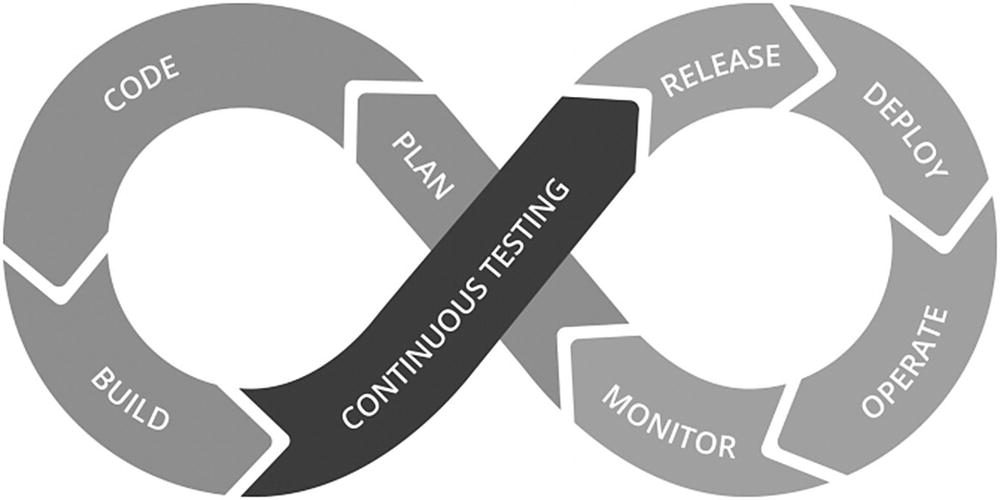
Figure 12-1 shows where the continuous testing phase sits in the overall application life cycle.
Figure 12-1
The continuous testing phase of the application life cycle
Types of Testing
The following are the most important categories of tests.
Unit tests: Unit tests are written to test every function in isolation. This is going to be the primary focus of this chapter. Unit tests test individual functions by supplying input and making sure the output matches what is expected. Unit tests mock dependent behavior. More on mocking follows later in this chapter.
Integration tests: Integration tests are written to test end-to-end functionality. For example, for a user registration scenario this test might go ahead and create a user in the data store and ensure it exists.
UI (functional tests): UI tests are for web applications; these tests are written to control the browser and enact user journeys.
Other types of tests are smoke tests, regression tests, acceptance tests, system tests, preflight tests, penetration tests, and performance tests. There are various frameworks available for authoring the tests in these categories, but explanation of these test types is beyond the scope of this book. This chapter deals only with unit tests.
BDD and TDD
Before we delve into the JavaScript test frameworks, let us briefly introduce the most notable test development methodologies, behavioral-driven development (BDD) and test-driven development (TDD).
BDD suggests testing the behavior of the function instead of its implementation. For example, consider the following function that just increments a given number by 1.
var mathLibrary = new MathLibrary();
var result = mathLibrary.increment(10)
BDD advises the test to be written as shown next. Although this looks like a simple unit test, there is a subtle difference. Here we are not worried about the implementation logic (like the initial value of Sum).
var expectedValue = mathlibrary.seed + 10; // imagine seed is a property of MathLibrary
Assert.equal(result, expectedValue);
Assertions are functions that help us verify the actual value against the expected value or vice versa. Here, we are not worried over the implementation details; rather, we assert the behavior of the function, which is to increment the value by 1. If the value of the seed changes tomorrow, we do not have to update the function.
Note
Assert is part of the nomenclature in most testing frameworks. It is used primarily to compare expected vs. actual in a variety of ways.
TDD suggests you write the test first. For example, in the current scenario we write the following test first. Of course it would fail because there is no MathLibrary or its corresponding function called increment.
Assert.equal(MathLibrary.increment(10), 11);
The idea behind TDD is to write assertions first that satisfy the functional requirement and that would initially fail. Development progresses by making necessary corrections (writing code) to pass the test.
JavaScript Test Frameworks
JavaScript being a vastly adapted language for writing functional code, there are numerous test frameworks available, including Mocha, Jest (by Facebook), Jasmine, and Cucumber, to name a few. The most famous among them are Mocha and Jasmine. To write a unit test for JavaScript functions we need the libraries or tools that can cover the following basic needs.
Test structure, which defines the folder structure, file names, and corresponding configuration.
Assertion functions, a library that can be used to assert with flexibility.
Reporter, a framework for displaying the results in various formats like Console, HTML, JSON, or XML.
Mocks, a framework that can provide test doubles to fake dependent components.
Code coverage, so the framework should be able to clearly tell the number of lines or functions covered with tests.
Unfortunately, no one testing framework provides all of these functionalities. For example, Mocha does not have an assertion library. Fortunately, most frameworks like Mocha and Jasmine are extensible; we can use Babel’s assertion library or expect.js with Mocha for performing clean assertions. Between Mocha and Jasmine, we will be writing Mocha tests as we feel it is more flexible than Jasmine. Of course we will also see a glimpse of Jasmine tests at the end of this section.
Note
At the time of writing Jasmine does not support tests for ES8 features, which is one of the reasons for the bias toward Mocha.
Testing Using Mocha
The following sections explain how to set up Mocha for authoring tests and the nitty-gritty of authoring sync and async tests with mocking. Let’s get started.
Installation
Mocha (https://mochajs.org) is a community-backed, feature-rich JavaScript test framework that can run on both Node.js and browsers. Mocha boasts of making asynchronous testing simple and fun, which we will witness in a moment.
Install Mocha globally and for the development environment as shown here.
npm install –global mocha
npm install –save-dev mocha
Add a new folder called test and add a new file within the test folder called mocha-tests.js. The following is the updated file structure.
| functional-playground
|------play.js
| lib
|------es8-functional.js
| test
| -----mocha-tests.js
Simple Mocha Test
Add the following simple Mocha test to mocha-tests.js.
var assert = require('assert');
describe('Array', function () {
describe('#indexOf()', function () {
it('should return -1 when the value is not present', function () {
assert.equal(-1, [1, 2, 3].indexOf(4));
});
});
});
Let’s understand this bit by bit. The first line of code is required to import the Babel assertion library. As mentioned earlier, Mocha doesn’t have an out-of-the-box assertion library so this line is required. You can also use any other assertion library like expect.js, chai.js, should.js, or many more.
var assert = require('assert');
Mocha tests are hierarchical in nature. The first describe function shown earlier describes the first test category 'Array'. Each primary category can have multiple describes, like '#indexOf'. Here '#indexOf' is a subcategory that contains the tests related to the indexOf function of the array. The actual test starts with the it keyword. The first parameter of the it function should always describe the expected behavior (Mocha uses BDD).
it('should return -1 when the value is not present', function(){})
There can be multiple it functions within a subcategory. The following code is used to assert the expected vs. actual. There can also be multiple asserts in a single test case (the it function here is a single test case). By default, the test stops at the first failure in case of multiple asserts, but this behavior can be altered.
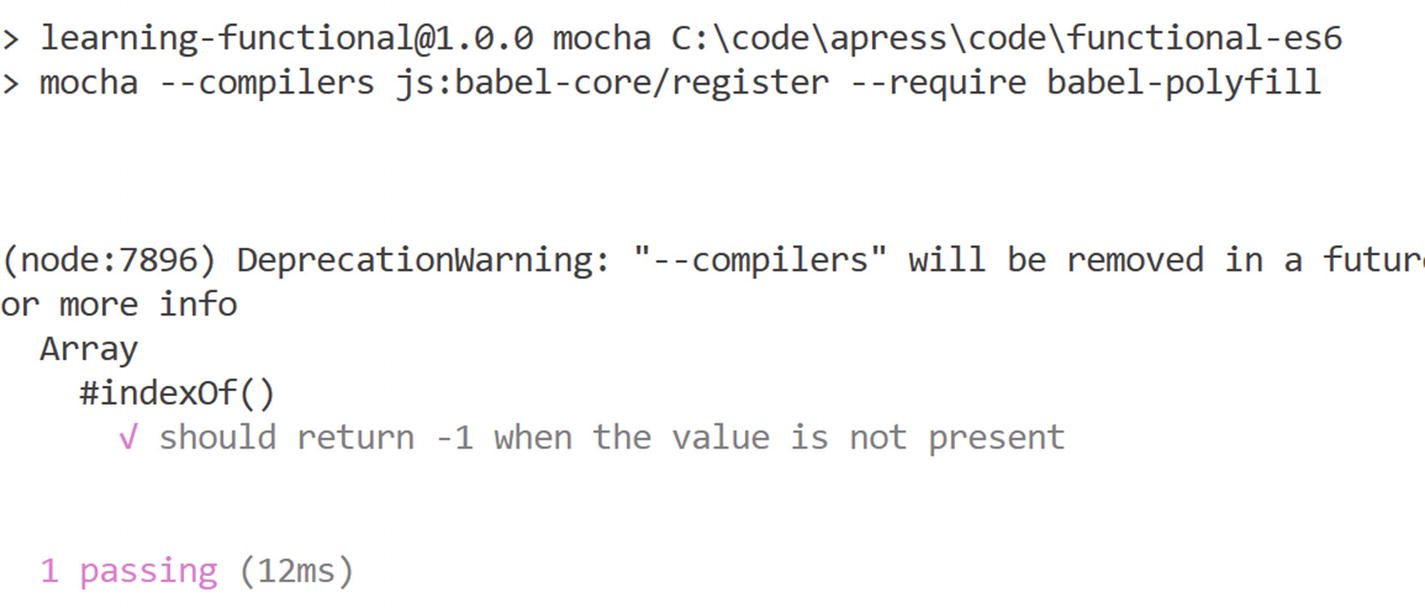
The following code is added to package.json for running the Mocha tests. Also check the dev dependencies and dependencies section when you check out the branch to understand the support libraries that are pulled in.
Observe the way test results are presented. Array is the first level in the hierarchy, followed by #indexOf and then the actual test result. The statement 1 passing above shows the summary of tests.
Tests for Currying, Monads, and Functors
We have learned a lot of functional programming concepts like currying, functors, and monads. In this section we learn to write tests for the concepts we learned earlier.
Let’s start by authoring unit tests for currying, the process of converting a function with n number of arguments into a nested unary function. Well, that’s the formal definition, but it will probably not help us author unit tests. Authoring unit tests for any function is quite easy. The first step is to list its primary feature set. Here we are referring to the curryN function we wrote in Chapter 6. Let’s define its behavior
1.
CurryN should always return a function.
2.
CurryN should only accept functions, and passing any other value should throw an error.
3.
CurryN function should return the same value as that of a normal function when called with the same number of arguments.
Now, let us start writing tests for these features.
it("should return a function", function(){
let add = function(){}
assert.equal(typeof curryN(add), 'function');
});
This test will assert if curryN always returns a function object.
it("should throw if a function is not provided", function(){
assert.throws(curryN, Error);
});
This test will ensure that curryN throws Error when a function is not passed.
it("calling curried function and original function with same arguments should return the same value", function(){
The preceding test can be used to test the basic functionality of a curried function. Now let’s write some tests for functors. Before that, like we did for currying, let’s review the features of a functor.
1.
A functor is a container that holds a value.
2.
A functor is a plain object that implements the function map.
3.
A functor like MayBe should handle null or undefined.
4.
A functor like MayBe should chain.
Now, based on how we defined the functor let’s see some tests.
it("should store the value", function(){
let testValue = new Container(3);
assert.equal(testValue.value, 3);
});
This test asserts that a functor like container holds a value. Now, how do you test if the functor implements map? There are couple of ways: You can assert on the prototype or call the function and expect a correct value, as shown here.
let testValue = Container.of(3).map(double).map(double);
assert.equal(testValue.value, 12);
});
The following tests assert if the function handles null and is capable of chaining.
it("may be should handle null", function(){
let upperCase = (x) => x.toUpperCase();
let testValue = MayBe.of(null).map(upperCase);
assert.equal(testValue.value, null);
});
it("may be should chain", function(){
let upperCase = (x) => x.toUpperCase();
let testValue = MayBe.of("Chris").map(upperCase).map((x) => "Mr." + x);
assert.equal(testValue.value, "Mr.CHRIS");
});
Now, with this approach it should be easy to write tests for monads. Where do you start? Here is a little help: Let’s see if you can author tests for the following rules by yourself.
1.
Monads should implement join.
2.
Monads should implement chain.
3.
Monads should remove nesting.
If you need help, check out chap12 branch from the GitHub URL.
Testing Functional Library
We have authored many functions in the es-functional.js library and used play.js to execute them. In this section we learn how to author tests for the functional JavaScript code we have written so far. Like play.js, before using the functions they should be imported in the file mocha-tests.js, so add the following line to the mocha-tests.js file.
import { forEach, Sum } from "../lib/es8-functional.js";
The following code shows the Mocha tests written for JavaScript functions.
describe('es8-functional', function () {
describe('Array', function () {
it('Foreach should double the elements of Array, when double function is passed', function () {
var array = [1, 2, 3];
const doublefn = (data) => data * 2;
forEach(array, doublefn);
assert.equal(array[0], 1)
});
it('Sum should sum up elements of array', function () {
var array = [1, 2, 3];
assert.equal(Sum(array), 6)
});
it('Sum should sum up elements of array including negative values', function () {
var array = [1, 2, 3, -1];
assert.notEqual(Sum(array), 6)
});
});
Async Tests with Mocha
Surprise, surprise! Mocha also supports async and await, and it is suprisingly simple to test Promises or async functions as shown here.
describe('Promise/Async', function () {
it('Promise should return es8', async function (done) {
done();
var result = await fetchTextByPromise();
assert.equal(result, 'es8');
})
});
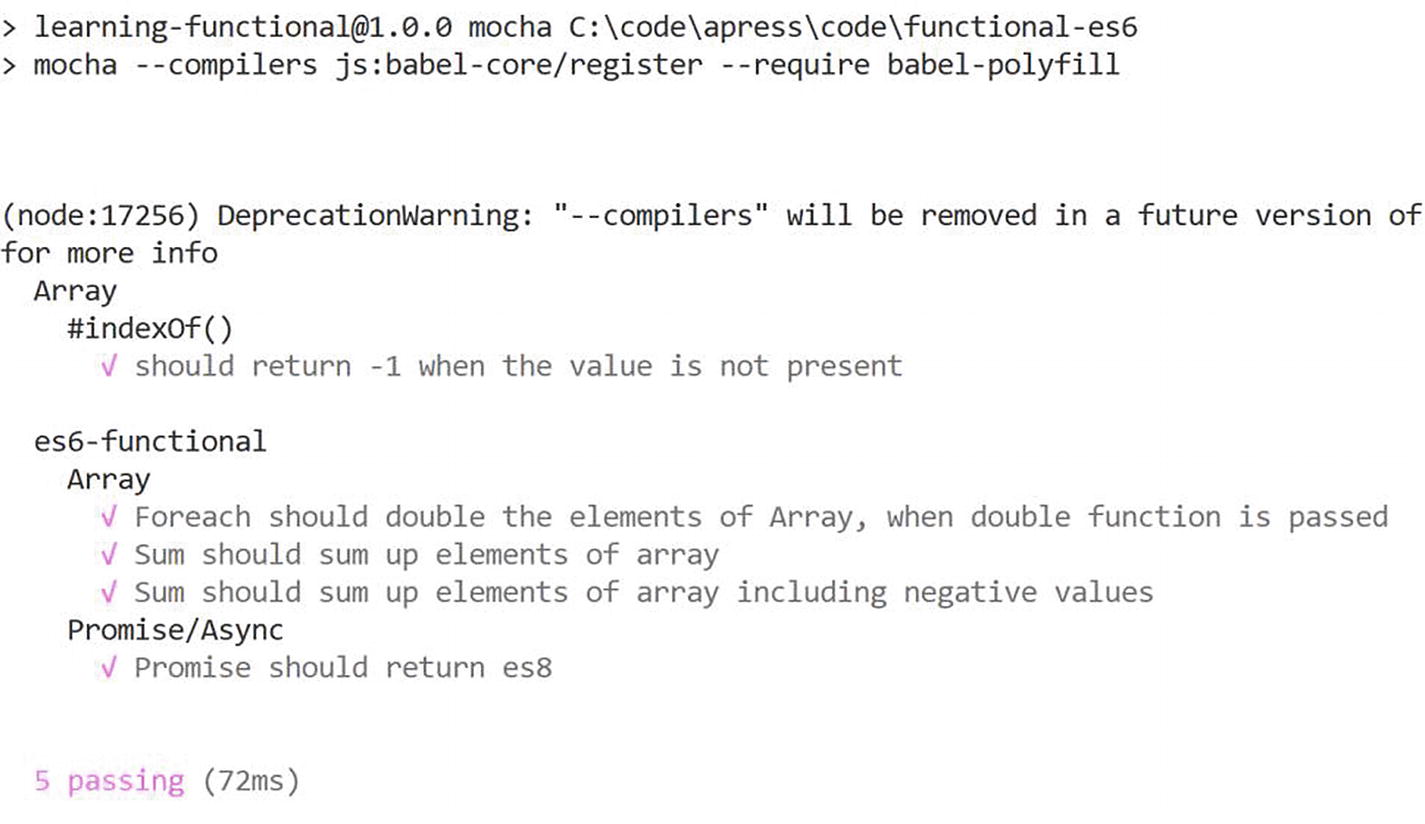
Notice the call to done here. Without the call to the done function, the test will time out because it does not wait for 2 s as required by our promise. The done function here notifies the Mocha framework. Run the tests again using the following command.
Reiterating the opening statement, Mocha might be initially very hard to set up due to its inherent flexibility adhering to the fact that it gels well with almost any framework for authoring fine unit tests, but at the end of the day, the rewards are profuse.
Mocking Using Sinon
Let’s say you are part of Team A, which is part of a large Agile team divided into smaller teams like Team A, Team B, and Team C. Larger Agile teams usually are divided by business requirements or geographical regions. Let us say Team B consumes Teams C’s library and Team A uses Team B’s functional library and each team is expected to hand over thoroughly tested code. As a developer from Team A, while consuming Team B’s functions would you author tests again? No. Then how would you ensure your code is working when you are dependent on calling Team B’s functions? This is where mocking libraries come into the picture and Sinon is one such library. As mentioned earlier, Mocha doesn’t come with a mocking library out of the box, but it seamlessly integrates with Sinon.
Sinon (Sinonjs.org) is a stand-alone framework that provides spies, stubs, and mocks for JavaScript. Sinon integrates with any test framework easily.
Note
Spies, mocks, or stubs, although they solve a similar problem and sound related, have subtle differences that are critical to understand. We recommend learning the differences between fakes, mocks, and stubs in greater detail. This section provides only a summary.
A fake imitates any JavaScript object like a function or object. Consider the following function.
var testObject= {};
testObject.doSomethingTo10 = (func) => {
const x = 10;
return func(x);
}
This code takes a function and runs it on constant 10. The following code shows how to test this function using Sinon fakes.
it("doSomethingTo10", function () {
const fakeFunction = sinon.fake();
testObject.doSomethingTo10(fakeFunction);
assert.equal(fakeFunction.called, true);
});
As you can see we have not created an actual function to act on 10; instead we faked a function. It is important to assert the fake, hence the statement assert.equal(fakeFunction.called, true) ensures the fake function is called, which asserts the behavior of the function doSomethingTo10. Sinon provides more comprehensive ways to test the behavior of fake within the context of the test function. See the documentation for more details.
Consider this function:
testObject.tenTimes = (x) => 10 * x;
The following code shows a test case written using Sinon’s stub. As you notice, a stub can be used to define the behavior of the function.
More often we write code that interacts with external dependencies like HTTP Call. As mentioned earlier, unit tests are light scoped, and the external dependencies should be mocked, in this case the HTTP Call.
Let’s say we have the following functions:
var httpLibrary = {};
function httpGetAsync(url,callback) {
// HTTP Get Call to external dependency
}
httpLibrary.httpGetAsync = httpGetAsync;
httpLibrary.getAsyncCaller = function (url, callback) {
try {
const response = httpLibrary.httpGetAsync(url, function (response) {
If you would like to test only getAsyncCaller without getting into the nitty-gritty of httpGetAsync (let’s say it is developed by Team B), we can use Sinon mocks as shown here.
Before I wrap up writing tests for functional JavaScript code, let me show how to write tests using Jasmine.
Testing with Jasmine
Jasmine (https://jasmine.github.io) is also a famous testing framework; in fact, the APIs of Jasmine and Mocha are similar. Jasmine is the most widely used framework when building applications with AngularJS (or Angular). Unlike Mocha, Jasmine comes with a built-in assertion library. The only troublesome area with Jasmine at the point of writing was testing asynchronous code. Let’s learn to set up Jasmine in our code in the next few steps.
npm install –save-dev jasmine
If you intend to install it globally, run this command:
npm install -g jasmine
Jasmine dictates a test structure including a configuration file, so running the following command will set up the test’s structure.
./node_modules/.bin/jasmine init
That command creates the following folder structure:
Jasmine.json contains the test configuration; for example, spec_dir is used to specify the folder in which to look for Jasmine tests, and spec_files describes the common keyword that is used to identify test files. For more configuration details, please visit https://jasmine.github.io/2.3/node.html#section-Configuration.
Let’s create a Jasmine test file in the spec folder that is created with the init command and name the file jasmine-tests-spec.js. (Remember without the keyword spec our test file will not be located by Jasmine.)
The following code shows a sample Jasmine test.
import { forEach, Sum, fetchTextByPromise } from "../lib/es8-functional.js";
import 'babel-polyfill';
describe('Array', function () {
describe('#indexOf()', function () {
it('should return -1 when the value is not present', function () {
expect([1, 2, 3].indexOf(4)).toBe(-1);
});
});
});
describe('es8-functional', function () {
describe('Array', function () {
it('Foreach should double the elements of Array, when double function is passed', function () {
var array = [1, 2, 3];
const doublefn = (data) => data * 2;
forEach(array, doublefn);
expect(array[0]).toBe(1)
});
});
As you can see, the code looks very similar to Mocha tests except for the assertions. You can rebuild the test library entirely using Jasmine, and we leave it up to you to figure out how to do so.
The following command is added to package.json to execute Jasmine tests.
"jasmine": "jasmine"
Running the following command executes the tests:
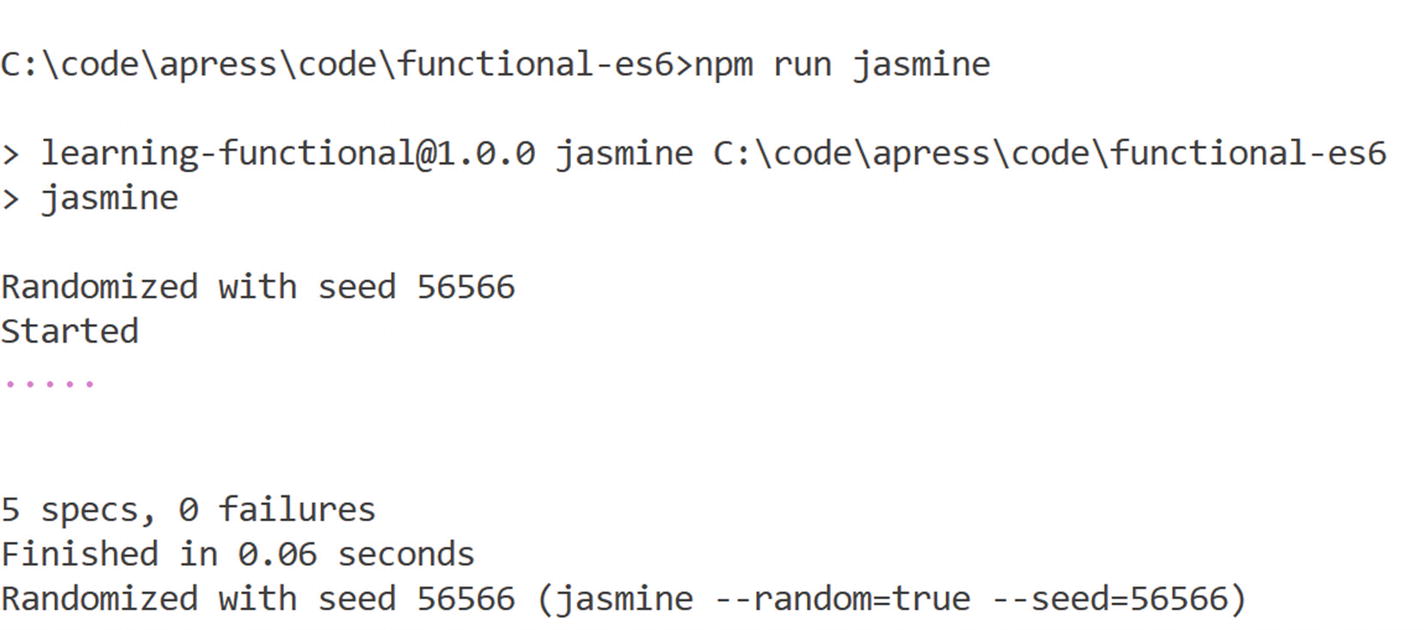
npm run jasmine
Figure 12-4
The below image shows test results using Jasmine
Code Coverage
How sure are we that we have covered the critical areas with the tests? Well for any language the code coverage is the only metric that can explain the code covered by tests. JavaScript is no exception, as we can get the number of lines or percentage of our code covered by tests.
Istanbul (https://gotwarlost.github.io/istanbul/) is one of the best known frameworks that can calculate the code coverage for JavaScript at the statement, Git branch, or function level. Setting up Istanbul is easy. nyc is the name of the command-line argument that can be used to get code coverage, so let us run this command to install nyc:
npm install -g --save-dev nyc
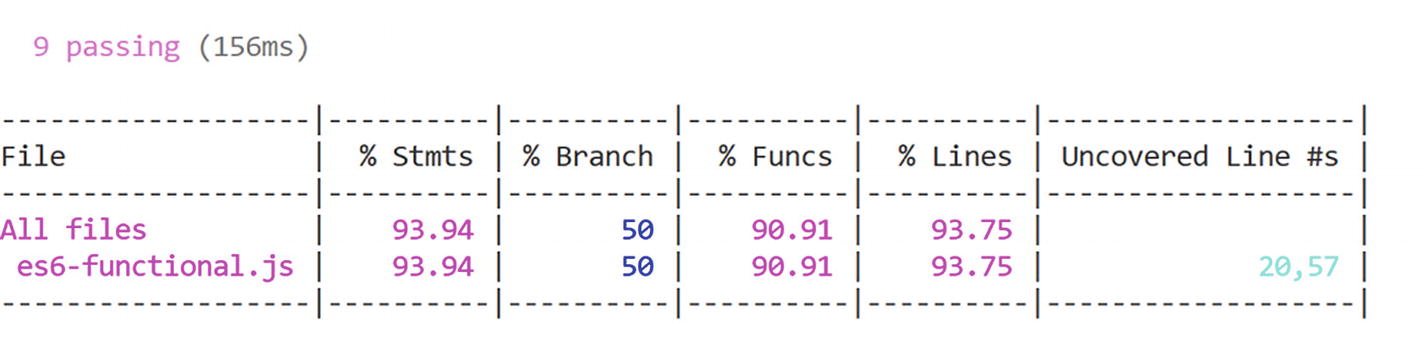
The following command can be used to run Mocha tests with code coverage, so let us add it to package.json.
The below image shows code coverage for tests written using Mocha
As you can see, we are 93% covered except lines 20 and 57 from the file es8-functional.js. The ideal percentage of code coverage depends on several factors, all accounting for return on investment. Most commonly 85% is a recommended number, but lesser than that will also work if the code is covered by any other tests.
Linting
Code analysis is as important as code coverage, especially in larger teams. Code analysis helps you impose uniform coding rules, follow best practices, and enforce best practices for readability and maintainability. JavaScript code we have written so far might not adhere to best practices, as this is more applicable to production code. In this section let’s see how to apply coding rules to functional JavaScript code.
ESLint (https://eslint.org/) is a command-line tool for identifying incorrect coding patterns in ECMAScript/JavaScript. It is relatively easy to install ESLint into any new or existing project. The following command installs ESLint.
npm install --save-dev -g eslint
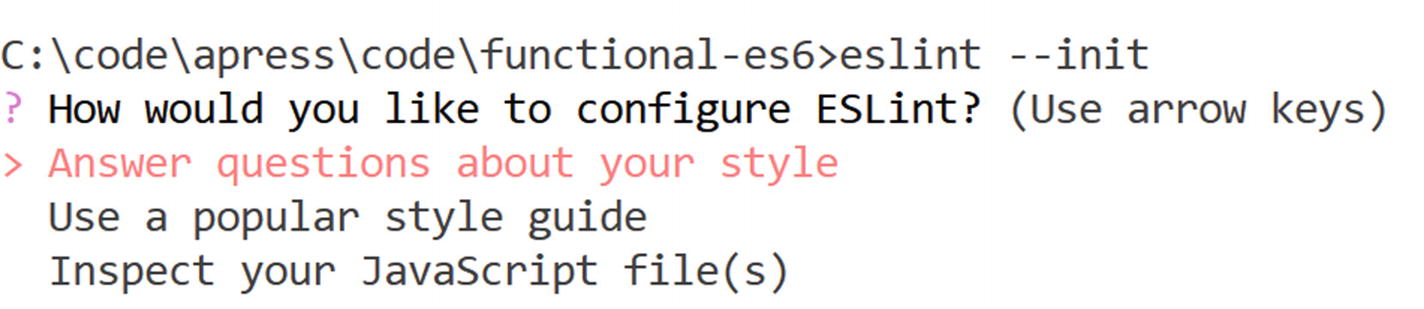
ESLint is configuration driven, and the command that follows creates a default configuration. You might have to answer a few questions as shown in Figure 12-6 here. For this coding sample we are using coding rules recommended by Google.
eslint --init
Figure 12-6
The below image shows eslinit initialization steps
Here is the sample configuration file.
{
"parserOptions": {
"ecmaVersion": 6,
"sourceType": "module"
},
"rules": {
"semi": ["error", "always"],
"quotes": ["error", "double"]
},
"env": {
"node": true
}
}
Let's look at the first rule.
"semi": ["error", "always"],
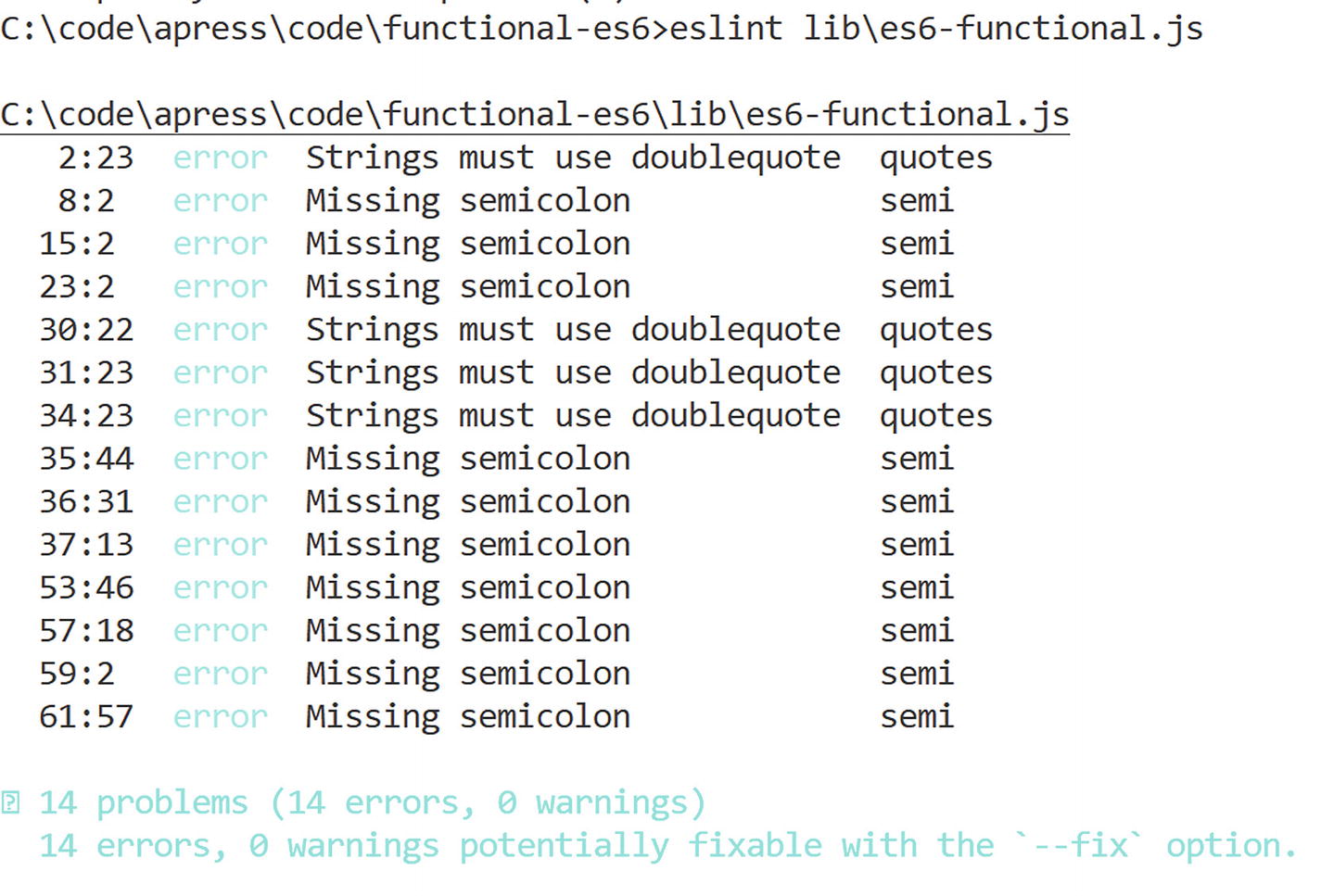
This rule says a semicolon is mandatory after every statement. Now if we run it against the code file es-functional.js we have written so far, we get the results shown in Figure 12-7. As you can see, we violated this rule in many places. Imposing coding rules or guidelines should be done at the very beginning of the project. Introducing coding rules or adding new rules after accumulating a huge code base results in an enormous amount of code debt, which will be difficult to handle.
Figure 12-7
The below image shows the result from eslint tool
ESLint helps you fix these errors. As suggested earlier, you just have to run this command:
eslint lib\es8-functional.js --fix
All errors are gone! You might not be lucky all the time, so ensure you impose restrictions early in the development phase.
Unit Testing Library Code
In the previous chapter we learned to create libraries that can help build applications. A good library is one that is testable, so the more the code coverage of your tests, the higher the likelihood consumers can trust your code. Tests help quickly check your code for affected areas when you change something. In this section we author Mocha tests for the Redux library code we have written in the previous chapter.
The following code is available in the mocha-test.js file. The mocha-test.js file refers to the code from our Redux library. The following test ensures that initially the state is always empty.
it('is empty initially', () => {
assert.equal(store.getState().counter, 0);
});
One of the main functions in our library was to assert if actions can influence state change. In the following state we initiate state change by calling IncrementCounter, which is called when a click event is raised. IncrementCounter should increase the state by 1.
// test for state change once
it('state change once', () => {
global.document = null;
incrementCounter();
assert.equal(store.getState().counter, 1);
});
// test for state change twice
it('state change twice', () => {
global.document = null;
incrementCounter();
assert.equal(store.getState().counter, 2);
});
The last function we are going to assert is to check if there is at least one listener registered for state change. To ensure we have a listener we also register a listener; this is also called an Arrange phase.
// test for listener count
it('minimum 1 listener', () => {
//Arrange
global.document = null;
store.subscribe(function () {
console.log(store.getState());
});
//Act
var hasMinOnelistener = store.currentListeners.length > 1;
//Assert
assert.equal(hasMinOnelistener, true);
});
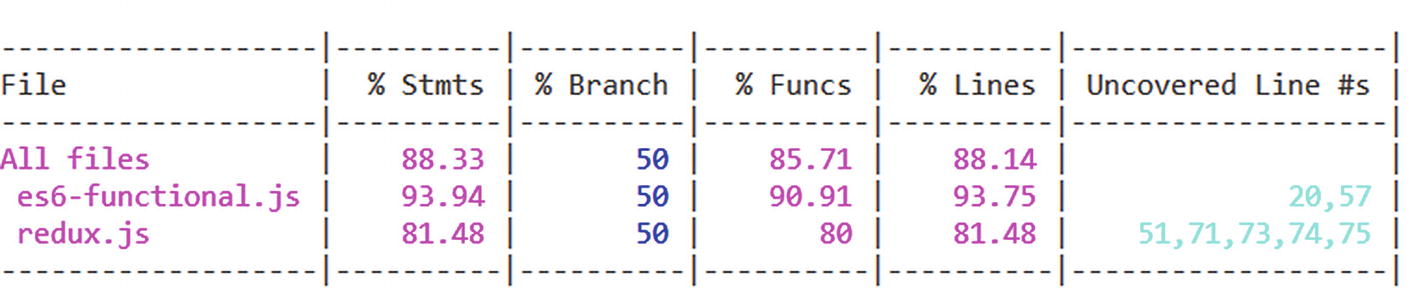
You can run npm run mocha or npm run mocha-cc to execute the tests with code coverage. You will notice in Figure 12-8 that we have covered more than 80% of the code we have written in the library.
Figure 12-8
The below image shows the code coverage results
With this experience it would be a good exercise to write unit tests for the HyperApp-like library we built in the previous chapter.
Closing Thoughts
Another wonderful journey comes to an end. We hope you had fun like we did learning new concepts and patterns in JavaScript functional programming. Here are some closing thoughts.
If you’re starting fresh on project, try to use the concepts used in this book. Each concept used in this book has a specific area of use. In going through a user scenario, analyze if you can use any of the explained concepts. For example, if you are making a REST API call, you would analyze if you can create a library to execute REST API calls asynchronously.
If you’re working on an existing project with lots of spaghetti JavaScript code, analyze the code to refactor some of it into reusable, testable functions. The best way to learn is by practice, so scan through your code, find loose ends, and stitch them together to make an extensible, testable, reusable JavaScript function.
Stay tuned to ECMAScript updates, as ECMAScript will continue to mature and get better over time. You can watch for the proposals at https://github.com/tc39/proposals or if you have a new idea or thought that can improve ECMAScript or help developers, you can go ahead with the proposal.
Summary
In this chapter we learned the importance of tests, types of tests, and development models like BDD and TDD. We came to understand the requirements of a JavaScript testing framework and learned about the best known ones, Mocha and Jasmine. We authored simple tests, tests for a functional library, and async tests using Mocha. Sinon is a JavaScript mocking library that provides spies, stubs, and mocks for JavaScript. We learned how to integrate Sinon with Mocha to mock dependent behavior or objects. We also learned to use Jasmine to write tests for JavaScript functions. Istanbul integrates well with Mocha and provides us code coverage that can be used as a measure of reliability. Linting helps us write clean JavaScript code, and in this chapter we learned to define coding rules using ESLint.