© Anto Aravinth, Srikanth Machiraju 2018
Anto Aravinth and Srikanth MachirajuBeginning Functional JavaScripthttps://doi.org/10.1007/978-1-4842-4087-8_10

10. Pause, Resume, and Async with Generators

Anto Aravinth1  and Srikanth Machiraju2
(1)
Chennai, Tamil Nadu, India
(2)
Hyderabad, Andhra Pradesh, India
 

We started the book with a simple definition of functions, then we saw how to use functions to do great things using the functional programming technique. We have seen how to handle arrays, objects, and error handling, in pure functional terms. It has been quite a long journey for us, but we still have not talked about yet another important technique that every JavaScript developer should be aware of: asynchronous code.

You have dealt with a great deal of asynchronous codes in your project. You might be wondering whether functional programming can help developers in asynchronous code. The answer is yes and no. The technique that we’re going to showcase initially is using ES6 Generators and then using Async/Await, which is a new addition to the ECMAScript 2017/ES8 specification. Both the patterns try to solve the same callback problem in their own way, so pay close attention to the subtle differences. Generators were new specs for functions in ES6. Generators are not really a functional programming technique; however, they are part of a function (functional programming is about function, right?); for that reason we have dedicated a chapter to it in this functional programming book.

Even if you are a big fan of Promises (which is a technique for solving the callback problem), we still advise you to have a look at this chapter. You are likely to love generators and the way they solve the async code problems.

Note

The chapter examples and library source code are in branch chap10. The repo’s URL is https://github.com/antsmartian/functional-es8.git .

Once you check out the code, please check out branch chap10:

git checkout -b chap10 origin/chap10

For running the codes, as before run:

...npm run playground...

Async Code and Its Problem

Before we really see what generators are, let’s discuss the problem of handling async code in JavaScript in this section. We are going to talk about a callback hell problem. Most of the async code patterns like Generators or Async/Await try to solve the callback hell problem in their own ways. If you already know what it is, feel free to move to the next section. For others, please read on.

Callback Hell

Imagine you have a function like the one shown in Listing 10-1.
let sync = () => {
        //some operation
        //return data
}
let sync2 = () => {
        //some operation
        //return data
}
let sync3 = () => {
        //some operation
        //return data
}
Listing 10-1

Synchronous Functions

The functions sync, sync1, and sync2 do some operations synchronously and return the results. As a result, one can call these functions like this:
result = sync()
result2 = sync2()
result3 = sync3()
What if the operation is asynchronous? Let’s see it in action in Listing 10-2.
let async = (fn) => {
        //some async operation
        //call the callback with async operation
        fn(/*  result data */)
}
let async2 = (fn) => {
        //some async operation
        //call the callback with async operation
        fn(/*  result data */)
}
let async3 = (fn) => {
        //some async operation
        //call the callback with async operation
        fn(/*  result data */)
}
Listing 10-2

Asynchronous Functions

Synchronous vs. Asynchronous

Synchronous is when the function blocks the caller when it is executing and returns the result once it’s available.

Asynchronous is when the function doesn't block the caller when it’s executing the function but returns the result once available.

We deal with Asynchronous heavily when we deal with an AJAX request in our project.

Now if someone wants to process these functions at once, how they do it? The only way to do it is shown in Listing 10-3.
async(function(x){
    async2(function(y){
        async3(function(z){
            ...
        });
    });
});
Listing 10-3

Async Functions Calling Example

Oops! You can see in Listing 10-3 that we are passing many callback functions to our async functions. This little piece of code showcases what callback hell is. Callback hell makes the program harder to understand. Handling errors and bubbling the errors out of callback are tricky and always error prone.

Before ES6 arrived, JavaScript developers used Promises to solve this problem. Promises are great, but given the fact that ES6 introduced generators at a language level, we don’t need Promises anymore!

Generators 101

As mentioned, generators were part of the ES6 specifications and they are bundled up at language level. We talked about using generators to help with handling async code. Before we get there, though, we are going to talk about the fundamentals of generators. This section focuses on explaining the core concepts behind generators. Once we learn the basics, we can create a generic function using generators to handle async code in our library. Let’s begin.

Creating Generators

Let’s start our journey by seeing how to create generators in the first place. Generators are nothing but a function that comes up with its own syntax. A simple generator looks like Listing 10-4.
function* gen() {
    return 'first generator';
}
Listing 10-4

First Simple Generator

The function gen in Listing 10-4 is a generator. As you might notice, we have used an asterisk before our function name (in this case gen) to denote that it is a generator function. We have seen how to create a generator; now let’s see how to invoke a generator:
let generatorResult = gen()
What will be the result of generatorResult ? Is it going to be a first generator value? Let’s print it on the console and inspect it:
console.log(generatorResult)
The result will be:
gen {[[GeneratorStatus]]: "suspended", [[GeneratorReceiver]]: Window}

Caveats of Generators

The preceding examples show how to create a generator, how to create an instance for it, and how it gets values. There are a few important things we need to take care of, though, while we are working with generators.

The first thing is that we cannot call next as many times as we want to get the value from the generator. To make it clearer, let’s try to fetch a value from our first generator (refer to Listing 10-4 for the first generator definition):
let generatorResult = gen()
//for the first time
generatorResult.next().value
=> 'first generator'
//for the second time
generatorResult.next().value
=> undefined

As you can see in this code, calling next for the second time will return an undefined rather than first generator. The reason is that generators are like sequences: Once the values of the sequence are consumed, you cannot consume it again. In our case generatorResult is a sequence that has value as first generator. With our first call to next, we (as the caller of the generator) have consumed the value from the sequence. Because the sequence is empty now, calling it a second time will return you undefined.

To consume the sequence again, you need to create another generator instance:
let generatorResult = gen()
let generatorResult2 = gen()
//first sequence
generatorResult.next().value
=> 'first generator'
//second sequence
generatorResult2.next().value
=> 'first generator'

This code also shows that different instances of generators can be in different states. The key takeaway here is that each generator’s state depends on how we are calling the next function on it.

yield Keyword

With generator functions, there is a new keyword that we can use called yield. In this section, we are going to see how to use yield within a generator function. Let’s start with the code in Listing 10-5.
function* generatorSequence() {
    yield 'first';
    yield 'second';
    yield 'third';
}
Listing 10-5

Simple Generator Sequence

As usual we can create a generator instance for that code:
let generatorSequence = generatorSequence();
Now if we call next for the first time we get back the value first:
generatorSequence.next().value
=> first
What happens if we call next again? Do we get first? Or second? Or third? Or an error? Let’s find out:
generatorSequence.next().value
=> second
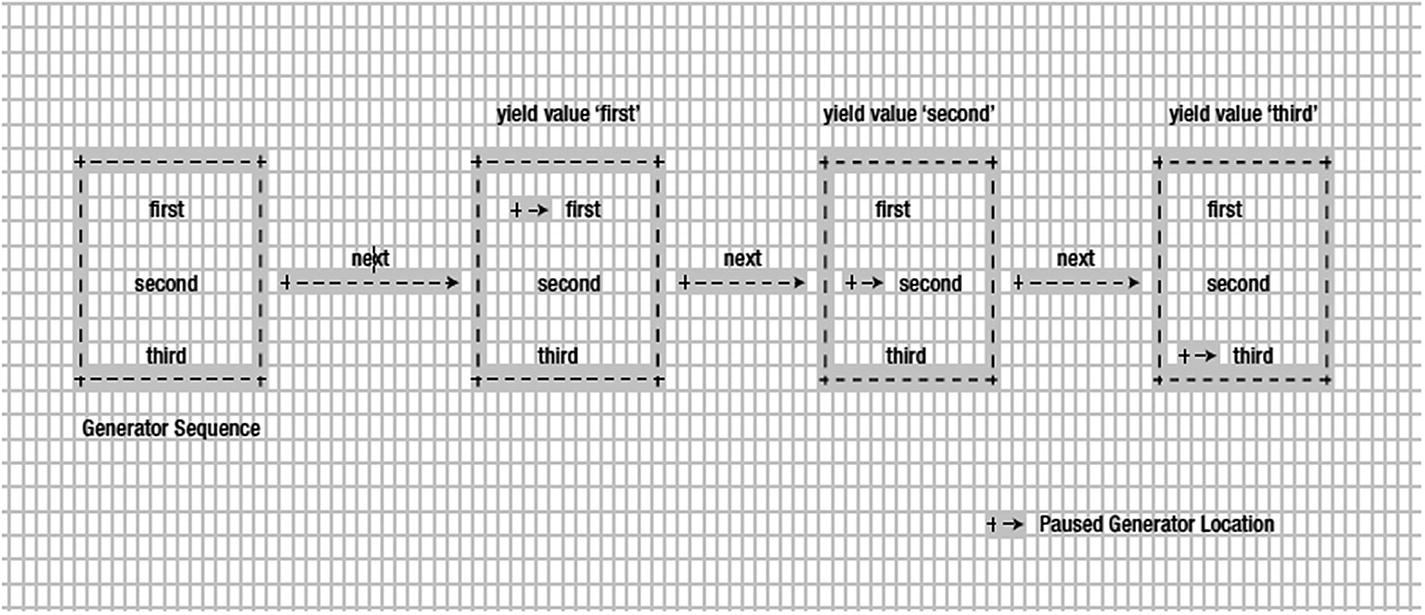
We got back the value second. Why? yield makes the generator function pause the execution and send back the result to the caller. Therefore when we call generatorSequence for the first time, the function sees the yield with value first, so it puts the function to pause mode and returns the value (and it remembers where it exactly paused, too). The next time we call the generatorSequence (using the same instance variable), the generator function resumes from where it left off. Because it paused at the line:
yield 'first';

for the first time, when we call it for a second time (using the same instance variable), we get back the value second. What happens when we call it for the third time? Yes, we will get back the value third.

This is better explained by looking at Figure 10-1. This sequence is explained via the code in Listing 10-6.
//get generator instance variable
let generatorSequenceResult = generatorSequence();
console.log('First time sequence value',generatorSequenceResult.next().value)
console.log('Second time sequence value',generatorSequenceResult.next().value)
console.log('third time sequence value',generatorSequenceResult.next().value)
Listing 10-6

Calling Our Generator Sequence

../images/429083_2_En_10_Chapter/429083_2_En_10_Fig1_HTML.jpg
Figure 10-1

Visual view of generator listed in Listing 10-4

This prints the following back to the console:
First time sequence value first
Second time sequence value second
third time sequence value third

With that understanding in place, you can see why we call a generator a sequence of values. One more important point to keep in mind is that all generators with yield will execute in lazy evaluation order.

Lazy Evaluation

What is lazy evaluation? To put it in simple terms, lazy evaluation means the code won’t run until we ask it to run. As you can guess, the example of the generatorSequence function shows that generators are lazy evaluated. The values are being executed and returned only when we ask for them. That’s so lazy about generators, isn’t it?

done Property of Generator

Now we have seen how a generator can produce a sequence of values lazily with the yield keyword. A generator can also produce n numbers of sequence; as a user of the generator function, how will you know when to stop calling next? Because calling next on your already consumed generator sequence will return the undefined value. How can you handle this situation? This is where the done property enters the picture.

Remember that every call to the next function is going to return an object that looks like this:
{value: 'value', done: false}

We are aware that the value is the value from our generator, but what about done? done is a property that is going to tell whether the generator sequence has been fully consumed or not.

We rerun the code from previous sections here (Listing 10-4), just to print the object being returned from the next call.
//get generator instance variable
let generatorSequenceResult = generatorSequence();
console.log('done value for the first time',generatorSequenceResult.next())
console.log('done value for the second time',generatorSequenceResult.next())
console.log('done value for the third time',generatorSequenceResult.next())
Listing 10-7

Code for Understanding done Property

Running this code will print the following:
done value for the first time { value: 'first', done: false }
done value for the second time { value: 'second', done: false }
done value for the third time { value: 'third', done: false }
As you can see we have consumed all the values from the generator sequence, so calling next again will return the following object:
console.log(generatorSequenceResult.next())
=> { value: undefined, done: true }
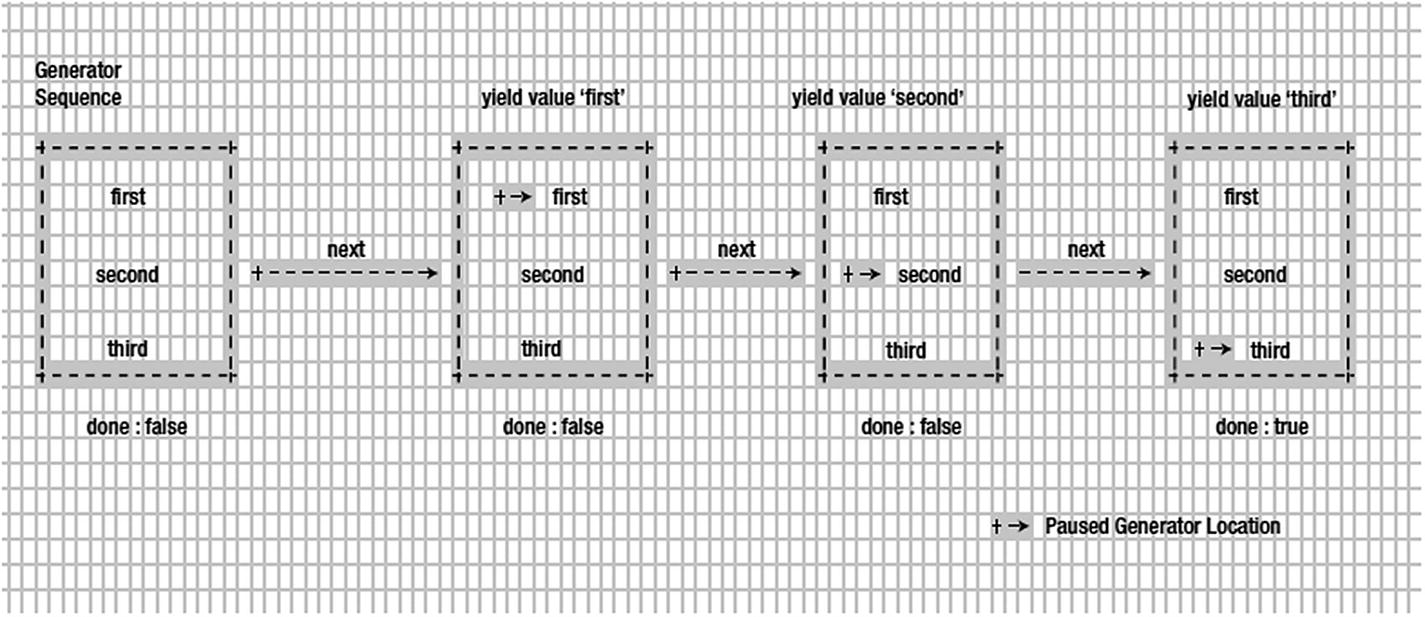
Now the done property clearly tells us that the generator sequence is already fully consumed. When the done is true, it’s time for us to stop calling next on that particular generator instance. This can be better visualized with Figure 10-2.
../images/429083_2_En_10_Chapter/429083_2_En_10_Fig2_HTML.jpg
Figure 10-2

View of generators done property for generatorSequence

Because generator became the core part of ES6, we have a for loop that will allow us to iterate a generator (after all it’s a sequence):
for(let value of generatorSequence())
        console.log("for of value of generatorSequence is",value)
This is going to print:
for of value of generatorSequence is first
for of value of generatorSequence is second
for of value of generatorSequence is third

notably for using the generator’s done property to iterate through it.

Passing Data to Generators

In this section, let’s discuss how we pass data to generators. Passing data to generators might feel confusing at first, but as you will see in this chapter, it makes async programming easy.

Let’s take a look at the code in Listing 10-8.
function* sayFullName() {
    var firstName = yield;
    var secondName = yield;
    console.log(firstName + secondName);
}
Listing 10-8

Passing Data Generator Example

This code now might not be a surprise for you. Let’s use this code to explain the concept of passing data to the generator. As always, we create a generator instance first:
let fullName = sayFullName()
Once the generator instance is created, let’s call next on it:
fullName.next()
fullName.next('anto')
fullName.next('aravinth')
=> anto aravinth
In this code snippet the last call will print anto aravinth to the console. You might be confused with this result, so let’s walk through the code slowly. When we call next for the first time:
fullName.next()
the code will return and pause at the line
var firstName = yield;
Because here we are not sending any value back via yield , next will return the value undefined. The second call to next is where an interesting thing happens:
fullName.next('anto')
Here we are passing the value anto to the next call. Now the generator will be resumed from its previous paused state. Remember that the previous paused state is on the line
var firstName = yield;
Because we have passed the value anto on this call, yield will be replaced by anto and thus firstName holds the value anto. After the value is set to firstName, the execution will be resumed (from the previous paused state) and again sees the yield and stops the execution at
var secondName = yield;
Now for the third time, if we call next:
fullName.next('aravinth')
When this line gets executed, our generator will resume from where it paused. The previous paused state is
var secondName = yield;
As before, the passed value aravinth of our next call will be replaced by yield and aravinth is set to secondName. Then the generator happily resumes the execution and sees this statement:
console.log(firstName + secondName);
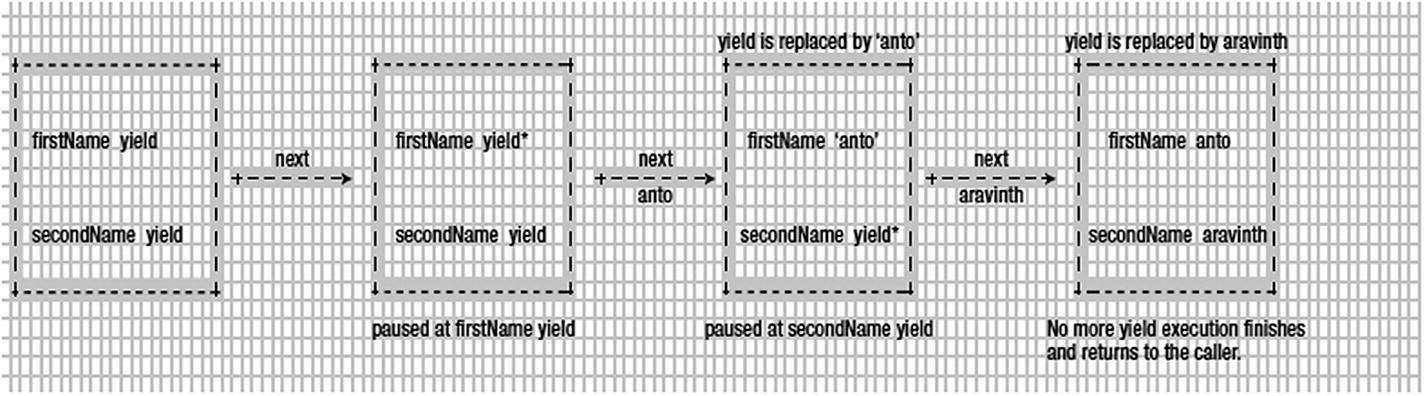
By now, firstName is anto and secondName is aravinth, so the console will print anto aravinth. This full process is illustrated in Figure 10-3.
../images/429083_2_En_10_Chapter/429083_2_En_10_Fig3_HTML.jpg
Figure 10-3

Explaining how data are passed to sayFullName generator

You might be wondering why we need such an approach. It turns out that using generators by passing data to them makes it very powerful. We use the same technique in the next section to handle async calls.

Using Generators to Handle Async Calls

In this section, we are going to use generators for real-world stuff. We are going to see how passing data to generators makes them very powerful to handle async calls. We are going to have quite a lot of fun in this section.

Generators for Async: A Simple Case

In this section, we are going to see how to use generators for handling async code. Because we are getting started with a different mindset of using generators to solve the async problem, we want to keep things simple, so we will mimic the async calls with setTimeout calls !

Imagine you two functions shown in Listing 10-9 (which are async in nature).
let getDataOne = (cb) => {
        setTimeout(function(){
        //calling the callback
        cb('dummy data one')
    }, 1000);
}
let getDataTwo = (cb) => {
        setTimeout(function(){
        //calling the callback
        cb('dummy data two')
    }, 1000);
}
Listing 10-9

Simple Asynchronous Functions

Both these functions mimic the async code with setTimeout . Once the desired time has elapsed, setTimeout will call the passed callback cb with value dummy data one and dummy data two, respectively. Let’s see how we will be calling these two functions without generators in the first place:
getDataOne((data) => console.log("data received",data))
getDataTwo((data) => console.log("data received",data))
That code will print the following after 1,000 ms:
data received dummy data one
data received dummy data two

Now as you notice, we are passing the callbacks to get back the response. We have talked about how bad the callback hell can be in async code. Let’s use our generator knowledge to solve the current problem. We now change both the functions getDataOne and getDataTwo to use generator instances rather than callbacks for passing the data.

First let’s change the function getDataOne (Listing 10-8) to what is shown in Listing 10-10.
let generator;
let getDataOne = () => {
        setTimeout(function(){
        //call the generator and
        //pass data via next
        generator.next('dummy data one')
    }, 1000);
}
Listing 10-10

Changing getDataOne to Use Generator

We have changed the callback line from
. . .
cb('dummy data one')
. . .
to
generator.next('dummy data one')
That’s a simple change. Note that we have also removed the cb, which is not required in this case. We will do the same for getDataTwo (Listing 10-8), too, as shown in Listing 10-11.
let getDataTwo = () => {
        setTimeout(function(){
        //call the generator and
        //pass data via next
        generator.next('dummy data two')
    }, 1000);
}
Listing 10-11

Changing getDataTwo to Use Generator

Now with that change in place, let’s go and test our new code. We’ll wrap our call to getDataOne and getDataTwo inside a separate generator function, as shown in Listing 10-12.
function* main() {
    let dataOne = yield getDataOne();
    let dataTwo = yield getDataTwo();
    console.log("data one",dataOne)
    console.log("data two",dataTwo)
}
Listing 10-12

main Generator Function

Now the main code looks exactly like the sayFullName function from our previous section. Let’s create a generator instance for main and trigger the next call and see what happens.
generator = main()
generator.next();
That will print the following to the console:
data one dummy data one
data two dummy data two

That is what exactly we wanted. Look at our main code; the code looks like synchronous calls to the functions getDataOne and getDataTwo. However both these calls are asynchronous. Remember that these calls never block and they work in async fashion. Let’s distill how this whole process works.

First we are creating a generator instance for main using the generator variable that we declared earlier. Remember that this generator is used by both getDataOne and getDataTwo to push the data to its call, which we will see soon. After creating the instance, we are firing the whole process with the line
generator.next()
This calls the main function . The main function is put into execution and we see the first line with yield:
. . .
let dataOne = yield getDataOne();
. . .

Now the generator will be put into pause mode as it has seen a yield statement. Before it’s been put into pause mode, though, it calls the function getDataOne.

Note

An important point here is that even though the yield makes the statement pause, it won’t make the caller wait (i.e., caller is not blocked). To make the point more concrete, see the following code.

generator.next() //even though the generator pause for Async codes

console.log("will be printed")

=> will be printed

=> Generator data result is printed

This code shows that even though our generator.next causes the generator function to wait on the next call, the caller (the one who is calling the generator) won’t be blocked! As you can see, console.log will be printed (showcasing generator.next isn’t blocked), and then we get the data from the generator once the async operation is done.
Now interestingly the getDataOne function has the following line in its body:
. . .
    generator.next('dummy data one')
. . .
As we discussed earlier, calling next by passing a parameter will resume the paused yield, and that’s exactly what happens here in this case. Remember that this piece of line is inside setTimeout , so it will get executed only when 1,000 ms have elapsed. Until then, the code will be paused at the line
let dataOne = yield getDataOne();
One more important point to note here is that while this line is paused, the timeout will be running down from 1,000 to 0. Once it reaches 0, it is going to execute the line
. . .
    generator.next('dummy data one')
. . .
That is going to send back dummy data one to our yield statement , so the dataOne variable becomes dummy data one:
//after 1,000 ms dataOne becomes
//'dummy data one'
let dataOne = yield getDataOne();
=> dataOne = 'dummy data one'
That’s a lot of interesting stuff happening. Once dataOne is set to the dummy data one value, the execution will continue to the next line:
. . .
let dataTwo = yield getDataTwo();
. . .
This line is going to run the same way as the line before! So after the execution of this line, we have dataOne and dataTwo :
dataOne = dummy data one
dataTwo = dummy data two
That is what is getting printed to the console at the final statements of the main function :
. . .
    console.log("data one",dataOne)
    console.log("data two",dataTwo)
. . .
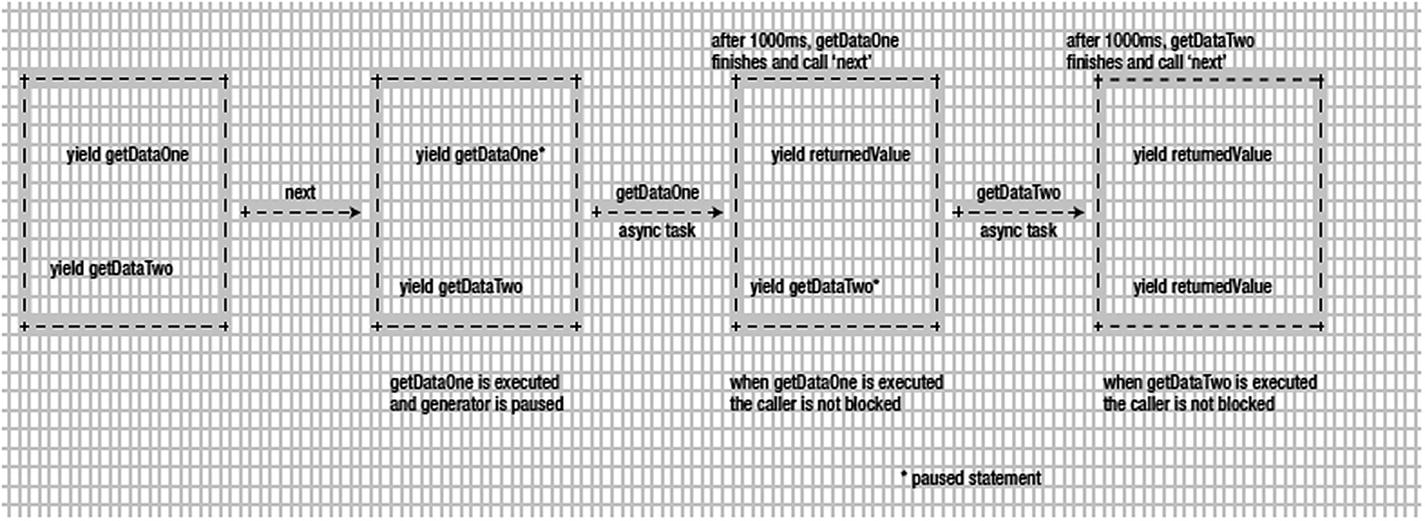
The full process is shown in Figure 10-4.
../images/429083_2_En_10_Chapter/429083_2_En_10_Fig4_HTML.jpg
Figure 10-4

Image explaining how main generator works internally

Now you have made an asynchronous call look like a synchronous call, but it works in an asynchronous way.

Generators for Async: A Real-World Case

In the previous section, we saw how to handle asynchronous code using generators effectively. To mimic the async workflow we used setTimeout. In this section, we are going to use a function to fire a real AJAX call to Reddit APIs to showcase the power of generators in the real world.

To make an async call, let’s create a function called httpGetAsync , shown in Listing 10-13.
let https = require('https');
function httpGetAsync(url,callback) {
    return https.get(url,
        function(response) {
            var body = ";
            response.on('data', function(d) {
                body += d;
            });
            response.on('end', function() {
                let parsed = JSON.parse(body)
                callback(parsed)
            })
        }
    );
}
Listing 10-13

httpGetAsync Function Definition

This is a simple function that uses an https module from a node to fire an AJAX call to get the response back.

Note

Here we are not going to see in detail how httpGetAsync function works. The problem we are trying to solve is how to convert functions like httpGetAsync, which works the async way but expects a callback to get the response from AJAX calls.

Let’s check httpGetAsync by passing a Reddit URL:
httpGetAsync('https://www.reddit.com/r/pics/.json',(data)=> {
        console.log(data)
})
It works by printing the data to the console. The URL https://www.reddit.com/r/pics/.json prints the list of JSON about the Picture Reddit page. The returned JSON has a data key with a structure that looks like the following:
{ modhash: ",
  children:
   [ { kind: 't3', data: [Object] },
     { kind: 't3', data: [Object] },
     { kind: 't3', data: [Object] },
     . . .
     { kind: 't3', data: [Object] } ],
  after: 't3_5bzyli',
  before: null }

Imagine we want to get the URL of the first children of the array; we need to navigate to data.children[0].data.url . This will give us a URL like https://www.reddit.com/r/pics/comments/5bqai9/introducing_new_rpics_title_guidelines/ . Because we need to get the JSON format of the given URL, we need to append .json to the URL, so that it becomes https://www.reddit.com/r/pics/comments/5bqai9/introducing_new_rpics_title_guidelines/.json .

Now let’s see that in action:
httpGetAsync('https://www.reddit.com/r/pics/.json',(picJson)=> {
    httpGetAsync(picJson.data.children[0].data.url+".json",(firstPicRedditData) => {
        console.log(firstPicRedditData)
    })
})

This code will print the data as required. We are least worried about the data being printed, but we are worried about our code structure. As we saw at the beginning of this chapter, code that looks like this suffers from callback hell. Here there are two levels of callbacks, which might not be a real problem, but what if it goes to four or five nested levels? Can you read such codes easily? Definitely not. Now let’s find out how to solve the problem via generator.

Let’s wrap httpGetAsync inside a separate method called request, shown in Listing 10-14.
function request(url) {
    httpGetAsync( url, function(response){
        generator.next( response );
    } );
}
Listing 10-14

request Function

We have removed the callback with the generator’s next call, very similar to our previous section. Now let’s wrap our requirement inside a generator function; again we call it main, as shown in Listing 10-15.
function *main() {
    let picturesJson = yield request( "https://www.reddit.com/r/pics/.json" );
    let firstPictureData = yield request(picturesJson.data.children[0].data.url+".json")
    console.log(firstPictureData)
}
Listing 10-15

main Generator Function

This main function looks very similar to the main function we defined in Listing 10-11 (the only change is the method call details). In the code we are yielding on two calls to request. As we saw in the setTimeout example, calling yield on request will make it pause until request calls the generator next by sending the AJAX response back. The first yield will get the JSON of pictures, and the second yield gets the first picture data by calling request, respectively. Now we have made the code look like synchronous code, but in reality, it works in an asynchronous fashion.

We have also escaped from callback hell using generators. Now the code looks clean and clearly tells what it’s doing. That’s so much more powerful for us!

Try running it:
generator = main()
generator.next()

It’s going to print the data as required. We have clearly seen how to use generators to convert any function that expects a callback mechanism into a generator-based one. In turn, we get back clean code for handling an asynchronous operation.

Async Functions in ECMAScript 2017

So far, we have seen multiple ways to run functions asynchronously. Primitively the only way to perform background jobs was by using a callback, but we just learned how they result in callback hell. Generators or sequences provide one way of solving the callback hell problem using the yield operator and generator functions. As part of the ECMA8 script, two new operators are introduced, called async and await . These two new operators solve the callback hell problem by introducing a modern design pattern for authoring asynchronous code using Promise.

Promise

If you are already aware of Promises you can skip this section. A Promise in JavaScript world is piece of work that is expected to complete (or fail) at some point in the future. For example, parents might Promise to give their child an XBOX if they get an A+ on an upcoming test, as represented by the following code.
let grade = "A+";
let examResults = new Promise(
    function (resolve, reject) {
        if (grade == "A+")
            resolve("You will get an XBOX");
        else
            reject("Better luck next time");
    }
);
Now, the Promise examResults when consumed can be in any of three states: pending, resolved, or rejected. The following code shows a sample consumption of the preceding Promise.
let conductExams = () => {
    examResults
    .then(x => console.log(x)) // captures resolve and logs "You will get an XBOX"
    .catch(x => console.error(x)); // captures rejection and logs "Better luck next time"
};
conductExams();

Now if you have successfully relearned the philosophy of Promise , we can understand what async and await do.

Await

An await is a keyword that can be prepended to a function if the function returns a Promise object, thus making it run in the background. Usually a function or another Promise is used to consume a Promise, and await simplifies the code by allowing the Promise to resolve in the background. In other words, the await keyword waits for the Promise to resolve or fail. Once the Promise is resolved, the data returned by the Promise—either resolved or rejected—can be consumed, but meanwhile the main flow of the application is unblocked to perform any other important tasks. The rest of the execution unfolds when the Promise completes.

Async

A function that uses await should be marked as async.

Let us understand the usage of async and await using the following example.
function fetchTextByPromise() {
    return new Promise(resolve => {
        setTimeout(() => {
            resolve("es8");
        }, 2000);
    });
}
Before ES8 can consume this Promise, you might have to wrap it in a function as shown in the preceding example or use another Promise as shown here.
function sayHello() {
    return new Promise((resolve, reject) => fetchTextByPromise()
  .then(x => console.log(x))
        .catch(x => console.error(x)));
}
Now, here is a much simpler and cleaner version using async and await.
async function sayHello() {
    const externalFetchedText = await fetchTextByPromise();
    console.log(`Response from SayHello: Hello, ${externalFetchedText}`);
}
We can also write using arrow syntax as shown here.
let sayHello = async () => {
    const externalFetchedText = await fetchTextByPromise();
    console.log(`Response from SayHello: Hello, ${externalFetchedText}`); // Hello, es8
}
You can consume this method by simply calling
sayHello()

Chaining Callbacks

The beauty of async and await is harder to understand until we see some sample uses of remote API calls. What follows is an example where we call a remote API that returns a JSON array. We silently wait for the array to arrive and process the first object and make another remote API call. The important thing to learn here is that while all this is happening, the main thread can work on something else because the remote API calls might take some time; hence the network call and corresponding processing is happening in the background.

Here is the function that invokes a remote URL and returns a Promise.
// returns a Promise
const getAsync = (url) => {
    return fetch(url)
        .then(x => x)
        .catch(x =>
            console.log("Error in getAsync:" + x)
        );
}
The next function consumes getAsync .
// 'async' can only be used in functions where 'await' is used
async function getAsyncCaller() {
    try {
        // https://jsonplaceholder.typicode.com/users is a sample API which returns a JSON Array of dummy users
        const response = await getAsync("https://jsonplaceholder.typicode.com/users"); // pause until Promise completes
        const result = await response.json(); //removing .json here demonstrates the error handling in Promises
        console.log("GetAsync fetched " + result.length + " results");
        return result;
    } catch (error) {
        await Promise.reject("Error in getAsyncCaller:" + error.message);
    }
}
The following code is used to invoke the flow.
getAsyncCaller()
    .then(async (x) => {
        console.log("Call to GetAsync function completed");
        const website = await getAsync("http://" + x[0].website);
        console.log("The website (http://" + x[0].website + ") content length is " + website.toString().length + " bytes");
    })
    .catch(x => console.log("Error: " + x)); // Promise.Reject is caught here, the error message can be used to perform custom error handling
Here is the output for the preceding invocation:
This message is displayed while waiting for async operation to complete, you can do any compute here...
GetAsync fetched 10 results
Call to GetAsync function completed
The website (http://hildegard.org) content length is 17 bytes
As you can see, the code execution continues and prints the following console statement, which is the last statement in the program, while the remote API call is happening in the background. Any code following this also gets executed.
console.log("This message is displayed while waiting for async operation to complete, you can do any compute here...");
The following result is available when the first await completes; that is, the first API call is completed, and the results are enumerated.
This message is displayed while waiting for async operation to complete, you can do any compute here...
GetAsync fetched 10 results
Call to GetAsync function completed
At this point the control returns to the caller, getAsyncCaller in this case, and the call is again awaited by the async call, which makes another remote call using the website property. Once the final API call is completed, the data are returned to the website object and the following block is executed:
        const website = await getAsync("http://" + x[0].website);
        console.log("The website (http://" + x[0].website + ") content length is " + website.toString().length + " bytes");

You can observe that we have made dependent remote API calls asynchronously, yet the code appears flat and readable, so the call hierarchy can grow to any extent without involving any callback hierarchies.

Error Handling in Async Calls
As explained earlier, Promises can be rejected as well (say the Remote API is not available or the JSON format is incorrect). In such cases the consumer’s catch block is invoked, which can be used to perform any custom exception handling, as shown here.
        await Promise.reject("Error in getAsyncCaller:" + error.message);
The error can be bubbled to the caller’s catch block as well, as shown next. To simulate an error, remove the .json function getAsyncCaller (read the comments for more details). Also, observe the async usage in the then handler here. Because the dependent remote call uses await the arrow function can be tagged as async.
getAsyncCaller()
    .then(async (x) => {
        console.log("Call to GetAsync function completed");
        const website = await getAsync("http://" + x[0].website);
        console.log("The website (http://" + x[0].website + ") content length is " + website.toString().length + " bytes");
    })
    .catch(x => console.log("Error: " + x)); // Promise.Reject is caught here, the error message can be used to perform custom error handling
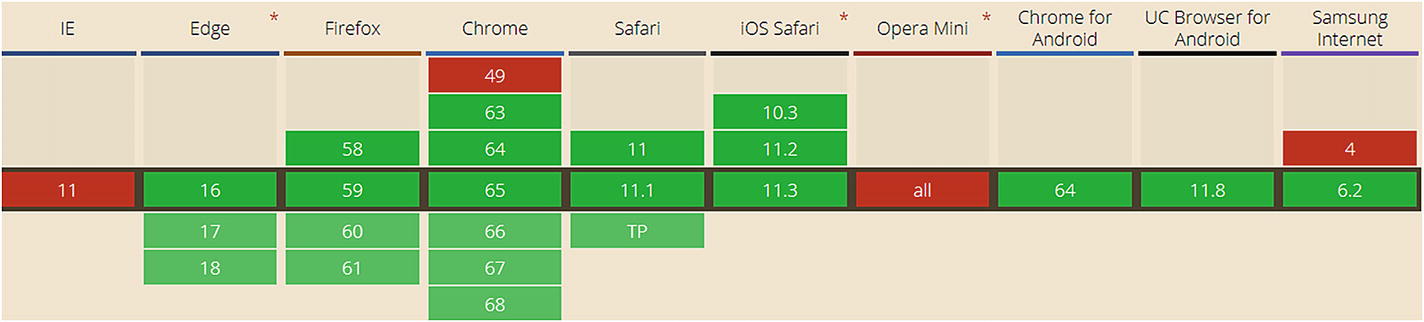
The new asynchronous pattern is more readable, includes less code, is linear, and is better than the previous ones, making it an instinctive replacement for the previous patterns. Figure 10-5 shows the browser support at the time of writing. For latest information, you can check the browser support from https://caniuse.com/#feat=async-functions .
../images/429083_2_En_10_Chapter/429083_2_En_10_Fig5_HTML.jpg
Figure 10-5

Asynchronous browser support. Source: https://caniuse.com/#feat=async-functions

Async Functions Transpiled to Generators

Async and await have an awfully close relationship with generators. In fact, Babel transpiles async and await to generators in the background, which is quite evident if you look at the transpiled code.
let sayHello = async () => {
    const externalFetchedText = await new Promise(resolve => {
        setTimeout(() => {
            resolve("es8");
        }, 2000)});
    console.log(`Response from SayHello: Hello, ${externalFetchedText}`);
}

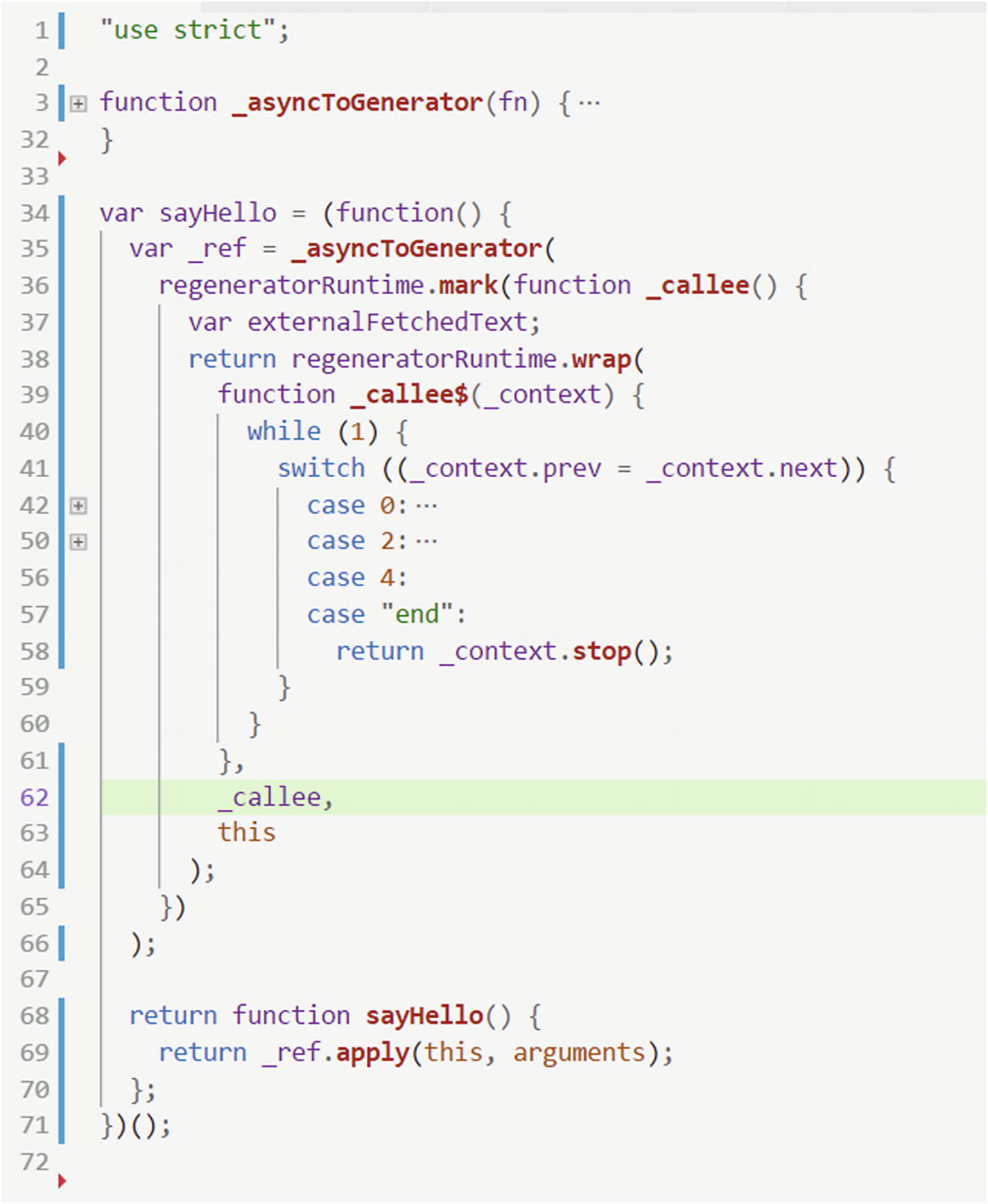
For example, the preceding async function will be transpiled to the following code, and you can use any online Babel transpiler like https://babeljs.io to watch the transformation. Detailed explanation of the transpiled code is beyond the scope of this book but you might notice that the keyword async is converted into a wrapper function called _asyncToGenerator (line 3). _asyncToGenerator is a routine that Babel adds. This function will be pulled into the transpiled code for any piece of code that uses the async keyword. The crux of our preceding code is converted into a switch case statement (lines 41–59) where each line of code is transpiled into a case as shown here.
../images/429083_2_En_10_Chapter/429083_2_En_10_Figa_HTML.jpg

Nevertheless async/await and generators are the two most prominent ways of authoring linear-looking asynchronous functions in JavaScript. The decision on which one to use is purely a matter of choice. The async/await pattern makes async code look like sync and therefore increases readability, whereas generators provide finer control over the state changes within the generator and two-way communication between the caller and the callee.

Summary

The world is full of AJAX calls. There was a time when handling AJAX calls we needed to pass a callback to process the result. Callbacks have their own limitations. Too many callbacks create callback hell problems, for example. We have seen in this chapter a type in JavaScript called generator. Generators are functions that can be paused and resumed using the next method. The next method is available on all generator instances. We have seen how to pass data to generator instances using the next method. The technique of sending data to generators helps us to solve the asynchronous code problem. We have seen how to use generators to make asynchronous code look synchronous, which is an immensely powerful technique for any JavaScript developer. Generators are one way of solving the callback hell problem, but ES8 offers another intuitive way to solve the same problem using async and await. The new asynchronous pattern is transpiled into generators in the background by compilers like Babel and uses the Promise object. Async/await can be used to write linear asynchronous functions in a simple, elegant manner. Await (an equivalent of yield in generators) can be used with any function that returns a Promise object and a function should be tagged async if it uses await anywhere within the body. The new patterns also make error handling easy, as the exceptions raised by both synchronous and asynchronous code can be handled in an equivalent manner.