Table of Contents for
Maintainable JavaScript
 Maintainable JavaScript
Published by
O'Reilly Media, Inc., 2012
Maintainable JavaScript
Published by
O'Reilly Media, Inc., 2012
- Cover
- Maintainable JavaScript
- Maintainable JavaScript
- Introduction
- Preface
- I. Style Guidelines
- 1. Basic Formatting
- 2. Comments
- 3. Statements and Expressions
- 4. Variables, Functions, and Operators
- II. Programming Practices
- 5. Loose Coupling of UI Layers
- 6. Avoid Globals
- 7. Event Handling
- 8. Avoid Null Comparisons
- 9. Separate Configuration Data from Code
- 10. Throw Your Own Errors
- 11. Don’t Modify Objects You Don’t Own
- 12. Browser Detection
- III. Automation
- 13. File and Directory Structure
- 14. Ant
- 15. Validation
- 16. Concatenation and Baking
- 17. Minification and Compression
- 18. Documentation
- 19. Automated Testing
- 20. Putting It Together
- A. JavaScript Style Guide
- B. JavaScript Tools
- Index
- About the Author
- Colophon
- Copyright
Chapter 13. File and Directory Structure
The first step before setting up a build system is to determine how your files and directories are laid out. This structure is heavily affected by the type of project. If the project is a standalone JavaScript library, you might want a different structure than you would want for a project containing all of the files for a website.
Best Practices
Regardless of the project type, there are several best practices that apply to JavaScript file and directory structure:
- One object per file
Each JavaScript file should contain code for just one JavaScript object. This pattern is common to other programming languages and generally makes maintenance easier. Having multiple files with single objects reduces the risk of multiple people working on the same file at the same time. Even though today’s source control systems are incredibly good at merging changes from two different people, merge conflicts do still occur. The fewer files you have, the greater the likelihood of merge conflicts. Keeping one JavaScript object per file minimizes this risk.
- Group related files in directories
If you have multiple objects that are related, put all of those files into a single directory. You might, for instance, have multiple files with code to make a single module. It makes sense to have a directory just for that module containing all of the files. Grouping related files helps developers locate functionality easily.
- Keep third-party code separate
Any code that isn’t being written or maintained by you, such as a JavaScript library, should be kept in a separate part of source control. In fact, the ideal setup is not to have the JavaScript library checked in at all but rather to load it directly from a Content Delivery Network (CDN). In lieu of that, keeping the files in a separate directory within source control is the best approach.
- Determine build location
The location of the built JavaScript files should be a completely separate directory that is not checked in to source control. The website should be configured to use this build location instead of the source directory. It’s important to not check in built files because these are artifacts of the build system, artifacts that may be recreated multiple times by multiple people or systems before finally being deployed. The deployment should kick off a build that creates the final artifacts to be deployed.
- Keep test code close
Your JavaScript testing code should also be checked in to source control and be in a predictable location. This makes it easy for developers to notice when tests are missing.
File and directory structure are a bit different if the JavaScript you’re working on is part of a larger website or web application versus a standalone JavaScript project. The overall directory structure is typically dictated by the server-side framework being used. Even though the overall directory structure may vary from project to project, you will undoubtedly have a subdirectory devoted just to JavaScript. This subdirectory may be called scripts or javascript, but there is almost always a single directory devoted to JavaScript files. Within that directory, there are a few common layouts.
Basic Layout
One popular layout style is to have three primary directories in your JavaScript directory:
CSS Lint, a project that I manage, uses a variation of this approach. See Figure 13-1.
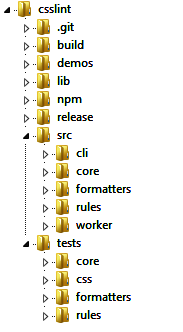
For CSS Lint, the build directory is never checked in; however, the release directory always contains the most recent stable release. The src directory has several subdirectories, grouping related functionality together. The tests directory mirrors the directory structure of src, so the tests for src/core/CSSLint.js are found in tests/core/CSSLint.js.
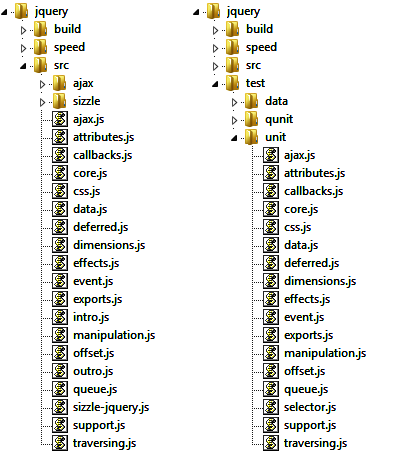
jQuery uses a form of this layout as well. The only difference is that jQuery puts all of its source files directly into the src directory rather than having subdirectories for each. Subdirectories are reserved for extensions and resources for the core features. The test directory then contains files with the same name as the source file it’s testing. So src/ajax.js is tested by test/ajax.js (see Figure 13-2).
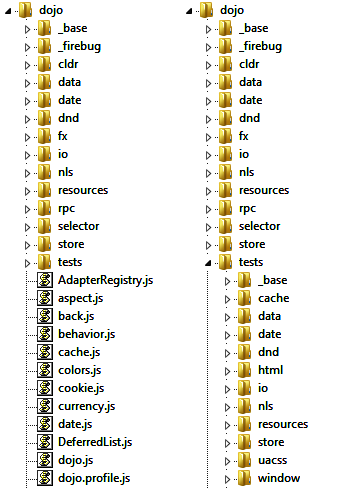
Dojo uses a form similar to jQuery. The big difference with Dojo is that there is no top-level src directory. Instead, the top level contains source files as well as subdirectories for extensions and resources for core features. There is a top-level tests directory that mirrors the layout of the top-level directory itself, so date.js is tested by tests/date.js (see Figure 13-3).
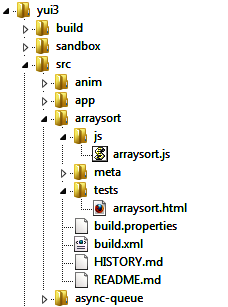
YUI 3 uses a modification of the original layout. Each subdirectory of src represents a single YUI module, and each module has at least four subdirectories:
Tests in YUI may be HTML files or JavaScript files, so exactly what’s contained in tests varies from module to module. Generally, there is at least one file named the same as the source file, so js/arraysort.js is tested by tests/arraysort.html or tests/arraysort.js. See Figure 13-4.
Exactly which style of layout you choose will be largely based on your development and build process. It should be optimized to limit build time and make it easy for developers to know where new files should go.