Table of Contents for
phpMyAdmin Starter
 phpMyAdmin Starter
Published by
Packt Publishing, 2012
phpMyAdmin Starter
Published by
Packt Publishing, 2012
- Cover
- Table of Contents
- phpMyAdmin Starter
- phpMyAdmin Starter
- www.PacktPub.com
- www.PacktLib.PacktPub.com
- Free Access for Packt account holders
- phpMyAdmin Starter
- 1. phpMyAdmin Starter
- Installation
- Quick start — Creating your first tables
- Top tasks you'll want to know about
- People and places you should get to know
- About the author
- About the Reviewer
- Index
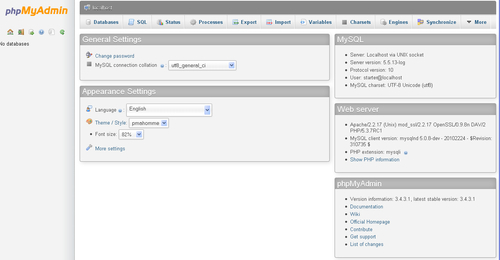
phpMyAdmin is a PHP application that provides a complete interface to manage MySQL databases over the Web. The following image depicts the product's home page; the main sections — MySQL and Web server — indicate that phpMyAdmin relies on a PHP-enabled web server to send commands to a MySQL server and receive data from the server:
As MySQL is the database of choice on the Web and PHP is a popular web scripting language, web host providers often provide phpMyAdmin for their users as the de facto mechanism to administrate their databases.
Users of phpMyAdmin can be broken down into these categories:
The authors of other web applications often advise administrators to use phpMyAdmin, either for initially populating the required database, or as a back entry in case they are locked down from their application.
phpMyAdmin offers panels to manage the structure of data: creating, editing, deleting various elements like databases, tables, columns, indexes, views, and foreign keys (relations). The software also enables you to deal with the data itself: inserting, editing, and deleting data; sorting; searching in tables or databases; importing and exporting to various file formats.
A system administrator can also use phpMyAdmin to acquire status information about the MySQL server; this information can be used to fine-tune the server. Moreover, maintenance of MySQL usernames and privileges is available.
Advanced functions include:
- Generating system documentation, including table relations in graphical form
- Transforming data (for example to show a thumbnail of an image stored as a BLOB (Binary Large Object); see http://dev.mysql.com/doc/refman/5.5/en/blob.html)
- Tracking changes on structure and data
- Keeping bookmarks of frequently-used queries
- Maintaining users' preferences about phpMyAdmin's settings
- Synchronizing databases between servers
Volunteers all over the world help the development team by providing translations for the interface in many languages.