Table of Contents for
Programming TypeScript
 Programming TypeScript
Published by
O'Reilly Media, Inc., 2019
Programming TypeScript
Published by
O'Reilly Media, Inc., 2019
Chapter 3. Functions
In the last chapter we covered the basics of TypeScript’s type system: primitive types, objects, lists, and enums, as well as the basics of TypeScript’s type inference and how type assignability works. You are now ready for TypeScript’s pièce de résistance (or raison d’être, if you’re a functional programmer): functions. A few of the topics we’ll cover in this chapter are:
-
The different ways to declare and invoke functions in TypeScript
-
Signature overloading
-
Polymorphism
-
Type constraints
Declaring & Invoking Functions
In JavaScript, functions are first class objects. That means you can use them exactly like you would any other object: assign them to variables, pass them to other functions, return them from functions, assign them to objects and prototypes, write properties to them, read those properties back, and so on. There is a lot you can do with functions in JavaScript, and TypeScript models all of those things with its rich type system.
Here’s what a function looks like in TypeScript:
functionadd(a:number,b:number){returna+b}
You will usually explicitly annotate function parameters (a and b in this example) — TSC will always infer types throughout the body of your function, but in most cases it won’t infer types for your parameters, except for a few special cases where it can infer types from context (more on that later). The return type is inferred, but you can explicitly annotate it too if you want:
functionadd(a:number,b:number):number{returna+b}
Note
Throughout this book I’ll explicitly annotate return types where it helps you, the reader, understand what the function does. Otherwise I’ll leave them off because TSC already infers them for us, and why would we want to repeat work?
In the last example we used named function syntax to declare our function, but JavaScript and TypeScript support at least five other ways to do it:
// Named functionfunctiongreet(name:string){return'hello '+name}// Function expressionletgreet2=function(name:string){return'hello '+name}// Arrow function expressionletgreet3=(name:string)=>{return'hello '+name}// Shorthand arrow function expressionletgreet4=(name:string)=>'hello '+name// Function constructorletgreet5=newFunction('name','return "hello " + name')
Besides function constructors (which you shouldn’t use unless you are being chased by bees because they are totally unsafe1), all of these syntaxes are supported by TypeScript in a typesafe way, and they all follow the same rules around mandatory typings for parameters and optional typings for return types.
Note
A quick refresher on terminology:
- Parameter
-
A piece of data that a function needs to run, declared as part of a function declaration.
- Argument
-
A piece of data that you passed to a function when invoking it.
When you invoke a function in TypeScript, you don’t need to provide any additional type information — just pass in some arguments, and TSC will go to work checking that your arguments are compatible with the types of your function’s parameters:
add(1,2)// 3greet('Crystal')// 'hello Crystal'
Of course, if you forgot an argument, or passed an argument of the wrong type, TSC will be quick to point it out:
add(1)// Error: Expected 2 arguments, but got 1.add(1,'a')// Argument of type '"a"' is not assignable// to parameter of type 'number'.
Optional & Default Parameters
You can use ? to mark parameters as optional. When declaring your function’s parameters, all required parameters have to come first, followed by optional parameters:
```ts
function log(message: string, userId?: string) {
  let time = new Date().toISOString()
  console.log(time, message, userId || 'Not signed in')
}

log('Page loaded')
log('User signed in', 'da763be')
```
You can even provide default values for optional parameters. Semantically it’s similar to making a parameter optional: from a user’s point of view they don’t have to pass it in, and from a function’s point of view default parameters have to come after required ones. For example, we can rewrite log from ??? as:
functionlog(message:string,userId='Not signed in'){lettime=newDate().toISOString()console.log(time,message,userId)}log('User clicked on a button','da763be')log('User signed out')
Notice how when we give userId a default value, we don’t have to type it anymore. TSC is smart enough to infer the parameter’s type from its default value, keeping our code terse and easy to read. You’ll find yourself using default parameters over optional parameters often.
Rest Parameters
If a function takes a list of arguments, you can of course simply pass the list in as an array:
```ts
function sum(numbers: number[]): number {
  return numbers.reduce((total, n) => total + n, 0)
}

sum([1, 2, 3]) // 6
```
Sometimes, you might opt for a variadic function API — one that takes a variable number of arguments — instead of a unary API that takes a single argument. Traditionally, that required using JavaScript’s magic arguments object. Because arguments is only array-like, and not a true array, we first have to convert it to an array before we can call the built-in .reduce on it:
functionsumVariadic():number{returnArray.from(arguments).reduce((total,n)=>total+n,0)}sumVariadic(1,2,3)// 6
There’s one big problem with using arguments: it’s totally unsafe! If you hover over total or n in your text editor, you’ll see output similar to the following:
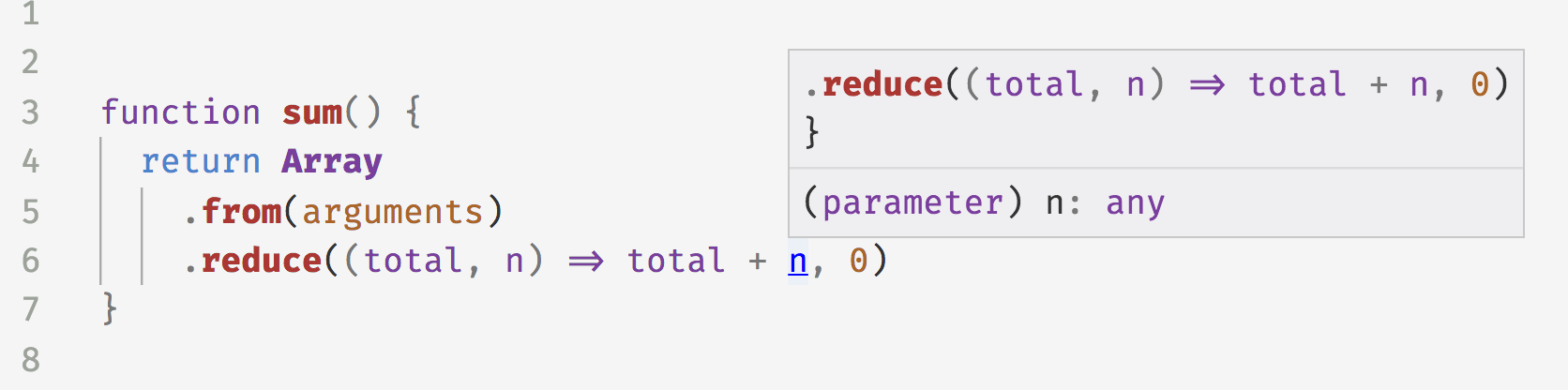
Figure 3-1. Using arguments is unsafe
Meaning, TSC inferred that both n and total are of type any, and silently let it pass. How can we safely type variadic functions?
Rest parameters to the rescue! Instead of resorting to the unsafe arguments magic variable, we can instead use rest parameters to safely make our sum function accept any number of arguments:
functionsumVariadicSafe(...numbers:number[]):number{returnnumbers.reduce((total,n)=>total+n,0)}sumVariadicSafe(1,2,3)// 6
That’s it! Notice that the only change between this variadic sum and our original unary sum function (???) is the extra ... in the parameter list — nothing else has to change, and it’s totally typesafe.
A function can have at most one rest parameter, and that parameter has to be the last one in the function’s parameter list. For example, take a look at TSC’s built-in definition for console.log in ??? (if you don’t know what an interface is, don’t worry - we’ll cover it in Chapter 7). console.log takes an optional message, and any number of additional arguments to log.
```ts
interface Console {
  log(message?: any, ...optionalParams: any[]): void
}
```
call, apply, and bind
In addition to invoking a function with parentheses (), JavaScript supports at least two other ways to call a function. Take add from earlier in the chapter:
add(10,20)add.call(null,10,20)add.apply(null,[10,20])
call binds a value to this within your function (in this example, we bind null to this), and applies the rest of its arguments as arguments to your function. apply does the same, but spreads its second argument over your function’s parameters.
bind is similar, in that it binds a this-argument and a list of parameters to your function. The difference is that bind does not invoke your function; instead, it returns a new function, that you can then invoke with (), .call, or .apply, passing more arguments in to be bound to the so-far unbound parameters if you want.
Note
To safely use call, apply, and bind in your code, be sure to enable the strictBindCallApply option in your tsconfig.json (it’s automatically enabled if you already enabled strict mode).
Generator Functions
Generator functions (generators for short) are a convenient way to, well, generate a bunch of values. They give the generator’s consumer fine control over the pace at which you produce those values. Because they’re lazy — that is, they only compute the next value when a consumer asks for it — they can do things that can be hard to do otherwise, like generate infinite lists.
They work like this:
function*createFibonacciGenerator() {leta=0letb=1while(true){yielda;[a,b]=[b,a+b]}}letfibonacciGenerator=createFibonacciGenerator()// IterableIterator<number>fibonacciGenerator.next()// {value: 0, done: false}fibonacciGenerator.next()// {value: 1, done: false}fibonacciGenerator.next()// {value: 1, done: false}fibonacciGenerator.next()// {value: 2, done: false}fibonacciGenerator.next()// {value: 3, done: false}fibonacciGenerator.next()// {value: 5, done: false}
We called createFibonacciGenerator, and that returned an IterableIterator. Every time we call next(), the iterator computes the next Fibonacci number and `yield`s it back to us. Notice how TSC is able to infer the type of our iterator from the type of the value we `yield`ed.
We won’t delve deeper into generators in this book — they’re a big topic, and since this book is about TypeScript, I don’t want to get sidetracked with JavaScript features. The short of it is they’re a super cool JavaScript language feature that TypeScript supports too. To learn more about generators, head to their page on MDN.
Iterators
Iterators are the flip side to generators: while generators are a way to produce a stream of values, iterators are a way to consume those values. The terminology can get pretty confusing, so let’s start with a couple of definitions:
- Iterable
-
Any object that contains a property called
Symbol.iteratorwhose value is a generator. - Iterator
-
Any object that defines a method called
next(), which returns an object with the propertiesvalueanddone.
When you create a generator (for example, by calling createFibonacciGenerator()), you get a value back that’s both an iterable and an iterator — an iterable iterator — because it defines both an Symbol.iterator property and a next() method.
You can manually define an iterator or an iterable by creating an object (or a class) that implements Symbol.iterator or next() respectively. For example, let’s define an iterator that returns the numbers 1 through 10:
letnumbers={*[Symbol.iterator](){for(letn=1;n<=10;n++){yieldn}}}
If you type that iterator into your IDE and hover over it, you’ll see TSC infers its type as:
letnumbers:{[Symbol.iterator]():IterableIterator<number>;}
In other words, numbers is an iterator, and calling the generator function numbers[Symbol.iterator] returns an iterable iterator.
Not only can you define your own iterators, but you can use JavaScript’s built-in iterators for common collection types — Array, Map, Set, String, and so on2 — to do things like:
// Iterate over an iterator with for-offor(letaofnumbers){// 1, 2, 3, etc.}// Spread an iteratorletallNumbers=[...numbers]// number[]// Destructure an iteratorlet[one,two,...rest]=numbers// [number, number, number[]]
Again, we won’t go more deeply into iterators in this book. Read more about iterators and async iterators on MDN.
Note
If you’re compiling your TypeScript to a JavaScript version older than ES2015, enable custom iterators with the downlevelIteration flag in your tsconfig.json.
Function Types
So far, we’ve learned to type functions’ parameters and return types. Now, let’s switch gears and talk about how we can express the full types of functions themselves.
Let’s revisit sum from the top of this chapter. As a reminder, sum looks like this:
functionsum(a:number,b:number):number{returna+b}
What is the type of sum? It’s a function that takes two numbers and returns a number. In TypeScript we can express its type as:
(a:number,b:number)=>number
This is TypeScript’s syntax for a function’s type, or type signature. You’ll notice it looks remarkably similar to an arrow function - this is intentional! When you pass functions around as arguments, or return them from other functions, this is the syntax you will use to type them.
Note
The parameter names a and b just serve as documentation, and don’t affect the assignability of a function with that type.
Function type signatures only contain type-level code — that is, types only, no values. That means function type signatures can express parameter types, this types (see Chapter 7), return types, rest types, and optional types, and they cannot express default values (since a default value is a value, not a type). And since they have no body for TSC to infer from, function types require explicit return type annotations.
Note
People use the terms type level and value level a lot when talking about programming with static types, and it helps to have a common vocabulary.
Throughout this book, when I use the term type-level code, what I’m referring to is code that consists exclusively of types and type operators. Contrast that with value-level code, which is everything else. Think of it this way: if it’s valid JavaScript code, then it’s value-level; if it’s valid TypeScript but not valid JavaScript, then it’s type-level.
To be extra sure that we’re on the same page, let’s look at an example — the type-level terms below are bold, and everything else is value-level:
function area(radius: number): number | null {
  if (radius < 0) {
    return null
  }
  return Math.PI * (radius ** 2)
}

let r: number = 3
let a = area(r)
if (a !== null) {
  console.info('result:', a)
}
The type-level terms here are type annotations and the union type operator |; everything else is a value-level term.
Let’s go through a few of the examples of functions we’ve seen so far in this chapter, and pull out their types into standalone type aliases:
// function greet(name: string)typeGreet=(name:string)=>string// function log(message: string, userId?: string)typeLog=(message:string,userId?:string)=>void// function sumVariadicSafe(...numbers: number[]): numbertypeSumVariadicSafe=(...numbers:number[])=>number
Getting the hang of it? The functions’ types look remarkably similar to their implementations. This is intentional, and is a language design choice that makes function types easier to reason about.
Let’s make the relationship between function types and their implementations more concrete: if I have a function type, how can I declare a function that implements that type? To do this, you can combine the function type with a function expression that implements that type. For example, let’s rewrite Log to use its shiny new signature:
typeLog=(message:string,userId?:string)=>voidletlog:Log=(message,userId='Not signed in')=>{lettime=newDate().toISOString()console.log(time,message,userId)}

We declare a function expression
log, and explicitly type it as typeLog.
We don’t need to annotate our parameters twice. Since
messageis already annotated as astringas part of the type definition forLog, we don’t need to type it again here. Instead, we let TypeScript infer it for us fromLog.
We add a default value for
userId, since we captureduserId’s type in our definition forLog, but we couldn’t capture the default value as part ofLogbecauseLogis a type and can’t contain values.
Notice that this is the first example we’ve looked at where we didn’t have to explicitly annotate our function parameter types. Because we already declared that log is of type Log, TSC is able to infer from context that message has to be of type string. This is a powerful feature of TypeScript’s type inference called contextal typing. We’ll revisit contextual typing more throughout this book.
Overloaded Function Types
The function type syntax we used in the last section — type Fn = (...) => ... — is a shorthand call signature. We can instead write it out more explicitly. Again taking the example of Log:
// Shorthand call signaturetypeLog=(message:string,userId?:string)=>void// Full call signaturetypeLog={(message:string,userId?:string):void}
The two are completely equivalent in every way, and differ only in syntax.
Would you ever want to use a full call signature over the shorthand? For simple cases like our Log function, you should prefer the shorthand; but for more complicated functions, there are a few good use cases for full signatures.
The first of these is overloading a function type. But first, what does it even mean to overload a function?
- Overloaded function
-
A function with multiple call signatures.
In most programming languages, once you declare a function that takes some set of parameters and yields some return type, you can call that function with exactly that set of parameters, and you will always get that same return type back. Not so in JavaScript. Because JavaScript is such a dynamic language, it’s a common pattern for there to be multiple ways to call a given function; not only that, but sometimes the output type will actually depend on the input type for an argument!
TypeScript models this dynamism — overloaded function declarations, and a function’s output type depending on its input type — with its static type system. We might take this language feature for granted, but it’s a really advanced feature for a type system to have!3
You can use overloaded function signatures to design really expressive APIs. For example, let’s design an API to book a vacation — we’ll call it Reserve. As usual, let’s start by sketching out its types (with a full type signature this time):
typeReserve={(from:Date,to:Date,destination:string):Reservation}
Let’s then stub out an implementation for Reserve:
letreserve:Reserve=(from,to,destination)=>{// ...}
So if a user wants to book a trip to Bali, she has to call our reserve API with a from date, a to date, and "Bali" as a destination.
We might re-purpose our API to support one way trips too:
typeReserve={(from:Date,to:Date,destination:string):Reservation(from:Date,destination:string):Reservation}
You’ll notice that when you try to run this code, TSC will give you an error at the point where you implement Reserve:
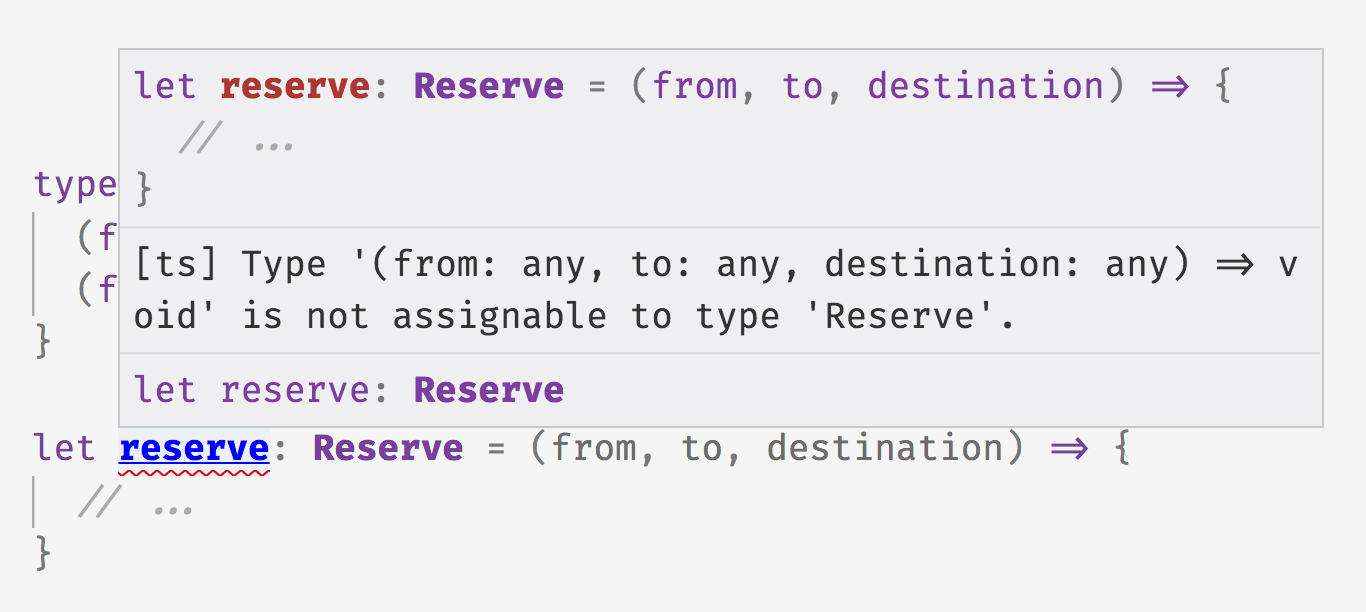
Figure 3-2. TypeError when missing a unified overload signature
This is because of the way call signature overloading works in TypeScript. If you declare a set of overload signatures for a function f, from a caller’s point of view f’s type is the union of those overload signatures. But from f’s implementation’s point of view, there needs to be a single, unified type that can actually be implemented; you need to manually declare this unified call signature when implementing f — it won’t be inferred for you. For our Reserve example, we can update our reserve function like this:
typeReserve={(from:Date,to:Date,destination:string):Reservation(from:Date,destination:string):Reservation}letreserve:Reserve=(from:Date,toOrDestination:Date|string,destination?:string)=>{// ...}
We declare two overloaded function signatures.
The implementation’s signature is the result of us manually combining the two overload signatures (in other words, we computed
Signature1 | Signature2by hand).
Note
In general, each overload signature (eg. Reserve) has to be assignable to the implementation’s signature (eg. reserve) when declaring an overloaded function type. That means you can be overly general when declaring the implementation’s signature, so long as all of your overloads are assignable to it. For example, this works just as well:
letreserve:Reserve=(from:any,toOrDestination:any,destination?:any)=>{// ...}
We try to keep our implementation’s signature as specific as possible to make it easier for us to implement the function. That means preferring Date over any, and a union of Date | string over any in our example.
Why does keeping types narrow make it easier to implement a function with a given signature? If you type a parameter as any and want to use it as a Date, you have to prove to TSC that it’s actually a date:
functiongetMonth(date:any):number|undefined{if(dateinstanceofDate){returndate.getMonth()}}
But if you typed the parameter as a Date upfront, you don’t need to do extra work in the implementation:
functiongetMonth(date:Date):number{returndate.getMonth()}
Since reserve might be called in either of two ways, when you implement reserve you have to prove to TSC that you checked how it was called:
letreserve:Reserve=(from:Date,toOrDestination:Date|string,destination?:string)=>{if(toOrDestinationinstanceofDate&&destination!=null){// Book a one-way trip}elseif(typeoftoOrDestination==='string'){// Book a round trip}}
Overloads come up naturally in browser DOM APIs. For example, the createElement DOM API is used to create a new HTML element. It takes a string corresponding to an HTML tag, and returns a new HTML element of that tag’s type. TypeScript comes with specific types for each HTML element. For example:
-
HTMLAnchorElementfor<a>elements -
HTMLCanvasElementfor<canvas>elements -
HTMLTableElementfor<table>elements
Overloaded call signatures are a natural way to model how createElement works. Think about how you might type createElement (try to answer this by yourself before you read on!).
The answer:
typeCreateElement={(tag:'a'):HTMLAnchorElement(tag:'canvas'):HTMLCanvasElement(tag:'table'):HTMLTableElement(tag:string):HTMLElement}letcreateElement:CreateElement=(tag:string):HTMLElement=>{// ...}
We overload on the parameter’s type, matching on it with string literal types.
We add a catch-all case: if the user passed a custom tag name, or a cutting-edge experimental tag name that hasn’t made its way into TypeScript’s typings yet, we return a generic
HTMLElement.To type the implementation’s parameter, we combine all the types that parameter might have in
createElement’s overload signatures, resulting in'a' | 'canvas' | 'table' | string. Since the three string literal types are all subtypes ofstring, the type reduces to juststring.
Note
In all of the examples in this section we overloaded function expressions. But what if we want to overload a named function?
As always, TypeScript has your back (like chiropractic), with an equivalent syntax for named functions. Let’s rewrite our createElement overloads:
functioncreateElement(tag:'a'):HTMLAnchorElementfunctioncreateElement(tag:'canvas'):HTMLCanvasElementfunctioncreateElement(tag:'table'):HTMLTableElementfunctioncreateElement(tag:string):HTMLElement{// ...}
Which syntax you use is up to you, and depends on what kind of function you’re overloading (function expression vs. named function).
Full type signatures aren’t limited to overloading how you call a function. You can also use them to model properties on functions. Since JavaScript functions are just callable objects, you can assign properties to them to do things like:
functionwarnUser(warning){if(warnUser.wasCalled){return}warnUser.wasCalled=truealert(warning)}warnUser.wasCalled=false
That is, we show the user a warning, and we don’t show a warning more than once. Let’s use TypeScript to type that (admittedly silly) example’s full signature:
typeWarnUser={(warning:string):voidwasCalled:boolean}
You can then rewrite warnUser as a function expression that implements that signature:
letwarnUser:WarnUser=(warning:string)=>{if(warnUser.wasCalled){return}warnUser.wasCalled=truealert(warning)}warnUser.wasCalled=false
Note that TSC is smart enough to realize that though we didn’t assign wasCalled to warnUser when we declared the warnUser function, we did assign wasCalled to it right after.
Polymorphism
So far in this book, we’ve been talking about the hows and whys of concrete types, and functions over concrete types. What’s a concrete type? It so happens that every type we’ve seen so far is concrete:
-
boolean -
string -
Date[] -
{a: number} | {b: string} -
(numbers: number[]) => number
Concrete types are useful when you know precisely what type you’re expecting, and want to verify that type was actually passed. But sometimes, you don’t know what type to expect beforehand, and you don’t want to restrict your function’s behavior to a specific type!
How about an example of what I mean: let’s implement filter. You use filter to iterate over an array and refine it; in JavaScript, it might look like this:
functionfilter(array,f){letresult=[]for(leti=0;i<array.length;i++){letitem=array[i]if(f(item)){result.push(item)}}returnresult}filter([1,2,3,4],_=>_<3)// [1, 2]
Let’s start by pulling out filter’s full type signature, adding some placeholder `unknown`s for the types:
typeFilter={(array:unknown,f:unknown)=>unknown[]}
Now, let’s try to fill in the types with, say, number:
type Filter = {
  (array: number[], f: (item: number) => boolean): number[]
}
Typing the array’s elements as number works well for this example, but filter is meant to be a generic function — you can filter arrays of numbers, strings, objects, other arrays, anything. The signature we wrote works for arrays of numbers, but it doesn’t work for arrays of other types of elements. Let’s try to use an overload to extend it to work on arrays of strings too:
type Filter = {
  (array: number[], f: (item: number) => boolean): number[]
  (array: string[], f: (item: string) => boolean): string[]
}
So far so good (though it might get messy to write out an overload for every type). What about arrays of objects?
type Filter = {
  (array: number[], f: (item: number) => boolean): number[]
  (array: string[], f: (item: string) => boolean): string[]
  (array: object[], f: (item: object) => boolean): object[]
}
This might look fine at first glance, but let’s try to use it to see where it breaks down. If you implement a filter function with that signature (that is, filter: Filter), and try to use it…
letnames=[{firstName:'beth'},{firstName:'caitlyn'},{firstName:'xin'}]letresult=filter(names,_=>_.firstName.startsWith('b'))// Error: Property 'firstName' does not exist on type 'object'.result[0].firstName// Error: Property 'firstName' does not exist on type 'object'
At this point, it should make sense why TSC is throwing this error. We told TSC that we might pass an array of numbers, strings, or objects to filter. We passed an array of objects, but remember that object doesn’t tell you anything about the shape of the object. So each time you try to access a property on an object in the array, TSC throws, because we didn’t tell it what specific shape the object has.
So, what to do?
If you come from a language that supports generic types, then by now you are rolling your eyes and shouting “THAT’S WHAT GENERICS ARE FOR!”. The good news is, you’re spot on (the bad news is, you just woke up the neighbors’ kid with your shouting).
In case you haven’t worked with generic types before, I’ll define them first, then give an example with our filter function.
- Generic Type Parameter (aka. Polymorphic Type Parameter)
-
A placeholder type used to enforce a type-level constraint in multiple places.
Going back to our filter example, here is what its type looks like when we rewrite it with a generic type parameter T:
type Filter = {
  <T>(array: T[], f: (item: T) => boolean): T[]
}
What we’ve done here is say: “This function filter uses a generic type parameter T; we don’t know what this type will be ahead of time, so TSC if you can infer what it is each time we call filter that would be swell”. TSC infers T from the type we pass in for array. Once TSC infers what T is for a given call to filter, it substitutes that type in for every T it sees. T is like a placeholder type, to be filled in by the compiler from context; it parameterizes Filter’s type, which is why we call it a Generic Type Parameter.
Note
Because it’s such a mouthful to say “generic type parameter” every time, people often shorten it to just “generic type”, or simply “generic”. We’ll use the terms interchangeably throughout this book.
The funny looking angle brackets <> are how you declare generic types parameters (think of them like the type keyword, but for generic types); where you place the angle brackets scopes the generics (there are just a few places you can put them), and TSC makes sure that within their scope, all instances of the generic type parameter are eventually bound to the same concrete type. Because of where the angle brackets are in this example, TSC will bind concrete types to our generic T when we call filter. And it will decide which concrete type to bind to T depending on what we called filter with. You can declare as many comma-separated generic type parameters as you want between the angle brackets.
Note
T is just a type name, and we could have used any other name instead: A, Zebra, or l33t. By convention, people use uppercase single-letter names starting with the letter T, and continuing to U, V, W, and so on depending on how many generics they need.
If you’re declaring a lot of generics in a row or are using them in a complicated way, consider deviating from this convention and using more descriptive names like Value or WidgetType instead.
Some people prefer to start at A instead of T. Different programming language communities prefer one or the other, depending on their heritage: functional language users prefer A, B, C and so on because of their likeness to the Greek letters α, β, and γ; object oriented languages tend to use T for “Type”. TypeScript, though it supports both programming styles, uses the latter convention.
Like a local variable inside a function gets re-bound every time you call that function, so each call to filter gets its own binding for T:
// (a) T is bound to numberfilter([1,2,3],_=>_>2)// (b) T is bound to stringfilter(['a','b'],_=>_!=='b')// (c) T is bound to {firstName: string}letnames=[{firstName:'beth'},{firstName:'caitlyn'},{firstName:'xin'}]filter(names,_=>_.firstName.startsWith('b'))
TSC infers these generic bindings from the types of the arguments you passed in. Let’s walk through how TSC binds T for (a) from the previous example:
-
From the type signature for
filter, TSC knows thatarrayis an array of elements of typeT. -
TSC notices that we passed in the array
[1, 2, 3], soTmust benumber. -
Wherever TSC sees
T, it substitutes in thenumbertype. So the parameterf: (item: T) => booleanbecomesf: (item: number) => boolean, and the return typeT[]becomesnumber[]. -
TSC checks that the types all satisfy assignability, and that the function we passed in as
fis assignable to its freshly inferred signature.
Generics are a powerful way to say what your function does in a more general way than what concrete types allow. The way to think about generics is as constraints. Just like annotating a function parameter as n: number constrains the value of the parameter n to the type number, so using a generic T constrains the type of whatever type you bind to T to be the same type everywhere that T shows up.
Generic types can also be used in type aliases, classes, and interfaces - will use them copiously throughout this book. I’ll introduce them in context as we cover more topics.
For each of TypeScript’s ways to declare a function signature, there’s a way to add a generic type to it:
typeFilter={<T>(array:T[],f:(item:T)=>boolean):T[]}letfilter:Filter=// ...typeFilter<T>={(array:T[],f:(item:T)=>boolean):T[]}letfilter:Filter=// ...typeFilter<T>=(array:T[],f:(item:T)=>boolean)=>T[]letfilter:Filter=// ...functionfilter<T>(array:T[],f:(item:T)=>boolean):T[]{// ...}
Full type signature, with
Tscoped to an individual overload signature.Full type signature, with
Tscoped to all of the overload signatures.Shorthand call signature.

Named function call signature.
Tip
Use generics whenever you can - they will help keep your code general, reusable, and terse.
As a second example, let’s write a map function. map is pretty similar to filter, but instead of removing items from an array, it transforms each item with a mapping function. Let’s start by sketching out the implementation:
functionmap(array:unknown[],f:(item:unknown)=>unknown):unknown[]{letresult=[]for(leti=0;i<array.length;i++){result[i]=f(array[i])}returnresult}
Before you go on, try to think through how you’d make map generic, replacing each unknown with some type. How many generics do you need? How do you declare your generics, and scope them to the map function? What should the types of array, f, and the return value be?
Ok, ready? If you didn’t try to do it yourself first, I encourage you to give it a shot. You can do it. Really!
Ok, no more nagging. Here’s the answer:
function map<T, U>(array: T[], f: (item: T) => U): U[] {
  let result = []
  for (let i = 0; i < array.length; i++) {
    result[i] = f(array[i])
  }
  return result
}
That is, we need exactly two generic types: T for the type of the array members going in, and U for the type of the array members going out. We pass in an array of T`s, and a mapping function that takes a `T and maps it to a U. Finally, we return an array of `U`s.
Generic Type Inference
In most cases, TSC does a great job of inferring generic types for you. When you call the map function we wrote earlier, TSC infers that T is string and U is boolean:
map(['a','b','c'],_=>_==='a')
You can, however, explicitly annotate your generics too. Explicit annotations for generic are all-or-nothing: either annotate every required generic type, or none of them:
map<string,boolean>(['a','b','c'],_=>_==='a')map<string>(// Error: Expected 2 type arguments, but got 1.['a','b','c'],_=>_==='a')map<string,number>(// Error: Type 'boolean' is not assignable to type 'number'.['a','b','c'],_=>_==='a')
TSC will check that each inferred generic type is assignable to its corresponding explicitly bound generic; if it’s not assignable, you’ll get an error:
// OK, because boolean is assignable to boolean | stringmap<string,boolean|string>(['a','b','c'],_=>_==='a')map<string,true>(// Error: Type 'boolean' is not assignable to type 'true'.['a','b','c'],_=>_==='a')
Since TSC infers concrete types for your generics from the arguments you pass into your generic function, sometimes you’ll hit a case like this:
letpromise=newPromise(resolve=>resolve(45))promise.then(result=>// {}result*4// Error: The left-hand side of an arithmetic operation must be of type 'any', 'number' or an enum type.)
What gives? Why did TSC infer result to be {}? Because we didn’t give TSC enough information to go off of — TSC only uses the types of a generic function’s arguments to infer a generic’s type — it defaulted T to {}!
To fix this, we can explicitly annotate Promise’s generic type parameter:
letpromise=newPromise<number>(resolve=>resolve(45))promise.then(result=>// numberresult*4)
Bounded Polymorphism
Sometimes, saying “this thing is of some generic type T and that thing has to have the same type T" just isn’t enough. Sometimes you also want to say “the generic type U should be at least T.” We call this putting a lower bound on U — technically, _f-bounded polymorphism — and it looks like this:
typeTreeNode={value:string}functionmapNode<TextendsTreeNode>(node:T,f:(value:string)=>string):T{returnObject.assign({},node,{value:f(node.value)})}
Why might we want to do this? Let’s say we’re implementing a binary tree, and have three types of nodes:
-
Regular `TreeNode`s
-
`LeafNode`s, which are `TreeNode`s that don’t have children
-
`InnerNode`s, which are `TreeNode`s that do have children
Let’s declare some types for LeafNode and InnerNode:
typeLeafNode=TreeNode&{isLeaf:true}typeInnerNode=TreeNode&{children:TreeNode[]}
We want to write a mapNode function that takes a TreeNode and maps over its value, returning a new TreeNode. Let’s declare a few nodes, and map them:
leta:TreeNode={value:'a'}letb:LeafNode={value:'b',isLeaf:true}letc:InnerNode={value:'c',children:[b]}letaMapped=mapNode(a,_=>_.toUpperCase())letbMapped=mapNode(b,_=>_.toUpperCase())letcMapped=mapNode(c,_=>_.toUpperCase())
What are the types of aMapped, bMapped, and cMapped? Because we declared that T extends TreeNode, the types are TreeNode, LeafNode, and InnerNode respectively.
Why did we have to declare T that way?
-
If we had typed
Tas justT(leaving offextends TreeNode), thenmapNodewould have thrown a compile time error, because you can’t safely readnode.valueon an unconstrainednodeof typeT(what if a user passes in a number?). -
If we had left off the
Tentirely and declaredmapNodeas(node: TreeNode, f: (value: string) => string) => TreeNode, then we would have lost information after mapping a node:aMapped,bMapped, andcMappedwould all just be `TreeNode`s.
By saying that T extends TreeNode, we get to preserve the input node’s specific type (TreeNode, LeafNode, or InnerNode), even after mapping it.
Using Bounded Polymorphism to Model Arity
A second place where you’ll find yourself using bounded polymorphism is to model some kinds of variadic functions (functions that take multiple arguments). For example, let’s implement our own version of JavaScript’s built-in apply function. We’ll define and use it like this, using unknown for the types we’ll fill in later:
functionapply(f:(...args:unknown[])=>unknown,...args:unknown[]):unknown{returnf(...args)}functionfill(length:number,value:string):string[]{returnArray.from({length},()=>value)}apply(fill,10,'a')// An array of 10 'a's
Now let’s fill in the `unknown`s. The constraints we want to express are:
-
fshould be a function that takes some set of argumentsT, and returns some typeR. We don’t know how many arguments it’ll have ahead of time. -
applytakesf, along with the same set of argumentsTthatfitself takes. Again, we don’t know exactly how many arguments to expect ahead of time. -
applyreturns the same typeRthatfreturns.
It looks like we’ll need two type parameters: T, which is an array of arguments, an R, which is an arbitrary return value. Let’s fill in the types:
function apply<T extends unknown[], R>(
  f: (...args: T) => R,
  ...args: T
): R {
  return f(...args)
}
Now when we call apply, TSC will know exactly what the return type is, and it will complain when we pass the wrong number of arguments:
leta=apply(fill,10,'a')// string[]letb=apply(fill,10)// Error: Expected 3 arguments, but got 2.letb=apply(fill,10,'a','z')// Error: Expected 3 arguments, but got 4.
Generic Type Defaults
Just like you can give function parameters default values, so you can give generic type parameters default types. For example, let’s look at the definition for document.querySelector, which takes a CSS selector and queries the DOM for HTML elements matching that selector:
querySelector<E=Element>(selector:string):E|null
Because we don’t know what type of element E will be ahead of time, TSC defaults it to a general-purpose Element type rather than a specific subtype like HTMLInputElement or HTMLButtonElement. So by default, when you query for an element you’ll get back that general Element type:
querySelector('form > button')// Element | null
But if you happen to know what subtype of Element you expect beforehand, you should explicitly bind it yourself for stronger safety:
querySelector<HTMLButtonElement>('form > button')// HTMLButtonElement | null
Of course, because you defaulted E to Element, that also means E has to be at least an Element (that is, TSC infers a lower bound of Element for E). It’s equivalent to writing:
querySelector<EextendsElement=Element>(selector:string):E|null
Type Driven Development
With a powerful type system comes great power. When you write in TypeScript, you will often find yourself “leading with the types”. This, of course, refers to Type Driven Development.
- Type Driven Development
-
A style of programming where you sketch out type signatures first, and fill in values later.
The point of static type systems is to constrain the types of values an expression can hold. The more expressive the type system, the more it tells you about the value contained in that expression. When you apply an expressive type system to functions, the function’s type signature might end up telling you most of what you need to know about that function.
Let’s look at the type signature for the map function from earlier in this chapter:
functionmap<T,U>(array:T[],f:(item:T)=>U):U[]{// ...}
Just looking at that signature — even if you’ve never seen map before — you should have some intuition for what map does: it takes an array of T and a function that maps from a T to a U, and returns an array of U. Notice that you didn’t have to see the function’s implementation to know that!4
When you write a TypeScript program, start by defining your functions’ type signatures — in other words, lead with the types — filling in the implementations later. By sketching out your program out at the type-level first, you make sure that everything makes sense at a high level before you get down to your implementations.
Exercises
-
Which parts of a function’s type signature does TSC infer: the parameters, the return type, or both? What about generic type parameters?
-
Is
argumentstypesafe? If not, what can you use instead? -
I want the ability to book a vacation that starts immediately. Update the overloaded
reservefunction from earlier in this chapter with a third call signature that takes just a destination, without an explicit start date. -
Implement a small typesafe testing library,
is. When you’re done, I should be able to use it like this:
// Compare a string and a stringis('string','otherstring')// false// Compare a boolean and a booleanis(true,false)// false// Compare a number and a numberis(42,42)// true// Comparing two different types should give a compile-time erroris(10,'foo')// TypeError: 10 and 'foo' aren't the same type// [Hard] I should be able to pass any number of argumentsis([1],[1,2],[1,2,3])// false
1 Why are they unsafe you might ask? If you enter that last example into your TypeScript REPL, you’ll see that its type is Function. What is this Function type? It’s an object that is callable (you know, by putting () after it) and has all the prototype methods from Function.prototype. But its parameters and return type are untyped, so you can call the function with any arguments you want, and TypeScript will stand idly by, watching you do something that by all means should be illegal in whatever town you live in.
2 Notably, Object is not an iterator.
3 The ability for a type system to express how a function’s output type depends on its input type is called dependent typing.
4 There are a few programming languages (like the Haskell-like language Idris) that have built-in theorem solvers with the ability to automatically implement function bodies for you from the signatures you write!