Table of Contents for
Programming TypeScript
 Programming TypeScript
Published by
O'Reilly Media, Inc., 2019
Programming TypeScript
Published by
O'Reilly Media, Inc., 2019
Chapter 2. All About Types
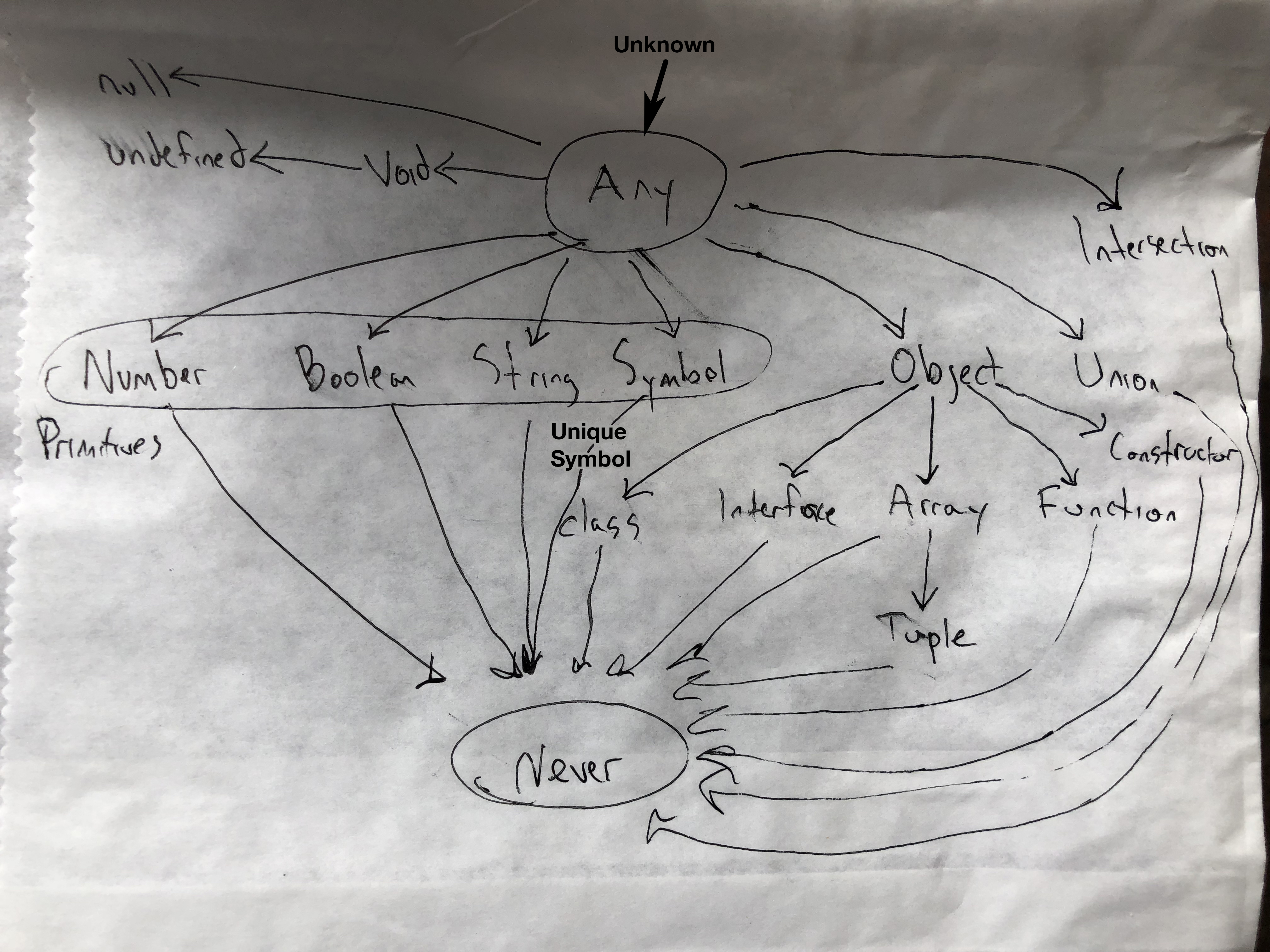
Figure 2-1. TypeScript’s type hierarchy
In the last chapter I introduced the idea of type systems, but we never really defined what the type in type system really means.
- Type
-
A set of values, and the things you can do with them.
If that sounds confusing, let me give a few familiar examples:
-
The
booleantype is the set of all booleans (there are just two:trueandfalse) and the operations you can perform on them like||,&&, and!. -
The
numbertype is the set of all numbers, and the operations you can perform on them like+,-,*,/,%,||,&&,?, including the methods you can call on them like.toFixed(),.toPrecision(),.toString(), and so on. -
The
stringtype is the set of all strings, and the operations you can perform on them like+,||, and&&, including the methods you can call on them like.concat()and.toUpperCase().
When you see that something is of type T, not only do you know that it’s a T, but you also know exactly what you can do with that T. If you do anything else, you know for sure that what you’re about to do is invalid. Remember, the whole point is to use the typechecker to stop you from doing invalid things. And the way the typechecker knows what’s valid and what’s not is by looking at the types you’re using and how you’re using them.
Talking about types
When programmers talk about types, they share a precise, common vocabulary to describe what they mean. We’re going to use this vocabulary throughout this book.
Say you have a function that takes some value and returns that value multiplied by itself:
functionsquareOf(n){returnn*n}squareOf(2)// 4squareOf('z')// NaN
Clearly, this function will only work for numbers - if you pass anything besides a number to squareOf, the result will be invalid. So what we do is we explicitly annotate the parameter’s type:
function squareOf(n: number) {
  return n * n
}
squareOf(2)     // 4
squareOf('z')   // Error: Argument of type '"z"' is not assignable to parameter
                // of type 'number'.
Now if we call squareOf with anything but a number, TSC will know to complain right away. This is a trivial example (we’ll talk a lot more about functions in the next chapter), but it’s enough to introduce a couple of concepts that are key to talking about types in TypeScript. We can say the following things about the last code example:
-
squareOf’s parameternis constrained tonumber. -
The type of the value
2is assignable to (equivalently: compatible with)number.
Without a type annotation, squareOf is unconstrained in its parameter, and you can pass any type of argument to it. Once we constrain it, TSC goes to work for us verifying that every place we call our function, we call it with a compatible argument. In this example the type of 2 is number, which is assignable to squareOf’s annotation number, so TSC accepts our code; but 'z' is a string, which is not assignable to number, and TSC complains.
You can also think of it in terms of bounds: we told TSC that n’s upper bound is number, so any value we pass to squareOf has to be at most a number. If it’s anything more than a number (like, if it’s a value that might be a number or might be a string), then it’s not assignable to n.
I’ll define assignability, bounds, and constraints more formally later in the chapter. For now, all you need to know is this is the language that we use to talk about whether or not a type can be used in a place where we require a certain type.
The ABCs of Types
Let’s take a tour of the types TypeScript supports, what values they contain, and what you can do with them.
Any
any is the Godfather of types. It does anything for a price, but you don’t want to ask any for a favor unless you’re completely out of options. In TypeScript everything needs to have a type at compile time, and any is the default type where you (the programmer) or TSC (the typechecker) can’t figure out what type something is. It’s a last resort type, and you should avoid it when possible.
Why should you avoid it? Remember what a type is? (It’s a set of values and the things you can do with them). any is the set of all values, and you can do anything with any. That means that if you have a value of type any you can add to it, multiply by it, call .pizza() on it - anything.
any makes your value behave like it would in regular JavaScript, and totally prevents the typechecker from working its magic. When you allow any into your code you’re flying blind. Avoid any like fire, and use it only as a very, very last resort.
On the rare occasion that you do need to use it, you do it like this:
leta:any=666// anyletb:any=['danger']// anyletc=a+b// any
Notice how the third type should throw an exception (why are you trying to add a number and an array?), but doesn’t because you told TSC that you’re adding two any`s. If you want to use `any, you have to be explicit about it: when TSC infers that some value is of type any (for example, if you forgot to annotate a function’s paramater, or if you imported an untyped JavaScript module), it will throw a compile-time exception and toss a red squiggly at you in your editor. By explicitly annotating a and b with the any type (: any), we avoided the exception - it’s your way of telling TSC that you know what you’re doing.
Unknown
If any is the Godfather, then unknown is Keanu Reeves as undercover FBI agent Johnny Utah in Pointbreak: laid back, fits right in with the bad guys, but deep down it has a respect for the law and is on the side of the good guys. For the few cases where you have a value whose type you really don’t know ahead of time, don’t use any, and instead reach for unknown. Like any, it represents any type, but TSC won’t let you use an unknown type until you refine it by checking what it is.
What operations does unknown support? You can compare unknown values (with ==, ===, ||, &&, and ?), negate them (with !), and refine them (like you can any other type) with JavaScript’s typeof and instanceof operators. Use unknown like this:
leta:unknown=30// unknownletb=a===123// booleanletc=b+10// Error: Object is of type 'unknown'.if(typeofa==='number'){letd=a+10// number}
This example should give you a rough idea of how to use unknown:
-
TSC will never infer something as
unknown1 — you have to explicitly annotate it (a) -
You can compare values to values that are of type
unknown(b) -
But, you can’t do things that assume an
unknownvalue is of a specific type (c); you have to prove to TSC that the value really is of that type first (d).
Boolean
The boolean type contains 2 values: true and false. You can compare them (with ==, ===, ||, &&, and ?), negate them (with !), and not much else. Use boolean like this:
leta=true// booleanletb=false// booleanconstc=true// trueletd:boolean=true// booleanlete:true=true// trueletf:true=false// Error: Type 'false' is not assignable to type 'true'.
This example shows a few ways to tell TSC that something is a boolean:
-
You can let TSC infer that your value is a
boolean(aandb) -
You can let TSC infer that your value is a specific
boolean(c) -
You can tell TSC explicitly that your value is a
boolean(d) -
You can tell TSC explicitly that your value is a specific
boolean(eandf)
In general, you will use the 1st or 2nd way in your programs. Very rarely, you’ll use the 4th way - only when it buys you extra type safety (I’ll show you examples of that throughout this book). You will almost never use the 3rd way.
The 2nd and 4th cases are particularly interesting because while they do something intuitive, they’re supported by surprisingly few programming languages and so might be new to you. What I did in that example was say “Hey TypeScript! See this variable e here? e isn’t just any old boolean - it’s the specific boolean true “. By using a value as a type, I essentially limited the possible values for e and f from all booleans, to one specific boolean each. This feature is called type literals.
- Type Literal
-
A type that represents a single value and nothing else.
We will revisit type literals throughout this book. They are a powerful language feature that lets you squeeze out extra safety all over the place. They are something that makes TypeScript unique in the language world, and is something you should use to lord it over your Java friends.
In the 4th case I explicitly annotated my variables with type literals, and in the 2nd case TSC inferred a literal type for me because I used const instead of let or var. Because TSC knows that once a primitive is assigned with const its value will never change, it infers the most narrow type it can for that variable. That’s why in the 2nd case TSC inferred c’s type as true instead of as boolean.
Note
Throughout this book we’ll mostly prefer let over const because it’s less keystrokes, and it reads easier. Which one you use in your own code is up to you. If you do want to enforce const everywhere for your codebase, just flip on the prefer-const TSLint rule.
Number
number is the set of all numbers: integers, floats, positives, negatives, Infinity, NaN, and so on. Numbers can do, well, numbery things, like addition +, subtraction -, modulo %, and comparison <. Let’s look at a few examples:
leta=1234// numberletb=Infinity*0.10// numberconstc=5678// 5678letd=a<b// booleanlete:number=100// numberletf:26.218=26.218// 26.218letg:26.218=10// Error: Type '10' is not assignable to type '26.218'.
Like the last boolean example, there are 4 ways to type something as a number:
-
You can let TSC infer that your value is a
number(aandb) -
You can use
constto tell TSC to infer that your value is a specificnumber(c) -
You can tell TSC explicitly that your value is a
number(e) -
You can tell TSC explicitly that your value is a specific
number(fandg)
And just like the boolean example, you’re usually going to let TSC infer the type for you (the 1st way), and once in a while you’ll do some clever programming that requires your number’s type to be restricted to a specific value (the 2nd or 4th way). There is no good reason to explicitly type something as a number (the 3rd way).
Note
When working with long numbers, use numeric separators to make those numbers easier to read. You can use numeric separators in both type and value positions:
constoneMillion=1_000_000// Equivalent to 1000000consttwoMillion:2_000_000=2_000_000
String
Like number, string is the set of all strings and the things you can do with them like concatenate (+), slice (.slice()), and so on. Let’s see some examples:
leta='hello'// stringletb='billy'// stringconstc='!'// '!'letd=a+' '+b// stringlete:string='zoom'// stringletf:'john'='john'// 'john'letg:'john'='zoe'// Error: Type '"zoe"' is not assignable to type '"john"'.
Like boolean and number, there are four ways to declare string types, and you should let TSC infer the type for you whenever you can.
Symbol
symbol, a newcomer to JavaScript, arrived with the latest major JavaScript revision (ES2015). Symbols are used as an alternative to string object keys in places where you want to be extra sure that people are using the right well-known key, and didn’t accidentally set the key — think setting a default iterator for your object (Symbol.iterator), or overriding at runtime whether or not your object is an instance of something (Symbol.hasInstance). Symbols have the type symbol, and there isn’t all that much you can do with them:
leta=Symbol('a')// symbolletb:symbol=Symbol('b')// symbolletc=a===b// booleanletd=a+'x'// Error: The '+' operator cannot be applied to type 'symbol'.
The way Symbol('abc') works in JavaScript is it creates a new symbol with the given name; that symbol is unique, and will not be equal (when compared with == or ===) to any other symbol (even if you create a second symbol Symbol('abc') with the same exact name!). Just like the value 27 is inferred to be a number when declared with let but as the specific number 27 when you declare it with const, so are symbols inferred as symbol but can be explicitly typed as unique symbol:
conste=Symbol('e')// typeof econstf:uniquesymbol=Symbol('f')// typeof fletg=e===e// booleanleth=e===f// Error: This condition will always return 'false' since the// types 'unique symbol' and 'unique symbol' have no overlap.
-
When you declare a new Symbol and assign it to a
constvariable (not aletorvarvariable), TSC will infer its type asunique symbol. It will show up astypeof yourVariableName, and notunqiue symbolin your IDE. -
You can explicitly annotate a
constvariable’s type asunique symbol. -
A
unique symbolis always equal to itself. -
TSC knows at compile time that a
unique symbolis never equal to any other symbol.
Object
TypeScript’s object types specify the shapes of objects. Notably, they can’t tell the difference between simple objects (like the kind you make with {}) and more complicated ones (the kind you create with new Blah). This is by design: JavaScript is generally structurally typed, so TypeScript favors that style of programming over a nominally typed style.
- Structural typing
-
A style of programming where you just care that an object has certain properties, and not what its name is. Also called duck typing (or, not judging a book by its cover).
There are a few ways to use types to describe objects in TypeScript. Let’s start with the first way: object.
leta:object={b:'x'}
What happens when you access b?
a.b// Error: Property 'b' does not exist on type 'object'.
Wait, that’s not very useful! What’s the point of typing something as an object if you can’t do anything with it?
Why, that’s a great point, aspiring TypeScripter! In fact object is a little more narrow than any, but not by much. It doesn’t tell you a lot about the value it describes, just that the value is a JavaScript object (and that it’s not null).
What if we leave off the explicit annotation, and let TypeScript do its thing?
leta={b:'x'}// {b: string}a.b// stringletb:{c:number}={c:12}// {c: number}letc={d:{e:'f'}}// {d: {e: string}}
Voila! You’ve just discovered the second way to type an object: object literal syntax (not to be confused with type literals). Just describe the shape with {curlies}, or let TSC infer it for you. Literal syntax literally says “here is a thing that has this shape”. The thing might be an object literal, or it might be a class:
letc:{firstName:stringlastName:string}={firstName:'john',lastName:'barrowman'}classPerson{constructor(publicfirstName:string,// public is shorthand for this.firstName = firstNamepubliclastName:string){}}c=newPerson('matt','smith')// ok
{firstName: string, lastName: string} describes the shape of an object, and both the object literal and the class instance from the last example satisfy that shape.
Let’s explore what happens when I add extra properties, or leave out required ones:
leta:{b:number}a={}// Error: Type '{}' is not assignable to type '{b: number}'.// Property 'b' is missing in type '{}'.a={b:1,c:2// Error: Type '{b: number; c: number}' is not assignable to type}// '{b: number}'. Object literal may only specify known// properties, and 'c' does not exist in type '{b: number}'.
By default, TSC is pretty strict about object properties - if I said the object should have a property called b that’s a number, TSC expects b and only b. If it’s missing, or if there are extra properties, TSC is all like “What gives! You said you’d be there at my sister’s birthday but you went out with the boys instead? It’s like you don’t even care about how I feel! We’re over Boris!” (sorry… missing property errors hit close to home sometimes).
Can you tell TSC that something is optional, or that there might be more properties than you planned for? You bet:
leta:{b:numberc?:string[key:number]:boolean}a={b:1}a={b:1,c:'d'}a={b:1,10:true}a={b:1,10:true,20:false}a={10:true}// Error: Property 'b' is missing in type '{10: true}'.a={b:1,33:'red'}// Error: Type '"red"' is not assignable to type 'boolean'.
a is an object that:
-
Has a property
bthat’s a number -
Might have a property
cthat’s a string -
Might have more numeric properties that are booleans
As you probably figured out, the ? after a key name makes that property optional, meaning it may or may not be defined on the given shape.
Optional (?) isn’t the only modifier you can use: you can also mark fields as read-only with the special readonly modifier:
letuser:{readonlyfirstName:string}={firstName:'abby'}user.firstName// stringuser.firstName='abbey with an e'// Error: Cannot assign to 'firstName' because it// is a constant or a read-only property.
Curly literal notation has one special case: empty curlies ({}). TSC interprets empty curlies as “any shape at all”. Empty curlies accept any object shape, which makes them fundamentally unsafe. The only types they don’t accept are null and undefined. Be careful to avoid these, or use a TSLint rule to disallow them.
It’s worth mentioning the third way of typing something as an object: Object. This way is pretty much the same thing as any, except like {}, it doesn’t allow null and undefined. Don’t use it.
To summarize, there are four ways to declare objects in TypeScript:
-
Object literal notation (like
{a: string}) -
Empty object literal notaton (
{}) -
The
objecttype -
The
Objecttype
In your TypeScript programs, you should almost always stick to 1 and 3. Be careful to avoid 2 and 4 - use a linter to warn about them, complain about them in code reviews, print posters - use your team’s preferred tool to keep them far away from your codebase.
Here’s a handy reference for 2-4 in the previous list:
| Value | object |
{} |
Object |
|---|---|---|---|
|
Yes |
Yes |
Yes |
|
Yes |
Yes |
Yes |
|
Yes |
Yes |
Yes |
|
Yes |
Yes |
Yes |
|
No |
Yes |
Yes |
|
No |
Yes |
Yes |
|
No |
Yes |
Yes |
|
No |
No |
No |
|
No |
No |
No |
Intermission: Type Aliases, Union & Intersection Types
You are quickly becoming a grizzled TypeScript programmer. You have seen several types and how they work, and are familiar with the concepts of type systems, types, and safety. It’s time we go deeper.
As you know, if you have a value, you can perform certain operations on it depending on what its type permits. For example you can use + to add two numbers, or use .toUpperCase() to upper case a string.
And if you have a type, you can perform some operations on it too. I’m going to introduce a few type-level operations - there are more to come later in the book, but these ones are so common that I want to introduce them as early as possible.
Type Aliases
Just like you can use variable declarations (let, const, and var) to declare a variable that aliases a value (or reference), so you can declare a type alias that points to a type. It looks like this:
typeAge=numbertypePerson={firstName:stringage:Age}
Age is but a number. It can also help make the definition of the Person shape easier to understand. Aliases are never inferred by TypeScript, so you have to declare them explicitly:
letage:Age=55letdriver:Person={firstName:'James May'age:age}
Because Age is just an alias for number, that means it’s also assignable to number, so we can rewrite this as:
letage=55letdriver:Person={firstName:'James May'age:age}
In general, wherever you see a type alias used, you can substitute in the type it aliases without changing the meaning of your program.
Like JavaScript variable declarations (let, const, and var), you can’t declare a type twice:
typeColor='red'typeColor='blue'// Error: Duplicate identifier 'Color'.
And like let and const, type aliases are block-scoped. Every block and every function has its own scope, and inner type alias declarations “shadow” outer ones:
typeColor='red'letx=Math.random()<.5if(x){typeColor='blue'// This shadows the Color declared above.letb:Color='blue'}else{letc:Color='red'}
Type aliases are useful for DRYing up repeated complex types, and for making it clear what a variable is used for (some people prefer descriptive type names to descriptive variable names!). Use the same judgement as when deciding whether or not to pull a value out into its own variable.
Union & Intersection Types
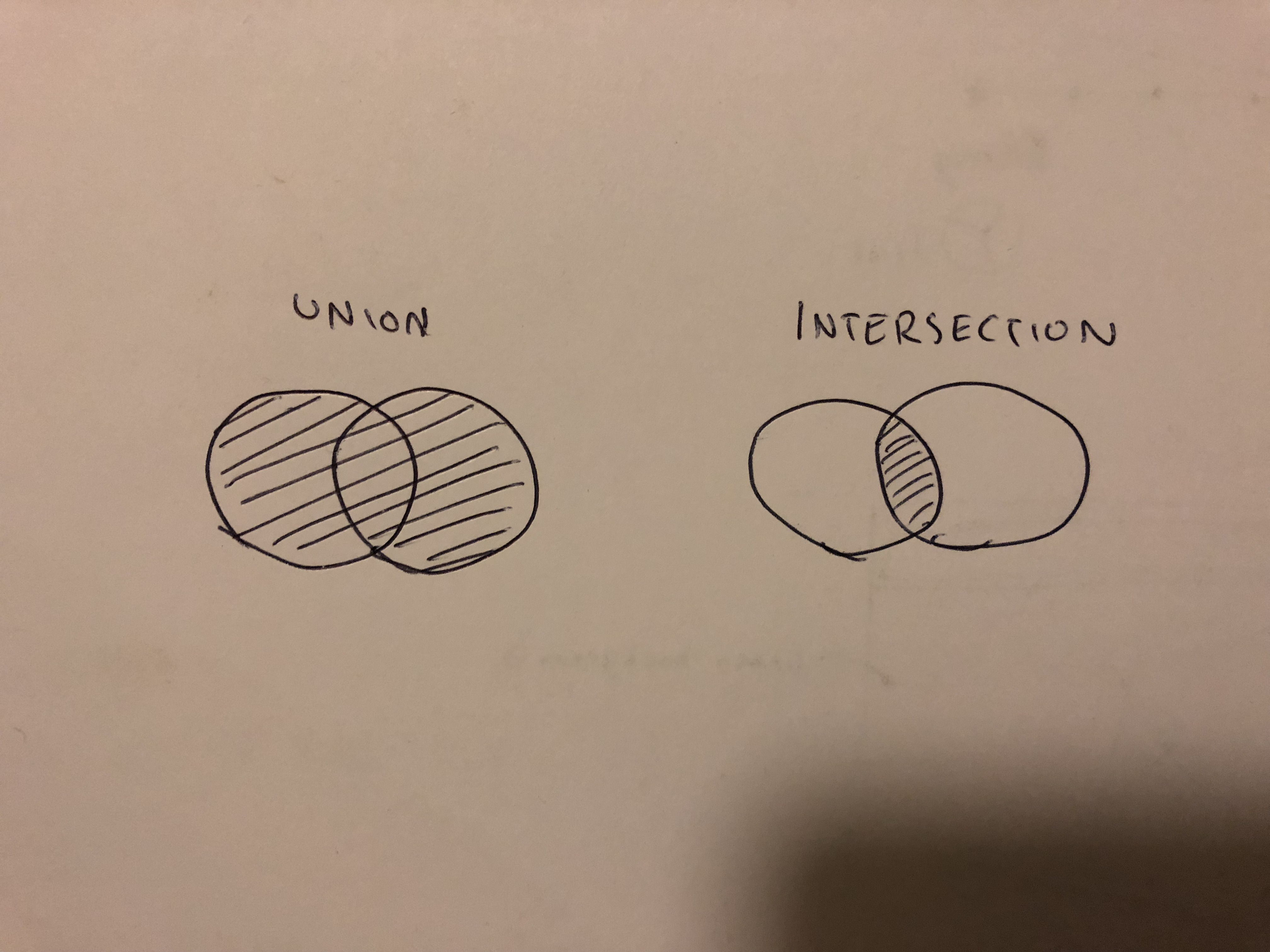
Figure 2-2. Union (|) and intersection (&)
If you have two things A and B, the union of those things is their sum (A or B or both), and the intersection is what they have in common (A and B). The easiest way to think about this is with sets: in Figure 2-2 we represents sets as circles. On the left is the union, or sum of the two sets; on the right is their intersection, or product.
TypeScript gives us special type operators to describe unions and intersections of types: | for union, and & for intersection. Since types are kinds of sets, we can think of them in the same way:
type Cat = {name: string, purrs: boolean}
type Dog = {name: string, barks: boolean, wags: boolean}
type CatOrDogOrBoth = Cat | Dog
type CatAndDog = Cat & Dog
If something is a CatOrDogOrBoth, what do you know about it? You know that it has a name property that’s a string, and not much else.
On the other hand, what do you know about CatAndDog? Not only does your canine-feline hybrid super-pet have a name, but she can purr, bark, and wag.
Unions come up naturally a lot more often than intersections do. Take this function for example:
function(isTrue: boolean) {
  if (isTrue) {
    return 'true'
  }
  return null
}
What is the type of the value this function returns? Well, it might be a string, or it might be null. We can express its return type as:
typeReturns=string|null
How about this one:
function(a: string, b: number) {
  return a || b
}
If a is truthy then the return type is string, otherwise it’s a number: in other words, string | number.
The last place where unions come up naturally is in arrays (specifically the heterogeneous kind), which we’ll talk about next.
Array
Like in JavaScript, TypeScript arrays are special kinds of objects that support things like concatenation, pushing, searching, and slicing. It’s example time:
leta=[1,2,3]// number[]letb=['a','b']// string[]letc:string[]=['a']// string[]letd=[1,'a']// (string | number)[]conste=[2,'b']// (string | number)[]letf=['red']f.push('blue')f.push(true)// Error: Argument of type 'true' is not assignable// to parameter of type 'string'.letg=[]// any[]g.push(1)// number[]g.push('red')// (string | number)[]leth:number[]=[]// number[]h.push(1)// number[]h.push('red')// Error: Argument of type '"red"' is not assignable// to parameter of type 'number'.
Note
TypeScript supports two syntaxes for arrays: T[] and Array<T>. They are identical both in meaning and in performance. This book uses T[] syntax for its terseness, but you should pick whichever style you like for your own code.
Notice that everything but (c) and (h) is implicitly typed.
You’ll also notice that TypeScript has rules about what you can and can’t put in an array.
The general rule of thumb is to keep arrays homogeneous. Meaning, don’t mix apples and oranges and numbers in a single array - try to design your programs so that every element of your array has the same type. The reason is that otherwise, you’re going to have to do more work to prove to TSC that what you’re doing is safe.
To see why things are easier when your arrays are homogeneous, take a look at example (f). I initialized an array with the string 'red' (at the point when I declared the array it contained just strings, so TSC inferred that it must be an array of strings). I then pushed 'blue' onto it; 'blue' is a string, so TSC let it pass. Then I tried to push true onto the array, but that failed! Why? Because (f) is an array of strings, and true is not a string.
On the other hand, when I initialized (d) I gave it a number and a string, so TSC inferred that it must be an array of type number | string. Because each element might be either a number or a string, you have to check before using it. For example, say you want to map over that array, converting every letter to uppercase and tripling every number:
d.map(_=>{if(typeof_==='number'){return_*3}return_.toUpperCase()})
You have to reflect over the type for each item with typeof, checking if it’s a number or a string before you can do anything with it.
You might be surprised that TSC inferred both (d) and (e) to be arrays of number | string. After all, we learned that when declaring number`s or `string`s, your choice of `const or let affects how TSC infers your types. However, this difference between inference for const vs. let stops there, at primitive values (booleans, strings, numbers, symbols, null, and undefined). For more complex types like arrays and objects, your choice of const or not affects inference naught.
(g) is the special case: when you initialize an empty array, TSC doesn’t know what type the array’s elements should be, so it gives you the benefit of the doubt and makes them any (if you began to sweat as you read that, good; that’s how I know you’ve been listening!). As you manipulate the array and add elements to it, TSC starts to piece together your array’s type. However, your array is never really typesafe: in the scope where you declared your array, you can always add more elements of any type to it, and TSC won’t complain. For this reason, avoid declaring untyped empty arrays like you avoid El Chupacabra (el comedor de cabras).
Tuple
Tuples are subtypes of array, and are a special way to type arrays that have fixed lengths, where the values at each index have specific known types. Unlike most other types, tuples have to be explicitly typed when you declare them. That’s because the JavaScript syntax is the same for tuples and arrays (they’re both square brackets), and TSC already has rules for inferring array types from square brackets.
leta:[number]=[1]// first name, last name, birth yearletb:[string,string,number]=['malcolm','gladwell',1963]// Error: Type '[string, string, string, number]' is not assignable// to type '[string, string, number]'.b=['queen','elizabeth','ii',1926]
Tuples support optional and rest elements too:
// train fares, which sometimes vary depending on directionlettrainFares:[number,number?][]=[[3.75],[8.25,7.70],[10.50]]// a list of strings with at least 1 elementletfriends:[string,...string[]]=['Sara','Tali','Chloe','Claire']
Prefer tuples over arrays whenever you can. Not only do tuple types safely encode heterogeneous lists, but they also capture the length of the list they type. These features buy you significantly more safety than plain old arrays - use them often.
Null, Undefined, Void, and Never
JavaScript has two values to represent an absence of something: null and undefined. TypeScript supports both of these as values, and it also has types for them - any guess what they’re called? You got it, the types are called null and undefined too.
They’re both special types, because in TypeScript the only thing of type undefined is the value undefined, and the only thing of type null is the value null.
JavaScript programmers usually use the two interchangeably, though there is a subtle semantic difference worth mentioning: undefined means that something hasn’t been defined yet, and null means that you tried to define it, but there was an error somewhere along the way. These are just conventions and TSC doesn’t hold you to them, but it can be a useful distinction to make.
In addition to null and undefined, TypeScript also has void and never. These are really specific, special-purpose types that draw even finer lines between the different kinds of things that don’t exist: void is the return type of a function that doesn’t explicitly return anything (for example, console.log), and never is the type of a function that never returns at all (like a function that throws an exception, or one that runs forever).
// (a) A function that returns a number or nullfunctiona(x:number){if(x<10){returnx}returnnull}// (b) A function that returns undefinedfunctionb() {returnundefined}// (c) A function that returns voidfunctionc() {leta=2+2letb=a*a}// (d) A function that returns neverfunctiond() {throwTypeError('I always error')}// (e) Another function that returns neverfunctione() {while(true){doSomething()}}
(a) and (b) explicitly return null and undefined respectively. (c) returns undefined, but it doesn’t do so with an explicit return statement, so we say it returns void. (d) throws an exception and (e) runs forever - neither will ever return, so we say their return type is never.
If any is the supertype of every other type, then never is the subtype of every other type. We call it a bottom type. That means it’s assignable to every other type, and a value of type never can be used anywhere safely. This has mostly theoretical significance3, but is something that will come up when you talk about TypeScript with other language nerds.
Let’s summarize how the 4 absence types are used:
|
Value couldn’t be computed because of an error |
|
Variable was not assigned a value yet |
|
Function that doesn’t have a |
|
Function that never returns |
Enum
TypeScript gives you a few ways to say “this thing should be either A or B or C”: you can do it with a data structure like an array or object at the value level, or you can do it with a union or enum type at the type level.
Enums are a way to enumerate the possible values for a type. They are unordered data structures that map keys to values. Think of them like objects where the keys are fixed at compile time, so TSC can check that the given key actually exists when you access it.
There are two kinds of enums: enums that map from strings to strings, and enums that map from strings to numbers. They look like this:
enumLanguage{English,Spanish,Russian}
Note
By convention, enum names are Uppercase and singular. Their keys are also Uppercase.
TSC will automatically infer a number as the value for each member of your enum, but you can also set values explicitly. Let’s make explicit what TSC inferred in the previous example:
enumLanguage{English=0,Spanish=1,Russian=2}
To retrieve a value from an enum, you access it with either dot or bracket notation - just like you would to get a value from a regular object:
letmyFirstLanguage=Language.RussianletmySecondLanguage=Language['English']
You can split your enum across multiple declarations, and TSC will automatically merge them for you. Beware that when you do split your enum, TSC can only infer values for one of those declarations, so it’s good practice to explicitly assign values to each enum member:
enumLanguage{English=0,Spanish=1}enumLanguage{Russian=2}
You can use computed values, and you don’t have to define all of them (TSC will do its best to infer what’s missing):
enumLanguage{English=100,Spanish=200+300,Russian// TSC infers 501 (the next number after 500)}
You can also use string values for enums, or even mix string and number values:
enumColor{Red='#c10000',Blue='#007ac1',Pink=0xc10050,// A hexadecimal literalWhite=255// A decimal literal}letred=Color.Red// Colorletpink=Color.Pink// Color
TypeScript lets you access enums both by value and by key for convenience, but this can get unsafe quickly:
leta=Language.English// Languageletb=Language.Tagalog// Error: Property 'Tagalog' does not exist// on type 'typeof Language'.letc=Language[0]// stringletd=Language[6]// string (!!!)
I shouldn’t be able to get Language[6], but TypeScript doesn’t stop me! We can ask TypeScript to prevent this kind of unsafe access by opting into a safer subset of enum behavior with const enum instead:
constenumLanguage{English,Spanish,Russian}// (a) Accessing a valid enum keyleta=Language.English// Language// (b) Accessing an invalid enum keyletb=Language.Tagalog// Error: Property 'Tagalog' does not exist // on type 'typeof Language'.// (c) Accessing a valid enum valueletc=Language[0]// Error: A const enum member can only be accessed // using a string literal.// (d) Accessing an invalid enum valueletd=Language[6]// Error: A const enum member can only be accessed// using a string literal.
A const enum doesn’t let you do reverse lookups, and so behaves a lot like a regular JavaScript object. It also doesn’t generate any JavaScript code by default, and instead inlines the enum member’s value wherever it’s used (for example, TSC will replace every occurrence of Language.Spanish with its value 1).
Note
To enable runtime code generation for const enum`s, switch the `preserveConstEnums TSC compiler option to true.
Let’s see how we use enums:
constenumFlippable{Burger,Chair,Cup,Skateboard,Table}functionflip(f:Flippable){return'flipped it'}flip(Flippable.Chair)// 'flipped it'flip(Flippable.Cup)// 'flipped it'flip(12)// 'flipped it' (!!!)
Everything looks great - chairs and cups work exactly as you expect… Until you realize that all numbers are also assignable to enums! That behavior is an unfortunate consequence of TSC’s assignability algorithm, and to fix it you have to be extra careful to only use string valued enums. All it takes is one pesky numeric value in your enum to make the whole enum unsafe.
Note
Because of all the pitfalls that come with using enums safely, we recommend you stay away from them - there are plenty of better ways to express yourself in TypeScript.
And if a coworker insists on using enums and there’s nothing you can do to change his mind, be sure to ninja-merge a few TSLint rules while he’s out to warn about around numeric values and non-const enums.
Summary
In short, TypeScript comes with a bunch of built-in types. You can let TypeScript infer types for you from your values, or you can explicitly type your values. const will infer more specific types, let and var more general ones. Most types have general and more specific counterparts, the latter subtypes of the former:
| Type | Subtype |
|---|---|
|
|
|
Boolean literal |
|
Number literal |
|
String literal |
|
|
|
Object literal |
Array |
Tuple |
|
|
Exercises
-
For each of these values, what type will TypeScript infer?
-
let a = 1042 -
let b = 'apples and oranges' -
const c = 'pineapples' -
let d = [true, true, false] -
let e = {type: 'ficus'} -
let f = [1, false] -
const g = [3] -
type h = {color: Color, type: 'rose'} & {color: Color, type: 'lily'} -
type i = 1 | 2 -
let j = null(try this out in your IDE, then jump ahead to Chapter 8 if the result surprises you!)
-
-
Why does each of these throw the error it does?
a.
leta:3=3a=4// Error: Type '4' is not assignable to type '3'.
b.
letb=[1,2,3]b.push(4)b.push('5')// Error: Argument of type '"5"' is not assignable to parameter of type 'number'.
c.
letc:never=4// Error: Type '4' is not assignable to type 'never'.
d.
letc:unknown=4letd=c*2// Error: Object is of type 'unknown'.
1 Almost. When unknown is part of a union type, the result of the union will be unknown. Read more about union types in a section to come.
2 Objects in JavaScript use strings for keys, but the convention is to use numeric keys for arrays
3 The way to think about a bottom type is as a type that has no values. A bottom type corresponds to a mathematical proposition that’s always false. Check out the Curry–Howard Correspondence if you have a few hours (or years) free to go down a rabbit hole.
4 https://www.infoq.com/presentations/Null-References-The-Billion-Dollar-Mistake-Tony-Hoare